

Page 1
Page 2

目錄 Content
中文 English
1. 産品功能 1
2. 適用水質範圍 1
3. 主要技術參數 1
4. 水處理工藝 2
5. 總覽 2
6. 使用方法 3
7. 注意事項 4
8. 維護保養功能 4
9. 故障判斷 5
1. Product Functions 8
2. Applicable Water 8
3. Main Technical Parameters 8
4. Water Treatment Process 8
5. Overview 9
6. Instruction 10
7. Precautions 11
8. Maintenance 11
9. Trouble Shooting 12
10. 産品保固服務指南 5
11. 裝箱清單 6
10. Guarantee & Service 13
11. Packing List 13
Page 3
産品功能
飛利浦淨水器AWP2900、AWP2921、AWP2920、AWP2950和AWP2970採用
多重過濾技術, 有效去除餘氯並且去除水中異色異味。離子交換樹脂軟化水質並去
除重金屬,超濾膜有效去除水中細菌,讓您享用更健康的飲用水。
水處理工藝
政府供應食水
總覽
超濾複合濾芯
樹脂活性碳濾芯
淨化水
適用水質範圍
政府供應食水
主要技術參數
産品名稱
主要成份或部件及濾料
和膜組件的壽命
淨水流量
額定總淨水量
産品名稱
主要成份或部件及濾料
和膜組件的壽命
淨水流量
額定總淨水量
外觀差異
工作壓力
水源水質
Philips AWP2950
Philips AWP2970
淨水用顆粒活性碳
超濾膜組件
AS內桶
AS外桶
ABS過濾殼組件
0.15L/min
200 L
Philips AWP2900
Philips AWP2920
Philips AWP2921
淨水用顆粒活性碳
氫型離子交換樹脂
鉀型離子交換樹脂
AS內桶
AS外桶
ABS過濾殼組件
0.25L/min
200 L
AWP2900型內桶透明色,蓋白色,不帶計時器;
AWP2921型內桶透明色,蓋深藍色,帶計時器;
AWP2920型內桶透明色,蓋白色,帶計時器;
AWP2950型內桶透明色,蓋深藍色,不帶計時器;
AWP2970型内桶透明色,蓋白色,帶計時器;
常壓(0 - 0.1MPa)
政府供應食水
1 2
60g
1支
1個
1個
1套
45g
32.5g
32.5g
1個
1個
1套
2個月
2個月
A
B
C
D
**注:
1、AWP2900型、AWP2950型不含計時器;
2、AWP2900型、AWP2921型、AWP2920型爲樹脂活性碳
濾芯;(AWP200 AWP201)
3、AWP2950型、AWP2970型濾芯爲超濾活性碳濾芯。(AWP260 AWP261)
4、不同型號之間可能存在外觀上的差異。
E
F
G
H
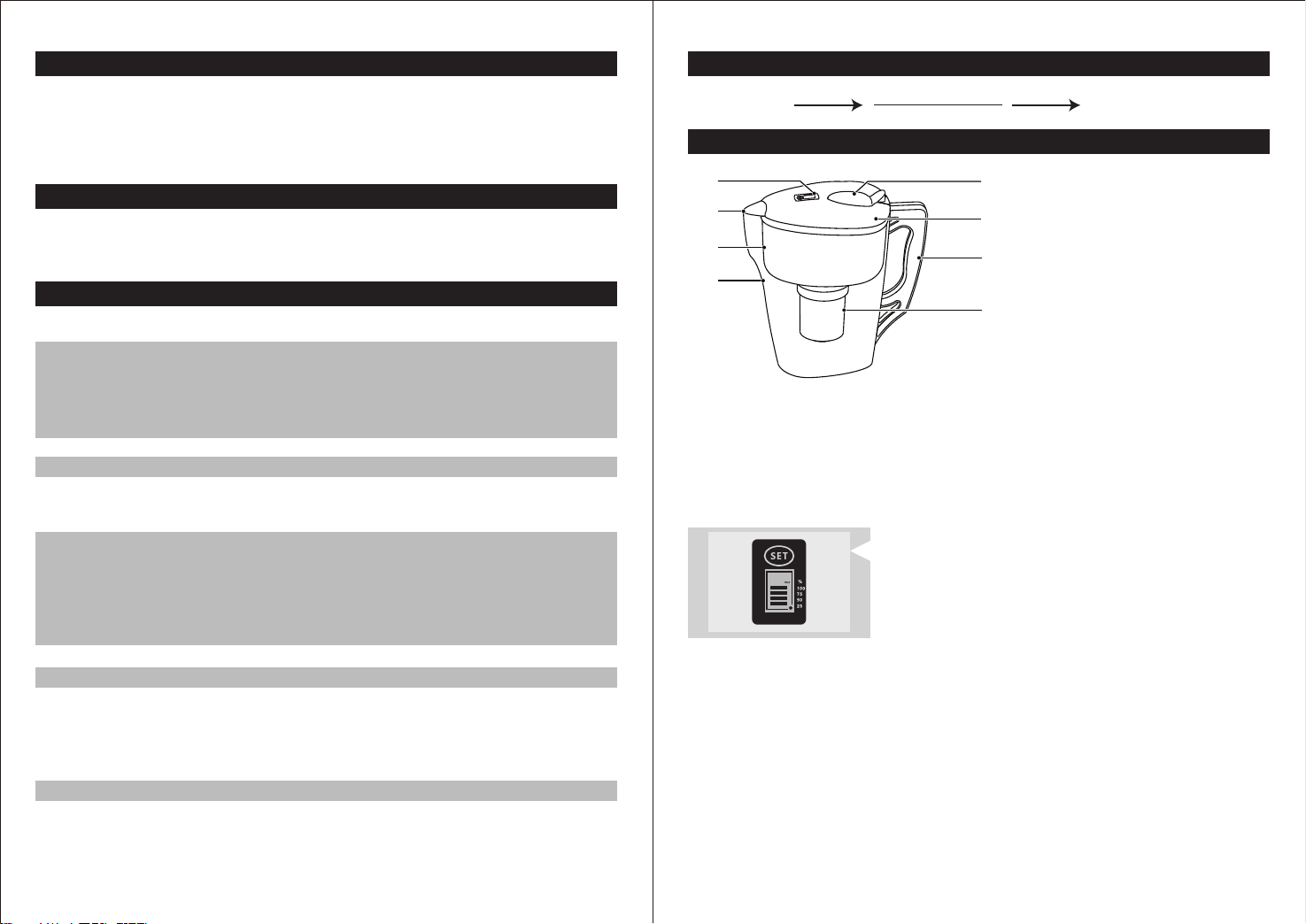
A 計時器*
B 淨水器出水口
C AS內桶
D AS外桶
E 小蓋
F 大蓋
G 手柄
H 濾芯*
濾芯更換計時器提醒
爲了維持濾芯的最佳狀態,Philips建議您每60天至少更
60
- 啓動:請持續3秒按住「SET」鍵,啓動計時器。
- 複位:首次使用需進行複位操作。持續8秒按住「SET」鍵,計時器將複位至60
Days狀態,重新開始計時。
- 正常複位:顯示爲00時,更換濾芯後,請持續3秒按住「SET」鍵,即可開始一個
新周期計時。
- 强制複位:中途任何時候更換濾芯,請持續8秒按住「SET」鍵均可强制進行複位。
- 暫停/取消暫停:啓動狀態下,持續3秒按住「SET」鍵, 計時器可以在暫停與取
消暫停之間切換。
- 計時器顯示說明:正常計時時,圓點會一直閃爍,數字和進度條會隨時間變化不斷
减少(顯示數字代表離下次更換濾芯的剩餘天數,對應百分比的進度條顯示爲剩餘
濾芯壽命的估值),初始狀態時數字顯示爲60Days,當數字顯示爲00、進度條消
失且點和框一直閃爍,用戶需要更換濾芯。
換一次濾芯。
本計時器爲60天倒計時器,全新的計時器應該是無顯示
狀態。
Page 4
使用方法
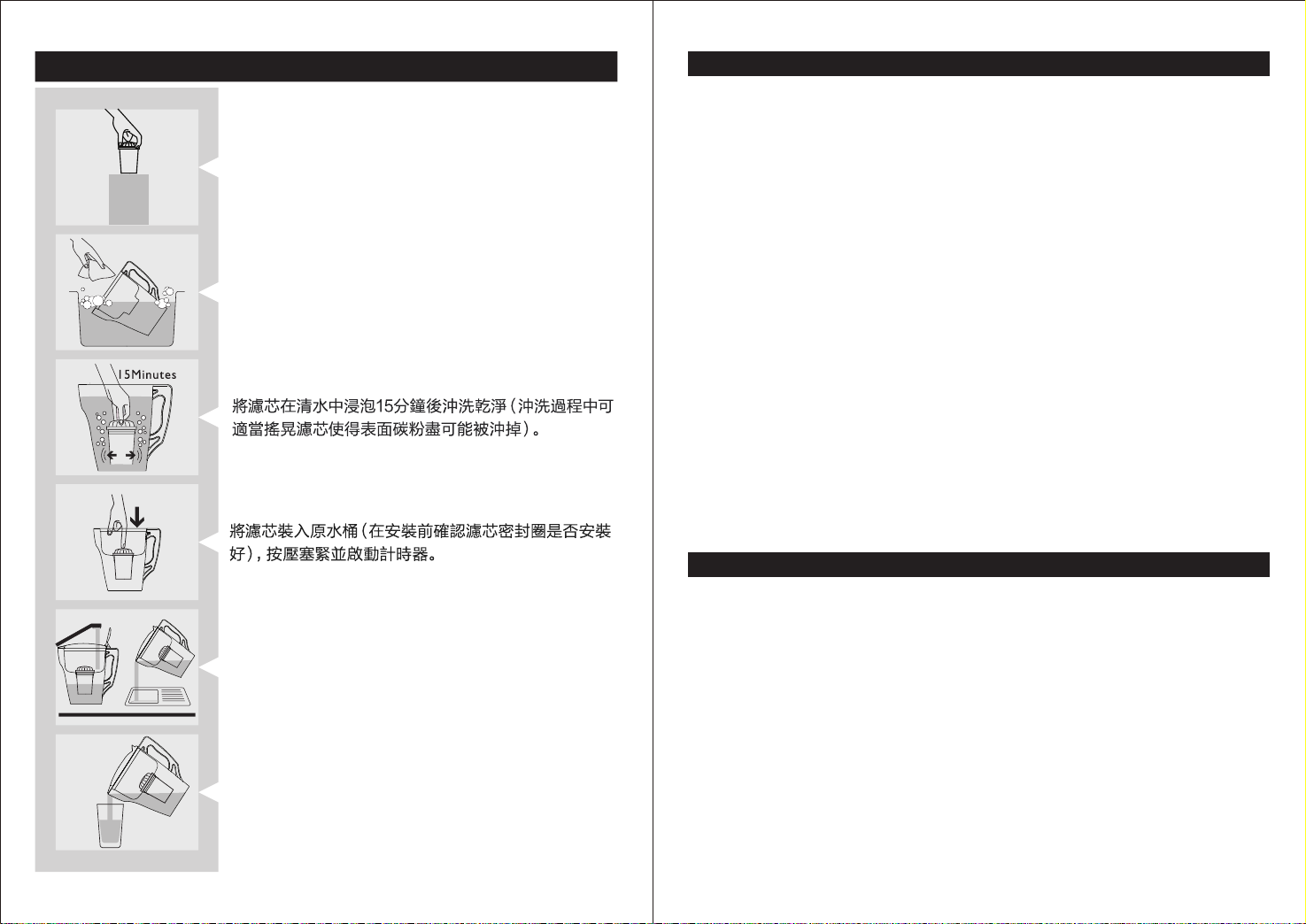
打開包裝,取出淨水器和濾芯。
清洗淨水器(注意:不能使用洗碗機清洗此產品)。
注意事項
警告
- 本産品使用原水水質爲政府供應食水(不明水源地請勿使用)。
- 應看管好兒童,避免他們將産品當作玩具。
- 請務必非常小心地處理濾芯,請勿修改或跌落濾芯。如果濾芯已經過修改、外部損
壞或跌落過,請加以更換。
- 本産品僅限於家用。
注意
- 請注意輕拿輕放,以免産品跌落造成砸傷。
- 請注意本産品中部分型號含一枚紐扣式電池。如果誤食, 它可能發生嚴重後果,甚
至導致死亡。
- 應將本産品放置在穩固、平坦、水平的表面上。
- 當原水桶中水未全部過濾完之前,請勿使用淨水桶中的淨水,以免原水被一起倒出。
- 本産品不能過濾除食水以外的其它液體。如果不小心將其它液體通過濾芯,濾芯可
能會堵塞。
- 當使用淨水器時,請勿使用38oC以上熱水。
- 如果不小心將熱水倒入了淨水器,淨水中會有暫時性異味味。
- 若食水中出現大量渾濁物(如清洗水桶後或長期未使用食水等情况),請在使用本
淨水器前流放一段時間的食水,可延長濾芯壽命。
- 請不要把産品放在火焰或高溫處,以免引起産品變形。
- 已過濾好的淨水請儘早使用。由於淨水中沒有餘氯,細菌容易繁殖。請裝入有
蓋的清潔容器內,並放入冰箱保存。
- 請勿冷凍本産品,會引起産品破損。
維護保養功能
2x
打開小蓋子,接入自來水後實施過濾。(啟動計時器
詳見P2頁濾芯更換計時器提醒。)將前兩次濾出的水
倒掉。
享受潔淨而美味的淨水。
3 4
- 使用水源應符合政府供應食水要求;
- 請勿將産品放置在陽光直射處;
- 假設每天使用3L,建議約2個月更換濾芯(可視使用頻率及水質延長或縮短);
- 請經常保持産品清潔,清潔時請取出濾芯,禁用洗滌劑和强揮發性溶劑清洗。
Page 5

故障判斷
故障現象
淨水味道異常
原水桶不下水
計時器不顯示
計時器顯示異常
幫助
問題
我不小心跌落了濾芯,
我不確定濾芯是否仍
能正常工作
我發現濾芯流出的過
濾水流速太慢,我想
增大濾芯開孔
我不知道淨水器可以
過濾什麽類型的水
我不知道在哪裏購買
替換濾芯
故障可能的原因
産品可能需要清潔
是否已超過濾芯更換時期
濾芯是否安裝到位
濾芯堵塞
計時器未啓動
計時器損壞
計時器電池用完
原因
濾芯很脆弱,必須小心
處理。如果濾芯跌落,
則可能無法繼續工作
濾芯只有一個小孔,這
是爲了保證濾芯的過濾
性能。
故障解决方法
請清潔淨水器
請更換濾芯
檢查矽膠圈是否破損和磨損,並
按正確方法安裝。
提取濾芯組件,在食水龍頭下反
復沖洗的同時,在手中抖動若干
次即可還原使用
按照使用說明啓動計時器
請與售後服務人員聯絡
請與售後服務人員聯絡
解决方法
如果濾芯跌落過,請予以更換,
並重置計時器按住計時器「SET」
鍵8秒,使計時器返回到60天重
新開始計時
請勿修改濾芯!修改操作可能損
壞濾芯,從而導致濾芯不能正常
工作
本淨水器只能用來淨化家中的食
水,因爲這屬於城市供水,經過
預先處理。切勿向淨水器中注入
溫度高於38℃的水。高於38℃
的水可能損壞水桶和濾芯
您可以在銷售淨水器的商店或
Philips 淨水器的主要門店購買替
換濾芯。
此免費服務不包括需時常更換的易耗零配件(凈水器濾芯、凈水壺濾芯、活性炭、
樹脂、超濾膜片等)、輔助裝置、運輸費及維修人員上門服務費。
維修時請攜同購買憑證正本方為有效。
以下情況將不能獲得免費服務
1. 使用不當引起的人爲損壞,例如接入不適當配件、不適當之安裝、不依說明書使
用、錯誤使用或疏忽而造成損壞等。
2. 因運輸及其他意外而造成之損壞。
3. 非經本公司認可之維修和改裝。
4. 其他因不可抗力(如自然災害、電壓異常等)造成的損壞。
5. 一般家庭以外使用(如工業、商業用等)而造成的損壞。
6. 正常使用引起的產品老化,磨損等,但不影響產品的正常使用。
該說明作為在規定期限及條件之內進行免費維修的宣貫,並不限制消費者的法定權利。
裝箱清單
主機
濾芯
說明書
1X
1X
1X
産品保固服務指南
從購買日期起,產品擁有兩年保固期。如果您需要更多資訊,請訪問:www.Philips.
com。
*在購買日期後兩年內,凡經本公司特約維修站人員確認為正常使用情況下,因制作
工藝或元器件造成之損壞,您都將獲得免費保修服務。
65
Page 6

溫馨提示:
弃置産品時,請不要將其與一般生活垃圾堆放在一起,應將其交給政
府指定的回收中心。這樣做有利於環保。
一次性電池含有可能污染環境的物質。請不要將一次性電池和普通生
活垃圾一同丟棄,而應交給官方指定的回收中心處理。
請妥善保管本使用說明書
7
Page 7
Product Functions
Philips pitchers AWP2900, AWP2921, AWP2920, AWP2950 and AWP2970
apply multi-stage ltration technology, which can reduce chlorine (odor and
taste) in the tap water. The ion exchange resin can soften the water and
reduce heavy metal, and the hollow ber membrane can remove bacteria in
the water.
Applicable Water
Municipal tap water
Main Technical Parameters
Model
Main components
and lifetime
Water ow rate
Total water capacity
Model
Main components
and lifetime
Water ow rate
Total water purication
Appearance dierence
Operating pressure
Applicable water
Philips AWP2950
Philips AWP2970
Granular Activated Carbon
Hollow Fiber Membrane
AS raw water tank
AS ltered water tank
ABS lter housing
0.15L/min
200 L
AWP2900
AWP2920
AWP2921
Granular Activated Carbon
Hydrogen ion exchange resin
Potassium ion exchange resin
AS raw water tank
AS ltered water tank
ABS lter housing
0.25L/min
200 L
AWP2900: White cover, without timer
AWP292 1: Dark blue cover, with timer
AWP2920: White cover, with timer
AWP2950: Dark blue cover, without timer
AWP2970: White cover, with timer
0 - 0.1MPa
Municipal tap water
60g
1 pc
1 pc
1 pc
1 set
45g
32.5g
32.5g
1 pc
1 pc
1 set
2 months
2 months
Water Treatment Process
Municipal tap water Filtered water
UF+GAC Filter
IEX+GAC Filter
8 9
Overview
A
B
C
D
*Notes:
1. AWP2900 and AWP2950 do not have lter cartridge timer.
2. AWP2900, AWP2921 and AWP2920 are with granular activated carbon
and ion exchange resin lter cartridge. (AWP200 AWP201)
3. AWP2950 and AWP2970 are with hollow ber membrane and granular
activated carbon lter cartridge. (AWP260 AWP261)
4. There may be dierences in the appearance between dierent models.
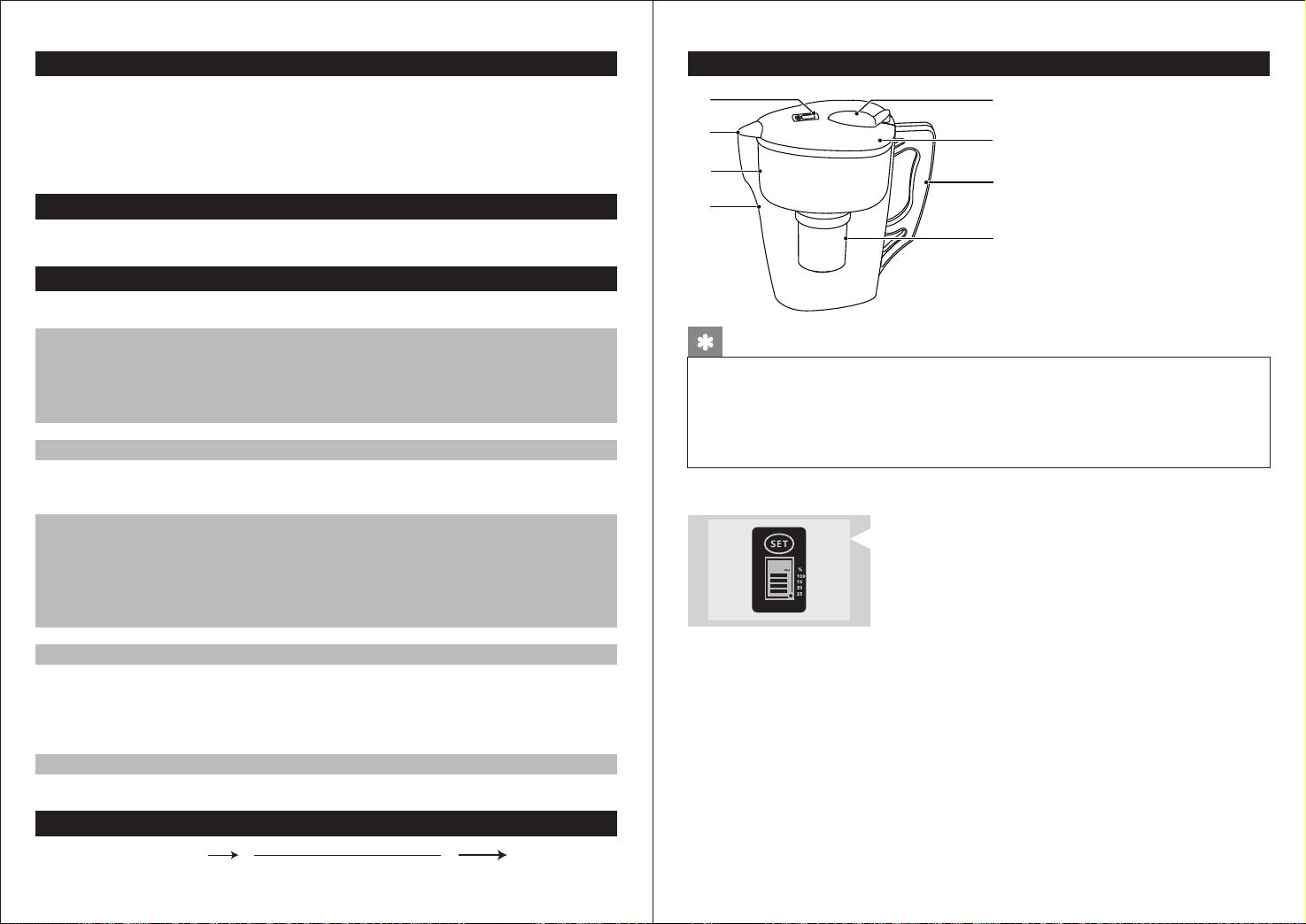
Timer for lter replacement
In order to maintain the best status of the lter
60
- Start: Please press "SET" button rmly for 3 seconds to activate the timer.
- Reset: Reset is required for the rst time. Press the "SET" button rmly for
8 seconds. The timer will be reset to 60 Days and start to calculate.
- Normal reset: When it displays 00, after the lter cartridge is replaced, press
the "SET" button rmly for 3 seconds to start a new cycle of countdown.
- Forced reset: For the replacement of lter cartridge at any time within a cycle
of timing, press "SET" button rmly for 8 seconds to force it to reset.
- Pause/Resume: When the countdown is started, press the "SET" button rmly
for 3 seconds and the timer can be switched between Pause and Resume.
- During countdown, the dot will be ashing, and the number of days & graph will
be decreasing. At the beginning it will show 60 days, and please replace the
lter when the timer shows 00.
cartridge, Philips recommends you to replace the
lter cartridge at least every 60 days.
This timer has a 60-day countdown. A new pitcher
with timer should be with no display until it is activated.
E
F
G
H
A Timer*
B FIltered water outlet
C AS raw water tank
D AS ltered water tank
E Tap water inlet
F Cover
G Handle*
H Filter cartridge*
Page 8
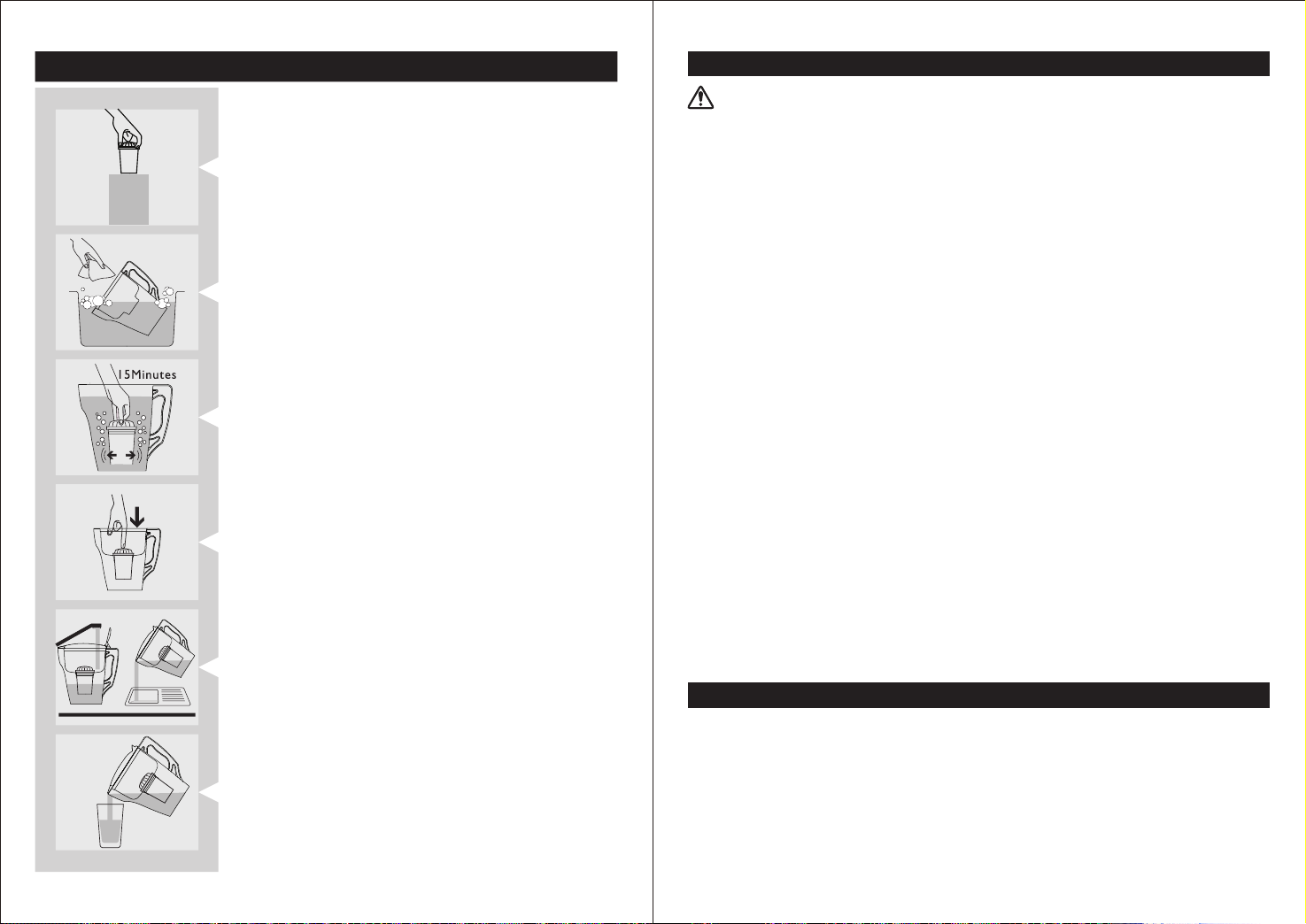
Instruction
2x
Open the box and take out the lter cartridge. It is
common that its surface may have some carbon
powder.
Clean the pitcher. Attention: cannot be washed in
the dishwasher.
Soak the lter cartridge in clean water for 15
minutes. Shake the lter cartridge slightly to wash
the carbon powder on the surface.
Conrm if the sealing ring is properly installed.
Firmly press down the lter cartridge for a tight
seal. Press the set button for 3 seconds to activate
the timer (applicable for models with timer).
Fill the pitcher with tap water. Discard your rst
two pitchers of ltered water.
Enjoy the clean and tasted ltered water.
10 11
Precautions
Warning
- Use municipal tap water as the source. Do not use any water of unknown
source.
- Keep the pitcher away from children.
- Be sure to handle the pitcher gently and carefully. Do not modify or drop the
lter cartridge. If it has been modied, externally damaged or dropped,
replace it.
- This product is intended for domestic use only.
Cautions
- Handle it gently to avoid damage.
- Please note that some models have a button battery. If eaten by mistake, it
can cause serious internal burning, even death.
- This product should be placed on a stable and level place.
- Do not pour the ltered water if there's still raw water in the raw water tank.
- This product does not lter liquids other than tap water. If you accidentally
pour other liquid through the lter cartridge, the ltered cartridge may
become blocked.
- Do not lter hot water above 38°C.
- If you accidentally pour hot water into the pitcher, there will be a temporary
odor in the ltered water.
- If there are a lot of impurities (after the container is washed or if it has not
been used for a long time), please let the tap water run through it for a while
before using the pitcher.
- Do not put the product in a high temperature environment to avoid
deformation of the product.
- The ltered water should be consumed as soon as possible. Since there is no
chlorine in the ltered water, bacteria are easy to grow. Pour the ltered water
in a clean container with a cover and store it in the refrigerator.
- Do not put this product in the freezer, as it may cause damage to the product.
Maintenance
- The water being put in the pitcher should meet the requirements of
municipal tap water.
- Do not place the product in direct sunlight.
- Assuming that the daily consumption is 3L, Philips recommends to replace
the lter cartridge every 60 days (actual lifetime of the lter cartridge may
vary depending on use frequency and quality of the local tap water.
- Please keep the product clean. When cleaning it, take out the lter cartridge.
Do not use detergent when cleaning it.
Page 9
Trouble Shooting
Guarantee & Service
Trouble
Strange taste of
the ltered water
Water cannot run
through the lter.
The timer does not
display anything.
The timer displays
abnormally.
Help
Problem
I accidentally
dropped the lter
and I am not sure
if the lter can work
normally.
I found that the lter
water ow rate is too
slow, and I would like
to enlarge the water
exit.
Possible cause
The product may need
to be cleaned.
The lter cartridge reaches
the end of lifetime.
The silicon sealing ring is
not properly installed.
The lter cartridge is
blocked.
The timer is not started.
The timer is damaged.
The timer is out of battery.
Cause Solutions
The main purpose to
have only 1 small hole
in the lter is to ensure
the purication
performance.
Solution
Please clean the pitcher.
Please replace the lter
cartridge.
Check if the silicone gasket is
damaged or worn, and install
it in the correct way
Take out the lter and rinse it.
Shake it for some times and
put it back to the pitcher.
Follow instructions to start
the timer.
Please contact after-sales
service support.
Please contact after-sales
service support.
If the lter has been dropped,
please change a new one and
reset the timer by pressing
“SET” button for 8 seconds.
Then the new counting cycle
will start.
Do not modify the lter as it
may cause damage.
This product includes a two-year warranty from the date of purchase. If you
need more information, please visit: www.Philips.com.
Within two years from the date of purchase, you will receive free warranty
service for any damage caused by the manufacturing process or components
under normal operation conrmed by our maintenance service.
The warranty service does not include frequent replaced consumable
components (water purier lter, pitcher lter, granular activated carbon, ion
exchange resin, hollow ber membrane, etc.),auxiliary devices, transportation fee and door-to-door service.
Please show the proof of purchase to the service personnel during maintenance.
You cannot receive free warranty service under the following conditions:
1. Damage by improper operation, such as improper components connection,
improper installation, deprived of manual use, misoperation.
2. Negligence and damage because of transportation or other accident.
3. Maintenance and modication without approval.
4. Other damage caused by force majeure (such as natural disaster,
abnormal voltage, etc).
5. Damage caused by general use outside home (e.g. industrial and
commercial use).
6. Aging, wear and tear caused by normal operation of the product without
aecting normal operation of the product.
This statement serves as a publicity for free maintenance within the specied
time limit and conditions, and does not limit the legal rights of consumers.
I am not sure what
type of water can
be used with the
pitcher.
I do not know where
I can buy a new lter.
This pitcher can only lter tap
water or water that has been
properly treated. Do not pour
hot water (>38℃) into the
pitcher as it may damage the
lter.
You can buy replacement lter
at the store that sells this
pitcher, or other stores that sell
Philips water ltration products.
Packing List
Pitcher
Filter cartridge
User Manual
1312
1X
1X
1X
Page 10

Reminders:
Before disposal, do not place the product together with household
waste. You should hand it over to a government-designated
recycling center. By doing this, you help to preserve the environment.
Disposable batteries contain substances that may pollute the
environment. Before disposal, do not place the disposable
battery together with household waste. You should hand it over
to a government-designated recycling center.
Please keep the User Manual properly.
14
 Loading...