

Page 1
For internal use only PHILIPS
ISSUE AS2000.01 (00-01-21)
Published by:
Service Depar tment Audio Systems
LINE OF BUSINESS AUDIO SYSTEMS
01.01 TYPENUMBER(S): CDR570, CDR930, CDR770
INFORMATION : Correction to the Service Manual, Dealer Diagnostics
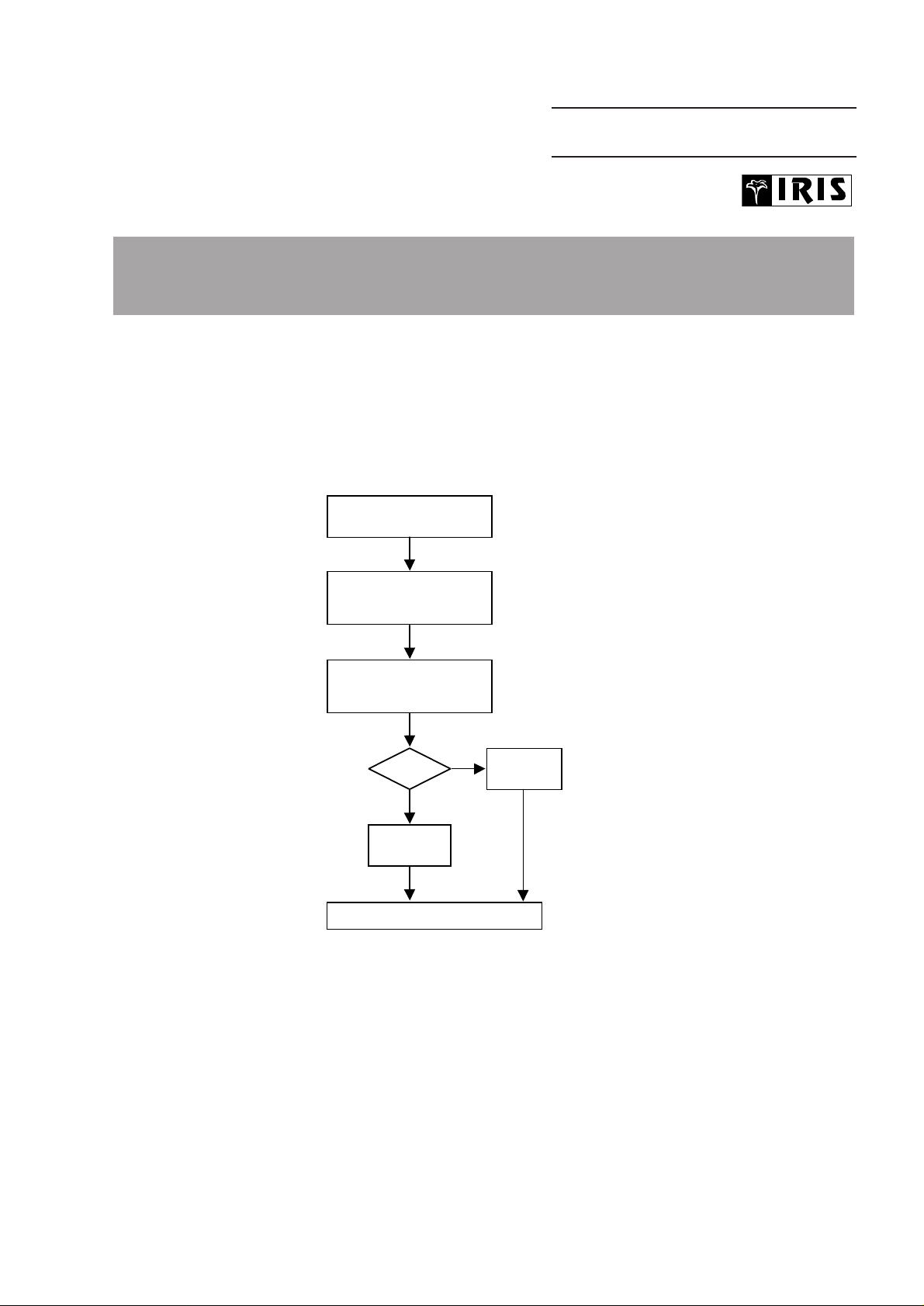
Figure 6.1 is wrong.The correct buttons for entering the test are
“REWIND” + “FFWD” (instead of “PLAY” + “STOP”).
REMARKS :
01.02 TYPENUMBER(S): FW320C/21, FW380C/21, FW390C/21, FW545C/21, FW548C/21,
FW768P/21, FW870C/21, FW890P/21, FW898W/21
INFORMATION : The following part has been added to the service par ts list:
Pos Service code Article decription
––––––––––––––––––––––––––––––––––––––––––––––
386 4822 263 21092 ADAPTOR PLUG 6A 250V
REMARKS :
DEALER DIAGNOSTICS
(status of player)
Press <REWIND> + <FFWD>
simultaneously and switch
ON unit
If power ON,
switch power OFF
Set OK?
To end test, switch OFF unit
“
Set displays
PASSED
”
Display blinks
“BUSY”
during test
YES
NO
Set displays
“ERROR”
SERVICE NEWSLETTER
Service Newsletter 2000 – Audio Systems 1/3
Page 2
01.03 TYPENUMBER(S): FW540C, FW545C, FW548C, FW548V, FW555C, FW585C, FW590C,
FW595C, FW748P, FW768P, FW798W
SYMPTOM :
Digital hum (whistling tone) is audible from the display in quiet
environment.
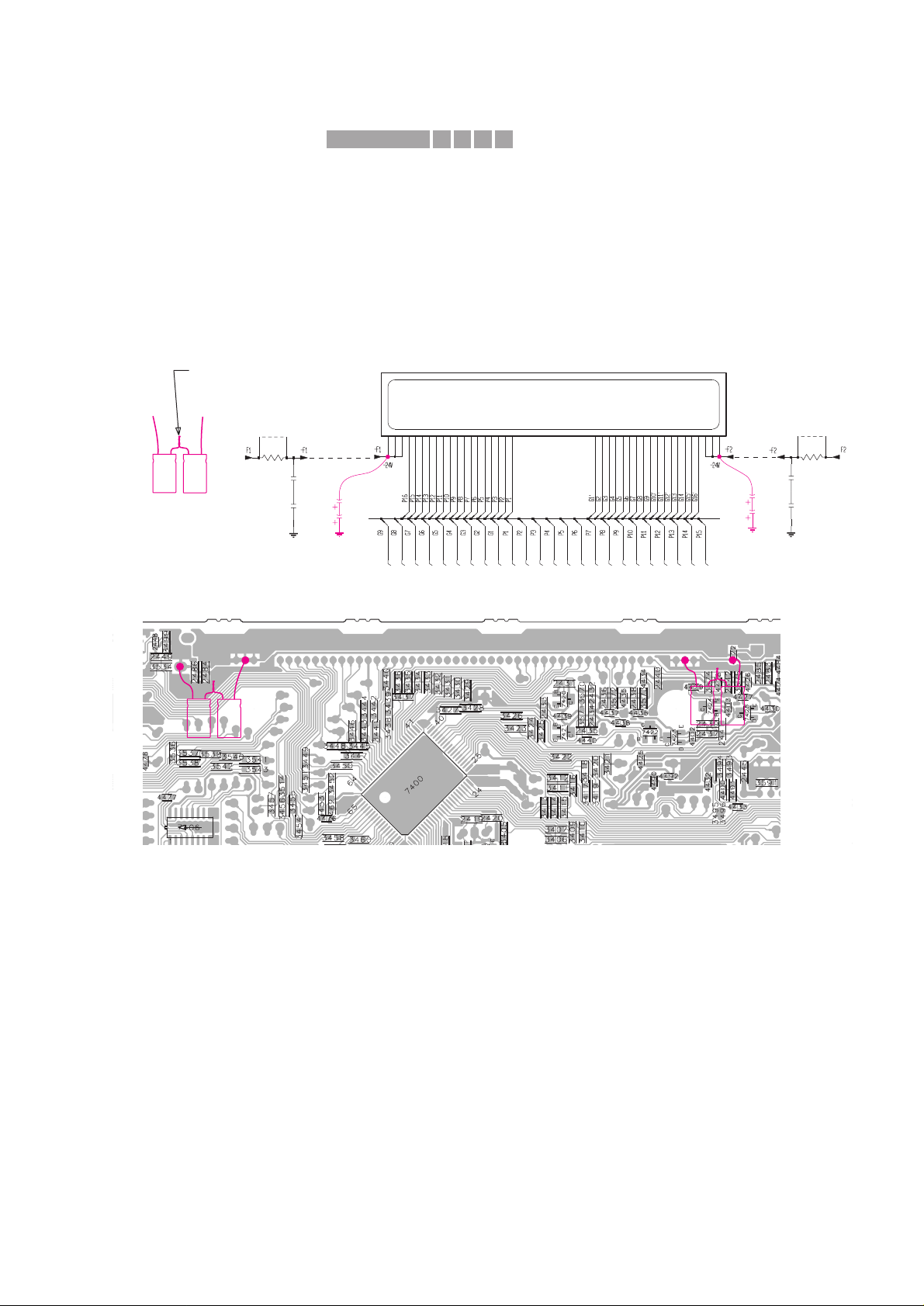
CURE : The source of the noise comes from the filtering SMD capacitors
2483 - 2486 for the FTD display supply -F1 and -F2.
The problem is resolved by adding 2 x 2 elcaps of 4,7µF
(4822 124 40769) in series across the existing SMDs capacitors.
The capacitors can by soldered onto the copperside of the Front
board as indicated in the circuit and SMD layout view below.
Rework procedure:
1) Dismantle the Rear Cover, Cover CDC & CDC Module.
2) Prepare 2 sets of 2 x 4,7µF elcaps (4822 124 40769) in series.
3) Place an insulation tape onto the Front board (area under the
elcaps) to prevent the elcaps and their leads from short-circuiting
to the surrounding SMD components and pads.
4) Position the elcaps horizontally over the insulation tape and solder
them to the copper pads as shown.
Make sure that the elcaps are close to the Front board so that
there is no contact to the moving parts of the CDC module.
5) Re-assemble the CDC Module, Cover CDC and Rear Cover.
REMARKS :
3430
3448
1u
2486
3438
3434
41 42 4344 45 46 47 48 51 52 536 7 8 9 26 27 28293 30 3132 33 34 35 36 37 38 39 4011 1213 14 15 16 17 18 192 202122232425
1415
110
3446
3442
3447
D
1u
2483
3443
3451
3452
3431
3436
3439
3437
3435
2485
1u
D
1R
3560
3449
9401
3561
1R
3433
9400
3432
3444
3450
3440
3441
3445
3429
2484
1u
FTD Display
D
4u7
4u7
D
4u7
4u7
Portion of the Front Circuit
Portion of the Front Board (SMD side)
-
-
+
+
-
-
+
+
-
-
+
+
Pre-prepared
elcos in series
Twist & soldered together
X411IRIS CODE
Service Newsletter 2000 – Audio Systems 2/3
Page 3

01.04 TYPENUMBER(S): FW548V/21K, FW548V/21M
INFORMATION : The following part has been added to the service par ts list:
Pos Service code Article decription
––––––––––––––––––––––––––––––––––––––––––––––
1106 3139 118 77600 MODULE MPEG99 ECO
REMARKS :
01.05 TYPENUMBER(S): FW680V
INFORMATION : Correction to Service Manual, Electrical par tslist page 6-6
Codenumber for the microprocessor pos.7401 should read:
4822 209 13243 microprocessor not for /22
4822 209 13242 microrpocessor only for /22
REMARKS :
01.06 TYPENUMBER(S): FW830C, FW840C, FW870C, FW878C, FW890P, FW898W
INFORMATION : The following resistor has been changed on the front board to
improve the data reliability to the EEPROM:
3596 4822 117 12521 68Ω 1% 0,1W
REMARKS :
01.07 TYPENUMBER(S): FW830C, FW840C, FW870C, FW878C, FW890P, FW898W
SYMPTOM :
CD does not play and the display shows “DISC NOT FINALIZED”.
CURE : The problem happens mainly with Brazil’s Millennium disc and is
resolved by upgrading the software of the Front microprocessor IC
(pos. 7413) to version 20.
The service code for the new IC reads 9965 000 02901.
REMARKS :
01.08 TYPENUMBER(S): FW830C, FW840C, FW870C, FW878C, FW890P, FW898W
INFORMATION : Correction of Service Newsletter, item AS99.10.02
The correct buttons for entering the Service Test Progam are
“AUX” + “PRESET UP” instead of “AUX” + “PLAY”.
REMARKS :
415CIRIS CODE
Service Newsletter 2000 – Audio Systems 3/3
 Loading...