

Page 1
Service Manual
32” LCD TV
chassis PL13.9
Contents
32PFL4508/F7 PHILIPS (Serial No.: ME1)
This service manual contains information of different types of models.
Make sure to refer to the section describing your model.
© 2013 Funai Electric Co., Ltd.
All rights reserved. No part of this manual may be reproduced, copied, transmitted, disseminated, transcribed,
downloaded or stored in any storage medium, in any form or for any purpose without the express prior written
consent of Funai. Furthermore, any unauthorized commercial distribution of this manual or any revision hereto
is strictly prohibited.
Information in this document is subject to change without notice. Funai reserves the right to change the content
herein without the obligation to notify any person or organization of such changes.
with the design is a registered trademark of Funai Electric Co., Ltd and may not be used in any way
without the express written consent of Funai. All other trademarks used herein remain the exclusive property of
their respective owners. Nothing contained in this manual should be construed as granting, by implication or
otherwise, any license or right to use any of the trademarks displayed herein. Misuse of any trademarks or any
other content in this manual is strictly prohibited. Funai shall aggressively enforce its intellectual property rights
to the fullest extent of the law.
121219
Page 2

IMPORTANT SAFETY NOTICE
The LCD panel is manufactured to provide many years of useful life.
Occasionally a few non active pixels may appear as a tiny spec of color.
This is not to be considered a defect in the LCD screen.
Proper service and repair is important to the safe, reliable operation of all
P&F Equipment. The service procedures recommended by P&F and
described in this service manual are effective methods of performing
service operations. Some of these service special tools should be used
when and as recommended.
It is important to note that this service manual contains various CAUTIONS
and NOTICES which should be carefully read in order to minimize the risk
of personal injury to service personnel. The possibility exists that improper
service methods may damage the equipment. It also is important to
understand that these CAUTIONS and NOTICES ARE NOT EXHAUSTIVE.
P&F could not possibly know, evaluate and advice the service trade of all
conceivable ways in which service might be done or of the possible
hazardous consequences of each way. Consequently, P&F has not
undertaken any such broad evaluation. Accordingly, a servicer who uses a
service procedure or tool which is not recommended by P&F must first use
all precautions thoroughly so that neither his safety nor the safe operation
of the equipment will be jeopardized by the service method selected.
Page 3

TABLE OF CONTENTS
Specifications . . . . . . . . . . . . . . . . . . . . . . . . . . . . . . . . . . . . . . . . . . . . . . . . . . . . . . . . . . . . . . . . . . . . . . . . . . . 1-1
Important Safety Precautions . . . . . . . . . . . . . . . . . . . . . . . . . . . . . . . . . . . . . . . . . . . . . . . . . . . . . . . . . . . . . . . 2-1
Standard Notes for Servicing . . . . . . . . . . . . . . . . . . . . . . . . . . . . . . . . . . . . . . . . . . . . . . . . . . . . . . . . . . . . . . . 3-1
Cabinet Disassembly Instructions . . . . . . . . . . . . . . . . . . . . . . . . . . . . . . . . . . . . . . . . . . . . . . . . . . . . . . . . . . . 4-1
Electrical Adjustment Instructions . . . . . . . . . . . . . . . . . . . . . . . . . . . . . . . . . . . . . . . . . . . . . . . . . . . . . . . . . . . 5-1
How to Initialize the LCD TV . . . . . . . . . . . . . . . . . . . . . . . . . . . . . . . . . . . . . . . . . . . . . . . . . . . . . . . . . . . . . . . . 6-1
Firmware Renewal Mode . . . . . . . . . . . . . . . . . . . . . . . . . . . . . . . . . . . . . . . . . . . . . . . . . . . . . . . . . . . . . . . . . . 7-1
Troubleshooting. . . . . . . . . . . . . . . . . . . . . . . . . . . . . . . . . . . . . . . . . . . . . . . . . . . . . . . . . . . . . . . . . . . . . . . . . . 8-1
Block Diagrams . . . . . . . . . . . . . . . . . . . . . . . . . . . . . . . . . . . . . . . . . . . . . . . . . . . . . . . . . . . . . . . . . . . . . . . . . 9-1
Schematic Diagrams / CBA and Test Points . . . . . . . . . . . . . . . . . . . . . . . . . . . . . . . . . . . . . . . . . . . . . . . . . . . 10-1
Wiring Diagrams . . . . . . . . . . . . . . . . . . . . . . . . . . . . . . . . . . . . . . . . . . . . . . . . . . . . . . . . . . . . . . . . . . . . . . . . 11-1
Exploded Views . . . . . . . . . . . . . . . . . . . . . . . . . . . . . . . . . . . . . . . . . . . . . . . . . . . . . . . . . . . . . . . . . . . . . . . . 12-1
Parts List . . . . . . . . . . . . . . . . . . . . . . . . . . . . . . . . . . . . . . . . . . . . . . . . . . . . . . . . . . . . . . . . . . . . . . . . . . . . . 13-1
Revision History . . . . . . . . . . . . . . . . . . . . . . . . . . . . . . . . . . . . . . . . . . . . . . . . . . . . . . . . . . . . . . . . . . . . . . . . 14-1
Page 4
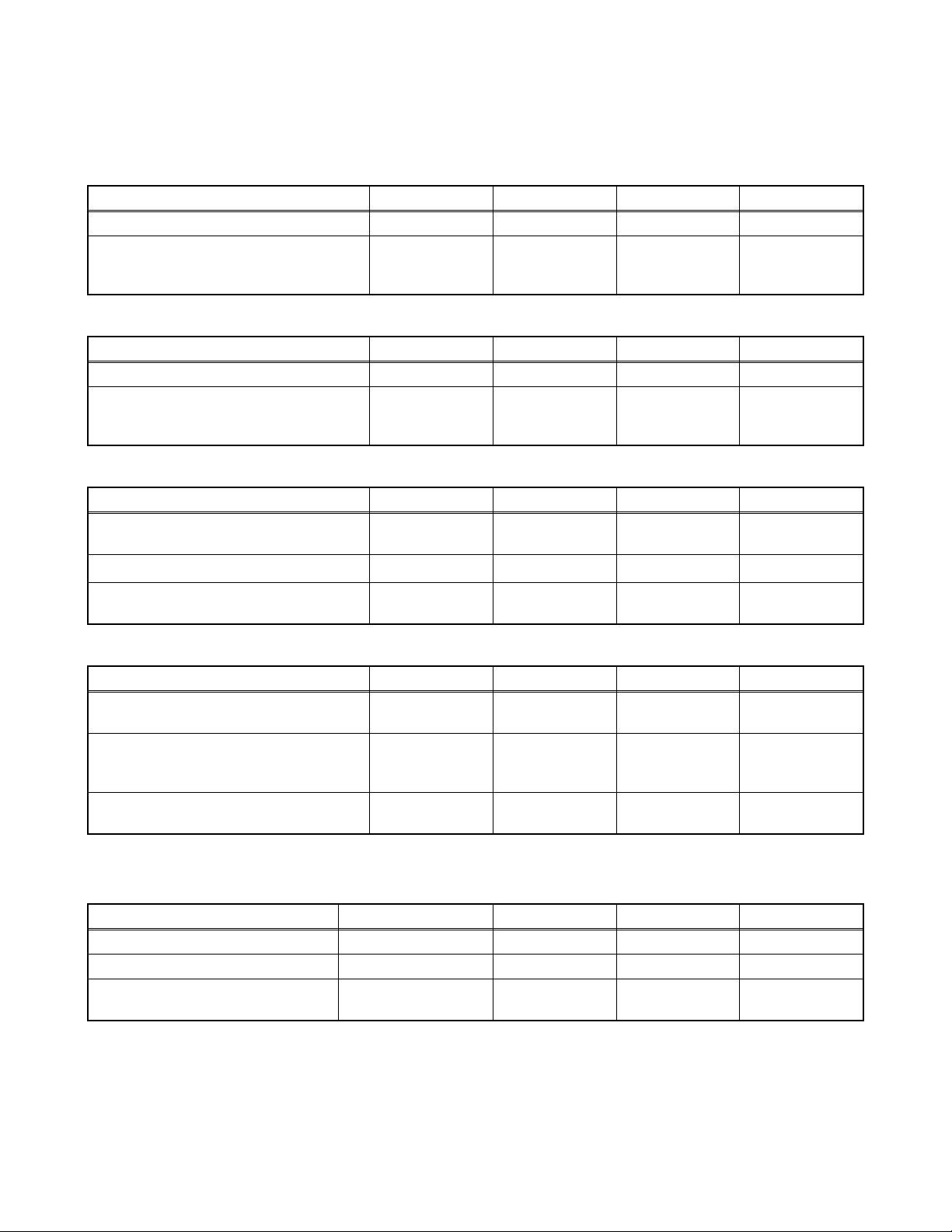
SPECIFICATIONS
< TUNER / NTSC >
Description Condition Unit Nominal Limit
1. AFT Pull-In Range --- MHz ±2.3 ±2.1
TV.ch.4
2. Synchronizing Sens.
CA.ch.31
CA.ch.87
< TUNER / ATSC >
Description Condition Unit Nominal Limit
1. Received Freq. Range (-28dBm) --- kHz --- ±100
ch.4
2. ATSC Dynamic Range (min / max)
ch.10
ch.41
< LCD PANEL >
Description Condition Unit Nominal Limit
1. Native Pixel Resolution
2. Brightness (w / filter) ---
3. Viewing Angle
Horizontal
Verti cal
Horizontal
Verti cal
dBμ
dBμ
dBμ
dBm
dBm
dBm
pixels
pixels
cd/m
°
°
18
18
18
---
---
---
1366
768
2
280 ---
-88 to 88
-88 to 88
20
20
23
-76/0
-76/0
-76/+4
---
---
---
---
< VIDEO >
Description Condition Unit Nominal Limit
1. Over Scan
2. Color Temperature
3. Resolution (composite video)
Horizontal
Verti cal
--x
y
Horizontal
Verti cal
%
%
°K 12000
line
line
5
5
0.272
0.278
400
350
5±5
5±5
--±3%
±3%
---
---
< AUDIO >
All items are measured across 8 Ω load at speaker output terminal with L.P.F.
Description Condition Unit Nominal Limit
1.
Audio MAX Output (ATSC 0dBfs)
2. Audio Distortion (NTSC) 500mW: Lch/Rch % 0.5/0.5 2.0/2.0
3. Audio Freq. Response (NTSC)
Lch/Rch W 8.0/8.0 7.0/7.0
-
6dB: Lch
-
6dB: Rch
Hz
Hz
70 to 10 k
70 to 10 k
100 to 8 k
100 to 8 k
1-1 PL13.9SP
Page 5
IMPORTANT SAFETY PRECAUTIONS
ALSO TEST WITH
PLUG REVERSED
USING AC
ADAPTER PLUG
AS REQUIRED
TEST ALL EXPOSED
METAL SURFACES
READING SHOULD
NOT BE ABOVE 0.5 mA
EARTH
GROUND
_
DEVICE
LEAKAGE
CURRENT
TESTER
+
BEING
TESTED
Prior to shipment from the factory, our products are strictly inspected for recognized product safety and electrical
codes of the countries in which they are to be sold. However, in order to maintain such compliance, it is equally
important to implement the following precautions when a set is being serviced.
Safety Precautions for LCD TV
Circuit
1. Before returning an instrument to the
customer, always make a safety check of the
entire instrument, including, but not limited to, the
following items:
a. Be sure that no built-in protective devices are
defective and have been defeated during
servicing. (1) Protective shields are provided
on this chassis to protect both the technician
and the customer. Correctly replace all missing
protective shields, including any removed for
servicing convenience. (2) When reinstalling
the chassis and/or other assembly in the
cabinet, be sure to put back in place all
protective devices, including but not limited to,
nonmetallic control knobs, insulating
fishpapers, adjustment and compartment
covers/shields, and isolation resistor/capacitor
networks. Do not operate this instrument or
permit it to be operated without all
protective devices correctly installed and
functioning. Servicers who defeat safety
features or fail to perform safety checks
may be liable for any resulting damage.
b. Be sure that there are no cabinet openings
through which an adult or child might be able to
insert their fingers and contact a hazardous
voltage. Such openings include, but are not
limited to, (1) spacing between the Liquid
Crystal Panel and the cabinet mask, (2)
excessively wide cabinet ventilation slots, and
(3) an improperly fitted and/or incorrectly
secured cabinet back cover.
c. Antenna Cold Check - With the instrument AC
plug removed from any AC source, connect an
electrical jumper across the two AC plug
prongs. Place the instrument AC switch in the
on position. Connect one lead of an ohmmeter
to the AC plug prongs tied together and touch
the other ohmmeter lead in turn to each tuner
antenna input exposed terminal screw and, if
applicable, to the coaxial connector. If the
measured resistance is less than 1.0 megohm
or greater than 5.2 megohm, an abnormality
exists that must be corrected before the
instrument is returned to the customer. Repeat
this test with the instrument AC switch in the off
position.
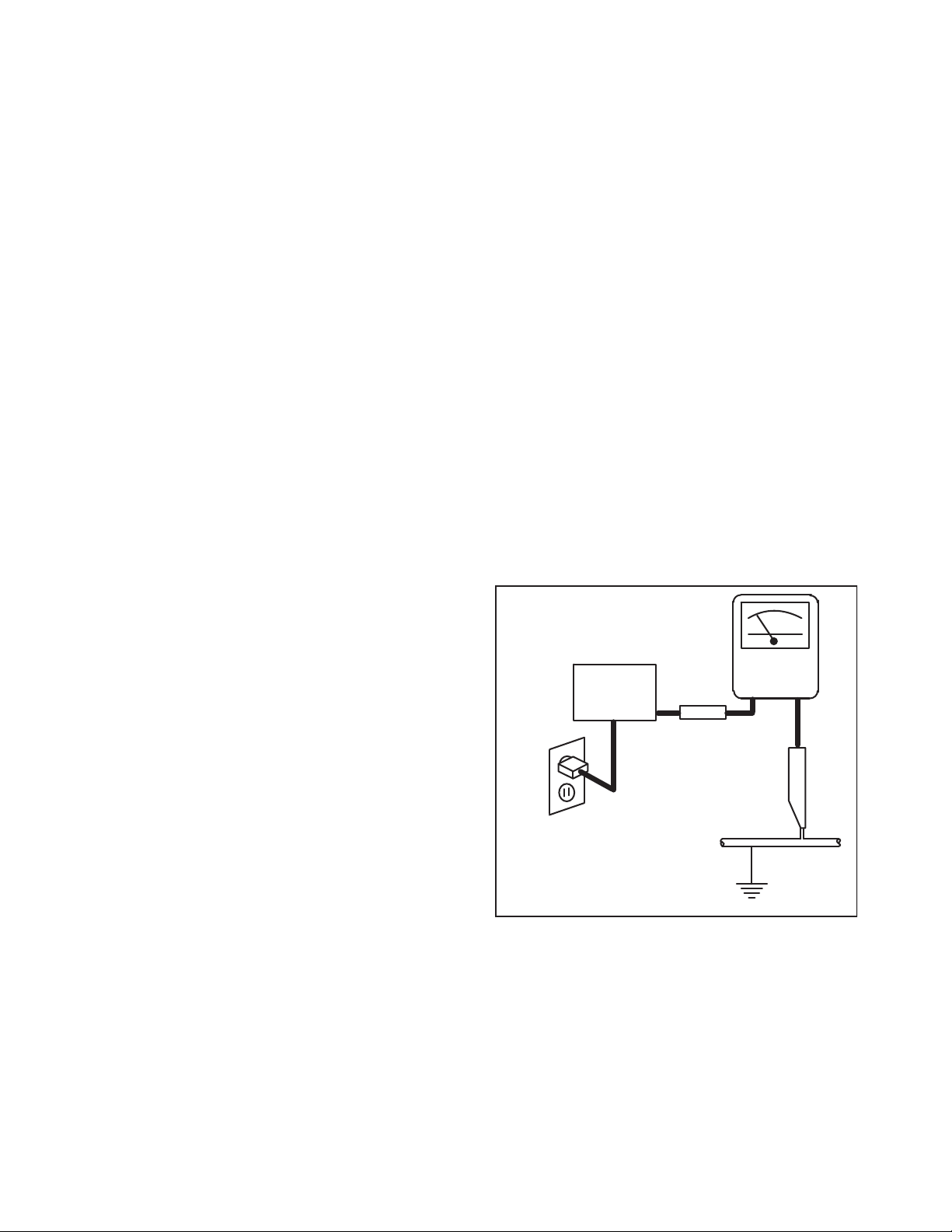
d. Leakage Current Hot Check - With the
instrument completely reassembled, plug the
AC line cord directly into a 120 V AC outlet. (Do
not use an isolation transformer during this
test.) Use a leakage current tester or a
metering system that complies with American
National Standards Institute (ANSI) C101.1
Leakage Current for Appliances and
Underwriters Laboratories (UL) 1410, (50.7).
With the instrument AC switch first in the on
position and then in the off position, measure
from a known earth ground (metal water pipe,
conduit, etc.) to all exposed metal parts of the
instrument (antennas, handle brackets, metal
cabinet, screw heads, metallic overlays, control
shafts, etc.), especially any exposed metal
parts that offer an electrical return path to the
chassis. Any current measured must not
exceed 0.5 milli-ampere. Reverse the
instrument power cord plug in the outlet and
repeat the test.
ANY MEASUREMENTS NOT WITHIN THE
LIMITS SPECIFIED HEREIN INDICATE A
POTENTIAL SHOCK HAZARD THAT MUST
BE ELIMINATED BEFORE RETURNING THE
2. Read and comply with all caution and safety-
2-1 LTVN_ISP
INSTRUMENT TO THE CUSTOMER OR
BEFORE CONNECTING THE ANTENNA OR
ACCESSORIES.
related notes on or inside the receiver cabinet, on
the receiver chassis, or on the Liquid Crystal
Panel.
Page 6

3. Design Alteration Warning - Do not alter or add
to the mechanical or electrical design of this TV
receiver. Design alterations and additions,
including, but not limited to circuit modifications
and the addition of items such as auxiliary audio
and/or video output connections, might alter the
safety characteristics of this receiver and create a
hazard to the user. Any design alterations or
additions will void the manufacturer's warranty and
may make you, the servicer, responsible for
personal injury or property damage resulting
therefrom.
4. Hot Chassis Warning a. Some TV receiver chassis are electrically
connected directly to one conductor of the AC
power cord and maybe safety-serviced without
an isolation transformer only if the AC power
plug is inserted so that the chassis is
connected to the ground side of the AC power
source. To confirm that the AC power plug is
inserted correctly, with an AC voltmeter,
measure between the chassis and a known
earth ground. If a voltage reading in excess of
1.0 V is obtained, remove and reinsert the AC
power plug in the opposite polarity and again
measure the voltage potential between the
chassis and a known earth ground.
b. Some TV receiver chassis normally have 85V
AC(RMS) between chassis and earth ground
regardless of the AC plug polarity. This chassis
can be safety-serviced only with an isolation
transformer inserted in the power line between
the receiver and the AC power source, for both
personnel and test equipment protection.
c. Some TV receiver chassis have a secondary
ground system in addition to the main chassis
ground. This secondary ground system is not
isolated from the AC power line. The two
ground systems are electrically separated by
insulation material that must not be defeated or
altered.
5. Observe original lead dress. Take extra care to
assure correct lead dress in the following areas: a.
near sharp edges, b. near thermally hot parts-be
sure that leads and components do not touch
thermally hot parts, c. the AC supply, d. high
voltage, and, e. antenna wiring. Always inspect in
all areas for pinched, out of place, or frayed wiring.
Check AC power cord for damage.
6. Components, parts, and/or wiring that appear to
have overheated or are otherwise damaged
should be replaced with components, parts, or
wiring that meet original specifications.
Additionally, determine the cause of overheating
and/or damage and, if necessary, take corrective
action to remove any potential safety hazard.
7. Product Safety Notice - Some electrical and
mechanical parts have special safety-related
characteristics which are often not evident from
visual inspection, nor can the protection they give
necessarily be obtained by replacing them with
components rated for higher voltage, wattage, etc.
Parts that have special safety characteristics are
identified by a # on schematics and in parts lists.
Use of a substitute replacement that does not
have the same safety characteristics as the
recommended replacement part might create
shock, fire, and/or other hazards. The product's
safety is under review continuously and new
instructions are issued whenever appropriate.
Prior to shipment from the factory, our products
are strictly inspected to confirm they comply with
the recognized product safety and electrical codes
of the countries in which they are to be sold.
However, in order to maintain such compliance, it
is equally important to implement the following
precautions when a set is being serviced.
2-2 LTVN_ISP
Page 7

Precautions during Servicing
A. Parts identified by the # symbol are critical for
safety.
Replace only with part number specified.
B. In addition to safety, other parts and assemblies
are specified for conformance with regulations
applying to spurious radiation. These must also be
replaced only with specified replacements.
Examples: RF converters, RF cables, noise
blocking capacitors, and noise blocking filters, etc.
C. Use specified internal wiring. Note especially:
1) Wires covered with PVC tubing
2) Double insulated wires
3) High voltage leads
D. Use specified insulating materials for hazardous
live parts. Note especially:
1) Insulation Tape
2) PVC tubing
3) Spacers
4) Insulators for transistors.
E. When replacing AC primary side components
(transformers, power cord, etc.), wrap ends of
wires securely about the terminals before
soldering.
F. Observe that the wires do not contact heat
producing parts (heat sinks, oxide metal film
resistors, fusible resistors, etc.)
G. Check that replaced wires do not contact sharp
edged or pointed parts.
H. When a power cord has been replaced, check that
11~13 lb (5~6 kg) of force in any direction will not
loosen it.
I. Also check areas surrounding repaired locations.
J. Use care that foreign objects (screws, solder
droplets, etc.) do not remain inside the set.
K. When connecting or disconnecting the internal
connectors, first, disconnect the AC plug from the
AC supply outlet.
L. When installing parts or assembling the cabinet
parts, be sure to use the proper screws and
tighten certainly.
2-3 LTVN_ISP
Page 8
Safety Check after Servicing
Examine the area surrounding the repaired location for damage or deterioration. Observe that screws, parts and
wires have been returned to original positions. Afterwards, perform the following tests and confirm the specified
values in order to verify compliance with safety standards.
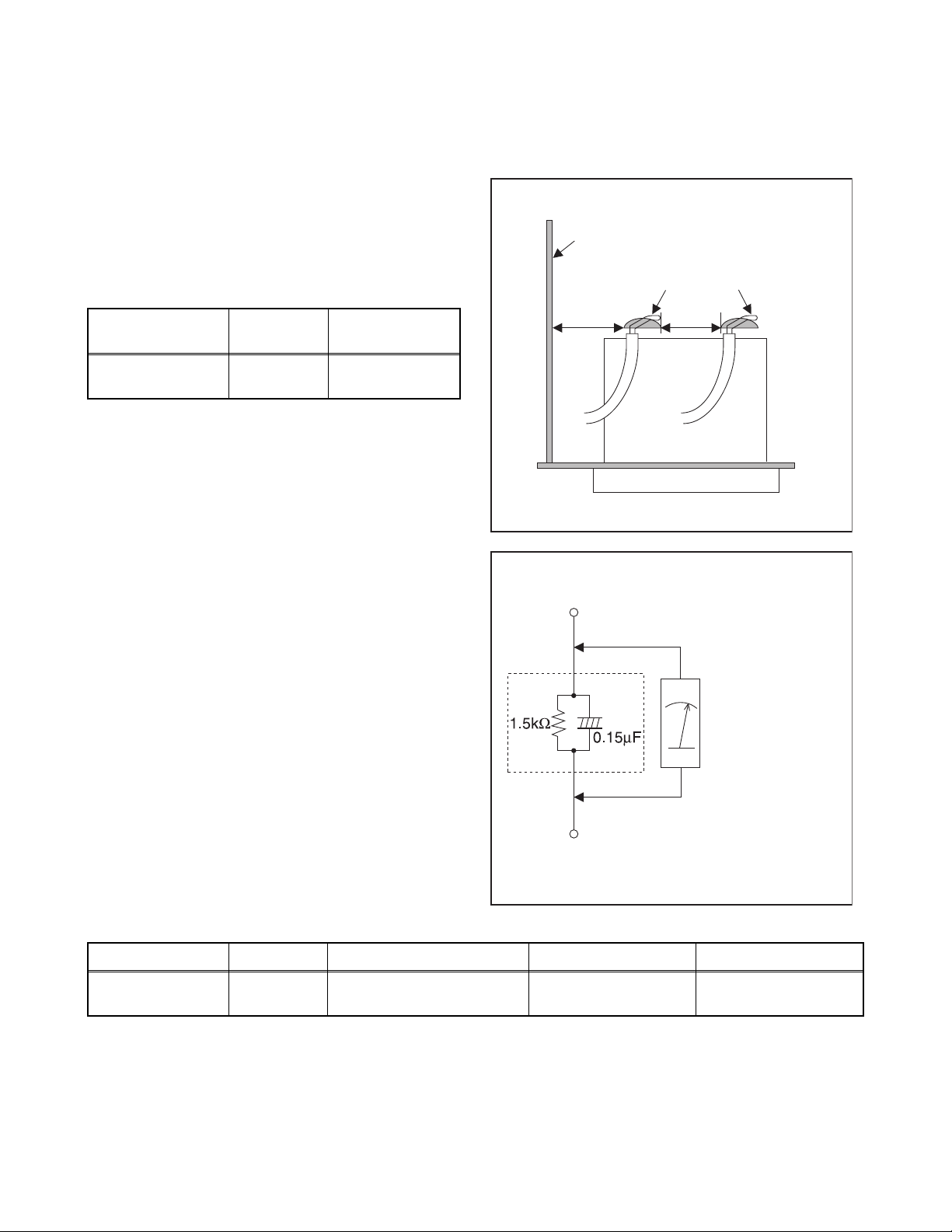
1. Clearance Distance
When replacing primary circuit components, confirm
specified clearance distance (d) and (d') between
soldered terminals, and between terminals and
surrounding metallic parts. (See Fig. 1)
Table 1: Ratings for selected area
Chassis or Secondary Conductor
Primary Circuit
AC Line Voltage Region
110 to 130 V
Note: This table is unofficial and for reference only. Be
sure to confirm the precise values.
U.S.A. or
Canada
Clearance
Distance (d), (d’)
≥ 3.2 mm
(0.126 inches)
2. Leakage Current Test
Confirm the specified (or lower) leakage current
between B (earth ground, power cord plug prongs) and
externally exposed accessible parts (RF terminals,
antenna terminals, video and audio input and output
terminals, microphone jacks, earphone jacks, etc.) is
lower than or equal to the specified value in the table
below.
Measuring Method: (Power ON)
Insert load Z between B (earth ground, power cord plug
prongs) and exposed accessible parts. Use an AC
voltmeter to measure across both terminals of load Z.
See Fig. 2 and following table.
d' d
Fig. 1
Exposed Accessible Part
Z
AC Voltmeter
(High Impedance)
Earth Ground
B
Power Cord Plug Prongs
Fig. 2
Table 2: Leakage current ratings for selected areas
AC Line Voltage Region Load Z Leakage Current (i) Earth Ground (B) to:
110 to 130 V
Note: This table is unofficial and for reference only. Be sure to confirm the precise values.
U.S.A. or
Canada
0.15 μF CAP. & 1.5 kΩ RES.
Connected in parallel
2-4 LTVN_ISP
i ≤ 0.5 mA rms
Exposed accessible
parts
Page 9
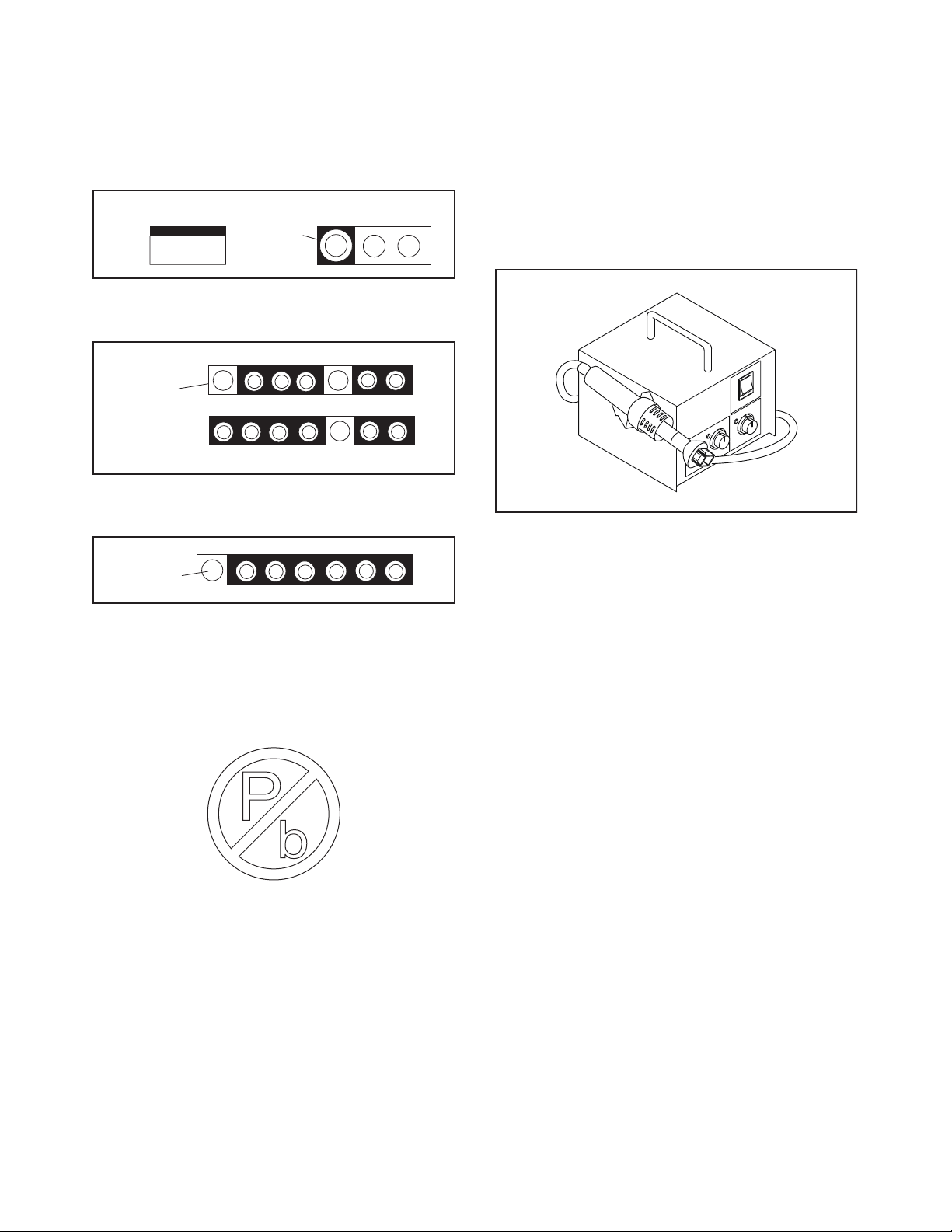
STANDARD NOTES FOR SERVICING
Top View
Out
In
Bottom View
Input
5
10
Pin 1
Pin 1
Fig. S-1-1
Circuit Board Indications
1. The output pin of the 3 pin Regulator ICs is
indicated as shown.
2. For other ICs, pin 1 and every fifth pin are
indicated as shown.
3. The 1st pin of every male connector is indicated as
shown.
Pb (Lead) Free Solder
Pb free mark will be found on PCBs which use Pb
free solder. (Refer to figure.) For PCBs with Pb free
mark, be sure to use Pb free solder. For PCBs
without Pb free mark, use standard solder.
Pb free mark
How to Remove / Install Flat Pack-IC
1. Removal
With Hot-Air Flat Pack-IC Desoldering Machine:
1. Prepare the hot-air flat pack-IC desoldering
machine, then apply hot air to the Flat Pack-IC
(about 5 to 6 seconds). (Fig. S-1-1)
2. Remove the flat pack-IC with tweezers while
applying the hot air.
3. Bottom of the flat pack-IC is fixed with glue to the
CBA; when removing entire flat pack-IC, first apply
soldering iron to center of the flat pack-IC and heat
up. Then remove (glue will be melted). (Fig. S-1-6)
4. Release the flat pack-IC from the CBA using
tweezers. (Fig. S-1-6)
CAUTION:
1. The Flat Pack-IC shape may differ by models. Use
an appropriate hot-air flat pack-IC desoldering
machine, whose shape matches that of the Flat
Pack-IC.
2. Do not supply hot air to the chip parts around the
flat pack-IC for over 6 seconds because damage
to the chip parts may occur. Put masking tape
around the flat pack-IC to protect other parts from
damage. (Fig. S-1-2)
3-1 TVN_SN
Page 10
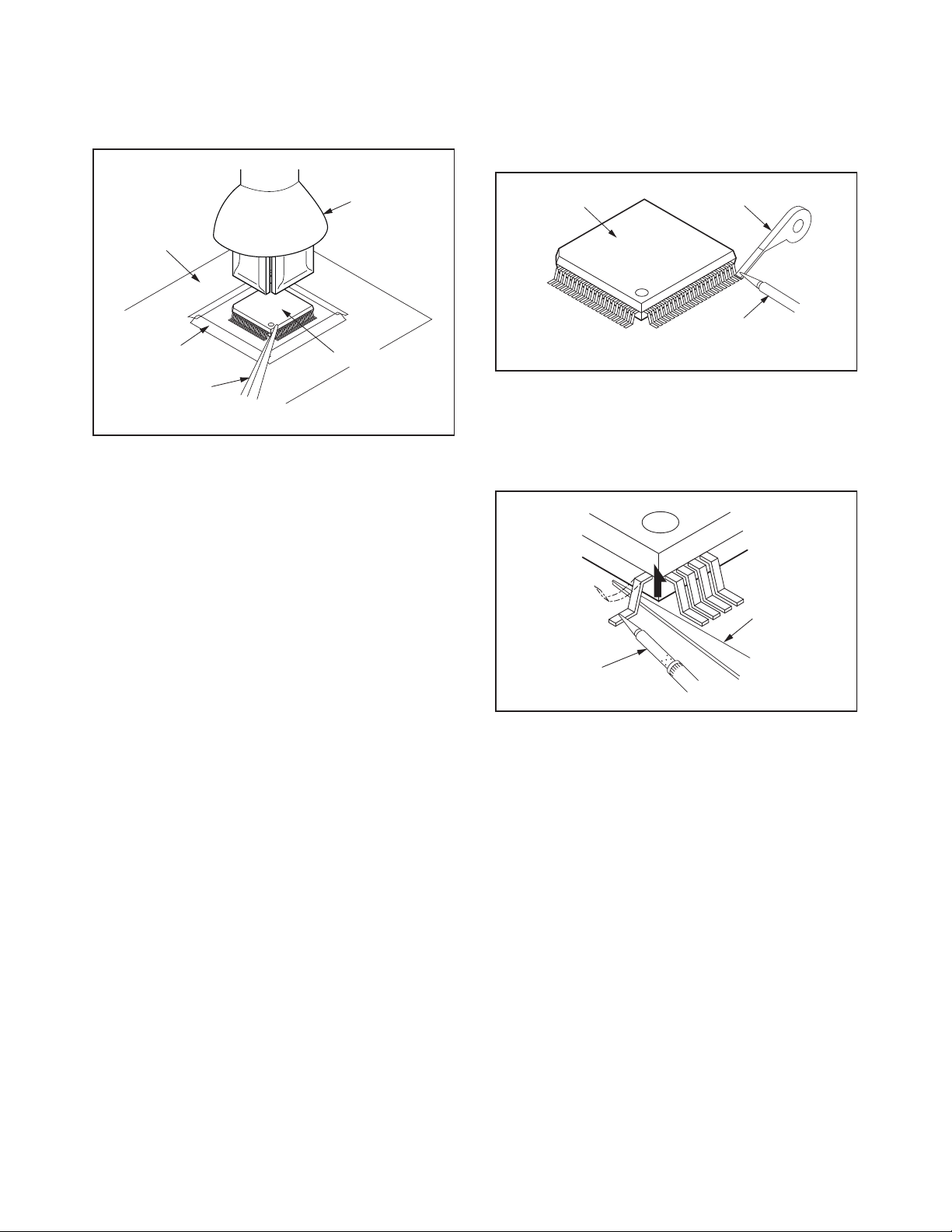
3. The flat pack-IC on the CBA is affixed with glue, so
Hot-air
Flat Pack-IC
Desoldering
Machine
CBA
Flat Pack-IC
Tweezers
Masking
Tape
Fig. S-1-2
Flat Pack-IC
Desoldering Braid
Soldering Iron
Fig. S-1-3
Fine Tip
Soldering Iron
Sharp
Pin
Fig. S-1-4
be careful not to break or damage the foil of each
pin or the solder lands under the IC when
removing it.
With Soldering Iron:
1. Using desoldering braid, remove the solder from
all pins of the flat pack-IC. When you use solder
flux which is applied to all pins of the flat pack-IC,
you can remove it easily. (Fig. S-1-3)
2. Lift each lead of the flat pack-IC upward one by
one, using a sharp pin or wire to which solder will
not adhere (iron wire). When heating the pins, use
a fine tip soldering iron or a hot air desoldering
machine. (Fig. S-1-4)
3. Bottom of the flat pack-IC is fixed with glue to the
CBA; when removing entire flat pack-IC, first apply
soldering iron to center of the flat pack-IC and heat
up. Then remove (glue will be melted). (Fig. S-1-6)
4. Release the flat pack-IC from the CBA using
tweezers. (Fig. S-1-6)
3-2 TVN_SN
Page 11
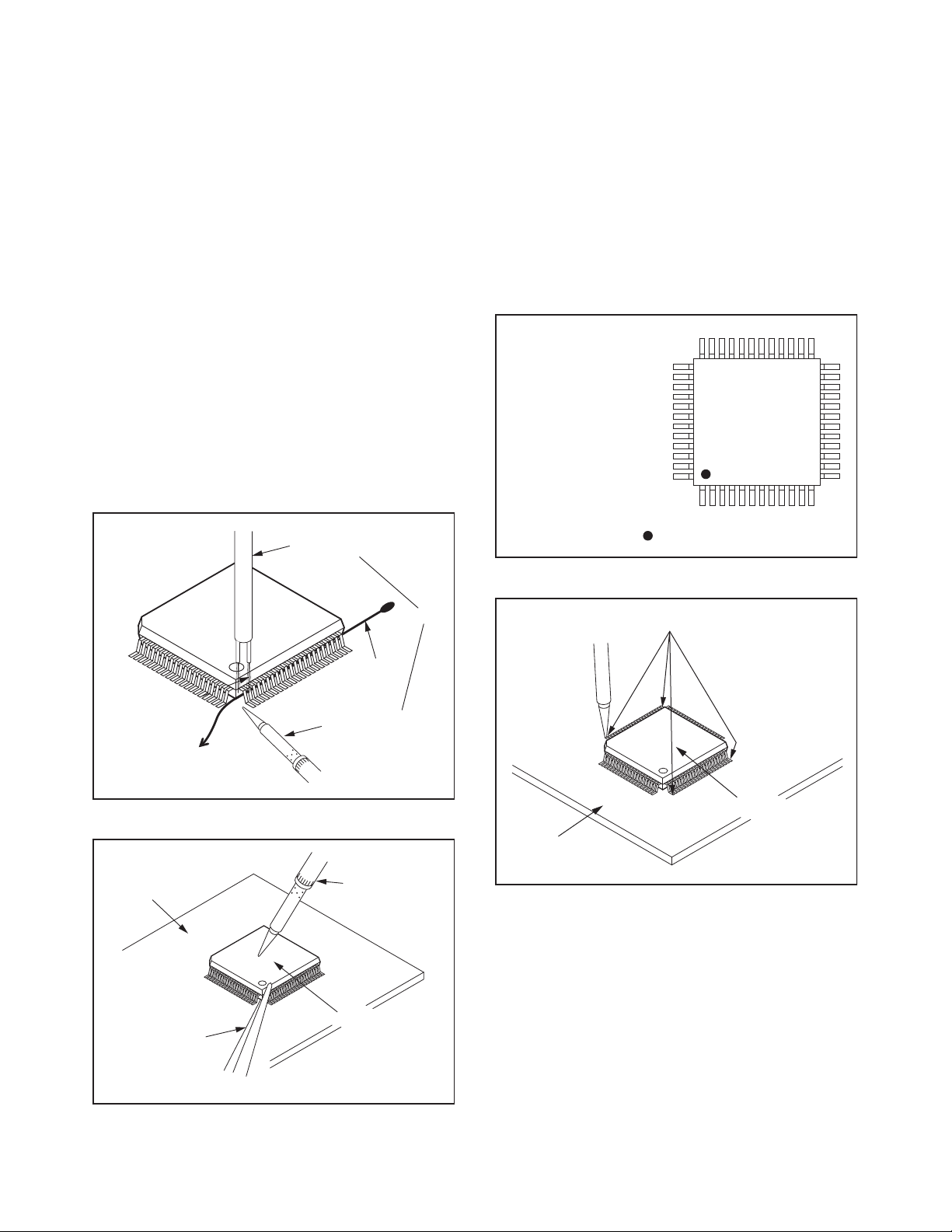
With Iron Wire:
To Solid
Mounting Point
Soldering Iron
Iron Wire
or
Hot Air Blower
Fig. S-1-5
Fine Tip
Soldering Iron
CBA
Flat Pack-IC
Tweezers
Fig. S-1-6
Example :
Pin 1 of the Flat Pack-IC
is indicated by a " " mark.
Fig. S-1-7
1. Using desoldering braid, remove the solder from
all pins of the flat pack-IC. When you use solder
flux which is applied to all pins of the flat pack-IC,
you can remove it easily. (Fig. S-1-3)
2. Affix the wire to a workbench or solid mounting
point, as shown in Fig. S-1-5.
3. While heating the pins using a fine tip soldering
iron or hot air blower, pull up the wire as the solder
melts so as to lift the IC leads from the CBA
contact pads as shown in Fig. S-1-5.
4. Bottom of the flat pack-IC is fixed with glue to the
CBA; when removing entire flat pack-IC, first apply
soldering iron to center of the flat pack-IC and heat
up. Then remove (glue will be melted). (Fig. S-1-6)
5. Release the flat pack-IC from the CBA using
tweezers. (Fig. S-1-6)
Note: When using a soldering iron, care must be
taken to ensure that the flat pack-IC is not
being held by glue. When the flat pack-IC is
removed from the CBA, handle it gently
because it may be damaged if force is applied.
2. Installation
1. Using desoldering braid, remove the solder from
the foil of each pin of the flat pack-IC on the CBA
so you can install a replacement flat pack-IC more
easily.
2. The “ I ” mark on the flat pack-IC indicates pin 1.
(See Fig. S-1-7.) Be sure this mark matches the
pin 1 on the PCB when positioning for installation.
Then presolder the four corners of the flat pack-IC.
(See Fig. S-1-8.)
3. Solder all pins of the flat pack-IC. Be sure that
none of the pins have solder bridges.
Presolder
Flat Pack-IC
CBA
Fig. S-1-8
3-3 TVN_SN
Page 12
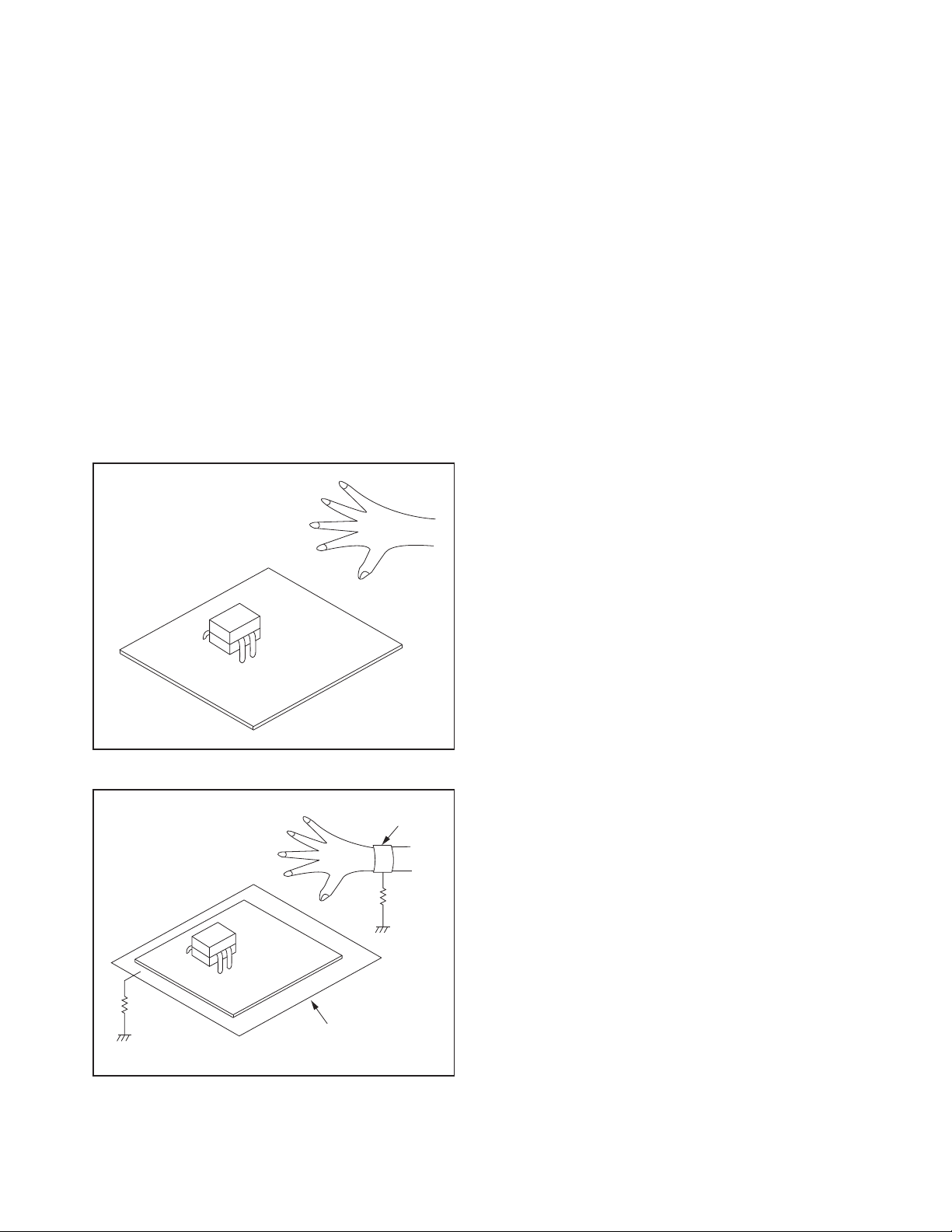
Instructions for Handling Semi-
<Incorrect>
CBA
Grounding Band
Conductive Sheet or
Copper Plate
1MΩ
1MΩ
<Correct>
CBA
conductors
Electrostatic breakdown of the semi-conductors may
occur due to a potential difference caused by
electrostatic charge during unpacking or repair work.
1. Ground for Human Body
Be sure to wear a grounding band (1 MΩ) that is
properly grounded to remove any static electricity that
may be charged on the body.
2. Ground for Workbench
Be sure to place a conductive sheet or copper plate
with proper grounding (1 MΩ) on the workbench or
other surface, where the semi-conductors are to be
placed. Because the static electricity charge on
clothing will not escape through the body grounding
band, be careful to avoid contacting semi-conductors
with your clothing.
3-4 TVN_SN
Page 13
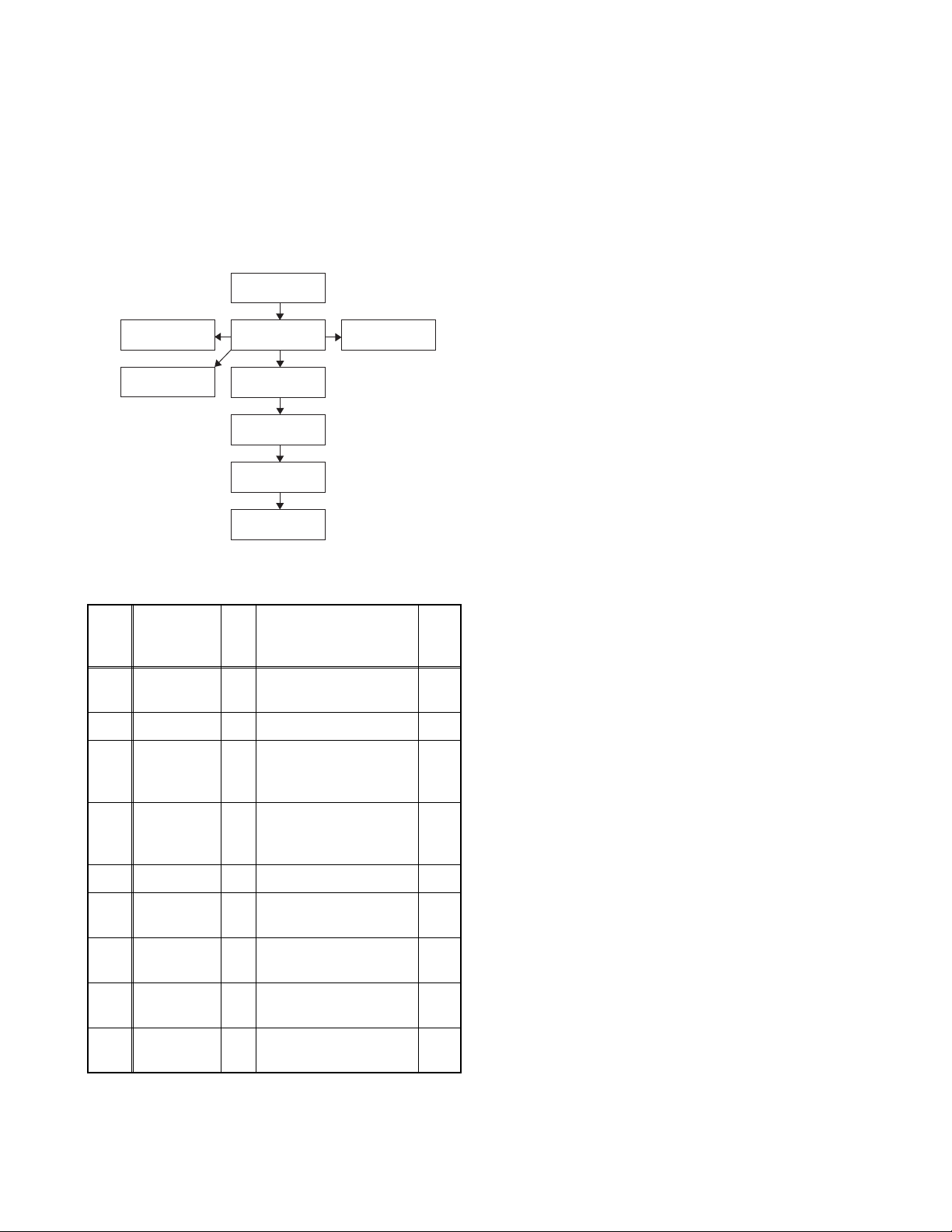
CABINET DISASSEMBLY INSTRUCTIONS
[1] Stand Base
Assembly
[2] Rear Cover
[3] Power Supply
CBA
[5] Speaker
[8] X-PCB Cover
[4] Digital Main
CBA Unit
[7] LCD Panel
Assembly
[9] Front Cabinet
[6] Function
CBA Unit
1. Disassembly Flowchart
This flowchart indicates the disassembly steps for the
cabinet parts and the CBA in order to gain access to
items to be serviced. When reassembling, follow the
steps in reverse order. Bend, route and dress the
cables as they were.
2. Disassembly Method
Step/
Loc.
Part
No.
Stand Base
[1]
Assembly
[2] Rear Cover D1 8(S-2), 2(S-3), (S-4) ---
Power
[3]
Supply
CBA
Fig.
No.
Removal Note
D1 3(S-1),Stand Neck ---
D2D54(S-5), CN601,
CN501, CN1001
---
Note:
(1) Order of steps in procedure. When reassembling,
follow the steps in reverse order. These numbers
are also used as the Identification (location) No. of
parts in figures.
(2) Parts to be removed or installed.
(3) Fig. No. showing procedure of part location
(4) Identification of parts to be removed, unhooked,
unlocked, released, unplugged, unclamped, or
desoldered.
P = Spring, L = Locking Tab, S = Screw,
H = Hex Screw, CN = Connector
e.g. 2(S-2) = two Screws of (S-2),
2(L-2) = two Locking Tabs of (L-2)
(5) Refer to the following "Reference Notes in the
Ta bl e ."
Precautions concerning the LCD Panel
Assembly:
1. When you disassemble/re-assemble the X-PCB
Cover
• Be careful not to break the hooks. If you pull with too
much force, the hooks may be damaged.
• When disassembling, first hold the top and bottom of
the X-PCB Cover on both ends and then moving
toward the center, lift up the top side to detach the
hooks.
• When assembling be careful not to damage the X-
PCB Board or the COF(Chip On Film).
• Make sure the hooks are securely in place when
re-assembling.
• The screw tightening torque must be 6kgf·cm
(5.2lb·in).
[4]
[5] Speaker D3 --------------- ---
[6]
[7]
[8]
[9]
↓
(1)
Digital Main
CBA UnitD2D5
Function
CBA UnitD3D5
LCD Panel
Assembly
X-PCB
Cover
Front
Cabinet
↓
(2)
D4 --------------- ---
D4 2(S-8) 1
D4
(3)
4(S-6), CN3013,
CN3101, CN3801,
Jack Holder
2(S-7), Leading Edge
Cover, Shield Plate
2(S-9), Decoration
Plate
↓
↓
(4)
---
Cabinet or Function CBA Unit
• Be careful not to break the hooks. If you pull with too
much force, the hooks may be damaged.
2. When you disassemble/re-assemble the Front
2
• When disassembling, first detach the hooks on each
end on the bottom side, then detach the remaining
hooks.
• Make sure the hooks are securely in place when
assembling.
• Be careful not to scratch the display panel when
assembling.
2
• Make sure the Function CBA Unit and Shield Plate
are securely in place when re-assembling.
↓
(5)
• The screw tightening torque must be 6kgf·cm
(5.2lb·in).
4-1 PL13.9_DC
Page 14
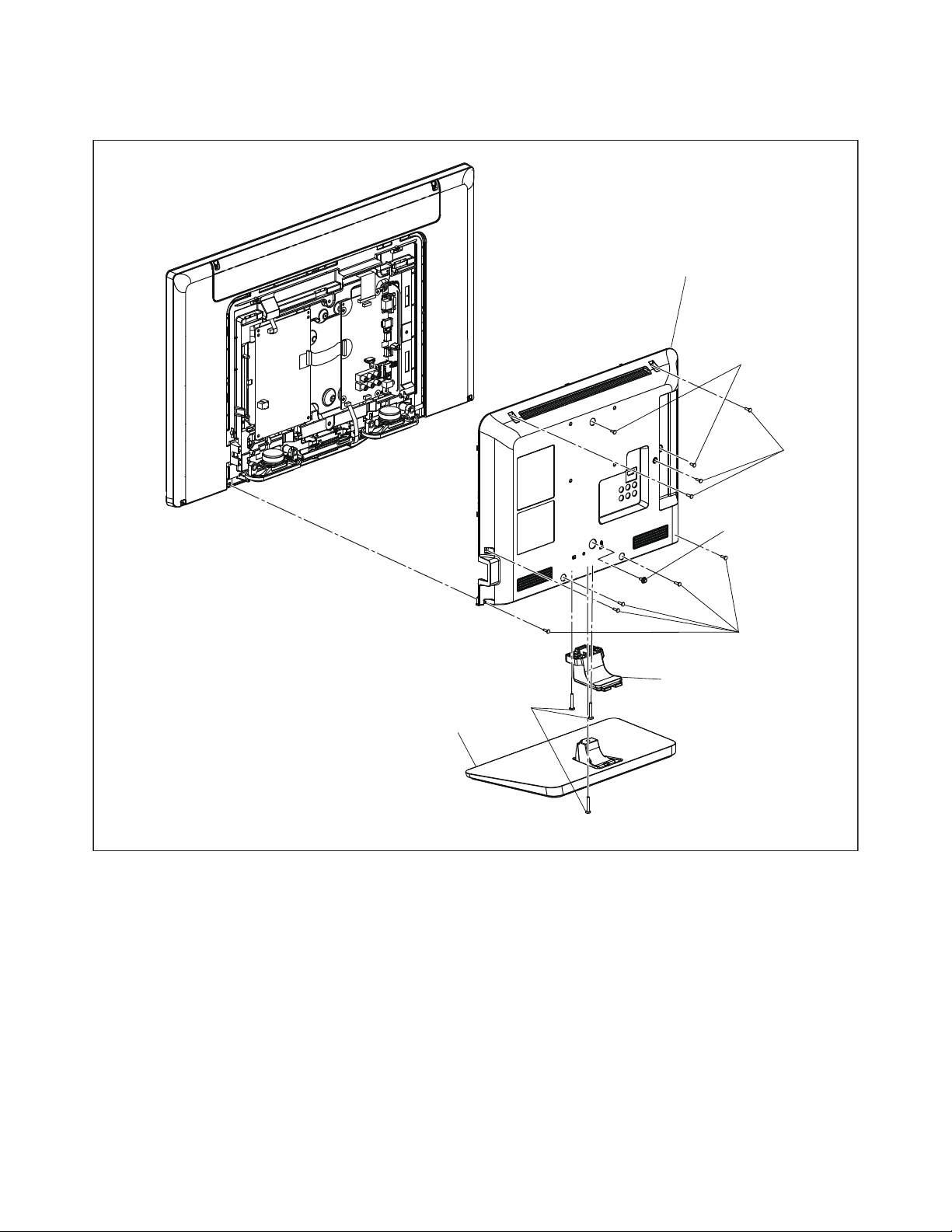
• After reassembling the Front Cabinet or Function
(S-1)
[1] Stand Base
Assembly
(S-4)
(S-3)
(S-2)
(S-2)
[2] Rear Cover
Stand Neck
Fig. D1
CBA Unit, check the operational sensitivity of the
touch sensor to make sure it functions normally.
• Make sure to replace the Decoration Plate to a new
one when replacing the Front Cabinet.
4-2 PL13.9_DC
Page 15
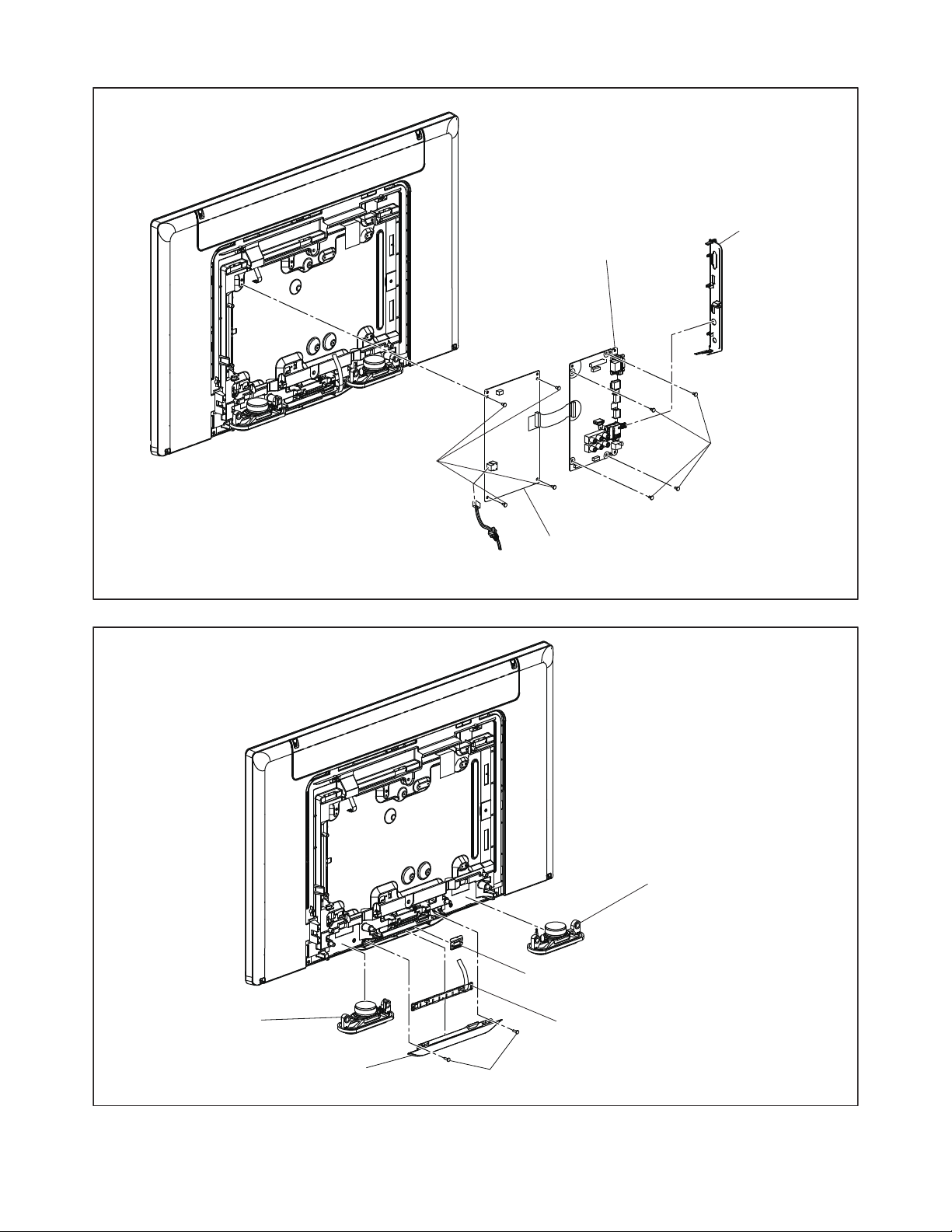
[3] Power Supply CBA
[4] Digital Main CBA Unit
(S-6)
(S-5)
Jack Holder
Fig. D2
[5] Speaker
[5] Speaker
[6] Function CBA Unit
*
1
Shield Plate
(S-7)
Leading Edge Cover
Fig. D3
*1: Make sure to read all the precautions on page 4-1 when you disassemble/re-assemble the
Function CBA Unit.
4-3 PL13.9_DC
Page 16

*2: Make sure to read all the precautions on page 4-1 when you disassemble/re-assemble the LCD
Panel Assembly (X-PCB Cover or Front Cabinet).
Decoration Plate
2
*
Hook
2
*
Hook
2
[9] Front Cabinet
2
*
2
*
Hook
*
(S-8)
Hook
2
*
(S-8)
[8] X-PCB
2
Cover
*
[7] LCD Panel Assembly
(S-9)
Fig. D4
4-4 PL13.9_DC
Page 17

TV Cable Wiring Diagram
To LCD Panel
Assembly
Power Supply CBA
CN1001
CN601
CN501
To LCD Panel
Assembly
CN3013
CN3701
CN3101
CN3801
Digital Main
CBA Unit
To AC Cord
Function CBA Unit
CN4001
To Speaker
Fig. D5
4-5 PL13.9_DC
Page 18

ELECTRICAL ADJUSTMENT INSTRUCTIONS
Code:
Pic code:
Panel-Option code:
MIPS:
Press "POWER" key to exit.
*******-**-**-****-**
***-*****-***-***-*-**
**-***-***-***-***
Push 0 key
Safety:
HDMI EDID:
HDMI UART:
Touch Sensor Ver:
Safety_Non
**
OFF
-.-- / ---
Total Watch Time:
Lightsensor:
*****
**
"*" differs depending on the models.
[7] button
Note:
When entering this mode, the default setting is White mode.
Purity Check Mode
[7] button
White 50% mode
Red, Green, Blue mode
V-ramp mode
Black mode
[7] button
White mode
[7] button
[7] button
White 20% mode
[7] button
General Note: “CBA” is abbreviation for
“Circuit Board Assembly.”
Note: Electrical adjustments are required after
replacing circuit components and certain
mechanical parts. It is important to perform
these adjustments only after all repairs and
replacements have been completed.
Also, do not attempt these adjustments unless
the proper equipment is available.
Test Equipment Required
1. Remote control unit
2. Color Analyzer,
CA-310 (KONICA MINOLTA Luminance meter) or
measuring instrument as good as CA-310.
How to set up the service mode:
Service mode:
1. Turn the power on.
2. Press [MENU] button to display Setup menu.
3. Select “Features”.
4. Select “Software Upgrade”.
5. Select “Current Software Info”.
6. Press [0], [6], [2], [5], [9], [6] and [INFO] buttons on
the remote control unit in this order. The following
screen appears.
1. Purity Check Mode
This mode cycles through full-screen displays of red,
green, blue, and white to check for non-active pixels.
1. Enter the service mode.
2. Each time the [7] button on the remote control unit
is pressed, the display changes as follows.
3. To cancel or to exit from the Purity Check Mode,
press [CH RETURN] or [PREV CH] button.
5-1 FL13.7EA
Page 19

The White Balance Adjustment should be
Color Analyzer
Perpendicularity
To avoid interference from ambient
light, this adjustment should be
performed in a dark room.
Internal (Single)
HDB 0
Internal (Single)
LDB 0
performed when replacing the LCD Panel
or Digital Main CBA.
2. White Balance Adjustment
Purpose: To mix red and blue beams correctly for
pure white.
Symptom of Misadjustment: White becomes bluish
or reddish.
6. Press [MENU] button. The internal Raster signal
appears in the screen. (“Internal (Single)” appears
in the upper right of the screen as shown below.)
ITEM
Color temperature
Input Signal
SPECIFICATION
x= 0.272 ± 0.002
y= 0.278 ± 0.002
Internal pattern
(40/80% raster)
Measurement point Screen center
CA-310 (KONICA MINOLTA
M. EQ.
Luminance meter) or
measuring instrument as
good as CA-310.
60min.
Aging time
(Retail MODE/100IRE Raster
HDMI 1080i@60)
MODE setting of TV
Ambient
temperature
Shipment setting/
Retail MODE
25°C ± 5°C
1. Operate the unit for more than 60 minutes.
2. Enter the service mode.
3. Press [VOLUME DOWN] button three times on the
remote control unit to select “Drive setting” mode.
“Drive” appears in the screen.
4. Set the color analyzer at the CHROMA mode and
zero point calibration. Bring the optical receptor
pointing at the center of the LCD-Panel.
Note: The optical receptor must be set
perpendicularly to the LCD Panel surface.
5. Press [3] button to select the “HDB” for High Drive
Blue adjustment. (“HDB” appears in the screen.)
7. Press [CHANNEL UP/DOWN] buttons to adjust
the color temperature becomes 12000°K
(x
=
0.272 / y= 0.278 ± 0.002).
8. Press [1] button to select the “HDR” for High Drive
Red adjustment (“HDR” appears in the screen.)
and press [CHANNEL UP/DOWN] buttons to
adjust the color temperature.
9. If necessary, adjust the “HDB” or “HDR” again.
10. Press [6] button to select the “LDB” for Low Drive
Blue adjustment (“LDB” appears in the screen.)
and press [CHANNEL UP/DOWN] buttons to
adjust the color temperature.
11. Press [4] button to select the “LDR” for Low Drive
Red adjustment (“LDR” appears in the screen.)
and press [CHANNEL UP/DOWN] buttons to
adjust the color temperature.
12. If necessary, adjust the “LDB” or “LDR” again.
13. Press [VOLUME DOWN] button to shift to the
“Debugging Message” mode.
If there is no message under “[WB]” section, this
adjustment completes.
If “Drive settings are NG. Retry again.” is
displayed, repeat above steps from 5. to 12. Then
check “Debugging Message” again. If “Drive
settings are NG. Retry again.” is displayed, replace
the LCD Panel or Digital Main CBA.
14. To cancel or to exit from the White Balance
Adjustment, press [CH RETURN] or [PREV CH]
button.
5-2 FL13.7EA
Page 20

HOW TO INITIALIZE THE LCD TV
The purpose of initialization is to place the set in a new out of box condition. The customer will be prompted to
select a language and program channels after the set has been initialized.
To put the program back at the factory-default, initialize the LCD TV using the following procedure.
NOTE: Disconnect any device from the USB Port
before you conduct on this procedure.
1. Turn the power on.
2. Enter the service mode.
- To cancel the service mode, press [ ] button on
the remote control unit.
3. Press [BACK] button to enter the Panel Key
Confirmation Menu.
4. Press any button on the touch sensor panel.
5. Press [INFO] button to proceed with the self check
mode.
6. Make sure to confirm the “INITIALIZED FINISH”
appears in the green screen.
7. Unplug the AC Cord and plug it back on again.
6-1 PL13.7_INT
Page 21

FIRMWARE RENEWAL MODE
USB port
USB storage
device
Rear Cabinet
Software upgrade in progress. Please wait.
Do not remove the USB storage device or
turn the TV off while upgrade is in progress.
Software Upgrade
Downloading...
Current Version:
New Version:
*******-***-*-***-****
*******-***-*-***-****
0%
*1
"*" differs depending on the models.
Software Upgrade
The software upgrade is completed.
Remove USB storage device, turn TV off then on again.
Equipment Required
a. USB storage device
b. Remote Control Unit
Firmware Update Procedure
User Upgrade (Filename example: TVNB012_00_PF_XX91_AC.ecc)
Upgrade the firmware only. The setting values will not be initialized.
The User Upgrade and the Firmware Upgrade (Factory Upgrade) will be done by the same file. If you want to
upgrade the firmware and initialize the setting values also, add “FACT_” at the beginning of the filename.
If you want to upgrade the firmware only and leave the setting values as they are, eliminate the “FACT_” from the
filename.
Update procedure
1. Turn the power on.
2. Press [MENU] button to display Menu.
3. Select “Features”.
4. Select “Software Upgrade”.
5. Select “Upgrade” to display Upgrade screen.
6. Press [OK] button to display Software Upgrade
screen.
7. Select “USB” and press [OK] button.
8. Insert the USB storage device to the USB port as
shown below.
11. The update will start and the following will appear
in the screen.
9. Select “Check” and press [OK] button.
10. Select “Upgrade” and press [OK] button to start
software upgrade.
Note: If the above screen isn’t displayed, repeat from
step 1.
The appearance shown in *1 is described as follows.
Appearance State
Downloading...
Writing...
Downloading the firmware from
the USB storage device.
Writing the downloaded firmware
in flash memory.
Checking... Checking the new firmware.
12. When the firmware update is completed, the
following will appear in the screen.
Remove the USB storage device from the USB
port.
Turn the power off and turn the power on again.
7-1 PL13.7FW
Page 22

Factory Upgrade (Firmware Upgrade/Flash Upgrade)
USB port
USB storage
device
Rear Cabinet
Software upgrade in progress. Please wait.
Do not remove the USB storage device or
turn the TV off while upgrade is in progress.
Software Upgrade
Downloading...
Current Version:
New Version:
*******-***-*-***-****
*******-***-*-***-****
0%
*1
"*" differs depending on the models.
Software Upgrade
The software upgrade is completed.
Remove USB storage device, turn TV off then on again.
Firmware Upgrade (Filename example: FACT_TVNB012_00_PF_XX91_AC.ecc)
Upgrade the firmware and initialize the setting values.
The User Upgrade and the Firmware Upgrade (Factory Upgrade) will be done by the same file. If you want to
upgrade the firmware and initialize the setting values also, add “FACT_” at the beginning of the filename.
If you want to upgrade the firmware only and leave the setting values as they are, eliminate the “FACT_” from the
filename.
Flash Upgrade (Filename example: ALL_TVNB012_00_PF_XX91_AC.ecc)
Upgrade the firmware and initialize the setting values along with the factory default such as White Balance, etc.
Before the upgrade, you will need to make a note of all the factory default so you will be able to set it back on the
TV after the initialization.
The Flash Upgrade will be done by it's unique file.
The User Upgrade/Firmware Upgrade (Factory Upgrade) file cannot be used for this upgrade.
Update procedure
1. Turn the power off.
2. Insert the USB storage device to the USB port as
shown below.
The appearance shown in *1 is described as follows.
Appearance State
Downloading...
Writing...
Downloading the firmware from
the USB storage device.
Writing the downloaded firmware
in flash memory.
Checking... Checking the new firmware.
5. When the firmware update is completed, the
following will appear in the screen.
3. Turn the power on.
4. The update will start and the following will appear
in the screen.
Remove the USB storage device from the USB
port.
Turn the power off and turn the power on again.
Service mode initial screen with a word
“INITIALIZED” will appear in the screen. The color
of the word “INITIALIZED” will change from red to
green when initialization is completed.
Note: If the above screen isn’t displayed, repeat from
step 1.
7-2 PL13.7FW
Page 23

[Power Supply Section]
FLOW CHART NO.1
The power cannot be turned on.
TROUBLESHOOTING
Is the fuse (F602) normal?
Ye s
Is normal state restored when once unplugged
power cord is plugged again after several seconds?
Ye s
Is the P-ON+21V line voltage normal?
Ye s
Check each rectifying circuit of the secondary
circuit and repair it if defective.
FLOW CHART NO.2
The fuse blows out.
Check if there is any leak or short-circuit on the
primary circuit component and repair it if defective.
Make sure to repair the primary circuit component before replacing the fuse
FLOW CHART NO.3
When the output voltage fluctuates.
No
No
No
See FLOW CHART No.2 <The fuse blows out.>
Check if there is any leak or short-circuit on the
primary circuit component and repair it if defective.
(D601, D602, D603, D604, Q601, Q602, T601)
Check if there is any leak or short-circuit on the
each rectifying circuit component of secondary side
and repair it if defective.
(F602).
Does the photocoupler circuit on the secondary side
operate normally?
Ye s
Check IC602, D605, D607A, D608, D609A, D610, Q601,
Q602 and their periphery circuit. Repair it if defective.
FLOW CHART NO.4
When buzz sound can be heard in the periphery of power circuit.
Check if there is any short-circuit on the rectifying diode and the circuit
Repair it if defective. (D650, D651, D653, D655, Q656, Q658)
No
Check IC602, D660, D661, Q653 and their periphery
circuit. Repair it if defective.
in each rectifying circuit of the secondary side.
8-1 PL13.9ATR
Page 24

FLOW CHART NO.5
P-ON+21V is not output.
Is approximately +21V voltage supplied to the cathode
of D650(D651)?
Ye s
Check if there is any leak or short-circuit on the load
circuit. Repair it if defective.
FLOW CHART NO.6
AMP+13V is not output.
Is approximately +13V voltage supplied to the cathode
of D653(D655)?
Ye s
Check if there is any leak or short-circuit on the load
circuit. Repair it if defective.
FLOW CHART NO.7
AL+3.3V is not output.
No
No
Check D650, D651, C651, C652, C653 and their
periphery circuit. Repair it if defective.
Check D653, D654, D655, C654, C655 and their
periphery circuit. Repair it if defective.
Is approximately +14V voltage supplied to the
collector of Q656?
Ye s Ye s
Is approximately +4V voltage supplied to the base of
Q656?
Ye s
Replace Q656.
No
No
Is approximately +14V voltage supplied to the
emitter of Q658?
No
Replace Q658.
Check D662 and their periphery circuit. Repair it if
defective.
Check D653, D654, D655, C654,
C655 and their periphery circuit.
Repair it if defective.
8-2 PL13.9ATR
Page 25

[Video Signal Section]
FLOW CHART NO.1
The key operation is not functioning.
When touching each buttons, does the Pin(6) voltage
of CN4001 decrease?
Ye s
Replace Digital Main CBA Unit.
FLOW CHART NO.2
No operation is possible from the remote control unit. (Operation is possible from the unit.)
Is approximately +3.3V voltage supplied to Pin(1) of
CN4001?
Ye s
Is the "L" pulse supplied to Pin(5) of CN4001?
Ye s
Replace Digital Main CBA Unit.
No
No
No
Replace Function CBA Unit.
Check AL+3.3V line and repair it if defective.
Replace Function CBA Unit.
FLOW CHART NO.3
Picture does not appear normally.
Is approximately +21V voltage supplied to
Pin(1, 2, 3, 4) of CN501?
Ye s
Is
approximately +
CN501?
Digital Main CBA Unit or LCD Panel Assembly may
be defective.
Check and replace these parts.
3.3V voltage supplied to Pin(16) of
Ye s
No
No
See FLOW CHART NO.5 <P-ON+21V is not output.
[Power Supply Section]>
See FLOW CHART NO.7 <AL+3.3V is not output.
[Power Supply Section]>
8-3 PL13.9ATR
Page 26

[Audio Signal Section]
FLOW CHART NO.1
Audio is not output normally.
Is approximately +13V voltage supplied to Pin(6, 7, 8, 9)
of CN501?
Ye s
approximately +
Is
CN501?
Are the audio signals output to Pin(1, 2, 3, 4) of CN3801?
SP3801, SP3802 or CL3801 may be defective.
Check and replace these parts.
3.3V voltage supplied to Pin(16) of
Ye s
Ye s
No
No
No
See FLOW CHART NO.6 <AMP+13V is not output.
[Power Supply Section]>
See FLOW CHART NO.7 <AL+3.3V is not output.
[Power Supply Section]>
Replace Digital Main CBA Unit.
8-4 PL13.9ATR
Page 27

BLOCK DIAGRAMS
1. System Control Block Diagram
POWER
SOURCE
MENU
CH UP
CH DOWN
VOL UP
VOL DOWN
161718
19
212223
MENU
CH UP
CH DOWN
MENU
SOURCE
3
2
VOL UP
CH UP
6
VOL DOWN
CH DOWN
11
VOL UP
12
VOL DOWN
13
AL+3.3V
REMOTE
RS4051
POWER
SOURCE
SCL
SDA
IC4001
(TOUCH SENSOR)
4
5
D4051
POWER
SENSOR
CN4001
CN3101
1 POWER
KEY-IN146
SDA19
SCL28
REMOTE55
LED164
FUNCTION CBA UNIT
TO
POWER SUPPLY
RESET
P-ON-H2
CN501
P-ON-H2
6 18
CN3701
BLOCK DIAGRAM
20
RESET
4
TO
LED BACKLIGHT DRIVE
PROTECT3
BACKLIGHT-SW
CN501
211917
PROTECT3
BACKLIGHT-SW
357
CN3701
BLOCK DIAGRAM
BACKLIGHT-ADJ
POWER SUPPLY CBA
BACKLIGHT-ADJ
IC3005
(MAIN MICRO CONTROLLER)
LED DRIVE
D14
C14
LED1
REMOTE
Q3501, Q3502
KEY-IN1 A15
COMP-DET
HP-MUTE
AUDIO-MUTE
C1
N12
G13
COMP-DET
HP-MUTE
AUDIO-MUTE
TU3901 (TUNER UNIT)
HP-DET
K16
HP-DET
SCL
4
R12
SCL
SDA
3
T12
SDA
AL+3.3V
Q3006
B16
P-ON-H2
SCK
SIN
T11
P11
652
SI
SCK
Q3005
SOUT
CS
P12
R11
1
CS
SO
IC3009
RESET
RESET J15
B13
PROTECT3
BACKLIGHT-SW E2
XIN25
H15
25MHz
X3001
F3BACKLIGHT-ADJ
XOUT25
H16
OSC
TO
VIDEO/AUDIO
BLOCK DIAGRAM
BACKLIGHT-SW
DIGITAL MAIN CBA UNIT
TO VIDEO/AUDIO
BLOCK DIAGRAM
9-1
IC3006 (MEMORY)
PL13.9BLS
Page 28

2. Video/Audio Block Diagram
AUDIO SIGNAL
TO DIGITAL
SIGNAL PROCESS
BLOCK DIAGRAM
TO SYSTEM CONTROL
BLOCK DIAGRAM
VIDEO SIGNAL
DIGITAL MAIN CBA UNIT
VGA-R-IN
VGA-G-IN
VGA-B-IN
VGA-HSYNC
VGA-SCL
VGA-SDA
VGA-VSYNC
IF-AGC
DIF-OUT1
DIF-OUT2
6
7
DIF-OUT1
DIF-OUT2
(TUNER UNIT)
TU3901
COM-VIDEO-Pb-IN
COM-VIDEO-Y/VIDEO-IN
5
IF-AGC
COM-VIDEO-Pr-IN
AUDIO(L)-IN
AUDIO(R)-IN
SPDIF
3
5
6dB
6dB
(HEADPHONE AMP)
IC3851
1
7
Q3861
2
MUTE
AMP(R)-OUT
3
PWM
DRIVE
IC3801 (AUDIO AMP)
25,26
LOGIC
22,23
HP-DET
AMP(L)-OUT
12
PWM
LOGIC
DRIVE
20,21
17,18
HP-MUTE
COMP-DET
AUDIO-MUTE
BACKLIGHT-SW
Q3801
Q3802
P-ON+5V
Q3803
1
2
CONTROL LOGIC
123
BUFFER GATE
IC3013
131415
JK3001
PC-RGB
IC3014
-IN
BUFFER GATE
BUFFER
Q3301
BUFFER
Q3302
12
JK3702
COMPONENT
-Y/VIDEO-IN
COMPONENT
-Pb-IN
JK3701
COMPONENT
-Pr-IN
AUDIO(L)-IN
9-2
BUFFER
Q3701
DIGITAL
AUDIO(R)-IN
AUDIO-OUT
(COAXIAL)
JK3703
HEADPHONE
JACK
1
CN3801
SP(L)+
SP3801
SP(L)-
SP(R)-
SPEAKER
L-CH
432
SP(R)+
SP3802
SPEAKER
R-CH
PL13.9BLVA
Page 29

3. Digital Signal Process Block Diagram
LCD PANEL
ASSEMBLY
RX0(-)
RX0(+)
RX1(-)
RX1(+)
RX2(-)
RX2(+)
RXCLK(-)
RXCLK(+)
RX3(-)
R16
R15
RX3(+)
19
212224
25
T16
T15
T14
R14
AUDIO SIGNAL
VIDEO SIGNAL
1213151618
CN3013
N15
N16
P16
P15
IC3002
(DDR2 SDRAM)
B1,B9,C2,C8,
D1,D3,D7,D9,
N4,N7,N8,P3,P4,
DATA(0-15)
ADDRESS(0-12)
H1,H3,H7,H9
F1,F9,G2,G8,
M2,M3,M7,M8,
N2,N3,N7,N8,
P2,P3,P7,P8,R2
P6-P8,R3,R4,R6,
R8,T2-T5
H1,H2,J1,J2,J4,K1,
K3,L1,L2,M1-M3,N1
DIGITAL MAIN CBA UNIT
HSYNC
IC3005 (DIGITAL SIGNAL PROCESS)
A14
VGA-HSYNC
VSYNC
B14
C11
VGA-R-IN
VGA-G-IN
VGA-VSYNC
LVDS TX
A/D
CONVERTER
SW
A9
C7
D8
C9
B11
C10
COM-VIDEO-Pr-IN
COM-VIDEO-Pb-IN
COM-VIDEO-Y/VIDEO-IN
VGA-B-IN
DEMODULATOR
/MPEG DECODER
IF-AGC
A12
A16
B12
DIF-OUT1
DIF-OUT2
IF-AGC
B8
A8
SPDIF
AUDIO(R)-IN
AUDIO(L)-IN
AUDIO I/F
B7
N10
AMP(R)-OUT
AMP(L)-OUT
DIGITAL
SIGNAL
PROCESS
HDMI
AUDI O
DECODER
A7
IC3018 (HDMI SW)
414544484739383637
I/F
B4A4B3A3B2A2B1
26272324202117
A1
18
VIDEO
DECODER
79461
HDMI-IN3
JK3003
TMDS-D0(-)
TMDS-D0(+)
TMDS-D1(+)
575660596362545351
HDMI
SW
8
7
111014
3
TMDS-D1(-)
TMDS-D2(-)
TMDS-D2(+)
13
101216
15
HDMI-DATA
HDMI-CLOCK
TMDS-CLOCK(-)
TMDS-CLOCK(+)
52
541
2
IC3011
(HDMI SERIAL EEPROM)
15
SCL2
SCL1
2
HDMI-SCL
G14
7
14
SCL0
SDA2
SDA1
SCL3
3
10
HDMI-SDA
6
SDA0
SDA3
11
F14
VGA-SDA
VGA-SCL
TO
VIDEO/AUDIO
TO
VIDEO/AUDIO
BLOCK DIAGRAM
HDMI-IN1
JK3004
TMDS-D0(+)
TMDS-D0(-)
TMDS-D1(+)
7 42
94613
TMDS-D1(-)
TMDS-D2(+)
TMDS-D2(-)
TMDS-CLOCK(+)
TMDS-CLOCK(-)
HDMI-DATA
HDMI-CLOCK
101216
TMDS-D0(+)
TMDS-D0(-)
TMDS-D1(+)
TMDS-D1(-)
TMDS-D2(+)
TMDS-D2(-)
TMDS-CLOCK(+)
TMDS-CLOCK(-)
HDMI-DATA
JK3002
HDMI-IN2
79461
15
3
101216
HDMI-CLOCK
15
9-3
BLOCK DIAGRAM
PL13.9BLD
Page 30

4. LED Backlight Drive Block Diagram
LCD PANEL
ASSEMBLY
ILED16
VLED4
ILED17
ILED22
ILED21
CN1001
OVP
IC1001
(LED BACKLIGHT DRIVER)
4
Q1001
2
DRIVE
986
CONTROL
DRIVE 5
LOGIC
1
14
POWER SUPPLY CBA
P-ON+21V
BACKLIGHT-ADJ
BACKLIGHT-SW
PROTECT3
TO
SYSTEM CONTROL
BLOCK DIAGRAM
9-4
PL13.9BLBD
Page 31

5. Power Supply Block Diagram
P-ON+21V
AL+3.3V
AMP+13V
DIGITAL MAIN CBA UNIT
8
CN3701
20-23
15-18
NOTE:
The voltage for parts in hot circuit is measured using
hot GND as a common terminal.
P-ON+21V1-4
AL+3.3V16
AMP+13V6-9
CN501
P-ON+21V
TO
SYSTEM CONTROL
RESET
P-ON-H2
BLOCKDIAGRAM
POWER SUPPLY CBA
For continued protection against risk of fire,
replace only with same type 2.5A, 250V fuse.
CAUTION ! :
ATTENTION : Utiliser un fusible de rechange de même type de 2.5A, 250V.
2.5A 250V
8
7
T601
6
BRIDGE
RECTIFIER
D601- D604
LINE
FILTER
L602
LINE
FILTER
L601
5
+3.3V REG.
Q656, Q658
Q653
RESET
Q650
9
10
4
2
12
11
1
IC602
ERROR
VOLTAGE DET
1
2
4
3
HOT COLD
OVER
VOLTAGE
PROTECT
Q621
CONTROL
Q602
SWITCHING
F602
2.5A/250V
AC601
CN601
AC CORD
B
HOT CIRCUIT. BE CAREFUL.
CAUTION !
Fixed voltage (or Auto voltage selectable) power supply circuit is used in this unit.
If Main Fuse (F602) is blown , check to see that all components in the power supply
circuit are not defective before you connect the AC plug to the AC power supply.
Otherwise it may cause some components in the power supply circuit to fail.
2.5A 250V
W
9-5
SWITCHING
Q601
PL13.9BLP
Page 32

SCHEMATIC DIAGRAMS / CBA AND TEST POINTS
Standard Notes
WARNING
Many electrical and mechanical parts in this chassis
have special characteristics. These characteristics
often pass unnoticed and the protection afforded by
them cannot necessarily be obtained by using
replacement components rated for higher voltage,
wattage, etc. Replacement parts that have these
special safety characteristics are identified in this
manual and its supplements; electrical components
having such features are identified by the mark “#” in
the schematic diagram and the parts list. Before
replacing any of these components, read the parts list
in this manual carefully. The use of substitute
replacement parts that do not have the same safety
characteristics as specified in the parts list may create
shock, fire, or other hazards.
Notes:
1. Do not use the part number shown on these
drawings for ordering. The correct part number is
shown in the parts list, and may be slightly
different or amended since these drawings were
prepared.
2. All resistance values are indicated in ohms
(K = 10
3. Resistor wattages are 1/4W or 1/6W unless
otherwise specified.
4. All capacitance values are indicated in μF
(P = 10
5. All voltages are DC voltages unless otherwise
specified.
This schematic diagrams are masterized version
6.
that should cover the entire PL13.9 chassis models.
Thus some parts in detail illustrated on this
schematic diagrams may vary depend on the
model within the PL13.9 chassis.
Please refer to the parts lists for each models.
7. The Circuit Board layout illustrated on this service
manual is the latest version for this chassis at the
moment of making this service manual.
Depend on the mass production date of each
model, the actual layout of each Board may differ
slightly from this version.
3
, M = 106).
-6
μF).
10-1 PL13.9SC
Page 33

LIST OF CAUTION, NOTES, AND SYMBOLS USED IN THE SCHEMATIC DIAGRAMS ON
2
3
1
5.0 5.0
Voltage
Indicates that the voltage
is not consistent here.
Power on mode
(Unit: Volt)
1-D3
Distinction Area
Line Number
(1 to 3 digits)
Examples:
1. "1-D3" means that line number "1" goes to the line number
"1" of the area "D3".
2. "1-B1" means that line number "1" goes to the line number
"1" of the area "B1".
: Indicates a test point with a jumper wire across a hole in the PCB.
: Used to indicate a test point with a component lead on foil side.
: Used to indicate a test point with no test pin.
: Used to indicate a test point with a test pin.
THE FOLLOWING PAGES:
1. CAUTION:
CAUTION: FOR CONTINUED PROTECTION AGAINST RISK OF FIRE, REPLACE ONLY WITH SAME
TYPE_A,_V FUSE.
ATTENTION: UTILISER UN FUSIBLE DE RECHANGE DE MÊME TYPE DE_A,_V.
2. CAUTION:
Fixed Voltage (or Auto voltage selectable) power supply circuit is used in this unit.
If Main Fuse (F602) is blown, first check to see that all components in the power supply circuit are not
defective before you connect the AC plug to the AC power supply. Otherwise it may cause some components
in the power supply circuit to fail.
3. Note:
1. Do not use the part number shown on the drawings for ordering. The correct part number is shown in the
parts list, and may be slightly different or amended since the drawings were prepared.
2. To maintain original function and reliability of repaired units, use only original replacement parts which are
listed with their part numbers in the parts list section of the service manual.
4. Voltage indications on the schematics are as shown below:
Plug the TV power cord into a standard AC outlet.:
5. How to read converged lines
6. Test Point Information
The reference number of parts on Schematic Diagrams/CBA can be retrieved by
application search function.
3
AREA D3
2
1
ABCD
10-2 PL13.9SC
AREA B1
1-D3
1-B1
Page 34

Power Supply Schematic Diagram
CAUTION !
Fixed voltage (or Auto voltage selectable) power supply circuit is used in this unit.
If Main Fuse (F602) is blown , check to see that all components in the power supply
circuit are not defective before you connect the AC plug to the AC power supply.
Otherwise it may cause some components in the power supply circuit to fail.
2.5A 250V
CAUTION ! :
For continued protection against risk of fire,
replace only with same type 2.5A, 250V fuse.
ATTENTION : Utiliser un fusible de rechange de même type de 2.5A, 250V.
NOTE:
The voltage for parts in hot circuit is measured using
hot GND as a common terminal.
4
3
2
1
HOT CIRCUIT. BE CAREFUL.
AC601
CN601
AC CORD
W
B
2.5A250V
C611
OPEN
R611
0.36
/2W
Q601
D
TK7P60W
(SWITCHING)
G
2.6
S
C607
1800P
D607A
TFZGTR27B
D608
1ZB36BB
R601
1.2M/1/2W
SA601
VARISTOR
C604
0.22/275V
L601
LINE FILTER
C614
0.22/275V
L602
LINE FILTER
2.6
0
D607
OPEN
D609A
CES520
R615
OPEN
R616
OPEN
R617
OPEN
R618
OPEN
R619
OPEN
JS602
OPEN
JS606
OPEN
R614
470K
R603
470K
R604
470K
Q602
2SC5344SY
SWITCHING
CONTROL
0.4
0.4
R609
100
Q621
KTC3875S
-Y-RTK/P
0
C609
0.068
D601
1N5397BD
D602
1N5397BD
C605
330
/200V
OVER
VOLTAGE
PROTECT
0.4
R622
0
R623
10K
R612
5.6K
C608
0.022
R608
1.5K
R621
560
C622
10
D604
1N5397BD
D603
1N5397BD
R606
330
D605
MM5Z4V3B
D621
HSC119
D623
MM5Z30B
C623
4.7
C621
OPEN
R607
330
C610
100P
JS603
OPEN
JS604
OPEN
R602
2.7/5W
BC604
WIRE
BC601
WIRE
C624
OPEN
R613
F602
2.5A/250V
F601
OPEN
JS601
OPEN
JS605
OPEN
192.0
0.1
C606 180
820P
/2KV
D608A
OPEN
BC602
BEAD
BC603
BEAD
HOT COLD
D610
HSC119
13.0
0.4
C603
1000P/250V
C602
1000P/250V
C616
1000P/250V
SA602
GT601
OPEN
OPEN
100P/250VC617
T601
POWER TRANS
6
5
4
2
1
IC602
TLP781F
ERROR
VOLTAGE DET
4
32
IC601
OPEN
4
32
10
11
12
1
1
POWER SUPPLY CBA
D655
SB3A0BH
D655A
OPEN
D653
SB3A0BH
D653A
OPEN
7
8
9
20.0
19.0
R651 D656
1
RS1BJTB
C650
OPEN
D651
SB3150BH
D651A
OPEN
D650
SB3150BH
D650A
OPEN
C666
0.22
C660
0.22
19.0
2.5
D660
0
SL431A-AT
C654
470/16V
R655
180
R657
3.9K
C656
1/50V
C655
470/16V
R693
OPEN
C651
470/25V
R654
180
R658
2.7K
D654
D654A
1ZB20BB
OPEN
D657
R652
MM5Z11B
56K
-3.1
D658
R691
OPEN
OPEN
R653
33K
C652
C653
470/25V OPEN
470/25V
R659
R675
27K
68K
R660
R674
3.9K
0
D661
R661
3.3K
HSC119
Q653
KTC3875S-Y-RTK/P
(SWITCHING)
3.4
0
R663
OPEN
Q650
KTC3875S
-Y-RTK/P
(RESET)
R692
OPEN
D652
R664
OPEN
R667
8.2K
0
0
D652A
OPEN
0.6
R665
OPEN
Q659
OPEN
R668
47K
R669
10K
BC1002
WIRE
BC1001
WIRE
R676
OPEN
C1001
330/25V
C1017
1000P
R1015
1.8K
R1016
6.2K
R678
OPEN
R670
270
R690
2.7
R673
OPEN
C1002
1
C1009
1/100V
R1011
470K
R1012
510K
R1013
27K
3.0
0.5
1.2
1.3
0.5
2.9
1.0
R1014
100K
R679
OPEN
Q658
2SA950-O
(+3.3V REG.)
14.4 3.4
13.8
R671
270
C1003
C1004
1
OPEN
C1008
1/100V
IC1001
HA7219PB
LED BACKLIGHT
DRIVER
1
2
DRIVE
3
OVP
4
DRIVE
5
7
RT
R688
R689
OPEN
OPEN
R683
R684
OPEN
OPEN
3.4
13.8
Q656
KTC3875S-Y-RTK/P
3.9
(+3.3V REG.)
R672
270
3.9
2.5
D662
0
SL431A-AT
C1007
1/100V
CONTROL
LOGIC
Q657
OPEN
R682
C665
0
0.1
COMP
GND
LDO
C662
OPEN
L1001
22uH
3.4
14
1.7
13
18.0
12VINISET
0
11
5.0
10
3.0
96
0.1
8
R685
OPEN
C664
OPEN
C1006
47/100V
IC651
OPEN
C1005
47/100V
R1003
1K
C1014
R1010
1
100
C1013
0.1
C1012
4.7
C1011
1000P
R1007
R1005
100K
100K
R686
R687
OPEN
OPEN
COM
OUT
IN
123
R662
3.3K
R680
100
R681
10K
R1002
360
D1001
SK210TD
C1018
100P/1KV
R1001
360
R1006
10K
R1004
10K
D663
OPEN
15.7
0.1
C1015
OPEN
C1016
OPEN
C663
OPEN
D
S
D405
OPEN
D406
OPEN
Q1001
AP18T10AGH-HF
(SWITCHING)
G
3.0
R1021
OPEN
R1022
OPEN
R1023
OPEN
R1017
0
R1018
0
C633
OPEN
C636
OPEN
D664
C661
TFZGTR4.7B
1
R677
10K
R1009
200
R1020
0.18/1W
R1019
OPEN
D1002
HSC119
R1008
10
C1010
OPEN
C631
OPEN
C630
OPEN
C635
OPEN
GP001
EARTH PLATE
GP002
EARTH PLATE
C632
OPEN
C638
OPEN
C639
OPEN
TO LCD PANEL
CN1001
ASSEMBLY
0.5
1 ILED2
0.5
2 ILED2
3NU
49.5
4 VLED
5NU
0.5
6 ILED1
0.5
7 ILED1
TO DIGITAL MAIN
CN501
CBA UNIT CN3701
0
23 NU
0
22 PROTECT1
3.4
21 PROTECT3
3.4
20 RESET
3.3
19 BACKLIGHT-SW
3.3
P-ON-H218
3.3
17 BACKLIGHT-ADJ
3.4
16 AL+3.3V
0
15 GND
0
14 GND
0
13 GND
0
12 GND
0
11 GND
0
10 GND
14.4
9 AMP+13V
14.4
8 AMP+13V
14.4
7 AMP+13V
14.4
6 AMP+13V
0
5 GND
20.4
4 P-ON+21V
20.4
3 P-ON+21V
20.4
2 P-ON+21V
20.4
1 P-ON+21V
UNLESS OTHERWISE SPECIFIED:
DIODES ARE HSS4148TE-E.
A FBCDE G
10-3
PL13.9SCP
Page 35

Function Schematic Diagram
3
2
1
R4051
56
C4051
10
MM5Z5V6B
C4001
1
RS4051
GP1USC32XP
(REMOTE SENSOR)
D4053
OPEN
C4003D4001
OPEN
VOUT
GND
VCC
231
C4056
10
VOL DOWN
POWER
CH UP
CH DOWN
SOURCE
MENU
VOL UP
R4052
6.8K
R4054
1K
C4052
1000P
C4055
OPEN
R4063
OPEN
D4051
SML813WBC8W1
POWER
R4053
1K
C4053
0.1
R4001
560
R4003
560
R4005
560
R4007
560
0
19
3.3
R4006
560
R4004
560
R4002
560
20
0
21
0
22
0
23
1.0
24
C4002
2200P
IC4001
CY8C20324
-12LQXIT/CP
(TOUCH SENSOR)
R4062
0
C4058
R4057
OPEN
OPEN
D4052
C4057
OPEN
OPEN
000003.3
POWER
CH UP
CH UP
VOL DOWN
CH DOWN
CH DOWN
SOURCE
VDD
MENU
VOL UP
VOL DOWN
NU
POWER
123456
3.3 3.3 3.3 3.3 3.3 3.3
GND
VOL UP
SCL
GND
SDA
1314151618 17
MENU
GND
GND
SOURCE
IC4051
OPEN
1
OUT
2
GND
34
VCC NU
3.3
12
3.3
11
0
NU
10
0
9
0
8
0
NU
7
6
NU
5
NU
R4008
18K
R4009
8.2K
R4010
4.7K
R4011
2.7K
R4012
2.2K
R4014
2.2K
C4054
0.1
R4055
OPEN
R4058
OPEN
R4017
OPEN
R4013
100
R4021
10
R4022
10
R4059
OPEN
R4056
OPEN
R4061
OPEN
CN4001
3.3
1 AL+3.3V
5.0
2 P-ON+5V
0
3 LIGHT
0.2
4 LED1
3.3
5 REMOTE
3.3
6 KEY-IN1
0
7 GND
3.3
8 SCL
3.3
9 SDA
TO DIGITAL MAIN
CBA UNIT CN3101
FUNCTION CBA
D4003
MM5Z5V6B
CBDA
D4004
MM5Z5V6B
10-4
OPEN
C4006D4002
OPEN
PL13.9SCF
Page 36

Digital Main 1 Schematic Diagram
1 NOTE:
The order of pins shown in this diagram is different from that of actual IC3005.
IC3005 is divided into six and shown as IC3005 (1/6) ~ IC3005 (6/6) in this Digital Main Schematic Diagram Section.
DIGITAL MAIN CBA UNIT
C3166
C3167
OPEN
OPEN
R3135
OPEN
R3162
OPEN
R3161
OPEN
R3129
OPEN
R3130
OPEN
*1
IC3005(1/6)
R8A05011BG-U0
DIGITAL SIGNAL PROCESS
/MAIN MICRO CONTROLLER
R3131
C3161
OPEN
OPEN
4
3
2
1
TO LCD PANEL
ASSEMBLY
(NO CONNECTION)
(NO CONNECTION)
(NO CONNECTION)
CN3013
1LCD+12V
2LCD+12V
3LCD+12V
4LCD+12V
5GND
6GND
7GND
8NU
9SELLVDS
10NU
11GND
12RX0(-)
13RX0(+)
14GND
15RX1(-)
16RX1(+)
17GND
18RX2(-)
19RX2(+)
20GND
21RXCLK(-)
22RXCLK(+)
23GND
24RX3(-)
25RX3(+)
26GND
27BIST
28NU
29NU
30GND
CN3014
30LCD+12V
29LCD+12V
28LCD+12V
27LCD+12V
26GND
25GND
24GND
23NU
22SELLVDS
21NU
20GND
19RX0(-)
18RX0(+)
17GND
16RX1(-)
15RX1(+)
14GND
13RX2(-)
12RX2(+)
11GND
10RXCLK(-)
9RXCLK(+)
8GND
7RX3(-)
6RX3(+)
5GND
4BIST
3NU
2NU
1GND
CN3601
1GND
2NU
3NU
4NU
CN3602
1GND
2NU
3NU
4NU
LVDS
TX
TO DIGITAL
MAIN 2
IC3005(2/6)
R16
R15
P14
P13
N16
N15
P16
P15
T16
T15
R14
T14
R13
T13
M16NU
M13NU
N14NU
N13NU
L13TP
M15POL
L16CPV
L15OE
L14OE2
M14STV
K15NU
R3088
9.1K
R3630
OPEN
R3632
OPEN
D3624
OPEN
R3622
100
C3628
R3621
OPEN
10K
BST
IN
SW
C3635
OPENC3647
D3623
OPEN
8
7
6
C3634
4.7
OPENR3644
OPENR3645
OPENR3641
OPENR3642
OPENR3643
OPENR3646
IC3621
MP1472GJC452Z
(SW+12V)
C3627
0.047
1
SS
2
R3623
C3629
24K
1000P
R3624
R3625
1K
120K
R3631 C3631
R3629
10K
OPENC3641
OPENOPEN 4.7
10K
OPENC3642
OPENC3643
EN
3
COMP
45
FB GND
R3626
10K
D3621
C3636D3622
OPEN 4.7
OPEN
OPENC3644
OPENC3645
OPENC3646
C3625
OPEN
C3626
0.1
C3630
OPEN
R3628
OPEN
C3633
R3045
OPEN
C3624
0.1
C3632
3PC3655
3PC3654
Q3007
OPEN
C3623
OPEN
R3627
OPEN
OPENC3648
OPENC3662
OPENC3666
R3044
OPEN
L3621
33uH
OPEN4.7
3PC3650
OPENC3649
OPENC3663
3PC3651
OPENC3664
R3047
OPEN
C3622
OPEN
3PC3652
OPENC3665
OPENC3667
R3046
OPEN
C3621
4.7
3PC3656
3PC3653
OPENR3041
OPENR3117
R3048
OPEN
C3000
OPEN
3PC3657
OPENR3118
C3057
OPEN
R3035
OPEN
R3524 OPEN
OPEN
3PC3658
OPENC3661
OPENC3660
3PC3659
OPENR3119
OPENR3120
OPENR3132
C3058
OPEN
R3039
OPEN
R3028
OPEN
C3512
R3037
OPEN
R3038
OPEN
C3514
OPEN
R3085
OPEN
D3008
OPEN
CONTINUE
DIGITAL 4
P-ON+5V
P-ON+21V
P-ON+3.3V
PROTECT3
CONTINUE
DIGITAL 3
CELL-PWR-CTRL
VCOM-PWM
(NO CONNECTION)
CN3006
30 LCD+21V
29 LCD+21V
28 GND
27 VCOM-PWM
26 PWR-CTRL
25 P-ON+3.3V
24 GND
23 ML0(+)
22 ML0(-)
21 ML1(+)
20 ML1(-)
19 ML2(+)
18 ML2(-)
17 GND
16 MLCLK(+)
15 MLCLK(-)
14 GND
13 ML3(+)
12 ML3(-)
11 ML4(+)
10 ML4(-)
9 ML5(+)
8 ML5(-)
7GND
6TP
5POL
4CPV
3OE1
2OE2
1STV
(NO CONNECTION)
CN3001
31 LCD+21V
30 LCD+21V
29 LCD+21V
28 GND
27 VCOM-PWM
26 PWR-CTRL
25 P-ON+3.3V
24 GND
23 ML0(+)
22 ML0(-)
21 ML1(+)
20 ML1(-)
19 ML2(+)
18 ML2(-)
17 GND
16 MLCLK(+)
15 MLCLK(-)
14 GND
13 ML3(+)
12 ML3(-)
11 ML4(+)
10 ML4(-)
9 ML5(+)
8 ML5(-)
7GND
6TP
5POL
4CPV
3OE1
2OE2
1STV
A
10-5
DCB
E
F
PL13.9SCD1
Page 37

Digital Main 2 Schematic Diagram
1 NOTE:
The order of pins shown in this diagram is different from that of actual IC3005.
IC3005 is divided into six and shown as IC3005 (1/6) ~ IC3005 (6/6) in this Digital Main Schematic Diagram Section.
4
3
2
1
TU3901 (TUNER UNIT)
+3.3V2GND3SDA4SCL5IF-AGC6DIF-OUT17DIF-OUT2
1
A/D
CONVERTER
DIGITAL
SIGNAL
PROCESS
TO DIGITAL
MAIN 1
IC3005(1/6)
D3901
MM5Z5V6B
C3905
C3901
10
220/6.3V
*1
IC3005(2/6)
R8A05011BG-U0
DIGITAL SIGNAL PROCESS
/MAIN MICRO CONTROLLER
TO DIGITAL
MAIN 5
IC3005(5/6)
TO DIGITAL
MAIN 6
IC3005(6/6)
L3913
2.2uH
C3910 D3904
1000P
DEMODULATOR
/MPEG
DECODER
SW
TO DIGITAL
MAIN 3
IC3005(3/6)
TO DIGITAL
MAIN 3
IC3005(3/6)
C3934
OPEN
MM5Z5V6B
SCL R12
SDA T12
B12
A12
A16IF-AGC
A14HSYNC
B14VSYNC
A9
C7
C11
C10
C9
D8
B11
A10NU
C8NU
B9NU
D9NU
B10NU
A11NU
D10NU
C3909
OPEN
D3902
MM5Z5V6B
MM5Z5V6B
R3202
2.7K
C3335
47R3206
47R3207
R3205
18K
0.1C3194
0.1C3195
0.1C3196
0.01C3198
0.1C3199
0.1C3200
0.1C3201
C3175
33P
0.1C32852.2
0.1C3286
1C3336
C3176
33P
C3178
0.1
R3194
1K
C3177
1
C3291
33P
C3289
33P
R3204
2.7K
R3203D3903
2.7K
C3292
33P
C3288
33P
0.1C3903
0.1C3902
C3173
33P
C3172
33P
C3293
33P
C3287
33P
R3251
10
R3250
10
R3285
R3286
R3284
DIGITAL MAIN CBA UNIT
IC3013
74LVC1G126GW
(BUFFER GATE)
1
VCC
5
2
34
GND
IC3014
74LVC1G126GW
(BUFFER GATE)
1
VCC
5
2
34
GND
R3331
10
R3343
OPEN
R3333
10
R3334
10
R3339
OPEN
47
47
47
R3377
R3356
75
10R3327
10R3328
10R3329
R330275R330375R3301
75
R3364
75
75
R3711
10K
C3707
1
R3298
OPEN
R3710
100
R3712
10K
C3214
0.1
R3332
10
R3296
OPEN
Q3701
2SC4081UBTLQ
(BUFFER)
C3708
0.1
R3709
220
R3326
4.7K
D3041
OPEN
R3358
10K
R3347
10K
R3708
110
R3321
4.7K
D3054
OPEN
D3050
OPEN
D3045
OPEN
D3049
OPEN
D3053
OPEN
D3055
OPEN
C3706
1
Q3301
2SK3018
(BUFFER)
R3701
OPEN
R3702
OPEN
R3703
OPEN
C3709
100P
R3704
100K
R3705
100K
Q3302
2SK3018
JK3001
PC-RGB-IN
11156
12
13
14
JK3702
JK3701
DIGITAL
AUDIO-OUT
(COAXIAL)
1
2
7
3
8
4
9
5
10
COMPONENT
-Y/VIDEO-IN
COMPONENT
-Pb-IN
COMPONENT
-Pr-IN
AUDIO(L)-IN
AUDIO(R)-IN
CONTINUE
DIGITAL 6(BUFFER)
VGA-SDA
VGA-SCL
CONTINUE
DIGITAL 4
P-ON+3.3V
P-ON+5V
CONTINUE
DIGITAL 3
COMP-DET
CONTINUE
DIGITAL 5
SCL
SDA
AUDIO(L)-IN
AUDIO(R)-IN
CONTINUE
DIGITAL 5
SPDIF
GH K
JI
L
10-6
PL13.9SCD2
Page 38

Digital Main 3 Schematic Diagram
1 NOTE:
The order of pins shown in this diagram is different from that of actual IC3005.
IC3005 is divided into six and shown as IC3005 (1/6) ~ IC3005 (6/6) in this Digital Main Schematic Diagram Section.
4
3
2
1
CN3009(USB JACK)
1BUS-POWER
2USBDN
3USBDP
4GND
0.1C3029
0.1C3030
0.1C3031
0.1C3032
0.1C3033
0.1C3034
0.1C3035
0.1C3037
0.1C3038
0.1C3039
0.1C3040
0.1C3041
0.1C3140
L3025
EXC24CG900U
IC3002
K4T51163QJ-BCE7
(DDR2 SDRAM)
*A VDD
E2 NU
A2 NU
R8 NU
R7 NU
R3 NU
1-O3
2-O3
3-O3
SD-DQ15
SD-DQ12
SD-DQ10
SD-DQ9
SD-DQ14
SD-DQ13
SD-DQ11
SD-DQ8
4-O3
5-O3
6-O3
SD-DQ3
SD-DQ2
SD-DQ7
SD-DQ6
SD-DQ4
SD-DQ1
SD-DQ5
SD-DQ0
IC3006
S25FL032P0XMFI010
(MEMORY)
1
CS
2
SO
3
WP
45
GND SI
C3246
C3348
1
220/6.3V
B7 UDQS
A8 UDQS/NU
B3 UDM
B9 DQ15
B1 DQ12
D9 DQ10
D1 DQ9
D3 DQ14
D7 DQ13
C2 DQ11
C8 DQ8
F7 LDQS
E8 LDQS/NU
F3 LDM
F9 DQ3
F1 DQ2
H9 DQ7
H1 DQ6
H3 DQ4
H7 DQ1
G2 DQ5
G8 DQ0
8
VCC
7
NU
6
SCK
J2VREF
K2CKE
J8CK
K8CK
L8CS
K7RAS
L7CAS
K3WE
L1BA2/NU
L3BA1
L2BA0
R2A12
P7A11
M2A10/AP
P3A9
P8A8
P2A7
N7A6
N3A5
N8A4
N2A3
M7A2
M3A1
M8A0
K9ODT
*BVSS
*A:A1,A9,C1,C3,C7,C9,E1,E9,
G1,G3,G7,G9,J1,J9,M9,R1
*B:A3,A7,B2,B8,D2,D8,E3,E7,
F2,F8,H2,H8,J3,J7,N1,P9
R3102
10K
R3107
C3073
10K
0.1
R3479
10K
IC3019
AP2151WG-7
(HIGH SIDE SW)
1
2
34
OUT
GND
/FLAG RN
5
IN
C3327
1
R3480
10K
C3009
OPEN
C3010
0.1
R3082
100
R3083
100
R3049
150
SD-DQ15
SD-DQ14
SD-DQ13
SD-DQ12
SD-DQ11
SD-DQ10
SD-DQ9
SD-DQ8
SD-DQ7
SD-DQ6
SD-DQ5
SD-DQ4
SD-DQ3
SD-DQ2
SD-DQ1
SD-DQ0
R3064
100
R3065
100
3-M3
6-M3
2-M3
1-M3
5-M3
4-M3
R3030 33x4
R3031 33x4
R3032 33x4
R3033 33x4
R3034 33x4
5.6KR3099
C3050
0.1
C3051
0.1
33R3016
10R3084
10R3087
150R3070
47R3089
47R3092
47R3093
47R3094
22R3095
*1
IC3005(3/6)
R8A05011BG-U0
DIGITAL SIGNAL PROCESS
/MAIN MICRO CONTROLLER
M5 SD-VREF0
N3 GND
R8 SD-DQ15
N8 SD-DQ14
P7 SD-DQ13
R6 SD-DQ12
P6 SD-DQ11
N7 SD-DQ10
T5 SD-DQ9
P8 SD-DQ8
P4 SD-DQ7
T3 SD-DQ6
R4 SD-DQ5
T2 SD-DQ4
P3 SD-DQ3
T4 SD-DQ2
R3 SD-DQ1
N4 SD-DQ0
T6 SD-UDM
R5 SD-LDM
T7 SD-UDQSN
R7 SD-UDQS
N5 SD-LDQSN
P5 SD-LDQS
H1 SD-A4
H3 SD-CAS
J2 SD-A11
J1 SD-A0
J4 SD-A10
L1 SD-A1
K4 SD-BA1
L2 SD-A9
L4 SD-WE
N2 SD-BA0
P1 SD-BA2
M3 SD-A3
M1 SD-A5
M2 SD-A12
L3 SD-CKE
N1 SD-A7
J3 SD-RAS
K3 SD-A6
K1 SD-A2
K2 SD-ODT
H2 SD-A8
R2 SD-CLK
R1 SD-CLKN
H4 NU
P12 CS
R11 SOUT
P11 SIN
T11 SCK
T9 VBUS-EN
R9 VBUS-ST
R10 USBDP
T10 USBDN
P10 NU
TO DIGITAL
MAIN 2
IC3005(2/6)
TO DIGITAL
MAIN 2
IC3005(2/6)
H15XIN25
R3223
1K
H16XOUT25
F15ASEBRKAK-N
F16ASEMD0
E16TRST-N
E15TCK
D16TDI
D15TDO
E14TMS
R3522
10K
G15TXD0
G16RXD0
F3BACKLIGHT-ADJ
F2VCOM-PWM
J14GND
D1CELL-PWR-CTRL
E13GPY10
B16P-ON-H2
G13HP-MUTE
E2BACKLIGHT-SW
R3503
10K
D14LED1
C14REMOTE
C1AUDIO-MUTE
R3234
OPEN
N12COMP-DET
H14NU
10C3072
DIGITAL MAIN CBA UNIT
C3184
18P
X3001
25MHz
C3183
20P
OPENR3527
OPENR3525
OPENR3526
100R3468
100R3469
C3255
C3254
OPEN
OPEN
100R3516
OPENR3517
22R3511
100R3211
22R3233
22R3188
22KR3510
4.7KR3515
22R3213
22R3217
22R3215 33K
R3201
R3395
4.7K
R3396
4.7K
C3253
OPEN
(NO CONNECTION)
CN3012
AL+3.3V1
2 GND
3 ASEBRKAK-N
4 ASEMD0
5 TRST-N
6 TCK
7 TDI
8 TDO
9 TMS
10 CPU-RESET-N
(NO CONNECTION)
CN3010
1 P-ON+5V
2 UART0-TX
3 UART0-RX
4 GND
CONTINUE
DIGITAL 2
COMP-DET
CONTINUE
DIGITAL 5
CPU-RESET-N
CONTINUE
DIGITAL 4
GPY10
CPU-RESET-N
P-ON-H2
BACKLIGHT-ADJ
BACKLIGHT-SW
CONTINUE
DIGITAL 1
CELL-PWR-CTRL
VCOM-PWM
CONTINUE
DIGITAL 5
LED1
REMOTE
CONTINUE
DIGITAL 4
P-ON+1.8V
P-ON+3.3V
AL+3.3V
P-ON+5V
CONTINUE
DIGITAL 5
HP-MUTE
AUDIO-MUTE
BACKLIGHT-SW
MP
NO
10-7
QR
PL13.9SCD3
Page 39

Digital Main 4 Schematic Diagram
1 NOTE:
The order of pins shown in this diagram is different from that of actual IC3005.
IC3005 is divided into six and shown as IC3005 (1/6) ~ IC3005 (6/6) in this Digital Main Schematic Diagram Section.
*1
IC3005(4/6)
R8A05011BG-U0
DIGITAL SIGNAL PROCESS
4
3
2
/MAIN MICRO CONTROLLER
F12
VCC33STB
G12VCC33STB
E12VDD12STB
*CVDD12
M10AVDD12
E8AVDD12
F8AVDD12
F9AVDD12
G11VDDCLK
H5VCCQ18
J5VCCQ18
M4VCCQ18
T1VCCQ18
M6VCCQ18
N6VCCQ18
M7VCCQ18
M8VCCQ18
E10AVDD33
C2AVDD33
C3AVDD33
E11AVDD33
D6AVDD33
L3006
BEAD
E6AVDD33
G4VCCQ33
F5VCCQ33
L12VCCQ33
K13VCCQ33
J12VCCQ33
N11AVDD33
*DVSS
*C:G5,G6,H6,J7,J11,J13,K6,K7,
K11,L8,L9,M9,M11,N9,P9.
*D:D2~D5,D12,E3~E5,E7,E9,F4,F6,
F7,F10,F11,G7~G10,H7~H13,J6,
J8~J10,K5,K8~K10,K12,L5~L7,
L10,L11,P2,T8
C3160
0.1
L3030
0
C3181
0.1
C3123
C3124
1
1
C3128
C3127
1
1
C3135
0.1
C313610C3114
C3118
1
10
C3139
0.1
C3325
C3326
OPEN
10
C3322
C3321
10
OPEN
C3142
C3141
1
1
C3149
C3148
10
1
C3151
1
C31551C3156
1
C3158
C3157
1
1
C3125
1
C3129
1
C3324
OPEN
C3320
10
C3143
1
C3150
1
C3152
1
C3159
1
R3222
10K
G
DS
Q3013
SSM3K309T
(SW+12V)
C3126
1
C31301C3134
1
C3115
10
C3343
10
C3319
10
C3144
1
D3113
MM5Z5V6B
C3154
1
R3098
0
C3121
OPEN
1
R3221
100
L3027
BEAD
C313210C3133
10
L3021
BEAD
C3264
OPEN
C3318
10
C3145
1
L3019
OPEN
L3026
BEAD
D3114
MM5Z5V6B
C3043
4700P
R3012
33K
R3007
12K
R3006
10K
Q3006
2SA1576UBTLQ
(SWITCHING)
R3228
OPEN
C3237
OPEN
R3605
0
R3608
4.7K
C3611
OPEN
C3080
C3103
4.7
OPEN
R3133
10K
C3090
1
C3099
R3142
OPEN
OPEN
D3006
PTZTE255.1B
C3001
C3022
4.7
IC3003
MP1472GJC452Z
(+5V REG.)
C3028
0.047
1
2
R3005
4.3K
3
45
C305610C3074
10
0.1
SS
BST
EN
IN
COMP
SW
FB GND
C3105
OPEN
8
7
6
C3053
OPEN
R3106
47K
R3105
10K
Q3005
2SC4081UBTLQ
(SWITCHING)
D3101
HSC119
D3102
HSC119
R3227
OPEN
C3609
1
R3609
OPEN
C3007
0.1
C3083
0.015
C3088
R3137
4700P
2.7K
R3149
3.9K
R3145
1.2K
R3143
15K
C3095
OPEN
R3054
OPEN
R3603
OPEN
C3607
OPEN
R3100
22K
Q3011
OPEN
IC3601
AP2121AK-3.3TRE1
(+3.3V REG.)
1 VIN
2 GND
3CE 4NU
330/4V 10
C3042
0.1
L3005
22uH
5VOUT
R3606
OPEN
D3106
R3607
HSC119
OPEN
IC3008
MP1472GJC452Z
1
SS
2
EN
3
COMP
45
FB GND
8
BST
7
IN
6
SW
C3096C3094
C3065
10
R3108
47K
R3112
10K
Q3102
2SC4081UBTLQ
(SWITCHING)
D3007
OPEN
C3091
OPEN
R3141
OPEN
L3009
10uH
C3097
OPEN
Q3103
R3115
2SA1576UBTLQ
OPEN
(SWITCHING)
R3113
10K
R3114
47K
Q3101
2SC4081UBTLQ
(SWITCHING)
C3265
R3138
10
OPEN
R3097
1.5K
D3104
HSC119
C3610
1
C3085
0.1
R3602
OPEN
C3606
OPEN
D3112
MM5Z12B
R3101
1K
C3107
R3104
1
1K
D3105
OPEN
R3423
47K
R3086
4.7K
R3077
10K
R3079
10K
D3103
HSC119
R3424
100
D3115
HSC119
Q3003
2SC4081UBTLQ
(SWITCHING)
Q3004
2SC4081UBTLQ
(SWITCHING)
R3110
R3111
10K
10K
R3109
3.3K
C3079
220/6.3V
C3003
C3102
0.1
4.7
R3091
0
C3119
OPEN
D3005
PTZTE255.1B
D3107
HSC119
R3140
18K
C3238
OPEN
R3051
100
R3061
10K
C3075
0.022
R3103
1.8K
C3087
10
C3002
OPEN
C3017
2200P
R3004
33K
R3003
6.2K
R3002
15K
R3139
1K
R3060
C3019
2.7K
0.022
R3059
R3062
2.7K
1.8K
C3086
R3043
10
180
C3131
1
IC3007
BD00IC0WEFJ
(+1.8V REG.)
1
VOUT
2
FB
3
GND
45
NU EN
IC3001
MP1472GJC452Z
(+3.3V REG.)(+1.2V REG.)
C3013
0.047
1
SS
2
EN
R3001
8.2K
3
COMP
45
FB GND
C3020
330/4V 10
Q3009
2SC4081UBTLQ
(SWITCHING)
IC3004
BD00IA5WEFJ-E2
(+1.2V REG.)
1
VOUT
2
FB
3
GND
45
NU EN
8
VCC
7
NU
6
NU
8
BST
7
IN
6
SW
C302110C3059
R3014
270
C3063
OPEN
C3604
10
DIGITAL MAIN CBA UNIT
VCC
NU
NU
C3069
10
C3092
OPEN
R3057
OPEN
L3002
33uH
8
7
6
C3068
OPEN
C3014
0.1
R3601
OPEN
C3605
OPEN
D3994 OPEN
D3995 OPEN
C3994
OPEN
C3603
1
C3024
10
R3008
1
L3003
OPEN
D3602
MM5Z5V6B
220R3013
OPENC3008
OPENC3062
OPENR3011
100R3009
OPENC3006
OPENC3004
100R3072
100R3068
OPENC3055
OPENC3048
C3995
OPEN
C3996
OPEN
CONTINUE
DIGITAL 3
P-ON+1.8V
P-ON+3.3V
AL+3.3V
P-ON+5V
R3036
100
CONTINUE
DIGITAL 6
P-ON+3.3V
AL+3.3V
P-ON+3.3V(1)
P-ON+5V
CONTINUE
DIGITAL 2
P-ON+3.3V
P-ON+5V
CONTINUE
DIGITAL 1
P-ON+5V
P-ON+21V
P-ON+3.3V
PROTECT3
CONTINUE
DIGITAL 5
RESET
PROTECT1
PROTECT3
CONTINUE
DIGITAL 5
P-ON+3.3V
CHECK+1.8V
AL+3.3V
P-ON+5V
P-ON+3.3V(1)
AMP+13V
CONTINUE
DIGITAL 3
GPY10
CPU-RESET-N
P-ON-H2
BACKLIGHT-ADJ
BACKLIGHT-SW
TO POWER SUPPLY
CN3701
CBA CN501
1NU
2 PROTECT1
3 PROTECT3
4 RESET
5 BACKLIGHT-SW
6 P-ON-H2
7 BACKLIGHT-ADJ
8 AL+3.3V
9 GND
10 GND
11 GND
12 GND
13 GND
14 GND
15 AMP+13V
16 AMP+13V
17 AMP+13V
18 AMP+13V
19 GND
20 P-ON+21V
21 P-ON+21V
22 P-ON+21V
23 P-ON+21V
10-8
WSVT
XU
PL13.9SCD4
Page 40

Digital Main 5 Schematic Diagram
1 NOTE:
The order of pins shown in this diagram is different from that of actual IC3005.
IC3005 is divided into six and shown as IC3005 (1/6) ~ IC3005 (6/6) in this Digital Main Schematic Diagram Section.
CONTINUE
DIGITAL 4
P-ON+3.3V
CHECK+1.8V
AL+3.3V
P-ON+5V
P-ON+3.3V(1)
AMP+13V
CONTINUE
DIGITAL 3
4
3
2
TO FUNCTION CBA
UNIT CN4001
LED1
REMOTE
CONTINUE
DIGITAL 4
RESET
PROTECT1
PROTECT3
CONTINUE
DIGITAL 2
SCL
SDA
AUDIO(L)-IN
AUDIO(R)-IN
CONTINUE
DIGITAL 3
HP-MUTE
AUDIO-MUTE
BACKLIGHT-SW
CN3101
1SDA
2SCL
3GND
4KEY-IN1
5REMOTE
6LED1
7LIGHT
8P-ON+5V
9AL+3.3V
R3556
10
C3554
1
R3557
10
C3560
220
/6.3V
33PC3551
33PC3552
R3995
10K
R3818
10K
R3805
10K
R3812
R3561
10
R3814
OPEN
Q3803
2SA1576UBTLQ
(SWITCHING)
R3816
1.8K
R3815
47K
Q380110K
2SC4081UBTLQ
(SWITCHING)
R3552
100
C3553
OPEN
R3862
10K
R3817
10K
Q3802
2SC4081UBTLQ
(SWITCHING)
Q3804
OPEN
C3559
OPEN
C3556
OPEN
1
R3551
100
R3553
100
18KR3335
18KR3336
R3870
220
C3993
0.1
C3870
2200P
R3823
OPEN
C3815
1
R3871
220
D3501
MM5Z5V6B
R3813
OPEN
R3558
OPEN
R3555
OPEN
Q3501
2SC4081UBTLQ
(LED DRIVE)
R3809
OPEN
R3822
10
R3819
100K
1C3808
1C3992
0R3811
0R3806
OPENR3807
1C3816
1C3817
1C3819
1C3809
C3871
2200P
Q3502
2SA1576UBTLQ
(LED DRIVE)
R3559
10K
R3560
100K
C3555
OPEN
R3183
OPEN
C3558
OPEN
R3184
OPEN
R3810
OPEN
IC3801
TPA3110D2PWPR
(AUDIO AMP)
1
CONTROL
LOGIC
2
3
POWER
LIMIT
4
5
GAIN
CONTROL
6
7
AVCC
8
GND
9
GVDD
R3808
10K
10
11
12
13
14
POWER
LIMIT
NU
PBTL PVCCR
Q3010
OPEN
R3185
OPEN
R3186
OPEN
OPENC3229
OPENR3502
PWM
LOGIC
PWM
LOGIC
22KR3318
10KR3317
OPENC3227
OPENR3501
C3825
1
10KR3319
1000PC3232
1000PC3233
PVCCL
PVCCL
DRIVE
GND
DRIVE
DRIVE
GND
DRIVE
PVCCR
C3824
1000P
28
27
26
25
24
23
22
21
20
19
18
17
16
15
C3328
OPEN
0.01C3329
22R3314
OPENR3315
22R3316
0.22C3231
2.2C3217
2.2C3218
1C3223
1C3224
C38321C3828
OPEN
C3827
1000P
C3831
100/16V
10KR3312
R3320
OPEN
0.22C3801
0.22C3802
0.22C3803
0.22C3804
C3826
100/16V
*1
IC3005(5/6)
R8A05011BG-U0
DIGITAL SIGNAL PROCESS
/MAIN MICRO CONTROLLER
D13 CHECK+1.8V
A15 KEY-IN1
B13 PROTECT3
A13 LIGHT-SENS
C13 PROTECT1
C12 LPF
R3861
10K
C3833
OPEN
A8
B8
B7
A7
C3829
100/16V
TO DIGITAL
MAIN 2
IC3005(2/6)
R3864
1K
Q3861
2SC4081UBTLQ
(SWITCHING)
R3863
OPEN
R3869
OPEN
Q3862
OPEN
R3801
OPEN
C3807
OPEN
R3802
OPEN
C3805
OPEN
R3803
OPEN
C3806
OPEN
R3804
OPEN
C3810
OPEN
TO DIGITAL
MAIN 6
IC3005(6/6)
AUDIO
I/F
L3801
10uH
L3802
10uH
L3803
10uH
L3804
10uH
R3867
0
R3851
15K
R3852
15K
R3853
OPEN
R3854
OPEN
C3811
1000P
C3812
1000P
C3813
1000P
C3814
1000P
R3868
OPEN
C3851
1
C3852
1
C3820
1
C3821
1
C3822
1
C3823
1
G1NU
E1NU
G2NU
K14HPD-SINK
J16PWR
K16HP-DET
J15RESET
D11NU
D7NU
C6NU
C5NU
B6NU
A6NU
N10
C3859
0.1
R3210
100
R3216
100
R3219
22
D3201
MM5Z5V6B
10KR3340
10C3219
10C3220
10C3216
R3865
10K
3
4
2
GND5MUTE
BIAS
6
7
C3857
47/25V
D3801
OPEN
D3802
OPEN
D3803
OPEN
D3804
OPEN
R3402
0
R3401
0
R3220
33K
C3860
R3866
0.1
100K
C3853
220/6.3V
1
IC3851
BH3547F
(HEADPHONE AMP)
VCC
8
C3854
220/6.3V
C3858
100/16V
D3108
OPEN
C3862
OPEN
C3856
1000P
C3855
1000P
R3178
220
R3856
10K
R3855
10K
R3191
100
D3111
MM5Z5V6B
IC3009
PST8429UR
(RESET)
GND OUT
14
CDVDD
R3209
100
C3861
0.1
CN3801
32
1 SP(L)+
2 SP(L)3 SP(R)4 SP(R)+
C3106
1
C3113
0.033
R3182
56K
C3116
1000P
JK3703
HEADPHONE
JACK
CONTINUE
DIGITAL 6
HPD-SINK
PWR
CONTINUE
DIGITAL 3
CPU-RESET-N
CONTINUE
DIGITAL 2
SPDIF
SP3801
SPEAKER
L-CH
SP3802
SPEAKER
R-CH
DIGITAL MAIN CBA UNIT
YCCBBAAZDD
10-9
PL13.9SCD5
Page 41

Digital Main 6 Schematic Diagram
1 NOTE:
The order of pins shown in this diagram is different from that of actual IC3005.
IC3005 is divided into six and shown as IC3005 (1/6) ~ IC3005 (6/6) in this Digital Main Schematic Diagram Section.
4
3
2
1
CONTINUE
DIGITAL 4
P-ON+3.3V
AL+3.3V
P-ON+3.3V(1)
P-ON+5V
CONTINUE
DIGITAL 5
HPD-SINK
PWR
CONTINUE
DIGITAL 2
VGA-SDA
VGA-SCL
D3993
OPEN
*1
IC3005(6/6)
R8A05011BG-U0
DIGITAL SIGNAL PROCESS
/MAIN MICRO CONTROLLER
VIDEO
DECODER
TO DIGITAL
MAIN 5
IC3005(5/6)
AUDIO
DECODER
HDMI
I/F
HDMI-CEC B15
B1
A1
B2
A2
B3
A3
B4
A4
C16SCL-SINK
C15SDA-SINK
F13HPD-SINK
G3HDMI-SEL0
F1HDMI-SEL1
C4EXT-RES
B5PLL-XFC-A
A5PLL-XFC-P
M12PWR
G14HDMI-SCL
F14HDMI-SDA
R3236
560
TO DIGITAL
MAIN 2
IC3005(2/6)
DIGITAL MAIN CBA UNIT
R3237
27K
R3514
100
R3508
22
R3509
22
C3185
0.01
Q3014
2SK3018
(BUFFER)
C3989
OPEN
C3987
OPEN
C3985
OPEN
C3990
1P
R3497
4.7K
R3270
2.2K
R3271
3K
R3405
100
R3415
82K
D3057
RB751S-40
C3988
OPEN
C3986
OPEN
C3984
OPEN
C3187
2.2
C3186
4700P
C3188
2200P
R3193
4.7K
R3192
4.7K
R3488
4.7K
R3994
OPEN
R3451
10K
R3452
10K
R3489
10K
C3316
10
R3487
4.7K
R3496
4.7K
R3453
1.5K
Q3451
2SC4081UBTLQ
(SWITCHING)
C3421
1
C3420
OPEN
C3423
1
C3422
OPEN
C3426
C3425
1
1
C3427
C3424
OPEN
OPEN
R3486
3.9K
16
NU
17
18
19 VCC
20
21
22 GND
23
24
25 VCC
26
27
28 GND
29 SCL-SINK
30 SDA-SINK
HOT-PLUG-
31
DETECT-SINK
HDMI-
32
SEL0
HDMI-
33
R3990
OPEN
R3991
10K
SEL1
34NU35
GND
HOT-PLUG-
R3281
100
131415
DETECT1
36 37 38
C3191
0.1
VCC
R3282
100
VCC
GND
VCC2
SCL2
SDA2
NU
GND
SDA3
SCL3
4
56
44 45 46
16
15
14
13
12
11
10
GND
VCC
10
1112
39 40
0.1C3192
789
GND
HDMI SW
VCC
41 42 43
IC3011
BU9883FV-WE2
(HDMI SERIAL EEPROM)
1
VCC1
2
SCL1
3
SDA1
4
WPB
5
VCC-OUT
6
SDA0
SCL0
7
VCC0 VCC3
89
123
HOT-PLUGDETECT3
HOT-PLUGDETECT2
47 48
IC3018
TMDS351PAGR
(HDMI SW)
64
63
62
61VCC
60
59
58GND
57
56
55VCC
54
53
52
51
50
49NU
C3206
OPEN
C3207
OPEN
R3992
0
C3202
OPEN
C3204
OPEN
C3203
OPEN
C3205
OPEN
D3003
RB751S-40
R3022
10K
R3024
10K
R3023
22K
R3275
47K
R3214
47K
D3001
RB751S-40
D3002
RB751S-40
R3278
47K
C3023
0.1
R3212
47K
C3005
0.1
R3066
2.7K
R3063
1K
R3019
2.7K
R3018
1K
R3273
47K
R3073
0
R3074
0
R3075
0
R3076
0
R3081
0
R3055
1K
Q3008
2SC4081UBTLQ
(SWITCHING)
R3058
10K
R3010
1K
R3017
10K
R3276
47K
C3018
0.1
R3029
1K
Q3001
2SC4081UBTLQ
(SWITCHING)
R3025
R3040
1K
2.7K
Q3002
2SC4081UBTLQ
(SWITCHING)
R3027
10K
R3078
OPEN
R3080
OPEN
C3208
OPEN
HDMI-
JK3002
CONNECTOR-2
1 TMDS-D2(+)
2 D-SHIELD0
3 TMDS-D2(-)
4 TMDS-D1(+)
5 D-SHIELD1
6 TMDS-D1(-)
7 TMDS-D0(+)
8 D-SHIELD2
9 TMDS-D0(-)
10 TMDS-CLOCK(+)
11 C-SHIELD0
12 TMDS-CLOCK(-)
13 HDMI-CEC
14 NU
15 HDMI-CLOCK
16 HDMI-DATA
17 GND
18 +5V
19 HOT PLUG DETECT
HDMI-
JK3003
CONNECTOR-3
1 TMDS-D2(+)
2 D-SHIELD0
3 TMDS-D2(-)
4 TMDS-D1(+)
5 D-SHIELD1
6 TMDS-D1(-)
7 TMDS-D0(+)
8 D-SHIELD2
9 TMDS-D0(-)
10 TMDS-CLOCK(+)
11 C-SHIELD0
12 TMDS-CLOCK(-)
13 HDMI-CEC
14 NU
15 HDMI-CLOCK
16 HDMI-DATA
17 GND
18 +5V
19 HOT PLUG DETECT
HDMI-
JK3004
CONNECTOR-1
1 TMDS-D2(+)
2 D-SHIELD0
3 TMDS-D2(-)
4 TMDS-D1(+)
5 D-SHIELD1
6 TMDS-D1(-)
7 TMDS-D0(+)
8 D-SHIELD2
9 TMDS-D0(-)
10 TMDS-CLOCK(+)
11 C-SHIELD0
12 TMDS-CLOCK(-)
13 HDMI-CEC
14 NU
15 HDMI-CLOCK
16 HDMI-DATA
17 GND
18 +5V
19 HOT PLUG DETECT
EE FF GG HH II JJ
10-10
PL13.9SCD6
Page 42

Power Supply CBA Top View
CAUTION !
Fixed voltage (or Auto voltage selectable) power supply circuit is used in this unit.
If Main Fuse (F602) is blown , check to see that all components in the power supply
circuit are not defective before you connect the AC plug to the AC power supply.
Otherwise it may cause some components in the power supply circuit to fail.
2.5A 250V
CAUTION ! :
For continued protection against risk of fire,
replace only with same type 2.5A, 250V fuse.
ATTENTION : Utiliser un fusible de rechange de même type de 2.5A, 250V.
Because a hot chassis ground is present in the power supply
circuit, an isolation transformer must be used when repairing.
Also, in order to have the ability to increase the input slowly,
when troubleshooting this type of power supply circuit,
a variable isolation transformer is required.
NOTE:
The voltage for parts in hot circuit is measured using
hot GND as a common terminal.
JS601
F602
T 2.5A L/250V
FH602
F601
4A/125V
SA601
JS602
L601
C614
/BLACK
FH601
R601
/WHITE
NEUTRAL
LIVE
CN601
RISK OF FIREREPLACE FUSE AS MARKED
J171
FG
C604
J149
D608
GATE
FG
J142
J133
C606
C611
FG
C617
IC601
IC602
HOT
J163
GND
J170
GND
COLD
C603
BA31M0F0102 1
D660
T601
GND
D651
C6
J154
50
J134
+13V
J169
GND
J137
+13V
J148
+13V
P-ON-H2+
D650
P-ON+21V
J135
P-ON+21V
P-ON+21V
AMP+13V
J139
J140
J136
J138
C651
D652
C653
C654
L1001
C652
BC1001
BC1002
J155
LED+21V
GND
J141
C1001
R1020
C1018
C1005
GP001
C1006
7
1
J159
BL-ADJ
2
CN1001
6
1
JS605
JS606
D
L602
D603
D602
D604
D601
R611
D607
JS603
JS604
BC603
+B
+B
C
BC602
R602
BC604
BC601
SA602
C602
C605
GT601
No.2
1
C616
C656
ALL+3.3V
LED-CONT
J150
222
23
CN501
J151
GND
D655
D653
RESET
J147
C655
AMP+13V
P-ON+21V
D654
J152
ALL+3.3V
GND
B
J162
GND
J144
J145
J143
D662
C663
J146
C7A3 A3
R676
R678
GND
PROTECT3
Q658
J153
J167
GND
J161
C662
J168
ALL+3.3V
A
Q657
BL-SW
J160
GP002
BL-ADJ
J157
R679
J158
GND
2
10-11
BA31M0F01021
Page 43

Power Supply CBA Bottom View
CAUTION !
Fixed voltage (or Auto voltage selectable) power supply circuit is used in this unit.
If Main Fuse (F602) is blown , check to see that all components in the power supply
circuit are not defective before you connect the AC plug to the AC power supply.
Otherwise it may cause some components in the power supply circuit to fail.
J141
C1005
GP001
C1009
1
2
1
R1011
R1012
R1013
C1017
C1016
R1015
R1016
R1007
2
CN1001
6
J158
GND
79
R6
C630
C1015
J157
R689
GP002
C1006
R1018
7
J159
BL-ADJ
J160
BL-SW
BL-ADJ
R685
R687
IC1001
R1014
C1011
R1005
R1006
R1004
R688
R686
Q657
R1019
R1017
C1014
J167
C662
J168
ALL+3.3V
C1018
R1002
J161
R683
R684
C664
GND
C1012
C1013
PROTECT3
Q658
R678
Q656
J153
C1008
C1007
R676
GND
A
C1001
C1002
R1020
Q1001
R1001
R1010
R1003
R690
R673
R670
C665
R682
R662
GND
D1001
J155
LED+21V
R671
IC651
R1023
R672
R681
CAUTION ! :
2.5A 250V
ATTENTION : Utiliser un fusible de rechange de même type de 2.5A, 250V.
BA31M0F0102 1
R657
BC1001
BC1002
C1003
C1004
D1002
R1008
D662
R680
C663
R1022
R1021
R1009
C1010
J162GND
D663
D405
D406
C633
C636
D664
L1001
C652
R677
C635
J144
AMP+13V
J145
J143
R664
P-ON+21V
D654
ALL+3.3V
C661
D652
C653
C654
C655
J152
J146
J139
J140
P-ON+21V
J136
J138
C651
R663
R665
GND
B
R659
R674
AMP+13V
P-ON-H2+
D654A
D655
D653
RESET
R692
J147
C632
C631
R675
D650
R691
CN501
R669
D652A
J151
GND
23
R660
R667
J135
P-ON+21V
D655A
D658
D657
R653
ALL+3.3V
J150
LED-CONT
J169
GND
J148
+13V
D661
Q653
R668
D651A
D650A
J137
+13V
D653A
C656
R652
J134
Q650
Q659
C666
C
650
+13V
C638
J154
C660
R651
R654
D651
R693
C639
For continued protection against risk of fire,
replace only with same type 2.5A, 250V fuse.
C617
J163
GND
GND
T601
D656
C616
D660
R655
R658
222
R661
1
C603
J170
GND
C602
C605
GT601
C624
D610
SA602
R613
D621
R614
IC601
IC602
C610
R607
BC604
BC601
D623
R602
D605
R603
BC602
J133
FG
C623
C621
R621
C606
C611
CN601
R623
R606
R604
R622
C
+B
+B
FG
J171
D607
JS603
JS604
BC603
C622
R608
Q601
Q621
C608
D607A
C607
D608
Q602
J149
R617
FH601
J142
GATE
Because a hot chassis ground is present in the power supply
circuit, an isolation transformer must be used when repairing.
Also, in order to have the ability to increase the input slowly,
when troubleshooting this type of power supply circuit,
a variable isolation transformer is required.
NOTE:
The voltage for parts in hot circuit is measured using
hot GND as a common terminal.
FH602
F601
4A/125V
R601
SA601
F602
T 2.5A L/250V
C604
C609
R612
R609
D609A
R618
R619
R611
FG
D608A
R615
R616
D604
D601
D602
JS602
L601
C614
L602
JS606
D603
JS601
JS605
D
10-12
BA31M0F01021
Page 44

WIRING DIAGRAM
9
CN4001
1
CN3101
FUNCTION CBA UNIT
CL3101
1
9
AC CORD
CN601
BW
CN501
CN3701
23
1
CL3701
CN1001
17
LCD PANEL ASSEMBLY
1
CL3006
23
1
CN3013
30
SP3802
SPEAKER
SP3801
SPEAKER
R-CH
L-CH
CL3801
CN3801
14
COMPONENT
-Y/VIDEO-IN
COMPONENT
-Pb-IN
TUNER UNIT
COMPONENT
-Pr-IN
AUDIO(L)-IN
AUDIO(R)-IN
DIGITAL
AUDIO-OUT
(COAXIAL)
DIGITAL MAIN CBA UNIT POWER SUPPLY CBA
HDMI-
CONNECTOR-1
HDMI-
CONNECTOR-2
HDMI-
CONNECTOR-3
PC-RGB-IN
USB JACK
HEADPHONE
JACK
REAR
SIDE
PL13.9WI11-1
Page 45

A1
EXPLODED VIEWS
LCD1
L7
A4
A16
A17
Function CBA Unit
A20
A5
B12
L7
SP3801
L7
CL3006
GP001
SP3802
AC601
L23
S7
CL3701
GP002
Power Supply CBA
Digital Main CBA Unit
L23
CL3801
CL3101
L23
B18
A13
B18
B17
B17
A3
L27
L7
See Electrical Parts List
for parts with this mark.
L45
X6
S7
A15
SSK1
A11
SBA1
L7
12-1 FL13.9-A_CEX
Page 46

Packing
SBA1
S3
A11
S7
Tape
S3
Packing Tape
X2
X12
S7
X7
SSK1
X3
X4
X1
FRONT
S4
S1
S6
Packing Tape
S7
FRONT
Some Ref. Numbers are
not in sequence.
Packing Tape
12-2 PL13.9PEX
Page 47

32PFL4508/F7(A31F2UT)(ME1)
32PFL4508/F7(A31F2UT)(ME1)
32PFL4508/F7(A31F2UT)(ME1)
Ref.No. Description Parts No.
MECHANICAL PARTS
A3 REAR COVER A31F0UT 1EM030132
A11 STAND NECK A31M2UT 1EM228000
A13 JACK HOLDER A31M0UT 1EM334000
A15! RATING LABEL A31F2UT ---------A16 LOGO LABEL A31M2UT ---------A17 ENERGY GUIDE LABEL A31F2UT ---------A20 LEADING EDGE COVER A31M2UT 1EM228001
AC601! AC CORD W/O A GND WIRE UL/CSA/1700/NO/BLACK WAC172LTE005
B17 WALL MOUNT BRACKET A11N0UH 1EM434637
B18 WALL MOUNT COVER A2170UT 1EM332137
CL3101 FFC WIRE ASSEMBLY 9PIN 9PIN/WHITE/115MM WX1A31M0S104
CL3701 FFC WIRE ASSEMBLY 23PIN 23PIN/WHITE/98MM WX1A31M0S103
CL3801 WIRE ASSEMBLY 4PIN 4PIN/220MM&45MM WX1A31M0C302
L7 SCREW P-TIGHT 3X10 BIND HEAD+ GBHP3100
L23 SCREW S-TIGHT M3X6 BIND HEAD+ GBJS3060
L27 SCREW S-TIGHT M3X8 BIND HEAD+ GBHS3080
L45 DOUBLE SEMS SCREW M4X10 + BLK FPH34100
SBA1 STAND BASE ASSEMBLY A31M2UT 1ESA34000
SP3801 SPEAKER MAGNETIC 8OHM/8W S0310F14 DS08110XQ002
SP3802 SPEAKER MAGNETIC 8OHM/8W S0310F14 DS08110XQ002
SSK1 STAND SCREW KIT A31M2UT 1ESA34003
S1 CARTON A31F2UT 1EM334817
S3 STYROFOAM TOP A31F2UT 1EM030505
S4 STYROFOAM BOTTOM A31F2UT 1EM030506
S6 SET BAG A1AF8UT 1EM334734
S7 SERIAL NO. LABEL A01PBUH ---------X1 POLYETHYLENE BAG HDPE 180X340XT0.03 1EM435579
X2! OWNERS MANUAL A31M2UT 1EMN30002
X3 REMOTE CONTROL UNIT YKF335-001 URMT39JHG001
X4 BATTERY R03-B500/01S XB0M451CZB01
X6 QUICK START GUIDE A31M2UT 1EMN30003
X7 REGISTRATION CARD (PHILIPS) A2176UT 1EMN29339
X12 CABLE MANAGEMENT TIE(BLACK) A01F2UH 1EM431197
LCD1 LCD PANEL ASSEMBLY U3FF1PA
A1 FRONT CABINET A31F2UT 1EM030385
A4 X-PCB COVER A31F0UT 1EM030131
A5 DECORATION PLATE A31M2UT 1EM228002
B12 SHIELD PLATE A31M2UT 1EM334002
CL3006 FFC WIRE ASSEMBLY 30PIN(W//SHIELD) 30PIN/FFC/SHIELD/177 WX1A31F0P401
L7 SCREW P-TIGHT 3X10 BIND HEAD+ GBHP3100
ELECTRICAL PARTS
IC3001 IC DC-DC CONVERTER MP1472GJC452Z NSCA0T09M021
IC3002 IC 512MB DDR2 SDRAM K4T51163QJ-BCE7 NSCA0R0SM048
IC3003 IC DC-DC CONVERTER MP1472GJC452Z NSCA0T09M021
IC3004 IC REGULATOR BD00IA5WEFJ-E2 QSCA0T0RM233
IC3005 IC DTV-C7V R8A05011BG-U0/256FHP QSAA0R0HT057
IC3006 32MBIT C-MOS SERIAL FLASH S25FL032P0XMFI010 /S QSCA0R0FJ008
IC3007 IC LDO REGULATOR BD00IC0WEFJ/HTSOP-J8 QSCA0T0RM397
IC3008 IC DC-DC CONVERTER MP1472GJC452Z NSCA0T09M021
IC3009 IC RESET IC-PST8429UR QSCA0T0MM075
IC3011 IC EEPROM BU9883FV-WE2 QSCA0T0RM105
IC3013 IC SINGLE BUS BUFFER 74LVC1G126GW NSCA0TNXP004
IC3014 IC SINGLE BUS BUFFER 74LVC1G126GW NSCA0TNXP004
IC3018 IC HDMI SW TMDS351PAGR /PAG-64 NSCA0T0TY068
Consists of the following
LCD MODULE ----------
DIGITAL MAIN CBA UNIT A31F2MMA-001
20121205
IC3019 IC USB HIGH-SIDE SW AP2151WG-7/SOT25/5PI NSCA0TDES015
IC3601 IC REGULATOR AP2121AK-3.3TRE1 NSCA0TBCD026
IC3621 IC DC-DC CONVERTER MP1472GJC452Z NSCA0T09M021
IC3801 IC D-CLASS AUDIO POWER AMPLIFI TPA3110D2PWPR NSCA0T0TY073
IC3851 IC HEADPHONE AMP BH3547F SOP 8PIN QSZBA0TRM119
TU3901 TUNER UNIT U9001UT U9001UT
IC4001 IC TOUCHSENSOR MICON NON-AUTOT CY8C20324-12LQXIT/CP NSCA0T0TY080
C602! SAFTY CAP. 1000PF/250V KX CA2E102MR101
C603! SAFTY CAP. 1000PF/250V KX CA2E102MR101
C604! CAP METALLIZED FILM 0.22UF/275V/K CTA224PKR001
C605 CAP ELE 330UF/200V/M/87 CEB3310S6016
C606 CERAMIC CAP. 820PF/2KV CA3D821PAN04
C607 CHIP CERAMIC CAP. B K 1800PF/50V CHD1JK30B182
C608 CHIP CERAMIC CAP.(1608) B K 0.022UF/50V CHD1JK30B223
C609 CHIP CERAMIC CAP. B K 0.068UF/50V CHD1JK30B683
C610 CHIP CERAMIC CAP.(1608) CH J 100PF/50V CHD1JJ3CH101
C614! CAP METALLIZED FILM 0.22UF/275V/K CTA224PKR001
C616! SAFTY CAP. 1000PF/250V KX CA2E102MR101
C617! CAP CERAMIC 100PF/250V KX CA2E101MR100
C622 CHIP CERAMIC CAP.(2125) B K 10UF/6.3V CHE0KK30B106
C623 CHIP CERAMIC CAP.(1608) B K 4.7UF/6.3V CHD0KK30B475
C651 CAP ELE 470UF/25V/M/85 CED4710V8006
C652 CAP ELE 470UF/25V/M/85 CED4710V8006
C653 CAP ELE 470UF/25V/M/85 CED4710V8006
C654 CAP ELE 470UF/16V/M/85 CEC4710V8006
C655 CAP ELE 470UF/16V/M/85 CEC4710V8006
C656 CAP ELE 1UF/50V/M/85 CEF1R00V8006
C660 CHIP CERAMIC CAP.(1608) B K 0.22UF/25V CHD1EK30B224
C661 CHIP CERAMIC CAP.(1608) B K 1UF/25V CHD1EK30B105
C665 CHIP CERAMIC CAP.(1608) B K 0.1UF/50V CHD1JK30B104
C666 CHIP CERAMIC CAP.(1608) B K 0.22UF/25V CHD1EK30B224
C1001 CAP ELE 330UF/25V/M/85 CED3310V8006
C1002 CHIP CERAMIC CAP.(1608) B K 1UF/25V CHD1EK30B105
C1003 CHIP CERAMIC CAP.(1608) B K 1UF/25V CHD1EK30B105
C1005 CAP ELE 47UF/100V/M/85 CEH4700V8006
C1006 CAP ELE 47UF/100V/M/85 CEH4700V8006
C1007 CHIP CERAMIC CAP.(3216) X7R K 1.0UF/100V CA2A105MR080
C1008 CHIP CERAMIC CAP.(3216) X7R K 1.0UF/100V CA2A105MR080
C1009 CHIP CERAMIC CAP.(3216) X7R K 1.0UF/100V CA2A105MR080
C1011 CHIP CERAMIC CAP.(1608) B K 1000PF/50V CHD1JK30B102
C1012 CHIP CERAMIC CAP.(1608) B K 4.7UF/6.3V CHD0KK30B475
C1013 CHIP CERAMIC CAP.(1608) B K 0.1UF/50V CHD1JK30B104
C1014 CHIP CERAMIC CAP.(1608) B K 1UF/25V CHD1EK30B105
C1017 CHIP CERAMIC CAP.(1608) B K 1000PF/50V CHD1JK30B102
C1018 CERAMIC CAP. B K 100PF/1KV CCD3AKN0B101
CN501 FPC/FFC CONNECTOR IMSA-9615S-23C-PP-A JC96J23ER009
CN601! CONNECTOR S2P3-VH (LF)(SN) JCVHC02JG002
CN1001 FPC/FFC CONNECTOR IMSA-9615S-07A-PP-A JC96J07ER007
D601 DIODE 1N5397BD NDL1001N5397
D602 DIODE 1N5397BD NDL1001N5397
D603 DIODE 1N5397BD NDL1001N5397
D604 DIODE 1N5397BD NDL1001N5397
D605 ZENER DIODE MM5Z4V3B ND1BMM5Z4V3B
D607A! ZENER DIODE SMD TFZGTR27B QD1B000TFZ27
D608! DIODE ZENER 1ZB36BB NDWZ0001ZB36
D609A DIODE SCHOTTKY SMD CES520 L3F(D QD1Z00CES520
D610 DIODE SWITCHING HSC119 TRF -E QD1Z00HSC119
D621 DIODE SWITCHING HSC119 TRF -E QD1Z00HSC119
D623 ZENER DIODE MM5Z30B ND1B0MM5Z30B
D650 DIODE SCHOTTKY SB3150BH NDWZ00SB3150
FUNCTION CBA UNIT A31F2MSW-001
POWER SUPPLY CBA A31F2MPW-001
1/4 page
2/4 page
Page 48

32PFL4508/F7(A31F2UT)(ME1)
32PFL4508/F7(A31F2UT)(ME1)
D651 DIODE SCHOTTKY SB3150BH NDWZ00SB3150
D653 DIODE SCHOTTKY SB3A0BH NDWZ000SB3A0
D654! DIODE ZENER 1ZB20BB NDWZ0001ZB20
D655 DIODE SCHOTTKY SB3A0BH NDWZ000SB3A0
D656 DIODE FAST RECOVERY RS1BJTB ND1Z0RS1BJTB
D657 ZENER DIODE MM5Z11B ND1B0MM5Z11B
D660 IC SHUNT REGULATOR SL431A-AT NSZBA0TAUK01
D661 DIODE SWITCHING HSC119 TRF -E QD1Z00HSC119
D662 IC SHUNT REGULATOR SL431A-AT NSZBA0TAUK01
D664 ZENER DIODE SMD TFZGTR4.7B QD1B00TFZ4R7
D1001 DIODE SCHOTTKY SMD SK210TD ND1Z0SK210TD
D1002 DIODE SWITCHING HSC119 TRF -E QD1Z00HSC119
IC602! IC PHOTOCOUPLER TLP781F(D4-FUNBLL F) QPEL781FBLLF
IC1001! IC LED BACKLIGHT CONTROLLER HA7219PB/SOP/14PIN NSCA0T00H005
L601! COIL LINE FILTER JLB20154/18MH LLEG0Z0XB022
L602! COIL LINE FILTER JLB20154/18MH LLEG0Z0XB022
L1001 POWER INDUCTORS CWKBNP-220K LLF2200KV002
Q601! FET MOS TK7P60W RQ(S QF2Z0TK7P60W
Q602! NPN TRANSISTOR SMD 2SC5344SY NQZY2SC5344S
Q621 CHIP TRANSISTOR KTC3875S-Y-RTK/P NQ1YKTC3875S
Q650 CHIP TRANSISTOR KTC3875S-Y-RTK/P NQ1YKTC3875S
Q653 CHIP TRANSISTOR KTC3875S-Y-RTK/P NQ1YKTC3875S
Q656 CHIP TRANSISTOR KTC3875S-Y-RTK/P NQ1YKTC3875S
Q658 TRANSISTOR 2SA950-O (TE2 F T) QQS002SA950F
Q1001! FET MOS SMD AP18T10AGH-HF NF2Z18T10AGH
R601! RES. CARBON FILM J 1/2W J 1.2M OHM RCX2125T1003
R602 RES CEMENT 5W J 2.7 OHM RWJ2R7PAK007
R603 RES CHIP 3216 1/4W J 470K OHM RRX4474HH034
R604 RES CHIP 3216 1/4W J 470K OHM RRX4474HH034
R606 RES CHIP 3216 1/4W J 330 OHM RRX4331HH034
R607 RES CHIP 3216 1/4W J 330 OHM RRX4331HH034
R608 RES CHIP 3216 1/4W J 1.5K OHM RRX4152HH034
R609 RES CHIP 1608 1/10W J 100 OHM RRXA101HH013
R611! METAL OXIDE RES. 2W J 0.36 OHM RN02R36ZU001
R612 RES CHIP 3216 1/4W J 5.6K OHM RRX4562HH034
R613 RES CHIP 3216 1/4W J 180 OHM RRX4181HH034
R614 RES CHIP 3216 1/4W J 470K OHM RRX4474HH034
R621 RES CHIP 1608 1/10W J 560 OHM RRXA561HH013
R622 RES CHIP 1608 1/10W 0 OHM RRXA000HH014
R623 RES CHIP 1608 1/10W J 10K OHM RRXA103HH013
R651! RES CHIP 1608 1/10W J 1.0 OHM RRXA1R0HH013
R652 RES CHIP 1608 1/10W F 56.0K OHM RTW5602HH008
R653 RES CHIP 1608 1/10W F 33.0K OHM RTW3302HH008
R654 RES CHIP 3216 1/4W J 180 OHM RRX4181HH034
R655 RES CHIP 3216 1/4W J 180 OHM RRX4181HH034
R657 RES CHIP 3216 1/4W J 3.9K OHM RRX4392HH034
R658 RES CHIP 1608 1/10W J 2.7K OHM RRXA272HH013
R659 RES CHIP 1608 1/10W F 27.0K OHM RTW2702HH008
R660 RES CHIP 1608 1/10W F 3.90K OHM RTW3901HH008
R661 RES CHIP 1608 1/10W F 3.30K OHM RTW3301HH008
R662 RES CHIP 1608 1/10W F 3.30K OHM RTW3301HH008
R667 RES CHIP 1608 1/10W J 8.2K OHM RRXA822HH013
R668 RES CHIP 1608 1/10W J 47K OHM RRXA473HH013
R669 RES CHIP 1608 1/10W J 10K OHM RRXA103HH013
R670 RES CHIP 1608 1/10W J 270 OHM RRXA271HH013
R671 RES CHIP 1608 1/10W J 270 OHM RRXA271HH013
R672 RES CHIP 1608 1/10W J 270 OHM RRXA271HH013
R674 RES CHIP 1608 1/10W 0 OHM RRXA000HH014
R675 RES CHIP 1608 1/10W F 68.0K OHM RTW6802HH008
R677 RES CHIP 1608 1/10W J 10K OHM RRXA103HH013
R680 RES CHIP 1608 1/10W J 100 OHM RRXA101HH013
R681 RES CHIP 1608 1/10W F 10.0K OHM RTW1002HH008
R682 RES CHIP 1608 1/10W 0 OHM RRXA000HH014
R690! RES CHIP 1608 1/10W J 2.7 OHM RRXA2R7HH013
R1001 RES CHIP 1608 1/10W J 360 OHM RRXA361HH013
R1002 RES CHIP 1608 1/10W J 360 OHM RRXA361HH013
R1003 RES CHIP 1608 1/10W J 1.0K OHM RRXA102HH013
R1004 RES CHIP 1608 1/10W J 10K OHM RRXA103HH013
R1005 RES CHIP 1608 1/10W J 100K OHM RRXA104HH013
R1006 RES CHIP 1608 1/10W J 10K OHM RRXA103HH013
R1007 RES CHIP 1608 1/10W J 100K OHM RRXA104HH013
R1008 RES CHIP 1608 1/10W J 10 OHM RRXA100HH013
R1009 RES CHIP 1608 1/10W J 200 OHM RRXA201HH013
R1010 RES CHIP 1608 1/10W F 100 OHM RTW1000HH008
R1011 RES CHIP 1608 1/10W F 470K OHM RTW4703HH008
R1012 RES CHIP 1608 1/10W F 510K OHM RTW5103HH008
R1013 RES CHIP 1608 1/10W F 27.0K OHM RTW2702HH008
R1014 RES CHIP 1608 1/10W F 100K OHM RTW1003HH008
R1015 RES CHIP 1608 1/10W F 1.80K OHM RTW1801HH008
R1016 RES CHIP 1608 1/10W F 6.20K OHM RTW6201HH008
R1017 RES CHIP 1608 1/10W 0 OHM RRXA000HH014
R1018 RES CHIP 1608 1/10W 0 OHM RRXA000HH014
R1020! METAL OXIDE RES. 1W J 0.18 OHM RN01R18ZU001
BC601 WIRE CP STP-S-0.50 XZ40F0REN001
BC602 BEADS INDUCTOR FBR07HA121SB-00 LLBF00STU030
BC603 BEADS INDUCTOR FBR07HA121SB-00 LLBF00STU030
BC604 WIRE CP STP-S-0.50 XZ40F0REN001
BC1001 WIRE CP STP-S-0.50 XZ40F0REN001
BC1002 WIRE CP STP-S-0.50 XZ40F0REN001
F602! FUSE TIME RAG SLT250V2.5A PDGSLB0NG252
GP001 EARTH PLATE A31FBUT 1EM440258
GP002 EARTH PLATE A31FBUT 1EM440258
SA601! VARISTOR 10D 471K SVR NVQZVR10D471
T601! TRANS POWER SRW26LEC-T11H016 LTT2PC0TE005
3/4 page
4/4 page
Page 49

REVISION HISTORY
Chassis PL13.9
• 2012/12/19 32PFL4508/F7 (Serial No.: ME1) 1st draft added
14-1 PL13.9REV
Page 50

COMPARISON LIST OF MODEL NAMES
Chassis PL13.9
32PFL4508/F7 (ME1) A31F2UT
PL13.9COM
 Loading...