

Page 1
IN
OUT
OR
3
CABLE BOX
CABLE TV SIGNAL
RF COAXIAL
CABLE
ANT.
AUDIO OUT
COAXIAL
ANT.
4
ANT.
ANTENNA or
CABLE TV SIGNAL
2
1
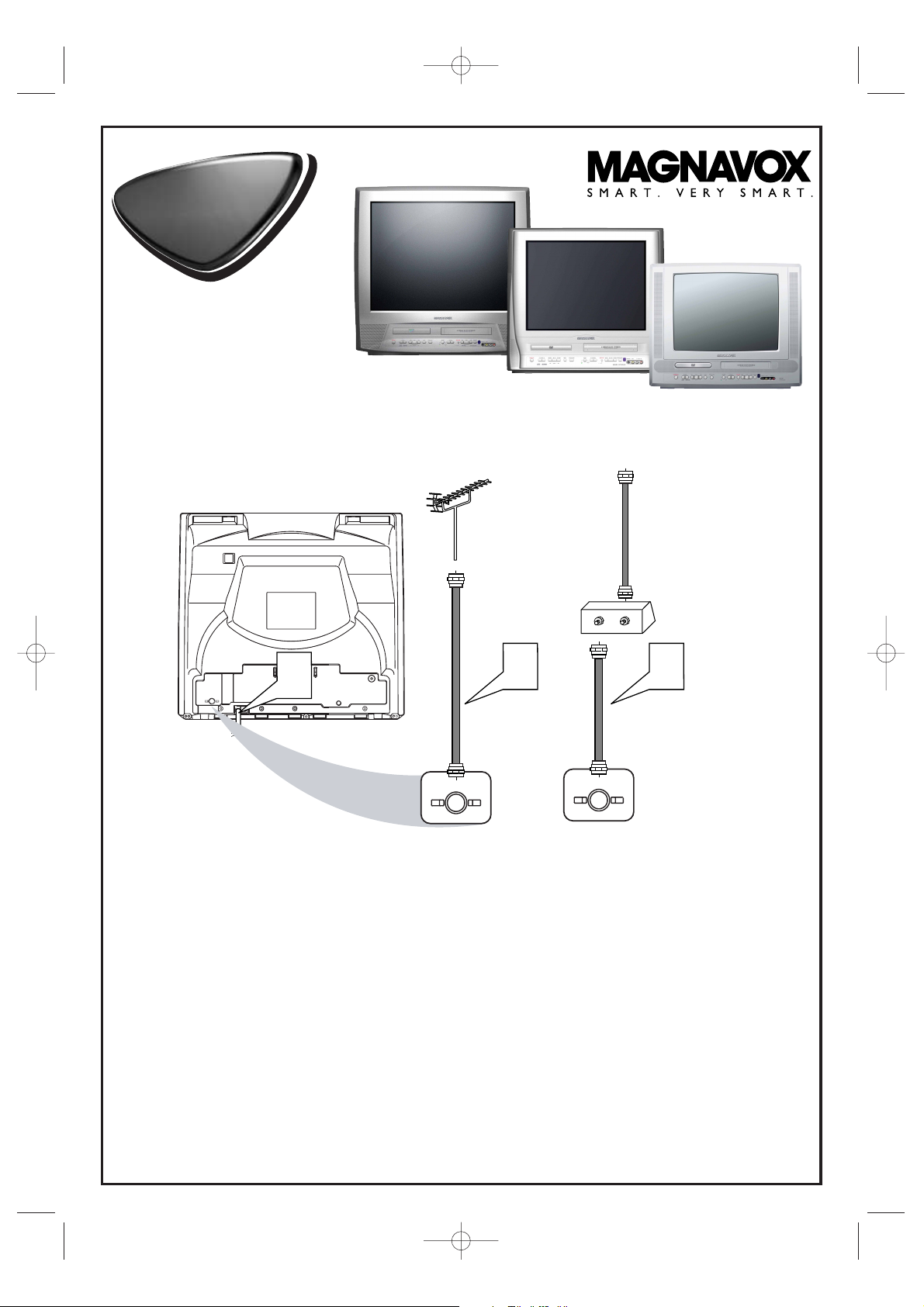
Disconnect all equipment from the power outlets. Connect the equipment to the power outlets only after you
have finished hooking up everything. Never make or change connections with equipment connected to the power outlet.
2
If you do not have a Cable Box, simply connect your Antenna or Cable TV signal directly to the ANT(enna)
jack on the rear of the TV/VCR/DVD.
3
If you do have a Cable Box or Satellite Receiver, first connect the Cable TV or Satellite signal to the IN jack
on the Cable Box or Satellite Receiver. Then, use an RF coaxial cable (not supplied) to connect the OUT
jack of the Cable Box or Satellite Receiver to the ANT(enna) jack on the TV/VCR/DVD. To view any channel, set
the TV/VCR/DVD to the output channel of the Cable Box or Satellite Receiver (channel 3 or 4).Then, select channels at the
Cable Box or Satellite Receiver.
4
When all connections are complete, plug the power cord of the TV/VCR/DVD into an active power
outlet.
5
Press STANDBY-ON on the TV/VCR/DVD or its remote to turn on the unit.
27MDTR20
20MC4304
19MDTR20
Quick-Use
Guide
Quick-Use
Guide
There are many ways to connect your new TV/VCR/DVD to your other equipment.This Quick-Use Guide
shows the easiest, most common connections for the TV/VCR/DVD.
19MDTR20
27MDTR20
20MC4304
Printed in Malaysia
8239 300 39781
1EMN20272
T2132UC/1102UC_MC/0102UC_MC*****
T2132_1102_0102_QUG_ENSP_0303 3/3/05 8:41 PM Page 1
Page 2
Quick-Use Guide (cont’d)
Quick-Use Guide (cont’d)
Detailed playback features and additional functions are described in the
accompanying owner’s manual.
Watching TV
1
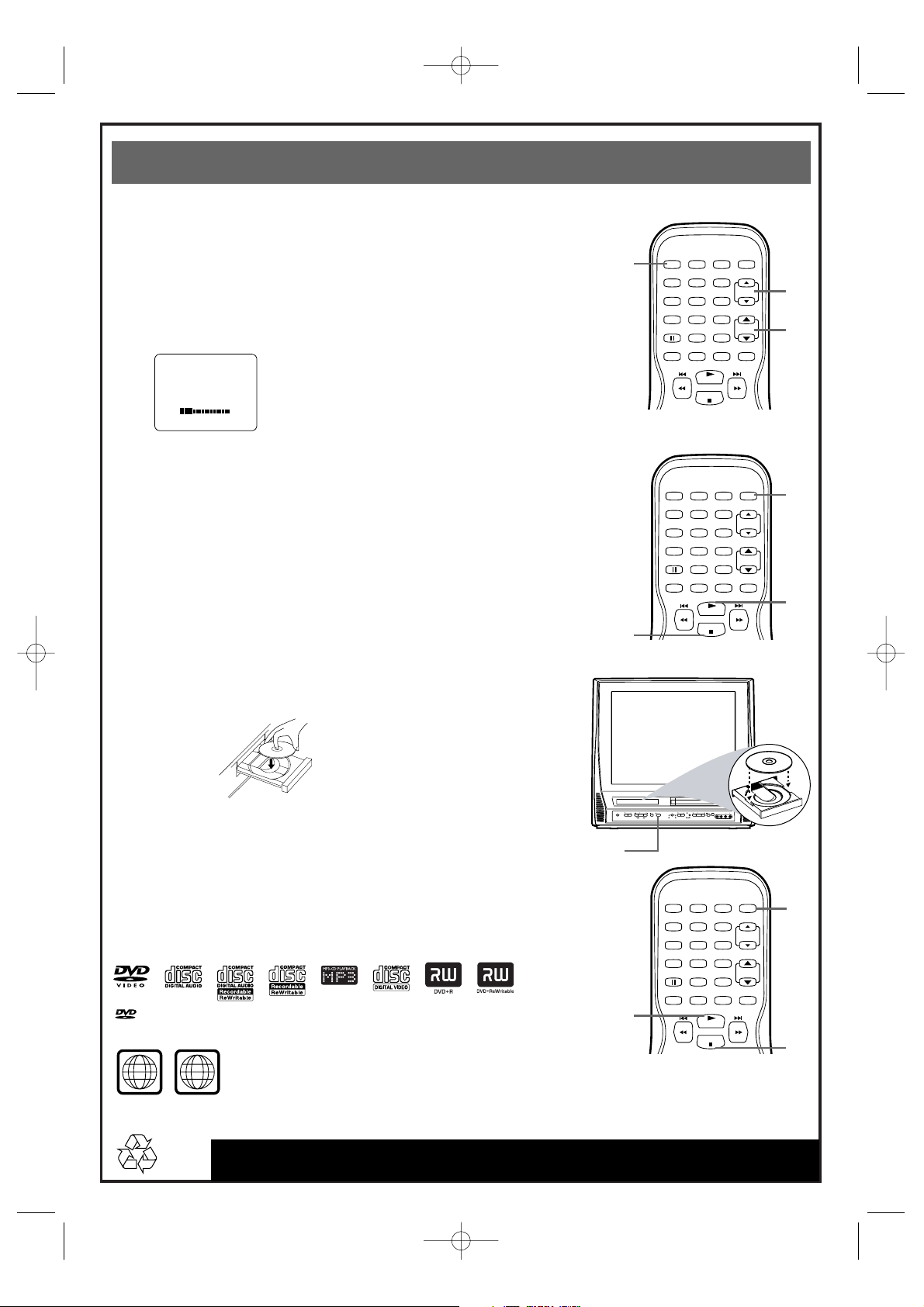
Press STANDBY-ON to turn on the TV/VCR/DVD.The red VCR/TV light will
appear.
2
This unit memorizes TV channels when you connect an Antenna or Cable TV signal
as described in this Quick-Use Guide.
To watch TV, use CH. ▲/▼ to select memorized channels. If a channel is skipped,
use the Number buttons to select it.To update your channels later, refer to the
owner’s manual.
3
Press VOL. ▲/▼ to adjust the volume.
Playing a Videotape
1
With the unit on, press SELECT to put the unit in TV/VCR mode. The red
VCR/TV light will appear.
2
Insert a videotape in the cassette compartment. If play does not start
automatically, press PLAY B.
3
Press STOP C to stop play.
Playing a DVD
1
With the unit on, press SELECT repeatedly to put the TV/VCR/DVD in
DVD mode. The green DVD light will appear on the front of the TV/VCR/DVD.
2
Press OPEN/CLOSE A on the front of the TV/VCR/DVD to open the
disc tray.
3
Place a disc into the tray, with the label facing up and the shiny side facing
down.
Playable Discs
The TV/VCR/DVD will play the following discs.
DVDs must have a Region Code of ALL regions or Region 1.
DVDs must be recorded in the NTSC Color System.
1
2
3
1
2
3
2
3
4
5
1
4
Press PLAY B to close the tray. The tray will close and playback will
begin. If playback does not start automatically, press PLAY B again.
If a DVD menu appears instead, use KLs B,ENTER, or Number buttons to
choose features or start playing from the menu.
5
Press STOP C to stop play.
is a trademark of DVD Format/Logo Licensing Corporation.
T2132_1102_0102_QUG_ENSP_0303 3/3/05 8:41 PM Page 2
VOLUME 20
STANDBY-ON
PICTURE SELECTSLEEP
123
456
789
0 +10
SPEED C.RESET
PLAY
STOP
STANDBY-ON
PICTURE SELECTSLEEP
+100
ZOOM
VOL.
MUTE
CH.
VOLUME NEXTPLAYPREV
SEARCH
123
456
789
SPEED C.RESET
SOURCE CHANNEL REC/OTR
STOP OPEN/CLOSE
VCR/TVDVD
STANDBY-ON
PICTURE SELECTSLEEP
123
456
789
SPEED C.RESET
0 +10
ZOOM
PLAY
STOP
STOP/EJECT
F.FWDPLAYREWSTANDBY-ON
HEADPHONE
0 +10
ZOOM
PLAY
STOP
+100
+100
CH.
VOL.
MUTE
RL
VIDEO
AUDIO
CH.
VOL.
MUTE
ALL
1
Page 3
IN
OUT
O
3
Caja de TV por cable
Señal de TV por cable
Cable coaxial de RF
4
Señal de antena o
TV por cable
2
27MDTR20
20MC4304
19MDTR20
Quick-Use
Guide
Quick-Use
Guide
Existen muchas maneras de conectar su nuevo televisor/VCR/DVD a otros equipos. Esta Guía para uso rápido
muestra la conexiones más sencillas y habituales del televisor/VCR/DVD.
19MDTR20
27MDTR20
20MC4304
1
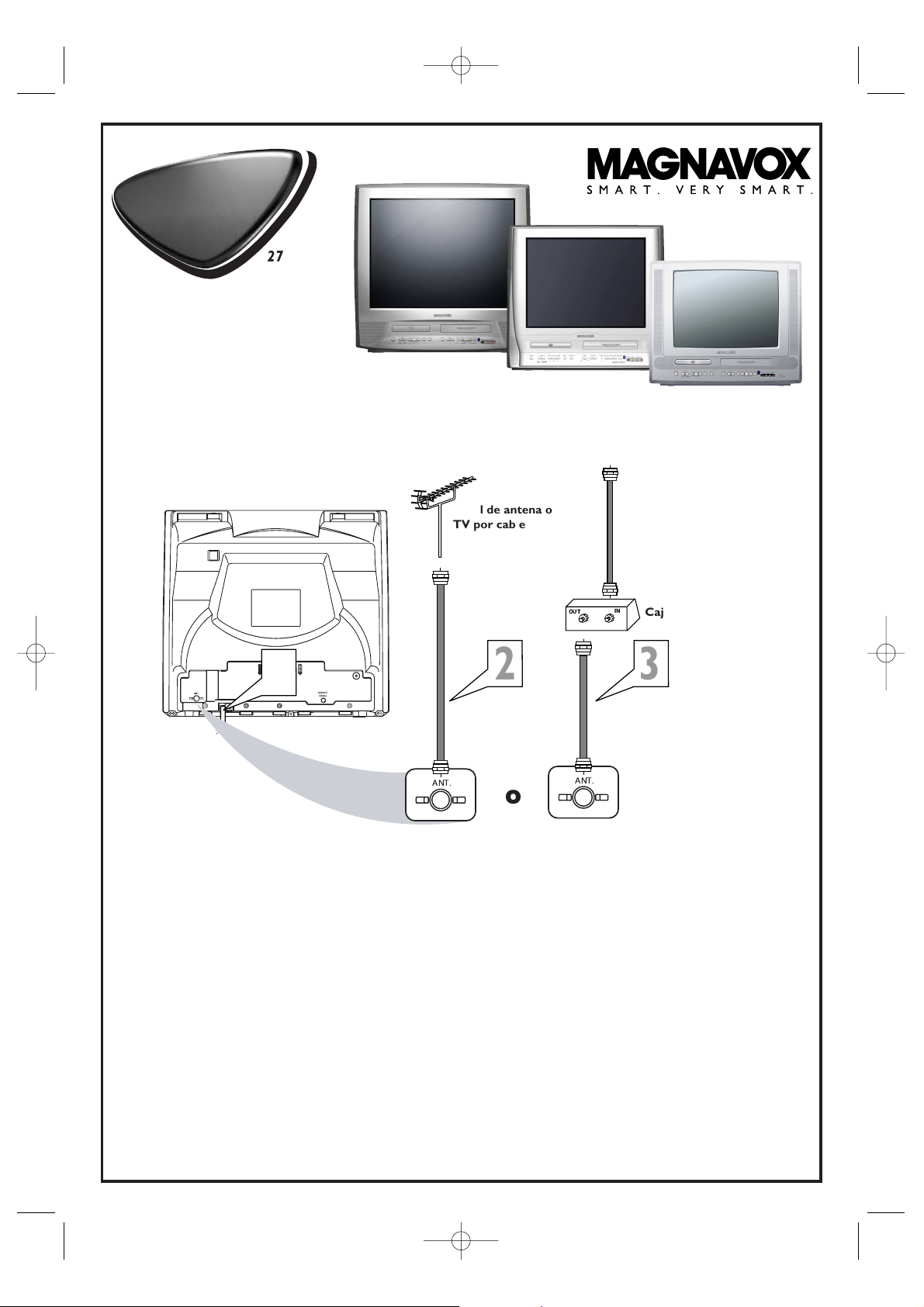
Desenchufe todos los equipos de sus tomacorrientes. Conecte los equipos a sus tomacorrientes sólo después de
que haya terminado de interconectar todo. Nunca efectúe o modifique conexiones con los equipos conectados a sus
tomacorrientes.
2
Si usted no tiene una caja para TV por cable, simplemente conecte su señal de antena o de TV por cable
directamente al conector hembra ANT(ena) de la parte trasera del televisor/VCR/DVD.
3
Si usted tiene una caja de TV por cable o un receptor satelital, primero conecte la señal de TV por cable o
satelital al conector hembra IN de la caja de TV por cable o del receptor satelital. Luego, utilice un cable
coaxial de RF (no provisto) para conectar el conector hembra OUT de la caja de TV por cable o del
receptor satelital al conector hembra ANT(ena) del televisor/VCR/DVD. Para ver cualquier canal, sintonice el
televisor/VCR/DVD al canal de salida de la caja de TV por cable o del receptor satelital (canal 3 o 4). Luego,seleccione los
canales en la caja de TV por cable o en el receptor satelital.
4
Cuando todas las conexiones estén completas, enchufe el televisor/VCR/DVD a un tomacorriente activo.
5
Para encender el equipo presione STANDBY-ON en el televisor/VCR/DVD o en su control remoto.
T2132_1102_0102_QUG_ENSP_0303 3/3/05 8:41 PM Page 3
Page 4
Guía de uso rápido (continuación)
Guía de uso rápido (continuación)
Las características detalladas de la reproducción y las funciones adicionales se
describen en el manual del propietario que viene adjunto.
Reproducción de una cinta de video
1
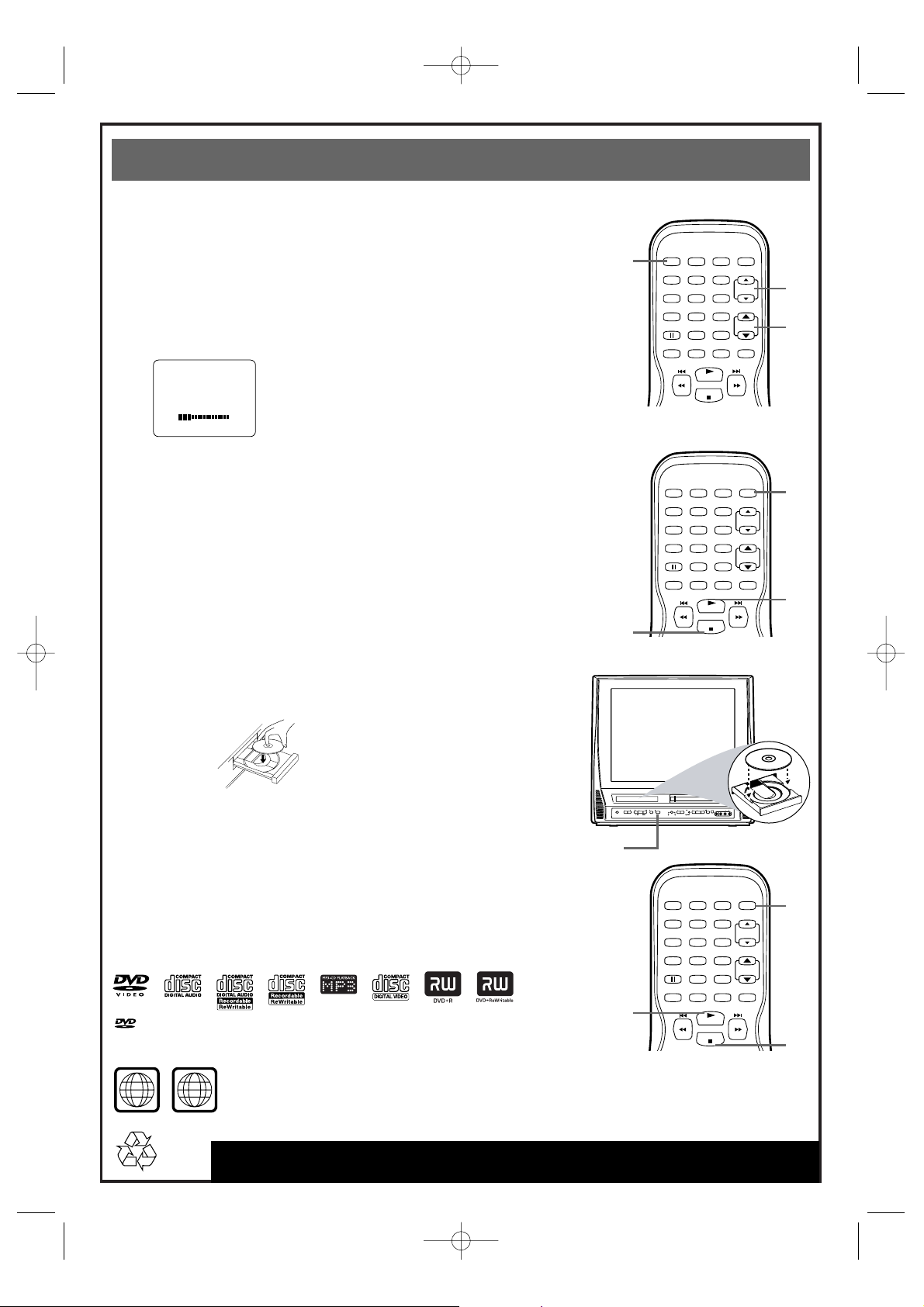
Con el equipo encendido, presione SELECT para ponerlo en el modo
TV/VCR. Aparecerá la luz roja VCR/televisor.
2
Inserte una cinta de video en el compartimiento del casete. Si la
reproducción no comienza automáticamente, presione PLAY B.
3
Para detener la reproducción presione STOP C .
Discos reproducibles
El televisor/VCR/DVD reproducirá los siguientes discos.
Los discos DVD deben tener un código de región correspondiente a TODAS las
regiones o la región 1
Los discos DVD deben estar grabados en el sistema de color NTSC.
PLAY
STOP
SPEED C.RESET
STANDBY-ON
PICTURE SELECTSLEEP
CH.
VOL.
MUTE
ZOOM
123
456
789
0 +10
+100
VIDEO
HEADPHONE
RL
AUDIO
SOURCE CHANNEL REC/OTR
VCR/TVDVD
F.FWDPLAYREWSTANDBY-ON
STOP/EJECT
STOP OPEN/CLOSE
VOLUME NEXTPLAYPREV
SEARCH
VOLUMEN 20
PLAY
STOP
SPEED C.RESET
STANDBY-ON
PICTURE SELECTSLEEP
CH.
VOL.
MUTE
ZOOM
123
456
789
0 +10
+100
PLAY
STOP
SPEED C.RESET
STANDBY-ON
PICTURE SELECTSLEEP
CH.
VOL.
MUTE
ZOOM
123
456
789
0 +10
+100
1
2
3
1
2
3
2
3
4
5
1
4
Presione PLAY B para cerrar la bandeja. La bandeja se cerrará y
comenzará la reproducción. Si la reproducción no comienza
automáticamente, presione PLAY B nuevamente.
Si en su lugar aparece un menú DVD, utilice KL s B, ENTER o los botones
numéricos para seleccionar funciones o iniciar la reproducción desde el
menú.
5
Para detener la reproducción presione STOP C.
is a trademark of DVD Format/Logo Licensing Corporation.
Para mirar televisión
1
Para encender el televisor/VCR/DVD presione STANDBY-ON.Aparecerá la
luz roja VCR/TV.
2
Cuando usted conecta una señal de antena o TV por cable tal como se describe en
esta Guía para uso rápido, este equipo memoriza canales de TV.
Para mirar televisión,utilice CH. ▲/▼ para seleccionar los canales
memorizados. Si el equipo se salta un canal, utilice los botones numéricos para
seleccionarlo. Para actualizar sus canales más adelante, consulte el manual del
propietario.
3
Para ajustar el volumen presione VOL. ▲/▼.
Reproducción de un DVD
1
Con el equipo encendido. presione SELECT repetidamente para poner
el televisor/VCR/DVD en el modo DVD. En el frente del televisor/VCR/DVD
aparecerá la luz verde del DVD.
2
Para abrir la bandeja de discos presione OPEN/CLOSE A en el frente
del televisor/VCR/DVD.
3
Coloque un disco en la bandeja con la etiqueta hacia arriba y la cara brillante
hacia abajo.
T2132_1102_0102_QUG_ENSP_0303 3/3/05 8:41 PM Page 4
ALL
1
 Loading...