

Page 1
QUICK START GUIDE
OHV2000-F22-B15
Handheld Reader
FACTORY AUTOM ATION
Page 2

OHV2000-F22-B15
With regard to the supply of products, the current issue of the following document is applicable: The
General Terms of Delivery for Products a nd Services of the Electrical Ind ustry, published by the
Central Asso ciation of th e Electrical In dustry (Zentralverba nd Elektrotechnik u nd Elektroindustrie
(ZVEI) e.V.) in its most recent version as well as the sup plementary clause: "Expa nded reservation
of proprietorship"
Page 3

OHV2000-F22-B15
Contents
1 Purpose of this Quick Start Guide ...................................4
2 Product Description..........................................................5
2.1 Use and Application ............................................................... .......... .......... 5
2.2 Indicators and Operating Elements ....................................................... ..... 8
2.3 Scope of Delivery ............................................... .......... .............................. 9
2.4 Accessories........................................................ ........................................ 9
2.5 Storage and Disposal .............................................. ................................. 10
3 Installation .......................................................................11
3.1 Insert ing an d Removing the Battery ...................................................... ... 11
3.2 Mounting the Charger and Charging the Handheld Reader ..................... 12
4 Operation .........................................................................15
4.1 Switching On the Handheld Reader ............... .......................................... 15
4.2 Reading Codes .................................... .......... .......................................... 15
4.3 Bluetooth Mode....... ......... ................................................................ ........ 16
4.4 Keyboard Layout ....................................... ......... ...................................... 18
4.5 Activating Suffix..................... .......... ......................................................... 22
2926 77 2016-05
3
Page 4

OHV2000-F22-B15
Purpose of this Quick Start Guide
1 Purpose of this Quick Start Guide
This qu ick start guide contains bas ic instructions for operating the device.
However, the m anual takes priority over the quick start guid e.
4
2926 77 2016-05
Page 5

OHV2000-F22-B15
Product Description
2 Product Description
2.1 Use and Application
Caution!
Irritation caused by optical radiation
The optical unit on the han dheld reader is equipped with very brigh t LEDs that
can cause irritation in da rk environments.
Do not point the handheld reader at people.
Do not look directly into the optical unit on the h andheld reader.
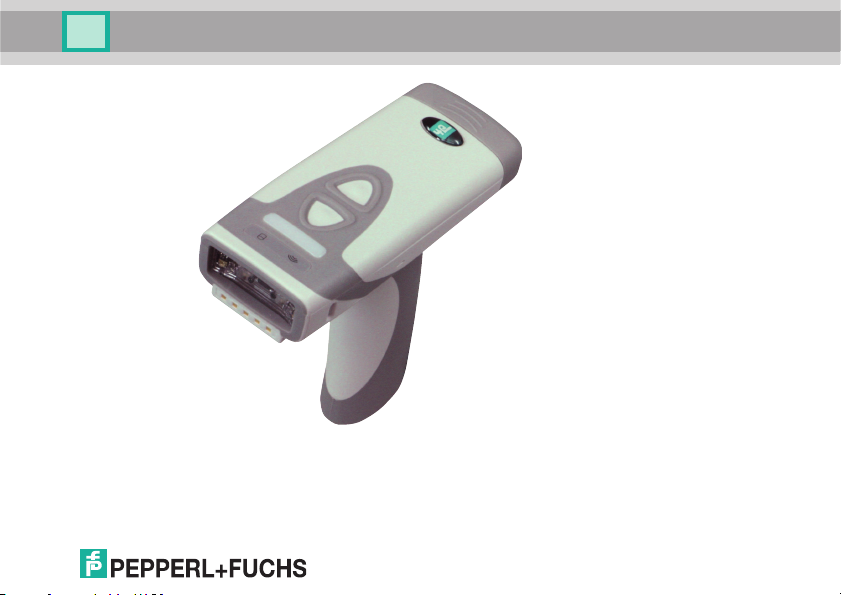
The OHV2000 handheld is a compact handheld reader for all common 1-D and 2D codes applied direc tly to the surface of a prod uct. For example, the co de may
have been etche d, printed, or laser-e ngraved on the housing .
Special technology to preven t glare allows the device to ac curately read codes on
highly reflective surfaces. With its patented dua l lens and a resolution of
1.2 million pixels, it can read bo th sm all and large codes from a wide range of
distances . A diffe rent-colored target projection makes it easier to see the relevant
code. Feedback comes in the form of a visua l or aud ible signal o r a vibration.
2926 77 2016-05
5
Page 6

OHV2000-F22-B15
Product Description
Using the Vision Configurator software, rule sets can be created for formatting
read res ults with out the need for extensive programming work. This facilitates
integration into ERP systems. Th e read data is transferred via the B luetooth
interface or by p lugging the h andheld reader into the ch arger. With its robust
housing and IP65 protection, the handhe ld reader is suitable for outdoo r use.
Type des ignations : OH V2000-F221-B15
6
2926 77 2016-05
Page 7
OHV2000-F22-B15
Product Description
2926 77 2016-05
The device is only approved for app ropriate and inte nded use. Ignoring these
instructions will void any warranty and ab solve the man ufacturer from a ny liability.
Use the device only within the sp ecified ambient and operating conditions.
7
Page 8
OHV2000-F22-B15
3
41 2 4
Product Description
Protection of the perso nnel and the plant is not ensured if the device is not used
according to its intended use.
2.2 Indicators and Operating Elements
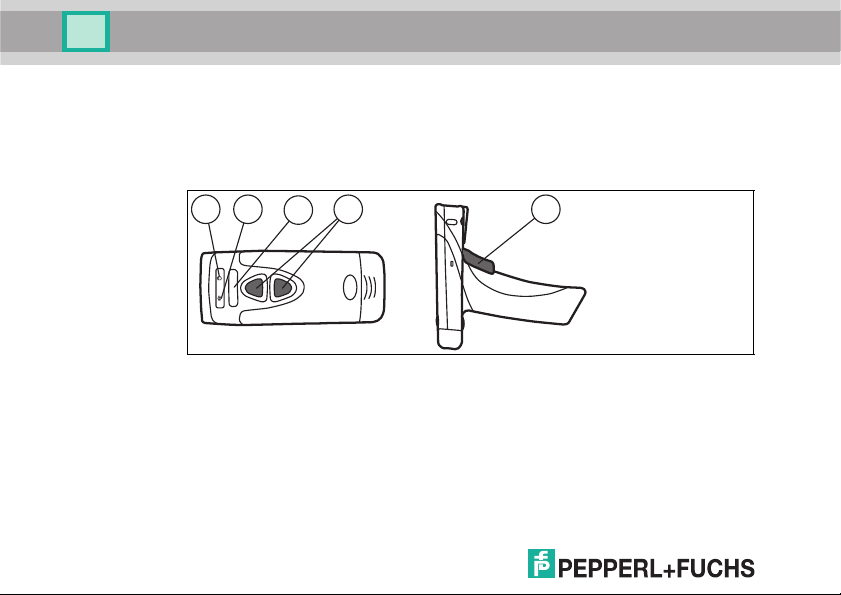
OHV2000-F221
1 Memory
2 Bluetooth connection
3 Function indicator
8
4 Trigger buttons
2926 77 2016-05
Page 9

OHV2000-F22-B15
Product Description
2.3 Scope of Delivery
Check the packag ing and contents for damage.
Check if you have received every item and if the items received are the on es you
ordered.
■
Handheld reader
OHV2000-F2 21-B15
■
Lithium-ion battery, 1300 mAh
OHV-BAT
■
Quick reference guide
2.4 Accessories
Desi gnation Descrip tion
OHV-CHARGER-B15 Charging station for OHV 200 handheld readers with integr ated
OHV-BAT 1300 m Ah lithium-ion battery for OHV20 0 handheld readers
OHV-BAT-CHARGER C harger for lithium-ion b atteries
Vis ion Config urator Configuration s oftware for camera-based sensors
2926 77 2016-05
Bluetooth mode m
incl. USB-G-1M-PVC-AB G-USB B-G connection cable
The connection cable can al so be ordered separately later on.
When using OHV handheld readers, you can d ownload the
software free of charge from www.pepperl-fuc hs.com .
9
Page 10

OHV2000-F22-B15
Product Description
2.5 Storage and Disposal
Keep the original packaging. Always store and transp ort the device in the o riginal
packaging.
Store the device in a clean and d ry environme nt. The perm itted ambient
condition s must be considered, see datasheet.
Disposing of device, packaging, and possibly contained b atteries m ust b e in
compliance with the applicable laws and guidelines of the respective country.
10
2926 77 2016-05
Page 11
OHV2000-F22-B15
Installation
3 Installation
3.1 Inserting and Removing the Battery
Inserting the Battery
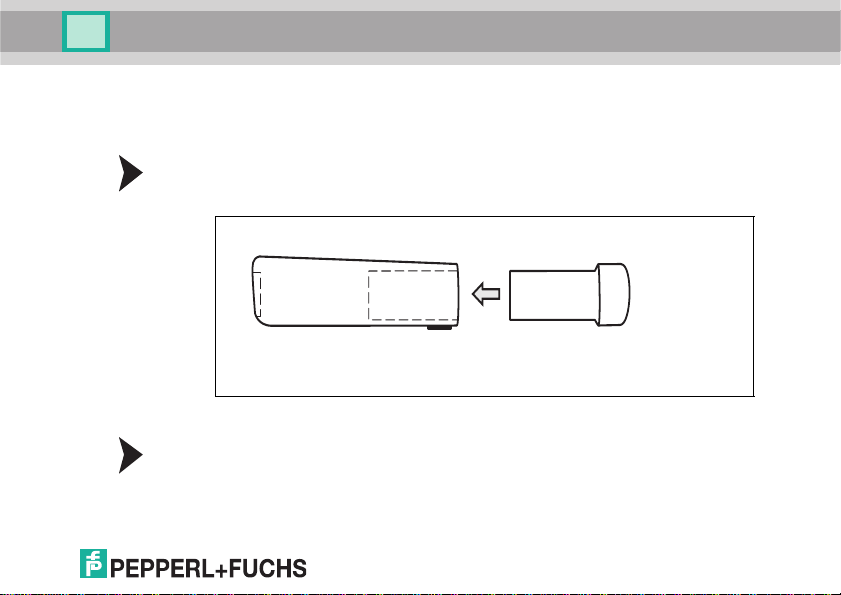
1. Insert the battery into the handheld rea der.
2. Make sure that the battery audibly snaps into place.
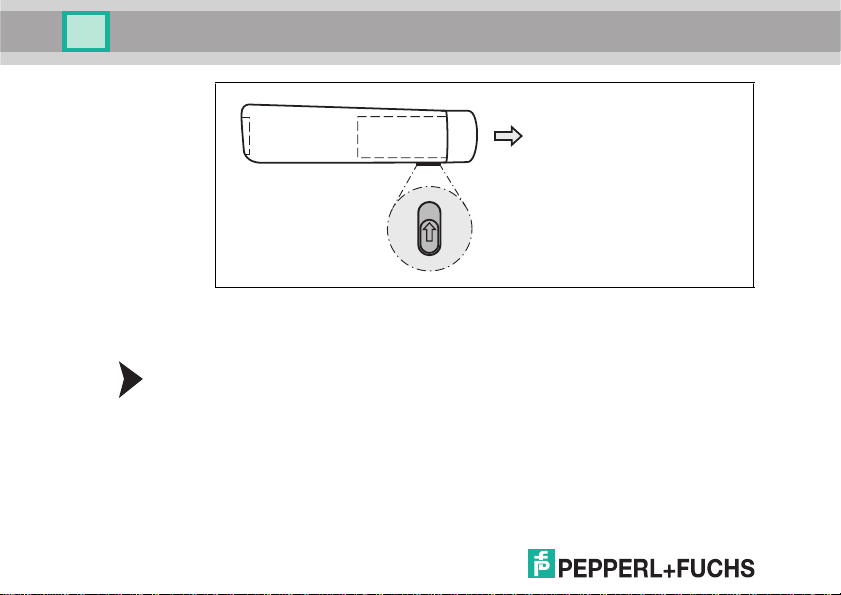
Removin g the Battery
1. Move the locking device on the b ottom of the handheld reader in the direction
of the arrow.
2926 77 2016-05
11
Page 12
OHV2000-F22-B15
Installation
2. Remove the battery.
3.2 Mounting the Charger and Charging the Handheld Reader
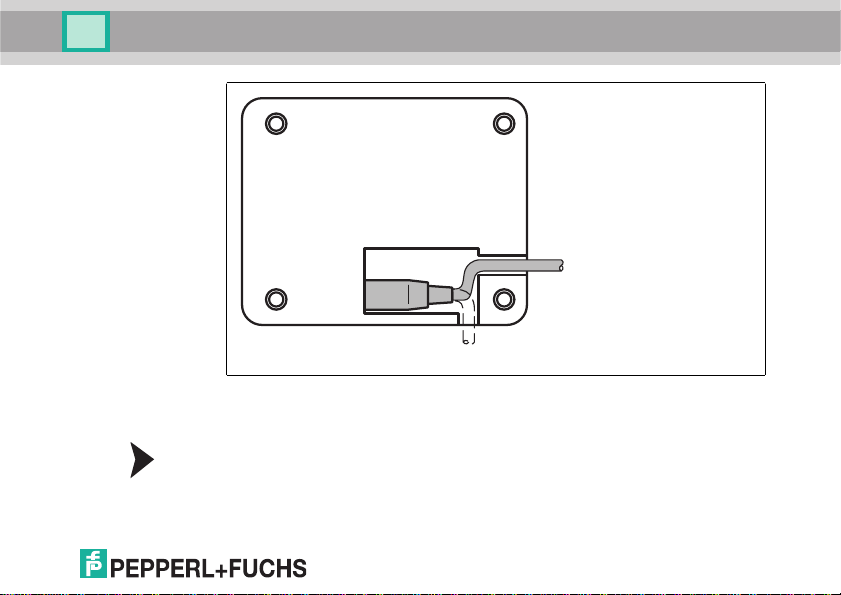
Mounting the Charger
1. Insert the USB cab le or the plug of the plug-in power sup ply into the so cket
provided on the bottom o f the charger .
12
2926 77 2016-05
Page 13
OHV2000-F22-B15
Installation
2926 77 2016-05
2. Place the charger in the position you wish to mount it.
3. Screw the charger into place using the m ounting holes provided.
Charging the Handheld Reader
1. Ensure that the charger is connected to the USB cable or the plug of the plugin power supply.
13
Page 14
OHV2000-F22-B15
Installation
2. Place the handheld reade r in the charg er.
3. When the handheld reader's battery is charging, the battery' s charge status
Charge Status Displ ay
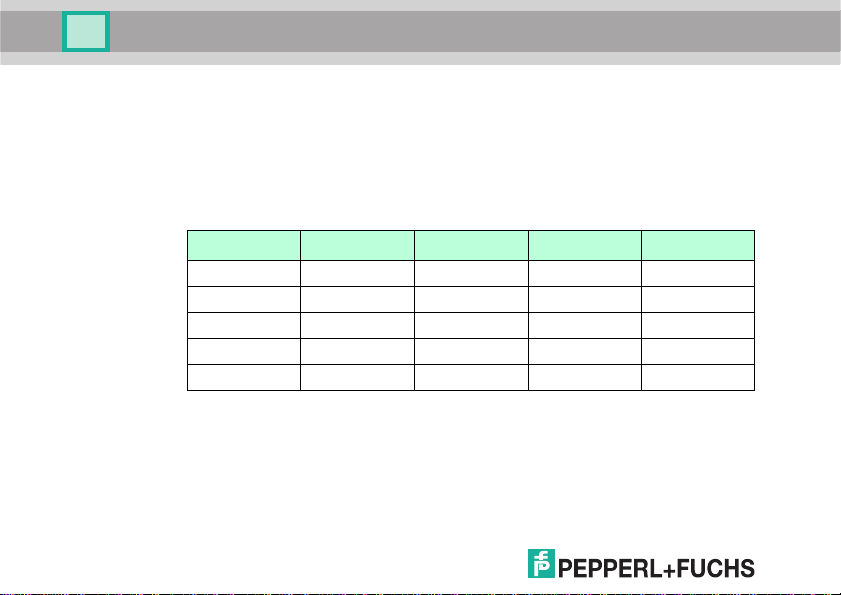
To check the ch arge statu s of the lithium-ion battery, press the button on the back
of the battery.
14
display flashes.
Charge status LED 1 LED 2 LED 3 LED 4
75 % ... 100 % ON ON ON ON
50 % ... 75 % ON ON ON
25 % ... 50 % ON ON
10 % ... 25 % ON
0 % ... 1 0 % Fl ashing
2926 77 2016-05
Page 15

OHV2000-F22-B15
Operation
4 Operation
4.1 Switching On the Handheld Reader
To switch o n the handheld reader, hold down any trigg er button for approx. two
second s. The function indicator on the handheld r eader briefly lights up red then
briefly lights up green. An audible signal is e mitted and the hand held reader
vibrates.
4.2 Reading Codes
The ha ndheld reader reads b oth very small 2-D codes (e.g., Data Matrix codes )
and larger 1-D code s (e.g., barcodes). The handheld reader offers a field of vision
comprising two areas that can be read at the same time. This covers a read range
between 4 cm and 31 cm. The optimal rea d range is 10 cm.
By default, the re ad range is indicated by two blue bars. However, you can
deactivate the display of the blue bars.
Tip
If several code s are located right next to each oth er, we recommend you cover the
codes that you d o not wish to read. T his prevents you from inadvertently read ing
another code.
2926 77 2016-05
15
Page 16

OHV2000-F22-B15
Operation
Reading Codes
The ha ndheld reader registers itself with other devices as an input device or
keyboard. Before you read a code, start or activate the application to which the
read res ult is to be transferred.
1. To read the code, hold the trigg er button down.
2. Position the blue bars in the center of the code that you wish to read. Move the
handheld reader closer to or farther away from th e code until the height of the
blue bars roughly c orresponds to the he ight of the code.
If the reading process is successful, the fu nction indicator on the
handheld reader briefly lights up green. When ac tivated, an audible signal is
emitted and the handheld reader vibrates.
4.3 Bluetooth Mode
Activating Bluetooth Mode
1. Activa te the ch arger's Bluetooth func tion. Move the slider o n the back/bottom
of the charger in the direction of the arrow.
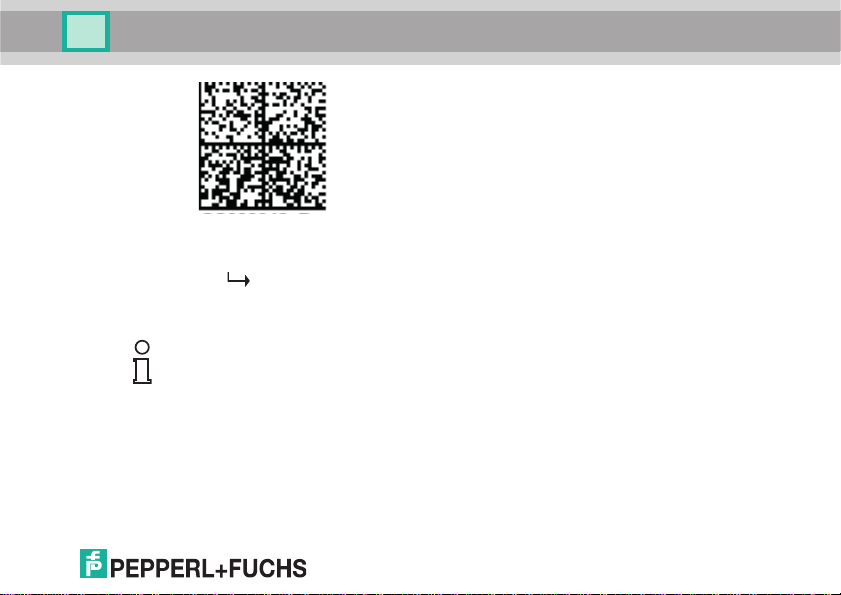
2. If you switch to Bluetooth m ode from some other operating mo de, read the
following code using the handheld reader.
If the handhe ld rea der was already in Bluetooth mode, you can skip this step.
16
2926 77 2016-05
Page 17
OHV2000-F22-B15
CC002942_Reader_step1_2
Operation
2926 77 2016-05
3. Read the Quick Conne ct code on the front of the charger o r the m odem.
Bluetooth mode is activated. Read co des are transferred to the charger
via Bluetooth immediately a fter they are read. The ch arging tray then
automatically transfers the codes to the PC.
Note!
In Bluetooth mode, data is transferred using a US English keyboard layout by
defau lt.
If data is not transferred correctly in Bluetooth mode, mod ify the keyboard layout.
See chapter 4.4
17
Page 18

OHV2000-F22-B15
Operation
4.4 Keyboard Layout
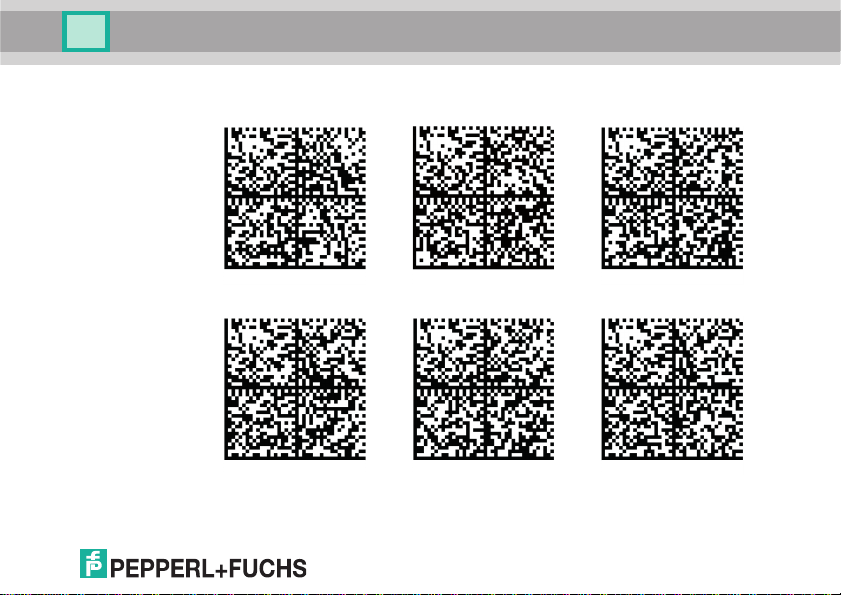
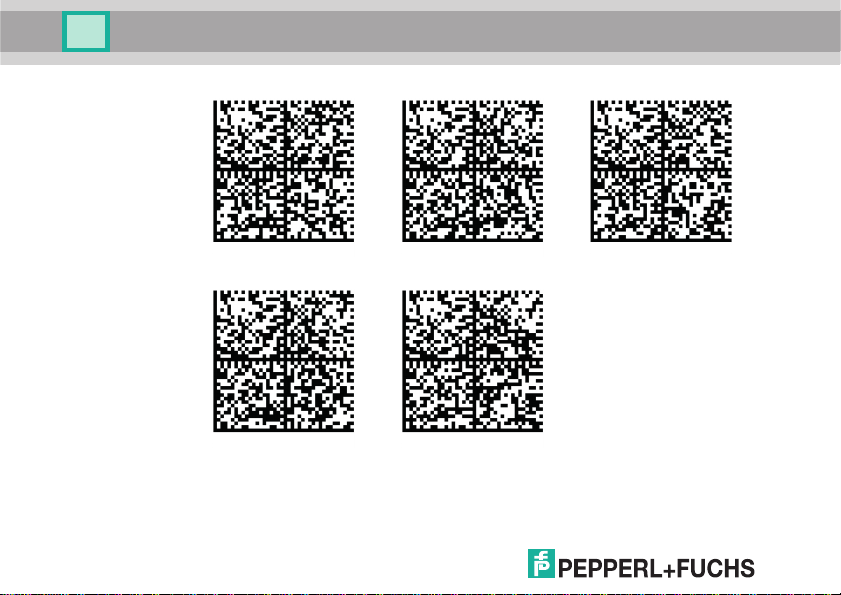
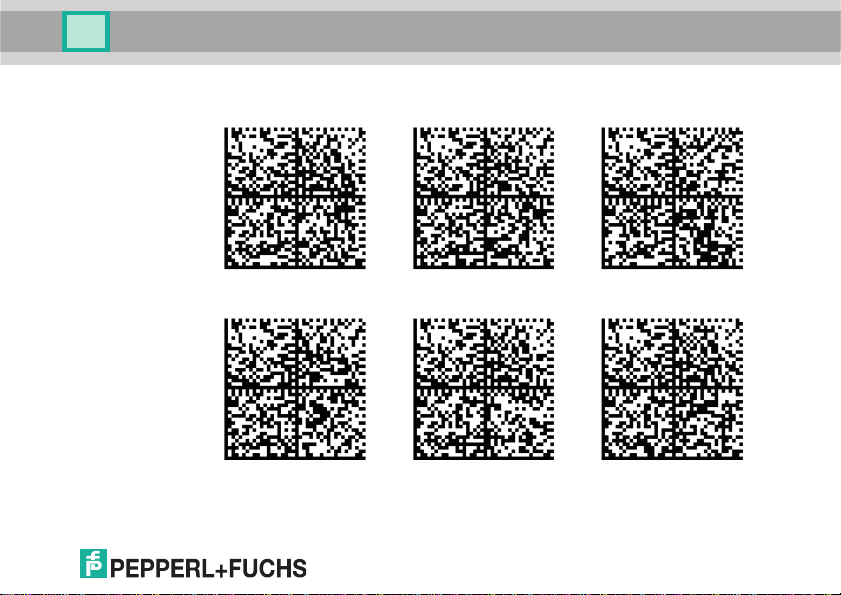
You can use the following control codes to modify the keyboard layout for the
current operatin g mod e.
18
2926 77 2016-05
Page 19
2926 77 2016-05
M10460_02
M10469_01
M10471_01
M10463_02
M10466_02
M10462_02
OHV2000-F22-B15
Operation
Microsoft Windows
English (US) Englis h (US International) English (GB)
German (Germany) German (Switzerl and) F rench (France)
19
Page 20
20
M10461_02
M10472_01
M10465_02
M10418_02
M10464_02
OHV2000-F22-B15
Operation
French (Belgium) Sp anish (Spain) Spanish (Latin America)
Russian Japanese
2926 77 2016-05
Page 21
2926 77 2016-05
M10419_02
M10421_02
M10422_02
M10420_02
M10424_02
M10423_02
OHV2000-F22-B15
Operation
Apple OS X and iOS
English German (Germany) German (Switzerland )
French Spanish Italian
21
Page 22
M10131_01
M10132_01
OHV2000-F22-B15
Operation
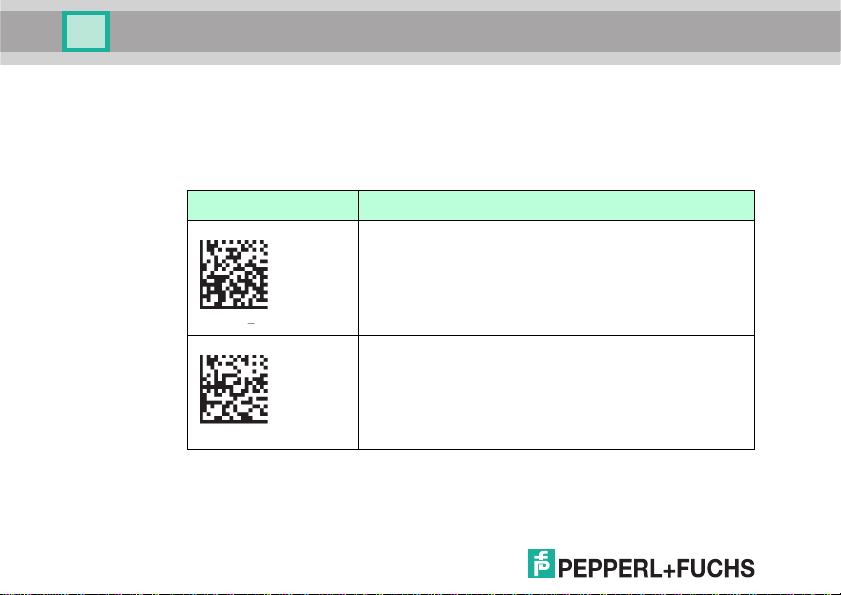
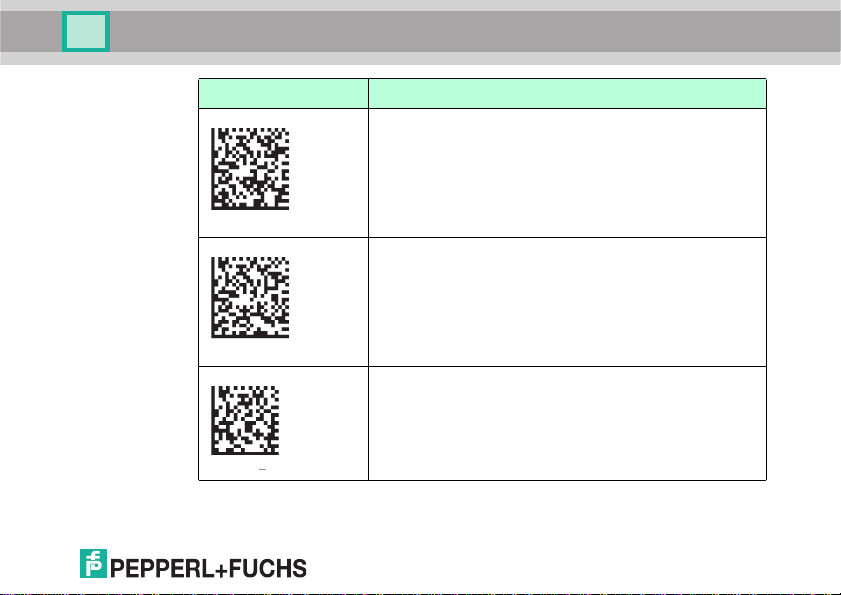
4.5 Activating Suffix
To append a suffix to the read result, scan the appropriate code with the
handheld.
Suffixes
Code Description
Suffix comma Adds a comma to the end of the read r esult.
Suffix space Adds a space to the end of the read result.
2926 77 2016-05
22
Page 23
M10134_01
M10133_01
M10130_01
OHV2000-F22-B15
Operation
Code Description
Suff ix enter Adds an input character to the end of the read result.
Suff ix tab Adds a tab to the end of the read result.
Suff ix erase/ none Removes all suffixes.
2926 77 2016-05
23
Page 24

Sub ject to mo difica tion s • Copyri ght Pepper l+Fuch s • Prin ted in Germa ny
www.pepperl-fuchs.com
FACTORY AUTOMATION – SENSING YOU R NEEDS
Singapur 139942
Tel. +65 67799091
E-Mail: [email protected]
Worldwide Headquarters
Pepperl+Fuchs GmbH
68307 Mannheim · Germany
Tel. +49 621 776-0
E-Mail: [email protected]
USA Headquarters
Pepperl+Fuchs INC
Twinsburg, Ohio 44087 · USA
Tel. +1 330 4253555
E-Mail: [email protected]
Asia Pacific Headquarters
Pepperl+Fuchs Pte Ltd.
Company Registration No. 199003130E
292677 DOCT-5169
05/2016
 Loading...