

Page 1

User Manual
NET6500 IP ENCODER 2 Series
Page 2

© 2022, Motorola Solutions, Inc. All rights reserved. MOTOROLA, MOTO, MOTOROLA SOLUTIONS, and the Stylized M Logo are
trademarks or registered trademarks of Motorola Trademark Holdings, LLC and are used under license. Pelco, the Pelco logo, and
other trademarks associated with Pelco products referred to in this publication are trademarks of Pelco, Inc. or its affi liates. All other
product names and services are the property of their respective companies.
Page 3

Content
OVERVIEW
4
NSTALLATION
8
WEB VIEWER
14
4 Safety Instruction
5 Key Features
6 What's included
7 Rear Panel
8 Basic Layout
9 Connecting to an external device
14 What is the Web Viewer?
16 Live
21 Setup
APPENDIX
37
37 Troubleshooting (FAQ)
38 Open Software Licensing Agreement
Page 4

Overview
Safety Instruction
This product was tested with a UPS to satisfy EN 61000-4-11 test conditions (voltage dips and short interruptions test) under the EN
501 30-4: 2011 stand a r d.
The Company shall not have any responsibility for any accident or damage that may incur during the use of the product. For your
safety, we provide a few instructions about installation, manipulation, cleaning, assembly/disassembly of the product as below. So
please read carefully and comply with the instructions.
Before installation
Comply with the following instructions to prevent a fi re, explosion, system failure or electric shock.
Remove the power supply module before proceeding.
~
Check the input voltage (AC100V–AC240V) to the power supply module before connecting it.
~
Keep the product away from humidity.
~
Ensure that all devices connected to the product should be properly earth-grounded.
~
In operation mode
Comply with the following instructions to prevent a fi re, explosion, system failure or electric shock.
If you need to open the cover, consult with a service person who could help you do what you want to do.
~
Do not connect multiple devices to a single power socket.
~
Keep the product away from dust or too much combustible substances (ex: propane gas).
~
Do not touch it with wet hand.
~
Do not insert a conductor in the vent of the ventilation system.
~
Do not apply excessive force to unplug the power cord.
~
4 | Overview
Disassembly & Cleaning
When cleaning on the surface, use a dry cloth.
~
Do not wipe the product using water, paint thinner or organic solvents.
~
Do never dismantle, repair or modify the product by your own.
~
During installation
To prevent an accident or physical injury and to operate ENCODER properly, please comply with the
followings:
Secure at least 18 centimeter of distance between cooling fan and wall for a proper ventilation.
~
Install the product on a fl at surface.
~
Keep it away from direct sunlight or excessive temperature.
~
While in use
Do not apply force to or shake it while using it.
~
Do not move, throw away or put excessive force to it.
~
Page 5

Key Features
This product can monitor quality image data in real time after receiving audio and video inputs from the 2MP, 3MP, 4MP, 5MP, 8MP
camera for up to 4/16 channels.
It also provides transferring video and audio data to the networked external devices, which allows remote monitoring environment f
computers.
Up to 4/16 channels of 8MP camera video can be displayed in real time
~
Supports High Profi le CODEC
~
H.264 - HP:(Baseline, Main, High profi le),
H.265 - HP:(Main profi le), MJPEG CODEC
Supports dual streaming for remote access service
~
Supports remote access using the web browser
~
Overview
or
English | 5
Page 6

Overview
What's included
4-Channel Rack Mount 16-Channel Rack Mount
Power adapter x1
(4CH and 16CH)
Screws (For fi xing Cable Clamp)
4CH
Terminal Block 5P (2EA)
Power Cable
(16CH)
Cable Clamp (For fi xing Power Cable)
16CH
Terminal Block 8P (2EA), 5P (2EA)
6 | Overview
Product Insert Black Rack Mount Screw (8EA) Silver Screw (4EA)
Page 7

Rear Panel
4 CH
16 CH
1234567
No. Name Description
1
2
VIDEO IN Video input terminal for cameras.
AUDIO IN Port for audio input.
91011
8
VIDEO IN
12 453
1231 3
4
24
VIDEO IN AUDIO IN AUDIO OUT
SPOT
OUT
+'021,725
789 10
12453
1213141516
13
24
AUDIO IN
AUDIO OUT
SPOT
OUT
+'021,725
789 10
9*$
9*$
(7+(51(7
(7+(51(7
ALARM IN
Overview
6
RS485
D-
D+
IN1
IN3
GND
'&9
RELAY
NC
NO
IN4
IN2
COM
6
D-
D+
IN1
IN7
IN3
IN5
IN9
IN11
IN13
IN15
GND
GND
GND
'&9
ALARM IN
RS485
ALARM IN
RELAY
NC
NO
IN6
IN2
IN4
IN8
IN10
IN12
IN14
GND
IN16
GND
COM
3
4
5
6
7
8
9
10
SPOT OUT Exclusive port for SPOT output only. (Connect to a TV monitor.)
VGA VGA monitor video output port.
RS485 Ports for communication with external devices such as PTZ camera and system keyboard.
RELAY Relay Terminal output port.
ALARM IN Alarm input signal port.
CABLE CLAMP Used to secure cables.
AUDIO OUT Port for speaker connection.
HD MONITOR HD monitor video output port.
ETHERNET Network port for connection to the Internet, router or hub.
DC 12 Power input port. Connect to a 12V adaptor.
English | 7
Page 8

Basic Layout
Camera
MIC
SPOT
MONITOR
HD
MONITOR
Speaker
MONITOR
VGA
IP Router
or HUB
Installation
IN1
IN3
GND
IN5
IN7
GND
D+
D-
IN9
IN11
ALARM IN
GND
IN13
IN15
ALARM IN
IN2
IN4
RELAY RS485
GND
IN6
IN8
NO
COM
NC
IN10
IN12
GND
IN14
IN16
Sensor
DC 12V
Power
Alarm
Alarm
Control
Devices
it is recommended to consult an authorized installer when installing the ENCODER.
Since the cable quality may aff ect directly to the video quality depending on the distance between the camera and ENCODER,
8 | Installation
Page 9

Connecting to an e xterna l device
A
N
A
N
S
85
Power Connection
Plug the provided DC 12V adaptor in the rear power port of the ENCODER.
D-
IN9
D+
IN7
IN5
IN1
IN3
GND
GND
ALARM IN
LARM I
Power adaptor
For stable operation of the product, it is recommended to use the provided adapter
•
(Do not use arbitrary adapters).
Arrange up the cables and be careful not to peel off the cable coating.
•
Do not place the power cord under the carpet or rug. The power cord is usually earth-grounded. However, even if it's not earth-grounded, do not
•
modify it on your own for earth-grounding.
Do not insert multiple devices in a single power socket. Otherwise, it may cause a power overload.
•
The product is equipped with an adapter for power connection. Connect it correctly so it won't come loose.
•
4
ELAY R
RELAY RS485
NC
NO
IN8
IN4
IN6
IN2
IN10
GND
COM
Installation
IN11
IN13
IN15
GND
ALARM IN
LARM I
IN16
IN14
IN12
GND
English
|
9
Page 10

Installation
ALARM IN
IN9
IN11
GND
IN13
IN15
IN10
IN12
GND
IN14
IN16
ALARM IN
RELAY RS485
NC
COM
NO
IN8
IN6
GND
IN4
IN2
D-
D+
IN7
GND
IN5
GND
IN3
IN1
Alarm I/O Connection
To connect the alarm input signal
Connect the signal line of an alarm input device such as sensor to the rear [ALARM IN] port.
Insert one end of alarm signal cable through the [IN1] ~ [IN16] terminal hole below the screw hole, and then fasten the screw.
1.
Push the Alarm In and [GND] terminals’ bottom side with a sharp tipped tool such as screw driver.
2.
While pushing, insert one end of alarm signal cable into the hole of Alarm In terminal.
3.
While pushing, insert one end of ground cable into the hole of [GND] terminal.
4.
To check proper insertion of cable, stop pushing and gently pull the cable and test whether it disconnects.
5.
To disconnect a cable, push the bottom side of the terminal and pull out the cable.
To connect the alarm output signal
Connect the signal cable of the alarm output device to the [RELAY] terminal on the product’s rear side.
Push the [NO]/[NC]/[COM] terminal’s bottom side with a sharp tipped tool such as screw driver.
1.
While pushing, insert one end of alarm signal cable into the desired terminal of [NO] or [NC].
2.
NO(Normal Open) : Normally Open but switching to Close if an alarm out occurs.
COM : Insert the grounding wire.
NC(Normal Close) : Normally Close but switching to Open if an alarm out occurs.
Insert the ground signal wire into the hole of the [COM] port (shown also below the screw), and tighten the screw.
3.
To check proper insertion of cable, stop pushing and gently pull the cable and test whether it disconnects.
4.
To disconnect a cable, push the bottom side of the terminal and pull out the cable.
10 | Installation
Page 11

Communi ca t io n Port
ALARM IN
RELAY RS485
NC
COM
NO
IN8
IN6
GND
IN4
IN2
D-
D+
IN7
GND
IN5
GND
IN3
IN1
RS-485 Connection
Connect a PTZ Camera or Keyboard Controller.
After connecting the control device, be sure to match the connection settings between ENCODER and device.
Make communication settings in <Control Device>. (page 32)
Use the signal wire to make connection between [D+] of the terminal block plug and [D+] of the keyboard controller.
1.
Make connection between [D-] of the terminal block plug and [D-] of the keyboard controller.
2.
Make connection between [GND] of the terminal block plug and [GND] of the keyboard controller.
3.
* For RS-485 connection, refer to the user manual of the keyboard controller.
Audio Device Connection
You can connect an audio output device such as speaker amplifi er .
Connect the audio input device such as microphone to the rear Audio In port, connect the audio output device such as speaker
amplifi er to the Audio Out port.
Installation
English
|
11
Page 12

Installation
ALARM IN
IN9
IN11
GND
IN13
IN15
IN10
IN12
GND
IN14
IN16
ALARM IN
RELAY RS485
NC
COM
NO
IN8
IN6
GND
IN4
IN2
D-
D+
IN7
GND
IN5
GND
IN3
IN1
A
N
Y
[
Network Connection
PC connection in the local network
You can connect ENCODER to a PC in the same network and control or manipulate it on the PC monitor.
Camera
Broadband router
or hub
Local PC
Local PC
Connect the [ETHERNET] port in the rear panel to the router or hub.
1.
Connect the local PC to the router or hub.
2.
ND
IN11
IN13
IN15
IN15
GND
ALARM IN
LARM I
ND
N16
IN16
IN14
IN12
GND
Broadband router
[~huylzl{w~y Z Y X
Local PC
Enter the address in the Web browser of your PC in the format of: “http://IP address:Web service port”
3.
(Ex : http://192.168.0.23:80) The web service port is set to 80 by default. From the Network Setup screen,
u can change the port number.
yo
or hub
Local PC
* If using the dedicated PC S/W, refer to the user manual of the program.
Enter the user ID and password before logging in. The initial administrator ID is “admin” and the password should be set
4.
when logging in for the fi rst time. Then, you can view the monitoring screen.
12 | Installation
Page 13
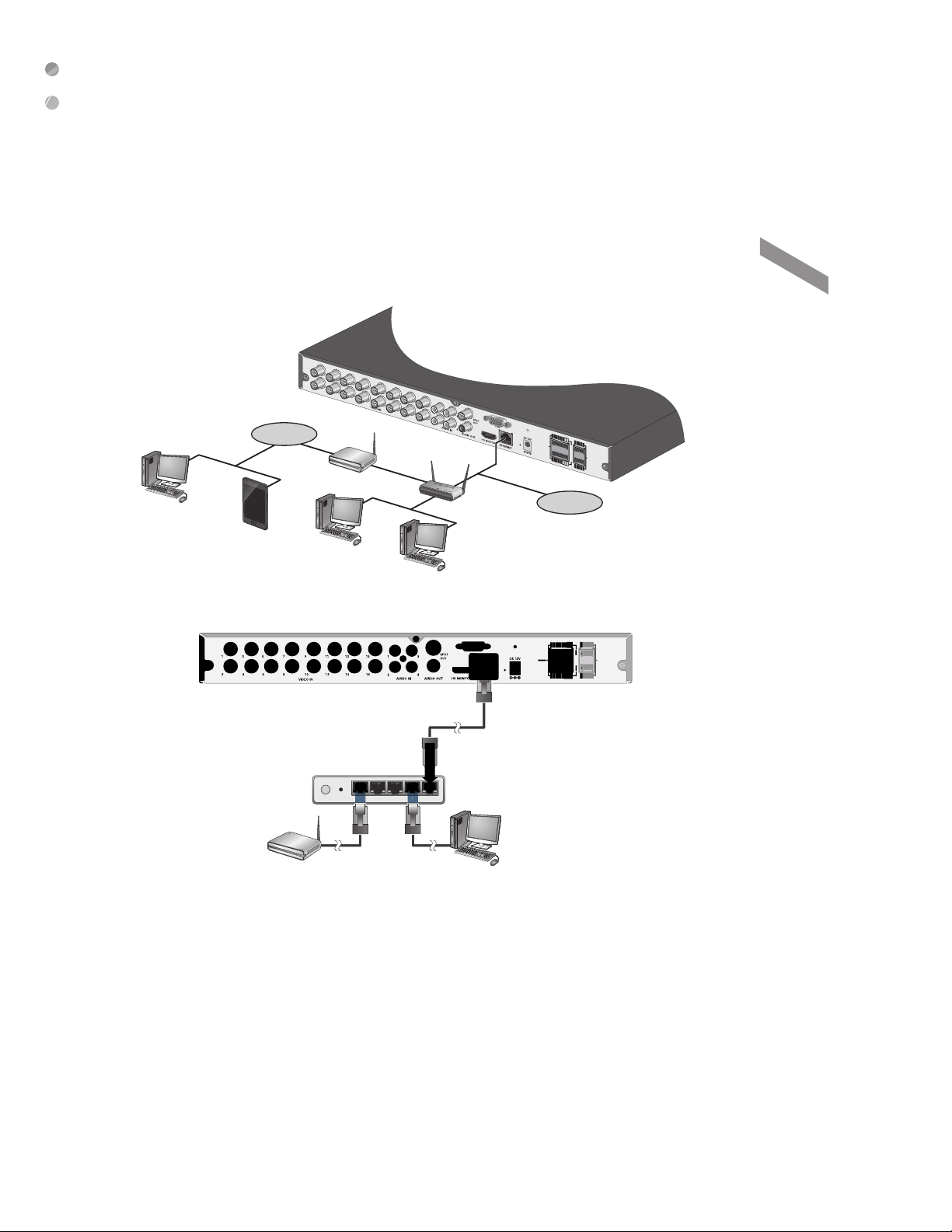
PC connection from a remote network
ALARM IN
IN9
IN11
GND
IN13
IN15
IN10
IN12
GND
IN14
IN16
ALARM IN
RELAY RS485
NC
COM
NO
IN8
IN6
GND
IN4
IN2
D-
D+
IN7
GND
IN5
GND
IN3
IN1
ALARM IN
5
D
You can connect ENCODER to a PC in the same remote network and control or manipulate it on the monitor of the PC or mobile
device.
Internet
ADSL modem
Remote PC
Smart Phone
Connect the [ETHERNET] port in the rear panel to the router.
1.
Local PC
Broadband router
Local PC
Internet
Direct Connection
IN11
IN13
IN15
IN13IN1
GND
ALARM IN
N
N16
N14
IN16
IN12
IN14
GND
Installation
4WANRESETPWR 3 2 1
ADSL modem
Connect the [ETHERNET] port of the router directly to the fi xed IP LAN cable, or connect it to the ADSL modem.
2.
Broadband router
Local PC
English
|
13
Page 14

Web Viewer
What is the We b Vie w er?
Web Registration Authority is a user-friendly software application that enables you to control the video data in connection with a remote
ENCODER.
System Requirements
The following is the minimum hardware and operating system requirements to run Web RA.
Operating System Windows 7 or higher
Web browsers:
CPU Intel Pentium 4 / 2.0GHz or higher
Memory 512 MB
Display 16-bit 1024 x 768 High Color
Microsoft Edge/Mozilla Firefox 3.6/Google Chrome 4.1/Opera 10
Some web browsers other than Microsoft Edge may not fully function.
Connection
Open a browser and enter the IP address of ENCODER, or type the URL in the address bar.
T o connect to the ENCODER from inside
-
Check the "Network Status" and verify the
<IP ADDRESS> and <WEB SERVICE PORT>
of the ENCODER.
-
Enter the IP address and web service port in the
address bar of the browser.
Ex) http://192.168.1.200:80
T o connect to the ENCODER from outside
Using the IP address
~
-
Check the "Network Status" and verify the <EXTERNAL IP ADDRESS> and <WEB SERVICE PORT> of the ENCODER.
-
If using a fi xed (external) IP, enter the external IP that is specifi ed in the ENCODER in the address bar of the web browser.
Ex) If the internal IP address is set to "http://222.11 2.4.48:80" (192.xxx.xxx.xxx), no acc ess f rom outside is allowed.
Using the URL
~
-
Check the "Network Status" and verify the <DDNS ADDRESS> and <WEB SERVICE PORT> of the ENCODER.
-
Enter the DDNS address and web service port in the address bar of the browser.
* In a router network, you have to set the "Port Forwarding" and "DDNS Setting" to allow access from outside.
* For the necessary settings of the router, refer to the user manual of the router or contact the manufacturer of the router.
Provide the user ID and password.
1.
* The initial administrator ID is "admin" and the password should be set when logging in for the fi rst time.
When the installation is complete, you will see the live screen.
2.
Page 15

Web Viewer
English
|
15
Page 16
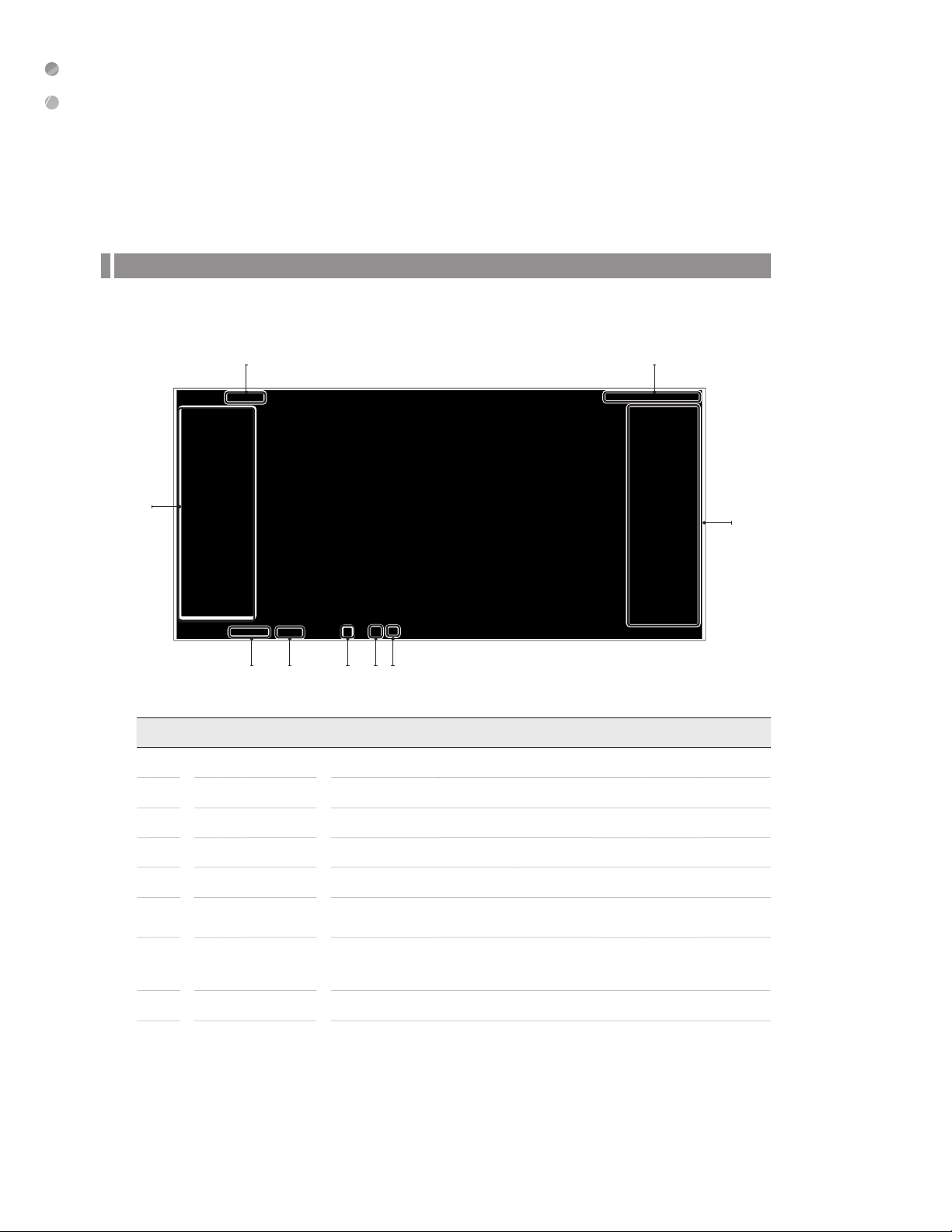
Web Viewer
Live
Live Screen At a Glance
1 9
2
3 4 65 7
No. Item Description
1
2
3
4
5
6
7
View selection tab You can enable the live monitoring and confi gure the system settings.
PTZ You can control PTZ cameras connected to each channel. (Only for PTZ cameras.)
Video Quality Standard video quality only.
Channel Select a channel listed in the screen.
Full Screen Select the full screen mode.
Alarm Indicator
Network Connection
Status
Turns on if an event occurs. It does not turn on if no reaction to the event is yet defi ned.
Click this to check the information of the event that occurred.
Check if network connection is made via an external PC.
Click this to view the details of the concurrent users and to check the network connection
status.
8
8
16 | Web Viewer
Status Bar Display alarm and network connection status for each channel.
Page 17

No. Item Description
Date/Time Shows the access date/time.
Session Language Set the Session Language.
9
System Language Set the System Language.
LOG OUT Performs logout process.
Web Viewer
English | 17
Page 18

Web Viewer
Pan/Tilt/Zoom (PTZ) tab
Click [ ] in bottom left area on screen.
Select whether to display the PTZ Settings tab.
You can control the operations of a PTZ camera.
In the PTZ window > PTZ OSD, click OSD to view menu.
Click on the UP and DOWN arrows to navigate through the
menu options. Click the IRIS open button to ENTER.
Adjust the focus, zooming and iris of the camera.
You can use the arrow buttons to control the operations of
the camera. Rotate the PTZ camera up/down/left right to
control pan/tilt motions.
PRESET : Move the camera in a predefi ned direction.
/ : Operate the digital zoom/out function.
/ : Set near/far focus.
/ : Set the iris open/close.
: Adjusts the focus automatically.
Alarm IN/OUT tab
Click [ ] in top-right area on screen.
You can check the alarm status of each camera.
ALARM IN : Displays the encoder alarm outputs.
ALARM OUT : Displays the encoder alarm inputs.
MOTION : When a motion is detected, the corresponding channel is
yed as an alarm.
displa
VIDEO LOSS : When no video is received from the camera, the
corresponding channel is displayed as an alarm.
AUDIO MAPPING FOR 4CH: Audio 1: Channel 1, Audio 2:
Channel 2, Audio 3: Channel 3, Audio 4: Channel 4
AUDIO MAPPING FOR 16CH: Audio Channel 1: Channel 1, 5, 9, 13, Audio Channel 2: Channel 2, 6, 10, 14, Audio Channel 3:
Channel 3, 7, 11,15, Audio Channel 4: Channel 4, 8, 12, 16
18 | Web Viewer
Page 19

NETWORK STATUS tab
Click in top-right area on screen.
You can check the network connection status.
Web Viewer
English | 19
Page 20

Web Viewer
Setup
Click <SETUP> to display the setting page for the ENCODER.
When done, click <APPLY> to apply the changes to the connected ENCODER.
* If the ENCODER is in process of system or record setting, the remote control will be disabled.
It is recommended not to remotely change any settings of the encoder because this may cause major settings to be changed.
Setup Viewer at a Glance
20 | Web Viewer
Page 21

Camera
T o set the camera type
You can set the camera type for each channel.
When done, click <APPLY> to apply the changes.
NOTE: The INPUT TYPE, SIGNAL TYPE and RESOLUTION
will automatically be selected once the cameras are connected
to the individual channels.
T o name the camera title
You can name the camera title that is displayed on each
channel screen. Select a channel to name and provide a new
title. Then, click <APPLY> to apply the changes.
* You can enter up to 16 alphanumeric characters for the camera
title.
Web Viewer
English
|
21
Page 22

Web Viewer
Image Setting
You can set the image of each channel.
When done, click <APPLY> to apply the changes.
* If you change the default settings, the video from the ENCODER or
the video color may not be displayed properly.
Codec Setti n g
You can confi gure the settings for each camera such as codec,
resolution, and bitrate.
From <SETUP> - <CAMERA>, select <CODEC SETUP>.
• CODEC: Specify the codecs for each video.
• CODEC PROFILE: Specify the codec profi les foreach
video image.
• RESOLUTION: Specify the resolutions for eachvideo stream.
• FPS: You can set the frame (rate) for video stream.
• GOP: Specify the frame compression methods for each video stream. It is recommended to set the GOP value to be less as the
image movement is faster and to be greater as the image movement is slower.
• BITRATE CONTROL: Select bitrates for each video stream. Select any of <CBR> and <VBR>.
• BITRATE (kbps): You can set up the average size of the encoding video.
• MJPEG QUALITY: When <MJPEG> is selected for Codec, you can set the image quality. As the MJPEG setting increases, the
image quality and size increase. In a slow network environment, it is recommended not to set a high value.
To apply your changes, click <APPLY> button
22 | Web Viewer
Page 23

Motion De tection
Set the motion detection area of the camera so that it can
detect a motion event.
From <SETUP> - <CAMERA>, select <MOTION DETECTION>.
• ACTIVATION: Turn on or off the motion sensor.
• MOTION MARK: Set to <ON> to display the motion
detection indicator on each video tile where applicable.
To apply the change, click <APPLY> in the bottom of the screen.
NOTE: The motion detection sensitivity may diff er depending on
the characteristics of the connected camera or the installation
environment.
From the <MOTION DETECTION> window, click <AREA
SETUP> to display the area setup screen.
Setting the motion area may diff er depending on the camera
model. Below is a typical setting of the motion area.
When done, click <APPLY> to apply the changes.
Web Viewer
English
|
23
Page 24

Web Viewer
PTZ Setup
Select values for each PTZ camera such as connection
method and protocol.
• RS485: Connect the PTZ camera directly to the RS485
port. For confi guration of RS485, check the RS485 and
then select the desired protocol.
• ID: When controlling multiple PTZ cameras with one
controller, the user can assign IDs to the PTZ cameras
and assign each ID to operate with the controller.
• PROTOCOL: Specify the protocol of the PTZ camera.
• BAUD RATE: Set the data transmission speed.
Refer to user’s manual of the camera or consult with the camera installation service provider for further details on setting the PTZ
camera, such as camera address, protocol and baud rate.
To apply changes, click the <APPLY> button.
NOTE: When RS485 is checked, the PTZ cameras will show up as a PTZ icon in the VMS..
24 | Web Viewer
Page 25

Privacy Mask
For privacy purposes, you can specify masking area for a
selected camera's video.
From <SETUP> - <CAMERA>, select <PRIVACY MASK>
• ACTIVATION: T urns on or off the motion detection
sensor in the specifi ed privacy area.
• MASK COLOR: Select the color of the masked area,
which will be displayed on the LIVE page.
To apply the change, click <APPLY> in the bottom of the
screen.
You can specify the privacy masking area.
Click on the <AREA SETUP> tab to display the area setup
page.
Select the AREA 1-4 depending on how many areas need to
be masked.
Select the area to be masked on the grid. When done, click
<APPLY> to apply the changes.
To delete the privacy mask, simply click DELETE.
When done, click <APPLY> to apply the changes.
Web Viewer
English
|
25
Page 26
Web Viewer
Display
OSD Setting
You can set Camera Name, Icon, Status Bar, Border line,
User Name and Language.
From <SETUP> - <DISPLAY>, select <OSD>.
• CAMERA TITLE: Specify the display of the camera title
on the screen.
• SYSTEM STATUS ICON: Set whether to display the
system status icon.
• STATUS BAR ON FULL SCREEN MODE: Select to
show or hide the status bar in full screen mode.
AUTO HIDE: place the cursor in the lower area of the
screen to display the status bar. If moving the cursor
up, the status bar will disappear.
ALWAYS ON: The status bar will be displayed at all times.
5 SEC ~1 MIN: If no mouse movement is detected for from 5 seconds to 1 minute, the status bar will disappear.
• BORDER LINE: Specify the display of the cross-border between channels in a split mode.
• BORDER COLOR: Select a color for the border.
• USER NAME: Specify the display of the currently logged-in users on the status bar.
• LANGUAGE: Displays current language selected.
To apply the change, click <APPLY> in the bottom of the screen.
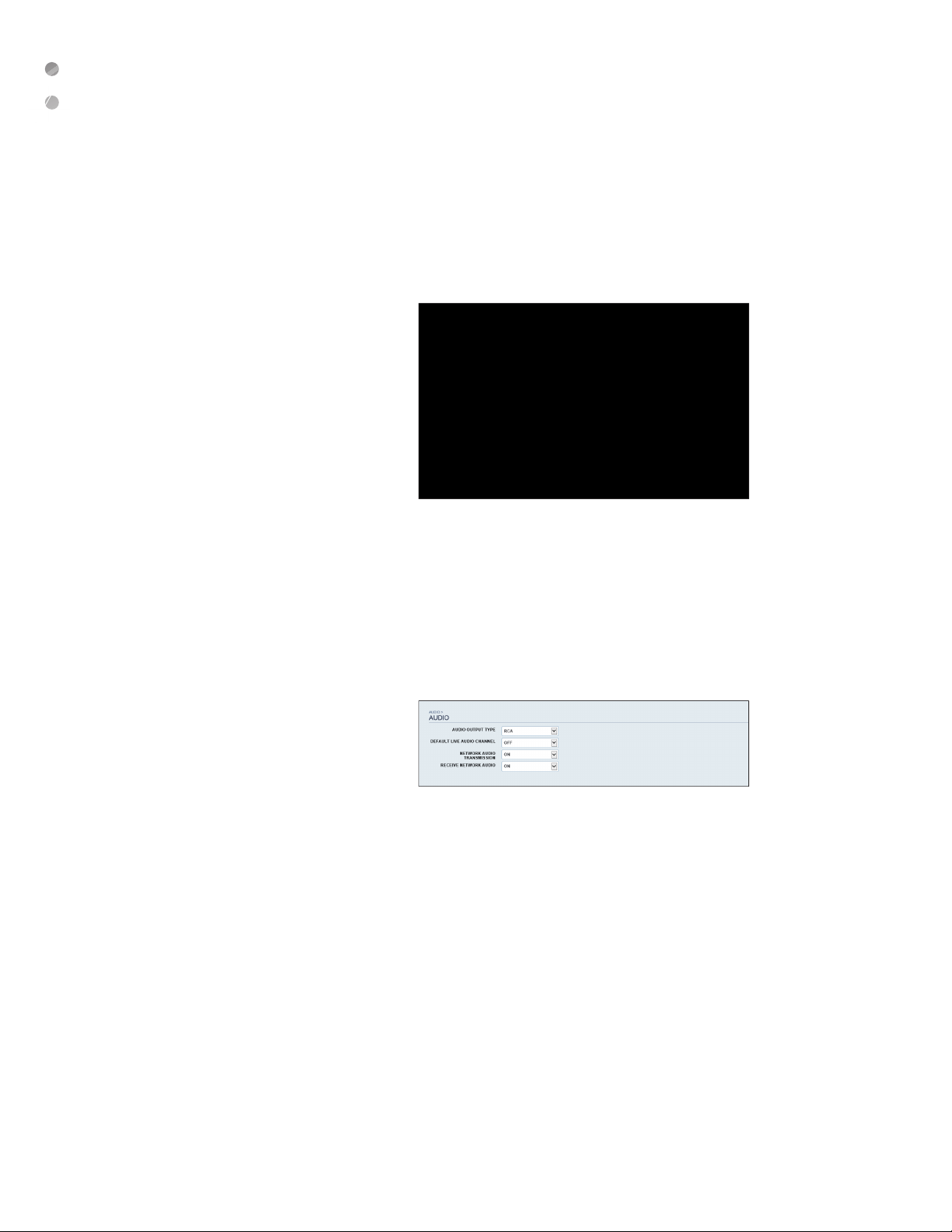
Audio
Audio/Buzzer
Choose whether to receive the live sound source and select
an audio channel.
From <SETUP> - <AUDIO>, select <AUDIO>.
• AUDIO OUTPUT TYPE: You can select and use the conventional RCA audio output.
• DEFAULT LIVE AUDIO CHANNEL: select an audio channel to monitor on the live screen.
• NETWORK AUDIO TRANSMISSION: decide if ENCODER transfers the audio signal to the remote client.
• ENCODER -> PC (Remote Client) > RECEIVE NETWORK AUDIO: decide if ENCODER receives the audio signal from the
remote client. PC (Remote Client) -> ENCODER
To apply the change, click <APPLY> in the bottom of the screen..
26 | Web Viewer
Page 27
User
User Management
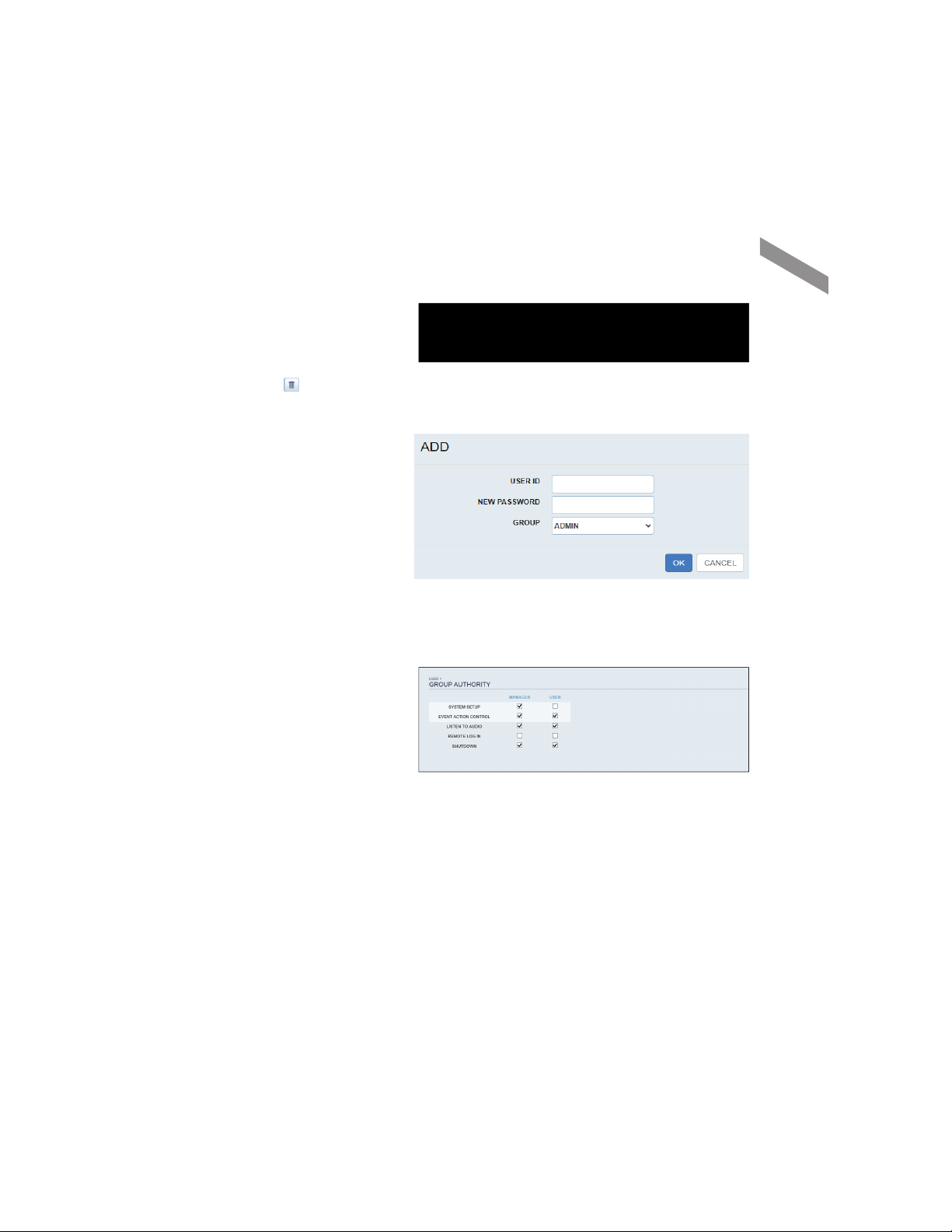
You can add a user account and change the password.
* For details about each displayed item, refer to "User Setting".
To add a user, click <Add> and provide the user information.
If you want to delete the user click <
When done, click <APPLY> to apply the change.
Enter password to confi rm the changes.
> next to it.
Group Permission Setting
You can grant diff erent user groups diff erent permissions to a
specifi c menu.
Mark the checkboxes of the menu items accessible by the
user group.
When done, click <APPLY> to apply the changes.
Web Viewer
English
|
27
Page 28

Web Viewer
Network
IP Setting
You can check the network connection status and change the
stream bandwidth
IPv4 ADDRESS : Indicates the internal IP address of the
ENCODER.
IPv6 ADDRESS : Indicates the IPv6 IP address of the
ENCODER.
Change the maximum transfer rate and click <APPLY> to apply
it.
28 | Web Viewer
Page 29
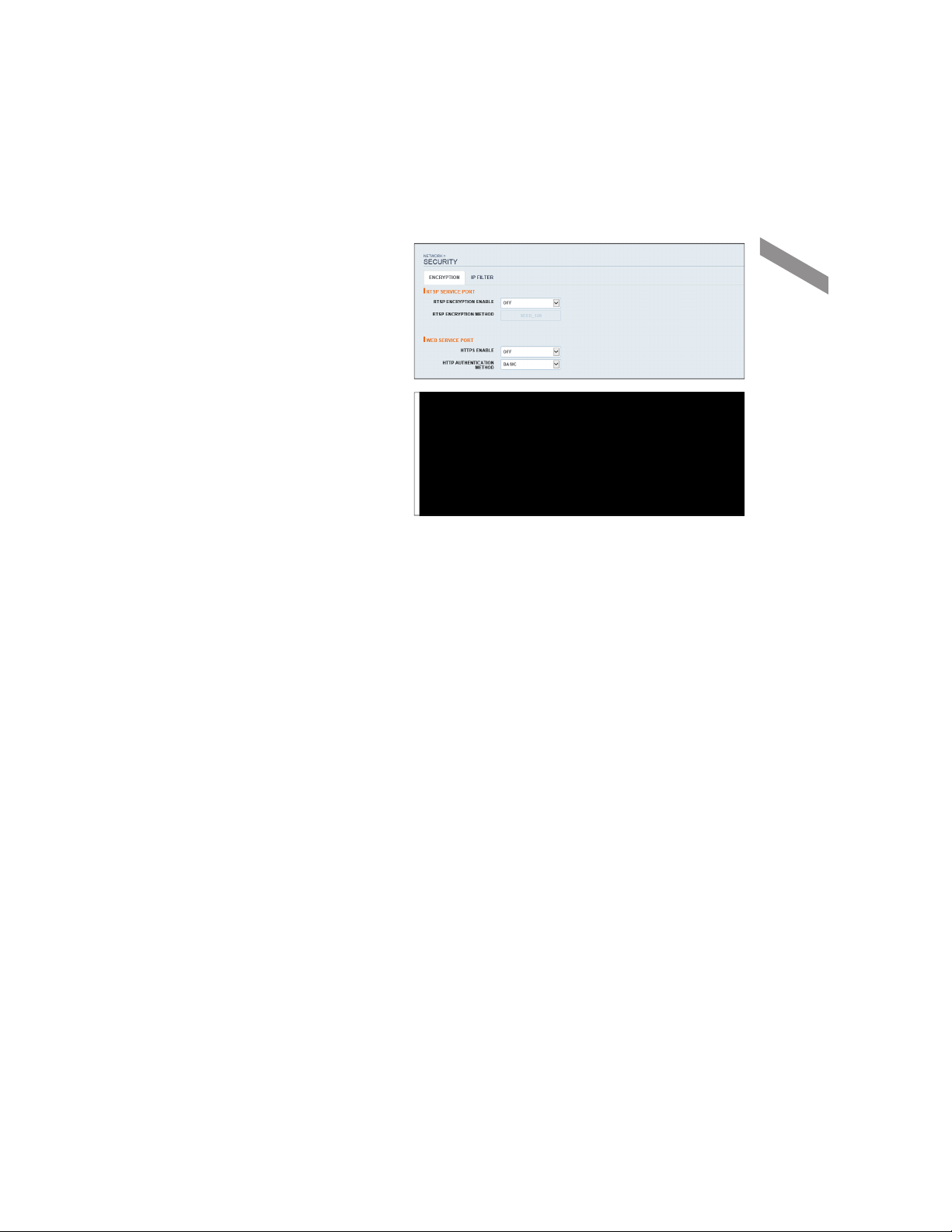
Security Setting
For security purposes, you can set whether to use
encryption and its method.
ENCRYPTION T a b:
• RTSP ENCRYPTION ENABLE: Set whether to apply
RTSP encryption or not.
• RTSP ENCRYPTION METHOD: Select the encryption
method.
• HTTPS ENABLE: Set whether to use HTTPS
encryption or not.
• HTTP AUTHENTICATION METHOD: Select the
authentication method for encrypted communication.
IP FILTER Tab:
• IP FILTER ENABLE: Select whether to use IP fi lter.
• IP FILTER RULE: Select the IP fi lter rule(s) to be registered. Choose between allow/deny lists.
• TYPE: The registered IP fi lter type is displayed.
• LIST: Registered IP addresses are displayed.
• ADD: Add IP fi lter .
• EDIT: Edit registered IP address.
• DELETE: Delete the registered IP address.
Web Viewer
Change the system network settings and click <APPLY> to apply the changes.
English
|
29
Page 30
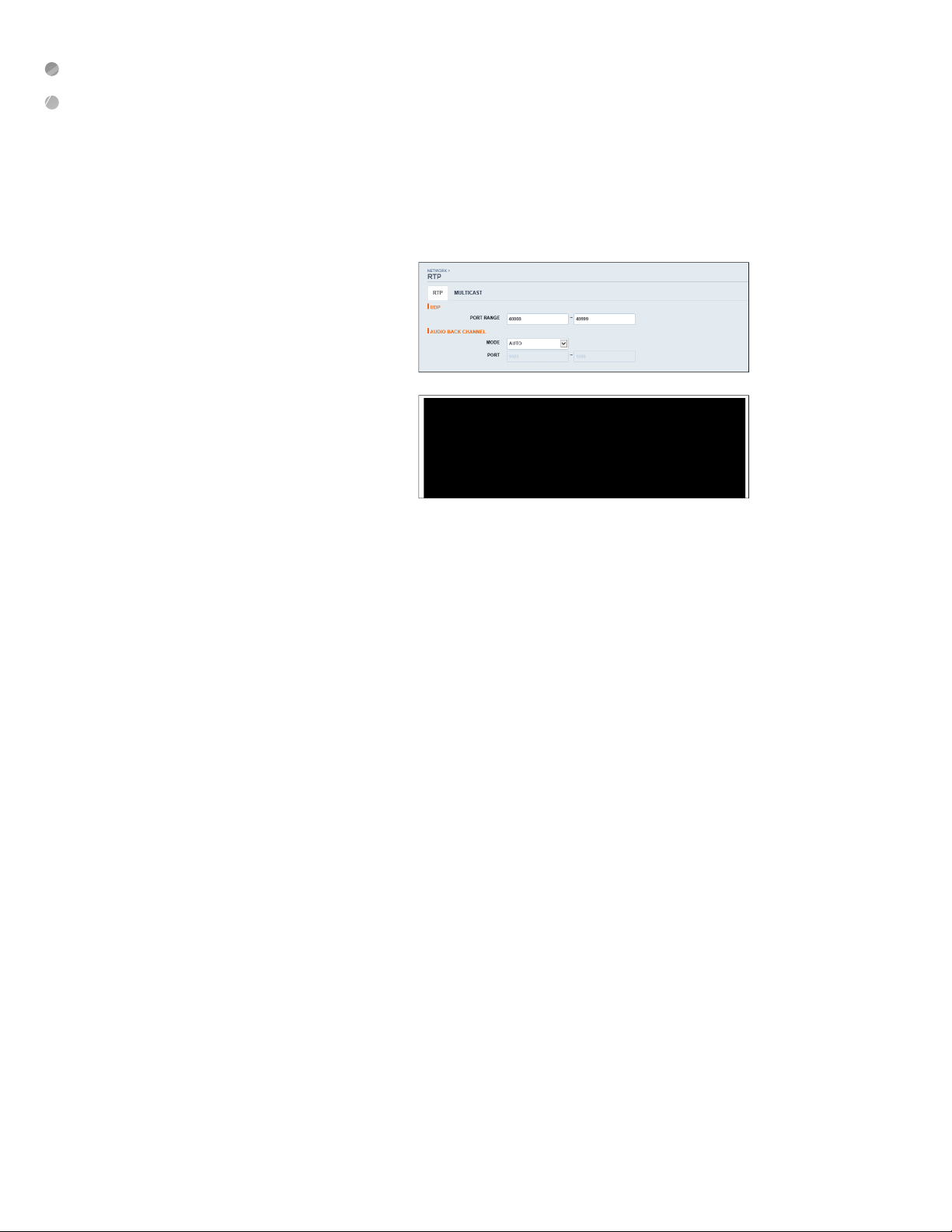
Web Viewer
Real-time Transport Protocol (RTP)
You can confi gure RTP port and multicast settings.
For more information, refer to "RTP"
RTP
PORT RANGE : Set the range of port number for RTP UDP
•
transfer, which will be dynamically allocated.
MODE : Set the port allocation method for “RTP Audio back
•
channel”.
Set to <Auto> for automatic allocation, or to <Manual> to use
•
specifi ed port in the PORT attribute.
RTP is a protocol designed to transport real-time data such as
•
sound, video, etc. under unicast or multicast condition.
MULTICAST
Multicast allows effi cient network bandwidth utilization if multiple clients are receiving monitoring video on a local area network.
•
Set the Multicast IP Address, Video/Audio Ports and TTL for each channel’s First/Second Stream.
•
Note that the network must support multicast communication. In general, multicast in WAN environment is not supported.
•
Multicast is a method to send the same data to multiple specifi c receivers simultaneously in a network. This method cuts down on network waste,
•
gets rid of unnecessary burden, and is generally used in unrestricted network (intranet).
30 | Web Viewer
Page 31

System
Date/Time Setting
Specify the current date and time.
From <SETUP> - <SYSTEM>, select <DATE/TIME>.
Use the mouse to change the time or set the options as
necessary.
• DATE/TIME: Set the current time and date. Select the
on the clock icon and click on the up/down arrows to
adjust the time manually.
• DATE FORMAT: specify the date format.
• TIME FORMAT: specify the time format.
• TIME SERVER: obtain the current time from the time
server. Click < > to get the current time.
• AUTO TIME SYNC: automatically synchronize the time
with the time server at a specifi c time.
• SYNC CYCLE: Set up the cycle, which will be synchronized with the time server.
• SYNC AT: Set the time to sync with the time server.
• TIMEZONE: specify the GMT standard time for your local area.
• DST: You can set up or release the DST (Daylight Saving Time).
• Both <TIME SERVER> and <AUTO TIME SYNC> will be enabled only if the ENCODER is connected to the Internet.
Click <APPLY> to save the changes.
Web Viewer
English | 31
Page 32

Web Viewer
System Management
You can check, update or reset the system
information. From <SETUP> - <SYSTEM>,
select <SYSTEM MANAGEMENT>. Use
the mouse to set each option of the system
management.
• FW UPDATE: User can update the
current fi rmware with the latest version
via webUI only. The update should take
about 5 minutes. After the fi rmware
update is complete, the webUI will prompt the user to log back in.
NOTE: After the fi rmware upgrade, please delete the browser's cookies and cache for webUI feature updates..
• FACTORY DEFAULT: Return the ENCODER settings to the factory default.
• SYSTEM DATA: Encoder setting value. It is possible to export the settings that you have changed.
• REBOOT SYSTEM: Restart the ENCODER system.
• EVENT LOG: download and view events.
• SYSTEM ID: Assign an ID to the ENCODER to distinguish it out from others when there are multiple ENCODER used. The
default value is “SYSTEM ID”.
• EXPIRED TERM OF PASSWORD: User will be prompted to change the current password after a certain period of time.
• AUTO LOGOUT: automatically log out user after indicated time.
• WAIT TIME: logout the user after the selected time.
• AC POWER FREQUENCY: Set to the actual AC power's frequency (50Hz / 60Hz) applied to ENCODER to avoid fl ickering.
System Information
You can check information of system fi rmware version and
network settings, as well as the status information of network
connection and alarm I/O.
Control Device Setting
Confi gure the settings of the keyboard controller.
This function is provided for controlling individual ENCODER
separately using a control device or remote control, in case
the site has multiple ENCODERS of the same model.
• From <SETUP> - <SYSTEM>, select <CONTROL
DEVICE>.
• SYSTEM ID: Set the ID of the ENCODER so that the
32 | Web Viewer
Page 33

keyboard controller can identify the device.
• PROTOCOL: Set up the protocol of the keyboard controller.
• BAUD RATE: Specify the RS485 communication speed.
Click <APPLY> to save the changes.
Security Setting
For security, you can set to apply reinforced password policy
(to system, search/backup) and control accessing snapshot.
From <SETUP> - <SYSTEM>, select <SECURITY>. Use the
mouse to set each option for security.
• SNAPSHOT SUPPORT: Set whether or not to use the
screen capture. With <OFF>, the capture feature cannot
be used. Note that changing the setting from <OFF> to
<ON> initializes snapshot related settings. Hence, reconfi guration is required after enabling.
• ID INPUT METHOD: Set an ID input method upon log-in. By selecting "SELECTION METHOD", you can select an ID by
clicking the arrow button on the input screen. By selecting "DIRECT INPUT METHOD", you can log in by typing in your ID
directly.
• ENHANCED USER ID RULE: Set whether to use Enhanced User ID Policy or not. When this is set to <ON>, the following
rules will be applied. NOTE: ID must be between 5 and 10 characters. IDs created with only one character (e. g. aaaaa,
11111, etc.) cannot be used.
• ENHANCED PASSWORD RULE : Sets whether to apply strong password policy, which prevents using too easy password.
When this is set to <ON>, the following rules will be applied. NOTE: Password must be 16 characters or less. It must
contain uppercase / lowercase letters, special characters, and numbers.
The same character cannot be used 3 consecutive times. Sequential strings (e.g. abcde, 12345) are not allowed. The password
cannot contain the same string as the ID.
Click <APPLY> to save the changes.
Web Viewer
Event
Alarm Output
From <SETUP> - <EVENT>, select <ALARM OUT> .
Use the mouse to select <ALARM OUT> and confi gure the
related settings.
• NAME: You can rename the alarm.
• OPERATION: Set the alarm output mode.
N/O (Normal Open): It normally stays Open. However, if an event occurs, it will switch to Close.
N/C (Normal Close): It normally stays Close. However, if an event occurs, it will switch to Open.
• DURATION: Specify the duration of the alarm output.
TRANSPARENT: Keep the alarm out for as much time as the event lasts.
UNTIL KEY: Keep the alarm out until a mouse or remote control button is pressed.
5 ~ 300 SEC: Keep the alarm out for as long as specifi ed.
Click <APPLY> to save the changes.
English | 33
Page 34

Web Viewer
From <SETUP> - <EVENT>, select <ON/OFF SCHEDULE>.
You can activate or turn off the alarm output as scheduled.
Use the mouse to select a <DAY> for the schedule. Drag the
mouse to select the cell(s). Select a desired alarm output
mode.
• ON: The alarm output is always turned on.
• OFF: The alarm output is always turned off .
• EVENT: Trigger the alarm output in sync with the event.
Click <APPLY> to save the changes.
Event Notifi cation
You can set desired event actions triggered by an event, such as <BUZZER> and <DISPLAY> notifi cation.
BUZZER:
You can notify the user of the event using the buzzer.
DURATION:
• TRANSPARENT: Keep the buzzer out for as much time
as the event lasts.
• UNTIL KEY: Keep the buzzer out until user
acknowledges the event.
• 5 ~ 300 SEC: Keep the buzzer out for as long as specifi ed.
DISPLAY:
If an event occurs, you can display the video screen or a
popup message to notify the user of the event.
• VIDEO POPUP: Display the video channel that is
synchronized with the event on a single split screen.
• Set the DURATION of the single split screen.
TRANSPARENT: Keep the video popup displayed for as much time as the event lasts.
UNTIL KEY: Keep the video popup displayed until user acknowledges the event.
5 ~ 300 SEC: Keep the video popup displayed for as long as specifi ed.
If multiple events occur at the same time, or if multiple event-related video channels exist, the video popup will be displayed in the
maximum split screen mode rather than the single split screen mode.
• OSD POPUP: This will notify the user of the event with a popup message if an OSD popup event occurs. You can adjust the
duration of the popup message.
UNTIL KEY: Keep the OSD popup displayed until user acknowledges the event.
5 ~ 300 SEC: Keep the OSD popup displayed for as long as specifi ed.
34 | Web Viewer
Page 35

FTP
Upon events, uploads event notifi cation onto the added FTP
server.
• FTP SERVER: Enter the FTP server address for event
transfer.
• DIRECTORY: Select or manually enter the destination
folder of the FTP for event transfer.
• FILE NAME: Select the uploading event fi le’s format or manually set the fi le name.
• MINIMUM FREQUENCY: Sets the minimum recurrence delay for uploading event notifi cation onto the FTP server. For
example, when the minimum recurrence is set to 1 minute, the next FTP event notifi cation will be uploaded after 1 minute
from the last event, even if another event is detected within 1 minute from the last one.
• INCLUDE WEBRA LINK: Select whether to include WEBRA link address of the event generating ENCODER, which can be
accessed with web browser. Check to play back the event footage.
• INCLUDE SNAPSHOT IMAGE: Set whether to include snapshot (still image) or not.
Set the dwell time for buzzer or pop-up display, or FTP destination settings and then click <APPLY> to save your changes.
Alarm Sensor
You can confi gure the settings of the alarm sensor and
specify the operation of the sensor if an event occurs.
From <SETUP> - <EVENT>, select <ALARM SENSOR>.
Use the mouse to specify the sensor input method and operation.
• NAME: You can specify the name of the alarm sensor.
• OPERATION: You can specify the type of the alarm sensor.
N/O (Normal Open): Normally the sensor is left Open. If the sensor switches to Close, an event will be triggered.
N/C (Normal Close): Normally the sensor is left Close. If the sensor switches to Open, an event will be triggered.
• LINKED CAMERA: Set the camera to sync with the alarm sensor if it is triggered. If you have set the alarm recording and
the sensor detects the recording, all synchronized cameras will start alarm recording.
• ALARM OUT: Specify the alarm output channel if it is detected by the alarm sensor. The alarm will be output to the specifi ed
channel.
• PRESET: Move camera based on the preset criteria if an alarm is detected by the alarm sensor.
• BUZZER: Specify the output of the buzzer if an alarm is detected by the alarm sensor.
• VIDEO: Select to display the video popup if an alarm is detected by the alarm sensor. If there exist multiple <LINKED
CAMERA>, the video popup will be displayed in the maximum split mode.
• OSD POPUP: Select to display the OSD popup message if it is detected by the alarm sensor.
• FTP: Select whether to upload event notifi cation onto the FTP upon detected alarm event.
Click <APPLY> to save the changes..
Web Viewer
English
|
35
Page 36

Web Viewer
Motion De tection
You can set an action to execute when a motion is detected.
From <SETUP> - <EVENT>, select <MOTION DETECTION>.
Use the mouse to specify the ignorance interval and the
following operations.
• IGNORING INTERVAL: Specify the minimum interval of the motion event occurrence. For example, even if you have set
the minimum frequency to 5 seconds and another motion event occurs in less than 5 seconds after the last motion event
occurred, the new event will be ignored. If too many motion events occur, adjust to shorten the interval. Motion recording
will be triggered immediately after the motion occurred regardless of the above settings.
• ALARM OUT: Specify the alarm output channel if a motion is detected by the motion sensor.
• PRESET: Move camera based on the preset criteria if a motion is detected by the motion sensor.
• BUZZER: Specify the output of the buzzer if a motion is detected by the motion sensor.
• VIDEO: Select to display the video popup if a motion is detected by the motion sensor.
• FTP: Select whether to upload event notifi cation onto the FTP upon detected motion event.
Click <APPLY> to save the changes.
Video Loss
You can specify a reaction to the case where no video is
received from the camera. From <SETUP> - <EVENT>,
select <VIDEO LOSS>. Use the mouse to specify the
reaction to a video loss.
• IGNORING INTERVAL: Specify the minimum interval of the video loss event occurrence.
• ALARM OUT: Specify the alarm output channel if a video loss occurs.
• PRESET: Move camera based on the preset criteria if a video loss occurs.
• BUZZER: Specify the output of the buzzer if a video loss occurs.
• FTP: Select whether to upload event notifi cation onto the FTP upon detected video loss event.
Click <APPLY> to save the changes.
36 | Web Viewer
Page 37

System Event
You can set any action to a system event or network. Like the
other events, you may notify the event to the user using the
alarm/buzzer output, OSD pop-up, or FTP server.
From <SETUP> - <EVENT>, select <SYSTEM EVENT>. Use
the mouse to specify the reaction to each event.
• BOOTING EVENT: This event occurs when the ENCODER is booting.
• LOGIN FAIL EVENT: This event occurs when the ENCODER fails to log in. You can select the amount of retries a user can
have by selecting the options from the dropdown menu.
• ALARM OUT: Specify alarm output signal through the
terminal block.
• BUZZER: Specify the output of the buzzer if a system
event is detected.
• OSD POPUP: N/A
• FTP: Select whether to upload event notifi cation onto the FTP upon system event detected.
Network
TROUBLE IN INTERNET CONNECTION: Occurs if the Internet connection to the ENCODER fails. If you do not want to connect
the ENCODER to the network, leave the <ACTION> item blank.
FAIL IN REMOTE LOGIN : This event occurs if a remote client fails to log in due to an invalid ID or password. You can specify
how man times the user fails to remote in before an event occurs.
FAIL IN DDNS UPDATE : This event occurs if the ENCODER tried to update the DDNS address but failed. If the DDNS address
fails to be updated, the ENCODER may not connect to a remote client. If this is the case, enter the IP address from the client side
to allow access from the ENCODER. This is just a temporary measure.
For the IP address, move to and check <EXTERNAL IP ADDRESS> from the <NETWORK> window. Note that the <EXTERNAL
IP ADDRESS> is subject to change if the ENCODER does not use the static IP.
IP CONFLICT EVENT : This event occurs when the IP address of the ENCODER and the IP address of the connected network
camera co nfl ict.
Note that the <EXTERNAL IP ADDRESS> can change at any time in a dynamic IP environment.
Appendix
English
|
37
Page 38
Appendix
Troubleshooting (FAQ)
Problem Action
The system does not operate at all with no active LED in the
front panel.
The unit continuously reboots.
Make sure that the system gets supplied with power properly.
~
Check the input voltage.
~
Check if the system fan in a side panel of the unit or the CPU fan inside the unit
~
works properly.
If it fails, contact the retailer or the service center.
Disconnect the HDD cable and try to boot the system again. If the system
~
reboots successfully, install a new HDD and check if the system make
recording normally.
The front LED is lit, but nothing is displayed on the screen
yet.
The sides of the video image are displayed incomplete.
The camera is connected but no image is displayed.
It fails to connect to the web or mobile application.
Check if your monitor supports the 1080p 60Hz
~
Ensure that the input source settings of the monitor match with the output
~
source settings of the ENCODER.
If using the HDMI-to-DVI cable for the connection, ensure that the input source
~
is set to DVI.
Make sure that the system gets supplied with power properly.
~
Check the input voltage.
~
If the monitor is over-scanning the video, the sides can be hidden.
~
If this is the case, switch the display mode of the monitor to the 1:1 pixel
matching mode. Then, you will view the video in full screen.
The 1:1 pixel matching is referred to diff erently depending on the monitor
~
manufacturer (for example, "JUST SCAN" for Samsung, "ZERO OVERSCAN"
for LG). For details, refer to the user manual of the monitor.
Make sure that the camera is compatible with the ENCODER. For the
~
compatibility of the cameras, contact the retailer.
Ensure that the output settings of the camera match with the camera type
~
settings of the ENCODER.
Check if the network cable is properly connected to the WAN(UP Link) port of
~
the unit.
You must have set the port forwarding if using a router.
~
If you cannot get access with the DDNS address, use the IP address of the
~
ENCODER instead.
If the ENCODER is connected to the router, use the IP address of the
ENCODER.
You can check the IP address of the router in <NETWORK STATUS> <EXTERNAL IP ADDRESS>.
HDMI, VGA
input.
I can access the web or mobile application but still no video
image is displayed.
38 | Appendix
You must have set the port forwarding if using a router.
~
This may happen when the communications provider or network administrator
~
has blocked the service port of the ENCODER.
Change the RTSP port and HTTP port numbers to diff erent ones and set the
port forwarding again.
Try to access the web or mobile application using the new port numbers.
~
Page 39

Open Source License Report on the Product
The software included in this product contains copyrighted software that is licensed under the GPL/LGPL.
GPL Software : linux kernel, busybox, cdrtools, smartctl, uboot, bash, udev, sysklogd
~
LGPL Software : glibc, vmstat, glib, gtk, libESMTP, iconv, gstreamer, pango,
~
OpenSSL License : OpenSSL
~
GNU GENERAL PUBLIC LICENSE
Version 2, June 1991
Copyright (C) 1989, 1991 Free Software Foundation, Inc.
51 Franklin Street, Fifth Floor, Boston, MA 02110-1301, USA
Everyone is permitted to copy and distribute verbatim copies of this
license document, but changing it is not allowed.
Preamble
The licenses for most software are designed to take away your freedom to
share and change it. By contrast, the GNU General Public License is
intended to guarantee your freedom to share and change free software to
make sure the software is free for all its users. This General Public
License applies to most of the Free Software Foundation’s software and to
any other program whose authors commit to using it. (Some other Free
Software Foundation software is covered by the GNU Lesser General
Public License instead.) You can apply it to your programs, too.
When we speak of free software, we are referring to freedom, not price.
Our General Public Licenses are designed to make sure that you have the
freedom to distribute copies of free software (and charge for this service if
you wish), that you receive source code or can get it if you want it, that you
can change the software or use pieces of it in new free programs; and that
you know you can do these things.
To protect your rights, we need to make restrictions that forbid anyone to
deny you these rights or to ask you to surrender the rights. These
restrictions translate to certain responsibilities for you if you distribute
copies of the software, or if you modify it.
For example, if you distribute copies of such a program, whether gratis or
for a fee, you must give the recipients all the rights that you have. You
must make sure that they, too, receive or can get the source code. And
you must show them these terms so they know their rights.
We protect your rights with two steps:
(1) copyright the software, and (2) off er you this license which gives you
legal permission to copy, distribute and/or modify the software.
Also, for each author’s protection and ours, we want to make certain that
everyone understands that there is no warranty for this free software. If the
software is modifi ed by someone else and passed on, we want its
recipients to know that what they have is not the original, so that any
problems introduced by others will not refl ect on the original authors’
reputations.
Finally, any free program is threatened constantly by software patents. We
wish to avoid the danger that redistributors of a free program will
individually obtain patent licenses, in eff ect making the program
proprietary. To prevent this, we have made it clear that any patent must be
licensed for everyone’s free use or not licensed at all. The precise terms
and conditions for copying, distribution and modifi cation follow.
TERMS AND CONDITIONS FOR COPYING, DISTRIBUTION AND
MODIFICATION
Version 2, June 1991
Copyright (C) 1989, 1991 Free Software Foundation, Inc.
51 Franklin S
0. This License applies to any program or other work which contains a
notice placed by the copyright holder saying it may be distributed under
the terms of this General Public License. The “Program”, below, refers to
any such program or work, and a “work based on the Program” means
either the Program or any derivative work under copyright law: that is to
say, a work containing the Program or a portion of it, either verbatim or
with modifi cations and/or translated into another language. (Hereinafter,
translation is included without limitation in the term “modifi cation”.) Each
licensee is addressed as “you”.
Activities other than copying, distribution and modifi cation are not covered
by this License; they are outside its scope. The act of running the Program
is not restricted, and the output from the Program is covered only if its
contents constitute a work based on the Program (independent of having
been made by running the Program). Whether that is true depends on
what the Program does.
1. You may copy and distribute verbatim copies of the Program’s source
code as you receive it, in any medium, provided that you conspicuously
and appropriately publish on each copy an appropriate copyright notice
and disclaimer of warranty; keep intact all the notices that refer to this
License and to the absence of any warranty; and give any other recipients
of the Program a copy of this License along with the Program.
You may charge a fee for the physical act of transferring a copy, and you
may at your option off er warranty protection in exchange for a fee.
2. You may modify your copy or copies of the Program or any portion of it,
thus forming a work based on the Program, and copy and distribute such
modifi cations or work under the terms of Section 1 above, provided that
you also meet all of these conditions:
a) You must cause the modifi ed fi les to carry prominent notices
stating that you changed the fi les and the date of any change.
b) You must cause any work that you distribute or publish, that
in whole or in part contains or is derived from the Program or any
part thereof, to be licensed as a whole at no charge to all third
parties under the terms of this License.
c) If the modifi ed program normally reads commands interactively
when run, you must cause it, when started running for such
interactive use in the most ordinary way, to print or display an
announcement including an appropriate copyright notice and a
notice that there is no warranty (or else, saying that you provide a
warranty) and that users may redistribute the program under these
conditions, and telling the user how to view a copy of this License.
(Exception: if the Program itself is interactive but does not normally
print such an announcement, your work based on the Program is
not required to print an announcement.)
These requirements apply to the modifi ed work as a whole. If identifi able
sections of that work are not derived from the Program, and can be
reasonably considered independent and separate works in themselves,
then this License, and its terms, do not apply to those sections when you
distribute them as separate works. But when you distribute the same
sections as part of a whole which is a work based on the Program, the
distribution of the whole must be on the terms of this License, whose
permissions for other licensees extend to the entire whole, and thus to
each and every part regardless of who wrote it.
Thus, it is not the intent of this section to claim rights or contest your rights
to work written entirely by you; rather, the intent is to exercise the right to
control the distribution of derivative or collective works based on the
Program.
In addition, mere aggregation of another work not based on the Program
with the Program (or with a work based on the Program) on a volume of a
storage or distribution medium does not bring the other work under the
scope of this License.
3. You may copy and distribute the Program (or a work based on it, under
Section 2) in object code or executable form under the terms of Sections 1
and 2 above provided that you also do one of the following:
a) Accompany it with the complete corresponding machine-
readable source code, which must be distributed under the terms
of Sections 1 and 2 above on a medium customarily used for
software interchange; or,
b) Accompany it with a written off er, valid for at least three
years, to give any third party, for a charge no more than your cost
of physically performing source distribution, a complete machinereadable copy of the corresponding source code, to be distributed
under the terms of Sections 1 and 2 above on a medium
Page 40

customarily used for software interchange; or,
c) Accompany it with the information you received as to the off er to
distribute corresponding source code. (This alternative is allowed
only for noncommercial distribution and only if you received the
program in object code or executable form with such an off er, in
accord with Subsection b above.)
The source code for a work means the preferred form of the work for
making modifi cations to it. For an executable work, complete source code
means all the source code for all modules it contains, plus any associated
interface defi nition fi les, plus the scripts used to control compilation and
installation of the executable. However, as a special exception, the source
code distributed need not include anything that is normally distributed (in
either source or binary form) with the major components (compiler, kernel,
and so on) of the operating system on which the executable runs, unless
that component itself accompanies the executable.
If distribution of executable or object code is made by off ering access to
copy from a designated place, then off ering equivalent access to copy the
source code from the same place counts as distribution of the source
code, even though third parties are not compelled to copy the source
along with the object code.
4. You may not copy, modify, sublicense, or distribute the Program except
as expressly provided under this License. Any attempt otherwise to copy,
modify, sublicense or distribute the Program is void, and will automatically
terminate your rights under this License. However, parties who have
received copies, or rights, from you under this License will not have their
licenses terminated so long as such parties remain in full compliance.
5. You are not required to accept this License, since you have not signed
it. However, nothing else grants you permission to modify or distribute the
Program or its derivative works. These actions are prohibited by law if you
do not accept this License. Therefore, by modifying or distributing the
Program (or any work based on the Program), you indicate your
acceptance of this License to do so, and all its terms and conditions for
copying, distributing or modifying the Program or works based on it.
6. Each time you redistribute the Program (or any work based on the
Program), the recipient automatically receives a license from the original
licensor to copy, distribute or modify the Program subject to these terms
and conditions. You may not impose any further restrictions on the
recipients’ exercise of the rights granted herein. You are not responsible
for enforcing compliance by third parties to this License.
7. If, as a consequence of a court judgment or allegation of patent
infringement or for any other reason (not limited to patent issues),
conditions are imposed on you (whether by court order, agreement or
otherwise) that contradict the conditions of this License, they do not
excuse you from the conditions of this License. If you cannot distribute so
as to satisfy simultaneously your obligations under this License and any
other pertinent obligations, then as a consequence you may not distribute
the Program at all. For example, if a patent license would not permit
royalty-free redistribution of the Program by all those who receive copies
directly or indirectly through you, then the only way you could satisfy both
it and this License would be to refrain entirely from distribution of the
Program.
If any portion of this section is held invalid or unenforceable under any
particular circumstance, the balance of the section is intended to apply
and the section as a whole is intended to apply in other circumstances.
It is not the purpose of this section to induce you to infringe any patents or
other property right claims or to contest validity of any such claims; this
section has the sole purpose of protecting the integrity of the free software
distribution system, which is implemented by public license practices.
Many people have made generous contributions to the wide range of
software distributed through that system in reliance on consistent
application of that system; it is up to the author/donor to decide if he or she
is willing to distribute software through any other system and a licensee
cannot impose that choice.
This section is intended to make thoroughly clear what is believed to be a
consequence of the rest of this License.
8. If the distribution and/or use of the Program is restricted in certain
countries either by patents or by copyrighted interfaces, the original
copyright holder who places the Program under this License may add an
explicit geographical distribution limitation excluding those countries, so
that distribution is permitted only in or among countries not thus excluded.
In such case, this License incorporates the limitation as if written in the
body of this License.
9. The Free Software Foundation may publish revised and/or new
versions of the General Public License from time to time. Such new
versions will be similar in spirit to the present version, but may diff er in
detail to address new problems or concerns.
Each version is given a distinguishing version number. If the Program
specifi es a version number of this License which applies to it and “any
later version”, you have the option of following the terms and conditions
either of that version or of any later version published by the Free
Software Foundation. If the Program does not specify a version number of
this License, you may choose any version ever published by the Free
Software Foundation.
10. If you wish to incorporate parts of the Program into other free
programs whose distribution conditions are diff erent, write to the author to
ask for permission. For software which is copyrighted by the Free
Software Foundation, write to the Free Software Foundation; we
sometimes make exceptions for this. Our decision will be guided by the
two goals of preserving the free status of all derivatives of our free
software and of promoting the sharing and reuse of software generally.
NO WARRANTY
11. BECAUSE THE PROGRAM IS LICENSED FREE OF CHARGE,
THERE IS NO WARRANTY FOR THE PROGRAM, TO THE EXTENT
PERMITTED BY APPLICABLE LAW. EXCEPT WHEN OTHERWISE
STATED IN WRITING THE COPYRIGHT HOLDERS AND/OR OTHER
PARTIES PROVIDE THE PROGRAM “AS IS” WITHOUT WARRANTY OF
ANY KIND, EITHER EXPRESSED OR IMPLIED, INCLUDING, BUT NOT
LIMITED TO, THE IMPLIED WARRANTIES OF MERCHANTABILITY
AND FITNESS FOR A PARTICULAR PURPOSE. THE ENTIRE RISK AS
TO THE QUALITY AND PERFORMANCE OF THE PROGRAM IS WITH
YOU. SHOULD THE PROGRAM PROVE DEFECTIVE, YOU ASSUME
THE COST OF ALL NECESSARY SERVICING, REPAIR OR
CORRECTION.
12. IN NO EVENT UNLESS REQUIRED BY APPLICABLE LAW OR
AGREED TO IN WRITING WILL ANY COPYRIGHT HOLDER, OR ANY
OTHER PARTY WHO MAY MODIFY AND/OR REDISTRIBUTE THE
PROGRAM AS PERMITTED ABOVE, BE LIABLE TO YOU FOR
DAMAGES, INCLUDING ANY GENERAL, SPECIAL, INCIDENTAL OR
CONSEQUENTIAL DAMAGES ARISING OUT OF THE USE OR
INABILITY TO USE THE PROGRAM (INCLUDING BUT NOT LIMITED
TO LOSS OF DATA OR DATA BEING RENDERED INACCURATE OR
LOSSES SUSTAINED BY YOU OR THIRD PAR TIES OR A FAILURE OF
THE PROGRAM TO OPERATE WITH ANY OTHER PROGRAMS), EVEN
IF SUCH HOLDER OR OTHER PARTY HAS BEEN ADVISED OF THE
POSSIBILITY OF SUCH DAMAGES.
END OF TERMS AND CONDITIONS
How to Apply These Terms to Your New Programs
If you develop a new program, and you want it to be of the greatest
possible use to the public, the best way to achieve this is to make it free
software which everyone can redistribute and change under these terms.
To do so, attach the following notices to the program. It is safest to attach
them to the start of each source fi le to most eff ectively convey the
exclusion of warranty; and each fi le should have at least the “copyright”
line and a pointer to where the full notice is found.
one line to give the program’s name and an idea of what it does.
Copyright (C) yyyy name of author
This program is free software; you can redistribute it and/or modify it under
the terms of the GNU General Public License as published by the Free
Software Foundation; either version 2 of the License, or (at your option)
any later version.
This program is distributed in the hope that it will be useful, but WITHOUT
ANY WARRANTY; without even the implied warranty of
MERCHANTABILITY or FITNESS FOR A PARTICULAR PURPOSE. See
the GNU General Public License for more details.
You should have received a copy of the GNU General Public License
along with this program; if not, write to the Free Software Foundation, Inc.,
51 Franklin Street, Fifth Floor, Boston, MA 02110-1301, USA.
Also add information on how to contact you by electronic and paper mail.
If the program is interactive, make it output a short notice like this when it
Page 41

starts in an interactive mode:
Gnomovision version 69, Copyright (C) year name of author Gnomovision
comes with ABSOLUTELY NO WARRANTY; for details type ‘show w’. This
is free software, and you are welcome to redistribute it under certain
conditions; type ‘show c’ for details.
The hypothetical commands ‘show w’ and ‘show c’ should show the
appropriate parts of the General Public License. Of course, the commands
you use may be called something other than ‘show w’ and ‘show c’; they
could even be mouse-clicks or menu items--whatever suits your program.
You should also get your employer (if you work as a programmer) or your
school, if any, to sign a “copyright disclaimer” for the program, if
necessary. Here is a sample; alter the names:
Yoyodyne, Inc., hereby disclaims all copyright interest in the program
‘Gnomovision’ (which makes passes at compilers) written by James
Hacker.
signature of Ty Coon, 1 April 1989 Ty Coon, President of V ice This
General Public License does not permit incorporating your program into
proprietary programs. If your program is a subroutine library, you may
consider it more useful to permit linking proprietary applications with the
library. If this is what you want to do, use the GNU Lesser General Public
License instead of this License.
GNU GENERAL PUBLIC LICENSE
Version 3, 29 June 2007
Copyright © 2007 Free Software Foundation, Inc. <http://fsf.org/>
Everyone is permitted to copy and distribute verbatim copies of this
license document, but changing it is not allowed.
Preamble
The GNU General Public License is a free, copyleft license for software
and other kinds of works.
The licenses for most software and other practical works are designed to
take away your freedom to share and change the works. By contrast, the
GNU General Public License is intended to guarantee your freedom to
share and change all versions of a program--to make sure it remains free
software for all its users. We, the Free Software Foundation, use the GNU
General Public License for most of our software; it applies also to any
other work released this way by its authors. You can apply it to your
programs, too.
When we speak of free software, we are referring to freedom, not price.
Our General Public Licenses are designed to make sure that you have the
freedom to distribute copies of free software (and charge for them if you
wish), that you receive source code or can get it if you want it, that you can
change the software or use pieces of it in new free programs, and that you
know you can do these things.
To protect your rights, we need to prevent others from denying you these
rights or asking you to surrender the rights. Therefore, you have certain
responsibilities if you distribute copies of the software, or if you modify it:
responsibilities to respect the freedom of others.
For example, if you distribute copies of such a program, whether gratis or
for a fee, you must pass on to the recipients the same freedoms that you
received. You must make sure that they, too, receive or can get the source
code. And you must show them these terms so they know their rights.
where it is most unacceptable. Therefore, we have designed this version
of the GPL to prohibit the practice for those products. If such problems
arise substantially in other domains, we stand ready to extend this
provision to those domains in future versions of the GPL, as needed to
protect the freedom of users.
Finally, every program is threatened constantly by software patents. States
should not allow patents to restrict development and use of software on
general-purpose computers, but in those that do, we wish to avoid the
special danger that patents applied to a free program could make it
eff ectively proprietary. To prevent this, the GPL assures that patents
cannot be used to render the program non-free.
The precise terms and conditions for copying, distribution and modifi cation
follow.
TERMS AND CONDITIONS
0. Defi nitions.
“This License” refers to version 3 of the GNU General Public License.
“Copyright” also means copyright-like laws that apply to other kinds of
works, such as semiconductor masks.
“The Program” refers to any copyrightable work licensed under this
License. Each licensee is addressed as “you”. “Licensees” and “recipients”
may be individuals or organizations.
To “modify” a work means to copy from or adapt all or part of the work in a
fashion requiring copyright permission, other than the making of an exact
copy. The resulting work is called a “modifi ed version” of the earlier work
or a work “based on” the earlier work.
A “covered work” means either the unmodifi ed Program or a work based
on the Program.
To “propagate” a work means to do anything with it that, without
permission, would make you directly or secondarily liable for infringement
under applicable copyright law, except executing it on a computer or
modifying a private copy. Propagation includes copying, distribution (with
or without modifi cation), making available to the public, and in some
countries other activities as well.
To “convey” a work means any kind of propagation that enables other
parties to make or receive copies. Mere interaction with a user through a
computer network, with no transfer of a copy, is not conveying.
An interactive user interface displays “Appropriate Legal Notices” to the
extent that it includes a convenient and prominently visible feature that (1)
displays an appropriate copyright notice, and (2) tells the user that there is
no warranty for the work (except to the extent that warranties are
provided), that licensees may convey the work under this License, and
how to view a copy of this License. If the interface presents a list of user
commands or options, such as a menu, a prominent item in the list meets
this criterion.
Developers that use the GNU GPL protect your rights with two steps: (1)
assert copyright on the software, and (2) off er you this License giving you
legal permission to copy, distribute and/or modify it.
For the developers' and authors' protection, the GPL clearly explains that
there is no warranty for this free software. For both users' and authors'
sake, the GPL requires that modifi ed versions be marked as changed, so
that their problems will not be attributed erroneously to authors of previous
versions.
Some devices are designed to deny users access to install or run modifi ed
versions of the software inside them, although the manufacturer can do
so. This is fundamentally incompatible with the aim of protecting users'
freedom to change the software. The systematic pattern of such abuse
occurs in the area of products for individuals to use, which is precisely
1. Source Code.
The “source code” for a work means the preferred form of the work for
making modifi cations to it. “Object code” means any non-source form of a
work.
A “Standard Interface” means an interface that either is an offi cial standard
defi ned by a recognized standards body , or, in the case of interfaces
specifi ed for a particular programming language, one that is widely used
among developers working in that language.
The “System Libraries” of an executable work include anything, other than
the work as a whole, that (a) is included in the normal form of packaging a
Page 42

Major Component, but which is not part of that Major Component, and (b)
serves only to enable use of the work with that Major Component, or to
implement a Standard Interface for which an implementation is available
to the public in source code form. A “Major Component”, in this context,
means a major essential component (kernel, window system, and so on)
of the specifi c operating system (if any) on which the executable work
runs, or a compiler used to produce the work, or an object code interpreter
used to run it.
You may charge any price or no price for each copy that you convey, and
you may off er support or warranty protection for a fee.
5. Conveying Modifi ed Source Versions.
You may convey a work based on the Program, or the modifi cations to
produce it from the Program, in the form of source code under the terms of
section 4, provided that you also meet all of these conditions:
The “Corresponding Source” for a work in object code form means all the
source code needed to generate, install, and (for an executable work) run
the object code and to modify the work, including scripts to control those
activities. However, it does not include the work's System Libraries, or
general-purpose tools or generally available free programs which are used
unmodifi ed in performing those activities but which are not part of the
work. For example, Corresponding Source includes interface defi nition
fi les associated with source fi les for the work, and the source code for
shared libraries and dynamically linked subprograms that the work is
specifi cally designed to require, such as by intimate data communication
or control fl ow between those subprograms and other parts of the work.
The Corresponding Source need not include anything that users can
regenerate automatically from other parts of the Corresponding Source.
The Corresponding Source for a work in source code form is that same
work.
2. Basic Permissions.
All rights granted under this License are granted for the term of copyright
on the Program, and are irrevocable provided the stated conditions are
met. This License explicitly affi rms your unlimited permission to run the
unmodifi ed Program. The output from running a covered work is covered
by this License only if the output, given its content, constitutes a covered
work. This License acknowledges your rights of fair use or other
equivalent, as provided by copyright law.
You may make, run and propagate covered works that you do not convey,
without conditions so long as your license otherwise remains in force. You
may convey covered works to others for the sole purpose of having them
make modifi cations exclusively for you, or provide you with facilities for
running those works, provided that you comply with the terms of this
License in conveying all material for which you do not control copyright.
Those thus making or running the covered works for you must do so
exclusively on your behalf, under your direction and control, on terms that
prohibit them from making any copies of your copyrighted material outside
their relationship with you.
Conveying under any other circumstances is permitted solely under the
conditions stated below. Sublicensing is not allowed; section 10 makes it
unnecessary.
3. Protecting Users' Legal Rights From Anti-Circumvention Law.
No covered work shall be deemed part of an eff ective technological
measure under any applicable law fulfi lling obligations under article 1 1 of
the WIPO copyright treaty adopted on 20 December 1996, or similar laws
prohibiting or restricting circumvention of such measures.
When you convey a covered work, you waive any legal power to forbid
circumvention of technological measures to the extent such circumvention
is eff ected by exercising rights under this License with respect to the
covered work, and you disclaim any intention to limit operation or
modifi cation of the work as a means of enforcing, against the work's users,
your or third parties' legal rights to forbid circumvention of technological
measures.
4. Conveying Verbatim Copies.
You may convey verbatim copies of the Program's source code as you
receive it, in any medium, provided that you conspicuously and
appropriately publish on each copy an appropriate copyright notice; keep
intact all notices stating that this License and any non-permissive terms
added in accord with section 7 apply to the code; keep intact all notices of
the absence of any warranty; and give all recipients a copy of this License
along with the Program.
a) The work must carry prominent notices stating that you
modifi ed it, and giving a relevant date.
b) The work must carry prominent notices stating that it is
released under this License and any conditions added under
section 7. This requirement modifi es the requirement in section 4 to
“keep intact all notices”.
c) You must license the entire work, as a whole, under this License to
anyone who comes into possession of a copy. This License will
therefore apply, along with any applicable section 7 additional
terms, to the whole of the work, and all its parts, regardless of how
they are packaged. This License gives no permission to license the
work in any other way, but it does not invalidate such permission if
you have separately received it.
d) If the work has interactive user interfaces, each must display
Appropriate Legal Notices; however, if the Program has
interactive interfaces that do not display Appropriate Legal
Notices, your work need not make them do so.
A compilation of a covered work with other separate and independent
works, which are not by their nature extensions of the covered work, and
which are not combined with it such as to form a larger program, in or on a
volume of a storage or distribution medium, is called an “aggregate” if the
compilation and its resulting copyright are not used to limit the access or
legal rights of the compilation's users beyond what the individual works
permit. Inclusion of a covered work in an aggregate does not cause this
License to apply to the other parts of the aggregate.
6. Conveying Non-Source Forms.
You may convey a covered work in object code form under the terms of
sections 4 and 5, provided that you also convey the machine-readable
Corresponding Source under the terms of this License, in one of these
ways:
a) Convey the object code in, or embodied in, a physical product
(including a physical distribution medium), accompanied by the
Corresponding Source fi xed on a durable physical medium
customarily used for software interchange.
b) Convey the object code in, or embodied in, a physical product
(including a physical distribution medium), accompanied by a
written off er, valid for at least three years and valid for as long as
er spare parts or customer support for that product model, to
you off
give anyone who possesses the object code either (1) a copy of
the Corresponding Source for all the software in the product that is
covered by this License, on a durable physical medium customarily
used for software interchange, for a price no more than your
reasonable cost of physically performing this conveying of source,
or (2) access to copy the Corresponding Source from a network
server at no charge.
c) Convey individual copies of the object code with a copy of the
written off er to provide the Corresponding Source. This alternative
is allowed only occasionally and noncommercially, and only if you
received the object code with such an off er, in accord with
subsection 6b.
d) Convey the object code by off ering access from a designated
place (gratis or for a charge), and off er equivalent access to the
Corresponding Source in the same way through the same place at
no further charge. You need not require recipients to copy the
Corresponding Source along with the object code. If the place to
copy the object code is a network server, the Corresponding
Source may be on a diff erent server (operated by you or a third
party) that supports equivalent copying facilities, provided you
maintain clear directions next to the object code saying where to
fi nd the Corresponding Source. Regardless of what server hosts
the Corresponding Source, you remain obligated to ensure that it is
available for as long as needed to satisfy these requirements.
Page 43

e) Convey the object code using peer-to-peer transmission,
provided you inform other peers where the object code and
Corresponding Source of the work are being off ered to the general
public at no charge under subsection 6d.
A separable portion of the object code, whose source code is excluded
from the Corresponding Source as a System Library, need not be included
in conveying the object code work.
A “User Product” is either (1) a “consumer product”, which means any
tangible personal property which is normally used for personal, family, or
household purposes, or (2) anything designed or sold for incorporation
into a dwelling. In determining whether a product is a consumer product,
doubtful cases shall be resolved in favor of coverage. For a particular
product received by a particular user, “normally used” refers to a typical or
common use of that class of product, regardless of the status of the
particular user or of the way in which the particular user actually uses, or
expects or is expected to use, the product. A product is a consumer
product regardless of whether the product has substantial commercial,
industrial or non-consumer uses, unless such uses represent the only
signifi cant mode of use of the product.
“Installation Information” for a User Product means any methods, procedures,
authorization keys, or other information required to install and execute
modifi ed versions of a covered work in that User Product from a modifi ed
version of its Corresponding Source. The information must suffi ce to ensure
that the continued functioning of the modifi ed object code is in no case
prevented or interfered with solely because modifi cation has been made.
material) supplement the terms of this License with terms:
a) Disclaiming warranty or limiting liability diff erently from the
terms of sections 15 and 16 of this License; or
b) Requiring preservation of specifi ed reasonable legal notices
or author attributions in that material or in the Appropriate Legal
Notices displayed by works containing it; or
c) Prohibiting misrepresentation of the origin of that material, or
requiring that modifi ed versions of such material be marked in
reasonable ways as diff erent from the original version; or
d) Limiting the use for publicity purposes of names of licensors
or authors of the material; or
e) Declining to grant rights under trademark law for use of some
trade names, trademarks, or service marks; or
f) Requiring indemnifi cation of licensors and authors of that material
by anyone who conveys the material (or modifi ed versions of it)
with contractual assumptions of liability to the recipient, for any
liability that these contractual assumptions directly impose on those
licensors and authors.
All other non-permissive additional terms are considered “further
restrictions” within the meaning of section 10. If the Program as you
received it, or any part of it, contains a notice stating that it is governed by
this License along with a term that is a further restriction, you may remove
that term. If a license document contains a further restriction but permits
relicensing or conveying under this License, you may add to a covered
work material governed by the terms of that license document, provided
that the further restriction does not survive such relicensing or conveying.
If you convey an object code work under this section in, or with, or specifi cally
for use in, a User Product, and the conveying occurs as part of a transaction in
which the right of possession and use of the User Product is transferred to the
recipient in perpetuity or for a fi xed term (regardless of how the transaction is
characterized), the Corresponding Source conveyed under this section must be
accompanied by the Installation Information. But this requirement does not
apply if neither you nor any third party retains the ability to install modifi ed
object code on the User Product (for example, the work has been installed in
ROM).
The requirement to provide Installation Information does not include a
requirement to continue to provide support service, warranty, or updates
for a work that has been modifi ed or installed by the recipient, or for the
User Product in which it has been modifi ed or installed. Access to a
network may be denied when the modifi cation itself materially and
adversely aff ects the operation of the network or violates the rules and
protocols for communication across the network.
Corresponding Source conveyed, and Installation Information provided, in
accord with this section must be in a format that is publicly documented
(and with an implementation available to the public in source code form),
and must require no special password or key for unpacking, reading or
copying.
7. Additional Terms.
“Additional permissions” are terms that supplement the terms of this
License by making exceptions from one or more of its conditions.
Additional permissions that are applicable to the entire Program shall be
treated as though they were included in this License, to the extent that
they are valid under applicable law. If additional permissions apply only to
part of the Program, that part may be used separately under those
permissions, but the entire Program remains governed by this License
without regard to the additional permissions.
When you convey a copy of a covered work, you may at your option
remove any additional permissions from that copy, or from any part of it.
(Additional permissions may be written to require their own removal in
certain cases when you modify the work.) You may place additional
permissions on material, added by you to a covered work, for which you
have or can give appropriate copyright permission.
Notwithstanding any other provision of this License, for material you add
to a covered work, you may (if authorized by the copyright holders of that
If you add terms to a covered work in accord with this section, you must
place, in the relevant source fi les, a statement of the additional terms that
apply to those fi les, or a notice indicating where to fi nd the applicable
terms.
Additional terms, permissive or non-permissive, may be stated in the form
of a separately written license, or stated as exceptions; the above
requirements apply either way.
8. T ermination.
You may not propagate or modify a covered work except as expressly
provided under this License. Any attempt otherwise to propagate or modify
it is void, and will automatically terminate your rights under this License
(including any patent licenses granted under the third paragraph of section
11).
However, if you cease all violation of this License, then your license from a
particular copyright holder is reinstated (a) provisionally, unless and until
the copyright holder explicitly and fi nally terminates your license, and (b)
permanently, if the copyright holder fails to notify you of the violation by
some reasonable means prior to 60 days after the cessation.
Moreover, your license from a particular copyright holder is reinstated
permanently if the copyright holder notifi es you of the violation by some
reasonable means, this is the fi rst time you have received notice of
violation of this License (for any work) from that copyright holder, and you
cure the violation prior to 30 days after your receipt of the notice.
Termination of your rights under this section does not terminate the
licenses of parties who have received copies or rights from you under this
License. If your rights have been terminated and not permanently
reinstated, you do not qualify to receive new licenses for the same
material under section 10.
9. Acceptance Not Required for Having Copies.
You are not required to accept this License in order to receive or run a
copy of the Program. Ancillary propagation of a covered work occurring
solely as a consequence of using peer-to-peer transmission to receive a
copy likewise does not require acceptance. However, nothing other than
this License grants you permission to propagate or modify any covered
work. These actions infringe copyright if you do not accept this License.
Therefore, by modifying or propagating a covered work, you indicate your
Page 44

acceptance of this License to do so.
10. Automatic Licensing of Downstream Recipients.
Each time you convey a covered work, the recipient automatically receives
a license from the original licensors, to run, modify and propagate that
work, subject to this License. You are not responsible for enforcing
compliance by third parties with this License.
An “entity transaction” is a transaction transferring control of an
organization, or substantially all assets of one, or subdividing an
organization, or merging organizations. If propagation of a covered work
results from an entity transaction, each party to that transaction who
receives a copy of the work also receives whatever licenses to the work
the party's predecessor in interest had or could give under the previous
paragraph, plus a right to possession of the Corresponding Source of the
work from the predecessor in interest, if the predecessor has it or can get
it with reasonable eff orts.
You may not impose any further restrictions on the exercise of the rights
granted or affi rmed under this License. For example, you may not impose a
license fee, royalty, or other charge for exercise of rights granted under this
License, and you may not initiate litigation (including a cross-claim or
counterclaim in a lawsuit) alleging that any patent claim is infringed by
making, using, selling, off ering for sale, or importing the Program or any
portion of it.
11. Patents.
A “contributor” is a copyright holder who authorizes use under this License
of the Program or a work on which the Program is based. The work thus
licensed is called the contributor's “contributor version”.
A contributor's “essential patent claims” are all patent claims owned or
controlled by the contributor, whether already acquired or hereafter
acquired, that would be infringed by some manner, permitted by this
License, of making, using, or selling its contributor version, but do not
include claims that would be infringed only as a consequence of further
modifi cation of the contributor version. For purposes of this defi nition,
“control” includes the right to grant patent sublicenses in a manner
consistent with the requirements of this License.
Each contributor grants you a non-exclusive, worldwide, royalty-free
patent license under the contributor's essential patent claims, to make,
use, sell, off er for sale, import and otherwise run, modify and propagate
the contents of its contributor version.
In the following three paragraphs, a “patent license” is any express
agreement or commitment, however denominated, not to enforce a patent
(such as an express permission to practice a patent or covenant not to
sue for patent infringement). To “grant” such a patent license to a party
means to make such an agreement or commitment not to enforce a patent
against the party.
If you convey a covered work, knowingly relying on a patent license, and
the Corresponding Source of the work is not available for anyone to copy,
free of charge and under the terms of this License, through a publicly
available network server or other readily accessible means, then you must
either (1) cause the Corresponding Source to be so available, or (2)
arrange to deprive yourself of the benefi t of the patent license for this
particular work, or (3) arrange, in a manner consistent with the
requirements of this License, to extend the patent license to downstream
recipients. “Knowingly relying” means you have actual knowledge that, but
for the patent license, your conveying the covered work in a country, or
your recipient's use of the covered work in a country, would infringe one or
more identifi able patents in that country that you have reason to believe are
valid.
If, pursuant to or in connection with a single transaction or arrangement,
you convey, or propagate by procuring conveyance of, a covered work,
and grant a patent license to some of the parties receiving the covered
work authorizing them to use, propagate, modify or convey a specifi c copy
of the covered work, then the patent license you grant is automatically
extended to all recipients of the covered work and works based on it.
A patent license is “discriminatory” if it does not include within the scope of
its coverage, prohibits the exercise of, or is conditioned on the nonexercise of one or more of the rights that are specifi cally granted under
this License. You may not convey a covered work if you are a party to an
arrangement with a third party that is in the business of distributing
software, under which you make payment to the third party based on the
extent of your activity of conveying the work, and under which the third
party grants, to any of the parties who would receive the covered work
from you, a discriminatory patent license (a) in connection with copies of
the covered work conveyed by you (or copies made from those copies), or
(b) primarily for and in connection with specifi c products or compilations
that contain the covered work, unless you entered into that arrangement,
or that patent license was granted, prior to 28 March 2007.
Nothing in this License shall be construed as excluding or limiting any
implied license or other defenses to infringement that may otherwise be
available to you under applicable patent law.
12. No Surrender of Others' Freedom.
If conditions are imposed on you (whether by court order, agreement or
otherwise) that contradict the conditions of this License, they do not
excuse you from the conditions of this License. If you cannot convey a
covered work so as to satisfy simultaneously your obligations under this
License and any other pertinent obligations, then as a consequence you
may not convey it at all. For example, if you agree to terms that obligate
you to collect a royalty for further conveying from those to whom you
convey the Program, the only way you could satisfy both those terms and
this License would be to refrain entirely from conveying the Program.
13. Use with the GNU Aff ero General Public License.
Notwithstanding any other provision of this License, you have permission
to link or combine any covered work with a work licensed under version 3
of the GNU Aff ero General Public License into a single combined work,
and to convey the resulting work. The terms of this License will continue to
apply to the part which is the covered work, but the special requirements
of the GNU Aff ero General Public License, section 13, concerning
interaction through a network will apply to the combination as such.
14. Revised Versions of this License.
The Free Software Foundation may publish revised and/or new versions
of the GNU General Public License from time to time. Such new versions
will be similar in spirit to the present version, but may diff er in detail to
address new problems or concerns.
Each version is given a distinguishing version number. If the Program
specifi es that a certain numbered version of the GNU General Public
License “or any later version” applies to it, you have the option of following
the terms and conditions either of that numbered version or of any later
version published by the Free Software Foundation. If the Program does
not specify a version number of the GNU General Public License, you may
choose any version ever published by the Free Software Foundation.
If the Program specifi es that a proxy can decide which future versions of
the GNU General Public License can be used, that proxy's public
statement of acceptance of a version permanently authorizes you to
choose that version for the Program.
Later license versions may give you additional or diff erent permissions.
However, no additional obligations are imposed on any author or copyright
holder as a result of your choosing to follow a later version.
15. Disclaimer of Warranty.
THERE IS NO WARRANTY FOR THE PROGRAM, TO THE EXTENT
PERMITTED BY APPLICABLE LAW. EXCEPT WHEN OTHERWISE
STATED IN WRITING THE COPYRIGHT HOLDERS AND/OR OTHER
PARTIES PROVIDE THE PROGRAM “AS IS” WITHOUT WARRANTY OF
ANY KIND, EITHER EXPRESSED OR IMPLIED, INCLUDING, BUT NOT
LIMITED TO, THE IMPLIED WARRANTIES OF MERCHANTABILITY
AND FITNESS FOR A PARTICULAR PURPOSE. THE ENTIRE RISK AS
Page 45

TO THE QUALITY AND PERFORMANCE OF THE PROGRAM IS WITH
YOU. SHOULD THE PROGRAM PROVE DEFECTIVE, YOU ASSUME
THE COST OF ALL NECESSARY SERVICING, REPAIR OR
CORRECTION.
16. Limitation of Liability.
IN NO EVENT UNLESS REQUIRED BY APPLICABLE LAW OR AGREED
TO IN WRITING WILL ANY COPYRIGHT HOLDER, OR ANY OTHER
PARTY WHO MODIFIES AND/OR CONVEYS THE PROGRAM AS
PERMITTED ABOVE, BE LIABLE TO YOU FOR DAMAGES, INCLUDING
ANY GENERAL, SPECIAL, INCIDENTAL OR CONSEQUENTIAL
DAMAGES ARISING OUT OF THE USE OR INABILITY TO USE THE
PROGRAM (INCLUDING BUT NOT LIMITED TO LOSS OF DATA OR
DATA BEING RENDERED INACCURATE OR LOSSES SUST AINED BY
YOU OR THIRD PARTIES OR A FAILURE OF THE PROGRAM TO
OPERATE WITH ANY OTHER PROGRAMS), EVEN IF SUCH HOLDER
OR OTHER PARTY HAS BEEN ADVISED OF THE POSSIBILITY OF
SUCH DAMAGES.
17. Interpretation of Sections 15 and 16.
If the disclaimer of warranty and limitation of liability provided above
cannot be given local legal eff ect according to their terms, reviewing courts
shall apply local law that most closely approximates an absolute waiver of
all civil liability in connection with the Program, unless a warranty or
assumption of liability accompanies a copy of the Program in return for a
fee.
END OF TERMS AND CONDITIONS
GNU LESSER GENERAL PUBLIC LICENSE
Version 2.1, February 1999
Copyright (C) 1991, 1999 Free Software Foundation, Inc.
51 Franklin Street, Fifth Floor, Boston, MA 02110-1301 USA
Everyone is permitted to copy and distribute verbatim copies of this
license document, but changing it is not allowed.
[This is the fi rst released version of the Lesser GPL.
It also counts as the successor of the GNU Library Public License, version
2, hence the version number 2.1.]
Preamble
The licenses for most software are designed to take away your freedom to
share and change it. By contrast, the GNU General Public Licenses are
intended to guarantee your freedom to share and change free software to
make sure the software is free for all its users.
This license, the Lesser General Public License, applies to some specially
designated software packages--typically libraries--of the Free Software
Foundation and other authors who decide to use it. You can use it too, but
we suggest you fi rst think carefully about whether this license or the
ordinary General Public License is the better strategy to use in any
particular case, based on the explanations below.
When we speak of free software, we are referring to freedom of use, not
price. Our General Public Licenses are designed to make sure that you
have the freedom to distribute copies of free software (and charge for this
service if you wish); that you receive source code or can get it if you want
it; that you can change the software and use pieces of it in new free
programs; and that you are informed that you can do these things.
To protect your rights, we need to make restrictions that forbid distributors
to deny you these rights or to ask you to surrender these rights. These
restrictions translate to certain responsibilities for you if you distribute
copies of the library or if you modify it.
For example, if you distribute copies of the library, whether gratis or for a
fee, you must give the recipients all the rights that we gave you. You must
make sure that they, too, receive or can get the source code. If you link
other code with the library, you must provide complete object fi les to the
recipients, so that they can relink them with the library after making
changes to the library and recompiling it. And you must show them these
terms so they know their rights.
We protect your rights with a two-step method: (1) we copyright the library,
and (2) we off er you this license, which gives you legal permission to copy,
distribute and/or modify the library.
To protect each distributor, we want to make it very clear that there is no
warranty for the free library. Also, if the library is modifi ed by someone else
and passed on, the recipients should know that what they have is not the
original version, so that the original author’s reputation will not be aff ected
by problems that might be introduced by others.
Finally, software patents pose a constant threat to the existence of any
free program. We wish to make sure that a company cannot eff ectively
restrict the users of a free program by obtaining a restrictive license from a
patent holder. Therefore, we insist that any patent license obtained for a
version of the library must be consistent with the full freedom of use
specifi ed in this license.
Most GNU software, including some libraries, is covered by the ordinary
GNU General Public License. This license, the GNU Lesser General
Public License, applies to certain designated libraries, and is quite diff erent
from the ordinary General Public License. We use this license for certain
libraries in order to permit linking those libraries into non-free programs.
When a program is linked with a library, whether statically or using a
shared library, the combination of the two is legally speaking a combined
work, a derivative of the original library. The ordinary General Public
License therefore permits such linking only if the entire combination fi ts its
criteria of freedom. The Lesser General Public License permits more lax
criteria for linking other code with the library.
We call this license the “Lesser” General Public License because it does
Less to protect the user’s freedom than the ordinary General Public
License. It also provides other free software developers Less of an
advantage over competing non-free programs. These disadvantages are
the reason we use the ordinary General Public License for many libraries.
However, the Lesser license provides advantages in certain special
circumstances.
For example, on rare occasions, there may be a special need to
encourage the widest possible use of a certain library, so that it becomes a
de-facto standard. To achieve this, non-free programs must be allowed to
use the library. A more frequent case is that a free library does the same
job as widely used non-free libraries. In this case, there is little to gain by
limiting the free library to free software only, so we use the Lesser General
Public License.
In other cases, permission to use a particular library in non-free programs
enables a greater number of people to use a large body of free software.
For example, permission to use the GNU C Library in non-free programs
enables many more people to use the whole GNU operating system, as
well as its variant, the GNU/Linux operating system.
Although the Lesser General Public License is Less protective of the
users’ freedom, it does ensure that the user of a program that is linked
with the Library has the freedom and the wherewithal to run that program
using a modifi ed version of the Library .
The precise terms and conditions for copying, distribution and modifi cation
follow. Pay close attention to the diff erence between a “work based on the
library” and a “work that uses the library”. The former contains code
derived from the library, whereas the latter must be combined with the
library in order to run.
TERMS AND CONDITIONS FOR COPYING, DISTRIBUTION AND
MODIFICATION
0. This License Agreement applies to any software library or other
program which contains a notice placed by the copyright holder or other
authorized party saying it may be distributed under the terms of this
Lesser General Public License (also called “this License”). Each licensee
is addressed as “you”.
A “library” means a collection of software functions and/or data prepared
so as to be conveniently linked with application programs (which use
some of those functions and data) to form executables.
The “Library”, below, refers to any such software library or work which has
been distributed under these terms. A “work based on the Library” means
either the Library or any derivative work under copyright law: that is to say,
a work containing the Library or a portion of it, either verbatim or with
modifi cations and/or translated straightforwardly into another language.
(Hereinafter, translation is included without limitation in the term
“modifi cation”.)
“Source code” for a work means the preferred form of the work for making
modifi cations to it. For a library , complete source code means all the
source code for all modules it contains, plus any associated interface
defi nition fi les, plus the scripts used to control compilation and installation
of the library.
Activities other than copying, distribution and modifi cation are not covered
Page 46

by this License; they are outside its scope. The act of running a program
using the Library is not restricted, and output from such a program is
covered only if its contents constitute a work based on the Library
(independent of the use of the Library in a tool for writing it). Whether that
is true depends on what the Library does and what the program that uses
the Library does.
1. You may copy and distribute verbatim copies of the Library’s complete
source code as you receive it, in any medium, provided that you
conspicuously and appropriately publish on each copy an appropriate
copyright notice and disclaimer of warranty; keep intact all the notices that
refer to this License and to the absence of any warranty; and distribute a
copy of this License along with the Library.
You may charge a fee for the physical act of transferring a copy, and you
may at your option off er warranty protection in exchange for a fee.
2. You may modify your copy or copies of the Library or any portion of it,
thus forming a work based on the Library, and copy and distribute such
modifi cations or work under the terms of Section 1 above, provided that
you also meet all of these conditions:
a) The modifi ed work must itself be a software library.
b) You must cause the fi les modifi ed to carry prominent notices
stating that you changed the fi les and the date of any change.
c) You must cause the whole of the work to be licensed at no charge
to all third parties under the terms of this License.
d) If a facility in the modifi ed Library refers to a function or a
table of data to be supplied by an application program that uses the
facility, other than as an argument passed when the facility is
invoked, then you must make a good faith eff ort to ensure that, in
the event an application does not supply such function or table, the
facility still operates, and performs whatever part of its purpose
remains meaningful.
(For example, a function in a library to compute square roots has a
purpose that is entirely well-defi ned independent of the application.
Therefore, Subsection 2d requires that any application-supplied function
or table used by this function must be optional: if the application does not
supply it, the square root function must still compute square roots.)
These requirements apply to the modifi ed work as a whole. If identifi able
sections of that work are not derived from the Library, and can be
reasonably considered independent and separate works in themselves,
then this License, and its terms, do not apply to those sections when you
distribute them as separate works. But when you distribute the same
sections as part of a whole which is a work based on the Library, the
distribution of the whole must be on the terms of this License, whose
permissions for other licensees extend to the entire whole, and thus to
each and every part regardless of who wrote it.
Thus, it is not the intent of this section to claim rights or contest your rights
to work written entirely by you; rather, the intent is to exercise the right to
control the distribution of derivative or collective works based on the
Library.
In addition, mere aggregation of another work not based on the Library
with the Library (or with a work based on the Library) on a volume of a
storage or distribution medium does not bring the other work under the
scope of this License.
3. You may opt to apply the terms of the ordinary GNU General Public
License instead of this License to a given copy of the Library. To do this,
you must alter all the notices that refer to this License, so that they refer to
the ordinary GNU General Public License, version 2, instead of to this
License. (If a newer version than version 2 of the ordinary GNU General
Public License has appeared, then you can specify that version instead if
you wish.) Do not make any other change in these notices.
Once this change is made in a given copy, it is irreversible for that copy, so
the ordinary GNU General Public License applies to all subsequent copies
and derivative works made from that copy.
This option is useful when you wish to copy part of the code of the Library
into a program that is not a library.
4. You may copy and distribute the Library (or a portion or derivative of it,
under Section 2) in object code or executable form under the terms of
Sections 1 and 2 above provided that you accompany it with the complete
corresponding machine-readable source code, which must be distributed
under the terms of Sections 1 and 2 above on a medium customarily used
for software interchange.
If distribution of object code is made by off ering access to copy from a
designated place, then off ering equivalent access to copy the source code
from the same place satisfi es the requirement to distribute the source
code, even though third parties are not compelled to copy the source
along with the object code.
5. A program that contains no derivative of any portion of the Library, but is
designed to work with the Library by being compiled or linked with it, is
called a “work that uses the Library”. Such a work, in isolation, is not a
derivative work of the Library, and therefore falls outside the scope of this
License.
However, linking a “work that uses the Library” with the Library creates an
executable that is a derivative of the Library (because it contains portions
of the Library), rather than a “work that uses the library”. The executable is
therefore covered by this License. Section 6 states terms for distribution of
such executables.
When a “work that uses the Library” uses material from a header fi le that
is part of the Library, the object code for the work may be a derivative work
of the Library even though the source code is not. Whether this is true is
especially signifi cant if the work can be linked without the Library , or if the
work is itself a library. The threshold for this to be true is not precisely
defi ned by law.
If such an object fi le uses only numerical parameters, data structure
layouts and accessors, and small macros and small inline functions (ten
lines or less in length), then the use of the object fi le is unrestricted,
regardless of whether it is legally a derivative work. (Executables
containing this object code plus portions of the Library will still fall under
Section 6.)
Otherwise, if the work is a derivative of the Library, you may distribute the
object code for the work under the terms of Section 6. Any executables
containing that work also fall under Section 6, whether or not they are
linked directly with the Library itself.
6. As an exception to the Sections above, you may also combine or link a
“work that uses the Library” with the Library to produce a work containing
portions of the Library, and distribute that work under terms of your choice,
provided that the terms permit modifi cation of the work for the customer’s
own use and reverse engineering for debugging such modifi cations.
You must give prominent notice with each copy of the work that the Library
is used in it and that the Library and its use are covered by this License.
You must supply a copy of this License. If the work during execution
displays copyright notices, you must include the copyright notice for the
Library among them, as well as a reference directing the user to the copy
of this License. Also, you must do one of these things:
a) Accompany the work with the complete corresponding
machine-readable source code for the Library including whatever
changes were used in the work (which must be distributed under
Sections 1 and 2 above); and, if the work is an executable linked
with the Library, with the complete machine readable “work that
uses the Library”, as object code and/or source code, so that the
user can modify the Library and then relink to produce a modifi ed
executable containing the modifi ed Library . (It is understood that
the user who changes the contents of defi nitions fi les in the Library
will not necessarily be able to recompile the application to use the
modifi ed defi nitions.)
b) Use a suitable shared library mechanism for linking with the
Library. A suitable mechanism is one that (1) uses at run time a
copy of the library already present on the user’s computer system,
rather than copying library functions into the executable, and (2)
will operate properly with a modifi ed version of the library , if the
user installs one, as long as the modifi ed version is interface-
compatible with the version that the work was made with.
c) Accompany the work with a written off er, valid for at least three
years, to give the same user the materials specifi ed in Subsection
6a, above, for a charge no more than the cost of performing this
distribution.
d) If distribution of the work is made by off ering access to copy
from a designated place, off er equivalent access to copy the above
specifi ed materials from the same place.
e) Verify that the user has already received a copy of these
materials or that you have already sent this user a copy.
For an executable, the required form of the “work that uses the Library”
Page 47

must include any data and utility programs needed for reproducing the
executable from it. However, as a special exception, the materials to be
distributed need not include anything that is normally distributed (in either
source or binary form) with the major components (compiler, kernel, and
so on) of the operating system on which the executable runs, unless that
component itself accompanies the executable.
It may happen that this requirement contradicts the license restrictions of
other proprietary libraries that do not normally accompany the operating
system. Such a contradiction means you cannot use both them and the
Library together in an executable that you distribute.
7. You may place library facilities that are a work based on the Library
side-by-side in a single library together with other library facilities not
covered by this License, and distribute such a combined library, provided
that the separate distribution of the work based on the Library and of the
other library facilities is otherwise permitted, and provided that you do
these two things:
a) Accompany the combined library with a copy of the same
work based on the Library, uncombined with any other library
facilities. This must be distributed under the terms of the Sections
above.
b) Give prominent notice with the combined library of the fact
that part of it is a work based on the Library, and explaining where
to fi nd the accompanying uncombined form of the same work.
8. You may not copy, modify, sublicense, link with, or distribute the Library
except as expressly provided under this License. Any attempt otherwise to
copy, modify, sublicense, link with, or distribute the Library is void, and will
automatically terminate your rights under this License. However, parties
who have received copies, or rights, from you under this License will not
have their licenses terminated so long as such parties remain in full
compliance.
9. You are not required to accept this License, since you have not signed
it. However, nothing else grants you permission to modify or distribute the
Library or its derivative works. These actions are prohibited by law if you
do not accept this License. Therefore, by modifying or distributing the
Library (or any work based on the Library), you indicate your acceptance
of this License to do so, and all its terms and conditions for copying,
distributing or modifying the Library or works based on it.
10. Each time you redistribute the Library (or any work based on the
Library), the recipient automatically receives a license from the original
licensor to copy, distribute, link with or modify the Library subject to these
terms and conditions. You may not impose any further restrictions on the
recipients’ exercise of the rights granted herein. You are not responsible
for enforcing compliance by third parties with this License.
11. If, as a consequence of a court judgment or allegation of patent
infringement or for any other reason (not limited to patent issues),
conditions are imposed on you (whether by court order, agreement or
otherwise) that contradict the conditions of this License, they do not
excuse you from the conditions of this License. If you cannot distribute so
as to satisfy simultaneously your obligations under this License and any
other pertinent obligations, then as a consequence you may not distribute
the Library at all. For example, if a patent license would not permit royalty
free redistribution of the Library by all those who receive copies directly or
indirectly through you, then the only way you could satisfy both it and this
License would be to refrain entirely from distribution of the Library.
If any portion of this section is held invalid or unenforceable under any
particular circumstance, the balance of the section is intended to apply,
and the section as a whole is intended to apply in other circumstances.
It is not the purpose of this section to induce you to infringe any patents or
other property right claims or to contest validity of any such claims; this
section has the sole purpose of protecting the integrity of the free software
distribution system which is implemented by public license practices.
Many people have made generous contributions to the wide range of
software distributed through that system in reliance on consistent
application of that system; it is up to the author/donor to decide if he or she
is willing to distribute software through any other system and a licensee
cannot impose that choice.
This section is intended to make thoroughly clear what is believed to be a
consequence of the rest of this License.
12. If the distribution and/or use of the Library is restricted in certain
countries either by patents or by copyrighted interfaces, the original
copyright holder who places the Library under this License may add an
explicit geographical distribution limitation excluding those countries, so
that distribution is permitted only in or among countries not thus excluded.
In such case, this License incorporates the limitation as if written in the
body of this License.
13. The Free Software Foundation may publish revised and/or new
versions of the Lesser General Public License from time to time. Such
new versions will be similar in spirit to the present version, but may diff er
in detail to address new problems or concerns.
Each version is given a distinguishing version number. If the Library
specifi es a version number of this License which applies to it and “any
later version”, you have the option of following the terms and conditions
either of that version or of any later version published by the Free
Software Foundation. If the Library does not specify a license version
number, you may choose any version ever published by the Free Software
Foundation.
14. If you wish to incorporate parts of the Library into other free programs
whose distribution conditions are incompatible with these, write to the
author to ask for permission. For software which is copyrighted by the
Free Software Foundation, write to the Free Software Foundation; we
sometimes make exceptions for this. Our decision will be guided by the
two goals of preserving the free status of all derivatives of our free
software and of promoting the sharing and reuse of software generally.
NO WARRANTY
15. BECAUSE THE LIBRARY IS LICENSED FREE OF CHARGE, THERE
IS NO WARRANTY FOR THE LIBRARY, TO THE EXTENT PERMITTED
BY APPLICABLE LAW. EXCEPT WHEN OTHERWISE STATED IN
WRITING THE COPYRIGHT HOLDERS AND/OR OTHER PARTIES
PROVIDE THE LIBRARY “AS IS” WITHOUT WARRANTY OF ANY KIND,
EITHER EXPRESSED OR IMPLIED, INCLUDING, BUT NOT LIMITED
TO, THE IMPLIED WARRANTIES OF MERCHANTABILITY AND
FITNESS FOR A PARTICULAR PURPOSE. THE ENTIRE RISK AS TO
THE QUALITY AND PERFORMANCE OF THE LIBRARY IS WITH YOU.
SHOULD THE LIBRARY PROVE DEFECTIVE, YOU ASSUME THE
COST OF ALL NECESSARY SERVICING, REPAIR OR CORRECTION.
16. IN NO EVENT UNLESS REQUIRED BY APPLICABLE LAW OR
AGREED TO IN WRITING WILL ANY COPYRIGHT HOLDER, OR ANY
OTHER PARTY WHO MAY MODIFY AND/OR REDISTRIBUTE THE
LIBRARY AS PERMITTED ABOVE, BE LIABLE TO YOU FOR
DAMAGES, INCLUDING ANY GENERAL, SPECIAL, INCIDENTAL OR
CONSEQUENTIAL DAMAGES ARISING OUT OF THE USE OR
INABILITY TO USE THE LIBRARY (INCLUDING BUT NOT LIMITED TO
LOSS OF DATA OR DAT A BEING RENDERED INACCURATE OR
LOSSES SUSTAINED BY YOU OR THIRD PAR TIES OR A FAILURE OF
THE LIBRARY TO OPERATE WITH ANY OTHER SOFTWARE), EVEN IF
SUCH HOLDER OR OTHER PARTY HAS BEEN ADVISED OF THE
POSSIBILITY OF SUCH DAMAGES.
END OF TERMS AND CONDITIONS
How to Apply These Terms to Your New Libraries
If you develop a new library, and you want it to be of the greatest possible
use to the public, we recommend making it free software that everyone
can redistribute and change. You can do so by permitting redistribution
under these terms (or, alternatively, under the terms of the ordinary
General Public License).
To apply these terms, attach the following notices to the library. It is safest
to attach them to the start of each source fi le to most eff ectively convey
the exclusion of warranty; and each fi le should have at least the
“copyright” line and a pointer to where the full notice is found. one line to
give the library’s name and an idea of what it does.
Copyright (C) year name of author
This library is free software; you can redistribute it and/or modify it under
the terms of the GNU Lesser General Public License as published by the
Page 48

Free Software Foundation; either version 2.1 of the License, or (at your
option) any later version.
This library is distributed in the hope that it will be useful, but WITHOUT
ANY WARRANTY; without even the implied warranty of
MERCHANTABILITY or FITNESS FOR A PARTICULAR PURPOSE. See
the GNU Lesser General Public License for more details.
You should have received a copy of the GNU Lesser General Public
License along with this library; if not, write to the Free Software
Foundation, Inc., 51 Franklin Street, Fifth Floor, Boston, MA 02110-1301
USA Also add information on how to contact you by electronic and paper
mail.
You should also get your employer (if you work as a programmer) or your
school, if any, to sign a “copyright disclaimer” for the library, if necessary.
Here is a sample; alter the names:
Yoyodyne, Inc., hereby disclaims all copyright interest in the library ‘Frob’
(a library for tweaking knobs) written by James Random Hacker.
signature of Ty Coon, 1 April 1990 Ty Coon, President of V ice.
OpenSSL LICENSE
Copyright (c) 1998-2006 The OpenSSL Project. All rights reserved.
Redistribution and use in source and binary forms, with or without
modifi cation, are permitted provided that the following conditions are met:
1. Redistributions of source code must retain the above copyright notice,
this list of conditions and the following disclaimer.
2. Redistributions in binary form must reproduce the above copyright
notice, this list of conditions and the following disclaimer in the
documentation and/or other materials provided with the distribution.
3. All advertising materials mentioning features or use of this software
must display the following acknowledgment: “This product includes
software developed by the OpenSSL Project for use in the OpenSSL
Toolkit. (http://www.openssl.org/)”
4. The names “OpenSSL Toolkit” and “OpenSSL Project” must not be
used to endorse or promote products derived from this software without
prior written permission. For written permission, please contact openssl[email protected].
5. Products derived from this software may not be called “OpenSSL” nor
may “OpenSSL” appear in their names without prior written permission of
the OpenSSL Project.
6. Redistributions of any form whatsoever must retain the following
acknowledgment: “This product includes software developed by the
OpenSSL Project for use in the OpenSSL Toolkit (http://www.openssl.
org/)”
([email protected]). The implementation was written so as to conform
with Netscapes SSL. This library is free for commercial and noncommercial use as long as the following conditions are aheared to. The
following conditions apply to all code found in this distribution, be it the
RC4, RSA, lhash, DES, etc., code; not just the SSL code. The SSL
documentation included with this distribution is covered by the same
copyright terms except that the holder is Tim Hudson ([email protected]).
Copyright remains Eric Young’s, and as such any Copyright notices in the
code are not to be removed.
If this package is used in a product, Eric Young should be given attribution
as the author of the parts of the library used. This can be in the form of a
textual message at program startup or in documentation (online or textual)
provided with the package.Redistribution and use in source and binary
forms, with or without modifi cation, are permitted provided that the
following conditions are met:
1. Redistributions of source code must retain the copyright notice, this list
of conditions and the following disclaimer.
2. Redistributions in binary form must reproduce the above copyright
notice, this list of conditions and the following disclaimer in the
documentation and/or other materials provided with the distribution.
3. All advertising materials mentioning features or use of this software
must display the following acknowledgement: “This product includes
cryptographic software written by Eric Young ([email protected])” The
word ‘cryptographic’ can be left out if the rouines from the library being
used are not cryptographic related :-).
4. If you include any Windows specifi c code (or a derivative thereof) from
the apps directory (application code) you must include an
acknowledgement: “This product includes software written by Tim Hudson
([email protected])”
THIS SOFTWARE IS PROVIDED BY ERIC YOUNG ‘‘AS IS’’ AND ANY
EXPRESS OR IMPLIED WARRANTIES, INCLUDING, BUT NOT
LIMITED TO, THE IMPLIED WARRANTIES OF MERCHANTABILITY
AND FITNESS FOR A PARTICULAR PURPOSE ARE DISCLAIMED. IN
NO EVENT SHALL THE AUTHOR OR CONTRIBUTORS BE LIABLE
FOR ANY DIRECT, INDIRECT, INCIDENTAL, SPECIAL, EXEMPLARY,
OR CONSEQUENTIAL DAMAGES (INCLUDING, BUT NOT LIMITED TO,
PROCUREMENT OF SUBSTITUTE GOODS OR SERVICES; LOSS OF
USE, DATA, OR PROFITS; OR BUSINESS INTERRUPTION) HOWEVER
CAUSED AND ON ANY THEORY OF LIABILITY, WHETHER IN
CONTRACT, STRICT LIABILITY, OR TORT (INCLUDING NEGLIGENCE
OR OTHERWISE) ARISING IN ANY WAY OUT OF THE USE OF THIS
SOFTWARE, EVEN IF ADVISED OF THE POSSIBILITY OF SUCH
DAMAGE.The licence and distribution terms for any publically available
version or derivative of this code cannot be changed. i.e. this code cannot
simply be copied and put under another distribution licence [including the
GNU Public Licence.
THIS SOFTWARE IS PROVIDED BY THE OpenSSL PROJECT ‘‘AS IS’’
AND ANY EXPRESSED OR
IMPLIED WARRANTIES, INCLUDING, BUT NOT LIMITED TO, THE
IMPLIED WARRANTIES OF MERCHANTABILITY AND FITNESS FOR A
PARTICULAR PURPOSE ARE DISCLAIMED. IN NO EVENT SHALL THE
OpenSSL PROJECT OR ITS CONTRIBUTORS BE LIABLE FOR ANY
DIRECT, INDIRECT , INCIDENTAL, SPECIAL, EXEMPLARY, OR
CONSEQUENTIAL DAMAGES (INCLUDING, BUT NOT LIMITED TO,
PROCUREMENT OF SUBSTITUTE GOODS OR SERVICES; LOSS OF
USE, DATA, OR PROFITS; OR BUSINESS INTERRUPTION) HOWEVER
CAUSED AND ON ANY THEORY OF LIABILITY, WHETHER IN
CONTRACT, STRICT LIABILITY, OR TORT (INCLUDING NEGLIGENCE
OR OTHERWISE) ARISING IN ANY WAY OUT OF THE USE OF THIS
SOFTWARE, EVEN IF ADVISED OF THE POSSIBILITY OF SUCH
DAMAGE.This product includes cryptographic software written by Eric
Young ([email protected]). This product includes software written by Tim
Hudson ([email protected]).
Original SSLeay License
Copyright (C) 1995-1998 Eric Young ([email protected]) All rights
reserved. This package is an SSL implementation written by Eric Young
Page 49

Pelco, Inc.
625 W. Alluvial Ave., Fresno, California 93711
United States
(800) 289-9100 Tel
(800) 289-9150 Fax
+1 (559) 292-1981 International Tel
+1 (559) 348-1120 International Fax
www.pelco.com
 Loading...