

Page 1
PRODUCT SPECIFICATION
camera solutions
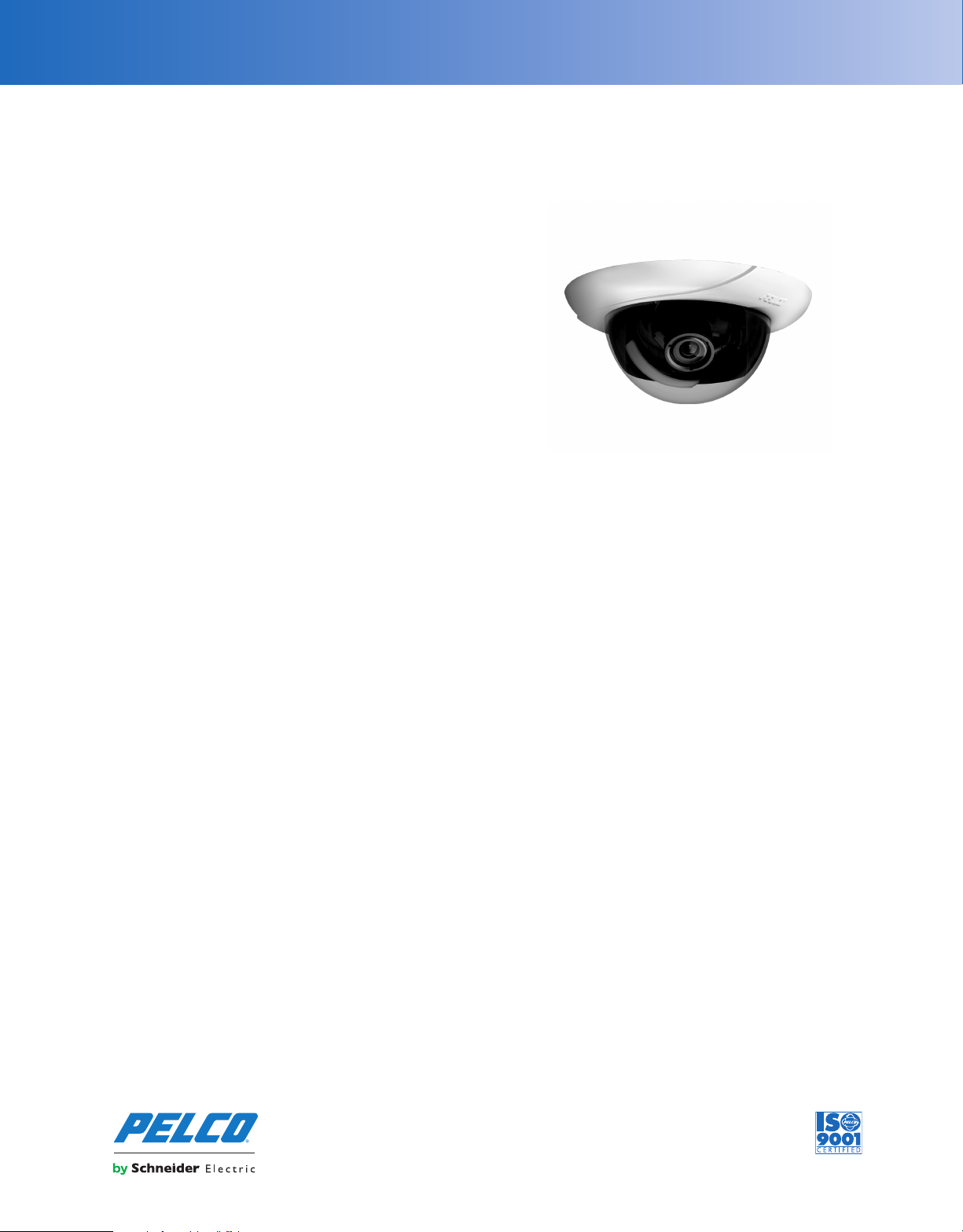
IDE10 Series Sarix® IP Indoor Fixed Dome
1.3 MEGAPIXEL EXTENDED PLATFORM HIGH DEFINITION DIGITAL CAMERAS
Product Features
• Up to 1.3 Megapixel Resolution (1280 x 1024)
• Up to 30 Images per Second (ips) at 1280 x 720
• Optional CS-Mount Lenses
• Auto Back Focus for High Precision Focusing
• Easy, Quick, One-Handed Installation
• H.264 and MJPEG Compression
• Day/Night Capability
• Sensitivity Down to 0.03 lux
• Power over Ethernet (IEEE 802.3af) or 24 VAC
• Video Setup Jack and Focus Button Accessible with Dome Closed
• Up to 2 Simultaneous Video Streams
• Built-in Analytics
• Local Storage (Micro SD) for Alarm Capture
• Motion Detection
• Audio Accessory Available.
The
Sarix® IDE10 Series
(MPx) network indoor fixed dome camera designed with industry-leading
image quality and high performance processing power. Designed to
install quickly and easily, all of the post back-box installation and setup
can be done with one hand.
Sarix
technology defines the next generation of video security imaging
performance, delivering high definition (HD) resolution, advanced
low-light capabilities, consistent color science, and fast processing
power. The H.264 compression video files are considerably smaller,
making HD video more affordable.
extended platform (EP) is a 1.3 megapixel
Fixed Dome Camera
The
IDE10 Series
include advance low-light technology and a camera in an indoor
enclosure that is ready to install. The day/night model has a mechanical
IR cut filter for increased sensitivity in low-light installations. These
cameras accept a wide range of megapixel varifocal CS-mount lenses.
IDE10 Series
The
streams can be compressed in MJPEG and H.264 formats across several
resolution configurations. The extended platform gives real-time video
(30 ips) with full HD resolution using H.264 compression for optimized
bandwidth and storage efficiency. The streams can be configured in a
variety of frame rates, bit rates, and group of pictures (GOP) structures for
additional bandwidth administration.
can be ordered with or without lenses.All models
supports two simultaneous video streams. The two
Built-In Analytics
Pelco Analytics
IDE10 Series camera. Eight Pelco behaviors are preloaded and included
as standard features of the IDE10DN models. Pelco behaviors can be
enhance the flexibility and performance of the
configured and enabled using a standard Web browser, and they are
compatible with Endura
Analytics API system. Camera models are also available with preloaded
OV Analytic Suites
®
or a third-party system that supports Pelco’s
.
Web Interface
The
IDE10 Series
setup and administration.
uses a standard Web browser for powerful remote
Window Blanking
Window blanking is used to conceal user-defined privacy areas that
The
cannot be viewed by an operator.
blanked windows. A blanked area will appear on the screen as a solid
gray window.
IDE10 Series
supports up to four
Video Systemization
The
IDE10 Series
as Endura version 2.0 (or later) and Digital Sentry
The camera is also compatible with Digital Sentry NVs (DS NVs), a
full-featured video management software, which is available as a free
download at
licenses and allows for the management of video from up to 64 cameras.
IDE10 Series
The
software. Pelco offers an application programming interface (API) for
interfacing with Pelco’s network cameras.
easily connects to Pelco IP and hybrid systems such
www.pelco.com
features open architecture connectivity to third-party
. DS NVs includes four free Pelco IP
®
version 4.3 (or later).
International Standards
Organization Registered Firm;
ISO 9001 Quality System
C2960 / REVISED 7-6-11
Page 2

TECHNICAL SPECIFICATIONS
PELCO ANALYTICS
The IDE10 Series includes eight user-configurable behaviors. The
camera is capable of running up to three behaviors at the same time;
although, the number of behaviors is limited to the available
processing power of the camera and the type of analytic being used.
Note:
Available processing power is determined by the settings for
compression standards, resolution, image rate, bit rate, and analytic
configuration.
For each behavior, you can create several custom profiles that
contain different camera settings. With these profiles, you can set up
different scenarios for the behavior, which will automatically detect
and trigger alarms when specific activity is detected.
Pelco Analytics are configured and enabled using a standard Web
browser, and Pelco behaviors are compatible with Endura or a
third-party system that supports Pelco’s Analytics API system.
Multiple Pelco behaviors can be scheduled to work during a certain
time or condition. For example, during the day, a camera can be
configured with Object Counting to count the number of people that
enter a lobby door. At night, the operator can change the profile to
Camera Sabotage to trigger an alarm if a camera is moved or
obstructed. Available Pelco behaviors include:
•
Abandoned Object:
triggers an alarm if the object remains in the zone longer than the
user-defined time allows. An airport terminal is a typical installation for
this behavior. This behavior can also detect objects left behind at an ATM,
signaling possible card skimming.
•
Adaptive Motion:
then triggers an alarm when the objects enter a user-defined zone. This
behavior is primarily used in outdoor environments with light traffic to
reduce the number of false alarms caused by environmental changes.
•
Camera Sabotage:
alarm is triggered if the lens is obstructed with spray paint, a cloth, or a
lens cap. Any unauthorized repositioning of the camera also triggers an
alarm.
•
Directional Motion:
person or object moves in a specified direction. Typical installations for
this behavior include an airport gate or tunnel where cameras can detect
objects moving in the opposite direction of the normal flow of traffic or an
individual entering through an exit door.
•
Loitering Detection:
defined zone longer than the user-defined time allows. This behavior is
effective in real-time notification of suspicious behavior around ATMs,
stairwells, and school grounds.
•
Object Counting:
or cross a tripwire. This behavior might be used to count the number of
people at a store entrance/exit or inside a store where the traffic is light.
This behavior is based on tracking and does not count people in a
crowded setting.
•
Object Removal:
defined zone. This behavior is ideal for customers who want to detect the
removal of high value objects, such as a painting from a wall or a statue
from a pedestal.
•
Stopped Vehicle:
than the user-defined time allows. This behavior is ideal for airport
curbside drop-offs, parking enforcement, suspicious parking, traffic lane
breakdowns, and vehicles waiting at gates.
Detects objects placed in a defined zone and
Detects and tracks objects that enter a scene and
Detects contrast changes in the field of view. An
Generates an alarm in a high traffic area when a
Identifies when people or vehicles remain in a
Counts the number of objects that enter a defined zone
Triggers an alarm if an object is removed from a
Detects vehicles stopped near a sensitive area longer
OBJECTVIDEO (OV) ANALYTIC SUITES
ObjectVideo Analytics Suites are preloaded on selected IDE10 Series
cameras and require an OV Ready system to configure the behaviors
for alarm notification.
OV Security Suite
The OV Security Suite is easy to use and includes Tripwire Detection,
Inside Area Detection, and Camera Tamper Detection behaviors.
• Tripwire Detection identifies objects that cross a user-defined line drawn
within the camera’s field of view.
• Inside Area Detection identifies objects entering, appearing, or moving
within a user-defined area.
• Camera Tamper Detection identifies significant contrast changes in the
camera’s field of view; for example, if the lens is obstructed by spray
paint, a cloth, or a lens cap.
OV Security Suite Plus
The OV Security Suite Plus includes the behaviors of the OV Security
Suite plus Multi-Line Tripwire Detection, Loitering Detection, and
Leave Behind Detection behaviors.
• Multi-Line Tripwire Detection identifies objects that cross two defined
lines and generates an event based on defined parameters, including
directionality. Defined parameters for this behavior include direction,
sequential order, and time between crossing each tripwire.
• Loitering Detection identifies when people or vehicles remain within a
user-defined area beyond a specified period of time. This behavior is
effective for real-time notification of suspicious behavior around ATMs,
stairwells, and school grounds.
• Leave Behind Detection detects objects placed in a defined zone and
triggers an alarm if the object remains in the zone longer than the
user-defined time allows.
OV Event Counting Suite
The OV Event Counting Suite uses advanced object calibration and
additional features for schedules, parameters, and multiple rules. The
suite includes behaviors for Tripwire Counting, Enters/Exits Counting,
Loiter Counting, Occupancy Sensing, and Dwell-Time Monitoring.
• Tripwire Counting counts people or objects that cross a user-defined line.
• Enters/Exits Counting calculates the number of people that enter and exit
an area without using a tripwire.
• Loiter Counting is useful in analyzing how frequently people stop in front
of a product, display, or other area of interest. This feature is also useful
in assessing promotion effectiveness and product interest.
• Occupancy Sensing counts people and generates a new value every time
the occupancy level changes. Since each occupancy output is
time-stamped, the data can be used to determine average occupancy
levels or to correlate data to point-of-sale or other business scenarios.
• Dwell-Time Monitoring rules can be set up to record the length of time it
takes an object to enter and exit an area. Along with queue size
information, wait times can also be assessed. This behavior can be used
to evaluate consumer interaction for a point-of-sale display or digital
advertisement.
Page 3
TECHNICAL SPECIFICATIONS
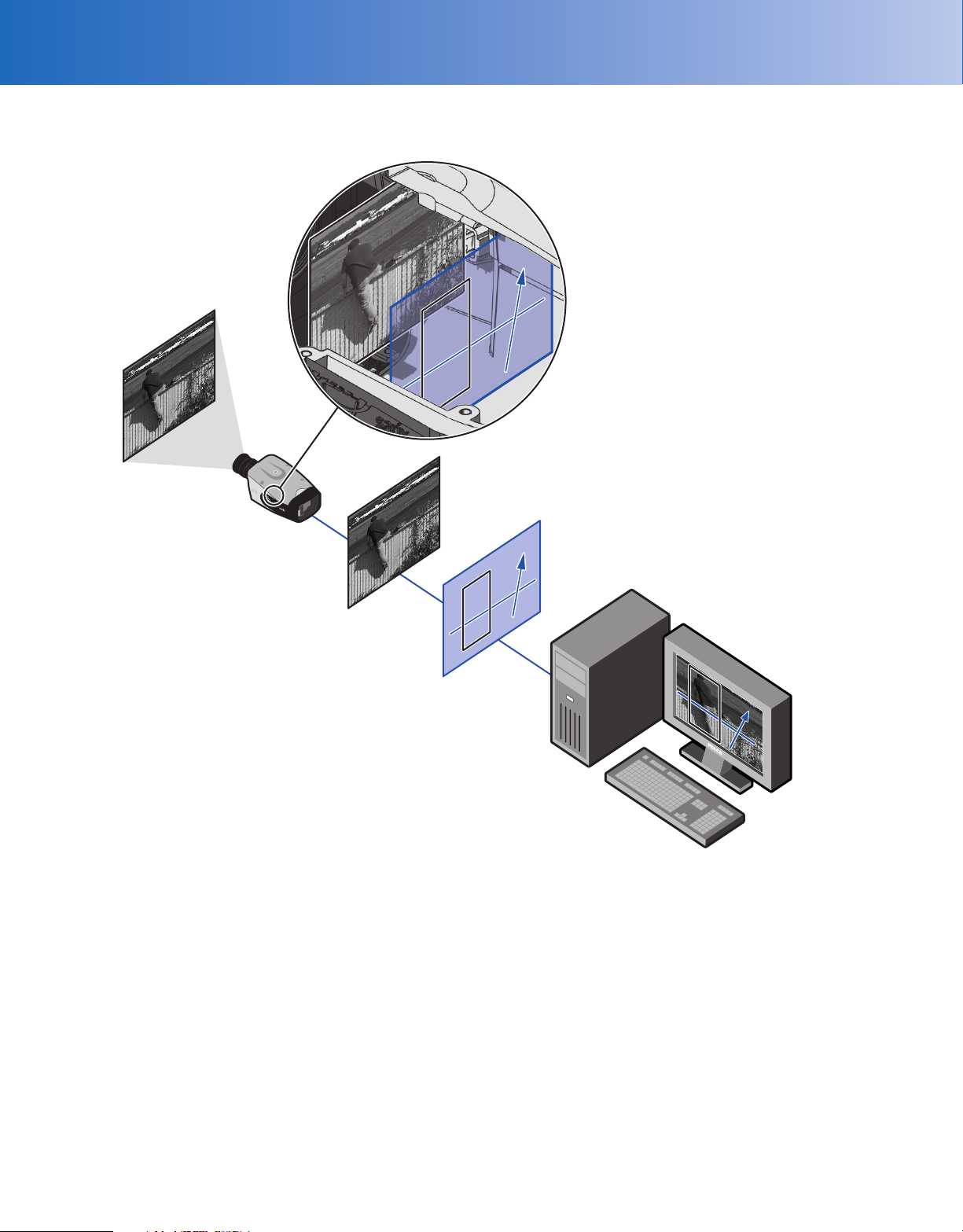
The following diagram illustrates how the camera system interprets streaming video when embedded analytics are configured and enabled.
SARIX
VIDEO
ANALYTICS OVERLAY
• CONFIGURATION
• ALARMS
• PELCO ANALYTICS API / OV READY
SYSTEM
IMPORTANT NOTE: PLEASE READ.
requiring changes or perhaps additional network equipment to accommodate the system as illustrated. Please contact your local Pelco Representative to discuss your specific requirements
The network implementation is shown as a general representation only and is not intended to show a detailed network topology. Your actual network will differ,
Page 4
TECHNICAL SPECIFICATIONS
GENERAL
Imaging Device 1/3-inch (effective)
Imager Type CMOS
Imager Readout Progressive scan
Maximum Resolution 1280 x 1024
Signal-to-Noise Ratio 50 dB
Auto Iris Lens Type DC drive
Electronic Shutter Range 1 ~ 1/100,000 sec
Wide Dynamic Range 60 dB
White Balance Range 2,000° to 10,000°K
Sensitivity f/1.2; 2,850°K; SNR >24 dB
Color (1x/33 ms) 0.5 lux
Color SENS (15x/500 ms) 0.12 lux
Mono (1x/33 ms) 0.25 lux
Mono SENS (15x/500 ms) 0.03 lux
Dome Attenuation
Clear Zero light loss
Smoked f/1.0 light loss
Construction
Back Box Cast aluminum
Trim Ring Polycarbonate plastic
Bubble Acrylic plastic
Finish White
Weight (without lens)
Unit 0.9 kg (2.0 lb)
Shipping 2.7 kg (6.0 lb)
Available Languages Chinese, English, French, German, Italian,
Portuguese, Russian, Spanish, and Turkish
ELECTRICAL
Port RJ-45 connector for 100Base-TX
Auto MDI/MDI-X
Cable Type Cat5 or better for 100Base-TX
Power Input 18 to 34 VAC; 24 VAC nominal or PoE (IEEE
802.3af class 3)
Power Consumption <6 W
Current Consumption
PoE <200 mA maximum
24 VAC <295 mA nominal; < 390 mA maximum
Local Storage Micro SD
Alarm Input 10 VDC maximum, 5 mA maximum
Alarm Output 0 to 15 VDC maximum, 75 mA maximum
Service Port External 3-connector, 2.5 mm provides
NTSC/PAL video output
Accessory Port Connects Pelco accessories
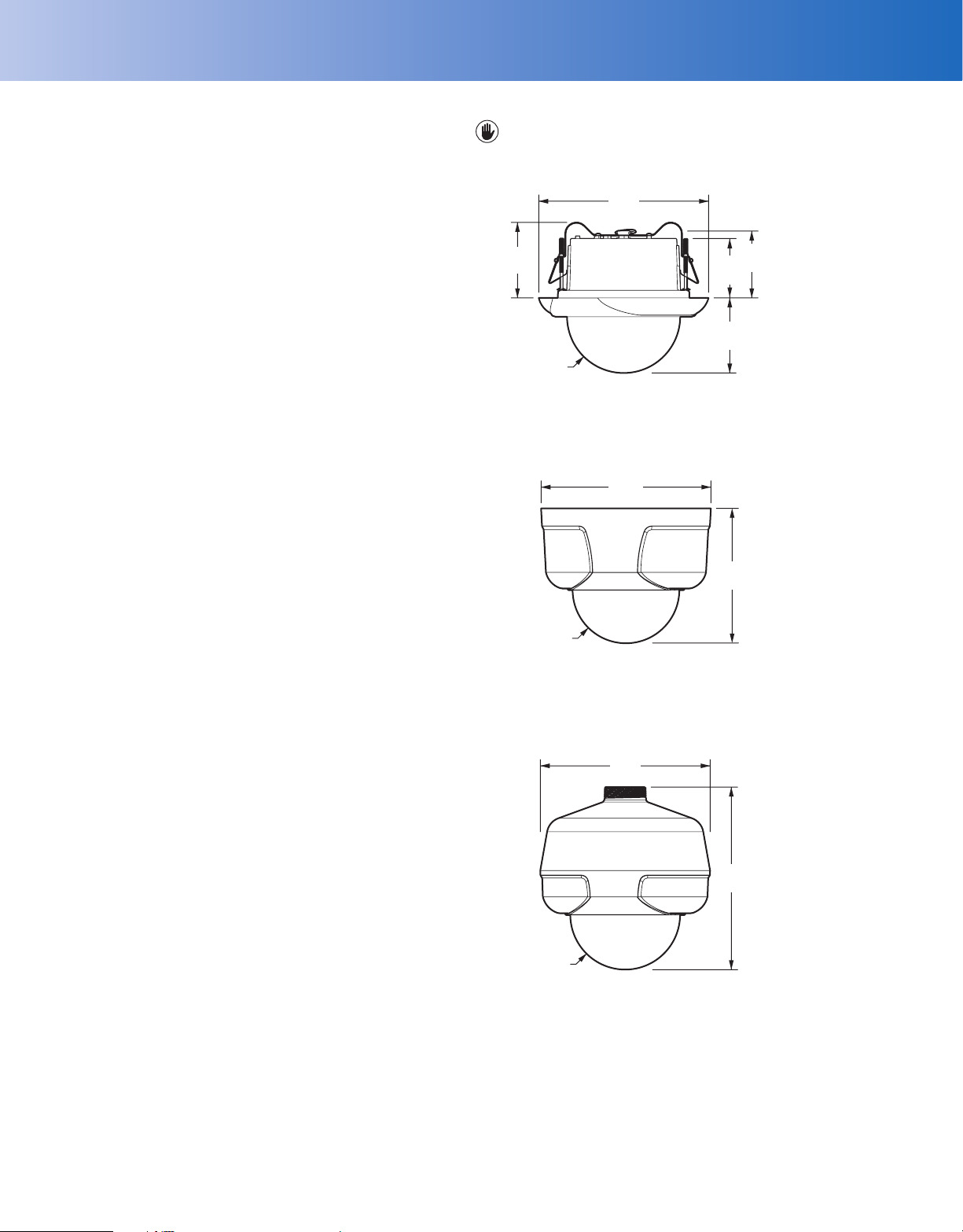
NOTE: VALUES IN PARENTHESES ARE INCHES; ALL OTHERS ARE CENTIMETERS.
IN-CEILING
19.05
(7.50)
8.50
(3.33)
Ø 12.70
(5.00)
SURFACE MOUNT
(Mounting Ring Included)
20.19
(7.95)
Ø 12.70
(5.00)
PENDANT
(Mount Available as Accessory)
19.63
(7.73)
6.93
(2.73)
8.43
(3.32)
16.05
(6.32)
7.52
(2.96)
MECHANICAL
Lens Mount CS mount, adjustable
Pan/Tilt Adjustment
Pan 368°
Tilt 160° (10° to 170°)
Rotate 355°
ENVIRONMENTAL
Operational Temperature 0° to 50°C (32° to 122°F)
Operational Humidity 20% to 80%, noncondensing
19.38
(7.63)
Ø 12.70
(5.00)
Page 5

TECHNICAL SPECIFICATIONS
*Internet Explorer is not supported by Mac OS X 10.4.
†
This product is not compatible with QuickTime version 7.6.4 for
Windows XP or Windows Vista. If you have this version installed on
your PC, you will need to upgrade to QuickTime version 7.6.5.
VIDEO
Video Encoding H.264 Base profile and MJPEG
Video Streams Up to 2 simultaneous streams; the second
Frame Rate Up to 30, 25, 24, 15, 12.5, 12, 10, 8, 7. 5, 6, 5,
Available Resolutions
Additional Resolutions 640 x 512, 640 x 352, 480 x 368, 480 x 272,
Supported Protocols TCP/IP, UDP/IP (Unicast, Multicast IGMP),
Users
Unicast Up to 20 simultaneous users depending on
Multicast Unlimited users H.264
Security Access Password protected
Software Interface Web browser view and setup
Pelco System Integration Endura 2.0 (or later) or
Open IP Integration Pelco IP camera API
Minimum System Requirements
Processor Intel
Operating System Microsoft
Memory 2 GB RAM
Network Interface Card 100 megabits (or greater)
Monitor Minimum of 1024 x 768 resolution, 16- or
Web Browser* Internet Explorer
Media Player† Pelco Media Player or QuickTime® 7.6.5 for
stream is variable based on the setup of the
primary stream
4, 3, 2, 1 (dependent upon coding, resolution,
and stream configuration)
Resolution MJPEG H.264 Base Profile
Aspect
MPx Width Height
Maximum
Ratio
1.3 1280 1024 5:4 20.0 ips 10.0 Mbps 20.0 ips 3.4 Mbps
1.2 1280 960 4:3 20.0 ips 9.8 Mbps 20.0 ips 3.0 Mbps
0.9 1280 720 16:9 30.0 ips 10.0 Mbps 30.0 ips 2.9 Mbps
0.5 800 600 4:3 30.0 ips 7.7 Mbps 30.0 ips 2.0 Mbps
0.3 640 480 4:3 30.0 ips 4.9 Mbps 30.0 ips 1.5 Mbps
0.1 320 240 4:3 30.0 ips 1.2 Mbps 30.0 ips 0.5 Mbps
320 x 256, and 320 x 176
UPnP, DNS, DHCP, RTP, RTSP, NTP, IPv4,
SNMP v2c/v3, QoS, HTTP, HTTPS, LDAP
(client), SSH, SSL, SMTP, FTP, and
802.1x (EAP)
resolution settings (2 guaranteed streams)
Digital Sentry 4.3 (or later)
®
Core® 2 Duo microprocessor, 2.6 GHz
®
Windows® XP, Windows Vista®,
or Mac® OS X 10.4 (or later)
32-bit pixel color resolution
®
7.0 (or later) or Mozilla®
Firefox® 3.5 (or later); Internet Explorer® 8.0
(or later) is recommended for configuring
analytics
Windows XP, Windows Vista, or QuickTime
7.6.4 for Mac OS X 10.4
IPS
Recommended
Bit Rate
Maximum
IPS
Recommended
Bit Rate
ANALYTICS
Required Systems for
Pelco Analytics
Pelco Interface WS5200 Advanced System Management
Open API Pelco analytics allow streaming information
Required System for
Object Video Suites OV ready-compliant system with OV Ready
Software on an Endura 2.0 (or later) system
to communicate though Pelco’s API Guide for
Video Analytics version 0.55.30 (or later),
available at
Pelco.com/IP
video management system
Page 6
TECHNICAL SPECIFICATIONS
MODELS
IDE10DN-0 Sarix indoor fixed dome network camera,
extended platform, 1.3 MPx, day/night,
no lens, smoked dome, with built-in Pelco
analytics
IDE10DN-1 Sarix indoor fixed dome network camera,
extended platform, 1.3 MPx, day/night, no
lens, clear dome, with built-in Pelco analytics
IDE10DN8-1 Sarix indoor fixed dome network camera,
extended platform, 1.3 MPx, day/night,
2.8 ~ 8 mm varifocal megapixel lens, clear
dome, with built-in Pelco analytics
IDE10DN-OCP1 Sarix indoor fixed dome network camera,
extended platform, 1.3 MPx, day/night,
no lens, clear dome, with built-in OV Event
Counting Plus Suite
IDE10DN-OS1 Sarix indoor fixed dome network camera,
extended platform, 1.3 MPx, day/night,
no lens, clear dome, with built-in OV Security
Suite
IDE10DN-OSP1 Sarix indoor fixed dome network camera,
extended platform, 1.3 MPx, day/night,
no lens, clear dome, with built-in OV Security
Plus Suite
CERTIFICATIONS/RATINGS/PATENTS
• CE, Class B
• FCC, Class B
• UL /cUL Listed
• C-Tick
• Patents Pending
OPTIONAL ACCESSORIES
IX-SC Service/monitor cable, 1.22 cm (4 ft);
compatible with standard BNC connectors
AUD-1 External audio accessory
ALM-1 External alarm accessory
POE20U560G Single port PoE injector
RECOMMENDED MOUNTS
ID-P Pendant mount
ID-DF5 DF5 Series adapter kit
ID-CB Conduit box for in-ceiling installations
ID-PCB 61 x 61 cm (2 x 2 ft) ceiling panel with conduit
box
SWM-WT Wall mount for pendant
SWM-CAWT Corner adapter for wall mount
SWM-PAWT Pole adapter for wall mount
RECOMMENDED LENSES
13M2.2-6 Megapixel lens, varifocal, 2.2 ~ 6.0 mm,
13M2.8-8 Megapixel lens, varifocal, 2.8 ~ 8.0 mm,
13M2.8-12 Megapixel lens, varifocal, 2.8 ~ 12.0 mm,
13M15-50 Megapixel lens, varifocal, 15.0 ~ 50.0 mm,
Pelco megapixel lenses have been designed and tested to deliver optimal
image quality for the IDE10 Series dome. The use of standard definition lenses
on IDE10 Series megapixel cameras will limit the resolution of the camera,
creating poor image quality.
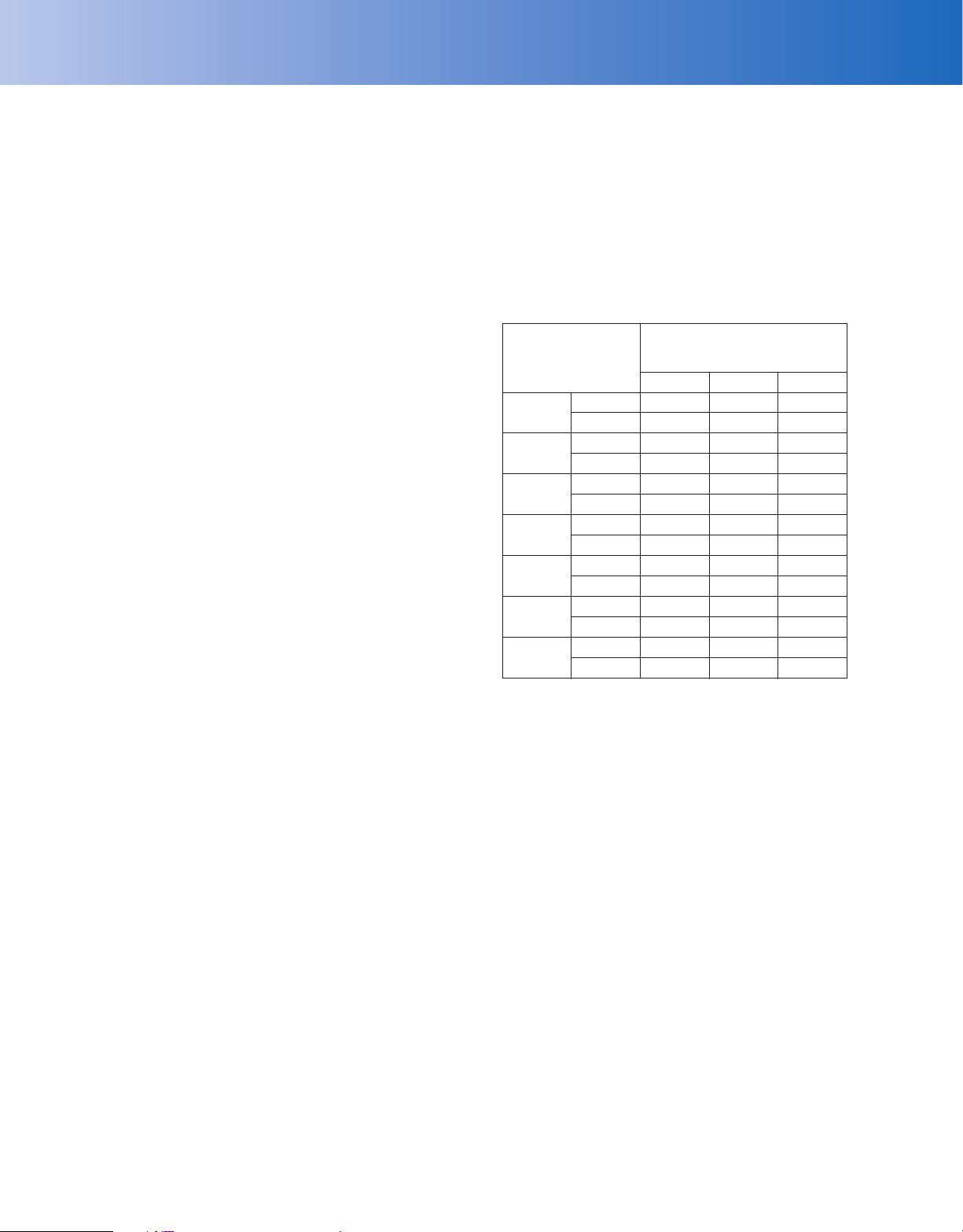
Field of View
in Degrees
2.2 mm
2.8 mm
6.0 mm
8.0 mm
12.0 mm
15.0 mm
50.0 mm
Note:
For 800 x 600 (or lower) resolutions in 4:3 or 5:4 aspect ratios, the field
of view is smaller than listed above. Refer to the Installation/Operation
manual for details.
Horizontal 109 109 109
Vertical 63 83 89
Horizontal 89 89 89
Vertical 48 66 70
Horizontal 42 42 42
Vertical 24 32 34
Horizontal 32 32 32
Vertical 18 24 25
Horizontal 21 21 21
Vertical 12 16 17
Horizontal 16 16 16
Vertical 9 12 13
Horizontal 5 5 5
Vertical 3 4 4
f/1.3 ~ 2.0
f/1.2 ~ 1.9
f/1.4 ~ 2.7
f/1.5 ~ 2.1
High Resolution Streams
(>800 x 600)
Aspect Ratio
16:9 4:3 5:4
Pelco by Schneider Electric
3500 Pelco Way, Clovis, California 93612-5699 United States
USA & Canada
International
www.pelco.com
Tel (800) 289-9100 Fax (800) 289-9150
Tel +1 (559) 292-1981 Fax +1 (559) 348-1120
Pelco, the Pelco logo, and other trademarks associated with Pelco products
referred to in this publication are trademarks of Pelco, Inc. or its affiliates. All
other product names and services are the property of their respective companies.
Product specifications and availability are subject to change without notice.
©Copyright 2011, Pelco, Inc. All rights reserved.
 Loading...