

Page 1
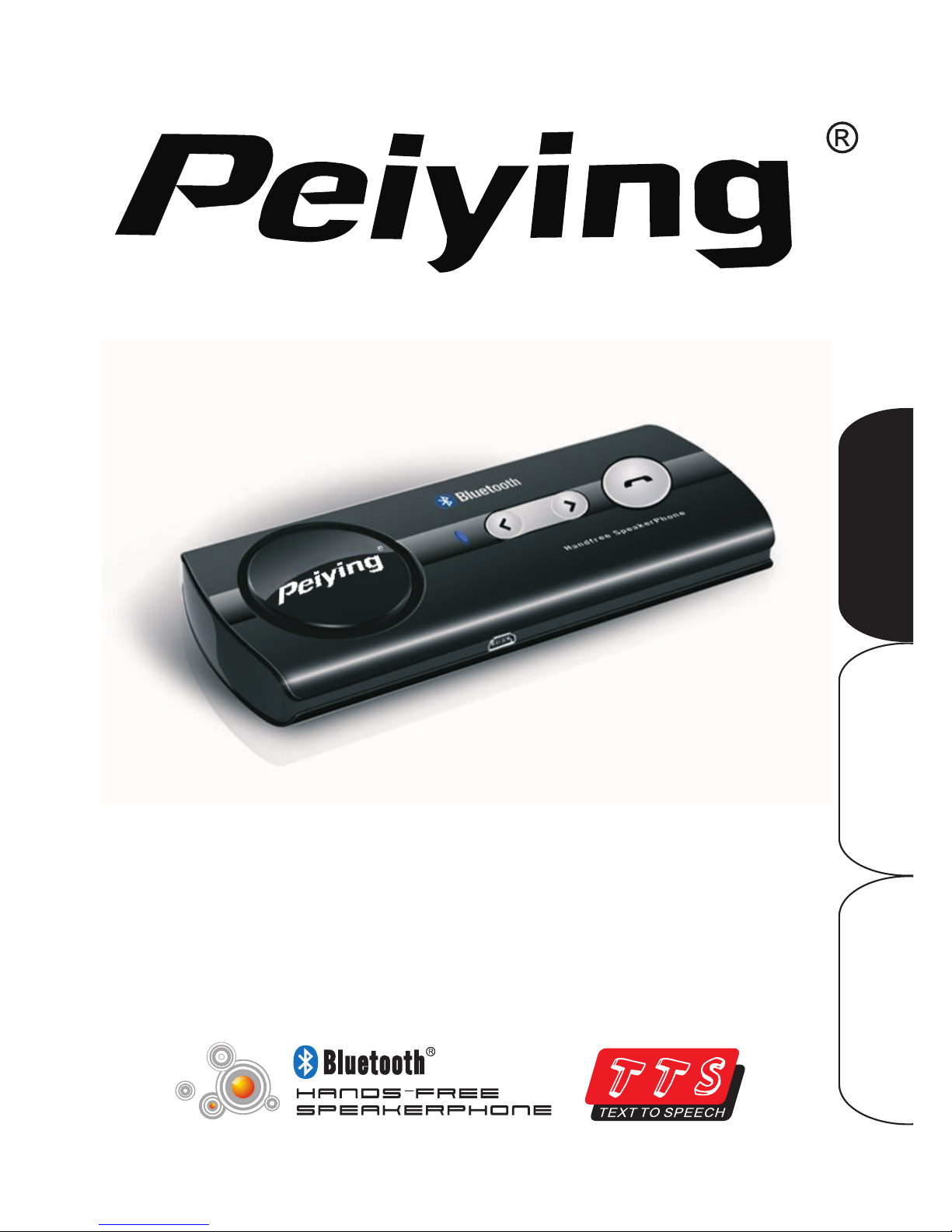
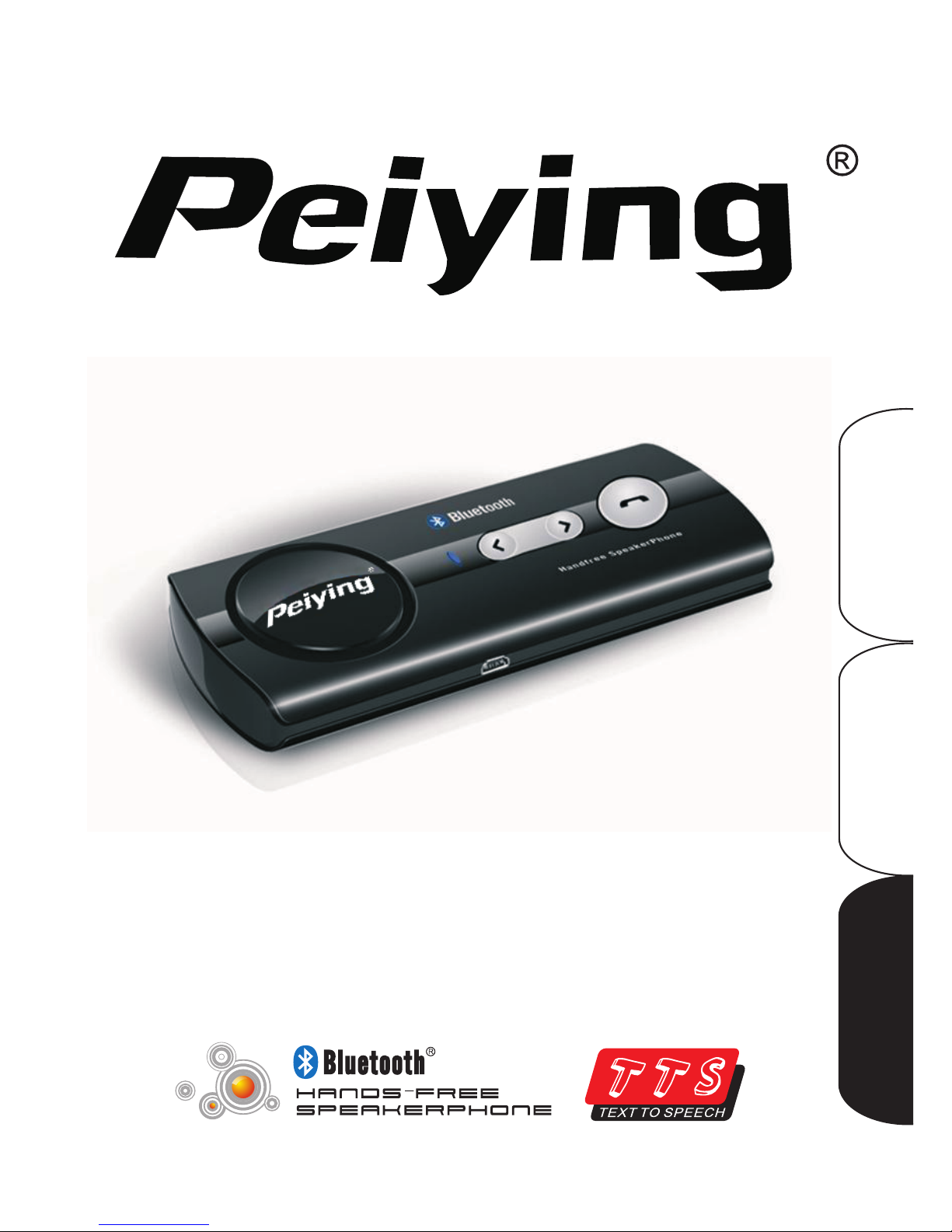
User Manual
PY-BT01
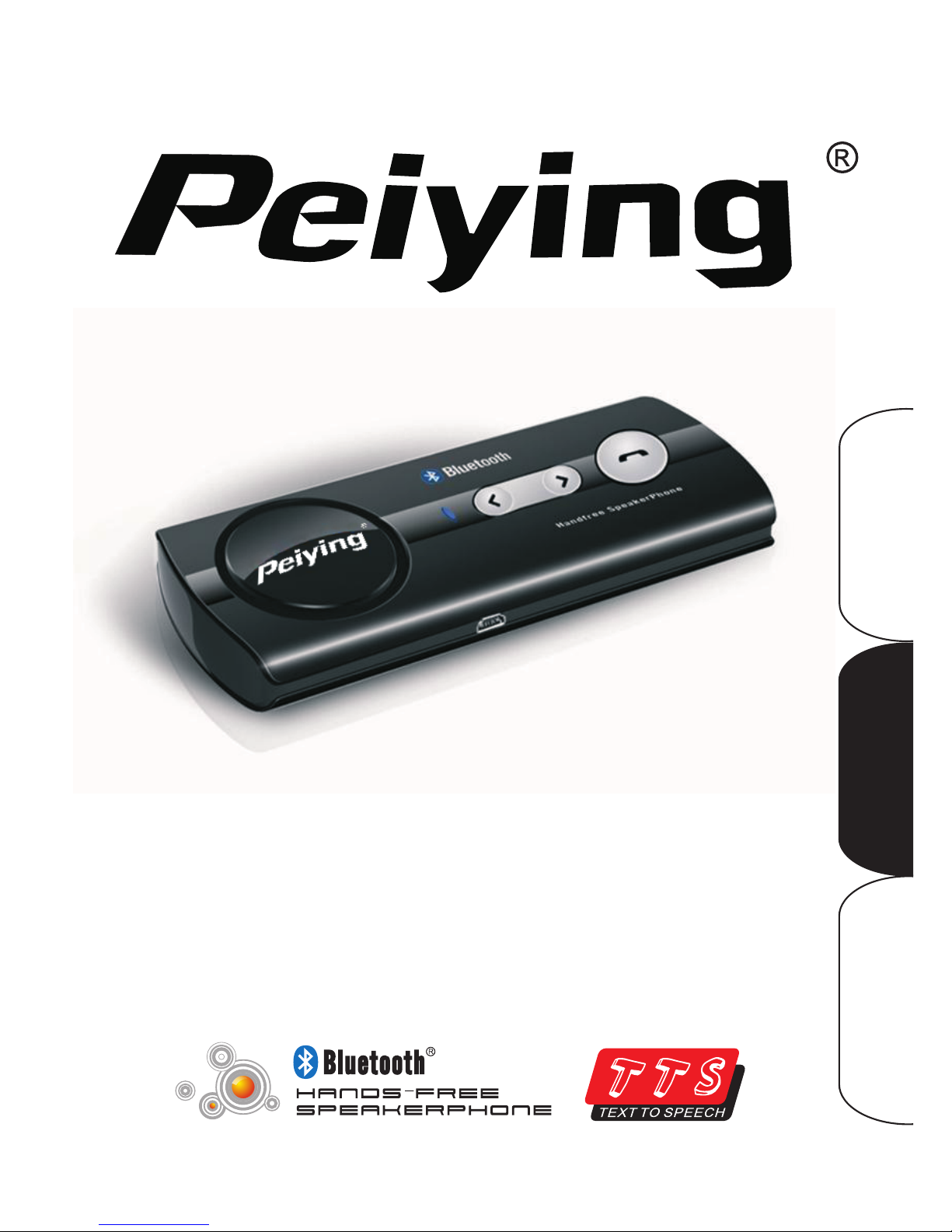
BT car system
Polski 7-14
Românã 15-22
English 1- 6
Page 2

Page 3
Introduction:
Thank you for your interest at our Bluetooth car kit. This car kit is a wireless
Bluetooth kit based on the Bluetooth technology that allows you to making and
talking calls without touching your mobile phone. And it also has Text to
Speech and phone book synchronization functions.
Read this user guide carefully before using the car kit .Read also the user
guide for your phone, which provides important safety and maintenance
information.
Bluetooth wireless technology
Bluetooth wireless technology makes it possible to connect compatible
communication devices without using cables. A Bluetooth connection does not
require the devices to be in line of sight, but both devices should be within 10
meters (30feet) of each other. Connections can be subject to interference from
obstructions.
The car kit is compliant with Bluetooth Specification 2.0.
There may be restrictions on using Bluetooth technology in some locations
.Check with your local authorities or service provider.
Get started
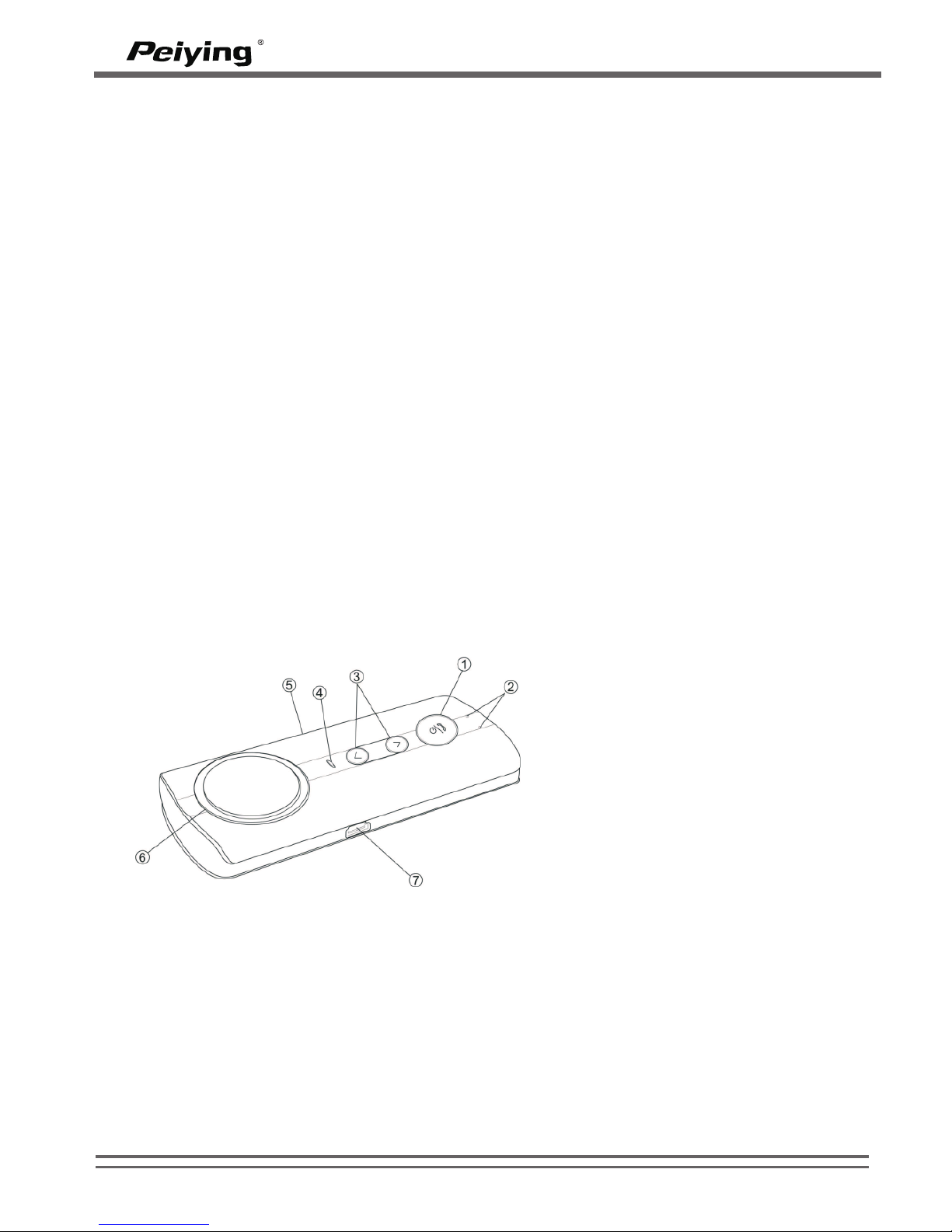
Overview
Before you start using the car kit, you must charge the battery and pair the car
kit with a compatible mobile phone.
Charger
This car kit is intended to use with the car charger that is included in the
package.
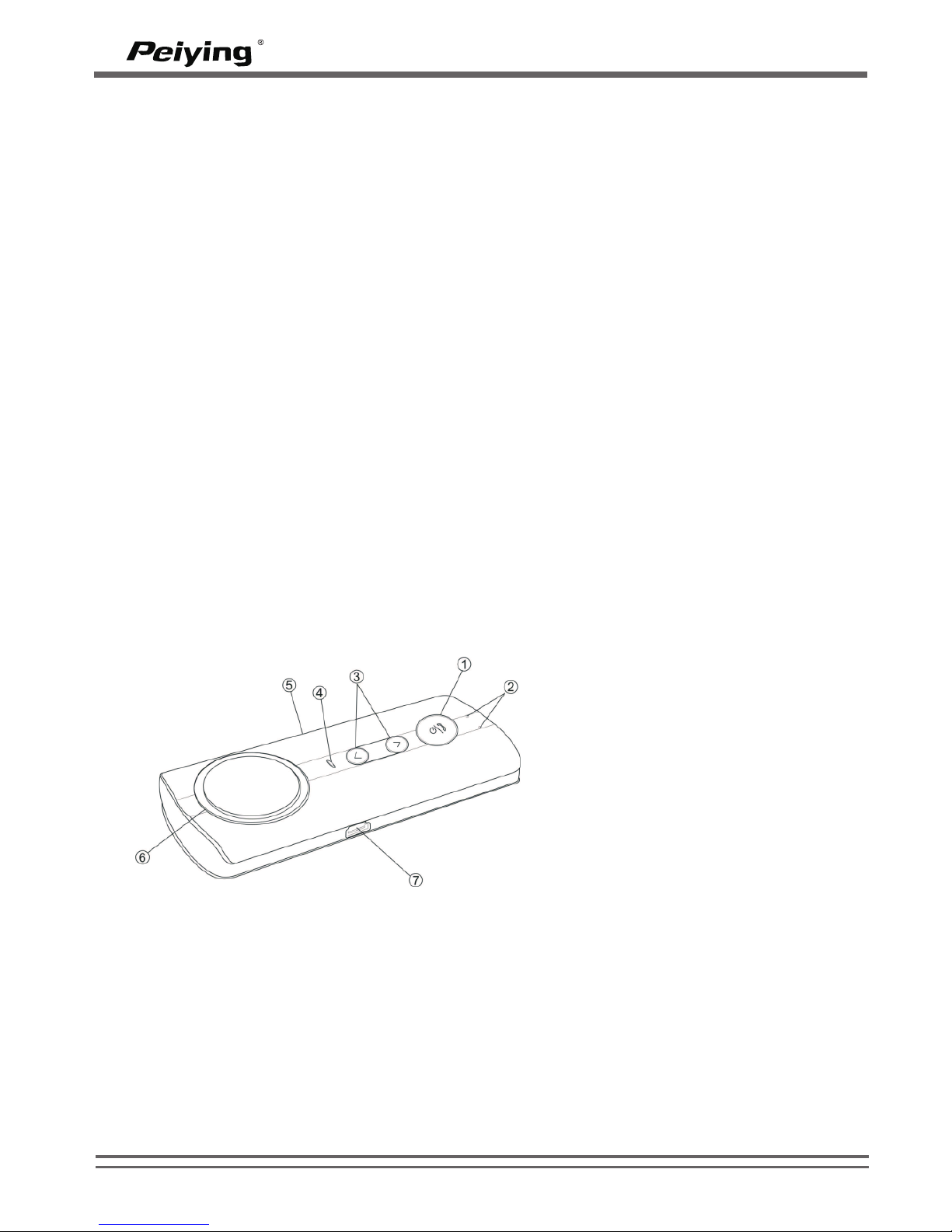
1– Multi-function Button (MFB)
2– MIC input
3– Volume button
4– LED display
5– M UTE
6– Speaker
7– Mini USB 5 PIN for the
charging socket
WWW.PEIYING.PL
1
PY-BT01
Page 4

Charge the battery
This device has a Rechargeable Lithium Polymer Battery 3.7V, 700mAH battery.
1. Connect the car kit to the car charger. The red indicator light is displayed
during charging. If charging does not start, disconnect the charger, plug it
again, and retry. Charging the battery fully may take up to 2-3 hours.
2. When the battery is fully charged, the red indicator light turns off. Disconnect
the car kit from the charger.
The fully charged battery has power for up to 5-6 hours of talking time or up to
250 hours of standby time. However, the talking and standby time may vary
when used with different mobile phones, products that use a Bluetooth
connection, usage settings, usage styles, and environments.
Low battery prompt
If the voltage of battery is lower than 3.4v, the red LED flashes every 5 seconds,
the speaker makes “dudu” sound every 30 seconds and the there is a voice
prompt “Battery low”. When the voltage of battery is lower than 3.2v, the car kit
powers off automatically.
Power on and off the car kit
To power on, in power off state, press and hold the "MFB" multi-function button
for about 3 seconds until the blue LED is on. Release the button, the speaker
makes “du” sound and there is a voice prompt “power on”. The car kit now
powers on and enters idle state.
To power off, in power on state, press and hold the "MFB" for 6 seconds until the
speaker makes “dudu” sound and there is a voice prompt “power off”. The red
LED flashes once.
Pair the car kit with a compatible phone
1. Make sure your car kit is power off
2. Press and hold the "MFB" until the blue and red light flashes alternately, the
speaker makes long “du” sound and there is a voice prompt “paring
phone. Please put your phone in paring mode and enter PIN code 0000”. The
car kit is now in pairing state.
3. Activate the Bluetooth feature on the phone, and set the phone to search for
Bluetooth devices. Check the user guide of your phone for instructions.
4. Select the car kit (BCK08) from the list of found devices.
5. Enter the pass code 0000 to pair and connect the car kit to your phone. In
some phones you may need to make the connection separately after
pairing. See the user guide of your phone for details. You only need
to pair the car kit with your phone once.
If the pairing is successful, the blue LED flashes once, the speak makes “du”
sound and there is voice prompt “Pairing successful”. The car kit’s name appears
in the phone menu where you can view the currently paired Bluetooth devices.
WWW.PEIYING.PL
2
PY-BT01
Page 5
Notes:
1. If the paring does not finish within 2 minutes, the car kit prompts “Paring failed,
please put your phone in paring mode and try again. Then the speaker
makes “du” sound and the red LED flashes once. The car kit will power
off automatically and the car kit prompts “power off”.
2. If the connection between car kit and mobile breaks, the speaker makes
“dududu” sound every 1 minute. If the connection doesn’t resume within 10
minutes, the speaker makes “dudu” sound, the car kit prompts “Power off”
and then does so.
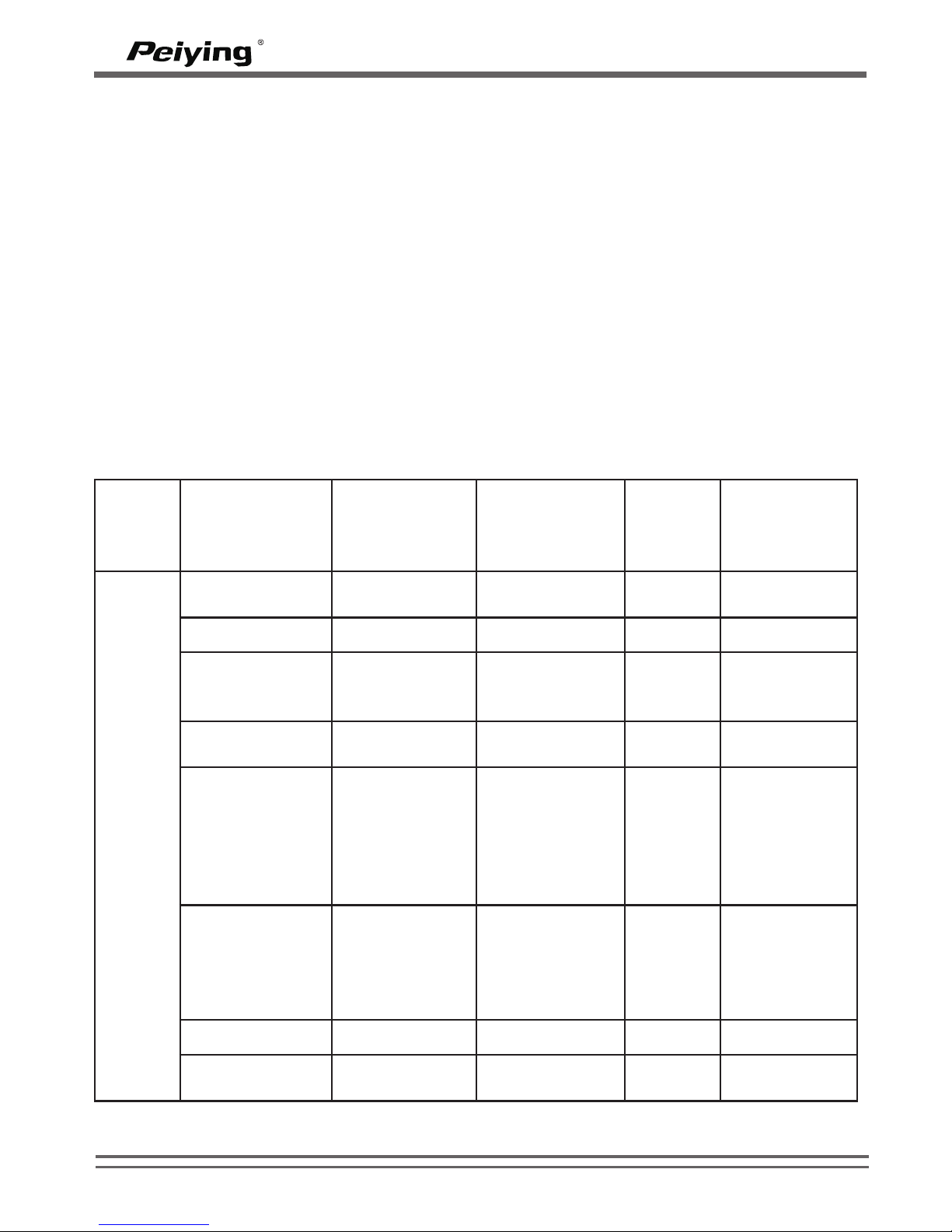
Basic use
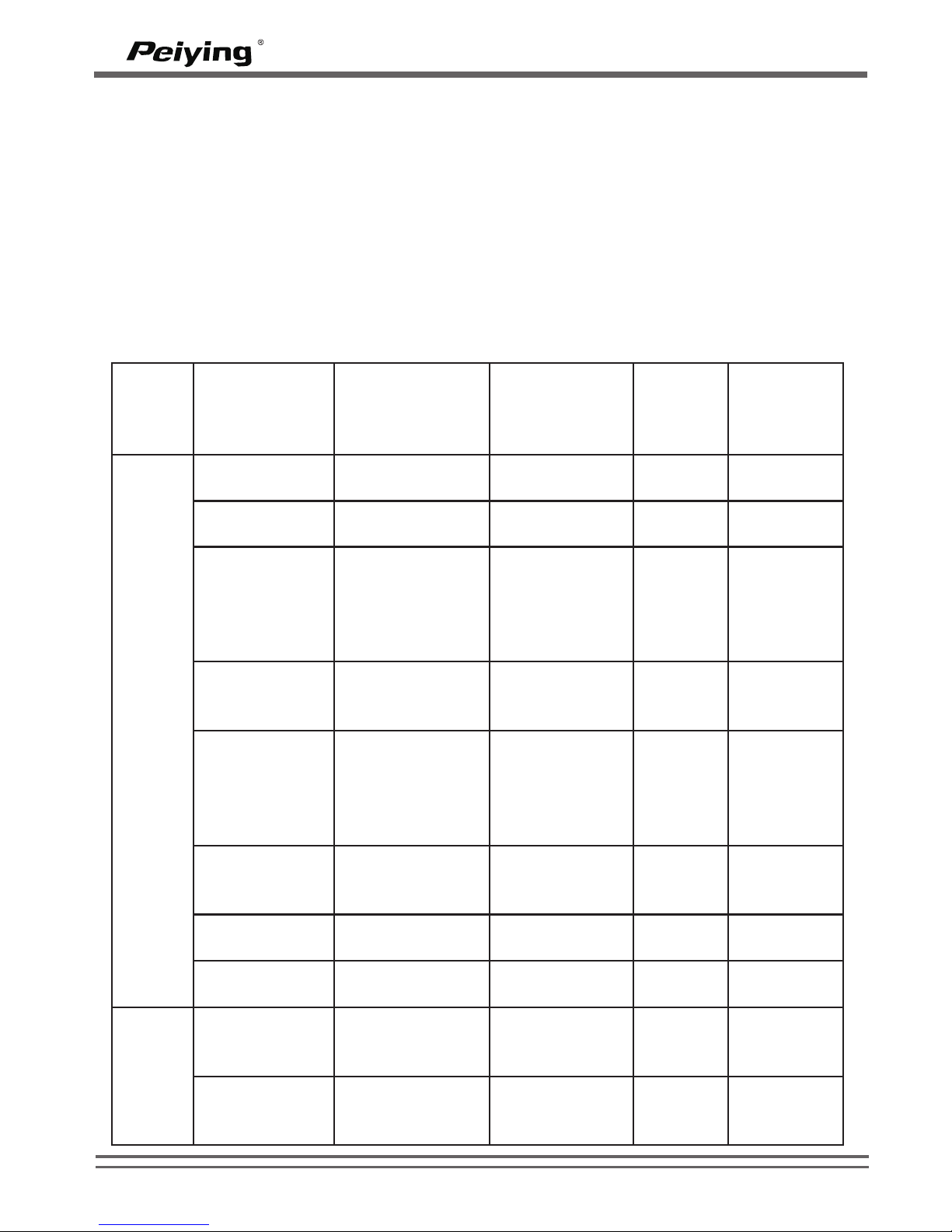
Button
Function
Status of car
kit before
operation
Operation
Sound
made by
speaker
Voice prompt
Answer the
call
Incoming call
Press
---
--End the call
During call
Press
---
End call
Redial last
telephone
number dialed
In idle state
Double press
---
Redialing
Reject the call
Incoming call
Long press for
3 seconds
“du”
Reject call
successful
End dialing
Dialed
telephone
number but
the call hasn’t
been
answered
Press
---
End call
Reconnection
In idle state
but has not
been
connected
with mobile
Press
---
phone is
ready for use
Pause music
Playing music
Press
---
---
Play music
Pause
playing music
Press
---
---
WWW.PEIYING.PL
3
PY-BT01
Page 6
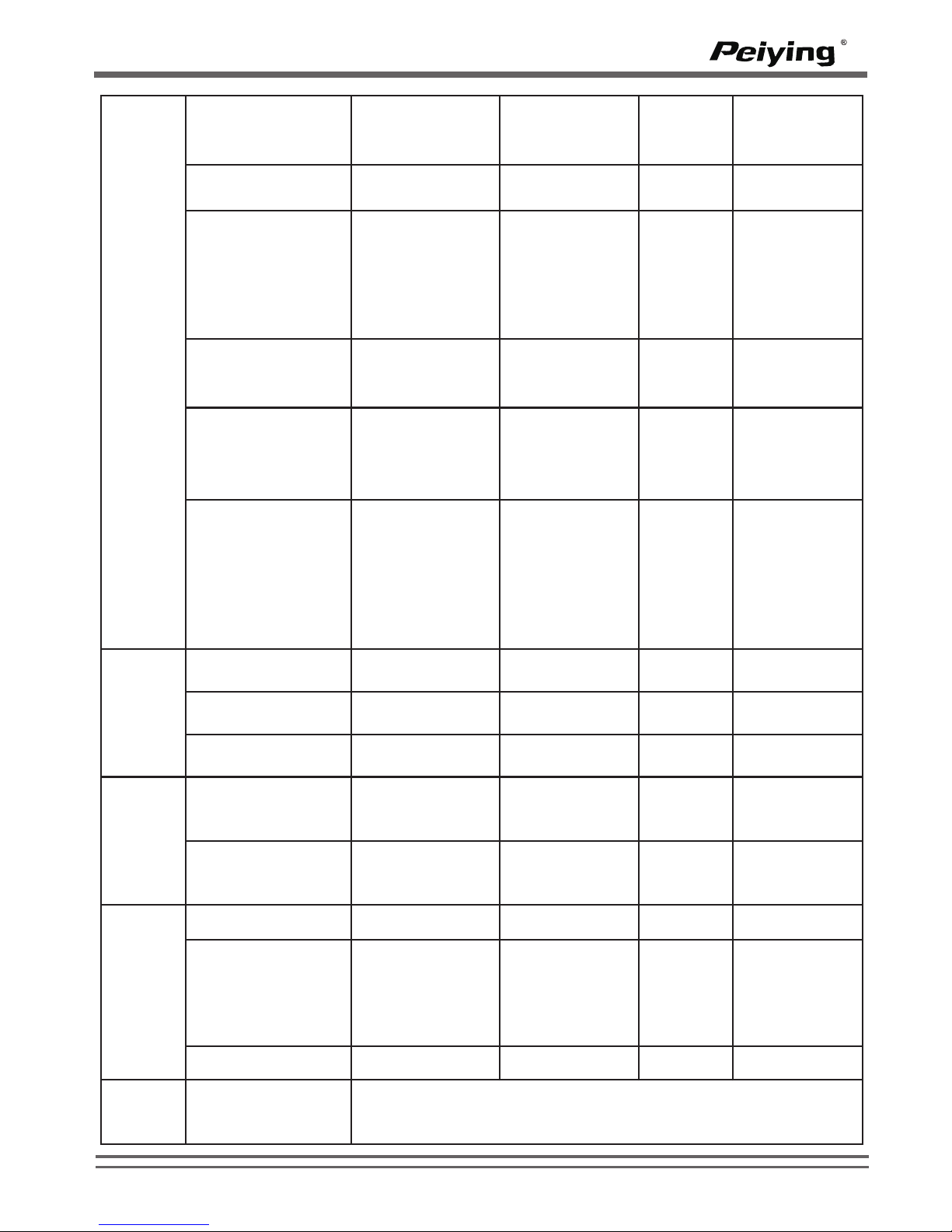
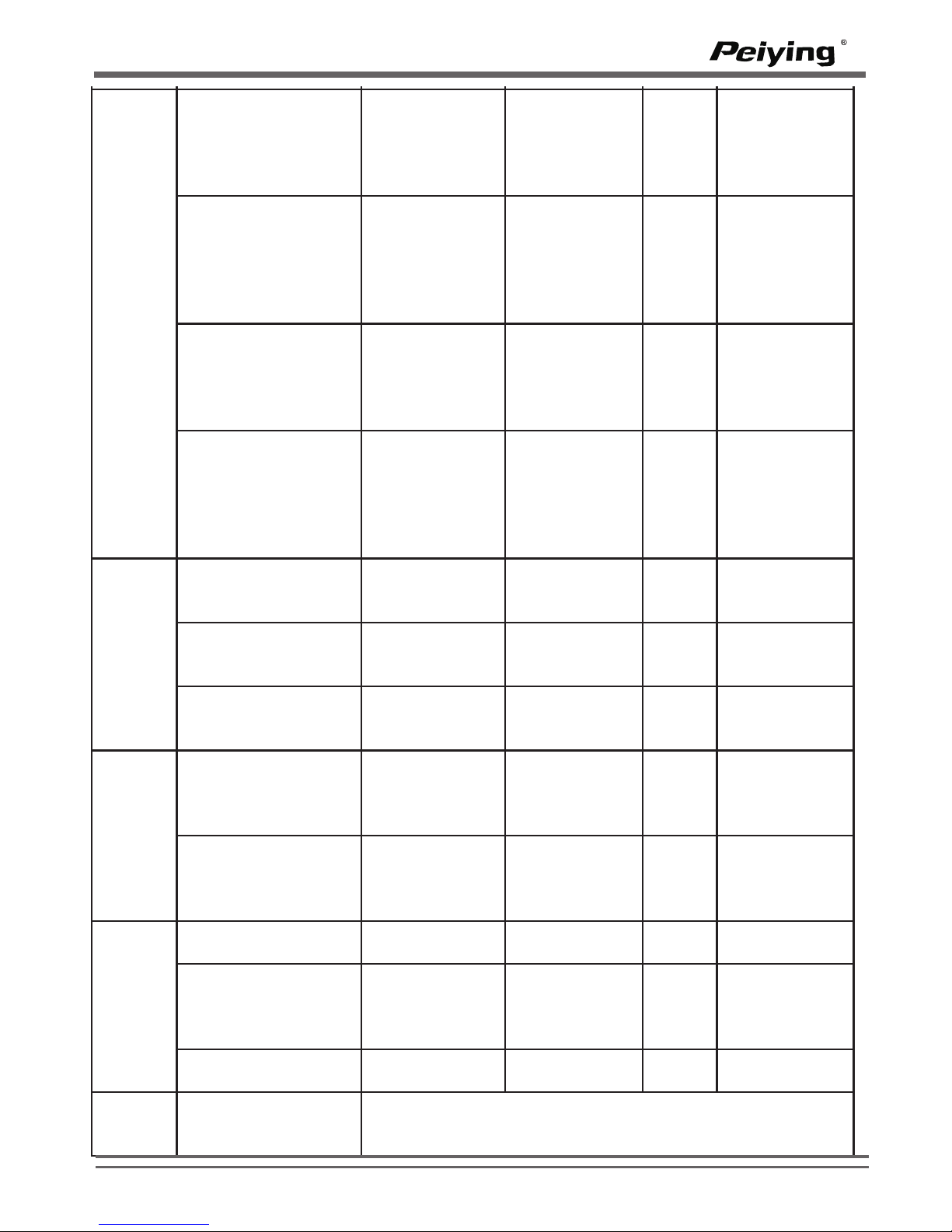
Volume
+
Increase volume
During a call or
playing music
Press
---
---
Next Song
Playing music
Long press for
3 seconds
---
---
Select TTS
language from
English(British/U
S), German,
French, Spanish
and Italian
In idle state but
has not been
connected with
mobile
Long press for
3 seconds
---
Select this
language
Switch the voice
from car kit to
mobile
During a call
and the voice
is from car kit
Long press for
3 seconds
“du”
---
Switch the voice
from mobile to
car kit
During a call
and the voice
is from mobile
Long press for
3 seconds
“du”
---
Save phonebook
In idle state
and has been
connected with
mobile
Long press for
6 seconds
“dudu”
after
saving
“Phonebook
deleted”
when
starting and
“Contact
saved” after
finishing
Volume
-
Decrease volume
During a call or
playing music
Press
---
---
Previous song
Playing music
Long press for
3 seconds
---
---
Delete current
phonebook
In idle state
Long press for
6 seconds
“dudu”
Phonebook
deleted
Volume
+/-
Start TTS
In idle state
and TTS is
closed
Press at the
same time for
3 seconds
---
Voice prompt
on
Close TTS
In idle state
and TTS has
been started
Press at the
same time for
3 seconds
---
Voice prompt
off
Mute
Mute
During a call
press
---
---
Voice dialing
The car kit has
been paired
with mobile
and in idle
state
Long press for
3 seconds
“du”
---
Exit Mute
Mute state
press
---
---
/
Send contact info
from mobile to
car kit
Choose one contact info from phonebook and choose
sending by bluetooth
WWW.PEIYING.PL
4
PY-BT01
Page 7
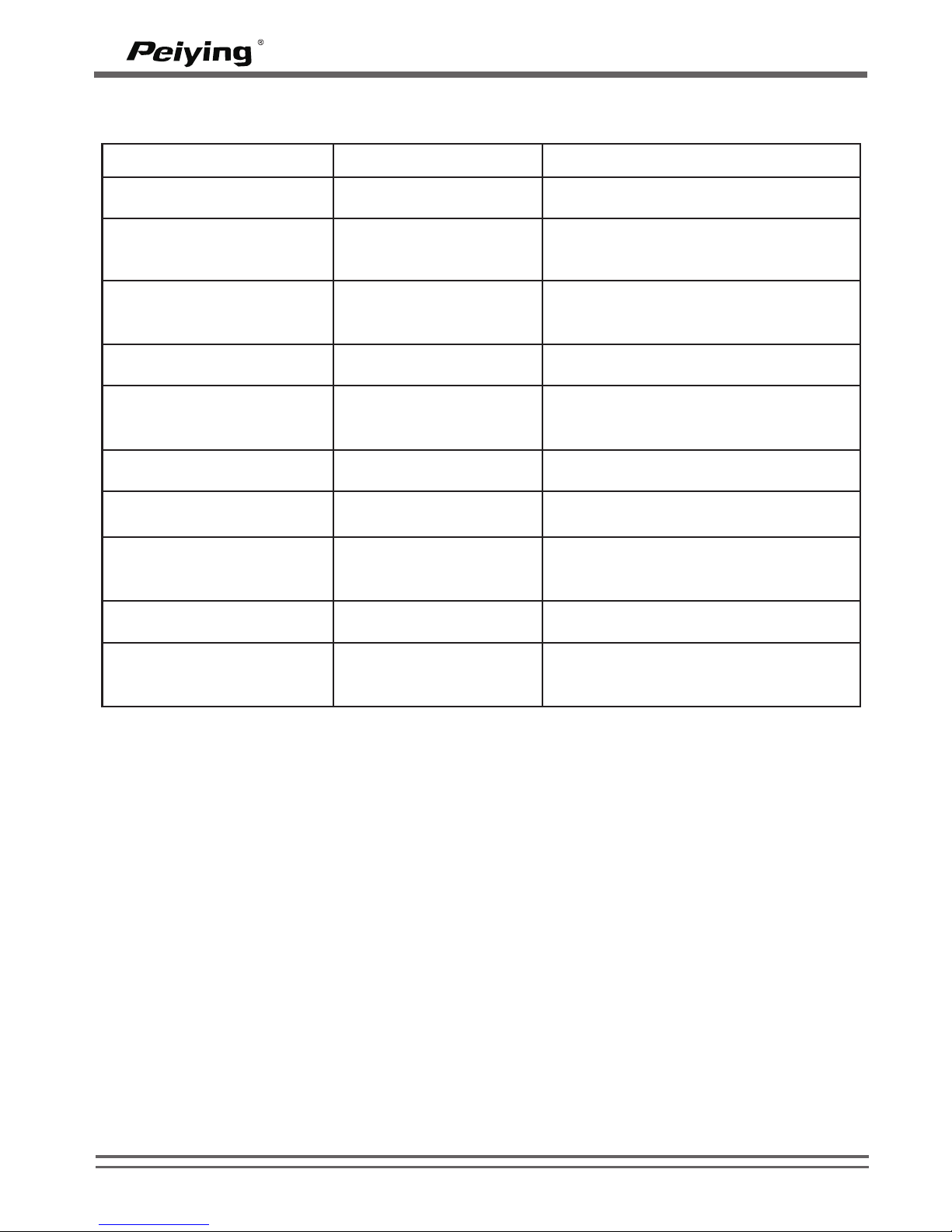
LED indicator status:
Main specifications:
- Bluetooth v2.0+EDR, Class II
- Operating Frequency Band: 2.4GHz ~ 2.48GHz unlicensed ISM band
- Working distance: up to 10 meters
- Supports Bluetooth A2DP, AVRCP, and HS/HF profiles( HFP 1.5)
- Radio Performance: Receive Sensitivity of -90dBm,TX Power Max 4dBm
- Speaker output power: 2W
- Integrated with a Smart Digital Signal Processor (DSP) for echo and noise cancellation
- Built in speaker and microphone
- Battery type: Rechargeable Lithium Polymer Battery 3.7V, 700maH
- Charging time: about 2-3 hours
- Talk time: about 5-6 hours
- Standby time: about 250 hours
- Dimensions: 127.8(L) x58.8 (W) x 19.8(H) mm
- Weight: 93.5 grams
- Bluetooth Specification v2.0+EDR class 2
– RF Frequency Range: 2.402-2.480GHZ, 2.4G ISM band
Status of car kit
LED indication
Sound Prompt
Power on
The blue LED flashes
once
The speaker makes “du” sound and
there is voice prompt “Power on”
Power off
The red LED flashes
once
The speaker makes “dudu” sound
and there is voice prompt “Power
off”
In idle state and has not
been connected with
mobile
The blue LED flashes
twice every 3 seconds
The speaker makes “dududu” sound
every minute
In idle state and has been
connected with mobile
The blue LED flashes
once every 5 seconds
---
In idle and low battery
state
The red LED flashes
once every 5 seconds
The speaker makes “dudu” sound
every 30 seconds and there is voice
prompt “Battery low”
Call state
The blue LED flashes
once every 15 seconds
---
Pairing state
The red & blue LED
flash alternatively
---
Pairing successful
The blue LED flashes
once
The speaker makes “du” sound and
there is voice prompt “Pairing
successful”
Mute
The red LED flashes
once every 0.5 second
---
Save phonebook
The blue LED keeps
on
There is voice prompt “Phonebook
deleted” when starting and “Contact
saved” after finishing
Note: Specifications are subject to change without notice. Sorry for any inconvenience caused!
WWW.PEIYING.PL
5
PY-BT01
Page 8
Battery information
Your device is powered by a rechargeable battery. The full performance of a new
battery is achieved only after two or three complete charge and discharge cycles.
The battery can be charged and discharged hundreds of times, but it will eventually
wear out.
Unplug the charger from the electrical plug and the device when not in use. Do not
leave a fully charged battery connected to a charger, since overcharging may
shorten its lifetime. If left unused, a fully charged battery will lose its charge over
time.
Leaving the device in hot or cold places, such as in a closed car in summer or winter
conditions, will reduce the capacity and lifetime of the battery. Always try to keep the
o o o
battery between 15 C and 25C(59 F and 77 C). A device with a hot or cold battery
may not work temporarily, even when the battery is fully charged. Battery
performance is particularly limited in temperatures well below freezing.
Care and maintenance
Your device is a product of superior design and craftsmanship and should be treated
with care. The suggestions below will help you protect your warranty coverage.
· Keep all accessories and enhancements out of the reach of small children.
· Keep the device dry. Precipitation, humidity, and all types of liquids or moisture can
contain minerals that will corrode electronic circuits. If your device does get wet,
allow it to dry completely.
· Do not use or store the device in dusty, dirty areas. Its moving parts and electronic
components can be damaged.
· Do not store the device in hot areas. High temperatures can shorten the life of
electronic devices, damage batteries, and warp or melt certain plastics.
· Do not store the device in cold areas. When the device returns to its normal
temperature, moisture can form inside the device and damage electronic circuit
boards.
· Do not drop, knock, or shake the device. Rough handling can break internal circuit
boards and fine mechanics.
· Do ot use harsh chemicals, cleaning solvents, or strong detergents to clean the
device.
All of the above suggestions apply equally to your device, battery, charger, or any
enhancement. If any device is not working properly, take it to the nearest authorized
service facility.
(Applicable in the European Union and othor European countries with separate collection systems)
This marking shown on the product or Its literature, indicates that It should not be disposed with other
household wastes at the end of its working life. To prevent possible harm lo the environment or human health
from uncontrolled waste disposal, please separate this from other types of wastes and recycle it responsibly
to promote the sustainable reuse of material resources.
Household users should contact either the retailer where they purchased this product, or their local
government office, for details of where and how they can take this item for environmentally safe recycling.
Business users should contact their supplier and check the terms and conditions of the purchase contract
This product should not be mixed with other commercial wastes for disposal
Correct Disposal of This Product
(Waste Electrical & Electronic Equipment)
WWW.PEIYING.PL
6
PY-BT01
Page 9
Samochodowy system
g³oœnomówi¹cy
Bluetooth PY-BT01
7
Polski 7-14
Românã 15-22
English 1- 6
Page 10

8
Page 11
Przed rozpoczæciem korzystania z zestawu samochodowego, naleýy
naùadowaã bateriæ i powiàzaã zestaw samochodowy z kompatybilnym
telefonem komórkowym.
Ùadowarka
Ten zestaw samochodowy jest przeznaczony do stosowania z ùadowarkà
samochodowà, która jest doùàczona do zestawu.
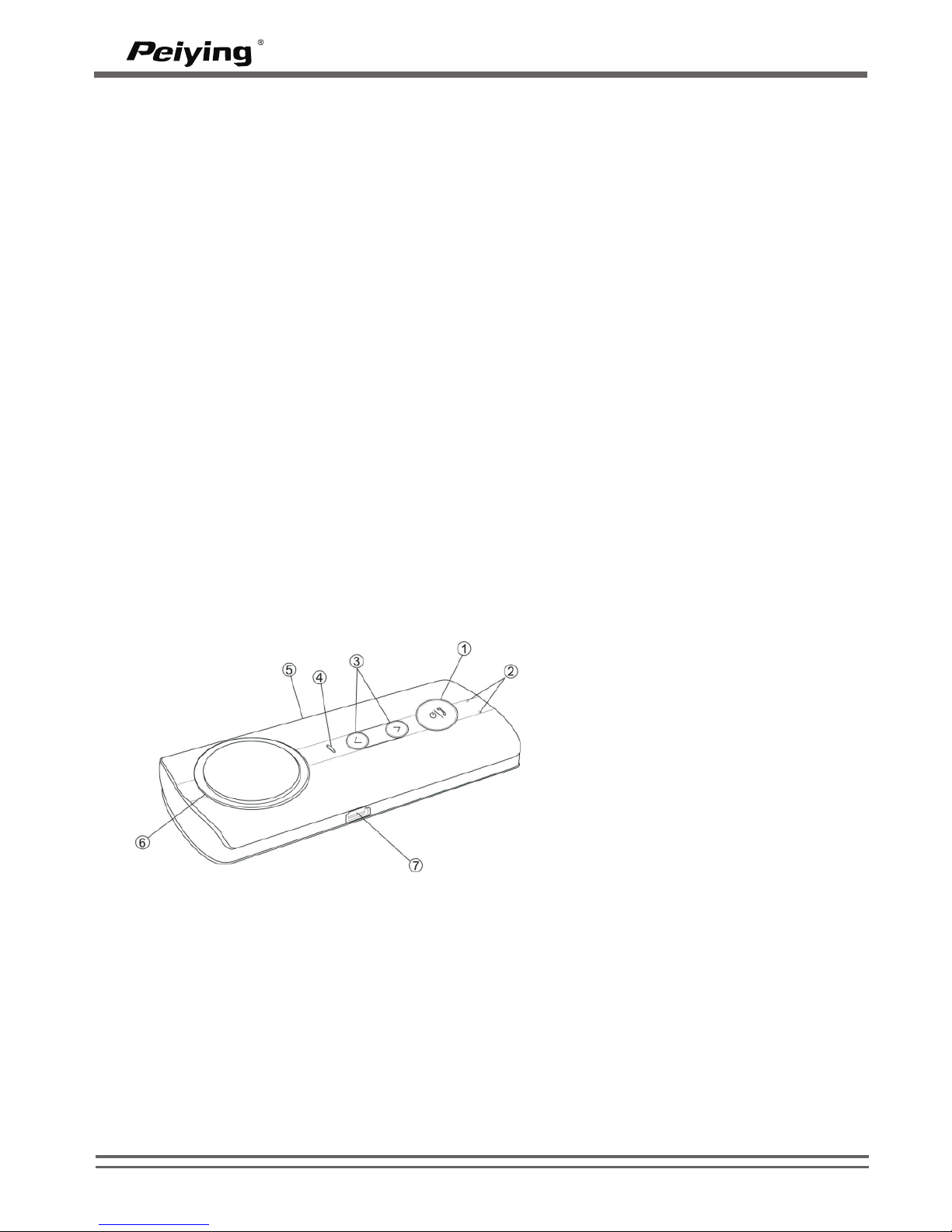
1– Przycisk wielofunkcyjny
(MFB)
2– Mikrofon
3– Przycisk gùoúnoúci
4– Dioda LED
5– Wyciszenie
6– Gùoúnik
7– Gniazdo ùadowania Mini USB
5 PIN
WWW.PEIYING.PL
9
PY-BT01
Wstêp:
Dziêkujemy za zainteresowanie naszym zestawem g³oœno mówi¹cym
bluetootch.
Przed u¿yciem urz¹dzenia zapoznaj siê z instrukcj¹ obs³ugi, przeczytaj
równie¿ instrukcjê obs³ugi telefon, która zawiera wa¿ne informacje dotycz¹ce
bezpieczeñstwa, eksploatacji i konserwacji.
Bezprzewodowa technologia bluetooth
Bezprzewodowa technologia Bluetooth umoýliwia ùàczenie kompatybilnych
urzàdzeñ bez stosowania kabli. Poùàczenie Bluetooth nie wymaga aby
urzàdzenia byùy w zasiægu wzroku, ale oba urzàdzenia powinny byã w
odlegùoúci nie wiækszej niý 10 metrów. Poùàczenia mogà byã podatne na
zakùócenia powodowane miædzy innymi przez przeszkody.
Zestaw samochodowy jest zgodny ze specyfikacjà Bluetooth 2.0.
W niektórych miejscach mogà byã ograniczenia dotyczàce korzystania z
technologii Bluetooth. Skontaktuj siæ z wùadzami lub usùugodawcà.
Pierwsze kroki
Przeglàd
Page 12

Ùadowanie baterii
Urzàdzenie to posiada akumulator litowo polimerowy 3.7V, 700mAH.
1. Podùàcz ùadowarkæ samochodowà do zestawu Bluetooth. Dioda úwieci siæ na
czerwono podczas ùadowania. Jeúli ùadowanie nie rozpoczyna siæ, odùàcz
ùadowarkæ, podùàcz jà ponownie i spróbuj jeszcze raz. Ùadowanie baterii moýe
potrwaã 2-3 godziny.
2. Gdy bateria jest w peùni naùadowana, czerwona dioda zgaúnie. Odùàcz zestaw
gùoúnomówiàcy od ùadowarki.
W peùni naùadowana bateria starcza na 5-6 godzin rozmów i 250 godzin
czuwania. Jednak czas rozmów i czas gotowoúci mogà siæ róýniã w przypadku
korzystania z róýnych telefonów komórkowych, ustawieñ, intensywnoúci
uýytkowania i warunków otoczenia.
Sùaba bateria
Je¿eli napiêcie akumulatora jest ni¿sze ni¿ 3.4V, czerwona dioda miga co 5
sekund, g³oœnik wydaje krótki sygna³ co ka¿de 30 sekund, a nastêpnie s³ychaæ
g³os „Battery low”. Gdy napiêcie spada poni¿ej 3.2V, urz¹dzenie automatycznie
wy³¹cza siê.
On/OFF
Aby wùàczyã urzàdzenie proszæ przytrzymaã przycisk „MFB” wielofunkcyjny
przycisk przez ok 3 sekundy dopóki niebieska lampka nie zapali siæ. Zwolnij
przycisk, urzàdzenie wyda krótki sygnaù dêwiækowy a nastæpnie komunikat
„Power on”. Zestaw gùoúnomówiàcy jest teraz wùàczony i znajduje siæ w stanie
bezczynnoúci.
Aby wyùàczyã urzàdzenie naciúnij przycisk „MFB” przez ok 6 sekund, dopóki
gùoúnik nie wyda krótkiego sygnaùu dêwiækowego a nastæpnie komunikatu
„power off” Czerwona dioda zapali siæ na chwilkæ.
Powiàzanie urzàdzenia bluetooth z telefonem
1. Upewnij siæ ýe urzàdzenie jest wyùàczone
2. Naciúnij i przytrzymaj przycisk „MFB” dopóki nie zapali siæ na przemian
czerwona i niebieska dioda.
3. Gùoúnik wyda dùugi sygnaù dêwiækowy a nastæpnie komunikat “paring phone.
Please put your phone in paring mode and enter PIN code 0000” zestaw
znajduje siæ teraz w trybie ùàczenia
4. Uaktywnij funkcje bluetooth w telefonie a nastæpnie wyszukaj urzàdzeñ
bluetooth.
5. Z listy wyszukanych urzàdzeñ wybierz BCK08.
6. Wprowadê hasùo „0000” w celu poùàczenia siæ z urzàdzeniem. W niektórych
telefonach po sparowaniu urzàdzeñ bædziesz musiaù wykonaã poùàczenie.
Wiæcej informacji znajdziesz w instrukcji telefonu.
Jeýeli poùàczenie zakoñczy siæ sukcesem niebieska dioda zapali siæ na chwilæ,
gùoúnik wyda krótki sygnaù a nastæpnie urzàdzenie wyda komunikat gùosowy
“Pairing successful”
WWW.PEIYING.PL
10
PY-BT01
Page 13
Uwaga:
1. Jeýeli ùàczenie nie zakoñczy siæ w ciàg 2 minut, urzàdzenie wyda komunikat o
nieudanym ùàczeniu „Paring failed”. Proszæ przeùàczyã telefon w tryb ùàczenia i
spróbowaã ponownie.
2. Jeýeli poùàczenie pomiædzy urzàdzeniem a telefonem zostanie zerwane,
urzàdzenie zasygnalizuje to sygnaùem dêwiækowym co jednà minutæ. Jeýeli
poùàczenie nie zostanie wznowione po upùywie 10 minut urzàdzenie wyùàczy
siæ sygnalizujàc wczeúniej komunikatem gùosowym „Power off”.
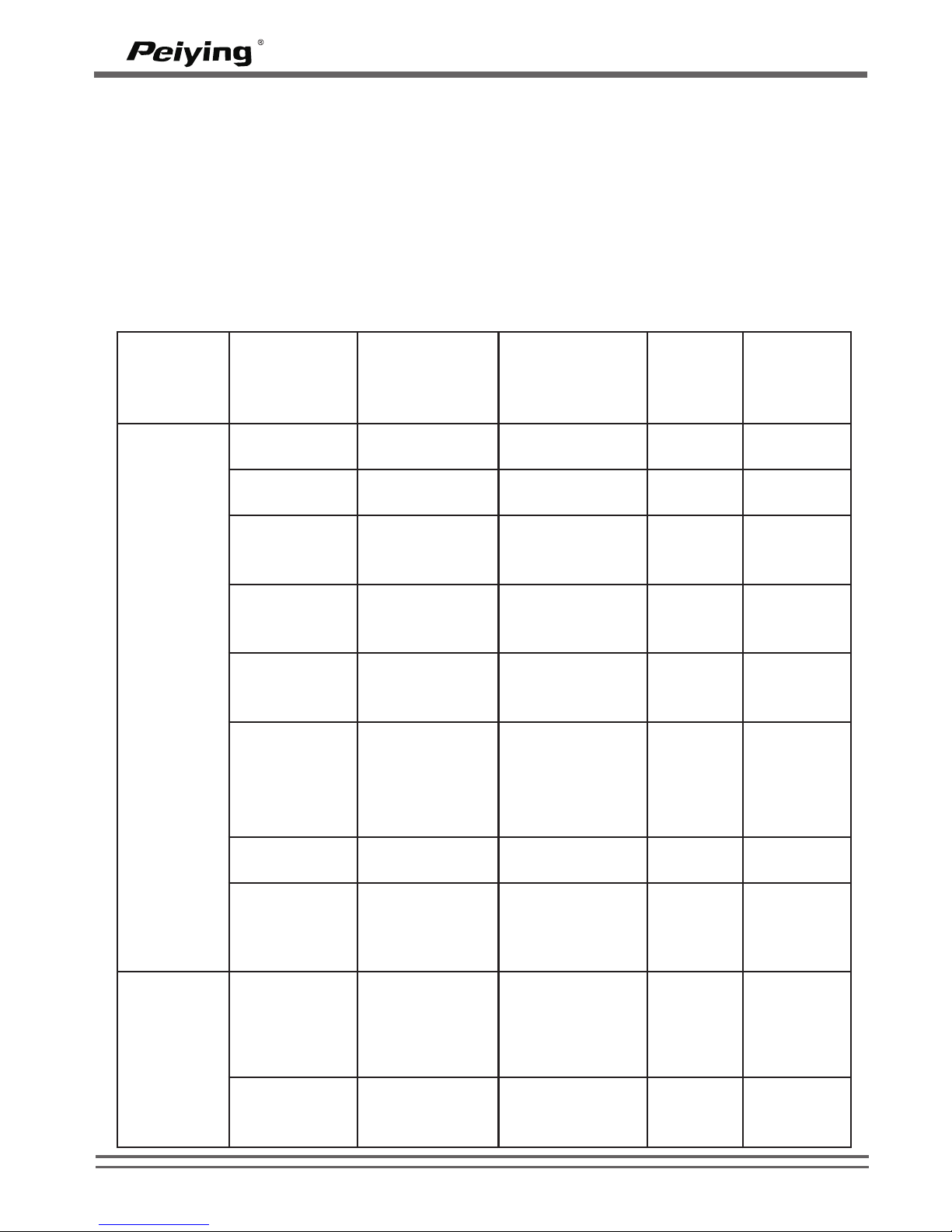
Podstawowe uýytkowanie
MFB
Przycisk
Funkcja
Stan
urzàdzenia
przed
operacjà
Operacja
Sygnaù
dêwiæko
wy
Polecenie
gùosowe
Odebranie
Przychodzàc
a rozmowa
Naciúniæcie
---
---
Zakoñczeni
e rozmowy
W trakcie
rozmowy
Naciúniæcie
---
End call
Ponowne
wybranie
numeru
W stanie
bezczynnoúci
Podwójne
naciúniecie
---
Redialing
Odrzucenie
poùàczenia
Przychodzàc
a rozmowa
Naciúniecie
przycisku
przez 3s
“du”
Reject
call
successfu
Zakoñczeni
e rozmowy
Wybrany
numer nie
odbiera
Naciúniæcie
---
End call
Ponowne
poùàczenie
W trybie
bezczynnoúci,
telefon nie jest
podùàczony
Naciúniæcie
---
phone is
ready for
use
Pauza
Odtwarzanie
muzyki
Naciúniæcie
---
---
Wznowienie
odtwarzania
Pauza w
odtwarzaniu
muzyki
Naciúniæcie
---
---
G³oœnoœæ
+
Zwiækszeni
e gùoúnoúci
Podczas
rozmowy lub
odtwarzania
muzyki
Naciúniecie
---
---
Nastæpny
utwór
Odtwarzanie
muzyki
Naciúniecie
przycisku
przez 3s
---
---
WWW.PEIYING.PL
11
PY-BT01
Page 14
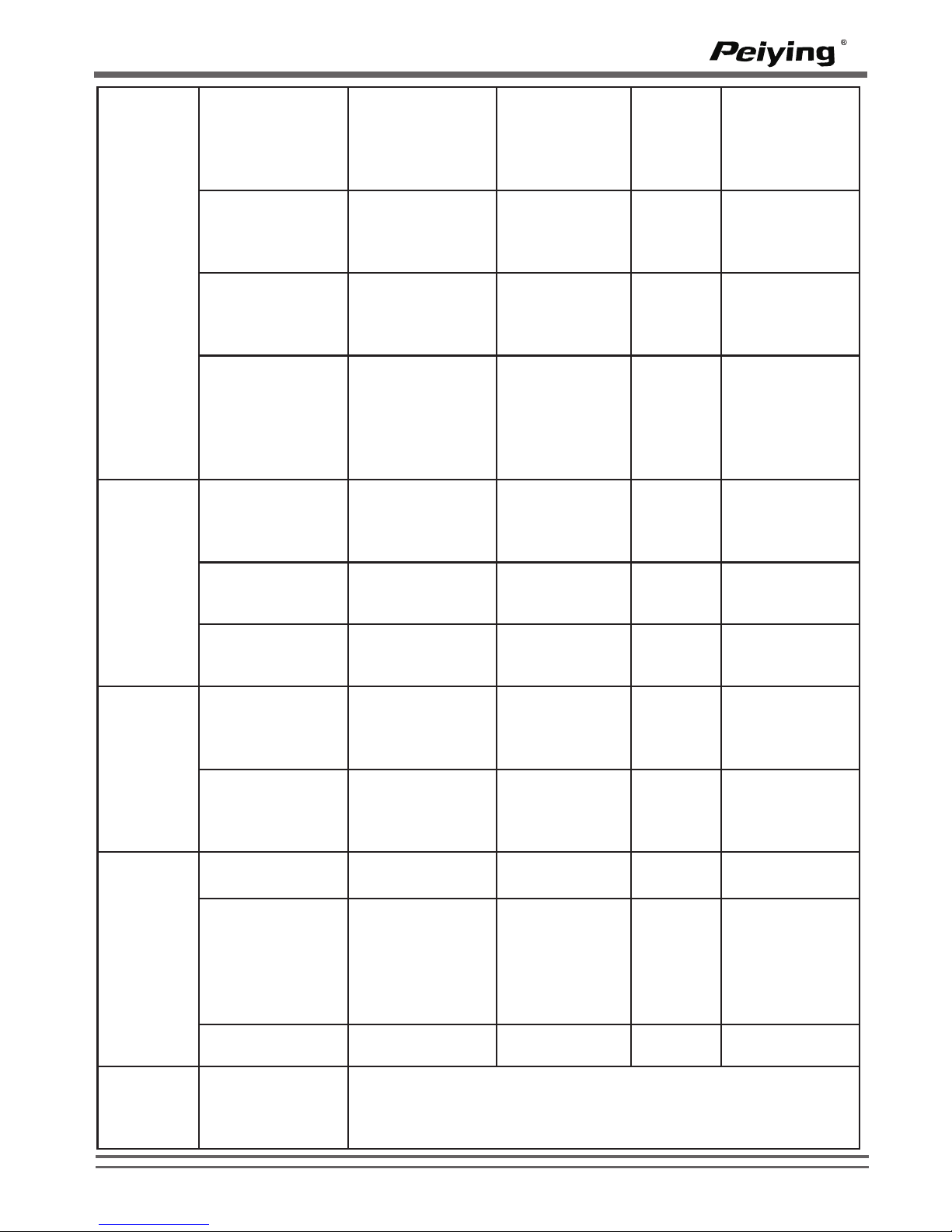
Zwiækszenie
gùoúnoúci
Podczas
rozmowy lub
odtwarzania
muzyki
Naciúniecie
---
---
Nastæpny utwór
Odtwarzanie
muzyki
Naciúniecie
przycisku
przez 3s
---
---
Wybór jæzyka
TTS English,
German,
French,
Spanish i Italian
W trybie
bezczynnoúci,
telefon nie jest
podùàczony
Naciúniecie
przycisku
przez 3s
---
Select this
language
Przeùàcz gùos z
urzàdzenia na
telefon
Podczas
rozmowy, gùoú
pùynie z
urzàdzenia
Naciúniecie
przycisku
przez 3s
“du”
---
Przeùàcz gùos z
telefonu do
urzàdzania
Podczas
rozmowy gùos
pùynie z
telefonu
Naciúniecie
przycisku
przez 3s
“du”
---
Tryb
bezczynnoúci,
urzàdzenie
poùàczone z
telefonem
“dudu”
po
zapisie
“Phonebook
deleted” when
starting and
“Contact
saved” after
finishing
G³oœnoœæ
-
Zmniejsz
gùoúnoúã
Podczas
rozmowy lub
odtwarzania
muzyki
Naciúniæcie
---
---
Poprzedni
utwór
Odtwarzanie
muzyki
Naciúniecie
przycisku
przez 3s
---
---
Usuniæcie
ksiàýki
adresowej
Tryb
bezczynnoúci
Naciúniecie
przycisku
przez 3s
“dudu”
Phonebook
deleted
Start TTS
Tryb
bezczynnoúci,
funkcja TTS
wyùàczona
Naciúniæcie
jednoczeúnie
przycisków
przez 3s
---
Voice prompt
on
Zamknij TTS
W trybie
bezczynnoúci,
funkcja TTS
wùàczona
Naciúniæcie
jednoczeúnie
przycisków
przez 3s
---
Voice prompt
off
Mute
Mute
Podczas
rozmowy
Naciúniecie
---
---
Wybieranie
gùosowe
Urz¹dzenie
po³¹czone jest
z telefonem,
znajduje siê w
trybie
bezczynnoœci
Naciúniecie
przycisku
przez 3s
“du”
---
Wyjúcie z trybu
mute
Tryb wyciszenia
Naciúniecie
---
---
/
przesùanie
kontaktów z
telefonu do
urzàdzenia
Wybierz jeden kontakt z ksiàýki adresowej i wyúlij go przez
bluetooth
G³oœnoœæ
+
Zapisz ksiàýkæ
adresowà
Naciúniecie
przycisku
przez 6s
G³oœnoœæ
+/-
WWW.PEIYING.PL
12
PY-BT01
Page 15
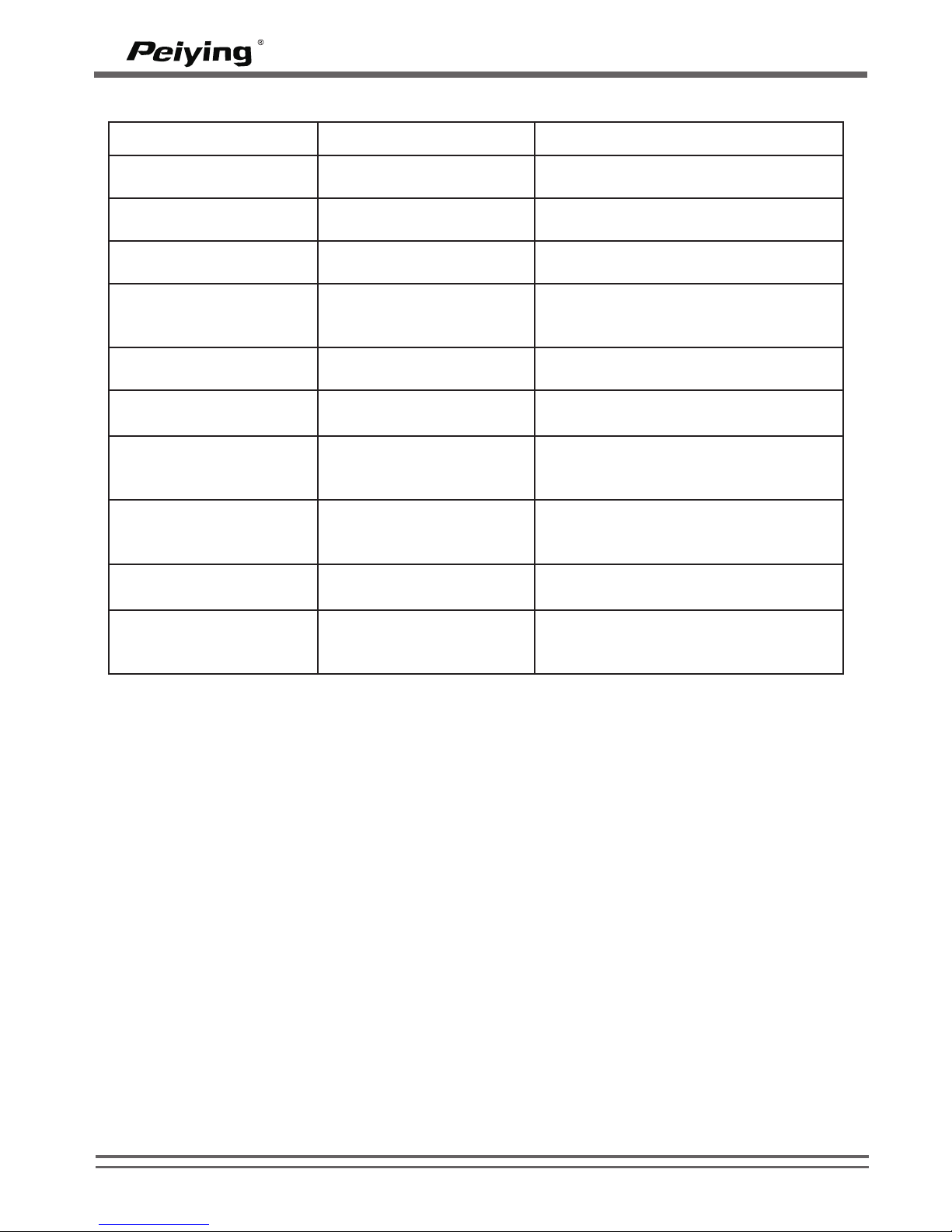
Status Diody LED
Specyfikacja:
- Bluetooth v2.0+EDR, Klasa II
- Czêstotliwoœæ pracy: 2.4GHz ~ 2.48GHz nielicencjonowana ISM band
- Praca na odleg³oœæ: do 10 metrów
- Obs³uga Bluetooth A2DP, AVRCP, i profili HS/HF (HFP 1.5)
- Odbiór czu³oœæ 90dBm,TX maksymalna moc transmisji 4dBm
- G³oœñik: 2W
- Technologia (DSP) Smart Digital Signal Processor do t³umienia szumów i echa
- Wbudowany g³oœnik i mikrofon
- Bateria: Akumulator litowo polimerowy 3.7V, 700maH
- Czas ³adowania: ok 2-3 godzin
- Czas pracy w trybie rozmowy: ok 5-6 godzin
- Czas pracy w trybie czuwania: ok 250 godzin
- Wymiary: 127.8(d³ugoœæ) x58.8 (szerokoœæ) x 19.8(gróboœæ) mm
- Waga: 93.5 gram
- Specyfikacja Bluetooth v2.0+EDR klasa 2
- Pasmo RF: 2.402-2.480GHZ, 2.4G ISM band
Uwaga Specyfikacja mo¿e ulec zmianie bez wczeœniejszego powiadamiania
Status urzàdzenia
Wskaênik LED
Sygnaù dêwiækowy
On
Niebieska dioda miga
raz
Krótki sygnaù dêwiækowy a
nastæpnie komunikat „Power on”
Off
Czerwona dioda miga
raz
Krótki sygnaù dêwiækowy a
nastæpnie komunikat “Power off”
Stan bezczynnoúci
telefon nie podùàczony
Niebieska dioda miga 2
razy co 3s
Sygnaù dêwiækowy co minutæ
Stan bezczynnoúci
telefon podùàczony
Niebieska dioda miga
raz co 5s
--Stan bezczynnoúci i
sùaba bateria
Czerwona dioda miga
raz co 5s
Sygnaù dêwiækowy co 30 sekund i
komunikat “Battery low”
Dzwonienie
Niebieska dioda miga
raz co 15s
---
Parowanie urzàdzenia
z
telefonem
Niebieska i czerwona
dioda migajà na
przemian
---
Udane parowanie
Niebieska dioda miga
raz
Krótki sygnaù dêwiækowy a
nastæpnie komunikat “Pairing
successful”
Mute
Czerwona dioda zapala
siæ co 0,5s
---
Zapis ksiàýki
telefonicznej
Niebieska dioda úwieci
siæ
Komunikat gùosowy “Phonebook
deleted” podczas startu a
nastæpnie “Contact saved”
WWW.PEIYING.PL
13
PY-BT01
Page 16
Informacje o baterii
Urzàdzenie jest zasilane przez akumulator. Peùnà wydajnoúã nowej baterii uzyskujæ
siæ dopiero po dwóch lub trzech peùnych cyklach ùadowania i rozùadowania. Bateria
moýe byã ùadowana setki razy, lecz w koñcu ulegnie ona zuýyciu.
Odùàcz ùadowarkæ od gniazda zasilania i urzàdzenia gdy nie jest uýywana. Nie
pozostawiaj podùàczonego urzàdzenia do ùadowarki gdy bateria jest w peùni
naùadowana, poniewaý przeùadowanie skraca jej ýywotnoúã. Jeýeli urzàdzenie
pozostaje nie uýywane, w peùni naùadowana bateria bædzie rozùadowywaã siæ
stopniowo w czasie. Sprawnoúã baterii jest szczególnie niska temperaturach poniýej
zera.
Eksploatacja i konserwacja
Urzàdzenie wyróýnia siæ najwyýszej klasy konstrukcjà i jakoúcià wykonania, powinno
byã traktowane z ostroýnoúcià. Poniýsze wskazówki pozwolà ci zachowaã wszystkie
warunki ochrony gwarancyjnej.
- Trzymaj wszystkie akcesoria w miejscu niedostæpnym dla maùych dzieci
- Urzàdzenie powinno byã zawsze suche. Opady, duýa wilgotnoúã i wszelkiego
rodzaju ciecze i wilgoã mogà zawieraã zwiàzki mineralne powodujàce korozje
obwodów elektronicznych. Jeúli zostanie zawilgocone pozostaw je wyùàczone do
caùkowitego wyschniæcia
- Nie uýywaj i nie przechowuj urzàdzenia w miejscach zapylonych i brudnych.
Ruchome czæúci i elektroniczne komponenty mogà zostaã uszkodzone.
- Nie przechowuj urzàdzenia w wysokiej temperaturze. Wysokie temperatury mogà
skróciã ýywotnoúã urzàdzeñ elektrycznych, baterii, stopiã bàdê odksztaùciã elementy
plastikowe.
- Nie przechowuj urzàdzenia w niskich temperaturach. Gdy urzàdzenie powróci do
swej normalnej temperatury w jego wnætrzu moýe gromadziã siæ wilgoã powodujàc
uszkodzenie podzespoùów elektronicznych.
- Nie upuúã, nie potrzàsaj i nie uderzaj urzàdzeniem. Nieostroýne obchodzenie siæ
nim moýe spowodowaã uszkodzenia wewnætrznych podzespoùów elektronicznych i
delikatnych mechanizmów
- Do czyszczenia urzàdzenia nie stosuj ýadnych ýràcych chemikaliów,
rozpuszczalników bàdê silnych detergentów.
- Wszystkie powy¿sze wskazówki dotycz¹ w równej mierze urz¹dzenia, baterii,
³adowarki i ka¿dego innego akcesoria. Jeœli jakieœ urz¹dzenie nie dzia³a prawid³owo,
oddaj je do najbli¿szego autoryzowanego serwisu.
Oznaczenie umieszczone na produkcie lub w odnosz¹cych siê do niego tekstach wskazuje, ¿e po up³ywie
okresu u¿ytkowania nie nale¿y usuwaæ z innymi odpadami pochodz¹cymi z gospodarstw domowych. Aby
unikn¹æ szkodliwego wp³ywu na œrodowisko naturalne i zdrowie ludzi wskutek niekontrolowanego usuwania
odpadów, prosimy o oddzielenie produktu od innego typu odpadów oraz odpowiedzialny recykling w celu
promowania ponownego u¿ycia zasobów materialnych jako sta³ej praktyki.
W celu uzyskania informacji na temat miejsca i sposobu bezpiecznego dla œrodowiska recyklingu tego
produktu u¿ytkownicy w gospodarstwach domowych powinni skontaktowaæ siê z punktem sprzeda¿y
detalicznej, w którym dokonali zakupu produkt, lub z organem w³adz lokalnych.
U¿ytkownicy w firmach powinni skontaktowaæ siê ze swoim dostawc¹ i sprawdziæ warunki umowy zakupu.
Produkt nie nale¿y usuwaæ razem z innymi odpadami komercyjnymi.
Prawid³owe usuwanie produktu
(zu¿yty sprzêt elektryczny i elektroniczny)
WWW.PEIYING.PL
14
PY-BT01
Page 17
GHID DE UTILIZARE
PY-BT01
15
Polski 7-14
Românã 15-22
English 1- 6
Page 18

16
Page 19
INTRODUCERE
Multumim pentru interesul acordat setului auto cu Bluetooth. Setul este unul
wireless ce are la baza tehnologia Bluetooth care va permite sa efectuati si sa
receptionati apeluri fara sa atingeti telefonul mobil. Dispozitivul are de
asemenea functia Text to Speech si functii de sincronizare a agendei
telefonice.
Cititi cu atentie acest manual inainte de utilizarea setului auto. Cititi de
asemenea manualul de utilizare pentru telefon, care va furnizeaza informatii
importante privind siguranta si intretinerea.
TEHNOLOGIE BLUETOOTH WIRELESS
Tehnologia Bluetooth wireless face posibila conectarea intre dispozitive
compatibile fara a utiliza cabluri. O conexiune Bluetooth nu necesita ca
dispozitivele sa fie la vedere., dar ambele dispozitive trebuie sa fie la o
distanta de maxim 10m unul fata de celalalt. Conexiunile pot fi supuse
interferentelor din cauza obstacolelor.
Setul auto utilizeaza versiunea Bluetooth 2.0.
S-ar putea sa existe restrictii ale utilizarii tehnologiei Bluetooth in anumite
zone. Verificati reglementarile locale sau furnizorul de servicii.
PORNIREA DISPOZITIVULUI
Prezentare generala
Inainte de a utiliza setul auto, trebuie sa introduceti bateria si sa cuplati setul
auto la un telefon mobil compatibil.
Incarcator
Acest set auto este destinat utllizarii cu incarcatorul de masina inclus.
1– Buton functii multiple
(MFB)
2– Intrare MIC
3– Buton pentru volum
4– Afisaj LED
5– MUTE
6– difuzor
7– Mini USB 5 PIN pentru
mufa de incarcare
WWW.PEIYING.PL
17
PY-BT01
Page 20

Incarcarea bateriei
Acest dispozitiv are o baterie reincarcabila Litiu-Polimer de 3.7V, 700mAH .
1. Conectati setul auto la incarcatorul de masina. Indicatorul de culoare rosie
este afisat in timpul incarcarii. Daca incarcarea nu porneste, deconectati
incarcatorul, conectati-l din nou si incercati inca o data. Incarcarea completa a
bateriei ar putea sa dureze pana la 2-3 ore.
2. Cand bateria este incarcata complet, indicatorul de culoare rosie se stinge.
Deconectati setul auto de la incarcator.
3. Cu bateria complet incarcata, durata de convorbire este de pana la 5-6 ore
sau 250 de ore in regim de asteptare. Cu toate acestea, durata de convorbire
si cea in regim de asteptare pot varia functie de tipurile de telefoane mobile
utilizate, diferite setari, etc.
Avertizare baterie descarcata
Daca tensiunea bateriei este mai mica de 3.4V, LED-ul rosu lumineaza la fiecare 5
secunde si difuzorul emite un sunet tip claxon la fiecare 30 de secunde si o
avertizare sonora pentru “Bateria descarcata”. Cand tensiunea bateriei este mai
mica de 3.2v, setul auto se opreste automat.
Pornirea si oprirea setului auto
Pentru pornire, apasati si tineti apasat butonul “MFB” pentru functii multiple pentru
aproximativ 3 secunde, pana cand LED-ul albastru se aprinde. Dati drumul
butonului, difuzorul emite un sunet tip claxon si avertizorul sonor anunta “pornire”.
Setul auto porneste si devine activ.
Pentru oprire, apasati si tineti apasat butonul “MFB” pentru functii multiple pentru
aproximativ 6 secunde, pana cand difuzorul emite un sunet tip claxon si avertizorul
sonor anunta “oprirea”. LED-ul rosu lumineaza o singura data.
Conectati setul auto la un telefon compatibil
Asigurati-va ca setul dumneavoastra auto este oprit
1. Apasati si tineti apasat butonul "MFB" pana cand lumina albastra si rosie
lumineaza alternativ, difuzorul emite sunet lung de claxon si avertizeaza sonor
“imperechere cu telefonul (pairing phone) ” si introduceti codul PIN 0000.
Setul auto se afla acum pe modul de imperechere.
2. Activati carcateristica Bluetooth-ului de pe telefonul dumneavoastra, si setati
telefonul sa caute alte dispozitive Bluetooth. Consultati manualul de utilizare al
telefonului dumneavoastra pentru instructiuni.
3. Selectati setul auto (BCK08) din lista dispozitivelor gasite de catre telefon.
4. Introduceti codul 0000 pentru suprapunerea si conectarea setului auto la
telefonul dumneavoastra. La anumite telefoane s-ar putea sa aveti nevoie sa
afectuati conexiunea separat dupa suprapunere. Consultati ghidul de utilizare
al telefonului pentru detalii. Va trebui sa imperecheati setul auto cu telefonul o
singura data.
Daca suprapunerea reuseste, LED-ul albastru lumineaza o data, difuzorul emite
sunet de claxon, iar avertizarea Sonora afiseaza “Imperechere reusita”. Denumirea
setului auto apare in meniul telefonului unde puteti vedea si dispozitivele Bluetooth
recent suprapuse.
WWW.PEIYING.PL
18
PY-BT01
Page 21
Note:
1. Daca conexiunea nu este finalizata in 2 minute, pe afisajul setului auto apare
“Conexiune esuata”, setati telefonul pe modul imperechere si incercati din
nou. Difuzorul emite sunet de claxon si LED-ul rosu lumineaza o singura data.
Setul auto se opreste automat si solicita “oprirea dispozitivului”.
2. Daca conexiunea dintre setul auto si telefonul mobil se intrerupe, difuzorul
emite sunet de claxon la fiecare 1 minut. Daca conexiunea nu este reluata in
10 minute, difuzorul emite sunet de claxon, pe afisaj apare “Oprire” iar
dispozitivul se opreste.
UTILIZARE
Buton
Functie
Starea setului
auto inainte de
functionare
Functionare
Sunetul
emis de
difuzor
Avertizor
sonor
Receptionare
apel
Receptionare
apel
Apasare
---
---
Incheiere
apel
In timpul
apelului
Apasare
---
End call
Reapelarea
ultimului
numar de
telefon
format
In idle state
Double press
---
Redialing
Respingere
apel
Apel
receptionat
Apasare
lunga timp de
3 secunde
“du”
Reject call
successful
Incheiere
apelare
Numar de
telefon apelat
dar apelul nu a
fost
receptionat
Apasare
---
End call
Reconectare
Inactiv dar nu
a fost conectat
la mobil
Apasare
---
phone is
ready for
use
Intrerupere
muzica
Redare muzica
Apasare
---
---
Redare
muzica
Intrerupere
redare muzica
Apasare
---
---
Volum
+
Marire volum
In timpul unui
apel sau
redare muzica
Apasare
Urmatoarea
piesa
Redare muzica
Apasare
lunga timp de
3 secunde
MFB
Inactiv
WWW.PEIYING.PL
19
PY-BT01
Page 22
Marire volum
In timpul unui
apel sau
redare muzica
Apasare
---
---
Urmatoarea piesa
Redare
muzica
Apasare
lunga timp de
3 secunde
---
---
Selectare limbaj
TTS dintre optiunile
Engleza, Germana,
Franceza, Spaniola
si Italiana
Inactiv dar nu
a fost conectat
la mobil
Apasare
lunga timp de
3 secunde
---
Select this
language
Schimbare
comanda vocala de
la setul auto la
telefonul mobil
In timpul unui
apel iar
comanda
vocala provine
de la setul
auto
Apasare
lunga timp de
3 secunde
“du”
---
Schimbare
comanda vocala de
la telefonul mobil la
setul auto
In timpul unui
apel iar
comanda
vocala provine
de la mobil
Apasare
lunga timp de
3 secunde
“du”
---
Salvare agenda
telefonica
Inactiv si a fost
conectat la
mobil
Apasare
lunga timp de
6 secunde
“dudu”
after
saving
“Phonebook
deleted” when
starting and
“Contact
saved” after
finishing
Reducere volum
In timpul unui
apel sau
redare muzica
Apasare
---
---
Piesa anterioara
Redare
muzica
Apasare
lunga timp de
3 secunde
---
---
Stergere agenda
curenta
Inactiv
Apasare
lunga timp de
6 secunde
“dudu”
Phonebook
deleted
Pornire TTS
Inactiv si TTS
este oprit
Apasare in
acelasi timp
pentru 3
secunde
---
Voice prompt
on
Inchidere TTS
Inactiv si TTS
este pornit
Apasare in
acelasi timp
pentru 3
secunde
---
Voice prompt
off
Mute
Silentios
In timpul unui
apel
Apasare
---
---
Apelare vocala
Setul auto a
fost conectat
cu mobilul si
este inactiv
Apasare
lunga timp de
3 secunde
“du”
---
Iesire functia
Silentios
Silentios
Apasare
---
---
/
Trimitere informatii
contact de la mobil
la setul auto
Alegeti informatii despre un contact din agenda si
alegeti sa le trimiteti prin bluetooth
Volum +
Volum -
Volum
+/-
WWW.PEIYING.PL
20
PY-BT01
Page 23
Indicatie LED
SPECIFICATII
- Bluetooth v2.0+EDR, Clasa II
- Banda de frecventa: 2.4GHz ~ 2.48GHz
- Distanta de functionare: pana la maxim 10 metri
- Suporta Bluetooth A2DP, AVRCP, si profile HS/HF (HFP 1.5)
- Sensibilitate receptie: 90dBm,TX putere maxima transmisie 4dBm
- Puterea de iesire a difuzorului: 2W
- Tehnologie DSP pentru suprimare ecou si zgomot
- Difuzor si microfon incorporat
- Tipul bateriei: reincarcabila Li – Polimer 3.7V, 700maH
- Durata de incarcare: cca. 2-3 ore
- Durata convorbire: 5-6 ore
- Durata in regim de asteptare: cca. 250 ore
- Dimensiuni: 127.8(L) x58.8 (W) x 19.8(H) mm
- Greutate: 93.5 g
- Specificatii Bluetooth v2.0+EDR class 2
Starea setului auto
LED indicator
Avertizor sonor
Pornire
LED-ul albastru
lumineaza o data
Difuzorul emite sunet de claxon iar
avertizorul sonor afiseaza “Pornit”
Oprire
LED-ul rosu
lumineaza o data
Difuzorul emite sunet de claxon iar
avertizorul sonor afiseaza “Oprit”
Inactiv si nu a fost
conectat la mobil
LED-ul albastru
lumineaza de doua ori
la fiecare 3 secunde
Difuzorul emite sunet de claxon
continuu
Inactiv si a fost
conectat la mobil
LED-ul albastru
lumineaza o data la
fiecare 5 secunde
---
Inactiv si cu bateria
descarcata
LED-ul rosu
lumineaza o data la
fiecare 5 secunde
Difuzorul emite sunet de claxon la
fiecare 30 de secunde iar avertizorul
sonor afiseaza “Baterie descarcata”
Starea apelurilor
LED-ul albastru
lumineaza o data la
fiecare 15 secunde
---
Imperechere
(conectare cu
telefonul mobil)
LED-ul rosu si cel
albastru lumineaza
alternativ
---
Imperechere completa
LED-ul albastru
lumineaza o data
Difuzorul emite sunet de claxon iar
avertizorul sonor afiseaza
“Conectare reusita”
Silentios
LED-ul rosu
lumineaza o data la
fiecare 0.5 secunde
---
Salvare agenda
telefonica
LED-ul albastru
continua sa lumineze
Avertizorul sonor anunta “Agenda
telefonica stearsa” la pornire si
“Contact salvat” la finalizare
Nota:
Datorita perfectionarii continue a produsului, specificatiile si forma se pot schimba fara instiintare.
WWW.PEIYING.PL
21
PY-BT01
Page 24

INFORMATII PRIVIND BATERIA
Dispozitivul dumneavoastra este alimentat de o baterie reincarcabila. Performanta
maxima a unei noi baterii este atinsa abia dupa doua sau trei cicluri complete de
descarcare - incarcare. Bateria poate fi incarcata si descarcata de sute de ori, dar
pana la urma se va uza.
Deconectati incarcatorul si dispozitivul daca nu este folosit. Nu lasati o baterie
incarcata conectata la incarcator deoarece supraincarcarea poate sa-i reduca durata
de functionare. Daca nu este folosita, o baterie complet incarcata se va descarca in
timp. Pastrarea dispozitivului in locuri cu temperaturi ridicate sau scazute, cum ar fi
intr-o masina inchisa pe timp de vara sau de iarna, ar putea reduce capacitatea si
durata de functionare a bateriei. Incercati sa pastrati bateria la o temperatura cuprinsa
intre 15ºC si 25ºC(59ºF si 77ºF). Un dispozitiv cu o baterie prea calda sau prea rece ar
putea sa nu functioneze temporar, chiar daca este complet incarcata. Performanta
bateriei scade dramatic la temperaturi cu mult sub cea de inghet.
INTRETINERE
Dispozitivul dumneavoastra este unul cu un design modern si trebuie tratat cu grija.
Sugestiile de mai jos va vor ajuta sa intretineti dispozitivul pentru a-I asigura o durata
mare de exploatare.
· Pastrati dispozitivul uscat. Precipitatiile, umiditatea, si toate tipurile de lichide sau
umezeala pot sa contina minerale care vor deteriora circuitele electrice. Daca
dispozitivul se uda, lasati-l sa se usuce.
· Nu folositi sau depozitati dispozitivul in locuri cu praf sau murdare. Partile mobile si
componentele electronice se pot deteriora.
· Nu pastrati dispozitivul in locuri cu temperaturi ridicate. Temperaturile ridicate pot
reduce durata de functionare a dispozitivelor electronice, pot deteriora bateriile, pot
deforma sau topi anumite materiale plastice.
Nu pastrati dispozitivul in locuri cu temperaturi scazute. Cand dispozitivul revine la
temperatura normala, se poate forma condens in interiorul dispozitivului si poate
deteriora circuitele electronice din interior.
· Nu scapati, loviti sau scuturati dispozitivul. O manevrare mai brutala poate distruge
dispozitivul.
· Nu folositi produse chimice solide, solventi de curatare sau detergenti concentrati
pentru a curata dispozitivul.
Toate sugestiile de mai sus se aplica in mod egal dispozitivului dumneavoastra,
bateriei, incarcatorului. Daca vreunul dintre dispozitive nu functioneaza corespunzator,
duceti-l la cel mai apropiat service.
Reciclarea corecta a acestui produs (reziduuri
provenind din aparatura electrica si electronica)
Marcajale de pe acest produs sau mentionate in instructiunile sale de folosire indica faptul ca produsul
nu trebuie aruncat impreuna cu alte reziduuri din gospod arie atunci cand nu mai este in stare de
functionare. Pentru a preveni posibile efecte daunatoare asupra mediului inconjurator sau a san ata tii
oamenilor datorate evacuarii necontrolate a reziduurilor, va rugam s¹ separati acest produs de alte tipuri
de rezuduuri si sá-l reciclati in mod responsabil pentru a promova refolosirea resurselor materiale.
Utilizatorii casnici sunt rugati s¹ ia legatura fie cu distribuitorul de la care au achizitionat acest produs, fie
cu autoritatile locale, pentru a primi informatii cu privire la locul si modul in care pot depozita acest
produs in vederea reciclarii sale ecologice.
Utilizatori institutionali sunt rugati s¹ ia legatura cu furnizorul si s¹ verifice conditiile stipulate in contractul
de vanzare. Acest produs nu trebuie amestecat cu alte reziduuri de natura comerciala.
WWW.PEIYING.PL
22
PY-BT01
 Loading...