

Page 1
Page 2

IMPORTANT SAFETY INSTRUCTIONS
The lightning flash with the arrowhead symbol within an equilateral triangle is intended to alert the user
to the presence of “dangerous voltage” inside the product that may constitute a risk of electric shock.
The exclamation point within an equilateral triangle is intended to alert the user to the presence of
— Read all the safety and operating instructions before operating this product.
— Retain safety and operating instructions for future reference.
— Adhere to all warnings on the product and in the operating instructions.
— Follow all operating and use instructions.
— Unplug this product from the wall outlet before cleaning. Use a damp cloth for cleaning.
— Do not use attachments that are not recommended by the product manufacturer;
— Do not use this product near water.
— Do not place this product on an unstable cart or stand. The product may fall, causing
— Slots and openings in the cabinet are provided for ventilation to ensure reliable opera-
— Operate this product only from the type of power source indicated on the label.
— Power supply cords should be routed so that they are not likely to be
— Unplug the unit from the wall outlet for added protection during a lightning storm
— Do not overload wall outlets or extension cords. This can result in a fire or electric shock.
— Never push objects of any kind into this product through any openings;
— Do not attempt to repair or service this product yourself. Opening or removing covers may
— Unplug this product from the wall outlet and refer servicing to quali-
If the power-supply cord or plug is damaged.
If liquid has been spilled into the product.
If the product has been exposed to rain or water.
If the product has
f)
If the product exhibits a distinct change in performance.
— When replacement parts are required, be sure the service technician has used
— Upon completion of any service or repairs to this product, ask the service technician
— Mount the product to a wall or ceiling only as recommended.
— The product should be situated away from heat sources such as radiators, heat registers,
Page 3

TABLE OF CONTENTS
1
Page 4
Detachable AC power cord
Remote control handset with two AAA batteries
Two trigger wires, one with 2.5 mm sub-mini plugs, one with a 2.5mm and a 3.5mm mini plug
Parasound Serial Number:
Date of Purchase:
/ /
Name of Dealer:
Dealer Street Address:
Dealer Phone:
( ) -
2
INTRODUCTION
OWNERSHIP REFERENCE INFORMATION
Page 5
AC VOLTAGE, INSTALLATION, AND RACK MOUNTING
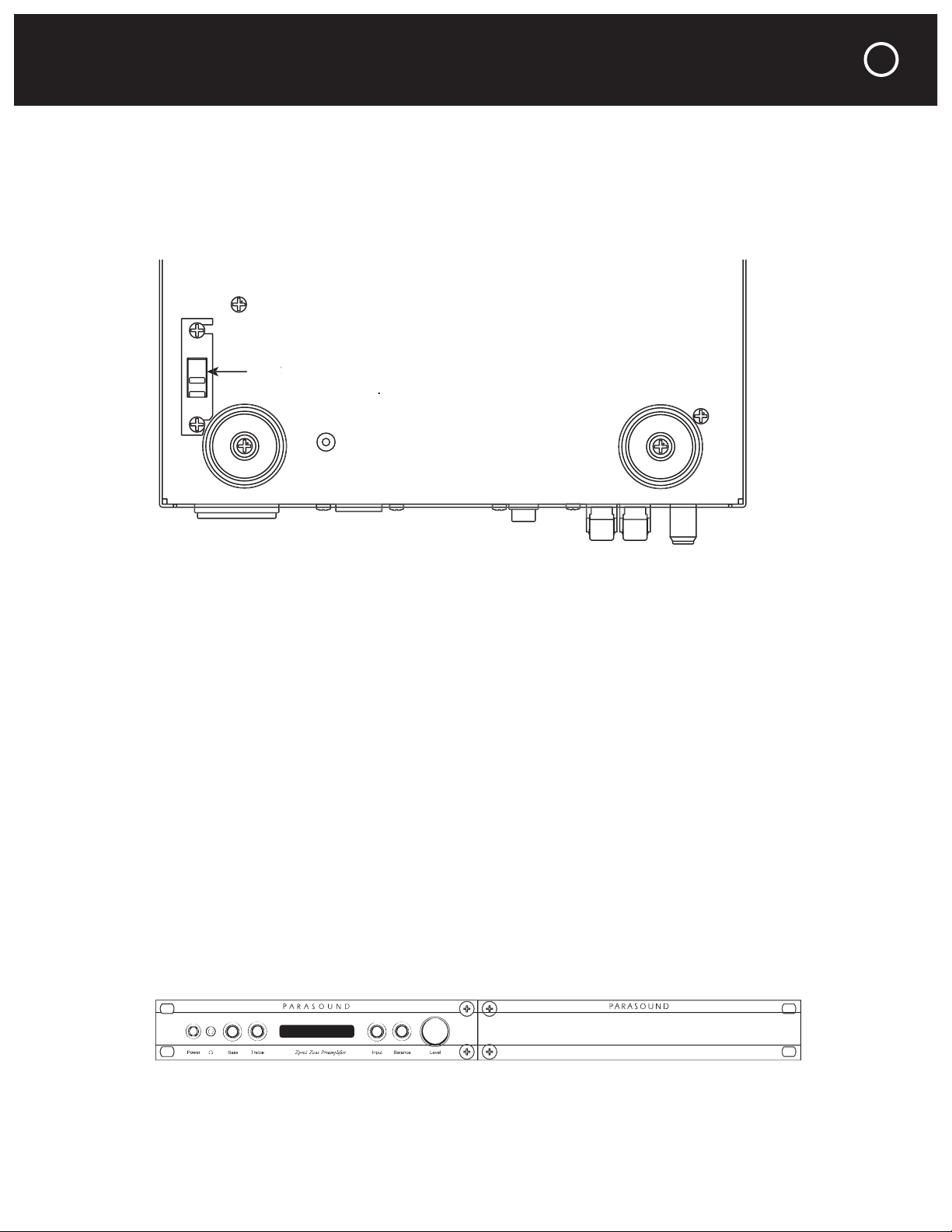
230
Zpre2 SBS Zblank panel
3
Page 6

AC Voltage Selector On Bottom
to help
AC Voltage Selector On Bottom
Inc.
A U
Zone
Audi
jacks connect to your power amplifier. Their output level is controlled by
jacks feed a recorder or system controller for which a fixed output level is prefer-
jack feeds your TV or video monitor.
jack feeds your video recorder. In fact, these jacks carry the same video signal and
4
REAR PANEL CONNECTIONS AND CONTROLS
Page 7

REAR PANEL CONNECTIONS AND CONTROLS continued
The Zone switch selects a new IR zone code only when the Zpre2 is turned off. If you
Unlike Parasound Surround Controllers, the Zpre2 Ext Remote input does not require an
- Power on
- Input selected
- Volume was adjusted via RS-232
- Mute on
The RS-232 will feedback when volume level is changed by the RS-232, but not if it is
The Auto switch position disables the front panel Power button.
Auto On
In
Auto Man
115V
/230V
60H
z
/50H
z
20W
0.5A
Fuse
Onl
y
12V Trigger
Out
Auto On
RS-232 Control
In
1 2 3 4
Auto Man
115V
/230V
60Hz
/50H
z
20W
0.5A
Fuse
Onl
y
Ext Remote
Zone
12V Trigger
Out
5
Page 8

If the trigger voltage source is DC, the trigger plug tip must be + (positive)
Most Parasound Power Amplifiers use a 2.5mm 12V trigger input jack.
The trigger voltage source is DC and the trigger plug tip is + (positive) and
Auto On
In
Auto Man
115V
/230V
60Hz
/50H
z
20W
0.5A
Fuse
Onl
y
12V Trigger
Out
6
REAR PANEL CONNECTIONS AND CONTROLS continued
Page 9

FRONT PANEL CONTROLS AND DISPLAY
The Power button is inoperative when the rear panel Auto On switch is set to Auto.
– Indicates the selected audio and video inputs.
–
–
–
–
–
–
7
Page 10

These buttons will not function when the rear panel
/
Buttons
Preamp buttons 5-7 do not function with the Zpre2.
After the Audio In 1 source stops playing the In 1 indicator will remain orange until you
8
REMOTE CONTROL FUNCTIONS
Page 11

REMOTE CONTROL FUNCTIONS continued
9
Page 12

10
ARE YOU HAVING DIFFICULTY?
Page 13

WARRANTY REPAIR
11
Page 14

⁄
Wide
Deep with connectors
High with feet, 1
panel only
⁄
x 1
⁄
blank panel, required
12
PARASOUND ZPRE2 SPECIFICATIONS
Page 15

NOTES
13
Page 16

 Loading...