

Page 1

Page 2
Contents
Safety Information ...............................................1
Maintenance .................................................................2
Getting Started .............................................................3
Notications&Features&Accessories ........................3
Remote Control ...........................................................6
Connections..................................................................7
First Time Installation - USB Connections ....................8
TV Menu Features and Functions ..............................10
General TV Operation ................................................13
Software Upgrade.......................................................13
Troubleshooting&Tips ............................................... 13
PC Input Typical Display Modes ................................15
AV and HDMI Signal Compatibility .............................15
Supported DVI Resolutions ........................................17
Important Instruction ...................................................18
Safety Information
If there is lightning or storms, or if the TV is not
CAUTION
RISK OF ELECTRIC SHOCK
DO NOT OPEN
CAUTION: TO REDUCE THE RISK OF ELECTRIC SHOCK DO
To operate your TV in extreme ambient conditions
may cause damage of the device.
NOT REMOVE COVER (OR BACK).
NO USER-SERVICEABLE PARTS INSIDE. REFER
SERVICING TO QUALIFIED SERVICE PERSONNEL.
Note : Follow the on screen instructions for operating the
related features.
going to be used for a while (e.g. if going away
on holiday), disconnect the TV set from the
mains. The mains plug is used to disconnect
TV set from the mains and therefore it must
remain readily operable.
The exclamation point within an equilateral
triangle is intended to alert the user to
the presence of important operating and
maintenance (servicing) instructions in the
literature accompanying the appliance.
IMPORTANT - Please read these instructions fully before installing or operating
WARNING: Never let people (including
children) with reduced physical, sensory or
mental capabilities or lack of experience and / or
knowledge use electrical devices unsupervised.
•For ventilation purposes, leave a free space of at
least 10 cm all around the set.
•Do not block ventilation holes.
•Do not place the TV on sloping or unstable surfaces,
the TV may tip over.
•Use this device in moderate climates.
•The power cord plug should be easily accessible. Do
not place the TV, furniture, etc. on the power cord.
Adamagedpowercord/plugcancausereorgive
you an electric shock. Handle the power cord by the
plug, do not unplug the TV by pulling the power cord.
Never touch the power cord/plug with wet hands
as this could cause a short circuit or electric shock.
Never make a knot in the power cord or tie it with
other cords. When damaged it must be replaced,
•The TV should not be placed near to open
amesorsourcesofintenseheatsuchas
an electric heater.
•Battery pack or batterries installed shall
not be exposed to excessive heat such as sunshine,
reorthelike.
•Excessive sound pressure from earphones and
headphones can cause hearing loss.
• Ensure that no open ame sources, such
as lit candles, are placed on top of the TV.
•To prevent injury, this TV must be securely
attached to the wall in accordance with the
installation instructions (if the option is available).
•Occasionally, a few non-active pixels may appear
onthe screen as a xed blue, green or red point.
Please note that this does not affect the performance
of your product. Take care not to scratch the screen
withngernailsorotherhardobjects.
• Before cleaning, unplug the TV from the wall socket.
Only use a soft, dry cloth while cleaning.
thisshouldonlybedonebyqualiedpersonnel.
•Do not use this TV in a humid or damp place. Do
not expose the TV to liquids. If any liquid falls into
the cabinet unplug the TV and have it checked by
qualiedpersonnelbeforeoperatingitanyfurther.
•Do not expose the TV to direct sunlight or other
heat sources.
Warning
Risk of electric shock
Caution
Important
Notice
English - 1 -
Serious injury or death risk
Dangerous voltage risk
Injury or property damage risk
Operating the system correctly
Additional notes marked
Page 3

Maintenance
First, remove the mains plug from the socket
outlet.
Display panel, Cabinet, Pedestal
Regular care:
Gently wipe the surface of the display panel, cabinet,
or pedestal by using a soft cloth to clean the dirt or
ngerprints.
For stubborn dirt:
(1) First clean the dust on the surface.
(2) Dampen a soft cloth with clean water or diluted
neutral detergent (1 part detergent to 100 parts water).
(3) Wring the cloth rmly. (Please note that liquids
should not enter inside the TV. May lead to product
failure.)
(4) Finally, wipe away all the moisture.
Caution
Do not use a hard cloth or rub the surface too hard,
otherwise this may cause scratches on the surface.
● Takecare not to subject the surfaces to insect
repellent, solvent, thinner or other volatile substances.
This may degrade surface quality or cause peeling
of the paint.
●Thesurfaceofthedisplaypanelisspeciallytreated
and may be easily damaged. Take care not to tap or
scratchthesurfacewithyourngernailorotherhard
objects.
● Do not allow the cabinet and pedestal to make
contact with a rubber or PVC substance for a long
time. This may degrade surface quality.
Mains plug
Wipe the mains plug with a dry cloth at regular
intervals.
Moistureanddustmaycausereorelectricalshock.
English - 2 -
Page 4

Getting Started
Notications&Features&Accessories
Environmental Information
This television is designed to consume less energy
to help save the environment. To reduce energy
consumption, you should take the following steps:
You can use the Power Save Mode setting, located
in the Picture menu. If you set the Power Save Mode
as Eco, the TV will switch to energy-saving mode
and the luminance level of TV set will be decreased
to the optimum level. Note that some picture settings
will be unavailable to be changed when the TV is in
Power Save Mode.
If pressed Right button, “Screen will be off in 15
seconds.” message will be displayed on the screen.
Select PROCEED and press OK to turn the screen
off immediately. If you don’t press any button, the
screen will be off in 15 seconds. Press any button on
the remote or on the TV to turn the screen on again.
If you disable Power Save Mode, picture mode will
be automatically set to Dynamic.
When the TV is not in use, please switch off or
disconnect the TV from the mains plug. This will also
reduce energy consumption.
StandbyNotications
1) If the TV does not receive any input signal (e.g.
from an aerial or HDMI source) for 5 minutes, the TV
will go into standby. When you next switch-on, the
following message will be displayed: “TV switched to
stand-by mode automatically because there was
no signal for a long time”. Press OK to continue.
2) If the TV has been left on and not been operated
for a while, the TV will go into standby. When you next
switch-on, the following message will be displayed.
“TV switched to stand-by mode automatically
because no operation was made for a long time”
Press OK to continue.
Features
•Remote controlled colour LCD TV.
•Fully integrated digital terrestrial/cable TV (DVB-
T-T2/C).
•HDMI inputs are for connecting a device that has
a HDMI socket.
•USB input.
•OSD menu system.
•Scart socket for external devices (such as DVD
Players, video games, etc.)
•Stereo sound system.
•Teletext.
•Headphone connection.
English - 3 -
•Automatic programming system.
•Manual tuning.
•Automatic power down after up to eight hours.
•Sleep timer.
•Child lock.
•Automatic sound mute when no transmission.
•NTSC playback.
•AVL (Automatic Volume Limiting).
•PLL (Frequency Search).
•PC input.
•Plug&Play for Windows 98, ME, 2000, XP,Vista,
Windows 7.
•Game Mode (Optional).
•Ethernet (LAN)
Accessories Included
•Remote Control
•Batteries: 2 x AAA
•Instruction Book
•YPbPr Connection Cable
•Side AV Connection Cable
TV Control Switch & Operation
1.Up direction
2. Down direction
3. Programme/Volume / AV / Standby-On selection
switch
The Control button allows you to control the Volume/
Programme/ Source and Standby-On functions of
the TV.
To change volume: Increase the volume by pushing
the button up. Decrease the volume by pushing the
button down.
Page 5
To change channel: Press the middle of the button,
the channel information banner will appear on screen.
Scroll through the stored channels by pushing the
button up or down
To change source: Press the middle of the button
twice, the source list will appear on screen. Scroll
through the available sources by pushing the button
up or down.
To turn the TV off: Press the middle of the button
down and hold it down for a few seconds, the TV will
turn into standby mode.
Operation with the Remote Control
Press the MENU button on your remote control to
display the main menu screen. Use the “ ” or “
” buttons to select a menu tab and press the OK
button to select option. Use the “ ” or “ ” or “ ” or
“ ” buttons to select or set an item. Press BACK/
RETURN, EXIT or MENU button to quit a menu
screen.
Input Selection
Once you have connected external systems to your
TV, you can switch to different input sources. Press
the AV button on your remote control consecutively
to select the different inputs.
Changing Channels and Volume
You can change the channel and adjust the volume
by using the V+/- and P+/- buttons on the remote.
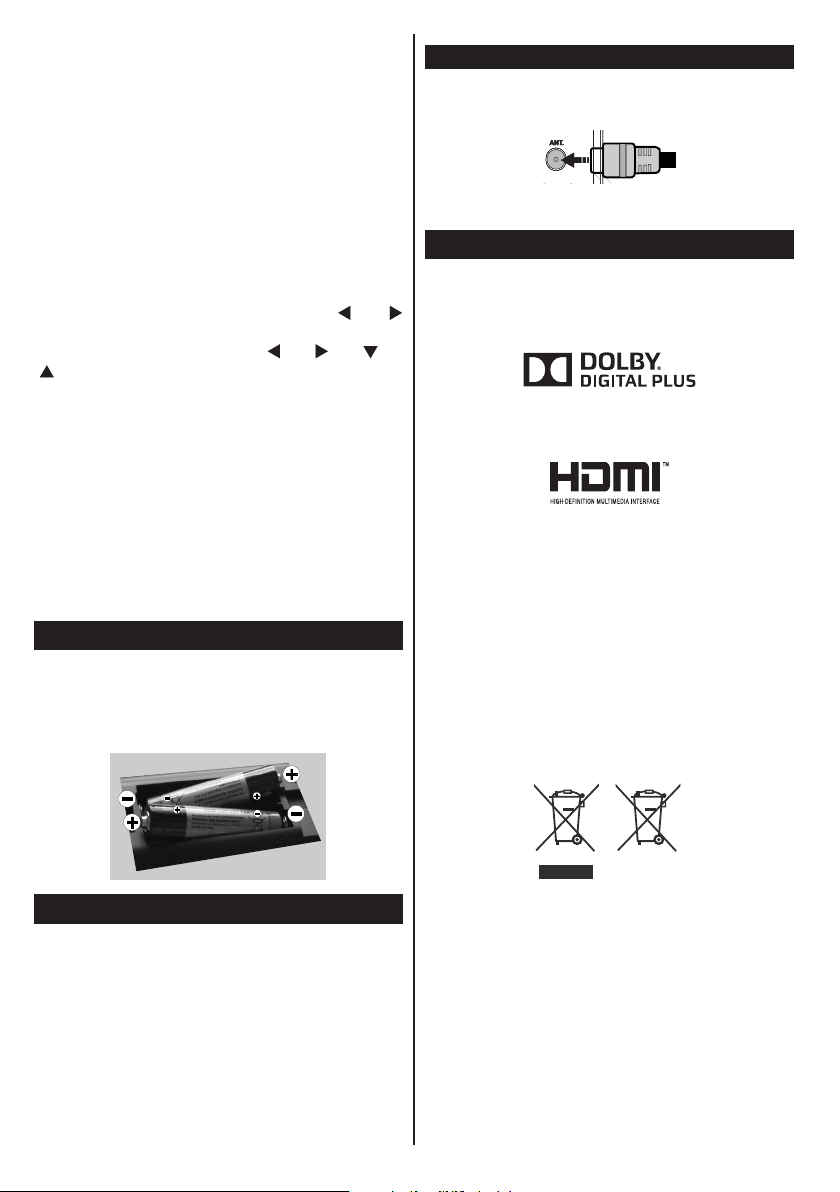
Inserting the Batteries into the Remote
Lift the cover on the back of the remote upward
gently. Install two AAA batteries. Make sure to
match the + and - ends of the batteries in the
battery compartment (observe the correct polarity)
Replace the cover.
Antenna Connection
Connect the “aerial” or “cable TV” plug to AERIAL
INPUT (ANT) socket located on the back of the TV.
Notication
Manufactured under license from Dolby Laboratories.
TRADEMARK ACKNOWLEDGMENT
“Dolby” and the double-D symbol are trademarks of
Dolby Laboratories.
“HDMI,theHDMIlogoandHigh-DenitionMultimedia
Interface are trademarks or registered trademarks of
HDMI Licensing LLC.”
Information for Users on Disposal of Old
Equipment and Batteries
[European Union only]
These symbols indicate that equipment with these
symbols should not be disposed of as general
household waste. If you want to dispose of the
product or battery, please consider the collection
systems or facilities for appropriate recycling.
Notice: The sign Pb below the symbol for batteries indicates
that this battery contains lead.
Connect Power
IMPORTANT: The TV set is designed to operate on
220-240V AC, 50 Hz socket. After unpacking, allow
the TV set to reach the ambient room temperature
before you connect the set to the mains. Plug the
power cable to the mains socket outlet.
English - 4 -
Battery
Products
Page 6
Authorized Representative:
Panasonic Testing Centre
Panasonic Marketing Europe GmbH
Winsbergring 15, 22525 Hamburg, Germany
Web Site: http://panasonic.net
Sales and Support Information
Customer Communication Centre
•ForcustomerswithintheUK:08448443899
•ForcustomerswithinIreland:012898333
•Monday-Friday9:00am-5:00pm,(Excludingpublic
holidays).
•For further support on your product,please visit our
website : www.panasonic.co.uk
Direct Sales at Panasonic UK
•Order accessory and consumable items for your
productwith ease and condencebyphoningour
Customer Comminications Centre Monday - Friday
9:00am-5:00pm,(Excludingpublicholidays).
•Or go on line through our Internet Accessory
ordering application at www.pas-europe.com.
•Most major credit and debit cards accepted.
•All enquiries transactions and distribution facilities
are provided directly by Panasonic UK.
•It couldn’t be simpler!
•Also available through our Internet is direct shopping
forawiderangeofnishedproducts.Takeabrowse
on our website for further detailes.
Specication
TV Broadcasting PAL B/G D/K K I/I’
Receiving Channels VHF (BAND I/III) - UHF
Digital Reception Fully integrated digital
Number of Preset
Channels
Channel Indicator On Screen Display
RF Aerial Input 75 Ohm (unbalanced)
Operating Voltage 220-240V AC, 50Hz.
Audio
Headphone
Audio Output Power
(WRMS.) (10% THD)
Power Consumption 100W
Weight
TV Dimensions DxLxH
(with foot)
TV Dimensions DxLxH
(without foot)
Display
Operation temperature
and operation humidity
(BAND U) - HYPERBAND
terrestrial-cable TV(DVBT-C)
(DVB-T2 compliant)
1.000
A2 Stereo + Nicam Stereo
3.5mm mini stereo jack
2x8 W
13,5 kg
220 x 1134 x 705mm
80 x 1134 x 666mm
16/950”
0ºC up to 40ºC, 85% humidity
max
English - 5 -
Page 7
Getting Started
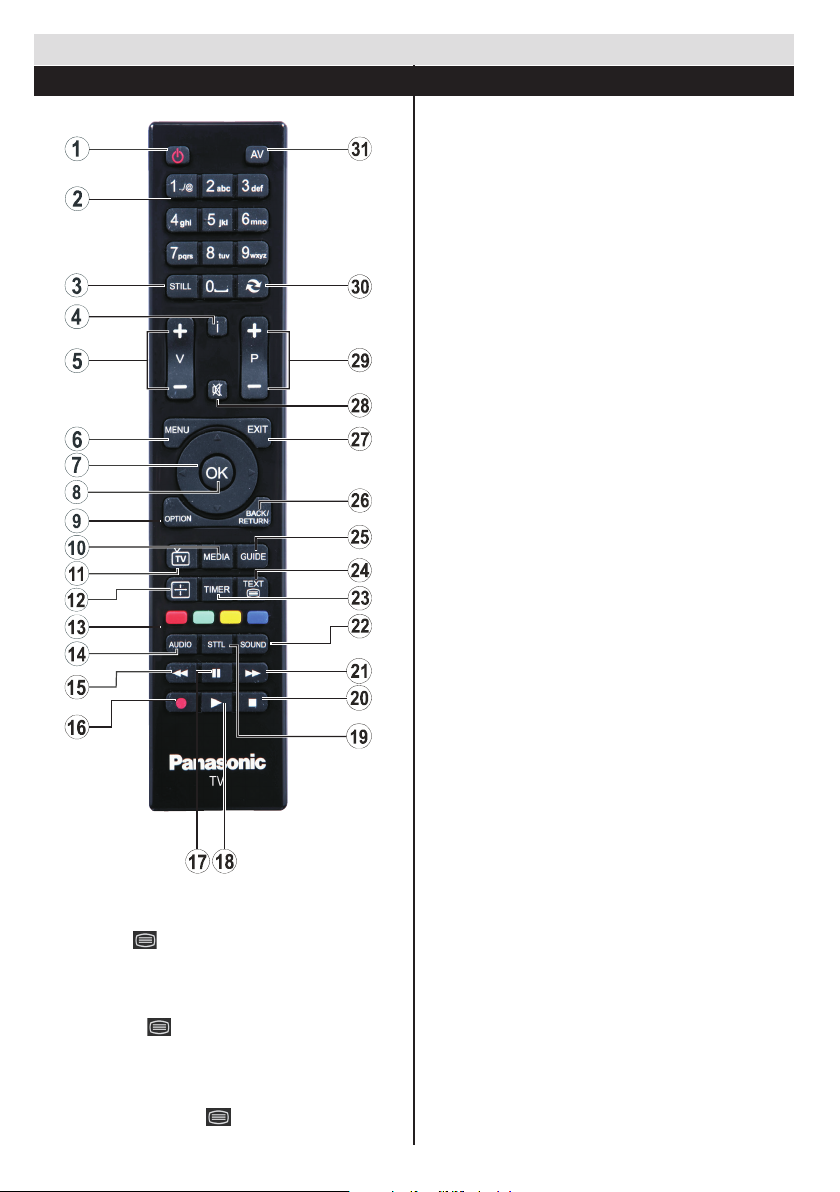
Remote Control
1. Standby / On
2. Numeric buttons
3. FreezeImage/Hold(inTXTmode)
4. Info/Reveal(inTXTmode)
5. Volume Increase / Decrease
6. Menu On / Off
7. Navigation buttons
8. Select/Conrm
9. Option Menu On / Off
10. Media Browser
11. TV Source / Channel list
12. Change Aspect Ratio
13. Coloured buttons (Red, Green, Yellow, Blue)
14. Mono- Stereo Dual I-II / Audio-Subtitle
Language
15. Fast Rewind (in media browser mode)
16. No function
17. Pause (in Media Browser mode)
18. Play (in media browser mode)
19. Subtitle On / Off (where available)
20. Stop (in media browser mode)
21. Fast Forward (in Media Browser mode)
22. Change equalizer mode
23. Set auto TV off timer
24. Teletext - Mix
25. Electronic Programme Guide
26. Return/Back/Indexpage(inTXTmode)
27. Exit
28. Mute
29. Programme Up / Down
30. Previous programme / Previous source
31. Inputs
Teletext
Press “TEXT - ” button to enter. Press again to
activate mix mode. Press once more to exit. Follow the
instructions displayed on digital teletext screen.
Digital Teletext
Press “TEXT - ” button to view digital teletext
information. Operate it with the coloured buttons, cursor
buttons and the OK button. The operation method may
differ depending on the contents of the digital teletext.
Follow the instructions displayed on the digital teletext
screen. When the “TXT - ” button is pressed again,
the TV returns to television broadcast.
English - 6 -
Page 8
Getting Started
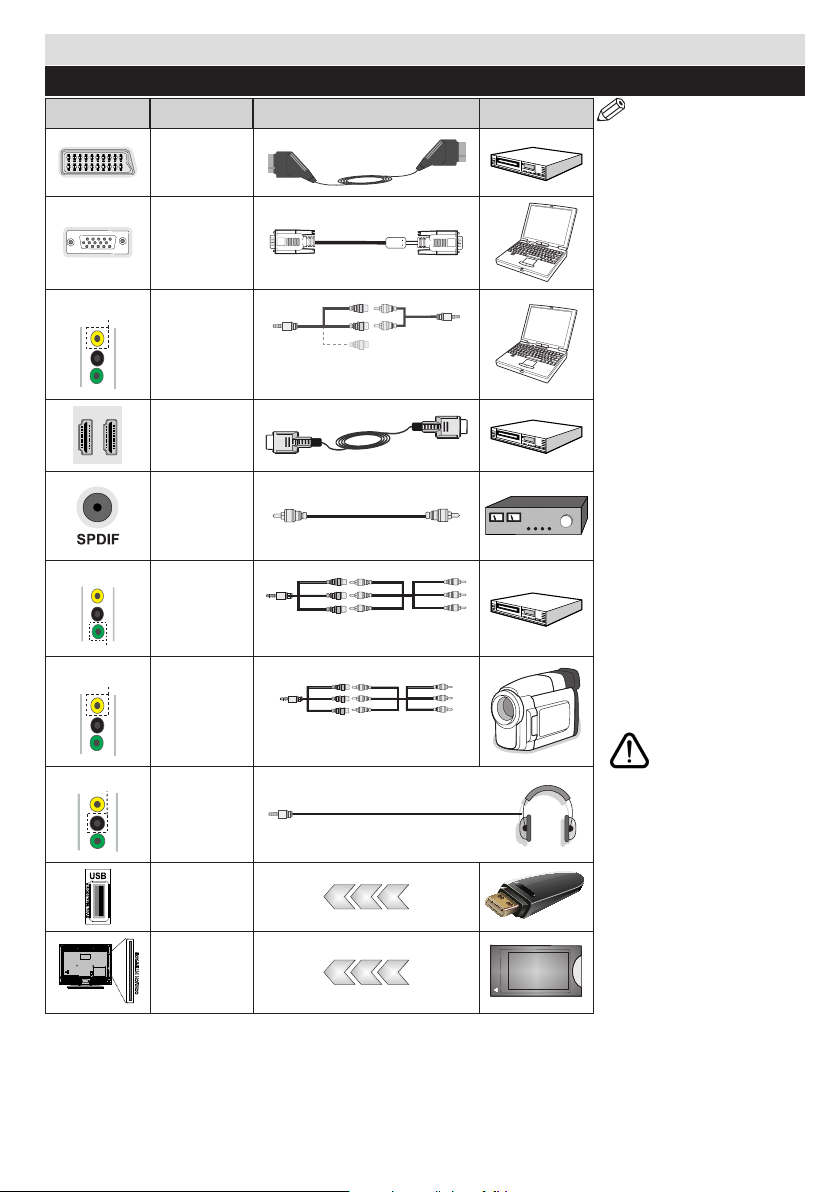
Connections
Connector Type Cables Device
Scart
Connection
(back)
VGA
Connection
(back)
SIDE AV
YPBPR
SIDE AV
HEADPHONE
PC/YPbPr
Audio
Connection
(side)
HDMI
Connection
(back)
SPDIFF
(Coaxial Out)
Connection
(back)
YPbPr Video
Connection
(side)
Side AV
(Audio/Video)
Connection
(side)
Headphone
Connection
(side)
Side Audio/Video
Connection Cable
(Supplied)
YPbPr Connection
AV Connection Cable
(supplied)
Cable (supplied)
PC Audio Cable
(Not supplied)
NOTE: When connecting
a device via the YPbPr or
Side AV input, you must
use connection cables to
enable connection. See the
illustrations on the left side. | To
enable PC audio, you will need
to connect an AUDIO cable to
the side audio inputs. | If an
external device is connected
via the SCART socket, the TV
will automatically switch to AV
mode.| When receiving DTV
channels (Mpeg4 H.264) or
while in Media Browser mode,
output will not be available via
the scart socket. | When using
the wall mounting kit (optional),
we recommend that you plug all
your cables into the back of the
TV before mounting on the wall.
| Insert or remove the CI module
only when the TV is SWITCHED
OFF. You should refer to the
module instruction manual for
details of the settings. | Each
USB input of your TV supports
devices up to 500mA. Connecting
devices that have current value
above 500mA may damage your
TV. By connecting an HDMI cable
to your TV, you have to use only a
shielded HDMI cable to guarantee
a sufficient immunity against
parasitic frequency radiation.
If you want to connect a
device to the TV, make
sure that both the TV and
the device are turned off before
making any connection. After the
connection is done, you can turn
on the units and use them.
USB
Connection
(side)
CI
Connection
(side)
English - 7 -
CAM
module
Page 9
Getting Started
First Time Installation - USB Connections
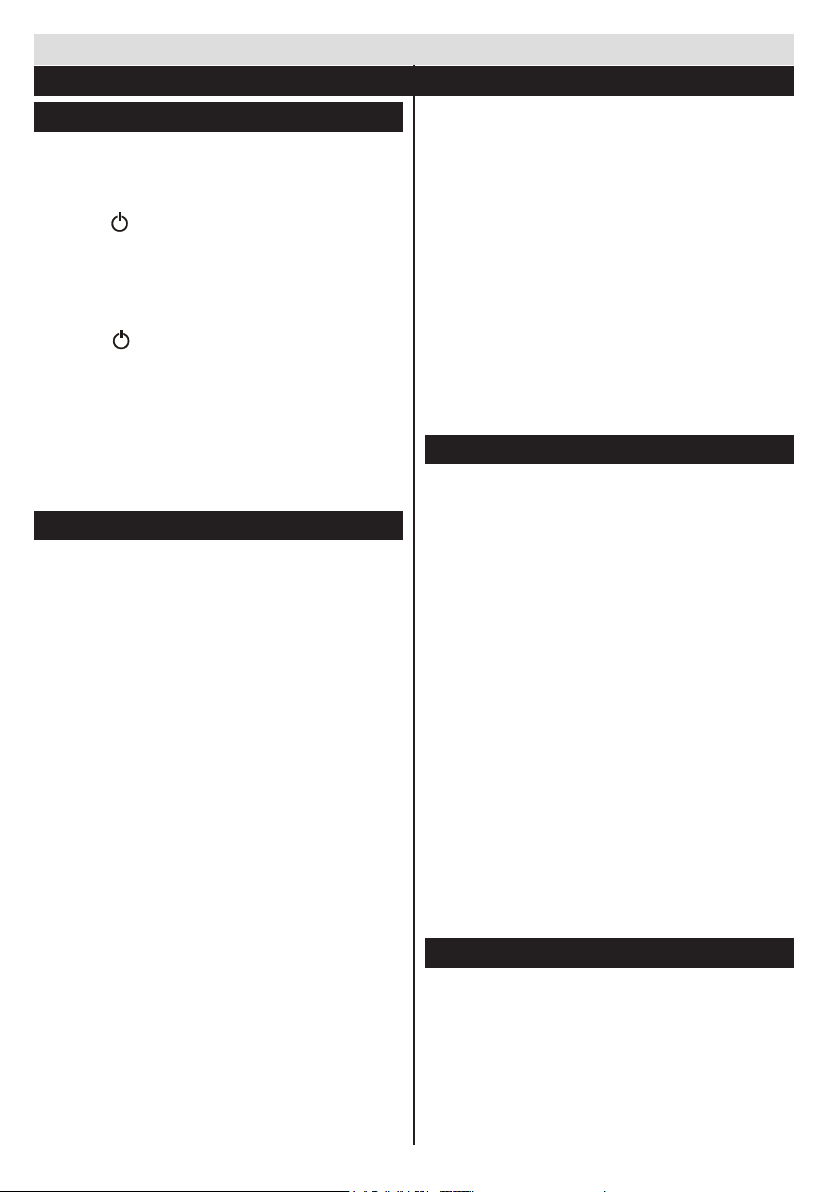
Switching On/Off
To Switch the TV On
Connect the power cord to the 220-240V AC, 50 Hz.
To switch on the TV from standby mode either:
Press the “ ” button, P+ / P- or a numeric button on
the remote control.
Press the side function switch until the TV comes on
from standby.
To Switch the TV Off
Press the “ ” button on the remote control or press
the side function switch until the TV switches into
standby mode.
To power down the TV completely, unplug the
power cord from the mains socket.
Note: When the TV is switched to standby mode, the standby
LED can blink to indicate that features such as Standby Search,
Over Air Download or Timer is active. The LED can also blink
when you switch on the TV from standby mode.
First Time Installation
When turned on for the first time, the language
selection screen is displayed. Select the desired
language and press OK.
On the next screen, set your preferences using the
navigationbuttonsand when nished, press OK to
continue.
Note: Depending on the Country selection you may
be asked to set and conrm a PIN at this point. The
selected PIN cannot be 0000. You have to enter it if you
are asked to enter a PIN for any menu operation later.
You can activate Store Mode option at this point.
This option is intended only for store use. It is
recommended to select Home Mode for home use.
If Store Modeisselected,aconrmationscreenwill
be displayed. Select YES to proceed. This option
will be available in Other Settings menu and can be
turned off/on later.
If Home Mode is selected, Store Mode will not be
available after the First Time Installation. Press OK
button to continue.
Aerial Installation
If you select Aerial option from the search type selection
screen, the television will search for digital terrestrial TV
broadcasts. After all the available stations are stored,
the Channel List will be displayed on the screen.
While the search continues a message will appear,
asking whether you want to sort channels according
to the LCN(*). Select Yes and press OK toconrm.
(*) LCN is the Logical Channel Number system that
organizes available broadcasts in accordance with a
recognizable channel sequence (if available).
Press MENU button to quit channel list and watch TV.
Cable Installation
If you select Cable option and press OK button on
the remote control a confirmation screen will be
displayed. Select YES and press OK to proceed.
To cancel operation, select NO and press OK. You
can select frequency ranges from next screen. Enter
the frequency range manually by using the numeric
buttons. When nished, press OK button to start
automatic search.
Note: Searching duration will change depending on
the selected search step.
Media Playback via USB Input
You can connect a 2.5” and 3.5” inch (hdd with external
power supply) external hard disk drives or USB memory
stick to your TV by using the USB inputs of the TV.
IMPORTANT!Back up your les before making
any connections to the TV. The Manufacturer will
notberesponsibleforanyledamageordataloss.
Certain types of USB devices (e.g. MP3 Players)
or USB hard disk drives/memory sticks may not be
compatible with this TV. The TV supports FAT32
and NTFS disk formatting.
While formatting a USB hard disk that has 1TB (Tera
Byte) or more le capacity,you can experience
problems with the formatting process.
Quickly plugging and unplugging USB devices, is a
very hazardous operation. This may cause physical
damage to the USB player and the USB device itself.
DonotpullouttheUSBmodulewhileplayingale.
You can use USB hubs with your TV’s USB inputs.
External power supplied USB hubs are recommended
in such a case.
It is recommended to use the TV’s USB input(s)
directly, if you are going to connect a USB hard disk.
Note: When viewing image les the media browser menu
can only display 1000 image les stored on the connected.
Media Player Menu
You can play photo, music, and movie les stored
on a USB disk by connecting it to your TV. Connect
a USB disk to one of the USB inputs located on the
side of the TV. Pressing the MENU button while in the
Media Browser mode will access the Picture, Sound
and Setup menu options. Pressing the MENU button
again will exit from this screen. You can set your Media
Player preferences by using the Setup menu.
English - 8 -
Page 10
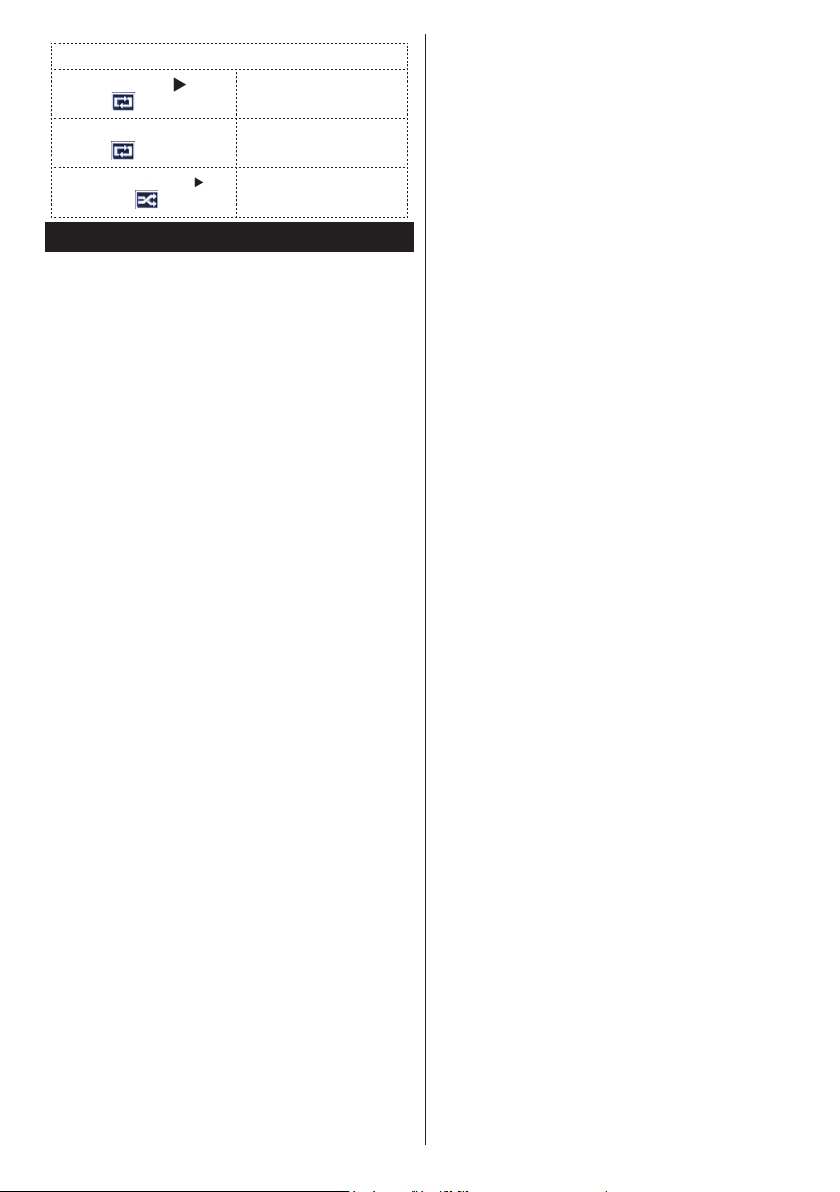
Loop/Shufe Mode Operation
Start playback with and
activate
Start playback with
activate
Start playback with
and activate
OK and
OK/
TVplaysnextleandloop
the list.
Thesamelewillbe
played in a loop (repeat).
Thelewillbeplayedina
shufe.
Option Menu
The Option Setup menu allows you to access some
options quickly. This menu includes Power Save Mode,
Picture Mode, Equalizer Settings, Favourites, Off
Timer options. Press OPTION button on the remote
control to view the option menu. See the following
chapters for details of the listed features.
English-9-
Page 11
TV Menu Features and Functions
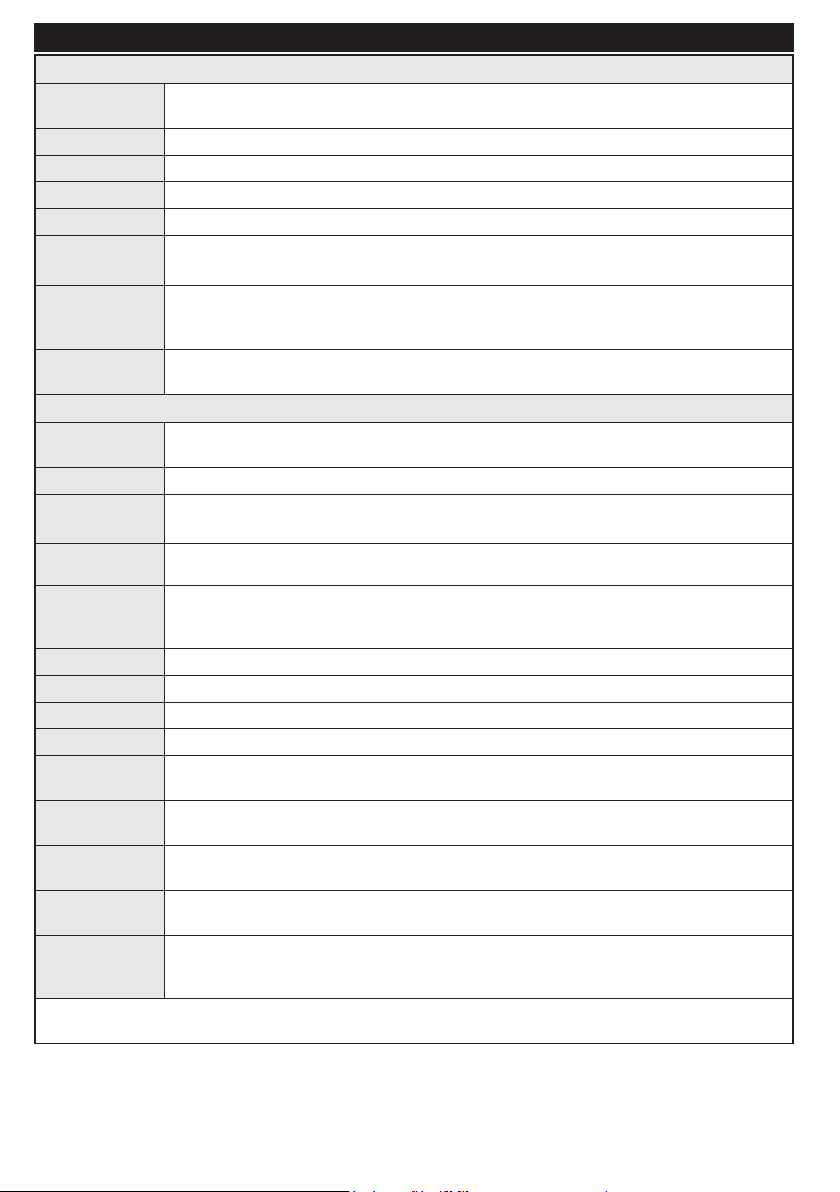
Picture Menu Contents
Mode
Contrast Sets the lightness and darkness values of the screen.
Brightness Sets the brightness value for the screen.
Sharpness Sets the sharpness value for the objects displayed on the screen.
Colour Sets the colour value, adjusting the colors.
Power Save Mode
Backlight
(Optional)
Noise
Reduction
You can change the picture mode to suit your preference or requirements. Picture mode can be
set to one of these options: Cinema, Game, Sports, Dynamic and Natural.
To set the Power Save Mode as Eco, Picture Off and Disabled.
(When the Mode is Dynamic, Power Save mode is automatically set as disabled.)
This setting controls the backlight level. The backlight function will be inactive if the Power Save Mode
is set to Eco. The backlight cannot be activated in VGA, Media Browser mode or while the picture
mode is set to Game.
If the broadcast signal is weak and the picture is noisy, use the Noise Reduction setting to
reduce the amount of noise.
Advanced Settings
Dynamic
Contrast
Colour Temp Sets the desired colour tone.
Picture Zoom
HDMI True
Black
Film Mode
Skin Tone
Colour Shift Adjust the desired colour tone.
RGB Gain
Reset Resets the picture settings to factory default settings.(Except Game Mode)
Autoposition
(in PC mode)
H Position (in
PC mode)
V Position (in
PC mode)
Dot Clock (in
PC mode)
Phase (in PC
mode)
While in VGA (PC) mode, some items in Picture menu will be unavailable. Instead, VGA mode settings will be added
to the Picture Settings while in PC mode.
You can change the Dynamic Contrast ratio to desired value.
Sets the desired picture size from picture zoom menu.
Note: Auto (Only available in Scart mode with SCART PIN8 high voltage/low voltage switching)
While watching from HDMI source, this feature will be visible in the Picture Settings menu.
You can use this feature to enhance blackness in the picture.
Films are recorded at a different number of frames per second to normal television
programmes. Turn this feature on when you are watching films to see the fast motion
scenes clearly.
Skin tone can be changed between -5 and 5.
YoucancongurethecolourtemperaturevaluesusingtheRGBGainfeature.
Automatically optimizes the display. Press OK to optimize.
This item shifts the image horizontally to the right hand side or left hand side of the screen.
This item shifts the image vertically towards the top or bottom of the screen.
Dot Clock adjustments correct the interference that appear as vertical banding in dot intensive
presentations like spreadsheets or paragraphs or text in smaller fonts.
Depending on the resolution and scan frequency that you input to the TV set, you may see
a hazy or noisy picture on the screen. In such a case you can use this item to get a clear
picture by trial and error method.
English - 10 -
Page 12
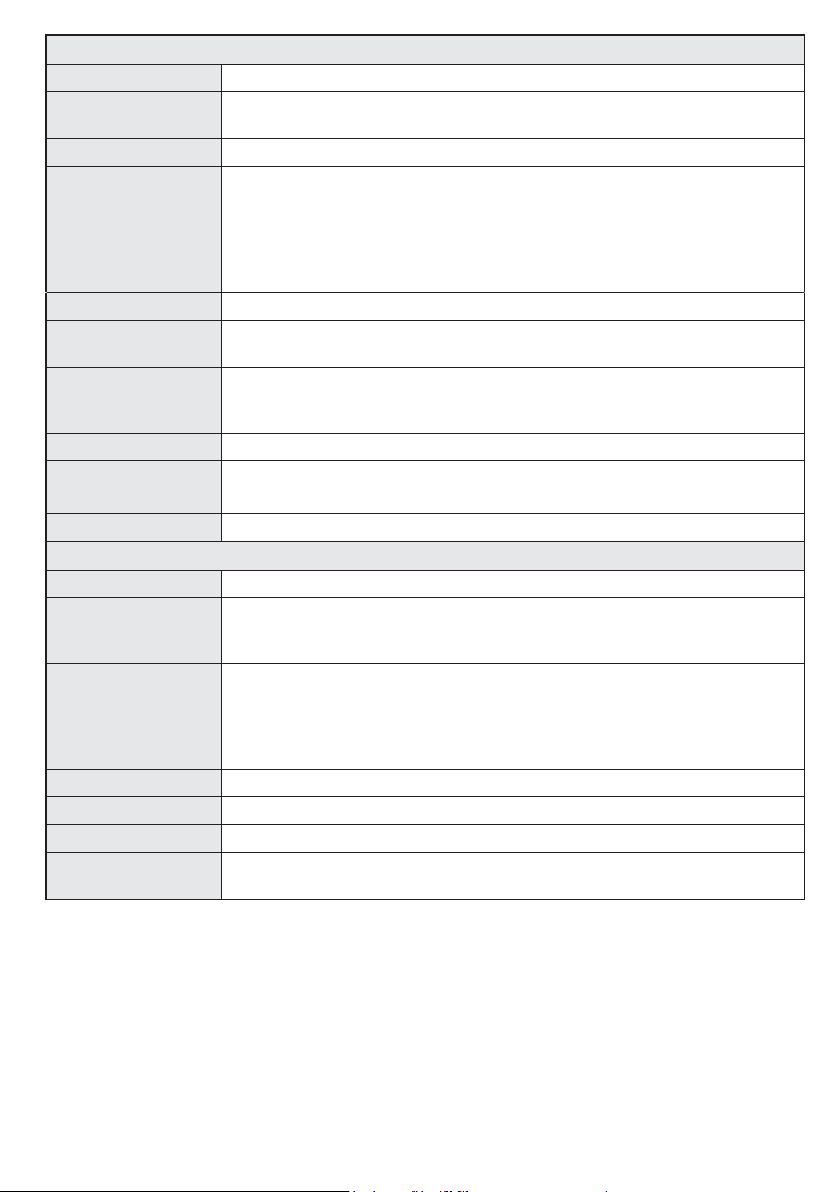
Sound Menu Contents
Volume Adjusts the volume level.
Equalizer
Balance This setting is used for emphasizing left or right speaker balance.
Headphone
Sound Mode You can select a sound mode. (If the selected channel supports).
AVL (Automatic
Volume Limiting)
Headphone/Lineout
Dynamic Bass Enables or disables the Dynamic Bass.
Surround Sound
(Optional)
Digital Out Sets digital out audio type.
Selects the equalizer mode. Custom settings can be made only when
in user mode.
Sets headphone volume.
Please ensure before using headphones that this menu item is set to
Headphones. If it is set to Line Output, The output from the headphone socket
will be set to maximum which could damage your hearing. Also please ensure
before using headphones that the headphone volume is set to a low level, to
prevent damage to your hearing.
Functionsetsthesoundtoobtainxedoutputlevelbetweenprogrammes.
WhenyouconnectanexternalampliertoyourTV using the headphone jack,
you can select this option as Lineout. If you have connected headphones to the
TV, set this option as Headphone.
Surround sound mode can be changed as On or Off.
Setup Menu Contents
Conditional Access Controls conditional access modules when available.
Language
Parental
Timers Sets off timer to turn off the TV after a certain time. Sets timers for selected programmes.
Date/Time Sets date and time.
Sources Enables or disables selected source options.
IP Settings
Congureslanguagesettings(maychangedependingonthecountryselected)
Pr e f e r r e d and cu r r e n t s ettings will be available. Current settings can be
changed only if the broadcaster supports.
Enter correct password to change parental settings. You can easily adjust
menu lock, maturity lock(may change depending on the country selected) and
child lock in this menu. You can also set new pin number.
Note: Default PIN can be set to 0000 or 1234. If you have dened the PIN(is requested depending
on the country selection) during the First Time Installation use the PIN that you have dened.
IP Settings: Displays IP Settings screen. Using IP Settings window you can set
IP address and DNS servers of the TV set.
English - 11 -
Page 13
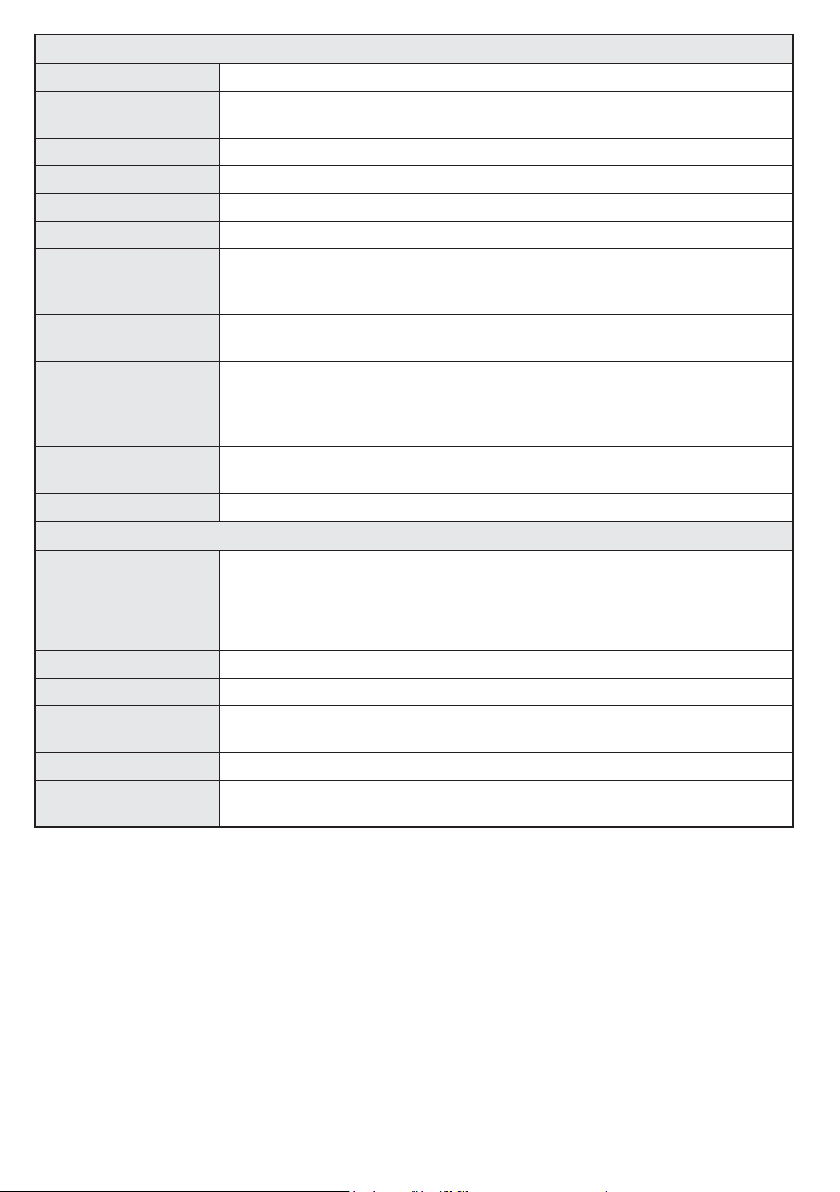
Other Settings: Displays other setting options of the TV set:
Menu Timeout Changes timeout duration for menu screens.
Scan Encrypted
Channels
Blue Background Activates or deactivates the blue background system when the signal is weak or absent.
Software Upgrade ToensurethatyourTValwayshasthemostuptodatermware.
Application Version Displays application version.
Hard of Hearing Enables any special feature sent from the broadcaster.
Audio Description
Auto TV Off
Standby Search
(Optional)
Store Mode
Power Up Mode This setting confrigures the power up mode preference.
When this setting is on, the search process will locate the encrypted channels as well.
Audio description refers to an additional narration track for blind and visually
impaired viewers of visual media, including television and movies. You can use
this feature, only if the broadcaster supports that additional narration track.
You can set the timeout value of auto off feature. When the timeout value is reached
and the TV has not been operated for a selected time, the TV will go into standby mode.
If the Standby Search is set to On, when the TV is in standby mode, available
broadcasts will be searched. If the TV locates any new or missing broadcasts, a
menu screen will be displayed, asking you whether or not to execute these changes.
The Channel list will be updated and changed after this process.
If you are displaying the TV in a store, you can activate this mode. Whilst Store
Mode is enabled, some items in the TV menu may not be available.
Install and Retune Menu Contents
Automatic Channel
Scan (Retune)
(If available)
Manual Channel Scan This feature can be used for direct broadcast entry.
Network Channel Scan Searches for the linked channels in the broadcast system.
Analogue Fine Tune
First Time Installation Deletes all stored channels and settings, resets TV to factory settings.
Clear Service List
Displays automatic tuning options. Digital Aerial: Searches and stores aerial
DVB stations. Digital Cable: Searches and stores cable DVB stations. Ana log ue:
Searches and stores analogue stations. DigitalAerial&Analogue:Searches
and stores aerial DVB and analogue stations. Digital Cable &Analogue:
Searches and stores cable DVB and analogue stations.
Youcanusethis settingforne tuninganaloguechannels.Thisfeatureisnot
available if no analogue channels are stored.
(*) This setting is visible only when the Country option is set to Denmark, Sweden,
Norway or Finland. Use this setting to clear channels stored.
English - 12 -
Page 14
General TV Operation
Using the Channel List
The TV sorts all stored stations in the Channel List.
You can edit this channel list, set favourites or set
active stations to be listed by using the Channel List
options.
ConguringParentalSettings
To prohibit viewing of certain programmes, channels and
menus can be locked by using the parental control system.
To display parental lock menu options, the PIN
number should be entered. After coding the correct
PIN number, parental settings menu will be displayed.
Menu Lock: Menu lock setting enables or disables
the menu access.
Maturity Lock: When set, this option gets the maturity
information from the broadcast and if this maturity
level is disabled, disables access to the broadcast.
Child Lock: When Child Lock is set, the TV can only
be controlled by the remote control. In this case the
control panel buttons will not work.
Set PIN:DenesanewPINnumber.
Note: Default PIN can be set to 0000 or 1234. If you have
defined the PIN(is requested depending on the country
selection) during the First Time Installation use the PIN that
you have dened.
Electronic Programme Guide (EPG)
Some, but not all channels send information about
the current and next programmes. Press the GUIDE
button to view the EPG menu.
Red button (Prev Day): Displays the programmes of
previous day.
Green button (Next day): Displays the programmes
of the next day.
Yellow button (Zoom): Press the Yellow button to
see events in a wider time interval.
Bluebutton(Filter):Viewslteringoptions.
SUBT.: Press Subtitles button to view Select Genre
menu. Using this feature, you can search the
programme guide database in accordance with the
genre. Info available in the programme guide will be
searched and results matching your criteria will be
highlighted.
Info button: Displays detailed information about
selected programmes.
Numeric Buttons (Jump): Jumps to the preferred
channel directly via numeric buttons.
OK: Displays programme options.
Text button (Search): Displays Guide Search menu.
Swap(Now): Displays current event of the
highlighted channel.
English - 13 -
Programme Options
In EPG menu, press the OK button to enter the
Event Options menu.
Select Channel
In EPG menu, using this option, you can switch
to the selected channel.
Set Timer / Delete Timer
After you have selected a programme in the EPG
menu, press the OK button. Select the Set Timer
on Event option and press the OK button. You
can set a timer for future programmes. To cancel
an already set timer, highlight that programme and
press the OK button. Then select “Delete Timer”
option. The timer will be cancelled.
Software Upgrade
YourTViscapableofndingandupdatingautomatically
via the Aerial/Cable signal.
Software upgrade search via user interface
Simply navigate on your main menu. Choose Setup
and select Other Settings menu. In Other Settings
menu navigate on to the Software for Upgrade item
and press OK button to check for a new software
upgrade.
If a new upgrade is found, it starts to download
the upgrade. Press OK to continue with the reboot
operation.
3 AM search and upgrade mode
While the TV is connected to an aerial signal. If
Automatic scanning in the Upgrade Options menu
is enabled, the TV wakes up at 03:00 and searches
broadcast channels for new software upgrades. If
new software is found and downloaded successfully,
the next time the TV powers up , it will have the new
software version.
Note: If the TV fails to come on after the upgrade unplug the
TV for 2 minutes and plug in again.
Troubleshooting & Tips
Tv will not turn on
Make sure the power cord is plugged in securely to
wall outlet. The batteries in the remote control may be
exhausted. Press the Power button on the TV.
Poor picture
• Have you selected the correct TV system?
• Low signal level can cause picture distortion.Please
check antenna access.
• Check if you have entered the correct channel
frequency if you have done manual tuning.
Page 15

• The picture quality may degrade when two devices
are connected to the TV at the same time. In such
a case, disconnect one of the devices.
No picture
• No Picture means that your TV is not receiving a
transmission. Have you selected the correct button on
the remote control? Try once more. Also make sure
the correct input source has been selected.
• Is the antenna connected properly?
• Is the antenna cable damaged?
• Are suitable plugs used to connect the antenna?
• If you are in doubt, consult your dealer.
No sound
• Has the TV been set to mute? To cancel mute, press the
“ ” button, or increase the volume level.
• Sound is coming from only one speaker. Is the balance
set to one extreme? See Sound Menu section.
Remote control - does not operate
•The batteries may be exhausted. Replace the
bateries.
Input sources - can not be selected
• If you cannot select an input source, it is possible that
no device is connected. if not
• Check the AV cables and connections if you have tried
to connect a device.
English - 14 -
Page 16
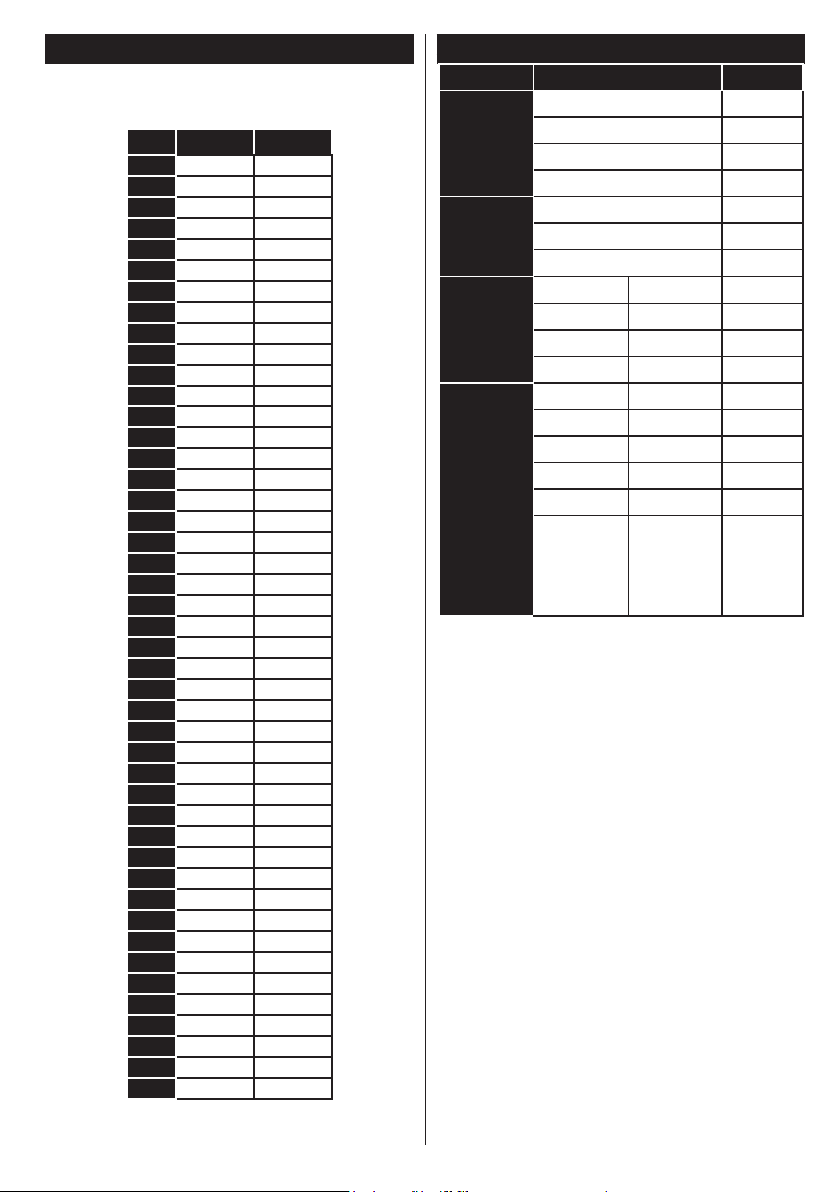
PC Input Typical Display Modes
The following table is an illustration of some of the
typical video display modes. Your TV may not support
all resolutions.
Index Resolution Frequency
1 640x350 85Hz
2 640x400 70Hz
3 640x400 85Hz
4 640x480 60Hz
5 640x480 66Hz
6 640x480 72Hz
7 640x480 75Hz
8 640x480 85Hz
9 800x600 56Hz
10 800x600 60Hz
11 800x600 70Hz
12 800x600 72Hz
13 800x600 75Hz
14 800x600 85Hz
15 832x624 75Hz
16 1024x768 60Hz
17 1024x768 66Hz
18 1024x768 70Hz
19 1024x768 72Hz
20 1024x768 75Hz
21 1024x768 85Hz
22 1152x864 60Hz
23 1152x864 70Hz
24 1152x864 75Hz
25 1152x864 85Hz
26 1152x870 75Hz
27 1280x768 60Hz
28 1360x768 60Hz
29 1280x768 75Hz
30 1280x768 85Hz
31 1280x960 60Hz
32 1280x960 75Hz
33 1280x960 85Hz
34 1280x1024 60Hz
35 1280x1024 75Hz
36 1280x1024 85Hz
37 1400x1050 60Hz
38 1400x1050 75Hz
39 1400x1050 85Hz
40 1440x900 60Hz
41 1440x900 75Hz
42 1600x1200 60Hz
43 1680x1050 60Hz
44 1920x1080 60Hz
45 1920x1200 60Hz
AV and HDMI Signal Compatibility
Source Supported Signals Available
PAL O
EXT
(SCART)
NTSC 60 O
RGB 50/60 O
SECAM O
PAL 50/60 O
Side AV
NTSC 60 O
SECAM
480I, 480P 60Hz O
YPbPr
576I, 576P 50Hz O
720P 50Hz,60Hz O
1080I 50Hz,60Hz O
480I 60Hz O
480P 60Hz O
576I, 576P 50Hz O
HDMI1
HDMI2
720P 50Hz,60Hz O
1080I 50Hz,60Hz O
24Hz,
25Hz,
1080P
30Hz,
O
50Hz,
60Hz
(X: Not Available, O: Available)
In some cases a signal on the LCD TV may not be displayed
properly. The problem may be an inconsistency with
standards from the source equipment (DVD, Set-top box, etc.
). If you do experience such a problem please contact your
dealer and also the manufacturer of the source equipment.
English - 15 -
Page 17
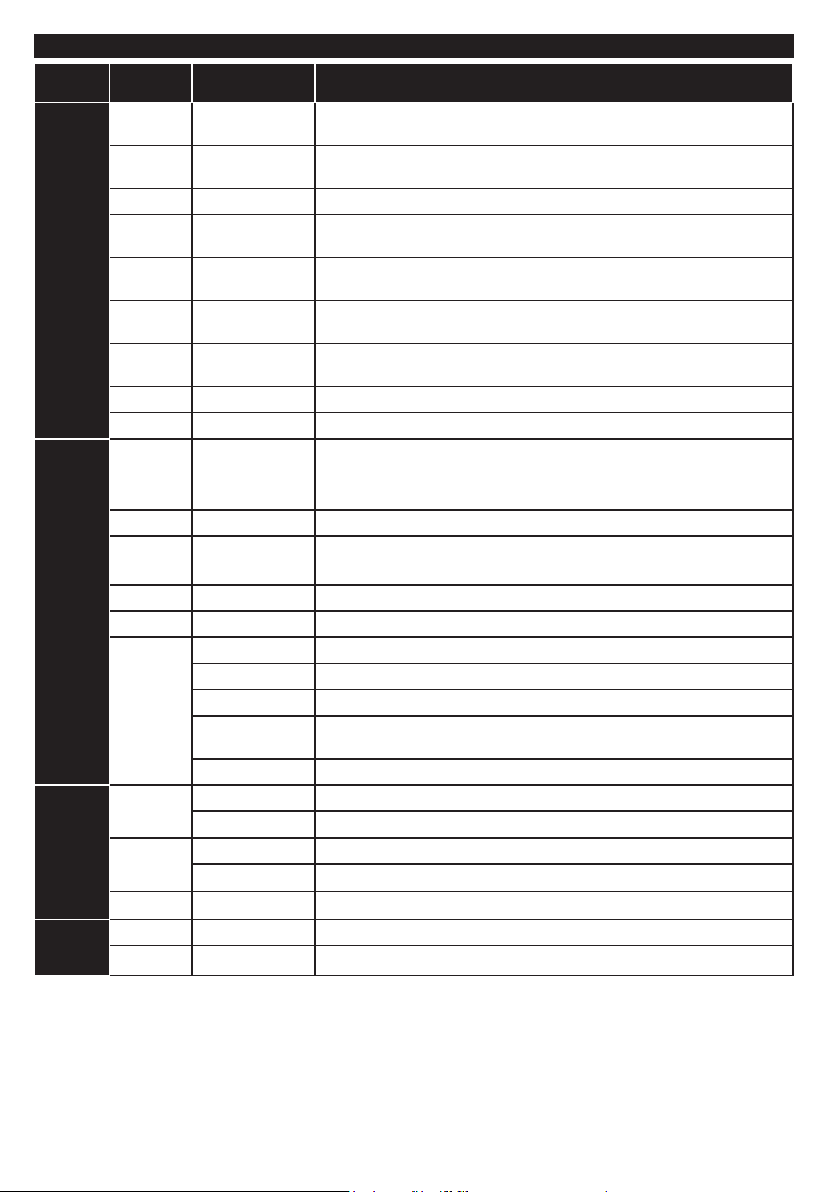
Supported File Formats for USB Mode
Media Extension Format Notes
Video .dat, .mpg,
Audio .mp3 MPEG1/2 Layer
Picture
Subtitle
.mpeg
.ts, .trp,
.tp, .m2ts
.vob MPEG2 1080P@30fps 50Mbit/sec
.mkv MPEG1-2-4,
.mp4 MPEG4,XviD,
.avi MPEG2-4,Xvid,
.a,.v H.264, Sorenson
.3gp MPEG4, H.264 1920x1080@30P20Mbit/sec
.asf, .wmv VC1 1080P@30fps, 50Mbit/sec
.wav LPCM
.WMA/
ASF
.m4a/ .aac AAC, HEAAC Free Format (Bit rate) / 8KHz ~ 48KHz (Sampling rate)
.pcm PCM 8Kbps ~ 320Kbps (Bit rate) / 16KHz ~ 48KHz (Sampling rate)
(works
only with
video
les)
.jpeg
.png
.bmp
.sub - Sub1, Sub2, Sub3
.srt -
Mpeg1-2 1080P@30fps, 50Mbit/sec
MPEG2 , H.264,
VC1, AVS, MVC
H.264
H.264
H.264
H.263
1/2/3 (MP3)
WMA, WMA Pro WMA: 128bps ~ 320Kbps (Bit rate) / 8KHz ~ 48Khz (Sampling rate)
AC3 32Kbps ~ 640Kbps (Bit rate) / 32KHz, 44.1KHz, 48KHz (Sampling rate)
EAC3 32Kbps ~ 6 Mbps (Bit rate) / 32KHz, 44.1KHz, 48KHz (Sampling rate)
LPCM 64Kbps ~ 1.5Mbps (Bit rate) / 8KHz ~ 48Khz (Sampling rate)
IMA-ADPCM/
MS-ADPCM
G711 A/mu-law 64~128Kbps (Bit rate) / 8KHz (Sampling rate)
Baseline Resolution(WxH): 15360x8640, 4147200 bytes
Progressive Resolution(WxH):1024x768,6291456bytes
non-interlace Resolution(WxH):9600x6400,3840000bytes
interlace
H.264:1080Px2@25fps, 1080P@50fps MVC:1080P@ 24fps Other: 1080P@30fps 50Mbit/sec
H.264:1080Px2@25fps, 1080P@ 50fps, 1080P@30fps, 50Mbit/sec
H.264:1080Px2@25fps, 1080P@ 50fps, 1080P@30fps, 50Mbit/sec
H.264:1080Px2@25fps, 1080P@ 50fps, 1080P@30fps, 50Mbit/sec
H.264:1080Px2@25fps, 1080P@50fps, 1080P@30fps, 40Mbit/sec
Layer1: 32Kbps ~ 448Kbps (Bit rate) / 16KHz ~ 48KHz (Sampling rate)
Layer2: 8Kbps ~ 384Kbps (Bit rate) / 16KHz ~ 48KHz (Sampling rate)
Layer3: 8Kbps ~ 320Kbps (Bit rate) / 16KHz ~ 48KHz (Sampling rate)
WMAPro:<768kbps(Bitrate)/~96KHz(Samplingrate)
384Kbps (Bit rate) / 8KHz ~ 48Khz (Sampling rate)
Resolution(WxH): 1200x800, 3840000 bytes
Resolution(WxH):9600x6400,3840000bytes
English - 16 -
Page 18
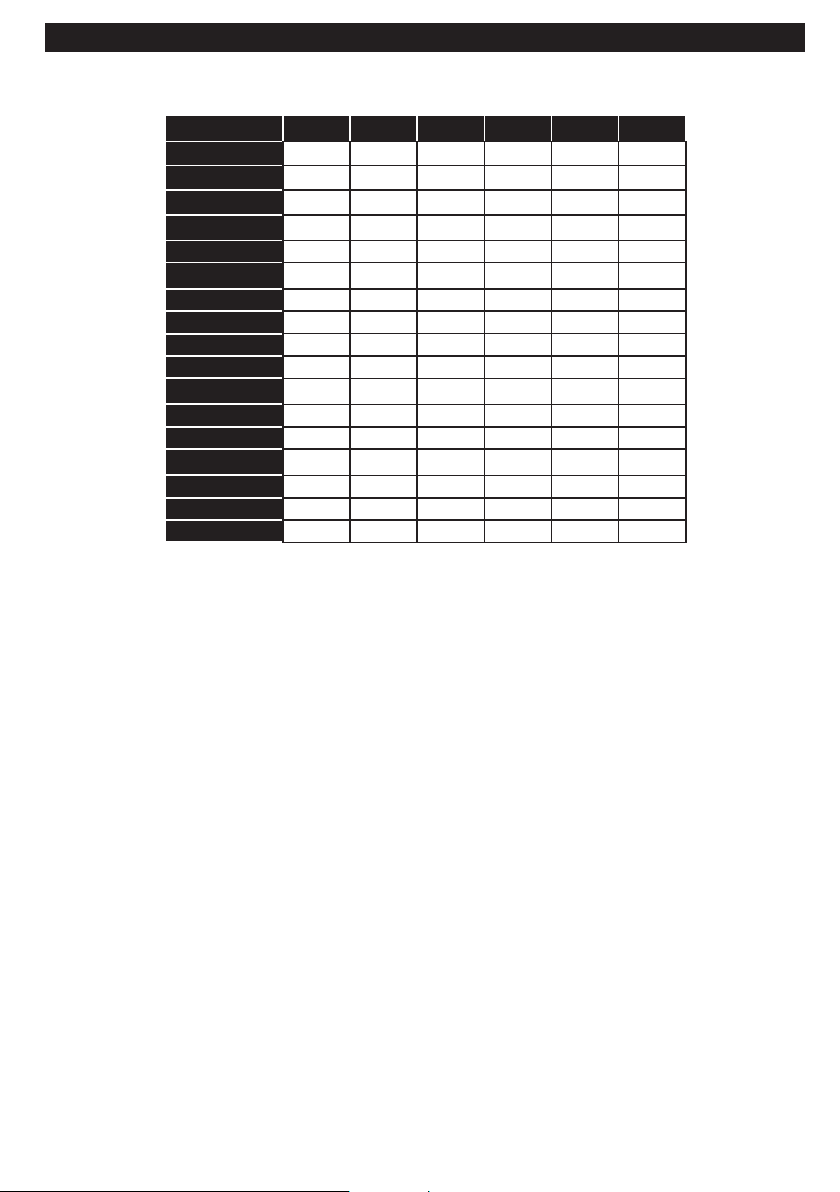
Supported DVI Resolutions
When connecting devices to your TV’s connectors by using DVI converter cable(DVI to HDMI cable - not
supplied), you can refer to the following resolution information.
56Hz 60Hz 66Hz 70Hz 72Hz 75Hz
640x400
640x480
800x600
832x624
1024x768
1152x864
1152x870
1280x768
1360x768
1280x960
1280x1024
1400x1050
1440x900
1600x1200
1680x1050
1920x1080
1920x1200
þ þ þ þ
þ þ þ þ þ
þ þ þ þ þ
þ þ þ
þ þ
þ
þ þ
þ þ
þ þ
þ þ
þ
þ
þ
þ
þ
þ
þ
English - 17 -
Page 19
Important Instruction
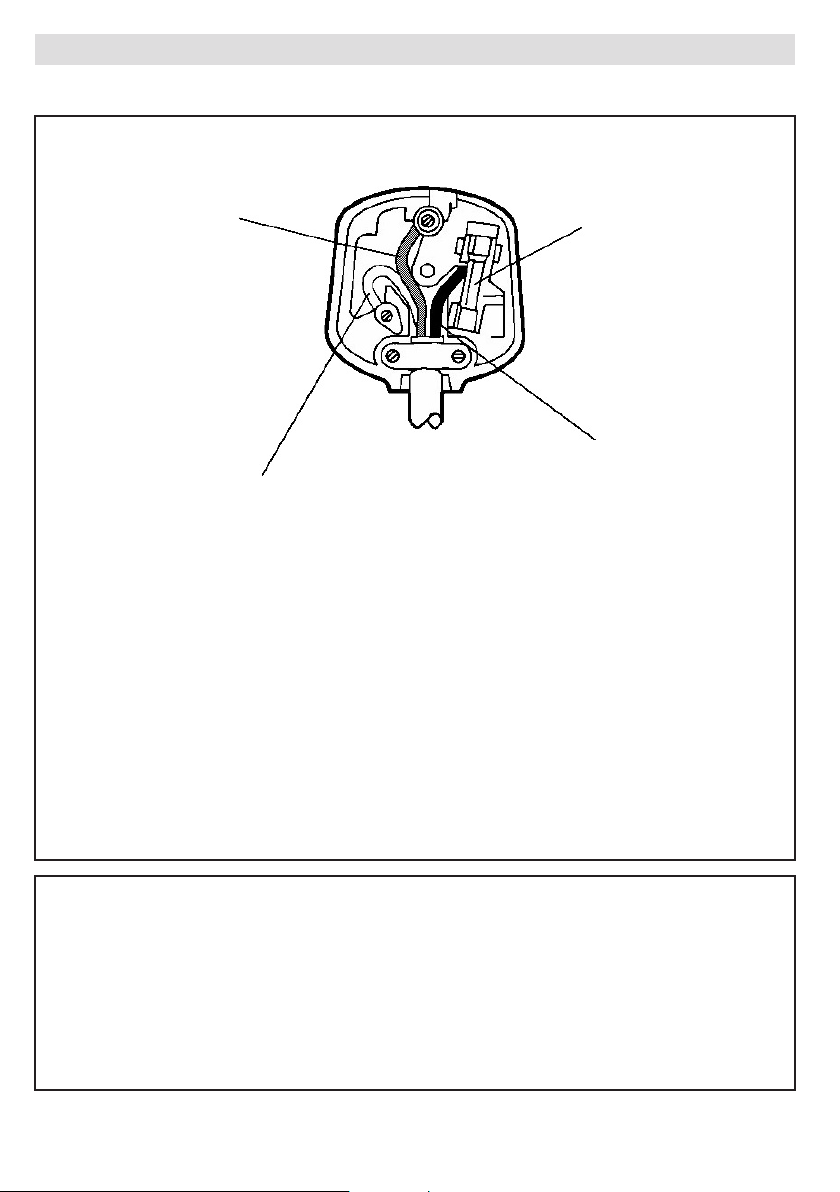
For your own safety read following instruction carefully before attempting to connect this unit to the mains supply.
MAINS (AC) OPERATION
The wires in the mains lead are coloured in accordance with the following code :
GREEN
&
FUSE
YELLOW
(Earth)
(if there is earth cable)
BROWN
BLUE
IMPORTANT
As the colours of the wires in the mains lead of this appliance may not correspond with the coloured
markings identifying the terminals in your plug, proceed as follows:
The wire which is coloured green and yellow must be connected to the terminal which is marked with
the letter E, or by the earth symbol, or coloured green or green and yellow.
The wire which is coloured blue or black must be connected to the terminal which is marked with the
letter N or coloured Black.
The wire which is coloured brown or red must be connected to the terminal which is marked with the
letter L or coloured Red.
Forcontinued protection against riskof re, replace only with same typeand rating of fuse(ASTA
approved 5A 250VAC fuse).
(Neutral)
(Live)
CAUTION
TO PREVENT ELECTRIC SHOCK DISCONNECT FROM THE MAINS BEFORE REMOVING
COVER. NO USER SERVICEABLE PARTS INSIDE. REFER SERVICING TO QUALIFIED SERVICE
PERSONNEL.
SAFETY PRECAUTION
THIS EQUIPMENT MUST BE DISCONNECTED FROM THE MAINS WHEN NOT IN USE. DO NOT
ALLOWTHISUNITTOBEEXPOSEDTORAINORMOISTURE.
English - 18 -
Page 20
Deutsch
A
Produktdatenblatt
C
Modellkennung
G
Jährlicher Energieverbrauch
B
Lieferanten
D
Energieeffizienzklasse
H
Leistungsaufnahme im Bereitschafts-Zustand
E
Sichtbare Bildschirmdiagonale
I
Leistungsaufnahme im Aus-Zustand
F
Leistungsaufnahme im Ein-Zustand
J
Bildschirmauflösung
K
Energieverbrauch XYZ kWh/Jahr, auf der Grundlage eines täglich vierstündigen Betriebs des Fernsehgerätes
an 365 Tagen. Der tatsächliche Energieverbrauch hängt von der Art der Nutzung des Fernsehgerätes ab.
L
wenn der Fernseher mit der Fernbedienung ausgeschaltet wird und keine Funktion aktiviert ist
M
Weitere Informationen zur Nennleistungsaufnahme siehe Aufkleber auf der hinteren Abdeckung des Fernsehers.
Nederlands
A
Productkaart
C
Typeaanduiding
G
Jaarlijks energieverbruik
B
Leverancier
D
Energie-efficiëntieklasse
H
Elektriciteitsverbruik in de slaapstand
E
Zichtbare schermdiagonaal
I
Elektriciteitsverbruik in de uitstand
F
Elektriciteitsverbruik in de gebruiksstand
J
Schermresolutie
K
Energieverbruik XYZ kWh per jaar, gebaseerd op het elektriciteitsverbruik van de televisie wanneer deze
gedurende 365 dagen 4 uur per dag aanstaat. Het feitelijke energieverbruik is afhankelijk van de manier
waarop de televisie wordt gebruikt.
L
Als de tv is uitgeschakeld met de afstandsbediening en er geen functies actief zijn
M
Raadpleeg het etiket aan de achterkant van de tv voor informatie over het nominale elektriciteitsverbruik.
Italiano
A
Scheda prodotto
C
Identificatore del modello
G
Consumo annuo di energia
B
Fornitore
D
Classe di efficienza energetica
H
Consumo di energia in modo stand-by
E
Diagonale dello schermo visibile
I
Consumo di energia in modo spento
F
Consumo di energia in modo acceso
J
Risoluzione dello schermo
K
Consumo di energia XYZ kWh/anno calcolato sulla base del consumo di un televisore in funzione per 4
ore al giorno per 365 giorni. Il consumo effettivo di energia dipende dall’utilizzo reale del televisore.Lquando il televisore viene spento con il telecomando e non sono attive funzioni
M
Per le informazioni sul consumo di energia nominale, fare riferimento all’etichetta sul coperchio posteriore del televisore.
Français
A
Fiche produit
C
Référence du modèle
G
Consommation d’énergie annuelle
B
Fournisseur
D
Classe d’efficacité énergétique
H
Consommation électrique en mode veille
E
Diagonale d’écran visible
I
Consommation électrique en mode arrêt
F
Consommation électrique en mode marche
J
Résolution de l’écran
K
Consommation d’énergie de “XYZ” kWh par an, sur la base de la consommation électrique
d’un téléviseur fonctionnant quatre heures par jour pendant trois cent soixante-cinq jours. La
consommation réelle dépend des conditions d’utilisation du téléviseur.
L
lorsque le téléviseur est éteint à l’aide de la télécommande et qu’aucune fonction n’est active.MLa consommation nominale est indiquée sur l’étiquette apposée sur la partie arrière du téléviseur.
Español
A
Ficha de producto
C
Identificador del modelo
G
Consumo de energía anual
B
Proveedor
D
Clase de eficiencia energética
H
Consumo de electricidad en espera
E
Diagonal visible de la pantalla
I
Consumo de electricidad en modo apagado
F
Consumo de electricidad en modo encendido
J
Resolución de la pantalla
K
Consumo de energía: XYZ kWh al año, suponiendo cuatro horas de funcionamiento diario durante
365 días. El consumo efectivo dependerá de las condiciones reales de uso de la televisión.Lcuando el TV se apaga con el mando a distancia y no existe ninguna función activa
M
Para información sobre el consumo de potencia nominal consulte la etiqueta en la cubierta trasera del televisor.
Svenska
A
Informationsblad
C
Modellbeteckning
G
Årlig energiförbrukning
B
Leverantör
D
Energieffektivitetsklass
H
Effektförbrukning i standbyläge
E
Synlig skärmdiagonal
I
Effektförbrukning i frånläge
F
Effektförbrukning i påläge
J
Skärmupplösning
K
Energiförbrukning ’XYZ’ kWh per år, beräknad utifrån effektförbrukningen för en tv-mottagare som
används fyra timmar per dygn under 365 dygn. Den faktiska energiförbrukningen kommer att bero
på hur tv-mottagaren används.Lnär TV:n är avslagen via fjärrkontrollen och ingen funktion är aktiv
M
För information om nominell effektförbrukning, se etiketten på TV:ns baksida.
Norsk
A
Produktinfo
C
Modell-ID
G
Årlig energiforbruk
B
Leverandør
D
Energieffektivitetsklasse
H
Strømforbruk i standby
E
Synlig skjerm-diagonal
I
Strømforbruk i off-modus
F
Strømforbruk i på-modus
J
Skjermoppløsning
K
Energiforbruk XYZ kWh per år, strømforbruket er basert på bruk av TV-en for 4 timer per dag for 365
dager. Det faktiske energiforbruket vil være avhengig av hvordan TV-en brukes.Lnår TV-en er skrudd av med fjernkontrollen og ingen funksjon er aktiv
M
For informasjon om nominell effekt, se etiketten på TV-bakdekselet.
Suomi
A
Tuoteseloste
C
Mallitunniste
G
Vuotuinen energiankulutus
B
Tavarantoimittaja
D
Energiatehokkuusluokka
H
Valmiustilan energiankulutus
E
Näkyvissä olevan kuvapinnan lävistäjä
I
Tehonkulutus pois päältä -tilassa
F
Tehonkulutus päälle kytkettynä -tilassa
J
Kuvaruudun resoluutio
K
Energiankulutus XYZ kWh:a vuodessa, kun oletetaan, että televisiota
käytetään 4 tuntia päivässä 365 päivän ajan. Todellinen energiankulutus
riippuu television käyttötavasta.
L
Kun TV on sammutettu kaukosäätimestä ja mikään toiminto ei ole käytössäMTietoja nimellisestä virrankulutuksesta on kyltissä television takakannessa.
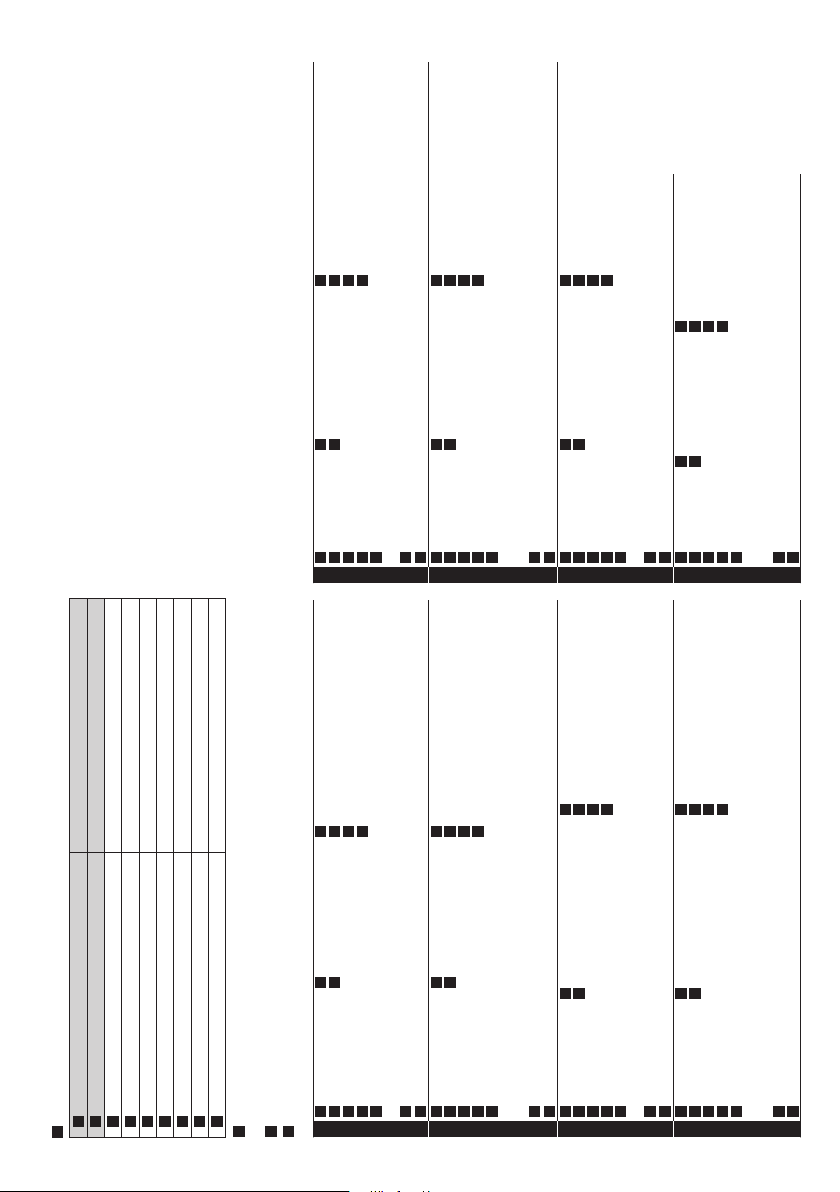
A
Product fiche
B
Supplier Panasonic Corporation
C
Model ID TX-32A300B TX-L39BLW6 TX-L50BLW6
D
Energy efficiency class A+ A++ A+
E
Visible screen size (diagonal) 80 cm / 32 inches 98 cm / 39 inches 126 cm / 50 inches
F
On mode average power consumption 34 W 34 W 76 W
G
Annual energy consumption
*
1
47 kWh 47 kWh 105 kWh
H
Standby power consumption
*
2
0.20 W 0.20 W 0.20 W
I
Off mode power consumption 0.20 W 0.20 W 0.20 W
J
Screen resolution 1,366 (W) × 768 (H) 1,920 (W) × 1,080 (H) 1,920 (W) × 1,080 (H)
K
*1: Energy consumption XYZ kWh per year, based on the power consumption of the television operating 4 hours per day for 365 days. The actual energy consumption will depend on how
the television is used.
L
*2: when the TV is turned off with the remote control and no function is active
M
For the information of rated power consumption, refer to the label on the TV back cover.
TQB0E2387
G
Jährlicher EnergieverbrauchHLeistungsaufnahme im Bereitschafts-ZustandILeistungsaufnahme im Aus-ZustandJBildschirmauflösungGJaarlijks energieverbruikHElektriciteitsverbruik in de slaapstand
I
Elektriciteitsverbruik in de uitstand
J
Schermresolutie
G
Consumo annuo di energia
H
Consumo di energia in modo stand-by IConsumo di energia in modo spentoJRisoluzione dello schermo
G
Consommation d’énergie annuelle
H
Consommation électrique en mode veilleIConsommation électrique en mode arrêtJRésolution de l’écran
Español
A
Ficha de producto
C
Identificador del modelo
G
Consumo de energía anual
B
Proveedor
D
Clase de eficiencia energética
H
Consumo de electricidad en espera
E
Diagonal visible de la pantalla
I
Consumo de electricidad en modo apagado
F
Consumo de electricidad en modo encendido
J
Resolución de la pantalla
K
Consumo de energía: XYZ kWh al año, suponiendo cuatro horas de funcionamiento diario durante
365 días. El consumo efectivo dependerá de las condiciones reales de uso de la televisión.Lcuando el TV se apaga con el mando a distancia y no existe ninguna función activa
M
Para información sobre el consumo de potencia nominal consulte la etiqueta en la cubierta trasera del televisor.
Svenska
A
Informationsblad
C
Modellbeteckning
G
Årlig energiförbrukning
B
Leverantör
D
Energieffektivitetsklass
H
Effektförbrukning i standbyläge
E
Synlig skärmdiagonal
I
Effektförbrukning i frånläge
F
Effektförbrukning i påläge
J
Skärmupplösning
K
Energiförbrukning ’XYZ’ kWh per år, beräknad utifrån effektförbrukningen för en tv-mottagare som
används fyra timmar per dygn under 365 dygn. Den faktiska energiförbrukningen kommer att bero
på hur tv-mottagaren används.Lnär TV:n är avslagen via fjärrkontrollen och ingen funktion är aktiv
M
För information om nominell effektförbrukning, se etiketten på TV:ns baksida.
Norsk
A
Produktinfo
C
Modell-ID
G
Årlig energiforbruk
B
Leverandør
D
Energieffektivitetsklasse
H
Strømforbruk i standby
E
Synlig skjerm-diagonal
I
Strømforbruk i off-modus
F
Strømforbruk i på-modus
J
Skjermoppløsning
K
Energiforbruk XYZ kWh per år, strømforbruket er basert på bruk av TV-en for 4 timer per dag for 365
dager. Det faktiske energiforbruket vil være avhengig av hvordan TV-en brukes.Lnår TV-en er skrudd av med fjernkontrollen og ingen funksjon er aktiv
M
For informasjon om nominell effekt, se etiketten på TV-bakdekselet.
Suomi
A
Tuoteseloste
C
Mallitunniste
G
Vuotuinen energiankulutus
B
Tavarantoimittaja
D
Energiatehokkuusluokka
H
Valmiustilan energiankulutus
E
Näkyvissä olevan kuvapinnan lävistäjä
I
Tehonkulutus pois päältä -tilassa
F
Tehonkulutus päälle kytkettynä -tilassa
J
Kuvaruudun resoluutio
K
Energiankulutus XYZ kWh:a vuodessa, kun oletetaan, että televisiota
käytetään 4 tuntia päivässä 365 päivän ajan. Todellinen energiankulutus
riippuu television käyttötavasta.LKun TV on sammutettu kaukosäätimestä ja mikään toiminto ei ole käytössäMTietoja nimellisestä virrankulutuksesta on kyltissä television takakannessa.
47 kWh 47 kWh 105 kWh
0.20 W 0.20 W 0.20 W
TQB0E2387
Ficha de producto
C
Identificador del modelo
G
Consumo de energía anual
Proveedor
D
Clase de eficiencia energética
H
Consumo de electricidad en espera
Diagonal visible de la pantalla
I
Consumo de electricidad en modo apagado
Consumo de electricidad en modo encendido
J
Resolución de la pantalla
Consumo de energía: XYZ kWh al año, suponiendo cuatro horas de funcionamiento diario durante
365 días. El consumo efectivo dependerá de las condiciones reales de uso de la televisión.
cuando el TV se apaga con el mando a distancia y no existe ninguna función activa
Para información sobre el consumo de potencia nominal consulte la etiqueta en la cubierta trasera del televisor.
Informationsblad
C
Modellbeteckning
G
Årlig energiförbrukning
Leverantör
D
Energieffektivitetsklass
H
Effektförbrukning i standbyläge
Synlig skärmdiagonal
I
Effektförbrukning i frånläge
Effektförbrukning i påläge
J
Skärmupplösning
Energiförbrukning ’XYZ’ kWh per år, beräknad utifrån effektförbrukningen för en tv-mottagare som
används fyra timmar per dygn under 365 dygn. Den faktiska energiförbrukningen kommer att bero
på hur tv-mottagaren används.
när TV:n är avslagen via fjärrkontrollen och ingen funktion är aktiv
För information om nominell effektförbrukning, se etiketten på TV:ns baksida.
Produktinfo
C
Modell-ID
G
Årlig energiforbruk
Leverandør
D
Energieffektivitetsklasse
H
Strømforbruk i standby
Synlig skjerm-diagonal
I
Strømforbruk i off-modus
Strømforbruk i på-modus
J
Skjermoppløsning
Energiforbruk XYZ kWh per år, strømforbruket er basert på bruk av TV-en for 4 timer per dag for 365
dager. Det faktiske energiforbruket vil være avhengig av hvordan TV-en brukes.
når TV-en er skrudd av med fjernkontrollen og ingen funksjon er aktiv
For informasjon om nominell effekt, se etiketten på TV-bakdekselet.
Tuoteseloste
C
Mallitunniste
G
Vuotuinen energiankulutus
Tavarantoimittaja
D
Energiatehokkuusluokka
H
Valmiustilan energiankulutus
Näkyvissä olevan kuvapinnan lävistäjä
I
Tehonkulutus pois päältä -tilassa
Tehonkulutus päälle kytkettynä -tilassa
J
Kuvaruudun resoluutio
Energiankulutus XYZ kWh:a vuodessa, kun oletetaan, että televisiota
käytetään 4 tuntia päivässä 365 päivän ajan. Todellinen energiankulutus
riippuu television käyttötavasta.
Kun TV on sammutettu kaukosäätimestä ja mikään toiminto ei ole käytössä
Tietoja nimellisestä virrankulutuksesta on kyltissä television takakannessa.
TQB0E2387
Deutsch
A
Produktdatenblatt
C
Modellkennung
G
Jährlicher Energieverbrauch
B
Lieferanten
D
Energieeffizienzklasse
H
Leistungsaufnahme im Bereitschafts-Zustand
E
Sichtbare Bildschirmdiagonale
I
Leistungsaufnahme im Aus-Zustand
F
Leistungsaufnahme im Ein-Zustand
J
Bildschirmauflösung
K
Energieverbrauch XYZ kWh/Jahr, auf der Grundlage eines täglich vierstündigen Betriebs des Fernsehgerätes
an 365 Tagen. Der tatsächliche Energieverbrauch hängt von der Art der Nutzung des Fernsehgerätes ab.
L
wenn der Fernseher mit der Fernbedienung ausgeschaltet wird und keine Funktion aktiviert ist
M
Weitere Informationen zur Nennleistungsaufnahme siehe Aufkleber auf der hinteren Abdeckung des Fernsehers.
Nederlands
A
Productkaart
C
Typeaanduiding
G
Jaarlijks energieverbruik
B
Leverancier
D
Energie-efficiëntieklasse
H
Elektriciteitsverbruik in de slaapstand
E
Zichtbare schermdiagonaal
I
Elektriciteitsverbruik in de uitstand
F
Elektriciteitsverbruik in de gebruiksstand
J
Schermresolutie
K
Energieverbruik XYZ kWh per jaar, gebaseerd op het elektriciteitsverbruik van de televisie wanneer deze
gedurende 365 dagen 4 uur per dag aanstaat. Het feitelijke energieverbruik is afhankelijk van de manier
waarop de televisie wordt gebruikt.
L
Als de tv is uitgeschakeld met de afstandsbediening en er geen functies actief zijn
M
Raadpleeg het etiket aan de achterkant van de tv voor informatie over het nominale elektriciteitsverbruik.
Italiano
A
Scheda prodotto
C
Identificatore del modello
G
Consumo annuo di energia
B
Fornitore
D
Classe di efficienza energetica
H
Consumo di energia in modo stand-by
E
Diagonale dello schermo visibile
I
Consumo di energia in modo spento
F
Consumo di energia in modo acceso
J
Risoluzione dello schermo
K
Consumo di energia XYZ kWh/anno calcolato sulla base del consumo di un televisore in funzione per 4
ore al giorno per 365 giorni. Il consumo effettivo di energia dipende dall’utilizzo reale del televisore.
L
quando il televisore viene spento con il telecomando e non sono attive funzioni
M
Per le informazioni sul consumo di energia nominale, fare riferimento all’etichetta sul coperchio posteriore del televisore.
Français
A
Fiche produit
C
Référence du modèle
G
Consommation d’énergie annuelle
B
Fournisseur
D
Classe d’efficacité énergétique
H
Consommation électrique en mode veille
E
Diagonale d’écran visible
I
Consommation électrique en mode arrêt
F
Consommation électrique en mode marche
J
Résolution de l’écran
K
Consommation d’énergie de “XYZ” kWh par an, sur la base de la consommation électrique
d’un téléviseur fonctionnant quatre heures par jour pendant trois cent soixante-cinq jours. La
consommation réelle dépend des conditions d’utilisation du téléviseur.
L
lorsque le téléviseur est éteint à l’aide de la télécommande et qu’aucune fonction n’est active.
M
La consommation nominale est indiquée sur l’étiquette apposée sur la partie arrière du téléviseur.
Español
A
Ficha de producto
C
Identificador del modelo
G
Consumo de energía anual
B
Proveedor
D
Clase de eficiencia energética
H
Consumo de electricidad en espera
E
Diagonal visible de la pantalla
I
Consumo de electricidad en modo apagado
F
Consumo de electricidad en modo encendido
J
Resolución de la pantalla
K
Consumo de energía: XYZ kWh al año, suponiendo cuatro horas de funcionamiento diario durante
365 días. El consumo efectivo dependerá de las condiciones reales de uso de la televisión.
L
cuando el TV se apaga con el mando a distancia y no existe ninguna función activa
M
Para información sobre el consumo de potencia nominal consulte la etiqueta en la cubierta trasera del televisor.
Svenska
A
Informationsblad
C
Modellbeteckning
G
Årlig energiförbrukning
B
Leverantör
D
Energieffektivitetsklass
H
Effektförbrukning i standbyläge
E
Synlig skärmdiagonal
I
Effektförbrukning i frånläge
F
Effektförbrukning i påläge
J
Skärmupplösning
K
Energiförbrukning ’XYZ’ kWh per år, beräknad utifrån effektförbrukningen för en tv-mottagare som
används fyra timmar per dygn under 365 dygn. Den faktiska energiförbrukningen kommer att bero
på hur tv-mottagaren används.
L
när TV:n är avslagen via fjärrkontrollen och ingen funktion är aktiv
M
För information om nominell effektförbrukning, se etiketten på TV:ns baksida.
Norsk
A
Produktinfo
C
Modell-ID
G
Årlig energiforbruk
B
Leverandør
D
Energieffektivitetsklasse
H
Strømforbruk i standby
E
Synlig skjerm-diagonal
I
Strømforbruk i off-modus
F
Strømforbruk i på-modus
J
Skjermoppløsning
K
Energiforbruk XYZ kWh per år, strømforbruket er basert på bruk av TV-en for 4 timer per dag for 365
dager. Det faktiske energiforbruket vil være avhengig av hvordan TV-en brukes.
L
når TV-en er skrudd av med fjernkontrollen og ingen funksjon er aktiv
M
For informasjon om nominell effekt, se etiketten på TV-bakdekselet.
Suomi
A
Tuoteseloste
C
Mallitunniste
G
Vuotuinen energiankulutus
B
Tavarantoimittaja
D
Energiatehokkuusluokka
H
Valmiustilan energiankulutus
E
Näkyvissä olevan kuvapinnan lävistäjä
I
Tehonkulutus pois päältä -tilassa
F
Tehonkulutus päälle kytkettynä -tilassa
J
Kuvaruudun resoluutio
K
Energiankulutus XYZ kWh:a vuodessa, kun oletetaan, että televisiota
käytetään 4 tuntia päivässä 365 päivän ajan. Todellinen energiankulutus
riippuu television käyttötavasta.
L
Kun TV on sammutettu kaukosäätimestä ja mikään toiminto ei ole käytössä
M
Tietoja nimellisestä virrankulutuksesta on kyltissä television takakannessa.
TQB0E2387
A+
127 cm / 50 inches
71 W
103 kWh
<0,5 W
NA
1920 x 1080
TX-50A300B
English-19-
Page 21
Éves energiafogyasztás
Készenléti üzemmódbeli energiafogyasztás
Kikapcsolt üzemmódbeli energiafogyasztás
I
G
H
Energiahatékonysági osztály
Típusazonosító
C
D
Látható képátló nagysága
Beszállító
Termékismertető adatlap
E
B
A
Magyar
Képernyőfelbontás
J
A televíziókészülék napi 4 órás üzem mellett az év 365 napjára vetítve évente XYZ kWh mennyiségű
energiát fogyaszt. A tényleges energiafogyasztás a készülék üzemeltetési módjától függ.
További információért a névleges energiafogyasztással kapcsolatban olvassa el a TV hátulsó burkolatán található címkét.
Amikor a TV-t a távirányítóval kapcsolják ki, és nincs aktív funkció
Bekapcsolt üzemmódbeli energiafogyasztás
L
F
K
Roční spotřeba elektrické energie
Spotřeba elektrické energie v pohotovostním režimu
G
H
Identifikační značka modelu
Třída energetické účinnosti
C
D
Dodavatel
Informační list výrobku
B
A
M
Spotřeba elektrické energie ve vypnutém stavu
I
Viditelná úhlopříčka obrazovky
E
Česky
Godišnji utrošak energije
Utrošak energije u pripravnosti
Utrošak energije pri isključenosti
Razlučivost zaslona
I
J
G
H
Aastane energiatarbimine
Ooteseisundi elektritarbimine
Väljalülitatud seisundi elektritarbimine
Rozlišení obrazovky
J
Spotřeba elektrické energie v zapnutém stavu
F
Ετήσια κατανάλωση ενέργειας
Κατανάλωση ισχύος σε κατάσταση εκτός λειτουργίας
Κατανάλωση ισχύος σε κατάσταση αναμονής
Ανάλυση οθόνης
I
J
G
H
Τάξη ενεργειακής απόδοσης
Αναγνωριστικό μοντέλου
C
D
Informace o jmenovitém příkonu najdete na štítku na zadním krytu televizoru.
Ορατή διαγώνιος οθόνης
Spotřeba elektrické energie XYZ kWh za rok vycházející ze spotřeby elektrické energie televizního přijímače, který je v provozu
K
Προμηθευτής
4 hodiny denně po dobu 365 dní. Skutečná spotřeba elektrické energie závisí na způsobu použití televizního přijímače.
Δελτίο προϊόντος
Když je televizor vypnutý dálkovým ovladačem a není aktivní žádná funkce.
L
Κατανάλωση ισχύος σε κατάσταση λειτουργίας
F
E
B
A
M
Ελληνικά
Κατανάλωση ενέργειας XYZ kWh ανά έτος, με βάση την κατανάλωση ισχύος από την τηλεόραση για τετράωρη λειτουργία
ανά ημέρα επί 365 ημέρες. Η πραγματική κατανάλωση ενέργειας εξαρτάται από τον τρόπο χρήσης της συσκευής.Lόταν η τηλεόραση είναι απενεργοποιημένη από το τηλεχειριστήριο και δεν υπάρχουν ενεργές λειτουργίεςMΓια τις πληροφορίες ονομαστικής κατανάλωσης ισχύος, ανατρέξτε στην ετικέτα στο πίσω κάλυμμα της τηλεόρασης.
K
Yıllık enerji tüketimi
Beklemede güç tüketimi
Ekran çözünürlüğü
Kapalı modda güç tüketimi
I
J
G
H
Enerji verimlilik sınıfı
Model No
C
D
365 gün boyunca günde 4 saat çalışan televizyonun tükettiği güç referans alınarak yılda XYZ kWh
enerji tüketimi. Güncel enerji tüketimi televizyonun nasıl kullanıldığına bağlı olacaktır.
Görülebilir ekran köşegeni
Tedarikçi
Ürün fişi
B
A
Televizyon uzaktan kumanda ile kapatıldığında ve aktif fonksiyon yokken
Açık modda güç tüketimi
L
F
E
K
Türk çe
ID modela
C
Nominal güç tüketim bilgisi için televizyonun arka kapağındaki etikete bakın.
Podatkovni list proizvoda
A
M
Razred energetske učinkovitosti
D
Dijagonala vidljivog zaslona
Dobavljač
E
B
Hrvatski
Utrošak energije pri uključenosti
F
Ročná spotreba elektrickej energie
Spotreba elektrickej energie v pohotovostnom režime
Rozlíšenie obrazovky
Spotreba elektrickej energie v režime vypnutia
I
J
G
H
Trieda energetickej efektívnosti
Identifikačný znak modelu
C
D
Utrošak energije iznosi XYZ kWh godišnje na temelju utroška energije televizora koji radi četiri sata
dnevno 365 dana u godini. Stvarni utrošak energije ovisit će o tome kako se upotrebljava televizor.
kada se televizor isključi daljinskim upravljačem i nijedna funkcija nije aktivna
Za informacije o nazivnoj snazi pogledajte naljepnicu na stražnjem pokrovu televizora.
L
K
M
Dodávateľ
Opis výrobku
B
A
Spotreba energie XYZ kWh za rok na základe spotreby elektrickej energie televízora, ktorý je v činnosti
Uhlopriečka viditeľnej časti obrazovky
Spotreba elektrickej energie v režime zapnutia
F
E
K
Slovensky
4 hodiny denne počas 365 dní. Skutočná spotreba energie závisí od toho, ako sa televízor používa.
keď je televízor vypnutý diaľkovým ovládačom a nie je aktívna žiadna funkcia
L
Ekraani resolutsioon
I
J
G
H
Energiatõhususe klass
Mudelitähis
C
D
Energiatarbimine XYZ kWh aastas, eeldusel et televiisor töötab neli tundi päevas ja 365 päeva aastas.
Údaje o menovitom príkone sú uvedené na štítku na zadnom kryte televízora.
M
Tootekirjeldus
A
Tegelik energiatarbimine oleneb televiisori kasutusviisist.
Ekraani nähtava osa diagonaal
Tarnija
E
B
Nimivõimsustarbe alase teabe leiate teleri tagakattel olevalt sildilt.
kui teler on kaugjuhtimispuldiga välja lülitatud ning ükski funktsioon ei tööta.
Sisselülitatud seisundi elektritarbimine
L
F
K
M
Eesti
Metinis energijos sunaudojimas
Ekrano skiriamoji geba
Energijos sunaudojimas budėjimo režimu
Energijos sunaudojimas išjungus gaminį
I
J
G
H
Consumo de energia anual
Consumo, em termos de potência, em estado de vigília
G
H
Energijos efektyvumo klasė
Modelio identifikatorius
C
D
Matoma ekrano įstrižainė
Tiekėjas
Gaminio kortelė
XYZ kWh energijos sunaudojimas per metus nurodomas atsižvelgus į tai, kiek energijos sunaudojama televizoriui veikiant
Energijos sunaudojimas įjungus gaminį
F
E
B
K
A
Identificador de modelo
C
Informaciją apie vardinį energijos suvartojimą žr. etiketėje ant televizoriaus galinio gaubto.
4 valandas per dieną 365 dienas iš eilės. Faktinį energijos sunaudojimą lems tai, kiek laiko bus naudojamas televizorius.
Ficha de produto
išjungus televizorių nuotolinio valdymo įrenginiu, kai neveikia jokia funkcija
L
A
M
Classe de eficiência energética
D
Fornecedor
B
Lietuvių k.
Consumo, em termos de potência, em estado de desactivação
Resolução do ecrã
I
J
Diagonal visível do ecrã
Consumo, em termos de potência, no estado activo
Consumo de energia de XYZ kWh por ano, baseado no consumo, em termos de potência, do televisor a funcionar
4 horas por dia durante 365 dias. O consumo de energia real dependerá do modo como o televisor é utilizado.
F
E
K
Português
Årligt energiforbrug
Skærmopløsning
Effektforbruget i standbytilstand
Effektforbruget i slukket tilstand
I
J
G
H
Energieffektivitetsklasse
Modelidentifikation
C
D
Energiforbrug: XYZ kWh om året, beregnet som fjernsynets effektforbrug, hvis det er tændt 4 timer
om dagen i 365 dage. Det faktiske energiforbrug vil bero på, hvordan fjernsynet bruges.
Synlig skærmdiagonal
Leverandør
Datablad
Para obter informações sobre o consumo de potência nominal, consulte a etiqueta na tampa traseira do televisor.
Quando o televisor é desligado com o telecomando e quando não está activada qualquer função
L
E
B
A
M
Effektforbruget i tændt tilstand
F
K
Dansk
Годишна консумация на енергия
Консумация на енергия в режим „в готовност“
Консумация на енергия в режим „изключен“
Разделителна способност на екрана
I
G
H
Клас на енергийна ефективност
Идентификатор на модела
C
D
For oplysninger om nominelt strømforbrug henvises til mærkaten på fjernsynets bagbeklædning.
Видим диагонал на екрана
Доставчик
Продуктов фиш
når fjernsynet er slukket med fjernbetjeningen og ingen funktioner er aktive
L
Консумация на енергия в режим „включен“
E
B
A
M
Български
English - 20 -
Consumul anual de energie
G
J
Referinţă model
C
Консумация на енергия XYZ kWh годишно, изчислена на базата на 4 работни часа дневно при
365 дни. Действително консумираната енергия ще зависи от начина на употреба на телевизора.
Fişa produsului
За информация за номиналната консумация на енергия вижте етикета върху задния капак на телевизора.
когато телевизорът е изключен от дистанционното управление и няма активна функция
L
F
K
A
M
Rezoluţie ecran
Puterea consumată în modul standby
Puterea consumată în modul oprit
I
J
H
Clasa de eficienţă energetică
D
Diagonala vizibilă a ecranului
Furnizor
Puterea consumată în modul activ
F
E
B
Română
Consumul de energie de XYZ kWh pe an, pe baza puterii consumate de aparatul TV atunci când este în funcţiune
K
4 ore pe zi timp de 365 de zile; consumul real de energie depinde de condiţiile de utilizare a aparatului TV.
când televizorul este oprit cu telecomanda şi nu este activă nicio funcţie
L
Ikgadējais enerģijas patēriņš
Gatavības režīma elektroenerģijas patēriņš
G
H
Energoefektivitātes klase
Modeļa identifikators
C
D
Piegādātājs
Produkta speciālā zīme
Pentru informaţii privind consumul nominal de energie, consultaţi eticheta de pe capacul posterior al televizorului.
B
A
M
Latviešu valodā
Roczne zużycie energii
Rozdzielczość ekranu
Zużycie energii w trybie czuwania
Zużycie energii w trybie wyłączenia
I
J
G
Ekrāna izšķirtspēja
Izslēgtā režīma elektroenerģijas patēriņš
I
J
Ekrāna redzamās daļas izmērs pa diagonāli
Enerģijas patēriņš XYZ kWh gadā, ņemot vērā televizora elektroenerģijas patēriņu, darbojoties 365
Aktīvā režīma elektroenerģijas patēriņš
F
E
K
H
Klasa efektywności energetycznej
Identyfikator modelu
C
D
Zużycie energii XYZ kWh/rok na podstawie zużycia energii przez telewizor działający 4 godziny
Nominālais strāvas patēriņš norādīts etiķetē televizora korpusa aizmugurē.
Karta produktu
dienas, četras stundas dienā. Faktiskais enerģijas patēriņš būs atkarīgs no tā, kā televizors tiks izmantots.
kad televizors ir izslēgts ar tālvadības pulti un nedarbojas neviena funkcija
L
A
M
dziennie przez 365 dni. Rzeczywiste zużycie energii zależy od sposobu użytkowania telewizora.
Przekątna widzialna ekranu
Dostawca
E
B
Zużycie energii w trybie włączenia
F
K
Informacje na temat znamionowego poboru mocy znajdują się na etykiecie na tylnej obudowie telewizora.
Wyłączenie telewizora za pomocą pilota i brak aktywnych funkcji.
L
M
Polski
Page 22

 Loading...