

Page 1

D
esigned for Panasonic DVD Home Theater Sound System
compatible with the SH-FX50.
C
onçu pour les chaînes DVD cinéma maison de Panasonic
compatibles avec le modèle SH-FX50.
FX50PP.book Page 1 Monday, February 21, 2005 6:44 PM
Operating Instructions
Manuel d’utilisation
Digital Transmitter & Receiver
Émetteur-récepteur numérique
Model No./Modèle SH-FX50
Dear customer
Thank you for purchasing this product. For optimum performance and safety,
please read these instructions carefully.
Before connecting, operating or adjusting this product, please read the
instructions completely. Please keep this manual for future reference.
System/Chaîne SH-FX50
Digital Transmitter/Émetteur numérique SH-FX50T
Digital Receiver/Récepteur numérique SE-FX50
PP
Panasonic Consumer Electronics
Company, Division of Panasonic
Corporation of North America
One Panasonic Way Secaucus,
New Jersey 07094
http://www.panasonic.com
C 2005 Matsushita Electric Industrial Co., Ltd.
pq
Panasonic Puerto Rico, Inc.
Ave. 65 de Infantería, Km. 9.5
San Gabriel Industrial Park, Carolina,
Puerto Rico 00985
Accessory
Please check and identify the supplied accessory. Use number indicated in parentheses
when asking for replacement part. (Product number correct as of January 2005. This
may be subject to change.)
For U.S.A.: To order accessory, refer to “Accessory Purchases” on page 6.
For Canada: To order accessory, call the dealer from whom you made your
purchase.
∏ 1 AC power supply cord (K2CB2CB00018)
User memo:
DATE OF PURCHASE _____________
DEALER NAME __________________
DEALER ADDRESS _______________
________________________________
TELEPHONE NUMBER ____________
The model number and serial number of
this product can be found on either the
back or the bottom of the unit. Please note
them in the space provided below and
keep for future reference.
MODEL NUMBER
SERIAL NUMBER
SH-FX50
Cher client
Nous vous remercions d’avoir arrêté votre choix sur cet appareil.
Pour en tirer un rendement optimal, lire attentivement le présent manuel.
Avant de raccorder, régler ou utiliser l’appareil, il est recommandé de
lire attentivement le manuel d’utilisation. Conserver ce manuel.
RQT7992-1Y
F0105YM1025
Panasonic Canada Inc.
5770 Ambler Drive
Mississauga, Ontario
L4W 2T3
www.panasonic.ca
Printed in Malaysia
Imprimé en Malaisie
Accessoire
Vérifier l’accessoire en le cochant. Lors de la commande de pièces de rechange, utiliser
le numéro indiqué entre parenthèses. (Le numéro de modèle indiqué ici était à jour en
janvier 2005. Il pourrait être modifié sans préavis.)
Pour la commande d’accessoires, contacter le magasin où l’appareil a été acheté.
∏ 1 cordon d’alimentation (K2CB2CB00018)
Homologation:
DATE D’ACHAT ___________________
DÉTAILLANT _____________________
ADRESSE DU DÉTAILLANT _________
________________________________
o
N
DE TÉLÉPHONE _______________
________________________________
Il est recommandé de noter, dans
l’espace prévu ci-dessous, le numéro de
modèle et le numéro de série inscrits à
l’arrière, ou sous le fond de l’appareil, et
de conserver ce manuel pour référence
ultérieure.
NUMÉRO DE MODÈLE SH-FX50
NUMÉRO DE SÉRIE
Troubleshooting guide
Before requesting service, make the following checks. If you are in doubt about some of
the check points, or if the solutions indicated in the chart do not solve the problem, refer
to the “Customer Services Directory” on page 6 if you reside in the U.S.A., or refer to the
“Product information” on page 3 if you reside in Canada.
Display on your home theater system
“ [W] ” is
flashing.
“W01” is
flashing.
Digital receiver
Wireless link
indicator is
flashing.
≥ There is no link between the main unit and the receiver. Check
that the receiver is turned on.
≥ Ensure that the digital transmitter is fully inserted into the slot of
the main unit.
≥ Re-initialize the main unit: While stopped and “DVD/CD” is the
source, press and hold [∫] on the main unit and [S10] on the
remote control until “Initialized” disappears from the television.
Turn the unit off and on again. If the problem persists, contact a
qualified service person.
≥ Ensure that the digital transmitter is fully inserted into the slot of
the main unit.
Guide de dépannage
Avant d’appeler un centre de service, faire les vérifications décrites ci-dessous. En cas
de doute sur certains des points de vérification, ou si les solutions proposées dans le
tableau ne résolvent pas le problème rencontré, se reporter
d’informations” à la page 3.
Écran d’affichage sur la chaîne cinéma maison
“ [W] ”
clignote.
“W01”
clignote.
Récepteur numérique
Le voyant de
liaison sans
fil clignote.
1
≥ Il n’y a aucune connexion entre l’appareil principal et le récepteur.
S’assurer que le récepteur est sous tension.
≥ S’assurer que l’émetteur numérique est inséré à fond dans la
fente de l’appareil principal.
≥ Dans le mode arrêt avec “DVD/CD” comme source, maintenir
enfoncée la touche [∫] sur l’appareil et la touche [S10] de la
télécommande jusqu’
soit plus affichée
marche, puis le remettre en marche. Si le problème n’est pas
résolu, contacter un technicien qualifié.
≥ S’assurer que l’émetteur numérique est inséré à fond dans la
fente de l’appareil principal.
à
ce que l’indication “Lecteur réinitialisé” ne
à
l’écran du téléviseur. Mettre l’appareil hors
à
la section “Demande
Page 2
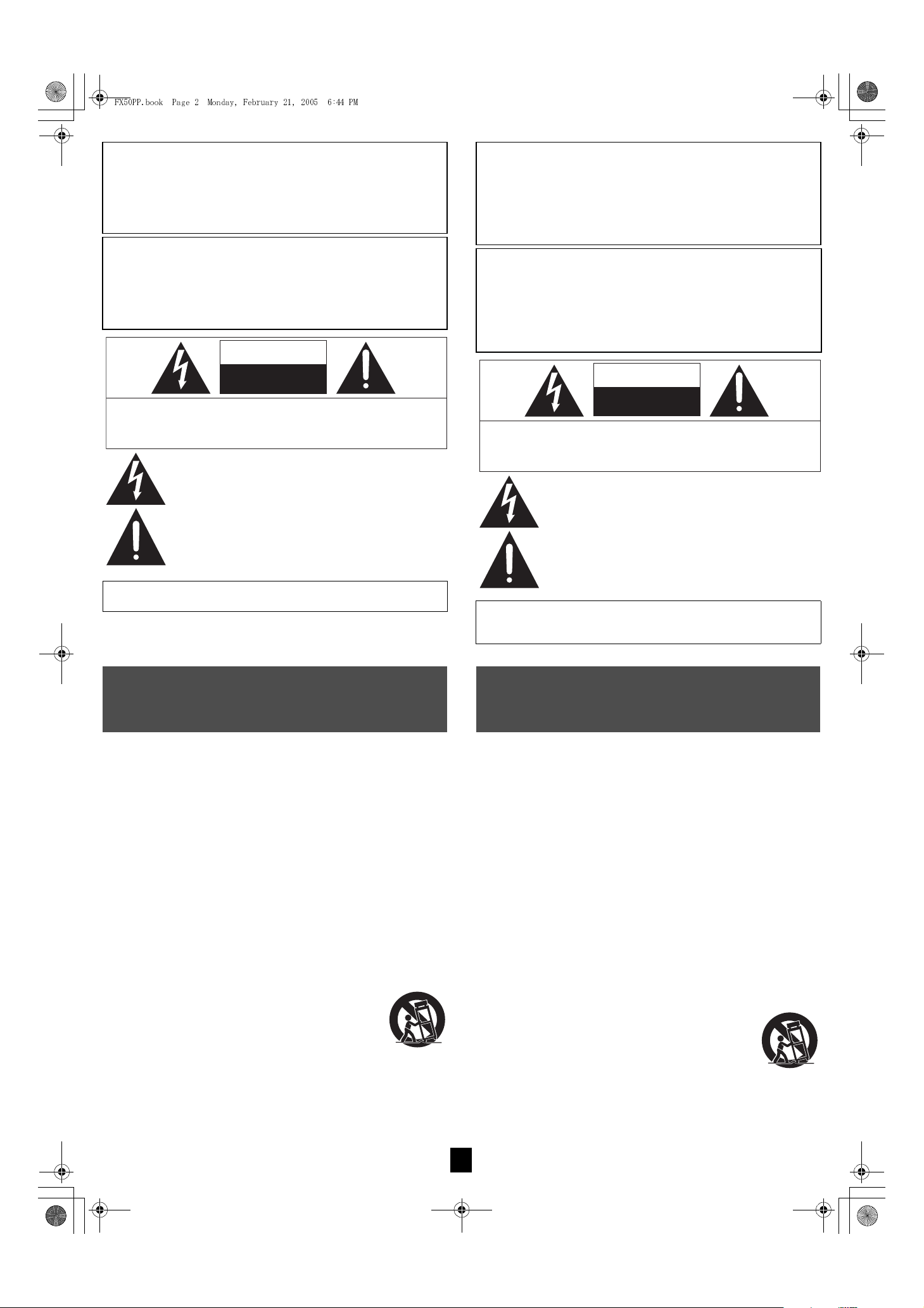
ATTENTION
RISQUE DE CHOC ELECTRIQUE
NE PAS OUVRIR
ATTENTION: AFIN DE PRÉVENIR LE RISQUE DE CHOCS
ÉLECTRIQUES, NE PAS RETIRER LES VIS.
TOUTE RÉPARATION DEVRAIT ÊTRE CONFIÉE À UN
PERSONNEL QUALIFIÉ.
Le point d’exclamation dans un triangle équilatéral indique que
le manuel d’utilisatio n inclus avec l’apparei l contient
d’importantes recommandations quant au fonctionnement et à
l’entretien de ce dernier.
Le symbole de l’éclair dans un triangle équilatéral indique la
présence d’une tension suffisamment élevée pour engendrer
un risque de chocs électriques.
FX50PP.book Page 2 Monday, February 21, 2005 6:44 PM
WARNING:
TO REDUCE THE RISK OF FIRE, ELECTRIC SHOCK OR
PRODUCT DAMAGE, DO NOT EXPOSE THIS APPARATUS TO
RAIN, MOISTURE, DRIPPING OR SPLASHING AND THAT NO
OBJECTS FILLED WITH LIQUIDS, SUCH AS VASES, SHALL
BE PLACED ON THE APPARATUS.
CAUTION!
DO NOT INSTALL OR PLACE THIS UNIT IN A BOOKCASE, BUILT-IN
CABINET OR IN ANOTHER CONFINED SPACE. ENSURE THE UNIT IS
WELL VENTILATED. TO PREVENT RISK OF ELECTRIC SHOCK OR
FIRE HAZARD DUE TO OVERHEATING, ENSURE THAT CURTAINS
AND ANY OTHER MATERIALS DO NOT OBSTRUCT THE
VENTILATION VENTS.
CAUTION
RISK OF ELECTRIC SHOCK
DO NOT OPEN
CAUTION: TO REDUCE THE RISK OF ELECTRIC SHOCK,
DO NOT REMOVE SCREWS. NO USER-SERVICEABLE
PARTS INSIDE.
REFER SERVICING TO QUALIFIED SERVICE PERSONNEL.
The lightnin g flash with arrowhead symbol, within an
equilateral triangle, is intended to alert the user to the
presence of uninsulate d “dangerous voltage” within the
product’s enclosure that may be of sufficient magnitude to
constitute a risk of electric shock to persons.
MISE EN GARDE:
AFIN DE PRÉVENIR TOUT RISQUE D’INCENDIE OU DE
CHOCS ÉLECTRIQUES, AINSI QUE TOUT DOMMAGE À
L’APPAREIL, NE PAS L’EXPOSER À LA PLUIE, À DES
ÉCLABOUSSURES OU À UNE HUMIDITÉ EXCESSIVE.
ÉVITER ÉGALEMENT DE PLACER DES CONTENANTS AVEC
DU LIQUIDE, TEL UN VASE, SUR L’APPAREIL.
ATTENTION!
NE PAS INSTALLER CET APPAREIL DANS UNE BIBLIOTHÈQUE,
UNE ARMOIRE OU TOUT AUTRE ESPACE CONFINÉ. S’ASSURER
QUE LA VENTILATION DE L’APPAREIL EST ADÉQUATE. AFIN
D’ÉVITER TOUT RISQUE DE CHOC ÉLECTRIQUE OU D’INCENDIE DÛ
À UN SURCHAUFFEMENT, S’ASSURER QUE RIDEAUX OU TOUT
OBJET QUELCONQUE NE BOUCHENT LES ÉVENTS D’AÉRATION
DE L’APPAREIL.
The exclamatio n point within an equilate ral triangle is
intended to alert the user to the presenc e of important
operating and maintenance (servicing) instructions in the
literature accompanying the appliance.
THE FOLLOWING APPLIES ONLY IN CANADA.
This Class B digital apparatus complies with Canadian ICES-003.
IMPORTANT SAFETY
INSTRUCTIONS
Read these operating instructions carefully before using the unit. Follow the
safety instructions on the unit and the applicable safety instructions listed
below. Keep these operating instructions handy for future reference.
1) Read these instructions.
2) Keep these instructions.
3) Heed all warnings.
4) Follow all instructions.
5) Do not use this apparatus near water.
6) Clean only with dry cloth.
7) Do not block any ventilation openings. Install in accordance with the manufacturer’s
instructions.
8) Do not install near any heat sources such as radiators, heat registers, stoves, or
other apparatus (including amplifiers) that produce heat.
9) Do not defeat the safety purpose of the polarized or grounding-type plug. A
polarized plug has two blades with one wider than the other. A grounding-type plug
has two blades and a third grounding prong. The wide blade or the third prong are
provided for your safety. If the provided plug does not fit into your outlet, consult an
electrician for replacement of the obsolete outlet.
10) Protect the power cord from being walked on or pinched particularly at plugs,
convenience receptacles, and the point where they exit from the apparatus.
11) Only use attachments/accessories specified by the manufacturer.
12) Use only with the cart, stand, tripod, bracket, or table specified by
the manufacturer, or sold with the apparatus. When a cart is
used, use caution when moving the cart/apparatus combination
to avoid injury from tip-over.
13) Unplug this apparatus during lightning storms or when unused
for long periods of time.
14) Refer all servicing to qualified service personnel. Servicing is required when the
apparatus has been damaged in any way, such as power-supply cord or plug is
damaged, liquid has been spilled or objects have fallen into the apparatus, the
apparatus has been exposed to rain or moisture, does not operate normally, or has
been dropped.
CE QUI SUIT NE S’APPLIQUE QU’AU CANADA.
Cet appareil numérique de la classe B est conforme à la norme NMB-003
du Canada.
IMPORTANTES MISES
EN GARDE
Avant d’utiliser l’appareil, lire attentivement les instructions qui suivent. Se
conformer tout particulièrement aux avertissements inscrits sur l’appareil et
aux consignes de sécurité indiquées ci-dessous. Conserver le présent
manuel pour consultation ultérieure.
1) Lire attentivement ces instructions.
2) Conserver ces instructions.
3) Lire toutes les mises en garde.
4) Suivre toutes les instructions.
5) Ne pas utiliser cet appareil près d’une source d’eau.
6) Nettoyer qu’avec un chiffon sec.
7) Ne pas bloquer les évents d’aération. Installer l’appareil selon les instructions du
fabricant.
8) Ne pas installer l’appareil près d’un appareil de chauffage tel qu’un radiateur, une
cuisinière, un registre de chaleur ou tout dispositif émettant de la chaleur (y
compris un amplificateur).
9) Pour des raisons de sécurité, ne pas modifier la fiche polarisée ou celle de mise à
la terre. Une fiche polarisée est une fiche à deux lames, dont une plus large. Une
fiche de mise à la terre est une fiche à deux lames avec une broche de masse. La
lame plus large ou la broche de masse procure une protection accrue. Si ce genre
de fiche ne peut être inséré dans une prise de courant, communiquer avec un
électricien pour remplacer la prise.
10) S’assurer que le cordon est placé dans un endroit où il ne risque pas d’être écrasé,
piétiné ou coincé. Faire particulièrement attention à ses extrémités de
branchement, y compris sa fiche.
11) N’utiliser que les accessoires ou périphériques recommandés par le fabricant.
12) N’utiliser l’appareil qu’avec un chariot, meuble, trépied, support
ou table recommandé par le fabricant ou vendu avec l’appareil.
Lors de l’utilisation d’un chariot, le déplacer avec le plus grand
soin afin d’éviter tout dommage.
13) Débrancher cet appareil lors d’un orage ou en cas de nonutilisation prolongée.
14) Confier l’appareil à un technicien qualifié pour toute réparation:
cordon d’alimentation ou fiche endommagé, liquide renversé ou objet tombé dans
l’appareil, exposition à la pluie ou à une humidité excessive, mauvais
fonctionnement ou échappement de l’appareil.
2
Page 3
7992En&Cf.fm Page 3 Tuesday, February 22, 2005 8:46 AM
The socket outlet shall be installed near the equipment and easily accessible or the
mains plug or an appliance coupler shall remain readily operable.
Although the AC power switch is in the “OFF” position, the unit is not completely
disconnected from the mains. Remove the plug from the main electrical outlet if you
will not be using the unit for an extended period of time. Place the unit so the plug can
be easily removed.
THE FOLLOWING APPLIES ONLY IN THE U.S.A.
CAUTION:
This equipment has been tested and found to comply with the limits for a Class B
digital device, pursuant to Part 15 of the FCC Rules.
These limits are designed to provide reasonable protection against harmful
interference in a residential installation. This equipment generates, uses and can
radiate radio frequency energy and, if not installed and used in accordance with the
instructions, may cause har mful interference to radio communications. However, there
is no guarantee that interference will not occur in a par ticular installation. If this
equipment does cause harmful interference to radio or television reception, which can
be determined by tur ning the equipment off and on, the user is encouraged to tr y to
correct the interference by one or more of the following measures:
≥ Reorient or relocate the receiving antenna.
≥ Increase the separation between the equipment and receiver.
≥ Connect the equipment into an outlet on a circuit different from that to which the
receiver is connected.
≥ Consult the dealer or an experienced radio/TV technician for help.
Any unauthorized changes or modifications to this equipment would void the user’s
authority to operate this device.
This device complies with Part 15 of the FCC Rules. Operation is subject to the
following two conditions: (1) This device may not cause harmful interference, and (2)
this device must accept any interference received, including interference that may
cause undesired operation.
WARNING:
To satisfy FCC RF exposure requirements for mobile transmitting devices, a
separation distance of 20 cm or more should be maintained between the antenna of
this device and persons during device operation. To ensure compliance, operations at
closer than this distance is not recommended. The antenna used for this transmitter
must not be co-located in conjunction with any other antenna or transmitter.
FCC ID: ACJSEFX50, ACJSEFX50X
This device complies with Part 15 of the FCC Rules. Operation is subject to the
following two conditions:
(1) This device may not cause har mful interference,
(2) This device must accept any interference received, including interference that may
cause undesired operation.
S’assurer que la prise secteur est située près de l’appareil dans un endroit facile
d’accès. La fiche du cordon d’alimentation doit également être facile d’accès.
Même si l’interrupteur est à la position “OFF”, l’appareil n’est pas entièrement
déconnecté de la source d’alimentation. Débrancher la fiche de la prise secteur si
l’appareil ne sera pas utilisé pendant une période prolongée. Placer l’appareil de
façon que la fiche soit facilement accessible.
THE FOLLOWING APPLIES ONLY IN CANADA.
CE QUI SUIT NE S’APPLIQUE QU’AU CANADA.
IC: 216A-SEFX50, 216A-SEFX50X
Matsushita Electric Industrial Co., Ltd.
This device complies with RSS-210 of the IC Rules. Operation is subject to the
following two conditions:
(1) This device may not cause har mful interference,
(2) This device must accept any interference received, including interference that may
cause undesired operation of the device.
Cet appareil est conforme à la RSS-210 du réglement de la IC. Le fonctionnement est
sujet aux deux conditions suivantes:
(1) Cet appareil ne peut causer d’interférence nuisible,
(2) Cet appareil reçoit toute interférence, même les interférences qui peuvent
occasioner un mauvais fonctionnement.
Product service
1. Damage requiring service—The unit should be serviced by qualified ser vice
personnel if:
(a) The AC power supply cord or AC adaptor has been damaged; or
(b) Objects or liquids have gotten into the unit; or
(c) The unit has been exposed to rain; or
(d) The unit does not operate normally or exhibits a marked change in performance;
or
(e) The unit has been dropped or the cabinet damaged.
2. Servicing—Do not attempt to service the unit beyond that described in these
operating instructions. Refer all other servicing to authorized servicing personnel.
3. Replacement parts—When parts need replacing ensure the servicer uses parts
specified by the manufacturer or parts that have the same characteristics as the
original parts. Unauthorized substitutes may result in fire, electric shock, or other
hazards.
4. Safety check— After repairs or service, ask the ser vicer to perform safety checks to
confirm that the unit is in proper working condition.
The servicer will require all components to service your system.
Therefore, should service ever be necessary, be sure to bring the entire system.
Product information
For product information or assistance with product operation:
In the U.S.A., refer to “Customer Services Directory” on page 6.
In Canada, contact the Panasonic Canada Inc. Customer Care Centre at
1-800-561-5505, or visit the website (www.panasonic.ca), or an
authorized Servicentre closest to you.
Service après-vente
1. En cas de dommage — Confier l’appareil à un technicien qualifié dans les cas
suivants:
(a) lorsque le cordon d’alimentation ou l’adaptateur secteur a été endommagé;
(b) lorsqu’un objet est tombé dans l’appareil ou si ce dernier a été mouillé;
(c) lorsque l’appareil a été exposé à la pluie;
(d) lorsque l’appareil semble ne pas fonctionner normalement ou que son rendement
laisse à désirer;
(e) lorsque l’appareil a subi un choc violent ou que son coffret a été endommagé.
2. Réparation —Ne faire aucun réglage ni ajustement autres que ceux décrits dans le
présent manuel. Confier toute réparation à un centre de service Panasonic agréé.
3. Pièces de rechange— S’assurer que le technicien utilise des pièces de rechange
recommandées par le fabricant ou dont les caractéristiques sont les mêmes.
L’utilisation de pièces de rechange non autorisées peut causer un incendie, des
chocs électriques ou d’autres dangers.
4. Vérification de sécurité —Demander au technicien qui a réparé l’appareil de
soumettre ce dernier à des vérifications pour s’assurer qu’il peut être utilisé en toute
sécurité.
Pour toute réparation ou révision, apporter tous les éléments de la chaîne.
Demande d’informations
Pour toutes réparations, renseignements ou conseils sur le fonctionnement
du produit:
Veuillez contacter le service à la clientèle de Panasonic Canada Inc. au
1-800-561-5505, son site web (www.panasonic.ca) ou le centre de
service agréé le plus proche.
Maintenance
Clean this unit with a soft, dry cloth.
≥ Never use alcohol, paint thinner or benzine to clean this unit.
≥ Before using chemically treated cloth, carefully read the instructions that came with the
cloth.
Entretien
Pour nettoyer l’appareil, utiliser un chiffon doux et sec.
≥Ne jamais utiliser d’alcool, de diluant pour peinture ni de benzène pour nettoyer
l’appareil.
≥ Avant d’utiliser un chiffon traité chimiquement, lire attentivement les directives sur
l’emballage du chiffon.
3
Page 4
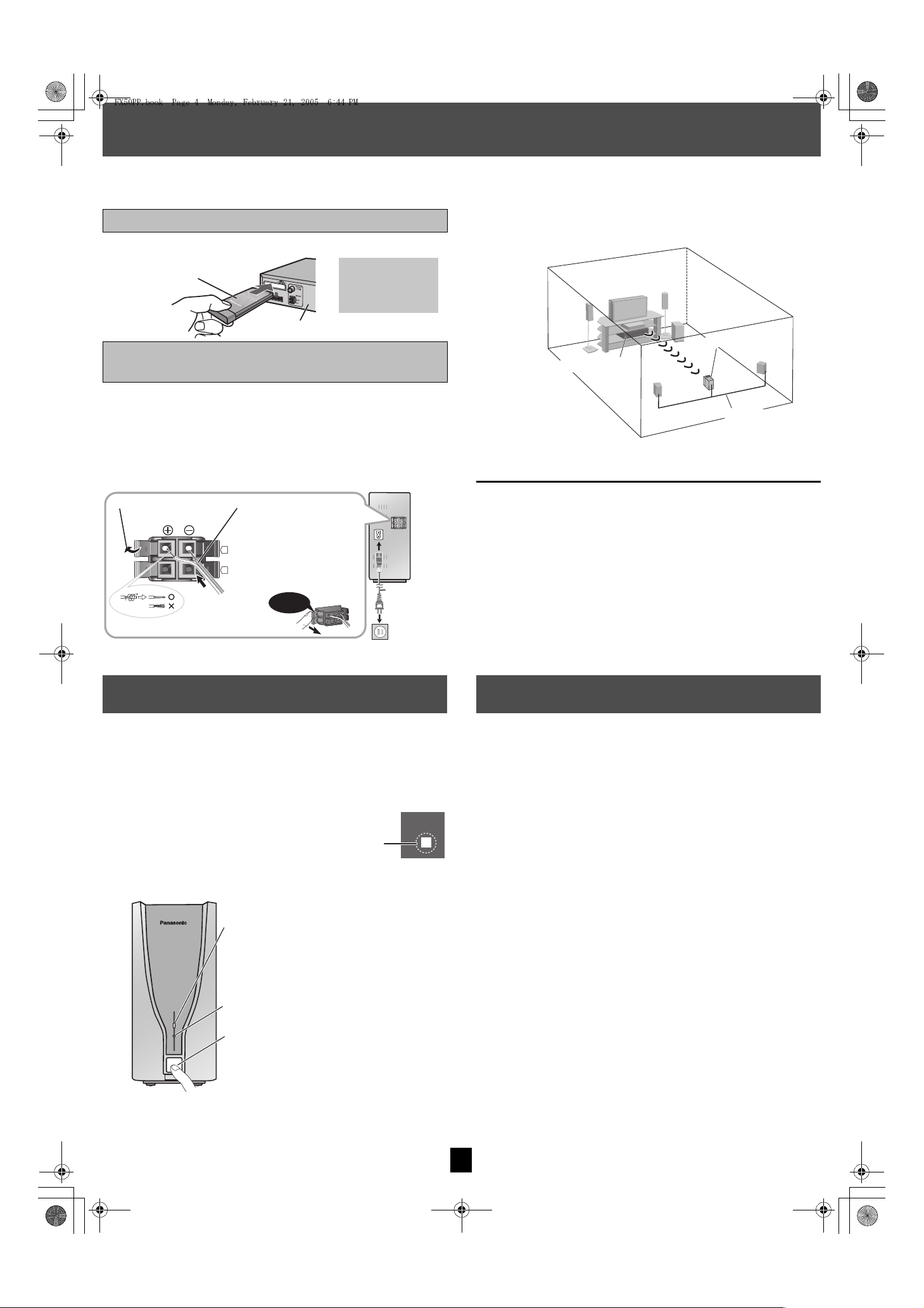
Digital transmitter
Insert fully until you
hear a click.
Rear of your home theater system
Do not insert or
remove while your
home theater
system is on.
AC IN~
L
R
1
2
3
Flip the tab open.
Insert the cable into the
terminal.
Flip the tab closed.
Click!
To household AC outlet (AC 120 V, 60 Hz)
AC power
supply cord
Color of the cables
i: White or Copper
j: Blue or Silver
Surround
cable (L)
Home theater main unit
Surround speaker
cables
Digital receiver
“ [W] ” lights up in the display on
your home theater system.
(“ [W] ” is flashing ➜ page 1,
Troubleshooting guide)
FX50PP.book Page 4 Monday, February 21, 2005 6:44 PM
Connecting and positioning
Preparation
≥Turn off all equipment before connection and read the appropriate operating instructions.
≥Connect the AC power supply cord after all other connections are complete.
Connecting the digital transmitter
Insert the digital transmitter into the slot.
Connecting the surround speaker cables
to the digital receiver
1 If the surround speaker cables have already been connected
Disconnect the surround speaker cables from
the subwoofer.
2 Connect the surround speaker cables to the
receiver.
∫ Wireless setup diagram
e.g.
≥Place the digital receiver within approximately 10 m (33 feet) from the home
theater main unit.
[Note[
≥Do not use more than two surround speakers when using this wireless
system.
≥Do not use this wireless system near a microwave oven.
≥Do not place the transmitter or receiver in a metal cabinet or bookshelf.
Power on/off
Refer also to the operating instructions for your home theater system.
1 Power on your home theater system.
2 Power on the receiver.
Wireless link indicator
This indicator lights when the signal strength is
adequate for proper operation.
Power indicator
This indicator lights when the unit is turned on.
Power on/off button
Specifications
RF SECTION
Wireless module
Frequency range 2.402 to 2.480 GHz
No. of channels 79
Bandwidth/Channel 1 MHz
RF output power 16 dBm (Max)
RF output impedance 50 ≠
Type of emissions
Data rate 1 Mbps
W
AMPLIFIER SECTION
Output power
RMS output power
Surround Ch 70 W per channel (4 ≠), 1 kHz, 10 % THD
FTC output power
Surround Ch 45 W per channel (4 ≠), 20Hz–20kHz, 1% THD
GENERAL
Power supply AC 120 V, 60 Hz
Power consumption Digital transmitter 0.3 W
Dimensions (WtHtD)
Digital transmitter 97 mmk47.5 mmk8.5 mm (3.8
Digital receiver 103 mmk215 mmk178 mm (
Mass
Digital transmitter 0.03 kg (0.07 Ibs)
Digital receiver 2.1 kg (4.6 Ibs)
Operating temperature range r5 oC to r35 oC (r41 oF to r95 oF)
Operating humidity range 5% to 90% RH (no condensation)
Digital receiver 35 W
zk
1.9zk0.3z)
4zk8.5zk7.0z)
3 Start play on your home theater system.
Press!
[Note]
1. Specifications are subject to change without notice.
Mass and dimensions are approximate.
2. Total harmonic distortion is measured by a digital spectrum analyzer.
4
Page 5
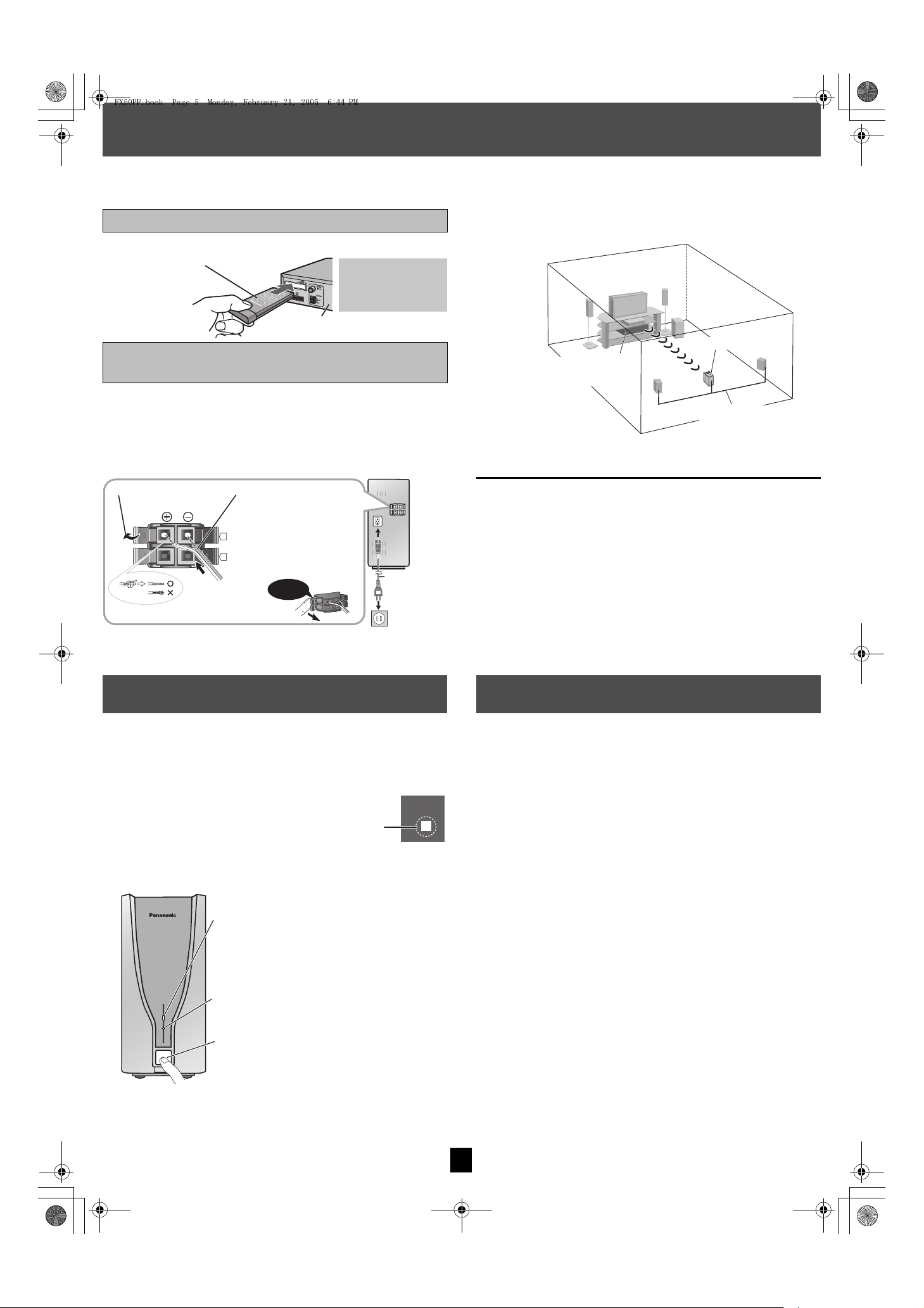
Émetteur numérique
Introduire à fond
jusqu’à ce qu’un clic
se fasse entendre.
Panneau arrière de la chaîne
cinéma maison
Ne pas insérer ou
retirer lorsque la
chaîne cinéma maison
est sous tension.
Ouvrir l’onglet.
Introduire le fil dans la
borne.
Refermer l’onglet.
Vers une prise de courant secteur (120 V c.a., 60 Hz)
Cordon
d’alimentation
Couleur des câbles
i: Blanc ou cuivre
j: Bleu ou argent
Déclic!
Câble d’enceinte
ambiophonique
[L (G)]
Appareil principal de la
chaîne cinéma maison
Câbles d’enceinte
ambiophonique
Récepteur numérique
L’indicateur “ [W] ” s’allume
sur l’écran d’affichage de la
chaîne cinéma maison.
(“ [W] ” clignote ➜ page 1,
Guide de d
é
pannage)
FX50PP.book Page 5 Monday, February 21, 2005 6:44 PM
Raccordements et positionnement
Préparatifs
≥Mettre tous les appareils hors tension et lire leur manuel d’utilisation.
≥Brancher le cordon d’alimentation après avoir terminé tous les autres raccordements.
Connexion de l’émetteur numérique
∫ Positionnement sans fil
Introduire l’émetteur numérique dans la fente.
Connexion des câbles d’enceinte
ambiophonique au récepteur numérique
1 Si les câbles d’enceinte ambiophonique ont déjà été connectés
Déconnecter les câbles d’enceinte ambiophonique
de l’enceinte des extrêmes-graves.
2 Connecter les câbles au récepteur.
≥Placer le récepteur numérique à une distance d’environ 10 m (33 pi) de
l’appareil principal de la chaîne cinéma maison.
Exemple
1
2
AC IN~
L
R
3
Mise en / hors contact
Se reporter également au manuel d’utilisation de la chaîne cinéma maison.
1 Établir le contact sur la chaîne cinéma maison.
2 Établir le contact
sur le récepteur
.
Voyant de liaison sans fil
Ce voyant s’allume lorsque la puissance du
signal est suffisante pour assurer un
fonctionnement convenable.
Voyant d’alimentation
Ce voyant s’allume lorsque l’appareil est en
contact.
Interrupteur
W
[Nota[
≥Ne pas utiliser plus de deux enceintes ambiophoniques lors de l’utilisation
du système sans fil.
≥Ne pas utiliser ce système sans fil près d’un four à micro-ondes.
≥Ne pas placer l’émetteur ou le récepteur dans un boîtier ou une
bibliothèque métallique.
Spécifications
SECTION RF
Module sans fil
Plage de fréquences 2,402
Nombre de canaux 79
Bande passante/canal 1 MHz
Puissance de sortie RF 16 dBm (max.)
Impédance de sortie RF 50 ≠
Type d’émissions
Débit des données 1 Mbps
SECTION AMPLIFICATEUR
Puissance de sortie
Puissance de sortie efficace
Canal ambiophonique 70 W par canal (4 ≠), 1 kHz, 10 % DHT
Puissance de sortie FTC
Canal ambiophonique 45 W par canal (4 ≠), 20 Hz–20 kHz, 1 % DHT
GÉNÉRALITÉS
Alimentation 120 V c.a., 60 Hz
Consommation Émetteur numérique 0,3 W
Dimensions (LtHtP)
Émetteur numérique 97 mmk47,5 mmk8,5 mm (3,8
Récepteur numérique 103 mmk215 mmk178 mm (
Poids
Émetteur numérique 0,03 kg (0,07 Ib)
Récepteur numérique 2,1 kg (4,6 Ib)
Température de fonctionnement r5 oC
Hygrométrie Humidité relative de 5 %
Récepteur numérique 35 W
à
r35 oC (r41 oF à r95 oF)
à
90 % (sans condensation)
à
2,480 GHz
pok
1,9 pok0,3 po
4 pok8,5 pok7,0 po
)
)
Appuyer!
3 Lancer la lecture sur la chaîne cinéma maison.
[Nota]
1. Sujet à changements sans préavis.
Le poids et les dimensions sont approximatifs.
2. Distorsion harmonique totale mesurée avec spectroscope numérique.
5
Page 6
FX50PP.book Page 6 Monday, February 21, 2005 6:44 PM
Limited Warranty (ONLY FOR U.S.A.)
Panasonic Consumer Electronics Company,
Division of Panasonic Corporation of North America
One Panasonic Way Secaucus, New Jersey 07094
Panasonic Audio Products Limited Warranty
Limited Warranty Coverage
If your product does not work properly because of a defect in materials or workmanship,
Panasonic Consumer Electronics Company or Panasonic Puerto Rico, Inc. (collectively
referred to as “the warrantor”) will, for the length of the period indicated on the chart below, which starts
with the date of original purchase (“warranty period”), at its option either (a) repair your product with
new or refurbished parts, or (b) replace it with a new or a refurbished product. The decision to repair or
replace will be made by the warrantor.
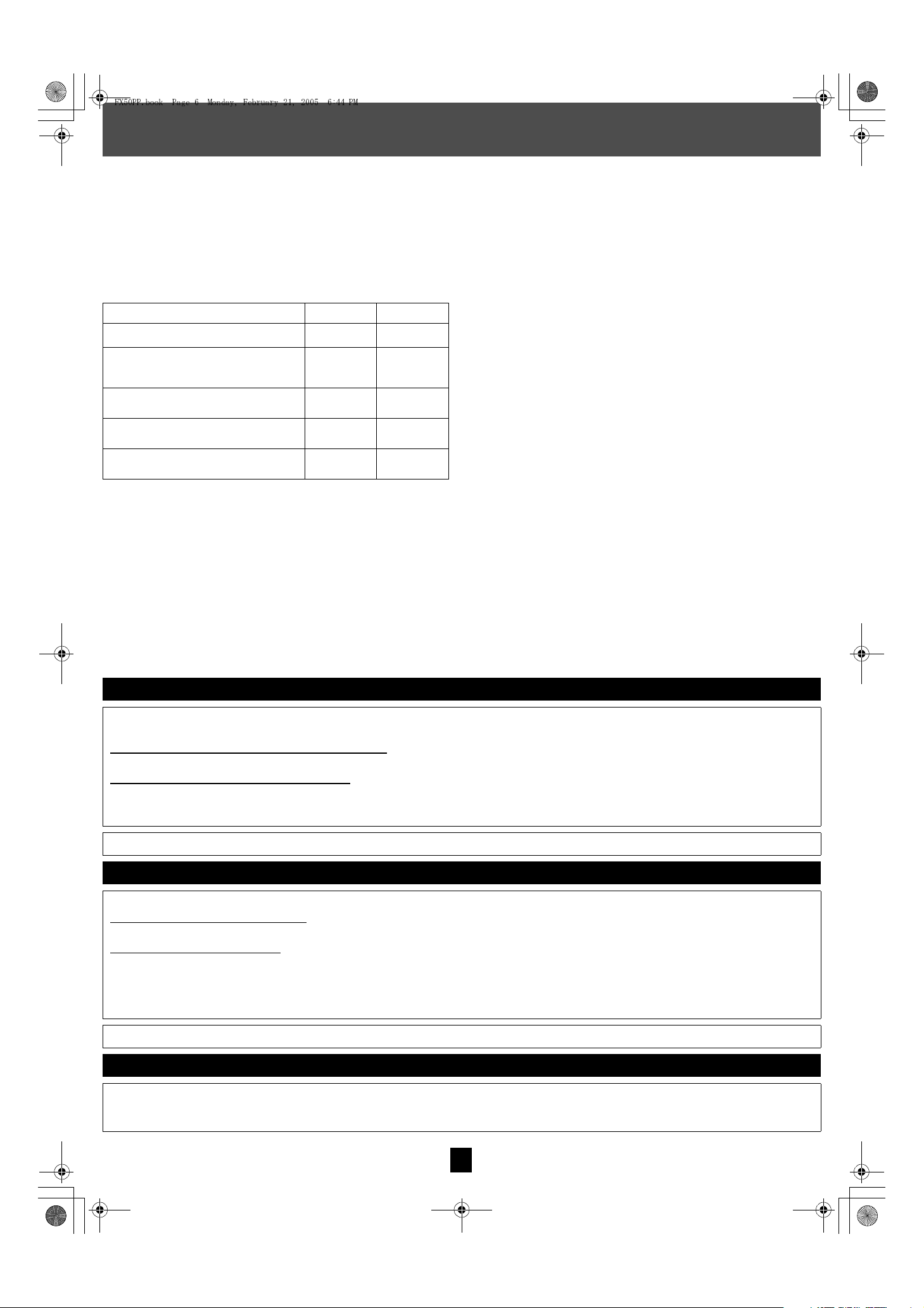
Product or Part Name Parts Labor
Audio Products (except items listed below)
USB Reader-Writer, Personal Computer Card
Adapters
(in exchange for defective item)
Accessories: Headphones, Cartridges, Microphones,
Adapters
Rechargeable Batteries, DVD-R/-RAM Discs (in
exchange for defective item)
SD Memory Cards, Rechargeable Battery Packs (in
exchange for defective item)
During the “Labor” warranty period there will be no charge for labor. During the “Parts” warranty period,
there will be no charge for parts. You must carry-in or mail-in your product during the warranty period. If
non-rechargeable batteries are included, they are not warranted. This warranty only applies to products
purchased and serviced in the United States or Puerto Rico. This warranty is extended only to the
original purchaser of a new product which was not sold “as is”. A purchase receipt or other proof of the
original purchase date is required for warranty service.
One (1) year
One (1) year Not Applicable
Ninety (90)
days
Ten (10) days
Ninety (90)
days
One (1) year
Ninety (90)
days
Not Applicable
Not Applicable
Panasonic Puerto Rico, Inc.
Ave. 65 de Infantería, Km. 9.5
San Gabriel Industrial Park, Carolina, Puerto Rico 00985
Carry-In or Mail-In Service
For Carry-In or Mail-In Service in the United States call 1-800-211-PANA (1-800-211-7262) or visit
Panasonic web site: http://www.panasonic.com
For assistance in Puerto Rico call Panasonic Puerto Rico, Inc. (787)-750-4300 or fax
(787)-768-2910.
Limited Warranty Limits And Exclusions
This warranty ONLY COVERS failures due to defects in materials or workmanship, and DOES NOT
COVER normal wear and tear or cosmetic damage. The warranty ALSO DOES NOT COVER damages
which occurred in shipment, or failures which are caused by products not supplied by the warrantor, or
failures which result from accidents, misuse, abuse, neglect, mishandling, misapplication, alteration,
faulty installation, set-up adjustments, misadjustment of consumer controls, improper maintenance,
power line surge, lightning damage, modification, or commercial use (such as in a hotel, office,
restaurant, or other business), rental use of the product, service by anyone other than a Factory
Servicenter or other Authorized Servicer, or damage that is attributable to acts of God.
THERE ARE NO EXPRESS WARRANTIES EXCEPT AS LISTED UNDER “LIMITED WARRANTY
COVERAGE”. THE WARRANTOR IS NOT LIABLE FOR INCIDENTAL OR CONSEQUENTIAL
DAMAGES RESULTING FROM THE USE OF THIS PRODUCT, OR ARISING OUT OF ANY BREACH
OF THIS WARRANTY. (As examples, this excludes damages for lost time, travel to and from the
servicer, loss of media or images, data or other memory content. The items listed are not exclusive, but
are for illustration only.) ALL EXPRESS AND IMPLIED WARRANTIES, INCLUDING THE
WARRANTY OF MERCHANTABILITY, ARE LIMITED TO THE PERIOD OF THE LIMITED
WARRANTY.
Some states do not allow the exclusion or limitation of incidental or consequential damages, or
limitations on how long an implied warranty lasts, so the exclusions may not apply to you.
This warranty gives you specific legal rights and you may also have other rights which vary from state to
state. If a problem with this product develops during or after the warranty period, you may contact your
dealer or Servicenter. If the problem is not handled to your satisfaction, then write to the warrantor’s
Consumer Affairs Department at the addresses listed for the warrantor.
PARTS AND SERVICE WHICH ARE NOT COVERED BY THIS LIMITED WARRANTY ARE YOUR
RESPONSIBILITY.
Customer Services Directory
Obtain Product Information and Operating Assistance; locate your nearest Dealer or Servicenter; purchase Parts and
Accessories; or make Customer Service and Literature requests by visiting our Web Site at:
http://www.panasonic.com/consumersupport
or, contact us via the web at:
http://www.panasonic.com/contactinfo
You may also contact us directly at:
1-800-211-PANA (7262),
Monday-Friday 9 am-9 pm; Saturday-Sunday 10 am-7 pm, EST.
For hearing or speech impaired TTY users, TTY : 1-877-833-8855
Accessory Purchases
Purchase Parts, Accessories and Instruction Books online for all Panasonic Products by visiting our Web Site at:
http://www.pasc.panasonic.com
or, send your request by E-mail to:
You may also contact us directly at:
1-800-332-5368 (Phone) 1-800-237-9080 (Fax Only) (Monday – Friday 9 am to 8 pm, EST.)
Panasonic Services Company
20421 84th Avenue South, Kent, WA 98032
(We Accept Visa, MasterCard, Discover Card, American Express, and Personal Checks)
For hearing or speech impaired TTY users, TTY : 1-866-605-1277
Service in Puerto Rico
Panasonic Puerto Rico, Inc.
Ave. 65 de Infantería, Km. 9.5, San Gabriel Industrial Park, Carolina, Puerto Rico 00985
Phone (787)750-4300, Fax (787)768-2910
6
F1104
 Loading...