

Page 1
Before connecting, operating or adjusting this product, please read
these instructions completely.
Please keep this manual for future reference.
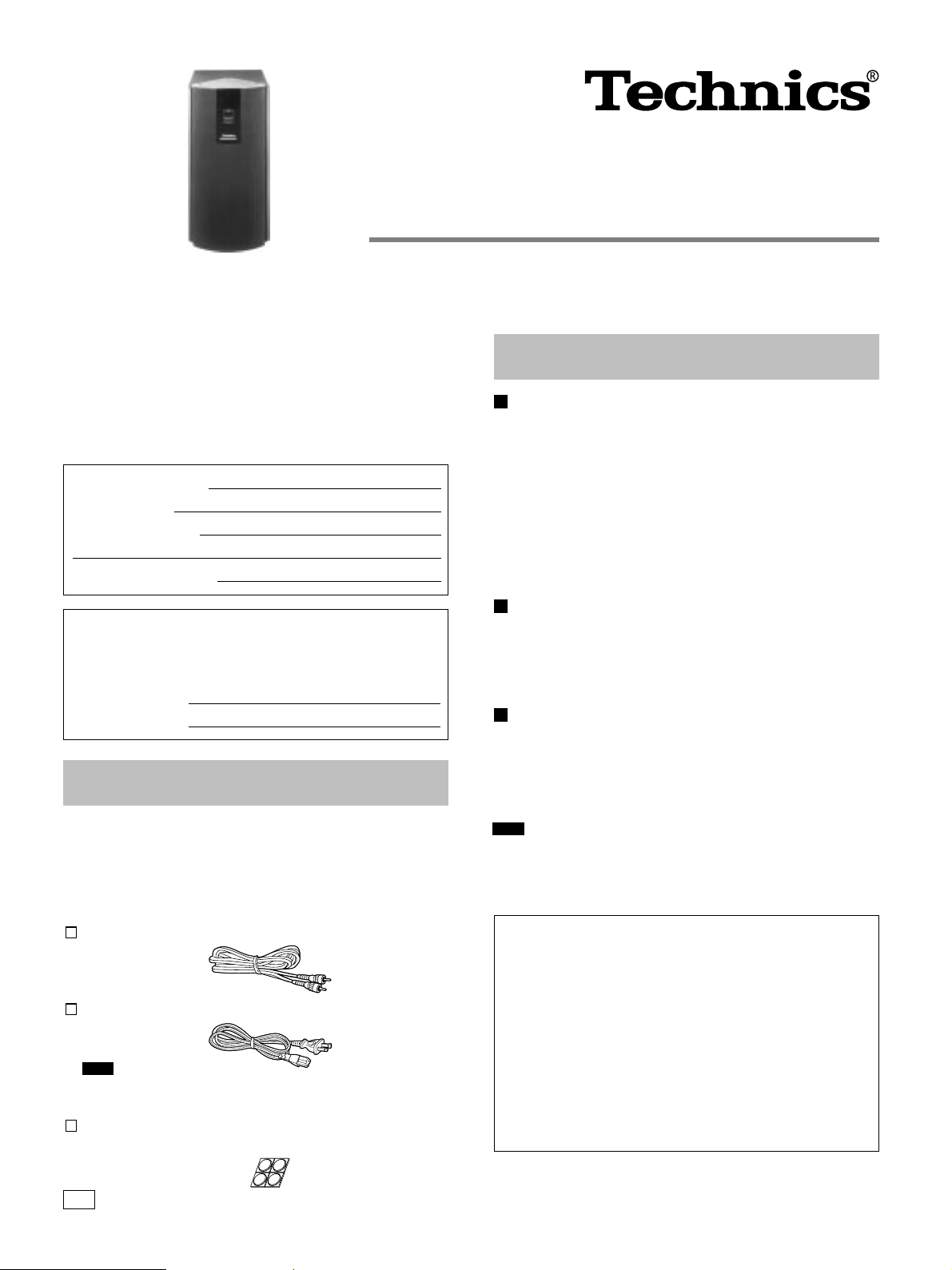
Active subwoofer system
Operating Instructions
Model No.
SB-AS100
Dear customer
Thank you for purchasing this product.
For optimum performance and safety, please read these instructions
carefully.
User memo:
DATE OF PURCHASE
DEALER NAME
DEALER ADDRESS
TELEPHONE NUMBER
The model number and serial number of this product can be found
on either the back or the bottom of the unit.
Please note them in the space provided below and keep for future
reference.
MODEL NUMBER
SERIAL NUMBER
SB-AS100
Supplied accessories
Please check and identify the supplied accessories.
Use numbers indicated in parentheses when asking for replacement
parts.
(Only for U.S.A.)
To order accessories contact 1-800-332-5368 or web site (http:
//www.panasonic.com).
Monaural connection cable (RJL1P015B50)........................1pc.
AC power supply cord (RJA0065-K).....................................1pc.
Note
The included AC power supply cord is for use with this unit only.
Do not use it with other equipment.
Speaker feet (RFA0631A-K) ................................ 1sheet (4 feet)
Replacements sold in 1-sheet lots (4 feet per sheet).
Technical specifications
SPEAKER SECTION
Type 1 way 2 speaker system
Bass-reflex type
Speaker
Woofer 14 cm(5-1/2w) cone type × 2
Impedance 1 Ω
Input power
Music 200 W
DIN 100 W
Sound pressure level 82 dB/W (1.0 m)
Frequency range 40 – 380 Hz (at –16 dB)
45 – 310 Hz (at –10 dB)
AMPLIFIER SECTION
Continuous power output
20–200 Hz (THD 1%) 100 W (1 Ω)
Phase switching NORMAL/REVERSE
Input sensitivity/Impedance 335 mV/15 kΩ
Low pass filter 50–200 Hz Variable
GENERAL
Power supply AC 120 V, 60 Hz
Power consumption 40 W
Dimensions (W × H × D) (231 × 450 × 350) mm
(9-3/32w × 17-23/32w × 13-25/32w)
Mass 9.0 kg(19.8 lb.)
Note
Specifications are subject to change without notice.
Mass and dimensions are approximate.
Product service
Do not attempt to remove the cover(s) or repair the unit yourself.
Refer servicing to qualified personnel only.
Product information
For product service, product information or assistance with product operation, refer to the servicenter directory.
For detailed instructions, contact an authorized servicenter
in the U.S.A. and Panasonic Canada Inc. Customer Care Centre in Canada.
In the U.S.A.1-800-211-7262 or web site
(http://www.panasonic.com)
In Canada 905-624-5505 or web site
(www.panasonic.ca)
P
RQT5460-P
Page 2
Center speaker
(not included)
Active
subwoofer
Front speakers
(not included)
Surround speakers
(not included)TV (not included)
Positioning the speaker
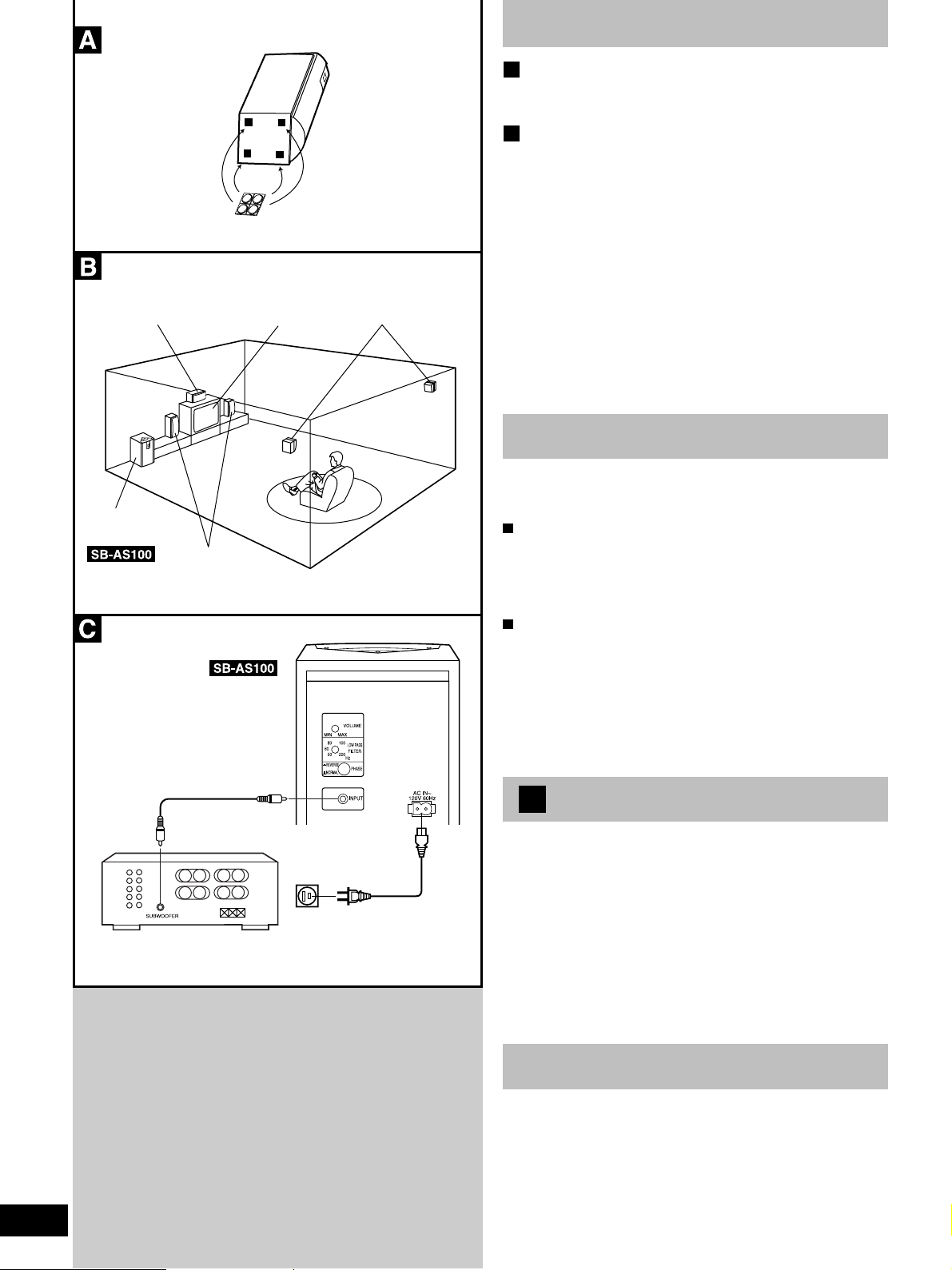
Attach the rubber feet (included) to the speaker
A
Attach these rubber feet to prevent vibration causing the speaker to
move or fall over.
The diagram shows the basic positioning of each
B
speaker.
• The subwoofer can be placed in any position as long as it is at a
reasonable distance from the TV.
• Do not place any object on top of this unit.
If irregular coloring occurs on your television
this speaker is designed to be used close to a television, but the
picture may be affected with some televisions and set-up combinations.
If this occurs, turn the television off for about 30 minutes.
The television’s demagnetizing function should correct the problem.
If it persists, move the speaker further away from the television.
Note:
Do not attach this speaker to walls or ceilings.
Protection circuitry
This unit incorporates speaker-protection circuits to prevent damage caused by excessive input or abnormal signals. When excess
input is detected, the input is automatically interrupted.
If sound is interrupted...
1. Reduce the volume level from the receiver or amplifier.
2. Check whether or not there is anything wrong with the equipment
used such as the sound source, or connections. If there is nothing wrong, turn off the power.
3. Turn on the power once again.
After the protection circuitry is reset...
Take care not to increase the receiver’s or amplifier’s volume level
too much.
Monaural connection cable
(included)
Receiver (or amplifier)
(not included)
150
Household AC outlet
(AC 120V/60Hz)
AC power supply cord
(included)
Other notes:
Be sure to reduce the volume on the receiver (or amplifier) when the
signal input exceeds the rated allowable input to avoid damage to
circuitry or other malfunctions.
C
Connections
Connecting to receiver (or amplifier)
Note:
• Can be connected to a receiver (or amplifier) with a pin cord type
subwoofer terminal.
• Before making the connections, switch OFF the power to the receiver (or amplifier).
Power connections
Connect AC power supply cord after all other cables and cords are
connected.
Note
1. Avoid placing in areas as follows:
• In direct sunlight
• Near heating appliances or other sources of heat
• Where there is high humidity
2. Never use alcohol, paint thinner, benzine or similar chemicals to
clean the unit, as they may damage the finish.
2
RQT5460
Page 3
Operation
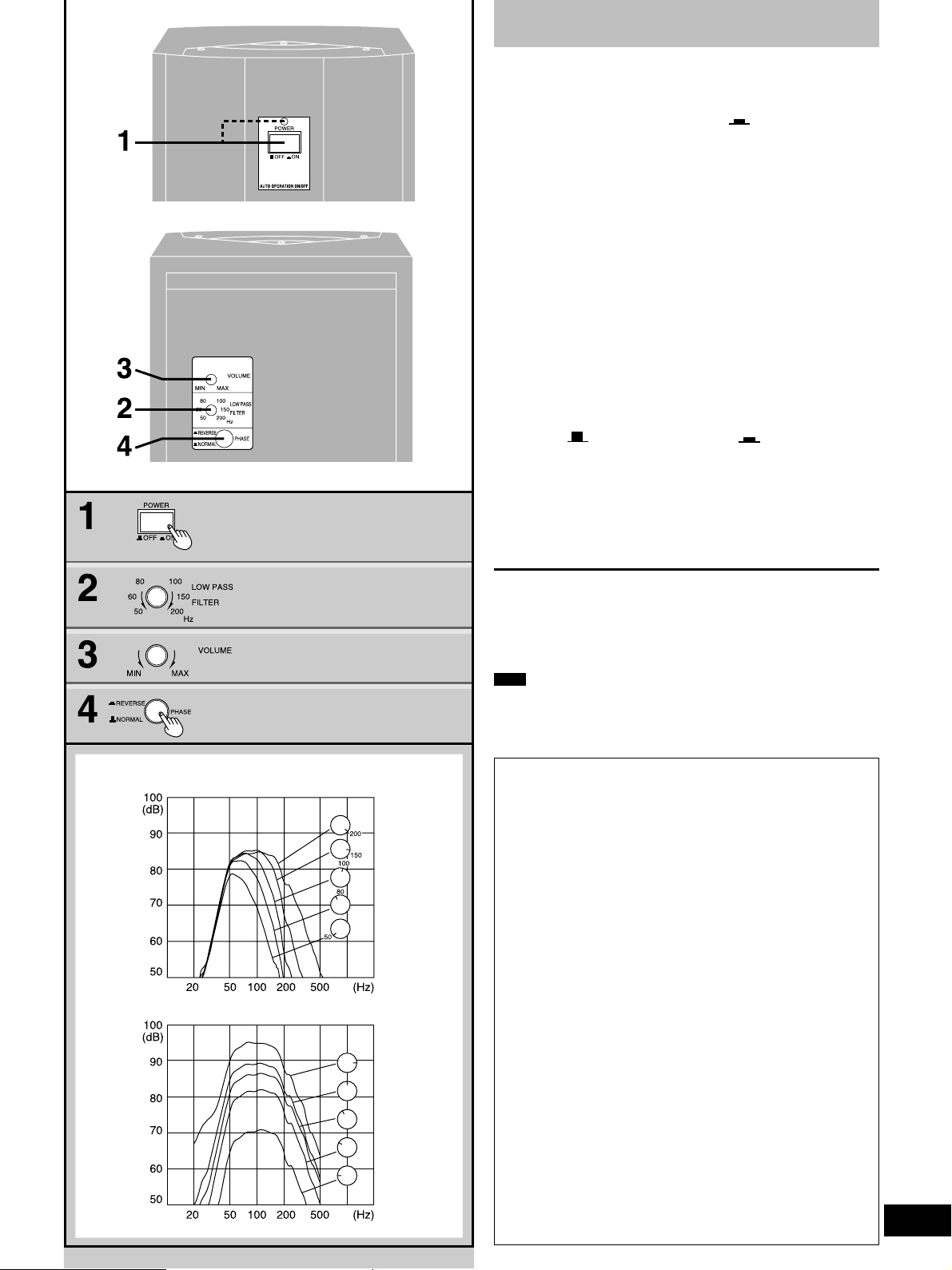
Set the low pass filter, volume and phase to suit characteristics of
the speaker and SB-AS100 combination.
1 Set [POWER] to the “ ON” position.
The unit is now in standby mode and the POWER indicator
turns red.
When a signal is received the unit turns ON automatically and
the indicator turns green.
Front
Rear
The unit automatically switches to standby if a signal is not
received for approximately two (2) minutes
2 Set [LOW PASS FILTER] to a suitable
frequency. Refer to “Frequency response by LOW P ASS FILTER setting”.
3 Set [VOLUME] to a suitable level. Refer
to “Frequency response by VOLUME
setting”.
4 After playing some music, set [PHASE]
to “ NORMAL” or “ REVERSE”,
whichever position allows playback to
sound normal.
For your reference:
If subwoofer and front speaker phase are the inverse of one
another, they will tend to cancel each other out. Playback will
not be normal and sounds will seem muffled.
When settings are complete
The only operation you should have to perform daily is press
[POWER] to turn the unit ON/OFF.
If you reposition the system and the acoustics change, reset the unit
as necessary.
Frequency response by LOW PASS FILTER setting
Frequency response by VOLUME setting
Note
If the volume output is too loud, this unit's amplifier can be clipped,
causing output to sound unusual. Reduce the volume of the receiver
or amplifier or the volume of this unit if this occurs.
CAUTION:
This equipment has been tested and found to comply with the
limits for a Class B digital device, pursuant to Part 15 of the
FCC Rules.
These limits are designed to provide reasonable protection
against harmful interference in a residential installation. This
equipment generates, uses and can radiate radio frequency
energy and, if not installed and used in accordance with the
instructions, may cause harmful interference to radio communications. However, there is no guarantee that interference will
not occur in a particular installation. If this equipment does
cause harmful interference to radio or television reception,
which can be determined by turning the equipment off and on,
the user is encouraged to try to correct the interference by one
of the following measures:
¡Reorient or relocate the receiving antenna.
¡Increase the separation between the equipment and receiver.
¡Connect the equipment into an outlet on a circuit different
from that to which the receiver is connected.
¡Consult the dealer or an experienced radio/TV technician for
help.
Any unauthorized changes or modifications to this equipment
would void the user’s authority to operate this device.
This device complies with Part 15 of the FCC Rules. Operation
is subject to the following two conditions: (1) This device may
not cause harmful interference, and (2) this device must accept
any interference received, including interference that may
cause undesired operation.
3
RQT5460
Page 4
WARNING:
TO REDUCE THE RISK OF FIRE, ELECTRIC SHOCK OR
PRODUCT DAMAGE, DO NOT EXPOSE THIS APPLIANCE TO
RAIN, SPLASHING, DRIPPING OR MOISTURE.
CAUTION
RISK OF ELECTRIC SHOCK
CAUTION: TO REDUCE THE RISK OF ELECTRIC
SHOCK, DO NOT REMOVE SCREWS.
NO USER-SERVICEABLE PARTS
INSIDE.
REFER SERVICING TO QUALIFIED
SERVICE PERSONNEL.
The lightning flash with arrowhead symbol, within
an equilateral triangle, is intended to alert the user
to the presence of uninsulated “dangerous voltage”
within the product’s enclosure that may be of sufficient magnitude to constitute a risk of electric shock
to persons.
The exclamation point within an equilateral triangle
is intended to alert the user to the presence of
important operating and maintenance (servicing)
instructions in the literature accompanying the appliance.
DO NOT OPEN
Installation
Environment
1. Water and Moisture — Do not use this unit near water — for ex-
ample, near a bathtub, washbowl, swimming pool, or the like.
Damp basements should also be avoided.
2. Heat—The unit should be situated away from heat sources such
as radiators and the like. It also should not be placed in
temperatures less than 5uC (41uF) or greater than 35uC (95uF).
Placement
1. Ventilation— The unit should be situated so that its location or
position does not interfere with its proper ventilation. Allow
10 cm (4w) clearance from the rear of the unit.
2. Foreign Material— Care should be taken so that objects do not
fall into and liquids are not spilled into the unit. Do not subject
this unit to excessive smoke, dust, mechanical vibration, or
shock.
3. Magnetism— The unit should be situated away from equipment
or devices that generate strong magnetic fields.
4. Stacking— Do not place heavy objects, other than system com-
ponents, on top of the unit.
5. Surface—Place the unit on a flat, level surface.
6. Carts and Stands— The unit should be used only with a cart or
stand that is recommended by the manufacturer.
The unit and cart combination should be moved
with care. Quick stops, excessive force, and uneven surfaces may cause the unit and cart
combination to overturn.
7. Wall or Ceiling Mounting — The unit should not be mounted to
a wall or ceiling, unless specified in this operating instructions.
Precautions
Before using this unit please read these operating instructions carefully. Take special care to follow the warnings indicated on the unit
itself as well as the safety suggestions listed below.
Afterwards keep them handy for future reference.
Safety
1. Power Source —The unit should be connected to power supply
only of the type described in the operating instructions or as
marked on the unit.
2. Polarization— If the unit is equipped with a polarized AC power
plug (a plug having one blade wider than the other), that plug
will fit into the AC outlet only one way. This is a safety feature. If
you are unable to insert the plug fully into the outlet, try
reversing the plug. If the plug should still fail to fit, contact your
electrician to replace your obsolete outlet. Do not defeat the
safety purpose of the polarized plug.
3. Power Cord Protection—AC power supply cords should be
routed so that they are not likely to be walked on or pinched by
items placed upon or against them. Never take hold of the plug
or cord if your hand is wet, and always grasp the plug body
when connecting or disconnecting it.
4. Nonuse Periods —When the unit is not used, turn the power
off. When left unused for a long period of time, the unit should
be unplugged from the household AC outlet.
Maintenance
Clean the cabinet, panel and controls with a soft cloth lightly moistened with mild detergent solution.
Do not use any type of abrasive pad, scouring powder or solvent
such as alcohol or benzine.
Service
1. Damage Requiring Service —The unit should be serviced by
qualified service personnel when:
(a) The AC power supply cord or the plug has been damaged; or
(b) Objects have fallen or liquid has been spilled into the unit; or
(c) The unit has been exposed to rain; or
(d) The unit does not appear to operate normally or exhibits a
marked change in performance; or
(e) The unit has been dropped, or the enclosure damaged.
2. Servicing— The user should not attempt to service the unit beyond that described in the operating instructions. All other
servicing should be referred to an authorized service personnel.
For the address of an authorized servicenter:
In the U.S.A. 1-800-211-7262 or web site
(http://www.panasonic.com)
In Canada 905-624-5505 or web site
(www.panasonic.ca)
Panasonic Consumer Electronics
Company, Division of Matsushita
Electric Corporation of America
One Panasonic Way Secaucus,
New Jersey 07094
http://www.panasonic.com
Matsushita Electric Industrial Co., Ltd. 1999
Printed in U.S.A.
Panasonic Sales Company,
Division of Matsushita Electric of
Puerto Rico, Inc. (“PSC”)
Ave. 65 de Infanteria, Km. 9.5
San Gabriel Industrial Park, Carolina,
Puerto Rico 00985
RQT5460-P
M1299TK0
 Loading...