

Page 1
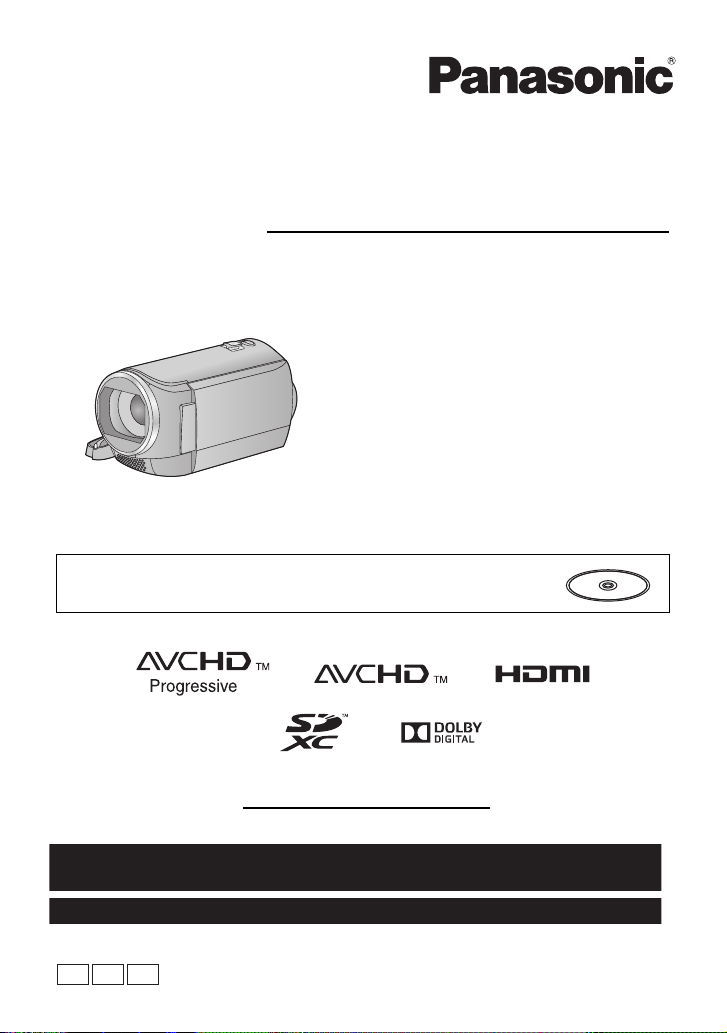
Basic Owner’s Manual
PCP PU
For USA and Puerto Rico assistance, please call: 1-800-211-PANA(7262) or,
contact us via the web at: http://www.panasonic.com/contactinfo
For Canadian assistance, please call: 1-800-561-5505 or visit us at www.panasonic.ca
High Definition Video Camera
Model No. HC-V210
HC-V201
HC-V210M
HC-V110
Please read these instructions carefully before using this product, and save this manual for future
use.
This document explains basic operations of the unit. For more detailed
explanation, please refer to “Owner’s manual (PDF format)” which is
recorded in the enclosed CD-ROM.
Register online at www.panasonic.com/register (U.S. customers only)
VQT4T49
Page 2
Dear Customer,
Thank you for choosing Panasonic!
You have purchased one of the most
sophisticated and reliable products on the
market today. Used properly, we’re sure it
will bring you and your family years of
enjoyment. Please take time to fill in the
information on the right.
The serial number is on the tag located on
the back of your camera. Be sure to retain
this manual as your convenient camera
information source.
Date of Purchase
Dealer Purchased From
Dealer Address
Dealer Phone No.
Model No.
Serial No.
Safety Precautions
WARNING:
To reduce the risk of fire, electric shock or product damage,
≥ Do not expose this unit to rain, moisture, dripping or splashing.
≥ Do not place objects filled with liquids, such as vases, on this unit.
≥ Use only the recommended accessories.
≥ Do not remove covers.
≥ Do not repair this unit by yourself. Refer servicing to qualified service personnel.
CAUTION!
To reduce the risk of fire, electric shock or product damage,
≥ Do not install or place this unit in a bookcase, built-in cabinet or in another confined space.
Ensure this unit is well ventilated.
≥ Do not obstruct this unit’s ventilation openings with newspapers, tablecloths, curtains, and
similar items.
≥ Do not place sources of naked flames, such as lighted candles, on this unit.
THE FOLLOWING APPLIES ONLY IN THE U.S.A. AND CANADA.
//
AC adaptor
This AC adaptor operates on AC between 100 V and 240 V.
But
≥ In the U.S.A. and Canada, the AC adaptor must be connected to a 120 V AC power supply only.
≥ When connecting to an AC supply outside of the U.S.A. or Canada, use a plug adaptor to suit
the AC outlet configuration.
≥ When connecting to a supply of greater than AC 125 V, ensure the cord you use is suited to the
voltage of the AC supply and the rated current of the AC adaptor.
≥ Contact an electrical parts distributor for assistance in selecting a suitable AC plug adaptor or
AC cord set.
2
VQT4T49
Page 3
AC adaptor
This AC adaptor operates on AC between 110 V and 240 V.
But
≥ In the U.S.A. and Canada, the AC adaptor must be connected to a 120 V AC power supply only.
≥ When connecting to an AC supply outside of the U.S.A. or Canada, use a plug adaptor to suit
the AC outlet configuration.
The power plug is the disconnecting device. Install this unit so that the power plug can be
unplugged from the socket outlet immediately.
THE FOLLOWING APPLIES ONLY IN LATIN AMERICAN COUNTRIES.
The mains plug is the disconnecting device. Install this unit so that the mains plug can be
unplugged from the socket outlet immediately.
∫ Concerning the battery
Battery pack (Lithium ion battery pack)
≥ Use the specified unit to recharge the batter y pack.
≥ Do not use the battery pack with equipment other than the specified unit.
≥ Do not get dirt, sand, liquids, or other foreign matter on the terminals.
≥ Do not touch the plug terminals (i and j) with metal objects.
≥ Do not disassemble, remodel, heat or throw into fire.
If any electrolyte should come into contact with your hands or clothes, wash it off thoroughly with
water.
If any electrolyte should come into contact with your eyes, never rub the eyes. Rinse eyes
thoroughly with water, and then consult a doctor.
Warning
Risk of fire, explosion and burns. Do not disassemble, heat above 60 oC (140 oF) or incinerate.
CAUTION
≥ Danger of explosion if battery is incorrectly replaced. Replace only with the type
recommended by the manufacturer.
≥ When disposing the batteries, please contact your local authorities or dealer and ask for the
correct method of disposal.
∫ Product Identification Marking
Product Location
High Definition Video Camera Battery holder
AC adaptor Bottom
VQT4T49
3
Page 4
THE FOLLOWING APPLIES ONLY IN THE U.S.A.
A lithium ion battery that is recyclable powers the product
you have purchased. Please call 1-800-8-BATTERY for information
on how to recycle this battery.
U.S.A./CANADA CONSUMERS: ATTENTION:
HC-V210P
HC-V201P
HC-V110P
FCC Note:
This equipment has been tested and found to comply with the limits for a Class B digital device,
pursuant to Part 15 of the FCC Rules. These limits are designed to provide reasonable protection
against harmful interference in a residential installation. This equipment generates, uses, and can
radiate radio frequency energy and, if not installed and used in accordance with the instructions,
may cause harmful interference to radio communications. However, there is no guarantee that
interference will not occur in a particular installation. If this equipment does cause harmful
interference to radio or television reception, which can be determined by turning the equipment off
and on, the user is encouraged to try to correct the interference by one or more of the following
measures:
≥ Reorient or relocate the receiving antenna.
≥ Increase the separation between the equipment and receiver.
≥ Connect the equipment into an outlet on a circuit different from that to which the receiver is
connected.
≥ Consult the dealer or an experienced radio/TV technician for help.
FCC Caution: To assure continued compliance, follow the attached installation
Any changes or modifications not expressly approved by the party responsible for compliance
could void the user’s authority to operate this equipment.
Declaration of Conformity
Trade Name: Panasonic
Model No.: HC-V210P/HC-V201P/HC-V110P
Responsible Party: Panasonic Corporation of North America
Support Contact: Panasonic Consumer Marketing Company of North America
This device complies with Part 15 of the FCC Rules. Operation is subject to the following two
conditions: (1) This device may not cause harmful interference, and (2) this device must accept
any interference received, including interference that may cause undesired operation.
THE FOLLOWING APPLIES ONLY IN CANADA.
This Class B digital apparatus complies with Canadian ICES-003.
instructions and use only shielded interface cables with ferrite core
when connecting to computer or peripheral devices.
One Panasonic Way, Secaucus, NJ 07094
1-800-211-PANA (7262)
4
VQT4T49
Page 5

Conforms to UL STD 60065
Certified to CAN/CSA STD C22.2 No.60065
Conforme à la norme CAN/CSA C22.2 No.60065
IMPORTANT SAFETY
INSTRUCTIONS
Read these operating instructions carefully before using the unit. Follow the safety instructions on
the unit and the applicable safety instructions listed below. Keep these operating instructions handy
for future reference.
1) Read these instructions.
2) Keep these instructions.
3) Heed all warnings.
4) Follow all instructions.
5) Do not use this apparatus near water.
6) Clean only with dry cloth.
7) Do not block any ventilation openings.
Install in accordance with the
manufacturer’s instr uctio ns.
8) Do not install near any heat sources such
as radiators, heat registers, stoves, or
other apparatus (including amplifiers) that
produce heat.
9) Do not defeat the safety purpose of the
polarized or grounding -typ e plug. A
polarized plug has two blades with one
wider than the other. A grounding-type plug
has two blades and a third grounding
prong. The wide blade or the third prong
are provided for your safety. If the provided
plug does not fit into your outlet, consult an
electrician for replacement of the obsolete
outlet.
10) Protect the power cord from being walked
on or pinched particularly at plugs,
convenience receptacles, and the point
where they exit from the apparatus.
11) Only use attachments/accessories
specified by the manufacturer.
12) Use only with the
cart, stand, tripod,
bracket, or table
specified by the
manufacturer, or
sold with the
apparatus. When a
cart is used, use caution when moving the
cart/apparatus combination to avoid inju ry
from tip-over.
13) Unplug this apparatus during lightning
storms or when unused for long periods of
time.
14) Refer all servicing to qualified service
personnel. Servicing is required when the
apparatus has been damaged in any way,
such as power-supply cord or plug is
damaged, liquid has been spilled or objects
have fallen into the apparatus, the
apparatus has been exposed to rain or
moisture, does not operate normally, or has
been dropped.
VQT4T49
5
Page 6
-If you see this symbol-
Information on Disposa l in other
Countries outside the European
Union
This symbol is only valid
in the European Union.
If you wish to discard
this product, please
contact your local
authorities or dealer and
ask for the correct
method of disposal.
∫ Cautions for use
Keep this unit as far away as possible from
electromagnetic equipment (such as
microwave ovens, TVs, video games etc.).
≥
If you use this unit on top of or near a TV, the
pictures and/or sound on this unit may be
disrupted by electromagnetic wave radiation.
≥ Do not use this unit near cell phones because
doing so may result in noise adversely
affecting the pictures and/or sound.
≥ Recorded data may be damaged, or pictures
may be distorted, by strong magnetic fields
created by speakers or large motors.
≥
Electromagnetic wave radiation generated by
microprocessors may adversely affect this unit,
disturbing the pictures and/or sound.
≥
If this unit is adversely affected by
electromagnetic equipment and stops
functioning properly, turn this unit off and
remove the battery or disconnect AC adaptor.
Then reinsert the battery or reconnect AC
adaptor and turn this unit on.
Do not use this unit near radio transmitters
or high-voltage lines.
≥ If you record near radio transmitt ers or
high-voltage lines, the recorded pictures and/
or sound may be adversely affected.
About connecting to a TV
≥ Always use the supplied Panasonic HDMI
mini cable or a genuine HDMI mini cable
(RP-CDHM15, RP-CDHM30: optional).
≥ Do not use any other AV cables except the
supplied one.
≥ Always use a genuine Panasonic HDMI mini
cable (RP-CDHM15, RP-CDHM30: optional).
About connecting to a PC
≥ Do not use any other USB cables except the
supplied one.
/
(PU)
(P/PC)
∫ About the recording format for
recording motion pictures
You can select from AVCHD*1, iFrame or MP4
recording formats to record motion pictu r es
using this unit.
*1 / /
It is compatible with the AVCHD
Progressive (1080/60p).
AVCHD:
It is suitable for viewing on a high-definition TV
or for saving to disc
*2 / /
To save an image recorded in 1080/60p, it
is required to copy to a disc using the
supplied software HD Writer LE 2.0.
iFrame:
This is a recording format suitable for playing
back or editing on Mac (iMovie’11).
≥ It is not compatible with motion pictures
recorded in AVCHD format.
MP4:
This is a recording format suitable for playing
back or editing on a PC.
≥ It is not compatible with motion pictures
recorded in AVCHD format.
*2
.
6
VQT4T49
Page 7
∫ Indemnity about recorded
content
Panasonic does not accept any responsibility
for damages directly or indirectly due to any
type of problems that result in loss of recording
or edited content, and does not guarantee any
content if recording or editing does not work
properly. Likewise, the above also applies in a
case where any type of repair is made to the
unit (incl uding any other non-b uilt-in memory
related component).
∫ About Condensation (When
the lens or the LCD monitor is
fogged up)
Condensation occurs when there is a change in
temperature or humidi ty , such as wh en the unit
is taken from outside or a cold room to a warm
room. Please be careful, as it may cause the
lens or LCD monitor to become soiled, moldy,
or damaged.
When taking the unit to a place which has a
different temperature, if the unit is accustomed
to the room temperature of the destination for
about one hour, condensation can be
prevented. (When the difference in temperature
is severe, place the unit in a plastic bag or the
like, remove air from the bag, and seal the bag.)
When condensation has occurred, remove the
battery and/or the AC adapter and leave the
unit like that for about one hour. When the unit
becomes accustomed to the surrounding
temperature, fogginess will disappear naturally.
∫ Cards that you can use with
this unit
SD Memory Card, SDHC Memory Card and
SDXC Memory Card
≥ 4 GB or more Memo ry Card s that do not hav e
the SDHC logo or 48 GB or more Memory
Cards that do not have the SDXC logo are
not based on SD Memory Card
Specifications.
≥ Refer to page 17 for more details on SD
cards.
∫ For the purposes of this
owner’s manual
≥ SD Memory Card, SDHC Memory Card and
SDXC Memory Card are referred to as the
“SD card”.
≥ Functions that can be used for motion picture
recording/motion picture playback are
indicated by in this owner’s manual.
≥ Functions that can be used for still picture
recording/still picture playback are indicated
by in this owner’s manual.
≥ Scene(s) recorded in 1080/60p or
1080/60i: “AVCHD scene(s)”
≥ Pages for reference are indicated by an
arrow, for example: l 00
This owner’s manual are designed for use with
models , ,
and . Pictures may
be slightly different from the original.
≥ The illustrations used in this owner’s manual
show model , however, parts of
the explanation refer to different models.
≥ Depending on the model, some functions
are not available.
≥ Features may vary, so please read carefully.
≥ Not all models may be available depending
on the region of purchase.
VQT4T49
7
Page 8

Contents
∫ How to open the Owner’s Manual (PDF format)
When you insert the CD-ROM and open the [INDEX.pdf] in the CD-ROM, the Owner’s Manual
list will be displayed. Click the document name of the Owner’s Manual you would like to open.
≥ Adobe Reader is required to view the PDF file. Please download it from the homepage of
Adobe Systems Incorporated.
Accessories
[HC-V210]/[HC-V201]/[HC-V210M] ................9
Accessories [HC-V110]................................ 10
Preparation
Power supply................................................ 11
Inserting/removing the battery............... 11
Charging the battery ............................ .. 12
Charging and recording time ................. 15
Recording to a card .....................................17
Cards that you can use with this unit..... 17
Inserting/removing an SD card.............. 17
Turning the unit on/off.................................18
Setting date and time...................................18
Basic
Selecting a media to record
[HC-V210M]................................................... 19
Intelligent Auto Mode ..................................19
Recording motion pictures.........................20
Recording still pictures ...............................20
Using the Zoom............................................ 21
Motion picture/Still picture playback ......... 21
Watching Video/Pictures on your TV ..... 23
Using the menu screen ...............................23
Language selection ............................... 24
Formatting . ................................ ..... ..... .. 24
About copyright ...........................................25
Specifications...............................................26
Optional accessories
[HC-V210]/[HC-V210M].................................29
Optional accessories
[HC-V201]/[HC-V110]....................................30
Accessory Order Form (For USA and
Puerto Rico Customers)......................... 31
Limited Warranty (ONLY FOR U.S.A. AND
PUERTO RICO) .............................................32
Warranty (For Canadian Customers)..........34
Useful Information
(Only For Latin American Countries) .........35
Others
8
VQT4T49
Page 9
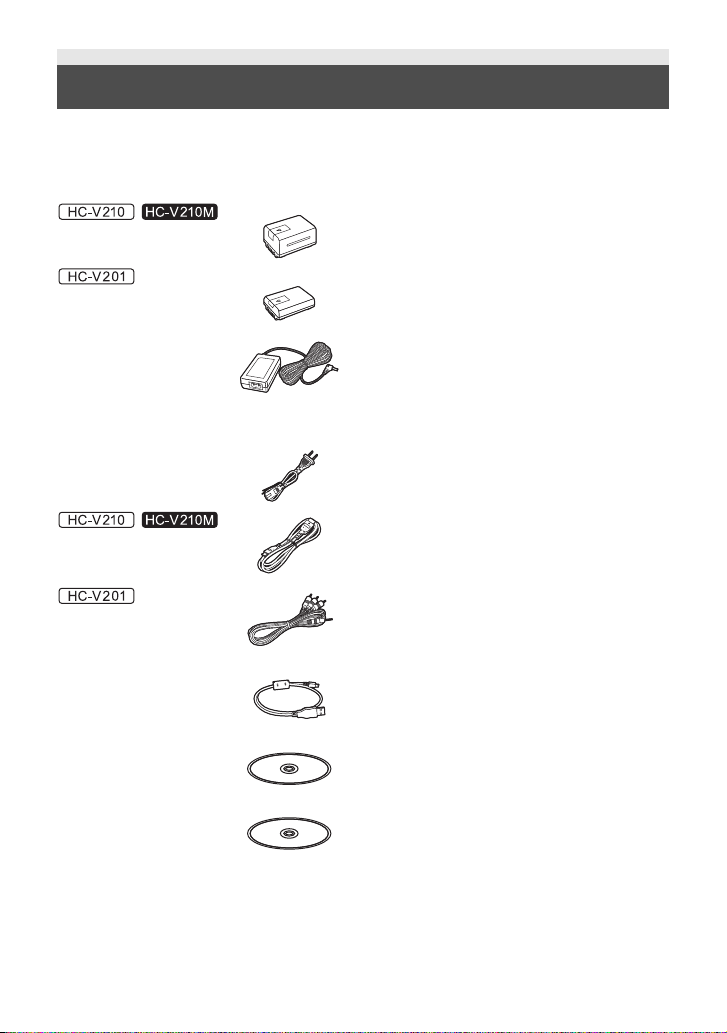
Accessories [HC-V210]/[HC-V201]/[HC-V210M]
Check the accessories before using this unit.
Keep the accessories out of reach of children to prevent swallowing.
Product numbers correct as of Dec. 2012. These may be subject to change.
Battery pack
VW-VBT190
VW-VBY100
AC adaptor
/
(P/PC)
VSK0780
(PU)
VSK0781
AC cable
K2CA2YY00259
HDMI mini cable
K1HY19YY0021
AV cable
K2KYYYY00223
USB cable
K2KYYYY00201
CD-ROM
Software
/
CD-ROM
Owner’s manual
VFF1154
VQT4T49
9
Page 10
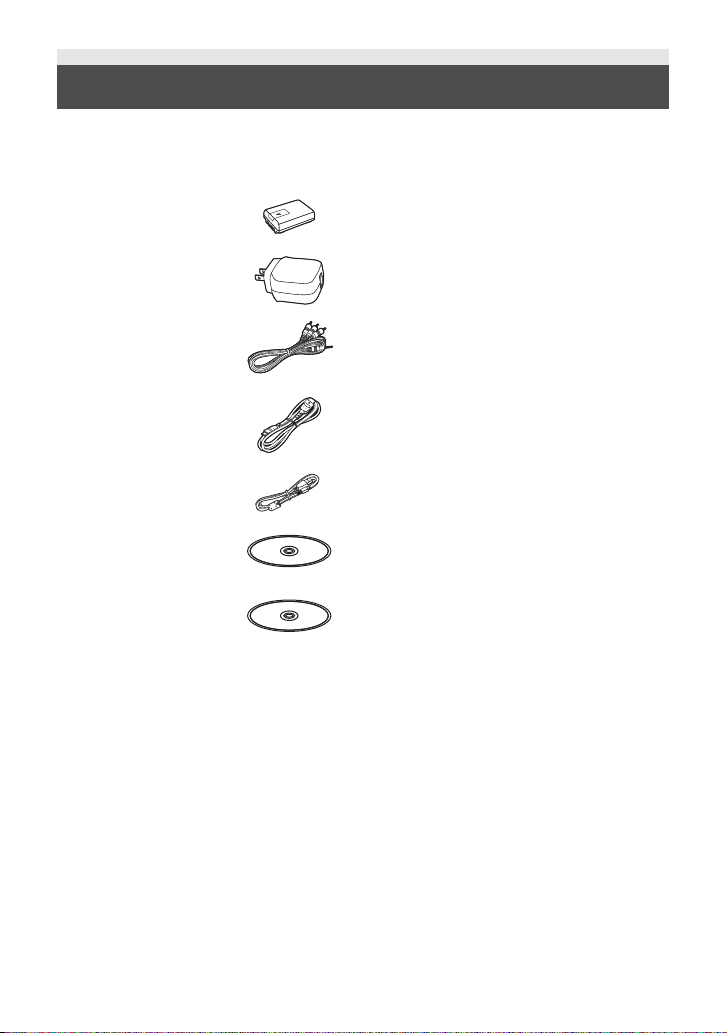
Accessories [HC-V110]
Check the accessories before using this unit.
Keep the accessories out of reach of children to prevent swallowing.
Product numbers correct as of Dec. 2012. These may be subject to change.
Battery pack
VW-VBY100
AC adaptor
VSK0784
(P/PC)
AV cable
K2KYYYY00223
(PU)
HDMI mini cable
K1HY19YY0021
USB cable
K2KYYYY00225
CD-ROM
Software
CD-ROM
Owner’s manual
VFF1154
10
VQT4T49
Page 11
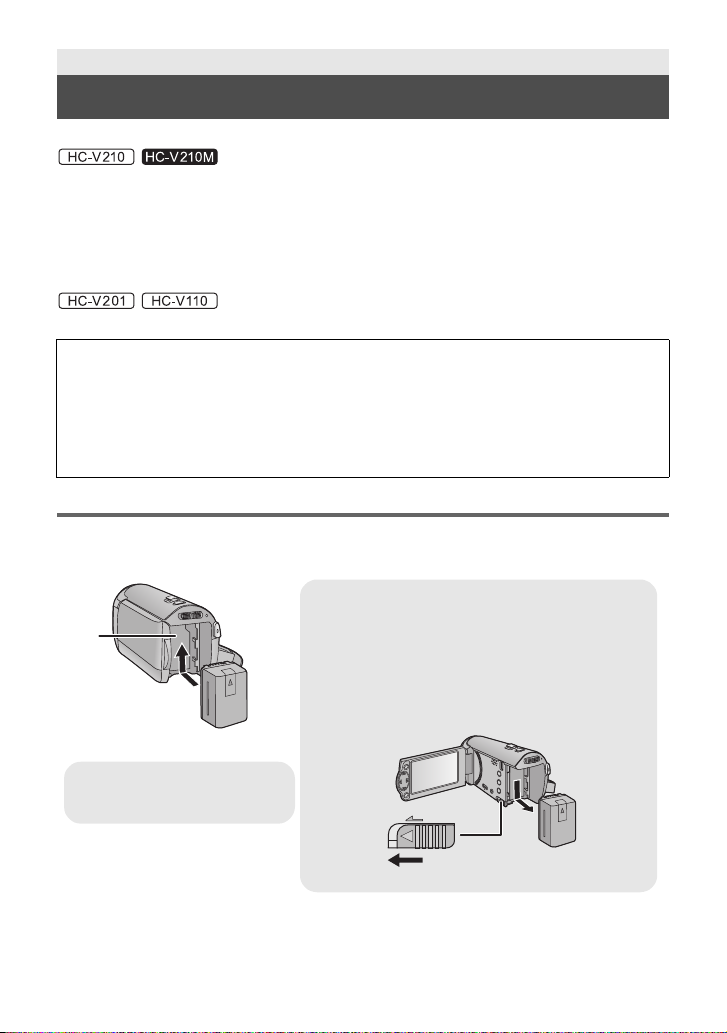
Preparation
Removing the battery
Be sure to hold down the power button until the status
indicator goes off. Then remove the battery while
supporting the unit to prevent it from dropping.
Move the ba ttery release lever in the direction
indicated by the arrow and remove the battery
when unlocked.
ャモヵヵ
A Battery holder
Insert the battery until it clicks and
locks.
Power supply
∫ About batteries that you can use with this unit
The battery that can be used with this unit is VW-VBT190/VW-VBT380.
≥ The unit has a function for distinguishing batteries which can be used safely. The
dedicated battery (VW-VBT190/VW-VBT380) supports this function. The only batteries
suitable for use with this unit are genuine Panasonic products and batteries manufactured
by other companies and certified by Panasonic. Panasonic cannot in any way guarantee
the quality, performance or safety of batteries which have been manufactured by other
companies and are not genuine Panasonic products.
The battery that can be used with this unit is VW-VBY100/VW-VBT190/VW-VBT380.
It has been found that counterfeit battery packs which look very similar to the genuine
product are made available to purchase in some markets. Some of these battery packs
are not adequately protected with internal protection to meet the requirements of
appropriate safety standards. There is a possibility that these battery packs may lead to
fire or explosion. Please be advised that we are not liable for any accident or failure
occurring as a result of use of a counterfeit battery pack. To ensure that safe products are
used we would recommend that a genuine Panasonic battery pack is used.
Inserting/removing the battery
≥ Press the power button to turn off the unit. (l 18)
Install the battery by inserting it in the direction shown in the figure.
/
/
11
VQT4T49
Page 12

Charging the battery
A DC input terminal
≥ Insert the plugs as far as they will
go.
When this unit is purchased, the battery is not charged. Charge the battery fully before
using this unit for the first time.
∫ Charging with an AC adaptor.
The unit is in th e st an dby co ndi tio n wh en th e AC adap tor is connec te d. The pr im ary circ uit i s alw ays
“live” as long as the AC adaptor is connected to an electrical outlet.
Important:
≥ It is recommended to charge the battery in a temperature between 10 oC and 30 oC (50 oF
and 86 oF). (The battery temperature sh ould also be the same.)
≥ Use the supplied AC adaptor. Do not use the AC adaptor of another device.
≥ Do not use the AC cable with any other equipment as it is designed only for this unit. Also,
do not use the AC cable from other equipment with this unit.
≥ The battery will not be charged if the unit is turned on.
≥ The AC adaptor and USB cable are for use with this unit only. Do not use them with other
equipment. Similarly, do not use AC adaptors and USB cables from other equipment with
this unit.
≥ The battery ca nnot be charged when the power is on. Press the power button to turn off
the power. (l 18)
//
//
1 Connect the AC cable to the AC
adaptor, then the AC outlet.
2 Connect the AC adaptor to the DC
input terminal [DC IN].
≥ Be careful not to pinch the DC input terminal
cover.
≥ The status indicator will flash red for approx.
2 seconds (off for approx. 1 second, on for
approx. 1 second), indicating that charging
has begun.
It will turn off when the charging is
completed.
12
VQT4T49
Page 13

A USB terminal
B To the AC outlet
≥ Insert the plugs as far as they will go.
1 Open the LCD monitor.
2 Connect the USB cable to the AC
adaptor.
≥ Check that the plug portion of the AC
adaptor is not loose or misaligned.
3 Plug the AC adaptor into the AC
outlet.
4 Connect the USB cable to the
∫ Connecting to the AC outlet
If you turn on the unit while connecting with the AC adaptor, you can use the unit with power
supplied from the outlet.
When recording for a long time, keep the AC adaptor connected and use it together with the battery.
unit.
≥ The status indicator C will flash red
approx. 2 seconds period (off for approx. 1
second, on for approx. 1 second),
that charging has begun.
It will turn off when the charging is
completed.
indicating
with
13
VQT4T49
Page 14

∫ Connecting to a PC and charging.
Charge the unit if you do not have the AC adaptor handy.
//
1 Turn the power of the PC on.
2 Connect the USB cable
≥ The status indicator B will flash red
approx. 2 seconds period (off for approx. 1
second, on for approx. 1 second),
that charging has begun.
It will turn off when the charging is
completed.
≥ Do not use any other USB cables except the
supplied one. (Operation is not guaranteed
with any other USB cables.)
≥ Always connect directly to a PC.
≥ Yo u cannot charge when the status indicator
flashes rapidly, or when it does not light at
all. Charge using the AC adaptor. (l 12)
≥ It will take 2 or 3 times longer to charge
compared to when using the AC adaptor.
with
indicating
A USB cable (supplied)
≥ Insert the plugs as far as they will go.
≥ Press the power button and turn the unit off.
(l 18)
14
VQT4T49
Page 15

≥ Do not use any other AC adaptors except the supplied one.
≥ We recommend using Panasonic batter i es (l 11).
≥ If you use other batteries, we cannot guarantee the quality of this product.
≥ Do not heat or expose to flame.
≥ Do not leave the battery(ies) in a car exposed to direct sunlight for a long period of time with
doors and windows closed.
≥ If you do not intend to use the unit for an extended period, disconnect the USB cable from the unit
for safety.
≥ Charging may not be possible depending on the operating environment of the PC being used
(such as custom-made PC).
≥ Charging will stop when turning the power of the PC off or forcing it into sleep mode. Charging will
start again when turning the power of the PC on again, or waking from sleep mode.
≥ The unit will be charged if it is connected to a Panasonic Blu-ray disc recorder or DVD recorder
with a USB cable, even if the unit is turned off.
Charging and recording time
∫ Charging/Recording time
≥ Temperat ure: 25 oC (77 oF)/humidity: 60%RH
≥ Charging times in parentheses are when charging from the USB terminal.
Battery model number
Supplied battery/VW-
//
[Voltage/Capacity
(minimum)]
VBT190 (optional)
[3.6 V/1940 mAh]
Charging
time
2h20min
(5h20min)
HC-V210/HC-V210M
Recording
format
AVCHD
iFrame -
MP4 -
Recording
[1080/60p] 2 h 1 h
[HG], [HE] 2h15min 1h10min
Maximum
continuously
mode
[HA] 2 h 10 min 1 h 5 min
recordable
time
2h35min 1h20min
Actual
recordable
time
Battery model number
[Voltage/Capacity
(minimum)]
Supplied battery/VW-
VBY100 (optional)
[3.6 V/970 mAh]
Charging
time
2h20min
(3h10min)
HC-V201
Maximum
Recording
format
AVCHD
iFrame -
MP4 - 45 min
Recording
mode
[1080/60p] 1 h
[HA], [HG],
[HE]
continuously
recordable
time
1h5min
1h15min
recordable
Actual
time
35 min
40 min
VQT4T49
15
Page 16

≥ Time in the parenthesis is charging time when this unit is connected to a PC, Panasonic Blu-ray
disc recorder, or DVD recorder.
HC-V110
Battery model number
[Voltage/Capacity
(minimum)]
Supplied battery/VW-
VBY100 (optional)
[3.6 V/970 mAh]
≥ These times are approximations.
≥ The indicated charging time is for when the battery has been discharged completely.
Charging time and recordable time vary depending on the usage conditions such as high/
low temperature.
≥ The actual recordable time refers to the recordable time when repeatedly starting/stopping
recording, turning the unit on/ off, moving the zoom lever etc.
Charging
time
2h20min
(3h10min)
Recording
format
AVCHD
iFrame -
MP4 -
Recording
mode
[HA], [HG] 1 h 5 min
[HE] 1 h 10 min
Maximum
continuously
recordable
time
1h20min 45min
Actual
recordable
time
40 min
∫ Battery capacity indication
The battery capacity indication is displayed on the LCD monitor.
≥ The display changes as the battery capacity reduces. ####
If the battery discharges, then will flashes red. Recharge the battery or replace it with a
fully charged battery.
16
VQT4T49
Page 17

Preparation
Access lamp
[ACCESS] A
≥ When this unit is accessing
the SD card or built-in
memory, the access lamp
lights up.
Recording to a card
The unit can record still pictures or motion pictures to an SD card or built-in memory. To record to an
SD card, read the following.
Cards that you can use with this unit
Use SD cards conforming to Class 4 or higher of the SD Speed Class Rating for motion
picture recording.
Please confirm the latest information about SD Memory Cards/SDHC Memory Cards/SDXC
Memory Cards that can be used for motion picture recording on the following website.
http://panasonic.jp/support/global/cs/e_cam
(This website is in English only.)
≥ Keep the Memory Card out of reach of children to prevent swallowing.
Inserting/removing an SD card
When using an SD card not from Panasonic, or one previously used on other equipment, for the first
time on this unit, format the SD card. (l 24) When the SD card is formatted, all of the recorded data
is deleted. Once the data is deleted, it cannot be restored.
Caution:
Check that the access lamp has gone off.
1 Open the SD card cover and insert (remove) the SD card into (from) the
card slot B.
≥ Face the label side C in the direction shown in the illustration and press it straight in as far as
it will go.
≥ Press the center of t he SD card and then pull it straight out.
2 Securely close the SD card cover.
≥ Securely close it until it clicks.
VQT4T49
17
Page 18

Preparation
To turn off the unit
Hold down the power button until the status indicator goes
off.
Turning the unit on/off
You can turn the unit on and off using the power button or by opening and closing the LCD monitor.
Turning the unit on and off with the power button
Open the LCD monitor and press the power button to turn on the unit.
A The status indicator lights on.
The unit is turned on when the LCD monitor is opened, and unit is turned off when it is closed.
Preparation
Setting date and time
The clock is not set at the time of purchase. Make sure to set the clock.
¬ Change the mode to .
1 Select the menu. (l 23)
: [SETUP] # [CLOCK SET]
2 Select the date or time using 2/1 and set the desired value using 3/4.
A Displaying the World time setting:
[HOME]/ [DESTINATION]
≥ The year can be set between 2000 and 2039.
3 Press the ENTER button.
≥ A message prompting for World Time setting
may be displayed. Perform the World Time
setting by pressing the ENTER button.
≥ Press the MENU button to complete the setting.
≥ When the unit is turned on for the first time, a message asking you to set the date and time will
appear. Select [YES] and perform
18
VQT4T49
Step
s 2 to 3 below to set the date and time.
Page 19

Basic
Intelligent auto/Manual button
Press this button to switch Intelligent Auto Mode/
Manual Mode.
/MANUAL/MANUAL
Selecting a media to record [HC-V210M]
The card and built-in memory can be selected separately to record motion pictures or still pictures.
1 Change the mode to .
2 Select the menu. (l 23)
: [MEDIA SELECT]
3 Select the media for recording the motion pictures and the media for
recording the still pictures using 3/4/2/1, and press the ENTER button.
≥ The media is selected separately to motion
pictures or still pictures is highlighted in
yellow.
≥ Select and press the ENTER button to
return to the previous screen. (settings will
not be changed)
4 Press the MENU button to complete the settings.
Basic
Intelligent Auto Mode
The modes (appropriate for the condition) are set just by pointing the unit to what you want to
record.
19
VQT4T49
Page 20

Basic
Recording motion pictures
≥ Open the lens cover before turning on the unit.
1 Change the mode to and open the
LCD monitor.
2 Press the recording start/stop button to
start recording.
A When you begin recording, ; changes to ¥.
3 Press the recording start/stop button again to pause recording.
Basic
Recording still pictures
≥ Open the lens cover before turning on the unit.
1 Change the mode to and open the
LCD monitor.
2 Press the button.
≥ The still picture operating display ( ) will turn red
while recording still pictures.
20
VQT4T49
Page 21

Basic
A Zoom bar
Zoom bar is displayed during the zoom operation.
Zoom lever
T side:
Close-up recording (zoom in)
W side:
Wide-angle recording (zoom out)
≥ The zoom speed varies depending on the range
over which the zoom lever is moved.
6
W
T
6
W
T
NOV 15 2013
0
h00m15s
is displayed only for //
Using the Zoom
¬ Change the mode to .
Basic
Motion picture/Still picture playback
1 Change the mode to .
2 Select the play mode select icon A
using 3/4/2 and press the
ENTER button.
≥ This can also be set from the menu.
[VIDEO SETUP] or [PICT. SETUP] # [MEDIA, VIDEO/PICTURE]
21
VQT4T49
Page 22

3 / /
NOV 15 2013
0
h00m15s
0h00m00s0h00m00s0h00m00s
Select still picture B or motion picture C to playback using 3/4/2/1 and
press the ENTER button.
/
Select media D and still picture B or motion picture C to playback using 3/
4/2/1 and press the ENTER button.
≥ If you press the MENU button, or select motion picture/still picture and press the ENTER button,
the setting is complete.
≥ When a motion picture item is selected, an icon will appear on the thumbnail display. ( ,
*
*
,
≥ is displayed in the 1080/60p scene when [ALL AVCHD] is selected.
, , )
* / / only
*
4 Select the scene or the still picture
to be played back using 3/4/2/1,
then press the ENTER button.
≥ When you select / and press the
ENTER button, the next (previous) page is
displayed.
5 Select the ope r a tion icon using
3/4/2/1.
E Operation icon
≥ Press the ENTER button to display/not display the
operation icon.
≥ Press
3 to start/pause playback of motion
pictures.
22
VQT4T49
Page 23

Watching Video/Pictures on your TV
ユワヵユン
ヮユワヶ
/
Connect this unit to a TV using an HDMI
mini cable (suppli ed ) or an Composite
video cable (commercially-available).
(PU)
Connect this unit to a TV using an HDMI
mini cable (optional) or an AV cable
(supplied).
Change the mode to to play back.
Basic
(P/PC)
Using the menu screen
1 Press the MENU button.
2 Press 3/4/2/1 to select the top
menu A, then press the ENTER
button.
3 Select the submenu B using 3/4
A HDMI mini connector [HDMI]
B AV connector [A/V]
and press 1 or press the ENTER
button.
4 Select the desired item
using 3/4/2/1, and
press the ENTER
button to set.
23
VQT4T49
Page 24

To get back to the previous screen
Press 2 of the cursor button.
To exit the menu screen
Press the MENU button.
∫ About the information display
Descriptions of the selected submenus and
items displayed in
Step
s 3 and 4 are displayed.
∫ About the operation icons
/:
Select and press the
switch page.
:
Select and press the
return to previous scr ee n.
ENTER button to
ENTER button to
Language selection
You can select the language on the screen
display and the menu screen.
: [SETUP] # [LANGUAGE] #
desired language
Formatting
Please be aware that if a medium is formatted,
then all the data recorded on the medium will
erase and cannot be restored. Back up
important data on a PC, disc, etc.
: [SETUP] # [FORMAT MEDIA] #
desired setting
24
VQT4T49
[Built-inMemory]*1/[SD CARD]/[HDD]
*1 only
*2 / /
Displayed when connecting a USB HDD.
≥ /
Media selection screen is not displayed when
the USB HDD is not connected. Select [YES]
and press the ENTER button.
≥
Media selection screen is not displayed.
Select [YES] and press the ENTER button.
*2
Page 25

Others
About copyright
∫ Carefully observe copyright
laws
Whatever you have recorded and created
can be used for your pers onal en tert ai nment
only. Under copyright laws, other materials
cannot be used without obtaining
permission from the holders of the
copyrights.
∫ Licenses
≥ SDXC Logo is a trademark of SD-3C, LLC.
≥ “AVCHD”, “AVCHD Progressive”, the
“AVCHD” logo and the “AVCHD Progressive”
logo are trademarks of Panasonic
Corporation and Sony Corporation.
≥ Manufactured under license from Dolby
Laboratories.
Dolby and the double-D symbol are
trademarks of Dolby Laboratories.
≥ HDMI, the HDMI Logo, and High-Definition
Multimedia Interface are trademarks or
registered trademarks of HDMI Licensing
LLC in the United States and other countries.
≥ Microsoft
≥ iMovie, Mac and Mac OS are trademarks of
≥ Other names of systems and products
®
are either registered trademarks or
trademarks of Microsoft Corporation in the
United States and/or other countries.
Apple Inc. registered in th e U.S. and ot her
countries.
mentioned in these instructions are usually
the registered trademarks or trademarks of
the manufacturers who developed the system
or product concerned.
, Windows® and Windows Vista
®
This product is licensed under the AVC patent
portfolio licens e for the personal and
non-commercial use of a consumer to (i)
encode video in compliance with the AVC
Standard (“AVC Video”) and/or (ii) decode AVC
Video that was encoded by a consumer
engaged in a personal and non-commercial
activity and/or was obtained from a video
provider licensed to provide AVC Video. No
license is granted or shall be implied for any
other use. Additional information may be
obtained from MPEG LA, LLC.
See http://www.mpegla.com
//
This product incorporates the following
software:
(1)the software developed independently by or
for Panasonic Corporation,
(2)the software owned by third party and
licensed to Panasonic Corpor ation ,
(3)the open source software.
For the software categorized as (3), please
refer to the detailed terms and conditions
thereof shown in the attached software CDROM.
.
25
VQT4T49
Page 26

Others
Specifications
High Definiti on Video Camera
Information for your safety
Power source: DC 5.0 V (When using AC adaptor)
Power consumption: Recording;
Motion pictu r e recording format:
[AVCHD]; AVCHD format version 2.0 compliant
(AVCHD Progressive
[iFrame], [MP4]; MPEG-4 AVC file format
compliant (.MP4)
*1 / /
only
Motion picture compression:
MPEG-4 AVC/H.264
Audio compressi on:
[AVCHD]; Dolby
[iFrame], [MP4]; AAC/2 ch
Recording mode and transfer rate:
[1080/60p]; Maximum 28 Mbps (VBR)
[HA]; Average 17 Mbps (VBR)
[HG]; Average 13 Mbps (VBR)
[HE]; Average 5 Mbps (VBR)
[iFrame]; Maximum 28 Mbps (VBR)
[MP4]; Average 1.5 Mbps (VBR)
*2 / /
only
Refer to the Owner’s manual (PDF format) for
the picture size and recordable time of a
motion picture.
Still picture recording format:
JPEG (Design rule for Camera File system,
based on Exif 2.2 standard)
Refer to the Owner’s manual (PDF format) for
the number of recordable pictures.
*1
®
Digital/2 ch
DC 3.6 V (When using battery)
3.7 W
3.5 W
)
*2
//
Recording media:
SD Memory Card
SDHC Memory Card
SDXC Memory Card
Refer to page 17 for details on SD cards usable
in this unit.
Built-in memory; 16 GB
Image sensor:
1/5.8z 1MOS image sensor
Total; 2510 K
Effective pixels;
Motion picture/Still picture; 2200 K (16:9)
Motion picture/Still picture; 2070 K (16:9)
Charging;
//
7.7 W
5.3 W
//
26
VQT4T49
Page 27

Lens:
Auto Iris, 38k Optical Zoom, F1.8 to F4.2
Focal length;
2.35 mm to 89.3 mm
Macro (Full range AF)
35 mm equivalent;
Motion picture/Still picture; 32.3 mm to
1365 mm (16:9)
Motion picture/Still picture; 34.4 mm to
1646 mm (16:9)
Minimum focus distance;
Normal; Approx. 3 cm (1.2q) (Wide)/Approx.
1.6 m (5.2 feet) (Tele)
Tele macro; Approx. 70 cm (28q) (Tele)
Zoom:
i.Zoom OFF 42k
i.Zoom OFF 48k
72k i.Zoom, 100k/2500k Digital Zoom
Image stabilizer function:
Optical (Active mode)
Electronic
Monitor:
2.7z wide LCD monitor (Approx. 230 K dots)
Microphone:
Stereo
Minimum required illumination:
Approx. 4 lx (1/30 with Low Light mode in the
Scene Mode)
Approx. 1 lx with the Color Night Rec function
AV connector video output level:
1.0 Vp-p, 75 h, NTSC system
HDMI mini connector video output level:
HDMI
* // only
AV connector audio output level (Line):
251 mV, 600 h, 2 ch
HDMI mini connector audio output level:
[AVCHD]; Dolby Digital/Linear PCM
[iFrame], [MP4]; Linear PCM
//
//
//
//
™
1080p*/1080i/480p
USB:
Reader function
SD card; Read only (No copyright protection
support)
Built-in memory; Read only
Hi-Speed USB (USB 2.0), USB terminal Type
Mini AB
USB host function (for USB HDD)
Hi-Speed USB (USB 2.0), USB terminal Type
Mini B
Battery charging function (Charges from
USB terminal when the main unit is off)
Dimensions:
53 mm (W)k60 mm (H)k114 mm (D)
[2.087 q (W)k2.362 q (H )k4.488 q (D)]
(including projecting parts)
Mass (Weight):
/
Approx. 184
[without battery (supplied) and an SD card
(optional)]
Approx. 185
[without battery (supplied)]
Approx. 181
[without battery (supplied) and an SD card
(optional)]
Mass (Weight) in operation:
Approx. 229
[with battery (supplied) and an SD card
(optional)]
Approx. 210
[with battery (supplied) and an SD card
(optional)]
Approx. 228
[with battery (supplied)]
Approx. 207
[with battery (supplied) and an SD card
(optional)]
//
g (Approx. 0.406 lbs.)
g (Approx. 0.408 lbs.)
g (Approx. 0.399 lbs.)
g (Approx. 0.505 lbs.)
g (Approx. 0.463 lbs.)
g (Approx. 0.503 lbs.)
g (Approx. 0.456 lbs.)
27
VQT4T49
Page 28

Operating temper at ur e:
0 oCto40oC (32 °F to 104 °F)
Operating hu m idi t y:
10%RH to 80%RH
Battery operation time:
See page 15
AC adaptor
Information for your safety
Power source:
AC 100 V to 240 V, 50/60 Hz (VSK0780)
AC 110 V to 240 V, 50/60 Hz (VSK0781)
Power consumption:
12 W
DC output:
DC 5.0 V , 1.6 A
Dimensions:
49 mm (W)k24 mm (H)k79 mm (D)
[1.93q (W)k0.94 q (H)k3.11 q (D)]
Mass (Weight):
Approx. 91
Power source:
AC 110 V to 240 V, 50/60 Hz
Power consumption:
7W
DC output:
DC 5.0 V , 1.0 A
//
g (Approx. 0.20 lbs.)
Dimensions:
48.9 mm (W)k32.8 mm (H)k75.2 mm (D)
[1.93q (W)k1.29 q (H)k2.96 q (D)]
Mass (Weight):
Approx. 54
28
VQT4T49
g (Approx. 0.119 lbs.)
Page 29

Others
Optional accessories [HC-V210]/[HC-V210M]
Accessory No. Figure Description
VW-BC10PP Battery charger
VW-VBT190
VW-VBT380 Rechargeable Lithium Io n Battery
RP-CDHM15
RP-CDHM30
VW-SK12PP Shoe adaptor
VW-ACT190PP Accessory kit
* Please refer to page 15, concerning the battery charging time and available recording time.
NOTE:
Accessories and/or model numbers may vary by country. Please consult your local dealer.
Product numbers correct as of Dec. 2012. These may be subject to change.
*
Rechargeable Lithium Io n Battery
Pack
Pack
HDMI mini cable
29
VQT4T49
Page 30

Others
Optional accessories [HC-V201]/[HC-V110]
Accessory No. Figure Description
VW-BC10PP Battery charger
VW-VBY100
VW-VBT190 Rechargeable Lithium Io n Battery
VW-VBT380 Rechargeable Lithium Io n Battery
RP-CDHM15
RP-CDHM30
VW-SK12PP Shoe adaptor
VW-ACT190PP Accessory kit
* Please refer to page 15, concerning the battery charging time and available recording time.
NOTE:
Accessories and/or model numbers may vary by country. Please consult your local dealer.
Product numbers correct as of Dec. 2012. These may be subject to change.
*
Rechargeable Lithium Io n Battery
Pack
Pack
Pack
HDMI mini cable
30
VQT4T49
Page 31

Accessory Order Form (For USA and Puerto Rico Customers)
TO OBTAIN ANY OF OUR ACCESSORIES YOU CAN DO ANY OF
THE FOLLOWING:
VISIT YOUR LOCAL PANASONIC DEALER
OR
CALL PANASONIC’S ACCESSORY ORDER LINE AT 1-800-332-5368
[6 AM-6 PM M-F, PACIFIC TIME]
OR
MAIL THIS ORDER TO: PANASONIC NATIONAL PARTS CENTER
20421 84th Ave. S., Kent, WA 98032
Ship T o:
Mr.
Mrs.
Ms.
First Last
Street Address
City State Zip
Phone#:
Day
( )
Night ( )
4. Shipping information (UPS delivery requires complete street address)
Please photocopy this form when placing an order.
3. Method of payment (check one)
American Express
VISA
MasterCard
(Please do not send cash)
2. Items Ordered
QuantityAccessory # Price Each Description
Total Price
$6.95
Subtotal
Your State & Local Sales Tax
Shipping & Handling
Total
1. Model #
Discover
Expiration Date
Credit Card #
Customer Signature
In CANADA, please contact your loc al Panasonic dealer for more informat i on on
Accessories.
31
VQT4T49
Page 32

Others
Panasonic Consumer Marketing Company of North America,
Division of Panasonic Corporation of North America
One Panasonic Way, Secaucus, New Jersey 07094
Panasonic ProductsLimited Warranty
Limited Warranty Coverage (For USA and Puerto Rico Only)
If your product does not work properly because of a defect in materials or workmanship,
Panasonic Consumer Marketing Company of North America (referred to as “the warrantor”) will,
for the length of the period indicated on the chart below, which starts with the date of original
purchase (“warranty period”), at its option either (a) repair your product with new or refurbished parts,
(b) replace it with a new or a refurbished equivalent value product, or (c) refund your purchase price.
The decision to repair, replace or refund will be made by the warrantor.
Product or Part Name Parts Labor
Days 09 1 Year High Definition Video Camera
All included Accessories
(Except Non-Rechargeable Batteries)
90 Days
10 Days
Not Applicable
Only Non-Rechargeable Batteries
Not Applicable
During the “Labor” warranty period there will be no charge for labor. During the “Parts” warranty
period, there will be no charge for parts. This Limited Warranty excludes both parts and labor for
non-rechargeable batteries, antennas, and cosmetic parts (cabinet). This warranty only applies
to products purchased and serviced in the United States or Puerto Rico. This warranty is
extended only to the original purchaser of a new product which was not sold “as is”.
Mail-In Service
For assistance in the U.S.A. and Puerto Rico in obtainingrepairs, please ship the product
prepaid to:
Panasonic Exchange Center
4900 George McVay Drive Suite B McAllen, TX 78503
panacare@us.panasonic.com
Online Repair Request
To submit a new repair request and for quick repair status visit our Web Site at
www.panasonic.com/repair.
When shipping the unit, carefully pack, include all supplied accessories listed in the Owner’s
Manual, and send it prepaid, adequately insured and packed well in a carton box. When shipping
Lithium Ion batteries please visit our Web Site at www.panasonic.com/BatteryHandling as
Panasonic is committed to providing the most up to date information. Include a letter detailing the
complaint, a return address and provide a daytime phone number where you can be reached.
A valid registered receipt is required under the Limited Warranty.
IF REPAIR IS NEEDED DURING THE WARRANTY PERIOD, THE PURCHASER WILL BE
REQUIRED TO FURNISH A SALES RECEIPT/PROOF OF PURCHASE INDICATING DATE
OF PURCHASE, AMOUNT PAID AND PLACE OF PURCHASE. CUSTOMER WILL BE
CHARGED FOR THE REPAIR OF ANY UNIT RECEIVED WITHOUT SUCH PROOF OF
PURCHASE.
Limited Warranty
(ONL Y F OR U.S.A. AND PUERTO RICO)
32
VQT4T49
Page 33

THERE ARE NO EXPRESS WARRANTIES EXCEPT AS LISTED UNDER “LIMITED WARRANTY
COVERAGE”.
THE WARRANTOR IS NOT LIABLE FOR INCIDENTAL OR CONSEQUENTIAL DAMAGES RESULTING
FROM THE USE OF THIS PRODUCT, OR ARISING OUT OF ANY BREACH OF THIS WARRANTY.
(As examples, this excludes damages for lost time, travel to and from the servicer, loss of or damage to media
or images, data or other memory or recorded content. The items listed are not exclusive, but for illustration only.)
ALL EXPRESS AND IMPLIED WARRANTIES, INCLUDING THE WARRANTY OF
MERCHANTABILITY, ARE LIMITED TO THE PERIOD OF THE LIMITED WARRANTY.
Some states do not allow the exclusion or limitation of incidental or consequential damages, or
limitations on how long an implied warranty lasts, so the exclusions may not apply to you.
This warranty gives you specific legal rights and you may also have other rights which vary from state
to state. If a problem with this product develops during or after the warranty period, you may contact
your dealer or Service Center. If the problem is not handled to your satisfaction, then write to the
warrantor’s Consumer Affairs Department at the addresses listed for the warrantor.
PARTS AND SERVICE, WHICH ARE NOT COVERED BY THIS LIMITED WARRANTY, ARE
YOUR RESPONSIBILITY.
Customer Services Directory (United States and Puerto Rico)
Obtain Product Information and Operating Assistance; locate your nearest
Dealer or Service Center; purchase Parts and Accessories; or make Customer
Service and Literature requests by visiting our Web Site at:
http://www.panasonic.com/help
or, contact us via the web at:
http://www.panasonic.com/contactinfo
You may also contact us directly at:
1-800-211-PANA (7262)
Monday-Friday 9am-9pm, Saturday-Sunday 10am-7pm EST
For hearing or speech impaired TTY users, TTY: 1-877-833-8855
Accessory Purchases (United States and Puerto Rico)
Purchase Parts, Accessories and Instruction Books online for all Panasonic Products
by visiting our Web Site at:
http://www.pstc.panasonic.com
Or, send your request by E-mail to:
npcparts@us.panasonic.com
You may also contact us directly at:
1-800-332-5368 (Phone) 1-800-237-9080 (Fax Only)
(Monday-Friday 9am-9pm EST)
Panasonic National Parts Center
20421 84th Ave. S., Kent, WA 98032
(We accept Visa, MasterCard, Discover Card, American Express)
For hearing or speech impaired TTY users, TTY: 1-866-605-1277
As of October 2012
Limited Warranty Limits And Exclusions
This warranty ONLY COVERS failures due to defects in materials or workmanship, and DOES NOT COVER
normal wear and tear or cosmetic damage. The warranty ALSO DOES NOT COVER damages which
occurred in shipment, or failures which are caused by products not supplied by the warrantor, or failures which
result from accidents, misuse, abuse, neglect, mishandling, misapplication, alteration, faulty installation,
set-up adjustments, misadjustment of consumer controls, improper maintenance, power line surge, lightning
damage, modification, introduction of sand, humidity or liquids, commercial use such as hotel, office,
restaurant, or other business or rental use of the product, or service by anyone other than a Factory Service
Center or other Authorized Servicer, or damage that is attributable to acts of God.
VQT4T49
33
Page 34

Others
Panasonic Canada Inc.
5770 Ambler Drive, Mississauga, Ontario L4W 2T3
PANASONIC PRODUCT – LIMITED WARRANTY
Panasonic Canada Inc. warrants this product to be free from defects in material and workmanship under
normal use and for a period as stated below from the date of original purchase agrees to, at its option
either (a) repair your product with new or refurbished parts, (b) replace it with a new or a refurbished
equivalent value product, or (c) refund your purchase price. The decision to repair, replace or refund will
be made by Panasonic Canada Inc.
Camcorder Products - One (1) year, parts and labour
This warranty is given only to the original purchaser, or the person for whom it was purchased as a gift, of a Panasonic brand product
mentioned above sold by an authorized Panasonic dealer in Canada and purchased and used in Canada, which product was not sold
“as is”, and which product was delivered to you in new condition in the original packaging.
IN ORDER TO BE ELIGIBLE TO RECEIVE WARRANTY SERVICE HEREUNDER, A PURCHASE
RECEIPT OR OTHER PROOF OF DATE OF ORIGINAL PURCHASE, SHOWING AMOUNT PAID AND
PLACE OF PURCHASE IS REQUIRED
LIMITATIONS AND EXCLUSIONS
This warranty ONLY COVERS failures due to defects in materials or workmanship, and DOES NOT COVER
normal wear and tear or cosmetic damage. The warranty ALSO DOES NOT COVER damages which occurred in
shipment, or failures which are caused by products not supplied by Panasonic Canada Inc., or failures which result
from accidents, misuse, abuse, neglect, mishandling, misapplication, alteration, faulty installation, set-up adjustments,
misadjustment of consumer controls, improper maintenance, improper batteries, power line surge, lightning damage,
modification, introduction of sand, humidity or liquids, commercial use such as hotel, office, restaurant, or other
business or rental use of the product, or service by anyone other than an Authorized Servicer, or damage that is
attributable to acts of God.
Dry cell batteries are also excluded from coverage under this warranty. Rechargeable batteries are
warranted for ninety (90) days from date of original purchase.
THIS EXPRESS, LIMITED WARRANTY IS IN LIEU OF ALL OTHER WARRANTIES, EXPRESS OR
IMPLIED, INCLUDING ANY IMPLIED WARRANTIES OF MERCHANTABILITY AND FITNESS FOR A
PARTICULAR PURPOSE. IN NO EVENT WILL PANASONIC CANADA INC. BE LIABLE FOR ANY
SPECIAL, INDIRECT OR CONSEQUENTIAL DAMAGES RESULTING FROM THE USE OF THIS PRODUCT
OR ARISING OUT OF ANY BREACH OF ANY EXPRESS OR IMPLIED WARRANTY.
(As examples, this warranty
excludes damages for lost time, travel to and from the Authorized Servicer, loss of or damage to media or images, data or other
memory or recorded content. This list of items is not exhaustive, but for illustration only.)
In certain instances, some jurisdictions do not allow the exclusion or limitation of incidental or
consequential damages, or the exclusion of implied warranties, so the above limitations and exclusions
may not be applicable. This warranty gives you specific legal rights and you may have other rights which
vary depending on your province or territory.
WARRANTY SERVICE
For product operation and information assistance, please contact:
Our Customer Care Centre: Telephone: 1-800-995-8649
Fax #: (905) 238-2360
For defective product exchange within the warranty period, please contact the original dealer or our
Customer Care Centre.
Warranty (For Canadian Customers)
34
VQT4T49
Page 35

Others
Useful Information
(Only For Latin Americ an Coun tries)
Customer Service
Customer Service Directory
Obtain product information and operative assistant; localize the closer distributor or
Service Center; buy spare parts and accessories by our web site to Latin American:
http://www.lar.panasonic.com
Also you may contact us directly by our Contact Center:
Panama 800-PANA (800-7262)
Colombia 01-8000-94PANA (01-8000-947262)
Ecuador 1800-PANASONIC (1800-726276)
Costa Rica 800-PANA737 (800-7262737)
El Salvador 800-PANA (800-7262)
Guatemala 1-801 -811-PANA (1-801-811-7262)
Chile 800-390-602
Venezuela 800-PANA-800 (800-7262-800)
Uruguay 0-800-PANA (0-800-7262)
Peru 0-800-00-PAN(0-800-00726)
Argentina 0800-333-PANA (0800-333-7262)
Paraguay 0800-11-PANA (0800-11-7262)
Dominican Republic 809-200-8000
From a cell phone: 797-5000
0810-321-PANA (0810-321-7262)
Mexico Service
To obtain information in the Republic of Mexico contact us at:
email: atencion.clientes@mx.panasonic.com
Or you may contact us in the next following phones numbers:
01800-VIP-PANA (01800-847-7262) - Interior
(55) 5000-1200 - Mexico D.F. and Metropolitan Area
35
VQT4T49
Page 36

Panasonic Consumer Marketing Company of North America,
Division of Panasonic Corporation of North America
One Panasonic Way, Secaucus, NJ 07094
Panasonic Canada Inc.
5770 Ambler Drive, Mississauga, Ontario, L4W 2T3
© Panasonic Corporation 2012
Printed in Malaysia
VQT4T49
F1212YK0
 Loading...