

Page 1
Phoenix CDXP Elliptical
User Manual
Page 2

Table of Contents
SAFETY PRECAUTIONS 2
USER DIRECTION 4
PRE-ASSEMBLY CHECK LIST 5
HARDWARE PACKING LIST 6
ASSEMBLY INSTRUCTION 7-12
MONITOR INSTRUCTION 13-16
EXPLODED DIAGRAM 17
CS PARTS BOM LIST 18
TROUBLE SHOOTING 19
TRAINNING GUIDELINES 20-22
EXERCISE ROUTINE 23-24
Orbit fitness ©2013
1
Page 3

Safety Precautions
IMPORTANT SAFETY INFORMATION
THIS UNIT IS INTENDED FOR HOUSEHOLD USE ONLY
CAUTION: Before starting any exercise program, it is recommended that you consult your physician.
WARNING: Connect this unit to a properly grounded outlet only.
DANGER: To reduce the risk of electric shock, always unplug the treadmill from the electrical outlet
immediately after using and before cleaning.
READ ALL INSTRUCTIONS BEFORE USING THIS ELLIPTICAL
WARNING
To reduce the risk of injury to persons please read the following precautions:
1. It is the responsibility of the owner to ensure that all users of this elliptical are adequately
informed of all warnings and precautions.
2. The use of an extension cord with this product is not recommended. If an extension cord is
needed, use a short (less than 10 feet) heavy gauge (14 gauge or better) extension cord with a three
prong (grounded) plug and receptacle.
3. Never leave the elliptical unattended when plugged in. Always unplug the power cord
immediately after use and before cleaning the elliptical.
4. Never operate the elliptical if it has a damaged cord or plug, if it is not working properly, if it has
been dropped, damaged, or exposed to water.
5. Do not pull the elliptical by the power supply cord or use cord as a handle. Keep cord away from
heated surfaces and open flames.
6. Fitness equipment must always be installed and used on a flat surface. Do not use outdoors or near
water. Do not place the unit on a loose rug or uneven surface. It is recommended to use an
equipment mat to prevent the unit from moving while it is being used, which could possibly
scratch or damage the surface of your floor. It is recommended to have a minimum of 3 metres
safe clearance on all sides of the elliptical while in use.
7. Keep the elliptical indoors, away from moisture and dust. Do not put the elliptical in a garage,
covered patio or near water.
8. Do not operate the elliptical where aerosol products are used or where oxygen is being
administered.
9. Do not insert any objects into any openings.
10.Inspect and properly tighten all parts of the elliptical regularly.
11.Keep children and pets away from this equipment at all times while exercising.
12.Handicapped individuals should have medical approval and close supervision when using this
elliptical.
13.Do not place hands or feet under the elliptical. Always keep hands and legs off of the elliptical
when others are using it.
14.Always hold the handlebars when mounting, dismounting, or using the elliptical. Keep your back
straight when using your elliptical; do not arch your back. When you stop exercising, allow the
pedals to slowly come to a complete stop. The elliptical does not have a free wheel; the pedals
will continue to move until the flywheel stops.
15.To disconnect, turn all controls to the off position, then remove plug from outlet.
16.Use the elliptical only for its intended use as described in this manual. Do not use any attachments
that are not recommended by the manufacturer.
17.User weight should not exceed 300lbs (136 kgs).
18.Never allow more than one person on the elliptical at once.
19.Warm up 5 to 10 minutes before each workout and cool down 5 to 10 minutes afterward. This
allows your heart rate to gradually increase and decrease and will help prevent straining muscles.
20.Never hold your breath while exercising. Breathing should remain at a normal rate in conjunction
with the level of exercise being performed. If dizziness, nausea, chest pains, or any other
abnormal symptoms are experienced while using this equipment, STOP the workout at once.
CONSULT A PHYSICIAN IMMEDIATELY.
Orbit fitness ©2013
2
Page 4

21.The pulse sensor is not a medical device. Various factors, including the user’s movement, may
affect the accuracy of heart rate readings. The pulse sensor is intended only as an exercise aid in
determining heart rate trends in general.
22.Start your program slowly and very gradually increase your speed and distance.
23.Always wear suitable clothing and footwear while exercising. Do not wear loose fitting clothing
that could become entangled with the moving parts of your elliptical. Do not walk or jog barefoot,
in stocking feet or loose fitting shoes or slippers.
WARNING: Before beginning any exercise program consult your physician. This is especially
important for individuals over the age of 35 or persons with pre-existing health problems. Read all
instructions before using any fitness equipment. We assume no responsibility from personal injury or
property damage sustained by or through the use of this product.
SAVE THESE INSTRUCTIONS
Important Operation Instructions
NEVER operate this elliptical without reading and completely understanding the results of any operational change
●
you request from the computer.
● Understand that changes in resistance do not occur immediately. Set your desired level on the computer console and
release the adjustment key. The computer will obey the command gradually.
● NEVER use your elliptical during an electrical storm. Surges may occur in your household power supply that could
damage elliptical components.
● Use caution while participating in other activities while using your elliptical such as watching television, reading,
etc.
These distractions may cause you to lose balance, resulting in serious injury.
● Always hold on to a handrail or handlebar while making control changes.
Things To Know
Your new elliptical is engineered and manufactured to the strictest industry standards and tolerances. All Elliptical
trainers, no matter who the manufacturer, have a multitude of moving linkages and parts. Be aware that even with the
tightest mechanical tolerances there still could be a slight amount of play between some parts. This inherent play can
result in slight noises during use such as clicks and small thumps. Please expect that the elliptical will not be
completely silent.
Orbit fitness ©2013
3
Page 5
User Direction
BEFORE YOU BEGIN
Thank you for selecting the Phoenix CDXP. Cycling is an effective exercise for increasing
cardiovascular fitness, building endurance, and toning the body. The exercise unit provides
an impressive selection of features designed to make your workouts at home more effective and
enjoyable.
For your benefit, read this manual carefully before you use the exercise unit. If you have
questions after reading this manual, please see the front cover of this manual. To help us assist you,
note the product model number and serial number before contacting us. The model number and the
location of the serial number decal are shown on the front cover of this manual. Before reading
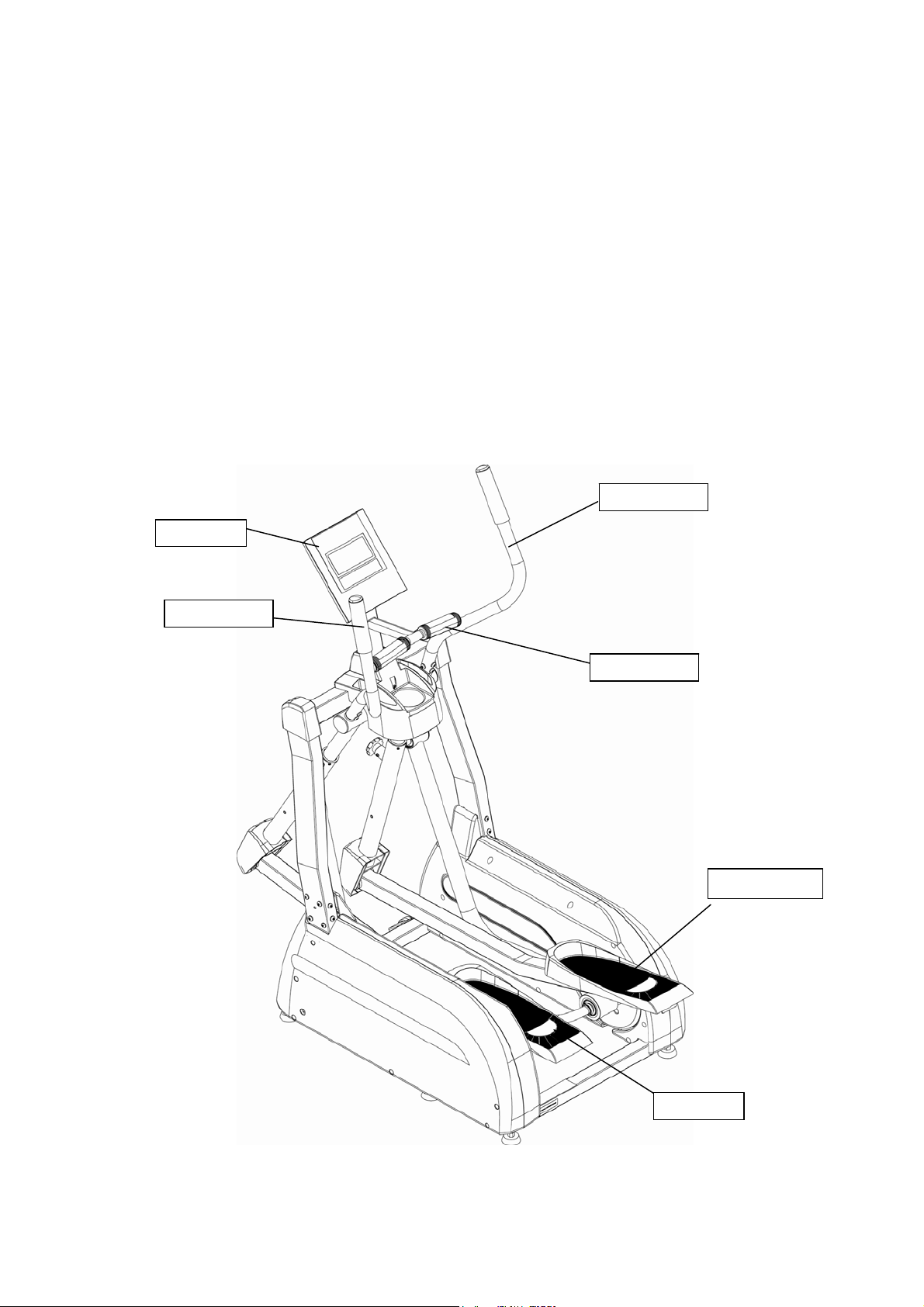
further, please familiarize yourself with the parts that are labeled in the drawing below.
Console
Left Handle
Right Handle
Pulse Handle
Right Pedal
Left pedal
Orbit fitness ©2013
4
Page 6
Pre-Assembly Check List
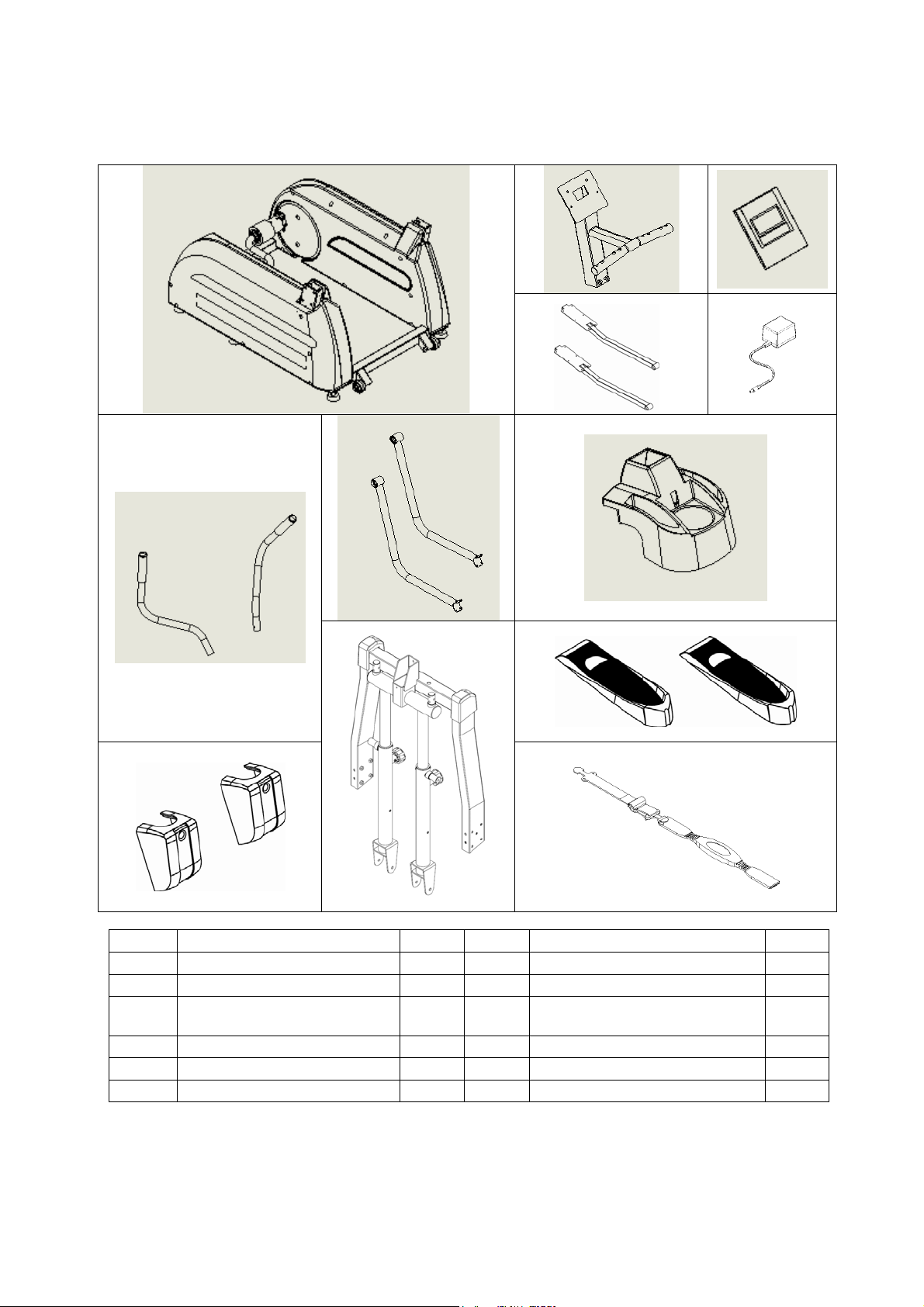
PART DESCRIPTION Q’TY PART DESCRIPTION Q’TY
Main frame 1 Upper handlebar (R&L) 2
Console tube 1 Lower handlebar (R&L) 2
Monitor 1
Upper support w/covers (R&L)+
Swing arm (R&L)
Pedal Arm (R&L) 2 Handlebar cover 2
Adaptor 1 Pedal (R&L) 2
Cup holder 1 Chest belt 1
Orbit fitness ©2013
5
2
Page 7
Hardware Packing List
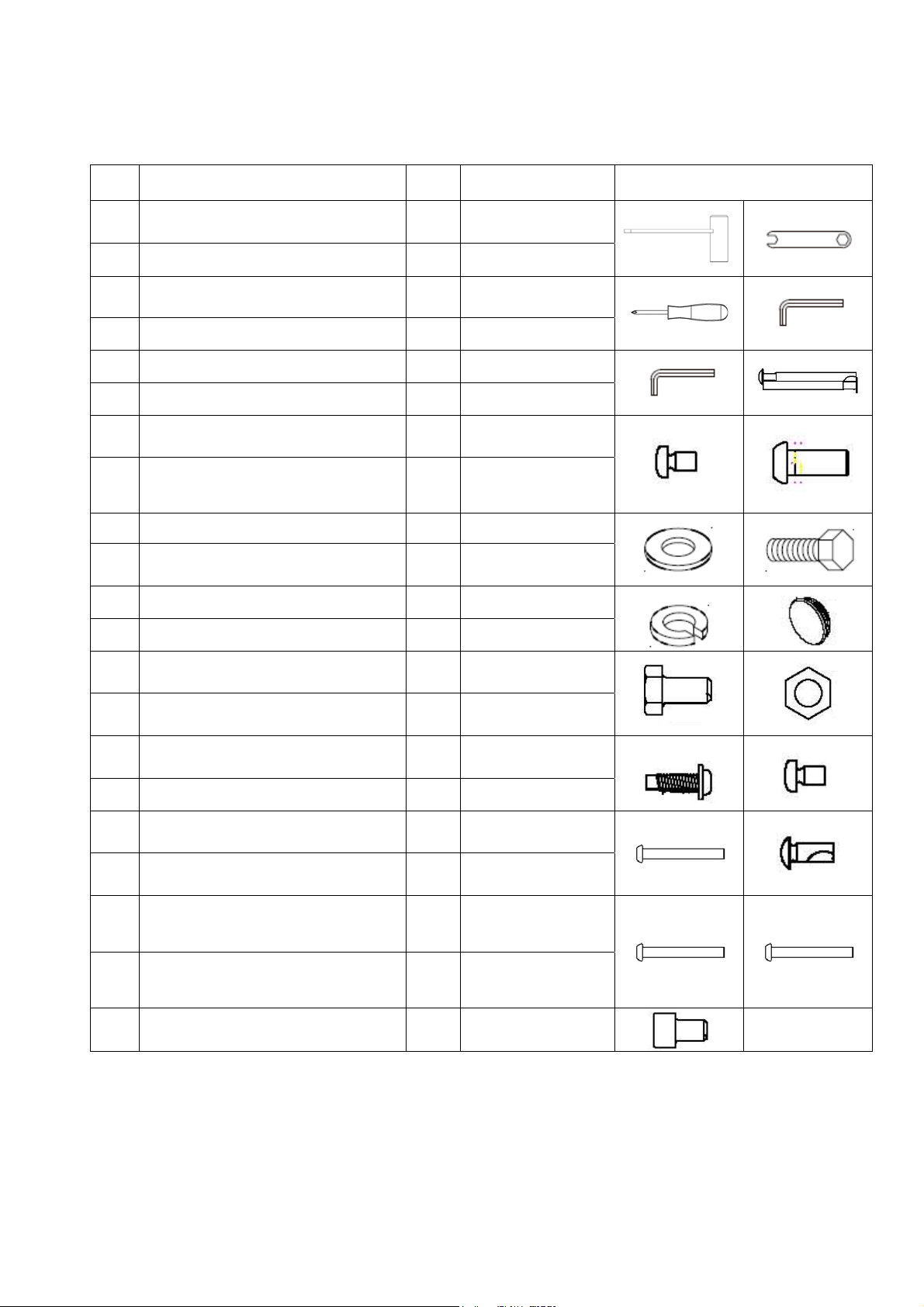
NO DESCRIPTION QTY SPEC SKETCH
1 Wrench 1 17mm
2 Wrench 1 17mm
3 Screwdriver 1 M5*0.8-55
4 Wrench Hex 1 6-83
5 Wrench Hex 1 5-70
6 CR. RE. Truss Head Screw 2 M5*0.8-55
7 CR. RE. Pan Head Screw 1 M5*0.8-8
8
9 Washer 2
10 Hex Head Bolt 2 M10*1.5-20
11 Spring Washer 2
12 End Cap 2
13 Hex Head Bolt 2 M10*1.5-81.5
14 Hex Nut 2 M10*1.5,T=8
15 Round Washer Head Screw 12 M5*0.8-16
16 Pan Head Screw 2 M6*1.0-12
17 Hex socket Truss Head Screw 3 M8*1.25-65
18 Truss Head Screw 4 M5*0.8-12
Hexagon Socket Truss Head &
Washer Assembled
6 M8*1.25-20
φ10
19
20
21 Hex Socket Head Cap Bolt 8 M8*1.25-12
Hexagon Socket Truss Head &
Washer assembled
Hexagon Socket Truss Head &
Washer assembled
8 M8*1.25-55
6 M8*1.25-16
Note:
1. Above described parts are the hardware tools needed to assemble this machine.
2. All the pre-assembled hardware will need to be removed for each of the assembly steps.
Orbit fitness ©2013
6
Page 8
Assembly Instruction
This manual is designed to help you easily assemble, adjust and use this machine. Please read this
manual carefully. For the sake of familiarizing yourself with the parts identified in the instruction,
first study the overview drawing.
Set all parts in a clear area on the floor and remove the packing material. Refer to the parts list for
help to identify the parts.
It will take two people to assemble your unit.
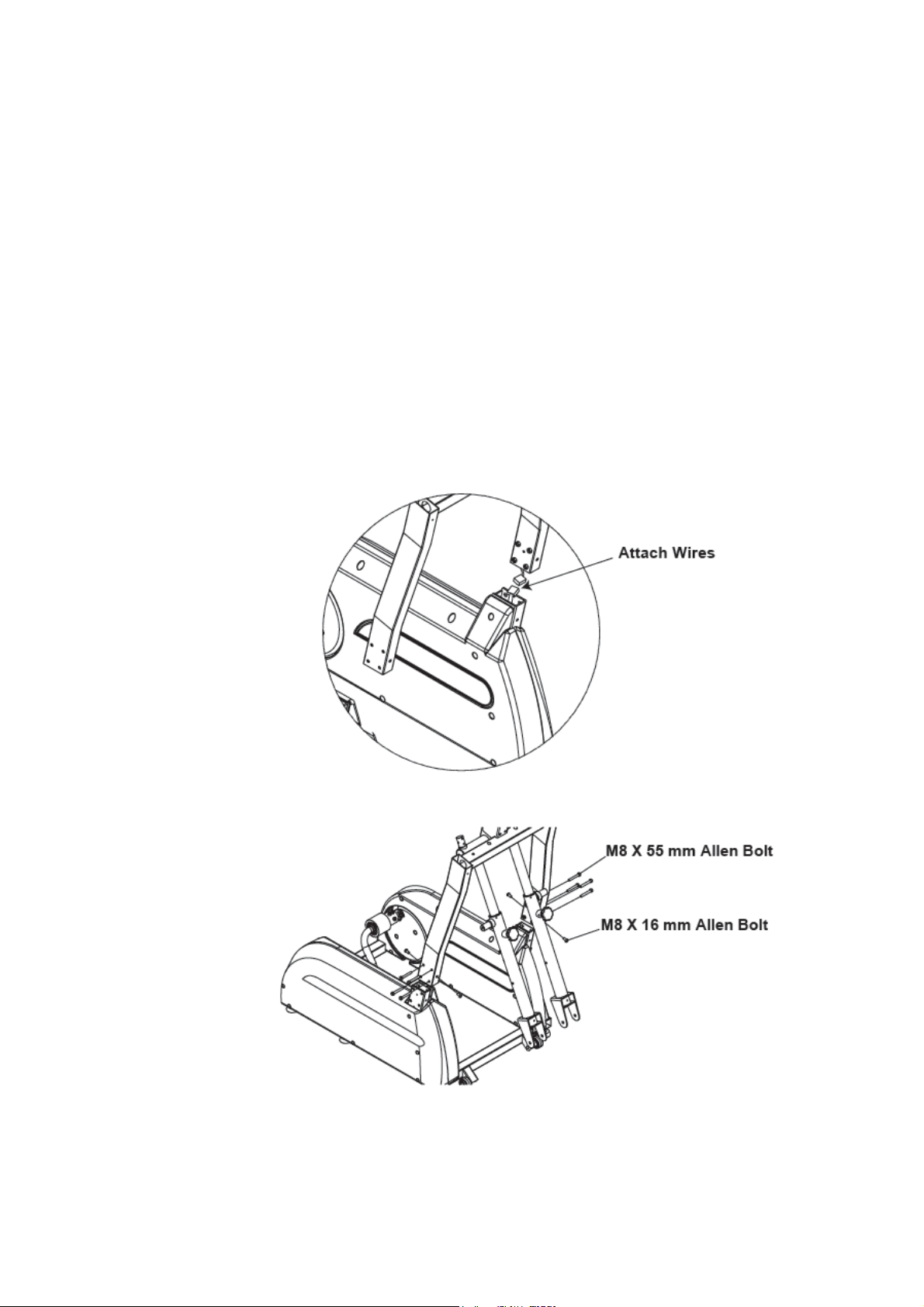
Step 1
A. Carefully lift the Upright Frame Assembly above the front of the
B. Attach wire hanrmess as shown
C. Slide the upright frame onto the base frame.
D. Insert the hardware as shown
Orbit fitness ©2013
7
Page 9

Step 2
A. Insert right rocker arm into right swing arm and secure using
One M10*20 Allen bolt
One M10 Washer
One M10 Lock washer
B. Insert end cap into right rocker arm.
C. Repeat the left side.
Step 3
A. Connect the right and left rocker arms as shown.
Orbit fitness ©2013
8
Page 10

Step 4
A. Connect the right foot pedal to the right foot tube using six M5*16 phillips Screws
B. Repeat the left side.
Step 5
Connect the right and left foot tubes as shown.
Orbit fitness ©2013
9
Page 11

St ep 6
Connect the swing arm cover as shown using two M6*10 Hex screws.
St ep 7
Connect the right handlebar using three M8*20 Hex Bolt
Repeat the left side.
Orbit fitness ©2013
10
Page 12

St ep 8
A. Insert bottle holder into the tube of the monitor frame.
B. Connect the harness from the monitor frame to the main frame and secure using
Three M8*65 Allen Bolt.
C. Connect the harnesses from the monitor to the monitor frame then secure using
Four M5*12 phillips screws.
Orbit fitness ©2013
11
Page 13

St ep 9
Connect the bottle holder to the main frame then secure using two M5*55 phillips screws and one
M5*8 phillips screws.
Step 10
Connect the tansformer as shown.
ENSURE TO FIRMLY TIGHTEN ALL NUTS AND BOLTS
YOUR UNIT IS NOW FULLY ASSEMBLED
Orbit fitness ©2013
12
Page 14

Monitor instruction
1. Power on, LCD will display segment for 2 seconds with long beep sound. (drawing1), and display
wheel diameter (drawing2). Then screen will enter into standby mode.
drawing 1 drawing 2
2. Manual is glittering in the standby mode, you may press UP and DOWN to select training mode
MANUAL / PROGRAM / USER PROGRAM / H.R.C. / WATT (drawing 3 ~7)and press MODE for
confirmation. The monitor will enter MANUAL mode for training without selection.
drawing 3 drawing 4
drawing 5 drawing 6
drawing 7
3. Training in PROGRAM mode :
3-1 In the PROGRAM mode, you may press UP/DOWN button to select program
Orbit fitness ©2013
13
Page 15

P01,P02,P03..~P12, the selected program will be show on screen for 2 seconds then display
program profile accordingly. (drawing 8)。
drawing 8
3-2 LOAD 1 (preset value) is glittering after training program selected, you may press UP/DOWN
button to select level from 1 to 16 and press MODE button for confirmation. (drawing 9)
Load level can be adjusted during training.
drawing 9
4. Training in MANUAL mode
4-1 In the MANUAL mode, you may press UP/DOWN button to select load level from 1 to 16, the
preset level is 1. (drawing 10)。
drawing 10
4-2 After load level selected, you may preset function values for TIME, DISTANCE, CALORIES,
and PULSE by pressing UP/DOWN button and press MODE confirmation. (drawing 11~14)
4-3 Pressing START button to start training.
drawing 11 drawing 12
Orbit fitness ©2013
14
Page 16

drawing 13 drawing 14
5. Training in USER PROGRAM:
After USER PROGRAM selected, you may set prefer program profile by pressing UP, DOWN and
MODE button for each flashing column. There are 20 segments for setting, if you want to quit during
setting, you may hold on MODE button for 2 seconds to quit, the previous setting profile will be
saved for unfinished segment. (drawing 15)
drawing 15
6. Training in H.R.C. mode:
AGE 25 is flashing after enter H.R.C. mode, you may set your age by pressing UP/DOWN/MODE
button. The monitor will calculate preset heart rate value automatically according to your age setting.
Screen will show heart rate percentage 55%, 75%, 90% and TARGET. You may select heart rate
percentage by UP/DOWN/MODE button for training. (drawing 16)
drawing 16
7. Training in WATT mode :
The preset watt value 120 is flashing on screen in WATT setting mode, select UP/DOWN/MODE to
set target value from 10 to 350. Pressing START button to start training.
Button Functions :
MODE : To set function value for TIME, DIST, CAL, PULSE stand by mode.
RESET : Return to main function mode stand by mode.
START/STOP : To start or stop training
RECOVERY : To test hear rate recovery status.
Orbit fitness ©2013
15
Page 17

UP : To select training mode and adjust function value up.
DOWN : To select training mode and adjust function value down.
TOTAL RESET: To power on the computer again, and clean all preset function values at zero.
Function :
TIME : Count up - No preset target, Time will count up from 00:00 to maximum 99:59 with each
increment is 1 second.
Count down - If training with preset Time, Time will cound down from preset to 00:00.Each preset
Increment or decrement is 1 minute between 1:00 to 99:00.
SPEED : Display current training speed from 0.0 to maximum 99.9 km or ml.
RPM : Display current training rotation per minute.
DISTANCE : Count up - No preset target, Distance will count up from 0.00 to maximum 99.90 with each
Increment 0.1 KM
Count down - If training with preset target, Distance will cound down from preset to 0.00.
Each preset increment or decrement is 0.1 KM (or ML) between 0.00 to 99.90.
CALORIES : Count up - No preset target, Calories will count up from 0 to maximum 990 with each 1 cal
increment.
Count down - If training with preset target, Calories will count down from preset time to 0.
Each preset increment or decrement is 10 cal from 0 to 990 cal.
PULSE : To display your current heart beat figures as soon as the pulse sensor has been touched.
The monitor will detect your heart best through handgrip sensors or chest belt.
WATT : Display current training watt figures.
RECOVERY : After exercising for a period of time, keep holding on handgrips and press “RECOVERY”
button. All function display will stop except “TIME” starts counting down from 00:60 to 00:00.
Screen will display your heart rate recovery status with the F1,F2….to F6. F1 is the best,
F6 is the worst. User may keep exercising to improve the heart rate recovery status.
(Press the RECOVERY button again to return the main display.)
Note:
1. When there is no signal been transferred into the computer for 4 minutes, the LCD display will shut off
automatically, and all previous training data will be stored. You may press any button to have the
computer restart working.
2. When computer displays abnormally, please plug-out the adapter and plug-in again.
3. The monitor can be switched to Metric or English of SPEED/DISTANCE calculating by switching the
KM/ML switch.
4. This computer require 9V, 500 mA adaptor.
16
Orbit fitness ©2013
Page 18

Exploded Diagram
Orbit fitness ©2013
17
Page 19

CS PARTS BOM LIST
REX # PART DESCRIPTION QTY
1 2LAR IDLER WHEEL BRACKET ASS'Y 1
2 2K54 HANDLEBAR ASSEMBLY W/ HAND PLUSE ASS'Y 2
3 2Y43 SLEEVE BUSHING ASS'Y 2
4 2Y45 ROLLING WHEEL ASS'Y 2
Orbit fitness ©2013
18
Page 20

Trouble Shooting
Problem Cause Correction
Monitor does not display
No speed or distance
displays on the monitor
No tension
Heart rate not displaying
Computer wire not connected
Controller defective
Sending unit not connected
Sending unit not working
properly
Connect the computer wire
Replace controller
Securely plug sending unit into extension
wire at the back of the monitor
Replace sending unit
Monitor not working properly Replace monitor
Computer wire not connected Connect the computer wire
Magnetic wheel not working
properly
Gear box defective
Defective generator wheel
Pulse wire not connected not
connected
Replace magnetic wheel
Replace the gear box
Replace generator wheel
Securely plug wires into the back of the
monitor
Hand pulse defective Replace hand pulse grip
Monitor not working properly Replace monitor
Crank bearing defective Replace crank bearings
Grinding
Idler pulley defective Replace idler pulley
Mag wheel defective Replace magnetic wheel
Squealing V-belt slipping Adjust v-belt
Orbit fitness ©2013
19
Page 21

Training Guidelines
Exercise
Exercise is one of the most important factors in the overall health of an individual. Listed among its
benefits are:
x Increased capacity for physical work (strength endurance)
x Increased cardiovascular (heart and arteries/veins) and respiratory efficiency
x Decreased risk of coronary heart disease
x Changes in body metabolism, e.g. losing weight
x Delaying the physiological effects of age
x Physiological effects, e.g. reduction in stress, increase in self-confidence, etc.
Basic Components of Physical Fitness
There are four all encompassing components of physical fitness and we need to briefly define each
and clarify its role.
Strength is the capacity of a muscle to exert a force against resistance. Strength contributes to
power and speed and is of great importance to a majority of sports people.
Muscular Endurance is the capacity to exert a force repeatedly over a period of time, e.g. it is
the capacity of your legs to carry you 10 Km without stopping.
Flexibility is the range of motion about a joint. Improving flexibility involves the stretching of
muscles and tendons to maintain or increase suppleness, and provides increased resistance to
muscle injury or soreness.
Cardio-Respiratory Endurance is the most essential component of physical fitness. It is the
efficient functioning of the heart and lungs
Aerobic Fitness
The largest amount of oxygen that you can use per minute during exercise is called your maximum
oxygen uptake (MVo2). This is often referred to as your aerobic capa city.
The effort that you can exert over a prolonged period of time is limited by your ability to deliver
oxygen to the working muscles. Regular vigorous exercise produces a training effect that can increase
your aerobic capacity by as much as 20 to 30%. An increased MVO2 indicates an increased ability of
the heart to pump blood, of the lungs to ventilate oxygen and of the muscles to take up oxygen.
Anaerobic Training
This means “without oxygen” and is the output of energy when the oxygen supply is insufficient to
meet the body’s long term energy demands. (For example, 100 meter sprint).
The Training Threshold
This is the minimum level of exercise which is required to produce significant improvements in any
physical fitness parameter.
Progression
As your become fitter, a higher intensity of exercise is required to create an overload and therefore
provide continued improvement
Overload
This is where you exercise at a level above that which can be carried out comfortably. The intensity,
duration and frequency of exercise should be above the training threshold and should be gradually
increased as the body adapts to the increasing demands. As your fitness level improves, so the
training threshold should be raised. Working through your program and gradually increasing the
overload factor is important.
Orbit fitness ©2013
20
Page 22

Specificity
Different forms of exercise produce different results. The type of exercise that is carried out is
specific both to the muscle groups being used and to the energy source involved.
There is little transfer of the effects of exercise, i.e. from strength training to cardiovascular fitness.
That is why it is important to have an exercise program tailored to your specific needs.
Reversibility
If you stop exercising or do not do your program often enough, you will lose the benefits you have
gained. Regular workouts are the key to success.
Warm Up
Every exercise program should start with a warm up where the body is prepared for the effort to
come. It should be gentle and preferably use the muscles to be involved later.
Stretching should be included in both your warm up and cool down, and should be performed after
3-5 minutes of low intensity aerobic activity or callisthenic type exercise.
Warm Down or Cool Down
This involves a gradual decrease in the intensity of the exercise session. Following exercise, a large
supply of blood remains in the working muscles. If it is not returned promptly o the central
circulation, pooling of blood may occur in the muscles
Heart Rate
As you exercise, so the rate at which your heart beat also increases. This is often used as a measure of
the required intensity of exercise. You need to exercise hard enough to condition your circulatory
system, and increase your pulse rate, but not enough to strain your heart.
Your initial level of fitness is important in developing an exercise program for you. If you are starting
off, you can get a good training effect with a heart rate of 110-120 beats per minute(BPM). If you are
fitter, you will need a higher threshold of stimulation.
To begin with, you should exercise at a level that elevates your heart rate to about 65 to 70% of your
maximum. If you find this is too easy, you may want to increase it, but it is better to lean on the
conservative side.
As a rule of thumb, the maximum heart rate is 220 minus your age. As you increase in age, so your
heart, like other muscles, loses some of its efficiency. Some of its natural loss is won back as fitness
improves.
The following table is a guide to those who are “starting fitness”.
Age 25 30 35 40 45 50 55 60 65
Target heart Rate
10 Second Count 23 22 22 21 20 19 19 18 18
Beats per Minute 138 132 132 126 120 114 114 108 108
Pulse Count
The pulse count(on your wrist or carotid artery in the neck, taken with two index fingers)is done for
ten seconds, taken a few seconds after you stop exercising. This is for two reasons: (a) 10 seconds is
long enough for accuracy, (b) the pulse count is to approximate your BPM rate at the time you are
exercising. Since heart rate slows as you recover, a longer count isn’t as accurate.
The target is not a magic number, but a general guide. If you’re above average fitness, you may work
quite comfortably a little above that suggested for your age group.
The following table is a guide to those who are keeping fit. Here we are working at about 80% of
maximum.
Age 25 30 35 40 45 50 55 60 65
Target heart Rate
10 Second Count 26 26 25 24 23 22 22 21 20
Beats per Minute 156 156 150 144 138 132 132 126 120
Don’t push yourself too hard to reach the figures on this table. It can be very uncomfortable if you
Orbit fitness ©2013
21
Page 23

overdo it. Let it happen naturally as you work through your program. Remember, the target is a guide,
not a rule, a little above or below is just fine.
Two final comments:(1) don’t be concerned with day to day variations in your pulse rate, being under
pressure or not enough sleep can affect it;(2) your pulse rate is a guide, don’t become a slave to it.
Endurance Circuit Training
Cardiovascular endurance, muscle, strength, flexibility and coordination are all necessary for
maximum fitness. The principle behind circuit training is to give a person all the essentials at one
time by going through your exercise program moving as fast as possible between each exercise. This
increases the heart rate and sustains it, which improves the fitness level. Do not introduce this circuit
training effect until you have reached an advanced program stage.
Body Building
Is often used synonymously with strength training The fundamental principal here is OVERLOAD.
Here, the muscle works against greater loads than usual. This can be done by increasing the load you
are working against.
Patronization
This is the term used to vary your exercise program for both physiological and psychological benefits.
In your overall program, you should vary the workload, frequency and intensity. The body responds
better to variety and so do you. In addition, when you feel yourself getting “stale’, bring in periods of
lighter exercise to allow the body to recuperate and restore its reserves. You will enjoy your program
more and feel better for it.
Muscle Soreness
For the first week or so, this may be the only indication you have that you are on an exercise program.
This, of course, does depend on your overall fitness level. A confirmation that you are on the correct
program is a very slight soreness in most major muscle groups. This is quite normal and will
disappear in a matter of days.
If you experience major discomfort, you may be on a program that is too advanced or you have
increased your program too rapidly.
If you experience PAIN during or after exercise, your body is telling your something.
Stop exercising and consult your doctor.
What to Wear
Wear clothing that will not restrict your movement in any way while exercising. Clothes should be
light enough to allow the body to cool. Excessive clothing that causes you to perspire more than you
normally would while exercising, gives you no advantage. The extra weight you lose is body fluid
and will be replaced with the next glass of water you drink. It is advisable to wear a pair of gym or
running shoes or “sneakers”.
Breathing During Exercise
Do not hold your breath while exercising. Breathe normally as much as possible. Remember,
breathing involves the intake and distribution of oxygen, which feeds the working muscles.
Rest Periods
Once you start your exercise program, you should continue through to the end. Do not break off
halfway through and then restart at the same place later on without going through the warm-up stage
again.
The rest period required between strength training exercises may vary from person to person. This will depend mostly on
your level of fitness and the program you have chosen. Rest between exercises by all means, but do not allow this to
exceed two minutes. Most people manage with half minute to one minute rest periods.
Orbit fitness ©2013
22
Page 24

Stretching
Stretching should be included in both your warm up and cool down, and should be performed after 35 minutes of low intensity aerobic activity or callisthenic type exercise. Movements should be
performed slowly and smoothly, with no bouncing or jerking. Move into the stretch until slight
tension, not pain, is felt in the muscle and hold for 20-30 seconds. Breathing should be slow,
rhythmical and under control, making sure never to hold your breath.
Head Rolls Shoulder Lifts
Rotate your head to the right for one count, Lift your right shoulder up toward your ear
feeling the stretch up the left side of your neck. for one count. Then lift your left shoulder
Next rotate your head back for one count, up for one count as you lower your right
stretching your chin to he ceiling and letting shoulder.
your mouth open. Rotate your head to the
left for one count, and finally, drop your head
to your chest for one count.
Side Stretches Quadriceps Stretch
Open your arms to the side and continue lifting With one hand against a wall for balance,
them until they are over your head. Reach your reach behind you and pull your right foot up.
right arm as far upward toward the ceiling as Bring your heel as close to your buttocks as
you can for one count. Feel the stretch up possible. Hold for 15 counts and repeat with
your right side. Repeat this action with your left foot up.
left arm
.
Orbit fitness ©2013
23
Page 25

Inner Thigh Stretch Toe Touches
Sit with the soles of your feet together with your Slowly bend forward from your waist, letting
knees pointing outward. Pull your feet as close your back and shoulders relax as you stretch
Into your groin as possible. Gently push your toward your toes. Reach down as far as you
knees towards the floor. Hold for 15 counts. can and hold for 15 counts.
Hamstring Stretches Calf / Achilles Stretch
Sit with your right leg extended. Rest the Lean against a wall with your left leg in front
sole of your left foot against your right. Stretch of your right and your arms forward.
inner thigh your toe as far as possible. Keep your right leg straight and the left
Hold for 15 counts. Leg and lean forward by moving your hips
Relax and then repeat with left leg extended. toward the wall. Hold, then repeat
on the other side for 15 counts.
Orbit fitness ©2013
24
Page 26

NOTES
Orbit fitness ©2013
26
Page 27

NOTES
Orbit fitness ©2013
26
Page 28

Phoenix CDXP Elliptical
 Loading...