

Page 1
Manual Contents
Manual Contents
1-0
Welcome! Product Description
1-1
System Requirements for Setup
1-2
Installation
1-3
Troubleshooting, Maintenance, Technical Support, and Service
1-5
Product Specifications
1-6
Warranty Information
1-7
Certifications
1-8
Figure 1 – Overall Connection of HDFX-700-TR
1-1
Figure 2 – Position of the LED
1-3
Figure 3 – Connection of optical fiber
1-4
1-0 Manual Contents
One (1) Fiber HDMI 2.0
Doc No. : OE-HD220415 / V1.2
Optical Detachable Extender
With Copper Extension
User Manual
HDFX-700-TR
__________________________________________
Pictorials
Page 2
Welcome!
choose to use direct connection type module on one side, and copper
System Requirements for Setup
※
Congratulations on your purchase of the one (1) fiber HDMI extender with copper extension, HDFX-700-TR. This manual contains information that will assist you in installing and operating the product.
Product Description
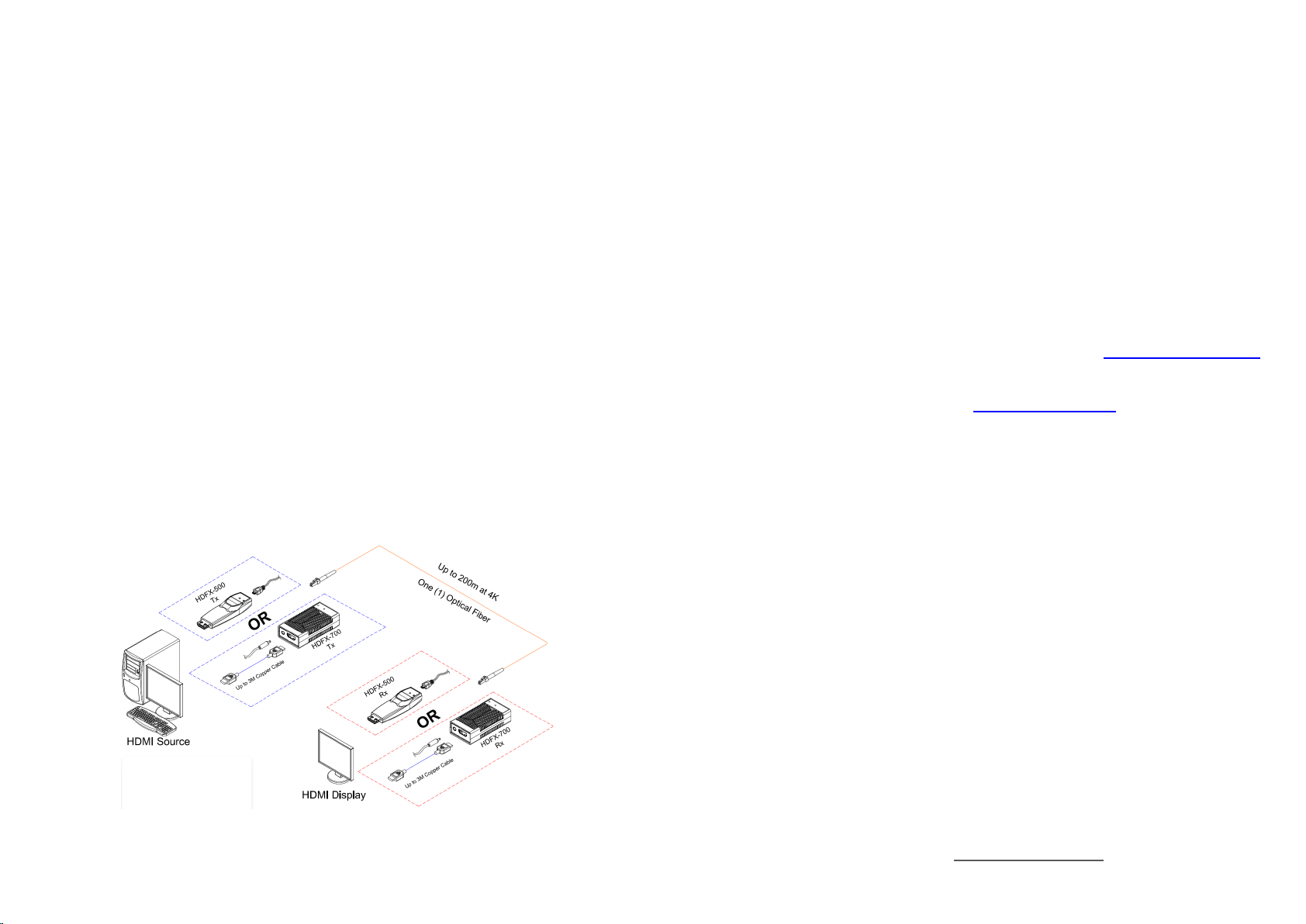
HDMI 2.0 one(1) fiber optic detachable extender, HDFX-700-TR, extends
HDMI 2.0 signal up to 200m (656feet) and transmits 4K UHD (4096x2160) at
60Hz over one(1) LC multi-mode fiber. Cutting-edge technology of Opticis
reduces limits in installation by providing an option for longer copper extension.
HDFX-700-TR transmit uncompressed and transparent data signal even when
used with up to 3 m copper cable as an intermediary. This enables installation
of the product in the limited spaced area in such our small module type
extender cannot be used. 2m copper cable is provided in the shipping group.
Furthermore, to meet all the needs of the customers, HDFX-700-TR offers two
selectable options which are: ARC support up to 200m, and full interoperable
with HDFX-500 as a pair. Depending on the circumstances, customer can
extension type module on the other side.
HDFX-700-TR gives slim, light, and easy installation with perfect electrical
isolation, but without electrical hazard and interference. It is operated external
DC power adapter which is supplied in the shipping group.
1-1 Welcome, Product Description
Figure 1 – Overall Connection of HDFX-700-TR
□ Hardware requirements
You must have a HDMI source and display. It should support the
maximum graphic resolution feature of displays to be connected.
No special requirements of memory size, CPU speed and
chipsets, if you’ve already properly installed your HDMI systems or
graphic cards.
Proper initial trial of the entire platform with its application using a
short length copper cable is recommended prior to the installation
with the optical link.
□ Software requirements
No special restrictions, if you’ve already properly installed your
HDMI systems.
FW upgradable via micro USB port: contact [email protected]
to download the most recent FW version.
Default FW setting allows ARC support. If using HDFX-500-TR as
a pair is desired, contact [email protected]
for the manual to
change the FW.
□ Power Technical Advisory
Enclosed Power Adaptors should supply power for both
Transmitter and Receiver.
□ Connection Advisory
It is highly recommended that HDMI source is connected to HDMI
display output via HDFX-700-TR without any connection with
incompatible distributor, switcher and selector.
The Shipping Group of HDFX-700-TR;
□ One (1) Transmitter (TX) and One (1) Receiver (RX)
□ Two (2) 2m Male to Male HDMI copper cable
□ Two (2) 5V 1A power adapter
□ User Manual
If the purchase was made with mixed pair of HDFX-700 and
HDFX-500, the shipping group may vary.
※ In shipping group, two 2m copper cables are included. Contact the
regional sales representative or
cable.
[email protected] for using 3m copper
1-2 System Requirements for Setup
Page 3
Installation
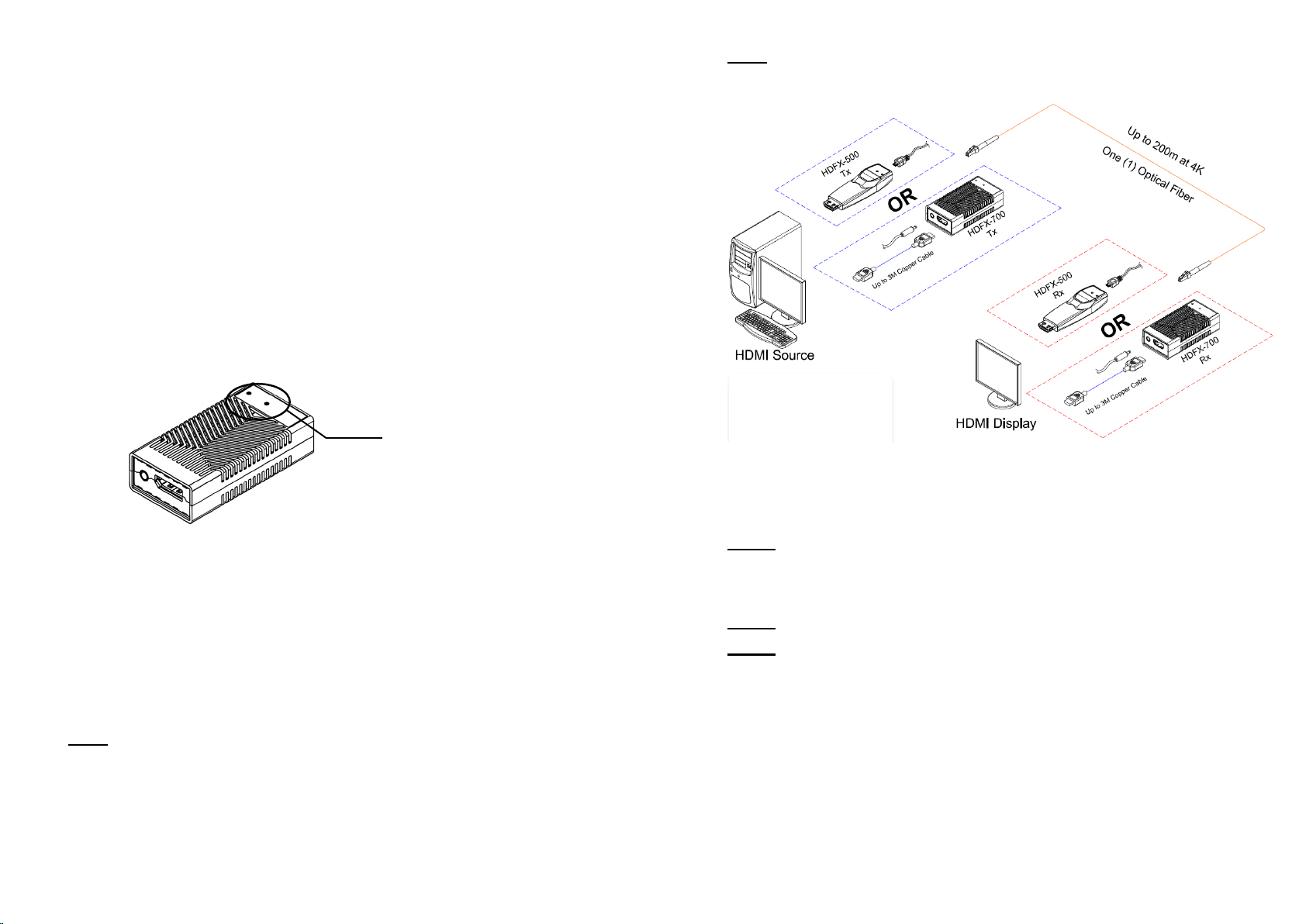
Position of the LED
Important: Please keep the installation procedure below. Failure in
operation may result if the start-up sequence is not correctly followed.
Step 1
Carefully unpack the contents in the shipping group.
Step 2
Power on the HDMI source and display. The external power is recommended
for the stable power supply for both the transmitter and receiver.
Step 3
The Power LED will be turned on and the Status LED will blink three (3)
times. Then the Status LED will blink again when the whole connection is
made.
Note: If HDFX-500 module is used as its pair for HDFX-700, connect HDFX500 module directly into the HDMI port on the source or display.
Step 4
Connect one (1) LC optical fiber between the transmitter and the receiver.
Ensure the connectors are fully engaged and then, the top LED will begin to
blink regularly.
Step 5
Connect the transmitter and the receiver to the source and the display
respectively via 2m copper cable provided in the shipping group.
Note: If the connectors are fully engaged, the bottom LED will turn on.
1-3 Installation
Fig Figure 3 – Connection of optical fiber
Step 6
If the system does not work properly, go to the page 1-5 for trouble shooting.
Figure 2 – Position of the LED
Note1: Please DO NOT look directly into the LC receptacles of the
Transmitter, while it is powered on. Although this product is regulated strictly
enough to operate under the LASER Class I, classified by CDRH/FDA for eye
safety, it is not recommended to do so.
Note2: T
he maximum extension length by OM3 fiber is 200 meters (656ft.).
Note3: It is recommended NOT to use any intermediate cable or adapter that
is not provided in the shipping group between the modules to avoid
undesirable performance degradation.
1-4 Installation
Page 4

Product Specifications
total data rate
1-6 Product Specifications
Troubleshooting
1-5 Trouble Shooting, Maintenance, Technical Support and Service
The display shows black screen.
□ Ensure that all the plugs and jacks used by DC power supplies are firmly
connected. Ensure that the LED is ON.
□ Ensure that the HDMI cables are firmly plugged into the HDMI source and
display.
□ Ensure that the transmitter and receiver modules are plugged correctly to the
source and display, respectively.
□ Check if the HDMI source and display are powered on and properly booted.
□ Reset the system by de-plugging and re-plugging the transmitter or receiver,
or by de-plugging and re-plugging the DC power adapters that are plugged to
the transmitter and receiver module.
□ Re-boot up the system while connecting the module.
Screen is distorted or displays noises.
□ Check if the graphic resolution is properly set. Go to the display Properties
and tap the Settings. Ensure that the resolution sets less than WQUXGA
(3840x2400) at 60Hz refresh ratio.
□ Reset the system.
□ Power down, disconnect and reconnect the optical system cable or DC power
adaptors, and power up again.
Maintenance
No special maintenance is required for the optical system cables and power
supplies. Ensure that the cables and power modules are stored or used in a
benign environment free from the liquid or dirt contamination.
There are no user serviceable parts. Refer all service and repair issues to Opticis
or its authorized distributor.
Technical Support and Service
For commercial or general product support, contact your reseller. For technical
service, contact Opticis by email [email protected]
www.opticis.com
or visit its website at
Compliance with HDMI standard: supports HDMI 2.0
Extension limit: 200m (656feet) for 4K (4096x2160) at 60 Hz
refresh rate over one (1) LC OM3 fiber (50/125um).
Graphic Transmission Bandwidth: Supports
18Gbps (6Gbps per lane).
Supports HDR at 10bit or 12bit speed respectively within 18Gbps
Extra Copper Extension available up to 3m on each side (TX/RX)
Supports ARC up to 200m
Selectable Option: full interoperable with HDFX-500-TR as a pair
Firmware upgradable via micro USB port
Support CEC, EDID, and HDCP 2.2 / 1.4
Mechanical specifications of transmitter and receiver
Dimensions(WDH): 39mm x 76mm x 20mm
Environmental Specifications
Operating temperature: 0°C to 50°C
Storage temperature: -30°C to 70°C
Humidity: 10% to 85%
AC/DC Power Adapter
Power Input: AC 100-240V, 50/60Hz.
Power Output: +5 V, 1A SMPS DC-power Adapter
LED indicator
Status LED
RED: No connection with the Fiber
AMBER: No data signal
GREEN: Signal ON
BLUE: ARC ON
Power LED
BLUE: Power connected
Page 5

Warranty Information
Dispose of Old Electrical & Electronic Equipment
(Applicable in the European Union and other European countries with separate systems)
This symbol on the product or on its packaging indicates that this
product shall not be treated as household waste. Instead it shall be
e collection point for the recycling of
electrical and electronic equipment. By ensuring this product is
disposed of correctly, you will help prevent potential negative
consequences for the environment and human health, which could
1 (One) Year Warranty
Opticis warrants this optical HDMI module to be free from defects in workmans
hip and materials, under normal use and service, for a period of one (1) year fr
om the date of purchase from Opticis or its authorized resellers.
If a product does not work as warranted during the applicable warranty period,
Opticis shall, at its option and expense, repair the defective product or part, deli
ver to customer an equivalent product or part to replace the defective item, or r
efund to customer the purchase price paid for the defective product.
All products that are replaced will become the property of Opticis.
Replacement products may be new or reconditioned.
Any replaced or repaired product or part has a ninety (90) day warranty or the r
eminder of the initial warranty period, whichever is longer.
Opticis shall not be responsible for any software, firmware, information, or mem
ory data of customer contained in, stored on, or integrated with any products re
turned to Opticis for repair under warranty or not.
Warranty Limitation and Exclusion
Opticis shall have no further obligation under the foregoing limited warranty if
the product has been damaged due to abuse, misuse, neglect, accident,
unusual physical or electrical stress, unauthorized modifications, tampering,
alterations, or service other than by Opticis or its authorized agents, causes
other than from ordinary use or failure to properly use the product in the
application for which said product is intended.
handed over to the applicabl
The recycling of materials will help to conserve natural resources. For more detailed
information about recycling of this product, please contact your local city office, your
household waste disposal service or the shop where you purchased the product.
1-7 Warranty Information
otherwise be caused by inappropriate waste handling of this product.
Certifications
CE / FCC, Class 1 Laser Eye Safety
Certification of Eye Safety
This laser product is inside implemented by using 780, 825, 850, 930, 960,
990nm LD Transceivers, manufactured by Opticis Co., Ltd., which are all
certified by CDRH/FDA referred as classified in Laser Class 1 (IEC60825-1).
Caution – Use of controls or adjustments or performances of procedures
other than those specified herein may result in hazardous radiation exposure.
1-8 Certifications
Page 6

© 2022 Opticis Co., Ltd. All Rights Reserved
Version 1.2 April 2022
OPTICIS HQ
Opticis Co., Ltd.
3F, 305, Sanseong-daero
Sujeong-gu, Seongnam-si
Gyeonggi-do, 13354
South Korea
Tel: +82 (31) 719-8033
Fax: +82 (31) 719-8032
www.opticis.com
For order support, please contact your Distributor or Reseller.
For technical support, check with the Opticis web site www.opticis.com or
contact [email protected]
Opticis Locations
 Loading...