

Page 1
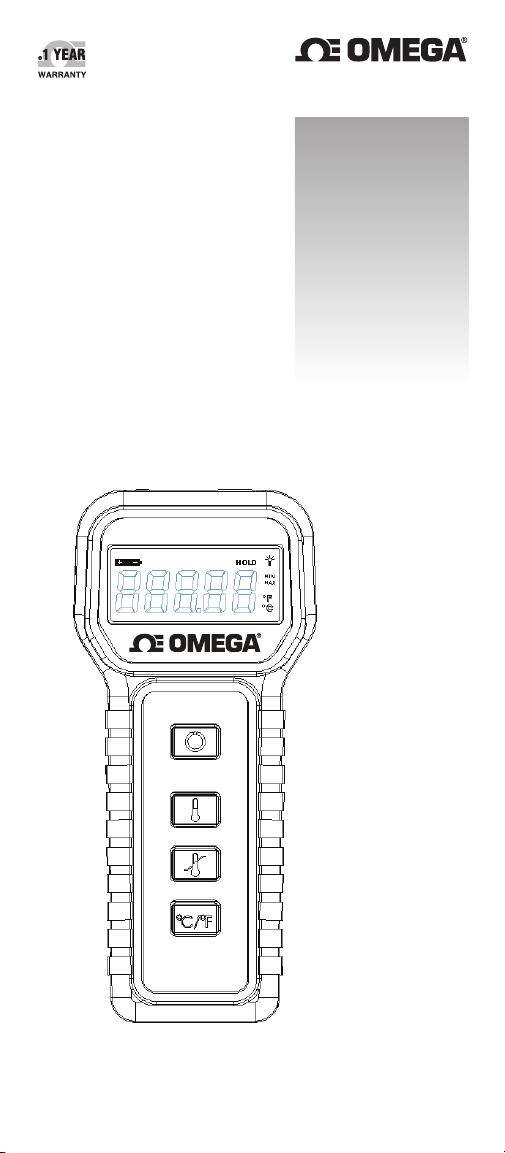
User’s Guide
Shop online at
omega.com
e-mail: [email protected]
For latest product manuals:
www.omegamanual.info
HH42A
sm
HH42A
Thermometer
Page 2

omega.com [email protected]
Servicing North America:
U.S.A.:
Stamford, CT 06907-0047 USA
For Other Locations
Visit omega.com/worldwide
Omega Engineering, Inc., One Omega Drive, P.O. Box 4047
Toll-Free: 1-800-826-6342 (USA & Canada only)
Customer Service: 1-800-622-2378 (USA & Canada only)
Engineering Service: 1-800-872-9436 (USA & Canada only)
Tel: (203) 359-1660 Fax: (203) 359-7700
e-mail: [email protected]
The information contained in this document is believed to be correct, but
OMEGA accepts no liability for any errors it contains, and reserves the right
to alter specifications without notice.
WARNING: These products are not designed for use in, and should not be
used for, human applications.
Page 3

TABLE OF CONTENTS
FRONT PANEL LAYOUT ...................................... 2
OPERATING INSTRUCTIONS ............................... 3
LCD DISPLAY AND ICONS ................................... 4
USB INTERFACE ................................................. 5
BATTERY REPLACEMENT .................................... 6
CARE AND CLEANING ......................................... 7
RECALIBRATION ................................................. 8
REPAIR ............................................................... 8
SPECIFICATIONS ................................. ...............
9
1
Page 4
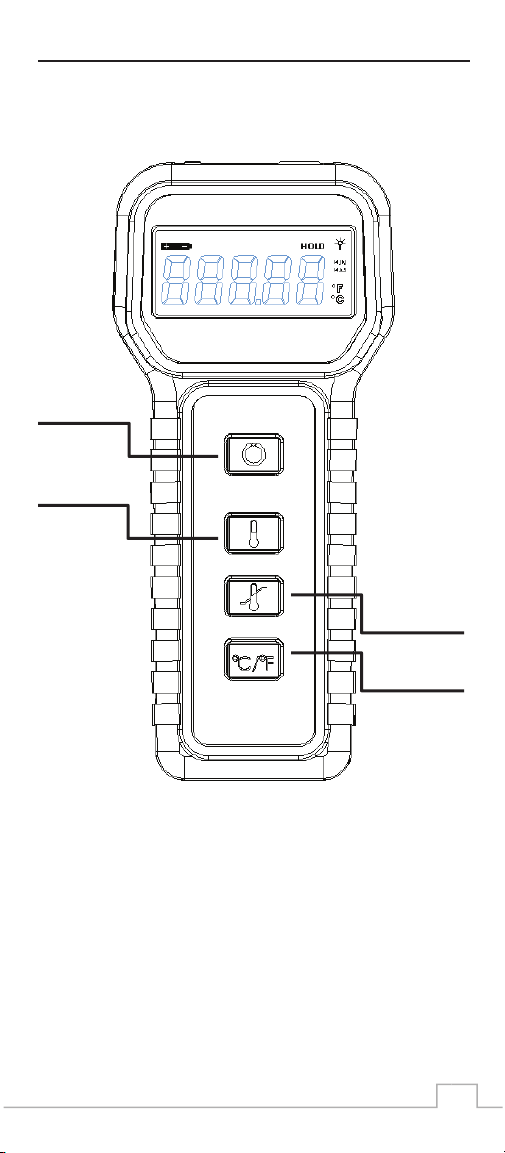
FRONT PANEL LAYOUT
ON/OFF
HOLD
MIN/MAX
ºC/ºF
2
Page 5

OPERATING INSTRUCTIONS
ON/OFF:
This button turns the meter ON or OFF.
Press and hold this button for ~1 second to
turn the meter ON. Pressing the button again
will turn the meter OFF.
HOLD:
This button freezes the display at the present
temperature. The “HOLD” icon will be
displayed when the meter is in this mode.
Press this button again to exit the HOLD
mode.
MIN/MAX:
This button starts the MIN/MAX mode. In
this mode, the meter will display the
temperature and will also keep track of the
minimum and maximum temperatures it
read since the mode was activated. To
activate this mode, press and hold this
button for ~3 seconds until you see both
icons, “MIN” and “MAX”, displayed. Press
this button again to see the minimum
temperature (the “MIN” icon will be
displayed alone). Press this button again to
see the maximum temperature (the “MAX”
icon will be displayed alone). Press and hold
this button until both icons, “MIN” and
“MAX”, disappear to disable this mode.
ºC/ºF:
This button selects either degrees Celsius or
Fahrenheit as the unit for the displayed
temperature.
3
Page 6
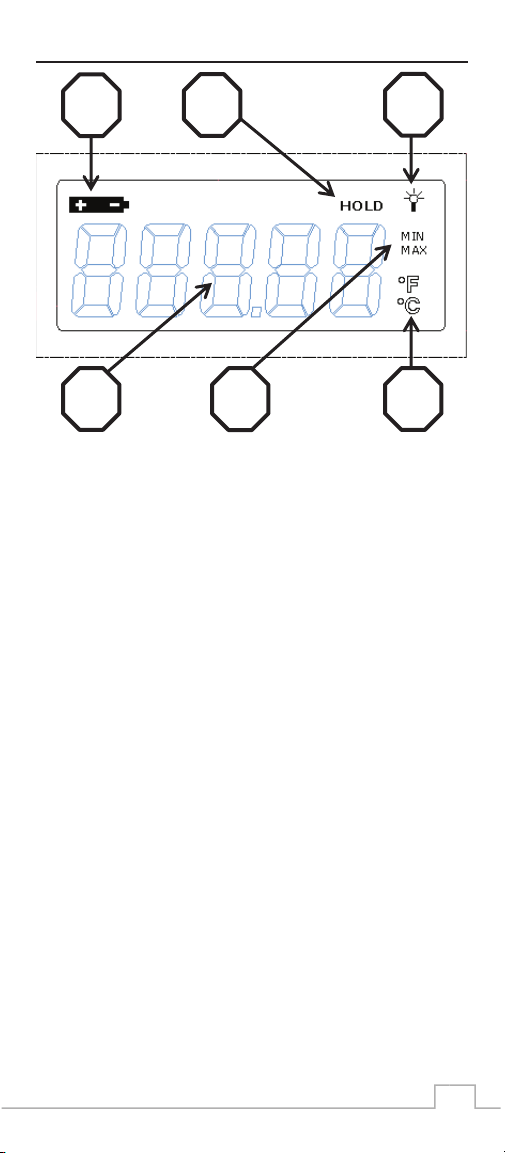
LCD DISPLAY AND ICONS
1
1. Low Battery Icon: Battery should be
replaced when this icon is displayed.
2. HOLD Mode Icon: Meter is in HOLD mode
when this icon is displayed.
3. External Power Icon: Meter is powered
through the USB connection when this icon
is displayed. Battery power will not be
drained when this icon is displayed.
4. MIN/MAX Mode Icons: Meter is in
MIN/MAX mode when either or both icons
are displayed.
5. Temperature Unit Icon: Displayed
temperature is in degrees Celsius when the
ºC icon is displayed. Displayed temperature
is in degrees Fahrenheit when the ºF icon is
displayed.
6. HI/LO Displayed in the Digits Area:
a. Toggling HI/LO indicates a bad or a
missing probe.
b. “HI” indicates temperature that is above
the maximum rated for a probe.
2
3
5 4 6
c. “LO” indicates temperature that is
below the minimum rated for a probe.
4
Page 7

USB INTERFACE
WARNING - The Thermometer must be turned
OFF before connecting / disconnecting a personal
computer or a power supply through the MicroUSB port.
The OMEGA® HH42A has a Micro -USB
port. The USB port serves two purposes:
It •
allows a personal computer to
communicate with the thermometer.
•
It provides external power to the
thermometer.
The HH42A comes with a powerful software
program called t-View. This software
communicates with the thermometer,
displays real-time data and graphs, and
allows for data logging and exporting to
Excel® file format.
The USB port is also used to provide
external power to the thermometer. Anytime
the thermometer is connected to a personal
computer or a 5V USB power supply, it is
powered through the USB port. During this
time, battery power will not be drained.
5
Page 8

BATTERY REPLACEMENT
Only use 9V alkaline battery,
Duracell MN 1604 or equivalent.
When replacing the battery, do the
following:
1. Place the thermometer onto its face
and remove the battery door at the
bottom of the case.
2. Carefully tilt the thermometer to one
side until the battery exits the battery
compartment.
3. Using your thumb and index fingers,
carefully squeeze around the middle
of the battery connector to
disconnect the old battery.
4. Be sure to line up the terminals of
the new battery with those of the
connector. Then, firmly snap the two
together.
5. Push the connected new battery into
the battery compartment. Ensure
connector wires will not block the
battery door by pushing them to the
side of the battery.
6. Replace the battery door into original
position.
6
Page 9

7
CARE AND CLEANING
Extensive testing has proven the case of the
thermometer to be rugged and reliable. It is
splash resistant but not water proof. The
case may not be submerged! Liquid will
flow in and damage or ruin the thermometer.
DO NOT AUTOCLAVE THE UNIT!! If
it is necessary to decontaminate the
thermometer, a weak chlorine solution may
be gently wiped on to the case by a well
rung out soft cloth. Do not let any liquid go
into the jacks.
The clear plastic LCD lens can be easily
scratched and/or fogged by inappropriate
cleaning products. Use only plastic approved
lens cleaners. Alcohol, acetone, lacquer
thinners, and other harsh chemicals will fog
the lens and damage the case and rubber
keypad.
EITHER OF THE BELOW ACTIONS
CAN VOID OMEGA ENGINEERING
WARRANTY:
WARNING – Never use
alcohol or thinners as these
will damage the instrument.
WARNING – Do not use
outside of specified operating
ranges and conditions, or
outside of normal laboratory
environments or applications.
Page 10

SPECIFICATIONS
ENVIRONMENTAL CONDITIONS:
Operating:
Temperature 10 - 40ºC
Humidity 0 – 85%
Storage:
Temperature 10 - 60ºC
Humidity 0 – 70%
RESOLUTION: 0.01ºC
ACCURACY:
Depends on the configuration of the
thermometer. Please see the
Certificate of Calibration for more
details.
MEASUREMENT RANGE:
Depends on the configuration of the
thermometer. Please see the
Certificate of Calibration for more
details.
CALIBRATION PERIOD: 1 Year
POWER: 9V alkaline battery
BATTERY LIFE: ~100 hours
External Power Supply (optional):
5V USB Power Supply connects to
the Micro-USB port available on the
thermometer.
9
RECALIBRATION
The HH42A thermometer should be
recalibrated at least once a year. Check the
Certificate of Calibration, which came with
the thermometer, or the recalibration label
on the back of the unit to determine the next
recalibration due date.
8
Page 11

SPECIFICATIONS
ENVIRONMENTAL CONDITIONS:
Operating:
Temperature 10 - 40ºC
Humidity 0 – 85%
Storage:
Temperature 10 - 60ºC
Humidity 0 – 70%
RESOLUTION: 0.01ºC
ACCURACY:
Depends on the configuration of the
thermometer. Please see the
Certificate of Calibration for more
details.
MEASUREMENT RANGE:
Depends on the configuration of the
thermometer. Please see the
Certificate of Calibration for more
details.
CALIBRATION PERIOD: 1 Year
POWER: 9V alkaline battery
BATTERY LIFE: ~100 hours
External Power Supply (optional):
5V USB Power Supply connects to
the Micro-USB port available on the
thermometer.
9
Page 12

NOTES
10
Page 13

OMEGA ENGINEERING, INC. warrants this unit to be free of defects in
WARRANTY/DISCLAIMER
materials and workmanship for a period of 13 months from date
of purchase. OMEGA’s WARRANTY adds an additional one (1) month
grace period to the normal one (1) year product warranty to cover
handling and shipping time. This ensures that OMEGA’s customers receive
maximum coverage on each product.
If the unit malfunctions, it must be returned to the factory for evaluation.
OMEGA’s Customer Service Department will issue an Authorized Return
(AR) number immediately upon phone or written request. Upon examination by OMEGA, if the unit is found to be defective, it will be repaired or
replaced at no charge. OMEGA’s WARRANTY does not apply to defects
resulting from any action of the purchaser, including but not limited to
mishandling, improper interfacing, operation outside of design limits,
improper repair, or unauthorized modification. This WARRANTY is VOID if
the unit shows evidence of having been tampered with or shows evidence
of having been damaged as a result of excessive corrosion; or current,
heat, moisture or vibration; improper specification; misapplication; misuse
or other operating conditions outside of OMEGA’s control. Components in
which wear is not warranted, include but are not limited to contact points,
fuses, and triacs.
OMEGA is pleased to offer suggestions on the use of its various
products. However, OMEGA neither assumes responsibility for
any omissions or errors nor assumes liability for any damages that
result from the use of its products in accordance with information
provided by OMEGA, either verbal or written. OMEGA warrants only
that the parts manufactured by the compamy will be as specified
and free of defects. OMEGA MAKES NO OTHER WARRANTIES OR
REPRESENTATIONS OF ANY KIND WHATSOEVER, EXPRESSED OR
IMPLIED, EXCEPT THAT OF TITLE, AND ALL IMPLIED WARRANTIES
INCLUDING ANY WARRANTY OF MERCHANTABILITY AND
FITNESS FOR A PARTICULAR PURPOSE ARE HEREBY DISCLAIMED.
LIMITATION OF LIABILITY: The remedies of purchaser set forth
herein are exclusive, and the total liability of OMEGA with respect
to this order, whether based on contract, warranty, negligence,
indemnification, strict liability or otherwise, shall not exceed the
purchase price of the component upon which liability is based. In no
event shall OMEGA be liable for consequential, incidental or special
damages.
CONDITIONS: Equipment sold by OMEGA is not intended to be used, nor
shall it be used: (1) as a “Basic Component” under 10 CFR 21 (NRC), used
in or with any nuclear installation or activity; or (2) in medical applications
or used on humans. Should any Product(s) be used in or with any nuclear
installation or activity, medical application, used on humans, or misused
in any way, OMEGA assumes no responsibility as set forth in our basic
WARRANTY / DISCLAIMER language, and, additionally, purchaser will
indemnify OMEGA and hold OMEGA harmless from any liability or damage
whatsoever arising out of the use of the Product(s) in such a manner.
Direct all warranty and repair requests/inquiries to the OMEGA Customer
Service Department. BEFORE RETURNING ANY PRODUCT(S) TO OMEGA,
PURCHASER MUST OBTAIN AN AUTHORIZED RETURN (AR) NUMBER
FROM OMEGA’S CUSTOMER SERVICE DEPARTMENT (IN ORDER TO
AVOID PROCESSING DELAYS). The assigned AR number should then be
marked on the outside of the return package and on any correspondence.
The purchaser is responsible for shipping charges, freight, insurance and
proper packaging to prevent breakage in transit.
FOR WARRANTY RETURNS, please
have the following information
available BEFORE contacting
OMEGA:
1. Purchase Order number
under which the product was
PURCHASED,
2. Model and serial number of the
product under warranty, and
3. Repair instructions and/or specific
problems relative to the product.
OMEGA’s policy is to make running changes, not model changes, whenever
an improvement is possible. This affords our customers the latest in technology and engineering.
OMEGA is a registered trademark of OMEGA ENGINEERING, INC.
© Copyright 2015 OMEGA ENGINEERING, INC. All rights reserved. This doc-
ument may not be copied, photocopied, reproduced, translated, or reduced
to any electronic medium or machine-readable form, in whole or in part,
without the prior written consent of OMEGA ENGINEERING, INC.
RETURN REQUESTS / INQUIRIES
FOR NON-WARRANTY REPAIRS,
consult OMEGA for current repair
charges. Have the following
information available BEFORE
contacting OMEGA:
1. Purchase Order number to cover
the COST of the repair,
2. Model and serial number of the
product, and
3. Repair instructions and/or specific
problems relative to the product.
Page 14

Where Do I Find Everything I Need for
Process Measurement and Control?
OMEGA…Of Course!
Shop online at omega.com
sm
MU
Thermocouple, RTD & Thermistor Probes,
Connectors, Panels & Assemblies
MU
Wire: Thermocouple, RTD & Thermistor
MU
Calibrators & Ice Point References
MU
Recorders, Controllers & Process Monitors
MU
Infrared Pyrometers
PRESSURE, STRAIN AND FORCE
TEMPERATURE
MU
Transducers & Strain Gages
MU
Load Cells & Pressure Gages
MU
Displacement Transducers
MU
Instrumentation & Accessories
FLOW/LEVEL
MU
Rotameters, Gas Mass Flowmeters & Flow
Computers
MU
Air Velocity Indicators
MU
Turbine/Paddlewheel Systems
MU
Totalizers & Batch Controllers
pH/CONDUCTIVITY
MU
pH Electrodes, Testers & Accessories
MU
Benchtop/Laboratory Meters
MU
Controllers, Calibrators, Simulators & Pumps
MU
Industrial pH & Conductivity Equipment
DATA ACQUISITION
MU
Data Acquisition & Engineering Software
MU
Communications-Based Acquisition Systems
MU
Plug-in Cards for Apple, IBM & Compatibles
MU
Data Logging Systems
MU
Recorders, Printers & Plotters
HEATERS
MU
Heating Cable
MU
Cartridge & Strip Heaters
MU
Immersion & Band Heaters
MU
Flexible Heaters
MU
Laboratory Heaters
ENVIRONMENTAL
MONITORING AND CONTROL
MU
Metering & Control Instrumentation
MU
Refractometers
MU
Pumps & Tubing
MU
Air, Soil & Water Monitors
MU
Industrial Water & Wastewater Treatment
MU
pH, Conductivity & Dissolved Oxygen Instruments
M5489/0715
 Loading...