

Page 1

ADLD0099
Re-Order from
omegamation.com
Omegamation
TM
1-888-55-OMEGA
1-888-55-66342
1-888-55-66342
CRIMSON 3
USER MANUAL
REVISION 2.1
Page 2

Copyright © 2003-2010 Red Lion Controls Inc.
All Rights Reserved Worldwide.
The information contained herein is provided in good faith, but is subject to change without
notice. It is supplied with no warranty whatsoever, and does not represent a commitment on
the part of Red Lion Controls. Companies, names and data used as examples herein are
fictitious unless otherwise stated. No part of this document may be reproduced or transmitted
in any form or by any means, electronic or mechanical, without the express written
permission of Red Lion Controls Inc.
The Red Lion logo is a registered trademark of Red Lion Controls Inc.
Crimson and the Crimson logo are registered trademarks of Red Lion Controls Inc.
All other trademarks are acknowledged as the property of their respective owners.
Written by Mike Granby and Jesse Benefiel.
Page 3

TABLE OF CONTENTS
TABLE OF CONTENTS
GETTING STARTED ..........................................................................................1
SYSTEM REQUIREMENTS .................................................................................... 1
INSTALLING THE SOFTWARE ............................................................................... 1
REGISTRATION ............................................................................................... 2
CHECKING FOR UPDATES ................................................................................... 2
INSTALLING THE USB DRIVERS ........................................................................... 2
TROUBLESHOOTING ......................................................................................... 2
GETTING ASSISTANCE ...................................................................................... 4
BALLOON HELP ................................................................................................................................ 4
TECHNICAL SUPPORT......................................................................................................................... 4
ONLINE FORUMS .............................................................................................................................. 4
THE NEXT STEPS ............................................................................................ 4
CRIMSON BASICS ............................................................................................5
WINDOW LAYOUT ........................................................................................... 5
THE NAVIGATION PANE...................................................................................................................... 5
THE RESOURCE PANE ........................................................................................................................ 5
THE EDITING PANE ........................................................................................................................... 6
COLLAPSING PANES........................................................................................................................... 6
THE CATEGORIES ............................................................................................ 6
COMMUNICATIONS ............................................................................................................................ 6
DATA TAGS ..................................................................................................................................... 6
DISPLAY PAGES ................................................................................................................................ 6
PROGRAMS ..................................................................................................................................... 7
WEB SERVER ................................................................................................................................... 7
DATA LOGGER ................................................................................................................................. 7
SECURITY ....................................................................................................................................... 7
MODULES ....................................................................................................................................... 7
GETTING AROUND ........................................................................................... 8
BACK AND FORWARD ......................................................................................................................... 8
CATEGORY SHORTCUTS ...................................................................................................................... 8
ITEM SHORTCUTS ............................................................................................................................. 8
NAVIGATION LISTS .......................................................................................... 9
WORKING WITH FOLDERS ................................................................................................................... 9
SORTING LISTS AND FOLDERS ............................................................................................................. 9
DRAG AND DROP OPERATIONS .......................................................................................................... 10
SEARCHING IN LISTS ....................................................................................................................... 10
UNDO AND REDO ...........................................................................................10
GLOBAL SEARCHING ........................................................................................10
WORKING WITH DATABASES..............................................................................11
DATABASE IDENTIFIERS ................................................................................................................... 11
SAVING AN IMAGE .......................................................................................................................... 11
DATABASE PROTECTION ................................................................................................................... 12
CONVERTING A DATABASE ................................................................................................................ 12
REVISION 2.1 PAGE I
Page 4

TABLE OF CONTENTS CRIMSON 3 USER MANUAL
FINDING DATABASE ERRORS ............................................................................................................. 13
DOWNLOADING TO A DEVICE ............................................................................ 13
CONFIGURING THE LINK ................................................................................................................... 13
SENDING THE DATABASE .................................................................................................................. 14
EXTRACTING DATABASES .................................................................................................................. 15
SENDING THE TIME AND DATE ........................................................................................................... 15
THE COMPACTFLASH CARD .............................................................................. 15
MOUNTING THE CARD ..................................................................................................................... 15
FORMATTING THE CARD ................................................................................................................... 16
REMOTE MONITORING .................................................................................... 16
USING THE EMULATOR ................................................................................... 18
ENABLING THE EMULATOR ............................................................................... 18
PORT MAPPING ............................................................................................. 18
EMULATOR CONFIGURATION ............................................................................. 19
EMULATOR LIMITATIONS ................................................................................. 19
USING COMMUNICATIONS .............................................................................. 20
SERIAL PORT SELECTION ................................................................................. 20
SELECTING A PROTOCOL ................................................................................. 20
PROTOCOL OPTIONS ...................................................................................... 21
WORKING WITH DEVICES ................................................................................ 21
ADVANCED SETTINGS ..................................................................................... 22
CREATING TAGS ............................................................................................ 23
PORT AND DEVICE USAGE ................................................................................ 23
NETWORK CONFIGURATION .............................................................................. 23
ETHERNET SETTINGS ....................................................................................................................... 23
MULTIPLE PORTS............................................................................................................................ 24
ROUTING SETTINGS ........................................................................................................................ 25
DOWNLOAD SETTINGS ..................................................................................................................... 26
ADDING PORTS .............................................................................................................................. 26
PROTOCOL SELECTION ..................................................................................................................... 27
USING VIRTUAL PORTS .................................................................................................................... 27
USING EXPANSION CARDS ............................................................................... 27
SLAVE PROTOCOLS ........................................................................................ 28
SELECTING THE PROTOCOL ............................................................................................................... 29
ADDING GATEWAY BLOCKS ............................................................................................................... 29
ADDING ITEMS TO A BLOCK .............................................................................................................. 30
ACCESSING INDIVIDUAL BITS ............................................................................................................ 30
PROTOCOL CONVERSION ................................................................................. 31
MASTER AND SLAVE ........................................................................................................................ 31
MASTER AND MASTER ...................................................................................................................... 32
WHICH WAY AROUND? .................................................................................................................... 32
CONTROLLING MASTER BLOCKS ......................................................................................................... 32
DATA TRANSFORMATION ................................................................................. 33
DISABLING COMMUNICATIONS .......................................................................... 33
WORKING WITH TAGS ................................................................................... 35
PAGE II http://www.redlion.net/g3
Page 5

TABLE OF CONTENTS
ALL ABOUT TAGS ...........................................................................................35
DATA SOURCES .............................................................................................................................. 35
TYPES OF TAGS .............................................................................................................................. 35
TAG ATTRIBUTES ........................................................................................................................... 36
ADVANTAGES OF TAGS .....................................................................................36
EDITING PROPERTIES ......................................................................................37
EXPRESSION PROPERTIES ................................................................................................................. 37
TRANSLATABLE STRINGS .................................................................................................................. 40
TWO-WAY PROPERTIES ................................................................................................................... 41
ACTION PROPERTIES ....................................................................................................................... 41
COLOR PROPERTIES ........................................................................................................................ 41
LOG PROPERTIES ...........................................................................................42
CREATING TAGS ............................................................................................42
DUPLICATING TAGS ........................................................................................43
EDITING MULTIPLE TAGS .................................................................................43
USING COPY FROM ......................................................................................................................... 43
USING PASTE SPECIAL ..................................................................................................................... 43
PROPERTY SELECTIONS .................................................................................................................... 44
IMPORTING AND EXPORTING .............................................................................45
FINDING TAG USAGE .......................................................................................45
NUMERIC TAGS ..............................................................................................46
DATA PROPERTIES .......................................................................................................................... 46
FORMAT PROPERTIES ...................................................................................................................... 49
COLOR PROPERTIES ........................................................................................................................ 50
ALARM PROPERTIES ........................................................................................................................ 51
TRIGGER PROPERTIES ..................................................................................................................... 53
PLOT PROPERTIES .......................................................................................................................... 54
SECURITY PROPERTIES .................................................................................................................... 55
FLAG TAGS ...................................................................................................55
DATA PROPERTIES .......................................................................................................................... 55
FORMAT PROPERTIES ...................................................................................................................... 57
COLOR PROPERTIES ........................................................................................................................ 58
ALARM PROPERTIES ........................................................................................................................ 58
TRIGGER PROPERTIES ..................................................................................................................... 60
SECURITY PROPERTIES .................................................................................................................... 60
STRING TAGS ................................................................................................61
DATA PROPERTIES .......................................................................................................................... 61
FORMAT PROPERTIES ...................................................................................................................... 63
COLOR PROPERTIES ........................................................................................................................ 64
SECURITY PROPERTIES .................................................................................................................... 64
BASIC TAGS ..................................................................................................64
ADVANCED TOPICS .........................................................................................65
ARRAY PROPERTIES ........................................................................................................................ 65
TAG DATA FLOW ............................................................................................................................ 65
USING ON WRITE........................................................................................................................... 66
USING FORMATS ........................................................................................... 69
FORMAT TYPES ..............................................................................................69
REVISION 2.1 PAGE III
Page 6

TABLE OF CONTENTS CRIMSON 3 USER MANUAL
GENERAL FORMAT ......................................................................................... 70
LINKED FORMAT ........................................................................................... 70
NUMERIC FORMAT ......................................................................................... 70
SCIENTIFIC FORMAT ....................................................................................... 71
TIME AND DATE FORMAT ................................................................................. 72
IP ADDRESS FORMAT ..................................................................................... 73
TWO-STATE FORMAT ..................................................................................... 73
THE MULTI-STATE FORMAT.............................................................................. 74
THE STRING FORMAT ..................................................................................... 75
USING COLORINGS ....................................................................................... 77
TYPES OF COLORING ...................................................................................... 77
GENERAL COLORING ...................................................................................... 77
LINKED COLORING ......................................................................................... 77
FIXED COLORING .......................................................................................... 78
TWO-STATE COLORING ................................................................................... 78
MULTI-STATE COLORING ................................................................................. 78
CREATING DISPLAY PAGES ............................................................................. 81
EDITOR BASICS ............................................................................................ 81
WORKING WITH PAGES .................................................................................................................... 81
CHANGING THE ZOOM LEVEL ............................................................................................................. 81
THE RESOURCE PANE ...................................................................................................................... 82
ADDING ITEMS TO A PAGE ................................................................................................................ 83
WORKING WITH PRIMITIVES ............................................................................. 83
SELECTING PRIMITIVES .................................................................................................................... 83
BURIED PRIMITIVES ........................................................................................................................ 84
USING THE QUICK BAR .................................................................................................................... 84
MOVING PRIMITIVES BETWEEN PAGES ................................................................................................. 84
MOVING PRIMITIVES BETWEEN DATABASES .......................................................................................... 84
CHANGING THE SIZE OF PRIMITIVES ................................................................................................... 84
USING LAYOUT HANDLES ................................................................................................................. 85
SMART ALIGNMENT ......................................................................................................................... 85
QUICK ALIGNMENT ......................................................................................................................... 86
USING THE GRID ............................................................................................................................ 86
ALIGNING PRIMITIVES ..................................................................................................................... 87
SPACING PRIMITIVES ....................................................................................................................... 87
REORDERING PRIMITIVES ................................................................................................................. 87
DUPLICATING PRIMITIVES ................................................................................................................ 88
EDITING MULTIPLE PRIMITIVES ......................................................................................................... 88
JUMPING TO OTHER ITEMS ............................................................................................................... 90
PRIMITIVE PROPERTIES ................................................................................... 90
SHOWING OR HIDING PRIMITIVES ...................................................................................................... 90
DEFINING PRIMITIVE COLORS ........................................................................................................... 91
DEFINING FLASHING COLORS ............................................................................................................ 92
DEFINING 2-STATE COLORS .............................................................................................................. 93
DEFINING 4-STATE COLORS .............................................................................................................. 93
DEFINING BLENDED COLORS ............................................................................................................. 93
PAGE IV http://www.redlion.net/g3
Page 7

TABLE OF CONTENTS
DEFINING COLOR EXPRESSIONS ......................................................................................................... 94
DEFINING TANK FILLS ..................................................................................................................... 95
DEFINING FILL FORMATS .................................................................................................................. 96
DEFINING EDGE FORMATS ................................................................................................................ 96
USING GROUPS .............................................................................................97
MAKING AND BREAKING GROUPS ........................................................................................................ 97
EDITING WITHIN GROUPS ................................................................................................................ 97
NESTED GROUP EDITING .................................................................................................................. 98
EXPANDING GROUPS ....................................................................................................................... 98
ADDING MOVEMENT TO PRIMITIVES ....................................................................98
ADDING TEXT TO PRIMITIVES ............................................................................99
ADDING DATA TO PRIMITIVES.......................................................................... 101
ADDING ACTIONS TO PRIMITIVES ..................................................................... 106
PROTECTING ACTIONS ................................................................................................................... 106
ENABLING ACTIONS ...................................................................................................................... 106
THE GOTO PAGE ACTION ............................................................................................................... 107
THE USER DEFINED ACTION ........................................................................................................... 108
THE PUSH BUTTON ACTION ............................................................................................................ 109
THE CHANGE VALUE ACTION ........................................................................................................... 110
THE RAMP VALUE ACTION .............................................................................................................. 110
THE PLAY TUNE ACTION ................................................................................................................ 111
THE LOG ON USER ACTION ............................................................................................................ 111
THE LOG OFF USER ACTION ........................................................................................................... 111
ADDING ACTIONS TO KEYS ............................................................................. 112
EDITING PAGE PROPERTIES ............................................................................. 113
USER INTERFACE SETTINGS ............................................................................ 115
GLOBAL PROPERTIES ..................................................................................................................... 115
ENTRY PROPERTIES ...................................................................................................................... 116
IMAGES PROPERTIES ..................................................................................................................... 117
FONTS PROPERTIES ...................................................................................................................... 118
MANAGING IMAGES ....................................................................................... 118
MANAGING FONTS ........................................................................................ 120
PRIMITIVE TYPES ........................................................................................ 123
CORE PRIMITIVES ........................................................................................ 123
GEOMETRIC PRIMITIVES ................................................................................................................. 123
3D PRIMITIVES ............................................................................................................................ 124
BUTTON PRIMITIVES ..................................................................................................................... 124
TEXT AND DATA PRIMITIVES ........................................................................................................... 125
LINE PRIMITIVE ........................................................................................................................... 126
IMAGE PRIMITIVE ......................................................................................................................... 126
SCALE PRIMITIVE ......................................................................................................................... 128
ARROWS .................................................................................................... 130
POLYGONS AND STARS ................................................................................... 131
POLYGONS .................................................................................................................................. 131
STARS ....................................................................................................................................... 131
BALLOONS AND CALL-OUTS ............................................................................. 132
SEMI-TRIMMED FIGURES ................................................................................ 133
REVISION 2.1 PAGE V
Page 8

TABLE OF CONTENTS CRIMSON 3 USER MANUAL
ACTIONS BUTTONS ....................................................................................... 133
ILLUMINATED BUTTONS.................................................................................. 134
INDICATORS ............................................................................................... 135
2-STATE TOGGLES ........................................................................................ 136
3-STATE TOGGLES ........................................................................................ 138
2-STATE SELECTORS ..................................................................................... 139
3-STATE SELECTORS ..................................................................................... 139
LEGACY PRIMITIVES ...................................................................................... 140
ELLIPSE FRAGMENTS ..................................................................................................................... 140
RICH SLIDERS ............................................................................................................................. 140
SYSTEM PRIMITIVES ...................................................................................... 142
VIEWER FORMAT .......................................................................................................................... 142
ALARM VIEWER ............................................................................................................................ 143
EVENT VIEWER ............................................................................................................................ 143
FILE VIEWER ............................................................................................................................... 145
USER MANAGER ........................................................................................................................... 145
TREND VIEWER ............................................................................................................................ 146
TOUCH CALIBRATION .................................................................................................................... 148
TOUCH TESTER ............................................................................................................................ 148
LOCALIZATION ........................................................................................... 149
SELECTING LANGUAGES .................................................................................. 149
CONFIGURING AUTO-TRANSLATION ................................................................... 150
TRANSLATING YOUR DATABASE ........................................................................ 150
ENTERING TRANSLATIONS .............................................................................................................. 151
GLOBAL AUTO-TRANSLATION .......................................................................................................... 151
EXPORTING AND IMPORTING ........................................................................................................... 151
APPLYING A LEXICON ..................................................................................................................... 151
PREVIEWING TRANSLATIONS ........................................................................... 152
SWITCHING LANGUAGES ................................................................................. 152
USING WIDGETS ........................................................................................ 153
CREATING A WIDGET .................................................................................... 153
SUMMARY ................................................................................................................................... 157
WHY THIS MATTERS ..................................................................................................................... 158
DOWN TO DETAILS ....................................................................................................................... 158
WIDGET DATA DEFINITIONS ........................................................................... 158
FILING WIDGETS .......................................................................................... 160
FOLDER BINDING ......................................................................................... 160
ADVANCED BINDING ...................................................................................... 162
CLASS MATCHING ......................................................................................................................... 162
BINDING PREFIXES ....................................................................................................................... 162
USING BIND TO ........................................................................................................................... 163
DETAILS WIDGETS........................................................................................ 163
ENABLING DETAILS CREATION ......................................................................................................... 164
DEFINING DATA ITEMS .................................................................................................................. 164
RESULTS OF BINDING .................................................................................................................... 164
MULTIPLE DETAILS PAGES .............................................................................................................. 165
PAGE VI http://www.redlion.net/g3
Page 9

TABLE OF CONTENTS
USING THE DATA LOGGER ............................................................................. 167
CREATING DATA LOGS ................................................................................... 167
BATCH LOGGING .......................................................................................... 168
CONTROLLING A BATCH ................................................................................................................. 168
LOG FILE STORAGE ....................................................................................... 169
THE LOGGING PROCESS ................................................................................. 169
ACCESSING LOG FILES ................................................................................... 170
USING THE WEB SERVER .............................................................................. 171
IMPORTANT NOTE ........................................................................................ 171
WEB SERVER PROPERTIES .............................................................................. 171
ADDING WEB PAGES ..................................................................................... 173
USING A CUSTOM WEB SITE ........................................................................... 174
CREATING THE SITE ...................................................................................................................... 174
EMBEDDING DATA ........................................................................................................................ 174
DEPLOYING THE SITE .................................................................................................................... 174
USING THE SECURITY SYSTEM ....................................................................... 175
SECURITY BASICS ......................................................................................... 175
OBJECT-BASED SECURITY ............................................................................................................... 175
NAMED USERS ............................................................................................................................. 175
USER RIGHTS .............................................................................................................................. 176
ACCESS CONTROL ......................................................................................................................... 176
WRITE LOGGING .......................................................................................................................... 176
DEFAULT ACCESS ......................................................................................................................... 177
ON-DEMAND LOGON ..................................................................................................................... 177
MAINTENANCE ACCESS .................................................................................................................. 177
CHECK BEFORE OPERATE ............................................................................................................... 177
SECURITY SETTINGS ..................................................................................... 178
CREATING USERS ......................................................................................... 179
SPECIFYING TAG SECURITY ............................................................................. 179
SPECIFYING PAGE SECURITY ............................................................................ 180
SECURITY RELATED FUNCTIONS ....................................................................... 180
USING SERVICES......................................................................................... 181
USING TIME MANAGEMENT ............................................................................. 181
CONFIGURING THE SERVICE ............................................................................................................ 181
CHOOSING AN SNTP SERVER .......................................................................................................... 183
TIME-ZONE CONFIGURATION .......................................................................................................... 183
USING THE FTP SERVER ................................................................................ 184
CONFIGURING THE SERVICE ............................................................................................................ 184
FTP SECURITY............................................................................................................................. 184
USING FILE SYNCHRONIZATION ........................................................................ 185
CONFIGURING THE SERVICE ............................................................................................................ 185
USING ELECTRONIC MAIL ............................................................................... 187
ADDING CONTACTS ....................................................................................................................... 187
CONFIGURING SMTP .................................................................................................................... 187
CONFIGURING SMS ...................................................................................................................... 189
REVISION 2.1 PAGE VII
Page 10

TABLE OF CONTENTS CRIMSON 3 USER MANUAL
SHARING PORTS ......................................................................................... 192
ENABLING TCP/IP ........................................................................................ 192
SHARING THE REQUIRED PORT ........................................................................ 192
CONNECTING VIA ANOTHER PORT ..................................................................... 193
CONNECTING VIA ETHERNET ............................................................................ 193
PURE VIRTUAL PORTS .................................................................................... 195
LIMITATIONS .............................................................................................. 195
USING MODEMS ......................................................................................... 197
ADDING A DIAL-IN CONNECTION ...................................................................... 197
ADDING A DIAL-OUT CONNECTION ................................................................... 199
ADDING AN SMS CONNECTION ........................................................................ 201
SMS MESSAGE PROCESSING ............................................................................ 201
CHECKING THE MODEM STATUS ....................................................................... 202
TROUBLESHOOTING MODEM COMMUNICATION...................................................... 203
USING MULTIPLE INTERFACES .......................................................................... 203
USING THE USB HOST ................................................................................. 205
MEMORY STICK SUPPORT ............................................................................... 205
GENERAL PROPERTIES ................................................................................................................... 205
TRANSFER PROPERTIES .................................................................................................................. 206
KEYBOARD SUPPORT ..................................................................................... 206
USING PROGRAMS ...................................................................................... 207
THE PROGRAM LIST ...................................................................................... 207
FINDING PROGRAM USAGE .............................................................................. 207
EDITING PROGRAMS ...................................................................................... 207
GETTING HELP ............................................................................................ 208
THE RESOURCE PANE .................................................................................... 208
PROGRAM DATA TYPES .................................................................................. 209
PROGRAM PROPERTIES .................................................................................. 209
ADDING COMMENTS ...................................................................................... 211
RETURNING VALUES ...................................................................................... 211
HERE BE DRAGONS! ...................................................................................................................... 211
PASSING ARGUMENTS .................................................................................... 212
PROGRAMMING TIPS ..................................................................................... 212
MULTIPLE ACTIONS ....................................................................................................................... 212
IF STATEMENTS ........................................................................................................................... 212
SWITCH STATEMENTS .................................................................................................................... 213
LOCAL VARIABLES ......................................................................................................................... 214
LOOP CONSTRUCTS ....................................................................................................................... 214
WRITING EXPRESSIONS ............................................................................... 217
DATA VALUES .............................................................................................. 217
CONSTANTS ................................................................................................................................ 217
TAG VALUES................................................................................................................................ 219
TAG PROPERTIES.......................................................................................................................... 219
PAGE VIII http://www.redlion.net/g3
Page 11

TABLE OF CONTENTS
PAGE PROPERTIES ........................................................................................................................ 219
COMMS REFERENCES ..................................................................................................................... 219
SIMPLE MATH ............................................................................................. 220
OPERATOR PRIORITY .................................................................................... 220
TYPE CONVERSION ....................................................................................... 220
COMPARING VALUES ..................................................................................... 221
TESTING BITS ............................................................................................. 221
MULTIPLE CONDITIONS .................................................................................. 222
CHOOSING VALUES ....................................................................................... 222
MANIPULATING BITS ..................................................................................... 222
AND, OR AND XOR ....................................................................................................................... 223
SHIFT OPERATORS ........................................................................................................................ 223
BITWISE NOT ............................................................................................................................. 223
INDEXING ARRAYS ........................................................................................ 223
INDEXING STRINGS ....................................................................................... 224
ADDING STRINGS ......................................................................................... 224
CALLING PROGRAMS ..................................................................................... 224
USING FUNCTIONS ....................................................................................... 224
PRIORITY SUMMARY ...................................................................................... 224
WRITING ACTIONS ...................................................................................... 227
CHANGING PAGE .......................................................................................... 227
CHANGING NUMERIC VALUES ........................................................................... 227
SIMPLE ASSIGNMENT ..................................................................................................................... 227
COMPOUND ASSIGNMENT ............................................................................................................... 227
INCREMENT AND DECREMENT .......................................................................................................... 227
CHANGING BIT VALUES .................................................................................. 227
RUNNING PROGRAMS .................................................................................... 228
USING FUNCTIONS ....................................................................................... 228
OPERATOR PRIORITY .................................................................................... 228
REVISION 2.1 PAGE IX
Page 12

Page 13

CRIMSON 3
USER MANUAL
Page 14

Page 15
GETTING STARTED SYSTEM REQUIREMENTS
GETTING STARTED
Welcome to Crimson 3—the latest version of Red Lion’s widely-acclaimed operator interface
configuration software. If you have used an earlier version of Crimson, you will soon notice
that Crimson 3 provides a huge number of improvements—while retaining all of the power
that you have grown used to. If you are new to Crimson, be sure to read at least the first few
chapters of this manual to get an introduction to how the software works. Either way, you will
soon find out how Crimson 3 makes it easier and quicker for you to design powerful and
attractive operator interface solutions.
SYSTEM REQUIREMENTS
Crimson 3 is designed to run on any version of Microsoft Windows from Windows 2000
onwards. Memory requirements are modest, and any system that meets the minimum system
requirements for its operating system will be capable of running Crimson without any
problems. About 150MB of free disk space will be needed for installation, and you should
ideally have a display with sufficient resolution to allow the editing of display pages without
having to scroll too much. For a VGA target device, an XGVA PC is recommended.
INSTALLING THE SOFTWARE
Crimson 3 is supplied as a Microsoft Installer package or an msi file. You will typically have
downloaded this file from Red Lion’s website, but if you have downloaded it from another
source, please check that Windows is satisfied with the package’s digital signature so that you
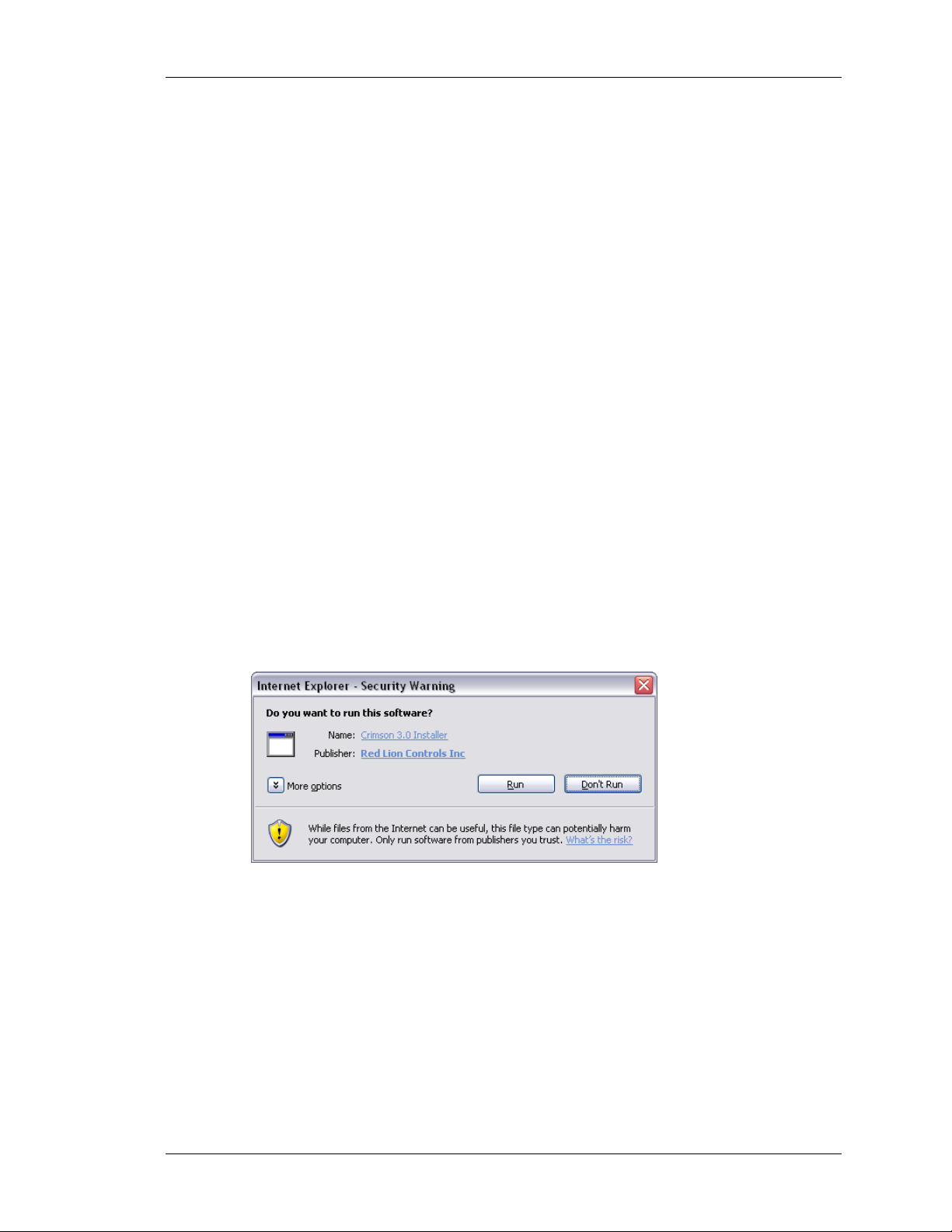
are assured of receiving genuine Red Lion software…
As shown above, the publisher should show as Red Lion Controls Inc, and you should be able
to click on the publisher’s name to verify the integrity of the digital signature. Once you are
happy with the package, press the Run button to start the installation.
The installation process is fairly standard, and ought to proceed without much interaction
beyond your specifying the target directory. One the process complete, look at your Start
Menu and find the Red Lion Controls folder. Click the Crimson 3 icon to start the software.
REVISION 2.1 PAGE 1
Page 16
REGISTRATION CRIMSON 3 USER MANUAL
REGISTRATION
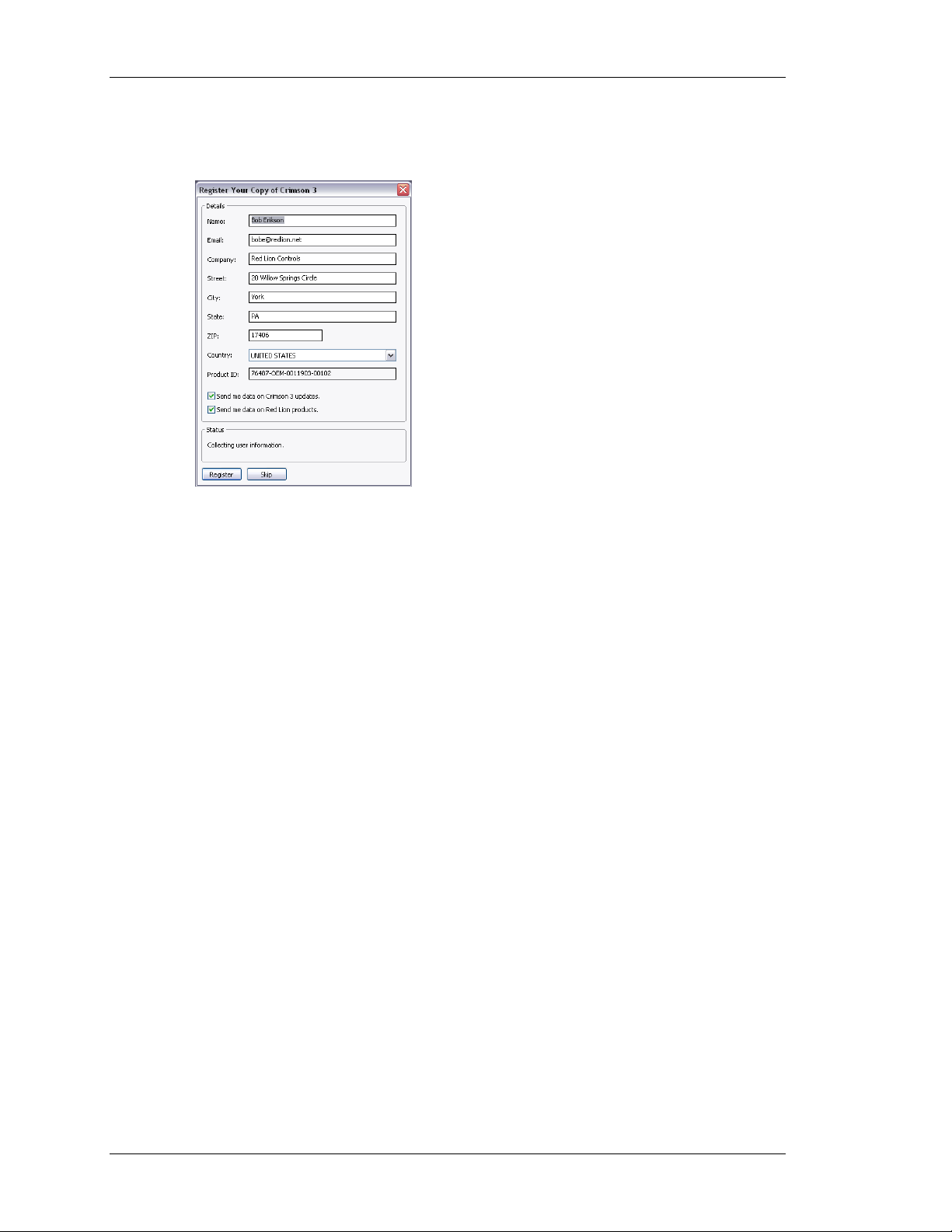
When you first run Crimson 3, you will be offered a chance to register your software…
While registration is optional, we strongly recommend that you take the opportunity to
provide us with your contact details so that we can inform you of Crimson updates and of
associated products. Since registration requires an Internet connection, you may skip the
process if so do not have such a connection available. Crimson will periodically remind you if
you are running an unregistered copy of the software.
CHECKING FOR UPDATES
If you have an Internet connection, you can use the Check for Update command in the Help
menu to scan Red Lion’s web site for a new version of Crimson 3. If a later version than the
one you are using is found, Crimson will ask if it should download the upgrade and update
your software automatically. You may also manually download the upgrade from Red Lion’s
website by visiting the Downloads page within the Support section.
INSTALLING THE USB DRIVERS
If you’ve followed the instructions that came with your target hardware, you will not yet have
connected the hardware to your PC. Now that you have completed the Crimson 3 installation,
you may safely connect the device using a standard USB cable. After some churning,
Windows should indicate that it has found the drivers for the new hardware and that it is
ready for operation. No further user intervention should be required.
TROUBLESHOOTING
If you connected the target device to your PC before installing Crimson 3, it is possible that
an aborted installation has made it impossible for you to install the drivers correctly. To check
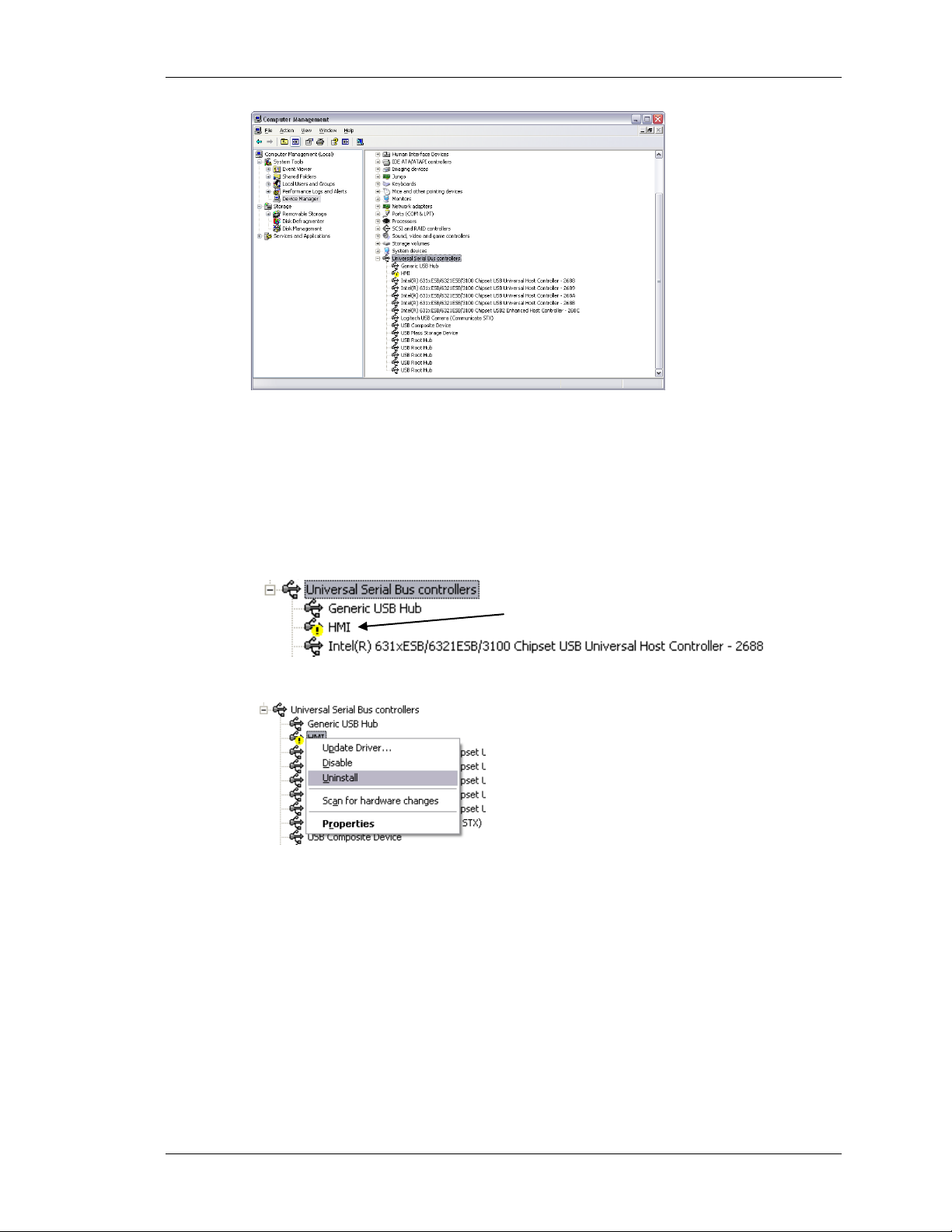
for this, open the Windows Device Manager by finding the My Computer icon, right-clicking
and selecting the Manage command. A window similar to the one below should appear…
PAGE 2 http://www.redlion.net/g3
Page 17
GETTING STARTED TROUBLESHOOTING
Incorrectly Installed Device
The exact process for getting to this point will vary from one operating system to another, but
the basic idea is the same: Find the My Computer icon—either on the desktop or on your start
menu—right-click it and select Manage. If that doesn’t work, select the System option from
the Control Panel, and activate the Device Manager from the Hardware tab.
If you have a problem with your USB drivers, you will see a yellow icon carrying an
exclamation point under the Universal Serial Bus controllers category. The name of the icon
may be HMI or Loader or something similar. The broken driver is shown in close-up below…
To fix the problem, right-click on the broken device and select Uninstall from the menu…
After asking for confirmation, Windows will remove the device from your system. You can
now power the Crimson target device off. After a couple of seconds, reapply power and
Windows will start the driver installation process once again.
As mentioned above, Crimson actually uses distinct device drivers for the boot loader and for
the Crimson runtime. You may thus have to repeat this repair process for each driver,
although it is unlikely that things got beyond the boot loader if that install failed.
REVISION 2.1 PAGE 3
Page 18

GETTING ASSISTANCE CRIMSON 3 USER MANUAL
GETTING ASSISTANCE
If you hit a problem or need assistance, several resources are available.
ALLOON HELP
B
Crimson contains a very useful feature called Balloon Help…
This facility allows you to see help information for each item within Crimson. It is controlled
via the icon at the right-hand edge of the toolbar or via options on the Help menu. The default
mode allows the help text to be displayed by pressing the
getting information if you are unsure of the settings for a given field. Keep this in mind, and
your life will be a lot easier!
ECHNICAL SUPPORT
T
Technical assistance is available on the web at…
F1 key, providing a quick way of
http://www.redlion.net/support.html
Or, we can be contacted via email at…
You may also call +1 (717) 767-6511 and ask for the HMI Support Team.
O
NLINE FORUMS
A number of online forums exist to support users of PLCs and HMIs. Red Lion recommends
the Q&A forum at http://www.plctalk.net/qanda/
. The discussion board is populated by many
experts who are willing to help, and Red Lion’s own technical support staff also keep an eye
out for questions relating to our products.
THE NEXT STEPS
Since Crimson 3 has a completely new user interface, we suggest that existing Crimson users
at least give the next chapter a cursory reading. We also suggest that you look at the chapters
on tags and display page configuration, as some of the concepts used by Crimson 2 have been
simplified, and many things can be achieved through easier methods. If you are completely
new to Crimson, please try to read at least as far as the start of the chapter on Widgets.
Good luck, and have fun!
PAGE 4 http://www.redlion.net/g3
 Loading...