

Page 1
Océ 940
User manual
P
omoc techniczna i serwis
www.mc-nova.eu
Page 2
Océ-Technologies B.V.
This manual contains a description of the Océ 940 and the folding that can be
done with it. The introduction (chapter 1) contains a general description of the
working methods for using the folder and it is recom me nded that you read at
least this ch apter.
Overview of machineparts the covers
To assist you in finding parts of the folder and the functions on the operating
panel quickly, an illustration of the Océ 940 is presen te d on the inside front
cover and of the operating panel on the inside back cover, both of which can be
folded out.
Safety information
This manual co nt ains the following sa fety information:
■ The section ‘Instructions for safe use’ in appendix B li sts conditions and
suggestions for safe use. Rea d this information before you start to actually
use the folder and ensure th at these conditions and suggestions are adhered
to. General safety information and safety information about product can also
be found in appendix B.
■ Where applicable, cautions and warnings are used throughout this manual to
draw your attention to safety precautions to be taken.
Copyright
Océ-Technologies B.V. Venlo, The Netherlands © 1998
All rights reserved. No part of this work may be reproduced, copied, adapted,
or transmitted in any form or by any means without written perm i ssion from
Océ.
Océ-Technologies B.V. makes no representation or warranties with respect to
the contents he reof and specifically disclaims any implied warranti es of
merchantability or fi tness for any particular pur pose .
Further, Océ-Technologies B.V . reserves the right to revise this publication and
to make changes fro m time to time in the co ntent hereof witho ut o bl igation to
notify any person of such revision or changes.
Code number 7114325
Edition 2.0
GB
Page 3

Table of contents
Chapter 1
Introduction
The Océ 940 6
Changing the factory default settings 7
Switching on/off 9
Chapter 2
Folding
Introduction 12
Folding copies 14
Folding method s and widths 16
Chapter 3
Problem solving
Introduction 20
Clearing paper jams 21
Other error codes 23
Call service error codes 24
Appendix A
Appendix B
Overview and tables
Product specifications 26
Overview of material that can be folded 27
Safety information
Instructions for safe use 30
Mains core colours 31
Safety data sheets 32
Safety data sheet O cé 940 33
3
Page 4

Appendix C
Index 41
Miscellaneous
Notation conventions 36
Reader’s comment sheet 37
Addresses of local Océ organisations 39
4 Océ 940 User manual
Page 5
Océ 940
User manual
Chapter 1 Introduction
This off-line folding machine folds high quality
packages of different paper sizes and formats
5
Page 6

The Océ 940
The Océ 940 is an off-line folding machine which folds high quality
packages of different paper sizes and formats. The machine offers the
following folding combination s:
■ Package fold of 210 mm
■ Package fold of 190 mm
■ Package fold of 210 mm including a binding edge of 20, 25 or 30 mm
■ Edge fold of 210 mm
■ Edge fold of 190 mm
■ Edge fold of 210 mm including binding edge of 20, 25 or 30 mm
■ Cross fold of 297 mm or 305 mm
The package folding method makes it possible to fold according to DIN
standards, and that the last fold covers the last page as much as possible.
These DIN standards can only be met when using din size copies.
The edge fold means that the last fold is always to the left (meaning that
the last page is not always totally covered). Using the edge fold makes it
possible to attach a binding edge to the left side of the package. It makes it
easy to unfold the drawing without taking it out of the notebook. Edge fold
can be used for wild formats copies or DIN size copies.
The Océ 940 detects the copy size automatically. When the copy is fed in
the first time the first fold is delivered according to the chosen pr ogramme.
The second fold (cross fold) is done automatically when feeding the
package in the second time, after turning it 90°.
6 Océ 940 User manual
Page 7

Changing the factory default settings
On delivery the Océ 940 has a number of factory set default settings. It is
possible to change the default settings and th e res e t tim e of the folder.
Setting Factory set Possibilities:
Binding edge size 20 mm 20, 25, or 30 mm
Cross fold length 297 mm 297 or 305 mm
Folding width 210 210, 210 includ ing binding edge or 190 mm
Folding method edge edge or package
Overlap ** 0 mm 0, 1, 2, 3, 4, 5 mm
Reset time 5 minutes 1, 2, or 5 minutes
[1] Default settings
Changing the default settings is possible if with in 5 seconds after
switching on the folder, the left and the middle button on the operating
panel are pressed simult aneousl y . During thes e 5 seconds all indicato rs on
the operating panel will light up. Then the indicators will go off and
changes can be made.
The default settings are arranged in three levels:
level 1: binding edge size and cross fold length
level 2: folding width and folding method
level 3: the overlap and the reset time.
** Overlap is the amount that the first (top) page extends beyond the rest
of the folded package. The overlap can be used to make the folded pack age
more appealing to the eye in that the top page is always covered.
▼ Changing the default settings
Switch on the folder.
1
2 Press within 5 seconds the left and the mi ddle button on t he operating panel
simultaneously.
3 Press the left button to change the binding edge size.
Y ou can choose between 20, 25 or 30 mm. The indicator shows the current
selection.
4 Press the middle button to change the cross fold length.
You can choose between 297 or 305 mm. The display shows the current
selection, that is, the first two digits and the last digit flash alternately with
an interval of half a second.
Introduction 7
Page 8

5 As soon as 88 ap pears in the message displ ay, you have the choice to s top
or continue to level 2. If you want to sto p wait 10 seconds when 8 8 appears.
If you want to continue to level 2 press the left and the middle button on
the operating panel simultaneous ly.
6 Press the left button to change the folding width.
Y ou can choo se between 210 includi ng binding edge , 210 or 190 mm. The
display shows the current selection.
7 Press the middle button to change the folding method.
You can choose between package or edge folding method.
8 As soon as 88 ap pears in the message displ ay, you have the choice to s top
or continue to level 3. If you want to sto p wait 10 seconds when 8 8 appears.
If you want to continue to level 3 press the left and the middle button on
the operating panel simultaneous ly.
9 Press the left and the middle butto n on the operatin g panel si multaneousl y.
10 Press the left button to change the reset time
Y ou can choose between 1, 2 or 5 minutes . The display shows respectively
t1, t2 or t5.
11 Press the middle button to change the overlap.
You can set the overlap from 0 to 5 mm. The display shows respectively
o0, o1, o2, o3, o4 or o5.
If during ten seconds no buttons are pressed the new settings will be stored.
8 Océ 940 User manual
Page 9
Switching on/off
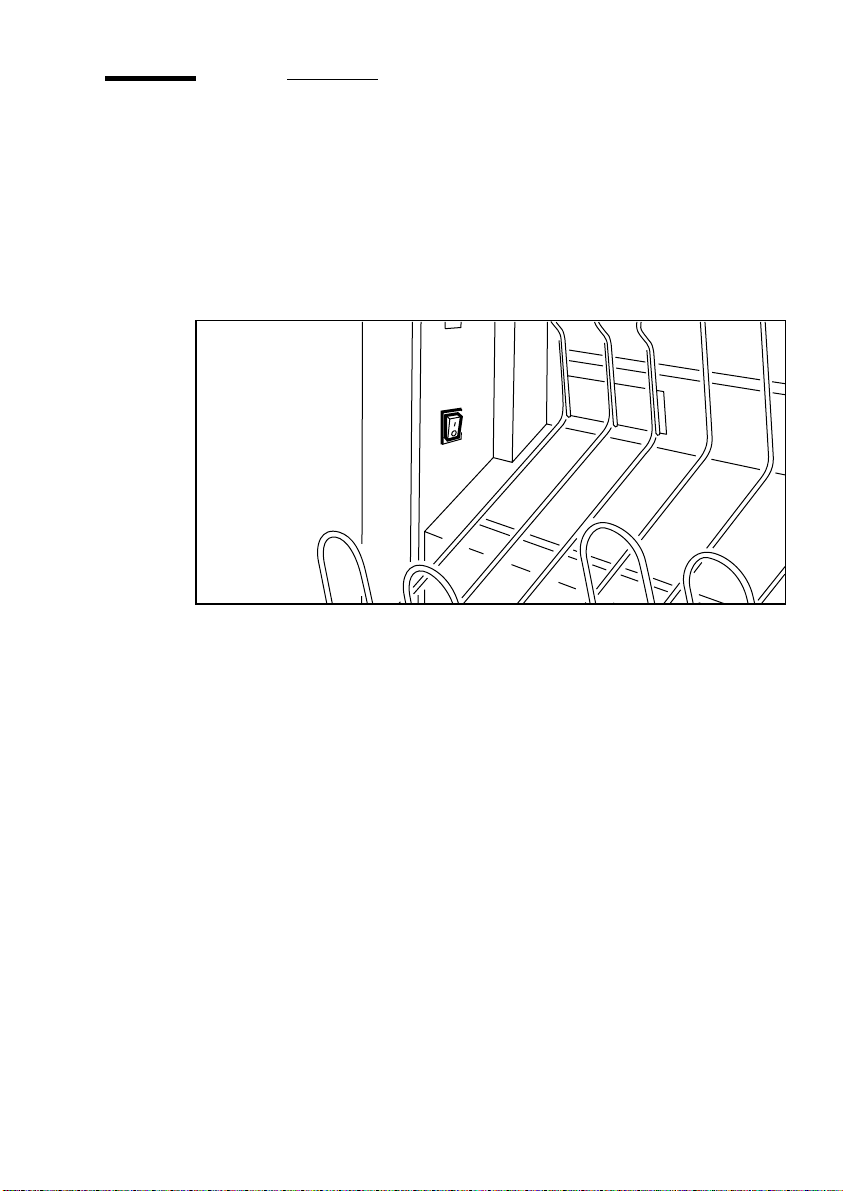
The machine has a short warmin g up time mak ing it pos sibl e to swi tch on
whenever you need it.
▼ Switching on the machine
Press the main switch to position ‘1’ (see figure 2). The green indicator
1
lights up.
[2] On/off switch
The machine is ready for use, when only the arrow on the operating panel
lights up.
▼ Switching off the machine
Press the main switch to position ‘0’ (see figure 2). The green indicator
1
goes off.
Introduction 9
Page 10

10 Océ 940 User manual
Page 11
Océ 940
User manual
Chapter 2 Folding
This chapter describes the folding widths and folding
methods
11
Page 12
Introduction
The Océ 940 offers the customer flexibility. The copies are folded
according the chosen folding width in combination with a f olding method.
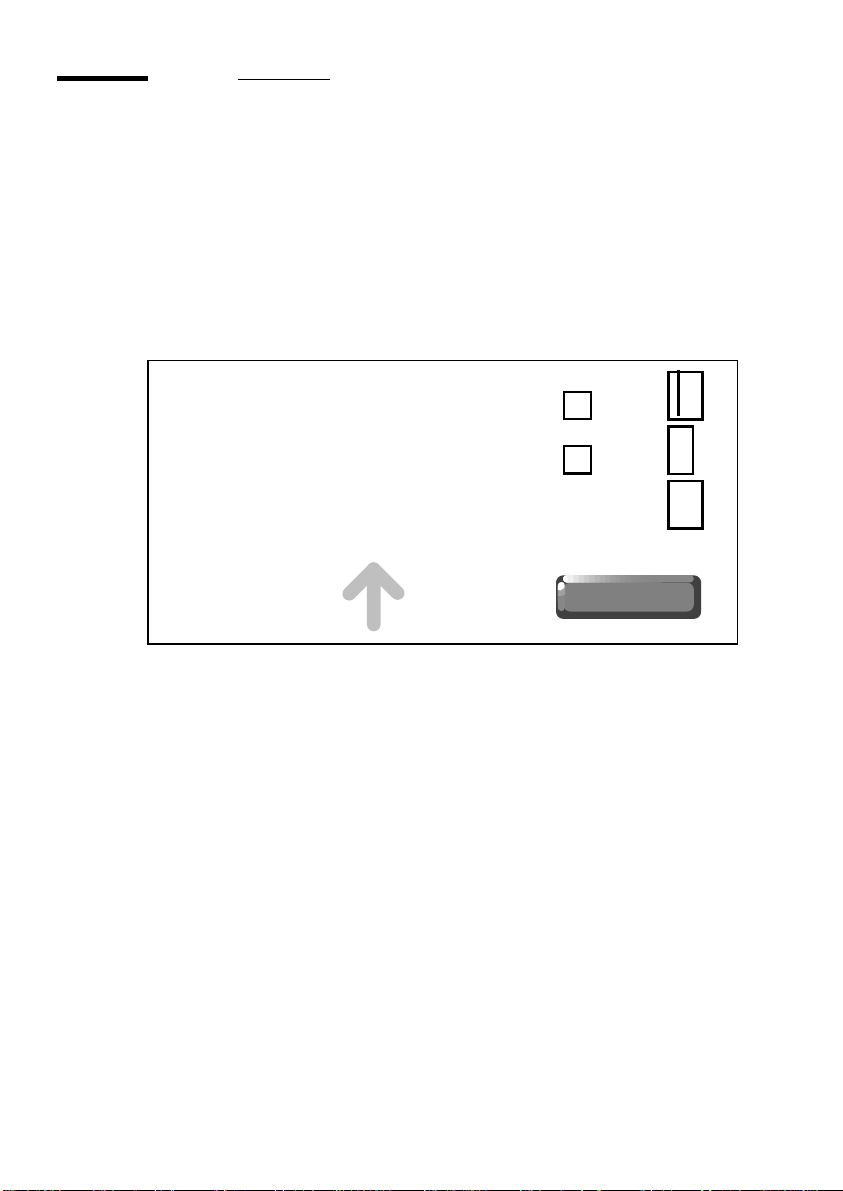
The folding widths are (see figure 3):
■ 210: package width is 210 mm.
■ 190: package width is 190 mm.
■ 210: package width is 210 mm including binding edge.
[3] Folding widths
210
190
210
12 Océ 940 User manual
Page 13
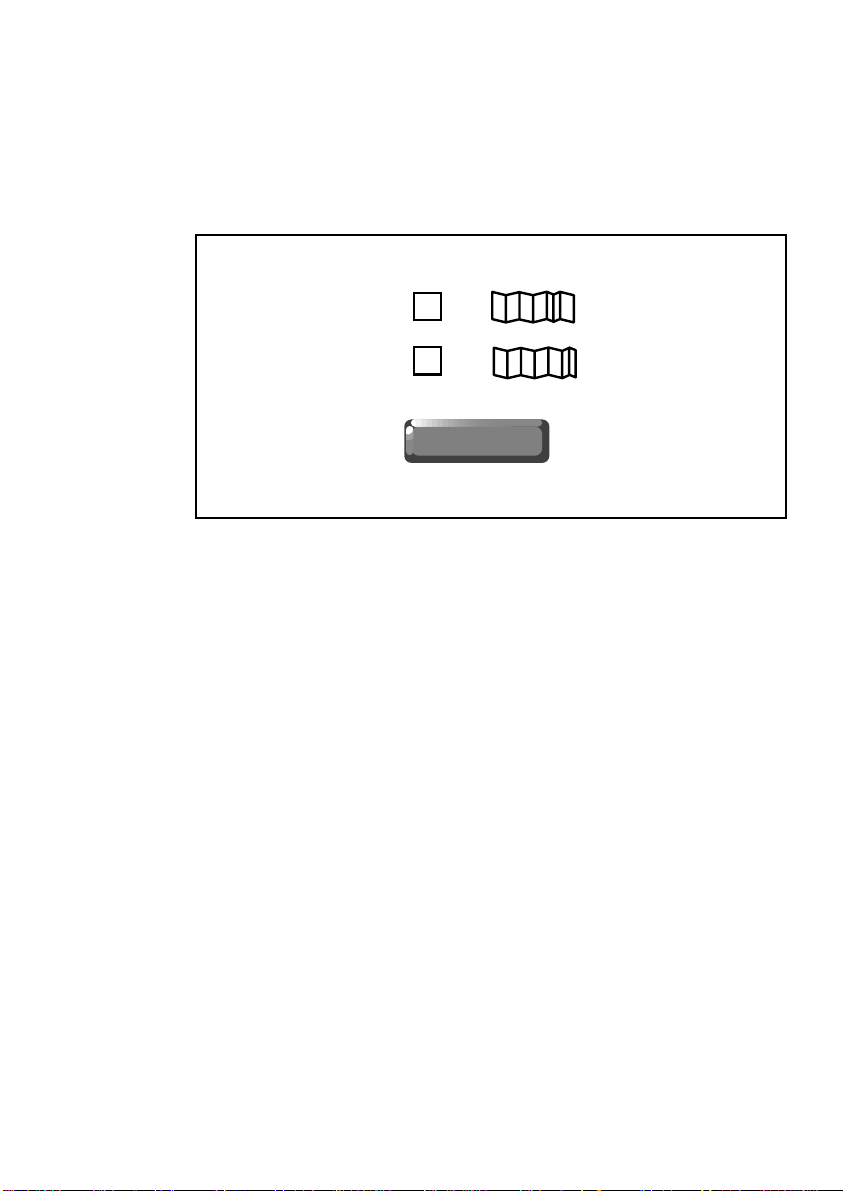
The folding methods are (see figure 4):
■ 1: edge fold: edge fold means that the last fold is always to the left
(meaning that the last page is not always totally covered).
■ 2: package fold: package fold makes it possible to fold according to din
standards when using din standard originals. And it means that the last
page is covered as much as possible.
2
1
[4] Folding methods
Folding 13
Page 14
Folding copies
The Océ 940 automatically detects the size of the copy material. The o nly
thing that has to be selected on the operating panel is the folding width and
the folding method. This determines the way the copy is folded in the first
fold. The cross fold is done automatically after refeeding the package into
the machine after turning it 90°.
▼ First fold
Choose the required folding width and folding method.
1
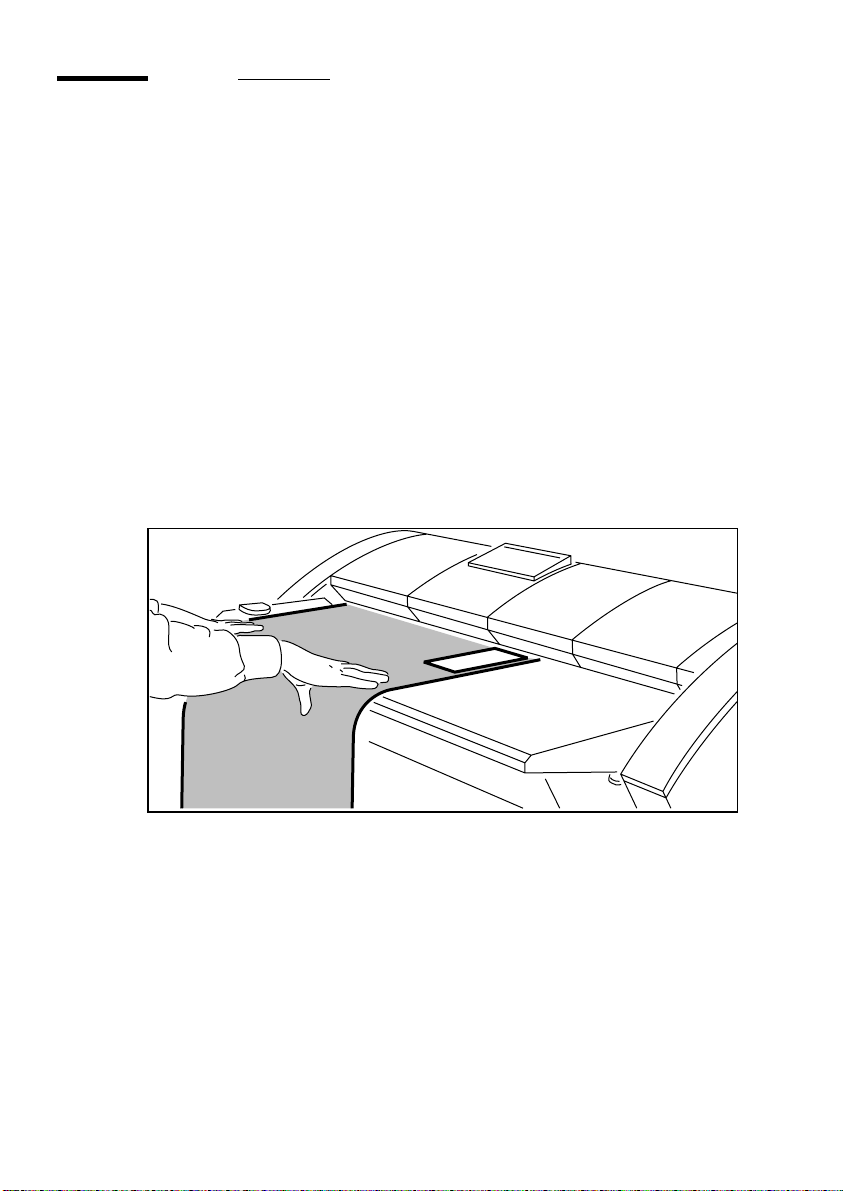
Feed the copy, face up, with the legend at the right leading side, alo ng the
paper guide into the folding machine, until it is g ri ppe d (see figure 5). To
get the optimal quality it is advised to guide the paper into the machine.
When the folding process is in progress the arrow on the operating panel
is off. Wait until the arrow is lit to feed in the next copy.
[5] Feeding the copy into the folding machine for first fold
2 The folded copy is delivered in the delivery tray (see figure 6 on page 15).
14 Océ 940 User manual
Page 15
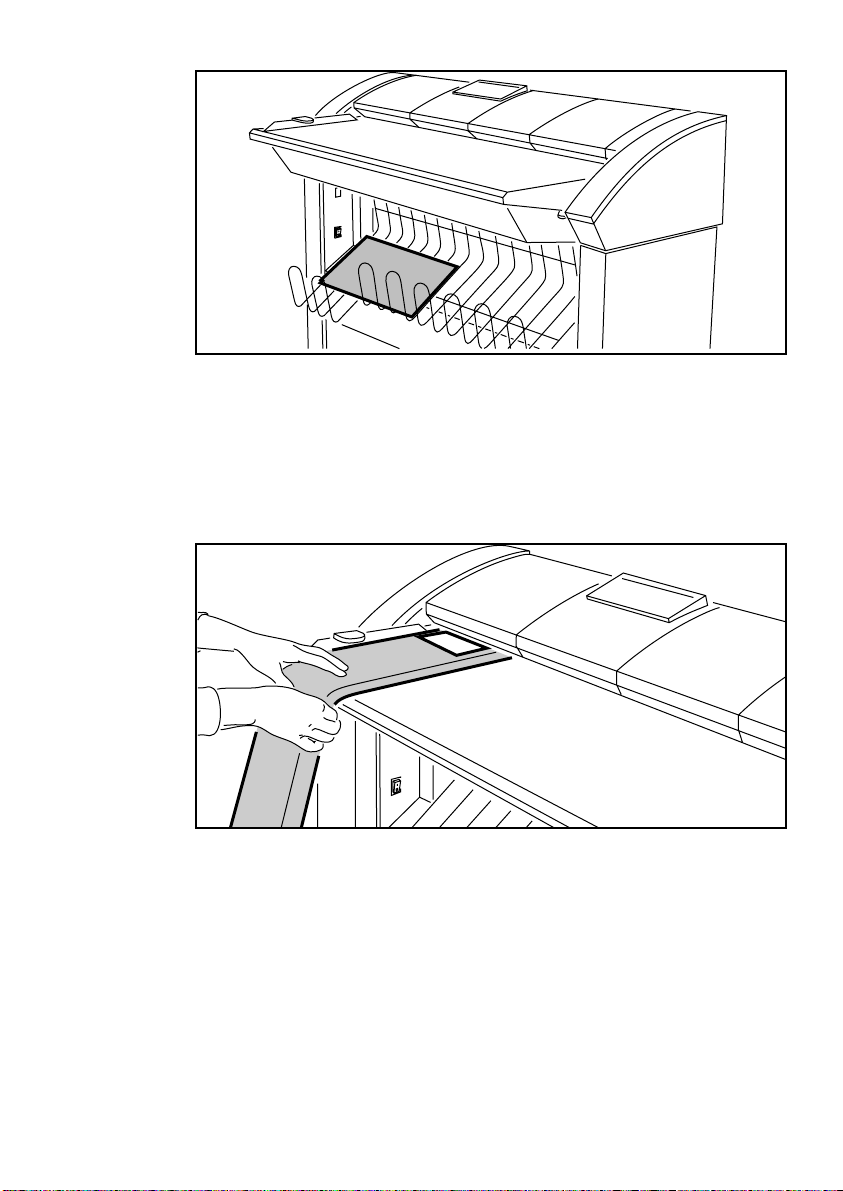
[6] Delivery tray
▼ Cross fold
Feed the folded package, face up, with the legend at the top leading side,
1
along the paper guide into the folding machine, until it is gripped (see
figure 7).
T o get the optimal quality it is advised to guide the paper into the machine.
[7] Feeding the copy into the folding machine for cross fold
When the folding process is in progress the arrow on the operating panel
is off. Wait until the arrow is lit to feed in the next copy.
2 The folded copy is delivered in the delivery tray.
Folding 15
Page 16
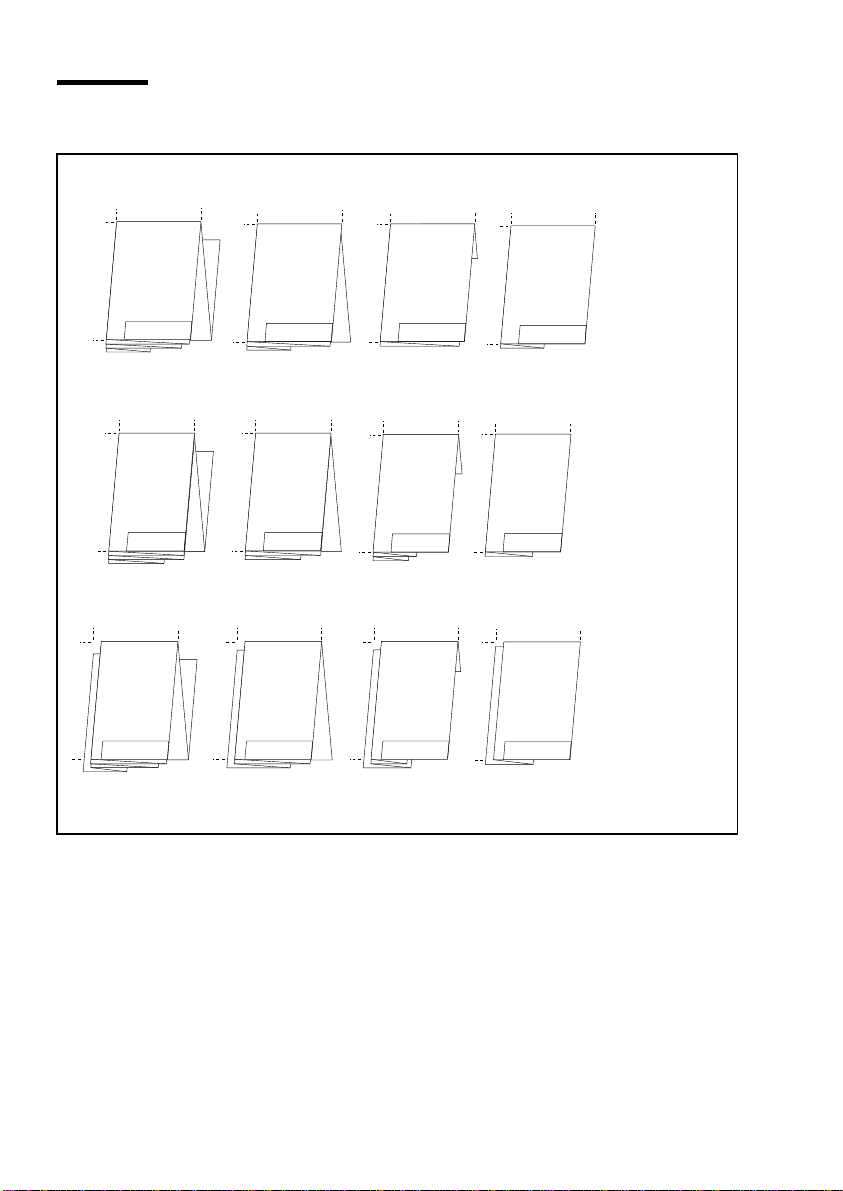
Folding methods and widths
ld DIN si
297
edge fo
297
297
190
210
210
A0
A0
297
zes
297
297
210
190
210
A1
A1
297
297
297
190
210
210
A2
A2
297
297
297
190
210
A3
210
210 mm
A3
190 mm
210 mm including
binding edge
A0
[8] Edge fold method
Non-standard When using non-din sizes the packages are completely folded
with the last page going to the left side up to max. length of 2500 mm (first
fold).
16 Océ 940 User manual
A1
A2
A3
Page 17
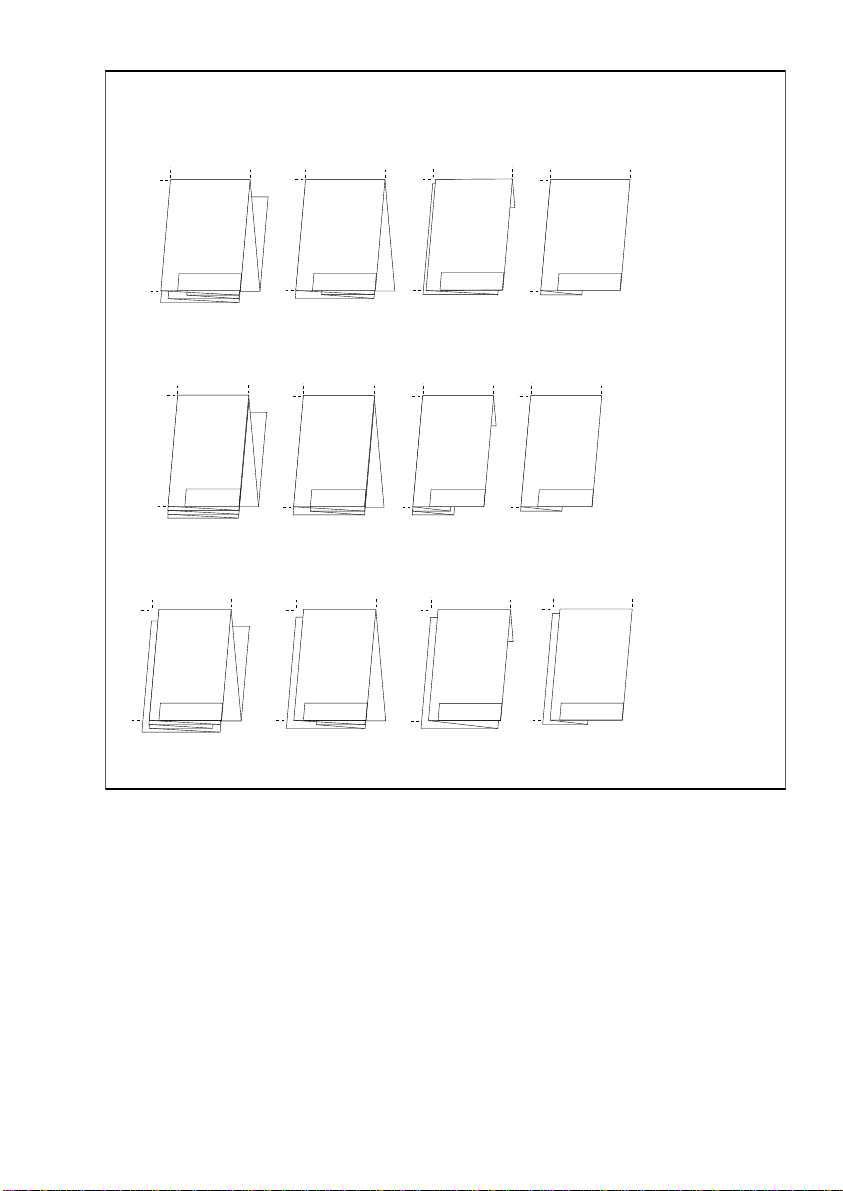
package fold DIN sizes
297
297
297
210
A0
210
A0
190
A0
297
297
297
210
190
210
A1
A1
A1
297
297
297
190
210
A2
A2
212
A2
297
297
297
210
210 mm
A3
190
190 mm
A3
210
210 mm including
binding edge
A3
[9] Package fold method
Non-standard When feeding non-din sizes according to the tollerances stated
on page 23, the remaining part of the copy is delivered unfol ded, giving the
operator the opportunity to fold the remaining according to his wishes.
Folding 17
Page 18

18 Océ 940 User manual
Page 19
Océ 940
User manual
Chapter 3 Problem solving
This chapter documents some of the problems that
may occur with the Océ 940 and how to solve them
19
Page 20

Introduction
When an error occurs, an error code on the display informs you about the
nature of the problem.
Should there be a problem that you can not solve, the Océ service
organisation may ask you to read the error code in the message display and
to convey this information on the phone. Based on this information he/she
may be able to bring any required spare parts along so that down time is
kept to an absolute minimum.
20 Océ 940 User manual
Page 21
Clearing paper jams
In case of a paper jam, the machine stops and if possible the folded copy is
delivered. The arrow on the opera ting panel flashes and the messag e
display shows the error code. No more sheets can be fed into the machine.
If one of the following error codes are displayed, there is a paper jam,
which can be cleared very easily by the operator. Follow the next
procedure.
E4, E5, E8, E9, EA, Ed
▼ Clearing a jam
Check the rear side of the machine.
1
If there is no pa per visible:
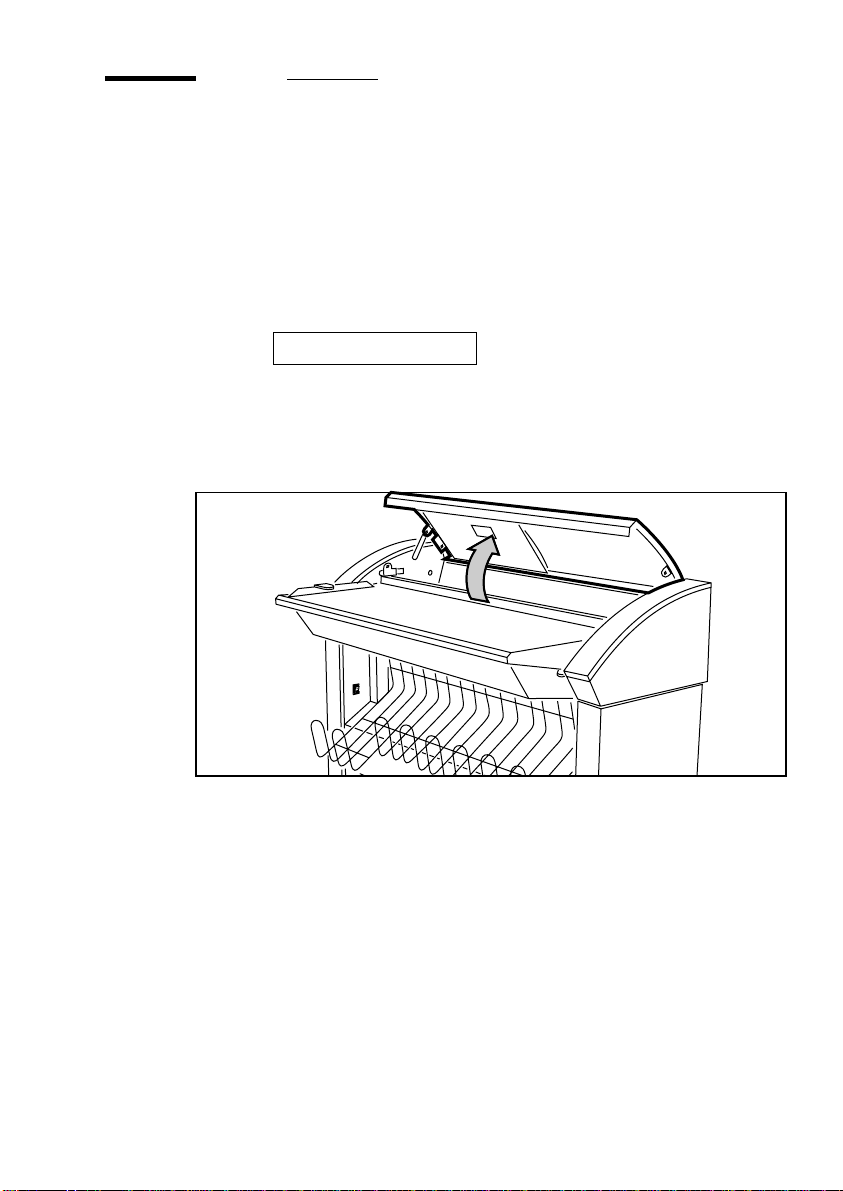
2 Open the top cover of the folder (see figure 10).
[10] Opening the top cover of the folder
3 Remove the copy if possible.
Note: Check thoroughly that no scraps of paper or other material are left
behind.
If it is not possible to remove the copy:
4 Pull the green handles at the right and the left side towards you
(see figure 11 on page 22), and open the guide plate.
Problem solving 21
Page 22
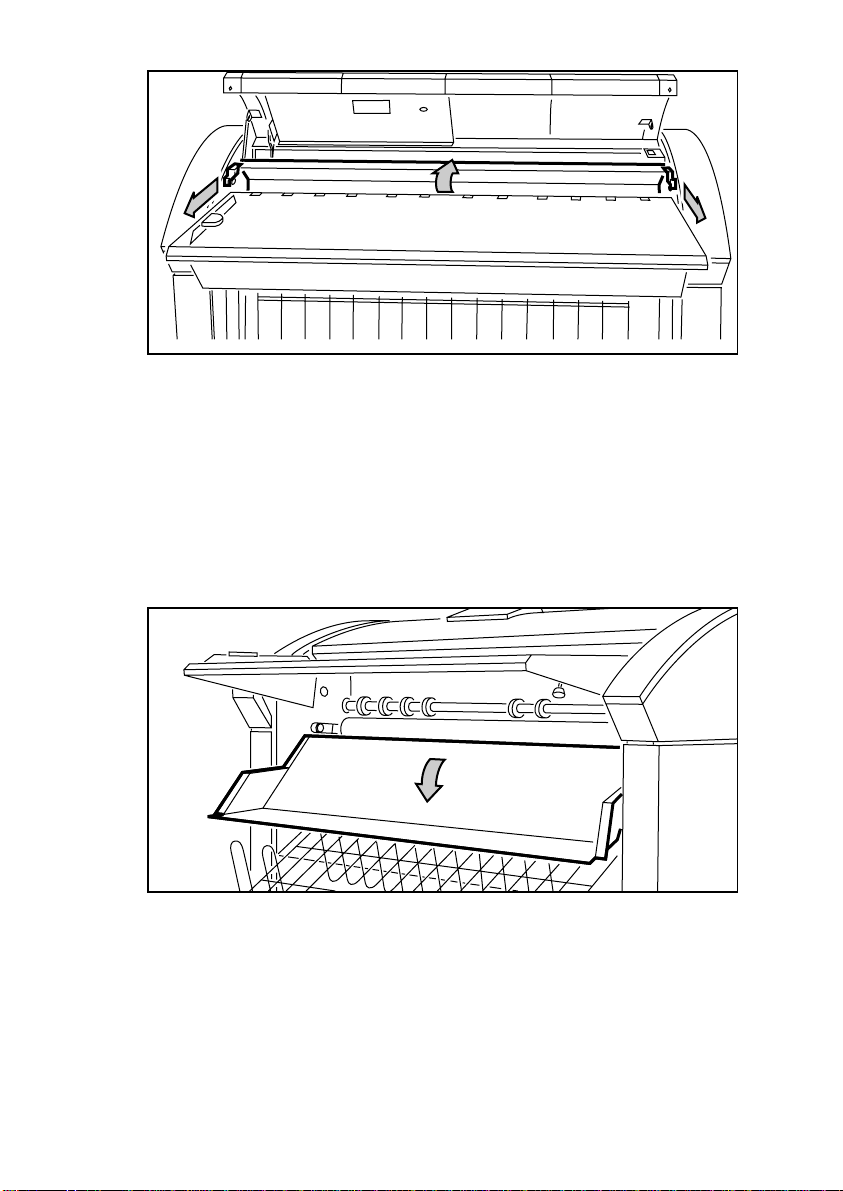
[11] Pulling the two green handles and opening the guide plate
5 Remove the copy.
6 Push back the green handles and close the guide plate.
Note: Check thoroughly that no scraps of paper or other material are left
behind.
7 Close the top cover.
If it is not possible to remove the copy:
8 Remove the knurled nuts at the left and right side, below the feed table (see
figure 12).
[12] Unscrewing the knurled nuts
9 Remove the copy.
10 Reposition the knurled nuts.
Note: If you can not solve the problem, call for Océ Service.
22 Océ 940 User manual
Page 23

Other error codes
If one of the following error codes appear in the message display, follow
the instructions next to the error code as shown in the table below
Error code Possible cause Solution
E1 Covers of the folder are open Close the covers
E2 Paper length longer than 2500 mm
Only copies less than
2500 mm can be folded
Package fold has max. lengths
din-standard +/- 10 mm
E3 Should this error code appear
immediate after switching on the folder
then most probably a sheet was left on
the feed table and the sensor is blocked
Should this error code appear during
the folding process the sensor is faulty
EC Copy is delivered unfolded Copy is shorter than 405 mm
[13] Other error codes
Copies are longer than
420 mm or 581mm or 841 mm or 1188
mm(+/- 10 mm), or choose edge fold
Remove the sheet of paper
Call Océ service
Having solved the problem, you can carry on folding your copies.
Problem solving 23
Page 24

Call service error codes
If one of the following error codes are displayed or in case you encounter
problems with the folder you cannot solve, turn the ma in switch off and
disconnect the power plug, leaving the folder as it is. Then call for Océ
service.
E6, E7, Eb, EE, EF
[14] Call service error codes
24 Océ 940 User manual
Page 25
Océ 940
User manual
Appendix A Overview and tables
25
Page 26

Product specifications
Folding combinatio ns package fold 210 mm
package fold 190 mm
package fold 210 mm in cluding binding edge
edge fold 210 mm
edge fold 190 mm
edge fold 210 mm including bindi ng edge
cross fold 297 mm or 305 mm
Folding capacity per hour 350 A0 first fold
450 A0 cross fold
450 A1 first fold
450 A1 cross fold
375 A2 first fold
450 A2 cross fold
500 A3 first fold
Power consumption 100 Watt
Electrical supply 120/208 - 240 V
50/60 Hz
Sound pressure level at operator position stand by: 30 dB(A)
during operation: 57 dB(A)
Radio interference FS
Dimensions (wxdxh) 1175x765x1100 mm
Weight 100 kg
Safety standard TÜV GS
[15] Product specifications
26 Océ 940 User manual
Page 27

Overview of material that can be folded
Type of paper plain paper 60-110 g/m
coloured paper 80 g/m
electrostatic material 80 g/m
biotop material 80 g/m
diazo material
W e ig ht of pa pe r between 60 - 110 g/m
Paper width minimum 297 mm
maximum 914 mm
Paper length minimum 405 mm
maximum 2500 mm for first fold
maximum 1500 mm for cross fold
[16] Overview of material that can be folded
Diazo material should be dry before fed into the folder.
Plot material often has a curl. For best results smooth the plot material first with
your hands.
2
2
2
2
2
A Overview and tables 27
Page 28

28 Océ 940 User manual
Page 29
Océ 940
User manual
Appendix B Safety information
29
Page 30

Instructions for safe use
Océ machines and materials have been developed and tested in
accordance with the strictest international safety standards. T o ensure safe
working with these products it is important that you observe the following
safety rules:
■ Do not remove any screws from fixed panels.
■ The machine is not user-serviceable except for the components and
maintenance materials mentione d in this manual.
■ Do not place any liquids on the machine.
■ Use maintenance materials or other materials for their original purpose
only. Keep maintenance materials away from children.
■ Do not mix cleaning fluids or other materials.
■ To avoid risks, all modifications to Océ equipment are strictly reserved
for Océ service personnel. It is also recommended to use attachment
cables specified by Océ.
■ Do not bridge any mechanical or electrical circuit breakers.
■ Do not use an extension lead to connect the machine.
■ Locate the machine close to a wall socket that is easily accessible.
■ The switch in the fixed connection (if any) should be easily accessible.
■ This machine has not been designed for connection to an IT power
system. (An IT power system is a voltage network in which the neutral
wire is not connected to earth).
■ Do not block the ventilation opening s of the machine.
■ Ensure that the machine is placed on a level, horizontal surface of
sufficient strength. See the Océ 940 safety data sheet in this appendix for
information about the weight of the machine.
■ Ensure there is sufficient space around the machine. This facilitates
maintenance.
■ Do not place the machine in rooms which are subject to excessive
vibration.
■ Always use materials recommended by Océ and developed for this Océ
machine. Materials not approved by Océ may result in faults in your
machine.
■ Do not use the machine when it is emitting unusual sounds. Remove the
plug from the power socket and contact Océ Customer Service.
30 Océ 940 User manual
Page 31

Mains core colours
As the colours of the cores in the mains lead of this equipment may not
correspond with the coloured markings identifying the terminals in your
plug, proceed as follows:
■ The core which is coloured green and yellow must be connected to the
terminal in the plug which is marked with the letter E or by the earth
symbol, coloured green and yellow.
■ The core which is coloured blue must be connected to the terminal which
is marked with the letter N or coloured black.
■ The core which is coloured brown must be connected to the terminal
which is marked with the letter L or coloured red.
B Safety information 31
Page 32

Safety data sheets
Disclaimer The disclaimer below is valid for all safety data sheets in this
manual.
This safety data sh eet has been co mpiled to the best of our kn owledge as a
compact guide to safe handling of this product. We reserve the right to
revise safety data sheets as new information becomes available. It is th e
user’s responsibility to determine the suitability of this information for the
adoption of safety precautions as may be necessary and to contact the
company to make sure that this sheet is the latest one issued. If and in so
far as limitation of liability is permitted under the applicable laws we do
not accept liability for any inaccuracy that may occur in this information.
32 Océ 940 User manual
Page 33
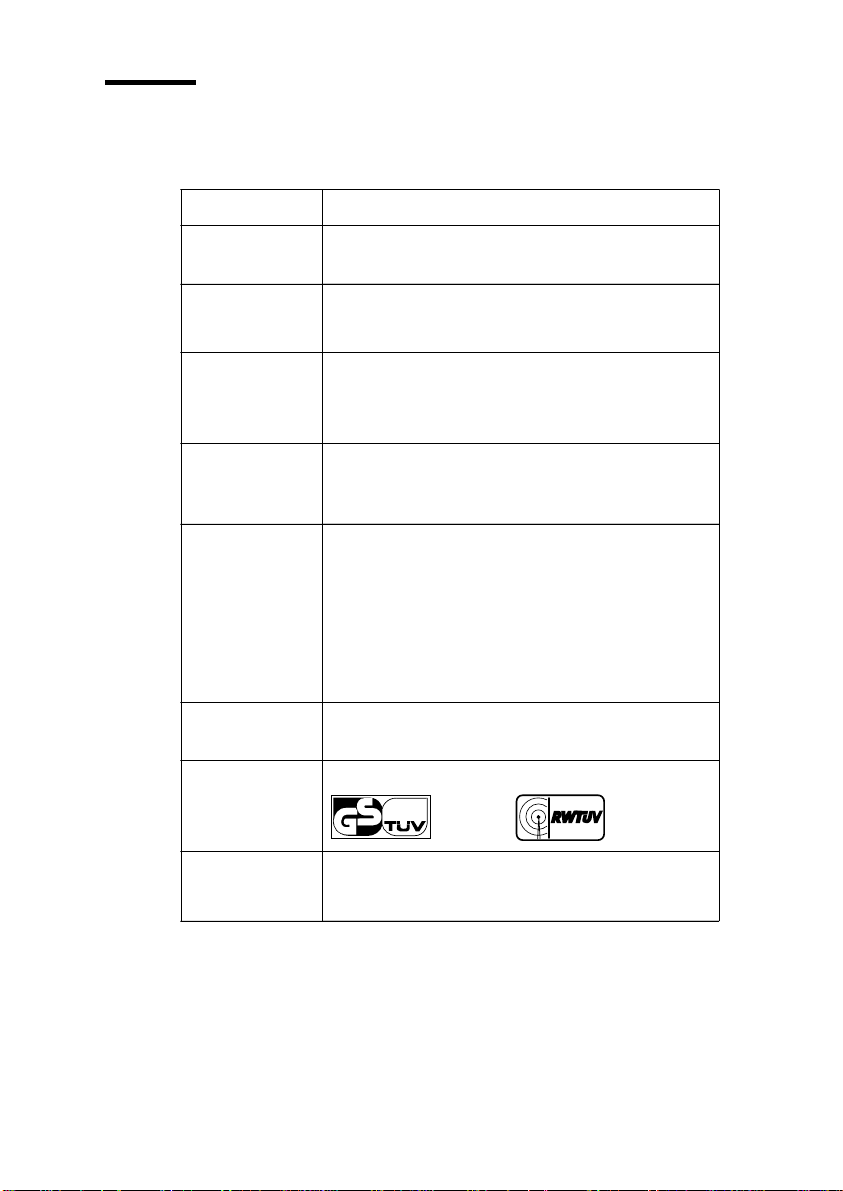
Safety data sheet Océ 940
Product Safety Data Sheet
Model
Description
Max. folding speed
Dimensions
Weight
Voltage
Frequency
Current, max.
Power consumption, operation
Power consumption, standby
Mains connection
Safety class
Protection class
Sound pressure level
Sound power level
Radio interference
Radiation
Heat emission
Ozone emission
Room volume
Room ventilation
Consumables
Width
Depth
Height
Océ 940
Off-line folder, console model
10m/min
1175 mm
765 mm
1100 mm
100 kg
208-240 V
50 Hz
0.4 A
100 W
40 W
Cable with plug
I (IEC 536) Protective earth connection
IP 20 (IEC 529)
At operator position: in operation 61 dB(A); impulse ∆ L
Standby 45 dB(A); In operation 72 dB(A)
Complies with Directive 89/336/EEC
Not applicable
Standby 40 W; in operation 100 W
Not applicable
No special requirements
Not applicable
Number: E-631-a-UK
Language: English
= 10 dB(A
i
Approval marks
Additional safety information
Approved according to standard Approved according to Directive
IEC 950 and EN 60950 89/336/EEC
None
Copyright © 1994 Océ-Nederland B.V., Venlo, NL
B Safety information 33
Page 34

34 Océ 940 User manual
Page 35
Appendix C Miscellaneous
Océ 940
User manual
35
Page 36

Notation conventions
There are a number of notation convention s used in this manual. This
consistent style enables you to quickly become conversant with the use of this
manual and consequently the Océ 940.
Description Each section or subsection contains a description of the feature or
operation identified in the title. It might also include possible applications, as
well as any guidelines that you should bear in mind.
Procedures A description is followed by a procedure. A proced ure always
begins with a phrase which briefly describes the procedure, followed by a
series of numbered steps that take you, step by step, through all phases of
performing the operation.
Figures and tables Figures and tables are titled and numbered sequentially
throughout this manual. Figures include pictures of product components,
screendumps, examples, and diagrams of concepts discussed in the
description.
Attention getters There are several types of information to which we draw
your attention. This information is classified as follows:
Note: In a ‘Note’, information is given about matters which ensure the proper
functioning of the machine or application, but useful advice concerning its
operation may also be given.
Attention: The information that follows ‘Attention’ is given to prevent
something (your copy or original, the copi er or pri nter, data files etc.)
being damaged.
Caution: The information tha t follows ‘Caut ion’ is gi ven to prevent you
suffering personal injury.
36 Océ 940 User manual
Page 37

Reader’s comment sheet
Have you found this manual to be accurate?
❏ Yes
❏ No
Could you operate th e product after reading thi s ma nu a l ?
❏ Yes
❏ No
Does this manual provide enough background information?
❏ Yes
❏ No
Is the format of this manual convenient in size, readability and arr angement
(page layout, chapter order, etc.)?
❏ Yes
❏ No
Could you find the information you were looking for?
❏ Always
❏ Most of the times
❏ Sometimes
❏ Not at all
What did you use to find the required informati on?
❏ Table of contents
❏ Index
Are you satisfied with this manual?
❏ Yes
❏ No
Thank you for evaluating this manual.
If you have other comments or concerns, please explain or suggest
improvements overleaf or on a separate sheet.
7114325
C Miscellaneous 37
Page 38

Comments:
--------------------------------------------------------------------------------------------
--------------------------------------------------------------------------------------------
--------------------------------------------------------------------------------------------
--------------------------------------------------------------------------------------------
--------------------------------------------------------------------------------------------
--------------------------------------------------------------------------------------------
Date:
This reader’s comment sheet is completed by:
(If you prefer to remain unknown, please do fill in your occupation)
Name:
Occupation:
Company:
Phone:
Address:
City:
Country:
Please return this sheet to:
Océ-Technologies B.V.
For the attention of ITC user documentation.
P.O. Box 101,
5900 MA Venlo
The Netherlands
38 Océ 940 User manual
Page 39

Addresses of local Océ organisations
Océ-Australia Ltd.
P.O.Box 363
Ferntree Gu lly MDC VIC 3165
Australia
Océ-Österreich GesmbH
Postfach 95
1233 Vienna
Austria
Océ-Belgium N.V./S.A.
Avenue J.Bordetlaan 32
1140 Brussels
Belgium
Océ-Brasil Comércio e Industr ia Ltda.
Caixa Postal 3187
01060-970 Sao Paulo, SP
Brazil
Océ-Canada Inc.
525, Logan Avenue,
Toronto, Ontario M4K 3B3
Canada
Océ Office Equipment (Beijing) Co Ltd.
Xu Mu Cheng
Chaoyang District
Beijing 100028
China
Océ-Èeská republika s.r.o.
Hanusova 18
14021 Praha 4
Pankrác,
Czech Republic
Océ-Danmark A.S.
Kornmarksvej 6
DK 2605 Brondby
Denmark
Océ-France S.A.
32, Avenue du Pavé Neuf,
93161 Noisy-le -grand, Cedex
France
Océ-Deutschland GmbH
Postfach 10 1454
4330 Mülheim an d er Ruhr (13)
Deutschland
Océ (Hong Kong China) ltd.
12/F 1202 The Lee Gardens
33 Hysan Avenue, Causeway Bay
Hong Kong
Océ-Hungária Kft.
P.O.B. 237
1241 Budapest
Hungary
Océ-Italia S.p.A.
Strada Padana Super i ore 2/B
20063 Cernusco su l Naviglio ( MI )
Italia
Océ Systems (Malaysia Sdn. Bhd.
#3.01, Level 3, Wisma Academ y
Lot 4A, Jalan 19/1
46300 Petalig Jaya
Malaysia
C Miscellaneous 39
Page 40

Océ-Nederlan d B. V.
P.O.Box 800
5201 AV ‘s-Hertogenbosch
The Netherlands
Océ (Taiwan) Ltd.
No. 99-24 Nan Kang Road Sec.2
Taipeh, Taiwan
Taiwan, RO
Océ Norge A/S
Postboks 53, Grefsen
0409 Oslo 4
Norway
Océ-Poland Ltd.
ul. Lopuszànska 53
02-0232 Warszawa
Poland
Océ-Lima Mayer S.A.
Av. José Gomes Ferreira, 11
Ed. Atlas II Miraflores
1495 Algés
Portugal
Océ (Far East) Pte. Ltd./
Océ (Singapore) Pte. Ltd.,
#03-00 Wisma Gulab
190 MacPherson Road
Singapore 348548
Océ España SA
Business Park MAS BLAU
C/Osona 2, 2-3a Pl ant a
08820 El Prat del Llob regat (Barcelona)
Spain
Océ (Thailand) Ltd.
16th Floor, B.B. Building
54 Asoke Road, Sukhumvit 21
Bangkok 10110
Thailand
Océ-U.K.Ltd.
Langston Road
Loughton, Essex IG 10 3SL
United Kingdom
Océ-USA Inc.
5450 North Cumberland Av.
Chicago, Ill. 60656
U.S.A.
Océ-Svenska A B
P.O.box 12 31
S-164 28 Kista
Sweden
Océ-Schweiz AG
Sägereistrasse 29
CH8152 Glattbr ugg
Switzerland
40 Océ 940 User manual
Page 41

Index
R
reset time 7
C
changing
cross fold length 7
folding method 8
overlap 8
reset time 8
cross fold 15
D
default settings 7
delivery tray 14, 15
E
error code 20, 21, 23, 24
F
folding combinations 6
folding method 13, 16
folding width 16
S
safety data sheets 33
safety information 30
switching off 9
switching on 9
O
overlap 7
overview of material 27
P
paper jam 21
product specifications 26
41
Page 42

42 Océ 940 User manual
 Loading...