

Page 1

NuMaker-IOT-M487
Feb 22, 2019 Page 1 of 15 Rev 1.00
ALIOS THINGS ON NUMA
KER
-
IOT
-
M487
QUICK
START GUIDE
Arm® Cortex®-M
32-bit Microcontroller
NuMicro® Family
AliOS Things On
NuMaker-IOT-M487
Quick Start Guide
The information described in this document is the exclusive intellectual property of
Nuvoton Technology Corporation and shall not be reproduced without permission from Nuvoton.
Nuvoton is providing this document only for reference purposes of NuMicro microcontroller based system
design. Nuvoton assumes no responsibility for errors or omissions.
All data and specifications are subject to change without notice.
For additional information or questions, please contact: Nuvoton Technology Corporation.
www.nuvoton.com
Page 2
NuMaker-IOT-M487
Feb 22, 2019 Page 2 of 15 Rev 1.00
ALIOS THINGS ON NUMA
KER
-
IOT
-
M487
QUICK
START GUIDE
Table of Contents
1 OVERVIEW ......................................................................................... 3
2 REQUIREMENTS .................................................................................. 4
Software Requirements ............................................................................... 4
Hardware Requirements .............................................................................. 4
3 GET ALIOS THINGS SDK ........................................................................ 5
Use Git Software ....................................................................................... 5
Download from Github Website ..................................................................... 5
4 ALIOS THINGS MQTTAPP SAMPLE .......................................................... 6
Build mqttapp Project ................................................................................. 6
Burn Firmware .......................................................................................... 7
4.2.1 NuMicro MCU Virtual Disk..................................................................................... 7
4.2.2 Drag and Drop ................................................................................................... 8
Test Wi-Fi Local Connectivity ........................................................................ 9
Test Ali-Cloud Service ............................................................................... 10
5 CONCLUSION .................................................................................... 13
6 REVISION HISTORY ............................................................................ 14
Page 3

NuMaker-IOT-M487
Feb 22, 2019 Page 3 of 15 Rev 1.00
ALIOS THINGS ON NUMA
KER
-
IOT
-
M487
QUICK
START GUIDE
1 OVERVIEW
NuMaker-IoT-M487 board provides multiple networking, interfaces, image sensing, audio
recording, playback functions, and flexible extended data storage. The front and rear side of
NuMaker-IOT-M487 board are shown in Figure 1‑1. Whether you need a sensor node or a lightweight gateway, the NuMaker-IoT-M487 board is an ideal choice for IoT applications. In this
guide, some steps will help you use AliOS Things on the NuMaker-IOT-M487 board. This guide
includes how to get AliOS things SDK, mqttapp sample, firmware burning, and connective test.
Figure 1‑1 NuMaker-IOT-M487 board - Front/Rear side
Page 4
NuMaker-IOT-M487
Feb 22, 2019 Page 4 of 15 Rev 1.00
ALIOS THINGS ON NUMA
KER
-
IOT
-
M487
QUICK
START GUIDE
2 REQUIREMENTS
Software Requirements
1. Window 7/8/10 operating system
2. Arm® Keil MDK v5 – IDE
3. Tera Term – a terminal emulator
4. Alibaba AliOS Things Software development kit
Hardware Requirements
1. NuMaker-IOT-M487 board x 1
2. USB Micro cable x 1
3. Internet-accessible Wi-Fi Router x 1.
Page 5
NuMaker-IOT-M487
Feb 22, 2019 Page 5 of 15 Rev 1.00
ALIOS THINGS ON NUMA
KER
-
IOT
-
M487
QUICK
START GUIDE
3 GET ALIOS THINGS SDK
You can get AliOS Things SDK using Git software or download from Github website.
Use Git Software
You can type the following commands to clone remote repository into your storage on PC.
# git clone https://github.com/wosayttn/AliOS-Things
# cd AliOS-Things
# git checkout numicro
Download from Github Website
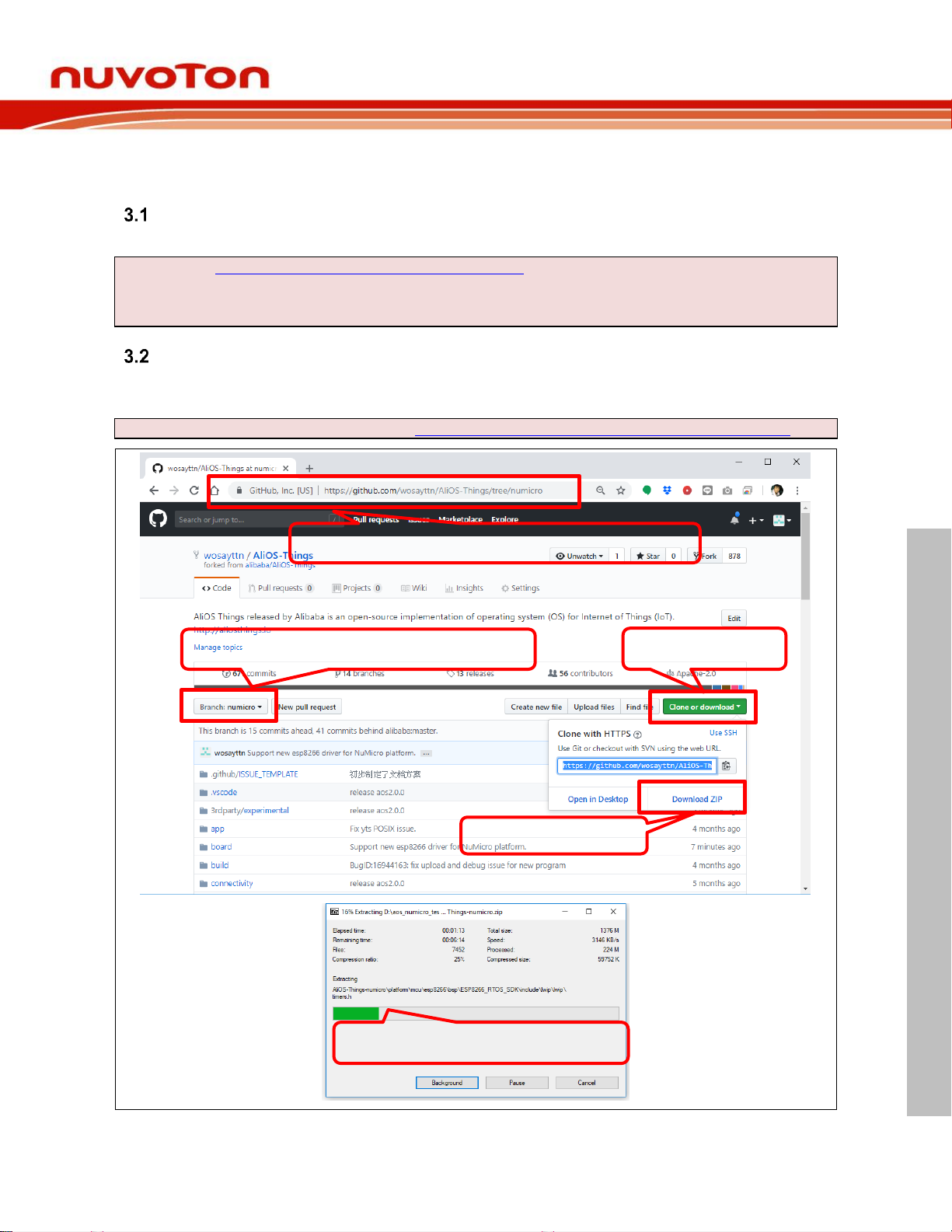
Please open AliOS Things repository webpage on Github and follow steps as Figure 3‑1. Finally,
uncompress the downloaded file.
The URL of AliOS Things SDK repository: https://github.com/wosayttn/AliOS-Things/tree/numicro
Figure 3‑1 Download from Github Website
Step1: Enter URL of AliOS Things SDK repository
Step2: Make sure the branch is numicro.
Step3: Click it.
Step4: Download ZIP
Step5: Uncompress the .zip file.
Page 6

NuMaker-IOT-M487
Feb 22, 2019 Page 6 of 15 Rev 1.00
ALIOS THINGS ON NUMA
KER
-
IOT
-
M487
QUICK
START GUIDE
4 ALIOS THINGS MQTTAPP SAMPLE
Build mqttapp Project
Open mqttapp@numaker-iot-m487 Keil project in the uncompressed folder and click rebuild
button to build mqttapp project. All steps are shown in Figure 4‑1.
The file path of Keil project: <Path-to-AliOS-Things folder>\AliOS-
Things\projects\Keil\mqttapp@numicro-iot-m487\keil_project
Figure 4‑1 Path of Keil Project File and Rebuild Project
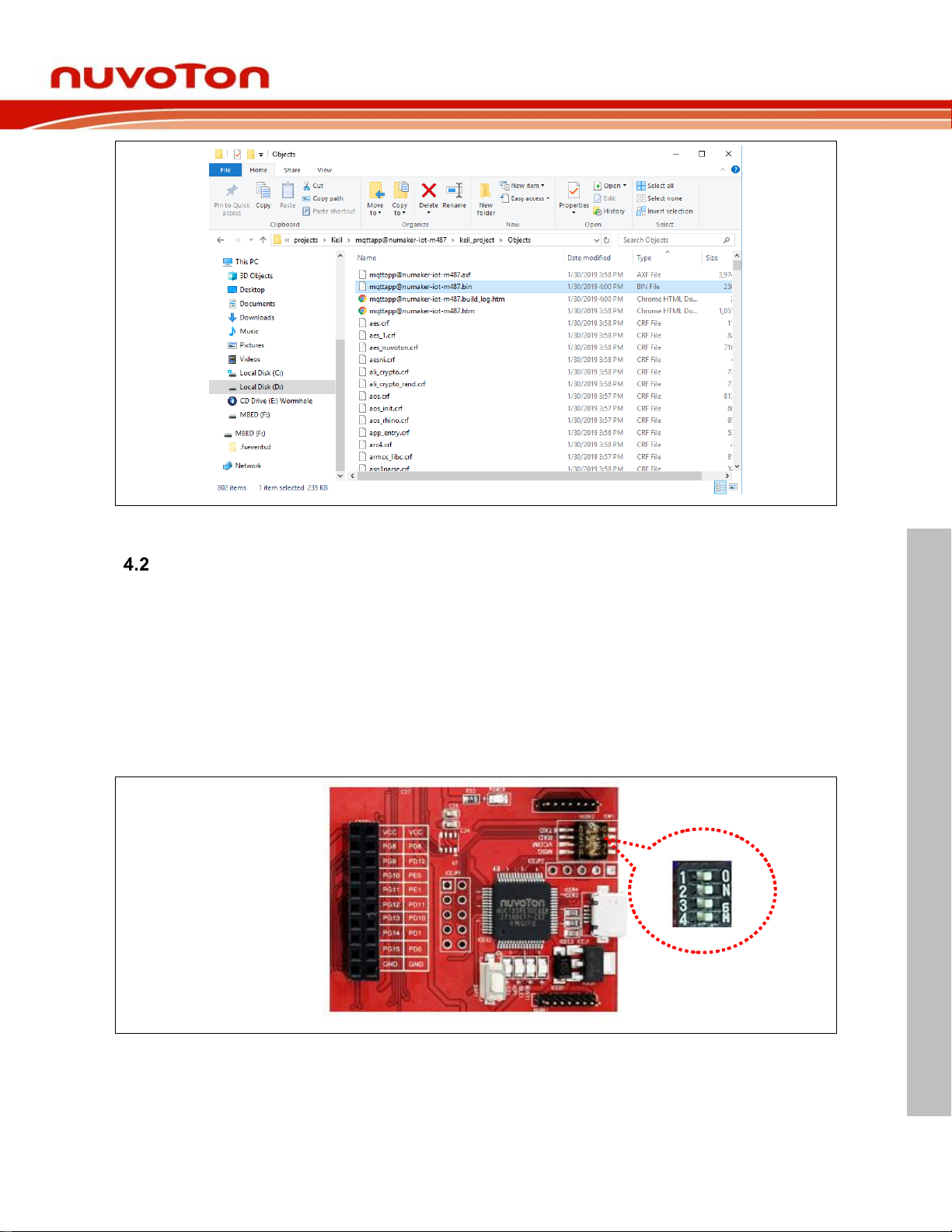
After building is done, it will output a binary image as shown in Figure 4‑2 and its path as below.
<Path-to-AliOS-Things folder>\AliOS-Things\projects\Keil\mqttapp@numicro-iotm487\keil_project\Objects\[email protected]
Step1: Open project
Step2: Click it to rebuild project
Building..
Page 7
NuMaker-IOT-M487
Feb 22, 2019 Page 7 of 15 Rev 1.00
ALIOS THINGS ON NUMA
KER
-
IOT
-
M487
QUICK
START GUIDE
Figure 4‑2 File Path of Binary Image
Burn Firmware
A simple firmware burning method is that you can drag and drop the binary image file to NuMicro
MCU virtual disk to burn firmware.
4.2.1 NuMicro MCU Virtual Disk
First, you need to configure LSW1 switch on the NuMaker-IOT-M487 board. Set the four switches
to ‘ON’ position as shown in Figure 4‑3. After the configuration is done, connect the NuMakerIOT-M487 board and your computer using the USB Micro cable as Figure 4‑4. After that, window
manager will show a ‘NuMicro MCU’ virtual disk as Figure 4‑5. Finally, you will use this virtual
disk to burn firmware.
Figure 4‑3 ISW1 Configuration on NuMaker-IOT-M487 board
Page 8

NuMaker-IOT-M487
Feb 22, 2019 Page 8 of 15 Rev 1.00
ALIOS THINGS ON NUMA
KER
-
IOT
-
M487
QUICK
START GUIDE
Figure 4‑4 Connect NuMaker-IOT-M487 board and PC Using Micro USB Cable
Figure 4‑5 NuMicro MCU Virtual Disk
4.2.2 Drag and Drop
You can drag and drop a binary image file into the NuMicro MCU virtual disk to burn firmware as
Figure 4‑6. The path of mqttapp binary image file is below:
<Path-to-AliOS-Things folder>\AliOS-Things\projects\Keil\mqttapp@numicro-iotm487\keil_project\Objects\[email protected]
Page 9

NuMaker-IOT-M487
Feb 22, 2019 Page 9 of 15 Rev 1.00
ALIOS THINGS ON NUMA
KER
-
IOT
-
M487
QUICK
START GUIDE
Drag and drop binary image file to here.
Figure 4‑6 Simple Firmware Burning Method
Test Wi-Fi Local Connectivity
You can use Tera Term terminate emulator to type commands of AliOS Things OS. All
parameters of serial communication are shown in Figure 4‑7. Here, you can find out the
corresponding port number of Nuvoton Virtual Com Port in window device manager. For
example, the serial port is COM30.
Figure 4‑7 Nuvoton Virtual Serial Port Number and Serial Communication Configuration in Tera Term
Page 10

NuMaker-IOT-M487
Feb 22, 2019 Page 10 of 15 Rev 1.00
ALIOS THINGS ON NUMA
KER
-
IOT
-
M487
QUICK
START GUIDE
Open serial communication and press Reset button on board. After system reset, Tera term
terminate emulator will print messages on screen as Figure 4‑8.
Figure 4‑8 Serial Communication Using Tera Term and Boot-up Messages
First, you must set Wi-Fi SSID and password manually as Figure 4‑9. Once it is associated with
Wi-Fi router, these Wi-Fi SSID and password will be stored in internal Flash. The network
managing command is shown below:
netmgr connect ssid password open|wep|wpa|wpa2
ex: ssid: NT_ZY_BUFFALO, password: 12345678
Figure 4‑9 Wi-Fi Local Connectivity and get IP Address
Test Ali-Cloud Service
Before testing Ali-Cloud MQTT server, you need to get three-parameters obtained from the AliCloud and update three-parameters to mqtt_example.c source code as shown in Figure 4‑10.
Please note the three-parameters in mqttapp source code are for demo by default. After leased
an IP address from DHCP server of Wi-Fi router, mqttapp routing will connect to Ali-Cloud MQTT
server automatically as shown in Figure 4‑11. Please remember, the three-parameters in source
code are for product development and test, do not apply it in your any product. For application
and configuration of Ali-Cloud three-parameters, you can refer to AliOS Things official document.
You can find it in https://github.com/alibaba/AliOS-Things/wiki/stm32-networking.zh.
Type netmgr connect <ssid> <password>
Leased an IP address from DHCP server.
Page 11

NuMaker-IOT-M487
Feb 22, 2019 Page 11 of 15 Rev 1.00
ALIOS THINGS ON NUMA
KER
-
IOT
-
M487
QUICK
START GUIDE
Figure 4‑10 Ali-Cloud Three-parameters Configuration
Page 12

NuMaker-IOT-M487
Feb 22, 2019 Page 12 of 15 Rev 1.00
ALIOS THINGS ON NUMA
KER
-
IOT
-
M487
QUICK
START GUIDE
Figure 4‑11 Connected Ali-Cloud MQTT Server
Three-parameters
Connected Ali-Cloud MQTT server
Page 13

NuMaker-IOT-M487
Feb 22, 2019 Page 13 of 15 Rev 1.00
ALIOS THINGS ON NUMA
KER
-
IOT
-
M487
QUICK
START GUIDE
5 CONCLUSION
From the basic end nodes to the gateways and the clouds, IoT applications require control,
networking, encryption and other related technologies. Alibaba and Nuvoton provide the
NuMaker-IOT-M487 development kit to help your product to market quickly.
Page 14
NuMaker-IOT-M487
Feb 22, 2019 Page 14 of 15 Rev 1.00
ALIOS THINGS ON NUMA
KER
-
IOT
-
M487
QUICK
START GUIDE
6 REVISION HISTORY
Date
Revision
Description
2019.02.22
1.00
1. Initially issued.
Page 15
NuMaker-IOT-M487
Feb 22, 2019 Page 15 of 15 Rev 1.00
ALIOS THINGS ON NUMA
KER
-
IOT
-
M487
QUICK
START GUIDE
Important Notice
Nuvoton Products are neither intended nor warranted for usage in systems or equipment, any
malfunction or failure of which may cause loss of human life, bodily injury or severe property
damage. Such applications are deemed, “Insecure Usage”.
Insecure usage includes, but is not limited to: equipment for surgical implementation, atomic
energy control instruments, airplane or spaceship instruments, the control or operation of
dynamic, brake or safety systems designed for vehicular use, traffic signal instruments, all
types of safety devices, and other applications intended to support or sustain life.
All Insecure Usage shall be made at customer’s risk, and in the event that third parties lay
claims to Nuvoton as a result of customer’s Insecure Usage, customer shall indemnify the
damages and liabilities thus incurred by Nuvoton.
 Loading...