

Page 1
Fax. ++31 (0) 413229158
Special systems for Egg handling
Dorpsstraat 84 NL5471 NA Loosbroek
Tel. ++31 (0) 413229180
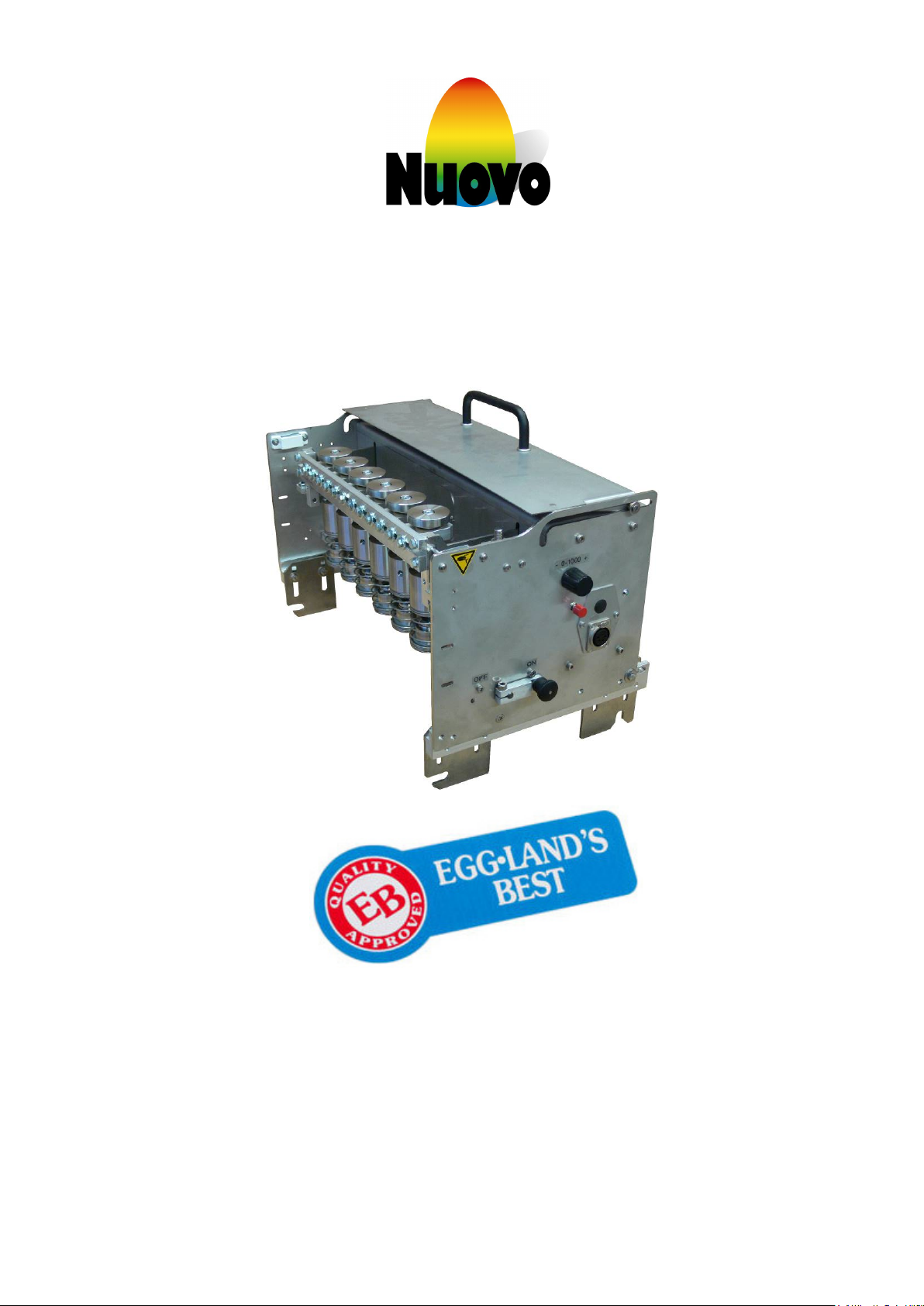
Operating Manual
EB Easy-Printer
Omnia PX 530
(NO 350)
Page 2

Nuovo
Representation of Nuovo AG
Representation of Nuovo AG:
General office:
Nuovo BV
Dorpsstraat 84
NL-5471 NA LOOSBROEK
Ph: 0031 (0) 413 229180
Fax: 0031 (0) 413 229158
Email [email protected]
www.nuovo.ch
Advice
Sales
Service
Customer Service
Page 3

Operating instructions for use
Nuovo
EB EASY-PRINTER
Table of Contents
1 Introduction .......................................................................................................................... 2
2 Identification ........................................................................................................................ 2
3 Safety instructions ............................................................................................................... 3
3.1 Proper use ...................................................................................................................................................... 3
3.2 Location of instructions for use ...................................................................................................................... 3
3.3 User requirements / Operating personnel ...................................................................................................... 3
3.4 Performance of work on the machine ............................................................................................................ 3
3.5 Dangers in case of non-compliance with safety instructions .......................................................................... 3
4 Set-up and adjustment of the machine .............................................................................. 4
4.1 Place of use of the machine ........................................................................................................................... 4
4.2 Electrical connection ...................................................................................................................................... 4
5 Description of the machine ................................................................................................. 4
5.1 Function .......................................................................................................................................................... 4
5.2 Electrical system ............................................................................................................................................ 4
5.3 Protective cover, Safety switch....................................................................................................................... 4
6 User-manual ......................................................................................................................... 5
6.1 Machine description ....................................................................................................................................... 5
6.2 Power up / Power down .................................................................................................................................. 5
6.3 Print delay ....................................................................................................................................................... 6
6.4 Electrical connection ...................................................................................................................................... 6
6.5 Electrical overview Easy-Print ........................................................................................................................ 7
6.6 Electrical connection power supply ................................................................................................................ 8
6.7 Positioning the imprint heads ......................................................................................................................... 9
6.8 Assembling and disassembling the ink reservoir ........................................................................................... 9
6.9 Complete stamping bar ................................................................................................................................ 10
6.10 Service bracket ............................................................................................................................................. 10
6.11 Parking station .............................................................................................................................................. 10
7 Malfunctions and their elimination ................................................................................... 11
8 Cleaning, Maintenance, Repair ......................................................................................... 11
8.1 Cleaning ....................................................................................................................................................... 11
8.2 Maintenance ................................................................................................................................................. 11
8.3 Repair ........................................................................................................................................................... 11
9 Packing, Transport, Storage .......................................................................................... 12
9.1 Packing ......................................................................................................................................................... 12
9.2 Transport ...................................................................................................................................................... 12
9.3 Storage ......................................................................................................................................................... 12
Eggland’s Best, Inc. Operating Standards Manual- EB Easy Printer Manual 16/001
Confidential. Do not reproduce without permission December 9, 2016
Page 4

Operating instructions for use
1
Nuovo
EB EASY-PRINTER
10 Disposal ........................................................................................................................... 12
11 General technical data ................................................................................................... 12
12 Spare parts ...................................................................................................................... 13
12.1 Stamping head ............................................................................................................................................. 13
12.2 Ink reservoir .................................................................................................................................................. 13
12.3 Complete stamping bar ................................................................................................................................ 14
12.4 Parking station .............................................................................................................................................. 14
12.5 Connection-Box parts ................................................................................................................................... 15
12.6 L-Brackets .................................................................................................................................................... 17
13 Filling the egg-stamp / Replacing the pad .................................................................... 18
14 Consumables .................................................................................................................. 19
Eggland’s Best, Inc. Operating Standards Manual- EB Easy Printer Manual 16/001
Confidential. Do not reproduce without permission December 6, 2016
Page 5
Operating instructions for use
2
Nuovo
EB EASY-PRINTER
1 Introduction
• Please comply with these Instructions before placing the machine into operation. Be familiar with all settings
and their functions.
• Maintenance and repair work should be performed only by qualified technical personnel. Unauthorized
changes to the machine are disallowed.
• Any use other than stamping EB product is considered as improper. The manufacturer will not be liable for
resulting damages.
• Relevant safety regulations are to be followed.
• Delivery of replacement parts requires an order specifying serial number and year of installation, number or
name of the spare part, method of shipping and address.
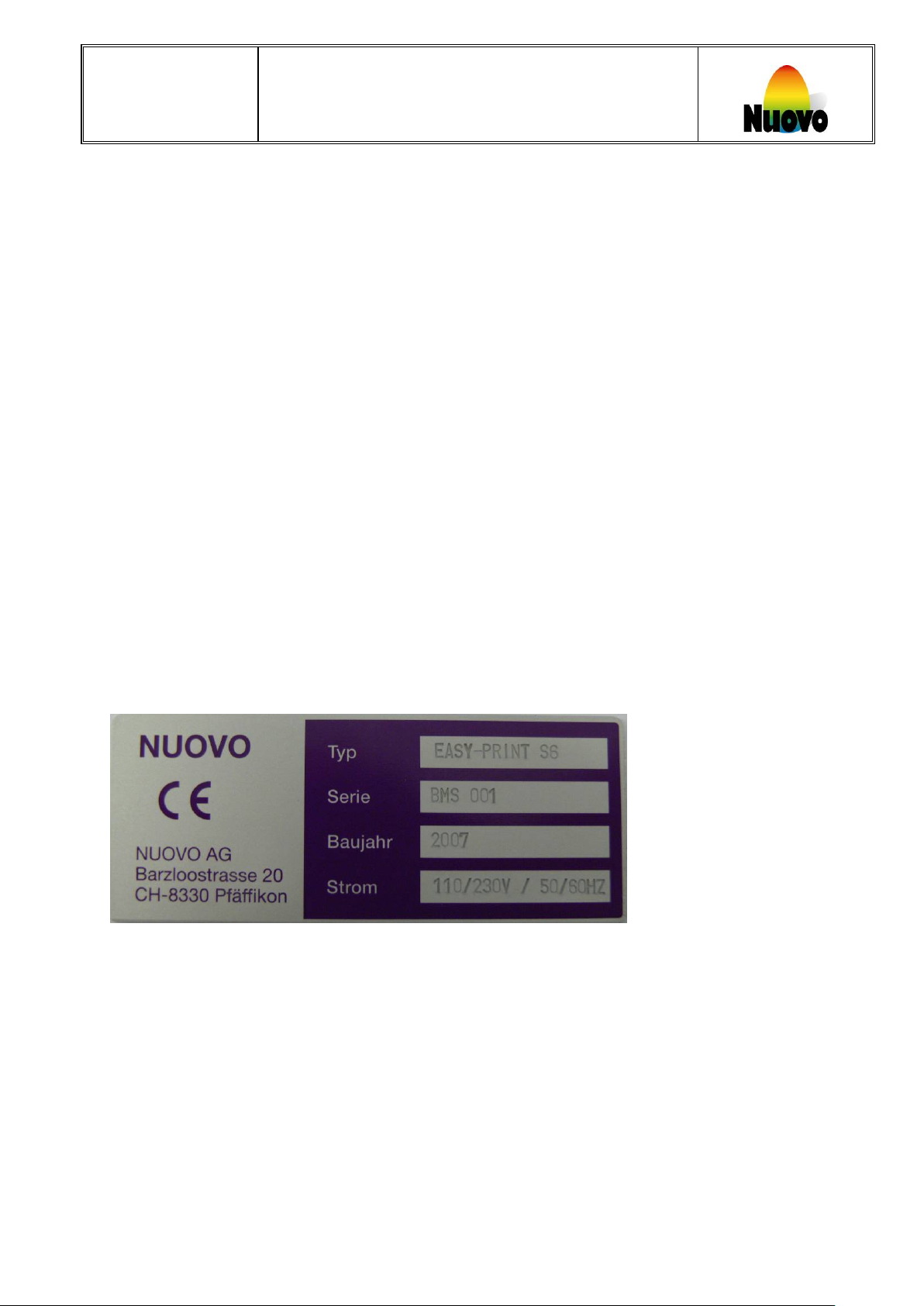
2 Identification
EB Easy Printers are identified with a tag indication serial number and the year the machine was built.
Eggland’s Best, Inc. Operating Standards Manual- EB Easy Printer Manual 16/001
Confidential. Do not reproduce without permission December 6, 2016
Page 6

Operating instructions for use
3
Nuovo
EB EASY-PRINTER
3 Safety instructions identification
3.1 Proper use
The EB EASY-PRINTER is only to be used to apply logos as approved by Eggland’s Best, Inc.
Any other use is not permitted and will lead to the removal of machines from the plant.
The EB EASY-PRINTER conforms to accepted safety regulations.
3.2 Location of instructions for use
The Instructions for use should be available to supervisory and maintenance personnel in plants.
3.3 User requirements / Operating personnel
The EB EASY-PRINTER is to be operated only by trained personnel under the control of plant management and
a designated line supervisor.
3.4 Performance of work on the machine
Personnel authorized to maintain or repair the machine must understand these Instructions for Use.
3.5 Dangers in case of non-compliance with safety instructions
Non-compliance with the safety instructions can result in accidents.
Non-compliance with the safety instructions can lead to improper stamping, damage to components of the
machine and operational failure.
Eggland’s Best, Inc. Operating Standards Manual- EB Easy Printer Manual 16/001
Confidential. Do not reproduce without permission December 6, 2016
Page 7

Operating instructions for use
4
Nuovo
EB EASY-PRINTER
4 Set-up and adjustment of the machine
4.1 Place of use of the EB Easy Printer machine
The EB EASY-PRINTER machine is to be operated in a plant conforming to USDA and EB standards.
The machine should be operated in a dry environment.
The machine must be accessible from at least one side.
The EB EASY-PRINTER machine should be installed horizontally.
4.2 Electrical connection
Make sure signal, power supply and especially the ground are in order.
The EB EASY-PRINTER has to be wired for the type of packer it is going to be used on.
Power supply unit: 110/230 Volt and 50/60 Hertz.
Caution:
• Components within the machine are under high voltage. Only remove the cover when the power
supply has been disconnected.
• An incorrect or malfunctioning power supply can lead to overload of the circuits and damage to the
machine.
5 Description of the EB Easy Printer Machine
5.1 Function
The EB EASY-PRINTER machine is designed to stamp eggs. This process involves screen printing using USDA
approved food grade ink.
5.2 Protective cover
Caution: Disconnect the power supply before opening the electrical cabinet.
Eggland’s Best, Inc. Operating Standards Manual- EB Easy Printer Manual 16/001
Confidential. Do not reproduce without permission December 6, 2016
Page 8
Operating instructions for use
5
Power switch
Open the protective cover. (The
Clean the rubber ink pads with a
2
1. Power switch
1
2
1
3
1
(Backside)
4 8 6 7 5
(Shown: Left model)
Nuovo
6 User-Manual
6.1 Machine Description
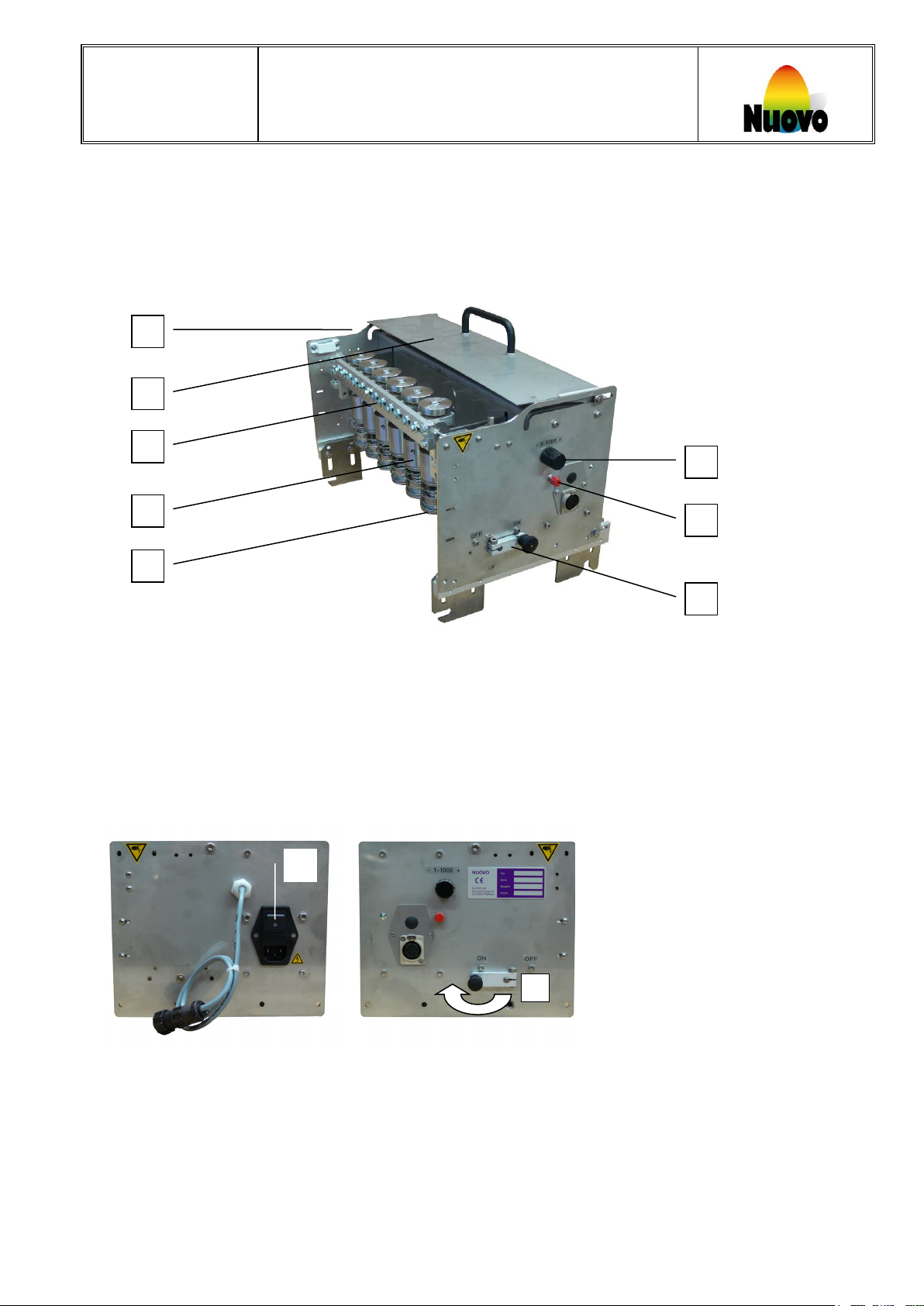
The picture below shows the main components of the EB EASY-PRINTER.
6.2 Power on / Power off
Advice
To turn off the machine, close the protective cover and turn off the machine using the power switch.
The protective cover must be closed to operate the machine. If the power switch is turned on with the protective
cover open the machine will not operate and the green LED will not illuminate. To activate the machine close the
protective cover.
As soon as the safety guard [5] is opened the machine automatically stops.
Eggland’s Best, Inc. Operating Standards Manual- EB Easy Printer Manual 16/001
Confidential. Do not reproduce without permission December 6, 2016
EB EASY-PRINTER
2. Lever for opening and closing the protective cover
3. Ink-reservoir with rubber stamping pad
4. Inch button for single stoke
5. Safety-Lid
6. Printing head
7. Complete stamping bar
8. Selector switch for setting delay time
2
stamps will make a single stroke)
Green LED will illuminate
3
paper tissue.
Page 9
Operating instructions for use
6
6 Selector switch for setting
stamper
6
For the start signal, there are two possibilities:
Nuovo
6.3 Print delay
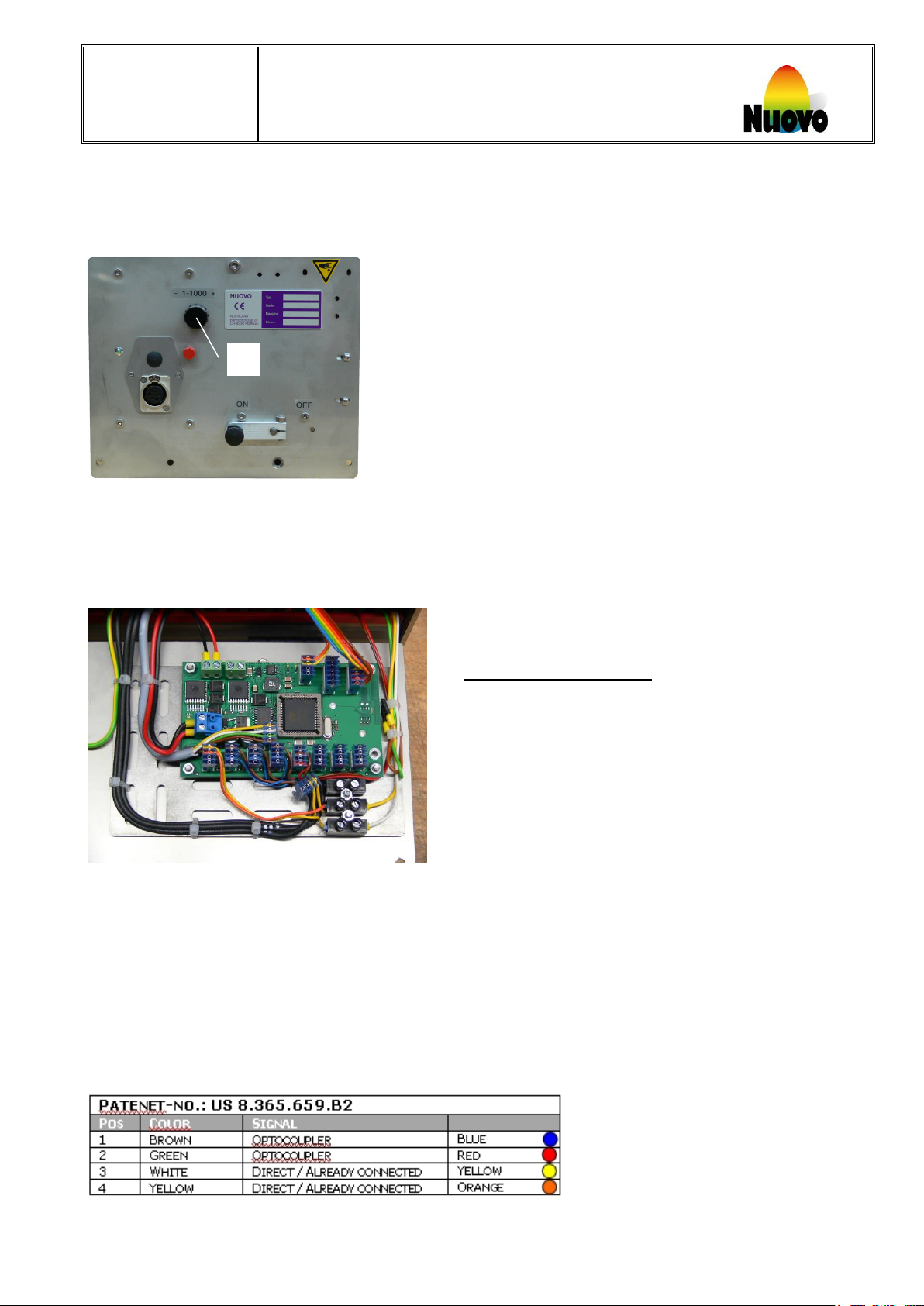
To synchronize the machine with the packing lane, adjust the delay-time using the selector switch [6].
6.4 Electrical connection
The EASY-PRINT has to be internally connected as follows:
EB EASY-PRINTER
the delay-time of the
Give start with a potential free contact.
Direct, already connected
Connect the blue connector with wire colour yellow and
orange to position number 1 (x0) on the Easy unit
Connect the start signal + positive (white wire) to colour
yellow on the connection strip
Connect the start signal - negative (yellow wire) to colour
orange on the connection strip
Give start signal with direct current (max 24 V)
(Optocoupler)
Connect the blue connector (optocoupler) with wire colour
black and green to position number 1 (x0) on the Easy unit
Connect the start signal + positive (brown wire) to colour
blue on the connection strip
Connect the start signal - negative (green wire) to colour
red on the connection strip
(as shown on scheme)
Eggland’s Best, Inc. Operating Standards Manual- EB Easy Printer Manual 16/001
Confidential. Do not reproduce without permission December 6, 2016
Page 10
Operating instructions for use
7
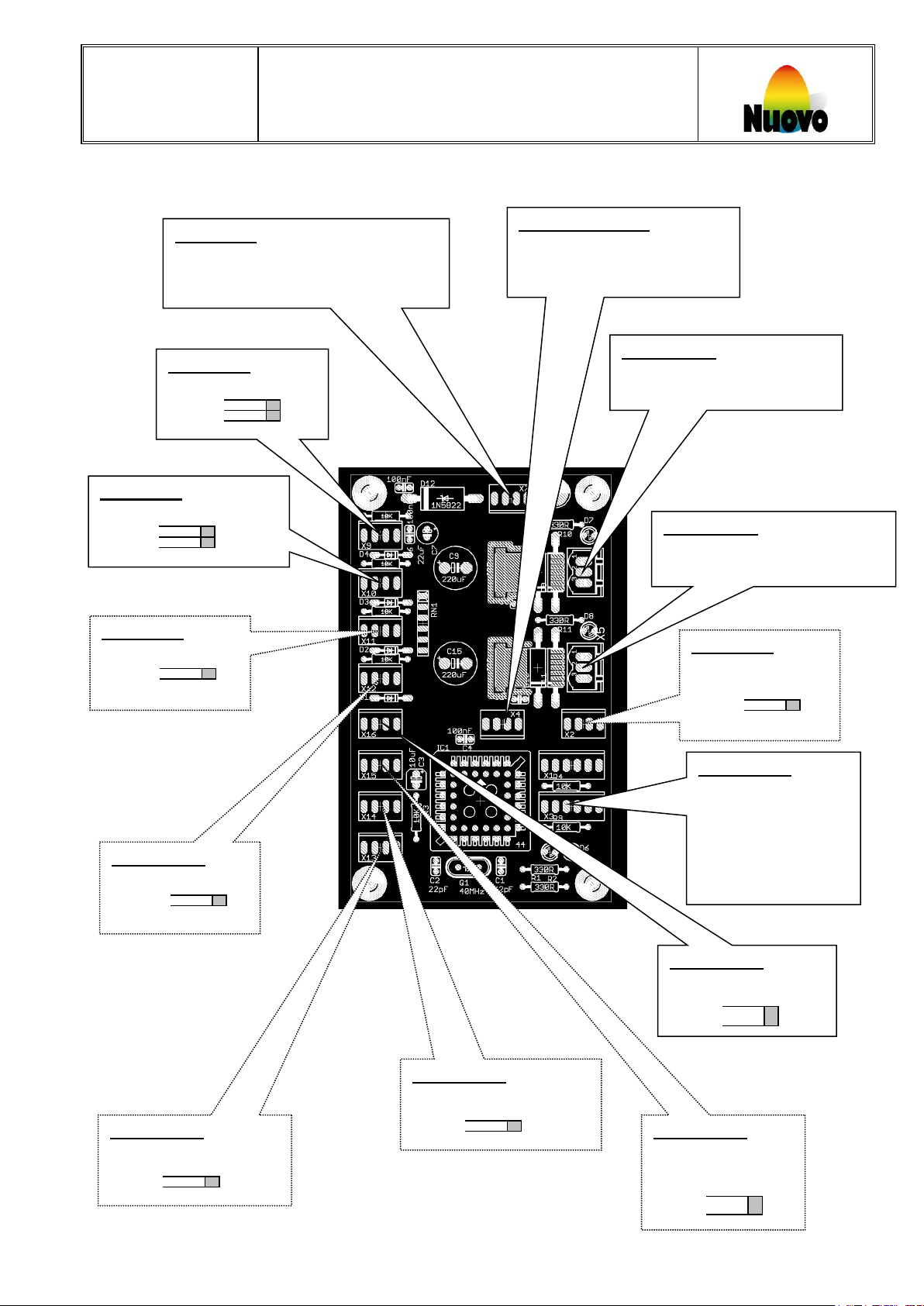
Input X0:
Input P0:
In-/Output C0:
Input X1:
Output X7:
Output X3:
Output X6:
Output X4:
Output X5:
Input X2:
Output A0:
Output A1:
Input X10:
Input X8:
Nuovo
6.5 Electrical overview EasyUnit10
Index-Sensor
Pin 1: +24VDC
Pin 2: Signal
Pin 3: GND
Pin 4: +5V
Power supply +24V
Pin 1: +24VDC
Pin 2: GND
DC
Start-Sensor
Pin 1: +24VDC
Pin 2: Signal
Pin 3: GND
DC
Pin 4: +5V
DC
DC
EB EASY-PRINTER
Serial data cable (TTL)
Pin 1: RXD
Pin 2: TXD
Pin 3: GND
Pin 4: +5V
DC
Stamper-Motor 24VDC
Pin 1: Power out put A
Pin 2: Power output B
Conveyor belt-Motor 24VDC
Pin 1: Power out put A
Pin 2: Power out put B
Safety-Guard
Pin 1: +24VDC
Pin 2: Signal
Pin 3: GND
Pin 4: +5V
Sealing-off lit
Pin 1: +24VDC
Pin 2: Signal
Pin 3: GND
Pin 4: +5V
Conveyor belt
ON/OFF
Pin 1: Pin 2: Signal
Eggland’s Best, Inc. Operating Standards Manual- EB Easy Printer Manual 16/001
Confidential. Do not reproduce without permission December 6, 2016
Button for
DC
manual start
Pin 1: Signal
Pin 2: GND
Pin 3: Signal
Pin 4: GND
Selector switch for
Setting delay time
Pin 1: D0
Pin 2: D1
Pin 3: D2
Pin 4: D3
Pin 5: GND
Pin 6: +5V
DC
DC
5VDC LED (green)
Pin 1: Pin 2: Signal
Pin 3: GND
Pin 4: +5V
DC
5VDC for Egg counter
Pin 1: Pin 2: Signal
Pin 3: GND
Pin 4: +5V
DC
5VDC LED (red)
Pin 1: Pin 2: Signal
Pin 3: GND
Pin 4: +5V
DC
Page 11
Operating instructions for use
8
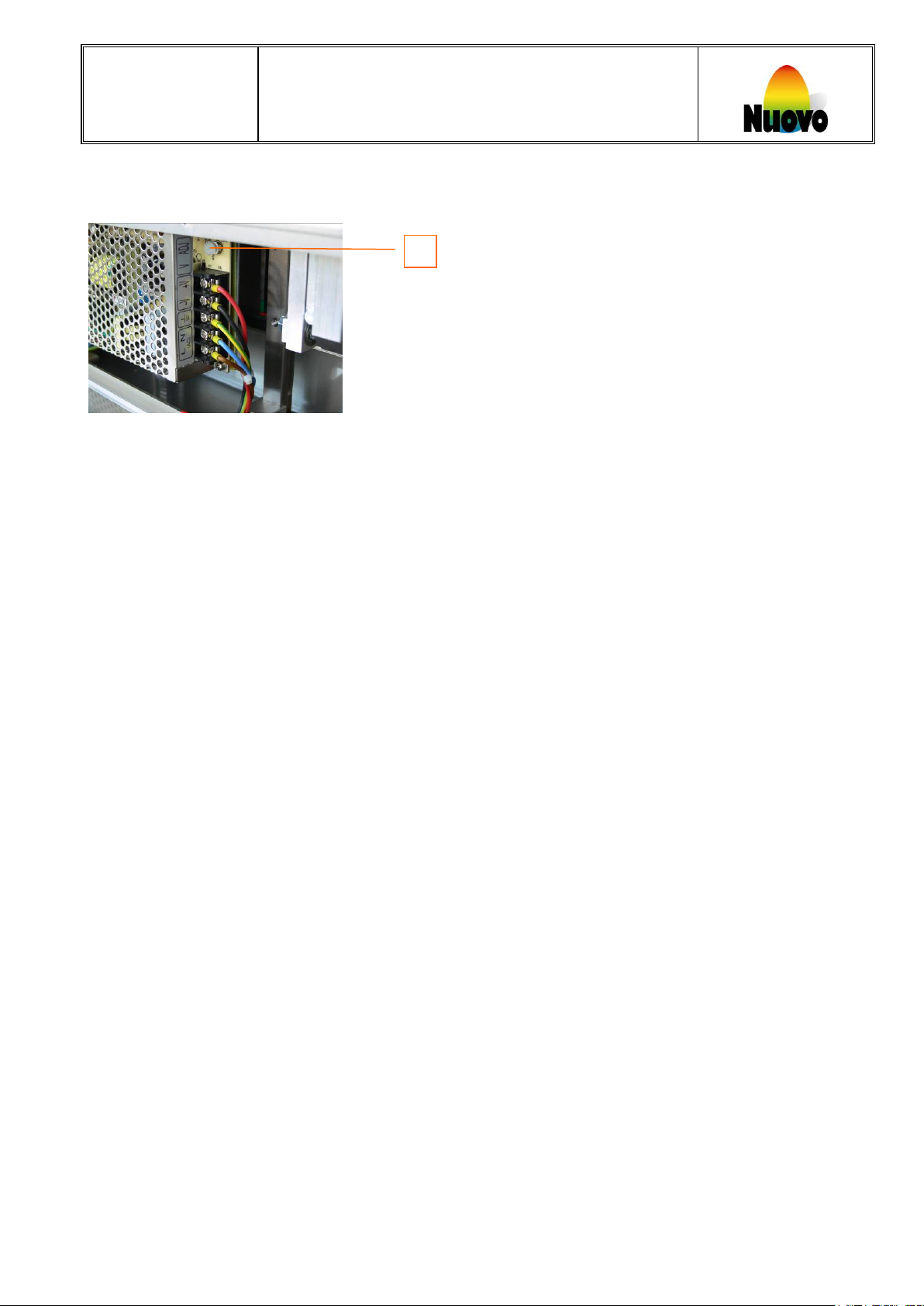
A Potentiometer for adjustment DC voltage
A
Nuovo
EB EASY-PRINTER
6.6 Electrical connection power supply
(Default settings 24 Volt)
Eggland’s Best, Inc. Operating Standards Manual- EB Easy Printer Manual 16/001
Confidential. Do not reproduce without permission December 6, 2016
Page 12
Operating instructions for use
9
1
2
1 1 2
Nuovo
EB EASY-PRINTER
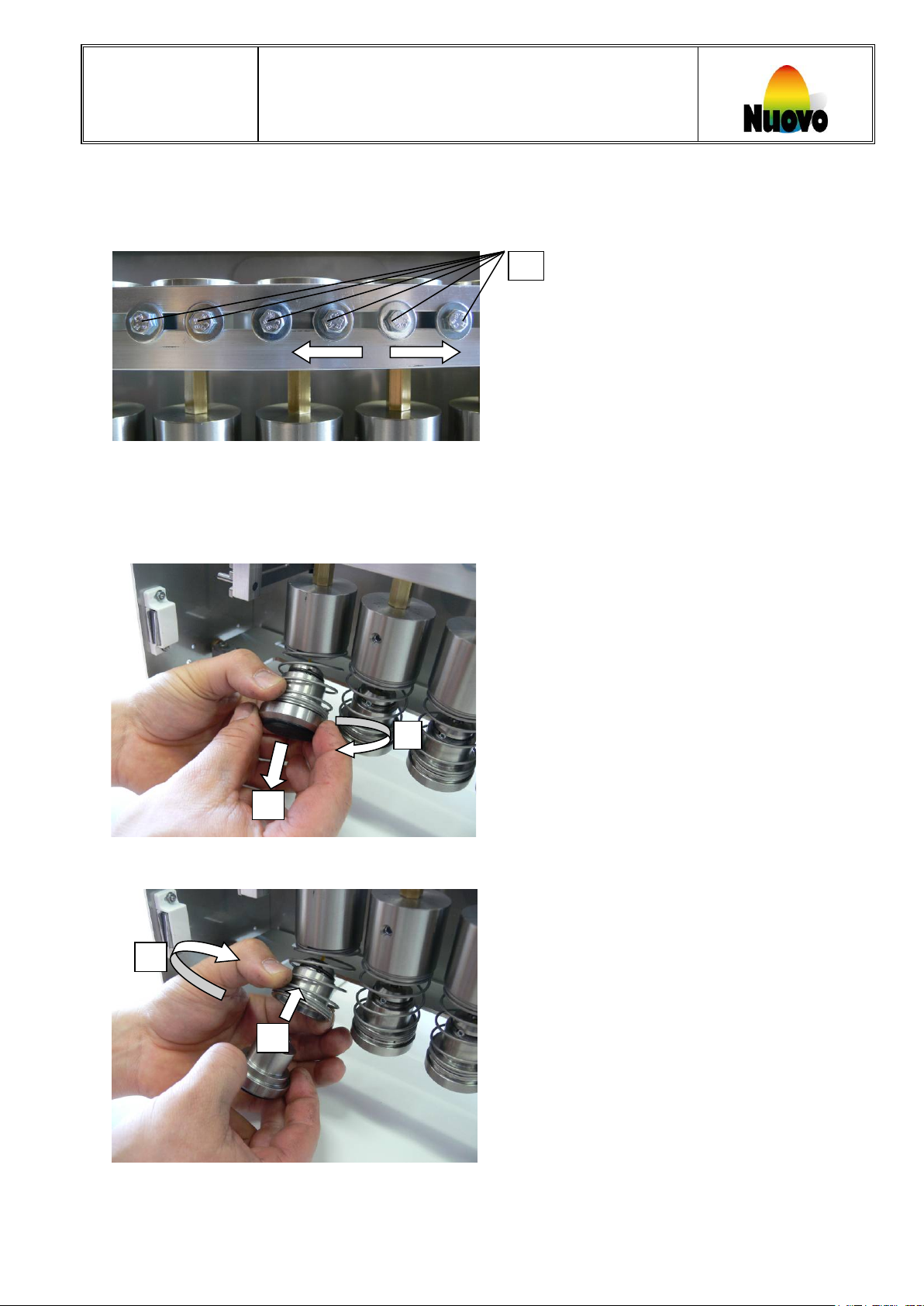
6.7 Positioning the imprint heads
To position the stamp to the centre of the eggs, release the fixing bolts [5] and center the imprint heads.
Fixing bolts
6.8 Assembling and disassembling the ink reservoirs
To detach the ink-reservoir, hold the spring, turn the ink reservoir anti-clockwise and remove.
To install the ink-reservoir, turn it counter-clockwise until it snaps into place.
Eggland’s Best, Inc. Operating Standards Manual- EB Easy Printer Manual 16/001
Confidential. Do not reproduce without permission December 6, 2016
Page 13
Operating instructions for use
10
1 2 3
4
Nuovo
EB EASY-PRINTER
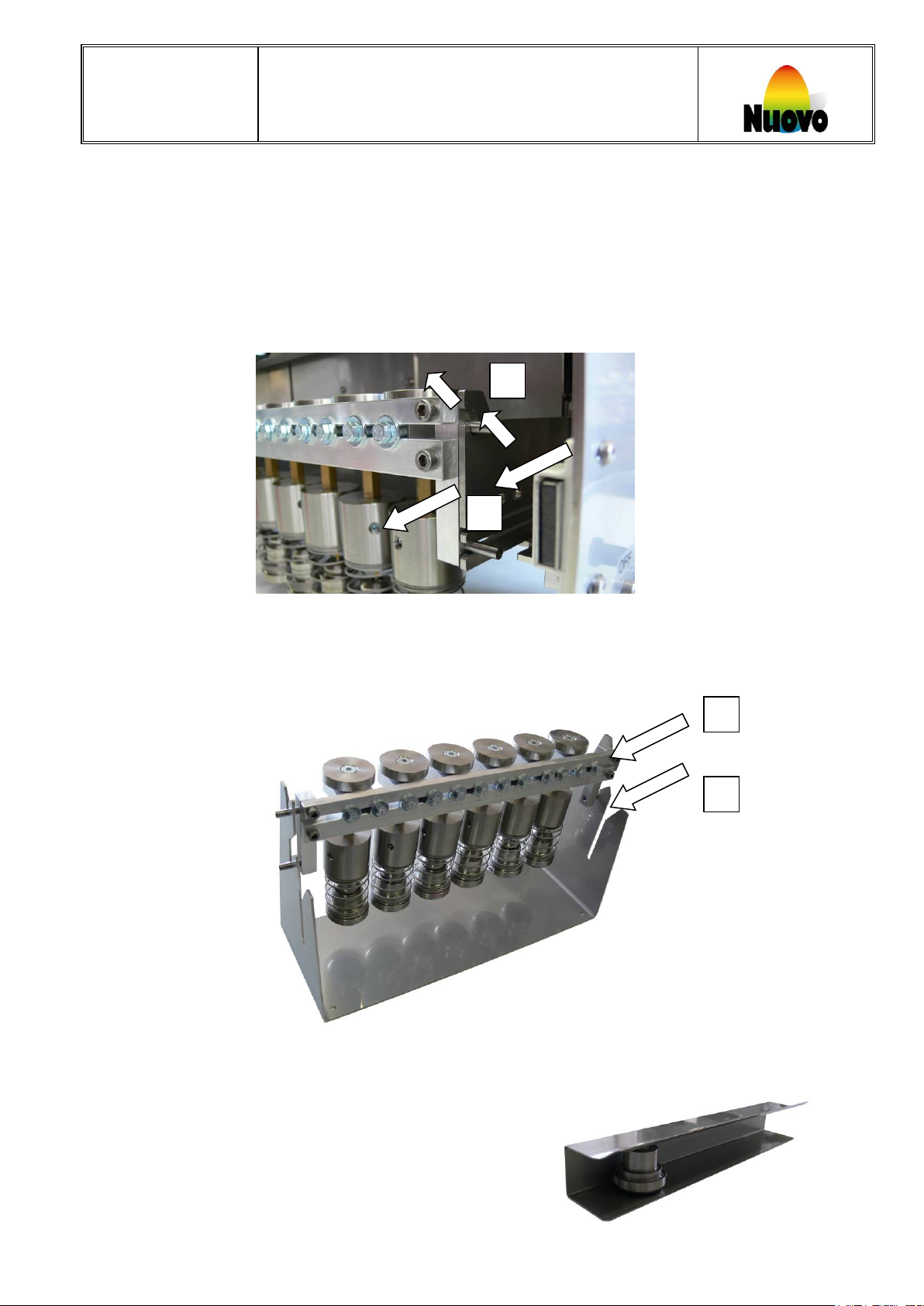
6.9 Complete stamping bar
To change, clean or maintain the imprint heads, the entire imprint head bar can be removed from the EB EASYPRINTER machine.
To remove the stamping-bar from the EB EASY-PRINTER machine:
1 Move the lower part of the bar in the direction of the arrows (number [1]).
2 Move the complete bar in the direction of the arrows (number [2]).
6.10 Service bracket
The service-tool set to position [3] is used to service/clean or refill the imprint heads. (Optional)
To use the service mounting tool to store printer assemblies, place the printer head bar into the slot as shown [4].
6.11 Parking station for individual ink reservoirs
The individual ink reservoirs can be parked (Optional) as shown:
Eggland’s Best, Inc. Operating Standards Manual- EB Easy Printer Manual 16/001
Confidential. Do not reproduce without permission December 6, 2016
Page 14
Operating instructions for use
11
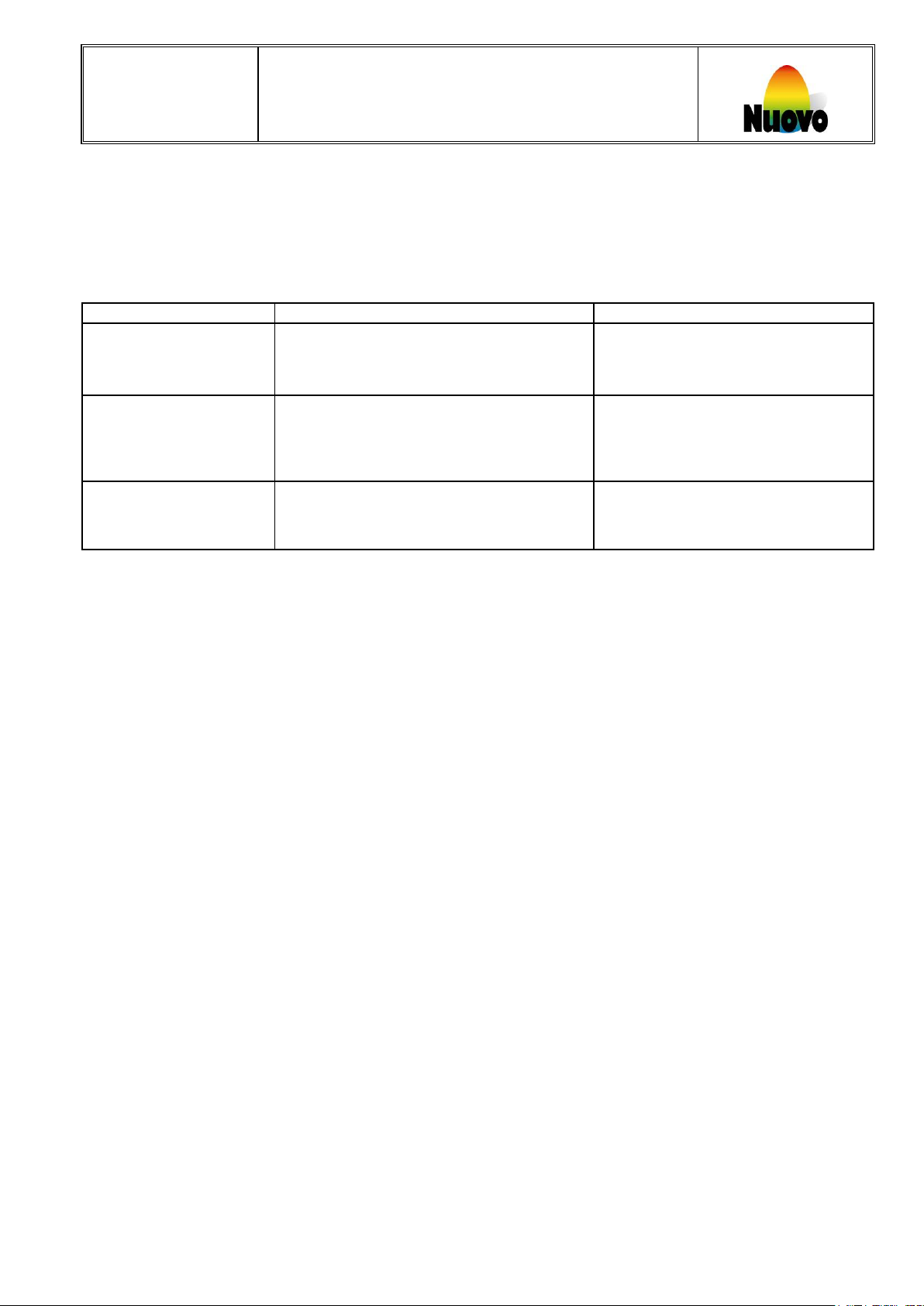
Malfunction
Problem
Action
not illuminated
Main power to packer is switched off.
- Switch on power supply to grader.
The protective cover is closed or not
Nuovo
EB EASY-PRINTER
7 Trouble Shooting
• If a malfunction occurs, the following list should be reviewed.
• Before the elimination of malfunctions and repairs, the safety regulations are to be followed.
• When the EB EASY-PRINTER is ready for operation the green LED is on.
EB EASY-PRINTER
does not operate LED
EB EASY-PRINTER
does not
operate
EB EASY-PRINTER
does not operate
Caution:
EASY-PRINT is switched off.
Connector is not plugged in.
completely opened.
(Cover has to be closed when the Easy-
printer is turned on
Safety lid is not completely closed.
- Switch on machine.
- Plug in connector.
- Open the protective cover
completely.
- Close safety-lid.
• The wires in the control box are under high voltage. Open the electrical cabinet only when the main
plug has been pulled out.
8 Cleaning, Maintenance, Repair
8.1 Cleaning
Clean machine periodically, at least weekly, depending on accumulation of dirt.
Before cleaning, the machine power switch must be in the off position.
The power supply plug has to be pulled out of the socket.
Never submerge the machine in water or in other liquids.
Cleaning personnel are to be instructed on approved procedures.
8.2 Maintenance
With careful monitoring and maintenance of the machine, disassembly will be necessary only to replace worn
parts.
8.3 Repair
In case of malfunctions, due to a defective component the main switch must be turned off.
Before repair, the machine is to be switched off and disconnected from the power supply.
Never put a damaged device into operation.
Reaching into the device with any object or opening the machine by unauthorized persons is dangerous.
Mechanical and electrical repairs or changing parts on the machine and controller shall be performed only by
technical personnel of the authorized service center or by trained maintenance engineers. No other person may
perform repairs or change parts on the machine.
Spare parts must comply with the technical requirements established by the manufacturer. Original spare parts
are to be used as listed in section 12 ‘Spare Parts’.
Eggland’s Best, Inc. Operating Standards Manual- EB Easy Printer Manual 16/001
Confidential. Do not reproduce without permission December 6, 2016
Page 15
Operating instructions for use
12
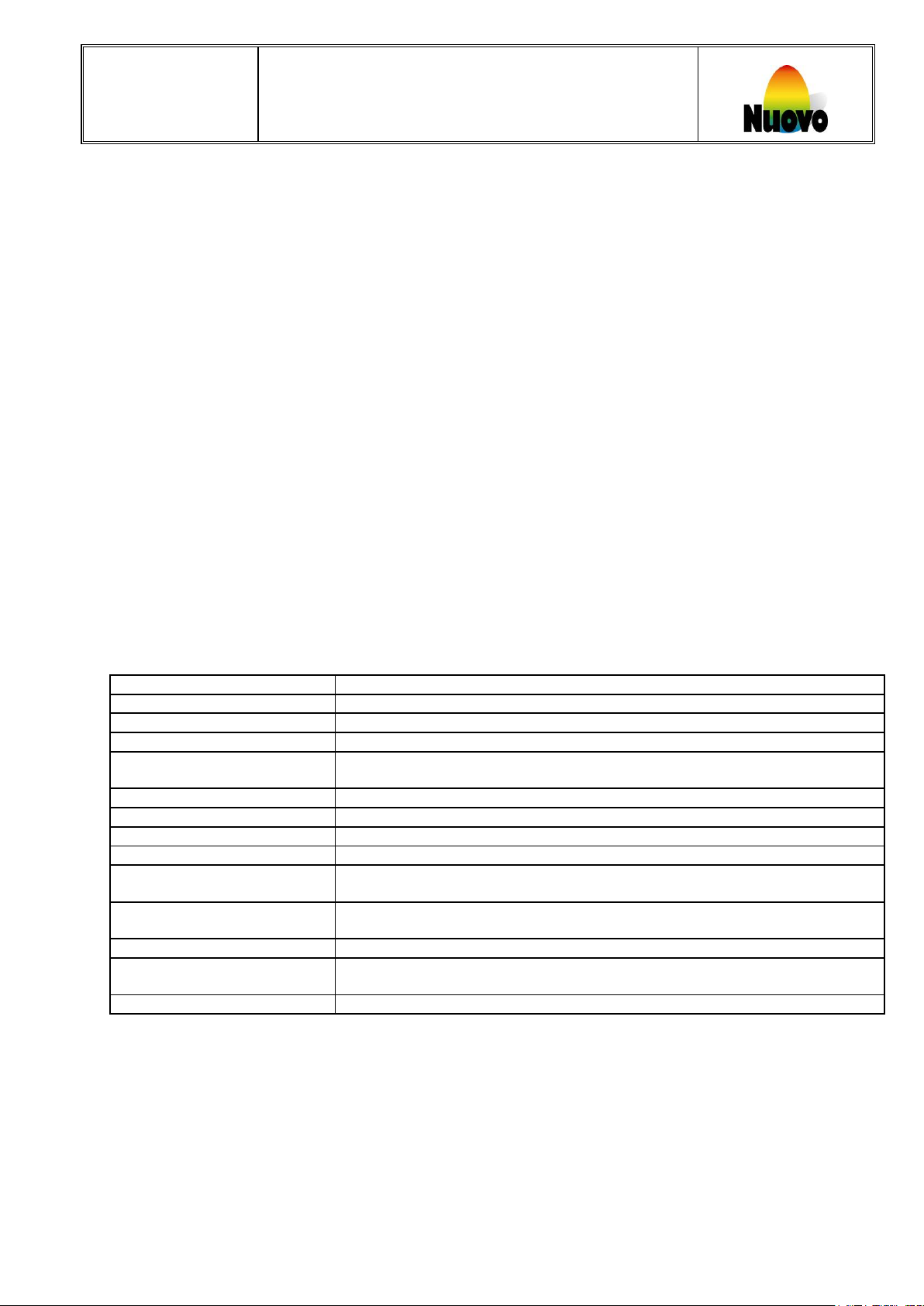
Egg-Stamper
Stamp head mounting
For 5 or 6 stamps produced
Quantity Stamp head holder
1
Stamp ink
Food grade ink
Control
Print software
Easy-Unit version 00.30 or higher
System
Microprocessor
Control voltage USA
1 x 110/230 V / 50/60HZ
Control element
Main switch, Single stroke button, Sealing cap approx. Switch, Safety-Guard
approx. Switch, approx. Index.
Machine dates
measurements in mm
(length x width x height)
approximately 500 x 250 x 250 mm
Weight
approximately 16 kg
Nuovo
EB EASY-PRINTER
9 Packing, Transport, Storage
9.1 Packing
Check that specified components have been supplied. In case of missing parts, please contact customer service
without delay.
9.2 Transport
The EB EASY-PRINTER machine can be transported in any vehicle.
The machine should be transported upright.
To avoid damage to the machine use proper packing material and sturdy outer container.
9.3 Storage
The machine should be stored in a dry area at a moderate temperature.
After lengthy storage of the machine, all internal parts must be inspected for corrosion or other damage before
operation. Clean or replace defective or corroded components.
10 Disposal
At the end of its lifetime, the machine must be returned to Eggland’s Best, Inc. or a designated agent.
11 General technical data
Eggland’s Best, Inc. Operating Standards Manual- EB Easy Printer Manual 16/001
Confidential. Do not reproduce without permission December 6, 2016
Page 16
Operating instructions for use
13
A
C D E
F
I
H G B K L
M
Part name Part number
J
N
Nuovo
EB EASY-PRINTER
12 Spare Parts
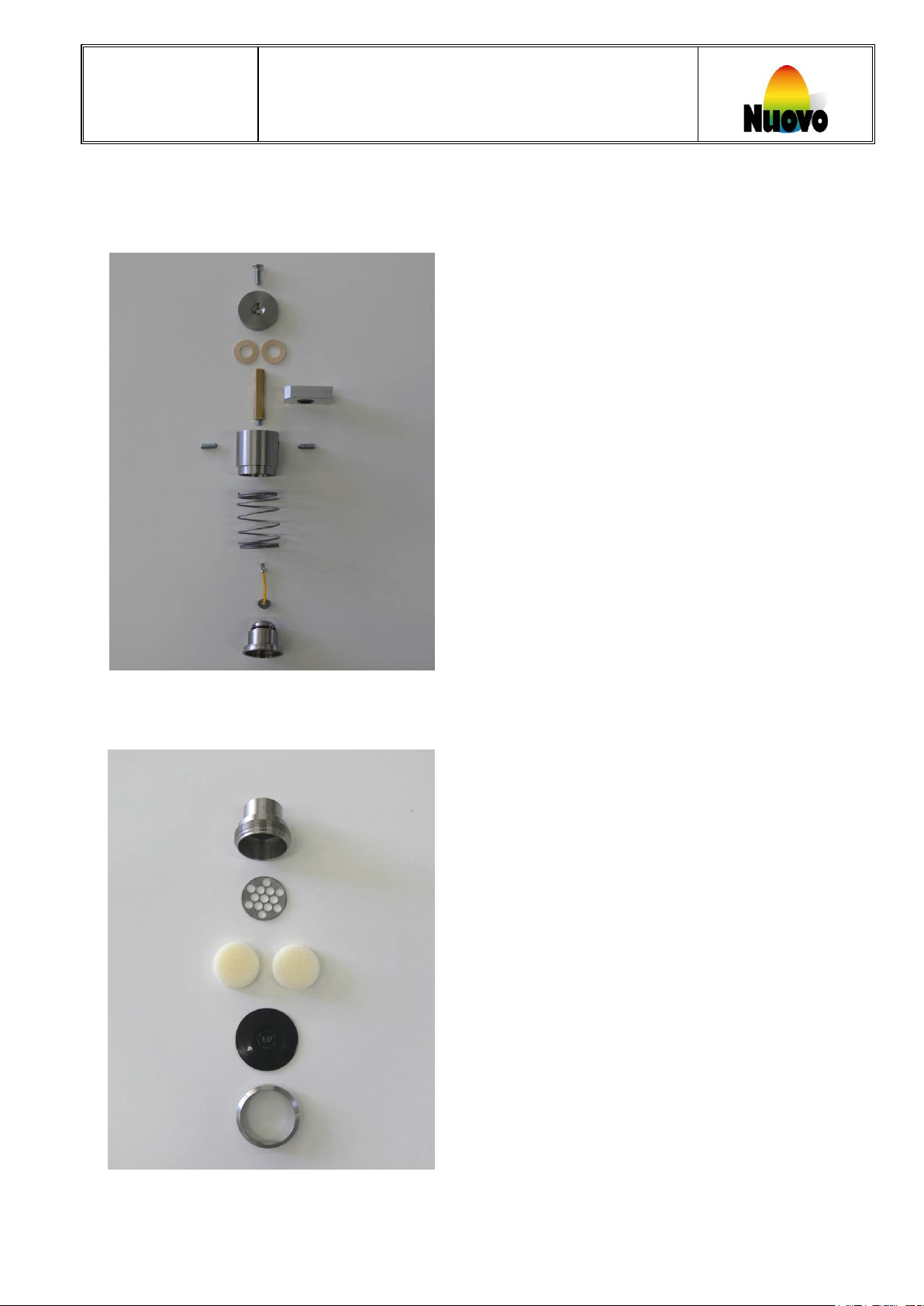
12.1 Stamping-head, complete (03120)
Part name Part number
A Bolt M6x20 03100
B End (ring) 03101
C Mute ring 03102
D Vertical axle, 6angle 03103
E Lining, Aluminum 03104
F Spring-Holder incl. bolts 03105
G Pressure spring 03106
H Pre-pressure connector 03107
I Ink reservoir holder 03108
12.2 Ink-reservoir, complete (03123)
J Ink reservoir 03109
K Perforated washer 03110
L Foam (d=30, h=10) 03111
M Pad, with logo 03112
N Ring RFS 03115
Eggland’s Best, Inc. Operating Standards Manual- EB Easy Printer Manual 16/001
Confidential. Do not reproduce without permission December 6, 2016
Page 17
Operating instructions for use
14
R
S
Part name Part number
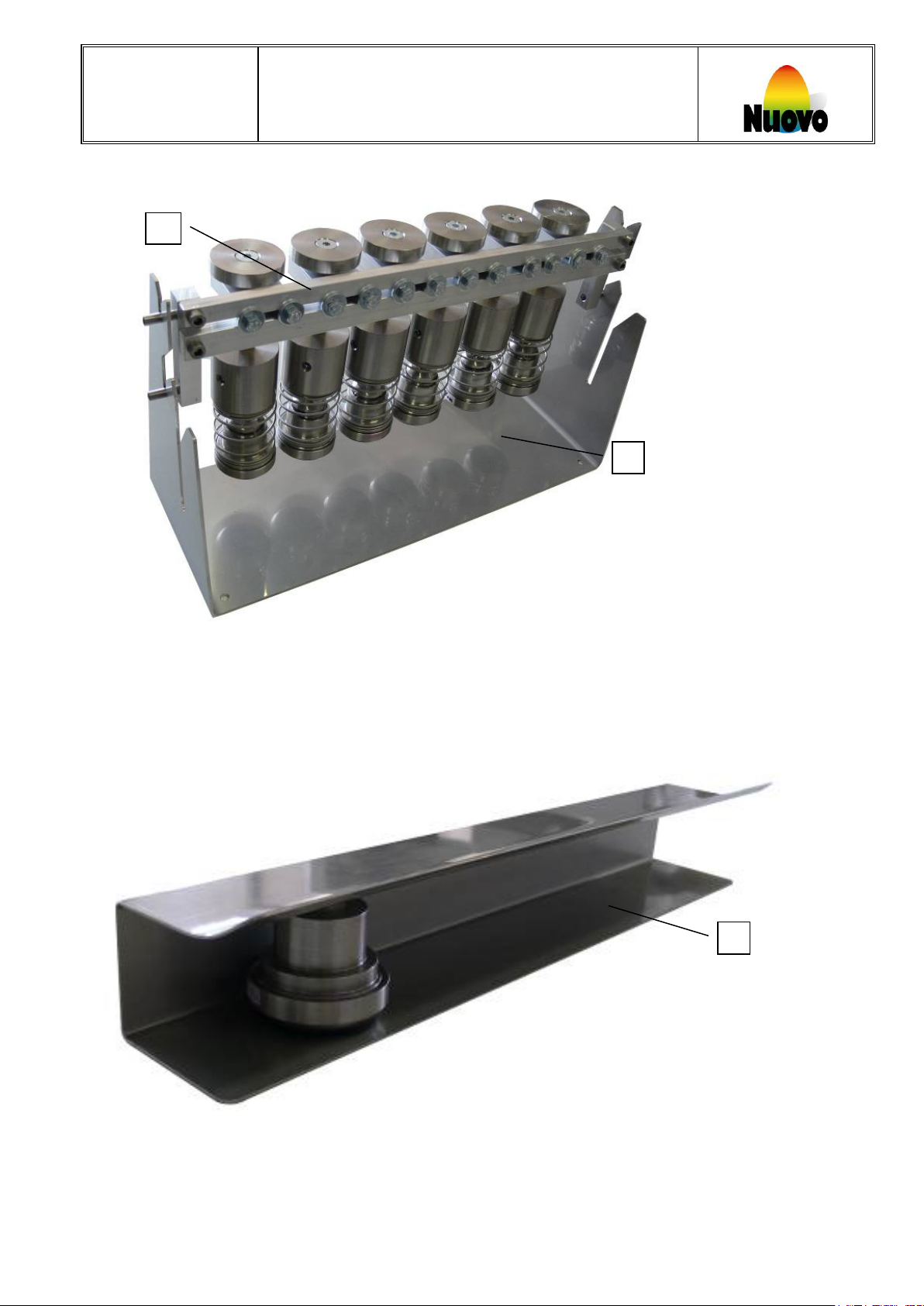
S Service bracket 03132
T
Part name Part number
Nuovo
EB EASY-PRINTER
12.3 Complete stamping bar
R Stamping-Unit, 5fold (for R5 with 5 stamping heads) 03130
R Stamping-Unit, 6fold (for R6 with 6 stamping heads) 03131
12.4 Parking station
T Parking station, 6fold (for 5 or 6 ink reservoirs 03133
Eggland’s Best, Inc. Operating Standards Manual- EB Easy Printer Manual 16/001
Confidential. Do not reproduce without permission December 6, 2016
Page 18
Operating instructions for use
15
Part name Part number
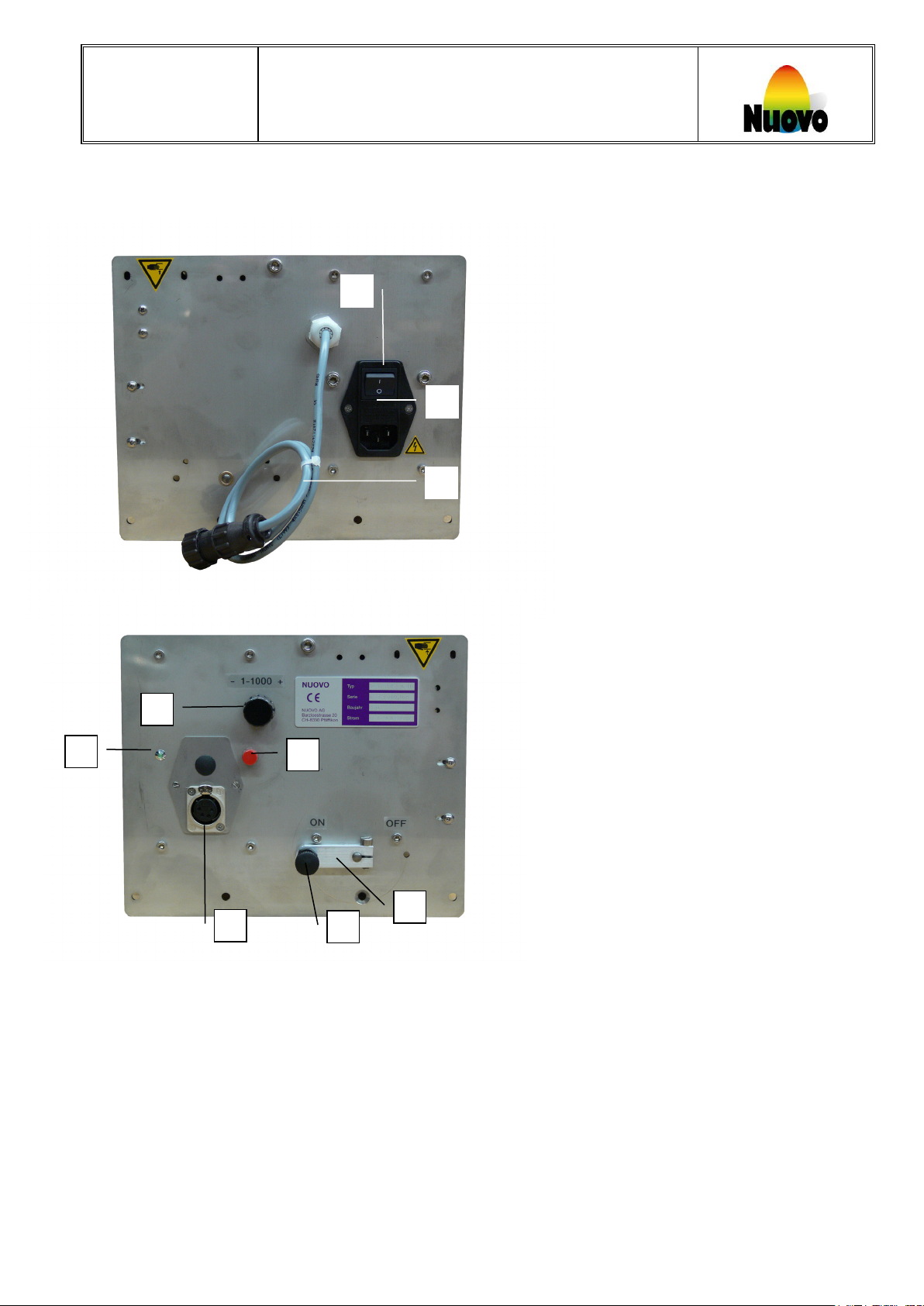
A F B D C G E I H
Nuovo
12.5 Connection box parts
EB EASY-PRINTER
A Power switch 00652
B Fuse 5x20, 3.15A 03157
C Signal cable, Omnia 03320
D Inch button 03151
E LED green 03153
F Stamp delay selector 03152
G Connector socket 03159
H Lever, only alu 03154
I Bolt, Stainless steel 03168
Eggland’s Best, Inc. Operating Standards Manual- EB Easy Printer Manual 16/001
Confidential. Do not reproduce without permission December 6, 2016
Page 19
Operating instructions for use
16
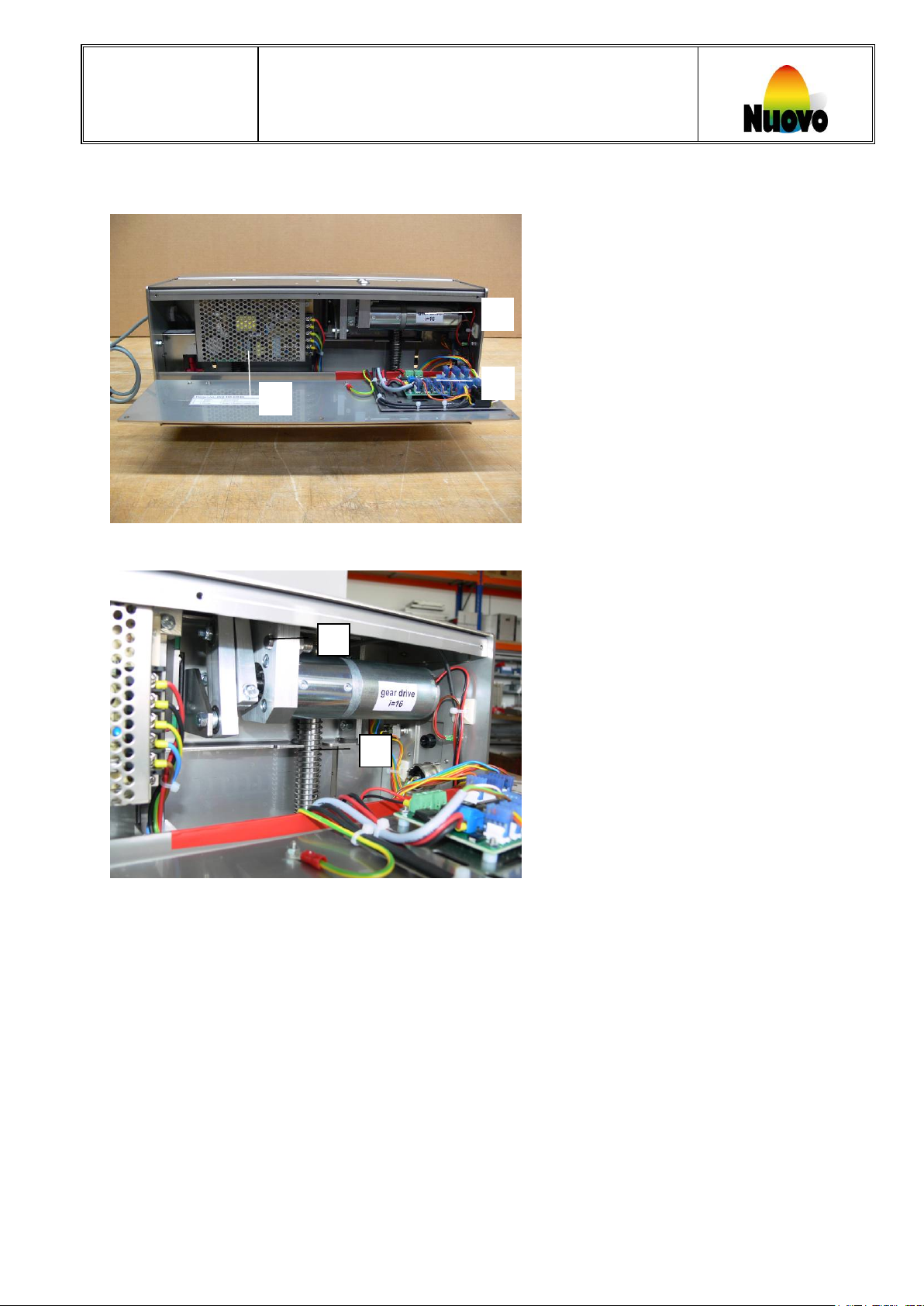
L
J
Part name Part number
K
Part name Part number
M
N
Nuovo
Eggland’s Best, Inc. Operating Standards Manual- EB Easy Printer Manual 16/001
Confidential. Do not reproduce without permission December 6, 2016
EB EASY-PRINTER
J EasyUnit10 (Microprocessor) 03300
K Power supply unit 10 03310
L Electrical engine incl. gearbox i=16 03149
M Proximity switch break 00844
N Contra spring 03143
Page 20
Operating instructions for use
17
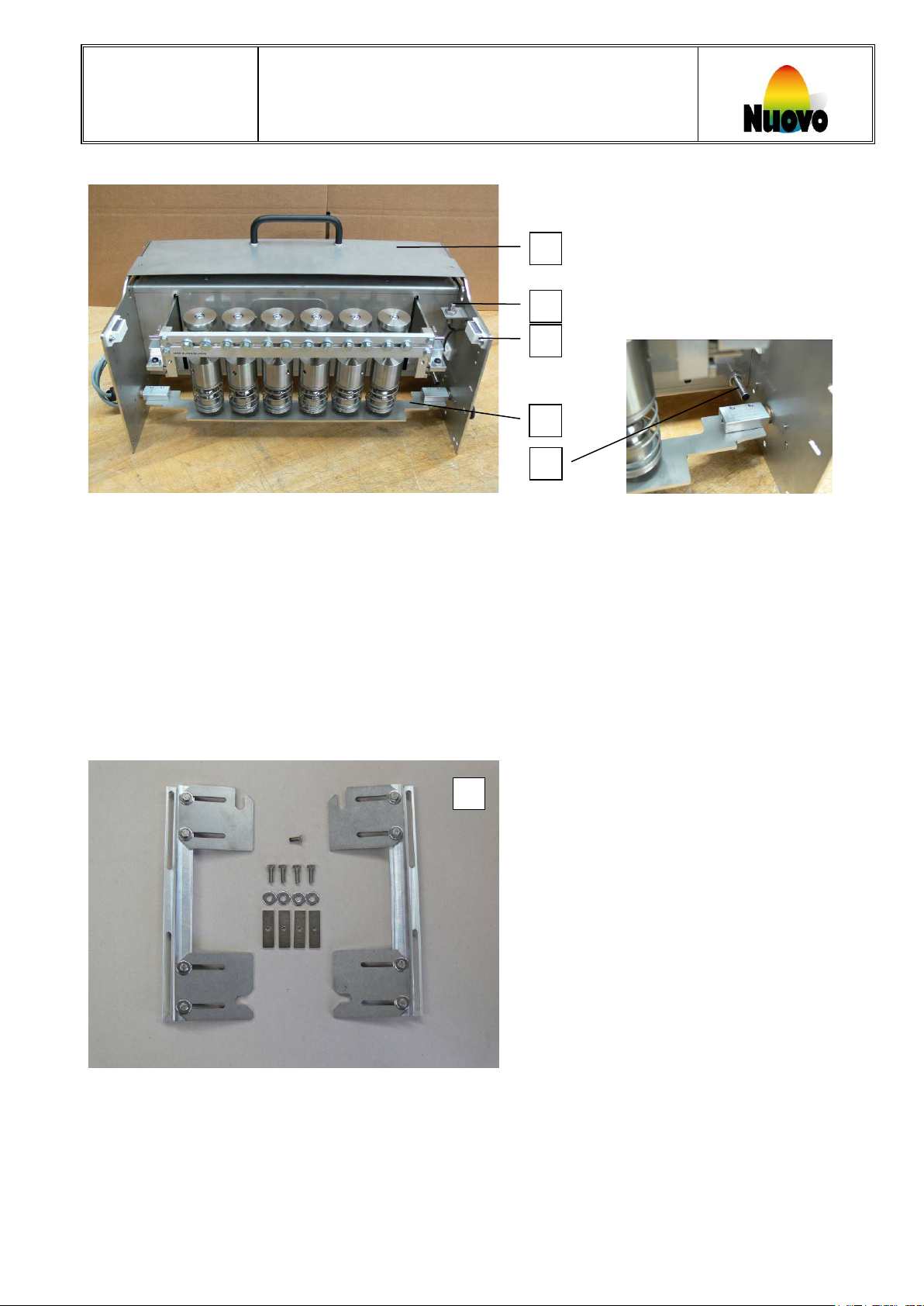
P
O Q T R S
Nuovo
Part name Part number
O Safety-Lid Omnia, complete 03326
P Proximity switch (For safety-guard open or close detection) 00844
Q Closing magnets for Safety-Guard 03161
R Protective cover 03275
S Proximity switch (For protective cover open or close detection) 03290
EB EASY-PRINTER
12.6 Bracket Omnia, standard
T Bracket Omnia, standard, left 03187
T Bracket Omnia, standard, right 03188
Eggland’s Best, Inc. Operating Standards Manual- EB Easy Printer Manual 16/001
Confidential. Do not reproduce without permission December 6, 2016
Page 21
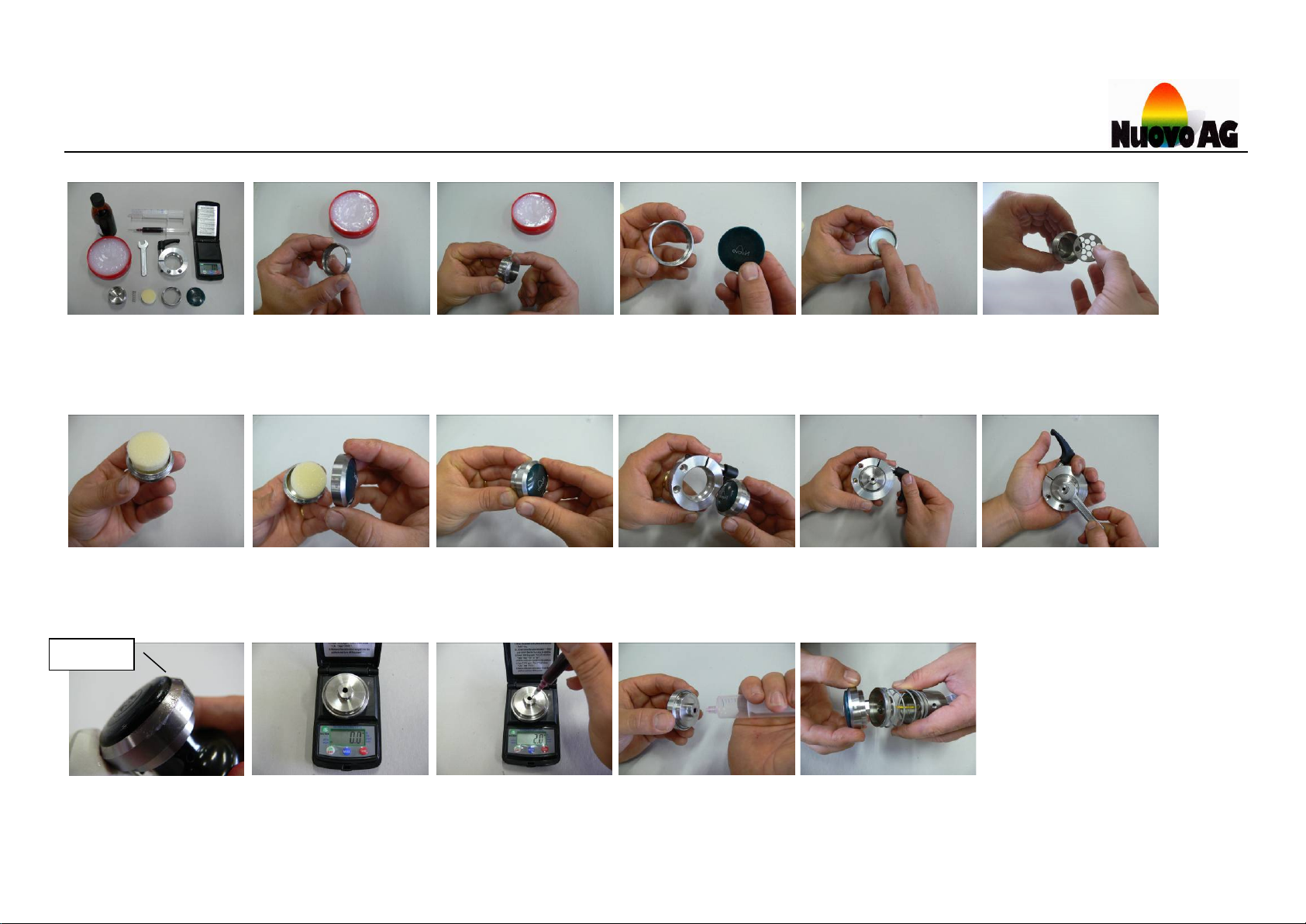
Sealing
Lubricate the inside
Lubricate the outside
ink reservoir
Insert the ink pad into
Ink pad positioned into
Screw the housing
Manually fix the
reservoir
Insert the complete ink
Fix the ink reservoir
Locate and secure the ink reservoir
Remove the excess
Weigh the complete
Fill the egg stamp with
Purge the ink reservoir with
Insert the ink reservoir into
Assemble material
Insert the sponge
Insert the perforated disk
18
13 Filling the egg stamp with ink / Replacement of the stamp
(Part 2)
screw thread and sealing
surface of the nut (with
food grade grease)
onto the ink reservoir
screw thread and
sealing surface of the
housing onto the ink
the housing
reservoir into the
assembly ring
the housing (Part 1)
with the assembly ring
into the ink reservoir
until the sealing is visable (see next
picture)
lubricate
ink reservoir on the
weighing scale
Empty-weight:
54.5 gram
ink. 8 - 9 gram
Total weight maximum
63 gram
the air-syringe, until the ink
flows through the ink pad
(Note: the ink has to flow
the entire logo)
the reservoir holder and turn
90 degrees untill the
reservoir clicks into the right
location
Page 22
Operating Instructions for use
A
B
19
Nuovo
EB EASY-PRINTER
14 Consumables
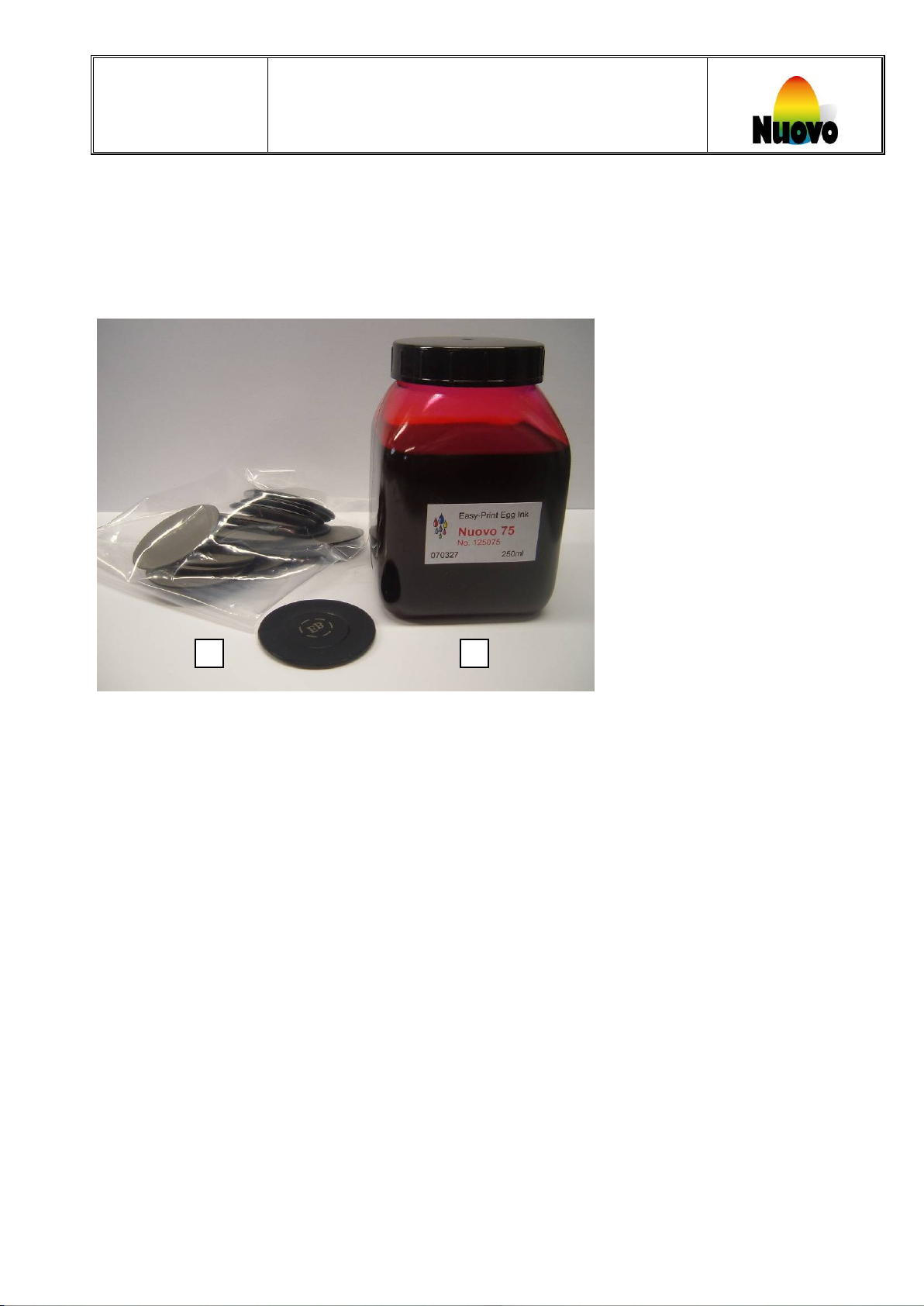
Consumables can be ordered in kits
One kit consists of
A 250ml ink
B membranes
Different types of membranes, this depends on the logo.
Name Part number Logo
Egglands Best 03201 EB
Egglands Best Pink Ribbon 03246 EB
Egglands Best Pink Ribbon US 03249 EB
Private Selection 03202 PS
Saveway 03203 S
Cage free organic 03204 CFO
Natures Harmony 03205 NH
Egglands Best United States 03206 USEB
Winn Dixie 03207 WD
United States 03208 US
Lowe’s Food 03209 LF
Ink kits should be stored dark and at a temperature between 60 and 90 degrees Fahrenheit.
Optimum operation temperature is between 60 and 80 degrees Fahrenheit.
Page 23

Operating Instructions for use
20
Nuovo
Inks will be available according to color.
Part name Part number Color
Nuovo 94 250ml 03053 Red
Nuovo 28 250ml 03055 Green
Nuovo 68 250ml 03069 bright Red
Nuovo 89 250ml 03059 Blue
Nuovo 75 250ml 03061 pink
Ink kits should be stored dark and at a temperature between 60 and 90 degrees Fahrenheit.
Optimum operation temperature is between 60 and 80 degrees Fahrenheit.
EB EASY-PRINTER
Page 24
Operating Instructions for use
D
C
21
Nuovo
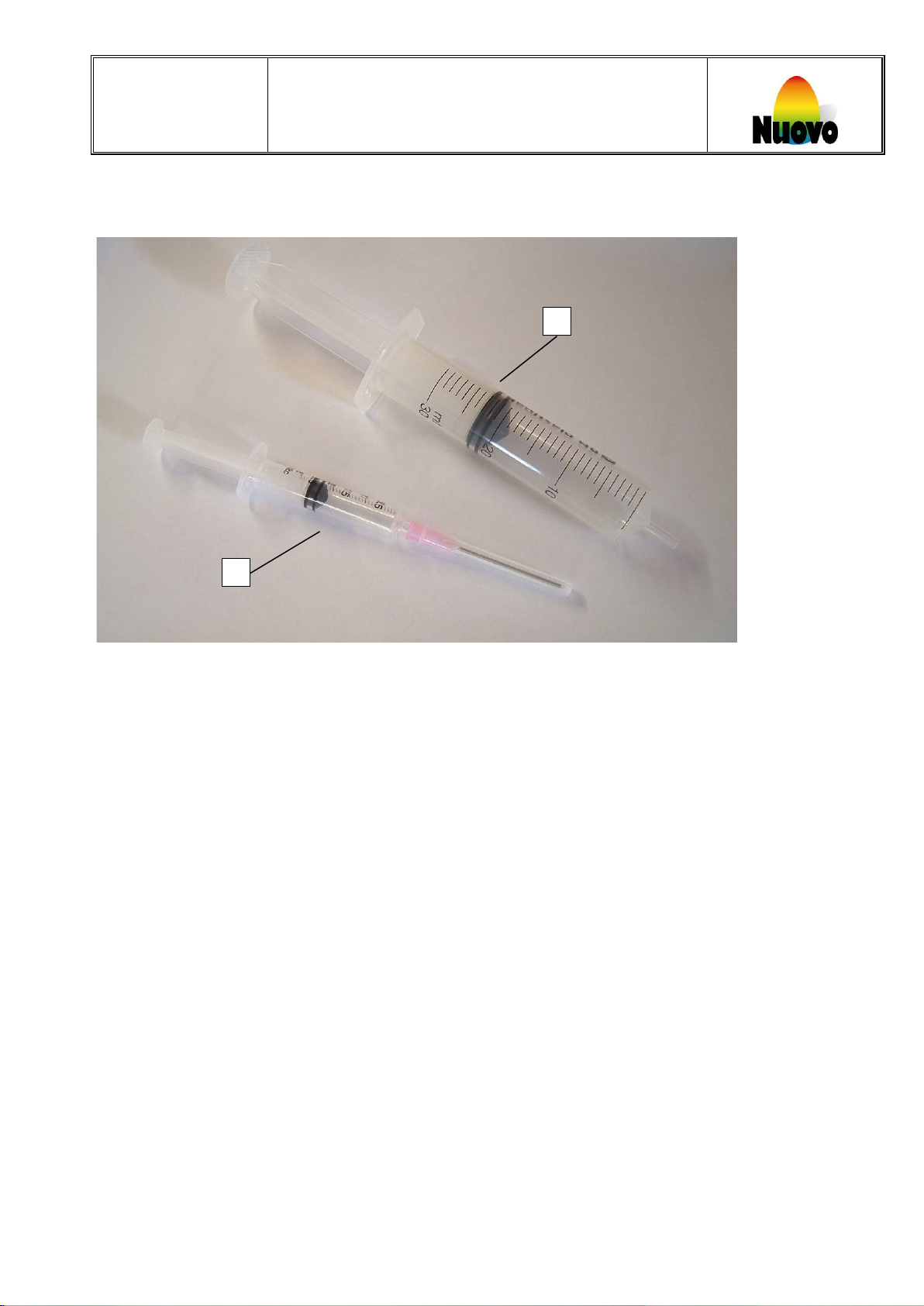
Syringes are used to refill and purge stamps.
C Refilling syringe
D Purging syringe
Part name Part number
Refilling syringe 03087
Purging syringe 03085
EB EASY-PRINTER
 Loading...