

Page 1

1
11
19
21
23
25
27
29
31
33
English | Quick Start Guide
Русский| Краткое руководство пользователя
Deutsch | Kurzanleitung
Español | Guía Rápida
Français | Guide de Démarrage Rapide
Italiano | Guida Rapida
Português | Guia de Iniciar Rápi do
Tür kçe | Hızlı Başlangıç Kılavuzu
日本語|高速取扱ガイド
دﻟ#ﻞ اﻟ'(ﻐ #ﻞ اﻟ*+ ,ﻊ | /ﺎﻟﻠﻐ ﺔ اﻟ ﻌ+4 # ﺔ
Page 2

Page 3
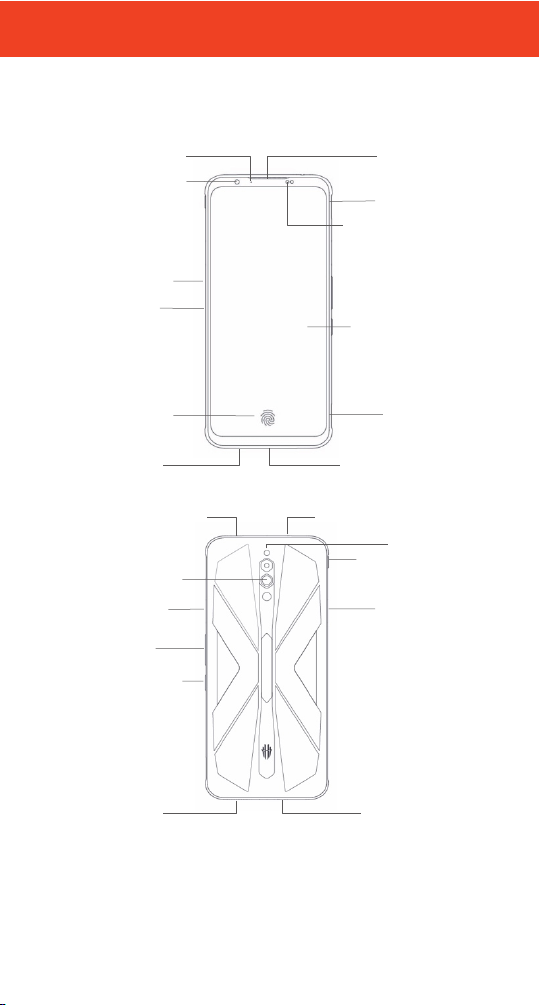
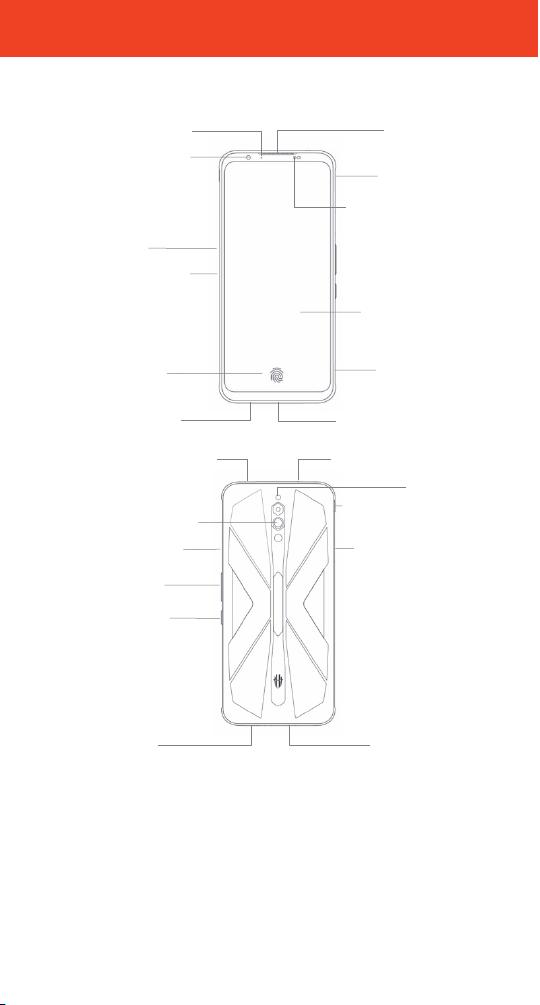
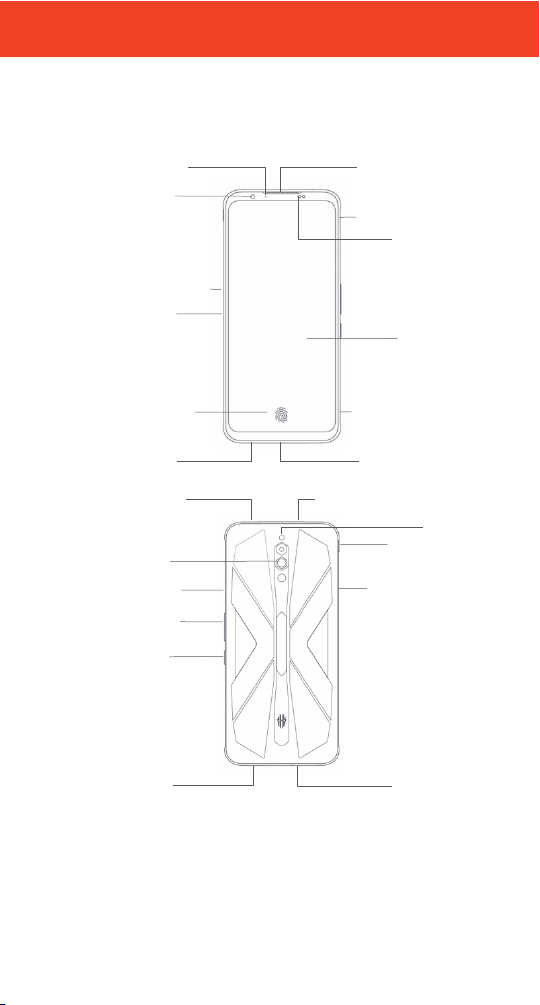
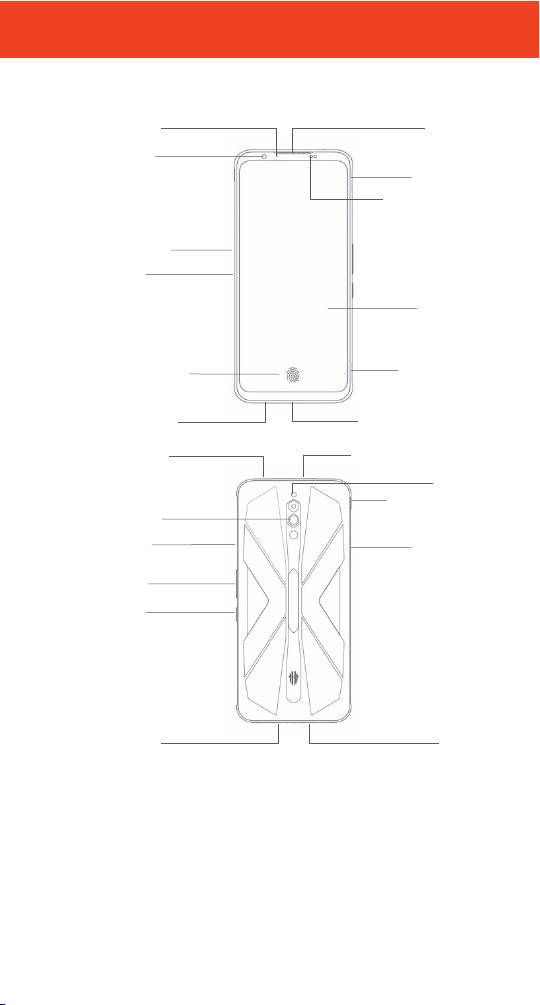
English | Quick Start Guide
Light/Proximity
Sensor
Card Tray
To uc h Sc r e en
USB Type-C Port
LED Indicator
Pow er B utto n
Vol um e
Buttons
Fing erpri nt
Sensor
Rear Camera
Flas h
Headphon e Jack
Speaker
Micr ophone
Game Boost
Mode
Front Camera
Shoulder
Tri gge r(L)
Shoulder
Tri gge r(R)
Dock pin
Game MIC
Air Inl et
Air Outle t
Noise-redu ction MIC
Receiver
You r ph on e at a g lan ce
1
Page 4
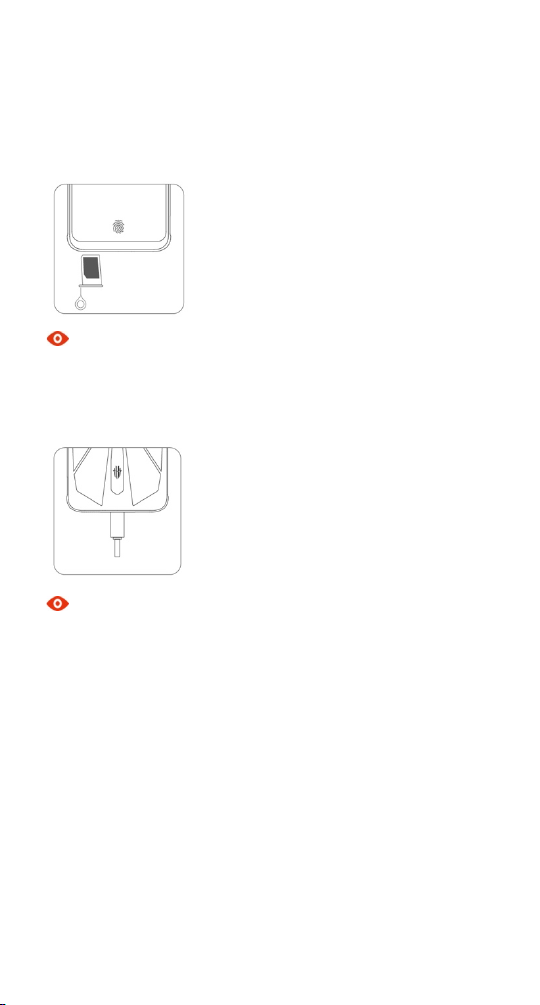
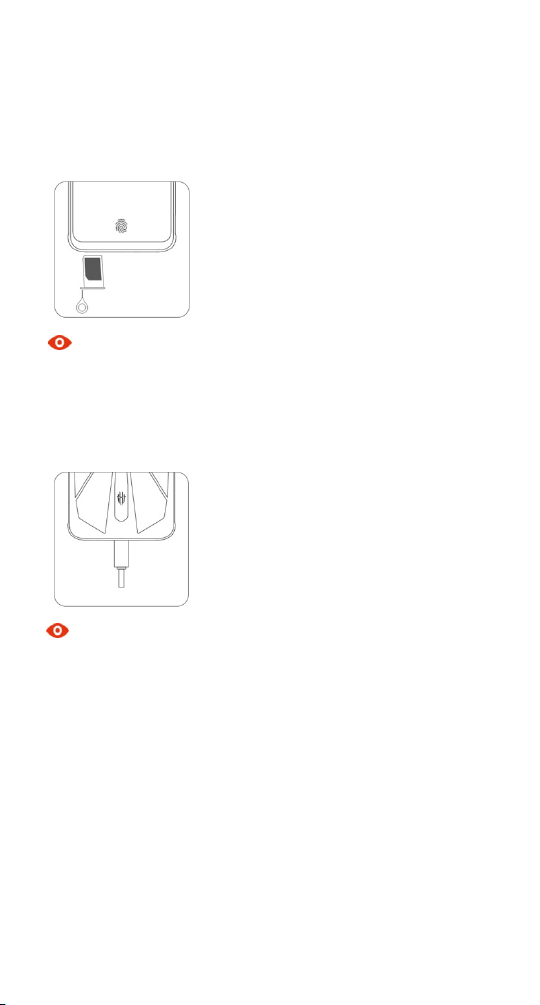
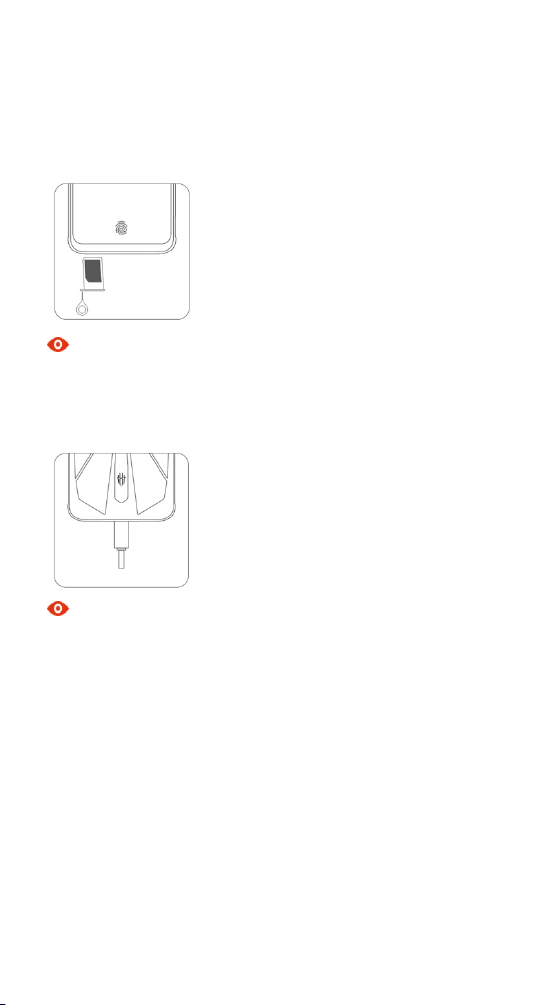
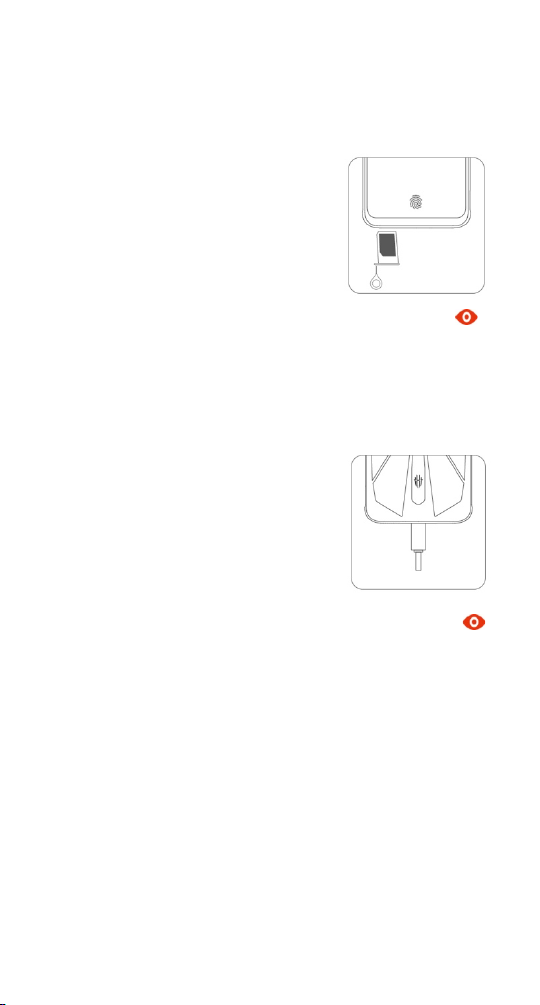
Inserting the SIM card
1. Insert the end of the eject tool into the hole of the card tray and press firmly until the
tray pops out.
2. Put one or two nano-SIM cards into the tray.
3. Push the card tray back into the phone.
Note
Dimensions of a nano-SIM card: 9 mm*12 mm.
Charging the battery
Connect the phone to the power outlet using the included USB cable and power adapter.
``
Note
! Your phone and power adapter might heat up while charging.
! Use other USB cable or power adapter might decrease the life span of your phone or cause
fire, explosion and other hazards.
2
Page 5

Disposal of your old phone
! When the wheelie bin symbol is attached to a product, it means the product is
covered by the European Directive 2012/19/EU.
! All electrical and electronic products should be disposed of separately from normal
household waste via designated collection points provided by government or local
authorities.
! The correct disposal of electrical and electronic products will help protect the environment
and human health.
Declaration of RoHS 2.0 Compliance
We’re determined to reduce the impact we have on the environment and take responsibility
for the earth we live on. So this document allows us to formally declare that the NX659J,
manufactured by Nubia Technology Co., Ltd., fully complies with the European Parliament’s
RoHS (Restriction of Hazardous Substances) 2.0 Directive 2011/65/EU, with respect to all the
following substances:
(1) Lead (Pb)
(2) Mercury (Hg)
(3) Cadmium (Cd)
(4) Hexavalent Chromium (Cr (VI))
(5) Polybrominated biphenyl (PBB)
(6) Polybrominated diphenyl ether (PBDE)
(7) Di(2-ethylhexyl) phthalate(DEHP)
(8) Dibutyl phthalate (DBP)
(9) Benzyl butyl phthalate (BBP)
(10) Diisobutyl phthalate(DIBP)
Our compliance is witnessed by written declaration from our suppliers. This confirms that
any potential trace contamination levels of the substances listed above are below the
maximum level set by EU 2011/65/EU, or are exempt due to their application.
The NX659J manufactured by Nubia Technology Co., Ltd. meets all the requirements of EU
2011/65/EU.
3
Page 6
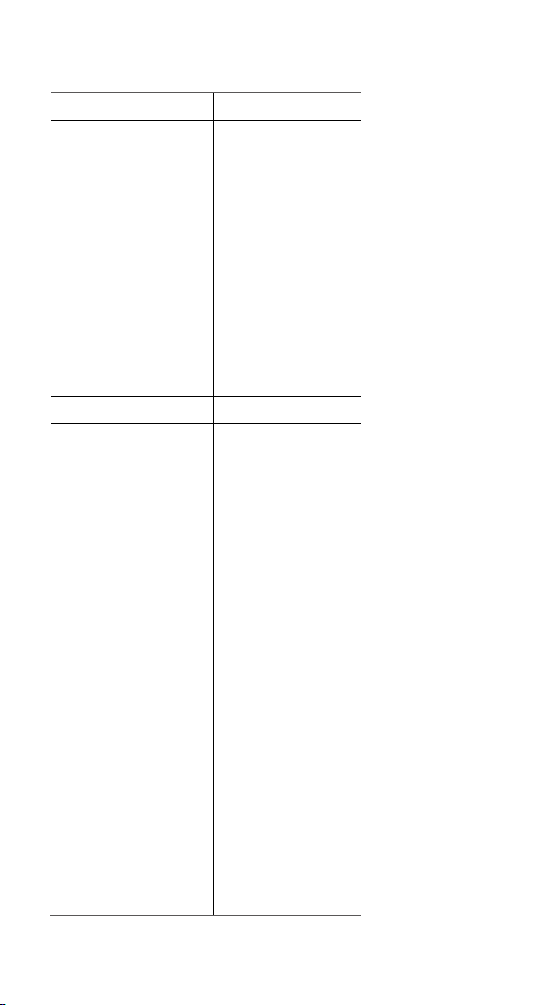
Frequency band
Max. output power (dBm)
GSM900
33.5
DCS1800
29.5
WCDMA Band I
24.5
WCDMA Band VIII
24
LTE Band 1
24.5
LTE Band 3
22
LTE Band 7
22
LTE Band 8
23.5
LTE Band 20
24
LTE Band 38
24
NR N78
23
NSA EN_DC:
DC_1A_N78A
23
DC_3A_N78A
23
DC_8A_N78A
23
Frequency band
EIRP Power(dBm)
802.11 b/g/a/ax(20MHz)
(2.412-2.472GHZ)
19.24
802.11 a(20MHz)
5.150-5.250GHZ
18.86
5.250-5.350GHZ
18.94
5.470-5.725GHZ
19.28
5.725-5.825GHZ)
10.40
802.11n(20/40MHz)
(5.15-5.825GHZ)
19.85
802.11ac(20/40/80MHz)
(5.150-5.250GHZ)
17.72
802.11ac(20/40/80MHz)
(5.250-5.350GHZ)
17.87
802.11ac(20/40/80MHz)
(5.470-5.725GHZ)
17.91
802.11ac(20/40/80MHz)
(5.725-5.825GHZ)
12.95
802.11ax(20/40/80MHz)
(5.150-5.250GHZ)
15.95
802.11ax(20/40/80MHz)
(5.250-5.350GHZ)
16.20
802.11ax(20/40/80MHz)
(5.470-5.725GHZ)
16.31
802.11ax(20/40/80MHz)
(5.725-5.825GHZ)
12.96
BLE(2.402GHZ-2.480GHZ)
7.46
EDR(2.402GHZ-2.480GHZ)
9.39
EU certified frequency band
4
Page 7
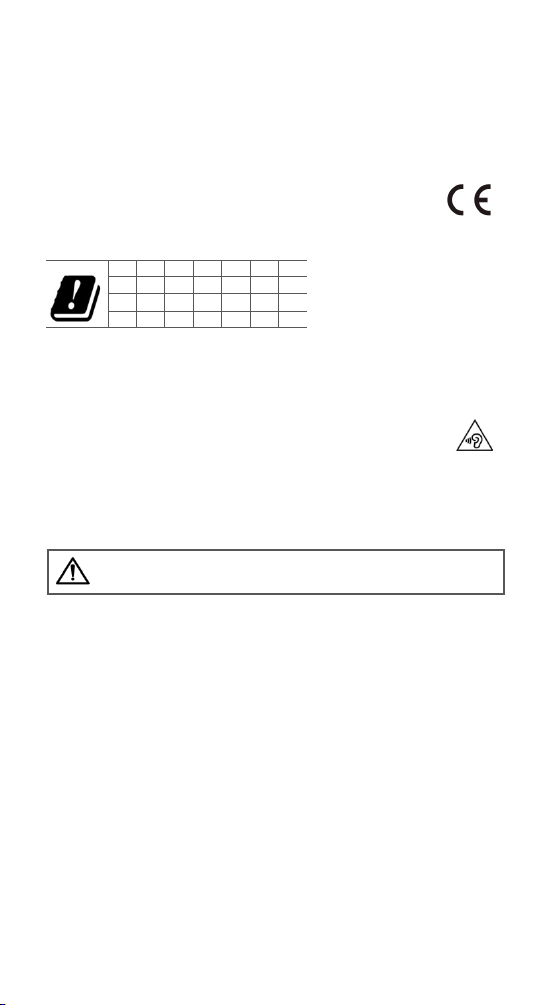
BE
BG
CZ
DK
DE
EE
IE
EL
ES
FR
HR
IT
CY
LV
LT
LU
HU
MT
NL
AT
PL
PT
RO
SI
SK
FI
SE
UK
WARN ING: Cancer and Reproductive Harm -www.P65Warnings.ca.gov.
Hardware and software
! The certified hardware version of your phone is NX659J_V1AMB.
! The certified software version of your phone is NX659J_ENCommon_V7.06.
EU Declaration of Conformity (DoC)
Hereby, Nubia Technology Co., Ltd. declares that this device is in conformity
with the Radio Equipment Directive: 2014 / 53 / EU.
For the declaration of conformity, visit
http://www.nubia.com/en/support.php?a=download.
The Wi-Fi function for this device is restricted to indoor use only when operating in the 5150
MHz to 5350 MHz frequency range.
Safety warning
! To prevent possible hearing damage when using a headset, do not use high
volume for long period.
! Use the earphone carefully. Excessive sound pressure from headsets and
headphones can cause hearing loss.
! Adapter shall be installed near the equipment and shall be easily accessible.
The phone's normal operating temperature is 0°C ~ 40°C. In order to ensure the normal
!
phone functions, do not use this phone outside the temperature range.
5
Page 8

Health and safety
The device meets international guidelines for exposure to radio waves.
Your device is a radio transmitter and receiver. It’s designed not to exceed the limits for
exposure to radio waves recommended by international guidelines. The guidelines were
developed by the International Commission on Non-lonizing Radiation Protection (ICNIRP),
an independent technical standards body, and include margins designed to assure the safety
of all persons, regardless of age and health. These guidelines use a unit of measurement
known as Specific Absorption Rate (SAR). The SAR limit for mobile devices is 2.0 W/Kg (Head,
Body-worn), 4.0 W/Kg (Limbs) and the highest SAR value for this device when tested for use
at the head was 1.661W/Kg, when tested for use at the body-worn was 1.021 W/Kg and
when tested for use at the limbs was 2.305W/Kg.
In SAR measurement, the separation distance between the phone and test device is 5mm.
As SAR is measured when the device is on its highest transmitting power, the actual SAR of
this device while operating normally is typically below the levels shown above. This is
because the device automatically changes its power level to ensure it only uses the minimum
level required to reach the network.
The World Health Organization has stated that present scientific information does not
indicate the need for any special precautions for the use of mobile devices.
Important safety information
For your own health and safety, please follow the radio frequency (RF) radiation exposure
guidelines and keep your phone no less than 5 mm away from your body.
Failure to do this could mean that your RF exposure exceeds the guideline limits.
How to limit your radio frequency (RF) exposure
The World Health Organization (WHO) gives the following advice to people who want to limit
their exposure to RF radiation…
Present scientific information does not indicate the need for any special precautions for the
use of mobile phones. If individuals are concerned, they may choose to limit their own or
their children’s RF exposure by limiting the length of calls, or using ‘hands-free’ devices to
keep mobile phones away from the head and body.
Further information on the subject can be obtained from the World Health Organization
website at http://www.who.int/peh-emf WHO Fact sheet 193: June 2000.
1. The tests are carried out in accordance with IEC standard IEC 62209-2.
6
Page 9

FCC Regulatory Compliance
! FCC Regulati ons:
This mobile phone has been tested and found to comply with the limits for a Class B digital
device, pursuant to Part 15 of the FCC Rules. These limits are designed to provide reasonable
protection against harmful interference in a residential installation. This equipment
generates, uses and can radiated radio frequency energy and, if not installed and used in
accordance with the instructions, may cause harmful interference to radio communications.
However, there is no guarantee that interference will not occur in a particular installation. If
this equipment does cause harmful interference to radio or television reception, which can
be determined by turning the equipment off and on, the user is encouraged to try to correct
the interference by one or more of the following measures:
--Reorient or relocate the receiving antenna.
--Increase the separation between the equipment and receiver.
--Connect the equipment into an outlet on a circuit different from that to which the
receiver is connected.
--Consult the dealer or an experienced radio/TV technician for help.
Caution:
Changes or modifications not expressly approved by Nubia Technology Co., Ltd. for
compliance could void the user‘s authority to operate the equipment.
! RF exposure information (SAR)
This phone is designed and manufactured not to exceed the emission limits for exposure to
radio frequency (RF) energy set by the Federal Communications Commission of the United
States.
This device is complied with SAR for general population /uncontrolled exposure limits in
ANSI/IEEE C95.1-1992 and had been tested in accordance with the measurement methods
and procedures specified in IEEE1528.
The FCC has granted an Equipment Authorization for this model phone with all reported SAR
levels evaluated as in compliance with the FCC RF exposure guidelines. SAR information on
this model phone is on file with the FCC and can be found under the Display Grant section of
www.fcc.gov/oet/ea/fccid after searching on FCC ID: 2AHJO-NX659J.
The SAR limit set by the FCC is 1.6 W/Kg.
The highest reported SAR value for this device when using against the head is less than 1.6
W/Kg, for usage near the body-worn is less than 1.6 W/Kg(1g-10mm).
Body worn operation
SAR compliance for body-worn operation is based on a separation distance of 10 mm
between the unit and the human body. Carry this device at least 10 mm away from your body
to ensure RF exposure level compliant or lower to the reported level. Ensure that the device
accessories, such as a device case and device holster, are not composed of metal components.
Keep the device away from your body to meet the distance requirement.
! Hardware and software
The certified hardware version of your phone is NX659J_V1AMB.
The certified software version of your phone is NX659J _ENCommon_V8.06.
7
Page 10

! FC C Caution.
§ 15.19 Labeling requirements.
This device complies with part 15 of the FCC Rules. Operation is subject to the following
two conditions: (1) This device may not cause harmful interference, and (2) this device
must accept any interference received, including interference that may cause undesired
operation.
§ 15.21 Information to user.
Any Changes or modifications not expressly approved by the party responsible for
compliance could void the user's authority to operate the equipment.
§ 15.105 Information to the user.
Note: This equipment has been tested and found to comply with the limits for a Class B
digital device, pursuant to part 15 of the FCC Rules. These limits are designed to provide
reasonable protection against harmful interference in a residential installation. This
equipment generates uses and can radiate radio frequency energy and, if not installed and
used in accordance with the instructions, may cause harmful interference to radio
communications. However, there is no guarantee that interference will not occur in a
particular installation. If this equipment does cause harmful interference to radio or
television reception, which can be determined by turning the equipment off and on, the
user is encouraged to try to correct the interference by one or more of the following
measures:
-Reorient or relocate the receiving antenna.
-Increase the separation between the equipment and receiver.
-Connect the equipment into an outlet on a circuit different from that to which the receiver
is connected.
-Consult the dealer or an experienced radio/TV technician for help.
8
Page 11
Legal notice
Copyright Statement
Copyright © 2020 by Nubia Technology Co., Ltd.
All the copyrights of this document herein belong to Nubia Technology Co., Ltd. Without the
written permission of copyright owner, no part of this publication may be excerpted,
reproduced, translated by any person or entity in any form or by any means.
This document is subject to change without prior notice.
Nubia Technology Co., Ltd. keeps the right to make the final explanation to this document.
Tra dem ark s
Android is a trademark of Google, Inc.
For DTS patents, see http://patents.dts.com. Manufactured under license from
DTS Licensing Limited. DTS, the Symbol, & DTS and the Symbol together, DTS:X, the DTS:X
logo, and DTS:X Ultra are registered trademarks or trademarks of DTS, Inc. in the United
States and/or other countries. © DTS, Inc. All Rights Reserved.
All other trademarks remain the property of their respective owners.
Statement of Third-party Applications
During the installation process of some third-party applications, the issues of repeated
restart or abnormal use of software might be caused by incompatibility of the third-party
applications, rather than the phone itself.
Please download your software upgrade packages from the reliable official website.
The installation of a third-party ROM or non-official operating system might bring safety risks
and security threats. Nubia Technology Co., Ltd. shall not be liable for these risks and threats
caused by upgrade of the operating system.
9
Page 12

FCC Hearing-Ai d Compatibility (HAC)
Your phone is compliant with the FCC Hearing Aid Compatibility requirements.
The FCC has adopted HAC rules for digital wireless phones. These rules require certain
phones to be tested and rated under the American National Standard Institute (ANSI) C63.192011 hearing aid compatibility standards. The ANSI standard for hearing aid compatibility
contains two types of ratings:
• M-Ratings: Rating for less radio frequency interference to enable acoustic coupling with
hearing aids.
• T-Ratings: Rating for inductive coupling with hearing aids in telecoil mode.
Not all phones have been rated. A phone is considered hearing aid compatible under FCC
rules if it is rated M3 or M4 for acoustic coupling and T3 or T4 for inductive coupling. These
ratings are given on a scale from one to four, where four is the most compatible. Your phone
meets the M4/T4 level rating.
10
Page 13
Русский| Краткое руководство пользователя
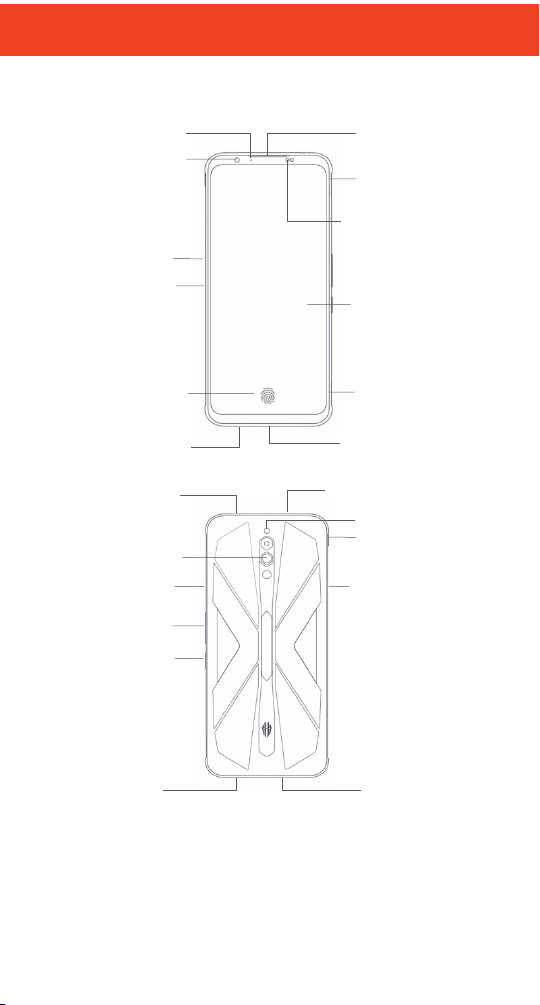
Датчик
приближе ния и
освещ енности
Разъем
nano SIM
Сенсорный
экран
Разъем USB
Type-C
Свет одиод ный
индикатор
Кнопка
питания
Кнопки
громкости
Датчик
распоз навания
отпеч атков
пальцев
Модуль
кам еры
Вспышка
Разъем для
подключ ения
гарнитуры
Динамик
Микр офон
Кнопка вкл.
режима
игры
Фронтальная
кам ера
Игровой
триггер(Л)
Разъем
конт ролл ера
Микр офон
Отверстие
вентиляци и
Отверстие
вентиляци и
Микр офон
шумоп одавл ения
Разговорный
динамик
Игровой
триггер(П)
Внешний вид
11
Page 14
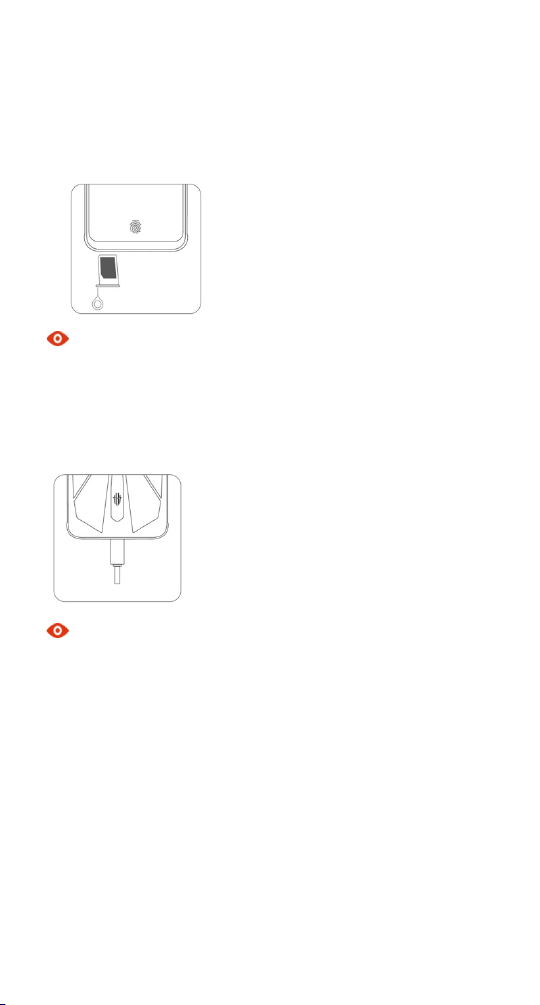
Уст ановка SIM-карты
1. Вставьте приспособление для извлечения в специальное отверстие, нажмите на
внутреннюю кнопку и извлеките лоток.
2. Расположите SIM-карту/SIM-карты в лотке.
3. Установите лоток в телефон.
Примечание
Размеры nano SIM-карты 12,3×8,8 мм.
Зарядка аккумулятора
Подключите зарядное устройство к разъему USB Type-C для зарядки.
``
Примечание
! Используйте только одобренные зарядные устройства и кабели.
! Использование не одобренных аксессуаров может повредить ваш телефон и
привести к взрыву батареи.
12
Page 15
Модель
RedMagic 5S (NX659J)
ОС
Android 10
Процессор
Qualcomm® Snapdragon™ 865
Стандарты
GSM: Band 2/3/5/8,
UMTS: Band 1/2/4/5/8/19,
FDD-LTE : Band
1/2/3/4/5/7/8/20/12/17/18/19/26/6,
TDD-LTE : Band 34/B38/39/40/41.
Cлот для SIM-карт
nano SIM (4FF) + nano SIM (4FF)
Дисплей
6.65", 2340*1080
Камера основная
64МП+8 МП +2 МП
Камера фронтальная
8 МП
Встроенная память
(ПЗУ)
128ГБ или 256ГБ
(в зависимости от модификации
устройства)
Оперативная память
(ОЗУ)
8ГБ или 12ГБ
(в зависимости от модификации
устройства)
Bluetooth
v 5.1
Wi-Fi
802.11 a/b/g/n/ac , Wifi 6 2.4ГГц/5ГГц
Размеры
167.7*78*9.75 мм
Вес
~ 218 г
Язык
Русский, Английский и т.д.
Тов ар ны е зн ак и
Android является товарным знаком ООО «Google».
Словесный знак и логотипы Bluetooth® – зарегистрированные товарные знаки
Bluetooth SIG, Inc. Используются на основании лицензии.
DTS, Cимвол, & DTS вместе с символом зарегистрированные товарные
Rights Reserved. Произведено под лицензией DTS Licensing Limited (патенты:
http://patents.dts.com)
Другие товарные знаки и коммерческие обозначения принадлежат соответствующим
владельцам.
знаки компании DTS, Inc. в США и/или других странах © DTS, Inc. All
Характеристики и параметры
Примечание
Характеристики вашего устройства могут незначительно отличаться от
представленных в данном руководстве (в зависимости от модификации устройства).
13
Page 16
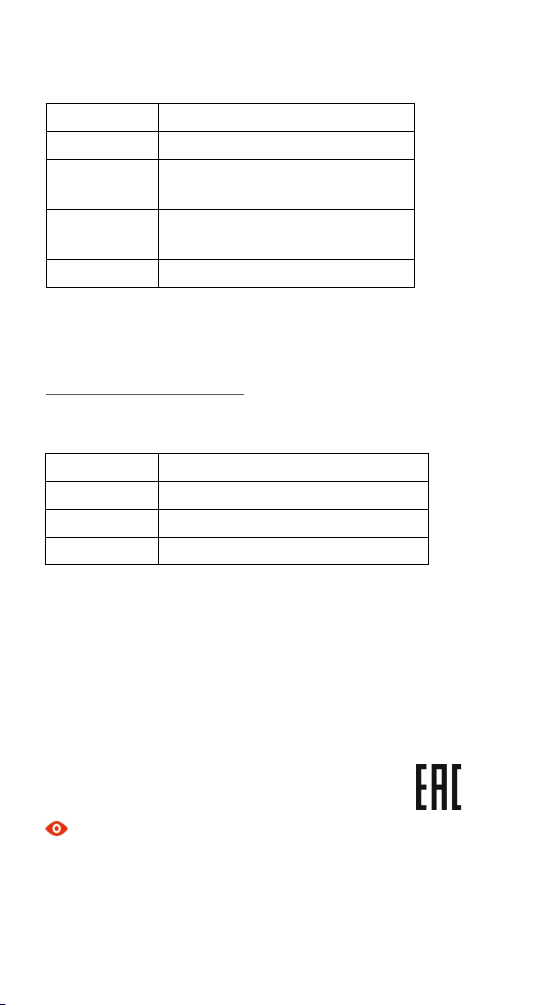
Тип
Литий-ионный полимерный аккумулятор
Емкость
4500 мА·ч
Номинальное
напряжение
3.87 В
Максимальное
напряжение
4.45 В
Модель
Li3945T44P8h526391
Тип
Адаптер питания
Модель
CYQC18-090200EU
Вход
~ 100-240 В, 50/60 Гц, 500 мА макс.
Выход
5.0 В = 2000 мA или 9.0 В = 2000 мA
Аккумуляторная батарея
ВНИМАНИЕ!
При возникновении любых проблем, связанных с аккумуляторной батареей
необходимо немедленно обратиться в авторизованный сервисный центр.
Аккумуляторная батарея не съемная!
Зарядное устройство
Назначение устройства
Адаптер питания – это устройство, предназначенное для преобразования
электрической энергии, поступающей из сети переменного тока.
Комплект поставки
! Смартфон Nubia RedMagic 5S (NX659J),
! Зарядное устройство (адаптер питания),
! Кабель USB Type-C,
! Краткое руководство пользователя,
! Гарантийный талон.
Примечание
Комплект поставки вашего устройства может отличаться от представленного в данном
руководстве.
Изготовитель, импортер, дата и страна изготовления указана на упаковке и/или
устройстве.
14
Page 17
Правила и условия хранения, перевозки,
реализации и утилизации
Правила и условия хранения
Диапазон температур при хранении (в выключенном состоянии): от -10 °C до 55 °C.
Диапазон относительной влажности воздуха (в выключенном состоянии): от 20 до
90 %, без конденсации.
Устройство должно храниться в помещении в заводской упаковке.
Правила и условия перевозки
Транспортировка устройства должна производиться в заводской упаковке в крытых
транспортных средствах любым видом транспорта.
Температура при перевозке: -10 °C до 55 °C, относительная влажность воздуха 20 до
90 %, без конденсации.
Правила и условия реализации
Правила и условия реализации устройства определяются условиями договоров,
заключаемых c покупателями оборудования.
Правила и условия утилизации
Эта маркировка на изделии и принадлежностях указывает на то, что
продукт соответствует Европейской директиве 2012/19/EU.
Все электрические и электронные устройства должны утилизироваться отдельно от
обычных бытовых отходов в специальных пунктах сбора, предусмотренных
государством или местными властями.
Правильная утилизация поможет защитить окружающую среду и здоровье человека.
Правила и условия безопасной эксплуатации
Не используйте устройство во время вождения, без беспроводных аксессуаров.
Если устройство находится близко к телу, держите его на расстоянии не менее 5 мм.
Мелкие части устройства могут стать причиной удушья.
Устройство может быть источником громких звуков.
Не воспроизводите музыку слишком громко, чтобы избежать повреждение слуха.
Избегайте контакта с магнитными деталями.
Не подносите к кардиостимуляторам и другим медицинским устройствам личного
использования.
При наличии соответствующих указаний отключайте устройство в больницах и других
медицинских учреждениях
При наличии соответствующих указаний отключайте устройство в самолетах и
аэропортах.
Отключайте устройство в местах с взрывоопасной средой.
Не используйте устройство на автозаправочных станциях.
Устройство может быть источником яркого или мерцающего света.
15
Page 18

Не бросайте устройство в огонь.
Не подвергайте устройство воздействию высоких или низких температур.
Не подвергайте устройство воздействию влаги, держите в сухом месте.
Не разбирайте устройство.
Используйте только одобренные аксессуары.
Не полагайтесь на устройство, как на единственный способ вызова служб экстренной
помощи.
Для подключаемого оборудования розетка должна быть установлена рядом с
оборудованием и должна быть легкодоступной.
Основные параметры и характеристики,
влияющие на безопасность
Диапазон температур в рабочем состоянии: от -10 °C до 40 °C
Диапазон относительной влажности воздуха в рабочем состоянии: от 20 до 90 %, без
конденсации.
Информация о технике безопасности в отношении радиочастотного излучения:
Для обеспечения соответствия допустимого воздействия телефон должен
использоваться на расстоянии минимум 5 мм. от тела.
Несоблюдение этой инструкций может привести к превышению уровня
радиочастотного излучения и не соблюдению необходимых норм.
Условия эксплуатации оборудования должны соответствовать местным и
национальным электротехническим нормам.
Радиочастотное излучение (RF)
Общее положение
Ваш телефон содержит передатчик и приемник. Если он включен, он принимает и
передает радиочастотную энергию. Во время использования телефона система
автоматически контролирует и регулирует мощность передачи и приема
радиосигнала.
Информация о коэффициенте удельного поглощения (SAR)
Ваше мобильное устройство является радиопередатчиком и радиоприемником.
Данное устройство не превышает предельные уровни облучения в радиочастотном
диапазоне, рекомендованные международными стандартами. Эти руководящие
принципы были разработаны независимой научно-исследовательской организацией
ICNIRP и содержат допустимые границы безопасности, разработанные для
обеспечения защиты всех лиц, независимо от возраста и состояния здоровья.
В директивах используется единица измерения, называемая удельным
коэффициентом поглощения SAR. Предел SAR, для мобильных устройств составляет 2
Вт/кг.
Наибольшее значение коэффициента SAR для данного устройства при испытании в
области головы менее 1.6 Вт/кг*, при испытании в области тела менее 1.6 Вт/кг.
16
Page 19

Для получения подробных данных о коэффициенте SAR для данного устройства
обратитесь в службу поддержки. Так как мобильные устройства предполагают
широкий диапазон функций, они могут быть использованы в других положениях.
Так как коэффициент SAR измеряется на самой высокой мощности устройств,
фактическое значение SAR для работающего устройства, как правило, ниже. Это
обусловлено автоматическим изменением уровня мощности устройства, для
обеспечения использования минимального уровня мощности, достаточного для связи
с сетью.
Обнаружение неисправностей
В данном разделе представлена информация о мерах, которые следует предпринять
при обнаружении неисправности технического средства.
Что делать если время работы аппарата не совпадает с временем работы, заявленным
производителем?
Смартфон — это сложное электронное устройство, включающее в себя функции
карманного компьютера и сотового телефона. Смартфон потребляет большое
количество энергии для работы этих функций. Основное количество энергии
тратится на работу дисплейного модуля и GSM приемо-передающего тракта. Яркость
дисплея устанавливается автоматически на максимум при очень ярком освещении
(солнечный день) или устанавливается пользователем в ручном режиме.
Максимальная яркость потребляет максимум энергии. При работе GSM и при
устойчивом и стабильном приеме аппарат потребляет минимальное количество
энергии для поддержания связи. В случае неустойчивого и слабого сигнала сети
аппарату требуется больше энергии для поддержания связи. В случае "Поиска Сети" в
зоне отсутствия сети аппарат потребляет максимальное количество энергии, которое
расходуется на поиск ближайших базовых станций. Для уменьшения потребляемой
телефоном энергии требуется:
1) Отключить GPS, если эта функция не требуется в данный момент.
2) Отключить мобильный интернет, если эта функция не требуется в данный момент
3) Отключить или удалить лишние неиспользуемые приложения, т.к. они потребляют
внутренние ресурсы аппарата.
Что нужно делать если телефон завис, не включается или перезагружается?
Причиной перезагрузки или зависания в большинстве случаев является стороннее
программное обеспечение или программы.
1) Первоначально мы рекомендуем вам восстановить стандартные заводские
настройки (предварительно сохранив нужную вам информацию). Если телефон
включается, выберите функцию "сброс к заводским настройкам" в меню устройства.
2) Если сброс к заводским настройкам не помогает, обновите программное
обеспечение. Способы обновления программного обеспечения описаны в пункте "Как
обновить программное обеспечение?".
3) Если обновление программного обеспечения не помогло, обратитесь в ближайший
Авторизованный Сервисный Центр.
Как обновить программное обеспечение?
Мы предоставляем вам разные способы обновления программного обеспечения, а
именно: обновление с помощью карты памяти или обновление "по воздуху".
17
Page 20

Для обновления "по воздуху" нужно выполнить подключение к сети интернет по
беспроводной сети Wi-Fi или с помощью GSM соединения и проверить наличие
обновлений в настройках.
Что делать если вы забыли пароль или графический ключ для разблокировки экрана?
Если вы забыли графический ключ или цифровой пароль для разблокировки экрана,
требуется провести процедуру сброса к заводским настройкам:
1) Включите аппарат в "Recovery mode" и выберите пункт "wipe data/factory reset".
2) Если процедура не выполняется, требуется обратиться в Авторизованный
Сервисный Центр.
По всем остальным вопросам обратитесь в центр поддержки или в авторизованный
сервисный центр.
18
Page 21
Deutsch | Kurzanleitung
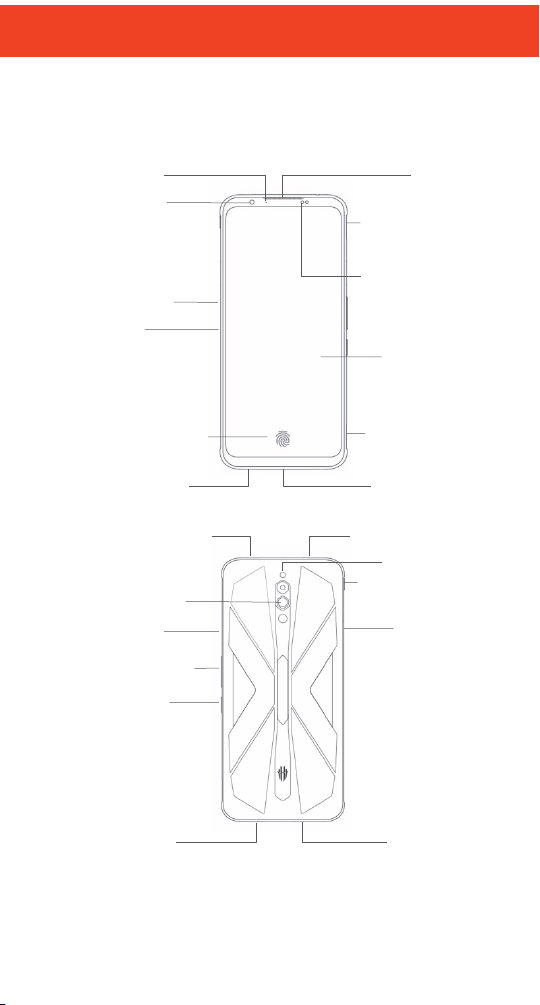
Frontkamera
Karten-st eckplatz
Lautstärke-Tast en
An/Aus-Tas t e
Geräusch
Unterdrüc kungsmik
Hintere Kame ra
Tas c h e nl a m p
Licht-/
Näheru ngs sens or
Mikro fon
Fing erabdr uck Sensor
Hörer
Schulterabzug(L)
Schulterabzug(R)
LED-Anzei ge
Spielmikrofon
Dock-pin
USB Type-C Por t
Kopfhör er-anschl uss
Lautsprecher
Spiel-Boost-Mod us
Luftauslass
Lufteinlass
To uc h Sc r e en
Ihr Telefon im Überblick
19
Page 22
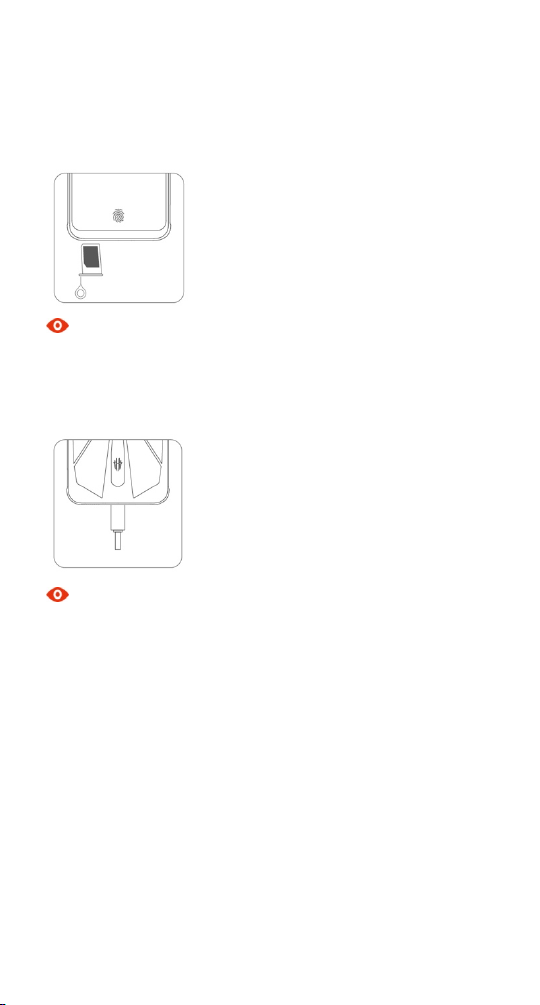
Einsetzen und Entfernen der Sim-karte
1. Stecken Sie das Kartenauswurf-Werkzeug in die Vertiefung Ihrer Kartenschiene; drücken
Sie es leicht hinein, um die Schiene auszuwerfen.
2. Legen Sie eine oder beide Simkarten in das Fach.
3. Schieben Sie das Kartenfach wieder in das Telefon.
Hinweis
Abmessungen der Nano Sim-Karte: 9 mm*12 mm.
Das Aufladen des Akkus
Schließen Sie das Telefon an die Steckdose über das Mitgelieferte USB-Kabel & Netzteil an.
Hinweis
! Während des Ladevorgang kann es zu Erwärmung des Telefons und dessen
Netzteiladapter kommen.
! Die Verwendung anderer nicht mitgelieferter Ladekabel oder Netzadapter, könnten zu
Feuer, Explosion und andere Gefahren führen und die Lebensdauer des Telefons
verringern.
20
Page 23
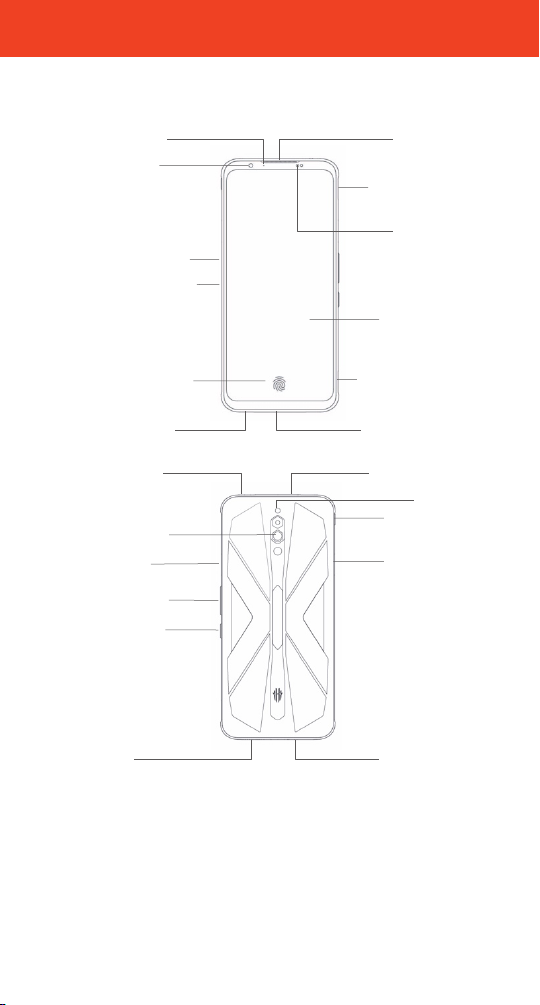
Auricular
Sensores de luz /
proximid ad
Bandeja
portata rjetas
Pant all a t ácti l
Puerto USB Tipo-C
Micr ófono
reducción de ruid o
Cámar a fro ntal
Tec l a de
encendido
Tec l a s d e
volu men
Sensor de huellas
dactil ares
Cámar as tra sera
Flas h
Toma de auriculares
Altav oz
Micr ófono
Modo de impulso
del juego
Indic ador L ED
Gatillo del
hombro( I)
Gatillo del
hombro (d)
Micr ófono d e
juego
Connector dock
Entrada de ai re
Sali da d e aire
Su teléfono de un vistazo
21
Page 24
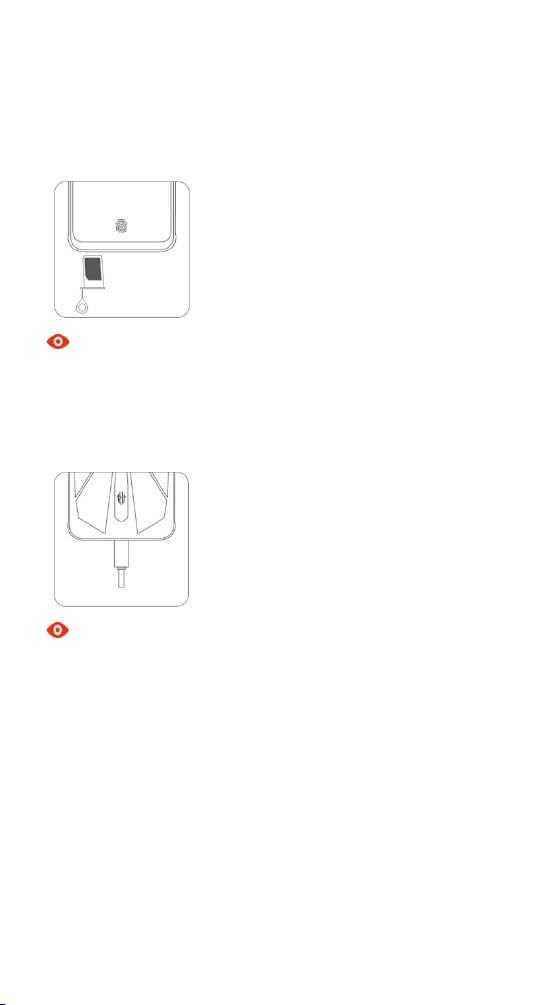
Inserción de la tarjeta SIM
1. Inserte el extremo de la herramienta de expulsión en el orificio de la bandeja de la
tarjeta y presione firmemente hasta que la bandeja salte.
2. Coloque una o dos tarjetas nano-SIM en la bandeja.
3. Empuje la bandeja de la tarjeta de nuevo en el teléfono.
Nota
Dimensiones de la tarjeta nano-SIM: 9 mm*12 mm.
Carga de la batería
Conecte el teléfono a la toma de corriente mediante el cable USB incluido y el adaptador de
corriente.
Nota
! Su teléfono y el adaptador de corriente podrían calentarse durante la carga.
! El uso de otro cable USB o adaptador de corriente podría acortar la vida útil de su teléfono
o provocar un incendio, explosión u otros peligros.
22
Page 25
Français | Guide de Démarrage Rapide
Récepteur
Capte ur de l umière
/ Proximité
Plateau d e carte
Écran ta ctil e
Port USB Ty pe-C
MIC. anti-bruit
Indic ateur LED
An/Aus-Tas t en
To uc h e V ol u m e
Capt eur d'e mprein tes
digit ales
Caméras arr ière
Flas h
Prise cas que
Speaker
Micr ophone
Mode Boost
de jeu
Camér a avan t
Déclencheur
d'épau lement(D .)
Micr ophone de jeu
Goupille d ’amarrage
Entré e d'air
Sortie d 'air
Déclench eur
d'épaulement (G.)
Un coup d'oeil sur votre téléphone
23
Page 26
Installation de la carte SIM
1. Insérez la broche d'éjection de carte dans le trou sur le plateau de la carte. Appuyez
fermement et poussez tout droit jusqu'à ce que le plateau s'éjecte.
2. Mettre une ou deux cartes nano-SIM dans le plateau.
3. Remettre le plateau à cartes dans le téléphone.
Note
Les dimensions d'une nano-SIM: 9 mm*12 mm.
Charger le téléphone
Connecter le telephone à une prise électrique en utilisant le câble USB et l’adapteur USB
fournis.
Note
! Il y a un risque de surchauffe pendant la charge.
! L’utilisation d’un cable ou chargeur inadapté peut réduire la durée de vie de votre
telephone ou causer une explosion ou autres dégâts.
24
Page 27
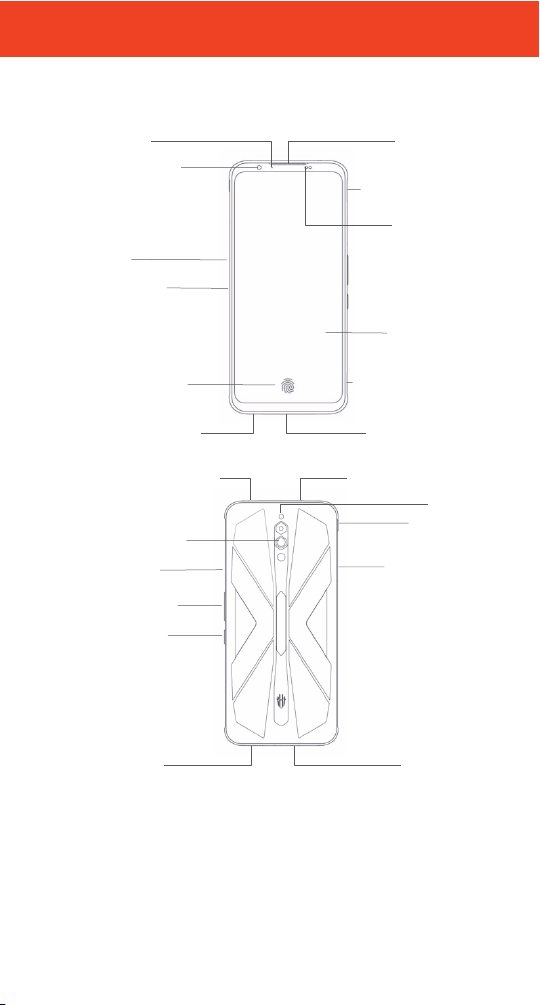
Italiano | Guida Rapida
Sensore di
prossim ità /
luminosit
Carre llo del le
schede SIM
Sch ermo
Porta USB Tipo-C
Mic. riduzi one d el rum ore
Fotocamera
anterior e
Ta st o d i
accensio ne
Ta st o v o l um e
Sensore di
impronte digitali
Videoc amera
poster iore
Flas h
Jack p er cuffi e
Alto parla nt
Micr ofono
Modalità di
gioco boost
Indic atore L ED
Trigg er a spall a (S)
Trigg er a spall a (D)
Capsu la aur icolare
Micr ofono di gioco
Perno dock
Ingresso di aria
Uscita di ari a
Panoramica del telefono
25
Page 28
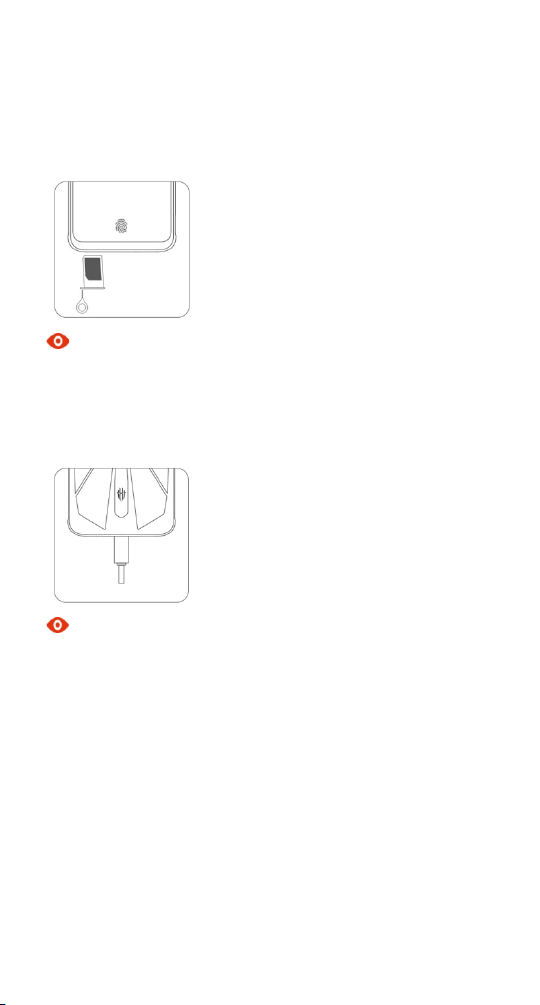
Inserimento della scheda SIM
1. Inserire la spilletta per l'estrazione del carreòòp nel foro e premere fermamente finché il
carrello non viene espulso.
2. Inserire una o entrambe le schede nano-SIM nel carrello.
3. Spingere il carrello fino alla chiusura completa.
Nota
Le dimensioni della nano-SIM sono di 9 mm*12 mm.
Ricarica della batteria
Collegare il telefono alla presa di corrente utilizzando il cavo USB ed il caricabatterie inclusi.
Nota
! Il telefono ed il caricabatterie potrebbero riscaldarsi durante la ricarica.
! L'uso di un cavo USB o di un caricabatterie non originali potrebbero diminuire la durata dii
vita del telefono o provocare incendi, esplosioni o altri pericoli.
26
Page 29
Português | Guia de Iniciar Rápido
Sint onizad or
Sensor de luz
/proximidade
Bandeja de Cartão
Ecrã d e toque
Porta USB Tipo-C
Barulho-redução MIC
Câmer a frontal
Energi a tecla
Vol um e t ecl as
Câmer a trasei ra
Flas h
Tomada de ausc ultador
Alto -falante
Micr ofone
Modo de
impulso de jogo
Indi cador
Gatilho de Ombro (E)
Gatilho de Ombro (D)
Micr ofone d e
jogos
Pino de Do ca
Sensor de
impressão digital
Entra da de ar
Saíd a de ar
Seu telefone numa olhada
27
Page 30
Inserindo o SIM cartão
1. Inserir o fim de ferramenta de ejetar no furo de bandeja de cartão e clicar firmemente
até a bandeja aparecer.
2. Pôr um ou dois nano-SIM cartões na bandeja.
3. Empurrar a bandeja de cartão de volta para o telefone.
Nota
Dimensões dum nano-SIM cartão: 9 mm*12 mm.
Carregando a bateria
Ligar o telefone com a saída de energia usando o cabo de USB e o adaptador de energia
incluídos.
Nota
! Seu telefone e o adaptador de energia podem aquecer quando está a carregar.
! Usar outro cabo de USB ou adaptador de energia pode dimiluir a vida útil do seu telefone
ou causar fogo, explosão e outros prejuízos.
28
Page 31
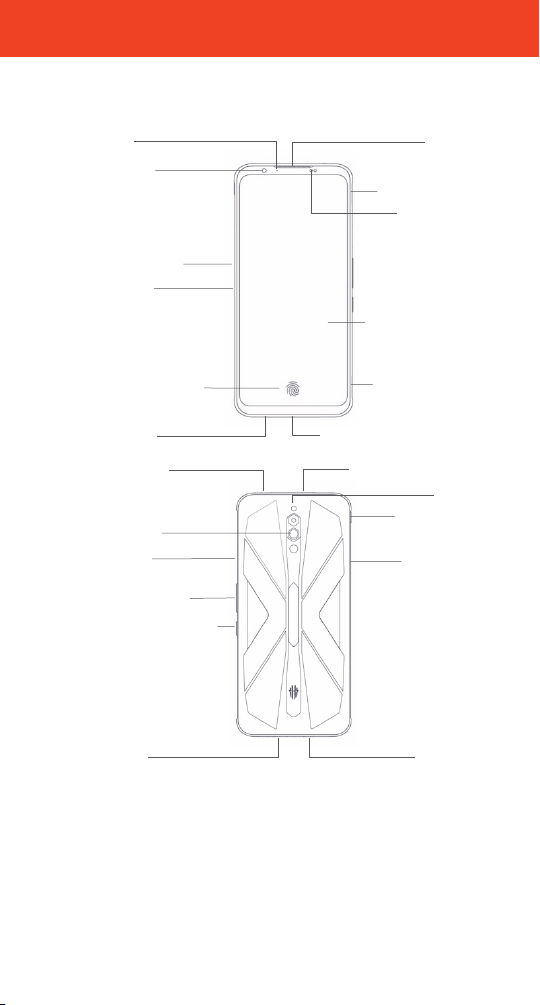
Türkçe | Hızlı Başlangıç Kılavuzu
Ahize
ık/Yakınlık
Algı layıcı sı
Kart Yuvası
Dokunmatik Ekran
USB Tip- C Bağlantı Noktas
Gürültü-Azaltma MİK
Ön Kamera
Açma /Kapam a Düğmesi
Ses +/- Düğmeleri
Parmak Ucu Sens örü
Arka Kamera
Flaş
Kulaklı k Çıkışı
Hoparlör
Mikro fon
Oyun Boost
Modu
Chỉ số
Omuz Trigger (L)
Omuz Trigger (R)
Oyun Mikrofonu
Rıhtım pim
Hava girişi
Hava çıkışı
Te le fo nu n uz a Ba kı ş
Iş
29
Page 32
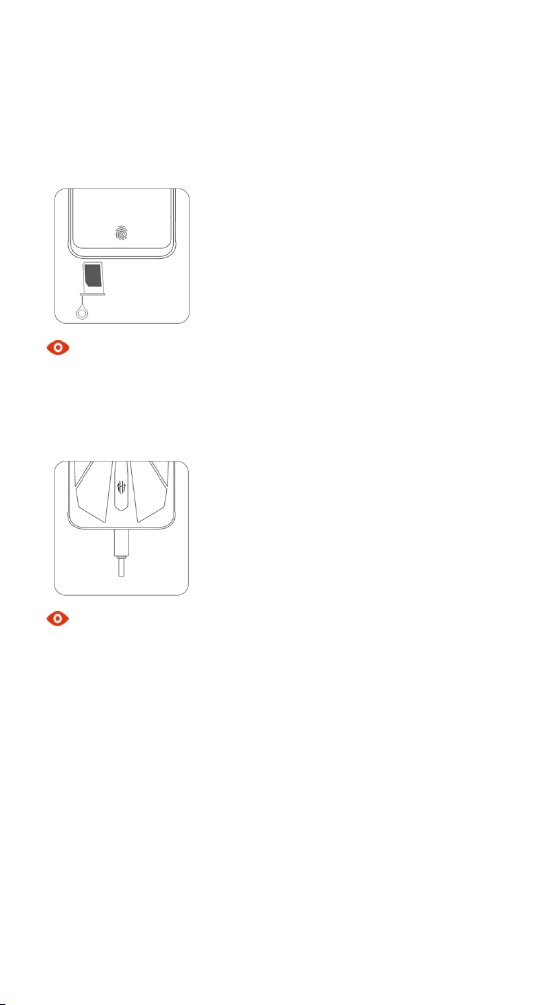
Sim Kart Yerleştirme
1. Yuva çıkarma aparatının sivri ucunu, kart yuvasındaki deliğe sokup yuva kendini dışarı
atıncaya kadar bastırınız.
2. Bir veya iki nano-Sim kartı, kart yuvasına yerleştiriniz.
3. Kart yuvasını telefona iterek yerleştiriniz.
Not
nano-SIM kart boyutları: 9 mm*12 mm.
Bataryayı Şarj Etme
Telefonunuzu, kutudan çıkan USB kablosu ve güç adaptörü ile prize takınız.
Not
! Telefonunuz ve güç adaptörünüz şarj işlemi esnasında ısınabilir.
! Orjinal olmayan USB kablo veya güç adaptörü kullanmanız; telefonunuzun ömrünü
azaltabilir; yangına, patlamaya ya da başka risklere yol açabilir.
30
Page 33
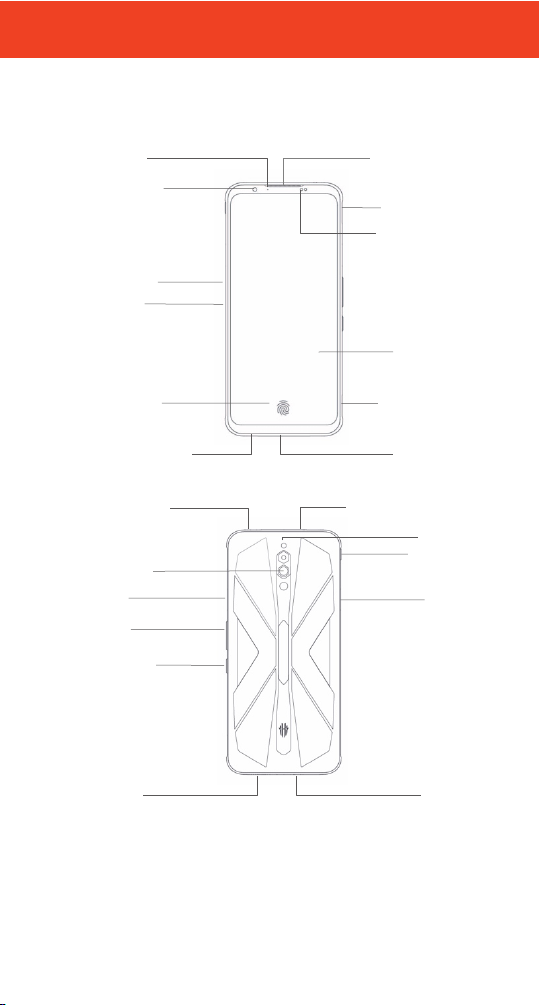
受話器/スピーカー
光/距離 センサー
SIM カードスロット
ディス プレイ
USB Type-C
フロントカメラ
電源/再起動
/ロックキー
音量キー
指紋セ ンサー
リアカメラ
フラッ
イヤホ ン挿入口
スピーカー
マイク
競技キー
指示ランプ
肩トリ ガー(右 )
ゲームマイク
ドックピン
吸気口
吹出口
補助ノイズ除去マイク
肩トリガー
日本語|高速取扱ガイド
携帯電話の外観図
31
Page 34
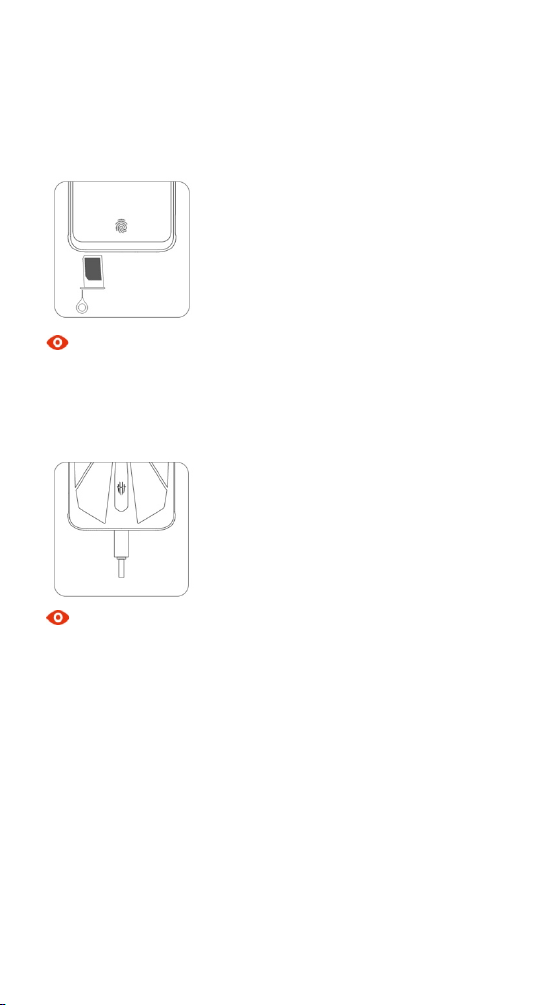
カードの挿入
SIM
1. イジェクトピンを SIM カードスロットの小穴に挿入して、イジェクトピンを軽く押し付
けながらカードソケットをイジェクトします。
2. SIM カードをカードソケットに入れます。
3. カードソケットをカードスロットに押し戻します。
ご注意
本携帯電話は標準 nano-SIM カードに対応し、寸法が 12 mm*9 mm です。
バッテリー充電
携帯電話を付属のケーブルと充電ヘッドに接続し、電源コンセントに充電ヘッドを
差し込みます。
ご注意
! 充電中は、携帯電話と充電器が適度に高温になりますが、通常現象です。
! 努比亜のオリジナル付属品を使用してください。携帯電話の使用性能に影響を及
ぼし、さらに火災、爆発やその他の危険につながる恐れがあります。
32
Page 35
ﻟ" # ﺔ ﻋ' ﻫﺎﺗﻔ ,
دﻟ$ﻞ اﻟ' (ﻐ$ﻞ ا ﻟ *+,ﻊ | /ﺎ ﻟﻠﻐﺔ اﻹ ﻧ5ﻠ$6,ﺔ
!"# $ % &' ( )*+ , -
!"#./0' ( 123 4 5 ' ( 1 # $ + ,6
'
7,8'9:+ ; < ' ( 1 = + >?
(1.+*< '(1@ A"B <
!CDE'F3'( G'HI '! J' ( 1 C3K ' L I
!BM0NO3P'(1QR'!J'(123S+4
(1T +!B0( ' (U!+!B<
V,' ( 1 #.W B&''
XV (,'( 1 Y3 Z'
!"#./0' 9YA< ' ( )[%\
(1T +!B0( ' ( 1]@D B<
(1D^_
!CDE' LA+` <'( 10 X G
(1"A +`<'(1]+,aB<
(1ABM0NO3P
bA c '>/ ded ' (U1/+ 6
!f*0' (g' hi' 7i
V,' (j>k+ l' (Umn
V,' (j>k + l ' ( Um AJ
!BM0NO3P'(U1/ +6
O# Q<'(1Q+!&''
!Ro&'( 1 =3(4
!]08' ( 1 =3 ( 4
!
33
Page 36
اد ﺧ ﺎل ' (ﺎﻗﺔ اﻟﻬﺎﺗﻒ:
;y'H3S\ '9 :+;<'XN '9:+ ; # BJ '! J 'b3K '( 1 C+b3'OI ' ( 1R,8 '
;y'9+12Wc'`@w'(1R,8'h1I'7(o&'(1=+>?'!kR7(
{
X9 / + 7 ' 9:+; <'(1C+b 3'|I'
'''''''''''''''''''''''''''''''''''''''''''''''''''''''''''''''''''''''''
'
'
7,8' ( 1 %:+ ; <'N (SWc' 9 $3 - 'v#w' m]08' ( 1 R,8' 1 @]+ ,8
'
pq'X7 o& ' r0s'X7(-'( )o0( 8 'OI't$u'
xq'
zq'
ﻣﻼﺣ8ﺔ :
}'!@y' ~ 'px'!@y'
'
ﺷ12 اﻟ 3(ﺎ ر 5ﺔ
'
F3'( G 'HI'N!C‚y'( 1T= 0 • +4'( 1A0O$ BJƒ'
;y'H#3[ B &' ( 1=+>?'9+1T=0•+ 4'9+ L#]R(€ '•+H&'
ﻣﻼﺣ8ﺔ :
! ;R'm" ]J'( 1=+> ?'N!C‚y' ( 1 T=0• +4'XtC+ 4'(1 .QJƒ'
'`A0' ( 1 = + >?' X N' b.36
34
!C‚y'•=0• +4'! J' b3K '„o 0 ';R'F#"% u 'OI';Y0
! (L#]R( €'•+ H&'F3'( G 'HI'XN'
'v0 e …' X N ' ( b D k + , ' X N 'Xi'!]+r0'Xo0†ƒ'''
 Loading...