

Page 1

GETTING STARTED GUIDE
NI 9252
8 AI, ±10 V, 24 bit, 50 kS/s/ch Simultaneous
Page 2

This document explains how to connect to the NI 9252. In this
document, the NI 9252 with screw terminal and the NI 9252 with
DSUB are referred to inclusively as the NI 9252.
Note Before you begin, complete the software and
hardware installation procedures in your chassis
documentation.
Note The guidelines in this document are specific to
the NI 9252. The other components in the system might
not meet the same safety ratings. Refer to the
documentation for each component in the system to
determine the safety and EMC ratings for the entire
system.
2 | ni.com | NI 9252 Getting Started Guide
Page 3
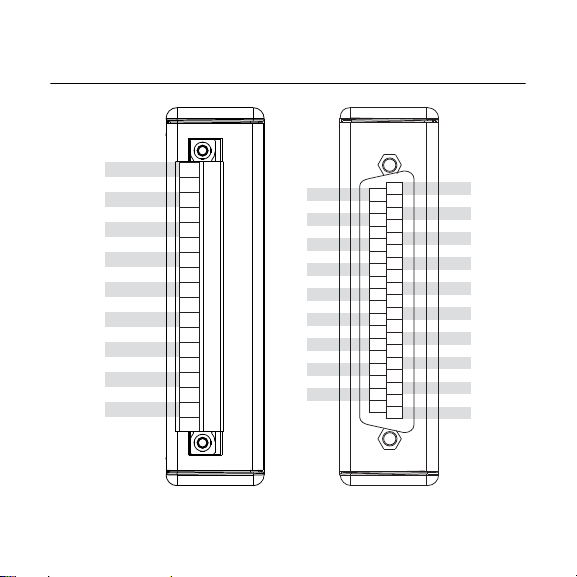
NI 9252 Pinout
AI0+
AI0AI1+
AI1AI2+
AI2AI3+
AI3AI4+
AI5+
AI5AI6+
AI6AI7+
AI7-
COM
0
1
2
3
4
5
6
7
8
9
10
11
12
13
14
15
16
17
AI4-
NC
AI0AI1AI2AI3AI4AI5AI6AI7COM
NC
NC
NC
NC
NC
NC
NC
NC
AI0+
AI1+
AI2+
AI3+
AI4+
AI5+
AI6+
AI7+
COM
COM
NC
NC
NC
NC
NC
NC
NC
NC
NC
1
2
3
4
5
6
7
8
9
10
11
12
13
14
15
16
17
18
19
20
21
22
23
24
25
26
27
28
29
30
31
32
33
34
35
36
37
COM
NI 9252 Getting Started Guide | © National Instruments | 3
Page 4

Table 1. Signal Descriptions
Voltage
Source
+
–
AI+
AI–
COM
NI 9252
Signal Description
AI+ Positive analog input signal connection
AI- Negative analog input signal connection
COM Common reference connection to isolated ground
NC No connection
Grounded Differential Connections
4 | ni.com | NI 9252 Getting Started Guide
Page 5

Floating Differential Connections
NI 9252
AI+
AI–
COM
Voltage
Source
1 MΩ
Resistor
+
–
Connect the negative lead to COM through a 1 MΩ resistor to
keep the signal source within the common-mode voltage range.
The NI 9252 does not read data accurately if the signal source is
outside of the common-mode voltage range.
NI 9252 Getting Started Guide | © National Instruments | 5
Page 6

Single-Ended Connections
+
–
AI+
AI–
COM
Voltage
Source
NI 9252
Connect the ground signal to COM to keep the signal source
within the common-mode voltage range.
6 | ni.com | NI 9252 Getting Started Guide
Page 7

Differential Connections with Common Mode
Voltage
Source
+
–
AI+
AI–
COM
NI 9252
Common
Mode
Voltage
Voltage
NI 9252 Connection Guidelines
• Make sure that devices you connect to the NI 9252 are
compatible with the module specifications.
• You must use 2-wire ferrules to create a secure connection
when connecting more than one wire to a single terminal on
the NI 9252 with screw terminal.
NI 9252 Getting Started Guide | © National Instruments | 7
Page 8

Wiring for High-Vibration Applications
If your application is subject to high vibration, NI recommends
that you follow these guidelines to protect connections to the
NI 9252 with screw terminal:
• Use ferrules to terminate wires to the detachable connector.
• Use the NI 9928 backshell kit.
Overvoltage Protection
The NI 9252 provides overvoltage protection for each channel.
Note Refer to the device datasheet on ni.com/manuals
for more information about overvoltage protection.
8 | ni.com | NI 9252 Getting Started Guide
Page 9

Where to Go Next
RELATED INFORMATION
C Series Documentation
& Resources
ni.com/info cseriesdoc
Services
ni.com/services
CompactRIO
Located at ni.com/manuals Installs with the software
CompactDAQ
NI 9252 Datasheet
NI-RIO Help
LabVIEW FPGA Help
NI 9252 Datasheet
NI-DAQmx Help
LabVIEW Help
NI 9252 Getting Started Guide | © National Instruments | 9
Page 10

Worldwide Support and Services
The NI website is your complete resource for technical support.
At ni.com/support, you have access to everything from
troubleshooting and application development self-help resources
to email and phone assistance from NI Application Engineers.
Visit ni.com/services for information about the services NI offers.
Visit ni.com/register to register your NI product. Product
registration facilitates technical support and ensures that you
receive important information updates from NI.
NI corporate headquarters is located at
11500 North Mopac Expressway, Austin, Texas, 78759-3504. NI
also has offices located around the world. For support in the
United States, create your service request at ni.com/support or
dial 1 866 ASK MYNI (275 6964). For support outside the
United States, visit the Worldwide Offices section of ni.com/
niglobal to access the branch office websites, which provide up-
to-date contact information.
10 | ni.com | NI 9252 Getting Started Guide
Page 11

Information is subject to change without notice. Refer to the NI Trademarks and Logo Guidelines
at ni.com/trademarks for information on NI trademarks. Other product and company names
mentioned herein are trademarks or trade names of their respective companies. For patents
covering NI products/technology, refer to the appropriate location: Help»Patents in your software,
the patents.txt file on your media, or the National Instruments Patent Notice at ni.com/
patents. You can find information about end-user license agreements (EULAs) and third-par ty
legal notices in the readme file for your NI product. Refer to the Export Compliance Information at
ni.com/legal/export-compliance for the NI global trade compliance policy and how to obtain
relevant HTS codes, ECCNs, and other import/export data. NI MAKES NO EXPRESS OR
IMPLIED WARRANTIES AS TO THE ACCURACY OF THE INFORMATION CONTAINED
HEREIN AND SHALL NOT BE LIABLE FOR ANY ERRORS. U.S. Government Customers: The
data contained in this manual was developed at private expense and is subject to the applicable
limited rights and restricted data rights as set forth in FAR 52.227-14, DFAR 252.227-7014, and
DFAR 252.227-7015.
© 2019 National Instruments. All rights reserved.
378058A-01 February 1, 2019
 Loading...