

Page 1
I.
I.
I.
I.Login
Logi n
Login
LoginScreen
Sc reen
Screen
Screen
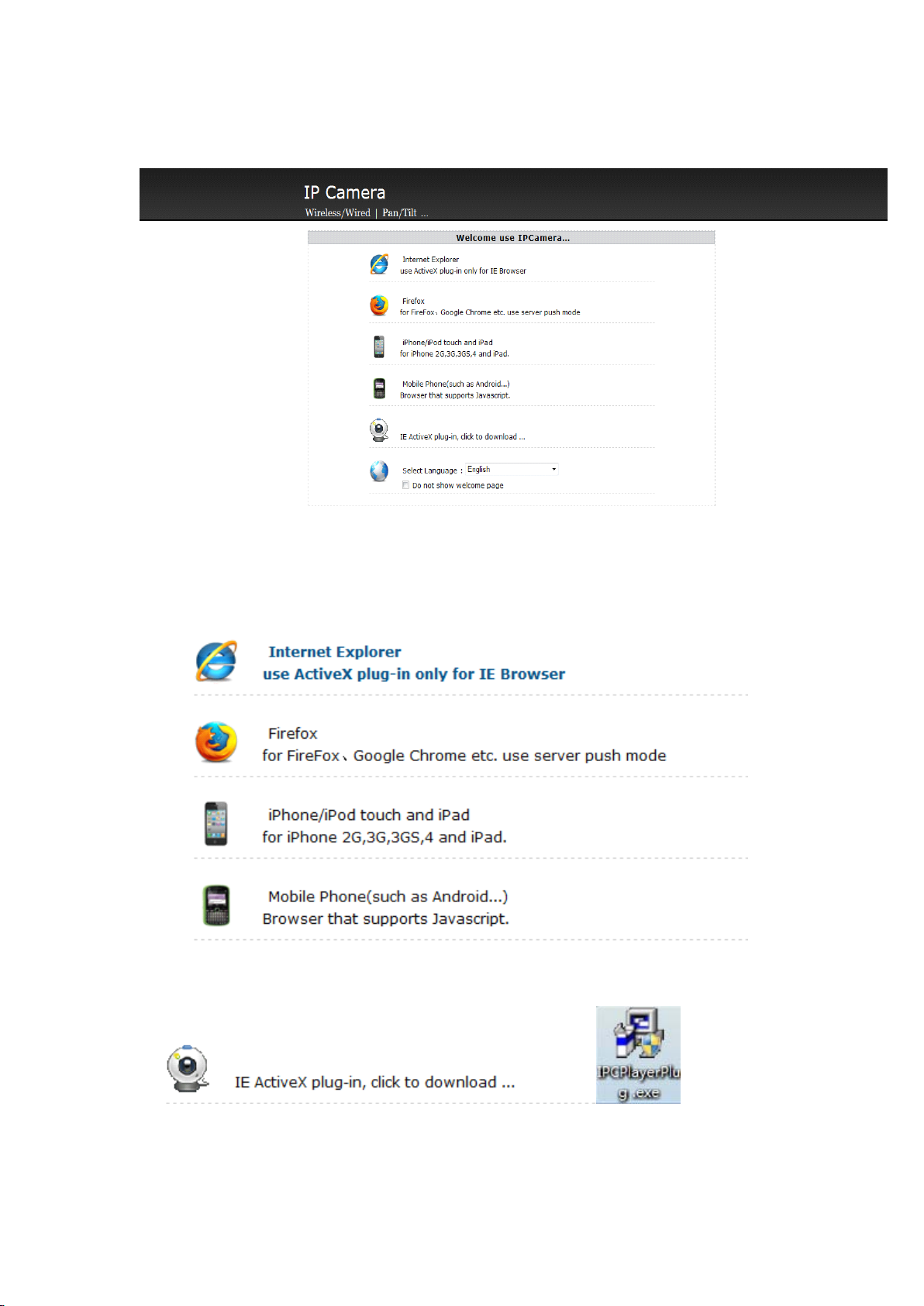
a、YoucanchooseIE、Firefoxorothermobiledevicestoviewthevideo:
b、ForIEbrowser ,pleasedownloadandinstalltheActiveX,afterthat,youcanviewthe
video.
Page 2
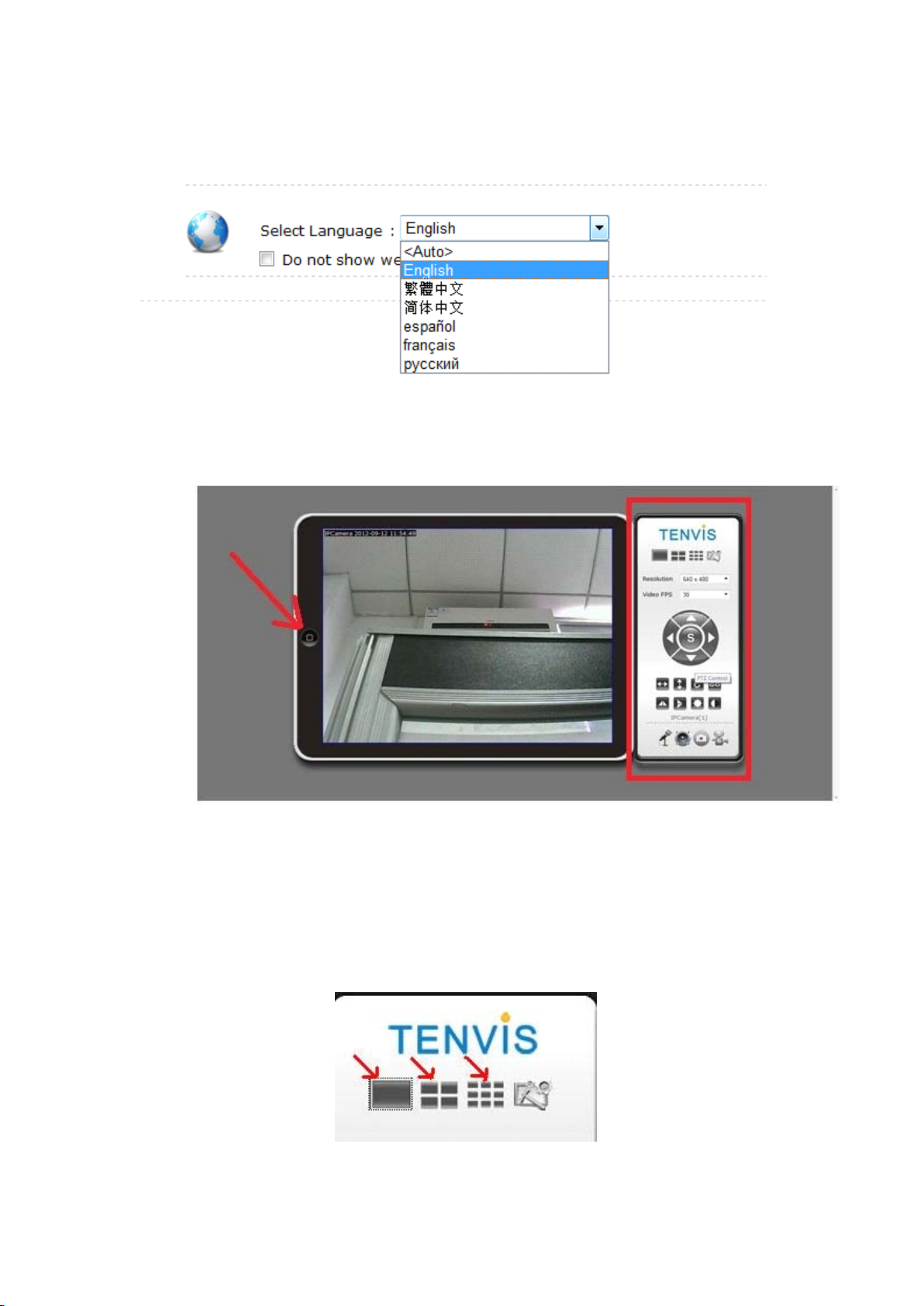
c、Languageselection(whenchoose
yourcomputerlanguage) :
“
Auto”,itwillautomaticallybecompatiblewith
II.
II.
II.
II.Live
Li ve
Live
LiveVideo
a.Clickthebutton:”Home”buttonatleft,wecanbacktopreviousinterface.。
b.Atright,therearemulti-livesetting,pan/tilt,imagesetting,two-wayaudio,videorecord,
snapshotbutton.
Vi deo
Video
Video
1.
Multiple
1.
Multiple
1.
1.Multiple
MultipleChannels
Ch annels
Channels
ChannelsSelection
Se lection
Selection
Selection
Page 3
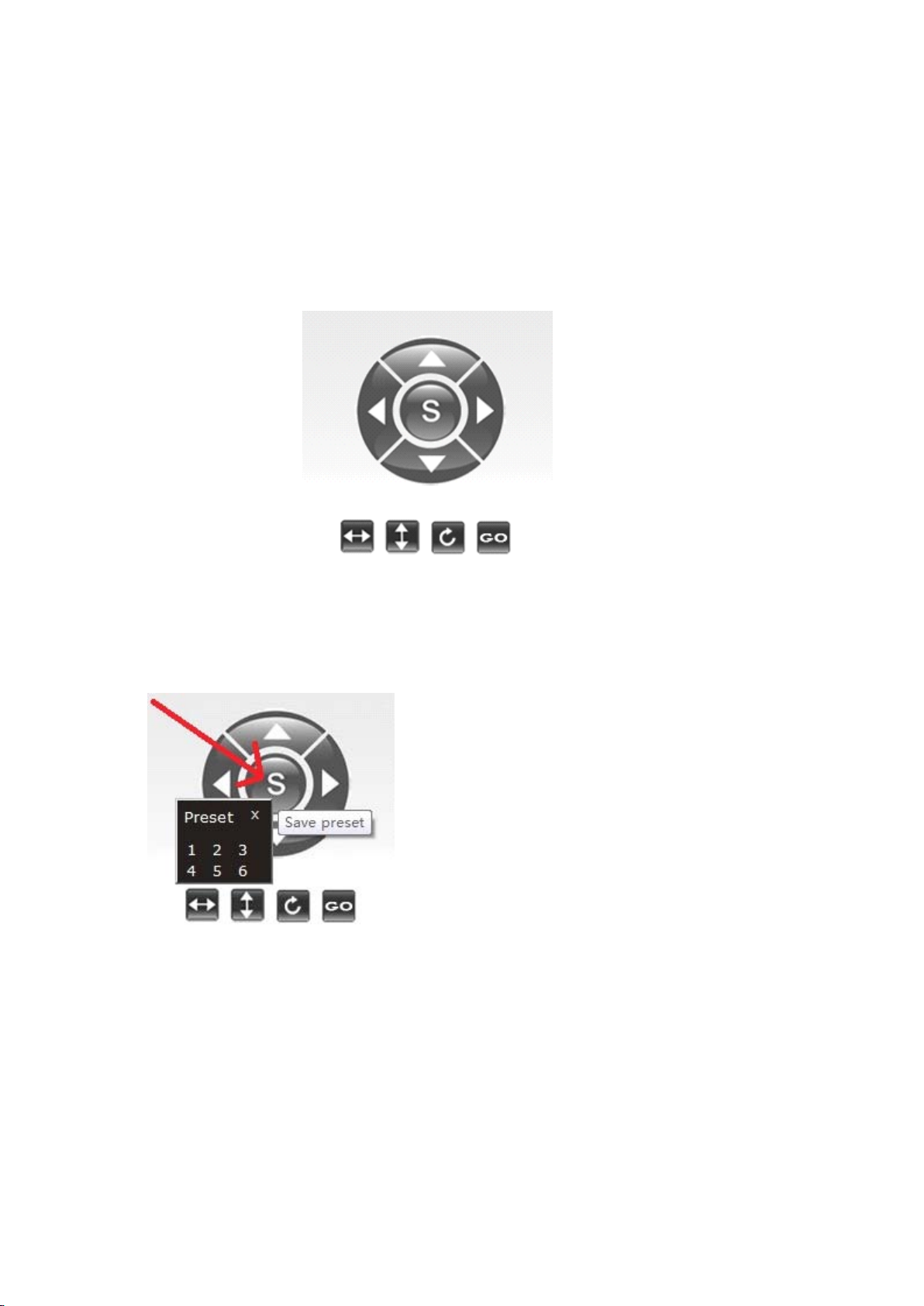
a、Pleaseaddyourdevicesbasedonthequantityyouhavebeforeselectingmulti-livedevices,
redarrowareaisfordifferentcamerasyouhave.
b、Redarrowdirectingareaisfor1,4,9windows.
c、Selecttherelatedcamera,youcouldmakesnapshots,recordingorsettings.
2.
PTZ
2.
P TZ
2.
2.PTZ
PTZand
and
an d
andPreset
Pr eset
Preset
PresetPosition.
Pos ition.
Position.
Position.
a.Up,down,left&rightarrowisforcontrollingthepan/tilt,doublearrowsandringarrowisused
forcruising.
b.Sstandsforpresetposition,clickitthenyouwillseethepresetpositionsettings,thenumber
standsforcurrentposition.,
Page 4
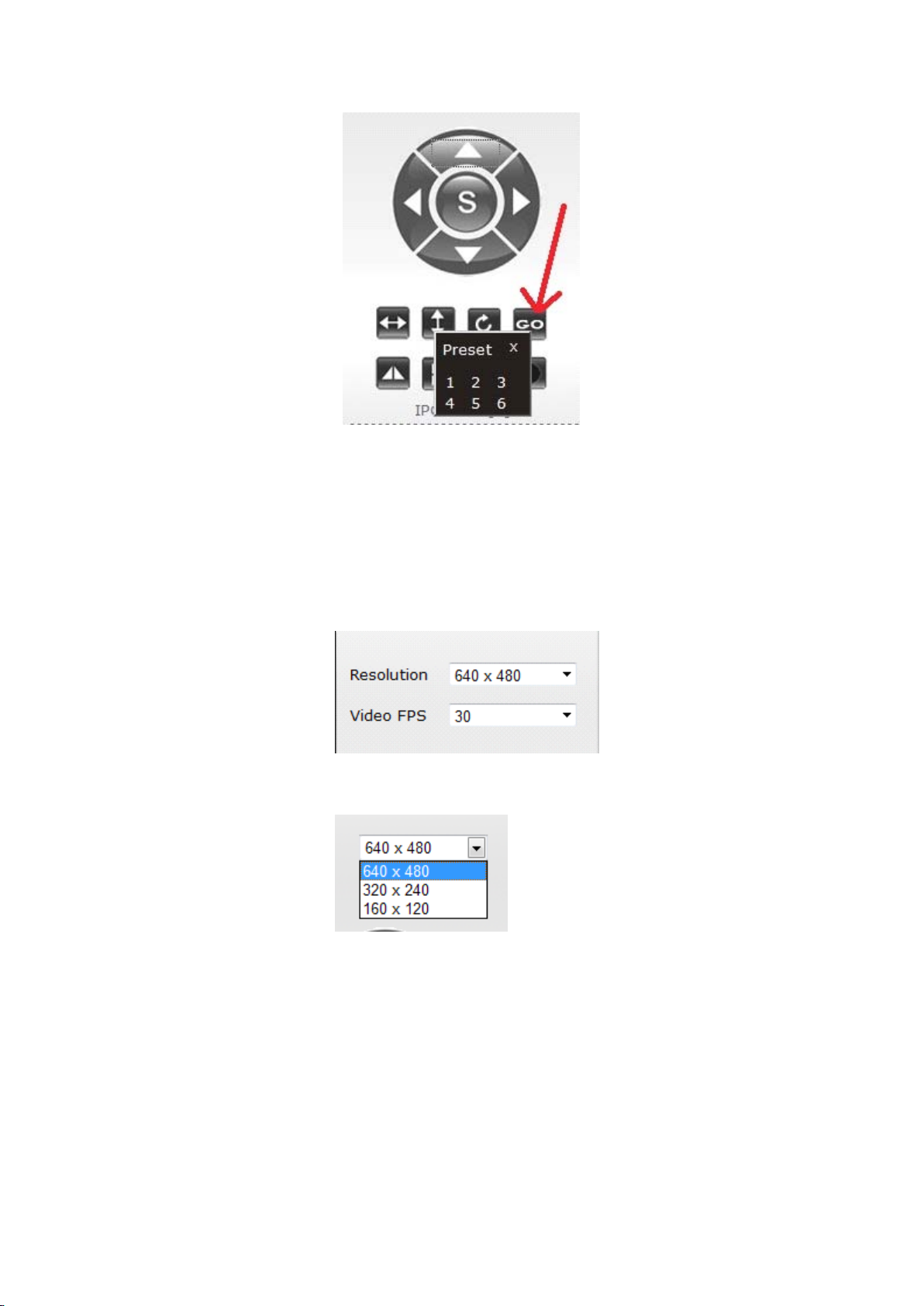
c、ClickGOandwillappearthechoiceofpresetposition,youcanchoosethepositionyou’dlike.
3.
Re solution
3.
Resolution
3.
3.Resolution
ResolutionSelection
a.Resolutionratio,3choices,theyare640×480、320×240、160×120
Se lection
Selection
Selection:
Page 5
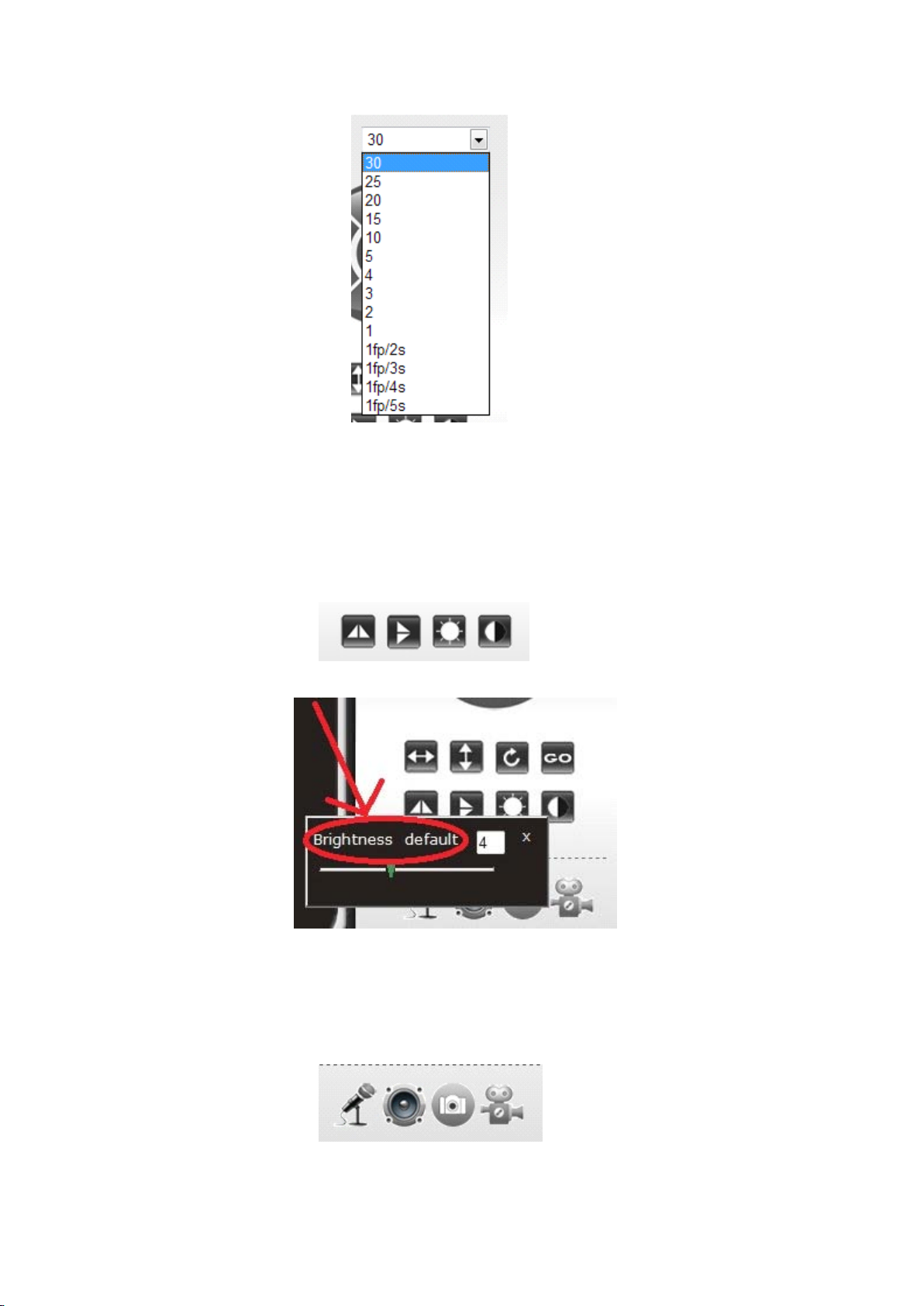
b.Frameratehave30、25、20,total3modesyoucouldchoose.。
4.
Gr aphic
4.
Graphic
4.
4.Graphic
GraphicAdjustment
Ad justment
Adjustment
Adjustment
You
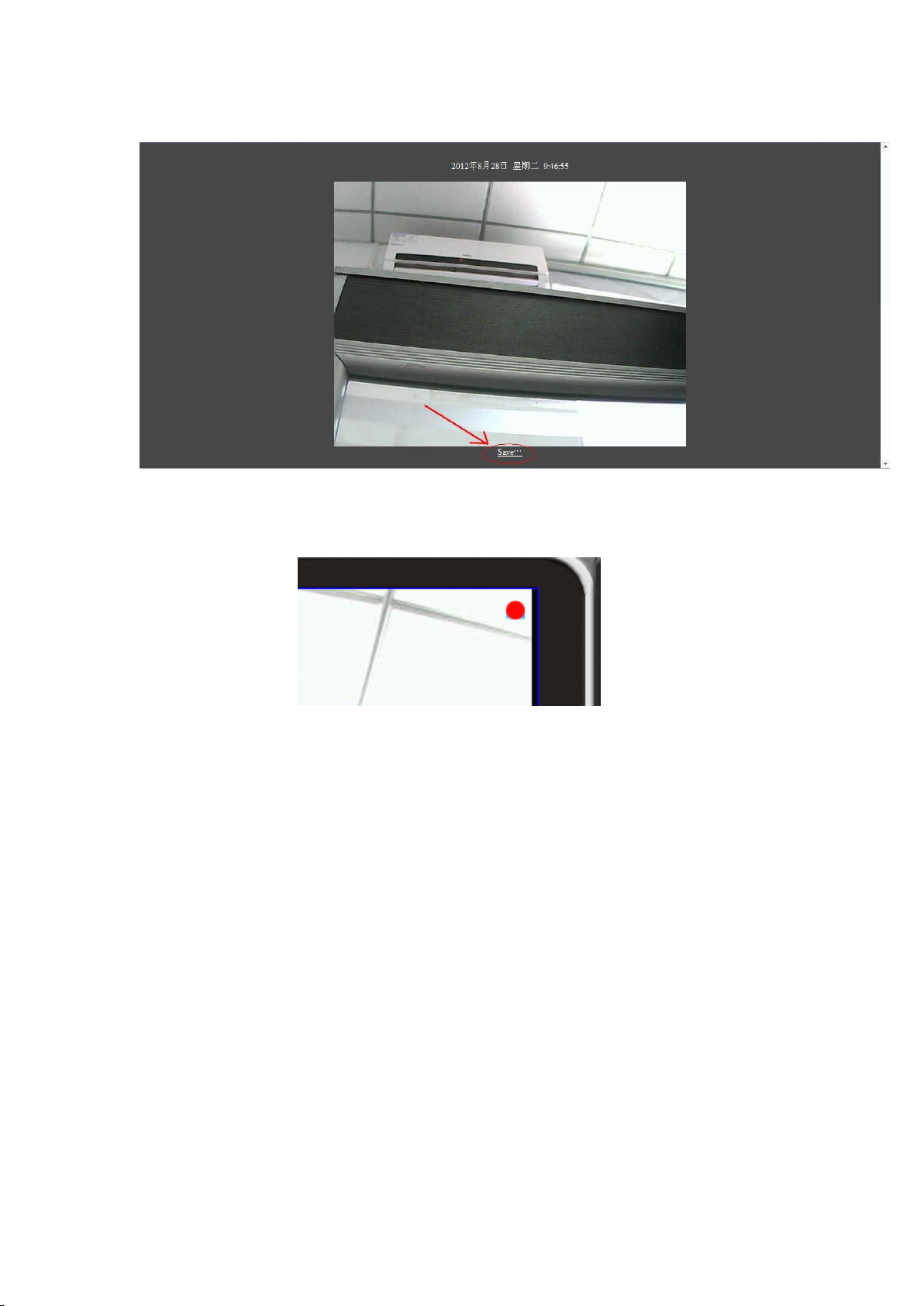
couldchooseflipvertical,fliphorizontal,brightnessadjustingandcontrast.
withclickingthedefault.
5.
Re cord,
5.
Record,
5.
5.Record,
Record,Snapshot,
Sn apshot,
Snapshot,
Snapshot,and
and
an d
andTwo-way
Tw o-way
Two-way
Two-wayAudio
Au dio
Audio
Audio
You
couldrest
Page 6
a、
You
couldclickrelatedbuttontogetsuchfunctionupside.
b、Afteryoumakethesnapshots,pleaseclicksavebuttontheredarrowdirect.Thenselectthe
storageareaonyourcomputer.
c、Clickrecordandthenyouwillseearedpointontherightup-side,thatmeansit’srecording
now.
6.
Sh ort-cut
6.
Short-cut
6.
6.Short-cut
Short-cutButtons
Bu ttons
Buttons
Buttons
Page 7
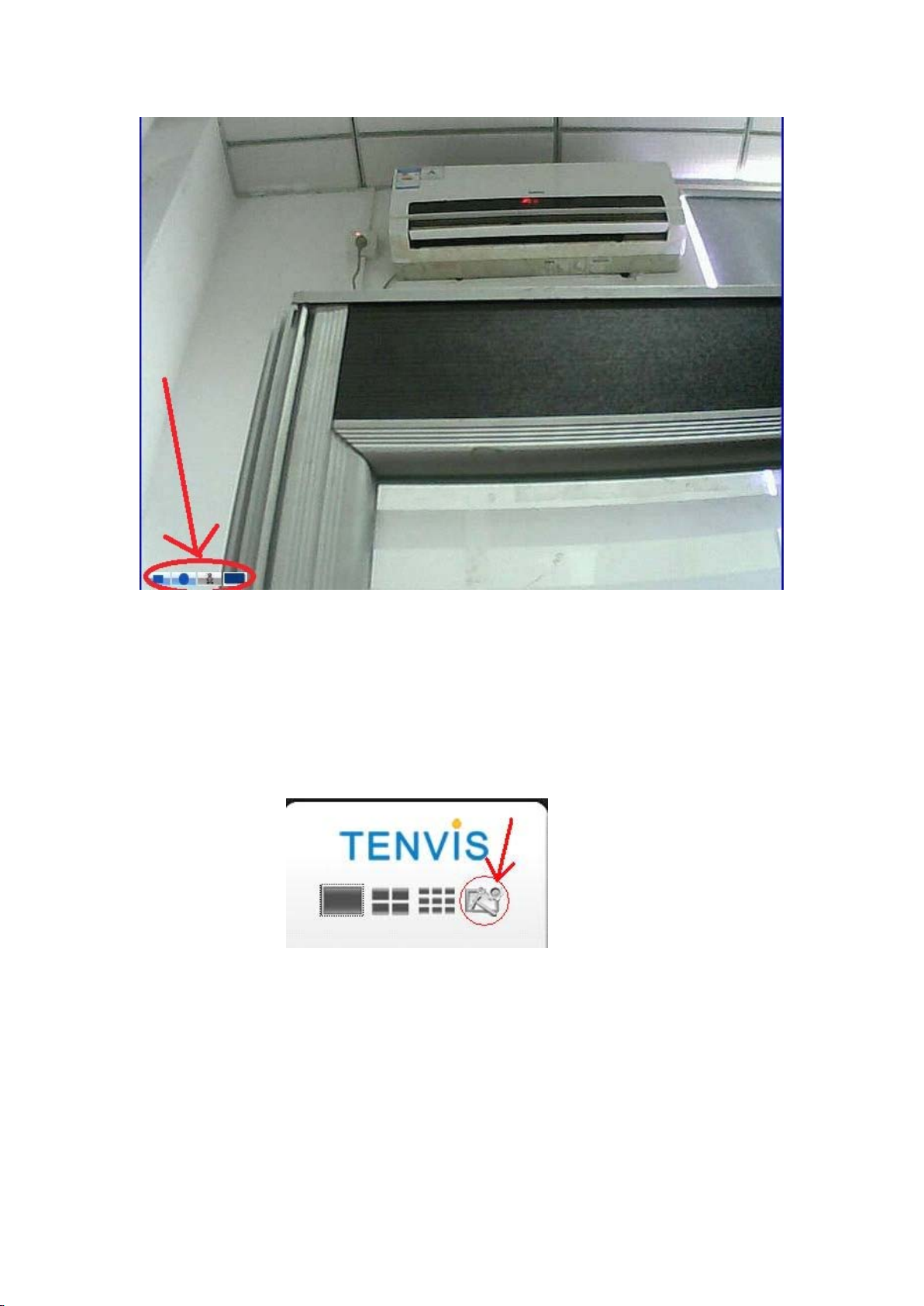
Whenmouseisusingatthewindows,therewillappeartheshort-cutbuttons,Fromleftto
right:Pause/Play;Record;Alarmstop;Wide&narrowscreenswitching.
III.
III.
III.
III.Parameter
Par ameter
Parameter
ParameterSetting
Se tting
Setting
Setting
Page 8
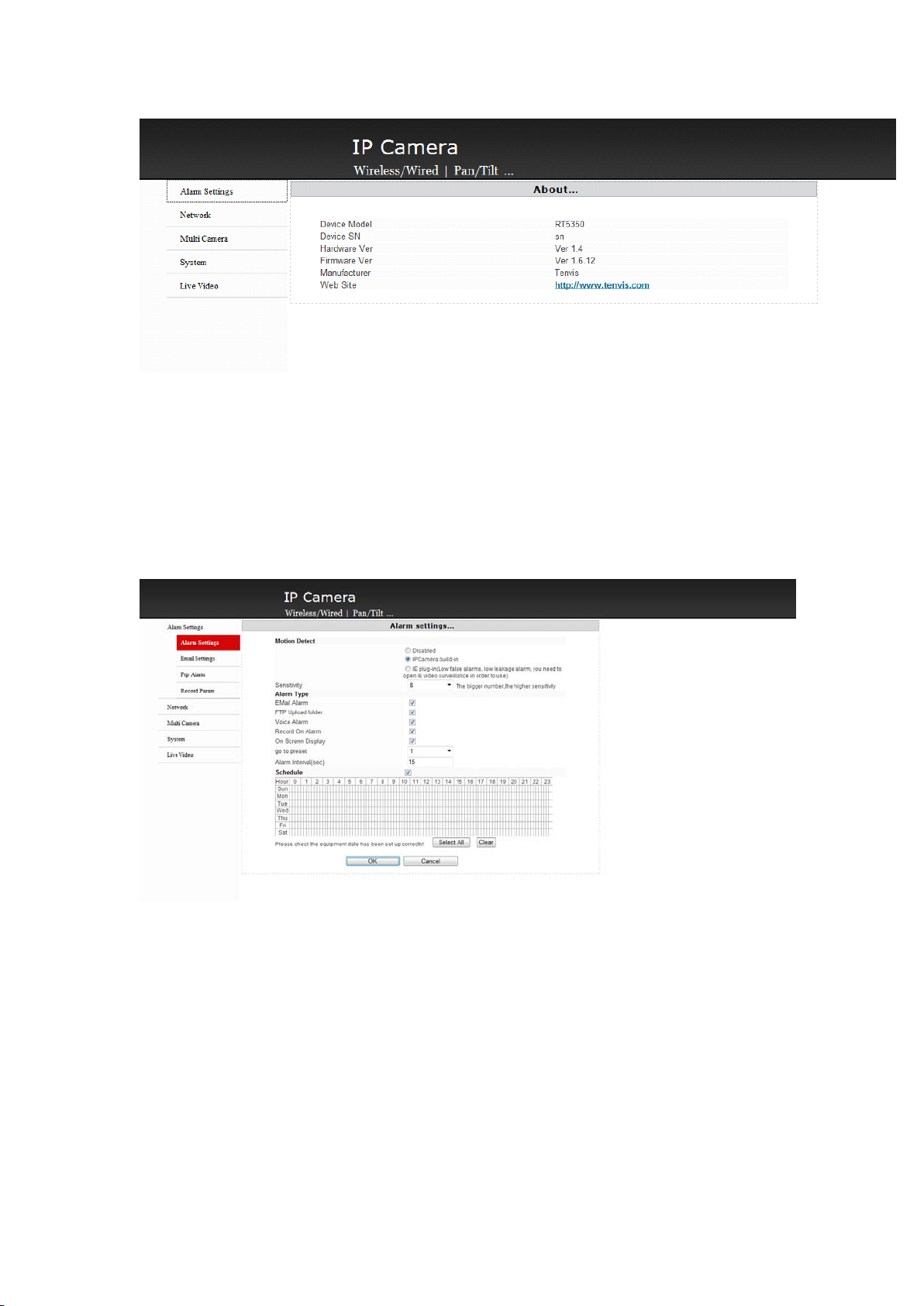
Clicktheredarrowdirectingarea,youwillseethedeviceinformationthere.
1.
Al arm
1.
Alarm
1.
1.Alarm
AlarmSetting
Se tting
Setting
Setting
a、Setthemotiondetectionandvoicealarm,picturescanbesenttomailboxorFTPserver.
Besides,canrecordvideowhenalarm.
b、Onthemenu,wealsoprovidemotiondetectionsensitivityadjustmentandpresetsettingwhen
alarm.
c、
You
alsocouldchoosedailyschedulethere.
d、Afterfinishthesetting,pleasestoreyoursettingsthencouldworks.
2.
E-
m
ail
2.
E-
2.
2.E-
m
E-m
mai l
Se tting
ai l
Setting
ailSetting
Setting
Page 9
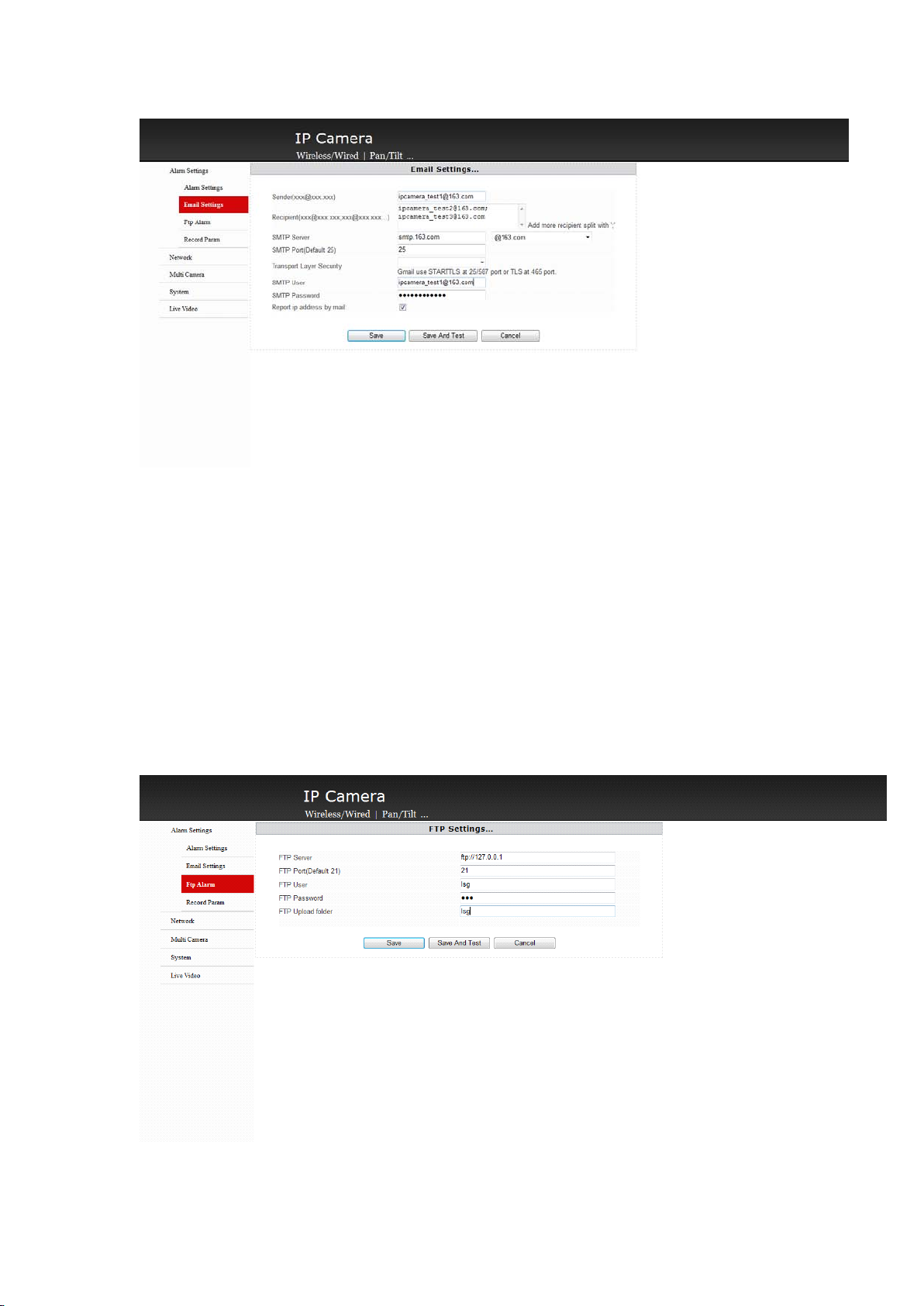
a、Pleaseenterwritesender’andreceiver’semailintheproperarea.Pleaseadd;whenhave
manyemailaddressesthere.
b、SMTPServeristhesameasthesender’semailSMTP.
c、SMTPportis25.
d、Usernameandpasswordpleaseusethesender’sinformationthere.
e、Afterfinishingentering,pleasesaveittomakethesettingwork.
checkwhetheritworksornot.
3.
FTP
3.
F TP
3.
3.FTP
FTPSetting
Se tting
Setting
Setting
You
couldmakeatestto
Page 10
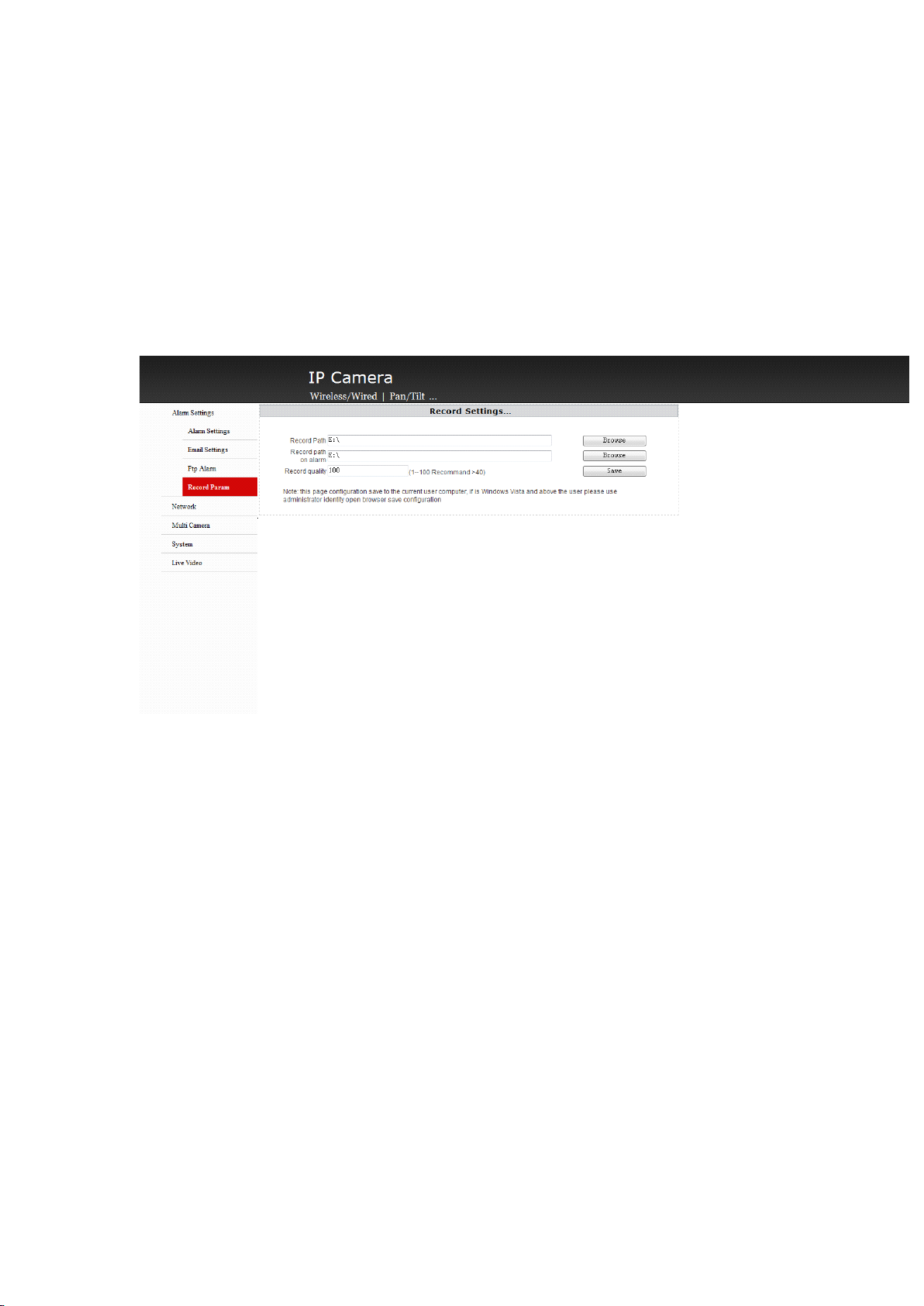
a、Pleaseenterrightseveraddressforthe
b、FTPportis21.
c、UsernameandpasswordisthesameasyouuseonFTP .
d.Uploadthemenuandmakeitasyoursavemenu.
e.Afterthefilling,pleasesaveitandthenthesettingworks.
ifitworks.
4.
Re cord
4.
Record
4.
4.Record
RecordP
P
arame ter
P
arameter
Parameter
arameter
FTP.
在FTP
You
couldmakeatestonittocheck
a、Clicktherecordingandalarmroute,youcouldchangetheroutthere.
b、Recordingqualityeditboxcouldchangethequalityofthevideo,pleasesaveitafterthe
settings.
5.
Ne twork
5.
Network
5.
5.Network
NetworkSetting
Se tting
Setting
Setting
Page 11
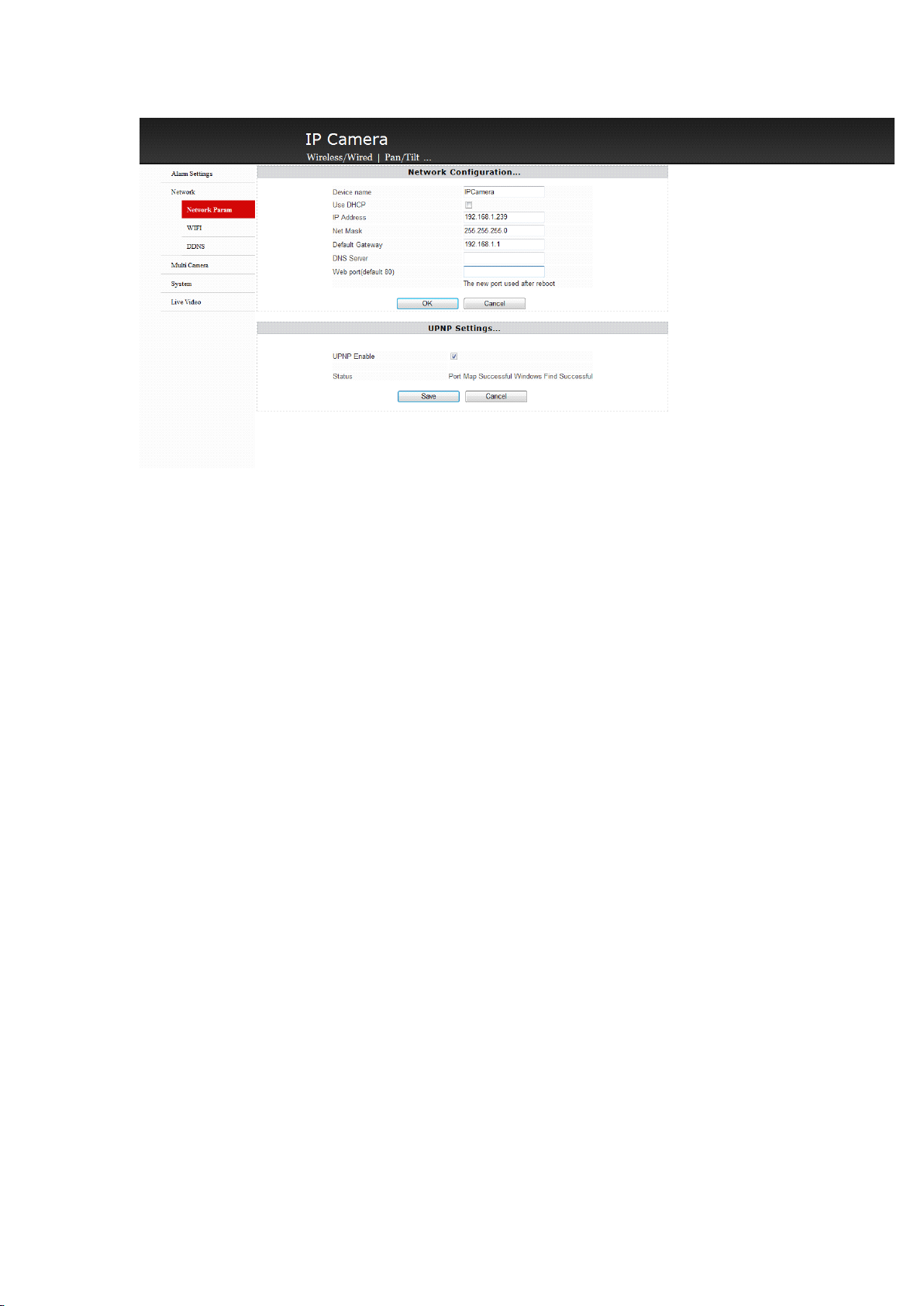
a、
You
couldchangethedevicenameonthenameeditbox.
b、IfyournetworksupportDHCPservice,pleaseclickdynamicobtainingIPaddress,thecamera
willautomaticobtainingtheIPaddress.
c、IPaddresseditframeshowsthecurrentIPaddressifthedevice,youcouldmodifyitthere..
d、Subnetmaskeditboxshowsthecurrentdevicesubnetmask,youcouldreviseitthere.
e、Defaulteditboxshowsthecurrentgateway,youcouldreviseitthere
f、WEBporteditboxshowsthecurrentdevice’sWEB.youcouldreviseitthereWEB
g、PleasecircleUPNP ,itcanmakethecameraautomaticallyachieveportforwardingtoyour
wirelessrouter,connectyourroutertoachieveinternetview.yourwirelessrouteralsoshould
haveUPNPfunction.
h、Afterfinishing,pleaseremembertosaveittomakeiteffect.
6.
WIFI
6.
WI FI
6.
6.WIFI
WIFISetting
IPcamerasupportsWIFI
Setti ng
Setting
Setting
Page 12
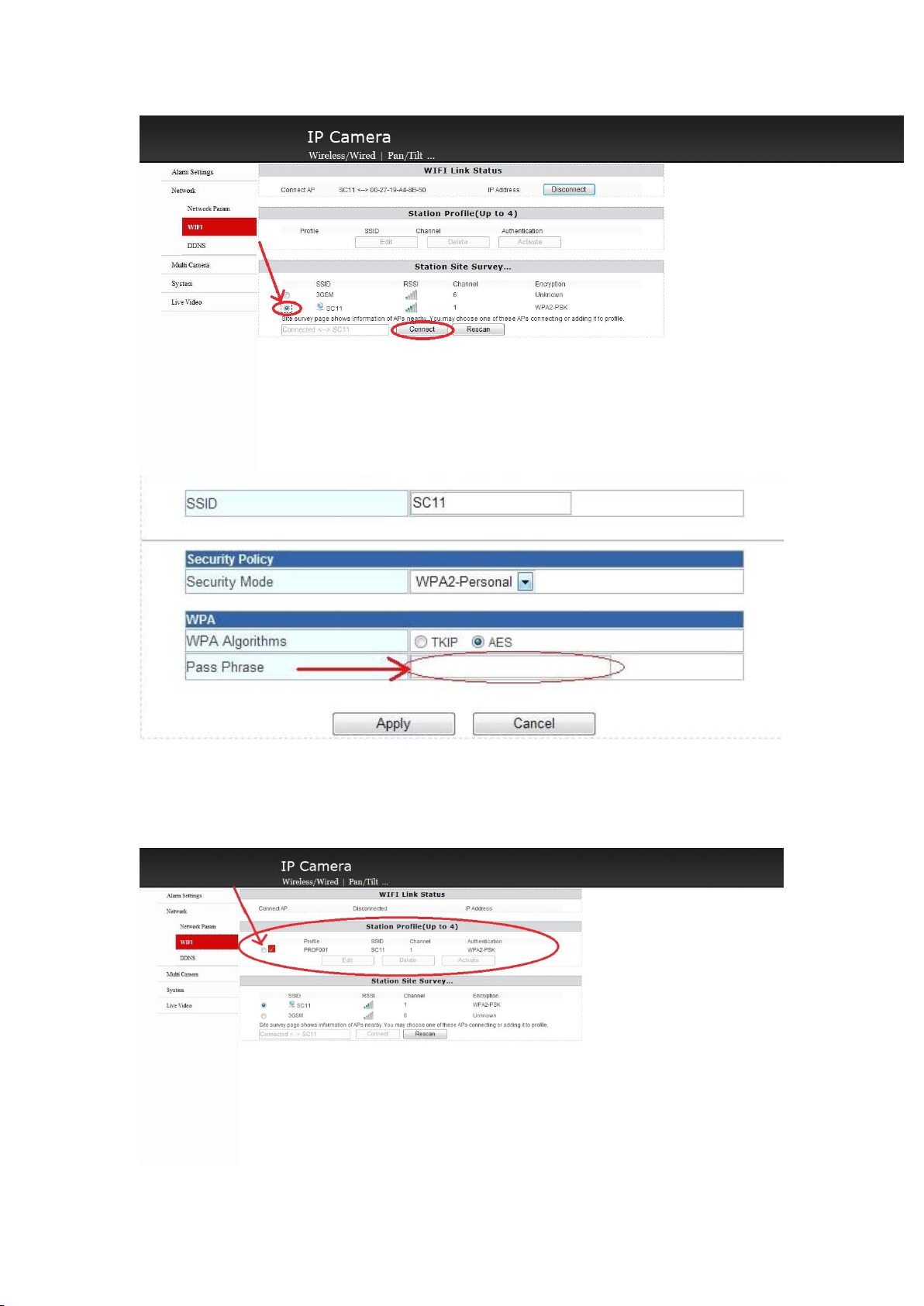
a、Clickscan,andyouwillseetheWifithere,chooseyourownWifiandconnectit.
b、ChoosetherightSecurityModeand
andthenentertheWifipassword,clickapplyandthenworks.
WPA
Algorithmsandthenyouwillseepassphrase
Page 13
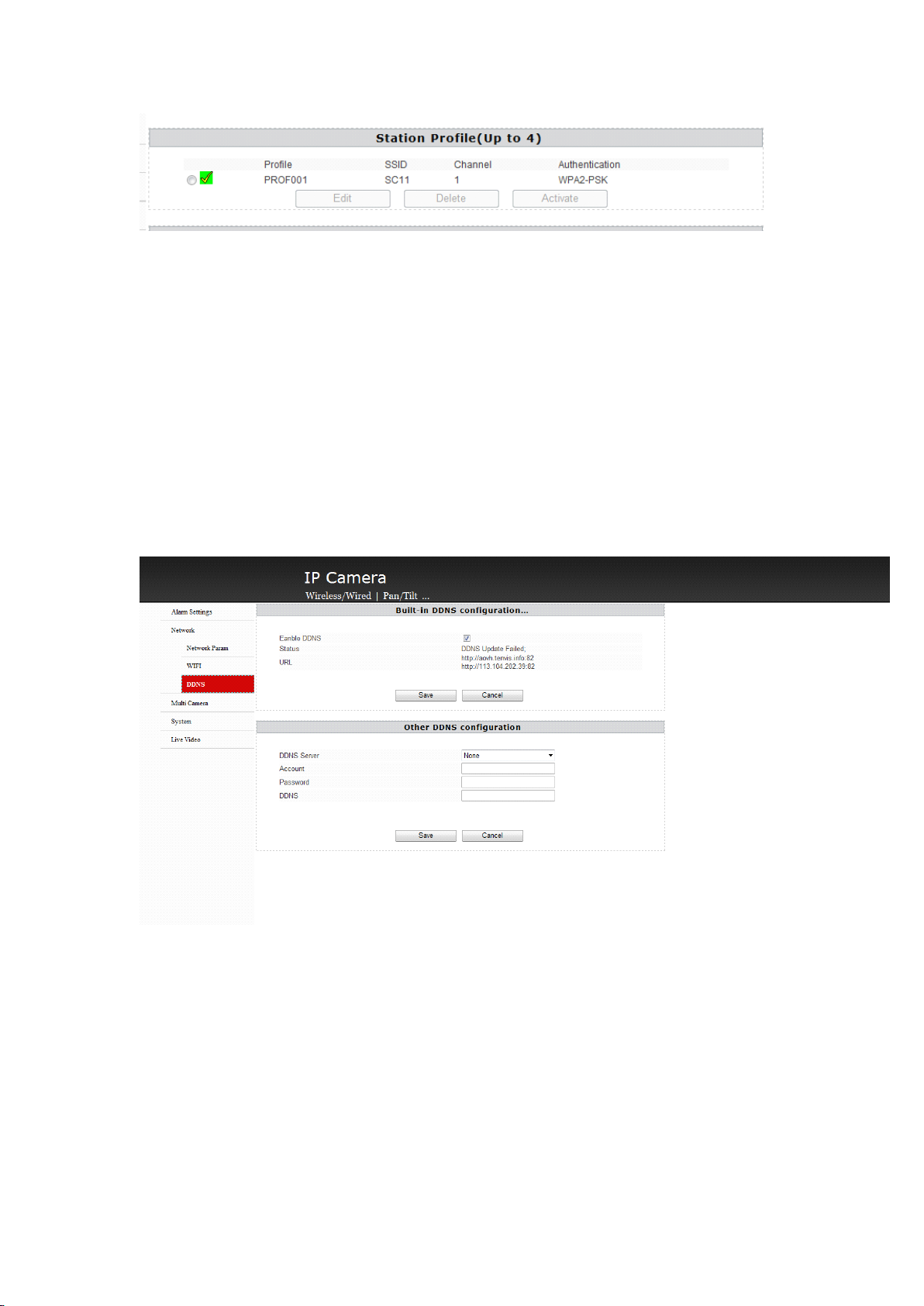
c.Ifdisconnect,itshowsredcircle,whensucceed,itshowsgreencircle.
d.Allthesettingsupsideneedbethesameasyousetonyourrouter,pleasecheckyouracesspoint
orthemanualbookoftheroutertocheckitorconsultthewebadministrator.
7.
DD NS
7.
DDNS
7.
7.DDNS
DDNS
Dynamicrealmnameisusedasastaticrealmnametovisitadynamicone.Whenyouaccessto
ISPnetwork,thedevicewillgetatemporarydynamicIPaddress,thedynamicrealnamewill
tracktheaddress.Eventheaddresschanged,youalsocoulduseastaticrealmtovisitthis
devicefromremote.
a、BuiltinDDNSiswhatweofferyouonthegiftbox,,usernameandthepasswords.
b、IfyouwanttosettingtheDDNSyourself,pleasesettingthemonthethirdpartDDNSsetting
areatoselecttherightseverandthenentertherightaccount,commandandrealmname.Save
itandthenworks.
c、Ifyouneedinternettovisitthecamera,pleaseopenUPNPoropentheportontherouter,you
couldrefertothemanualbookandalsoconsultthewebmaster.
8.
Mu lti-live
8.
Multi-live
8.
8.Multi-live
Multi-liveChannels
Ch annels
Channels
ChannelsSetting
Se tting
Setting
Setting
Page 14
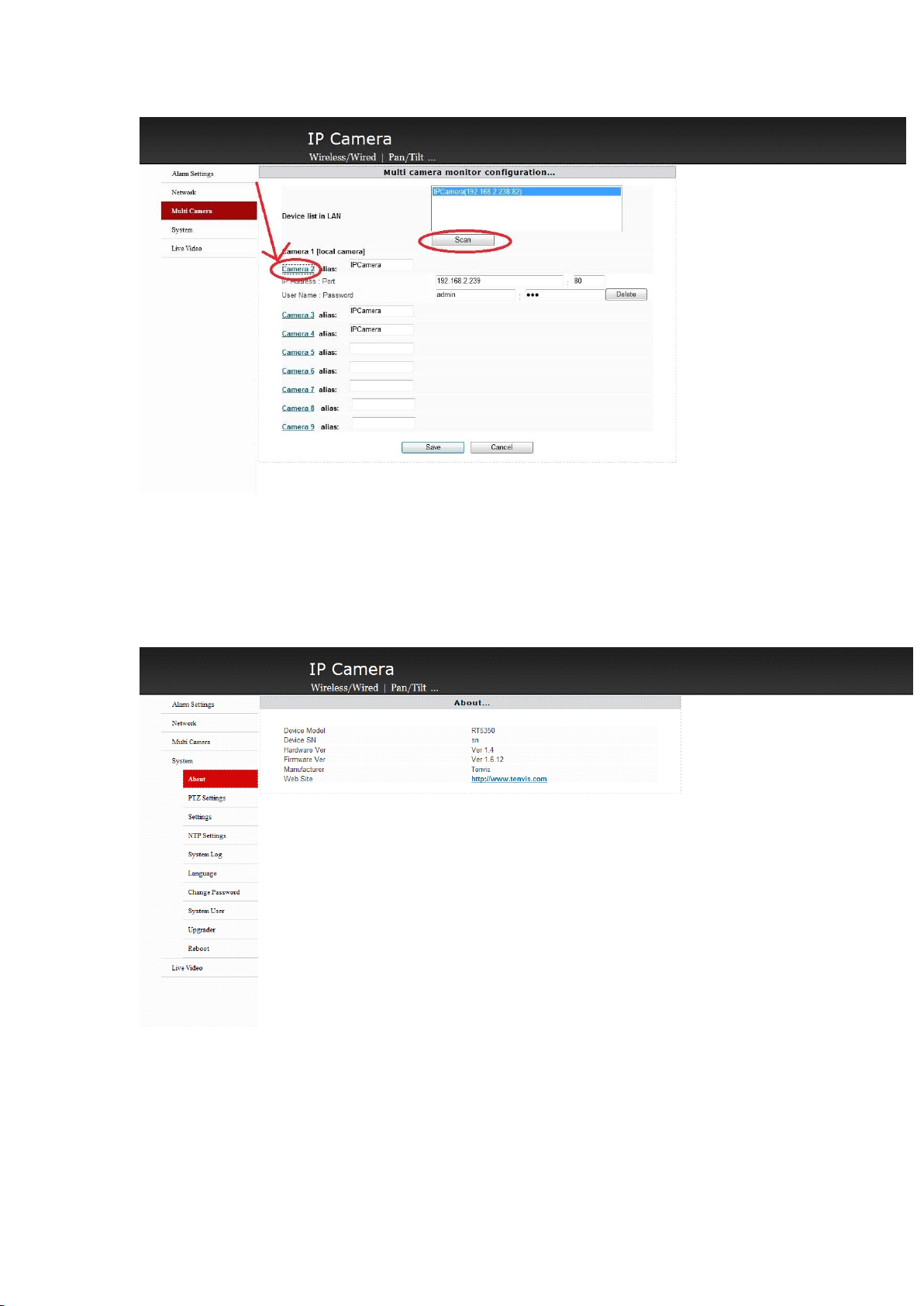
AddothercamerasandclicktheareathephotosshowsandentertherightIPAddressorrealm
name,port,username,password,andtheysaveit.
9.
Came ra
9.
Camera
9.
9.Camera
CameraBasic
Bas ic
Basic
BasicStatus
Statu s
Status
Status
You
couldclickthemultigraphicsthere.
Showdeviceinfo.
10.
PTZ
10.
P TZ
10.
10.PTZ
PTZSetting
Se tting
Setting
Setting
Page 15
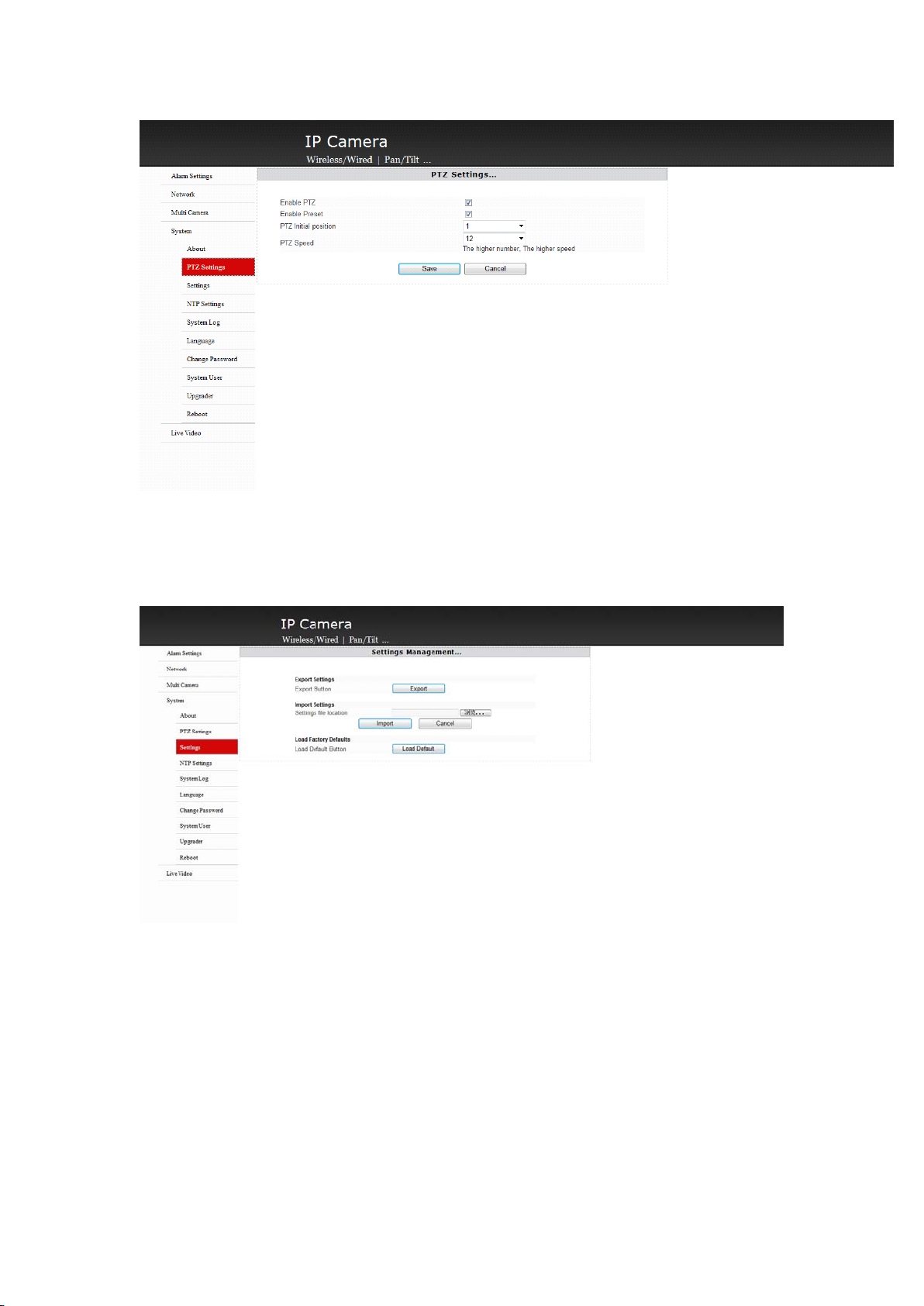
EnableordisablePTZfunction,presetposition,adjustPTZinitialpositionorPTZspeed.
11.
Sy stem
11.
System
11.
11.System
SystemSetting
a、Derivesettingcouldhelpyoumakethebackupfile
b、Lead-incouldchoosebackupfileandrecoverit.
c、Recoverthefactorysettingwouldemptyanysettingsyouhaveandcomebacktotheoriginal
factorydefault.
Se tting
Setting
Setting
12.
Ti me
12.
Time
12.
12.Time
TimeSetting
Se tting
Setting
Setting
Page 16
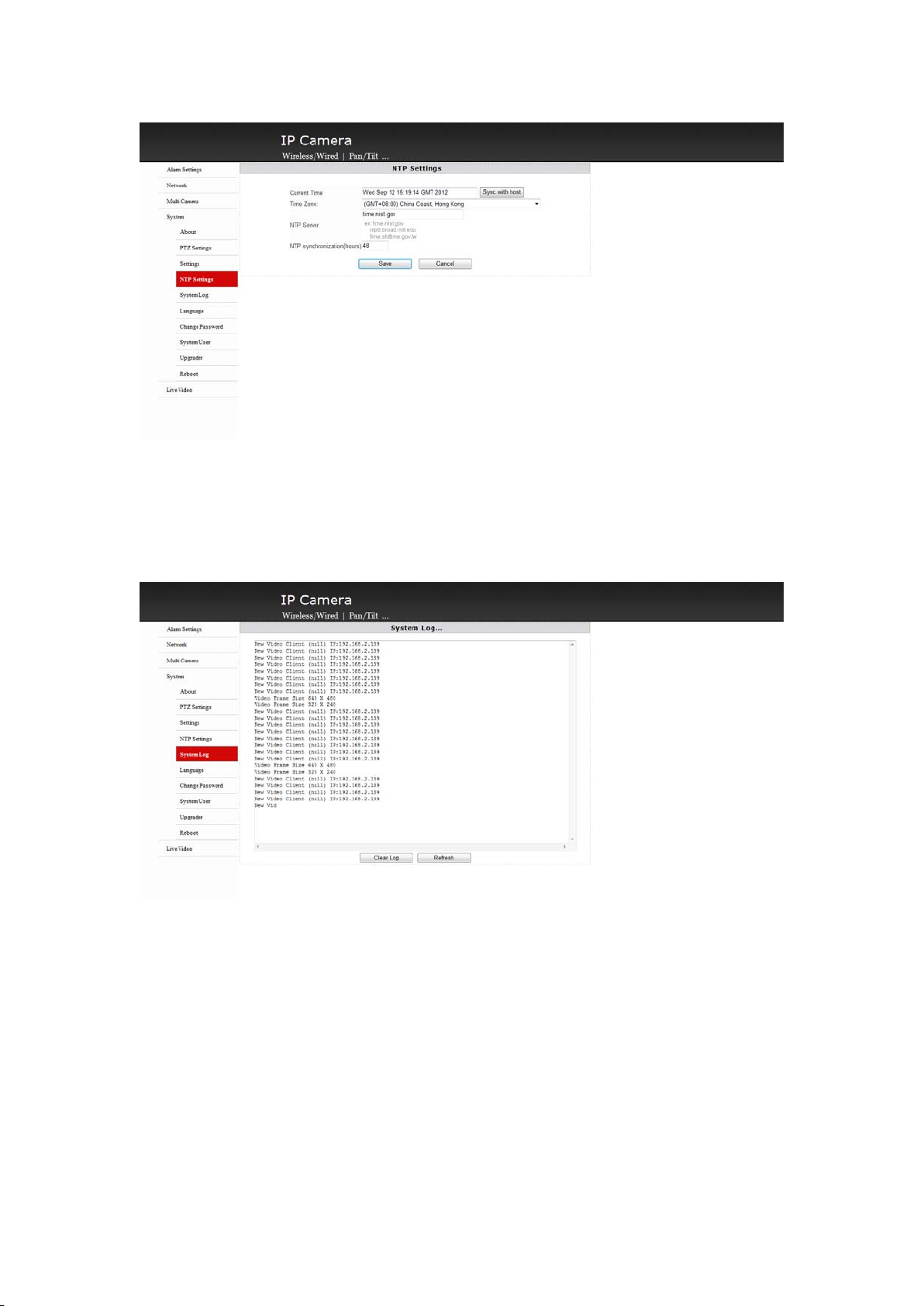
UsercouldchoosethetimeasthePC,youalsocouldchoosetimezone,internettimeandthe
adjustment.Clicksavetomakeitwork.
13.
Sy stem
13.
System
13.
13.System
SystemLog
Log
Log
Log
Checkthesystemlog.
14.
Sy stem
14.
System
14.
14.System
SystemLanguage
Lan guage
Language
Language
Page 17
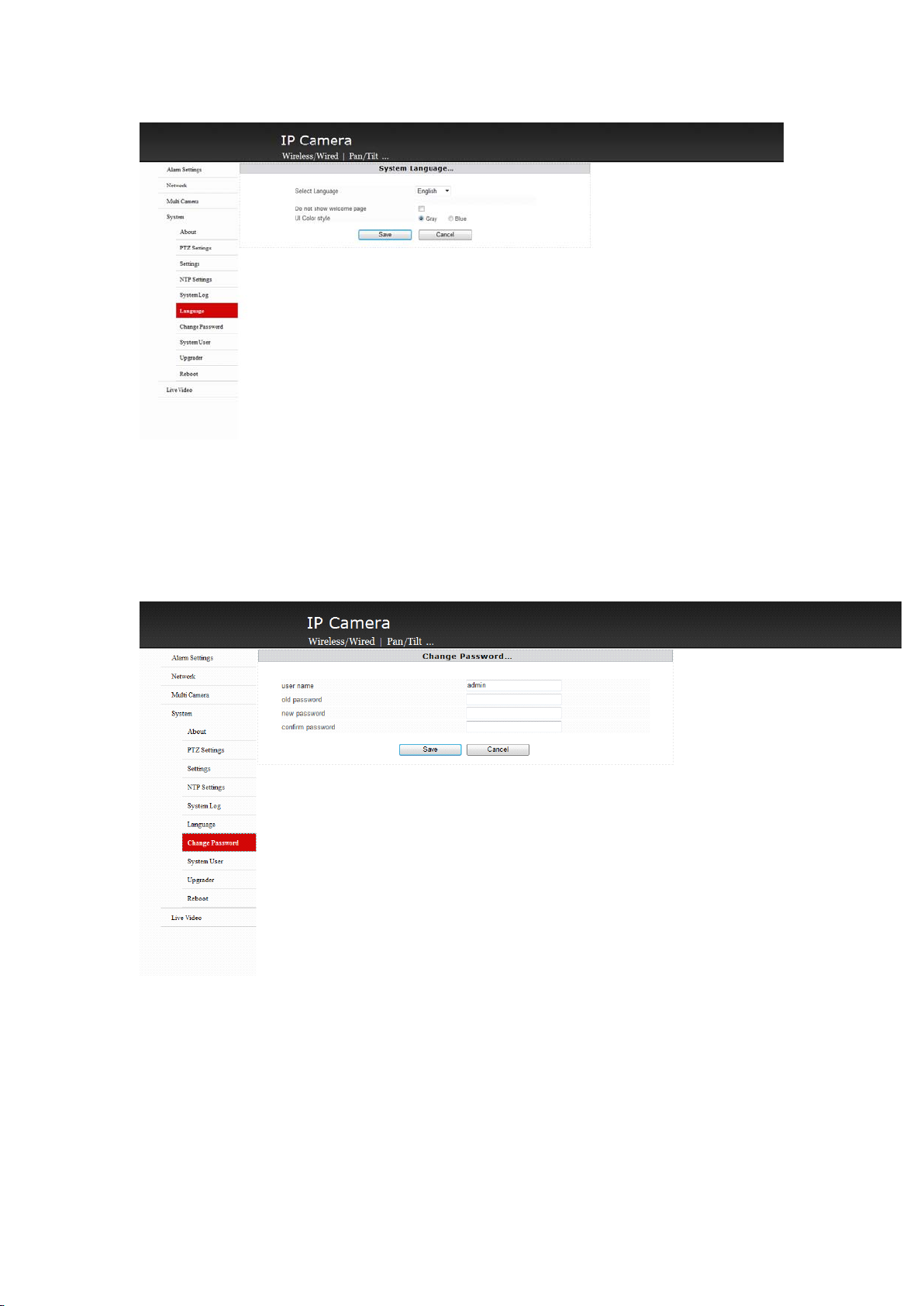
You
couldchoosetheoperationlanguageandoperationwindowasyouerchoice
15.
Mod ify
15.
Modify
15.
15.Modify
ModifyPassword
Pas sword
Password
Password
Modifycurrentpassword.
16.
Us er
16.
User
16.
16.User
UserManagement
Man agement
Management
Management
Page 18
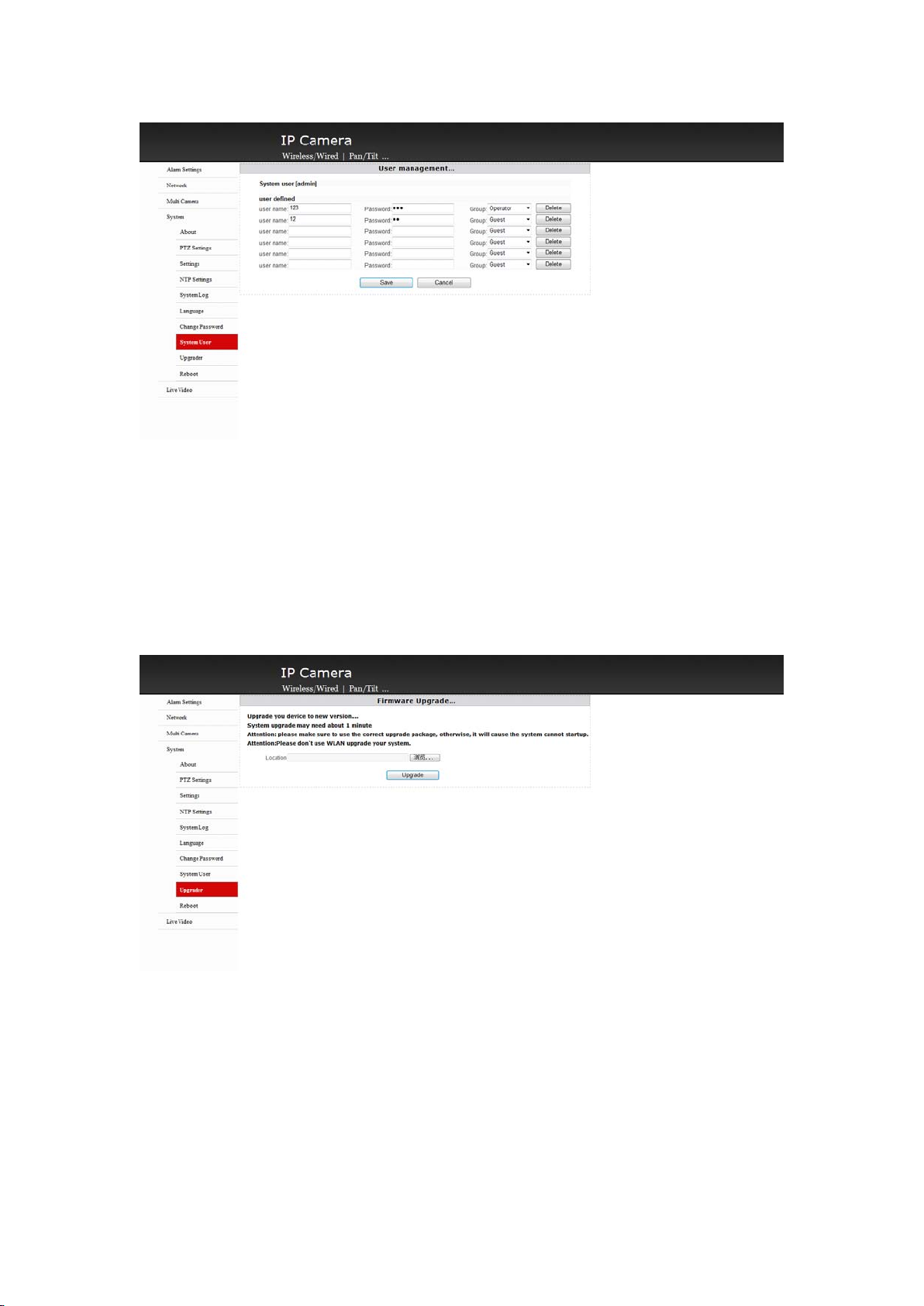
a.Administratorcouldoperate,add,canceltheuser
b.Therehave3authoritiesforthiscamera:Visitor,operator,administrator.
1.Visitor:Onlywatchcouldn’tdootheroperations.
2.Operator:OnlycouldWatch,controlthePAN/TILT.
3.Administrator:Couldwholecontrolofyourcamera.
17.
Fi rmware
17.
Firmware
17.
17.Firmware
FirmwareUpgrading
Up grading
Upgrading
Upgrading
Usercouldchooserightfirmwaretoupgradeyourcamera.
18.
Re boot
18.
Reboot
18.
18.Reboot
RebootSystem
Sy stem
System
System
Page 19
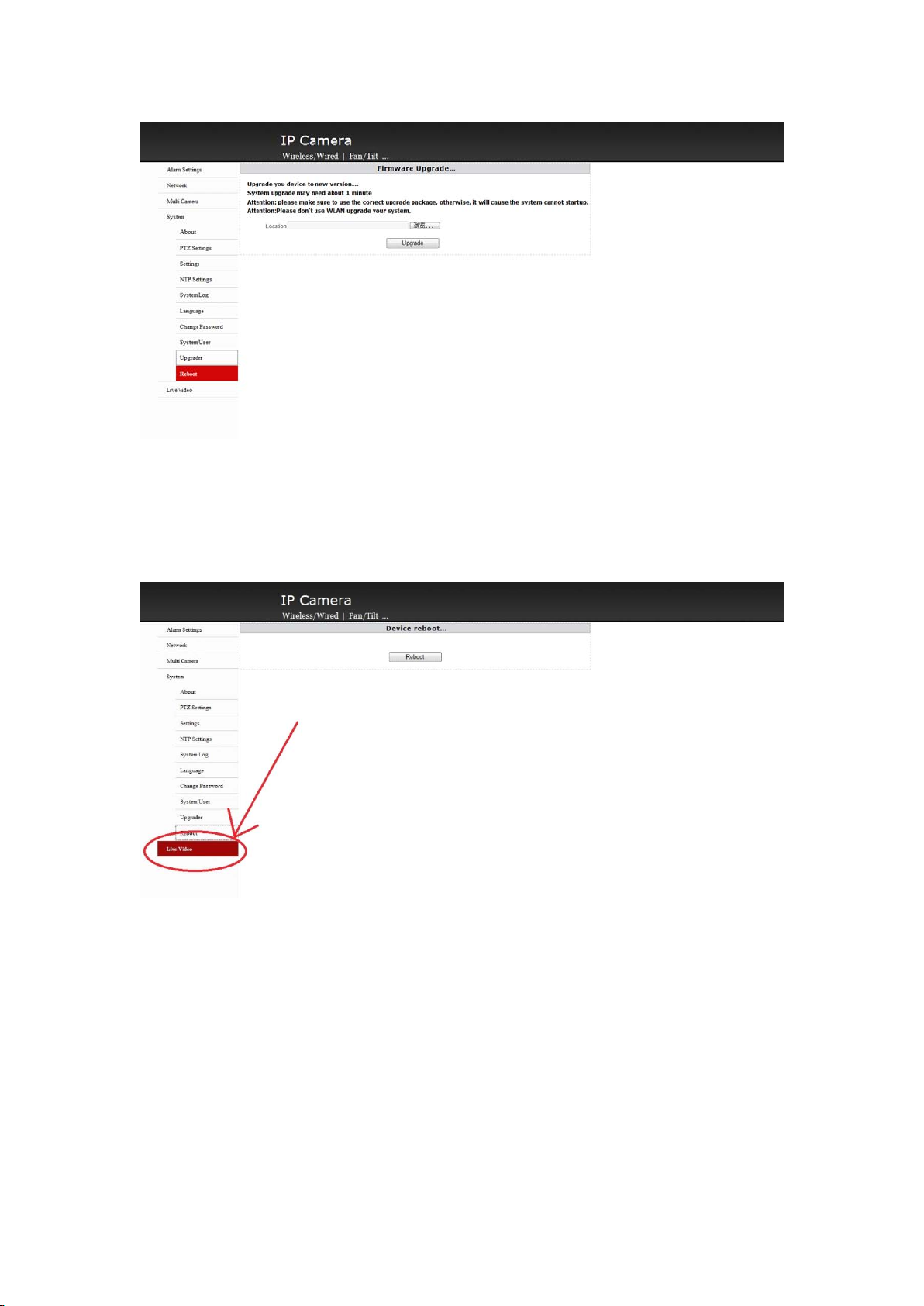
Clickrebootingbuttonandrebootthecamera
19.
R
eal
-
19.
19.
19.R
e al
eal-
ti me
-
time
-time
timeM
R
Real
M
oni toring
M
onitoring
Monitoring
onitoring
Clicktherealtimemonitoringandbacktothevideopage.
Page 20

F
CCSTATEMENT
1.ThisdevicecomplieswithPart15oftheFCCRules.
Operationissubjecttothefollowingtwoconditions:
(1)Thisdevicemaynotcauseharmfulinterference,and
(2)Thisdevicemustacceptanyinterferencereceived,includinginterferencethatmaycause
undesiredoperation.
2.Changesormodificationsnotexpresslyapprovedbythepartyresponsibleforcompliance
couldvoidtheuser’sauthoritytooperatetheequipment.
NOTE:Thisequipmenthasbeentestedandfoundtocomplywiththelimitsfora
ClassBdigitaldevice,pursuanttoPart15oftheFCCRules.Theselimitsare
designedtoprovidereasonableprotectionagainstharmfulinterferenceina
residentialinstallation.Thisequipmentgenerates,usesandcanradiateradio
frequencyenergyand,ifnotinstalledandusedinaccordancewiththe
instructions,maycauseharmfulinterferencetoradiocommunications.However,
thereisnoguaranteethatinterferencewillnotoccurinaparticularinstallation.
Ifthisequipmentdoescauseharmfulinterferencetoradioortelevisionreception,
whichcanbedeterminedbyturningtheequipmentoffandon,theuseris
encouragedtotrytocorrecttheinterferencebyoneormoreofthefollowing
measures:
--Reorientorrelocatethereceivingantenna.
--Increasetheseparationbetweentheequipmentandreceiver.
--Connecttheequipmentintoanoutletonacircuitdifferent
fromthattowhichthereceiverisconnected.
--Consultthedealeroranexperiencedradio/TVtechnicianforhelp.
FCCRadiationExposureStatement:
ThisequipmentcomplieswithFCCradiationexposurelimitssetforthforanuncontrolled
environment.InordertoavoidthepossibilityofexceedingtheFCCradiofrequencyexposure
limits,Humanproximitytotheantennashallnotbelessthan20cm(8inches)duringnormal
operation.
 Loading...