

Page 1

T
BMX-SP
User Guide
www.nextwave.com ©2008 NextWave Wireless Inc All rights reserved.
Internal Use Only
www.nextwave.com ©2008 NextWave Wireless Inc All rights reserved.
Page 2

BMX-SPT User Guide
© 2008 NextWave Wireless Inc.
All Rights Reserved.
The information disclosed herein is confidential and the exclusive property of NextWave Wireless Inc. No part of this work may be reproduced in any
form or by any means, electronic, mechanical, photocopying, recording, scanning or otherwise, without the prior written permission of NextWave
Wireless Inc.
NextWave Wireless and the NextWave Wireless logo are trademarks of NextWave Wireless Inc. and/or its affiliates. All other trademarks, registered
trademarks, service marks or registered service marks are the property of their respective owner/s. Information in this document is subject to change
without notice. NextWave Wireless assumes no responsibility for any errors that may appear in this documen t.
www.nextwave.com ©2008 NextWave Wireless Inc. All rights reserved. 2
Page 3

BMX-SPT User Guide
Contents
READ THIS BEFORE OPERATING YOUR BMX-SPT...........................................................................................4
WELCOME ..................................................................................................................................................................6
1. How SPOT Works..............................................................................................................................................6
2. Getting Started....................................................................................................................................................7
3. Installing Batteries..............................................................................................................................................8
4. Using SPOT........................................................................................................................................................9
5. System Function and Indicators......................................................................................................................11
6. Care and Support.............................................................................................................................................12
NEXTWAVE BMX-SPT WIMAX MODEM...............................................................................................................15
1. WiMAX Mode....................................................................................................................................................15
2. SPOT Mode......................................................................................................................................................15
FEATURE SUMMARY..............................................................................................................................................16
HOW IT WORKS.......................................................................................................................................................17
SETUP........................................................................................................................................................................18
1. Setup Procedure...............................................................................................................................................18
2. Plug the dual USB cable into your PC host....................................................................................................19
3. Turning the Device On and Off........................................................................................................................20
SPECIFIC ABSORPTION RATE (SAR) STATEMENT............................ERROR! BOOKMARK NOT DEFINED.
www.nextwave.com ©2008 NextWave Wireless Inc. All rights reserved. 3
Page 4

BMX-SPT User Guide
Read this bef ore operating your BMX-SPT
Your BMX-SPT contains a WiMAX modem to allow wireless Internet access through the su pplied USB cable
connected between your BMX-SPT and PC. It also contains a SPOT Satellit e Personal Tracker. When connecting the
USB cable to a laptop or PC, the SPOT will be di sabled and ca nnot be used for se nding help or 911 messages. When
sending a help, 911, or text message, be sure to di sconnect the lapt op or PC from the supplied USB ca ble.
The first part of this User Guide explains the SPOT op eration, the second pa rt explains the WiMAX Intern et access
operation.
The WiMAX modem draws power from the laptop or PC power source by way of the USB cable. It also charges the
BMX-SPT rechargeable battery depending on power availability.
Regulatory Information – Declaration of Conformity
Trade Name: ORC 2008
Model Number: BMX-SPT
Responsible Party: NextWave Wireless I nc.
Address: 3611 Valley Centre Drive, San Diego CA 92130
Telephone: 858-480-0540
This device complies with part 15, part 25, and part 27 of the FCC rules listed in the Code of Fede ral Regulatio ns
Title 47. Changes or modifications not expressly app roved by the part y responsible f or compliance could void the user' s
authority to operate the equipment.
Operation is subject to the following two cond itions: (1) This device may not cause harmful interfere nce and (2) this
device must accept any interference receiv ed, including i nterference that may ca use undesired op eration.
In order to comply with FCC RF Exposure requirements, when used in WiMAX mode, a mi nimum separati on distan ce
of 20 cm must be maintained between thi s device and all persons.
Note: This equipment has been tested and found to comply with the limits for a Class B digital device, pursuant to part 15 of
the FCC Rules. These limits are designed to provide reasonable protection against harmful interference in a residential
installation. This equipment generates, uses and can radiate radio frequency energy and, if not installed and used in
accordance with the instructions, may cause harmful interference to radio comm unications. However, there is no guarantee
that interference will not occur in a particular installation. If this equipment does cause harmful interference to radio or
television reception, which can be determined by turning the equipment off and on, the user is encouraged to try to correct
the interference by one or more of the following measures:
—Reorient or relocate the receiving antenna.
—Increase the separation between the equipment and receiver.
—Connect the equipment into an outlet on a circuit different from that to which the receiver is connected.
—Consult the dealer or an experienced radio/TV technician for help.
www.nextwave.com ©2008 NextWave Wireless Inc. All rights reserved. 4
Page 5

BMX-SPT User Guide
Note
This equipment has been tested and found to comply wi th the limits for a Class B digital device, pursuant to P art 15,
Part 25 and Part 27 of CFR Title 47.These limits are designed to provide reasonable protection against harmful
interference in a typical environment.
For the State of California, USA Only
Perchlorate Material: Lithium batteries may contains pe rchlorate. Special handl ing may apply: see
www.dtsc.ca.gov/hazardouswaste/perchlorate
www.nextwave.com ©2008 NextWave Wireless Inc. All rights reserved. 5
Page 6
BMX-SPT User Guide
WELCOME
The great outdoors can be a big, uncertai n place. But you’ve j ust purchased the most peace of mind av ailable for the
active outdoor adventurer or smartly-prepa red individual.
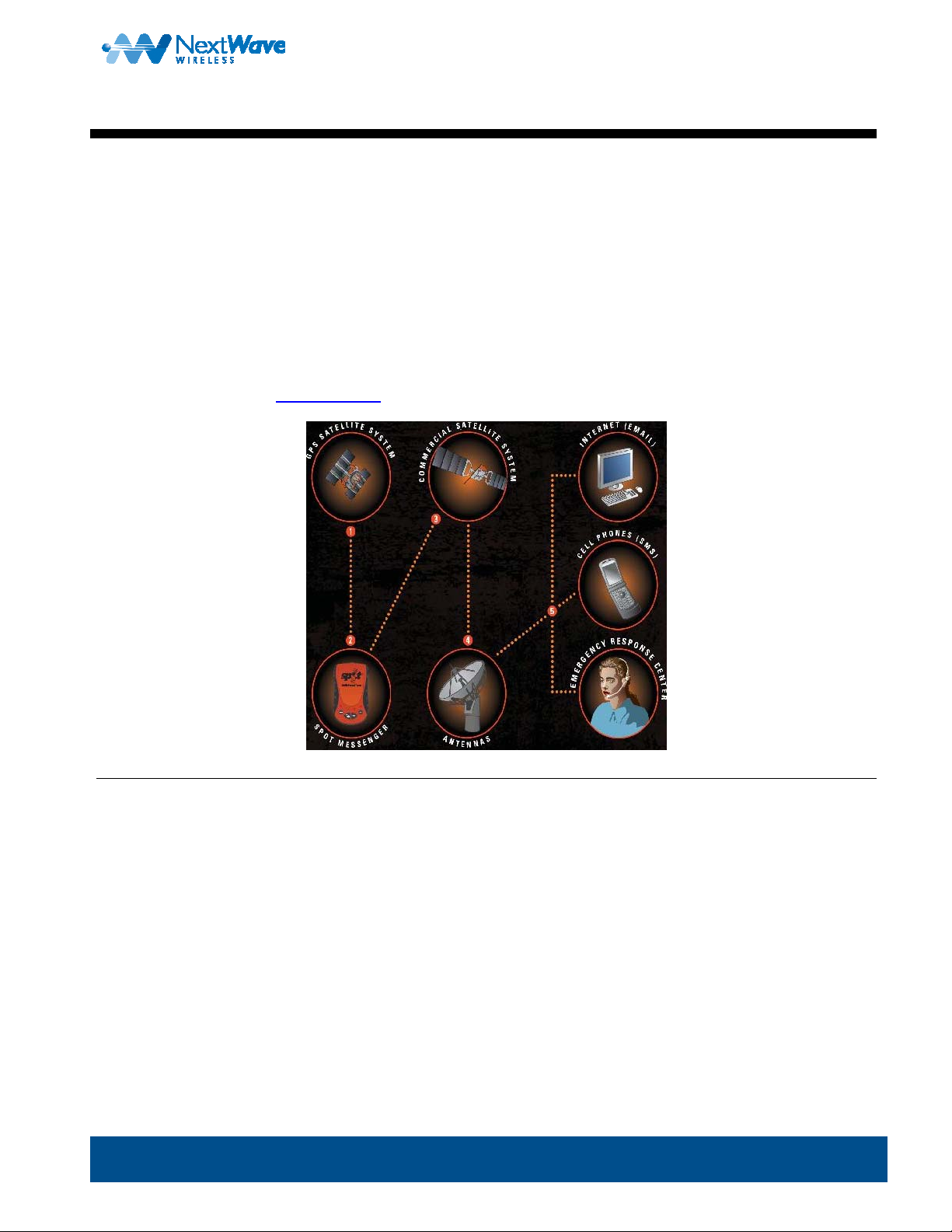
SPOT is the world’s first satellite messenger, using the GPS satellite system to determine your location and
communications satellites to transmit that information to the chosen recipient. SPOT gives you and your loved ones
peace of mind by allowing you to notify them or a GEOS international 9-1-1 Emergency Response Center of your exact
location via Google Maps™, and to send for assi stance in time of ne ed around the world, com pletely inde pendent of
cellular phone or other land-based radio covera ge.
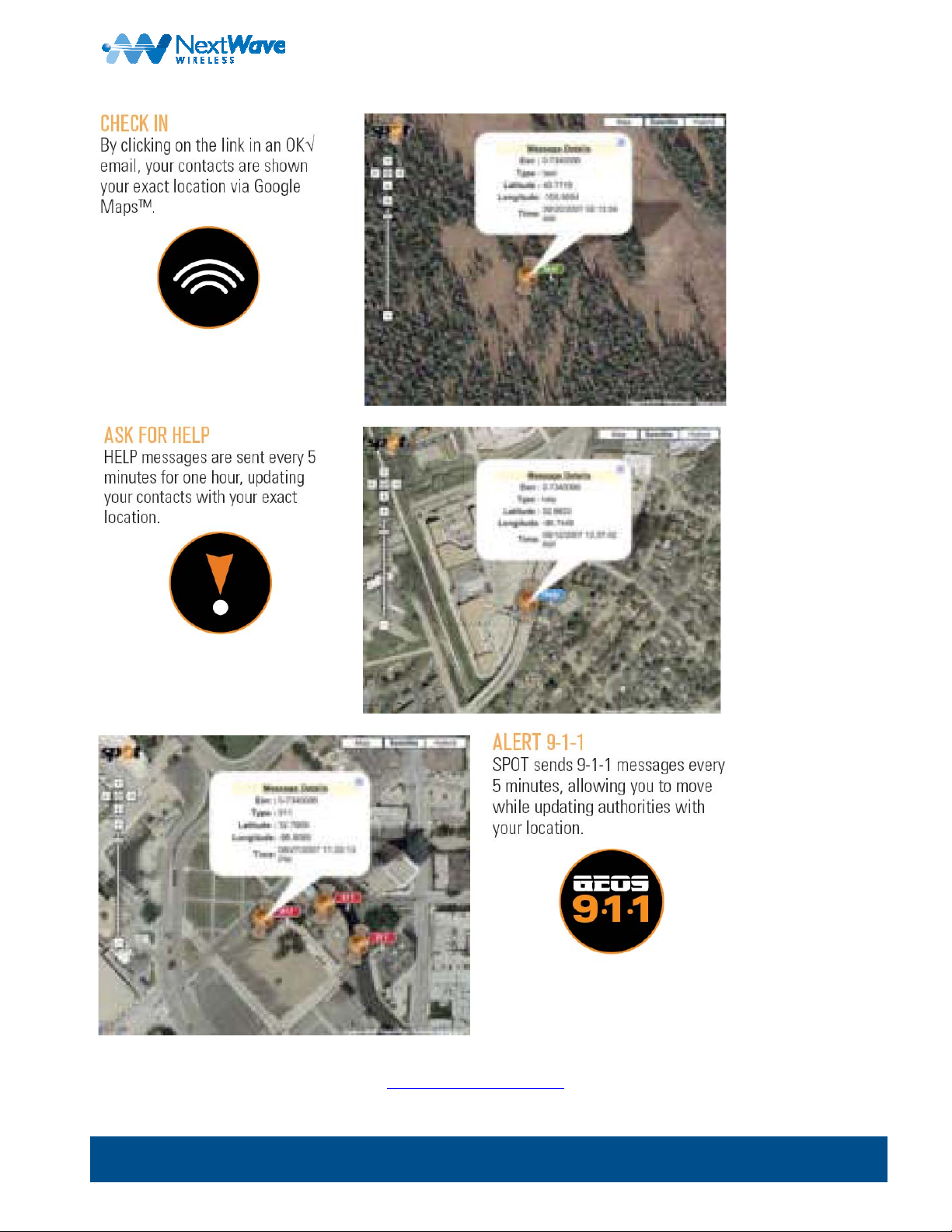
To begin using SPOT, visit
findmespot.com to select a service plan and activate.
1. How SPOT Works
X GPS satellites provide coordinates.
Y SPOT messenger’s onboard GPS chi p determines yo ur exact coordinates and sends your locati on and message to
the SPOT satellite system.
Z SPOT commercial satellites relay your messag e to specific satellite antennas around t he world.
[ Satellite antennas and suppo rting equipment route your message and location to t he appropriate network.
\ Your message is deliv ered according to your instructions via text message, email or emergency notification via the
response center.
Powered by Google Maps™, Google
www.nextwave.com ©2008 NextWave Wireless Inc. All rights reserved. 6
Page 7
BMX-SPT User Guide
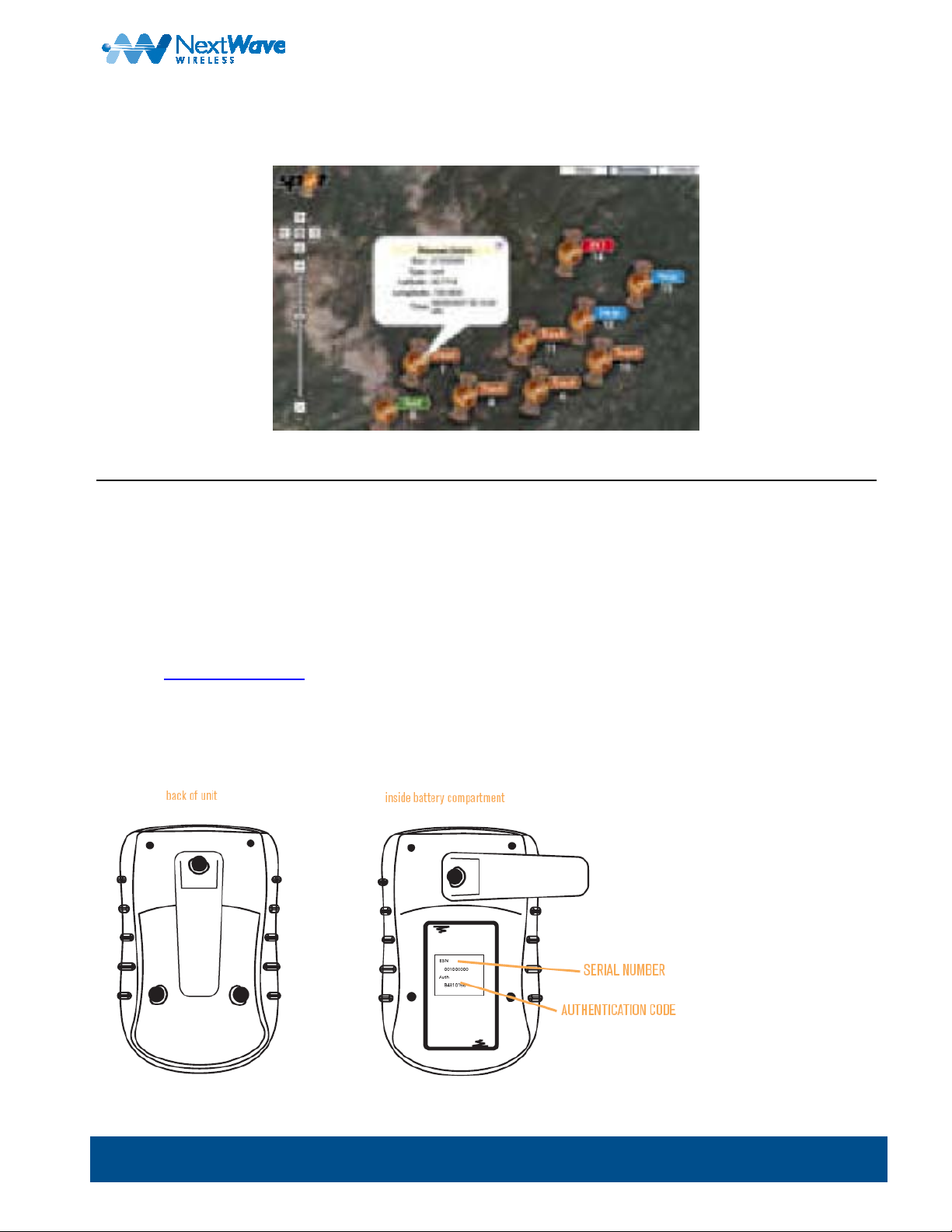
When SPOT sends a text or email message to one of your contacts or to a GE OS International 9-1- 1 Emergency
Response Center, it includes your exact coordinates and a web link to view your l ocation using G oogle Maps™.
2. Getting Started
Your SPOT comes with the following:
• SPOT satellite messenger
• Rechargeable lithium batteries
• Special dual USB cable
• User’s Guide
Log on to
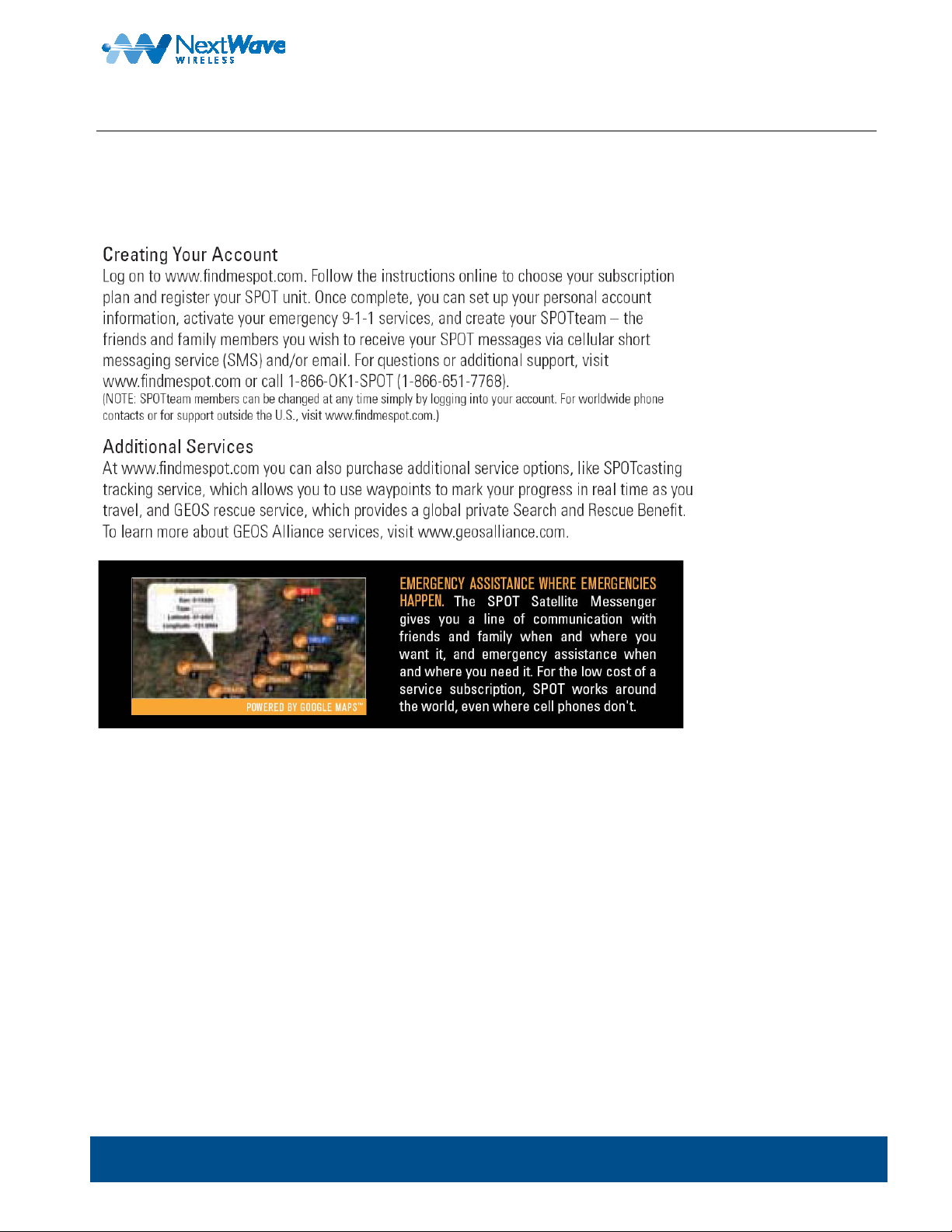
www.findmespot.com to register your SPOT messenger and activate your service. To do so, you need to
have the following available:
• Personal information
• Credit card information
• SPOT unit serial number and 8-digit authentication code located in the battery com partment
www.nextwave.com ©2008 NextWave Wireless Inc. All rights reserved. 7
Page 8
BMX-SPT User Guide
3. Installing Batteries
The BMX-SPT comes with a rechargeable Lithium Ion battery and will not need installati on, the battery will be charged
when connected to a Personal compute r through the supplied USB cable.
www.nextwave.com ©2008 NextWave Wireless Inc. All rights reserved. 8
Page 9
BMX-SPT User Guide
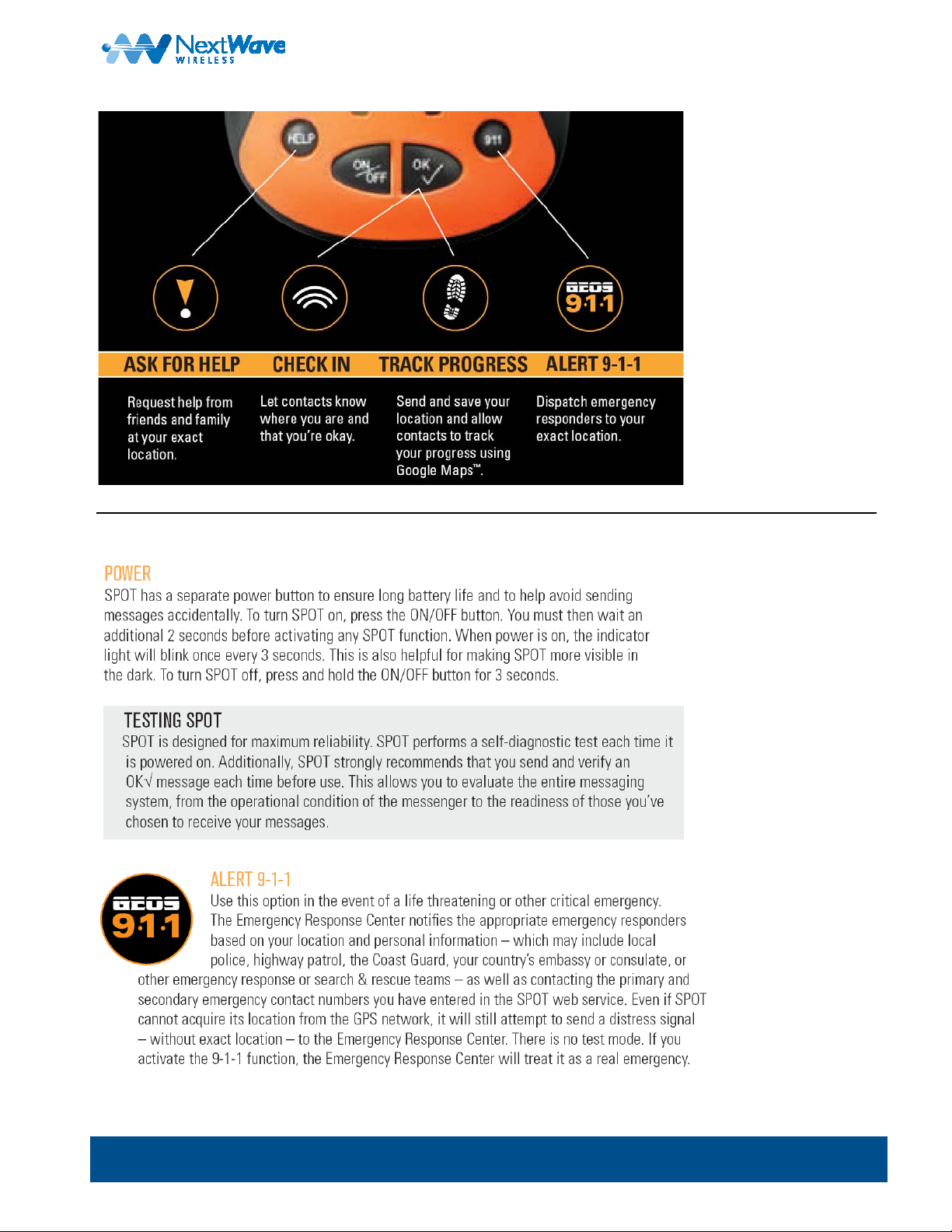
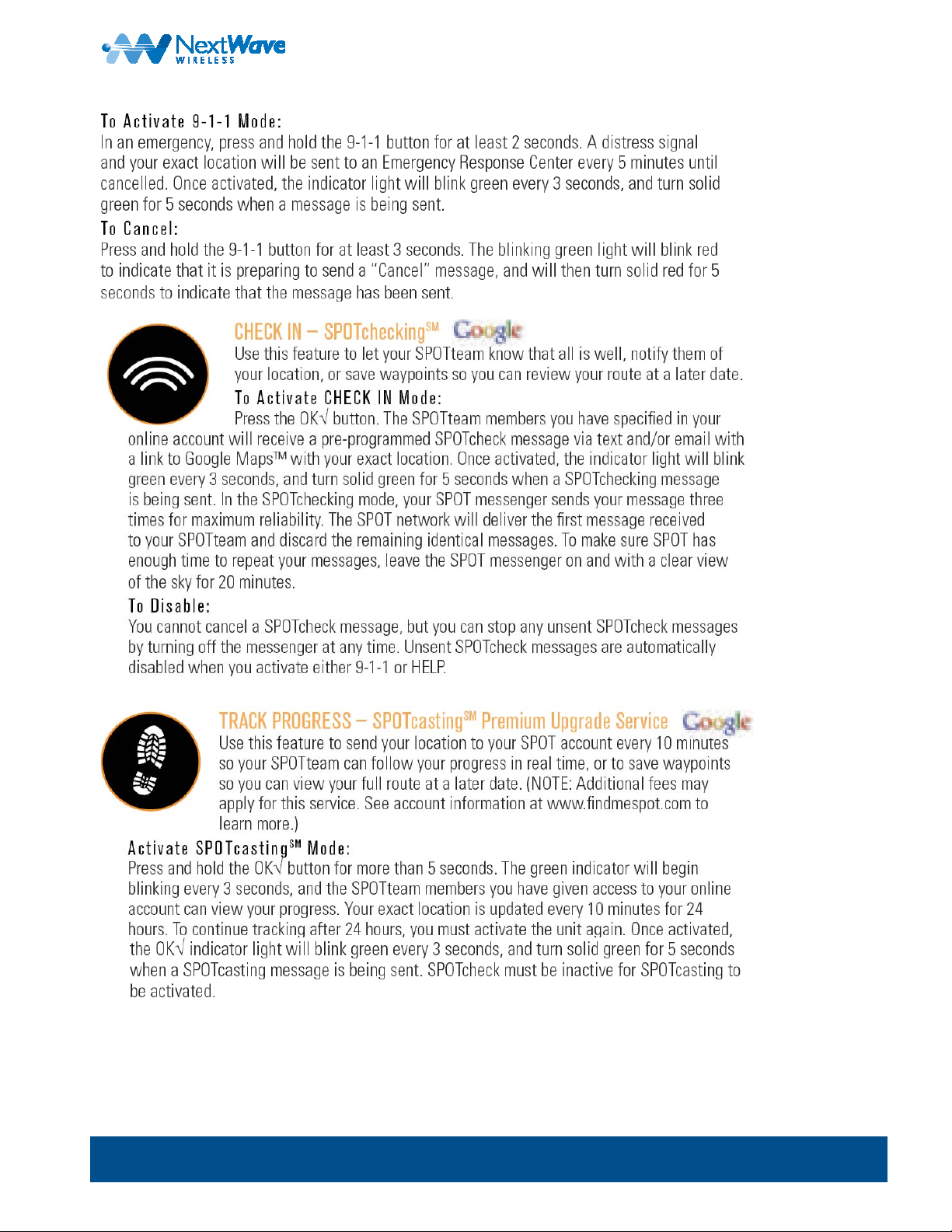
4. Using SPOT
www.nextwave.com ©2008 NextWave Wireless Inc. All rights reserved. 9
Page 10
BMX-SPT User Guide
www.nextwave.com ©2008 NextWave Wireless Inc. All rights reserved. 10
Page 11
BMX-SPT User Guide
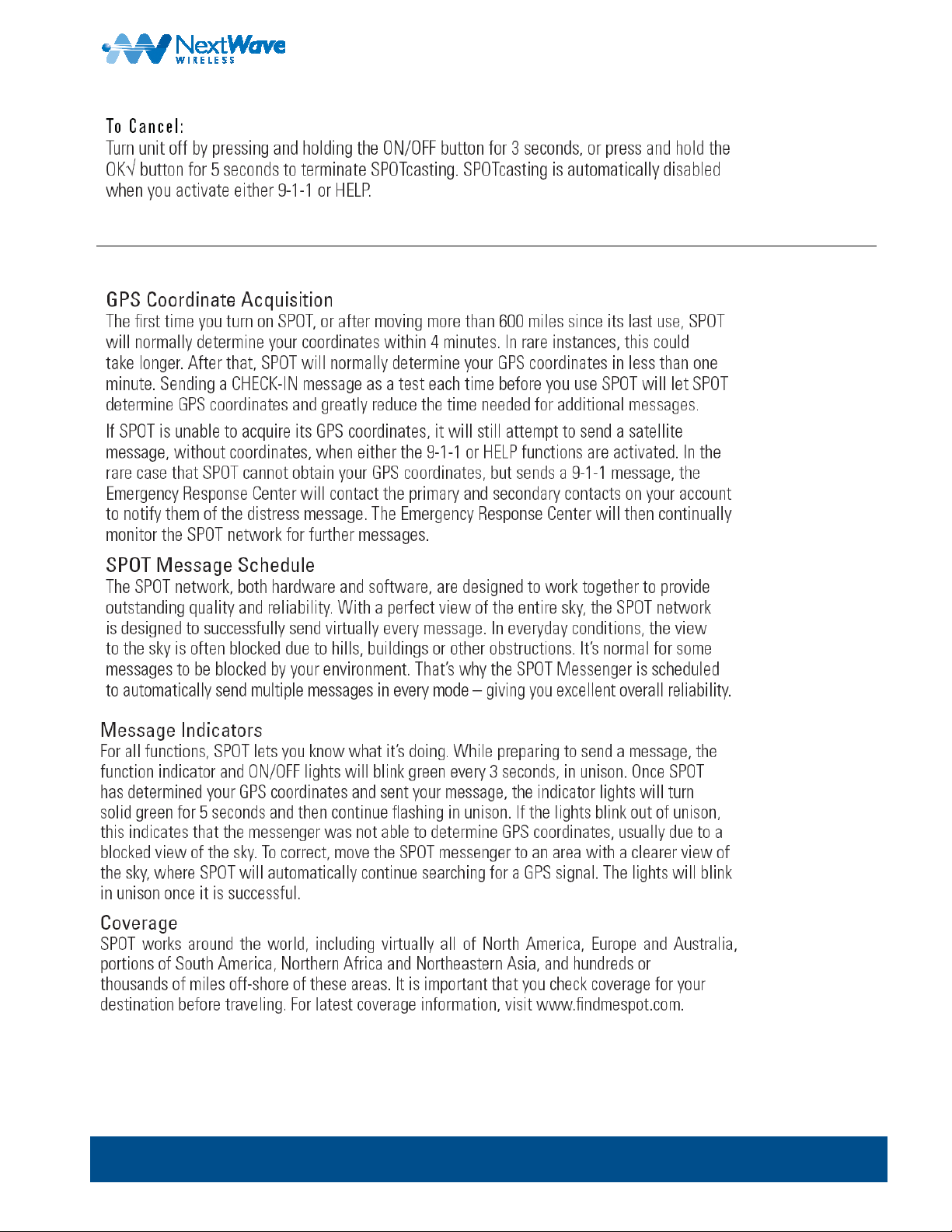
5. System Function and Indicators
www.nextwave.com ©2008 NextWave Wireless Inc. All rights reserved. 11
Page 12
BMX-SPT User Guide
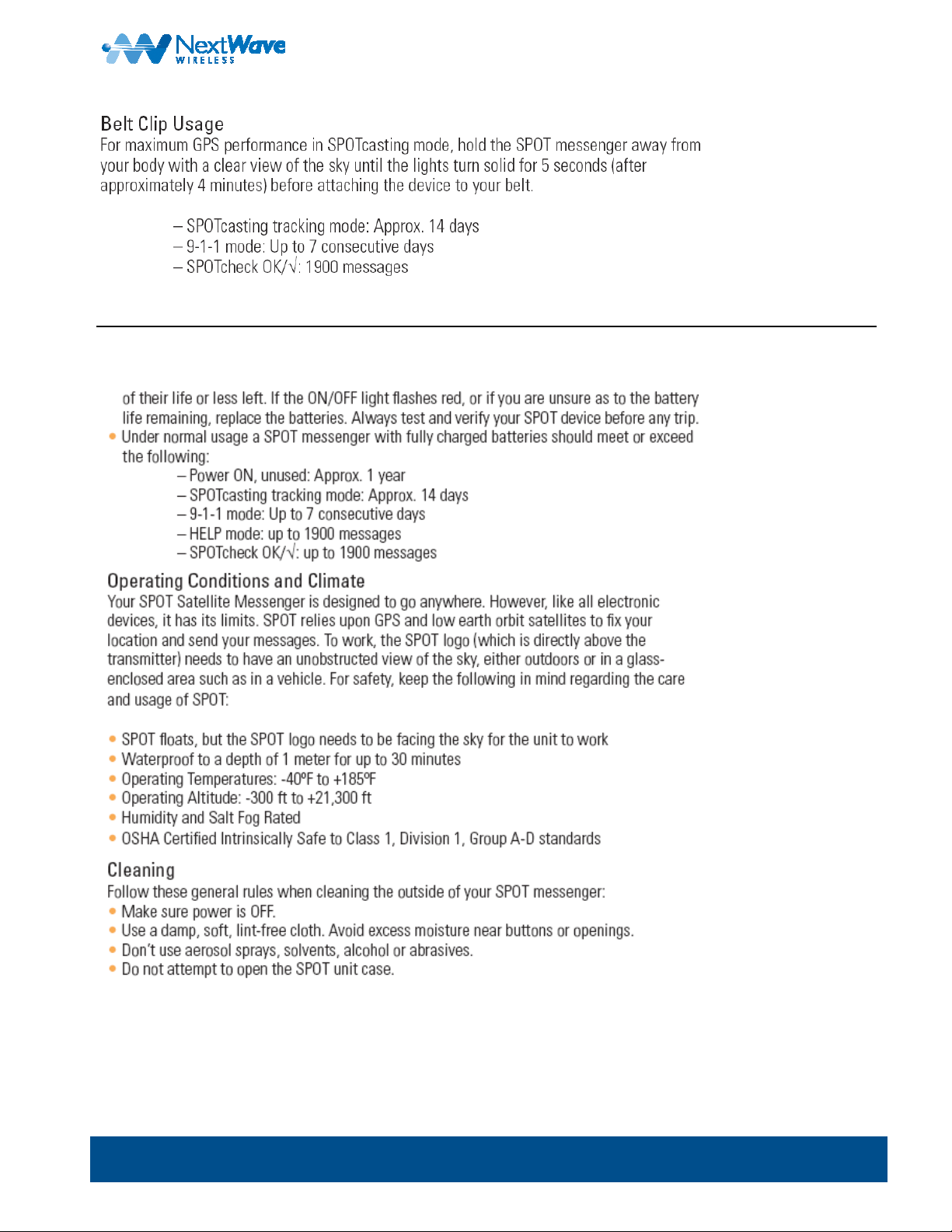
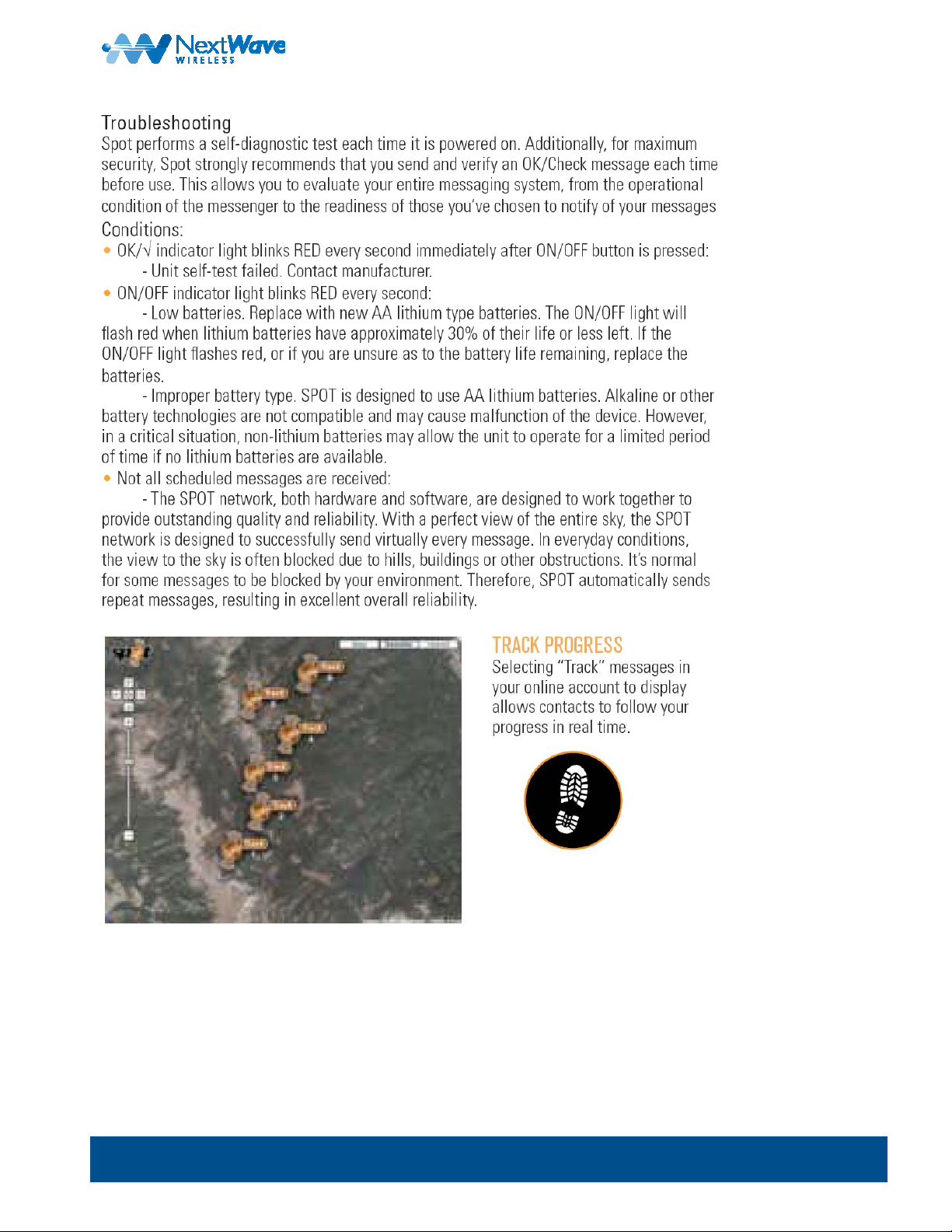
6. Care and Support
www.nextwave.com ©2008 NextWave Wireless Inc. All rights reserved. 12
Page 13
BMX-SPT User Guide
www.nextwave.com ©2008 NextWave Wireless Inc. All rights reserved. 13
Page 14
BMX-SPT User Guide
For additional questions or support: Visit
www.nextwave.com ©2008 NextWave Wireless Inc. All rights reserved. 14
http://www.findmespot.com or call 1-866-OK1-SPOT (1-866-651-7768).
Page 15
BMX-SPT User Guide
Next
The NextWave BMX-SPT device is a highly-integrated WiMAX modem and a SPOT Personal Satellite Tracker in a
single unit. The device can be used to connect a user to a high-speed Internet connection using WiMAX, or it can
provide the full functionality of the SPOT Satellite Personal Tracker.
Note: Don’t worry about draining the SPOT batteries while u sing the Internet becau se the WiMAX power i s taken
Wave
from the PC through the supplied special dual USB cab le. Do not use a ny other USB cable with the BMXSPT.
BMX-SPT WiMAX Modem
1. WiMAX Mode
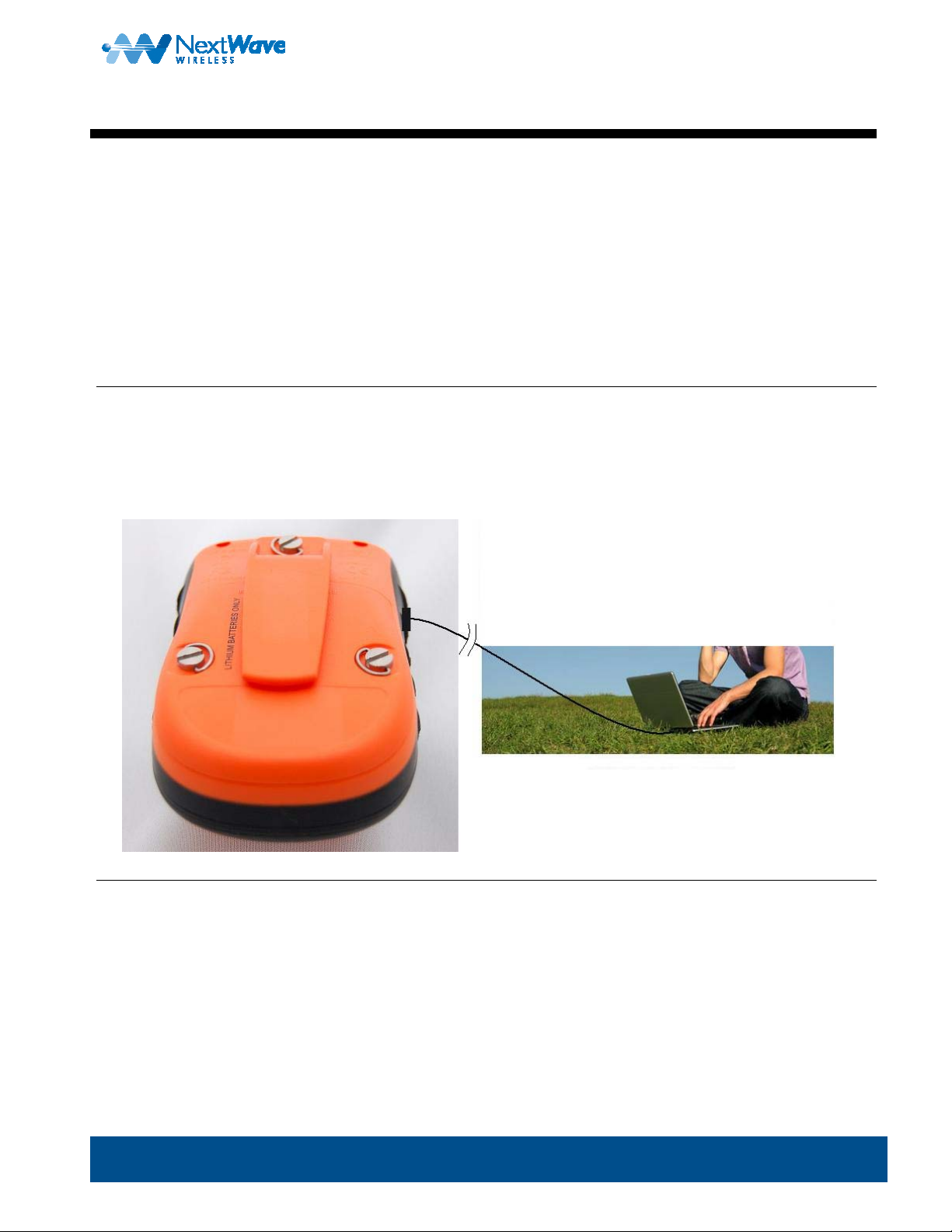
In WiMAX mode, your BMX-SPT is used as a cabled modem device for your p ersonal computer to access the internet.
Note: The WiMAX transmitter and Internet connections function only when a USB cab le is attached to th e laptop or
PC. Use only the supplied dual USB cable with the BMX-SPT device.
2. SPOT Mode
When the device is used in SPOT mode, the full functi onality of the SPOT devi ce is allowed.
Note: The WiMAX function is powered off in this mode and cannot be used by design. The WiMax function
automatically turns off when the USB cable is not connected to a pe rsonal computer.
www.nextwave.com ©2008 NextWave Wireless Inc. All rights reserved. 15
Page 16

BMX-SPT User Guide
Fea ture Summary
The following list summarizes the key features and characteristics of the BMX-SPT multi-mode modem product:
WiMAX Features
• Internally powered from the supplied USB cable usin g two USB ports
• Provides up to 12 Mbps data rate using standard WiMAX technology
• Internal antenna system for simplest de sign and use
• Simple setup using standard USB drivers on yo ur PC
SPOT Features
• Simple 4-button interface
• Provides satellite reporting of your current GPS lo cation
• Simple Web interface setup
• Up to 5 years on a single battery in standby mode
Physical Characteristics and Operating Conditions
• Belt clip for easy carrying.
• Operating temperature range: -30 °C to +85 °C
www.nextwave.com ©2008 NextWave Wireless Inc. All rights reserved. 16
Page 17

BMX-SPT User Guide
How It Works
The BMX-SPT (ORC 2008) unit is a wireless Internet a ccess modem that you connect to you r laptop or deskt op
computer for high-speed Internet access through the Open Range Communication WiMAX Network. In this mode it is
used for high-speed data connections. It can also track your location
move, in the Satellite Tracker mode.
When connected to a personal com puter with the su pplied USB cable, th e device can provide a high-spee d wireless
connection for Internet access. Authentication is performed via a simple connection manager and setup routine.
When the SPOT unit detects that the USB has be en disconne cted from a Personal Compute r, the SPOT unit turns on
and is powered by the internal rechargeable batt ery. When in SPOT m ode, the BMX-SPT operates as a SPOT
Satellite Personal Tracking device and the WiMax module is turned off. In WiMAX m ode, the BMX-SPT runs on
electricity drawn from the USB ports of a personal com puter, and can also cha rge the battery de pending on po wer
needs of the WiMax module. The battery will be charged from the USB power of a laptop or desktop computer and will
not need to be changed.
and notify friends and family when you a re on the
www.nextwave.com ©2008 NextWave Wireless Inc. All rights reserved. 17
Page 18
BMX-SPT User Guide
Setup
The ORC 2008 comes with the followin g accessori es:
• USB Cable: supplied for connection to t he users laptop or PC using dual USB p orts
• Main Unit: Fully assembled with SPOT and WiMax modules a nd single batt ery.
• Battery: Lithium Ion rechargeable batte ry
• Installation CD: Installation disk for Windows XP Service pack 2 fo r the WiMAX modem driv ers and set up
• SPOT User Manual: The SPOT user manual for setup and operation
1. Setup Procedure
To set up the BMX-SPT (i.e., load all the necessary drivers and setup routin es for the PC interf ace to the WiMAX
Modem), do the following:
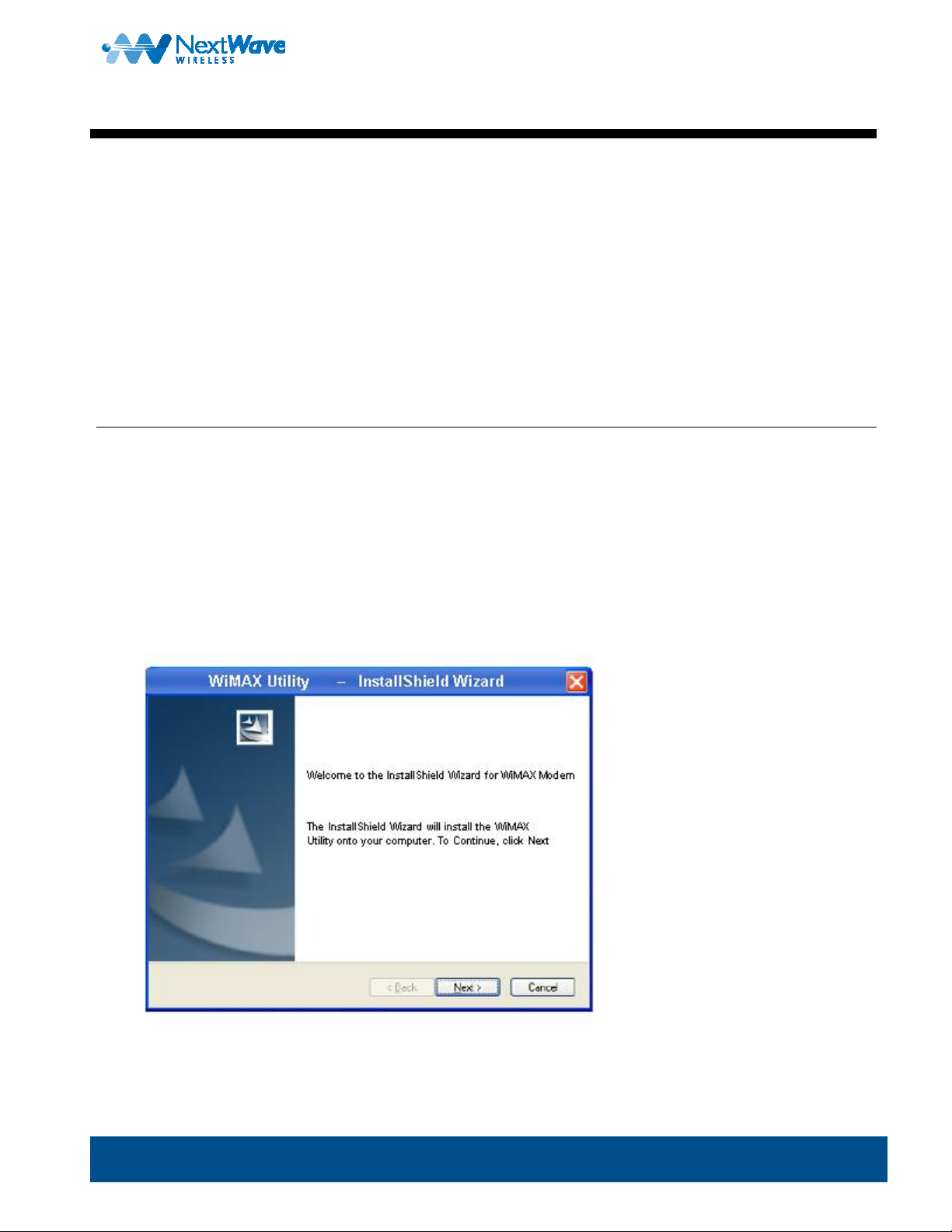
1. Insert installation disk into DVD drive
2. Please insert the supplied CD into your comp uter’s CD-ROM and follo w the onscreen inst ructions to inst all the
Software.
Please make sure you have the settings that were sup plied with your WiM ax modem during the rest of the installatio n.
www.nextwave.com ©2008 NextWave Wireless Inc. All rights reserved. 18
Page 19
BMX-SPT User Guide
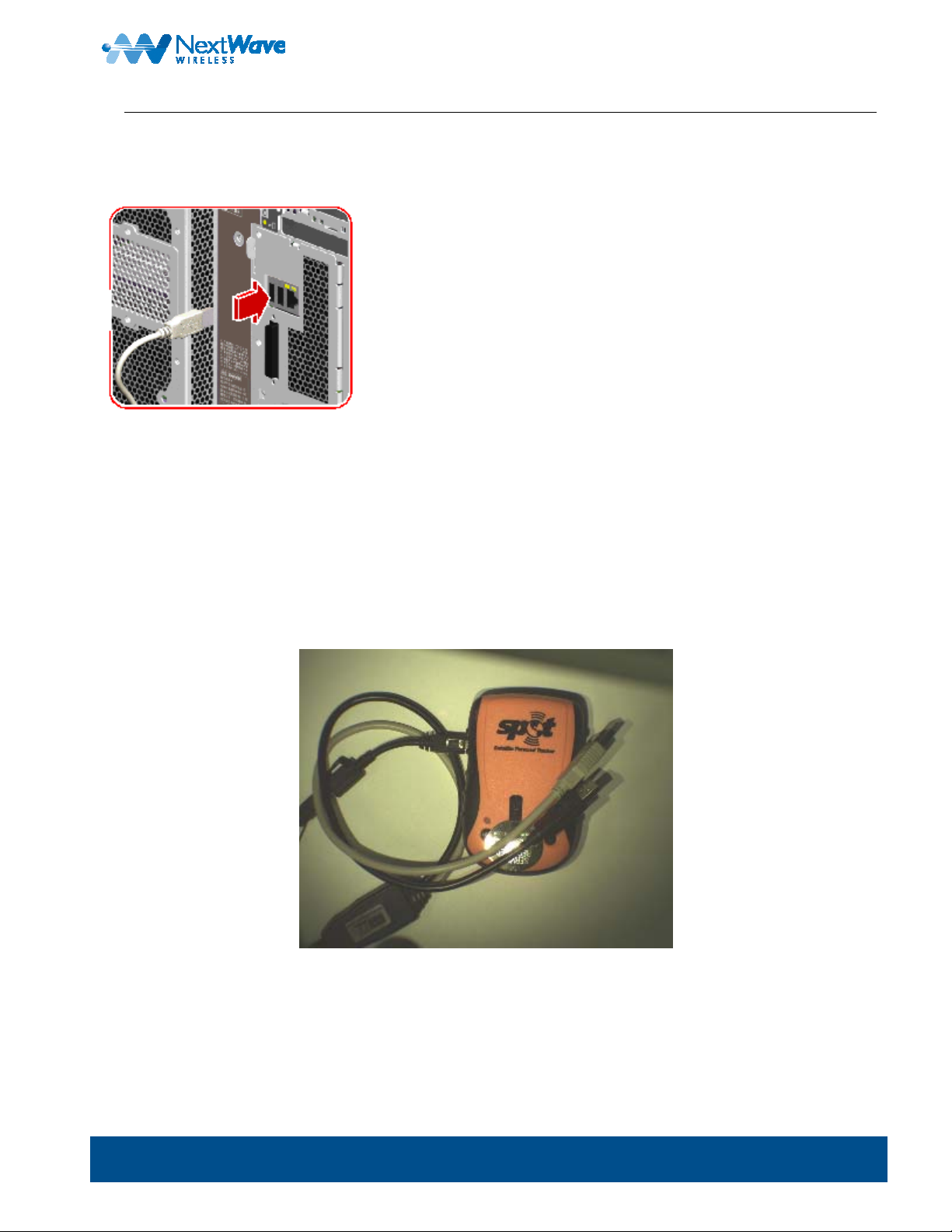
2. Plug the dual USB cable into your PC host.
After the software is installed, connect the USB cable to both of the USB ports on Computer
Connecting the USB cable to the laptop or PC will automatically disable the SPOT functionality and will turn on the
WIMAX modem.
Remember that in order to re-enable the SPOT functionality yo u must unplug the dual USB cable from the com puter.
Note: Make sure both plugs are conne cted to your PC, otherwise the device might not be abl e to transmit.
The dual-headed USB is shown in
Figure 1.
Figure 1 – SPOT with Dual USB
.
4. Run the WiMAX connection manager and wait fo r prompts.
www.nextwave.com ©2008 NextWave Wireless Inc. All rights reserved. 19
Page 20

BMX-SPT User Guide
5. Enter the unit’s serial number when asked.
Note: The serial number is located in the battery case. Remo ve the battery case’s cove r and read the number on
the label sticker.
6. Run the authentication script.
7. Open a Browser window and connect to the Inte rnet.
The unit is now operating in the WiMAX mode.
3. Turning the Device On and Off
The Satellite Personal Tracker (SPOT) has an On/Off button, but cannot be turned on when the USB is connected to a
personal computer. It operates only when the US B is disconn ected.
The WiMax portion of the device automatically shut s off when the USB cable is disconne cted from a perso nal computer
and automatically starts when the USB cab le is connected to a P C.
The WiMAX Modem device does not have an ON / OFF swit ch that can be activated outside the case. It is activated
and deactivated by the insertion of the USB connecti on only.
Note: When the cable is connected , the SPOT switch is no long er functional.
www.nextwave.com ©2008 NextWave Wireless Inc. All rights reserved. 20
 Loading...