

Page 1
Back to Start Page
Nera WorldCommunicator
Getting Started
Page 2

Page 3

Nera WorldCommunicator
Getting Started
Doc no. QLZB 911078
Rev. 5.0 09.2002
© Nera SatCom AS, 2002
Page 4
GETTING ST ARTED
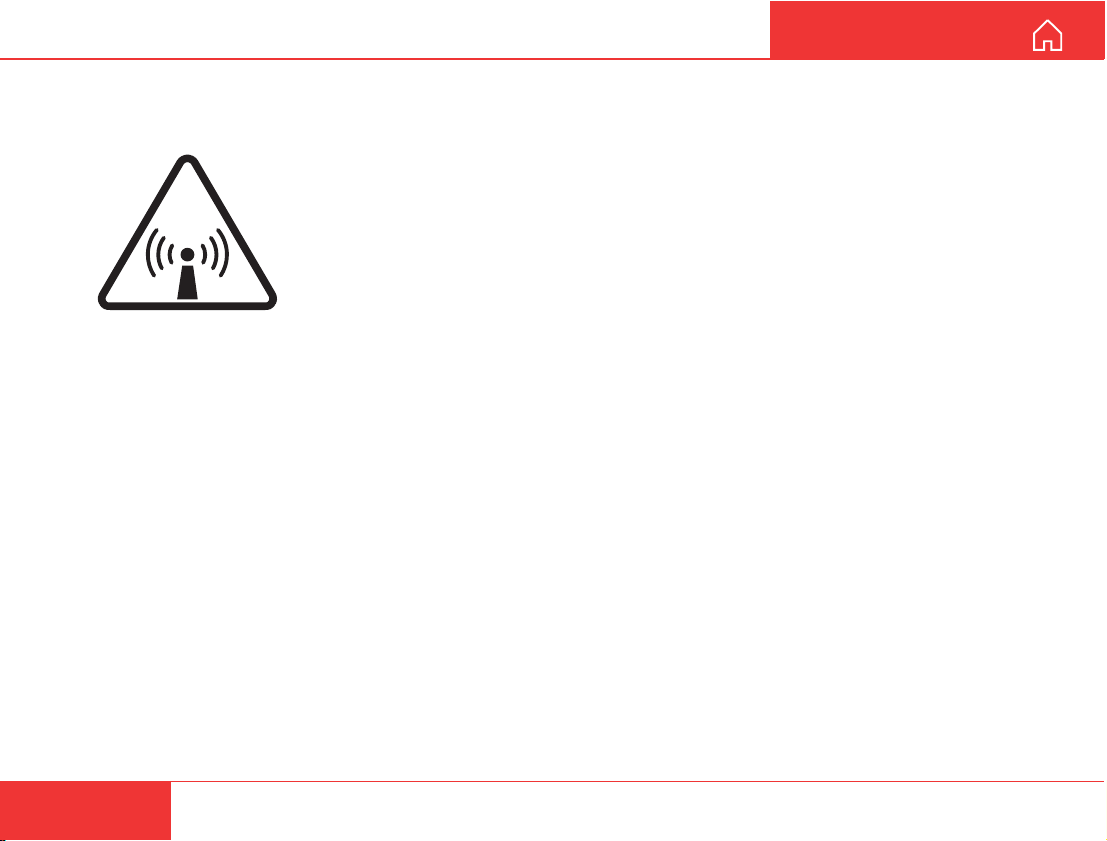
RADIATION WARNING
High levels of radio frequency radiation are considered health hazardous. Although no single value of “safe radiation level” has been agreed upon by all
countries, the American National Standards Institute (ANSI/LEEE C95.1-1992)
recommends that people should not be exposed to radiation stronger than
1 milliwatt per square centimetre at the frequencies used in the
WORLDCOMMUNICATOR terminal. Accordingly, the operator of the terminal
RADIO FREQUENCY RADIATION
HAZARD - KEEP CLEAR
2 METRES MINIMUM
OBTAINING LICENSING FOR INMARSAT TERMINALS
Under rights given under ITU Radio Regulations, local telecommunications administrations establish and enforce
national rules and regulations governing types of emissions, power levels, and other parameters that effect the
purity of signal, which may be radiated in the various frequency bands of the radio spectrum.
To legally operate an Inmarsat terminal, it is necessary to obtain permission from the local telecommunications
regulatory authorities of the country you are operating within. Using your terminal in any country without permission
causes you to run the risk of confiscation of the terminal or legal action from local authorities. Normal practice
for taking telecommunications into another country is to apply for a license before travel. If a license has not been
obtained before travel, the equipment may be put into storage by local authorities until such time as a license is
obtained.
should ensure that the area extending 2 metres from the front of the antenna be
kept clear of personnel when the terminal is transmitting.
All specifications are subject to change without notice.
4
Nera WorldCommunicator
Page 5

GETTING ST ARTED
CONTENTS
SA TELLITE COMMUNICATION ............................. 6
EQUIPMENT DESCRIPTION................................. 8
General ............................................................. 8
Communication services ................................... 8
Parts identification ............................................. 9
WorldCommunicator with fixed antenna .......... 10
Connections .....................................................11
Internal battery ................................................ 12
Charging.......................................................... 12
External power ................................................ 12
SIM card .......................................................... 13
PIN code ......................................................... 13
SETTING UP........................................................ 14
Satellite search................................................ 14
Connecting devices ......................................... 17
Connecting ISDN devices................................ 18
Changing MSN numbers and services for ISDN
devices ............................................................ 20
Grouping ISDN and DECT............................... 20
Linking DECT handsets to the
WorldCommunicator DECT base station ......... 21
Changing DECT handset MSN numbers ......... 23
Mobile Data Service ........................................ 24
Mobile Packet Data Service............................. 25
Removing devices ........................................... 26
Selecting default Net service provider ............. 27
Making a call ................................................... 28
To call the WorldCommunicator....................... 30
DIMENSIONS AND WEIGHTS............................. 31
MOUNTING FIXED ANTENNA ............................ 32
BA TTER Y HANDLING.......................................... 34
DISPLA Y FUNCTIONS......................................... 35
Overview ......................................................... 35
Configure DTE................................................. 36
Information ...................................................... 37
Enabling/disabling the DECT station................ 38
ISDN EFFICIENCY............................................... 39
TROUBLESHOOTING ......................................... 40
LIST OF TERMS .................................................. 43
TO UNPLUG ANTENNA RF CONNECTOR ......... 44
LIST OF PARTS ................................................... 45
Nera WorldCommunicator
Portable Solution ............................................. 45
Nera WorldCommunicator
Fixed Solution.................................................. 45
INST ALLING THE PC PROGRAM ....................... 46
Nera WorldCommunicator
5
Page 6
SA TELLITE COMMUNICA TION
GETTING ST ARTED
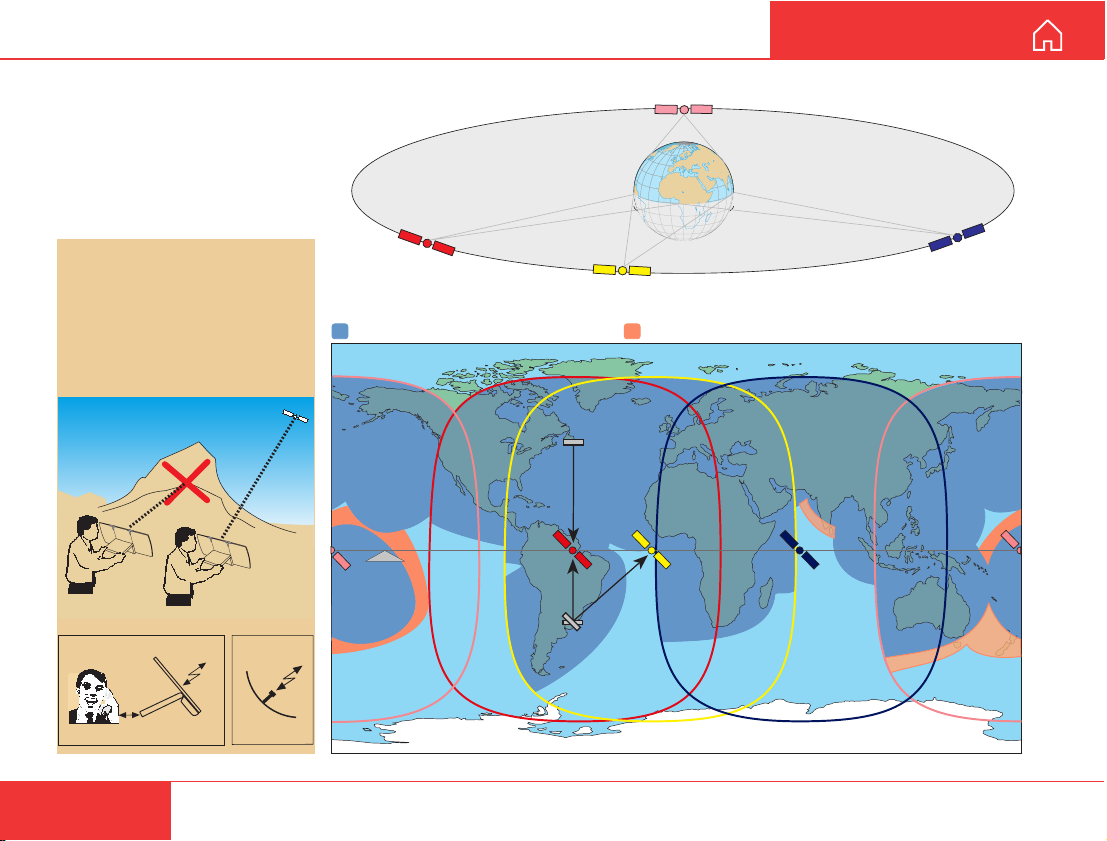
Four satellites are positioned
stationary above equator.
The satellites provide the
coverage shown on the map.
The Nera WorldCommunicator
searches all satellites as
default.
The WorldCommunicator
provides communication
with the public telephone
network via satellite; which
requires free line of sight.
The antenna is flat, but
works as a parabolic dish.
WorldCommunicator
antenna
Parabolic
antenna
AOR-W
WorldCommunicator coverage
POR
Equator
AOR-W
S
N
POR
AOR-E
Coverage with low rate voice service
AOR-E
IOR
NE
IOR
POR
6
Nera WorldCommunicator
Page 7
GETTING ST ARTED SA TELLITE COMMUNICATION CONT’D
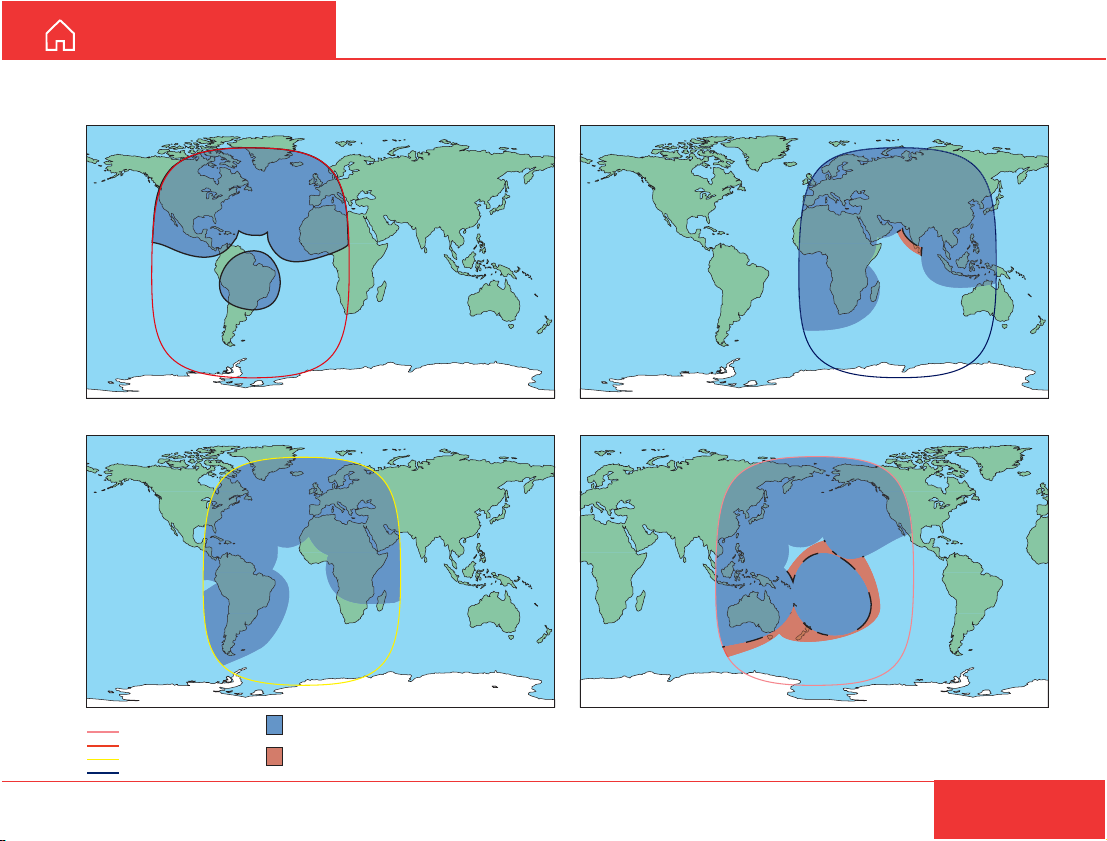
Coverage map for each Ocean Region
Atlantic Ocean Region-West Indian Ocean Region
Pacific Ocean RegionAtlantic Ocean Region-East
Global beam coverage
Pacific Ocean Region
Atlantic Ocean Region-West
Atlantic Ocean Region-East
Indian Ocean Region
Global Area Network and
Inmarsat mini-M phone coverage
Extended Coverage Zones
for Inmarsat mini-M and Global Area
Network low rate voice and data services
Nera WorldCommunicator
7
Page 8

EQUIPMENT DESCRIPTION
GETTING STARTED
General
The Nera WorldCommunicator satellite terminal
provides 64 kbps voice and data, and 4.8 kbps low
cost voice for transmission via Inmarsat’s Global
Area Network service (M4). It offers full portable
ISDN functionality.
The Nera WorldCommunicator consists of two main
units housed in a lightweight and portable carrying case:
• The 3-panel antenna with RF transceiver.
• The Modem Unit (and battery pack).
The Nera WorldCommunicator uses a coax cable to
link the two units together. A cordura bag is supplied
with the equipment for easy transport. The total
weight is 4.2 kgs (including battery).
The Nera WorldCommunicator is also available with
fixed antenna.
External power
Voltage: 19VDC
Power: 60W
The Nera WorldCommunicator must be used with
adapters approved by Nera only, see "External
power".
CD
The CD ROM supplied with the WorldCommunicator contains:
• program for control from PC (vtLite)
• manuals
• application notes
• and other useful information.
Communication services
The Nera WorldCommunicator provides the following
services:
• ISDN: - 64 kbps Mobile Data Service (UDI)
- 56 kbps Mobile Data Service
- 4.8 kbps speech
- 64 kbps speech
- 3.1 kHz audio (64 kbps)
• DECT: - 4.8 kbps speech
- 64 kbps speech
• RS-232: - 64 kbps Mobile Data Service (UDI)
- Mobile Packet Data Service (MPDS)
• USB - 64 kbps Mobile Data Service (UDI).
- Mobile Packet Data Service (MPDS).
Internal communication
Equipment connected to the various interfaces may
communicate with each other via an internal MSN
(Mobile Subscriber Number) assigned to each unit.
Control interface
The RS-232 or USB port allows connection of a PC
for configuration of the WorldCommunicator.
A PC program that provides the software to operate
and configure the WorldCommunicator is supplied
on the enclosed CD (requires at least Windows 95).
8
Nera WorldCommunicator
Page 9
GETTING ST ARTED EQUIPMENT DESCRIPTION CONT’D
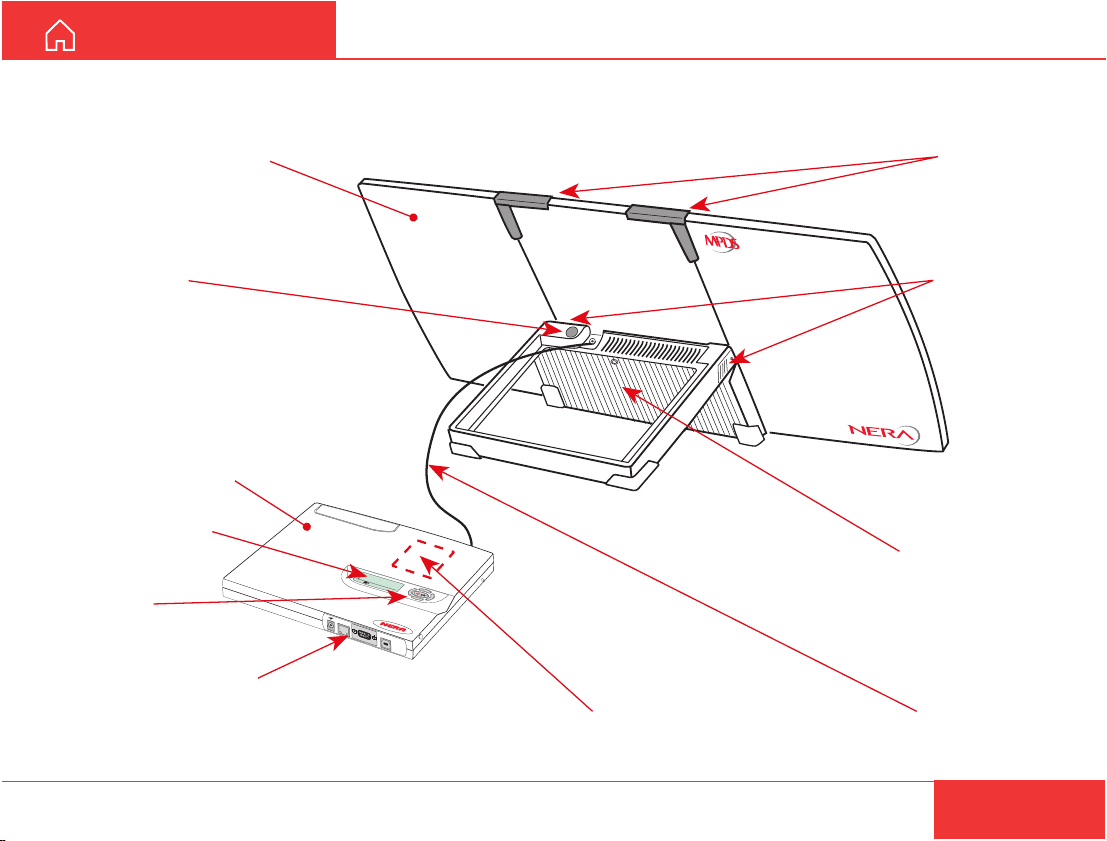
Parts identification
ANTENNA
3 panels, foldable
For fixed antenna,
see next page
Compass
MODEM UNIT
LCD display
Multibutton
switch
Connector panel
See ''Connections''
and ''External power''
ISDN
>S
ta
rt S
M
L
o
52 0 05:46
c
k te
e
arch
rm
in
RS-232
Antenna
slide locks
Antenna
angle locks
RF transceiver
E
N
U
a
l
USB
Built-in DECT base station
Antenna cable
Nera WorldCommunicator
9
Page 10
EQUIPMENT DESCRIPTION CONT’D
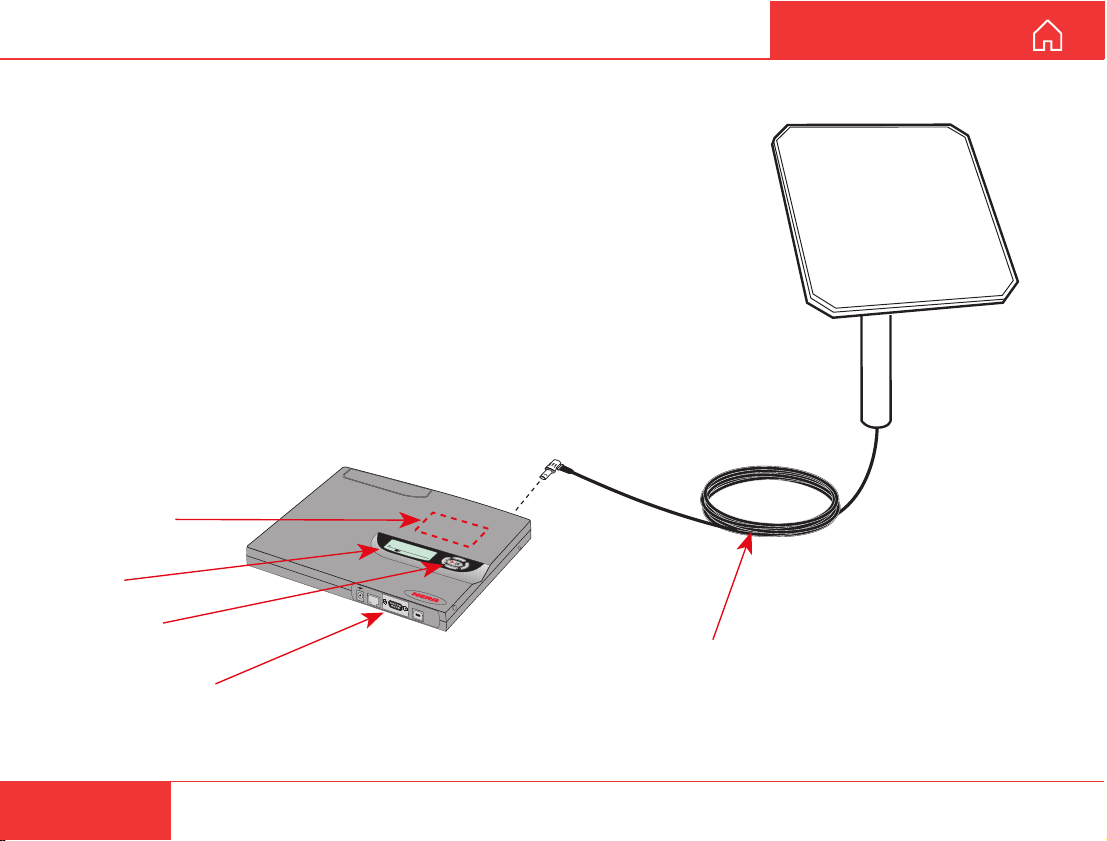
WorldCommunicator with fixed antenna
For installation, see
"MOUNTING FIXED ANTENNA"
MODEM UNIT
Built-in DECT
base station
>Start Search
MENU
Lock terminal
ISD
N
52 0 05: 46
R
S-232
U
SB
LCD
display
Multibutton
switch
Connector panel
See Connections
and External power
GETTING ST ARTED
FIXED
ANTENNA
Antenna coax cable
Standard:
QRPM 911091-10000
Length 10 m
10
Nera WorldCommunicator
Page 11
GETTING ST ARTED
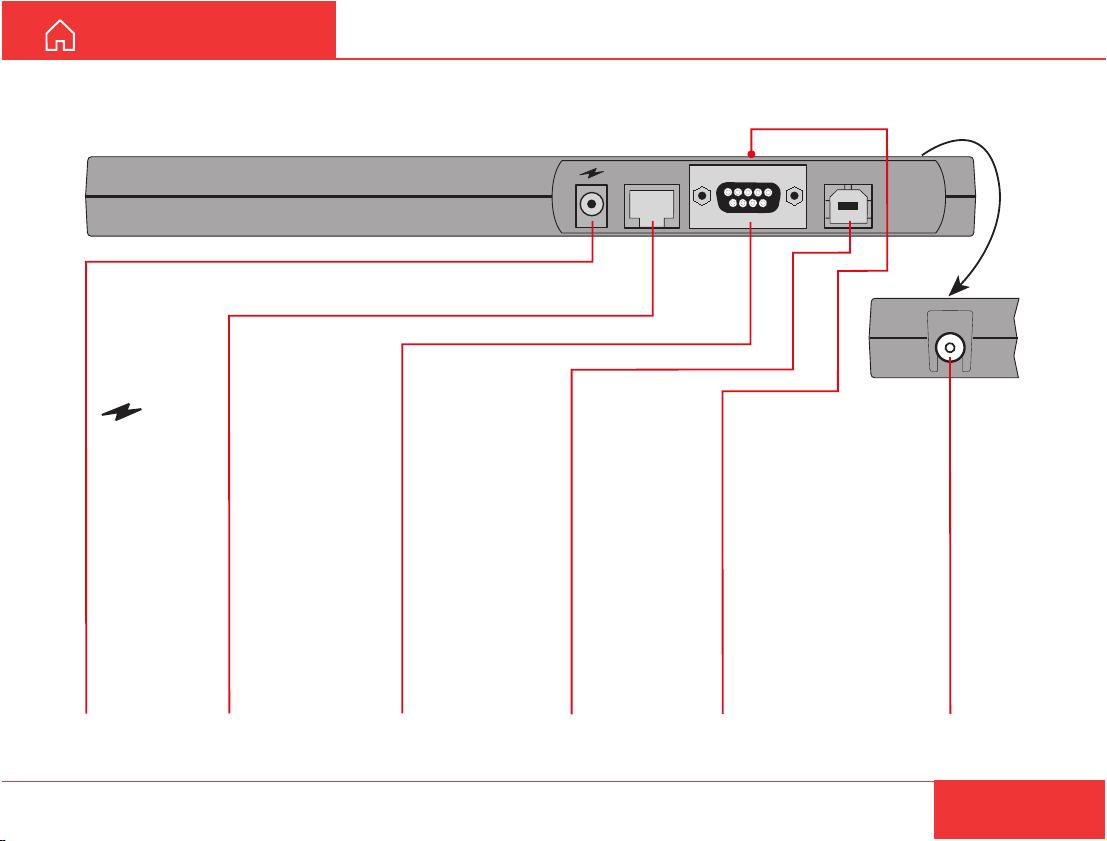
Connections
Modem Unit
EQUIPMENT DESCRIPTION CONT’D
ISDN
RS-232
USB
Note! Use shielded ISDN cable
:
19VDC
input for
simultaneous
powering and
charging of
internal
battery pack.
ISDN:
RJ45
Services:
4.8kbps
compressed
speech
64kbps
speech
64kbps data
service (UDI)
56kbps data
service (V110)
64kbps audio
service (3.1kHz)
Nera WorldCommunicator
RS-232:
9-pin serial data
port for:
operation and
configuration
from PC.
software
download
64kbps data
service (UDI)
MPDS
USB:
serial data port
for:
operation and
configuration
from PC.
64kbps data
service (UDI)
MPDS
DECT:
built-in base station.
1880-1900MHz.
Selectable:
4.8kbps
compressed speech
64kbps speech
Ant
ANT:
connection
of coax
cable from
antenna
11
Page 12
EQUIPMENT DESCRIPTION CONT’D
GETTING STARTED
Internal battery
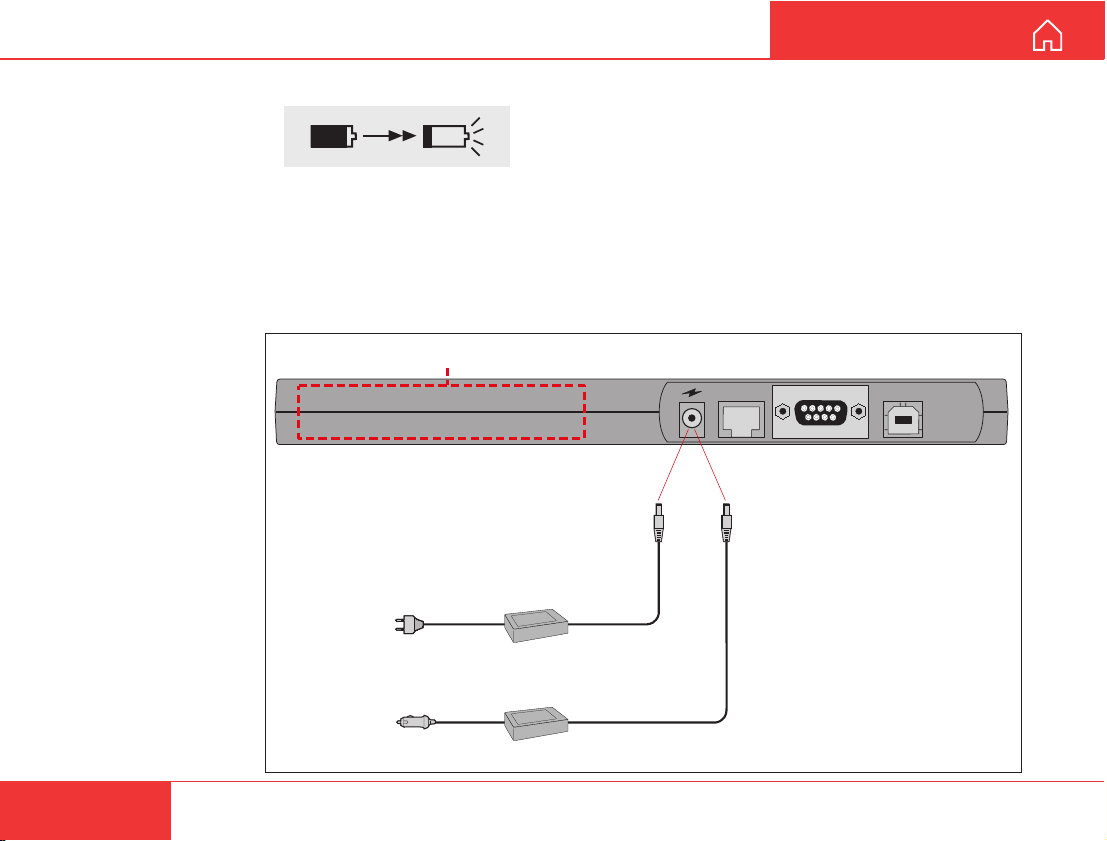
The battery indicator
on the display indicates the charge level:
The amount of shading represents the current
charge level.
A completely shaded indicator indicates a fully
charged battery.
A flashing battery indicator indicates that the battery
level is low.
Avoid exposing the
WorldCommunicator to
extreme heat or cold.
Very high or low
temperatures reduce
the battery capacity.
Internal power: Lithium-Ion rechargeable battery pack (Nera part no. 101553)
Charging
The battery is charged
via the external power
even when the Modem
Unit is turned off.
A new battery should
be charged for 4.5
hours the first time.
The battery should not
be charged at temperatures lower than 0°C.
External power/charging
100 - 240 VAC
47 - 63 Hz
*
10 - 32 VDC
**
DC/DC converter
Nera does not guarantee that the WorldCommunicator
will work with a battery not approved by Nera/Nera
agent.
See also "BATTERY HANDLING".
External power
The Nera WorldCommunicator may be connected to
an AC source using an AC/DC Adapter, or to DC
using the optional DC/DC converter. The types of
adapters to be used are specified below.
ISDN
19 V DC
AC Adapter
**
19 V DC
RS-232
*
The following AC adapter
must be used only:
Powerbox type SPN-460-19
(Nera part no. 101659)
The following DC/DC converter
must be used only:
SMPowertypeSMP119,19V, 60W
(Nera part no. 101940)
USB
12
Nera WorldCommunicator
Page 13
GETTING ST ARTED
EQUIPMENT DESCRIPTION CONT’D
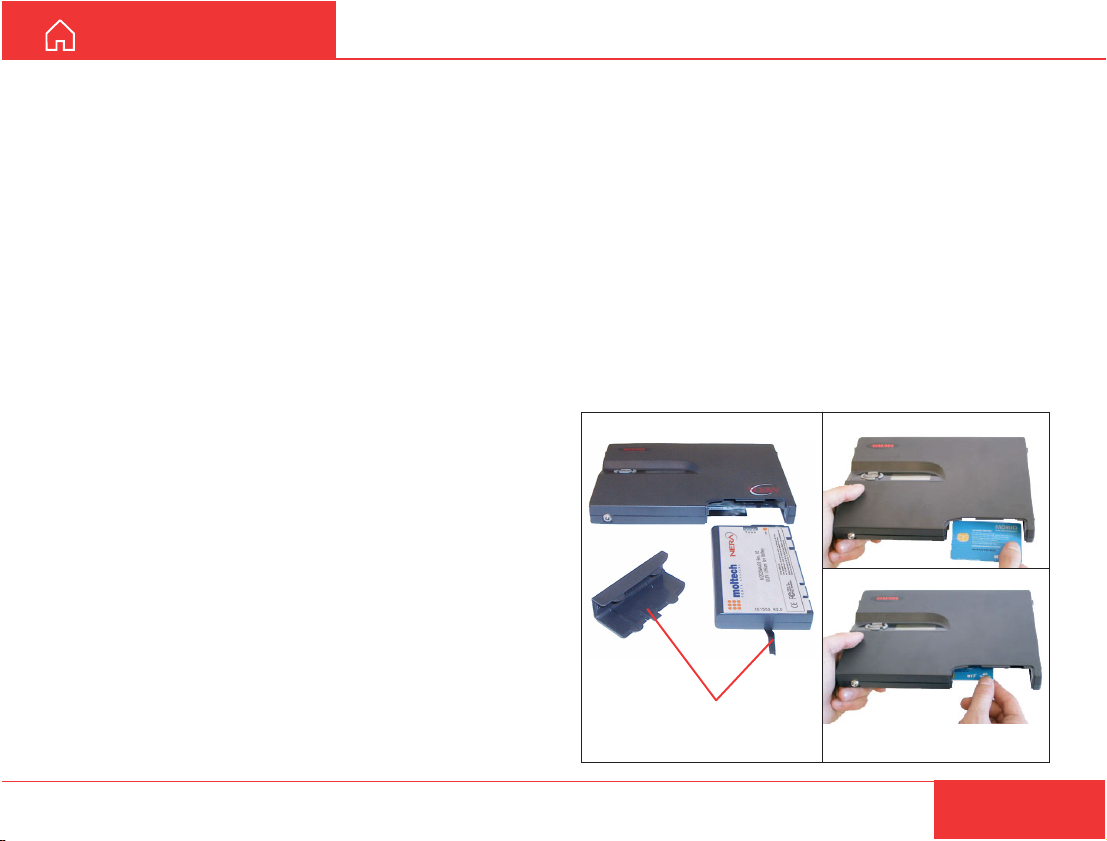
SIM card
The SIM card carries subscription information from
your Net service provider on an integrated circuit.
The Nera WorldCommunicator used with the SIM
card assumes the identity of the SIM card.
The SIM card has its own set of Inmarsat Mobile
Numbers (IMN) on which the user can be contacted
irrespective of the WorldCommunicator used.
All outgoing calls will be billed to the owner of the SIM
card.
The SIM card is protected by a SIM PIN (Personal
Identification Number). Contact your Net service
provider if you do not have the PIN code.
If the PIN code entered does not match the PIN code
on the SIM card, operation with that particular SIM
card will lock-up after three failed attempts. You must
then use the SIM un-block code (PUK code) provided
by your Net service provider to un-lock the card.
Contact your Net service provider if you do not have
the PUK code.
Note!
When the PUK is used, the SIM PIN is set to 1 2 3 4.
To change or disable the PIN code, see "Access
level" in the User Guide.
The SIM card can store various information, e.g.:
• PIN code (Personal Identification Number)
• Phone book
• Allowed and preferred Net service providers
Note! The Nera WorldCommunicator can be used
with or without SIM card. The Net service provider,
however, of ten requires the use of SIM card.
PIN code
The user is prompted for the 4-8 digit Personal
Identification Number each time the Nera
WorldCommunicator is switched on:
• SIM PIN? (with SIM card).
• Phone PIN? (without SIM card).
The PIN protection can be disabled, see "Access
level" in the User Guide.
SIM card insertion
1 Remove cover
and pull out battery
2 Insert SIM card
Nera WorldCommunicator
13
Page 14
SETTING UP
GETTING ST ARTED
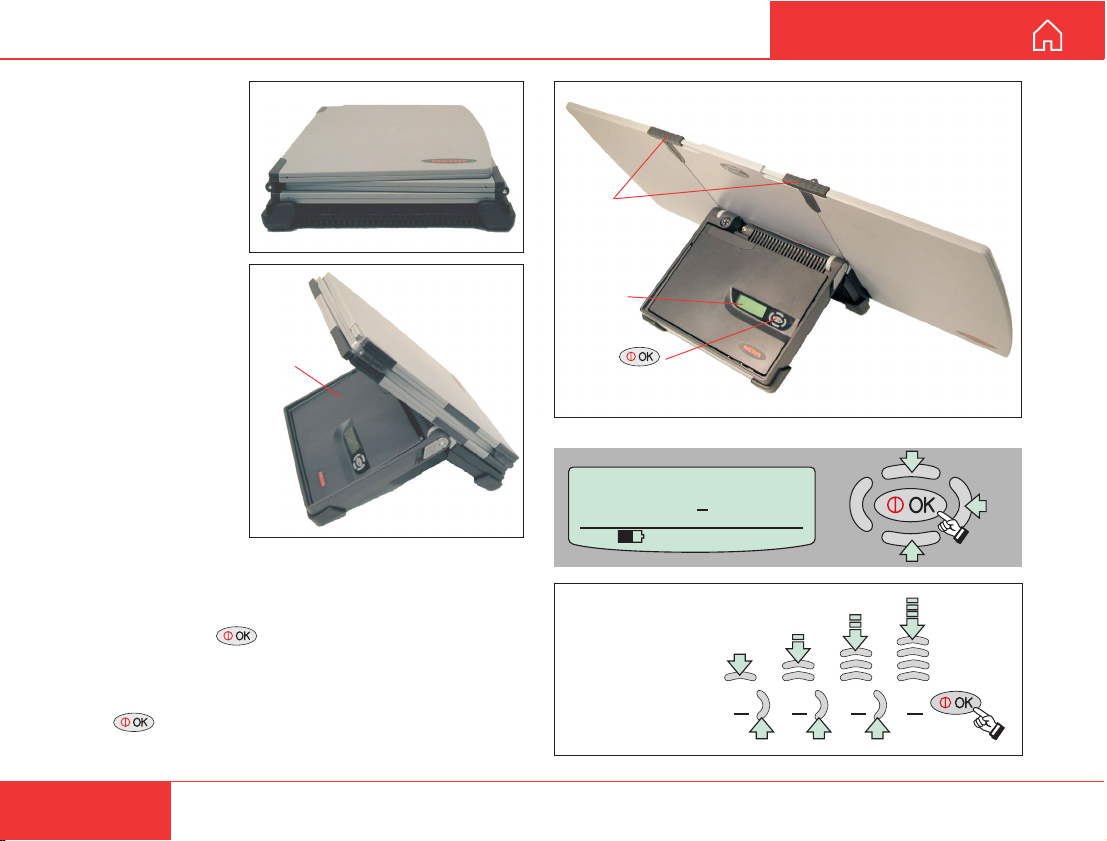
Satellite search
1 Open the
WorldCommunicator
by swinging down
the Modem Unit.
Modem
Unit
2 Unfold the antenna.
If necessary , slide storm locks into place.
3 Press and hold for 2 secs.
4 Enter Phone PIN code: use “arrow” buttons to
change digit and step to next position.
Press when ready .
Factory default PIN code = 1234
Left panel
Storm
locks
Display
ON/OFF
button
WorldCommunicator
Phone PIN :
535 09:46
Example,
PIN no.: 1234
NB! Fold left panel first
when closing antenna
0
1 2 3 4
Right panel
14
Nera WorldCommunicator
Page 15
GETTING ST ARTED
Compass
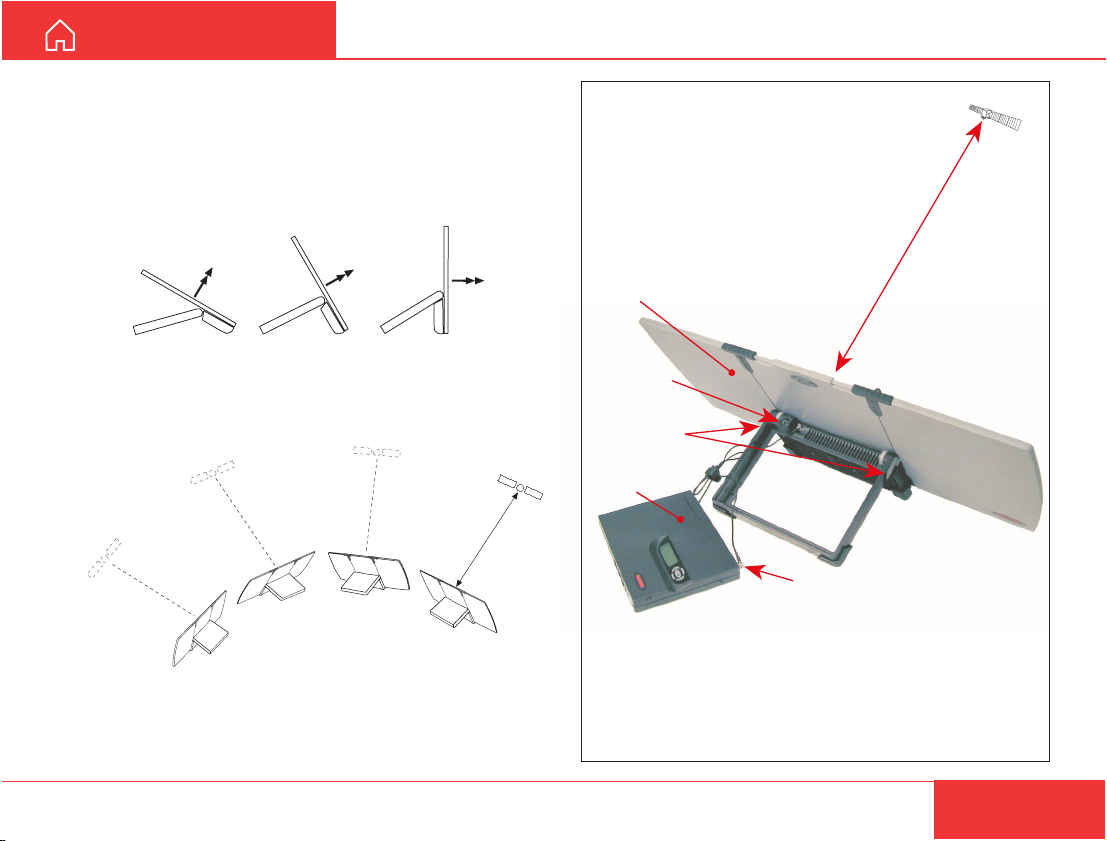
Free line of sight
to the satellite
Antenna
angle locks
Warning!
The battery will affect the compass reading when the
Modem Unit is placed in the frame.
Make sure that the antenna cable and plugs are not
jammed when closing the WorldCommunicator.
Antenna cable
connector
MODEM
UNIT
ANTENNA
5 Check that the antenna cable is connected to the
Modem Unit.
Longer antenna cable is available as option.
6 To find the correct vertical angle to the satellite, try
with the antenna adjusted to 60°, 30° or 0° as indicated.
60° 0°30°
7 Aim the antenna towards the estimated position of
the satellite with free line of sight, or make a slow
scan across the hemisphere.
SETTING UP CONT’D
If necessary , use the compass to determine the
direction.
See coverage map at the beginning of the manual.
See also CD: Additional manuals>Coverage Maps.
Nera WorldCommunicator
15
Page 16
SETTING UP CONT’D
GETTING ST ARTED
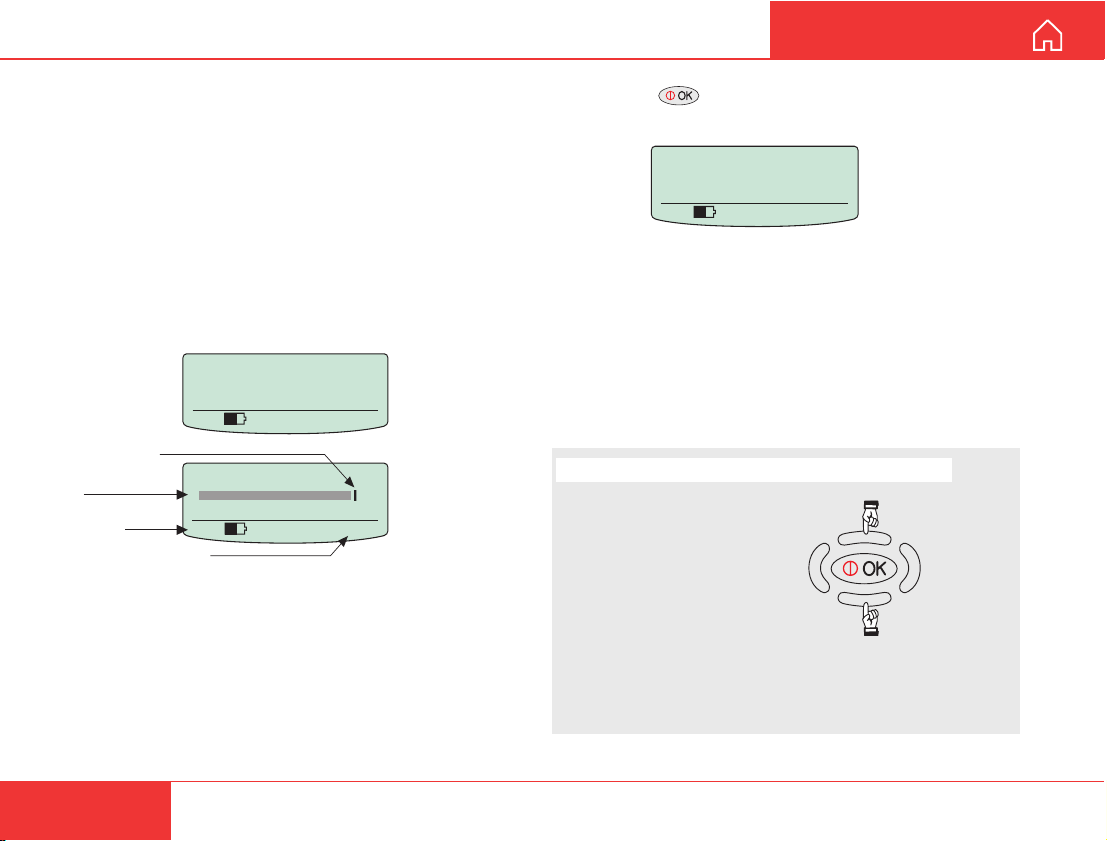
With clear view to the satellite, the antenna may be
operated from the inside of some types of windows,
but should preferably be located outside.
A shaded signal strength bar will appear in the
display . When closing in on the satellite, turning the
antenna horizontally and adjust its vertical angle, the
bar increases in length. The longer the signal bar or
higher the signal strength indicator value, the better
the signal quality .
The maximum marker indicates the highest signal
strength achieved during the current search.
Searching
All regions
535 09:46
Maximum achieved
signal strength
Signal strength
bar
Signal strength
indication
Time in hours:seconds
Use AOR-W?
535 09:46
Lock the vertical angle (elevation) of the antenna
with the antenna angle locks.
8 Pressing initializes the system with the
displayed satellite.
Unknown net
AOR-W
Ready for call
535 09:46
9 See “Selecting default Net service provider” to
choose the correct Net service provider.
When using a SIM card, the Net service provider will
be selected automatically .
Note! If no spot beam is found from the current
satellite, try another Ocean Region.
Display light adjustment (when in idle)
Press to increase contrast:
Press to reduce contrast:
Note! It is recommended that the signal strength
reading (S/N=Signal/Noise ratio) should be at least
535. However, 4.8 kbps speech also works at 420.
16
Warning!
Avoid adjusting the contrast
to extreme black or white.
Nera WorldCommunicator
Page 17
GETTING ST ARTED
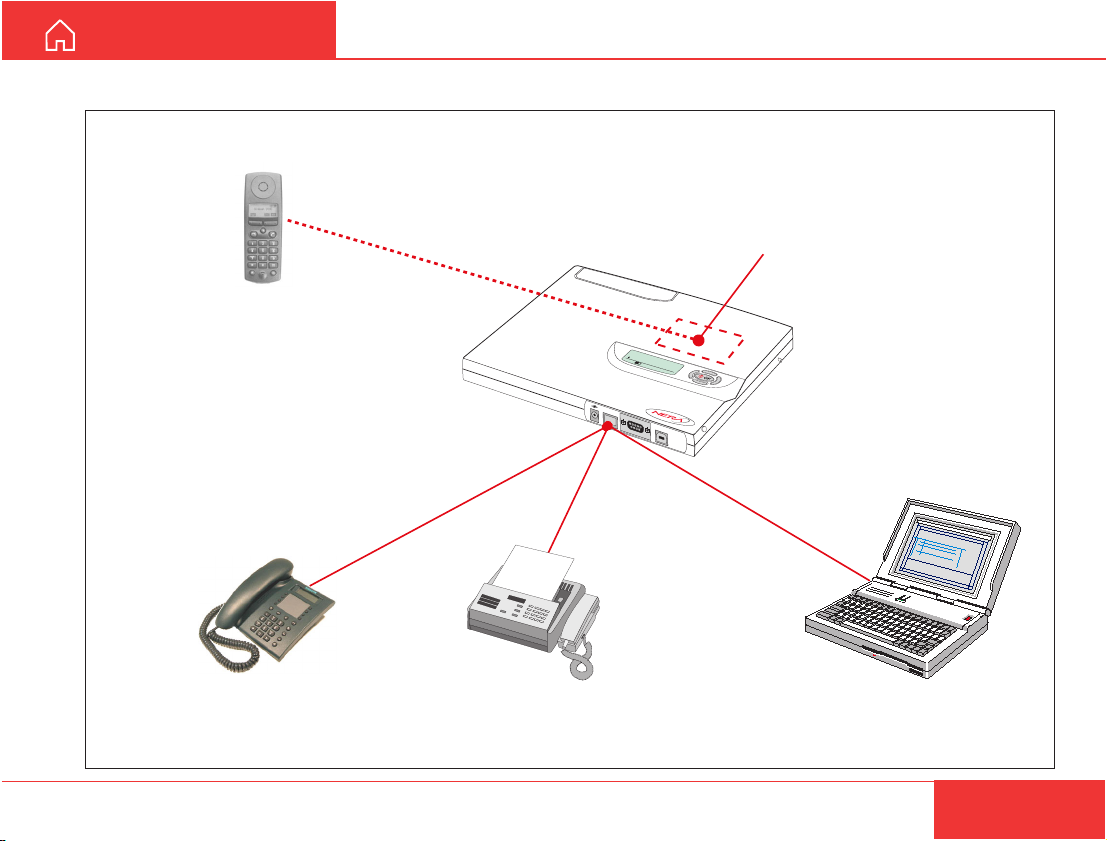
Connecting devices
For linking DECT handset, see later in this manual.
ISDN connector
ISDN
Built-in DECT base station
>Start Search
MENU
Lock terminal
52 0 05:46
RS-232
USB
SETTING UP CONT’D
ISDN telephone
For connecting ISDN devices, see next page
Nera WorldCommunicator
PC with ISDN interfaceTelefax with ISDN interface
17
Page 18
1
0
1
SETTING UP CONT’D
GETTING ST ARTED
Connecting ISDN devices
General
Up to 8 units can be connected to the ISDN interface.
An ISDN multiport is needed if more than one unit is
to be connected.
The Nera WorldCommunicator can provide a maximum of 2.5 W.
See also "Services" in the User Guide.
A call to a fixed net can be made without any prior
programming.
It is, however, advisable to program the Modem Unit
for appropriate reception of incoming calls, internal
calls and devices that can handle more than one
service.
The first ISDN device
The Nera WorldCommunicator will recognize a single
ISDN equipment without any prior programming.
Connect the equipment to the ISDN port, and verify
that you have a dial tone.
An ISDN telephone will use 4.8 kbps speech service
if not programmed as described below.
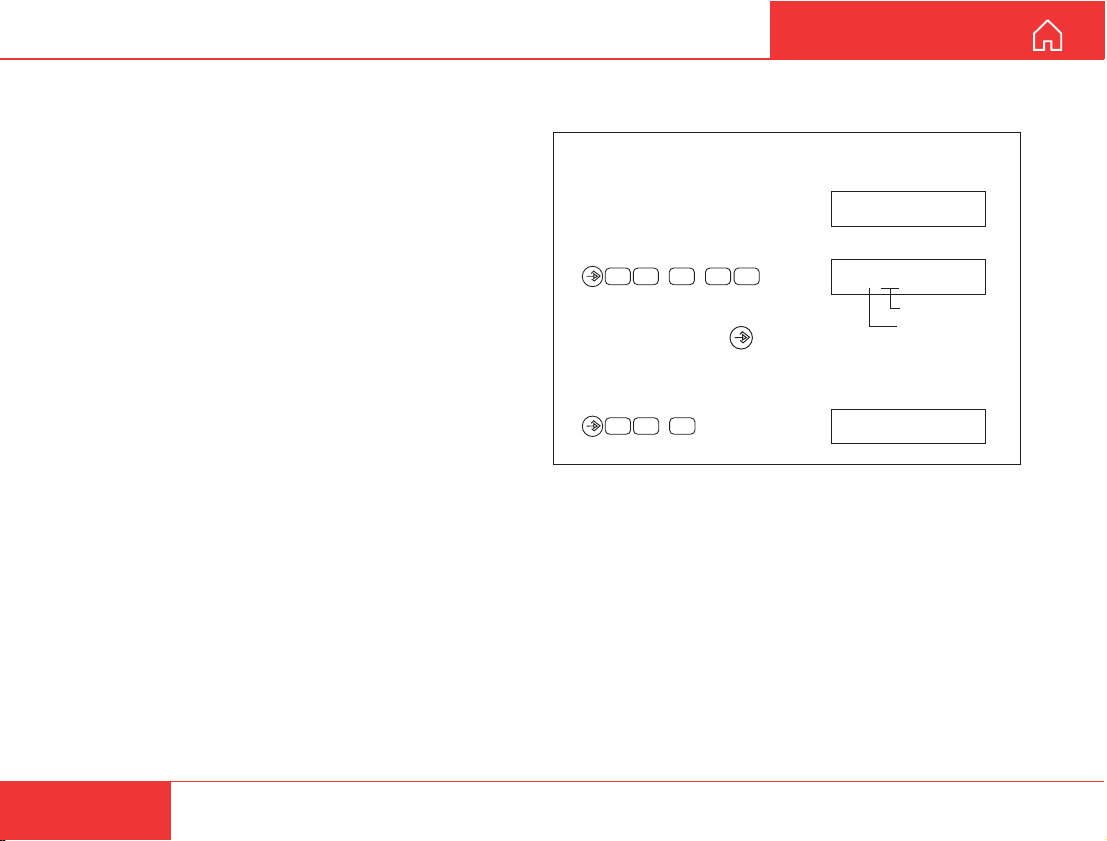
See the manual enclosed with the ISDN telephone
on how to program the MSN number to 30.
Example of entering MSN no.30 into Siemens
type Profiset 30:
• Displayed on the phone: 00.00.00 00:00
• Leave handset on, and enter
0 1
1
on the phone keypad.
• Finally, pressing enters
03
01 1 30
MSN number
MSN1 (first no.)
MSN number 30 as MSN1 in the ISDN phone.
• To read out the MSN1 number:
01 1 30
Setting the ISDN phone to 64 kbps speech
The ISDN phone can be set to use the high quality
64 kbps speech service by entering the MSN number
30 into the ISDN telephone.
18
Nera WorldCommunicator
Page 19
GETTING ST ARTED
ISDN
> Speech
64k Speech
64k Audio
56k Data (V110)
64k Data (UDI)
SETTING UP CONT’D
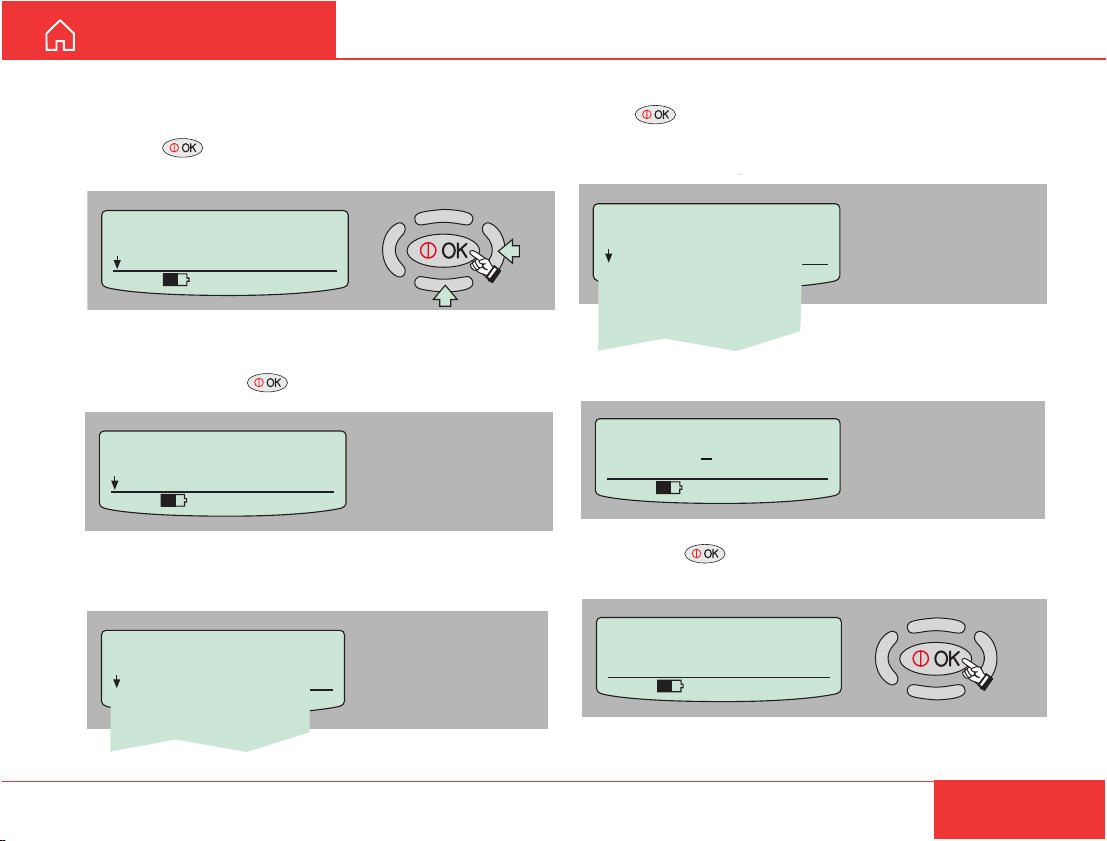
Adding ISDN phones for 4.8 kbps speech service
(example)
1 Press on the WorldCommunicator Modem
Unit to open the MENU:
> Device Manager
Configure DTE
535 09:46
MENU
2 In the Device Manager menu, scroll down to Add
Device and press .
Device Manager
> Add Device
Remove Device
535 09:46
3 Scroll down to ISDN and press
Device Manager
> ISDN
DECT
USB
COM
Nera WorldCommunicator
4 Scroll down to the required service and
press .
Note! Make sure that the service is registered with
your service provider.
5 Enter the owner password (1........90).
Owner's password:
123456789
535 09:46
0
6 Pressing adds the new service automatically
with the appropriate Id and MSN number.
New ISDN Added
Service: Speech
Id=02 MSN=21
535 09:46
7 Programme MSN no.21 into the connected ISDN
telephone.
19
Page 20

SETTING UP CONT’D
GETTING ST ARTED
Adding more ISDN devices
64 kbps speech
High quality 64 kbps ISDN speech service.
3.1 kHz audio (64 kbps)
Group III telefax, see "Applications > Nera Termi-
nal Adapter" on the Nera WorldCommunicator CD.
54 kbps data
Allows communication with 56 kbps modem remote
end subscribers.
64 kbps data
The following equipment may be connected:
• PC with ISDN interface
• Group IV telefax
• Video telephone
For connection of analogue telephone,
see "Applications > Nera Terminal Adapter" on the
Nera WorldCommunicator CD.
Changing MSN numbers and services for ISDN devices
See ''MSN Configuration" in the User Guide on the
Nera WorldCommunicator CD.
The programming must be done from a PC connected to the Modem Unit, see "Installing the PC
program".
Grouping ISDN and DECT
One ISDN telephone and one DECT handset may
be set to respond to the same incoming IMN
number.
Up to 8 groups may be established.
See ''
MSN Configuration" in the User Guide.
20
Nera WorldCommunicator
Page 21
GETTING ST ARTED
DECT
> Speech
64k Speech
535 09:46
Device Manager
> DECT
USB
535 09:46
Owner's password:
123456789
0
535 09:46
SETTING UP CONT’D
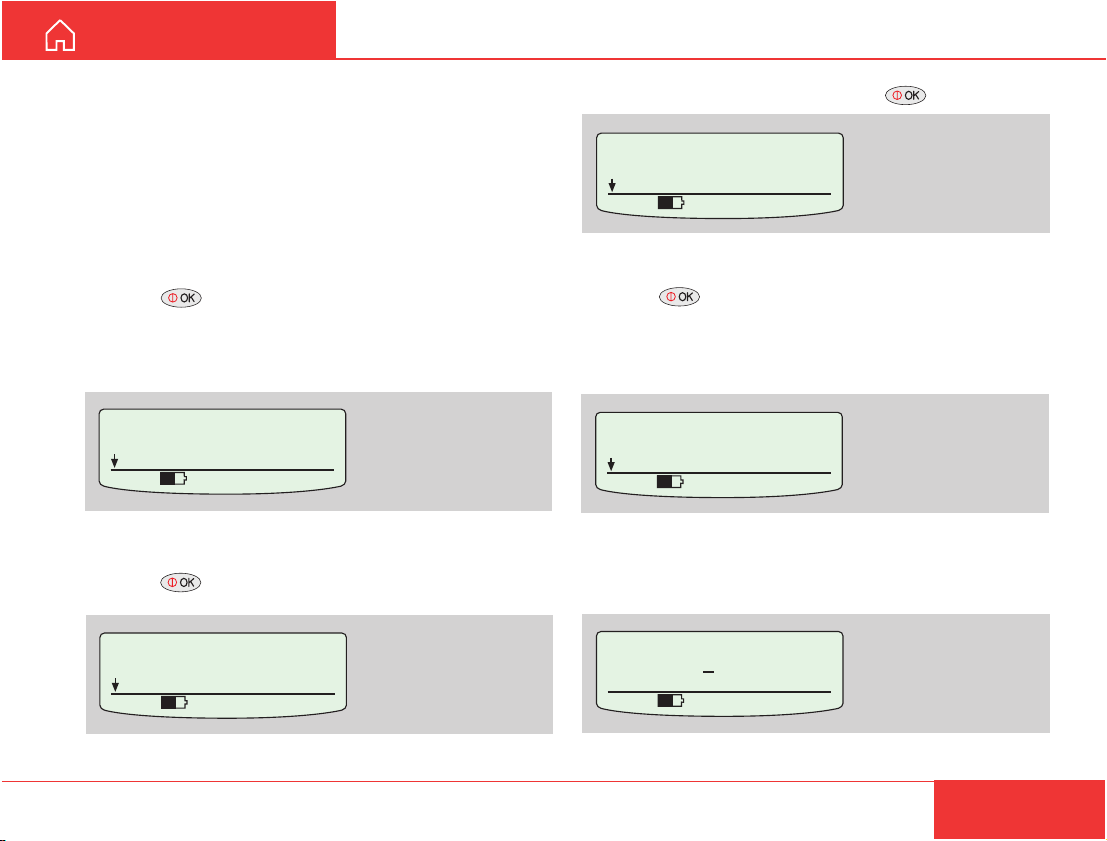
Linking DECT handsets to the WorldCommunicator DECT base station
Up to 12 DECT handsets may be registered with the
built-in base station.
Each handset is automatically assigned an MSN
number, starting with 01.
Procedure:
1 Press on the WorldCommunicator Modem
Unit to enter the MENU.
Scroll down to Device Manager.
MENU
> Device Manager
Configure DTE
535 09:46
2 Press and scroll down to to Add Device.
Device Manager
> Add Device
Remove Device
535 09:46
3 Scroll down to DECT and press .
4 Press for 4.8 kbps standard quality speech,
or scroll down to select 64 kbps high quality speech.
Note! Make sure that the service is registered with
your service provider.
5 Enter the owner password (1........90).
Nera WorldCommunicator
21
Page 22
SETTING UP CONT’D
GETTING STARTED
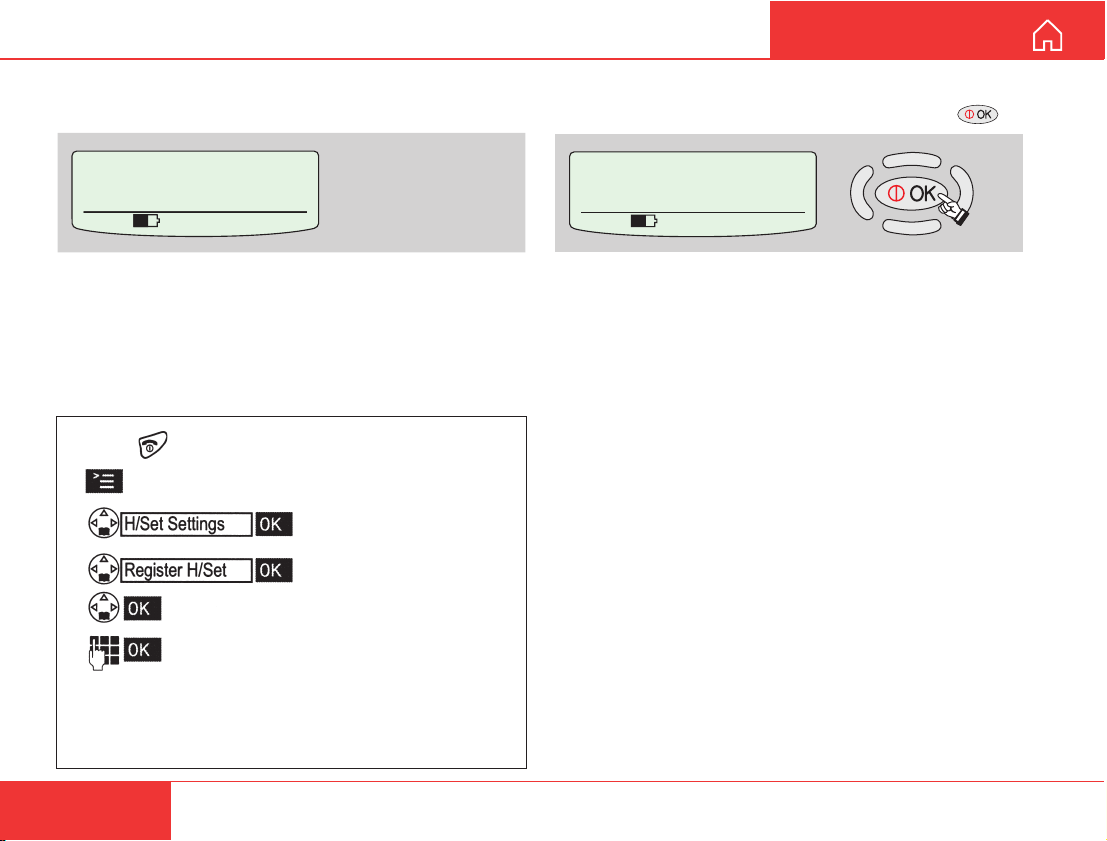
6 After a while, the base station is “Open to register” the
handset.
Open to register
Any key to exit
535 09:46
7 Link the DECT handset to the
WorldCommunicator DECT base station as described in the example on the below.
Example of registering Siemens Gigaset 4000:
(See also the manual enclosed with the DECT phone or
on the CD.)
• Press to switch ON the DECT handset.
• Press the DECT display key.
• Select and confirm.
• Select and confirm.
• Select the base station.
• On the DECT keypad, enter the
WorldCommunicator base station
pass word: 1 2 3 4 (the first four digits of the
owner password. Use new code when the owner
password has been changed.)
8 Wait until the message REGISTERED is displayed
in the WorldCommunicator display, and press .
Registered HndSet 01
for Std. Voice usage
Id=02 MSN=01
535 09:46
The handset is now ready for use with 4.8 kbps
specch, internal number 01 and incoming IMN
number corresponding to ID: 02.
22
Nera WorldCommunicator
Page 23

GETTING ST ARTED
Changing DECT handset MSN numbers
For changing the local handset numbers, see
''MSN Configuration" in the User Guide on the
WorldCommunicator CD.
Be aware that the DECT handsets may be setup to
respond to the same incoming IMN number.
When enabled, collective ringing to the DECT
handsets will apply to incoming calls, and to internal
calls from ISDN.
The programming must be done from a PC connected to the Modem Unit, see "Installing the PC
program" later in this manual.
Note! For “Enabling/Disabling the DECT base
station”, see later in this manual.
SETTING UP CONT’D
Nera WorldCommunicator
23
Page 24
SETTING UP CONT’D
GETTING ST ARTED
Mobile Data Service
The WorldCommunicator Mobile Data Service
complies with the communication protocol defined by
the Inmarsat GAN system.
The Mobile Data Service uses the Point-to-Point
Protocol (PPP) communications program.
The transmission data rate over the satellite link is
64 kbps.
The WorldCommunicator offers 64 kbps connection
to the international ISDN/PSTN network.
The Mobile Data Service is suitable for applications
such as high-speed file transfer, store-and-forward
video, e-mail and internet.
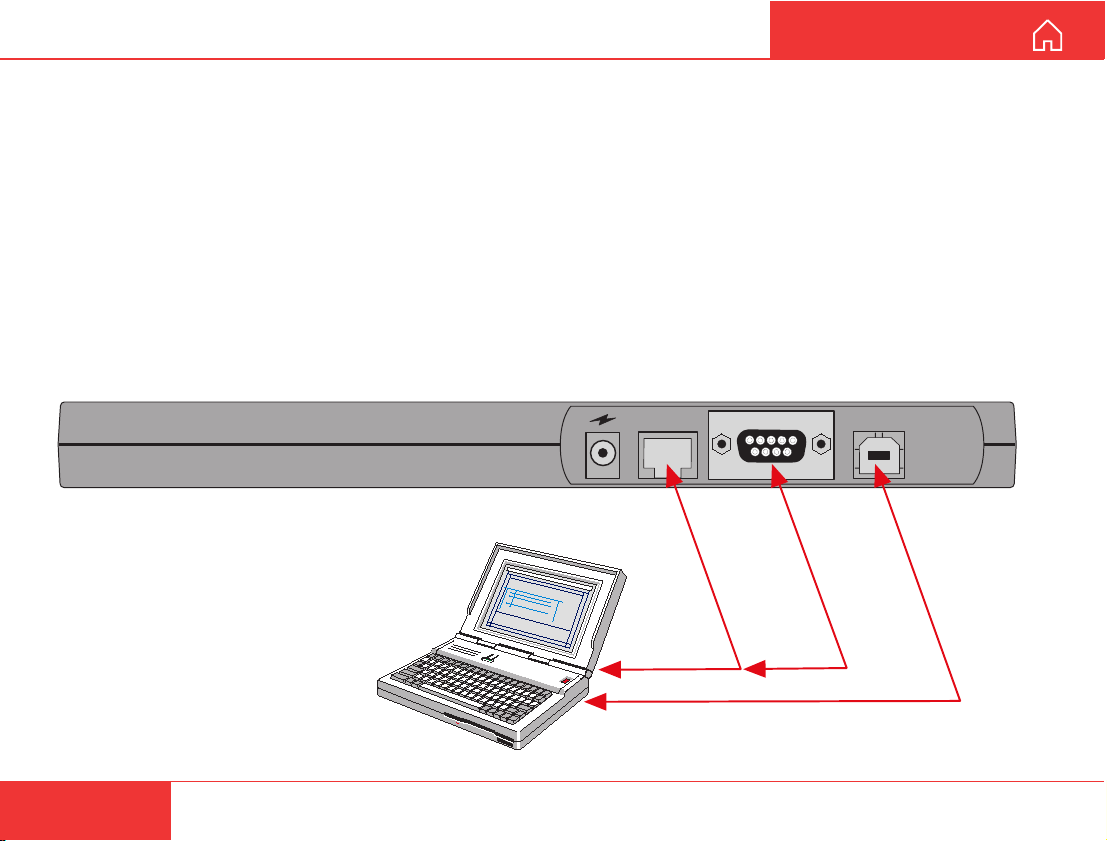
The Mobile Data Service is accessible via the three
data connectors on the Modem Unit (see below):
• ISDN for connection to the serial port on the PC
ISDN card.
• RS-232 for connection to the PC serial port.
• USB for connection to the USB port on th PC
(requiring at least MS windows 98SE).
For installation and setup, refer to the CD:
Applications > Mobile Data Service:
via RS-232,
via USB, or
via ISDN
ISDN
PC serial port
PC USB port
RS-232
USB
24
Nera WorldCommunicator
Page 25
GETTING ST ARTED
SETTING UP CONT’D
Mobile Packet Data Service
The MPDS service can be efficient for applications
such as:
• E-mail
• Internet/intranet
• Navigational updates
• Vessel telemetry transmission
• Database queries
• E-commerce
The user only pays for the amount of data sent over
the network, and not for the time connected.
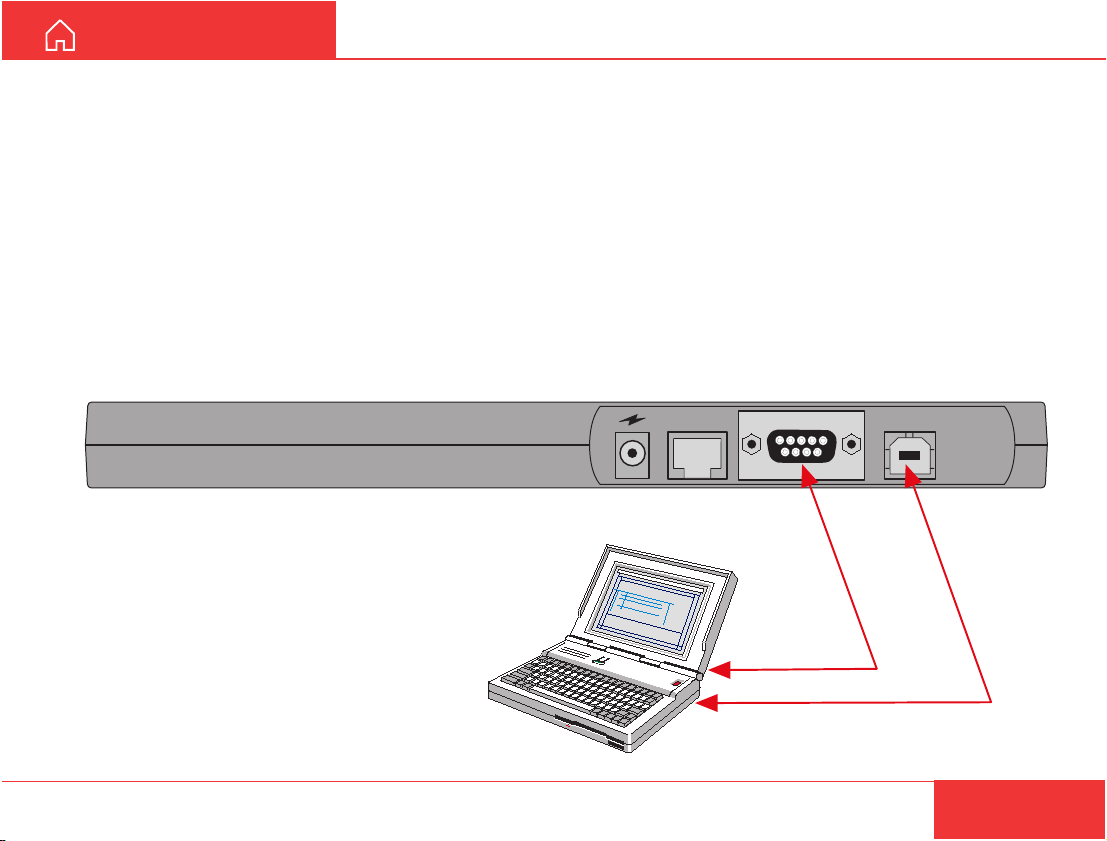
The MPDS service is set up and run from a PC
connected to the RS232 or USB port of the Modem
Unit.
The PC must have at least Windows 2000 or XP
installed.
Reverting to Mobile ISDN voice service is done from
the PC.
For installation and setup, refer to the CD:
Applications > Mobile Packet Data Service:
via RS-232, or
via USB
ISDN
RS-232
PC serial port
PC USB port
USB
Nera WorldCommunicator
25
Page 26
GETTING ST ARTEDSETTING UP CONT’D
Removing devices
ISDN, DECT , USB and COM entries are removed in
the same way as described for ISDN below.
Note that if connected to PC, vtLite must be closed.
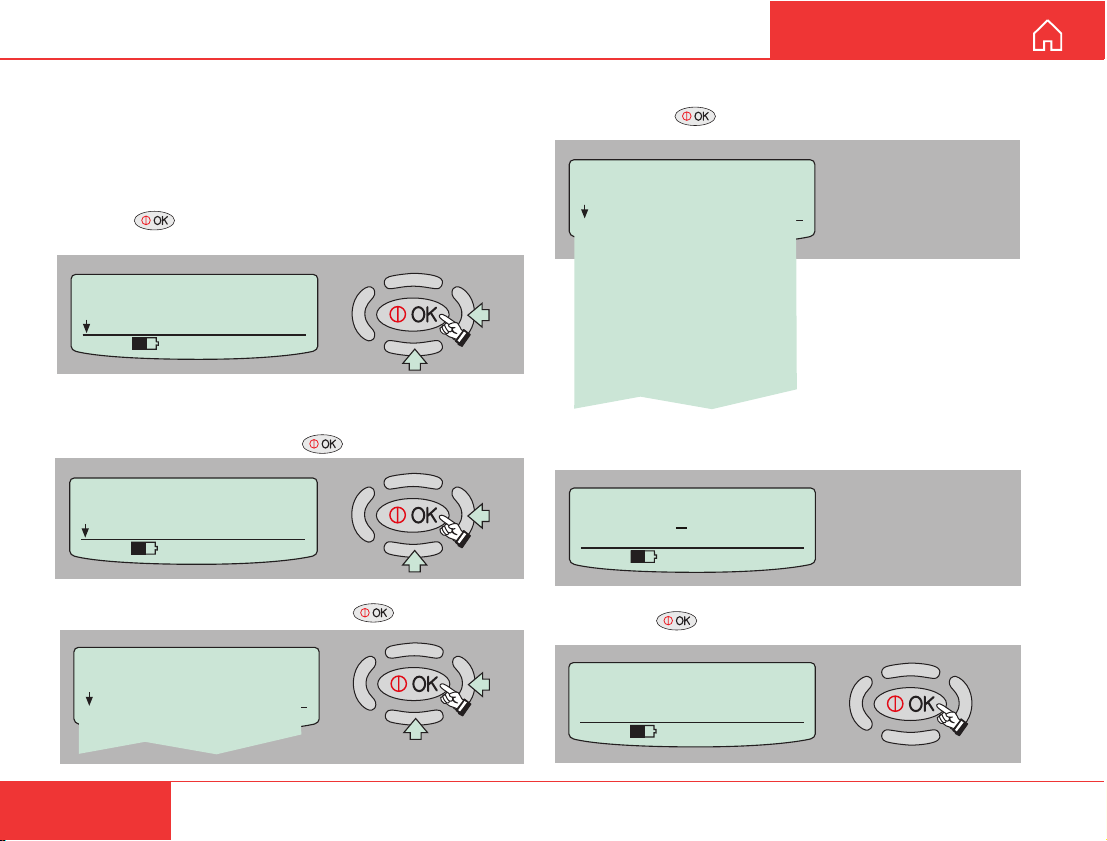
Example of removing an ISDN device:
1 Press on the WorldCommunicator Modem
Unit to open the MENU:
MENU
> Device Manager
Configure DTE
535 09:46
2 In the Device Manager menu, scroll down to
Remove Device and press .
Device Manager
> Remove Device
Factory Defaults
535 09:46
3 Scroll down to ISDN and press .
Device Manager
> ISDN
DECT
USB
COM
4 Scroll down to the entry to be removed from the
list and press .
> Remove Device
ISDN Speech
Id: 01 MSN: 20
ISDN64k Speech
Id: 91 MSN: 30
ISDN64k Audio
Id: 61 MSN: 40
ISDN56k Data (V110)
Id: 71 MSN: 50
ISDN64k Data (UDI)
Id: 51 MSN: 60
ISDN
5 Enter the owner password (1........90).
Owner's password:
123456789
535 09:46
0
6 Pressing deletes the chosen entry .
Press OK to delete:
ISDN64k Data (UDI)
Press Left to abort
535 09:46
26
Nera WorldCommunicator
Page 27
GETTING ST ARTED
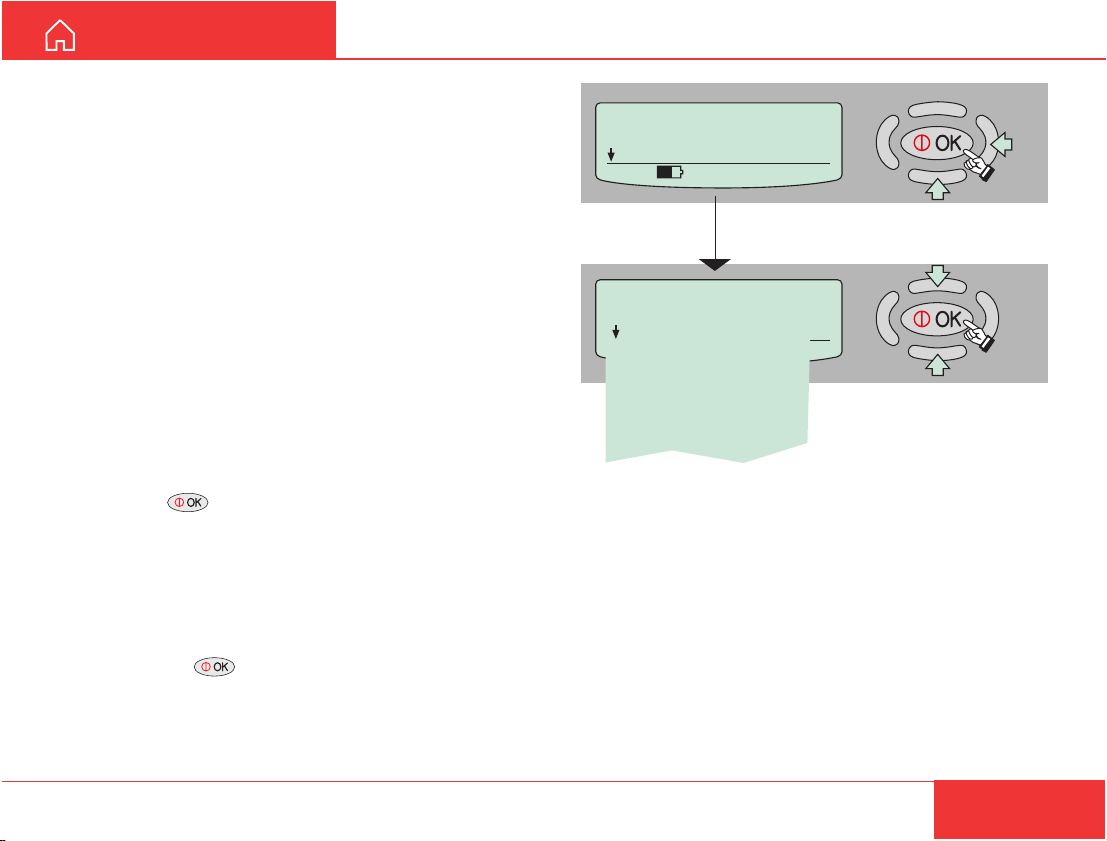
Selecting default Net service provider
Make sure that the correct default Inmarsat Net
service provider has been entered.
When using a SIM card, the WorldCommunicator will
automatically be programmed for all Ocean Regions.
The default Net service provider for a satellite (Ocean
Region) is automatically used if the user does not
select another one when making a call.
A default Net service provider must be programmed
the first time an Ocean Region is entered.
Default Net service providers for all Ocean Regions
can be preprogrammed from a PC connected to the
WorldCommunicator . See User Guide.
Use the Modem Unit display when programming the
current satellite region:
1 Press to enter the MENU, and scroll down to
Set Default Net.
2 Pressing “right arrow” opens the list of selectable
default Net service providers.
3 Scroll up/down to wanted Net service provider.
SETTING UP CONT’D
MENU
> Set Default Net.
Configure DTE
535 09:46
Set Default Net.
> Telenor
Stratos
KDD
Telenor
OTE
Korea Telecom
Hai Phong
France Telecom
Examples
Note!
T wo Telenor providers are listed in the display. Make
sure to select the one you are commissioned to.
- the first: T elenor with Comsat
- the second: Telenor in Norway
4 Pressing enters the chosen Net service
provider.
Nera WorldCommunicator
27
Page 28
SETTING UP CONT’D
GETTING STARTED
Making a call
Call through default Net service provider
When using the WorldCommunicator for the first
time in an Ocean Region, make sure that the region
appearing in the display is correct:
Unknown net
AOR-W
Ready for call
535 09:46
If incorrect, see "Selecting default Net provider" on
the previous page.
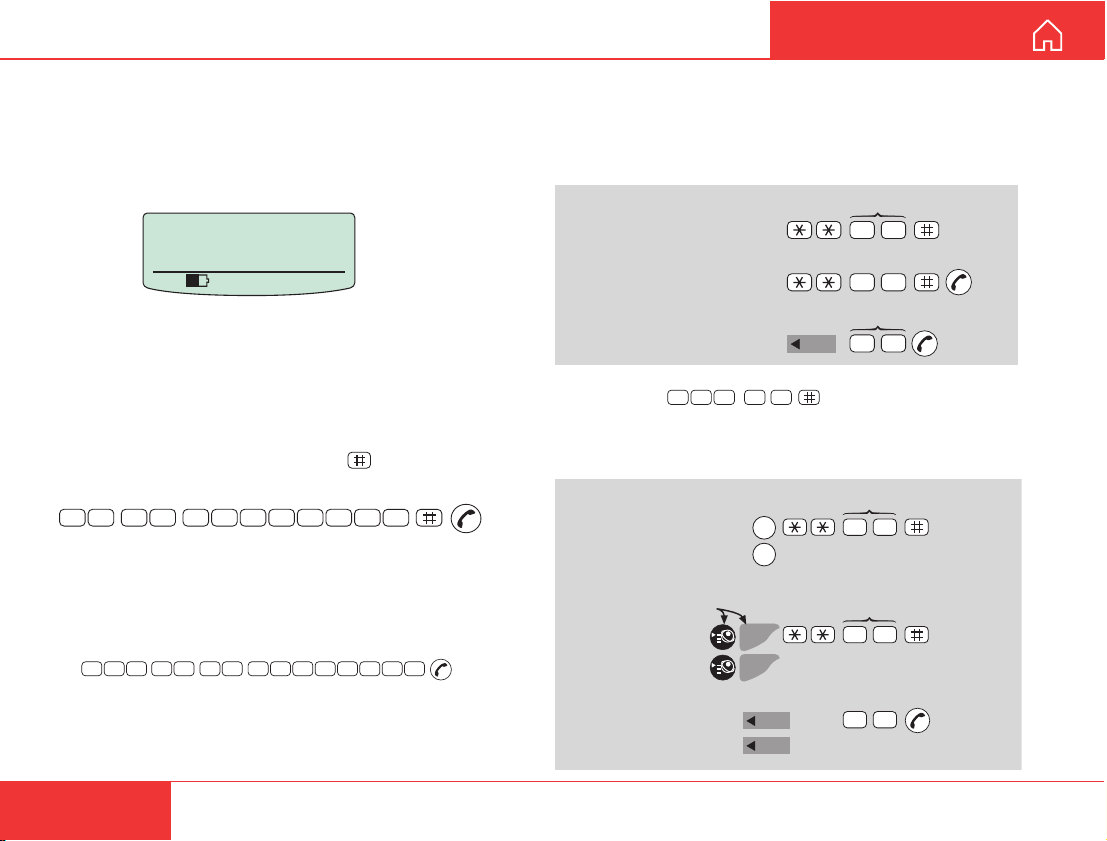
Dialing:
1 On the connected equipment, dial 00 and the
country code, followed by the subscriber number
(max 22 digits), and finally press
number, e.g.:
0
0
4
7
6
7
2
4
4
Note! Some types of equipment do not have # implemented in software even if the #-key is on the keypad.
Then in front of the telephone number use:
903 if dialing the number digit by digit, or
902 if for the number to be sent as a block. e.g.:
0
0
4
7
6
7
9 0
2
2
7
4
4
to send the
0
0
7
0
0
On DECT
also:
Internal communication
Calls can be made internally by dialing MSN numbers
between the connected ISDN and/or DECT equipment.
Examples:
MSN (example)
2
ISDN-to-ISDN/DECT:
0
ISDN Handset/
0
DECT-to-ISDN:
DECT-to-DECT:
2
Handset Id (example)
5
0
INT
Note! If the telephone lacks the *-key, 103 may be dialed
instead, e.g.:
2 00 31
Transfer of incoming/outgoing satellite calls (with
above examples):
MSN/Handset Id
ISDN-to-ISDN/DECT:
Press button>1sec,
R appears in display:
DECT-to-ISDN:
R
toggles between subscribers
R
R
toggles between subscribers
R
2 0
MSN/Handset Id
2 0
Hang up
Hang up
2 Wait for answer.
3 Disconnect the call when finished.
28
DECT-to-DECT:
50
INT
toggles between subscribers
INT
Hang up
Nera WorldCommunicator
Page 29
GETTING ST ARTED SETTING UP CONT’D
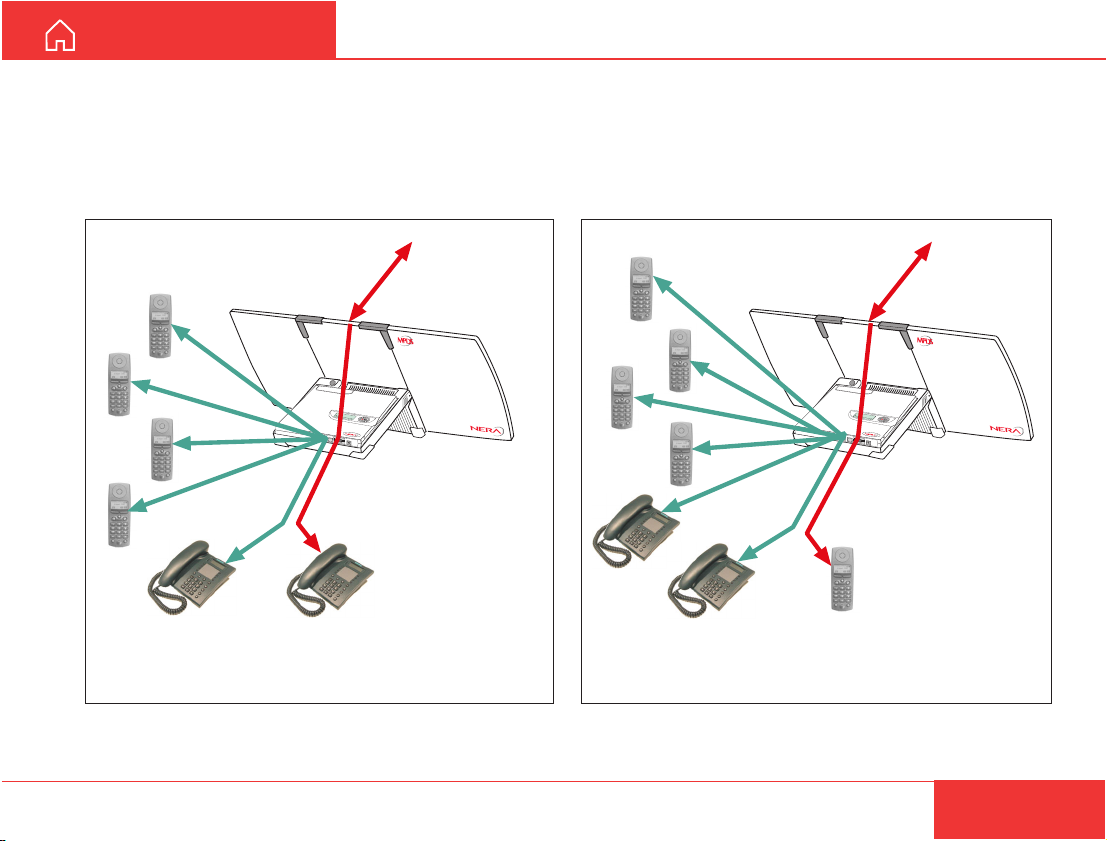
Number of connections
When an ISDN device is used to communicate via
satellite, the 2nd ISDN channel can be used to call a
DECT handset. Four DECT handsets can be used
for internal calls.
When a DECT handset is used to call via satellite,
four DECT handsets and both ISDN channels can be
used for internal calls.
>S
M
ta
E
rt S
N
U
L
e
o
a
ck
rc
h
te
5
2
rm
0
in
a
l
0
5
:4
6
ISDN
RS-232
USB
Local calls Satellite call
via ISDN phone
Nera WorldCommunicator
>S
M
ta
E
r
N
t S
U
L
e
o
a
c
rc
k
h
te
5
2
r
0
m
in
a
l
0
5
:
4
6
ISDN
RS-232
USB
Local calls Satellite call
via DECT phone
29
Page 30
SETTING UP CONT’D
GETTING ST ARTED
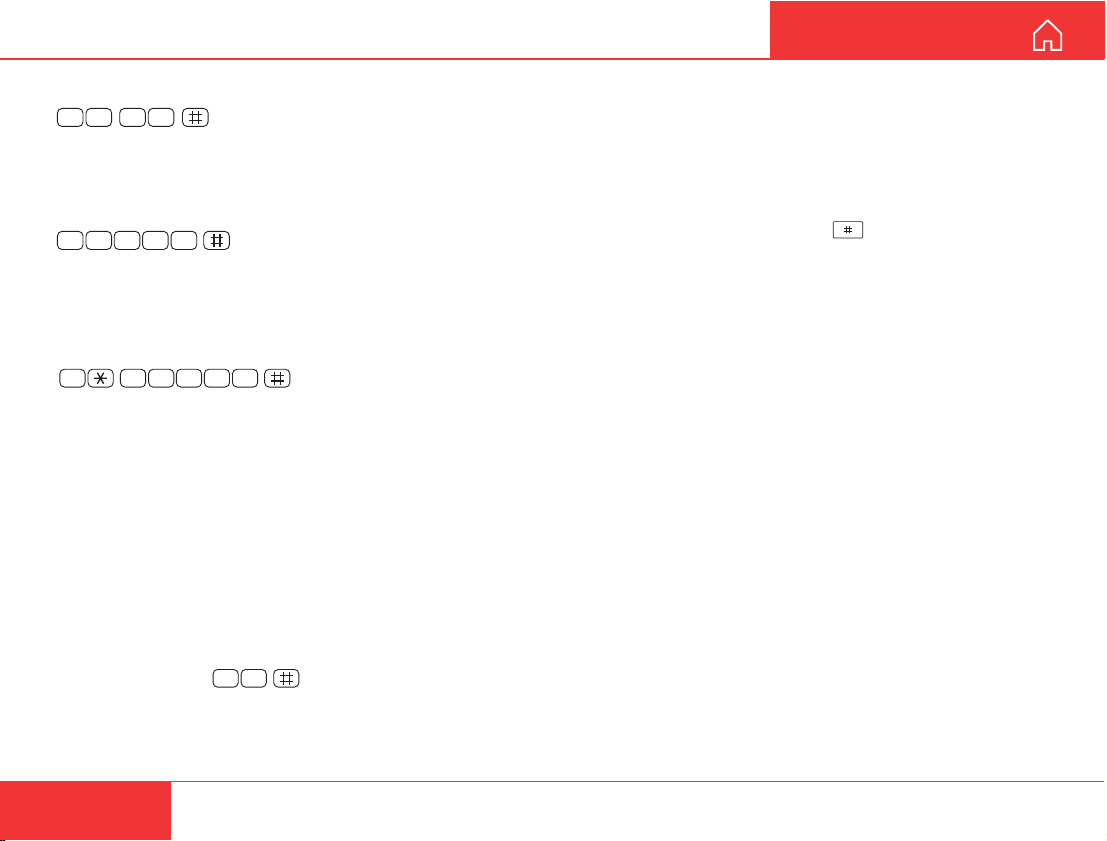
Short number dialing from Phone Book (prefix 23)
2 3 1 0
number stored in the Phone Book under short number
10.
Short number dialing (prefix 23)
2 3 0 51
number stored on the SIM card under short number
105.
Short number dialing (prefix 23) through selected Net
service provider
2 3 0 54 1
telephone number stored under short number 105
via the selected Net service provider (Telenor=4).
How to add short numbers to the SIM card:
See “PHONE BOOK” in the User Guide.
Service calls
Special information services are accessible with
2-digit service address code.
Note! Not all Net service providers offer every service.
Example of obtaining assistance from the Interna-
tional Operator:
Telefax
The Nera WorldCommunicator is fully compatible
fetches and sends the telephone
fetches and sends the telephone
fetches and sends the
1 1
with the world’s leading telefax machines and telefax
software standards. However , transmission may not
be possible through some of the telefax machines
available on the market. Please check with your Net
service provider before purchasing a telefax for use
with the WorldCommunicator.
On a telefax with keypad, enter as the last digit
before starting transmission, or use 902/903 as
described on the previous page.
To call the WorldCommunicator
Dial the international prefix (normally 00) followed by
870 and the IMN number, f.ex. 00 870 762420510.
The common Ocean Region access no. 870 connects the call to the dialed WorldCommunicator
regardless of the Ocean Region the user currently
communicates through.
If the Net service provider does not support access
no. 870, call the Ocean Region directly:
871 – AOR-E (Atlantic Ocean Region East)
872 – POR (Pacific Ocean Region)
873 – IOR (Indian Ocean Region)
874 – AOR-W (Atlantic Ocean Region West)
30
Nera WorldCommunicator
Page 31
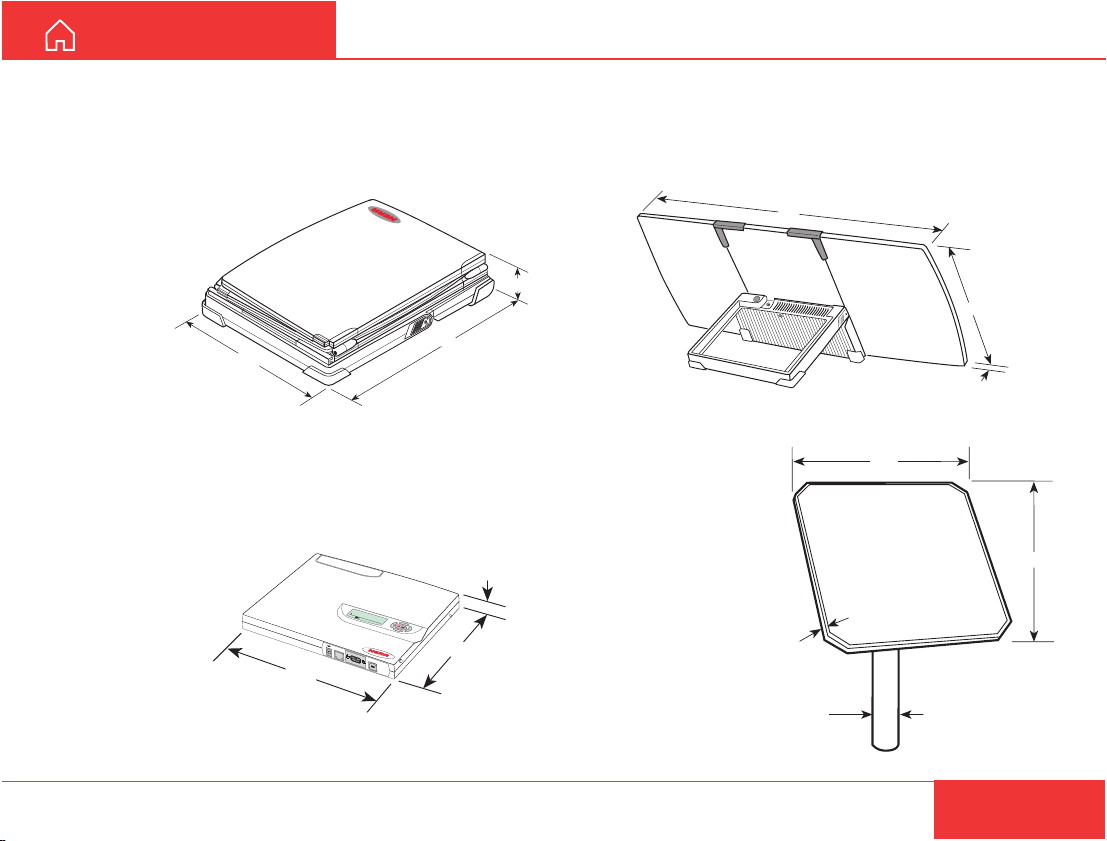
GETTING STARTED
521
521
Pole (option)
Max dia 120mm
Depth 52 mm
DIMENSIONS AND WEIGHTS
Antenna & RF Unit and Modem Unit folded
With MPDS: 101529
Without MPDS: QUAZ 911918
Weight: 4.2 kg (3.7 without battery)
260
355
Modem Unit
With MPDS: 101572
Without MPDS:
QUFC 911950
Weight: 1.0 kg
244
ISDN
>Start Search
Lock terminal
52 0 05:46
RS-232
MENU
USB
173
25
Antenna & RF Unit
With MPDS: 101571
Without MPDS: QUFF 911907
Weight: 3.2 kg
774
68
340
10
Fixed Antenna
With MPDS: 101722
Without MPDS:
QUFF 911910
Weight: 3.9 kg
(incl. mounting
bracket)
Nera WorldCommunicator
31
Page 32
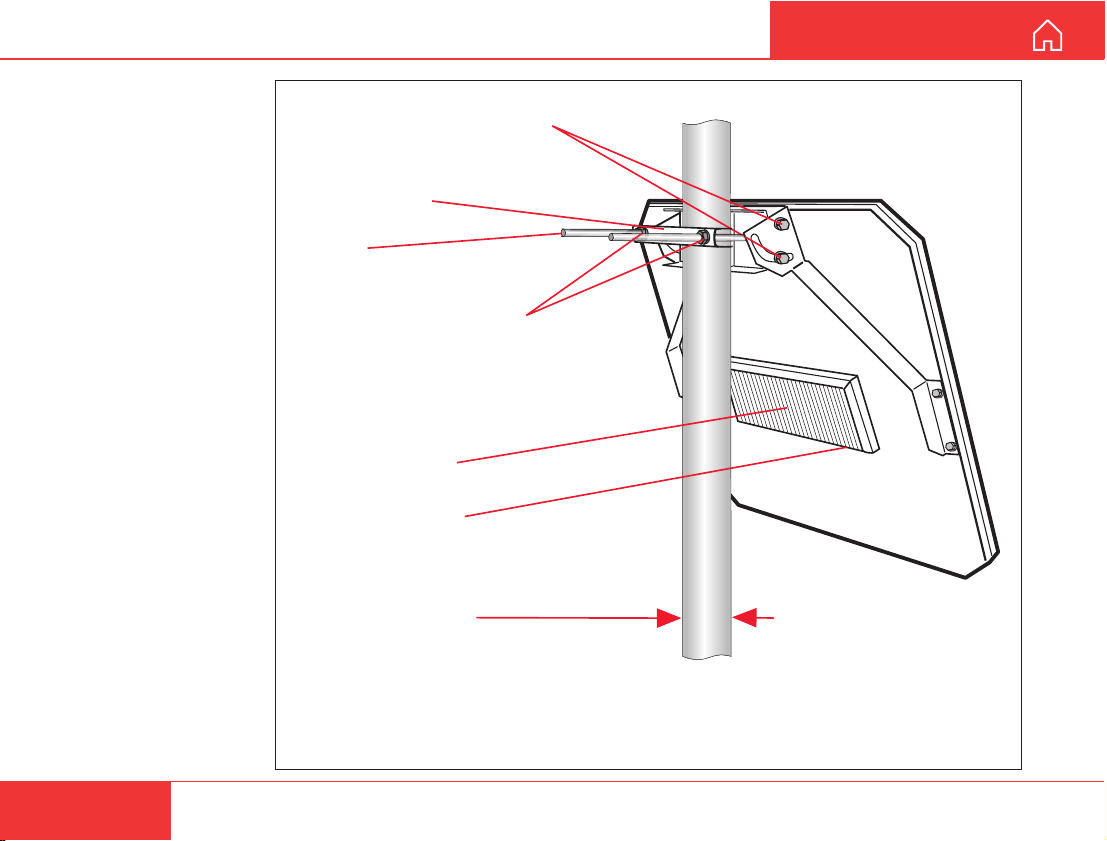
MOUNTING FIXED ANTENNA
Mounting
Fixed dish mounted
on mast.
Vertical adjustment bolts
(90 degree range)
Pole bracket
U-bolt
Horizontal adjustment
nuts
RF transceiver
Coax connector
Pole (option)
Max dia 120 mm
GETTING ST ARTED
32
Note! The antenna should be mounted with the cooling fins on the
RF transceiver pointing upwards to ensure efficient cooling.
Nera WorldCommunicator
Page 33
GETTING ST ARTED
MOUNTING FIXED ANTENNA CONT’D
Adjustment
In order to obtain optimal receive/transmit conditions,
it is important to point the antenna towards the
satellite as accurately as possible.
Procedure (see previous page):
1 Make a coarse adjustment until a signal strength
of at least 535 is obtained.
Fasten the two horizontal adjustment nut s and
the two vertical adjustment bolts.
2 Loosen the horizontal adjustment nuts slightly,
so that it is possible to move the antenna (with
some force) in the horizontal direction.
Adjust the antenna horizontally for maximum
received signal strength.
Tighten the horizontal adjustment bolts.
3 Loosen the vertical adjustment bolts slightly, so
that it is possible to move the antenna (with
some force) in the vertical direction.
Adjust the antenna vertically for maximum
received signal strength.
Tighten the vertical adjustment bolts.
4 Repeat steps 2 and 3 as many times as
necessary until the maximum signal strength
has been obtained.
The antenna is now correctly adjusted.
If the signal strength reading is below 535, the
selected location is unsuitable for the fixed
antenna. Move the antenna elsewhere and
repeat the procedure from step 1.
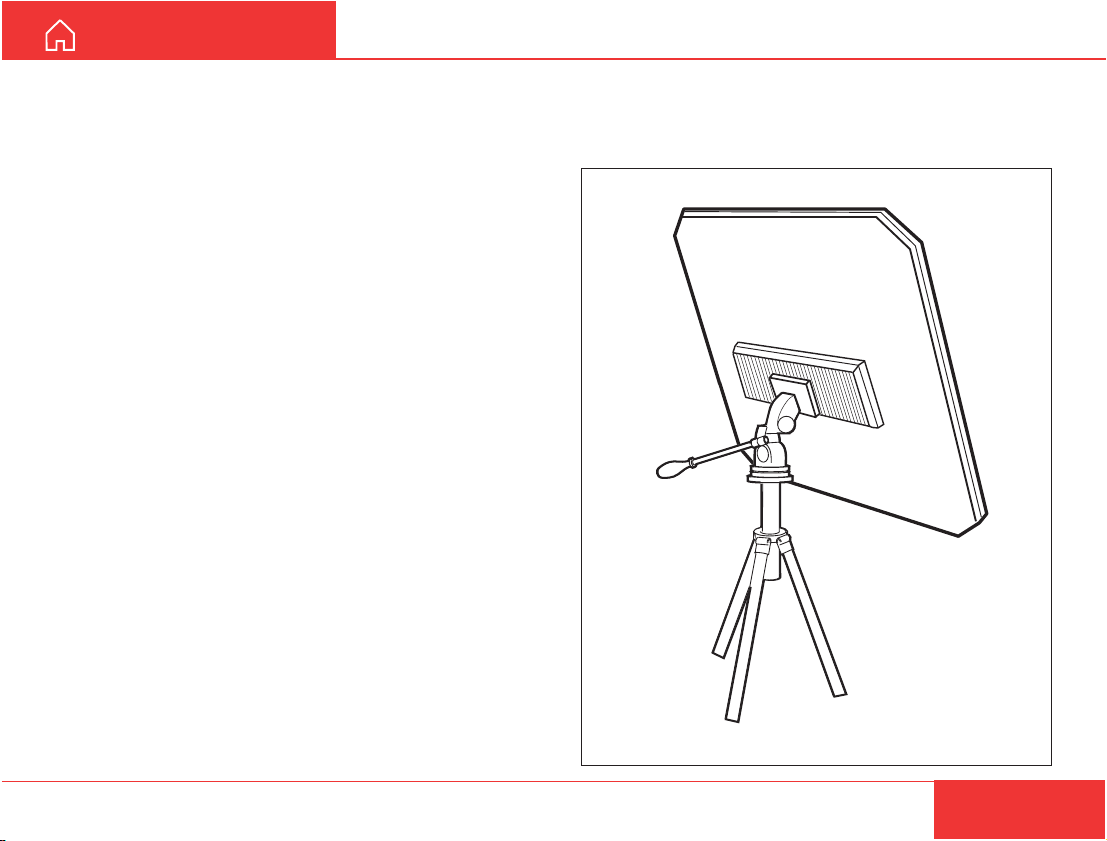
Fixed dish mounted on tripod
Be aware that the portable antenna also can be
mounted on tripod.
Nera WorldCommunicator
33
Page 34
BA TTERY HANDLING
GETTING ST ARTED
General
•
When used for the first time, charge the battery for
4.5 hours (battery indicator full), then operate the
equipment until the battery is discharged, see also
"EQUIPMENT DESCRIPTION > Internal battery".
• Standby time: approx. 50 hours
• Talk time at 4.8 kbps speech: 4.5 - 9 hours
(depending on coverage signal and number of
devices connected).
• Talk time for 64 kbps voice: 3 - 6 hours.
Transmission time for other services: 1.5- 3 hours.
• Operating temperature: -25 to +55°C.
• Storage temperature: approx. -50° to +80°C.
• Charge time: approx. 4.5 hours.
• Lowest charge temperature: 0°C.
• A full discharge/charge cycle is recommended
once every 60 days.
• Capacity degradation: 50% loss after 500 dis-
charge/charge cycles.
• Weight: approx. 0.45 kg
• The WorldCommunicator will only accept a battery
approved by Nera. Contact your Nera agent for a
list of approved batteries.
How to conserve battery capacity
• Disable DECT when not in use, see previous page.
• Turn off display light, see User Guide.
• Check for good satellite connection.
• Use 4.8 kbps speech service instead of 64 kbps.
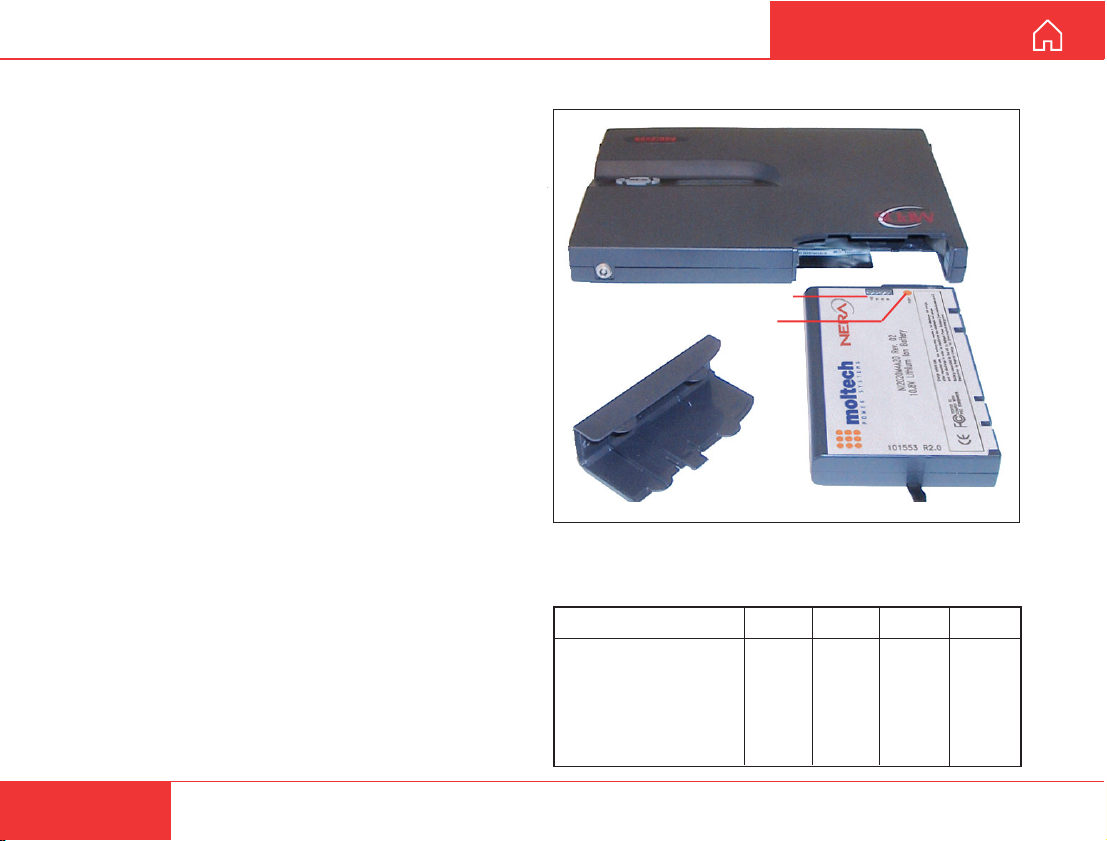
Battery state indicators
Battery state indication
Charge check button
Four green indicators show the charge level.
When pressing the charge check button for 2 seconds, 1 - 4 indicators will light accordingly:
Rel state of charge Ind 4 Ind 3 Ind 2 Ind 1
100 - 76%
75 - 51% OFF ON ON ON
50 - 26% OFF OFF ON ON
25 - 11% OFF OFF OFF ON
10 - 0% OFF OFF OFF BLINKS
Shut down OFF OFF OFF OFF
ON ON ON ON
34
Nera WorldCommunicator
Page 35
GETTING ST ARTED
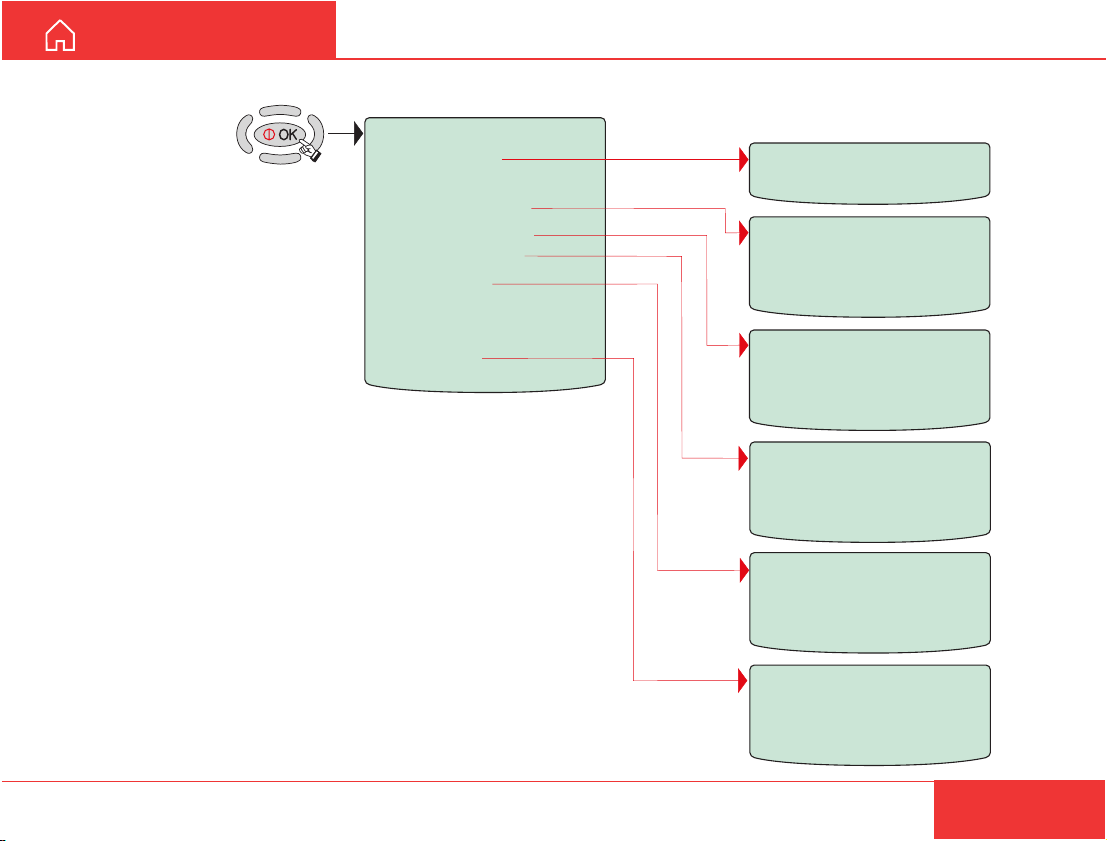
Overview
MENU:
> Start Search
> Lock terminal
> Set Default Net.
> Device Manager
> Configure DTE
> Information
> Enable diagnostics
> Disable DECT
> Precharge
DISPLAY FUNCTIONS
Searching all regions
Set Default Net
> CMC
>BT
etc.
Device Manager
> Add Device
> Remove Device
> Factory Defaults
Configure DTE
> Speed
> Format
> Flow control
Information
> Forward id
> Versions
> DECT Basestation
Nera WorldCommunicator
Fwd:
Code:
Index:
35
Page 36
DISPLlAY FUNCTIONS CONT’D
Configure DTE
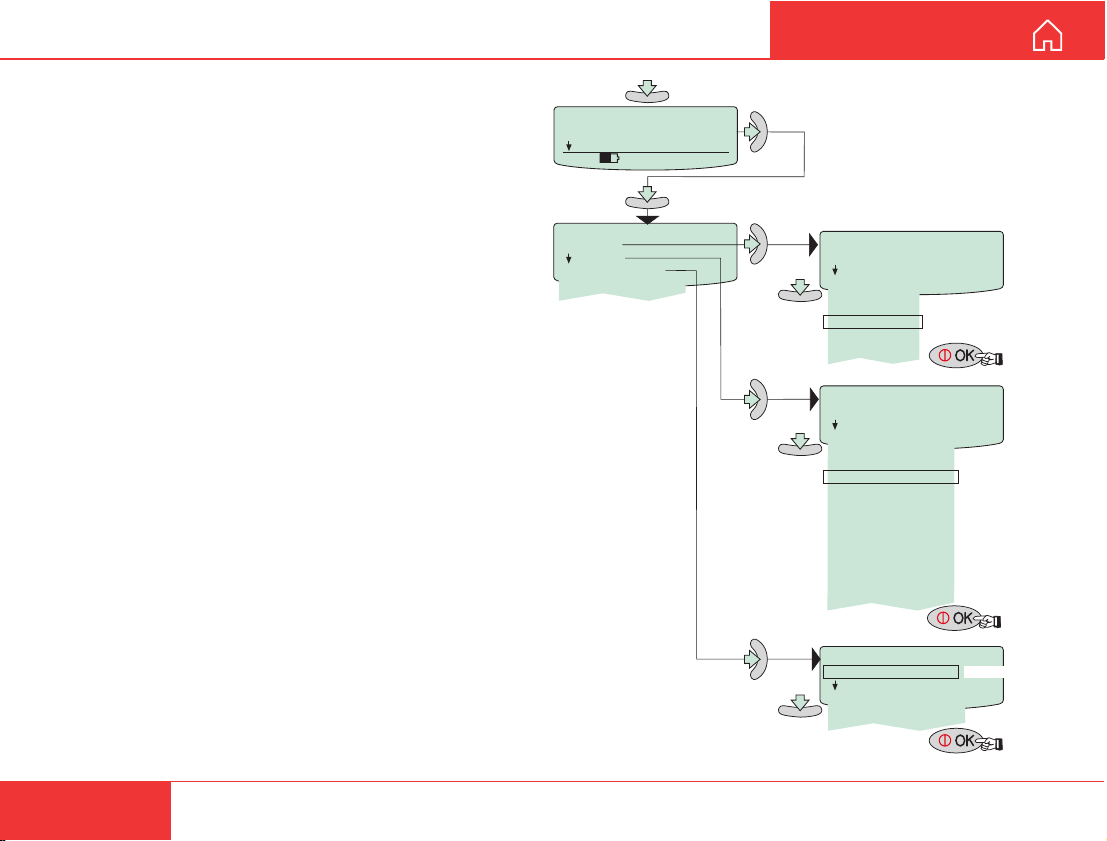
The RS-232 port is intended for connection of PC
for operation of the WorldCommunicator functions.
The default settings of the port are suitable for
operation of the vtLite program on a PC.
(Speed: 115200 bps. Format: 8 bits, no parity, 1 stop bit. Flow control: none.)
No configuration is needed on the WorldCommunicator.
Remember to set the PC accordingly!
Procedure for other than default settings:
Speed:
1 Scroll down to the Configure DTE function.
2 Pressing “right arrow” opens the
Configure DTE menu.
3 Scroll down to Speed and press “right arrow”
to open the list of bit rates.
4 Scroll down to the required bit rate and press
OK to enter the chosen value.
Format:
1 Scroll down to the Format function and press
“right arrow” to open the list of combinations
(d=number of bits, p=parity, s=stop bit).
2 Scroll down to the required format combination
and press OK to enter the chosen settings.
Flow control:
1 Scroll down to Flow control.
2
Scroll down to the required settings and press OK.
> Configure DTE
670 09 : 46
Configure DTE
> Speed
MENU
Information
Format
Flow control
GETTING ST ARTED
Speed
> 1200bps
2400bps
4800bps
9600bps
19200bps
38400bps Default
57600bps
115200bps
> d=7, p=none, s=1
Flow control
> none
Format
d=7, p=e, s=1
d=7, p=o, s=1
d=7, p=m, s=1
d=7, p=s, s=2
d=8, p=none, s=1 Default
d=8, p=e, s=1
d=8, p=o, s=1
d=8, p=m, s=1
d=8, p=s, s=1
d=8, p=none, s=2
d=8, p=e, s=2
d=8, p=o, s=2
d=8, p=m, s=2
d=8, p=s, s=2
rts/cts
xon/xoff transprnt.
xon/xoff stripped
Default
36
Nera WorldCommunicator
Page 37
GETTING ST ARTED
Information
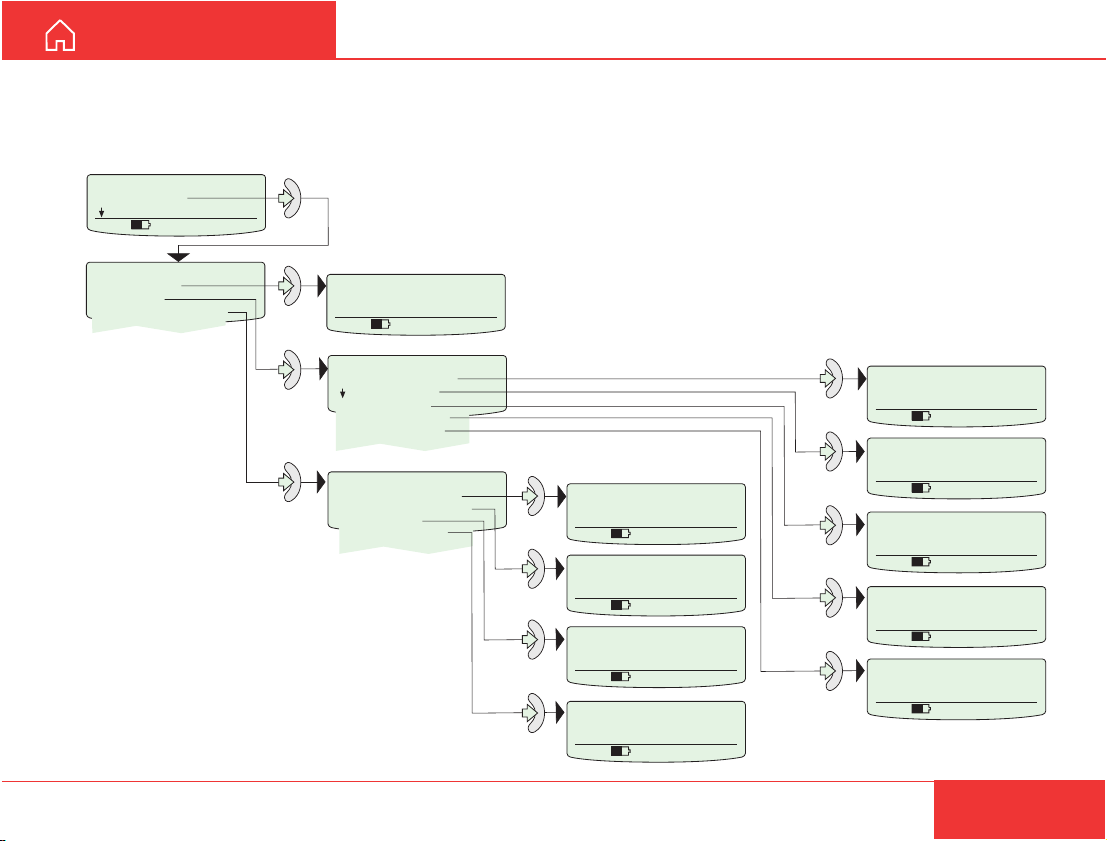
The information function allows checking the various
version numbers of the WorldCommunicator:
MENU
> Information
Enable diagnostics
520 09: 46
DISPLAY FUNCTIONS CONT’D
Information
> Forward Id
> Versions
> DECT Basestation
Procedure:
Forward Id
BD98B4
520 09: 46
Versions
> System version
KDC version
DSP version
Antenna version
Monitor version
DECT Basestation
> Software Version
Hardware Revision
Build Date
Basestation Id.
1 Scroll down to Information.
2 For readout, press buttons as
indicated.
Nera WorldCommunicator
Software Version
520 09: 46
Hardware Revision
520 09: 46
Build Date
520 09: 46
Basestation Id.
520 09: 46
System version
REL4.01
18 Dec 2001
520 09: 46
KDC version
QPRG9110043/1.50
520 09: 46
DSP version
v2.1.2 QPRG9110049
520 09: 46
Antenna version
520 09: 46
Monitor version
00.15
520 09: 46
37
Page 38
DISPLAY FUNCTIONS CONT’D
GETTING ST ARTED
Enabling/disabling the DECT station
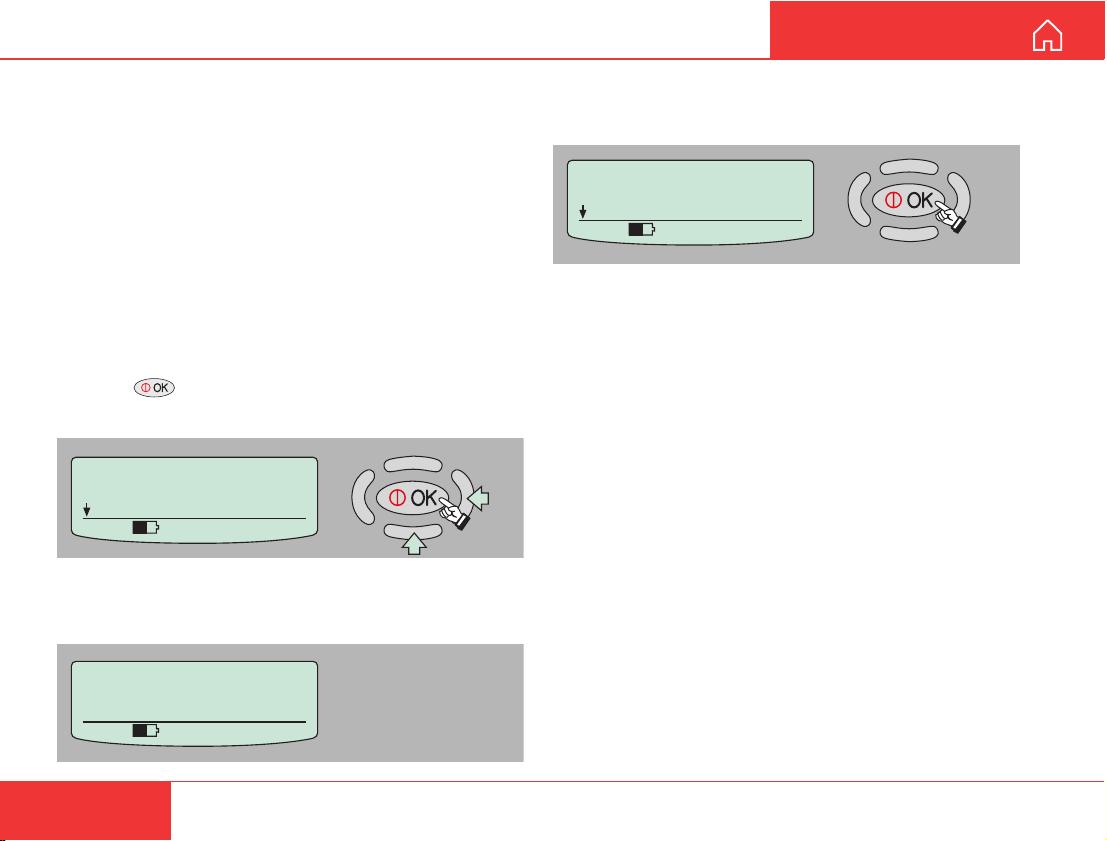
In some cases it may be desirable to turn off the
DECT base station:
• In countries that do not permit the use of the
particular DECT phone frequencies.
• In order to save battery cap acity.
Enabling/disabling the DECT function switches the
built-in DECT On/Off.
When the base station is off, the DECT handset s
cannot be operated.
Procedure:
1 Press on the Nera WorldCommunicator to
enter the MENU, and scroll down to Disable DECT.
MENU
> Enable DECT
Self Test
535 09:46
2 Pressing “right arrow” turns On (or Off) the DECT
base station.
3 If enabling the base station, the Nera
WorldCommunicator responds with “On”.
MENU
> Disable DECT
Self Test
535 09:46
Starting DECT
Basestation
535 09:46
38
Nera WorldCommunicator
Page 39
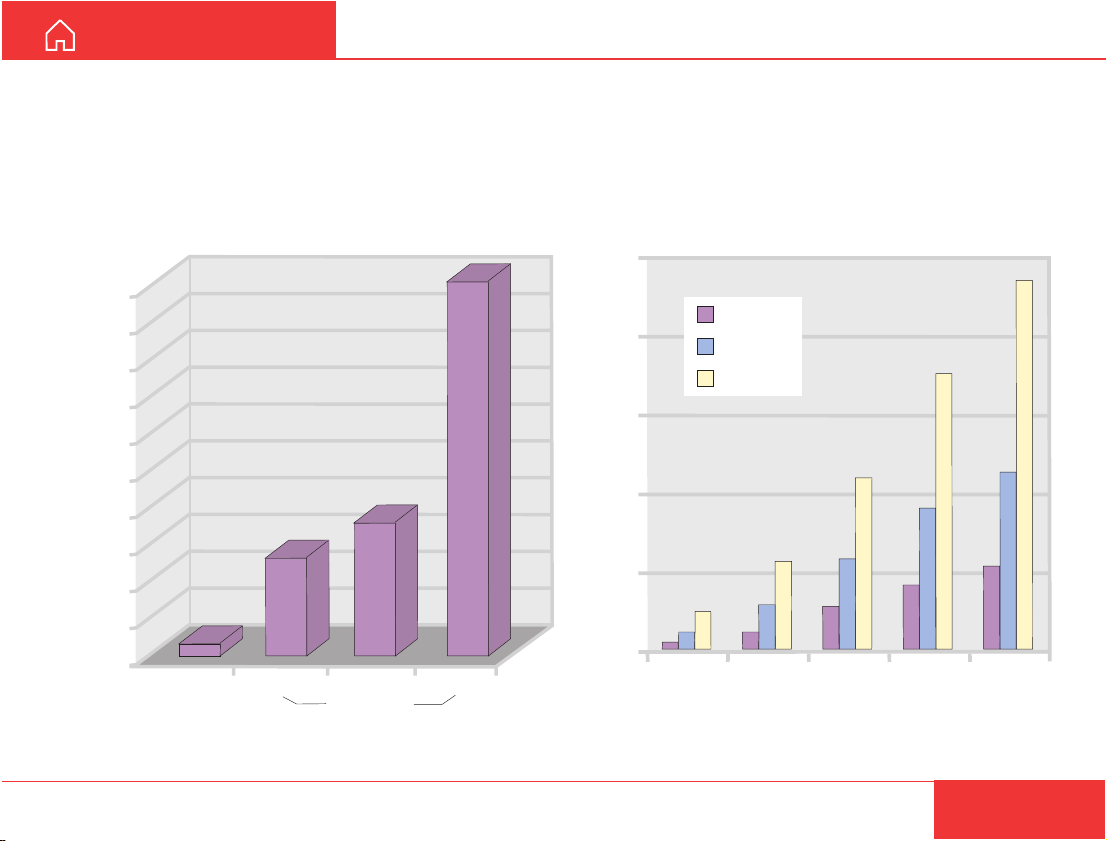
GETTING ST ARTED
ISDN EFFICIENCY
Cost effective transmission
The maximum transmission speed depends on the
equipment on both the mobile and fixed and side.
If the fixed side can handle 14.4 kbps you will
achieve a maximum transmission speed of
FAX TRANSMISSION
490
500
450
400
350
300
250
200
150
Transmission time in seconds
100
50
0
16
64kbps
116
14.4kbps 9.6kbps 2.4kbps
Group 4 fax
164
Group 3 fax
14.4 kbps, the same principles as with computers.
It is cost effective to transmit fax/data as fast as
possible, the best solution is therefore to have ISDN
modem and G4 fax on both the mobile side and the
fixed side.
DATA TRANSMISSION
2500
64 kbps
2000
1500
1000
Transmission time in seconds
500
0
28.8 kbps
14.4 kbps
0.5 1 2 3 4
File size in Mbyte
Nera WorldCommunicator
39
Page 40
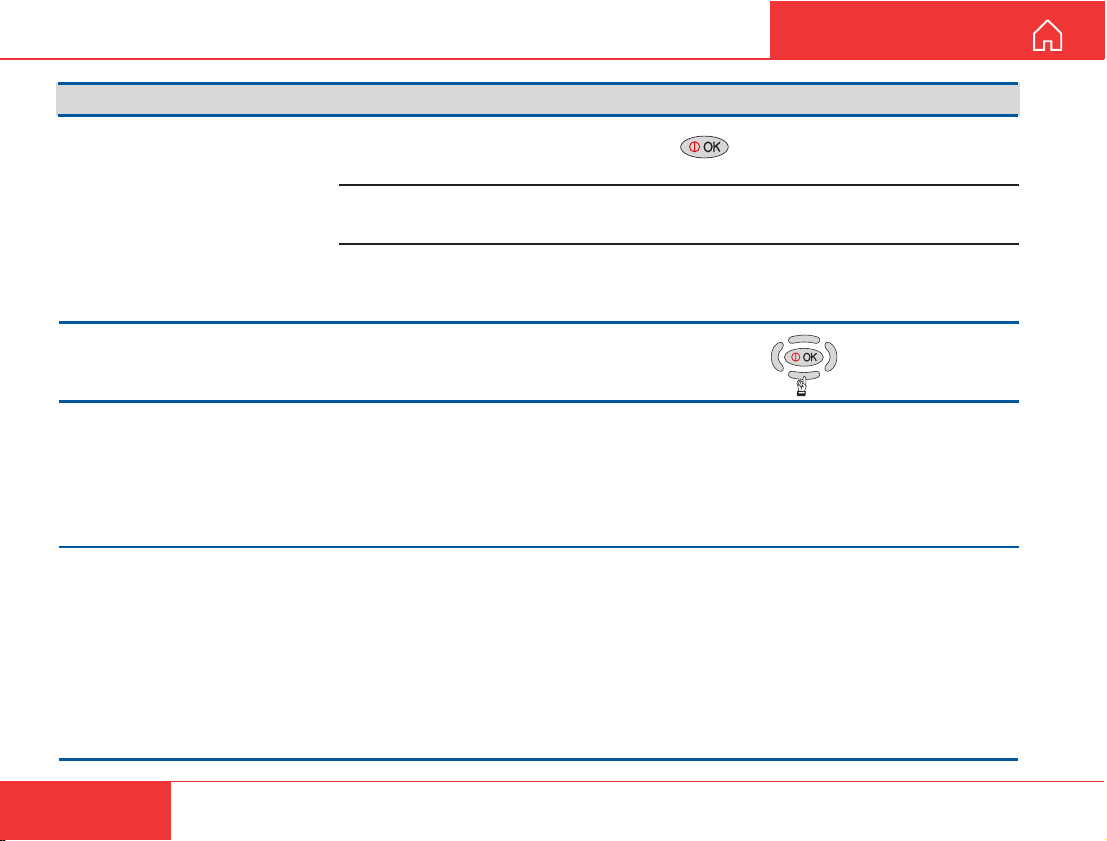
TROUBLESHOOTING
Problem Probable cause Action
GETTING ST ARTED
1. The WorldCommunicator
display does not light up:
2. The display stays
completely black:
3. The access PIN code
appears to be invalid:
4. The WorldCommunicator
cannot find the satellite:
The Modem Unit is not
turned ON
The battery needs
recharging
The battery is not inserted
properly, or contacts dirty
or damaged
Contrast adjustment
The code may have been
changed.
No or weak signals
Press the -key for 2 seconds.
If needed, connect the universal adapter for
powering/charging.
Check the battery.
Press "arrow down"
to increase light
in display:
The access Phone PIN is reset to the default code
by logging in as owner:
+ owners password
*
Note! The SIM card can only be unblocked using
a PUK code (Pin Unblock Key). Contact the Net
service provider to obtain the PUK if lost.
Check for correct position of the antenna. Check
that no obstacles block the free sight to the satellite.
Be aware that a window glass may reduce the
signal level significantly. The signal strength
indicator should preferably exceed 420 (4.8 kbps
speech), or 535 for other services.
Check that the coax cable is connected properly.
Point the antenna at another satellite.
If accessible, try another antenna unit.
40
Nera WorldCommunicator
Page 41
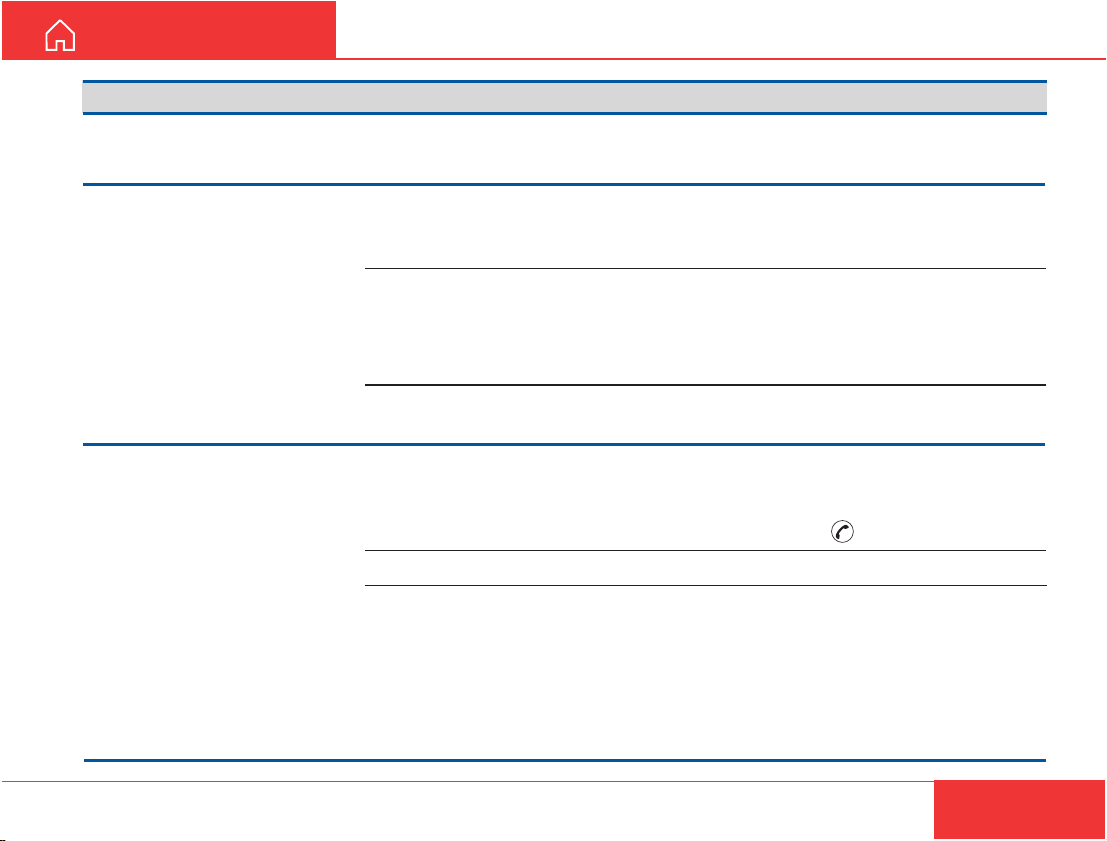
GETTING ST ARTED
Problem Probable cause Action
TROUBLESHOOTING CONT’D
5. The WorldCommunicator
functions abnormally:
6. Unsuccessful call
attempt:
7. Problems with telefax:
Faulty or no power
The called party is busy.
Subscriber busy
appears in the display.
The following messages
appear in the display:
No response from net
or Not authorized for this
service.
This message appears:
"Traffic log is full"
Incomplete dialing
Service not commissioned
System transmission
delays
Turn off power and disconnect power cable/battery.
Connect power cable/battery, and switch on again.
Call the Net service provider. If unsuccessful, wait
for some time and try again.
Call another destination (another country).
Check that the correct service provider is shown in the
display.
The WorldCommunicator is not properly commissioned.
Check with the Net service provider.
Connect a PC to the WorldCommunicator and read/print
out the traffic log to allow further logging.
Remember to press "#" as last digit before starting
transmission.
Instead of
+ subscriber number (+ if DECT).
See problem 6.
The OFF-HOOK time should be as long as possible
(e.g. 2 minutes). When the fax machine is called,
ringing time should be set to minimum (e.g.
immediate answer).
Try a different fax machine. Check that a Group
4 fax is used on the ISDN interface, and Group 3
fax via analog/ISDN adapter.
"#", try to enter: 902 + 00 + country code
Nera WorldCommunicator
41
Page 42
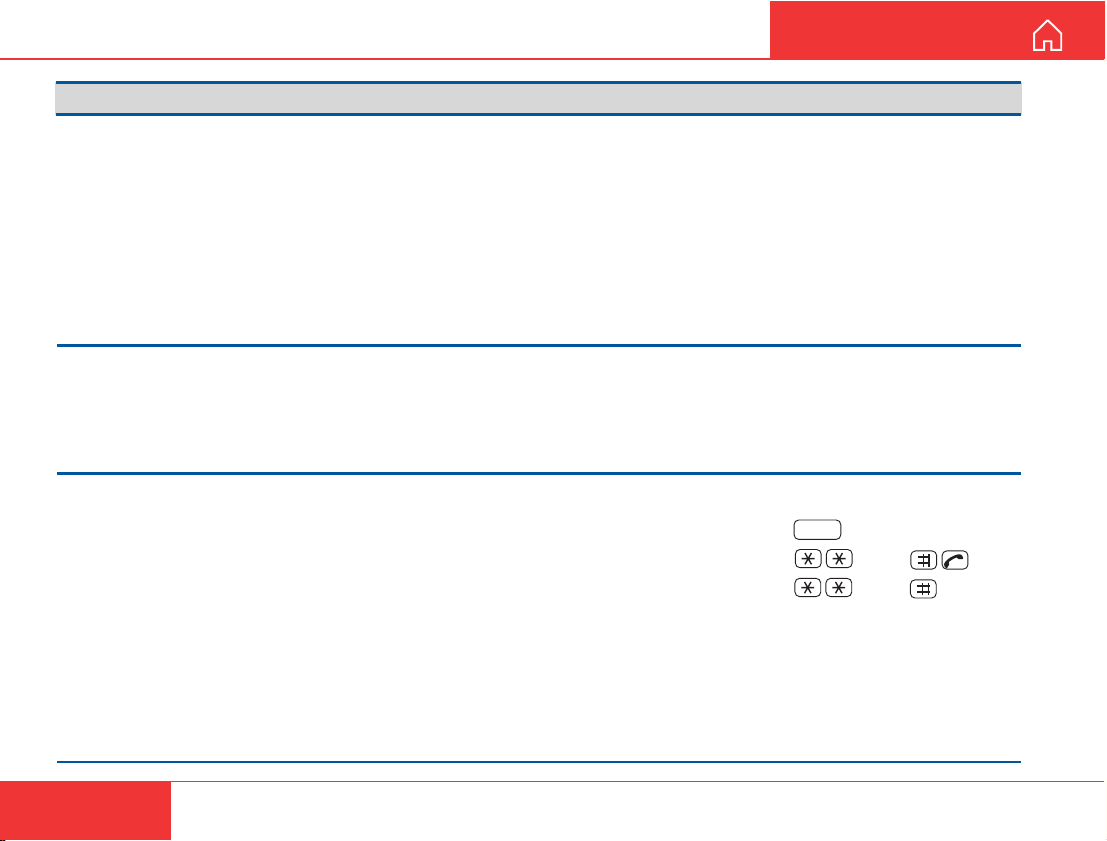
TROUBLESHOOTING CONT’D
Problem Probable cause Action
GETTING ST ARTED
8. Problems with data
communication:
9. Routing of calls:
10.Problem with local calls:
Wrong PC settings
MSN number not entered
properly
Wrong dialing
Check the PC program settings: 8 data bits, 1 stop
bit, no parity and correct modem driver.
If necessary, extend the timeout intervals.
If shore/land side has an analogue modem, use
3.1 kHz service in WorldCommunicator.
If shore/land side has European/French ISDN
connection, use 64 kbps UDI service.
If shore/land has 56 kbps UDI (common in USA),
use 56 kbps UDI data service.
Contact the PC applications vendor for help.
Make sure that the MSN number entered into the
WorldCommunicator with the Device Manager, is
also entered into connected equipment.
See User Guide for more details
Check that you call the correct MSN number.
DECT-toDECT : + handset Id (1-12)
DECT-to-ISDN : MSN
ISDN-to-DECT/ISDN : MSN
See User Guide for more details
INT
42
Nera WorldCommunicator
Page 43

GETTING ST ARTED
LIST OF TERMS
AC Alternating Current
AOR-E Atlantic Ocean Region East.
AOR-W Atlantic Ocean Region West.
Azimuth horizontal direction angle between north and, e.g. the
direction to the satellite.
Bit rate the number of bits transmitted per second (bps).
Bps Bits per second.
CHV2 higher access level on the SIM card, corresponding to
Nera F77 "owner" level.
DC Direct Current.
DECT Digital Enhanced Cordless Telecommunication
DID Destination terminal IDentification.
DSP Digital Signal Processor .
DTE Data Terminal Equipment.
Elevation vertical angle to the satellite, i.e. the height of the
satellite above the horizon.
Fleet 77 Inmarsat's single integrated voice, fax, Mobile Data
Service and Mobile Packet Data Service.
FWD ID forward Id, telephone network identity.
GAN Inmarsat Global Area Network.
Home LES Home Land Earth Station gives access to MPDS
service like Internet / e-mail and handles MPDS billing system.
IMN Inmarsat Mobile Number, a unique 9-digit number which
identifies each device connected to Nera F77.
Inmarsat International Maritime Satellite Organisation.
IOR Indian Ocean Region.
ISDN Integrated Services Digital Network.
ISN Inmarsat Serial Number, individual number assigned to
each Nera F77 terminal.
ITU International Telecommunications Union
Kbps Kilobits per second.
LAN Local Area Network.
LES Land Earth Station, a station that interconnects fixed
telecommunications networks with the Inmarsat system; may
also be called a CES (Coast Earth Station) or a GES (Ground
Earth Station).
M4 Inmarsat Multi-Media Mini-M.
Nera WorldCommunicator
MES Mobile Earth Station, a user terminal for an Inmarsat
system; the Nera F77 terminal is an MES for the Inmarsat GAN
system; MES may also be called SES (Ship Earth Station) or, if
on aircraft, AES (Aeronautical Earth Station).
MPDS Inmarsat Mobile Packet Data Service.
MSN Multiple Subscriber Number, the extension number that
connected equipment responds to. Also used for internal calls.
NCS Network Coordination Station, station that supervises all
messages and signals sent in the Inmarsat system; one in each
Ocean Region.
OID Originating terminal IDentification.
Ocean Region the coverage area of an Inmarsat satellite within
which Nera F77 may communicate.
PABX Private Automatic Branch Exchange.
PIN Personal Identification Number.
POR Pacific Ocean Region.
PPP Point-to-Point Protocol, protocol used for serial data
communication via the Nera F77 RS-232 or USB port.
PUK Personal Unblocking Key, code that allows unblocking a
SIM card.
RF Radio Frequency.
R LES Regional Land Earth Station sets terminal in MPDS list.
S/A operator StandAlone operator who maintains connectivity in
the event of Network Coordinating Station failure.
SBS Shared Base Station assigns channels to the MPDS user
and handles the MPDS communication.
SIM Subscriber Identity Module.
SMS Short Message System.
Spot Beam an Ocean Region is divided into sub-regions, each
“spotlighted” by a beam from the region satellite.
Terrestrial Network a fixed telecommunications network, such
as a telephone network or a data network, which connects to the
Inmarsat system at an LES/NCS.
UDI Unrestricted Digital Information.
USB Universal Serial Bus.
UTC Coordinated Universal Time, referenced to Greenwich
Mean Time (GMT).
43
Page 44
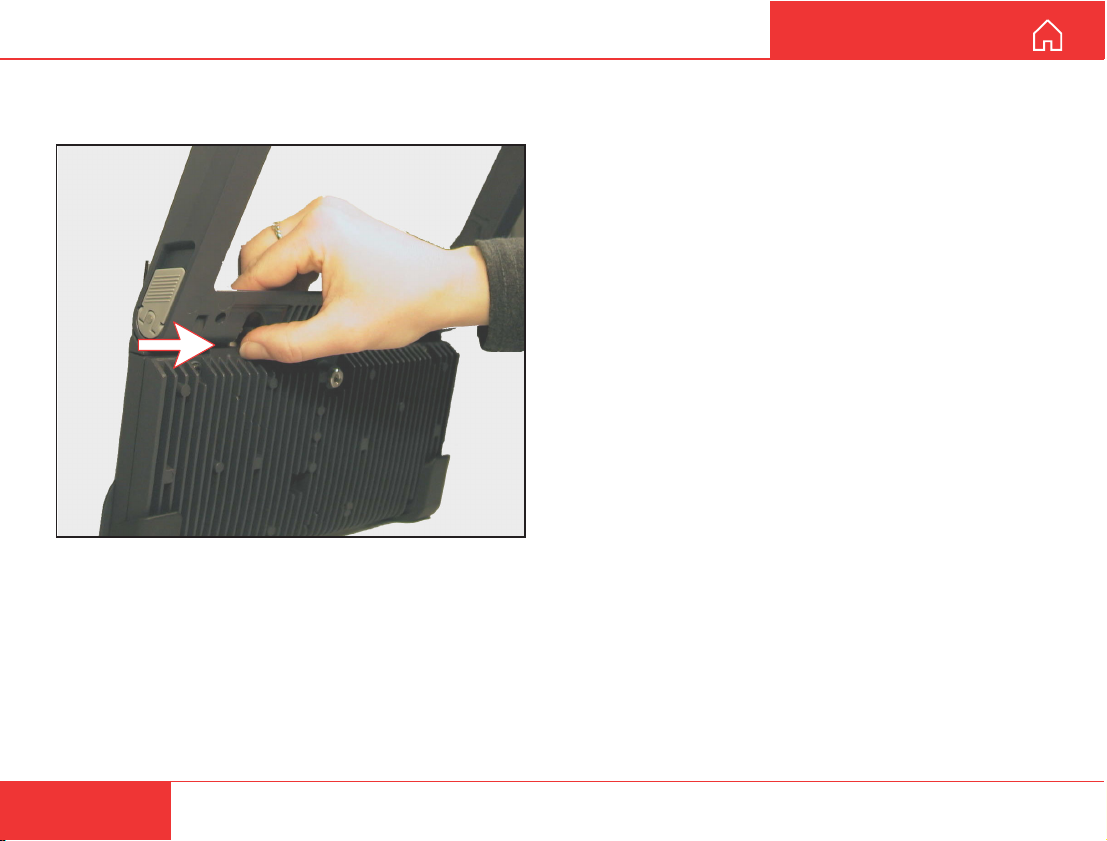
TO UNPLUG ANTENNA RF CONNECTOR
The picture below indicates how to position the
frame/hand to easier grab the connector housing.
GETTING ST ARTED
44
Nera WorldCommunicator
Page 45

GETTING ST ARTED
LIST OF P ARTS
Nera WorldCommunicator Portable Solution
• Foldable Antenna & RF Unit (ARU)
• Modem Unit (MUB)
• Antenna Cable (1m)
• Antenna Cable (10m)
• RS-232 Cable 9M -9F (3m)
• AC/DC adapter (100-240VAC input)
• AC Mains Cable (1.8m)
• Battery pack
• Gigaset 3000 Comfort DECT handset
• Charger type 3000L (220VAC) for Gigaset 3000
• Soft Case Basic
• ISDN 2-way multiport
• Getting Started Manual (English)
• CD-ROM
Nera WorldCommunicator Fixed Solution
• Antenna & RF Unit (ARU w/Pole bracket)
• Modem Unit (MUB)
• Antenna Cable (10m)
• RS-232 Cable 9M -9F (3m)
• AC/DC adapter (100-240VAC input)
• AC Mains Cable (1.8m)
• Battery pack
• Gigaset 3000 Comfort DECT handset
• Charger type 3000L (220VAC) for Gigaset 3000
• ISDN 2-way multiport
• Getting Started Manual (English)
• CD-ROM
Nera WorldCommunicator
45
Page 46
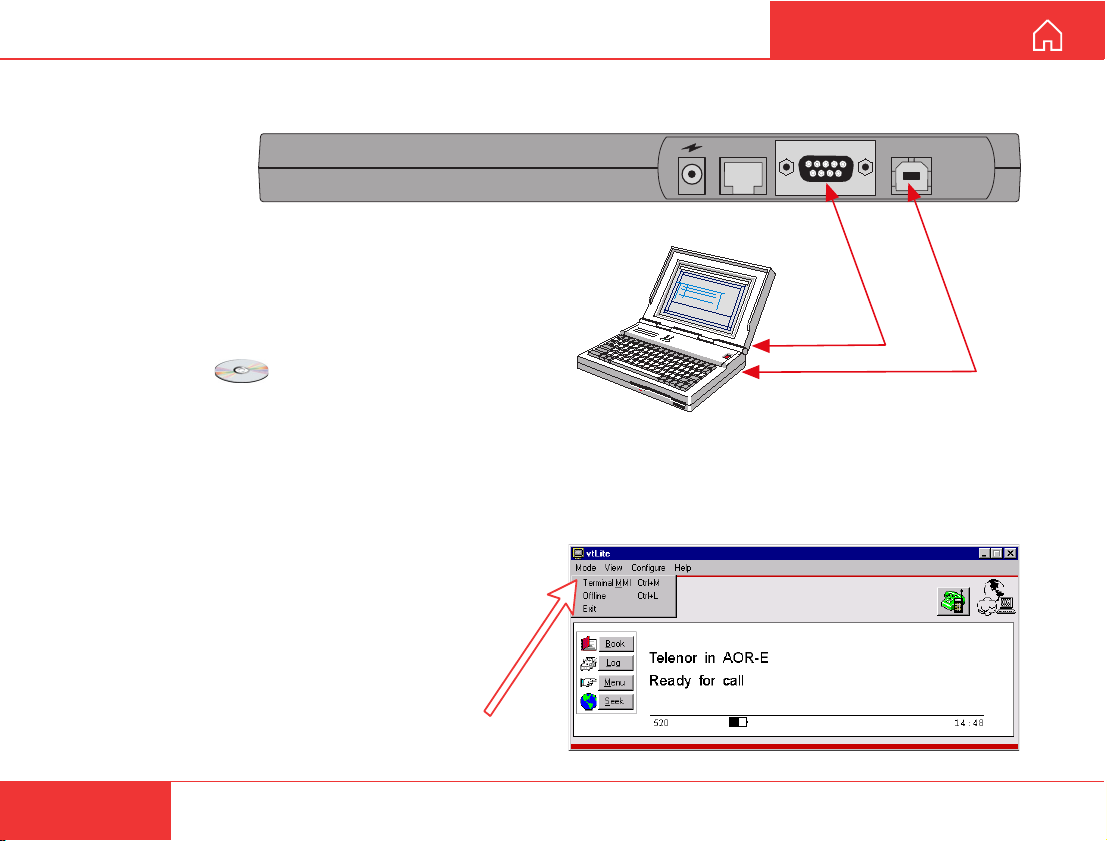
INST ALLING THE PC PROGRAM
The vtLite program allows the WorldCommunicator
functions to be operated or configured from a PC,
such as:
• Phone book
• Traffic log
• Precharge
• DECT/ISDN configuration
For an explanation of the functions, see the User
Guide accessible on the enclosed CD.
The vtLite program is stored on the enclosed CD and must
be installed on the PC harddisk (Windows 95/98/NT).
Make sure no Acrobat program is opened on the PC:
1 Insert the CD :
The Start Page opens automatically in a few seconds.
(Alternatively, open the Acrobat file “NWC_StartPage” on
the CD. If necessary, install Acrobat Reader by clicking
“ar500enu” in the “SW Installation” folder.)
2 Click “Software Inst allation” and then “vtLite”.
Allow files to load on to the PC harddisk.
The installation of the program starts automatically
when files have been loaded.
3 Connect the serial cable between the PC serial
port and the RS-232 port on the WorldCommunicator
Modem Unit.
4 St art the vtLite program by clicking
Start>Programs>W orldCommunicator>vtLite.
5 Turn ON the Modem Unit.
If no contact, click Mode>Terminal MMI.
If still no contact, click Configure>Port>Autodetect
GETTING ST ARTED
ISDN
RS-232
PC serial port
PC USB port
USB
46
Nera WorldCommunicator
Page 47

Page 48
Back to Start Page
Nera ASA
Nera SatCom AS
Bergerveien 12, PO Box 91
N-1375 Billingstad, Norway
Tel: +47 67 24 47 00
Fax: +47 67 24 46 21
www.nera.no
 Loading...