

Page 1
Back to S t art Page
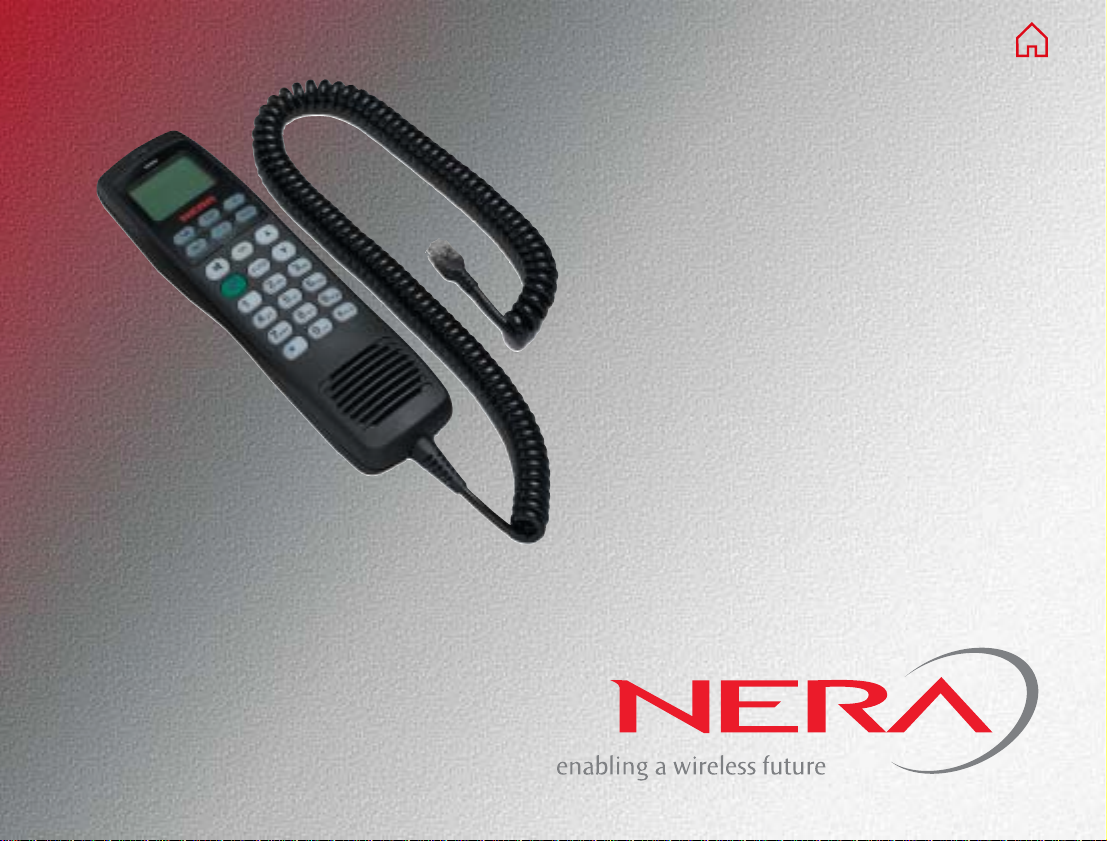
Nera ISDN Handset
User Guide
Page 2

Page 3
USER GUIDE CONTENTS
INTRODUCTION.................................................... 4
General ............................................................. 4
Installation ......................................................... 4
OPERATION .......................................................... 6
Idle .................................................................... 6
Making a call ..................................................... 6
Redialing ........................................................... 6
Dialing from phone book.................................... 7
Incoming calls.................................................... 7
Call hold ............................................................ 8
Internal communication ..................................... 8
Phone book entry ............................................ 10
MENU FUNCTIONS..............................................11
Overview ..........................................................11
Active MSN (Multiple Subscriber Number)........11
Note! The Nera ISDN Handset provides two
modes of operation:
- Normal mode (see this manual)
- Fleet mode (see any fleet terminal manual)
© Nera SatCom AS, 2003
Doc no. 101362 Rev. 2.1 09.2003
All specifications are subject to change without notice.
Keyclick ........................................................... 12
Ringer.............................................................. 12
Answer beep ................................................... 13
Backlight On/Off .............................................. 14
Display language ............................................. 14
MSN programming .......................................... 15
Protocol ........................................................... 16
Resetting to default.......................................... 16
Nera ISDN Handset
3
Page 4
INTRODUCTION
USER GUIDE
General
The Nera ISDN Handset is specially designed and
approved to work with the Nera WorldCommunicator
satellite terminal, as well as other Nera ISDN compatible products.
The handset should not be used with other types of
equipment or on the terrestrial network.
Installation
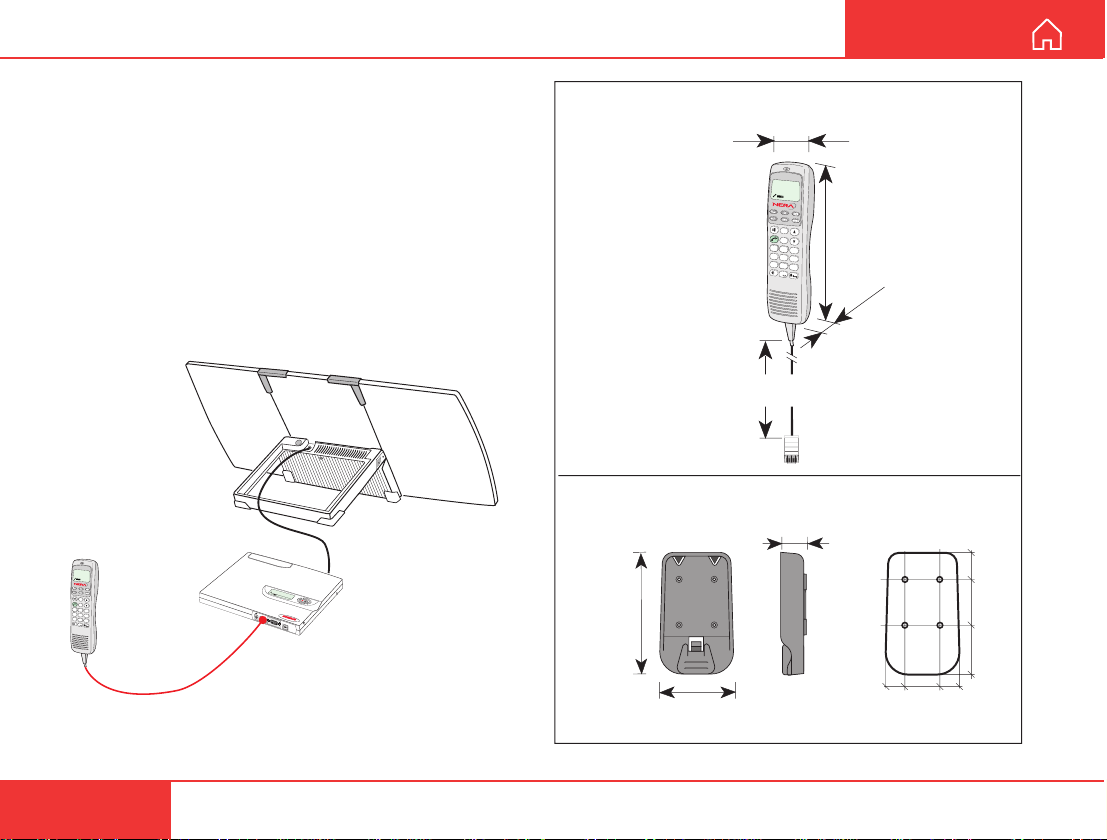
The Nera ISDN Handset is operative once it has been
plugged into the ISDN connector on the terminal.
Nera ISDN
Handset
IS
D
N
Telenor IOR
Ready for call
OK
DEL
1
2
abc
3
def
4
ghi
5
j
k
l
6
m
n
o
7
p
q
r
s
8
t
u
v
9
w
y
z
0
>Start S
M
Lock term
EN
52 0 05:46
earch
U
inal
IS
D
N
R
S
-2
32
U
S
B
Nera ISDN Handset
101654
Coiled cord
0.5 - 2m
Weight: 0.3 kg
Handset holder/cradle
QSXA 911 394
100 mm
56 mm
ISDN
Telenor IOR
Ready for call
OK
DEL
1
2
abc
3
d
e
f
4
ghi
5
jkl
6
m
n
o
7
pqrs
8
tuv
9
wyz
0
RJ45
22 mm
215 mm
mm
45
22.5
37.5
40
Figure 1 The Nera ISDN Handset connected to the
Nera WorldCommunicator Modem Unit.
4
61 mm
15 1530
Weight: 0.06 kg
Figure 2 Outline dimensions and weights.
Nera ISDN Handset
Page 5
USER GUIDE
click!
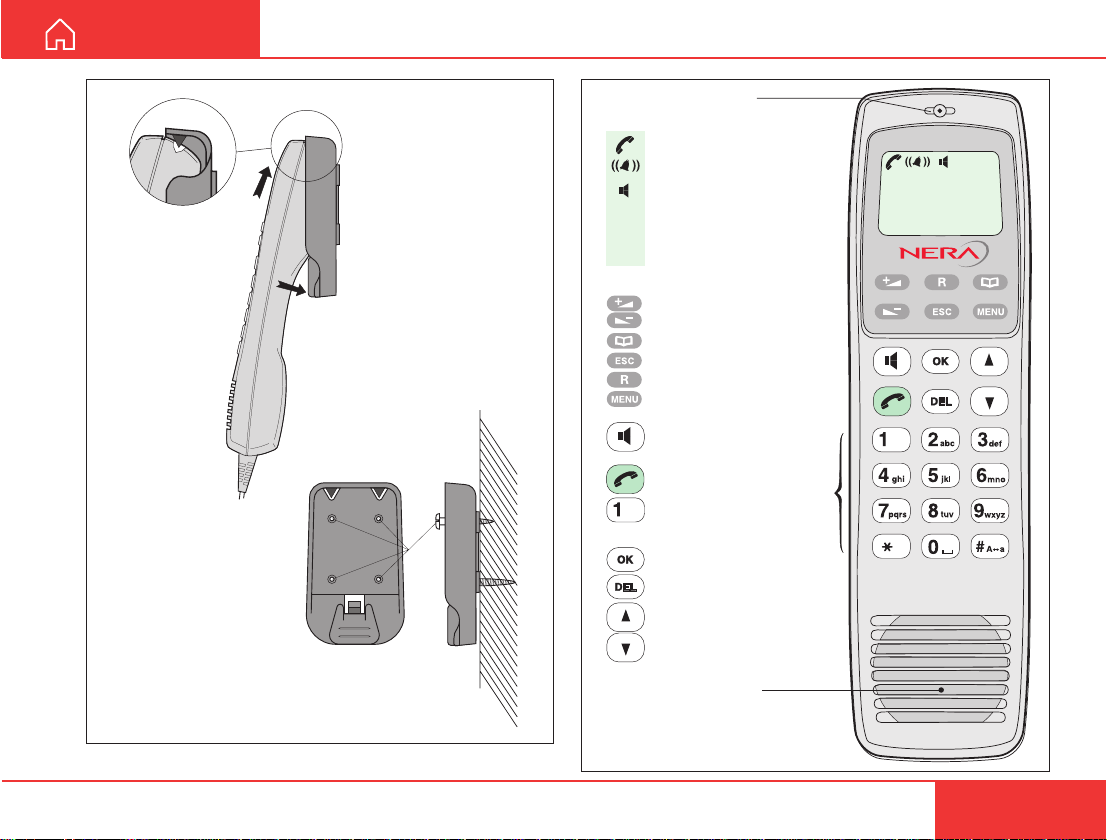
Handsfree microphone
Display indicators:
appears at hook OFF
flashes when receiving a call
appears when loudspeaker
is ON
ALPHA
appears when selecting
letters on the keypad, f.ex.
for Phone Book entries
Function keys:
allows adjusting the earpiece
volume during conversation
opens/closes Phone Book
reverts to previous position
used to transfer a call
selects function menu
handsfree microphone/
loudspeaker ON/OFF (hook
ON/OFF when in cradle)
hook ON/OFF
. . . . . number keys.
The keys include letters
for Phone Book entries.
enters selected choice
deletes last character or
complete entry
LIST
scrolls up/down through
function menu/choices
ISDN
ALPHA
May 01 09:15
4.8 Speech
Figure 3 Holder/cradle wallmounted.
Nera ISDN Handset
Handsfree loudspeaker
Figure 4 Display and keys.
5
Page 6
OPERATION
USER GUIDE
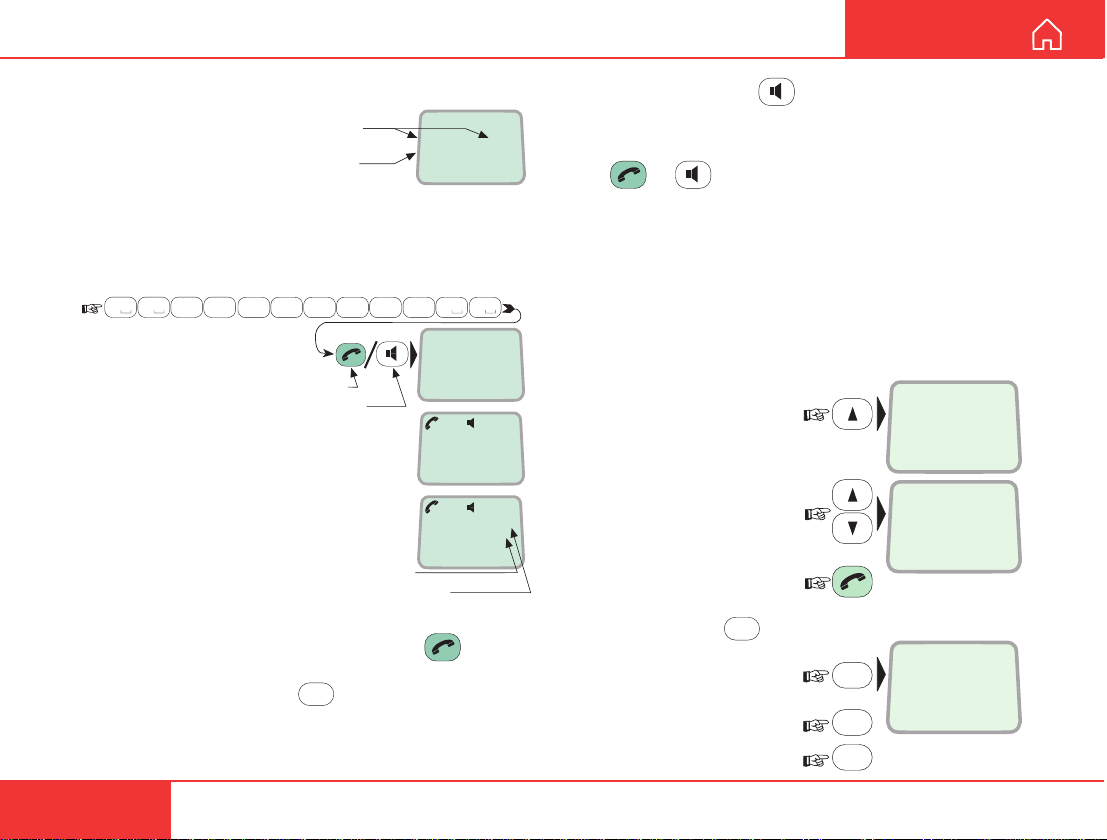
Idle
When idle, the Nera
ISDN Handset displays:
Note! The date and time
is updated when making a call.
Date and time
Name of the active
MSN number
May 01 09:15
4.8 Speech
Making a call
• Dial 00, country code and subscriber number, e.g.:
0 4
0
abc
7
6
pqrs
• When entered, the display reads:
2
abc
7
mno
pqrs
For normal call
For handsfree call
abc
7
0 0
pqrs
Please dial
004767244700
Calling...
004767244700
4
4
abc
• When the remote end answers,
the display reads:
The timer starts.
Dash separates
additional dialing
Timer, minutes:seconds
Connected 09:46
004767244700-
• End the call by pressing hook ON/OFF .
Use DEL to modify entries:
erases one digit. Holding the key more than 0.5
second erases the whole number.
DEL
Pressing DEL once,
Use the handsfree key to toggle the loudspeaker ON/OFF.
Alternative dialing:
Press or to get the dialing tone, then dial
the number as described above.
Redialing
The Redial Memory stores the last 30 outgoing call
numbers. The data are lost when disconnecting the
handset or the WorldCommunicator is switched off.
T o redial an outgoing number:
1 Press the arrow up key
to recall the latest number
dialed:
Redial#1
004767244700
2 Use the arrow keys to
scroll through the list:
Redial#2
00467244700
3 Pressing hook ON/OFF
sends the chosen number:
4 If wanted, press
clear the chosen number
from the redial list:
Press OK to erase:
Revert to idle:
DEL
to
DEL
OK
OK
Clear?
00467244700
6
Nera ISDN Handset
Page 7
USER GUIDE
OPERATION CONT’D
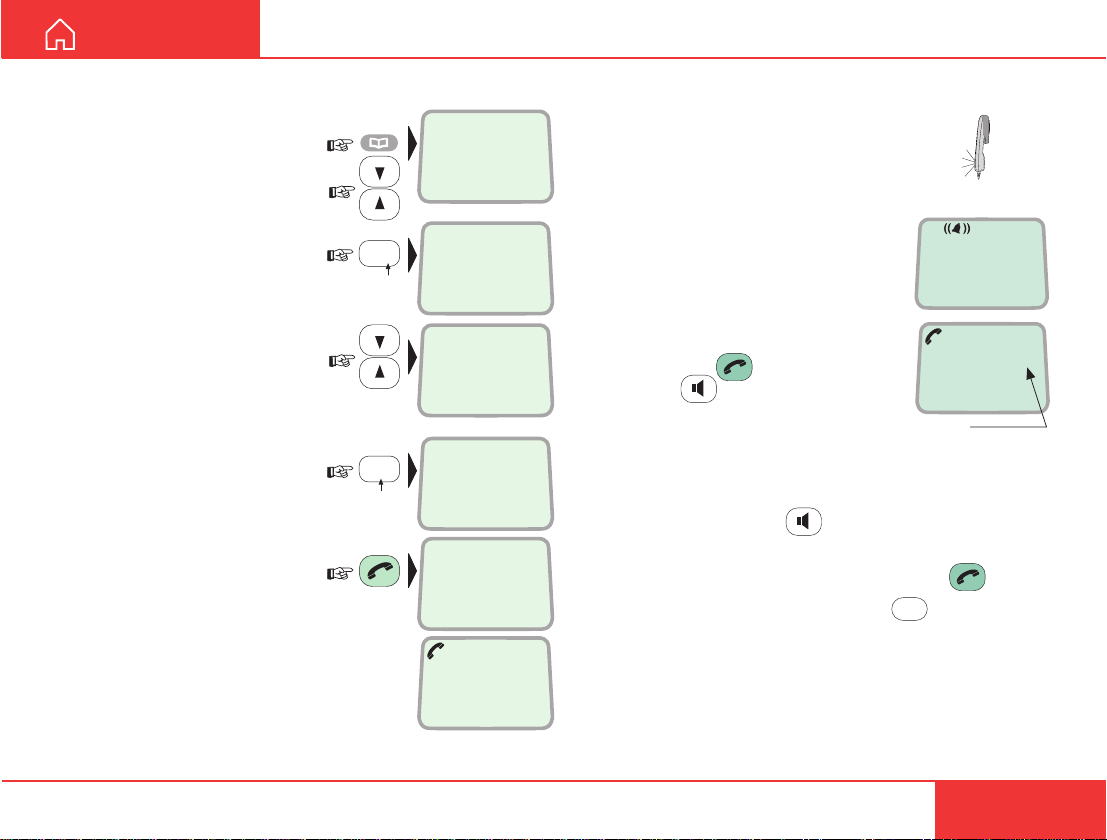
Dialing from phone book
1 Press the phone book
key:
Scroll through the phone
book, or
press the first letter of the
subscriber name, e.g. n:
The first entry starting with N
appears after one second:
For further searching, scroll
up/down as required, or
press the first letter of the
next subscriber, e.g. b:
2 Press the hook key to
call the selected number:
Incoming calls
ALPHA
?...
LIST
ALPHA
6
mno
N...
ALPHA
Nera
LIST
004767244700
ALPHA
2
abc
B...
ALPHA
BT
0044222534555
Calling...
0044222534555
The handset rings when receiving a call.
The ringing symbol flashes until the call
is answered. The ringing tone may vary
with the incoming number, depending
on the tone assigned to the local
Multiple Subscriber Number, see
MSN programming later in this
4.8 Speech
manual.
• Answer the call by pressing
hook ON/OFF:
or
00:00
handsfree:
With the ISDN Handset in the cradle,
the loudspeaker and microphone are
Timer,
minutes:seconds
ON for handsfree operation.
If lifting the handset, the loudspeaker turns OFF.
Use the handsfree key
to toggle the loud-
speaker ON/OFF.
• End the call by pressing hook ON/OFF .
• Reject the call by pressing DEL:
Internal communication
When receiving a call, the caller`s MSN number will
appear in the display (if programmed).
See “Making a call” in Getting Started / User
Manual
of the connected satellite terminal.
DEL
Nera ISDN Handset
7
Page 8
OPERATION CONT’D
USER GUIDE
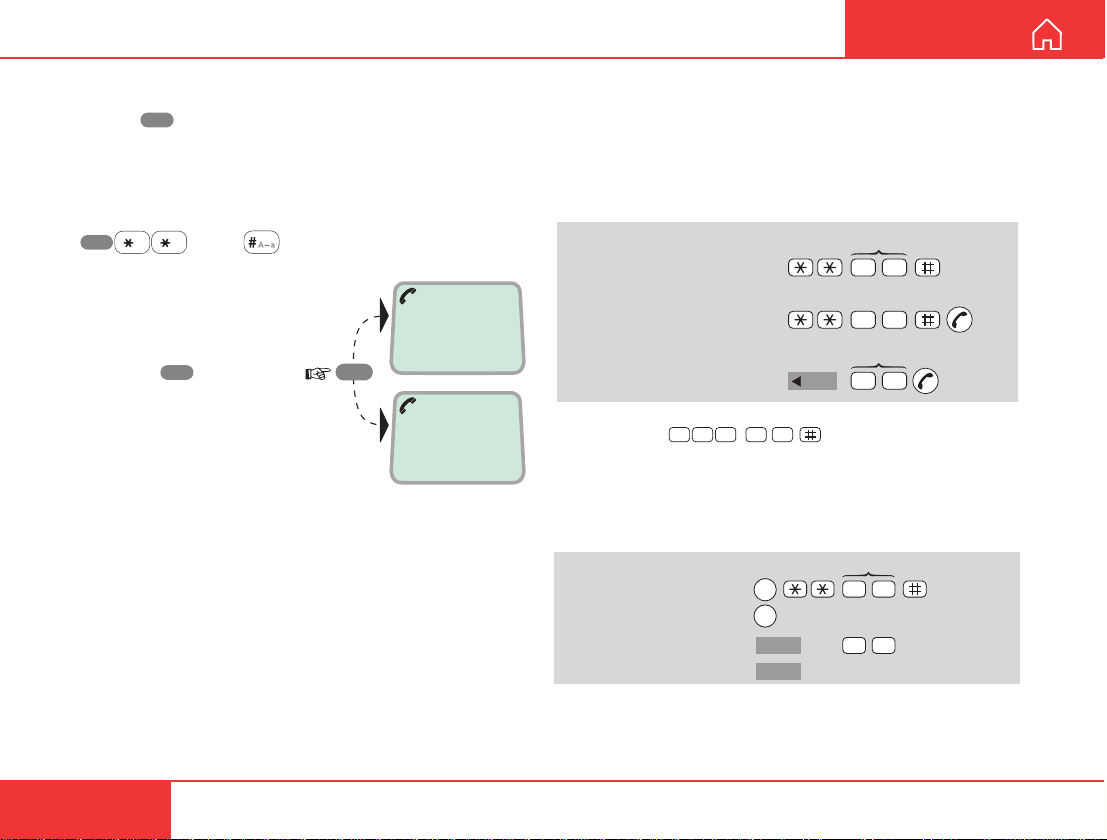
Call hold
Pressing R during a conversation will put the
current call on hold. Another call may now be made.
Switching between the two calls:
• The 2nd call is established by keying:
R
• The original call is put on hold,
and 2nd connected.
• Toggling between the
two calls is achieved by
pressing R repeatedly:
Call waiting:
If a call is received during a
conversation, a ringing sounds
locally in the earpiece. The new call
may be answered while the original call
is put on hold.
[MSN]
1 on hold
**20#
R
2 on hold
Internal communication
Calls can be made internally by dialing MSN numbers between the connected ISDN and/or DECT
equipment.
Examples:
MSN (example)
ISDN-to-ISDN/DECT:
ISDN Handset/
DECT-to-ISDN:
DECT-to-DECT:
Note! If the telephone lacks the *-key, 103 may be dialed
instead, e.g.:
2 00 31
T ransfer of incoming/outgoing satellite calls (with
above examples):
ISDN-to-ISDN/DECT
or DECT-to-ISDN:
DECT-to-DECT:
R
toggles between subscribers
R
INT
INT
2 0
02
Handset Id (example)
INT
toggles between subscribers
50
MSN/Handset Id
2 0
50
Hang up
Hang up
8
Nera ISDN Handset
Page 9
USER GUIDE
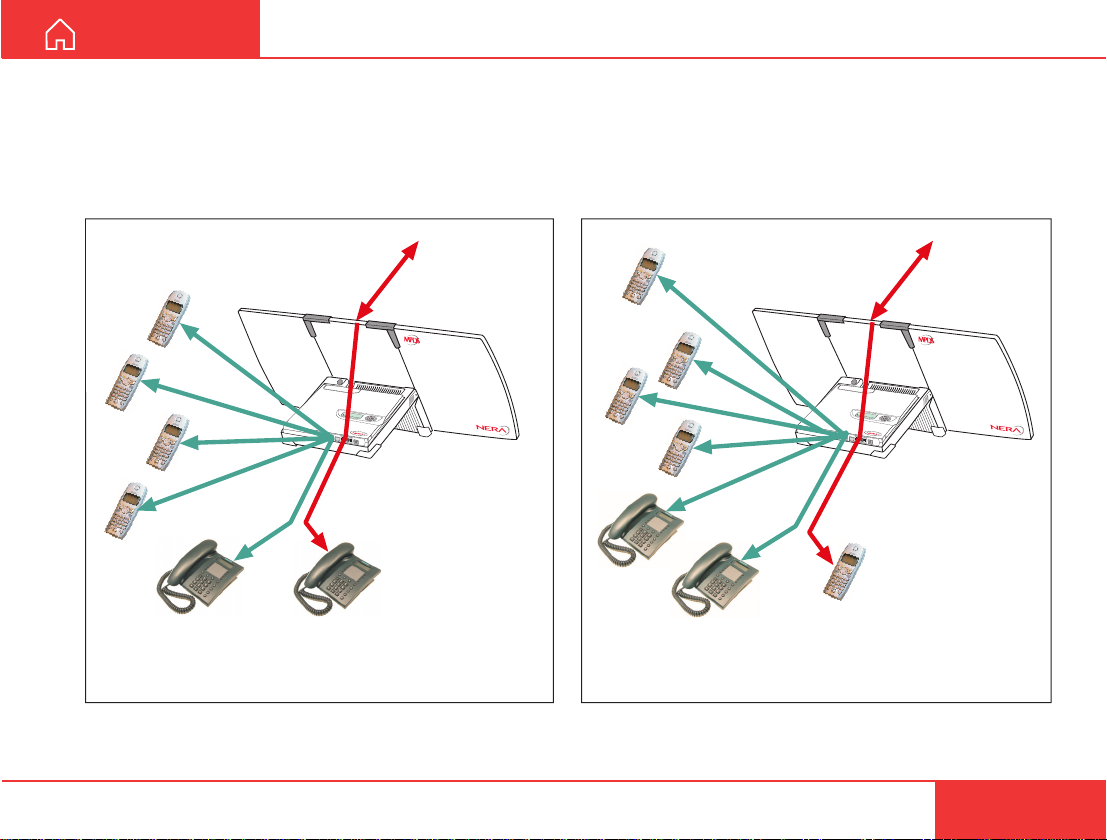
Number of connections
When an ISDN device is used to communicate via
satellite, the 2nd ISDN channel can be used to call a
DECT handset. Four DECT handsets can be used
for internal calls.
OPERATION CONT’D
When a DECT handset is used to call via satellite,
four DECT handsets and both ISDN channels can be
used for internal calls.
Local calls Satellite call
via ISDN phone
Nera ISDN Handset
>Start Search
M
ENU
Lock term
5
2
0
inal
0
5
:4
6
ISDN
RS-232
USB
>S
M
tart Search
E
NU
L
ock term
5
2
0
in
al
0
5
:
4
6
ISDN
RS-232
USB
Local calls Satellite call
via DECT phone
9
Page 10
OPERATION CONT’D
Phone book entry
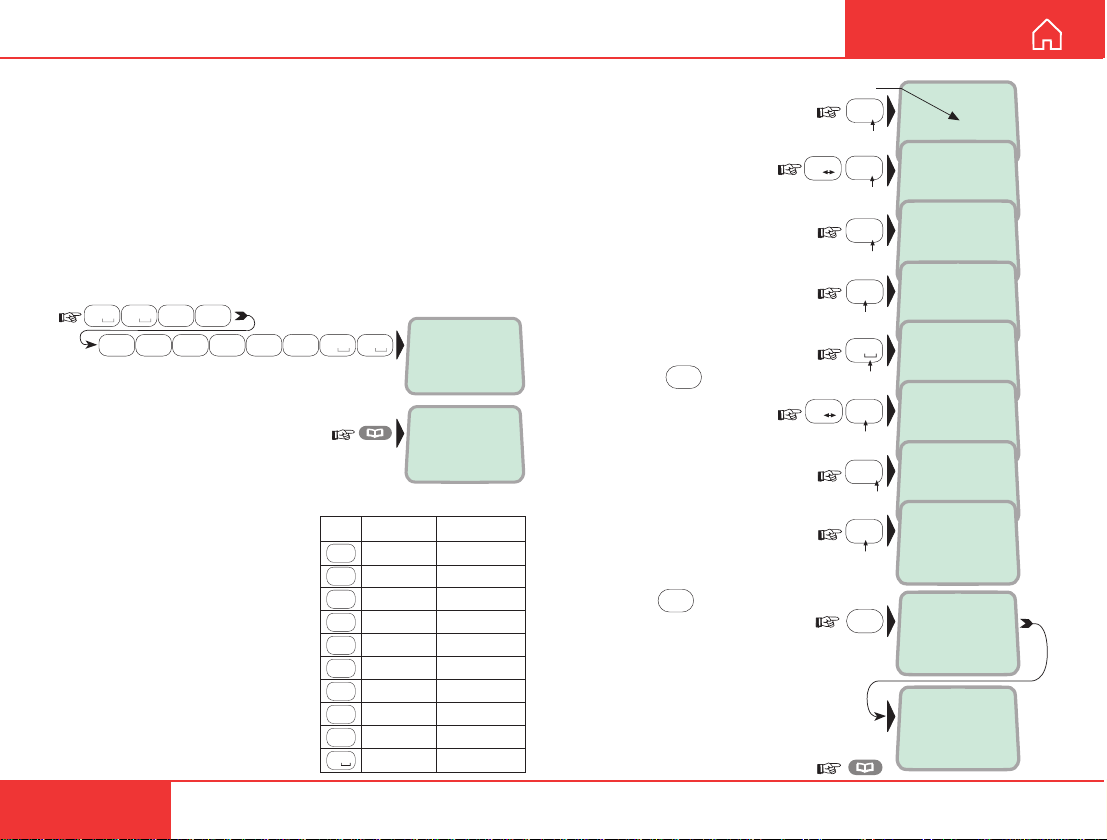
The entries in the ISDN Handset phone book may
consist of maximum 15 characters and 20 digits.
Typical 6-character/8-digit entries yield a total of 85
phone numbers (34 for maximum number of characters and digits). The number/name list is retained
when disconnecting the handset.
Programming:
1 Dial the phone number, e.g.:
0 4
0
abc
7
pqrs
2
6
mno
abc
7
pqrs
4
4
abc
abc
and press the phone book key
to enter the dialed number in
the phone book:
The phone book is not merged with the
internal WorldCommunicator phone book.
The character table shows all
the characters accessible:
Notes:
• The #-key toggles between
uppe r-c a se and lower-case
characters.
• The * -key ends the 1-sec
delay after every key entry.
• Names written with none
Anglo-American characters
such as Æ, Ø, Å etc., can only
contain 6 different special
characters (however, 2 equal
characters count as 1).
0 0
7
pqrs
Please dial
004767244700
?...
004767244700
Key Uppercase Lowercase
. , ? ! - : ; / 1 . , ? ! - : ; / 1
1
ABCÆÅÄ2 abcæåä2
2
abc
DEF3 def3
3
def
GHI4 ghi4
4
abc
JKL5 jkl5
5
jkl
MNOØÖ6 mnoøö6
6
mno
PQRS7 pqrs7
7
pqrs
8
tuv
TUVÜ8 tuvü8
9
wxyz
WXYZ9 wxyz9
0
_0 _0
ALPHA
2 Enter the name,
e.g. Nera ASA:
Note that the additional
characters accessible
with the key appear
momentarily.
See the character table.
An entry can only be
edited by reprogramming.
An entry can be erased
by pressing:
3 Pressing
the entry in the phone book:
The percentage indicates the
memory capacity remaining
as the entry is being stored.
"Memory full" is displayed
when capacity is exhausted.
Revert to idle:
DEL
OK
stores
USER GUIDE
Additional key
characters
6
mno
3
def
A a
#
7
pqrs
2
abc
0
A a
2
#
abc
7
pqrs
2
abc
OK
ALPHA
N_
0047672 [M_O0Ö6]
ALPHA
Ne_
00476724 [d_f3]
ALPHA
Ner_
0047672 [pq_s7]
ALPHA
Nera_
00476 [abcæåä2]
ALPHA
Nera _
0047672447 [_0]
ALPHA
Nera _A
00476 [ABCÆÅÄ2]
ALPHA
Nera _AS
0047672 [PQRS7]
ALPHA
Nera _ASA
00476 [ABCÆÅÄ2]
ALPHA
Store (33%)...
004767244700
Mar 01 00:09
20
10
Nera ISDN Handset
Page 11
USER GUIDE
MENU FUNCTIONS
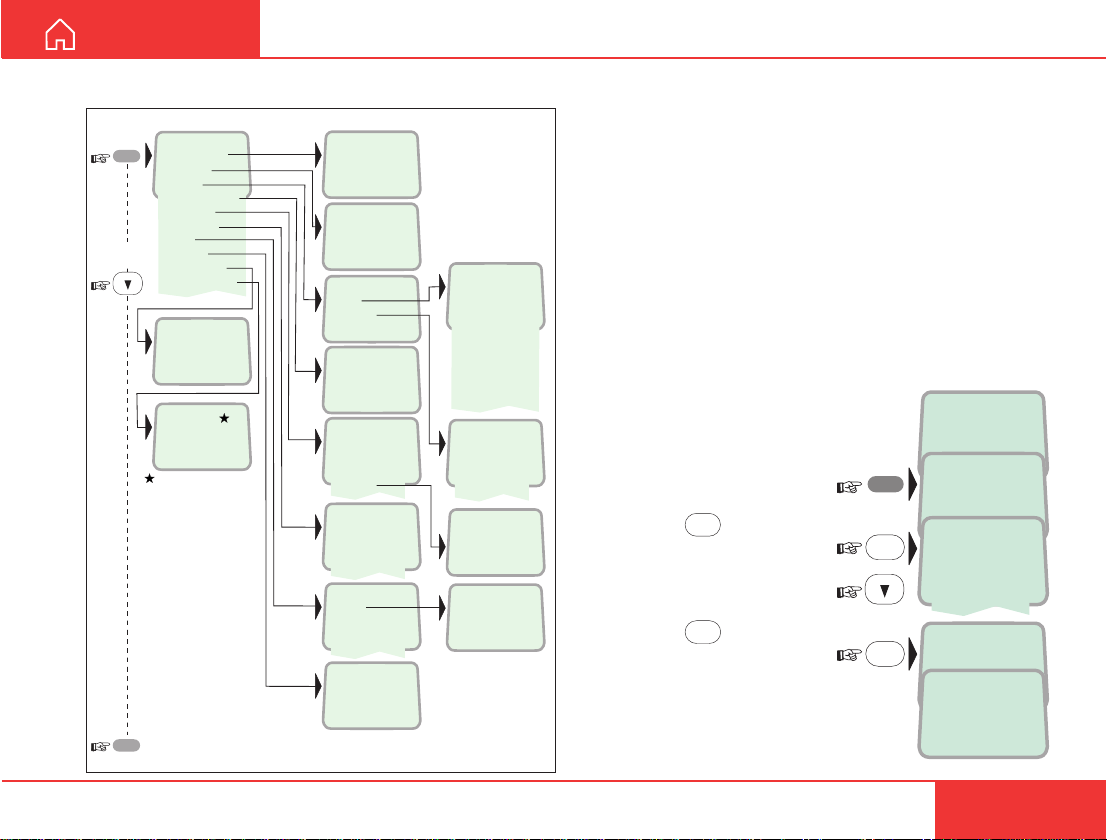
Overview
MENU
>Active MSN
Keyclick
Ringer
Answer beep
Backlight
Language
MSN
Protocol
SW version
Reset to fleet
V1.3.00 270103
Set to fleet?
If connected to a fleet
terminal, set Handset
to fleet mode
ESC
reverts to idle
>#1:
#2:
#3:
>On
Off
>Tone
Volume
>On
Off
>On
Off
30 second
Dimmer
>English
Norsk
Deutsch
>#1:20
#2:31
#3:41
>Euro-ISDN
NI-1
>Tone#1
Tone#2
Tone#3
Tone#4
Tone#5
Tone#6
Tone#7
Tone#8
Tone#9
>Low
Medium
High
Increasing
Dimmer [ 100%]
Nera
20 #1
Active MSN (Multiple Subscriber Number)
When making a call the Nera ISDN Handset identifies itself by its MSN number. Although specific MSN
numbers may be programmed for 3 different services, only one can be active at one time for outgoing
calls. An ISDN Handset will always respond to all 3
MSNs for incoming calls.
Default numbers and names:
Handset identityMSN number Name/speech quality
#1: 20 4.8 Speech
#2: 30 64K Speech
#3: 40 64K Audio
T o change active MSN:
1 Open the MENU:
2 Pressing
handset id/speech quality:
Scroll down to the required
handset identity:
3 Pressing
chosen id/speech quality:
Note!
T o change MSN numbers and
name, see MSN programming.
OK
lists the default
OK
selects the
MENU
OK
OK
May 01 09:15
4.8 Speech
>Active MSN
Keyclick
>#1: 4.8 Speech
#2: 64K Speech
#3: 64K Audio
Store ...
May 01 09:15
64K Speech
Nera ISDN Handset
11
Page 12
>Active MSN
Keyclick
OK
>On
Off
Store ...
OK
MENU FUNCTIONS CONT’D
USER GUIDE
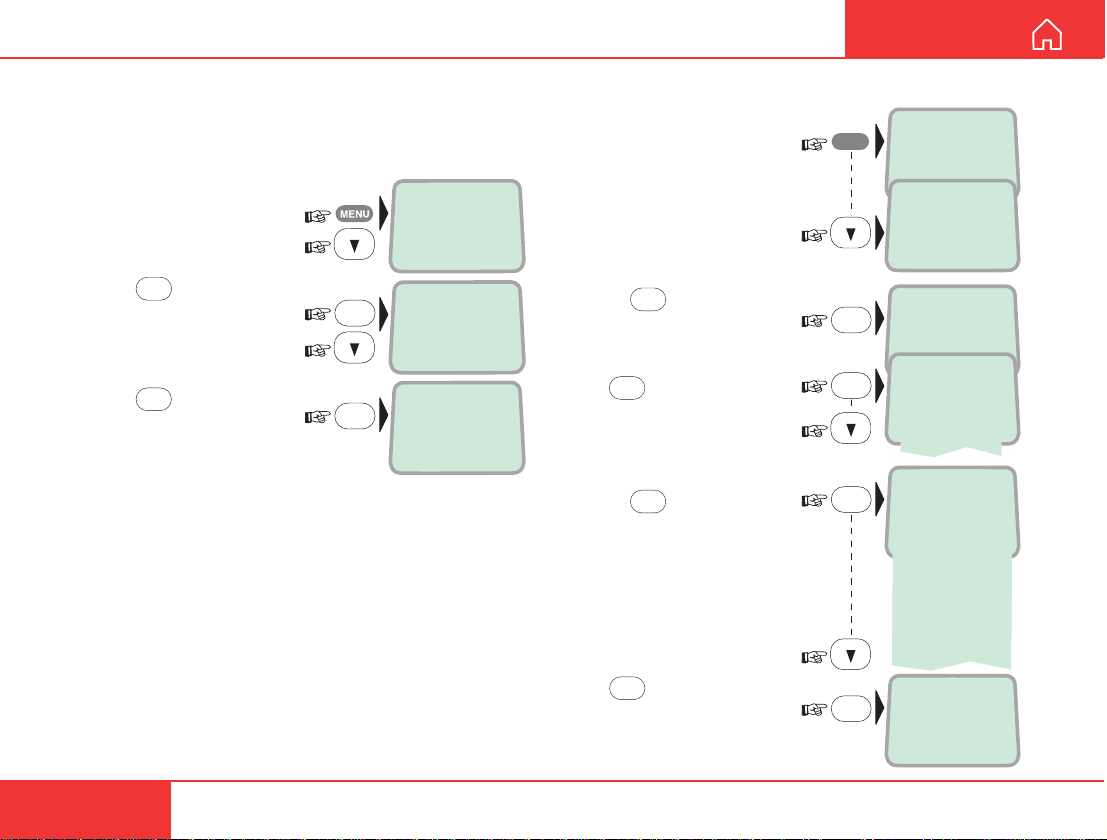
Keyclick
When activated, a click is heard when pressing a key .
The keyclick can be turned on/off as follows:
1 Open the MENU and
scroll down to the
Keyclick function:
2 Press
down to On or Off, as
required:
3 Press
setting:
12
OK
and scroll
OK
to store the
Ringer
The tone sound and level
heard when the phone rings
may be selected as follows:
1 Open the MENU and scroll
down to the Ringer function:
2 Press
Ringer function:
Press OK again and scroll
down to check the sound
for each handset identity:
4 Press
- for each handset identity scroll down to select tone:
Press OK to store the
selected tone:
To set ringing Volume,
see next page:
OK
to select the
OK
, and
MENU
>Active MSN
Keyclick
Keyclick
>Ringer
OK
>Tone
Volume
OK
>4.8 Speech
64K Speech
64K Audio
OK
>Tone#1
Tone#2
Tone#3
Tone#4
Tone#5
Tone#6
Tone#7
Tone#8
Tone#9
OK
Store ...
Nera ISDN Handset
Page 13
USER GUIDE
MENU FUNCTIONS CONT’D
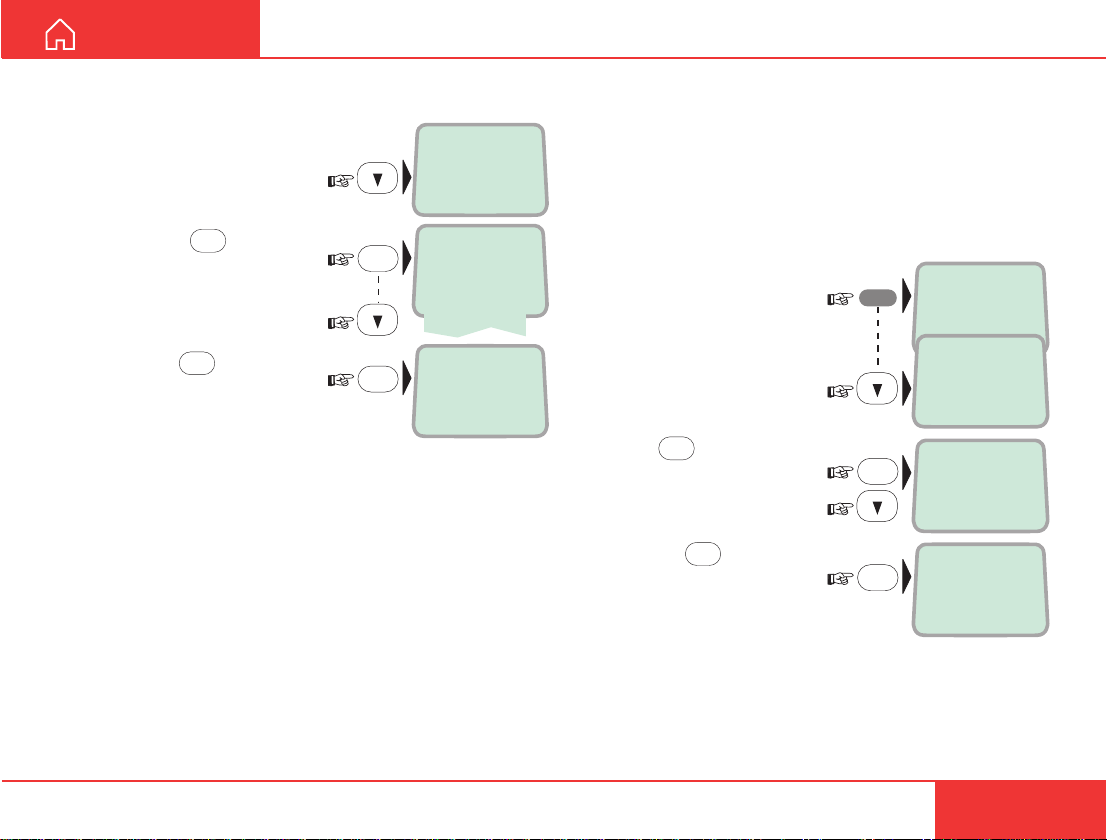
Ringer cont`d
5 Select the Ringer function
again and scroll down to
the Volume function:
6 Pressing
choices:
Scroll down to required
sound level:
and press OK to store the
level:
OK
lists the
OK
OK
Tone
>Volume
>Low
Medium
High
Increasing
Store .. .
Answer beep
The Nera ISDN Handset may be set to emit a signal
when an outgoing call is answered (with loudspeaker
off). The signal will also sound when a call is transferred at the remote end.
The signal is not active during handsfree calls.
The answer beep can be turned on/off as follows:
MENU
OK
OK
>Active MSN
Keyclick
Ringer
>Answer beep
>On
Off
Store ...
1 Open the MENU:
2 Scroll down to the
Answer beep function:
3 Press
On or Off, as required:
4 Pressing
the chosen mode:
OK
and scroll to
OK
selects
Nera ISDN Handset
13
Page 14
Store ...
>Active MSN
Keyclick
OK
Backlight
>Language
OK
>English
Norsk
Deutsch
MENU
MENU FUNCTIONS CONT’D
USER GUIDE
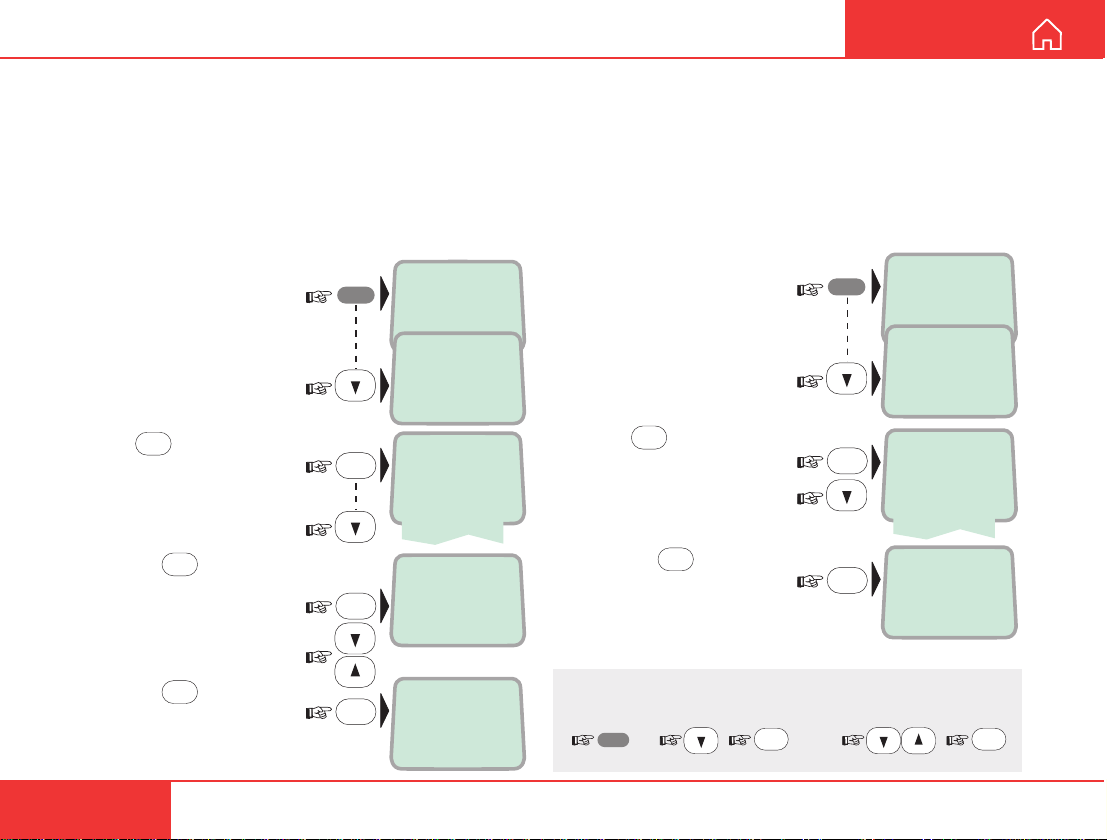
Backlight On/Off
The display and keypad backlight can be set to:
• On, permanently ON
• Off, permanently OFF
• 30 seconds ON when pressing a key or receiving
a call, and stays ON 30 secs after last event.
• Dimmer, intensity adjustable in 10 steps.
Changing the setting:
MENU
1 Open the MENU:
2 Scroll down to the
Backlight function:
3 Press
down to required setting:
4 Pressing
opens the backlight adjustment window:
Adjust with up/down arrows:
5 Pressing
chosen setting:
OK
and scroll
OK
OK
at Dimmer
stores the
>Active MSN
>Backlight
OK
>On
OK
Dimmer [ 100%]
LIST
OK
Store .. .
Keyclick
Answer beep
Off
30 second
Dimmer
14
Display language
The Nera ISDN Handset is delivered with the display
language set to English. The following languages can
be selected:
• English
• Norwegian
• German
1 Open the MENU:
2 Scroll down to the Lan-
guage function:
MENU
OK
and scroll down
OK
changes
5x
select
OK
language
LIST
Nera ISDN Handset
OK
3 Press
to the required language:
4 Pressing
the display language:
If accidentally choosing an unfamiliar language, use
the following procedure to revert:
Page 15
USER GUIDE
MENU FUNCTIONS CONT’D
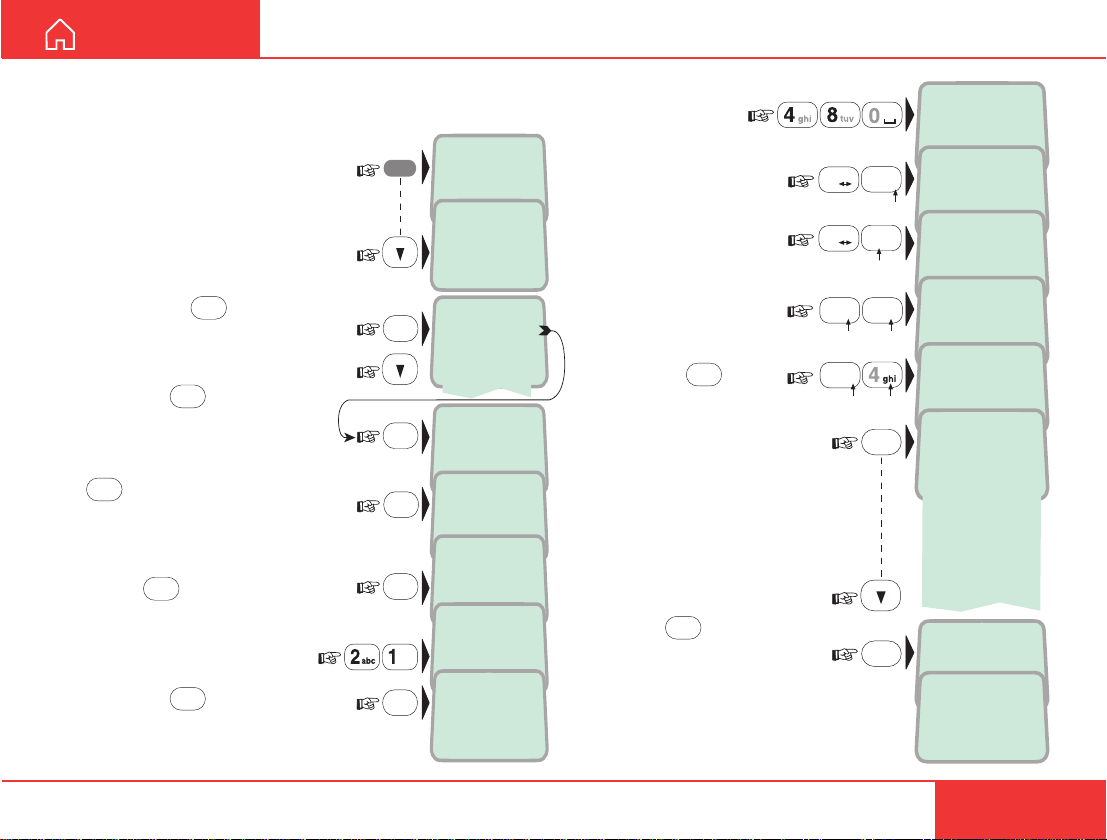
MSN programming
The Nera ISDN Handset can be
programmed with 3 different MSN
numbers:
1 Open the MENU and scroll
down to the MSN function:
2 Pressing
OK
lists the 3
handset MSNs:
Scroll down to select:
Pressing OK shows the
name and MSN for the
selected handset identity:
To modify, start by pressing
DEL
to delete both name and
number:
Press OK to erase:
3 Key in the new
MSN number:
Pressing OK stores
the new MSN and
prompts for the name,
see next step:
MENU
>Active MSN
>MSN
OK
>#1: 20
OK
4.8 Speech
20 #1
DEL
Clear?
20 #1
OK
21 #1
OK
?...
21 #1
Keyclick
Language
#2: 30
#3: 40
#1
ALPHA
4 Enter the name to be
displayed in IDLE:
5 Pressing
selecting the tone that
should sound when a call is
received to that name/MSN:
Pressing OK stores the
chosen tone:
OK
allows
ALPHA
48 _
21
ALPHA
7
pqrs
7
pqrs
3
def
OK
OK
48 S_
21
ALPHA
48 Sp_
21
ALPHA
48 Spee_
21
ALPHA
48 Speech_
21
>Tone#1
Tone#2
Tone#3
Tone#4
Tone#5
Tone#6
Tone#7
Tone#8
Tone#9
Store ...
May 01 09:15
48 Speech
A a
#
A a
#
3
def
2
abc
Nera ISDN Handset
15
Page 16
MENU FUNCTIONS CONT’D
Normal mode
RESET?
Normal mode
Euro-ISDN
OK
DEL
USER GUIDE
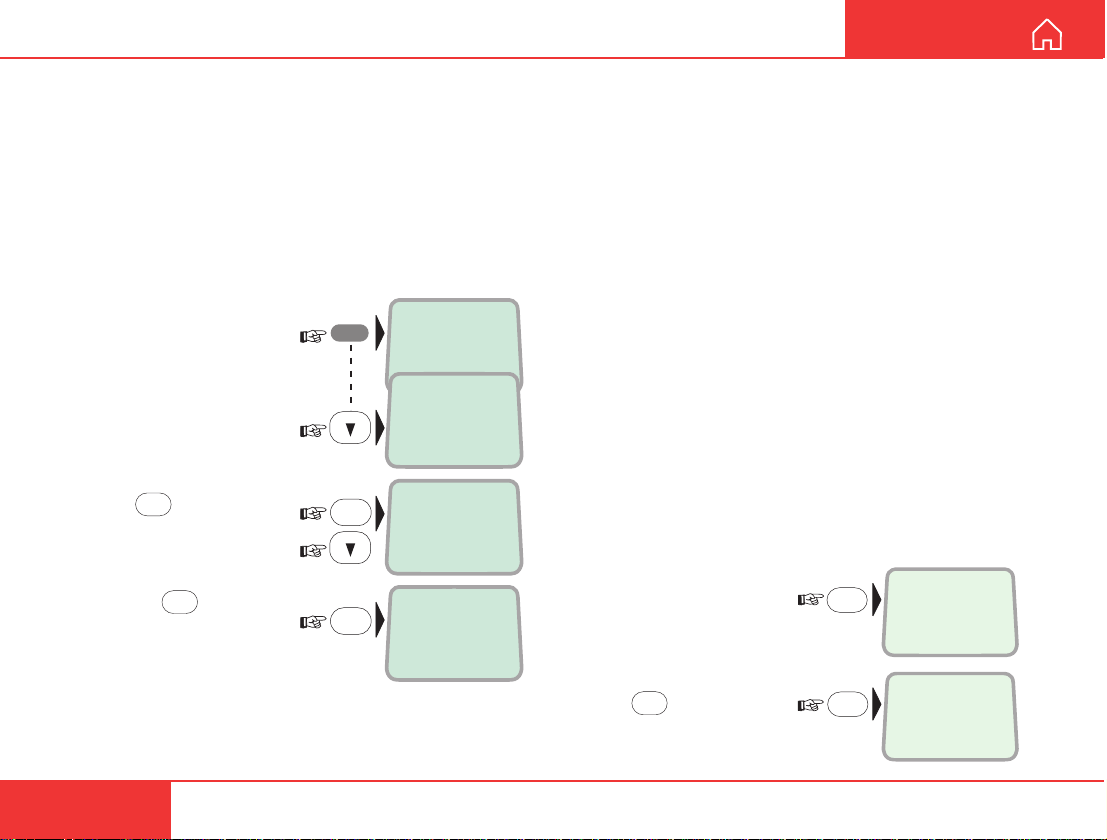
Protocol
The Nera ISDN handset allows selection between the
following ISDN protocols:
• Euro ISDN for connection to equipment conform-
ing to the European ISDN standard.
• NI-1 protocol for equipment conforming to the NI-1
standard (National ISDN-1).
The protocol can be changed as follows:
MENU
OK
OK
>Active MSN
Keyclick
MSN
>Protocol
>Euro-ISDN
NI-1
Store ...
1 Open the MENU:
2 Scroll down to the
Protocol function:
3 Press
required protocol:
4 Pressing
chosen ISDN protocol:
OK
and scroll
OK
stores the
Resetting to default
The Nera ISDN Handset is programmed with the
following default settings:
• Phone book cleared
• Ringing tone #1
• Ringing volume MEDIUM
• English language
• Answer beep OFF
• Backlight 30 seconds ON
• Keyclick ON
• MSN#1: 20 "4.8 Speech"
• MSN#1: 30 "64K Speech"
• MSN#1: 40 "64K Audio"
The default settings can be recovered as follows:
1 Disconnect the handset.
2 Reconnect and press
DEL while the display
momentarily shows the
software version:
16
3 Press
OK
to confirm:
Nera ISDN Handset
Page 17

Page 18
Back to Start Page
Nera ASA
Nera SatCom AS
Bergerveien 12, PO Box 91
N-1375 Billingstad, Norway
Tel: +47 67 24 47 00
Fax: +47 67 24 46 21
www.nera.no
 Loading...