

Page 1

NeuroPi H/W User Guide
H/W User Guide
NeuroPi
Version 2.0
Dec 2019
Page 1 / 19
Page 2

NeuroPi H/W User Guide
Table of Contents
1. Introduction ...................................................................... 3
2. Features ............................................................................ 4
3. Function Block Diagram .................................................. 6
4. NM500 device ................................................................... 7
5. Interfaces .......................................................................... 8
6. SDK (Software Development Kit) .................................... 9
7. Clock Sources ................................................................ 10
8. FPGA ............................................................................... 11
9. Power .............................................................................. 12
10. SPI(Serial Peripheral Interface) ..................................... 13
10.1. Packet Format .......................................................................... 13
10.2. Write Operation ........................................................................ 14
10.3. Read Operation ........................................................................ 15
11. Ordering Information...................................................... 17
12. Revision History ............................................................. 18
Appendix A. Dimension ........................................................... 19
Page 2 / 19
Page 3

NeuroPi H/W User Guide
1. Introduction
This guide describes how to use the NeuroPi easy-to-use on Raspberry Pi for evaluation user application with
neuromorphic device called NM500; which has 576 neurons and has 256bytes memory and hard-wired logic per
each neuron to achieve functions mainly required in user application. (NeuroPi has two NM500) Along with this
board it begins to evaluate user application such as pattern matching, machine learning using NM500 with
provided software development environment.
It targets for Raspberry Pi series.
The contents of this guide include features, hardware components and specs, register map, and a complete set
of block diagram of the NeuroPi.
Page 3 / 19
Page 4
NeuroPi H/W User Guide
2. Features
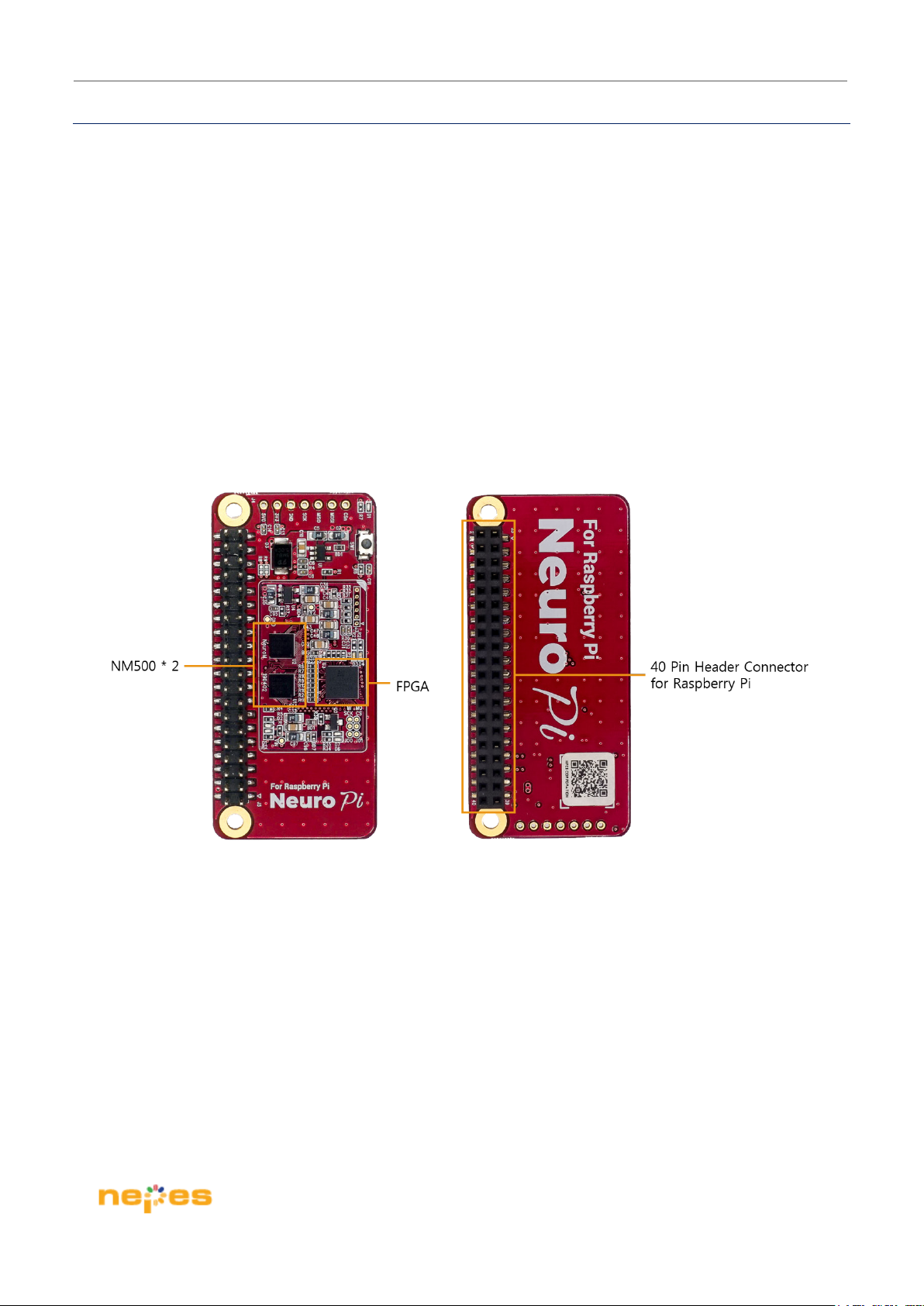
The NeuroPi includes;
Two neuromorphic devices in 64pin WLCSP package
40 pin header GPIO connector to be compatible with Raspberry Pi
Support SPI interface for communication with Raspberry Pi
Preloaded FPGA for interface logic
Figure 2.1 shows the top/bottom side of the NeuroPi
Figure 2.1 The NeuroPi (Top/Bottom side)
Page 4 / 19
Page 5
NeuroPi H/W User Guide
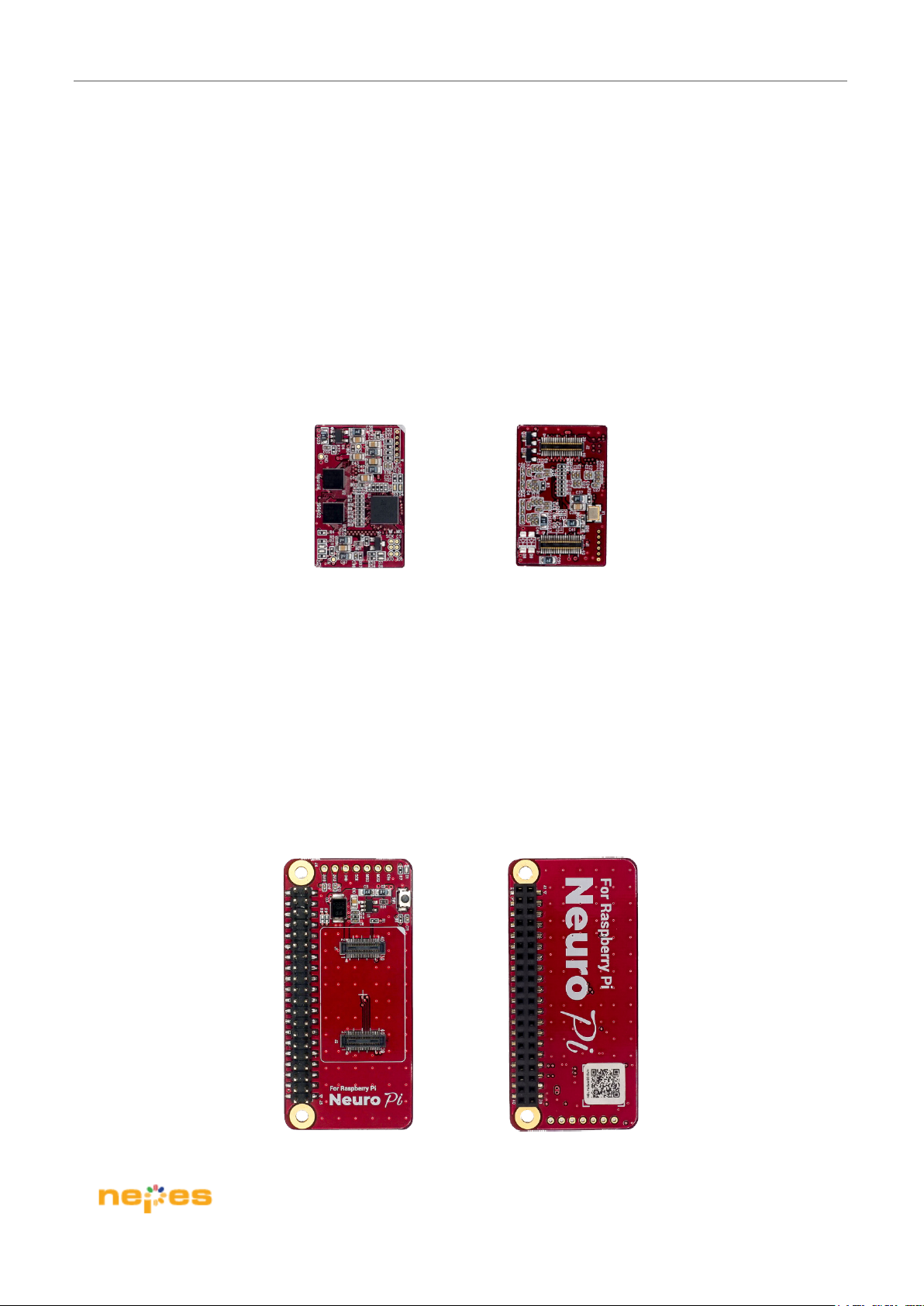
The NeuroPi consist of two detachable simple boards; module board and main board
Module board – This board features the following on-board components and circuits
Detachable connector for Main board
Two NM500 (neuromorphic device)
FPGA for interface logic
Power components
Figure 2.2 shows the top/bottom side of the module board
Figure 2.2 Module board of NeuroPi (Top/Bottom side)
Main board – This board has physically making connection with Raspberry Pi and the module board has mounted
on this board
40-pins header GPIO connector for Raspberry Pi
Attachable connector for the module board
Figure 2.3 shows the top/bottom side of the main board
Figure 2.3 Main board of NeuroPi (Top/Bottom side)
Page 5 / 19
Page 6
NeuroPi H/W User Guide
3. Function Block Diagram
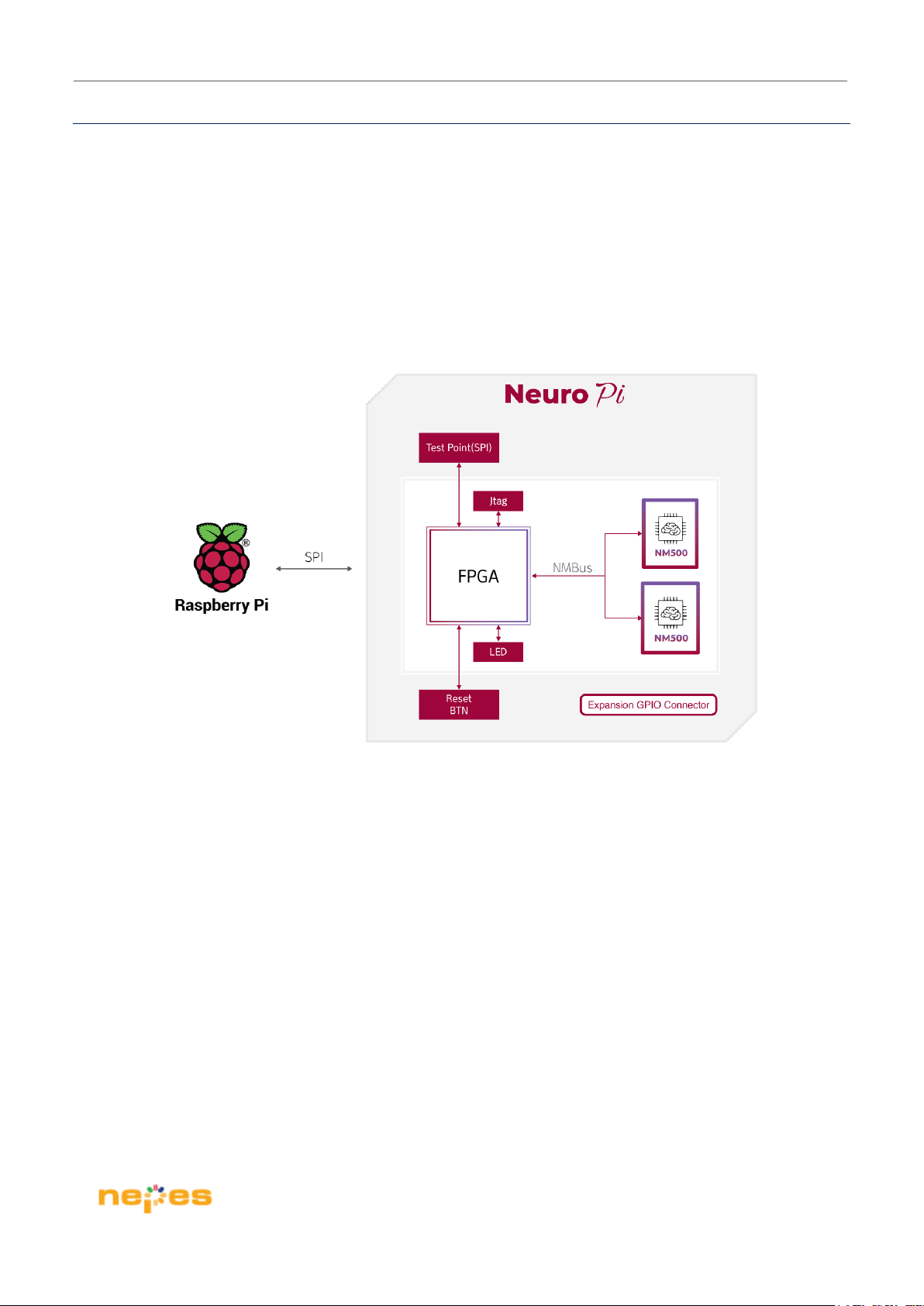
The NeuroPi allows user can evaluate a pattern matching application using NM500 with Raspberry Pi.
If additional sensors are needed for pattern matching, user can use the 40-pin header connector on the NeuroPi
through go to Raspberry Pi.
Raspberry Pi can access NM500(neuromorphic device) on the NeuroPi via SPI interface, FPGA on the NeuroPi
can make an interface bridge to achieve between Raspberry Pi(SPI) and NM500(NMBus) as below block diagram.
Figure 3.1 shows a block diagram of the NeuroPi
Figure 3.1 Block diagram of NeuroPi
Page 6 / 19
Page 7
NeuroPi H/W User Guide
4. NM500 device
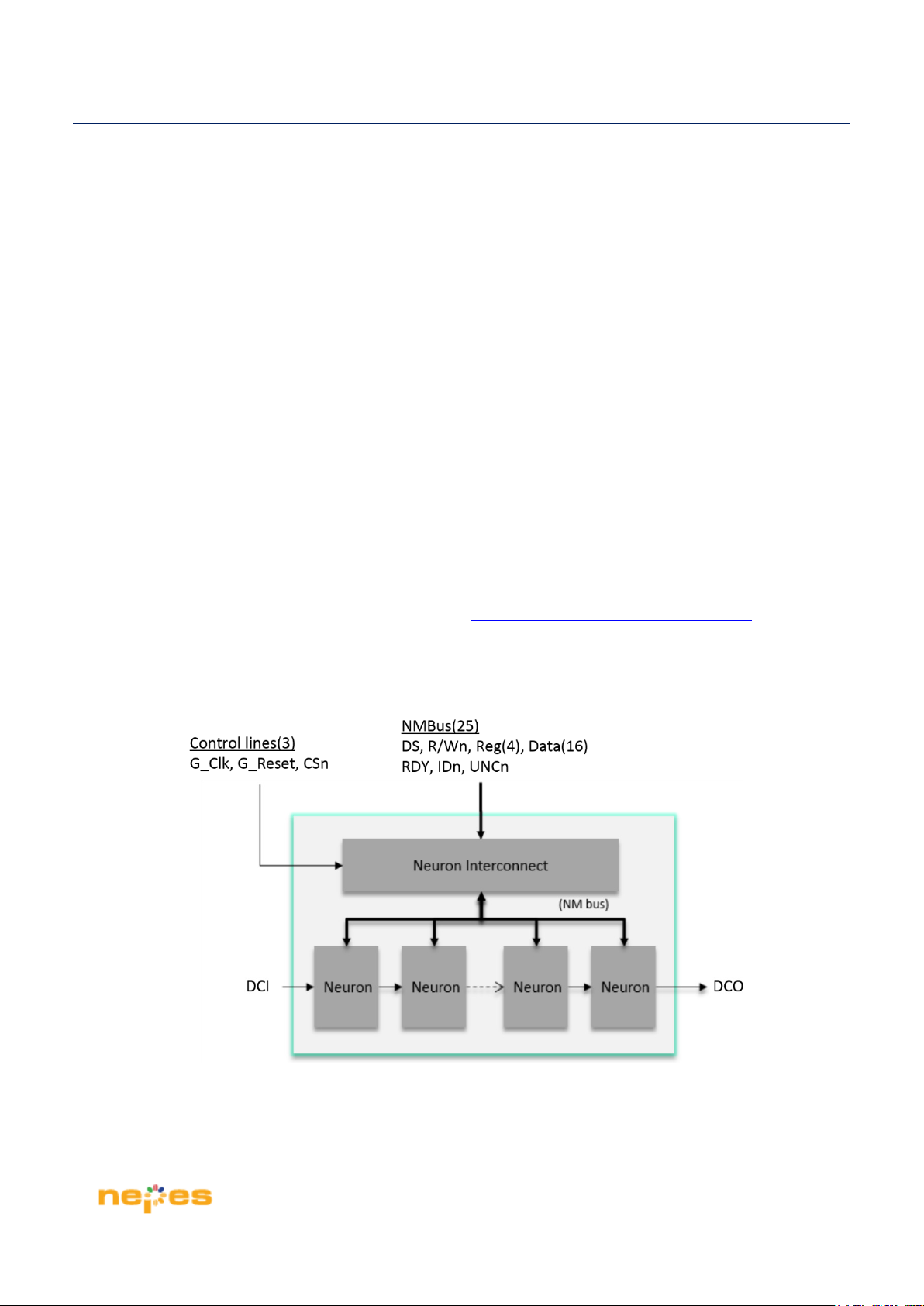
A nepes neuromorphic semiconductor chip (named NM500) is a fully parallel silicon neural network device. It is
a chain of identical elements (i.e. neurons) addressed in parallel. In addition, the neurons fully collaborate with
each other through a bi-directional and parallel neuron bus which is the key to accuracy, adaptively and speed
performance.
The NM500 device is composed of the following three blocks:
Neuron Interconnect block for NMbus*
Neuron block
Chain of neurons, daisy-chained and interconnected block
* NMbus is a main interface of NM500 device, as like SRAM interface.
And those neurons can learn and recognize input vectors autonomously and in parallel using internal own
classification algorithm logic and memory blocks
For more detail information, please visit a following link: http://www.theneuromorphic.com/nm500/
Figure 4.1 shows blocks of NM500 device
Figure 4.1 Blocks of NM500
Page 7 / 19
Page 8
NeuroPi H/W User Guide
5. Interfaces
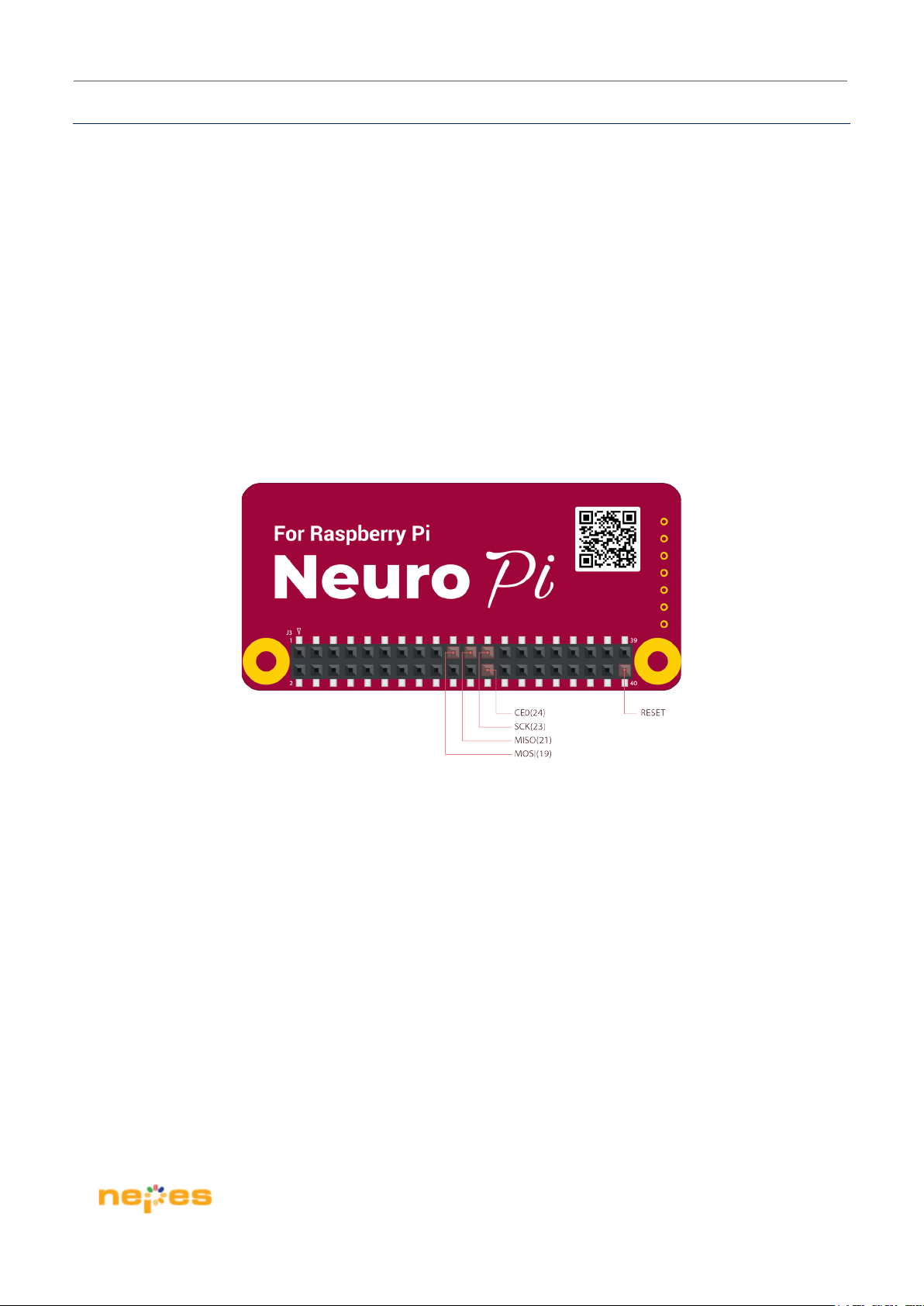
NeuroPi provides SPI Interface in order to communicate with Raspberry Pi.
40 Pin Header GPIO Connector – NeuroPi provides a GPIO connector which is compatible with Raspberry Pi
and it has general interface such as UART, SPI, I2C, GPIO with 3.3V power source.
Among the various interfaces supported by Raspberry Pi, you need to use the SPI0 on the GPIO connector to
use NeuroPi.
For NeuroPi SPI Interface supports up to 15 Mhz now.
Figure 5.1 shows a pin map of GPIO Connector, including SPI interface on the NeuroPi
Figure 5.1 SPI interface on the 40 pin header GPIO connector
Page 8 / 19
Page 9

NeuroPi H/W User Guide
6. SDK (Software Development Kit)
Raspberry Pi platform, to support it can be used following SDK. And you can download it on following link.
Support languages
C / C++
Python
Download link is :
http://www.theneuromorphic.com/manualsoftware-sdk/
Page 9 / 19
Page 10
NeuroPi H/W User Guide
7. Clock Sources
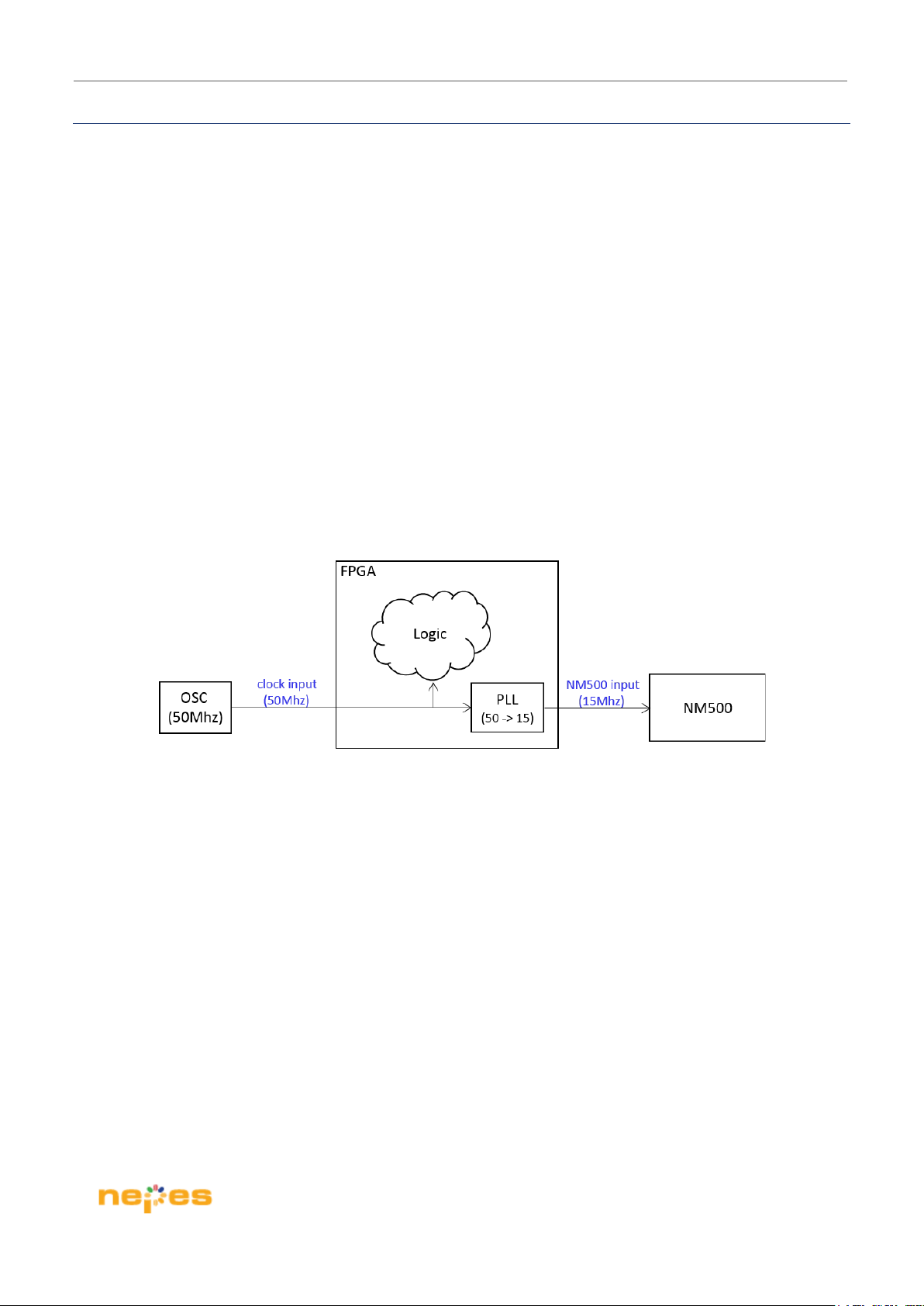
There are two clock sources on the NeuroPi:
50Mhz – On-board oscillator
15Mhz – NM500 operation clock (from FPGA)
NeuroPi has 50Mhz clock on-board oscillator and FPGA generates 15Mhz clock source for NM500.
Figure 7.1 shows a clock scheme of the NeuroPi
Figure 7.1 Clock scheme on NeuroPi
Page 10 / 19
Page 11
NeuroPi H/W User Guide
8. FPGA
It is mainly used with the purpose of making an interface bridge, especially between general SPI and
NMbus and it also does to control all others of interface.
FPGA – For this feature, it chooses MachXO3-2100 device of Lattice Semiconductor. It is around
2,100 logic cells and is a 121-ball csBGA package which provides up to 100 usable I/Os in a 6 x 6mm
package.
Table 8.1 shows the MachXO3 FPGA Reference
Item Description
Reference Designators U3
Part Number LCMXO3LF-2100E-6MG121 (Internal Flash memory)
Manufacturer Lattice Semiconductor
Web-site www.latticesemi.com
Table 8.1 MachXO3 FPGA Reference
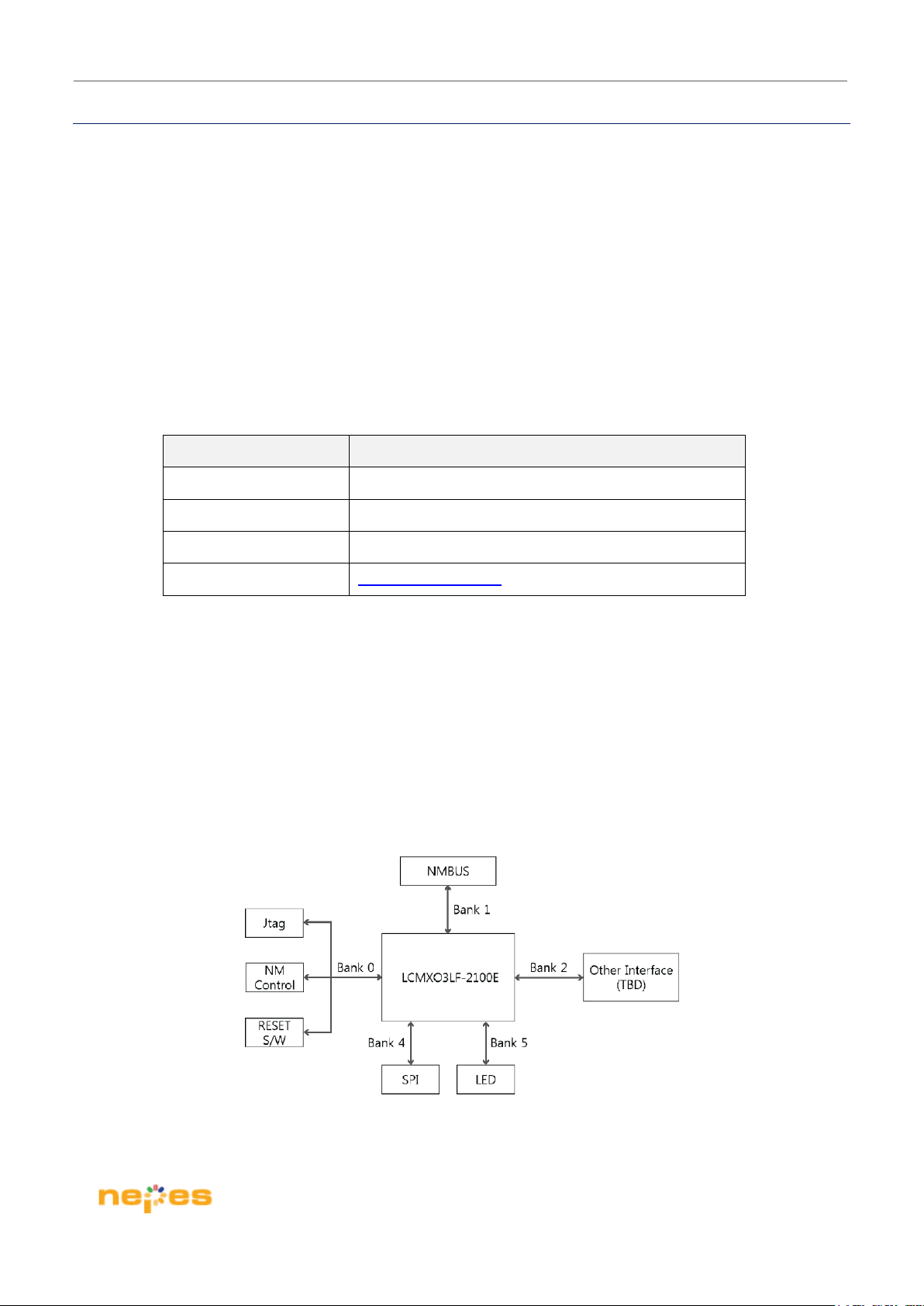
FPGA I/O Block Diagram –All interfaces are connected with FPGA, then making an interface bridging.
Figure 8.1 shows an I/O block diagram of FPGA.
Figure 8.1 I/O diagram of FPGA
Page 11 / 19
Page 12
NeuroPi H/W User Guide
9. Power
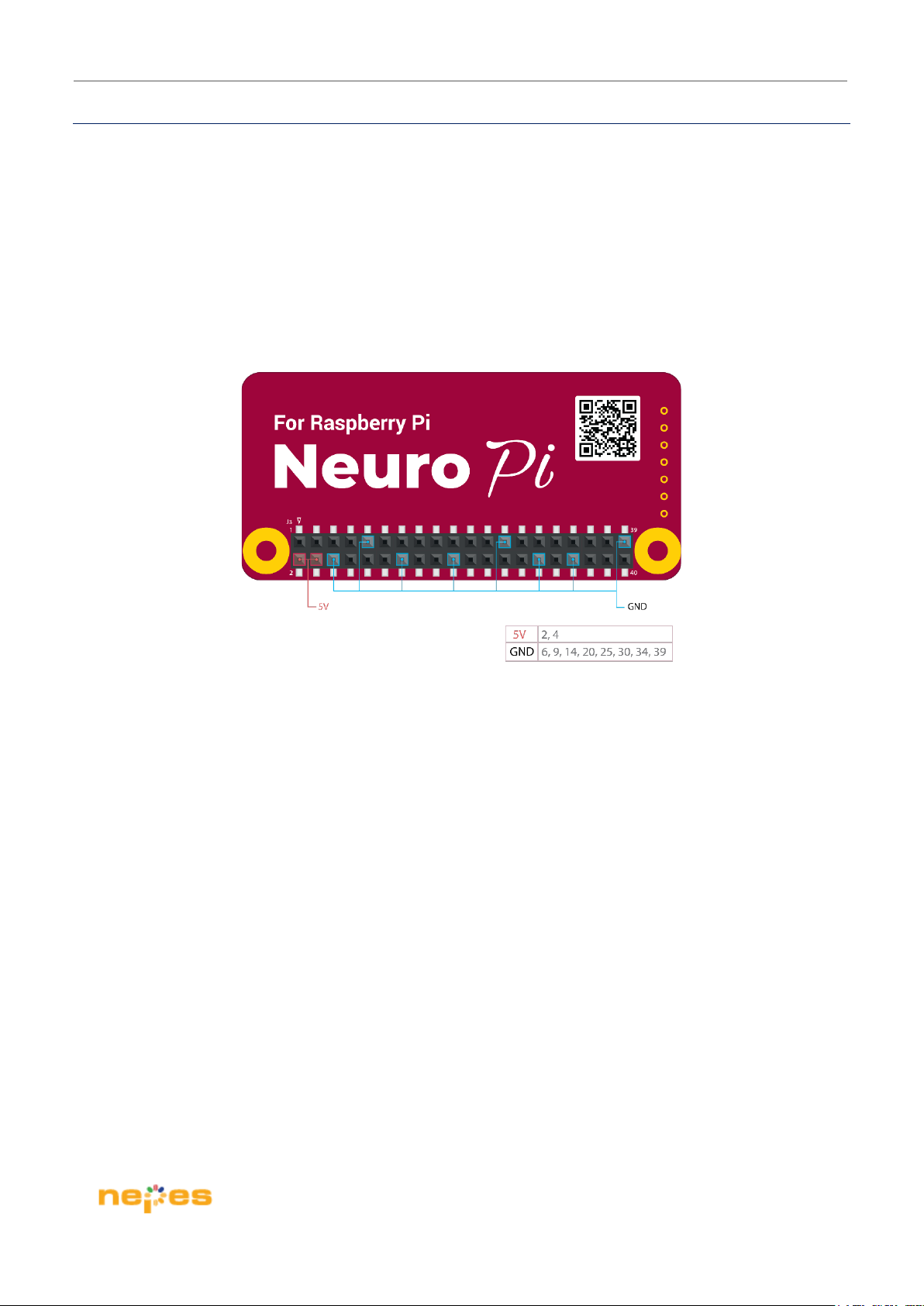
NeuroPi power configuration is as follows:
NeuroPi requires 5V power supply from Raspberry Pi as following picture & those pins are compatible
with Raspberry Pi 40-pin male header
Those power (5V, GND) are derived from the 40-pin header connector
VCC, VCCIO Power
VCC 1.2V supply power from on-board LDO
VCCIO 3.3V supply power from on-board LDO
Page 12 / 19
Page 13
NeuroPi H/W User Guide
10. SPI(Serial Peripheral Interface)
The NeuroPi has two NM500s which work on Raspberry Pi.
User can access those neurons on NM500, other components and can be all of communication channel via SPI
interface.
This chapter is going to show a protocol to access all of components on NeuroPi.
10.1. Packet Format
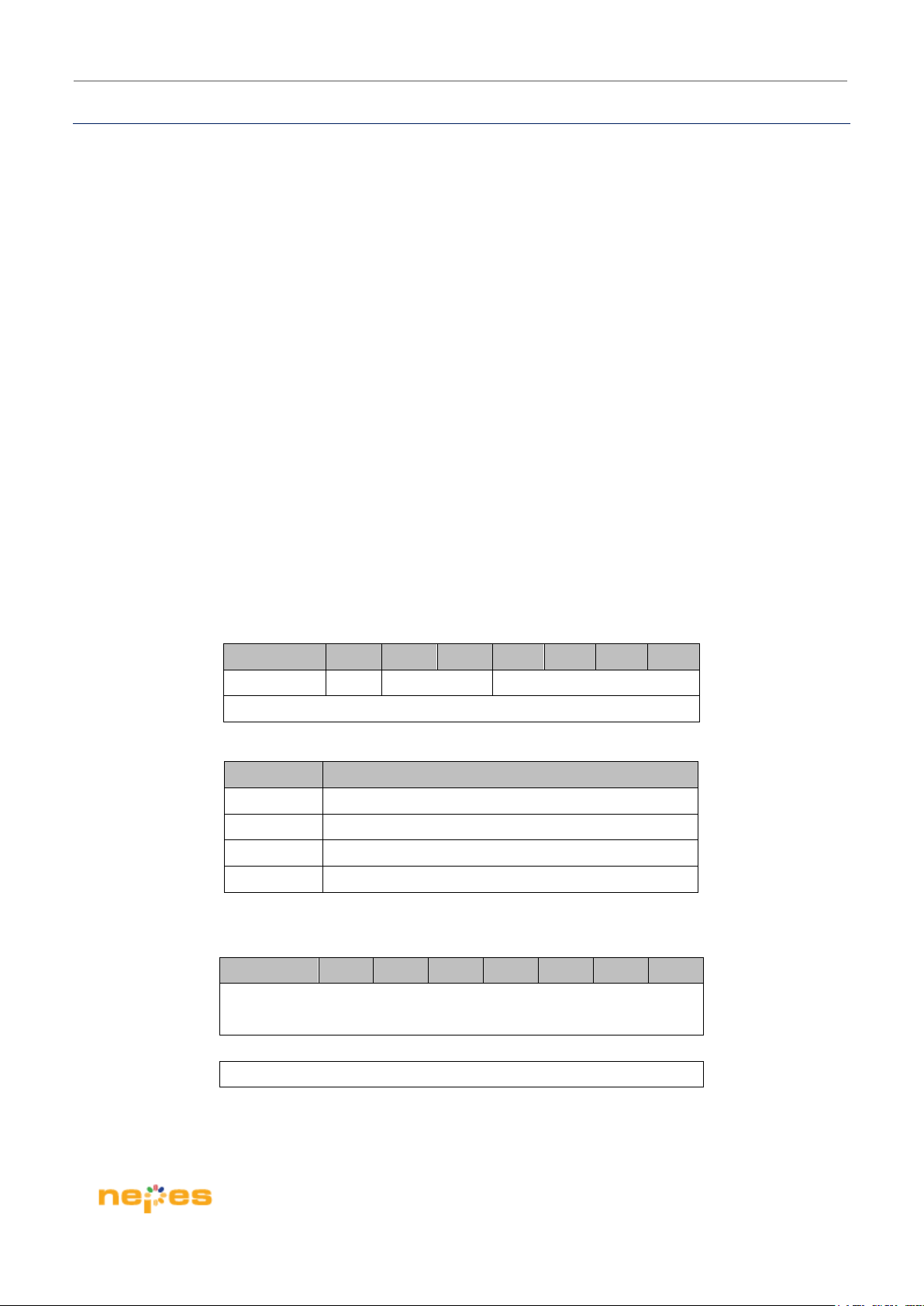
The packet consists of two-byte command followed by a payload that has more than 1-byte; its byte-length is
determined by SIZE in the command and the SIZE must be byte-length – 1.
So it is 2-Bytes header + N-Bytes payload.
Table 10.1 Shows the packet format for NeuroPi
BIT= 7 6 5 4 3 2 1 0
R/Wn N/F ADDR
SIZE[7:0]
Name Note
R/Wn 0: Write, 1: Read
N/F 0: NM500, 1: FPGA
ADDR 0x0 ~ 0xF : NM500 & FPGA Register
SIZE Payload length in bytes - 1
BIT= 7 6 5 4 3 2 1 0
PAY LO AD # 0
PAY LO AD # 1
……
PAYLOAD#(n-1)
Table 10.1 Packet Format for NeuroPi
Page 13 / 19
Page 14
NeuroPi H/W User Guide
10.2. Write Operation
NM500
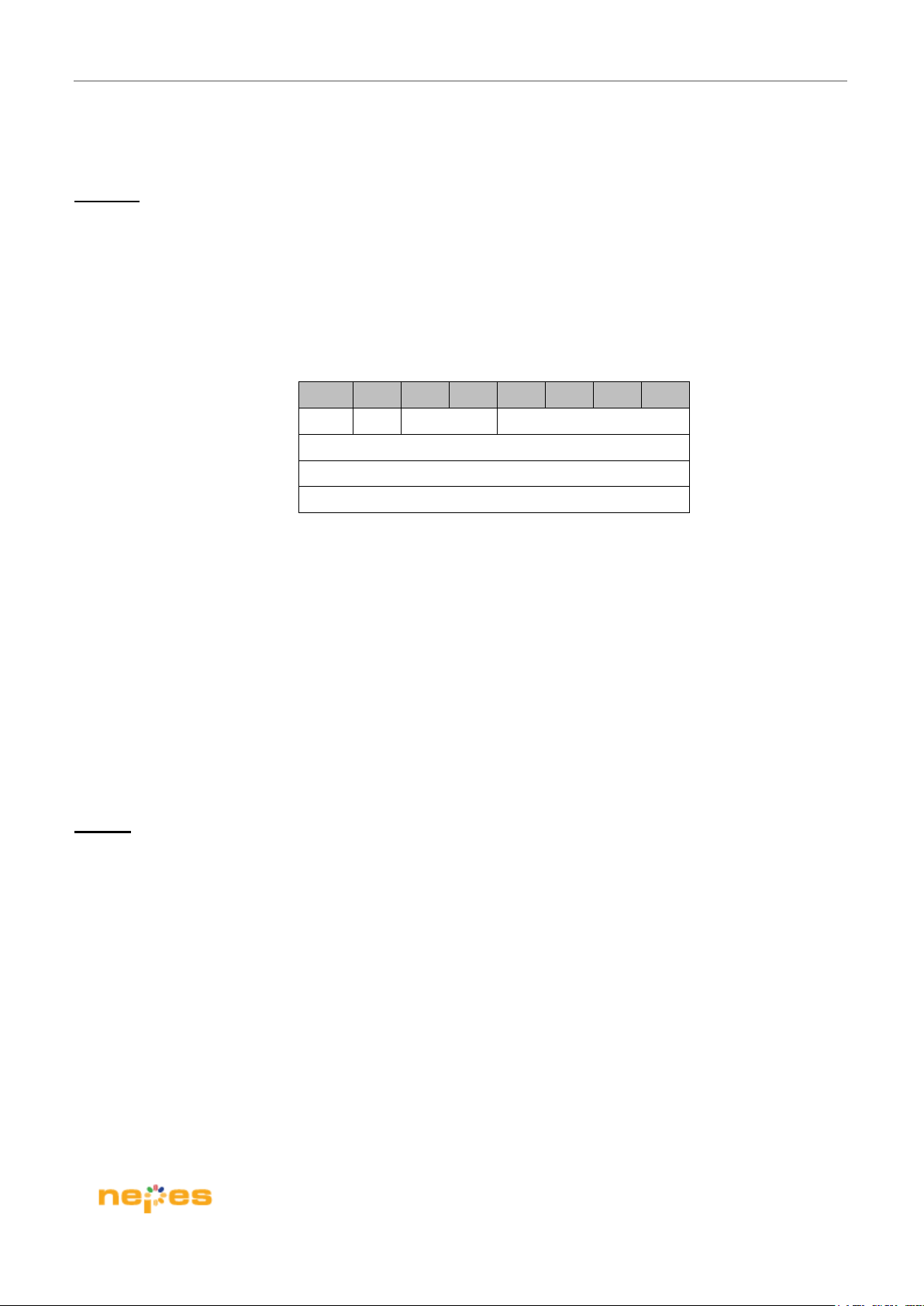
The following shows the byte sequence for writing operation to the neuron.
And R/Wn is 0 for the writing operation.
Table 10.2 Shows the write operation for NeuroPi
ORDER BIT=7 6 5 4 3 2 1 0
0 N/F 0 ADDR[3:0]
0
1
2
3
1
DATA [ 7 : 0 ]
DATA[15:8]
Table 10.2 Write operation for NeuroPi
Example)
Write 0x1234 to the address 0x07 of the neuron.
0x07 0x01 0x34 0x12
Write a vector of [0x0a, 0x0b, 0x1a, 0x1b] to the address 0x01 of the neuron.
0x01 0x03 0x0a 0x0b 0x1a 0x1b
FPGA
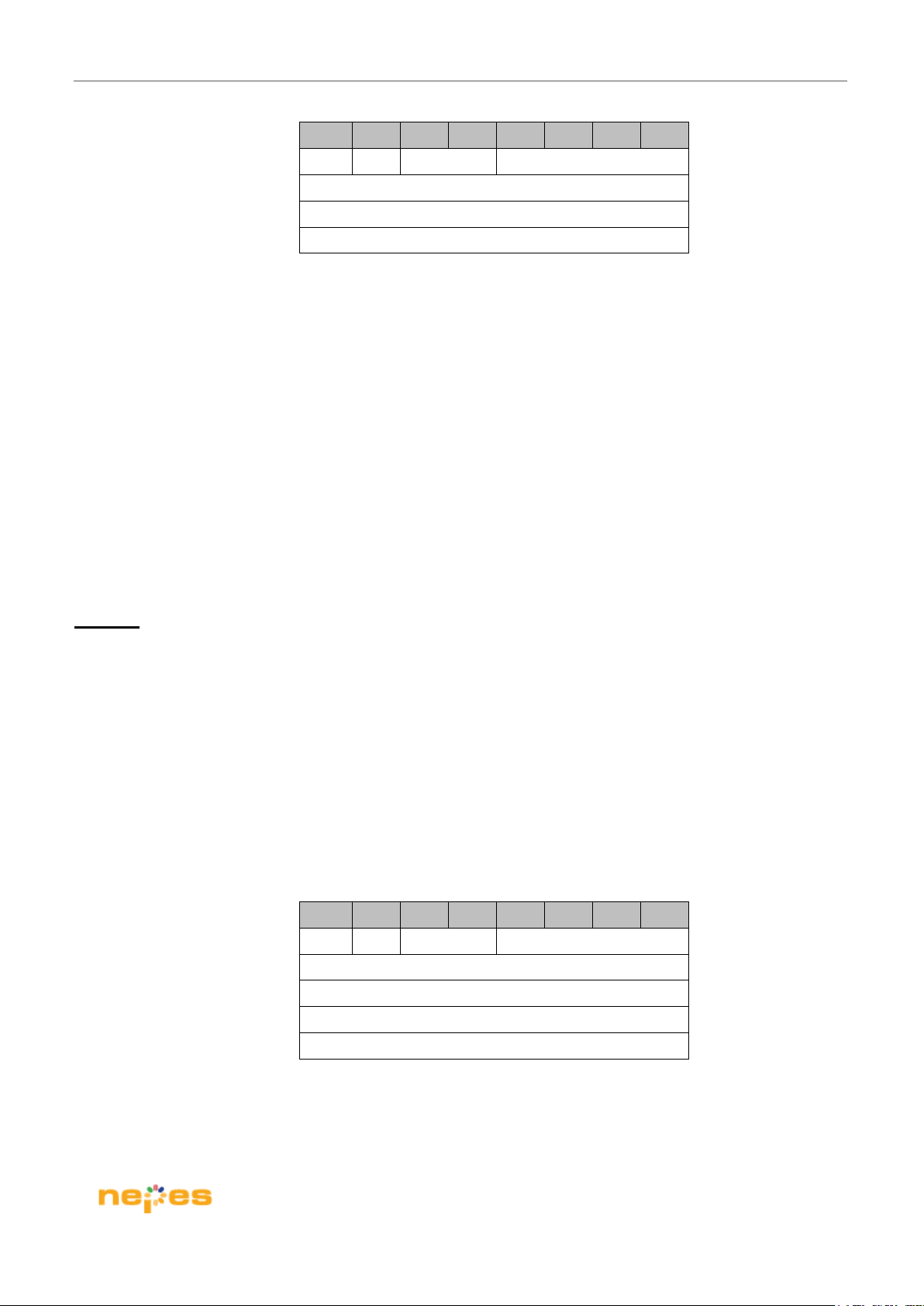
The following shows the byte sequence for writing operation to the neuron. And R/Wn is 0 for the FPGA writing
operation.
Table 10.4 shows the software Reset Assertion.
Page 14 / 19
Page 15
NeuroPi H/W User Guide
ORDER BIT=7 6 5 4 3 2 1 0
0 1 0 0xF
0
1
2
3
1
0x0
0x0
Table 10.4 Software Reset Assertion.
Example)
Assert Software reset to NM500.
0x4F 0x01 0x00 0x00
10.3. Read Operation
NM500
The following shows the byte sequence for reading operation from the neuron.
And R/Wn is 1 for the reading operation.
After two-byte header, it should need to read a status if the reading data is ready.
It must check if RE bit(4
Table 10.3 Shows the read operation for NeuroPi
th
bit) of status data is 0 and then the read operation must be issued immediately.
ORDER BIT=7 6 5 4 3 2 1 0
1 N/F 0 ADDR
0
1
2
3
Checking DATA READY
1
DATA [ 7 : 0 ]
DATA[15:8]
Table 10.3 Read operation for NeuroPi
Page 15 / 19
Page 16
NeuroPi H/W User Guide
Example)
Read 2 bytes from the address 0x07 of the neuron.
0x87 0x01 “Checking DATA READY” 0x34 0x12
Read a vector of [0x0a, 0x0b, 0x1a, 0x1b] from the address 0x01 of the neuron.
0x81 0x03 “Checking DATA READY” 0x0a 0x0b 0x1a 0x1b
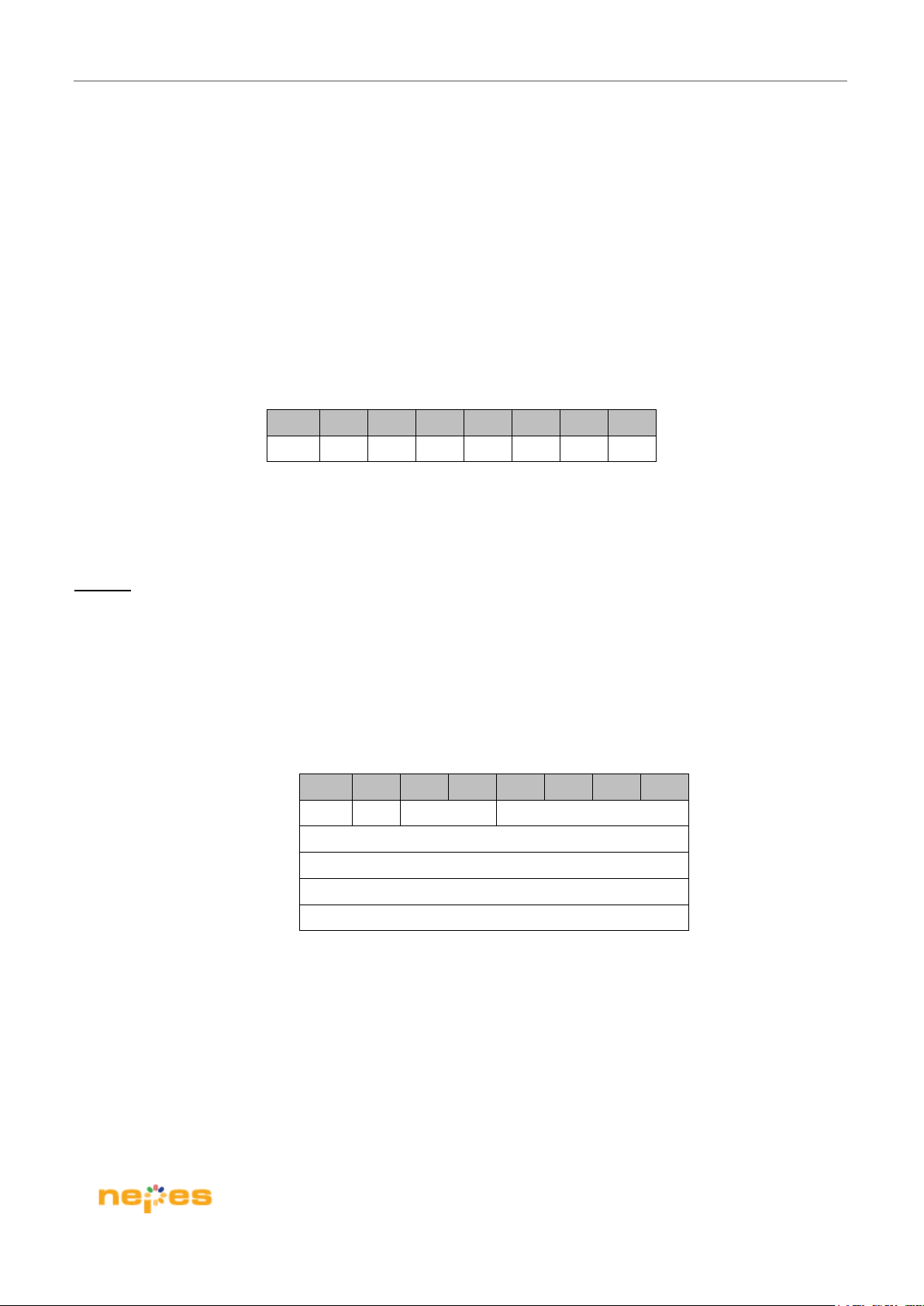
Table 10.4 show the Data Ready Register for NeuroPi
BIT=7 6 5 4 3 2 1 0
RE
Table 10.4 Data Ready Register for NeuroPi
FPGA
The following shows the byte sequence for reading operation to the FPGA.
And R/Wn is 0 for the reading operation.
Table 10.5 shows the read FPGA version.
ORDER BIT=7 6 5 4 3 2 1 0
1 1 0 0x0
0
1
2
3
Checking DATA READY
Table 10.5 Read FPGA version.
1
DATA [ 7 : 0 ]
DATA[15:8]
Example)
Read FPGA Version (Version 0x0002).
0xC0 0x01 “Checking DATA READY” 0x01 0x00
Page 16 / 19
Page 17
NeuroPi H/W User Guide
11. Ordering Information
Ordering Part Number Description
NEUROPI NM500 Evaluation Board for Raspberry Pi
Page 17 / 19
Page 18
NeuroPi H/W User Guide
12. Revision History
Date Versi o n Change Summary
May 2019 1.0 Initial release
Dec 2019 2.0 SPI speed improvement and protocol change
Page 18 / 19
Page 19
NeuroPi H/W User Guide
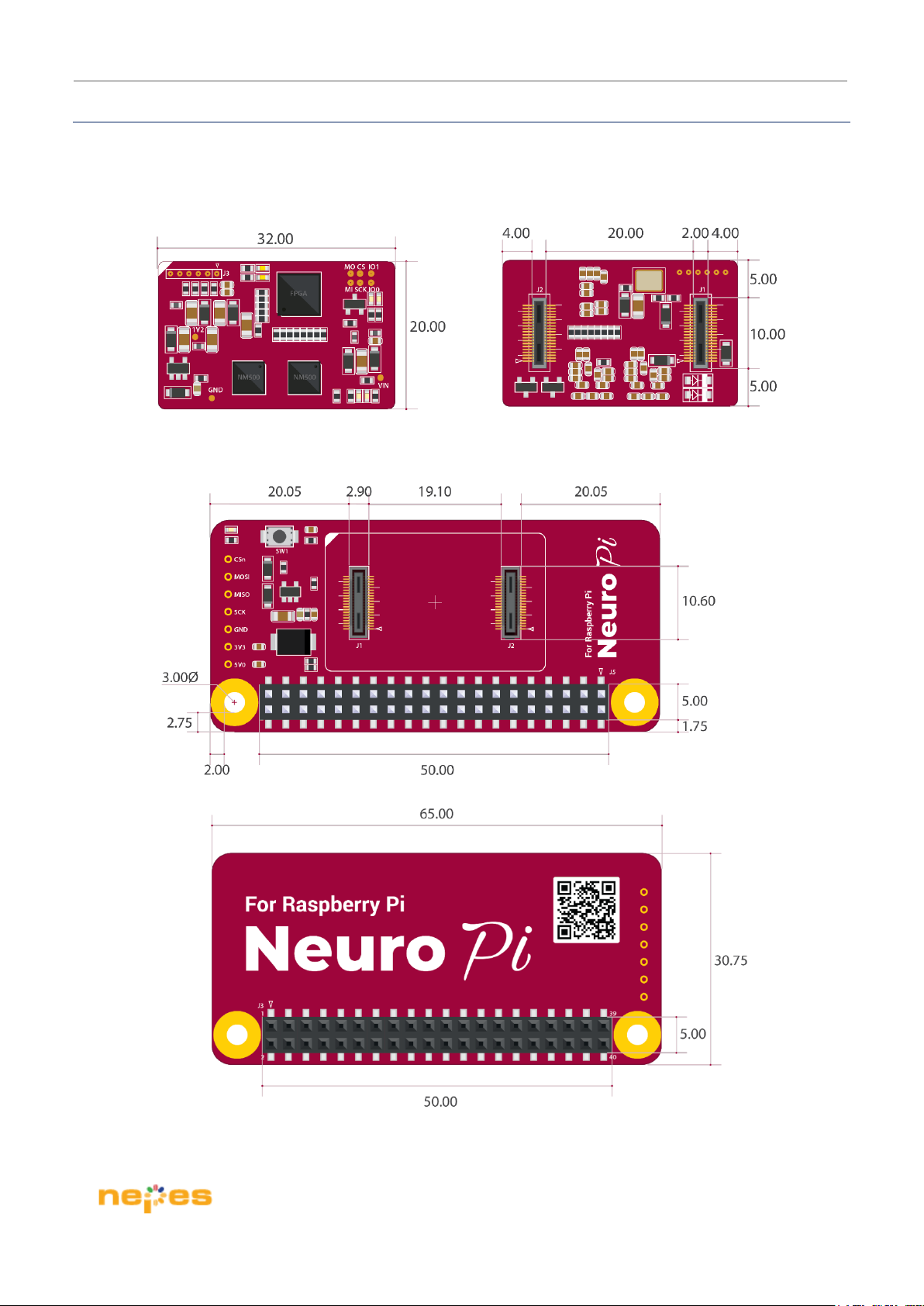
Appendix A. Dimension
Module board
Main board
Page 19 / 19
 Loading...