

Page 1

User Guide
MUSIC STREAMER - NSS 333
Page 2

Page 3

Contents
Section Page
Introduction 1
1. What’s in the box 1
2. Getting to know your NSS 333 2
3. NSS 333 set-up essentials 3
4. Playing music, radio, podcasts and more 6
5. Tips on installing and using your NSS 333 7
6. Mains power, earthing and more 10
7. Further tips and advice 11
8. Support 11
9. Service and updates 11
10. Specications 12
11. Product recycling 12
Page 4
Introduction
Welcome to your new Naim streamer. Like all Naim Audio products, the NSS 333 puts
musical performance rst. To help realise its full potential, it is important to follow the
simple installation and usage guidelines covered in this manual. We start with some
product and set-up essentials, before moving onto more detailed information in Section 5.
Please Note: Full safety
warnings can be found in
the Statutory Safety Manual.
1. What’s in the box
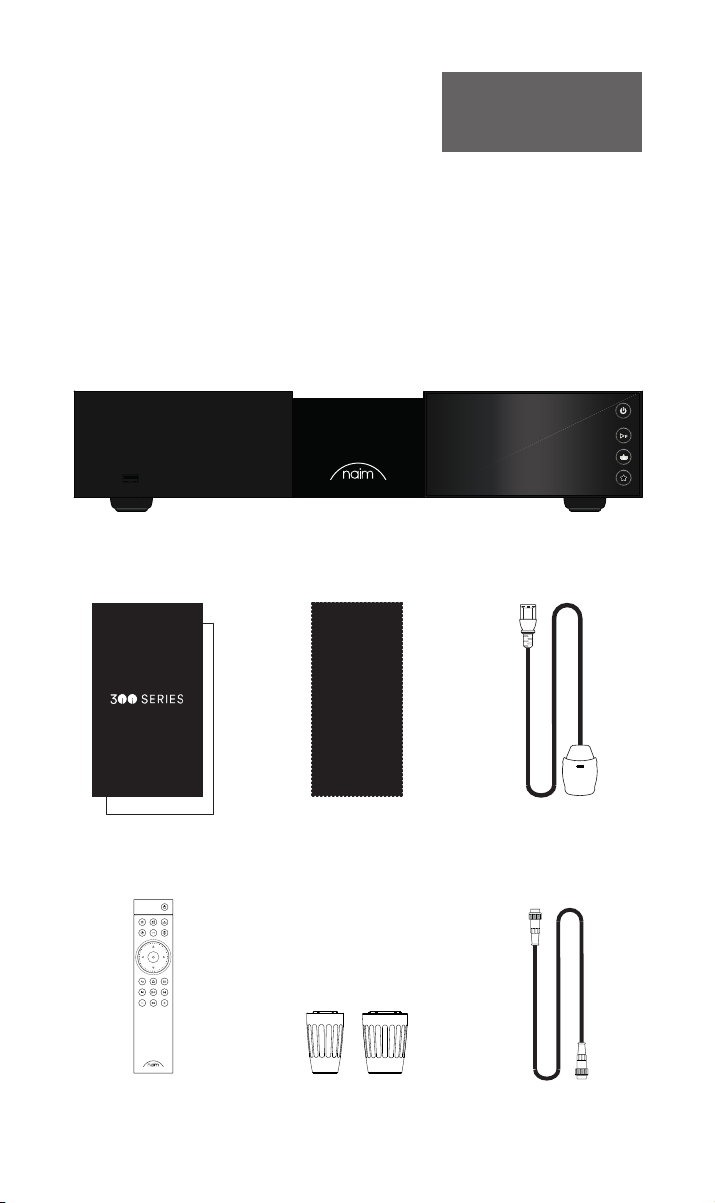
1x NSS 333
1x Document pack
1x Cleaning cloth 1x Power-Line Lite
1x Remote control 2x Link Plugs
11
1x 5-pin 180° DIN
Interconnect Cable
Page 5
WARNING: Disconnect power before opening
AC ONLY
FUSE RATIN: ANTISURE
110-120 V: XXX
220-240 V: XXX
FREQUENCY: 50/
60Hz
INPUT POWER XXXVA
Power
300 SERIES
MUSIC
STREAMER
NSS 333
DESIGNED AND MADE IN THE UK
BY NAIM AUDIO, SALISBURY, SP1 2LN
S/No.
Network
USB
Digital Inputs
Power Supply Upgrade
Remote Out
Analogue Outputs
R LRCA
43
2
1
Refer to User Manual
Type 3
Type 4
Digital Output
DIN
Service port
Ground
Floating
Default
R
LXLR
21
2. Getting to know your NSS 333
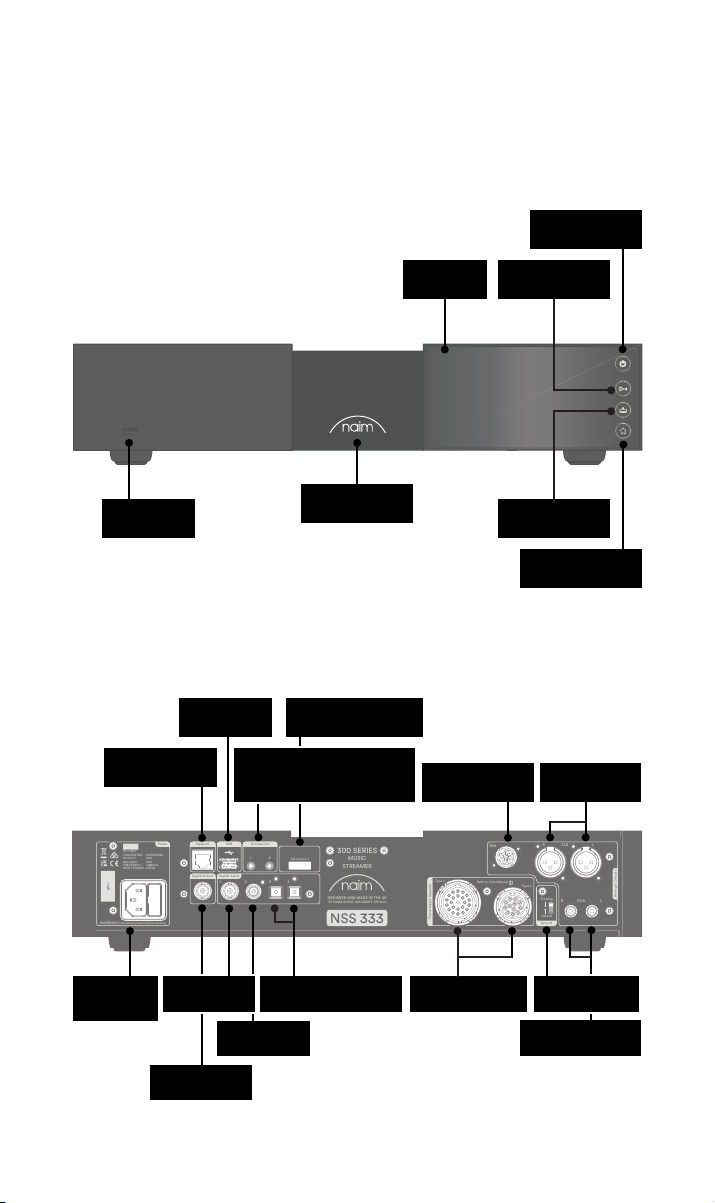
Standby button
USB
(audio data)
Wired network
(RJ45)
USB
(audio data)
Remote out
(3.5mm jack electrical and Mini-
TOSLINK optical)
Backlit, dimmable
logo
Service connection
(factory use only)
Screen
DIN output
Play/pause button
Inputs button
Presets button
XLR balanced
output
Mains input &
Signal ground
switch
RCA unbalanced
output
22
BNC S/PDIF
input coaxial
BNC S/PDIF
output coaxial
RCA S/PDIF
input coaxial
Fuse
2x TOSLINK
S/PDIF input optical
Power supply
upgrade sockets
Page 6
3. NSS 333 set-up essentials
WARNING: Disconnect power before opening
AC ONLY
FUSE RATIN: ANTISURE
110-120 V: XXX
220-240 V: XXX
FREQUENCY: 50/
60Hz
INPUT POWER XXXVA
Power
300 SERIES
MUSIC
STREAMER
NSS 333
DESIGNED AND MADE IN THE UK
BY NAIM AUDIO, SALISBURY, SP1 2LN
S/No.
Network
USB
Digital Inputs
Power Supply Upgrade
Remote Out
Analogue Outputs
R LRCA
43
2
1
Refer to User Manual
Type 3
Type 4
Digital Output
DIN
Service port
Ground
Floating
Default
R
LXLR
21
WARNING:Disconnect power before opening
AC ONLY
FUSE RATING: ANTISURGE
1 0-120 V:1 T4AL
2 0-240 V:2 T2AL
FREQUENCY: 0 60Hz5 /
I 70VANPUT POWER:
Power
300 SERIES
PREAMPLIFIER
NAC 332
DESIGNED AND MADE IN THE UK
BY NAIM AUDIO, SALISBURY, SP1 2LN
/ .oNS
Ground
Power Supply Upgrade
Preamp Outputs
AnalogueInputs
Ground
Default
R L
R
L
RCA
XLR
Refer to User Manual
Type 3
Type 4
Remote
in
Remote
out
Auto
standby
Instant
on
1
2
Control
USB
update
Brightness
Reset/
On
RCA
output
O
3
4
6
AnalogueInputs
R
R
R
L
L
L
5
8
7
1
2
R
L
R
L
Contains FCC ID: 2ACURZIGEE IC ID: 12217A-ZIGEE
Refer to User Manual
WARNING:
Disconnect power before opening
AC ONLY
FUSE RATING: ANTISURGE
1 0-120 V: T
4AL
2 0-240 V: T2AL
FREQUENCY 50/60Hz
I 70VANPUT POWER:
Power
300 SERIES
PREAMPLIFIER
NAC 332
DESIGNED AND MADE IN THE UK
BY NAIM AUDIO, SALISBURY, SP1 2LN
/ .oNS
Ground
Power Supply Upgrade
Preamp Outputs
AnalogueInputs
Ground
Default
R L
R
L
RCA
XLR
Refer to User Manual
Type 3
Type 4
Remote
in
Remote
out
Auto
standby
Instant
on
1
2
Control
USB
update
Brightness
Reset/
On
RCA
output
O
3
4
6
AnalogueInputs
R
R
R
L
L
L
5
8
7
1
2
R
L
R
L
Contains FCC ID: 2ACURZIGEE IC ID: 12217A-ZIGEE
Refer to User Manual
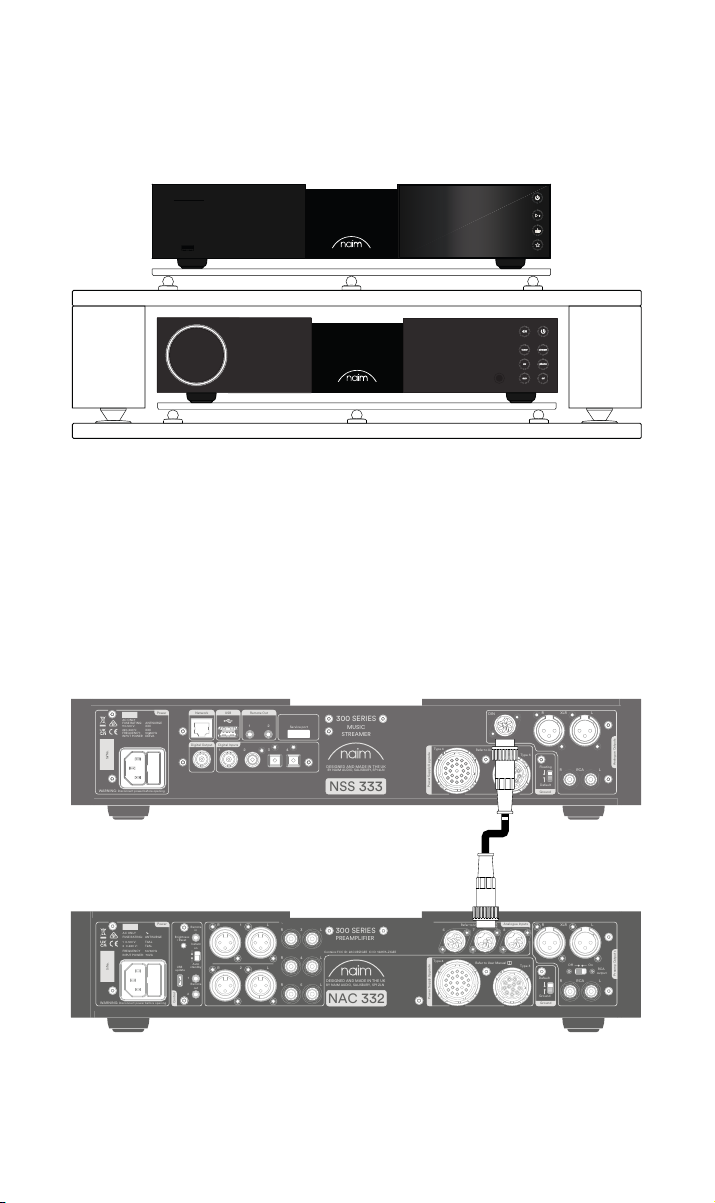
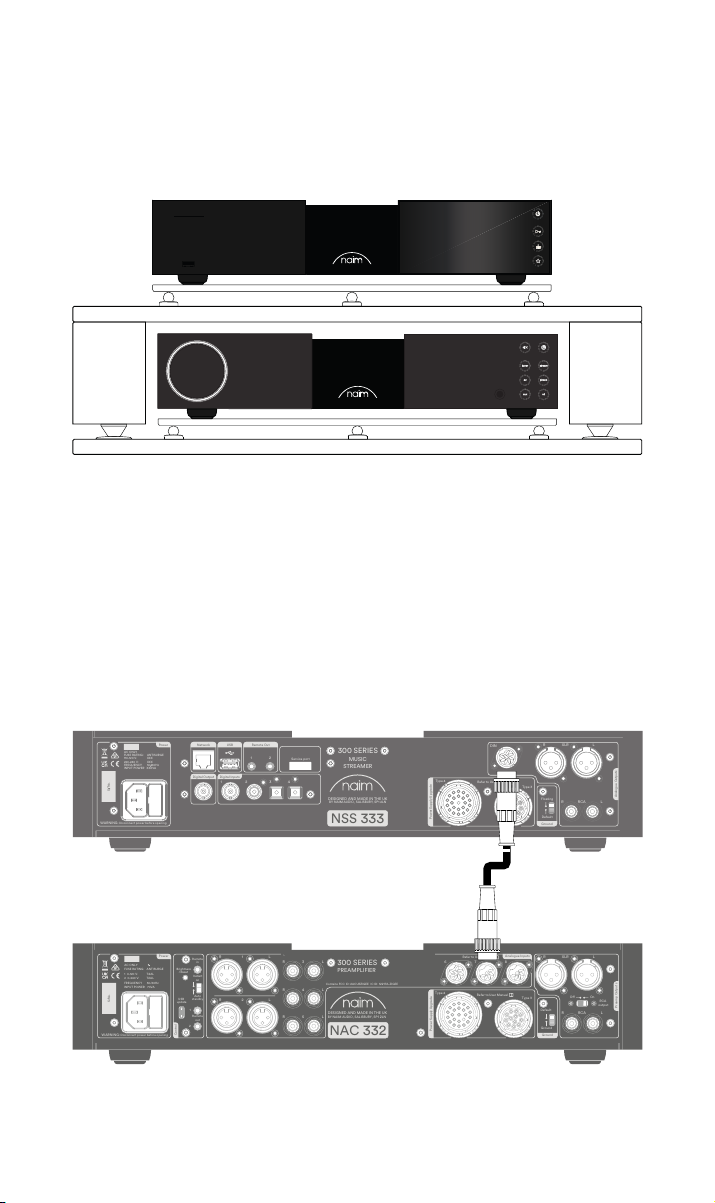
Your NSS 333 needs to be connected to a preamplier and power amplier (such as the
matching NAC 332 and NAP 350s), but before you do, please ensure all components are in
their nal positions and disconnected from mains power.
For optimum performance, use a dedicated hi- support – ideally Naim Fraim – with the
streamer sited above the preamplier, as shown.
You will also need speakers with cables, an internet connection (Wi-Fi or hard wired), and a
smartphone or tablet to run the Naim App.
Download the free Naim App from the Apple App Store or Google Play Store.
3.1 Connecting your NSS 333 to the NAC 332 preamplier
Connect DIN cable (supplied with the NSS 333) from the DIN output of the NSS 333 to the
DIN input of the NAC 332. Note the end of the cable with a band should be connected to
the NSS 333.
33
Page 7
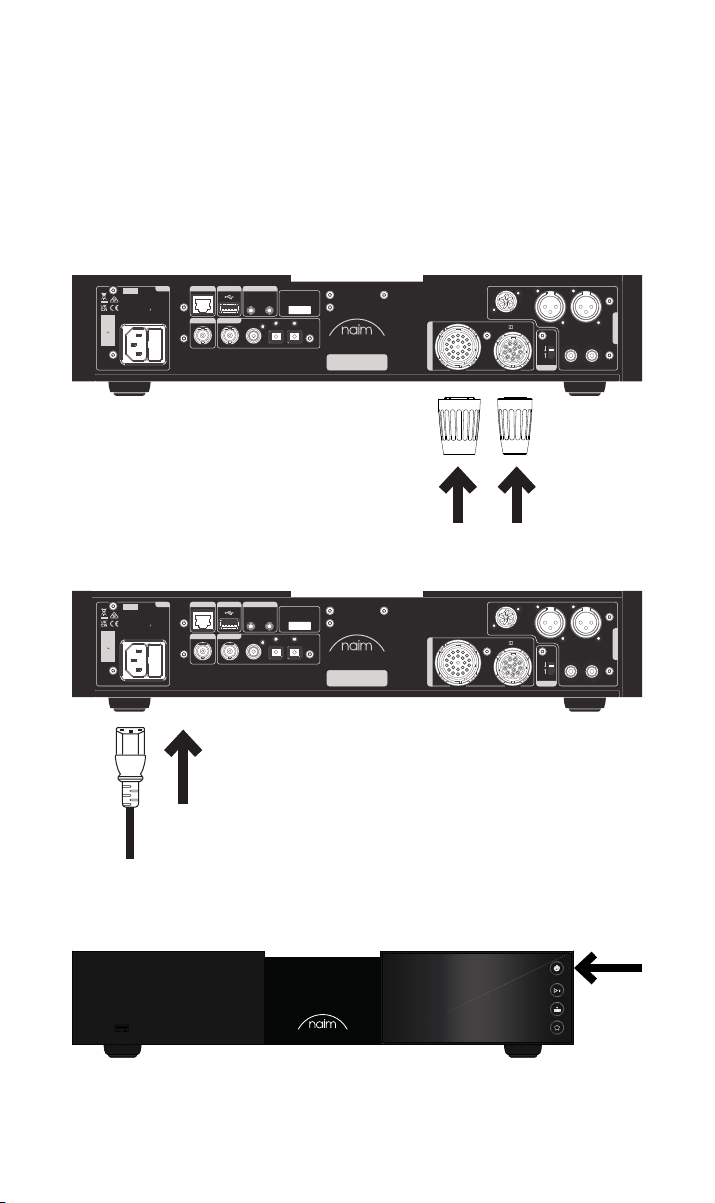
3.2 Powering up
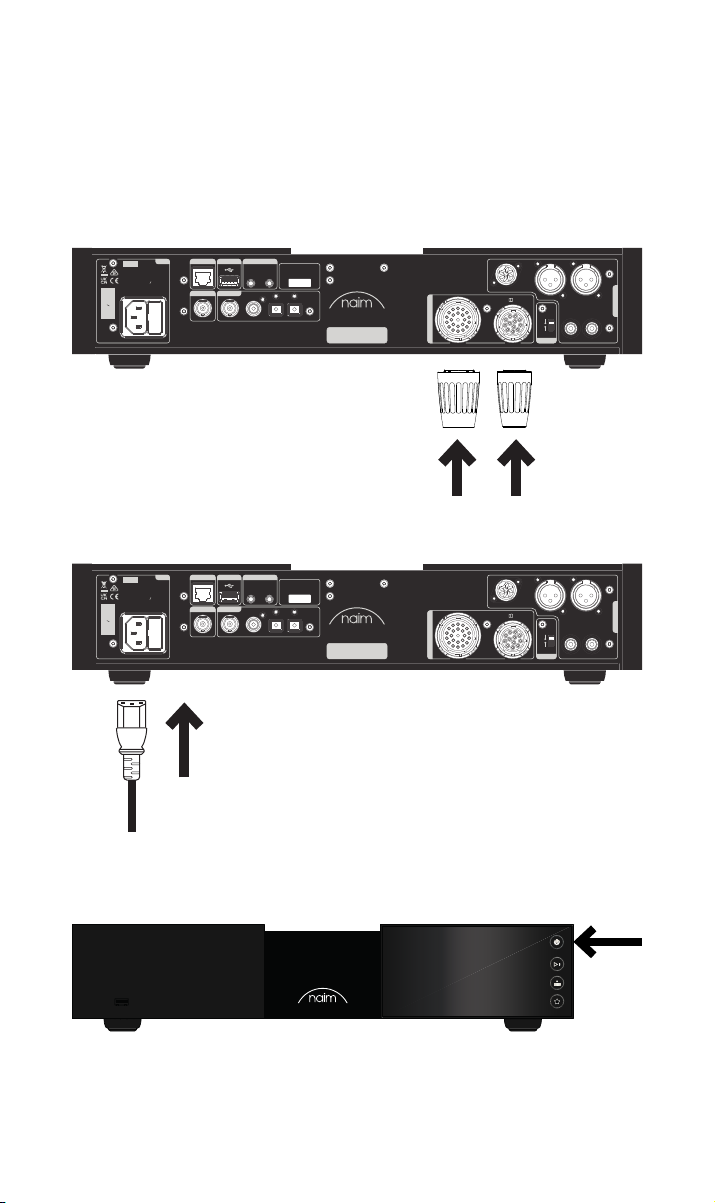
Once you have connected your NSS 333 to a preamplier, there are just a few more,
simple steps to take before you can power up your NSS 333 and start streaming.
Connect the two supplied link plugs to the NSS 333 power supply upgrade sockets.
If using a wired network connect a cable between the RJ45 socket and the router or
switch.
Power
Network
USB
Digital Output
Digital Inputs
1
Remote Out
21
2
43
Service port
300 SERIES
MUSIC
STREAMER
DESIGNED AND MADE IN THE UK
BY NAIM AUDIO, SALISBURY, SP1 2LN
NSS 333
Type 4
Refer to User Manual
Power Supply Upgrade
AC ONLY
FUSE RATIN: ANTISURE
110-120 V: XXX
220-240 V: XXX
FREQUENCY: 50/
INPUT POWER XXXVA
S/No.
WARNING: Disconnect power before opening
60Hz
Connect the power cable to the NSS 333’s power socket and then to mains power.
Power
Network
USB
Digital Output
Digital Inputs
1
Remote Out
21
2
43
Service port
300 SERIES
MUSIC
STREAMER
DESIGNED AND MADE IN THE UK
BY NAIM AUDIO, SALISBURY, SP1 2LN
NSS 333
Type 4
Refer to User Manual
Power Supply Upgrade
AC ONLY
FUSE RATIN: ANTISURE
110-120 V: XXX
220-240 V: XXX
FREQUENCY: 50/
INPUT POWER XXXVA
S/No.
WARNING: Disconnect power before opening
60Hz
R
DIN
Type 3
Floating
R LRCA
Default
Ground
R
DIN
Type 3
Floating
R LRCA
Default
Ground
LXLR
Analogue Outputs
LXLR
Analogue Outputs
Switch on your NSS 333 by pressing the standby button on the top right side of the front
panel.
44
Page 8
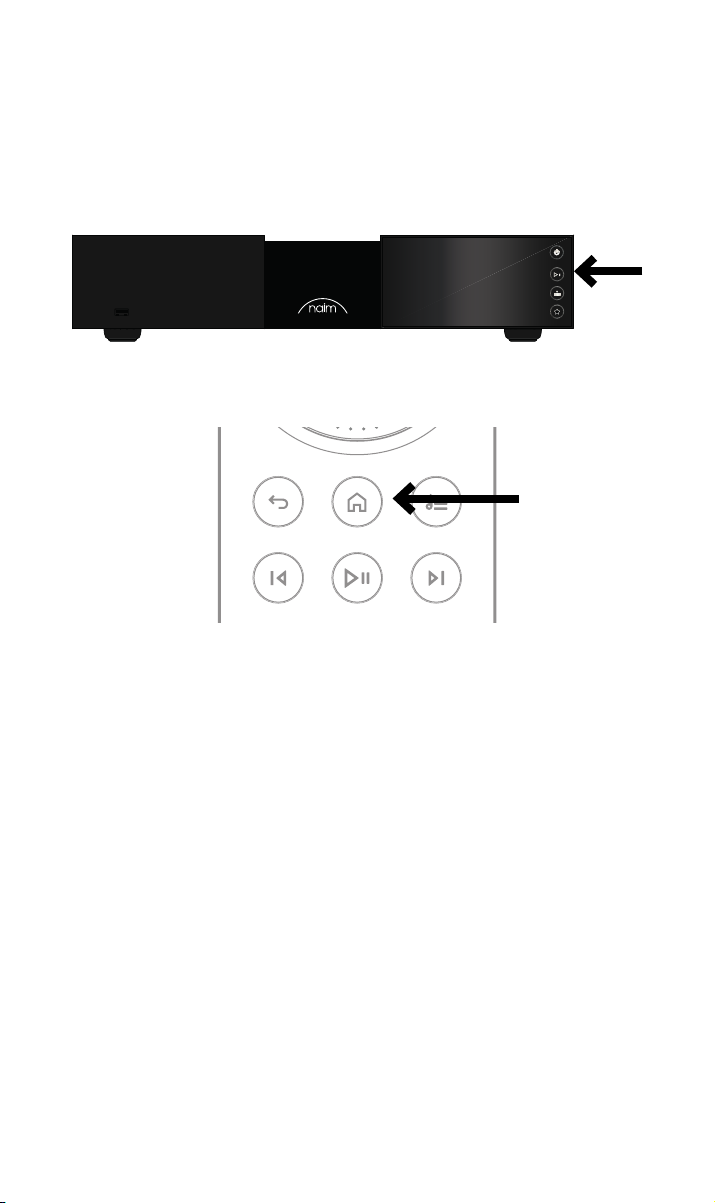
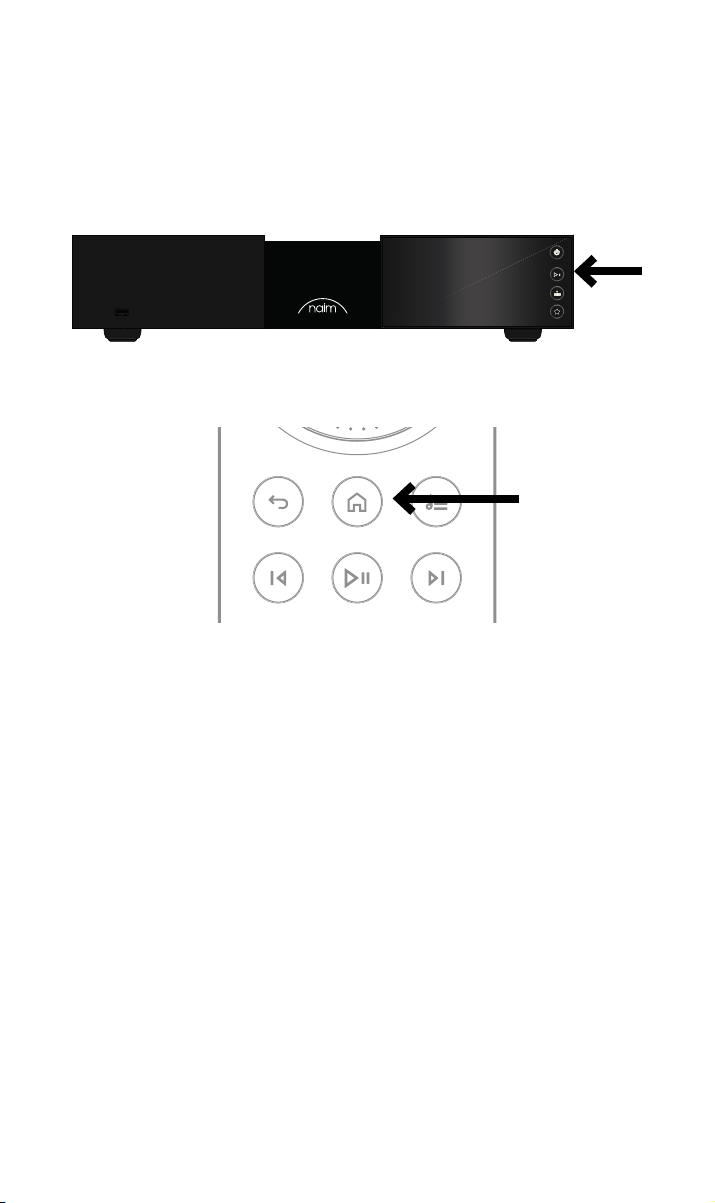
3.3 Pairing the remote control
Once your NSS 333 is switched on, you will need to pair the remote control.
Insert the provided batteries into the remote control handset.
Pressing any of the front panel buttons (except standby) will enable remote pairing mode
for 30 seconds.
Press and hold the home button on the remote control handset for 3 seconds.
The volume ring on the remote will chase when in pairing mode and turn o when paired.
The remote is now paired to the unit and ready to use.
55
Page 9

4. Playing music, radio, podcasts and more
Access all of your music including your favourite streaming services and internet radio
stations, play your stored music from a Naim music server (such as a Naim Uniti Core) and
be the source for your multiroom system. NSS 333 also includes digital connections so you
can connect your external sources.
Before you start streaming the services below, ensure your control device (smartphone,
tablet, or computer) is connected to the same network as your NSS 333.
4.1 Internet radio
A world of radio stations is available to enjoy via the Naim App, including a curated
collection of higher-quality streams. You can also select and store station presets for faster
access to your favourites.
4.2 UPnP
Your NSS 333 can play audio les stored on Naim music servers (such as the Naim Uniti
Core), NAS drives or other connected UPnP devices.
It supports a wide array of le formats, in resolutions up to 384kHz/32-bit.
Browse and enjoy your music and build playlists via the Naim App.
4.3 Spotify Connect/Spotify Hi-Fi
• Open up the Spotify App on your phone, tablet or laptop
• Start playing the content you want to listen to and select ‘Devices Available’
• Select your NSS 333 and start listening
4.4 AirPlay 2
AirPlay 2 is an Apple technology designed to control home audio systems and speakers in
any room from your iPhone, iPad, Mac, HomePod or Apple TV.
It allows you to stream from a wide range of sources, including Apple Music.
To setup AirPlay 2 use the home app on an iOS device running software 11.4
or later.
• Open the Home app and tap the (+) button to add your NSS 333 as an accessory
4.5 Chromecast
Chromecast allows you to stream your favourite music and more from your phone, tablet
or laptop.
• To use Chromecast built-in to cast audio to your NSS 333, simply congure it via the
Google Home App, then stream away from a range of available sources.
66
Page 10

4.6 TIDAL and TIDAL Connect
Subscribers to the TIDAL music-streaming service can enjoy it in two ways on the
NSS 333.
• Stream directly from the TIDAL App, via TIDAL Connect
• Simply open the ‘Now Playing’ screen while playing a song
• Look for the speaker icon and choose the NSS 333 from that list
Alternatively, you can enjoy TIDAL via the Naim App.
• Select the TIDAL input
• Enter your TIDAL login details
• Browse and enjoy TIDAL via the Naim App
4.7 Qobuz
A world of music, including a huge selection of true high-resolution albums, is available to
stream via Qobuz. Subscribers can enjoy the service via the Naim App.
• Select the Qobuz input
• Enter your Qobuz login details
• Browse and enjoy Qobuz via the Naim App
4.8 Roon
Your NSS 333 is Roon Ready, allowing you to explore everything the music management
service has to oer.
4.9 Multiroom
Your NSS 333 can pair with other music players, speakers and systems to ll your home
with perfectly synchronised sound. There are four dierent ways you can enjoy the
multiroom music experience
• Via the Naim App
Pair with other connected Naim products, including Mu-so wireless speakers, Uniti
players and more, via the Naim App, for the best quality experience. Simply start
playing the music you want to share, and group any or all of your Naim products by
selecting the multiroom symbol.
You can also join in the fun by pressing the multiroom button on your remote control.
• Via Apple AirPlay 2
• Via Chromecast
• Via Roon
5. Tips on installing and using your NSS 333
We know you are eager to enjoy your new NSS 333, but we promise it will sound even
better once you have followed these guidelines, all designed to help you experience your
music streamer without compromise.
5.1 Unboxing and positioning
Your NSS 333 uses high-quality components, including a substantial power transformer
and durable aluminium casing. That means the NSS 333 weighs in at 11kg, so please take
care when lifting or moving it, and ensure the surface you plan to place it on is stable and
can support its weight.
77
Page 11
For optimum performance, use your Naim products on a dedicated hi- equipment rack
– ideally the Naim Fraim or Fraim Lite – to minimise vibrations that can aect sound. No
room for a rack? Consider placing your NSS 333 on a Fraim glass shelf on a suitable piece
of furniture, to provide solid but discreet support.
Never stack Naim products on top of each other, and if you are placing them side-byside, please leave some distance between the units. Equally, connected products should
not sit too far apart: the maximum separation distance is that allowed by the supplied
interconnect lead.
To reduce the risk of audible hum from the loudspeakers do not place power supplies or
power ampliers close to source or preamplier components.
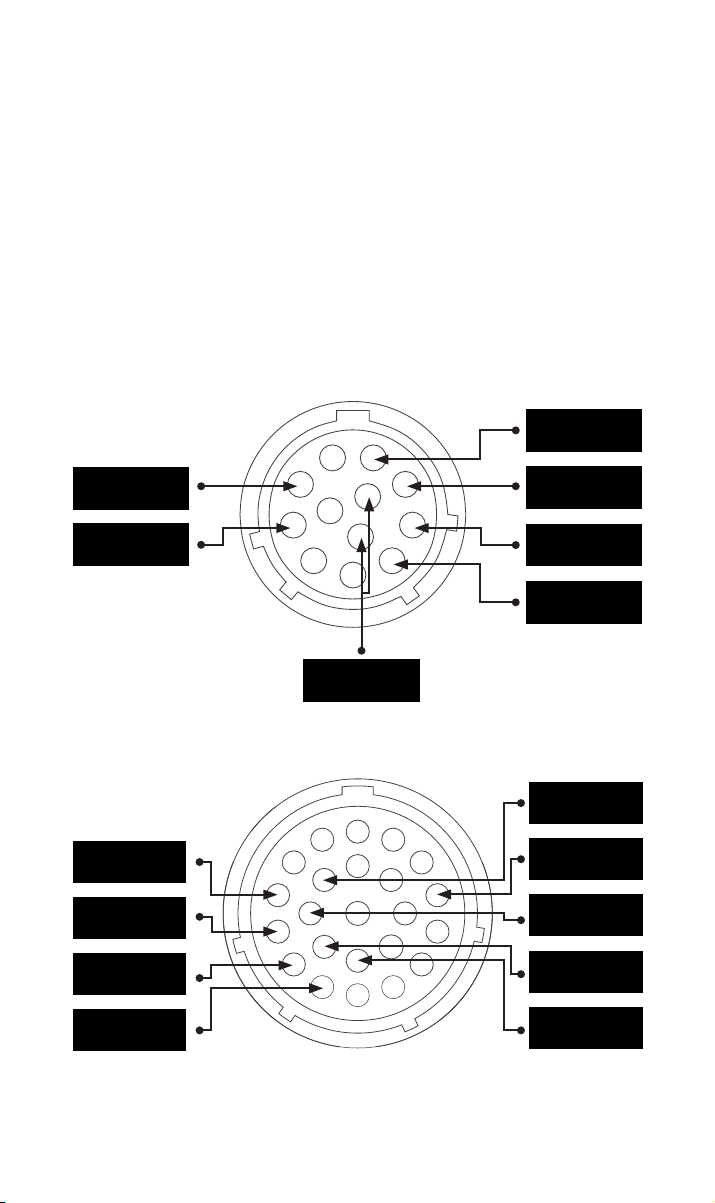
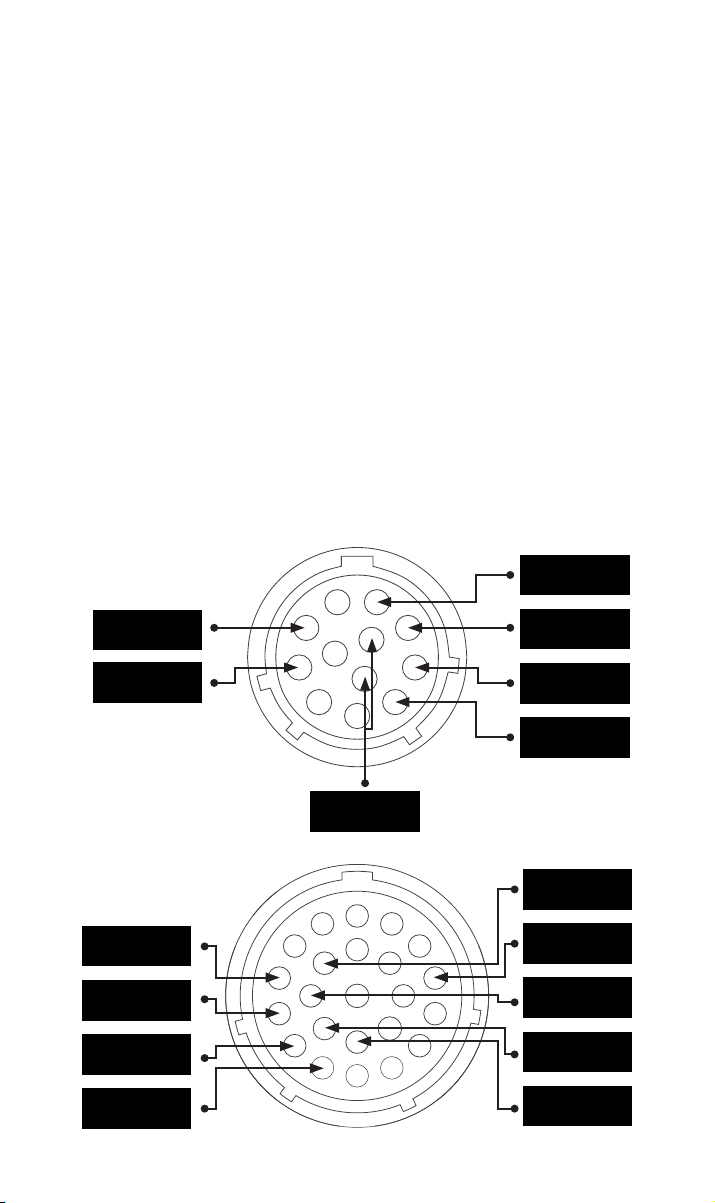
5.2 Input connection details
The NSS 333 features many external connection options. For the best sound quality, we
recommend you use the BNC digital input.
5.2a Type 3 : plug 12 ways
+22V 400mA
+5V 200mA
Digital Ground
5.2b Type 4 : plug 23 ways
+10V 370mA
+10V 370mA
+15V 150mA
+15V 1,1A
-22V 400mA
+22V 400mA
-22V 400mA
Ground
Ground
+5V 200mA
Ground
Ground
Ground
88
Page 12

5.3 Output connection details
For optimal sound quality we recommend you use the DIN output.
If the XLR or RCA outputs are going to be used they need to be enabled in the Naim App.
If an output is not being used it should be disabled in the Naim App.
If the digital output is being used it needs to be enabled in the Naim App. If the digital
output is being used the analogue outputs will be disabled.
5.4 System automation
When using the NSS 333 with a compatible preamplier and power amplier – such
as the NAC 332 and NAP 350 – you can synchronise power on/o and logo brightness
across your system by connecting the NAC 332 with the optical system automation cables
supplied with the NAP 350s.
The NSS 333 and NAC 332 use the Zigbee system to synchronise their functions. Press
any button (except standby) on the front panel of the NSS 333 and NAC 332 to pair them
together, or alternatively, complete the setup wizard using the Naim App.
5.5 Powering up/down
Once all your input and output connections are made, connect the supplied mains lead to
your NSS 333 and to mains power.
You can now power up the NSS 333 by pressing the standby button. If the NAC 332 and
NAP 350’s are connected via System Automation they will switch on in sequence.
It is the same procedure to switch o your NSS 333: turn o your NSS 333 streamer –
and NAC 332 and NAP 350’s connected via System Automation – by simply pressing the
standby button on the front panel, which will put the NSS 333, NAC 332 and the NAP 350s
into standby. Avoid using a mains outlet switch to turn your amplier o.
5.6 Standby power settings
The NSS 333 has four power levels: standby, network standby, network standby with an
additional power requirement and powered for normal use.
“Standby” mode has an overall power consumption of less than 0.5W. The NSS 333 can be
woken up by pressing the standby button or from the remote control.
“Network standby” is <2W. The network needs to be connected (either wired or Wi-Fi) so
the NSS 333 can be woken up via the Naim App.
“Network standby with an additional power requirement”. The NSS 333 is fully powered
but with the display and logo turned o (it needs to be in this state to power a USB device
or act as a server).
“Powered for normal use” In normal use the NSS 333 uses about 25W.
By default, the NSS 333 is set to ‘auto standby’ - it automatically enters the appropriate
standby mode after a period not exceeding 20 minutes of inactivity. For the optimum
sound quality set the auto standby period to “Never” in the Naim App so the NSS 333 is
permanently powered up.
5.7 Naim logo brightness settings
You can choose the brightness level of the LED indicators and Naim logo on your NSS 333
in the Naim App. If you are using Naim NAC 332 and NAP 350 ampliers connected via
System Automation, you can synchronise the brightness of both logos from the NSS 333.
99
Page 13

5.8 Using the NPX300 power supply
The NPX300 power supply is an optional system upgrade. If adding the NPX300 power
supply to the NSS 333, rst turn the whole system o. Remove the mains cable from the
NSS 333 – it is not required when the unit is powered by the NPX300.
Add the NPX300 to the equipment stand and remove the two link plugs from the NSS 333
rear panel.
Connect the un-banded end of the two Burndy cables to the NPX300. Connect the two
banded ends to the NSS 333. Ensure all the locking rings are tightened fully. Try to “dress”
the cables so they hang as loosely as possible and without touching the stands or the wall
– this will be easier if they are formed to roughly the required shape before connecting
either end.
Connect the power lead to the NPX300’s power socket and then to mains power. Turn the
rest of the system back on.
Turn the NSS 333 back on by pressing the standby button.
6. Mains power, earthing and more
Use only the mains leads and plugs supplied with your NSS 333, or the upgrade Naim
Power-Line mains cable. Where fused plugs are used, 13-Amp fuses should be tted. Do
not wire voltage dependent resistors or noise suppressors into mains plugs; they degrade
the mains supply and the sound.
6.1 Earthing
In order to avoid hum loops, the signal ground of the whole system should be connected to
the mains earth in one place. Typically, this is at the primary source. The NSS 333 streamer
has a ground lift switch. Set this to “Default” if no other source connects mains earth to
signal ground. This setting will give best sound quality.
6.2 Non-rewirable mains plugs
If a non-rewirable plug is cut from a mains lead (for whatever purpose) the plug MUST be
disposed of in a way to render it totally useless. Considerable shock hazard exists if the
cut-o plug is inserted into a mains outlet.
6.3 Mains circuits and interference
A hi- system usually shares a mains power circuit with other household equipment,
some of which can cause distortion that may manifest as mechanical hum from mains
transformers, including the large transformer in your NSS 333.
Transformer hum is not transmitted through the speakers and has no eect on the
performance of the system; however, careful positioning of your Naim system may
reduce it, as may a separate, dedicated mains circuit. Such a circuit (ideally with a 30 or
45-Amp rating) will also generally improve system performance. Only seek advice on the
installation of a separate mains circuit from a qualied electrician.
6.4 Lightning precautions
Your Naim system should be turned o and fully disconnected from mains power when
there is a risk of a lightning strike, to protect from potential damage.
1010
Page 14

7. Further tips and advice
Now you have all the essentials sorted, let us move onto a few more things that you can do
to optimise the performance of your new NSS 333.
7.1 Running in
Naim products are hand-crafted from a carefully selected range of high-quality
components. Your NSS 333 will sound superb out of the box, but its performance may
improve further still as all these various components power up and interact in their rst
few weeks of use. Keeping your system powered up will assist this process.
7.2 Cleaning your product and connections
Naim recommends using only the supplied cleaning cloth to lightly dust any product
surfaces. Cleaning products may contain ingredients that can adversely aect cosmetic
surface treatments and coatings.
Keep interconnect plugs and sockets clean and free from corrosion. The easiest way to
achieve this is to fully power o your Naim product (and any connected equipment),
unplug all connections from their sockets and rmly push them in again. Contact cleaners
and so-called ‘enhancers’ should not be used, as they can leave deposits that can degrade
the sound of your system.
7.3 Resetting your NSS 333
To reset your NSS 333 to the factory default settings, use the remote control to navigate to
“Home - Settings – Factory settings – Reset all settings – Yes” on the front panel display.
8. Support
Consumer protection varies from country to country. In most territories, the retailer you
bought your Naim product from should be your primary contact if you are experiencing
problems with your unit. A problem may be due to a fault in the system or its installation,
so it is essential to make full use of your dealer’s diagnostic skills.
You can nd a range of support articles for each Naim product online at naimaudio.com
If you are still experiencing an issue with your Naim product, contact us directly for help
and advice, at [email protected]
9. Service and updates
Any repairs or hardware updates should only be made by an authorised Naim service
centre or at the Naim HQ itself. Many components are custom made, tested or matched
and appropriate replacements are often unobtainable from other sources. Please contact
your local Naim retailer with any service or repair queries.
1111
Page 15
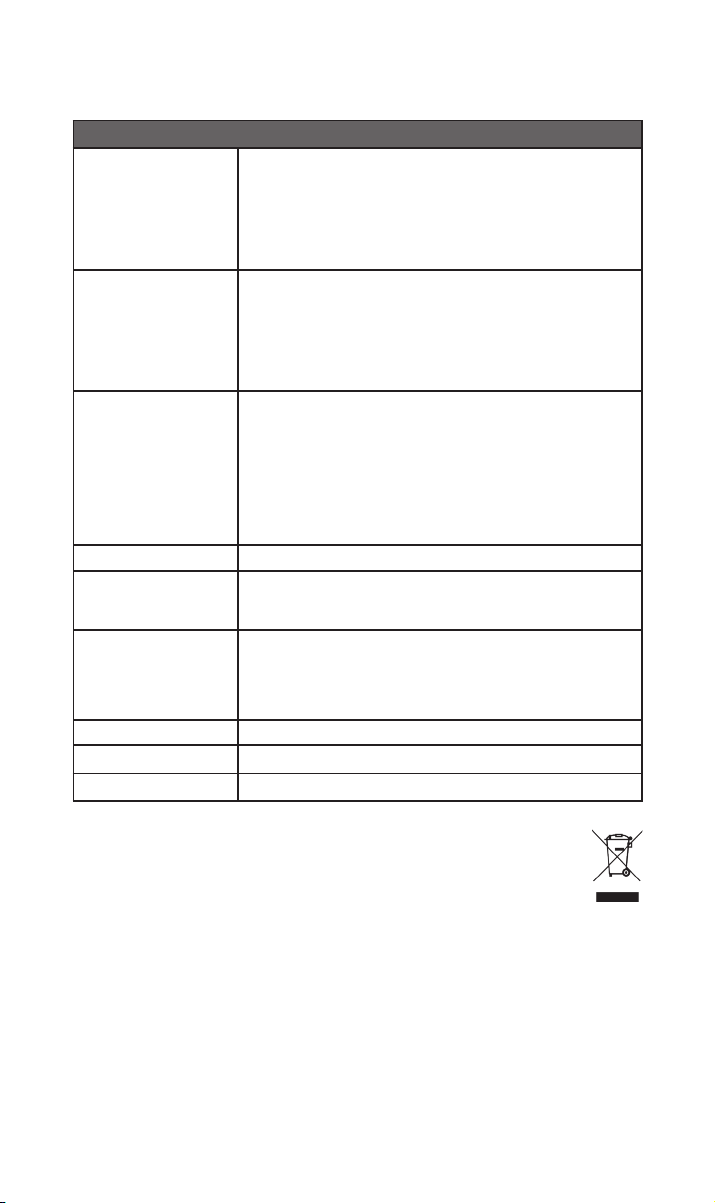
10. Specications
300 Series Music Streamer - NSS 333
USB:
2 x USB Type A socket (front and rear - 1.6 A charge)
Audio inputs
Audio outputs
Audio formats
Network Ethernet (10/100Mbps), Wi-Fi (802.11 b/g/n/ac)
Power consumption
Ripping and storage
Dimensions (H x W x D) 91.5 × 432 × 317.5 mm (including feet)
Weight 11kg
Mains supply 115V or 230V, 50/60Hz
Digital (S/PDIF):
1 x coaxial BNC (up to 24bit 192kHz, DoP 64Fs)
1 x coaxial RCA (up to 24bit/192kHz, DoP 64Fs)
2 x Optical TOSLINK (up to 24bit/96kHz)
Analogue:
1 × 5-pin DIN
1 x XLR pair
1 x RCA pair
Digital:
1 x BNC coaxial
WAV - up to 32bit/384kHz
FLAC and AIFF - up to 24bit/384Hz
ALAC (Apple Lossless) - up to 24bit/384Hz
MP3 - up to 48kHz, 320kbit (16 bit)
AAC - up to 48kHz, 320kbit (16 bit)
OGG and WMA - up to 48kHz (16 bit)
DSD - 64 and 128Fs
M4A - up to 48kHz, 320kbit (16 bit)
Note: Gapless playback supported on all formats.
Typical use: 25W
Network standby mode: <2W
Standby: <0.5W
2 x USB Type A socket (front and rear - 1.6A charge)
Store up to 20,000 tracks to a local USB connected storage device and
serve to a network-connected player
External portable HDD – max. 1TB
USB sticks – max. 128 GB
11. Product recycling
Products that display the crossed-out wheeled bin logo cannot be disposed of
as domestic waste. These products must be disposed of at facilities capable of
recycling them and appropriately handling any waste by-products.
Contact your local authority for details of the nearest such facility.
Appropriate recycling and waste disposal helps conserve resources and protects the
environment from contamination.
1212
Page 16

Page 17

Table des matières
Section Page
Introduction 1
1. Liste des éléments fournis 1
2. Découverte du NSS 333 2
3. Informations de base sur l’installation du NSS 333 3
4. Écoute de musique, radio, podcasts et plus encore 6
5. Conseils pour l’installation et l’utilisation de votre 7
NSS 333
6. Alimentation secteur, mise à la terre et plus 10
7. Autres astuces et conseils 11
8. Support 11
9. Réparation et mises à jour 11
10. Spécications techniques 12
11. Consignes de recyclage du produit 12
Page 18
Introduction
Bienvenue et félicitations pour l’achat de votre nouveau streamer Naim. Comme tous les
produits Naim Audio, le NSS 333 donne la priorité absolue à la performance musicale. Pour
l’aider à déployer tout son potentiel, il est important de suivre les consignes simples pour
l’installation et l’utilisation qui sont fournies dans ce manuel. Nous allons commencer par
quelques informations de base concernant le produit et la mise en place, avant de passer à
des informations plus détaillées à la section 5.
Veuillez noter que tous les
avertissements de sécurité se
trouvent dans le manuel de sécurité
agréé.
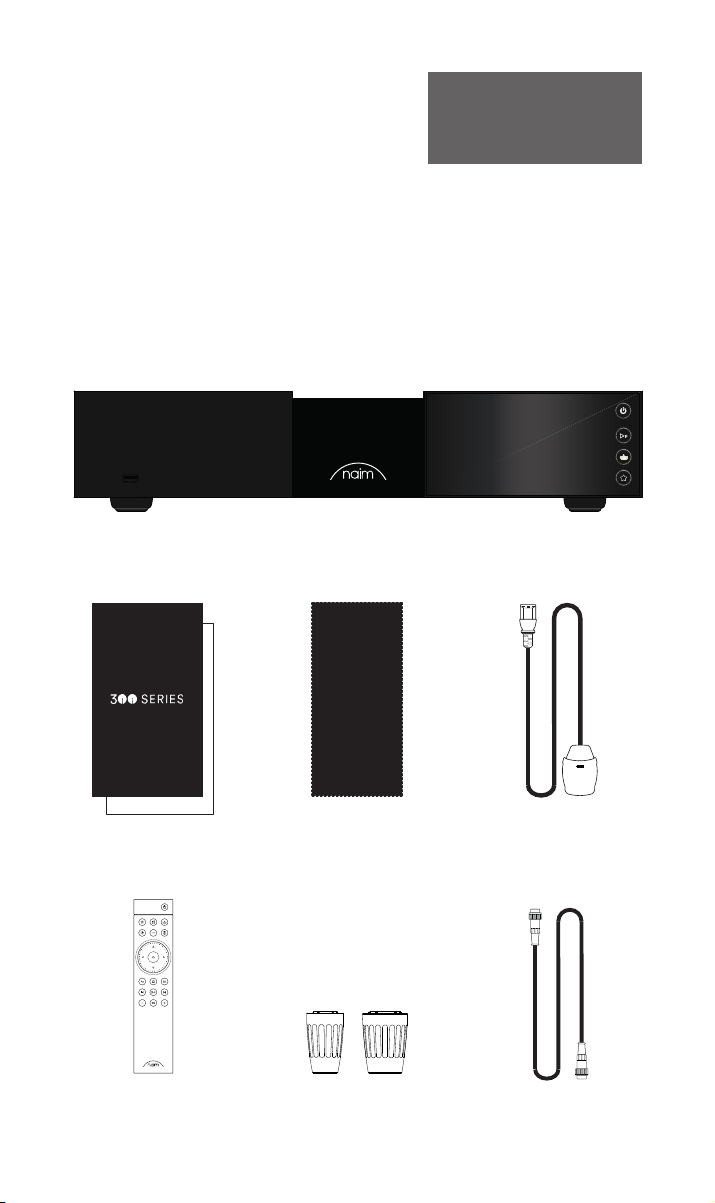
1. Liste des éléments fournis
1x NSS 333
1x Documentation
1x Chion nettoyant
1x Télécommande 2x Fiches cavalier
11
1x Câble d’alimentation
1x DIN 5 broches 180°
Page 19
WARNING: Disconnect power before opening
AC ONLY
FUSE RATIN: ANTISURE
110-120 V: XXX
220-240 V: XXX
FREQUENCY: 50/
60Hz
INPUT POWER XXXVA
Power
300 SERIES
MUSIC
STREAMER
NSS 333
DESIGNED AND MADE IN THE UK
BY NAIM AUDIO, SALISBURY, SP1 2LN
S/No.
Network
USB
Digital Inputs
Power Supply Upgrade
Remote Out
Analogue Outputs
R LRCA
43
2
1
Refer to User Manual
Type 3
Type 4
Digital Output
DIN
Service port
Ground
Floating
Default
R
LXLR
21
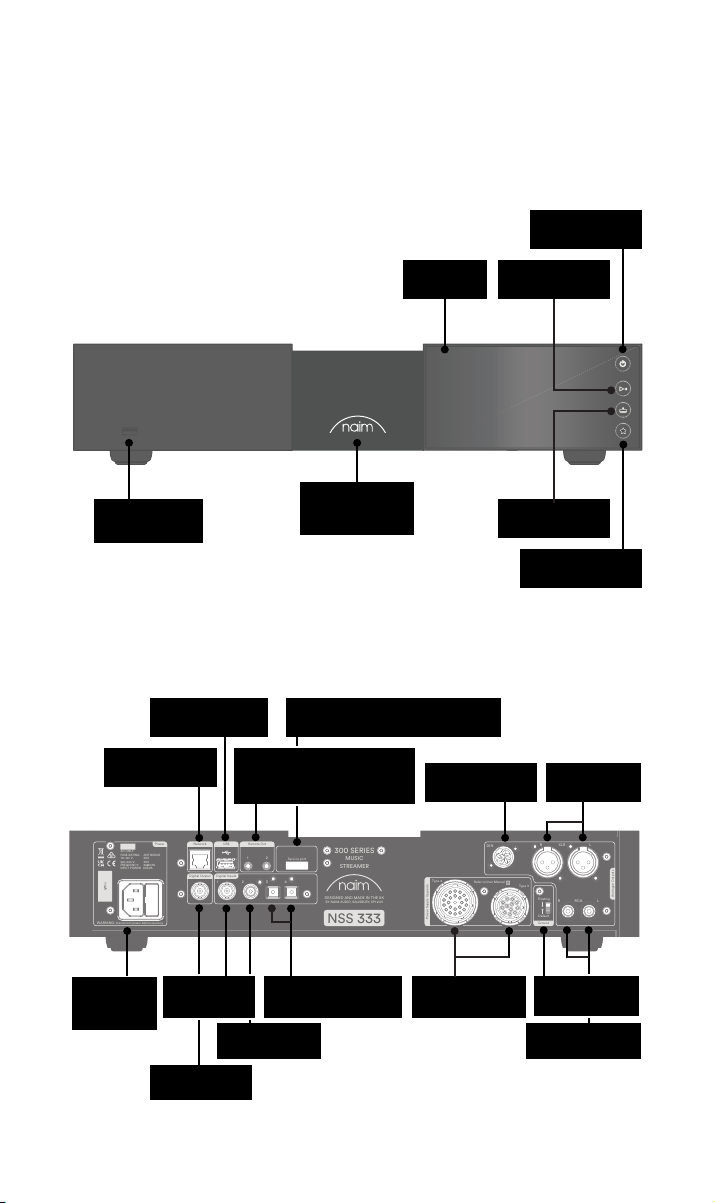
2. Découverte du NSS 333
Bouton de veille
USB (données
audio)
USB (données
Wired network
(RJ45)
audio)
Sortie à distance (port jack
3,5 mm en électrique et Mini-
TOSLINK en optique)
Écran
Logo à variation
d’intensité,
rétroéclairé
Raccordement de service (utilisation
en usine uniquement)
Sortie DIN
Bouton Lecture /
pause
Bouton Entrées
Bouton
Présélections
Sortie XLR
symétrique
Entrée
secteur et
fusible
Entrée BNC S/
PDIF coaxiale
Sortie BNC S/
PDIF coaxiale
2x entrée TOSLINK S/
Entrée RCA S/
PDIF coaxiale
PDIF optique
Entrées de
mise à niveau
d’alimentation
Interrupteur
masse signal
Sortie symétrique
RCA
22
Page 20
3. Informations de base sur l’installation du NSS333
WARNING: Disconnect power before opening
AC ONLY
FUSE RATIN: ANTISURE
110-120 V: XXX
220-240 V: XXX
FREQUENCY: 50/
60Hz
INPUT POWER XXXVA
Power
300 SERIES
MUSIC
STREAMER
NSS 333
DESIGNED AND MADE IN THE UK
BY NAIM AUDIO, SALISBURY, SP1 2LN
S/No.
Network
USB
Digital Inputs
Power Supply Upgrade
Remote Out
Analogue Outputs
R LRCA
43
2
1
Refer to User Manual
Type 3
Type 4
Digital Output
DIN
Service port
Ground
Floating
Default
R
LXLR
21
WARNING:Disconnect power before opening
AC ONLY
FUSE RATING: ANTISURGE
1 0-120 V:1 T4AL
2 0-240 V:2 T2AL
FREQUENCY: 0 60Hz5 /
I 70VANPUT POWER:
Power
300 SERIES
PREAMPLIFIER
NAC 332
DESIGNED AND MADE IN THE UK
BY NAIM AUDIO, SALISBURY, SP1 2LN
/ .oNS
Ground
Power Supply Upgrade
Preamp Outputs
AnalogueInputs
Ground
Default
R L
R
L
RCA
XLR
Refer to User Manual
Type 3
Type 4
Remote
in
Remote
out
Auto
standby
Instant
on
1
2
Control
USB
update
Brightness
Reset/
On
RCA
output
O
3
4
6
AnalogueInputs
R
R
R
L
L
L
5
8
7
1
2
R
L
R
L
Contains FCC ID: 2ACURZIGEE IC ID: 12217A-ZIGEE
Refer to User Manual
WARNING:
Disconnect power before opening
AC ONLY
FUSE RATING: ANTISURGE
1 0-120 V: T
4AL
2 0-240 V: T2AL
FREQUENCY 50/60Hz
I 70VANPUT POWER:
Power
300 SERIES
PREAMPLIFIER
NAC 332
DESIGNED AND MADE IN THE UK
BY NAIM AUDIO, SALISBURY, SP1 2LN
/ .oNS
Ground
Power Supply Upgrade
Preamp Outputs
AnalogueInputs
Ground
Default
R L
R
L
RCA
XLR
Refer to User Manual
Type 3
Type 4
Remote
in
Remote
out
Auto
standby
Instant
on
1
2
Control
USB
update
Brightness
Reset/
On
RCA
output
O
3
4
6
AnalogueInputs
R
R
R
L
L
L
5
8
7
1
2
R
L
R
L
Contains FCC ID: 2ACURZIGEE IC ID: 12217A-ZIGEE
Refer to User Manual
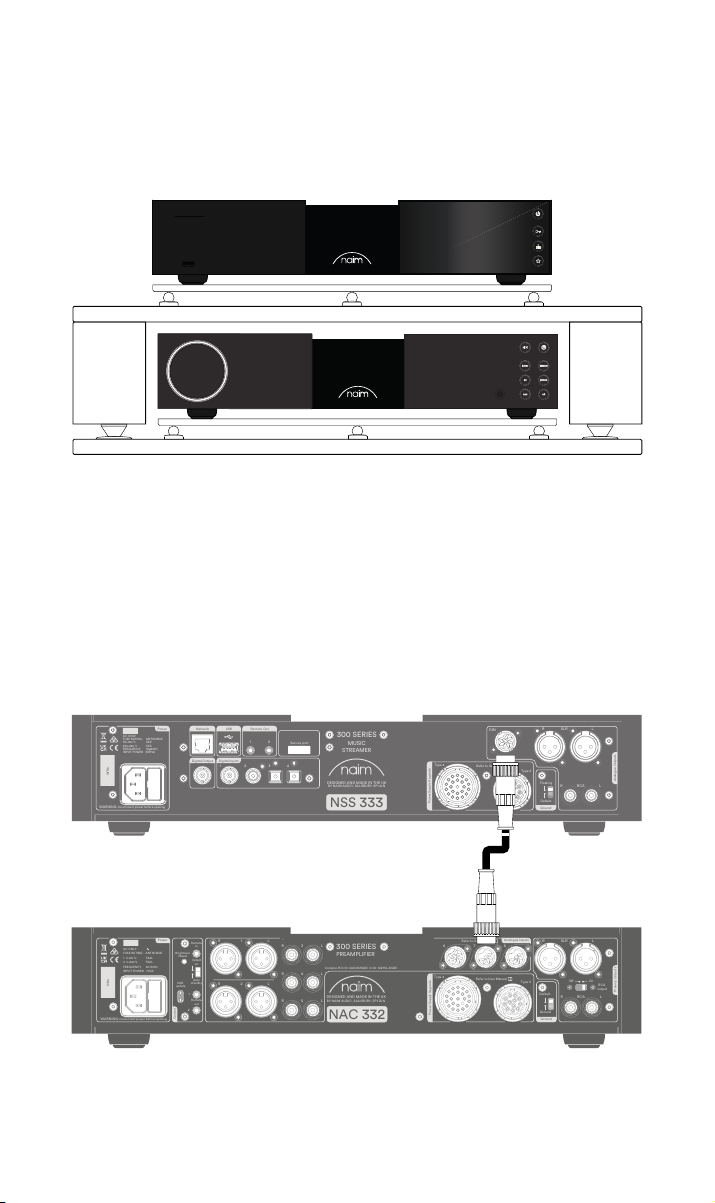
Votre NSS 333 doit être raccordé à un préamplicateur et à un amplicateur de puissance
(comme le NAC 332 et les NAP 350 correspondants) mais, avant de le faire, vous devez
vous assurer que tous les composants se trouvent à leur emplacement dénitif et sont
débranchés du secteur.
Pour des performances optimales, utilisez un support hi- dédié (idéalement Naim Fraim)
et placez le streamer au-dessus du préamplicateur, comme illustré.
Vous aurez également besoin d’enceintes avec des câbles, d’une connexion Internet (Wi-Fi
ou laire) et d’un smartphone ou d’une tablette pour utiliser l’application Naim.
Téléchargez l’application Naim dans l’App store d’Apple ou le Play Store de Google.
3.1 Raccordement du NSS 333 au préamplicateur NAC 332
Branchez un câble DIN (fourni avec le NSS 333) entre la sortie DIN du NSS 333 et l’entrée
DIN du NAC 332. Veuillez noter que l’extrémité du câble munie d’une bande est celle qui
doit être raccordée au NSS 333.
33
Page 21
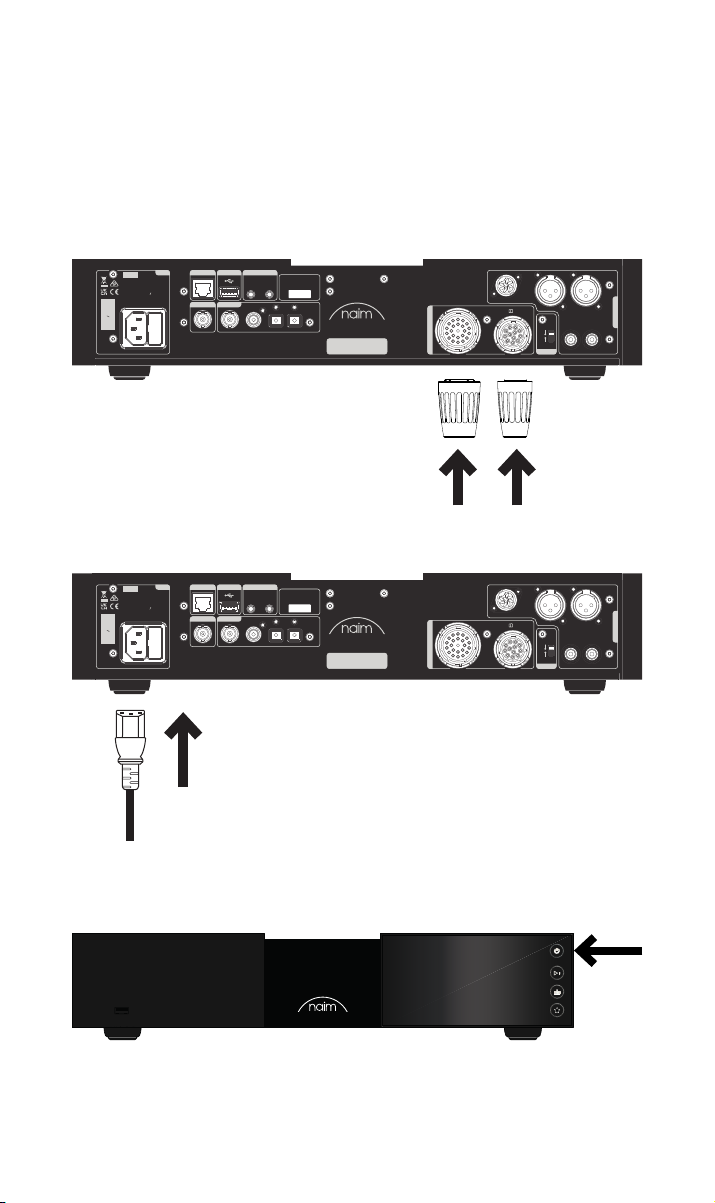
3.2 Mise en marche
Une fois le NSS 333 raccordé à un préamplicateur, il ne reste plus que quelques étapes
simples avant de pouvoir mettre en marche le NSS 333 et lancer l’écoute en streaming.
Branchez les deux ches cavalier fournies sur les ports de mise à niveau d’alimentation du
NSS 333.
Si vous utilisez un réseau laire, branchez un câble entre le port RJ45 et le routeur ou
commutateur.
Power
Network
USB
AC ONLY
FUSE RATIN: ANTISURE
110-120 V: XXX
220-240 V: XXX
FREQUENCY: 50/
INPUT POWER XXXVA
S/No.
WARNING: Disconnect power before opening
Remote Out
60Hz
Digital Output
Digital Inputs
1
21
2
43
Service port
300 SERIES
MUSIC
STREAMER
DESIGNED AND MADE IN THE UK
BY NAIM AUDIO, SALISBURY, SP1 2LN
NSS 333
DIN
Type 4
Refer to User Manual
Type 3
Power Supply Upgrade
Branchez le câble d’alimentation au connecteur d’alimentation du NSS 333 puis au secteur.
Power
Network
USB
AC ONLY
FUSE RATIN: ANTISURE
110-120 V: XXX
220-240 V: XXX
FREQUENCY: 50/
INPUT POWER XXXVA
S/No.
WARNING: Disconnect power before opening
Remote Out
60Hz
Digital Output
Digital Inputs
1
21
2
43
Service port
300 SERIES
MUSIC
STREAMER
DESIGNED AND MADE IN THE UK
BY NAIM AUDIO, SALISBURY, SP1 2LN
NSS 333
DIN
Type 4
Refer to User Manual
Type 3
Power Supply Upgrade
LXLR
R
R LRCA
R LRCA
Analogue Outputs
LXLR
Analogue Outputs
Floating
Default
Ground
R
Floating
Default
Ground
Mettez en marche votre NSS 333 en appuyant sur le bouton de veille situé en haut à droite,
en façade.
44
Page 22
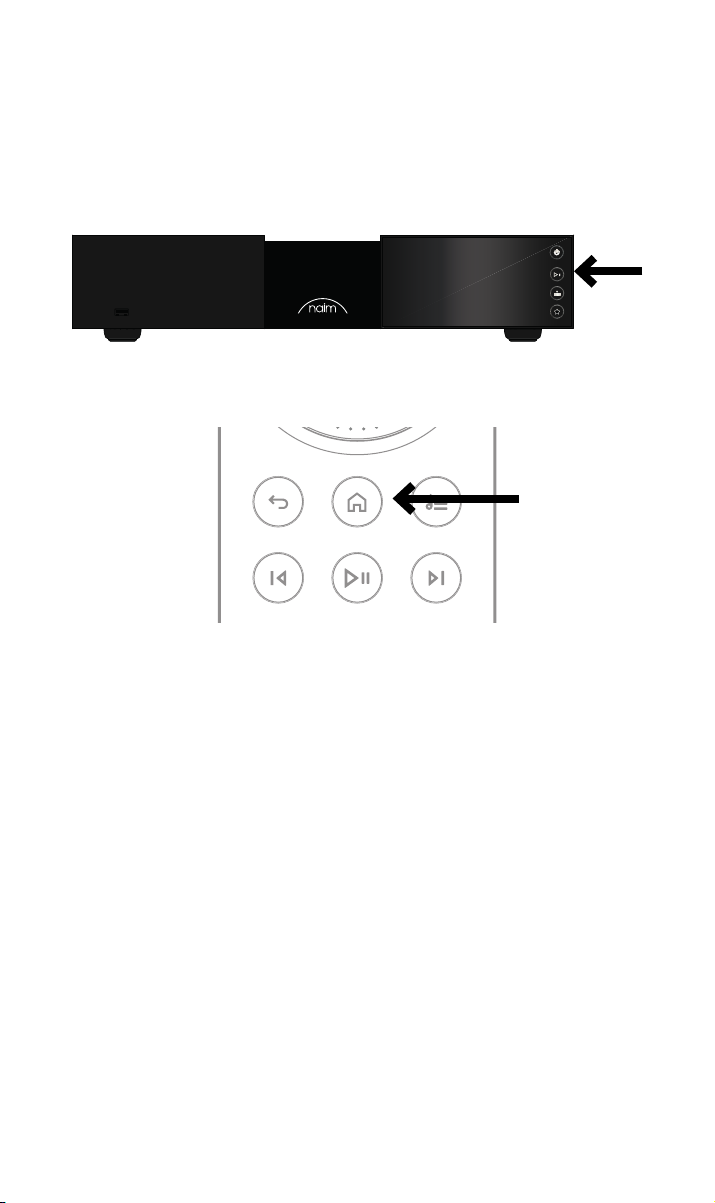
3.3 Appariement de la télécommande
Une fois votre NSS 333 allumé, vous devez apparier la télécommande.
Insérez les piles fournies dans le corps de la télécommande.
Pour activer le mode appariement de la télécommande, il sut d’appuyer sur l’un des
boutons d’entrée en façade pendant 30 secondes.
Maintenez le bouton d’accueil de la télécommande enfoncé pendant 3 secondes.
L’anneau de volume sur la télécommande s’allumera de façon rotative durant l’appariement
puis s’arrêtera une fois l’appariement terminé. La télécommande est à présent appariée
avec l’appareil et prête à être utilisée.
55
Page 23

4. Écoute de musique, radio, podcasts et plus encore
Accédez à toute votre musique, y compris vos stations radio Internet et vos services de
streaming préférés, lisez votre musique enregistrée sur un serveur Naim (tel que le Naim
Uniti Core) et soyez la source de votre système multipièces. Le NSS 333 comprend aussi
des connexions numériques pour pouvoir raccorder vos sources externes.
Avant de commencer à utiliser les services répertoriés ci-après en streaming, vériez que
l’appareil que vous utilisez pour contrôler le système (smartphone, tablette ou ordinateur)
est bien connecté au même réseau que votre NSS 333.
4.1 Radio Internet
L’application Naim vous donne accès à une multitude de stations de radio, y compris
une collection soigneusement choisie de ux de qualité. Vous pouvez aussi sélectionner
et enregistrer des présélections de stations pour pouvoir accéder plus rapidement à vos
sources préférées.
4.2 UPnP
Votre NSS 333 peut lire des chiers audio enregistrés sur des serveurs musicaux Naim
(comme l’Uniti Core de Naim), des disques NAS ou d’autres appareils UPnP raccordés.
Il est compatible avec de très nombreux formats de chier, dans des résolutions pouvant
aller jusqu’à 384 kHz/32 bits. Parcourez votre musique, écoutez-la selon vos envies et
créez des listes de lecture avec l’application Naim.
4.3 Spotify Connect / Spotify Hi-Fi
• Lancez l’application Spotify sur votre téléphone, votre tablette ou votre ordinateur.
• Choisissez le contenu que vous voulez écouter et appuyez sur « Devices Available »
(Appareils disponibles).
• Sélectionnez le NSS 333 et commencez à proter de votre session d’écoute.
4.4 AirPlay 2
La technologie AirPlay 2 d’Apple est conçue pour contrôler les systèmes audio et les
enceintes de votre maison dans n’importe quelle pièce depuis votre iPhone, iPad, Mac,
HomePod ou Apple TV.
Elle vous permet de lire des ux de streaming provenant de diverses sources, y compris
Apple Music.
Pour congurer AirPlay 2, utilisez le bouton d’accueil d’un appareil iOS équipé de la
version 11.4 ou d’une version ultérieure du logiciel.
• Ouvrez l’application Home et appuyez sur le bouton (+) pour ajouter votre NSS 333
en tant qu’accessoire.
4.5 Chromecast
Chromecast vous permet de lire en streaming votre musique préférée et plus encore
depuis votre téléphone, votre tablette ou votre ordinateur.
• Pour utiliser Chromecast built-in et transmettre du contenu audio à votre NSS 333,
il sut de le congurer via l’application Google Home puis de diuser le contenu en
streaming depuis l’une des nombreuses sources disponibles.
66
Page 24

4.6 TIDAL et TIDAL Connect
Les abonnés au service de streaming musical TIDAL peuvent en proter à double titre sur
le NSS 333.
• Écoutez de la musique en streaming directement depuis l’application TIDAL, par le
biais de TIDAL Connect.
• Pour cela, ouvrez l’écran « Now Playing » pendant la lecture d’un titre.
• Cherchez l’icône du haut-parleur et choisissez le NSS 333 dans la liste.
Vous pouvez également proter de TIDAL via l’application Naim.
• Sélectionnez l’entrée TIDAL.
• Entrez vos identiants de connexion TIDAL.
• Parcourez TIDAL et écoutez la musique de votre choix via l’application Naim.
4.7 Qobuz
Tout un univers de musique s’ore à vous, avec un vaste choix d’albums en haute résolution
proposés en streaming via Qobuz. Les abonnés peuvent utiliser les services de cette
plateforme par le biais de l’application Naim.
• Sélectionnez l’entrée Qobuz.
• Entrez vos identiants de connexion Qobuz.
• Parcourez Qobuz et écoutez la musique de votre choix via l’application Naim.
4.8 Roon
Votre NSS 333 est compatible avec Roon, ce qui vous permet d’explorer sans limite cette
application de gestion de musique.
4.9 Multipièces
Votre NSS 333 peut être apparié avec d’autres lecteurs de musique, enceintes et systèmes,
pour produire un son parfaitement synchronisé dans toute votre maison. Il existe quatre
façons diérentes de proter de la fonction multiroom.
• Via l’application Naim
Appariez le NSC 222 à d’autres produits Naim connectés, y compris des enceintes
sans l Mu-so, des lecteurs Uniti ou autres par le biais de l’application Naim, pour
proter de la toute meilleure qualité audio. Il vous sut de lancer la musique
que vous voulez partager et de regrouper les produits Naim de votre choix en
sélectionnant le symbole du multiroom.
Vous pouvez aussi vous lancer en appuyant sur le bouton multiroom de votre
télécommande.
• Via Apple AirPlay 2
• Via Chromecast
• Via Roon
5. Conseils pour l’installation et l’utilisation de votre
NSS 333
Nous savons que vous êtes impatient de proter de votre nouveau NSS 333, mais
nous vous promettons qu’il vous orira un son encore meilleur si vous appliquez bien
ces consignes. Elles vous aideront à retirer la meilleure expérience possible de votre
préamplicateur en streaming.
77
Page 25
5.1 Déballage et mise en place
Votre NSS 333 est fabriqué à partir de composants de qualité supérieure, avec un
transformateur robuste et un boîtier en aluminium solide. De ce fait, le NSS 333 pèse
11 kg. Soyez prudent lorsque vous le soulevez ou le déplacez et veillez à ce que la surface
où vous l’installerez soit stable et capable de supporter son poids.
Pour atteindre un niveau de performance optimal, utilisez vos produits Naim sur un
support dédié pour les équipements hi- (idéalement Naim Fraim ou Fraim Lite), an de
minimiser les vibrations susceptibles d’altérer la qualité du son. Vous n’avez pas la place
d’installer un tel support ? Vous pouvez placer votre NSS 333 sur une étagère en verre
Fraim posée sur un meuble adapté, an de créer une installation solide mais discrète.
N’empilez jamais des produits Naim les uns au-dessus des autres. Si vous placez des
composants côte-à-côte, laissez un peu d’écart entre eux. De même, des produits
raccordés ne doivent pas être trop éloignés les uns des autres. L’écartement maximum est
celui qui est permis par le câble d’interconnexion fourni.
An de réduire le risque de ronement audible au niveau des enceintes, il ne faut pas
placer les alimentations ou les amplicateurs de puissance à proximité des composants
source ou du préamplicateur.
5.2 Informations sur la connexion des entrées
Le NSS 333 ore de nombreuses possibilités de connexion externe. Pour obtenir la
meilleure qualité de son, nous vous recommandons d’utiliser l’entrée numérique BNC.
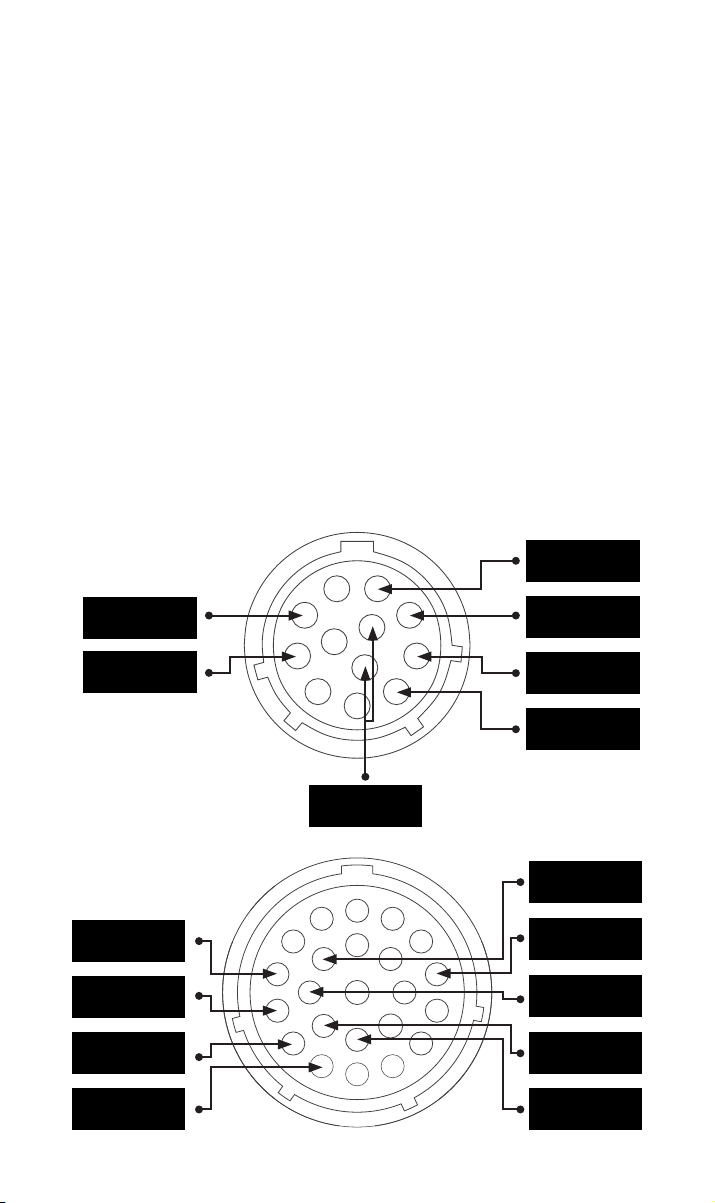
5.2a Type 3 : connecteur 12 voies
+22 V 400 mA
+5 V 200 mA
Terre numérique
5.2b Type 4 : connecteur 23 voies
+10 V 370 mA
+10 V 370 mA
+15 V 150 mA
+15 V 1,1 A
-22 V 400 mA
+22 V 400 mA
-22 V 400 mA
Terre
Terre
+5 V 200 mA
Terre
Terre
Terre
88
Page 26

5.3 Informations sur la connexion des sorties
Pour obtenir une qualité de son optimale, nous vous recommandons d’utiliser la sortie DIN.
Si les sorties XLR ou RCA doivent être utilisées, il faut les activer dans l’application Naim.
Si une sortie n’est pas utilisée, il faut la désactiver dans l’application Naim.
Si la sortie numérique est utilisée, il faut l’activer dans l’application Naim. Si la sortie
numérique est utilisée, les sorties analogiques seront désactivées.
5.4 Automatisation du système
Si vous utilisez le NAC 332 avec un préamplicateur et un amplicateur de puissance
compatibles, comme le NAC 332 et le NAP 350, vous pouvez synchroniser la mise en
marche / l’arrêt et la luminosité du logo sur l’ensemble de votre système en raccordant le
NAC 332 avec les câbles d’automatisation système optique fournis avec les NAP 350.
Le NSS 333 et le NAC 332 utilisent le système Zigbee pour synchroniser leurs fonctions.
Utilisez les ports « Remote Out » (sortie à distance) du NAC 332 pour raccorder les ports
« Remote in » (entrée à distance) des NAP 350. Il est possible de raccorder d’autres
amplicateurs de puissance avec les ports « Remote Out » du NAP 350.
Si vous avez besoin de plus de distance entre votre NAC 332 et les NAP 350 que ce que
permet le câble fourni, vous pouvez utiliser à la place un câble optique 3,5 mm vers 3,5
mm orant la longueur voulue. Il est également possible d’utiliser des câbles analogiques
standard avec des connecteurs de 3,5 mm, mais un câble optique ore de meilleures
performances.
5.5 Mise en marche / Arrêt
Une fois que tous vos branchements d’entrée et de sortie sont réalisés, raccordez le cordon
d’alimentation fourni à votre NSS 333 et au secteur.
Vous pouvez à présent mettre en marche le NSS 333 en appuyant sur le bouton de veille. Si
le NAC 332 et les NAP 350 sont raccordés via l’automatisation système, ils se mettront en
marche l’un après l’autre.
La procédure est la même pour éteindre votre NSS 333 : pour arrêter le streamer NSS333
ainsi que le NAC 332 et les NAP 350 raccordés via l’automatisation système, il sut
d’appuyer sur le
bouton de veille en façade pour mettre en veille le NSS 333, le NAC 332 et les NAP 350.
Évitez d’utiliser un interrupteur de prise murale pour éteindre votre amplicateur.
5.6 Réglages de la mise en veille
Le NSS 333 a quatre niveaux de fonctionnement : veille, veille en réseau, veille en réseau
avec puissance supplémentaire nécessaire et alimentation pour utilisation normale.
En mode « Standby » (veille), la consommation d’énergie totale est inférieure à 0,5 W.
Le NSS 333 peut être remis en marche en appuyant sur le bouton de veille ou avec la
télécommande.
En mode « Network standby » (veille en réseau), la consommation est inférieure à 2 W.
Pour que le NSS 333 puisse être remis en marche via l’application Naim, la connexion
réseau doit être établie (en laire ou en Wi-Fi).
En mode « veille en réseau avec puissance supplémentaire nécessaire », le NSS 333 est
allumé mais l’écran et le logo sont éteints (il doit être dans cet état pour alimenter un
périphérique USB ou fonctionner en tant que serveur).
En mode « alimentation pour utilisation normale », le NSS 333 consomme 25 W environ.
Par défaut, le NSS 333 est en mode « auto standby » (veille automatique) : il bascule
automatiquement vers le mode veille approprié après 20 minutes d’inactivité maximum.
Pour bénécier de la meilleure qualité de son, réglez la période de mise en veille
automatique sur « Never » (Jamais) dans l’application Naim, pour que le NSS 333 reste
allumé en permanence.
99
Page 27

5.7 Paramètres de luminosité du logo Naim
Dans l’application Naim, vous pouvez choisir le niveau de luminosité des indicateurs LED
et du logo Naim sur votre NSS 333. Si vous utilisez des amplicateurs Naim NAC 332 et
NAP 350 raccordés via le câble d’automatisation système, vous pouvez synchroniser la
luminosité des deux logos depuis le NSS 333.
5.8 Utilisation de l’alimentation NPX300
L’alimentation NPX300 est une mise à niveau optionnelle du système. Pour raccorder
l’alimentation NPX300 au NSS 333, commencez par éteindre l’ensemble du système.
Détachez le câble secteur du NSS 333 – il ne sera plus nécessaire une fois l’appareil
alimenté par le NPX300.
Placez l’alimentation NPX300 sur le support d’équipement (généralement sous le
NAC332). Retirez les deux cavaliers du panneau arrière du NSS 333.
Branchez l’extrémité non liée des deux câbles Burndy au NPX300. Branchez les deux
extrémités liées au NSS 333. Assurez-vous que les bagues de verrouillage soient bien
serrées. Essayez de « former » les câbles pour qu’ils pendent aussi librement que possible,
sans toucher les supports ou les murs – cette étape sera plus simple si vous leur donnez à
peu près la forme souhaitée avant de brancher chaque extrémité.
Branchez le câble d’alimentation au connecteur d’alimentation du NPX300 puis au secteur.
Rallumez le reste du système.
Rallumez le NSS 333 en appuyant sur le bouton de veille.
6. Alimentation secteur, mise à la terre et plus
Utilisez uniquement les câbles et les ches secteur fournis avec votre NSS 333 ou le
câble d’alimentation Naim Power-Line de mise à niveau. En cas d’utilisation de prises
avec fusibles intégrés, ces derniers doivent être tarés à 13 ampères. Ne pas câbler de
résistances sensibles à la tension, ni de réducteur de bruit au niveau des prises secteur, car
ceux-ci dégradent l’alimentation et le son.
6.1 Mise à la terre
An d’éviter les boucles de masse, la masse du signal de l’ensemble du système doit être
raccordée à la masse en un seul point, généralement au niveau de la source principale.
Le streamer NSS 333 est équipé d’un commutateur de masse. Si aucune autre source ne
relie la masse de l’alimentation à la masse du signal, choisissez la position par défaut. Ce
réglage assurera la meilleure qualité de son.
6.2 Prises secteur moulées (non démontables)
Si, pour une raison quelconque, le câble d’alimentation est sectionné an de déposer la
prise secteur moulée, la prise doit IMPERATIVEMENT être éliminée d’une manière qui la
rend complètement inutilisable. L’insertion d’une prise avec un câble sectionné dans une
prise murale présente un fort risque d’électrocution.
6.3 Circuits secteur et interférences
Un système hi- partage généralement un circuit d’alimentation secteur avec d’autres
équipements ménagers, dont certains peuvent causer des distorsions susceptibles
de se manifester sous forme de ronement mécanique au niveau des transformateurs
d’alimentation. Cela peut arriver à l’imposant transformateur de votre NSS 333.
Le ronement du transformateur n’est pas transmis par les enceintes et n’a aucun eet
sur les performances du système ; cependant, un bon positionnement de votre système
Naim peut le réduire, tout comme l’utilisation d’un circuit secteur séparé. Un tel circuit
(idéalement de 30 ou 45 ampères) améliorera généralement aussi les performances du
système. Si vous souhaitez demander conseil pour l’installation d’un circuit secteur séparé,
contactez impérativement un électricien qualié.
1010
Page 28

6.4 Précautions contre la foudre
Votre système Naim doit être mis à l’arrêt et entièrement débranché du secteur dès qu’il
existe un risque de foudre, an de le protéger contre d’éventuels dommages.
7. Autres astuces et conseils
À présent que vous avez pris connaissance des consignes les plus importantes, voici
quelques recommandations pour optimiser les performances de votre nouveau NSS 333.
7.1 Rodage
Les produits Naim sont fabriqués à la main à partir d’un ensemble soigneusement choisi
de composants de qualité. La qualité de son de votre NSS 333 est excellente dès le départ
mais elle peut encore s’améliorer au fur et à mesure que ses divers composants montent
en puissance et interagissent, au cours des premières semaines d’utilisation. Ce processus
sera d’autant plus ecace que vous garderez votre système en fonctionnement.
7.2 Nettoyage du produit et des branchements
Naim recommande d’utiliser uniquement le chion de nettoyage fourni pour épousseter en
douceur les surfaces du produit. Les produits nettoyants peuvent contenir des ingrédients
susceptibles de dégrader les revêtements et les traitements de surface de nition.
Veillez à ce que les ches et prises d’interconnexion restent propres et exemptes de
corrosion. Pour cela, le moyen le plus simple consiste à éteindre complètement votre
produit Naim (et les équipements raccordés), à débrancher tous les raccordements
de leurs prises et à bien les rebrancher à nouveau. Il ne faut pas utiliser de nettoyants
pour contacts ou d’« améliorateurs », car ils peuvent laisser des dépôts susceptibles de
dégrader le son de votre système.
7.3 Réinitialisation de votre NSS 333
Pour rétablir les paramètres par défaut de votre NSS 333, utilisez la télécommande pour
aller dans « Home – Settings – Factory settings – Reset all settings – Yes » (Accueil –
Paramètres – Paramètres par défaut – Réinitialiser tous les paramètres – Oui » sur l’écran
en façade.
8. Support
La protection des consommateurs varie d’un pays à l’autre. Dans la plupart des pays, le
revendeur auprès duquel vous avez acheté votre produit Naim doit être votre principal
interlocuteur en cas de problèmes avec votre appareil. Un problème peut être dû à
un défaut du système ou à son installation, il est donc essentiel d’avoir recours aux
compétences de diagnostic de votre revendeur.
Vous pourrez trouver une série d’articles concernant l’assistance des diérents produits
Naim en ligne, sur le site naimaudio.com
Si vous avez toujours des dicultés avec votre produit Naim, contactez-nous directement
pour obtenir de l’aide et des conseils, à l’adresse [email protected]
9. Réparation et mises à jour
Toutes les réparations et mises à jour matérielles doivent impérativement être réalisées
par un centre de service Naim agréé ou par le siège de Naim lui-même. De nombreux
composants sont fabriqués, testés ou appariés sur mesure et les pièces de rechange
appropriées sont souvent impossibles à obtenir auprès d’autres sources. Veuillez contacter
votre revendeur Naim local pour toute demande concernant l’entretien ou les réparations.
1111
Page 29
10. Spécications
Streamer musical 300 Series - NSS 333
USB :
2 x prises USB type A (à l’avant et à l’arrière – 1,6 A)
Entrées audio
Sorties audio
Formats audio
Réseau Ethernet (10/100 Mbps), Wi-Fi (802.11 b/g/n/ac)
Consommation
Extraction et stockage
Dimensions (Haut. x Larg.
x Prof.)
Poids 11 kg
Tension secteur 115 V ou 230 V ; 50/60 Hz
Numérique (S/PDIF) :
2 x TOSLINK optique (jusqu’à 24 bits/96 kHz)
1 x RCA coaxial (jusqu’à 24 bits/192 kHz, DoP 64 Fs)
1 x BNC coaxial (jusqu’à 24 bits/192 kHz, DoP 64 Fs)
Analogique :
1 x paire XLR 1 x RCA 1 x DIN 5 broches
Numérique :
1 x BNC coaxial
WAV - jusqu’à 32 bits/384 kHz
FLAC et AIFF - jusqu’à 24 bits/384 Hz
ALAC (Apple Lossless) - jusqu’à 24 bits/384 Hz
MP3 – jusqu’à 48 kHz, 320 kbits (16 bits)
AAC – jusqu’à 48 kHz, 320 kbits (16 bits)
OGG et WMA - jusqu’à 48 kHz (16 bits) DSD - 64 et 128 Fs
M4A – jusqu’à 48 kHz, 320 kbits (16 bits)
Remarque : Lecture parfaite prise en charge sur tous les formats
Utilisation standard : 25 W
Mode veille en réseau : <2 W Mode veille : <0,5 W
2 x prises USB type A (à l’avant et à l’arrière – 1,6 A)
Stocke jusqu’à 20 000 pistes sur un dispositif de stockage connecté via
USB et les transmet à un lecteur connecté au réseau
HDD portable externe – max. 1 To
Clés USB – max. 128 Go
91,5 × 432 × 317,5 mm (pieds inclus)
11. Consignes de recyclage du produit
Les produits identiés du logo de la poubelle à roulettes barrée ne peuvent pas
être éliminés en tant qu’ordures ménagères. Ces produits doivent être éliminés
par des organismes capables de les recycler et de traiter les éventuels sousproduits résiduels.
Contactez votre autorité locale pour obtenir les coordonnées du site le plus proche.
L’élimination et le recyclage corrects des ordures contribuent à la conservation des
ressources et à la protection de l’environnement contre les contaminations.
1212
Page 30

Page 31

Inhalt
Abschnitt Seite
Einführung 1
1. Kartoninhalt 1
2. Mehr über Ihren NSS 333 erfahren 2
3. Einrichtung des NSS 333 3
4. Abspielen von Musik, Radio, Podcasts und mehr 6
5. Tipps zur Installation und Verwendung des NSS 333 7
6. Netzstrom, Erdung und mehr 10
7. Weitere Tipps und Empfehlungen 11
8. Support 11
9. Wartung und Updates 11
10. Technische Eigenschaften 12
11. Produktrecycling 12
Page 32
Einführung
Willkommen bei Ihrem neuen Streamer von Naim. Wie bei allen Produkten von Naim
Audio steht auch bei dem NSS 333 die musikalische Leistung an vorderster Stelle. Um
das volle Potenzial der Endstufe auszuschöpfen, sollten die einfachen Installations- und
Nutzungsrichtlinien in diesem Handbuch befolgt werden. Wir beginnen mit einigen
grundlegenden Informationen zum Produkt und zur Einrichtung, bevor wir in Abschnitt 5
zu genaueren Informationen übergehen.
Bitte beachten: Alle
Sicherheitshinweise finden Sie
im gesetzlich vorgeschriebenen
Sicherheitshandbuch.
1. Kartoninhalt
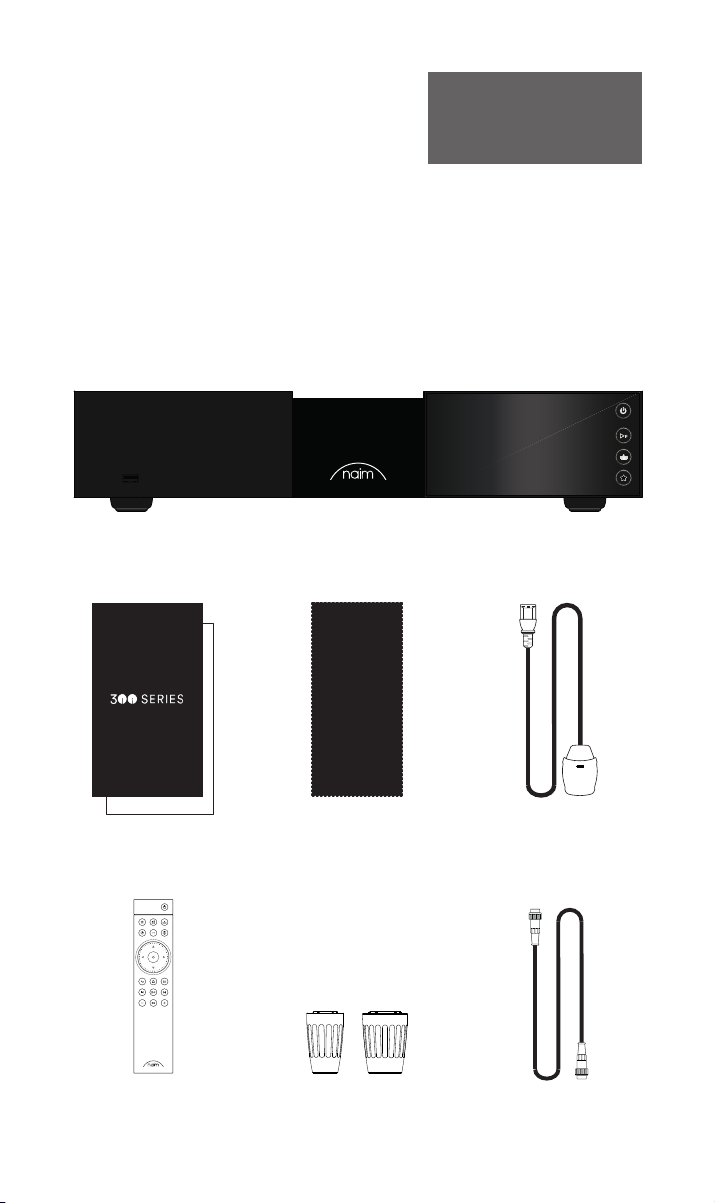
1x NSS 333
1x Gebrauchsanleitung
1x Reinigungstuch 1x Anschlusskabel
1x Fernbedienung 2x Verbindungsstecker
11
1x 5-polig180 ° DIN
Page 33
WARNING: Disconnect power before opening
AC ONLY
FUSE RATIN: ANTISURE
110-120 V: XXX
220-240 V: XXX
FREQUENCY: 50/
60Hz
INPUT POWER XXXVA
Power
300 SERIES
MUSIC
STREAMER
NSS 333
DESIGNED AND MADE IN THE UK
BY NAIM AUDIO, SALISBURY, SP1 2LN
S/No.
Network
USB
Digital Inputs
Power Supply Upgrade
Remote Out
Analogue Outputs
R LRCA
43
2
1
Refer to User Manual
Type 3
Type 4
Digital Output
DIN
Service port
Ground
Floating
Default
R
LXLR
21
2. Mehr über Ihren NSS 333 erfahren
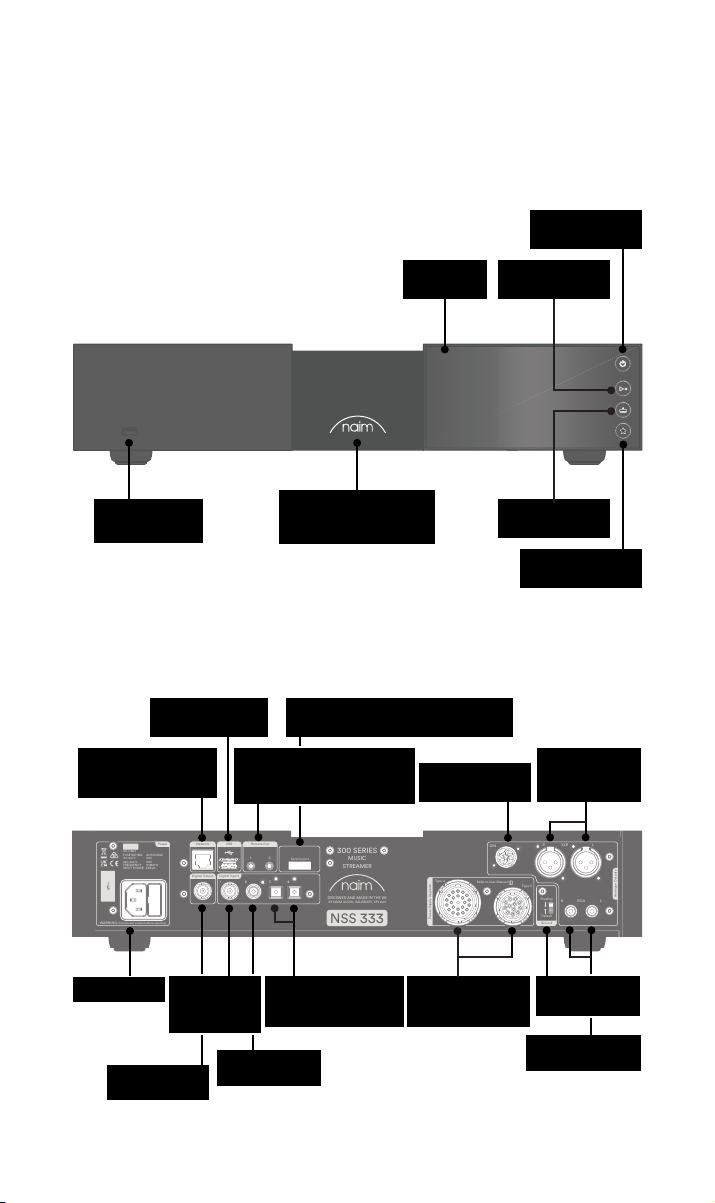
Standby-Taste
USB
(Audiodaten)
(Audiodaten)
Drahtgebundenes
Hintergrundbeleuchtetes,
USB
Raccordement de service (utilisation en
Remote Out (3,5 mm
Klinkenbuchse elektrisch Mini-
TOSLINK optisch)
dimmbares Logo
usine uniquement)
Bildschirm
DIN-Ausgang
Einschalt-/Pause-
Taste
Taste für Eingänge
Taste für
Voreinstellungen
XLR-Ausgang
(symmetrisch)
Netzeingang
Sortie BNC S/
PDIF coaxiale
BNC S/
PDIF-Eingang
koaxial
Entrée RCA S/
PDIF coaxiale
2x TOSLINK S/PDIF-
Eingang optisch
Upgrade-Buchsen
zur Stromversorgung
Masseschalter
RCA-Ausgang
(symmetrisch)
22
Page 34
3. Einrichtung des NSS 333
WARNING: Disconnect power before opening
AC ONLY
FUSE RATIN: ANTISURE
110-120 V: XXX
220-240 V: XXX
FREQUENCY: 50/
60Hz
INPUT POWER XXXVA
Power
300 SERIES
MUSIC
STREAMER
NSS 333
DESIGNED AND MADE IN THE UK
BY NAIM AUDIO, SALISBURY, SP1 2LN
S/No.
Network
USB
Digital Inputs
Power Supply Upgrade
Remote Out
Analogue Outputs
R LRCA
43
2
1
Refer to User Manual
Type 3
Type 4
Digital Output
DIN
Service port
Ground
Floating
Default
R
LXLR
21
WARNING:Disconnect power before opening
AC ONLY
FUSE RATING: ANTISURGE
1 0-120 V:1 T4AL
2 0-240 V:2 T2AL
FREQUENCY: 0 60Hz5 /
I 70VANPUT POWER:
Power
300 SERIES
PREAMPLIFIER
NAC 332
DESIGNED AND MADE IN THE UK
BY NAIM AUDIO, SALISBURY, SP1 2LN
/ .oNS
Ground
Power Supply Upgrade
Preamp Outputs
AnalogueInputs
Ground
Default
R L
R
L
RCA
XLR
Refer to User Manual
Type 3
Type 4
Remote
in
Remote
out
Auto
standby
Instant
on
1
2
Control
USB
update
Brightness
Reset/
On
RCA
output
O
3
4
6
AnalogueInputs
R
R
R
L
L
L
5
8
7
1
2
R
L
R
L
Contains FCC ID: 2ACURZIGEE IC ID: 12217A-ZIGEE
Refer to User Manual
WARNING:
Disconnect power before opening
AC ONLY
FUSE RATING: ANTISURGE
1 0-120 V: T
4AL
2 0-240 V: T2AL
FREQUENCY 50/60Hz
I 70VANPUT POWER:
Power
300 SERIES
PREAMPLIFIER
NAC 332
DESIGNED AND MADE IN THE UK
BY NAIM AUDIO, SALISBURY, SP1 2LN
/ .oNS
Ground
Power Supply Upgrade
Preamp Outputs
AnalogueInputs
Ground
Default
R L
R
L
RCA
XLR
Refer to User Manual
Type 3
Type 4
Remote
in
Remote
out
Auto
standby
Instant
on
1
2
Control
USB
update
Brightness
Reset/
On
RCA
output
O
3
4
6
AnalogueInputs
R
R
R
L
L
L
5
8
7
1
2
R
L
R
L
Contains FCC ID: 2ACURZIGEE IC ID: 12217A-ZIGEE
Refer to User Manual
Ihr NSS 333 muss an einer Vorstufe und einen Leistungsverstärker (wie z. B. den passenden
NAC 332 und der NAP 350) angeschlossen werden. Stellen Sie vorher jedoch sicher, dass
sich alle Komponenten in ihrer endgültigen Position benden und vom Stromnetz getrennt
sind.
Verwenden Sie für eine optimale Leistung eine spezielle HiFi-Halterung (z. B. Naim Fraim)
und platzieren Sie den Streamer wie abgebildet über die Vorstufe.
Außerdem benötigen Sie Lautsprecher mit Kabeln, eine Internetverbindung (W-Lan oder
Festnetz) und ein Smartphone oder Tablet, auf dem die Naim-App läuft.
Laden Sie die kostenlose „Naim“-App aus dem Apple App Store oder dem Google Play
Store herunter.
3.1 Anschluss des NSS 333 an die Vorstufe NAC 332
Schließen Sie ein DIN-Kabel (im Lieferumfang des NSS 333 enthalten) vom DIN-Ausgang
des NSS 333 an den DIN-Eingang des NAC 332 an. Beachten Sie, dass das Ende des
Kabels mit dem Band an den NSS 333 verbunden werden sollte.
33
Page 35
3.2 Einschalten
Nachdem Sie Ihren NSS 333 mit einer Vorstufe verbunden haben, sind nur noch einige
wenige, einfache Schritte notwendig, bevor Sie Ihren NSS 333 einschalten und mit dem
Streaming beginnen können.
Verbinden Sie die beiden mitgelieferten Bildsteckern mit den Buchsen für die Aufrüstung
des NSS 333-Netzteils.
Wenn Sie ein kabelgebundenes Netzwerk verwenden, schließen Sie ein Kabel zwischen
der RJ45-Buchse und dem Router oder Switch an.
Power
Network
USB
AC ONLY
FUSE RATIN: ANTISURE
110-120 V: XXX
220-240 V: XXX
FREQUENCY: 50/
INPUT POWER XXXVA
S/No.
WARNING: Disconnect power before opening
Remote Out
60Hz
Digital Output
Digital Inputs
1
21
2
43
Service port
300 SERIES
MUSIC
STREAMER
DESIGNED AND MADE IN THE UK
BY NAIM AUDIO, SALISBURY, SP1 2LN
NSS 333
DIN
Type 4
Refer to User Manual
Type 3
Power Supply Upgrade
Schließen Sie das Netzkabel an die Steckdose des NSS 333 und dann an das Stromnetz an.
Power
Network
USB
AC ONLY
FUSE RATIN: ANTISURE
110-120 V: XXX
220-240 V: XXX
FREQUENCY: 50/
INPUT POWER XXXVA
S/No.
WARNING: Disconnect power before opening
Remote Out
60Hz
Digital Output
Digital Inputs
1
21
2
43
Service port
300 SERIES
MUSIC
STREAMER
DESIGNED AND MADE IN THE UK
BY NAIM AUDIO, SALISBURY, SP1 2LN
NSS 333
DIN
Type 4
Refer to User Manual
Type 3
Power Supply Upgrade
LXLR
R
R LRCA
R LRCA
Analogue Outputs
LXLR
Analogue Outputs
Floating
Default
Ground
R
Floating
Default
Ground
Schalten Sie Ihren NSS 333 ein, indem Sie die Standby-Taste oben rechts auf der
Vorderseite drücken.
44
Page 36
3.3 Koppeln der Fernbedienung
Sobald Ihr NSS 333 eingeschaltet ist, müssen Sie die Fernbedienung koppeln.
Legen Sie die mitgelieferten Batterien die Fernbedienung ein.
Durch Drücken einer beliebigen Eingangstaste auf der Vorderseite wird für 30 Sekunden
der Fernkopplungsmodus aktiviert.
Halten Sie die Home-Taste auf der Fernbedienung 3 Sekunden lang gedrückt.
Der Lautstärkering auf der Fernbedienung läuft im Kopplungsmodus durch und schaltet
sich nach der Kopplung aus. Die Fernbedienung ist nun mit dem Gerät gekoppelt und
einsatzbereit.
55
Page 37

4. Abspielen von Musik, Radio, Podcasts und mehr
Nun können Sie auf Ihre gesamte Musik und bevorzugten Streaming-Dienste sowie
Internet-Radiosender zugreifen, Ihre gespeicherte Musik von einem Naim-Server (z. B. von
einem Naim Uniti Core) abspielen und Ihr Multiroom-System als Quelle nutzen. Der NSS
333 umfasst digitale Anschlüsse mit denen Sie Ihre externen Quellen verbinden können.
Bevor Sie mit dem Streaming der unten aufgeführten Dienste beginnen, stellen Sie sicher,
dass Ihr Steuergerät (Smartphone, Tablet oder Computer) mit demselben Netzwerk wie Ihr
NSS 333 verbunden ist.
4.1 Webradio
Über die Naim-App können Sie auf eine Vielzahl von Radiosendern zugreifen,
darunter auch eine kuratierte Sammlung von hochwertigen Streams. Sie können auch
Senderspeicher auswählen und speichern, um schneller auf Ihre Favoriten zugreifen zu
können.
4.2 UPnP
Ihr NSS 333 kann Audiodateien wiedergeben, die auf Naim-Musikservern (wie dem Naim
Uniti Core), NAS-Laufwerken oder anderen angeschlossenen UPnP-Geräten gespeichert
sind.
Er unterstützt eine Vielzahl von Dateiformaten in Auösungen bis zu 384 kHz/32 Bit
Durchsuchen und genießen Sie Ihre Musik und erstellen Sie Wiedergabelisten mit der
Naim-App.
4.3 Spotify Connect / Spotify Hi-Fi
• Önen Sie die Spotify-App auf Ihrem Telefon, Tablet oder Laptop
• Beginnen Sie mit der Wiedergabe des gewünschten Inhalts und wählen Sie „Devices
Available“ (Verfügbare Geräte)
• Wählen Sie Ihren NSS 333 und beginnen Sie zuzuhören
4.4 AirPlay 2
AirPlay 2 ist eine Technologie von Apple, mit der Heim-Audiosysteme und Lautsprecher in
jedem Raum von Ihrem iPhone, iPad, Mac, HomePod oder Apple TV aus gesteuert werden
können.
Es ermöglicht das Streaming aus einer Vielzahl von Quellen, einschließlich Apple Music.
Um AirPlay 2 einzurichten, verwenden Sie die Home-App auf einem iOS-Gerät mit
Software 11.4 oder höher.
• Önen Sie die Home-App und tippen Sie auf die Schaltäche (+), um Ihren NSS 333
als Zubehör hinzuzufügen.
4.5 Chromecast
Mit Chromecast können Sie Ihre Lieblingsmusik und vieles mehr von Ihrem Telefon, Tablet
oder Laptop streamen.
• Um Chromecast built-in zum Übertragen von Audiosignalen auf den NSS 333 zu
verwenden, kongurieren Sie ihn einfach über die Google Home-App und streamen
Sie dann von einer Reihe verfügbarer Quellen.
66
Page 38

4.6 TIDAL und TIDAL Connect
Abonnenten des Musikstreamingdienstes TIDAL können diesen auf zwei Arten auf dem
NSS 333 genießen.
• Streamen Sie direkt von der TIDAL-App über TIDAL Connect.
• Önen Sie einfach den Bildschirm „Aktuelle Wiedergabe“ während der Wiedergabe
eines Titels.
• Suchen Sie nach dem Lautsprechersymbol und wählen
Sie den NSS 333 aus dieser Liste aus. Alternativ können Sie TIDAL auch über die NaimApp nutzen.
• Wählen Sie den TIDAL-Eingang
• Geben Sie Ihre TIDAL-Anmeldedaten ein
• Durchsuchen und genießen Sie TIDAL über die Naim-App
4.7 Qobuz
Die ganze Welt der Musik, darunter eine riesige Auswahl an echten hochauösenden
Alben, kann über Qobuz gestreamt werden. Abonnenten können den Service über die
Naim-App nutzen.
• Wählen Sie den Qobuz-Eingang
• Geben Sie Ihre Qobuz-Anmeldedaten ein
• Durchsuchen und genießen Sie Qobuz über die Naim-App
4.8 Roon
Ihr NSS 333 ist Roon Ready, so dass Sie alles erkunden können, was der
Musikverwaltungsdienst zu bieten hat.
4.9 Multiroom
Ihr NSS 333 kann mit anderen Musikplayern, Lautsprechern und Systemen gekoppelt
werden, um Ihr Zuhause mit perfekt synchronisiertem Klang zu erfüllen. Es gibt vier
verschiedene Möglichkeiten, das Multiroom-Musikerlebnis zu genießen
• Über die Naim-App
Verbinden Sie die Naim-App mit anderen vernetzten Naim-Produkten wie den
kabellosen Mu-so-Lautsprechern, den Uniti-Playern und anderen Geräten, um ein
optimales Klangerlebnis zu erzielen. Starten Sie einfach die Wiedergabe der Musik,
die Sie gemeinsam nutzen möchten, und gruppieren Sie beliebige oder alle Ihre
Naim-Produkte, indem Sie das Multiroom-Symbol auswählen.
Sie können auch mitmachen, indem Sie die Multiroom-Taste auf Ihrer Fernbedienung
drücken.
• Über Apple AirPlay 2
• Über Chromecast
• Über Roon
5. Tipps zur Installation und Verwendung des
NSS333
Wir wissen, dass Sie sich auf Ihrer neuen NSS 333 sehr freuen! Dennoch versprechen wir
Ihnen bei Umsetzung der folgenden Hinweise, dass Sie den Streaming-Vorstufen in seinem
vollen Umfang erleben werden.
77
Page 39
5.1 Unboxing und Positionierung
In Ihrem NSS 333 kommen hochwertige Komponenten zum Einsatz, darunter ein
beachtlicher Leistungstransformator und ein robustes Aluminiumgehäuse. Das bedeutet,
dass der NSS 333 11 kg wiegt. Seien Sie daher vorsichtig, wenn Sie ihn anheben oder
bewegen, und stellen Sie sicher, dass die Oberäche, auf der Sie ihn aufstellen möchten,
stabil ist und sein Gewicht tragen kann.
Um eine optimale Leistung zu erzielen, sollten Sie für Ihre Naim-Produkte ein spezielles
HiFi-Regal verwenden – idealerweise den Naim Fraim oder Fraim Lite. Diese Regale dienen
der Minimierung von Vibrationen, die den Klang beeinträchtigen können. Sie haben
keinen Platz für ein Regal? Stellen Sie Ihren NSS 333 auf ein Fraim-Glasregal auf einem
geeigneten Möbelstück. Dies dient einem soliden, aber schlichten Halt.
Stapeln Sie Naim-Produkte niemals übereinander; stellen Sie sie nebeneinander und
lassen Sie bitte etwas Abstand zwischen den Geräten. Ebenso sollten die angeschlossenen
Produkte nicht zu weit voneinander entfernt sein: Der maximale Abstand ist der, den das
mitgelieferte Verbindungskabel zulässt.
Um das Risiko von hörbarem Brummen aus den Lautsprechern zu verringern,
sollten Sie Netzteile oder Leistungsverstärker nicht in der Nähe von Quell- oder
Vorstufenkomponenten aufstellen.
5.2 Angaben zum Eingangsanschluss
Der NSS 333 bietet zahlreiche externe Anschlussmöglichkeiten. Für die beste
Klangqualität empfehlen wir die Verwendung des digitalen BNC-Eingangs.
5.2a Typ 3: 12-poliger Anschluss
+22 V 400 mA
+5 V 200 mA
Masse digital
5.2a Typ 4: 23-poliger Anschluss
+10 V 370 mA
+10 V 370 mA
+15 V 150 mA
+15 V 1,1 A
-22 V 400 mA
+22 V 400 mA
-22 V 400 mA
Masse
Masse
+5 V 200 mA
Masse
Masse
Masse
88
Page 40

5.3 Angaben zum Ausgangsanschluss
Für die optimale Klangqualität empfehlen wir Ihnen, die DIN-Ausgänge zu verwenden.
Wenn die XLR- oder RCA-Ausgänge verwendet werden sollen, müssen diese in der NaimApp aktiviert werden. Wenn ein Ausgang nicht verwendet wird, sollte er in der Naim-App
deaktiviert werden.
Wenn der Digitalausgang verwendet wird, muss er in der Naim-App aktiviert werden.
Wenn der Digitalausgang verwendet wird, werden die analogen Ausgänge deaktiviert.
5.4 Automatisierung
Wenn Sie den NSS 333 mit einer kompatiblen Vorstufe und einem Endverstärker (wie dem
NAC 332 und dem NAP 350) verwenden, können Sie das Ein- und Ausschalten sowie die
Helligkeit des Logos im gesamten System synchronisieren, indem Sie den NAC 332 mit
den optischen Systemautomatisierungskabeln verbinden, die mit den NAP 350 geliefert
werden.
Das NSS 333 und das NAC 332 verwenden das Zigbee-System zur Synchronisierung ihrer
Funktionen.
Verwenden Sie die „Remote Out“-Anschlüsse des NAC 332, um die „Remote In“Anschlüsse des NAP 350 zu verbinden. Über den „Remote Out“-Anschlüssen des NAP 350
können weitere Leistungsverstärker angeschlossen werden.
Wenn Sie eine größere Entfernung zwischen Ihrem NAC 332 und dem NAP 350
benötigen, als das mitgelieferte Kabel zulässt, können Sie ein optisches 3,5-mm-auf-3,5mm-Ersatzkabel in der erforderlichen Länge verwenden. Es ist auch möglich, analoge
Standardkabel mit 3,5-mm-Steckern zu verwenden, aber ein optisches Kabel bietet die
beste Leistung.
5.5 Einschalten/Ausschalten
Sobald alle Eingangs- und Ausgangsverbindungen hergestellt sind, schließen Sie das
mitgelieferte Netzkabel an Ihren NSS 333 und an das Stromnetz an.
Indem Sie die Standby-Taste drücken, können Sie den NSS 333 nun einschalten. Wenn der
NAC332 und der NAP 350 über die Automatisierung angeschlossen sind, schalten sie sich
nacheinander ein.
Gehen Sie genauso beim Ausschalten Ihres NSS 333 vor: Schalten Sie Ihren NSS 333
Streamer (und die über die Automatisierung angeschlossenen NAC 332 und NAP 350) aus,
indem Sie einfach die Standby-Taste an der Vorderseite drücken, wodurch der NSS 333,
NAC 332 und die NAP 350 in den Standby-Modus versetzt werden. Schalten Sie den
Verstärker möglichst nicht mit einem Netzschalter aus.
5.6 Einstellungen der Standby-Leistung
Der NSS 333 verfügt über vier Leistungsstufen: Standby, Netzwerk-Standby, NetzwerkStandby mit zusätzlichem Strombedarf und Stromversorgung für den normalen Betrieb.
Der „Standby“-Modus hat einen Gesamtstromverbrauch von unter 0,5 W. Sie können den
NSS 333 nun einschalten, indem Sie die Standby-Taste drücken.
Der „Network standby“ (Netzwerk-Standby) liegt unter 2 W. Das Netzwerk muss
verbunden sein (entweder mit Kabel oder per WLAN), damit der NSS 333 über die NaimApp eingeschaltet werden kann.
„Network standby with an additional power requirement“ (Netzwerk-Standby mit
zusätzlichem Strombedarf). Der NSS 333 ist vollständig mit Strom versorgt, aber das
Display und das Logo sind ausgeschaltet (dieser Zustand ist erforderlich, um ein USBGerät mit Strom zu versorgen oder als Server zu fungieren).
„Powered for normal use“ (Stromversorgung für normalen Betrieb) Bei normalem Betrieb
verbraucht der NSS 333 etwa 25 W.
Standardmäßig ist der NSS 333 auf „Auto-Standby“ eingestellt, d. h. er schaltet nach
maximal 20 Minuten Inaktivität automatisch in den entsprechenden Standby-Modus. Um
eine optimale Klangqualität zu erreichen, stellen Sie in der Naim-App die automatische
Standby-Zeit auf „Never“ (Nie) ein, damit der NSS 333 dauerhaft eingeschaltet ist.
99
Page 41

5.7 Helligkeitseinstellung des Naim-Logos
Sie können die Helligkeit der LED-Anzeigen und des Naim-Logos auf Ihrem NSS 333 in der
Naim-App einstellen. Wenn Sie den Naim-Verstärker NAC 332 und NAP 350 verwenden,
der über die Automatisierung angeschlossen ist, können Sie die Helligkeit der beiden
Logos über den NSS 333 synchronisieren.
5.8 Verwendung des NPX300-Netzteils
Das NPX300-Netzteil ist ein optionales System-Upgrade. Möchten Sie das Netzteil
NPX300 zum NSS 333 hinzufügen? Dann schalten Sie zunächst das gesamte System aus.
Entfernen Sie das Netzkabel vom NSS 333; es wird nicht benötigt, wenn das Gerät über
den NPX300 mit Strom versorgt wird.
Platzieren Sie den NPX300 auf den Geräteständer ((normalerweise unter dem NAC 332).
Entfernen Sie die beiden Verbindungsstecker an der Rückseite des NSS 333.
Verbinden Sie das ungebänderte Ende der beiden Burndy-Kabel mit dem NPX300.
Verbinden Sie die beiden gebänderten Enden mit dem NSS 333. Ziehen Sie alle
Sicherungsringe fest an. „Verkleiden“ Sie die Kabel so, dass sie möglichst locker hängen,
ohne die Ständer oder die Wand zu berühren. Dies geht leichter, wenn Sie sie vor dem
Anschließen der beiden Enden ungefähr in die gewünschte Form bringen.
Schließen Sie das Netzkabel an die Steckdose des NPX300 und dann an das Stromnetz an.
Schalten Sie den Rest des Systems wieder ein.
Sie können den NSS 333 nun einschalten, indem Sie die Standby-Taste drücken.
6. Netzstrom, Erdung und mehr
Verwenden Sie nur das mit dem NSS 333 mitgelieferte Netzkabel und Stecker oder
das verbesserte PowerLine-Netzkabel von Naim. Bei der Verwendung von gesicherten
Steckern sollten Sicherungen mit 13 Ampere eingesetzt werden. Schließen Sie keine
spannungsabhängigen Widerstände oder Rauschunterdrücker an Netzstecker an. Diese
beeinträchtigen die Netzversorgung und den Klang.
6.1 Erdung
Um Brummschleifen zu vermeiden, sollte die Signalmasse des gesamten Systems an
einer Stelle mit der Netzerde verbunden werden. Dies geschieht üblicherweise an der
Primärquelle. Der NSS 333 Streamer hat einen Groundlift-Schalter. Stellen Sie diesen
auf die „Default“ (Standard-Funktion), wenn keine andere Quelle die Netzerde mit der
Signalmasse verbindet. Bei dieser Einstellung wird die beste Klangqualität erreicht.
6.2 Nicht wieder anschließbare Netzstecker
Wenn ein nicht wieder anschließbarer Stecker von einem Netzkabel abgekappt wird (zu
welchem Zweck auch immer), MUSS der Stecker so entsorgt werden, dass er keinesfalls
mehr verwendet werden kann. Es besteht erhebliche Stromschlaggefahr, wenn der
abgeschaltete Stecker in eine Netzsteckdose gesteckt wird.
6.3 Hauptstromkreise und Störungen
Eine HiFi-Anlage teilt sich meist einen Netzstromkreis mit anderen Haushaltsgeräten, von
denen einige Verzerrungen verursachen können, die sich als mechanisches Brummen von
Netztransformatoren, unter anderem auch des großen Transformators in Ihrem NSS 333,
äußern können.
Das Brummen des Transformators wird nicht über die Lautsprecher übertragen und hat
keinen Einuss auf die Leistung des Systems; eine sorgfältige Aufstellung Ihres NaimSystems kann das Brummen jedoch reduzieren, ebenso wie ein separater, spezieller
Netzstromkreis. Ein solcher Stromkreis (idealerweise mit Bemessungsdaten von 30 oder
45 Ampere) verbessert hauptsächlich auch die Systemleistung. Ziehen Sie zur Installation
eines separaten Hauptstromkreises einen Elektronikfachexperten hinzu.
1010
Page 42

6.4 Vorkehrungen gegen Blitzschlag
Ihr Naim-System sollte bei Blitzeinschlaggefahr ausgeschaltet und vollständig vom
Stromnetz getrennt werden, um es vor möglichen Schäden zu schützen.
7. Weitere Tipps und Empfehlungen
Nachdem wir nun das Wichtigste geklärt haben, wollen wir uns nun einigen weiteren
Dingen widmen, um die Leistung Ihres neuen NSS 333 zu optimieren.
7.1 Einlaufzeit
Naim-Produkte werden aus sorgfältig ausgewählten, hochwertigen Komponenten
handgefertigt. Ihr NSS 333 wird gleich nach dem Auspacken hervorragend klingen,
aber seine Leistung kann noch weiter verbessert werden, wenn all diese verschiedenen
Komponenten in den ersten Wochen der Nutzung eingeschaltet werden und sich
gegenseitig beeinussen. Bei eingeschaltetem System wird dieser Prozess unterstützt.
7.2 Reinigung Ihres Produkts und der Anschlüsse
Naim empehlt, nur das mitgelieferte Reinigungstuch zu verwenden, um die Oberächen
des Geräts leicht abzustauben. Reinigungsmittel können Inhaltsstoe enthalten, die
sich negativ auf kosmetische Oberächenbehandlungen und Beschichtungen auswirken
können.
Halten Sie Anschlussstecker und -buchsen sauber und korrosionsfrei. Dies erreichen Sie
am einfachsten, indem Sie Ihr Naim-Produkt (und alle angeschlossenen Geräte) vollständig
ausschalten, alle Anschlüsse aus den Buchsen ziehen und sie wieder fest einstecken.
Es sollten keine Kontaktreiniger und „Enhancer” verwendet werden, da die abgelagerte
Filmschicht den Klang beeinträchtigen kann.
7.3 Zurücksetzen Ihres NSS 333
Um Ihren NSS 333 auf die Werkseinstellungen zurückzusetzen, navigieren Sie mit der
Fernbedienung zu „Home - Settings – Factory settings – Reset all settings – Yes“ (Home
– Einstellungen – Werkseinstellungen – Alle Einstellungen zurücksetzen – Ja) auf dem
Display der Frontplatte.
8. Support
Der Verbraucherschutz variiert je nach Land. In den meisten Ländern sollte der Händler,
bei dem Sie Ihr Naim-Produkt gekauft haben, Ihr Hauptansprechpartner sein, wenn Sie
Probleme mit Ihrem Gerät haben. Ein Problem kann auf einen Fehler im System oder in der
Installation hinweisen. Daher sollten Sie unbedingt die Diagnosefähigkeiten Ihres Händlers
voll ausschöpfen.
Auf naimaudio.com nden Sie für jedes Naim-Produkt eine Reihe von Begleitartikeln.
Wenn Sie weiterhin Probleme mit Ihrem Naim-Produkt haben, kontaktieren Sie uns direkt
unter: [email protected].
9. Wartung und Updates
Reparaturen oder Hardware-Updates sollten nur von einer autorisierten Naim-Servicestelle
oder in der Naim-Zentrale selbst durchgeführt werden. Viele Komponenten werden
kundenspezisch angefertigt, getestet oder aufeinander abgestimmt und geeignete
Ersatzteile sind oft nicht aus anderen Quellen zu erhalten. Bitte wenden Sie sich bei
Service- oder Reparaturanfragen an Ihren Naim-Fachhändler vor Ort.
1111
Page 43
10. Technische Daten
300er Serie Musik-Streamer – NSS 333
USB:
2 x USB-Buchse Typ A (vorne und hinten – 1,6 A Ladeleistung)
Audioeingänge
Audioausgänge
Audioformate
Netzwerk Ethernet (10/100Mbps), Wi-Fi (802.11 b/g/n/ac)
Stromverbrauch
Rippen und
Aufbewahrung
Abmessungen (H x B x T) 91,5 × 432 × 317,5 mm (einschließlich Füße)
Gewicht 11kg
Netzspannung 115 V oder 230 V, 50/60 Hz
Digital (S/PDIF):
2 x Optischer TOSLINK (bis zu 24bit/96kHz)
1 x Koaxial RCA (bis zu 24bit/192kHz, DoP 64Fs)
1 x Koaxial BNC (bis zu 24bit 192kHz, DoP 64Fs)
Analog:
1 x XLR-Paar 1 x RCA-Paar 1 × 5-polig DIN
Digital:
1 x BNC koaxial
WAV – bis zu 32bit/384kHz
FLAC und AIFF – bis zu 24bit/384Hz
ALAC (Apple Lossless) – bis zu 24bit/384Hz
MP3 – bis zu 48 kHz, 320kbit (16 bit)
AAC – bis zu 48 kHz, 320kbit (16 bit)
OGG und WMA – bis zu 48kHz (16 Bit) DSD – 64 und 128Fs
M4A – bis zu 48 kHz, 320kbit (16 bit)
Hinweis: Lückenlose Wiedergabe bei allen Formaten.
Typische Anwendung: 25W
Netzwerk-Standby-Modus: <2 W Standby: <0,5 W
2 x USB-Buchse Typ A (vorne und hinten – 1,6 A Ladeleistung)
Speichern Sie bis zu 20.000 Titel auf einem lokalen, über USB
angeschlossenen Speichermedium und geben Sie sie an einen mit dem
Netzwerk verbundenen Player weiter
Externe tragbare HDD – max. 1TB
USB-Sticks – max. 128 GB
11. Produktrecycling
Produkte mit dem durchgestrichenen Mülltonne-mit-Rädern-Logo können nicht
über den Hausmüll entsorgt werden. Diese Produkte müssen in Müllanlagen
entsorgt werden, die in der Lage sind, sie wiederzuverwerten und eventuelle
Nebenprodukte angemessen zu behandeln.
Wenden Sie sich an Ihre örtliche Behörde, um Informationen über die nächstgelegene
Müllanlagen zu erhalten.
Sachgerechtes Recycling und Abfallentsorgung helfen, Ressourcen zu schonen und die
Umwelt vor Verunreinigungen zu schützen.
1212
Page 44

Page 45

Inhoud
Hoofdstuk Pagina
Inleiding 1
1. Wat is meegeleverd? 1
2. Kennismaking met de NSS 333 2
3. Essentiële informatie over plaatsing van de NSS 333 3
4. Muziek, radio, podcasts en meer afspelen 6
5. Tips voor installatie en gebruik van de NSS 333 7
6. Netvoeding, aarding en meer 10
7. Verdere tips en advies 11
8. Support 11
9. Onderhoud en updates 11
10. Specicaties 12
11. Product recyclen 12
Page 46
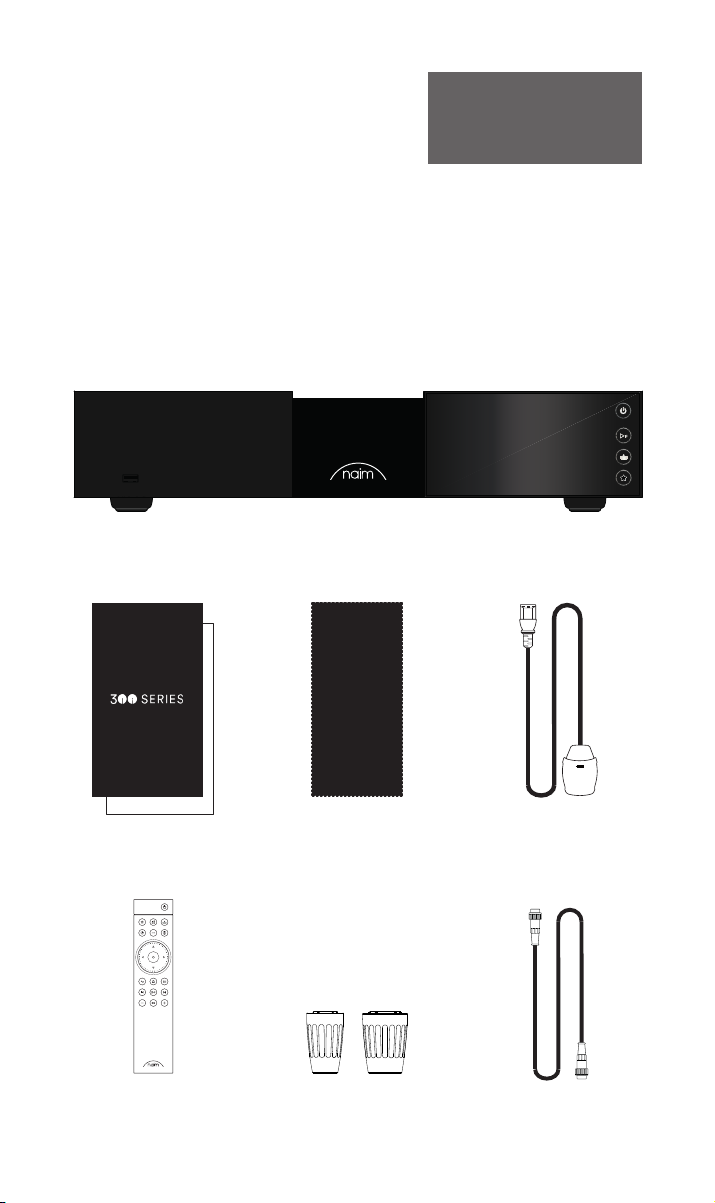
Inleiding
Welkom bij uw nieuwe streamer van Naim. Net als bij alle andere producten van Naim
Audio staan ook bij de NSS 333 muzikale prestaties voorop. Om zijn volledige potentieel te
realiseren, is het belangrijk dat u de in deze handleiding verstrekte eenvoudige richtlijnen
voor installatie en gebruik volgt. We beginnen met enkele essentiële punten over het
product en de plaatsing daarvan en in hoofdstuk 5 geven we u meer gedetailleerde
informatie.
Let op! Volledige
veiligheidswaarschuwingen zijn te
vinden in de wettelijk verplichte
veiligheidshandleiding.
1. Wat is meegeleverd?
1x NSS 333
1x Documentatiepakket
1x Reinigingsdoek
1x Afstandsbediening 2x Link Plugs
11
1x Netvoedingskabel
1x 5-pins 180° DIN
Verbindingskabel
Page 47
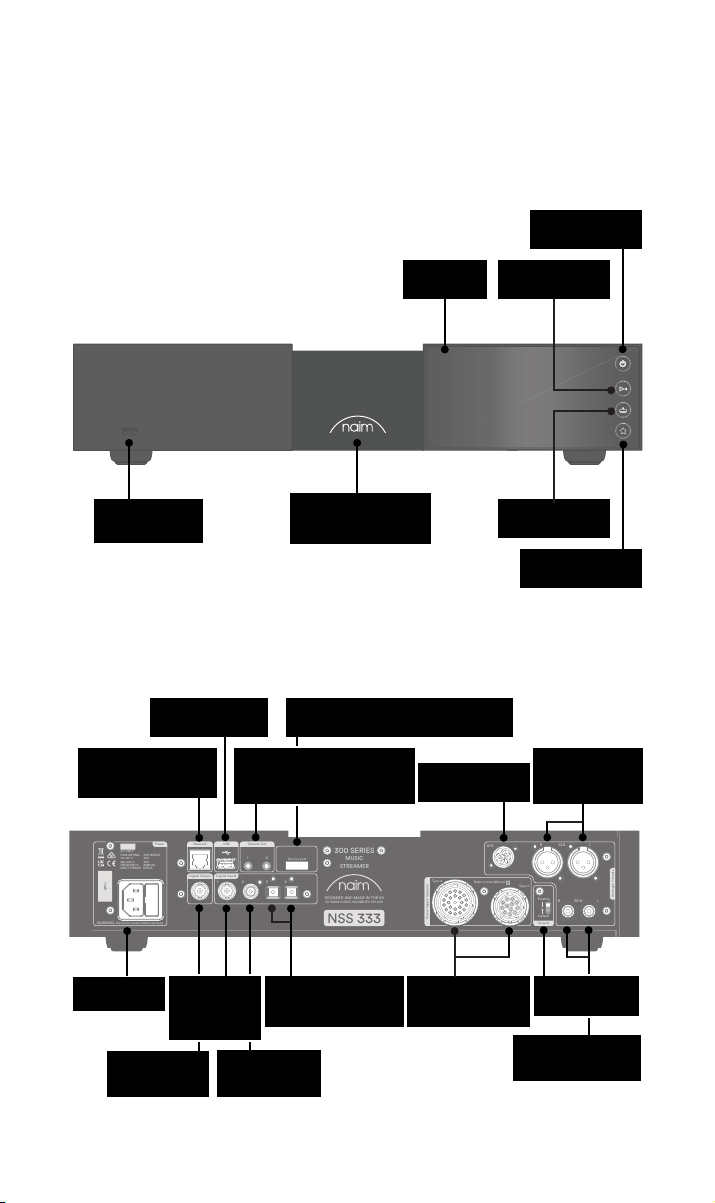
WARNING: Disconnect power before opening
AC ONLY
FUSE RATIN: ANTISURE
110-120 V: XXX
220-240 V: XXX
FREQUENCY: 50/
60Hz
INPUT POWER XXXVA
Power
300 SERIES
MUSIC
STREAMER
NSS 333
DESIGNED AND MADE IN THE UK
BY NAIM AUDIO, SALISBURY, SP1 2LN
S/No.
Network
USB
Digital Inputs
Power Supply Upgrade
Remote Out
Analogue Outputs
R LRCA
43
2
1
Refer to User Manual
Type 3
Type 4
Digital Output
DIN
Service port
Ground
Floating
Default
R
LXLR
21
2. Kennismaking met de NSS 333
Stand-bytoets
USB
(audiodata)
(audiodata)
Bedraad netwerk
(RJ45)
USB
Remote out (3,5 mm jack
elektrisch en Mini-TOSLINK
Scherm
Backlit, dimbaar logo
Service-aansluiting (alleen voor gebruik
optisch)
in de fabriek)
DIN-uitgang
Afspelen/pauzeren
Ingangen
Presets
XLR
gebalanceerde
uitgang
Netvoeding en
zekering
uitgang coaxiaal
BNC S/PDIF-
BNC S/
PDIF-ingang
coaxiaal
ingang coaxiaal
2x TOSLINK S/PDIF-
RCA S/PDIF-
ingang optisch
Ingangen voor
opgewaardeerde
voedingseenheid
De schakelaar
Signal Ground
RCA
ongebalanceerde
uitgang
22
Page 48
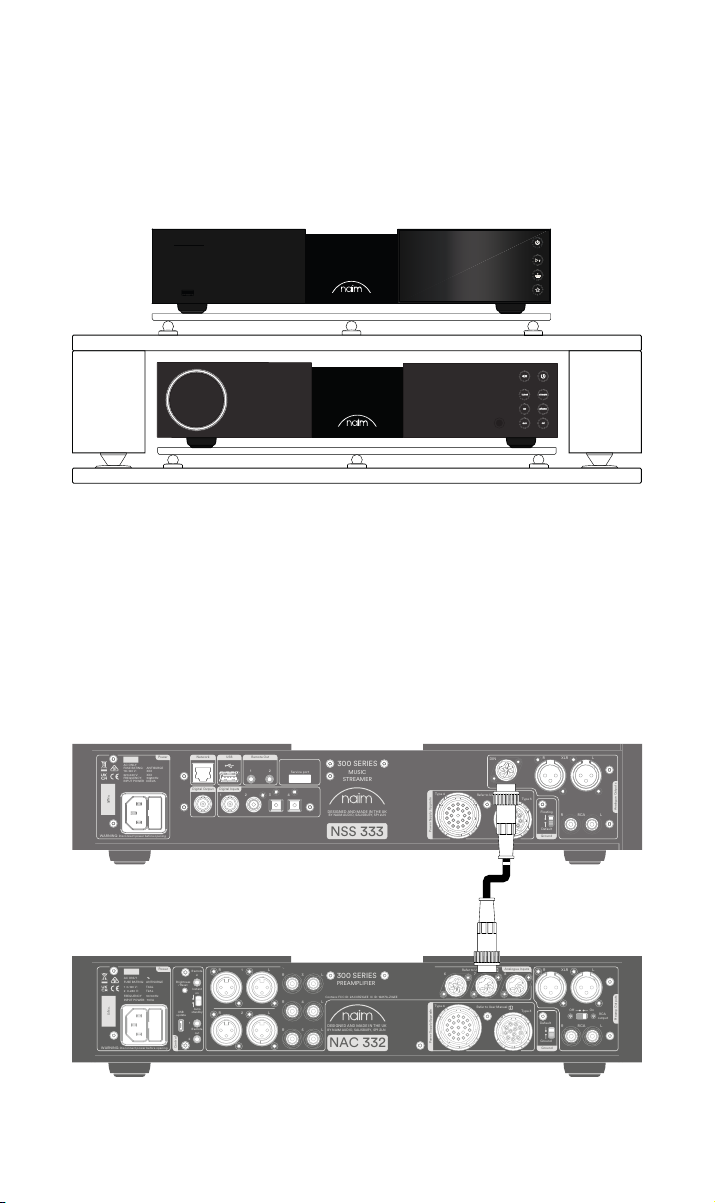
3. Essentiële informatie over plaatsing van de
WARNING: Disconnect power before opening
AC ONLY
FUSE RATIN: ANTISURE
110-120 V: XXX
220-240 V: XXX
FREQUENCY: 50/
60Hz
INPUT POWER XXXVA
Power
300 SERIES
MUSIC
STREAMER
NSS 333
DESIGNED AND MADE IN THE UK
BY NAIM AUDIO, SALISBURY, SP1 2LN
S/No.
Network
USB
Digital Inputs
Power Supply Upgrade
Remote Out
Analogue Outputs
R LRCA
43
2
1
Refer to User Manual
Type 3
Type 4
Digital Output
DIN
Service port
Ground
Floating
Default
R
LXLR
21
WARNING:Disconnect power before opening
AC ONLY
FUSE RATING: ANTISURGE
1 0-120 V:1 T4AL
2 0-240 V:2 T2AL
FREQUENCY: 0 60Hz5 /
I 70VANPUT POWER:
Power
300 SERIES
PREAMPLIFIER
NAC 332
DESIGNED AND MADE IN THE UK
BY NAIM AUDIO, SALISBURY, SP1 2LN
/ .oNS
Ground
Power Supply Upgrade
Preamp Outputs
AnalogueInputs
Ground
Default
R L
R
L
RCA
XLR
Refer to User Manual
Type 3
Type 4
Remote
in
Remote
out
Auto
standby
Instant
on
1
2
Control
USB
update
Brightness
Reset/
On
RCA
output
O
3
4
6
AnalogueInputs
R
R
R
L
L
L
5
8
7
1
2
R
L
R
L
Contains FCC ID: 2ACURZIGEE IC ID: 12217A-ZIGEE
Refer to User Manual
WARNING:
Disconnect power before opening
AC ONLY
FUSE RATING: ANTISURGE
1 0-120 V: T4AL
2 0-240 V: T
2AL
FREQUENCY 50/60Hz
I 70VANPUT POWER:
Power
300 SERIES
PREAMPLIFIER
NAC 332
DESIGNED AND MADE IN THE UK
BY NAIM AUDIO, SALISBURY, SP1 2LN
/ .oNS
Ground
Power Supply Upgrade
Preamp Outputs
AnalogueInputs
Ground
Default
R L
R
L
RCA
XLR
Refer to User Manual
Type 3
Type 4
Remote
in
Remote
out
Auto
standby
Instant
on
1
2
Control
USB
update
Brightness
Reset/
On
RCA
output
O
3
4
6
AnalogueInputs
R
R
R
L
L
L
5
8
7
1
2
R
L
R
L
Contains FCC ID: 2ACURZIGEE IC ID: 12217A-ZIGEE
Refer to User Manual
NSS333
De NSS 333 moet op een voorversterker en een eindversterker (zoals de bijbehorende
NAC 332 en NAP 350’s) worden aangesloten. Maar voordat u dat doet, moet u er eerst
voor zorgen dat alle componenten op hun denitieve plek staan en van de netvoeding zijn
afgesloten.
Voor optimale prestaties gebruikt u een speciale hi-steun, bij voorkeur de Naim Fraim,
met de streamer zoals afgebeeld boven de voorversterker geplaatst.
U hebt ook luidsprekers met kabels nodig, een internetverbinding (wi of bedraad), en een
smartphone of tablet voor de Naim-app.
Download de gratis Naim-app via de Apple App Store of Google Play Store.
3.1 De NSS 333 aansluiten op de NAC 332 voorversterker
Sluit de DIN-kabel (met de NSS 333 geleverd) van de DIN-uitgang van de NSS 333 aan op
de DIN-ingang van de NAC 332. Het uiteinde van de kabel met een bandje moet worden
aangesloten op de NSS 333.
33
Page 49
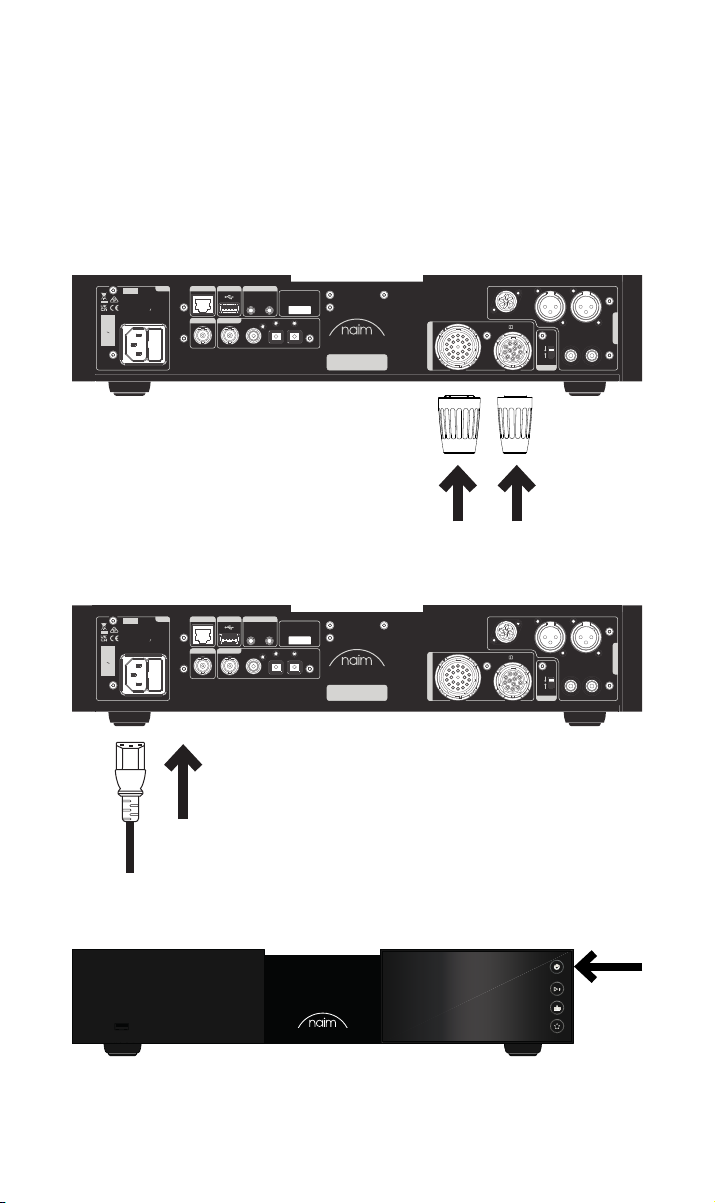
3.2 Inschakelen
Wanneer u de NSS 333 op een voorversterker hebt aangesloten, zijn er verder nog maar
een paar eenvoudige stappen voordat u de NSS 333 kunt inschakelen en kunt gaan
streamen.
Sluit de twee meegeleverde ‘link plug’ stekkers aan op de ingangen voor de
opgewaardeerde voedingseenheid van de NSS 333.
Als u een bedraad netwerk gebruikt, sluit u een kabel aan tussen de RJ45-aansluiting en
de router of switch.
Power
Network
USB
AC ONLY
FUSE RATIN: ANTISURE
110-120 V: XXX
220-240 V: XXX
FREQUENCY: 50/
INPUT POWER XXXVA
S/No.
WARNING: Disconnect power before opening
Remote Out
60Hz
Digital Output
Digital Inputs
1
21
2
43
Service port
300 SERIES
MUSIC
STREAMER
DESIGNED AND MADE IN THE UK
BY NAIM AUDIO, SALISBURY, SP1 2LN
NSS 333
DIN
Type 4
Refer to User Manual
Type 3
Power Supply Upgrade
Sluit de voedingskabel aan op de netvoedingsingang van de NSS 333 en steek vervolgens
de stekker in het stopcontact.
Power
Network
USB
AC ONLY
FUSE RATIN: ANTISURE
110-120 V: XXX
220-240 V: XXX
FREQUENCY: 50/
INPUT POWER XXXVA
S/No.
WARNING: Disconnect power before opening
Remote Out
60Hz
Digital Output
Digital Inputs
1
21
2
43
Service port
300 SERIES
MUSIC
STREAMER
DESIGNED AND MADE IN THE UK
BY NAIM AUDIO, SALISBURY, SP1 2LN
NSS 333
DIN
Type 4
Refer to User Manual
Type 3
Power Supply Upgrade
LXLR
R
R LRCA
R LRCA
Analogue Outputs
LXLR
Analogue Outputs
Floating
Default
Ground
R
Floating
Default
Ground
Zet de NSS 333 aan door de Stand-bytoets rechtsboven aan het voorpaneel in te drukken.
44
Page 50
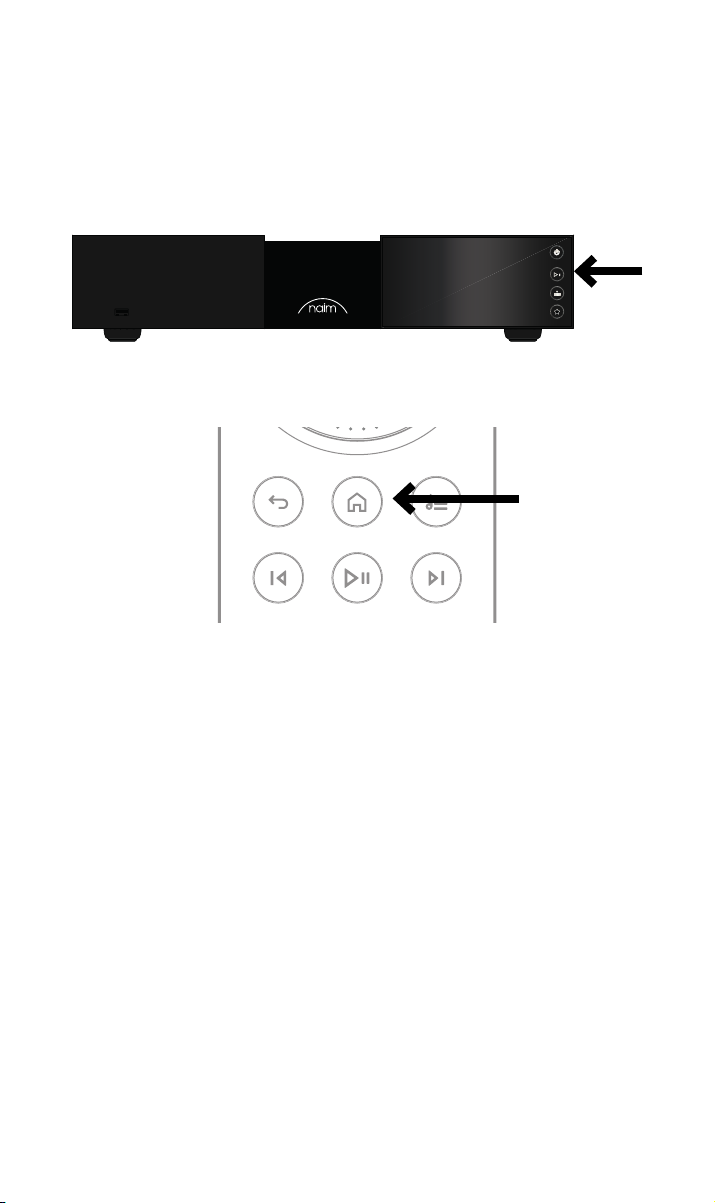
3.3 De afstandsbediening koppelen
Wanneer de NSS 333 is ingeschakeld, moet u de afstandsbediening koppelen.
Plaats de meegeleverde batterijen in de afstandsbediening.
Druk op een van de ingangstoetsen op het voorpaneel om de koppelmodus 30 seconden
te activeren.
Houd de home-toets op de afstandsbediening 3 seconden ingedrukt.
De volumering op de afstandsbediening draait in de koppelmodus en stopt wanneer de
afstandsbediening is gekoppeld. De afstandsbediening is nu aan het apparaat gekoppeld
en klaar voor gebruik.
55
Page 51

4. Muziek, radio, podcasts en meer afspelen
U hebt toegang tot al uw muziek, inclusief uw favoriete streamingdiensten en
internetradiozenders, u kunt uw opgeslagen muziek afspelen vanaf een Naim-server (zoals
een Naim Uniti Core) en de eenheid gebruiken als de bron van uw multiroom-systeem. De
NSS 333 heeft ook digitale aansluitingen, zodat u verbinding kunt maken met uw externe
bronnen.
Voordat u de onderstaande diensten gaat streamen, moet u er eerst voor zorgen dat het
apparaat waarmee u het streamen regelt (smartphone, tablet of computer) is aangesloten
op hetzelfde netwerk als de NSS 333.
4.1 Internetradio
Er zijn talloze radiozenders beschikbaar om via de Naim-app van te genieten, inclusief
een speciaal gekozen collectie streams van hogere kwaliteit. U kunt ook radiozenders als
presets opslaan en selecteren om sneller toegang tot uw favoriete zenders te krijgen.
4.2 UPnP
De NSS 333 kan audiobestanden afspelen die zijn opgeslagen op muziekservers van Naim
(zoals de Naim Uniti Core), NAS-drives en andere aangesloten UPnP-apparaten.
Hij ondersteunt uiteenlopende bestandsindelingen in resoluties van maximaal 384 kHz /
32 bits. Blader naar de muziek waar u van wilt genieten en stel afspeellijsten samen via de
Naim-app.
4.3 Spotify Connect/Spotify Hi-Fi
• Open de Spotify-app op uw telefoon, tablet of laptop.
• Speel de content waar u naar wilt luisteren af en selecteer ‘Devices Available’
(Beschikbare apparaten).
• Selecteer de NSS 333 en begin te luisteren.
4.4 AirPlay 2
AirPlay 2 is een technologie van Apple die is bedoeld om audiosystemen en luidsprekers in
elke kamer van uw huis te bedienen via uw iPhone, iPad, Mac, HomePod of Apple TV.
Het stelt u in staat vanaf een brede keuze aan bronnen te streamen, inclusief Apple Music.
Om AirPlay 2 in te stellen, gebruikt u de Home-app op een iOS-apparaat waarop
softwareversie 11.4 of later draait.
• Open de Home-app en tik op de knop (+) om de NSS 333 als een accessoire toe te
voegen.
4.5 Chromecast
Chromecast stelt u in staat uw favoriete muziek en meer te streamen via uw telefoon,
tablet of laptop.
• Om Chromecast built-in te gebruiken om audio naar de NSS 333 te casten,
congureert u het gewoon via de Google Home-app, waarna u vanaf allerlei
beschikbare bronnen kunt streamen.
66
Page 52

4.6 TIDAL en TIDAL Connect
Als u een abonnement op de muziekstreamingdienst TIDAL hebt, kunt u daar op de NSS
333 op twee manieren van genieten.
• Stream rechtstreeks via de TIDAL-app, via TIDAL Connect.
• U opent gewoon het afspeelscherm Now Playing wanneer er een track wordt
afgespeeld.
• Zoek het luidsprekersymbool en kies de NSS 333 in die
lijst. U kunt TIDAL ook afspelen via de Naim-app.
• Selecteer de TIDAL-ingang.
• Voer uw TIDAL-inloggegevens in.
• Blader door de muziek en geniet van TIDAL via de Naim-app.
4.7 Qobuz
Via Qobuz kunt u een hele wereld van muziek streamen, waaronder een enorme keuze aan
albums in echt hoge resolutie. Abonnees kunnen via de Naim-app van de dienst genieten.
• Selecteer de Qobuz-ingang.
• Voer uw Qobuz-inloggegevens in.
• Blader door de muziek en geniet van Qobuz via de Naim-app.
4.8 Roon
De NSS 333 is klaar voor Roon, zodat u alles kunt verkennen wat de muziekbeheerdienst te
bieden heeft.
4.9 Multiroom
De NSS 333 kan worden gekoppeld met andere muziekspelers, luidsprekers en systemen
om uw huis met perfect gesynchroniseerd geluid te vullen. U kunt op vier verschillende
manieren van multiroom-muziek genieten.
• Via de Naim-app
Voor de beste geluidservaring koppelt u het apparaat via de Naim-app met andere
aangesloten Naim-producten, inclusief Mu-so draadloze luidsprekers, Uniti-spelers
en meer. Speel gewoon de muziek af die u wilt delen en groepeer enkele of alle
Naim-producten door het multiroom-symbool te selecteren.
U kunt ook in de pret delen door de multiroom-toets op uw afstandsbediening in te
drukken.
• Via Apple AirPlay 2
• Via Chromecast
• Via Roon
5. Tips voor installatie en gebruik van de NSS 333
We weten dat u staat te popelen om van uw nieuwe NSS 333 te genieten, maar we
beloven u dat hij nog beter zal klinken als u deze richtlijnen volgt, die allemaal zijn bedoeld
om u te helpen uw streaming-voorversterker optimaal te gebruiken.
77
Page 53
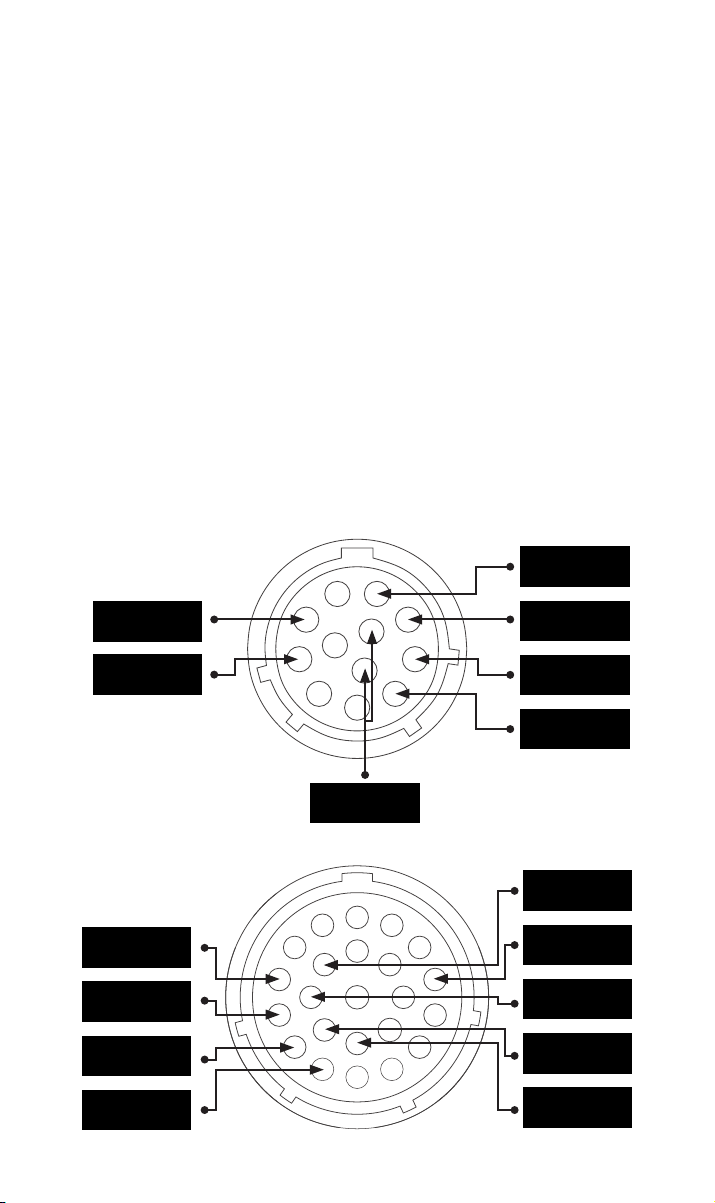
5.1 Uitpakken en plaatsen
Uw NSS 333 bestaat uit hoogwaardige onderdelen, waaronder een krachtige
voedingstransformator en een duurzame aluminium behuizing. Hierdoor weegt de
NSS 333 11 kg, dus wees voorzichtig bij het optillen of verplaatsen ervan, en zorg ervoor
dat het oppervlak waar hij op wordt geplaatst stabiel is en dit gewicht kan dragen.
Voor optimale prestaties gebruikt u de producten van Naim op een speciaal rek voor hiapparatuur, bij voorkeur de Naim Fraim of Fraim Lite, om trillingen die een eect op het
geluid kunnen hebben tot een minimum te beperken. Geen ruimte voor een rek? Plaats de
NSS 333 dan op een Fraim glazen plank op een geschikt meubelstuk, zodat het apparaat
stevig maar discreet wordt ondersteund.
Stapel producten van Naim nooit op elkaar en als u ze naast elkaar plaatst, zorg dan dat er
wat afstand tussen de eenheden is. Evenzo mogen op elkaar aangesloten producten niet te
ver van elkaar af staan. De maximale afstand is de lengte van de verbindingskabel.
Om het risico van brom via de luidsprekers tot een minimum te beperken, moeten
voedingseenheden en eindversterkers niet te dicht bij de broncomponenten worden
geplaatst.
5.2 Ingangen aansluiten
De NSS 333 heeft talrijke opties om externe bronnen aan te sluiten. Voor de beste
geluidskwaliteit raden wij u aan de BNC digitale ingang te gebruiken.
5.2a Type 3: 12-weg aansluiting
+22 V 400 mA
+5 V 200 mA
Masse digital
5.2b Type 4: 23-weg aansluiting
+10 V 370 mA
+10 V 370 mA
+15 V 150 mA
+15 V 1,1 A
-22 V 400 mA
+22 V 400 mA
-22 V 400 mA
Aarde
Aarde
+5 V 200 mA
Aarde
Aarde
Aarde
88
Page 54

5.3 Uitgangen aansluiten
Voor optimale geluidskwaliteit raden wij u aan de DIN-uitgang te gebruiken.
Als de XLR- of RCA-uitgangen worden gebruikt, moeten deze in de Naim-app worden
geactiveerd. Niet gebruikte uitgangen moeten in de Naim-app worden gedeactiveerd.
Als de digitale uitgang wordt gebruikt, moet deze in de Naim-app worden geactiveerd. Als
de digitale uitgang wordt gebruikt, zijn de analoge uitgangen gedeactiveerd.
5.4 Systeem automatiseren
Wanneer de NSS 333 met een geschikte voorversterker en eindversterker wordt gebruikt,
zoals de NAC 332 en de NAP 350, kunt u voeding aan/uit en de helderheid van het
logo synchroniseren in uw systeem door de apparaten met de optische kabels voor
systeemautomatisering die met de NAP 350’s werden geleverd op elkaar aan te sluiten.
De NSS 333 en NAC 332 gebruiken het Zigbee-systeem om hun functies te
synchroniseren.
U sluit de kabel van de aansluitingen ‘Remote Out’ van de NAC 332 gewoon aan op de
aansluitingen ‘Remote In’ van de NAP 350’s. Het is mogelijk om verdere eindversterkers
aan te sluiten met gebruik van de aansluitingen ‘Remote Out’ van de NAP 350.
Als u een langere afstand tussen de NAC 332 en de NAP 350’s nodig hebt dan met de
meegeleverde kabel mogelijk is, kunt u een andere 3,5 mm naar 3,5 mm optische kabel van
de gewenste lengte gebruiken. U kunt ook standaard analoge kabels met 3,5 mm stekkers
gebruiken, maar een optische kabel biedt de beste prestaties.
5.5 In-/uitschakelen
Wanneer alle in- en uitgangen zijn aangesloten, sluit u de meegeleverde netvoedingskabel
aan op de NSS 333 en een stopcontact.
U kunt de NSS 333 nu inschakelen door de Stand-bytoets in te drukken. Als de NAC 332
en NAP 350’s zijn aangesloten via Systeem automatiseren, worden deze op volgorde
ingeschakeld.
Het is dezelfde procedure om de NSS 333 uit te zetten: zet de via Systeem automatiseren
aangesloten NSS 333 streamer en de NAC 332 en de NAP 350’s uit door de
stand-bytoets op het voorpaneel in te drukken. De NSS 333, NAC 332 en NAP 350’s gaan
dan in stand-bymodus. Schakel de versterker niet uit door de stekker uit het stopcontact
te halen.
5.6 Instellingen voor stand-by vermogen
De NSS 333 heeft vier vermogensniveaus: stand-by, netwerk stand-by, netwerk stand-by
met aanvullende vermogensvereiste en ingeschakeld voor normaal gebruik.
In stand-by gebruikt het apparaat minder dan 0,5 watt. De NSS 333 kan worden
geactiveerd met een druk op de Stand-bytoets op het voorpaneel of via de
afstandsbediening.
In netwerk stand-by gebruikt het apparaat < 2 watt. Het netwerk moet zijn verbonden
(ofwel bedraad of via wi) zodat de NSS 333 via de Naim-app kan worden geactiveerd.
Netwerk stand-by met aanvullende vermogensvereiste. De NSS 333 staat aan maar het
scherm en logo zijn uitgeschakeld (het apparaat moet in deze stand staan om een USBapparaat te voeden of als een server te fungeren).
‘Powered for normal use’ (Ingeschakeld voor normaal gebruik) Bij normaal gebruik
verbruikt de NSS 333 ongeveer 25 watt.
Standaard is de NSS 333 ingesteld op ‘auto standby’ (automatisch stand-by). Dit betekent
dat het apparaat wanneer het maximaal 20 minuten lang niet is gebruikt automatisch in
stand-by gaat. Voor optimale geluidskwaliteit stelt u de automatische stand-by-periode in
de Naim-app in op ‘Never’ (Nooit), zodat de NSS 333 altijd aanstaat.
99
Page 55

5.7 Helderheidsinstellingen voor het Naim-logo
U kunt de helderheid van de led’s en het Naim-logo op de NSS 333 via de Naim-logo
naar wens instellen. Als u een via systeemautomatisering aangesloten Naim NAC 332
en NAP 350 versterker gebruikt, kunt u de helderheid van beide logo’s via de NSS 333
synchroniseren.
5.8 De NPX300-voedingseenheid gebruiken
De NPX300-voedingseenheid is een optionele systeemupgrade. Als u de
NPX300-voedingseenheid met de NSS 333 wilt gebruiken, moet u het systeem eerst
helemaal uitschakelen. Haal de netvoedingskabel uit de NSS 333, deze is niet nodig als het
apparaat wordt gevoed via de NPX300.
Plaats de NPX300 op de standaard (meestal onder de NAC 332). Verwijder de twee ‘link
plug’ stekkers uit het achterpaneel van de NSS 333.
Sluit het uiteinde zonder bandje van de twee Burndy-kabels aan op de NPX300. Sluit de
twee uiteinden met bandje aan op de NSS 333. Zorg dat alle borgringen helemaal zijn
vastgezet. Probeer de kabels zo te plaatsen, dat ze zo los mogelijk hangen, zonder de
standaard of de muur te raken. Dit is makkelijker als ze in ongeveer de juiste vorm worden
gelegd voordat de uiteinden worden aangesloten.
Sluit de voedingskabel aan op de netvoedingsingang van de NPX300 en steek vervolgens
de stekker in het stopcontact. Zet de rest van het systeem weer aan.
Zet de NSS 333 weer aan door de Stand-bytoets in te drukken.
6. Netvoeding, aarding en meer
Gebruik alleen de met de NSS 333 geleverde netvoedingskabel en stekkers, of de
opgewaardeerde Naim Power-Line-voedingskabel. Wanneer stekkers met een zekering
worden gebruikt, moeten zekeringen van 13 ampère worden aangebracht. Nooit
spanningsafhankelijke weerstandjes of ruisonderdrukkers op de netstekker aansluiten;
deze hebben een negatieve invloed op de netvoeding en de geluidskwaliteit.
6.1 Aarding
Om brom te voorkomen, moet de signaalaarding van het hele systeem op één plaats op
de netvoedingsaarding worden aangesloten. Doorgaans is dat bij de primaire bron. De
NSS333 streamer heeft een ground/lift-schakelaar. Stel deze in op ‘Default’ (Standaard) als
geen andere bron de netvoedingsaarding met de signaalaarding verbindt. Deze instelling
biedt de beste geluidskwaliteit.
6.2 Vaste netstekkers
Als een vaste netstekker van de netvoedingskabel wordt afgeknipt (om wat voor reden
dan ook), MOET deze stekker onbruikbaar worden gemaakt en worden weggeworpen.
Er ontstaat een groot risico van elektrische schok wanneer de afgeknipte stekker in een
stopcontact wordt gestoken.
6.3 Voedingscircuits en storing
Een hi-systeem deelt normaal gesproken een netvoedingscircuit met andere
huishoudelijke apparaten. Sommige daarvan kunnen vervorming veroorzaken die zich
manifesteert als mechanische brom van netvoedingstransformatoren, inclusief de grote
transformator in de NSS 333.
Brom van de transformator wordt niet via de luidsprekers uitgezonden en heeft geen
eect op de prestatie van het systeem; zorgvuldige plaatsing van het Naim-systeem of het
gebruik van een apart voedingscircuit kan het brommen echter verminderen. Een dergelijk
circuit (bij voorkeur van 30 of 45 ampère) verbetert doorgaans ook de systeemprestaties.
Vraag een gediplomeerd elektricien om advies over het installeren van een apart
voedingscircuit.
1010
Page 56

6.4 Voorzorgsmaatregelen bij bliksem
Uw Naim-systeem moet worden uitgeschakeld en helemaal van de netvoeding worden
afgesloten als er een risico van blikseminslag bestaat; dit om potentiële schade te
voorkomen.
7. Verdere tips en advies
Nu u alle essentiële stappen hebt uitgevoerd, gaan we verder met een paar dingen die u
kunt doen om de prestaties van uw nieuwe NSS 333 te optimaliseren.
7.1 Inlopen
De producten van Naim zijn met de hand gemaakt met gebruik van zorgvuldig gekozen,
hoogwaardige componenten. De NSS 333 klinkt meteen fantastisch, maar de prestaties
kunnen verder worden verbeterd wanneer al deze verschillende componenten worden
ingeschakeld en in de eerste paar weken van gebruik samenwerken. Dit proces verloopt
beter als u uw systeem aan laat staan.
7.2 Het product en de aansluitingen schoonmaken
Naim raadt aan alleen de meegeleverde reinigingsdoek te gebruiken om de oppervlakken
van het product licht af te stoen. Reinigingsproducten bevatten mogelijk ingrediënten
die een nadelige invloed kunnen hebben op cosmetische oppervlaktebehandelingen en
coatings.
Houd verbindingsstekkers en ingangen altijd schoon en roestvrij. De makkelijkste manier
om dit te bereiken, is door uw Naim-product (en aangesloten apparatuur) helemaal
uit te zetten, alle stekkers uit hun ingangen te halen en deze er weer stevig insteken.
Gebruik geen contactreinigers en zogenaamde ‘enhancers’ aangezien die resten kunnen
achterlaten die afbreuk doen aan het geluid van uw systeem.
7.3 De NSS 333 resetten
Om de fabrieksinstellingen van de NSS 333 te herstellen, gebruikt u de afstandsbediening
om op het voorpaneel ‘Home – Settings (Instellingen) – Factory settings
(Fabrieksinstellingen) – Reset all settings (Alle instellingen herstellen) – Yes (Ja)’ te
selecteren.
8. Support
De bescherming van de consument varieert van land tot land. In de meeste regio’s is de
winkel waar u uw Naim-product hebt gekocht uw eerste aanspreekpunt als u problemen
hebt met uw apparaat. Problemen kunnen het gevolg zijn van een fout in het systeem of
de installatie en het is derhalve essentieel dat u de diagnostische vaardigheden van uw
leverancier optimaal benut.
Ook kunt u online een reeks artikelen voor elk Naim-product raadplegen op
naimaudio.com
Als u nog steeds problemen hebt met uw Naim-product, dan kunt u voor hulp en advies
rechtstreeks contact met ons opnemen via [email protected]
9. Onderhoud en updates
Reparaties en hardware-updates mogen uitsluitend worden uitgevoerd door een
door Naim goedgekeurd onderhoudscentrum of in het hoofdkantoor van Naim. Veel
componenten zijn op maat gemaakt, getest of op elkaar afgestemd en het is vaak niet
mogelijk om geschikte vervangingen bij andere bronnen te kopen. Voor vragen over
onderhoud en reparaties neemt u contact op met uw plaatselijke Naim-leverancier.
1111
Page 57
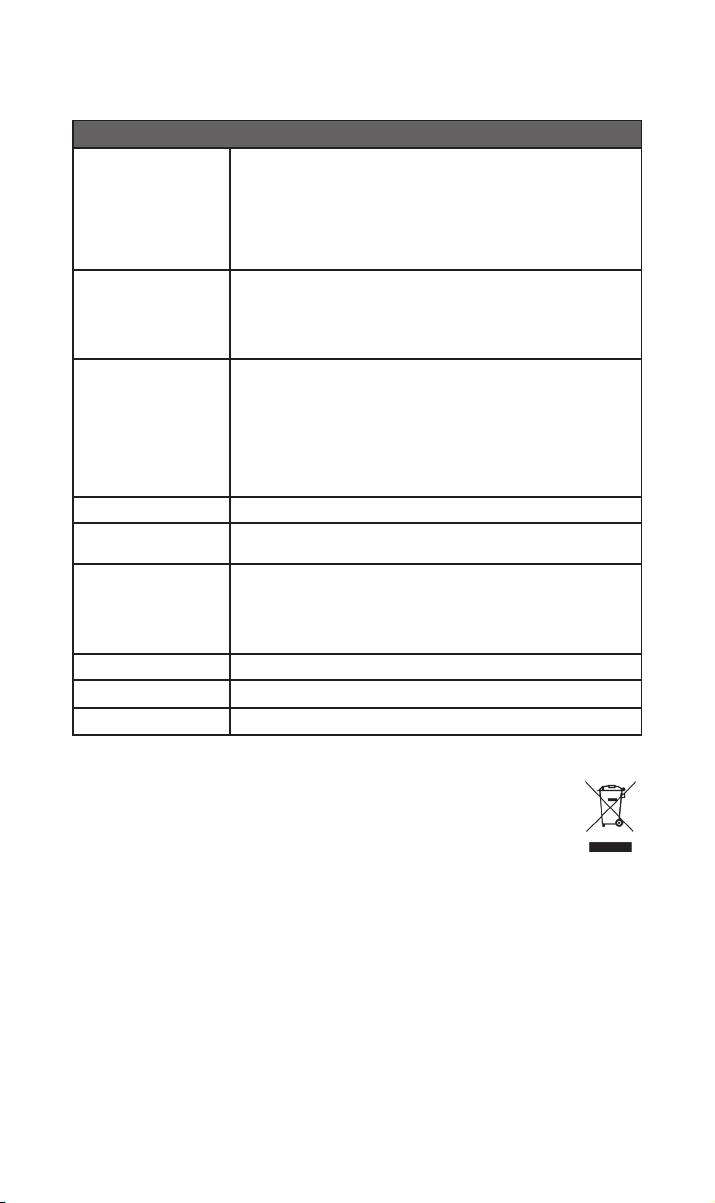
10. Specicaties
300 Serie Muziekstreamer – NSS 333
USB:
2 x USB Type A-aansluiting (voor- en achterkant – 1,6 A laden)
Audio-ingangen
Audio-uitgangen
Audio-indelingen
Netwerk Ethernet (10 / 100 Mbps), wi (802.11 b/g/n/ac)
Stroomverbruik
Rippen en opslag
Afmetingen (h x b x d) 91,5 × 432 × 317,5 mm (inclusief poten)
Gewicht 11 kg
Netvoeding 115 V of 230 V, 50/60 Hz
Digitaal (S/PDIF):
2 x Optisch TOSLINK (tot 24 bit / 96 kHz)
1 x coaxiaal RCA (tot 24 bit / 192 kHz, DoP 64 Fs)
1 x coaxiaal BNC (tot 24 bit / 192 kHz, DoP 64 Fs)
Analoog:
1 x XLR paar 1 x RCA paar 1 × 5-pins DIN
Digitaal:
1 x BNC coaxiaal
WAV – tot 32 bit / 384 kHz
FLAC en AIFF – tot 24 bit / 384 Hz
ALAC (Apple Lossless) – tot 24 bit / 384 Hz
MP3 – tot 48 kHz, 320 kbit (16 bit)
AAC – tot 48 kHz, 320 kbit (16 bit)
OGG en WMA – tot 48 kHz (16 bit) DSD 0150 64 en 128 Fs
M4A – tot 48 kHz, 320 kbit (16 bit)
Opmerking: Gapless afspelen ondersteund voor alle indelingen.
Gemiddeld gebruik: 25 W
Netwerk stand-by: < 2 W Stand-by: < 0,5 W
2 x USB Type A-aansluiting (voor- en achterkant – 1,6 A laden)
Sla maximaal 20.000 tracks op een lokaal via USB aangesloten apparaat
op en speel die via een op het netwerk aangesloten speler af
Externe draagbare HDD – max. 1 TB
USB-sticks – max. 128 GB
11. Product recyclen
Producten waarop het logo van een kliko met een kruis erdoorheen staat
afgebeeld, kunnen niet worden weggeworpen als huishoudelijk afval. Deze
producten moeten worden ingeleverd op locaties waar ze kunnen worden
gerecycled en waar eventuele bijkomstige afvalproducten correct kunnen worden
verwerkt.
Neem contact op met uw lokale afvalverwerkingsbedrijf voor meer informatie over een
dergelijke locatie bij u in de buurt.
Door afval op geschikte wijze te recyclen en weg te werpen, helpt u natuurlijke bronnen te
behouden en milieuvervuiling te voorkomen.
1212
Page 58

Page 59

Índice
Sección Página
Introducción 1
1. Contenido de la caja 1
2. Conozca su NSS 333 2
3. Conguración básica del NSS 333 3
4. Reproducir música, radio, podcasts y más 6
5. Consejos de instalación y uso de su NSS 333 7
6. Alimentación de red, puesta a tierra y más 10
7. Otros consejos y sugerencias 11
8. Asistencia 11
9. Servicio y actualizaciones 11
10. Especicaciones 12
11. Reciclaje del producto 12
Page 60
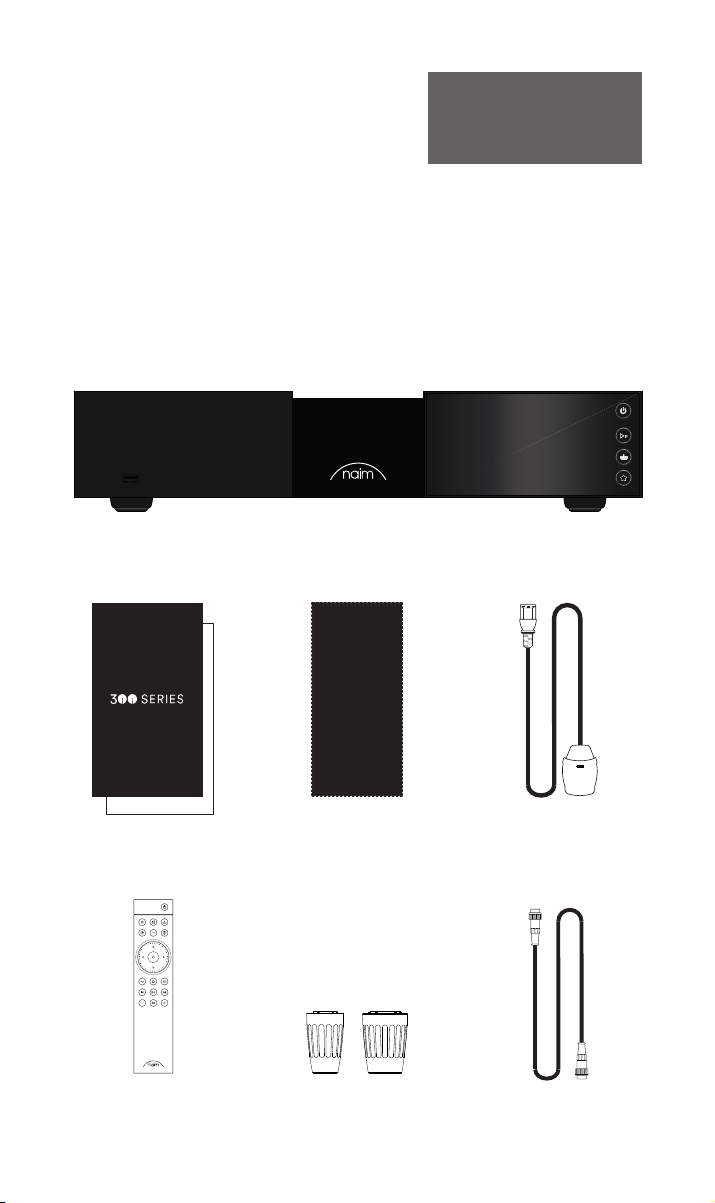
Introducción
Nota: Todas las advertencias de
seguridad se encuentran en el
manual de seguridad reglamentario.
Le presentamos su nuevo streamer Naim. Como todos los productos de Naim Audio,
el NSS 333 pone el sonido por encima de todo. Para alcanzar todo su potencial, es
importante seguir las sencillas pautas de instalación y uso recogidas en este manual.
Comenzaremos con algunos aspectos básicos del producto y su conguración, para
proporcionarle después información más detallada en el apartado 5.
1. Contenido de la caja
1x NSS 333
1x Paquete documentación
1x Paño de limpieza 1x Cable de fuente
1x Mando a distancia 2x Link Plugs
11
de alimentación
1x DIN 180° 5 polos
Cable de interconexión
Page 61
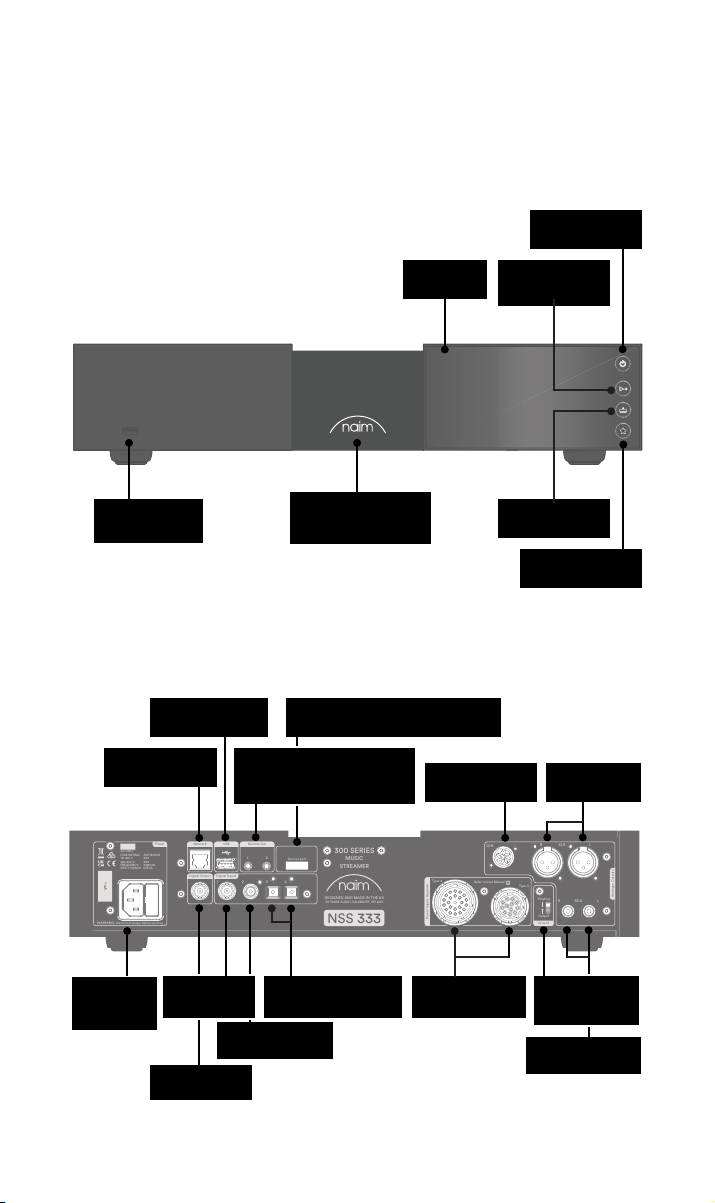
WARNING: Disconnect power before opening
AC ONLY
FUSE RATIN: ANTISURE
110-120 V: XXX
220-240 V: XXX
FREQUENCY: 50/
60Hz
INPUT POWER XXXVA
Power
300 SERIES
MUSIC
STREAMER
NSS 333
DESIGNED AND MADE IN THE UK
BY NAIM AUDIO, SALISBURY, SP1 2LN
S/No.
Network
USB
Digital Inputs
Power Supply Upgrade
Remote Out
Analogue Outputs
R LRCA
43
2
1
Refer to User Manual
Type 3
Type 4
Digital Output
DIN
Service port
Ground
Floating
Default
R
LXLR
21
2. Conozca su NSS 333
Botón de espera
USB (datos audio)
USB (datos audio)
Red por cable
(RJ45)
Logotipo con
retroiluminación
ajustable
Raccordement de service (utilisation
en usine uniquement)
Salidas remotas (jack 3,5 mm
eléctrica y Mini-TOSLINK
óptica)
Pantalla
Salida DIN
Botón
reproducción/
pausa
Botón de entradas
Botón ajustes
previos
Salida XLR
balanceada
Entrada de
red y fusible
Entrada
coaxial S/PDIF
Salida coaxial
BNC S/PDIF
BNC
2x entrée TOSLINK S/
PDIF optique
Entrada coaxial
RCA S/PDIF
Entradas
especiales de
alimentación
Interruptor de
tierra de la señal
Salida RCA no
balanceada
22
Page 62
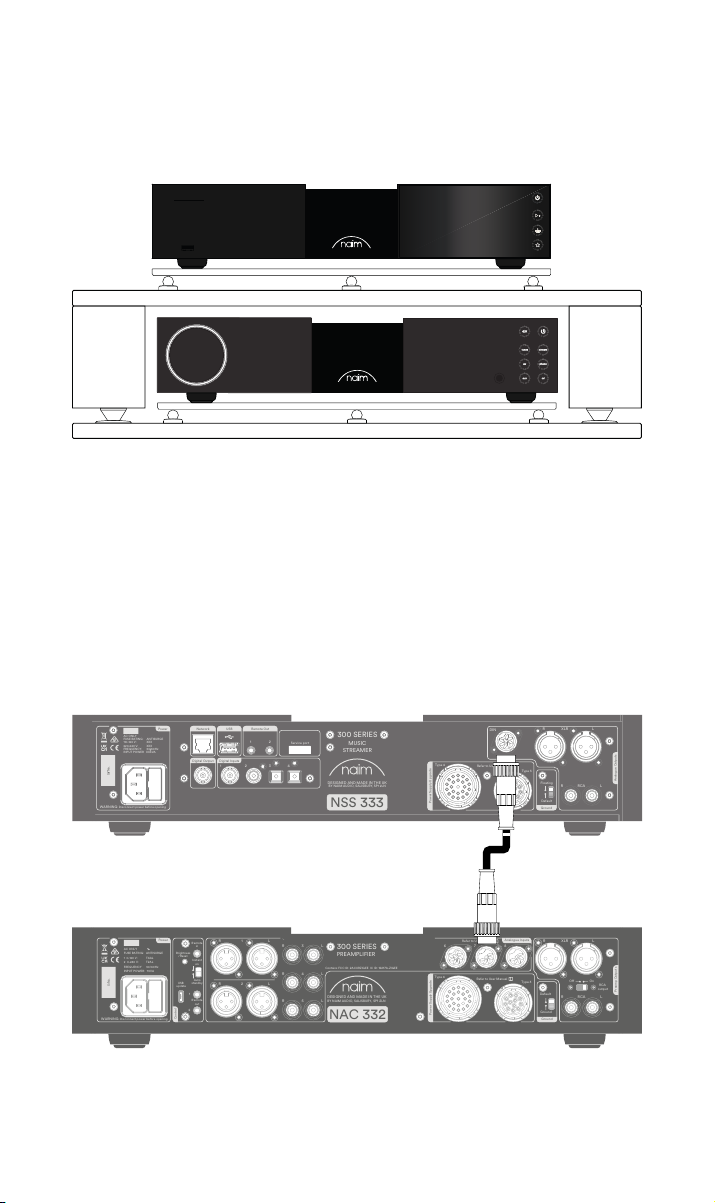
3. Conguración básica del NSS 333
WARNING: Disconnect power before opening
AC ONLY
FUSE RATIN: ANTISURE
110-120 V: XXX
220-240 V: XXX
FREQUENCY: 50/
60Hz
INPUT POWER XXXVA
Power
300 SERIES
MUSIC
STREAMER
NSS 333
DESIGNED AND MADE IN THE UK
BY NAIM AUDIO, SALISBURY, SP1 2LN
S/No.
Network
USB
Digital Inputs
Power Supply Upgrade
Remote Out
Analogue Outputs
R LRCA
43
2
1
Refer to User Manual
Type 3
Type 4
Digital Output
DIN
Service port
Ground
Floating
Default
R
LXLR
21
WARNING:Disconnect power before opening
AC ONLY
FUSE RATING: ANTISURGE
1 0-120 V:1 T4AL
2 0-240 V:2 T2AL
FREQUENCY: 0 60Hz5 /
I 70VANPUT POWER:
Power
300 SERIES
PREAMPLIFIER
NAC 332
DESIGNED AND MADE IN THE UK
BY NAIM AUDIO, SALISBURY, SP1 2LN
/ .oNS
Ground
Power Supply Upgrade
Preamp Outputs
AnalogueInputs
Ground
Default
R L
R
L
RCA
XLR
Refer to User Manual
Type 3
Type 4
Remote
in
Remote
out
Auto
standby
Instant
on
1
2
Control
USB
update
Brightness
Reset/
On
RCA
output
O
3
4
6
AnalogueInputs
R
R
R
L
L
L
5
8
7
1
2
R
L
R
L
Contains FCC ID: 2ACURZIGEE IC ID: 12217A-ZIGEE
Refer to User Manual
WARNING:
Disconnect power before opening
AC ONLY
FUSE RATING: ANTISURGE
1 0-120 V: T
4AL
2 0-240 V: T2AL
FREQUENCY 50/60Hz
I 70VANPUT POWER:
Power
300 SERIES
PREAMPLIFIER
NAC 332
DESIGNED AND MADE IN THE UK
BY NAIM AUDIO, SALISBURY, SP1 2LN
/ .oNS
Ground
Power Supply Upgrade
Preamp Outputs
AnalogueInputs
Ground
Default
R L
R
L
RCA
XLR
Refer to User Manual
Type 3
Type 4
Remote
in
Remote
out
Auto
standby
Instant
on
1
2
Control
USB
update
Brightness
Reset/
On
RCA
output
O
3
4
6
AnalogueInputs
R
R
R
L
L
L
5
8
7
1
2
R
L
R
L
Contains FCC ID: 2ACURZIGEE IC ID: 12217A-ZIGEE
Refer to User Manual
El NSS 333 debe conectarse a un preamplicador y un amplicador de potencia (por
ejemplo, un NAC 332 y los NAP 350), pero antes de hacerlo, asegúrese de que todos los
componentes están en su posición denitiva y desconectados de la red eléctrica.
Para un rendimiento óptimo, utilice un soporte de alta delidad especíco (idealmente el
Naim Fraim), con el streamer situado encima del preamplicador como se muestra en la
imagen.
También necesitará altavoces con cables, una conexión a internet (por wi o por cable) y
un teléfono inteligente o tableta para ejecutar la aplicación Naim.
Descargue gratuitamente la aplicación Naim desde Apple App Store o Google Play Store.
3.1 Conexión del NSS 333 al preamplicador NAC 332
Conecte el cable DIN (suministrado con el NSS 333) entre la salida DIN del NS 333 y
la entrada DIN del NAC 332. El extremo del cable con una banda deberá conectarse al
NSS333.
33
Page 63
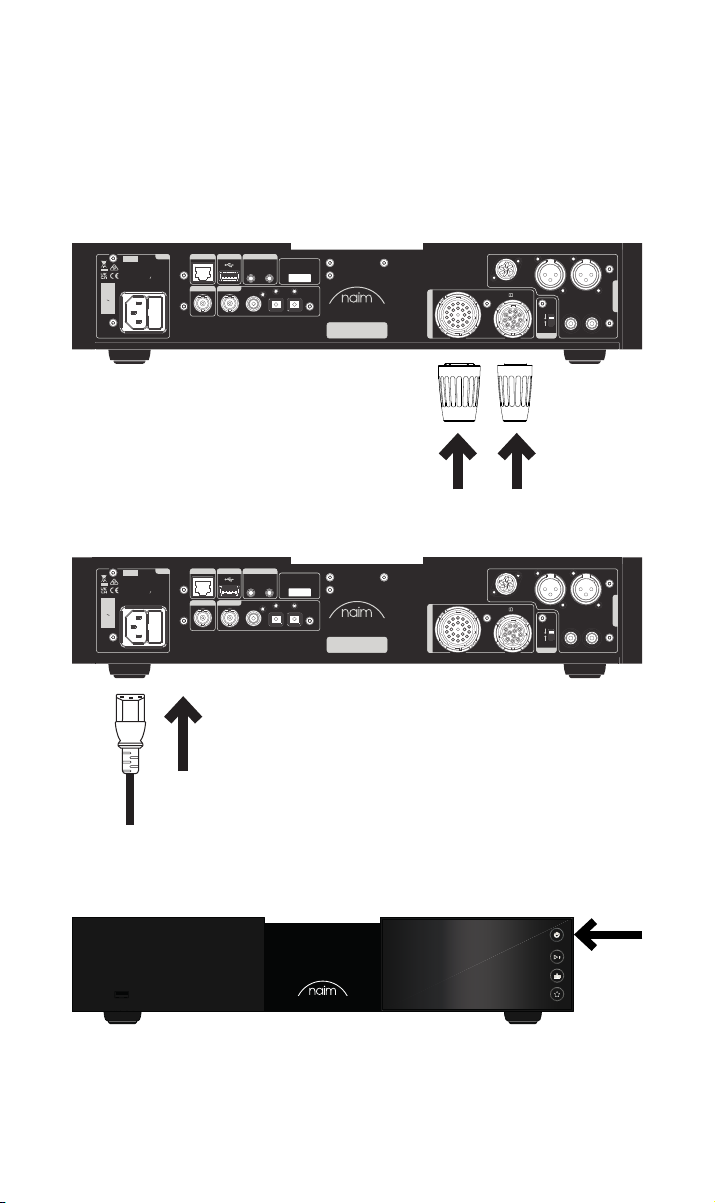
3.2 Encendido
Después de conectar el NSS 333 al preamplicador, solo tendrá que seguir unos pocos
pasos sencillos para encender el NSS 333 y empezar a utilizarlo.
Conecte los dos conectores Link Plug suministrados en las entradas especiales de
alimentación del NSS 333.
Si utiliza una red por cable, conecte un cable entre la toma RJ45 y el router o conmutador.
Power
Network
USB
AC ONLY
FUSE RATIN: ANTISURE
110-120 V: XXX
220-240 V: XXX
FREQUENCY: 50/
INPUT POWER XXXVA
S/No.
WARNING: Disconnect power before opening
Remote Out
60Hz
Digital Output
Digital Inputs
1
21
2
43
Service port
300 SERIES
MUSIC
STREAMER
DESIGNED AND MADE IN THE UK
BY NAIM AUDIO, SALISBURY, SP1 2LN
NSS 333
DIN
Type 4
Refer to User Manual
Type 3
Power Supply Upgrade
Conecte el cable de alimentación a la toma del NSS 333 y después a la red eléctrica.
Power
Network
USB
AC ONLY
FUSE RATIN: ANTISURE
110-120 V: XXX
220-240 V: XXX
FREQUENCY: 50/
INPUT POWER XXXVA
S/No.
WARNING: Disconnect power before opening
Remote Out
60Hz
Digital Output
Digital Inputs
1
21
2
43
Service port
300 SERIES
MUSIC
STREAMER
DESIGNED AND MADE IN THE UK
BY NAIM AUDIO, SALISBURY, SP1 2LN
NSS 333
DIN
Type 4
Refer to User Manual
Type 3
Power Supply Upgrade
LXLR
R
R LRCA
R LRCA
Analogue Outputs
LXLR
Analogue Outputs
Floating
Default
Ground
R
Floating
Default
Ground
Encienda el NSS 333 pulsando el botón de puesta en espera en la parte superior derecha
del panel frontal.
44
Page 64
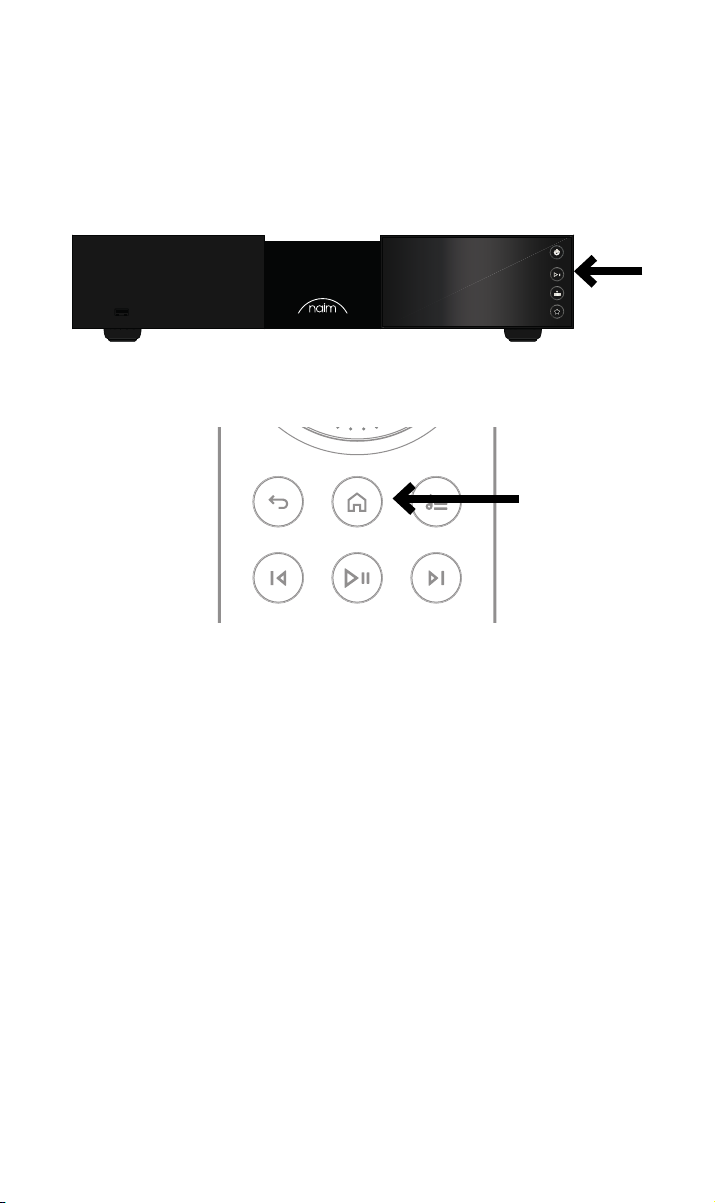
3.3 Emparejamiento del mando a distancia
Después de encender el NSS 333, tendrá que emparejar el mando a distancia.
Introduzca las pilas suministradas en el mando a distancia.
Pulsando cualquiera de los botones de entrada del panel frontal, se activará el modo de
emparejamiento del mando a distancia durante 30 segundos.
Mantenga pulsado el botón de inicio del mando a distancia durante 3 segundos.
El control de volumen del mando a distancia se activará durante el emparejamiento y se
detendrá cuando esté emparejado. El mando estará ahora emparejado con la unidad y listo
para utilizarse.
55
Page 65

4. Reproducir música, podcasts y más
Acceda a toda su música, incluyendo sus servicios de streaming y emisoras de radio por
internet favoritos, reproduzca su música almacenada desde un servidor Naim (como el
Naim Uniti Core) o utilícelo como fuente de su sistema multiroom. El NSS 333 también
tiene entradas digitales para conectar sus fuentes externas.
Antes de utilizar los servicios de streaming mencionados a continuación, asegúrese de que
su dispositivo de control (teléfono inteligente, tableta u ordenador) está conectado a la
misma red que el NSS 333.
4.1 Radio por Internet
La aplicación Naim le permitirá disfrutar de todo un mundo de emisoras de radio, con una
colección seleccionada de transmisiones de la mejor calidad. También puede seleccionar y
almacenar emisoras predeterminadas para acceder más rápidamente a sus favoritas.
4.2 UPnP
El NSS 333 puede reproducir archivos de audio almacenados en servidores musicales
Naim (como el Naim Uniti Core), unidades NAS u otros dispositivos UPnP conectados.
Funciona con una amplia variedad de formatos de archivo, en resoluciones de hasta 384
kHz /32 bits. Explore y disfrute de su música, y cree listas de reproducción a través de la
aplicación Naim.
4.3 Spotify Connect / Spotify Hi-Fi
• Abra la aplicación Spotify en su teléfono, tableta o portátil
• Comience a reproducir el contenido que desea escuchar y seleccione «Devices
Available» (dispositivos disponibles)
• Seleccione su NSS 333 y comience a escuchar su música
4.4 AirPlay 2
AirPlay 2 es una tecnología de Apple diseñada para controlar sistemas de sonido
y altavoces de uso doméstico en cualquier habitación desde su iPhone, iPad, Mac,
HomePodo Apple TV.
Permite transmitir audio desde una gran diversidad de fuentes, entre ellas Apple Music.
Para congurar AirPlay 2, utilice la aplicación Casa en un dispositivo iOS que funcione con
la versión de software 11.4 o posterior.
• Abra la aplicación Casa y pulse el botón (+) para añadir su NSS 333
4.5 Chromecast
Chromecast le permite transmitir su música favorita y más desde su teléfono, tableta o
portátil.
• Para enviar audio a su NSS 333 usando Chromecast built-in, solo tiene que
congurarlo a través de la aplicación Google Home. A continuación, podrá
reproducir audio desde las fuentes disponibles.
66
Page 66

4.6 TIDAL y TIDAL Connect
Los suscriptores del servicio de streaming músical TIDAL pueden utilizarlo en el NSS 333
de dos maneras.
• Transmitir directamente desde la aplicación TIDAL, a través de TIDAL Connect.
• Abra simplemente la pantalla «Now Playing» (reproduciendo ahora) cuando se esté
reproduciendo una canción.
• Busque el icono del altavoz y seleccione el NSS 333 en esa lista.
También puede utilizar TIDAL desde la aplicación Naim.
• Seleccione la entrada TIDAL
• Introduzca sus datos de inicio de sesión en TIDAL
• Explore y disfrute de TIDAL a través de la aplicación Naim
4.7 Qobuz
A través de Qobuz podrá acceder a todo un universo musical, con una extensa selección
de álbumes en alta resolución. Los suscriptores pueden disfrutar del servicio a través de la
aplicación Naim.
• Seleccione la entrada Qobuz
• Introduzca sus datos de inicio de sesión en Qobuz
• Explore y disfrute de Qobuz a través de la aplicación Naim
4.8 Roon
El NSS 333 es Roon Ready, lo que le permite explorar todo lo que le ofrece este servicio de
gestión musical.
4.9 Multiroom
El NSS 333 puede emparejarse con otros reproductores de música, altavoces y sistemas
para disfrutar en toda la casa de un sonido perfectamente sincronizado. Hay cuatro formas
en las que puede disfrutar de la experiencia musical multiroom
• A través de la aplicación Naim
Empareje el equipo con otros productos Naim conectados, como los altavoces
inalámbricos Mu-so, los reproductores Uniti y otros, a través de la aplicación Naim,
y disfrute de una experiencia de calidad superior. Comience a reproducir la música
que desea compartir y agrupe todos o algunos de sus productos Naim seleccionando
el símbolo multiroom.
También puede unirse a la esta pulsando el botón multiroom en su mando a
distancia.
• A través de AirPlay 2 de Apple
• A través de Chromecast
• A través de Roon
5. Consejos de instalación y uso del NSS 333
Sabemos que está deseando disfrutar de su nuevo NSS 333, pero le aseguramos que
sonará aún mejor si sigue estos consejos, pensados para que disfrute plenamente de su
preamplicador de streaming.
77
Page 67
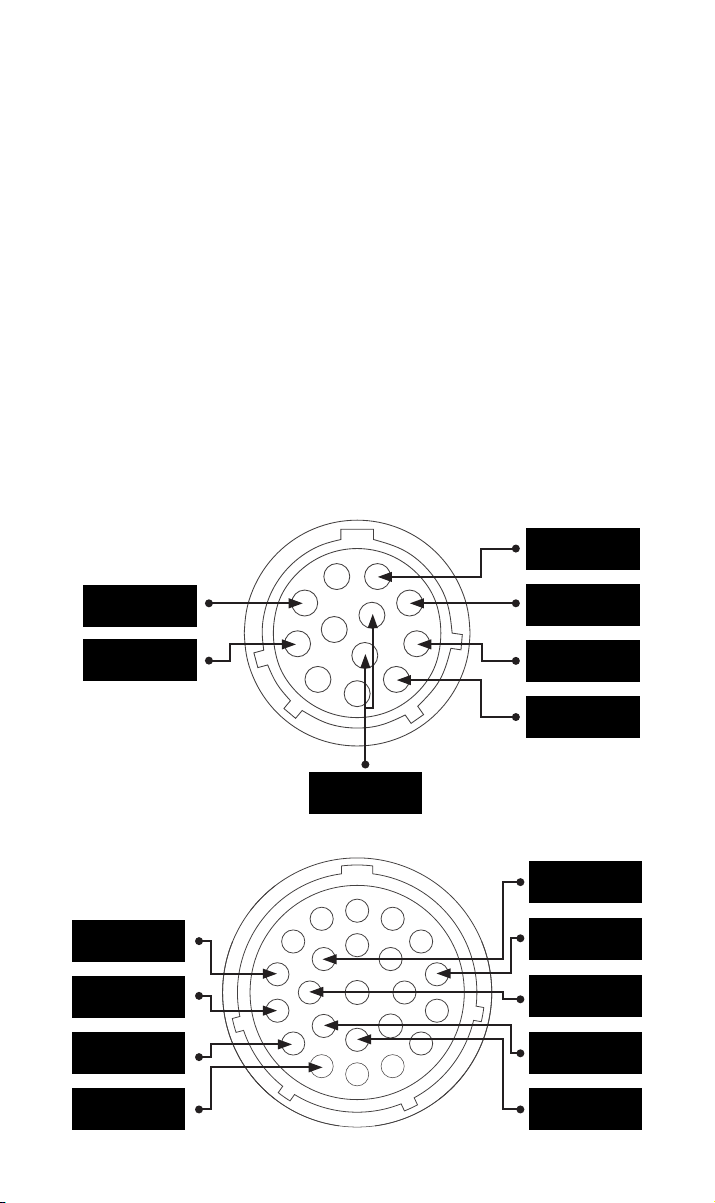
5.1 Desembalaje y colocación
El NSS 333 tiene componentes de alta calidad, incluido un sólido transformador de
potencia y una carcasa de aluminio resistente. Es por eso que el NSS 333 pesa 11 kg, así
que tenga cuidado al levantarlo o moverlo, y asegúrese de que la supercie sobre la que
piensa colocarlo es estable y puede soportar su peso.
Para un resultado óptimo, utilice los equipos Naim en un bastidor especíco para equipos
de alta delidad (idealmente el Naim Fraim o el Fraim Lite) para minimizar vibraciones que
puedan afectar al sonido. ¿No tiene espacio para un bastidor? Considere la posibilidad
de colocar su NSS 333 sobre un estante de vidrio Fraim en un mueble adecuado para
proporcionarle un soporte sólido y discreto.
No apile nunca los equipos Naim unos encima de otros, y si los coloca al lado, deje cierta
distancia entre ellos. Asimismo, los equipos conectados no deben estar demasiado
separados: la distancia máxima de separación es la que permite el cable de interconexión
suministrado.
Para reducir el riesgo de zumbidos en los altavoces, no ponga las fuentes de alimentación
ni los amplicadores de potencia cerca de las fuentes de audio o de los preamplicadores.
5.2 Conexiones de entrada
El NSS 333 cuenta con múltiples opciones de conexión externa. Para disfrutar de la mejor
calidad sonora, recomendamos utilizar la entrada digital BNC.
5.2a Tipo 3: conector de 12 vías
+22 V 400 mA
+5 V 200 mA
Tierra digital
5.2b Tipo 4: conector de 23 vías
+10 V 370 mA
+10 V 370 mA
+15 V 150 mA
+15 V 1,1 A
-22 V 400 mA
+22 V 400 mA
-22 V 400 mA
Tierra
Tierra
+5 V 200 mA
Tierra
Tierra
Tierra
88
Page 68

5.3 Conexiones de salida
Para disfrutar de la mejor calidad sonora, recomendamos utilizar la salida DIN.
Si desea utilizar las salidas XLR o RCA, será necesario habilitarlas en la aplicación Naim.
Las salidas que no se utilicen deberán deshabilitarse en la aplicación Naim.
Si se utiliza la salida digital, será necesario habilitarla en la aplicación Naim. Cuando se
utilice la salida digital, las salidas analógicas estarán deshabilitadas.
5.4 Automatización del sistema
Cuando el NSS 333 se utiliza con un preamplicador y un amplicador de potencia
compatibles (como el NAC 332 y los NAP 350), es posible sincronizar el encendido, el
apagado y el brillo del logotipo de todo el sistema, conectando para ello el NAC 332 con
los cables ópticos de automatización que se suministran con los NAP 350.
El NSS 333 y el NAC 332 utilizan el sistema Zigbee para sincronizar sus funciones.
Conecte los terminales «Remote Out» (salida remota) del NAC 332 a los terminales
«Remote In» (entrada remota) del NAP 350. Puede conectar más amplicadores de
potencia en los terminales «Remote Out» (salida remota) del NAP 350.
Si requiere una distancia entre el NAC 332 y los NAP 350 mayor de la que permite el cable
suministrado, puede sustituirlo por un cable óptico de 3,5 mm a 3,5 mm de la longitud
necesaria. También es posible utilizar cables analógicos estándar con conectores de 3,5
mm, pero un cable óptico proporcionará el mejor rendimiento.
5.5 Encendido y apagado
Cuando haya realizado todas las conexiones de entrada y salida, conecte el cable de
alimentación suministrado a su NSS 333 y a la red de suministro.
Ahora, puede encender el NSS 333 pulsando el botón de puesta en espera. Si el NAC 332
y los NAP 350 están conectados a través del sistema de automatización, se encenderán de
forma secuencial.
El procedimiento es el mismo para apagar el NSS 333: para apagar el NSS 333 -junto con
el NAC 332 y los NAP 350 conectados a través del sistema de automatización-, solo tiene
que pulsar el
botón de puesta en espera en el panel frontal, con lo que el NSS 333, el NAC 332 y
los NAP 350 entrarán en el modo de espera. Evite utilizar el interruptor de la toma de
corriente para apagar el amplicador.
5.6 Ajustes energía en modo de espera
El NSS 333 tiene cuatro niveles de consumo: espera, espera en red, espera en red con
suministro de energía adicional y alimentación para uso normal.
En el modo «Standby» (de espera), el consumo de energía total es inferior a 0,5 W. El
NSS333 puede activarse pulsando el botón de puesta en espera o desde el mando a
distancia.
En el modo «Network standby» (de espera en red), el consumo es inferior a 2 W. La red
deberá estar conectada (por cable o por wi) para que el NSS 333 se pueda activar desde
de la aplicación Naim.
Modo «Network standby with an additional power requirement» (de espera en red con
suministro de energía adicional). El NSS 333 está totalmente alimentado, pero con
la pantalla y el logotipo apagados (deberá encontrarse en este estado para alimentar
dispositivos USB o actuar como servidor).
Modo «Powered for normal use» (de alimentación para uso normal). En modo de
funcionamiento normal, el NSS 333 consume unos 25 W.
Por defecto, el NSS 333 está congurado en modo «auto standby» (de puesta en espera
automática), es decir, entra automáticamente en el modo de espera apropiado tras 20
minutos de inactividad. Para una calidad de sonido óptima, ajuste el tiempo de puesta
en espera automática a «Never» (nunca) en la aplicación Naim, de modo que el NSS 333
permanezca siempre alimentado.
99
Page 69

5.7 Ajustes de brillo del logotipo Naim
El nivel de brillo de los indicadores led y el logotipo Naim del NSS 333 se puede ajustar en
la aplicación Naim. Si utiliza un Naim NAC 332 y amplicadores NAP 350 conectados a
través del sistema de automatización, puede sincronizar el brillo de sus logotipos desde el
NSS 333.
5.8 Uso de la fuente de alimentación NPX300
La fuente de alimentación NPX300 es una mejora opcional del sistema. Para añadir una
fuente de alimentación NPX300 al NSS 333, apague primero todo el sistema. Desenchufe
el cable de alimentación del NSS 333, ya que no es necesario cuando la unidad está
alimentada por la NPX300.
Coloque la NPX300 en el soporte de equipos (normalmente por debajo del NAC 332).
Retire los dos conectores Link Plug del panel trasero del NSS 333.
Conecte el extremo sin banda de los dos cables Burndy a la NPX300. Conecte los dos
extremos con banda al NSS 333. Asegúrese de que todas las anillas de seguridad estén
rmemente apretadas. Procure «acomodar» los cables de forma que cuelguen lo más
holgadamente posible y sin tocar los soportes o la pared. Esto resultará más sencillo si les
da aproximadamente la forma necesaria antes de conectar los extremos.
Conecte el cable de alimentación a la toma de alimentación de la NPX300 y después a la
red eléctrica. Vuelva a encender el resto del sistema.
Vuelva a encender el NSS 333 pulsando el botón de puesta en espera.
6. Alimentación de red, puesta a tierra y más
Utilice solo los cables de alimentación y los enchufes de red suministrados con el NSS333,
o el cable de alimentación Naim Power-Line. Si se emplean enchufes con fusible, este
deberá ser de 13 A. No conecte resistencias eléctricas que dependan de la tensión ni
supresores de ruido en los enchufes de red, ya que degradan el suministro eléctrico y el
sonido.
6.1 Puesta a tierra
Para evitar zumbidos debidos a bucles de masa, la tierra de la señal de todo el sistema
debe conectarse a la toma de tierra de red en un único punto. Lo normal es que esto se
haga en la fuente principal. El reproductor de música en streaming NSS 333 cuenta con un
interruptor de tierra. Póngalo en «Default» (posición normal) si la toma de tierra de red no
está en contacto con la tierra de la señal en ninguna otra fuente. Este ajuste proporcionará
la mejor calidad de sonido.
6.2 Enchufes de red no desmontables
Si se corta un enchufe no desmontable de un cable de alimentación (por el motivo que
sea), el enchufe deberá desecharse de forma que quede totalmente inservible. Existe un
riesgo de descarga considerable si el enchufe cortado se inserta en la toma de red.
6.3 Circuitos de alimentación e interferencias
Los sistemas de alta delidad suelen compartir la red de alimentación con otros
electrodomésticos. Algunos de ellos pueden provocar distorsiones que se maniestan
como un zumbido mecánico de los transformadores de alimentación, como el
transformador principal del NSS 333.
El zumbido del transformador no se transmite por los altavoces y no tiene ningún efecto
en el rendimiento del sistema, pero puede reducirlo colocando adecuadamente su sistema
Naim y usando un circuito de alimentación especíco independiente. Dicho circuito
(con un valor ideal de 30 o 45 A) también mejorará el rendimiento del sistema de manera
general. Para la instalación de un circuito de alimentación independiente, solicite consejo
a un electricista cualicado.
1010
Page 70

6.4 Precauciones contra los rayos
Cuando exista riesgo de tormenta eléctrica, su sistema Naim deberá estar apagado y
totalmente desconectado de la red de suministro para protegerlo de posibles daños.
7. Otros consejos y sugerencias
Ahora que ya tiene todo lo esencial resuelto, pasaremos a otras cosas que puede hacer
para optimizar el rendimiento de su nuevo NSS 333.
7.1 Rodaje
Los productos Naim se fabrican a mano con una cuidadosa selección de componentes de
alta calidad. Su NSS 333 tendrá un sonido magníco nada más sacarlo de la caja, pero su
rendimiento puede mejorar aún más a medida que todos estos componentes se activen e
interactúen durante las primeras semanas de uso. Mantener el sistema encendido ayudará
en este proceso.
7.2 Limpieza del equipo y de las conexiones
Naim recomienda usar únicamente el paño de limpieza incluido para retirar el polvo de
las supercies del equipo. Los productos de limpieza contienen ingredientes que pueden
afectar negativamente a los tratamientos y acabados de la supercie.
Mantenga las clavijas y las conexiones limpias y libres de corrosión. La forma más sencilla
de hacerlo es apagar completamente su equipo Naim (y cualquier otro equipo conectado),
desenchufar todas las conexiones de sus tomas y volver a introducirlas rmemente. No se
deben utilizar limpiadores de contactos ni otros productos «mejoradores», ya que pueden
dejar restos que podrían deteriorar el sonido de su sistema.
7.3 Restablecimiento del NSS 333
Para restablecer los ajustes predeterminados de su NSS 333, seleccione con el mando a
distancia «Home - Settings – Factory settings – Reset all settings – Yes» (Inicio - Ajustes –
Ajustes de fábrica – Restablecer todos los ajustes – Sí) en la pantalla del panel frontal.
8. Asistencia
La protección del consumidor varía de un país a otro. En la mayoría de los países, el
distribuidor donde adquirió su producto Naim será su contacto principal en caso de
problemas con la unidad. Los problemas pueden deberse a fallos del sistema o de la
instalación, por lo que es esencial emplear al máximo las capacidades de diagnóstico de
su proveedor.
Puede encontrar en línea varios artículos de ayuda para cada producto Naim en
naimaudio.com
Si sigue teniendo problemas con su producto Naim, póngase en contacto directamente
con nosotros para obtener ayuda y asesoramiento en [email protected]
9. Servicio y actualizaciones
Las reparaciones y las actualizaciones de hardware solo pueden llevarse a cabo en centros
de servicio autorizados Naim o en la propia sede central de Naim. Muchos componentes
se fabrican, se prueban y se adaptan a medida, y a menudo no es posible conseguir de
otras fuentes las piezas de repuesto adecuadas. Para cualquier solicitud de servicio o
reparación, póngase en contacto con su distribuidor local Naim.
1111
Page 71
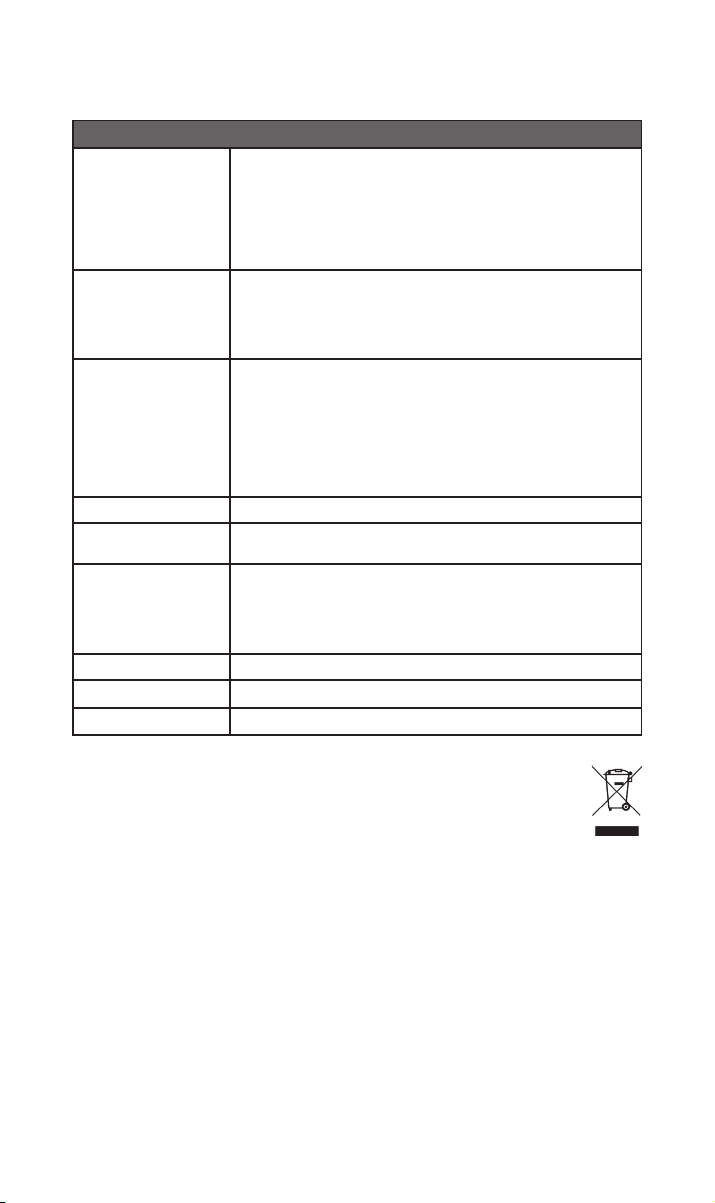
10. Especicaciones
300 Series Music Streamer - NSS 333
USB:
2 tomas USB tipo A (frontal y trasera - carga 1,6 A)
Entradas de audio
Salidas de audio
Formatos de audio
Red Ethernet (10/100 Mbps), wi (802.11 b/g/n/ac)
Consumo de potencia
Copia y almacenamiento
Dimensiones (Al x An x P) 91,5 × 432 × 317,5 mm (incluyendo las patas)
Peso 11 kg
Suministro de red 115 V o 230 V; 50/60 Hz
Digitales (S/PDIF):
2 TOSLINK ópticas (hasta 24 bits / 96 kHz)
1 RCA coaxial (hasta 24 bits / 192 kHz, DoP 64 Fs)
1 BNC coaxial (hasta 24 bit / 192 kHz, DoP 64 Fs)
Analógicas:
1 par XLR 1 par RCA 1 DIN 5 polos
Digital:
1 BNC coaxial
WAV - hasta 32 bits / 384 kHz
FLAC y AIFF - hasta 24 bits / 384 Hz
ALAC (Apple Lossless) hasta 24 bits / 384 Hz
MP3 - hasta 48 kHz, 320 kbits (16 bits)
AAC - hasta 48 kHz, 320 kbits (16 bits)
OGG y WMA - hasta 48 kHz (16 bits) DSD - 64 y 128 Fs
M4A - hasta 48 kHz, 320 kbits (16 bits)
Nota: reproducción continua en todos los formatos.
Uso típico: 25 W
Modo de espera de red: <2 W En espera: < 0,5W
2 tomas USB tipo A (frontal y trasera - carga de 1,6 A)
Almacene hasta 20 000 pistas en un dispositivo de almacenamiento local
conectado por USB y sirva a un reproductor conectado a la red.
HDD portátil externo – máx. 1 TB
Lápices de memoria USB - máx. 128 GB
11. Reciclaje del producto
Los productos con el logotipo del contenedor tachado no pueden eliminarse
como residuos domésticos. Estos productos deben eliminarse en centros
capacitados para reciclar y tratar adecuadamente los residuos.
Póngase en contacto con las autoridades local para informarse sobre el centro de
tratamiento más cercano.
Eliminar y reciclar los residuos adecuadamente contribuye a preservar los recursos y a
prevenir la contaminación medioambiental.
1212
Page 72

Page 73

Indice
Sezione Pagina
Introduzione 1
1. Contenuto della confezione 1
2. Primi passi con il NSS 333 2
3. Elementi essenziali per la congurazione del NSS333 3
4. Riproduzione di musica, radio, podcast e molto 6
altro ancora
5. Suggerimenti sull’installazione e sull’utilizzo del 7
NSS 333
6. Rete elettrica, messa a terra e altre informazioni 10
7. Ulteriori suggerimenti e consigli 11
8. Assistenza 11
9. Assistenza e aggiornamenti 11
10. Speciche 12
11. Riciclaggio del prodotto 12
Page 74
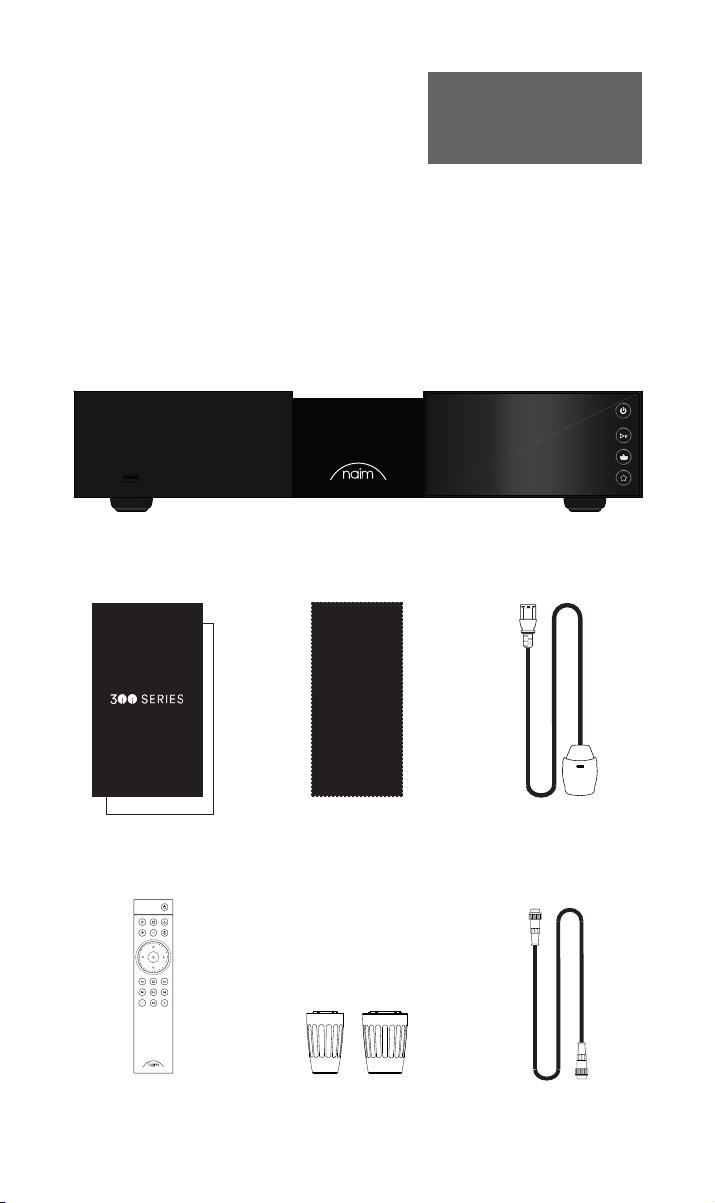
Introduzione
Ti presentiamo il tuo nuovo dispositivo di streaming musicale Naim. Come tutti i
prodotti Naim Audio, il NSS 333 mette le performance musicali in primo piano. Per
aiutare a comprendere il suo pieno potenziale, è importante attenersi alle linee guida
per un’installazione e un utilizzo semplici coperte nel presente manuale. Iniziamo con
alcuni aspetti indispensabili relativi al prodotto e alla congurazione prima di passare a
informazioni più dettagliate nella Sezione 5.
Nota bene: per una versione completa
degli avvertimenti di sicurezza,
consultare il manuale di sicurezza
prescritto dalla legge.
1. Contenuto della confezione
1x NSS 333
1x Documentation
1x Chion nettoyant 1x Cavo di alimentazione
1x Télécommande 2x Fiches cavalier
1
1x DIN 5 broches 180°
Page 75
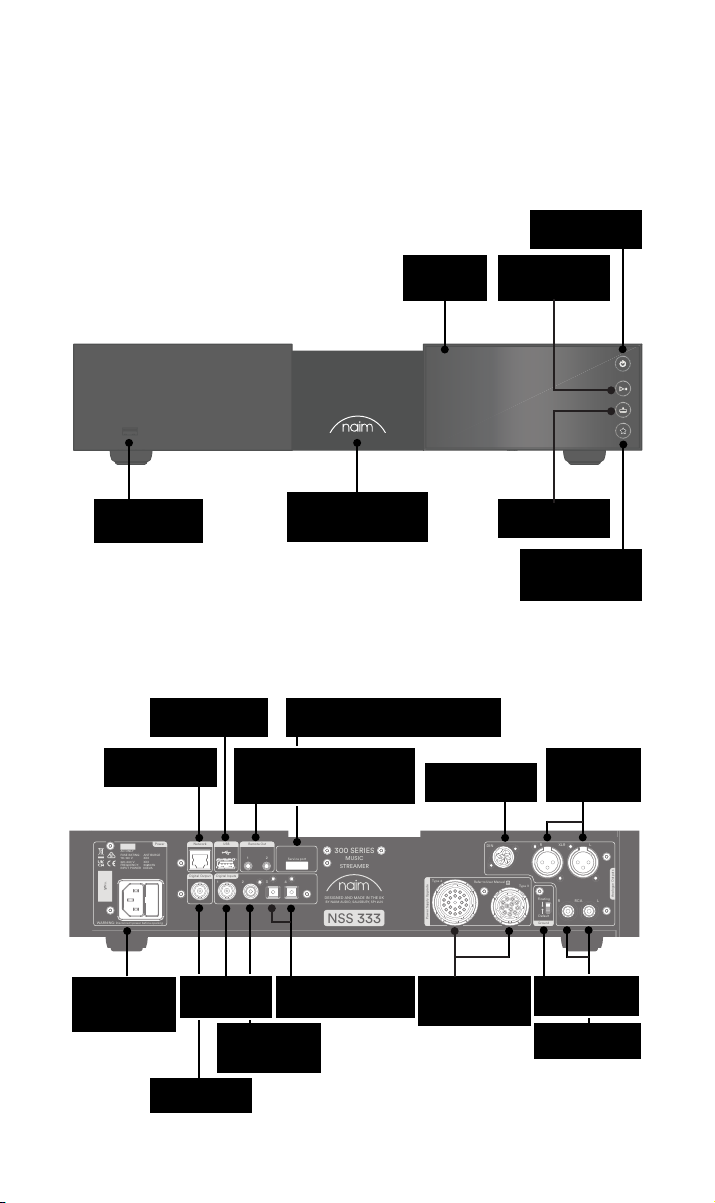
WARNING: Disconnect power before opening
AC ONLY
FUSE RATIN: ANTISURE
110-120 V: XXX
220-240 V: XXX
FREQUENCY: 50/
60Hz
INPUT POWER XXXVA
Power
300 SERIES
MUSIC
STREAMER
NSS 333
DESIGNED AND MADE IN THE UK
BY NAIM AUDIO, SALISBURY, SP1 2LN
S/No.
Network
USB
Digital Inputs
Power Supply Upgrade
Remote Out
Analogue Outputs
R LRCA
43
2
1
Refer to User Manual
Type 3
Type 4
Digital Output
DIN
Service port
Ground
Floating
Default
R
LXLR
21
2. Primi passi con il NSS 333
Schermo
Pulsante di
standby
Tasto di
riproduzione/
pausa
USB (dati audio)
Rete cablata
Fusibile e
ingresso
alimentazione
USB (dati audio)
(RJ45)
Uscita BNC S/
PDIF coassiale
Uscita telecomandata
(connettore jack da 3,5 mm e
Mini-TOSLINK ottico)
Ingresso
BNC S/PDIF
coassiale
Ingresso RCA S/
PDIF coassiale
Logo retroilluminato,
regolabile
Collegamento di servizio (uso
esclusivamente in fabbrica)
2x ingressi TOSLINK S/
PDIF ottici
aggiornamento
alimentazione
Uscita DIN
Prese
Tasto d’input
Tasto delle
impostazioni
predefinite
bilanciata XLR
Interruttore di
massa segnale
Uscita non
bilanciata RCA
Uscita
2
Page 76
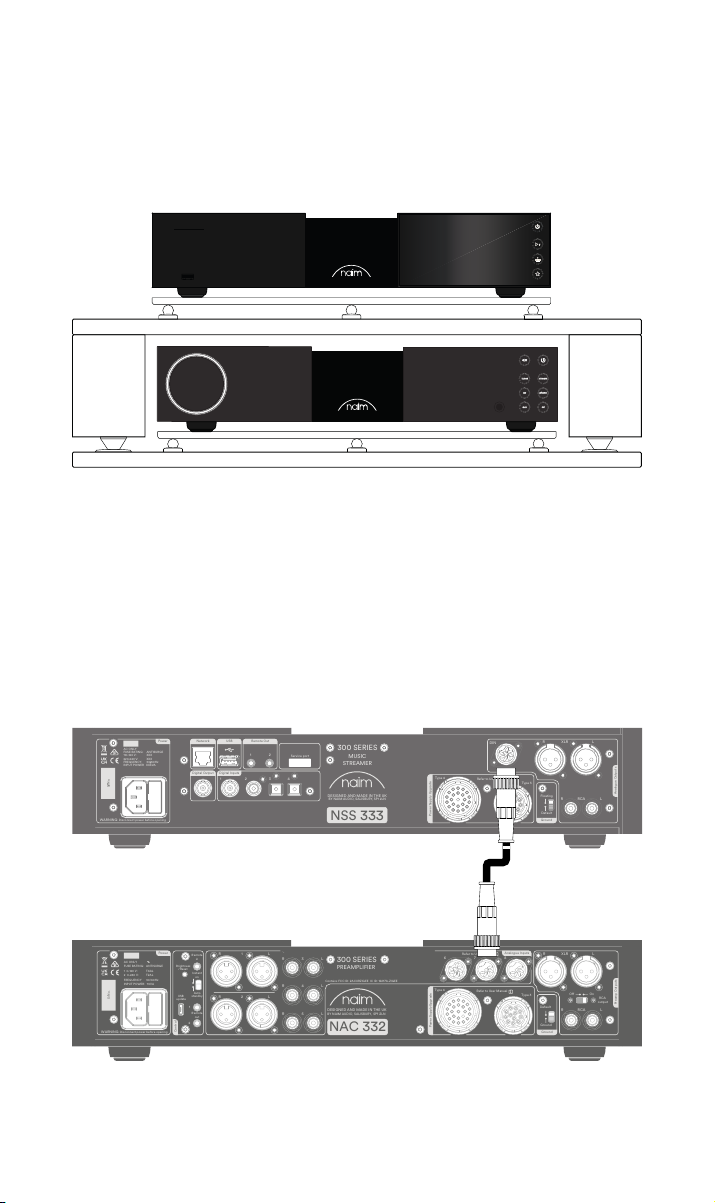
3. Elementi essenziali per la congurazione del
WARNING: Disconnect power before opening
AC ONLY
FUSE RATIN: ANTISURE
110-120 V: XXX
220-240 V: XXX
FREQUENCY: 50/
60Hz
INPUT POWER XXXVA
Power
300 SERIES
MUSIC
STREAMER
NSS 333
DESIGNED AND MADE IN THE UK
BY NAIM AUDIO, SALISBURY, SP1 2LN
S/No.
Network
USB
Digital Inputs
Power Supply Upgrade
Remote Out
Analogue Outputs
R LRCA
43
2
1
Refer to User Manual
Type 3
Type 4
Digital Output
DIN
Service port
Ground
Floating
Default
R
LXLR
21
WARNING:Disconnect power before opening
AC ONLY
FUSE RATING: ANTISURGE
1 0-120 V:1 T4AL
2 0-240 V:2 T2AL
FREQUENCY: 0 60Hz5 /
I 70VANPUT POWER:
Power
300 SERIES
PREAMPLIFIER
NAC 332
DESIGNED AND MADE IN THE UK
BY NAIM AUDIO, SALISBURY, SP1 2LN
/ .oNS
Ground
Power Supply Upgrade
Preamp Outputs
AnalogueInputs
Ground
Default
R L
R
L
RCA
XLR
Refer to User Manual
Type 3
Type 4
Remote
in
Remote
out
Auto
standby
Instant
on
1
2
Control
USB
update
Brightness
Reset/
On
RCA
output
O
3
4
6
AnalogueInputs
R
R
R
L
L
L
5
8
7
1
2
R
L
R
L
Contains FCC ID: 2ACURZIGEE IC ID: 12217A-ZIGEE
Refer to User Manual
WARNING:
Disconnect power before opening
AC ONLY
FUSE RATING: ANTISURGE
1 0-120 V: T4AL
2 0-240 V: T
2AL
FREQUENCY 50/60Hz
I 70VANPUT POWER:
Power
300 SERIES
PREAMPLIFIER
NAC 332
DESIGNED AND MADE IN THE UK
BY NAIM AUDIO, SALISBURY, SP1 2LN
/ .oNS
Ground
Power Supply Upgrade
Preamp Outputs
AnalogueInputs
Ground
Default
R L
R
L
RCA
XLR
Refer to User Manual
Type 3
Type 4
Remote
in
Remote
out
Auto
standby
Instant
on
1
2
Control
USB
update
Brightness
Reset/
On
RCA
output
O
3
4
6
AnalogueInputs
R
R
R
L
L
L
5
8
7
1
2
R
L
R
L
Contains FCC ID: 2ACURZIGEE IC ID: 12217A-ZIGEE
Refer to User Manual
NSS333
Il NSS 333 deve essere collegato a un preamplicatore e amplicatore di potenza (ad es. il
NAC 332 e i NAP 350 corrispondenti); tuttavia, prima di procedere, si prega di accertarsi
che tutti i componenti siano nelle rispettive posizioni nali e scollegati dalla rete elettrica.
Per delle prestazioni ottimali, servirsi di un supporto hi- dedicato, in misura ideale Naim
Fraim, con il dispositivo di streaming ubicato sopra il preamplicatore, come mostrato.
Sono inoltre indispensabili due altoparlanti con cavi, una connessione Internet (Wi-Fi o
cablata) e uno smartphone o tablet per eseguire l’app Naim.
Scarica l’app Naim gratuita da App Store di Apple o Play Store di Google.
3.1 Collegamento del NSS 333 al preamplicatore NAC 332
Collegare il cavo DIN (di serie con il NSS 333) dall’uscita DIN del NSS 333 all’ingresso
DIN del NAC 332. Si noti che l’estremità del cavo con un nastro deve essere collegata al
NSS333.
3
Page 77
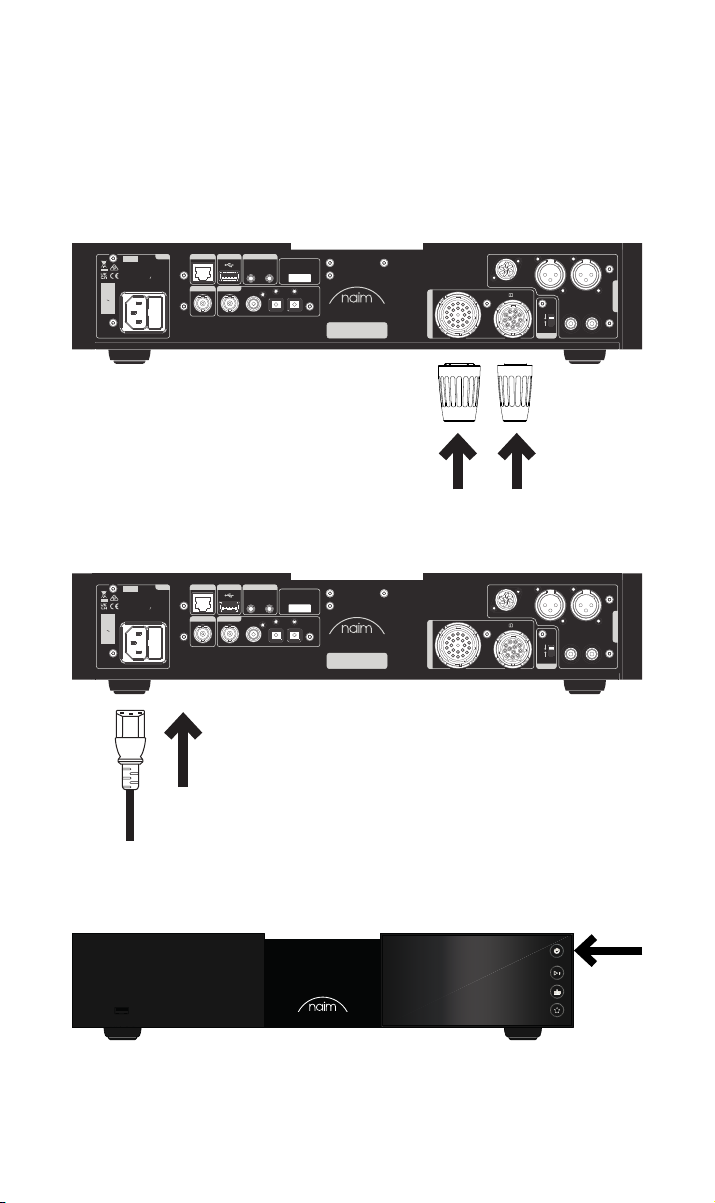
3.2 Accensione
Una volta collegato il NSS 333 a un preamplicatore, sono necessari soltanto dei piccoli
passaggi aggiuntivi prima di accedere il NSS 333 e iniziare lo streaming.
Collegare i due connettori di collegamento di serie alle prese di aggiornamento
dell’alimentazione del NSS 333.
Se si utilizza una rete cablata, collegare un cavo tra la presa RJ45 e il router o lo switch.
Power
Network
USB
AC ONLY
FUSE RATIN: ANTISURE
110-120 V: XXX
220-240 V: XXX
FREQUENCY: 50/
INPUT POWER XXXVA
S/No.
WARNING: Disconnect power before opening
Remote Out
60Hz
Digital Output
Digital Inputs
1
21
2
43
Service port
300 SERIES
MUSIC
STREAMER
DESIGNED AND MADE IN THE UK
BY NAIM AUDIO, SALISBURY, SP1 2LN
NSS 333
DIN
Type 4
Refer to User Manual
Type 3
Power Supply Upgrade
Collegare il cavo dell’alimentazione alla presa di alimentazione del NSS 333, quindi alla
rete elettrica.
Power
Network
USB
AC ONLY
FUSE RATIN: ANTISURE
110-120 V: XXX
220-240 V: XXX
FREQUENCY: 50/
INPUT POWER XXXVA
S/No.
WARNING: Disconnect power before opening
Remote Out
60Hz
Digital Output
Digital Inputs
1
21
2
43
Service port
300 SERIES
MUSIC
STREAMER
DESIGNED AND MADE IN THE UK
BY NAIM AUDIO, SALISBURY, SP1 2LN
NSS 333
DIN
Type 4
Refer to User Manual
Type 3
Power Supply Upgrade
LXLR
R
Floating
R LRCA
Default
Ground
LXLR
R
Floating
R LRCA
Default
Ground
Analogue Outputs
Analogue Outputs
Accendere il NSS 333 premendo il tasto di standby, sul lato destro in alto sul pannello
anteriore.
4
Page 78
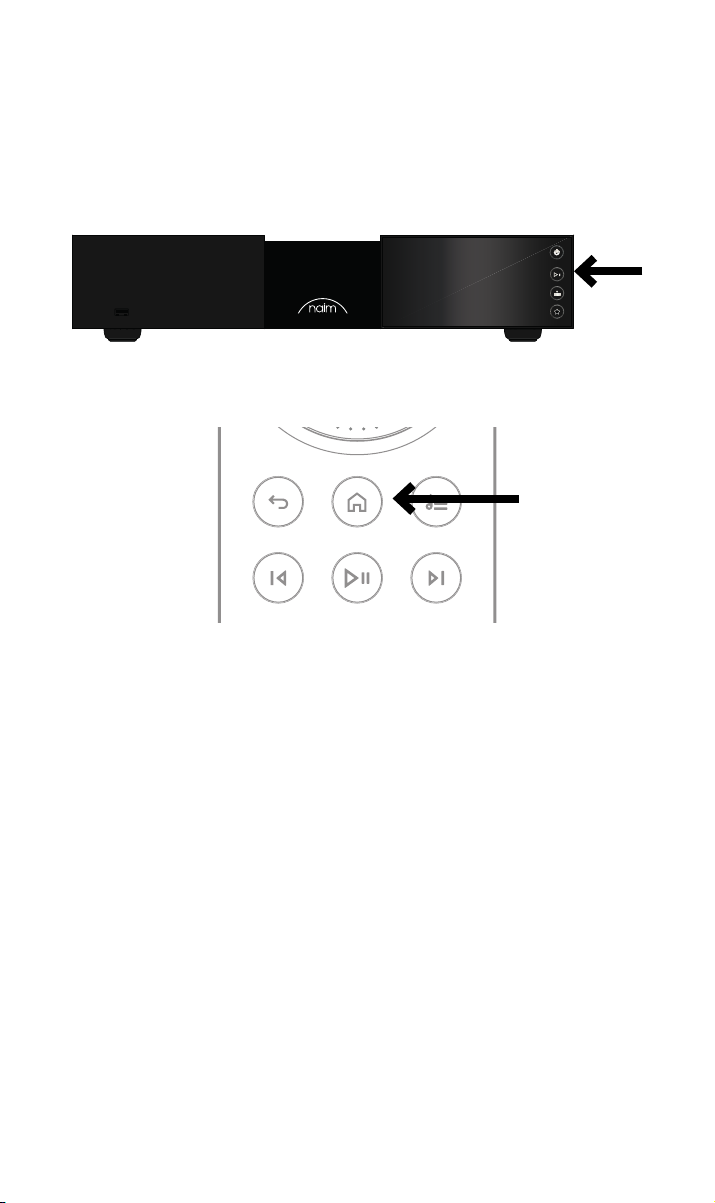
3.3 Abbinamento del telecomando
Una volta che il NSS 333 è stato acceso, sarà indispensabile abbinare il telecomando.
Inserire le batterie in dotazione nel telecomando.
Premendo uno qualsiasi dei tasti d’input sul pannello anteriore, sarà possibile abilitare la
modalità di abbinamento a distanza per 30 secondi.
Tenere premuto il tasto Home sul telecomando per 3 secondi
L’anello del volume sul telecomando si illuminerà quando in modalità di abbinamento e si
arresterà quando abbinato. Ora, il telecomando è abbinato all’unità e pronto all’uso.
5
Page 79

4. Riproduzione di musica, radio, podcast e molto
altro ancora
Accedi a tutta la tua musica, incluse le tue stazioni radio Internet e i servizi di streaming
preferiti; riproduci la musica salvata su un server Naim (ad esempio un Naim Uniti Core) e
imposta l’apparecchio come sorgente del tuo sistema multiroom. Il NSS 333 dispone anche
di collegamenti digitali per la connessione di sorgenti esterne.
Prima di avviare lo streaming dei servizi sottostanti, assicurarsi che il dispositivo di
controllo (smartphone, tablet o computer) sia collegato alla stessa rete del NSS 333.
4.1 Radio Internet
Un mondo di emittenti radiofoniche è disponibile tramite l’app Naim, tra cui una raccolta
dedicata di stream di alta qualità. È anche possibile selezionare e memorizzare delle
emittenti radiofoniche predenite per un accesso più rapido a quelle preferite.
4.2 UPnP
Il NSS 333 può riprodurre le audio memorizzati sui server musicali Naim (ad es. Naim
Uniti Core), unità NAS e altri dispositivi UPnP collegati.
Supporta un’ampia gamma di formati di le, in risoluzioni no a 384 kHz/32 bit. Cerca e
goditi la tua musica e crea delle playlist mediante l’app Naim.
4.3 Spotify Connect / Spotify Hi-Fi
• Aprire l’app Spotify sul proprio telefono, tablet o laptop
• Iniziare a riprodurre il contenuto che si desidera ascoltare e selezionare “Devices
Available” (Dispositivi disponibili)
• Selezionare il NSS 333 e iniziare l’ascolto
4.4 AirPlay 2
AirPlay 2 è una tecnologia Apple studiata per controllare gli impianti audio e gli altoparlanti
domestici in qualsiasi stanza, dal proprio iPhone, iPad, Mac, HomePod o Apple TV.
Consente di riprodurre in streaming un’ampia gamma di sorgenti, tra cui Apple Music.
Per congurare AirPlay 2, utilizzare l’app Home su un dispositivo iOS con versione
software 11.4 o superiore.
• Aprire l’app Home e toccare il tasto (+) per aggiungere il NSS 333 come accessorio
4.5 Chromecast
Chromecast consente di riprodurre in streaming la propria musica preferita e molto altro
ancora dal telefono, tablet o laptop.
• Per usare Chromecast integrato per trasmettere l’audio al NSS 333, è suciente
congurarlo tramite l’app Google Home, quindi riprodurre da un’ampia gamma di
sorgenti disponibili.
6
Page 80

4.6 TIDAL e TIDAL Connect
Gli abbonati al servizio di streaming musicale TIDAL possono usufruire del NSS 333 in due
modi.
• Riprodurre in streaming direttamente dall’app TIDAL, mediante TIDAL Connect.
• Aprire semplicemente la schermata “Now Playing” (Riproduzione attuale) mentre si
riproduce un brano
• Cercare l’icona dell’altoparlante e scegliere il NSS 333 dall’elenco.
In alternativa, è possibile usufruire di TIDAL tramite l’app Naim.
• Selezionare l’ingresso TIDAL
• Inserire i propri dettagli di accesso TIDAL
• Cercare e godersi la musica su TIDAL mediante l’app Naim
4.7 Qobuz
Un mondo di musica, compresa un’ampia selezione di album ad alta risoluzione autentica,
è disponibile per lo streaming mediante Qobuz. Gli abbonati possono usufruire di questo
servizio mediante l’app Naim.
• Selezionare l’ingresso Qobuz
• Inserire i propri dettagli di accesso Qobuz
• Cercare e godersi la musica su Qobuz mediante l’app Naim
4.8 Roon
Il NSS 333 è predisposto per Roon, consentendo di esplorare tutto quello che il servizio di
gestione musicale ha da orire.
4.9 Multiroom
Il NSS 333 può essere abbinato ad altri dispositivi di riproduzione musicale, altoparlanti
e impianti per riempire la casa di un suono perfettamente sincronizzato. Sono previsti
quattro diversi modi per godersi l’esperienza musicale multiroom
• Tramite l’app Naim
Abbinare con altri prodotti Naim collegati, tra cui gli altoparlanti wireless Mu-so,
i dispositivi di riproduzione Uniti e molto altro ancora, mediante l’app Naim, per
l’esperienza della migliore qualità. È suciente avviare la riproduzione della musica
che si desidera condividere e raggruppare alcuni o tutti i prodotti Naim selezionando
il simbolo multiroom.
È anche possibile divertirsi ancora di più, premendo il tasto Multiroom sul proprio
telecomando.
• Tramite Apple AirPlay 2
• Tramite Chromecast
• Tramite Roon
5. Suggerimenti sull’installazione e sull’utilizzo del
NSS 333
Sappiamo che desideri ardentemente trarre vantaggio da tutti i beneci del tuo nuovo
NSS 333, ma ti promettiamo che l’audio sarà persino migliore dopo aver seguito queste
linee guida, tutte studiate per aiutarti a provare l’esperienza del tuo preamplicatore per
streaming senza compromessi.
7
Page 81
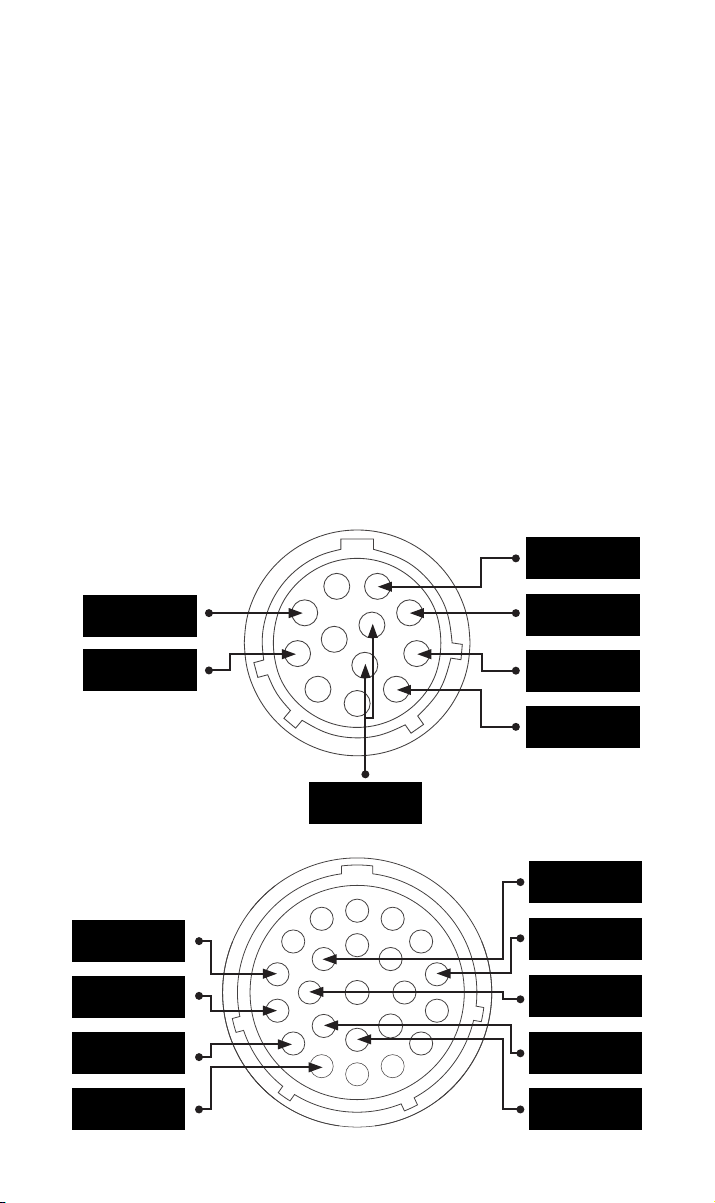
5.1 Disimballaggio e collocazione
NSS 333 sfrutta componenti di alta qualità, tra cui un notevole trasformatore di potenza e
una struttura in alluminio ad elevata resistenza. Per questo motivo NSS 333 arriva al peso
di 11 kg, quindi occorre prestare attenzione quando lo si solleva o lo si sposta, nonché
assicurarsi che la supercie su cui si prevede di posizionarlo sia stabile e in grado di
sostenere il suo peso.
Per garantire prestazioni ottimali, invitiamo gli utenti a usare i prodotti Naim su
scaalature dedicate alle apparecchiature hi- – idealmente Naim Fraim o Fraim Lite – per
ridurre al minimo le vibrazioni che inuiscono sul suono. Non c’è spazio per lo scaale?
Invitiamo gli utenti a considerare di posizionare il proprio NSS 333 su un ripiano di vetro
Fraim, su un mobile idoneo, al ne di garantire un sostegno solido ma discreto.
Non impilare mai i prodotti Naim uno sopra l’altro; inoltre, se sono collocati a anco, si
prega di lasciare uno spazio tra le unità. In egual misura, i prodotti collegati non devono
essere posizionati a una distanza eccessiva: la distanza di separazione massima è quella
consentita dal cavo di collegamento in dotazione.
Per ridurre il rischio di ronzio dagli altoparlanti, si prega di non posizionare gli alimentatori
o gli amplicatori di potenza in prossimità di sorgente o componenti del preamplicatore.
5.2 Dettagli del collegamento d’ingresso
Il NSS 333 presenta numerose opzioni di collegamento esterno. Per la migliore qualità
dell’audio, consigliamo di utilizzare l’ingresso digitale BNC.
5.2a Typo 3: connettore a 12 vie
+22 V 400 mA
+5 V 200 mA
Messa a terra/
digitale
5.2b Tipo 4: connettore a 23 vie
+10 V 370 mA
+10 V 370 mA
+15 V 150 mA
+15 V 1,1 A
-22 V 400 mA
+22 V 400 mA
-22 V 400 mA
Terra
Terra
+5 V 200 mA
Terra
Terra
Terra
8
Page 82

5.3 Dettagli del collegamento d’uscita
Per una qualità dell’audio ottimale, consigliamo di utilizzare l’uscita DIN.
Se saranno utilizzate le uscite XLR o RCA, queste devono essere attivate nell’app Naim. Se
un’uscita non è in uso, questa deve essere disattivata nell’app Naim.
Se l’uscita digitale è in uso, deve essere attivata nell’app Naim. Se l’uscita digitale è in uso,
le uscite analogiche saranno disattivate.
5.4 Automazione del sistema
Quando si usa il NSS 333 con un preamplicatore e amplicatore di potenza compatibili,
come il NAC 332 e NAP 350, è possibile sincronizzare l’accensione/lo spegnimento e la
luminosità del logo in tutto il proprio impianto, collegando il NAC 332 con i cavi ottici di
automazione del sistema di serie con i NAP 350.
Il NSS 333 e NAC 332 utilizzano il sistema Zigbee per sincronizzare le loro funzioni.
Servirsi dei terminali “Remote Out” (Uscita remota) sul NAC 332 per collegare i terminali
“Remote In” (Ingresso remoto) sui NAP 350. È possibile collegare altri amplicatori di
potenza impiegando i terminali “Remote Out” (Uscita remota) del NAP 350.
Se è necessaria una distanza maggiore tra il NAC 332 e i NAP 350 rispetto alla lunghezza
consentita dal cavo di serie, è possibile impiegare un cavo ottico sostitutivo da 3,5 mm a
3,5 mm alla lunghezza desiderata. È anche possibile utilizzare cavi analogici standard con
connettori di 3,5 mm, sebbene un cavo ottico ora le prestazioni migliori.
5.5 Accensione/Spegnimento
Una volta realizzati tutti i collegamenti in ingresso e uscita, collegare il cavo di rete di serie
al NSS 333 e alla rete elettrica.
Ora è possibile accendere il NSS 333 premendo il tasto di standby. Se il NAC 332 e i
NAP 350 sono collegati mediante l’automazione del sistema, questi si accenderanno in
sequenza.
Si tratta della stessa procedura per spegnere il NSS 333: spegnere il dispositivo di
streaming NSS 333, e il NAC 332 e i NAP 350 collegati tramite l’automazione del sistema,
semplicemente premendo il tasto di standby sul pannello anteriore, che metterà il
NSS333, NAC 332 e NAP 350 in standby. Evitare di utilizzare un interruttore su presa
elettrica per spegnere il proprio amplicatore.
5.6 Impostazione energetica standby
Il NSC 333 ha quattro livelli di potenza: standby, standby di rete, standby di rete con un
requisito di potenza aggiuntiva e acceso per il normale utilizzo.
La modalità “Standby” ha un consumo energetico complessivo inferiore a 0,5 W. Il NSS 333
può essere attivato premendo il tasto di standby oppure con il comando a distanza.
La modalità di “Network standby” (Standby di rete) è <2 W. La rete deve essere collegata
(cablata o in Wi-Fi) di modo che il NSS 333 possa essere attivato mediante l’app Naim.
“Network standby with an additional power requirement” (Standby di rete con un requisito
di potenza aggiuntiva). Il NSS 333 è completamente acceso, tuttavia il display e il logo
sono spenti (deve trovarsi in questo stato per alimentare un dispositivo USB oppure agire
come server).
“Powered for normal use” (Acceso per il normale utilizzo): nel normale utilizzo, il NSS 333
assorbe circa 25 W.
Per impostazione predenita, il NSS 333 è impostato su “Auto standby” (Standby
automatico). Entra automaticamente nella modalità appropriata di standby dopo un
periodo che non supera 20 minuti d’inattività. Per una qualità dell’audio ottimale,
impostare l’intervallo di standby automatico su “Never” (Mai) nell’app Naim, di modo che il
NSS 333 sia completamente acceso.
9
Page 83

5.7 Impostazioni di luminosità del logo Naim
È possibile selezionare il livello di luminosità degli indicatori LED e del logo Naim sul
proprio NSS 333 nell’app Naim. Se si sta usando un amplicatore NAC 332 e NAP 350
Naim collegati mediante automazione del sistema, è possibile sincronizzare la luminosità
di entrambi i logo dal NSS 333.
5.8 Utilizzo dell’alimentatore NPX300
L’alimentatore NPX300 è un aggiornamento opzionale del sistema. Se si aggiunge
l’alimentatore NPX300 al NSS 333, è prima indispensabile spegnere l’intero impianto.
Rimuovere il cavo di rete dal NSS 333; non è necessario quando l’unità è alimentata dal
NPX300.
Aggiungere il NPX300 al supporto dell’attrezzatura (solitamente sotto il NAC 332).
Rimuovere i due connettori di collegamento dal pannello posteriore del NSS 333.
Collegare l’estremità senza nastro dei due cavi Burndy al NPX300. Collegare le due
estremità con nastro al NSS 333. Accertarsi che gli anelli di bloccaggio siano serrati
completamente. Cercare di predisporre i cavi di modo che siano liberamente sospesi,
nei limiti del possibile, e senza toccare i supporti o la parete. In questo modo, sarà più
semplice, se sono posati più o meno alla forma richiesta, prima di collegare ciascuna
estremità.
Collegare il cavo dell’alimentazione alla presa di alimentazione del NPX300, quindi alla
rete elettrica. Accendere nuovamente la parte restante dell’impianto.
Accendere nuovamente il NSS 333, premendo il tasto di standby.
6. Rete elettrica, messa a terra e altre informazioni
Usare solo i cavi di alimentazione e i connettori di serie con il NSS 333, oppure il cavo
di alimentazione Naim Power-Line aggiornato. Laddove siano utilizzati dei fusibili,
si raccomanda di utilizzare fusibili con un valore di 13 Amp. Non cablare resistenze
dipendenti di tensione o soppressori di rumore ai connettori di rete, in quanto
diminuiscono il valore nominale della corrente elettrica e del suono.
6.1 Messa a terra
Per evitare il rumore di alternata, la massa del segnale dell’intero impianto deve essere
collegata alla messa a terra in un solo punto. Generalmente, questa è la sorgente primaria.
Il dispositivo di streaming NSS 333 ha un interruttore Ground Lift. Impostare quest’ultimo
su “Default” (Impostazione predenita) se nessun’altra sorgente collega la terra alla massa
del segnale. Questa impostazione consente di fornire la migliore qualità del suono.
6.2 Connettori di rete termoformati
Se il connettore termoformato viene tagliato dal cavo di alimentazione (per qualsiasi
motivo), il connettore DEVE essere smaltito in modo da renderlo totalmente inservibile. Se
un connettore tagliato viene inserito in una presa elettrica, il rischio di incorrere in scariche
elettriche è considerevole.
6.3 Circuiteria elettrica e interferenza
Solitamente, un impianto hi- condivide un circuito di rete elettrica con altri
elettrodomestici, alcuni dei quali possono causare una distorsione che può manifestarsi
sottoforma di un ronzio meccanico dai trasformatori di corrente, compreso il grande
trasformatore nel NSS 333.
Il ronzio di un trasformatore non viene trasmesso attraverso gli altoparlanti e non ha
alcun eetto sulle prestazioni dell’impianto; tuttavia, una collocazione attenta del proprio
impianto Naim potrebbe ridurlo, così come potrebbe una circuiteria elettrica dedicata
a parte. Tale circuito (idealmente con una portata di 30 o 45 Amp) migliorerà inoltre
le prestazioni generali del sistema. Si consiglia di consultare un elettricista qualicato
soltanto per ottenere opportuni suggerimenti sull’installazione di un circuito di corrente
separato.
10
Page 84

6.4 Precauzioni contro i fulmini
Il proprio impianto Naim deve essere spento e completamente scollegato dalla rete
elettrica, qualora sussista il rischio di fulmini, al ne di proteggerlo da potenziali danni.
7. Ulteriori suggerimenti e consigli
Ora che si hanno a disposizione tutti gli elementi essenziali, passiamo ad alcuni altri aspetti
che si potrebbero considerare al ne di ottimizzare le prestazioni del nuovo NSS 333.
7.1 Rodaggio
I prodotti Naim sono realizzati a mano in seguito a un’attenta selezione di componenti di
alta qualità. Appena uscito dalla sua scatola, il NSS 333 presenterà un suono accattivante,
ma le sue prestazioni possono migliorare sensibilmente dal momento che tutti questi
diversi componenti si attivano e interagiscono nelle loro prime settimane di utilizzo.
Mantenendo il sistema acceso è possibile agevolare questo processo.
7.2 Pulizia del prodotto e dei collegamenti
Naim consiglia di utilizzare esclusivamente il panno per pulizia in dotazione per spolverare
delicatamente le superci del prodotto. Eventuali prodotti per la pulizia utilizzati
potrebbero contenere ingredienti dannosi per i rivestimenti e i trattamenti cosmetici delle
superci.
Le spine e le prese di collegamento devono essere sempre tenute pulite e senza tracce
di corrosione. Il modo più semplice per ottenere questo risultato è spengendo il proprio
prodotto Naim (ed eventuali apparecchiature collegate), scollegare tutti i collegamenti
dalle rispettive prese e premerli di nuovo fermamente. Detergenti per contatti o cosiddetti
“enhancer” non devono essere utilizzati, dal momento che possono lasciare dei residui che
inuiscono negativamente sul suono del proprio impianto.
7.3 Ripristino del NSS 333
Per ripristinare il NSS 333 alle impostazioni di fabbrica predenite, servirsi del
telecomando per navigare a “Home - Settings – Factory settings – Reset all settings - Yes”
(Pagina iniziale - Impostazioni - Impostazioni di fabbrica - Ripristina tutte le impostazioni Sì) sul display del pannello anteriore.
8. Assistenza
La legge sulla tutela dei consumatori varia di stato in stato. Nella maggior parte dei
territori, il rivenditore presso cui è stato acquistato il prodotto Naim deve essere il primo
punto di contatto qualora si abbiano problemi con la propria unità. Un problema può
essere causato da un guasto dell’impianto o dalla sua installazione. È quindi essenziale fare
pieno adamento sull’esperienza e le conoscenze tecniche del rivenditore.
È possibile trovare una serie di articoli di supporto per ciascun prodotto Naim online su
naimaudio.com
Qualora si continuino ad avere problemi con il prodotto Naim, si prega di contattarci
direttamente per richiedere una consulenza o aiuto, scrivendo all’indirizzo support@
naimaudio.com
9. Assistenza e aggiornamenti
Eventuali interventi di riparazione o aggiornamenti dell’hardware devono essere eseguiti
esclusivamente da un centro di assistenza autorizzato Naim oppure presso la sede
principale di Naim. Molti componenti sono personalizzati e collaudati e molto spesso non
è possibile ottenere ricambi adeguati da altre fonti. Rivolgersi al proprio rivenditore locale
Naim con eventuali richieste di assistenza o riparazione.
11
Page 85
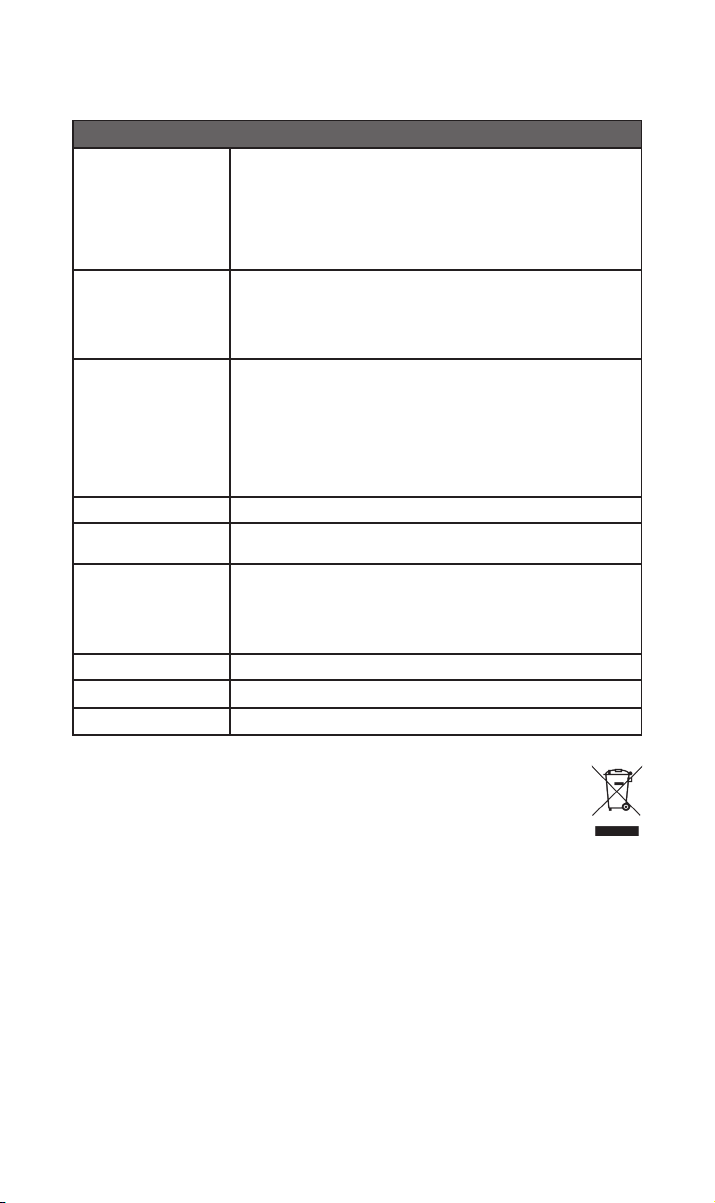
10. Speciche
Dispositivo di streaming musicale Serie 300 - NSS 333
USB:
2 x presa USB Type A (anteriore e posteriore, carica 1,6 A)
Ingressi audio
Uscita audio
Formati audio
Rete Ethernet (10/100 Mbps), Wi-Fi (802.11 b/g/n/ac)
Assorbimento elettrico
Ripping e archiviazione
Dimensioni (A x L x P) 91,5 × 432 × 317,5 mm (inclusi i piedini)
Peso 11 kg
Alimentazione elettrica 115 V o 230 V, 50/60 Hz
Digitale (S/PDIF):
2 x TOSLINK ottici (no a 24 bit/96 kHz)
1 x RCA coassiale (no a 24 bit/192 kHz, DoP 64 Fs)
1 x BNC coassiale (no a 24 bit 192 kHz, DoP 64 Fs)
Analogici:
1 x coppia XLR 1 x coppia RCA 1 x DIN a 5 pin
Digitali:
1 x BNC coassiale
WAV - no a 32 bit/384 kHz
FLAC e AIFF - no a 24 bit/384 Hz
ALAC (Apple Lossless) - no a 24 bit/384 Hz
MP3 - no a 48 kHz, 320 kbit (16 bit)
AAC - no a 48 kHz, 320 kbit (16 bit)
OGG e WMA - no a 48 kHz (16 bit) DSD - 64 e 128Fs
M4A - no a 48 kHz, 320 kbit (16 bit)
Nota: Riproduzione gapless supportata da tutti i formati.
Uso tipico: 25 W
Modalità standby di rete: <2 W Standby: <0,5 W
2 x presa USB Type A (anteriore e posteriore, carica 1,6 A)
Archivia no a 20.000 brani su un dispositivo di archiviazione collegato in
locale e serve da dispositivo di riproduzione collegato alla rete
HDD portatile esterno – max. 1 TB
Dispositivi USB – max. 128 GB
11. Riciclaggio del prodotto
I prodotti che riportano il simbolo del bidone crociato non possono essere smaltiti
come riuti domestici. Tali prodotti devono essere smaltiti presso gli opportuni
centri di riciclaggio e opportunamente trattati.
Per maggiori informazioni sul centro di smaltimento più vicino contattare le autorità locali.
Uno smaltimento e riciclaggio appropriati aiutano la conservazione e prevengono eventuali
contaminazioni delle risorse ambientali.
12
Page 86

Page 87

Spis treści
Rozdział Strona
Wstęp
1. Zawartość opakowania
2. Zapoznanie z NSS 333
3. Podstawy konguracji NSS 333
4. Odtwarzanie muzyki, radia, podcastów i nie tylko
5. Wskazówki dotyczące instalacji i użytkowania NSS 333
6. Zasilanie sieciowe, uziemienie i inne
7. Dodatkowe wskazówki i porady
8. Wsparcie
9. Serwis i modernizacja
1
1
2
3
6
7
10
11
11
11
10. Dane techniczne
11. Utylizacja zużytego produktu
12
12
Page 88
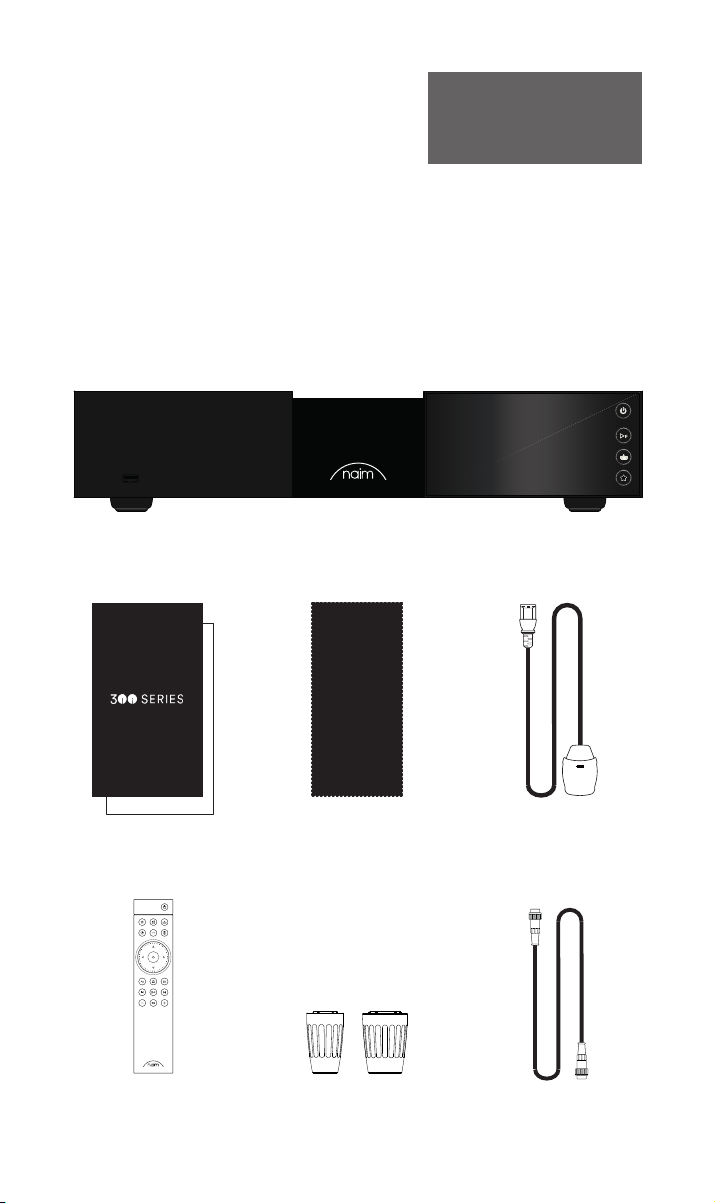
Wstęp
Uwaga Pełna treść zasad
bezpieczeństwa i ostrzeżeń zawarta
jest w instrukcji bezpieczeństwa.
Przedstawiamy nowy streamer Naim. Jak wszystkie produkty Naim Audio, NSS 333 stawia
na pierwszym miejscu brzmienie muzyczne. Aby w pełni wykorzystać jego potencjał,
należy postępować zgodnie z prostymi wytycznymi dotyczącymi instalacji i użytkowania
zawartymi w niniejszej instrukcji. Na początku przedstawimy kilka podstawowych
informacji o produkcie i konguracji, a następnie przejdziemy do bardziej szczegółowych
informacji w rozdziale 5.
1. Zawartość opakowania
1x NSS 333
1x Pakiet dokumentacji
1x Chusteczka do czyszczenia 1x Przewód zasilania
1x Pilot zdalnego sterowania 2x Zaślepki gniazd
11
1x 5-stykowe 180° DIN
Kabel połączeniowy
Page 89
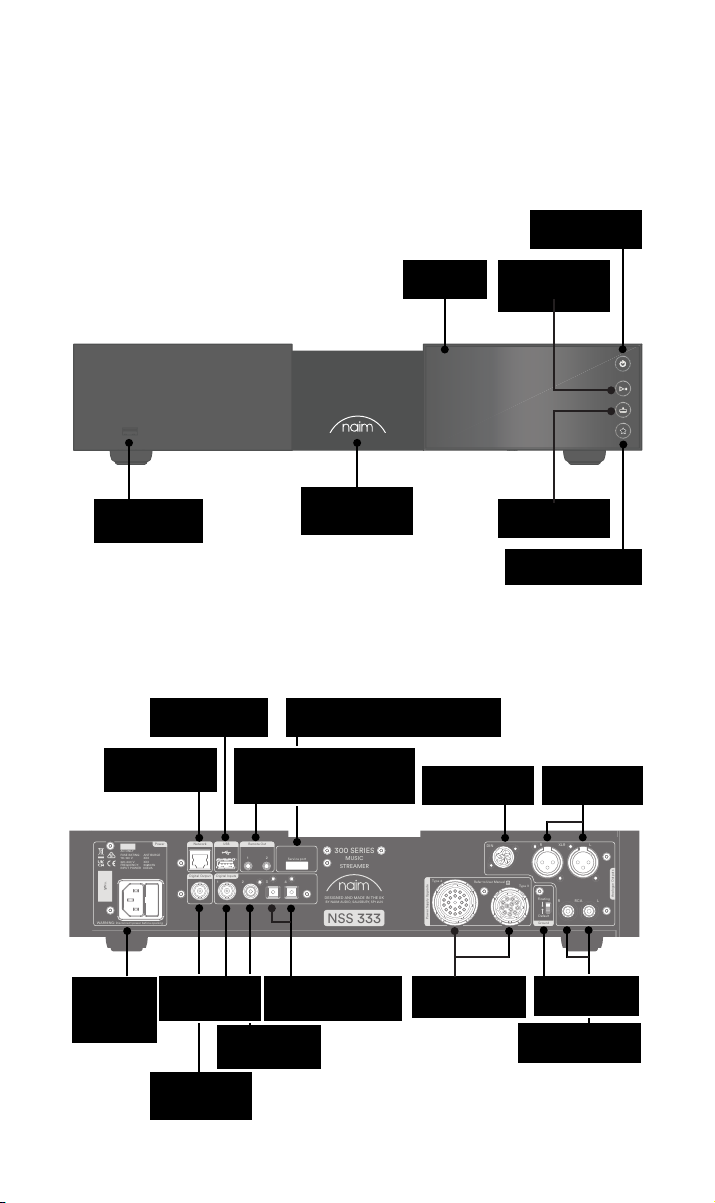
WARNING: Disconnect power before opening
AC ONLY
FUSE RATIN: ANTISURE
110-120 V: XXX
220-240 V: XXX
FREQUENCY: 50/
60Hz
INPUT POWER XXXVA
Power
300 SERIES
MUSIC
STREAMER
NSS 333
DESIGNED AND MADE IN THE UK
BY NAIM AUDIO, SALISBURY, SP1 2LN
S/No.
Network
USB
Digital Inputs
Power Supply Upgrade
Remote Out
Analogue Outputs
R LRCA
43
2
1
Refer to User Manual
Type 3
Type 4
Digital Output
DIN
Service port
Ground
Floating
Default
R
LXLR
21
2. Zapoznanie z NSS 333
Przycisk gotowości
USB (dane audio)
USB (dane audio)
Sieć przewodowa
(RJ45)
Podświetlane,
ściemniane logo
Złącze serwisowe (tylko do użytku
fabrycznego)
Wyjście Remote out
(elektryczne jack 3,5 mm i
optyczne Mini-TOSLINK)
Ekran
Wyjście DIN
Przycisk Odtwórz/
zatrzymaj
Przycisk wejść
Przycisk
zaprogramowanych
Zbalansowane
wyjście XLR
Wejście i
bezpiecznik
zasilania
sieciowego
Wejście
koncentryczne
BNC S/PDIF
Wyjście
koncentryczne
BNC S/PDIF
Wejście
koncentryczne
RCA S/PDIF
2x wejście optyczne
TOSLINK S/PDIF
Gniazda
modernizacyjne
zasilacza
Przełącznik
sygnał/masa
Niezbalansowane
wyjście RCA
22
Page 90
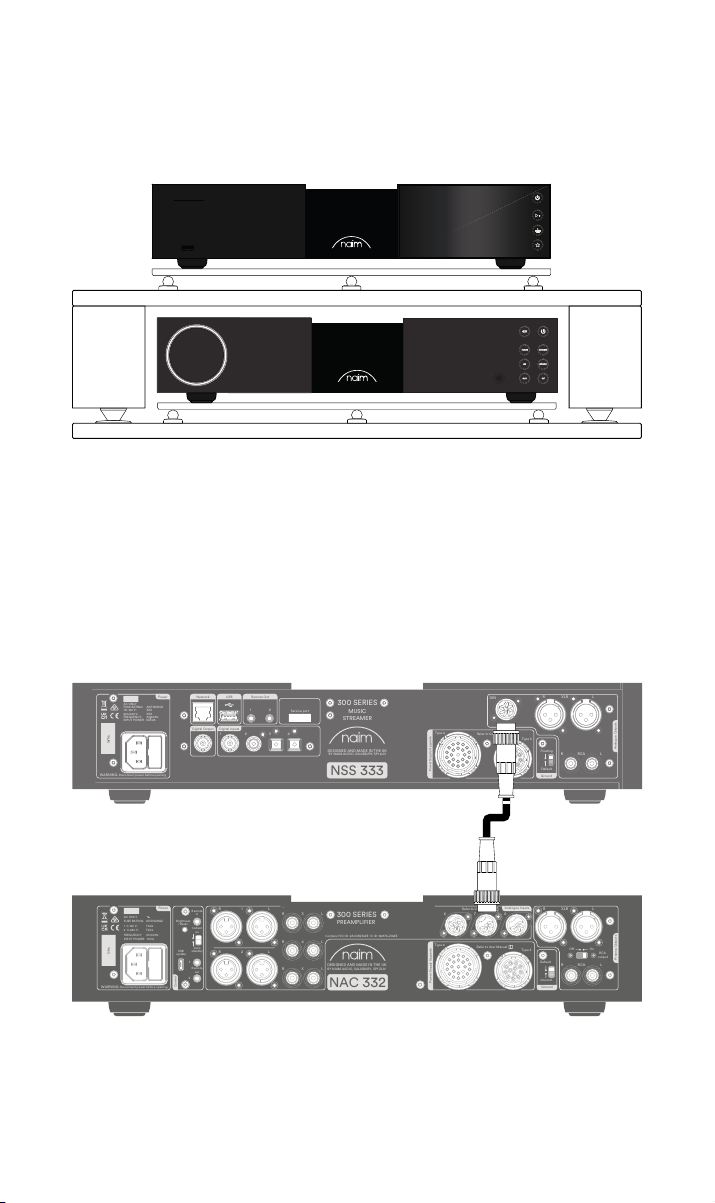
3. Podstawy konguracji NSS 333
WARNING: Disconnect power before opening
AC ONLY
FUSE RATIN: ANTISURE
110-120 V: XXX
220-240 V: XXX
FREQUENCY: 50/
60Hz
INPUT POWER XXXVA
Power
300 SERIES
MUSIC
STREAMER
NSS 333
DESIGNED AND MADE IN THE UK
BY NAIM AUDIO, SALISBURY, SP1 2LN
S/No.
Network
USB
Digital Inputs
Power Supply Upgrade
Remote Out
Analogue Outputs
R LRCA
43
2
1
Refer to User Manual
Type 3
Type 4
Digital Output
DIN
Service port
Ground
Floating
Default
R
LXLR
21
WARNING:Disconnect power before opening
AC ONLY
FUSE RATING: ANTISURGE
1 0-120 V:1 T4AL
2 0-240 V:2 T2AL
FREQUENCY: 0 60Hz5 /
I 70VANPUT POWER:
Power
300 SERIES
PREAMPLIFIER
NAC 332
DESIGNED AND MADE IN THE UK
BY NAIM AUDIO, SALISBURY, SP1 2LN
/ .oNS
Ground
Power Supply Upgrade
Preamp Outputs
AnalogueInputs
Ground
Default
R L
R
L
RCA
XLR
Refer to User Manual
Type 3
Type 4
Remote
in
Remote
out
Auto
standby
Instant
on
1
2
Control
USB
update
Brightness
Reset/
On
RCA
output
O
3
4
6
AnalogueInputs
R
R
R
L
L
L
5
8
7
1
2
R
L
R
L
Contains FCC ID: 2ACURZIGEE IC ID: 12217A-ZIGEE
Refer to User Manual
WARNING:
Disconnect power before opening
AC ONLY
FUSE RATING: ANTISURGE
1 0-120 V: T
4AL
2 0-240 V: T2AL
FREQUENCY 50/60Hz
I 70VANPUT POWER:
Power
300 SERIES
PREAMPLIFIER
NAC 332
DESIGNED AND MADE IN THE UK
BY NAIM AUDIO, SALISBURY, SP1 2LN
/ .oNS
Ground
Power Supply Upgrade
Preamp Outputs
AnalogueInputs
Ground
Default
R L
R
L
RCA
XLR
Refer to User Manual
Type 3
Type 4
Remote
in
Remote
out
Auto
standby
Instant
on
1
2
Control
USB
update
Brightness
Reset/
On
RCA
output
O
3
4
6
AnalogueInputs
R
R
R
L
L
L
5
8
7
1
2
R
L
R
L
Contains FCC ID: 2ACURZIGEE IC ID: 12217A-ZIGEE
Refer to User Manual
NSS 333 musi być podłączony do przedwzmacniacza oraz do wzmacniaczy mocy (np.
dopasowane NAC 332 NAP i NAP 350), ale zanim to zrobisz, upewnij się, że wszystkie
urządzenia są ustawione na swoich miejscach i odłączone od zasilania.
Aby zapewnić optymalne działanie, należy użyć specjalistycznego regału hi- – najlepiej
Naim Fraim – i ustawić streamer nad przedwzmacniaczem, jak pokazano na rysunku.
Potrzebne będą również głośniki z kablami, połączenie internetowe (wi- lub przewodowe)
oraz smartfon lub tablet do uruchomienia aplikacji Naim.
Pobierz bezpłatną aplikację Naim z Apple App Store lub Google Play Store.
3.1 Podłączenie NSS 333 do przedwzmacniacza NAC 332
Podłącz kabel DIN (dostarczony z NSS 333) z wyjścia DIN NSS 333 do wejścia DIN NAC
332. Koniec kabla z opaską powinien być podłączony do NSS 333.
33
Page 91
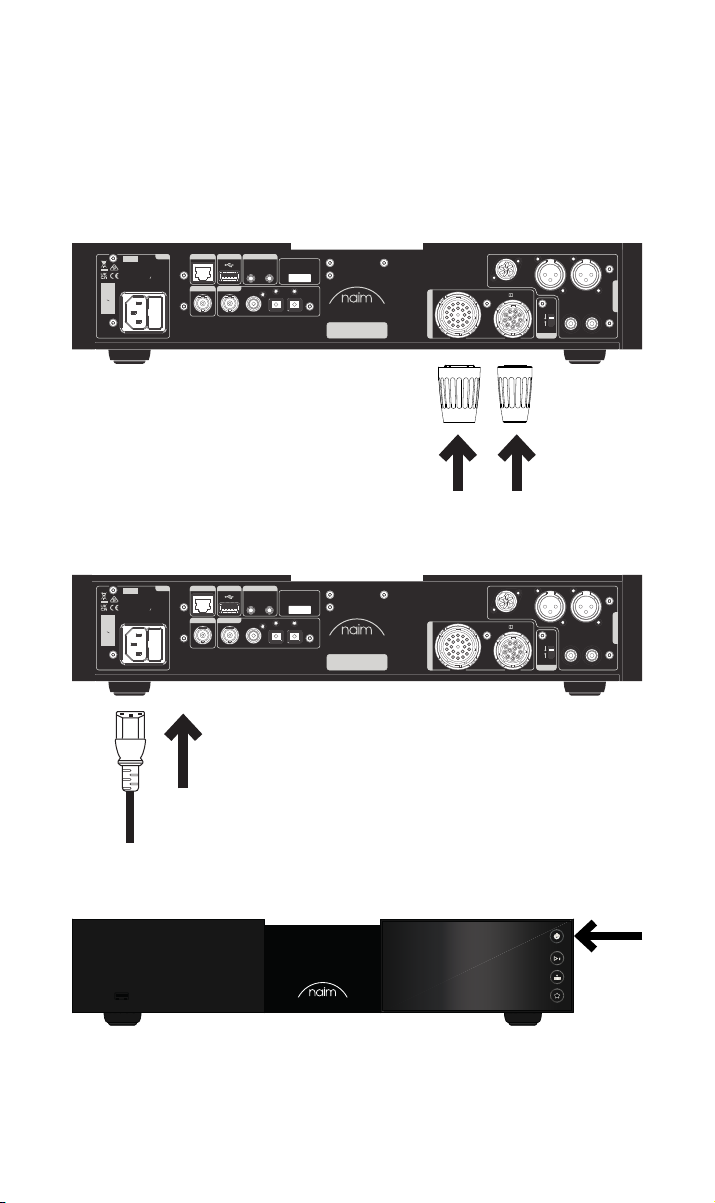
3.2 Włączanie
Po podłączeniu NSS 333 do przedwzmacniacza jest jeszcze tylko kilka prostych kroków,
które należy wykonać przed włączeniem NSS 333 i rozpoczęciem strumieniowania.
Podłącz dwie dostarczone zaślepki do gniazd modernizacyjnych zasilania NSS 333.
W przypadku korzystania z sieci przewodowej podłącz kabel między gniazdem RJ45 a
routerem lub switchem.
Power
Network
USB
AC ONLY
FUSE RATIN: ANTISURE
110-120 V: XXX
220-240 V: XXX
FREQUENCY: 50/
INPUT POWER XXXVA
S/No.
WARNING: Disconnect power before opening
Remote Out
60Hz
Digital Output
Digital Inputs
1
21
2
43
Service port
300 SERIES
MUSIC
STREAMER
DESIGNED AND MADE IN THE UK
BY NAIM AUDIO, SALISBURY, SP1 2LN
NSS 333
DIN
Type 4
Refer to User Manual
Type 3
Power Supply Upgrade
Podłącz kabel zasilający do gniazda zasilania NSS 333, a następnie do gniazdka
sieciowego.
Power
Network
USB
AC ONLY
FUSE RATIN: ANTISURE
110-120 V: XXX
220-240 V: XXX
FREQUENCY: 50/
INPUT POWER XXXVA
S/No.
WARNING: Disconnect power before opening
Remote Out
60Hz
Digital Output
Digital Inputs
1
21
2
43
Service port
300 SERIES
MUSIC
STREAMER
DESIGNED AND MADE IN THE UK
BY NAIM AUDIO, SALISBURY, SP1 2LN
NSS 333
DIN
Type 4
Refer to User Manual
Type 3
Power Supply Upgrade
LXLR
R
Floating
R LRCA
Default
Ground
LXLR
R
Floating
R LRCA
Default
Ground
Analogue Outputs
Analogue Outputs
Włącz NSS 333, naciskając włącznik w górnym prawym rogu panelu przedniego.
44
Page 92
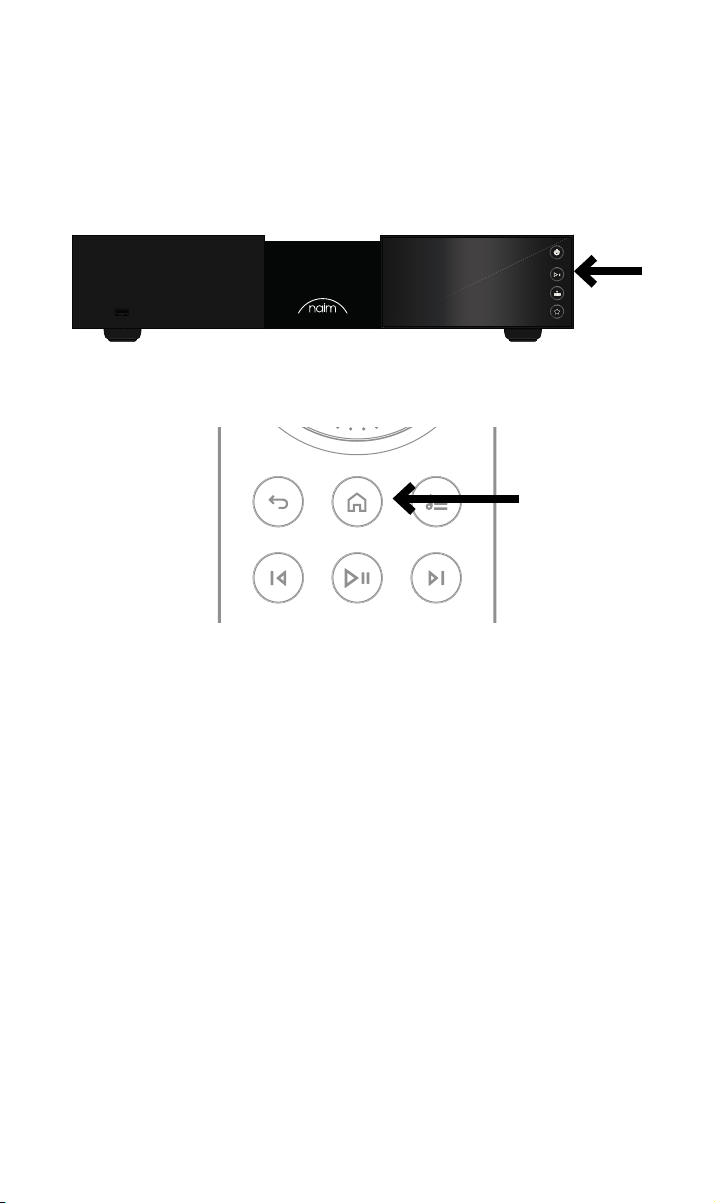
3.3 Parowanie pilota
Po włączeniu NSS 333 trzeba sparować z nim pilota zdalnego sterowania.
Włóż dołączone baterie do pilota zdalnego sterowania
Naciśnięcie dowolnego przycisku na panelu przednim spowoduje włączenie na 30 sekund
trybu parowania pilota zdalnego sterowania.
Naciśnij i przytrzymaj przez 3 sekundy przycisk z ikoną domu na pilocie.
W trybie parowania pierścień głośności na pilocie będzie wirował, a następnie
zatrzyma się, co oznacza sparowanie. Po wykonaniu tej czynności pilot jest sparowany z
urządzeniem i gotowy do użytku.
55
Page 93

4. Odtwarzanie muzyki, radia, podcastów i nie tylko
Dostęp do całej muzyki, w tym ulubionych usług strumieniowania i internetowych stacji
radiowych, odtwarzanie muzyki z serwera Naim (np. Naim Uniti Core) oraz działanie jako
źródło dla systemu multiroom. NSS 333 jest również wyposażony w wejścia cyfrowe, do
których można podłączyć źródła zewnętrzne.
Przed rozpoczęciem strumieniowania poniższych usług, upewnij się, że Twoje urządzenie
sterujące (smartfon, tablet lub komputer) jest podłączone do tej samej sieci co NSS 333.
4.1 Radio internetowe
Za pośrednictwem aplikacji Naim można korzystać ze szerokiego spektrum stacji
radiowych, w tym z wyselekcjonowanej kolekcji transmisji o wyższej jakości. Można
również wybierać i zapisywać zaprogramowane stacje, aby uzyskać szybszy dostęp do
ulubionych propozycji.
4.2 UPnP
NSS 333 może odtwarzać pliki audio przechowywane na serwerach muzycznych Naim
(takich jak Naim Uniti Core), dyskach NAS lub innych podłączonych urządzeniach UPnP.
Obsługuje bogatą gamę formatów plików o jakości do 384 kHz/32-bit. Przeglądaj i ciesz
się swoją muzyką oraz twórz listy odtwarzania za pomocą aplikacji Naim.
4.3 Spotify Connect/Spotify Hi-Fi
• Otwórz aplikację Spotify na telefonie, tablecie lub laptopie
• Rozpocznij odtwarzanie zawartości, której chcesz słuchać i wybierz opcję „Devices
Available” (Dostępne urządzenia).
• Wybierz NSS 333 i zacznij słuchać
4.4 AirPlay 2
AirPlay 2 to technologia rmy Apple zaprojektowana do sterowania domowymi systemami
audio i głośnikami w dowolnym pomieszczeniu za pomocą iPhone’a, iPada, komputera
Mac, głośnika HomePod lub Apple TV.
Umożliwia ona przesyłanie strumieniowe z wielu różnych źródeł, w tym Apple Music.
• Aby skongurować AirPlay 2, użyj aplikacji Dom na urządzeniu z systemem iOS w
wersji 11.4 lub nowszej.
Otwórz aplikację Dom i stuknij przycisk (+), aby dodać NSS 333 jako akcesorium
4.5 Chromecast
Chromecast pozwala na strumieniowe przesyłanie ulubionej muzyki i nie tylko z telefonu,
tabletu lub laptopa.
• Aby używać wbudowanych usług Chromecast do przesyłania dźwięku do NSS
333, wystarczy skongurować je za pomocą aplikacji Google Home, a następnie
przesyłać strumień z wielu dostępnych źródeł.
66
Page 94

4.6 TIDAL i TIDAL Connect
Abonenci serwisu muzycznego TIDAL mogą korzystać z niego na dwa sposoby na
NSS333.
• Przesyłać strumieniowo bezpośrednio z aplikacji TIDAL, przez TIDAL Connect
• Wystarczy otworzyć ekran „Now Playing” (Teraz odtwarzane) podczas odtwarzania
utworu
• Poszukaj ikony głośnika i wybierz NSC 333 z tej listy.
Alternatywnym sposobem jest korzystanie z TIDAL przez aplikację Naim.
• Wybierz wejście TIDAL
• Wprowadź dane logowania do TIDAL
• Przeszukuj i korzystaj z TIDAL przez aplikację Naim.
4.7 Qobuz
Świat muzyki, w tym ogromny wybór albumów o naprawdę wysokiej jakości jest dostępny
do odtwarzania strumieniowego za pośrednictwem Qobuz. Subskrybenci mogą korzystać
z usługi za pośrednictwem aplikacji Naim.
• Wybierz wejście Qobuz
• Wprowadź dane logowania do Qobuz
• Przeszukuj i korzystaj z Qobuz przez aplikację Naim.
4.8 Roon
NSS 333 jest gotowy do współpracy z Roon, pozwalając odkryć wszystko, co ten serwis do
zarządzania muzyką ma do zaoferowania.
4.9 Multiroom
NSS 333 można sparować się z innymi odtwarzaczami muzyki, głośnikami i systemami, aby
wypełnić cały dom idealnie zsynchronizowanym dźwiękiem. Istnieją cztery różne sposoby
korzystania z muzyki w systemie multiroom
• Przez aplikację Naim
Parowanie z innymi podłączonymi produktami Naim, w tym bezprzewodowymi
głośnikami Mu-so, odtwarzaczami Uniti i innymi, za pośrednictwem aplikacji Naim,
aby uzyskać najlepszą jakość doznań. Po prostu zacznij odtwarzać muzykę, którą
chcesz udostępnić i zgrupuj dowolne lub wszystkie produkty Naim, wybierając
symbol multiroom.
Możesz również przyłączyć się do zabawy, naciskając przycisk multiroom na pilocie.
• Przez Apple AirPlay 2
• Przez Chromecast
• Przez Roon.
5. Wskazówki dotyczące instalacji i użytkowania
NSS333
Wiemy, że nie możesz się doczekać, aby cieszyć się swoim nowym przedwzmacniaczem
strumieniującym NSS 333, ale obiecujemy, że będzie on brzmiał jeszcze lepiej, gdy
zastosujesz się do poniższych wskazówek, które pomogą w wykorzystaniu pełnych
możliwości wzmacniacza mocy.
77
Page 95
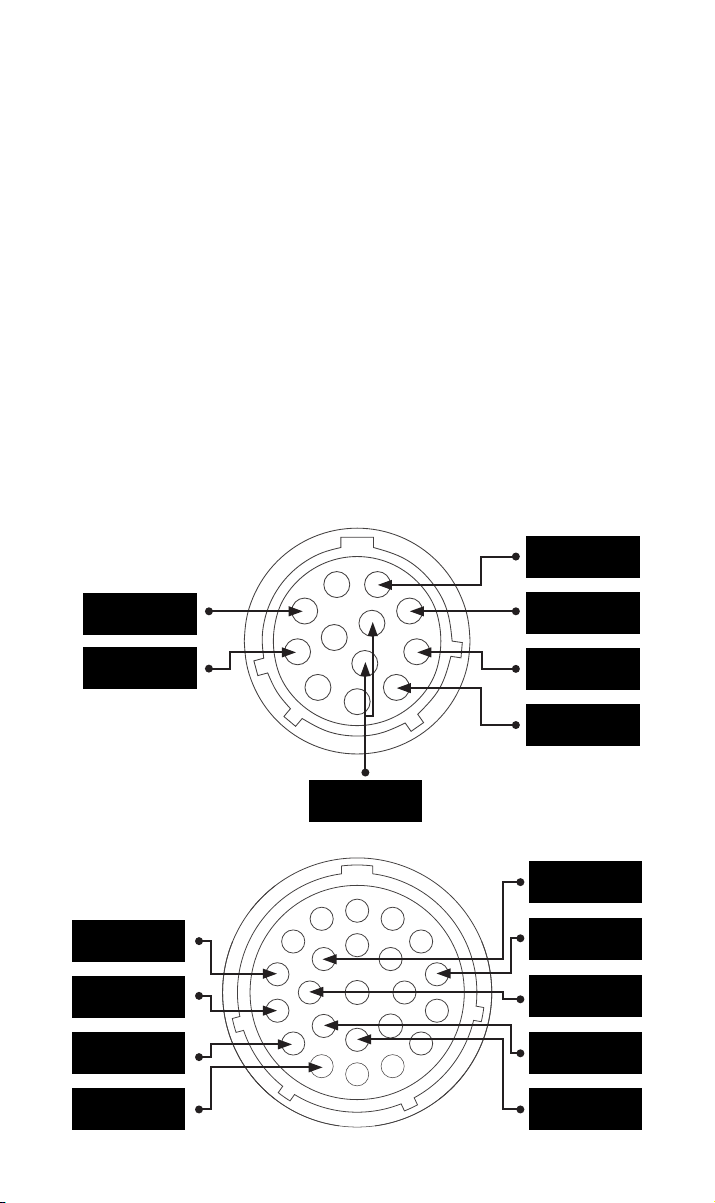
5.1 Rozpakowanie i ustawienie
Twój NSS333 składa się z elementów wysokiej jakości, takich jak potężny transformator
mocy i trwała aluminiowa obudowa. Oznacza to, że NSS333 waży 11 kg, dlatego należy
zachować ostrożność przy jego podnoszeniu lub przenoszeniu oraz upewnić się, że
powierzchnia, na której ma zostać umieszczony, jest stabilna i może utrzymać jego ciężar.
Aby zapewnić optymalne działanie ustaw urządzenia Naim na specjalistycznym regale
na sprzęt hi- – najlepiej Fraim Naim lub Fraim Lite – aby zminimalizować wibracje, które
mogą wpływać na dźwięk. Brak miejsca na regał? Warto rozważyć umieszczenie NSS333
na szklanej półce Fraim na odpowiednim meblu, aby zapewnić solidne, ale dyskretne
podparcie.
Nigdy nie stawiaj produktów Naim jeden na drugim, a jeśli umieszczasz je obok siebie,
pozostaw pewien odstęp między urządzeniami. Z drugiej strony podłączone produkty nie
powinny znajdować się zbyt daleko od siebie: maksymalna odległość między nimi jest
taka, na jaką pozwala dostarczony przewód połączeniowy.
Aby zmniejszyć ryzyko wystąpienia słyszalnego szumu z głośników, nie należy umieszczać
zasilaczy ani wzmacniaczy mocy w pobliżu komponentów źródłowych.
5.2 Szczegóły połączeń wejściowych
NSS 333 ma wiele opcji połączeń zewnętrznych. Aby uzyskać najlepszą jakość dźwięku,
zalecamy korzystanie z cyfrowych wejść BNC.
5.2a Typ 3: złącze 12-stykowe
+22 V 400 mA
+5 V 200 mA
Uziemienie
cyfrowe
5.2b Typ 4: złącze 23-stykowe
+10 V 370 mA
+10 V 370 mA
+15 V 150 mA
+15 V 1,1 A
-22 V 400 mA
+22 V 400 mA
-22 V 400 mA
Uziemienie
Uziemienie
+5 V 200 mA
Uziemienie
Uziemienie
Uziemienie
88
Page 96

5.3 Szczegóły połączeń wyjściowych
Aby uzyskać najlepszą jakość dźwięku zalecamy korzystanie wyjść DIN.
Jeśli wyjścia XLR lub RCA mają być używane, to należy je włączyć w aplikacji Naim Jeśli
wyjście nie jest używane, należy je wyłączyć w aplikacji Naim.
Jeśli wyjście cyfrowe ma być używane, należy je włączyć w aplikacji Naim. Jeśli używane
jest wyjście cyfrowe, wyjścia analogowe zostaną wyłączone.
5.4 Automatyzacja systemu
W przypadku korzystania z NSS 333 z kompatybilnym przedwzmacniaczem i
wzmacniaczem mocy – takim jak NAC 332 i NAP 350 – można zsynchronizować
włączanie/wyłączanie zasilania i jasność logo w całym systemie, łącząc NAC 332 za
pomocą dołączonego kabla optycznego automatyzacji systemu dostarczonego z NAP 350.
NSS 333 i NAC 332 wykorzystują system Zigbee do synchronizacji funkcji.
Wystarczy połączyć gniazda Remote Out NAC 332 z gniazdami Remote In obu NAP 350.
Istnieje możliwość podłączenia kolejnych wzmacniaczy mocy za pomocą gniazda Remote
Out wzmacniacza NAP 350.
Jeśli wymagana jest większa odległość między NAC 332 a NAP 350 niż pozwala na
to dostarczony kabel, można zamiennie użyć kabla optycznego 3,5 mm na 3,5 mm o
wymaganej długości. Możliwe jest również użycie standardowych kabli analogowych ze
złączami 3,5 mm, ale kabel optyczny zapewnia najlepsze działanie.
5.5 Włączanie/Wyłączanie
Po wykonaniu wszystkich połączeń wejściowych i wyjściowych, podłącz dostarczony
przewód zasilający do NSS 333 i do gniazdka elektrycznego.
Następnie można włączyć NSS 333 poprzez naciśnięcie przycisku gotowości. Jeżeli
NAC332 i NAP350 są podłączone przez system automatyzacji, włączą się jednocześnie.
Procedura wyłączania NSS 332 jest taka sama: aby wyłączyć streamer NSS 333 – oraz
NAC 332 i NAP 350 podłączone przez system automatyzacji – wystarczy nacisnąć przycisk
gotowości na panelu przednim, co spowoduje przejście NSS 333, NAC 332 i NAP 350
w tryb gotowości. Unikaj wyłączania wzmacniacza za pomocą przełącznika w gniazdku
elektrycznym.
5.6 Ustawienia stanu gotowości
NSS 333 ma cztery poziomy zasilania: czuwanie, czuwanie sieciowe, czuwanie sieciowe z
dodatkowym zapotrzebowaniem na energię oraz zasilanie do normalnego użytku.
W trybie „Standby” (Czuwanie) całkowity pobór mocy nie przekracza 0,5 W. NSS 333
może zostać wybudzony poprzez naciśnięcie przycisku gotowości lub z pilota zdalnego
sterowania.
„Network standby” (Czuwanie sieciowe) < 2 W. Sieć musi być podłączona (przewodowo
lub przez Wi-Fi), aby NSS 333 mógł zostać obudzony przez aplikację Naim App.
„Network standby with an additional power requirement” (Czuwanie sieciowe z
dodatkowym zapotrzebowaniem na energię) NSS 333 jest w pełni zasilany, ale z
wyłączonym wyświetlaczem i logo (musi być w tym stanie, aby zasilić urządzenie USB lub
działać jako serwer).
W trybie zasilania do normalnego użytku NSS 333 zużywa około 25 W.
Domyślnie, NSS 333 ma włączone ustawienie „auto standby” (Automatyczny tryb
gotowości) – automatycznie przechodzi w odpowiedni tryb gotowości po 20 minutach
bezczynności. Dla optymalnej jakości dźwięku ustaw okres automatycznego trybu
gotowości w aplikacji Naim na „Never” (Nigdy), aby NSS 333 był stale włączony.
99
Page 97

5.7 Ustawienia jasności logo Naim
Możesz wybrać poziom jasności diod LED i logo Naim na NSS 333 za pomocą aplikacji
Naim. Jeśli używasz Naim NAC 332 i wzmacniaczy mocy NAP 350 podłączonych przez
kabel automatyzacji systemu, możesz zsynchronizować jasność logo z NSS 333.
5.8 Korzystanie z zasilacza NPX300
Zasilacz NPX300 jest opcjonalną modernizacją systemu. Przed dodaniem zasilacza
NPX300 do NSS 333, należy najpierw wyłączyć cały system. Odłącz kabel sieciowy od
NSS333 – nie jest on wymagany, gdy urządzenie jest zasilane przez NPX300.
Ustaw NPX300 na regale na sprzęt (zazwyczaj pod NAC 332). Usuń dwie zaślepki gniazd z
tylnego panelu NSS 333.
Podłącz nieoznaczone taśmą końcówki obu kabli Burndy do NPX300. Podłącz
dwie oznaczone taśmą końcówki do NSS 333. Upewnij się, że wszystkie pierścienie
zabezpieczające są całkowicie dokręcone. Postaraj się tak ułożyć kable, aby zwisały jak
najluźniej i nie dotykały regału ani ściany – będzie to łatwiejsze, jeśli przed połączeniem
obu końców zostaną one uformowane do mniej więcej wymaganego kształtu.
Podłącz przewód zasilający do gniazda zasilania NPX300, a następnie do gniazdka
sieciowego. Ponownie włącz pozostałe komponenty systemu.
Włącz ponownie NSS 333, naciskając przycisk gotowości.
6. Zasilanie sieciowe, uziemienie i inne
Podłączenie musi być wykonane przy użyciu przewodu i wtyczki sieciowej dostarczonej
wraz z NSS 333 lub kabla sieciowego Naim Power-Line. Jeśli wtyczka zawiera wbudowany
bezpiecznik, jego wartość znamionowa musi wynosić 13 A. W obwodzie wtyczki sieciowej
nie należy umieszczać rezystorów nieliniowych ani reduktorów szumu. Obniżają one jakość
zasilania i dźwięku.
6.1 Uziemienie
Aby uniknąć tętnienia, uziemienie całego systemu powinno być podłączone do uziemienia
tylko w jednym punkcie. Zazwyczaj jest to główne źródło. Streamer NSS 333 ma
przełącznik uziemienia. Ustaw go w pozycji „default” (Domyślnie), jeśli żadne inne źródło
nie łączy uziemienie sieci z uziemieniem sygnału. To ustawienie zapewnia najlepszą jakość
dźwięku.
6.2 Wtyczka sieciowa wbudowana w kablu
Jeśli zintegrowana wtyczka elektryczna zostanie odcięta od przewodu sieciowego (z
dowolnego powodu), musi zostać zutylizowana, ponieważ nie będzie nadawać się do
użytku. Włożenie odciętej wtyczki do gniazdka elektrycznego grozi porażeniem prądem.
6.3 Obwody zasilania sieciowego i interferencja
System hi- zazwyczaj dzieli obwód zasilania z innymi urządzeniami domowymi, a niektóre
z nich mogą powodować zniekształcenia, objawiające się jako mechaniczne buczenie
transformatorów sieciowych, w tym dużego transformatora NSS 333.
Buczenie transformatora nie jest emitowane przez głośniki i nie ma wpływu na działanie
systemu; można jednak mu przeciwdziałać, zmieniając położenie systemu Naim lub
odseparowując obwód zasilania sieciowego. Posiadanie takiego obwodu (najlepiej o
prądzie znamionowym 30 lub 45 A) będzie miało też ogólnie pozytywny wpływ na
działanie systemu. Szczegółowych porad dotyczących wykonania oddzielnego obwodu
zasilania sieciowego może udzielić wykwalikowany elektryk.
6.4 Środki ochrony przeciwprzepięciowej
System Naim powinien być wyłączony i całkowicie odłączony od sieci zasilającej, gdy
istnieje ryzyko uderzenia pioruna, w celu ochrony przed potencjalnymi uszkodzeniami.
1010
Page 98

7. Dodatkowe wskazówki i porady
Po omówieniu najważniejszych kwestii, możemy przedstawić kilka rzeczy, które możesz
zrobić, aby zoptymalizować działanie nowego NSS 333.
7.1 Wygrzewanie
Produkty Naim są wykonywane ręcznie ze starannie dobranej gamy wysokiej jakości
komponentów. NSS 333 będzie brzmiał znakomicie po wyjęciu z pudełka, ale jego
brzmienie może się jeszcze poprawić, gdy wszystkie te różne komponenty będą zasilane
i będą współpracować w ciągu pierwszych kilku tygodni użytkowania. Utrzymywanie
systemu pod napięciem ułatwi ten proces.
7.2 Czyszczenie urządzenia i połączeń
Firma Naim zaleca używanie wyłącznie dostarczonej chusteczki do czyszczenia, aby lekko
odkurzyć wszystkie powierzchnie produktu. Środki czyszczące mogą zawierać składniki,
które mogą mieć negatywny wpływ na kosmetyczne środki powierzchniowe i powłoki.
Wtyki i gniazda połączeniowe muszą być utrzymywane w czystości i bez korozji.
Najprostszym sposobem osiągnięcia tego celu jest całkowite wyłączenie zasilania
urządzenia Naim (i wszelkich podłączonych urządzeń), odłączenie wszystkich połączeń
z gniazd i ponowne ich mocne wciśnięcie. Nie należy stosować środków do czyszczenia
styków oraz tak zwanych „ulepszaczy”, ponieważ mogą one pozostawiać osady, które
mogą pogorszyć brzmienie systemu.
7.3 Resetowanie NSS 333
Aby zresetować NSS 333 do domyślnych ustawień fabrycznych, użyj pilota zdalnego
sterowania, by przejść do „Home – Settings – Factory settings – Reset all settings – Yes”
(Ekran główny – Ustawienia – Ustawienia fabryczne – Resetuj wszystkie ustawienia – Tak)
na wyświetlaczu panelu przedniego.
8. Wsparcie
Ochrona konsumenta różni się w zależności od kraju. W większości krajów głównym
partnerem kontaktowym w przypadku problemów z urządzeniem powinien być
sprzedawca, u którego zakupiono produkt rmy Naim. Problem może wynikać z usterki w
systemie lub nieprawidłowości instalacji, co sprzedawca powinien ustalić, korzystając z
własnych umiejętności diagnostycznych.
Na stronie internetowej naimaudio.com można znaleźć wiele artykułów dotyczących
wszystkich produktów Naim.
Jeśli nadal masz problem z produktem Naim, skontaktuj się z nami bezpośrednio, aby
uzyskać pomoc i poradę, pod adresem [email protected]
9. Serwis i modernizacja
Wszelkie naprawy lub aktualizacje sprzętu powinny być wykonywane wyłącznie przez
autoryzowany punkt serwisowy rmy Naim lub w centrali rmy Naim. Wiele podzespołów
jest wykonywanych, testowanych i dopasowywanych indywidualnie i uzyskanie ich
zamienników z innych źródeł jest często niemożliwe. W przypadku pytań dotyczących
serwisu lub naprawy prosimy o kontakt z lokalnym sprzedawcą produktów Naim.
1111
Page 99
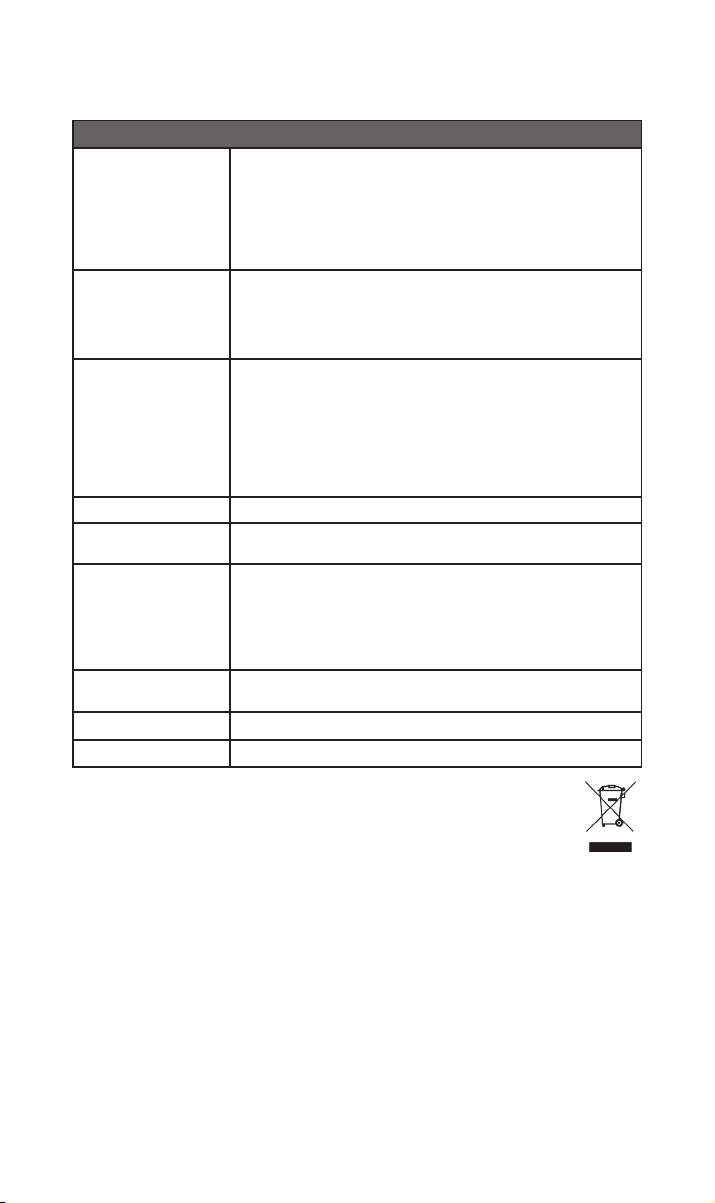
10. Dane techniczne
Streamer muzyczny serii 300 – NSS 333
USB:
2 x gniazdo USB typu A (z przodu i z tyłu – ładowanie 1,6 A)
Wejścia audio
Wyjścia audio
Formaty audio
Sieć Ethernet (10/100 Mb/s), Wi-Fi (802.11 b/g/n/ac)
Pobór mocy
Zgrywanie i
przechowywanie
Wymiary (wys. x szer.
x gł.)
Waga 11 kg
Źródło prądu 115 V lub 230 V, 50/60 Hz
Cyfrowe (S/PDIF)
2 x optyczne TOSLINK (do 24-bit/96 kHz)
1 x koncentryczne RCA (do 24-bit/192 kHz, DoP 64Fs)
1 x koncentryczne BNC (do 24-bit/192 kHz, DoP 64Fs)
Analogowe:
1 x para XLR 1 x para RCA 1 × 5-stykowe DIN
Cyfrowe:
1 x koncentryczne BNC
WAV – do 32-bit/384 kHz
FLAC i AIFF – do 24-bit/384 kHz
ALAC (Apple Lossless) – do 24-bit/384 kHz
MP3 – do 48 kHz, 320 kbit (16-bit)
AAC – do 48 kHz, 320 kbit (16-bit)
OGG i WMA – do 48 kHz (16-bit) DSD – 64 i 128 Fs
M4A – do 48 kHz, 320 kbit (16-bit)
Uwaga: Odtwarzanie bez przerw obsługiwane we wszystkich formatach.
Typowe używanie: 25 W
Tryb czuwania z siecią: < 2 W, tryb czuwania: < 0,5 W
2 x gniazdo USB typu A (z przodu i z tyłu – ładowanie 1,6 A)
Możliwość zapisania do 20 000 utworów w lokalnym urządzeniu pamięci
masowej podłączonym do portu USB i przesyłania ich do odtwarzacza
podłączonego do sieci
Zewnętrzny dysk twardy – maks. 1 TB
Pamięć USB – maks. 128 GB
91,5 × 432 × 317,5 mm (z nóżkami)
11. Utylizacja zużytego produktu
Produktów na których znajduje się logo z przekreślonym pojemnikiem na
odpady nie można wyrzucać razem z odpadami komunalnymi. Produkty te
należy utylizować w zakładach zdolnych do ich recyklingu i odpowiedniego
przetwarzania wszelkich będących odpadami produktów ubocznych.
Aby dowiedzieć się gdzie znajduje się najbliższy zakład tego typu, skontaktuj się z
lokalnymi władzami.
Odpowiedni recykling i utylizacja odpadów pozwalają na oszczędzanie zasobów i chronią
środowisko przed zanieczyszczeniem.
1212
Page 100

 Loading...