

Page 1
OPERATION AND PARTS MANUAL
®
MODEL DCA10SPX3
60 Hz GENERATOR
(KUBOTA D1403 DIESEL ENGINE)
Revision #2 (01/17/11)
To find the latest revision of this
publication, visit our website at:
www.multiquip.com
THIS MANUAL MUST ACCOMPANY THE EQUIPMENT AT ALL TIMES.
Page 2

PAGE 2 — DCA-10SPX3 A.C. GENERATOR— PARTS & OPERATION MANUAL — REV. #2 (01/17/11)
Page 3

HERE'S HOW TO GET HELP
PLEASE HAVE THE MODEL AND SERIAL NUMBER
ON-HAND WHEN CALLING
PARTS DEPARTMENT
800/427-1244 or 310/537-3700
FAX: 800/672-7877 or 310/637-3284
SERVICE DEPARTMENT
800/835-2551 or 310/537-3700
FAX: 310/638-8046
WARRANTY DEPARTMENT
800/835-2551 or 310/537-3700
FAX: 310/638-8046
MAIN
800/421-1244 or 310/537-3700
FAX: 310/537-3927
DCA-10SPX3 A.C. GENERATOR — PARTS & OPERATION MANUAL — REV. #2 (01/17/11) — PAGE 3
Page 4

TABLE OF CONTENTS
Here's How To Get Help .......................................... 3
Table Of Contents ................................................... 4
Parts Ordering Procedures ..................................... 5
Rules For Safe Operation .................................... 6-9
Towing Safety ........................................................ 10
Trailer Safety Guidelines .................................. 11-15
Trailer Wiring Diagram ........................................... 16
Operation and Safety Decals ........................... 17-18
Specifications ........................................................ 19
General Information .............................................. 20
Major Components ............................................... 21
Dimensions ...................................................... 22-23
Controls and Indicators .................................... 24-25
Output Terminals .............................................. 26-27
Installation ........................................................ 28-29
Pre-Setup ......................................................... 30-33
Load Application ................................................... 34
Start up Procedure .......................................... 35-36
Shut down Procedure ........................................... 37
Maintenance .................................................... 38-39
Generator Wiring Diagram .................................... 40
Engine Wiring Diagram ......................................... 41
Troubleshooting (Engine) ................................. 42-43
Troubleshooting (Generator) ................................ 44
Explanation Of Codes In Remarks Column .......... 46
Suggested Spare Parts ......................................... 47
DCA-10SPX3
AC Generator
Generator Assembly ........................................ 48-49
Control Panel Assembly ................................... 50-51
Output Terminal Assembly ............................... 52-53
Engine and Radiator Assembly........................ 54-55
Battery Assembly ............................................. 56-57
Muffler Assembly ............................................. 58-59
Fuel Filter Assembly ........................................ 60-61
Enclosure Assembly ......................................... 62-63
Rubber Seal Assembly..................................... 64-65
Decal Assembly ............................................... 66-67
Kubota D1403 Engine
Crankcase Assembly ....................................... 68-69
Oil Pan Assembly ............................................. 70-71
Cylinder Head Assembly .................................. 72-73
Gear Case Assembly ....................................... 74-75
Main Bearing Case Assembly .......................... 76-77
Inlet Manifold Assembly ................................... 78-79
Exhaust Manifold Assembly ............................. 80-81
Valve and Rocker Assembly ............................ 82-83
Head Cover Assembly ..................................... 84-85
Camshaft Assembly ......................................... 86-87
Piston and Camshaft Assembly ....................... 88-89
Flywheel Assembly .......................................... 90-91
Starter Assembly ............................................. 92-93
Starter Components Assembly ........................ 94-95
Injection Pump 1 Assembly .............................. 96-97
Injection Pump 1 Assembly .............................. 98-99
Fuel Camshaft Assembly ............................. 100-101
Governor Assembly ..................................... 102-103
Speed Control Plate Assembly .................... 104-105
Engine Stop Lever Assembly ....................... 106-107
Stop Solenoid Assembly .............................. 108-109
Alternator Assembly ..................................... 110-111
Alternator Components Assembly ............... 112-113
Fan Assembly ............................................... 114-115
Water Flange and Thermostat Assembly ..... 116-117
Water Pump Assembly ................................. 118-119
Radiator Assembly ....................................... 120-121
Fuel Filter Assembly .................................... 122-123
Terms and Condition of Sale-Parts ..................... 124
NOTE
Specification and part number
are subject to change without
notice.
PAGE 4 — DCA-10SPX3 A.C. GENERATOR— PARTS & OPERATION MANUAL — REV. #2 (01/17/11)
Page 5

r
PARTS ORDERING PROCEDURES
Ordering parts has never been easier!
Choose from three easy options:
January 1
Effective:
st
, 2006
Best Deal!
Order via Internet (Dealers Only):
Order parts on-line using Multiquip’s SmartEquip website!
■ View Parts Diagrams
■ Order Parts
■ Print Specification Information
Goto www.multiquip.com and click on
Order Par ts
Order via Fax (Dealers Only):
All customers are welcome to order parts via Fax.
Domestic (US) Customers dial:
1-800-6-PARTS-7 (800-672-7877)
Non-Dealer Customers:
Contact your local Multiquip Dealer for
parts or call 800-427-1244 for help in
locating a dealer near you.
to log in and save!
Order via Phone:
If you have an MQ Account, to obtain a Username
and Password, E-mail us at: parts@multiquip.
com.
To obtain an MQ Account, contact you
District Sales Manager for more information.
Use the internet and qualify for a 5% Discount
on Standard orders for all orders which include
complete part numbers.*
Fax your order in and qualify for a 2% Discount
on Standard orders for all orders which include
complete part numbers.*
Domestic (US) Dealers Call:
1-800-427-1244
International Customers should contact
their local Multiquip Representatives for
Parts Ordering information.
Note: Discounts Are Subject To Change
Note: Discounts Are Subject To Change
When ordering parts, please supply:
❒ Dealer Account Number
❒ Dealer Name and Address
❒ Shipping Address (if different than billing address)
❒ Return Fax Number
❒ Applicable Model Number
❒ Quantity, Part Number and Description of Each Part
NOTICE
All orders are treated as Standard Orders and will
ship the same day if received prior to 3PM PST.
❒ Specify Preferred Method of Shipment:
✓ UPS/Fed Ex ✓ DHL
■ Priority One ✓ Truck
■ Ground
■ Next Day
■ Second/Third Day
www.multiquip.com
WE ACCEPT ALL MAJOR CREDIT CARDS!
DCA-10SPX3 A.C. GENERATOR — PARTS & OPERATION MANUAL — REV. #2 (01/17/11) — PAGE 5
Page 6

RULES FOR SAFE OPERATION
■
CAUTION:CAUTION:
CAUTION:
CAUTION:CAUTION:
Failure to follow instructions in this manual
may lead to serious injury or even death!
This equipment is to be operated by trained
and qualified personnel only! This
equipment is for industrial use only.
The following safety guidelines should always be used when
operating the
GENERAL SAFETY
■
DO NOT operate or service this equipment before
reading this entire manual.
■
This equipment should not be operated by persons under 18
years of age.
■
NEVER operate this equipment without proper
protective clothing, shatterproof glasses,
steel-toed boots and other protective devices
required by the job.
DCA-10SPX3 portable generator:
NEVER touch the hot exhaust manifold,
muffler or cylinder. Allow these parts to
cool before servicing engine or
generator.
■
High Temperatures – Allow the engine to cool before adding
fuel or performing service and maintenance functions. Contact
hot
with
■
The engine of this generator requires an adequate free flow
of cooling air. Never operate the generator in any enclosed or
narrow area where free flow of the air is restricted. If the air
components can cause serious burns.
flow is restricted it will cause
serious damage to the
generator or engine and may
cause injury to people. The
generator engine gives off
DEADLY carbon monoxide
gas.
■
NEVER operate this equipment when not
feeling well due to fatigue, illness or
taking medicine.
■
NEVER operate this equipment under
the influence or drugs or alcohol.
■
NEVER use accessories or attachments, which are not
recommended by MQ Power for this equipment. Damage to
the equipment and/or injury to user may result.
■
Manufacture does not assume responsibility for any accident
due to equipment modifications.
■
Whenever necessary, replace nameplate, operation and
safety decals when they become difficult read.
■
Always check the machine for loosened threads or bolts before
starting.
CAUTION:CAUTION:
CAUTION:
CAUTION:CAUTION:
■
■
Always refuel in a well-ventilated area, away
from sparks and open flames.
Always use extreme caution when working with flammable
liquids. When refueling, stop the engine and allow it to cool.
DO NOT
machine. Fire or explosion could result
from fuel vapors, or if fuel is spilled on a
hot engine.
■
explosive atmosphere or near
combustible materials. An explosion or
fire could result causing severe
harm or even death.
Topping-off to filler port is dangerous, as it tends to spill fuel.
smoke around or near the
NEVER operate the generator in an
bodily
PAGE 6 — DCA-10SPX3 A.C. GENERATOR— PARTS & OPERATION MANUAL — REV. #2 (01/17/11)
Page 7

CAUTION:CAUTION:
CAUTION:
CAUTION:CAUTION:
■
NEVER touch output terminals during operation. This is
extremely dangerous.
with the output terminals is required.
CAUTION:CAUTION:
CAUTION:
CAUTION:CAUTION:
Always stop the machine when contact
RULES FOR SAFE OPERATION
CAUTION:CAUTION:
CAUTION:
CAUTION:CAUTION:
DO NOT touch or open any of the below
mentioned components while the generator
is running. Always allow sufficient time for
the engine and generator to cool before
performing maintenance.
Radiator
1. Radiator Cap - Removing the radiator cap while the
engine is hot will result in high pressurized, boiling water
to gush out of the radiator, therefore causing severe
scalding to any persons in the general area of the
generator.
■
Backfeed to a utility system can cause electrocution
and/or property damage. Do not connect to any
building's electrical system except through an approved
device or after building main switch is opened.
CAUTION:CAUTION:
CAUTION:
CAUTION:CAUTION:
■
Never use damaged or worn cables when connecting power
tools or equipment to the generator. Make sure power
connecting cables are securely connected to the generator's
output terminals, insufficient tightening of the terminal
connections may cause damage to the generator and
electrical shock.
2. Coolant Drain Plug - Removing the coolant drain plug
3. Engine Oil Drain Plug - Removing the engine oil drain
while the engine is hot will result in hot coolant to gush
out of the coolant drain plug, therefore causing severe
scalding to any persons in the general area of the
generator.
plug while the engine is hot will result in hot oil to gush
out of the oil drain plug, therefore causing severe
scalding to any persons in the general area of the
generator.
DCA-10SPX3 A.C. GENERATOR — PARTS & OPERATION MANUAL — REV. #2 (01/17/11) — PAGE 7
Page 8

RULES FOR SAFE OPERATION
■
Battery
CAUTION:CAUTION:
CAUTION:
CAUTION:CAUTION:
■
Never over fill the battery with water above
the upper limit.
The battery has acids that can cause injury to the eyes and skin.
To avoid eye irritation, always wear safety glasses. Use well
insulated gloves when picking up the battery. Use the following
guidelines when handling the battery:
NEVER Run engine without air filter. Severe engine damage
may occur.
■
Always service air cleaner frequently to prevent carburetor
malfunction.
■
Always disconnect the battery before performing service on
the generator.
■
Always be sure the operator is familiar with proper safety
precautions and operations techniques before using generator.
■
Always store equipment properly when it is not being used.
Equipment should be stored in a clean, dry location out of the
reach of children.
■
DO NOT leave the generator running in the manual mode
unattended.
■
DO NOT allow unauthorized people to operate this
equipment.
■
Always read, understand, and follow procedures in Operator’s
Manual before attempting to operate equipment.
■
Always be sure the operator is familiar with proper safety
precautions and operations techniques before using generator.
■
Refer to the
technical questions or information.
1. DO NOT drop the battery. There is the possibility of risk
the battery may explode.
2. DO NOT expose the battery to open flames, sparks,
cigarettes etc. The battery contains combustible gases
and liquids. If these gases and liquids come in contact
with a flame or spark, an explosion could occur.
3. Always keep the battery charged. If the battery is not
charged, a buildup of combustible gas will occur.
4. Always keep battery charging and booster cables in good
working condition. Repair or replace all worn cables.
5. Always recharge the battery in an open air environment,
to avoid risk of a dangerous concentration of combustible
gases.
6. In case the battery liquid (dilute sulfuric acid) comes in
contact with
clothing or skin
, rinse skin or clothing
immediately with plenty of water.
7. In case the battery liquid (dilute sulfuric acid) comes in
Loading and Unloading (Crane)
■
Before lifting, make sure the generator's lifting hook is secure
and that there is no apparent damage to the generator itself
(loose screws, nuts and bolts). If any part is loose or damaged,
please take corrective action before lifting.
■
Always drain fuel prior to lifting.
■
Always make sure crane or lifting device has been properly
secured to the hook of guard frame on generator.
■
NEVER lift the machine while the engine is running.
■
Use adequate lifting cable (wire or rope) of sufficient strength.
■
When lifting the generator, always use the balanced centerpoint suspension hook and lift straight upwards.
■
NEVER allow any person or animal to stand underneath the
machine while lifting.
■
When loading the generator on a truck, be sure to use the
front and back frame bars as a means to secure the generator
during transport.
contact with your eyes, rinse eyes immediately with
plenty of water, then contact the nearest doctor or
hospital, and seek medical attention.
Kubota Engine Owner's Manual
for engine
PAGE 8 — DCA-10SPX3 A.C. GENERATOR— PARTS & OPERATION MANUAL — REV. #2 (01/17/11)
Page 9

RULES FOR SAFE OPERATION
Transporting
■
Always shutdown engine before transporting.
■
Tighten fuel tank cap securely.
■
Drain fuel when transporting generator over long distances
or bad roads.
■
Always tie-down the generator during transportation by
securing the generator.
■
If generator is mounted on a trailer, make sure trailer complies
with all local and state safety transportation laws. See page
10 for basic towing procedures.
Emergencies
■
Always know the location of the nearest
and
first aid kit
Also know the phone numbers of the nearest
doctor
and
. Know the location of the nearest telephone.
fire department
.
fire extinguisher
ambulance
Maintenance Safety
■
■
■
■
■
■
,
■
NEVER lubricate components or attempt service on a
running machine.
Always allow the machine a proper amount of time to cool
before servicing.
Keep the machinery in proper running condition.
Fix damage to the machine immediately and always replace
broken parts.
Dispose of hazardous waste properly. Examples of
potentially hazardous waste are used motor oil, fuel,
coolant and fuel filters.
DO NOT use plastic containers to dispose of hazardous
waste.
DO NOT pour waste, oil, coolant or fuel directly onto the
ground, down a drain or into any water source.
DCA-10SPX3 A.C. GENERATOR — PARTS & OPERATION MANUAL — REV. #2 (01/17/11) — PAGE 9
Page 10
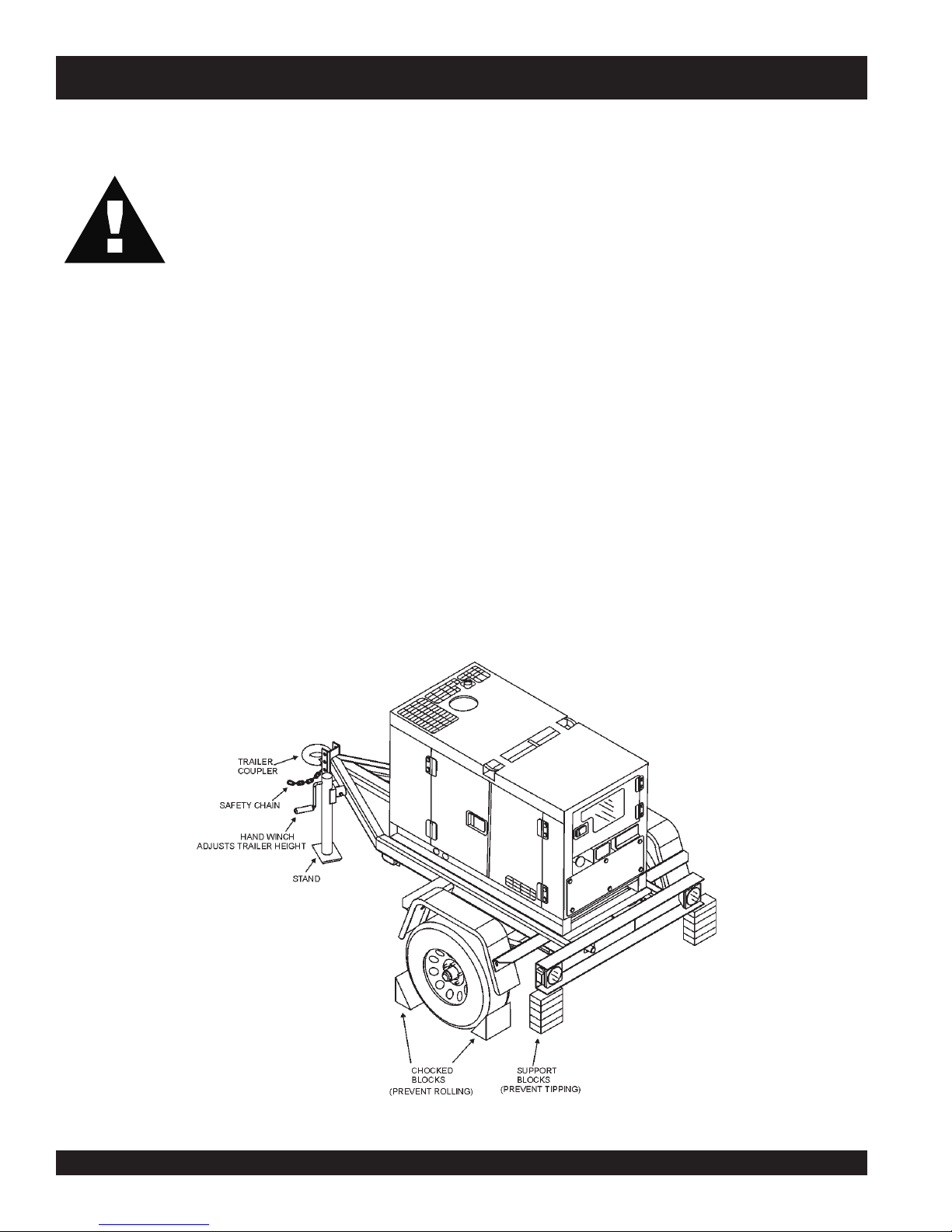
DCA-10SPX3 — TOWING
Towing Safety Precautions
CAUTION :CAUTION :
CAUTION :
CAUTION :CAUTION :
Check with your county or state safety
towing regulations department before
towing your generator. Vehicle towing
codes and regulations can vary from state
to state.
To reduce the possibility of an accident while transporting
the generator on public roads, always make sure the trailer
and the towing vehicle are in good operating condition and
both units are mechanically sound.
The following list of suggestions should be used when towing
your generator:
■
Make sure the hitch and coupling of the towing vehicle are
rated equal to, or greater than the trailer "gross vehicle weight
rating" (GVWR).
■
ALWAYS inspect the hitch and coupling for wear. NEVER
tow a trailer with defective hitches, couplings, chains etc.
■
Check the tire air pressure on both the towing vehicle and
the trailer. Also check the tire tread wear on both vehicles.
■
ALWAYS make sure the trailer is equipped with a "Safety
Chain".
■
ALWAYS attach trailer's safety chain to bumper of towing
vehicle.
■
ALWAYS make sure the vehicle and trailer directional,
backup, brake, and trailer lights are connected and are
working properly.
■
The maximum speed (unless otherwise posted) for highway
towing is 45 MPH. Recommended off-road towing is not to
exceed 10 MPH or less, depending on type of terrain.
■
Place
while parked.
■
Place
prevent
■
Use the trailer's hand winch to adjust the height of the trailer,
then insert locking pin to lock wheel stand in place, while
parked.
■
Avoid sudden stops and starts. This can cause skidding, or
jackknifing. Smooth, gradual starts and stops will improve
gas milage.
■
Avoid sharp turns to prevent rolling.
■
Remove wheel stand when transporting.
■
DO NOT transport generator with fuel in tank.
chocked blocks
support blocks
tipping
underneath wheel to prevent
underneath the trailer's bumper to
, while parked.
rolling,
PAGE 10 — DCA-10SPX3 A.C. GENERATOR— PARTS & OPERATION MANUAL — REV. #2 (01/17/11)
Figure 1. DCA-10SPX3 and Towing Trailer
Page 11

DCA-10SPX3 — TRAILER-SAFETY GUIDELINES
CAUTION:CAUTION:
CAUTION:
CAUTION:CAUTION:
ALWAYS make sure the trailer is in good
operating condition. Check the tires for
proper inflation and wear. Also check the
wheel lug nuts for proper tightness.
Explanation of Chart:
This section is intended to provide the user with trailer service and maintenance information. The service and maintenance guidelines referenced in this section apply a wide
range of trailers. Remember periodic inspection of the trailer
will ensure safe towing of the equipment and will prevent
damage to the equipment and personal injury.
It is the purpose of this section to cover the major maintenance components of the trailer. The following trailer components will be discussed in this section:
Brakes
Tires
Lug Nut Torquing
Suspension
Electrical
Brake Troubleshooting Tables
Use the following definitions with reading Table 1.
1. Fuel Cell - Provides an adequate amount of fuel for
the equipment in use. Fuel cells must be empty when
transporting equipment.
2. Braking System - System employed in stopping the
trailer. Typical braking systems are electric, surge, hydraulic, hydraulic-surge and air.
3. GVWR- Gross Vehicle Weight Rating (GVWR), is the
maximum number of pounds the trailer can carry, including the fuel cell (empty).
4. Frame Length - This measurement is from the ball
hitch to the rear bumper (reflector).
5. Frame Width - This measurement is from fender to
fender.
6. Jack Stand - Trailer support device with maximum
pound requirement from the tongue of the trailer.
7. Coupler - Type of hitch used on the trailer for towing.
8. Tire Size - Indicates the diameter of the tire in inches
(10,12,14, etc.), and the width in millimeters
(175,185,205, etc.). The tire diameter must match the
diameter of the tire rim.
9. Tire Ply - The tire ply (layers) number is rated in letters;
2-ply,4-ply,6-ply, etc.
10. Wheel Hub - The wheel hub is connected to the trailer’s
axle.
11. Tire Rim - Tires mounted on a tire rim. The tire rim must
match the size of the tire.
12. Lug Nuts - Used to secure the wheel to the wheel hub.
Always use a torque wrench to tighten down the lug
nuts. See Table 4 and Figure 5 or lug nut tightening and
sequence.
13. Axle - Indicates the maximum weight the axle can support in pounds, and the diameter of the axle expressed
in inches (see Table 3). Please not that some trailers
have a double axle. This will be shown as 2-6000 lbs.,
meaning two axles with a total weight capacity of 6000
pounds.
14. Suspension - Protects the trailer chassis from shocks
transmitted through the wheels. Types of suspension
used are leaf, Q-flex, and air ride.
15. Electrical - Electrical connectors (looms) are provided
with the trailer so the brake lights and turn signals can
be connected to the towing vehicle.
16. Application - Indicates which units can be employed
on a particular trailer.
DCA-10SPX3 A.C. GENERATOR — PARTS & OPERATION MANUAL — REV. #2 (01/17/11) — PAGE 11
Page 12
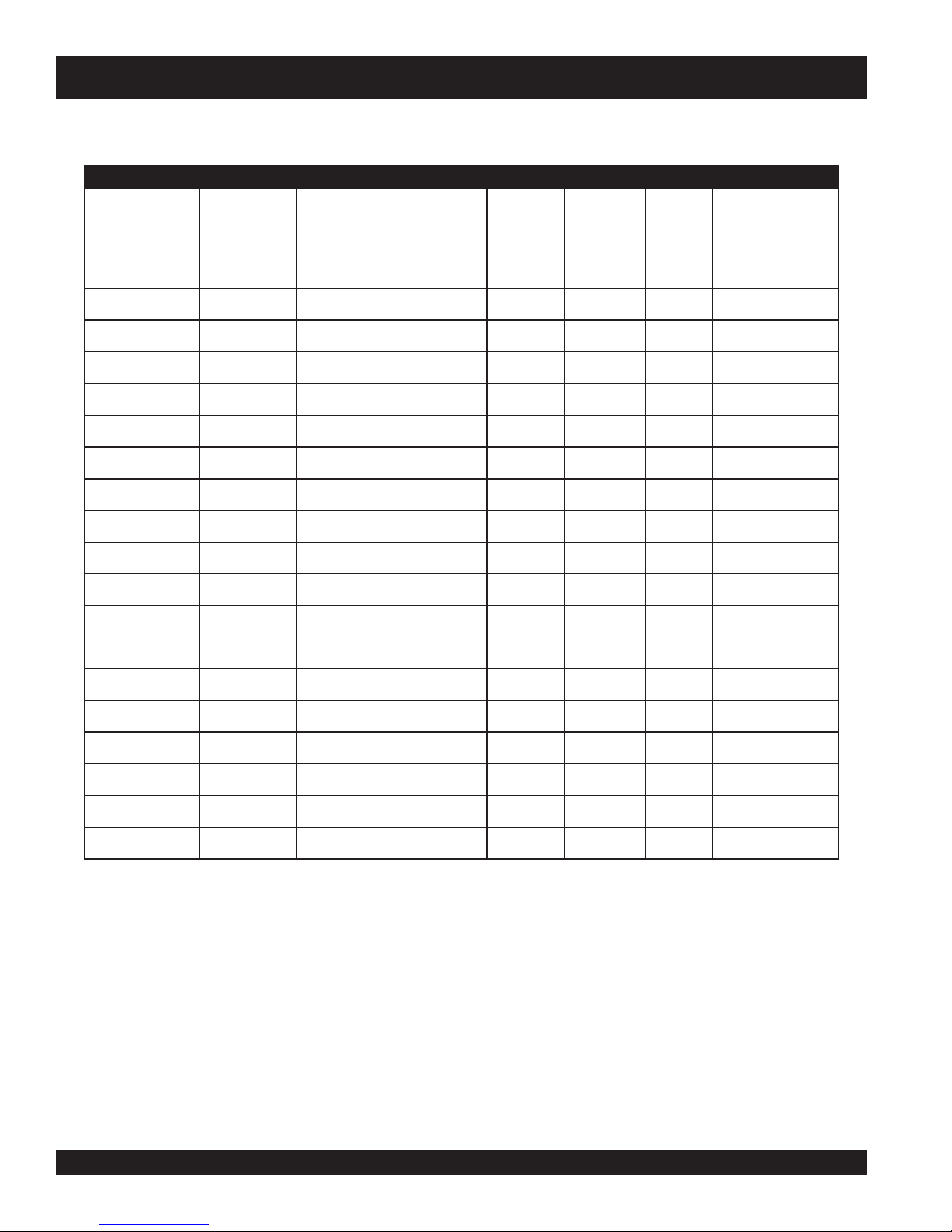
DCA-10SPX3 —TRAILER-SPECIFICATIONS
snoitacificepS.1elbaT
LEDOM NOITACILPPA LEUF
LLEC
51-01-RLRT ,51ACD,21-GLT
X01-RLRT ,51ACD,21-GLT
FX01-RLRT ,51ACD,21-GLT
W522-RLRT 01-ACDONONSBL
004-WLB 004-WLBONCIRTCELESBL0072"451TSAM/W
FX51-RLRT 51-ACDLAG14ONSBL0072"421"55.BL008
X05-RLRT 52-ACDONONSBL0072"421"55.BL008
FX05-RL
RT 52-ACDLAG14ONSBL0072"421"55.BL008
TBS52-RLRT 52-ACDONONSBL0992"021"66.BL008
W07-RLRT 07,0
X07-RLRT 07,06-,54-ACDTPOEGRUSSBL0007"831"66.BL0002
FX07-RLRT 07,
FX001-RLRT 521,001-ACDLAG051EGRUSCILUARDYHSBL0007"091"67.BL0002
521/58-RLRT ,001,58-ACD
FX051-RLRT 081,051-ACDLAG002EGRUSCIL
FX022-RLRT 022-ACDLAG052EGRUSCILUARDYHSBL00041"222"38.BL0005
FX003-RLRT
FX004-RLRT 004-ACDLAG053CIRTCELESBL00081"832"38.BL0005
FX006-RLRT 008,006-ACDLAG055RIASBL00003"483"69.BL0005
XS008-RLRT 008,006-ACDLAG055RIASBL00003"483"69.BL000
003-WLT
003-WLT
003-WLT
6-,54-ACDONEGRUSSBL0007"681"77.BL0002
06-,54-ACDLAG35EGRUSSBL0007"831"66.BL0002
521
003-ACDLAG052EGRUSCILUARDYHSBL00081"832"38.BL0005
ONONSBL0091"69"05.BL008
ONONSBL0091"69"0
LAG15ONSBL0091"69"05.BL008
LAG541CILUARDYHSBL00001"681"77.BL0002
EKARB
METSYS
UARDYHSBL06111"402"48.BL0005
RWVG EMARF
HTGNEL
0022"58"24.BL008
"421O/W
EMARF
HTDIW
5.BL008
"55
)LLAT"87(
KCAJ
DNATS
LEEHWTLITLLUF
LEEHWTLITLLUF
LEEHWTLITLLUF
LEEHWTLITLLUF
.BL008
LEEHWTLITLLUF
LEEHWTLITLLUF
LEEHWTLITLLUF
LEEHWTLITLLUF
LEEHWTLITLLUF
DAPTALF
DAPTALF
DAPTALF
DAP
TALF
DAPTALF
DAPTALF
DAPTALF
DAPTALF
DAPT
ALF
DAPTALF
5
DAPTALF
PAGE 12 — DCA-10SPX3 A.C. GENERATOR— PARTS & OPERATION MANUAL — REV. #2 (01/17/11)
Page 13

DCA-10SPX3 —TRAILER-SPECIFICATIONS
)t'noC(snoitacificepS.1elbaT
LEDOM RELPUOC SERIT SLEEHW ELXA SBUH NOISNEPSUS LACIRTCELE
W01-RLRTSSALCLLAB"2
ELBATSUJDA2
01-RLRTSSALCLLAB"2
JDA2
FX01-RLRTSSALCLLAB"2
W522-RLRTSSALCLLAB"2
WLB-RLRT
004
X05-RLRTSSALCLLAB"2CRL31-87B"05.4X"31.sbl0053
FX05-RLRTSSALCLLAB"2CRL31-87B"05.4X"31.sbl0053
W07-RLRTSSALCLLAB"2
X07-RLRTSSALCLLAB"2
FX07-RLRTSSALCLLAB"2
A2
DA"3
FX001-RLRT6/5-2ELBATSUJDA
ELBATSU
ELBATSUJDA2
ELBATSUJDA2
SSALCLLAB"2
ELBATSUJD
ELBATSUJ
ELBATSUJDA"3
ELBATSUJDA"3
EYE"3TPO
C31-571"05.4X"312X2#0022GUL5FAEL3/WMOOLERIW4
C31-571"5.4X"312X2#0022GUL5FAEL3TALFELOP4
C31-571"5.4X"312X2#0022GUL5FAEL3TALF
B31-571"5.4X312X2#0022GUL5XELFQTALFELOP4
C31-571"5.4X312X2#0022GUL5FAEL3TALFELOP4
C41-502
)4(SAIB
C41-502
)4(SAIB
C41-502
)4(SAIB
C51-502
)4(SAIB
"5X"41.sbl0053
X"41sbl0053
"5
"5X"41.sbl0053
"5.5X"41sbl0053
TALFELOP4
ELOP4
GUL5FAEL4REBBURELOP
"8/3-2
GUL5FAEL4REBBURELOP4
"8/3-2
GUL5FAEL5REBBURELOP4
"3
GUL5FAEL5REBBURELOP4
"3
GUL5FAEL
"3
GUL5FAEL5MOOLERIW4
"3
5REBBURELOP4
4
TALF
TALF
TALF
TALF
TALF
LRT6/5-2ELBATSUJDA
521/58-R
FX051-RLRTEYELLAB"3E61-057
FX022-RLRTEYE"3
FX003-RLRTEYE"3
FX004-RLRTEYE
FX006-RLRTLEEHWHT5H5.71R57/512TS
RA008-RLRTLEEHWHT5H5.71R57/512TS
"3
D51R57/522TS
EYE"3TPO
ELBATSUJDA
ELBATSUJDA
ELBATSUJDA
)4(LAIDAR
)4(SAIB
E61R58/532TS
)4(LAIDAR
E61R58/532TS
)6(LAIDAR
E61R58/532TS
)6(LAIDAR
DAR
)8(LAI
)8(LAIDAR
"6x"41sbl0006-)2(GUL6FAEL7MOOLERIW4
"7X"61sbl0006-)2(GUL8FAEL7MOOLERIW4
"7X"61sbl0007-)2(GUL
"7X"61sbl0006-)2(GUL8XELFQMOOLERIW4
"7X"61.sbl0007-)3(GUL8XELFQMOOLERIW4
"7X"61sbl00001-)3(GUL8FAEL7MOOLERIW6
"7X"61sbl00001-)3(GUL8EDIR-RIAM
8XELFQMOOLERIW4
OOLERIW6
DCA-10SPX3 A.C. GENERATOR — PARTS & OPERATION MANUAL — REV. #2 (01/17/11) — PAGE 13
Page 14

DCA-10SPX3 — TRAILER SAFETY GUIDELINES
Tires/Wheels/Lug Nuts
Tires and wheels are a very important and critical
components of the trailer. When specifying or replacing the
trailer wheels it is important the wheels, tires, and axle are
properly matched.
CAUTION:
DO NOT attempt to repair or modify a
wheel. DO NOT install in inner tube to
correct a leak through the rim. If the rim
is cracked,
the air
pressure in
the inner tube may cause pieces
of the rim to explode (break off)
with great force and cause serious
eye or bodily injury.
Tire Wear/Inflation
Tire inflation pressure is the most important factor in tire life.
Pressure should be checked cold before operation DO NOT
bleed air from tires when they are hot. Check inflation
pressure weekly during use to insure the maximum tire life
and tread wear.
Table 2 (Tire Wear Troubleshooting) will help pinpoint the
causes and solutions of tire wear problems.
Suspension
The leaf suspension springs and associated components
(Figure 2) should be visually inspected every 6,000 miles for
signs of excessive wear, elongation of bolt holes, and
loosening of fasteners. Replace all damaged parts
(suspension) immediately. Torqued suspension components
as detailed in Table 3.
CAUTION:
NOTE
ALWAYS wear safety glasses when removing
or installing force fitted parts. Failure to
comply may result in serious injury.
PAGE 14 — DCA-10SPX3 A.C. GENERATOR— PARTS & OPERATION MANUAL — REV. #2 (01/17/11)
Figure 2. Major Suspension Components
Page 15
metI ).sbL-.tF(euqroT
TLOB-U"8/353-XAM03-NIM
TLOB-U"61/706-XAM54-NIM
TLOB-U"2/106-XAM54-NIM
DCA-10SPX3 — TRAILER SAFETY GUIDELINES
stnemeriuqeReuqroTnoisnepsuS.3elbaT
SHACKLE BOLT
SPRING EYE BOLT
SHOULDER TYPE
SHACKLE BOLT
SNUG FI T ONLY. P ARTS MUST ROTATE FREELY.
LOC K ING NUTS O R COTTER P IN S ARE PRO V IDE D TO
RETAI N NUT
-BOLT ASSEMBLY.
05-XAM03-NIM
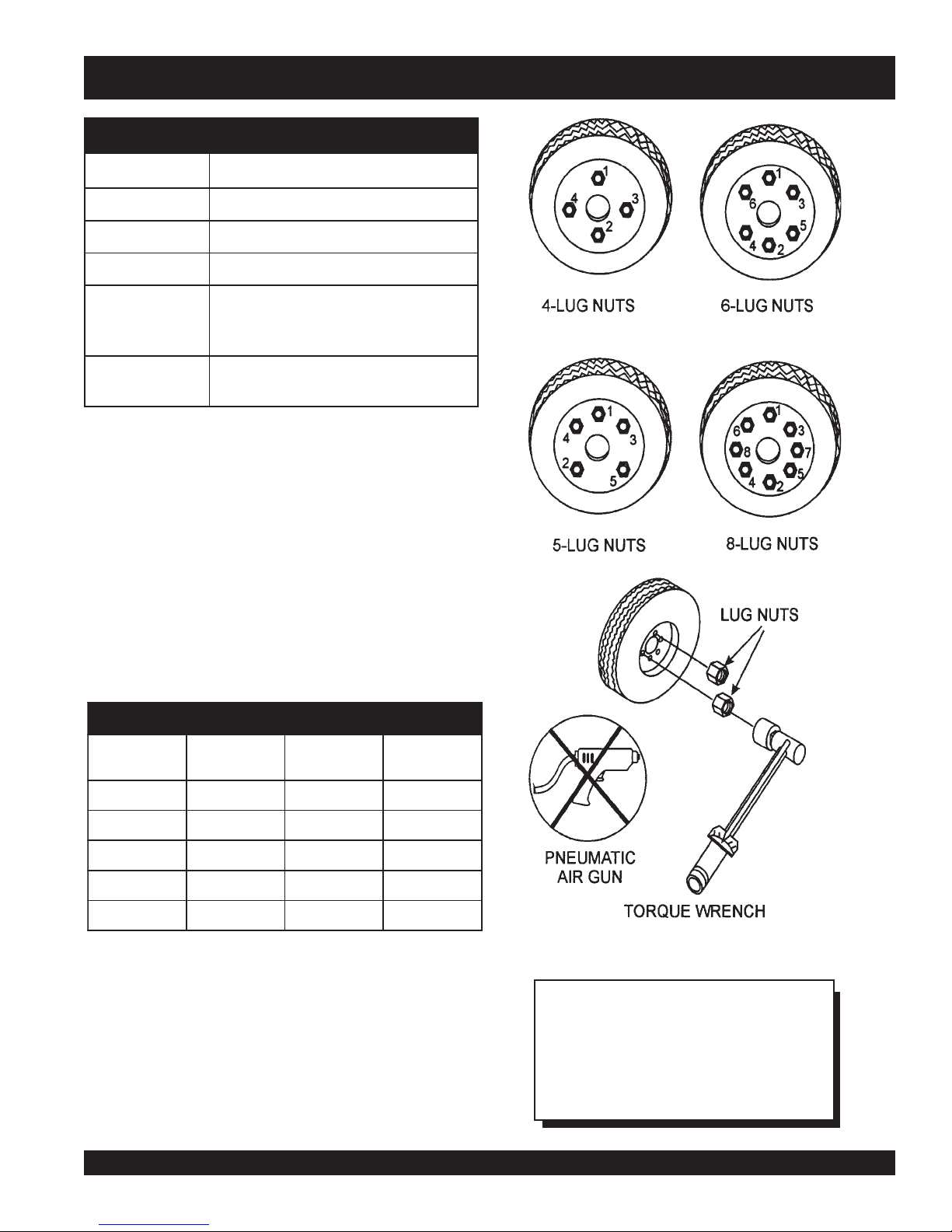
Lug Nut Torque Requirements
It is extremely important to apply and maintain proper wheel
mounting torque on the trailer. Be sure to use only the
fasteners matched to the cone angle of the wheel. Proper
procedure for attachment of the wheels is as follows:
1. Start all wheel lug nuts by hand.
2. Torque all lug nuts in sequence. See Figure 3. DO NOT
torque the wheel lug nuts all the way down. Tighten
each lug nut in 3 separate passes as defined by Table 4.
3. After first road use, retorque all lug nuts in sequence.
Check all wheel lug nuts periodically.
stnemeriuqeReuqroTeriT.4elbaT
eziSleehWssaPtsriF
SBL-TF
ssaPdnoceS
SBL-TF
ssaPdrihT
SBL-TF
"2152-0204-5356-05
"3152-0204-5356-05
"4152-0206-05021-09
"
5152-0206-05021-09
"6152-0206-05021-09
DCA-10SPX3 A.C. GENERATOR — PARTS & OPERATION MANUAL — REV. #2 (01/17/11) — PAGE 15
Figure 3. Wheel Lug Nuts Tightening Sequence
NOTE
NEVER use an pneumatic air gun to
tighten wheel lug nuts.
Page 16
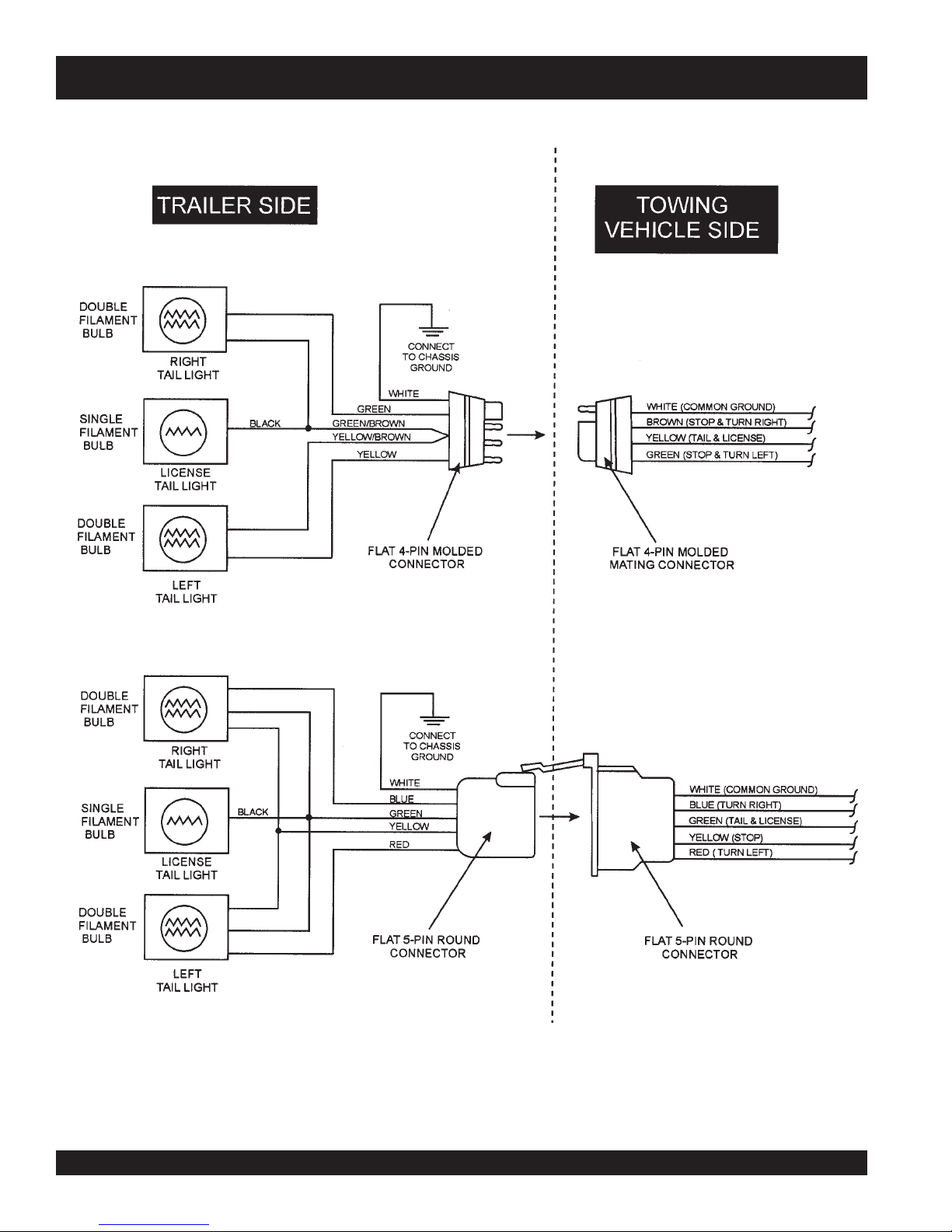
DCA-10SPX3 —TRAILER-WIRING DIAGRAM
NOTE:
LIGHTS ARE ORIENTED FROM THE DRIVER’S SEAT
PAGE 16 — DCA-10SPX3 A.C. GENERATOR— PARTS & OPERATION MANUAL — REV. #2 (01/17/11)
Page 17

DCA-10SPX3 —OPERATION AND SAFETY DECALS
Machine Safety Decals
The DCA10SPX3 generator is equipped with a number of safety decals. These decals are provided for operator safety and
maintenance information. The illustration below and on the preceding pages show these decals as they appear on the machine.
Should any of these decals become unreadable, replacements can be obtained from your dealer.
DCA-10SPX3 A.C. GENERATOR — PARTS & OPERATION MANUAL — REV. #2 (01/17/11) — PAGE 17
Page 18

Machine Safety Decals
DCA-10SPX3 —OPERATION AND SAFETY DECALS
PAGE 18 — DCA-10SPX3 A.C. GENERATOR— PARTS & OPERATION MANUAL — REV. #2 (01/17/11)
Page 19

DCA-10SPX3 — SPECIFICATIONS
snoitacificepS.5elbaT
snoitacificepSrotareneG
ledoM3XPS01ACD
epyT rotareneGsuonorhcnySepyTnoitcetorP,dleiF-gnitatoR
noitaticxE)R.
esahPesahPelgniS
ycneuqerFzH06
seriW)dednuorGlartueN(seriW-3
tuptuOdetaR.xaM
tuptuOdetaRsuoinitnoC
egatloVtuptuOesahPelgniSstloV042/021
ycneuqerFzH06
caFrewoP%001
rot
gnitaRsuounitnoC
snoitacificepSenignE
ledoM3041DATOBUK
epyTelcyC-3,lacitreV
srednilyCfo.oN3
tnemecalpsiD.ni.uc3931
.01
V.AhtiW(epyTsselhsurB
PH5.61/Wk5
mpr0081@
PH5.61/Wk01
mpr0081@
ekortSXeroB
metsySgnilooCdelooC-retaW
metsySgnitratStratScirtcelE
yticapaCretaWgnilooCsreti
yticapaCliOebuLsretil7.6/lag77.1
)ssalCIPA(tnacirbuLedarGCCevobA
yrettaBhA07-V21
leuFD-2.oNliOleu
noitpmusnoCleuF
daoLlluFtAdnuoS )teef32=ecnatsid(Abd56
isnemiD
)HxWxL(sno
thgieWyrD)gk905(.sbl3211
ni46.3X.ni51.3
.
)mm4.29Xmm08(
l3.5/lag4.1
FleseiD
.rh/sretil2.4/.rh/lag1.1daollluftA
.rh/sretil4.3/.rh/lag9.0daol4/3tA
2/.rh/lag7.0daol2/1tA
.ni63x62x65
).mc19x66x241(
.rh/sretil6.
.rh/sretil9.1/.rh/lag5.0daol2/1tA
DCA-10SPX3 A.C. GENERATOR — PARTS & OPERATION MANUAL — REV. #2 (01/17/11) — PAGE 19
Page 20

DCA-10SPX3 — GENERAL INFORMATION
DCA-10SPX3 3 FAMILIARIZATION
Generator
The MQ Power Model DCA-10SPX3 is a 10 kW
that is designed as a high quality portable (requires a trailer
for transport) power source for telecom sites, lighting
facilities, power tools, submersible pumps and other
industrial and construction machinery.
Control Panel
The control panel is provided with the following:
One GFCI 120 volt receptacle, 20 amp (single-phase)
10 kW Output Terminal (UNV)
Main Circuit Breaker 45 amps
GFCI Circuit Breaker 20 amps
AC Ammeter
AC Voltmeter
Output Voltage Adjustment
Ignition Switch
Water Temperature Gauge
Oil Pressure Gauge
Warning Indicator
Frequency Meter (Hz)
Hour Meter
Ground Terminal
generator
Open Delta Excitation System
The DCA-10SPX3 generator is equipped with the state of
the art "
system consist of an electrically independent winding wound
among stationary windings of the AC output section.
There are four Leads: A, B, C and D. During light loads, the
power to the
from the leads of B & C, when loads increase, the AVR
switches and accepts power from leads A & D. The output
of leads A & D increase proportionally with load. This has
the effect of adding the voltages of each phase to provide
better voltage response during heavy loads.
The connections of the AVR to the AC output windings are
for the sole purpose of sensing only. No power is required
from these windings.
The open-delta design provides virtually unlimited excitation
current due to its independent power supply offering
maximum motor starting capabilities. The excitation does
not have a "
demands of the required load.
Engine
The DCA-10SPX3 is powered by a 3-cylinder KUBOTA Model
D1403
performance requirement for the generator. Reference Table
5, page 19 for engine specifications.
diesel
Open-Delta
Automatic Voltage Regulator
fixed ceiling
engine. This engine is designed to meet every
" excitation system. The open delta
(AVR) is supplied
" and responds according the
In keeping with MQ Power's policy of constantly improving
its products, the specifications quoted herein are subject to
change without prior notice.
PAGE 20 — DCA-10SPX3 A.C. GENERATOR— PARTS & OPERATION MANUAL — REV. #2 (01/17/11)
Page 21

DCA-10SPX3 — MAJOR COMPONENTS
Figure 4. DCA10SPX3 Generator Major Components
DCA-10SPX3 A.C. GENERATOR — PARTS & OPERATION MANUAL — REV. #2 (01/17/11) — PAGE 21
Page 22
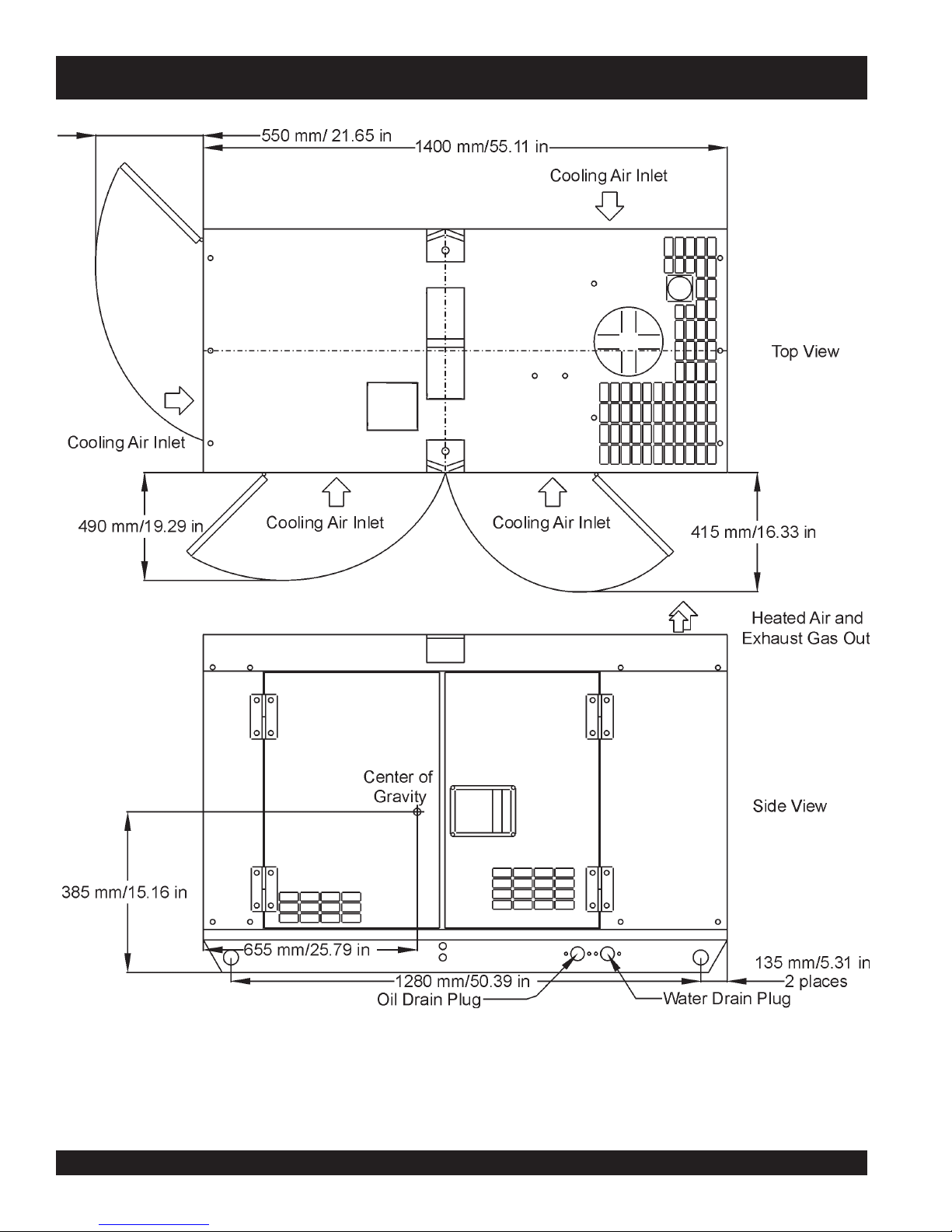
DCA-10SPX3 — DIMENSIONS (TOP & SIDE)
Figure 5a. Dimensions (Top & Side)
PAGE 22 — DCA-10SPX3 A.C. GENERATOR— PARTS & OPERATION MANUAL — REV. #2 (01/17/11)
Page 23

DCA-10SPX3 — DIMENSIONS (FRONT, REAR & BOTTOM)
DCA-10SPX3 A.C. GENERATOR — PARTS & OPERATION MANUAL — REV. #2 (01/17/11) — PAGE 23
Figure 5b. Dimensions (Front, Rear)
Page 24

DCA-10SPX3 — CONTROL PANEL, CONTROLS AND INDICATORS
PAGE 24 — DCA-10SPX3 A.C. GENERATOR— PARTS & OPERATION MANUAL — REV. #2 (01/17/11)
Figure 6. Control Panel
Page 25

DCA-10SPX3 — CONTROL PANEL, CONTROLS AND INDICATORS
The definitions below describe the controls and functions
of the DCA-10SPX3 (Figure 6):
1. Frequency Meter – Indicates the output frequency in
hertz (Hz). Normally 60 Hz ±1 Hz .
5. Ignition Switch - This switch turns on and off the
engine with a key.
6. Voltage Regulator Control – Allows manual
adjustment of the generator’s output voltage.
2. AC Ammeter – Indicates the amount of current the
load is being drawn from the generator.
7. Hour Meter - This meter monitors the number of hours
the generator has been running. Use this meter to
3. AC Voltmeter – Indicates the single phase output
schedule regular maintenance.
voltage present at the UNV terminals.
8. Oil Pressure Gauge – During normal operation this
4. Engine Warning Display Module – This module
displays the following engine failures:
A. Overheat Lamp – This lamp goes ON
o
when the coolant is over 215
F. If the
lamp goes ON during normal operation
of the generator, the emergency shutdown device will stop the engine
automatically.
B. Low Oil Pressure Lamp – During
normal operation of the generator this
lamp should remain OFF. After the oil
pressure rises after start-up, the lamp
will go OFF. If this lamp is ever lit (ON)
during normal operation of the generator, the emergency
shut-down device will stop the engine automatically.
C. Low Fuel Level Lamp – When this lamp
is ON, it is time to stop the engine and
add fuel. Remember to let the engine cool
gauge be should read in the “GREEN” zone. When
starting the generator, the oil pressure mark reads
higher, but after the engine warms up the oil pressure
should return to the green zone.
9. Water Temperature Gauge – During normal operation
this gauge be should read in the “GREEN” zone.
10. A.C. GCFI Receptacle - This output receptacle is used
as a power source.
11. Ground Terminal - This is used to ground the
generator.
12. UNV Terminal - Used to connect AC load for 120V
or 240V single phase.
13. Main Circuit Breaker – This three-pole,20 amp main
breaker is provided to protect the UNV voltage output
terminals from overload.
14. GCFI Receptacle Circuit Breaker - This will shut down
the output receptacle if there in an overload.
before adding fuel.
D. Low Battery Fluid Lamp – This lamp
goes ON when the battery fluid is low. If
this lamp goes ON during normal operation
of the generator, stop the engine and fill
the battery with distilled water to the
specified level.
E. Clogged Air Filter Lamp – This lamp
goes ON when the air filter is clogged. If
this lamp goes ON during normal
operation of the generator, stop the
engine and replace the air filter.
DCA-10SPX3 A.C. GENERATOR — PARTS & OPERATION MANUAL — REV. #2 (01/17/11) — PAGE 25
Page 26

DCA10SPX3 OUTPUT TERMINAL
FIGURE 7. Output Terminal Panel
FIGURE 8. Duplex Receptacle Detail
120 Volt Recetacle
One GFCI Duplex Nema 5-20R (120V, 20 Amp) receptacle
is provided on the output terminal. This receptacle can be
used anytime the generator is in operation. The receptacle
is controlled by the circuit breaker located on the control
panel.
The reset button is for the GFCI when the circuit is tripped.
Pressing the "Test Button" (See Figure 9) in the center of
this receptacle will check the GFCI function. The receptacle
should be tested at least once a month.
Figure 9. GFCI Test Button
PAGE 26 — DCA-10SPX3 A.C. GENERATOR— PARTS & OPERATION MANUAL — REV. #2 (01/17/11)
Page 27

DCA10SP3X OUTPUT TERMINAL
Output Terminal Panel Available Voltages
The DCA10SPX3 is a single phase generator only. It is
able to supply both 120 volt and 240 volt.
120V Hard Wire Hookup
The output terminal panel, when suppling single phase 120
volts, will provide two circuits available at 41.7 amps with
any two wires plus the ground. (See Figure 10 below.)
Maximum Amps
The DCA-10SPX3 can provide 41.7 amps at 120 or 240
volts. Do not exceed the maximum amps!
240V Hard Wire Hookup
The output terminal panel, when suppling single phase 240
volts, will provide one circuit available at 41.7 amps with
two wires plus the ground. (See Figure 11 below.)
Figure 10. Hard Wire Hook-up
for 120 Volt
Figure 11. Hard Wire Hook-up
for 240 Volt
NOTE
When using plural single phase
voltages, make sure to balance
the load on each of the single
phase legs.
DCA-10SPX3 A.C. GENERATOR — PARTS & OPERATION MANUAL — REV. #2 (01/17/11) — PAGE 27
Page 28
DCA-10SPX3 — INSTALLATION
Outdoor Installation
Install the generator in a location where it is not exposed to
rain or sunshine. Make sure the generator is on a secure
level ground so that it cannot slide or shift around. Also
install the generator in a manner so the exhaust will not be
discharged in the direction of nearby homes.
The installation site must be away from excessive moisture
and dust. All electrical equipment should be protected from
excessive moisture. Failure to do will result in deterioration
of the insulation and will result in short circuits and grounding.
Foreign materials such as dust, sand, lint and abrasive
materials cause excessive wear, to the engine parts and
the alternator parts.
CAUTION :
Pay close attention to ventilation when
operating the generator inside tunnels and
caves. The engine exhaust contains
noxious elements. Engine exhaust must
be routed to a ventilated area.
CAUTION :
Generator Grounding
To prevent electrical shock and possible damage to the
equipment, it is important to provide a good EARTH ground.
Article 250 (Grounding) of the National Electrical Code (NEC)
provides guide lines for proper grounding and specifies that
the cable ground shall be connected to the grounding system
of the building as close to the point of cable entry as
practical.
NEC articles 250-64(b) and 250-66 set the following
grounding requirements:
1. Use one of the following wire types to connect the
generator to earth ground.
a. Copper - 10 AWG (5.3 mm
b. Aluminum - 8 AWG (8.4 mm2) or larger.
An electric shock is apt to happen when
vibrators are used. Pay close attention
to handling when operating vibrators and
always use rubber boots and gloves to
protect the body from electrical shock.
2
) or larger.
2. When grounding the generator (Figure 12) connect the
ground cable between the lock washer and the nut on
Indoor Installation
Exhaust gases from diesel engines are extremely poisonous.
Whenever an engine is installed indoors the exhaust fumes
must be vented to the outside. The engine should be installed
at least two feet from any outside wall. Using an exhaust
pipe which is too long or too small can cause excessive
back pressure which will cause the engine to overheat.
Eliminate the danger of deadly carbon monoxide gas.
Remember that exhaust fumes from any diesel engine are
very poisonous if discharged in a closed room, but harmless
if allowed to mix with the outside air. If the generator is
installed indoors, you must make provisions from venting
the engine exhaust to the outside of the building.
DO NOT cover ventilation areas on the enclosure. Covering
the ventilation grids will cause the engine to overheat.
the generator and tighten the nut fully. Connect the other
end of the ground cable to earth ground.
3. NEC article 250-52(c) specifies that the earth ground
rod should be buried a minimum of 8 ft. into the ground.
NOTE
When connecting the generator to
any buildings electrical system
ALWAYS consult with a licensed
electrician.
PAGE 28 — DCA-10SPX3 A.C. GENERATOR— PARTS & OPERATION MANUAL — REV. #2 (01/17/11)
Page 29

DCA-10SPX3 — INSTALLATION
Figure 12. Typical Generator Grounding Application
CAUTION :
Always check local codes for
proper grounding codes and
laws.
DCA-10SPX3 A.C. GENERATOR — PARTS & OPERATION MANUAL — REV. #2 (01/17/11) — PAGE 29
Page 30
DCA-10SPX3 — PRE-SETUP
General Inspection Prior to Operation
The DCA-10SPX3 generator has been thoroughly inspected
and accepted prior to shipment from the factory. However,
be sure to check for damaged parts or components, or loose
nuts and bolts, which could have occurred in transit.
Extension Cable
When electric power is to provided to loads (ie. power
Circuit Breaker
To protect the generator from an overload,
main
circuit breaker is provided to protect the UNV output
from overload. In addition a 2-pole, 20 amp
breaker is provided to protect the GFCI receptacle from
overload. Make sure to switch both circuit breakers to the
"OFF" position prior to starting the engine.
tools) at a distance from the generator, extension cables
are used. Cables should be sized to allow for distance in
length and amperage so that the voltage drop between
the generator and point of use (load) is held to a minimum.
Use Table 6 (cable selection guide) as a guide for selecting
proper cable size.
a 3-pole, 50 amp,
GFCI
circuit
NOTE
ALWAYS consult with a licensed
electrician for correct extension
cord wire size.
)noitarepOesahPelgniS,zH06(noitceleSelbaC.6elbaT
sttaWnIdaoLhtgneLelbaCelbawollAmumixaM
nitnerruC
serepmA
021tA
stloV
5.20
03006.tf0001.tf006.tf573.tf052
50060021.tf005.tf003.tf002.tf521
5.70090081.tf053.tf002.tf521.tf001
0100210042.tf052.tf051.tf00
5100810063.tf051.tf001.tf56
0200420084.tf521.tf57.tf05
042tA
stloV
eriW01#eriW21#eriW41#eriW61#
1
.egatlovwolmorftlusernacegamadtnempiuqE:NOITUAC
PAGE 30 — DCA-10SPX3 A.C. GENERATOR— PARTS & OPERATION MANUAL — REV. #2 (01/17/11)
Page 31

DCA-10SPX3 — PRE-SETUP
Lubrication Oil
Fill the engine crankcase with lubricating oil through the filler
hole, but do not overfill. Make sure the generator is level.
With the dipstick inserted all the way, but without being screw
into the filler hole, verify that the oil level is maintained
between the two notches (Figure 13) on the dipstick. See
Table 7 for proper selection of engine oil.
Fuel
Fill the fuel tank with clean and fresh
fill the tank beyond capacity.
Pay attention to the fuel tank capacity when replenishing
fuel. Refer to the fuel tank capacity listed on page 19
Specification Table 5.
The fuel tank cap must be closed tightly after filling. Handle
fuel in a safety container. If the container does not have a
spout, use a funnel. Wipe up any spilled fuel immediately.
CAUTION :CAUTION :
CAUTION :
CAUTION :CAUTION :
Coolant
diesel fuel
Never fill the fuel tank while the engine is
running or in the dark. Gasoline spillage
on a hot engine can cause a fire or
explosion. If gasoline spillage occurs, wipe
up the spilled gasoline completely to
prevent fire hazards.
. DO NOT
Use only drinkable tap water. If hard water or water with
many impurities is used, the inside of the engine and radiator
Figure 13. Engine Oil Dipstick
When checking the engine oil, be sure to check if the oil is
clean and viscous. If the oil is dirty, drain the oil by removing
the oil drain plug, and refill with the specified amount of oil
as outlined in the Kubota Engine Owner's Manual.
egnaRerutarepmeTliOepyT
F°32~F°401
)C°5-~C°04(
F°5~F°32
)C°51-~C°5-(
may become coated with deposits and cooling efficiency
will be reduced. See maintenance section on page 36 and
37 on instructions to flush out radiator.
An anticorrosion additive added to the water will help prevent
deposits and corrosion in the cooling system.
liOrotoMdednemmoceR.7elbaT
03EAS
03-W01EASro02EAS
DCA-10SPX3 A.C. GENERATOR — PARTS & OPERATION MANUAL — REV. #2 (01/17/11) — PAGE 31
)°51-(C°5woleB03-W
01EASroW01EAS
Page 32

DCA-10SPX3 — PRE-SETUP
CAUTION :CAUTION :
CAUTION :
CAUTION :CAUTION :
When adding coolant or antifreeze to the
radiator, do not remove the radiator cap
until the unit has completely cooled.
Day-to-day addition of coolant is done from the reserve tank.
When adding coolant to the radiator, DO NOT remove the
radiator cap until the unit has completely cooled. See Table
8. for engine, radiator, and reserve tank coolant capacities.
Make sure the coolant level in the reserve tank is always
between the "H" and the "L" markings.
yticapaCtnalooC.8elbaT
rotaidaRdnaenignE)L9.4(.laG3.1
knaTevreseR)L1(.laG72.0
Operation in Freezing Weather
When operating in freezing weather, be certain the proper
amount of antifreeze (Table 9) has been added.
Day-to-day addition of coolant is done from the
Cleaning the Outer Radiator
The engine may overheat if the radiator fins become
overloaded with dust or debris. Periodically clean the radiator
fins with compressed air. Cleaning inside the radiator is
dangerous, so clean only with the engine turned off and the
battery disconnected.
Air Cleaner
Periodic cleaning/replacement is necessary. Inspect it in
accordance with the Kubota Engine Owner's Manual.
Fan Belt Tension
A slack fan belt may contribute to overheating, or to
insufficient charging of the battery. Inspect the fan belt for
damage and wear and adjust it in accordance with the Kubota
Engine Owner's Manual.
The fan belt tension is proper if the fan belt bends 10 to 15
mm (Figure 14) when depressed with the thumb as shown
below. Never place hands near the belts or fan while the
generator is running.
serutarepmeTgnitarepOezeerF-itnA.9elbaT
tnioPgnizeerFtnioPgnilioB
%loV
ezeerF-itnA
C°F°C°F°
0442-21-601222
0573-43-8016
NOTE
When the antifreeze is mixed with
water, the antifreeze mixing ratio must
be less than 50%.
22
CAUTION :CAUTION :
CAUTION :
CAUTION :CAUTION :
Adjusting Fan Belt
If the fan belt does not have the 10 to 15mm defection,
follow the procedure below to adjust:
Figure 14. Fan Belt Tension
Never place hands near the belts or fan
while the generator set is running.
Loosesn the alternator adjusting plate and alternator
mounding bolt.
Pivot the alternator at the mounting bolt toward the engine
left or right until the belt reflects the proper tension.
Tighten the mounting bolt and the adjusting bolt.
PAGE 32 — DCA-10SPX3 A.C. GENERATOR— PARTS & OPERATION MANUAL — REV. #2 (01/17/11)
Page 33

DCA-10SPX3 — PRE-SETUP
Battery
This unit is of negative ground. DO NOT connect in reverse.
Always maintain battery fluid level between the specified
marks. Battery life will be shortened, if the fluid level is not
properly maintained. Add only distilled water when
replenishment is necessary. DO NOT over fill.
The battery is sufficiently charged if the specific gravity of
the battery fluid is 1.28 (at 68° F). If the specific gravity
should fall to 1.245 or lower, it indicates that the battery is
dead and needs to be recharged or replaced.
Check to see whether the battery cables are loose. Poor
contact may result in poor starting or malfunctions. Always
keep the terminals firmly tightened. Coating the terminals
with a thin film of grease will help to inhibit corrosion.
Battery Cable Installation
ALWAYS be sure the battery cables (Figure 15) are properly
connected to the battery terminals as shown below. The
cable is connected to the positive terminal of the battery,
and the BLACK cable is connected to the negative terminal
of the battery.
RED
CAUTION :CAUTION :
CAUTION :
CAUTION :CAUTION :
When connecting battery do the following:
1. DO NOT connect the battery cables to the battery
terminals when the key is in the ignition and is set in
'START' mode. ALWAYS remove the key from the
ignition and the ignition switch is in the OFF position
when connecting the battery.
2. Place a small amount of grease around both battery
terminals. This will ensure a good connection and will
help prevent corrosion around the battery terminals.
CAUTION :CAUTION :
CAUTION :
CAUTION :CAUTION :
If the battery cable is connected
incorrectly, damage to the generator will
occur. Pay close attention to the polarity
of the battery when connecting the
battery.
Inadequate battery connections may
cause poor starting of the generator, and
create other malfunctions.
Figure 15. Battery Connections
Wiring
Inspect the entire generator for bad or worn electrical wiring
or connections. If any wiring or connections are exposed
(insulation missing) replace wiring immediately.
Piping and Hose Connection
Inspect all piping, oil hose, and fuel hose connections for
wear and tightness. Tighten all hose clamps and check hoses
for leaks.
If any hose (fuel or oil) lines are defective replace them
immediately.
DCA-10SPX3 A.C. GENERATOR — PARTS & OPERATION MANUAL — REV. #2 (01/17/11) — PAGE 33
Page 34

DCA-10SPX3 — LOAD APPLICATION
Single Phase, Load
An inadequate size connecting cable which cannot carry
the required load can cause a voltage drop which can burn
Always be sure to check the nameplate on the generator
out the appliance or tool and overheat the cable.
and equipment to insure the wattage, amperage and
frequency requirements are satisfactorily supplied by the
generator for operating the equipment.
Generally, the wattage listed on the nameplate of the
●
When connecting a resistance load such as an
incandescent lamp or electric heater, a capacity of up
to the generating set’s rated output (kW) can be used.
equipment is its rated output. Equipment may require 130—
150% more wattage than the rating on the nameplate, as
the wattage is influenced by the efficiency, power factor and
starting system of the equipment.
NOTE
If wattage is not given on the
equipment's name plate, approximate
wattage may be determined by
●
When connecting a fluorescent or mercury lamp, a
capacity of up to the generating set’s rated output (kW)
multiplied by 0.6 can be used.
●
When connecting an electric drill or other power tools,
pay close attention to the required starting current
capacity.
multiplying nameplate voltage by the
nameplate amperage.
WATTS = VOLTAGE x AMPERAGE
The power factor of this generator is 1.0. See Table 10.
below when connecting loads.
daoLyBrotcaFrewoP.01elbaT
daoLfOepyTrotcaFrewoP
srotomnoitcudniesahp-elgniS57.0-4.0
spmal
m,spmaltnecseroulF9.0-4.0
tnempiuqe
tnecsednacni,sretaehcirtcelE
spmalyrucre
noitacinummoc,secivedcinortcelE
0.1
0.1
CAUTION:
Motors and motor-driven equipment draw
much greater current for starting than during
operation.
When connecting ordinary power tools, a capacity of up to
the generating set’s rated output (kW) multiplied by 0.8 can
be used.
PAGE 34 — DCA-10SPX3 A.C. GENERATOR— PARTS & OPERATION MANUAL — REV. #2 (01/17/11)
Page 35

DCA-10SPX3 — GENERATOR START-UP PROCEDURE
WARNING:WARNING:
WARNING:
WARNING:WARNING:
The engine's exhaust contains harmful
emissions.
ALWAYS
ventilate the
exhaust when operating inside tunnels,
excavations or buildings. Direct exhaust
2. Connect the load to the UNV terminals as shown in
Figure 17. These terminals can be found on the front of
the generator by lifting the UNV lug cover. It may be
necessary to remove the retaining lug that secures the
cover. Make sure to tighten terminal nuts securely to
prevent load wires from slipping out.
away from nearby personnel.
Before Starting
Engine
1. Check the lubricating oil level prior to starting the engine.
Make sure the generator is level. The oil level must be
maintained between two notches on the dipstick.
2. When there is not enough lubricating oil, fill the crankcase
with high grade motor oil. Use a high quality detergent
oil classified CC or higher (See Table 7 on page 29).
3. Check the coolant level in the radiator and subtank.
Replenish with antifreeze as necessary. Always maintain
the coolant level between the FULL and LOW markings
on the coolant container. Be sure that the radiator cap is
fastened securely.
4. Check the fuel level on the fuel gauge. If fuel is low, fill
the fuel tank with clean fresh unleaded automotive diesel
3. After attaching the load wires to the AC output terminals,
secure the UNV cover by inserting the retaining screw
(Figure 18) back into the cover.
fuel. If fuel spillage occurs, completely wipe up the spilled
fuel immediately.
Figure 17. UNV Terminal Lugs (Load)
Before Starting
Generator and Control Panel
CAUTION:
NEVER start the engine with the
or
GFCI
circuit breakers in the ON
position.
1. Be sure to disconnect the electrical load and switch the
main
and
G.F.C.I.
circuit breakers (Figure 16) to the
“OFF” position prior to starting the engine.
CIRCUIT BREAKER
MAIN
OFF
Figure 16. Main and GFCI Circuit Breakers
CIRCUIT BREAKER
GFCI RECEPTACLE
OFF
main
Figure 18. UNV Lug Cover
DCA-10SPX3 A.C. GENERATOR — PARTS & OPERATION MANUAL — REV. #2 (01/17/11) — PAGE 35
Page 36

DCA-10SPX3 — GENERATOR START-UP PROCEDURE
4. Connect the negative battery cable (BLACK) to the
negative post on the battery (Figure 19).
7. The ammeter (Figure 23) will indicate zero amps with
no load applied. When a load is applied, this meter will
indicate the amount of current that the load is drawing
from the generator.
NEGATIVE
POSTIVE
BATTERY
8. The engine oil pressure gauge (Figure 24) will indicate
the oil pressure (kg/ cm2) of the engine. Under normal
Figure 19. Battery Connections
5. Close all engine enclosure doors (Figure 20).
operating conditions the oil pressure is approximately
25 psi.
40
20
0
60
75
A
Figure 23. Ammeter (No Load)
Figure 20. Engine Enclosure Doors
6. Before starting the generator, turn the key to preheat
(Figure 21) until the warning indicator light turns off.
Then turn the key to the right to 'Start'(Figure 22). Once
the engine starts, release the key.
Figure 21. Ignition Switch (Preheat)
Figure 24. Oil Pressure Gauge
9. The water temperature gauge (Figure 25) will indicate
the coolant temperature. Under normal operating
conditions the coolant temperature is between 165 and
215 degrees fahrenheit.
Figure 25. Coolant Temperature Gauge
Figure 22. Ignition Switch (Start)
PAGE 36 — DCA-10SPX3 A.C. GENERATOR— PARTS & OPERATION MANUAL — REV. #2 (01/17/11)
Page 37

DCA-10SPX3 — GENERATOR SHUT-DOWN PROCEDURE
CIRCUIT BREAKER
MAIN
GFCI RECEPTACLE
CIRCUIT BREAKER
OFF
OFF
10. The battery voltage gauge (Figure 26) will indicate the
voltage of the battery when the generator is operating.
Under normal operating conditions this voltage is
between 11.2 and 15.2 volts.
Engine Shutdown
To shutdown the generator use the following procedure:
1. Place both the MAIN and GFCI circuit breakers to the
"OFF position" (Figure 29).
Figure 29. GFCI and Main Circuit Breaker
Figure 26. Battery Voltage Gauge
11. If there are no abnormal problems shown on the MPEC
LED display, turn both the MAIN and GFCI circuit
breakers to their ON position (Figure 27).
2. Let the engine cool by running 3-5 minutes with no load
applied.
3. Turn the key to the 'STOP' position to shut down the
engine (Figure 30).
CIRCUIT BREAKER
MAIN
CIRCUIT BREAKER
GFI RECEPTACLE
(OFF)
ON
ON
Figure 27. Main and GFCI Circuit Breakers
12. Observe at the generator's ammeter (Figure 28) and
verify that it reads the anticipated amount of current
with respect to the load. The ammeter will only display a
current reading if the load is in use.
40
20
0
60
75
A
Figure 28. Ammeter (Load)
13. The generator will run until manually stopped or an
abnormal condition occurs.
Figure 30. Ignition Switch (OFF)
DCA-10SPX3 A.C. GENERATOR — PARTS & OPERATION MANUAL — REV. #2 (01/17/11) — PAGE 37
Page 38

DCA-10SPX3 — MAINTENANCE
General Inspection
Prior to each use, the generator should be cleaned and
inspected for deficiencies. Check for loose, missing or
damaged nuts, bolts or other fasteners. Also check for fuel,
oil, and coolant leaks.
Engine Side (Refer to the Engine Instruction Manual)
Air Cleaner
Every 50 hours: Remove air cleaner element and clean heavy
duty paper element with kerosene, or foam element with
liquid detergent and hot water. Wrap foam element in a cloth
and squeeze dry. For heavy duty paper element, wipe
excess kerosene with towel.
Fuel Addition
Add diesel fuel (the grade may vary according to season
and locations). Always pour through the mesh filter.
Removing Water from the Fuel Tank
After prolonged use, water and other impurities accumulate
in the bottom of the tank. Occasionally remove the drain
cock and drain the contents. During cold weather, the more
empty volume inside the tank, the easier it is for water to
condense. This can be reduced by keeping the tank full as
much as possible.
Air Removal
If air enters the fuel injection system of a diesel engine,
starting becomes impossible. After running out of fuel, or
after disassembling the fuel system, bleed the system
according to the following procedure.
To restart after running out of fuel, turn the switch to the
“ON” position for 15-30 seconds. Try again, if needed. This
unit is equipped with an automatic air bleeding system.
Service Daily
If the engine is operating in very dusty or dry grass
conditions, a clogged air cleaner will result. This can lead to
a loss of power, excessive carbon buildup in the combustion
chamber in high fuel consumption.
Check Oil Level
Check the crankcase oil level prior to each use, or when
the fuel tank is filled. Insufficient oil may cause severe
damage to the engine. Make sure the generator is level.
The oil level must be between the two notches on the dipstick
as shown in Figure 8, page 29.
Replacing Oil Filter
Detach the oil filter cartridge with a filter wrench.
Apply a film of oil to the gasket for the cartridge.
Screw in the cartridge by hand. When the gasket is in
contact with the seal surface, tighten the cartridge one
or two more times by hand.
After the oil cartridge has been replaced, the engine oil
will drop slightly. Run the engine for a while and check
for leaks before adding more oil if needed. Clean
excessive oil from engine.
Replacing Fuel Filter
Replace the fuel filter cartridge with new one every 400
hours or so.
Apply fuel oil thinly over the gasket and hand-tighten
the cartridge into position.
Vent any air.
Flushing Out Radiator and Replacing Coolant
Open both cocks located at the crankcase side and at
the lower part of the radiator and drain coolant. Open
the radiator cap while draining. Remove the overflow
tank and drain.
Check hoses for softening and kinks. Check clamps
for signs of leakage.
Flush the radiator by running clean tap water through
radiator until signs of rust and dirt are removed. DO
NOT clean radiator core with any objects, such as a
screwdriver.
Tighten both cocks and replace the overflow tank.
Replace with coolant (see page 30, Table 5 for mixture).
Close radiator cap tightly.
Cleaning the Fuel Strainer
Clean the fuel strainer if it contains dust or water. Remove
dust or water in the strainer cap and wash it in gasoline.
Securely fasten the fuel strainer cap so that fuel will not
leak. Check the fuel strainer every 200 hours of operation or
once a month.
PAGE 38 — DCA-10SPX3 A.C. GENERATOR— PARTS & OPERATION MANUAL — REV. #2 (01/17/11)
CAUTION :CAUTION :
CAUTION :
CAUTION :CAUTION :
Allow engine to cool when flushing out
radiator. Flushing the radiator while hot
will damage radiator.
Page 39

DCA-10SPX3 — MAINTENANCE
Generator Storage
For storage of the generator for over 30 days, the following
is required:
Fill the fuel tank completely.
Completely drain the oil from the crankcase and refill
with fresh oil.
Clean all external parts of the generator with a cloth.
Cover the generating set and store in a clean, dry place.
ECNANETNIAM/NOITCEPSNI
sleveLdiulFenignEkcehC X
renaelCriAkcehC X
leveLdicAyrettaBkcehC X
noitidnoCtleBnaFkcehC X
skaeLrofkcehC X
straPfogninesooLrofkcehC X
1
*retliFdnaliOenignEecalpeR
retliFriAnaelC X
ENIGNE
leveL
knaTleuFfomottoBniarD X
edistuOdnaedisnI,tinUnaelC X
2
*retliFleuFegnahC
noitcetorPtnalooCkcehCdnarotaidaRnaelC
tnemelEretliFriAecalpeR X
rotsiseRnoisorroCegnahC X
srH01
YLIAD
srH052 srH005 srH0001
X
X
X
ROTARENEG
1
*
2
*
DCA-10SPX3 A.C. GENERATOR — PARTS & OPERATION MANUAL — REV. #2 (01/17/11) — PAGE 39
spmalCdnasesoHllakcehC X
knaTleuFfoedisnInaelC X
smhoM3revOecnatsiseRnoitalusnIerusaeM
.ylnoemittsrif,sruoh001taretliffnalioenigneecalpeR
.ylnoemittsrif,sruoH052taretlifleufecalpeR
X
Page 40

DCA-10SPX3 —GENERATOR WIRING DIAGRAM
PAGE 40 — DCA-10SPX3 A.C. GENERATOR— PARTS & OPERATION MANUAL — REV. #2 (01/17/11)
Page 41

DCA-10SPX3 —ENGINE WIRING DIAGRAM
DCA-10SPX3 A.C. GENERATOR — PARTS & OPERATION MANUAL — REV. #2 (01/17/11) — PAGE 41
Page 42

DCA-10SPX3 — TROUBLESHOOTING (ENGINE)
Practically all breakdowns can be prevented by proper
handling and maintenance inspections, but in the event of a
breakdown, please take a remedial action following the
diagnosis based on the Engine Troubleshooting (Table 11)
information shown below and on the proceeding page. If the
problem cannot be remedied, consult our company's
business office or service plant.
MOTPMYS MELBORPELBISSOP NOITULOS
?leufoN .leufhsinelpeR
?metsysleufehtniriA .metsysdeelB
?metsysleufehtniretaW .knatleufmorfretawevomeR
?deggolcepipleuF .epipleufnaelC
?deggolcretlifleuF .retlifleufegnahcronaelC
leuffoytisocsivhgihylevissecxE
?erutarepmetwoltalioenignero
?rebmunenatecwolhtiwleuF .leufdeificepsehtesU
GNITOOHSELBUORTENIGNE.11ELBAT
.lioenigneroleufdeificepsehtesU
noitcejniesooloteudkaelleuF
?tungniniaterepip
.tratstonseodenignE
?gnimitnoitcejnitcerrocnI .tsujdA
?nrowtfahsmacleuF .ecalpeR
?deggolcelzzonnoitcejnI .elzzonnoitcejninaelC
?gninoitcnuflampmupnoitcejnI .ecalperroriapeR
,tfahsmac,tfahsknarcfoeruzieS
?gniraebrorenilrednilyc,notsip
?rednilycmorfkaelnoisserpmoC
?gnimitevlavreporpmI .raeggnimitecalperrotcerroC
?nrowrenildnagnirnotsiP .ecalpeR
?ecnaraelcevlavevissecxE .tsujdA
?gninoitcnuflamretratS .ecalperroriapeR
.tunnethgiT
.ecalperroriapeR
dnagulpwolg,tlobdaehrednilycnethgit,teksagdaehecalpeR
.redlohelzzon
.nurtonseodretratS
?detcennocsidgniriW .gniriwtcennoC
PAGE 42 — DCA-10SPX3 A.C. GENERATOR— PARTS & OPERATION MANUAL — REV. #2 (01/17/11)
Page 43

DCA-10SPX3 — TROUBLESHOOTING (ENGINE)
MOTPMYS MELBORPELBISSOP NOITULOS
?ytridrodeggolcretlifleuF .egnahcronaelC
?deggolcrenaelcriA .egnahcronaelC
)DEUNITNOC(GNITOOHSELBUORTENIGNE.11ELBAT
?tungniniaterepip
noitcejniesooloteudkaelleuF
?gninoitcnuflampmupnoitcejnI .ecalperroriapeR
.tunnethgiT
tonsinoituloverenignE
.htooms
?erusserp
?deggolc
eulbroetihwrehtiE
?kcuts
gninepoelzzontcerrocnI
rokcutselzzonnoitcejnI
?deggolcepipwolfrevoleuF .naelC
?gninoitcnuflamronrevoG .riapeR
?lioenigneevissecxE .leveldeificepsehtotecudeR
ronrowrenildnagnirnotsiP
.tsujdA
.ecalperroriapeR
.ecalperroriapeR
.devresbosisagtsuahxe
?gnimitnoitcejnitcerrocnI .tsujdA
?noisserpmoctneicifeD .ecnaraelcpottsujdA
?daolrevO .daolehtnesseL
?desuleufedargwoL .leufdeificepsehtesU
yargkradrokcalbrehtiE
.devresbosisagtsuahxe
.tuptuotneicifeD
?deggolcretlifleuF .egnahcronaelC
?deggolcrenaelcriA .egnahcronaelC
?gnizieseb
?noitcejnileufnevenU .pmupnoitcejniehtecalperroriapeR
?kaelnoisserpmoC
?noitcejnielzzontneicifeD .elzzonehtecalperroriapeR
?gnimitnoitcejnitcerrocnI .tsujdA
otmeesstrapgnivoms'enignE
?noitcejnielzzontneicifeD .elzzonehtecalperroriapeR
.ecalperroriapeR
dnagulpwolg,tlobdaehrednilycnethgit,teksagdaehecalpeR
.redlohelzzon
DCA-10SPX3 A.C. GENERATOR — PARTS & OPERATION MANUAL — REV. #2 (01/17/11) — PAGE 43
Page 44

DCA-10SPX3 — TROUBLESHOOTING (GENERATOR/ENGINE)
Practically all breakdowns can be prevented by proper
handling and maintenance inspections, but in the event of a
breakdown, please take a remedial action following the
information shown below and on the proceeding page. If the
problem cannot be remedied, consult our company's
business office or service plant.
diagnosis based on the Generator Troubleshooting (Table 12)
MOTPMYS MELBORPELBISSOP NOITULOS
?yrettaBdaeD .yrettaBecalpeR
.etatorton
.setator
.deepswol
seodretratsdnatratsotsliafenignE
retratsdnatratsotsliafenignE
tasniamerenignednastratsenignE
?leuFoN .leuFddA
?hctiwSretratSevitcefeD .hctiwSecalpeR
?retratSevitcefeD .retratSecalpeR
?tuOdenruB5FesuF .esuFecalpeR
`?tiucriCtaeH-erPnekorB .tiucriCtaeH-erPkcehC
?gniriWevitcefeD .gniriWkcehC
?kaeLnoisserpmoC .enigneriaper/kcehC
?metsysleufehtniriA .deelBroriapeR
?reniartSleuFdeggolC .ecalpeRronaelC
?renaelCriAdeggolC .ecalpeRronaelC
GNITOOHSELBUORTROTARENEG&ENIGNE.21ELBAT
?gniriWdetcennocsiD .gniriWriapeRdnakcehC
ecruos
?rotoRevitcefeD .rotoRecalpeR
sesirdeepsenignednastratsenignE
.ecruosrewop
CAnitneserpsiegatlovondna
sesirdeepsenignednastratsenignE
ro(wolootsiegatlovrewopCAtub
.desuebtonnacro)hgihoot
sesirdeepsenignednastratsenignE
.ylevissecxesegrahcsidyrettabtub
sesirdeepsenignednastratsenignE
.dedaolrevosmeesenignedna
?rotalugeR
?gniriWdetcennocsiD .gniriWriapeRdnakcehC
?gnidniw
?gnidniWerutamrA
?gniriWevitcefeD .gniriWecalpeRroriapeR
?rotanretlAevitcefeD .rotanretlAecalpeRroriapeR
rewoPCAnitneserPegatloVoN
egatloVcitamotuAevitcefeD
erutamranitiucriC-trohSreyaL
?)rotcetorP(rekaerBtiucriCevitcefeD .)rotcetorP(rekaerBtiucriCecalpeR
nIseriWnekorB,tiucriC-trohSreyaL
?wolootdenrutrotalugeRegatloV .purotalugeRegatloVtsujdA
?rotalugeRenignEevitcefeD .rotalugeRecalpeR
?gniraeBrotanretlAdegamaD .sgniraeBrotanretlAecalpeR
.RVAecalpeR
.)1ER(reifitceRecalpeR
.erutamrAecalpeR
.erutamrAecalpeRroriapeR
PAGE 44 — DCA-10SPX3 A.C. GENERATOR— PARTS & OPERATION MANUAL — REV. #2 (01/17/11)
Page 45

NOTE PAGE
DCA-10SPX3 A.C. GENERATOR — PARTS & OPERATION MANUAL — REV. #2 (01/17/11) — PAGE 45
Page 46

EXPLANATION OF CODE IN REMARKS COLUMN
How to read the marks and remarks used in this parts
book.
Items Found In the “Remarks” Column
Serial Numbers-Where indicated, this indicates a serial
number range (inclusive) where a particular part is used.
Model Number-Where indicated, this shows that the
corresponding part is utilized only with this specific model
number or model number variant.
Items Found In the “Items Number” Column
All parts with same symbol in the number column,
■
, belong to the same assembly or kit.
Note: If more than one of the same reference number is listed,
the last one listed indicates newest (or latest) part available.
NOTE
, #, +, %, or
*
The contents of this parts catalog are
subject to change without notice.
PAGE 46 — DCA-10SPX3 A.C. GENERATOR— PARTS & OPERATION MANUAL — REV. #2 (01/17/11)
Page 47

DCA-10SPX3 — SUGGESTED SPARE PARTS
DCA-10SPX3
QTY. P/N DESCRIPTION
1 ......... 0601820626 ..... AUTOMATIC VOLTAGE REGULATOR
1 ......... 0601807083 ..... MAIN CIRCUIT BREAKER
1 ......... 0601812597 ..... RECEPTACLE CIRCUIT BREAKER
1 ......... 0601840073 ..... VOLTAGE REGULATOR (RHEOSTAT)
3 ......... 1707972062 ..... OIL FILTER
1 ......... 0602122050 ..... OIL SENDING UNIT
1 ......... 0602123251 ..... WATER TEMPERATURE SENDING UNIT
1 ......... 1726697011 ..... FAN BELT
3 ......... 0602046372 ..... AIR FILTER
3 ......... 1522143172 ..... FUEL FILTER
1 ......... 0602100059 ..... STARTER SWITCH
3 ......... 3741055150 ..... KEY, STARTER SWITCH
W/KUBOTA D1403 DIESEL ENGINE 1 TO 3 UNITS
DCA-10SPX3 A.C. GENERATOR — PARTS & OPERATION MANUAL — REV. #2 (01/17/11) — PAGE 47
Page 48

DCA-10SPX3 — GENERATOR ASSY.
PAGE 48 — DCA-10SPX3 A.C. GENERATOR— PARTS & OPERATION MANUAL — REV. #2 (01/17/11)
Page 49

DCA-10SPX3 — GENERATOR ASSY.
GENERATOR ASSY.
NO. PART NO. PART NAME QTY. REMARKS
1 8321000102 ROTOR ASS’Y 1
2 71906308 BEARING .................................................... 1 .............6308-DDU-C3
3 7961025004 RECTIFIER 1
4 835161104 COUPLING DISK 2
5 8351612004 WASHER, COUPLING HUB 1
6 8351615003 BALANCING PLATE 2
7 0601000209 BALANCING WEIGHT KIT 1
8 0042610000 SPRING WASHER 4
9 0105091025 HEX HEAD BOLT 4
10 0601822630 SURGE ABSORBER ................................... 1 .............TNR23G471K
11 8001070003 FAN 1
12 0012108035 HEX HEAD BOLT 6
13 0042508000 SPRING WASHER 3
14 0070506903 BEARING .................................................... 1 .............6903- ZZ
15 011208035 HEX HEAD BOLT 6
16 0016008045 HEX SOCKET HEAD CAP SCREW 3
17 0845041904 GROMMET 1
18 012010030 HEX HEAD BOLT 6
19 030210250 SPRING WASHER 6
20 8401332004 COVER, FAN 1
21 10017106016 HEX HEAD BOLT 3
22 8351331004 COVER, SUCTION 1
23 8351512004 PACKING 1
24 8351315003 END BRACKET 1
25 8431350003 FIELD ASS’Y EXCITER 1
26 7561345403 STATOR ASS’Y 1
27 0605000006 RUBBER SUSPENSION 2
28 0010106030 HEX HEAD BOLT 1
29 952404470 PLAIN WASHER 1
30 0207010000 HEX NUT 2
DCA-10SPX3 A.C. GENERATOR — PARTS & OPERATION MANUAL — REV. #2 (01/17/11) — PAGE 49
Page 50

CONTROL PANEL ASSY.
DCA-10SPX3 — CONTROL PANEL ASSY.
PAGE 50 — DCA-10SPX3 A.C. GENERATOR— PARTS & OPERATION MANUAL — REV. #2 (01/17/11)
Page 51

DCA-10SPX3 — CONTROL PANEL ASSY.
CONTROL PANEL ASSY.
NO. PART NO. ITEM QTY. REMARKS
1 B0225000003 CONTROL PANEL 1
2 0601800455 FREQUENCY METER .......................................... 1 ............ FCF5 240V 45~65Hz
3 0601805745 AC AMMETER....................................................... 1 ............ ACF5 0~75A
4 0601800281 AC VOLTMETER ................................................... 1 ............ SCF5 0~150V 0~300
5 0601840073 RHEOSTAT (VOLTAGE REGULATOR) ............... 1 ............ RA20A2SE102BJ 2W 1K OHM
6 0601840121 KNOB 1
7 0601804715 CIRCUIT BREAKER .............................................. 1 ............ KM51 20A
8 3011816004 BRACKET, CIRCUIT BREAKER 1
9 0027104020 MACHINE SCREW 2
0207004000 HEX. NUT 2
10 0602100059 STARTER SWITCH .............................................. 1 ............ 3741059113
11 0601813255 INDICATOR ASSY. ................................................ 1 ............ BL61160150
0601810830 BULB 4
12 0601800682 HOUR METER ...................................................... 1 ............ 82014
13 0602123085 WATER TEMPERATURE GAUGE;1005752201 .. 1 ............ S/N4784541 TO S/N5180943
0602123088 WATER TEMPERATURE GAUGE;1005752780 .. 1 ............ S/N5180944~
14 0602123251 SENDER, WATER TEMPERATURE ..................... 1 ............ 0715001840
15 0603306840 BUSHING 1
16 0602122035 OIL PRESSURE GAUGE;1005760300 ................ 1 ............
S/N4784541 TO S/N5180943
0602122038 OIL PRESSURE GAUGE;1005760450 ................ 1 ............ S/N5180944~
17 0602122050 SENDER, OIL PRESSURE ................................... 1 ............ 0716000750
18 0021806030 MACHINE SCREW 4
19 0601807083 CIRCUIT BREAKER .............................................. 1 ............ XE50NS 45A
20 0021004060 MACHINE SCREW 2
0040004000 LOCK WASHER 2
0041204000 PLAIN WASHER 2
21 0601801123 CURRENT TRANSFORMER, AMMETER ........... 1 ............ COC3 150/5A
22 0027106016 MACHINE SCREW 2
23 0601842304 RESISTOR ............................................................ 1 ............ GG20W50 OHM
24 0027104010 MACHINE SCREW 2
25 0601820626 AUTOMATIC VOLTAGE REGULATOR ................ 1 ............ NTA4A2S
26 0017105016 HEX. HEAD BOLT 4
27 0601820038 RECTIFIER ........................................................... 1 ............ S15VB60
28 0027104020 MACHINE SCREW 1
29 0601815759 TEMINAL BOARD ................................................. 1 ............ KT206P
30 0027104025 MACHINE SCREW 2
31 0602200474 EMERGENCY UNIT .............................................. 1 ............
32 0021005045 MACHINE SCREW 2
0040005000 LOCK WASHER 2
0041205000 PLAIN WASHER 2
33 8701899004 FUSE BOX............................................................. 1 ............ FB6PS
0601806642 FUSE ..................................................................... 4 ............ 5A
0601806644 FUSE ..................................................................... 2 ............ 15A
0601806644 FUSE ..................................................................... 2 ............ 30A
34 0027105016 MACHINE SCREW 2
35 0602201273 TIMER ................................................................... 1 ............ 1569465992
36 0602202566 RELAY ................................................................... 1 ............ 6888153542
37 0017105016 HEX. HEAD BOLT 2
38 0601806640 FUSE ..................................................................... 1 ............ 65A
39 0601842389 RESISTOR ............................................................ 1 ............ 8.2 OHM 1/2W
1714760602
DCA-10SPX3 A.C. GENERATOR — PARTS & OPERATION MANUAL — REV. #2 (01/17/11) — PAGE 51
Page 52

DCA-10SPX3 — OUTPUT TERMINAL ASSY.
PAGE 52 — DCA-10SPX3 A.C. GENERATOR— PARTS & OPERATION MANUAL — REV. #2 (01/17/11)
Page 53

DCA-10SPX3 — OUTPUT TERMINAL ASSY.
OUTPUT TERMINAL ASSY.
NO. PART NO. PART NAME QTY. REMARKS
1 0017106016 HEX HEAD BOLT 1
2 7561861003 COVER, OUTPUT TERMINAL 2
3 0805088004 STAY RUBBER 1
4 0821800014 COLLAR 2
5 014208020 HEX HEAD BOLT 3
6 0040008000 LOCK WASHER 8
7 0041408000 PLAIN WASHER 8
8 1621849004 OUTPUT TERMINAL 3
9 0039508000 HEX NUT 3
10 020108060 HEX NUT 3
11 0601815109 GROUND TERMINAL 1
12 011206020 HEX HEAD BOLT 2
13 0207006000 HEX NUT 1
14 0017105025 HEX HEAD BOLT 4
15 7831860104 RUBBER SEAL 1
15 7561860104 SET BOARD, OUTPUT TERMINAL 1
17 0027104016 MACHINE SCREW 2
18 0030004000 HEX NUT 2
19 061812597 RECEPTACLE 1
DCA-10SPX3 A.C. GENERATOR — PARTS & OPERATION MANUAL — REV. #2 (01/17/11) — PAGE 53
Page 54

DCA-10SPX3 — ENGINE & RADIATOR ASSY.
PAGE 54 — DCA-10SPX3 A.C. GENERATOR— PARTS & OPERATION MANUAL — REV. #2 (01/17/11)
Page 55

DCA-10SPX3 — ENGINE & RADIATOR ASSY.
ENGINE AND RADIATOR ASSY.
NO. PART NO. PART NAME QTY. REMARKS
1 0805096804 HOSE BAND 1
2 0605515094 HOSE BAND 3
3 0802081104 CAP, RESERVE TANK 1
4 7222016304 HOSE BAND 1
5 0802081403 RESERVE TANK 1
6 1707611010 AIR CLEANER ............................................. 1
7 8322031004 BRACKET, AIR CLEANER 1
8 011008020 HEX. HEAD BOLT 6
9 3426013960 BAND, AIR CLEANER ................................. 1
10 011208030 HEX. HEAD BOLT 2
11 011006010 HEX. HEAD BOLT 4
12 0602011974 RADIATOR ................................................... 1
13 0017106016 HEX. HEAD BOLT 4
13 0017106016 HEX. HEAD BOLT 6
14 8325127605 BRACKET, FAN GUARD 1
15 7562012004 BRACKET, RADIATOR 2
16 0605515014 HOSE BAND 4
17 165717820171 DRAIN HOSE .............................................. 1
18 0017106035 HEX. HEAD BOLT 1
19 0605515001 HOSE BAND 3
20 1546173340 HOSE .......................................................... 1
21 8325127113 FAN GUARD 1
22 012212025 HEX. HEAD BOLT 7
23 0012410025 HEX. HEAD BOLT 1
24 8325112014 ENGINE FOOT 1
25 7000032091 CARTRIDGE, OIL FILTER ........................... 1
26 0017106016 HEX. HEAD BOLT 4
27 1502025004 DRAIN JOINT 1
28 0602021193 PACKING ..................................................... 1
29 0192200380 DRAIN HOSE 1
30 0605515003 HOSE BAND 2
31 0602022738 HOSE JOINT ................................................ 1
32 0131506000 NIPPLE, 1/2" ................................................ 1
33 B0322300004 DRAIN JOINT 1
34 0132006000 PLUG, 1/2" .................................................. 1
35 0802011104 PLUG 1
36 0150000018 O RING ........................................................ 1
37 1502025103C DRAIN JOINT 1
38 1510872870 HOSE BAND ............................................... 4
39 1706372940 RADIATOR HOSE, UPPER ......................... 1
40 8322036103 HOSE, AIR CLEANER 1
41 8432036103 HOSE, AIR CLEANER 1
42 8325127504 BRACKET, FAN GUARD 1
43 7560150404 ENGINE ....................................................... 1 ............ KUBOTA D1403
44 0602014475 RADIATOR HOSE, LOWER ......................... 1 ............ KUBOTA 15461-72851
45 0207010000 HEX. NUT 2
46 8325112114 ENGINE FOOT 1
47 7605419004 RUBBER SUSPENSION 2
48 0603325011 VALVE ......................................................... 1 ............ BBS1/2
49 0602046335 ELEMENT, AIR CLEANER .......................... 1 ............ 113043002
50 8432036103 HOSE, AIR CLEANER 1
DCA-10SPX3 A.C. GENERATOR — PARTS & OPERATION MANUAL — REV. #2 (01/17/11) — PAGE 55
Page 56

BATTERY
ASSY.
DCA-10SPX3 — BATTERY ASSY.
PAGE 56 — DCA-10SPX3 A.C. GENERATOR— PARTS & OPERATION MANUAL — REV. #2 (01/17/11)
Page 57

DCA-10SPX3 — BATTERY ASSY.
BATTERY ASSY.
NO. PART NO. PART NAME QTY. REMARKS
1 0167306531 BATTERY .................. 1 ...... 65D31R
2 8452250003 BATTERY FRAME 1
8345967004 LINING 1
3 0017106016 HEX HEAD BOLT 5
4 7612251004 BATTERY SHEET 1
5 8432255024 BATTERY BAND 1
6 8432256024 BATTERY BOLT 1
7 0017106016 HEX HEAD BOLT 2
8 8432256104 BATTERY BOLT 1
9 0037806000 WING NUT 2
10 0040006000 LOCK WASHER 2
11 952404470 PLAIN WASHER 2
12 N012CABLE10SPX3 BATTERY CABLE 1
13 N013CABLE10SPX3 BATTERY CABLE 1
14 EARTH10SPX3 EARTH CABLE 1
15 0602220310 TERMINAL ASS’Y. .... 1 ...... NO.9P
16 0602220311 TERMINAL ASS’Y. .... 1 ...... NO.9N
17 0602220600 TERMINAL CAP ........ 1 ...... 7C7R
DCA-10SPX3 A.C. GENERATOR — PARTS & OPERATION MANUAL — REV. #2 (01/17/11) — PAGE 57
Page 58

DCA-10SPX3 — MUFFLER ASSY.
PAGE 58 — DCA-10SPX3 A.C. GENERATOR— PARTS & OPERATION MANUAL — REV. #2 (01/17/11)
Page 59

DCA-10SPX3 — MUFFLER ASSY.
MUFFLER ASSY.
NO. PART NO. PART NAME QTY. REMARKS
1 8342311003 MUFFLER 1
2 0017108020 HEX HEAD BOLT 6
3 8342350103 EXHAUST PIPE 1
4 0602320150 GASKET ......................................... 1 .......... KUBOTA 15471-12231
5 1502336004 GASKET 1
6 020108060 HEX NUT 4
7 011208035 HEX HEAD BOLT 2
DCA-10SPX3 A.C. GENERATOR — PARTS & OPERATION MANUAL — REV. #2 (01/17/11) — PAGE 59
Page 60

FUEL FILTER ASSY.
DCA-10SPX3 — FUEL FILTER ASSY.
PAGE 60 — DCA-10SPX3 A.C. GENERATOR— PARTS & OPERATION MANUAL — REV. #2 (01/17/11)
Page 61

DCA-10SPX3 — FUEL FILTER ASSY.
FUEL FILTER ASSY.
NO. PART NO. PART NAME QTY. REMARKS
1 0966141000 RETURN HOSE 1
2 1024442320 HOSE BAND ................................... 2 .......... REPLACES P/N 0605515072
3 0605513105 SUCTION HOSE 1
4 0017106016 HEX.HEAD BOLT 2
5 B0368700004 BRACKET, FUEL FILTER 1
6 0017108020 HEX. HEAD BOLT ........................... 2 .......... REPLACES P/N 0017108020
7 1491142750 HOSE BAND ................................... 6 .......... REPLACES P/N 0605515070
8 6837151210 PUMP, FUEL ................................... 1 .......... REPLACES P/N 0602023155
9 0017108035 HEX. HEAD BOLT 2
10 1522143010 FUEL FILTER .................................. 1 .......... REPLACES P/N 0602042462
11 7000043081 CARTRIDGE ................................... 1 .......... REPLACES P/N 0602042551
12 011208025 HEX. HEAD BOLT ........................... 2 .......... REPLACES P/N 0017108025
13 7675528004 BRACKET, FUEL FILTER 1
14 0966181000 SUCTION HOSE 1
15 0605513106 SUCTION HOSE 1
DCA-10SPX3 A.C. GENERATOR — PARTS & OPERATION MANUAL — REV. #2 (01/17/11) — PAGE 61
Page 62

ENCLOSURE ASSY.
DCA-10SPX3 — ENCLOSURE ASSY.
PAGE 62 — DCA-10SPX3 A.C. GENERATOR— PARTS & OPERATION MANUAL — REV. #2 (01/17/11)
ADD THE FOLLOWING DIGITS AFTER THE PART NUMBER
WHEN ORDERING ANY PAINTED PANEL TO INDICATE
COLOR OF UNIT IF NOT IN TEAL:
MQW-WHITE
SK-SCARLET/ORANGE
THE SERIAL NUMBER MAY BE REQUIRED.
Page 63

DCA-10SPX3 — ENCLOSURE ASSY.
ENCLOSURE ASSEMBLY
NO. PART NO. PART NAME QTY. REMARKS
1 7565111403 BASE ........................................................ 1 ........... 8325110122
2 8445116114 FLOOR PANEL 1
3 0017106016 HEX.HEAD BOLT 8
4 7565121502 FRONT FRAME 1
8325921204 LINING 1
5 0017108020 HEX. HEAD BOLT 7
6 1625165103 FILLER COVER 1
7 1625165204 CHAIN 1
8 8322313003 COVER, MUFFLER 1
8345925004 LINING 1
9 0017108020 HEX. HEAD BOLT 4
10 8435125004 COVER, FRONT FRAME 1
8345923004 LINING 1
11 0017108020 HEX. HEAD BOLT 6
12 8345130203 HANGER 1
13 8435132113 HANGER 1
14 0017112030 HEX. HEAD BOLT 6
15 B0445000302 REAR FRAME 7
16 0017108020 HEX. HEAD BOLT 7
17 7565144104 COVER, REAR FRAME 1
18 0017108020 HEX. HEAD BOLT 6
19 B0445200203 DOOR, REAR FRAME 1
20 B0445600104 WINDOW PLATE 1
21 0207006000 HEX.NUT 7
22 0605010230 DOOR HANDLE 1
23 0021805012 MACHINE SCREW 4
24 0810015204 HINGE 2
0810015504 WASHER 2
25 0017106016 HEX.HEAD BOLT 4
26 B0465000202 ROOF PANEL 1
8325961104 LINING 1
27 0017108020 HEX. HEAD BOLT 16
28 8325172103 SIDE PANEL 1
8325972104 LINING 1
29 8325173004 DUCT 1
30 0207006000 HEX. NUT 5
31 0017108035 HEX. HEAD BOLT 6
32 8325170203 SIDE DOOR 1
832597020 LINING 1
33 B0445000203 SIDE DOOR 1
8345970404 LINING 1
34 8325171113 DUCT 1
35 0207006000 HEX. NUT 6
36 B9114000002 DOOR HANDLE 1
37 0021806016 MACHINE SCREW 4
38 0845047204 HINGE 2
0845045004 WASHER 2
39 0845047104 HINGE 2
0845045004 WASHER 2
40 0017108020 HEX. HEAD BOLT 8
41 0845031504 CAP 4
42 0601850097 STOPPER 2
43 8435525003 BRACKET 1
44 0017108020 HEX. HEAD BOLT 4
45 0600500090 EMBLEM 1
46 0021106020 MACHINE SCREW 2
DCA-10SPX3 A.C. GENERATOR — PARTS & OPERATION MANUAL — REV. #2 (01/17/11) — PAGE 63
Page 64

ENCLOSURE (SEALS )ASSY.
DCA-10SPX3 — ENCLOSURE (RUBBER SEALS) ASSY.
PAGE 64 — DCA-10SPX3 A.C. GENERATOR— PARTS & OPERATION MANUAL — REV. #2 (01/17/11)
Page 65

DCA-10SPX3 — ENCLOSURE (RUBBER SEALS) ASSY.
ENCLOSURE (RUBBER SEALS )ASSY.
NO. PART NO. PART NAME QTY. REMARKS
1 0229400650 RUBBER SEAL 3
2 0229400895 RUBBERSEAL 2
3 0229200650 RUBBER SEAL 1
4 0220400650 RUBBER SEAL 2
5 0227600895 RUBBER SEAL 2
6 0229400265 RUBBER SEAL 2
7 0229400550 RUBBER SEAL 1
8 0229200580 RUBBER SEAL 2
9 0229200245 RUBBER SEAL 2
DCA-10SPX3 A.C. GENERATOR — PARTS & OPERATION MANUAL — REV. #2 (01/17/11) — PAGE 65
Page 66

NAME PLATE AND DECALS
DCA-10SPX3 — NAME PLATE AND DECALS
PAGE 66 — DCA-10SPX3 A.C. GENERATOR— PARTS & OPERATION MANUAL — REV. #2 (01/17/11)
Page 67

DCA-10SPX3 — NAME PLATE AND DECALS
NAME PLATE AND DECALS
NO. PART NO. PART NAME QTY. REMARKS
1 0820610404 WARNING! TRANSFER SWITCH 1
2 6390671104 IMPORTANT “CHECK DAILY” 1
3 8700611904 DANGER: ELEC.SHOCK HAZARD 1
4 7670633003 STRIPE; FRONT END 1
5 1630610304 DANGER: REMOVE ONLY WHEN COOL 1
6 6360620104 WATER 1
7 8700611804 WARNING 1
8 7670633804 15 STRIPE 2
9 7670633404 STRIPE; DOOR 2
10 M0000001020Q DRAIN FUEL PRIOR TO LIFTING 2
11 1320621504 SUPPORT HOOK 2
12 7670633504 STRIPE: DOOR WITH HANDLE 2
13 M9503000103 OIL LEVEL CHECK 1
14 7670633204 STRIPE; FRONT SIDE 2
15 0840625902 MQ DECAL 1
16 0800622704 120V 1
17 M0000001021Q 60HZ 1
18 0800628504 GROUND 1
19 0800689404 + 1
20 0800689504 - 1
21 1630610504 DO OPERATE WITH DOORS OPEN 1
22 6360620204 OIL DRAIN PLUG 1
23 6360620104 WATER DRAIN PLUG 1
DCA-10SPX3 A.C. GENERATOR — PARTS & OPERATION MANUAL — REV. #2 (01/17/11) — PAGE 67
Page 68

CRANKCASE ASSY.
KUBOTA D1403— CRANKCASE ASSY.
PAGE 68 — DCA-10SPX3 A.C. GENERATOR— PARTS & OPERATION MANUAL — REV. #2 (01/17/11)
Page 69

KUBOTA D1403— CRANKCASE ASSY.
CRANKCASE ASSY.
NO. PART NO. PART NAME QTY. REMARKS
010 1641401010 COMP. CRANKCASE ..................... 1 ....... INCLUDES ITEMS W/*
020* 3415027580 PLUG 1
030* 3221027580 PLUG 2
040* 1552196020 PLUG 5
050* 1552196030 PLUG 2
060* 1739196160 PLUG, EXPANSION 3
070* 0631175045 PLUG, EXPANSION 1
080* 1522103383 CAP, SEALING ............................... 5 ....... REPLACES 1522103380
090* 1522103392 CAP, SEALING ............................... 2 ....... REPLACES 1522103390
100* 0501200408 PIN, STRAIGHT 2
110* 0501200609 PIN, STRAIGHT 2
120* 0501200612 PIN, STRAIGHT 2
130* 0501201018 PIN, STRAIGHT 1
140* 1522133650 PIN, PIPE 1
150 1522133610 PLUG 1
160 1502133660 GASKET 1
170 1522133700 O RING 1
180 1532173340 PIPE, WATER RETURN 1
190 1547135010 ASSY. PUMP, OIL 1
200 1529635150 GASKET, OIL PUMP 1
210 0105350650 BOLT 4
220 0451260060 LOCK WASHER 4
230 1920235660 OIL PUMP DRIVE GEAR 1
240 0571200410 FEATHER KEY 1
250 1522135682 FLANGE NUT 1
260 1584139010 OIL SWITCH 1
DCA-10SPX3 A.C. GENERATOR — PARTS & OPERATION MANUAL — REV. #2 (01/17/11) — PAGE 69
Page 70

OIL PAN ASSY.
KUBOTA D1403— OIL PAN ASSY.
PAGE 70 — DCA-10SPX3 A.C. GENERATOR— PARTS & OPERATION MANUAL — REV. #2 (01/17/11)
Page 71

KUBOTA D1403— OIL PAN ASSY.
OIL PAN ASSY.
NO. PART NO. PART NAME QTY. REMARKS
010 1929901613 OIL PAN 1
020 1531301620 OIL PAN GASKET 1
030 1733391010 FLANGE BOLT 20
040 152133750 PLUG 1
050 7000065259 GASKET ...................................... 1 ... REPLACES 1510933660
060 1595133750 DRAIN PLUG 1
070 0472400160 GASKET 1
080 1562832110 OIL FILTER 1
090 0112360814 BOLT 1
100 0481100160 O RING 1
110 1711136410 OIL GAUGE 1
DCA-10SPX3 A.C. GENERATOR — PARTS & OPERATION MANUAL — REV. #2 (01/17/11) — PAGE 71
Page 72

CYLINDER HEAD ASSY.
KUBOTA D1403— CYLINDER HEAD ASSY.
PAGE 72 — DCA-10SPX3 A.C. GENERATOR— PARTS & OPERATION MANUAL — REV. #2 (01/17/11)
Page 73

KUBOTA D1403— CYLINDER HEAD ASSY.
CYLINDER HEAD ASSY.
NO. PART NO. PART NAME QTY. REMARKS
010 1522101750 ENGINE HOOK 1
020 1641501752 ENGINE HOOK 1
030 0112360816 BOLT 1
040 1547191530 STUD 1
050 0215650080 NUT 1
060 0451260080 LOCK WASHER 1
070 0401250080 PLAIN WASHER 1
080 1641403040 COMP. CYLINDER HEAD............. 1 ... INCLUDES ITEMS W/*
090* 1522103370 SEALING CAP 9
100* 1522103490 SEALING CAP 1
110* 1526196010 PLUG 2
120* 1732113580 INLET VALVE GUIDE 3
130* 1732113560 EXHAUST VALVE GUIDE 3
140 1901303450 CYLINDER HEAD BOLT 14
150 1642703310 CYLINDER HEAD GASKET 1
160 1949883040 THERMOSWITCH ASSY. 1
DCA-10SPX3 A.C. GENERATOR — PARTS & OPERATION MANUAL — REV. #2 (01/17/11) — PAGE 73
Page 74

GEAR CASE ASSY.
KUBOTA D1403— GEAR CASE ASSY.
PAGE 74 — DCA-10SPX3 A.C. GENERATOR— PARTS & OPERATION MANUAL — REV. #2 (01/17/11)
Page 75

KUBOTA D1403— GEAR CASE ASSY.
GEAR CASE ASSY.
NO. PART NO. PART NAME QTY. REMARKS
010 1718204010 GEAR CASE ASSY. ....................... 1 ....... INCLUDES ITEMS W/*
020* 1685196010 PLUG 2
030* 0481100150 O RING 3
040* 0481100360 O RING 1
050* 1981856280 START SPRING PIN 1
060* 0501200612 STAIGHT PIN 2
070 1708904130 GEAR CASE GASKET 1
080 0112350860 BOLT 2
090 0115350870 BOLT 5
100 1736791030 BOLT 1
110 0115350880 BOLT 3
120 1736791020 BOLT 3
130 0115350895 BOLT 2
140 0451260080 LOCK WASHER 10
150 0401250080 PLAIN WASHER 1
160 1552132290 PIPE JOINT 1
170 0401150180 PLAIN WASHER 1
180 1524136950 SPRING 1
190 1552136930 VALVE SEAT 1
200 0771503213 BALL 1
210 1552173320 WATER RETURN FLANGE 1
220 1576673330 WATER FLANGE GASKET 1
230 0102350620 BOLT 3
240 7000032091 OIL FILTER CARTRIDGE............... 1 ....... REPLACES 1732132430
250 1585233140 OIL FILLER PLUG 1
260 0481150300 O RING 1
270 1718233110 OIL FILLER FLANGE 1
280 1547254550 GASKET 1
290 1718291510 STUD 4
300 0451260060 LOCK WASHER 4
310 0205650060 NUT 4
DCA-10SPX3 A.C. GENERATOR — PARTS & OPERATION MANUAL — REV. #2 (01/17/11) — PAGE 75
Page 76

MAIN BEARING CASE ASSY.
KUBOTA D1403— MAIN BEARING CASE ASSY.
PAGE 76 — DCA-10SPX3 A.C. GENERATOR— PARTS & OPERATION MANUAL — REV. #2 (01/17/11)
Page 77

KUBOTA D1403 — MAIN BEARING CASE ASSY.
MAIN BEARING CASE ASSY.
NO. PART NO. PART NAME QTY. REMARKS
010 1901304090 MAIN BEARING CASE ASSY. 1
020 1901304540 BEARING CASE BOLT 6
030 1907704360 BEARING CASE GASKET 1
040 1901304813 BEARING CASE COVER 1
050 1711804830 CASE COVER GASKET 1
060 0112350825 BOLT 8
070 0112350828 BOLT 8
080 1920204460 OIL SEAL 1
090 1901304040 MAIN BEARING CASE ASSY. 1
100 1901304050 MAIN BEARING CASE ASSY. 1
110 1901304060 MAIN BEARING CASE ASSY. 1
120 1560104560 BEARING CASE BOLT 2
DCA-10SPX3 A.C. GENERATOR — PARTS & OPERATION MANUAL — REV. #2 (01/17/11) — PAGE 77
Page 78

INLET MANIFOLD ASSY.
KUBOTA D1403— INLET MANIFOLD ASSY.
PAGE 78 — DCA-10SPX3 A.C. GENERATOR— PARTS & OPERATION MANUAL — REV. #2 (01/17/11)
Page 79

KUBOTA D1403— INLET MANIFOLD ASSY.
INLET MANIFOLD ASSY.
NO. PART NO. PART NAME QTY. REMARKS
010 1718211760 INLET MANIFOLD 1
020 1718205550 BREATHER JOINT 1
030 1732611820 IN-MANIFOLD GASKET 1
040 0112350822 BOLT 5
DCA-10SPX3 A.C. GENERATOR — PARTS & OPERATION MANUAL — REV. #2 (01/17/11) — PAGE 79
Page 80

EXHAUST MANIFOLD ASSY.
KUBOTA D1403— EXHAUST MANIFOLD ASSY.
PAGE 80 — DCA-10SPX3 A.C. GENERATOR— PARTS & OPERATION MANUAL — REV. #2 (01/17/11)
Page 81

KUBOTA D1403— EXHAUST MANIFOLD ASSY.
EXHAUST MANIFOLD ASSY.
NO. PART NO. PART NAME QTY. REMARKS
010 1927412312 EXHAUST MANIFOLD 1
020 1531312350 EX-MANIFOLD GASKET 1
030 1522191530 STUD 6
040 1642992010 NUT 6
050 151350822 STUD 4
060 1526312370 MUFFLER GASKET 1
DCA-10SPX3 A.C. GENERATOR — PARTS & OPERATION MANUAL — REV. #2 (01/17/11) — PAGE 81
Page 82

VALVE AND ROCKER ASSY.
KUBOTA D1403— VALVE AND ROCKER ASSY.
PAGE 82 — DCA-10SPX3 A.C. GENERATOR— PARTS & OPERATION MANUAL — REV. #2 (01/17/11)
Page 83

KUBOTA D1403— VALVE AND ROCKER ASSY.
VALVE AND ROCKER ASSY.
NO. PART NO. PART NAME QTY. REMARKS
010 1648413110 INLET VALVE 3
020 1648413120 EXHAUST VALVE 3
030 1522113240 VALVE SPRING 6
040 1522113330 VALVE SPRING RETAINER 6
050 1522113360 VALVE SPRING COLLET 6
060 1522113150 VALVE STEM SEAL 6
070 1522113280 VALVE CAP 6
080 1540114052 ROCKER ARM SHAFT ASSY. ....... 1 ....... INCLUDES ITEMS W/*
090* 0341000808 SET SCREW 2
100 1522114350 ROCKER ARM BRACKET 3
110 1552191500 STUD 3
120 0215650080 NUT 3
130 0451260080 LOCK WASHER 3
140 0401250080 PLAIN WASHER 3
150 0541100528 SPRING PIN 1
160 1522114430 ROCKER ARM SHAFT WASHER 2
170 1522114310 ROCKER ARM SPRING 2
180 0461200140 EXTERNAL CIR CLIP 2
190 1562114030 ROCKER ARM ASSY. .................... 6 ....... INCLUDES ITEMS W/#
200# 1552114230 ADJUSTING SCREW 6
210# 1502114240 NUT 6
DCA-10SPX3 A.C. GENERATOR — PARTS & OPERATION MANUAL — REV. #2 (01/17/11) — PAGE 83
Page 84

HEAD COVER ASSY.
KUBOTA D1403— HEAD COVER ASSY.
PAGE 84 — DCA-10SPX3 A.C. GENERATOR— PARTS & OPERATION MANUAL — REV. #2 (01/17/11)
Page 85

KUBOTA D1403— HEAD COVER ASSY.
HEAD COVER ASSY.
NO. PART NO. PART NAME QTY. REMARKS
010 1718214510 HEAD COVER 1
020 1552114520 HEAD COVER GASKET 1
030 1718205020 COMP. BREATHER 1
040 1711405130 GASKET 2
050 0112350840 BOLT 2
060 1624105670 BREATHER ELEMENT 1
070 1718214490 PLATE 1
080 1718205510 BREATHER TUBE 1
090 0931888200 HOSE CLAMP 2
100 1545192330 CAP NUT 3
110 1502133660 GASKET 3
DCA-10SPX3 A.C. GENERATOR — PARTS & OPERATION MANUAL — REV. #2 (01/17/11) — PAGE 85
Page 86

CAMSHAFT ASSY.
KUBOTA D1403— CAMSHAFT ASSY.
PAGE 86 — DCA-10SPX3 A.C. GENERATOR— PARTS & OPERATION MANUAL — REV. #2 (01/17/11)
Page 87

KUBOTA D1403— CAMSHAFT ASSY.
CAMSHAFT ASSY.
NO. PART NO. PART NAME QTY. REMARKS
010 1560115550 TAPPET 6
020 1901315110 PUSH ROD 6
030 1733116010 CAMSHAFT ASSY. ........................ 1 ....... INCLUDES ITEMS W/*
040* 1733116150 CAMSHAFT 1
050* 1552193610 SET SCREW 1
060* 1552116510 CAM GEAR 1
070* 0571200720 FEATHER KEY 1
080* 1522116270 CAMSHAFT STOPPER 1
090 0112350818 BOLT 2
100 1522124010 IDLE COMP. GEAR ........................ 1 ....... INCLUDES ITEMS W/#
110# 1642724980 IDLE GEAR BUSHING 1
120 1552124360 COLLAR 1
130 1552124370 COLLAR 1
140 1522124320 IDLE GEAR CIR. CLIP 1
150 1981824250 IDLE GEAR SHAFT 1
160 0112350818 BOLT 3
DCA-10SPX3 A.C. GENERATOR — PARTS & OPERATION MANUAL — REV. #2 (01/17/11) — PAGE 87
Page 88

PISTON AND CAMSHAFT ASSY.
KUBOTA D1403— PISTON AND CAMSHAFT ASSY.
PAGE 88 — DCA-10SPX3 A.C. GENERATOR— PARTS & OPERATION MANUAL — REV. #2 (01/17/11)
Page 89

KUBOTA D1403— PISTON AND CAMSHAFT ASSY.
PISTON AND CRANKSHAFT ASSY.
NO. PART NO. PART NAME QTY. REMARKS
010 1642721110 PISTON .......................................... 3 ....... S T D
010 1642721910 PISTON .......................................... 3 ....... + 0.5 M M
020 1642721050 PISTON RING ASSY. ..................... 3 ....... STD
020 1642721090 PISTON RING ASSY ..................... 3 ....... +0.50MM
030 1490121310 PISTON PIN 3
040 1410921330 PISTON PIN CLIP 6
050 1731122010 CONNECTING ROD ASSY. ............ 3 ....... INCLUDES ITEMS W/*
060* 1733121980 PISTON PIN BUSHING 3
070* 1552122142 CONNECTING ROD BOLT 6
080* 1731122310 METAL CRANKPIN ........................ 3 ....... STD SET
080 1733122970 METAL CRANKPIN ........................ 3 ....... -0.20MM,SET
080 1733122980 METAL CRANKPIN ........................ 3 ....... -0.40MM,SET
090 1641423010 COMP. CRANKSHAFT ................... 1 ....... INCLUDES ITEMS W/#
100# 0771500401 BALL 3
110# 1920223280 CRANKSHAFT BUSHING 1
120 1547124110 CRANK GEAR 1
130 0571200720 FEATHER KEY 1
140 1547123312 OIL SLINGER 1
150 1920223250 CRANKSHAFT COLLAR 1
160 0481110300 O RING 1
170 1522123360 CRANKSHAFT NUT 1
180 1731123470 METAL CRANKSHAFT ................... 1 ....... STD
180 1731123910 METAL CRANKSHAFT ................... 1 ....... -0.20MM
180 1731123920 METAL CRANKSHAFT ................... 1 ....... -0.40MM
190 1731123480 METAL CRANKSHAFT ................... 3 ....... STD SET
190 1731123930 METAL CRANKSHAFT ................... 3 ....... -0.20MM, SET
190 1731123940 METAL CRANKSHAFT ................... 3 ....... -0.40MM, SET
200 1552123530 SIDE METAL .................................. 2 ....... STD
200 1522123950 SIDE METAL .................................. 2 ....... +0.20MM
200 1522123960 SIDE METAL .................................. 2 ....... +0.40MM
210 1920223540 SIDE METAL .................................. 2 ....... STD
210 1920223970 SIDE METAL .................................. 2 ....... +0.20MM
210 1920223980 SIDE METAL .................................. 2 ....... +0.40MM
220 1920204140 OIL SEAL 1
DCA-10SPX3 A.C. GENERATOR — PARTS & OPERATION MANUAL — REV. #2 (01/17/11) — PAGE 89
Page 90

FLYWHEEL ASSY.
KUBOTA D1403— FLYWHEEL ASSY.
PAGE 90 — DCA-10SPX3 A.C. GENERATOR— PARTS & OPERATION MANUAL — REV. #2 (01/17/11)
Page 91

KUBOTA D1403— FLYWHEEL ASSY.
FLYWHEEL ASSY.
NO. PART NO. PART NAME QTY. REMARKS
010 1722225010 FLYWHEEL COMP. .................... 1 ............. INCLUDES ITEMS W/*
020* 1560263820 RING GEAR 1
030 1532125163 FLYWHEEL BOLT 6
040 1747504610 FLYWHEEL HOUSING 1
050 0152104680 COVER 1
060 1552104790 COVER PACKING 1
070 0112360816 BOLT 2
080 0107351032 BOLT 11
100 0451260100 LOCK WASHER 11
110 0107351250 BOLT 2
120 0451260120 LOCK WASHER 2
DCA-10SPX3 A.C. GENERATOR — PARTS & OPERATION MANUAL — REV. #2 (01/17/11) — PAGE 91
Page 92

STARTER ASSY.
KUBOTA D1403— STARTER ASSY.
PAGE 92 — DCA-10SPX3 A.C. GENERATOR— PARTS & OPERATION MANUAL — REV. #2 (01/17/11)
Page 93

KUBOTA D1403— STARTER ASSY.
STARTER ASSY.
NO. PART NO. PART NAME QTY. REMARKS
010 7000065440 STARTER ASSY. ............................ 1 ....... REPLACES 1738163012
020 0151751028 STUD 1
030 0113351030 BOLT 1
040 0217650100 NUT 1
050 0451260100 LOCK WASHER 1
060 0211450080 NUT 1
070 0451260080 LOCK WASHER 1
DCA-10SPX3 A.C. GENERATOR — PARTS & OPERATION MANUAL — REV. #2 (01/17/11) — PAGE 93
Page 94

STARTER (COMPONENTS) ASSY.
KUBOTA D1403— STARTER (COMPONENTS) ASSY.
PAGE 94 — DCA-10SPX3 A.C. GENERATOR— PARTS & OPERATION MANUAL — REV. #2 (01/17/11)
Page 95

KUBOTA D1403— STARTER (COMPONENTS) ASSY.
STARTER (COMPONENTS) ASSY.
NO. PART NO. PART NAME QTY. REMARKS
010 7000065440 STARTER ASSY. ............................ 1 ....... INCLUDES ITEMS W/*;
REPLACES 1738163012
020* 1119763080 YOKE ASSY. 1
030* 1119763070 ARMATURE ASSY. ........................ 1 ....... INCLUDES ITEMS W/#
040*# 1146063500 BEARING 1
050*# 1146063530 BEARING 1
060* 1562163040 OVER RUNNING CLUTCH 1
070* 1648463030 DRIVE END FRAME 1
080* 1648463020 MAGNETIC SWITCH 1
090* 1648463200 END FRAME 1
100* 1738163380 BRUSH HOLDER ASSY. ................ 1 ....... INCLUDES ITEMS W/%
110*% 1540163390 BRUSH SPRING 4
120* 1146063270 GEAR 1
130* 1146063110 RETAINER 1
140* 1921263100 ROLLER 5
150* 1146063120 SPRING 1
160* 1921297130 BALL 1
170* 1146093310 BOLT 2
180* 1551196660 O RING 2
190* 1119763320 BOLT 2
200* 1551163760 BOLT ASSY. 2
210* 1628563570 DRAIN PIPE 1
220* 1396392010 HEXAGON NUT 1
DCA-10SPX3 A.C. GENERATOR — PARTS & OPERATION MANUAL — REV. #2 (01/17/11) — PAGE 95
Page 96

INJECTION PUMP 1 ASSY.
KUBOTA D1403— INJECTION PUMP 1 ASSY.
PAGE 96 — DCA-10SPX3 A.C. GENERATOR— PARTS & OPERATION MANUAL — REV. #2 (01/17/11)
Page 97

KUBOTA D1403— INJECTION PUMP 1 ASSY.
INJECTION PUMP 1 ASSY.
NO. PART NO. PART NAME QTY. REMARKS
010 1718251010 INJECTION PUMP ASSY. 1
020 1641452090 INJECTION SHIM .......................... 1 ....... 0.20MM
020 1641452110 INJECTION SHIM .......................... 1 ....... 0.25MM
020 1641452120 INJECTION SHIM .......................... 1 ....... 0.30MM
040 0112350822 BOLT 2
050 1522191530 STUD 2
060 0215650080 NUT 2
070 0451260080 LOCK WASHER 2
080 1574860570 ORIFICE ASSY. 1
090 1712152030 FUEL PUMP ASSY. ....................... 1 ....... INCLUDES ITEMS W/*
100* 1984452040 DIAPHRAGM COMP. 1
110 1526352140 FUEL PUMP GASKET 1
120 0102350616 BOLT 2
130 1411142410 EYE JOINT 1
140 1468142010 FUEL PIPE ASSY. ......................... 1 ....... INCLUDES ITEMS W/#
150# 1430142750 PIPE CLIP 2
DCA-10SPX3 A.C. GENERATOR — PARTS & OPERATION MANUAL — REV. #2 (01/17/11) — PAGE 97
Page 98

INJECTION PUMP 2 ASSY.
KUBOTA D1403— INJECTION PUMP 2 ASSY.
PAGE 98 — DCA-10SPX3 A.C. GENERATOR— PARTS & OPERATION MANUAL — REV. #2 (01/17/11)
Page 99

KUBOTA D1403— INJECTION PUMP 2 ASSY.
INJECTION PUMP ASSY. 2
NO. PART NO. PART NAME QTY. REMARKS
010 1718251010 INJECTION PUMP ASSY. ............. 1 ....... INCLUDES ITEMS W/*
020* 1718251050 PUMP PLUNGER 3
030* 1647551030 DELIVERY VALVE 3
040* 1647551230 DELIVERY VALVE SPRING 3
050* 1142051240 DELIVERY VALVE GASKET 3
060* 1641551220 DELIVERY VALVE HOLDER 3
070* 1641551610 LOCK PLATE ASSY. 1
080* 1522151070 TAPPET ASSY. 3
090* 1461151250 TAPPET GUIDE PIN 3
100* 1948451460 PLATE 1
110* 1522151280 PLUNGER SPRING 3
120* 1522151270 UPPER SPRING SEAT 3
130* 1522151290 LOWER SPRING SEAT 3
140* 1907751490 SHIM 3
150* 1718251060 CONTROL RACK 1
180* 1707951380 CONTROL SLEEVE 3
190* 1552151320 FOLLOW SCREW 1
200* 1522196650 GASKET 2
210* 1461151200 O RING 3
DCA-10SPX3 A.C. GENERATOR — PARTS & OPERATION MANUAL — REV. #2 (01/17/11) — PAGE 99
Page 100

FUEL CAMSHAFT ASSY.
KUBOTA D1403— FUEL CAMSHAFT ASSY.
PAGE 100 — DCA-10SPX3 A.C. GENERATOR— PARTS & OPERATION MANUAL — REV. #2 (01/17/11)
 Loading...