

Page 1
rty.q'
©2015 Sunbeam Products, lnc. doing business as Jarden
Consumer Solutions. All rights reserved. Distributed by
Sunbeam Products, lnc. doing business as Jarden Consumer
Solutions, Boca Raton, Florida 33431.
U.S.1 -800-MR COFFEE (1 -800-672-6333)
Canada 1 -800-667-8623
Visit us at www.mrcoffee.com
You will find exciting and entertaining tips and ideas,
including great recipes!
©2015 Sunbeam Products, lnc. operando bajo el nombre de
Jarden Consumer Solutions. Todos los derechos reservados.
Distribuido por Sunbeam Products, lnc. operando bajo el
nombre de Jarden Consumer Solutions, Boca Raton, Florida
33431.
Visitenos en www.mrcoffee.com
Ahr encontrar6 consejos e ideas excitantes y entretenidos,
iincluyendo excelentes recetas!
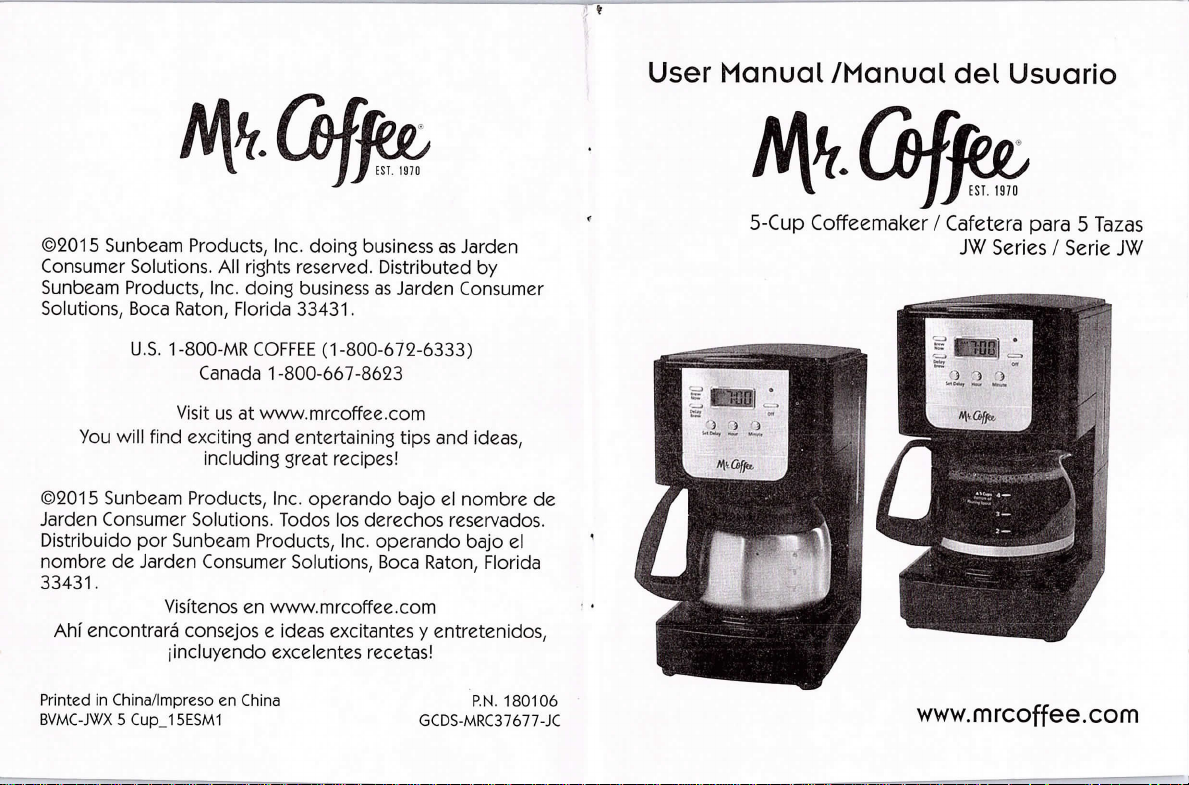
User Manual /Manual del Usuario
W.ql
5-Cup Coffeemaker / Cafetera para 5 Tazas
JW Series / Serie JW
Printed in China/Impreso en China
BVMC-JWX 5 Cup_15ESM1
P.N.180106
GCDS-MRC37677-JC
www.mrcoffee.com
Page 2
IMPORTANT SAFEGUARDS
To reduce the risk of fire, electric shock and/or injury to
persons, basic safety precautions should always be followed .
when using electrical appliances, including the following:
1. READ All. INSTRUCTIONS BEFORE USING THE COFFEEMAKER.
2. Do not touch the coffeemaker's hot surfaces. Use
handles or knobs and do not open the lid or cover '
while brewing.
3. To protect against electric shock, do not immerse
the power cord, power plug or coffeemaker in
water or in any other liquid.
4. Close adult supervision is necessary when this
appliance is used by or near children.
5. Turn the coffeemaker OFF and unplug the power
cord from the power source when the coffeemaker
and clock are not in use and before cleaning. Allow
the coffeemaker parts to cool before putting on or
taking off parts and before cleaning the appliance.
6. Do not operate any appliance with a damaged
power cord or power plug, or operate it after the
appliance malfunctions, or has been damaged
in any manner. Return this appliance only to the
nearest Authorized Service Center for.examination,
repair or adjustment.
7. The use of accessory attachments other than Mr.
Coffee® brand products may cause hazards or injuries.
8. Do not use the coffeemaker outdoors.
9. Do not let the power cord hang over edge of table
or counter, or allow it to come into contact with
hot surfaces.
10. Do not place this coffeemaker on or near a hot gas
2
47
Page 3
Esta garantia le otorga derechos legales especificos y es
posible que usted tenga otros derechos que varfan de
un estado, provincia o jurisdicci6n a otro.
C6mo solicitar el servicio en garantfa
En los Estados Unidos
Si tiene alguna pregunta sobre esta garantfa o desea
beoci?!rseb#je°rqaedgi::€:i;ah'taeT€ea+I;8°d°:6s7e2iv?c3:3q¥e
le resulte mss conveniente.
En Canada
Si tiene alguna pregunta sobre esta garantfa o desea
beoc;?!r3ebt!:je°rqaedgi::a:i;ah`|aeT€eaL{;8°d°66s6e7iv?c?33q¥e
le resulte m6s conveniente.
En los Estados Unidos, esta garantfa es ofrecida por
Sunbeam Products, Inc. operando bajo el nombre de
±anr€::acd°6TseusTae!asr%'nuti~:°:§'oBf%:j3:tg:;§'u°nrLdeaa3m343T.
Corporation (Canada) Limited operando bajo el
nombre de Jarden Consumer Solutions, 20 8 Here ford
Street, Brampton, Ontario L6Y 0M1. Si usted tiene otro
problema o reclamo en conexi6n con este producto,
por favor escriba al Departamento de Servicio al
Consumjdor.
POR FAVOR NO DEVUELVA ESTE PRODUCTO A NINGUNA
DE ESTAS DIRECCIONES NI AL LUGAR DE COMPRA.
stove or electric burner or in a heated oven.
11. To disconnect the coffeemaker, turn it OFF, then
remove the power plug from the power supply.
12. Place the appliance on a hard, flat level surface to avoid
interruption of aifflow underneath the coffeemaker.
13. Avoid contact with any moving parts.
14. This coffeemaker is designed for household use only.
15. Do not use appliance for other than intended use.
16. Scalding may occur if lid is removed during brewing
cycles.
DECANTER USE AND CARE
Follow the instructions below to reduce or eliminate
the chance of breaking the decanter:
• This decanter is designed for use with yourMR.
COFFEE® coffeemaker and therefore must never
be used on a range top or in any oven, including a
microwave oven.
• Do notseta hotdecanteron awetorcold surface.
• Do not use a cracked decanter or a decanter having
a loose or weakened handle.
• Do not clean the decanterwith abrasive cleaners,
steel wool pads or other abrasive materials.
• Discard the decanter immediately if it is ever boiled dry.
• Protect the decanter from sharp blows, scratches or
rough handling.
WARNING: To reduce the risk of fire or electric shock,
do not remove any service covers. There
are no user serviceable parts inside the
/i\
coffeemaker. Only authorized personnel
should repair the coffeemaker.
46
3
Page 4
SAVE THESE INSTRUCTIONS
SPECIAL CORD SET INSTRUCTIONS
1. For your convenience the plug is stored inside the
cord storage.
2. A short power supply cord is provided to reduce
the hazards resulting from a person or pet becoming
entangled in, or tripping over, a longer cord.
3. An extension cord may be purchased and used if
care is exercised in its use.
4. If an extension cord is used, the marked electrical
rating of the extension cord must be at least 10
amps and 120 volts. The resulting extended cord
must be arranged so that it will not drape over a
countertop or tabletop where it can be pulled on
by children or tripped over accidentally.
5. This appliance has a polarized plug (one blade is
wider than the other). To reduce the risk of electric
shock, this plug will fit in a polarized outlet only one
way. If the plug does not fit fully in the outlet, reverse
the plug. If it still does not fit, contact a qualified
electrician. Do not modify the plug in any way. You
can customize the length of the power cord so that
it is the exact length you desire. To increase the
length of the power cord: grasp the power cord
(not the power plug) and gently lift it out of the slot,
then pull it away from the coffeemaker. To decrease
the length of the power cord: Grasp the power cord
(not the power plug), lift it out of the slot and gently
feed it into the coffeemaker. Lock the cord in the
slot when finished.
4
uso negligente o mal uso del producto, uso de voltaje
incorrecto o corriente inapropiada, uso contrario a
las instrucciones operativas, y desarme, reparaci6n o
alteraci6n por parte de un tercero ajeno a JCS o a un
Centro de Servicio autorizado por JCS. Asimismo, la
garantfa no cubre actos fortuitos tales como incendios,
inundaciones, huracanes y tornados.
€Cual es el lfmite de responsabilidad de JCS?
JCS no sera responsable de dafios incidentales o
emergentes causados por el incumplimiento de alguna
8arantia o condici6n expresa, implfcita o legal.
Excepto en la medida en que lo prohfoa la ley aplicable,
cualquier garantfa o condici6n implieite de comerciabilidad
o aptitud para un fin determinado se limita, en cuanto a su
duraci6n, al plazo de la garantia antes mencionada.
Jmcasnqf:;i:i8#e#:osad,aifficft:;i::i:i,ocg:!i:;Pqn;i:rootra
naturaleza.
JCS no sera responsable de ningdn tipo de dafio que
resulte de la compra, uso o mal uso del producto, o
por la imposibilidad de usar el producto, incluidos los
dafios incidentales, especiales, emergentes o similares,
o la p6rdida de 8anancias, ni de ningdn incumplimiento
contractual, sea de una obligaci6n esencial o de otra
naturaleza, ni de ningdn reclamo iniciado contra el
comprador por un tercero.
#%#:Fussj%rn°:Tic+iac:3t:dd°es.3sjudr;Sfid;Sf!n°c|a:Tt%,g:gT!ten
emergentes ni las limitaciones a la duraci6n de las garantias
implfcitas, de modo que es posible que la exclusi6n o las
limitaciones antes mencionadas no se apliquen en su caso.
4J
Page 5
lNPORMAC16N DE GARAI`ITiA
GARANTiA LIMITADA POR UN Afqo
Sunbeam Products, lnc. operando bajo el nombre de
Jarden Consumer Solutions, o en Canada, Sunbeam
Corporation (Canada) Limited operando bajo el nombre
de Jarden Consumer Solutions, (en forma conjunta,
"JCS"), garantiza que por un perfodo de un ano a
partir de la fecha de compra, este producto estar6
libre de defectos de materiales y mano de obra. JCS, a
su elecci6n, reparard o reemplazara este producto o
cualquier componente del mismo que presente defectos
durante el periodo de garantie. El reemplazo se realizar6
por un producto o componente nuevo o reparado. Si el
producto ya no estuviera disponible, se lo reemplgzafa
por un producto similar de valor i8ual o superior. Esta
es su garantfa exclusiva. No intente reparar o ajustar
nin8una funci6n el6ctrica o mec6nica de este producto.
Al hacerlo elimfnafa 6sta garantfa.
La garantfa es valida para el comprador minorista
original a partir de la fecha de compra inicial y la
misma no es transferible. Conserve el recibo de
compra original. Para solicjtar servicio en garantia se
requiere presentar un recibo de compra. Los agentes y
centros de servicio de JCS o las tiendas minoristas que
venden productos de JCS no tienen derecho a alterar,
modificar ni cambiar de ningdn otro modo los t6rminos
y las condiciones de esta garantie.
Esta garantfa no cubre el desgaste normal de las piezas
ni los dafios que se produzcan como resultado de
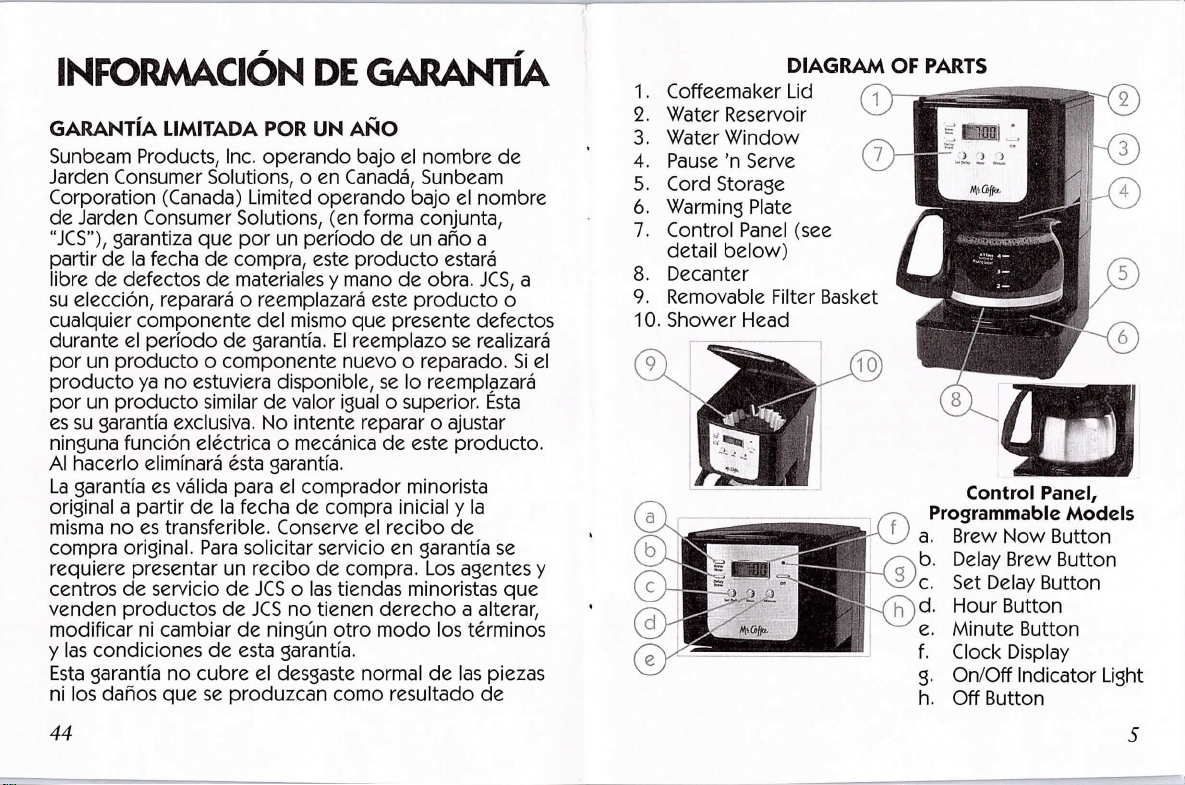
DIAGRAM OF PARTS
1. Coffeemaker Lid
2. Water Reservoir
3. Waterwindow
4. Pause'nserve
5. Cord storage
6. Warming Plate
7. Control Panel (see
detail below)
8. Decanter
9. Removable Filter Basket
10. Shower Head
Control Panel,
Programmable Models
a. Brew NowButton
b. Delay Brew Button
c. SetDelayButton
d. HourButton
e. Minute Button
f. Clock Display
9. On/Off Indicator Light
h. Off Button
44
i
Page 6
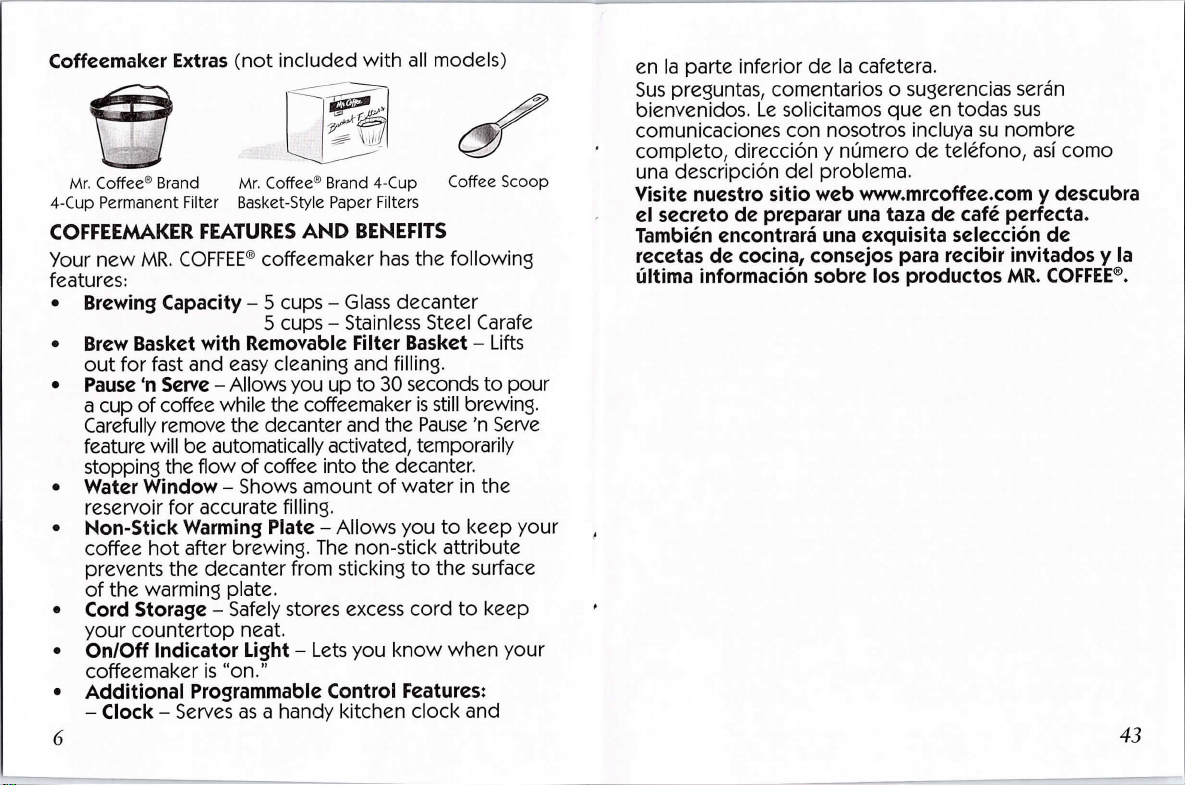
Coffeemaker Extras (not included with all models)
en la parte inferior de la cafetera.
Sus preguntas, comentarios o sugerencias seran
bienvenidos. Le solicitamos que en todas sus
comunicaciones con nosotros incluya su nombre
Mr. Coffee® Brand Mr. Coffee® Brand 4-Cup Coffee scoop
4-Cup permanent Filter Basket-Style paper Filters
COFFEEMAKER FEATURES AND BENEFITS
Your new MR. COFFEE® coffeemaker has the following
features:
• Brewing capacity-5 cups -Glass decanter
• Brew Basket with Removable Filter Basket -Lifts
5 cups -Stainless Steel Carafe
out for fast and easy cleaning and filling.
• Pause `n serve-Allowsyou up to 30 seconds to pour
a cup of coffee while the coffeemaker is still brewing.
Carefully remove the decanter and the Pause 'n Serve
feature will be automatically activated, temporarily
. #3Pepjnwitnhdeoflw°¥ §i:#ieaeJnot:ntth:fd;:i#?i. the
reservoir for accurate filling.
• Non-Stickwarming plate-Allowsyouto keepyour ,
coffee hot after brewing. The non-stick attribute
prevents the decanter from sticking to the surface
of the warming plate.
• Cord storage -Safely stores excess cord to keep
your countertop neat.
• On/Off Indicator Light -Lets you know when your
coffeemaker is "on."
• Additional programmable control Features:
-Clock -Serves as a handy kitchen clock and
6
::Tg!estc°r{pd¢}8:C:%T#reemr:.detel6fono,asicomo
Yisite nuestro sitio web wwwmrcoffee.com y descubra
#ebi:ent:ndceo£:%:r:i:neax#:jtdaes:::€ci:#edceta.
iifjeint:Sjndf:rcm°ac:r6aACs:£Sr:j%spparr:dr::i:jsrthY;tag:fE¥!:
43
Page 7
SERVICIO y MANTENIMIENTO
Piezas de repuesto
• Filtros de caf6 -Para preparar un cafe mss sabroso,
recomendamos el uso de filtros de papel marca MR.
iR.FEE;FE:5?fs::3a,i,tr?ji'5ruoesdpeenrT:#epnr:?;emeanri:
mayorra de las tiendas de alimentos.
• Jarras-Usualmente es posible adquirirj.arras de
repuesto en la tienda donde compr6 su cafetera. Si
no puede conseguir un reemplazo, visite mrcoffee.
com o llame al 1 -800-MRCOFFEE (1 -800-672-6333)
en los Estados Unidos o al 1 -800-667-8623 en
Canada y solicite informaci6n sobre una tienda que
ofrezca jarras de reemplazo.
Reparaciones
Si su cafetera requiere servicio, no la devuelva a la
tienda donde la compr6. Todas las reparaciones y
beoermuR'aczeonstrdoe3:nsservri:foal#:6PFOErESuanu%Fa8o.
i!#Set:8sV;Y:ceanr!%SaEi::dspgsurenritde°ssn°d::rcoasn38€2i6fono
para averiguar la ubicaci6n del Centro de Servicio
Autorizado mss pr6ximo:
Estados Unidos: 1 -800-MR COFFEE (1 -800-672-6333)
Canada: 1 -800-667-8623
Tambi6n puede visitar nuestro sitio web, www.
mrcoffee.com, donde podr6 obtener una lista de
nuestros centros de servicio.
Para que podamos atenderlo mejor, cuando llame
tenga a mano el ndmero de modelo de la cafetera y la
fecha de compra. El ndmero de modelo se encuentra
42
allows you to set the Delay Brew feature.
-Delay Brew -AIlows you to preset when you
would like the coffeemaker to automatically brew
your coffee, up to 24 hours jn advance.
-One-Hour Auto Shut-Off - Keeps your
coffee warm for 1 hour after you brew, then
automatically turns off.
NOTE: If you have selected any of the operating
functions, the coffeemaker will act upon the last
operation selected if the power is restored within 10
seconds after a power outa8e.
CLEAN YOUR COFFEEMAKER BEFORE USING THE
FIRST TIME
#ya5fes:i:gy#j#RFEBF°FfEE8ffceoeff8ea:a8k°e°rdb:iocr%njt3e
first use. Just follow these simple steps:
1. Wash the decanter, decanter lid and the filter
basket in a mixture of mild detergent and water.
Rinse each thoroughly (please refer to the parts
diagram listed above).
2. Replace all the parts and close the lid. Then, run a
brew cycle with water only, without adding coffee
and coffee filter.
3. When brewing is complete, turn your coffeemaker
off, discard the water in the decanter and rinse the
decanter, decanter lid, and filter basket.
Your coffeemaker is now ready to use. Enjoy it!
SETTING THE CLOCK AND DELAY BREW TIME
To Set the Clock:
1. Plug the power cord into a standard electrical
7
Page 8
outlet. The clock will flash on the control panel to
indicate that the time has not been set yet.
2. Press and hold the HOUR and MINUTE buttons until
you reach the current time. The PM indicator will
display when a PM hour is showing.
NOTE: Pressing any button before setting the clock will
cause the clock to start keeping time
from 12:00 a.in. You must set the clock if
you want to use the Delay Brew feature.
To Set the Delay Brew Time:
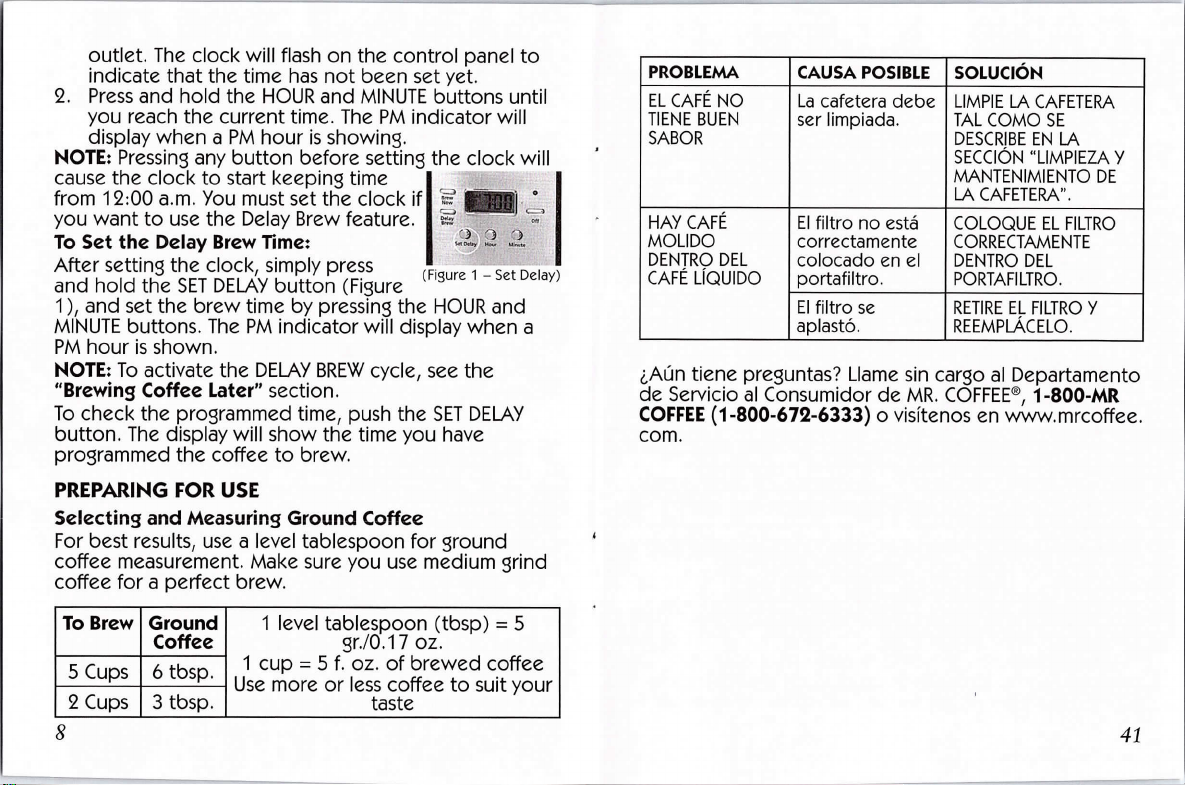
After setting the clock, simply press
and hold the SET DELAY button (Figure
(figuLr~e 1 -SetEel:}5
1 ), and set the brew time by pressing the HOUR and
MINUTE buttons. The PM indicator will display when a
PM hour is shown.
NOTES To activate the DELAY BREW cycle, see the
"Brewing Coffee Later" section.
To check the pro8rammed time, push the SET DELAY
button. The display will show the time you have
programmed the coffee to brew.
PREPAIING FOR USE
Selecting and Measuring Ground Coffee
For best results, use a level tablespoon for ground
coffee measurement. Make sure you use medium grind
coffee for a perfect brew.
=iiiE,a:
EiE-
I?®'£, ft
PROBLEM
EL CAFE NO
TIENE BUEN
SABOR
HAY CAFE
MOLIDO
DENTRO DEL
CAFE LIQUIDO
CAuSA POSIBLE
La cafetera debe
ser limpiada.
El filtro no est6
correctamente
colocado en el
portafiltro.
El filtro se
aplast6.
SOLUC16N
LIMPIE LA CAFETERA
TAL COMO SE
DESCRIBE EN LA
SECC16N "LIMPIEZA Y
MANTENIMIENTO DE
LA CAFETERA".
COLOQUE EL FILTRO
CORRECTAVENTE
DENTRO DEL
PORTAFILTRO.
RETIRE EL FILTR0 y
REEMPLACELO.
5#e#?c|gg,r%unnstua#:armd%S^nR.C€r6PFE[B,etp.a8%aEfapt°
COFFEE (1 -800-672-6333) o visitenos en www.mrcoffee.
Com.
To Brew
5 Cups
2 Cups
8
Ground
Coffee
6 tbsp.
3 tbsp.
1 level tablespoon (tbsp) = 5
1 cup = 5 f. oz. of brewed coffee
gr./O.17 oz.
I1.,.,.I,,.,
I....,'.,
taste
41
Page 9

PROBLEM
EL PORTAFILTRO
DESBORDA.
LA CAFETERA
NO ESTA
CALIENTE
EL CAFE NO
TIENE BUEN
SABOR
40
CAUSA POSIBLE
La jarra fue
retirada
de la placa
calentadora
por mss de 30
segundos.
Hay un corte de
electricidad.
Se ha activado
el APAGADO
AUTOMATICO.
(Para Modelos
Programables)
Se utiliz6 caf6
molido con
un grano no
adecuado para
una cafetera de8Oteo.
Las cantidades
de caf6 y de
a8ua no son
adecuadas.
SOLUC.6N
APAGUE Y DESENCHUFE
LA UNIDAD. DEJE
QUE SE ENFRI'E.
LIMPIE EL DERRAVE.
NO COLCX3UE LA
JAVA CALJENI
SOBRE LA PLACA DE
CALENTAVIENIO
HOMEDA PORQUE
roDRLA QU EBRARSE.
ESPERE HASTA
QUE SE REANUDE
EL SUMINISTRO DE
ELECTRICIDAD.
PARA OBTENER
LOS MEJORES
RESULTADOS, FILTRE
UNA NUEVA JARRA DE
CAFE.
UTILICE EL GRANO
RECOMENDADO
PARA LAS CAFETERAS
DE GOTEO
AUTOMATICAS.
UTILICE LAS
CANTIDADES
ADECUADAS DE CAFE
y DE AGUA.
Suggested Coffee Measurement Chart
Water Filtration System (Not Included on All Models)
This carbon based water filter improves the taste of
your coffee by removing up to 97% of the chlorine from
the water you may use to brew your
coffee.
Fnedqcal
::!si:i,#:ignutd:I;,t:yRri§agsl:§t:;fnytohuedo
not see this symbol, please call 1 -800-
672-6333.
To use the water filtration system in
your MR.COFFEE® Coffeemaker, please follow
these steps:
1. Align the red indicator on the frame
to the letter that corresponds with the
month that you are using the disk for the
first time. This serves to remind you to
change the disk every month. (approx.
30 brewing cycles)
NOTE: For optimum results, use the water
filtration system with a permanent filter.
2. Rinse the water filter in fresh water
before first use.
3. Follow Adding water and coffee
instructions.
4. When you are done brewing your coffee,
rinse the water filter with fresh Frame
water. Do not put your water filter
in the dishwasher. Filter Disk
Replacement water filtration disks can
be purchased online at www.mrcoffee.com, at a local
9
Page 10

retailer, or by calling 1 -800-MRCOFFEE in the U.S. or
1 -800-667-8623 in Canada.
Adding Water and Ground Coffee
1. Lift and open the coffeemaker lid. For
your convenience, you can lift out the
removable filter basket.
2.B':sckee:.sMtyi2Cf3tFeFrE:®r8r#c6FFEPE®Paper
(Figure 2
permanent filter into the removable wia'terand
filter basket. (Figure 2) coffee)
NOTE: lf using paper filters, it is important that the
sides of the filter fit flush against the side of the
filter basket. If filter collapse occurs, dampen the
filter before placing in the filter basket and adding
ground coffee and water.
3.fod.%j:,etg8S¢roeffde:rs°euen{h°ef§:8::s::8{:nfft:yeshake
Measurement Chart.
4. Be sure the filter basket is properly centered and all
the way down in the filter basket.
5. Fill the decanter with cold, fresh water to the
desired capacity (1 cup equals 5 ounces). For easy
and accurate filling, the water markings on the
glass decanter and on the dual water windows
show the amount of water needed to make the
corresponding desired number of cups. Do not fill
past the "MAX line" or water will flow out of the
overfill hole in the back of the water reservoir.
The amount of coffee brewed will always be
i|j8hwti%::::st:#noitrpihaiF%u3:e°{oW#:r#j°n¥Leudm!n
absorption of water by the coffee grounds.
10
PROBLEM
LA CAFETERA
SC)LO PRODUCE
AGUA
LA CAFETERA
FILTRA
LENTAMENTE
EL PORTAFILTRO
DESBORDA.
CAuSA POSIBLE
No hay cafe
molido dentro
del portafiltro.
La cafetera debe
ser limpiada.
El portafiltro
no esta
correctamentecolocado.
La jarra no est6
correctamente
colocadaenlaplacacalentadora.
La jarra no tiene
la tapa colocada.
El filtro tiene
demasiado cafe
molido.
SOLUC16N
AGREGUE LA
CANTIDAD DE CAFE
DESEADA.
LIMPIE LA CAFETERA TAL
COMO SE DESCRIBE EN
LA SECC16N "LIMPIEZA
Y MANTENIMIENTO DE
LA CAFETERA".
COLOQUE EL
PORTAFILTRO
CORRECTAVENTE.
COLOQUE LA JARRA
CORRECTAMENTE EN LA
PLACA CALENTADORA.
COLOQUE LA TAFA EN
LA JARRA.
RETIRE EL FILTRO y
DESECHE EL CAFE
MOLIDO. SI EL
FILTRO E,S DE PAPEL,
REEMPLACELO. SI ES UN
FILTRQ PERMNENTE,
ENJUAGUELO.
COMIENCE
NUEVAMENTE
EL PROCESO DE
PREPARAC16N.
39
Page 11

RESOLYIENDO PROBLEMAS CON SU CAFETERA
Su Cafetera MR. COFFEE® ha sido disefiada con esmero
para darle muchos aFios de servicio sin contratiempos.
En el caso improbable de que su nueva cafetera
no funcione adecuadamente, favor de examinar los
siguientes problemas potenciales y efectuar los pasos
recomendados ANTES de llamar a un Centro de Servicio
Autorizado Sunbeam.
PROBLEM
LA LUZ DE
ENCENDIDO NOSEILUMINA
LA CAFETERA
NO FILTRA
CAUSA POSIBLE
El aparato esta
desenchufado.
Hay un corte de
electricidad.
El aparato est6
desenchufado.
Hay un corte de
electricidad.
El dep6sito de
agua esta vacfo.
El portafiltro
no esta
correctamentecolocado.
La jarra no esta
bien colocada
en la placa
calentadora.
SOLUC16N
ENCHUFELO.
ESPERE HASTA QUE SE
REANUDE SUMINISTRO
DE ELECTRICIDAD.
ENCHUFELO.
ESPERE HASTA
QUE SE REANUDE
EL SUMINISTRO DE
ELECTRICIDAD.
COMPRUEBE LAS
VENTANAS DE AGUA.
COLOQUE EL
PORTAFILTRO
CORRECTAVENTE.
COLOQUE LA JARRA
CORRECTAMENTE
EN LA PLACA
CALEFACTOR.
38
6. Pour the water into the water reservoir. Close the
lid and place the empty decanter onto the warming
plate.
NOTE: Make sure the decanter is fully placed on the
warming plate or the water and the grounds will
overflow from the filter basket. An overflow may cause
personal injury or damage to property.
CAUTION! To reduce the risk of damaging the
decanter and/or the risk of personal injury,
do not add cold water to the decanter if the
`/i\
cool before using.
BREWING COFFEE NOW
1. After completing the steps in the Adding Water
decanter is already hot. Allow the decanter to
and Coffee section and with the glass decanter and
filter basket secure in place, turn the coffeemaker
on by pressing the BREW NOW button once. Your
coffeemaker will keep your coffee hot for 1 hour,
then automatically shut off. To turn the coffeemaker
off, push the OFF button so the light is no longer
illuminated. While the coffee is brewing, the Pause
'n Serve feature allows you to sneak a cup of coffee
from the decanter. REPLACE THE DECANTER ON THE
WARMING PLATE WITHIN 30 SECONDS TO PREVENT
OVERFLOW AND POSSIBLE INJURY.
If the brew basket overflows or fails to empty
into the decanter, do not open the brew
`/i\
cool before handling.
basket. Turn off the coffeemaker. Unplug the
coffeemaker and wait for the contents to
EZ]
Page 12

2. After the used coffee grounds have cooled,
carefully discard them.
3. Make sure the decanter is empty before starting to
brew coffee.
4. Be sure to turn your coffeemaker off when no
longer using it.
BREWING COFFEE LATER
1. you must first set the time when you would like
11. Ponga la unidad en marcha y deje que se realice un
ciclo de preparaci6n completo.
12. Repita una vez mss los pasos 8 a 11.
Ahora, su cafetera esta limpia y en condiciones de
preparar el m6s delicioso cafe caliente.
Intervalo de Limpieza Sugerido
Tipo de Agua Frecuencia de la Limpieza
the coffeemaker to begin brewing your coffee as
described in "Setting the Clock and the Delay Brew
Timer" section.
2. Prepare your coffeemaker as described in "Adding
Water and Ground Coffee" section.
3. To activate DELAY BREW and program your
Limpieza de la jarra
Agua Blanda Cada 80 Ciclos de colado
Agua Dura Cada 40 Ciclos de colado
coffeemaker to brew coffee at a later time, press
the DELAY BREW button. The DELAY indicator will
appear on the digital display.
The coffeemaker is now set to automatically brew
coffee at the pre-set later time.
4. At the pre-set time the DELjAV indicator will 8o off,
indicating that brewing has started.
5. The coffeemaker warming plate will keep your coffee
hot for 1 hour and then automatically turn off.
jE:r:g#:::6Pg:g8edteej:}r,Tsaa%h:8,%`ra#Ca¥%::enla
Pare eliminar las manchas en la jarra:
1. Llene la jarra con una soluci6n de partes iguales de
agua y vinagre y dej.e la soluci6n dentro de la I.arra
por unos 20 minutos.
2. Deseche la soluci6n y luego lave y enjuague lajarra.
No utilice limpiadores a[tamente abrasivos, pues
podrfan rayar la jarra y 6ste podrfa entonces romperse.
i:Li;:;;af#dbf::ai!a;#,i:i;rac::e#!a:y:tjf:j::u::.¥n?d!s!ti:;
DELAY BREW, by repeating Steps 2 and 3 above.
To cancel DELAY BREWS Press the OFF button. The
DELAY indicator will disappear.
12
37
Page 13

%!RT!cn8rFEeEE#rgi%Tt%:astg?:.dE?E#:ga:rtiMZ£.ncd8F?['i#j:88:
adquirirse en numerosas tiendas o llamando al Departamento
de Servicio al Consumidor de MR. COFFEE®, 1 -800-MR
COFFEE ( 1 -8cO-672-6333).
1 . Para preparar la cantidad de soluci6n de limpieza
necesaria pare limpiar la cafetera, siga las instrucciones
en el envase del limpiador de cafeteras MR. COFFEE®.
Vlerta la mezcla en el dep6sito de agua.
r28Tf?;ET)'#vri#ae!r':mdp;amd6°srtJjcpou%?aennc:t#gadri:j£::zas
2. Coloque en el portafiltro de la cafetera un filtro de
papel vacfo para 4 tazas MR. COFFEE® o un filtro
permanente MR. COFFEE® y cierre la tapa del cafetara.
3. Ponga la jarra vac fa nuevamente en la unidad,
centrada sobre la placa de calentamiento.
4. Haga funcionar la cafetera y llene 4 tazas con
soluci6n de limpieza.
5. Apague la cafetera y d6jela reposar por 30 minutos.
6. Haga funcionar la cafetera con el resto de la
soluci6n de limpieza.
7. Deseche la soluci6n de limpieza y limpie la jarra
completamente con agua limpia.
8. Llene el dep6sito de a8ua con agua limpia y fresca.
9. Ponga la jarra vacia nuevamente en la cafetera,
centrada sobre la placa de calentamiento.
10. Retire y deseche el filtro de papel utilizado durante
el ciclo de limpieza. Si durante la operaci6n
€8[!FmEE8:Zr:tiFerotj;Ze6nrun6!!Lt:?opceor#Sreet:tmee#6
antes de ponerlo en el portafiltro.
CLEANING AND MAINTAINING YOUR COFFEEMAKER
Daily Cleaning
Always unplug the coffeemaker and allow to cool
before cleaning.
Remove the filter basket, permanent filter (not included
on all models), decanter and decanter lid and wash
them in a solution of hot water and mild liquid soap.
Never use abrasive cleansers, steel wool pads or other
abrasive materials.
Dishwasher top rack safe parts: glass decanter and lid,
filter basket and permanent filter.
CAUTION! Never immerse the coffeemaker itself in
water, or in any other liquid or place in the dishwasher.
Regular Cleaning and Maintenance
Decalcifyin8 your MR. COFFEE® Coffeemaker
Minerals (calcium) found in water will leave deposits in
your coffeemaker and will affect it. It's recommended
gg:FyE°E%rci8:Laer'ryorF#%§atrrfusE.€8PF?EjEts®Eye:ij::iyR.
available at many retail stores or by calling the MR.
COFFEE® Consumer Service Department at 1 -800-MR
COFFEE ( 1 -800-672-6333).
1.E3'L°RYcP8#88tnosfreuec#8r:rt?,8::g:r?o°u?ethbeatch
mixture into the water reservoir.
NOTE: 4 cups or 20 f. oz. of undiluted, white household
vinegar may be used as a substitute for the cleaner.
2. Place an empty MR. COFFEE® 4 cup basket-style
paper filter or MR. COFFEE® permanent filter into the
filter basket and close coffeemaker lid.
36
13
Page 14

3. Place the empty decanter back in the unit, centered
on the warming plate.
4. Brew three cups of cleaning solution through the
coffeemaker.
5. Turn the coffeemaker off and let stand for 30 minutes.
6. Run the remainder of the cleaning solution through
the coffeemaker.
7. Discard the cleaning solution and rinse the decanter
thoroughly with clean water.
8. Fill the water reservoir with clean, fresh water.
9. Place the empty decanter back on the coffeemaker,
centered on the warming plate.
10. Remove and discard the paper filter used during
the cleaning cycle. If a MR. COFFEE® permanent filter
was used during cleaning, remove it and rinse it
thoroughly before replacing it in the filter basket.
1 1 . Begin brewing and allow the full brew cycle to complete.
12. Repeat Steps 8 through 11 one more time.
Your coffeemaker is now clean and ready to brew the
next pot of delicious, hot coffee!
Suggested Decalcifying Interval
Type of water Cleaning Frequency
Soft water Every 80 Brew cycles
Hard water Every 40 Brew cycles
5. La placa calentadora de la cafetera mantendfa
el care caliente por 1 hora y despu6s se apa8ar6
autom6ticamente.
::mm°arfcuhnac!a6unt8£6Stej::ELdeanq2Sau[ii:estjegr:jeNn?e:esp8:ger:
que su cafe sea preparado a la misma todos los dias,
simplemente coloque vn filtro nuevo, cafe y agua y
seleccione PREPARACION DEMORADA repitiendo los
pasos 2 y 3 anteriores.
Para cancelar la PREPARAC16N DEMORADA: presione
el bot6n OFF. El indicador de Preparaci6n DEMORADA
desaparecera.
LIMPIEZA y MANTENIMIENTO DE LA CAFETERA
Limpieza diaria
Antes de limpiar la cafetera, desenchdfela y deje que
se enfrie. Retire el portafiltro, el filtro permanente (no
se incluye en todos los modelos), la jarra y su tapa, y
lavelos en una soluci6n de agua caliente yjab6n lfauido
suave. No utilice nunca limpiadores abrasivos, lana
de acero u otros materiales asperos. Las piezas que
pueden lavarse con seguridad en el estante superior
del lavavajillas son las siguientes: jarra de vidrio y tapa,
portafiltros y filtro permanente
ipRECAUcloN! No sumerja nunca la cafetera
rulH|
Servicio y mantenimiento regulares
Descalcifcaci6n de la cafetera MR. COFFEE®
Los minerales (calcio) contenidos en el a8ua dejan dep6sitos
en la cafetera que afectan su rendimiento. Se recomienda
en agua u otros lfquidos y no la lave en el
lavavajillas.
14
3J
Page 15

:ffceatf%r::Persets!?jTt?aen!dbo:t,€nfudnec%Pna8%dp°;u#n:red;jr
le permite servirse una taza de cafe de la jarra.
VUELVA A COLOCAR LA JARRA SOBRE LA PLACA
CALENTADORA ANTES DE 30 SEGUNDOS PARA
EVITAR DERRAMES y POSIBLES LESIONES.
Si el portafiltros se derrama o no vierte cafe
dentro de la jarra, no lo abra. Apague la
rulB|
2. Despu6s de que el caf6 molido se haya enfriado,
cafetera. Desenchufe la cafetera y espere
hasta que se enfrie antes de manipularla.
abra con cuidado el portafiltro y deseche el cafe.
Your MR. COFFEE® Coffeemaker has been carefully
designed to give you many years of trouble-free service.
. In the unlikely event that your new coffeemaker does
not operate satisfactorily, please review the following
potential problems and try the steps recommended
BEFORE you call an Authorized Sunbeam Service Center.
PROBLEM
THE ON LIGHT
DOES NOT LIGHTUP
3. Asegdrese de que la jarra est6 vac fa antes de
comenzar a preparar cafe.
TR0uBLESHOOTING youR COFFEEMAKER
4. Asegdrese de apa8ar la cafetera cuando no la use.
PREPARAC16N DE MORADA DE CAFE
THE COFFEE IS
NOT BREWING
1 . #:fs6dceofauoes': 5%fsectr?:ae %:e,8asecc°cT6ennz€;:Eruerg:ir:i
del reloj y hora de preparaci6n demorada", es
necesario seleccionar la hora en el reloj.
: `:!e:?in::Get:|!arr#eEtiEg:uA:im:i8se:E:%;bfDe; ;a secc,6n
programar su cafetera para preparar cafe m6s tarde,
presione el bot6n DELAY BREW. El indicador de
Preparaci6n DELAY aparecerd en la pantalla digital.
La cafetera esta ahora programada para preparar
caf6 a la hora pre-programada para mss tarde.
4. El indicador de Preparaci6n Demorada se apa8ara
a la hora pre-programada indicando que la
preparaci6n del cafe ha comenzado.
34
THE
COFFEEMKER
ONLY BREWS
WATER
POSSIBLE CAUSE
The appliance is
unplu88ed.
There's a power
Outa8e.
The appliance is
unplu88ed.
There's a power
Outa8e.
The water
reservoir is empty.
The filter basket
is not properlyinserted.
The decanter is
not placed all
the way on thewarmingplate.
There are no
coffee grounds
in the filter
basket.
SOLUTION
PLUG UNIT IN.
WAIT FOR POWER TO
BE RESTORED.
PLUG UNIT IN.
WAIT FOR POWER TO
BE RESTORED.
CHECK THE WATER
WINDOWS.
INSERT FILTER BASKET
CORRECTLY.
PLACE DECANTER
CORRECTLY ON
WARMING PLATE.
ADD THE DESIRED
AMOUNT OF COFFEE.
1J
Page 16

PROBLEM
THE
COFFEEMKER
BREWS SLOWLY
THE FILTER
BASKET
OVERFLOWS
16
POSSIBLE CAUSE
The coffeemaker
needs cleaning.
The filter basket
is not properly
SOLUTloN
CLEAN COFFEEMAKER
AS DESCRIBED IN
"CLEANING AND
MAINTAINING"
SECTION.
INSERT FILTER BASKET
CORRECTLY.
inserted.
The decanter is
not placed all
the way on thewarmingplate.
The decanter
lid is not ondecanter.
Too many coffee
grounds were
placed in the
filter.
The decanter
was removed
from the
warming plate
for more than 30
seconds.
PLACE DECANTER
CORRECTLY ON
WARMING PLAl-E.
PLACE LID ON THE
DECANTER.
REMOVE FILTER
DISCARD GROUNDS.
lF PAPER FILTER,
REPLACE. IF
PERMANENT FILTER,
RINSE. BEGIN BREWING
PROCESS AGAIN.
TURN OFF AND
UNPLUG THE UNIT.
ALLOW TO COOL.WIPE
UP THE SPILL. DO NOT
SET HOT DECANTER
BACK ON THE WET
WARMING PLATE OR IT
MIGHT CRACK.
las marcas de agua en la jarra de vidrio y en las
ventanas dobles de a8ua, ya que las mismas indican
la cantidad de agua necesaria para preparar el
#emae:%qFv:fz#ri:y:ta8edseeseda6r¥a°msaurg:rgeu'aa
fuera del orifcio de llenado en la parte posterior del
%ev:a:ns#t:dd:d:e::;fa6.Br:apnatrjadda:Sj:T§L::#oducida
ino#eapb6ssjt&d:naag:aa^tiata°ds#:i:€eq:;u:I.Caf6
6. Vierta el a8ua dentro del dep6sito de agua. Cierre
la tapa y coloque la jarra vac fa sobre la placa
calentadora.
NOTA: Asegdrese de que la jarra est6 correctamente
colocada sobre la placa calentadora, ya que de lo
contrario el a8ua y el care molido se derramardn del
portafiltro. Un derrame puede provocar lesiones fisicas
PREPARAC16N INMEDIATA DE CAPE
1 . Luego de completar los pasos en la seccion
"Anadiendo Agua y Cafe Molido" y con la jarra de
vidrio y la canasta del filtro colocadas en su sitio,
encienda la cafetera. Oprima el boton de BREW
NOW una sola vez para encender la cafeteria. La
cafetera conservafa el cafe caliente durante 1 hora,
y luego se apa8ara autom6ticamente. Para apagar la
33
Page 17

Los discos de repuesto para filtrado
lndicadirRojo
del agua se puedeh comprar por
Internet en www.mrcoffee.com, o en
un comercio local, o bien, llamando al
1 -800-MRCOFFEE en EE.UU. o al 1 -800-
667-8623 en Canada.
C6mo agregar agua y care molido
1. Levante y abra la tapa del cafetera.
Para su comodidad, usted puede
levantar y quitar el portafiltro retirable.
2. fa°z':sq#3r:: fMtRr.°cdoeFFPEaE%e: Puanr?i |€ro
permanente marca MR. COFFEE® dentro
del portafiltro retirable. (Figura 2)
NOTA: Si utilize filtros de papel,
es importante que los lados del
filtro encajen perfectamente
dentro del portafiltro. Si el
filtro se dobla, humed6zcalo
antes de colocarlo dentro del
!g;eugr:r2a;fa°r° 6-6-rfafiTt7o-7 -a-g-r-63-ar-i-ate. in6lTdo
cafe molido) y a8ua.
3. &8::8:: }ascaacnutadaasdugveeia:ite Marco
para nivelar el caf6. Yea la Tabla de Disco de
medidas de cafe recomendadas. Filtro
4. Asegdrese de que el filtro este
centrado correctamente y bien insertado dentro del
portafiltro.
5. Llene la jarra con agua frie y potable hasta la
cantidad deseada (1 taza equivale a 5 onzas).
Para lograr un llenado facil y preciso, observe
32
PROBLEM
THE COFFEE IS
NOT HOT
THE COFFEE
TASTES BAD
THE GROUNDS
ARE IN THE
COFFEE
POSSIBLE CAUSE
There's a power
Outa8e.
Auto SHUT-
OFF has been
activated.(Programmablemodelsonly)
Coffee grounds
other than for
an automatic
drip coffeemakerwereused.
The ground
coffee-to-
water ratio wasunbalanced.
The coffeemaker
needs cleaning.
The filter is not
properly seated
in the basket.
The filter
collapsed.
SOLUTION
WAIT FOR POWER TO
BE RESTORED.
FOR BEST RESULTS,
BREW A FRESH POT OF
COFFEE.
USE COFFEE GROUNDS
RECOMMENDED FOR
AUTOMATIC DRIP
COFFEEMAKERS.
USE CORRECT
GROUND COFFEE-TO-
WATER RATIO.
CLEAN COFFEEMAKER AS
DESCRIBED IN "CLEANING
AND MAINTAINING youR
COFFEEMAKER" SECTION.
SEAT FILTER PROPERLY
WITHIN THE FILTER
BASKET.
REMOVE FILTER AND
REPLACE.
#:yc;o#E:EE#aE-VE=o:I:6:7Ss:i-ogn3s:?§;eo#inp:#vs::?on:t-:fr:e:e866-
www.mrcoffee.com.
17
Page 18

Cleaning the Decanter
Hard water can leave a whitish stain on the decanter,
and coffee may then turn this stain brown.
To remove decanter stains:
1. Fill the decanter with a solution of equal parts
water and vinegar and let the solution stand in the
decanter for approximately 20 minutes.
2. Discard the solution, then wash and rinse the
decanter.
Do not use harsh abrasive cleaners that may scratch the
decanter, scratches may cause the decanter to break.
sERvicE Ar`iD MAINTENANCE
Replacement Parts
• Coffee Filters -For bettertasting
recommend that you use a MR,
4-cup basket paper filter or MR. COFFEE® brand
permanent filter. These filters are available at most
grocery stores.
• Decanters -You can usually purchase a replacement
i8o#ff6!reand
decanter from the store where you purchased your
coffeemaker. If you are unable to find a replacement,
please visit mrcoffee.com or call 1 -800-MR-COFFEE
(1 -800-672-6333) in the U.S. or 1 -800-667-8623 in
Canada for information on where you can find a store
that carries replacement decanters.
Repairs
lf your coffeemaker requires service, do not return it
to the store where you purchased it. All repairs and
replacements must be made by Sunbeam or by an
authorized MR. COFFEE® Service Center.
Tabla de medidas de cafe recomendadas
Para
preparar
5 tazas
2 tazas
Sistema de Filtracion de Agua (No lncluidos en todos
los Modelos)
Este filtro de agua a base de carbono mejora el sabor
de su cafe al remover el 97% del cloro del agua que
usted utiliza para colar su caf6.
Primero busque
con la Filtracion
filtro. Si no ve este sfmbolo, favor de llamar al 1-800-
672-6333.
Para utilizar el sistema de filtraci6n de agua en su Cafetera
MR.COFFEE®, favor de seguir los sjguientes pasos:
1. Alinee el indicador rojo del disco con la letra
que corresponde al mes en que use el disco por
primera vez. Esto sirve para recordarle cambiar el
disco cada mes (aprox. 30 ciclos de preparaci6n).
NOTA: Para obtener resultados 6ptimos, use el sistema
de filtraci6n del agua con un filtro permanente.
2. Enjuague el filtro del agua con agua fresca antes del
primer uso.
3. Siga con las instrucciones pare "Agregar agua y care
molido" en la siguiente secci6n.
4. Cuando termine de preparar su care, lave el filtro
con agua fresca. No coloque el filtro del agua en el
lavavaj.illas.
Cantidad de
cafe molido
6 cucharadas
1 cucharada a res = 5 gr./0.17 oz.
1 taza = 5 f. oz. de care
preparado
Utilice mas o menos cantidaddecafesegdnsupreferencia,
3 cucharadas
8s!:?aoboa#g.icn9eFr[5:®dg?aAcfinnigsatgde,
18
31
Page 19

\
2. Presione y mantenga los botones de HOUR y
MINUTE hasta que sea alcanzada la hora actual. EI
indicador de PM se mostrara en la pantalla cuando
una hora PM est6 apareciendo.
NOTA: Si presiona cualquier bot6n antes de poner en
hora el reloj, 6ste comenzara a funcionar desde las
12:00 am. Si desea utilizar la funci6n de preparaci6n
demorada, debe poner en hora el reloj.
Para seleccionar la hora de preparaci6n demorada:
Despu6s de ajustar el reloj,
8gt%:#:eBraer:i:i%:yd#r:#`§[T
3:Try:'p(aF;g:irgn't,eyca!fu6Stfr8!it::Tnpdoo
--I-. -r -.--.-..----.- I ------..---- '- (Plgural-Confisurar
i:ai%35%?epsMdseeHm°ousirgrr'eNnuTaEb:'nta,,aderora)
cuando una hora PM aparezca.
NOTA: Para activar el ciclo de PREPARACIC)N DEMORADA,
vea la secci6n "Preparaci6n demorada de cafe".
i:+aDVEeiAf+faLra`%:n°traq.8rf8:irT:a9%£:er:!%:eq:'ebu°stt°;aha
pro8ramado la preparaci6n de cafe.
PREPARAC16N DE LA CAFETERA
C6mo seleccionar y medir el cafe molido
Para obtener mejores resultados, utilice cucharadas
a ras para medir el care molido. Para obtener una
preparaci6n perfecta, asegdrese de utilizar cafe molido
de grano mediano.
lf you live in the U.S. or Canada, please call us at the
following toll-free telephone numbers to find the
location of the nearest authorized service center:
U.S. 1 -800-MR COFFEE (1 -800-672-6333)
Canada 1 -800-667-8623
You may also visit our website at ww`^/.mrcoffee.com for
a list of service centers.
To assist us in serving you, please have the coffeemaker
model number and date of purchase available when
you call. The model number is on the bottom of the
coffeemaker.
We welcome your questions, comments or suggestions.
In all your communications, please include your
complete name, address and telephone number and a
description of the problem.
visit our website at www.mrcoffee.com and discover
the secret to brewing the perfect cup of coffee.
:3¥FeF¥j:#§§d:iBc:s:nrdcthh:[Fant8s:fi:f°ourLma::or:Cjfefa.
30
19
Page 20

WRARANTy I NFORMATION
1 IYEAR LIMITED WARRANTY
Sunbeam Products, lnc. doing business as Jarden
Consumer Solutions or if in Canada, Sunbeam
Corporation (Canada) Limited doing business as Jarden
Consumer Solutions (collectively "JCS") warrants that
for a period of one year from the date of purchase,
this product will be free from defects in material and
workmanship. JCS, at its option, will repair or replace
this product or any component of the product found to
be defective during the warranty period. Replacement
will be made with a new or remanufactured product
or component. If the product is no longer available,
replacement may be made with a similar product of
equal or greater value. This is your exclusive warranty.
Do NOT attempt to repair or adjust any electrical or
mechanical functions on this product. Doing so will void
this warranty.
This warranty is valid for the original retail purchaser
from the date of initial retail purchase and is not
transferable. Keep the original sales receipt. Proof of
purchase is required to obtain warranty performance.
JCS dealers, service centers, or retail stores selling JCS
3;ra°ydcuhcatsngde°tfi3tt::¥€:hn%rt8ohntdti?i:Ltser6fmt:i8j%£;aannJ.
This warranty does not cover normal wear of parts or
damage resulting from any of the following: negligent
use or misuse of the product, use on improper voltage
or current, use contrary to the operating instructions,
autom6ticamente el caf6.
-Apagado autom5tico al cabo de 1 hora - Esta
funci6n de seguridad mantiene el cafe caliente
durante 1 hora despu6s de la preparaci6n, y
luego apa8a la unidad automaticamente.
NOTA: En caso de una interrupci6n de la alimentaci6n
8'u6ectJjsct%'d`ah:;:e::ir:crc?:'izaadr:'s:Pa't;IT#T:i?6nn°ep8:::ij::
es restaurada al cabo de 10 segundos.
LIMPIE SU CAFETERA ANTES DE UTILIZARLA POR
PRIMETA YEZ
Para asegurarse de que la primera taza de caf6 sea lo
m6s deliciosa posible, limpie su cafetera MR. COFFEE®
antes de utilizarla por primera vez. Simplemente, siga
estos sencillos pasos:
1. Lave la jarra, la tapa de la jarra y el portafiltro
con agua y detergente suave. Enjuaguelos bien
(consulte el diagrama de piezas m6s arriba).
2. Coloque todas las piezas y cierre la tapa. Luego,
:egau!i;esj:na§}%';a9€£!eop?ji:rc:°dnes:#erentecon
3. Cuando la preparaci6n haya finalizado, apague la
cafetera, deseche el agua de la jarra y lave la jarra,
su tapa y el portafiltro.
La cafetera ahora ya esfa lista para ser usada. iDisfrdtela!!
Para configurar el reloj:
1. Enchufe el cable de alimentaci6n el6ctrica en un
tomacorriente el6ctrico estandar. El reloj destellara
en el panel de control para indicar que la hora adn
no ha sido configurada.
20
29
Page 21

FUNCIONES Y BENEFICIOS DE LA CAFETERA
Su nueva cafetera MR. COFFEE® ofrece las siguientes
funciones:
• Capacidad de preparaci6n -5 tazas-Serie con
jarra de vidrio, 5 tazas -Serie con jarra de metal
• Recipiente de preparaci6n con portafiltro extrafole
• ;#:#e:y;gei§mii!'r;:s:;|i§i:yat3;°:rf;a;C!:!¥:r!ria!fg:I::: 'a
en 30 segundos mientras la cafetera continda
prepafandolo. Retire la jarra con cuidado y la funci6n
a:tg:res:dyos%:irus:iancs:i::{!:#3u.E6j:CacTf%n:?6jarra.
• Ventanilla del agua -Muestran la cantidad de agua
• ;|nace: gae,gffitdo;rgaar:t!:gLaerr#t!e-nfsqao£:::jsno '
permite conservar el cafe caliente luego de prepararlo.
La caracten'stica antiadherente evita que la jarra se
pegue a la superfcie de la place calentadora.
• Almacenamiento de cable -Permite guardar el
exceso de cable de manera segura, brindado un
. i:B#d?c%rd°:ju;: 3: !anTeefai%#:§;ra8°_r'permite
saber si la cafetera est6 encendida.
• Funciones de control programables adicionales:
-Reloj -El reloj. con indicador LCD funciona como
un pfactico reloj de cocina y permite configurar la
disassembly, repair or alteration by anyone other than
JCS or an authorized JCS service center. Further, the
warranty does not cover: Acts of God, such as fire,
flood, hurricanes and tornadoes.
What are the limits on JCS's Liability?
JCS shall not be liable for any incidental or consequential
damages caused by the breach of any express, implied
or statutory warranty or condition.
Except to the extent prohibited by applicable law, any
implied warranty or condition of merchantability or
fitness for a particular purpose is limited in duration to
the duration of the above warranty.
JCS disclaims all other warranties, conditions or
representations, express, implied, statutory or otherwise.
JCS shall not be liable for any damages of any kind
resulting from the purchase, use or misuse of, or
inability to use the product including incidental, special,
consequential or similar damages or loss of profits, or for
any breach of contract, fundamental or otherwise, or for
any claim brought against p.urchaser by any other party.
S?cTuesi:rno#fiiitas::t:so?Ij:irdsediE:i,oonrscdoon:eo:ua!l:tY:,the
damages or limitations on how Ions an implied warranty
lasts, so the above limitations or exclusion may not apply
to you.
This warranty gives you specific legal rights, and you
may also have other rights that vary from province to
province, state to state or jurisdiction to jurisdiction.
_fDuen:j8rna%dp?Fp°arraa€i%npr_epiatr:#8:+izador
permite pro8ramar, hasta 24 horas antes, la hora
en que usted desea que la cafetera prepare
28
21
Page 22

How to Obtain Warranty Service
ln the U.S.A.
If you have any question regarding this warranty or
would like to obtain warranty service, please call 1-800-
672-6333 and a convenient service center address will
be provided to you.
In Canada
lf you have any question regarding this warranty or
would like to obtain warranty service, please call 1 -800-
667-8632 and a convenient service center address will
be provided to you.
In the U.S.A., this warranty is offered by Sunbeam
Products, lnc. doing business as Jarden Consumer
Solutions located in Boca Raton, Florida 33431.
In Canada, this warranty is offered by Sunbeam
Corporation (Canada) Limited doing business as Jarden
Consumer Solutions, located at 20 8 Here ford Street,
Brampton, Ontario L6Y 0M1. If you have any other
problem or claim in connection with this product,
please write our Consumer Service Department.
PLEASE DO NOT RETURN THIS PRODUCT TO ANY OF
THESE ADDRESSES OR TO THE PLACE OF PURCHASE
DIAGRAMA EPIEZAS
Panel de control de los
modelos programab[es
a. Botonde colorAhora
b. Boton de demora de
preparacion
c. Boton de confi8uracion
de demora
d. Boton de hora
e. Boton de minutos
f. Panalla con reloj
22
27
Page 23

que no caiga sobre el borde de un mostrador o
mes,a/ yp que podrfa se
lado por nifios o alguien
podria tropezarse con
5. Este artefacto cuenta con un enchufe polarizado
(una pata es m6s ancha que la otra). Para reducir
el riesgo de choques el6ctricos, este enchufe
s6Io puede introducirse en un tomacorriente
polarizado de una sola manera. Si el enchufe no
encaja completamente dentro del tomacorriente,
introddzcalo del otro lado. Si aun asi no encaja,
consulte a un electricista calificado. No intente
Td°adb{!acraira%::ftL%f%8,ec:bn,%ug:aTjamnee{:acEjs6£°S!ble
el6ctrica a la medida exacta deseada. Para aumentar
la longitud de[ cable de alimentaci6n el6ctrica,
tome el cable de alimentaci6n el6ctrica (no el
enchufe) y levantenlo suavemente para retirarlo
de la ranura. Lue8o, tire del mismo pare alejarlo de
la cafetera. Para reducir la longitud del cable de
alimentaci6n el6ctrica: lev6ntelo suavemente para
retirarlo de la ranura y hagalo entrar suavemente
dentro de la cafetera. Para finalizar, trabe el cable
nuevamente en la ranura.
Adicionales de la cafetera (no incluidos en todos los
modelos)
MEDIDAS DE SEGURIDAD
IMPORTANTES
3!#i:Zanrd:g,e::cots:ee!6ei:ri:3:,o:;',noqgs,rgfgsc:rboesr:i3:g?s
se deben respetar siempre las precauciones de seguridad
basicas, incluidas las siguientes:
1. LEA TODAS LAS INSTRUCCIONES ANTES DE UTILIZAR
LA CAFETERA.
2. No toque las superricies calientes de la cafetera.
Utilice las manijas y perillas y no abra la tapa o cubierta
durante la preparaci6n.
3. Para evitar choques el6ctricos, no sumerja el cable
8::#ae:[aeci6n|neg'g:t8:r%#dcoh.ufeolacafetera
4. En caso de que el artefacto sea utilizado por nifios
o cerca de ellos, se recomienda la supervisi6n de
un adulto.
5. Apa8ue la cafetera y desenchufe el cable de la fuente
de alimentaci6n el6ctrica cuando la cafetera y el reloj
no esten en uso y antes de limpiar el artefacto. Deje
enfriar las piezas de la cafetera antes de colocar o
retirar piezas y antes de limpiar el artefacto.
6. No utilice nin8dn artefacto el6ctrico con el cable de
alimentaci6n el6ctrica o el enchufe dafiados, que
funcione defectuosamente o que haya resultado
Filtro permanente 4
tazas marca Mr. Coffee® 4 t:lit:?Smda?cBa#r?`cpoa#:e® Cuchara para cafe
26
8:t%agfe€aec::aJ:jucj:#taeT,a€:#;oD%u8!Vfjcjo
Autorizado m6s cercano pare su inspecci6n,
reparaci6n o ajuste.
23
Page 24

7. El uso de accesorios que no sean productos de la marca
MR. COFFEE® podn'a ser peli8roso o causar lesiones.
8. No utilice la cafetera en exteriores.
9. No permita que el cable de alimentaci6n el6ctrica
cuelgue del borde de la mesa o mostrador, o que
entre en contacto con superfcie s calientes.
10. No coloque la cafetera sobre una estufa caliente,
calentador el6ctrico u horno caliente, ni tampoco
cerca de ellos.
11. Para desconectar la cafetera, apaguela y luego
desenchufe el cable de la fuente de alimentaci6n
el6ctrica.
12. Coloque el artefacto sobre una superfcie frme,
plana y nivelada para evitar la interrupci6n del fujo
de aire debajo de la cafetera.
13. Evite el contacto` con cualquier pieza m6vil.
14. Esta cafetera esta diseFiada dnicamente para uso
dom6stico.
15. No utilice el artefacto para otros fnes que no sean
los especifcados.
16. Si retira la tapa durante el ciclo de preparaci6n
puede escaldarse.
USO Y CU[DADO DE LA JARRA
Siga las siguientes instrucciones para reducir o eliminar
la posibilidad de que la I.arra se rompa:
• ::i?i:::aMeR:tgiF#®FapgF I: i:ituot;I i#daei:nu'saarse
nunca sobre el fuego o en cualquier tipo de horno,
incluidos los hornos de microondas.
• No apoye lajarra caliente sobre superficies mojadas
o frfas.
24
• No utilice unajarra confisurasoque tenga una
manija o asa floja o suelta.
• No limpie lajarra con limpiadores abrasivos, lana de
acero u otros materiales abrasivos.
• Deseche inmediatamente lajarra si la misma hirvi6
hasta quedarse sin liquido.
• Proteja [ajarra de golpes fuertes, rasguFios o
manipulaci6n brusca.
iADVERTENCIA! Para reducir el riesgo de incendio o
/.-- i -\
choque el6ctrico, no retire njnguna de las
tapas de servicio. El artefacto no tiene piezas
que puedan ser mantenidas por el usuario. Las
reparaciones deben ser realizadas dnicamente
por personal autorizado.
CONSERVE ESTAS
INSTRUCCIONES
INSTRUCCIONES ESPECIALES PARA EL CABLE DE
ALIMENTAC16N ELECTRICA
1. Para su conveniencia, el enchufe se guarda dentro
del espacio pare almacenamiento del cable.
2. Se provee un cable de alimentaci6n el6ctrica corto
para reducir el riesgo de que alguna persona o mascota
se tropiecen o enreden con un cable m6s largo.
3. Si se [o utiliza con cuidado, es posible adquirir un
cable de extensi6n.
4. Si se utiliza un cable de extensi6n, 6ste debe ser
apto para 120 voltios y no menos de 10 amperios.
El cable de extensj6n debe colocarse de manera
25
 Loading...