

Page 1
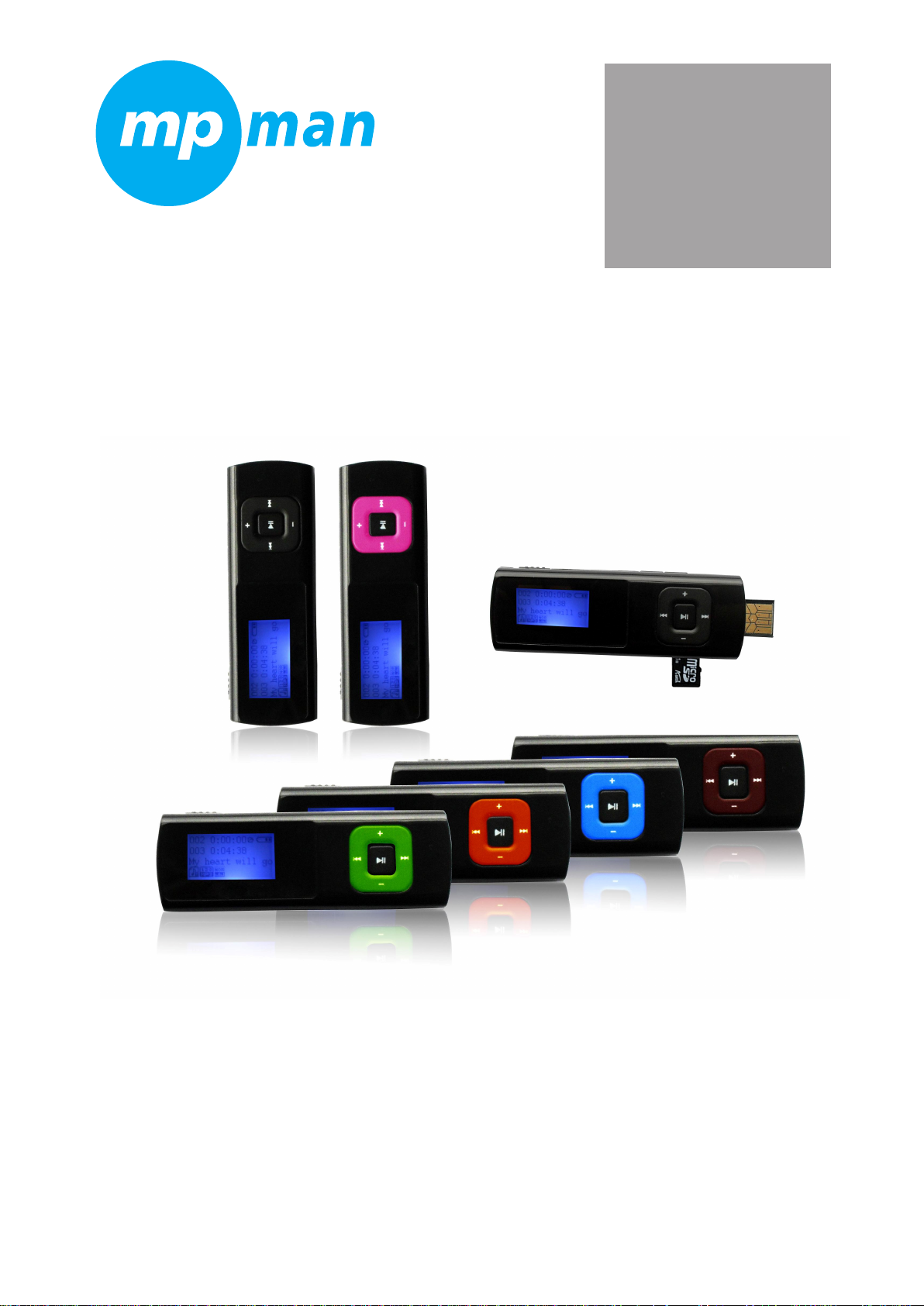
MP3 PLAYER
MP3 WOM
User Manual
Page 2

Features
�Supportmulti-musicformat,suchasMP3、WMA、WAVetc.
�SupportWin98SE/ME,Win2000,WinXPoperationsystem,removableUSBdisk,noneeddriverunderWIN98,
andplay.
plug
�Built-inMIC
�SupportMicro-SDcard
�Energysavingsetting,adjustthecontrastfreely,turnoffplayerautomatically.
�Soundeffectsandcirculation.
�Lyricdisplay
�Multi-languagessupported
�USBtransportation
�Withrechargeablelithiumbattery
Declaration
1.WeappreciateyourusingourMP3player!
2.ForYourSafetyReadthisusermanualcarefullytoensureproperusageoftheproductandtoavoidanyphysical
damageordangertotheunit.
3.Pleaseusetheplayerproperly.
Remarks
1.Donotleavetheplayerinaplacesubjecttomoistureortemperaturehigherthan35℃orlowerthan5℃
2.Pleaserechargeunderthefollowingsituation:
A、Batteryiconshowing:
B、Theplayerhavebeenturnedoffautomatically,turnedoffquicklyafterturningonagain
.
Note:Whenchargingthepowerswitchtoopenbeforecharging.
.
.
3.Pleasedon’tbreakconnectionwhiledownloading/uploading/formatting,otherwiseitwouldcausewrongprogram
4.Donotrepairtheplayerbyyourself.
5.Avoidgettingtheplayerwetordroppedinwater.
6.Pleasebackupimportantdataontoyourpersonalcomputerasrepairorothercausesmayresultindataloss
7.Unauthorizeddisassemblyoropeningoftheunitwillvoidproductwarranty
Page 3

Catalogue
Features................................................................................................................................................................................1
Declaration...........................................................................................................................................................................1
Remarks................................................................................................................................................................................1
Catalogues...........................................................................................................................................................................2
1.Knowplayer....................................................................................................................................................................3
lApperenceandbutton.....................................................................................................................................................3
lDisplay...............................................................................................................................................................................3
2.Basicfunction
lFunctionmode..................................................................................................................................................................3
3.Buttonoperationandfunctiondescriptions...........................................................................................................3
4.Musicplayback...............................................................................................................................................................4
lSimpleoperation---playmusic........................................................................................................................................4
lLyricdisplayinstep..........................................................................................................................................................4
5.Recordmode...................................................................................................................................................................5
lrecordat
lchooserecordtype..........................................................................................................................................................5
.
.
6.
.Systemsettings..............................................................................................................................................................6
functiintroduction.................................................................................................................................................................6
.
.
7.
.Othersettings.................................................................................................................................................................7
○Cyclemodesetting....................................................................................................................................................7
○EQmodesetting.......................................................................................................................................................7
○Replaymodesetting..................................................................................................................................................7
○Cardfoldersetting....................................................................................................................................................7
’
.................................................................................................................................................................
recordmode’...................................................................................................................................................5
3
○Deletefilessetting.....................................................................................................................................................7
8.Micro-SDcardusing…………………………………………………………………………………………………8
9.USBdiskusing………………………………………………………………………………………………………8
10.TroubleShooting…………………………………………………………………………………………………… ……………………………………………………………………………………………………8
Answers……………………………………………………………………………………………………………….8
Specifications…………………………………………………………………………………………………………8
Page 4
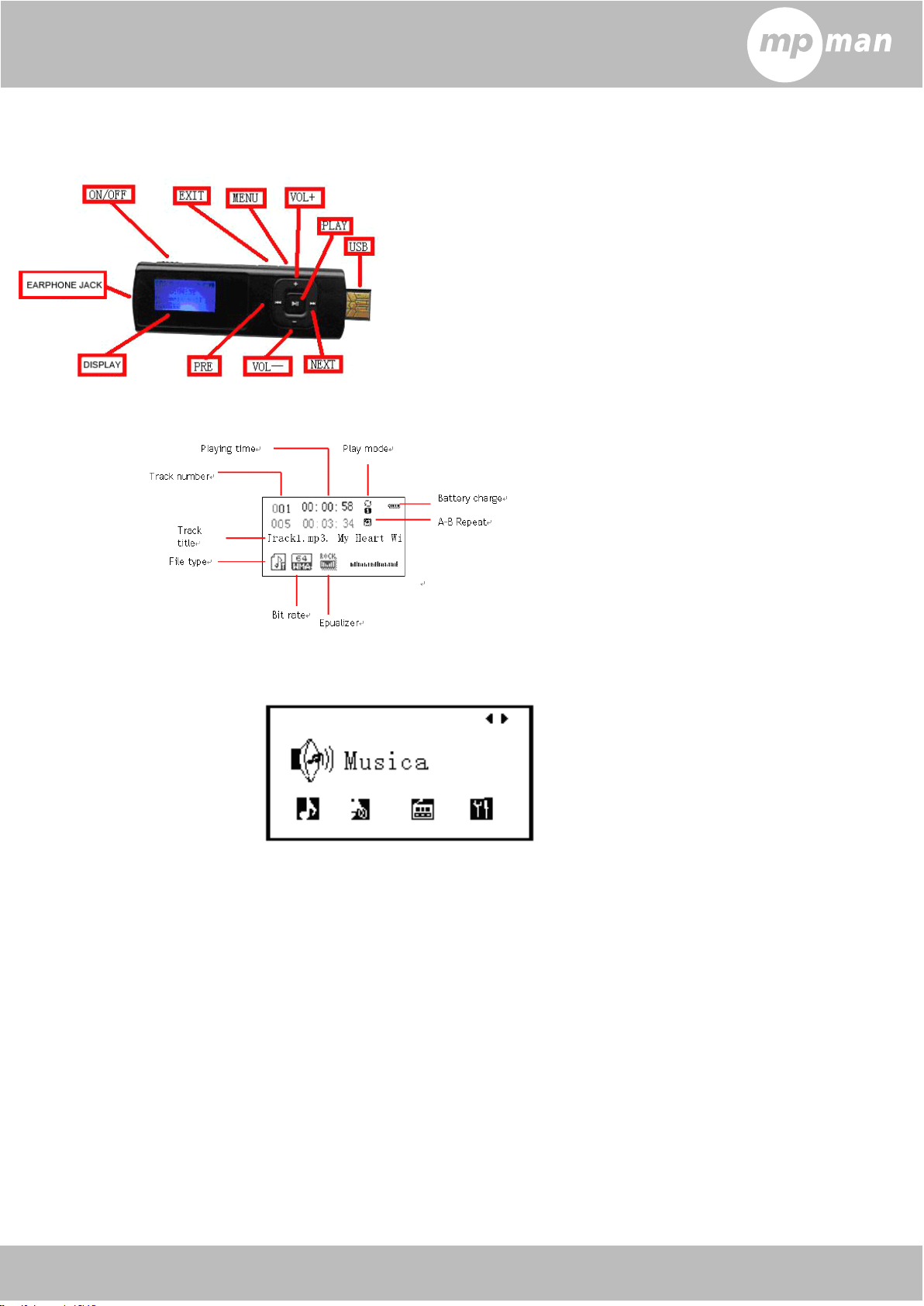
1.Knowplayer
�Appearanceandbuttons
�Display(musicmode)
2.Basicfunctions
�Functionmodes
Thereare4kindsofmodesforyouroptional,press
3.Buttonoperationandfunctiondescription
�【PLAY】button:turnon/turnoff/play/stop
Longpress‘play’buttontoturnontheshutdownconditions
Longpress‘play’buttontoturnoffonthepowerconditions.
Shortpress’play’buttontoplayagainonthestoppingcondition;Shortpressthisbuttonagaintoplayagain,short
pressagaintopause.
Shortpress‘play’buttontostarttorecordintherecordingstopmode,shortpress‘play’buttonagaintostop.
Shortpress‘Play’buttontostoprecordingintherecordingmode.
/buttontochange,shortpress【 MENU】 buttontoenter.
Note:thismachinehastheautomaticpowersavingfeature,ifplayerisinstopmode,itwillbeautomaticallyturnedoff
withinthespecifiedtimewithoutanyaction.
:
�【MENU】button:
:
:Functionmenu(musicmode)
Instoppingmode:shortpresstoenterstoppingsubmenu.
Inplayingmode:shortpresstoenterplayingsubmenu.
Page 5

Inplaying/stoppingsubmenumode:shortpresstoconfirmorenterintonextitem.
:
�【Exit】button:
Inthemusicplaying/stoppingmode:shortpresstoexittomainmenu
Inthesubmenuofmusicmode,shortpresstoexittolastlevel
�button:next/fastforward(music/voicemode)
Instopmode:shortpresstomovetonextsong,longpresstocontinuousbrowseforward
Inplaymode:shortpresstomovetonextsongandplay,longpressforfastforward.
Inplay/stopsubmenumode:shortpresstomovesubmenu,longpresstocontinuousmoveforward.
�button:last/rewind(music/voicemode)
Instopmode:shortpresstomovetolastsong,longpresstocontinuousbrowsebackward
Inplaymode:shortpresstomovetolastsongandplay,longpressforfastrewind.
Inplay/stopsubmenumode:shortpresstomovetonextsubmenu,longpresstocontinuousmovebackward
:
:exitandreturnbutton(musicmode)
�
�
�
�【VOL+】:
Inthemusicmodes, shortpress【 VOL+】 buttontoincreasevolume,longpress【 VOL+】 buttontocontinuousincrease
�
�
�
�【VOL-】button:adjustvolume
Inthemusicmodes, shortpress【 VOL-】 buttontodecreasevolume,longpress【 VOL+】 buttontocontinuousdecrease
�
�
�
�Poweron/off
Controlthemodelpoweron/off
�Earphonejack
Connectearphone.
�
�
�Micro-SDcardjack
�
SupportMicro-SDcard
�USBport
extendUSBandconnecttocomputerfordatacommunicationorrecharging
4.Musicplayback
�Simple
�Lyricdisplayinstep
Supportlyricfilewith“*.LRC”format(candownloadfromwebsiteoreditlyric), supportplayingmusicwithlyricsinstep
Howtouselyricfile?
Howtogettoknowifthereisanylyrics?
iftherearelyricsmatchingthemusic,inthemusicmodetheiconatleftuppercorner“”willchange
into“”,Shortpress‘MENU
press“MENU“buttontoconfirmthelyricsofthesongsplaying,thelyricsappearon-screeninterface,the“MENU”
interfaceinthelyricsshortpress“MENU”buttontoexitthelyricsdisplayreturnstomusicplayerinterface.
:
:
:adjustvolume
operation---play
1.insertearplugsandMicro-SDcardwithsongs.
2.Enterintothemusicplayerinterfaceafterturnonplayerbylongpress‘play
automaticintomusicplayinginterfaceandplaymusicwheninsertingMicro-SDcardwithsongsinmain
interface.)
3.shortpress‘PLAY
4.Selectmusic
:choosepreviousmusic.
:choosenextmusic.
5.Controlvolume
press【VOL+】/【VOL-】toadjustvolumecapacity.
6.Exitfrommusicmenu
press【Exit】buttontoexittomainmenuinthemusicplayinginterface
Keepthelyricsandsongnamesame
Forexample:
Thenameofthesong:Yesterdayoncemore.mp3
Thenameoflyric:Yesterdayoncemore.lrc
music
’
button.(Themodelwill
’
’
’
’
buttontoplay/pausemusic.
’
buttonintoplayingmusicsubmenu,Press/choicelyricfile,aftertheshort
Page 6

5.Recordmode
�
‘
�
‘
�
�‘
‘record
Shortpress【Exit】buttonorlongpress【MENU】buttontoexittomainmenuinthestoppingrecordmode
Note:TherecordingmustplugTFcardandensurethattheresidualcapacityofTFcardonlywhenrecording.Audiofiles
storedintheVOICEfolder'smenu,theneedtoplayaudiofilesinthemusicmenu,selectthecardlistandenterinthe
folderlist,selectVOICEselectthedesiredaccessaudiofilestoplay.
�
�
�
�Chooserecordtype
�
�
�
�Recordvolumeadjustment
ShortpressMENUbuttontoconfirm.
.
.
6.
.
SystemSetting
Systemparameterscanbesethereandeveryoptionvariesaccordingtothefirmwareversion.
Entermainmenu,shortpressbuttontoselect‘systemsetting’,shortpress【MENU】buttonenterSystemSetting
submenuinterfaceisasfollows:
’
’
’
’
atrecordmode
1.turnonplayerandentermainmenu,choose
‘record’
3.press【MENU】buttontoenterintorecord
interface,press【PLAY】buttontostarttorecord.
5.longpress【PLAY】tostorecurrentfile.
1.Intherecordstopinterface.
2.shortpressMENUbuttontoenterintorecordsubmenu
3.shortpressbuttontochoosethesubmenuof“RECtype”
4.shortpressMENUtoenterandchoosesuitablerecordtype(32KBPS,64KBPS,128KBPS,192KBPS)
5.shortpressMENUbuttontoconfirm
1.Intherecordstopinterface.
2.shortpressMENUbuttontoenterintorecordsubmenu
3.shortpressbuttontochoosethesubmenuof“Gainset”
4.ShortpressMENUtoenterandchoosesuitablevolume(0to7foryouroptional)
2.press/buttontochooserecordmode.
4.press【PLAY】buttontopauserecord,press
【PLAY】buttonagaintocontinuetorecord
6.longpress【MENU】buttontostorerecordand
enterintomainmenu.
�
�
�
�ParametersIntroduction
(Systemtime)
(Backlighttime)
Language
(poweroff)
(contrast)
Firmwareversion
Exit
�
�
�
�Detailedinstructions
○’Systemtime’
1.Entersystemsettinginterface
2.Shortpress‘MENU
3.Shortpress“MENU”tosetdateandtime(blink).
4.shortpress/tosetvalue.
Settingthedateandtimeforrecordedfile
Setacountdowntime(inseconds),thetimecomesbacklightoff
Setdifferentlanguagesdisplayed
Setacountdowntime(minutes),whenthetimecomeswill
automaticallyshutdown
Settingthecontrastofthescreen
Showfirmwareversion
Exitfromcurrentinterface
’
buttontoenter‘systemtime’.
Page 7

5.shortpress‘MENU
○’Backlighttime’
1.pressbuttonandchoosethemenuof‘backlighttime’.
2.shortpress‘MENU
3.shortpress/buttontoadjusttime.
’
buttontoconfirmandexit.
’
buttontoentertoadjustbacklighttime.
4.press‘MENU
○‘Language’
1.Atsystemsettinginterface,press
2.Shortpress‘MENU
3.Press/buttontochooselanguageyoulike.
4.Shortpress‘MENU
○‘Poweroff’
pleasereferenceto‘Backlighttime
“offtime”:Y oucansetatime(unit:seconds),instopmode,thereisnokeyoperationfromthestarttothetime
itshutofftosaveelectricity;thenumber0meansthatthisfeatureClose.
“sleeptime”:
thetimeitshutoff,beforethesongsusedforsleeping.Note:Sleepmodesettingsonlytakeeffectonce
thefirst,shutdownautomaticallyafterthesettimehasjustcleared,suchastheneedtosetthisfeature
again.
○‘Contrast’
’
buttontoconfirmandexit.
’
buttontoenter.
’
buttontoconfirmandexit.
’
setting
To
setatime(unit:minutes),irrespectiveofthestate,thereisnokeyoperationfromthestartto
/buttontochoose’Languages’.
’
pleasereferenceto‘Backlighttime
○‘Firmwareversion’
Checkthecurrentfirmwareversionforthisplayer.
�Tips:shortpress“MENU”keytosettheoptions,shortpressthe“Exit”buttontoexitthemenuquickly.Quick
“Exit”keytoexitthemenuforallmenufunctionsarevalid.
7.Othersetting
○“
○“
○“
○“Cyclemode”
1.atmusicplayinginterface2.shortpress【MENU】buttontoentersubmenu
3.press
(optionalmodes:normal,repeatone,folder,repeatfolder,repeatall,random,intro)
○“
○“
○“
○“EQmode”
1.atmusicplayinginterface2.shortpress【MENU】buttontoentersubmenu
”
”
”setting
/buttonandchooserepeatmode
”
”
”setting
setting
4.press【MENU】buttontoconfirm
3.press/buttonandchooseEQmode4.press【MENU】buttontoconfirm
(optionalmodes::natural,rock,pop,classic,soft,jazz,DBB,SRSWOW)
Page 8

○
“
○
“
○
○“
“Replaymode”
1.atmusicplayinginterface2.shortpress【MENU】buttontoentersubmenu
”
”
”setting
4.Startingpoint“A”starttoblink;shortpress
3.press/buttonandchoose‘replay
mode’,press‘Menu’toenter.
5.Shortpress’Menu’buttontoexit.
○
“
○
“
○
○“
“Cardfolder”
1.atmusicplayingpauseinterface2.shortpress【MENU】buttontoentersubmenu
3.press/buttonandchoose‘cardfolder’.3.Shortpress【MENU】buttontoentercardfolder.
3.press/buttonandchoosethesongof
“cardfolder”.
○“
○“
○“
○“DeleteFiles”
1.atmusicplayingpauseinterface2.shortpress【MENU】buttontoentersubmenu
3.press
all”
5.press
”
”
”setting
”
”
”setting
/buttontochoose“Delete”or“Del
/buttonchange“NO”into“YES”
,thenstoppoint“B”starttoblink;shortpress
toconfirm,thenstarttoreplayfrom
4.press【 MENU】 buttontoconfirmandentermusic
playinginterfacetoplay.
4.press【MENU】buttontoenterdeleteinterface
6.press【MENU】buttontoconfirmdeleting.
A
toB.
Tips:Deletedocumentsonyourcomputer,makesurethesecuritypop-upplayertopulloutthemachineafter
theUSBinterface,otherwisethefilewillappearthephenomenonhasnotbeendeleted.
8.Micro-SDcard
1.TheMicro-SDcardinsertedintothemachineMicro-SDcardslot.
2.Connectedtothecomputerwhenthereadercanusethismachine.
.
.
.USBdisk
9.
Supportedoperationsystem:Windows98(needinstalldriver) 、aboveWindows2K(noneedinstalldriver).
1.connecttheplayertoPCviaUSBport
2.afterconnection,itwillshowasbelow:
1.Waiting
:
2.transferring:
:
:
Page 9

.
.
10.
.
TroubleShooting
NoPowerCheckwhethertheplayeristurnedON
Nosoundisheard
fromheadphone
CharactersinLCMare
corrupted
Downloadof
musicfilesfails.
�
�
�
�Specifications:
MusicformatMP3,WMA,WAV
CheckwhetherVolumeisnotsetto"0"andconnectthe
headphoneplugsfirmly.CorruptedMP3maymakeastatic
noiseandthesoundmaycutoff.Makesurethatthemusicfiles
arenotcorrupted.
Checkwhethertherightlanguagehasbeenselected.
CheckwhetherUSBcableisdamagedandisconnected
properly
Checkwhetherdriverisinstalledcorrectly
Checkwhethertheplayer'smemoryisfull
Supportcardcapacity128MBto16GB
ScreenLCD
SNR85dB
RecordformatMIC
RecordformatWAV
Outputfrequency
range
LanguagesupportedEnglish,Italian,French,German
BatteryRecharginglithiumbattery
PCconnectionUSB2.0
OperatingSystemWin98SE/ME,Win2000,WinXP
20HZto22KHZ
Page 10

Conversion
For music conversion, please use MPMANAGER
software supplied in the CD ROM.
This software can be used also for UPDATE of your
player
MPMANAGER manual is included in your CDROM
Page 11

For more information please check our website
www.mpmaneurope.com
 Loading...