

Page 1
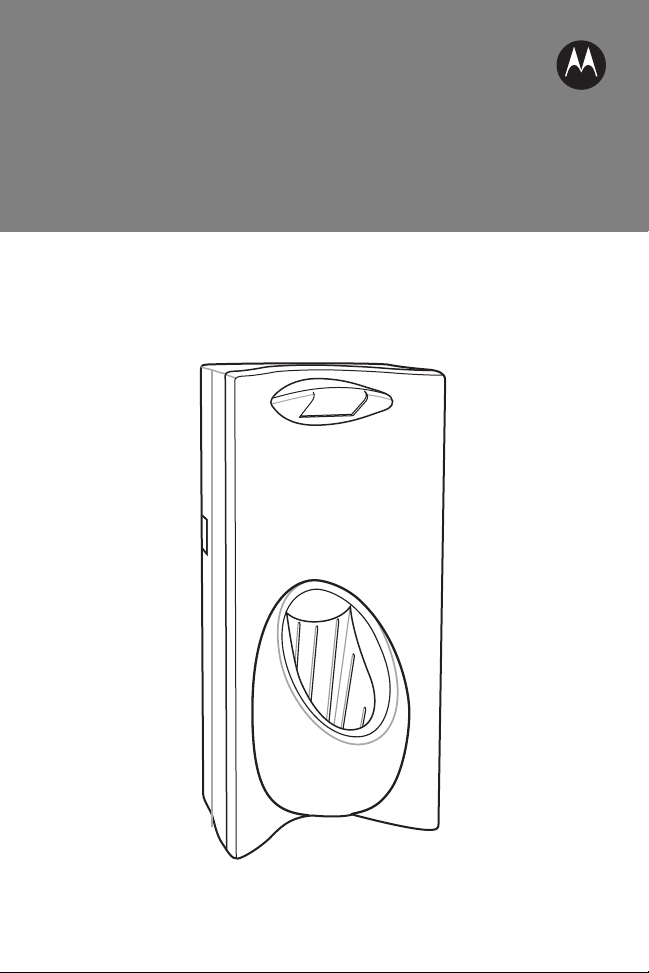
PSS-3CR01 Charging Cradle
Quick Reference Guide
Page 2

2 PSS-3CR01 Charging Cradle
© 2011 Motorola Solutions, Inc. All rights reserved.
Motorola reserves the right to make changes to any product to improve reliability,
function, or design.
Motorola does not assume any product liability arising out of, or in connection
with, the application or use of any product, circuit, or application described herein.
No license is granted, either expressly or by implication, estoppel, or otherwise
under any patent right or patent, covering or relating to any combination, system,
apparatus, machine, material, method, or process in which Motorola products
might be used. An implied license exists only for equipment, circuits, and
subsystems contained in Motorola products.
Motorola Solutions, Inc.
One Motorola Plaza
Holtsville, N.Y. 11742-1300
http://www.motorolasolutions.com
Warranty
For the complete Motorola hardware product warranty statement, go to:
http://www.symbol.com/enterprisemobility/warranty.
Page 3
Quick Reference Guide 3
Introduction
The PSS-3CR01 Charging cradle is used to charge the MC17 mobile computer.
There are two configurations available: The PSS-3C01-01R contains a locking
mechanism that locks the mobile computer in the cradle and the PSS-3C01-NLR
that does not contain the locking mechanism.
Mounting the Cradle
The cradle contains mounting holes in the back housing so that it can be secured
to supporting furniture. In addition, it come with plugs and a variety of cable
routing outlets. Cable outlets not used can be concealed with the plugs provided.
Refer to the Product Reference Guide for information required to design correct
mounting holes for the charge cradle.
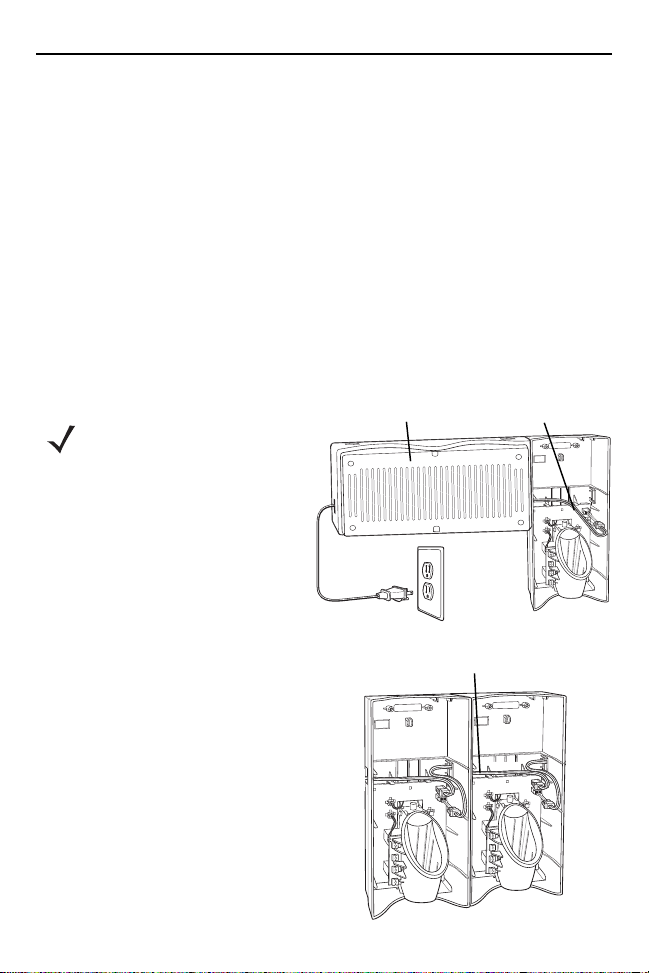
Wiring
NOTE During installation
ensure all interconnect
cables are fully
enclosed within the
power supply or cradle
enclosure.
1. Install power supply, including AC
line cord and power cable, into
Decorative Housing.
2. Insert power cable through a cable
outlet of cradle back housing.
3. Plug connector into power
connector on printed circuit board.
4. If more than one cradle, connect the
interconnect cable from the first
cradle to the second cradle.
5. Use plugs to cover un-used cable
outlets.
There are some general limitations that
must be taken into account when
designing a system:
Power Supply
50-14000-241R (inside
Decorative Housing)
Interconnect Cable 25-66431-01R
Power Cable
25-66420-01R
Page 4
4 PSS-3CR01 Charging Cradle
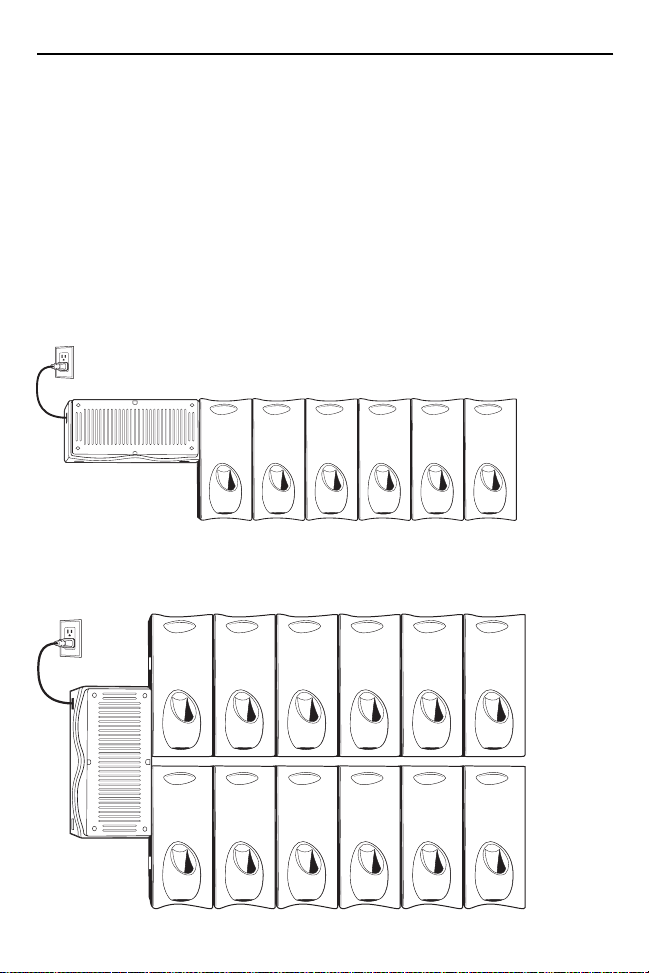
• No more than six cradles can be powered off of one power supply and power
cable 25-66420-01R.
• No more than 12 cradles can be powered off of one power supply and “Y”
power cable 25-67592-01R.
• No more than six cradles can be powered off each leg of the “Y” power cable.
• A power supply cable runs from the power supply to one or two cradles.
• Cradle interconnection cables run between each successive cradle in the
chain.
The illustration below shows how the maximum number of cradles can be cabled
to a power supply using power cable 25-66420-01R.
The illustration below shows how the maximum number of cradles can be cabled
to a power supply using the “Y” power cable 25-67592-01R. Note that there are
only six cradles per leg of the power supply cable, and only 12 cradles in total.
Page 5
Quick Reference Guide 5
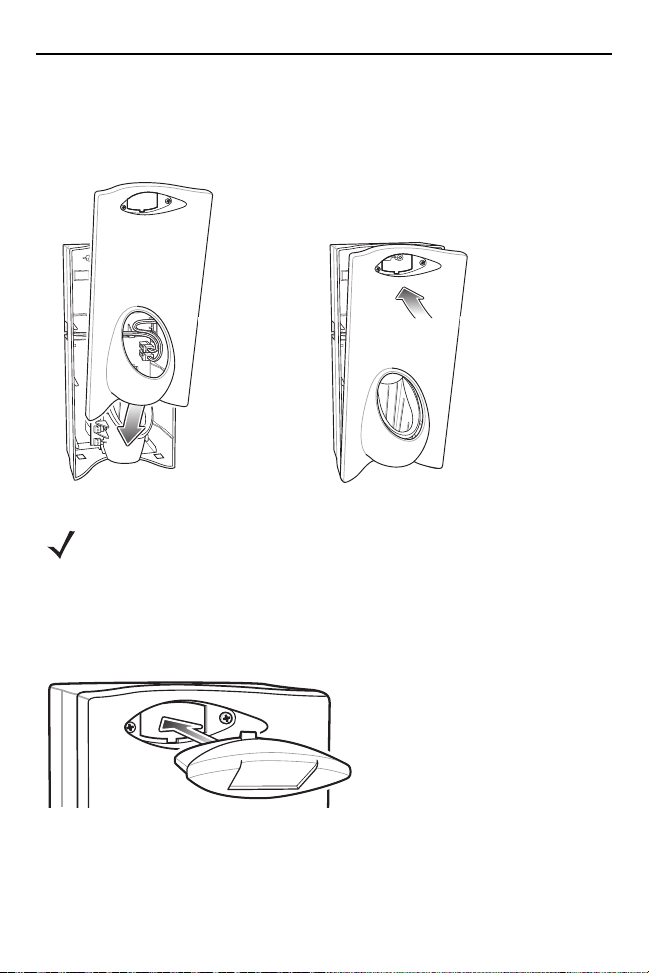
Assembly
1. Replace cover.
2. Secure the two captive screws.
NOTE Do not install the target cover until you are sure that you do not
need to remove the front cover again.
Place cradle ID bar code on target cover prior to installing the
target cover.
3. Insert bar code target cover.
4. Push target cover into front cover until it snaps into place.
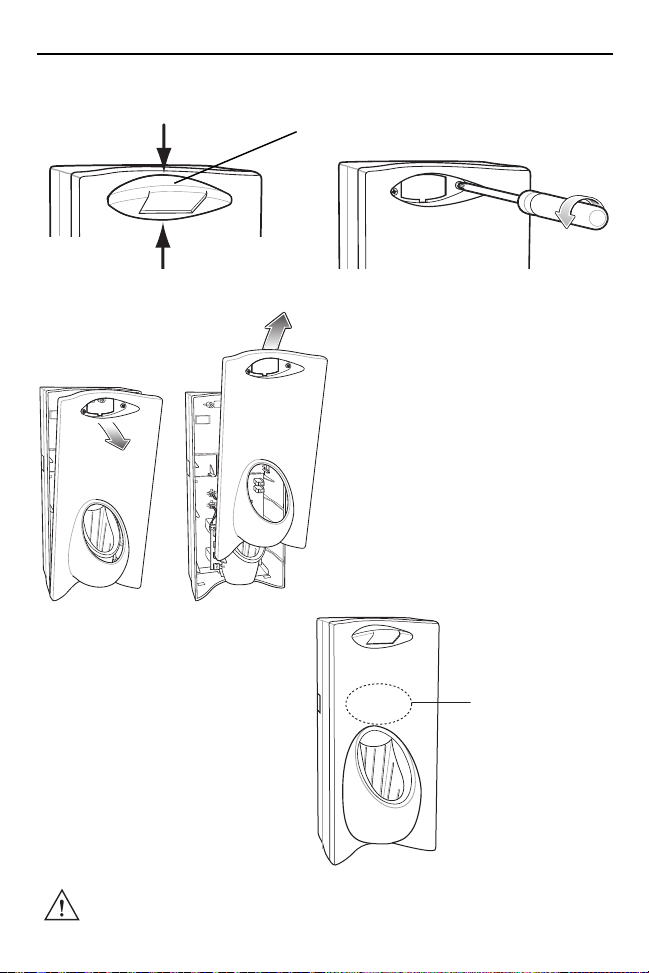
Removing the Front Cover
To remove the front cover:
1. Squeeze the top and bottom of the target cover to remove.
Page 6
6 PSS-3CR01 Charging Cradle
2. Loosen two captive screws securing the front cover to the back housing.
Target Cover
3. Pull front cover away from back housing and then lift out of the back housing.
Battery Charging
• The Li-Ion battery recharges when
the mobile computer is inserted in
the cradle.
• The cradle charge LED turns red
when the mobile computer is
inserted in the cradle, then turns
green when charging is complete.
CAUTION The temperature range for charging the battery is 0°C to
40°C (32°F to 104°F).
Charge LED
(behind front panel)
Page 7
Quick Reference Guide 7
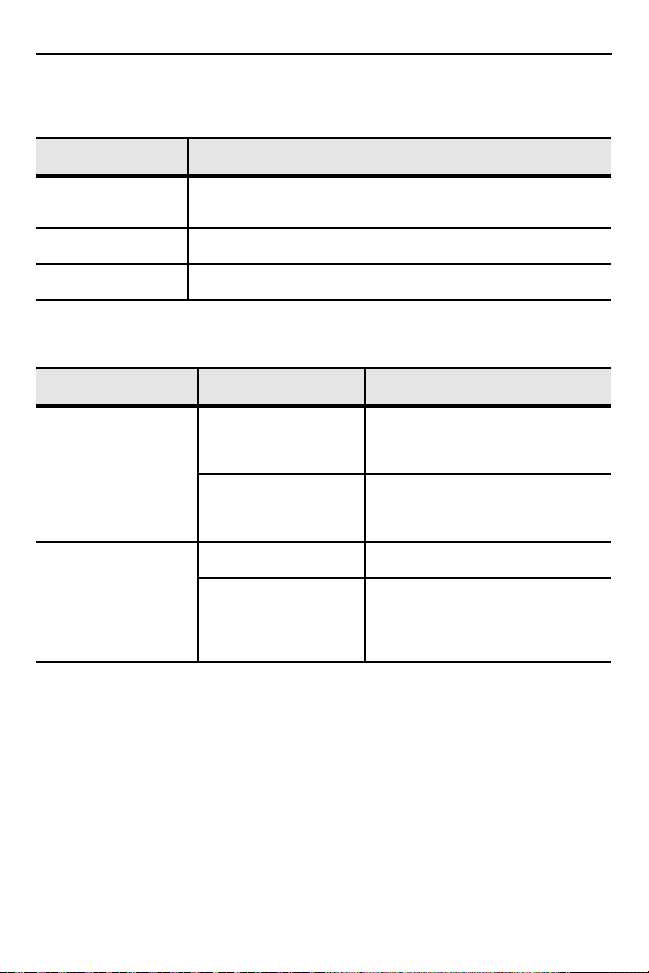
LED Indications
Condition Cradle Charge LED
Red Mobile computer is inserted in the cradle and the battery
Green Battery is fully charged.
Off Mobile computer is not properly inserted in the cradle.
is charging.
Troubleshooting
Symptom Possible Cause Action
Cradle red Charge
LED indicator does
not light when
mobile computer is
inserted in cradle.
Battery in the
mobile computer did
not recharge.
Mobile computer is
not seated firmly in
cradle.
Battery is not
installed in the
mobile computer.
Battery failed. Replace battery.
Mobile computer
was removed from
cradle too soon.
Replace mobile computer
securely in cradle.
Install battery.
Replace mobile computer in the
cradle. Approximately 5 hours
are required to recharge a fully
discharged battery.
Regulatory Information
This device is approved under the Symbol Technologies, Inc brand. Symbol
Technologies, Inc. is a wholly owned subsidiary of Motorola Solutions, Inc.
All Symbol devices are designed to be compliant with rules and regulations in
locations they are sold and will be labeled as required.
Local language translations are available at the following website:
http://support.symbol.com
Any changes or modifications to Symbol Technologies equipment, not expressly
approved by Symbol Technologies, could void the user's authority to operate the
equipment.
Page 8
8 PSS-3CR01 Charging Cradle
Power Supply
Use ONLY a LISTED Motorola, Type no. 50-14000 (12Vdc / 1.5A min), or
PWRS-14000 (12Vdc / 1.5A min), Direct Plug-In Power supply, marked Class 2 or
LPS (IEC60950-1, SELV). Use of alternative power supply will invalidate any
approval given to this device and may be dangerous.
Radio Frequency Interference Requirements-FCC
Note: This equipment has been tested and found to comply with
the limits for a Class B digital device, pursuant to Part 15 of the
FCC rules. These limits are designed to provide reasonable
protection against harmful interference in a residential
installation. This equipment generates, uses and can radiate radio frequency
energy and, if not installed and used in accordance with the instructions, may
cause harmful interference to radio communications. However there is no
guarantee that interference will not occur in a particular installation. If this
equipment does cause harmful interference to radio or television reception, which
can be determined by turning the equipment off and on, the user is encouraged to
try to correct the interference by one or more of the following measures:
• Reorient or relocate the receiving antenna
• Increase the separation between the equipment and receiver
• Connect the equipment into an outlet on a circuit different from that to which
the receiver is connected
• Consult the dealer or an experienced radio/TV technician for help.
Radio Frequency Interference Requirements - Canada
This Class B digital apparatus complies with Canadian ICES-003.
Cet appareil numérique de la classe B est conforme à la norme NMB-003 du
Canada.
Marking and European Economic Area (EEA)
Statement of Compliance
Motorola/Symbol hereby declares that this device is in compliance with all the
applicable Directives, 2004/108/EC and 2006/95/EC. A Declaration of Conformity
may be obtained from http://www.motorola.com/doc.
Page 9
Quick Reference Guide 9
Japan (VCCI) - Voluntary Control Council for Interference
ሶቑ孔函ቒᇬ㍔⫀⑵䚕孔函䷘榊㽱椫⹂呹尞Ⓟ◣巿↩᧤ᨒ᧿᧿ᨅ᧥ቑ⪉䄥⪉ቈ
ሲኌኖ % ㍔⫀㔏嫢孔函ቊሼᇭሶቑ孔函ቒᇬ⹅ㄼ䜿⬒ቊ∎䞷ሼቮሶቋት䥽䤓ቋ
ሺሧቡሼሯᇬሶቑ孔函ሯንኇቧኣዉኰንዄዐ♦≰㳮扠㘴ሺ∎䞷ሸቯቮ
ቋᇬ♦≰椫⹂ትㆤሰ怆ሶሼሶቋሯሥቭቡሼᇭ ♥㔀崻㢝㦇㈢ቆ㷲ሺሧ♥ቭ㔀
ሧትሺₚሸሧᇭ
This is a Class B product based on the standard of the Voluntary Control Council
for Interference from Information Technology Equipment (VCCI). If this is used
near a radio or television receiver in a domestic environment, it may cause radio
interference. Install and use the equipment according to the instruction manual.
Korea Warning Statement for Class B ITE
韥눺ꙹ ꩡ끞녅껽驩ꓭ
% 鞾韥韥 넩韥韥鱉閵뇊끞냱ꈑ놹녅볁놶뼞麦ꈒ냹뼑韥韥넩꿙鱽
늱阥덵꾢꾅鱉ꓱꈕꑝ麕덵꾢꾅ꩡ끞뼕ꯍ넽걪鱽鲙
Class User’s Guide
B class As this equipment has obtained EMC registration for
household use, it can be used in any area including
residential areas.
Waste Electrical and Electronic Equipment (WEEE)
English: For EU Customers: All products at the end of their life must be returned
to Motorola for recycling. For information on how to return product, please go to:
http://www.motorola.com/recycling/weee.
Français: Clients de l'Union Européenne : Tous les produits en fin de cycle de vie
doivent être retournés à Motorola pour recyclage. Pour de plus amples
informations sur le retour de produits, consultez :
http://www.motorola.com/recycling/weee.
Bulgarish: За клиенти от ЕС: След края на полезния им живот всички продукти
трябва да се връщат на Motorola за рециклиране. За информация относно
връщането на продукти, моля отидете на адрес:
http://www.motorola.com/recycling/weee.
Español: Para clientes en la Unión Europea: todos los productos deberán
entregarse a Motorola al final de su ciclo de vida para que sean reciclados. Si
Page 10

10 PSS-3CR01 Charging Cradle
desea más información sobre cómo devolver un producto, visite:
http://www.motorola.com/recycling/weee.
Deutsch: Für Kunden innerhalb der EU: Alle Produkte müssen am Ende ihrer
Lebensdauer zum Recycling an Motorola zurückgesandt werden. Informationen
zur Rücksendung von Produkten finden Sie unter
http://www.motorola.com/recycling/weee.
Italiano: per i clienti dell'UE: tutti i prodotti che sono giunti al termine del rispettivo
ciclo di vita devono essere restituiti a Motorola al fine di consentirne il riciclaggio.
Per informazioni sulle modalità di restituzione, visitare il seguente sito Web:
http://www.motorola.com/recycling/weee.
Português: Para clientes da UE: todos os produtos no fim de vida devem ser
devolvidos à Motorola para reciclagem. Para obter informações sobre como
devolver o produto, visite: http://www.motorola.com/recycling/weee.
Nederlands: Voor klanten in de EU: alle producten dienen aan het einde van hun
levensduur naar Motorola te worden teruggezonden voor recycling. Raadpleeg
http://www.motorola.com/recycling/weee voor meer informatie over het
terugzenden van producten.
Polski: Klienci z obszaru Unii Europejskiej: Produkty wycofane z eksploatacji
nale¿y zwróciæ do firmy Motorola w celu ich utylizacji. Informacje na temat zwrotu
produktów znajduj¹ siê na stronie internetowej
http://www.motorola.com/recycling/weee.
Čeština: Pro zákazníky z EU: Všechny produkty je nutné po skonèení jejich
životnosti vrátit spoleènosti Motorola k recyklaci. Informace o zpùsobu vrácení
produktu najdete na webové stránce: http://www.motorola.com/recycling/weee.
Eesti: EL klientidele: kõik tooted tuleb nende eluea lõppedes tagastada
taaskasutamise eesmärgil Motorola'ile. Lisainformatsiooni saamiseks toote
tagastamise kohta külastage palun aadressi:
http://www.motorola.com/recycling/weee.
Magyar: Az EU-ban vásárlóknak: Minden tönkrement terméket a Motorola
vállalathoz kell eljuttatni újrahasznosítás céljából. A termék visszajuttatásának
módjával kapcsolatos tudnivalókért látogasson el a
http://www.motorola.com/recycling/weee weboldalra.
Slovenski: Za kupce v EU: vsi izdelki se morajo po poteku življenjske dobe vrniti
podjetju Motorola za reciklažo. Za informacije o vraèilu izdelka obišèite:
http://www.motorola.com/recycling/weee.
Svenska: För kunder inom EU: Alla produkter som uppnått sin livslängd måste
returneras till Motorola för återvinning. Information om hur du returnerar produkten
finns på http://www.motorola.com/recycling/weee.
Suomi: Asiakkaat Euroopan unionin alueella: Kaikki tuotteet on palautettava
kierrätettäväksi Motorola-yhtiöön, kun tuotetta ei enää käytetä. Lisätietoja tuotteen
palauttamisesta on osoitteessa http://www.motorola.com/recycling/weee.
Page 11

Quick Reference Guide 11
Dansk: Til kunder i EU: Alle produkter skal returneres til Motorola til recirkulering,
når de er udtjent. Læs oplysningerne om returnering af produkter på:
http://www.motorola.com/recycling/weee.
Ελληνικά: Για πελάτες στην Ε.Ε.: Όλα τα προϊόντα, στο τέλος της διάρκειας ζωής
τους, πρέπει να επιστρέφονται στην Motorola για ανακύκλωση. Για περισσότερες
πληροφορίες σχετικά με την επιστροφή ενός προϊόντος, επισκεφθείτε τη
διεύθυνση http://www.motorola.com/recycling/weee στο Διαδίκτυο.
Malti: Għal klijenti fl-UE: il-prodotti kollha li jkunu waslu fl-aħħar tal-ħajja ta' l-użu
tagħhom, iridu jiġu rritornati għand Motorola għar-riċiklaġġ. Għal aktar tagħrif dwar
kif għandek tirritorna l-prodott, jekk jogħġbok żur:
http://www.motorola.com/recycling/weee.
Românesc: Pentru clienţii din UE: Toate produsele, la sfârşitul duratei lor de
funcţionare, trebuie returnate la Motorola pentru reciclare. Pentru informaţii
despre returnarea produsului, accesaţi: http://www.motorola.com/recycling/weee.
Slovenski: Za kupce v EU: vsi izdelki se morajo po poteku življenjske dobe vrniti
podjetju Motorola za reciklažo. Za informacije o vračilu izdelka obiščite:
http://www.motorola.com/recycling/weee.
Slovenčina: Pre zákazníkov z krajín EU: Všetky výrobky musia byť po uplynutí
doby ich životnosti vrátené spoločnosti Motorola na recykláciu. Bližšie informácie
o vrátení výrobkov nájdete na: http://www.motorola.com/recycling/weee.
Lietuvių: ES vartotojams: visi gaminiai, pasibaigus jų eksploatacijos laikui, turi
būti grąžinti utilizuoti į kompaniją „Motorola“. Daugiau informacijos, kaip grąžinti
gaminį, rasite: http://www.motorola.com/recycling/weee.
Latviešu: ES klientiem: visi produkti pēc to kalpošanas mūža beigām ir jānogādā
atpakaļ Motorola otrreizējai pārstrādei. Lai iegūtu informāciju par produktu
nogādāšanu Motorola, lūdzu, skatiet: http://www.motorola.com/recycling/weee.
Page 12
Service Information
If you have a problem using the equipment, contact your facility’s Technical or
Systems Support. If there is a problem with the equipment, they will contact the
Motorola Enterprise Mobility Support at:
http:www.motorola.com/enterprisemobility/contactsupport.
For the latest version of this guide go to: http://supportcentral.motorola.com.
Motorola Solutions, Inc.
One Motorola Plaza
Holtsville, New York11742, USA
1-800-927-9626
http://www.motorolasolutions.com
MOTOROLA, MOTO, MOTOROLA SOLUTIONS and the Stylized M Logo are trademarks or
registered trademarks of Motorola TrademarkHoldings, LLC and are used underlicense. All other
trademarks are the property of their respective owners.
© 2011 Motorola, Inc. All rights reserved.
72-104413-02 Revision B - January 2011
 Loading...