

Page 1
Copyright © 2014, All Rights Reserved.
Ver: 05 D/C: 103-0107
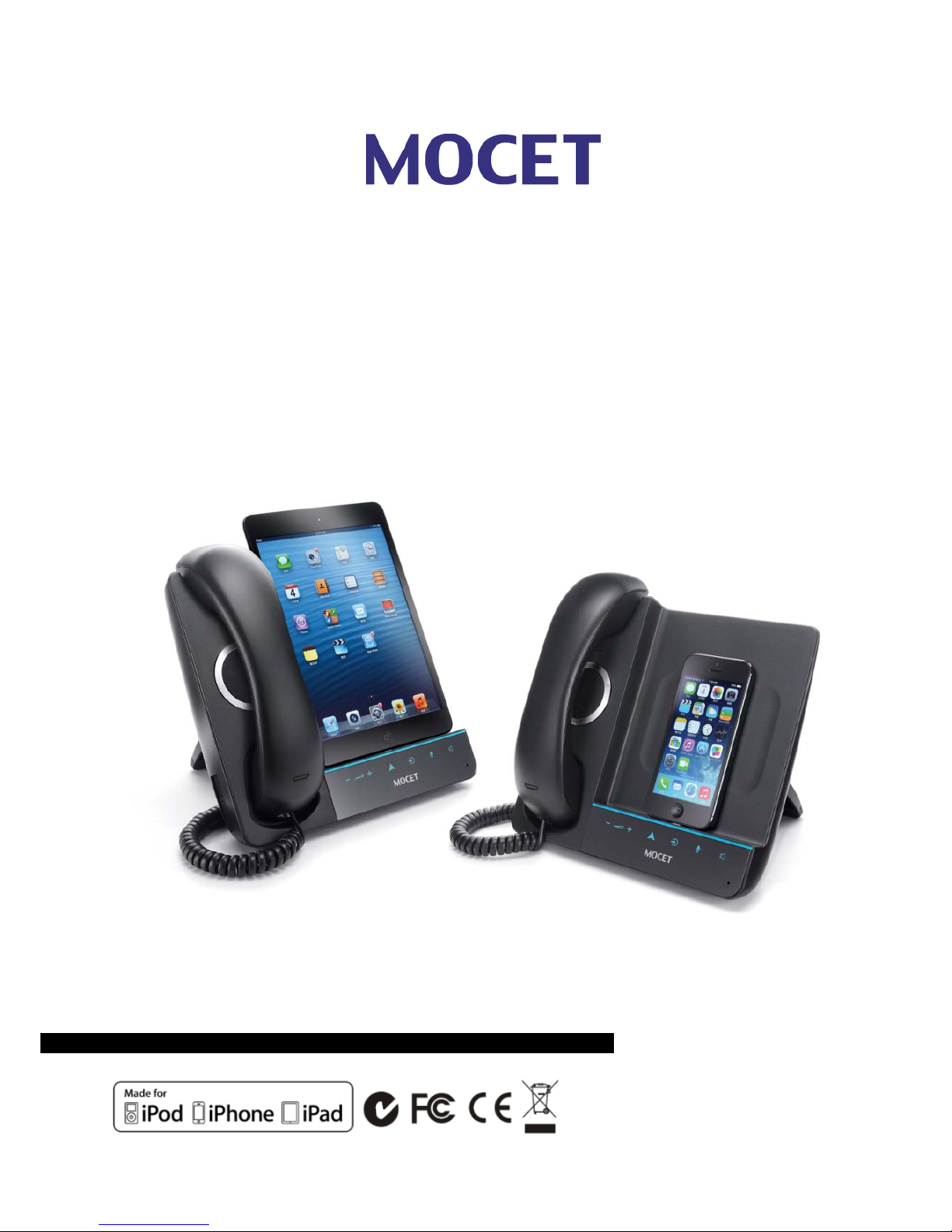
IP3093L-C
Communicator mini
Quick Start Guide
TM
Page 2

Page 2
MOCET IP3093L-C Communicator mini Quick Start Guide
Federal Communication Commission Interference Statement
This equipment has been tested and found to comply with the limits for a Class B digital device,
pursuant to Part 15 of the FCC Rules. These limits are designed to provide reasonable protection
against harmful interference in a residential installation. This equipment generates, uses and can
radiate radio frequency energy and, if not installed and used in accordance with the instructions,
may cause harmful interference to radio communications. However, there is no guarantee that
interference will not occur in a particular installation. If this equipment does cause harmful
interference to radio or television reception, which can be determined by turning the equipment off
and on, the user is encouraged to try to correct the interference by one or more of the following
measures:
Reorient or relocate the receiving antenna.
Increase the separation between the equipment and receiver.
Connect the equipment into an outlet on a circuit different from that to which the
receiver is connected.
Consult the dealer or an experienced radio/TV technician for help.
FCC Caution: Any changes or modifications not expressly approved by the party responsible for
compliance could void the user's authority to operate this equipment.
This device complies with Part 15 of the FCC Rules. Operation is subject to the following two
conditions: (1) This device may not cause harmful interference, and (2) this device must accept any
interference received, including interference that may cause undesired operation.
CE Declaration of Conformity
This equipment complies with the requirements relating to electromagnetic compatibility, EN55022
class B for ITE and EN 50082-1. This meets the essential protection requirements of the European
Council Directive 89/336/EEC on the approximation of the laws of the Member States relating to
electromagnetic compatibility.
C-Tick Declaration of Conformity
This equipment passed tests performed according to AS/NZS CISPR 22:2009/A1:2010 Class B at
Sporton International Inc. Lab. Certificate No. AI381226.
Environment
The device you have purchased, as well as any used batteries must not be disposed of with
household waste. You should return these to your distributor if they are to replaced or dispose of
them in an approved recycling center.
Trademarks
iPad™, iPad mini™, iPhone™, iDevice™, iPod™, iTunes™, iOS™, Safari™ and Facetime™ are
registered trademarks of Apple Inc., USA. Skype™ and Lync2013™ are registered trademarks of
Microsoft. Viber, Line and others as well as Unified Communications (UC) apps, like CounterPath™
Bria™, Cisco™ Jabber™, Avaya™ Flare™, Radvision™ Scopia™, Polycom™ RealPresenc™,
YouTube™ or others are registered trademarks of their respective owners.
WARNING! ▼
1. Read these installation instructions carefully before connecting the device to its power.
2. To reduce the risk of electric shock, do not remove the cover from the device or attempt to
dismantle it. Opening or removing covers may expose you to dangerous voltage levels.
!
Page 3

Page 3
MOCET IP3093L-C Communicator mini Quick Start Guide
Equally, incorrect reassembly could cause electric shock on re-use of the appliance.
3. Do not expose the device to Fire, direct sunlight or excessive heat.
4. Do not expose the device to rain or moisture and do not allow it to come into contact with
water.
5. Do not install the device in an environment likely to present a THREAT OF IMPACT.
6. You may clean the device using a fine damp cloth. Never use solvents (such as
trichloroethylene or acetone), which may damage the device’s plastic surface. Never spray
the device with any cleaning product whatsoever.
7. The device is designed to work in temperatures from 5
o
C to 40oC.
8. The device must be installed at least 1 meter from radio frequency equipment, such as TVs,
radios, hi-fi or video equipment (which radiate electromagnetic fields).
9. Do not attempt to upgrade device in an unstable power environment. This could cause
unexpected issues.
10. Do not work on the system or connect or disconnect cables during lightning storms.
11. Children do not recognize the risks of electrical appliances. Therefore use or keep the device
only under supervision of adults or out of the reach from children.
12. No repair can be performed by the end user, if you experience trouble with this equipment,
for repair or warranty information, please contact your supplier.
Page 4
Page 4
MOCET IP3093L-C Communicator mini Quick Start Guide
Introduction
The MOCET™ Communicator mini™ is an innovative audio accessory, or called dock
phone, that enables you to use your Apple™ iPad™ mini, mini 2, or iPhone™ 5, 5s or 5c as
a desktop phone with popular Social Networking apps such as 8x8 Virtual Office™,
Skype™, Cisco Jabber™ and others. Additionally, Unified Communications (UC) apps,
such as CounterPath™ Bria™, Radvision™ Scopia™, Polycom™ RealPresence™,
Microsoft™ Lync2013™, Lifesize™ Clearsea™, Avaya™ Flare™, Facetime™ and others,
available from the Apple™ App Store™.
The high definition audio-enabled handset and speakerphone on the Communicator mini
dramatically enhances your communications and ensures privacy and comfort. For a
medium or even larger sized conference room, there is even an optional desktop
microphone set available to ensure all participants in the room can be heard clearly on the
call. For a more enjoyable multimedia experience, there is an optional external speaker to
aid the stereo effect when listening to music or watching movies or YouTube™ videos.
The Communicator mini stand is adjustable between 0º and 125º, allowing you to find the
most convenient viewing angle for watching movies or participating in video conferencing
calls on your desk. The Communicator mini has a built-in fast charger so you can play and
work all day, and when you leave your iPad mini or iPhone will be fully charged and ready
to go. Using the built-in USB host port, you can even charge a second phone or mobile
device.
What’s In the Package?
Page 5
Page 5
MOCET IP3093L-C Communicator mini Quick Start Guide
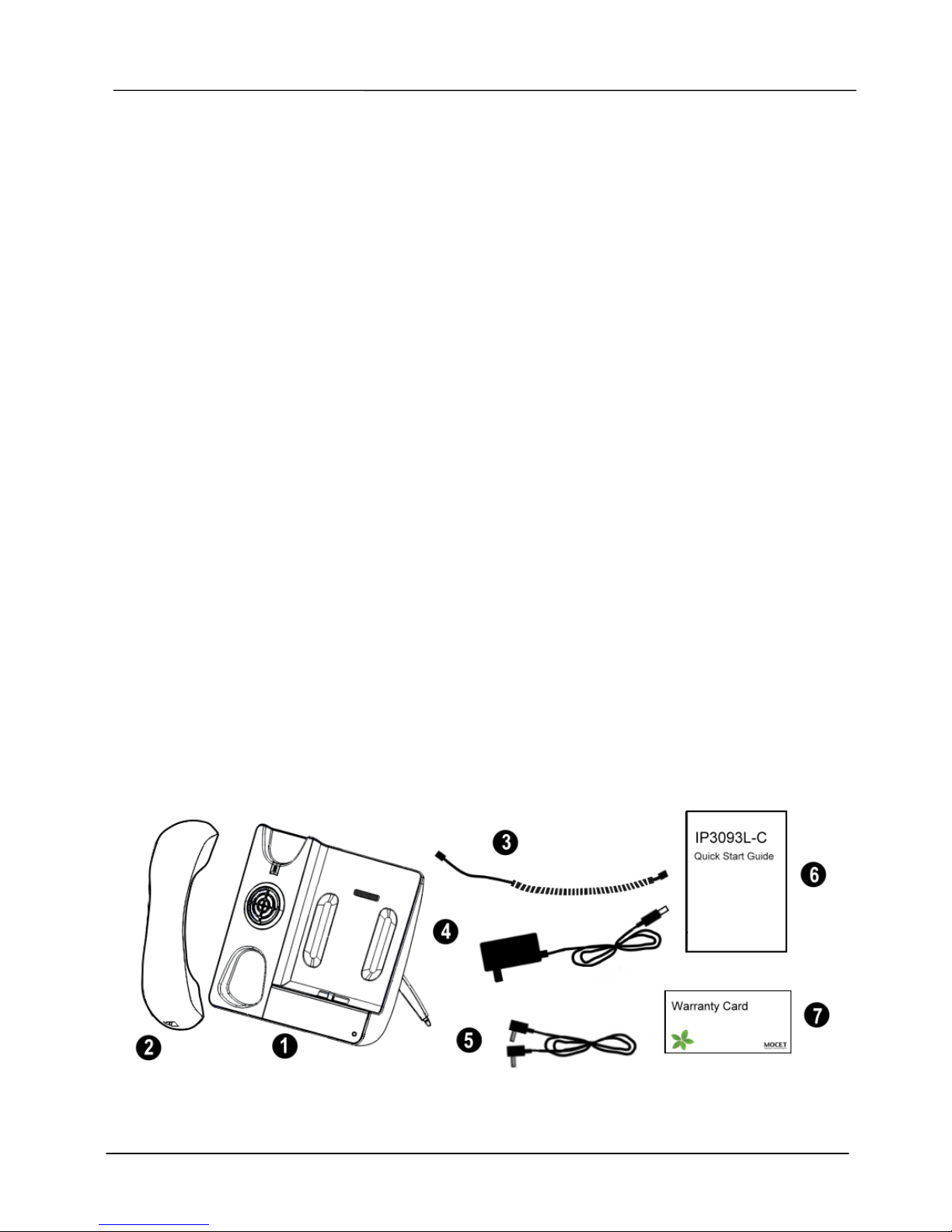
1. Main unit x 1
2. Handset x 1
3. Handset cord x 1
4. Power adapter with cord x 1
5. AUX-in cable x 1
6. Quick start guide x 1
7. Warranty card x 1
Setting up the Communicator mini
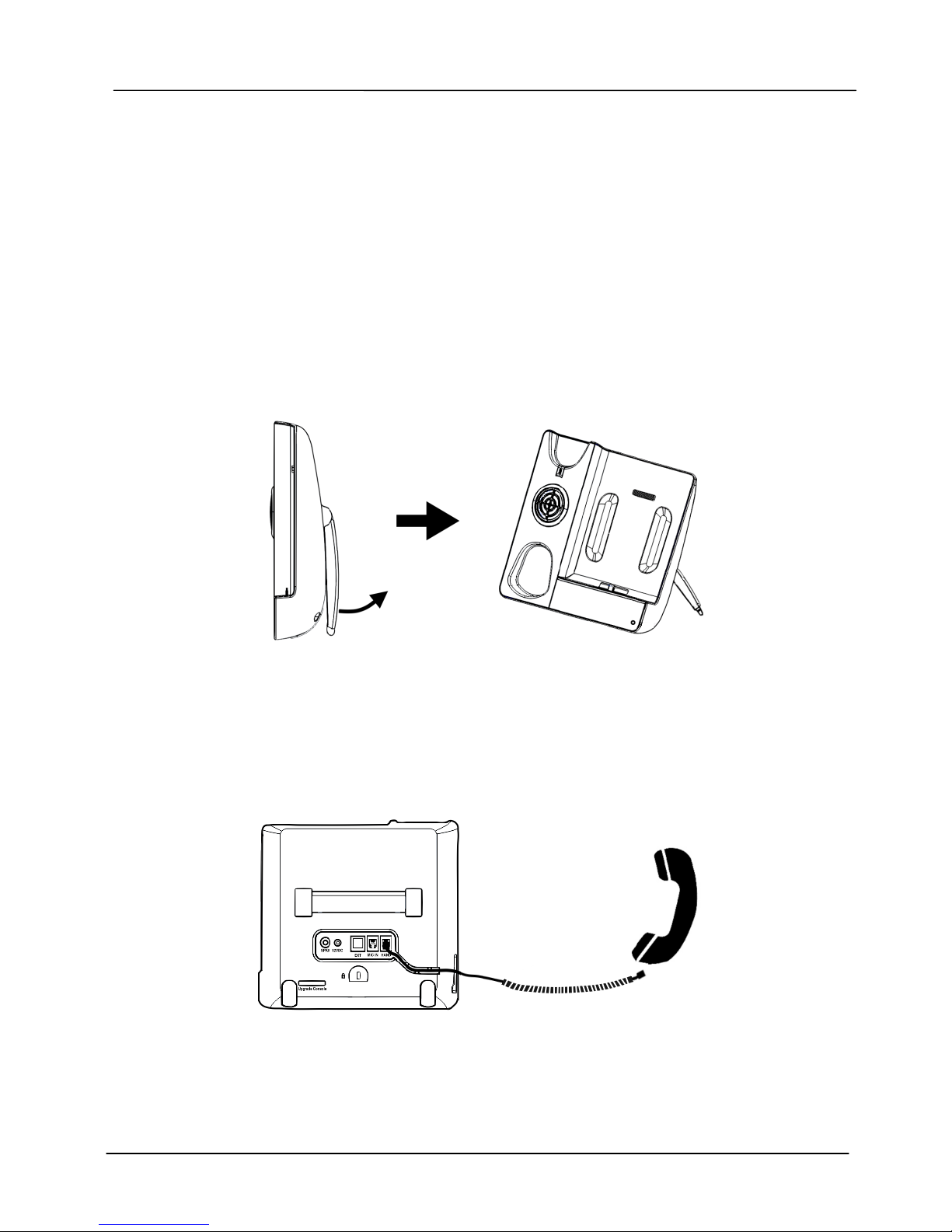
1. Adjust the stand
After unpacking the product package box, place the Communicator mini on the table and
slightly pull the stand apart from the bottom shell to a comfortable viewing position.
2. Attach the handset
Attach the long end of the handset cord to the HAND port in the back of the Communicator
mini, then attach the short end to the handset. Run the cord through the cable guide so that
the Communicator mini does not wobble on the desk.
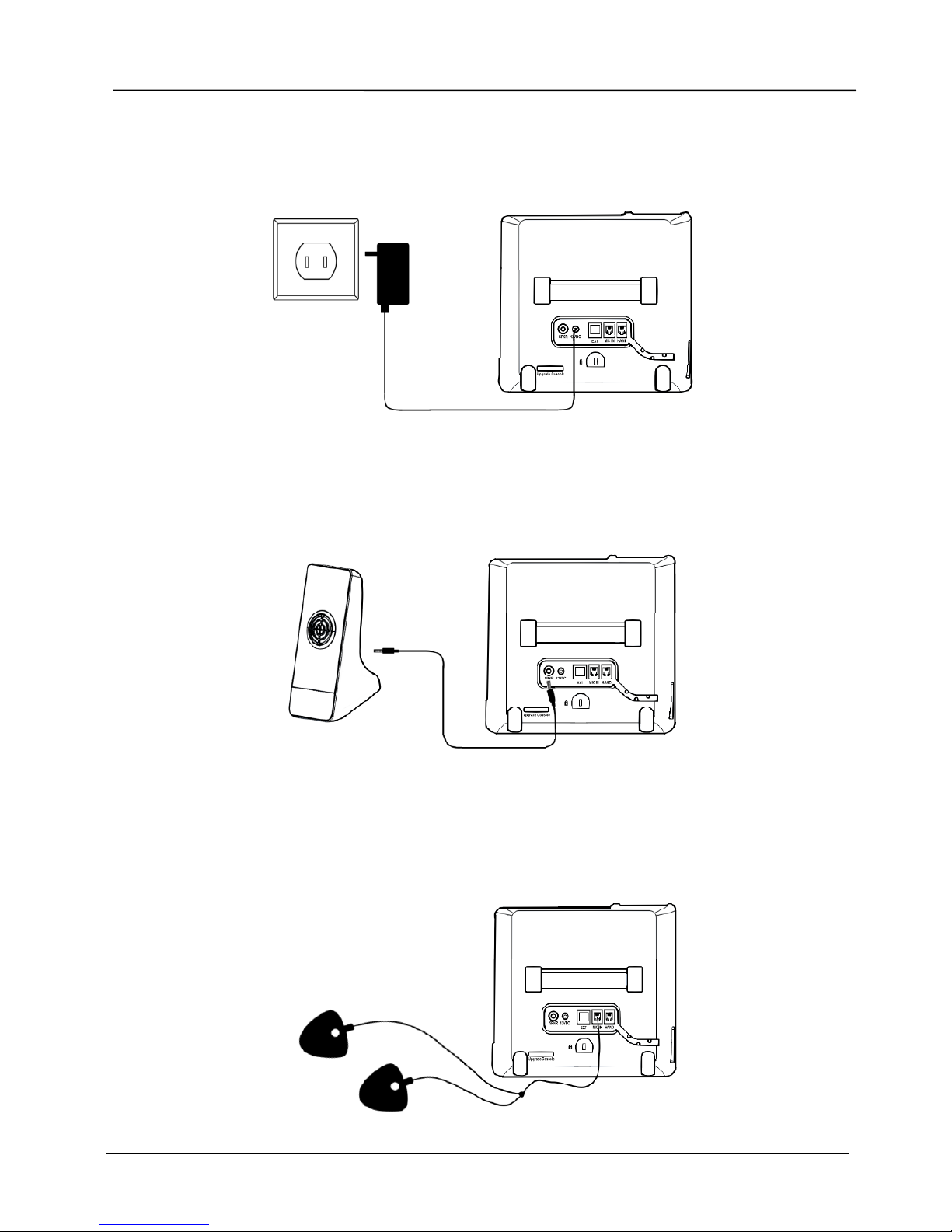
3. Plug-in the power
Attach the cord of the power adaptor to the 12VDC port on back panel of the Communicator
mini and plug the power cord into power outlet. When it is powered, the LEDs on the front
Page 6
Page 6
MOCET IP3093L-C Communicator mini Quick Start Guide
panel of main unit will illuminate and an alert sound will indicate that the Communicator
mini is ready to go. Please make sure you are plugging with the correct included power
adaptor.
4. Connect the external speaker IP-SPKR (optional)
You can connect an external speaker to the SPKR jack in the back of the Communicator
mini.
5. Connect the external microphone IP-MIC (optional)
You can connect an optional external microphone to the MIC IN jack in the back of the
Communicator mini to ensure everyone in the room can be heard in a conference call.
Page 7
Page 7
MOCET IP3093L-C Communicator mini Quick Start Guide
Appearance and Buttons
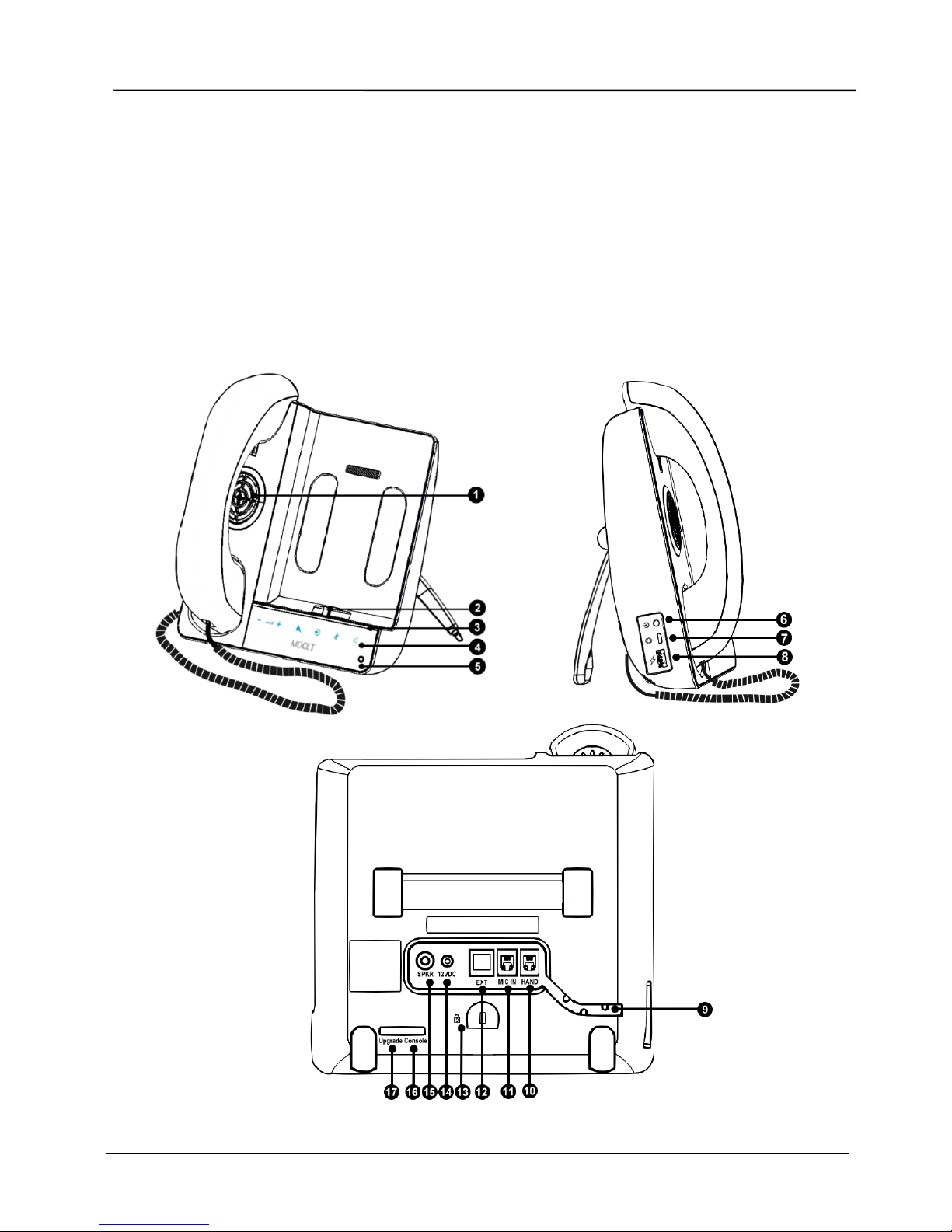
The figures below show the appearance of both sides of the Communicator mini including
the user interface buttons and handset.
The front panel has a capacitive touch design to allow the user to control the volume of the
speaker, handset and AUX-in of the Communicator mini. To make, answer, transfer, join,
hold or end a call, use the controls on the iPad mini or iPhone app or built-in phone app of
the iPhone.
Page 8
Page 8
MOCET IP3093L-C Communicator mini Quick Start Guide
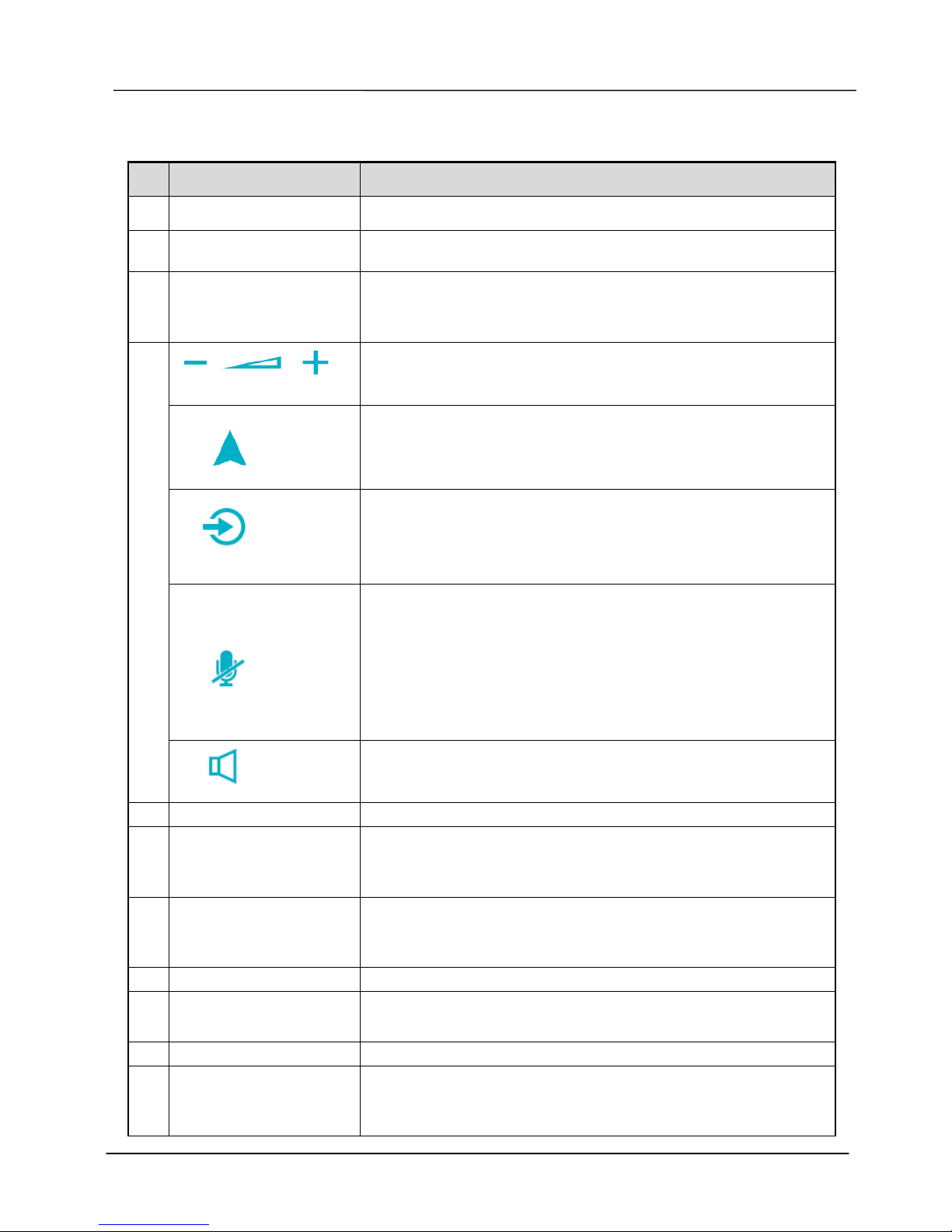
Function Description for Interface of Communicator mini:
No Part Name Description
1
Speaker
For playing audio, ring and hands-free operation.
2
Lightning connector
For Mobile device charging and communication when it is
seated on the Lightning connector.
3
Volume indicator
light bar
For current volume indication.
Press volume up button twice will turn on one more light.
Press volume down button twice will turn off one more light.
Volume control
Volume up () : Touch to raise the volume.
Volume down (–) : Touch to lower the volume.
APP
Touch to fast launch the pre-configured APP. For example,
if 8x8 Virtual Office APP is set, when a user touches this
key, the Virtual Office APP will be brought to foreground.
AUX-in
Toggle this to switch audio path of the Mobile device
between Lightning connector or AUX-in path.
Steady on: Audio from iDevice is through the AUX-in cable
instead of Lightning connector.
Mute
Single touch to control Mute/Unmute of microphone(s). Or,
double touch to Mute/Unmute both Mic(s) and speaker(s).
Steady on: Both microphone and speaker are all muted.
Slow blinking: Microphone is muted only.
[Note]: When mute is on, the external IP-MIC pair will also be muted.
You can mute the audio in the iPad mini or iPhone app or the built-in
phone app of the iPhone.
4
Speaker
Touch to enable Communicator mini’s hands-free mode.
Steady on: Hands-free mode is enabled. (Default)
5
Microphone
For hands-free mode.
6
AUX-in port
Connect to the headset port of your mobile device through
the AUX-in cable. This is usef ul in the event that an iPad
mini or iPhone app does not support Apple Lightning audio.
7
Firmware upgrade
port
Micro USB port to connect to a computer through a micro
USB cable in order to upgrade the Communicator mini’s
firmware.
8
Charging port
USB port for charging your second mobile device.
9
Cable tray (slot)
Put handset cord in the tray to prevent accident pull force
on the handset.
10
Hand
Handset connector for the handset cord.
11
MIC IN
Microphone connector for connecting the external
microphone (IP-MIC). It is an optional accessory. Please
order the IP-MIC separately from MOCET.
Page 9
Page 9
MOCET IP3093L-C Communicator mini Quick Start Guide
12
EXT
Extension box connector. (for future use)
13
Kingston lock mount
Anti-theft device lock. Requires separate lock system.
14
12VDC
Power jack for connecting the included 12V/2A power
adapter.
15
SPKR
Speaker connector for connecting the external speaker (IPSPKR). It is an optional accessory. Please order the IPSPKR separately from MOCET.
16
Console
Reserved for engineering use only.
17
Upgrade
Reserved for engineering use only.
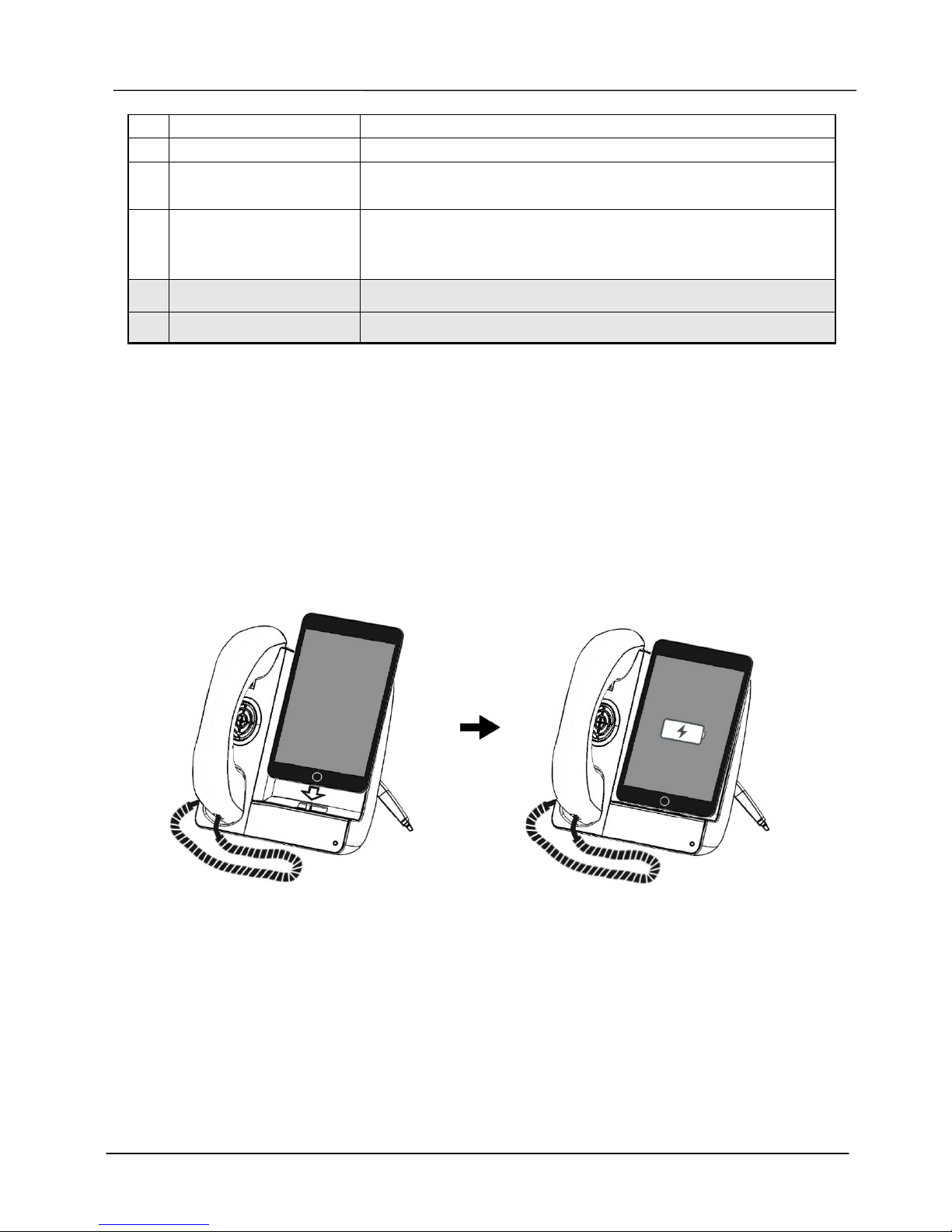
Docking and Charging Your iPad mini or
iPhone
If your iPad mini or iPhone is in a case, please remove it from the case first, and then
connect it to the Communicator mini as shown in the figures below. While your Mobile
device is docked on the Communicator mini, it will start charging automatically.
Basic Operations
To use this IP3093L-C, in general situation, your iPad mini or iPhone/ iPod is supposed to
be docked on so that the music or voice can go thru Apple Lightning connector to the dock.
However, the AUX IN port can always support music or voice under any APP software.
Page 10
Page 10
MOCET IP3093L-C Communicator mini Quick Start Guide
1. Making and answering calls
When making a call, the Communicator mini speaker automatically sounds unless you pick
up the handset. When a call is received, the Communicator mini rings. To answer the call,
tap the Answer button .
2. Adjusting the volume
You can either press the Volume button of the Communicator mini or volume switch of your
iPad mini / iPhone/ iPod to adjust the sound level.
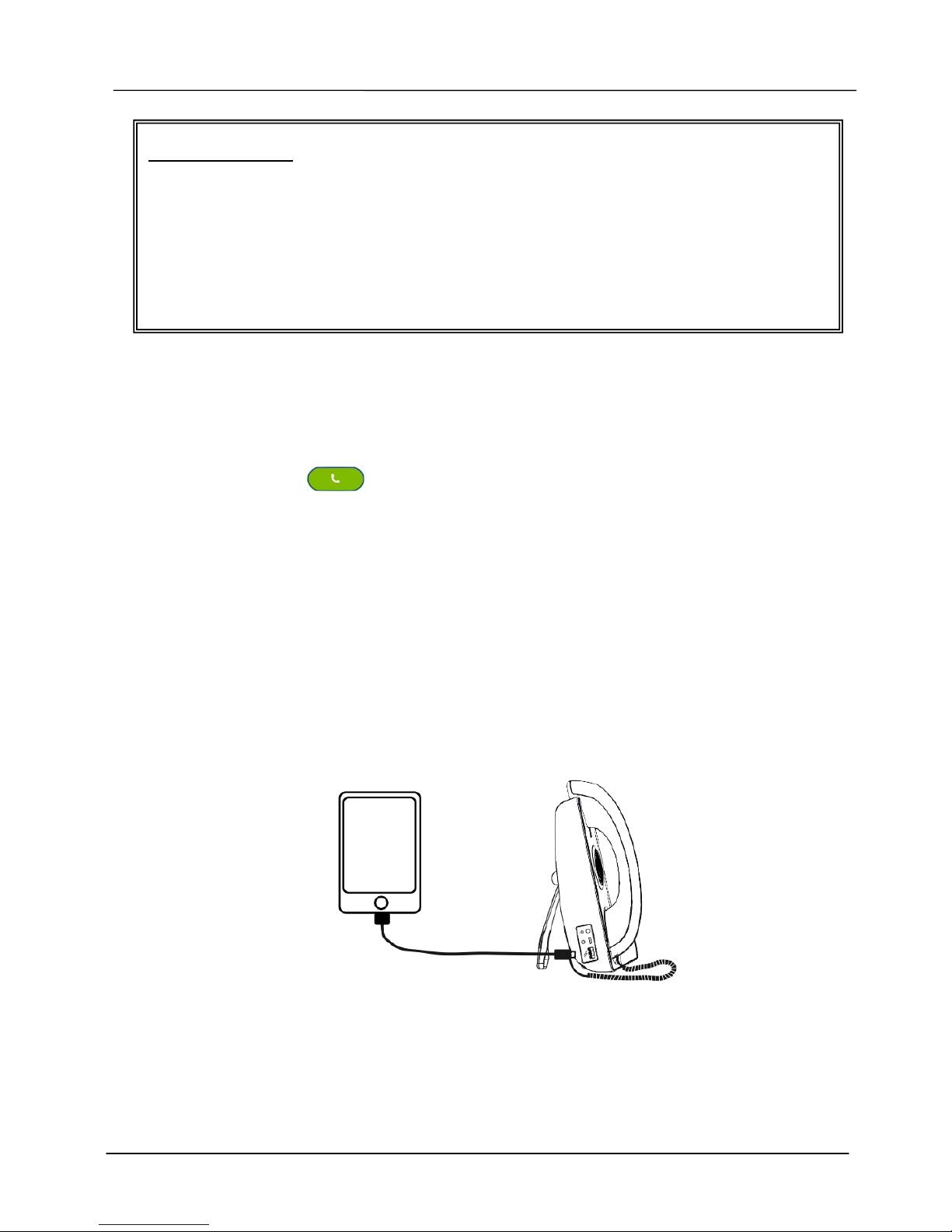
3. Charging a second device using the USB host port on the Communicator mini
You can use the USB port on the left side of the Communicator mini to charge a second
device. Using the charging cable included with the second device, connect it to the
Communicator mini USB port.
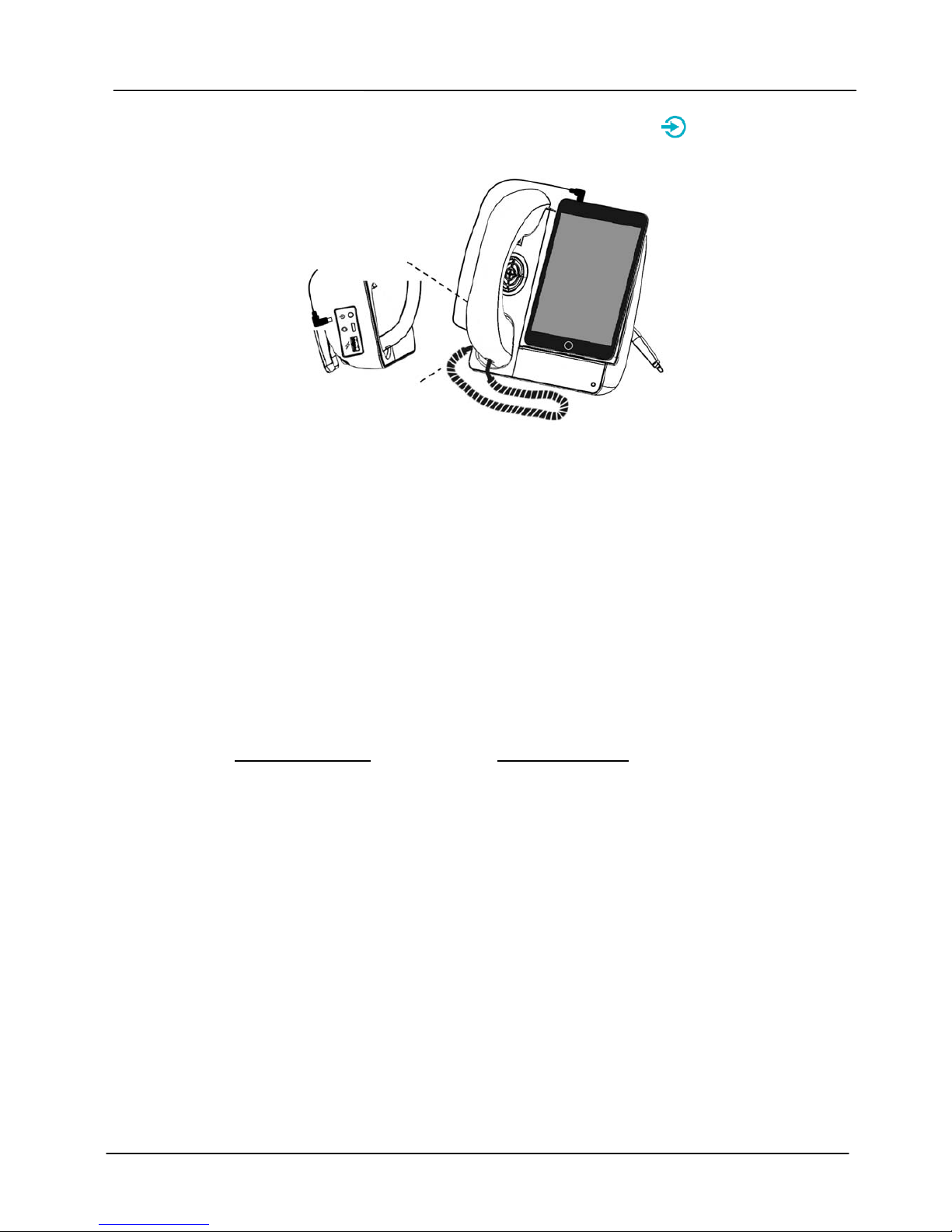
4. Using the AUX-in cable instead of Apple Lightning connector
There are still some APPs for the iPad mini / iPhone /iPod that do not support Apple
Lightning connector audio transmission. Using the included AUX-in cable to connect with
your iDevice’s headset to the Communicator mini’s AUX-in port will allow you to use these
APPs. When the AUX-in cable is connected, audio will route automatically through the
Important Notice:
1. The Communicator mini can not support mobile phone calls through Apple iPhone
Lightning connector.
2. Some APPs do not support audio thru Apple Lightning (USB) path. In this case, you
may connect an AUX-in cable from the iDevice headset to the Communicator mini
AUX-in port.
3. When using an AUX-in cable for Apple iPhone or iPod, please be aware that the
iPhone/ iPod can NOT seat on the Lightning connector.
Page 11
Page 11
MOCET IP3093L-C Communicator mini Quick Start Guide
AUX-in cable to the Communicator mini. The AUX-in indicator light will also be turned
on with steady blue.
Warranty Information
Thank you for your choice of product. Remember to record your Communicator mini
information below for further support service, if needed.
This device has Model Number and Serial Number which are located on the back of the
base unit. Please record them for service and support personnel.
Model Number: IP3093L-C
Serial Number:
 Loading...