

Page 1
CC-Link Embedded I/O Adapter
User's Manual
Page 2

Page 3
• SAFETY PRECAUTIONS •
(Always read these instructions before using this equipment.)
Before using this product, please read this manual and the relevant manuals introduced in this manual
carefully and pay full attention to safety to handle the product correctly.
The instructions given in this manual are concerned with this product. Refer to the user's manual of the
CPU module to use for a description of the PLC system safety precautions.
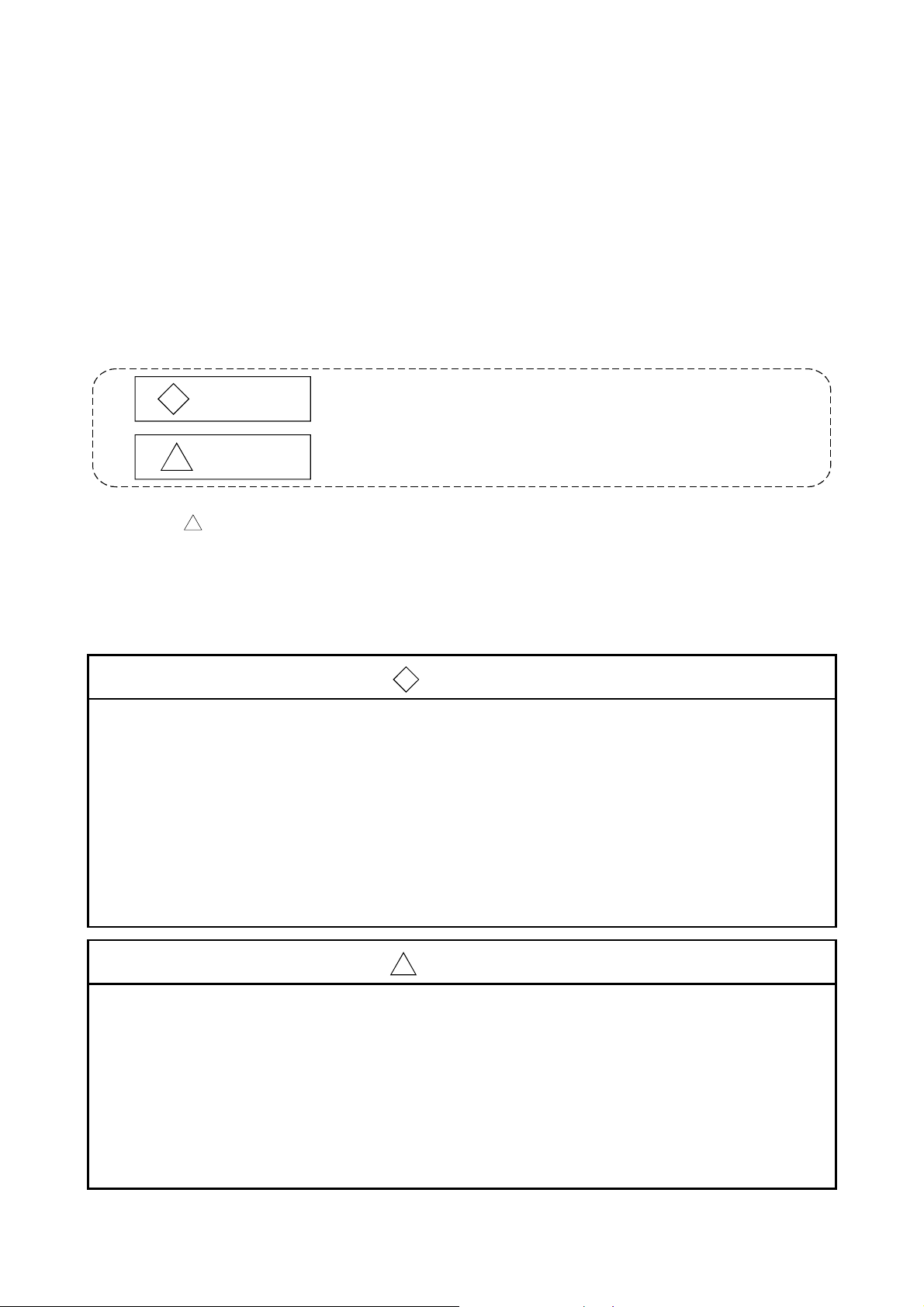
In this manual, the safety instructions are ranked as "DANGER" and "CAUTION".
DANGER
!
CAUTION
!
Note that the !CAUTION level may lead to a serious consequence according to the circumstances.
Always follow the instructions of both levels because they are important to personal safety.
Please save this manual to make it accessible when required and always forward it to the end user.
Indicates that incorrect handling may cause hazardous conditions,
resulting in death or severe injury.
Indicates that incorrect handling may cause hazardous conditions,
resulting in medium or slight personal injury or physical damage.
[Design Precautions]
!
DANGER
• When there are communication errors with the data link, the communication error station will
enter the following condition.
Build an interlock circuit into the sequence program to operate system safely by using the
communication state information.
An accident may occur by a false output or a malfunction.
(1) Turn off all input from Remote I/O station.
(2) Turn off all output from Remote I/O station.
• The output may be left ON or OFF due to trouble in the CC-Link embedded I/O adapter.
Configure a circuit to monitor I/O signals which may lead to a serious accident..
!
CAUTION
• Use the CC-Link embedded I/O adapter in an environment that meets the general specifications
contained in this manual.
Using this adapter in an environment outside the range of the general specifications could result
in electric shock, fire, malfunction, and damage to or deterioration of the product.
• Do not bunch the control wires or communication cables with the main circuit or power wires, or
install them close to each other.
They should be installed 100 mm (3.9 in.) or more from each other.
Not doing so could result in noise that would cause malfunction.
A - 1 A - 1
Page 4
[Installation Precautions]
!
CAUTION
• Do not directly touch the CC-Link embedded I/O adapter's conductive parts.
Doing so could cause malfunction or failure in the CC-Link embedded I/O adapter.
• Securely solder the CC-Link embedded I/O adapter to install it to a user board.
Defective contact could cause malfunction.
[Wiring Precautions]
!
DANGER
• Before beginning any installation or wiring work, make sure that all phases of the power supply
have been obstructed from the outside.
Failure to completely shut off the power supply phases may cause electric shock and/or damage
to the adapter.
!
CAUTION
• Always ground the FG terminal to the protective ground conductor.
Doing so may cause electric shock or malfunction.
• Correctly connect the CC-Link embedded I/O adapter after confirming the rated voltage and pin
numbers of the product.
Failure to do so could make a short circuit with bare solderless terminals.
• When wiring the CC-Link embedded I/O adapter, check the rated voltage and terminal layout
and make sure the wiring is done correctly.
Connecting a power supply that differs from the rated voltage or wiring it incorrectly may cause
fire, failure or malfunction.
• Make sure that there are no foreign substances such as sawdust or wiring debris inside the CCLink embedded I/O adapter.
Such debris could cause fire, failure or malfunction.
• Make sure that the communication cable connected to the adapter is kept in the duct or fixed
with cramps.
Failure to do so may cause a damage to the user board or cables due to dangling, shifting or
inadvertent handling of cables, or misoperation because of bad cable contacts.
• Do not grab on the cable when removing the communication cable connected to the adapter.
When removing the cable with a connector, hold the connector on the side that is connected to
the adapter.
When removing the cable without a connector, loose the screws on the side that is connected to
the adapter.
Pulling the cable that is still connected to the adapter may cause a damage to the user board or
cable, or malfunction due to bad cable contacts.
A - 2 A - 2
Page 5
[Starting and Maintenance Precautions]
!
DANGER
• Do not touch the terminals or connector while the power is on.
Doing so may cause electric shock or malfunction.
• Make sure to switch all phases of the external power supply off before cleaning or re-tightening
the terminal screws.
Failure to do so may damage the CC-Link embedded I/O adapter or cause malfunction.
!
CAUTION
• Do not disassemble or modify the CC-Link embedded I/O adapter.
Doing so could cause failure, malfunction, injury or fire.
• Because the case of the CC-Link embedded I/O adapter is made of resin, be careful not to drop
it or expose it to strong impact.
It may damage the CC-Link embedded I/O adapter.
• Before mounting or dismounting the user board loaded with the CC-Link embedded I/O adapter
to or from an enclosure, always switch power off externally in all phases.
Failure to do so may damage the CC-Link embedded I/O adapter or cause malfunction.
[Disposal Precautions]
!
CAUTION
• When disposing of this product, treat it as industrial waste.
A - 3 A - 3
Page 6
REVISIONS
* The manual number is given on the bottom left of the back cover.
Print Date * Manual Number Revision
May., 2002 SH(NA)-080324E-A First printing
Aug., 2002 SH(NA)-080324E-B
Addition
Section 4.1.2, 4.2.2, Appendix 1.2
Correction
Conformation to the EMC Directive and Low Voltage Instruction,
Section 1.2, 1.3, 1.4, Chapter 2, Section 4.2.1, 4.3.1, 5.1, 5.2
Mar., 2006 SH(NA)-080324E-C
Correction
Chapter 3, Section 5.1
Sep., 2006 SH(NA)-080324E-D
Addition
Section 6.2.2
Correction
Section 6.2.1
Japanese Manual Version SH-080323-D
This manual confers no industrial property rights or any rights of any other kind, nor does it confer any patent
licenses. Mitsubishi Electric Corporation cannot be held responsible for any problems involving industrial property
rights which may occur as a result of using the contents noted in this manual.
© 2002 MITSUBISHI ELECTRIC CORPORATION
A - 4 A - 4
Page 7
INTRODUCTION
Thank you for purchasing the MELSEC-A series PLC.
Before using the equipment, please read this manual carefully to develop full familiarity with the functions
and performance of the A-series PLC you have purchased, so as to ensure correct use.
Please forward a copy of this manual to the end user.
CONTENTS
1 OVERVIEW 1- 1 to 1- 5
1.1 Features .................................................................................................................................................. 1- 1
1.2 Identifying the Compact CC-Link Embedded I/O Adapter Type ........................................................... 1- 2
1.3 Cautionary Notes when Selecting a CC-Link Embedded I/O Adapter.................................................. 1- 3
1.4 Specification List ..................................................................................................................................... 1- 4
1.5 About the Generic, Abbreviated and Technical Terms Used in This Manual....................................... 1- 4
2 NAMES AND SETTINGS FOR EACH PART 2- 1 to 2- 2
3 SPECIFICATIONS 3- 1 to 3- 2
4 SPECIFICATIONS FOR CC-LINK EMBEDDED I/O ADAPTER 4- 1 to 4- 10
4.1 Specifications for Input Adapters ............................................................................................................ 4- 1
4.1.1 AJ65MBTL1N-16D CC-Link embedded input adapter ................................................................... 4- 1
4.1.2 AJ65MBTL1N-32D CC-Link embedded input adapter ................................................................... 4- 3
4.2 Specifications for Output Adapters ......................................................................................................... 4- 5
4.2.1 AJ65MBTL1N-16T CC-Link embedded output adapter ................................................................. 4- 5
4.2.2 AJ65MBTL1N-32T CC-Link embedded output adapter ................................................................. 4- 7
4.3 Specifications for Combined Adapters ................................................................................................... 4- 9
4.3.1 AJ65MBTL1N-16DT CC-Link embedded combined adapter ......................................................... 4- 9
5 HANDLING CC-Link EMBEDDED I/O ADAPTER 5- 1 to 5- 7
5.1 Precautionary Notes for Handling and Installation................................................................................. 5- 1
5.2 Cascading Method .................................................................................................................................. 5- 5
5.3 Connection Method of CC-Link Dedicated Cable.................................................................................. 5- 6
6 TROUBLESHOOTING 6- 1 to 6- 5
6.1 Verifying Errors from LED Status ........................................................................................................... 6- 1
6.2 Examples of Errors for CC-Link Embedded I/O Adapter ....................................................................... 6- 3
6.2.1 Errors occurring in the input circuit and corrective actions .............................................................6- 3
6.2.2 Errors occurring in the output circuit and corrective actions ........................................................... 6- 5
APPENDIX App- 1 to App- 2
Appendix 1 External Dimensions.............................................................................................................App- 1
Appendix 1.1 AJ65MBTL1N-16
Appendix 1.2 AJ65MBTL1N-32
A - 5 A - 5
........................................................................................................App- 1
........................................................................................................App- 2
Page 8
About Manuals
The following manuals are also related to this product.
In necessary, order them by quoting the details in the tables below.
Related Manuals
Manual Name
Control Communication Link System Master/Local Module User's Manual
This manual describes the system configuration, performance specification, function, handling, wiring
and troubleshooting for QJ61BT11 (Sold separately)
Manual Number
(Model Code)
SH-080016
(13JL91)
CC-Link System Master ( Local Module type AJ61BT11/A1SJ61BT11 User's Manual
This manual describes the system configuration, performance specification, function, handling, wiring
and troubleshooting for AJ61BT11 and A1SJ61BT11. (Sold separately)
CC-Link System Master ( Local Module type AJ61QBT11/A1SJ61QBT11 User's Manual
This manual describes the system configuration, performance specification, function, handling, wiring
and troubleshooting for AJ61QBT11 and A1SJ61QBT11. (Sold separately)
IB-66721
(13J872)
IB-66722
(13J873)
Conformation to the EMC Directive and Low Voltage Instruction
For details on making Mitsubishi PLC conform to the EMC directive and low voltage instruction when
installing it in your product, please see Chapter 3, "EMC Directive and Low Voltage Instruction" of the PLC
CPU User's Manual (Hardware).
The CE logo is printed on the main body of the PLC that conforms to the EMC directive and low voltage
instruction.
By making this product conform to the EMC directive and low voltage instruction, it is not necessary to make
those steps individually.
A - 6 A - 6
Page 9
A
1 OVERVIEW
MELSEC-
1 OVERVIEW
1.1 Features
This manual describes the specifications of the CC-Link embedded I/O adapter used
as the remote I/O station of a Control & Communication Link (hereafter abbreviated to
CC-Link) system.
The following are the features of the CC-Link embedded I/O adapter.
(1) Device-embedded CC-Link remote I/O
This adapter is a modular remote I/O used as a device-embedded adapter.
(2) Direct installation to user board
Using a pin header as the external interface for adapter power supply,
transmission, I/O signals and others, the adapter can be installed directly to a
user board.
(3) Flexible noise reduction measures
Depending on external noise environment, the user board can be equipped with
a noise filter to enhance noise resistance as necessary.
(4) Insulation method
The adapter power supply uses a transformer insulation method and the external
I/O uses a photocoupler insulation method.
(5) Overload protection function, overvoltage protection function and
overheat protection function
The transistor output section has the overload, overvoltage and overheat
protection functions.
(6) Cascade connection
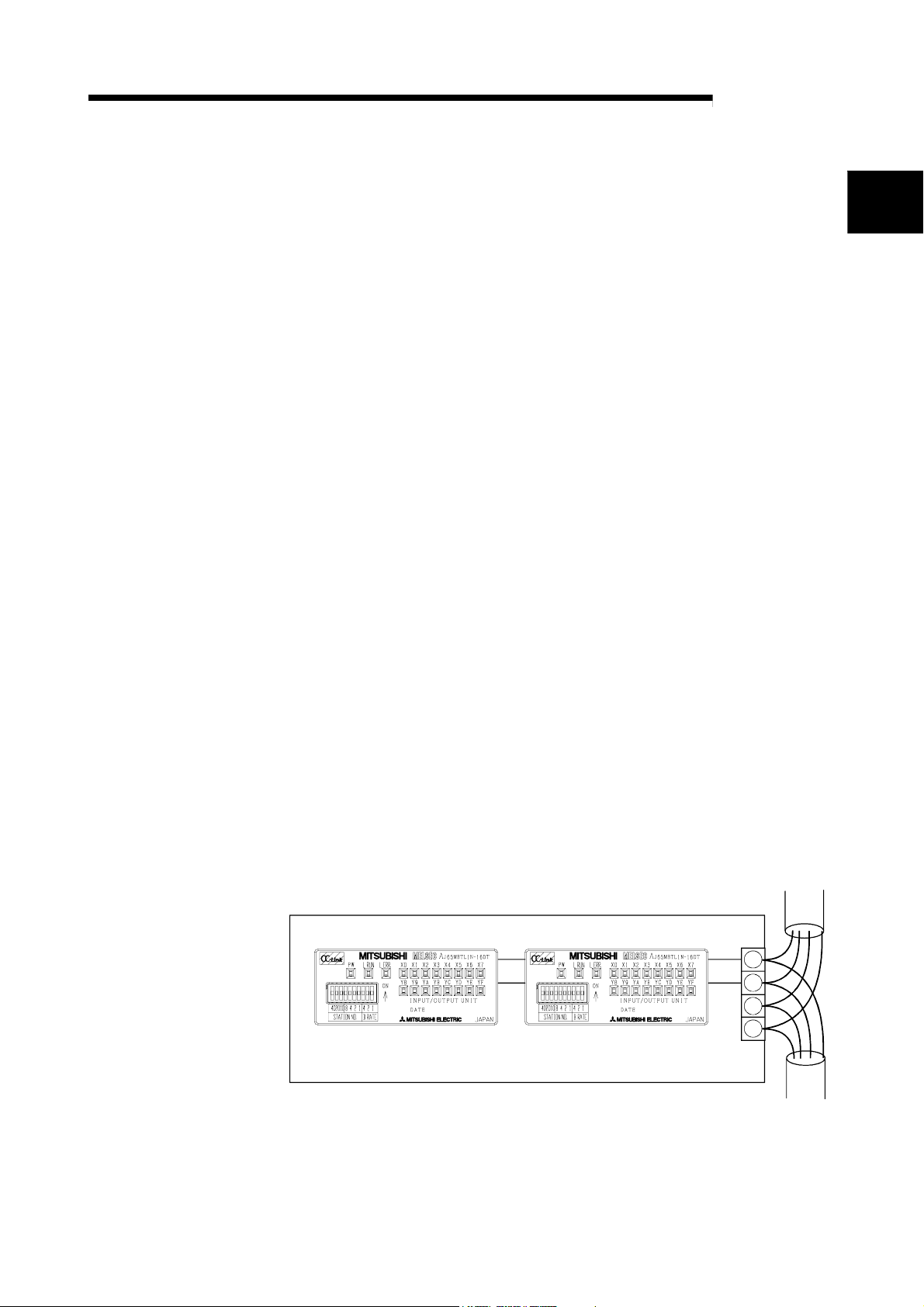
The CC-Link embedded I/O adapters can be cascaded. Two CC-Link embedded
I/O adapters can be installed side by side within the same board.
1
User board
(7) CC-Link Ver. 1.10 compatibility
The CC-Link embedded I/O adapter is compatible with CC-Link Ver. 1.10.
1 - 1 1 - 1
DA
DB
DG
SLD
Page 10
A
1 OVERVIEW
1.2 Identifying the Compact CC-Link Embedded I/O Adapter Type
MELSEC-
1
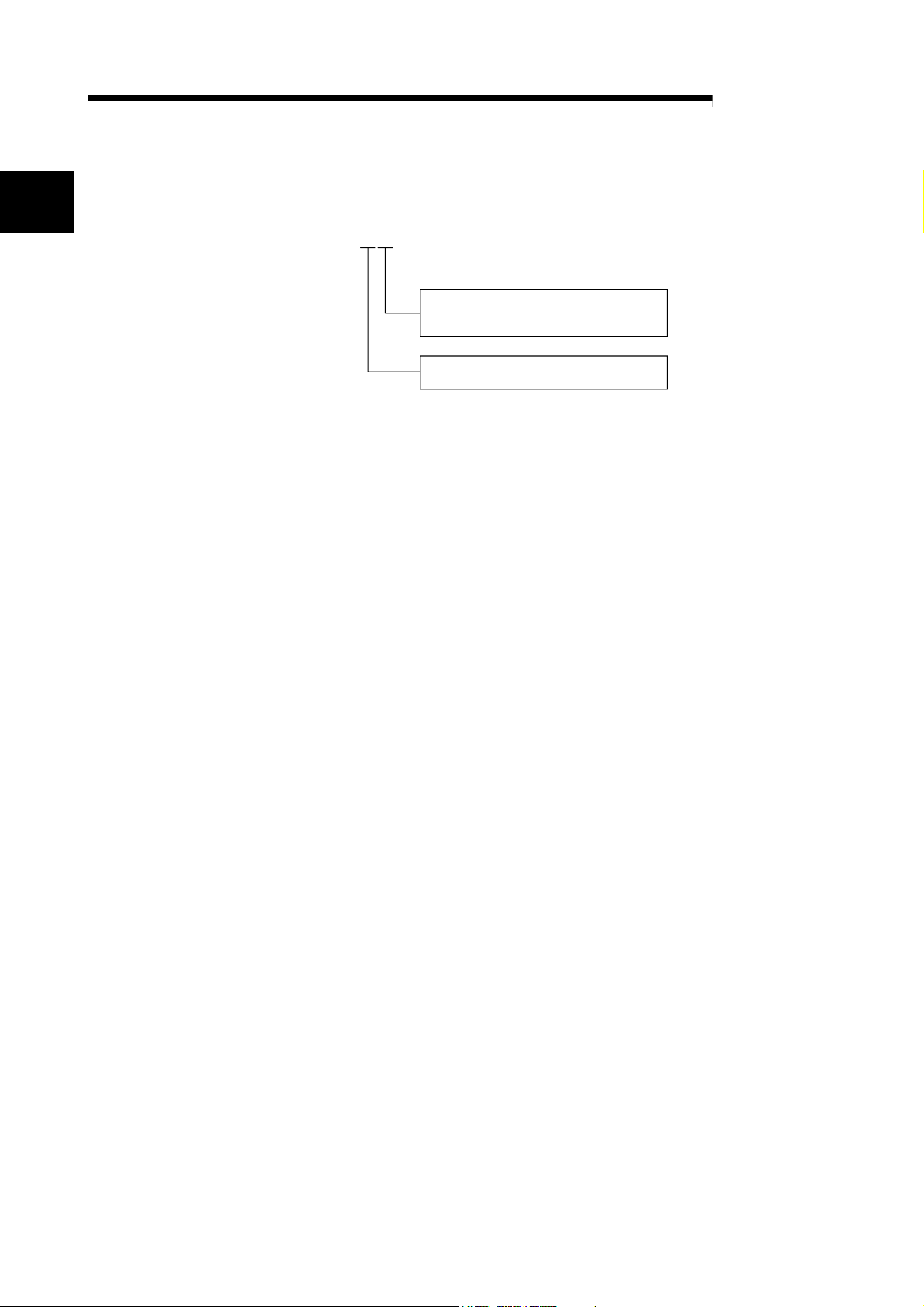
The following shows how to identify the type of a CC-Link embedded I/O adapter.
AJ65MBTL1N-16DT
D
: 24VDC input
T
: Transistor output
DT
: 24VDC input, transistor output complex
16: 16 points
32: 32 points
1 - 2 1 - 2
Page 11
A
1 OVERVIEW
1.3 Cautionary Notes when Selecting a CC-Link Embedded I/O Adapter
The following explains the cautionary notes and specifications that apply when
selecting a CC-Link embedded I/O adapter for use in the CC-Link system:
(1) This is a embedded I/O adapter designed specifically for the CC-Link system.
Do not connect the adapter to other data-link systems, such as the
MELSECNET/MINI.
(2) 32 points are assigned per station for a CC-Link embedded I/O adapter.
The second-half 16 points of a 16-point CC-Link embedded I/O adapter are empty
but are not usable.
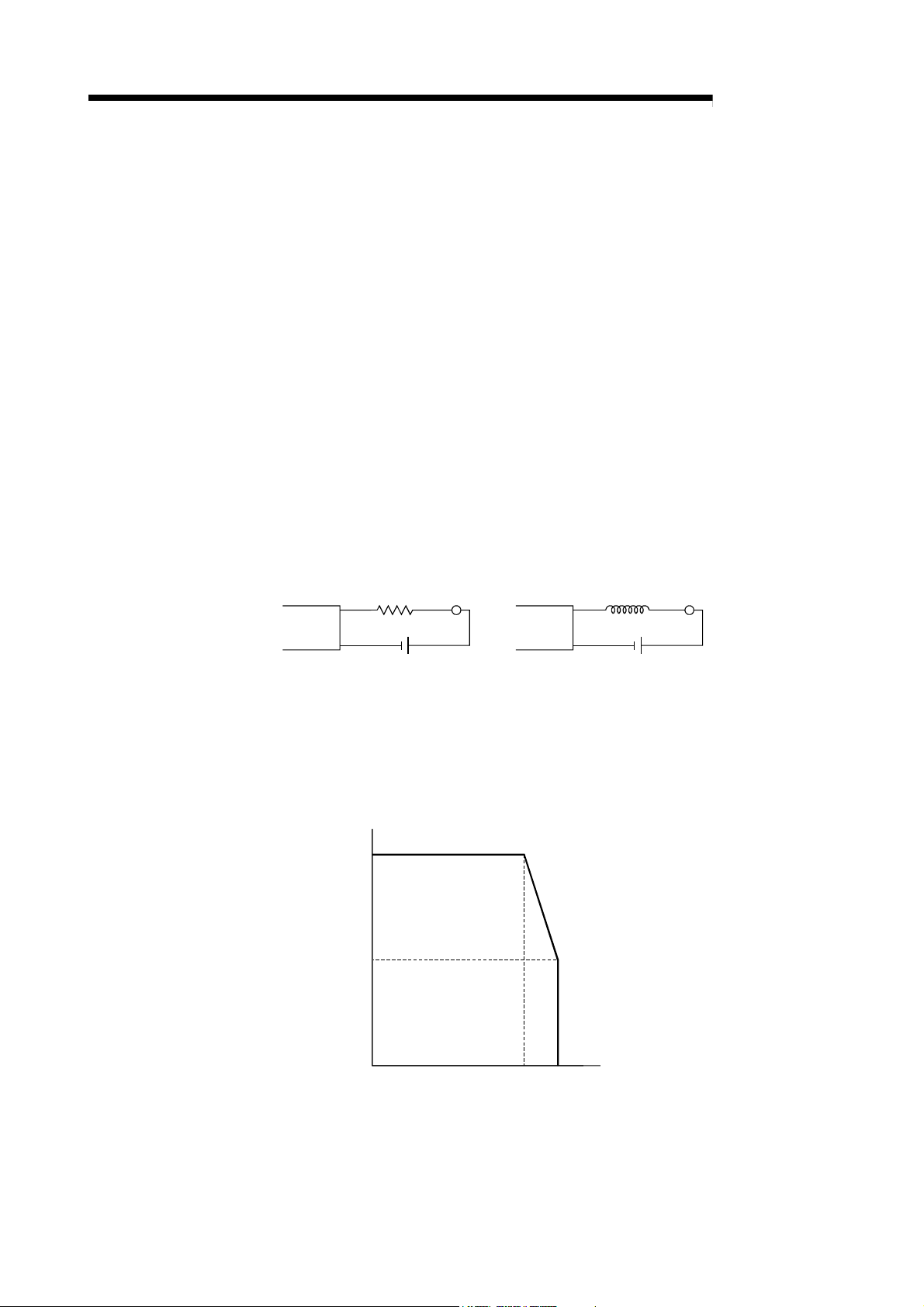
(3) For the maximum switching frequency when driving a load in the CC-Link
embedded output adapter, set to one second or more each for ON and OFF.
(4) When using a counter, a timer or the like that uses a DC/DC converter as the load
for a CC-Link embedded transistor output adapter having a maximum load current
of 0.1A, a rush current flows when the adapter is turned on and at fixed intervals
during operation. For this reason, malfunctions may occur if the average current
is set. When the above load is used, connect resistance or inductance in parallel
to the load, or use an output adapter having a large maximum load current in
order to minimize the effects of the rush current.
Resistance Load
Output
adapter
Output
adapter
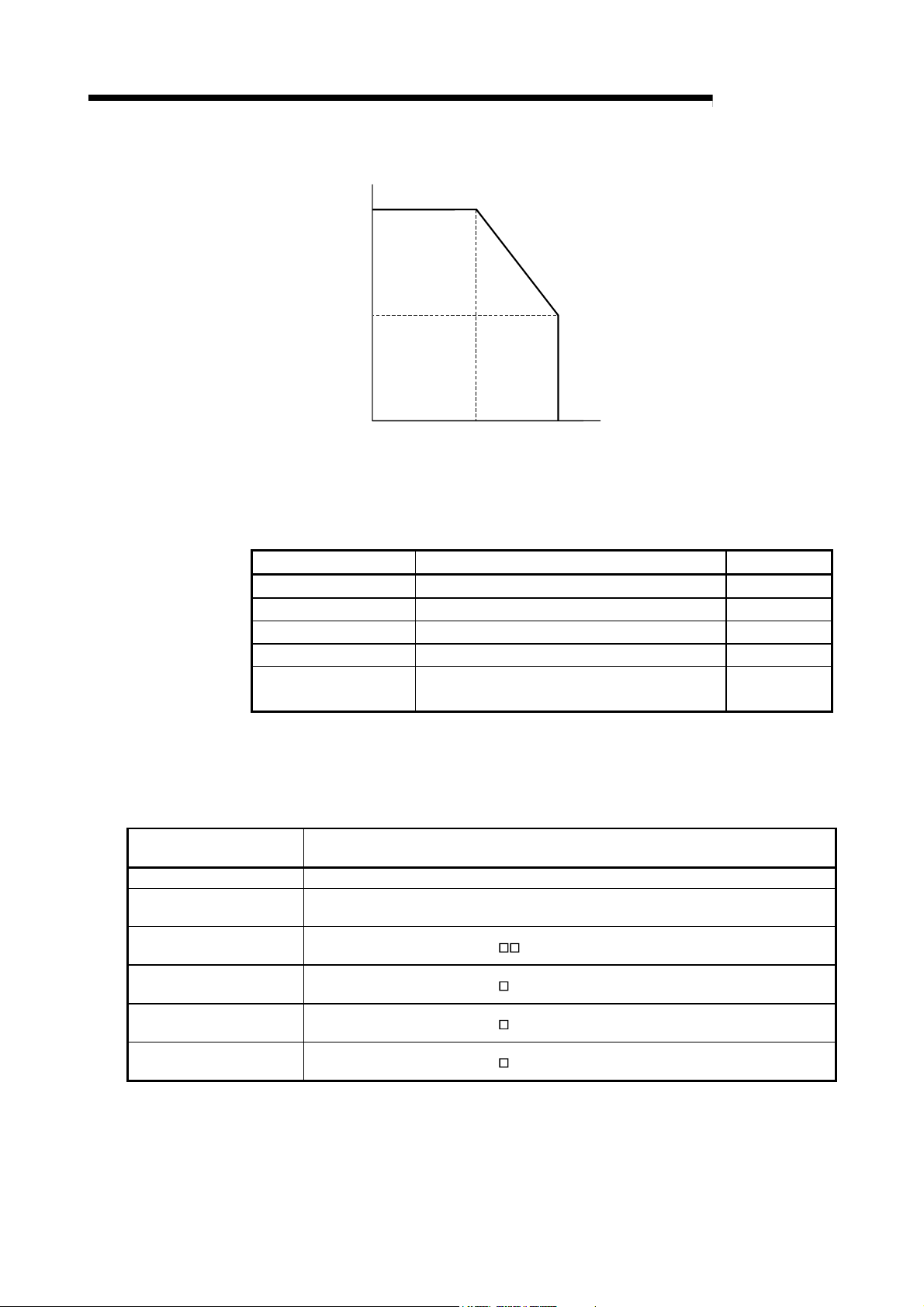
(5) When using the AJ65MBTL1N-16D, AJ65MBTL1N-16DT or AJ65MBTL1N-32D
CC-Link embedded I/O adapter, the maximum number of simultaneous input
points listed in the specifications will change, depending on the ambient
temperature.
The maximum number of simultaneous input points is shown in the diagram
below:
(a) Dilating curve for the AJ65MBTL1N-16D or AJ65MBTL1N-16DT
]
[%]
%
[
s
t
100
n
i
o
p
t
u
p
n
i
s
u
o
e
n
a
t
l
u
50
m
i
s
f
o
r
e
b
m
u
n
m
u
m
i
x
a
010203040 55
M
Ambient temperature [°C]
45
[°C]
LoadInductance
MELSEC-
1 - 3 1 - 3
Page 12
A
1 OVERVIEW
1.4 Specification List
(b) Dilating curve for the AJ65MBTL1N-32D
]
[%]
%
[
s
t
100
n
i
o
p
t
u
p
n
i
s
u
o
e
n
a
t
l
u
50
m
i
s
f
o
r
e
b
m
u
n
m
u
m
i
x
a
010203040 55
M
Ambient temperature [°C]
50
[°C]
MELSEC-
Specification list for each compact remote I/O adapter is shown below.
Model Specification Reference
AJ65MBTL1N-16D 16 points 24VDC positive common (sink) input Section 4.1.1
AJ65MBTL1N-32D 32 points 24VDC positive common (sink) input Section 4.1.2
AJ65MBTL1N-16T 16 points transistor output 0.1A sink output Section 4.2.1
AJ65MBTL1N-32T 32 points transistor output 0.1A sink output Section 4.2.2
AJ65MBTL1N-16DT
8 points 24VDC positive common (sink) input,
8 points transistor output 0.1A sink output.
1.5 About the Generic, Abbreviated and Technical Terms Used in This Manual
Generic/abbreviated/
technical term
CC-Link Abbreviation of Control & Communications Link
Master/local module
CC-Link embedded I/O
adapter
CC-Link embedded input
adapter
CC-Link embedded output
adapter
CC-Link embedded combined
adapter
The abbreviated and technical terms used in this manual are listed below:
Description
Generic term for the QJ61BT11, AJ61BT11, A1SJ61BT11, AJ61QBT11 and A1SJ61QBT11 CC-
Link system master/local module
Generic term for the AJ65MBTL1N-
Generic term for the AJ65MBTL1N-
Generic term for the AJ65MBTL1N-
Generic term for the AJ65MBTL1N-
CC-Link embedded I/O adapter
D CC-Link embedded input adapter
T CC-Link embedded output adapter
DT CC-Link embedded combined adapter
Section 4.3.1
1 - 4 1 - 4
Page 13

A
1 OVERVIEW
MEMO
MELSEC-
1 - 5 1 - 5
Page 14
A
2 NAMES AND SETTINGS FOR EACH PART
2 NAMES AND SETTINGS FOR EACH PART
MELSEC-
2
AJ65MBTL1N-16
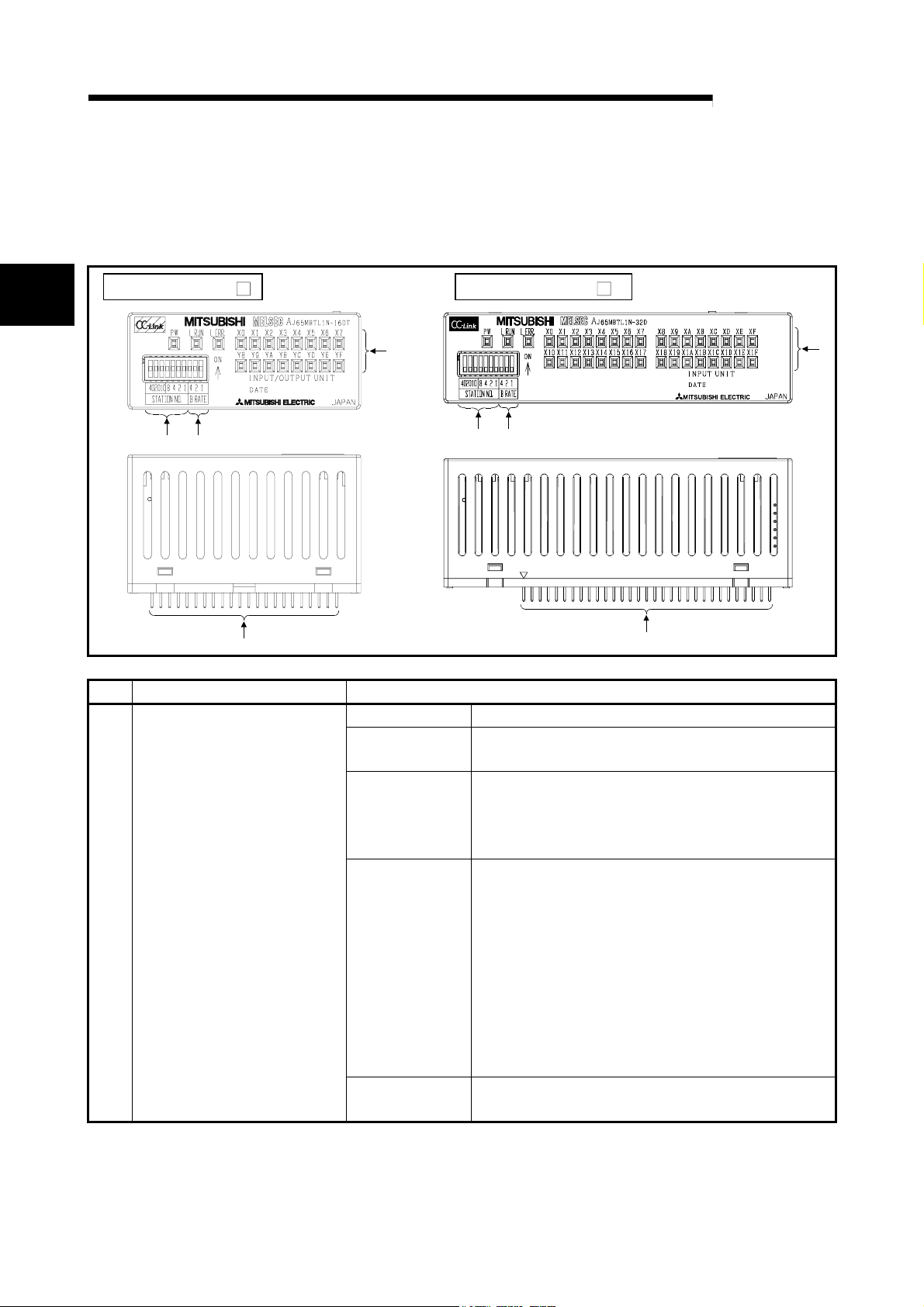
The names and settings for the component of the CC-Link embedded I/O adapter are
shown below.
AJ65MBTL1N-32
1)
3) 2)
3) 2)
4)
No. Item Description
1) Operating status indicator LEDs
X0 to XF/X0 to X1F
Y0 to YF/Y0 to Y1F
LED name Confirmation details
PW
L RUN
L ERR
Turns on when power supply of CC-Link embedded I/O
adapter is turned on.
Checks if the input adapter is communicating with the
master station of CC-Link embedded I/O adapter normally.
Turns on when normal data is received from master
station, and turns off when time has expired.
On: Communication data error.
Flicker at regular intervals:
Indicates that the station number setting or
transmission speed setting switch position was
changed while power is on.
Flicker at irregular intervals:
Indicates that the terminal resistor is left unconnected
or that the CC-Link embedded I/O adapter or CC-Link
dedicated cable is affected by noise.
Off: Normal communication.
Shows on/off status of I/O.
Lit when on, unlit when off.
4)
1)
2 - 1 2 - 1
Page 15

A
2 NAMES AND SETTINGS FOR EACH PART
MELSEC-
No. Item Description
2) Transmission speed setting
Setting switch status
0 OFF OFF OFF 156 kbps
1 OFF OFF ON 625 kbps
2 OFF ON OFF 2.5 Mbps
3 OFF ON ON 5.0 Mbps
4 ON OFF OFF 10 Mbps
Setting value
4 2 1
Transmission
speed
Be sure to set the transmission speed within the above range.
3) Station number setting switches
Select "10," "20" or "40" to set the ten's place of the station number.
Select "1," "2," "4" or "8" to set the one's place of the station number.
Always set the station number within the range of 1 to 64.
1 Duplicate station number cannot be set.
(Example) Set the switches as below when setting the station number to 32:
number
1 OFF OFF OFF OFF OFF OFF ON
2 OFF OFF OFF OFF OFF ON OFF
3 OFF OFF OFF OFF OFF ON
4 OFF OFF OFF OFF OFF OFF OFF
: : : : : : : :
10 OFF OFF ON OFF OFF OFF OFF
11 OFF OFF ON OFF OFF OFF ON
: : : : : : : :
64 ON ON OFF OFF ON OFF OFF
number
32 OFF ON ON OFF OFF ON OFF
Ten's place One's place Station
40 20 10 8 4 2 1
Ten's place One's place Station
40 20 10 8 4 2 1
4) External I/F pin header Pin header for connection of the adapter power supply, communication line,
I/O power supply, external supply power, and input/output signals (refer to
Chapter 4 for the pin numbers.)
2
2 - 2 2 - 2
Page 16

A
3 SPECIFICATIONS
3 SPECIFICATIONS
MELSEC-
Item Specifications
Operating ambient
temperature
Storage ambient
temperature
Operating ambient
humidity
3
Storage ambient
humidity
Vibration
resistance
Shock resistance
Operating
environment
Operating height
Installation area On the control board
Over-voltage
category 1
Pollution rate 2
This section explains the CC-Link embedded I/O adapter general specifications.
Table 3.1 General specifications
-20 to 75 °C
10 to 90 % RH, No condensation
10 to 90 % RH, No condensation
Frequency Acceleration Amplitude Sweep Count
Conforming
to JIS B
3502, IEC
61132-2
Conforming to JIS B 3502, IEC 61131-2 (147 m/s
intermittent
vibration
When there is
continuous
vibration
10 to 57 Hz — 0.075 mm When there is
57 to 150 Hz
10 to 57 Hz — 0.035 mm
57 to 150 Hz
No corrosive gas present
2000 m(6562 ft) or less 3
1 Indicates the location where the device is connected from the public cable network to the
device structure wiring area.
Category II applies to the devices to which the power is supplied from a fixed equipment.
Surge withstand voltage for devices with up to 300 V of rated voltage is 2500 V.
2 This is an index which indicates the degree of conductive object generation in the
environment Pollution level 2 is when only non-conductive pollution occurs.
A temporary conductivity caused by condensation must be expected occasionally.
3 Do not use or store the PLC in the environment where the pressure is higher than the
atmospheric pressure at sea level. Otherwise, malfunction may result. To use the PLC in
high-pressure environment, contact your nearest Mitsubishi representative.
0 to 55 °C
II or less
2 or less
2
9.8 m/s
4.9 m/s
2
2
, 3 times each in 3 directions)
—
—
10 times
each in X, Y
and Z axis
(80 minutes)
3 - 1 3 - 1
Page 17

A
3 SPECIFICATIONS
MELSEC-
MEMO
3
3 - 2 3 - 2
Page 18

A
4 SPECIFICATIONS FOR CC-LINK EMBEDDED I/O ADAPTER
4 SPECIFICATIONS FOR CC-LINK EMBEDDED I/O ADAPTER
4.1 Specifications for Input Adapters
4.1.1 AJ65MBTL1N-16D CC-Link embedded input adapter
MELSEC-
Specification AJ65MBTL1N-16D Surface shape
Number of input points 16 points
Isolation method Photocoupler
Rated input voltage 24V DC
Rated input current Approx. 4mA
Operating voltage range 19.2 to 26.4V DC
Max. simultaneous ON
input points
ON voltage/ON current 18V or higher/3.5mA or higher
OFF voltage/OFF current 6V or lower/1.7mA or lower
4
Input resistance Approx. 5.1kΩ
Response OFF ON 1.5ms or lower (at 24V DC)
time ON OFF 1.5ms or lower (at 24V DC)
Input type Positive common (sink)
Wiring method for common 16 points/1 common
CC-Link station type Remote I/O station
Number of occupied stations 1 station 32 points assignment (use 16 points)
I/O adapter Voltage 20.4 to 26.4V DC (ripple rate: within 5%)
power supply Current 35mA or lower (at 24V DC)
Noise durability DC type noise voltage 500Vp-p, noise width 1μs, noise carrier
Dielectric withstand voltage 500V AC for 1 minute between all DC external terminals and
Insulation resistance 10MΩ or higher, measured with a 500V DC insulation resistance
Weight 0.03kg
External wiring system 44-pin, 2-row, 2mm-pitch pin header
Form DC input adapter
(ripple ratio: within 5%)
50% (See section 1.3)
frequency 25 to 60Hz (noise simulator condition)
ground
tester
4 - 1 4 - 1
Page 19

A
4 SPECIFICATIONS FOR CC-LINK EMBEDDED I/O ADAPTER
MELSEC-
Adapter power supply
24V DC
Signal
name
DA
DB
DG
SLD
X0
X1
X2
X3
X4
X5
X6
X7
X8
X9
XA
XB
XC
XD
XE
XF
COM
+24V
24G
FG
Circuit board
1
22000pF
630V
External connection
Singnal
Pin No.
name
B22
DA
DB
A22
DG
B21
FG
A21
OE-OUT
B20
OE-IN
A20
SD-OUT
B19
SD-IN
A19
RD
B18
RDGON
A18
B17
A17
B16
A16
B15
A15
B14
A14
B13
A13
B12
A12
B11
A11
B10
A10
B09
A09
B08
A08
B07
A07
B06
A06
B05
A05
B04
A04
B03
A03
B02
A02
B01
A01
Empty
GND
Empty
Empty
Empty
Empty
X0
X1
X2
X3
X4
X5
X6
X7
X8
X9
XA
XB
XC
XD
XE
XF
COM
COM
Empty
Empty
Empty
Empty
Empty
Empty
+24V
+24V
24G
24G
2
AJ65MBTL1N-16D
Link
IC
R
R
DC/DC
To G/A
To G/A
To G/A
R
R
Insulation
Pin No.
B22 DA A22 DB
B21 DG A21 FG
B20 OE-OUT A20 OE-IN
B19 SD-OUT A19 SD-IN
B18 RD A18 RDGON
B17 Empty A17 GND
B16 Empty A16 Empty
B15 Empty A15 Empty
B14 X0 A14 X1
B13 X2 A13 X3
B12 X4 A12 X5
B11 X6 A11 X7
B10 X8 A10 X9
B09 XA A09 XB
B08 XC A08 XD
B07 XE A07 XF
B06 COM A06 COM
B05 Empty A05 Empty
B04 Empty A04 Empty
B03 Empty A03 Empty
B02 + 24V A02 + 24V
B01 24G A01 24G
1: Add circuit for noise reduction capability.
(Refer to Section 5.1 for details.)
2: Connect A17 and A18 when the adapters
are not cascaded.
Signal
name
Pin No.
Signal
name
4
4 - 2 4 - 2
Page 20

A
4 SPECIFICATIONS FOR CC-LINK EMBEDDED I/O ADAPTER
MELSEC-
4.1.2 AJ65MBTL1N-32D CC-Link embedded input adapter
Form DC input adapter
Specification AJ65MBTL1N-32D Surface shape
Number of input points 32 points
Isolation method Photocoupler
Rated input voltage 24V DC
Rated input current Approx. 4mA
Operating voltage range 19.2 to 26.4V DC
Max. simultaneous ON
input points
ON voltage/ON current 18V or higher/3.5mA or higher
OFF voltage/OFF current 6V or lower/1.7mA or lower
Input resistance Approx. 5.1kΩ
Response OFF ON 1.5ms or lower (at 24V DC)
time ON OFF 1.5ms or lower (at 24V DC)
Input type Positive common (sink)
Wiring method for common 32 points/1 common
CC-Link station type Remote I/O station
Number of occupied stations 1 station 32 points assignment (use 32 points)
I/O adapter Voltage 20.4 to 26.4V DC (ripple rate: within 5%)
power supply Current 45mA or lower (at 24V DC)
Noise durability DC type noise voltage 500Vp-p, noise width 1μs, noise carrier
frequency 25 to 60Hz (noise simulator condition)
Dielectric withstand voltage 500V AC for 1 minute between all DC external terminals and
ground
Insulation resistance 10MΩ or higher, measured with a 500V DC insulation resistance
tester
Weight 0.04kg
External wiring system 62-pin, 2-row, 2mm-pitch pin header
(ripple ratio: within 5%)
50% (See section 1.3)
4 - 3 4 - 3
Page 21

A
4 SPECIFICATIONS FOR CC-LINK EMBEDDED I/O ADAPTER
External connection
24V DC
Adapter power supply
Signal
name
DA
DB
DG
SLD
X0
X1
X2
X3
X4
X5
X6
X7
X8
X9
XA
XB
XC
XD
XE
XF
X10
X11
X12
X13
X14
X15
X16
X17
X18
X19
X1A
X1B
X1C
X1D
X1E
X1F
COM
COM
+24V
24G
FG
Circuit board
2
22000pF
630V
1
Pin No.
B31
A31
B30
A30
B29
A29
B28
A28
B27
A27
B26
A26
B25
A25
B24
A24
B23
A23
B22
A22
B21
A21
B20
A20
B19
A19
B18
A18
B17
A17
B16
A16
B15
A15
B14
A14
B13
A13
B12
A12
B11
A11
B10
A10
B09
A09
B08
A08
B07
A07
B06
A06
B05
A05
B04
A04
B03
A03
B02
A02
B01
A01
Signal
name
DA
DB
DG
FG
OE-OUT
OE-IN
SD-OUT
SD-IN
RD
RDGON
Empty
GND
Empty
Empty
Empty
Empty
X0
X1
X2
X3
X4
X5
X6
X7
X8
X9
XA
XB
XC
XD
XE
XF
X10
X11
X12
X13
X14
X15
X16
X17
X18
X19
X1A
X1B
X1C
X1D
X1E
X1F
COM
COM
Empty
Empty
Empty
Empty
Empty
Empty
Empty
Empty
+24V
+24V
24G
24G
Link
IC
AJ65MBTL1N-32D
R
R
R
R
Insulation
DC/DC
To G/A
To G/A
To G/A
Pin No.
B31 DA A31 DB
B30 DG A30 FG
B29 OE-OUT A29 OE-IN
B28 SD-OUT A28 SD-IN
B27 RD A27 RDGON
B26 Empty A26 GND
B25 Empty A25 Empty
B24 Empty A24 Empty
B23 X0 A23 X1
B22 X2 A22 X3
B21 X4 A21 X5
B20 X6 A20 X7
B19 X8 A19 X9
B18 XA A18 XB
B17 XC A17 XD
B16 XE A16 XF
B15 X10 A15 X11
B14 X12 A14 X13
B13 X14 A13 X15
B12 X16 A12 X17
B11 X18 A11 X19
B10 X1A A10 X1B
B09 X1C A09 X1D
B08 X1E A08 X1F
B07 COM A07 COM
B06 Empty A06 Empty
B05 Empty A05 Empty
B04 Empty A04 Empty
B03 Empty A03 Empty
B02 +24V A02 +24V
B01 24G A01 24G
1: Add circuit for noise reduction capability.
(Refer to secton 5.1 for details.)
2: Connect A26 and A27 when the adapters
are not cascaded.
Signal
name
MELSEC-
Pin No.
Signal
name
4 - 4 4 - 4
Page 22

A
4 SPECIFICATIONS FOR CC-LINK EMBEDDED I/O ADAPTER
4.2 Specifications for Output Adapters
4.2.1 AJ65MBTL1N-16T CC-Link embedded output adapter
MELSEC-
Form Transistor output adapter
Specification AJ65MBTL1N-16T
Number of output points 16 points
Isolation method Photocoupler
Rated load voltage 12/24V DC
Operating load voltage
range
Max. load current 0.1A/point, 1.6A/1 common
Max. inrush current 0.7A 10ms or lower
Leakage current at OFF 0.1mA or lower
Max. voltage drop at ON 0.1V or lower (TYP) 0.1A
Output method Sink type
Protection functions Overload, over-voltage and overheat protection
Response OFF ON 1ms or lower
time ON OFF 1ms or lower (rated load, resistive load)
External Voltage 10.2 to 26.4V DC (ripple ratio: within 5%)
Power supply
for output
Surge suppression Zener diode
Wiring method for common 16 points/1 common
CC-Link station type Remote I/O station
Number of occupied
stations
I/O adapter Voltage 20.4 to 26.4V DC (ripple ratio: within 5%)
power suppl y Current 50mA or lower (When all points are ON at 24V DC)
Noise durability DC type noise voltage 500Vp-p, noise width 1μs, noise carrier
Dielectric withstand voltage 500V AC for 1 minute between all DC external terminals and
Insulation resistance 10MΩ or higher, measured with a 500V DC insulation resistance
Weight 0.03kg
External wiring system 44-pin, 2-row, 2mm-pitch pin header
Current 10mA or lower (When all points are ON at 24V DC)
frequency 25 to 60Hz (noise simulator condition)
ground
tester
10.2 to 26.4V DC (ripple ratio: within 5%)
0.2V or lower (MA X) 0.1A
Not including external load current
1 station 32 points assignment
(use 16 points)
Surface shape
4 - 5 4 - 5
Page 23

A
4 SPECIFICATIONS FOR CC-LINK EMBEDDED I/O ADAPTER
External connection
12/24V DC
Adapter power supply
Circuit board
1
22000pF
630V
Singnal
Pin No.
name
B22
DA
DB
A22
DG
B21
FG
A21
OE-OUT
B20
OE-IN
A20
SD-OUT
B19
SD-IN
A19
RD
B18
RDGON
A18
2
B17
A17
B16
A16
B15
A15
B14
A14
B13
A13
B12
A12
B11
A11
B10
A10
B09
A09
B08
A08
B07
A07
B06
A06
B05
A05
B04
A04
B03
A03
B02
A02
B01
A01
Empty
GND
Empty
Empty
Empty
Empty
Y0
Y1
Y2
Y3
Y4
Y5
Y6
Y7
Y8
Y9
YA
YB
YC
YD
YE
YF
CTL+
CTL+
COM-
COM-
Empty
Empty
Empty
Empty
+24V
+24V
24G
24G
Signal
name
DA
DB
DG
SLD
L
Y0
Y1
Y2
Y3
Y4
Y5
Y6
Y7
Y8
Y9
YA
YB
YC
YD
YE
L
YF
CTL+
COM-
+24V
24G
FG
AJ65MBTL1N-16T
Link
IC
Constant
voltage
circuit
DC/DC
Insulation
To G/A
To G/A
To G/A
Pin No.
B22 DA A22 DB
B21 DG A21 FG
B20 OE-OUT A20 OE-IN
B19 SD-OUT A19 SD-IN
B18 RD A18 RDGON
B17 Empty A17 GND
B16 Empty A16 Empty
B15 Empty A15 Empty
B14 Y0 A14 Y1
B13 Y2 A13 Y3
B12 Y4 A12 Y5
B11 Y6 A11 Y7
B10 Y8 A10 Y9
B09 YA A09 YB
B08 YC A08 YD
B07 YE A07 YF
B06 CTL+ A06 CTL+
B05 COM- A05 COM-
B04 Empty A04 Empty
B03 Empty A03 Empty
B02 + 24V A02 + 24V
B01 24G A01 24G
1: Add circuit for noise reduction capability.
(Refer to Section 5.1 for details.)
2: Connect A17 and A18 when the adapters
are not cascaded.
Signal
name
MELSEC-
Pin No.
Signal
name
4 - 6 4 - 6
Page 24

A
4 SPECIFICATIONS FOR CC-LINK EMBEDDED I/O ADAPTER
4.2.2 AJ65MBTL1N-32T CC-Link embedded output adapter
MELSEC-
Form Transistor output adapter
Specification AJ65MBTL1N-32T
Number of output points 32 points
Isolation method Photocoupler
Rated load voltage 12/24V DC
Operating load voltage
range
Max. load current 0.1A/point, 3.2A/1 common
Max. inrush current 0.7A 10ms or lower
Leakage current at OFF 0.1mA or lower
Max. voltage drop at ON 0.1V or lower (TYP) 0.1A
Output method Sink type
Protection functions Overload, over-voltage and overheat protection
Response OFF ON 1ms or lower
time ON OFF 1ms or lower (rated load, resistive load)
External Voltage 10.2 to 26.4V DC (ripple ratio: within 5%)
Power supply
for output
Surge suppression Zener diode
Wiring method for common 32 points/1 common
CC-Link station type Remote I/O station
Number of occupied
stations
I/O adapter Voltage 20.4 to 26.4V DC (ripple ratio: within 5%)
power suppl y Current 60mA or lower (When all points are ON at 24V DC)
Noise durability DC type noise voltage 500Vp-p, noise width 1μs, noise carrier
Dielectric withstand voltage 500V AC for 1 minute between all DC external terminals and
Insulation resistance 10MΩ or higher, measured with a 500V DC insulation resistance
Weight 0.04kg
External wiring system 62-pin, 2-row, 2mm-pitch pin header
Current 15mA or lower (When all points are ON at 24V DC)
frequency 25 to 60Hz (noise simulator condition)
ground
tester
10.2 to 26.4V DC (ripple ratio: within 5%)
0.2V or lower (MA X) 0.1A
Not including external load current
1 station 32 points assignment
(use 32 points)
Surface shape
4 - 7 4 - 7
Page 25

A
4 SPECIFICATIONS FOR CC-LINK EMBEDDED I/O ADAPTER
External connection
12/24V DC
Adapter power supply
Circuit board
1
2
22000pF
630V
Pin No.
B31
A31
B30
A30
B29
A29
B28
A28
B27
A27
B26
A26
B25
A25
B24
A24
B23
A23
B22
A22
B21
A21
B20
A20
B19
A19
B18
A18
B17
A17
B16
A16
B15
A15
B14
A14
B13
A13
B12
A12
B11
A11
B10
A10
B09
A09
B08
A08
B07
A07
B06
A06
B05
A05
B04
A04
B03
A03
B02
A02
B01
A01
Signal
name
DA
DB
DG
FG
OE-OUT
OE-IN
SD-OUT
SD-IN
RD
RDGON
Empty
GND
Empty
Empty
Empty
Empty
Y0
Y1
Y2
Y3
Y4
Y5
Y6
Y7
Y8
Y9
YA
YB
YC
YD
YE
YF
Y10
Y11
Y12
Y13
Y14
Y15
Y16
Y17
Y18
Y19
Y1A
Y1B
Y1C
Y1D
Y1E
Y1F
CTL+
CTL+
COM-
COM-
COM-
COM-
Empty
Empty
Empty
Empty
+24V
+24V
24G
24G
Signal
name
DA
DB
DG
SLD
L
Y0
Y1
Y2
Y3
Y4
Y5
Y6
Y7
Y8
Y9
YA
YB
YC
YD
YE
YF
Y10
Y11
Y12
Y13
Y14
Y15
Y16
Y17
Y18
Y19
Y1A
Y1B
Y1C
Y1D
Y1E
L
Y1F
CTL+
CTL+
COM-
COM-
COM-
COM-
+24V
24G
FG
Link
IC
AJ65MBTL1N-32T
Constant
voltage
circuit
DC/DC
Insulation
To G/A
To G/A
To G/A
Pin No.
B31 DA A31 DB
B30 DG A30 FG
B29 OE-OUT A29 OE-IN
B28 SD-OUT A28 SD-IN
B27 RD A27 RDGON
B26 Empty A26 GND
B25 Empty A25 Empty
B24 Empty A24 Empty
B23 Y0 A23 Y1
B22 Y2 A22 Y3
B21 Y4 A21 Y5
B20 Y6 A20 Y7
B19 Y8 A19 Y9
B18 YA A18 YB
B17 YC A17 YD
B16 YE A16 YF
B15 Y10 A15 Y11
B14 Y12 A14 Y13
B13 Y14 A13 Y15
B12 Y16 A12 Y17
B11 Y18 A11 Y19
B10 Y1A A10 Y1B
B09 Y1C A09 Y1D
B08 Y1E A08 Y1F
B07 CTL+ A07 CTL+
B06 COM- A06 COM-
B05 COM- A05 COM-
B04 Empty A04 Empty
B03 Empty A03 Empty
B02 +24V A02 +24V
B01 24G A01 24G
1: Add circuit for noise reduction capability.
(Refer to Section 5.1 for details.)
2: Connect A26 and A27 when the adapters
are not cascaded.
Signal
name
MELSEC-
Pin No.
Signal
name
4 - 8 4 - 8
Page 26

A
4 SPECIFICATIONS FOR CC-LINK EMBEDDED I/O ADAPTER
MELSEC-
4.3 Specifications for Combined Adapters
4.3.1 AJ65MBTL1N-16DT CC-Link embedded combined adapter
Form DC input transistor output combined adapter
Specification AJ65MBTL1N-16DT Surface shape
Input specification Output specification
Number of input points 8 points Number of output points 8 points
Isolation method Photocoupler Isolation method Photocoupler
Rated input voltage 24V DC Rated load voltage 24V DC
Rated input current Approx. 7mA
Operating voltage range 19.2 to 26.4V DC
Max. simultaneous input
points
ON voltage/ON current 14V or higher/3.5mA or higher Leakage current at OFF 0.1mA or lower
Input resistance
OFF ON 1.5ms or lower (at 24V DC) OFF ON 1ms or lower Response time
OFF
ON
Input type Positive common (Sink type) Surge suppression Zener diode
Wiring method for common 16 points/1 common
CC-Link station type Remote I/O station
Number of occupied stations 1 station 32 points assignment (use 16 points)
I/O adapter Voltage 20.4 to 26.4V DC(ripple ratio: within 5%)
power suppl y Current 50mA or lower (when all points are ON at 24V DC) Not including external load current
Noise durability DC type noise voltage 500Vp-p, noise width 1μs, noise carrier frequency 25 to 60Hz(noise
Dielectric withstand voltage 500V AC for 1 minute between all DC external terminals and ground
Insulation resistance 10MΩ or higher, measured with a 500V DC insulation resistance tester between all DC external
Weight 0.03kg
External wiring system 44-pin, 2-row, 2mm-pitch pin header
(ripple ratio: within 5%)
50% (See section 1.3)
6V or lower/1.7mA or lower
A pprox. 3.3k Ω
1.5ms or lower (at 24V DC)
simulator condition)
terminals and ground
Operating load voltage range
Max. load current 0.1A/point
Max. inrush current
Max. voltage drop at ON
Output type
Protection functions Overload, over-voltage and overheat
Response
time
External Voltage
Power supply
for output
ON OFF 1ms or lower
Current 5mA or lower
19.2
to 26.4V DC(ripple ratio: within 5%)
0.8A/common
0.7A 10ms or lower
0.1V or lower (TYP)0.1A OFF voltage/OFF current
0.2V or lower (MA X)0.1A
Sink type
protection
(rated load, resistive load)
19.2 to 26.4V DC (ripple ratio: within 5 %)
(When all points are ON at 24V DC)
Not including external load current
4 - 9 4 - 9
Page 27

A
4 SPECIFICATIONS FOR CC-LINK EMBEDDED I/O ADAPTER
External connection
24V DC
Adapter power supply
Circuit board
1
22000pF
630V
Singnal
Pin No.
name
B22
DA
DB
A22
DG
B21
FG
A21
OE-OUT
B20
OE-IN
A20
SD-OUT
B19
SD-IN
A19
RD
B18
RDGON
A18
2
B17
A17
B16
A16
B15
A15
B14
A14
B13
A13
B12
A12
B11
A11
B10
A10
B09
A09
B08
A08
B07
A07
B06
A06
B05
A05
B04
A04
B03
A03
B02
A02
B01
A01
Empty
GND
Empty
Empty
Empty
Empty
X0
X1
X2
X3
X4
X5
X6
X7
Y8
Y9
YA
YB
YC
YD
YE
YF
24V DC
24V DC
24G DC
24G DC
Empty
Empty
Empty
Empty
+24V
+24V
24G
24G
AJ65MBTL1N-16DT
Link
IC
Constant
voltage
circuit
R
R
DC/DC
R
R
Insulation
To G/A
To G/A
To G/A
Signal
name
DA
DB
DG
SLD
X0
X1
X2
X3
X4
X5
X6
X7
L
Y8
Y9
YA
YB
YC
YD
YE
L
YF
24V DC
24G DC
+24V
24G
FG
Pin No.
B22 DA A22 DB
B21 DG A21 FG
B20 OE-OUT A20 OE-IN
B19 SD-OUT A19 SD-IN
B18 RD A18 RDGON
B17 Empty A17 GND
B16 Empty A16 Empty
B15 Empty A15 Empty
B14 X0 A14 X1
B13 X2 A13 X3
B12 X4 A12 X5
B11 X6 A11 X7
B10 Y8 A10 Y9
B09 YA A09 YB
B08 YC A08 YD
B07 YE A07 YF
B06 24V DC A06 24V DC
B05 24G DC A05 24G DC
B04 Empty A04 Empty
B03 Empty A03 Empty
B02 + 24V A02 + 24V
B01 24G A01 24G
1: Add circuit for noise reduction capability.
(Refer to Section 5.1 for details.)
2: Connect A17 and A18 when the adapters
are not cascaded.
Signal
name
MELSEC-
Pin No.
Signal
name
4 - 10 4 - 10
Page 28

A
5 HANDLING CC-LINK EMBEDDED I/O ADAPTER
5 HANDLING CC-Link EMBEDDED I/O ADAPTER
5.1 Precautionary Notes for Handling and Installation
MELSEC-
5
DANGER
CAUTION
The precautionary notes when handling and installing the CC-Link embedded I/O
adapter for the CC-Link system are described below.
• Do not touch the terminals or connector while the power is on.
Doing so may cause electric shock or malfunction.
• Make sure that there are no foreign substances such as sawdust or wiring debris
inside the CC-Link embedded I/O adapter.
Such debris could cause fire, failure or malfunction.
• Do not disassemble or modify the CC-Link embedded I/O adapter.
Doing so could cause failure, malfunction, injury or fire.
• Do not directly touch the CC-Link embedded I/O adapter's conductive parts.
Doing so could cause malfunction or failure in the CC-Link embedded I/O adapter.
• Because the case of the CC-Link embedded I/O adapter is made of resin, be careful
not to drop it or expose it to strong impact.
It may damage the CC-link embedded I/O adapter.
• When disposing of this product, treat it as industrial waste.
• Use the CC-Link embedded I/O adapter in an environment that meets the general
specifications contained in this manual.
Using this adapter in an environment outside the range of the general specifications
could result in electric shock, fire, malfunction, and damage to or deterioration of the
product.
• Before mounting or dismounting the user board loaded with the CC-Link embedded
I/O adapter to or from an enclosure, always switch power off externally in all
phases.
Failure to do so may damage the CC-Link embedded I/O adapter or cause
malfunction.
(1) Restrictions on close installation
Because of heat generation, do not install the CC-Link embedded I/O adapters
closely to each other.
Install the CC-Link embedded I/O adapters at least 5mm away from each other.
User board
5mm or more
5 - 1 5 - 1
Page 29

A
5 HANDLING CC-LINK EMBEDDED I/O ADAPTER
(2) Precautions for external wiring
Adapter power supply
Note the following when designing the user board side circuit and board patterns.
1) Use a user board of 1.6mm thickness.
2) When the noise immunity must be increased, insert a noise filter (FDK
make: NFR5UI203MB or equivalent) and Y capacitor (22000pF 630V) in the
adapter power supply line.
3) Connect the transmission SLD and FG within the board.
As a pattern, connect SLD and FG as near as possible to the external I/O
terminals.
4) Make the transmission patterns (DA, DB) as short as possible.
Design the patterns so that the capacitance is 20pF or less with the CC-Link
embedded I/O adapter mounted on the board. (Guidelines: Pattern length
5cm or less, pattern width 0.18mm or less)
5) Since the cascade communication signal pins (16-point adapter: A17 to A20
pins and B17 to B20 pins, 32-point adapter: A26 to A29 pins and B26 to B29
pins) are susceptible to noise, keep them as far away as possible from the
other patterns (power supply, I/O signal) that include noise.
6) When the adapters are not cascaded, always connect GND and RDGON
(16-point adapter: A17 pin and A18 pin, 32-point adapter: A26 pin and A27
pin) on the board side.
7) Wire the FG pattern so that it does not cross the I/O patterns on the front
and back sides of the board.
Doing so makes the adapter sensitive to noise.
(Example: AJ65MBTL1N-16DT)
1)
Pin No.
B22
A22
B21
A21
B20
A20
B19
A19
5)
B18
A18
6)
B17
A17
B16
A16
B15
A15
B14
A14
B13
A13
B12
A12
B11
A11
B10
A10
B09
A09
B08
A08
B07
A07
B06
A06
B05
A05
B04
A04
630V
B03
A03
B02
A02
B01
A01
22000pF
2)
24V DC
Signal
4)
name
DA
DB
DG
SLD
X0
X1
X2
X3
X4
X5
X6
X7
L
Y8
Y9
YA
YB
YC
YD
YE
L
YF
24V DC
24G DC
+24V
24G
FG
7)
3)
Singnal
name
DA
DB
DG
FG
OE-OUT
OE-IN
SD-OUT
SD-IN
RD
RDGON
Empty
GND
Empty
Empty
Empty
Empty
X0
X1
X2
X3
X4
X5
X6
X7
Y8
Y9
YA
YB
YC
YD
YE
YF
24V DC
24V DC
24G DC
24G DC
Empty
Empty
Empty
Empty
+24V
+24V
24G
24G
Link
IC
AJ65MBTL1N-16DTUser board
Constant
voltage
circuit
R
R
DC/DC
R
R
Insulation
To G/A
To G/A
To G/A
MELSEC-
5
5 - 2 5 - 2
Page 30

A
5 HANDLING CC-LINK EMBEDDED I/O ADAPTER
[Board pattern example]
(top view)
AJ65MBTL1N-16DT
MELSEC-
DA
DB
DG
SLD
FG
+24V
24G
Adapter power supply
B22 A22
B01 A01
I/O connector
I/O power supply
24VDC
24GDC
: When using a multi-layer board, eliminate the inner layers to prevent the
capacitance between DA and DB from increasing.
(3) Precautions for soldering
Note the following when soldering the CC-Link embedded I/O adapter to the user
board.
(a) Before soldering, do not store the CC-Link embedded I/O adapter in dusty,
gas-corrosive or similar environment that may deteriorate the solderability of
the adapter pins.
(b) Do not touch the pins of the CC-Link embedded I/O adapter directly.
Doing so can cause the deterioration of solderability.
(c) Do not bend or cut the pins of the CC-Link embedded I/O adapter.
In addition, do not use the CC-Link embedded I/O adapter that has been
dropped, impacted and/or stressed.
Doing so can cause a malfunction or like.
(d) Do not clean the adapter before and after soldering work.
(e) Do not use corrosive flux, e.g. acid or alkali.
(f) Carry out hand soldering or post soldering.
Do not perform flow soldering.
5 - 3 5 - 3
Page 31

A
5 HANDLING CC-LINK EMBEDDED I/O ADAPTER
(4) Precautions for T-branch system configuration
When configuring a T-branch system, use any of the following CC-Link master
modules.
Module type Hardware version
QJ61BT11 All versions usable
AJ61BT11 D or later
AJ61QBT11 D or later
A1SJ61BT11 E or later
A1SJ61QBT11 E or later
Confirm the module version as shown below.
Software version
Hardware version
MELSEC-
(5) The overload protection function, overvoltage protection function and overheat
protection function are described below.
• CC-Link embedded I/O adapters with overload protection function, overvoltage
protection function and overheat protection function
CC-Link embedded output adapter
CC-Link embedded combined adapter AJ65MBTL1N-16DT
AJ65MBTL1N-16T, AJ65MBTL1N-32T
Function Description
Common to overload protection
function, overvoltage protection
function and overheat protection
function
Overload protection function 1. The overload protection function is activated in a load condition of 1 A to 3 A per
Overvoltage protection function 1. This function protects elements from an abrupt surge caused when a coil load is
Overheat protection function 1. The overheat protection function works in two-point units.
1. When overcurrent due to an overload continues to exist, this generates heat and the
overheat protection function is activated.
2. These functions are for protecting the adapters' internal elements but not for
external devices.
point.
2. The overload protection function automatically returns to normal operation when the
load drops to the rated value.
used.
(The points are paired as Y0/Y1, Y2/Y3, etc., and the overheat protector is activated
for two points in a pair simultaneously. If the overheat condition is prolonged, the
heat spreads and other overheat protectors may also be activated.)
2. The actual output voltage oscillates in the range of 0 V to the load voltage only if the
output is ON when the overheat protection function was activated. In this case, the
average voltage during oscillation with the load voltage of 24 V is approximately 7 V.
(No oscillation occurs when the output is OFF.)
To ensure that output turns OFF when the overheat protection function is activated,
use an external load that turns OFF at 7 V or more.
3. The overheat protection function automatically returns to normal operation when the
heat drops.
5 - 4 5 - 4
Page 32

A
5 HANDLING CC-LINK EMBEDDED I/O ADAPTER
5.2 Cascading Method
The CC-Link embedded I/O adapters can be cascaded. Up to two adapters can be
installed side by side in the same board.
Cascade the adapters as shown below.
The following diagram gives an example of 16-point CC-Link embedded I/O adapters.
Review the pin numbers when 32-point CC-Link embedded I/O adapters are used.
OE-OUT
DA
DB
DG
FG
SD-OUT
OE-IN
SD-IN
RD
OE-IN
SD-IN
RD
POINT
A20
CC-Link enbedded
I/O adapter (2)
A19
B18
A18 A17
RDGON GND
(OPEN)
B20
B22
A22
B21
A21
B19
Since the cascade communication pattern is easily affected by noise, it must be
separated as far away as possible from the other noise-laden patterns (power
supply, I/O signals).
A20
CC-Link enbedded
I/O adapter (1)
A19
B18
A18
RDGON GND
A17
B20
B22
A22
B21
A21
B19
MELSEC-
OE-OUT
DA
DB
DG
FG
SD-OUT
DA
DB
DG
SLD
FG
5 - 5 5 - 5
Page 33

A
5 HANDLING CC-LINK EMBEDDED I/O ADAPTER
5.3 Connection Method of CC-Link Dedicated Cable
The procedure for connecting the master adapter and I/O adapter CC-Link dedicated
cable is shown below.
DANGER
CAUTION
• Before beginning any installation or wiring work, make sure all phases of the power
supply have been obstructed from the outside.
Failure to completely shut off the power supply phases may cause electric shock
and/or damage to the adapter.
• Make sure to switch all phases of the external power supply off before cleaning or
re-tightening the terminal screws.
Failure to do so may damage the CC-Link embedded I/O adapter or cause
malfunction.
• Do not bunch the control wires or communication cables with the main circuit or
power wires, or install them close to each other.
They should be installed 100 mm (3.9 in.) or more from each other.
Not doing so could result in noise that would cause malfunction.
• Always ground the FG terminal to the protective ground conductor.
Doing so may cause electric shock or malfunction.
• Securely solder the CC-link embedded I/O adapter to install it to a user board.
Defective contact could cause malfunction.
• Make sure that the communication cable connected to the adapter is kept in the
duct or fixed with cramps.
Failure to do so may cause a damage to the user board or cables due to dangling,
shifting or inadvertent handling of cables, or misoperation because of bad cable
contacts.
• Do not grab on the cable when removing the communication cable connected to the
adapter.
When removing the cable with a connector, hold the connector on the side that is
connected to the adapter.
When removing the cable without a connector, loose the screws on the side that is
connected to the adapter.
Pulling the cable that is still connected to the adapter may cause a damage to the
user board or cable, or malfunction due to bad cable contacts.
MELSEC-
5 - 6 5 - 6
Page 34

A
5 HANDLING CC-LINK EMBEDDED I/O ADAPTER
Terminal
resistor
(White)
(Yellow)
(1) The procedure for connecting the master module and I/O adapter is shown below:
Master module
NC
DA(Blue)
NC
DB
NC
DG
NC
SLD
NC
FG
User board
DG
SLD FG
User board
MELSEC-
DA DB
DG
SLD FGDA DB
Terminal
resistor
CC-Link dedicated cable
2
1
1 Connect the terminal resistor to the compact remote I/O adapter terminating
station in the locations shown below:
(The terminal resistor is provided with the master module.)
DA DB
Terminal resistor
DG
SLD FG
2 Use the CC-Link dedicated cables in the CC-Link system.
If the cables other than the CC-Link dedicated cables are used, we cannot
guarantee the performance of the CC-Link system.
Refer to the CC-Link Partner Association Home Page: http://www.cc-link.org/ for
the specifications and contact information of the CC-Link dedicated cables.
5 - 7 5 - 7
Page 35

A
6 TROUBLESHOOTING
MELSEC-
6 TROUBLESHOOTING
6.1 Verifying Errors from LED Status
The following table lists causes and corrective actions for errors indicated by LEDs on
the CC-Link embedded I/O adapter when the SW, M/S and PRM LEDs are all off (i.e.
module
TIME
LINE
or
TIME
LINE
LED status
CC-Link embedded I/O adapter Master
A B C
PW
L RUN
L ERR
PW
L RUN
L ERR
PW
L RUN
L ERR
PW
L RUN
L ERR
PW
L RUN
L ERR
PW
L RUN
L ERR
PW
L RUN
L ERR
the master module is set properly) in the system configuration example shown below.
y
l
p
PW
L RUN
L ERR
PW
L RUN
L ERR
PW
L RUN
L ERR
PW
L RUN
L ERR
PW
L RUN
L ERR
PW
L RUN
L ERR
PW
L RUN
L ERR
p
u
s
r
e
w
o
P
CPU
PW
L RUN
L ERR
PW
L RUN
L ERR
PW
L RUN
L ERR
PW
L RUN
L ERR
PW
L RUN
L ERR
PW
L RUN
L ERR
PW
L RUN
L ERR
Master
module
Since the LEDs on the CC-Link
embedded I/O adapter A are all off, the
24 V power is not supplied or voltage is
low.
The CC-Link embedded I/O adapter A
is malfunctioning and the LEDs are
unstable (all lights are off, in many
cases).
The L RUN lights on the CC-Link
embedded I/O adapter B and beyond
are off, indicating the transmission cable
between the CC-Link embedded I/O
adapter A and B has been disconnected
or removed from the terminal block.
The transmission cable is shorted. Find the shorted cable among the three
The transmission cable is wired
incorrectly.
The transmission patterns have been
connected incorrectly.
The L RUN lights on the CC-Link
embedded I/O adapters A and C are off,
indicating the station numbers for A and
C are overlapping.
Station number 1
CC-Link embedded
I/O adapter A
Cause Corrective action
Normal —
Station number 2 Station number 3
CC-Link embedded
I/O adapter B
Check the voltage of the 24 V power supply,
and supply the proper power to the CC-Link
embedded I/O adapter.
Exchange the CC-Link embedded I/O adapter.
Identify the disconnected point by referring to
the LED status, and correct it.
transmission cables and repair it.
Check the wiring on the terminal block of the
user board and correct the incorrect wiring.
Check the transmission patterns on the user
board and correct the incorrectly connected
portions.
Restart the power supply after the overlapped
station numbers for the CC-Link embedded I/O
adapters are corrected.
: lit, : unlit, : flashing, : lit, flashing or unlit
CC-Link embedded
I/O adapter C
6
6 - 1 6 - 1
Page 36

A
6 TROUBLESHOOTING
module
LED status
CC-Link embedded I/O adapter Master
A B C
PW
L RUN
L ERR
PW
TIME
LINE
TIME
LINE
or
L RUN
L ERR
PW
L RUN
L ERR
PW
6
TIME
LINE
TIME
LINE
or
L RUN
L ERR
PW
L RUN
L ERR
PW
L RUN
L ERR
PW
L RUN
L ERR
PW
L RUN
L ERR
PW
L RUN
L ERR
PW
L RUN
L ERR
PW
L RUN
L ERR
PW
L RUN
L ERR
PW
L RUN
L ERR
PW
L RUN
L ERR
PW
L RUN
L ERR
PW
L RUN
L ERR
PW
L RUN
L ERR
PW
L RUN
L ERR
Cause Corrective action
The L RUN light on the CC-Link
embedded I/O adapter B is off, indicating
the transmission speed setting for CC-
Link embedded I/O adapter B is invalid
within the setting range (0 to 4).
The L ERR of the CC-Link embedded
I/O adapter C is flashing at fixed
intervals, indicating the setting switch for
CC-Link embedded I/O adapter C has
been changed during normal operation.
The L RUN of the CC-Link embedded
I/O adapter A is off and L ERR of the
same CC-Link embedded I/O adapter is
lit, indicating the setting switch for CC-
Link embedded I/O adapter A is set out
of range (transmission speed: 5 to 9,
station number: 65 or greater).
The L ERR of the CC-Link embedded
I/O adapter B is lit, indicating that CC-
Link embedded I/O adapter B is being
affected by noise. (L RUN may be off.)
The L ERR lights on the CC-Link
embedded I/O adapter B and beyond
are lit, indicating the transmission cable
is affected by noise in the area between
CC-Link embedded I/O adapters A and
B. (L RUN may be off.)
A terminal resistor is not attached.
(L RUN may be off.)
MELSEC-
Restart the power supply after the transmission
speed is set correctly.
Return the setting switch of the CC-Link
embedded I/O adapter to the original position.
Correct the setting switch of the CC-Link
embedded I/O adapter, and restart the power
supply.
Correctly perform grounding of the FGs for the
master module and all CC-Link embedded I/O
adapters.
Verify the grounding of the SLD of the
transmission cable.
Separate the wire from the power cable as
much as possible (100 mm (3.94 in.)or more).
Check if a terminal resistor is attached.
: lit, : unlit, : flashing, : lit, flashing or unlit
6 - 2 6 - 2
Page 37

A
6 TROUBLESHOOTING
MELSEC-
6.2 Examples of Errors for CC-Link Embedded I/O Adapter
This section explains examples of errors that occur in the input circuit, and the
appropriate corrective actions.
6.2.1 Errors occurring in the input circuit and corrective actions
Examples of errors that occur in the input circuit and corrective actions are explained
Error status Cause Corrective action
Example 1 Input signals do not turn off. • Activation via the LED display switch.
below:
• Connect a resistor so that the voltage
Leakage current
DC input (sink)
CC-Link
embedded
Input
adapter
between the input terminal and COM1
becomes lower than the OFF voltage.
Resistor
DC input (sink)
CC-Link
embedded
Input
adapter
Example 2 Input signals do not turn off. • Sneak path due to the use of two power
supplies.
E1 E2
E1 > E2
DC input
CC-Link
embedded
Input
adapter
A calculation example used to obtain the
resistance value to be connected is shown
on the following page.
• Reduce the number of power supplies
from two to one.
• Connect a diode to prevent sneak path.
(as below)
DC input
CC-Link
E1
E2
embedded
Input
adapter
6 - 3 6 - 3
Page 38

A
6 TROUBLESHOOTING
<Sample calculation for example 1>
AJ65MBTL1N-16D
MELSEC-
Leakage
current
4.7 k
• The voltage V
CC-Link
2.45 mA
24 V DC
across the terminal and common is obtained by the following
TB
embedded
input
adapter
When a 2.45 mA leakage current flows due
to a switch with LED indicator connected to
the AJ65MBTL1N-16D.
expression.
V
= 2.45 [mA] 5.1 [k ] = 12.5 [V]
TB
(The voltage drop across the LED is ignored.)
Since this result does not satisfy the OFF voltage of 6 [V] or less, the input
signal does not turn off. Hence, connect a resistor as shown below.
AJ65MBTL1N-16D
Input impedance
5.1 k
4.7 k
Current I
24 V DC
R
• Calculation of resistor R value
Current I should be as follows so that the terminal voltage of the
AJ65MBTL1N-16D is 6 [V] or less.
(24
6 [V] ) 4.7 [k ] = 3.83 mA
Therefore, connect a resistor R that will give a current I of 3.83 mA or more.
• Resistor R to be connected is as follows.
6 [V] R > 3.83
6 [V]
5.1 [k ]
6 [V] R > 3.83 1.18 [mA]
6 [V] 2.65 [mA] > R
2.26 [k ] > R
Assuming that resistor R is 2.2 k
, the power capacity W of the resistor when
the switch turned on is as follows.
2
W = (applied voltage)
W = (26.4 [V] )
2
/R
/2.2 [k ] = 0.32 [W]
• The power capacity of the resistor is 1 to 2 [W] since a factor of 3 to 5 as
compared to the actual power consumption is used to select the power
capacity.
Accordingly, connect a 2.2 [k
], 1 to 2 [W] resistor across the corresponding
terminal and COM.
6 - 4 6 - 4
Page 39

A
6 TROUBLESHOOTING
MELSEC-
6.2.2 Errors occurring in the output circuit and corrective actions
Examples of errors that occur in the output circuit and corrective actions are explained
Condition Cause Corrective action
below:
Erroneous output due to the stray capacitance (C)
between collector and emitter of hotocoupler.
There is no erroneous output at normal road.
An erroneous output may occur at high
sensitivity load (such as solid state relay).
Output module, Combined module
Photocoupler
C
Tr1
Ic
Constant
voltage c ircuit
Y0
CTL
COM-
When the external power turns ON/OFF,
check that the external power supply rising
edge must be 10ms or more, and switch the
SW1 to the primary side of external power
supply.
When switching to the secondary side of
L
the external power supply is required, the
external power supply rising edge
connected a condenser must be slow, and
measured 10ms or more.
SW
+
24V
Primary
side
SW1
Y0
external power supply
Secondary
side
PLC
Example 1
Whegn the external
power supply turns on,
the load turns on for a
moment.
If the external power supply is turned on precipitously,
Ic urrent flows due to the stray capacitance (C)
between collector and emitter of hotocoupler.
Ic current flows to the next stage of transister Tr1 gate
and Y0 utput turns on by 100 s
SW: External power
supply (24V) at On
10ms or less
Output Y0
Approx. 100 s
L
C1
R1
SW
24V
*1
) 2
*2
CTL+
COM-
R1: Several tens of ohms
Power capacity
C1: Several hundreds of microfarads F 50V
*1 Refer to consumption current of the
external power supply for modules used in
this manual.
*2 Select the power capacity of resistance
to be 3 to 5 times lager than the actual
power consumption.
(Example)
R1=40 , C1=300 F
Use the below expression to calculated a
time constant
C1 R1=300 10 -6 40
(external power supply
current
resistance value
(3 to 5)
=12
10 -3 s
=12ms
6 - 5 6 - 5
Page 40

A
A
(
)
(
)
PPENDIX
APPENDIX
Appendix 1 External Dimensions
Appendix 1.1 AJ65MBTL1N-16
MELSEC-
APP
3.5 22
31.5
(1.24) (0.14) (0.87)
53 (2.09)
3.5
0.14
Unit: mm (inch)
[Recommended board dimension drawing]
(top view)
0.95 0.04
A22
B22
2 (0.08) 0.05
42 (1.65) 0.1
5.5 (0.22)5.5 (0.22)
A01
B01
0.30
7.5
0.05
2 (0.08)
Unit: mm (inch)
App - 1 App - 1
Page 41

A
A
PPENDIX
MELSEC-
Appendix 1.2 AJ65MBTL1N-32
31.5 3.5
(1.24) (0.14)
22
(0.87)
3.5
(0.14)
85
(3.35)
Unit: mm (inch)
[Recommended board dimension drawing]
A31
B31
(top view)
5.5 (0.22)
60 (2.36) 0.1
2 (0.08) 0.05
19.5
(0.77)
A01
B01
7.5
(0.30)
0.05
0.95 0.04
APP
2 (0.08)
Unit: mm (inch)
App - 2 App - 2
Page 42

WARRANTY
Please confirm the following product warranty details before using this product.
1. Gratis Warranty Term and Gratis Warranty Range
If any faults or defects (hereinafter "Failure") found to be the responsibility of Mitsubishi occurs during use of the product
within the gratis warranty term, the product shall be repaired at no cost via the sales representative or Mitsubishi Service
Company.
However, if repairs are required onsite at domestic or overseas location, expenses to send an engineer will be solely at
the customer’s discretion. Mitsubishi shall not be held responsible for any re-commissioning, maintenance, or testing onsite that involves replacement of the failed module.
[Gratis Warranty Term]
The gratis warranty term of the product shall be for one year after the date of purchase or delivery to a designated
place.
Note that after manufacture and shipment from Mitsubishi, the maximum distribution period shall be six (6) months, and
the longest gratis warranty term after manufacturing shall be eighteen (18) months. The gratis warranty term of repair
parts shall not exceed the gratis warranty term before repairs.
[Gratis Warranty Range]
(1) The range shall be limited to normal use within the usage state, usage methods and usage environment, etc.,
which follow the conditions and precautions, etc., given in the instruction manual, user's manual and caution labels
on the product.
(2) Even within the gratis warranty term, repairs shall be charged for in the following cases.
1. Failure occurring from inappropriate storage or handling, carelessness or negligence by the user. Failure caused
by the user's hardware or software design.
2. Failure caused by unapproved modifications, etc., to the product by the user.
3. When the Mitsubishi product is assembled into a user's device, Failure that could have been avoided if functions
or structures, judged as necessary in the legal safety measures the user's device is subject to or as necessary
by industry standards, had been provided.
4. Failure that could have been avoided if consumable parts (battery, backlight, fuse, etc.) designated in the
instruction manual had been correctly serviced or replaced.
5. Failure caused by external irresistible forces such as fires or abnormal voltages, and Failure caused by force
majeure such as earthquakes, lightning, wind and water damage.
6. Failure caused by reasons unpredictable by scientific technology standards at time of shipment from Mitsubishi.
7. Any other failure found not to be the responsibility of Mitsubishi or that admitted not to be so by the user.
2. Onerous repair term after discontinuation of production
(1) Mitsubishi shall accept onerous product repairs for seven (7) years after production of the product is discontinued.
Discontinuation of production shall be notified with Mitsubishi Technical Bulletins, etc.
(2) Product supply (including repair parts) is not available after production is discontinued.
3. Overseas service
Overseas, repairs shall be accepted by Mitsubishi's local overseas FA Center. Note that the repair conditions at each FA
Center may differ.
4. Exclusion of loss in opportunity and secondary loss from warranty liability
Regardless of the gratis warranty term, Mitsubishi shall not be liable for compensation of damages caused by any cause
found not to be the responsibility of Mitsubishi, loss in opportunity, lost profits incurred to the user by Failures of Mitsubishi
products, special damages and secondary damages whether foreseeable or not , compensation for accidents, and
compensation for damages to products other than Mitsubishi products, replacement by the user, maintenance of on-site
equipment, start-up test run and other tasks.
5. Changes in product specifications
The specifications given in the catalogs, manuals or technical documents are subject to change without prior notice.
6. Product application
(1) In using the Mitsubishi MELSEC programmable logic controller, the usage conditions shall be that the application will
not lead to a major accident even if any problem or fault should occur in the programmable logic controller device, and
that backup and fail-safe functions are systematically provided outside of the device for any problem or fault.
(2) The Mitsubishi programmable logic controller has been designed and manufactured for applications in general
industries, etc. Thus, applications in which the public could be affected such as in nuclear power plants and other
power plants operated by respective power companies, and applications in which a special quality assurance system
is required, such as for Railway companies or Public service purposes shall be excluded from the programmable logic
controller applications.
In addition, applications in which human life or property that could be greatly affected, such as in aircraft, medical
applications, incineration and fuel devices, manned transportation, equipment for recreation and amusement, and
safety devices, shall also be excluded from the programmable logic controller range of applications.
However, in certain cases, some applications may be possible, providing the user consults their local Mitsubishi
representative outlining the special requirements of the project, and providing that all parties concerned agree to the
special circumstances, solely at the users discretion.
Page 43

Page 44

SH(NA)-080324E-D(0609)MEE
Specifications subject to change without notice.
When exported from Japan, this manual does not require application to the
Ministry of Economy, Trade and Industry for service transaction permission.
HEAD OFFICE : TOKYO BUILDING, 2-7-3 MARUNOUCHI, CHIYODA-KU, TOKYO 100-8310, JAPAN
NAGOYA WORKS : 1-14 , YADA-MINAMI 5-CHOME , HIGASHI-KU, NAGOYA , JAPAN
MODEL: CC-LINK-M-I/O-U-E
MODEL CODE: 13JR59
 Loading...