

Page 1

FrameMaker Ver5.5E(PC) 8020/8031 GENERAL
02.08.19
GENERAL
Page 2

FrameMaker Ver5.5E(PC) 8020/8031 GENERAL
02.08.19
Blank page
Page 3
FrameMaker Ver5.5E(PC) 8020/8031 GENERAL
02.08.19
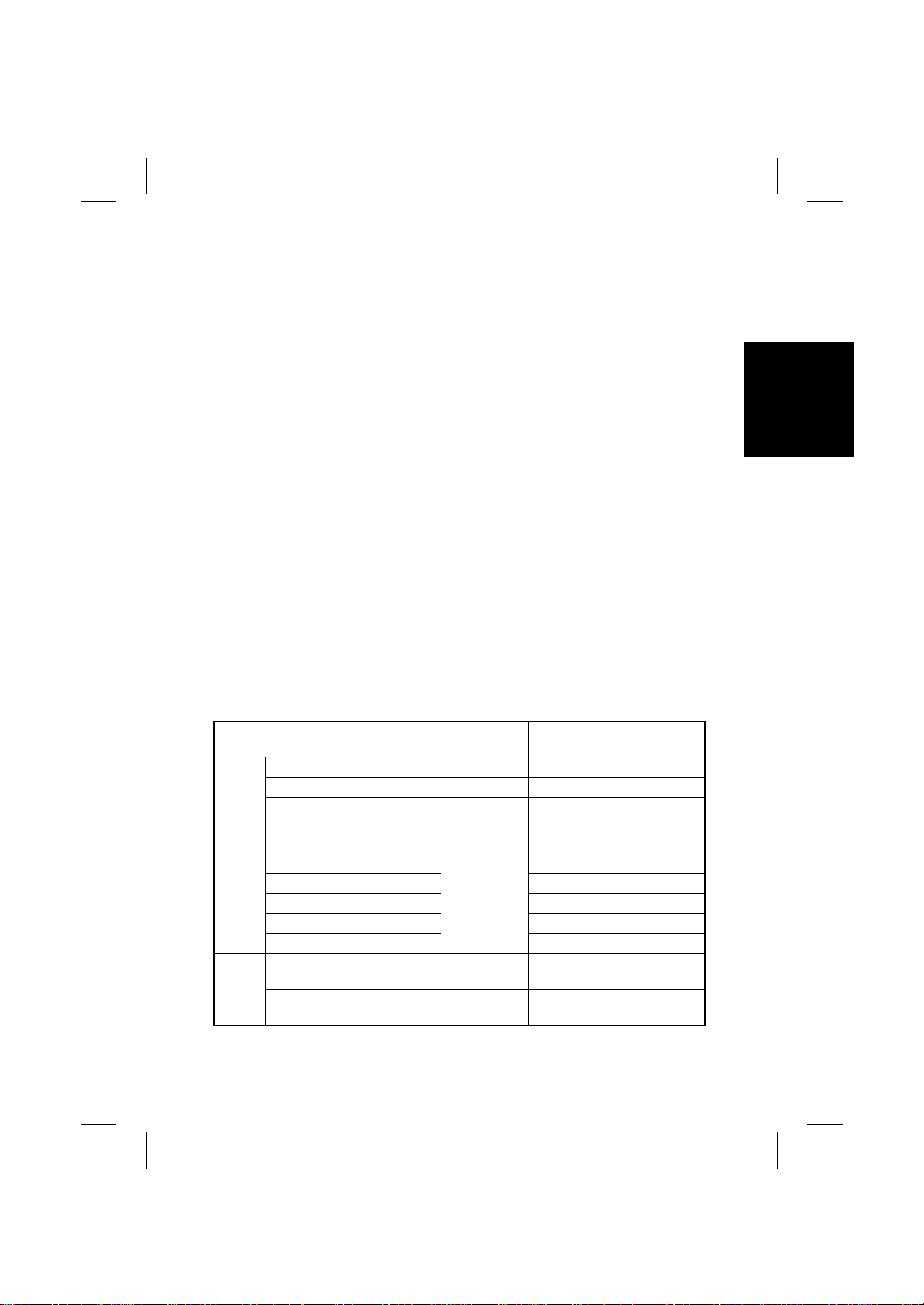
1. SPECIFICATION
Type
Original Scanning
PC Drum T ype
Copying System
Scanning Density
Print Density
Paper Feeding System
(Standard)
Printing Process
Exposure System
Developing System
Charging System
Ozone Removal System
Image Transfer System
Paper Separating System
Transfer Belt Cleaning System
Fusing System
Paper Charge Neutralizing
Max. Original Size
Copy Paper Type
Paper Source 1st Drawer 2nd Drawer
Plain paper (64 to 90 g/m²)
Translucent paper – – –
OHP transparencies
(dedicated)
Copy
paper
type
Copy
paper
dimen-
sions
❍ : Reliably fed –: Feeding prohibited
Thick paper (91 to 150 g/m²)
Thick paper (151 to 209 g/m²) –
Thick paper (210 to 256 g/m²) –
Postcards –
Envelope –
Label Sheet –
Max. (width × length)
Min. (width × length)
:
Freestanding scanner and printer separated from
each other
:
Scanning in main scanning direction with a reduction-type color CCD (One Scan Reading System)
:
OPC (organic photoconductor)
:
Electrostatic dry-powdered image transfer to plain
paper
:
Equivalent to 600 dpi
:
Equivalent to 600 dpi in main scanning direction x
1800 dpi in sub-scanning direction
:
Three-Way system
Manual Bypass Table...Single
1st Drawer....................250 sheets
2nd Drawer. .. .. ....... .. .... .500 sheets
:
Tandem-type indirect electrostatic recording system
:
LED Unit exposure for each of Y, M, C, and Bk
:
2-component magnetic brush developing
:
DC comb electrobe Scorotron System
:
Ozone Filter
:
Intermediate Transfer Belt System
:
Selecting either nonwoven fabric bias or ground +
Separation Finger
:
Blade Cleaning + Brush + Toner Patch
:
Belt Fusing
:
Charge Neutralizing Brush
:
A3 or 11×17
Manual
Bypass Table
❍❍❍
❍
❍
20 sheets or
less
311 × 457 mm
12-1/4 × 18
86 × 140 mm
3-1/2 × 5-1/2
–
–
297 × 432 mm
11-3/4 × 17
182 × 182 mm
7-1/4 × 7-1/4
❍
❍
❍
❍
❍
❍
❍
311 × 457 mm
12-1/4 × 18
86 × 140 mm
3-1/2 × 5-1/2
G-1
Page 4
FrameMaker Ver5.5E(PC) 8020/8031 GENERAL
02.08.19
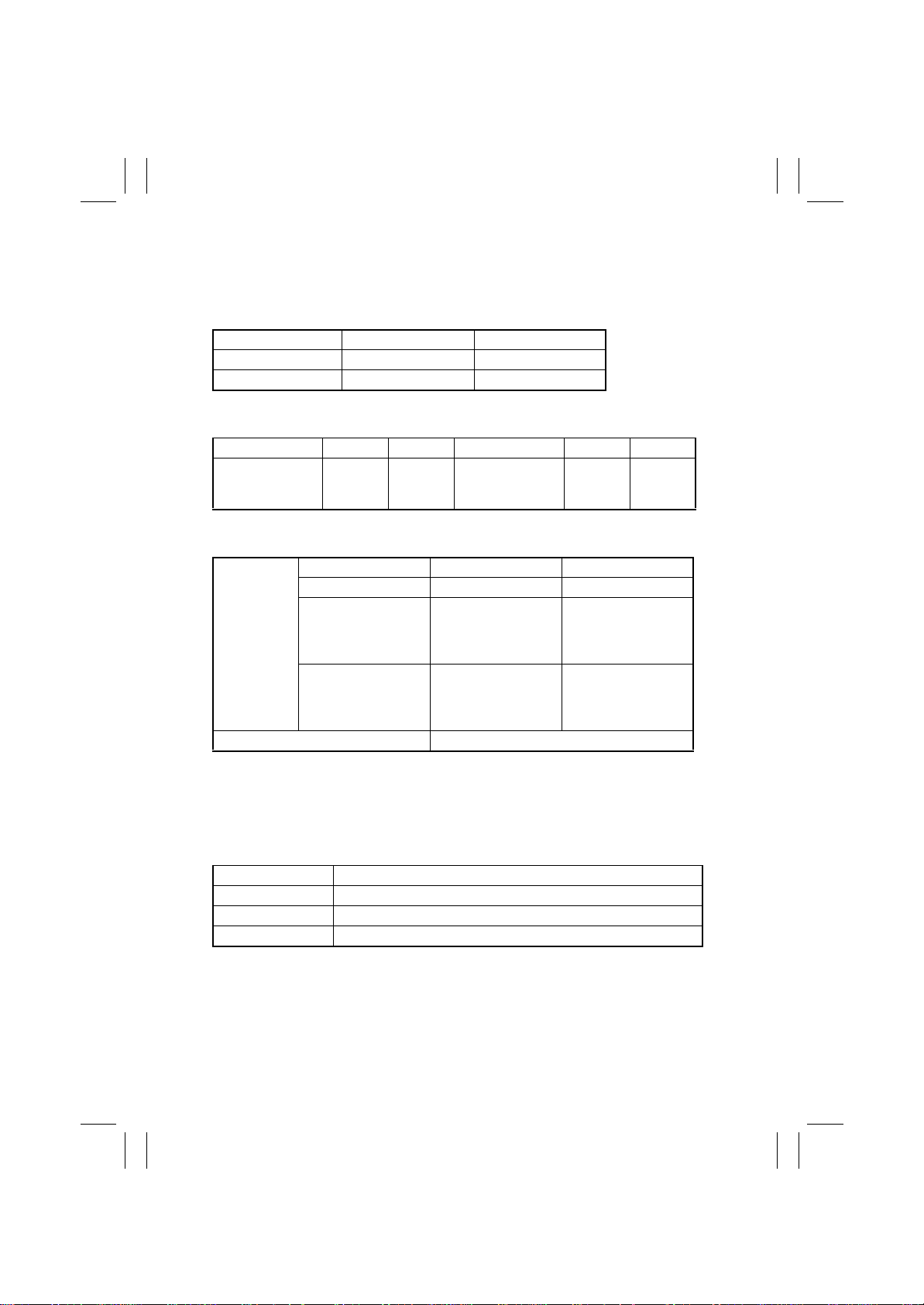
Multiple Copies
Warming-up Time
First Copy Time
Full Color 9.9 sec. 14.1 sec.
Mono Color 7.9 sec. 7.9 sec.
(1st Drawer, full size, A4C, Manual Exposure)
Copying Speed for Multi-Copy Cycle (copies/min.)
Size 8031 8020 Size 8031 8020
A3, 11 × 17
A4L, 8-1/2 × 11L
A4C, 8-1/2 × 11C
(Full Color / Mono Color fed from 2nd Drawer)
Zoom Ratio
Fixed
Variable (in 0.001 increments)
Lens
Light Source
Max. Power Consumption
(copier only)
Power Requirements
Environmental Conditions
Temperature 10 to 30
Humidity 25 to 85 % (with a
Ambient Illumination 3,000 lux or less
Levelness 1
15/15
21/21
31/31
Full size
Reduction
Enlargement
° (1.75/100 or less)
::1 to 999 copies
5 min. or less (at ambient temperature of 20
68 ° F
and rated source voltage)
8031 8020
10/15
14/21
20/31
::Through Lens
White Fluorescent Lamp
::1.5 kw
110 v, 120 v, 127 v, 220 to 240 v; 50/60 Hz
°C, 50 to 86 ° F (with a fluctuation of 10 °C, 50 ° F or less per hour)
fluctuation of 20 % or less)
B4L
B5L
B5C
Metric Area Inch Area
×
1.000
×
0.816
×
0.707
×
0.500
×
1.154
×
1.414
×
2.000
×
0.250 to × 4.000
18/18
21/21
31/31
×
1.000
×
0.785
×
0.733
×
0.647
×
0.500
×
1.214
×
1.294
×
1.545
×
2.000
°C,
12/18
14/21
20/31
G-2
Page 5

FrameMaker Ver5.5E(PC) 8020/8031 GENERAL
02.08.19
Dimensions
Weight
::With Rack
Width..........596 mm, 23-1/2
Depth..........792 mm, 31-1/4
Height.........1025 mm, 40-1/4
Engine + 2nd Drawer
Width..........596 mm, 23-1/2
Depth..........730 mm, 28-3/4
Height.........571 mm, 22-1/2
Scanner
Width..........589 mm, 23-1/4
Depth..........730 mm, 28-3/4
Height.........152 mm, 6
Engine+ 2nd Drawer.........85 kg, 187-1/2 lbs
Scanner............................19.5 kg, 43 lbs
Rack..................................18 kg, 39-3/4 lbs
G-3
Page 6

FrameMaker Ver5.5E(PC) 8020/8031 GENERAL
02.08.19
2. PRECAUTIONS FOR INSTALLATION
2-1. Installation Site
To ensure safety and utmost performance of the copier, the copier should NOT be used in a
place:
• Where it will be subjected to extremely high or low temperature or humidity.
• Where it will be subjected to sudden fluctuations in either temperature or humidity.
• Which is exposed to direct sunlight.
• Which is in the direct air stream of an air conditioner, heater, or ventilat or.
• Which has poor ventilation or is dusty.
• Which does not have a stable, level floor or where it will receive undue vibration.
• Which is near any kind of heating device.
• Which is near volatile flammables (thinner, gasoline, etc.).
• Where it may be splashed with water.
• Which puts the operator in the direct stream of exhaust from the copier.
• Where ammonia gas might be generated.
2-2. Power Source
• If any other electrical equipment is sourced from the same power outlet, make sure that
the capacity of the outlet is not exceeded.
• Use a power source with little voltage fluctuation.
• Never connect by means of a multiple socket any other appliances or machines to the
outlet being used for the copier.
• Ensure that the copier does not ride on the power cord or communication cable of other
electrical equipment, and that it does not become wedged into or underneath the mechanism.
• Make the following checks at frequent intervals:
✽
Is the power plug abnormally hot?
✽
Are there any cracks or scrapes in the cord?
✽
Has the power plug been inserted fully into the outlet?
✽
Does something, including the copier itself, ride on the power cord?
Use an outlet with a capacity of 110/120/127 V, 15 A or more. 220/240 V, 10 A or more.
2-3. Grounding
• Always ground the copier to prevent receiving electrical shocks in the case of electrical
leakage.
• Connect the ground wire to the ground terminal of the outlet or a grounding contact which
complies with the local electrical standards.
• Never connect the ground wire to a gas pipe, the ground wire for a telephone, lightning
arrester, or a water pipe for fear of fire and electrical shock.
G-4
Page 7

FrameMaker Ver5.5E(PC) 8020/8031 GENERAL
02.08.19
3. PRECAUTIONS FOR USE
3-1. To ensure that the copier is used in an optimum condition
• Never place a heavy object on the copier or subject the copier to shocks.
• Insert the power plug all the way into the outlet.
• Do not attempt to remove any panel or cover which is secured while the copier is making
copies.
• Do not turn OFF the copier while it is making copies.
• Provide good ventilation when making a large number of copies continuously.
• Never use flammable sprays near the copier.
• If the copier becomes inordinately hot or produces abnormal noise, turn it OFF and
unplug it.
• Do not turn ON the power switch at the same time when you plug the power cord into the
outlet.
• When unplugging the power cord, do not pull on the cord; hold the plug and pull it out.
• Do not bring any magnetized object near the copier.
• Do not place a vase or vessel containing water on the copier.
• Be sure to turn OFF the power switch at the end of the workday or upon power failure.
• Use care not to drop paper clips, staples, or other small pieces of metal into the copier.
3-2. Operating Environment
The operating environmental requirements of the copier are as follows.
• Temperature: 10 to 30 °C,
• Humidity: 25 to 85 % RH
• Rate of temperature change: 10 °C/h,
• Rate of humidity change: 20 % RH/h
50 to 86 ° F
50 ° F/h
3-3. P ower Requirements
The power source voltage requirements are as follows.
• Voltage fluctuation: AC110, 120, 220, 240 V
±10 % (copying performance assured)
(127 V areas only; between -10 % and +6 %)
(paper feeding performance assured)
• Frequency fluctuation: 50/60 Hz ±0.3 %
+10 %
-15 %
3-4. Note
• It is prohibited to copy paper and hard currencies, government securities, and municipal
bonds (even when they are stamped as “Sample”).
• For fear of infringement of copyright, it is also prohibited to copy copyrighted works,
including books, music, works of art, maps, drawings, motion pictures, and photos except
when the copy is to be used only personally.
G-5
Page 8

FrameMaker Ver5.5E(PC) 8020/8031 GENERAL
02.08.19
4. HANDLING OF CONSUMABLES
Before using any consumables, always read the label on its container carefully.
• Paper can be easily damaged by dampness. To prevent absorption of moisture, store
paper, which has been remov ed from its wrapper b ut not loaded in the dr aw er , i n a sealed
plastic bag in a cool, dark place.
• Keep consumables out of the reach of children.
• Do not touch the PC Drum with bare hands.
• The same sized paper is of two kinds, short grain and long grain. Short grain paper
should only be fed through the copier crosswise, long grain paper should only be fed
lengthwise.
• If your hands become soiled with toner, wash them with soap and water.
• Do not throw away any used consumables (PC Drum, starter, toner, etc.). They are to be
collected.
• Do not burn, bury in the ground, or throw into the water any consumables (PC Drum,
starter, toner, etc.).
• Do not store consumables in a place which:
✽
Is hot and humid.
✽
Is subject to direct sunlight.
✽
Has an open flame nearby.
G-6
Page 9
FrameMaker Ver5.5E(PC) 8020/8031 GENERAL
02.08.19
5. OTHER PRECAUTIONS
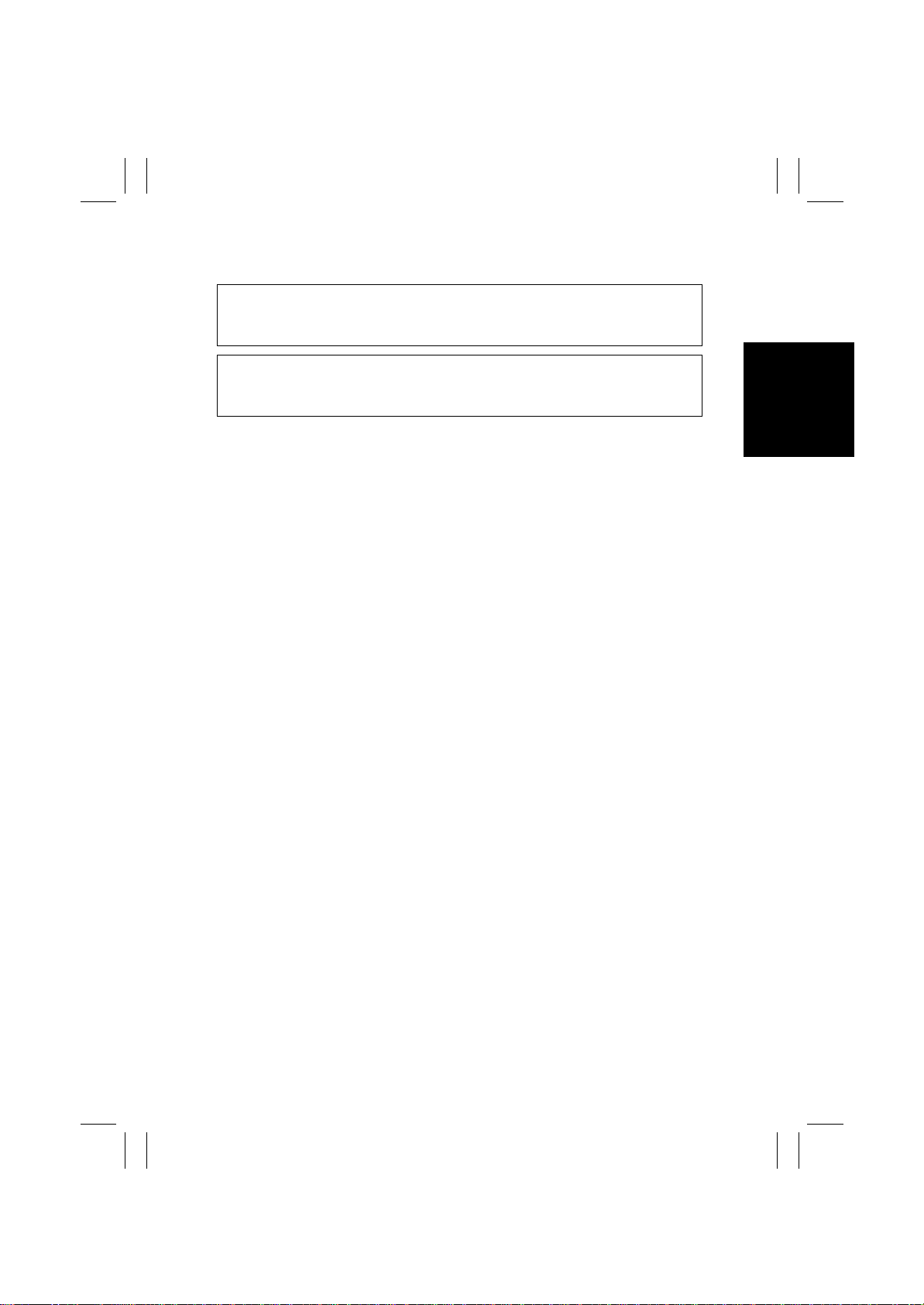
CAUTION
Double pole / neutral fusing
ATTENTION
Double pôle / fusible sur le neutre.
6. LED RADIATION SAFETY
• This product is a copier which operates by means of a LED (light emitting diodes) exposure system. There is no possibility of danger from the LED optical radiation, because
the LED optical radiation level does not exceed the accessible radiation limit of class 1
under all conditions of operation, maintenance, service and failure.
G-7
Page 10
FrameMaker Ver5.5E(PC) 8020/8031 GENERAL
02.08.19
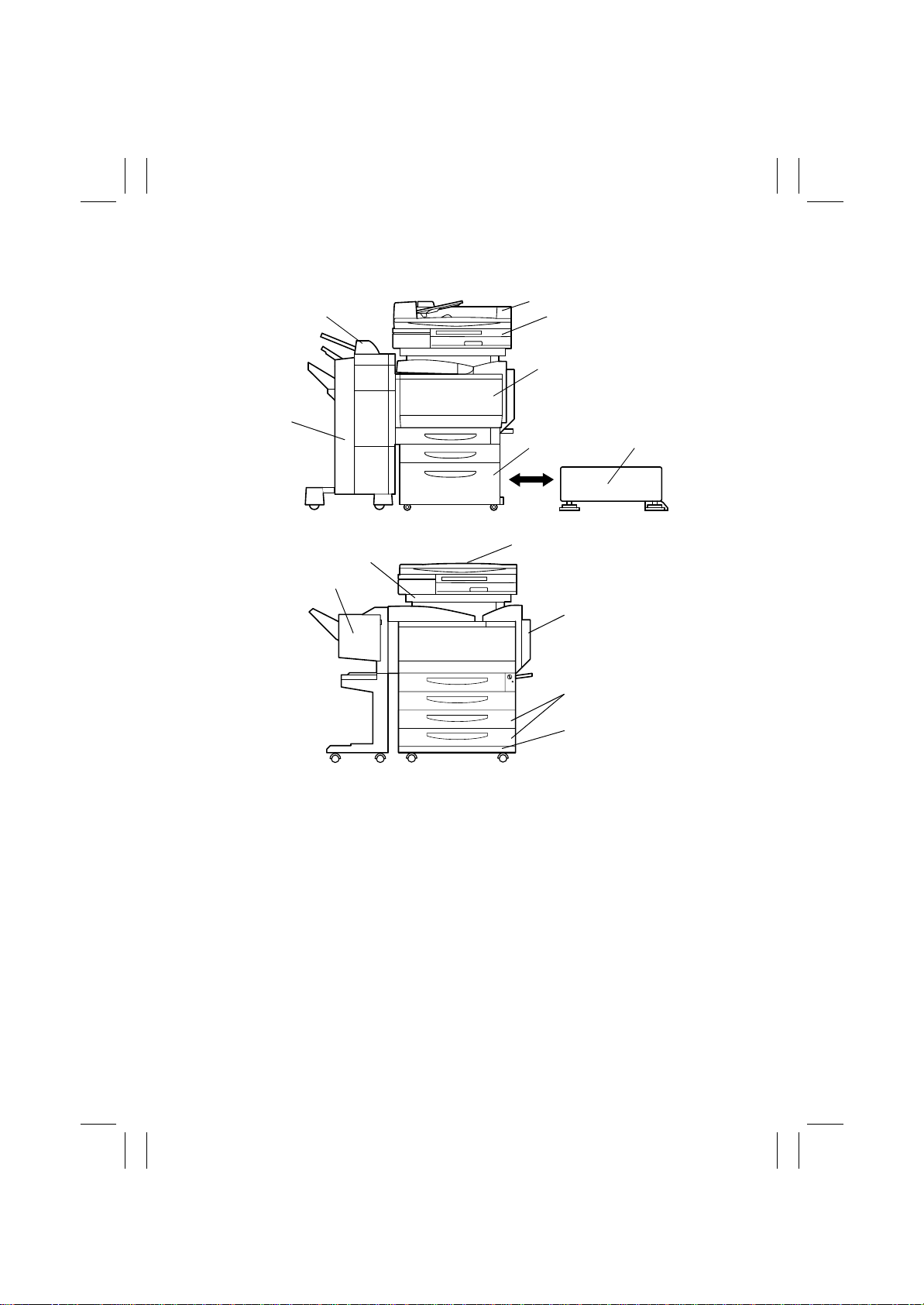
7. SYSTEM OPTIONS
6
13
12
1
27
3
4
8
5
C4025o263AA
1. Duplexing Document Feeder DF-332
2. Scanner SN-232
3. Copier printer section
4. Large Capacity Cabinet DB-432
5. Copy Desk DK-133
6. Finisher FS-135
7. Option Tray FT-331
8. Original Cover CV-131
9. Duplex Unit AD-231
10. Paper Feed Unit PF-232
11. Copy Table DK-134
9
10
11
C4025o264AA
12. Finisher FS-231
13. Copier Stand DK-232
14. Memory MU-433*
15. Hard Disk Drive HD-131*
16. Punch Kit PK-131*
17. Mechanical Counter*
18. Printer Controller IP-711*
19. Printer Controller Fiery X3e 31C-M*
20. I/F Kit VI-635* (Used only when Fiery
X3e 31C-M is installed)
*:The internal options are not shown.
G-8
 Loading...