

Page 1
OM-1589 163 473F
June 1999
Processes
MIG (GMAW) Welding
Pulsed MIG (GMAW-P)
Description
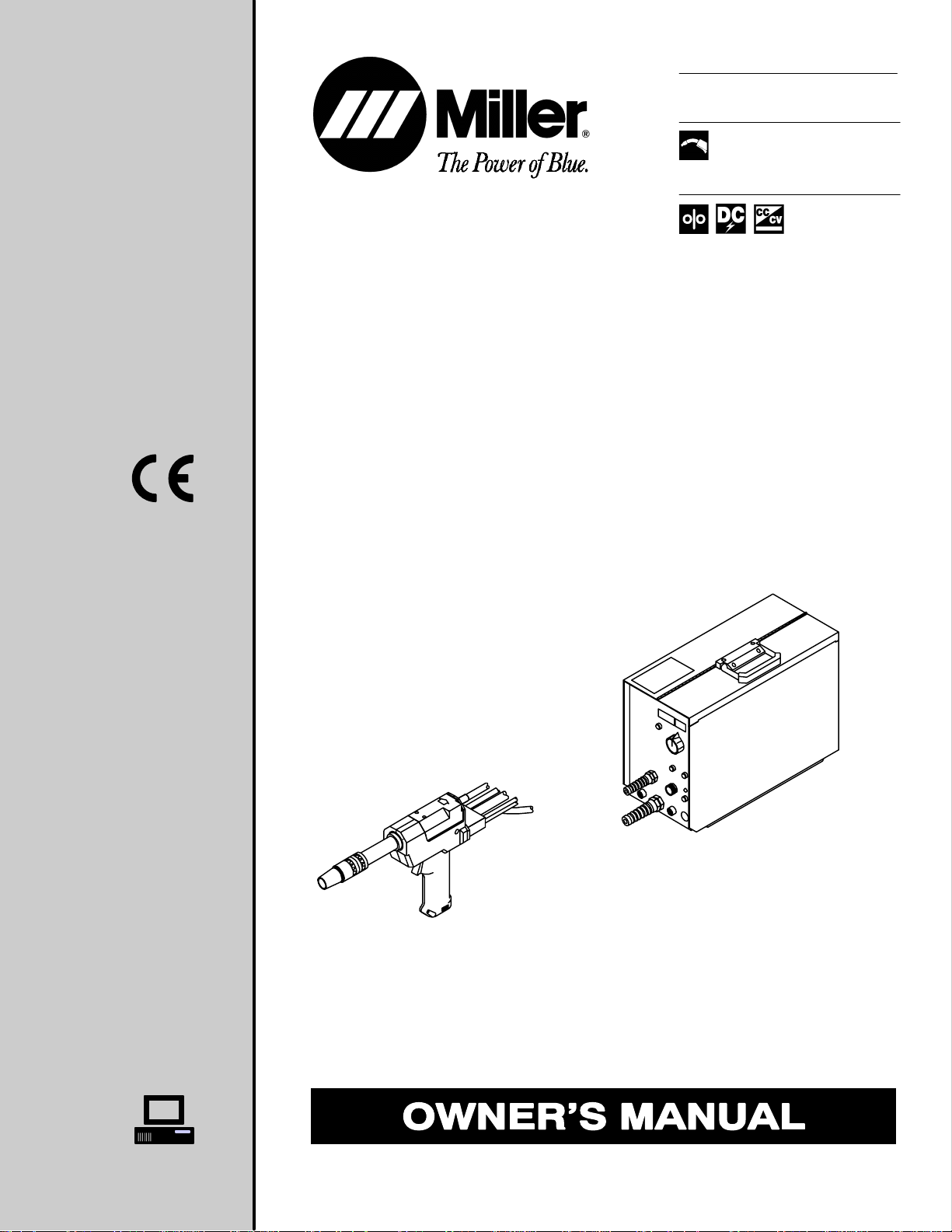
Wire Feeder And Feeder Gun
XR-M Wire Feeder
XR-M Ai r- And Water-Cooled Guns
Visit our website at
www.MillerWelds.com
Page 2
From Miller to You
Thank you and congratulations on choosing Miller. Now
you can get the job done and get it done right. We know
you don’t have time to do it any other way.
That’s why when Niels Miller first started building arc
welders in 1929, he made sure his products offered
long-lasting value and superior quality. Like you, his
customers couldn’t afford anything less. Miller products
had to be more than the best they could be. They had to
be the best you could buy.
Today, the people that build and sell Miller products continue the
tradition. They’re just as committed to providing equipment and service
that meets the high standards of quality and value established in 1929.
This Owner’s Manual is designed to help you get the most out of your
Miller products. Please take time to read the Safety precautions. They will
help you protect yourself against potential hazards on the worksite. We’ve
made installation and operation quick and easy.
With Miller you can count on years of reliable
service with proper maintenance. And if for
some reason the unit needs repair, there’s a
Troubleshooting section that will help you
Miller is the first welding
equipment m anufacturer in
the U.S.A. to be registered
to the ISO 9001 Quality
System Standard.
Miller Electric manufactures a full line
of welders and welding related equipment.
For information on other quality Miller
products, contact your local Miller distributor
to receive the latest full line catalog or
individual catalog sheets. To locate your nearest
distributor call 1-800-4-A-Miller.
figure out what the problem is. The parts list
will then help you to decide which exact part
you may need to fix the problem. Warranty and
service information for your particular model
are also provided.
Working as hard as you do
− every power source from
Miller i s backed by the most
hassle-free warranty in t he
business.
Miller offers a Technical
Manual which provides
more detailed service and
parts information for your
unit. T o obtain a Technical
Manual, contact your local
distributor. Your distributor
can also supply you with
Welding Process Manuals
such as SMAW, GTAW,
GMAW, and GMA W-P.
Page 3

WARNING
This product, when used
for welding or cutting,
produces fumes or
gases which contain
chemicals known to the
State of California to
cause birth defects and,
in some cases, cancer.
(California Health &
Safety Code Section
25249.5 et seq.)
TABLE OF CONTENTS
SECTION 1 − SAFETY PRECAUTIONS - READ BEFORE USING 1. . . . . . . . . . . . . . . . . . . . . . . . . . . .
1-1. Symbol Usage 1. . . . . . . . . . . . . . . . . . . . . . . . . . . . . . . . . . . . . . . . . . . . . . . . . . . . . . . . . . . . . . . .
1-2. Arc Welding Hazards 1. . . . . . . . . . . . . . . . . . . . . . . . . . . . . . . . . . . . . . . . . . . . . . . . . . . . . . . . . .
1-3. Additional Symbols For Installation, Operation, And Maintenance 3. . . . . . . . . . . . . . . . . . . . .
1-4. Principal Safety Standards 3. . . . . . . . . . . . . . . . . . . . . . . . . . . . . . . . . . . . . . . . . . . . . . . . . . . . .
1-5. EMF Information 4. . . . . . . . . . . . . . . . . . . . . . . . . . . . . . . . . . . . . . . . . . . . . . . . . . . . . . . . . . . . . .
SECTION 1 − CONSIGNES DE SECURITE − LIRE AVANT UTILISATION 5. . . . . . . . . . . . . . . . . . . . .
1-1. Signification des symboles 5. . . . . . . . . . . . . . . . . . . . . . . . . . . . . . . . . . . . . . . . . . . . . . . . . . . . .
1-2. Dangers relatifs au soudage à l’arc 5. . . . . . . . . . . . . . . . . . . . . . . . . . . . . . . . . . . . . . . . . . . . . .
1-3. Dangers supplémentaires en relation avec l’installation, le fonctionnement
et la maintenance 7. . . . . . . . . . . . . . . . . . . . . . . . . . . . . . . . . . . . . . . . . . . . . . . . . . . . . . . . . . . . .
1-4. Principales normes de sécurité 8. . . . . . . . . . . . . . . . . . . . . . . . . . . . . . . . . . . . . . . . . . . . . . . . . .
1-5. Information sur les champs électromagnétiques 8. . . . . . . . . . . . . . . . . . . . . . . . . . . . . . . . . . . .
SECTION 2 − DEFINITIONS 9. . . . . . . . . . . . . . . . . . . . . . . . . . . . . . . . . . . . . . . . . . . . . . . . . . . . . . . . . . . .
2-1. Warning Label Definitions 9. . . . . . . . . . . . . . . . . . . . . . . . . . . . . . . . . . . . . . . . . . . . . . . . . . . . . .
2-2. Manufacturer’s Rating Label for CE Products 10. . . . . . . . . . . . . . . . . . . . . . . . . . . . . . . . . . . . . .
2-3. Symbols And Definitions 10. . . . . . . . . . . . . . . . . . . . . . . . . . . . . . . . . . . . . . . . . . . . . . . . . . . . . . .
SECTION 3 − INSTALLATION 11. . . . . . . . . . . . . . . . . . . . . . . . . . . . . . . . . . . . . . . . . . . . . . . . . . . . . . . . . . .
3-1. Specifications 11. . . . . . . . . . . . . . . . . . . . . . . . . . . . . . . . . . . . . . . . . . . . . . . . . . . . . . . . . . . . . . . .
3-2. Typical Air-Cooled System Connections 11. . . . . . . . . . . . . . . . . . . . . . . . . . . . . . . . . . . . . . . . . .
3-3. Typical Water-Cooled System Connections 12. . . . . . . . . . . . . . . . . . . . . . . . . . . . . . . . . . . . . . . .
3-4. Rear Panel Connections 13. . . . . . . . . . . . . . . . . . . . . . . . . . . . . . . . . . . . . . . . . . . . . . . . . . . . . . .
3-5. 14-Pin Plug Information 13. . . . . . . . . . . . . . . . . . . . . . . . . . . . . . . . . . . . . . . . . . . . . . . . . . . . . . . .
3-6. Internal Connections for Water-Cooled Gun 14. . . . . . . . . . . . . . . . . . . . . . . . . . . . . . . . . . . . . . .
3-7. Internal Connections for Air-Cooled Gun 14. . . . . . . . . . . . . . . . . . . . . . . . . . . . . . . . . . . . . . . . . .
3-8. Front Panel Connections for Gun 15. . . . . . . . . . . . . . . . . . . . . . . . . . . . . . . . . . . . . . . . . . . . . . . .
3-9. Removing Top Cover of Gun 16. . . . . . . . . . . . . . . . . . . . . . . . . . . . . . . . . . . . . . . . . . . . . . . . . . . .
3-10. Adjusting Contact Tip Position 16. . . . . . . . . . . . . . . . . . . . . . . . . . . . . . . . . . . . . . . . . . . . . . . . . . .
3-11. Setting Torque Switch 16. . . . . . . . . . . . . . . . . . . . . . . . . . . . . . . . . . . . . . . . . . . . . . . . . . . . . . . . . .
3-12. Installing Wire Spool 17. . . . . . . . . . . . . . . . . . . . . . . . . . . . . . . . . . . . . . . . . . . . . . . . . . . . . . . . . . .
3-13. Threading Welding Wire Through Feeder 18. . . . . . . . . . . . . . . . . . . . . . . . . . . . . . . . . . . . . . . . .
3-14. Threading Welding Wire Through Feeder (Continued) 19. . . . . . . . . . . . . . . . . . . . . . . . . . . . . . .
OM-1589
SECTION 4 − OPERATION 20. . . . . . . . . . . . . . . . . . . . . . . . . . . . . . . . . . . . . . . . . . . . . . . . . . . . . . . . . . . . .
4-1. Operational Terms 20. . . . . . . . . . . . . . . . . . . . . . . . . . . . . . . . . . . . . . . . . . . . . . . . . . . . . . . . . . . .
4-2. Pulse Welding Terms 20. . . . . . . . . . . . . . . . . . . . . . . . . . . . . . . . . . . . . . . . . . . . . . . . . . . . . . . . . .
4-3. Front Panel Controls 21. . . . . . . . . . . . . . . . . . . . . . . . . . . . . . . . . . . . . . . . . . . . . . . . . . . . . . . . . . .
4-4. Side and Rear Panel Controls 22. . . . . . . . . . . . . . . . . . . . . . . . . . . . . . . . . . . . . . . . . . . . . . . . . . .
4-5. Gun Controls 22. . . . . . . . . . . . . . . . . . . . . . . . . . . . . . . . . . . . . . . . . . . . . . . . . . . . . . . . . . . . . . . . .
SECTION 5 − SETTING SEQUENCE PARAMETERS 23. . . . . . . . . . . . . . . . . . . . . . . . . . . . . . . . . . . . . . .
5-1. Sequence Parameters in a Program 23. . . . . . . . . . . . . . . . . . . . . . . . . . . . . . . . . . . . . . . . . . . . . .
SECTION 6 − SETTING DUAL SCHEDULE PARAMETERS 24. . . . . . . . . . . . . . . . . . . . . . . . . . . . . . . . .
6-1. Selecting Dual Schedule Pair 24. . . . . . . . . . . . . . . . . . . . . . . . . . . . . . . . . . . . . . . . . . . . . . . . . . .
6-2. Dual Schedule Switch Diagrams 25. . . . . . . . . . . . . . . . . . . . . . . . . . . . . . . . . . . . . . . . . . . . . . . . .
SECTION 7 − USING THE OPTIONAL DATA CARD 25. . . . . . . . . . . . . . . . . . . . . . . . . . . . . . . . . . . . . . . .
7-1. Data Card Terms 25. . . . . . . . . . . . . . . . . . . . . . . . . . . . . . . . . . . . . . . . . . . . . . . . . . . . . . . . . . . . . .
7-2. Installing Data Card 26. . . . . . . . . . . . . . . . . . . . . . . . . . . . . . . . . . . . . . . . . . . . . . . . . . . . . . . . . . .
7-3. Card Displays 26. . . . . . . . . . . . . . . . . . . . . . . . . . . . . . . . . . . . . . . . . . . . . . . . . . . . . . . . . . . . . . . .
(Continued)
Page 4

TABLE OF CONTENTS
SECTION 8 − SYSTEM SETUP 27. . . . . . . . . . . . . . . . . . . . . . . . . . . . . . . . . . . . . . . . . . . . . . . . . . . . . . . . . .
8-1. System Setup Display Parameters 27. . . . . . . . . . . . . . . . . . . . . . . . . . . . . . . . . . . . . . . . . . . . . . .
SECTION 9 − STANDARD PULSE WELDING PROGRAMS 28. . . . . . . . . . . . . . . . . . . . . . . . . . . . . . . . .
9-1. Program 1 − Aluminum 28. . . . . . . . . . . . . . . . . . . . . . . . . . . . . . . . . . . . . . . . . . . . . . . . . . . . . . . . .
9-2. Program 2 − Aluminum 28. . . . . . . . . . . . . . . . . . . . . . . . . . . . . . . . . . . . . . . . . . . . . . . . . . . . . . . .
9-3. Program 3 − Aluminum 29. . . . . . . . . . . . . . . . . . . . . . . . . . . . . . . . . . . . . . . . . . . . . . . . . . . . . . . . .
9-4. Program 4 − Aluminum 29. . . . . . . . . . . . . . . . . . . . . . . . . . . . . . . . . . . . . . . . . . . . . . . . . . . . . . . . .
9-5. Program 5 − Aluminum 30. . . . . . . . . . . . . . . . . . . . . . . . . . . . . . . . . . . . . . . . . . . . . . . . . . . . . . . . .
9-6. Program 6 − Aluminum 30. . . . . . . . . . . . . . . . . . . . . . . . . . . . . . . . . . . . . . . . . . . . . . . . . . . . . . . . .
9-7. Program 7 − Aluminum 31. . . . . . . . . . . . . . . . . . . . . . . . . . . . . . . . . . . . . . . . . . . . . . . . . . . . . . . . .
9-8. Program 8 – A l u m i n u m 31. . . . . . . . . . . . . . . . . . . . . . . . . . . . . . . . . . . . . . . . . . . . . . . . . . . . . . . . .
SECTION 10 − TEACH POINTS 32. . . . . . . . . . . . . . . . . . . . . . . . . . . . . . . . . . . . . . . . . . . . . . . . . . . . . . . . .
10-1. Teach Points Explained 32. . . . . . . . . . . . . . . . . . . . . . . . . . . . . . . . . . . . . . . . . . . . . . . . . . . . . . . .
10-2. Redefining Teach Points 33. . . . . . . . . . . . . . . . . . . . . . . . . . . . . . . . . . . . . . . . . . . . . . . . . . . . . . .
SECTION 11 − MAINTENANCE AND TROUBLESHOOTING 35. . . . . . . . . . . . . . . . . . . . . . . . . . . . . . . .
11-1. Routine Maintenance 35. . . . . . . . . . . . . . . . . . . . . . . . . . . . . . . . . . . . . . . . . . . . . . . . . . . . . . . . . .
11-2. Feeder Drive Assembly Maintenance 35. . . . . . . . . . . . . . . . . . . . . . . . . . . . . . . . . . . . . . . . . . . . .
11-3. Changing Gun Contact Tip and Liner 36. . . . . . . . . . . . . . . . . . . . . . . . . . . . . . . . . . . . . . . . . . . . .
11-4. Gun Drive Assembly Maintenance 36. . . . . . . . . . . . . . . . . . . . . . . . . . . . . . . . . . . . . . . . . . . . . . .
11-5. Removing Air-Cooled Contact Tip Adapter 37. . . . . . . . . . . . . . . . . . . . . . . . . . . . . . . . . . . . . . . .
11-6. Removing Water-Cooled Contact Tip Adapter 37. . . . . . . . . . . . . . . . . . . . . . . . . . . . . . . . . . . . . .
11-7. Error Displays 38. . . . . . . . . . . . . . . . . . . . . . . . . . . . . . . . . . . . . . . . . . . . . . . . . . . . . . . . . . . . . . . .
11-8. Using Self Test 39. . . . . . . . . . . . . . . . . . . . . . . . . . . . . . . . . . . . . . . . . . . . . . . . . . . . . . . . . . . . . . .
11-9. Troubleshooting 40. . . . . . . . . . . . . . . . . . . . . . . . . . . . . . . . . . . . . . . . . . . . . . . . . . . . . . . . . . . . . .
SECTION 12 − ELECTRICAL DIAGRAM 42. . . . . . . . . . . . . . . . . . . . . . . . . . . . . . . . . . . . . . . . . . . . . . . . . .
SECTION 13 − PARTS LIST 46. . . . . . . . . . . . . . . . . . . . . . . . . . . . . . . . . . . . . . . . . . . . . . . . . . . . . . . . . . . .
OPTIONS AND ACCESSORIES
WARRANTY
Page 5

Declaration of Conformity for
European Community (CE) Products
Note
Manufacturer’s Name: Miller Electric Mfg. Co.
Manufacturer’s Address: 1635 W. Spencer Street
This information is provided for units with CE certification (see rating label on unit).
Appleton, WI 54914 USA
Declares that the product: XR-M
conforms to the following Directives and Standards:
Directives
Low Voltage Directive: 73/23/EEC
Electromagnetic Compatibility (EMC) Directive: 89/336/EEC
Machinery Directives: 89/392/EEC, 91/368/EEC, 93/C 133/04, 93/68/EEC
Standards
Arc Welding Equipment Part I: Welding Power Sources: IEC 974-1
(April 1995 − Draft Revision)
Arc Welding Equipment: Wirefeed Systems: IEC 974-4
(May 1995 − Draft Revision)
Degrees of Protection Provided By Enclosures (IP Code): IEC 529:1989
Insulation Coordination For Equipment With Low-Voltage Systems:
Part I: Principles, Requirements and Tests: IEC 664-1: 1992
Electromagnetic Compatibility, (EMC): EN 50199
Torches And Guns For Arc Welding, EN 50078
European Contact: Mr. Luigi Vacchini, Managing Director
MILLER Europe S.P.A.
Via Privata Iseo
20098 San Giuliano
Milanese, Italy
Telephone: 39(02)98290-1
Fax: 39(02)98281-552
dec_con 11/96
Page 6

Page 7
SECTION 1 − SAFETY PRECAUTIONS - READ BEFORE USING
1-1. Symbol Usage
Means Warning! Watch Out! There are possible hazards
with this procedure! The possible hazards are shown in
the adjoining symbols.
som _nd_5/97
Y Marks a special safety message.
. Means “Note”; not safety related.
1-2. Arc Welding Hazards
Y The symbols shown below are used throughout this manual to
call attention to and identify possible hazards. When you see
the symbol, watch out, and follow the related instructions to
avoid the hazard. The safety information given below is only
a summary of the more complete safety information found in
the Safety Standards listed in Section 1-4. Read and follow all
Safety Standards.
Y Only qualified persons should install, operate, maintain, and
repair this unit.
Y During operation, keep everybody, especially children, away.
ELECTRIC SHOCK can kill.
Touching live electrical parts can cause fatal shocks
or severe burns. The electrode and work circuit is
electrically live whenever the output is on. The input
live when power is on. In semiautomatic or automatic wire welding, the
wire, wire reel, drive roll housing, and all metal parts touching the
welding wire are electrically live. Incorrectly installed or improperly
grounded equipment is a hazard.
D Do not touch live electrical parts.
D Wear dry, hole-free insulating gloves and body protection.
D Insulate yourself from work and ground using dry insulating mats
or covers big enough to prevent any physical contact with the work
or ground.
D Do not use AC output in damp areas, if movement is confined, or if
there is a danger of falling.
D Use AC output ONLY if required for the welding process.
D If AC output is required, use remote output control if present on
unit.
D Disconnect input power or stop engine before installing or
servicing this equipment. Lockout/tagout input power according to
OSHA 29 CFR 1910.147 (see Safety Standards).
D Properly install and ground this equipment according to its
Owner’s Manual and national, state, and local codes.
D Always verify the supply ground − check and be sure that input
power cord ground wire is properly connected to ground terminal in
disconnect box or that cord plug is connected to a properly
grounded receptacle outlet.
D When making input connections, attach proper grounding conduc-
tor first − double-check connections.
D Frequently inspect input power cord for damage or bare wiring −
replace cord immediately if damaged − bare wiring can kill.
D Turn off all equipment when not in use.
D Do not use worn, damaged, undersized, or poorly spliced cables.
D Do not drape cables over your body.
power circuit and machine internal circuits are also
This group of symbols means Warning! Watch Out! possible
ELECTRIC SHOCK, MOVING PARTS, and HOT PARTS hazards.
Consult symbols and related instructions below for necessary actions
to avoid the hazards.
D If earth grounding of the workpiece is required, ground it directly
with a separate cable − do not use work clamp or work cable.
D Do not touch electrode if you are in contact with the work, ground,
or another electrode from a different machine.
D Use only well-maintained equipment. Repair or replace damaged
parts at once. Maintain unit according to manual.
D Wear a safety harness if working above floor level.
D Keep all panels and covers securely in place.
D Clamp work cable with good metal-to-metal contact to workpiece
or worktable as near the weld as practical.
D Insulate work clamp when not connected to workpiece to prevent
contact with any metal object.
D Do not connect more than one electrode or work cable to any
single weld output terminal.
SIGNIFICANT DC VOLTAGE exists after removal of
input power on inverters.
D Turn Off inverter, disconnect input power, and discharge input
capacitors according to instructions in Maintenance Section
before touching any parts.
FUMES AND GASES can be hazardous.
Welding produces fumes and gases. Breathing
these fumes and gases can be hazardous to your
health.
D Keep your head out of the fumes. Do not breathe the fumes.
D If inside, ventilate the area and/or use exhaust at the arc to remove
welding fumes and gases.
D If ventilation is poor, use an approved air-supplied respirator.
D Read the Material Safety Data Sheets (MSDSs) and the
manufacturer’s instructions for metals, consumables, coatings,
cleaners, and degreasers.
D Work in a confined space only if it is well ventilated, or while
wearing an air-supplied respirator. Always have a trained watchperson nearby. Welding fumes and gases can displace air and
lower th e oxygen level causing injury or death. Be sure the breathing air is safe.
D Do not weld in locations near degreasing, cleaning, or spraying op-
erations. The heat and rays of the arc can react with vapors to form
highly toxic and irritating gases.
D Do not weld on coated metals, such as galvanized, lead, or
cadmium plated steel, unless the coating is removed from the weld
area, the area is well ventilated, and if necessary, while wearing an
air-supplied respirator. The coatings and any metals containing
these elements can give off toxic fumes if welded.
OM-1589 Page 1
Page 8
ARC RAYS can burn eyes and skin.
BUILDUP OF GAS can injure or kill.
Arc rays from the welding process produce intense
visible and invisible (ultraviolet and infrared) rays
that can burn eyes and skin. Sparks fly off from the
weld.
D Wear a welding helmet fitted with a proper shade of filter to protect
your face and eyes when welding or watching (see ANSI Z49.1
and Z87.1 listed in Safety Standards).
D Wear approved safety glasses with side shields under your
helmet.
D Use protective screens or barriers to protect others from flash and
glare; warn others not to watch the arc.
D Wear protective clothing made from durable, flame-resistant mate-
rial (leather and wool) and foot protection.
WELDING can cause fire or explosion.
Welding on closed containers, such as tanks,
drums, or pipes, can cause them to blow up. Sparks
can fly off from the welding arc. The flying sparks, hot
burns. Accidental contact of electrode to metal objects can cause
sparks, explosion, overheating, or fire. Check and be sure the area is
safe before doing any welding.
D Protect yourself and others from flying sparks and hot metal.
D Do not weld where flying sparks can strike flammable material.
D Remove all flammables within 35 ft (10.7 m) of the welding arc. If
this is not possible, tightly cover them with approved covers.
D Be alert that welding sparks and hot materials from welding can
easily go through small cracks and openings to adjacent areas.
D Watch for fire, and keep a fire extinguisher nearby.
D Be aware that welding on a ceiling, floor, bulkhead, or partition can
cause fire on the hidden side.
D Do not weld on closed containers such as tanks, drums, or pipes,
unless they are properly prepared according to AWS F4.1 (see
Safety Standards).
D Connect work cable to the work as close to the welding area as
practical to prevent welding current from traveling long, possibly
unknown paths and causing electric shock and fire hazards.
D Do not use welder to thaw frozen pipes.
D Remove stick electrode from holder or cut off welding wire at
contact tip when not in use.
D Wear oil-free protective garments such as leather gloves, heavy
shirt, cuffless trousers, high shoes, and a cap.
D Remove any combustibles, such as a butane lighter or matches,
from your person before doing any welding.
workpiece, and hot equipment can cause fires and
FLYING METAL can injure eyes.
D Welding, chipping, wire brushing, and grinding
cause sparks and flying metal. As welds cool,
they can throw off slag.
D Wear approved safety glasses with side
shields even under your welding helmet.
D Shut off shielding gas supply when not in use.
D Always ventilate confined spaces or use
approved air-supplied respirator.
HOT PARTS can cause severe burns.
D Do not touch hot parts bare handed.
D Allow cooling period before working on gun or
torch.
MAGNETIC FIELDS can affect pacemakers.
D Pacemaker wearers keep away.
D Wearers should consult their doctor before
going near arc welding, gouging, or spot
welding operations.
NOISE can damage hearing.
Noise from some processes or equipment can
damage hearing.
D Wear approved ear protection if noise level is
high.
CYLINDERS can explode if damaged.
Shielding gas cylinders contain gas under high
pressure. If damaged, a cylinder can explode. Since
gas cylinders are normally part of the welding
process, be sure to treat them carefully .
D Protect compressed gas cylinders from excessive heat, mechani-
cal shocks, slag, open flames, sparks, and arcs.
D Install cylinders in an upright position by securing to a stationary
support or cylinder rack to prevent falling or tipping.
D Keep cylinders away from any welding or other electrical circuits.
D Never drape a welding torch over a gas cylinder.
D Never allow a welding electrode to touch any cylinder.
D Never weld on a pressurized cylinder − explosion will result.
D Use only correct shielding gas cylinders, regulators, hoses, and fit-
tings designed for the specific application; maintain them and
associated parts in good condition.
D Turn face away from valve outlet when opening cylinder valve.
D Keep protective cap in place over valve except when cylinder is in
use or connected for use.
D Read and follow instructions on compressed gas cylinders,
associated equipment, and CGA publication P-1 listed in Safety
Standards.
OM-1589 Page 2
Page 9

1-3. Additional Symbols For Installation, Operation, And Maintenance
FIRE OR EXPLOSION hazard.
D Do not install or place unit on, over, or near
combustible surfaces.
D Do not install unit near flammables.
D Do not overload building wiring − be sure power supply system is
properly sized, rated, and protected to handle this unit.
FALLING UNIT can cause injury.
D Use lifting eye to lift unit only, NOT running
gear, gas cylinders, or any other accessories.
D Use equipment of adequate capacity to lift and
support unit.
D If using lift forks to move unit, be sure forks are
long enough to extend beyond opposite side of
unit.
OVERUSE can cause OVERHEATING
D Allow cooling period; follow rated duty cycle.
D Reduce current or reduce duty cycle before
starting to weld again.
D Do not block or filter airflow to unit.
STATIC (ESD) can damage PC boards.
MOVING PARTS can cause injury.
D Keep away from moving parts such as fans.
D Keep all doors, panels, covers, and guards
closed and securely in place.
H.F. RADIATION can cause interference.
D High-frequency (H.F.) can interfere with radio
navigation, safety services, computers, and
communications equipment.
D Have only qualified persons familiar with
electronic equipment perform this installation.
D The user is responsible for having a qualified electrician prompt-
ly correct any interference problem resulting from the installation.
D If notified by the FCC about interference, stop using the
equipment at once.
D Have the installation regularly checked and maintained.
D Keep high-frequency source doors and panels tightly shut, keep
spark gaps at correct setting, and use grounding and shielding to
minimize the possibility of interference.
D Put on grounded wrist strap BEFORE handling
boards or parts.
D Use proper static-proof bags and boxes to
store, move, or ship PC boards.
MOVING PARTS can cause injury.
D Keep away from moving parts.
D Keep away from pinch points such as drive
rolls.
WELDING WIRE can cause injury.
D Do not press gun trigger until instructed to do
so.
D Do not point gun toward any part of the body,
other people, or any metal when threading
welding wire.
1-4. Principal Safety Standards
Safety in Welding and Cutting, ANSI Standard Z49.1, from American
Welding Society, 550 N.W. LeJeune Rd, Miami FL 33126
Safety and Health Standards, OSHA 29 CFR 1910, from Superintendent of Documents, U.S. Government Printing Office, Washington, D.C.
20402.
Recommended Safe Practices for the Preparation for Welding and Cutting of Containers That Have Held Hazardous Substances, American
Welding Society Standard AWS F4.1, from American W elding Society,
550 N.W. LeJeune Rd, Miami, FL 33126
National Electrical Code, NFPA Standard 70, from National Fire Protection Association, Batterymarch Park, Quincy, MA 02269.
ARC WELDING can cause interference.
D Electromagnetic energy can interfere with
sensitive electronic equipment such as
computers and computer-driven equipment
such as robots.
D Be sure all equipment in the welding area is
electromagnetically compatible.
D To reduce possible interference, keep weld cables as short as
possible, close together, and down low, such as on the floor.
D Locate welding operation 100 meters from any sensitive elec-
tronic equipment.
D Be sure this welding machine is installed and grounded
according t o this manual.
D If interference still occurs, the user must take extra measures
such as moving the welding machine, using shielded cables,
using line filters, or shielding the work area.
Safe Handling of Compressed Gases in Cylinders, CGA Pamphlet P-1,
from Compressed Gas Association, 1235 Jefferson Davis Highway,
Suite 501, Arlington, VA 22202.
Code for Safety in Welding and Cutting, CSA Standard W1 17.2, from
Canadian Standards Association, Standards Sales, 178 Rexdale
Boulevard, Rexdale, Ontario, Canada M9W 1R3.
Safe Practices For Occupation And Educational Eye And Face
Protection, ANSI Standard Z87.1, from American National Standards
Institute, 1430 Broadway, New York, NY 10018.
Cutting And Welding Processes, NFPA Standard 51B, from National
Fire Protection Association, Batterymarch Park, Quincy, MA 02269.
OM-1589 Page 3
Page 10

1-5. EMF Information
Considerations About Welding And The Effects Of Low Frequency
Electric And Ma g netic Fields
Welding current, as it flows through welding cables, will cause electromagnetic fields. There has been and still is some concern about such
fields. However, after examining more than 500 studies spanning 17
years of research, a special blue ribbon committee of the National
Research Council concluded that: “The body of evidence, in the
committee’s judgment, has not demonstrated that exposure to powerfrequency electric and magnetic fields is a human-health hazard.”
However, studies are still going forth and evidence continues to be
examined. Until the final conclusions of the research are reached, you
may wish to minimize your exposure to electromagnetic fields when
welding or cutting.
To reduce magnetic fields in the workplace, use the following
procedures:
1. Keep cables close together by twisting or taping them.
2. Arrange cables to one side and away from the operator.
3. Do not coil or drape cables around your body.
4. Keep welding power source and cables as far away from operator as practical.
5. Connect work clamp to workpiece as close to the weld as possible.
About Pacemakers:
Pacemaker wearers consult your doctor first. If cleared by your doctor,
then following the above procedures is recommended.
OM-1589 Page 4
Page 11
SECTION 1 − CONSIGNES DE SECURITE − LIRE AVANT
UTILISATION
1-1. Signification des symboles
Signifie Mise en garde ! Soyez vigilant ! Cette procédure
présente des risques de danger ! Ceux-ci sont identifiés
par des symboles adjacents aux directives.
Ce groupe de symboles signifie Mise en garde ! Soyez vigilant ! Il y a des
Y Identifie un message de sécurité particulier.
. Signifie NOTA ; n’est pas relatif à la sécurité.
1-2. Dangers relatifs au soudage à l’arc
risques de danger reliés aux CHOCS ÉLECTRIQUES, aux PIÈCES EN
MOUVEMENT et aux PIÈCES CHAUDES. Reportez-vous aux symboles
et aux directives ci-dessous afin de connaître les mesures à prendre pour
éviter tout danger.
som _nd_fre 5/97
Y Les symboles présentés ci-après sont utilisés tout au long du
présent manuel pour attirer votre attention et identifier les risques
de danger. Lorsque vous voyez un symbole, soyez vigilant et
suivez les directives mentionnées afin d’éviter tout danger. Les
consignes de sécurité présentées ci-après ne font que résumer
l’information contenue dans les normes de sécurité énumérées
à la section 1-4. Veuillez lire et respecter toutes ces normes de
sécurité.
Y L’installation, l’utilisation, l’entretien et les réparations ne doi-
vent être confiés qu’à des personnes qualifiées.
Y Au cours de l’utilisation, tenir toute personne à l’écart et plus par-
ticulièrement les enfants.
UN CHOC ÉLECTRIQUE peut tuer.
Un simple contact avec des pièces électriques peut
provoquer une électrocution ou des blessures graves.
L’électrode et le circuit de soudage sont sous tension
dès que l’appareil est sur ON. Le circuit d’entrée et les
tension à ce moment-là. En soudage semi-automatique ou automatique,
le fil, le dévidoir, le logement des galets d’entraînement et les pièces
métalliques en contact avec le fil de soudage sont sous tension. Des
matériels mal installés ou mal mis à la terre présentent un danger.
D Ne jamais toucher les pièces électriques sous tension.
D Porter des gants et des vêtements de protection secs ne comportant
pas de trous.
D S’isoler de la pièce et de la terre au moyen de tapis ou d’autres
moyens isolants suffisamment grands pour empêcher le contact physique éventuel avec la pièce ou la terre.
D Ne pas se servir de source électrique àcourant électrique dans les zones
humides, dans les endroits confinés ou là où on risque de tomber.
D Se servir d’une source électrique àcourant électrique UNIQUEMENT si le
procédé de soudage le demande.
D Si l’utilisation d’une source électrique àcourant électrique s’avère néces-
saire, se servir de la fonction de télécommande si l’appareil en est équipé.
D Couper l’alimentation ou arrêter le moteur avant de procéder à l’instal-
lation, à la réparation ou à l’entretien de l’appareil. Déverrouiller
l’alimentation selon la norme OSHA 29 CFR 1910.147 (voir normes de
sécurité).
D Installer et mettre à la terre correctement cet appareil conformément à
son manuel d’utilisation et aux codes nationaux, provinciaux et
municipaux.
D Toujours vérifier la terre du cordon d’alimentation − Vérifier et s’assu-
rer que le fil de terre du cordon d’alimentation est bien raccordé à la
borne de terre du sectionneur ou que la fiche du cordon est raccordée
à une prise correctement mise à la terre.
D En effectuant les raccordements d’entrée fixer d’abord le conducteur
de mise à la terre approprié et contre-vérifier les connexions.
D Vérifier fréquemment le cordon d’alimentation pour voir s’il n’est pas
endommagé o u dénudé − remplacer le cordon immédiatement s’il est
endommagé − un câble dénudé peut provoquer une électrocution.
D Mettre l’appareil hors tension quand on ne l’utilise pas.
D Ne pas utiliser des câbles usés, endommagés, de grosseur insuffi-
sante ou mal épissés.
D Ne pas enrouler les câbles autour du corps.
D Si la pièce soudée doit être mise à la terre, le faire directement avec un
câble distinct − ne pas utiliser le connecteur de pièce ou le câble de
retour.
circuits internes de l’appareil sont également sous
D Ne pas toucher l’électrode quand on est en contact avec la pièce, la
terre ou une électrode provenant d’une autre machine.
D N’utiliser qu’un matériel en bon état. Réparer ou remplacer sur-le-
champ les pièces endommagées. Entretenir l’appareil conformément
à ce manuel.
D Porter un harnais de sécurité quand on travaille en hauteur.
D Maintenir solidement en place tous les panneaux et capots.
D Fixer le câble de retour de façon à obtenir un bon contact métal-métal
avec la pièce à souder ou la table de travail, le plus près possible de la
soudure.
D Isoler la pince de masse quand pas mis à la pièce pour éviter le contact
avec tout objet métallique.
Il y a DU COURANT CONTINU IMPORT ANT dans les
convertisseurs après la suppression de l’alimentation électrique.
D Arrêter les convertisseurs, débrancher le courant électrique, et dé-
charger les condensateurs d’alimentation selon les instructions
indiquées dans la partie entretien avant de toucher les pièces.
LES FUMÉES ET LES GAZ peuvent
être dangereux.
Le soudage génère des fumées et des gaz. Leur
inhalation peut être dangereux pour votre santé.
D Eloigner votre tête des fumées. Ne pas respirer
D A l’intérieur, ventiler la zone et/ou utiliser un échappement au niveau
de l’arc pour l’évacuation des fumées et des gaz de soudage.
D Si la ventilation est insuffisante, utiliser un respirateur à alimenta-
tion d’air homologué.
D Lire les spécifications de sécurité des matériaux (MSDSs) et les
instructions du fabricant concernant les métaux, les consommables, les revêtements, les nettoyants et les dégraisseurs.
D Travailler dans un espace fermé seulement s’il est bien ventilé ou en
portant un respirateur à alimentation d’air. Demander toujours à un
surveillant dûment formé de se tenir à proximité. Des fumées et des
gaz de soudage peuvent déplacer l’air et abaisser le niveau d’oxygène provoquant des blessures ou des accidents mortels. S’assurer que l’air de respiration ne présente aucun danger.
D Ne pas souder dans des endroits situés à proximité d’opérations de
dégraissage, de nettoyage ou de pulvérisation. La chaleur et les
rayons de l ’ arc peuvent réagir en présence de vapeurs et former des
gaz hautement toxiques et irritants.
D Ne pas souder des métaux munis d’un revêtement, tels que l’acier
galvanisé, plaqué en plomb ou au cadmium à moins que le revêtement n’ait été enlevé dans la zone de soudure, que l’endroit soit bien
ventilé, et si nécessaire, en portant un respirateur à alimentation
d’air. Les revêtements et tous les métaux renfermant ces éléments
peuvent dégager des fumées toxiques en cas de soudage.
les fumées.
OM-1589 Page 5
Page 12
LES RAYONS DE L’ARC peuvent provoquer des brûlures dans les yeux et
sur la peau.
Le rayonnement de l’arc du procédé de soudage
génère des rayons visibles et invisibles intenses
des brûlures dans les yeux et sur la peau. Des étincelles sont projetées
pendant le soudage.
D Porter un casque de soudage muni d’un écran de filtre approprié pour
protéger votre visage et vos yeux pendant le soudage ou pour regarder (voir ANSI Z49.1 et Z87.1 énuméré dans les normes de sécurité).
D Porter des protections approuvés pour les oreilles si le niveau sondre est
trop élevé.
D Utiliser des écrans ou des barrières pour protéger des tiers de l’éclair
et de l’éblouissement; demander aux autres personnes de ne pas regarder l’arc.
D Porter des vêtements de protection constitué dans une matière dura-
ble, résistant au feu (cuir ou laine) et une protection des pieds.
(ultraviolets et infrarouges) susceptibles de provoquer
LES ACCUMULATIONS DE GAZ risquent de provoquer des blessures ou
même la mort.
D Fermer l’alimentation du gaz protecteur en cas de
non utilisation.
D Veiller toujours à bien aérer les espaces confinés ou se servir d’un respi-
rateur d’adduction d’air homologué.
DES PIÈCES CHAUDES peuvent provoquer des brûlures graves.
D Ne pas toucher des parties chaudes à mains nues
D Prévoir une période de refroidissement avant
d’utiliser le pistolet ou la torche.
LE SOUDAGE peut provoquer un
incendie ou une explosion.
Le soudage effectué sur des conteneurs fermés tels
que des réservoirs, tambours ou des conduites peut
provoquer leur éclatement. Des étincelles peuvent être
les, des pièces chaudes et des équipements chauds peut provoquer des
incendies et des brûlures. Le contact accidentel de l’électrode avec des
objets métalliques peut provoquer des étincelles, une explosion, un
surchauffement o u u n incendie. A vant de commencer le soudage, vérifier
et s’assurer que l’endroit ne présente pas de danger.
D Se protéger et d’autres personnes de la projection d’étincelles et de
métal chaud.
D Ne pas souder dans un endroit là où des étincelles peuvent tomber sur
des substances inflammables.
D Déplacer toutes les substances inflammables à une distance de 10,7
m de l’arc de soudage. En cas d’impossibilité les recouvrir soigneusement avec des protections homologués.
D Des étincelles et des matériaux chauds du soudage peuvent facile-
ment passer dans d’autres zones en traversant de petites fissures et
des ouvertures.
D Surveiller tout déclenchement d’incendie et tenir un extincteur à proxi-
mité.
D Le soudage effectué sur un plafond, plancher, paroi ou séparation
peut déclencher un incendie de l’autre côté.
D Ne pas effectuer le soudage sur des conteneurs fermés tels que des
réservoirs, tambours, ou conduites, à moins qu’ils n’aient été préparés correctement conformément à AWS F4.1 (voir les normes de
sécurité).
D Brancher le câble sur la pièce le plus près possible de la zone de sou-
dage pour éviter le transport du courant sur une longue distance par
des chemins inconnus éventuels en provoquant des risques d’électrocution et d’incendie.
D Ne pas utiliser le poste de soudage pour dégeler des conduites ge-
lées.
D En cas de non utilisation, enlever la baguette d’électrode du porte-
électrode ou couper le fil à la pointe de contact.
D Porter des vêtements de protection dépourvus d’huile tels que des
gants en cuir, une chemise en matériau lourd, des pantalons sans revers, des chaussures hautes et un couvre chef.
D Avant de souder, retirer toute substance combustible de vos poches
telles qu’un allumeur au butane ou des allumettes.
projetées de l’arc de soudure. La projection d’étincel-
DES PARTICULES VOLANTES
peuvent blesser les yeux.
D Le soudage, l’écaillement, le passage de la pièce
à la brosse en fil de fer, et le meulage génèrent
lantes. Pendant la période de refroidissement des soudures, elles risquent de projeter du laitier.
D Porter des lunettes de sécurité avec écrans latéraux ou un écran facial.
des étincelles et des particules métalliques vo-
LES CHAMPS MAGNÉTIQUES peuvent
affecter les stimulateurs cardiaques.
D Porteurs d e stimulateur cardiaque, restez à distance.
D Les porteurs d’un stimulateur cardiaque doivent
d’abord consulter leur médecin avant de s’approcher
des opérations de soudage à l’arc, de gougeage ou
de soudage par points.
LE BRUIT peut affecter l’ouïe.
Le bruit des processus et des équipements peut affecter
l’ouïe.
D Porter des protections approuvés pour les oreilles si
le niveau sondre est trop élevé.
Si des BOUTEILLES sont endommagées, elles pourront exploser.
Des bouteilles de gaz protecteur contiennent du gaz
sous haute pression. Si une bouteille est endommagée, elle peut exploser . Du fait que les bouteilles de gaz
manipuler avec précaution.
D Protéger les bouteilles de gaz comprimé d’une chaleur excessive,
des chocs mécaniques, du laitier, des flammes ouvertes, des étincelles et des arcs.
D Placer les bouteilles debout en les fixant dans un support stationnai-
re ou dans un porte-bouteilles pour les empêcher de tomber ou de
se renverser.
D Tenir les bouteilles éloignées des circuits d e soudage ou autres cir-
cuits électriques.
D Ne jamais placer une torche de soudage sur une bouteille à gaz.
D Une électrode de soudage ne doit jamais entrer en contact avec une
bouteille.
D Ne jamais souder une bouteille pressurisée − risque d’explosion.
D Utiliser seulement des bouteilles de gaz protecteur, régulateurs,
tuyaux et raccords convenables pour cette application spécifique;
les maintenir ainsi que les éléments associés en bon état.
D Ne pas tenir la tête en face de la sortie en ouvrant la soupape de la
bouteille.
D Maintenir le chapeau de protection sur la soupape, sauf en cas d’uti-
lisation ou de branchement de la bouteille.
D Lire et suivre les instructions concernant les bouteilles de gaz com-
primé, les équipements associés et les publications P-1 CGA énumérées dans les normes de sécurité.
font normalement partie du procédé de soudage, les
OM-1589 Page 6
Page 13
1-3. Dangers supplémentaires en relation avec l’installation, le fonctionnement
et la maintenance
Risque D’INCENDIE OU
D’EXPLOSION.
D Ne pas placer l’appareil sur, au-dessus ou à proxi-
mité de surfaces infllammables.
D Ne pas installer l’appareil à proximité de produits inflammables
D Ne pas surcharger l’installation électrique − s”assurer que l’alimen-
tation est correctement dimensionné et protégé avant de mettre
l’appareil en service.
LA CHUTE DE L’APPAREIL peut
blesser.
D Utiliser l’anneau de levage uniquement pour sou-
lever l’appareil, NON PAS les chariot, les bouteilles de gaz ou tout autre accessoire.
D Utiliser un engin d’une capacité appropriée pour
D En utilisant des fourches de levage pour déplacer l’unité, s’assurer
que les fourches sont suffisamment longues pour dépasser du côté
opposé de l’appareil.
soulever l’appareil.
L’EMPLOI EXCESSIF peut
SURCHAUFFER L’ÉQUIPEMENT.
D Prévoir une période de refroidissement, respec-
ter le cycle opératoire nominal.
D Réduire le courant ou le cycle opératoire avant de
D Ne pas obstruer les passages d’air du poste.
recommancer le soudage.
DES ORGANES MOBILES peuvent
provoquer des blessures.
D Rester à l’écart des organes mobiles comme le
ventilateur.
D Maintenir fermés et fixement en place les portes,
panneaux, recouvrements et dispositifs de
protection.
LE RAYONNEMENT HAUTE FRÉQUENCE (H.F.) risque de provoquer
des interférences.
D Le rayonnement haute frequence peut provoquer
des interférences avec les équipements de radio−navigation e t d e communication, les services
D Demander seulement à des personnes qualifiées familiarisées
avec des équipements électroniques de faire fonctionner l’installation.
D L’utilisateur est tenu de faire corriger rapidement par un électricien
qualifié les interférences résultant de l’installation.
D Si le FCC signale des interférences, arrêter immédiatement l’appa-
reil.
D Effectuer régulièrement le contrôle et l’entretien de l’installation.
D Maintenir soigneusement fermés les portes et les panneaux des
sources de haute fréquence, maintenir les éclateurs à une distance
correcte et utiliser une terre et et un blindage pour réduire les interférences éventuelles.
de sécurité et les ordinateurs.
LE SOUDAGE À L’ARC risque de
provoquer des interférences.
LES CHARGES ÉLECTROSTATIQUES peuvent endommager les circuits imprimés.
D Établir la connexion avec la barrette de terre
avant de manipuler des cartes ou des pièces.
D Utiliser des pochettes et des boîtes antistatiques
pour stocker, déplacer ou expédier des cartes de
circuits imprimes.
DES ORGANES MOBILES peuvent
provoquer des blessures.
D Ne pas s’approcher des organes mobiles.
D Ne pas s’approcher des points de coincement
tels que des rouleaux de commande.
LES FILS DE SOUDAGE peuvent provoquer des blessures.
D Ne pas appuyer sur la gachette avant d’en avoir
reçu l’instruction.
D Ne pas diriger le pistolet vers soi, d’autres person-
nes ou toute pièce mécanique en engageant le fil
de soudage.
D L’énergie électromagnétique r is qu e de provoquer
des interférences pour l’équipement électronique
sensible tel que les ordinateurs et l’équipement
D Veiller à ce que tout l’équipement de la zone de soudage soit com-
patible électromagnétiquement.
D Pour réduire la possibilité d’interférence, maintenir les câbles de
soudage aussi courts que possible, les grouper, et les poser aussi
bas que possible (ex. par terre).
D Veiller à souder à une distance de 100 mètres de tout équipement
électronique sensible.
D Veiller à ce que ce poste de soudage soit posé et mis à la terre
conformément à ce mode d’emploi.
D En cas d’interférences après avoir pris les mesures précédentes, il
incombe à l’utilisateur de prendre des mesures supplémentaires telles que le déplacement du poste, l’utilisation de câbles blindés, l’utilisation de filtres de ligne ou la pose de protecteurs dans la zone de
travail.
commandé par ordinateur tel que les robots.
LES CHAMPS MAGNÉTIQUES peuvent
affecter les stimulateurs cardiaques.
D Porteurs de stimulateur cardiaque, restez à dis-
tance.
D Les porteurs d’un stimulateur cardiaque doivent
d’abord consulter leur médecin avant de s’approcher des opérations de soudage à l’arc, de gougeage ou de soudage par points.
OM-1589 Page 7
Page 14

1-4. Principales normes de sécurité
Safety in Welding and Cutting, norme ANSI Z49.1, de l’American Welding Society, 550 N.W. Lejeune Rd, Miami FL 33126
Safety and Health Sandards, OSHA 29 CFR 1910, du Superintendent
of Documents, U.S. Government Printing Office, Washington, D.C.
20402.
Recommended Safe Practice for the Preparation for Welding and Cutting of Containers That Have Held Hazardous Substances, norme A WS
F4.1, de l’American Welding Society, 550 N.W. Lejeune Rd, Miami FL
33126
National Electrical Code, NFPA Standard 70, de la National Fire Protection Association, Batterymarch Park, Quincy, MA 02269.
Safe Handling of Compressed Gases in Cylinders, CGA Pamphlet P-1,
de la Compressed Gas Association, 1235 Jefferson Davis Highway,
Suite 501, Arlington, VA 22202.
Règles de sécurité en soudage, coupage et procédés connexes, norme
CSA W117.2, de l’Association canadienne de normalisation, vente de
normes, 178 Rexdale Boulevard, Rexdale (Ontario) Canada M9W 1R3.
Safe Pra ctices For Occupation And Educational Eye And Face Protection, norme ANSI Z87.1, de l’American National Standards Institute,
1430 Broadway, New York, NY 10018.
Cutting and Welding Processes, norme NFPA 51B, de la National Fire
Protection Association, Batterymarch Park, Quincy, MA 02269.
1-5. Information sur les champs électromagnétiques
Données sur le soudage électrique et sur les effets, pour l’organisme,
des champs magnétiques basse fréquence
Le courant de soudage, pendant son passage dans les câbles de soudage, causera des champs électromagnétiques. Il y a eu et il y a encore
un certain souci à propos de tels champs. Cependant, après avoir examiné plus de 500 études qui ont été faites pendant une période de
recherche de 17 ans, un comité spécial ruban bleu du National Research Council a conclu: “L’accumulation de preuves, suivant le
jugement du comité, n’a pas démontré que l’exposition aux champs
magnétiques et champs électriques à haute fréquence représente un
risque à l a santé humaine”. Toutefois, des études sont toujours en cours
et les preuves continuent à être examinées. En attendant que les conclusions finales de la recherche soient établies, il vous serait
souhaitable de réduire votre exposition aux champs électromagnétiques pendant le soudage ou le coupage.
Afin de réduire les champs électromagnétiques dans l’environnement
de travail, respecter les consignes suivantes :
1 Garder les câbles ensembles en les torsadant ou en les
attachant avec du ruban adhésif.
2 Mettre tous les câbles du côté opposé de l’opérateur.
3 Ne pas courber pas et ne pas entourer pas les câbles autour de
votre corps.
4 Garder le poste de soudage et les câbles le plus loin possible de
vous.
5 Relier la pince de masse le plus près possible de la zone de
soudure.
Consignes relatives aux stimulateurs cardiaques :
Les personnes qui portent un stimulateur cardiaque doivent avant tout
consulter leur docteur. Si vous êtes déclaré apte par votre docteur , il e st
alors recommandé de respecter les consignes ci−dessus.
OM-1589 Page 8
Page 15
SECTION 2 − DEFINITIONS
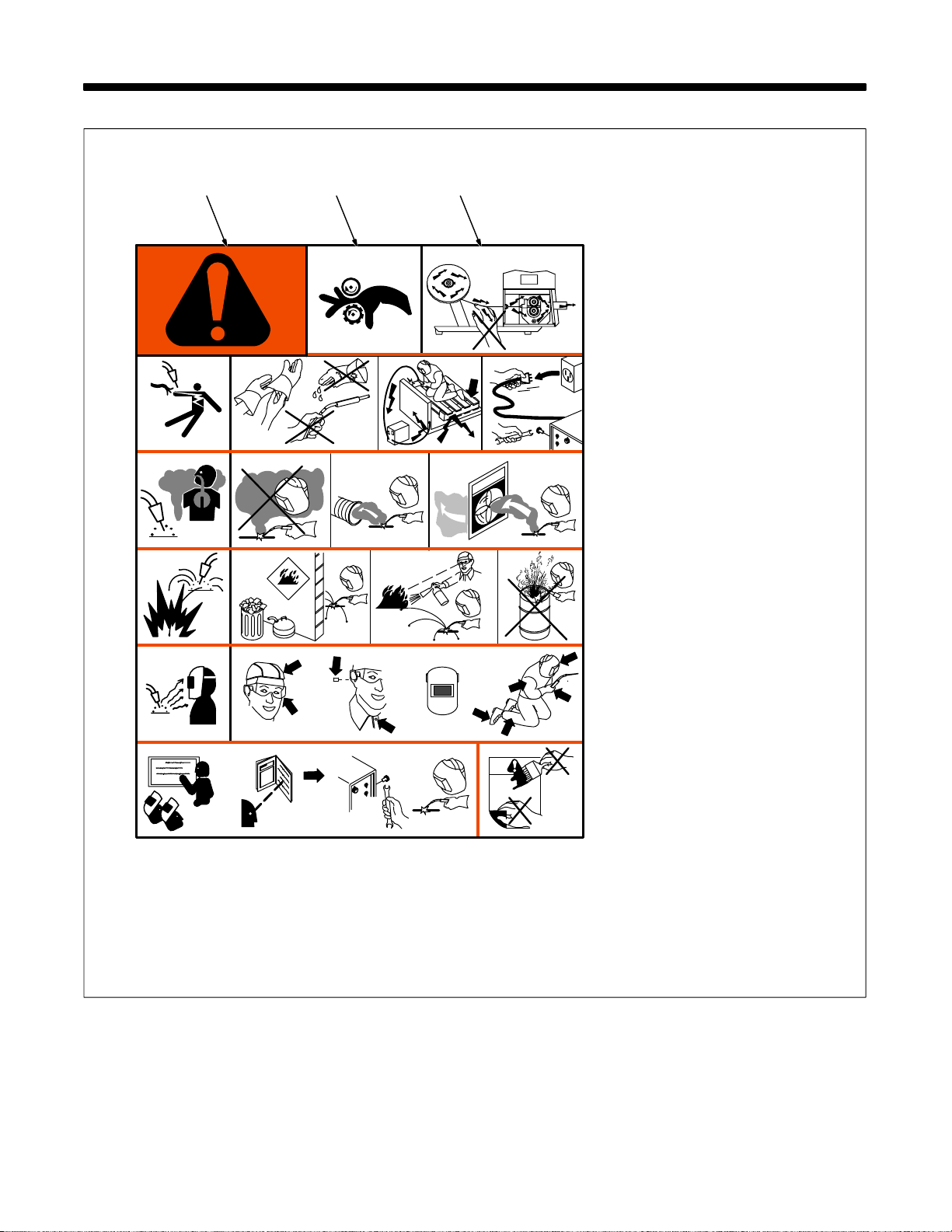
2-1. Warning Label Definitions
ABC
1 1.1 1.2 1.3
2
3 3.1 3.2 3.3
4 4.1
2.1
2.2
+
56
+
+
2.3
+
S-178 936
A.. Warning! Watch Out! There
are possible hazards as
shown by the symbols.
B.. Drive rolls can injure fingers
C.. Welding wire and drive parts
are at welding voltage during
operation − keep hands and
metal objects clear.
1 Electric shock can kill.
1.1 Wear dry insulating gloves.
Do not touch electrode with
bare hand. Do not wear wet or
damaged gloves.
1.2 Protect yourself from electric
shock by insulating yourself
from work and ground.
1.3 Disconnect input plug or
power before working on
machine.
2 Breathing welding fumes can
be hazardous to your health.
2.1 Keep your head out of the
fumes.
2.2 Use forced ventilation or local
exhaust to remove the fumes.
2.3 Use ventilating fan to remove
fumes.
3 Welding sparks can cause
explosion or fire.
3.1 Keep flammables away from
welding. Don’t weld near
flammables.
3.2 Welding sparks can cause
fires. Have a fire extinguisher
nearby and have a watch
person ready to use it.
3.3 Do not weld on drums or any
closed containers.
4 Arc rays can burn eyes and
injure skin.
4.1 Wear hat and safety glasses.
Use ear protection and button
shirt collar. Use welding
helmet with correct shade of
filter. Wear complete body
protection.
5 Become trained and read the
instructions before working on
the machine or welding.
6 Do not remove or paint over
(cover) the label.
OM-1589 Page 9
Page 16
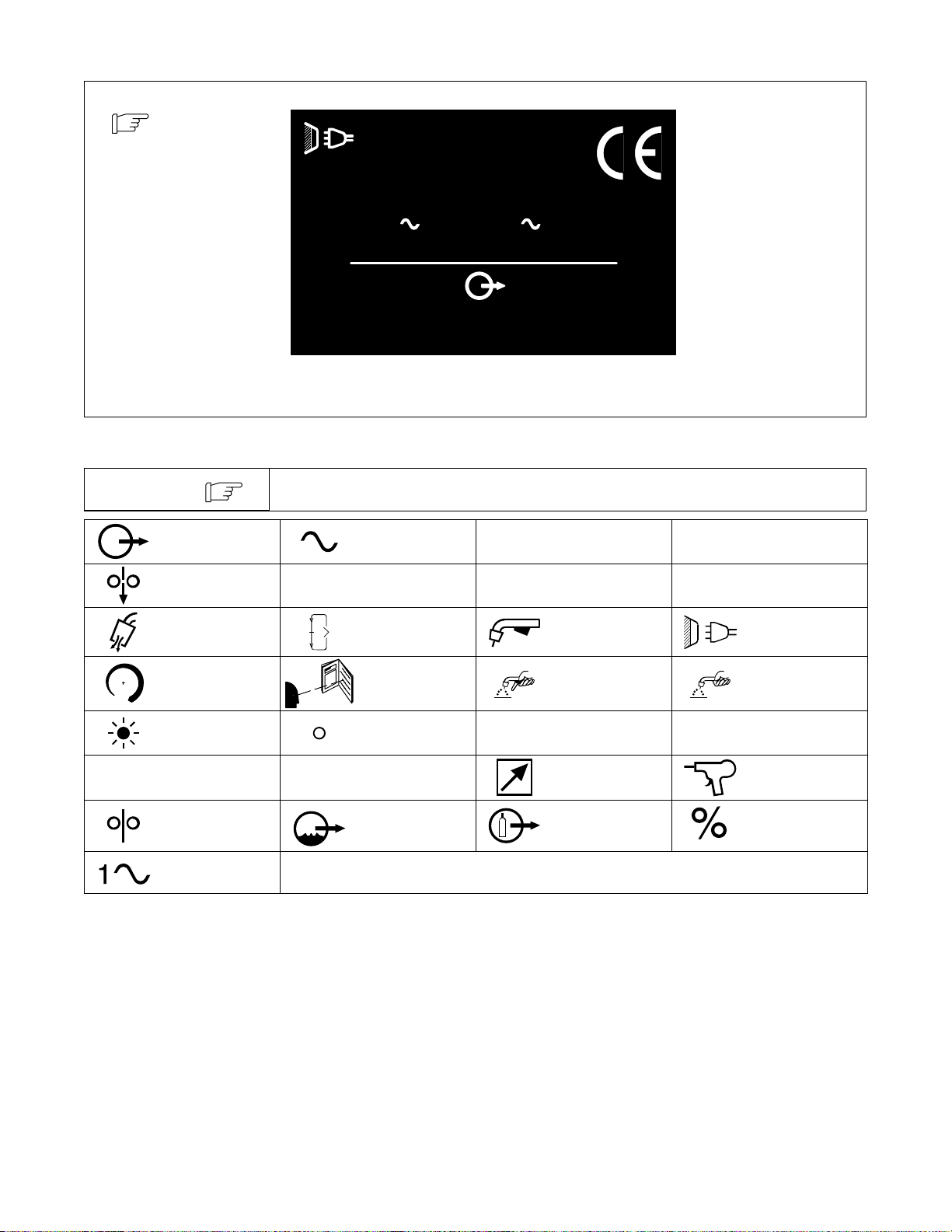
2-2. Manufacturer’s Rating Label for CE Products
X
IP
Hz
I
I
For label location
see Section 3-4.
S/N:
U
1
=
=
I
1
2-3. Symbols And Definitions
NOTE
Output Alternating Current
Cold Jog (Inch) To-
wards Workpiece
Purge Parameter Select Trigger Line Connection
Some symbols are found only on CE products.
24
V
A
3.0
U
2
=
MILLER ELECTRIC MFG. CO., APPLETON, WI USA
I
V100 A400 X 100 %
2
1
=
A
Duty Cycle
IP 23
Hz50/60
Amperes
Degree Of
Protection
V
178 794-A
Volts
Hertz
Increase Read Instructions Trigger Hold On Trigger Hold Off
Trigger Hold On
Indicator Light
1
Primary Current
Wire Feed
Single Phase
2
Trigger Hold Off
Indicator Light U
Rated Welding
Current
Water (Coolant)
Output
Primary Voltage
1
Remote
Gas Output Percent
U
Conventional Load
2
Wire Feed Spool
Voltage
Gun
OM-1589 Page 10
Page 17
3-1. Specifications
SECTION 3 − INSTALLATION
Type of Input
Power
24 Volts AC
Single-Phase
3 Amperes
50/60 Hertz
Welding Power
Source Type
Constant Voltage (CV)
DC For GMAW Or
Constant Voltage(CV) /
Constant Current (CC) DC
For GMAW-P
All Need 14-Pin And
Contactor Control
Wire Feed
Speed Range
70 To 875 ipm
(1.8 To 22.2
mpm)
Wire Diameter
Range
.030 To 1/16 in
(0.8 To 1.6 mm)
Max Spool
Capacity: 12 in
(305 mm)
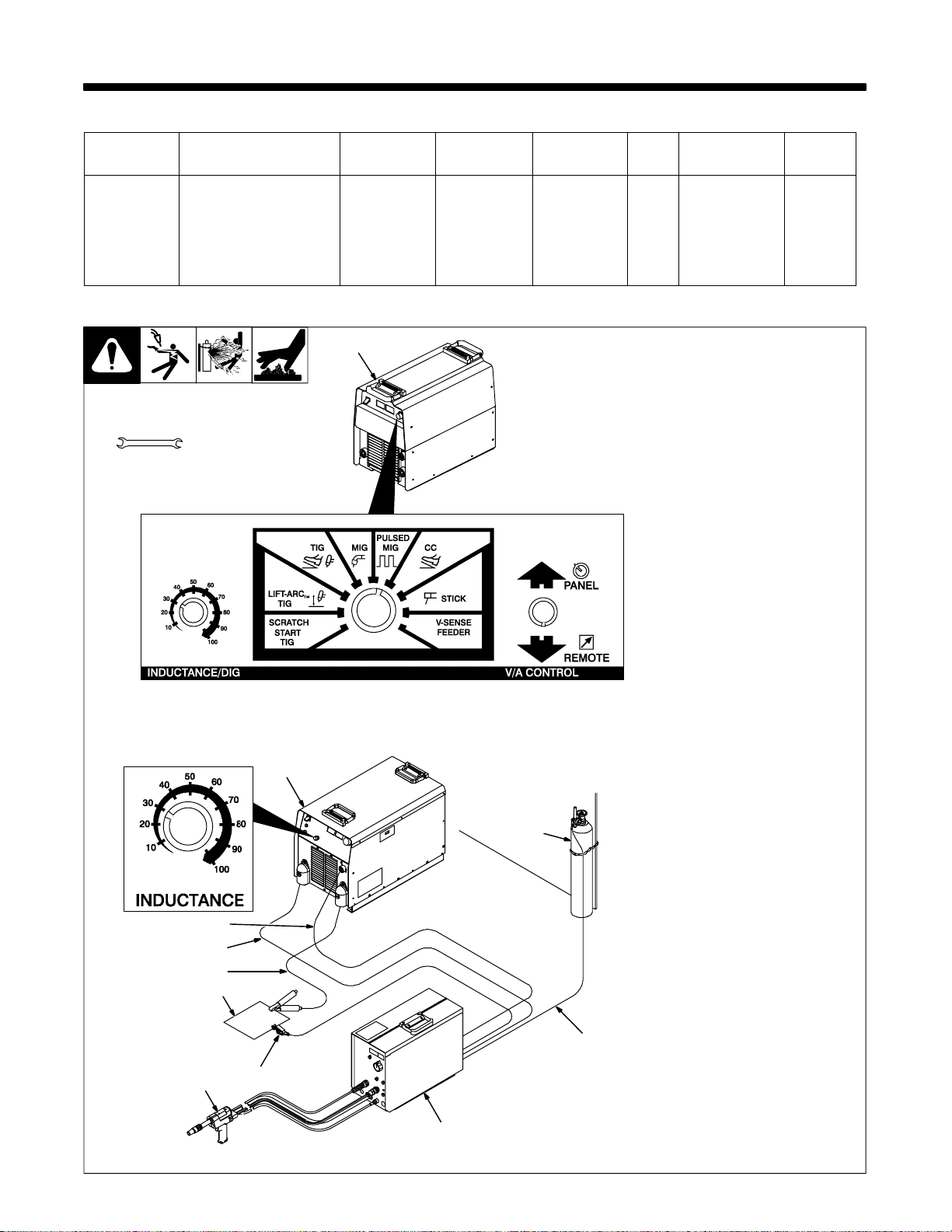
3-2. Typical Air-Cooled System Connections
1
Tools Needed:
9/16, 5/8, 3/4 in
2
Welding
Circuit RatingIPRating
100 Volts, 400
Amperes,
100% Duty
Cycle
11
IP 23
Overall
Dimensions
Length: 21-1/4 in
(540 mm)
Width: 9-1/2 in
(241 mm)
Height: 16 in
(406 mm)
1 300/400 Ampere Model
CC/CV Inverter Welding
Power Source
Weight
Net: 48 lb
(21.8 kg)
Ship: 56 lb
(24.5 kg)
. Use settings shown for both
pulse MIG welding and MIG
welding.
2 450 Ampere Model CV
Inverter Welding Power
Source
System can be set up with a variety
of conventional Constant Voltage
(CV) welding power sources.
3 14-Pin Plug And
Interconnecting Cord
4 Positive (+) Weld Cable
5 Negative (−) Weld Cable
Select and prepare weld cables ac -
cording to welding power source
Owner’s Manual.
6 Workpiece
7 Voltage Sensing Lead
(Optional Use)
8 Air-Cooled Gun
9 Wire Feeder
Y Do not use gas pressure
above 5 0 psi (345 kPa) or me-
chanical gas valve in gun can
leak.
10 Gas Hose
11 Gas Cylinder
Route hose from regulator/flowme-
ter and connect to shielding gas
valve fitting.
3
4
5
6
10
8
7
9
801 809 / Ref. 175 086 / Ref. 180 311-B
OM-1589 Page 11
Page 18
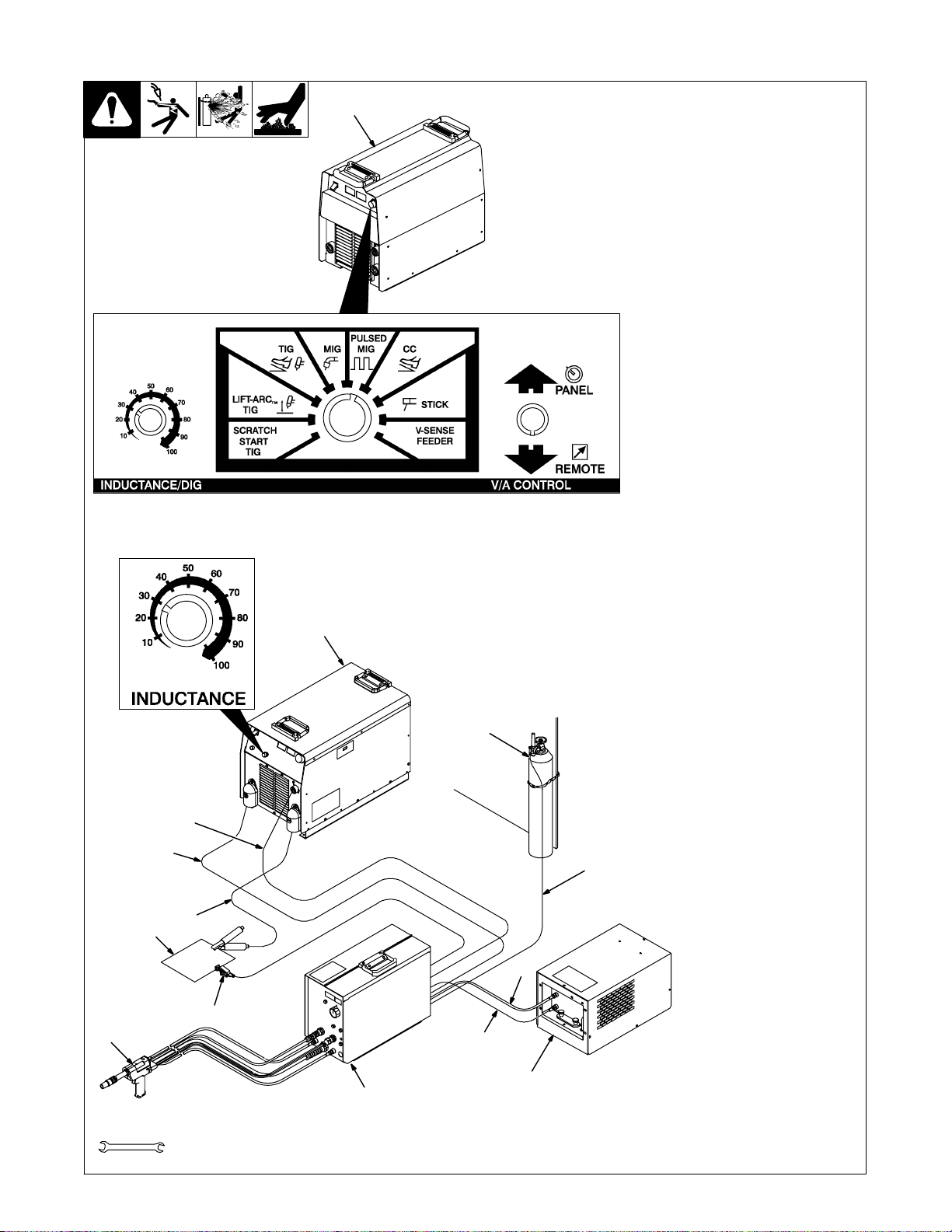
3-3. Typical Water-Cooled System Connections
1
1 300/400 Ampere Model
CC/CV Inverter Welding
Power Source
. Use settings shown for both
pulse MIG welding and MIG
welding.
2 450 Ampere Model CV
Inverter Welding Power
Source
System can be set up with a variety
of conventional Constant Voltage
(CV) welding power sources.
3 14-Pin Plug And
Interconnecting Cord
4 Positive (+) Weld Cable
5 Negative (−) Weld Cable
Select and prepare weld cables ac -
cording to welding power source
Owner’s Manual.
6 Workpiece
7 Voltage Sensing Lead
(Optional Use)
8 Water-Cooled Gun
9 Wire Feeder
10 Coolant Supply
11 Coolant In Hose
12 Coolant Out Hose
Connect hoses between coolant
supply and wire feeder.
Y Do not use gas pressure
above 5 0 psi (345 kPa) or me-
chanical gas valve in gun can
2
14
leak.
13 Gas Hose
14 Gas Cylinder
Route hose from regulator/flowme-
ter and connect to shielding gas
valve fitting.
4
6
8
Tools Needed:
OM-1589 Page 12
3
13
5
12
7
11
10
9
9/16, 5/8, 11/16, 3/4 in
801 810 / Ref. 175 086 / Ref. 180 311-B
Page 19
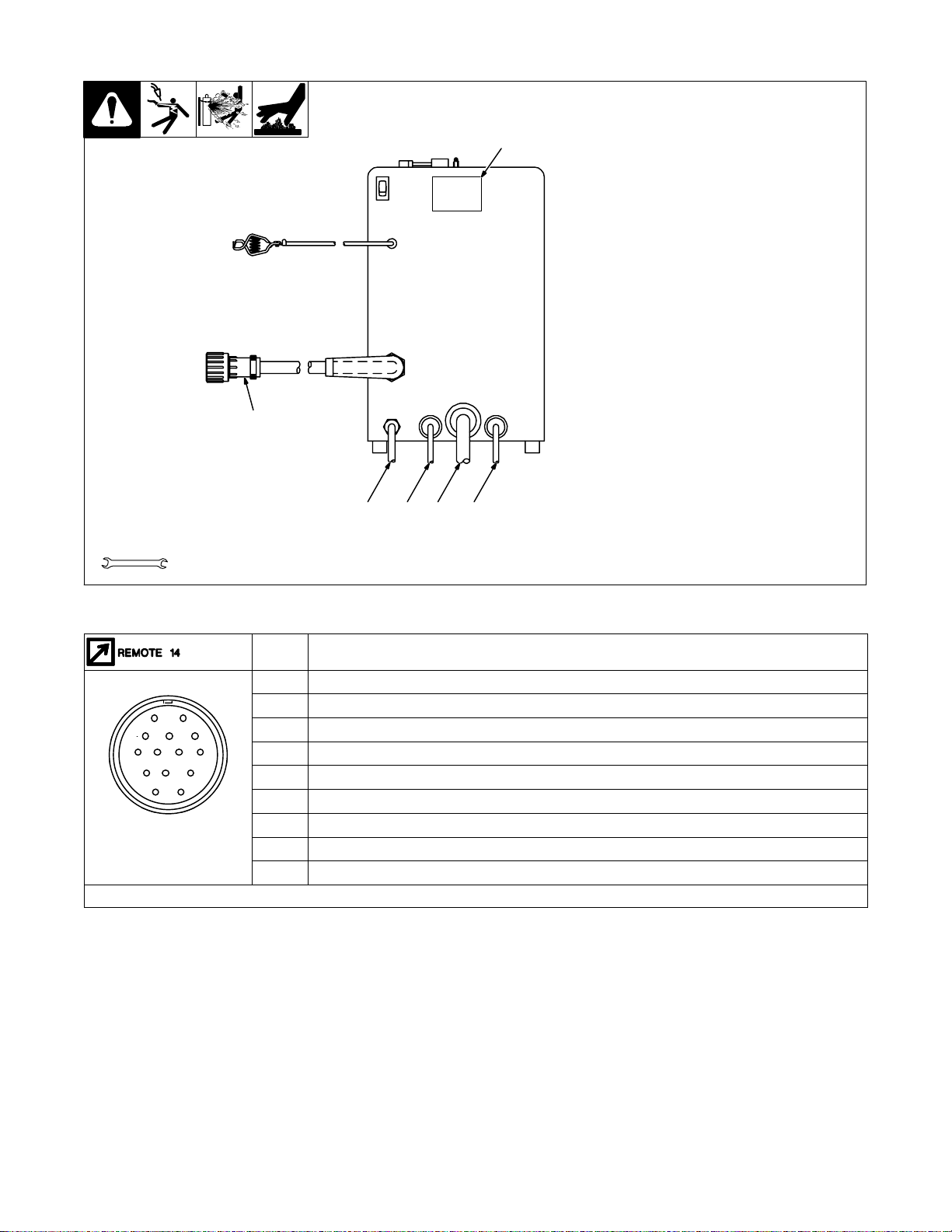
3-4. Rear Panel Connections
B
B
K
I
NH
C
L
NH
D
M
G
6
Tools Needed:
5234
1 Rating Label Location
2 Coolant Supply Hose
1
Route supply hose and connect to
rear of Water To Gun fitting in
feeder.
3 Weld Cable
If using conventional welding power
source, route through reed relay in
feeder. Connect to power block.
4 Coolant Return Hose
Route return hose and connect to
rear o f W eld/Water From Gun fitting
or optional flow switch in feeder.
5 Gas Hose
6 14-Pin Plug
9/16, 5/8, 11/16 in
3-5. 14-Pin Plug Information
Pin* Pin Information
24 volts ac with respect to socket G.
A
Contact closure to A completes 24 volts ac contactor control circuit.
AJ
K
I
L
M
G
F
*The remaining pins are not used.
D
E
B
Circuit common for 24 volts AC circuit.
G
Remote control circuit common.
D
0 to +10 volts dc input command signal from remote control with respect to socket D.
E
Voltage feedback; 0 to +10 volts dc, 1 volt per 10 arc volts.
H
Current feedback; 0 to +10 volts dc, 1 volt per 100 amperes.
F
CC/CV Select (+24 V = CV)
M
Inductance (0-10 V)
N
Ref. 800 689
OM-1589 Page 13
Page 20
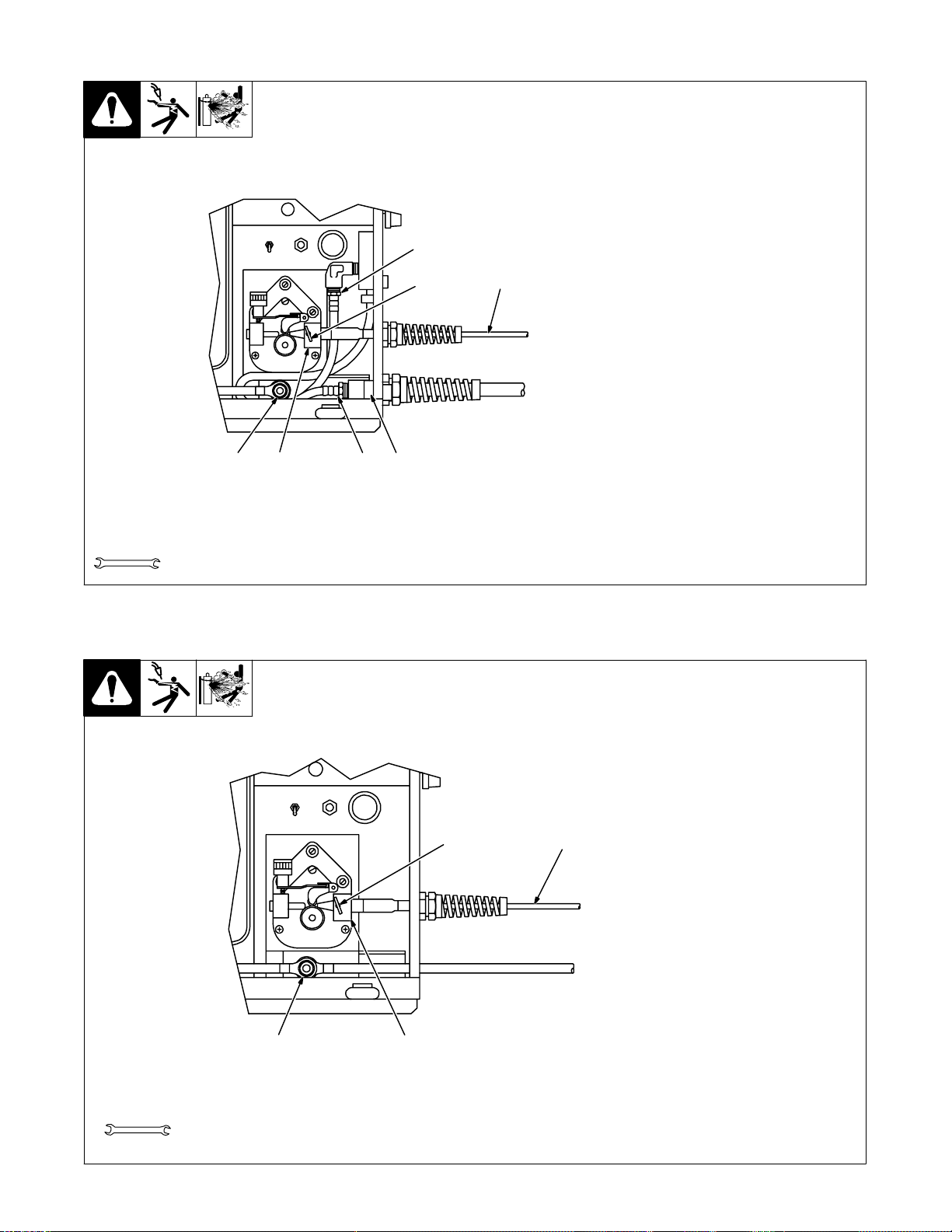
3-6. Internal Connections for Water-Cooled Gun
7
21
3
4 5 6
1 Wire Con duit
2 Thumbscrew
3 Wire Conduit Block
Loosen thumbscrew and insert
conduit into block. Tighten thumbscrew. Tighten strain relief.
4 Power Block Weld Cable
Connection
5 Weld/Water From Gun Fitting
Y If using a recirculating cool-
ant system, make connec-
tions directly to gun hose
connections at wire feeder.
Maintain a minimum 1 qt/min
flow rate to prevent damage
to gun parts.
6 Water To Gun Fitting
7 Optional Water Flow Switch
Fitting
Tools Needed:
9/16, 11/16 in
3-7. Internal Connections for Air-Cooled Gun
2 1
Ref. 800 688-B
1 Wire Con duit
2 Thumbscrew
3 Wire Conduit Block
Loosen thumbscrew and insert
conduit into block. Tighten thumbscrew. Tighten strain relief.
4 Power Block Weld Cable
Connection
Tools Needed:
OM-1589 Page 14
34
9/16 in
Ref. 801 052
Page 21

3-8. Front Panel Connections for Gun
Tools Nee d e d :
5/8, 11/16, 1-1/8 in
Water-Cooled
Model Shown
4
5
6
Water-Cooled Guns:
1 Gun Control Cable
Insert plug into Gun Control receptacle, and
tighten threaded collar.
2 Gas Hose
Connect to Gas fitting on feeder.
3 Power/Water Cable
4 Strain Relief
Remove strain relief as shown.
Route cable through strain relief and connect
3
2
1
to Weld/Water From Gun outlet on feeder
(left-hand threads). Reinstall strain relief.
5 Wire Conduit
Route through strain relief. Insert through
front panel. Go to Section 3-6.
6 Water Hose
Connect to Water To Gun fitting on feeder
(left-hand threads).
Air-Cooled Gun:
1 Gun Control Cable
Insert plug into Gun Control receptacle, and
tighten threaded collar.
Ref. 800 688-B
2 Gas Hose
Connect to Gas fitting on feeder.
3 Power Cable
Route cable through front panel and connect
to power block. See Section 3-7.
4 Strain Relief
Remove strain relief as shown.
5 Wire Conduit
Route through strain relief. Insert through
front panel. Go to Section 3-7.
OM-1589 Page 15
Page 22

3-9. Removing Top Cover of Gun
1
3-10. Adjusting Contact Tip Position
3
4
2
1
2
1
1 Top Cover
Push back and lift off as shown.
To reinstall cover, set rear of cover
in gun, and push cover back, down,
and forward until it clicks into position.
800 942
1 Contact Tip
2 Nozzle
Adjusting barrel changes contact
tip location from 1/16 in (1.6 mm)
out beyond end of nozzle to 1/4 in
3
4
(6.3 mm) inside nozzle.
3 Jam Nut
4 Barrel
T o change contact tip location, loos-
en jam nut, and turn barrel. Tighten
jam nut.
3-11. Setting Torque Switch
1
Air-Cooled ModelWater-Cooled Model
Ref. 150 434 / Ref. 150 431
1 Torque Switch
Use switch to select the force used
to push wire. The up position is for
high force, or torque. The down position is for low force, or torque.
Use low position for .030 in (0.8
mm) Aluminum wire. Use high position for all other wire.
If welding wire appears to be
kinked, nicked, or damaged, place
switch in low torque position.
Ref. 800 690-A
OM-1589 Page 16
Page 23

3-12. Installing Wire Spool
6
5
1 Wire Spool
2 Top Cover
3 Pressure Roll Assembly
4 Gun Contact Tip
If wire spool is being replaced, open
pressure roll assembly in gun, and
cut welding wire off at contact tip.
Retract wire onto spool.
5 Hub
6 Hub Pin
7 Compression Spring (Optional
For 8 in Spool)
8 Retaining Ring
Install wire spool.
1
7
8
2
Tools Needed:
3
4
800 690-A / 800 945
OM-1589 Page 17
Page 24

3-13. Threading Welding Wire Through Feeder
13
6
12
10
11
9
1 Wire Spool Location
2 Tension Arm
3 Mounting Arm
4 Wire Inlet Guide
5 Feeder Drive Roll
6 Wire Conduit
7 Tension Thumbnut
8 Jog Button
9 Pressure Roll Assembly
10 Gun Drive Roll
For wire sizes .035 in (0.9 mm) and
smaller use small groove, and
.047 in (1.2 mm) and 1/16 in
(1.6 mm) use large groove.
11 Pressure Adjustment Knob
12 Conduit Screw
13 Gun Cover
Hub Tension Adjustment
Turn On welding power source and
wire feeder to make this adjustment.
Press and release Jog switch. Hub
tension i s okay if wire unwinds freely, but wire does not backlash when
Jog switch is released.
14 Cap Screw
Turn cap screw to adjust hub ten-
sion. Do not overtighten. Close and
latch door.
Tools Needed:
1 2
14
7
456
8
3
OM-1589 Page 18
Ref. 800 945 / 800 690-A
Page 25

3-14. Threading Welding Wire Through Feeder (Continued)
Hold wire tightly to keep
it from unraveling.
6 in
(150 mm)
Open tension arm.
Pull and hold wire; cut off end.
Welding wire is electrically live when gun
trigger is used to jog
wire.
Thread wire thru inlet guide, along drive roll groove, and into wire con-
duit. Close tension arm. Adjust tension as follows: grasp spool with
one hand, press Jog switch, and turn thumbnut clockwise until motor
stalls when Jog switch is pressed. Back thumbnut off slightly .
WOOD
Open pressure roll assembly. Insert wire thru conduit
opening in rear of gun, past drive roll groove, and out
contact tip. When wire conduit is seated in rear of gun,
tighten screw to secure. Close pressure roll assembly.
Feed wire to check drive roll pres-
sure. If necessary, adjust pres-
sure adjustment knob in gun.
Lay wire conduit out straight. Remove wire conduit
from rear of gun. Press Jog button until about 10 in
(254 mm) of wire is sticking out of conduit.
Cut off wire. Reinstall gun cover . Close
and latch wire feeder doors.
Tools Nee d e d :
Ref. 800 944
OM-1589 Page 19
Page 26

4-1. Operational Terms
SECTION 4 − OPERATION
NOTE
The following is a list of terms and their definitions as they apply to this wire feeder:
General Terms:
Adaptive Pulse Welding The wire feeder automatically regulates pulse frequency to maintain a constant arc length, regardless
Cold Wire Jog When weld amperage is not present, wire feeds for about three seconds at set wire feed speed. Then
Inductance As inductance increases, arc on time increases, and the weld puddle becomes more fluid.
Trim Arc length adjustment in pulse welding. Increasing trim increases the actual arc length. Trim is re-
Synergic The operator programs pulse parameters for a specific wire feed speed. The wire feeder determines
Side Panel Terms:
Card Mode Is used to select use of the optional data card storage and retrieval capabilities.
Dual Schedule Mode Is used to select a pair of programs that can be used together.
Process Mode Is used to select the type of process to be used, including Pulse, Adaptive Pulse, or Mig.
Sequence Mode Is used to select and program the weld sequences which include weld, crater, burnback, postflow,
See Menu Guide for detailed programming steps.
of change in welding wire stickout.
the welding power source contactor deenergizes and wire continues to feed at the wire jog speed.
placed by volts in MIG programs.
the pulse parameters between these wire feed speed increments.
preflow, and run-in.
4-2. Pulse Welding Terms
Amps
1 Apk = Peak Amperage
Increasing Apk increases penetra-
3
1
2
4
tion.
2 Abk = Background Amperage
Maintains arc between pulses.
3 PPS = Pulses Per Second
Increasing PPS increases travel
speed.
4 PWms = Pulse Width In
Milliseconds
Increasing PWms increases bead
width.
OM-1589 Page 20
Page 27

4-3. Front Panel Controls
1
2
3
4
5
6
1 Display
2 Parameter Select Button
Press button to move > on display.
3 Display Control Knob
Turn knob to change parameter pointed to by
>.
Turning knob one click causes Trim (arc
length) to increase/decrease by one or Volt
to increase/decrease by 0.1.
When IPM is selected, turning knob one click
causes wire feed speed (IPM) to increase/
decrease by one inch per minute.
When Prg # is selected, turning knob one
click causes program number (Prg #) to increase/decrease by one.
The program number cannot be changed
while welding, with exception of Dual Schedule Mode (see Section 6-1).
Pulse is a default setting. To change type of
process (Pulse, Adaptive Pulse, or MIG) use
side panel controls.
4 Jog Button
Push to momentarily feed welding wire with-
out energizing welding circuit or shielding
gas valve.
Jog speed is varied using the Display Control knob while Jog button is pressed. Default
setting is 200 IPM.
5 Purge Button
Push to momentarily energize gas valve
without energizing the welding circuit.
800 687-A
Holding the Jog and Purge buttons at the
same time will display pulse parameters on
the side panel display.
6 Trigger Hold Button And Indicator Light
Trigger Hold can be set on a per program ba-
sis. Indicator light comes on for programs
where this feature is active.
To weld without holding gun trigger throughout weld cycle, press and release button to
turn on indicator light.
To start weld cycle and feed welding wire,
press and release gun trigger within the first
three seconds after an arc has been struck.
If gun trigger is not released within the first
three seconds after arc initiation, trigger hold
stops, but is still active for next weld cycle. To
end weld cycle, press and release gun trigger.
OM-1589 Page 21
Page 28

4-4. Side and Rear Panel Controls
1 23
10 9 8
1 Mode D i s p l a y
2 Data Card Slot
3 Parameter Display
4
5
6
7
4 Parameter Increase Button
5 Parameter Decrease Button
6 Parameter Select Button
Press button to move > in display.
7 Optional Gas Flow
Adjustment Knob
Allows accurately presetting gas
flow rate on wire feeder front panel
digital display.
8 Circuit Breaker CB1
CB1 protects the wire feeder from
overload. I f CB1 trips, the wire feeder shuts down. Allow a cooling period and manually reset the breaker.
9 Mode Select Button
Press button to move > in display.
10 Torque Switch (See Section
3-11)
11 Power Switch
Use Power switch to turn wire
feeder On and Off.
4-5. Gun Controls
11
Ref. 800 690-A / Ref. 800 869
1 Trigger
Press trigger to energize welding
power source contactor (if applicable), start shielding gas flow, and
begin wire feed.
For shielding gas preflow and postflow, partially press trigger before
and partially release after welding.
2 Increase/Decrease Switch
Use switch to adjust value of se-
lected parameter. The numbers
around the control are for reference
only.
1
2
OM-1589 Page 22
Ref. 800 939
Page 29

SECTION 5 − SETTING SEQUENCE PARAMETERS
5-1. Sequence Parameters in a Program
Weld Time
0 − 25 sec.
Wire Speed
Weld WFS
Preflow
Time
Start
Time
Run-In WFS
Crater
Time
Crater WFS
. See Menu Guide for detailed
programming steps.
Trim is arc length. If set to zero, arc
length is short. If set to 99, arc
length is long.
If time is set to zero in Weld sequence, welding continues until
gun trigger is released.
. Crater and Burnback do not
function in Pulse or Adaptive
Pulse.
If time is set to zero in any timed sequence except Weld, the sequence
is skipped.
Burnback
Time
Postflow
Time
Preflow
Trigger
Pressed
Strike
1. Weld
2. Crater
3. Burnback
4. & 5. Postflow/
Preflow
Arc
WeldRun-In
Pulse
MIG
Pulse
MIG
MIG
Only
Trim
0-99
X
X
Burnback
PostflowCrater
Trigger
Released
Volts
10.0-38.0
XXX
XX
X
Inductance
0-99%
IPM
50-780
X
X
Sequence
End
Seconds
0-25.0
0-2.50
0-0.025
0-9.9
Time
6. Run-In
7. Start
X = Setting available.
Pulse
MIG
Pulse
MIG
XX
XX
XX
XX
0-2.50
0-5.00
OM-1589 Page 23
Page 30

SECTION 6 − SETTING DUAL SCHEDULE PARAMETERS
6-1. Selecting Dual Schedule Pair
Dual Schedule is used with two
consecutive weld programs 1 & 2,
3 & 4, 5 & 6, or 7 & 8. Any program
type (MIG, Adaptive Pulse, or
When dual schedule is On, and Process is selected on the
side panel display, then the side panel increase/decrease buttons can be used to change program numbers.
Process
Sequence
>Du a l Schd
Ca rd
>Pr g 1&2
On
1
Pulse) can be combined in dual
schedule.
1 Side Panel Display
Use side panel to turn feature on.
See Menu Guide for detailed programming steps.
2 Front Panel Display
Press front panel parameter select
button to select program number.
3 Front Panel Display Control
4 Inc/Dec Switch Used As Dual
Schedule Switch
5 Welding Gun Trigger
. Switch type is set in System
Setup (see Section 6-2).
Selecting dual schedule program A
or B is done by using Display Control, dual schedule switch, or gun
trigger (depending on system setup).
When program B is active, turn
Display Control one click clockwise
to select another pair of dual schedule programs.
24.0V
250 IPM
5
>Pr g 1
Dual A
Or
4
>Pr g 2
Dual B
Display
Control
>Pr g 3
. Programs can be rearranged in
desired order using the data
card. See Menu Guide for de-
tailed programming steps.
2
3
Display
Control
OM-1589 Page 24
Dual A
Page 31

6-2. Dual Schedule Switch Diagrams
A
TR
11
22
3A
4B
3
1
2
3
B
4
1
Adapter
11
22
33
4
11
22
2
3A
4B
4
TR
1 Momen 2P
(Momentary-Contact 2-Pole
Switch or DSS-10)
2 Maint 2P (Maintained-Contact
2-Pole Switch)
3 Maint 1P (Maintained-Contact
1-Pole Switch, Or DSS-8)
4 Trigger
Allows dual scheduling after estab-
lishing a welding arc.
. If trigger is used for dual sched-
ule switch, T rigger Hold is dis-
abled.
1
2
SECTION 7 − USING THE OPTIONAL DATA CARD
7-1. Data Card Terms
Amperage
Apk (Peak
Amperage)
CARD SCREEN TERMS
WRITE Programs To Card
READ Programs From Card
PULSE MIG TERMS
(Pulses Per
Second)
PWms
(Pulse Width In
Milliseconds)
>Wr i t e
Read
De l et e
Done
PPS
Abk
(Background
Amperage)
Time
158 435
OM-1589 Page 25
Page 32

7-2. Installing Data Card
2
1
1 Label
Apply label to data card. Write pro-
gram information on label.
2 Data Card
3 Card Slot
For Blank Data Card:
3
Insert card into slot. To format card,
turn On power. Select Card from
menu. Data card formats when unit
enters Card mode.
For Power Source Data Card:
Insert card into slot. T urn On power.
Push Parameter Select button within 3 seconds and the 8 programs
and setup information are read into
the wire feeder memory.
Unit is ready to use when “Please
Wait” message disappears from
front panel display.
156 266-B
7-3. Card Displays
Process
Sequence
Dua l Schd
>C a r d
3
4
5
>Wr i t e
Read
De l et e
Done
6
#1Pul se
035”Steel
Argon−Oxy
2
Press
Be low
Press
Side Panel
Parameter
Select Once
. See Menu Guide for detailed
programming steps.
1 Card Display
1
2 Moving Line
Moving line is under value that can
be changed.
3 Write
Transfers program data from unit to
card. The program card can hold up
to 32 programs. When writing to the
card, the next available program
number is automatically assigned.
4 Read
Transfers program data from card
to unit.
5 Delete
Deletes program data from card.
6 Done
Exits card display.
OM-1589 Page 26
Page 33

SECTION 8 − SYSTEM SETUP
8-1. System Setup Display Parameters
NOTE
Display Setting Notes
>System * Select the process the welding power source is able to do.
>Range * Welding power source minimum and maximum voltage values are always needed. Amperage values are required for
pulse welding. Set values to match welding power source ranges.
>Security♦ With lock on, volts or trim and ipm range of change can be restricted.
>Access♦ When on, restricts use of setup screens.
>Mig Type Default is Off. Set to On only for older CV welding power source without voltage feedback at 14-socket receptacle.
>Voltage Default is 14-pin receptacle. Use V . Sense when more than 50 ft (15m) of weld cable is used (including gun cable
length).
>Arc Start** Use Hot Start only with 450 Ampere Inverter Model welding power source and large diameter wires. The arc starts in
CV and switches to CC.
>Dual Schedule See Section 6-2.
>Trigger When on, trigger can be used to switch between programs that have at least 0.2 seconds of preflow time programmed.
>Remote When on, a DSS-10 can be used to change Volts or Trim, IPM, or Prg depending on where the front panel display > is.
>Arc Time Displays accumulated arc time and cycles.
>Self Test See Section 11-8.
>Wire Feed Choose to display inches per minute or meters per minute and motor type, but installed motor must match selection.
>Memory Program Reset: unit defaults to original factory setting for the last active program. Setup information does not change.
If setup card is in card slot, program will be loaded from card.
System Reset: unit defaults to original factory settings for all programs and setup excluding System, Arc Time, and
Model. If setup card is in card slot, program will be loaded from card.
>Shutdown When on, the system immediately shuts down if no arc voltage is sensed. When off, wire feeds even if no arc voltage
is sensed.
>Name When on, optional data card programs can be named.
>Gas Flow♦♦ Setting must be Meter Off if option is not installed.
>Software Know this when talking with service personnel.
See Menu Guide for detailed programming steps.
* Automatically set if power source data card is used.
♦ Can be used only when optional data card is inserted.
** Selection does not appear on display when MIG Only is System choice.
♦♦ Must remain set to Meter Off if option is not installed to prevent system error.
OM-1589 Page 27
Page 34

SECTION 9 − STANDARD PULSE WELDING PROGRAMS
NOTE
Apk = Peak Amperage, Abk = Background Amperage,
PPS = Pulses Per Second, PWms = Pulse Width (milliseconds).
9-1. Program 1 − Aluminum
Wire Size/Type: .030” ER 4043 Gas: 100% Argon / 15-80 CFH Gun Model: 30 Ft Water-Cooled
IPM / MPM Apk Abk PPS PWms Volts COMMENTS
875 360 90 234 2.2 28.0
820 355 87 228 2.1 26.8
765 347 82 217 2.0 26.2
710 345 80 215 1.9 25.8
655 330 75 210 1.8 25.8
600 315 68 200 1.7 24.0
545 300 61 190 1.6 23.0
490 300 60 180 1.5 22.0
435 290 54 158 1.4 24.6
380 275 49 146 1.3 24.6
325 265 43 136 1.2 20.7
270 255 37 135 1.1 17.8
215 245 31 117 1.1 16.6
160 230 27 71 1.1 17.6
105 230 19 30 1.0 20.2
9-2. Program 2 − Aluminum
Wire Size/Type: .035” ER 4043 Gas: 100% Argon / 20-40 CFH Gun Model: 30 Ft Water-Cooled
IPM / MPM Apk Abk PPS PWms Volts COMMENTS
875 385 162 230 2.2 28.4
820 380 156 220 2.1 28.0
765 375 150 210 2.0 26.8
710 367 144 200 1.9 26.8
655 365 140 190 1.8 26.8
600 355 130 178 1.7 26.6
545 345 118 160 1.6 26.0
490 330 108 145 1.5 25.1
435 314 90 143 1.4 23.8
380 294 75 140 1.3 23.3
325 285 60 135 1.2 25.1
270 280 43 137 1.2 19.6
215 270 42 116 1.1 17.9
160 250 35 77 1.1 18.6
105 250 25 35 1.1 18.4
OM-1589 Page 28
Page 35

9-3. Program 3 − Aluminum
Wire Size/Type: 3/64” ER 4043 Gas: 100% Argon / 20-Max CFH Gun Model: 30 Ft Water-Cooled
IPM / MPM Apk Abk PPS PWms Volts COMMENTS
875 500 195 270 3.0 30.5
820 480 185 270 3.0 29.4
765 460 175 270 3.0 29.0
710 440 160 260 2.8 28.5
655 420 150 255 2.7 27.8
600 400 140 250 2.6 27.3
545 380 130 239 2.5 26.7
490 360 128 211 2.4 24.5
435 325 115 205 2.3 23.9
380 320 113 185 2.2 22.9
325 297 104 157 2.2 22.3
270 288 57 170 2.1 22.0
215 265 45 155 2.1 21.8
160 210 54 90 2.0 19.6
105 240 33 63 1.9 20.3
9-4. Program 4 − Aluminum
Wire Size/Type: 1/16” ER 4043 Gas: 100% Argon / 20-Max CFH Gun Model: 30 Ft Water-Cooled
IPM / MPM Apk Abk PPS PWms Volts COMMENTS
820 565 255 294 2.7 32.0
765 565 255 294 2.7 32.0
710 565 255 294 2.7 32.0
655 565 255 294 2.7 32.0
600 558 255 290 2.7 31.9
545 540 255 275 2.6 31.5
490 520 255 250 2.5 31.0
435 495 245 230 2.4 28.0
380 470 199 230 2.2 29.5
325 435 145 230 2.0 25.4
270 385 125 218 1.8 24.4
215 370 122 167 1.7 23.4
160 340 88 120 1.6 22.9
105 335 49 89 1.5 20.1
75 330 25 70 1.5 22.0
OM-1589 Page 29
Page 36

9-5. Program 5 − Aluminum
Wire Size/Type: .030” ER 5356 Gas: 100% Argon / 20-40 CFH Gun Model: 30 Ft Water-Cooled
IPM / MPM Apk Abk PPS PWms Volts COMMENTS
875 340 78 144 2.4 25.0
820 335 73 140 2.3 24.4
765 330 70 138 2.2 24.1
710 325 67 133 2.1 23.3
655 320 62 128 2.0 23.1
600 310 59 123 1.9 23.2
545 300 55 117 1.8 23.2
490 290 50 110 1.7 24.0
435 285 45 97 1.6 21.4
380 280 40 91 1.5 22.1
325 275 37 78 1.4 24.9
270 272 36 60 1.3 21.4
215 270 28 50 1.3 20.2
160 270 21 41 1.3 18.3
105 283 18 28 1.2 17.3
9-6. Program 6 − Aluminum
Wire Size/Type: .035” ER 5356 Gas: 100% Argon / 20-45 CFH Gun Model: 30 Ft Water-Cooled
IPM / MPM Apk Abk PPS PWms Volts COMMENTS
875 350 122 180 2.5 26.0
820 345 115 175 2.4 25.7
765 340 107 170 2.3 25.7
710 330 101 165 2.2 25.0
655 320 97 158 2.1 25.8
600 310 86 145 2.0 23.7
545 300 79 132 1.9 23.1
490 290 72 122 1.8 23.7
435 285 66 115 1.7 24.7
380 280 62 96 1.6 23.5
325 278 54 89 1.5 20.5
270 276 41 85 1.4 23.7
215 274 33 73 1.3 24.0
160 272 29 50 1.2 17.8
105 270 22 34 1.1 18.2
OM-1589 Page 30
Page 37

9-7. Program 7 − Aluminum
Wire Size/Type: 3/64” ER 5356 Gas: 100% Argon / 20-Max CFH Gun Model: 30 Ft Water-Cooled
IPM / MPM Apk Abk PPS PWms Volts COMMENTS
875 485 140 250 3.0 31.5
820 470 135 240 2.9 30.9
765 450 117 235 2.8 29.0
710 433 107 230 2.7 27.6
655 410 100 220 2.6 26.4
600 395 89 207 2.5 25.6
545 380 84 197 2.5 25.5
490 357 80 186 2.4 24.6
435 340 76 177 2.3 24.9
380 330 68 165 2.2 24.4
325 320 59 151 2.1 23.5
270 318 41 136 2.0 22.6
215 310 34 112 1.8 21.2
160 305 27 83 1.7 19.6
105 300 25 45 1.6 22.2
9-8. Program 8 – Aluminum
Wire Size/Type: 1/16” ER 5356 Gas: 100% Argon / 20-Max CFH Gun Model: 30 Ft Water-Cooled
IPM / MPM Apk Abk PPS PWms Volts COMMENTS
820 565 255 294 2.7 33.0
765 565 255 294 2.7 33.0
710 565 255 294 2.7 33.0
655 545 255 294 2.7 33.0
600 515 255 280 2.6 31.0
545 480 255 224 2.5 29.1
490 460 255 190 2.3 27.4
435 430 230 185 2.1 25.5
380 422 200 175 2.0 22.3
325 412 160 165 1.9 23.7
270 400 128 145 1.8 24.3
215 385 100 112 1.7 21.8
160 385 73 80 1.6 22.9
105 363 39 63 1.5 19.4
75 350 20 60 1.4 19.9
OM-1589 Page 31
Page 38

SECTION 10 − TEACH POINTS
10-1. Teach Points Explained
See GMAW-P (Pulsed MIG) Process Guide (MILLER
Part No. 158 920) supplied with unit for more
information.
Apk = Peak Amperage
Abk = Background Amperage
PPS = Pulses Per Second
PWms = Pulse Width (Milliseconds)
The teach mode allows the user to
create custom pulse programs. The
teach mode has 15 teach points. At
each teach point, the user can adjust five parameters to shape the
pulse waveform of the weld output.
The five parameters are: IPM
(MPM), Apk, Abk, PPS, and
PWms.
Apk, Abk, PPS, and PWms acting
together provide the energy necessary to burn of f welding wire at a set
wire feed speed. The graph below
shows that as wire feed speed increases, energy increases (Apk,
Abk, PPS, and PWms acting synergically).
Under some conditions, the wire
feeder limits wire feed speed to
maintain all pulse parameters within the capability of the system.
IPM
875
820
765
710
655
600
545
490
435
380
325
270
215
160
Example Of A Synergic
Setting For 525 IPM With
All Teach Points Set At 55
IPM Increments
85
100 180 210 240 270 300 330 360 370 420 450 480 510 540 565 Apk
Apk
Abk
PPS
PWms
OM-1589 Page 32
10 20 30 40 50 60 70 80 90 100 110 120 130 140 200 Abk
20 55 80 105 130 160 185 210 235 260 290 315 340 365 400 PPS
1 3 5 PWms24
Page 39

10-2. Redefining Teach Points
Redefining IPM Teach Point
Redefining IPM is not
normally required
unless special wire or
unusual joint design
is needed.
Redefining Pulse Parameters
Process
50 Tr im
>450 IPM
1
50 Tr im
>460 IPM
Teach On
215 IPM
>210 Apk
40 Abk
Purge
And
Prg 1
Pul se
Prg 1
Pul se
1 IPM
IPM determines the weld metal de-
position rate.
. Redefining IPM is not normally
required unless special wire or
unusual joint design is needed.
Use front panel parameter select
button t o move > to select IPM. Use
Display Control to select teach
point value.
Press and hold Purge button while
turning Display Control to redefine
the ipm teach point. For example:
there are teach points at 215, 270,
and 325 ipm; the teach point at 270
can be adjusted to a wire feed
speed of 216 to 324 ipm.
2 Apk − Peak Amperage
3 Abk − Background Amperage
Peak and background amperage
depend o n the range of the welding
power source.
4 PPS − Pulses Per Second Of
20-400
5 PWms − Pulse Width Of
1.0-5.0 Milliseconds
Use side panel controls to change
pulse parameters. See Menu Guide
for detailed programming steps.
After values are set, strike and
maintain a n arc for five seconds.
Do this for each teach point.
End weld by releasing gun trigger,
not by pulling gun out of weld. Repeat for each custom teach point.
2
The taught arc length represents a
Trim (arc length) setting of 50.
Once the teach points are set, the
wire feeder adjusts parameters b e tween teach points synergically.
215 IPM
210 Apk
>4 0 A b k
65 PPS
34 5
210 Apk
40 Abk
>6 5 PPS
1. 1 PWms
210 Apk
40 Abk
65 PPS
>1 . 1 PWm s
Ref. S-0259 / Ref. 154 109
OM-1589 Page 33
Page 40

Date Program Number Wire Size/Type
Gas Flowrate CFH(L/min)
Equipment Used − Power Source Serial Number
Wire Feeder Serial Number
Gun Model Weld Cable − Negative Positive
Wire Manufacturer Mfg. Date
IPM / MPM Apk Abk PPS PWms Vpk COMMENTS
Preflow Seconds:
Run-In Trim/Volts: IPM / MPM: Seconds:
Crater Volts: IPM / MPM: Seconds:
Postflow Seconds:
OM-1589 Page 34
Page 41

SECTION 11 − MAINTENANCE AND TROUBLESHOOTING
11-1. Routine Maintenance
Y Disconnect power before maintaining.
3 Months
Clean
Replace
Unreadable
Labels
Replace
Cracked
Parts
14-Pin Cord Gas
And
Tighten
Weld
Terminals
6 Months
Blow Out Or Vacuum
Inside. During Heavy
Service, Clean
Monthly
OR
11-2. Feeder Drive Assembly Maintenance
5
Hose And
Fittings
Repair Or
Replace
Cracked
Weld
Cable
Gun
Cable
Clean
Drive
Rolls
1
Retract wire onto spool.
1 Pressure Roll Assembly
2 Drive Motor Shaft
3 Setscrew
4 Drive Roll
. Number size of desired drive roll groove,
located on side of drive roll closest to
groove, must face inside toward shaft
Tools Nee d e d :
5/16 in
7
when reinstalling drive roll.
Use wire brush to clean drive roll. Install
drive roll with desired groove in, and turn
drive roll so one setscrew faces flat side of
shaft.
5 Bearing
Use wire brush to clean bearing.
6 Wire Conduit Fitting
6
2
Ref. 800 944 / 151 781 / Ref. 151 781
Line up drive roll groove with bearing groove
and opening in conduit fitting. Tighten setscrews.
7 Wire Inlet Guide
Pull guide toward rear of feeder to remove.
Install new guide.
Thread welding wire and adjust drive roll
pressure, if necessary (see Sections 3-13
and 3-14).
3
4
OM-1589 Page 35
Page 42

11-3. Changing Gun Contact Tip and Liner
12
Tools Nee d e d :
34
150 437
Remove top cover and open pressure roll
assembly.
1 Contact Tip Wrench
Insert wrench into nozzle over contact tip.
2 Compression Nut
Loosen nut. Pull out contact tip.
3 Contact Tip
4 Nozzle
Pull wire out nozzle and liner should slide
out. If necessary, tilt nozzle down to remove
liner.
11-4. Gun Drive Assembly Maintenance
3
1
2
Close pressure roll assembly. Reinstall top
cover.
Install new liner and contact tip over wire. Cut
off wire at end of contact tip.
Tighten nut just until contact tip is secure.
Overtightening nut will damage adapter.
Retract wire onto spool.
1 Setscrew
2 Current Pick-Up Tab
This tab helps prevent burnback
caused by welding arcs inside the
contact tip. This tab may be removed t o provide an insulated drive
roll. (If t a b i s r e m o v e d , a smaller diameter contact tip is recommended. See options in Parts List.)
Lightly grease top of tab before reinstalling.
3 Drive Roll
Use wire brush to clean drive roll.
Install drive roll with desired groove
down, and turn drive roll so one setscrew faces flat side of shaft.
4 Bearing
Use wire brush to clean bearing.
Line up drive roll groove with bearing groove and liner opening. Tighten setscrews.
If changing drive roll in feeder, see
Section 11-2.
Thread welding wire through gun.
Close and secure pressure roll assembly. Adjust drive roll pressure, if
necessary (see Sections 3-13 and
3-14). Reinstall top cover.
Tools Needed:
5/16 in
OM-1589 Page 36
4
Ref. 800 945-A
Page 43

11-5. Removing Air-Cooled Contact Tip Adapter
6
Tools Needed:
3/32 in
3
2
1
5
4
11-6. Removing Water-Cooled Contact Tip Adapter
3
2
1
1 Barrel Extension
Remove as shown.
2 Contact Tip
3 Compression Nut
To remove, see Section 11-3.
4 Contact Tip Adapter
5 Head Tube
6 Head Tube Setscrew
Loosen setscrews and remove
adapter.
Install ne w a d a p t e r and tighten set-
screws. Reinstall contact tip, compression nut, and nozzle.
150 430-A
Y Point gun downward when
removing water-cooled barrel to keep water out of gun.
Wipe gun dry before putting
it back together.
1 Nozzle
2 Nozzle Adapter
Remove as shown.
3 Contact Tip Adapter
Use wrench to remove adapter.
Coat new adapter with threadlocking compound (such as Loctite No.
242), and install.
Tools Needed:
3/32 in
150 431
OM-1589 Page 37
Page 44

11-7. Error Displays
1
Re l ease
Tr i gger
2
No Vo l t
Sensed Er ror
3
Memo r y
CRC
4
Memo r y
Range
5
No Tach
Sensed Er ror
6
Arc
Start Error
7
Arc
Stop Error
8
Mi n C F H x x
Ga s F l o w E r r o r
9
Ma x C F H x x
10
GasF l ow E r r or
Gas Ou t
11
ofRange Er ror
Coolan t
Prg 1
Error
Prg 1
Error
1 Release Trigger Error Display
This appears if the trigger is closed
when the unit power is turned on, or
if the trigger is stuck or defective.
2 No Volt Sensed Error Display
The arc voltage sense circuit is not
receiving feedback. Check voltage
sensing connections. Check connections at 17-position plugs/receptacles at the unit and welding
power source.
Turn unit off and back on after correcting problem.
If this error continues to occur when
pulse welding, it may help to select
Hot Start.
3 Memory CRC Error Display
The data in the program indicated is
not the same data that was saved.
Perform a system reset.
4 Memory Range Error Display
The data in the program indicated is
out of usable range.
Go through pulse parameters to
make sure they do not exceed settings of the Range display or perform a system reset.
5 No Tach Sensed Error Display
The motor tach feedback is not
reaching the control. Check connections.
Press front panel Parameter Select
to clear error.
6 Arc Start Error Display
This appears when pulse welding
and current is detected but the arc
cannot be started. Check and correct program pulse parameters and
voltage settings. Check voltage
sensing connections.
Press front panel Parameter Select
to clear error.
7 Arc Stop Error Display
This appears when pulse welding
and the motor does not stop at the
end of the weld. If there is high frequency being used in the area, turn
it off. A motor brake circuit problem
can also cause this error.
Press front panel Parameter Select
to clear error.
8 Minimum Gas Flow Error
This appears when gas flow falls
below the minimum CFH set (xx in
example). Adjust gas flow to bring it
above set value.
Press front panel Parameter Select
to clear error.
9 Maximum Gas Flow Error
This appears when gas flow is
above the maximum CFH set (xx in
example). Adjust gas flow to bring it
below set value.
Press front panel Parameter Select
to clear error.
10 Gas Out Of Range Error
This appears when gas flow is
greater than 100 CFH. To protect
the internal sensor, the unit shuts
down until the gas flow can be adjusted below 100 CFH.
11 Coolant Flow Error
This appears when coolant flow is
interrupted. Check coolant flow and
coolant supply before continuing
operation.
Flow Error
OM-1589 Page 38
Ref. 800 687-A
Page 45

11-8. Using Self Test
Access
Setup
Display
Press
Mode
Select
Remo te
Arc Time
>S e l f T e s t
Wi re feed
3
>Swi t c h A
Of f
Y Have only Factory-Autho-
rized persons perform tests
or replace parts.
1 Switch A
This checks the gun switch in-
crease position.
2 Switch B
This checks the gun switch de-
crease position.
1
>Swi t c h A
On
Increase
2
Gun
Switch
Increase
3 Trigger
This checks the gun trigger.
4 Wire Feed
This checks the wire feed motor.
5 Gas
This checks the gas valve.
6 Contactor
This checks the welding power
source contactor.
>T r i g g e r
Of f
Gun
Trigger
>T r i g g e r
>C o n t a c t o r
Of f
Press
On
Increase
Increase
>Swi t c h B
On
Gun
Decrease
Switch
Side Panel
Parameter
>Wi r e f e e d
Of f
Press
The welding wire and all metal parts in contact with it
carry weld output when the welding power source
contactor is energized.
Select
>Swi t c h B
>Wi r e f e e d
Press
Of f
On
Increase
Increase
54
>Ga s
Of f
Press
Side Panel
Parameter
Select
>Ga s
On
Press
Side Panel
Parameter
Select
>C o n t a c t o r
On
Press
6
OM-1589 Page 39
Page 46

11-9. Troubleshooting
feeder. Welding wire is not energized.
t
work.
t
tip.
models).
Trouble Remedy
Y Disconnect power before troubleshooting.
Pressing gun trigger does not energize
Shielding gas does not flow.
Wire feeds, shielding gas flows, but
welding wire is not energized.
Wire feeds erratically.
Arc varies and welding wire is kinked
when feeding out gun.
No weld output; gun/feeder does no
Erratic weld output.
Pressing gun/feeder trigger does not energize weld control; welding wire is not
energized; shielding gas does not flow.
Secure plug from gun control cable into Gun Control receptacle on feeder (see Section 3-8).
Have nearest Factory Authorized Service Agent check optional water flow switch, if applicable.
See Troubleshooting section in welding power source manual.
Check position of Motor Torque switch (see Section 3-11 ).
Adjust drive roll pressure if necessary (see Sections 3-13 and 3-14).
Replace or clean drive rolls as necessary (see Sections 11-2 and 11-4).
Align drive roll with opening in gun conduit fitting and groove in bearing (see Section 11-4).
Place Motor Torque switch in low torque position if welding with .030 (0.8 mm) aluminum welding wire (see
Section 3-11).
Check gun trigger plug connection on wire feeder front panel (see Section 3-8).
Place Power switch on welding power source in the On position.
Place Power switch on the wire feeder in the On position (see Section 4-4).
Tighten and clean all connections.
Check drive roll pressure in wire feeder and gun (see Sections 3-13 and 3-14).
Check and replace liner if necessary (see Section 11-3).
Check gun trigger plug connection on wire feeder front panel (see Section 3-8).
Wire does not feed; burnback in contac
Wire feeds, shielding gas flows, but
welding wire is not energized.
Wire feeds erratically.
Gun overheating (water-cooled
Check drive roll pressure in wire feeder and gun (see Sections 3-13 and 3-14).
Check and replace liner if necessary (see Section 11-3).
Reinstall voltage sensing lead (see Sections 3-2 and 3-3).
See Troubleshooting section in welding power source Owner’s Manual.
Check drive roll pressure in wire feeder and gun (see Sections 3-13 and 3-14).
Clean or replace drive roll in gun and wire feeder (see Sections 11-2 and 11-4).
Check and replace liner if necessary (see Section 11-3).
Be sure coolant flowrate is at least 1 qt/min.
Corrosion buildup in gun decreasing coolant flowrate. Backflush coolant system, clean coolant system
filter, and clean fittings.
OM-1589 Page 40
Page 47

Notes
OM-1589 Page 41
Page 48

SECTION 12 − ELECTRICAL DIAGRAM
OM-1589 Page 42
Figure 12-1. Circuit Diagram
Page 49

OM-1589 Page 43
184 771-A
Page 50

Figure 12-2. Circuit Diagram For Gun
163 699
OM-1589 Page 44
Page 51

Notes
OM-1589 Page 45
Page 52

6
2
8
. Hardware is common and
not available unless listed.
SECTION 13 − PARTS LIST
3
30
25
29
31
33
20
23
21
22
24
25
26
PC1
19
27
28
35
36
46
51
535455
34*
52
PC80
59
60
56
58
61
57
PC10
44
43
45
62
PC50
58
42
64
57
37 Thru 45
*Includes Items
63
35
41
40
39 3738
47
49 48
50
13
12
11
10
9
8
7
5
3
4
2
1
14
15
18
Fig 13-4
16
2
81
17
80Fig 13-2
43
79
74
75 76
78
77
67
55
69
67
68
71 70
72
55
65
66
73
Fig 13-3
800 959-A
OM-1589 Page 46
Figure 13-1. Main Assembly
Page 53

Part
Dia.
Item
ty
No.
Mkgs.
No.
Description
Figure 13-1. Main Assembly
1 178 936 LABEL, warning general precautionary 1. . . . . . . . . . . . . . . . . . . . . . . . . . . . . . . . . . . . . . . . . . . . . . . .
2 +169 085 WRAPPER 1. . . . . . . . . . . . . . . . . . . . . . . . . . . . . . . . . . . . . . . . . . . . . . . . . . . . . . . . . . . . . . . . . . . . . .
3 126 416 HANDLE 1. . . . . . . . . . . . . . . . . . . . . . . . . . . . . . . . . . . . . . . . . . . . . . . . . . . . . . . . . . . . . . . . . . . . . . . . . .
4 126 415 CLAMP, saddle 1. . . . . . . . . . . . . . . . . . . . . . . . . . . . . . . . . . . . . . . . . . . . . . . . . . . . . . . . . . . . . . . . . . . .
5 058 427 RING, retaining spool 1. . . . . . . . . . . . . . . . . . . . . . . . . . . . . . . . . . . . . . . . . . . . . . . . . . . . . . . . . . . . . . .
6 605 518 BOLT, stl hexhd .250-20 x 1.250 1. . . . . . . . . . . . . . . . . . . . . . . . . . . . . . . . . . . . . . . . . . . . . . . . . . . . .
7 602 233 WASHER, flat .250 ID stl 1. . . . . . . . . . . . . . . . . . . . . . . . . . . . . . . . . . . . . . . . . . . . . . . . . . . . . . . . . . . .
8 057 543 SPRING, cprsn .845 OD x .091 wire x 1.500 lg 1. . . . . . . . . . . . . . . . . . . . . . . . . . . . . . . . . . . . . . . . .
9 113 168 WASHER, locking 2. . . . . . . . . . . . . . . . . . . . . . . . . . . . . . . . . . . . . . . . . . . . . . . . . . . . . . . . . . . . . . . . . .
10 058 428 HUB, spool 1. . . . . . . . . . . . . . . . . . . . . . . . . . . . . . . . . . . . . . . . . . . . . . . . . . . . . . . . . . . . . . . . . . . . . . .
11 089 561 WASHER, anti-turn 1. . . . . . . . . . . . . . . . . . . . . . . . . . . . . . . . . . . . . . . . . . . . . . . . . . . . . . . . . . . . . . . .
12 058 424 WASHER, fiber 1. . . . . . . . . . . . . . . . . . . . . . . . . . . . . . . . . . . . . . . . . . . . . . . . . . . . . . . . . . . . . . . . . . .
13 151 697 STRIP, brake surface anti-turn 1. . . . . . . . . . . . . . . . . . . . . . . . . . . . . . . . . . . . . . . . . . . . . . . . . . . . . .
14 112 198 SHROUD, spool wire 12 in 1. . . . . . . . . . . . . . . . . . . . . . . . . . . . . . . . . . . . . . . . . . . . . . . . . . . . . . . . .
15 169 089 DOOR, side RH 1. . . . . . . . . . . . . . . . . . . . . . . . . . . . . . . . . . . . . . . . . . . . . . . . . . . . . . . . . . . . . . . . . .
16 Fig 13-4 PANEL, side w/components 1. . . . . . . . . . . . . . . . . . . . . . . . . . . . . . . . . . . . . . . . . . . . . . . . . . . . . . . .
17 120 304 BLANK, snap-in nyl .250mtg hole 2. . . . . . . . . . . . . . . . . . . . . . . . . . . . . . . . . . . . . . . . . . . . . . . . . . .
18 134 201 STAND-OFF SUPPORT, PC card .312/.375 16. . . . . . . . . . . . . . . . . . . . . . . . . . . . . . . . . . . . . . . . . .
19 +184 852 CABINET, control 1. . . . . . . . . . . . . . . . . . . . . . . . . . . . . . . . . . . . . . . . . . . . . . . . . . . . . . . . . . . . . . . .
20 057 357 BUSHING, snap-in nyl .937 ID x 1.125mtg hole 2. . . . . . . . . . . . . . . . . . . . . . . . . . . . . . . . . . . . . . .
21 010 494 BUSHING, snap-in nyl 1.375 ID x 1.750mtg hole 1. . . . . . . . . . . . . . . . . . . . . . . . . . . . . . . . . . . . . .
22 S1 111 997 SWITCH, rocker SPST 10A 250VAC 1. . . . . . . . . . . . . . . . . . . . . . . . . . . . . . . . . . . . . . . . . . . .
23 PC1 161 486 CIRCUIT CARD, motor control 1. . . . . . . . . . . . . . . . . . . . . . . . . . . . . . . . . . . . . . . . . . . . . . . . .
PLG1 152 249 CONNECTOR & SOCKETS 1. . . . . . . . . . . . . . . . . . . . . . . . . . . . . . . . . . . . . . . . . . . . . . . . . . . . .
PLG3 115 091 CONNECTOR & SOCKETS 1. . . . . . . . . . . . . . . . . . . . . . . . . . . . . . . . . . . . . . . . . . . . . . . . . . . . .
PLG4 131 054 CONNECTOR & SOCKETS 1. . . . . . . . . . . . . . . . . . . . . . . . . . . . . . . . . . . . . . . . . . . . . . . . . . . . .
24 138 044 BUSHING, strain relief .120/.150 ID x .500mtg hole 1. . . . . . . . . . . . . . . . . . . . . . . . . . . . . . . . . . . .
25 073 302 BEARING, ball rdl sgl row .669 x 1.378 x .39 2. . . . . . . . . . . . . . . . . . . . . . . . . . . . . . . . . . . . . . . . .
26 113 161 BLOCK, bearing front 1. . . . . . . . . . . . . . . . . . . . . . . . . . . . . . . . . . . . . . . . . . . . . . . . . . . . . . . . . . . . . .
27 113 165 STAND-OFF, .250-20 x 1.000 lg stl 4. . . . . . . . . . . . . . . . . . . . . . . . . . . . . . . . . . . . . . . . . . . . . . . . . .
28 120 396 SHAFT, spool 1. . . . . . . . . . . . . . . . . . . . . . . . . . . . . . . . . . . . . . . . . . . . . . . . . . . . . . . . . . . . . . . . . . . .
29 163 304 BRAKE, fsbr reverse mtg pwr off 24VAC 1. . . . . . . . . . . . . . . . . . . . . . . . . . . . . . . . . . . . . . . . . . . . .
30 113 900 BLOCK, bearing rear 1. . . . . . . . . . . . . . . . . . . . . . . . . . . . . . . . . . . . . . . . . . . . . . . . . . . . . . . . . . . . . .
31 176 089 TUBING, plstc PVC .250 ID x .375 OD x 9.000 in 1. . . . . . . . . . . . . . . . . . . . . . . . . . . . . . . . . . . . .
32 601 222 CLAMP, univ 50A 1. . . . . . . . . . . . . . . . . . . . . . . . . . . . . . . . . . . . . . . . . . . . . . . . . . . . . . . . . . . . . . . . .
33 600 399 WIRE, strd 14ga 600V 105c (order by ft) 35ft. . . . . . . . . . . . . . . . . . . . . . . . . . . . . . . . . . . . . . . . . . . .
34 ♦166 997 GAS FLOWMETER, digital electronic (consisting of) 1. . . . . . . . . . . . . . . . . . . . . . . . . . . . . . . . .
35 PC70 169 519 CIRCUIT CARD, flowmeter (consisting of) 1. . . . . . . . . . . . . . . . . . . . . . . . . . . . . . . . . . . . . .
36 169 523 TUBING, PVC .125 ID x .062 wall (order by ft) 4ft. . . . . . . . . . . . . . . . . . . . . . . . . . . . . . . . . . . . . . .
37 124 973 FITTING, brs barbed M 1/8tbg x 1/8NPT 2. . . . . . . . . . . . . . . . . . . . . . . . . . . . . . . . . . . . . . . . . . . . .
38 136 341 FITTING, junction block 1. . . . . . . . . . . . . . . . . . . . . . . . . . . . . . . . . . . . . . . . . . . . . . . . . . . . . . . . . . . .
39 177 347 HOSE, SAE .187 ID x .410 OD x 6.500 1. . . . . . . . . . . . . . . . . . . . . . . . . . . . . . . . . . . . . . . . . . . . . .
40 089 120 CLAMP, hose .375-.450clp dia slfttng 2. . . . . . . . . . . . . . . . . . . . . . . . . . . . . . . . . . . . . . . . . . . . . . . .
41 073 432 FITTING, brs barbed M 3/16tbg x 1/8NPT 1. . . . . . . . . . . . . . . . . . . . . . . . . . . . . . . . . . . . . . . . . . . .
42 170 733 BRACKET, mtg gas flow meter 1. . . . . . . . . . . . . . . . . . . . . . . . . . . . . . . . . . . . . . . . . . . . . . . . . . . . . .
43 121 938 VALVE, shut-off screw bonnet 1/4FNPT 1. . . . . . . . . . . . . . . . . . . . . . . . . . . . . . . . . . . . . . . . . . . . . .
44 010 089 FITTING, pipe brs coupling 1/8NPT 1. . . . . . . . . . . . . . . . . . . . . . . . . . . . . . . . . . . . . . . . . . . . . . . . . .
45 112 090 FITTING, pipe brs elbow 1/8NPT x 3/16 hose 1. . . . . . . . . . . . . . . . . . . . . . . . . . . . . . . . . . . . . . . . .
PLG71 115 092 CONNECTOR & SOCKETS 1. . . . . . . . . . . . . . . . . . . . . . . . . . . . . . . . . . . . . . . . . . . . . . . . . . . .
024 376 BLANK, snap-in nyl .625mtg hole (not shown when unit has option) 1. . . . . . . . . . . . . . . . . . . . . . . . . .
46 PLG9 141 162 CONNECTOR & PINS, (consisting of) 1. . . . . . . . . . . . . . . . . . . . . . . . . . . . . . . . . . . . . . . .
47 079 739 CONNECTOR, circ clamp str rlf sz 17-20 1. . . . . . . . . . . . . . . . . . . . . . . . . . . . . . . . . . . . . . . . . . . . .
48 163 520 CABLE, port No. 18-14 11/c (order by ft) 12ft. . . . . . . . . . . . . . . . . . . . . . . . . . . . . . . . . . . . . . . . . . . .
49 121 276 BUSHING, strain relief .709 ID x 1.115mtg hole 1. . . . . . . . . . . . . . . . . . . . . . . . . . . . . . . . . . . . . . .
50 605 227 NUT, .750-14 knurled nyl 1. . . . . . . . . . . . . . . . . . . . . . . . . . . . . . . . . . . . . . . . . . . . . . . . . . . . . . . . . . .
51 144 844 STAND-OFF, 6-32 x .625 lg 2. . . . . . . . . . . . . . . . . . . . . . . . . . . . . . . . . . . . . . . . . . . . . . . . . . . . . . . .
OM-1589 Page 47
Quanti
Page 54

Part
Dia.
Item
No.
ty
Mkgs.
No.
Description
Quanti
Figure 13-1. Main Assembly (Continued)
52 PC80 182 299 CIRCUIT CARD, HF filter 1. . . . . . . . . . . . . . . . . . . . . . . . . . . . . . . . . . . . . . . . . . . . . . . . . . . .
PLG81 115 093 CONNECTOR & SOCKETS 1. . . . . . . . . . . . . . . . . . . . . . . . . . . . . . . . . . . . . . . . . . . . . . . . . . . .
PLG82 158 720 CONNECTOR & SOCKETS 1. . . . . . . . . . . . . . . . . . . . . . . . . . . . . . . . . . . . . . . . . . . . . . . . . . . .
PLG83 115 092 CONNECTOR & SOCKETS 1. . . . . . . . . . . . . . . . . . . . . . . . . . . . . . . . . . . . . . . . . . . . . . . . . . . .
PLG89 131 054 CONNECTOR & SOCKETS 1. . . . . . . . . . . . . . . . . . . . . . . . . . . . . . . . . . . . . . . . . . . . . . . . . . . .
53 S2 011 770 SWITCH, tgl SPDT 6A 125VAC 1. . . . . . . . . . . . . . . . . . . . . . . . . . . . . . . . . . . . . . . . . . . . . . . . .
54 CB1 011 310 CIRCUIT BREAKER, man reset 1P 3A 250VAC 1. . . . . . . . . . . . . . . . . . . . . . . . . . . . . . . . . .
55 605 970 WASHER, shldr .252 ID nyl 5. . . . . . . . . . . . . . . . . . . . . . . . . . . . . . . . . . . . . . . . . . . . . . . . . . . . . . . .
56 105 567 SKID, base 2. . . . . . . . . . . . . . . . . . . . . . . . . . . . . . . . . . . . . . . . . . . . . . . . . . . . . . . . . . . . . . . . . . . . . .
57 176 357 HOSE, SAE .187 ID x .410 OD x 21.000 1. . . . . . . . . . . . . . . . . . . . . . . . . . . . . . . . . . . . . . . . . . . . .
58 089 120 CLAMP, hose .375-.450clp dia slfttng 2. . . . . . . . . . . . . . . . . . . . . . . . . . . . . . . . . . . . . . . . . . . . . . . .
59 GS1 125 785 VALVE, 24VAC 2way custom port 1/8 orf 1. . . . . . . . . . . . . . . . . . . . . . . . . . . . . . . . . . . . . . .
60 PLG10,24 168 675 CABLE, ribbon 34posn 1. . . . . . . . . . . . . . . . . . . . . . . . . . . . . . . . . . . . . . . . . . . . . . . . . .
61 PC10 163 526 CIRCUIT CARD, processor w/proms 1. . . . . . . . . . . . . . . . . . . . . . . . . . . . . . . . . . . . . . . . . .
PLG11 115 092 CONNECTOR & SOCKETS 1. . . . . . . . . . . . . . . . . . . . . . . . . . . . . . . . . . . . . . . . . . . . . . . . . . . .
PLG13 163 467 CONNECTOR & SOCKETS 1. . . . . . . . . . . . . . . . . . . . . . . . . . . . . . . . . . . . . . . . . . . . . . . . . . . .
PLG15 153 501 CONNECTOR & SOCKETS 1. . . . . . . . . . . . . . . . . . . . . . . . . . . . . . . . . . . . . . . . . . . . . . . . . . . .
PLG17 115 093 CONNECTOR & SOCKETS 1. . . . . . . . . . . . . . . . . . . . . . . . . . . . . . . . . . . . . . . . . . . . . . . . . . . .
PLG18 162 382 CONNECTOR & SOCKETS 1. . . . . . . . . . . . . . . . . . . . . . . . . . . . . . . . . . . . . . . . . . . . . . . . . . . .
62 PC50 189 124 CIRCUIT CARD, interface 1. . . . . . . . . . . . . . . . . . . . . . . . . . . . . . . . . . . . . . . . . . . . . . . . . . . .
PLG51 158 720 CONNECTOR & SOCKETS 1. . . . . . . . . . . . . . . . . . . . . . . . . . . . . . . . . . . . . . . . . . . . . . . . . . . .
PLG52 158 719 CONNECTOR & SOCKETS 1. . . . . . . . . . . . . . . . . . . . . . . . . . . . . . . . . . . . . . . . . . . . . . . . . . . .
PLG53 131 204 CONNECTOR & SOCKETS 1. . . . . . . . . . . . . . . . . . . . . . . . . . . . . . . . . . . . . . . . . . . . . . . . . . . .
PLG54 148 439 CONNECTOR & SOCKETS 1. . . . . . . . . . . . . . . . . . . . . . . . . . . . . . . . . . . . . . . . . . . . . . . . . . . .
PLG55 115 092 CONNECTOR & SOCKETS 1. . . . . . . . . . . . . . . . . . . . . . . . . . . . . . . . . . . . . . . . . . . . . . . . . . . .
63 PLG12,50 168 673 CABLE, ribbon 14posn 1. . . . . . . . . . . . . . . . . . . . . . . . . . . . . . . . . . . . . . . . . . . . . . . . . .
64 PLG16,41 168 674 CABLE, ribbon 24posn 1. . . . . . . . . . . . . . . . . . . . . . . . . . . . . . . . . . . . . . . . . . . . . . . . . .
65 117 496 WASHER, flat .312 ID fbr 2. . . . . . . . . . . . . . . . . . . . . . . . . . . . . . . . . . . . . . . . . . . . . . . . . . . . . . . . . .
66 117 498 TERMINAL, pwr weld 1. . . . . . . . . . . . . . . . . . . . . . . . . . . . . . . . . . . . . . . . . . . . . . . . . . . . . . . . . . . . . .
67 010 910 WASHER, flat .406 ID stl 2. . . . . . . . . . . . . . . . . . . . . . . . . . . . . . . . . . . . . . . . . . . . . . . . . . . . . . . . . . .
68 075 150 WASHER, shldr .406 ID nyl 1. . . . . . . . . . . . . . . . . . . . . . . . . . . . . . . . . . . . . . . . . . . . . . . . . . . . . . . .
69 RC70 048 282 CONNECTOR w/SOCKETS 1. . . . . . . . . . . . . . . . . . . . . . . . . . . . . . . . . . . . . . . . . . . . . . . . .
70 163 314 INSULATOR, terminal 1. . . . . . . . . . . . . . . . . . . . . . . . . . . . . . . . . . . . . . . . . . . . . . . . . . . . . . . . . . . . .
71 163 685 BUS BAR, water 1. . . . . . . . . . . . . . . . . . . . . . . . . . . . . . . . . . . . . . . . . . . . . . . . . . . . . . . . . . . . . . . . . .
72 163 694 ADAPTER, terminal water/electrode 1. . . . . . . . . . . . . . . . . . . . . . . . . . . . . . . . . . . . . . . . . . . . . . . . .
73 Fig 13-3 PANEL, front w/components 1. . . . . . . . . . . . . . . . . . . . . . . . . . . . . . . . . . . . . . . . . . . . . . . . . . . . . . . .
74 ♦♦089 120 CLAMP, hose .375-.450clp dia slfttng 1. . . . . . . . . . . . . . . . . . . . . . . . . . . . . . . . . . . . . . . . . . . . .
75 ♦♦166 412 HOSE, water in 1. . . . . . . . . . . . . . . . . . . . . . . . . . . . . . . . . . . . . . . . . . . . . . . . . . . . . . . . . . . . . . . .
76 601 872 NUT, .375-16 stl 1. . . . . . . . . . . . . . . . . . . . . . . . . . . . . . . . . . . . . . . . . . . . . . . . . . . . . . . . . . . . . . . . . .
77 602 213 WASHER, lock .380 ID stl split 1. . . . . . . . . . . . . . . . . . . . . . . . . . . . . . . . . . . . . . . . . . . . . . . . . . . . . .
78 089 573 PLATE, keeper link-lock 2. . . . . . . . . . . . . . . . . . . . . . . . . . . . . . . . . . . . . . . . . . . . . . . . . . . . . . . . . . .
79 010 493 BUSHING, snap-in nyl .625 ID x .875mtg hole 1. . . . . . . . . . . . . . . . . . . . . . . . . . . . . . . . . . . . . . . .
80 Fig 13-2 MOTOR & WIRE DRIVE 1. . . . . . . . . . . . . . . . . . . . . . . . . . . . . . . . . . . . . . . . . . . . . . . . . . . . . . . . . . .
81 112 167 INSULATOR, door 1. . . . . . . . . . . . . . . . . . . . . . . . . . . . . . . . . . . . . . . . . . . . . . . . . . . . . . . . . . . . . . . .
82 089 572 CATCH, link-lock 2. . . . . . . . . . . . . . . . . . . . . . . . . . . . . . . . . . . . . . . . . . . . . . . . . . . . . . . . . . . . . . . . . .
PLG101 115 092 CONNECTOR & SOCKETS 1. . . . . . . . . . . . . . . . . . . . . . . . . . . . . . . . . . . . . . . . . . . . . . . . . . .
PLG105 115 094 CONNECTOR & SOCKETS 1. . . . . . . . . . . . . . . . . . . . . . . . . . . . . . . . . . . . . . . . . . . . . . . . . . .
043 661 CORD, adapter 60M to XMT & Maxtron 450 1. . . . . . . . . . . . . . . . . . . . . . . . . . . . . . . . . . . . . . . . . . . . . .
+When ordering a component originally displaying a precautionary label, the label should also be ordered.
♦OPTIONAL
♦♦Part of 166 130 Optional Water Flow Shut Down Switch.
To maintain the factory original performance of your equipment, use only Manufacturer’s Suggested
Replacement Parts. Model and serial number required when ordering parts from your local distributor.
OM-1589 Page 48
Page 55

23 45 67
Part
Dia.
Item
ty
19
18
17
*Includes
Items 15-18
3
16
8
9
10
1*
. Hardware is common and
11
12
13
14
13
20
not available unless listed.
12
15
21
22
2324
114 188-F
Figure 13-2. Motor & Wire Drive
No.
Mkgs.
No.
Description
Quanti
Figure 13-2. Motor & Wire Drive (Fig 13-1 Item 80)
1 115 191 DRIVE ASSEMBLY, wire (consisting of) 1. . . . . . . . . . . . . . . . . . . . . . . . . . . . . . . . . . . . . . . . . . . . . . .
2 058 968 RING, retainer E 1. . . . . . . . . . . . . . . . . . . . . . . . . . . . . . . . . . . . . . . . . . . . . . . . . . . . . . . . . . . . . . . . . .
3 605 798 WASHER, shldr nyl .375 OD x .168 ID x .080thk 4. . . . . . . . . . . . . . . . . . . . . . . . . . . . . . . . . . . . . . .
4 120 395 SPRING, tension pressure roll 1. . . . . . . . . . . . . . . . . . . . . . . . . . . . . . . . . . . . . . . . . . . . . . . . . . . . . .
5 112 713 ARM, pressure roll 1. . . . . . . . . . . . . . . . . . . . . . . . . . . . . . . . . . . . . . . . . . . . . . . . . . . . . . . . . . . . . . . . . .
6 058 409 BEARING 1. . . . . . . . . . . . . . . . . . . . . . . . . . . . . . . . . . . . . . . . . . . . . . . . . . . . . . . . . . . . . . . . . . . . . . . .
7 112 887 PIN, hinge 1. . . . . . . . . . . . . . . . . . . . . . . . . . . . . . . . . . . . . . . . . . . . . . . . . . . . . . . . . . . . . . . . . . . . . . . . .
8 057 544 SPRING, cprsn .240 OD x .026 wire x 1.000 1. . . . . . . . . . . . . . . . . . . . . . . . . . . . . . . . . . . . . . . . . .
9 120 397 NUT, thumb tension adjustment 1. . . . . . . . . . . . . . . . . . . . . . . . . . . . . . . . . . . . . . . . . . . . . . . . . . . . .
10 147 626 COVER, gear wire drive 1. . . . . . . . . . . . . . . . . . . . . . . . . . . . . . . . . . . . . . . . . . . . . . . . . . . . . . . . . . . .
11 058 549 GUIDE, wire inlet 1/16 1. . . . . . . . . . . . . . . . . . . . . . . . . . . . . . . . . . . . . . . . . . . . . . . . . . . . . . . . . . . . .
12 602 306 PIN, spring CS .125 x .500 2. . . . . . . . . . . . . . . . . . . . . . . . . . . . . . . . . . . . . . . . . . . . . . . . . . . . . . . . . .
13 008 667 BEARING, ball rdl dbl row .250 x .687 x .31 2. . . . . . . . . . . . . . . . . . . . . . . . . . . . . . . . . . . . . . . . . . .
14 113 170 GEAR & SHAFT, motor 1. . . . . . . . . . . . . . . . . . . . . . . . . . . . . . . . . . . . . . . . . . . . . . . . . . . . . . . . . . . . .
15 147 624 CASE, gear wire drive 1. . . . . . . . . . . . . . . . . . . . . . . . . . . . . . . . . . . . . . . . . . . . . . . . . . . . . . . . . . . . . .
16 147 625 BLOCK, anchor conduit 1. . . . . . . . . . . . . . . . . . . . . . . . . . . . . . . . . . . . . . . . . . . . . . . . . . . . . . . . . . . .
17 054 263 SCREW, thumb stl .250-20 x .500 1. . . . . . . . . . . . . . . . . . . . . . . . . . . . . . . . . . . . . . . . . . . . . . . . . . .
18 120 398 ROLL, drive V groove .030-1/16 wire (consisting of) 1. . . . . . . . . . . . . . . . . . . . . . . . . . . . . . . . . . . .
19 604 612 SCREW, set stl sch 8-32 x .125 cup point 2. . . . . . . . . . . . . . . . . . . . . . . . . . . . . . . . . . . . . . . . . . . . .
20 605 971 WASHER, shldr nyl .236 OD x .195 ID x .042thk 3. . . . . . . . . . . . . . . . . . . . . . . . . . . . . . . . . . . . . . .
21 113 162 INSULATOR, motor 1. . . . . . . . . . . . . . . . . . . . . . . . . . . . . . . . . . . . . . . . . . . . . . . . . . . . . . . . . . . . . . . . .
22 M1 163 326 MOTOR, torque 24VAC 1. . . . . . . . . . . . . . . . . . . . . . . . . . . . . . . . . . . . . . . . . . . . . . . . . . . . . . .
PLG6 164 899 CONNECTOR & SOCKETS 1. . . . . . . . . . . . . . . . . . . . . . . . . . . . . . . . . . . . . . . . . . . . . . . . . . . .
PLG7 168 809 CONNECTOR & PINS 1. . . . . . . . . . . . . . . . . . . . . . . . . . . . . . . . . . . . . . . . . . . . . . . . . . . . . . . . .
23 113 169 GEAR, driver 1. . . . . . . . . . . . . . . . . . . . . . . . . . . . . . . . . . . . . . . . . . . . . . . . . . . . . . . . . . . . . . . . . . . . . .
24 604 612 SCREW, set stl sch 8-32 x .125 cup point 1. . . . . . . . . . . . . . . . . . . . . . . . . . . . . . . . . . . . . . . . . . . .
To maintain the factory original performance of your equipment, use only Manufacturer’s Suggested
Replacement Parts. Model and serial number required when ordering parts from your local distributor.
OM-1589 Page 49
Page 56

. Hardware is common and
Part
Dia.
Item
ty
not available unless listed.
8
7
See Fig 13-1
Item 19
3
2
1
4
6
5
PC20
20
19
21
18
11
12
13
14
15
1617
10
9
800 960
Figure 13-3. Panel, Front w/Components
No.
Mkgs.
No.
Description
Quanti
Figure 13-3. Panel, Front w/Components (Fig 13-1 Item 73)
1 ♦164 964 FITTING, mtg switch flow 1. . . . . . . . . . . . . . . . . . . . . . . . . . . . . . . . . . . . . . . . . . . . . . . . . . . . . . . . .
2 FS1 ♦163 603 SWITCH, flow piston SPST 1. . . . . . . . . . . . . . . . . . . . . . . . . . . . . . . . . . . . . . . . . . . . . . . . . . .
3 ♦010 295 FITTING, pipe brs elbow M 1/4NPT x .625-18 LH 1. . . . . . . . . . . . . . . . . . . . . . . . . . . . . . . . . . . . .
♦173 258 INSULATOR, water flow switch 1. . . . . . . . . . . . . . . . . . . . . . . . . . . . . . . . . . . . . . . . . . . . . . . . . . . . . . . .
♦605 798 WASHER, shldr .168 ID nyl 1. . . . . . . . . . . . . . . . . . . . . . . . . . . . . . . . . . . . . . . . . . . . . . . . . . . . . . . . . . .
4 147 139 TAPE, adh double sided .010 x .500 x 3.000 2. . . . . . . . . . . . . . . . . . . . . . . . . . . . . . . . . . . . . . . . . .
5 164 842 METER LENS, w/gasket 1. . . . . . . . . . . . . . . . . . . . . . . . . . . . . . . . . . . . . . . . . . . . . . . . . . . . . . . . . . .
6 167 633 WASHER, shldr .612 ID nyl 1. . . . . . . . . . . . . . . . . . . . . . . . . . . . . . . . . . . . . . . . . . . . . . . . . . . . . . . . .
7 159 264 RING, rtng ext .625 shaft grv x .045thk 1. . . . . . . . . . . . . . . . . . . . . . . . . . . . . . . . . . . . . . . . . . . . . . .
8 144 844 STAND-OFF, 6-32 x .875 lg 7. . . . . . . . . . . . . . . . . . . . . . . . . . . . . . . . . . . . . . . . . . . . . . . . . . . . . . . . .
9 PC20 161 440 CIRCUIT CARD, schd front 1. . . . . . . . . . . . . . . . . . . . . . . . . . . . . . . . . . . . . . . . . . . . . . . . . .
PLG25 148 439 CONNECTOR & SOCKETS 1. . . . . . . . . . . . . . . . . . . . . . . . . . . . . . . . . . . . . . . . . . . . . . . . . . .
PLG26 131 054 CONNECTOR & SOCKETS 1. . . . . . . . . . . . . . . . . . . . . . . . . . . . . . . . . . . . . . . . . . . . . . . . . . .
10 139 678 FITTING, water 1. . . . . . . . . . . . . . . . . . . . . . . . . . . . . . . . . . . . . . . . . . . . . . . . . . . . . . . . . . . . . . . . . . .
11 120 854 FITTING, gas 1. . . . . . . . . . . . . . . . . . . . . . . . . . . . . . . . . . . . . . . . . . . . . . . . . . . . . . . . . . . . . . . . . . . . .
12 173 259 INSULATOR, water fitting 1. . . . . . . . . . . . . . . . . . . . . . . . . . . . . . . . . . . . . . . . . . . . . . . . . . . . . . . . . .
13 089 032 LENS, LED 4341 red 1. . . . . . . . . . . . . . . . . . . . . . . . . . . . . . . . . . . . . . . . . . . . . . . . . . . . . . . . . . . . . .
14 153 169 ACTUATOR, switch 4. . . . . . . . . . . . . . . . . . . . . . . . . . . . . . . . . . . . . . . . . . . . . . . . . . . . . . . . . . . . . . . .
15 NAMEPLATE, (order by model and serial number) 1. . . . . . . . . . . . . . . . . . . . . . . . . . . . . . . . . . . . . . . . . . . . . .
16 000 527 BLANK, snap-in nyl .875mtg hole 1. . . . . . . . . . . . . . . . . . . . . . . . . . . . . . . . . . . . . . . . . . . . . . . . . . . .
17 605 798 WASHER, shldr .168 ID nyl 2. . . . . . . . . . . . . . . . . . . . . . . . . . . . . . . . . . . . . . . . . . . . . . . . . . . . . . . . .
18 121 276 BUSHING, strain relief .709 ID x 1.115mtg hole 1. . . . . . . . . . . . . . . . . . . . . . . . . . . . . . . . . . . . . . .
19 138 262 STRAIN RELIEF, cable flexible .428-.546 cable 1. . . . . . . . . . . . . . . . . . . . . . . . . . . . . . . . . . . . . . . .
20 173 738 KNOB, pointer 1. . . . . . . . . . . . . . . . . . . . . . . . . . . . . . . . . . . . . . . . . . . . . . . . . . . . . . . . . . . . . . . . . . . .
21 010 291 WASHER, flat .625 ID nylafil 1. . . . . . . . . . . . . . . . . . . . . . . . . . . . . . . . . . . . . . . . . . . . . . . . . . . . . . . .
♦Part of 166 130 Optional Water Flow Shut Down Switch.
To maintain the factory original performance of your equipment, use only Manufacturer’s Suggested
Replacement Parts. Model and serial number required when ordering parts from your local distributor.
OM-1589 Page 50
Page 57

. Hardware is common and
Part
Dia.
Item
ty
not available unless listed.
4
3
No.
Mkgs.
No.
1
2
7
8
PC60
5
PC40
6
800 113-B
Figure 13-4. Panel, Side w/Components
Description
Quanti
Figure 13-4. Panel, Side w/Components (Fig 13-1 Item 16)
1 147 139 TAPE, adh acrylic double sided .010 x .500 x 3.000 2. . . . . . . . . . . . . . . . . . . . . . . . . . . . . . . . . . . . . .
2 155 024 LENS, clear anti-glare 1. . . . . . . . . . . . . . . . . . . . . . . . . . . . . . . . . . . . . . . . . . . . . . . . . . . . . . . . . . . . . . .
3 154 933 PANEL, inner control 1. . . . . . . . . . . . . . . . . . . . . . . . . . . . . . . . . . . . . . . . . . . . . . . . . . . . . . . . . . . . . . . .
4 PC60 156 623 CIRCUIT CARD, data card 1. . . . . . . . . . . . . . . . . . . . . . . . . . . . . . . . . . . . . . . . . . . . . . . . . . . .
PLG60 153 501 CONNECTOR & SOCKETS 1. . . . . . . . . . . . . . . . . . . . . . . . . . . . . . . . . . . . . . . . . . . . . . . . . . . . . .
5 PC40 158 160 CIRCUIT CARD, side display 1. . . . . . . . . . . . . . . . . . . . . . . . . . . . . . . . . . . . . . . . . . . . . . . . . .
6 144 844 STAND-OFF, 6-32 x .875 lg 4. . . . . . . . . . . . . . . . . . . . . . . . . . . . . . . . . . . . . . . . . . . . . . . . . . . . . . . . . .
7 154 109 PLATE, ident inner control 1. . . . . . . . . . . . . . . . . . . . . . . . . . . . . . . . . . . . . . . . . . . . . . . . . . . . . . . . . . . .
8 153 169 ACTUATOR, switch 4. . . . . . . . . . . . . . . . . . . . . . . . . . . . . . . . . . . . . . . . . . . . . . . . . . . . . . . . . . . . . . . . .
To maintain the factory original performance of your equipment, use only Manufacturer’s Suggested
Replacement Parts. Model and serial number required when ordering parts from your local distributor.
OM-1589 Page 51
Page 58

. Hardware is common and
Part
Dia.
Item
ty
not available unless listed.
1
37
36
35
34
33
32
31
19
14 15
16
18
800 434-A
13
7
12
11
10
9
8
7
6
5
4
3
2
22
23
17
30
5
3
26
27
28
29
24
25
20
21
Figure 13-5. Barrel Assembly
No.
Mkgs.
No.
Description
Figure 13-5. Barrel Assembly (Fig 13-6 Item 48)
1 144 862 EXTENSION, nozzle (XRM-15A & 30A models) 1. . . . . . . . . . . . . . . . . . . . . . . . . . . . . . . . . . . . . . . .
2 156 821 EXTENSION, barrel 2.875 lg (XRM-15A & 30A models) 1. . . . . . . . . . . . . . . . . . . . . . . . . . . . . . . . .
3 ♦136 171 TIP, contact .025/31 wire 1. . . . . . . . . . . . . . . . . . . . . . . . . . . . . . . . . . . . . . . . . . . . . . . . . . . . . . . . . .
3 ♦135 427 TIP, contact .030/36 wire 1. . . . . . . . . . . . . . . . . . . . . . . . . . . . . . . . . . . . . . . . . . . . . . . . . . . . . . . . . .
3 ♦135 428 TIP, contact .030/41 wire 1. . . . . . . . . . . . . . . . . . . . . . . . . . . . . . . . . . . . . . . . . . . . . . . . . . . . . . . . . .
3 ♦147 314 TIP, contact .035/41 wire 1. . . . . . . . . . . . . . . . . . . . . . . . . . . . . . . . . . . . . . . . . . . . . . . . . . . . . . . . . .
3 135 430 TIP, contact .035/52 wire 1. . . . . . . . . . . . . . . . . . . . . . . . . . . . . . . . . . . . . . . . . . . . . . . . . . . . . . . . . . . .
3 ♦135 429 TIP, contact .047/52 wire 1. . . . . . . . . . . . . . . . . . . . . . . . . . . . . . . . . . . . . . . . . . . . . . . . . . . . . . . . . .
3 135 424 TIP, contact .047/61 wire 1. . . . . . . . . . . . . . . . . . . . . . . . . . . . . . . . . . . . . . . . . . . . . . . . . . . . . . . . . . . .
3 ♦135 426 TIP, contact .062/73 wire 1. . . . . . . . . . . . . . . . . . . . . . . . . . . . . . . . . . . . . . . . . . . . . . . . . . . . . . . . . .
3 ♦135 425 TIP, contact .062/81 wire 1. . . . . . . . . . . . . . . . . . . . . . . . . . . . . . . . . . . . . . . . . . . . . . . . . . . . . . . . . .
136 821 WRENCH, nut tube contact 1. . . . . . . . . . . . . . . . . . . . . . . . . . . . . . . . . . . . . . . . . . . . . . . . . . . . . . . . . . . .
166 575 WRENCH, hex .078 across the flat 1. . . . . . . . . . . . . . . . . . . . . . . . . . . . . . . . . . . . . . . . . . . . . . . . . . . . . .
000 950 FITTING, hose brs coupler .625 1. . . . . . . . . . . . . . . . . . . . . . . . . . . . . . . . . . . . . . . . . . . . . . . . . . . . . . . .
4 136 748 NUT, .375-24 stl 1. . . . . . . . . . . . . . . . . . . . . . . . . . . . . . . . . . . . . . . . . . . . . . . . . . . . . . . . . . . . . . . . . . .
5 136 683 LINER, teflon .045-1/16 wire x 6.875 lg 1. . . . . . . . . . . . . . . . . . . . . . . . . . . . . . . . . . . . . . . . . . . . . . .
5 136 682 LINER, teflon .023-.035 wire x 6.875 lg 1. . . . . . . . . . . . . . . . . . . . . . . . . . . . . . . . . . . . . . . . . . . . . . .
6 164 421 ADAPTER, contact tube (XRM-15A & 30A models) 1. . . . . . . . . . . . . . . . . . . . . . . . . . . . . . . . . . . . .
7 164 485 O-RING .176 ID x .070CS (XRM-15A & 30A models) 2. . . . . . . . . . . . . . . . . . . . . . . . . . . . . . . . . . .
8 604 612 SCREW, set 8-32 x .125 cup pt sch stl (XRM-15A & 30A models) 1. . . . . . . . . . . . . . . . . . . . . . . .
9 164 422 TUBE, head (XRM-15A & 30A models) 1. . . . . . . . . . . . . . . . . . . . . . . . . . . . . . . . . . . . . . . . . . . . . . .
10 058 685 NUT, 1.000-8 nyl (XRM-15A & 30A models) 1. . . . . . . . . . . . . . . . . . . . . . . . . . . . . . . . . . . . . . . . . .
11 602 172 SCREW, set 10-32 x .187 cup pt sch stl (XRM-15A & 30A models) 1. . . . . . . . . . . . . . . . . . . . . .
12 164 423 ADAPTER, tube head (XRM-15A & 30A models) 1. . . . . . . . . . . . . . . . . . . . . . . . . . . . . . . . . . . . . .
13 134 800 O-RING, .614 ID x .070CS 2. . . . . . . . . . . . . . . . . . . . . . . . . . . . . . . . . . . . . . . . . . . . . . . . . . . . . . . . .
14 132 985 MANIFOLD, water (XRM-15W & 30W models) 1. . . . . . . . . . . . . . . . . . . . . . . . . . . . . . . . . . . . . . .
15 175 946 O-RING, .176 ID x .070CS (XRM-15W & 30W models) 2. . . . . . . . . . . . . . . . . . . . . . . . . . . . . . . .
16 135 128 SCREW, cap stl sch 6-32 x 1.000 (XRM-15W & 30W models) 2. . . . . . . . . . . . . . . . . . . . . . . . . .
OM-1589 Page 52
Quanti
Page 59

Part
Dia.
Item
No.
ty
Mkgs.
No.
Description
Quanti
Figure 13-5. Barrel Assembly (Fig 13-6 Item 48) (Continued)
17 137 042 BARREL ASSEMBLY, water cooled (XRM-15W & 30W models). . . . . . . . . . . . . . . .
(consisting of) 1. . . . . . . . . . . . . . . . . . . . . . . . . . . . . . . . . . . . . . . . . . . . . . . . . . . .
18 134 800 O-RING, .614 ID x .070CS 2. . . . . . . . . . . . . . . . . . . . . . . . . . . . . . . . . . . . . . . . . . . . . . . . . . . . . . . . .
19 164 485 O-RING, .176 ID x .070CS 1. . . . . . . . . . . . . . . . . . . . . . . . . . . . . . . . . . . . . . . . . . . . . . . . . . . . . . . . .
20 180 805 FITTING ASSEMBLY, barrel 1. . . . . . . . . . . . . . . . . . . . . . . . . . . . . . . . . . . . . . . . . . . . . . . . . . . . . . . .
21 136 943 TUBING, teflon 1. . . . . . . . . . . . . . . . . . . . . . . . . . . . . . . . . . . . . . . . . . . . . . . . . . . . . . . . . . . . . . . . . . .
22 136 834 WASHER, flat .594 ID fbr 1. . . . . . . . . . . . . . . . . . . . . . . . . . . . . . . . . . . . . . . . . . . . . . . . . . . . . . . . . .
23 180 966 O-RING, .926 ID x .070CS 4. . . . . . . . . . . . . . . . . . . . . . . . . . . . . . . . . . . . . . . . . . . . . . . . . . . . . . . . .
24 137 041 BARREL, outer 1. . . . . . . . . . . . . . . . . . . . . . . . . . . . . . . . . . . . . . . . . . . . . . . . . . . . . . . . . . . . . . . . . . .
25 136 836 INSULATOR, head tube from adapter 1. . . . . . . . . . . . . . . . . . . . . . . . . . . . . . . . . . . . . . . . . . . . . . . .
26 136 835 WASHER, flat .390 ID brs 1. . . . . . . . . . . . . . . . . . . . . . . . . . . . . . . . . . . . . . . . . . . . . . . . . . . . . . . . . .
27 136 680 ADAPTER, contact tube 1. . . . . . . . . . . . . . . . . . . . . . . . . . . . . . . . . . . . . . . . . . . . . . . . . . . . . . . . . . .
28 136 748 NUT, .375-24 stl 1. . . . . . . . . . . . . . . . . . . . . . . . . . . . . . . . . . . . . . . . . . . . . . . . . . . . . . . . . . . . . . . . . .
29 136 833 NUT, 1.000-12 stl 1. . . . . . . . . . . . . . . . . . . . . . . . . . . . . . . . . . . . . . . . . . . . . . . . . . . . . . . . . . . . . . . . .
30 136 832 ADAPTER, nozzle 1. . . . . . . . . . . . . . . . . . . . . . . . . . . . . . . . . . . . . . . . . . . . . . . . . . . . . . . . . . . . . . . .
31 ♦009 925 NOZZLE, spot outside corner .937 ID x 2.375 1. . . . . . . . . . . . . . . . . . . . . . . . . . . . . . . . . . . . . .
32 ♦050 116 NOZZLE,13/16 orf x 1-5/8 lg 1. . . . . . . . . . . . . . . . . . . . . . . . . . . . . . . . . . . . . . . . . . . . . . . . . . . . . .
33 ♦050 115 NOZZLE, 1/2 orf x 1-5/8 lg 1. . . . . . . . . . . . . . . . . . . . . . . . . . . . . . . . . . . . . . . . . . . . . . . . . . . . . . . .
34 050 622 NOZZLE, 5/8 orf x 1-5/8 lg 1. . . . . . . . . . . . . . . . . . . . . . . . . . . . . . . . . . . . . . . . . . . . . . . . . . . . . . . . .
35 ♦000 442 NOZZLE, spot 1. . . . . . . . . . . . . . . . . . . . . . . . . . . . . . . . . . . . . . . . . . . . . . . . . . . . . . . . . . . . . . . . . .
36 ♦004 466 NOZZLE, spot 1. . . . . . . . . . . . . . . . . . . . . . . . . . . . . . . . . . . . . . . . . . . . . . . . . . . . . . . . . . . . . . . . . .
37 ♦000 443 NOZZLE, spot inside corner 1. . . . . . . . . . . . . . . . . . . . . . . . . . . . . . . . . . . . . . . . . . . . . . . . . . . . . .
♦OPTIONAL
To maintain the factory original performance of your equipment, use only Manufacturer’s Suggested
Replacement Parts. Model and serial number required when ordering parts from your local distributor.
OM-1589 Page 53
Page 60

. Hardware is common and
not available unless listed.
26
27
25
28
29
30
31*
35
34
33
32
37
38
39
40
43
44
45
42
41
24
23
65
64
23
10
11
6
9
7
6
8
5
4
12
13
14
15
13
19
49
20
50
63
22
18
21
17
36
16
48(Fig. 13−5)
46
41
47
OM-1589 Page 54
51
62
52
61
53
60
54
55
56
57
58
*Includes Item 36
59
801 000-C
3
2
1
Figure 13-6. XRM-A & W Guns
Page 61

Part
Dia.
Item
ty
No.
Mkgs.
No.
Description
Figure 13-6. XRM-A & W Guns
1 133 479 COVER 1. . . . . . . . . . . . . . . . . . . . . . . . . . . . . . . . . . . . . . . . . . . . . . . . . . . . . . . . . . . . . . . . . . . . . . . . . .
2 135 196 SPRING, closure cover 1. . . . . . . . . . . . . . . . . . . . . . . . . . . . . . . . . . . . . . . . . . . . . . . . . . . . . . . . . . . . .
3 112 715 CONDUIT w/FITTING, 15ft (XRM-15A & W models) 1. . . . . . . . . . . . . . . . . . . . . . . . . . . . . . . . . . . .
3 112 716 CONDUIT w/FITTING, 30ft (XRM-30A & W models) 1. . . . . . . . . . . . . . . . . . . . . . . . . . . . . . . . . . . .
4 137 474 HOSE, water in (XRM-15W model) 1. . . . . . . . . . . . . . . . . . . . . . . . . . . . . . . . . . . . . . . . . . . . . . . . . . .
4 137 475 HOSE, water in (XRM-30W model) 1. . . . . . . . . . . . . . . . . . . . . . . . . . . . . . . . . . . . . . . . . . . . . . . . . . .
5 137 473 HOSE, gas in (XRM-15A & W models) 1. . . . . . . . . . . . . . . . . . . . . . . . . . . . . . . . . . . . . . . . . . . . . . .
5 137 472 HOSE, gas in (XRM-30A & W models) 1. . . . . . . . . . . . . . . . . . . . . . . . . . . . . . . . . . . . . . . . . . . . . . .
6 000 571 HOSE, water (XRM-15 & 30W models) 2. . . . . . . . . . . . . . . . . . . . . . . . . . . . . . . . . . . . . . . . . . . . . . .
7 048 837 HOSE, gas 1. . . . . . . . . . . . . . . . . . . . . . . . . . . . . . . . . . . . . . . . . . . . . . . . . . . . . . . . . . . . . . . . . . . . . . .
8 163 695 CABLE, control (XRM-15A & W models) 1. . . . . . . . . . . . . . . . . . . . . . . . . . . . . . . . . . . . . . . . . . . . . .
8 163 680 CABLE, control (XRM-30A & W models) 1. . . . . . . . . . . . . . . . . . . . . . . . . . . . . . . . . . . . . . . . . . . . . .
9 141 694 SCREW, set .312-18 x .375 conept sch stl 1. . . . . . . . . . . . . . . . . . . . . . . . . . . . . . . . . . . . . . . . . . . .
10 173 225 FITTING, end water 1. . . . . . . . . . . . . . . . . . . . . . . . . . . . . . . . . . . . . . . . . . . . . . . . . . . . . . . . . . . . . . .
11 146 552 NUT, swivel .500-20 LH 1. . . . . . . . . . . . . . . . . . . . . . . . . . . . . . . . . . . . . . . . . . . . . . . . . . . . . . . . . . . .
12 173 223 CONNECTOR, weld cable 1. . . . . . . . . . . . . . . . . . . . . . . . . . . . . . . . . . . . . . . . . . . . . . . . . . . . . . . . .
13 152 577 STRIP, cop .010 x 2.000 x .750 2. . . . . . . . . . . . . . . . . . . . . . . . . . . . . . . . . . . . . . . . . . . . . . . . . . . . .
14 073 476 CLAMP, strap rbr 5 holes .375 wide x 4.625 lg (XRM-15A & W models) 6. . . . . . . . . . . . . . . . . .
14 073 476 CLAMP, strap rbr 5 holes .375 wide x 4.625 lg (XRM-30A & W models) 13. . . . . . . . . . . . . . . . . .
15 173 278 CABLE, power (XRM-15A model) 1. . . . . . . . . . . . . . . . . . . . . . . . . . . . . . . . . . . . . . . . . . . . . . . . . . .
15 173 279 CABLE, power (XRM-30A model) 1. . . . . . . . . . . . . . . . . . . . . . . . . . . . . . . . . . . . . . . . . . . . . . . . . . .
16 133 365 CLAMP, head tube 1. . . . . . . . . . . . . . . . . . . . . . . . . . . . . . . . . . . . . . . . . . . . . . . . . . . . . . . . . . . . . . . .
17 000 417 SCREW, 10-24 x 1.000 sochd hex 2. . . . . . . . . . . . . . . . . . . . . . . . . . . . . . . . . . . . . . . . . . . . . . . . . .
18 162 041 BEARING BLOCK ASSEMBLY 1. . . . . . . . . . . . . . . . . . . . . . . . . . . . . . . . . . . . . . . . . . . . . . . . . . . . .
604 638 SCREW, 6-32 x .375 sochd hex 3. . . . . . . . . . . . . . . . . . . . . . . . . . . . . . . . . . . . . . . . . . . . . . . . . . . . . . . .
143 480 SCREW, 6-32 x .625 sochd hex stl 1. . . . . . . . . . . . . . . . . . . . . . . . . . . . . . . . . . . . . . . . . . . . . . . . . . . . . .
19 136 135 ROLL, drive VK groove .023-1/16 wire (consisting of) 1. . . . . . . . . . . . . . . . . . . . . . . . . . . . . . . . . .
20 604 612 SCREW, 8-32 x .125 cup pt sch stl 2. . . . . . . . . . . . . . . . . . . . . . . . . . . . . . . . . . . . . . . . . . . . . . . . . .
21 155 565 SCREW, thumb 1. . . . . . . . . . . . . . . . . . . . . . . . . . . . . . . . . . . . . . . . . . . . . . . . . . . . . . . . . . . . . . . . . .
134 799 O-RING, .176 ID x .070 CS (used w/thumbscrew) 1. . . . . . . . . . . . . . . . . . . . . . . . . . . . . . . . . . . . . . . . .
22 135 126 SCREW, set 6-32 x .125 cup pt sch stl 1. . . . . . . . . . . . . . . . . . . . . . . . . . . . . . . . . . . . . . . . . . . . . . .
23 114 045 SCREW, hexwhd slt stl slffmg 6-32 x .500 4. . . . . . . . . . . . . . . . . . . . . . . . . . . . . . . . . . . . . . . . . . . .
24 134 623 BEARING, idler roll 1. . . . . . . . . . . . . . . . . . . . . . . . . . . . . . . . . . . . . . . . . . . . . . . . . . . . . . . . . . . . . . .
25 132 852 ARM, pressure 1. . . . . . . . . . . . . . . . . . . . . . . . . . . . . . . . . . . . . . . . . . . . . . . . . . . . . . . . . . . . . . . . . . .
26 605 798 WASHER, shldr nyl .375 OD x .168 ID x .080 2. . . . . . . . . . . . . . . . . . . . . . . . . . . . . . . . . . . . . . . . .
27 133 083 SPRING, tension adj drive roll 1. . . . . . . . . . . . . . . . . . . . . . . . . . . . . . . . . . . . . . . . . . . . . . . . . . . . . .
28 144 860 SCREW, 8-32 x .437 flathd slt stl 1. . . . . . . . . . . . . . . . . . . . . . . . . . . . . . . . . . . . . . . . . . . . . . . . . . .
29 058 968 RING, retainer E 1. . . . . . . . . . . . . . . . . . . . . . . . . . . . . . . . . . . . . . . . . . . . . . . . . . . . . . . . . . . . . . . . . .
30 135 474 PIN, hinge 1. . . . . . . . . . . . . . . . . . . . . . . . . . . . . . . . . . . . . . . . . . . . . . . . . . . . . . . . . . . . . . . . . . . . . . .
31 163 704 HOUSING, wire drive (XRM-15A & 30A models) (consisting of) 1. . . . . . . . . . . . . . . . . . . . . . . . .
31 163 692 HOUSING, wire drive (XRM-15W & 30W models) (consisting of) 1. . . . . . . . . . . . . . . . . . . . . . . .
32 170 353 PLUNGER, pin 1. . . . . . . . . . . . . . . . . . . . . . . . . . . . . . . . . . . . . . . . . . . . . . . . . . . . . . . . . . . . . . . . . . .
33 170 351 SPRING, cprsn .150 OD x .010 wire x .375 lg 1. . . . . . . . . . . . . . . . . . . . . . . . . . . . . . . . . . . . . . . . .
34 170 352 PLUNGER, gas flow 1. . . . . . . . . . . . . . . . . . . . . . . . . . . . . . . . . . . . . . . . . . . . . . . . . . . . . . . . . . . . . . .
35 135 580 FITTING, gas 1. . . . . . . . . . . . . . . . . . . . . . . . . . . . . . . . . . . . . . . . . . . . . . . . . . . . . . . . . . . . . . . . . . . . .
36 058 262 CAP, valve 1. . . . . . . . . . . . . . . . . . . . . . . . . . . . . . . . . . . . . . . . . . . . . . . . . . . . . . . . . . . . . . . . . . . . . . .
146 555 SCREW, set 8-32 x .125 cup pt sch 2. . . . . . . . . . . . . . . . . . . . . . . . . . . . . . . . . . . . . . . . . . . . . . . . . . . . .
151 661 SCREW, set 10-32 x .125 cup pt sch (XRM-15W & 30W models) 2. . . . . . . . . . . . . . . . . . . . . . . . . . . .
37 112 896 SPRING, cprsn .240 OD x .020 wire x .437 1. . . . . . . . . . . . . . . . . . . . . . . . . . . . . . . . . . . . . . . . . . .
38 135 773 NUT, thumb tension adjusting 8-32 1. . . . . . . . . . . . . . . . . . . . . . . . . . . . . . . . . . . . . . . . . . . . . . . . . .
39 143 360 SCREW, 8-32 x .500 panhd phl stl 1. . . . . . . . . . . . . . . . . . . . . . . . . . . . . . . . . . . . . . . . . . . . . . . . . .
40 136 679 CLAMP, strain relief 1. . . . . . . . . . . . . . . . . . . . . . . . . . . . . . . . . . . . . . . . . . . . . . . . . . . . . . . . . . . . . . .
41 114 045 SCREW, 6-32 x .500 hexwhd slt stl slffmg 2. . . . . . . . . . . . . . . . . . . . . . . . . . . . . . . . . . . . . . . . . . . .
42 164 591 CASE, gun LH 1. . . . . . . . . . . . . . . . . . . . . . . . . . . . . . . . . . . . . . . . . . . . . . . . . . . . . . . . . . . . . . . . . . .
43 135 646 SCREW, 8-32 x 1.500 rndhd phl stl 2. . . . . . . . . . . . . . . . . . . . . . . . . . . . . . . . . . . . . . . . . . . . . . . . . .
44 143 397 BLANK, snap-in nyl .312mtg hole 1. . . . . . . . . . . . . . . . . . . . . . . . . . . . . . . . . . . . . . . . . . . . . . . . . . .
45 135 645 SCREW, 8-32 x 1.000 hexwhd slt stl 1. . . . . . . . . . . . . . . . . . . . . . . . . . . . . . . . . . . . . . . . . . . . . . . .
46 B2 170 354 MOTOR, gear w/tach feedback 1. . . . . . . . . . . . . . . . . . . . . . . . . . . . . . . . . . . . . . . . . . . . . . . . .
47 164 592 TRIGGER 1. . . . . . . . . . . . . . . . . . . . . . . . . . . . . . . . . . . . . . . . . . . . . . . . . . . . . . . . . . . . . . . . . . . . . . .
Quanti
OM-1589 Page 55
Page 62

Part
Dia.
Item
No.
ty
Mkgs.
No.
Description
Quanti
Figure 13-6. XRM-A & W Guns (Continued)
48 Fig 13-5 BARREL ASSEMBLY 1. . . . . . . . . . . . . . . . . . . . . . . . . . . . . . . . . . . . . . . . . . . . . . . . . . . . . . . . . . . . .
49 137 495 FITTING, connection power weld (XRM-15A & 30A models) 1. . . . . . . . . . . . . . . . . . . . . . . . . . . .
50 141 694 SCREW, set stl sch .312-18 x .375 cone point (XRM-15A & 30A models) 1. . . . . . . . . . . . . . . . .
51 137 476 CABLE, power/water out 15ft (XRM-15W model) 1. . . . . . . . . . . . . . . . . . . . . . . . . . . . . . . . . . . . . .
51 137 477 CABLE, power/water out 30ft (XRM-30W model) 1. . . . . . . . . . . . . . . . . . . . . . . . . . . . . . . . . . . . . .
52 133 362 STRAIN RELIEF, cable 1. . . . . . . . . . . . . . . . . . . . . . . . . . . . . . . . . . . . . . . . . . . . . . . . . . . . . . . . . . . .
53 R4 163 683 SWITCH, rotary 3posn 1P 1. . . . . . . . . . . . . . . . . . . . . . . . . . . . . . . . . . . . . . . . . . . . . . . . . . . . .
54 161 776 WASHER, non-turn 1. . . . . . . . . . . . . . . . . . . . . . . . . . . . . . . . . . . . . . . . . . . . . . . . . . . . . . . . . . . . . . .
55 175 731 WASHER, anti-turn 1. . . . . . . . . . . . . . . . . . . . . . . . . . . . . . . . . . . . . . . . . . . . . . . . . . . . . . . . . . . . . . .
56 602 169 SCREW, set 8-32 x .187 cup pt sch stl 1. . . . . . . . . . . . . . . . . . . . . . . . . . . . . . . . . . . . . . . . . . . . . . .
57 163 679 KNOB, control inc & dec .140 shaft x 1.125 OD 1. . . . . . . . . . . . . . . . . . . . . . . . . . . . . . . . . . . . . . .
58 164 590 CASE, gun RH 1. . . . . . . . . . . . . . . . . . . . . . . . . . . . . . . . . . . . . . . . . . . . . . . . . . . . . . . . . . . . . . . . . . .
59 PB1 000 369 SWITCH, lim 10A 125/250VAC DPST plgr 1. . . . . . . . . . . . . . . . . . . . . . . . . . . . . . . . . . . . . .
60 183 884 SPRING, cprsn .240 OD x .026 wire x 1.000 1. . . . . . . . . . . . . . . . . . . . . . . . . . . . . . . . . . . . . . . . .
61 184 101 WASHER, shldr 1. . . . . . . . . . . . . . . . . . . . . . . . . . . . . . . . . . . . . . . . . . . . . . . . . . . . . . . . . . . . . . . . . .
62 135 647 NUT, 8-32 brs 3. . . . . . . . . . . . . . . . . . . . . . . . . . . . . . . . . . . . . . . . . . . . . . . . . . . . . . . . . . . . . . . . . . . .
63 162 042 CONTACT, current pick-up 1. . . . . . . . . . . . . . . . . . . . . . . . . . . . . . . . . . . . . . . . . . . . . . . . . . . . . . . . .
64 602 198 WASHER, lock stl split No. 6 1. . . . . . . . . . . . . . . . . . . . . . . . . . . . . . . . . . . . . . . . . . . . . . . . . . . . . . .
65 134 624 BEARING, flg nyl .140 ID x .187 OD x .375flg x .031thk 2. . . . . . . . . . . . . . . . . . . . . . . . . . . . . . . .
To maintain the factory original performance of your equipment, use only Manufacturer’s Suggested
Replacement Parts. Model and serial number required when ordering parts from your local distributor.
OM-1589 Page 56
Page 63

Warranty Questions?
Call
1-800-4-A-MILLER
for your local
Miller distributor.
Y our distributor also gives
you ...
Service
Y ou always get the fast,
reliable response you
need. Most replacement
parts can be in your
hands in 24 hours.
Support
Need fast answers to the
tough welding questions?
Contact your distributor.
The expertise of the
distributor and Miller is
there to help you, every
step of the way.
Effective January 1, 1999
(Equipment with a serial number preface of “KK” or newer)
This limited warranty supersedes all previous Miller warranties and is exclusive with no other
LIMITED WARRANTY − Subject to the terms and conditions
below, Miller Electric Mfg. Co., Appleton, Wisconsin, warrants
to its original retail purchaser that new Miller equipment sold
after the effective date of this limited warranty is free of defects
in material and workmanship at the time it is shipped by Miller.
THIS WARRANTY IS EXPRESSLY IN LIEU OF ALL OTHER
WARRANTIES, EXPRESS OR IMPLIED, INCLUDING THE
WARRANTIES OF MERCHANTABILITY AND FITNESS.
Within the warranty periods listed below, Miller will repair or
replace any warranted parts or components that fail due to
such defects in material or workmanship. Miller must be
notified in writing within thirty (30) days of such defect or
failure, at which time Miller will provide instructions on the
warranty claim procedures to be followed.
Miller shall honor warranty claims on warranted equipment
listed below in the event of such a failure within the warranty
time periods. All warranty time periods start on the date that
the equipment was delivered to the original retail purchaser, or
one year after the equipment is sent to a North American
distributor or eighteen months after the equipment is sent to an
International distributor.
1. 5 Years Parts − 3 Years Labor
* Original main power rectifiers
* Inverters (input and output rectifiers only)
2. 3 Years — Parts and Labor
* Transformer/Rectifier Power Sources
* Plasma Arc Cutting Power Sources
* Semi-Automatic and Automatic Wire Feeders
* Inverter Power Supplies
* Intellitig
* Engine Driven Welding Generators
(NOTE: Engines are warranted separately by the
engine manufacturer.)
3. 1 Year — Parts and Labor
* Motor Driven Guns (w/exception of Spoolmate
185)
* Process Controllers
* Positioners and Controllers
* Automatic Motion Devices
* Robots
* IHPS Power Sources
* Water Coolant Systems
* HF Units
* Grids
* Spot Welders
* Load Banks
* SDX Transformers
* Miller Cyclomatic Equipment
* Running Gear/Trailers
* Plasma Cutting Torches (except APT, ZIPCUT &
PLAZCUT Models)
* Deutz Engines (outside North America)
* Field Options
(NOTE: Field options are covered under True
Blue for the remaining warranty period of the
product they are installed in, or for a minimum of
one year — whichever is greater.)
4. 6 Months — Batteries
5. 90 Days — Parts
* MIG Guns/TIG Torches
guarantees or warranties expressed or implied.
* APT, ZIPCUT & PLAZCUT Model Plasma Cutting
Torches
* Remote Controls
* Accessory Kits
* Replacement Parts (No labor)
* Spoolmate 185
Miller’s True Blue Limited Warranty shall not apply to:
1. Items furnished by Miller, but manufactured by others,
such as engines or trade accessories. These items are
covered by the manufacturer’s warranty, if any.
2. Consumable components; such as contact tips, cutting
nozzles, contactors, brushes, slip rings, relays or parts
that fail due to normal wear.
3. Equipment that has been modified by any party other
than Miller, or equipment that has been improperly
installed, improperly operated or misused based upon
industry standards, or equipment which has not had
reasonable and necessary maintenance, or equipment
which has been used for operation outside of the
specifications for the equipment.
MILLER PRODUCTS ARE INTENDED FOR PURCHASE
AND USE BY COMMERCIAL/INDUSTRIAL USERS AND
PERSONS TRAINED AND EXPERIENCED IN THE USE
AND MAINTENANCE OF WELDING EQUIPMENT.
In the event of a warranty claim covered by this warranty, the
exclusive remedies shall be, at Miller’s option: (1) repair; or (2)
replacement; or, where authorized in writing by Miller in
appropriate cases, (3) the reasonable cost of repair or
replacement at an authorized Miller service station; or (4)
payment of or credit for the purchase price (less reasonable
depreciation bas e d u p o n a c tual use) upon return of the goods
at customer’s risk and expense. Miller’s option of repair or
replacement will be F.O.B., Factory at Appleton, Wisconsin, or
F.O.B. at a Miller authorized service facility as determined by
Miller. Therefore no compensation or reimbursement for
transportation costs of any kind will be allowed.
TO THE EXTENT PERMITTED BY LAW, THE REMEDIES
PROVIDED HEREIN ARE THE SOLE AND EXCLUSIVE
REMEDIES. I N N O EVENT SHALL MILLER BE LIABLE FOR
DIRECT, INDIRECT, SPECIAL, INCIDENTAL OR
CONSEQUENTIAL DAMAGES (INCLUDING LOSS OF
PROFIT), WHETHER BASED ON CONTRACT, TORT OR
ANY OTHER LEGAL THEORY.
ANY EXPRESS WARRANTY NOT PROVIDED HEREIN
AND ANY IMPLIED WARRANTY, GUARANTY OR
REPRESENTATION AS TO PERFORMANCE, AND ANY
REMEDY FOR BREACH OF CONTRACT TORT OR ANY
OTHER LEGAL THEORY WHICH, BUT FOR THIS
PROVISION, MIGHT ARISE BY IMPLICATION,
OPERATION OF LAW, CUSTOM OF TRADE OR COURSE
OF DEALING, INCLUDING ANY IMPLIED WARRANTY OF
MERCHANTABILITY OR FITNESS FOR PARTICULAR
PURPOSE, WITH RESPECT TO ANY AND ALL
EQUIPMENT FURNISHED BY MILLER IS EXCLUDED AND
DISCLAIMED BY MILLER.
Some states in the U.S.A. do not allow limitations of how long
an implied warranty lasts, or the exclusion of incidental,
indirect, special or consequential damages, so the above
limitation or exclusion may not apply to you. This warranty
provides specific legal rights, and other rights may be
available, but may vary from state to state.
In Canada, legislation in some provinces provides for certain
additional warranties or remedies other than as stated herein,
and to the extent that they may not be waived, the limitations
and exclusions set out above may not apply. This Limited
Warranty provides specific legal rights, and other rights may
be available, but may vary from province to province.
miller_warr 1/99
Page 64

Owner’s Record
Please complete and retain with your personal records.
Model Name Serial/Style Number
Purchase Date (Date which equipment was delivered to original customer.)
Distributor
Address
City
State Zip
Resources Available
Always provide Model Name and Serial/Style Number.
Contact your Distributor for:
To locate distributor nearest you call
1-800-4-A-Miller.
Contact t he D elivering C arrier for:
For assistance in filing or settling claims,
contact your distributor and/or equipment
manufacturer’s Transportation Department.
Welding Supplies and Consumables
Options and Accessories
Personal Safety Equipment
Service and Repair
Replacement Parts
Training (Schools, Videos, Books)
Technical Manuals (Servicing Information
and Parts)
Circuit Diagrams
Welding Process Handbooks
File a claim for loss or damage during
shipment.
Miller Electric Mfg. Co.
An Ill inoi s Tool Works Company
1635 West Spencer Street
Appleton, WI 54914 USA
International Headquart ers− USA
USA Phone: 920-735-4505 Auto-Attended
USA & Canada FAX: 920-735-4134
International FAX: 920-735-4125
European Headquart ers −
United Kingdom
Phone: 44 (0) 1204-593493
FAX: 44 (0) 1204-598066
www.MillerWelds.com
PRINTED IN USA 1999 Miller Electric Mfg. Co. 9/98
 Loading...