

Page 1

A
Operating instructions
WASHER-DISINFECTOR
PWD 8531 WS
It is essential to read these operating instructions
before installing and using the machine. This
prevents both personal injury and damage to the
machine.
en – C
Page 2

Page 3
Contents
Contents
GENERAL RULES ................................................................................................................................. 6
1.
1.1
Limitation of liability ...................................................................................................................... 6
1.2
Validity, content and storage ........................................................................................................ 6
2.PRODUCT INFORMATION .................................................................................................................... 7
2.1
Intended use ................................................................................................................................. 8
2.2
Authorization for service and user training ................................................................................... 8
2.3
Safety instructions and warnings ................................................................................................. 9
Appropriate use ........................................................................................................................ 9
Danger of injury ........................................................................................................................ 9
Quality assurance ................................................................................................................... 11
Using accessories .................................................................................................................. 12
Disposing of your old machine ............................................................................................... 13
Warning signs ......................................................................................................................... 13
2.4
Technical data ............................................................................................................................ 14
2.5
Recommendations for correct use ............................................................................................. 15
2.6
Training ....................................................................................................................................... 16
User profiles ............................................................................................................................ 16
3.INSTALLATION .................................................................................................................................... 17
3.1
Water connection ....................................................................................................................... 17
Water quality ........................................................................................................................... 17
Connecting the drain hose ..................................................................................................... 18
3.2
Electrical connection .................................................................................................................. 19
3.3
Installation site ventilation .......................................................................................................... 20
4.BUILT-IN WATER SOFTENER ............................................................................................................ 21
4.1
Refilling the salt .......................................................................................................................... 22
5.DISPENSING ....................................................................................................................................... 23
5.1
Volume flow control and lack of product ................................................................................... 23
5.2
Refilling process chemicals ........................................................................................................ 24
Warnings ................................................................................................................................. 25
6.OPERATION ........................................................................................................................................ 26
6.1
Checking consumption ............................................................................................................... 26
6.2
Opening and closing the door .................................................................................................... 27
Opening the door using the emergency release .................................................................... 28
6.3
Switching on and off ................................................................................................................... 28
6.4
Preparation ................................................................................................................................. 29
Preparing the load .................................................................................................................. 29
Preparing the machine ........................................................................................................... 31
REV.0.01_COD.500291_A4
Page 3
Page 4

Contents
Checks at the end of a program ............................................................................................. 32
7.CONTROL PANEL AND SYMBOLS USED ......................................................................................... 33
7.1
Control panel .............................................................................................................................. 33
7.2
Buttons ....................................................................................................................................... 34
Buzzer ..................................................................................................................................... 34
7.3
Display ........................................................................................................................................ 35
8.PROGRAMS ........................................................................................................................................ 38
8.1
Starting a program ...................................................................................................................... 38
8.2
Program structure ....................................................................................................................... 39
8.3
Program sequence ..................................................................................................................... 40
9.MACHINE STATUS ............................................................................................................................. 41
9.1
Ready for operation .................................................................................................................... 41
9.2
Program ...................................................................................................................................... 41
9.3
Fault messages ........................................................................................................................... 41
9.4
Power failure ............................................................................................................................... 42
9.5
Resetting after fault messages ................................................................................................... 42
10.MENU ............................................................................................................................................. 43
10.1Entering the password ................................................................................................................ 43
10.2Setting the buzzer volume .......................................................................................................... 44
10.3Setting the date and time ........................................................................................................... 44
10.4Outputting the historical data ..................................................................................................... 45
10.5Selecting a language .................................................................................................................. 46
10.6Changing user names ................................................................................................................. 47
10.7Parameter overview .................................................................................................................... 48
11.HISTORICAL DATA ......................................................................................................................... 49
11.1Outputting batch protocols retrospectively................................................................................ 49
11.2External software ........................................................................................................................ 49
12.MESSAGES AND WARNINGS ....................................................................................................... 50
12.1List of warnings .......................................................................................................................... 50
12.2List of messages ......................................................................................................................... 51
13.PROCESS DOCUMENTATION ....................................................................................................... 52
13.1Serial interface ............................................................................................................................ 52
13.2User administration..................................................................................................................... 52
13.3USB port ..................................................................................................................................... 52
14.MAINTENANCE .............................................................................................................................. 53
14.1General recommendations on maintenance .............................................................................. 53
14.2Maintenance reminder ................................................................................................................ 53
14.3Routine maintenance work ......................................................................................................... 53
14.4Table of routine maintenance tasks ........................................................................................... 53
14.5Special maintenance .................................................................................................................. 58
REV.0.01_COD.500291_A4
Page 4
Page 5

Contents
Table of special maintenance work ...................................................................................... 58
15.PROBLEMS – CAUSES – REMEDY ............................................................................................... 59
15.1Introduction................................................................................................................................. 59
15.2Problems (P) – Causes (C) – Remedy (R) ................................................................................... 59
16.DISPOSING OF YOUR OLD MACHINE .......................................................................................... 60
REV.0.01_COD.500291_A4
Page 5
Page 6

GENERAL RULES
1. GENERAL RULES
The washer-disinfector is generally referred to as “the machine” in these operating
instructions. Reprocessable medical devices are referred to as the “load” if they are not more
closely defined.
1.1 Limitation of liability
The manufacturer shall not be held liable for faults or problems which arise due to tampering,
incorrect or improper use, and operation of the machine.
The operator must comply with all instructions set forth in the operating instructions, most
notably:
Always observe the intended use of the machine.
Required maintenance should always be performed promptly.
Use of the machine should be limited to persons who have been properly trained and
instructed.
Use only original spare parts.
Any modifications, adaptation or similar which may be made to machines which are
subsequently placed on the market do not oblige the manufacturer to intervene on previously
supplied machines, nor to consider the related operating instructions lacking and inadequate.
The operating instructions on the following pages are designed to guarantee the longevity
and functionality of your machine.
The instructions in this manual do not replace, but rather supplement employer requirements
to adhere to current legislation on standards of prevention and safety.
1.2 Validity, content and storage
It is important to keep these operating instructions with the machine for future reference.
If the machine is sold or transferred, the operating instructions must be handed over to the
new owner or users so that they can become acquainted with its functioning and the relevant
safety instructions and warnings.
It is essential to read these operating instructions before installing and using the
machine.
REV.0.01_COD.500291_A4
Page 6
Page 7
2. PRODUCT INFORMATION
Compliance with safety standards allows the user to work with the machine without the risk
of harm.
Before starting work, the user must be completely familiar with the functions and proper
operation of the machine. The user must know the precise functions of all command and
control devices of the machine.
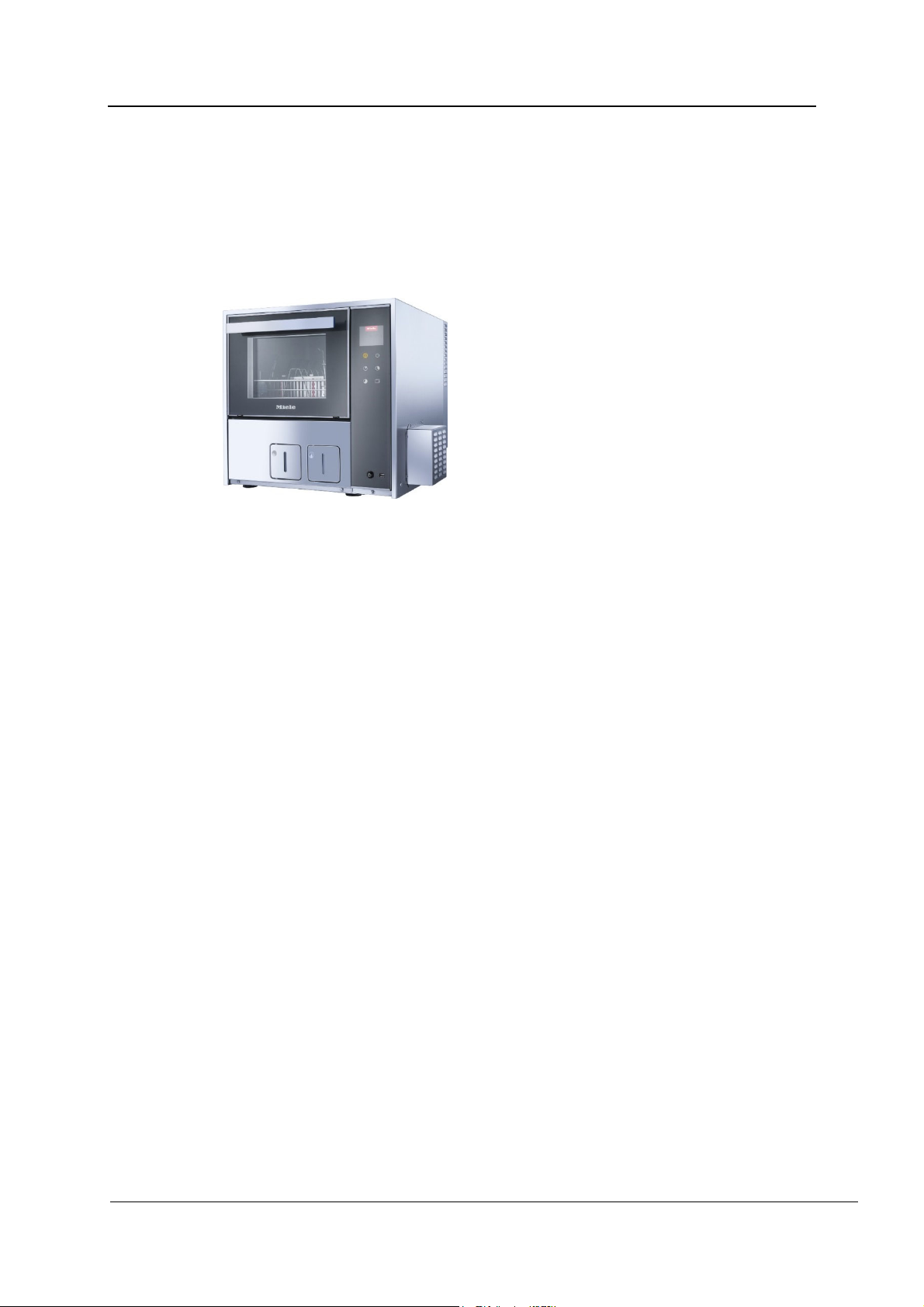
PWD 8531 WS
PRODUCT INFORMATION
REV.0.01_COD.500291_A4
Page 7
Page 8
PRODUCT INFORMATION
2.1 Intended use
This machine is used to reprocess a wide range of reusable medical devices used for
dentistry. Follow all instructions issued by the instrument manufacturers (in compliance with
EN ISO 17664) and national legislation and guidelines relating to the machine-based
reprocessing of medical devices.
Medical devices such as dental instruments, saliva ejectors, handpieces, etc., which are
designated as reprocessable by the manufacturer, can be reprocessed in this machine.
The improper use of this machine is any use other than that for which the machine is
intended.
WARNING
Improper use can lead to personal injury and damage to property.
Miele cannot be held liable for damage resulting from incorrect or
improper use or operation.
Note: According to EN ISO 17664, the manufacturer of medical devices is obligated to
provide reprocessing instructions for their products. These must include instructions on how
medical devices are to be reprocessed, cleaned, disinfected, inspected, and stored. If,
during use, medical devices come into contact with blood or potentially contaminated
tissue, such devices must be reprocessed in compliance with national and local standards.
The machines are part of the process for reprocessing medical devices.
2.2 Authorization for service and user training
Miele & Cie. KG (hereinafter referred to as Miele) has been authorized by Steelco S.p.A, the
original equipment manufacturer, to provide technical training and user training for this
machine.
If reference is made in these operating instructions to Miele Service or an authorized service
technician, this is authorized by Steelco S.p.A as the manufacturer.
The machine may only be installed, commissioned, repaired, and maintained by Miele
Service or an authorized service technician.
REV.0.01_COD.500291_A4
Page 8
Page 9
2.3 Safety instructions and warnings
This machine conforms to current safety requirements. Inappropriate use can, however,
lead to personal injury and material damage.
Read the operating instructions carefully before using this machine. This will prevent both
personal injury and damage to the machine.
Keep these operating instructions in a safe place.
Appropriate use
Use of the machine is only approved for the applications stated in the operating
instructions. Conversions, modifications, and any other use are not permitted and could
be dangerous.
The cleaning and disinfection processes are only designed for medical devices which are
designated as reprocessable by the instrument manufacturer. Instructions issued by load
and instrument manufacturers must be heeded.
Miele cannot be held liable for damage resulting from incorrect or improper use or
operation.
This machine is intended for indoor use in a stationary location only.
Danger of injury
Please pay attention to the following information to avoid injury:
The machine may only be installed, commissioned, repaired, and maintained by Miele
Service or an authorized service technician. A Miele service contract is recommended to
ensure full compliance with medical device regulations. Incorrect repairs can cause
considerable danger to users.
Do not install the machine in an area where there is any risk of explosion or of freezing
conditions.
In order to reduce the risk of water damage, the area around the machine should be
limited to furniture and fittings that are designed for use in commercial environments.
Some metal parts pose a risk of injury/being cut. Wear cut-resistant protective gloves
when transporting and setting up the machine.
The electrical safety of the machine can only be guaranteed when correctly grounded. It
is essential that this standard safety requirement is met. If in any doubt, please have the
on-site wiring system tested by a qualified electrician. Miele cannot be held liable for the
consequences of an inadequate grounding system (e.g. electric shock).
A damaged or leaking machine can pose a threat to your safety. Always switch off a
damaged or leaking machine immediately and call Miele Service.
Machine operators should be instructed on the use of the machine and trained regularly.
Untrained personnel must not be allowed access to the machine or its controls.
Only use process chemicals which have been approved by their manufacturer for the
relevant application. The manufacturer of the process chemicals is liable for any negative
influences on the material of the load and the machine.
Exercise caution when handling process chemicals. Some chemicals may be caustic,
irritating, and toxic.
The relevant safety regulations and safety data sheets issued by the process chemical
manufacturers must be observed.
Wear gloves and protective goggles.
The machine is only intended for use with water and suitable process chemicals. The use
of organic solvents or inflammable liquids is not permitted.
This could cause an explosion, damage rubber, or plastic components in the machine
and cause liquids to leak out of it.
PRODUCT INFORMATION
REV.0.01_COD.500291_A4
Page 9
Page 10

PRODUCT INFORMATION
The water in the wash chamber must not be used as drinking water.
Do not lift the machine by protruding parts such as the door handle or the opened
service flap as these could be damaged or torn off.
Do not sit or lean on the opened door. This could cause the machine to topple over and
become damaged or cause you an injury.
Be careful when sorting items with sharp, pointed ends. Position them in the machine so
that you will not hurt yourself or create a danger for others.
Broken glass can result in serious injury when loading or unloading. Broken glass items
must not be processed in the machine.
Please be aware that the machine may be operating at high temperatures. Opening the
door by bypassing the safety lock can result in a risk of burning, scalding, or chemical
burns.
Should personnel accidentally come into contact with toxic vapours or process
chemicals, follow the emergency instructions given in the manufacturer's safety data
sheets.
Allow load carriers and the load to cool down before removing them. Any water
remaining in containers could still be very hot. Empty this water into the chamber before
removing items.
Never clean the machine or near vicinity with a water hose or a pressure washer.
The machine must be disconnected from the electricity supply before any maintenance
or repair work is carried out.
REV.0.01_COD.500291_A4
Page 10
Page 11
Quality assurance
The following points should be observed to assist in maintaining quality standards
when reprocessing medical devices in order to protect patients and to avoid damage to
the loads being cleaned.
Only authorized personnel may interrupt a program in exceptional circumstances.
The standard of cleaning and disinfection in the disinfection programs must be routinely
confirmed by the operator. The process should be thermo-electrically tested on a regular
basis, and checked against documented control results.
For thermal disinfection, use temperatures and temperature holding times to achieve the
required infection prophylaxis in accordance with health and safety regulations.
Only reprocess undamaged and suitable items. When washing plastic items, ensure that
they are thermally stable. Nickel-plated items and items made of aluminum require
special procedures and are not generally suitable for machine reprocessing.
Items containing iron that can rust or corrode must not be added to the load or to the
wash chamber as contaminated items.
Under certain circumstances, process chemicals can result in damage to the machine.
Users are urged to follow the recommendations issued by manufacturers of process
chemicals.
Contact Miele in the event of damage and any suspicion of material incompatibility.
Instrument-care products based on paraffin oils (white oils) can damage the elastomers
and plastics in the machine. Such care products must not be dispensed as process
chemicals in this machine, even if they are recommended for machine use by the careproduct manufacturer.
Abrasive substances should not be introduced to the machine as these could cause
damage to mechanical components in the water circuit. Abrasive residues on the load
must be removed completely before reprocessing.
Pre-treatment with cleaning or disinfecting agents and certain types of soiling and
process chemicals can create foam. Foam can have an adverse effect on the disinfection
and cleaning result.
The reprocessing process must be set up to not result in foam being discharged from the
wash chamber. Foam discharge can compromise the operation of the machine.
The process used must be monitored on a regular basis by the operator to check
foaming levels.
Even when a process chemical, e.g. detergent, is recommended on technical application
grounds, Miele takes no responsibility for the effect of such chemicals on the load items.
Please note that changes in product formulation, storage conditions, etc., which are not
announced by manufacturers of process chemicals may impair the quality of cleaning
results.
PRODUCT INFORMATION
REV.0.01_COD.500291_A4
Page 11
Page 12
PRODUCT INFORMATION
When using process chemicals, always consult the instructions issued by individual
manufacturers. Process chemicals must only be used for the purpose they are designed
for by the manufacturer to avoid any material damage or the occurrence of very strong
chemical reactions (e.g. oxyhydrogen explosion).
Always follow the relevant manufacturer's instructions on storage and disposal of
process chemicals.
Particles ≥ 0.8 mm are removed by the filters in the chamber. Smaller particles may find
their way into the circulation system. For this reason, reprocessing loads with narrow
lumens requires additional filtering of the wash water.
In critical applications where very stringent requirements have to be met, it is strongly
recommended that all the relevant factors for the process (detergent, water quality, etc.)
are discussed with Miele.
Load carriers which hold the load must be used only as intended.
The interior of lumened items must be thoroughly flushed through with wash water.
Place small and light items in a mesh tray for small items so that they do not block the
spray arms.
Empty any containers or utensils before loading them.
The amount of solvent residues on the load items must be minimal when they are placed
in the wash chamber.
Solvents with a flash point below 21°C may only be present in trace amounts.
Chloride solutions, in particular hydrochloric acid, or corrosive iron materials must not be
placed in the wash chamber.
Ensure that solutions or steam containing chlorides or hydrochloric acid do not come into
contact with the stainless steel outer casing of the machine in order to avoid any damage
through corrosion.
After any plumbing work, the water pipework to the machine will need to be vented. If
this is not done, components can be damaged.
The gaps between a built-in machine and adjacent cabinetry must not be sealed, e.g.
with silicone sealant, as this could compromise ventilation of the circulation pump.
Follow the installation instructions in the operating and installation instructions.
Using accessories
Only use genuine Miele original spare parts and accessories suitable for the application
they are required for. Model designations are available from Miele.
Only use Miele wash carts, baskets, modules, and inserts. Using wash carts, baskets,
and inserts made by other manufacturers, or making modifications to Miele accessories
can result in unsatisfactory cleaning and disinfection result. Any resultant damage would
not be covered by the warranty.
REV.0.01_COD.500291_A4
Page 12
Page 13
Disposing of your old machine
Please note that the machine may contain contamination from blood and other bodily
fluids, pathogens, and facultative pathogens, and must be decontaminated before
disposal.
For environmental and safety reasons, dispose of all process chemical residues in
accordance with safety regulations (wear safety goggles and gloves).
Remove or disable the door lock prior to disposal of the machine, so that children cannot
become trapped inside. Then make appropriate arrangements for safe disposal of the
machine, see chapter 16 Disposing of your old machine for more details.
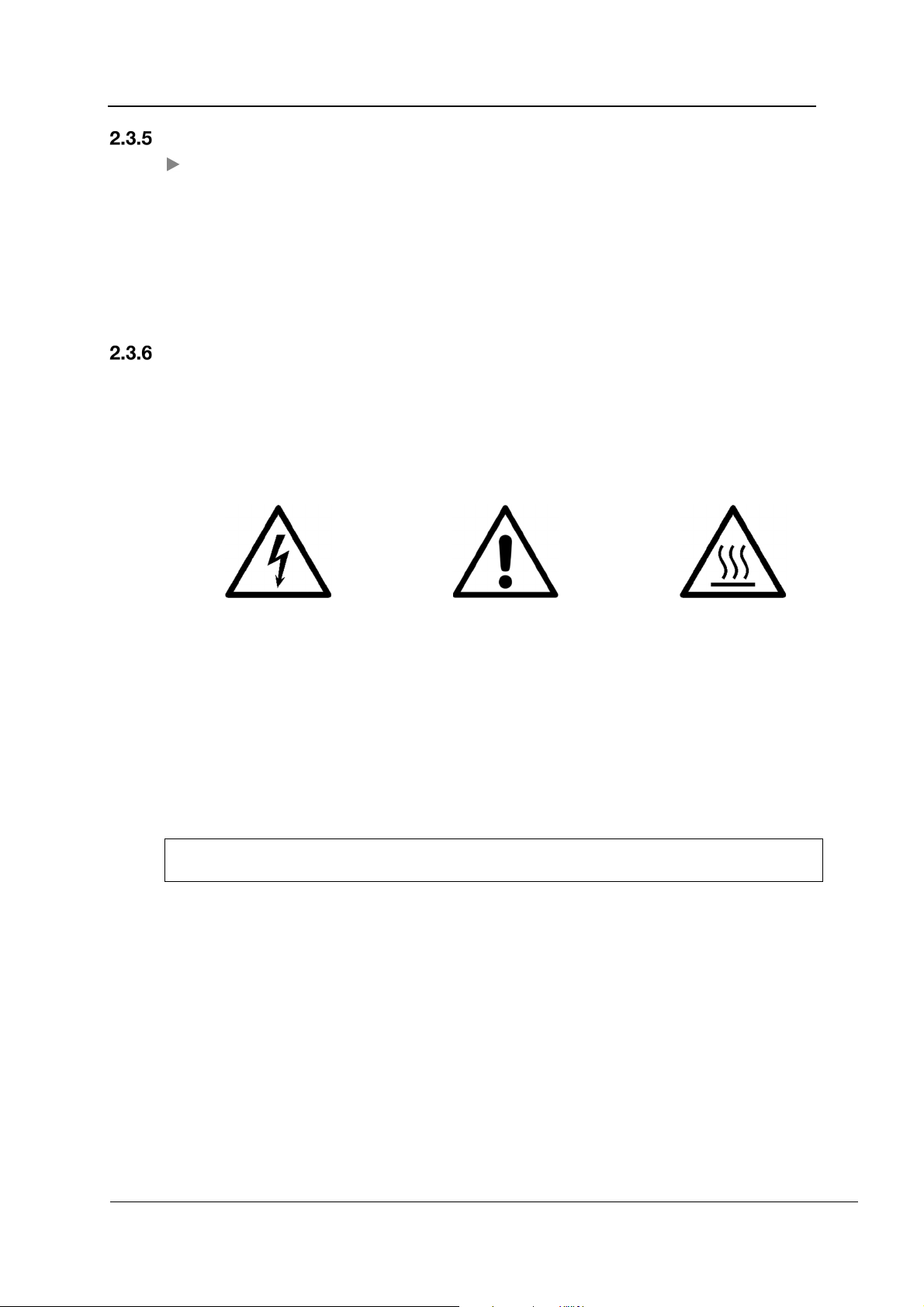
Warning signs
In order to inform users of their obligations and to warn of risks, the machine is equipped with
warning signs in accordance with valid legislation.
General warning signs
PRODUCT INFORMATION
Warning!
Danger of electric shock!
The evaluation of risks for the health and safety of operators carried out in the workplace and
on any equipment used, as well as the evaluation of residual risks as indicated, allow the
employer to evaluate the need to adopt the individual protection gear which is most suitable
and appropriate to be provided to the operators.
Miele cannot be held liable for damage or injury caused by noncompliance with the safety
instructions and warnings.
Observe the operating
Warning!
instructions!
Warning!
Hot surfaces!
REV.0.01_COD.500291_A4
Page 13
Page 14
PRODUCT INFORMATION
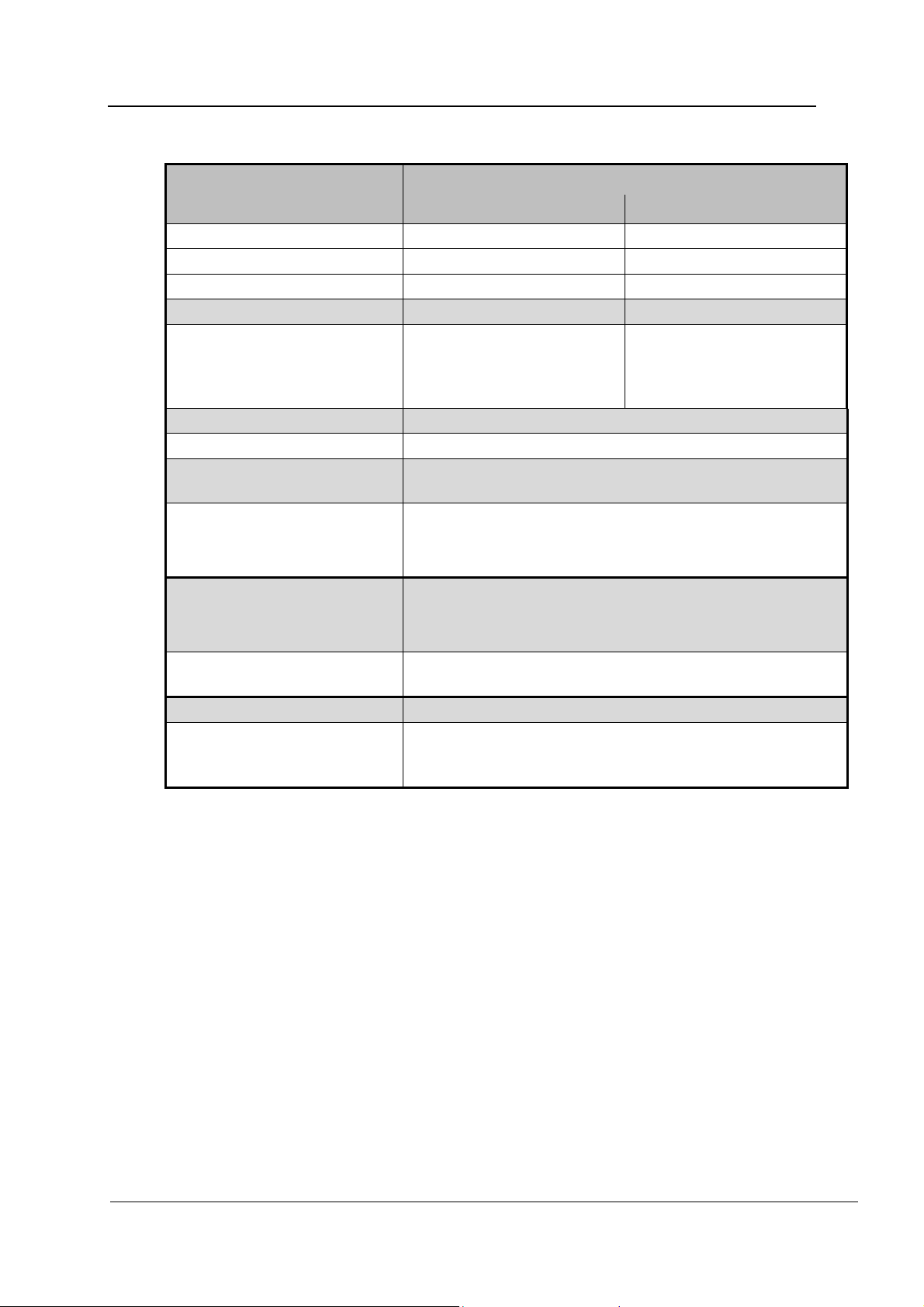
2.4 Technical data
PWD 8531 WS
Imperial Metric
Width 22 7/16 (+2 15/16)" 570 (+ 75) mm
Depth with closed door 22 5/8" 575 mm
Height 21 1/16" 535 mm
Total weight 122 Ibs 55 kg
Wash chamber dimensions:
– Width
– Depth
– Height
Voltage, rated load, fuse rating See data plate and installation plan
Average sound pressure level < 70 dB (A)
Type of protection
(according to IEC 60529)
Operation: Temperature range +5 to +40°C
16 5/16"
18 7/8"
14 3/4"
IP21
Relative humidity range 20 to 90% without condensation
Maximum altitude: 2,000 m ASL
415 mm
480 mm
375 mm
Storage and transportation
conditions
Overvoltage category
(according to IEC EN 60664)
CE mark Health Canada Class II Medical Device
Manufacturer's address Steelco S.p.A
-5 to +50°C
20% to 90% without condensation
500 hPa to 1,060 hPa
II
Via Balegante, 27
31039 Riese Pio X (TV), Italy
REV.0.01_COD.500291_A4
Page 14
Page 15

PRODUCT INFORMATION
2.5 Recommendations for correct use
The user must supervise the machine during the program.
Load carriers with injector connections must be connected to the water supply.
A running program must not be interrupted as this may compromise reprocessing
results.
The standard of cleaning and disinfection in the disinfection programs must be
routinely confirmed by the operator. The process should be thermo-electrically tested
on a regular basis, and checked against documented control results.
Only use process chemicals which have been approved by their manufacturer for the
relevant application. The manufacturer of the process chemicals is liable for any
negative influences on the material of the load and the machine.
Do not reprocess items containing substances which, in accordance with the current
legislation, must not be discharged into the sewage system. These substances must
be disposed of separately.
The machine is only intended for use with water and process chemicals.
The use of organic solvents or inflammable liquids is not permitted as there is a risk of
explosion. Such substances can also result in the premature wear on components.
Solvent residues, chloride solutions, and acids, particularly hydrochloric acid, can
damage steel components and must not be placed in the machine.
Do not use powder detergents.
Do not use domestic detergents.
Accessories which are not approved by the manufacturer may compromise
reprocessing results as well as user safety.
The user must carry out a general check-up and clean the machine regularly as
indicated in the maintenance instructions.
Carry out a visual check of the load for cleanliness.
The on-site shutoff valve must be easily accessible so that the water supply can be
turned off when not in use.
REV.0.01_COD.500291_A4
Page 15
Page 16

PRODUCT INFORMATION
2.6 Training
Instructions for use of the machine will be provided by Miele Service or an authorized service
technician during machine commissioning.
It is the duty of the operator to ensure that users are sufficiently trained and instructed.
User profiles
The user profiles are identified as follows:
SERVICE Service technician
The machine may only be installed, commissioned, repaired, and maintained
by Miele Service or an authorized service technician.
ADMIN Responsible for the machine in the workplace:
More advanced tasks, e.g. interrupting or cancelling a program, require more
detailed knowledge of machine reprocessing of medical devices.
Alterations or adaptations of the machine, e.g. to accessories used or on-site
conditions, require additional specific knowledge of the machine.
Validation processes assume specialized knowledge about machine
reprocessing of medical devices, the processes involved, and applicable
standards and legislation.
USER User:
Users must be instructed in operating and loading the machine and trained
regularly to guarantee safe daily use.
They require knowledge of machine reprocessing of medical devices for dental
use.
REV.0.01_COD.500291_A4
Page 16
Page 17
3. INSTALLATION
3.1 Water connection
Water quality
The quality of the water used in all the cleaning stages is essential in achieving good results.
The water must be compatible with the material from which the machine is made.
The water must be compatible with process chemicals.
The water must be compatible with process requirements for the various stages of the
process.
In order to achieve good cleaning results, the machine requires a supply of soft water with a
low calcium content. Hard water results in the build-up of calcium deposits on the load and
on the inner walls of the wash chamber.
Water with a hardness level higher than 0.7 mmol/l (4 gr/gal) must be softened. This occurs
automatically during a program sequence on machines with a built-in water softener. The
water softener must be set to the exact hardness of the water.
The water softener must be reactivated at regular intervals. This requires the use of special
reactivation salt. Reactivation is carried out automatically during a program sequence.
INSTALLATION
Note: The water hardness is set by Miele Service.
WARNING
Water from the chamber is not suitable for drinking!
The machine must be connected to the water supply in strict accordance with local
regulations.
The water used must at least comply with national regulations for drinking water quality. If the
water supply has a high iron content, there is a danger of corrosion occurring on the load and
the machine itself. If the chloride content of the water exceeds 100 mg/l, the risk of corrosion
to the load in the machine will be further increased.
A backflow preventer is not required if national regulations permit; the machine is equipped
with a safety system for the protection ofdrinking water.
The machine is installed as standard with connections for cold and DI water. Connect the
inlet hoses to the shutoff valves for cold and DI water.
The minimum flow pressure is 100 kPa at the cold water connection and 30 kPa at the DI
water connection.
The recommended flow pressure is ≥ 200 kPa for the cold water connection and ≥ 200 kPa
for the DI water connection in order to avoid excessively long water intake times.
The maximum permissible static water pressure is 800 kPa.
If water pressure is not within the specified range, contact Miele Service for advice.
A booster pump is required if the flow pressure is below 200 kPa. If the pressure is higher
than 800 kPa, a pressure reducer must be installed.
A shutoff valve with a ¾” threaded union must be provided on-site. The valve must be easily
accessible to allow the inlet to be turned off when not in use.
REV.0.01_COD.500291_A4
Page 17
Page 18
INSTALLATION
WARNING
Do not overtighten the threaded unions on the hoses.
WARNING
When the machine is not in operation for long periods, always close the
shutoff valves.
Connecting the drain hose
Carefully check the drain hose.
Only use drain hoses resistant to organic and chemical materials and hot liquids (max.
91°C).
The diameter of the drain hose is listed in the installation plan.
The drain hose must not be extended.
The drain hose must be connected using a clamp.
The drain hose must not be kinked.
Wall drain: The drain point in the wall should be no higher than the machine drain
connection.
CAUTION
If the drain pipe is blocked, avoid skin and eye contact with potentially
contaminated water.
Wear suitable goggles and protective gloves.
CAUTION
Drainage must comply to national regulations.
The manufacturer cannot be held responsible if the incorrect use of
machine causes pollution.
REV.0.01_COD.500291_A4
Page 18
Page 19
3.2 Electrical connection
WARNING
Only qualified, skilled personnel may connect the machine to the
domestic electrical supply.
The machine must only be operated with the voltage, frequency, and fuse rating
shown on the data plate.
Check that the power supply voltage does not differ from its nominal value by +/-6%.
The frequency of the power supply must not differ from its nominal value by more than
1%.
The electrical safety of the machine can only be guaranteed when correctly grounded.
Equipotential bonding is required.
Make sure that the electrical systems are properly grounded.
The ground conductor is to be connected to the ground terminal
identified by the standard symbol.
If the machine is hard wired to the power supply, connection
should be made via a power switch with all-pole isolation. The
power switch must be designed to operate at the rated current.
For increased safety, it is recommended to protect the machine with a suitable
residual current device (RCD) with a trip current of 30 mA.
The machine should be disconnected from the power supply when not used for a
longer period of time.
The electrical connection and fuse rating must comply with local and national
regulations.
The connection to the power supply must comply with national regulations, plug and
socket must be accessible for service and maintenance work after the machine has
been installed. An electrical safety test must be carried out after installation and after
any servicing work.
INSTALLATION
WARNING
Please refer to the installation plan provided.
REV.0.01_COD.500291_A4
Page 19
Page 20
INSTALLATION
3.3 Installation site ventilation
During operation, the machine releases heat to its surroundings and increases humidity levels
at the place of installation. This applies particularly during drying.
These machines are equipped to be connected to an on-site exhaust air system.
WARNING
The machine should not be obstructed to guarantee proper ventilation.
In order to reduce the risk of water damage, the area around the machine
should be limited to furniture and fittings that are designed for use in
commercial environments.
Please refer to the installation plan provided.
REV.0.01_COD.500291_A4
Page 20
Page 21
BUILT-IN WATER SOFTENER
4. BUILT-IN WATER SOFTENER
The built-in water softener is designed to prevent residues from the water supply in the
machine.
Salt consumption depends on the water hardness.
Water hardness
(gr/gal)
0–5.9 0–1.01 0–10 Value 10
6.49–8.83 1.11–1.51 11–15 Value 15
9.41–11.81 1.61–2.02 16–20 Value 20
12.40–14.73 2.12–2.52 21–25 Value 25
15.32–17.72 2.62–3.03 26–30 Value 30
18.30–20.64 3.13–3.53 31–35 Value 35
21.28–23.62 3.64–4.04 36–40 Value 40
24,21–26.60 4.14–4.55 41–45 Value 45
27,19–29,53 4.65–5.05 46–50 Value 50
30,11–32,51 5.15–5.56 51–55 Value 55
Water hardness
(mmol/l)
Water hardness
French scale (°fH)
Parameter setting
33.09-35.43 5.66–6.06 56–60 Value 60
REV.0.01_COD.500291_A4
Page 21
Page 22
BUILT-IN WATER SOFTENER
4.1 Refilling the salt
Use only special, coarse-grained reactivation salt or other pure evaporated salt. Never use
any other kind of salt, e.g. table salt, animal feed salt, or de-icing salt. Other salts may
contain insoluble additives which can impair the functioning of the water softener.
The following prompt reminds the user to refill the salt container:
“Refill salt”
The container for reactivation salt is located in the base of the wash chamber inside the
machine.
Open the door.
Remove the load carrier.
Unscrew the plastic cap on the container.
Fill the funnel with salt.
Raise the funnel by the handle and place it on the container.
Release the handle. The salt then passes from the funnel into the container.
Repeat the process until the container is visibly full.
The supply container contains approx. 780 g of salt.
WARNING!
The container must always be completely filled. If filled to less than full,
the water softening capacity is reduced and limescale deposits may
occur on the load and on chamber surfaces.
Refit the plastic cap on the salt container and screw tight.
Place the load carrier back into the machine.
Start the “Rinse” program.
WARNING!
Run the “Rinse” program after refilling the salt. This removes and
dissolves spillages of salt and brine. Excess salt and brine which has
overflowed can cause corrosion damage if they are not rinsed away.
WARNING!
During reactivation, the following appears on the display: “Reactiv.
pause”.
REV.0.01_COD.500291_A4
Page 22
Page 23
5. DISPENSING
The dispensing system for process chemicals comprises:
1 dispenser pump (DOS1) for detergent
(Ideally for mildly alkaline detergent.)
1 dispenser pump (DOS3) for rinse aid
(This pump is set to be used with rinse aid ex works.
It can also be used for dispensing neutralizing agent. In this case, the machine
controls must be reprogrammed by Miele Service and the dispenser pump retrofitted).
WARNING
We recommend using Miele Process Chemicals. If necessary, contact the
seller or the manufacturer.
5.1 Volume flow control and lack of product
Each dispenser pump is monitored by a flow meter. This electronic device monitors the
volume of product dispensed.
A lack of product is indicated on the display and the program is aborted.
DISPENSING
REV.0.01_COD.500291_A4
Page 23
Page 24
DISPENSING
5.2 Refilling process chemicals
WARNING
Only use process chemicals designed specifically for use in the machine
and follow the manufacturer's instructions.
Exercise caution when handling process chemicals. Some products may
be corrosive and irritant. The relevant safety regulations and safety data
sheets issued by the process chemical manufacturers must be observed.
Wear protective goggles and gloves.
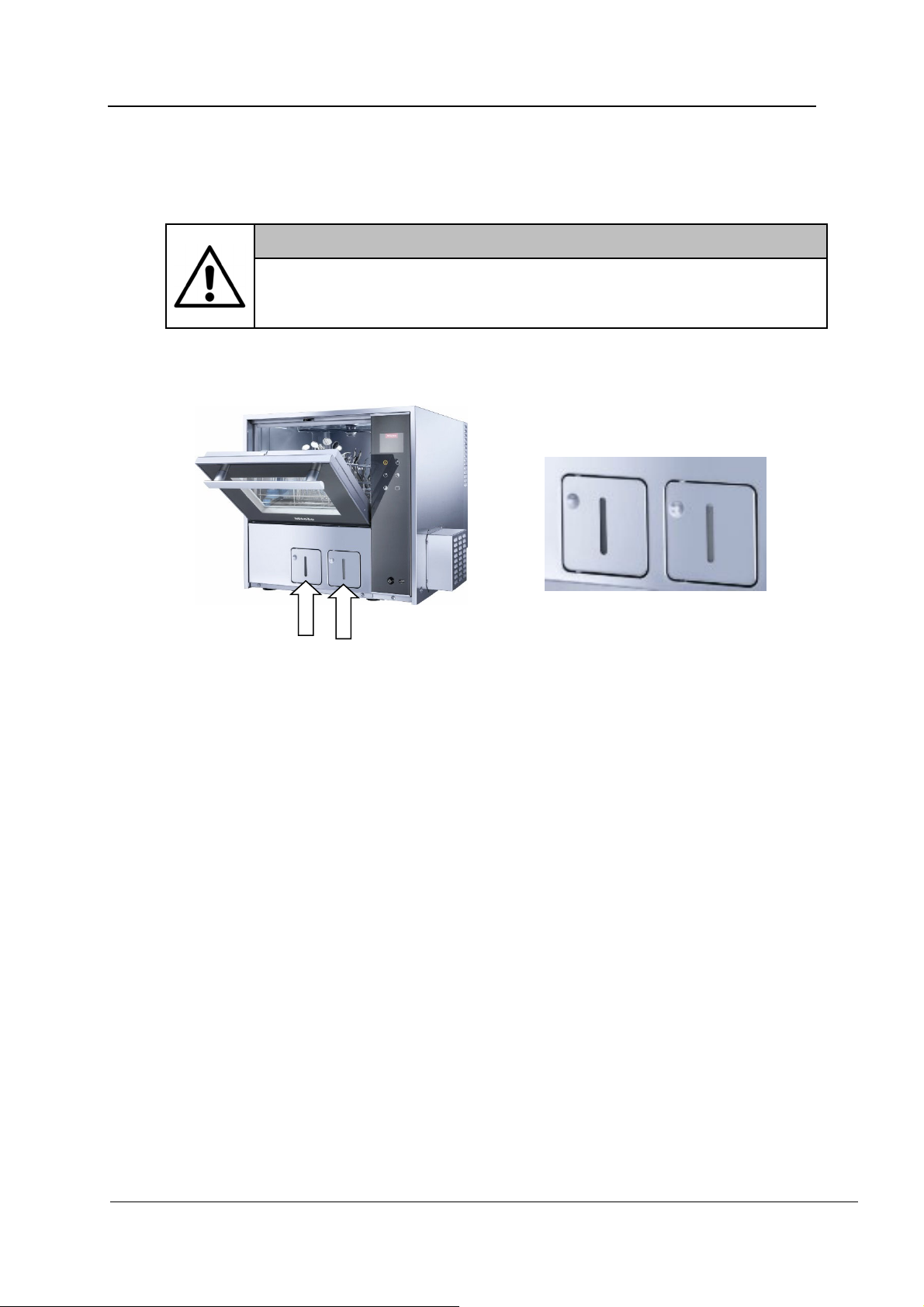
Refill the containers for process chemicals as follows:
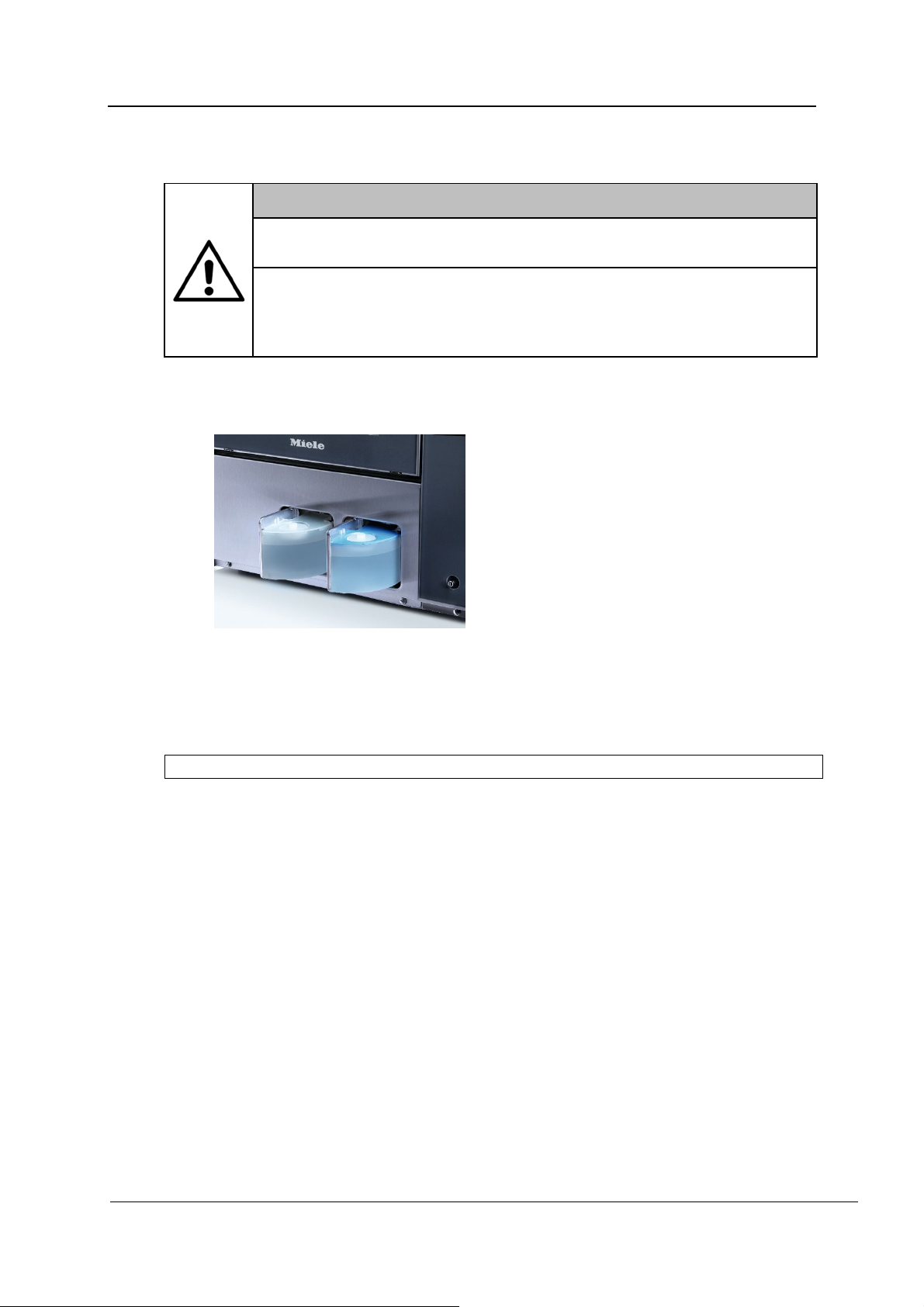
Open the integrated container.
Fill the container with the appropriate process chemical.
o Detergent = cleaning agent
o Rinse aid = rinse aid/neutralizing agent
The containers have a capacity of approx. 450 ml.
Wipe up any spillages.
Close the integrated container.
Start the “DOS1 fill” program for detergent or “DOS3 fill” program for rinse
aid/neutralizing agent.
REV.0.01_COD.500291_A4
Page 24
Page 25
Warnings
DISPENSING
Observe instructions issued by the process chemical manufacturer regarding the
maximum amount dispensed per program.
To ensure the efficiency of the dispensing system, maintenance as described in the
“Maintenance” section must be performed regularly.
Use liquid chemicals only. Do not use powder detergent.
Always follow the relevant manufacturer's instructions on storage and disposal of
process chemicals.
Never place process chemical containers on top of the machine.
WARNING
The machine must be completely emptied before you carry out
maintenance work or move/relocate the machine.
This is necessary to prevent contact with chemicals and to protect
machine components which may suffer damage.
REV.0.01_COD.500291_A4
Page 25
Page 26
OPERATION
6. OPERATION
6.1 Checking consumption
WARNING!
Check the fill level of product in the containers before starting a program.
If the supply of a process chemical runs out during a program sequence, a
message appears on the display and the program is aborted.
Fill levels are checked using the inspection windows on the containers. If necessary,
replenish process chemicals as described under “Refilling process chemicals”.
REV.0.01_COD.500291_A4
Page 26
Page 27
6.2 Opening and closing the door
OPERATION
PWD 8531 WS
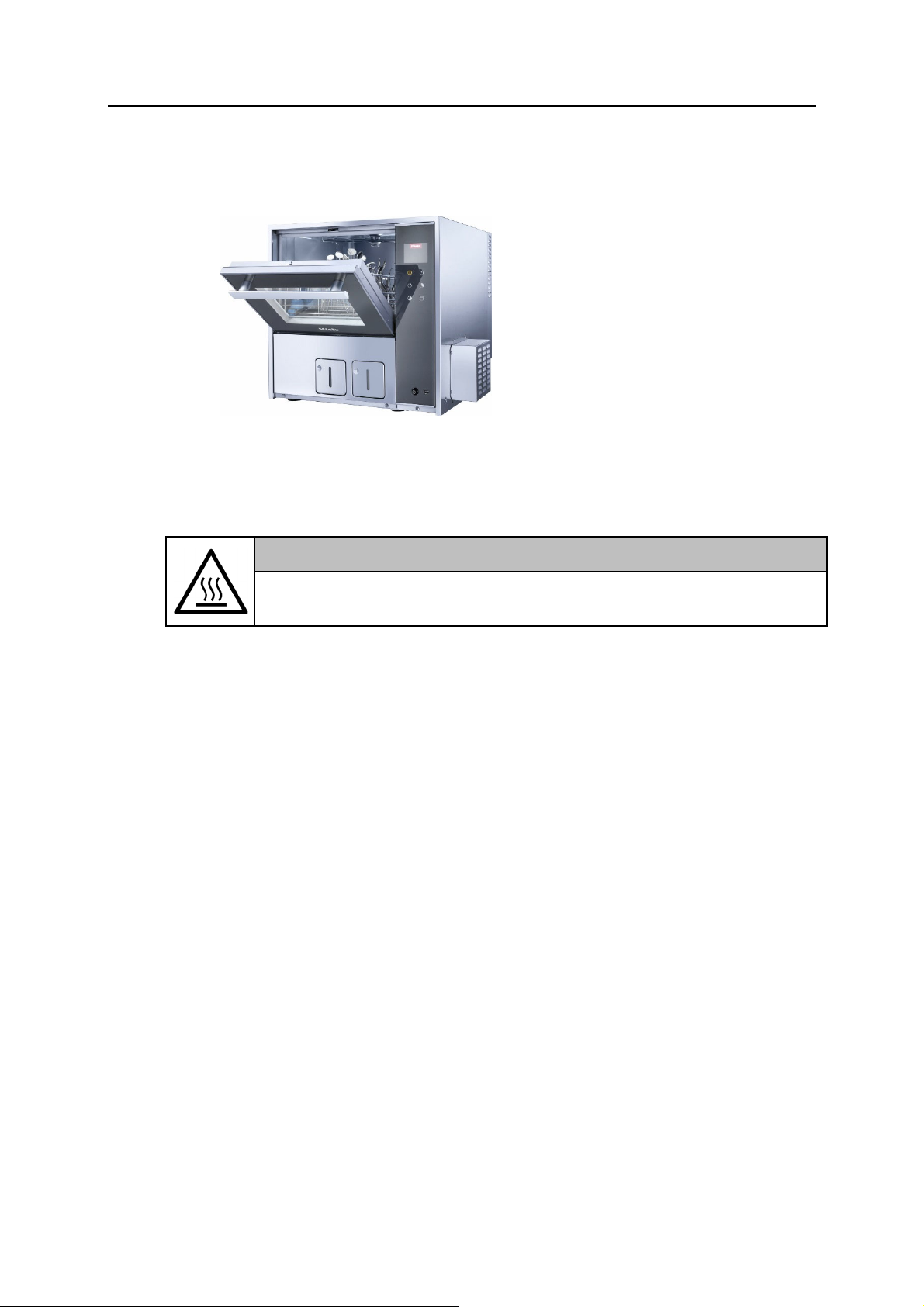
The door is opened and closed using the handle.
WARNING!
Be careful when opening the door.
The wash chamber can be very hot. Danger of scalding and burning.
REV.0.01_COD.500291_A4
Page 27
Page 28
OPERATION
Opening the door using the emergency release
WARNING
The emergency release may only be used when it is no longer possible to
open the door normally, e.g. in the event of a power failure.
If the emergency release is operated during a program sequence, hot
water and process chemicals can escape.
Danger of scalding, burning, and chemical burns.
If a program is cancelled, the load in the machine must be reprocessed
again.
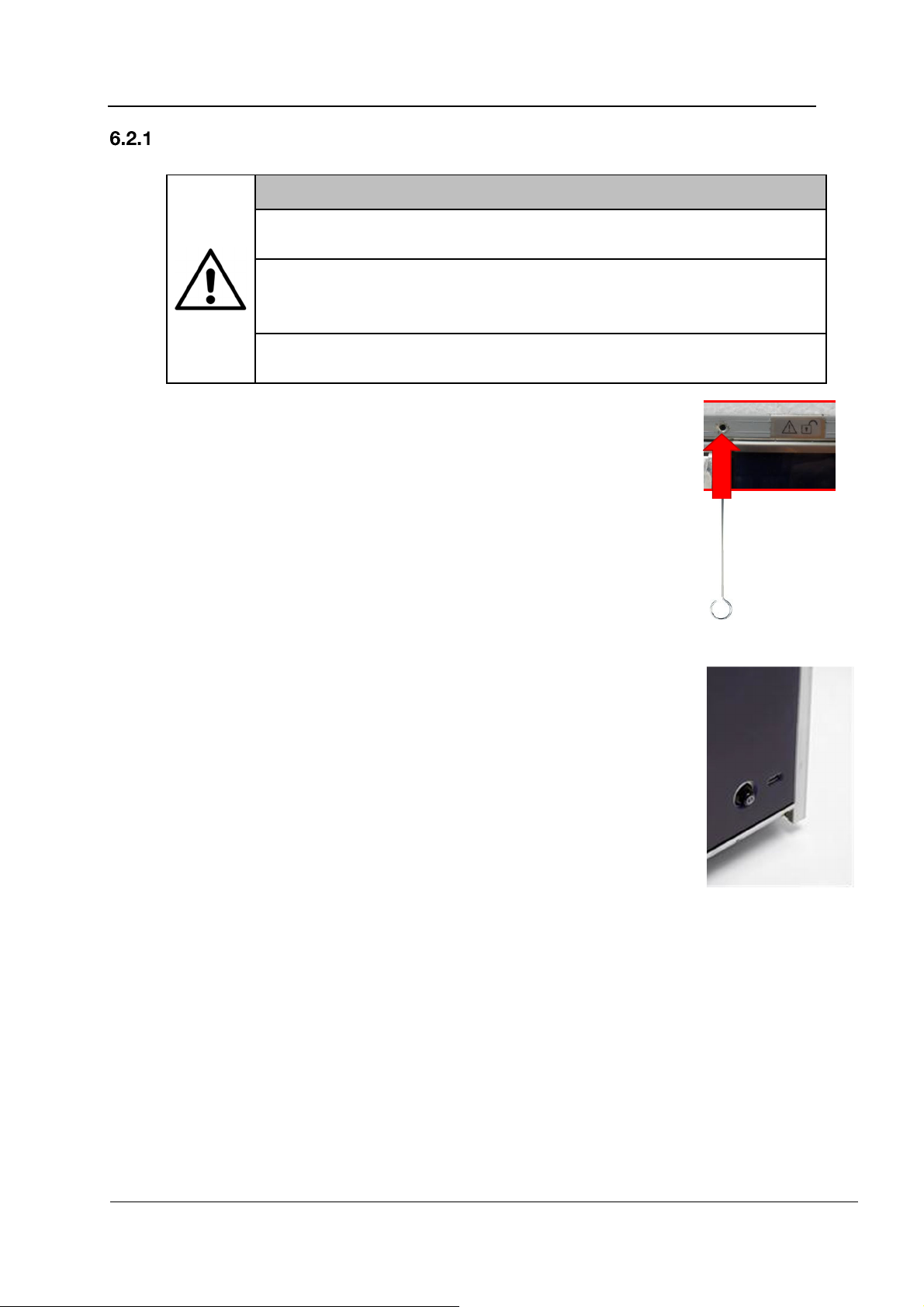
1. The emergency release mechanism is located on the right-hand
side above the door, identified by a sticker.
2. Insert the tool contained in the accessory kit into the emergency
release opening.
3. Prize the tool to the left until you hear the door open.
6.3 Switching on and off
The machine is switched off using the On/Off button at
the bottom of the control panel.
REV.0.01_COD.500291_A4
Page 28
Page 29
6.4 Preparation
Preparing the load
WARNING
Injector connections which are not used to clean handpieces must be
sealed using the caps provided.
New caps are available from Miele.
It is advisable to use only instruments made of stainless steel which is not susceptible
to corrosion.
Nickel and chrome-plated loads and items made of aluminum are not generally
suitable for machine reprocessing. They require special processing conditions.
Plastic items must be thermally stable.
Prior to loading the machine, remove materials such as composites, cement, and
amalgam in accordance with valid guidelines.
Handpieces with light guide rods can be regarded as durable, whereas fibre optic
bundles can be susceptible to more rapid wear.
Handpieces must only be reprocessed in special-purpose injection connectors with a
filter insert.
Only mildly alkaline or pH-neutral detergents must be used to reprocess handpieces
in order to avoid material degradation.
OPERATION
WARNING
A stainless steel filter insert must be installed on each connector used to
reprocess handpieces.
The filter is marked with “TOP”. The filter must be inserted into the
connector with the word TOP facing upwards.
The filter must be checked and cleaned daily.
Take apart any items which can be dismantled according to the manufacturer's
instructions and reprocess the individual parts separately from each other.
Only reprocess small items and micro components in special inserts, mesh trays with
lids, or mesh inserts.
Before machine reprocessing, check that the lumened instruments can be flushed
through and remove any possible blockages.
Load the machine and position items carefully in the holders.
Do not place items to be cleaned inside other pieces where they may be concealed.
Do not place items so close together that cleaning is hampered.
Arrange the load so that water can access all surfaces. This ensures that the load gets
properly cleaned.
Position load items such that fluids can drain off freely.
Position tall and heavy items towards the middle of the basket.
When loading the machine, make sure that nothing blocks the spray arms.
Distribute the load uniformly across the baskets.
REV.0.01_COD.500291_A4
Page 29
Page 30
OPERATION
After reprocessing, handpieces must be maintained in accordance with
manufacturers' instructions. Before using handpieces again following reprocessing, a
function check must be carried out, e.g. by spraying into a basin, to ensure they are
clear.
CAUTION
The maximum load for each cycle is 8 kg (incl. basket).
Never operate the machine without a load carrier in place.
REV.0.01_COD.500291_A4
Page 30
Page 31
Preparing the machine
Before work commences, perform all routine maintenance work as described under
“Maintenance”.
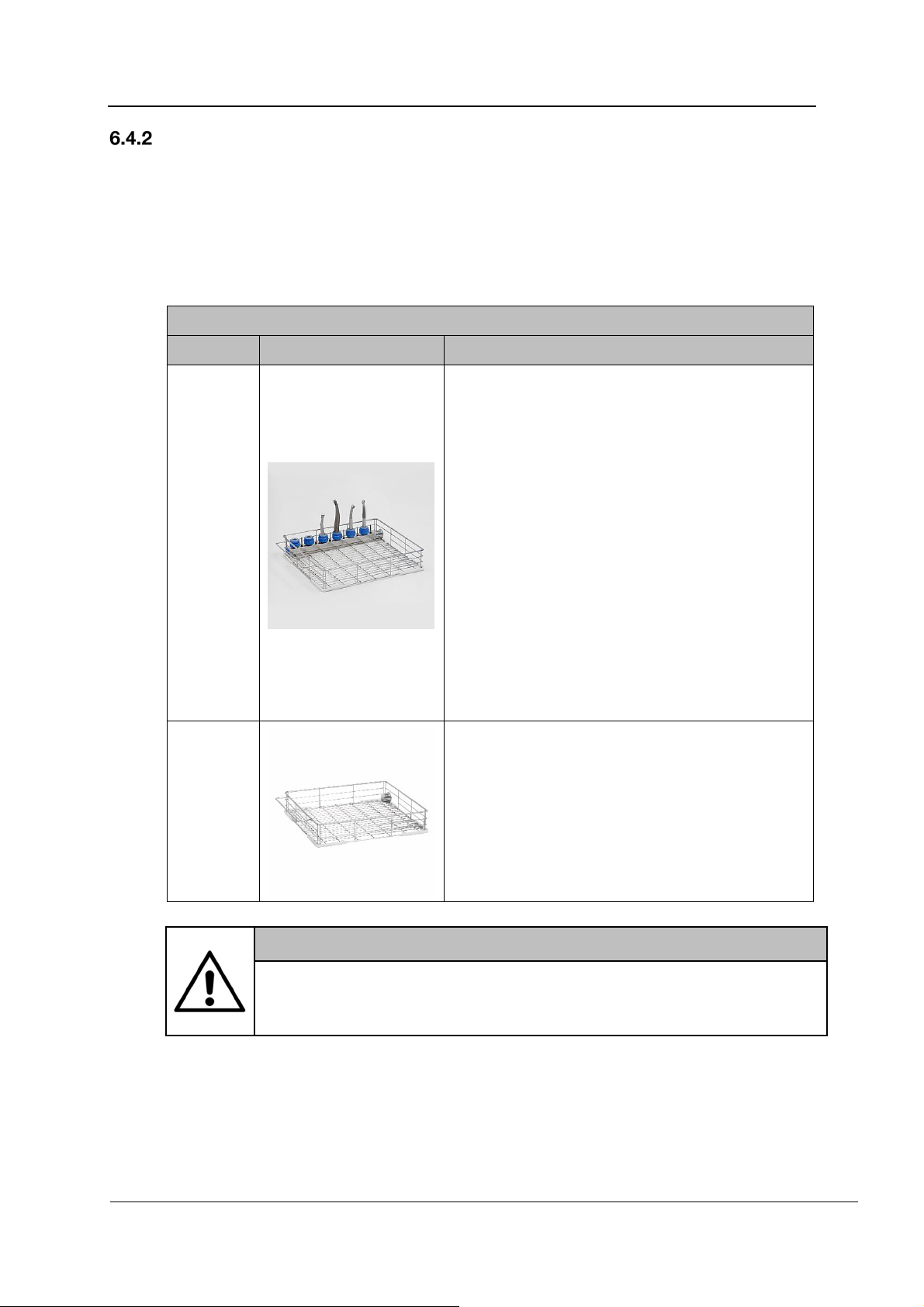
Prepare accessories with the corresponding load carriers, e.g. basket APWD 061 with
injection connectors for handpieces with basket APWD 060. Baskets are not supplied as
standard with the machine.
Further accessories are available to order from Miele.
Baskets and accessories
Code Image Designation
APWD 061
APWD 060
OPERATION
Dental injection basket, with connections for
dental turbines, dental handpieces, and suction
tips.
Dental turbines and dental handpieces are
provided with a stainless steel filter and silicone
adapters in two diameter sizes (14–17 mm/0.55”–
0.67” and 19–21 mm/0.75”–0.83”).
Capacity/connections:
Loading dimensions WxDxH:
320 x 395 x 230 mm/12.60” x 15.55”
6 dental turbines and dental handpieces
6 nozzles ø 3.8 mm/0.16”, 15 mm, for suction tips
Dimensions WxDxH: 395 x 469 x 120 mm/
15.55” x 18.46” x 4.72”
Materials: AISI 304 stainless steel, plastic
components
Standard basket
Capacity/connections:
Loading dimensions WxDxH:
370 x 395 x 230 mm/14.57” x 15.55”
Dimensions WxDxH: 395 x 469 x 120 mm/
15.55” x 18.46” x 4.72”
Materials: AISI 304 stainless steel, plastic
components
WARNING
Never start a program without a basket in place.
Failure to heed this warning may result in considerable leakage through
the door.
REV.0.01_COD.500291_A4
Page 31
Page 32
OPERATION
Checks at the end of a program
Carry out a visual check of the load for cleanliness.
Are all lumened instruments still attached to the appropriate nozzles?
WARNING
Any lumened instruments which have become disconnected during
reprocessing must be reprocessed again.
Are the lumens free from obstructions?
REV.0.01_COD.500291_A4
Page 32
Page 33
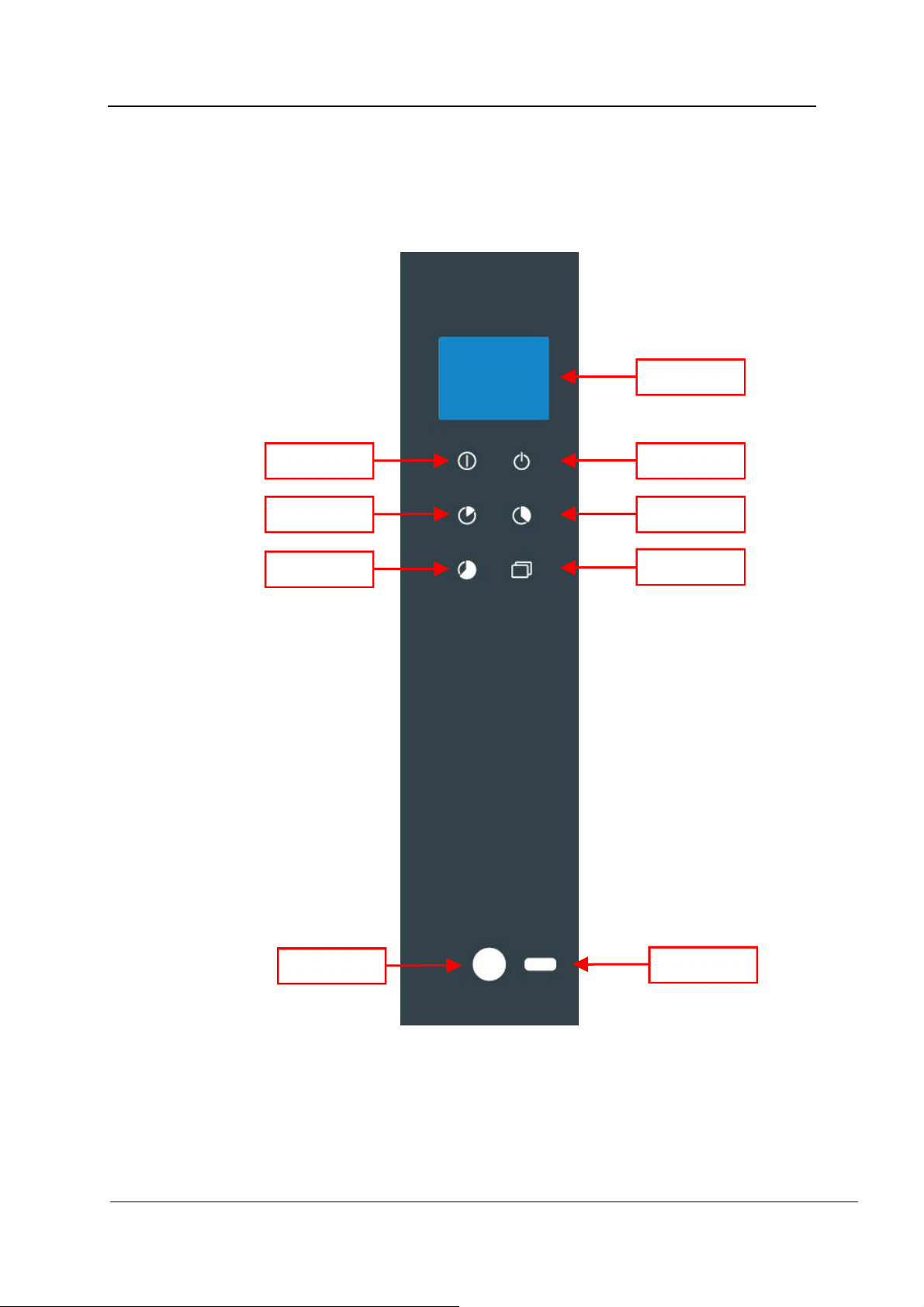
CONTROL PANEL AND SYMBOLS USED
7. CONTROL PANEL AND SYMBOLS USED
7.1 Control panel
The control panel is used to operate the machine.
DISPLAY
STOP START
P1
P3
P2
PRG
REV.0.01_COD.500291_A4
On/Off
USB
Page 33
Page 34
CONTROL PANEL AND SYMBOLS USED
7.2 Buttons
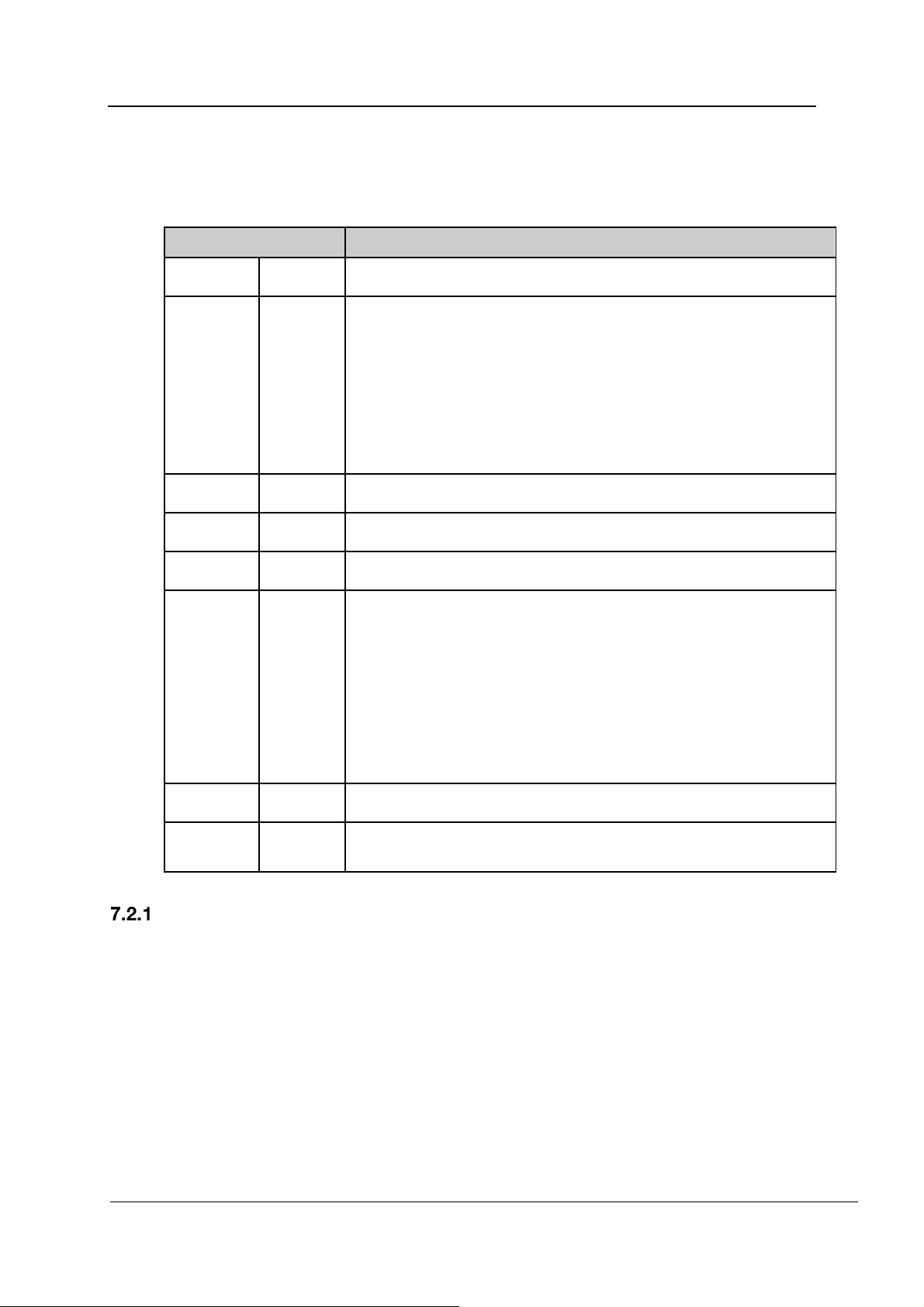
The buttons on the glass display are touch-sensitive and backlit (LED). There are 6 buttons
available with the following functions:
Buttons Description
START Start the program.
Press once to interrupt a program.
“NO DISINFECTION” appears in the display. The door remains
locked. An additional warning appears at a wash chamber
STOP
P1 Vario TD Dental
P2 Fill DOS1
temperature of more than 65°C. The program can be continued
by pressing the START button. The current wash phase is then
repeated.
Press twice to cancel a program.
The program is cancelled and the door is unlocked.
P3 Fill DOS3
Ready for operation:
Press once to access the list of all programs.
Press the button for 5 seconds to access the menu. The menu
PRG
On/Off For switching the machine on and off.
USB Testing and transmission point for Miele Service.
provides additional functions.
During a running program:
Press once to display parameters such as the temperature.
Press twice to display consumption values.
Press three times to display warning messages.
Buzzer
The machine has an integrated buzzer (audible signal). An audible signal sounds each time a
button is pressed. A warning signal sounds if the machine malfunctions (see “Messages and
warnings”).
REV.0.01_COD.500291_A4
Page 34
Page 35
7.3 Display
CONTROL PANEL AND SYMBOLS USED
1
2
3
4
5
6
7
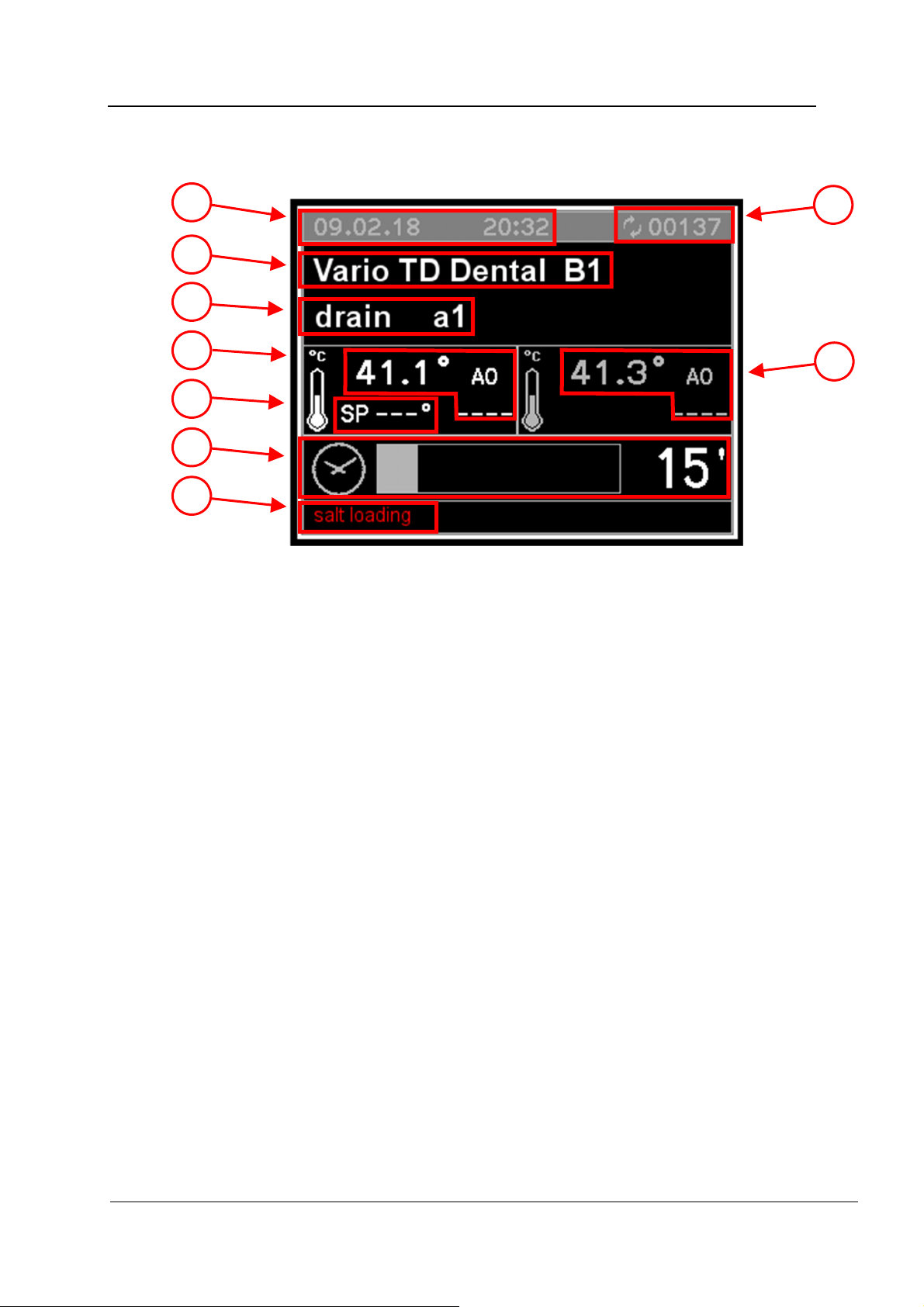
The following information will appear in the display:
1. Date and time
2. Selected program and program position
3. Current wash phase
4. Temperature in chamber (sensor 1) with A0 value
5. Target temperature for current phase
6. Remaining time
7. Instructions and fault messages
8. Cycle counter
9. Temperature in chamber (sensor 2) with A0 value
When the machine is ready for operation, the display shows the last selected program as well
as the temperature, date, and time.
8
9
REV.0.01_COD.500291_A4
Page 35
Page 36
CONTROL PANEL AND SYMBOLS USED
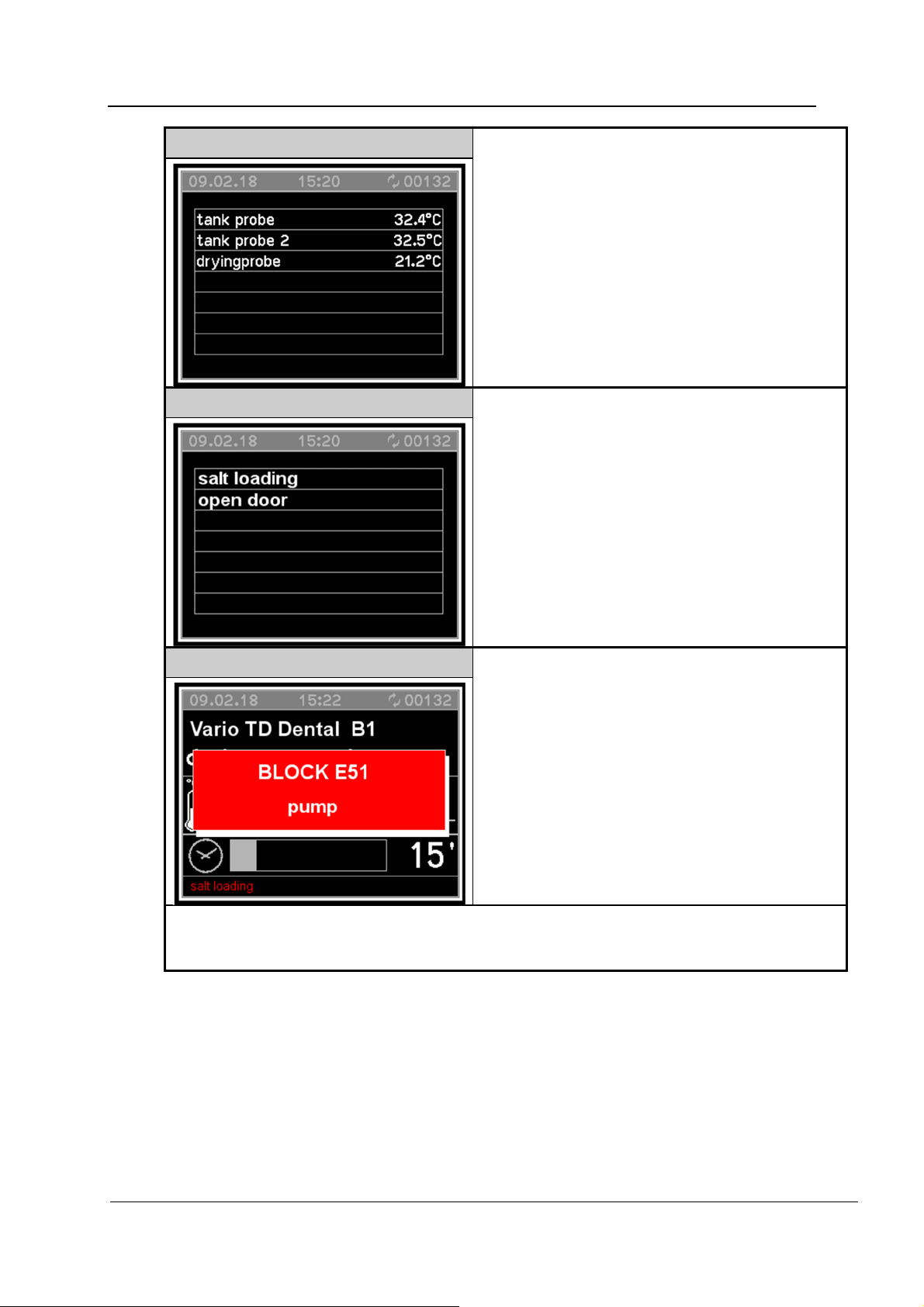
Fig. 2
During a running program:
Press PRG once to display temperature
values,
Press PRG twice to display consumption
data (water and process chemicals).
Fig. 3
Press PRG 3 times to display warning
messages.
Fig. 4
In the event of a fault, a window appears indicating
fault codes and a brief description.
In the event of a fault which does not cancel the program (e.g. lack of salt), a message is shown
in the bottom left corner of the display (Figs. 1 to 6) or can be called up by pressing the PRG
button 3 times; see Fig. 3.
REV.0.01_COD.500291_A4
Page 36
Page 37
CONTROL PANEL AND SYMBOLS USED
Fig. 5
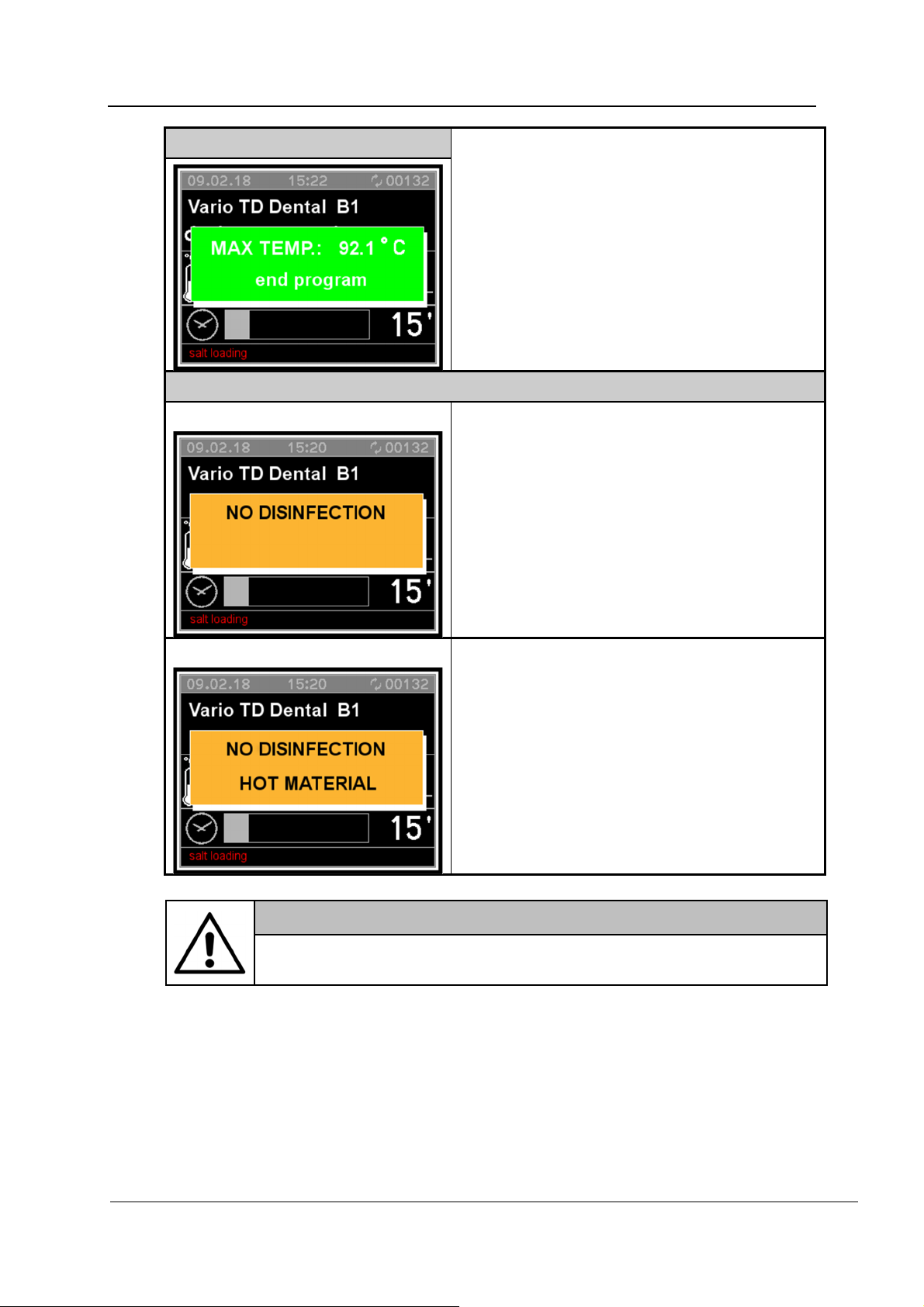
At the end of the program, a window appears.
The maximum temperature reached during the
program is shown in the display.
Fig. 6
Fig. 6.A
When a program is interrupted, a warning window
shows that the disinfection process has failed (Fig.
6.A).
Fig. 6.B
If the temperature in a cancelled program was
65°C or lower, the message shown in Fig. 6.A is
displayed.
If the temperature was above 65°C, the message
shown in Fig. 6.B is displayed.
WARNING
If a program is cancelled, the load in the machine must be reprocessed
again.
REV.0.01_COD.500291_A4
Page 37
Page 38
PROGRAMS
8. PROGRAMS
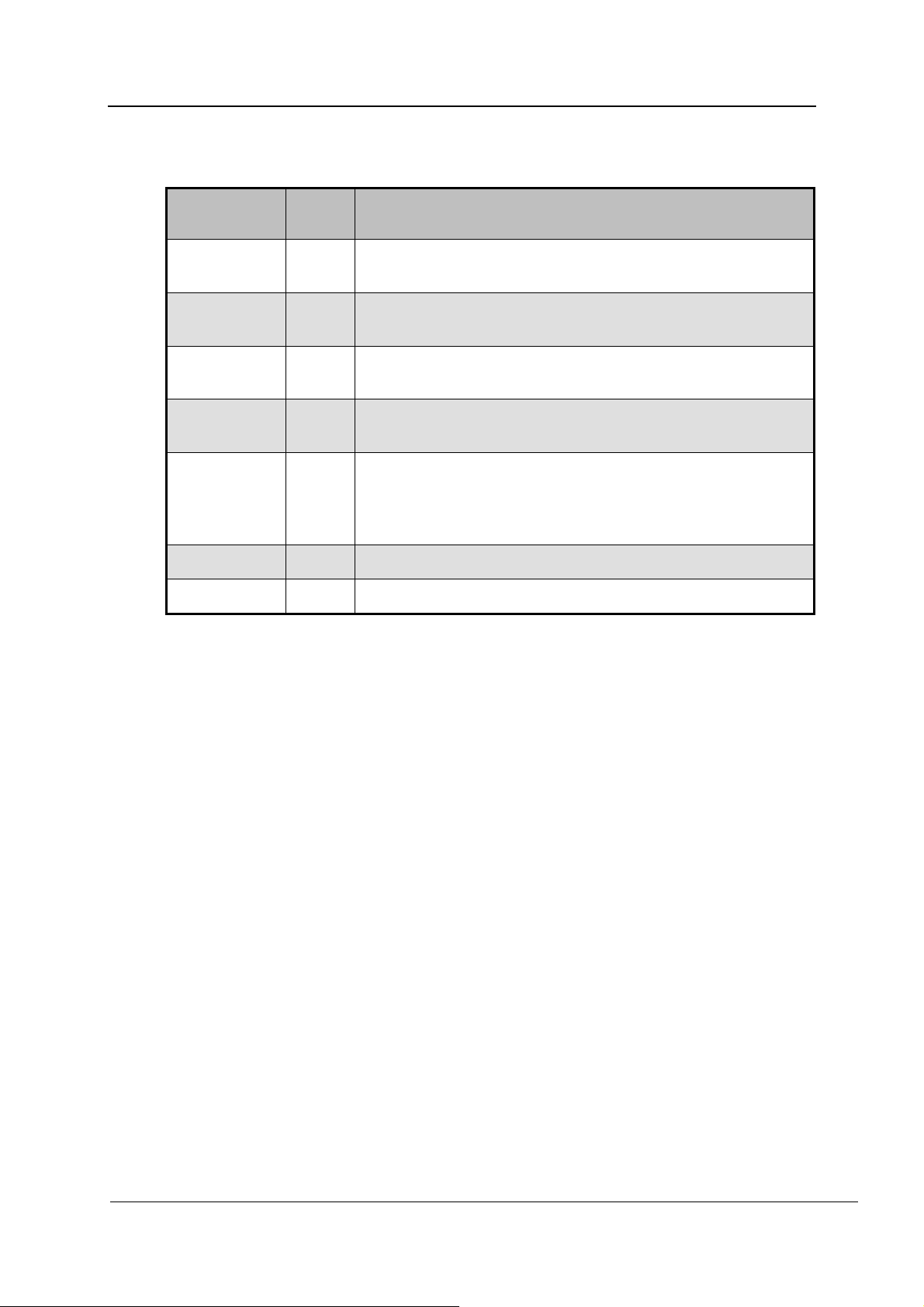
Program Button Application
Vario TD
Dental
Fill DOS1
Fill DOS3
Vario TD
Intensive
Cold water
rinse
Drain
Drying
8.1 Starting a program
Cleaning and disinfection program according to EN ISO 15883
for reprocessing loads with normal soiling.
Primes the detergent dispenser system after replenishing
detergent or replacing the container.
Primes the rinse aid/neutralizing agent dispenser system after
replenishing or replacing the container.
Cleaning and disinfection program according to EN ISO 15883
for reprocessing loads with heavy soiling.
For flushing out saline solution and rinsing heavily soiled loads,
e.g. for pre-rinsing soiling, residual disinfecting agent, or to
prevent items drying out and incrustations before running a full
load.
For draining the wash water, e.g. after a program cancellation.
Additional drying.
To start, proceed as follows:
Select a program using the P1 , P2 , P3 , or PRG buttons.
Press START .
REV.0.01_COD.500291_A4
Page 38
Page 39

8.2 Program structure
Drain
Drains water from the wash chamber.
Prewash
A prewash removes coarse soiling and substances which may cause foaming.
Main wash
Depending on the load, the main wash is generally carried out at temperatures
between 45°C and 65°C with the addition of appropriate detergent.
Interim rinse
In the interim rinse stages, chemicals from the previous phases are rinsed off and
neutralized.
Final rinse
To avoid deposits and corrosion on the load, DI water should preferably be used (if
available) for the final rinse.
Drying
Adequate drying reduces the risk of corrosion through residual moisture on the load.
PROGRAMS
REV.0.01_COD.500291_A4
Page 39
Page 40
PROGRAMS
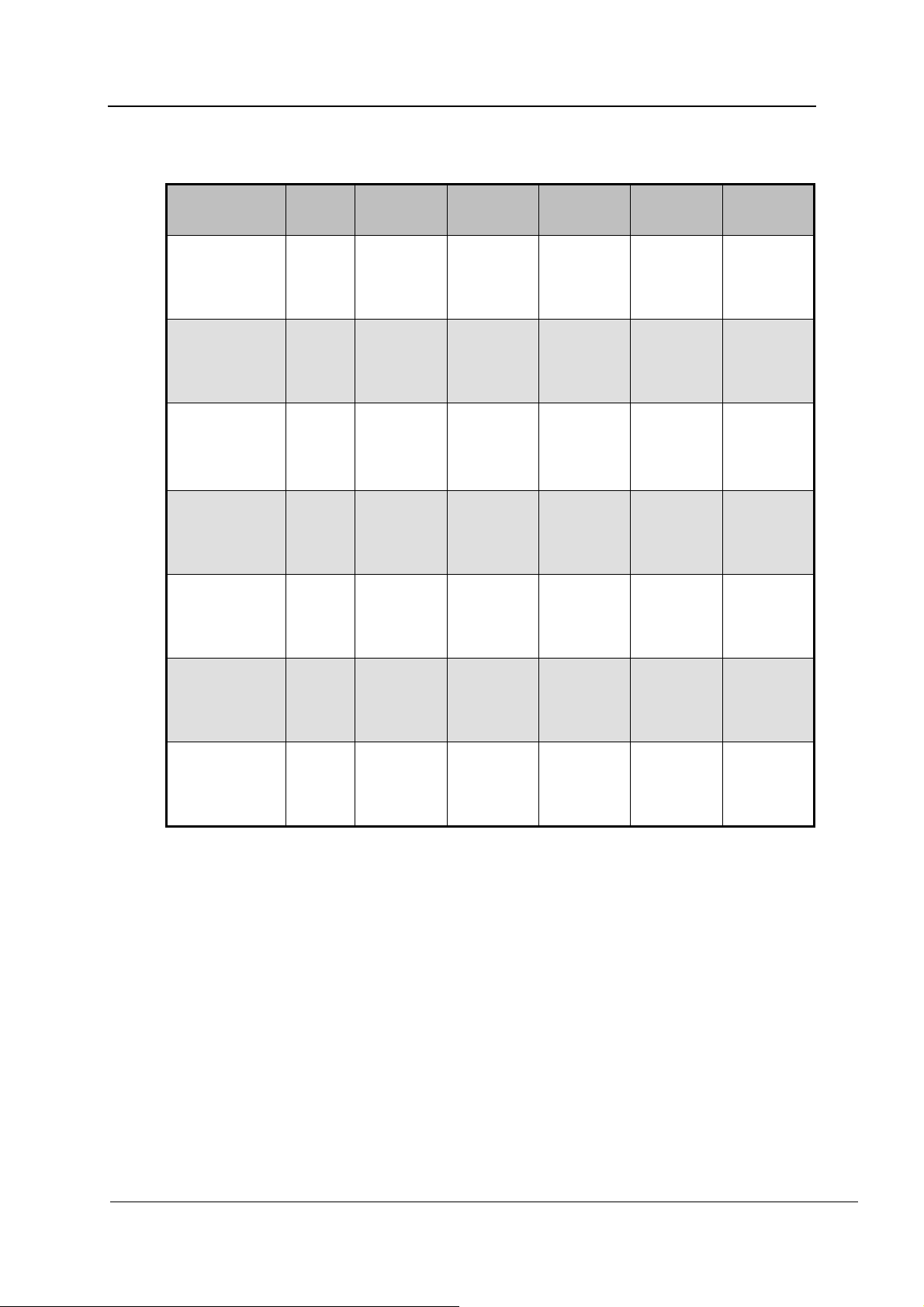
8.3 Program sequence
Program Button Prewash Main wash
Vario TD
Dental
Fill DOS1
Fill DOS3
Vario TD
Intensive
Cold water
rinse
Drain
Drying
6 l CW
120 s
4 l CW
6‰
2 s
4 l CW
6‰
2 s
6 l CW
300 s
6 l CW
60 s
6 l CW
6‰
55°C
600 s
7 l CW
10‰
55°C
900 s
Interim
rinse
6 l CW
60 s
6 l CW
60 s
6 l CW
60 s
6 l CW
60 s
Final rinse Drying
6 l AD
0.3‰
91°C
300 s
6 l AD
0.3‰
91°C
300 s
120°C
600 s
120°C
600 s
120°C
600 s
CW = Cold water
AD = Aqua destillata, DI water, deionized water
s = Holding time in seconds
°C = targeted holding temp in degrees Celsius
REV.0.01_COD.500291_A4
Page 40
Page 41
9. MACHINE STATUS
9.1 Ready for operation
The machine is ready for operation. The diagnostics function is active.
9.2 Program
MACHINE STATUS
When the machine is ready for operation and the door is closed, it is possible to press
the START button.
The program performs a defined series of phases. The diagnostics function and regulators
are active.
The user interface provides information on the phase in progress and the temperature in the
wash chamber.
The display indicates that the door is open and issues fault messages, e.g. lack of salt.
9.3 Fault messages
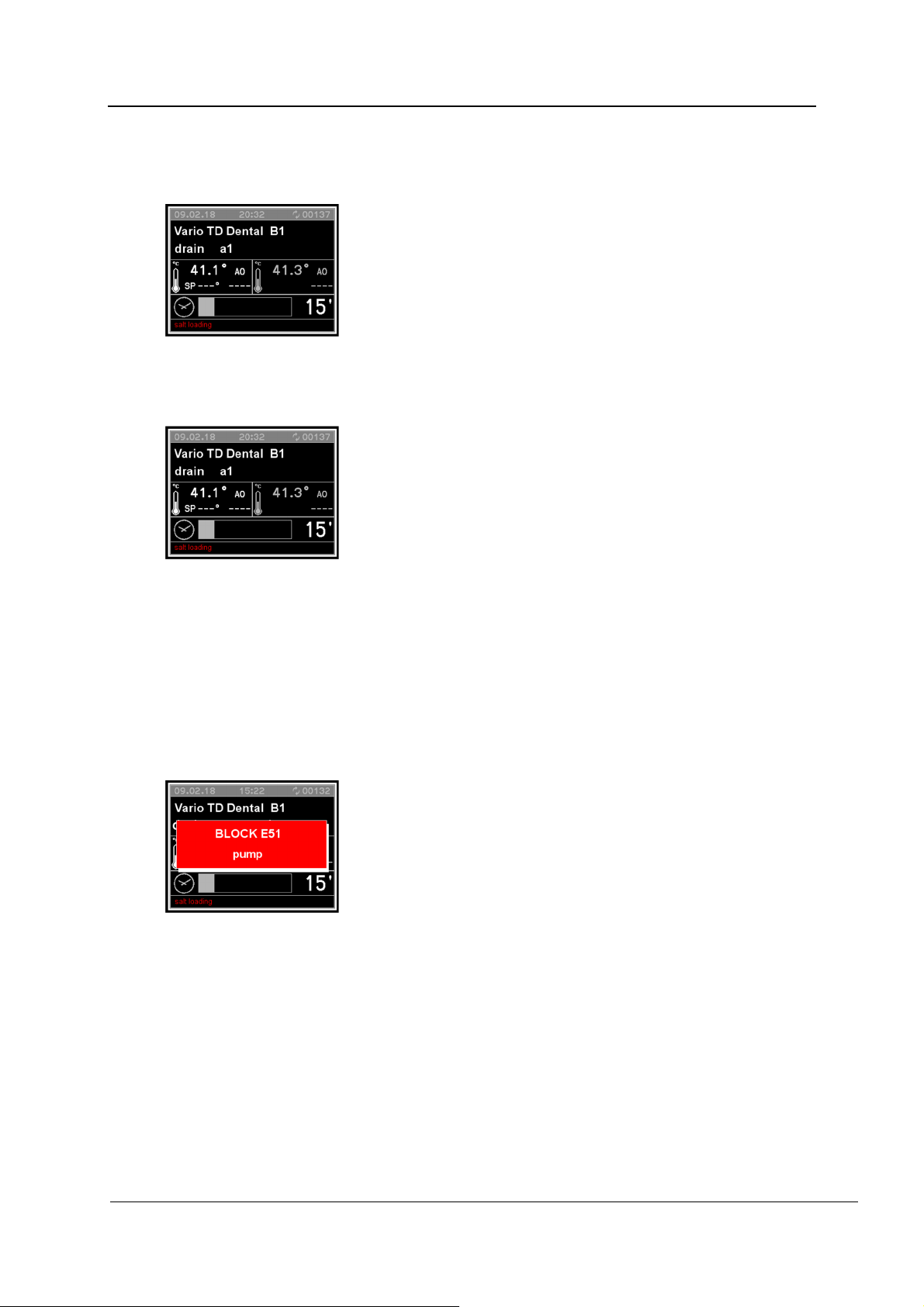
The diagnostics function has detected a fault that causes the machine to shut down. The
door remains locked.
The fault is indicated via the display. The machine can be made ready-to-use again using the
reset function (see “Resetting after fault messages”).
REV.0.01_COD.500291_A4
Page 41
Page 42

MACHINE STATUS
9.4 Power failure
In the event of a brief power failure during a running program, the current wash phase is
repeated and the program continued.
9.5 Resetting after fault messages
In the event of an fault message during a program in progress, the door remains locked. To
acknowledge the fault message, proceed as follows:
1. Press START and STOP simultaneously and hold for 5 seconds.
2. Press P2 and P1 in succession.
3. The reset is complete.
The machine is ready for operation again.
The door is unlocked and can be opened.
Note:
If the fault persists, e.g. due to a defective component, the machine will remain locked.
If this is the case, contact Miele Service or an authorized service technician.
REV.0.01_COD.500291_A4
Page 42
Page 43
10. MENU
The menu incorporates all administrative processes and settings.
Access to other sections of the menu is password-protected. The user password will be
provided during commissioning by Miele Service or an authorized service technician.
Access to programming and the menu are protected by different passwords:
First level: The User (USER) and Operator (ADMIN) password provides access to
programs and time settings.
Second level: The Technician (SERVICE) password allows unhindered access to all
menus and machine settings.
If the password is lost, contact Miele Service or an authorized service technician.
10.1 Entering the password
If a selected function is password-protected, a window appears in the display. This window
contains a series of asterisks.
Each asterisk represents a character of the password:
Use P1 and P2 to select characters and press START
to confirm individual entries.
The protected menu appears once the correct password
An fault message appears in the display if the password
MENU
is entered.
entered is incorrect.
This fault message must be confirmed by pressing STOP
. The display switches back to the original menu.
REV.0.01_COD.500291_A4
Page 43
Page 44
MENU
10.2 Setting the buzzer volume
Hold PRG pressed for 5 seconds.
Use P1 and P2 to scroll through the menu to the
following options. Each option must be confirmed individually
by pressing START :
Setting
Enter the password.
Select one of the following parameters using P1 and
P2 :
Confirm your selection by pressing START .
Use P1 and P2 to select the volume. Select “0” to
switch off the buzzer.
Save the selected volume by pressing START .
Exit the menu by pressing STOP .
Parameters
System
Parameter 1.07:
Set the keypad tone volume.
Parameter 1.08:
Set the buzzer volume at end of program.
Parameter 1.09:
Set the alarm tone volume.
10.3 Setting the date and time
The controls have a real-time clock. Times are saved for historical data.
Hold PRG pressed for 5 seconds.
Use P1 and P2 to scroll through the menu to the
following options. Each option must be confirmed individually
by pressing START :
Setting
Clock
Enter the password.
The hours, minutes, and the date can be set using P1 and
P2 .
Each value must be confirmed individually by pressing
START .
Exit the menu by pressing STOP .
REV.0.01_COD.500291_A4
Page 44
Page 45
10.4 Outputting the historical data
Hold PRG pressed for 5 seconds.
Use P1 and P2 to scroll through the menu to the
following options. Each option must be confirmed individually
by pressing START :
Setting
Parameters
Enter the password
Select one of the following parameters using P1 and P2
:
Confirm your selection by pressing START .
Select one of the following options with P1 and P2 :
Confirm your selection by pressing START .
Exit the menu by pressing STOP .
Parameter 1.04:
Compact printout at end of program
Parameter 1.05
Continuous printout while program is running
Parameter 1.04:
Parameter 1.05:
MENU
System
0 = No printout
1 = Graphic printout (printer)
2 = Tabular printout (printer)
3 = Print to USB interface
(Service only)
0 = No printout
1 = Continuous printout (printer)
REV.0.01_COD.500291_A4
Page 45
Page 46
MENU
10.5 Selecting a language
Use the following parameters to select the display output language.
Hold PRG pressed for 5 seconds.
Use P1 and P2 to scroll through the menu to the
following options. Each option must be confirmed individually
by pressing START :
Setting
Parameters
Enter the password
System
Select one of the following parameters using P1 and P2
:
Confirm your selection by pressing START .
Use P1 and P2 to select a language and press START
to confirm. The language will be changed immediately.
Exit the menu by pressing STOP .
Parameter 2.04:
Select the language.
REV.0.01_COD.500291_A4
Page 46
Page 47
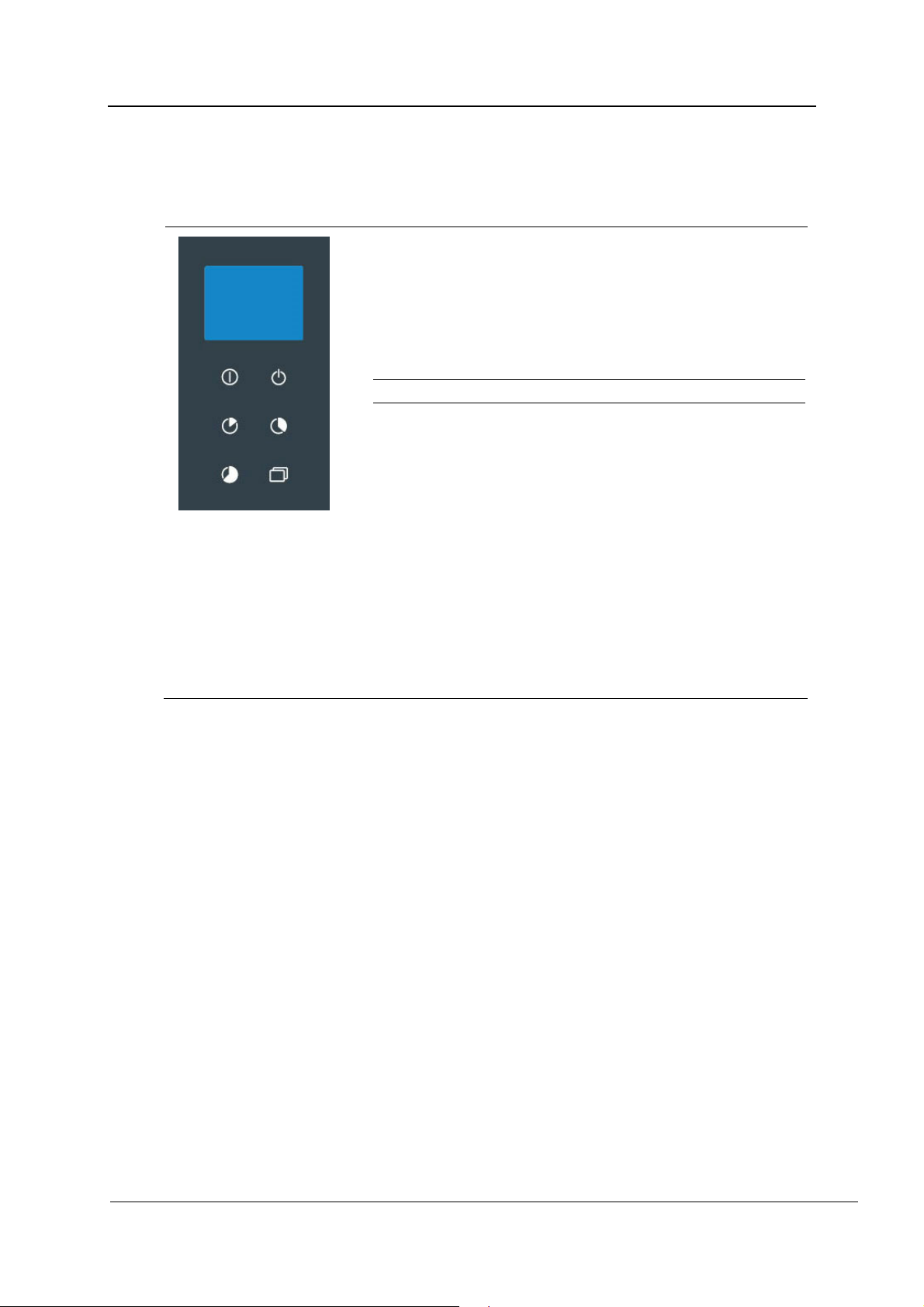
10.6 Changing user names
User names can be changed using the following parameters. Contact Miele Service to
manage user profiles.
Hold PRG pressed for 5 seconds.
Use P1 and P2 to scroll through the menu to the
following options. Each option must be confirmed individually
by pressing START :
Setting
Parameters
Enter the password
System
Select the following parameters using P1 and P2 :
Parameter 1.01:
Confirm your selection by pressing START .
Use P1 and P2 to select a user and press START to
confirm.
User names can consist of up to 16 characters. Each
character must be selected individually with P1 and P2
and confirmed by pressing START .
A user name can consist of numbers, letters, and spaces.
Exit the menu by pressing STOP after entering the last
character.
Set the user names.
MENU
REV.0.01_COD.500291_A4
Page 47
Page 48
MENU
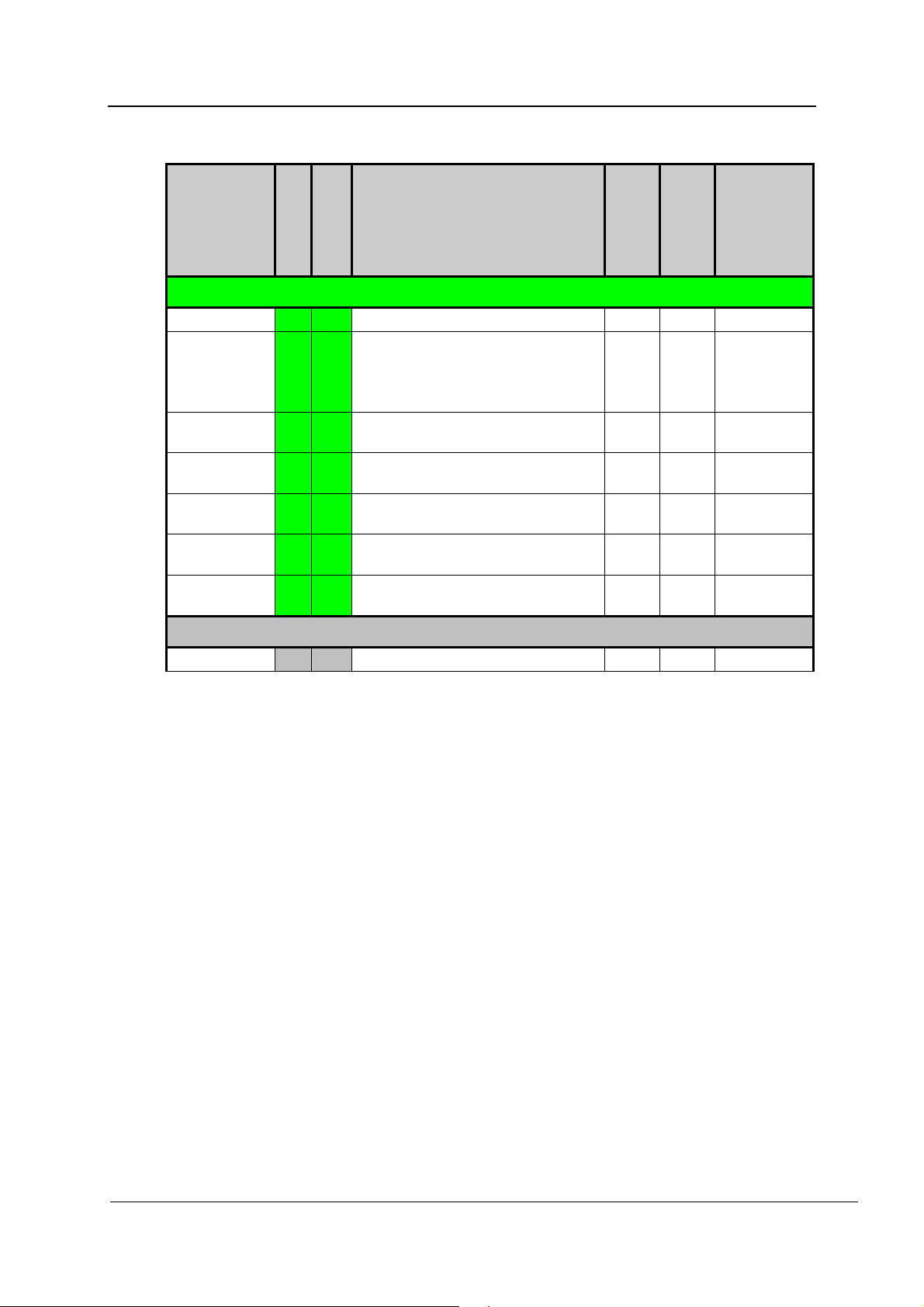
10.7 Parameter overview
CATEGORY
DESCRIPTION
MIN.
MAX.
UDM
SECTION
PARAMETER
SYSTEM DATA
MACHINE 1 01 User name (16 characters) ‚ ~ CHAR_STR
Graphic printout at the end of the
PRINTOUT 1 04
PRINTOUT 1 05
KEYBOARD 1 07
KEYBOARD 1 08
KEYBOARD 1 09
KEYBOARD 1 13
program
(0: No print out, 1: Graphic printout,
2: Tabular printout, 3: Print to USB)
Printout of current program results;
0=OFF 1=ON
Buzzer volume – infeed side
(0: buzzer OFF)
Buzzer volume – end of program
(infeed side)
Buzzer alarm volume – infeed side
(0: buzzer OFF)
Show A0 value in display; 0=OFF
1=ON
0 3 NUM
0 1 SEL
0 50 NUM
0 50 NUM
0 50 NUM
0 1 SEL
MACHINE DATA
KEYBOARD
2 04
Select language 0 7 SEL
REV.0.01_COD.500291_A4
Page 48
Page 49

HISTORICAL DATA
11. HISTORICAL DATA
Operating data is recorded while the program is running.
The internal memory is able to record up to 200 programs. If the memory is full, the oldest
data is overwritten.
11.1 Outputting batch protocols retrospectively
Internally stored protocols can be output retrospectively from the machine.
To do this, proceed as follows:
Press PRG for 5 seconds to access the menu.
Press P1 and P2 to scroll through the menu:
Select “Print history” and press START to confirm your selection.
Select “Print” and press START to start printing.
“Printing in progress” is shown in the display.
To cancel, press STOP to exit the menu.
11.2 External software
Data is retrieved directly via the documentation software.
REV.0.01_COD.500291_A4
Page 49
Page 50
MESSAGES AND WARNINGS
12. MESSAGES AND WARNINGS
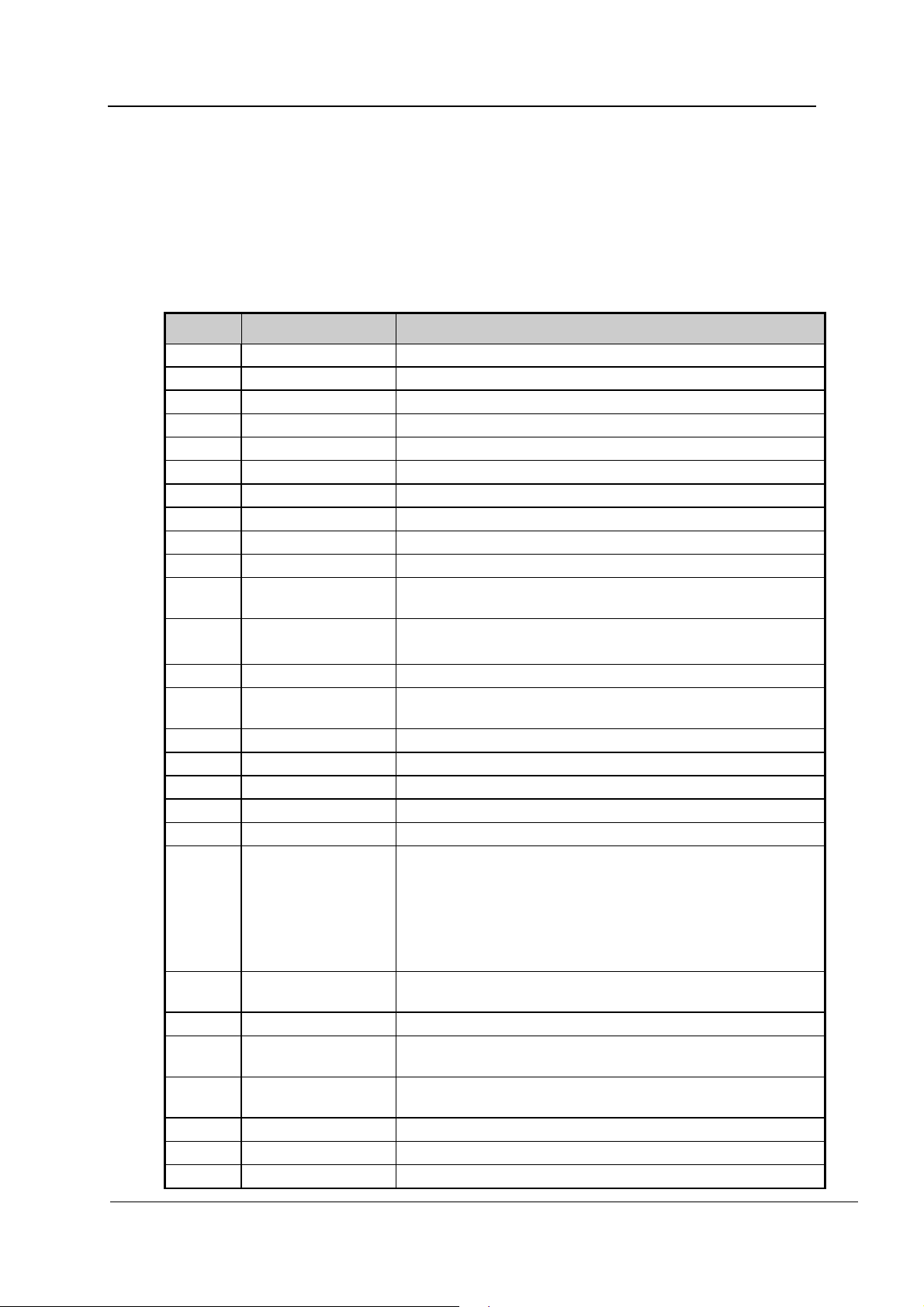
Messages and warnings may appear in the display during operation.
A warning remains on display until the underlying cause is dealt with. A warning interrupts the
current program.
12.1 List of warnings
No. Display message Designation
1 Power failure Signals a power failure during a program.
2 Door open Door open or not locked during a program.
4 Open door lock Lock activated with door open.
7 Door fault Door fault.
9 Door unlocked Door lock fault.
11 No cold water Water intake fault (cold water).
13 No DI water Water intake fault (DI water).
15 CW/DI water fault Required water volume (cold water or DI water) not reached.
17 Dos.1 missing Lack of process chemicals (detergent).
20 Dos.3 missing Lack of process chemicals (rinse aid/neutralizing agent).
23 Drain timeout
24 Fan
25 Min°C drying Selected air temperature not reached during drying.
26 Max°C prewash
27 Lim°C sump Wash chamber temperature above maximum value.
28 Lim°C air Dryer temperature above maximum value.
30 Sump probe Defective temperature sensor – operation sensor (sensor 1)
31 Sump probe 2 Defective temperature sensor – redundant sensor (sensor 2).
32 Air probe Dryer temperature probe failure.
34 Temp. control
35 Serial connect.1
37 CAN fault No connection between master and slave (CANbus).
39 SumpHeatFault
46 Pump
47 FlowM 1 fault DOS1 dispenser fault (detergent).
50 FlowM 3 fault DOS3 dispenser fault (rinse aid/neutralizing agent).
51 COLD WATER FLOW Water intake fault (cold water).
Water drainage problem. Drainage not completed in time
allocated.
Fan set to full speed and pressure switch open-circuited.
Fan switched off and pressure switch close-circuited.
Wash chamber temperature exceeded selected value during
prewash.
Appears when all the following conditions are met:
a) The wash chamber temperature is above the selected
value.
b) The temperature difference between the two temperature
sensors is greater than 2°C.
c) The wash chamber heating or steam heating has failed.
No connection between the main PCB and the controls on the
infeed side.
No heating in wash chamber. No temperature increase during
allocated time.
Circulation pump on; pressure switch close-circuited.
Circulation pump is rotating in the wrong direction.
REV.0.01_COD.500291_A4
Page 50
Page 51
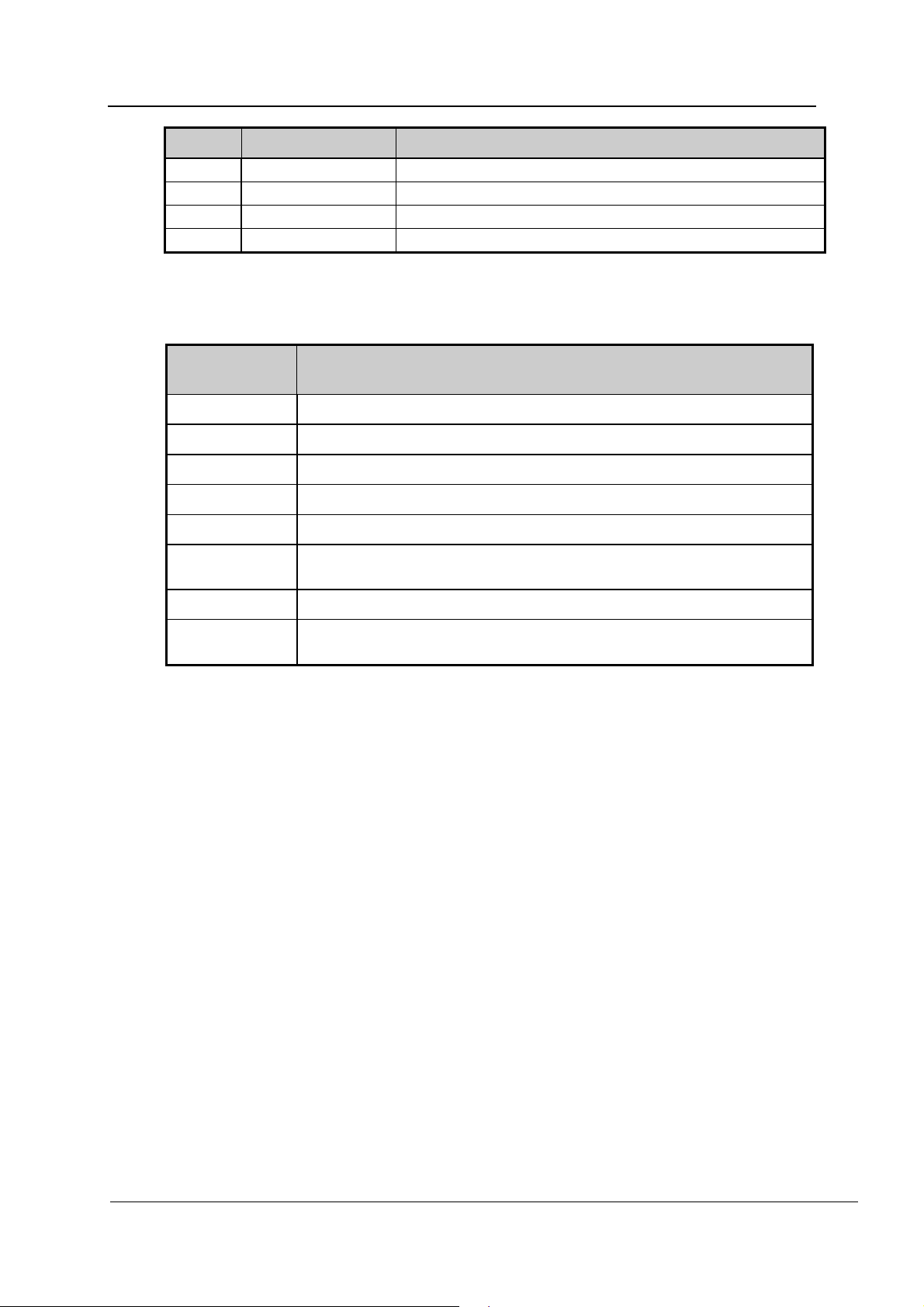
No. Display message Designation
53 DI WATER FLOW Water intake fault (DI water).
54 Air filter Air filter clogged.
58 SumpHeatFault No temperature increase during allocated time.
60 Time Maximum time exceeded in main wash.
12.2 List of messages
MESSAGES AND WARNINGS
Display
Designation
message
Press start
Refill salt
Open door
Wait
Close door!
Print
No disinf.
MAINTENANCE
A program can be started.
Refill the reactivation salt container.
The door is open and not locked.
General reminder to wait before next input.
Close the door.
Prints the historical data. No further operations are possible during
printing.
The program was interrupted and the load was not disinfected.
Maintenance is required by Miele Service or an authorized service
technician.
REV.0.01_COD.500291_A4
Page 51
Page 52
PROCESS DOCUMENTATION
13. PROCESS DOCUMENTATION
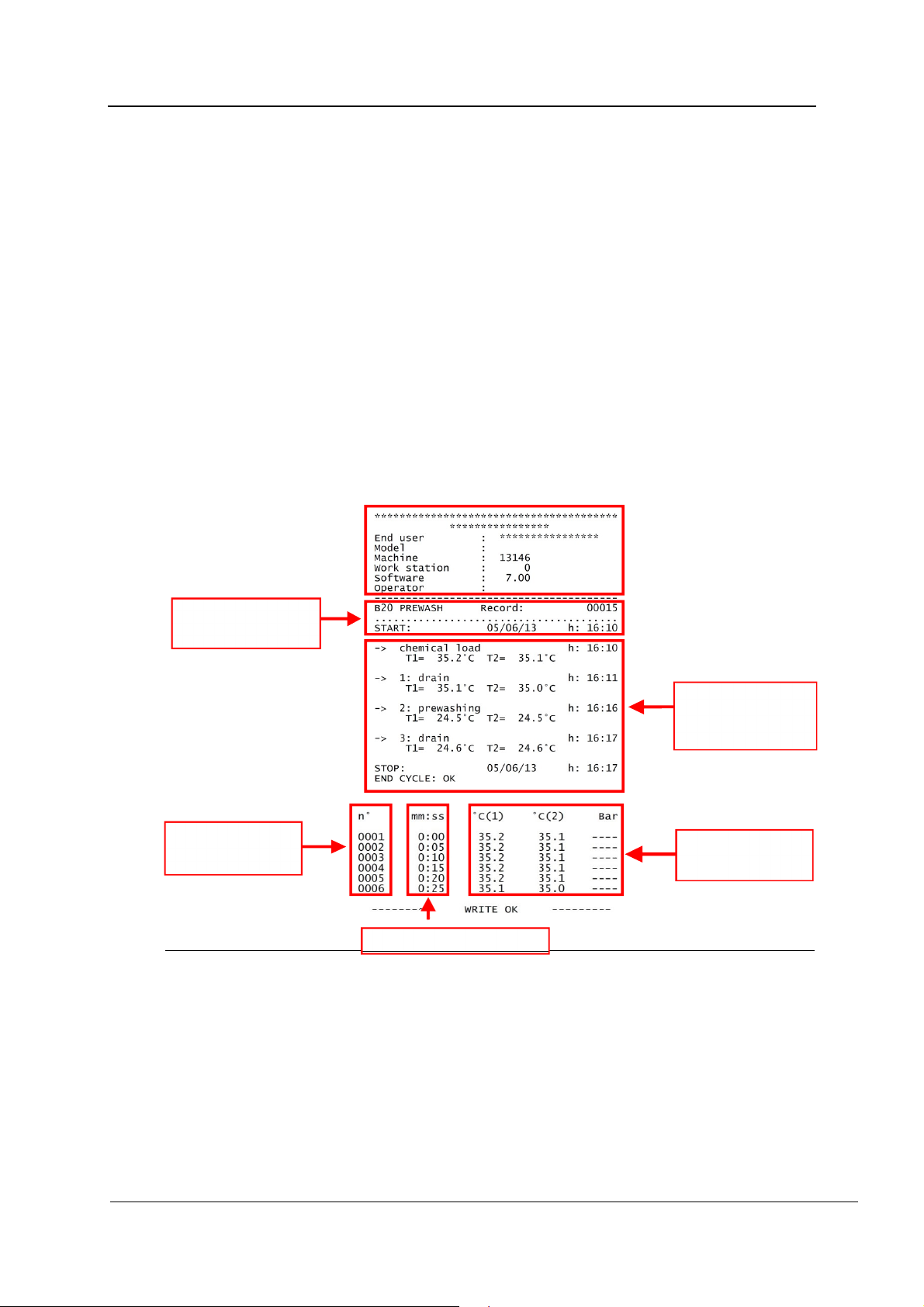
13.1 Serial interface
The RS232 interface is intended for connecting devices such as a PC or printer using the
standard RS232 protocol in compliance with EN/IEC 60950.
Printers are connected as described below:
Interface: RS232
Baud rate: 2,400 bps
Data length: 8 bits/chr
Parity: None
Handshake: XON/XOFF 40 COLUMNS
The format of the protocol is as follows:
Information on
program.
No. of
measurements
13.2 User administration
Several user profiles can be created and managed in the controls. For more information,
please contact Miele Service or an authorized service technician.
Times of measurements
Information on
program phases.
Recorded values
13.3 USB port
Testing and transmission point for the Technical Service.
REV.0.01_COD.500291_A4
Page 52
Page 53
14. MAINTENANCE
14.1 General recommendations on maintenance
Maintenance for the machine described in this manual can be divided into “Routine
maintenance” and “Special maintenance”.
The machine must be completely switched off. The person performing the task must ensure
that there is no one in the vicinity of the machine during the work.
A disinfection program to disinfect the wash chamber must be run before maintenance work
is performed, e.g. Vario TD Dental. Personal protective gear must be worn.
14.2 Maintenance reminder
The machine displays the “MAINTENANCE” reminder after a specified time or after a
specified number of operating hours. This reminder does not interfere with the normal use of
machine.
14.3 Routine maintenance work
Routine maintenance includes all operations aimed at keeping various parts of the machine
clean and functional. This must be performed on a regular basis or when it is considered
necessary.
This work is the responsibility of the machine operator. The following table shows the various
routine maintenance tasks, their frequency, and who is to perform them.
Each task is described in more detail in the following tables.
MAINTENANCE
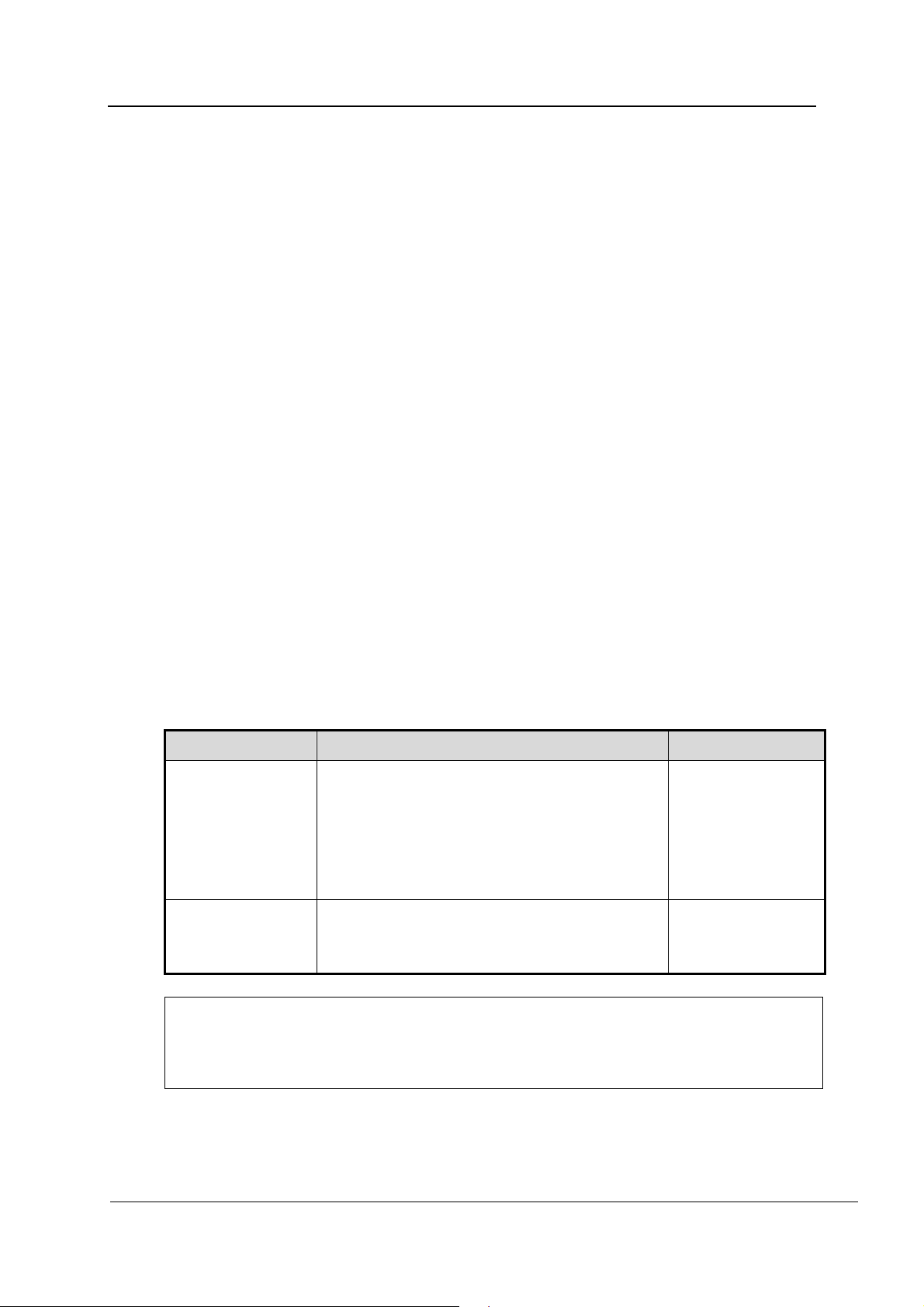
14.4 Table of routine maintenance tasks
Frequency Action User
Daily
Every week
Note:
Routine maintenance tasks must be performed according to the table.
However, we recommend performing work as and when needed and not to wait until the
next scheduled maintenance.
Check the fill level in the containers before
starting a program.
Clean the casing.
Clean the filters in the wash chamber.
Check and clean the filter for the dental
handpieces daily.
Check that the spray arms can rotate freely.
Open caps and rinse inside the spray arms.
Check and clean the nozzles.
USER
USER
REV.0.01_COD.500291_A4
Page 53
Page 54
MAINTENANCE
WARNING
Never clean the machine or near vicinity with a water hose or a pressure washer.
Cleaning the casing and the control panel
Responsibility:
Daily.
USER
For surface disinfection, use a listed agent recommended by the manufacturer.
Cleaning the casing:
Use a damp cloth to clean the outer body of the machine. Use only pH-neutral detergents.
Do not use any abrasive cleaning agents, solvents, and/or thinners.
Cleaning the control panel:
Clean the control panel with a damp cloth and dish detergent. Do not use any abrasive
cleaning agents, solvents, and/or thinners.
REV.0.01_COD.500291_A4
Page 54
Page 55
MAINTENANCE
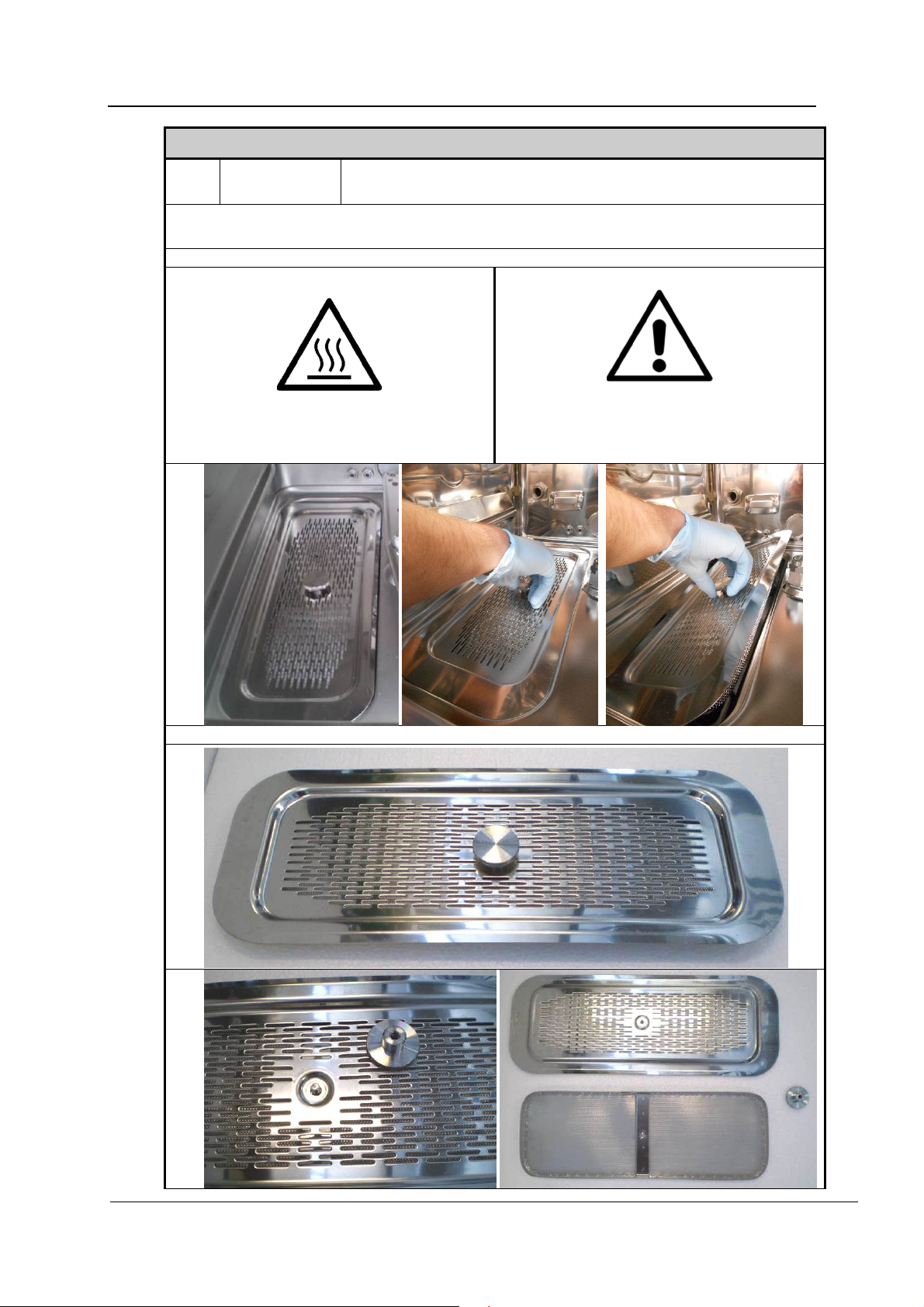
Cleaning the filters in the chamber
Responsibility:
USER
Daily.
Procedure:
Clean the filters in the chamber as follows:
Open the door and remove the load carrier.
Warning:
Hot surfaces
Danger of injury:
Caution is required as the filters may
contain sharp objects.
Remove the filter combination.
REV.0.01_COD.500291_A4
Page 55
Page 56
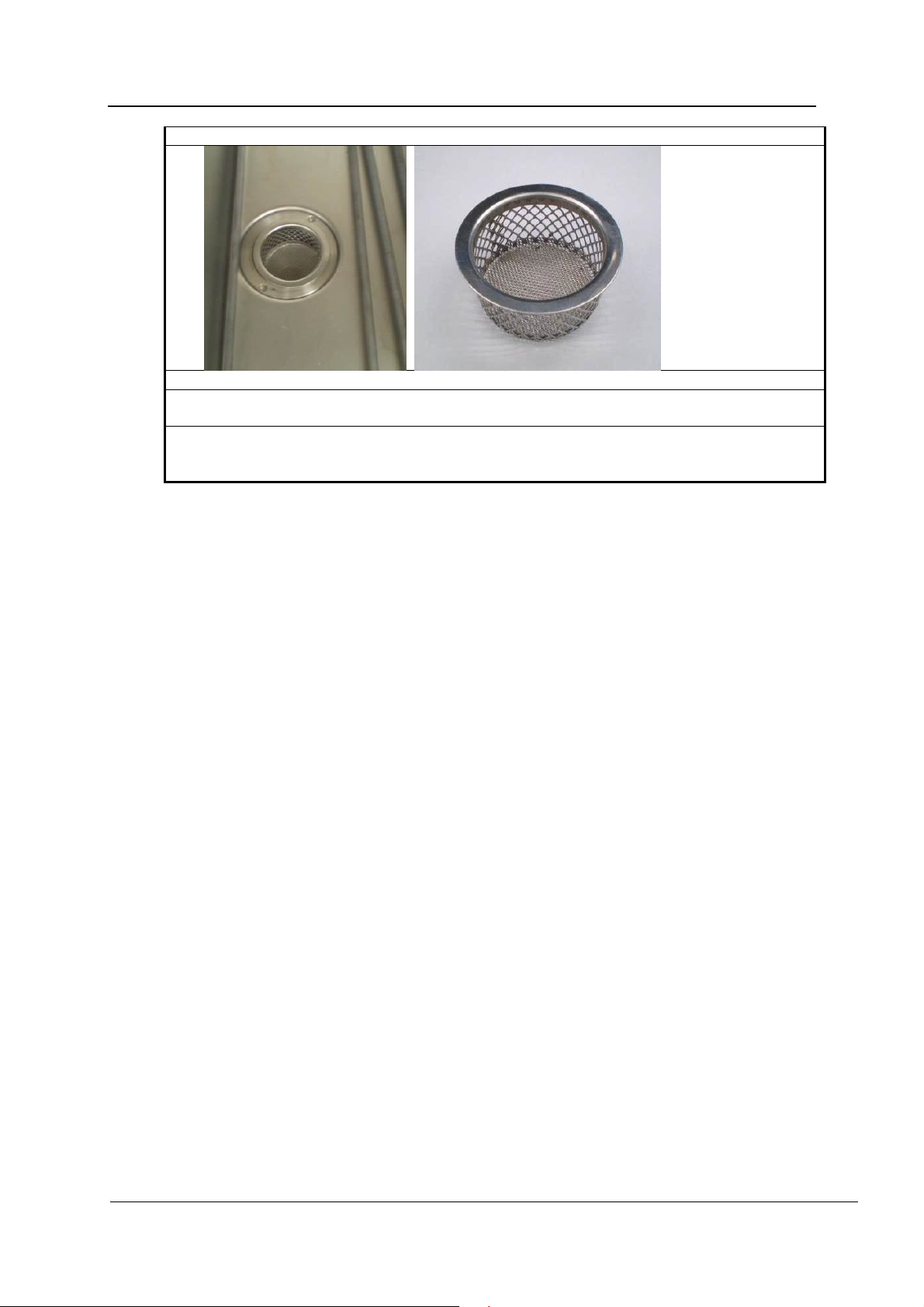
MAINTENANCE
Unscrew the threaded bolt and remove the cover.
Remove the filter from the drain.
Clean the filters. Remove residues.
Remove any deposits from the drain and clean.
Reinstall the drain filter.
Reinstall the cover and secure it using the threaded bolt.
Reinstall the filter combination.
REV.0.01_COD.500291_A4
Page 56
Page 57
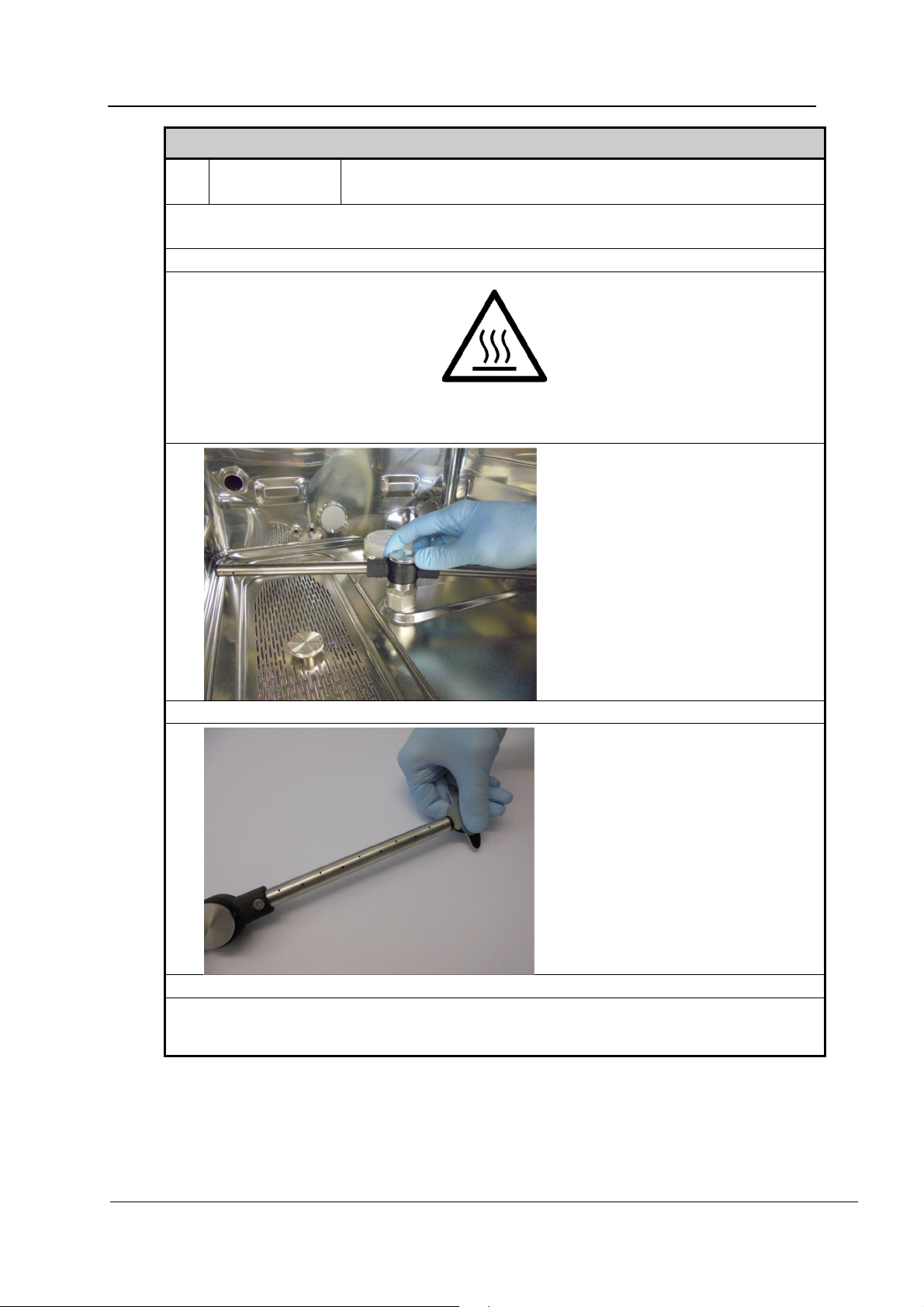
MAINTENANCE
Cleaning the spray arms
Responsibility:
Weekly
USER
Procedure:
Clean the spray arms as follows:
Open the door and remove the load carrier.
Warning:
Hot surfaces
Loosen and remove both spray arms.
Use the tool provided to unscrew and remove the end caps on the spray arms.
Thoroughly rinse out the spray arms.
Put the end caps back in place and screw tightly.
Reinstall the spray arms.
REV.0.01_COD.500291_A4
Page 57
Page 58
MAINTENANCE
14.5 Special maintenance
Special maintenance tasks must only be carried out by Miele Service or an authorized service
technician.
If your machine requires special maintenance, please contact Miele Service.
Table of special maintenance work
Maintenance covers the following:
Frequency Maintenance Operator
Special
maintenance tasks
must be carried out
by Miele Service
after 1,000
operating hours
or every 12
months at the
latest.
Electrical safety according to national
regulations
Filters in the water intake valves
Replacing the pre-filter
Replacing the HEPA filter
Dispenser systems
Temperature sensor, thermo-electric
measurements
Spray arms
Safety thermostat
Door seal
Steam condenser
Drain pump
Pressure switch
Drain hose
Intake hoses
SERVICE
REV.0.01_COD.500291_A4
Page 58
Page 59

PROBLEMS – CAUSES – REMEDY
15. PROBLEMS – CAUSES – REMEDY
15.1 Introduction
This section covers potential problems which may occur during machine operation, along
with their causes, and solutions.
Should the problems persist or reoccur after following the instructions in this section, contact
Miele Service or an authorized service technician.
15.2 Problems (P) – Causes (C) – Remedy (R)
P: MACHINE DOES NOT START:
C: Circuit breaker has tripped.
R: Reset the circuit breaker.
C: Machine is switched off.
R: Press the ON/OFF button.
P: PROGRAM DOES NOT START:
C: The door is not closed correctly.
R: Check door closure.
P: PROGRAM ABORTS:
C: Insufficient process chemicals.
R: Switch machine off and refill container.
C: Water valve closed.
R: Turn on water supply.
P: MACHINE DOES NOT REACH SET TEMPERATURE FOR THE SELECTED
PROGRAM:
C: Deposits on sensor in wash chamber.
A: Clean sensor.
P: MACHINE DOES NOT DRY
C: Air filter in drying system soiled or clogged.
R: Replace filter. Special maintenance must be performed by Technical Service.
P: WHITE DEPOSITS IN WASH CHAMBER
C: Water softener depleted and requires salt.
R: Refill salt container.
:
:
REV.0.01_COD.500291_A4
Page 59
Page 60
DISPOSING OF YOUR OLD MACHINE
16. DISPOSING OF YOUR OLD MACHINE
Please note that the machine may contain contamination from blood and other bodily fluids,
pathogens, facultative pathogens, genetically modified material, toxic or carcinogenic
substances, heavy metals, etc., and must be decontaminated before disposal.
For environmental and safety reasons, dispose of all process-chemical residues in
accordance with safety regulations. Wear gloves and protective goggles.
Remove or disable the door lock prior to disposal of the machine, so that children cannot
become trapped inside. Then make appropriate arrangements for safe disposal of the
machine.
Old electrical and electronic appliances often contain valuable materials. However, they also
contain harmful substances which were essential for their correct functioning and safety.
These could be hazardous to human health and to the environment if disposed of with
household waste or if handled incorrectly. Therefore, please do not dispose of your old
machine with household waste.
Please dispose of it at your local community waste collection/recycling centre. Consult your
dealer if necessary. You are also responsible (by law, depending on country) for deleting any
personal data that may be stored on the appliance being disposed of. Please ensure that
your old appliance poses no risk to children while being stored for disposal.
REV.0.01_COD.500291_A4
Page 60
Page 61

Page 62

Page 63

Page 64

Canada
Importer
Miele Limited
Professional Division
161 Four Valley Drive
Vaughan, ON L4K 4V8
Phone: 1-888-325-3957
Fax: 1-800-803-3366
www.mieleprofessional.ca
[email protected]
Miele Professional Technical Service
Phone: 1-888-325-3957
Fax: 1-800-803-3366
[email protected]
Manufacturer: Steelco S.p.A.
Via Balegante, 27 31039 Riese Pio X (TV) – Italy
Alteration rights reserved/Creation date: 2019-02-15
0051
 Loading...