

Page 1
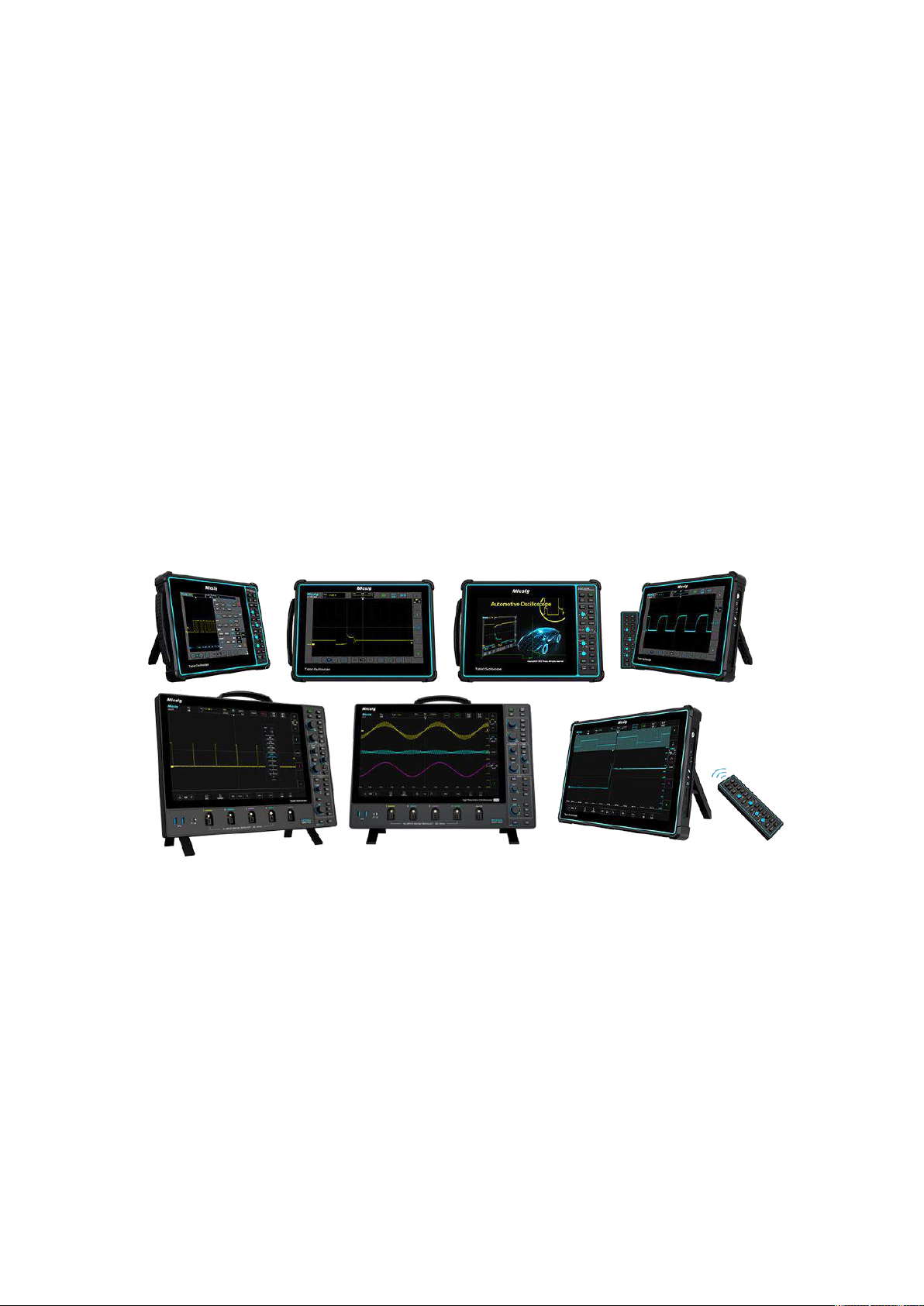
Micsig Oscilloscope
SCPI Commands Manual
*Applicable to High Resolution Oscilloscope MHO 3 Series, MDO series ,
ETO series, STO series , SATO series, TO series , ATO series
Shenzhen Micsig Technology Co., Ltd.
Page 2

Contents
1. Document Introduction................................................................................................ 1
1.1 Purpose of this document ............................................................................... 1
1.2 Target Audience ................................................................................................. 1
1.3 Reference Documentation .............................................................................. 1
1.4 Terminology ....................................................................................................... 1
2. product description ...................................................................................................... 2
2.1 Product Background ......................................................................................... 2
2.2 Product target user groups and demand description ............................... 2
2.3 Roles in the product .......................................................................................... 2
2.4 Business workflow ............................................................................................ 2
2.5 Target operating software and hardware environment ........................... 3
2.6 Constraints and Restrictions........................................................................... 3
2.7 Applicable interface .......................................................................................... 3
3. SCPI Requirements ........................................................................................................ 4
Page 3

3.1 Introduction to SCPI ............................................................................................... 4
3.1.1 Command Format ....................................................................................... 4
3.1.2 Explanation of symbols .............................................................................. 4
3.1.3 Parameter Types .......................................................................................... 5
3.1.4 Command abbreviation ............................................................................. 6
3.2 Command system ................................................................................................... 6
3.2.1 Common commands .................................................................................. 6
3.2.2 :MENU menu function commands ........................................................... 7
3.2.3 Sampling Command Subsystem ............................................................ 13
3.2.4 Channel command subsystem ............................................................... 22
3.2.5 Math command subsystem ..................................................................... 32
3.2.6 Cursor Command Subsystem ................................................................. 50
3.2.7 Display command subsystem ................................................................. 61
3.2.8 Measurement command subsystem ..................................................... 66
3.2.9 Trigger command subsystem ................................................................. 80
3.2.10 Time base command subsystem ....................................................... 117
Page 4

3.2.11 Storage command subsystem ............................................................ 119
3.2.12 Bus configuration command subsystem ......................................... 125
3.2.13 Reference waveform command subsystem .................................... 141
3.2.14 AUTO Setting Subsystem ..................................................................... 145
3. 2. 15 Waveform command subsystem...................................................... 151
Page 5
1
1. Document Introduction
1.1 Purpose of this document
This document aims to define the SCPI requirements for oscilloscopes and to
provide preparation for Micsig oscilloscopes to support the SCPI protocol and
comply with the IEEE488.2 standard.
1.2 Target Audience
Developers and testers
1.3 Reference Documentation
1.4 Terminology
Abbreviations and terms
explain
SCPI
Standard Commands for Programmable Instruments Manual
…
Page 6
2
2. product description
2.1 Product Background
The SCPI command processing module is embedded in our products to comply
with the IEEE488.2 standard. As an SCPI instrument, we must develop it strictly in
accordance with the provisions of the IEEE488.2 standard for instruments.
2.2 Product target user groups and demand description
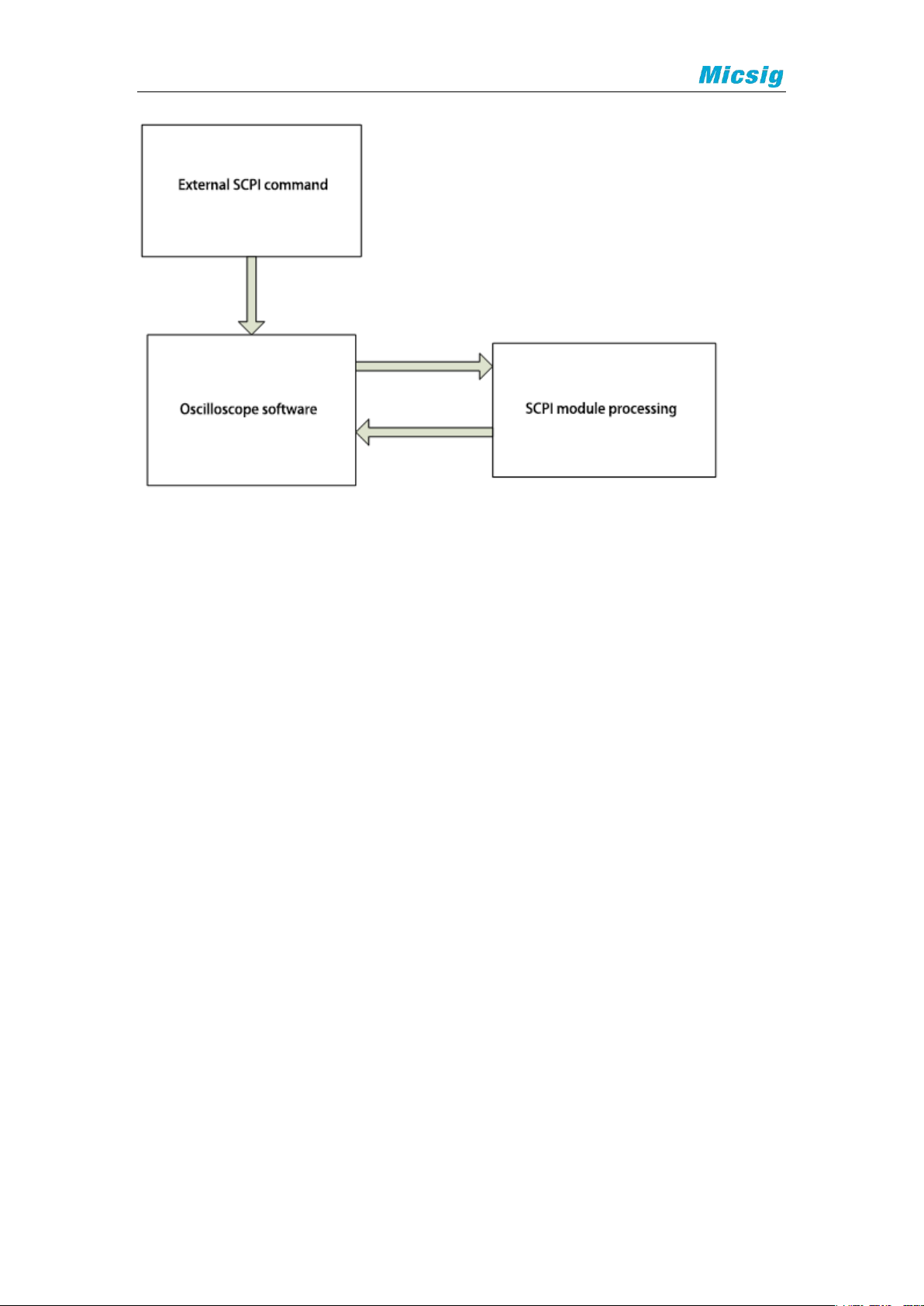
The SCPI command processing module is only for the software itself and is used
to process all SCPI commands sent to the software from outside the device.
2.3 Roles in the product
Role Name
Responsibilities
Common Command System
Handles common commands for all instruments
Essential command system
Essential commands for handling instruments and
equipment
other
Optional commands for handling instrumentation
2.4 Business workflow
Page 7
3
2.5 Target operating software and hardware environment
Operating system:Android
Hardware environment:Tablet oscilloscope
2.6 Constraints and Restrictions
Since this module is a module of the software, the constraints and limitations are
the same as those of the product.
2.7 Applicable interface
USB, LAN, WIFI.
Page 8

4
3. SCPI Requirements
3.1 Introduction to SCPI
3.1.1 Command Format
SCPI commands are tree-like hierarchical structures, including multiple
subsystems, each of which consists of a root keyword and one or more
hierarchical keywords. The command line usually starts with a colon ":";
keywords are separated by colons ":", followed by optional parameter settings; a
question mark "? " is added after the command line to indicate a query for this
function; commands and parameters are separated by "spaces".
3.1.2 Explanation of symbols
1、 big parantheses { }
The content in curly brackets is the parameter options. Parameter items are
usually separated by a vertical line "|". When using a command, you must select
one of the parameters.
2、 Vertical Line |
The vertical bar is used to separate multiple parameter options. When using a
command, you must select one of the parameters.
3、 Square brackets [ ]
The text in square brackets is optional.
Page 9

5
4、 Triangle brackets < >
The parameters in the triangle brackets must be replaced by a valid value.
3.1.3 Parameter Types
1、 Bool
The parameter values are "OFF", "ON", "0", or "1".
2、 Discrete
The parameter values are the listed options.
3、 Integer
Unless otherwise specified, the parameter can be any integer (NR1 format) within
the valid value range. Note that please do not set the parameter to decimal
format at this time, otherwise an exception will occur.
4、 Real
The parameter can be any real number within the valid value range. The
command accepts parameter input in decimal (NR2 format) and scientific
notation (NR3 format).
5、 ASCII string
The parameter value is a combination of ASCII characters.
Page 10

6
3.1.4 Command abbreviation
All commands are not case sensitive and can be all uppercase or lowercase.
However, if you want to abbreviate, you must enter all capital letters in the
command format.
3.2 Command system
3.2.1 Common commands
*IDN
Function:Read oscilloscope related information. Include version number,
manufacturer, product model, and product serial number.
Format:*IDN?
Return format:
Micsig,< model>,<serial number >,XXXXX
<model>:instrument model.
<serial number >:Instrument serial number.
XXXXX:Instrument software version.
Example:
Page 11

7
Micsig,MDO5004,390000029,1.388.132
3.2.2 :MENU menu function commands
3.2.2.1 :MENU:AUTO
Automatic configuration can quickly configure the oscilloscope to display the
best effect for the input signal. The automatic configuration includes:applicable
to single channel and multiple channels ; automatic adjustment of signal
horizontal scale , vertical scale and trigger level ; oscilloscope waveform reverse
is turned off, bandwidth is set to full bandwidth, coupling mode is DC coupling,
sampling mode is normal sampling ; trigger is set to edge trigger, trigger mode is
automatic.
Function:Start or stop the automatic setting (auto range).
Automatic configuration can quickly configure the oscilloscope to display the
best effect for the input signal. The automatic configuration includes:applicable
to single channel and multiple channels ; automatic adjustment of signal
horizontal scale , vertical scale and trigger level ; oscilloscope waveform reverse
is turned off, bandwidth is set to full bandwidth, coupling mode is DC coupling,
sampling mode is normal sampling ; trigger is set to edge trigger, trigger mode is
automatic.
Format: :MENU:AUTO <bool>
Page 12

8
:MENU:AUTO?
Among them, <bool>, Boolean type, {{0|OFF}|{1||ON}}.
Return format:The query returns "0" or "1".
Example:
The following command turns on the display of channel 1.
:MENU:AUTO ON or:MENU:AUTO 1
The query below returns "1".
:MENU:AUTO?
3.2.2.2 :MENU:RUN
Function:Make the oscilloscope start running, meet the trigger conditions,
and start collecting data.
Format: :MENU:RUN
3.2.2.3 :MENU:STOP
Function:Stop the oscilloscope and data acquisition.
Format: :MENU:STOP
3.2.2.4 :MENU:SINGLE
Page 13

9
Function: Set the oscilloscope to single sequence. The oscilloscope captures
and displays a single acquisition.
Format: :MENU:SINGle
3.2.2. 5 :MENU:LOCK <bool>
Function: Close/cancel closing the oscilloscope touch screen.
Format: :MENU:LOCK <bool>
:MENU:LOCK?
Among them, bool, Boolean type, {{0|OFF}|{1||ON}}.
Return format:The query returns "0" or "1".
Example:
The following command turns off the touch screen.
:MENU:LOCK ON or MENU:LOCK 1
The query below returns "1".
:MENU:LOCK?
3.2.2.6 :MENU:HALF
3.2.2.6.1 :MENU:HALF:CHANnel
Page 14

10
Function: Set the channel position to the vertical zero position (vertical
center of the waveform display area).
Format: :MENU:HALF:CHANnel <channel>
Among them, <channel>, discrete type, {CH1|CH2|CH3|CH4}.
3.2.2.6.2 :MENU:HALF:TRIGpos
Function: Set the trigger position to the middle of the screen.
Format: :MENU:HALF:TRIGpos <source>
Where <source> is discrete, {CH1|CH2|CH3|CH4 }.
3.2.2.6.3 :MENU:HALF:XCURsor
Function: Set the vertical cursor of the channel to 50%.
Format: :MENU:HALF:XCURsor
3.2.2.6.4 :MENU:HALF:YCURsor
Function: Set the channel's horizontal cursor to 50%.
Format: :MENU:HALF:YCURSor
3.2.2.6.5 :MENU:HALF:LEVel
Function: Set the trigger level to the middle position of the trigger signal
amplitude.
Format: :MENU:HALF:LEVel <channel>
Page 15

11
Among them, <channel>, discrete type, {CH1|CH2|CH3|CH4}, defaults to the
current channel.
3.2 .2 . 7 :MENU:CHAN nel <n>,<bool>
Function: Open or close the channel menu
Format: :MENU:CHANnel <n>,<bool>
:MENU:CHANnel? <n>
Among them, <n>, discrete type, {CH1|CH2|CH3|CH4 |MATH | REF|S1|S2 };
<bool>, Boolean type, {{0| OFF}| {1||ON}}.
Return format: The query returns "0" or "1".
Example:
The following command turns on the display of channel 1.
:MENU:CHANnel CH1, ON or:MENU:CHANnel CH1, 1
The query below returns "1".
:MENU:CHANnel? CH1
3.2.2.8 :MENU:QUICk <bool>
Function: Open or close the shortcut menu (bottom menu)
Page 16

12
Format: :MENU:QUICk <bool>
:MENU:QUICk?
Where <bool> is a BoDolean type, {{0|OFF}|{1||ON}}.
Return Format: The query returns "0" or "1".
Example:
The following command turns on the display of channel 1.
:MENU:QUICk ON or :MENU:QUICk 1
The following query returns "1".
:MENU:QUICk?
3.2.2.9 :MENU:MAIN <bool>
Function: Open or close the main menu (top menu)
Format: :MENU:MAIN <bool>
:MENU:MAIN?
Among them <bool>, Boolean type, {{0|OFF}|{1||ON}}.
Return format: The query returns "0" or "1".
Example:
Page 17

13
The following command turns on the display of channel 1.
:MENU:MAIN ON or :MENU:MAIN 1
The query below returns "1".
:MENU:MAIN?
3.2.3 Sampling Command Subsystem
3.2.3.1 :ACQuire:TYPE
Function: Set the sampling method.
Format: :ACQuire:TYPE <type>
:ACQuire:TYPE?
Where <type> is discrete, { NORMal | MEAN | ENVelop | PEAK }
Return format: The query returns "NORMal", "MEAN", "PEAK", "ENVelop".
Example:
The following command selects the envelope sampling mode.
:ACQuire:TYPE ENVelop
The query below returns " ENVelop".
Page 18

14
:ACQuire:TYPE?
3.2.3.2 :ACQuire:MEAN
Function: Set the average number of samples. The value set is an integer
multiple of 2.
Format: :ACQuire:MEAN <count>
:ACQuire:MEAN?
Among them, <count>, discrete type, {2|4|8|16|32|64|128|256}
Return format: The query returns an integer.
Example:
The following command sets the average number of samples to "32".
:ACQuire:MEAN 32
The query below returns "32".
:ACQuire:MEAN?
3.2.3.3 :ACQuire:ENVelop
Function: Set the envelope sampling times. The value to be set is an integer
multiple of 2 or infinity.
Format: :ACQuire:ENVelop <count>
Page 19

15
:ACQuire:ENVelop?
Where <count> is a discrete type, {2|4|8|16|32|64|128|256|inf}.
Return Format: The query returns an integer.
Example:
The following command sets the envelope sampling number to "32".
:ACQuire:ENVelop 32
The following query returns "32".
:ACQuire:ENVelop?
3.2.3.4 :ACQuire:SEGMented
Function: Set segment storage.
3.2.3.4.1 :ACQuire:SEGMented <bool>
:ACQuire:SEGMented?
Set and query whether segment storage is on or off;
Where bool, Boolean type, {0|OFF}|{1||ON};
Example
The following command turns on segmented storage.
Page 20

16
:ACQuire:SEGMented ON
The following query returns "1".
:ACQuire:SEGMented?
3.2.3.4.2 :ACQuire:SEGMented:NO?
:ACQuire:SEGMented:NO?
Query the number of segments that have been triggered currently;
Example
The following query returns "1003", indicating that there are currently 1003
segments that have been triggered and stored in the FPGA's memory.
:ACQuire:SEGMented:NO?
3.2.3.4.3 :ACQuire:SEGMented:QTY <NO>
:ACQuire:SEGMented:QTY?
Set and query the number of segments stored in segmented form;
Where no, integer, refer to the data manual;
Example
The following command sets the number of segmented storage segments to
4.
Page 21

17
:ACQuire:SEGMented:QTY 4
The query below returns "4".
:ACQuire:SEGMented:QTY?
3.2.3.4.4 :ACQuire:SEGMented:DISType < type >
:ACQuire:SEGMented:DISType?
Set and query the display mode of segmented storage;
Where type , discrete type, { SINGL e| FIT }; SINGL e is a single frame display,
FIT is a fitting display
Example
The following command sets up segmented storage for single frame display.
:ACQuire:SEGMented:DISType SINGLE
The query below returns " SINGLE ".
:ACQuire:SEGMented:DISType?
3.2.3.4.5 :ACQuire:SEGMented:ORDer <type>
:ACQuire:SEGMented:ORDer?
Set and query the segment storage playback order;
Page 22

18
Where type, discrete, { ORD er | REOR der } ORD er is the order, REOR der is
reverse order
Example
The following command sets segment storage sequential playback.
:ACQuire:SEGMented:ORDer ORDer
The following query returns " ORDer ".
:ACQuire:SEGMented:ORDer?
3.2.3.4.6 :ACQuire:SEGMented:PLAY
Start autoplay
:ACQuire:SEGMented:STOP
Pause autoplay
3.2.3.4.7 :ACQuire:SEGMented:FRA1 <value>
:ACQuire:SEGMented:FRA1?
Set and query the current frame when displaying a single frame;
Among them, value, integer type, 1~maximum value when stopping
Example
Page 23

19
The following command sets the current frame to 546.
:ACQuire:SEGMented:FRA1 546
The query below returns "546".
:ACQuire:SEGMented:FRA1?
3.2.3.4.8 :ACQuire:SEGMented:FRA2 <value>
:ACQuire:SEGMented:FRA2?
Set the initial frame when displaying the query fit;
Where value is integer, 1 to the maximum value when stopping
Example
The following command sets the initial frame of the fitting display to 100.
:ACQuire:SEGMented:FRA2 100
The following query returns "100".
:ACQuire:SEGMented:FRA2?
3.2.3.4.9 :ACQuire:SEGMented:FRA3 <value>
:ACQuire:SEGMented:FRA3?
Set and query the end frame of the fitting display;
Page 24

20
Where value, integer, FR2~the maximum value when stopped
Example
The following command sets the fitting display end frame to 150.
:ACQuire:SEGMented:FRA3 150
The following query returns "150".
:ACQuire:SEGMented:FRA3?
3.2.3.4.10 :ACQuire:SEGMented:PLAY:SPED <sped>
:ACQuire:SEGMented:SPED?
Set and query the speed of automatic playback;
Among them, sped, discrete type, {1|2|4|8}
Example
The following command sets the playback speed to 4 times.
:ACQuire:SEGMented:PLAY:SPED 4
The following query returns "4".
:ACQuire:SEGMented:PLAY:SPED?
3.2.3.5 :ACQuire:SRATe
Page 25

21
Function: Query the sampling rate of the current analog channel.
Format: :ACQuire:SRATe?
3.2.3.6 :ACQuire:DEPSelect
Function:Set and query the current storage depth of the oscilloscope.
Format: :ACQuire:DEPSelect <type>
:ACQuire:DEPSelect?
Among them, <type>, discrete type, supports different values according to
different models, and can be set to { AUTO|110000000|11000000|1100000|110000
| 11000}
Example
The following command sets the memory depth to AUTO.
:ACQuire:DEPSelect 22000000
The following query returns "22000000 ".
:ACQuire:DEPSelect?
3.2.3.7 :ACQuire:DEPTh?
Function: Query the actual value of the current storage depth of the
oscilloscope.
Page 26

22
Format: :ACQuire:DEPTh?
Among them, <type>, discrete type, returns the actual value of storage depth
depending on the model.
Example
The query below returns "22000000 ".
:ACQuire:DEPTh?
3.2.4 Channel command subsystem
3.2.4.1 :CHANnel <n>:DISPlay <bool>
Function: Open or close the channel
Format: :CHANnel <n>:DISPlay <bool>
:CHANnel <n>:DISPlay?
Among them, <n>, discrete type, { 1|2|3|4} ; <bool>, Boolean type, {{0| OFF}|
{1||ON}}.
Return format: The query returns "0" or "1".
Example:
The following command turns on the display of channel 1.
Page 27

23
:CHANnel1:DISPlay ON or :CHANnel1:DISPlay 1
The query below returns "1".
:CHANnel1:DISPlay?
3.2.4.2 :CHANnel <n>:INVerse <bool>
Function: Turn on or off the inverted display of the analog channel.
Format: :CHANnel <n>:INVerse <bool>
:CHANnel <n>:INVerse?
Among them, <n>, discrete type, { 1|2|3|4} ; <bool>, Boolean type, {{0| OFF}|
{1||ON}}.
Return Format:The query returns "0" or "1".
Example:
The following command turns on the inverted display of channel 1.
:CHANnel1:INVerse ON or :CHANnel1:INVerse 1
The following query returns "1".
:CHANnel1:INVerse?
3.2.4.3 :CHANnel <n>:BAND <type> , <freq>
Page 28

24
Function:Set the bandwidth limit of the analog channel to "20M" or "Full
Bandwidth".
Format: :CHANnel <n>:BAND <type> , <freq>
:CHANnel <n>:BAND?
Parameters:<n>, discrete type, { 1|2|3| 4} ; <type>, discrete type,
{20M|FULL|HIGH|LOW}; <freq> , real type, {refer to data sheet}, only Valid under
"HIGH" and "LOW".
Return format:The query returns "20M", "FULL", "HIGH", and "LOW".
Example:
The following command sets the bandwidth limit of channel 1 to
High ,10000000 .
:CHANnel1:BAND HIGH , 10000000
[Note] "10000000 " can be any value. This value is invalid under 20M and
FULL.
:CHANnel1:BAND?
3.2.4.4 :CHANnel <n>:PRTY <type>
Function:Set the probe type of the analog channel to "voltage" or "current".
Format: :CHANnel <n>:PRTY <type>
Page 29

25
:CHANnel <n>:PRTY?
Among them, <n>, discrete type, { 1|2|3|4} ; <type>, discrete type, {VOL|CUR |
BAR|MPA| PSI }. (The three parameters marked are suitable for automotive
oscilloscopes)
Return format: The query returns "VOL", "CUR", " BAR ", " MPA " or "PSI " .
Example:
The following command plots channel 1 with probe type voltage.
:CHANnel1:PRTY VOL
The query below returns "VOL".
:CHANnel1:PRTY?
3.2.4.5 :CHANnel <n>:PROBe < atten >
Function: Set the attenuation ratio of the analog channel probe.
Format: :CHANnel <n>:PROBe < atten >
:CHANnel <n>:PROBe?
Wherein, <n> is discrete, { 1|2|3|4} ; < atten > is discrete,
{ 0.001|0.002|0.005|0.01|0.02|0.05|0.1|0.2|0.5|1|2|5|10|20|50|100|200|500|1000}.
Page 30

26
Return format: The query returns "0.001", "0.002", "0.005", "0.01", "0.02",
"0.05", "0.1", "0.2", "0.2", "1", "2", "5", "10", "20", "50", "100", "200", "500",
"1000".
Example:
The following command sets the attenuation ratio of the probe connected to
channel 1 to 10.
:CHANnel1:PROBe 10
The following query returns "10".
:CHANnel1:PROBe?
3.2.4.6 :CHANnel <n>:COUPle <couple>
Function: Set the analog channel input coupling mode to "AC", "DC" or
"GND".
Format: :CHANnel <n>:COUPle <couple>
:CHANnel <n>:COUPle?
Among them, <n>, discrete type, { 1|2|3|4} ; <couple>, discrete type, {AC|DC|
GND}
Return format: The query returns "AC", "DC" or "GND".
Example:
Page 31

27
The following command sets the input coupling mode of channel 1 to "AC".
:CHANnel1:COUPle AC
The query below returns "AC".
:CHANnel1:COUPle?
3.2.4.7 :CHANnel <n>:INPutres <input>
Function: Set the input impedance of the analog channel to "MEGA (1MΩ)" or
" FIFTy (50Ω)".
Format: :CHANnel <n>:INPutres <input>
:CHANnel <n>:INPutres?
Where <n> is discrete, { 1|2|3|4} ; <input> is discrete, { MEGA| FIFTy }.
Return format: The query returns "MEGA" or " FIFTy ".
Example:
The following command sets the input impedance of channel 1 to 1MΩ.
:CHANnel1:INPutres MEGA
The following query returns "MEGA".
:CHANnel1:INPutres?
Page 32

28
3.2.4.8 :CHANnel <n>:SCALe <extent> (can also be used:CHANnel <n>:EXETent
<extent>)
Function: Set the vertical scale of the waveform display of the specified
analog channel.
Format: :CHANnel <n>:SCALe <extent>
:CHANnel <n>:SCALe?
Where, <n> is a discrete type, {1|2|3|4} ; <extent> is a real type, not exceeding
the maximum and minimum values
Maximum value: oscilloscope maximum gear * current probe multiple
Minimum value: oscilloscope minimum gear * currently set probe multiple.
Return Format: The query returns the vertical scale value in scientific
notation.
Example:
The following command sets the vertical scale of channel 1 to 1V/div.
:CHANnel1:SCALe 1
The following query returns "1.000000e+00".
:CHANnel1:SCALe?
Page 33

29
3.2.4.9 :CHANnel <n>:POSition <pos>
Function: Set the vertical position of the specified channel waveform
display.
Format: :CHANnel <n>:POSition <pos>
:CHANnel <n>:POSition?
Among them, <n>, discrete type, {1|2|3|4} ; <pos>, real type.
Return format: The query returns the offset value in scientific notation.
Example:
The following command sets the vertical offset of channel 1 to 0.01V.
:CHANnel1:POSition 0.01
The following query returns "1.000000e-02"
:CHANnel1:POSition?
3.2.4.10 :CHANnel <n>:VREF <bool>
Function: Set the vertical expansion base of the analog channel.
Format: :CHANnel <n>:VREF <bool>
:CHANnel <n>:VREF?
Page 34

30
Among them: <n> , discrete type, { 1|2|3| 4} ; <bool> , discrete type,
{ CENTer|ZERO } .
Return format: The query returns " CENT " or " ZERO ".
Example:
The following command sets the vertical expansion datum of channel 1 to be
the center.
:CHANnel1:VREF CENTer
The query below returns " CENT ".
:CHANnel1:VREF?
3.2.4.11 :CHANnel <n>:LABel < string >
Function: Set the channel label of the analog channel.
Format: :CHANnel <n>:LABel < string >
:CHANnel <n>:LABel?
Where:<n> , discrete type, { 1|2|3| 4} ; <string> , string .
Return format: query return string.
Example:
The following command sets the label of channel 1 to DDR .
Page 35

31
:CHANnel1:LABel DDR
The following query returns " DDR ".
:CHANnel1:LABel?
3.2.4.12 :CHANnel <n>:LABel:CLEar
Function: Clear channel label.
Format: :CHANnel <n>:LABel:CLEar
Among them:<n> , discrete type , { 1|2|3|4} .
Example:
The following command clears the label of channel 1 .
:CHANnel1:LABel:CLEar
3.2.4.13 :CURRent:CHANnel < n >
Function: Set the current channel.
Format: :Current:CHANnel <n>
:CURRent:CHANnel?
Among them:<n> , discrete type, {CH1|CH2|CH3|CH4|MATH|R1|R2}R
3|R4|S1|S2} .
Page 36

32
Return format: The query returns
{CH1|CH2|CH3|CH4|MATH|R1|R2}R3|R4|S1|S2} .
Example:
The following command sets the vertical expansion datum of channel 1 to be
the center.
:CURRent:CHANnel CH1
The query below returns " CH1 ".
:CURRent:CHANnel?
3.2.5 Math command subsystem
3.2.5.1 :MATH:DISPlay
Function: Turn on or off the mathematical operation type.
Format: :MATH:DISPlay <bool>
:MATH:DISPlay?
Among them, <bool>, Boolean type, {{0|OFF}|{1||ON}}.
3.2.5.2 :MATH:MODE
Function: Select the type of mathematical operation.
Format: :MATH:MODE <mode>
Page 37

33
:MATH:MODE?
Among them, <mode>, discrete type, {BASE | FFT| AX+B|ADVAnced}.
Return format: The query returns "BASE", "FFT", "AX+B", and " ADVAnce d ".
Example:
The following command selects the FFT operation.
:MATH:MODE FFT
The query below returns "FFT".
:MATH:MODE?
3.2.5.3 :MATH:VREF <bool>
Function: Set the vertical expansion base of the math waveform.
Format: :MATH:VREF <bool>
:MATH:VREF?
Where:<bool> , discrete type, { CENTer| ZERO } .
Return format: The query returns " CENT " or " ZERO ".
Example:
The following command sets the vertical expansion base to the center.
Page 38

34
:MATH:VREF CENTer
The following query returns " CENT ".
:MATH:VREF?
3.2.5. 4 :MATH:BASE
3.2.5. 4 .1 :MATH:BASE:SOU1
Function: Select source 1 for dual waveform operation
Format: :MATH:BASE:SOU1 <source>
:MATH:BASE:SOU1?
Among them, <source>, discrete type, {CH1|CH2|CH3|CH4}.
Return format: The query returns "CH1", "CH2", "CH3" or "CH4".
Example:
The following command selects channel 1 as source 1.
:MATH:BASE:SOU1 CH1
The query below returns "CH1".
:MATH:BASE:SOU1?
3.2.5. 4.2 :MATH:BASE:SOU2
Function: Select source 2 for dual waveform operation.
Page 39

35
Format: :MATH:BASE:SOU2 <source>
:MATH:BASE:SOU2?
Among them, <source>, discrete type, {CH1|CH2|CH3|CH4}.
Return format: The query returns "CH1", "CH2", "CH3" or "CH4".
Example:
The following command selects channel 1 as source 2.
:MATH:BASE:SOU2 CH1
The query below returns "CH1".
:MATH:BASE:SOU2?
3.2.5. 4.3 :MATH:BASE:VSCale
Function: Set the vertical scale of the double waveform operation result.
Format: :MATH:BASE:VSCale < extent >
:MATH:BASE:VSCale?
Among them, <extent>, real type, <extent>, real type, {1e-15~5e14, can only
be in steps of 1, 2, 5}. .
Return format: The query returns the gear value in scientific notation.
Example:
Page 40

36
The following command sets the vertical scale of the addition result to 1.
:MATH:BASE:VSCale 1
The query below returns "1.000000e+00".
:MATH:BASE:VSCale?
3.2.5.4.4 :MATH:BASE:VPOSition
Function: Set the vertical offset of the dual waveform operation result.
Format: :MATH:BASE:VPOSition <position>
:MATH:BASE:VPOSition?
Among them, <position> is real type and expressed in scientific notation.
:MATH:BASE:VPOSition 8 /* Set the vertical offset to 8V*/
:MATH:BASE:VPOSition? The query returns 8.000000E0*
3.2.5.4.5 :MATH:BASE:OPERator
Function: Select the operator for addition operation
Format: :MATH:BASE:OPERator <operator>
:MATH:BASE:OPERator?
Among them, < operaotr > is discrete type, {ADD|SUB|MUL|DIV}.
Return Format: The query returns "ADD", "SUB", "MUL" or "DIV".
Page 41

37
Example:
The following command sets the operator to plus.
:MATH:BASE:OPERator ADD
The query below returns "ADD".
:MATH:BASE:OPERator?
3.2.5. 5 :MATH:FFT
3.2.5.5.1 :MATH:FFT:SOURce
Function: Select the source of FFT operation.
Format: :MATH:FFT:SOURce <source>
:MATH:FFT:SOURce?
Among them, <source>, discrete type, {CH1|CH2|CH3|CH4}.
Return format : The query returns "CH1", "CH2", "CH3" or "CH4".
Example:
The following command selects channel 1 as the source.
:MATH:FFT:SOURce CH1
The query below returns "CH1".
Page 42

38
:MATH:FFT:SOURce?
3.2.5.5.2 :MATH:FFT:WINDow
Function: Select the window function for FFT operation.
Format: :MATH:FFT:WINDow <source>
:MATH:FFT:WINDow?
Among them, <source>, discrete type,
{ RECTangle|HAMMing|BLACkman|HANNing }.
Return format: The query returns " RECTangle ", " HAMMing ", " BLACKman "
or "HANNing".
Example:
The following command selects the HANNing window function.
:MATH:FFT:WINDow HANNing
The query below returns "HANNing".
:MATH:FFT:WINDow?
3.2.5.5.3 :MATH:FFT:TYPE
Function: Select the display mode of FFT waveform as “Linear” or
“Logarithmic”.
Page 43

39
Format: :MATH:FFT:TYPE <type>
:MATH:FFT:TYPE?
Among them, <type>, discrete type, {LINE|DB}.
Return format: The query returns "LINE" or "DB".
Example:
The following command selects logarithmic display mode.
:MATH:FFT:TYPE DB
The query below returns "DB".
:MATH:FFT:TYPE?
3.2.5.5.4 :MATH:FFT:VSCale
Function: Set the vertical scale of the FFT operation result.
Format: :MATH:FFT:VSCale <extent>
:MATH:FFT:VSCale?
Among them, <extent>, real type, <extent>, real type, in line, {1e-15~5e14,
can only be in steps of 1, 2, 5} or in db {1~500, 1, 2, 5 steps}. .
Return format: The query returns the gear value in scientific notation.
Example:
Page 44

40
The following command sets the vertical scale of the FFT operation result to
1.
:MATH:FFT:VSCale 1
The following query returns "1.000000e+00".
:MATH:FFT:VSCale?
3.2.5.5.5 :MATH:FFT:VPOSition
Function: Set the vertical offset of the FFT operation result.
Format: :MATH:FFT:VPOSition <position>
:MATH:FFT:VPOSition?
Among them, <positionoffset> is real type and expressed in scientific
notation.
3.2.5.5.6 :MATH:FFT:HSCale
Function: Set the horizontal scale of FFT operation results.
Format: :MATH:FFT:HSCale <hscale>
:MATH:FFT:HSCale?
Among them, < hscale >, real type, {1Hz~100MHz, 1, 2, 5 steps}.
Return Format: The query returns the gear value in scientific notation.
Page 45

41
Example:
The following command sets the horizontal scale of the FFT operation result
to 1.
:MATH:FFT:HSCale 1
The following query returns "1.000000e+00".
:MATH:FFT:HSCale?
3.2.5.5.7 :MATH:FFT:HPOSITION
Function: Set the horizontal offset of the FFT operation result.
Format: :MATH:FFT:HPOSition <position >
:MATH:FFT:HPOSition?
Among them, <position>, real type,
Return format: The query returns the offset value in scientific notation.
Example:
The following command sets the horizontal offset to 2Hz.
:MATH:FFT:HPOSition 2
The query below returns "2.000000e0"
:MATH:FFT:HPOSition?
Page 46

42
3.2.5. 6 :MATH:AX+B
3.2.5. 6.1 :MATH:AX+B:SOURce
Function: Select the source of AX+B operation.
Format: :MATH:AX+B:SOURce <source>
:MATH:AX+B:SOURce?
Among them, <source>, discrete type, {CH1|CH2|CH3|CH4}.
Return format: The query returns " CH1 ", " CH2 ", " CH3 " or " CH4 ".
Example:
The following command selects channel 1 as the source.
:MATH:AX+B:SOURce CH1
The query below returns "CH1 ".
:MATH:AX+B:SOURce?
3.2.5. 6.2 :MATH:AX+B:A
Function: Select the value of A in AX+B.
Format: :MATH:AX+B:A <a>
:MATH:AX+B:A?
Page 47

43
Among them, <a>, real type, please refer to the manual for the range.
Return format: The query returns a real value.
Example:
The following command sets the numerical value of A.
:MATH:AX+B:A 2
The query below returns "2".
:MATH:AX+B:A?
3.2.5. 6.3 :MATH:AX+B:B
Function: Select the value of B in AX+B.
Format: :MATH:AX+B:B <b>
:MATH:AX+B:B?
Among them, <b>, real type, please refer to the manual for the range.
Return format: The query returns a real value.
Example:
The following command sets the value of B.
Page 48

44
:MATH:AX+B:B 100
The following query returns "100".
:MATH:AX+B:B?
3.2.5.6.4 :MATH:AX+B:UNIT <unit>
Function: Select the unit in AX+B.
Format: :MATH:AX+B:UNIT <unit>
:MATH:AX+B:UNIT?
Where <unit> is a string and its range is specified in the data sheet.
Return Format: The query returns a real value.
Example:
The following command math units.
:MATH:AX+B:UNIT W
The query below returns "W".
:MATH:AX+B:UNIT?
3.2.5.6.5 :MATH:AX+B:VSCale
Function: Set the vertical scale of the operation result.
Page 49

45
Format: :MATH:AX+B:VSCale <extent>
:MATH:AX+B:EXTent?
Among them, <extent> is real type, {1e-15~5e14, can only be stepped by 1 ,
2 , 5 } .
Return Format: The query returns the gear value in scientific notation.
Example: The following command sets the vertical scale of the logic
operation result to 1.
:MATH:AX+B:VSCale 1
The following query returns "1.000000e+00 ".
:MATH:AX+B:VSCale?
3.2.5.6.6 :MATH:AX+B:VPOSiton
Function: Set the vertical offset of the calculation result.
Format: :MATH:AX+B:VPOSiton < position >
:MATH:AX+B:VPOSiton?
Among them, < position > is real type and expressed in scientific notation.
3.2.5. 7 :MATH:ADVanced
3.2.5.7.1 :MATH:ADVanced:EXPRession
Page 50

46
Function: Set the expression for advanced operations.
Format: :MATH:ADVanced:EXPRession <string>
:MATH:ADVanced:EXPRession?
Among them, <string> is an ASCII string.
Return Format:The query returns the current expression in string form.
Example:
The following command sets the expression to " CH1+CH2" .
:MATH:ADVanced:EXPRession CH1+CH2
The following query returns " CH1+CH2 ".
:MATH:ADVanced:EXPRession?
3.2.5.7.2 :MATH:ADVanced:VAR1
Function: Set the variable in the advanced operation expression 1.
Format: :MATH:ADVanced:VAR1 <value>
Where, <value> is real type, ranging from -9.9999E+9 to 9.9999E+9 . For the
specific range, please refer to the data sheet.
Return format: The query returns the value of the current variable 1 in
scientific notation .
Page 51

47
Example: The following command sets the value of variable 1 to 100.
:MATH:ADVanced:VAR1 100
The query below returns " 1.000000e+02 ".
:MATH:ADVanced:VARiable1?
3.2.5. 7.3 :MATH:ADVanced:VAR2
Function: Set variable 2 in advanced operation expression
Format: :MATH:ADVanced:VAR2 <value>
Among them, <value> , real type, -9.9999E+9 to 9.9999E+9 , please refer to
the data sheet for the specific range.
Return format: The query returns the value of the current variable 2 in
scientific notation .
Example: The following command sets the value of variable 2 to 100.
:MATH:ADVanced:VAR2 100
The query below returns " 1.000000e+02 ".
:MATH:ADVanced:VAR2?
3.2.5.7.4 :MATH:ADVanced:VSCale
Function: Set the vertical scale of advanced calculation results.
Page 52

48
Format: :MATH:ADVanced:VSCale <extent>
:MATH:ADVanced:VSCale?
Among them, <extent> is real type, {1e-15~5e14, can only be incremented by
1 , 2 , 5 } .
Return Format: The query returns the gear value in scientific notation.
Example:
The following command sets the vertical scale of the advanced operation
result to 1.
:MATH:ADVanced:VSCale 1
The query below returns " 1.000000e+00 ".
:MATH:ADVanced:VSCale?
3.2.5.7.5 :MATH:ADVanced:VPOSiton
Function: Set the vertical offset of advanced operation results.
Format: :MATH:ADVanced:VPOSiton <postion>
:MATH:ADVanced:VPOSiton?
Among them, <positon> , real type, expressed in scientific notation.
3.2.5.7.6 :MATH:ADVanced:UNIT <unit>
Page 53

49
Function: Select units in ADVanced .
Format: :MATH:ADVanced:UNIT <unit>
:MATH:ADVanced:UNIT?
Among them, <unit>, string.
Return format: The query returns a real value .
Example:
The following command math units.
:MATH:ADVanced:UNIT W
The query below returns "W".
:MATH:ADVanced:UNIT?
3.2.5. 8 :MATH:SRATe?
Query the sampling rate of mathematical waveforms, and the return value is
expressed in scientific notation.
Example:
The query below returns " 2.500000e8 ".
:MATH:SRATe?
3.2.5.9 :MATH:DEPth?
Page 54

50
Query the number of points of the math waveform. The returned value is
expressed in scientific notation.
Example:
The following query returns " 7.000000e2 ".
:SAMPleACQuire:MATH:DEPth?
3.2.6 Cursor Command Subsystem
3.2.6.1 :CURSor:HORizontal
Function: Turn the horizontal cursor function on or off.
Format: :CURSor:HORizontal <bool>
:CURSor:HORizontal?
Among them , <bool>, Boolean type , {{0|OFF}|{1|ON}} .
3.2.6.2 :CURSor:VERTical
Function: Turn the vertical cursor function on or off.
Format: :CURSor:VERTical <bool>
:CURSor:VERTical?
Among them , <bool>, Boolean type , {{0|OFF}|{1|ON}} .
Page 55

51
3.2.6.3 :CURSor:CX1
Function: Set the position of vertical cursor X1 .
Format: :CURSor:CX1 <px>
:CURSor:CX1?
Where <px> is an integer and is in pixels.
Return format: The query returns an integer.
Example:
The following command sets the horizontal position of the vertical cursor X1
to "100".
:CURSor:CX1 100
The query below translates "100".
:CURSor:CX1?
3.2.6.4 :CURSor:CX2
Function: Set the position of vertical cursor X2.
Format: :CURSor:CX2<px>
:CURSor:CX2?
Among them , <px>, integer , in pixels.
Page 56

52
Return format: The query returns an integer.
Example:
The following command sets the horizontal position of the vertical cursor X2
to "100".
:CURSor:CX2 100
The query below translates "100".
:CURSor:CX2?
3.2.6.5 :CURSor:CY1
Function: Set the position of horizontal cursor 1.
Format: :CURSor:CY1<px>
:CURSor:CY1?
Among them , <px>, integer , in pixels.
Return format: The query returns an integer.
Example:
The following command sets the vertical position of the horizontal cursor Y1
to "100".
:CURSor:CY1100
Page 57

53
The query below translates "100".
:CURSor:CY1?
3.2.6.6 :CURSor:CY2
Function: Set the position of horizontal cursor 2.
Format: :CURSor:CY2<px>
:CURSor:CY2?
Among them , <px>, integer , in pixels.
Return format: The query returns an integer.
Example:
The following command sets the vertical position of the horizontal cursor Y2
to "100".
:CURSor:CY2 100
The query below translates "100".
:CURSor:CY2?
3.2.6.7 :CURSor:X1Value
Function: Query the x value of vertical cursor X1.
Format: :CURSor:X1Value?
Page 58

54
The units of the query value are determined by the current horizontal units.
Return format: The query returns the X value at the cursor X1 in scientific
notation.
Example:
The query below returns "-0.000000e-02"
:CURSor:X1Value?
3.2.6.8 :CURSor:X2Value
Function: Query the x value of vertical cursor X2.
Format: :CURSor:X2Value?
The unit of the query value is determined by the current horizontal unit.
Return Format: The query returns the X value at cursor X2 in scientific
notation.
Example:
The following query returns "-0.000000e-02"
:CURSor:X2Value?
3.2.6.9 :CURSor:Y1Value
Function: Query the y value of the horizontal cursor Y1.
Page 59

55
Format: :CURSor:Y1Value?
The unit of the query value is determined by the current vertical unit.
Return Format: The query returns the Y value at cursor A in scientific
notation.
Example:
The following query returns "-0.000000e-02"
:CURSor:YAValue?
3.2.6.10 :CURSor:Y2Value
Function: Query the y value of the horizontal cursor Y2.
Format: :CURSor:Y2Value?
The unit of the query value is determined by the vertical unit.
Return Format: The query returns the Y value at cursor B in scientific
notation.
Example:
The following query returns "-0.000000e-02"
:CURSor:Y2Value?
3.2.6.11 :CURSor:XDELta
Page 60

56
Function: Query the difference between vertical cursors X1 and X2 . The unit
is the same as the horizontal unit.
Format: :CURSor:XDELta?
Return format: The query returns the current difference value X in scientific
notation .
Example:
The query below returns "1.000000e-03".
:CURSor:XDELta?
3.2.6.12 :CURSor:YDELta
Function: Query the difference between the horizontal cursor Y1 and Y2 ,
the unit is the same as the vertical unit.
Format: :CURSor:YDELta?
Return Format: The query returns the current difference value X in scientific
notation .
Example:
The following query returns "1.000000e-03".
:CURSor:YDELta?
Page 61

57
3.2.6.13 :CURSor:FREQ?
Function: Query the 1/ between vertical cursors X1 and X2 , in Hz.
Format: :CURSor:FREQ?
Return Format: The query returns the current value in scientific notation.
Example:
The following query returns "1.000000e 03".
:CURSor:FREQ?
3.2.6.14 :CURSor:RATIo
Function: Query the ratio between the difference between horizontal cursors
A and B and the difference between vertical cursors A and B.
Format: :CURSor:RATIo?
Return Format: The query returns the value in scientific notation.
Example:
The following query returns "3.200000e-02".
:CURSor:RATio?
3.2.6.15 :CURSor:SOURce
Page 62

58
Function: Set the channel source for cursor measurement.
Format: :CURSor:SOURce <source>
:CURSor:SOURce?
Among them, <source>, discrete type, {CH1|CH2|CH3|CH4| R1| R2| R3|
R4|MATH |AUTO }.
Return format: The query returns "CH1", "CH2", "CH3", "CH4", "R1", "R2",
"R3", "R4", or "MATH".
Example:
The following command sets channel 1 as the measurement source.
:CURSor:SOURce CH1
The query below returns "CH1".
:CURSor:SOURce?
3.2.6.16 phase cursor
3.2.6.16.1 :PHCUrsor [< bool >, < src1> , < src2>]
Function: Turn on/off/query the phase cursor and set related parameters.
Format: :PHCUrsor [< bool >, < src1> , < src2>]
:PHCUrsor?
Page 63

59
Among them, <bool> , <bool>, Boolean type, {{0|OFF}|{1|ON}}; <src1> ,
integer, represents the number of cylinders to be set ; <src2> , integer, represents
the set angle, which is generally a multiple of 1 80 ;
Return format: The query returns the corresponding parameters.
Example:
The following command turns on the phase cursor and sets the cursor to 4
cylinders, 720 degrees.
:PHCUrsor 1 , 4 , 720
The query below returns "1 , 4,720".
:PHCUrsor?
3.2.6.16.2 :PHCUrsor:X0 <px> ,
Function: Set or query the pixel position of the 0-degree cursor line.
Format: :PHCUrsor:X0 <px>
:PHCUrsor:X0?
Where, < px > is an integer, indicating the pixel position of the 0 degree
cursor line on the screen, with the left side of the screen as the reference;
Page 64

60
Return Format: The query returns the pixel position of the 0 degree cursor
line on the screen.
Example:
The following command sets the position of the 0 degree cursor line to 100
pixels .
:PHCUrsor:X0 100
The following query returns " 100 ".
:PHCUrsor:X0?
3.2.6.16.3 :PHCUrsor:XN <px> ,
Function: Set or query the pixel position of the last cursor line.
Format: :PHCUrsor:XN <px>
:PHCUrsor:XN?
Where, < px > is an integer, indicating the pixel position of the last cursor line,
based on the left side of the screen ;
Return format: The query returns the pixel position of the last cursor line on
the screen .
Example:
Page 65

61
The following command sets the position of the last cursor line to 200 pixels.
:PHCUrsor:XN 200
The query below returns "200".
3.2.7 Display command subsystem
3.2.7.1 :DISPlay:WAVeform
Function: Set the display mode of the waveform on the screen, "point
display" or "line display".
Format: :DISPlay:WAVeform <type>
:DISPlay:WAVeform?
Among them, <type>, discrete type, { VECTors|DOTS }.
Return format: The query returns " VECTors " or "DOTS".
Example:
The following command sets the waveform display mode to "DOTS".
:DISPlay:WAVeform DOTS
The query below returns "DOTS".
:DISPlay:WAVeform?
3.2.7.2 :DISPlay:BRIGhtness
Page 66

62
Function: Set the brightness of the waveform display on the screen.
Format: :DISPlay:BRIGhtness <time>
:DISPlay:BRIGhtness?
Among them, <time>, integer, 0 to 100.
Return format: The query returns an integer.
Example:
The following command sets the brightness of the waveform display to 80.
:DISPlay:BRIGhtness 80
The query below returns "80".
:DISPlay:BRIGhtness?
3.2.7.3 :DISPlay:GRATicule
Function: Set the grid type displayed on the screen.
Format: :DISPlay:GRATicule <type>
:DISPlay:GRATicule?
Among them, <type>, discrete type, { FULL|GRID|RETical|FRAMe }.
Return format: query returns "FULL", "GRID", " RETical " or " FRAMe ".
Page 67

63
Example:
The following command yarns the screen grid type to FULL.
:DISPlay:GRATicule FULL
The query below returns "FULL".
:DISPlay:GRATicule?
3.2.7.4 :DISPlay:INTEnsity
Function: Set the brightness of the grid display on the screen.
Format: :DISPlay:INTEnsity <time>
:DISPlay:INTEnsity?
Among them, <time>, integer, 0 to 100.
Return format: The query returns an integer.
Example:
The following command sets the brightness of the screen grid to 80.
:DISPlay:INTEnsity 80
The query below returns "80".
:DISPlay:INTEnsity?
Page 68

64
3.2.7.5 :DISPlay:PERSist
3.2.7.5.1 :DISPlay:PERSist:MODE
Function: Set persistence display mode.
Format: :DISPlay:PERSist:MODE <mode>
:DISPlay:PERSist:MODE?
Where <mode> is discrete, { AUTO|NORMal|INFinite|none }.
3.2.7.5.2 :DISPlay:PERSist:ADJust
Function: Set the persistence time in normal display mode
Format: :DISPlay:PERSist:ADJust <time>
:DISPlay:PERSist:ADJust?
Where <time> is an integer in milliseconds , 100, 200, 300, 400, 500, 600, 700,
800, 900, 1000, 2000, 3000, 4000, 5000, 6000, 7000, 8000, 9000, 10000
3.2.7.5.3 :DISPlay:PERSist:CLEar
Function: Clear the afterglow display
Format: :DISPlay:PERSist:CLEar
3.2.7.6 :DISPlay:HIGH (valid in machines with independent high refresh mode)
Function: Turn high refresh rate on or off
Page 69

65
Format: :DISPlay:HIGH <bool>
:DISPlay:HIGH?
Among them, <bool>, Boolean type, {{0|OFF}|{1|ON}}.
3.2.7.7 :DISPlay:HORRef
Function: Set the screen horizontal expansion center mode, "trigger point"
or "screen center".
Format: :DISPlay:HORRef <mode>
:DISPlay:HORRef?
Where <mode> is discrete and is { CENTer|TRIGpos }.
3.2.7.8 :DISPlay:ZOOM
Function: Open or close ZOOM
Format: :DISPlay:ZOOM <bool>
:DISPlay:ZOOM?
Among them, <bool>, Boolean type, {{0|OFF}|{1|ON}}.
3.2.7.9 :DISPlay:CCT
Function: Turn on or off color temperature display
Format: :DISPlay:CCT <bool>
Page 70

66
:DISPlay:CCT?
Among them, <bool>, Boolean type, {{0|OFF}|{1|ON}}.
3.2.8 Measurement command subsystem
3.2.8.1 :MEASure:OPEN [<item>,< n1> , < n2> ,< src1> ,< src2>]
Function: Add measurement items of specified channels on the interface
Format: :MEASure:OPEN [<item>,< n1> , < n2> ,< src1> ,< src2>]
Note:<item> is discrete, referring to the measurement item, { PERiod | FREQ |
RISE time| FALL time |DELAy| PDUTy| NDUTy| PWIDth| NWIDth
|BURStw|ROV|FOV|PHASe|PKPK|AMP|HIGH|LOW|MAX|MIN|RMS|CRMS|MEAN|C
MEAn |ACRMS |+RATE|-RATE}.
<n1> refers to the source, discrete type, {CH1|CH2|CH3|CH4|R1|R2|R3|R4|
MATH }.
<n2> refers to the source, valid when DELay and PHAS e , discrete type,
{CH1|CH2|CH3|CH4|R1|R2|R3|R4| MATH}.
<src1> refers to the parameters of some measurement items, valid when DEL
ay , discrete type, [ FRISe|FFALL|LRISe| LFALL ] .
<src2> refers to the parameters of some measurement items, valid when DEL
ay , discrete type, [ FRISe|FFALL|LRISe| LFALL ] .
Page 71

67
Example:
The following settings turn on the period measurement for channel 1 on the
screen
:MEASure:OPEN PERiod , CH1
the first rising edge of channel 2 to the first rising edge of channel 3 on the
screen.
:MEASure:OPEN DELay CH2,CH3,FRISe,FRISe
3.2.8.2 :MEASure:<item>? [< n 1 > , < n 2> ,< src1> ,< src2>]
Function: Query the value of the open measurement item
Format: :MEASure:<item>? [< n 1 > , < n 2> ,< src1> ,< src2>]
Note:<item> discrete type refers to the measurement item, { PEROid| FREQ |
RISE time| FALL time |DELAy| PDUTy| NDUTy| PWIDth | NWIDth
|BURStw|ROV|FOV|PHASe|PKPK
|AMP|HIGH|LOW|MAX|MIN|RMS|CRMS|MEAN|CMEAn| ACRMS |+RATE|-RATE }.
< n1> refers to the source, discrete type, {CH1|CH2|CH3|CH4|R1|R2|R3|R4|
MATH}.
Page 72

68
<n2> refers to the source, which is valid when DELay and PHAS e , and invalid
at other times . It does not need to be written, discrete type,
{CH1|CH2|CH3|CH4|R1|R2|R3|R4|MATH}.
<src1> refers to the parameters of some measurement items, valid when DEL
ay , discrete type, [ FRISe|FFALL|LRISe| LFALL ] .
< src2> refers to the parameters of some measurement items, which is valid
when DELAY , discrete type, [ FRISe|FFALL|LRISe| LFALL ] .
Example: When the period measurement of channel 1 is turned on, the
following settings query the period measurement value of channel 1
:MEASure:PERiod? CH1
3.2.8.3 :MEASure:CLOSe [<item>,< n1> , < n2> ,< src1> ,< src2>]
Function: Delete the measurement items of the specified channel in the open
state on the interface
Format: :MEASure:CLOS e [<item>,< n1> , < n2> ,< src1> ,< src2>]
Note:<item> is discrete, referring to the measurement item, { PEROid| FREQ |
RISE time| FALL time |DELAy| PDUTy| NDUTy| PWIDth| NWIDth
|BURStw|ROV|FOV|PHASe|PKPK|AMP|HIGH|LOW|MAX|MIN|RMS|CRMS|MEAN|C
MEAn |ACRMS |+RATE|-RATE }.
Page 73

69
<n1> refers to the source, discrete type, {CH1|CH2|CH3|CH4|R1|R2|R3|R4|
MATH }.
<n2> refers to the source, which is valid when DELay and PHASe , discrete
type, {CH1|CH2|CH3|CH4|R1|R2|R3|R4|MATH}.
<src1> refers to the parameters of some measurement items, which is valid
when DELAY , discrete type, [ FRISe|FFALL|LRISe| LFALL ] .
< src2> refers to the parameters of some measurement items, which is valid
when DELAY , discrete type, [ FRISe|FFALL|LRISe| LFALL ] .
Example:
The following settings turn off the period measurement of channel 1 on the
screen.
:MEASure:CLOSe PERiod , CH1
3.2.8. 4 :MEASure:CLEar <item0|item1.....|item10| all>
Function: Clear all items in the open measurement items.
Format: :MEASure:CLEar <item>
Among them, <item> is discrete, { item1| item 2| item 3| item 4| item 5| item 6|
item 7| item 8|item9| item 10| all }.
1~10 correspond to the 10 measurement options on the screen .
Page 74

70
3.2.8.5 :MESAure:STATistic
3.2.8.5.1 :MEASure:STATistic:DISPlay
Function: Turn the statistics function on or off.
Format: :MEASure:STATistic:DISPlay <bool>
:MEASure:STATistic:DISPlay?
Among them, <bool> is a Boolean type, {{0|OFF}|{1|ON}} .
3.2.8.5.2 :MEASure:STATistic:RESet
Function: Clear historical statistics and re-count.
Format: :MEASure:STATistic:RESet
3.2.8.5.3 :MEASure:STATistic:MEAN <bool>
Function: Turn on or off the average value display in statistics
Format: :MEASure:STATistic:MEAN <bool>
:MEASure:STATistic:MEAN?
Among them, <bool>, Boolean type, {{0|OFF}|{1|ON}}.
3.2.8.5.4 :MEASure:STATistic:MAX <bool>
Function: Turn on or off the maximum value display in statistics
Format: :MEASure:STATistic:MAX <bool>
Page 75

71
:MEASure:STATistic:MAX?
Among them, <bool>, Boolean type, {{0|OFF}|{1|ON}}.
3.2.8.5.5 :MEASure:STATistic:MIN <bool>
Function: Turn on or off the minimum value display in statistics
Format: :MEASure:STATistic:MIN <bool>
:MEASure:STATistic:MIN?
Among them, <bool>, Boolean type, {{0|OFF}|{1|ON}}.
3.2.8.5.6 :MEASure:STATistic:DEV <bool>
Function: Turn on or off the mean square error display in statistics
Format: :MEASure:STATistic:DEV <bool>
:MEASure:STATistic:DEV?
Among them, <bool>, Boolean type, {{0|OFF}|{1|ON}}.
3.2.8.5.7 :MEASure:STATistic:COUNt <bool>
Function: Turn on or off the count display in statistics
Format: :MEASure:STATistic:COUNt <bool>
:MEASure:STATistic:COUNt?
Among them, <bool>, Boolean type, {{0|OFF}|{1|ON}}.
Page 76

72
3.2.8.5.8 :MEASure:STATistic:VIEW?
Function: Query all values of statistical items (valid when the statistical
function is turned on)
Format: :MEASure:STATistic:VIEW? <item> , <source>
Among them, <item> , the measurement item that has been opened,
<source>, discrete type, measurement source
{CH1|CH2|CH3|CH4|R1|R2|R3|R4|MATH}.
Note: <source> can be omitted, and the default is the channel source
currently specified by the oscilloscope.
Return format: The query returned values are displayed in scientific
notation, followed by current value, average value, maximum value, minimum
value, root mean square, and count.
For example: The following query returns the statistical data of the peak-to-
peak measurement value of channel 1, such as:1.00000 7 e-02, 1.00000 5 e-02,
1.00000 9 e-02, 1.00000 1 e-02, 1.000000e-02, 1 .75e02 ,
:MEASure:STATistic:VIEW? PKPK, CH1
If the current measurement source set by the oscilloscope is also channel 1,
use the following command directly:
:MEASure:STATistic:VIEW? PKPK
Page 77

73
3.2.8.5.9 :MEASure:STATistic:MEAN:VIEW?
Function: Query the average value of statistical items (valid when the
statistics function is turned on)
Format: :MEASure:STATistic:MEAN:VIEW? <item> , <source>
Among them, <item> , the measurement item that has been opened,
<source>, discrete type, measurement source
{CH1|CH2|CH3|CH4|R1|R2|R3|R4|MATH}.
Note: <source> can be omitted, and the default is the channel source
currently specified by the oscilloscope.
Return format: The value returned by the query is displayed in scientific
notation.
Example: The following query returns the statistical calculation of the peak-
to-peak measurement value of channel 1. Average value, such as:1.00000 7 e-02
:MEASure:STATistic:MEAN:VIEW? PKPK, CH1
If the current measurement source set by the oscilloscope is also channel 1,
use the following command directly:
:MEASure:STATistic:MEAN:VIEW? PKPK,
3.2.8.5.10 :MEASure:STATistic:MAX:VIEW?
Page 78

74
Function: Query the maximum value of statistical items (valid when the
statistics function is turned on)
Format: :MEASure:STATistic:MAX:VIEW? <item> , <source>
Among them, <item> , the measurement item that has been opened,
<source>, discrete type, measurement source
{CH1|CH2|CH3|CH4|R1|R2|R3|R4|MATH}.
Note: <source> can be omitted, and the default is the channel source
currently specified by the oscilloscope.
Return format: The value returned by the query is displayed in scientific
notation.
Example: The following query returns the statistical calculation of the peak-
to-peak measurement value of channel 1. Maximum value, such as:1.000007 e-02
:MEASure:STATistic:MAX:VIEW? PKPK, CH1
If the current measurement source set by the oscilloscope is also channel 1,
use the following command directly:
:MEASure:STATistic:MAX:VIEW? PKPK,
3.2.8.5.11 :MEASure:STATistic:MIN:VIEW?
Page 79

75
Function: Query the minimum value of statistical items (valid when the
statistical function is turned on)
Format: :MEASure:STATistic:MIN:VIEW? <item> , <source>
Among them, <item> , the measurement item that has been opened,
<source>, discrete type, measurement source
{CH1|CH2|CH3|CH4|R1|R2|R3|R4|MATH}.
Note: <source> can be omitted, and the default is the channel source
currently specified by the oscilloscope.
Return format: The value returned by the query is displayed in scientific
notation.
Example: The following query returns the statistical calculation of the peak-
to-peak measurement value of channel 1. Minimum value, such as:1.000007e-02
:MEASure:STATistic:MIN:VIEW? PKPK, CH1
If the current measurement source set by the oscilloscope is also channel 1,
use the following command directly:
:MEASure:STATistic:MIN:VIEW? PKPK,
3.2.8.5.12 :MEASure:STATistic:DAV:VIEW?
Page 80

76
Function: Query the mean square error of statistical items (valid when the
statistical function is turned on)
Format: :MEASure:STATistic:DAV:VIEW? <item >, < source>
Among them, <item> is the measurement item that has been turned on,
<source> is the discrete type, and the measurement source is
{CH1|CH2|CH3|CH4|R1|R2|R3|R4|MATH}.
Note: <source> can be omitted and the default is the channel source
currently specified by the oscilloscope.
Return Format: The query return value is displayed in scientific notation.
For example: The following query returns the statistical calculation of the
peak-to-peak measurement value of channel 1 Mean square error, e.g. 1.000007
e-02
:MEASure:STATistic:DAV:VIEW? PKPK, CH1
If the measurement source of the current oscilloscope setting is also channel
1, use the following command directly:
:MEASure:STATistic:DAV:VIEW? PKPK,
3.2.8.5.13 :MEASure:STATistic:COUNt:VIEW?
Page 81

77
Function: Query the statistical quantity of statistical items (valid when the
statistics function is turned on)
Format: :MEASure:STATistic:COUNt:VIEW? <item> , <source>
Among them, <item> , the measurement item that has been opened,
<source>, discrete type, measurement source
{CH1|CH2|CH3|CH4|R1|R2|R3|R4|MATH}.
Note: <source> can be omitted and the default is the channel source
currently specified by the oscilloscope.
Return Format: The query return value is displayed in scientific notation.
For example: The following query returns the statistical calculation of the
peak-to-peak measurement value of channel 1 Statistical quantity, such
as:1.000007e-02
:MEASure:STATistic:COUNt:VIEW? PKPK, CH1
If the measurement source of the current oscilloscope setting is also channel
1, use the following command directly:
:MEASure:STATistic:COUNt:VIEW? PKPK,
3.2.8.5.14 :MEASure:STATistic:CURRent:VIEW?
Page 82

78
Function: Query the current value of statistical items (valid when the
statistical function is turned on)
Format: :MEASure:STATistic:CURRent:VIEW? <item> , <source>
Among them, <item> , the measurement item that has been opened,
<source>, discrete type, measurement source
{CH1|CH2|CH3|CH4|R1|R2|R3|R4|MATH}.
Note: <source> can be omitted, and the default is the channel source
currently specified by the oscilloscope.
Return format: The value returned by the query is displayed in scientific
notation.
Example: The following query returns the statistical calculation of the peak-
to-peak measurement value of channel 1. Average value, such as:1.000007e-02
:MEASure:STATistic:CURR ent:VIEW? PKPK, CH1
If the current oscilloscope measurement source is also channel 1, use the
following command directly:
:MEASure:STATistic:CURR ent:VIEW? PKPK,
3.2.8.6 :MEASure:ADISplay
Page 83

79
Function: Turn all measurements on or off.
Format: :MEASure:ADISplay <bool>
:MEASure:ADISplay?
Among them, <bool>, Boolean type, {{0|OFF}|{1|ON}}.
3.2.8.7 :MEASure:COUNter
3.2.8.7.1 :MEASure:COUNter:SOURce
Function: Set or query the measurement source of the counter.
:MEASure:COUNter:SOURce <sour>
:MEASure:COUNter:SOURce?
Where, <sour> is discrete, {CLOS e| CH1|CH2|CH3|CH4} .
3.2.8.7.2 :MEASure:COUNter:MODE <mode>
3.2.8.7.3 :MEASure:COUNter:VALue?
Function: Query the measurement result of the counter.
:MEASure:COUNter:VALue?
The query returns the current measurement in scientific notation. If the frequency
counter function is not currently turned on, 0.0000000e+00 will be returned.
Page 84

80
3.2.9 Trigger command subsystem
3.2.9.1 :TRIGger:TYPE
Function: Select trigger type.
Format: :TRIGger:TYPE <type>
:TRIGger:TYPE?
Among them, <type>, discrete type,
{EDGE|PULSe|LOGic|NEDGe|DWARt|SLOPe|TIMEout|VIDeo|S1|S2}
Return format:The query returns the currently used trigger type.
Example:
The following command selects edge triggering.
:TRIGger:TYPE EDGE
The query below returns "EDGE".
:TRIGger:TYPE?
3.2.9.2 :TRIGger:HOLDoff
Function: Set trigger holdoff time .
Format: :TRIGger:HOLDoff <value>
:TRIGger:HOLDoff?
Page 85

81
Where <value> is a real number ranging from 200ns to 10s.
Return Format: The query returns the trigger holdoff time in scientific
notation.
Example:
The following command sets the trigger holdoff time to 200ns.
:TRIGger:HOLDoff 0.0000002
The following query returns "2.000000e-07".
:TRIGger:HOLDoff?
3.2.9.3 TRIGger:MODE
Function: Set the trigger mode:automatic or normal.
Format: :TRIGger:MODE <mode>
:TRIGger:MODE?
Where <mode> is discrete and is { AUTO|NORMal }.
Return Format: The query returns "AUTO" or "NORMal".
Example:
The following command selects the automatic trigger mode.
:TRIGGER:MODE AUTO
Page 86

82
The following query returns "AUTO".
:TRIGger:MODE?
3.2.9.4 :TRIGger:STATus
Function: Query the current trigger status.
Format: :TRIGger:STATus?
Return format:The query returns "RUN", "WAIT", "AUTO", and "STOP".
3.2.9.5 :TRIGger:EDGE
3.2.9.5.1 :TRIGger:EDGE:SOURce
Function: Select the trigger source of edge trigger.
Format: :TRIGger:EDGE:SOURce <source>
:TRIGger:EDGE:SOURce?
Among them, <source>, discrete type, {CH1|CH2|CH3|CH4}.
Return format: The query returns "CH1", "CH2", "CH3" or "CH4".
Example:
The following command sets channel 1 as the trigger source.
:TRIGger:EDGE:SOURce CH1
The query below returns "CH1".
Page 87

83
:TRIGger:EDGE:SOURce?
3.2.9.5.2 :TRIGger:EDGE:SLOPe
Function: Select the edge type of edge trigger.
Format: :TRIGger:EDGE:SLOPe <edge>
:TRIGger:EDGE:SLOPe?
Among them, <edge>, discrete type, {RISE|FALL|DUAL}.
Return format: The query returns "RISE", "FALL" or "DUAL".
Example:
The following command selects rising edge triggering.
:TRIGger:EDGE:SLOPe RISE
The following query returns "RISE".
:TRIGger:EDGE:SLOPe?
3.2.9.5.3 :TRIGger:EDGE:LEVel
Function: Set the trigger level when edge triggering
Format: :TRIGger:EDGE:LEVel <level>
:TRIGger:EDGE:LEVel?
Among them, <level> is a real type.
Page 88

84
Return Format: The query returns the trigger level value in scientific
notation.
Example:
The following command sets the trigger level to 150mV.
:TRIGger:EDGE:LEVel 0.15
The following query returns "1.500000e-01".
:TRIGger:EDGE:LEVel?
3.2.9.5.4 :TRIGger:EDGE:COUPle
Function: Set the edge trigger coupling mode.
Format: :TRIGger:EDGE:COUPle <couple>
:TRIGger:EDGE:COUPle?
Where, <couple> is discrete, { DC|AC|HFRej|LFRej|Noiserej }.
Return format: The query returns "DC", "AC", " HFRej ", " LFRej " or " Noiserej
".
Example:
The following command selects DC coupling mode.
:TRIGger:EDGE:COUPle DC
Page 89

85
The following query returns "DC".
:TRIGger:EDGE:COUPle?
3.2.9.6 :TRIGger:PULSe
3.2.9.6.1 :TRIGger:PULSe:SOURce
Function: Set the trigger source of pulse width trigger.
Format: :TRIGger:PULSe:SOURce <source>
:TRIGger:PULSe:SOURce
Among them, <source>, discrete type, {CH1|CH2|CH3|CH4}.
Return format: The query returns "CH1", "CH2", "CH3" or "CH4".
Example:
The following command sets channel 1 as the trigger source.
:TRIGger:PULSe:SOURce CH1
The query below returns "CH1".
:TRIGger:PULSe:SOURce?
3.2.9.6.2 :TRIGger:PULSe:POLarity
Function: Set the polarity of pulse width triggering.
Format: :TRIGger:PULSe:POLarity <polarity>
Page 90

86
:TRIGger:PULSe:POLarity?
Among them, <polarity>, discrete type, { POSitive|NEGative }.
Return format: The query returns "POSitive " or "NEGative ".
Example:
The following command selects rising edge triggering.
:TRIGger:PULSe:POLarity POSitive
The following query returns " POSitive ".
:TRIGger:PULSe:POLarity?
3.2.9.6.3 :TRIGger:PULSe:WIDTh
Function: Set the pulse width value during pulse width triggering.
Format: :TRIGger:PULSe:WIDTh <width>
:TRIGger:PULSe:WIDTh?
Among them, <width>, real type, 40ns to 10s.
Return format: The query returns real numbers.
Example:
The following command sets the pulse width value to 4ns.
Page 91

87
:TRIGger:PULSe:WIDTh 4.000000e-08
The query below returns "4.000000e-08".
:TRIGger:PULSe:WIDTh?
3.2.9.6.4 :TRIGger:PULSe:CONDition
Function: Set pulse width trigger conditions.
Format: :TRIGger:PULSe:CONDition <condition>
:TRIGger:PULSe:CONDition?
Among them, <condition>, discrete type, { GREat|LESS|EQUal|UNEQual }.
GREat: The oscilloscope input signal pulse width is greater than the specified
pulse width ;
LESS: The oscilloscope input signal pulse width is less than the specified
pulse width;
EQUal: The oscilloscope input signal pulse width is equal to the specified
pulse width;
UNEQual: The oscilloscope input signal pulse width is not equal to the
specified pulse width;
3.2.9.6.5 :TRIGger:PULSe:LEVel
Function: Set the trigger level for pulse width triggering
Page 92

88
Format: :TRIGger:PULSe:LEVel <level>
:TRIGger:PULSe:LEVel?
Among them, <level> is a real type.
Return Format: The query returns the trigger level value in scientific
notation.
Example:
The following command sets the trigger level to 150mV.
:TRIGger:PULSe:LEVel 0.15
The following query returns "1.500000e-01".
:TRIGger:PULSe:LEVel?
3.2.9.7 :TRIGger:LOGic
3.2.9.7.1 :TRIGger:LOGic:STATus
Function: Set the logic state of each channel in the logic trigger
Format: :TRIGger:LOGic:STATus <channel>,<status>
:TRIGger:LOGic:STATus? <channel>
Among them, <channel>, discrete type, {CH1|CH2|CH3|CH4}. <status>,
discrete type, {HIGH|LOW| NONE}.
Page 93

89
3.2.9.7.2 :TRIGger:LOGic:FUNCtion
Function: Set the comparison function of the logic trigger.
Format: :TRIGger:LOGic:FUNCtion <function>
:TRIGger:LOGic:FUNCtion?
Where <function> is a discrete type, and can be “AND”, “OR”, “NAND”
or “NOR”.
3.2.9.7.3 :TRIGger:LOGic:CONDition
Function: Set the logic trigger condition.
Format: :TRIGger:LOGic:CONDition <condition>
:TRIGger:LOGic:CONDition?
Where <condition> is discrete, { GREat|LESS|EQUal|UNEQual|TRUE|FALSe }.
GREat: Triggered when the logic state is true for a longer time than the
trigger logic time ;
LESS: Triggered when the logic state is true for a shorter time than the trigger
logic time;
EQUal: Trigger when the logic state is true and the hold time is equal to the
trigger logic time;
Page 94

90
UNEQual: Triggered when the holding time of the logic state is true is not
equal to the trigger logic time;
TRUL: Triggered when the logical state is true;
FALSe: Triggered when the logical state is false.
3.2.9.7.4 :TRIGger:LOGic:TIME
Function: Set the trigger logic time.
Format: :TRIGger:LOGic:TIME <time>
:TRIGger:LOGic:TIME?
Where, <time> is a real type ranging from 200ns to 10s.
3.2.9.7.5 :TRIGger:LOGic:LEVel
Function: Set the trigger level of each channel during logic triggering
Format: :TRIGger:LOGic:LEVel <channel>,<level>
:TRIGger:LOGic:LEVel? <channel>
Among them, <channel> is discrete type, {CH1|CH2|CH3|CH4}; <level> is real
type.
3.2.9.8 :TRIGger:Runt
3.2.9.8.1 :TRIGger:Runt:SOURce
Page 95

91
Function: Set the trigger source of the runt trigger .
Format: :TRIGger:Runt:SOURce <source>
:TRIGger:Runt:SOURce?
Where <source> is discrete, {CH1|CH2|CH3|CH4}.
3.2.9.8.2 :TRIGger:Runt:POLArity
Function: Set the pulse polarity of runt trigger .
Format: :TRIGger:Runt:POLArity <polarity>
:TRIGger:Runt:POLArity?
Among them, <polarity>, discrete type, { POSItive|NEGAtive|EITHer }.
3.2.9.8.3 :TRIGger:Runt:CONDition
Function: Set the pulse width limit condition.
Format: :TRIGger:Runt:CONDition <condition>
:TRIGger:Runt:CONDition?
Among them, <condition> is discrete type, { GREAt|LESS|BETWeen|NONE }.
GREAt: The pulse width of the oscilloscope input signal is greater than the
specified pulse width;
Page 96

92
LESS: The pulse width of the oscilloscope input signal is less than the
specified pulse width;
BETWeen: The pulse width of the oscilloscope input signal is between the
specified pulse widths;
NONE: irrelevant;
3.2.9.8.4 :TRIGger:Runt:HTIMe
Function: Set the upper limit time of runt trigger.
Format: :TRIGger:Runt:HTIMe <time>
:TRIGger:Runt:HTIMe?
Where <time> is a real type ranging from 8ns to 10s.
3.2.9.8.5 :TRIGger:Runt:LTIMe
Function: Set the lower limit of the runt trigger time.
Format: :TRIGger:Runt:LTIMe <time>
:TRIGger:Runt:LTIMe?
Where <time> is a real type ranging from 8ns to 10s.
3.2.9.8.6 :TRIGger:Runt:BTIMe
Function: Set the time interval for runt trigger.
Page 97

93
Format: :TRIGger:Runt:BTIMe < htime >, < ltime >
:TRIGger:Runt:BTIMe? <type>
Among them, < htime >, < ltime >, real type, 8ns to 10s. (high>low)
< type >, discrete type , { HIGH|LOW }
3.2.9.8.7 :TRIGger:Runt:HLEVel
Function: Set the high level during runt trigger .
Format: :TRIGger:Runt:HLEVEl <level>
:TRIGger:Runt:HLEVEl?
Among them, <level> is a real type.
3.2.9.8.8 :TRIGger:Runt:LLEVel
Function: Set the low level when the runt triggers .
Format: :TRIGger:Runt:LLEVel <level>
:TRIGger:Runt:LLEVel?
Among them, <level> is real type. ( H LEV el > LLEV el )
3.2.9.9 :TRIGger:SLOPe
3.2.9.9.1 :TRIGger:SLOPe:SOURce
Function: Set the trigger source of slope trigger.
Page 98

94
Format: :TRIGger:SLOPe:SOURce <source>
:TRIGger:SLOPe:SOURce?
Among them, <source>, discrete type, {CH1|CH2|CH3|CH4}.
3.2.9.9.2 :TRIGger:SLOPe:EDGE
Function :Set the slope trigger edge.
Format: :TRIGger:SLOPe:EDGE <edge>
:TRIGger:SLOPe:EDGE?
Where <edge> is discrete, { RISE|FALL|EITHer }.
3.2.9.9.3 :TRIGger:SLOPe:CONDition
Function: Set the limit conditions for slope triggering.
Format: :TRIGger:SLOPe:CONDition <condition>
:TRIGger:SLOPe:CONDition?
Among them, <condition> is discrete, { GREat|LESS|BETWeen }.
GREat: The oscilloscope input signal slope is greater than the specified time
setting ;
LESS: The oscilloscope input signal slope is less than the specified time
setting;
Page 99

95
BETWeen: The slope of the oscilloscope input signal is greater than the
specified upper time limit and less than the specified lower time limit.
3.2.9.9.4 :TRIGger:SLOPe:HTIMe
Function: Set the upper limit of the slope trigger time.
Format: :TRIGger:SLOPe:HTIMe <time>
:TRIGger:SLOPe:HTIMe?
Where <time> is a real type ranging from 8ns to 10s.
3.2.9.9.5 :TRIGger:SLOPe:LTIMe
Function: Set the lower limit of the slope trigger time.
Format: :TRIGger:SLOPe:LTIMe <time>
:TRIGger:SLOPe:LTIMe?
Where <time> is a real type ranging from 8ns to 10s.
3.2.9.9.6 :TRIGger:SLOPe:HLEVel
Function: Set the high level when the slope is triggered.
Format: :TRIGger:SLOPe:HLEVel <level>
:TRIGger:SLOPe:HLEVel?
Among them, <level> is real type.
Page 100

96
3.2.9.9.7 :TRIGger:SLOPe:LLEVel
Function: Set the low level when the slope triggers.
Format: :TRIGger:SLOPe:LLEVel <level>
:TRIGger:SLOPe:LLEVel?
Among them, <level> is real type. ( HLEV el > LLEV el )
3.2.9.10 :TRIGger:TIMeout
3.2.9.10.1 :TRIGger:TIMeout:SOURce
Function: Set the trigger source of timeout trigger.
Format: :TRIGger:TIMeout:SOURce <source>
:TRIGger:TIMeout:SOURce?
Among them, <source>, discrete type, {CH1|CH2|CH3|CH4}
3.2.9.10.2 :TRIGger:TIMeout:POLarity
Function: Set timeout trigger polarity.
Format: :TRIGger:TIMeout:POLarity <polarity>
:TRIGger:TIMeout:POLarity?
Among them, < polarity >, discrete type, { POSitive|NEGative|EITHer }.
3.2.9.10.3 :TRIGger:TIMeout:TIME
 Loading...