

Page 1

Nokia 111 User Guide
Issue 1 EN
Page 2

Contents
Keys and parts.................................................................................................5
Insert a SIM card and battery..........................................................................7
Insert a memory card......................................................................................8
Charge the battery........................................................................................10
Lock the keys ................................................................................................10
Attach a strap................................................................................................11
Explore your phone.......................................................................................11
Copy content from your old phone...............................................................12
Indicators on your phone..............................................................................14
Make or answer a call....................................................................................15
Call the last dialled number..........................................................................16
View your missed calls..................................................................................16
Change the volume........................................................................................17
Save a name and phone number...................................................................17
Make calls quickly..........................................................................................19
Send a message.............................................................................................20
Write text.......................................................................................................21
Check your voicemail....................................................................................22
2
Page 3

Personalise your home screen......................................................................23
Add shortcuts to your home screen.............................................................24
Change your ringtone....................................................................................25
Set an alarm...................................................................................................26
Add an appointment......................................................................................27
Listen to the radio.........................................................................................28
Find and save radio stations.........................................................................29
Play a song.....................................................................................................30
Take a photo..................................................................................................31
Record a video...............................................................................................32
Browse the web.............................................................................................33
Add a bookmark............................................................................................34
Set up your mail account...............................................................................35
Send a mail.....................................................................................................35
Chat with your friends...................................................................................37
Send a photo using Bluetooth.......................................................................38
Lock your phone............................................................................................39
Change the security code..............................................................................40
3
Page 4

Restore original settings...............................................................................41
Support..........................................................................................................42
Update phone software using your phone...................................................43
Back up content to a memory card...............................................................44
Access codes..................................................................................................45
General information......................................................................................47
4
Page 5

Keys and parts
2
1
1Selection keys
2Earpiece
3 Screen
4End/Power key
3
4
8
7
5
5
6
5Keypad
6Microphone
7Scroll key
8 Call key
Page 6

9
10
12
9Charger connector
10 Headset connector (3.5 mm)
11 Loudspeaker
12 Camera lens. Before using the
camera, remove the protective
tape from the lens.
11
6
Page 7

Insert a SIM card and battery
1
Switch the phone off, then remove
the back cover.
2
If the battery is in the phone, lift it
out.
3
Slide the SIM under the holder with
the contact area face down. See
in "Feature-specific instructions".
4
Line up the battery contacts, then
push the battery in.
5
Slide the back cover down until it
locks into place.
6
To switch on, press and hold until
the phone vibrates.
2
7
Page 8

Tip: To remove the SIM, press the
tongue down, then slide the SIM out.
Insert a memory card
1
Switch the phone off, then remove
the back cover.
2
If the battery is in the phone, lift it
out.
3
Slide the memory card holder
towards the top of the phone.
8
Page 9

4
Lift the holder.
7
Slide the holder to its original
position.
5
Put a compatible memory card in with
the contact area face down.
6
Lower the holder.
8
Line up the battery contacts, then
push the battery in.
9
Slide the back cover down until it
locks into place. See
9
1.
Page 10

Charge the battery
1
Plug the charger into a wall outlet.
Lock the keys
Lock the keys when not using your
phone.
2
Connect the charger to the phone.
See
3, 4.
3
Battery full? Unplug from the phone,
then from the wall outlet.
1
Select Menu, then press *.
2
To unlock, select Unlock, then press
*.
10
Page 11

Attach a strap
1
Switch the phone off, then remove
the back cover.
2
Loop the strap around the wrist strap
peg.
3
Slide the back cover down until it
locks into place.
Explore your phone
Menu
1
To see the features and apps in your
phone, press Menu.
Back
2
To go back to the previous view, press
Back.
Exit
3
To go back to the home screen, press
.
11
Page 12

Select
4
To go to an app or feature, press the
scroll key up, down, left, or right.
Select
5
To open the app or select the feature,
press Select.
Copy content from your old phone
Easily get your contacts, calendar,
and other stuff to your new phone.
1
Switch Bluetooth on in both phones.
BackSelect
2
Select Menu > Settings.
12
ExitOptions Select
Page 13

My shortcuts
Sync and
backup
Connectivity
3
Select Ba ck Select Ba ck
Select Sync and backup > Phone
switch.
Sync with
server
Phone
switch
Create
backup
Enter passcode:
6
If asked, create a one-time passcode
(such as 123), then select OK.
Options
OK
Clear
Synchronise
Copy to this
Copy from this
4
Select Ba ck Unmark
Select Copy to this and what you want
to copy, then select Done.
5
Select your old phone from the list of
found devices.
Nokia XX
My laptop
Connect
Contacts
Calendar
Text mess age s
Multimedia msg.
Notes
Options
BackOptions
Done
Does code match
with code on other
device?
7
Check that the codes match on both
phones.
NoYes
8
Follow the instructions shown on
both phones.
13
Page 14

Indicators on your phone
— You have unread messages.
— You have unsent, cancelled, or
failed messages.
— The keys are locked.
— The phone doesn't ring when
somebody calls or sends a message.
— An alarm is set.
/ — The phone is connected to
a GPRS or EGPRS network.
/ — A GPRS or EGPRS
connection is open.
/ — The GPRS or EGPRS
connection is on hold.
— Bluetooth is on.
— All incoming calls are
forwarded to another number.
— A headset is connected to the
phone.
14
Page 15

Make or answer a call
Call your friend. See 14, 16.
0123
456789
Clear
Options
1
Type in the phone number, then press
.
0123456789
In call
Loudsp.
Options
2
To end the call, press .
9876543210
calling
3
When your phone rings, press to
answer. See
15.
15
RejectOptions
Page 16

Call the last dialled number
View your missed calls
NamesMenu
Go to
1
On the home screen, press .
0123456789
Toda y, 0 8:2 9
9876543210
Toda y, 0 7:2 9
Options Exit
2
Select the number, then press .
1 missed call
1
On the home screen, select View. See
5.
0123456789
Toda y, 1 4:2 9
Options
ExitView
Exit
2
To call back, select the number, then
press
.
All calls
Missed calls
Received
Options Exit Back
Select Select
Tip: To view missed calls later, select
Menu > Log > Missed calls.
calls
16
Page 17

Change the volume
Save a name and phone number
Is the volume too loud during a call or
when listening to the radio?
1
Scroll up or down.
2
Better.
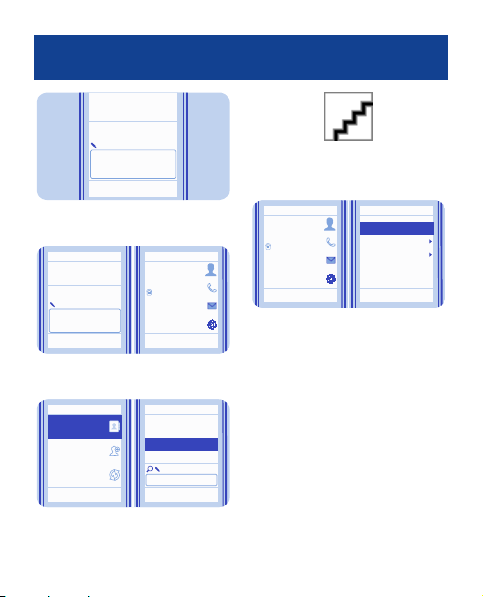
Add new contacts to your phone.
1.
Select Menu > Contacts.
Names
2.
Add new
Synchronise all
Select
Select Add new.
17
ExitOptions Select
Back
Page 18
3.
Number:
123
9876543210
OK
Clear
Back
Clear
Jim Brown
Call
9876543210
Send message
Send mail
Options Select Back
Anna
Dad
Jim Brown
Mum
Select
Options
Type in the phone number, then
select OK.
4.
Last name:
Brown
Save
Options
Write the first and last name, then
select Save.
5.
Names
Add new
Synchronise
all
Select
To edit details, select Names and
a contact.
6.
To search for a contact, start
writing the contact's name in the
search box.
7.
Jim Brown
Call
9876543210
Send message
Send mail
BackSelect
Options
Select Options > Contact
details.
BackOptions
18
Contact details
Add detail
Add image
Delete contact
Copy contact
Back
Select
Page 19
Make calls quickly
Found:
Mike
9876543210
End call
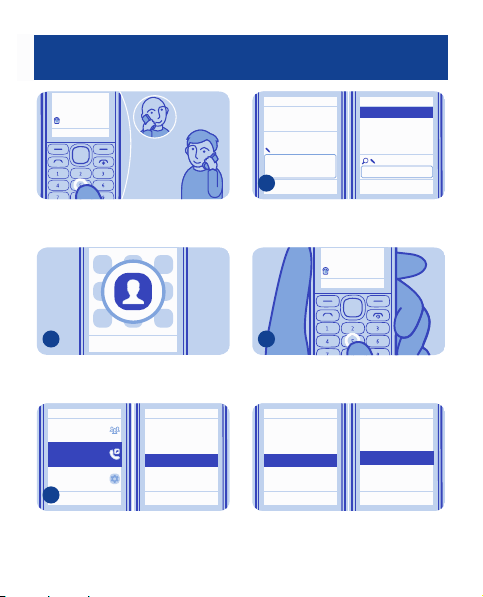
Call someone often? Set their
number as a speed dial.
Mike
Phone number:
3
Search
Options
Anna
Dad
Mum
Select Search and a contact.
Found:
Mike
9876543210
End call
BackSelectBack
1
ExitOptions Select
Select Menu > Contacts.
(empty)
Groups
Speed dials
Settings
2
Select
Select More > Speed dials and a free
slot, then select Assign.
2.
(empty)
3.
(empty)
4.
(empty)
5.
(empty)
6.
(empty)
7.
Back
Back
Assign
4
To call, press and hold a number key
on the home screen.
(empty)
2.
(empty)
3.
(empty)
4.
Mike5.
(empty)
6.
(empty)
7.
View
Tip: To change a speed dial, select
Options > Change.
Change
Delete
Call
Back BackSelectOptions
19
Page 20
Send a message
!
e
k
i
M
i
H
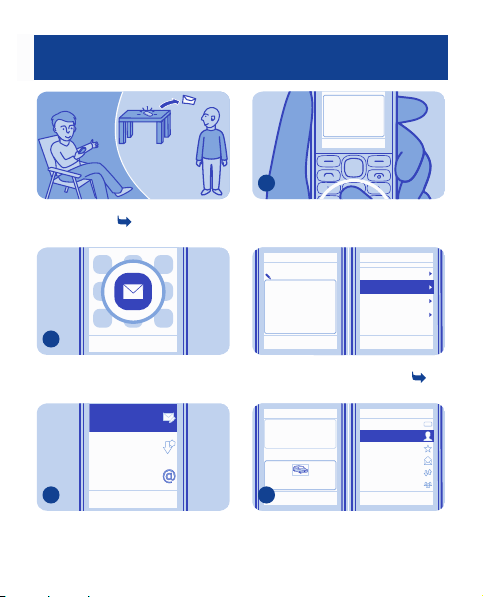
Keep in touch with people through
messages. See
7.
Hi Anna, how are
you?
3
Write your message.
ClearOptions Send to
1
Select Menu > Messaging.
Create
message
Inbox
Mail
2
Select Create message.
Your message:
Hi Anna, how are
you?
Options
ExitOptions Select
BackOptions Select
Send to
Tip: To add an attachment, select
Options > Insert object. See
9.
Hi Anna, how are
you?
Image:
Photo0001.jp g
4
Options
Send to Close
To add a recipient, select Send to >
Contacts.
Insert symbol
Insert object
Prediction
Writing langu age
Save as draft
Back
BackSelect
8,
Number or mail
Contacts
Mum
Recentl y used
Log
Contact groups
Options
123
Back
Select
20
Page 21
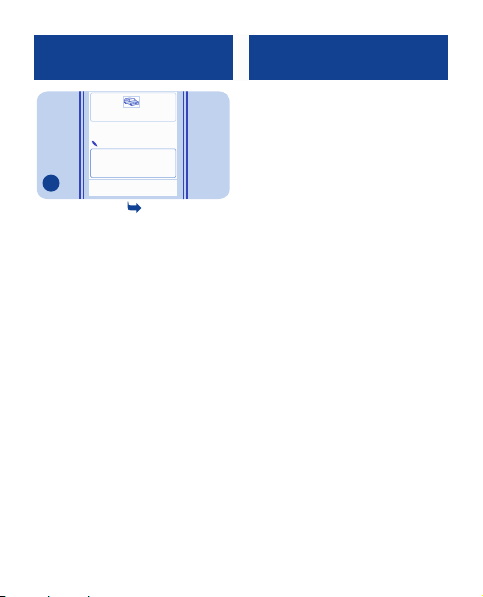
Photo0001.jpg
To:
Anna
[0123456789];
5
Send
ClearAdd
Select Send. See 10, 9.
Write text
Press a key repeatedly until the letter
is shown.
To type in a punctuation mark, press
1 repeatedly.
To type in a special character, press
*, then select the character.
To switch between character cases,
press #.
To use number mode, press and hold
#, then select Number mode. To go
back to letter mode, press and hold
#.
If you want to quickly type in a single
number, just press and hold the
number key.
To switch predictive text on or off,
select Options > Prediction >
Prediction on or Prediction off. Not
all languages are supported.
To change the writing language,
select Options > Writing language.
21
Page 22
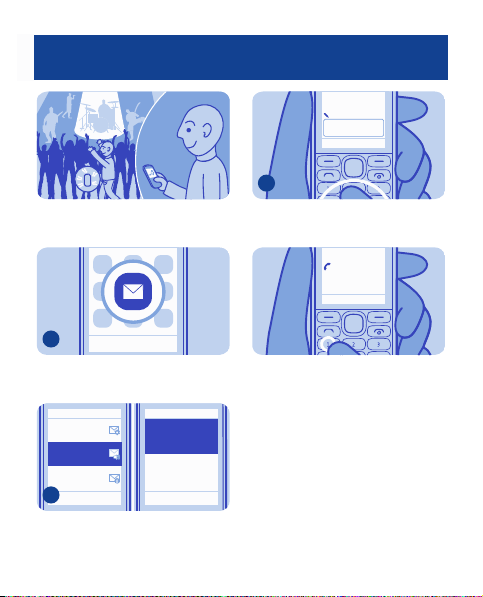
Check your voicemail
When you can't answer, you can
forward calls to your voicemail.
Mailbox number:
0987612345
OK
ClearOptions
3
When setting up voicemail, type in
your voice mailbox number.
Calling
Voice mailbox
End call
1
ExitOptions Select
Select Menu > Messaging.
Message
settings
Voice
messages
Info
messages
2
Options
Select More > Voice messages >
Listen to voice messages.
Listen to voice
messages
Voice mail box
number
Back BackSelect Select
Tip: To quickly call your voicemail,
press and hold 1 on the home screen.
22
Page 23
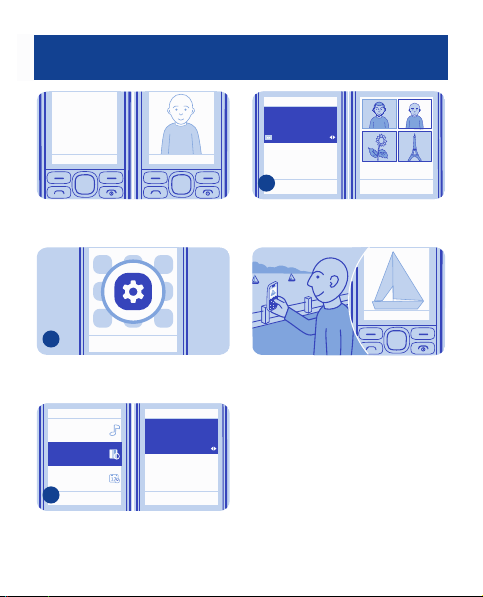
Personalise your home screen
Menu Menu
You can change the wallpaper, and
rearrange items on the home screen.
1
Select Menu > Settings.
ExitOptions Select
Wallpaper
Photos
Home screen
3
OK
Select OK to open the folder, then
select a photo.
Tip: You can also take a photo on your
phone camera, and use that.
Cancel
Opt.
BackSelect
Menu
Tone s
Display
Date and time
2
Select Display, scroll to Wallpaper,
then scroll to a folder.
Wallpaper
Set by theme
Home screen
Back BackSelect Select
23
Page 24
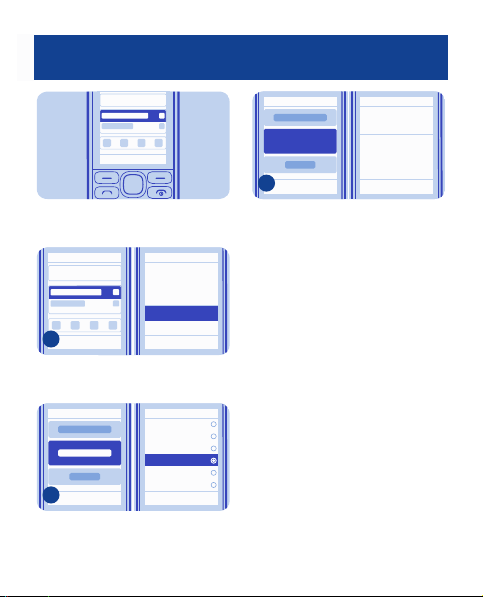
Add shortcuts to your home screen
Menu
Add shortcuts to your favourite apps
to your home screen.
Personalise
1
Select
Options
Home scr. sett.
Select
BackExit
Select Options > Personalise.
Clock
Countd. timer
Gen. indicators
Notifications
Radio & Media
2
Options
Change
Select a bar, then select an item, such
as a widget.
Shortcut bar
Back
Back
Select
Notifications
3
Change
Options
Select Done > Yes.
24
Save changes?
No
Done Yes
Back
Page 25
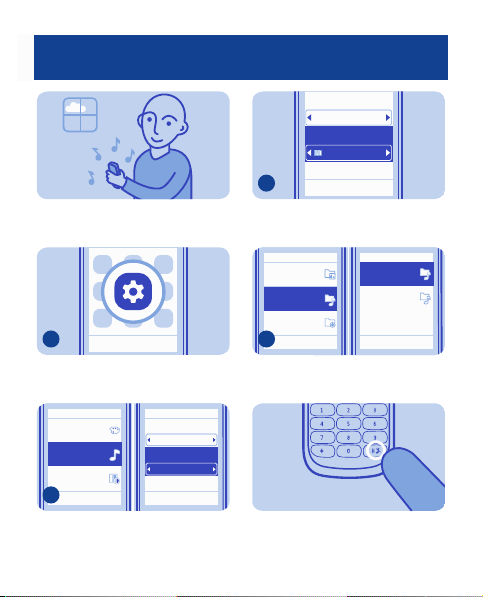
Change your ringtone
Set a different ringtone for each
profile.
Incom. call alert:
Ringing
Ringtone:
Open Gall.
Ringing volume:
3
Options
Scroll to Open Gall., then select
Select.
BackSelect
1
ExitOptions Select
Select Menu > Settings.
Themes
Tone s
Display
2
Select Save
Select Tones, then scroll to
Ringtone:.
Incom. call alert:
Ringtone:
Nokia tune
Ringing volume:
Back Back
Options
Ringing
Graphics
Tone s
Recordings
4
Open Open
Options Options
Select Tones > Ringtones and a
ringtone.
Tip: To switch between the silent and
normal profile, press and hold #.
Ringtones
Alert tones
Back Back
25
Page 26
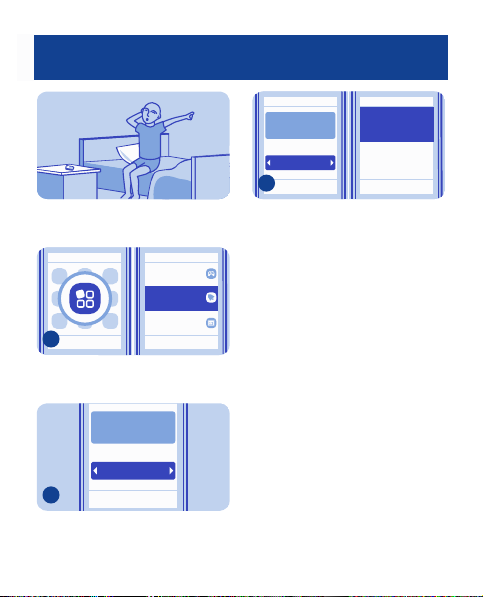
Set an alarm
Use your phone as an alarm clock.
Games
Alarm clock
Calendar
1
Options Exit Back
Select Select
Select Menu > Applications >
Alarm clock.
09:00
Alarm on
2
Options Save
Set the alarm time, then select Save.
Back
09:00
Alarm on
3
Options
Save
To repeat the alarm, select Options >
Repeat days and the days.
Repeat days
Off
Alarm tone
Standard
Back Back
Select
26
Page 27
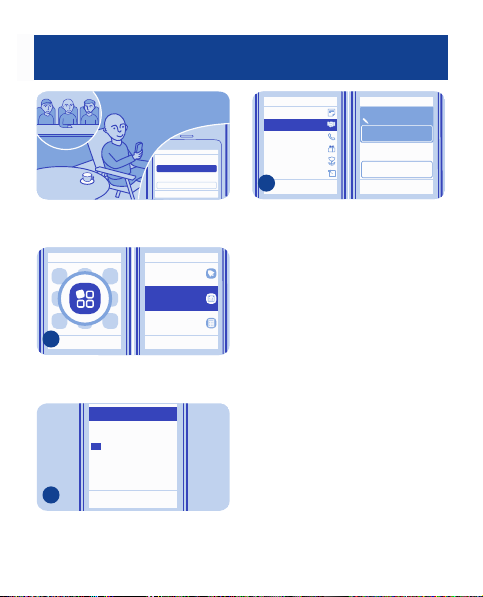
Add an appointment
Subject:
Meeting
Location:
Need to remember an appointment?
Add it to your calendar.
Alarm clock
Calendar
Calculator
1
Options Exit Back
Select Select
Select Menu > Applications >
Calendar.
2
Mo Tu WThFr Sa Su
26
3
10
17
24
31
Options
1
28
29
2
30
27
8
5
7
4
6
9
15
14
11
12
13
16
18
22
19
21
20
23
27
29
26
28
25
30
5
3
2
4
1
6
BackView
Select a date and View > Add.
Reminder
Meeting
Call
Birthday
Anniversary
Memo
3
Select
Select Meeting, fill in the fields, then
select Save.
Subject:
Meet Mike
Locat ion:
Save
Options
Back
27
Back
Page 28
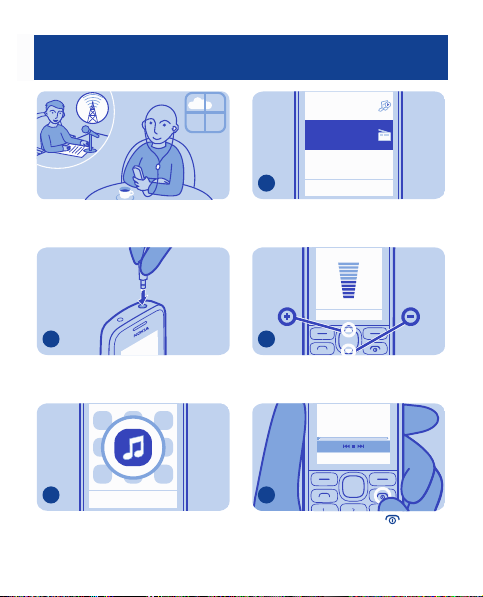
Listen to the radio
My music
Radio
Listen to your favourite radio stations
on your phone.
1
Connect a compatible headset. It acts
as an antenna.
2
ExitOptions Select
Select Menu > Music.
3
Select
Back
Select Radio.
4
To change the volume, scroll up or
down.
87.5
108.087.5
Options
Hide
5
To close the radio, press .
28
Page 29
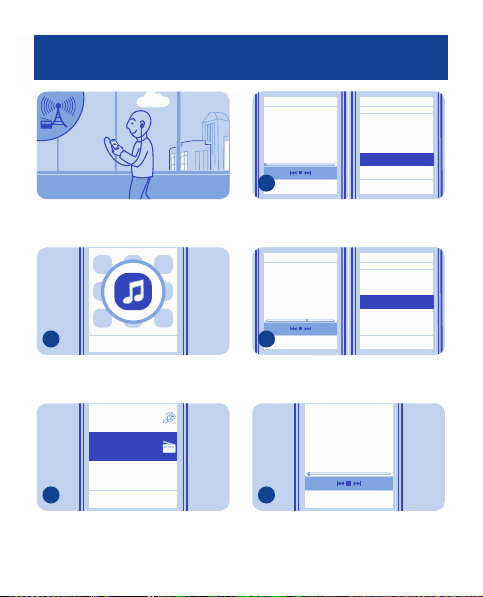
Find and save radio stations
Search for your favourite radio
stations
1
Select
ExitOptions
Select Menu > Music.
My music
Radio
2
Select
Back
Select Radio.
Station
87.5
3
Options
To search for all available stations,
select Options > Search stations.
Station
101.8
4
Options Select
To save a station, select Options >
Save station.
5
To switch to a saved station, scroll
left or right.
01 Station
Switch off
Play in backgr.
Stations
Search stations
Set frequency
108.087.5
108.087.5
88.5
Switch off
Play in backgr.
Save station
Stations
Search stations
108.087.5
HideOptions
Select
29
BackHide
BackHide
Page 30
101.80 MHz 2
87.50 108.00
Options
Play a song
Back
Tip: To switch to a saved station, you
can also press a number key.
01.
MHz88.5
02.
MHz101.8
Tip: To rename a station, select the
station and Options > Rename.
Delete station
Rename
Organise
BackBack
SelectSelect
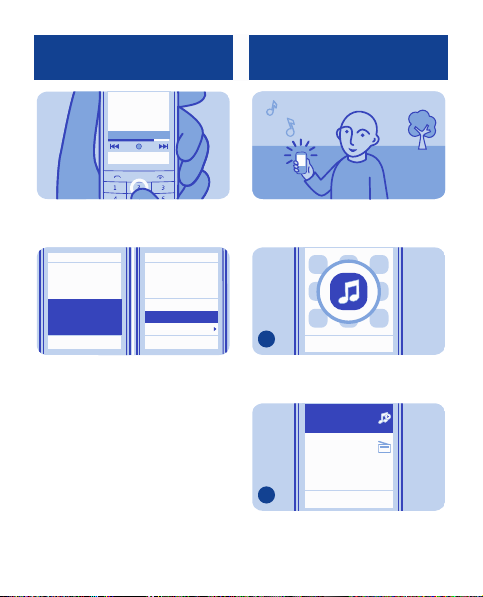
Listen to your favourite music on your
phone.
1
Select
ExitOptions
Select Menu > Music.
My music
Radio
2
Select
Back
Select My music.
30
Page 31
Take a photo
Go to Media pl.
All songs
Playlists
Artists
Albums
Genres
3
Options Options
Song 1
Song 2
Song 3
Song 4
Song 5
Song 6
Exit Back
PlaySelect
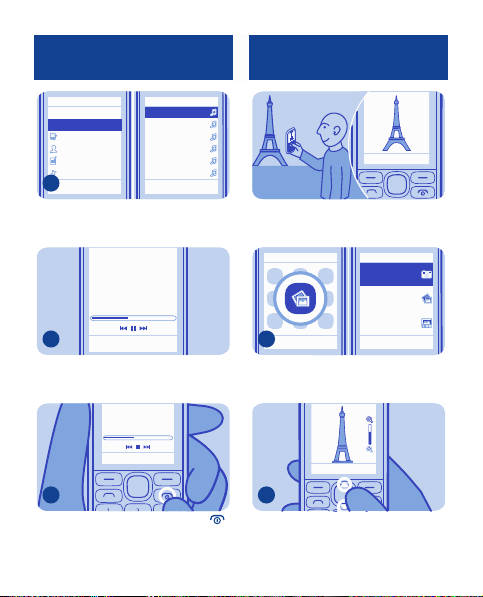
Select the song you want to play.
Song 1
Options Hide
03.4700.38
Hide
03.4700.38
4
Options
To pause or resume play ing, press the
scroll key.
5
To close the music player, press .
Capture
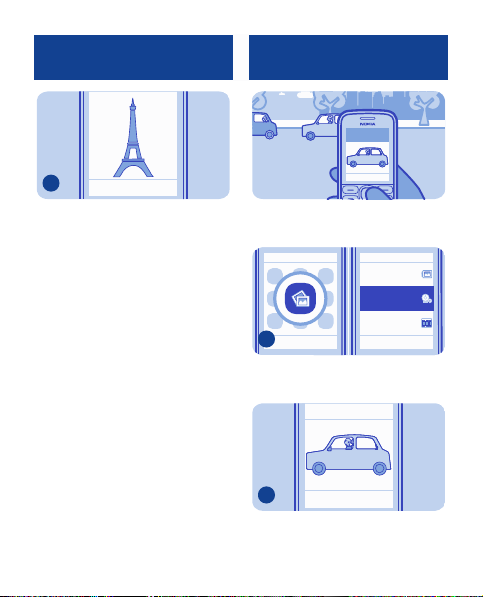
There's a camera in your phone - just
aim and snap!
Camera
My photos
Timeline
1
Options Exit Back
Select Select
To open the camera, select Menu >
Photos > Camera.
Capture
2
To zoom in or out, scroll up or down.
31
Page 32
Record a video
3
Select Capture.
The photos are saved in My photos.
Capture
Opt.
Back
Record
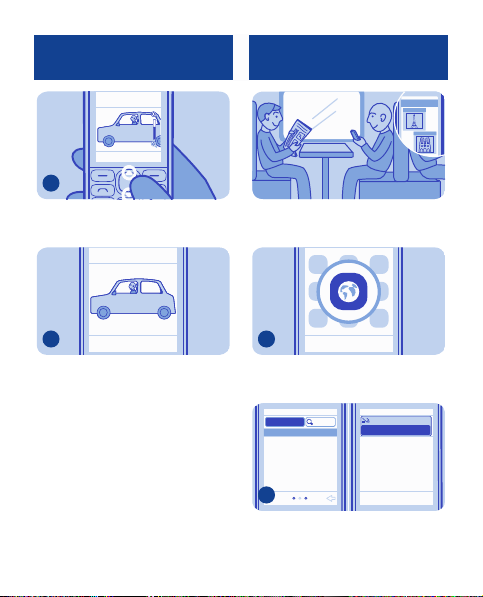
Besides taking photos, you can also
record videos with your phone.
My albums
Video camera
My videos
1
Options Exit Back
Select Select
To open the camera, select Menu >
Photos > Video camera.
2
Options
Record
Back
To start recording, select Record.
32
Page 33
Record
3
To zoom in or out, scroll up or down.
Browse the web
Paris
Catch up on the news, and visit your
favourite websites.
4
To stop recording, press Stop.
Videos are saved in My videos.
Pause
Stop
1
Select
Select Menu > Internet.
www.
Featured
abc
Search
www.nokia.com
2
To go to a website, write the web
address in the address bar.
33
ExitOptions
OK Clear
Page 34
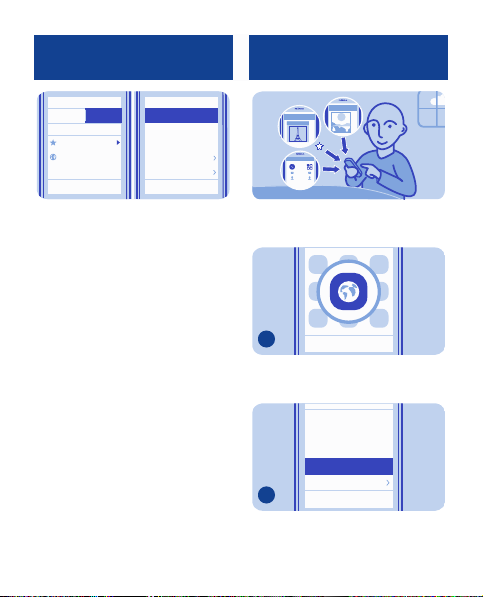
History
Featured
Home
Favourites
www.nokia.com
Tip: On the History tab, you can select
Options > Clear history.
Clear history
Edit favourite
Delete favourite
Downloads
Settings
ExitOptions
Back
Add a bookmark
If you visit the same websites often,
add them as bookmarks.
1
Select
Select Menu > Internet.
Start page
Reload
Forward
Add to fav.
Downloads
2
While browsing, select Options >
Add to fav..
Back
34
ExitOptions
Page 35
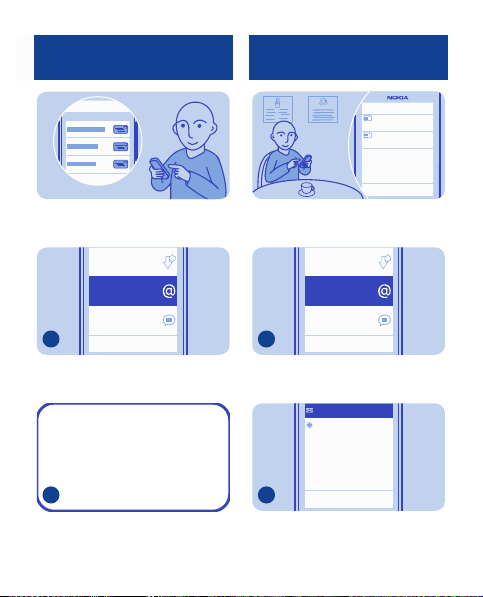
Set up your mail account
Send a mail
Mail
Want to use mail, but don't have a
computer? You can use your phone.
Inbox
Mail
Chat
1
Options
Select
Back
Select Menu > Messaging > Mail.
Missing:
MAIL-SIGN-IN
2
Mail
and a mail service, then
Select
follow the instructions.
Mike
Hello Anna!
Anna
Hi Mike!
You can read and send mail while on
the move.
Inbox
Mail
Chat
1
Select
2
Options
Menu > Mail
Add account
Select
Select
Back
.
Back
Select a mail account.
35
Page 36
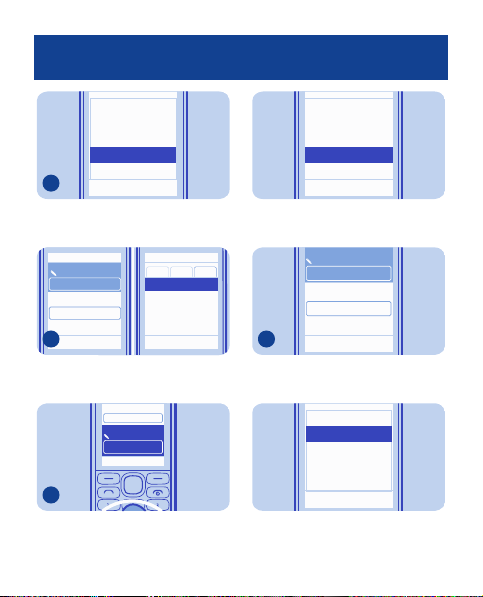
Quick reply
Delete
Delete Many
Compose New
Forward
3
In the mailbox, select
Compose New
To:
Subject:
Body text:
4
Options
Insert
To add a recipient, select
manually write the address.
Subject:
Body text:
Options Cancel
Cancel
Thanks.
Hi Anna!
.
Select
Back
Options >
Sent
Inbox Phone
Anna
Insert
Cancel
, or
5
Write the subject and your message.
Cancel
Add Cc/Bcc
Attach new img.
Attach file
Help
Select
Tip:
To attach a file, select
Attach file
.
To:
Anna
Subject:
Thanks.
Body text:
6
Select
Tip:
To reply to a mail, open the mail,
then select
Send
.
Expand
Anna
Reply
Quick reply
Reply to all
Delete
Options > Reply
Send
Select
36
Back
Options >
Back
.
Page 37
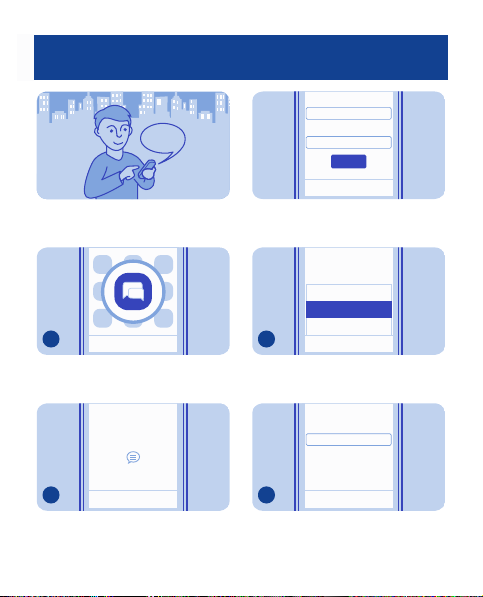
Chat with your friends
Hi Mike!
You can chat with your friends online
while on the move.
1
Select
Menu > Chat
Select your IM service:
2
Options
Select a service, then sign in.
Select
Chat
Select
ExitOptions
.
Exit
User ID:
Password:
Sign In
Options Sel ect
Tip:
If you don't have a chat account,
you can sign in to Nokia Chat.
My Statu s
Send IM to…
Add Contact
3
Select
4
Select
Options > Send IM to…
SendIM to...
User ID:
OK
Type in the username.
37
Back
Back
.
Cancel
Page 38
Hello!
5
Write your message in the text box,
then select
6
When you want to continue a
conversation, select the thread.
Tip:
To see a message when Chat is
open in the background, select
Send
Conversations
Options
New message from
Send
Clear
. See 6.
Home
Select
View
View
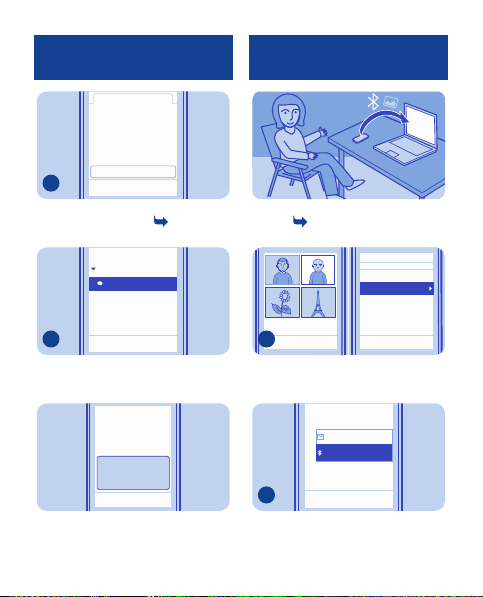
Send a photo using Bluetooth
Send a photo you have taken to your
PC. See
Select the photo and
Select
.
38
1
View
Opt.
2
Via Bluetooth
11.
Delete
Send
Use photo
Edit photo
Landscape mo de
Back Select Back
Opt. > Send
Message
Via Bluetooth
Select
Back
.
.
Page 39
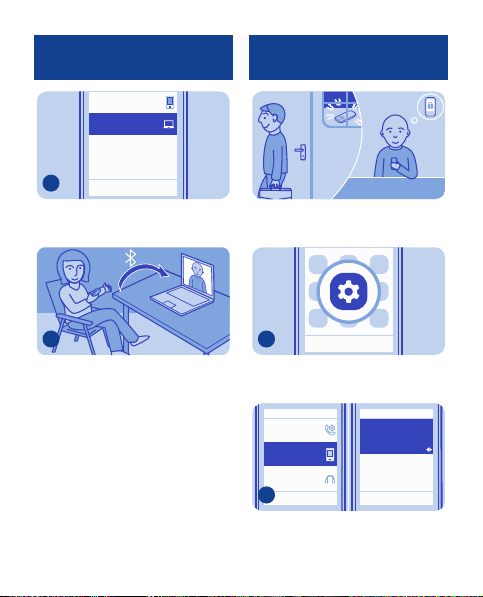
Nokia XX
My laptop
Lock your phone
3
Select the device to connect to. If
asked, type in the passcode.
Connect
Back
4
The photo is sent to your PC.
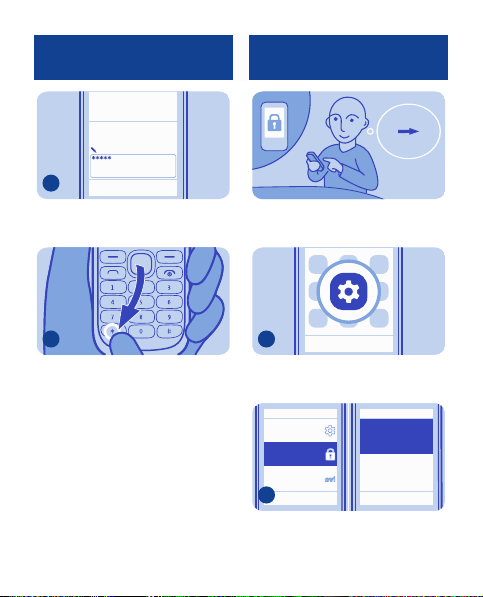
Set your phone to automatically lock
itself when you're not using it.
1
Select
Menu > Settings
Call
Device
Accessories
2
Select
Device
keyguard
on.
ExitOptions
Select
.
Security
keygua rd
Off
Flight query
Off
Back BackSel ect Select
, then switch
Security
39
Page 40
Change the security code
Security code:
3
OK
Clear
Type in the security code.
4
To unlock, select
then type in the security code.
Unlock
, press *,
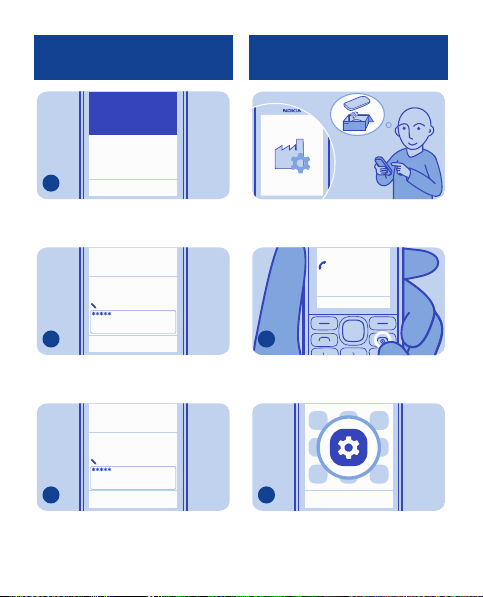
Create your own security code, so
only you know how to unlock your
phone.
1
Select
Menu > Settings
Configuration
Security
Nokia
account
2
Select
Security > Access codes
ExitOptions
Select
.
Access codes
Code in use
Back BackSel ect Select
40
12345
*****
.
Page 41
Change securitycode
Change PIN code
Restore original settings
3
Select
Change security code
Security code:
4
Type in the preset security code
12345
.
Security code:
5
Type in a new code, using at least 5
numbers.
Select
Back
.
OK
Clear
OK
Clear
If your phone is not working properly,
reset the settings.
0123456789
In call
Loudsp.
Options
1
End all calls and connections.
2
Select
Menu > Settings
Select
ExitOptions
.
41
Page 42
Support
Security code:
Restore complete
Restore sett. only
Restore all
.
OK
OK
Clear
Security
Nokia account
Restore factory
sett.
3
Select SelectBack Back
Select
Restore factory sett. >
Restore sett. only
4
Type in the security code, then select
OK
.
5
Your phone switches off and on again.
This may take longer than usual. See
12.
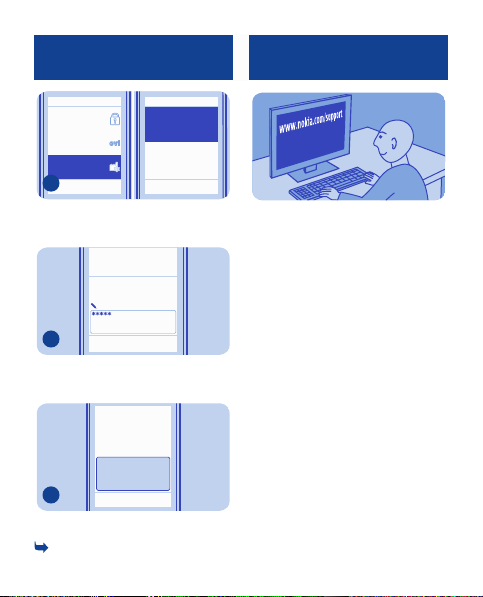
When you want to learn more about
how to use your phone, or if you're
unsure how your phone should work,
read the user guide thoroughly.
If you have an issue, do the following:
• Reboot your phone. Switch the
phone off, then remove the battery.
After about a minute, put the battery
back in, then switch the phone on
again.
• Update your phone software
• Restore the original factory
settings
If your issue remains unsolved,
contact Nokia for repair options.
Before sending your phone for repair,
always back up your data, as all
personal data in your phone may be
deleted.
For additional product support
information, see the warranty and
42
Page 43
reference leaflet included with your
Nokia device.
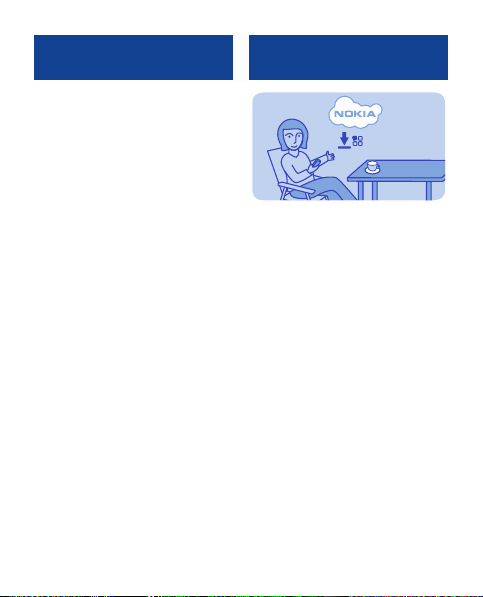
Update phone software using your phone
You can update your phone software
wirelessly. You can also set your
phone to automatically check for
updates.
Select
Menu > Settings
Device > Device updates
1. To check if there is an update,
select
Current software details
2. To download and install an
update, select
software
, then follow the
instructions shown on the phone.
The update may take several
minutes. If you encounter problems,
contact your network service
provider.
Check for updates automatically
Select
Automatic SW update check
then set how often to check.
43
and
.
Download device
.
,
Page 44
Your network service provider may
send updates over the air directly to
your phone. For more info on this
network service, contact your
network service provider.
Back up content to a memory card
Settings
Contacts
Messages
Bookmarks
Calendar
Gallery files
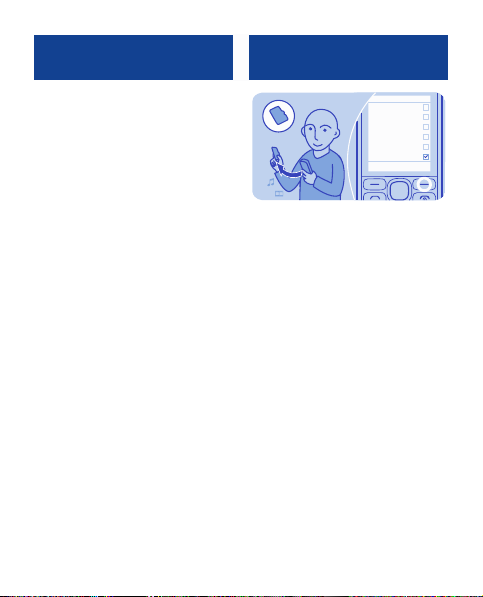
Want to make sure you won't lose any
important files? You can back up your
phone memory to a compatible
memory card.
Select
Menu > Settings > Sync and
.
backup
1. Select
Create backup
2. Select what you want to back up,
then select
Done
Restore a backup
Select
Restore from backup
44
.
.
DoneOptions
.
Page 45
Access codes
PIN or PIN2 code
(4-8 digits)
PUK or PUK2 code
(8 digits)
IMEI number
(15 digits)
Lock code
(security code)
(min. 5 digits)
These protect your SIM against unauthorised use or are
required to access some features.
You can set your phone to ask for the PIN code when you
switch it on.
If not supplied with your card or you forget the codes,
contact your service provider.
If you type in the code incorrectly three times in a row,
you need to unblock the code with the PUK or PUK2 code.
These are required to unblock a PIN or PIN2 code.
If not supplied with your SIM, contact your service
provider.
See
13.
This is used to identify valid phones in the network. The
number can also be used to block, for example, stolen
phones. You may also need to give the number to Nokia
Care services.
*#06#
To view your IMEI number, dial
This helps you protect your phone against unautho rised
use.
You can set your phone to ask for the lock code that you
define. The default lock code is 12345.
45
.
Page 46
Keep the code secret and in a safe place, separate from
your phone.
If you forget the code and your phone is locked, your
phone will require service. Add itional charges may apply,
and all the personal data in your phone may be deleted.
For more information, contact Nokia Care or your phone
dealer.
18 The personal unblocking key
(PUK) code and the universal personal
unblocking key (UPUK) code (8 digits)
are required to change a blocked PIN
code and UPIN code, respectively.
The PUK2 code (8 digits) is required
to change a blocked PI N2 code. These
codes are not supplied with the SIM
card. Contact your local service
provider for the codes.
46
Page 47
General information
Read these simple guidelines. Not following
them may be dangerous or illegal. For further
information, read the complete user guide.
SWITCH OFF IN RESTRICTED AREAS
Switch the device off when mobile
phone use is not allowed or when i t
may cause interference or danger, for
example, in aircraft, in hospitals or near
medical equipment, fuel, chemicals, or
blasting areas. Obey all instructions in
restricted areas.
ROAD SAFETY COMES FIRST
Obey all local laws. Always keep your
hands free to operate the vehicle
while driving. Your first consideration while
driving should be road safety.
INTERFERENCE
All wireless devices may be
susceptible to interference, which
could affect performance.
QUALIFIED SERVICE
Only qualified personnel may install
or repair this product.
BATTERIES, CHARGERS, AND
OTHER ACCESSORIES
Use only batteries, chargers, and
other accessories approved by
Nokia for use with this device. Do not connect
incompatible products.
KEEP YOUR DEVICE DRY
Your device is not water-resistant.
Keep it dry.
PROTECT YOUR HEARING
Listen to a headset at a moderate
level, and do not hold the device
near your ear when the loudspeaker is in use.
Product and safety informatio n
Feature-specific instructions
Avoid touching the antenna area while the
antenna is in use. Contact with antennas
affects the communication quality and may
reduce battery life due to hig her power level
during operation.
1 Use only compatible memory cards
approved by Nokia for use with this device.
Incompatible cards may damage the card and
the device and corrupt data stored on the
card.
2 Important: This device is designed
to be used with a standard SIM card (see
figure) only. Use of incompatible SIM cards
may damage the card or the device, and may
corrupt data stored on the card. Please
consult your mobile o perator for the use of
a SIM card that has a mini-UICC cutout.
3 If the battery has not been used for a
long time, to begin charging, you may need
to connect the charger, then disconnect and
reconnect it.
47
Page 48

4 If the battery is completely discharged,
it may take several minutes before the
charging indicator is displayed or before any
calls can be made.
5 Missed and received calls are log ged
only if supported by the network, and the
phone is switched on and within the network
service area.
6 Using services or downloading content
may cause transfer of large amoun ts of data,
which may result in data traffic costs.
7 You can send text messages that are
longer than the character limit for a single
message. Longer messages are sent as two
or more messages. Your service provider
may charge accordingly.
Characters with accents, other marks, or
some language options, take more space,
limiting the number of char acters that can be
sent in a single message.
8 If the item you insert in a multimedia
message is too large for the network, the
device may automatically reduce the size.
9 Only compatible devices can receive
and display multimedia messages. Messages
may look different in different devices.
10 Sending a message with an
attachment may be more expensive than
sending a normal text message. For more
information, contact your service provider.
11 Operating the device in hidden mode
is a safer way to avoid malicious software. Do
not accept Bluetooth connection requests
from sources you do not trust. You can also
deactivate Bluetooth function when you are
not using it.
12 Restoring settings does not affect
documents or files stored on your phone.
13 The personal unblocking key (PUK)
code and the universal personal unblocking
key (UPUK) code (8 digits) are required to
change a blocked PIN code and UPIN code,
respectively. The PUK2 code (8 digits) is
required to change a blocked PIN2 code.
These codes are not supplied with the SIM
card. Contact your local service provider for
the codes.
14 To enter the + character, used for
international calls, select * twice.
This may not be possible in all regions. In this
case, enter the international access code
directly.
15 Warning: When the flight profile is
activated, you cannot make or receive any
calls, including emergency calls, or use other
features that require network coverage. To
make a call, activate another profile.
48
Page 49

16 The + character may not work in all
regions. In this case, enter the international
access code directly.
Network services and costs
Your device is approved for use on the
(E)GSM 900 and 1800 MHz networks. To use
the device, you need a subscription with a
service provider.
Using network services and downloading
content to your device requires a network
connection and may result in data traffic
costs. Some product features require
support from the network, and you may need
to subscribe to them.
Take care of your device
Handle your device, battery, charger and
accessories with care. The following
suggestions help you protect your warranty
coverage.
• Keep the device dry. Precipitation,
humidity, and all types of liquids or moisture
can contain minerals that corrode electronic
circuits. If your device gets wet, remove the
battery, and allow the device to dry.
• Do not use or store the device in dusty
or dirty areas. Moving parts and electronic
components can be damaged.
• Do not store the device in high
temperatures. High temperat ures can
shorten the life of the device, damage the
battery, and warp or melt plastics.
• Do not store the device in cold
temperatures. When the devic e warms to its
normal temperature, moisture can form
inside the device and damage electronic
circuits.
• Do not attempt to open the device other
than as instructed in the user guide.
• Unauthorised modifications may
damage the device and violate regulations
governing radio devices.
• Do not drop, knock, or shake the device.
Rough handling c an break internal circuit
boards and mechanics.
• Only use a soft, clean, dry cloth to clean
the surface of the device.
• Do not paint the device. Paint can clog
moving parts and prevent proper operation.
• Switch off the device and remove the
battery from time to time for op timum
performance.
• Keep your device away from magnets or
magnetic fields.
• To keep your important data safe, store
it in at least two separate places, such as your
device, memory card, or computer, or write
down important information.
Recycle
Always return your used electronic products,
batteries, and packaging materials to
dedicated collection points. This way you
help prevent uncontrolled waste disposal
and promote the recycling of materials.
Check how to recycle your Nokia products at
www.nokia.com/recycling.
About Digital Rights Management
When using this device, obey all laws and
respect local customs, privacy and legitimate
rights of others, including copyrights.
Copyright protection may prevent you from
49
Page 50

copying, modifying, or transferring pictures,
music, and other content.
Content owners may use different types of
digital rights management (DRM)
technologies to protect their intellectual
property, including copyrights. This device
uses various types of DRM software to
access DRM-protected content. With this
device you can access content protected
with WMDRM 10 and OMA DRM 1.0. If certain
DRM software fails to protect the content,
content owners may ask that such DRM
software's ability to access new DRMprotected content be revoked. Revocation
may also prevent renewal of such DRMprotected content already in your device.
Revocation of such DRM software does not
affect the use of content protected with
other types of DRM or the use of non-DRMprotected content.
Digital rights management (DRM) protected
content comes with an associated licence
that defines your rights to use the content.
Other transfer methods may not tra nsfer the
licences which need to be restored wit h the
content for you to be able to continue the use
of OMA DRM-protected content after the
device memory is formatted. You may also
need to restore the licences if the files on
your device become corrupted.
Batteries and chargers
Battery and charger information
Your device is intended for use with a BL-5CB
rechargeable battery. Nokia may make
additional battery models available for this
device. Always use original Nokia batteries.
This device is intended for use when supplied
with power from the following chargers:
AC-11. The exact Nokia charger model
number may vary depending on the plug
type, identified by E, X, AR, U, A, C, K, B, or N.
The battery can be charged and discharged
hundreds of times, but it will eventually wear
out. When the talk and standby times are
noticeably shorter than normal, replace the
battery.
Battery safety
Always switch the device off and disconnect
the charger before removing the battery.
When you unplug a charger or an accessory,
hold and pull the plug, not the cord.
When your charger is not in use, unplug it
from the electrical plug and the device. Do
not leave a fully charged battery connected
to a charger, as overc harging may shorten
the battery’s lifetime. If left unused, a fully
charged battery will lose its charge over time.
Always keep the battery between 15°C and
25°C (59°F and 77°F). Extreme temperatures
reduce the capacity and lifetime of the
battery. A device with a hot or cold battery
may not work temporarily.
50
Page 51

Accidental short-circuiting can happen when
a metallic object touches the metal strips on
the battery, for example, if you carry a spare
battery in your pocket. Short-circuiting may
damage the battery or the connecting object.
Do not dispose of batteries in a fire as they
may explode. Dispose of batteries acco rding
to local regulations. Recycle when possible.
Do not dispose as household waste.
Do not dismantle, cut, open, crush, bend,
puncture, or shred cells or batteries. If a
battery leaks, do not let battery liquid touch
skin or eyes. If this happen s, immediately
flush the affected areas with water, or seek
medical help.
Do not modify, remanufacture, attempt to
insert foreign objects into the battery, or
immerse or expose it to water or other
liquids. Batteries may explode if damaged.
Use the battery and charger for their
intended purposes only. Improper use, or use
of unapproved batteries or incompatible
chargers may present a risk of fire,
explosion, or other hazard, and may
invalidate any approval or warranty. If you
believe the battery or charger is damaged,
take it to a service centre for inspection
before continuing to use it. Never use a
damaged battery or charger. Only use the
charger indoors.
Additional safety information
Make an emergency call
1. Make sure the device is switched on.
2. Check for ad equate signal strength. You
may also need to do the fo llowing:
•Insert a SIM card.
• Deactivate call restrictions you have
activated for your device, such as call barring,
fixed dialling, or closed user group.
• Make sure the flight profile is not
activated.
3. Press the end key r epeatedly, until the
home screen is displayed.
4. Enter the official emergency number for
your present locati on. Emergency call
numbers vary by location.
5. Press the call key.
6. Give the necessary information as
accurately as possible. Do not end the call
until given permission to do so.
Important: Activate both cellular and
internet calls, if your device supports
internet calls. The device may attempt to
make emergency calls both through cellular
networks and through your internet call
service provider. Connections in all
conditions cannot be guaranteed. Never rely
solely on any wireless device for essential
communications like medical emergencies.
Small children
Your device and its accessories are not toys.
They may contain small parts. Keep them out
of the reach of small children.
Medical devices
Operation of radio tr ansmitting equipment,
including wireless phones, may interfere with
the function of inadequately protected
medical devices. Consult a physician or the
51
Page 52

manufacturer of the medical device to
determine whether they are adequately
shielded from external radio frequency
energy.
Implanted medical devices
Manufacturers of medical devices
recommend a minimum separation of 15.3
centimetres (6 inches ) between a wireless
device and an implanted medical device, such
as a pacemaker or implanted car dioverter
defibrillator, to avoid potential interference
with the medical device. Persons who have
such devices should:
• Always keep the wireless device more
than 15.3 centimetres (6 inches) from the
medical device.
• Not carry the wireless device in a breast
pocket.
• Hold the wireless device to the ear
opposite the medical device.
• Turn the wireless device off if there is
any reason to suspect that interfe rence is
taking place.
• Follow the manufacturer directions for
the implanted medical device.
If you have any questions about using your
wireless device with an implanted medical
device, consult your health care provider.
Accessibility solutions
Nokia is committed to making mobile phones
easy to use for all individuals, including those
with disabilities. For more information, visit
the Nokia website at
www.nokiaaccessibility.com.
Hearing
Warning: When you use the headset, your
ability to hear outside sounds may be
affected. Do not use the headset where it can
endanger your safety.
Some wireless devices may interfere with
some hearing aids.
Operating environment
This device meets radio frequ ency exposure
guidelines in the normal use position at the
ear or at least 1.5 centimetres (5/8 inch)
away from the body. Any carry case, belt clip,
or holder for body-worn operation should
not contain metal and should position the
device the above-state d distance from your
body.
To send data files or messages requires a
quality connection to the network. Data files
or messages may be delayed until such a
connection is available. Follow the separation
distance instructions until the transmission
is completed.
Vehicles
Radio signals may affect improperly installed
or inadequately shielded elect ronic systems
in motor vehicles such as electronic fuel
injection, electronic antilock braking,
electronic speed contro l, and air bag
systems. For more information, check with
the manufacturer of your vehicle or its
equipment.
52
Page 53

Only qualified personnel should install the
device in a vehicle. Faulty installation or
service may be dangerous and may invalidate
your warranty. Check regularly that all
wireless device equipment in your vehicle is
mounted and operating properly. Do not
store or carry flammable liquids, gases, or
explosive materials in the same
compartment as the device, its parts, or
accessories. Remember that air b ags inflate
with great force. Do not pl ace your device or
accessories in the air bag deployment area.
Potentially explosive environments
Switch off your device in any area with a
potentially explosive atmosphere, for
example near gas pumps at service stat ions.
Sparks in such areas could cause an
explosion or fire resulting in bodily injury or
death. Observe restrictions in fuel service
stations, storage, and distribution areas;
chemical plants; or where blasting
operations are in progress. Areas with a
potentially explosive atmosphere are often,
but not always, clearly marked. They include
areas where you would be advised to turn off
your vehicle engine, below deck on boats,
chemical transfer or storage facilities and
where the air contains c hemicals or particles
such as grain, dust, or metal powders. You
should check with the manufacturer s of
vehicles using liquefied petroleum gas (such
as propane or butane) to determine if this
device can be safely used in their vicinity.
Certification information (SAR)
This mobile device meets guidelines for
exposure to radio waves.
Your mobile device is a radio transmitter and
receiver. It is designed not to exceed the
limits for exposure to radio waves
recommended by international guidelines.
These guidelines were developed by the
independent scientific organisation ICNIRP
and include safety margins designed to
assure the protection o f all persons,
regardless of age and health.
The exposure guidelines for mobile devices
employ a unit of measurement known as the
Specific Absorption Rate or SAR. The SAR
limit stated in the ICNIRP guidelines is 2.0
watts/kilogram (W/kg) averaged over 10
grams of tissue. Tests for SAR are conducted
using standard operating positions with the
device transmitting at its highest certified
power level in all tested frequency bands.
The actual SAR level of an operating device
can be below the maximum value because
the device is designed to use only the power
required to reach the network. That amount
changes depending on a number of factors
such as how close you are to a network base
station.
The highest SAR value under the ICNI RP
guidelines for use of the device at the ear is
0.78 W/kg.
Use of device accessories may result in
different SAR values. SAR values may vary
depending on national reporting and testing
requirements and the network band.
Additional SAR information may be provided
under product information at
www.nokia.com.
53
Page 54
Your mobile device is also designed to meet
the requirements for exposure to radio
waves established by the Federal
Communications Commission (USA) and
Industry Canada. These requir ements set a
SAR limit of 1.6 W/kg averaged over one gram
of tissue. The highest SAR value reported
under this standard during product
certification for use at the ear is 1.10 W/kg
and when properly worn on the body is 0.64
W/kg.
© 2012 Nokia. All rights reserved.
Nokia, Nokia Connecting People, and WE:
logo are trademarks o r registered
trademarks of Nokia Corporation. Nokia tune
is a sound mark of Nokia Corporation. Other
product and company name s mentioned
herein may be tradem arks or tradenames of
their respective owners.
Reproduction, transfer, distribution, or
storage of part or all of the contents in this
document in any form without the prior
written permission of Nokia is prohibited.
Nokia operates a policy of continuous
development. Nokia reserves the right to
make changes and improvements to any of
the products described in this document
without prior notice.
Includes RSA BSAFE cryptographic
or security protocol softw are from RSA
Security.
Oracle and Java are re gistered
trademarks of Oracle and/or its affiliates.
The Bluetooth word mark and logos are
owned by the Bluetooth SIG, Inc. and any use
of such marks by Nokia is under license.
This product is licensed under the MPEG-4
Visual Patent Portfolio License (i) for
personal and noncommercial use in
connection with information which has been
encoded in compliance with t he MPEG-4
Visual Standard by a consumer engaged in a
personal and noncommercial activity and (ii)
for use in connection with MPEG-4 video
provided by a licensed video provider. No
license is granted or shall be implied for any
other use. Additional information, including
that related to promotional, internal, and
commercial uses, may be obtained from
MPEG LA, LLC. See http://www.mpegla.com.
To the maximum extent permitted by
applicable law, under no circumstances shall
Nokia or any of its licensors be responsible
for any loss of data or income or any special,
incidental, consequential or indirect
damages howsoever caused.
The contents of this document are provided
"as is". Except as required by applicable law,
54
Page 55

no warranties of any ki nd, either express or
implied, including, but not limited to, the
implied warranties of merchantability and
fitness for a particular purpose, are made in
relation to the accuracy, reliability or
contents of this document. Nokia reserves
the right to revise this document o r withdraw
it at any time without pri or notice.
The availability of products, features,
applications and services may vary by region.
For more information, contact your Nokia
dealer or your service provider. This device
may contain commodities, technology or
software subject to export laws and
regulations from the US and other countries.
Diversion contrary to law is prohibited.
Nokia does not provide a warranty for or take
any responsibility for the functionality,
content, or end-user support of third-party
applications provided with your device. By
using an application, you acknowledge that
the application is provided as is. Nokia does
not make any representations, provide a
warranty, or take any responsibility for the
functionality, content, or end-user support
of third-party applications provided with
your device.
The availability of Nokia services may vary by
region.
FCC/INDUSTRY CANADA NOTICE
This device complies with part 15 of the FCC
rules and Industry Can ada licence-exempt
RSS standard(s). Operation is subject to the
following two conditions: (1) This device may
not cause harmful interference, and (2) this
device must accept any interference
received, including interference that may
cause undesired operation. Your device may
cause TV or radio interference (for example,
when using a device in close proximity to
receiving equipment). If you require
assistance, contact your local service
facility.Any changes or modifications not
expressly approved by Nokia could void the
user's authority to operate this equ ipment.
Some operations and featur es are SIM card
and/or network dependent, MMS dependent,
or dependent on the compatibility of devices
and the content formats suppor ted. Some
services are subject to a separate charge.
Issue 1 EN
55
 Loading...