

Page 1

Page 2

Copyright
© 2005 by Metrologic Instruments, Inc. All rights reserved. No part of this
work may be reproduced, transmitted, or stored in any form or by any means
without prior written consent, except by reviewer, who may quote brief
passages in a review, or provided for in the Copyright Act of 1976.
Products and brand names mentioned in this document are trademarks of
their respective companies.
Page 3

TABLE OF CONTENTS
Introduction
How does the MX009 USB Cable Operate?......................................................1
What is the difference between USB Keyboard Emulation and
USB Serial Emulation? ......................................................................................1
How is the MX009 Configured for USB Keyboard Emulation?..........................2
How is the MX009 Configured for USB Serial Emulation? ................................ 3
MX009 USB Cable Options ...................................................................................4
Part Number Designation and Accessories ........................................................... 5
Cable Installation ...................................................................................................6
Labels ....................................................................................................................7
Configuring for USB Keyboard Emulation (MX009-2xx7x)
PowerLink Compatible Scanners....................................................................... 8
MS6720, MS860, and Tech Series..................................................................11
Configuring For USB Serial Emulation (MX009-2xx8x)
PowerLink Compatible Scanners..................................................................... 16
MS6720, MS860, and Tech Series..................................................................17
Troubleshooting Guide ........................................................................................19
Specifications....................................................................................................... 20
Cable Information.................................................................................................21
Limited Warranty.................................................................................................. 22
Notices ................................................................................................................. 23
Patent Information................................................................................................24
Additional Bar Codes ........................................................................................... 25
Contact Information and Office Locations............................................................30
ii
Page 4

Page 5
INTRODUCTION
Metrologic’s MX009 USB Cable is a device that converts serial RS232 formatted
data to either USB Keyboard or USB Serial communication protocol. The MX009
can be used with all Metrologic products equipped with an RS232 interface, as
well as all versions of Metrologic PowerLink compatible scanners.
All versions of Metrologic’s PowerLink compatible scanners are equipped
with RS232 transmit and receive communication lines.
• HOW DOES THE MX009 USB CABLE OPERATE?
The scanner transmits scanned data via RS232 communication to the
MX009. The MX009 then converts the data from RS232 to either USB
Keyboard or USB Serial data. The MX009 will only function with Metrologic
scanners that are equipped with RS232 communication capabilities. All
PowerLink compatible scanners are equipped with the ability to
communicate RS232 independent of the interface purchased. For a list of
Metrologic PowerLink compatible scanners, refer to page 5.
Some older Metrologic scanners may not be used with an MX009
since they have only one interface available. For example, the
MS951 with OCIA interface will not function with an MX009
because it does not have RS232 capabilities.
• WHAT IS THE DIFFERENCE BETWEEN
USB
KEYBOARD EMULATION AND USB SERIAL EMULATION?
When the MX009 is set-up for Keyboard Emulation, the scanned data will
appear in the active PC application as if the keys were pressed on the PC’s
keyboard.
When the MX009 is set-up to communicate as a USB Serial device, the data
emulates serial (RS232) data through the use of a Metrologic developed
driver. The device will then work with existing serial (RS232) applications.
The drivers can be downloaded at:
For Windows 2000/XP Operating Systems
ftp://ftp.metrologic.com/pub/download/software/mtlgpos.zip
For Windows 98 (Second Edition) Operating System
ftp://ftp.metrologic.com/pub/download/software/mtlgpos98.zip
The MX009 leaves the factory set for either USB Keyboard Emulation or
USB Serial Emulation. Refer to pages 8 - 18 of this manual to determine the
set-up of your MX009.
1
Page 6

INTRODUCTION
• HOW IS THE MX009 CONFIGURED FOR USB KEYBOARD EMULATION?
This guide contains the configuration bar codes necessary to ensure that the
scanner communicates properly with the MX009. The scanner
communicates using RS232 protocol. The default (RS232) settings of the
scanner are as follows:
• For Non-PowerLink Scanners
9600 baud, 7 data bits, 2 stop bits and space parity
• For PowerLink Scanners
In addition, the scanner uses ACK/NAK and XON/XOFF software
handshaking, and the data transmission ends with both carriage return and
line feed suffixes.
On non-PowerLink scanners, the 1
country of the keyboard.
NOTE #1
* Discontinued Models
9600 baud, 8 data bits, 1 stop bits and no parity
st
and 2nd prefixes are used to set the
Please note, some of the older Metrologic products allow for a maximum
of 2 prefixes. Because 2 prefixes are required for setting the country,
custom prefixes cannot be set on these products. Please refer to the
scanner configuration guide for the number of configurable prefixes
available on your product.
Example #1: MS951, German Keyboard, Bar Code = 012345, No custom
prefixes available.
Configuration: <Ctl-V> <D> <012345> <CR><LF>
Pref #1 Pref #2 Data Terminators
Data Transmitted = 012345<CR>
Prefixes #1 and #2 specify the German keyboard and the <CR> <LF>
terminators are needed by the MX009 for framing the data. Only 2 custom
prefixes are available on the MS951*, MS6720, MS700, MS860, Tech
Series, IS4120* and IS4220*.
2
Page 7

INTRODUCTION (CONT.)
• HOW IS THE MX009 CONFIGURED FOR USB SERIAL EMULATION?
This guide contains the configuration bar codes necessary to ensure that the
scanner communicates properly with the MX009. The scanner
communicates using RS232 protocol. The default (RS232) settings of the
scanner are as follows:
• For Non-PowerLink Scanners
9600 baud, 7 data bits, 2 stop bits and space parity
• For PowerLink Scanners
9600 baud, 8 data bits, 1 stop bits and no parity
In addition, the scanner uses ACK/NAK and XON/XOFF software
handshaking, and the data transmission ends with both carriage return and
line feed suffixes.
NOTE #2
When using USB Serial, special prefixes are not required.
3
Page 8
MX009 USB CABLE OPTIONS
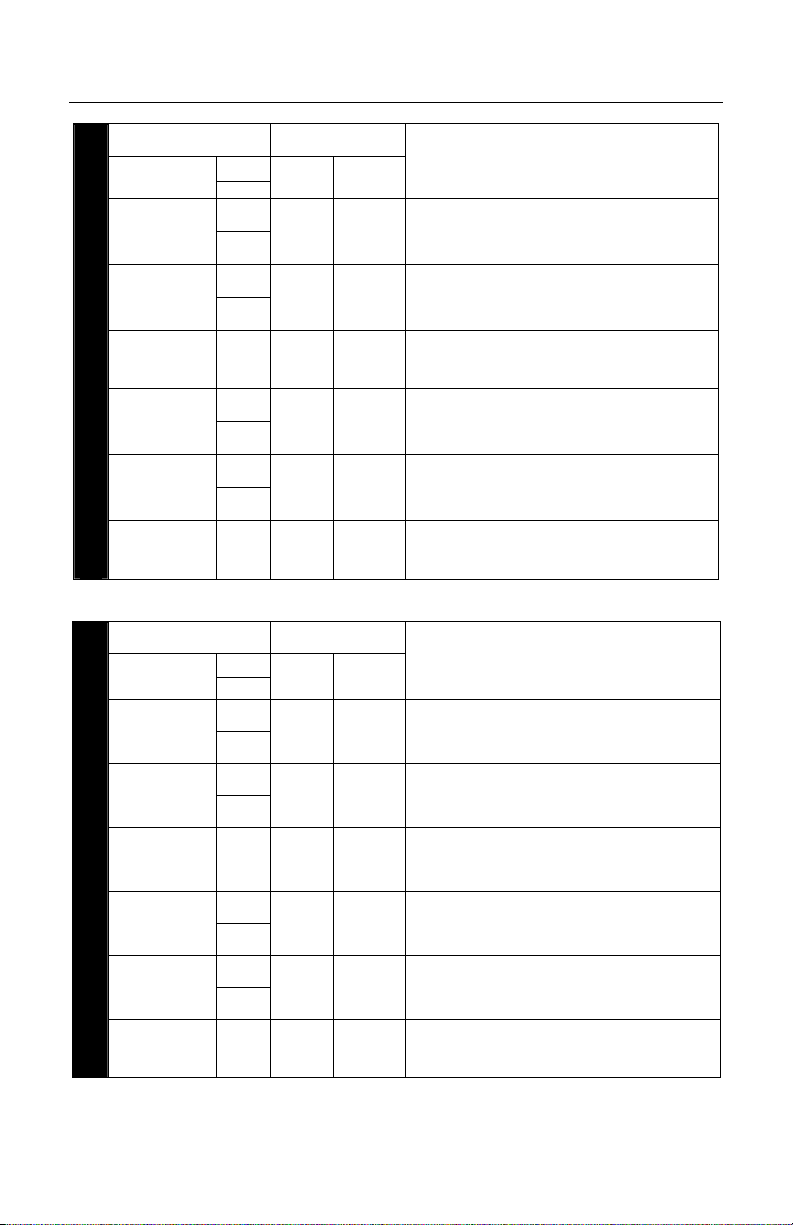
PART NUMBER CONNECTOR TYPE
MX009-2MA7
MX009-2FA7
MX009-2WA7 S Type A
MX009-2MB7
MX009-2FB7
STRAIGHT
MX009 USB KEYBOARD EMULATION CABLES
MX009-2WB7 S
PART NUMBER CONNECTOR TYPE
STRAIGHT
MX009-2MA8
MX009-2FA8
MX009-2WA8 S Type A
MX009-2MB8
MX009-2FB8
MX009 USB SERIAL EMULATION CABLES
MX009-2WB8 S
COILED
S
C
S
C
S
C
S
C
COILED
S
C
S
C
S
C
S
C
USB
E
ND
Type A
Type A
Locking
Type A
Locking
Type A
Locking
Type A
USB
E
ND
Type A
Type A
Locking
Type A
Locking
Type A
Locking
Type A
CANNER
S
END
10-pin
RJ45
Male
10-pin
RJ45
Female
25-pin
D-Sub
Female
10-pin
RJ45
Male
10-pin
RJ45
Female
25-pin
D-Sub
Female
SCANNER
END
10-pin
RJ45
Male
10-pin
RJ45
Female
25-pin
D-Sub
Female
10-pin
RJ45
Male
10-pin
RJ45
Female
25-pin
D-Sub
Female
COMPATIBLE SCANNER MODELS
Discontinued scanner models
All versions of the:
MS6220, MS6520, IS6520, MS7100, MS7220,
MS9500, MS3580 and IS3580
MS6720-14, IS4225-14, IS4225-81
MS951-14, MS961-14, IS4220-14, IS4220-81
MS860-1, MS860-2, MS860-11, MS860-17
MS700-1, MS700-2, MS700-11, MS700-17
All versions of the:
MS6220, MS6520, IS6520, MS7100, MS7220,
MS9500, MS3580 and IS3580
MS6720-14, IS4225-14, IS4225-81
MS951-14, MS961-14, IS4220-14, IS4220-81
MS860-1, MS860-2, MS860-11, MS860-17,
MS700-1, MS700-2, MS700-11, MS700-17
OMPATIBLE SCANNER MODELS
C
Discontinued scanner models
All versions of the:
MS6220, MS6520, IS6520, MS7100, MS7220,
MS9500, MS3580 and IS3580
MS6720-14, IS4225-14, IS4225-81
MS951-14, MS961-14, IS4220-14, IS4220-81
MS860-1, MS860-2, MS860-11, MS860-17
MS700-1, MS700-2, MS700-11, MS700-17
All versions of the:
MS6220, MS6520, IS6520, MS7100, MS7220,
MS9500, MS3580 and IS3580
MS6720-14, IS4225-14, IS4225-81
MS951-14, MS961-14, IS4220-14, IS4220-81
MS860-1, MS860-2, MS860-11, MS860-17
MS700-1, MS700-2, MS700-11, MS700-17
are shown in grey.
are shown in grey.
4
Page 9
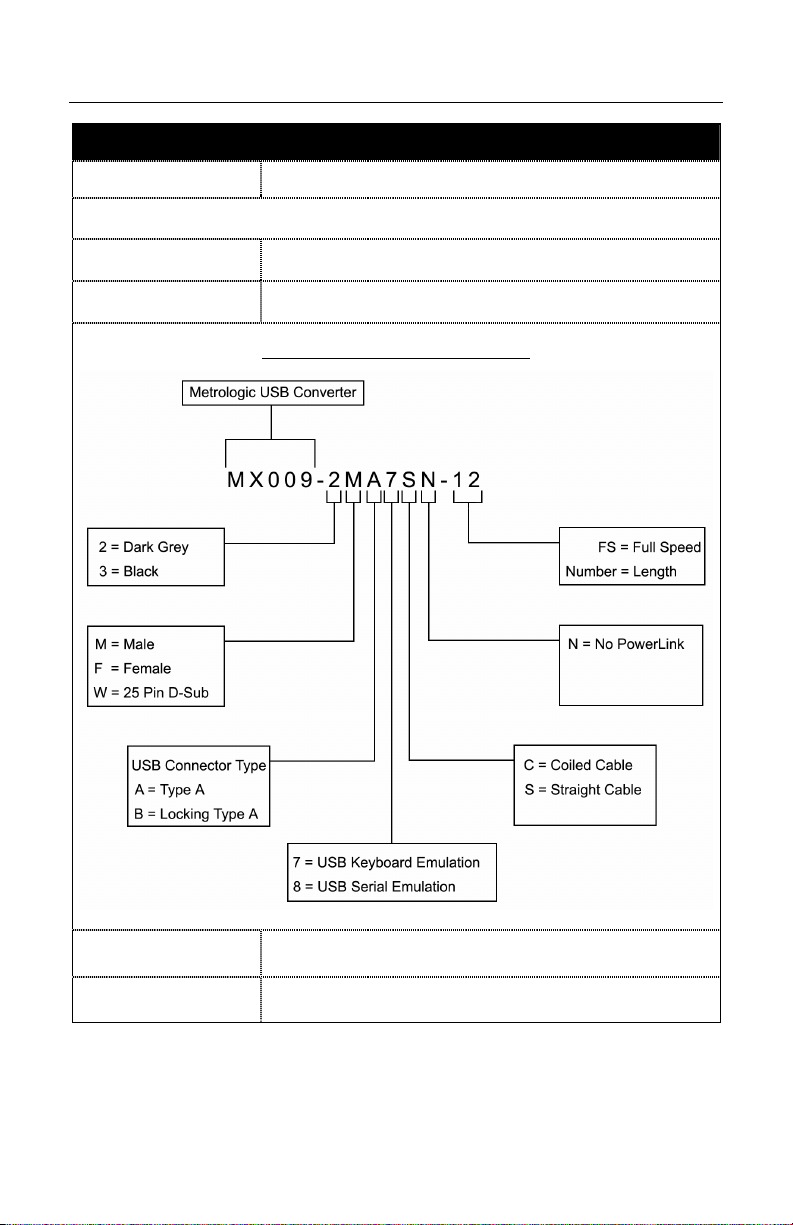
MX009 PART NUMBER DESIGNATION AND ACCESSORIES
PARTS AND ACCESSORIES
Part No. Description
MX009 USB Converter Cable
MX009-2xx7x
MX009-2xx8x
USB Keyboard Emulation Cable
USB Serial Emulation Cable
PART NUMBER DESIGNATION
Application
Dependent
00-02574X
†
Available for download on Metrologic's website, www.metrologic.com.
To order additional items, contact the dealer, distributor or call Metrologic’s Customer
Service Department at 1-800-METRO or 1-800-436-3876.
AC to DC Power Transformer (Optional)
USB Converter Cable Configuration Guide
MX009
†
5
Page 10

CABLE INSTALLATION
Make sure the AC input requirements of the power supply match
the AC outlet. The outlet should be near the equipment and easily
accessible.
6
Page 11
LABELS
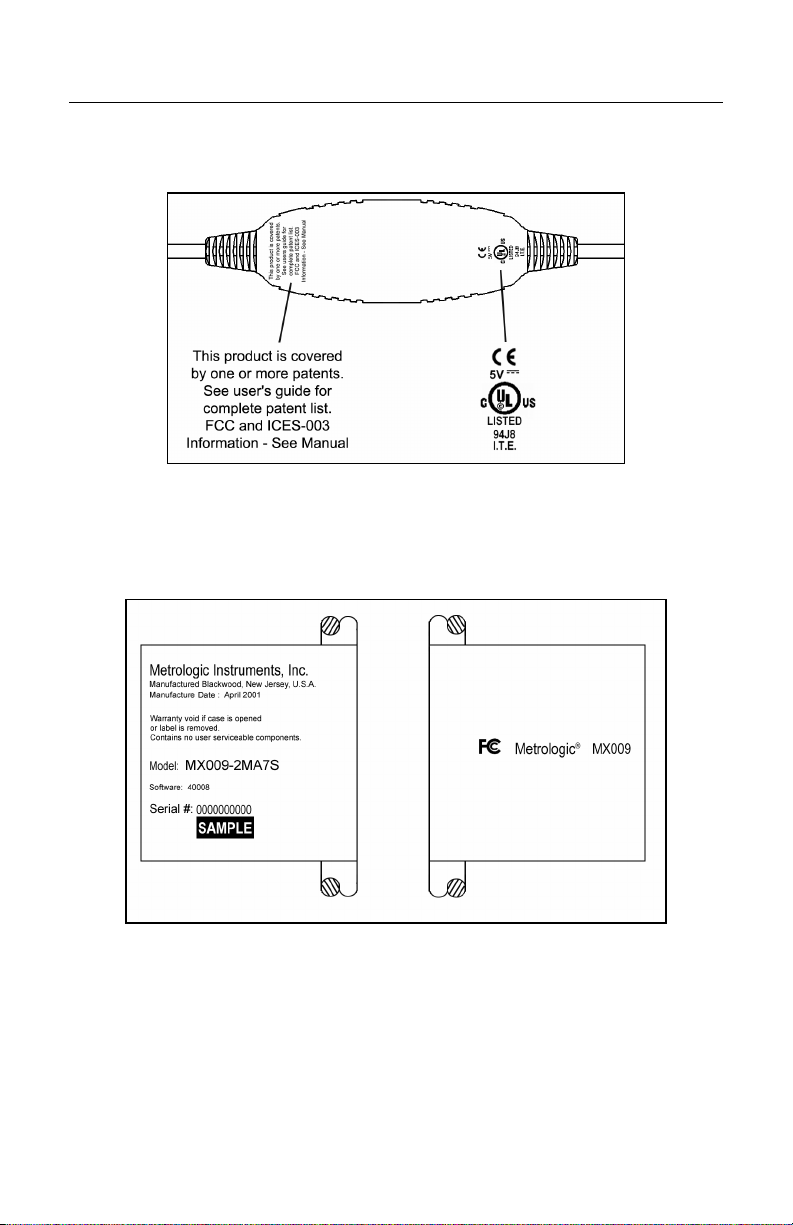
Each MX009 has CE, UL and caution information embedded in the back of the
case. The following is an example of embedded information.
Figure 1.
Each MX009 will also have a flag tag attached to the cable with the date of
manufacture, model number, and serial number.
**
Illustrations shown are not actual size.
Figure 2.
7
Page 12
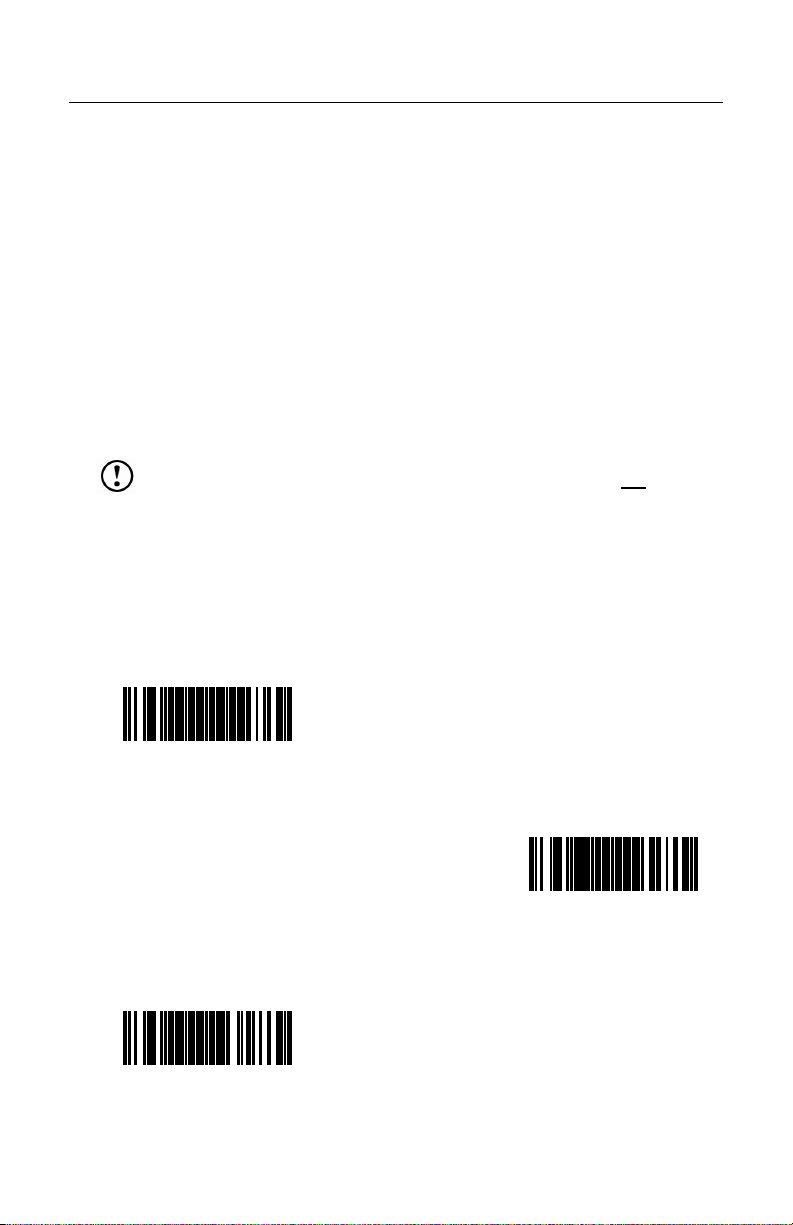
CONFIGURING FOR USB KEYBOARD EMULATION (MX009-2XX7X)
PowerLink Compatible Scanners
These Metrologic Scanners, used with the MX009 Cable must be reconfigured
using the following bar codes before the MX009 can communicate properly with
a host system.
• MS9500 Voyager® Series • MS6220 Pulsar®
• MS7100 Orbit
• MS7220 Argus
• MS6520 Cubit
• IS6520 Cubit
®
• MS3580 QuantumT™
®
SCAN
• IS3480 QuantumE™
®
• IS4225 ScanGlove™
®
Note: Configuration for USB Keyboard Emulation must be completed before
enabling/disabling any additional features documented in the
configuration guide provided with the scanner.
Important: When enabling/disabling additional features do not scan the
Recall Defaults bar code. If the Recall Defaults bar code is
scanned, all USB Keyboard Emulation configurations will
be lost and the process will have to be restarted.
Scan the following bar codes in numbered sequence.
1.
ENTER/EXIT
ONFIGURATION MODE
C
• All MetroSelect Compatible Scanners
³999999
3.
LOAD USB DEFAULTS
³999978
8
2.
RECALL DEFAULTS
³999998
Page 13
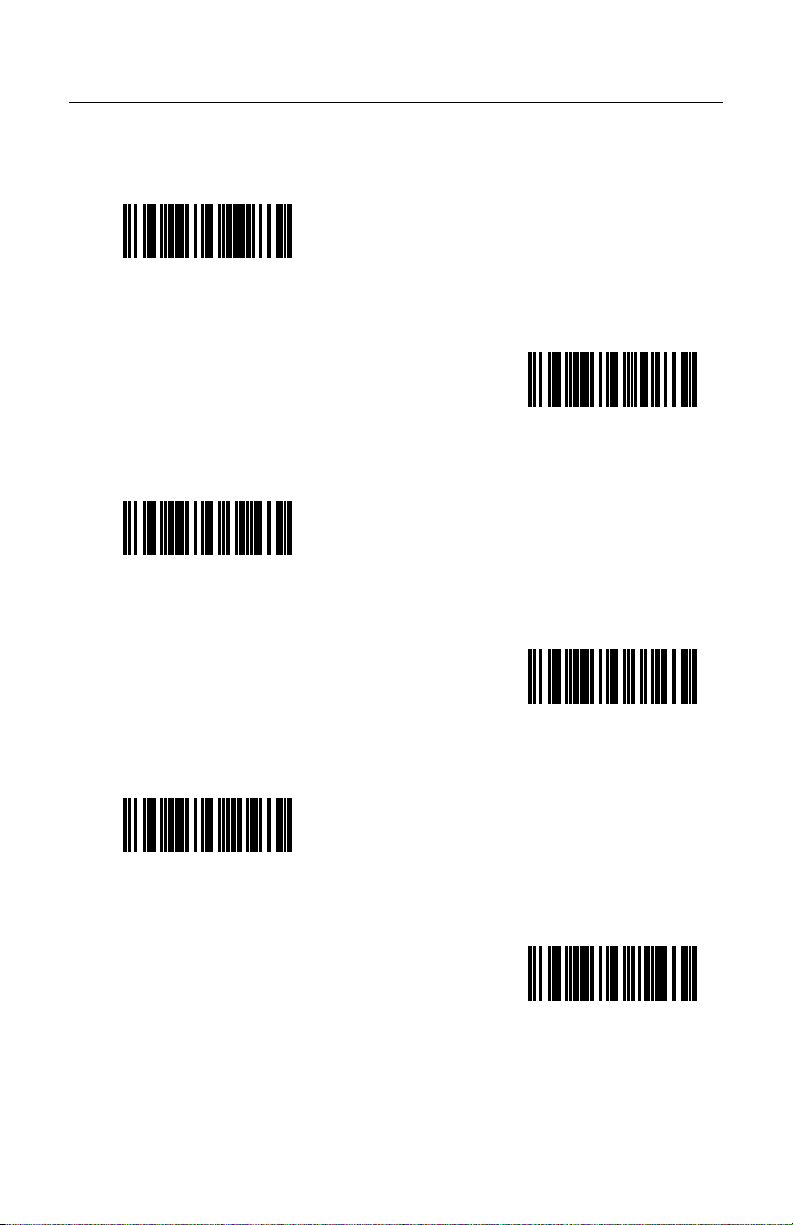
CONFIGURING FOR USB KEYBOARD EMULATION (MX009-2XX7X)
4. Scan the appropriate bar code below to set USB Keyboard Emulation to the
country keyboard required (defaults to USA).
USA
³416260
SPAIN
³416250
GERMANY
SWITZERLAND
³416280
ITALY
³416240
³416230
Continued on next page.
FRANCE
³416220
9
Page 14
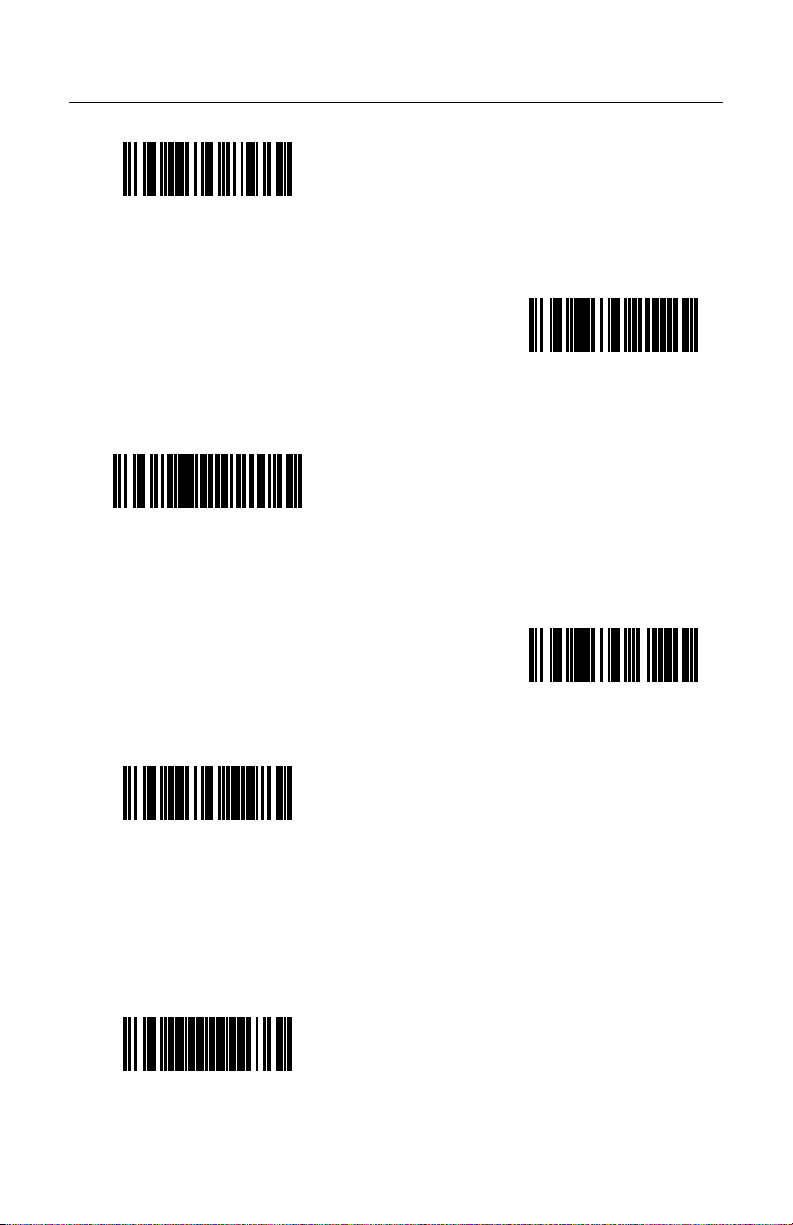
CONFIGURING FOR USB KEYBOARD EMULATION (MX009-2XX7X)
UNITED KINGDOM
³416210
B
J
APANESE
³4162100
IBM
S
WEDEN/FINLAND
ELGIUM
³416200
4700 FINANCIAL
KEYBOARD
³416270
³416290
5.
ONFIGURATION MODE
C
³999999
10
ENTER/EXIT
Page 15
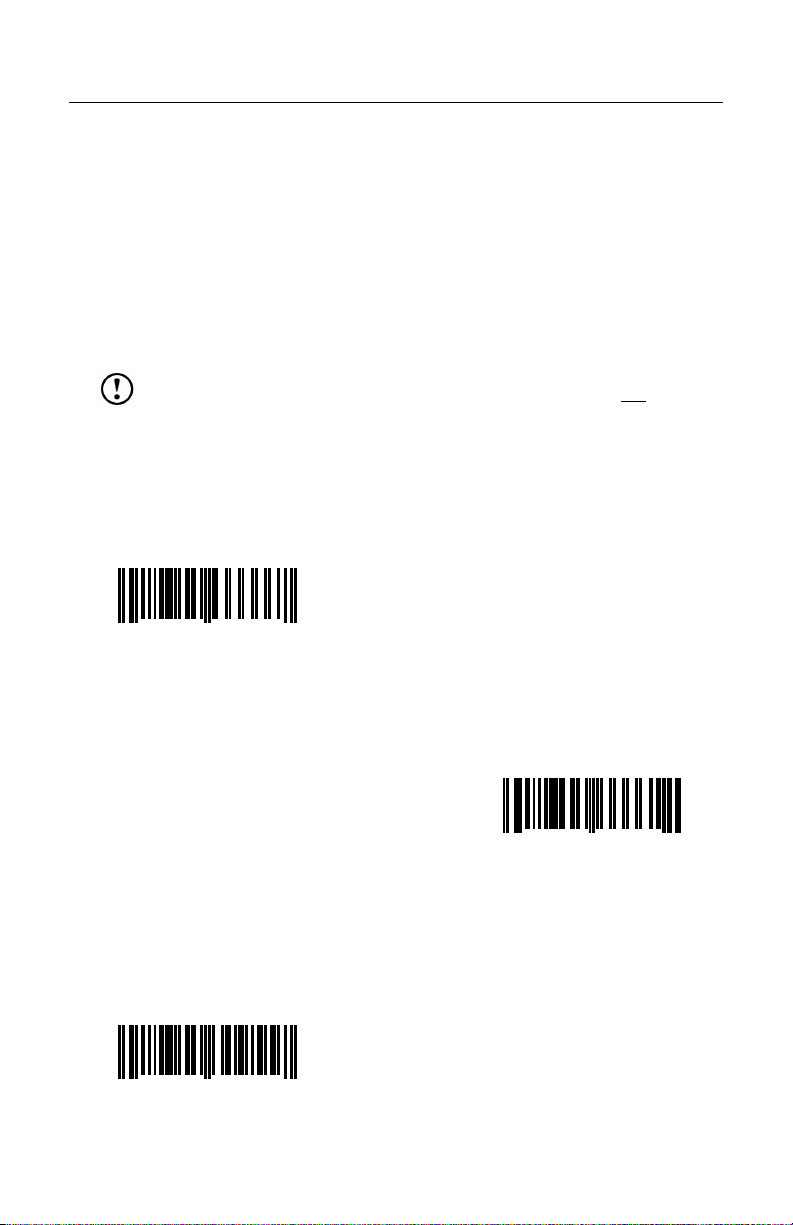
CONFIGURING FOR USB KEYBOARD EMULATION (MX009-2XX7X)
MS6720, MS860, AND TECH SERIES
These Metrologic Scanners, used with the MX009 Cable must be reconfigured
using the following bar codes before the MX009 can communicate properly with
a host system.
• MS6720 • MS860 • Tech Series
Note: Configuration for USB Keyboard Emulation must be completed before
Scan the following bar codes in numbered sequence.
1.
enabling/disabling any additional features documented in the
configuration guide provided with the scanner.
Important: When enabling/disabling additional features do not
Recall Defaults bar code. If the Recall Defaults bar code is
scanned, all USB Keyboard Emulation configurations will
be lost and the process will have to be restarted.
NTER/EXIT
E
C
ONFIGURATION MODE
scan the
12345 66666
0
3.
NABLE RS-232
E
12345 30955
0
7
2.
7
ECALL DEFAULTS
R
12345 66661
0
Continued on next page.
2
11
Page 16
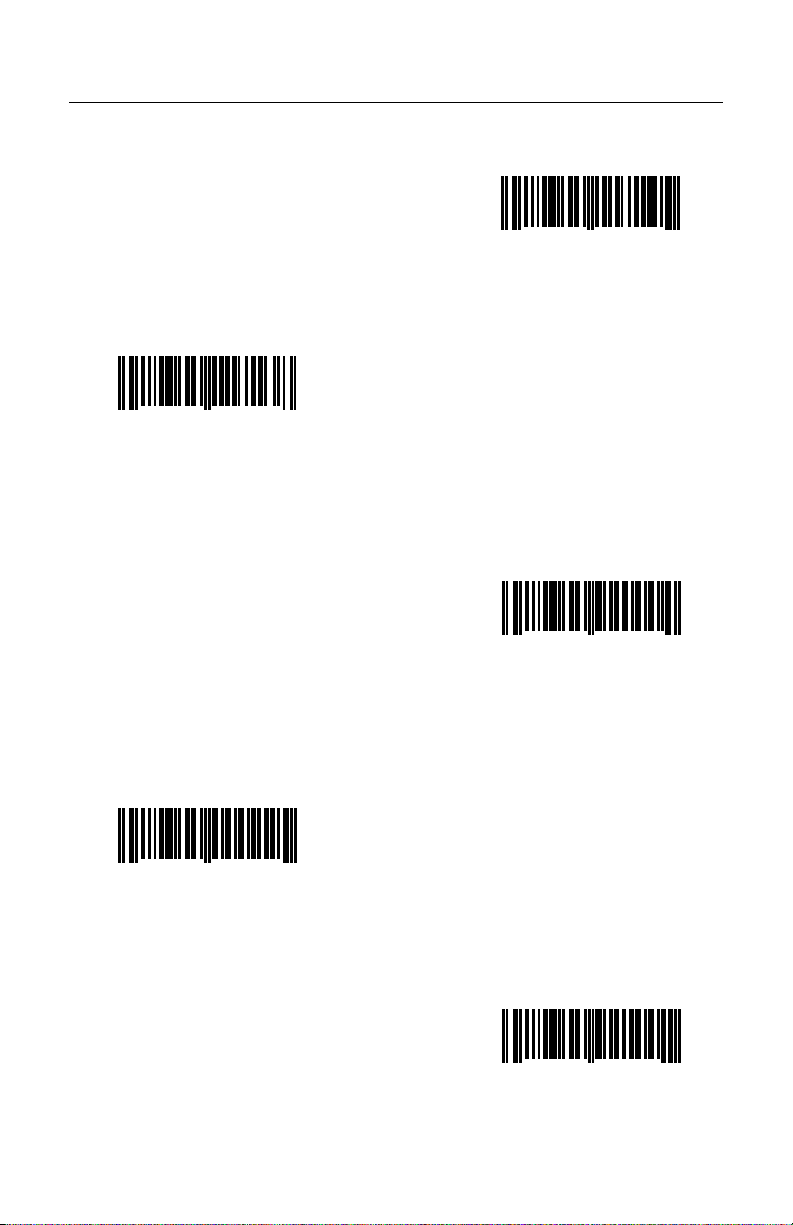
CONFIGURING FOR USB KEYBOARD EMULATION (MX009-2XX7X)
4.
NABLE XON/OFF
E
ANDSHAKING
H
12345 11714
0
5
5.
E
NABLE ACK/NAK
12345 11713
0
8
6.
ONFIGURABLE PREFIX #1
C
12345 92000
0
7.
ONTROL V PREFIX
C
12345 00022
0
5
4
Continued on next page.
12
8.
ONFIGURABLE PREFIX #2
C
12345 92100
0
1
Page 17
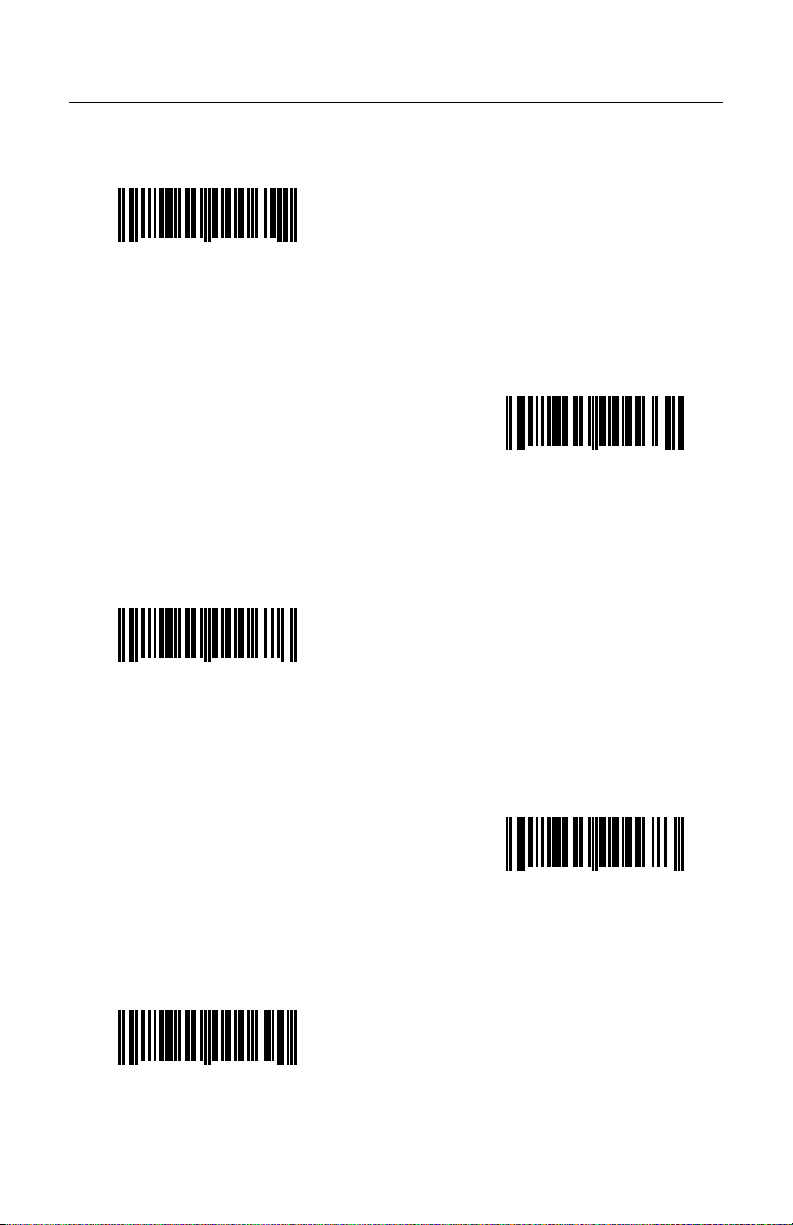
CONFIGURING FOR USB KEYBOARD EMULATION (MX009-2XX7X)
Scan one of the following bar codes to set Keyboard Emulation.
9.
0
BELGIUM
12345 00065
2
FRENCH
12345 00067
0
UNITED KINGDOM
12345 00066
0
9
6
GERMAN
12345 00068
0
3
ITALIAN
12345 00069
0
0
Continued on next page.
13
Page 18

CONFIGURING FOR USB KEYBOARD EMULATION (MX009-2XX7X)
0
SPANISH
12345 00070
6
UNITED STATES
12345 00071
0
SWEDISH/FINNISH
12345 00074
0
3
SWISS
12345 00073
0
7
4
Continued on next page.
14
JAPANESE
12345 00075
0
1
Page 19

CONFIGURING FOR USB KEYBOARD EMULATION (MX009-2XX7X)
0
RESERVED
12345 00076
8
10.
ENTER/EXIT
ONFIGURATION MODE
C
12345 66666
0
7
15
Page 20
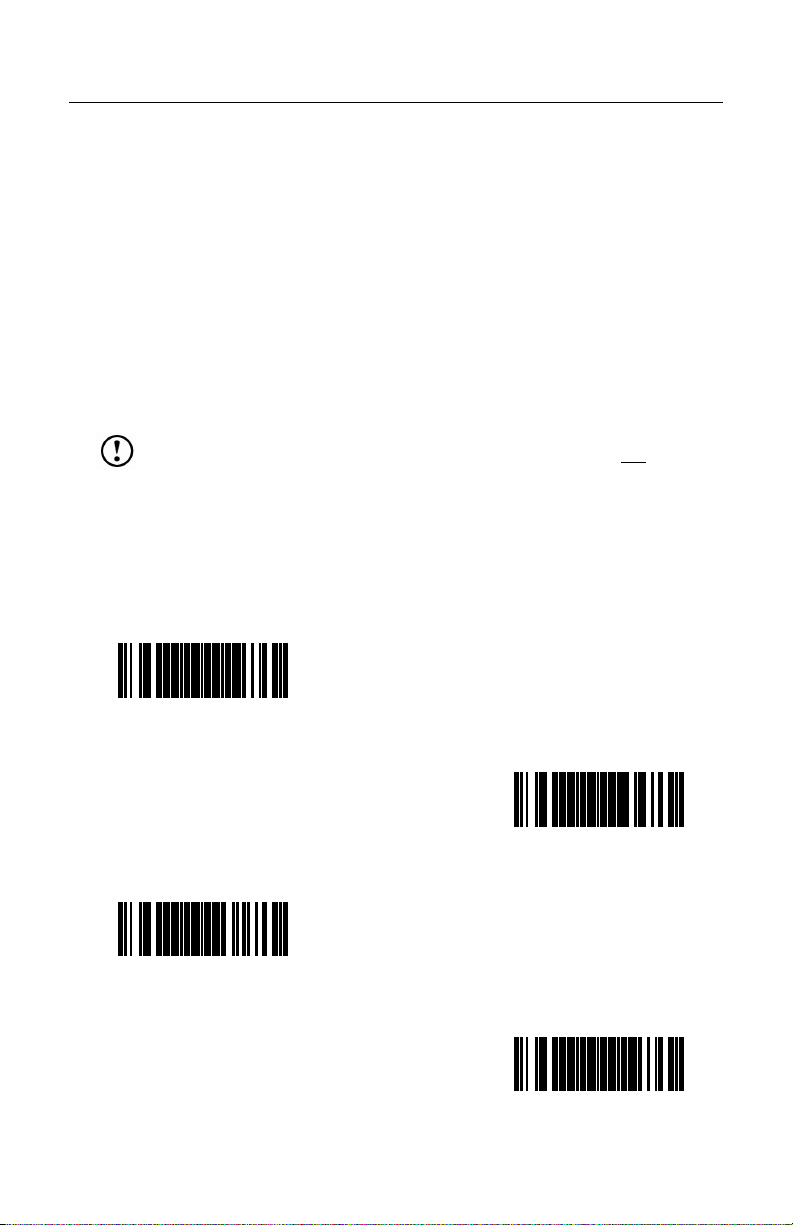
CONFIGURING FOR USB SERIAL EMULATION (MX009-2XX8X)
PowerLink Compatible Scanners
These Metrologic scanners must be reconfigured using the following bar codes
before the MX009 can communicate properly with the host system.
• MS9500 Voyager Series • MS6220 Pulsar
• MS7100 Orbit • MS3580 QuantumT
• MS7220 Argus
• MS6520 Cubit • IS4225 ScanGlove
• IS6520 Cubit • All MetroSelect Compatible Scanners
SCAN • IS3480 QuantumE
Note: Configuration for USB Serial Emulation must be completed before
enabling/disabling any additional features documented in the
configuration guide provided with the scanner.
Important: When enabling/disabling additional features do not scan the
Recall Defaults bar code. If the Recall Defaults bar code is
scanned, all USB Serial Emulation configurations will be
lost and the process will have to be restarted.
Scan the following bar codes in numbered sequence.
1.
ENTER/EXIT
ONFIGURATION MODE
C
³999999
2.
RECALL DEFAULTS
3.
LOAD USB DEFAULTS
³999978
³999998
4.
ENTER/EXIT
ONFIGURATION MODE
C
16
³999999
Page 21
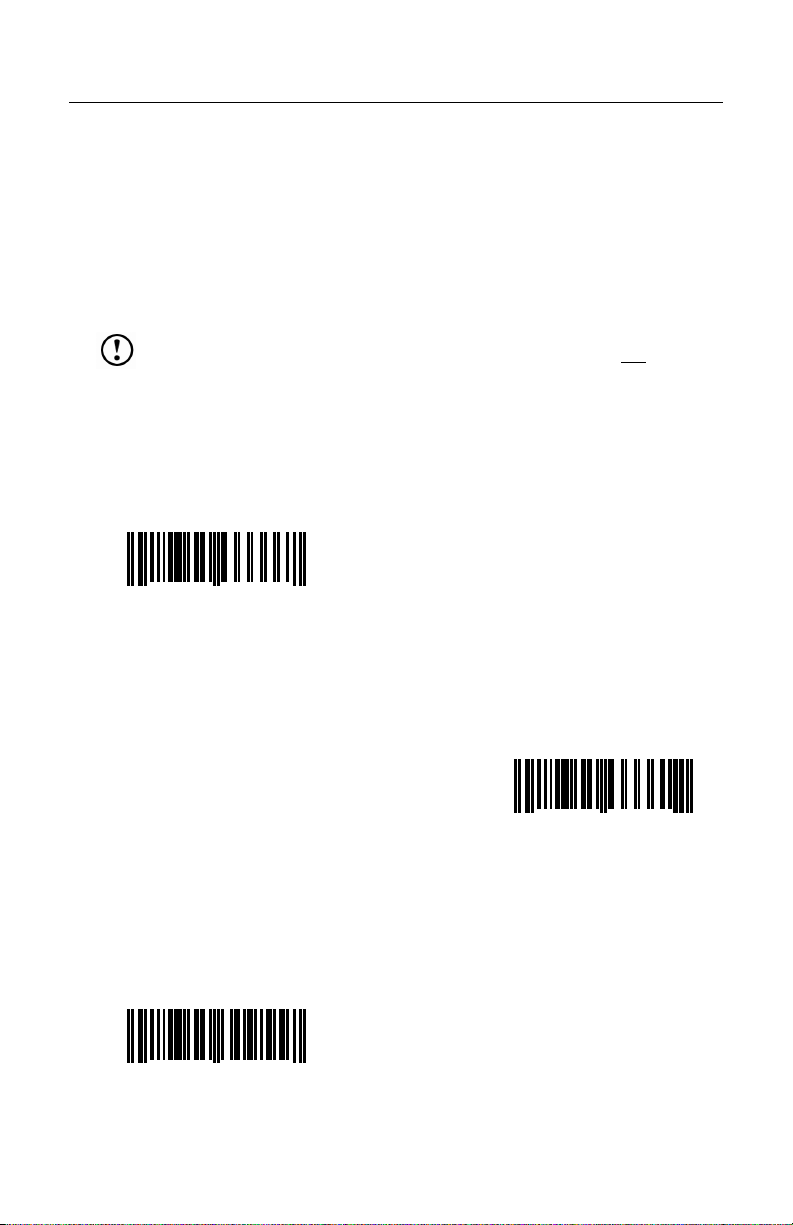
CONFIGURING FOR USB SERIAL EMULATION (MX009-2XX8X)
MS6720, MS860, AND TECH SERIES
These Metrologic scanners must be reconfigured using the following bar codes
before the MX009 can communicate properly with a host system.
• MS6720 • MS860 • Tech Series
Note: Configuration for USB Serial Emulation must be completed before
Scan the following bar codes in numbered sequence.
1.
enabling/disabling any additional features documented in the
configuration guide provided with the scanner.
Important: When enabling/disabling additional features do not scan the
Recall Defaults bar code. If the Recall Defaults bar code is
scanned, all USB Serial Emulation configurations will be
lost and the process will have to be restarted.
ENTER/EXIT
ONFIGURATION MODE
C
12345 66666
0
7
2.
RECALL DEFAULTS
12345 66661
3.
ENABLE RS232 MODE
12345 30955
0
Continued on next page.
0
7
2
17
Page 22
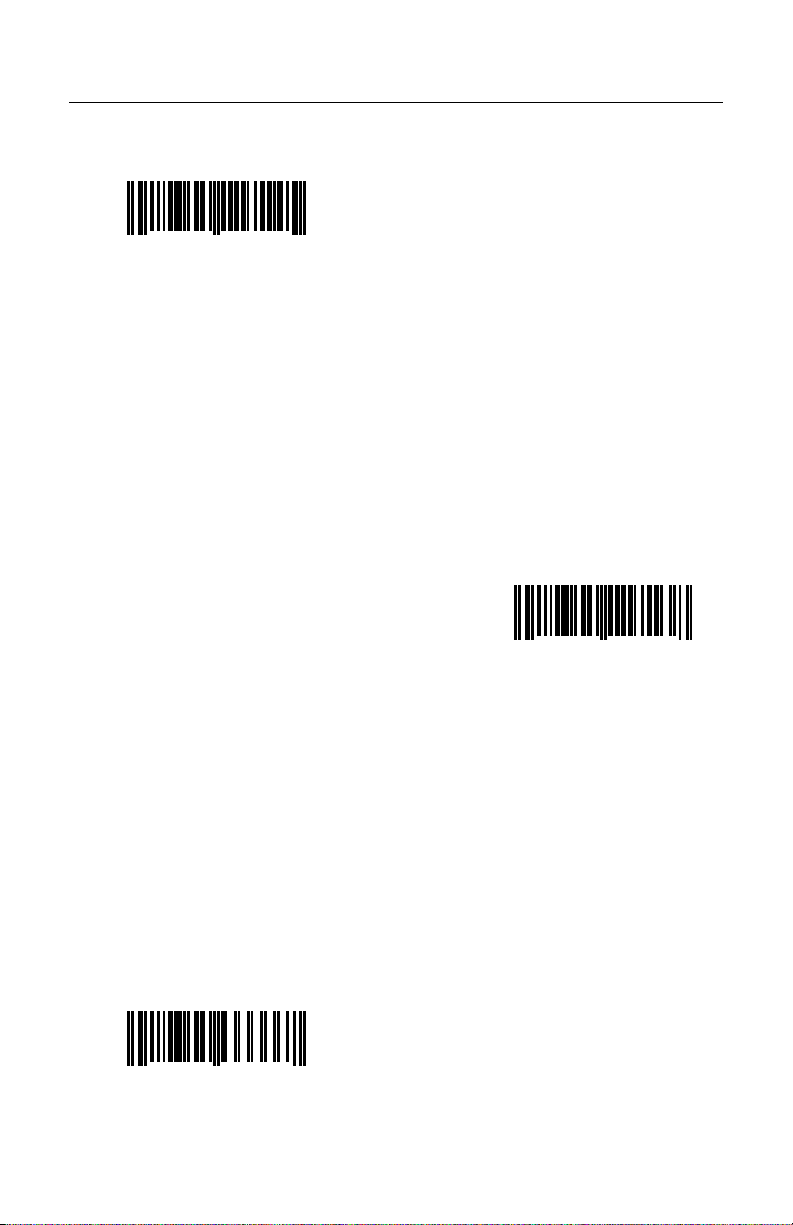
CONFIGURING FOR USB SERIAL EMULATION (MX009-2XX8X)
4.
ENABLE XON/XOFF
ANDSHAKING
H
12345 11714
0
5
5.
ENABLE ACK/NAK
12345 11713
0
8
6.
ENTER/EXIT
ONFIGURATION MODE
C
12345 66666
0
7
18
Page 23
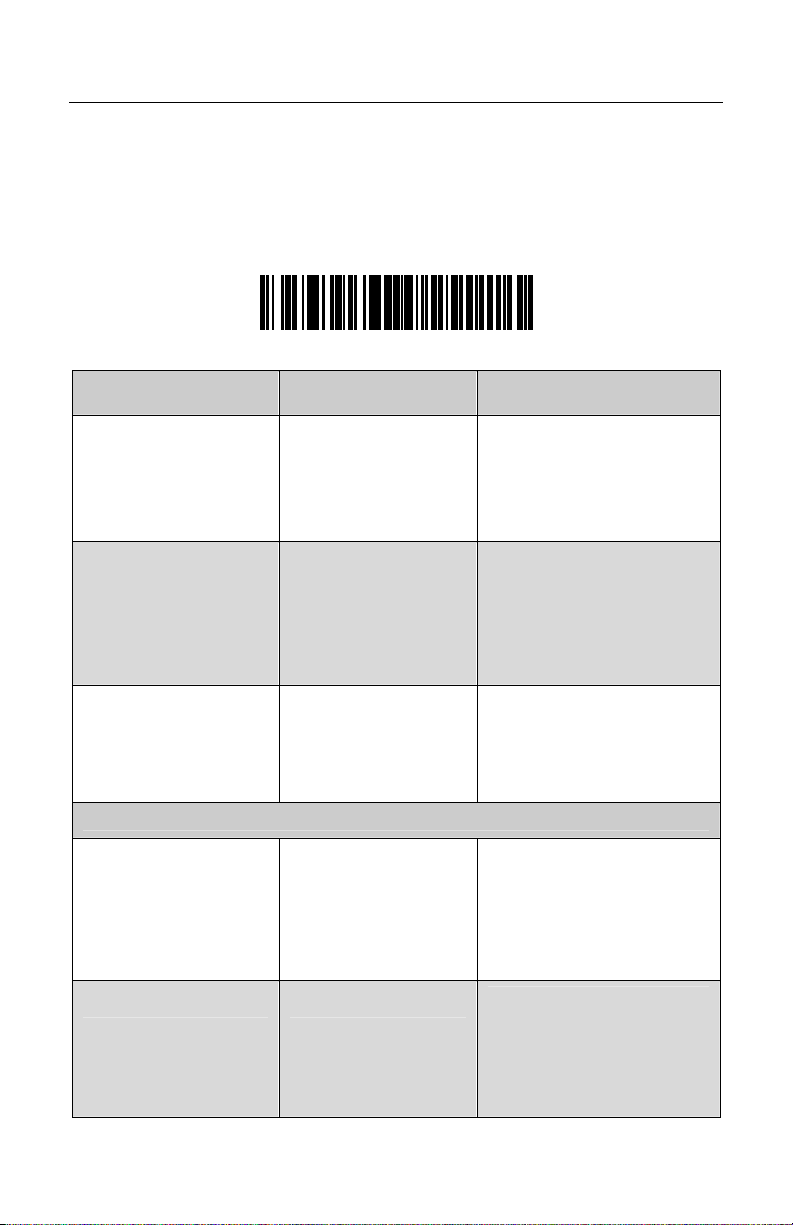
TROUBLESHOOTING GUIDE
The following guide is for reference purposes only. Contact a Metrologic
representative at 1-800-ID-METRO or 1-800-436-3876 to preserve the limited
warranty terms on page 22.
Test Bar Code
Scanning the following bar code will transmit the encoded characters followed by
the software number of the MX009.
Mt Lg -mx009
SYMPTOMS POSSIBLE CAUSE(S) SOLUTION
Make sure the cable is
No LEDs, beep or
laser
No Power is being
supplied to the
scanner
plugged into the scanner.
Check the transformer
(if one is supplied), the
outlet and power strip.
The MX009 requests
100mA from the USB port.
If the USB port cannot
supply this, a notification
window will appear on the
No LEDs, beep, or
laser
No power is being
supplied from the
USB port.
screen.
After scanning a bar
code, the Red and
Green LEDs are on,
but no data is being
transmitted to the host.
The scanner is not
programmed properly
for communication to
the MX009.
Re-program the scanner
using the appropriate codes
for your scanner model
(Refer to pages 8-18).
USB Keyboard Emulation
After scanning a bar
code, the scanner
beeps, but the
characters appear
incorrectly in your
application.
The scanner is not
programmed
correctly. The
incorrect country has
been selected.
Re-program the scanner
using the appropriate codes
for your scanner model
(Refer to pages 8-18).
The scanner powers
up, but does not scan
and/or beep.
Scanning a particular
bar code symbology
that is not enabled.
UPC/EAN, Code 39,
Interleaved 2 of 5, Code
93, Code 128 and Codabar
are enabled by default.
Verify that the type of bar
code being read is enabled.
19
Page 24
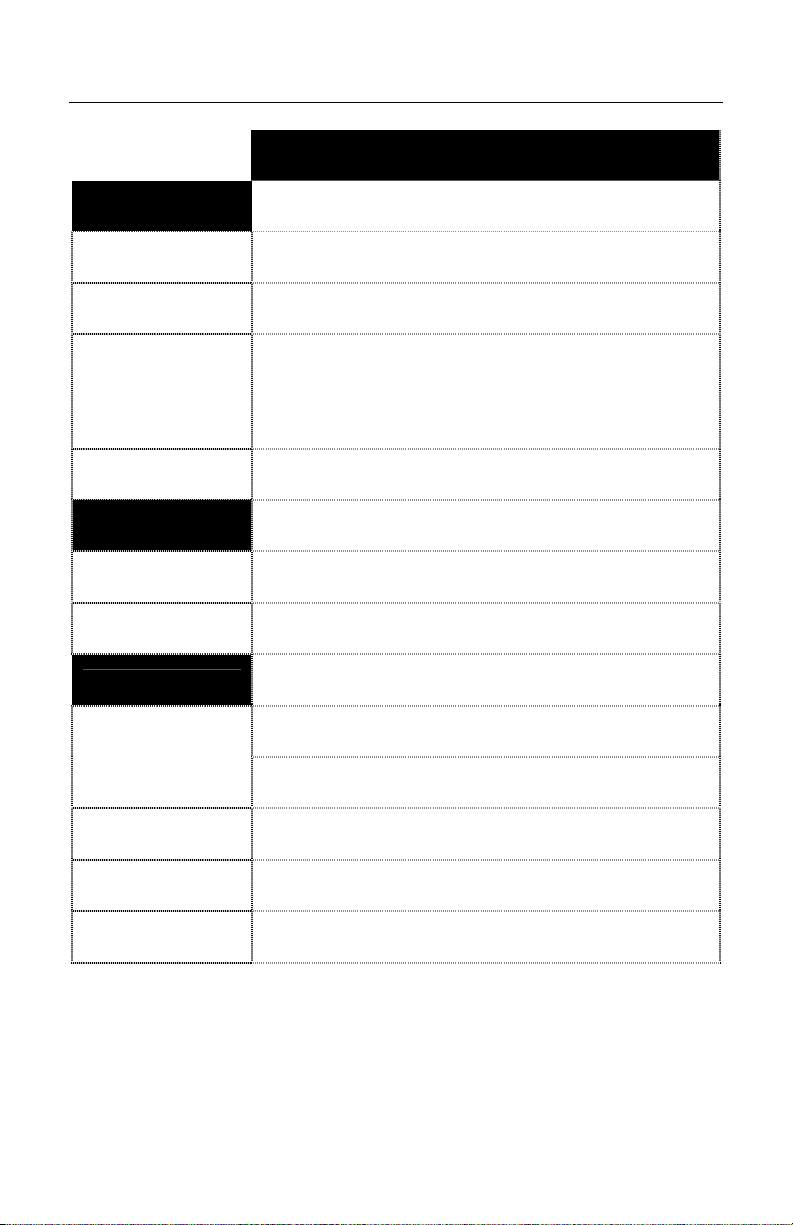
SPECIFICATIONS
MECHANICAL
Dimensions: 80.4 mm (3.2”) L x 32.4 mm (1.3”) W x 18.7 mm (0.7”) H
Weight: 160 g (0.35 lb)
Termination:
Cable: Straight or Coiled
ELECTRICAL
Input Voltage: 5.0 VDC ± 0.25V
EMC: FCC, ICES-003 & EN 55022 Class B
ENVIRONMENTAL
Temperature:
MX009 USB CONVERTER CABLE SPECIFICATIONS
10-pin modular RJ45 Male to USB
10-pin modular RJ45 Female to USB.
25-pin Female D-Sub to USB
Operating: 0°C to 40°C (32°F to 104°F)
Storage: -40°C to 60°C (-40°F to 140°F)
Humidity: 5% to 95% relative humidity, non condensing
Contaminants: Sealed to resist airborne particulate contaminants
Ventilation: None required
Specifications subject to change without notice.
20
Page 25
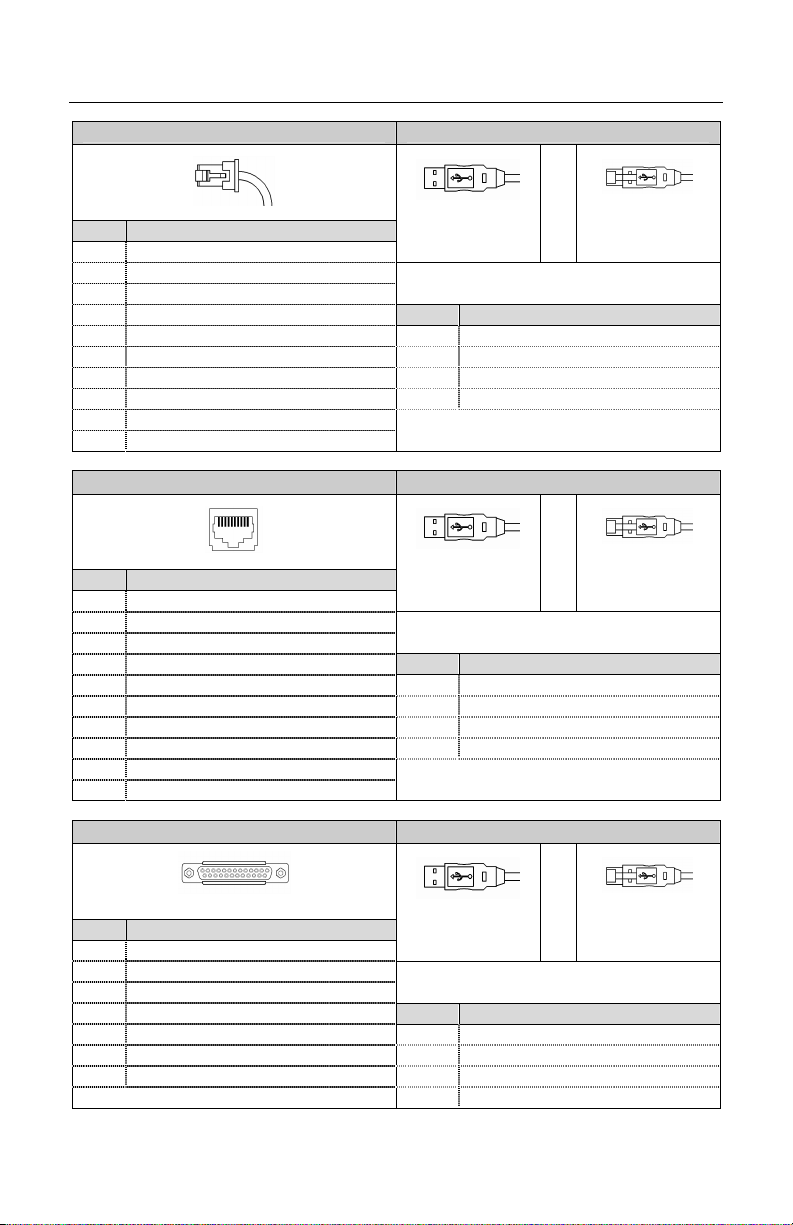
CABLE INFORMATION
Scanner Connector End USB Connector End
Pin Function
1 Ground
2 TXD
3 RXD
4 RTS Pin Function
5 CTS 1 Vbus
6 DTR/LP 2 D7 Reserved 3 D+
8 LP Data 4 Ground
9 +5 VDC From Transformer
10 SHD/GND
Scanner Connector End USB Connector End
Pin Function
1 Ground
2 TXD
3 RXD
4 RTS Pin Function
5 CTS 1 Vbus
6 DTR/LP SRC 2 D7 Reserved 3 D+
8 LP Data 4 Ground
9 +5 VDC From Transformer
10 SHD/GND
Scanner Connector End USB Connector End
Pin** Function
2 RS232 Receive
3 RS232 Transmit
7 Signal Ground
13 Earth Ground Pin Function
14 Power GND #1 1 Vbus
19 Power In 2 D25 Power GND #2 3 D+
** Pins not shown are “No Connect”. 4 Ground
1
10
10-Pin RJ45 Male
1 10
10-Pin RJ45 Female
1 13
14 25
25 Pin Female D-Sub
4
1
Type A
MX009-2MA7x
MX009-2MA8x
x = C (coiled) or S (Straight) cable
4
1
Type A
MX009-2FA7x
MX009-2FA8x
x = C (coiled) or S (Straight) cable
4
1
Type A
MX009-2WA7x
MX009-2WA8x
x = C (coiled) or S (Straight) cable
4
or
1
Locking Type A
and MX009-2MB7x and
MX009-2MB8x
4
1
or
Locking Type A
and MX009-2FB7x and
or
MX009-2FB8x
4
1
Locking Type A
and MX009-2WB7x and
MX009-2WB8x
21
Page 26

LIMITED WARRANTY
The MX009 USB converter cables are manufactured by Metrologic at its Blackwood, New Jersey, U.S.A.
facility and at its Suzhou, China facility. The MX009 USB converter cables have a two (2) year limited
warranty from the date of manufacture. Metrologic warrants and represents that all MX009 USB
converter cables are free of all defects in material, workmanship and design, and have been produced
and labeled in compliance with all applicable U.S. Federal, state and local laws, regulations and
ordinances pertaining to their production and labeling.
This warranty is limited to repair, replacement of product or refund of product price at the sole discretion
of Metrologic. Faulty equipment must be returned to one of the following Metrologic repair facilities:
Blackwood, New Jersey, USA; Madrid, Spain; or Suzhou, China. To do this, contact the appropriate
Metrologic Customer Service/Repair Department to obtain a Returned Material Authorization (RMA)
number.
In the event that it is determined the equipment failure is covered under this warranty, Metrologic
shall, at its sole option, repair the Product or replace the Product with a functionally equivalent unit
and return such repaired or replaced Product without charge for service or return freight, whether
distributor, dealer/reseller, or retail consumer, or refund an amount equal to the original purchase
price.
This limited warranty does not extend to any Product which, in the sole judgment of Metrologic,
has been subjected to abuse, misuse, neglect, improper installation, or accident, nor any damage
due to use or misuse produced from integration of the Product into any mechanical, electrical or
computer system. The warranty is void if the case of Product is opened by anyone other than
Metrologic’s repair department or authorized repair centers.
THIS LIMITED WARRANTY, EXCEPT AS TO TITLE, IS IN LIEU OF ALL OTHER WARRANTIES
OR GUARANTEES, EITHER EXPRESS OR IMPLIED, AND SPECIFICALLY EXCLUDES,
WITHOUT LIMITATION, WARRANTIES OF MERCHANTABILITY AND FITNESS FOR A
PARTICULAR PURPOSE UNDER THE UNIFORM COMMERCIAL CODE, OR ARISING OUT OF
CUSTOM OR CONDUCT. THE RIGHTS AND REMEDIES PROVIDED HEREIN ARE
EXCLUSIVE AND IN LIEU OF ANY OTHER RIGHTS OR REMEDIES. IN NO EVENT SHALL
METROLOGIC BE LIABLE FOR ANY INDIRECT OR CONSEQUENTIAL DAMAGES,
INCIDENTAL DAMAGES, DAMAGES TO PERSON OR PROPERTY, OR EFFECT ON
BUSINESS OR PROPERTY, OR OTHER DAMAGES OR EXPENSES DUE DIRECTLY OR
INDIRECTLY TO THE PRODUCT, EXCEPT AS STATED IN THIS WARRANTY. IN NO EVENT
SHALL ANY LIABILITY OF METROLOGIC EXCEED THE ACTUAL AMOUNT PAID TO
METROLOGIC FOR THE PRODUCT. METROLOGIC RESERVES THE RIGHT TO MAKE ANY
CHANGES TO THE PRODUCT DESCRIBED HEREIN.
CORPORATE HEADQUARTERS,
NORTH AMERICA
Metrologic Instruments, Inc. Metrologic Eria Ibérica, SL
90 Coles Rd. C/Alfonso Gomez, 38-40, 1D
Blackwood, NJ 08012-4683 28037 Madrid
Customer Service Department Tel: +34 913 751 249
Tel: 1-800-ID-METRO Fax: +34 913 270 437
Fax: 856-228-6673
Email: [email protected]
AUTO ID INSTRUMENTS (SHANGHAI) CO., LTD
MTLG
Suzhou Sales Office
BLK A, Room# 03/03-04
No.5 Xinghan Street, Xinsu Industrial Square
China-Singapore Suahou Industrial Park, Suzhou, PRC
Tel: 86-512-67622550
Fax: 86-512-67622560
Email: [email protected]
METROLOGIC EUROPEAN REPAIR CENTER
(MERC)
22
Page 27

NOTICES
TESTED TO COMPLY
WITH FCC STANDARDS
FOR HOME OR OFFICE USE
Notice
This device complies with Part 15 of the FCC Rules. Operation is subject to the
following two conditions: (1) This device may not cause harmful interference, and
(2) this device must accept any interference received, including interference that
may cause undesired operation.
Notice
This equipment has been tested and found to comply with the limits for a Class B
digital device, pursuant to Part 15 of the FCC rules. These limits are designed to
provide reasonable protection against harmful interference in a residential
installation. This equipment generates, uses and can radiate radio frequency
energy and, if not installed and used in accordance with the instruction, may
cause harmful interference to radio communications. However, there is no
guarantee that interference will not occur in a particular installation. If this
equipment does cause harmful interference to radio or television reception, which
can be determined by turning the equipment off and on, the user is encouraged
to try to correct the interference by one or more of the following measures:
• Reorient or relocate the receiving antenna
• Increase the separation between the equipment and receiver
• Connect the equipment into an outlet on a circuit different from that to which
the receiver is connected
• Consult the dealer or an experienced radio TV technician for help
Any unauthorized changes or modifications of this equipment could void the
users authority to operate this device.
Notice
This Class B digital apparatus complies with Canadian ICES-003.
Avertissement
Cet appareil numérique de la class B est conforme à la norme NMB-003.
23
Page 28

NOTICES
DECLARATION OF CONFORMITY
According to 47 CFR, Part 2 and 15 for Class B Personal Computers and
Peripherals; and/or CPU Boards and Power Supplies used with Class B
Personal Computers:
We: Metrologic Instruments, Inc.
Located at: 90 Coles Road
Blackwood, NJ 08012
Telephone: 856-228-8100
Declare under sole responsibility that the product identified herein, complies with
47 CFR Part 2 and 15 of the FCC rules as a Class B digital device. Each product
marketed is identical to the representative unit tested and found to be in
compliant with the standards. Records maintained continue to reflect the
equipment being produced can be expected to be within the variation accepted,
due to quality production and testing on a statistical basis as required by 47 CFR
§ 2.909. Operation is subject to the following two conditions: (1) this device may
not cause harmful interference, and (2) this device must accept any interference
received, including interference that may cause undesired operation.
Trade Name: METROLOGIC
Type of Product: Bar Code Scanner
Model: MX009 alphanumeric suffix may follow.
ATENT INFORMATION
P
For patent information, please refer to www.honeywellaidc.com/patents.
24
Page 29
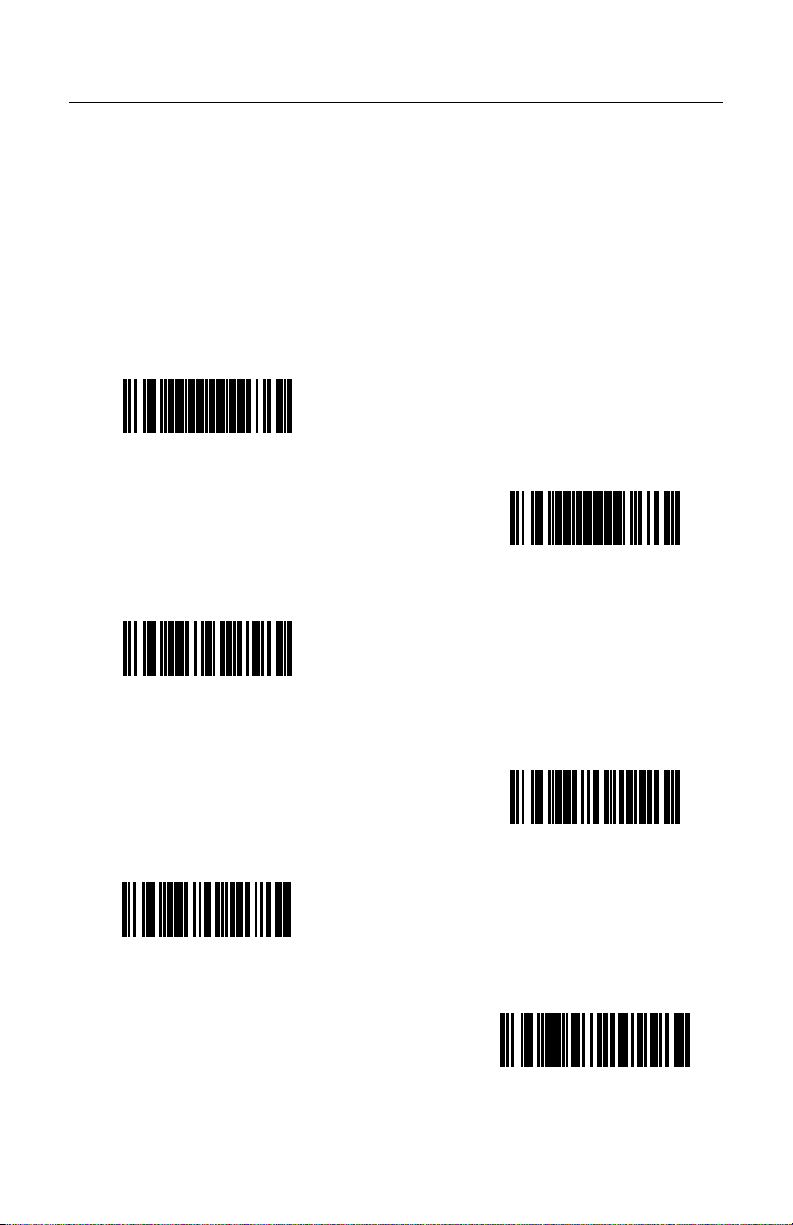
ADDITIONAL BAR CODES
Some Metrologic scanners require alternate configuration steps than the steps
found on pages 8 - 18. If your scanner was manufactured before May 2002 or
does not accept the standard configuration sequences, you may need to use one
of the alternate configuration methods listed on the following pages. Contact a
Metrologic customer service representative to help determine if your scanner
requires one of these methods.
Alternate Configuration for USB Keyboard Emulation (MX009-2xx7x)
1.
ENTER/EXIT
ONFIGURATION MODE
C
PowerLink Compatible Scanners
³999999
2.
RECALL DEFAULTS
3.
ENABLE RS-232 MODE
³415554
³999998
4.
ENABLE XON/XOFF
HANDSHAKING
5.
ENABLE ACK/NAK
³115913
³115914
6.
CONTROL V
³80350220
25
Page 30

ADDITIONAL BAR CODES
7.
*Enable LF Suffix
³116612
8. Scan the appropriate bar code below to set USB Keyboard Emulation to the
country keyboard required.
BELGIUM
³80360650
UNITED KINGDOM
³ 80360660
FRANCE
³80360670
ERMAN
G
³ 80360680
PANISH
S
³ 80360700
26
ITALIAN
³80360690
Page 31
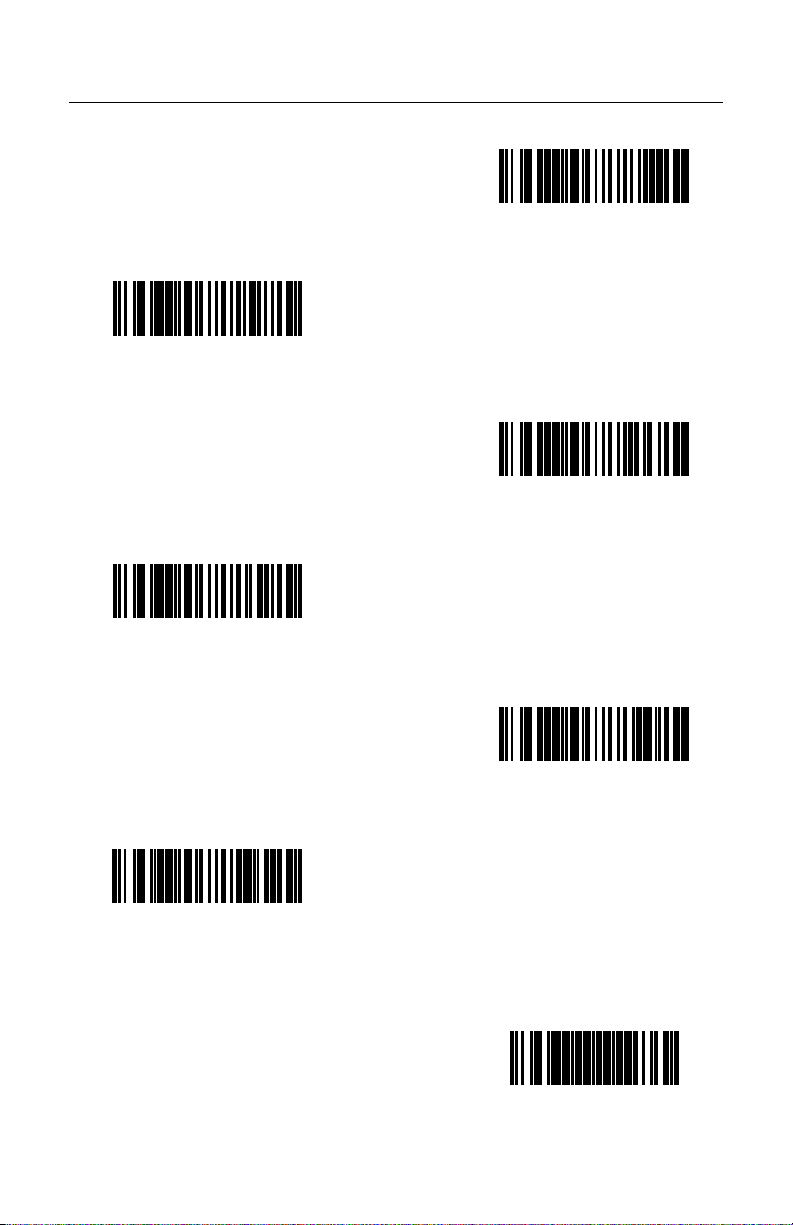
ADDITIONAL BAR CODES
UNITED STATES
RESERVED
³ 80360720
SWEDISH/FINNISH
³ 80360740
J
³80360710
SWISS
³80360730
APANESE
³80360750
ESERVED
R
³80360760
9.
ENTER/EXIT
ONFIGURATION MODE
C
³999999
27
Page 32
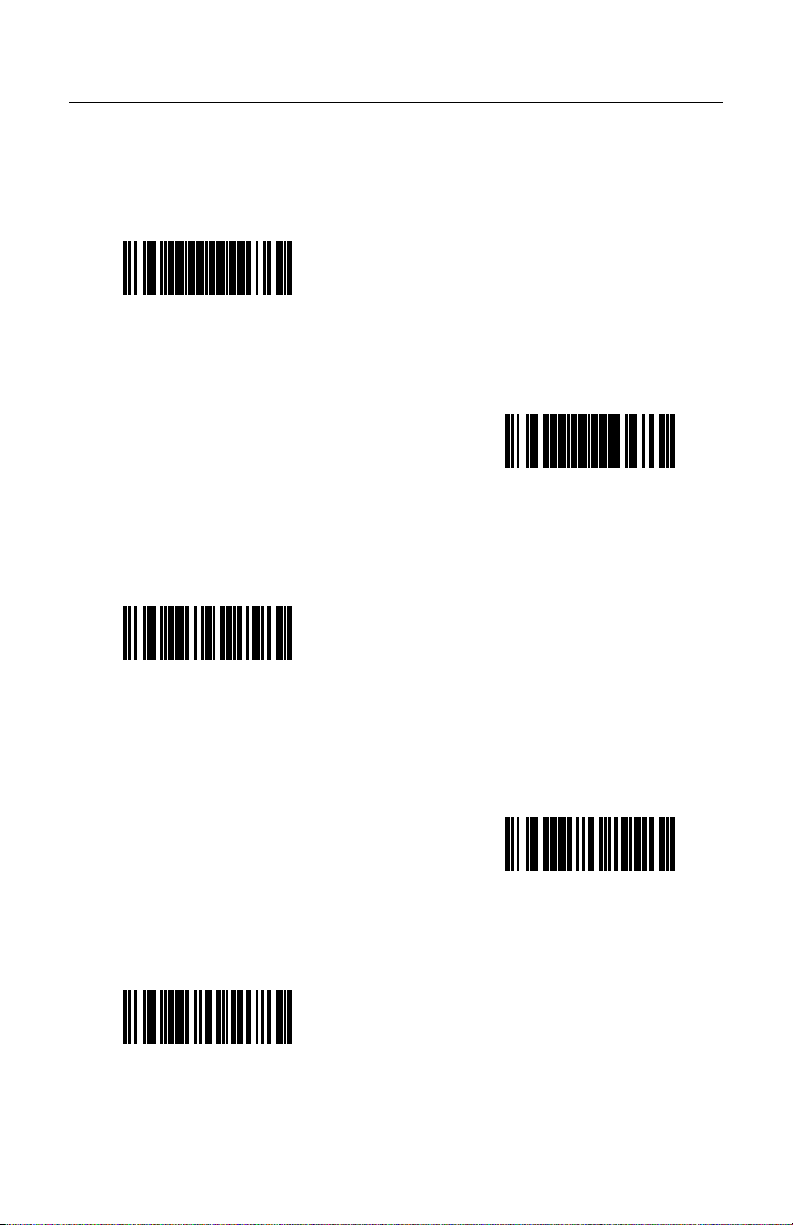
ADDITIONAL BAR CODES
Alternate Configuration for USB Serial Emulation (MX009-2xx8x)
1.
ONFIGURATION MODE
C
ENTER/EXIT
PowerLink Compatible Scanners
³999999
3.
ENABLE RS-232 MODE
³415554
2.
RECALL DEFAULTS
³999998
4.
ENABLE XON/XOFF
HANDSHAKING
³115914
5.
ENABLE ACK/NAK
³115913
Continued on next page.
28
Page 33

ADDITIONAL BAR CODES
6.
*ENABLE LF SUFFIX
³116612
7.
ENTER/EXIT
ONFIGURATION MODE
C
³999999
29
Page 34

CONTACT INFORMATION AND OFFICE LOCATIONS
CORPORATE HEADQUARTERS
NORTH AMERICA
USA, New Jersey
Metrologic Instruments, Inc. Metrologic Instruments GmbH
Tel: 1-800-ID-METRO Fax: 856-228-6673 Tel: 49-89-89019-0 Fax: 49-89-89019-200
Email: [email protected] Email: [email protected]
SOUTH AMERICA AND CENTRAL AMERICA
Brazil São Paulo
Metrologic do Brasil Ltda. Email: [email protected]
Tel: 55-11-5182-8226 Fax: 55-11-5182-8315
Email: [email protected]
Tel: 49-89-89019-222 Fax: 49-89-89019-173
Outside Brazil São Paulo
Metrologic South America
Tel: 55-11-5182-7273 Fax: 55-11-5182-7198 Metrologic Instruments Italia srl
Email: [email protected] Tel: +39 0 51 6511978 Fax: +39 0 51 6521337
Email: [email protected]
ASIAN HEADQUARTERS
Asia, Singapore
Metrologic Asia (Pte) Ltd
Tel: (65) 6842-7155 Fax: (65) 6842-7166 Tel: +33 (0) 1 48.63.78.78
Email: [email protected] Fax: +33 (0) 1 48.63.24.94
Email: [email protected]
China
MTLG Auto ID Instruments (Shanghai) Co., Ltd
Tel: 86-2158692780 Fax: 86-21-58692782 Metrologic Eria Ibérica, SL
Email: [email protected] Tel: +34 913 272 400 Fax: +34 913 273 829
Email: [email protected]
Metro (Suzhou) Sales Office
Tel: 86-512-67622550 Fax: 86-512-67622560 Metrologic European Repair Center (MERC)
Email: [email protected] Metrologic Eria Ibérica, SL
Tel: +34 913 751 249 Fax: +34 913 270 437
Guangzhou Sales Office
Tel/: 86-20-38823476 Fax: 86-20-38823477
Email: [email protected] Metrologic Instruments UK Limited
Tel: +44 (0) 1256 365900
Beijing Sales Office Fax: +44 (0) 1256 365955
Tel/Fax: 86 10 82253472 Email: [email protected]
Email: [email protected]
Japan, Tokyo
Metrologic Japan Co., Ltd.
Tel: 81-03-3839-8511 Fax: 81-03-3839-8519 Email: [email protected]
Email: [email protected]
India, Bangalore
Metrologic India Tel: +48 (22) 545 04 30
Tel: +91 80 51256718 Fax: +91 80 51256719 Fax: +48 (22) 545 04 31
Email: [email protected] Email: [email protected]
EUROPEAN, MIDDLE EAST & AFRICAN
HEADQUARTERS
Germany, Munich
Germany, Austria and Switzerland
Tel: 49-89-89019-0 Fax: 49-89-89019-200
Eastern Europe and Middle East
Italy, Bologna
France, Paris
Metrologic Eria France SA
Spain, Madrid
United Kingdom, Basingstoke
Russia, Moscow
Metrologic Russia
Tel: +7 095 730 7424 Fax: +7 095 730 7425
Poland, Warsaw
Metrologic Instruments Poland Sp.z o.o
30
Page 35

Page 36

June 2005
Printed in the USA
00-02574D
 Loading...