

Page 1
Important Information
Caution: The XR27 Column weight is 84 pounds (380kg) net. It
requires two or more persons to safely handle.
Assembly Instructions
It is recommended that the Professionals at your McIntosh
Dealer, who are skilled in all aspects of installation and
operation, install the XR27 Loudspeaker System and any
associated audio equipment. Refer to page 7 of the XR27
Owner’s Manual along with the information below:
Unpacking the Column
1. Remove the banding material from the shipping carton
and lift off the top of the shipping carton and set it
aside.
2. Lift up on the rear of the Loudspeaker System Column, near the foam packing material at both ends.
Place the entire Loudspeaker Assembly (Column,
Grille and foam packing material) next to the bottom
shipping carton on a flat surface.
3. Release the Loudspeaker Grille from the packing material by opening the slit in the packing material located on the top center. Remove the Loudspeaker
Grille from the protective shipping wrap and set it
aside.
ST27 Assembly Instructions
4. In a similar manner, lift out the Loudspeaker System
and set it aside.
5. Replace the shipping carton top onto the shipping carton bottom. Take the two center pieces of the just removed packing material and lay it down flat onto the
top of the shipping carton.
6. Carefully remove the protective shipping bag(s) from
the Loudspeaker System so as not to mar the Column
Finish or damage the Loudspeaker Drivers.
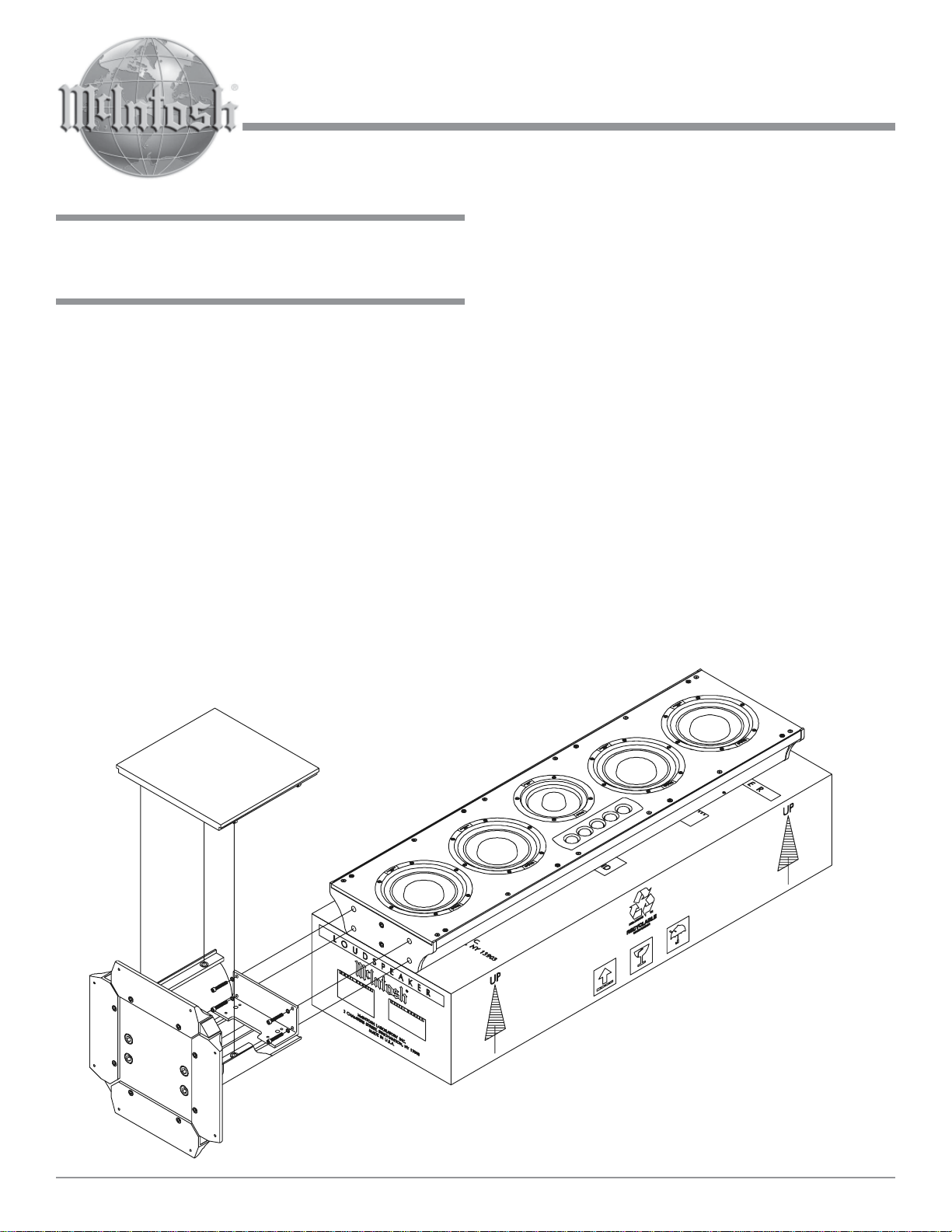
7. Place the Loudspeaker System on top of the packing
material located on top of the shipping carton making
sure to align the Bottom End to the end of the shipping
carton. Refer to figure 1.
Unpacking the Column Base
8. Locate and remove the bags of hardware, screws with
washers and Allen Wrench Tool taped to the top of the
foam packing material.
9. Lift and remove the Column Base from the packing
material and remove it from the plastic bag.
Figure 1
McIntosh Laboratory, Inc. 2 Chambers Street Binghamton, New York 13903-2699 Phone: 607-723-3512 FAX: 607-724-0549
Page 2

Assembling the Column
10. Using the supplied Allen Wrench, remove two screws
from each side of the Loudspeaker Bottom. Refer to
figure 1.
11. Remove the Front Cover from the Column Base and
set it aside.
12. Orient the Column Base so the metal extrusion lines
up with the Loudspeaker System extrusion.
13. Attach the Column Base to the Loudspeaker System
using the four supplied machine bolts and washers.
Refer to figure 1.
14. Align the Grille fastening pins to the Column Grommets (there are four pins on each side). Carefully
push down to secure the Grille to the Loudspeaker.
15. Reattach the previously removed Front Cover to the
Column Base.
Optional Feet
16. One set of optional feet (eight Tiptoes and eight
Glides) are supplied with the ST27 Column Base. To
prevent crushing carpet use
the Tiptoe Spikes; to protect
non-carpeted flooring use
the Chrome Glides. Both the
Glides and Tiptoes have a
threaded shaft and locking
nut that screw into the
tapped holes in the bottom
Tiptoes
Figure 2
Glides
of the ST27’s base rails. The
feet can be independently adjusted to compensate for
uneven flooring. Refer to figure 2.
17. Stand the Column upright.
18. Proceed to page 10 of the XR27 Owner’s Manual for
placing the XR27 Loudspeaker System in a room.
McIntosh Laboratory, Inc.
2 Chambers Street
Binghamton, NY 13903
McIntosh Part No. 040886
 Loading...