

Page 1
MAXXUS 7.3
Treadmill
ENG
INSTALLATION & OPERATING MANUAL
Page 2
Index
Index 2
Safety Instructions 3
Overall View of the Device 4
Assembly Material & Tools 4
Scope of Delivery 5
Assembly 5 – 6
Folding Mechanism 6 – 7
Transport 8
Mains Cable 9
Safety Key 9
What to do in an Emergency 10
Care, Cleaning & Maintenance 11
Lubricating the Treadmill Belt 12
Adjusting the Treadmill Belt 13
Re-Tensioning the Treadmill Belt 13
Cockpit 14 – 18
Heart Rate Monitoring 19
Pulse Rate Monitoring using Hand Sensors 20
Heart Rate Monitoring using a Chest Belt 20
Technical Details 21
Recommended Accessories 21
Exploded Drawing 22
Parts List 23
Disposal 23
Warranty 24
Repairs Contract / Notication of a Damage Claim 25
Notes 26 – 27
Version 2016.2
© 2015 by MAXXUS Group GmbH & Co. KG
All rights reserved
This publication may not be reproduced, stored in retrieval system, or transmitted on whole or in part, in any form or by any means, electronic, mechanical, photocopying,
recording, or otherwise, without the prior written permission of Maxxus Group GmbH & Co. KG.
Errors, colour and technical modication subject to change, reproduction as well as electronic duplication only with written permission of MAXXUS Group GmbH & Co. KG.
2
Page 3

Safety Instructions
Before you start exercising, be sure to read the entire user guide, especially the safety information, the maintenance & cleaning information and the training information. Make sure also that everyone who uses this training device is also familiar with this information and
observes it.
Carefully follow the maintenance and safety instructions in this manual.
This training device may only be used for its specied purpose.
Improper use may present a risk of accidents, damage to health or damage to the exercise device for which the distributor accepts no
liability.
Electrical connection
− A mains voltage of 220-230V is required for the operation of this training device.
− The training device is only to be connected to the mains with the mains cable supplied using a 16A individually fused and earthed
socket installed by a qualied electrician
− The training device is switched on and o exclusively via the ON / OFF switch.
− Always remove the electric plug from the socket before moving the training device.
− Remove the electric plug from the socket before commencing any cleaning, maintenance or other works.
− Do not connect the mains plug to a socket on a socket strip or on a cable drum.
− If using a cable extension please ensure that this complies with VDE guidelines and regulations.
− Always place the mains cable so it cannot be damaged or cause a tripping hazard.
− In operating or standby mode, electrical devices such as mobile phones, PCs, Televisions (LCD, plasma, tube, etc.), game con-
soles etc. will emit electro-magnetic radiation. For this reason, all these types of devices should be kept away from your training
device as they could lead to malfunction, disturbances or false outputs being shown in heart rate measurements.
Training Environment
− Select a suitable space for your training device to provide an optimum amount of free space and highest level of safety. You
should leave a free space of at least 200 cm long and 100 cm wide behind the training device. A minimum of 100 cm free space to
each side and in front of the training device should be allowed for.
− Make sure that the area is well ventilated and that an optimum amount of oxygen is available during training. Avoid drafts.
− Your training device is not suitable for outside use and so storage and training can only take place in a temperate, dry and clean
room.
− Operation and storage of your training device in wet areas such as in swimming pools, saunas etc. is not possible.
− Make sure that your training device is kept on at, hard and clean ground both in operation and in standing still. Any obstructions
or uneven surfaces must be removed or made good.
− It is recommended that a oor covering (carpet, mat, etc.) should be placed under the device to protect damageable oors such as
wood, laminates, oor tiles etc. Please ensure that this underlay cannot slip or slide.
− Do not put this training device on pale or white coloured carpets or rugs as the feet of the device may leave marks.
− Make sure that your training device and mains cable are kept out of contact with hot items and are kept at a safe distance from
any sources of heat eg. central heating, hot stoves, furnaces, ovens or open res.
Personal safety instructions for the training
− The safety key must be inserted correctly before each training session can begin.
− Remove the safety key and mains cable from the training device when not in use to avoid inappropriate or uncontrolled use by any
other third party, eg. children.
− Stop training immediately if you feel physically unwell or are experiencing any breathing diculties.
− Always start your training session at a low workload increasing it slowly but steadily throughout.
− Reduce the workload again towards the end of your training session.
− Suitable sports shoes and clothes should always be worn during training sessions. Make sure that loose clothes do not get caught
up in the treadmill belt or rollers.
− Your training device is only to be used by one person at a time.
− Check each time before a training session to see if your device is in perfect condition. Never use your training device if it is faulty
or defective.
− You are only permitted to carry out repairs to the device yourself after having contacted our Service Department and on receipt of
explicit permission to do so. Only original spare parts may be used at any time.
− Your training device must be cleaned after each use. Remove all dirt including body sweat or any other liquids.
− Always make sure that liquids (drinks, body sweat, etc.) do not get into the vibrating plate or into the cockpit as this can cause
damage to the mechanical and electronic components.
− Your training device is not suitable to be used by children.
− Third parties, in particular children and animals, must be kept at an appropriate safety distance during training.
− Check before each training session if there are any items underneath the training device and remove them without fail.
− Never use the training device when items are underneath it.
− Do not allow children to misuse your training device as a toy or climbing frame at any time.
− Ensure that no body parts of your own or other third parties ever come into contact with any of the moving mechanisms.
The construction of this training device is based on state of the art technology and highest modern technical safety standards. This
training device is to be used by adults only!
ENG
Extreme misuse and/or unplanned training can cause damage to your health!
3
Page 4
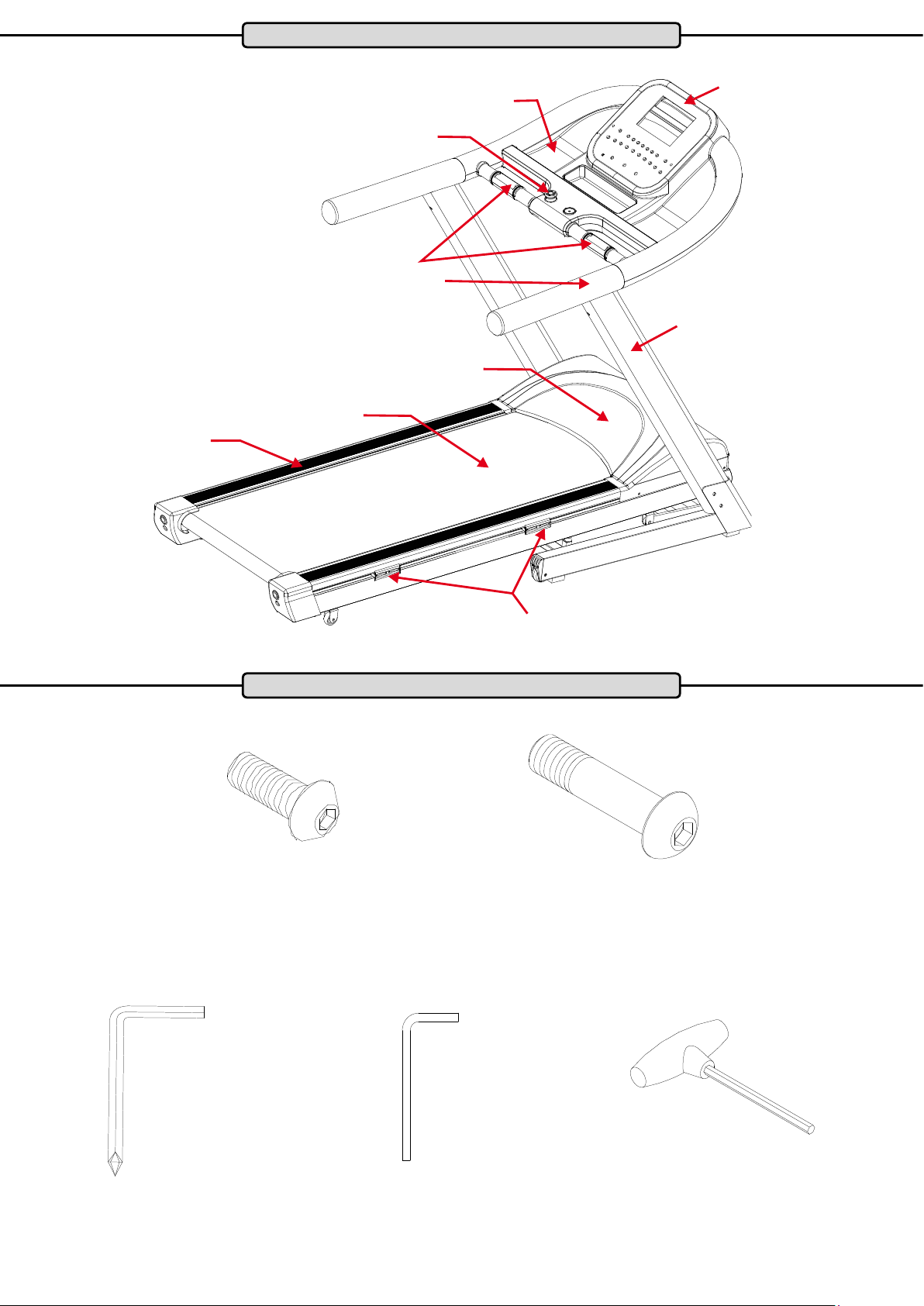
Product Overview
Shelf
Cockpit
Safety Key
Hand pulse sensor
Tread
Running Deck
Side frame
Motor housing
Cushion-Flex ™ cushioning system
Parts and Tools
Bevel head Allen screw
M8x20
8 pieces
Allen key Allen key Allen key
Dome head Allen screw
M8x50
4 pieces
You are welcome to supplement or replace the tools included with your own. Ensure the accurate t of each tool.
4
Page 5
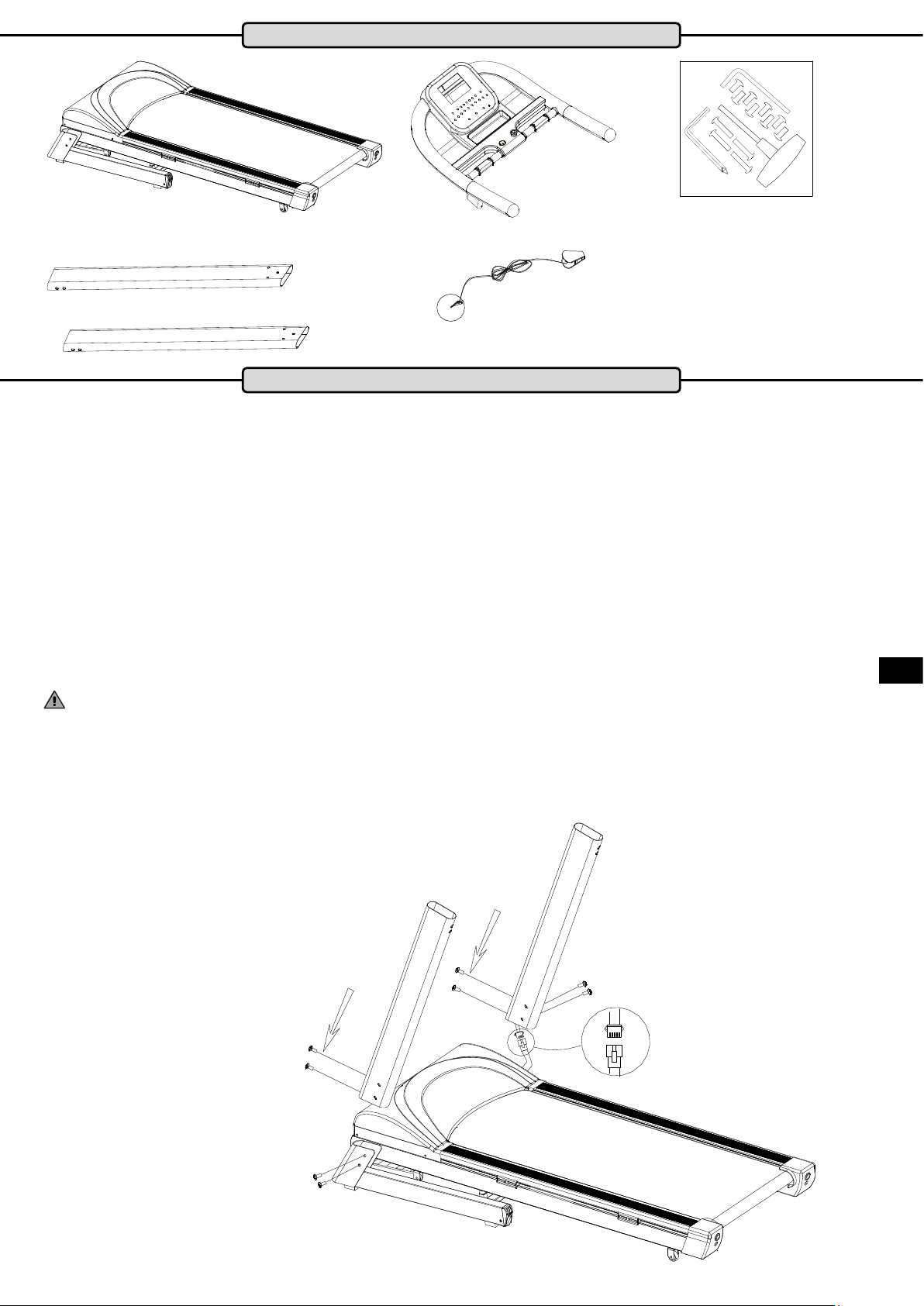
Scope of Delivery
Cockpit
Base Frame
Safety Key
Side Frames
Screw Set
Assembly
Carefully unpack all delivered parts. Have someone there to help you as some of the training device parts are bulky and
heavy.
Check that all the parts and xing materials (screws, nuts, etc.) have been delivered.
Assemble the parts carefully as any damages or defects occurring due to mistakes made at the time of assembly are not
covered by the warranty or guarantee. Therefore, read through the assembly instructions carefully before you start assembling, follow each assembly step exactly as described and keep to the correct sequence of assembly as instructed.
Assembly of the training device must be carried out carefully by adults only.
Assemble the training device in a location which is level, clean and clear of obstructions. 2 people are required to carry out
the assembly.
Training can only start when the training device has been fully assembled.
Step 1:
Connect the cockpit cable that sticks out from the right side frame, with the cable coming out of the
right side of the base frame.
Then insert the right side frame into the right frame of the base frame and fasten it with two hexagon socket screws M8x50
and from behind with two hexagon socket screws M8x20.
ENG
ATTENTION: Make sure that you do not squeeze or damage the cables.
Now insert the left side frame into the left frame of the base frame and x it with two hexagon socket screws M8x50 and
from behind with two hexagon socket screws M8x20.
Hexagon socket screw, M8x50
Hexagon socket screw, M8x20
Hexagon socket screw, M8x50
5
Page 6
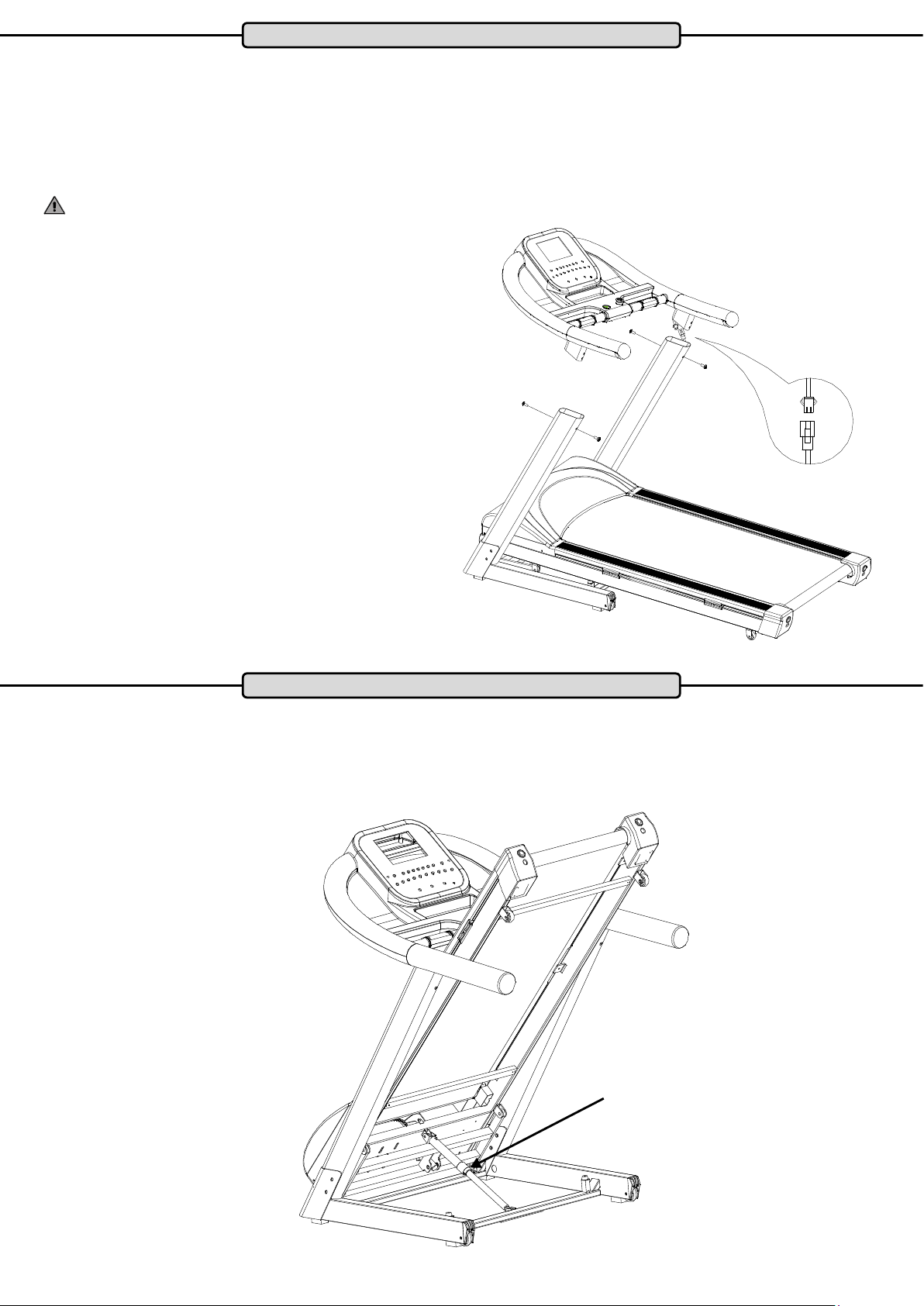
Assembly
Step 2:
Ideally, you will need two people for this step.
As person A holds the cockpit, person B joins the cable where it protrudes up out of the right Side frame, with the cable that
protrudes from the right side of the cockpit frame.
Now carefully insert the cockpit into the two side frames and attach it to both side frames with two hexagon socket screws
M8x20.
WARNING:
Be sure that you do not squeeze or damage the cables.
Hexagon socket screw, M8x20
Folding mechanism
The basis of the folding mechanism is the hydraulic cylinder. This is lled with oil under high pressure. If the cylinder is
damaged, it is not safe to raise or lower the tread under any circumstances. In this case, be sure to replace the hydraulic
cylinder before you fold the tread again.
Hydraulic cylinder
6
Page 7
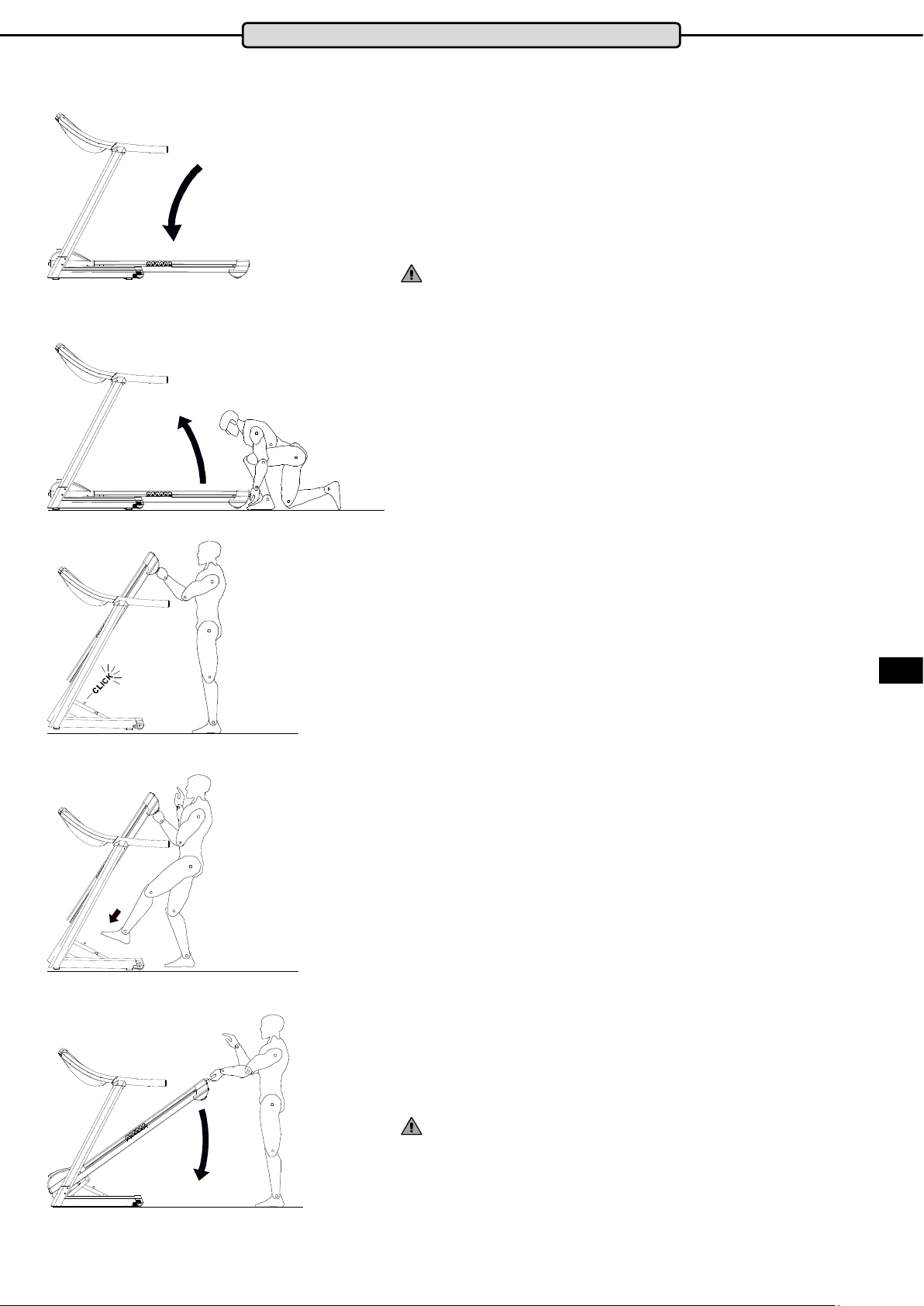
Folding mechanism
This treadmill is equipped with a folding mechanism.
To save space fold the treadmill deck up and down as follows:
Fold up the tread
Step 1:
Make sure that the slope of the treadmill is set to level „0“, and is
turned o at the main switch.Remove the treadmill the mains plug
from the socket.
WARNING:
Never fold the running surface of the treadmill if the slope of the
treadmill is not set to level „0“ or if the treadmill still turned on
Step 2:
To lift the tread, grasp it rmly with both hands at the back end of
the tread and then lift the tread upwards.
Always make sure that you have a secure standing position.
Step 3:
Push the tread upwards until the lock system clicks audibly.
Check that the locking system is engaged and the tread is secured in its folded position by light shaking on the tread,
Fold down the tread
Step 1:
Lift the back end of the tread gently with both hands. Now press
the safety lever of the lock system down with your foot to release
the lever.
Pull the tread gently down.
Step 2:
The tread is tted with a soft-fold system. This causes the tread
to automatically lower slowly until it stops when it has complete
contact with the ground. You should watch the tread until this is
nished and never leave it to fold down unattended.
ENG
WARNING:
Folding up or down of the tread should never be carried out by
children.
When folding down, always make sure that there are no objects,
pets or children under the tread
7
Page 8
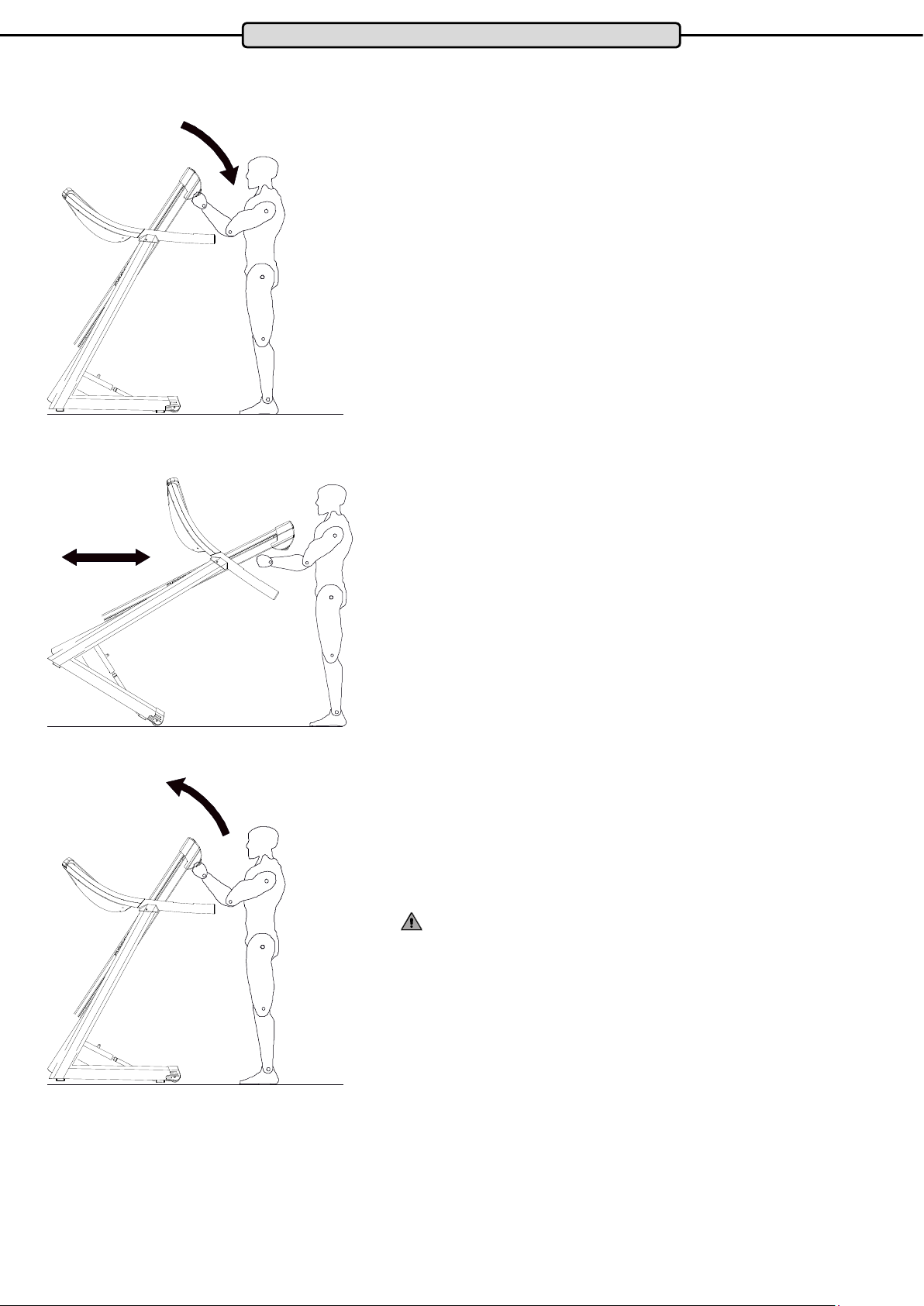
Transport
When folded up, the treadmill can be moved without much eort.
To move the treadmill please proceed as follows:
Step 1:
Fold up the tread as in the chapter „Folding mechanism“ described above. Then grasp the tread on the upper right and left with
both hands and pull the tread towards you until the weight of
the treadmill can be felt on the transport wheels. Make sure you
stand upright.
Step 2:
Now the treadmill can be moved without much eort.
Always pay attention when moving the treadmill and make sure
that no objects, pets or children are in the way.
Always make sure that you move the treadmill safely.
Step 3:
To turn o the folded treadmill safely, raise the tread until the front
base frame is completely on the ground.
WARNING:
The transport of the treadmill should only be done by adults.
8
Page 9
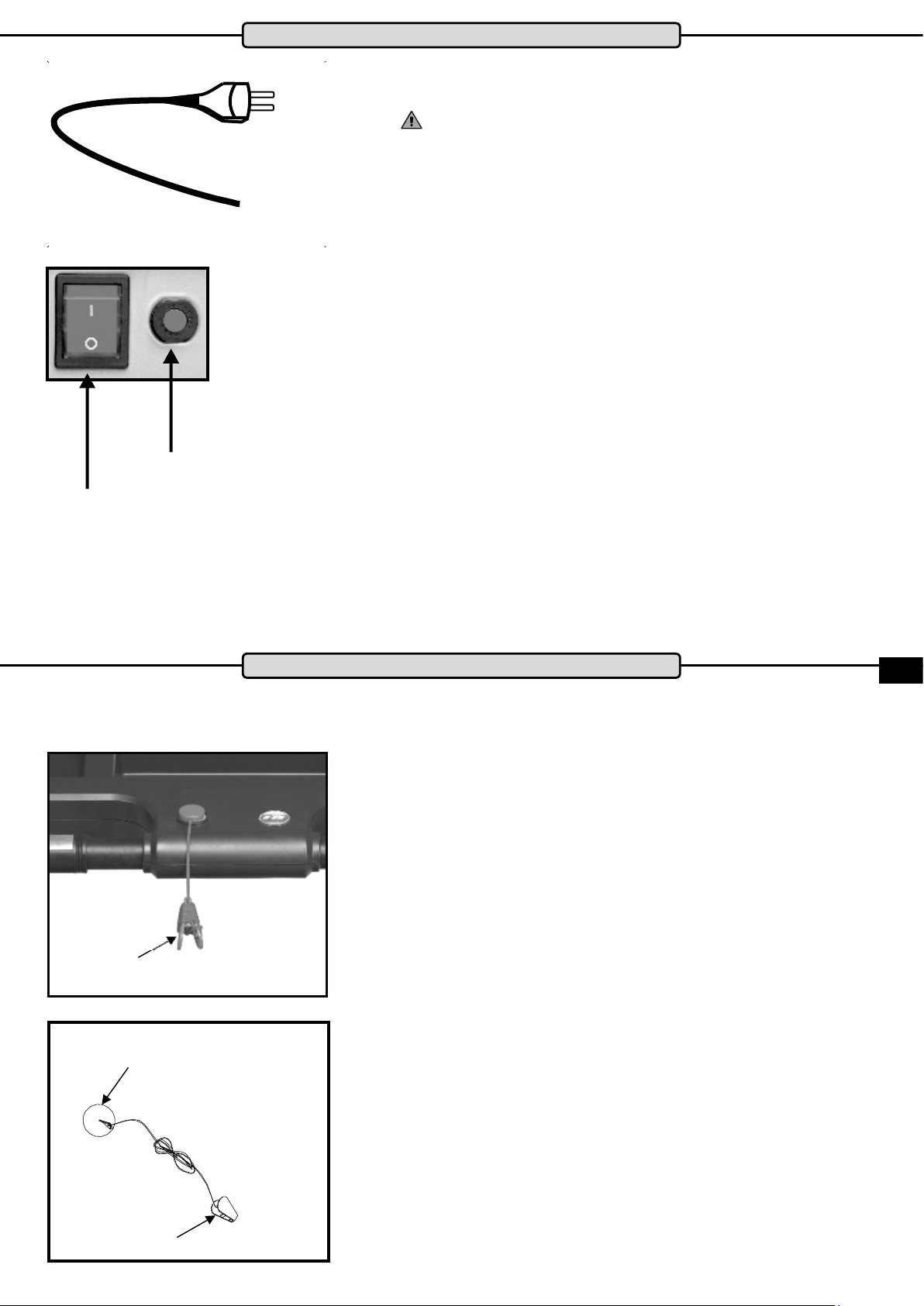
Main switch
Residual-current device
Mains cable
Mains cable
Connect the mains plug of the mains cable into a socket.
The device must only be connected to a professionally
installed, earthed mains socket.
Connecting the treadmill no multiple sockets.
If an extension cable is required, then it must comply with
DIN standards, VDE regulations and guidelines, technical rules issued by other European Union member states or other
states which are party to the Agreement on the European
Economic Area.
Main switch
The main switch is located next to the mains connection on the
front of the treadmill. Use the switch to turn the treadmill on or o.
Switch position „I“ = treadmill switched on
Switch position „0“ = treadmill switched o
Fault-Current Switch (depending on the model)
There is a fault-current button-switch next to the main switch on
the front of the motor cover to prevent the treadmill from being
damaged by electrical surges in the network. This button-switch is
triggered o by if a surge in the electrical supply occurs and acts
as a circuit breaker. In this case the treadmill will be completely
switched o. If this occurs, switch o the treadmill at the main
switch, and pull the mains cable out of the socket with the plug.
Press the button on the fault-current switch back in. Re-connect
the mains cable with the plug and switch the treadmill back on at
the main switch.
Clip
Safety Key
Safety Key
Safety Key
The treadmill will only operate if the safety key is correctly in
contact with contact point in the cockpit. The treadmill will stop
automatically if the safety key is no longer in contact.
Before each training session make sure to attach the safety key
to your clothing with the clip.
If you want to stop the treadmill quickly, cannot keep up with the
speed, or any other emergency arises, pull the string to remove
the safety key out of the cockpit. If the safety key is connected to
your clothing it will automatically be pulled out of the cockpit if you
fall. It is therefore vital to make sure that the clip is securely fas-
tened to your clothing and cannot somehow be pulled o. Adjust
the length of the string to hang down loosely during training.
It is not possible to operate the treadmill without the safety key
being correctly inserted. Always remove the safety key when your
treadmill is not in use to ensure that it cannot be used by any
other third party, for example by children, without your permission
or unsupervised.
The treadmill will stop automatically if the safety key is pulled out
of the cockpit during training. The incline will remain in the ad-
justed position and can only be lowered after the safety key has
been re-connected.
ENG
Clip
9
Page 10

What to do in an Emergency
Safety Distance
Select a location so that there is a clear space behind the treadmill of at least 200 cm and a width of at least 100 cm for the
full length of the treadmill on the right and left sides during exercise.
What to do in an Emergency
Stop exercise immediately if you feel that you cannot keep up with the pace, you feel sick or if another emergency situation
arises, immediately pull the saftey key out with the cord to make an emergency stop.
Hold onto the handrails with both hands and place both feet on the side treads.
If you trip during exercise, immediately grasp the handrails with both hands with hands and place both feet on the side
treads.
You should practice this several times, so that you will know what to do if an emergency situation arises.
Be sure to wear the safety key every time you use of the treadmill. Make sure that third parties, who use the treadmill are
informed about the safety instructions and also use the safety key when they are training!
10
Page 11

Care, cleaning & maintenance
WARNING
Turn o your training device before you carry out care, cleaning, maintenance, repair or similar work and remove
the power cord. Always check that the equipment is completely disconnected from the mains and switched o
before starting work. Only reconnect you device when all work is completed and your device has been completely
put back together.
Before rst use or after a long break from training
Make sure that the treadmill is standing rmly on the ground, there should be no objects on or underneath the device. Make
that there is an even lm of lubricating (silicone) on the running deck. If this is not the case, then apply a lm of silicone
provided by the distributor.
Maintenance & Cleaning Intervals:
After each workout, clean the treadmill with a damp cloth to remove any perspiration and / or other liquid residues. Under
no circumstances use solvents for this purpose. Dry the cleaned areas thoroughly.
Checking the lubrication of the running belt: once a week
If you notice that there is no longer sucient lubrication, it must immediately be lubricated and checked more often. If the
treadmill has a folding mechanism and has been standing upright for a long time, check whether there is still enough lubrication.
Checking the belt run: once a week
The operation of the running belt must be checked regularly. If you notice that the belt is running to one side, it must be
corrected immediately. Please read the corresponding section this Manual.
Cleaning the Motor Compartment: once a month
To clean the motor compartment, loosen the engine cover bolts and lift it up.
WARNING: Only do this when the device is switched o and the mains cable is removed. Vacuum the visible dust
with a small nozzle of a vacuum cleaner. Do not use under any circumstances use detergent or compressed air.
Checking the xings: once a month
Check the screws, bolts and nuts at least once a month and tighten them, if necessary.
Why is maintenance of my treadmill so important?
In order for you to have long-term enjoyment with your treadmill, it is important to do some basic maintenance regularly and
thoroughly. The intervals required for this work depend very much on how much the device is used. For this reason, the
maintenance may need to be carried out at much shorter intervals than the ones recommended.
What can happen if there is a lack of maintenance?
There is friction between the running belt and the running deck when in use. Any kind of friction means wear and thus
reduces the life of your training device. By lubrication with silicone between the belt and deck the friction is reduced, thus increasing the life. If the treadmill runs dry, the running board will overheat. The surface of the running board and the running
belt will both be damaged. The friction can become so high that it leads to a static charge on the frame which can discharge
through the body on contact. This is not only unpleasant, but can also destroy the electronics of the treadmill.
Why do I have to clean the engine room?
Movement of the running belt and ventilation of the motor, draws in dust from the environment. The dust gathers both under
and in the device which can lead eventually to the interior of the device becoming so dusty that it causes a short to electronic components. To avoid this is, regular cleaning is necessary.
ENG
Damage caused by failure or lack of maintenance and care are excluded from the warranty and guarantee
The costs of repairing a training device which has not been properly maintained can quickly amount to several hundred
euros.
A high price that can be avoided by regular care and maintenance.
11
Page 12

Lubricating the Treadmill Belt
The most important maintenance measure for a treadmill is the regular and timely lubrication and care of the running belt.
Damage or defects that have occurred due to insucient care or lubrication of the running belt are not covered by the warranty or guarantee under any circumstances.
The running belt of your treadmill must always be lubricated if a signicant increase in friction of the treadmill running belt
is detected. This can manifest as a jerking movement during exercise, or as an E1 error message in the cockpit display. In-
adequate lubrication or care causes a considerable increase in friction and leads inevitably to increased wear and damage
caused to running belt, running deck, motor and circuit board.
The frequency of use of the treadmill is largely responsible for how often you have to perform maintenance . Since this vari-
es from user to user, we recommend creating a service booklet. You should set a xed day in the week in which you check
the lubrication of the running belt for the rst 6 months of use. Lift the front third of the running belt and feel with your hand
as far as the middle of the running belt to check if lubrication is still present. If so, enter the date and „Ok“ in your service
book. If the lubrication is too low or no longer present, lubricate the running belt and write it down accordingly. After a time,
you will be able to see the lubrication interval required.
Even if you do not want to run a service book, be sure to check running belt lubrication every week!
If the treadmill is not used or folded up for a longer period of time be sure to check the lubrication of the belt before using it,
and lubricate as necessary.
To lubricate the running belt properly take the MAXXUS care oil bottle, remove the regular screw cap (Diagram 1) and then
insert the screw cap with tube (Diagram 2). Before you start to lubricate make sure the treadmill is o and the running belt is
not moving. Lift the running belt (Diagram 3).
Diagram 1 Diagram 2 Diagram 3
The running belt should be lubricated from both sides. To do this, lift one side of the running belt high enough so that you
can reach the middle of the running belt with the tip of the tube of the silicone oil bottle. Then pull 3 wavy lines of silicone
oil from the middle of the running belt to the edge on each side of the running belt. No more than 10 to 15ml of silicone oil
should be applied in total. Applying too much silicone oil may cause the running belt to slip. In this case use a rag to remove
excess silicone oil from the running deck and drive rollers.
Diagram 4 Treadmill Deck Treadmill Belt
Rear Roller
Centre of
Treadmill deck
Motor Housing
To lubricate the belt, use only the approved silicone MAXXUS® Care Oil (available at www.maxxus.de).
Do not use other silicone or lubricants!
We advise against the use of silicone sprays, because the viscosity of the oil is too low. After you have nished lubricating,
walk or run on the treadmill at a speed of 4 km / h for about 3 to 5 minutes. Change the position from right to left, and back
and forth repeatedly to optimally distribute the silicone oil treadmill on the running belt.
Do not fold up the tread for at least 3 days after lubrication.
12
Page 13

Adjusting the running belt
The treadmill must always be switched o and the mains plud disconnected
from the power socket. before maintenance, cleaning, repair or other work is
performed!
The running belt should always run straight and in the middle of the deck
to achieve as long a service life as possible. Therefore check before each
training session, that the running belt runs straight and in the middle of the
deck, or if the alignment has changed. Possible reasons for the change of
alignment of the running belt are:
− The ground on which the treadmill stands is uneven or sloping
− Individual running styles (for example, one-sided weight distribution, out-
turned feet, etc.)
g
The running belt is adjusted as follows:
1. Start the treadmill and let it run at a constant speed of 4 km / h.
2. If the belt is running towards the left, turn the left adjustment screw
located at the back end of the belt by 1/8 turn clockwise and the right
adjustment screw 1/8 turn anti-clockwise. Wait for a short while to see
the results as this will not immediately be apparent.
The running direction of the belt will already be changed with a turn of
1/8 of the adjustment screw. Therefore, only adjust the screws a little at
a time.
2.2 If the belt is running towards the right, turn the right adjustment screw by
1/8 turn clockwise and the left adjustment screw 1/8 turn anti-clockwise.
3 If the belt is now running in the middle of the deck, the adjustment will
be correct. If this is still not the case, repeat the steps described in 2.1
and 2.2 until the belt is running in the middle.
If the belt cannot be adjusted, please contact a specialist immediately
If the belt has become so displaced that it is rubbing along one of
the foot rails, this will cause friction and damage to the treadmill
belt. Damage caused by failure or insucient adjustments to the
treadmill belt will not be covered by the warranty or guarantee
under any circumstances
Tensioning the running belt
ENG
If the running belt slips on the rollers during operation (this will be made
apparent by the belt jolting noticeably during running), the belt has to be retensioned. The belt is re-tensioned using the same adjustment screws, used
to adjust the running belt.
1. Start the treadmill and leave it with a constant speed of 4 km / h.
2. Turn both screws directly, one after the other 1 / turn 8 clockwise.
3. Now try to decelerate the belt by walking on it as if you were walking
down a steep slope. If the front roller still turns, repeat the tightening
process. The treadmill belt should be tensioned so that the front roller
only turns with heavy braking.
13
Page 14

LCD display
Cockpit
Direct dial keys - slope
Speed dial buttons - km / h
PROGRAM button
Control buttons - gradient
Control buttons - km / h
MODE button
START / STOP button
The display informs you about the following training values:
CAL* Energy consumption in kcal
INCL Incline
PULSE when using hand sensors: Pulse
TIME Training time
SPEED Speed in km/h
DIS Training distance in km
When using a Transmitter Chest Belt*: Heart Rate
*not included in scope of delivery - available as accessory
* Note on calorie measurement
The calculation of the energy consumption is done by means of a general formula. It is not possible to determine an individual energy consumption exactly, without a large
amount of personal data. Therefore the displayed energy consumption is a generally calculated value, not one value individually aligned to the current user.
Display
The display of the cockpit is a blue backlight LCD display. The blue backlight allows a clear view of the training data even in the dark.
LCD prole matrix
The graphic representation of the programs is shown using a prole matrix. The current training area will be indicated by a ashing segment.
INCLINE
Use the
buttons (slope)
buttons to adjust the incline in 1% increments.
= Slope is increased = Slope is reduced
SPEED +/-
Use the +/- buttons to adjust the speed in 0.1 km / h increments.
= Speed is increased = speed is reduced
Direct selection buttons
The cockpit on your treadmill has 5 direct-access keys for incline and 6 direct-access keys for speed. These speed dial buttons allow
you to quickly and easily select specic speeds or gradients.
14
Page 15

Cockpit
STOP button
Stop / Pause function: Press the STOP / RESET button once to stop the treadmill. The cockpit switches to pause mode for
5 minutes. If the START button is pressed again within these 5 minutes, the training continues as it was when it was interrupted. After 5 minutes the cockpit automatically performs a reset and all values are set to zero.
RESET function:
If you press the STOP / RESET button for more than 3 seconds in pause mode, a beep will sound and all values will be
reset.
START button
Starts the quick start function or the selected training program. When using the pause function, the training is resumed by
pressing the START button.
PROGRAM key (P)
Button to select the programs.
MODE button (M)
Button for selecting the training specications
Heart rate measurement
The cockpit of your treadmill is equipped with a polar-compatible receiver as standard. A chest strap is available as an
accessory.
Hand pulse sensors
Use for short-term pulse monitoring. Please do not touch the hand sensors if you wear a chest strap or incorrect measurements may occur.
Switch on treadmill
Connect the mains plug of the power cable to an earthed, 16 A single fused mains socket which has been professionally
installed.
Switch the power on. Now switch on the treadmill with the on / o button located on the back of the motor housing.
Switch treadmill on / o
To switch o the treadmill, press the on / o button again. Then remove the power plug from the socket.
WARNING:
Before you switch o the treadmill always make sure that the slope is at level zero.
Quick start
Press the START button.
The treadmill starts automatically after a countdown and the exercise time starts to run. Use the SPEED and INCLINE buttons to regulate the speed and the incline during exercise. To pause or stop exercising, press the STOP button.
Manual training (P0)
Step 1: Program Selection
After switching on the treadmill the display shows „P0“.If the treadmill was already be switched on and the display shows
another program, select program „P0“ by pressing the PROGRAM key.
Step 2: Enter the target value
You now have the option as a target value for your training either the training time, the training distance or the prescribed
calorie consumption.
Specication of the training time:
Press the MODE button. The display window TIME ashes 30:00 minutes. Enter the desired exercise Time from 05:00 to
99:00 minutes by pressing the Incline or Speed control keys.
ENG
Specication of the training distance:
Press the MODE button twice. In the display window DISTANCE (DIS) 1.0 kilometres ashes. Enter the desired training
distance from 1.0 to 99.0 kilometres by pressing the Incline or Speed control keys.
Prescription of calorie consumption:
Press the MODE button three times. In the display window CALORIES (CAL) 5.0 calories ashes. Enter the desired calorie
consumption from 20 to 990 Calories by pressing the Incline or Speed control keys.
15
Page 16

Cockpit
Step 3: Training start
After entering the desired workout values, press the START button. The display will show a countdown displayed. Each
countdown value is accompanied by an acoustic signal. After completion of the countdown the treadmill starts automatically.
End of training
The treadmill stops automatically after the specied training goal has elapsed.
Training proles P1 - P24
Step 1: Prole Selection
After switching on the treadmill, the display will show „P0.“ Press the PROGRAM button to select desired training prole P1
- P24.
Step 2: Prole start
Press the START button.
The display shows a countdown, each countdown value is accompanied by an acoustic signal. The treadmill starts automatically and the training time starts to run after the countdown.
End of training
The treadmill stops automatically after the specied training time has elapsed.
Determination of the body mass index
Step 1: Program Selection
After switching on the treadmill, the display will show „P0.“ Press the PROGRAM button to select Program FAT.
Step 2: Gender input
The display shows F1. Now enter the user gender by pressing the control buttons for Speed. „1“ stands for „male“ and „2“
stands for female.
Make your entry by pressing the MODE button.
Step 3: Age requirement
The display shows F2. Now enter the user age by pressing the Speed control buttons. Entries from 10 to 100 years are
possible.
Conrm your entry by pressing the MODE button.
Step 4: User height
The display shows F3. Now enter the user height by pressing the Speed control buttons. Entries from 100 to 199 centimeters are possible.
Conrm your entry by pressing the MODE button.
Step 5: User Weight
The display shows F4. Now enter the user weight by pressing the Speed control buttons.
Entries from 20 to 150 kilograms are possible.
Conrm your entry by pressing the MODE button.
Step 6: Program start
The display now shows „BMI“. Hold the hand pulse sensors with both hands for about 10 seconds.
Step 7: End of the program
After successful measurement, the display shows the BMI (body mass index).
Body Mass Index (BMI)
This value is calculated from the ratio of body weight
to height and is used to evaluate the body weight of
a person in relation to their height. Please note that
the BMI is just a rough guideline because neither
physique, gender nor the individual composition of
body fat and muscle tissue is considered. The „ideal“
BMI depends on age.The table shows BMI values for
dierent age groups.
Age BMI
19 - 24 years 19 - 24
25 - 34 years 20 - 25
35 - 44 years 21 - 26
45 - 54 years 22 - 27
55 - 64 years 23 - 28
> 64 years 24 - 29
16
Page 17

Cockpit
Programm
P1
P2
P3
P4
P5
P6
P7
P8
P9
P10
P11
P12
P13
P14
P15
P16
P17
P18
P19
P20
P21
P22
P23
P24
Segment
1 2 3 4 5 6 7 8 9 10 11 12 13 14 15 16
SPEED 2 3 3 4 5 3 4 5 5 3 4 5 4 3 3 2
INCLINE 1 1 2 2 2 3 3 2 2 3 2 3 2 2 1 1
SPEED 2 3 4 4 6 5 5 6 7 6 5 6 7 4 3 2
INCLINE 2 3 4 3 4 6 6 5 6 7 6 6 5 4 3 2
SPEED 2 3 4 6 6 5 6 7 6 7 6 5 5 4 3 2
INCLINE 3 7 4 4 7 4 8 4 3 7 3 7 5 4 7 3
SPEED 2 3 4 6 6 8 8 7 8 9 8 7 6 4 3 2
INCLINE 3 7 4 5 7 4 8 3 4 8 7 3 4 4 7 3
SPEED 2 4 5 6 7 8 8 9 8 7 7 6 6 5 4 2
INCLINE 2 4 6 8 6 8 5 10 11 8 6 7 6 9 4 2
SPEED 2 4 4 6 7 8 10 10 9 8 7 7 6 4 4 2
INCLINE 3 4 6 8 6 7 5 8 6 9 5 8 7 8 6 3
SPEED 4 6 8 10 12 12 10 12 12 10 12 12 10 8 6 4
INCLINE 2 4 4 6 7 8 10 12 13 13 12 10 8 6 4 2
SPEED 2 3 4 6 7 8 8 10 11 12 10 12 11 10 12 12
INCLINE 2 4 8 10 13 2 4 8 10 13 2 4 8 10 13 2
SPEED 4 6 8 10 12 12 8 10 12 12 12 12 10 8 6 4
INCLINE 13 10 8 4 2 13 10 8 4 2 13 10 8 4 2 2
SPEED 2 4 4 6 2 4 4 6 2 4 4 6 2 4 4 6
INCLINE 2 2 4 4 3 4 5 6 5 6 8 7 8 9 10 10
SPEED 4 6 8 10 4 6 8 10 4 6 8 10 4 6 8 10
INCLINE 10 12 10 12 8 8 7 7 5 6 5 6 4
SPEED 4 8 10 12 4 8 10 12 4 8 10 12 4 8 10 12
INCLINE 13 12 10 8 13 12 10 8 13 12 10 8 13 12 10 8
SPEED 4 12 4 12 4 12 4 12 4 12 4 12 4 12 4 12
INCLINE 4 8 10 13 4 8 10 13 4 8 10 13 4 8 10 13
SPEED 4 8 10 12 4 8 10 12 4 8 10 12 4 8 10 12
INCLINE 4 8 12 13 4 8 12 13 4 8 12 13 4 8 12 13
SPEED 12 12 10 8 12 12 10 8 12 12 10 8 12 12 10 8
INCLINE 2 3 4 5 6 8 7 8 8 7 7 6 5 4 3 2
SPEED 4 12 4 12 4 12 4 12 4 12 4 12 4 12 4 12
INCLINE 2 4 5 6 2 4 5 6 2 4 5 6 2 4 5 6
SPEED 2 4 6 8 10 12 12 2 4 6 8 12 12 10 6 2
INCLINE 2 4 6 8 10 12 13 12 13 12 13 10 8 6 4 2
SPEED 4 6 8 4 6 8 4 6 8 4 6 8 4 6 8 2
INCLINE 1 6 8 2 6 8 1 6 8 2 6 8 1 6 8 1
SPEED 4 12 4 12 4 12 4 12 4 12 4 12 4 12 4 12
INCLINE 10 8 6 4 10 8 6 4 10 8 6 4 10 8 6 4
SPEED 4 12 4 12 4 12 4 12 4 12 4 12 4 12 4 12
INCLINE 12 10 2 12 10 2 12 10 2 12 10 2 12 10 2 2
SPEED 2 6 12 2 6 12 2 6 12 2 6 12 2 6 12 2
INCLINE 13 10 2 13 10 2 13 10 2 13 10 2 13 10 2 2
SPEED 12 6 2 12 6 2 12 6 2 12 6 2 12 6 2 2
INCLINE 1 4 10 4 6 10 4 6 13 6 8 13 6 8 13 1
SPEED 12 8 6 2 12 8 6 2 12 8
INCLINE 2 3 4 5 6 6 7 8 10 11 12 12 13 13 10 2
SPEED 10 6 4 10 6 4 10 6 4 10 6 4 10 6 4 2
INCLINE 4 4 5 6 7 8 10 10 12 13 12 13 12 13 10 2
6 2 12 8 6 2
3 4 3
ENG
17
Page 18

Cockpit
Heart rate controlled programs (HRC 1, HRC 2 and HRC 3)
These programs are heart rate controlled exercise programs. Here the user pre-sets a desired target heart rate.
This is constantly compared from the cockpit with the actual heart rate of the user. If the actual heart rate is lower than the desired target heart rate, the treadmill automatically increases the speed. If the value is higher, the
treadmill automatically reduces speed and incline. The main requirement for these programs is a permanent and
accurate transmission of heart rate values. Therefore these programs can only be used with a heart rate chest
strap. This is available as an accessory. The use of these programs is not possible with hand pulse sensors.
Please also read the chapter „Heart rate measurement“ in this manual.
Step 1: Program Selection
After switching on the treadmill, „0“ appears in the „PROGRAM“ display window
Press the P key to select the desired HRC program.
The three HRC programs set the maximum speed used by the cockpit:
HRC 1 = 9.0km / h maximum speed
HRC 2 = 11.0km / h maximum speed
HRC 3 = 13.0km / h maximum speed
Step 2: Age requirement
Value 3 „25“ ashes in the display. Now enter the user age by pressing the control buttons for Slope or Speed.
Entries from 15 to 80 years are possible. Conrm your entry by pressing the MODE button.
Step 3: Target pulse specication
The display shows the target heart rate calculated by the cockpit. This is 60% of the maximum heart rate.
If you want to train with the calculated value, conrm this with the MODE key. Should if you want to exercise
with an individual target heart rate, enter it by pressing control buttons for Speed. Conrm your specication by
pressing the MODE button.
Please also read the chapter „PULSE / HEART RATE“ in this manual.
Step 4: Time input
The display window TIME ashes 30:00 minutes. Enter the desired exercise time of 05:00 until 99:00 minutes
by pressing the Speed control buttons.
Step 6: Prole start
Now press the START button.
The display shows a countdown. The training time starts after the countdown ends and the treadmill starts
automatically at a speed of 1.0 km / h. A short warm-up of 1:30 minutes starts during which time the speed can
be changed by the user with the control buttons for Speed or the Speed dial. After the warm-up has expired, the
treadmill will adjust the speed depending on the current heart rate of the user every 30 seconds.
End of training
The treadmill stops automatically after the specied training time has elapsed.
Program ow
After the treadmill starts automatically with an initial speed of 1.0 km / h, there is a 1:30 minute continuous
warm-up. At this stage, the speed can be changed by the user. After this warm-up period, the cockpit compares
the current heart rate of the user every 30 seconds with the desired target heart rate and the speed is changed
accordingly.
If the current heart rate stays in the range of +/- 5 beats / minute below or above target heart rate, the treadmill
retains the current speed and incline.
18
Page 19

200
150 195
Heart Rate Monitoring
Heart Rate per Minute
130 146 190
110 127 143 185
107 124 139 180
105 120 135 175
102 117 131 170
99 114 128 165
96 111 124 160
100%
of maximum heart rate
75%
of maximum heart rate
94 107 120 155
91 104 116 150
88 101 113 145
85 98 109 140
83 94 105 135
80 91 101 100
65%
of maximum heart rate
55%
of maximum heart rate
77 88 98
74 85
72
Age
Calculating your personal heart rate when training
Calculate your personal heart rate when training as follows:
220 - Age = maximum heart rate
This value represents your maximum heart rate and serves as a basis from which to calculate
your personal training heart rate. Set the calculated heart rate at 100%
Wellness and Health - target zones = 50 to 60% of the maximum heart rate.
This training zone is ideally suitable for people who are over-weight and/or older beginners, or people starting again after a longer
break from training. Training in this zone the body will burn approx. 4-6 calories per minute to produce energy.
The percentage ratio per calorie is approx. 70% fat, 25% carbohydrate, and 5% protein.
Fat burning - target zone = 60 to 70% of the maximum heart rate
This training zone is suitable for athletes and sports people who aim to lose weight.
Training in this zone the body will burn approx. 6-10 calories per minute to produce energy.
The percentage rate per calorie is approx. 85% fat,10% carbohydrate, and 5% protein.
Condition & Fitness - target zone = 70 to 80% of maximum heart rate
This training zone is ideally suitable for athletes and sports people who aim to improve their stamina and/or condition.
Training in this zone the body will burn approx. 10-12 calories per minute to produce energy.
The percentage rate per calorie is approx. 35% fat,60% carbohydrate, and 5% protein.
20 25 30 35 40 45 50 55 60 65 70 75 80 85 90
ENG
For optimum eects in training results you should calculate the average value of the selected target zone (also see above table):
Wellness & Health - target zone average value = 55% of maximum heart rate
Fat burning - target zone average value = 65% of maximum heart rate
Kondition & Fitness - target zone average value = 75% of maximum heart rate
19
Page 20

Heart Rate Monitoring using Hand Sensors
Hand sensors are integrated into the handrails and are used for short-term determination of the pulse rate. To
do this, you need to grasp the sensors with both hands at the same time. After a short while, the display shows
the current pulse rate. The system measures uctuations in blood pressure caused by the heartbeat which
changes electrical resistance in the skin measured by the hand sensors. These changes are summarized to a
mean value and shown in the display as the current pulse rate
WARNING
For large parts of the population, the pulse-induced skin resistance change is so minimal that no usable values
can be derived from the measurement results. Also callouses on the palms, damp hands and body shakes,
which in many forms of exercise inevitable, prevents correct measurement. In such cases, the pulse value may
be displayed incorrectly or not at all.
Therefore, please check in the case of a faulty or failed measurement, whether this only occurs with one or
several people. If the display of the pulse does not work only in a few cases, the device is not defective. In this
case we recommend the use of a chest belt to achieve a consisently correct pulse display. This is available as
an accessory
Heart Rate Monitoring using Chest Belt
A large number of MAXXUS® training devices are already tted with a receiver as standard which allows you
to wirelessly measure heart rate. We recommend the exclusive use of an uncoded POLAR® chest belt which is
available as an accessory.
This optimal and ECG-accurate type of measurement takes the heart rate by means of a transmitter chest belt
directly from the skin.
The chest belt then sends the pulses via an electromagnetic eld to the built-in cockpit receiver.
We recommend always using a chest belt for heart rate measurement during heart rate controlled programs.
WARNING
The determination of the current heart rate by means of the chest belt serves only to display the current heart
rate during exercise. This value says nothing about the safety or eectiveness of the training. Also, this type of
measurement is in no way designed or suitable for medical diagnostic purposes.
Therefore, discuss with your family doctor the most suitable procedure for you to create and implement your
exercise plan before you start exercising.
This is especially true for persons:
− who have not been physically active for a long period of time
− are overweight
− are older than 35 years
− have too high or too low blood pressure
− have heart problems
If you are wearing a pacemaker or similar device, discuss this before using a heart rate chest belt with your
medical specialists.
20
Page 21

Technical details
Cockpit:
Display of:
− Time
− Range
− Calorie consumption
Technical details:
Motor: DC motor
Constant engine power: 3.0PS / 2.21kW
Drive type: grooved belt
Speed: 1.0 - 18 km / h, adjustable in 0.1 km / h increments
Gradient: 0 - 15 steps, electronically adjustable in 1-step increments
Ø Drive roller, front: approx. 60 mm
Ø roll, rear: approx. 60 mm
Tread: approx. 1,400 x 500 mm
Measurement dimensions: approx. 1,850 x 920 x 1,360 mm (LxWxH)
Measurement dimensions, folded: approx. 1,340 x 920 x 1,500 mm (LxWxH)
Total weight: approx. 96 kg
Maximum user weight: 130 kg
Power supply: 220-230V - 50Hz
Applications: Home – only for private use!
− Speed
− Slope
− Pulse (when using the hand sensors)
− Heart rate (when using an optional possible chest strap)
Recommended accessories
These accessories are the perfect supplement for your training device. All
products are available in our online shop at www.maxxus.de or directly in our
showroom in Gross-Gerau.
POLAR® Transmitter chest strap T34
Chest strap for determining the heart rate with optimized transmission ranges. Required accessory for the application of pulse-controlled programs and
for continuous determination of the current heart rate.
MAXXUS® oor protection mat
The extreme high density of material and 0.5 cm thickness of this oor mat,
gives protection against damage, scratches and dirt due to sweat, liquids and
movement. Noises are greatly minimized.
Available in following sizes:
160 x 100 cm
210 x 100 cm
ENG
MAXXUS® silicone
Optimal lubricant and cleaning agent for running belt and running deck.
21
Page 22

Exploded Drawing
22
Page 23

Part List
Part-Nr. Description Qty
1 Base Frame 1
2 Platform Frame 1
3 Incline Frame 1
4 Right Upright frame 1
5 Left Upright frame 1
6 Computer frame 1
7 Motor base frame 1
8 Ezt linking parts 1
9 Inner hex half thread bolt M10x60x20 1
10 Inner hex half thread bolt M10x35x20 4
11 Inner hex half thread bolt M8x50x20 6
12 Inner hex half thread bolt M8x35x20 1
13 Inner hex half thread bolt M8x40x20 1
14 Inner hex half thread bolt M8x30x20 3
15 hex half thread bolt M8x75 1
16 Inner hex full thread bolt M8x75 3
17 Inner hex full thread bolt M8x30 4
18 Inner hex full thread screw M8x15 4
19 Cross self-taping bolt ST4x20 2
20 Inner hex full thread screw M8x20 8
21 Cross head self tapping bolt ST4x15 12
22 Cross head self tapping bolt M6x25 6
23 Cross head self tapping bolt M4x6 4
24 Cross head self tapping bolt M5x10 6
25 Cross head self tapping bolt M4x10 5
26 Motor support bolt M8x65 1
27 Cross head self tapping bolt ST4x16 44
28 Cross head self tapping bolt ST4x15 2
29 Cross Allen wrench ST3x10 2
30 Washer Ø5 1
31 Wire clip 2
32 Powder metallurgy coating Ø17xØ10x12 4
33 Hex full thread bolt M8 6
34 Hex full thread bolt M10 4
35 Spring 1
36 Washer Ø10 5
37 Washer Ø8 13
38 Speed sensor 1
39 Wring (red) 1
40 Wring (black) 1
41 Ship switch 1
42 Fuse frame 1
43 Wring clip 1
44 Power wire 1
45 Decorate cushion 4
46 Motor cover 1
47 Side rail 2
Part-Nr. Description Qty
48 Decorate side rail 6
49 End cover (left) 1
50 End cover (right) 1
51 Inner hex bolt M10x45x20 1 1
52 Cross bolt 4
53 Pad 2
54 Wheel Ø62 4
55 Computer 1
55 Computer 1
55-1 Computer-housing down 1
55-2 Computer-housing up 1
55-3 Computer cover 1
55-4 Display PCB board 1
55-5 Big PCB panel board 1
55-6 Small PBC panel board 1
55-7 Safety key support pin 1
55-8 Safety key steel sheet 1
55-9 sensitive switch of safety key 1
55-10 Safety key stikcer 1
55-11 Console overlay 1
55-12 Console sticker left 1
55-13 Console sticker right 1
56 Inner hex bolt M8x25 4 4
57 PU handle bar foam (right) 1
58 PU handle bar foam (left) 1
59 Round cushion 6
60 Handle pulse 2
61 Computer wire L=600 1
62 Stand post wire L= 1050 1
63 Controller wire L=800 1
64 Wire protector 1
65 Cover 2
66 Running board 1
67 Front roller 1
68 Rear roller 1
69 motor 1
70 Cushion 1
71 Soft drop 1
72 Square cushion 4
73 Motor belt 1
74 Running belt 1
75 Foam 2
76 Incline motor 1
77 controller 1
78 Safety key 1
79 Square cushion 35x30xt3.0xØ9 4
ENG
Disposal
European Disposal Directive 2002/96 / EC
Never dispose of your exercise equipment in the normal household waste.
Dispose of the device only via a municipal or authorized disposal company.
Please observe the currently applicable regulations. If in doubt, inquire with your city or municipal administration for a proper and environmentally sound disposal option.
Batteries
Batteries / rechargeable batteries may under no circumstances be thrown into the normal household waste.
Keep in mind that batteries and rechargeable batteries may contain toxins, so every consumer is legally obliged to deliver them to the appropriate municipal or trade collection point. If in doubt, enquire with your city or local government for
a proper and environmentally sound disposal option. Only dispose of batteries and rechargeable batteries when they are
discharged
23
Page 24

Warranty*
For MAXXUS® Support Team to help you as quickly as possible with service, we will require certain information about your tness
device and about you. To nd the exact spare parts required, we will need the product name, date of purchase and serial number.
If necessary, please ll out completely the Repairs Contract/Damage Report form attached to this User Manual and send it to us by
post or by fax.
Areas of Application & Warranty Periods
Depending on the model, tness devices from MAXXUS® are suitable for use in dierent areas. Find the appropriate area of use for
your tness device from the „Technical Data“ in this User Manual.
Home Use:
Exclusively for private use
Warranty Period: 2 Years
Semi-Professional Use:
Use under instruction in hotels, physiotherapy practices, etc.
Use in a tness studio or similar establishment is hereby excluded!
Warranty Period: 1 Year
Professional Use:
Use in a tness studio or similar establishment under supervision by trained personnel.
Warranty Period: 1 Year
Use of your training device in an area which is not suitable for your device will cause immediate expiry of its guarantee and cancel your
right to claim warranty!
Sole private use and warranty period of 2 years assumes that the purchase invoice is made out to the end user.
Proof of Purchase and Serial Number
To claim your right to service works within the warranty period we will require proof of purchase in every case. Keep your proof or
purchase or purchase invoice in a safe place and in warranty cases send us a copy together with your Repairs Contract/Damage
Notication. This will ensure that we can process the service work as quickly as possible. So that we can identify which model version
requires to be serviced correctly, we will require; Product Name, Serial Number and Date of Purchase.
Terms and Conditions of Warranty:
The warranty period for your training device starts on the date of purchase and applies solely to products which were purchased directly from the MAXXUS Group GmbH & Co KG or one of the MAXXUS Group GmbH & Co KG direct and authorised distribution partners.
The warranty covers defects caused by production or material faults and only apply to devices purchased in Germany. The warranty
does not apply to damage or defects caused by culpable improper use, negligent or purposeful destruction, lack or failure to carry out
maintenance and/or cleaning measures, force majeure, operational causes and to normal wear and tear, damage caused by penetration of liquids, damage caused by repairs or modications made with spare parts from a dierent supplier. The warranty also does not
apply for damage due to faulty assembly or damage which occurs because of faulty assembly. Certain component parts will wear out
during use or from normal wear and tear. This includes for example:
▪ Ball bearings ▪ Bearing bushings ▪ Bearings ▪ Drive belts
▪ Switches and push-buttons ▪ Treadmill belts (bands) ▪ Treadmill decks (running deck) ▪ Rollers
Signs of wear and tear on wearing parts are not items covered under the warranty.
For assistance with warranty service or warranty repair enquiries for devices not in Germany, please contact our Service Department at
MAXXUS Group GmbH & Co KGM by sending an Email to: service@maxxus.de and we will be happy to help.
IMPORTANT:
Please include the product name, your name and postal address, and a telephone number where we can contact you.
Service Outside the Warranty and Ordering Spare Parts
The MAXXUS® Service Team is happy to be of assistance to help solve any problems with faults which may arise following expiry of
the warranty period, or in cases of defects arising which are not covered by the warranty.
In this case please contact us by email direct to: customerservice@maxxus.de
Orders for Spare Parts or Worn Parts should be sent along with information on the Product Name, spare part description and number
and the quantity required to: spareparts@maxxus.de
Please be informed that additional xing materials such as screws, bolts, washers etc are not included in the scope of delivery for individual spare parts. These should be ordered separately.
* Version: June/2016
24
Page 25

Repairs Contract / Notication of a Damage Claim
Repair order / damage report
Device Details
Product Name: MAXXUS 7.3
Serial Number: _______________________________________
Date of Purchase: _____________________________________
Accessories: _________________________________________
Type of Use:
Private Use
Personal Details
Company: ___________________________________________
First Name: __________________________________________
Street: ______________________________________________
Post Code / Town/City: _________________________________
E-Mail: _____________________________________________
Fax. No.*: ___________________________________________
* The elds marked with an asterisk are optional. The remaining elds are mandatory elds that must be completed.
Fault Description
Please enter a short description of the error as precisely as possible below:
(For example, when, where and how does the error occur? Frequency, after which period, at what Use, etc ....)
Product Group: Treadmill
Invoice Number: ______________________________________
Where Purchased: ____________________________________
________________________________________________
Commercial Use
Contact Person: _______________________________________
Second Name: ________________________________________
House Number: _______________________________________
Country: _____________________________________________
Tel.No.: _____________________________________________
Mobile No.*: __________________________________________
A copy of the proof of purchase / invoice / receipt is attached.
I accept the General Terms and Conditions of MAXXUS® Group GmbH & Co. KG.
I hereby instruct the company MAXXUS® Group GmbH & Co. KG to repair the above defects. In Warranty cases I will not be charged for the cost. The costs for repairs which are excluded from liability for defects in quality will be charged to me and must be settled
immediately. In cases of repairs carried out on site, our sta are entitled to collect payment. This agreement is conrmed with here with
my signature.
Date Location Signature
Please be aware that contracts can only be processed if this form has been completed in full. Be sure to attach a copy of your purchase
invoice. Send the fully completed Repairs Contract / Notication of Damage Claim to:
ENG
Post*: Maxxus Group GmbH & Co KG, Service Department, Zeppelinstr. 2, 64331 Weiterstadt
Fax: +49 (0) 6151 39735 400
E-Mail**: customerservice@maxxus.de
* Please stamp with sucient postage – letters which are not sent postage paid will unfortunately not be accepted.
** Submission by E-Mail is only possible as a scanned document with original signature.
25
Page 26

Notes
26
Page 27

Notes
ENG
27
Page 28

Maxxus Group GmbH & Co. KG
Zeppelinstr. 2
D-64331 Weiterstadt
Germany
E-Mail: info@maxxus.de
www.maxxus.de
 Loading...