

Page 1

PROTON 206/308
System Manual
Page 2

Page 3
PROTON 206/308
The Smart Communicator
System Manual
Page 4

Documentation Disclaimer
Matrix Telecom reserves the right to make changes in the design or components of the product as engineering
and manufacturing may warrant. Specifications are subject to change without notice.
This is a general documentation for all models of the product. The product may not support all the features and
facilities described in the documentation.
Information in this documentation may change from time to time. Matrix Telecom reserves the right to revise
information in this publication for any reason without prior notice. Matrix Telecom makes no warranties with
respect to this documentation and disclaims any implied warranties. While every precaution has been taken in
the preparation of this system manual, Matrix Telecom assumes no responsibility for errors or omissions. Neither
is any liability assumed for damages resulting from the use of the information contained herein.
Neither Matrix Telecom nor its affiliates shall be liable to the purchaser of this product or third parties for
damages, losses, costs or expenses incurred by the purchaser or third parties as a result of: accident, misuse or
abuse of this product or unauthorized modifications, repairs or alterations to this product or failure to strictly
comply with Matrix Telecom's operating and maintenance instructions.
Copyright
All rights reserved. No part of this system manual may be copied or reproduced in any form or by any means
without the prior written consent of Matrix Telecom.
Version 1
Release date : August 8, 2009
Page 5

Warranty Statement
Matrix Telecom Pvt. Ltd. (Matrix) warrants to its consumer purchaser any of its products to be free of defects in
material, workmanship and performance for a period of 15 months from date of manufacturing or 12 months
from the date of installation which ever is earlier.
During this warranty period, Matrix will at its option, repair or replace the product at no additional charge if the
product is found to have manufacturing defect. Any replacement product or part/s may be furnished on an
exchange basis, which shall be new or like-new, provided that it has functionality at least equal to that of the
product, being replaced. All replacement parts and products will be the property of Matrix. Parts repaired or
replaced will be under warranty throughout the remainder of the original warranty period only.
This limited warranty does not apply to:
1. Products that have been subjected to abuse, accident, natural disaster, misuse, modification, tampering,
faulty installation, lack of reasonable care, repair or service in any way that is not contemplated in the
documentation for the product or if the model or serial number has been altered, tampered with, defaced or
removed.
2. Products which have been damaged by lightning storms, water or power surges or which have been
neglected, altered, used for a purpose other than the one for which they were manufactured, repaired by
customer or any party without Matrix’s written authorization or used in any manner inconsistent with Matrix’s
instructions.
3. Products received improperly packed or physically damaged.
4. Products damaged due to operation of product outside the products’ specifications or use without designated
protections.
Warranty valid only if:
• Primary protection on all the ports provided.
• Mains supply is within limit and protected.
• Environment conditions are maintained as per the product specifications.
Warranty Card:
• When the product is installed, please return the warranty card with:
• Date, signature and stamp of the customer
• Date, signature and stamp of the channel partner
• Matrix assumes that the customer agrees with the warranty terms even when the warranty card is not signed
and returned as suggested.
The Purchaser shall have to bear shipping charges for sending product to Matrix for testing/rectification. The
product shall be shipped to the Purchaser at no-charge if the material is found to be under warranty. The
Purchaser shall have to either insure the product or assume liability for loss or damage during transit.
Matrix reserves the right to waive off or make any changes in its warranty policy without giving any notice.
If Matrix is unable to repair or replace, as applicable, a defective product which is covered by Matrix warranty,
Matrix shall, within a reasonable time after being notified of the defect, refund the purchase price of the product
provided the consumer/purchaser returns the product to Matrix.
In no event will Matrix be liable for any damages including lost profits, lost business, lost savings, downtime or
delay, labor, repair or material cost, injury to person, property or other incidental or consequential damages
arising out of use of or inability to use such product, even if Matrix has been advised of the possibility of such
damages or losses or for any claim by any other party.
PROTON 206/308 V1 System Manual 5
Page 6

Except for the obligations specifically set forth in this Warranty Policy Statement, in no event shall Matrix be
liable for any direct, indirect, special, incidental or consequential damages whether based on contract or any
other legal theory and where advised of the possibility of such damages.
Neither Matrix nor any of its distributors, dealers or sub-dealers makes any other warranty of any kind, whether
expressed or implied, with respect to Matrix products. Matrix and its distributors, dealers or sub-dealers
specifically disclaim the implied warranties of merchantability and fitness for a particular purpose.
This warranty is not transferable and applies only to the original consumer purchaser of the Product. Warranty
shall be void if the warranty card is not completed and registered with Matrix within 30 days of installation.
All legal course of action subjected to Vadodara (Gujarat, India) Jurisdiction only.
6 PROTON 206/308 V1 System Manual
Page 7

Welcome
Thanks for purchasing a Matrix product.
We want you to get the maximum performance from our product. If you run into technical difficulties, we are here
to help. But please consult this system manual first.
If you still can’t find the answer, gather all the information or questions that apply to your problem and with the
product close to you, call your dealer. Matrix dealers are trained and ready to give you the support you need to
get the most from your Matrix product. In fact, most problems reported are minor and can be easily solved over
the phone.
In addition, technical consultation is available from Matrix engineers every business day. We are always ready to
give advice on application requirements or specific information on installation and operation of our products.
Please note that the words ‘Station’ and ‘User’ are used synonymously.
The system manual is arranged alphabetically. We suggest the first time users to read this system manual in
following sequence of topics.
• “Introduction” 59
• “Installation” 54
• “Flexible Numbers” 51
• “Demonstration of Tones” 41
• “Distinctive Rings” 46
• “Internal Call” 57
• “External Call” 48
• “Selective Trunk Access” 70
• “Answering Calls” 17
• “Receiving Incoming Calls” 67
• “Call Pick Up” 29
• “Call Transfer” 33
• “Last Number Redial” 61
• “Abbreviated Dialing” 11
• “Call Splitting” 32
• “Hold” 52
• “Power Down Mode” 62
• “Default the Configuration” 41
• “Programming the System” 64
PROTON 206/308 V1 System Manual 7
Page 8

8 PROTON 206/308 V1 System Manual
Page 9

Contents
Copyright ...............................................................................................................................................4
Warranty Statement ..............................................................................................................................5
Welcome..................................................................................................................................................... 7
Contents ..................................................................................................................................................... 9
Features and Facilities............................................................................................................................ 11
Abbreviated Dialing .............................................................................................................................11
Alarm ...................................................................................................................................................14
Allowed and Denied Lists ....................................................................................................................15
Answering Calls ..................................................................................................................................17
Auto Call Back .....................................................................................................................................17
Auto Redial .......................................................................................................................................... 18
Barge-In ..............................................................................................................................................20
Behind the PBX Applications ..............................................................................................................21
Boss Ring ............................................................................................................................................22
Busy Hunting Group ............................................................................................................................22
Call Duration Control ...........................................................................................................................23
Call Follow-Me ....................................................................................................................................26
Call Forward ........................................................................................................................................26
Call Park ..............................................................................................................................................28
Call Pick Up ......................................................................................................................................... 29
Call Progress Tones ............................................................................................................................30
Call Splitting ........................................................................................................................................32
Call Transfer ........................................................................................................................................33
Call Transfer-On Busy .........................................................................................................................34
Cancel Station Features ......................................................................................................................35
Class Of Service (COS) ......................................................................................................................36
Conference ..........................................................................................................................................39
Continued Dialing ................................................................................................................................39
Conversation Recording ......................................................................................................................40
Day and Night Modes ..........................................................................................................................40
Default the Configuration ....................................................................................................................41
Demonstration of Tones ......................................................................................................................41
Department Call ..................................................................................................................................42
Direct Inward Dialing (DID) .................................................................................................................43
Direct Outward System Access (DOSA) .............................................................................................44
Distinctive Rings ..................................................................................................................................46
Do Not Disturb (DND) .........................................................................................................................47
Dynamic Lock ......................................................................................................................................47
External Call ........................................................................................................................................48
External Call Forward (ECF) ...............................................................................................................49
Executive/Secretary ............................................................................................................................50
Flash Timer .........................................................................................................................................50
Flexible Numbers ................................................................................................................................51
Hold .....................................................................................................................................................52
Hotline .................................................................................................................................................52
Installation ...........................................................................................................................................54
Internal Call .........................................................................................................................................57
Internal Call Restriction .......................................................................................................................57
Interrupt Request ................................................................................................................................58
Introduction ......................................................................................................................................... 59
Last Number Redial ............................................................................................................................61
Message Wait .....................................................................................................................................61
Page 10

Music on Hold ..................................................................................................................................... 61
Operator ............................................................................................................................................. 61
Power Down Mode ............................................................................................................................. 62
Privacy ............................................................................................................................................... 63
Private Trunk ...................................................................................................................................... 63
Programming the System ................................................................................................................... 64
Protecting the System ........................................................................................................................ 65
Raid .................................................................................................................................................... 66
Receiving Incoming Calls ................................................................................................................... 67
Remote Alarm .................................................................................................................................... 67
Remote Lock ...................................................................................................................................... 68
Remote Programming ........................................................................................................................ 69
Restart the System ............................................................................................................................. 69
Selective Trunk Access ...................................................................................................................... 70
Station Parameters ............................................................................................................................. 70
System Security (Passwords) ............................................................................................................ 70
Technical Specifications ..................................................................................................................... 72
Toll Control ......................................................................................................................................... 73
Troubleshooting ................................................................................................................................. 74
Trunk Access ...................................................................................................................................... 75
Trunk Landing .................................................................................................................................... 76
Trunk Parameters ............................................................................................................................... 78
Trunk Reservation .............................................................................................................................. 79
Universal Service Number .................................................................................................................. 80
User Security (User Password) .......................................................................................................... 81
Virtual Stations ................................................................................................................................... 82
Voice Mail Integration ......................................................................................................................... 83
Walk-In Class of Service .................................................................................................................... 85
Appendices ............................................................................................................................................. 87
A: Features at a Glance ..................................................................................................................... 87
B: System Commands ........................................................................................................................ 88
C: System Parameters ....................................................................................................................... 88
D: Station Parameters ........................................................................................................................ 89
E: Trunk Parameters .......................................................................................................................... 89
Glossary .................................................................................................................................................. 91
Index ........................................................................................................................................................ 93
Page 11
Features and Facilities
Location
00 to 09
Location
00 to 09
Stations
S1
Sn
Access Codes for all stations 800-809
Personal Abbreviated Dialing
Proton
Abbreviated Dialing
What’s this?
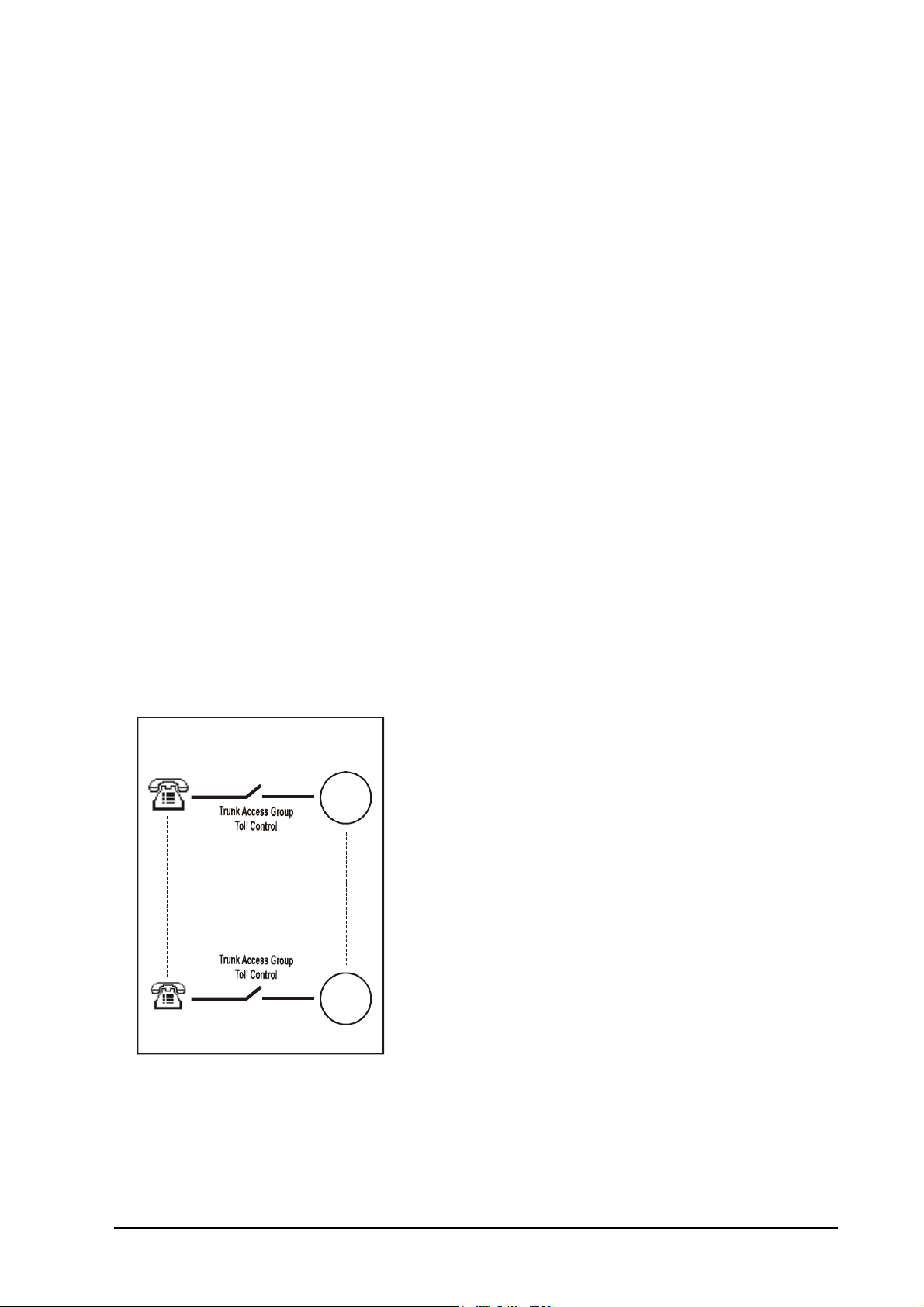
• Frequently called numbers can be stored in the system. These numbers can be dialed using specific codes.
This is called Abbreviated dialing. It is also known as Memory Dialing.
• This helps save time while dialing frequently used numbers.
• An abbreviated number is dialed through its directory index.
The PROTON 206/308 offers two types of Abbreviated Dialing: Personal Abbreviated Dialing and Global
Abbreviated Dialing.
• Each user is allocated memory space called personal memory to store 10 numbers of his own choice. This is
called Personal Abbreviated Dialing. These numbers are dialed out using access codes 800-809.
• Besides personal memory, 90 numbers can be stored in a common memory space called global memory.
These numbers are dialed out using access codes 810-899. This is called Global Abbreviated Memory.
Personal Abbreviated Dialing
• The numbers stored in the personal memory of a user are dialed out.
• Each user can store up to 10 numbers of his choice in his personal memory.
• User can change these numbers anytime from his station without consulting the System Administrator or the
System Engineer.
• The location codes for Personal Abbreviated Dialing are 00-09. Hence the access codes are 800 to 809.
• Personal Abbreviated Dialing is allowed to all the users.
• The system checks Trunk Access for daytime/nighttime and Toll Control allowed list and denied list before
dialing the Personal Abbreviated number. Hence for Personal Abbreviated Dialing, Trunk Access for
daytime/nighttime, Toll Control allowed list and Toll Control denied list should be programmed properly.
PROTON 206/308 V1 System Manual 11
Page 12
How to program Personal Abbreviated Dialing?
Lo c a t i o n
10 to 54
S1
Sn
C
O
S
T
r
u
n
k
A
c
c
e
s
s
Global Abbreviated dialing - Part1
Access codes 810-854
Lo c a t i o n
55 to 99
S1
Sn
Global Abbreviated dialing - Part 2
Access codes 855-899
C
O
S
T
r
u
n
k
A
c
c
e
s
s
1 Lift handset. Dial tone
2 Dial 18-Directory Index-Trunk-Number-#/Flash. Confirmation tone
In the above command
Directory Index is from 00 to 09.
Trunk is 1, 2, 3, 0 or 5 (Here ‘0’ and ‘5’ are interpreted as trunks from group 0 or group 5 and not trunk 0 and 5)
Number is the telephone number, which is to be abbreviated.
How to use Personal Abbreviated Dialing?
1 Lift the handset. Dial tone
2 Dial 8-Directory Index. Number dialed out
Example:
To program telephone number 0265-2630555 at directory index 00 with trunk access code ‘2’, dial
18-00-2-02652630555.
Once this location is programmed with the number, dial 800 to call the number.
Global Abbreviated Dialing
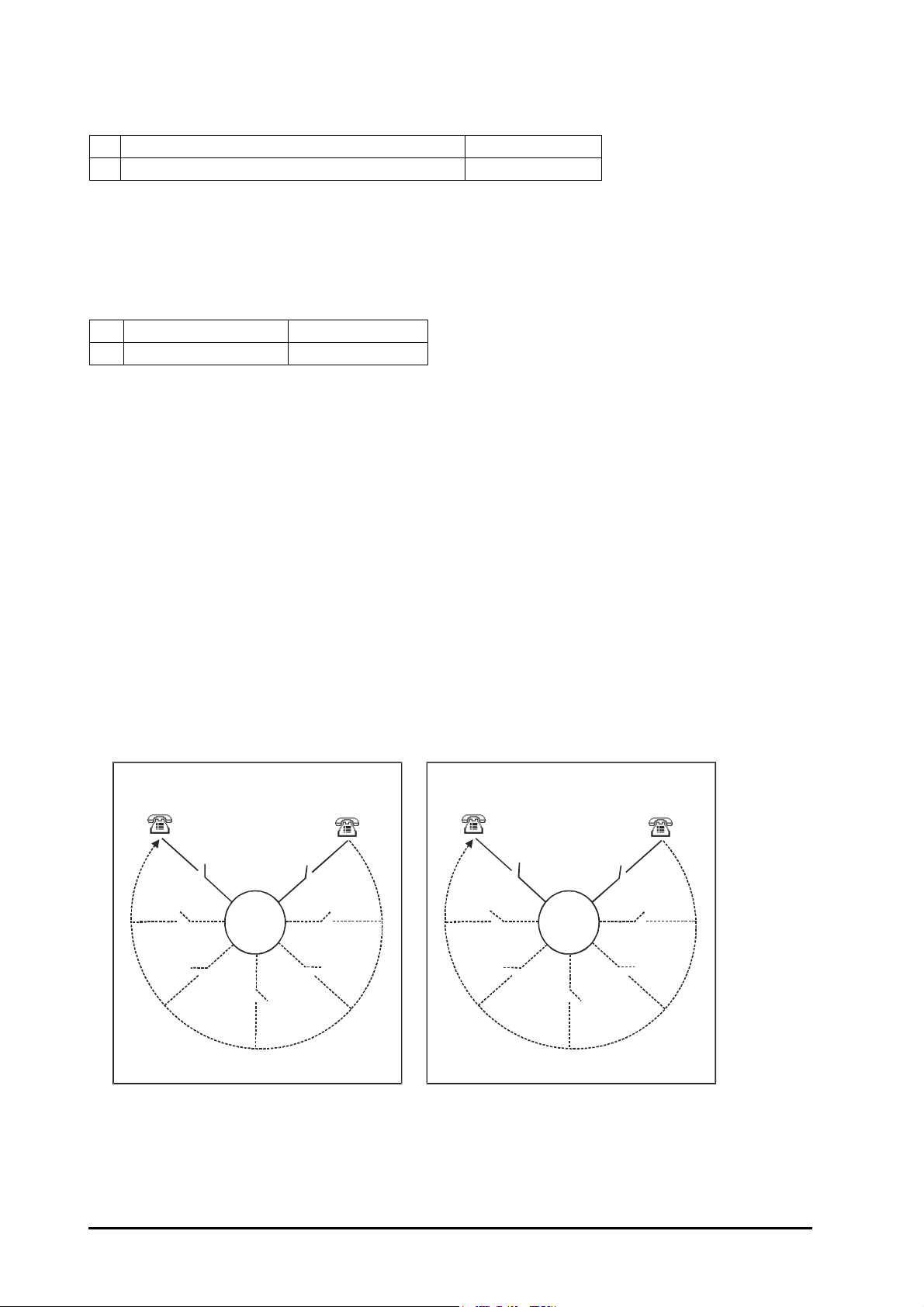
• The numbers stored in the global memory of the system are dialed out.
• Global directory can be programmed either by the System Administrator or the System Engineer.
• The global directory is common for all the users.
• Maximum 90 numbers can be stored in the global directory. Location codes for global directory are from 10 to
99. Hence the access codes for global abbreviated dialing are 810 to 899.
• Global Directory is divided into two parts i.e. Global Directory part 1 and Global Directory part 2.
• A user can dial these numbers irrespective of his Toll Control. However these numbers can be dialed only if
the user is allowed this feature from Class of Service and it is given Trunk Access.
• Telephone numbers of fire, police, branch offices or such other places can be stored in global directory part 1
and its access be given to all the users so that any user can access this facility.
• Long distance numbers can be stored in global directory part 2 and its access be given to selected users.
• In case of long distance numbers, complete numbers with preceding codes should be entered.
How to program?
Use following command to program a telephone number in Global Directory:
8-Directory Index-Trunk-Number-#/Flash
Where,
12 PROTON 206/308 V1 System Manual
Page 13

Directory Index from 10 to 54 is for Global Directory Part I.
Directory Index from 55 to 99 is for Global Directory Part II.
Trunk specifies the trunk, from 1 to 3 which you want the system to use while making memory dialing. Group ‘0’
& ‘5’ can be used.
Number is the telephone number (maximum 16 digits).
Use following command to allow/deny global directory part I on a station:
335-Station-Day Time-Night Time
Where,
Station is from 21 to 28.
Day Time Meaning
0 Deny Global Directory Part I
1 Allow Global Directory Part I
Night Time Meaning
0 Deny Global Directory Part I
1 Allow Global Directory Part I
By default, Global Directory Part I on a station is allowed during Day Time and Night Time.
Use following command to enable/disable the access of global directory part I on all stations:
335-*-Day Time-Night Time
Use following command to enable/disable the access of global directory part II on a station:
336-Station-Day Time-Night Time
Where,
Station is from 21 to 28.
Day Time Meaning
0 Deny Global Directory Part II
1 Allow Global Directory Part II
Night Time Meaning
0 Deny Global Directory Part II
1 Allow Global Directory Part II
By default, access of Global Directory Part II on a station is enabled during Day Time and Night Time.
Use following command to enable/disable the access of global directory part II on all stations:
336-*-Day Time-Night Time
Example:
Store ‘0265-2630555’ in location 10 and ‘022-26677889’ in location 55. Give access of global directory I in day
time and global directory II in night time to station 23.
Dial 8-0-0-2652630555-#
Dial 8-55-0-02226677889-#
Dial 335-23-1-0
Dial 336-23-0-1
How to use Global Abbreviated Dialing?
1 Lift the handset. Dial tone
2 Dial 8-Directory Index. Number dialed out.
PROTON 206/308 V1 System Manual 13
Page 14

Relevant Topics:
1. “Class Of Service (COS)” 36
2. “Trunk Parameters” 78
3. “Trunk Access” 75
4. “Toll Control” 73
Alarm
What’s this?
• The PROTON 206/308 can remind a station user after some specific time.
• On expiry of the set time, the telephone starts ringing
• When the station user lifts the handset, he gets music.
• If he does not answer the call for time = Alarm Ring Timer 1 then the system gives ring to both, the station
user and the operator for time = Alarm Ring Timer 2.
• Only one reminder can be set at a time on one station. The last set alarm supersedes all the previous
timings.
• All station users can set duration alarm for same duration simultaneously.
• If the station is engaged at the time of alarm then the station gets alarm when it becomes free.
• Ring cadence of an alarm is same as that of Boss Ring.
How to use it?
1 Lift the handset. Dial tone
2Dial 161-Minutes. Confirmation tone
3 Replace the handset.
Minutes can be from 00 to 99.
Example:
To set a reminder after 9 minutes, dial 161-09.
To Cancel Alarm:
1 Lift the handset. Dial tone
2 Dial 160. Confirmation tone
3 Replace the handset.
Example:
To cancel the alarm dial 160 from your station.
How to program?
Refer “Class Of Service (COS)” for details on how to allow Alarm to a user.
Timers of Relevance:
Alarm Ring Timer 1-Time for which the station rings on which the alarm is set.
Command : 217-13-Timer
Default : 90 seconds
Valid Range : 01 to 99 seconds.
Alarm Ring Timer 2-Time for which the station on which the alarm is set and the operator station both, rings
simultaneously.
Command : 217-14-Timer
Default : 60 seconds
Valid Range : 01 to 99 seconds
14 PROTON 206/308 V1 System Manual
Page 15

Relevant Topics:
To l l
Control
Dynamic
Lo c k
Allowed List
An d
Denie d List
1. “Class Of Service (COS)” 36
2. “Remote Alarm” 67
Allowed and Denied Lists
What’s this?
Allowed and Denied lists is a group of number strings. The PROTON 206/308 uses these lists to support two
different features viz. Toll Control and Dynamic Lock.
Association of Allowed and Denied lists with Toll Control:
When the number is dialed from a station, the PROTON 206/308 compares the dialed number string with the
number strings in allowed and denied lists.
Association of Allowed and Denied Lists with Dynamic Lock:
If the user locks the station and thereafter dials a number from his station, the PROTON 206/308 compares the
dialed number string with the number strings in allowed and denied lists for the locked status.
How it works?
• Maximum 10 Allowed and Denied Lists (level) can be formed.
• Each level accommodates 12 allowed strings and 12 denied strings.
• Each number string can have maximum of 16 digits.
• Number string can be a complete telephone number, area code or few initial digits of a telephone number.
• An allowed-denied list (a level) should be assigned to each station depending upon the requirement.
Level Allowed String Denied String
0 Num0, Num1, Num2…. Num11 Num0, Num1, Num2…. Num11
1 Num0, Num1, Num2…. Num11 Num0, Num1, Num2…. Num11
2 Num0, Num1, Num2…. Num11 Num0, Num1, Num2…. Num11
3 Num0, Num1, Num2…. Num11 Num0, Num1, Num2…. Num11
4 Num0, Num1, Num2…. Num11 Num0, Num1, Num2…. Num11
5 Num0, Num1, Num2…. Num11 Num0, Num1, Num2…. Num11
6 Num0, Num1, Num2…. Num11 Num0, Num1, Num2…. Num11
7 Num0, Num1, Num2…. Num11 Num0, Num1, Num2…. Num11
8 Num0, Num1, Num2…. Num11 Num0, Num1, Num2…. Num11
9 Num0, Num1, Num2…. Num11 Num0, Num1, Num2…. Num11
PROTON 206/308 V1 System Manual 15
Page 16

Allowed String Denied String
B, B, B, B, B, B, B, B, B, B, B, B 1, 2, 3, 4, 5, 6, 7, 8, 9, 0, *, #
B, B, B, B, B, B, B, B, 9, B, B, B 0, 00, B, B, B, B, B, B, 95, B, *, #
B, B, B, B, B, B, B, B, B, B, B, B 00, B, B, B, B, B, B, B, B, B, *, #
B, B, B, B, B, B, B, B, B, B, B, B B, B, B, B, B, B, B, B, B, B, *, #
B, B, B, B, B, B, B, B, 9, B, B, B 0, 98, 00, B, B, B, B, B, 95, B, *, #
B, B, B, B, B, B, B, B, B, B, B, B 1, 2, 3, 4, 5, 6, 7, 8, 9, 0, *, #
B, B, B, B, B, B, B, B, B, B, B, B 1, 2, 3, 4, 5, 6, 7, 8, 9, 0, *, #
B, B, B, B, B, B, B, B, B, B, B, B 1, 2, 3, 4, 5, 6, 7, 8, 9, 0, *, #
B, B, B, B, B, B, B, B, B, B, B, B 1, 2, 3, 4, 5, 6, 7, 8, 9, 0, *, #
B, B, B, B, B, B, B, B, B, B, B, B 1, 2, 3, 4, 5, 6, 7, 8, 9, 0, *, #
How to program?
Step 1: Take a pen and a paper and decide which number strings are to be programmed as allowed strings and
the denied strings.
Step 2: Program the allowed strings using command 252.
Step 3: Program the denied strings using command 253.
Step 1
Take a pen and a paper. Make the allowed and denied strings accordingly.
Step 2
Use following command to program an allowed string:
252-Level-Location-Number-Flash
Where
Level is from 0 to 9.
Location is from 00 to 11.
Number is a complete telephone number, truncated telephone number or an area code.
Step 3
Use following command to program a denied string:
253-Level-Location-Number-Flash
Where
Level is from 0 to 9.
Location is from 00 to 11.
Number is a complete telephone number, truncated telephone number or an area code.
By default, Allowed and Denied Strings are shown in the table.
Example1:
Program following allowed strings
0265-2359695
0265-2555999
Solution:
Program these two allowed strings in location 0 and 1 at level 3.
252-3-00-02652359695-Flash
252-3-01-02652555999-Flash
Example 2:
Program following denied strings:
0265-2858676
2885966
16 PROTON 206/308 V1 System Manual
Page 17

Solution:
Program these two denied strings at location 0 and 1 of level 3.
253-3-00-02652858676-Flash
253-3-01-2885966-Flash
Important Point:
• Allowed strings and Denied strings cannot be programmed remotely.
Relevant Topics:
1. “Toll Control” 73
2. “Dynamic Lock” 47
Answering Calls
When your station rings, lift the handset. The ring stops and you get connected to the calling party. You may
start-talking immediately. The PROTON 206/308 offers a facility to identify the caller before answering the call. If
the caller is a station then the station rings as Trin......Trin.....Trin.... This is called single ring. If the caller is an
external caller the station on which the trunk call lands rings as Trin...Trin...........Trin...Trin... This is called double
ring. These two types of rings differentiate an internal caller and an external caller.
Relevant Topic:
1. “Distinctive Rings” 46
Auto Call Back
What’s this?
The PROTON 206/308 offers two types of Auto Call Back viz. Auto Call Back-On Busy and Auto Call Back-On
No Reply.
Auto Call Back-On Busy
What’s this?
• Station user need not keep dialing busy station repeatedly.
• Station user can request Auto Call Back by dialing ‘2’ during busy tone.
• When the requested station becomes free it rings. Simultaneously station that requested Auto Call Back also
starts ringing. Whosoever answers first gets ring-back tone, whereas other end keeps ringing. Once the ring
is answered, ring-back tone stops and speech is established.
• Auto Call Back can also be requested on busy trunk.
To Set ACB-On Busy
1 Dial Number. Busy tone
2 Dial 2. Confirmation tone
If Auto Call Back ring is not answered within 30 seconds, it stops and Auto Call Back request gets cleared. This
is called Auto Call Back Ring Timer and is programmable.
To Cancel ACB-On Busy
1 Dial Number. Busy tone
2 Dial 102. Confirmation tone
PROTON 206/308 V1 System Manual 17
Page 18

Example:
Station 23 is busy. To enable Auto Call Back, dial 2 during busy tone. If you have wrongly dialed 23 and want to
cancel Auto Call Back request, dial 102 to cancel it.
Auto Call Back-On No Reply
What’s this?
• Station user need not keep trying “no-reply” station repeatedly.
• Station user can set ACB-No Reply.
• When the station user for whom ACB request was made returns to his desk and picks up the handset the
station that requested ACB rings.
• Both the stations come in speech when the station that requested ACB answers the call.
To Set ACB-on No reply
1Dial Number. Busy tone
2Dial Flash-2. Confirmation tone
To Cancel Auto Call Back
1Dial Number. Busy tone
2Dial 102. Confirmation tone
How to program?
Please refer “Class Of Service (COS)” for details on how to allow Auto Call Back to a user.
Important Points:
• Only one ACB-On Busy request is entertained at a time.
• Only one ACB-On No Reply request is entertained at a time.
• The last ACB request supersedes all other previous ACB requests.
• ACB-On Busy and ACB-On No Reply can be used simultaneously.
Timer of Relevance:
Auto Call Back Ring Timer-Time for which the station on which the ACB is set rings.
Command : 217-10-Seconds
Default : 45 seconds.
Valid Range : 01 to 99 seconds
Relevant Topic:
1. “Class Of Service (COS)” 36
Auto Redial
What’s this?
• Many times when we make a call, we find that the called party is busy. Hence we have to try the same
number again and again to contact him. This is very frustrating and time-consuming. Auto Redial rescues us
from this sheer wastage of time. The system gives ring to the station user that requested Auto Redial, when
the call goes through.
• The PROTON 206/308 offers two types of Auto Redial. Low priority Auto Redial and High priority Auto
Redial.
• Generally the system should be programmed in such a manner that in low priority type the number of trials
made by the system is less (count) and the time gap between two trials (timer) is more whereas in high
priority type the number of trials is more and the time gap between two trials is less. This enables us to give
Auto Redial facility to senior officials as well as staff persons.
18 PROTON 206/308 V1 System Manual
Page 19

How to use it?
1 Lift the handset. Dial tone
2 Grab a trunk. Trunk dial tone
3 Dial Number. Busy tone
4 Disconnect.
5 Lift the handset. Dial tone
Dial 77 (for Low Priority Auto Redial) Or
6
Dial 777 (for High Priority auto Redial).
Example:
Dialed number 0265-2335679 is busy. To enable Auto Redial, disconnect and dial 77 or 777.
To Cancel Auto Redial
1 Lift the handset. Dial tone
2 Dial 70. Confirmation tone
Example:
Dialed number 0265-2335679 was busy. Auto Redial is requested. Meanwhile the same number calls. Now to
cancel Auto Redial request, dial 70.
How to program?
Please refer “Class Of Service (COS)” for details on how to allow Auto Redial to a station.
Confirmation tone
Timers of Relevance:
Auto Redial RBT Wait Timer-Time for which the PROTON 206/308 waits to sense RBT from the PSTN after
dialing the requested number.
Command : 2142-Timer
Default : 30 Seconds
Valid Range : 01 to 99 seconds.
Low Priority Auto Redial Timer and Count-Duration and the number of times the system shall try the request
number.
Command : 2143-Timer-Count
Default Timer : 40 seconds
Default Count : 01
Valid Range for Timer : 01 to 99 seconds
Valid Range for Count : 01 to 99
High Priority Auto Redial Timer and Count-Duration and the number of times the system shall try the
requested number.
Command : 2144-Timer-Count
Default Timer : 30 seconds
Default Count : 01
Valid Range for Timer : 01 to 99 seconds
Valid Range for Count : 01 to 99
Important Points:
• Only one number can be requested for Auto Redial at a time from one station.
• All stations can attempt Auto Redial simultaneously.
• If the system detects busy tone it releases the trunk and redials the number after some time.
• If the system does not detect ring back tone for time = Auto Redial RBT wait timer, it releases the trunk and
tries after some time.
PROTON 206/308 V1 System Manual 19
Page 20

• If the system detects ring back tone, it gives ring on your station. When you lift the handset, you get
connected with the desired party.
• The system uses the same trunk type you used to make a call. If you dialed the number using trunk access
code 5, the system takes one of the free trunks from this group for Auto Redial. If you tried out the number on
a selected trunk, the system uses that particular trunk only.
• Auto Redial will suspend if there is any activity (ringing or dialing) on your station. It resumes as soon as your
station becomes free.
• Auto Redial does not work in following cases:
• If the trunk lines do not support standard tones. Frequency and timings are critical for auto redial to work.
• Trunk condition is poor and various tones cannot be detected properly.
• Called party lifts within 3 seconds after the ring starts on his phone.
• Behind the PBX applications where Matrix trunks are connected to stations of some other PBX which do not
support standard tones.
Relevant Topic:
1. “Class Of Service (COS)” 36
Barge-In
What’s this?
• When your message is urgent and you cannot wait for the called person to become free, you can land in his
conversation after intimating him.
• While landing, you get music and the called person gets beeps of internal call waiting tone.
• During the beeps, the called person can dial ‘Flash-1’ to answer your call. In this case the third party is put on
hold and gets music and hence cannot listen to your conversation.
• If the called person does not dial ‘Flash-1’ then speech is automatically established after time = barge-in
timer.
• Replace your handset once your talk is over. This will automatically restore his original speech with the heldup party.
How to use it?
1 Lift handset. Dial tone
2Dial Number. Busy tone
3Dial 33. Music. The destination gets beeps.
The system connects you to the destination after
4
5 seconds. Start talking after the music stops.
Example:
Station 23 is busy. To give a very urgent message to him, dial 33 on busy tone.
How to program?
Please refer “Class Of Service (COS)” for details on how to allow Barge-In to a station.
Timer of Relevance:
Barge-In Timer-Time after which the speech is established.
Command : 217-12-Timer
Default : 05 seconds
Valid Range : 01 to 99 seconds.
Important Points:
• Barge-In can work only if the destination is in speech.
• Barge-In works even when the destination is talking on the trunk line.
20 PROTON 206/308 V1 System Manual
Page 21
• Barge-In can also be done by keeping one party in hold. Suppose a trunk call is to be transferred to a busy
station then you can keep the caller in hold mode and Barge-In the destination to inform him about his call.
This is most advantageous feature for the operator.
• However, Barge-In will not work when the destination is in threeparty mode or in dialing state or ringing.
• It will also not work if any station is having call privacy from Barge-In.
Relevant Topic:
1. “Class Of Service (COS)” 36
Behind the PBX Applications
What’s this?
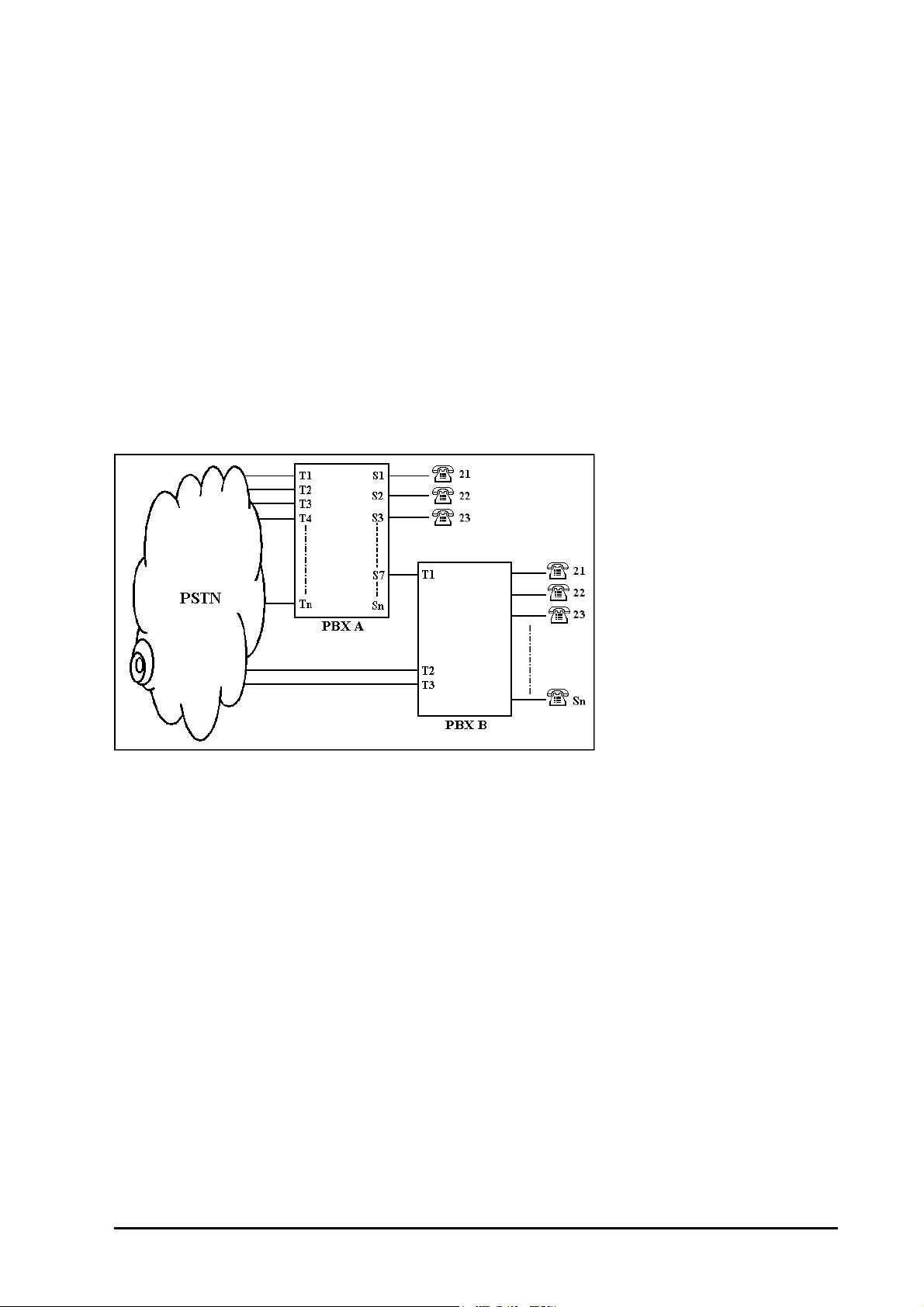
Many times, small and medium range PBX systems are connected behind some bigger PBX systems. Such
applications are used mainly to expand the existing capacity of the big PBX already in use. Stations coming from
the big PBX are used as trunks of the small PBX. There could also be some PSTN trunks coming directly on the
smaller PBX. Such configurations are known as ‘Behind the PBX’ application.
In such situations, it is not easy to implement toll control restrictions.
Consider a simple event
Station 21 of PBX B in the figure above is not given long distance dialing facility. It has access to all the trunks.
Now when he wants to use T2 or T3, which are directly coming from PSTN, he dials ‘0’. He gets PSTN dial tone
and dials the number.
But when he does similar procedure on T1, he gets error tone. Because, in this case when station 21 grabs T1
by dialing a code, he gets dial tone of the PBX A. Now when he again dials ‘0’ to grab PSTN dial tone, PBX
understands it to be a long distance call and since station 21 is not allowed long distance calls, the system
rejects dialing on trunk and gives error tone to station A.
Hence now if station 21 of PBX B is to be allowed external dialing through T1, he should be given long distance
dialing access. If this is done then station 21 may make long distance calls on T1, T2 and T3.
The PROTON 206/308 solves this problem by providing programmable PBX Expansion count for each trunk.
This count is the number of digits to be ignored before toll control check is begun. The PBX Expansion count is
same as the number of PBXs connected between the main PBX and the last subscriber.
In the figure shown, the PBX Expansion count of T1 should be kept 1 and for T2 and T3, it should be kept ‘0’.
PROTON 206/308 V1 System Manual 21
Page 22

CAUTION!
For all normal applications, keep this PBX Expansion count to 0 for all the trunks. Otherwise, outside dialing may
be hampered. The PROTON 206/308 supports PBX Expansion count for each trunk.
How to program?
Use following command to program PBX Expansion count for a trunk:
54-Trunk-PEC Count
Trunk is from 1 to 3.
PEC Count is from 0 to 9
By default, PEC for all the trunks is 0.
Example:
To program PEC=1 for trunk 1, dial 54-1-1.
Boss Ring
What’s this?
This feature helps the user to identify the caller. A person in the organization having higher hierarchy can be
assigned this feature. Whenever a person having access to Boss Ring calls any other person in the
organization, the called station rings differently. This helps the called party to identify the caller.
How to program?
Boss Ring is a programmable feature. It can be allowed or denied to a station user. This feature is associated
with feature Raid. Whenever a person having access to Raid makes a call the called station gets Boss Ring.
Please refer “Class Of Service (COS)” for more details.
Important Point:
• Boss Ring is same as Alarm Ring.
Relevant Topics:
1. “Distinctive Rings” 46
2. “Class Of Service (COS)” 36
Busy Hunting Group
What’s this?
In some applications, it is desirable that if the called station is busy, the call should ring on the near by station
instead of giving busy tone to the caller.
How to use it?
Desired stations can be programmed in one group. If the called station is busy then the call will be diverted to
next free station in the group.
How to program?
Use following command to program a station in a busy hunting group:
304-Station-Busy Hunting Group
Where,
Station is from 21 to 28
Busy Hunting Group is from 1 to 9
Use following command to program all stations in a busy hunting group:
304-*-Busy Hunting Group
22 PROTON 206/308 V1 System Manual
Page 23

Where,
Busy Hunting Group is from 1 to 9
By default, all stations are in Busy hunting Group 0.
Example:
To program stations 202, 206 and 208 in hunting group 1.
304-202-1
304-206-1
304-208-1
With this program, on calling 202 if 202 is busy then the call will be diverted to 206 and if 206 is also busy then it
will be diverted to 208.
Important Points:
• This facility may appear same as our feature “Call Transfer-On Busy” but they are different. If the said feature
is used then calls can only be transferred to any other single station and not to a group of stations. If this
facility is used then chaining of Call Transfer-on busy gets enabled i.e. the system hunts for free station in
the group you have programmed.
• All stations can be programmed in one group.
• 9 such groups (from group 1 to group 9) can be programmed.
• If any station is programmed with group value 0, that station will not be included in any group.
• This feature is applicable for only internal calls and not for incoming calls.
Call Duration Control
What’s this?
Call Duration Control (CDC) helps the customer to restrict the duration of the calls whether, incoming or outgoing
external calls. This feature disconnects incoming or outgoing external calls after a set time. People tend to talk
about sports, movies, politics and such other subjects over telephone. Now, these topics are generally not
related to business. Moreover, such topics tend to take more time than the business talk for which the call was
originally made. If duration of each call can be restricted, people will talk to the point and not drift to other
unproductive talk. There are many advantages:
• Reduction in telephone bills.
• Trunks will be easily available for other outgoing calls. More business calls can be made during working
hours leading to more business.
• Your trunks remain free for incoming calls. More customers can call.
• People spend more time on the actual job on hand rather than on telephone. This means increased
productivity.
• Call Duration Control can be set for each station.
• Call Duration Control for Outgoing calls can be enabled/disabled for local calls, STD+ISD calls and incoming
calls separately.
How it works?
• Local calls, STD calls and incoming calls can be disconnected at set times.
• Local calls, STD calls and incoming calls can be disconnected for different timings separately.
PROTON 206/308 V1 System Manual 23
Page 24
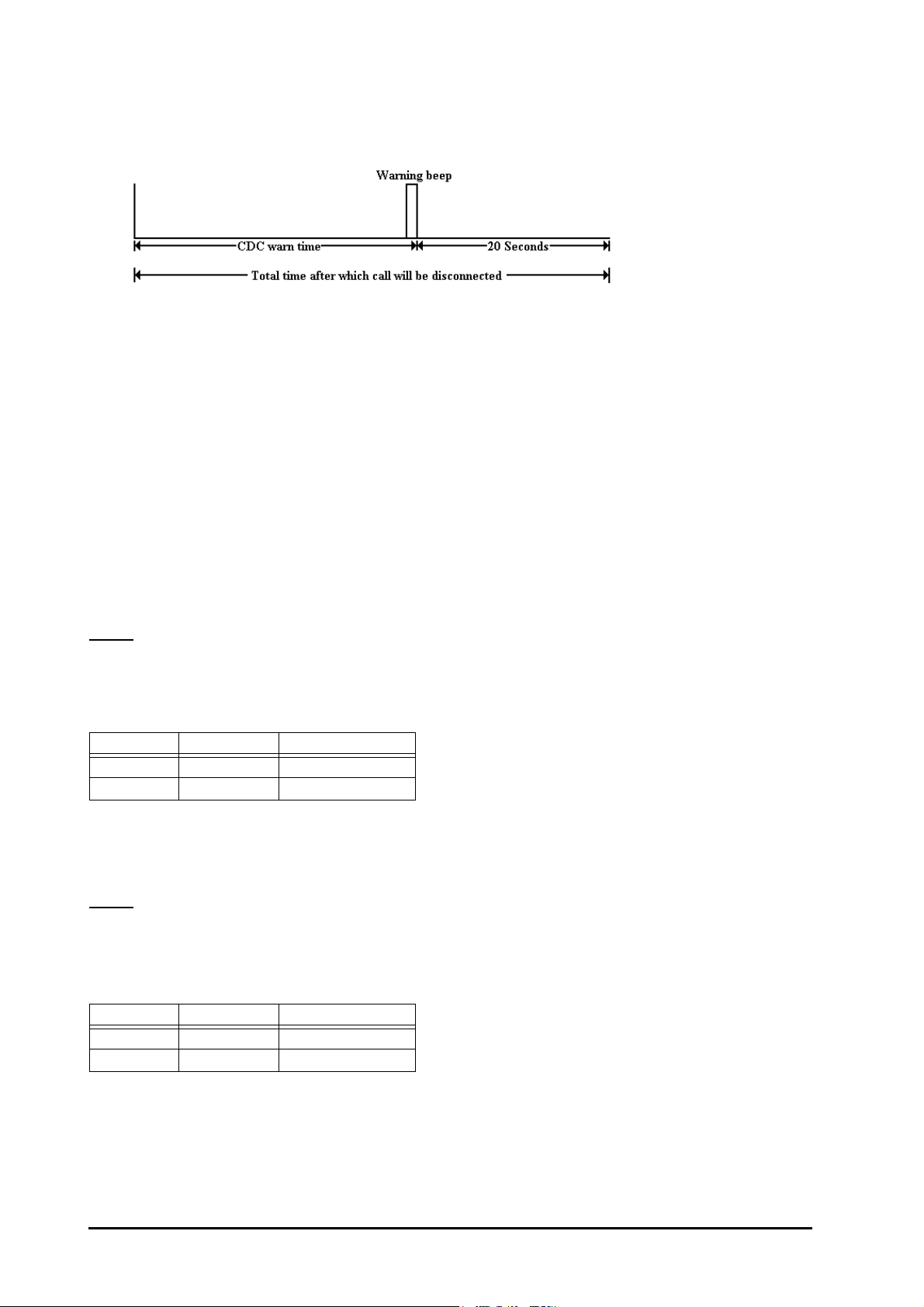
• If CDC is activated, then system gives warning beeps after time = CDC warn timer. After the warning tone,
the system waits for time = CDC good-bye timer before releasing the connection forcefully.
• CDC can be activated on selected stations.
• CDC can be activated for either day, or night, or both.
• In case of transferred call, the CDC timer gets reset and starts again afresh on the transferred station.
• It is also possible to just warn the user without disconnecting his call. In this case, the user gets the beeps
after the programmed time but his call does not get disconnected.
• If Barge-in/Raid feature is used on a station on which CDC is activated then the time for which Barge-In/Raid
was done will not be counted.
How to program?
Step 1: Enable/disable CDC for local calls using command 3331.
Step 2: Enable/disable CDC for STD call using command 3332.
Step 3: Enable/disable CDC for incoming calls using command 3333.
Step 4: Enable/disable CDC warning beeps without disconnection using command 3334.
Step 5: Set various timer for CDC.
Step 1
Use following command to enable/disable CDC for local calls:
3331-Station-Day Time-Night Time
Where,
Station is from 21 to 28.
Day Time Night Time Meaning
0 0 CDC is disabled
1 1 CDC is enabled
Use following command to enable/disable CDC for Local calls for all stations:
3331-*-Day Time-Night Time
By default, CDC for local calls is disabled during day time and night time.
Step 2
Use following command to enable/disable CDC for STD calls:
3332-Station-Day Time-Night Time
Where,
Station is from 21 to 28.
Day Time Night Time Meaning
0 0 CDC is disabled
1 1 CDC is enabled
Use following command to enable/disable CDC for STD calls for all stations:
3332-*-Day Time-Night Time
By default, CDC for STD calls disabled during day time and night time.
24 PROTON 206/308 V1 System Manual
Page 25

Step 3
Use following command to enable/disable CDC for incoming calls:
3333-Station-Day Time-Night Time
Where,
Station is from 21 to 28.
Day Time Night Time Meaning
0 0 CDC is disabled
1 1 CDC is enabled
Use following command to enable/disable CDC for incoming calls for all stations:
3333-*-Day Time-Night Time
By default, CDC for incoming calls is disabled during day time and night time.
Step 4
Use following command to enable/disable CDC warning beeps without disconnection:
3334-Station-Day Time-Night Time
Where,
Station is from 21 to 28.
Day Time Night Time Meaning
0 0 CDC is disabled
1 1 CDC is enabled
Use following command to enable/disable CDC warning beeps without disconnection:
3334-*-Day Time-Night Time
By default, CDC warning beeps are enabled during day time and night time.
Step 5
Timers of Relevance:
Disconnection time should be programmed for different call types using following table:
Command Description Range Default Unit
217-26-Timer CDC local warn timer 001-255 240 Sec
217-27-Timer CDC STD warn timer 001-255 120 Sec
217-28-Timer CDC incoming warn timer 001-255 240 Sec
217-29-Timer CDC good-bye timer 01-99 60 Sec
Examples:
Program CDC for incoming calls on station 23 during daytime for 4 minutes. The system should give me beep
after 3.5 minutes.
Use following commands:
3333-23-1-0
217-28-210
217-29-30
Program CDC for STD calls on station 21 during nighttime for 5 minutes. The system should give me beep after
4 minutes.
Use following commands:
3332-21-0-1
217-27-240
217-29-60
PROTON 206/308 V1 System Manual 25
Page 26

Call Follow-Me
What’s this?
• Suppose you went to your co-worker’s place and you want that all the calls coming on your station should
now come to your co-worker’s station then you can use this feature.
• The station dial tone changes to feature tone if its calls are forwarded.
How to use it?
1 Lift handset. Dial tone
2Dial 132-Station-User Password. Confirmation tone
Example:
My station number is 23. My User password is 1212. Right now I am at station 21. I want that all my calls on 23
come to station 21. Dial 132-23-1212 from station 21.
Cancel Call Follow-Me
1 Lift handset. Dial tone
2Dial 130. Confirmation tone
How to program?
Please refer “Class Of Service (COS)” for more details on how to allow this feature to a station user.
Relevant Topics:
1. “User Security (User Password)” 81
2. “Class Of Service (COS)” 36
Call Forward
What’s this?
In an organization people might move from one place to another to accomplish a job. They do not sit at fixed
places. A user might go to his colleague’s desk to work on a project they are doing jointly. A manager might go
on the production floor or remain in conference room for few hours. In such situations, a user cannot afford to
miss his calls. He would like to attend his calls from his new location. To fulfill this requirement, the PROTON
206/308 offers a facility called “Call Forward”.
Access to Call Forward is programmable and hence can be allowed or denied to a user. Please refer topic
“Class Of Service (COS)” for details on how to enable this feature on a particular station.
The PROTON 206/308 offers three types of Call Forward:
• Call Forward-All Calls
• Call Forward-If Busy
• Call Forward-If No Reply
Call Forward-All Calls
What’s this?
• You can use this feature when you are not available on your place for some time and you wish to divert all
your calls on some other station.
• Whenever you wish privacy or want to attend to uninterrupted discussion or thinking, you can use this
feature. Once invoked, all calls on your station will go to the station where the calls are forwarded.
26 PROTON 206/308 V1 System Manual
Page 27

How to use it?
1 Lift handset. Dial tone
2 Dial 131-Station. Confirmation tone
Example:
My station is 23. I am busy in meeting. I want my calls to go to station 24, dial 131-24.
Call Forward-If Busy
What’s this?
• This feature is useful for a group of people performing same type of job. In such a case you can divert your
calls to your colleague while you are already busy over phone.
• The external calls can only intimate you by giving beeps but they won’t be transferred to the specified station.
How to use it?
1 Lift handset. Dial tone
2 Dial 134-Station. Confirmation tone
Example:
My station is 23. I am busy over phone most of the times. To forward all my calls to station 24 in such condition,
dial 134-24.
Call Forward-If No Reply
What’s this?
• The system diverts the call to some other station if the destination does not answer the ring in time = Ring
Back Timer: transfer on no-reply.
• You and your colleague can use this feature. In your absence, the caller automatically gets diverted to your
colleague who can take messages for you.
How to use it?
1 Lift handset. Dial tone
2 Dial 133-Station. Confirmation tone
Example:
I have two stations, 23 and 25. I am busy over station 23 and the call comes on station 25 at that time only. I
want that if my existing call gets finished in some time, I can attend the call on station 25 but if could not attend
the call then it should be diverted to station 24 after some time. To forward the call to station 24 but only after few
rings, dial 133-24 from station 25.
Cancel Call Forward (all calls/if busy/if no reply)
1 Lift handset. Dial tone
2 Dial 130. Confirmation tone
Important Points:
• If the call is important, your secretary (the station where your calls are forwarded) can dial you and transfer
the call back to you.
• You can continue making calls from your station.
• The station dial tone changes to feature tone if its calls are forwarded.
• If your station is 21 and if you have forwarded all your calls to station 24 under no-reply condition then all
calls which are transferred to station 21 will land on station 21 for time = Ring Back Timer: Transfer on noReply and then will land on station 24.
• Trunk calls also get diverted if not answered.
PROTON 206/308 V1 System Manual 27
Page 28

• If call forward on-busy and call forward-on No Reply, both are enabled at the same station at the same time
then on dialing 130, both the features will get cancelled.
• Only one type of call forward features viz. Call Forward if busy, Call forward if no reply etc. can be enabled at
one point of time.
Timer of Relevance:
Ring Back Timer: Transfer-on No Reply-Time after which the call gets forwarded.
Command : 217-19-Timer
Default : 20 seconds
Valid Range : 01 to 99 seconds.
Relevant Topic:
1. “Class Of Service (COS)” 36
Call Park
What’s this?
• You can park the current call and attend to another call.
• While a call is parked, you may use other system features like Call Pick-Up, Call Follow-Me, attending a call
ringing on other station without losing current call. While the call is parked the parked party gets the music.
• If you don’t retrieve the call within time equal to call park timer, the call comes back to you automatically. Your
station starts ringing. In case you are in conversation, you get beeps to remind you of the parked call.
How to use it?
1 Speech with trunk (or station).
2 Dial Flash. Feature tone
3 Dial 7. Call Parked.
To retrieve the parked call:
1 Lift handset. Dial tone
2 Dial 17. Speech.
Example:
My station is 23. While talking with one party, I got external call waiting tone (double beeps). To attend the
waiting call; I should park the present call. When my talk is completed with this call, I want to retrieve the parked
call. To do this, I should
Dial Flash-7: When I am in speech with first party.
Dial Flash-1: To attend second party.
Disconnect: On completion of talk with party 2.
Dial 17: To retrieve the parked call.
How to program?
Please refer “Class Of Service (COS)” on how to allow Call Park to a station user.
Important Points:
• Once the call is parked, it remains parked for time = Call Park Timer.
Timer of Relevance:
Call Park Timer-Time for which the call gets parked.
Command : 211-Timer
Default : 30 seconds
Valid Range : 01 to 99 seconds.
28 PROTON 206/308 V1 System Manual
Page 29

Relevant Topic:
1. “Class Of Service (COS)” 36
Call Pick Up
What’s this?
You can answer calls of your colleague or co-worker without physically going to his station. You can use this
feature to answer even trunk calls ringing on other stations. The PROTON 206/308 offers two types of call pick
up facility viz. Call Pick Up-Group and Call Pick Up-Selective.
Call Pick Up-Group
Calls of any station within your group can be answered simply by dialing `4’ after lifting the handset.
• Maximum 10 call pick up groups can be formed.
• In case more stations are ringing, the station with the least port number will be picked up first.
• This feature can be used when people performing same job sit in groups and intragroup call pick up is to be
allowed whereas inter group call pick up is to be restricted.
How to use it?
1 Lift handset. Dial tone
2 Dial 4. Speech.
Call Pick Up-Selective
• Call of any ringing station can be answered by dialing 12-Station after lifting the handset.
• This is useful when more than one stations are ringing and you want to answer one of them selectively.
• For selective call pick up, it is not necessary for the station to be in the same pick up group.
How to use it?
1 Lift handset. Dial tone
2 Dial 12-Station. Speech.
How to program?
Call Pick Up-Group
Step 1: Decide number of call pick-up groups to be formed.
Step 2: Program the station in call pick-up group using command 301.
Step 3: Assign a Class of Service group with call pick-up feature enabled.
Step 1
Decide the number of call pick-up groups to be formed.
Step 2
Use following command to program a station in call pick-up group:
301-Station-Call Pick Up Group
Where,
Station is from 21 to 28.
Call pick-up group is from 0 to 9.
Use following command to program all stations in same call pick-up group:
301-*-Call Pick-Up Group
By default, all stations are in the same group.
PROTON 206/308 V1 System Manual 29
Page 30

Step 3
Please refer “Class Of Service (COS)” for details on how to allow Call Pick-Up feature to the user.
Important Point:
• Alarm ring and Auto Call Back ring cannot be picked up from any other station.
Relevant Topic:
1. “Class Of Service (COS)” 36
Call Progress Tones
The PROTON 206/308 gives various tones in different situations. This is how the PROTON 206/308 responds to
dialing of codes and commands.
Dial Tone
When you lift the handset you get dial tone. Dial tone stays for 7 seconds. This Dial Tone Timer is
programmable. After that error tone starts.
• Sound: Toooooooooooo
Use following command to program the Dial Tone Timer:
217-00-Seconds
Range = 01 to 99 seconds
Default = 07 seconds
Ring Back Tone
When you dial internal number and if that number is free, you will get the ring back tone. The ring back tone
continues for 45 seconds. This Ring Back Tone Timer is programmable.
• Sound: Turroo... Turrroo
Use following command to program the Ring Back Tone Timer:
217-01-Seconds
Range = 01 to 99 seconds
Default = 45 seconds
Busy Tone (Engage Tone)
High pitch beeps with equal on and off periods. When you dial any station that is busy, you get busy tone. Busy
tone continues for 5 seconds. This timer is programmable.
• Sound: Tooooooo.........Toooooooo
Use following command to program the Busy Tone timer:
217-02-Seconds
Range = 01 to 99 seconds
Default = 05 seconds
Error Tone
The Error Tone is made of fast beeps. When you perform some wrong operation or try using a feature without
access, you get error tone.
• Sound: Too…Too…Too…Too
30 PROTON 206/308 V1 System Manual
Page 31

Internal Call Waiting Tone
Short beep followed by longer off duration repeated every second. This is also known as intrusion tone. Busy
user gets this tone over his speech when some other station attempts interrupt request/barge-in.
• Sound: Beep.…………Beep
The user gets this tone till the Interrupt request timer or the barge-in timer
External Call Waiting Tone
This tone is of two ticks followed by a longer off time of approximately 3 seconds. Busy programmed destination
station gets this tone when there is a fresh TELCO call.
• Sound: Beep...Beep………....Beep...Beep
This tone continues for transfer-On busy timer.
Feature Tone
Short beep followed by a longer off duration repeated every second. The feature tone is given to the user when
he has one party as held party and tires to access a feature same time as dial tone. By default, feature tone
remains for 7 seconds.
• Sound: Beep… Beep
Feature Confirmation Tone
This tone is continuous, fast beeps. The PROTON 206/308 confirms successful usage of features with this tone.
The confirmation tone remains for 7 seconds. This is called Feature Confirmation Tone Timer and is
programmable.
• Sound: Beep... Beep... Beep
Use following command to program the Feature Confirmation Tone Timer:
217-04-Seconds
Range = 01 to 99 seconds
Default = 05 seconds
Programming Tone
Short beeps followed by a longer off duration repeated every second. It is exactly same as the feature tone. The
PROTON 206/308 prompts you to enter fresh commands during programming with this tone. The system waits
for this time before programming tone changes to error tone.
Use following command to program Programming Tone Timer:
217-05-Seconds
Range = 01 to 99 seconds
Default = 15 seconds
Programming Error Tone
This tone is exactly same as the Error Tone. This tone is given when some wrong programming command is
dialed. This tone remains for 3 seconds. This Programming Error Tone timer is programmable.
• Sound: Too…Too…Too…Too
Use following command to program the Programming Error Tone Timer:
217-06-Seconds
Range = 01 to 99 seconds
Default = 03 seconds
PROTON 206/308 V1 System Manual 31
Page 32

Programming Confirmation Tone
This is exactly same as the feature confirmation tone. This tone is continuous, fast beeps. During programming,
this tone indicates that valid command is received by the system and it has taken necessary action. This tone
remains for 3 seconds. This is called Programming Confirmation Tone Timer and is programmable.
• Sound: Beep... Beep... Beep
Use following command to program the Programming Confirmation Tone Timer:
217-07-Seconds
Range = 01 to 99 seconds
Default = 02 seconds
Tone Specifications:
Name Frequency Cadence
Dial Tone 440Hz Continuous
Ring Back Tone 440Hz 400ms on, 200ms off, 400ms on, 2000ms off
Busy Tone 440Hz 750ms on, 750ms off
Error Tone 440Hz 250ms on, 250ms off
Internal Call Waiting Tone 440Hz 67ms on, 2933ms off
Trunk Call Waiting Tone 440Hz 67ms on, 67ms off, 67ms on, 2799ms off
Feature Confirmation Tone 440Hz 33ms on, 33ms off
Programming Tone/Feature Tone 440Hz 100ms on, 900ms off
Programming Confirmation Tone 440Hz 33ms on, 33ms off
Programming Error Tone 440Hz 250ms on, 250ms off
Call Splitting
What’s this?
• This feature enables you to talk to two persons alternately.
• Call Splitting is also known as Hold-Consult or Hold-Toggle.
How to use it?
Call Splitting can be used in any of the following three combinations:
1. Two stations
2. One station and one trunk
3. Two trunks
Call Splitting between two stations
1 Speech with station.
2Dial Flash. Feature tone. Called station goes on Hold.
3 Dial another Station. Ring Back Tone
4 Speech with the station when the call is answered.
5Dial Flash-1. Speech with held party.
Call Splitting between two trunks
1 Speech with trunk.
2Dial Flash. Dial tone. Trunk goes on Hold.
3Dial 8. Feature tone
4Dial 0 or 5 or 61-63 to grab another trunk. Trunk dial tone
5 Dial telephone number. Ring Back Tone
32 PROTON 206/308 V1 System Manual
Page 33

6 Speech with called party when the call is answered.
7 Dial Flash-1. Speech with held party.
Call Splitting between a station and a trunk
1 Speech with trunk.
2 Dial Flash. Feature tone. External party goes on Hold.
3 Dial Station. Ring Back Tone
4 Speech with the station when the call is answered.
5 Dial Flash-1. Speech with held party.
Important Points:
• Only one of the two persons will be in conversation with you at a time. The third person is on hold. He gets
music and cannot hear your conversation.
• When in speech with a station and getting external call waiting tone, you can dial Flash-1 to answer the trunk
call. The station is put on hold and gets music. Now, you can split between the two persons.
• Interrupting station can also be answered very much in the same way as described above. Your current call
is put on hold and speech with the interrupting station is established. Once again, you can split between the
two persons.
• Conference can be invoked to include both the parties by dialing Flash-0.
• A station user having access to ‘Call Hold’ can only do call splitting.
How to program?
Please refer “Class Of Service (COS)” for details on how to allow ‘Call Hold’ to a user.
Relevant Topics:
1. “Conference” 39
2. “Call Transfer” 33
3. “Call Park” 28
4. “Class Of Service (COS)” 36
Call Transfer
The PROTON 206/308 offers four types of call transfer:
• Call Transfer-Screened
• Call Transfer-While ringing
• Call Transfer-On busy
• Call Transfer-Trunk-to-Trunk
Call Transfer-Screened
What’s this?
• This is normal call transfer and the most widely used.
• Operators can use this method to transfer incoming calls.
How to use it?
1 Speech with trunk.
2 Dial Flash. Feature tone
3 Dial Station. Ring Back Tone
4 Wait for the station to answer. Speech when ring answered.
5 Put the handset. Call is transferred.
PROTON 206/308 V1 System Manual 33
Page 34

Important Points:
• Internal station calls can also be transferred to some other station.
• While waiting for the station to answer, you can abandon the transfer by dialing Flash. The ring on the station
is stopped and you get connected to the person on hold.
Call Transfer-While Ringing
What’s this?
• Transfer a call without waiting for the destination to answer.
• An operator can use this feature when there are other calls pending and she cannot wait for the station to
respond to intimate the call.
• This is also known as “Wait For Ring Transfer”.
How to use it?
1 Speech with trunk.
2 Dial Flash. Feature tone
3 Dial Station. Ring Back Tone
4 Put the handset.
Important Points:
• Internal station calls can also be transferred to some other station.
• If the called station does not respond to the ring within 45 secs., the call comes back to the station that
transferred the call. This is same as Ring back tone timer.
• If the station that transferred the call is free at the time of call return, caller gets ring.
• If the station that transferred the call is busy at the time of call return and if it was an internal call transfer then
the caller gets busy tone.
Call Transfer-On Busy
What’s this?
• Transfer a call on a station already in speech with some other person.
• Operators can transfer calls without even checking for the status of the destination station.
• This is also known as “Blind Transfer”.
• The busy destination station gets intrusion tone. He can speak to the calling person by dialing ‘Flash’.
How to use it?
1 Speech with trunk.
2 Dial Flash. Feature tone
3 Dial Station. Busy tone
4 Disconnect. Call will be transferred on the busy station and it will get intrusion tone.
Important Points:
• Internal station calls can also be transferred to some other station.
• A call can be transferred on busy station only if it is not programmed with call privacy from trunk call.
• If the called station does not respond to the intrusion tone within 45 seconds, the call comes back to the
station that transferred the call.
• If the station that transferred the call is free at the time of call return, caller gets ring.
• If the station that transferred the call is busy at the time of call return and if it was an internal call transfer then
the caller gets busy tone.
34 PROTON 206/308 V1 System Manual
Page 35

Call Transfer-Trunk-to-Trunk
What’s this?
• An external call can be transferred on another trunk line.
• The operator need not remain in speech. Two external persons can speak through the PROTON 206/308.
How to use it?
1 3-way mode as described in call splitting.
2 Dial Flash. Feature tone
3 Dial 8. Station disconnects. Trunk 1 and Trunk 2 remain in speech.
Important Points:
• In case a colleague has not come to the office, his incoming calls can be transferred on his residence’s
phone line or on his mobile.
• In case a remote colleague is not having long distance or international dialing facility from his present
location. He can dial his office and request the operator to connect him to the desired number.
• A warning tone is given after DOSA inactivity timer. To extend the call, either of the person has to dial a digit
in tone (DTMF). Dialing of ‘##’ terminates the call and both the trunks get released.
Single/Double Ring on Trunk Call Transfer
What’s this?
The PROTON 206/308 can be programmed to give single/double ring on trunk call transferred on another
station.
Use following command to set single/double ring:
157-0 : Single ring on trunk call transfer.
157-1 : Double ring on trunk call transfer.
How to program?
Please refer “Class Of Service (COS)” for details on how to allow Call Transfer to a user.
Relevant Topics:
1. “Class Of Service (COS)” 36
2. “Privacy” 63
3. “Conference” 39
4. “Direct Outward System Access (DOSA)” 44
Cancel Station Features
What’s this?
• Feature like Alarms, Auto Call Back, Call Follow-Me, Call Forward, Hot Line, Hot Outward Dialing and Walk
in Class of Service can be cancelled from the station.
• There is separate cancellation code for each feature except walk in class of service but this is a master
command to cancel all the features with a single command.
How to use it?
1 Lift handset. Dial tone
2 Dial 100. Confirmation tone
3 Replace the handset.
How to program?
The features set on a station can also be cleared from programming mode.
PROTON 206/308 V1 System Manual 35
Page 36

Use following command to clear all the features on a station:
343-Station
Where,
Station is from 21 to 28.
Following features of the station are cleared:
•Alarm
• Auto Call Back
• Call Forward/Follow me
• Dynamic Lock
• Hot-Outward Dialing
• Hot Line
• Walk-In Class of Service
Example:
Clear all the features on station 25, dial
343-25
Class Of Service (COS)
What’s this?
From the viewpoint of utilizing the features of a PBX, all users in an organization are not equal. Some users are
important and their time is more valuable. Further, their nature of job also differs. Keeping this diversity in mind,
it is imperative that the features they need from a system differ from person to person.
The feature requirements can also vary from time to time. For example, the features required during day time
and during night time need not be the same.
It is the system’s responsibility to allow or deny a feature access to a user depending on his needs. The system
should support flexible allocation of features to different users. This accessibility of different features for a user is
known as his Class of Service (COS).
How it works?
The PROTON 206/308 supports very flexible COS programming. Each user can be assigned different COS
depending on his and the organization’s needs. All the features supported by the system are presented in form
of a list.
Each feature in the list is identified with a 2-digit number (Feature Index).
Following table lists all the features with feature index to be used during programming:
Feature Name Feature Index
Internal Dialing 00
Call Hold + Call Park 01
Call Transfer 02
Conference 03
Call Pick Up 04
Hot Outward Dialing 05
Dynamic Lock 06
Alarm 07
Call Forward 08
Call Follow Me 09
36 PROTON 206/308 V1 System Manual
Page 37

Feature Name Feature Index
Auto Call Back 10
Interrupt Request + Barge-In 11
Raid 12
Trunk Reservation + Continued Dialing 13
Auto Redial-Low Priority 14
Auto Redial-High Priority 15
Relevant features from this list can be selected and put in a group. One can make few feature access groups
depending upon the requirement. First group contains none of the features. Second group contain only internal
dialing. Third group contain very common features like Call Pick Up, Call Transfer, Internal Dialing etc. Fourth
group contain more advanced features and so on. Once programmed, COS groups may look like:
Group0001020304…131415
0 NNNNN…NNN
1 NNYYN…NYN
2 YNNYY…YYY
3NNNYY…NNN
4YYYNY…NYN
5YYYNY…YYN
6 YYYYY…YYY
7 YYYYY…YYY
8 YYYYY…YYY
9 YYYYY…YYY
By default, in all the 10 COS groups a set of features is allowed based on common requirement. Default
COS groups’ chart is attached herewith:
Group 0 1 2 3 4 5 6 7 8 9 10 11 12 13 14 15
0 NNNNNNNNNN N N N N N N
1 YNNNNNNNNN N N N N N N
2 YYYNYNNNNN Y N N N Y N
3 YYYNYYYNNN Y N N N Y N
4 YYYNYYYYNN Y N N N Y N
5 YYYNYYYYYY Y N N N Y N
6 YYYNYYYYYY Y Y N N Y N
7 YYYYYYYYYY Y Y N Y Y Y
8 YYYYYYYYYY Y Y Y Y Y Y
9 YYYYYYYYYY Y Y Y Y Y Y
Now, these groups can be allocated to the users depending upon the hierarchy of the user in the organization. A
user can be assigned different COS groups for day time and night time. Once these groups are assigned to the
users, the user’s COS table looks like:
Station Number COS group for Day Time COS group for Night time
21 7 1
22 6 4
23 4 4
24 3 3
…… …
…… …
…… …
PROTON 206/308 V1 System Manual 37
Page 38

Following points are relevant:
• Maximum 10 feature groups can be formed (0-9).
• Each feature can be enabled or disabled in each group.
• Group 2 is the default COS group.
How to program?
Step 1: Decide the number of COS groups to be used.
Step 2: Prepare a list of the features required in each COS group and program it using command 250.
Step 3: Assign COS group to a station during daytime/nighttime using command 31.
Step 1
Take a pen and a paper and decide the number of groups to be formed and what all features are to be enabled
in each group.
Step 2
Use following command to enable/disable a feature in a COS group:
250-COS Group-Feature Index-Code
Where,
COS Group is from 0 to 9.
Feature Index is from 00 to 15.
Code Meaning
0 Feature Disabled
1 Feature Enabled
Step 3
Use following command to assign a COS group to station during daytime/nighttime:
31-Station-COS Group for Daytime-COS Group for Nighttime
Where,
Station is from 21 to 28.
COS Group for Daytime is from 0 to 9.
COS Group for Nighttime is from 0 to 9.
Use following command to assign a same COS group to all stations during daytime/nighttime:
31-*-COS Group for Daytime-COS Group for Nighttime
Where,
COS Group for Daytime is from 0 to 9.
COS Group for Nighttime is from 0 to 9.
Example:
Make a COS group ‘5’ having features like Call Transfer, Conference, Hot Outward Dialing, Call Forward, Auto
Call Back, Raid, Trunk Reservation.
250-5-02-1
250-5-03-1
250-5-05-1
250-5-08-1
250-5-10-1
250-5-12-1
250-5-13-1
Relevant Topic:
1. “Day and Night Modes” 40
38 PROTON 206/308 V1 System Manual
Page 39

Conference
What’s this?
The PROTON 206/308 offers the facility of 3-party conference. 3-Party conference can be conducted at a spur
of the moment without much prior planning. If a user is talking to some one and he feels he should include a third
person in his present talk and have a conference, he can do so without disconnecting his present talk. All he has
to do is to hold present person, dial the third person and then dial conference code.
Following three combinations are allowed in 3-party conference
• All three stations
• Two stations and one trunk
• One station and two trunks
How to use it?
1 3-way mode as described in call splitting.
2Dial Flash-0. 3-way speech.
It is possible to have Conference-Unsupervised.
This feature enables the operator to connect two trunks through the system and get herself free from the
discussion.
Suppose you are at city A. Your two colleagues are at city B and city C. Now using this feature, you being at City
A can make conference with City B and City C and once in conversation, if you disconnect then City B and City
C can talk to each other.
How to use it?
1 3-way mode as described in call splitting.
2 Dial Flash. Feature tone
3 Dial 8. Station disconnect. Trunk1-Trunk2 speech.
How to program?
Access to Conference is programmable. Please refer section “Class Of Service” for details on how to allow/deny
conference to a station. For more details, please refer “Call Splitting” and “Call Transfer”.
Relevant Topics:
1. “Class Of Service (COS)” 36
2. “Call Splitting” 32
3. “Call Transfer” 33
Continued Dialing
What’s this?
Modern trunk exchanges support many advanced features like Call waiting, Call Forward, etc. This requires
dialing of codes during speech. The dialing of codes does not create problem when you are dialing on the trunk
directly, but the PBX between you and the TELCO exchange, the TELCO codes clash with the PBX codes. This
leads to difficulty in accessing TELCO features while in speech. However, Matrix supports access to all codes
from any station. In essence, you have to inform the PBX that you need to dial some code on the trunk. Dialing
Flash-# precisely does this. Once this code is dialed, you can dial any code within 10 seconds.
How to use it?
1 Speech with trunk.
2 Dial Flash. Feature tone
PROTON 206/308 V1 System Manual 39
Page 40

3 Dial #. Feature tone stopped.
4 Dial Desired Code.
Example:
To use call waiting facility of TELCO exchange from any station, follow the following steps:
1 Dial Flash-#. This informs the system to pass following code.
2 Dial Flash-2. Speech with second call.
3 Dial Flash-#. This informs the system to pass following code.
4 Dial Flash-1. Speech with first call.
5 Dial Flash-#. This informs the system to pass following code.
6 Dial Flash-2. Speech with second call.
How to program?
Please refer “Class Of Service (COS)” for details on how to allow continued dialing on trunk to a station.
Please note that a station that is allowed the feature of trunk reservation can only use continued dialing.
Relevant Topic:
1. “Class Of Service (COS)” 36
Conversation Recording
What’s this?
• The PROTON 206/308 supports this feature if Matrix VMS viz. Cadence is interfaced with it.
• This feature enables the station user to record the on-going conversation. The conversation is recorded in
the mailbox of the station user who uses this feature.
How to use it?
Speech with other party.
Dial Flash. Station gets feature tone. The other party gets hold on music.
Dial 109. The station gets RBT.
The PROTON-308 calls Cadence answers the call and conference is ensued
between caller, called party and the Cadence. The Cadence records the
conversation in the mailbox of the station user.
How to program?
No special programming is required for this feature. It is allowed to all the stations.
Important Point:
• Conversation Recording is allowed only to stations having access to Conference.
Relevant Topic:
1. “Voice Mail Integration” 83
Day and Night Modes
What’s this?
The PROTON 206/308 can be programmed to work differently during daytime (working hours) and nighttime
(non-working hours). This makes management of trunk calls efficient and avoid misuse of features and facilities.
Generally following features/facilities can be programmed differently for day and night times.
• Class of Service
40 PROTON 206/308 V1 System Manual
Page 41

• Toll Control
• Trunk Access
• Trunk Landing Destination
• Trunk Hunting Scheme
This feature is very helpful in offices. The PROTON 206/308 can be set to night mode (non-working hour) at the
close of the day. The next morning it can be set to day mode (working hours).
How to use it?
Use following command to switch day/night mode:
151 : System goes in day mode.
152 : System goes in night mode.
This command is allowed from SA and SE Mode.
By default, the system is in Day Mode.
Default the Configuration
What’s this?
Every system comes with pre-defined set of variables like station’s flexible numbers, timers and other
parameters. These pre-defined settings are called default settings. The default value of each programmable
parameter is mentioned in the respective section. If the default setting suits your requirements then you may not
even program the system and the system will work according to default settings.
When to use it?
Many times it happens that due to some programming error, the system goes haywire and you are unable to
analyse the problem. During such situation, it is advisable to software default the system. However software
default of the system can be done from the programming mode and hence programming password should be
known. If you forget the password then software default cannot be done and in that case hardware default of the
system should be done.
How to use it?
• Enter Programming Mode.
• Dial 18-Programming Password.
• The system restarts
Important Point:
• Software default of the system will change all system parameters, system timers, system passwords and all
the parameters set related to various features and facilities to default values.
Relevant Topics:
1. “Programming the System” 64
2. “System Security (Passwords)” 70
Demonstration of Tones
What’s this?
Different types of tones generated by the PBX to indicate different status like error tone, dial tone, etc. can be
heard by giving following commands. When a customer purchases an PBX, he feels to get acquainted with
different types of tones given by the system. Unless one is familiar with these tones, he would not understand
their meaning. If a group of people wants to hear these tones, a hands-free phone can be used.
PROTON 206/308 V1 System Manual 41
Page 42

How to use it?
Following commands can be used to hear different types of tones. (These commands should be given from the
programming mode).
Sr. Tone Command
1 Dial Tone 161-1
2 Ring Back Tone 161-2
3 Busy Tone 161-3
4 Error Tone 161-4
5 Confirmation Tone 161-5
6 Programming Tone 161-6
7 Warning Tone 161-9
8Music 161-0
Timer of Relevance:
Demonstration Tone Timer-This time specifies the duration of for which tone while demonstrated.
Command : 217-18-Timer
Default : 20 seconds
Valid Range : 01 to 99 seconds
Department Call
What’s this?
• A common number can be assigned to a group of persons doing same kind of job.
• This feature is very useful in service industry where few homogenous groups of persons performing similar
type of work are formed. Now for the caller, it is not important to talk to a particular person only, rather he
wants solution for his problem. Now to get solution he has to dial a station, if that station is busy, he has to
again dial another station and this may go on if more people of the group are busy. Instead, if there is a
common code for this group, it would be easy for the caller to dial a code and call goes to any of the free
stations of that group. This feature precisely satisfies this need. Here you have to dial a code and the call will
land on first of the free stations from the group.
• However, if required a particular person can also be contacted by dialing his station number.
• Maximum 10 groups can be defined. Each group has a unique code. The access codes for group 0 to 9 are
from 3980 to 3889.
How it works?
• You can program maximum 8 stations in a group.
• Maximum 10 such groups can be formed.
• A station can also be put in any group.
• A station can also be kept out of all groups.
• Once station can be programmed in more the one group.
• When a fresh call is made on a group, the system locates first free station in a group. The call is routed on
this station. Accordingly, incoming traffic will be more on the first few stations in a group.
• A new incoming call will go on later station if all previous stations are busy.
• Group call can be made even from DID.
• If groups are not programmed, we get error tone when we make a department call.
• No group of stations is defined by factory default; hence one cann’t access any station by dialing group code
unless it is programmed.
How to use it?
1 Lift handset. Dial tone
2 Dial Pilot Number. Ring Back Tone (The call lands on first of the free station of the group).
42 PROTON 206/308 V1 System Manual
Page 43

Example:
To access any of the free stations in a group 1, dial 3981.
How to program?
Use following command to program Department Call:
251-Department Group-Station1....Station8
Where,
Department group is from 0 to 9.
Station1...Station8 are stations from 21 to 28 to be defined in a group. (If less than 8 station are required in a
group, use ‘#’ to terminate the command).
Example:
To program stations 21, 25 and 28 in a group to be accessed with code 3980.
Use following command:
251-0-21-25-28-#
Program station 21, 25 and 28 in a group to be accessed with code 3981.
251-1-21-25-28-#
Important Point:
• Department group 9 is used as VMS group. Hence if VMS is interfaced with the PROTON 206/308 and if the
VMS ports are assigned a group, group 9 cannot be used for Pilot Call.
Relevant Topics:
1. “Flexible Numbers” 51
2. “Voice Mail Integration” 83
Direct Inward Dialing (DID)
What’s this?
The System can perform the task of an operator of transferring the call to the desired station. This facility is
called Direct Inward Dialing (DID).
By using this facility, frequent callers can reach desired stations by dialing the station numbers.
How to program?
Step 1: Enable/disable DID on a trunk/s during daytime and nighttime using command 43.
Step 2: Program the DID timers.
Step 1
Use following command to program DID facility:
43-Trunk-Day Time-Night Time
Where,
Trunk is from 1 to 3.
Day Time Night Time Meaning
0 0 DID Disabled
1 1 DID Enabled
Use following command to program DID facility on all trunks:
43-*-Day Time-Night Time
PROTON 206/308 V1 System Manual 43
Page 44

Example:
Enable DID on trunk 2 during day time and disable it during night time.
Use following command:
43-2-1-0
By default, DID is disabled on all the trunks during both daytime and nighttime.
Step 2
DID/DOSA Music Timer-Time for which caller gets music on dialing a DOSA enabled trunk.
Command : 217-20-Timer
Default : 05 seconds
Valid Range : 01 to 99 seconds
DID/DOSA Beeps Timer-Time for which caller gets beeps after the music for dialing a valid station number.
Command : 217-21-Timer
Default : 05 seconds
Valid Range : 01 to 99 seconds
DID/DOSA Ring Time-Time for which the station accessed through DID rings.
Command : 217-22-Timer
Default : 30 seconds
Valid Range : 01 to 99 seconds.
Important Points:
• DID facility can be enabled on one or more trunks.
• DID can be enabled/disabled for day and night time independently.
• Call Privacy can be given against DID calls. For more details, please refer topic ‘Privacy’.
• DID facility cannot be used for stations starting with ‘1’ if DID and DOSA, both are to be used simultaneously
on the same trunk.
Relevant Topics:
1. “Day and Night Modes” 40
2. “Privacy” 63
Direct Outward System Access (DOSA)
What’s this?
DOSA enables the user to use the system resources for making outgoing call from anywhere outside the office.
This facility is generally used to make long distance calls.
How it works?
44 PROTON 206/308 V1 System Manual
Page 45
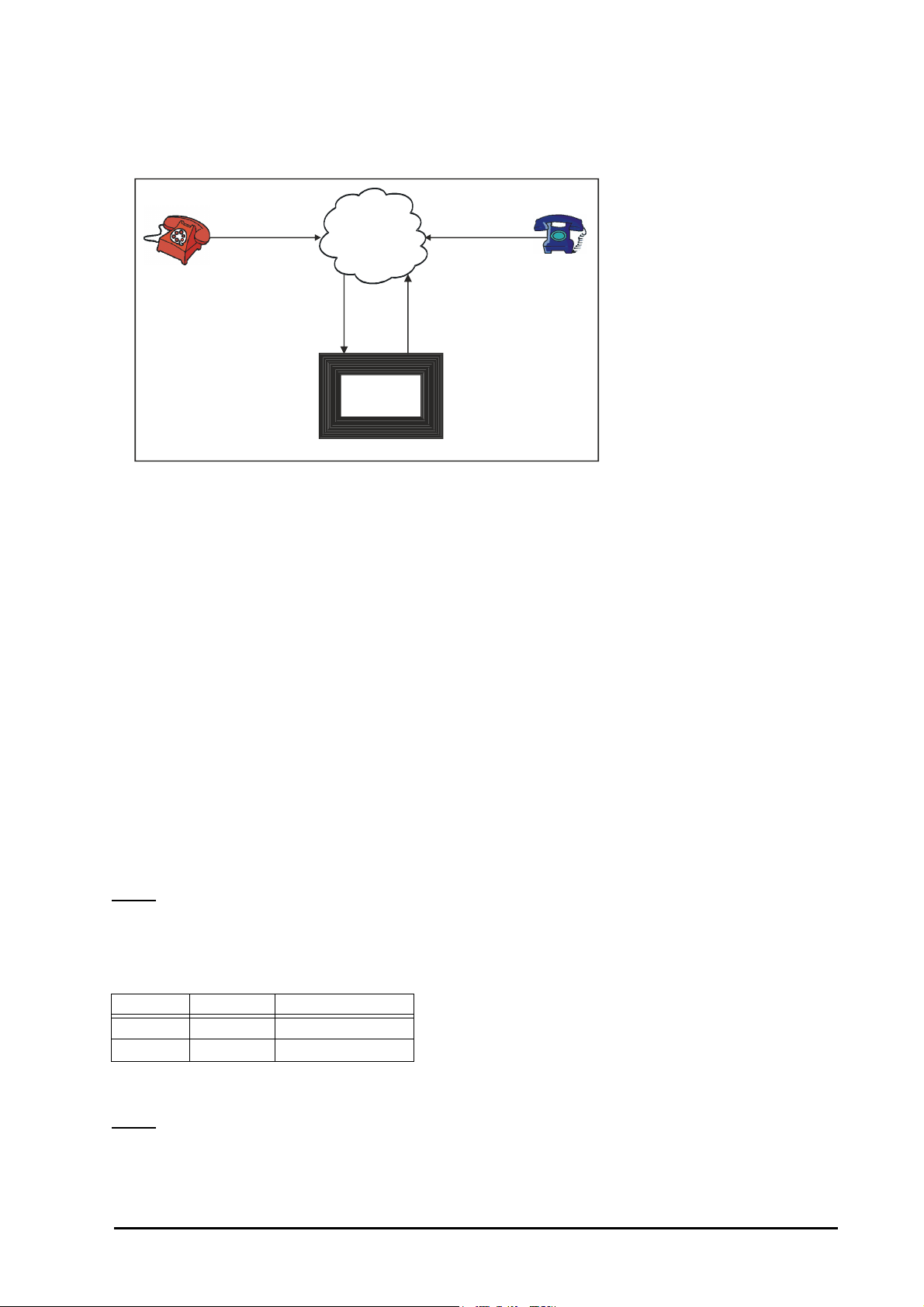
• To make one DOSA call, minimum two trunk lines are used (L2 and L3 in figure). Hence, these should be
PSTN
L1
L4
Proton
206/308
L2 L3
(DOSA activated
Trunk)
Residence
Client’s Place
Office
connected to the PBX. However, in all four trunk lines are (L1, L2, L3 and L4 in figure) used while using this
facility as shown below.
• When a caller dials a DOSA activated trunk, two trunk lines (L1 and L2) are used. Then the caller grabs the
third trunk (L3) and dials a telephone number where fourth line (L4) is used.
• In DOSA call, speech quality may deteriorate since the length of the path increase.
How to use DOSA facility?
• Dial a DOSA activated trunk.
• On getting PBX dial tone, dial 1-Station Number-User Password. You get DOSA dial tone. (Short beeps)
• On getting DOSA dial tone, dial ‘0’, ‘5’, ‘61’, ’62’ or ‘63’ to grab another trunk to get P & T dial tone.
• On getting P & T dial tone, dial the telephone number.
• Dial any digit except ‘#’ to continue the talk.
• Dial ‘#’ to disconnect the call.
• You are still logged in the system. You can make another call by grabbing P & T line.
• Dial ‘#’ to end the DOSA session.
How to program DOSA facility?
Step 1: Enable/disable DOSA on trunk during day time and night time using command 45.
Step 2: Enable/disable DOSA on a station using command 35.
Step 3: Program DOSA Inactivity Timer is Second/Minute using command 207.
Step 4: Program the DOSA related timers.
Step 1
Use following command to enable/disable DOSA facility on a trunk:
45-Trunk-Day Time-Night Time
Where,
Trunk is from 1 to 3.
Day Time Night Time Meaning
0 0 DOSA deactivated
1 1 DOSA activated
By default, DOSA is disabled on all the trunks both during daytime and nighttime.
Step 2
Use following command to enable/disable DOSA on a station:
35-Station-Code
Where,
PROTON 206/308 V1 System Manual 45
Page 46

Station is from 21 to 28.
Code Meaning
0 DOSA Disable
1 DOSA Enable
By default, DOSA is disabled on all stations.
Example:
Disable DOSA from station 23 on trunk 2 during day time enable it during nighttime.
Use following command to satisfy the requirement:
35-23-1
45-2-0-1
Step 3
Use following command to program DOSA Inactivity Timer in Second/Minute:
207-Code
Where,
Code Meaning
0 DOSA Inactivity Timer in Second
1 DOSA Inactivity Timer in Minute
Step 4
Timer of Relevance:
DOSA Inactivity Timer-Time after which the system gives warning beeps to the caller:
Command : 216-Seconds
Default : 30 seconds
Valid Range : 00 to 99 seconds.
For DOSA Music Timer and DOSA Beep Timer. Please refer ‘“Direct Inward Dialing (DID)”’.
Important Points:
• DOSA facility can be enabled on one or more trunks.
• DOSA can be enabled/disabled for Day and Night times independently.
• DOSA inactivity timer is the time for which a line remains active even after the call is finished if the user
forgets to log out by dialing ‘#’. Hence it is advisable to program this timer for optimum period.
• Because of poor line conditions, it is possible that DOSA facility may not work.
DOSA facility allows remote users to make long distance calls. It is advisable for all the users to
understand the power and cost implication of this facility and hence enable this facility very carefully. It
is strongly recommended to protect this facility with a unique password.
Relevant Topics:
1. “Class Of Service (COS)” 36
2. “Direct Inward Dialing (DID)” 43
Distinctive Rings
What’s this?
The PROTON 206/308 support different types of ring for different situations.
46 PROTON 206/308 V1 System Manual
Page 47

Following table lists different types of ring and cadences for different situation:
Name Type
Internal Call Slow 750 2250
External Call Double 400 400 400 1800
Alarm Ring\Boss Ring Fast 500 1000 500 1000 500 1000
Door Phone Ring Triple 400 200 400 200 400 1400
As different ring cadences are used for different occasions, it is easy to guess the caller type before you answer
the call. Thus, you can respond faster to a trunk call.
ON OFF ON OFF ON OFF
Timings (millisec.)
Do Not Disturb (DND)
What’s this?
Please refer “Call Forward” for more details.
Dynamic Lock
What’s this?
• A user can lock his station to avoid misuse of local and long distance dialing in his absence.
• When a user locks his station, his toll control changes to limited dialing or no dialing.
• The lock operates with a 4-digit password. Each user has his personal password called User Password.
• Station can be locked manually or automatically.
• If manual lock is selected, then user should lock the station while leaving his work place by dialing the
required code. On returning back to work place, he can unlock the station.
• If automatic lock is selected, the system locks the station after a set time automatically.
• The timer starts from the time when the station is unlocked.
How to use it?
To Select Auto or Manual Lock
1 Lift the handset. Dial tone
2 Dial 143-User Password-Minutes. Confirmation tone
• User Password is a 4-digit secret code. Default User Password is 1111.
• Minutes specify time in minutes after which the station gets locked automatically.
• Set minutes to 00 for manual locking. Factory default is manual lock.
• Range for time is 00 to 99 minutes. 00 for manual locking and 01-99 for auto locking.
To Lock the station
1 Lift the handset. Dial tone
2Dial 140. Confirmation tone
To Unlock the station
1 Lift the handset. Dial tone
2Dial 141-User Password. Confirmation tone
• Once the station is locked, you will be able to dial the numbers depending on the dynamic toll control.
PROTON 206/308 V1 System Manual 47
Page 48

To Change user password
1 Lift the handset. Dial tone
2Dial 144-Old User Password-New User Password. Confirmation tone
• In case you forget your password, do not panic. Contact the System Administrator (SA) or the System
Engineer (SE). He can clear your password to its default value. Refer “System Security (Passwords)” for
more details.
To set Lock Level
1 Lift handset. Dial tone
2 Dial 142-User Password-Allowed/Denied List Level. Confirmation tone
3 Replace handset.
By default, Allowed/Denied List Level ‘0’ is assigned in locked state.
How to program?
Dynamic lock is a programmable feature. Please refer “Class Of Service (COS)” for details on how to allow
Dynamic Lock to a user.
Step 1
Decide whether you want to use Manual or Auto Dynamic lock.
Step 2
If you decide to use Manual Dynamic Lock set the parameter ‘minutes’ in the command 143-User PasswordMinutes to 00.
Use command 140 and 141-User Password to lock the station and unlock the station.
Step 3
If you decide to use Auto Dynamic Lock, set the parameter ‘minutes’ in the command 143-User passwordminutes to a desirable value. Use the command ‘141-User Password’ to unlock the station.
Step 4
Change your user password to avoid misuse of your station.
Step 5
Use following command to default dynamic lock settings:
342-Station
Where,
Station is from 21 to 28.
On issuing above command, the dynamic lock will set to manual mode and lock level will set to level ‘0’.
Relevant Topics:
1. “Toll Control” 73
2. “User Security (User Password)” 81
External Call
How to make External Call?
• Lift the handset.
• Dial ‘0’ or ‘5’.
• Dial the External Telephone Number.
48 PROTON 206/308 V1 System Manual
Page 49

Important Point:
• The stations having access to trunk and higher toll control will only be able to make external calls.
Relevant Topics:
1. “Toll Control” 73
2. “Trunk Access” 75
External Call Forward (ECF)
What’s this?
It is possible to divert the calls on your personal trunk line to your residence or your mobile number. This facility
of diverting your incoming trunk calls is known as External Call Forwarding or ECF in short.
How to program?
Step 1: Decide the trunk of which the calls are to be forwarded.
Step 2: Assign a destination trunk for the ECF trunk.
Step 3: Assign the destination number where the calls are to be forwarded.
Step 1
Use following command to enable/disable ECF on a trunk:
521-Trunk-Day Time-Night Time
Where,
Trunk is from 1 to 3 of which the calls are to be forwarded.
Day Time Night Time Meaning
0 0 ECF Disable
1 1 ECF Enable
By default, ECF is OFF on all the trunks.
Step 2
Use following command to assign destination trunk to forward the calls of a trunk:
522-Trunk-Destination Trunk
Where,
Trunk is 1 to 3 of which the calls are to be forwarded.
Destination trunk from 1 to 3 or 0 or 5. It signifies the trunk to be used by the PBX to dial out the telephone
number. If 0 or 5 programmed as destination trunk then any of the free trunks from group 0 or group 5 would be
used for out dialing.
Step 3
Use following command to assign destination number where the calls are to be forwarded for a trunk:
523-Trunk-Telephone Number-#
Where,
Trunk is 0, 5, 1, 2, or 3 of which the calls are to be forwarded.
Telephone Number is the number (maximum 16 digits) where the calls are to be forwarded.
Example:
Program ECF on trunk 1 during night time. Destination trunk can be any free trunk from group ‘0’. The calls are
to be forwarded to ‘2359695’.
521-1-0-1
522-1-0
523-1-2359695-#
PROTON 206/308 V1 System Manual 49
Page 50

Timer of Relevance:
ECF RBT Timer-Time for which the system gives RBT to the caller as an acknowledgment of the receipt of the
call and after that the system dials the telephone number.
Command: 217-32-Timer
Default: 03 seconds
Valid Range: 01 to 99 seconds.
Important Point:
• ECF calls are same as DOSA calls. The ECF call shall get disconnected after time = DOSA Inactivity Timer +
DOSA Wait Timer. Hence to continue as ECF call, it is mandatory for the user to dial any digit after the
warning beeps.
Relevant Topics:
1. “Trunk Access” 75
2. “Direct Outward System Access (DOSA)” 44
Executive/Secretary
What’s this?
Please refer “Call Forward” for more details.
Flash Timer
What’s this?
While transferring a call, one uses the hook switch or the ‘Flash’ key provided on the telephone instrument or
digit ‘1’ if the telephone instrument is in pulse mode.
Many times it happens that while transferring the call, the call either gets disconnected or is not transferred. This
happens due to mismatch of time for which the hook switch is pressed, if used for transferring the call hence it is
advisable to use Flash Key of the telephone instrument. This problem may occur with Flash Key also, if the timer
for the Flash Key on the telephone instrument and the flash timer of the system are not set properly.
Few telephone instruments have flash timers set to 800 ms. In such case the call does not get transferred
because the flash timer of all stations is set at 600 ms by default. In such cases the flash timer of the station
where the cordless phone is connected should be increased to 800ms.
Use following command to set Flash Timer:
36-Station-Count
Where,
Station is the software port number is from 21 to 28.
Count is from 2 to 9. (count 1 implies 100 milliseconds)
By default, Flash Timer is 6 (600 milliseconds).
Use following command to set same Flash timer on all stations:
36-*-Count
Example:
To set the flash timer 800ms on station 23, dial 36-23-8.
Important Point:
• Flash timer should be changed very cautionsly.
50 PROTON 206/308 V1 System Manual
Page 51

Flexible Numbers
What’s this?
The PROTON 206/308 offers flexibility to assign a code of your choice to access a station. This code is called
flexible number. For example, to access first station one has to dial 21. It is possible to change this code to any
other number of your choice.
The system loads default flexible numbers to all the stations on first power ON. Later the stations can be
assigned desired flexible numbers.
Following table shows the flexible numbers assigned to the port is default state.
Port Number Flexible Number
121
222
323
424
525
626
727
828
How to program?
Use following command to program the flexible number for a station:
37-Port Number-Flexible Number-#/Flash
Where,
Port Number is from 01 to 08.
Flexible number can be of 1, 2, 3 or 4 digits.
Terminate the command using #/Flash, if flexible number is of less than four digits.
Use following command to assign default flexible numbers to all the ports:
37-*-0
Use following command to clear flexible number for a particular station:
37-Port Number-Flash
Where,
Port Number is from 01 to 08.
Use following command to clear flexible numbers for all stations:
37-*-Flash
Example:
Port 01 to 04 should be assigned flexible numbers as 31 to 34 and port from 05 to 08 should be assigned flexible
numbers as 21 to 24.
37-01-31#
37-02-32#
37-03-33#
37-04-34#
37-05-21#
37-06-22#
37-07-23#
37-08-24#
PROTON 206/308 V1 System Manual 51
Page 52

Important Points:
• Flexible numbers are the codes dialed from dial phase to call another station. These flexible numbers should
be unique and should not match with any other station or any of the features available from the dial phase.
• It is possible to have single digit, 2-digit, 3-digit and 4-digit flexible numbers.
• It is also possible that few stations have single digit, few have 2-digit, few have 3-digit and remaining have
four digit flexible numbers.
• Flexible number having common digits can’t be assigned to another station. For example if 3101 is used then
310 can’t be used/programmed. Same way if 3111 is used then 311 can’t be used/programmed.
• Same flexible number cannot be assigned to two different stations. For example, if you have used 211 for
one station then 211 can’t be assigned to any other station if both the stations are in the same tenant group.
• It is possible to clear the flexible number of all the stations.
• When the flexible number of a station is cleared, one cannot call that station. However the station with null
flexible number can make calls as usual.
• Use flexible numbers for all the features used from User mode. Software port numbers are to be used only
during for SE mode or SA mode.
• If any flexible number starts with a digit used for feature code then the feature can be used after preferring it
with ‘*’. For e.g. if a station is assigned flexible number ‘44’ then code for Raid becomes ‘*4’.
Hold
What’s this?
This feature allows the user to put the present party on hold.
How to use it?
1 Speech with one station/external caller.
2Dial Flash. Station goes on hold and gets music. You get dial tone.
How to program?
Hold is a programmable feature. Please refer “Class Of Service (COS)” for more details.
Relevant Topics:
1. “Class Of Service (COS)” 36
2. “Flash Timer” 50
Hotline
What’s this?
The PROTON 206/308 offers three types of hotline viz. Hotline-Trunk, Hotline-External Number and HotlineInternal.
Hotline-Trunk
• You get connected to a trunk, the moment you lift the handset.
• This feature is useful when you are making more number of trunk calls compared to internal calls. Once this
feature is enabled, as soon as you lift the handset you get the trunk dial tone after the set time.
• This feature is also called Hot Outward Dialing (HOD).
• If ‘0’ or ‘5’ is used as trunk, then any of the free trunks from group 0 or 5 will be given to the station user the
moment he picks up the handset.
To set Hotline-Trunk
1 Lift the handset. Dial tone
2 Dial 151-Trunk. Confirmation tone
52 PROTON 206/308 V1 System Manual
Page 53

Example:
To simulate dialing of trunk 2 immediately on lifting the handset, dial 151-2.
Hotline-External Number
• You get connected to a desired external number the moment you lift the handset.
• This feature is useful when you are making call to a particular external number many times in a day. Once
this feature is enabled, as soon as you lift the handset, the system dials the telephone number and you get
connected to the external person.
• This feature is also called Hotline with Number.
To set Hotline-External Number:
1 Lift the handset. Dial tone
2 Dial 152-Trunk-Number-#*. Confirmation tone
Example:
Let us activate Hotline for external number 0265 2630555. Let us assume group 0.
Dial following code to set this feature:
152-0-02652630555-#
Hotline-Internal
• Hotline-Internal helps avoiding repeated dialing of a station number.
• Simply by lifting the handset, the caller gets connected to the programmed station.
• In an office environment, it is found that a boss calls his secretary or his co-worker frequently. This feature
could be of great help to him.
• This feature is also called Boss-Secretary feature.
To set Hotline-Internal
1 Lift the handset. Dial tone
2 Dial 153-Station. Confirmation tone
Example:
The boss needs to speak to his secretary (station number 22) many times in a day. He can avoid repeated
dialing by activating the Hotline-Internal feature from his station:
153-22
Delayed Hotline
After lifting the handset you do not get connected to the station immediately but get regular dial tone. If the user
does not dial anything during this short dial tone, the PBX places the hotline call to the station. This delay timer
allows the user to dial other numbers without cancelling hotline.
To Set Hotline Timer:
1 Lift the handset. Dial tone
2 Dial 154-Seconds. Confirmation tone
• The default value of hot line timer is 5 seconds and its range is 1-9 seconds.
• The hot line timer cannot be set to 0 seconds.
Cancel Hotline:
1 Lift the handset. Dial tone
2 Dial 150. Confirmation tone
PROTON 206/308 V1 System Manual 53
Page 54

• Please note that the cancellation code must be dialed from the PBX dial tone. If the Hotline timer is 1 second,
you have to be very quick in dialing the code.
How to program?
Refer “Class Of Service (COS)” for details on how to allow Hot line to a user.
Important Point:
• Only one type of Hotline can be activated on the same station at the same time.
Relevant Topics:
1. “Class Of Service (COS)” 36
2. “Toll Control” 73
Installation
Important Safety Instructions
• Never do telephone wiring during a lightening storm.
• Avoid using telephone other than a cordless type during an electric storm. There may be a remote risk of
electric shock from lightening.
• Never use a telephone to report gas leaks if it is near to gas leak.
• Do not touch non-insulated telephone wires or terminals before disconnecting at the network interface.
• Do not install this product near water, for example near a bathtub, washing bowl, kitchen sink, laundry tub,
swimming pool etc.
• Slots on enclosure are for proper ventilation. They will protect the system from over-heating. Never cover the
slots.
• Never place this product on heated place or any other equipment.
• Never push objects of any kind inside this product. This may short-circuit various parts.
• Operate these products only with 90-265VAC, 47-63Hz supply and if you are not sure about supply voltage,
contact authorized dealer. It is advisable to give power through a good quality Constant Voltage Transformer
(CVT).
• This product is equipped with a plug having a third (ground) pin, which fits only into a grounding-type outlet.
This is a safety feature. If you are unable to insert the plug into the outlet, ask an electrician to replace the
obsolete outlet. Do not defeat the purpose of the grounding type plug.
• Unplug this product from electric wall outlet in following cases and contact authorized service personnel.
• Liquid spills on to the product.
• Product exposed to rain or water.
• Product does not operate normally by following operating instructions.
• Product dropped from height.
• Product exhibits unusual change in performance.
• Do not open the system in power-on condition. This may damage the system. Warranty does not cover such
damages.
• The PROTON 206/308 provides primary protects in form of fuse, GDT and MOV all PSTN trunks.
• It is advisable to connect a dedicated telecom earth to the terminal marked ‘ETH’ on the MDF. If not installed,
heavy voltage on PSTN trunks/stations can damage the product and warranty does not cover such
damages.
Site Selection
• The PROTON 206/308 should always be installed at a place equidistant from all the stations. This reduces
the cabling cost and also makes cabling network less complicated.
• The PROTON 206/308 should preferably be installed at 3.5 feet height (approx.) in airy, dust free and
moisture free place. An installation at this height makes preventive or curative maintenance task easy.
54 PROTON 206/308 V1 System Manual
Page 55

• It is advisable that the system should be installed away from any source of electromagnetic noise such as
any radio equipment, heavy transformers, faulty electric chokes of tube lights, any device having a faulty coil
etc. This will reduce any problem arising due to electromagnetic effect.
Cabling
• Decide different places at which you want to give the stations the shortest possible cabling route to that
location.
• Always ensure that you have separate cable conduits for both electrical and telephone cables.
• The wires in the MDF should be inserted only after removing the insulation properly (1.0cm approx.). Please
do not double the cable before inserting in the MDF. Select a good quality telephone cable (with 0.5mm
conductor dia) for internal cabling.
• For all over-head cabling, good quality drop wire must be used. In case you have any problem please take
help of an expert wireman.
• Avoid long length cables and at the same time keep number of joints to a minimum i.e. strike a balance
between the two. This will help you to find out a cable fault easily.
• Single core cable is preferred instead of multi-core cable.
Power Supply
• The PROTON 206/308 operates on 90-265VAC, 47-63Hz Universal Power Supply. Arrange for a separate
power point and switch, close to the system. Power Supply for the PBX must be separate from other heavy
electrical loads like Air-conditioners, Heaters, Welding machines, Electrical motors, etc.
• If the supply is not stable, use of a good CVT is recommended.
Earth (Ground)
• Proper earth is vital for safety of the personnel and the system.
• Good electrical earth prevents electric shock to the personnel.
Telephones
• The PBX is capable of working with all standard telephones: Rotary phone, Pulse-tone switchable push-
button phone, Feature phone and Cord-less phone.
• It is not necessary to buy all new phones. You may also hook up your existing old telephones.
Trunk lines
• Connect the trunk lines to the system.
Installation
• Unpack the box. Get satisfied with the contents and the condition of all the parts. In case of short supply or
damaged parts, please contact the source from where you purchased the system immediately.
• Don’t power the system.
• Fix the system on the selected site. Please refer “PROTON-206/308 Mechanical Drawing” at the end of this
topic for exact mechanical dimensions.
• Check the voltage at the power point from where the supply is to be accessed. It should be as specified. It is
desirable to use a good quality power-conditioning device such as CVT.
• Earth the system properly.
• Connect all the station and trunk cables on the MDF of the system. Please note that the system provides
push-type connectors on the MDF for station and trunk wires. Remove about 1cm of the insulation for proper
connections of the field wires to the MDF connectors.
• Tag each wire pair with respective station or trunk number. (Different colour tags for trunk and station can be
used for better identification).
• Connect power cord of the system to the power supply. Ensure proper contacts.
PROTON 206/308 V1 System Manual 55
Page 56
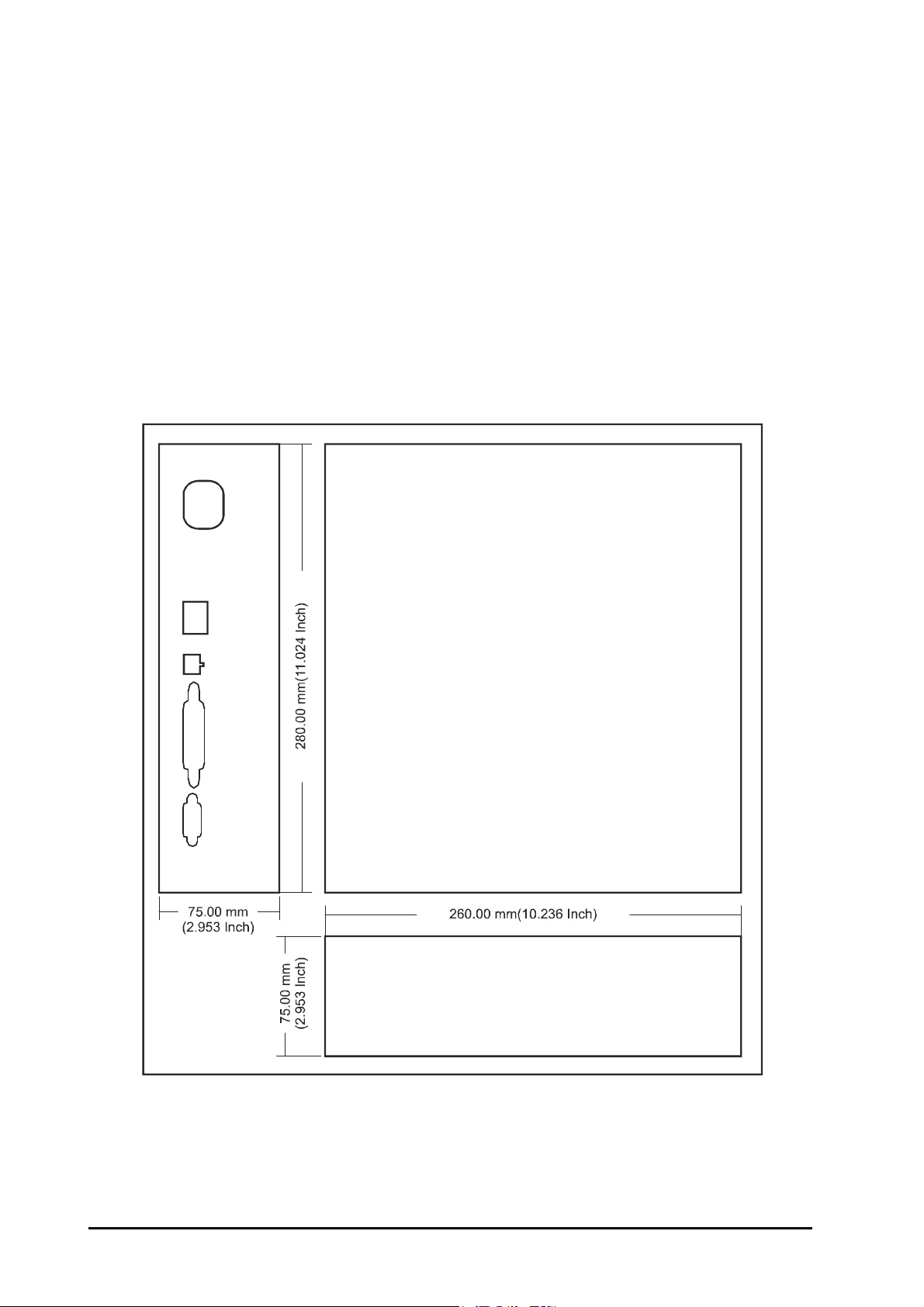
Switching on the system
• Now switch on the system. The system will take about 3-4 secs.to reset. The reset cycle can be seen on the
front panel of the system.
• Normal condition of the system:
• Green LED marked ‘Power’ always remains ON.
• You get dial tone on the station.
Testing the basic performance
• You can check functioning of the PROTON 206/308 by testing all the stations and the trunk.
• Test all stations for dial tone, ring back tone, speech and ring one by one.
• Test functioning of the trunk by dialing outside number from one of the stations and checking the trunk tones
and speech. Ring on the trunk can be tested by asking your friend to dial your number.
PROTON 206/308 Mechanical Drawing
56 PROTON 206/308 V1 System Manual
Page 57
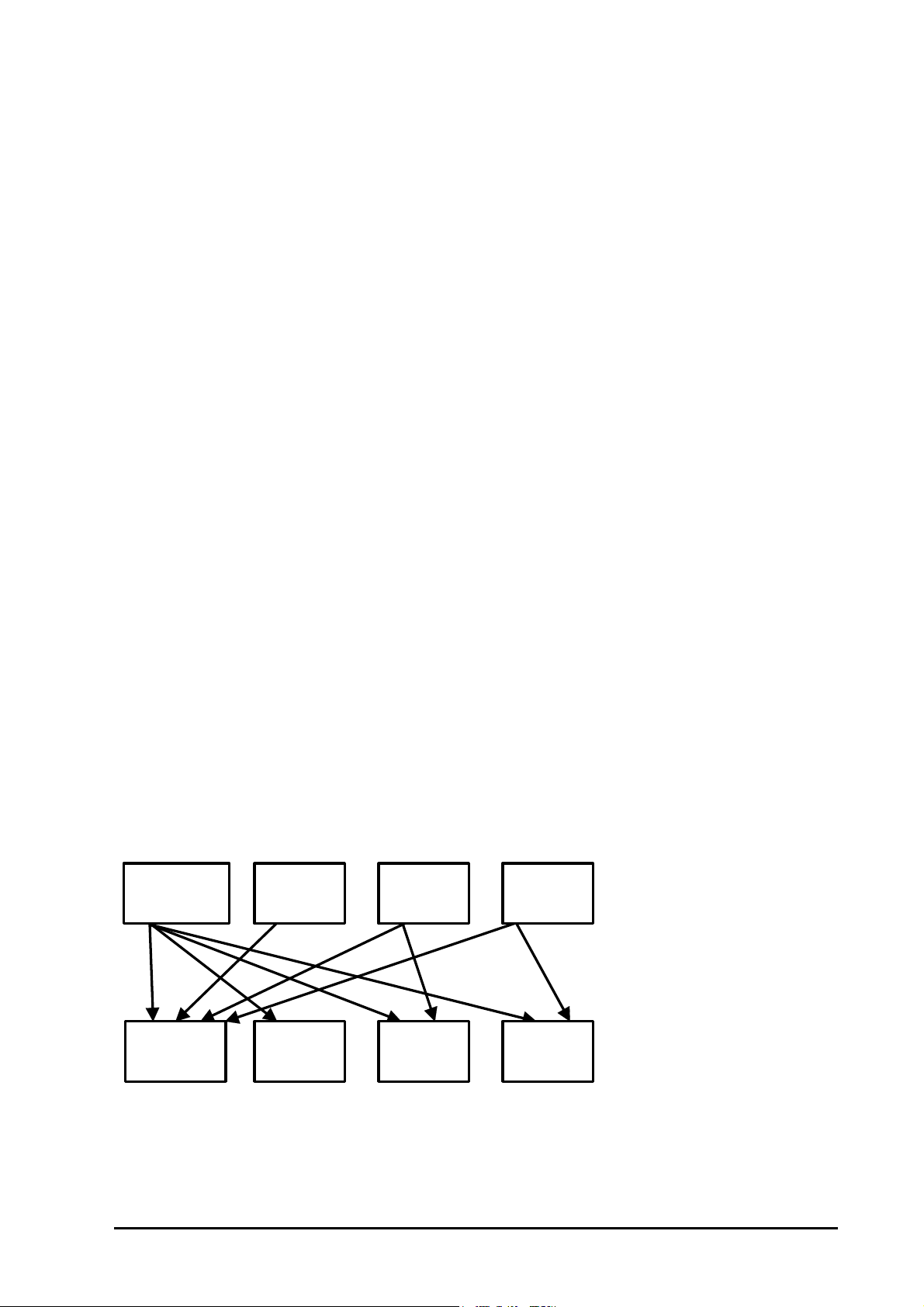
Internal Call
Universal group
9
0
1
2
9
1
8
2
How to make an Internal Call?
• Lift the handset.
• Dial the desired station’s flexible number.
• The called station rings.
• Speech is established when the called party lifts the handset.
Important Points:
• Hands free Operation is also possible if a speakerphone is used.
• The stations having access to internal call will only be able to make Internal Calls.
Relevant Topics:
1. “Flexible Numbers” 51
2. “Interrupt Request” 58
3. “Raid” 66
4. “Auto Call Back” 17
Internal Call Restriction
What’s this?
The PROTON 206/308 offers a feature that helps restrict calls to a particular station/group of stations.
How it works?
• The PROTON 206/308 offers three types of groups viz. Solo Group, Party Group and Universal Group.
• Solo Group (Group 0) has only one station.
• Maximum 8 Solo Groups can be formed.
• A station in Solo Group can call any station in the Universal Group but he cannot call any other station in any
Party group or Solo group.
• A station in a Party Group can call any station within his group and any station in Universal group. However
he cannot call a station in any other Party group or any station in Solo group.
• A station in Universal Group can call any other station within Universal Group or any station in any of the
party groups or any station in Solo group.
Following diagram depicts this logic:
Universal group
Solo group
Party group
Party group
Party group
Party group
Party group
How to program?
Use following command to assign a group number to a set of station:
38-Station-Group Number
Where,
PROTON 206/308 V1 System Manual 57
Page 58

Station is from 21 to 28.
Group Number Description
0 Solo Group
1 to 8 Party Group
9 Universal Group
Use following command to assign same group number to all the stations:
38-*-Group Number
By default, all stations are in Universal Group.
Example:
Program the system for following conditions:
• Two groups (station 21, 22 and 23 in group1 and station 24 and 25 in group 2) and a solo group (station 26)
have to be programmed. Station 27 and 28 are in universal group.
Use following commands to accomplish the requirement:
38-21-1
38-22-1
38-23-1
38-24-2
38-25-2
38-26-0
38-27-9
38-28-9
• Doing so, station 21, 22 and 23 can talk to each other as well as to station 27 and 28 but cannot talk to station
24, 25 and 26.
• Station 24 and 25 can talk to each other as well as to station 27 and 28, but cannot talk to station 21, 22 and
23.
• Station 26 can talk to station 27 and 28 only.
• Station 27 and 28 can talk to each other as well as to any other station.
Interrupt Request
What’s this?
• When your call is urgent and you cannot wait for the called person to become free, you can land in his
conversation after intimating him.
• While landing, you get ring back tone and the called person gets beeps for 45 seconds.
• During the beeps, the called person can dial ‘Flash-1’ to answer your call. He can talk to you while his
previous partner is put on hold and gets music.
• Replace your handset once your talk is over. This will automatically restore his original speech with the heldup party.
How to use it?
1 Lift handset. Dial tone
2 Dial Number. Busy tone
3 Dial 3. Music. The destination gets beep.
4 Start talking when the called station
includes you by dialing Flash-1.
Speech.
How to program?
Please refer “Class Of Service (COS)” for details on how to allow Interrupt Request to a user.
58 PROTON 206/308 V1 System Manual
Page 59
Important Points:
• Interrupt Request works even when the destination is talking on a trunk line.
• Interrupt Request is ineffective if the called person is having call privacy from Interrupt Request.
• The called party can toggle both the calls.
Timer of Relevance:
Interrupt Request Timer-Time for which the station on which interrupt request is made gets the beeps:
Command : 217-11-Seconds
Default : 45 seconds
Valid Range : 01 to 99 seconds.
Relevant Topics:
1. “Class Of Service (COS)” 36
2. “Privacy” 63
Introduction
The PROTON 206/308 are versatile Matrix PBX systems. Specifically designed for small offices, banks, schools,
big departmental stores, hospitals and other such places. The PROTON 206/308 provides unrestricted
communication between internal stations and the external world. The PROTON 206/308 allows any of the
stations to dial on the trunk provided, he is given an access to this. Incoming call can be directed to direct the
incoming call on different stations during day or night times. Switching scheme is non-blocking and hence
internal traffic plus external calls are managed simultaneously without any loss of calls or delay.
Photograph of PROTON 206/308
PROTON 206/308 V1 System Manual 59
Page 60

Features of PROTON 206/308:
• The PROTON-308 has 3 trunk ports and 8 station ports.
• The PROTON-206 has 2 trunk ports and 6 station ports.
• The PROTON 206/308 works on 90-265VAC, 47-63Hz Universal Power supply.
• The PROTON 206/308 supports both tone and pulse dialing.
• The PROTON 206/308 supports On-site programming.
• The PROTON 206/308 also supports Remote programming.
• The PROTON 206/308 is compatible with any type of telephone instrument.
• The PROTON 206/308 supports basic features like:
•Alarm
• Auto Call Back
• Barge-in
• Internal Dialing
• Hold/Toggle
• Call Follow-Me
• Call Forward
• Call Park
• Call Pick Up
• Call Transfer
• Class of Service
• Distinctive ringing
• Do not Disturb
• Executive-Secretary (Hotline)
• Flexible Numbers
• Hot line
• Hunting schemes
• Interrupt Request
• Last Number Redial
• Music on hold
• On site programming
• Power Down Stations
• Programmable Feature Access
• Pulse and DTMF Dialing
• It also supports advanced features like:
• Abbreviated Dialing
• Automatic Call Disconnector
• Auto Redial
• Auto Shut dynamic Lock
• Boss Ring
• Call Privacy
• Conference
•DID
•DOSA
• External Call Forwarding
• Flashing on Trunk
•Group Call
• Programmable Timers
• Programmable Trunk Access
•Raid
• Selective Trunk Access
• Toll Control
• Trunk Groups
• Walk-In Class of Service
60 PROTON 206/308 V1 System Manual
Page 61

Last Number Redial
What’s this?
• This feature redials the last external number dialed.
• This feature saves time during retrying a busy external number.
How to use it?
1 Lift the handset. Dial tone
2Dial 7. Silence.
3 The system grabs a trunk. Trunk dial tone
The PROTON-206/PROTON-308 dials out the last
4
number.
Timer of Relevance:
Redial Digit Wait Timer-It signifies the time for which the system waits once the user dials ‘7’.
Command: 217-36-Seconds.
Default: 02 seconds.
Valid Range: 01-99 seconds.
Important Point:
• The system uses the same trunk you used for dialing the number last time.
Message Wait
What’s this?
• The PROTON 206/308 supports this feature if Matrix VMS viz. Cadence is interfaced with it.
• Whenever there is a new message in the mailbox of the mailbox owner, the Cadence sends a string of digits
to the PROTON-206/PROTON-308 to inform about it.
• The PROTON 206/308 changes the dial tone of the relevant extension to feature tone.
How to program?
No special programming is required for this feature. It is allowed to all the stations.
Relevant Topic:
1. “Voice Mail Integration” 83
Music on Hold
What’s this?
Whenever a person is put on hold or while his call is being transferred, the person gets music.
Relevant Topic:
1. “Hold” 52
Operator
What’s this?
• Operator is a person who handles more number of calls at a time. She acts a link between the caller and the
called person.
• Any station can be interpreted as Operator.
• The PROTON 206/308 offers two types of operator stations:
PROTON 206/308 V1 System Manual 61
Page 62
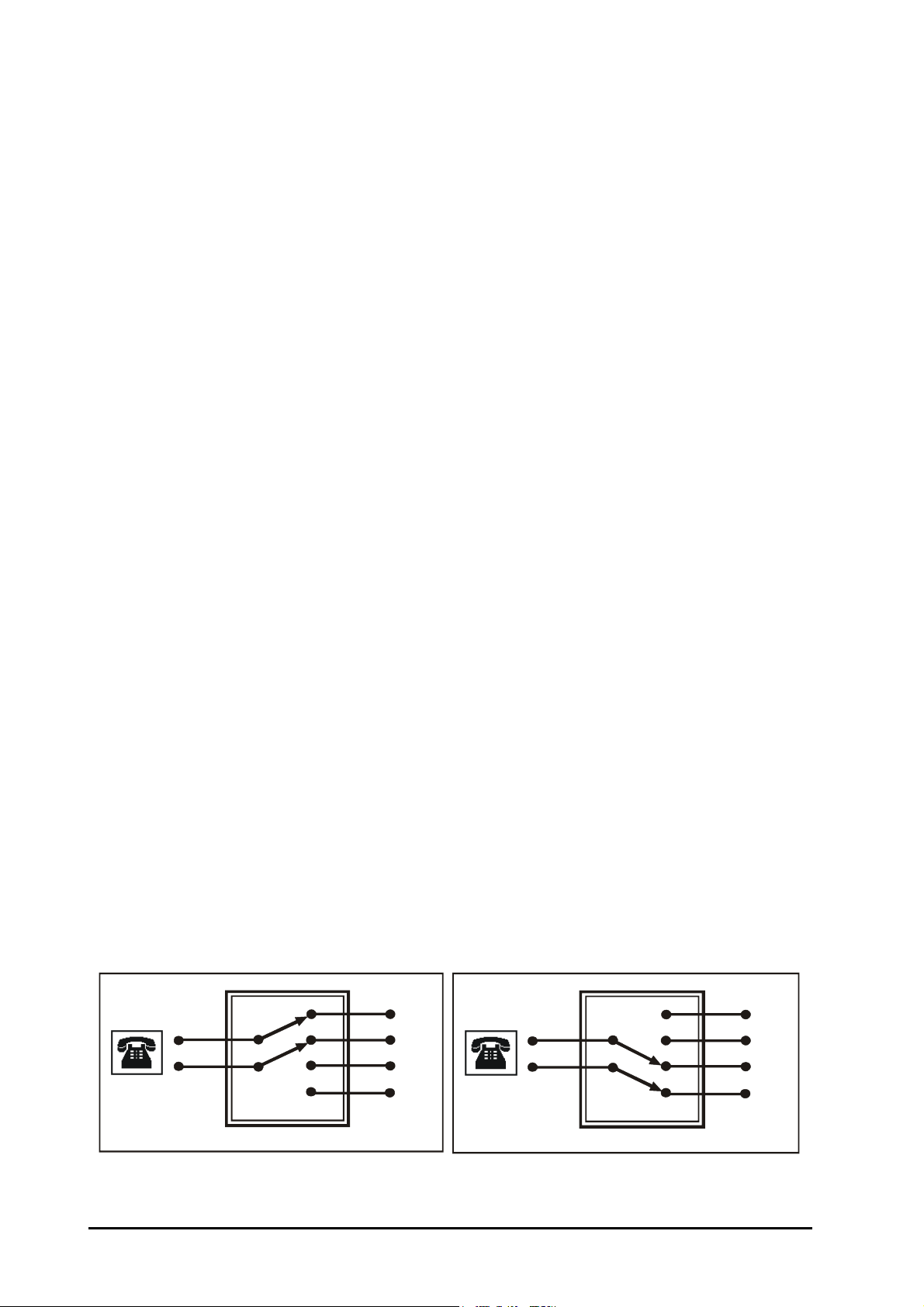
• Main operator station
Telephone
connection
in the field
St a t i o n
Circuit
Trunk Line
Powe r fail Transfer for O ne Port
C
C
NO
NC
NC
NO
Telephone
connection
in the field
St a t i o n
Circuit
Trunk Line
Power fail Transfer for One Port
C
C
NO
NC
NC
NO
• Secondary operator station
How it works?
• When any station presses ‘9’ the system diverts the call to the main operator.
• If main operator is absent the call is diverted to the secondary operator.
How to program?
Use following command to program the Main Operator station:
391-Station
Where,
Station is from 21 to 28.
Use following command to program Secondary Operator station:
392-Station
Where,
Station is from 21 to 28.
Example:
Program station 23 as a main operator and station 24 as a secondary operator.
391-23
392-24
Relevant Topic:
1. “Station Parameters” 70
Power Down Mode
What’s this?
During power failure, it is desirable to have trunk lines available directly on few stations. This is known as Power
Down Mode. When mains power returns, normal operation resumes. Change over from normal to power down
operation and back is automatic.
During power down mode, by default, Trunk 1 gets connected to station 21, Trunk 2 gets connected to station
22, whereas Trunk 3 gets connected to station 23. At the time of Power failure/Power return ongoing calls gets
disconnected.
During power failure condition, calls can be made from these stations. Also the incoming calls lands on
respective stations. This way, your link with the outside world is retained even during dark-outs.
How it works?
Following block diagram shows the power fail transfer function for one port:
Figure 1: Power Fail Condition Figure 2: Normal Condition
62 PROTON 206/308 V1 System Manual
Page 63

Relevant Topics:
1. “Installation” 54
2. “Troubleshooting” 74
Privacy
What’s this?
While two stations are in speech, it is desired that no third person can listen their talk i.e. privacy of their
conversation in maintained.
However if few important stations are allowed to use features like interrupt request, barge-in and raid, they can
intrude other’s conversation. Also if DID is activated, outside caller can reach a station or if there is a call from
another trunk line, it will interrupt your conversation by giving intrusion tone. Some times this is very annoying
and undesirable. The PROTON-308 provides privacy against all these types of intrusion. This is known as
privacy.
These are three types of intrusions against which a user might wish privacy:
• Privacy from Interrupt Request/Barge-In and Raid
• Privacy from Trunk call routing beeps
• Privacy from DID calls
How to program?
Use following command to program the station for call privacy:
303-Station-Privacy from IR/BI/Raid-Privacy from Trunk call routing beeps-Privacy from DID calls.
Where,
Station is from 21 to 28.
Privacy from
IR/BI/Raid
0 0 0 Disable privacy
1 1 1 Enable privacy
Use following command to program call privacy on all the stations:
303-*-Privacy from IR/BI/Raid-Privacy from Trunk call routing beeps-Privacy from DID calls
Example:
To program call privacy from Raid and DID calls on station 23, dial 303-23-1-0-1. With this, no station can raid
station 23. Also DID calls will not disturb station 23.
Important Points:
• The feature ‘Transfer-on Busy’ will not work if call privacy from trunk call routing beeps is enabled.
• By default, Privacy for Trunk Call routing beeps is enabled on all the stations. Whereas, privacy for Interrupt
Request/Barge-In and Raid and DID call is disabled on all the stations.
Privacy from Trunk call
Routing Beeps
Privacy from
DID Calls
Meaning
Private Trunk
What’s this?
• The PROTON 206/308 offers a flexibility to assign a dedicated trunk to a station.
• On programming a trunk as Private trunk for a station:
• All the incoming calls land directly on the assigned station.
• HOD gets activated on the trunk.
PROTON 206/308 V1 System Manual 63
Page 64

How to use it?
Use following command to program a trunk as private trunk:
3*4-Station-Trunk
Where,
Station is from 21 to 28.
Trunk is 1, 2 or 3.
Example:
Program trunk ‘2’ as private trunk for station 101.
3*4-101-2
Use following command to cancel private trunk:
3*4-Station-0
Where,
Station is from 21 to 28.
Example:
Cancel trunk ‘2’ as private trunk from station 101.
3*4-101-0
Relevant Topic:
1. “Remote Lock” 68
Programming the System
What’s this?
The PROTON 206/308 is a flexible system and can be programmed to suit your needs. The PROTON 206/308
can be programmed for basic functions like Landing destinations, COS level to stations, etc.
How to use it?
1 Lift the handset. Dial tone
2 Dial 19-Programming Password. Programming tone
3 Enter programming command. Confirmation tone
4 To exit programming mode, dial '0'. Dial tone
• Programming password is 4-digit secret code used to avoid unauthorized access to programming mode.
• Default programming password is 1234.
• In case the programming password is forgotten, the same can be cleared to its default value. For more
details on this, please refer section ‘System Security (Passwords)’.
• System gives programming tone on entering programming mode.
• Only one person can enter programming mode at a time.
• User can enter in the programming mode from any station.
Steps for Programing:
It is advisable to program the PROTON 206/308 in following hierarchy. One may skip undesirable steps.
1. “Flexible Numbers” 51
2. “Class Of Service (COS)” 36
3. “Allowed and Denied Lists” 15
4. “Toll Control” 73
5. “Trunk Access” 75
6. “Trunk Parameters” 78
7. “Trunk Landing” 76
64 PROTON 206/308 V1 System Manual
Page 65

8. “Day and Night Modes” 40
9. “System Security (Passwords)” 70
Protecting the System
The PROTON 206/308 does not work in isolation with the environment. It is connected to the environment in
following ways:
• Power is fed to the system for functioning of the system.
• Being a PBX system, trunk lines and stations are also connected to the system.
• The system should be protected from static charges that could find their way through the system
components.
If the system is protected from these interfaces, 100% satisfactory and trouble free performance of the system is
guaranteed.
Protecting the system from heavy voltages from the Mains:
The PROTON 206/308 is designed to work with input voltages ranging between 90-265VAC. To protect the
system from abrupt changes in the input voltage, use of CVT is recommended. CVT of 100VA is recommended.
Protecting the system from heavy voltages on the trunk lines and the overhead stations:
The PROTON 206/308 can get damaged if heavy voltages enter the system from trunk lines or from overhead
stations.
These heavy voltages could be due to:
• Heavy voltage line falling on the CO line or on the overhead stations cable.
• Thunderbolts.
• Short-circuit of trunk lines or overhead station cables with electric cables. It is necessary to protect the
system from these voltages. The protection can be in the form of some protection devices like GDTs, MOVs,
Fuses, etc. These protection devices are inbuilt for each trunk in the system.
These devices work satisfactorily only if they are properly earthed. It is recommended that the PROTON 206/
308 is provided a separate telecom earth. A dedicated terminal marked ‘ETH’ is provided on the MDF of the
system to which the telecom earth should be connected. Telecom earth is a dedicated earth only for the PBX.
The advantage of having a dedicated earth is that there is no risk of back voltage. There are chances that if the
earth is not perfect, instead of providing protection to the system, it may damage the system.
Protecting the system from static charges:
While installing the system or servicing the system, care must be taken to provide a path to the static charges. It
is advisable for the system engineer to touch a grounded object before touching the system before installation or
maintenance.
Protecting the system from Lightning:
Protecting the system from high current surges is achieved by installing primary protection device. A lightning
protector is a primary protection device which is used to prevent a dangerous surge from entering the building
and damaging the system. For equipment installed in a more exposed environment, it is necessary to protect the
system with primary protectors such as PPMs. With the development of electronic equipment, problems due to
lighting surges have increased. A dangerous surge can occur if a telephone line comes in contact with a power
line. A lightning protector should be installed on an outside (CO) line to prevent a dangerous surge from entering
the building and damaging the system. The best place for the insertion of the primary protection is the cable
entry point of the building, shelter or equipment housing.
PROTON 206/308 V1 System Manual 65
Page 66
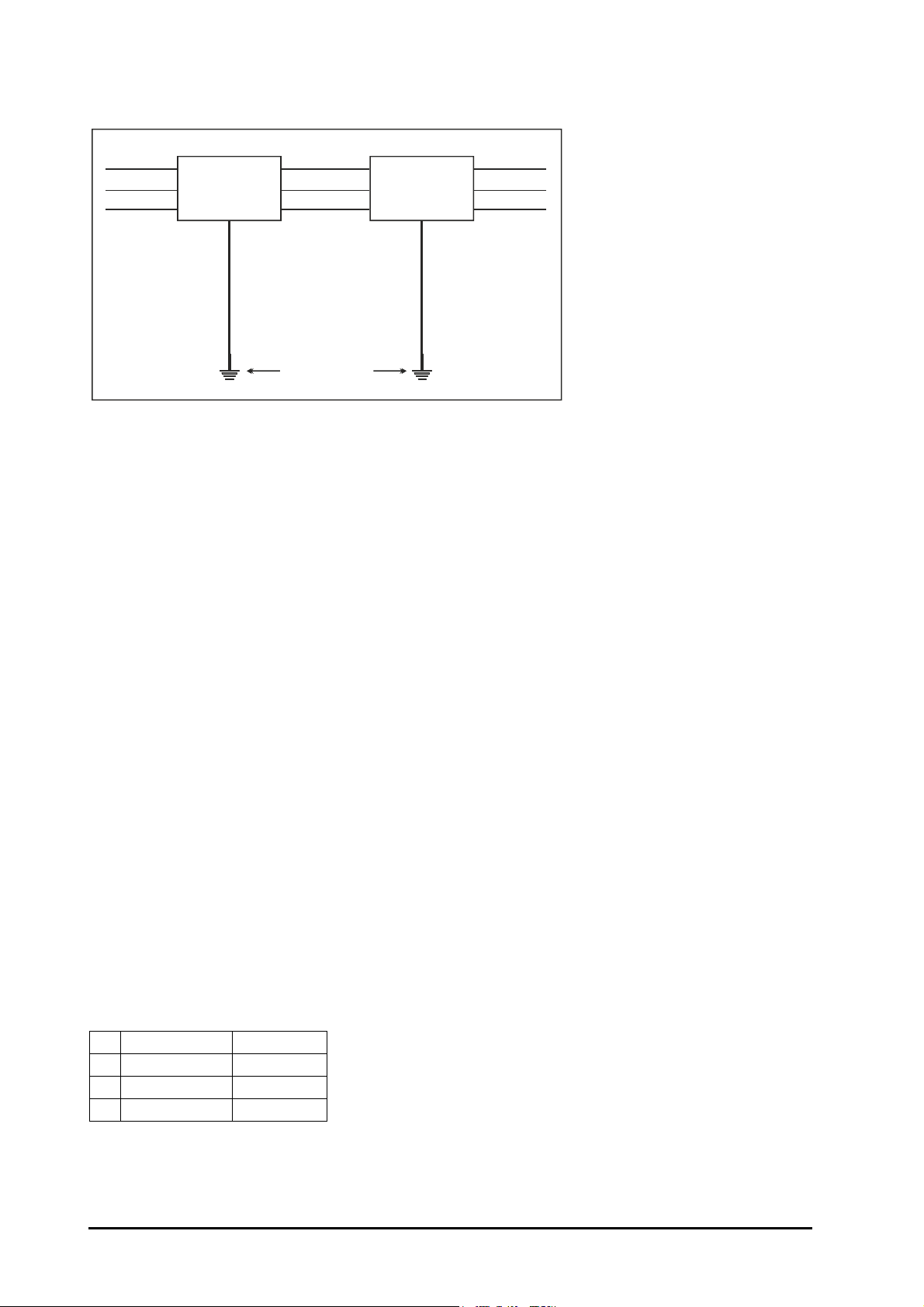
This is not always possible but every attempt should be made to place the primary protection as close as
System
Protective Earth
Ter mina l
CO Line
Lightning
Protectors
CO Line
Telecom Earth
possible to the entry point of the cables into the building, shelter or equipment housing. Hence, the system
should be installed with lighting protectors. In addition, grounding (connection to earth ground) is very important
to protect the system.
Surge Protective Device (SPD):
A device that is intended to mitigate surge overvoltages and overcurrents of limited durations. It may consist of a
single component or have a more complex design, where several functions are integrated. It contains at least
one non-linear component. Primary protection is applied using an SPD to protect an interface of the equipment,
at the location where it diverts most of the stressful energy from propagation into the equipment. The SPD must
be accessible, removable and connected to equipotential bonding. The cost of using Gas Discharge Tube(GDT)/
Metal Oxide Varistor(MOV)/Fuses for equipment protection will be far more economical than the equipment
downtime and potential damage that could result from being improperly protected. Surge protection device
creates a short circuit and shunting the surge voltage to ground, when a preset voltage threshold is exceeded.
Inherent Protection:
Inherent protection is that protection which is provided at an equipment interface either by virtue of its intrinsic
characteristics, by specific design or by suitable protection components. Inherent protector is not a subsidiary
but an essential device because it usually operates earlier than the primary protector and protects the
components.
Raid
What’s this?
• Without knowledge of the called busy station, one can enter his conversation by using this feature.
• The raided station does not come to know that it has been raided unless the person who has raided speaks
something.
How to use it?
1 Lift handset. Dial tone
2 Dial Station. Busy tone
3 Dial 4. Speech.
4 Start talking.
How to program?
Please refer “Class Of Service (COS)” for details on how to allow raid to a station user.
66 PROTON 206/308 V1 System Manual
Page 67

Important Points:
• If a station is programmed with privacy against raid, it cannot be raided. Please refer “Privacy” for details.
Caution!
Raid is a sensitive feature. The system Engineer should restrict of access this feature. If a user is
allowed the access to raid, he should use it responsibly.
Relevant Topics:
1. “Class Of Service (COS)” 36
2. “Privacy” 63
Receiving Incoming Calls
The PROTON 206/308 is very flexible in directing trunk calls. Whenever there is a ring on the trunk, the
PROTON 206/308 senses it and directs it to one (or more) stations.
Different stations can be programmed to receive incoming calls-one during normal office hours (day time) and
other during after office hours (night time).
Programmed station can receive incoming call when it is free or even when in speech with some other station.
If the programmed destination is free, it starts ringing. To answer the ring, just lift the handset and start talking.
If the programmed destination is in speech with some other station or trunk, it gets trunk call waiting tone
(repeated double sharp beeps) over his speech. The station can get connected to the ringing trunk/station by
dialing ‘flash’. The other station/trunk is put on hold and gets hold on music.
A trunk can be made to land on a station in four different ways. This is called hunting scheme. For more details,
please refer “Trunk Landing”.
Relevant Topics:
1. “Trunk Landing” 76
2. “Answering Calls” 17
Remote Alarm
What’s this?
• Secretary can set alarm for the boss from his own station.
• At the set time, the telephone of the boss starts ringing.
• When he lifts the handset, he gets music.
• If the boss does not answer the call for time = Alarm Ring Timer 1 then boss’s station and operator’s station
starts ringing for time = Alarm Ring Timer 2.
How to use it?
1 Lift the handset. Dial tone
2 Dial 164-Station-1-Minutes. Confirmation tone
3 Replace the handset.
Station is the station on which remote alarm to be set. Minutes is from 00 to 99.
Example:
Set a duration alarm of 5 minutes on station 23 from station 26. Issue following command from station 26.
PROTON 206/308 V1 System Manual 67
Page 68

164-23-1-05
To Cancel Alarms
1 Lift the handset. Dial tone
2 Dial 160. Confirmation tone
3 Replace the handset.
How to program?
Please refer “Class Of Service (COS)” for details or how to allow alarm to a station user.
Important Points:
• For timers of relevance, please refer “Alarm”
• Remote Alarm is allowed to a station that has access to Alarm.
Relevant Topic:
1. “Alarm” 14
Remote Lock
What’s this?
• The SE/SA can lock/unlock a station for outgoing calls remotely.
• The SE/SA can lock/unlock a station for all outgoing calls/selective outgoing calls from any station without
changing the Toll Control of a station.
How to use it?
To Unlock a station remotely:
Use following command to unlock a station (command should be issued from SA/SE mode):
3*1-Station-1
Where,
Station is from 21 to 28.
Or
3*3-Station-1
Where,
Station is from 21 to 28.
On issuing either of the above commands, the station shall allow outgoing calls as per Toll Control programmed
for the station.
To Lock a station remotely:
Use following command to lock a station remotely (command should be issued from SA/SE mode):
3*1-Station-0
Where,
Station is from 21 to 28.
Or
3*3-Station-0
Where,
Station is from 21 to 28.
On issuing either of the above commands the station allows outgoing calls as per the Toll Control programmed
for the locked condition of the station. It also cancels any private trunk set for the station.
68 PROTON 206/308 V1 System Manual
Page 69

Important Points:
• This command should be issued very cautiously as outgoing calls will be hampered.
• On issuing this command the station will be assigned a solo group automatically and he will be able to talk to
only the stations in the universal group.
Remote Programming
What’s this?
One can program the PROTON 206/308 from any remote location. The remote user can program the system
using the same commands as used by a normal local station to program the system.
How it works?
• Often customers do not have time to read the system manual and program the system at their own, they can
ask the dealer to program the system from his office as per your needs.
• Customer makes a call to the dealer. Alternatively, dealer can also call the customer. Dealer is the remote
end.
• Once in speech, customer should dial ‘Flash-3999’. Dialing ‘Flash’ puts the remote end on hold. Dialing
‘3999’ again establishes the speech between the customer and the remote end.
• The customer or the dealer may dial the password. Dialing correct password gives programming beeps. Both
the parties can hear programming beeps.
• Now the dealer can start programming from his office. Alternatively the customer can also dial the codes on
request from the dealer.
• Dealer or the customer should dial ‘0’ to exit from programming mode.
• The customer may disconnect when programming is over.
Important Points:
• All the steps and codes are same as in local programming.
• User can dial his own secret password. Remote end need not know the password.
• It is mandatory to establish speech and remain connected with one station throughout the programming
session. They can continue talking while entering programming codes. This makes the whole process
interactive.
• Remote end must dial in tone (DTMF) mode.
Relevant Topic:
1. “Programming the System” 64
Restart the System
What’s this?
The PROTON 206/308 supports a command from the SE mode to restart the system. This command gives
same effect as switching off the system and switching it on again. Many times if is difficult to physically walk to
the system and restart it. It is convenient if we could do the same from a station. This command precisely
provides this facility.
How to use it?
Use following command to restart the system:
10
Important Point:
• This command does not alter any programming parameters. However, all active conversations will be
disconnected and the ports in use will be released.
PROTON 206/308 V1 System Manual 69
Page 70

Selective Trunk Access
What’s this?
This feature helps to access a particular trunk. It is useful in a case in which all the trunks are not identical in
terms of services they offer. It is useful in case you have a hotline connection from the P&T exchange.
How to use it?
1 Lift handset. Dial tone
2 Dial 6-Trunk Number. Dial tone of the trunk.
3 Dial desired external number.
Example:
To grab trunk 1, dial ‘61’.
To grab trunk 2, dial ‘62’.
To grab trunk 3, dial ‘63’.
Important Point:
• You would not get the P&T dial tone by dialing 61 or 62 or 63 if the trunk is not physically connected to the
system.
Station Parameters
What’s this?
In an organization, all the stations cannot have same characteristics. Each station differs from the other in one
respect or the other like Flexible number, Toll Control, Class of Service, Flash Timer, Station Name, etc.
Following parameters should be programmed along with above mentioned parameters for smooth functioning of
the system:
Internal Digit-Digit (Inter Digit) Timer-Time for which the system waits for next digit while in dial phase.
Command: 217-08-Timer
Default: 05 seconds
Valid Range: 01 to 99 seconds.
Relevant Topics:
1. “Class Of Service (COS)” 36
2. “Toll Control” 73
3. “Trunk Access” 75
4. “Call Pick Up” 29
System Security (Passwords)
What’s this?
Programming/usage of the PROTON 206/308 is secured at three levels:
• System Engineer Level. This level is protected by SE password
• System Administrator Level. This level is protected by SA password.
• User level. This level is protected by user password.
System Engineer Password
• This password is the main password of the system and should be kept by the system engineer. SE password
is needed to enter the system engineer mode of the system to change any setting of the system.
• SE password is a 4-digit password. It cannot have either less than or more than 4 digits. Digits 0-9 are valid.
70 PROTON 206/308 V1 System Manual
Page 71

• Please note that the system engineer cannot know SA password or user password. However, he can clear
these passwords to their default values.
How to program?
Use following command to change SE Password:
291-New SE Password
New SE password is a number string of 4-digits.
By default, SE password is 1234.
Forgot your program password?
It is very important to remember the SE password. Without this password, it is not possible to enter the program
mode and change the settings. It is advisable to make a note of this password at a safe place.
However, if the system engineer (SE) password is lost, then it can be set to its default value. Following steps
describe the procedure:
• Switch ‘OFF’ the system.
• Wait for 10 seconds.
• Open the system.
• Locate a mini-jumper on the PCB.
• Change position of the jumper.
• Wait for 5 seconds.
• Restore the jumper to its original position.
• Close the system.
• Switch ‘ON’ the system.
Now, the system is ready with default settings. The programming password becomes 1234. Use this password
to enter the programming mode and reprogram the complete system.
System Administrator Password
• The system administrator uses this password.
• SA Password is a 4-digit password. It cannot have either less than or more than 4 digits. Digits 0-9 are valid.
How to program?
Use following command to change SA Password:
292-New SA Password
New SA password is a number string of 4-digits.
By default, SA password is 1111.
User Password (User Security)
The User can secure his station from unauthorized use by way of using User Password. For operational details
on this topic, please refer “User Security (User Password)”.
Relevant Topic:
1. “Programming the System” 64
PROTON 206/308 V1 System Manual 71
Page 72

Technical Specifications
System capacity:
Hardware Application
CO lines (FXO) Analog PSTN/CO Line connectivity. 2 3
Stations (FXS) Analog Phone, Modem, Fax connectivity. 6 8
DTMF Decoders 2 2
DTMF Encoders 2 2
Speech Paths 3 7
PROTON-
206
PROTON-
308
Transmission Parameters:
Return Loss More than 18dB
Insertion Loss Less than 2dB
Inter-channel cross-talk Less than -65dB
Idle channel noise Less than -65dBm
Longitudinal Balance Better than 40dB
Switching Space division CMOS crosspoint switch
CO lines (FXO)
Off Hook Line Impedance 600 Ohms
Loop Limit 1500 Ohms
Pulse Dialing 10 PPS ± 5%, Make/Break = 33:37
DTMF Dialing and Detection As per ITU-T Q.23 & Q.24
Protection Solid State (over voltage and over current protection)
Connectivity Push-type (Single pair wire, 0.5mm/0.019inch)
Stations Lines (FXS)
Loop Limit 250 Ohms Max. (Excluding Telephone)
Loop Current 35mA Max.
Ring Voltage 50Vrms, 25Hz
Off Hook Line Impedance 600 Ohms
Pulse Detection 10 PPS ± 5%, Make/Break = 33:37
DTMF Detection As per ITU-T Q.23 & Q.24
Protection Solid State (over voltage and over current protection)
Connectivity Push-type (Single pair wire, 0.5mm/0.019inch)
Power Failure Transfer All CO lines to fixed stations
Power Supply 90-265V AC, 47-63Hz, 10W typical
Environmental Conditions
Operating Temperature 0°C to +55°C (34°F to 131°F)
72 PROTON 206/308 V1 System Manual
Page 73

Operating Humidity 5-95% RH, non-condensing
Storage Temperature -40°C to +85°C (-40°F to 185°F)
Storage Humidity 0-95% RH, non-condensing
Packaging
Dimensions (W x H x D) 26x28x7.5 cm, 10.24x11.02x2.95 Inch
Unit Weight 1.3 Kg. (2.8lbs)
Installation Wall Mountable
Toll Control
What’s this?
Toll Control can:
• Restrict dialing all local telephone numbers.
• Restrict dialing certain local telephone numbers.
• Restrict dialing telephone nos. starting with ‘95’.
• Restrict dialing certain areas (area codes 03 and 04).
• Allow dialing only certain telephone number. (2630555)
• Allow dialing only certain area code.
• Allow dialing only those telephone numbers starting with particular digit. (1)
How it works?
• The PROTON 206/308 uses Allowed and Denied Lists to support this feature.
• When a call is made, the PROTON 206/308 compares each digit of the dialed number string with the number
strings in allowed and denied list.
• If the dialed number string matches with any of the number strings available in allowed list, the PROTON
206/308 dials the number on the trunk, else compares with the number strings in the denied list.
• If the dialed number string matches with any of the number strings available in denied list, the PROTON 206/
308 restricts dialing the number and gives error tone to the station user.
• If the dialed number matches with a number string that is available in both allowed and denied lists then
allowed list is given priority and the dialed number is dialed on the trunk.
How to use it?
• By default, few number strings are available in the allowed and denied lists. If these number strings satisfy
the requirement then these should be assigned to the station for day time and night time.
• If the requirement is not met by default allowed and denied list then customized allowed and denied lists
should be programmed.
• The number strings which are to be allowed should be programmed as allowed strings.
• The number strings which are to be denied should be programmed as denied strings.
• One such allowed-denied list (level) should be assigned to each station for day time and night time
individually.
• If customized toll control is to be provided then customized numbers should be programmed as allowed
strings and denied strings. For example, the requirement is that station 21 can make a call to Mumbai (022)
but should not make any other long distance call. In this case, number string 022 should be programmed in
one of the locations of the allowed strings and number string ‘0’ should be programmed in one of the
location of denied string and this allowed/denied list (level) should be assigned to station 21.
• One such allowed-denied list (level) should also be assigned to the station for the locked condition.
• Once the station has been locked, the station user can make calls as per the allowed-denied lists (level)
assigned to the station for the locked condition. This is called Dynamic Toll Control.
• Allowed-Denied list 0 (level 0) is assigned in locked condition by default.
PROTON 206/308 V1 System Manual 73
Page 74

How to program?
Step 1: Decide the toll control to be programmed station wise.
Step 2: Assign appropriate allowed-denied list (level) as per the requirement to a station using command 32.
Commands
Step 1
Take a pen and a paper. Write down the toll control to be assigned to each station.
Step 2
Use following command to assign toll control to a station:
32-Station-Daytime Level-Nighttime Level
Where,
Station is from 21 to 28.
Daytime Level is from 0 to 9.
Nighttime Level is from 0 to 9.
Use following command to assign same toll control to all stations:
32-*-Daytime Level-Nighttime Level
Few examples:
• Station 28 is to be restricted from dialing all STD numbers except to branches at Calcutta and Bangalore.
Calcutta branch number is 033-23456789 and Bangalore branch number is 080-29876543. Use level 3 for
this Toll Control.
Command Meaning
252-3-0-03323456789-Flash Level3, allowed string location 0=Calcutta Number
252-3-1-08029876543-Flash Level3, allowed string location 1=Bangalore Number
252-3-0-0-Flash Level3, denied string loaction 0-'0' (STD Code)
32-28-3-3 Station 28 assigned level 3 for day and night
• Station 25 is to be restricted from calling mobile phone, short distance calls (95), STD and trunk booking
services (181) in day time. But it should be allowed to dial all these numbers in night time.
Command Meaning
253-3-0-98-Flash Level3, denied string location 0='98' (mobile code)
253-3-1-181-Flash Level3, denied string location 1='181'
253-3-2-0-Flash Level3, denied string location 2='0'
253-3-3-95-Flash Level3, denied string location 3='95'
32-25-3-2 Station 25 assigned level 3 for day and level 2 for night
Level ‘2’ allows all the calls except ISD calls.
Relevant Topics:
1. “Allowed and Denied Lists” 15
2. “Dynamic Lock” 47
Troubleshooting
PROTON 206/308 is not turning ON
• Please check the Mains Power.
• Please check the Switch.
• Please check the Main Fuse (3.15mA).
• Please check the MOV (275/14).
74 PROTON 206/308 V1 System Manual
Page 75

PROTON 206/308 does not work in power down mode:
• Check the power down relay of the respective trunk port.
One Station is not working:
• Please change the telephone instrument and check the station.
• Please check wiring of that station.
When I call Station 21 the call goes to Station 22:
• Dial 130 from station 21 (your call might have been forwarded).
Station not ringing:
• Check ringer volume of the telephone instrument.
• Try replacing the telephone instrument.
• Dial 130 to disable call forward/call follow me feature.
Station found busy:
• Check whether handset is properly kept on the cradle.
• Try replacing telephone instrument.
• Check wiring.
Station cannot dial:
• Try replacing telephone instrument.
• Ensure dialling is not disabled through programming.
Incoming Call does not land correctly:
• Ensure proper programming of trunk landing group for the trunk.
• Check for Call Privacy from incoming calls.
• Check the time programmed in the PBX. This is a time sensitive feature.
If your question still remain unanswered, please contact our authorised dealer.
Trunk Access
What’s this?
• A station can be allowed/disabled access to a trunk/s separately during daytime and nighttime.
• A station can access the trunk/s by dialing ‘0’ or ‘5’ or ‘61’ or ‘62’ or ‘63’.
• A station can be given access to trunks selectively. Station A can be given access to L1 and L2. Whereas
station B can given access to L2 and L3. Station A can access L1 and L2 either by dialing ‘61’ or ‘0’ and ‘5’.
Whereas station B can access L2 and L3 either by dialing ‘62’ and ‘63’ or ‘0’ and ‘5’.
• A trunk can be programmed in group ‘0’ and/or group ‘5’. If a trunk is programmed in group ‘0’ it can be
accessed by dialing ‘0’ and if a trunk is programmed in group ‘5’ it can be accessed by dialing ‘5’.
How to program?
Use following command to program trunk access during daytime:
331-Station-Trunk....Trunk-#
Where,
Station is from 21 to 25.
Trunk.....Trunk is 1, 2 or 3.
Terminate the command with ‘#’.
Use following command to program trunk access during day time for all the stations:
331-*-Trunk......Trunk-#
PROTON 206/308 V1 System Manual 75
Page 76

Example:
Program the system so that station 21 can access trunk 1 and 2 in daytime.
331-21-1-2-#
Use following command to program trunk access during nighttime:
332-Station-Trunk....Trunk-#
Where,
Station is from 21 to 25.
Trunk.....Trunk is 1, 2 or 3.
Terminate the command with ‘#’.
Use following command to program to trunk access during night time for all the stations:
332-*-Trunk.....Trunk-#
Example:
To program the system so that station 23 can access trunk 1 and trunk 3 during nighttime.
332-23-1-3-#
Use following command to assign trunk access code ‘0’ and/or ‘5’ to a trunk:
40-Trunk-Trunk Access Code ‘0’-Trunk Access Code ‘5’
Where,
Trunk is from 1 to 3.
Trunk Access Code '0’ 'Meaning
0 Trunk cannot be accessed by dialing '0'
1 Trunk can be accessed by dialing '0'
Trunk Access Code '5’ 'Meaning
0 Trunk cannot be accessed by dialing ‘5'
1 Trunk can be accessed by dialing '5'
By default, all trunks can be accessed by dialing ‘0’ or ‘5’.
Important Point:
• By default, all stations are given access to all the trunks during daytime as well as during nighttime.
Relevant Topic:
1. “Trunk Parameters” 78
Trunk Landing
What’s this?
An incoming call on a trunk can be made to land on desired stations. It is possible to direct different trunks on
different stations during daytime and nighttime.
The PROTON 206/308 offers four different hunting schemes:
• Hunting Off: Only the programmed destination will ring. The trunk ring will not be diverted to any other
station. It will continue to ring as long as there is ring on the trunk.
• Round Robin: Try one station after the other if programmed destination does not answer the call in 15
seconds (hunttimer). All five stations are tried starting from the programmed station. Each station gets ring
for 15 seconds.
76 PROTON 206/308 V1 System Manual
Page 77
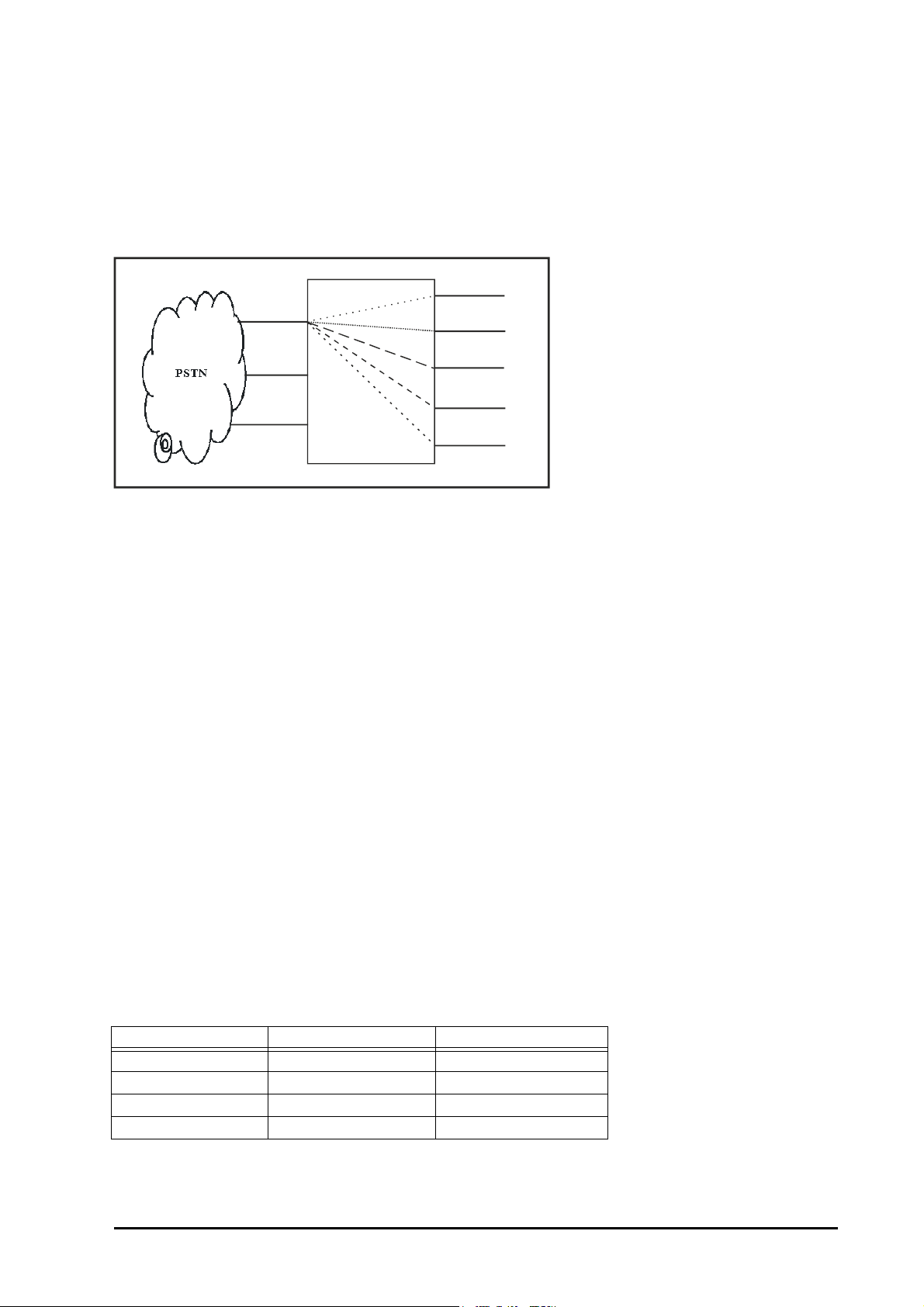
• Delayed Simultaneous: If the programmed destination does not respond to the trunk ring within 15
21
22
23
24
25
(
0
-
1
5
)
(
1
6
-
3
0
)
(
3
1
-
4
5
)
(
4
6
-
6
0
)
(
6
1
-
7
5
)
Trunk 1
Trunk 2
Proton
* Number in brackets show hunt timings
Trunk 3
seconds, all five stations start ringing. Any of the ringing or interrupted stations can answer the call. Ring on
other stations will be stopped when the call is answered.
• Immediate Simultaneous: All five stations will be given ring immediately.
Please note that the hunting scheme is applicable from the first station among the five stations programmed.
Following diagram shows landing destination for trunk 1 as station 23 with round robin hunting scheme.
How to program?
Use following command to program the trunk-landing destination for daytime:
47-Trunk-Station1-Station2-Station3-Station4-Station5
Where,
Trunk is 1, 2 or 3.
Station1.....Station5 can be any station from 21 to 28.
Use following command to program the all trunks landing destination for daytime:
47-*-Station1-Station2-Station3-Station4-Station5
Use following command to program the trunk-landing destination for nighttime:
48-Trunk-Station1-Station2-Station3-Station4-Station5
Where,
Trunk is 1, 2 or 3.
Station1....Station5 can be any station from 21 to 28.
By default, station 21 to station 25 are programmed as destination for all the trunks both during daytime
and nighttime.
Use following command to program the all trunks landing destination for nighttime:
48-*-Station1-Station2-Station3-Station4-Station5
Use following command to assign hunting scheme for daytime and nighttime:
46-Trunk-Day Hunting Scheme-Night Hunting Scheme
Where,
Trunk is 1, 2 or 3.
Day Hunting Scheme Night Hunting Scheme Meaning
0 0 Hunting OFF
1 1 Round Robin
2 2 Delayed Simultaneous
3 3 Immediate Simultaneous
By default, Hunting scheme for both daytime and nighttime is Round Robin.
PROTON 206/308 V1 System Manual 77
Page 78

Use following command to assign same hunting scheme for daytime and nighttime to all the trunks:
46-*-Day Hunting Scheme-Night Hunting Scheme
Timer of Relevance:
Hunt Timer-Time for which the station rings when an incoming call lands on it. It is relevant in case of Round
Robin and delayed simultaneous type of hunting scheme.
Command : 212-Timer
Default : 18 seconds
Valid Range : 01 to 99 seconds.
Example:
Program the system so that the call on trunk 1 lands in round robin fashion on stations 21, 22, 23, 24 and 25
during daytime and simultaneously on these stations during nighttime.
47-1-21-22-23-24-25
48-1-21-22-23-24-25
46-1-1-3
Relevant Topics:
1. “Day and Night Modes” 40
2. “Programming the System” 64
3. “Trunk Parameters” 78
Trunk Parameters
What’s this?
• A trunk can individually be enabled or disabled. When the PROTON 206/308 is being used with only one
trunk line the other trunk port must be disabled. This can be useful when a particular trunk goes out of order
and should be stopped from being allocated to a user when he dials common trunk access code ‘0’.
• A trunk can be programmed as Tone type and Pulse type.
How to program?
Use following command to Enable/Disable the trunk and set Dial type:
41-Trunk-Enable/Disable-Pulse/Tone
Where,
Trunk is 1, 2 or 3.
Enable/Disable Meaning
0 Trunk is disabled
1 Trunk is enabled
Pulse/Tone Meaning
0 Trunk is programmed as Pulse type
1 Trunk is programmed as Tone type
By default, all trunks are enabled and programmed as tone type.
Use following command to Enable/Disable and set Dial type on all trunks:
41-*-Enable/Disable-Pulse/Tone
Timers of Relevance:
Class of Service Delay Timer-It is the time after which you get P&T dial tone on dialing ‘0’ or ‘5’ or ‘61’ or ‘62’ or
‘63’. This ensures dialing and storage of complete string of telephone number by the PBX.
Command: 531-Trunk-Seconds
Default: 01 second.
78 PROTON 206/308 V1 System Manual
Page 79

Valid Range: 1 to 9 seconds.
Pause Timer: In old type of P&T exchanges, dial tone comes a bit late which may lead to a condition in which
case the system may dial out the number without waiting for the P&T dial tone. Because of this few initial digits
may not reach the P&T exchange resulting in false dialing. To avoid such mismatch, delay is inserted by the
system before the number is dialed. This ensures proper dialing only after getting dial tone on the trunk. This
delay is known as Pause Timer.
Command: 215-Timer
Default: 03 seconds
Valid Range: 01 to 99 seconds
Trunk First Digit Wait Timer: It is time before which the station should dial the digits on the trunk line after
grabbing the trunk. If the outside telephone number is not dialed during this time, the system gives error tone.
This is a global timer and is applicable to all the First Digit Wait Timer of the trunk.
Command : 217-09-Timer
Default : 15 seconds
Valid Range : 01 to 99 seconds.
Trunk Digit-Digit Wait Timer: It signifies the time for which the system waits for next digit during dialing phase
while dialing on trunk.
Command : 217-33-Timer
Default : 06 seconds
Valid Range : 01 to 99 seconds.
Example:
Enable trunk 1 as tone type and trunk 3 as pulse type:
41-1-0-1
41-3-1-0
Trunk Reservation
What’s this?
• A station user can reserve a particular trunk for sometime.
• In big offices, the number of users is more but the trunk lines are less. In such cases, at any given time most
of the trunks are busy and a station user might not get his turn to make a call. This feature helps a station
user in such case. He can reserve a trunk for time = trunk reservation timer. During this period, no one else
can access this trunk except the station that has reserved this trunk.
How to use it?
To reserve a trunk:
1 Lift handset. Dial tone
2Dial 112-Trunk. Confirmation tone
Example:
To reserve a trunk 2, dial 112-2.
To cancel Trunk Reservation
1 Lift handset. Dial tone
2Dial 1120. Confirmation tone
How to program?
Please refer “Class Of Service (COS)” for details on how to allow ‘Trunk Reservation’ to a station user.
PROTON 206/308 V1 System Manual 79
Page 80
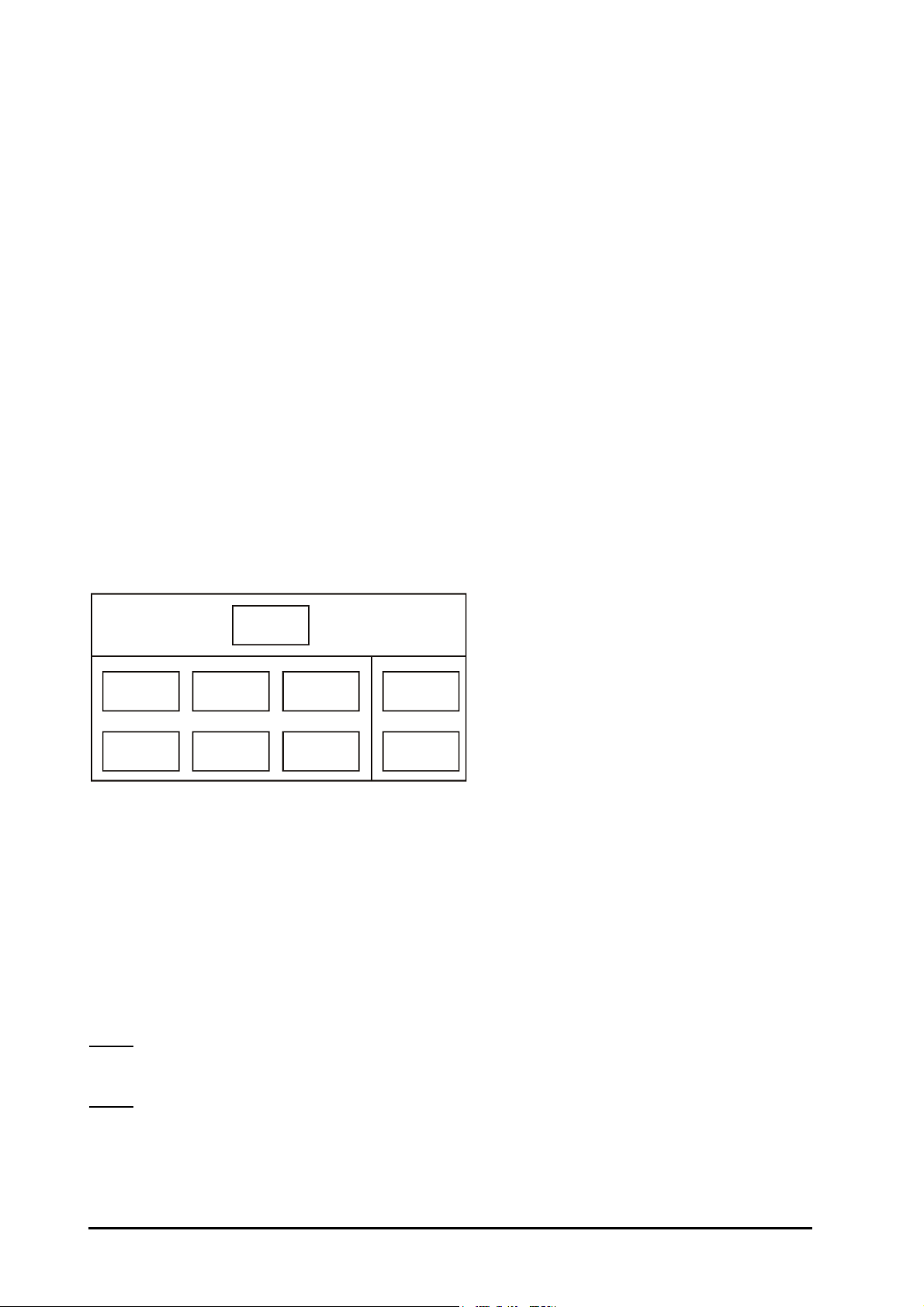
Timer of Relevance:
ABC Ltd.
Station
24
Station
25
Station
21
Station
22
Station
26
Station
23
Station
28
Station
27
Trunk Reservation Timer: It specifies the time for which the trunk remains reserved. On expiry of this timer, the
trunk is freed and other stations can use this trunk.
Command : 217-31-Timer
Default : 3 minutes
Valid range : 1 to 9 minutes
Important Points:
• Once your call is over, do not forget to cancel the reservation. This will enable other station users to use the
trunk.
• A station can reserve a trunk only if it is given access to that trunk.
Relevant Topic:
1. “Class Of Service (COS)” 36
Universal Service Number
What’s this?
Whenever a station dials universal service number, the call goes to the service station of that particular group.
This feature could be of great use in following type of situation: Suppose more than one office boys (helping
hands) are working in an office. Each one of them is working for a group of people. The requirement is that when
any person dials ‘8’, the office boy corresponding to that set of people should be accessed. Following figure
explains it in more details.
In simple words, the requirement is that when any of the stations from 21, 22 and 23 dials ‘8’, the call should land
on station 27 and when any of the stations from 24, 25 and 26 dials ‘8’, the call should land on station 28. This
can be accomplished using Universal Service Number.
How to program?
Step 1: Take a paper pad and pen.
Step 2: Make a group of all stations to be programmed within one group using command 305.
Step 3: Assign a service station to each group using command 2042.
Step 4: Assign unique code to be used as universal service number using command 2041.
Commands
Step 1
Take a pen and paper pad. Make the groups as per the requirement.
Step 2
Use following command to assign a group number to all stations in one group:
305-Station-Group Number
Where,
Station is from 21 to 28.
80 PROTON 206/308 V1 System Manual
Page 81

Group Number is from 0 to 9.
Step 3
Use following command to assign a service station to each group:
2042-Group-Station
Where,
Group is from 0 to 9.
Station is from 21 to 28.
Step 4
Use following command to assign an unique code to be used as universal service number:
2041-Universal Service Number
Where,
Universal Service Number can be of one digit, two digits, three digits or four digits. Use ‘#’ to terminate the
command if less than four digits are used as Universal Service Number.
By default, the Universal Service Number is ‘38’.
Example:
Program the Universal Service Number as ‘8’ for ABC Ltd. with group of people as shown in the figure,
Use following command to accomplish above program.
305-21-1
305-22-1
305-23-1
305-24-2
305-25-2
305-26-2
2042-1-27
2042-2-28
2041-8
Important Points:
• Universal Service Number by default is 38.
• Default universal service station for each group is 22.
User Security (User Password)
What’s this?
The PROTON 206/308 provides security to the user by way of a Password. This helps to avoid any
unauthorised use.
• Each station of the PROTON 206/308 has a password. This password helps the user in using following
features
• Call follow me
• Dynamic lock
•DOSA.
• Walk-In Class of Service
Please refer respective features for better understanding.
• User password is a 4-digit password. It cannot have either less than or more than 4 digits.
• User password can be changed only from the station.
• The default User password is 1111 for all the station users. (However, in case the user has forgotten his
password, the system engineer (SE) can clear the password for any user).
PROTON 206/308 V1 System Manual 81
Page 82

How to program?
Use following command to change the User password from the station (simply after lifting the handset):
144-Old User password-New User password.
Where,
New password is a number string of 4-digits.
By default, User password is 1111 for all the stations.
Use following command to clear User password of a station (from SE/SA mode):
341-Station
Where,
Station is from 21 to 28, whose user password has to be cleared.
Relevant Topic:
1. “Dynamic Lock” 47
Virtual Stations
What’s this?
• A station is a real (physical) port on the system. Compared to this, virtual station is not a real physical port
whereby a telephone instrument is connected. It is a station virtually connected to the system. Any person
given this facility becomes a virtual station.
• PBX can be used as unmanned STD/PCO booth. The owner of the booth should give a station number and
a secret password to the customer and, should explain the procedure of making a call from the customer’s
residence. The customer becomes the virtual station.
• In fact, it is same as a DOSA call except that the station number is pre-defined.
• Only few dedicated station numbers i.e. 3900 to 3979 are allowed for this facility to be used. Since these
numbers are used for this purpose, no station can have any of these numbers as their station numbers.
• Maximum 80 virtual stations can be defined.
How to use it?
• Make a list of customers to whom you have to give this facility. Allot a station number and a unique password
to each customer. This will avoid unauthorized use of this facility.
• Give the unique station number and the corresponding password to unique customer.
• Explain the steps to use this facility to each customer.
• All the steps are same as in DOSA except that here virtual station number and the virtual password is used
instead of the station number and the user password.
How to program?
• DOSA should be made ‘ON’ on the trunk/s. For more details, please refer section ‘DOSA’.
• No other special command is required to use this facility.
• However it is advisable to change the password for all the virtual stations to avoid any unauthorized use.
Use following command to change virtual station password:
306-Virtual Station-Virtual Station Password
Where,
Virtual Station is from 3900 to 3979.
Virtual Station Password is maximum upto 4-digits.
Example:
To change the password of virtual station 3900 to 8085.
306-3900-8085
82 PROTON 206/308 V1 System Manual
Page 83
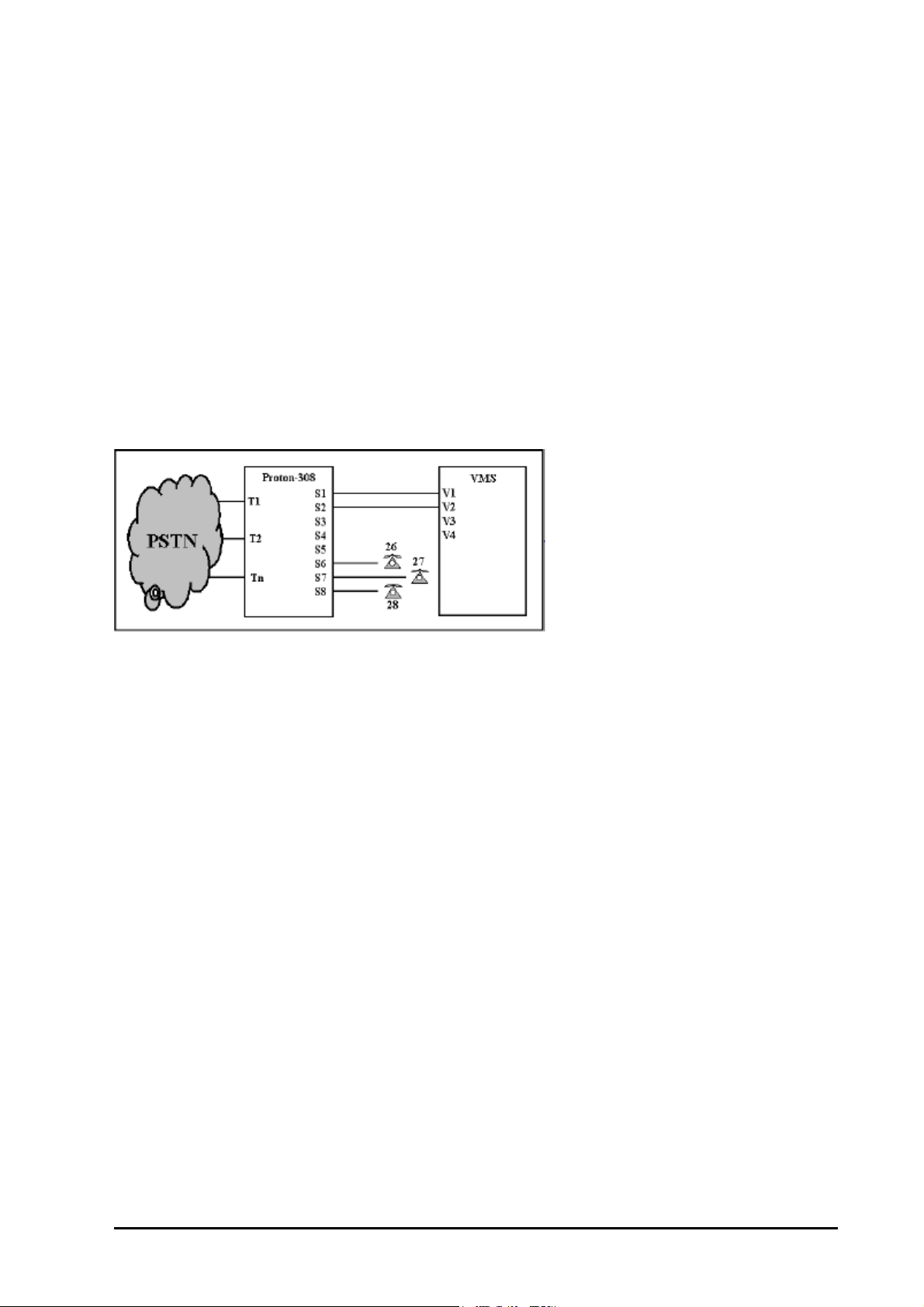
Important Point:
• Maximum 80 virtual stations are possible.
Voice Mail Integration
What’s this?
Any VMS/Auto-Attendant can be integrated with a PBX. However this integration works well if the exchange of
information between the two is perfect. Generally, this integration works on two protocols: Tone Sensing and
Gateway. Tone Sensing relies on sensing of various Call Progress tones. Gateway uses DTMF digits to signify
various Call Progress events. Gateway is a PBX feature that is used by VMS/Auto-Attendant for a firm
integration. PROTON 206/308 provides this Gateway.
How to connect a VMS/Auto-Attendant to a PBX?
The port of VMS/Auto-Attendant should be connected to the station port of the PBX using a single pair
telephone cable. The figure given below shows connection of a VMS with a PBX where only two VMS ports are
interfaced with the PBX.
How it works?
• As shown in the figure, VMS is connected on two stations of the PBX. If all the calls are to be routed through
VMS, the PBX should be programmed such that all the incoming calls land on VMS. Alternatively, PBX
should be programmed such that incoming calls land on other stations.
• When an incoming call lands on the VMS, the VMS processes the call and guides the caller to reach the
desired station.
• As stated earlier, integration of PBX with VMS or an Auto-Attendant works on two protocols viz.Tone Sensing
and Gateway.
• Tone Sensing relies on sensing of various Call Progress tones. For example, when a VMS is interfaced with
the PBX, it senses the incoming ring and answers the call. It prompts the caller to dial an station number,
subsequently senses the dialed station number, keeps the caller on hold and dials the station number of
• the PBX where the call is to be diverted. Then the VMS waits for the ring back tone. It first senses the ring
back tone and then waits for it to stop. As soon as the ring back tone stops the VMS transfers the call to the
dialed station number. All this process involves sensing of various tones like ring back tone, hold tone, etc.
and hence is commonly called tone sensing. However this method is not accurate.
• To overcome this problem, Matrix PBXs (PROTON-206/PROTON-308) offers Gateway feature. However, for
latest knowledge on which model provides this feature, please call our channel partner or the Matrix Support
desk.
• Gateway uses DTMF digits to signify various Call Progress events. With Gateway mode, in the above
example when the VMS receives an incoming call, it answers the call. Then it prompts the caller to dial an
station number. It senses the dialed station number, keeps the caller on hold and dials the station number of
the PBX where the call is to be diverted. On successful receipt of the dialed station number, the PBX sends
a defined code (signifying ring back tone) to the VMS. Depending upon the transfer type set for the VMS, it
either transfers the call or waits for the called party to respond. In the latter case, when the called party
answers the call, the PBX again sends a defined code (signifying successful speech connection). The VMS
detects this code and transfers the call to the dialed station.
PROTON 206/308 V1 System Manual 83
Page 84

• Since codes (defined string of characters) are used for the transfer of information, this method is very much
reliable and near to perfect.
• Table given below shows various call progress events:
Type Of Event Occurrence of Event Type of Tone
Call Placed Event Extension ringing. Ring back tone
Call Blocked Event Extension busy, Extension’s handset not
placed properly, Call returned back to VMS.
Call Matured Event Call answered. Speech
Call Disconnect Event Extension disconnects. Error tone after speech
Call Forward Event Extension forwards the call. Feature tone
• The PROTON 206/308 offers two features associated with VMS integration viz. Message Wait and
Conversation Recording. Please refer “Message Wait” and “Conversation Recording” for more details.
How to program?
Step 1: Define a station port as VMS port using command 393.
Step 2: Group all the VMS ports in one group using command 251.
Step 1
Use following command to define station port as VMS port:
393-Station-Code
Where,
Station is from 21 to 28.
Busy tone, Error tone
Code Meaning
0 Station port defined as normal station port
1 Station port defined as VMS port
By default, Station Port as VMS port is 0.
Step 2
Use following command to group all the VMS ports in one group (Pilot Group 9):
251-9-Station1-Station2-………………..-Station8
Where,
Station1, Station2, ………, Station8 is from 21 to 28 to which the VMS is connected.
Use ‘#’ to terminate the command if less than 8 stations are to be programmed in the group.
Example:
Program the PROTON 206/308 for following constraints:
Two ports of VMS are connected to station 27 and 28 of the PROTON 206/308.
Use following command to define station 27 and 28 as VMS port:
393-27-1
393-28-1
251-9-27-28-#
Relevant Topics:
1. “Message Wait” 61
2. “Conversation Recording” 40
84 PROTON 206/308 V1 System Manual
Page 85

Walk-In Class of Service
What’s this?
• A station user can use his toll control from any station.
• This feature is very useful for managers when they move away from their seat. Normally they have highest-
level toll control. Now when they go on the shop-floor (where the Toll Control is normally of low level) and if
they wish to use their Toll Control, this feature comes to their help. Using this feature, they can make calls as
per their Toll Control from any station. This facility is password protected hence its misuse can be avoided.
How to use it?
1 Lift handset. Dial tone
2Dial 111-Station-User Passowrd. Confirmation tone
3 Disconnect and lisft the handset again. Dial tone
4Dial '0' or '5' or '61' or '62' or '63'. Trunk dial tone
Example:
Station user 23 who is allowed 95 calls is at station 25 who is denied 95 calls. Station user 23 wants to make 95
calls from station 25. To accomplish this station user 23 should use Walk in Class of Service from station 25.
Important Points:
• Only one call is allowed at a time using this feature. i.e. to make two calls one after the other, you will have to
dial the code to make first call and then again to make second call.
• Walk-In Class of Service is allowed to all the station.
• Walk-In Class of Service is not allowed with default dynamic lock password.
PROTON 206/308 V1 System Manual 85
Page 86

86 PROTON 206/308 V1 System Manual
Page 87

Appendices
A: Features at a Glance
01 Alarms
Duration Alarm 161-Minute
Remote Alarm 164-Station-1-Minute
Cancel All Alarms 160
02 Auto Call Back-On Busy 2
Cancel Auto Call Back 102
03 Auto Call Back-On No Reply Flash-2
Cancel Auto Call Back 102
04 Auto Redial-Low Priority 77
Cancel L.P Auto Redial 70
05 Auto Redial-High Priority 777
Cancel H.P Auto Redial 70
06 Barge-In Station-33
07 Call Follow Me 132-Station-User Password
Cancel Follow Me 130
08 Call Forward-All Calls 131-Station
Cancel Forward 130
09 Call Forward-If Busy 134-Station
Cancel C.F.-If Busy 130
10 Call Forward-If No Reply 133-Station
Cancel C.F.-If No Reply 130
11 Call Hold Flash
12 Call Park Flash-7
Retrieve Parked Call 17
13 Call Pick Up-Group 4
14 Call Pick Up-Selective 12-Station
15 Call Splitting Flash-1
16 Call Transfer Flash-Station
17 Conference Flash-0
18 Continued Dialing Flash-#-Code
19 Do Not Disturb 131-Station
20 Dynamic Lock
Close Lock 140
Open Lock 141-User Password
Set Lock Level 142-User Password-Level
Set Auto-Shut Time 143-User Password-Minute
Change Password 144-Old User Password-New User Password
21 Executive/Secretary 131-Station
PROTON 206/308 V1 System Manual 87
Page 88

22 Hot Line 153-Station
Hot Line Delay 154-Seconds
Hot Outward Dialing 151-Trunk
Hot Outward Dialing-With Number 152-Trunk-Number-#
Hot Outward Dialing Delay 154-Seconds
Cancel Hot Line And HOD 150
23 Interrupt Request Station-3
24 Last Number Redial 7
25 Use Memory Dialing 8-Directory Index
26 Program Personal Memory 18-Directory Index-Trunk- Number-#
28 Raid Station-4
29 Selective Trunk Access 6-Trunk Number
30 Trunk Reservation 112-Trunk
Cancel Trunk Reservation 112-0
31 Walk-In Class Of Service 111-Station-User Password
32 Enter SA mode 19-SA Password
33 Enter SE mode 19-SE Password
34 Exit SE/SA Mode 0 on Programming Tone
B: System Commands
01 Enter SE/SA Mode 19-SE Password
02 Set Day Mode (Manual Operation) 151
03 Set Night Mode (Manual Operation) 152
04 Single Ring On Trunk Call Transfer 157-0
05 Double Ring On Trunk Call Transfer 157-1
06 Demonstrate Dial Tone 161-1
07 Demonstrate Ring-Back Tone 161-2
08 Demonstrate Busy Tone 161-3
09 Demonstrate Error Tone 161-4
10 Demonstrate Confirmation Tone 161-5
11 Demonstrate Programming Tone 161-6
12 Demonstrate Warning Tone 161-9
13 Demonstrate Music 161-0
14 Loading Factory Setup 18-SE Password
15 Restart System 10
16 Abbreviated Dialing 8-Directory Index-Trunk- Number-#
17 Exit SE/SA Mode 0
C: System Parameters
1 Feature Group 250-COS Group-Feature Index-Code
2 Pilot Group 251-Dept. Group-Station1…..Station8
3 Allowed List 252-Level-Location-Number-Flash
4 Denied List 253-Level-Location-Number-Flash
5 Set New Program Password 291-New SE Password
6 Set New Admin Password 292-New SA Password
7 DOSA Inactivity Timer in Seconds/Minutes 207-0/1
88 PROTON 206/308 V1 System Manual
Page 89

D: Station Parameters
01 Call Pick-Up Group 301-Station-Call Pick-Up Group
02 Call Privacy For Intrusion/CCWT/ DISA 303-Station-Code-Code-Code
03 Station Group Hunting 304-Station-Group
04 Floor Service Station Group 305-Station-Group
05 Virtual Station Password 306-Station-New Password
06 Feature Access Group 31-Station-Day Group-Night Group
07 Feature Access Group For All Stations 31-*-Day Group-Night Group
08 Toll Control 32-Station-Day Level-Night Level
09 Toll Control For All Stations 32-*-Day Level-Night Level
10 Trunk Access For Day 331-Station-Trunk-Trunk-… Trunk-#
11 Trunk Access For Day For All Stations 331-*-Trunk-Trunk-… Trunk-#
12 Trunk Access For Night 332-Station-Trunk-Trunk-…. Trunk-#
13 Trunk Access For Night For All Stations 332-*-Trunk-Trunk…...... Trunk-#
14 ACD On/Off For Local Calls 3331-Station-Day Time-Night Time
15 ACD On/Off For Local Calls-All Stations 3331-*-Day Time-Night Time
16 ACD On/Off For STD Calls 3332-Station-Day Time-Night Time
17 ACD On/Off For STD Calls-All Stations 3332-*-Day Time-Night Time
18 ACD On/Off For Incoming Calls 3333-Station-Day Time-Night Time
19 ACD On/Off For Incoming Calls-All Stations 3333-*-Day Time-Night Time
20 ACD On/Off For Warning Beeps Without Disconnection 3334-Station-Day Time-Night Time
21 ACD On/Off For Warning Beeps W/o Disconnection-All Stations 3334-*-Day Time-Night Time
22 Global Dir-1 Access On/Off 335-Station-Day Time-Night Time
23 Global Dir-1 Access-All Stations 335-*-Day Time-Night Time
24 Global Dir-2 Access On/Off 336-Station-Day Time-Night Time
25 Global Dir-2 Access-All Stations 336-*-Day Time-Night Time
26 Clear Dynamic Lock Password 341-Station
27 Clear Dynamic Lock Settings 342-Station
28 Clear All the Features 343-Station
29 DOSA Access Off/On 35-Station-0/1
30 Flash Timer For Station 36-Station-Count
31 Flash Timer For All Stations 36-*-Count
32 Flexible Number 37-Port No.-Flexible No.-#/Flash
E: Trunk Parameters
01 Enable/Disable And Dial Type 41-Trunk-Enable/Disable-Pulse/Tone
02 Enable/Disable, Dial For All Trunks 41-*-Enable/Disable-Pulse/Tone
03 DISA On/Off 43-Trunk-Day Time-Night Time
04 DOSA On/Off 45-Trunk-Day Time-Night Time
05 Hunting Scheme 46-Trunk-Day Hunting Scheme-Night Hunting Scheme
06 Hunting Scheme For All Trunks 46-*-Day Hunting Scheme-Night Hunting Scheme
07 Destinations For Day Mode 47-Trunk-Stn1-Stn2-Stn3-Stn4-Stn5
08 Destinations For Day Mode For All Trunks 47-*- Stn1-Stn2-Stn3-Stn4-Stn5
09 Destinations For Night Mode 48-Trunk- Stn1-Stn2-Stn3-Stn4-Stn5
10 Destinations For Night Mode For All Trunks 48-*- Stn1-Stn2-Stn3-Stn4-Stn5
11 Trunk Access Groups 40-Trunk- TAC 0 – TAC 5
PROTON 206/308 V1 System Manual 89
Page 90

12 Routing On Station Or Operator 51-Trunk-Day Routing-Night Routing
13 ECF On/Off 521-Trunk-Day Code - Night Code
14 ECF Destination Trunk 522-Trunk-Destination Trunk
15 ECF Destination Number 523-Trunk-Telephone Number-#
16 Class of Service Delay Timer 531-Trunk-Seconds
17 Set PEC count for a trunk 54-Trunk-PEC
18 Set PEC count for all the trunks 54-*-PEC
90 PROTON 206/308 V1 System Manual
Page 91

Glossary
Destination Station : The station where the trunk is programmed to land (generally referred as operator).
Executive : The key person in the organization.
Station : The port to which a telephone is connected.
Flash : A code required to use various system features. This code can be dialed either by
tapping the hook switch of the telephone momentarily or by pressing the ‘Flash’ key
of the telephone, if provided.
LED : Light Emitting Diode.
Off-Hook : A condition in which the handset of the telephone instrument is lifted from the cradle.
On-Hook : A condition in which the handset of the telephone instrument rests on the cradle.
(Idle condition of the phone).
PPM-4 : Primary Protection Module (for 4 ports).
Program Mode : Programming Mode. The entire programming of the system can be done from this
mode.
Pulse : A waveform generated by making and breaking of loop current.
Pulse Dialing : A type of signaling in which codes (digits) are dialed in pulses.
PSTN : Public Switch Telephone Network.
RTC : Real Time Clock. Date and time keeping circuit.
Secretary : The sub-ordinate to the executive in the organization.
Secretary Station : The station used by secretary. Station 22 is the secretary station for station 21 and
likewise.
SWG : Standard Wire Gauge.
Tone : Different frequencies used for signaling.
Trunk : An external trunk line coming from PSTN.
PROTON 206/308 V1 System Manual 91
Page 92

92 PROTON 206/308 V1 System Manual
Page 93

Index
A
“Abbreviated Dialing” 11
“Alarm” 14
“Allowed and Denied Lists” 15
“Answering Calls” 17
“Auto Call Back” 17
“Auto Redial” 18
B
“Barge-In” 20
“Behind the PBX Applications” 21
“Boss Ring” 22
“Busy Hunting Group” 22
C
“Call Duration Control” 23
“Call Follow-Me” 26
“Call Forward” 26
Call Hold-Refer “Hold” 52
“Call Park” 28
“Call Pick Up” 29
“Call Progress Tones” 30
“Call Splitting” 32
Call Toggle-Refer “Call Splitting” 32
“Call Transfer” 33
Calling a Station-Refer “Internal Call” 57
“Cancel Station Features” 35
CDC-Refer “Call Duration Control” 23
“Class Of Service (COS)” 36
“Conference” 39
Conference-Unsupervised-Refer “Conference” 39
Consultation Hold-Refer “Call Splitting” 32
“Continued Dialing” 39
“Conversation Recording” 40
D
“Day and Night Modes” 40
Day Service-Refer “Day and Night Modes” 40
“Default the Configuration” 41
Default Programming Password-Refer “System Security (Passwords)” 70
“Demonstration of Tones” 41
“Department Call” 42
Dialing Ratio-Refer “Technical Specifications” 72
Different types of Tones-Refer “Call Progress Tones” 30
Different types of Rings-Refer “Distinctive Rings” 46
“Direct Inward Dialing (DID)” 43
“Direct Outward System Access (DOSA)” 44
Direct Trunk Access-Refer “Selective Trunk Access” 70
“Distinctive Rings” 46
“Do Not Disturb (DND)” 47
DND-Refer “Do Not Disturb (DND)” 47
PROTON 206/308 V1 System Manual 93
Page 94

“Dynamic Lock” 47
E
“External Call” 48
“External Call Forward (ECF)” 49
Enter Program Mode-Refer “Programming the System” 64
“Executive/Secretary” 50
Exit Program mode-Refer “Programming the System” 64
F
“Flash Timer” 50
Flashing on Trunk-Refer “Continued Dialing” 39
“Flexible Numbers” 51
G
Getting Started-Refer “Installation” 54
Group Call-Refer “Department Call” 42
H
“Hold” 52
“Hotline” 52
Hot Outward Dialing (HOD)-Refer “Hotline” 52
I
Incoming Call Landing-Refer “Trunk Landing” 76
“Installation” 54
Intercom-Refer “Internal Call” 57
“Internal Call” 57
“Internal Call Restriction” 57
Internal Digit-Digit Timer-Refer “Station Parameters” 70
“Interrupt Request” 58
“Introduction” 59
J
K
L
“Last Number Redial” 61
M
Making External Calls-Refer “External Call” 48
Memory Dialing-Refer “Abbreviated Dialing” 11
“Message Wait” 61
“Music on Hold” 61
N
Night Service-Refer “Day and Night Modes” 40
O
“Operator” 61
94 PROTON 206/308 V1 System Manual
Page 95

P
Pilot Number-Refer “Department Call” 42
“Power Down Mode” 62
“Privacy” 63
“Private Trunk” 63
“Programming the System” 64
“Protecting the System” 65
Q
R
“Raid” 66
“Receiving Incoming Calls” 67
Redial-Refer “Last Number Redial” 61
“Remote Alarm” 67
“Remote Lock” 68
“Remote Programming” 69
“Restart the System” 69
Restricted Dialing-Refer “Toll Control” 73
Ring Destinations-Refer “Trunk Landing” 76
Rings-Refer “Distinctive Rings” 46
S
Secretary-Refer “Do Not Disturb (DND)” 47
“Selective Trunk Access” 70
Speed Dialing-Refer “Abbreviated Dialing” 11
Station Numbers-Refer “Flexible Numbers” 51
“Station Parameters” 70
“System Security (Passwords)” 70
System Timings-Refer “Day and Night Modes” 40
T
“Technical Specifications” 72
“Toll Control” 73
Toggle-Refer “Call Splitting” 32
Tone-Refer “Call Progress Tones” 30
Tone Specifications-Refer “Call Progress Tones” 30
“Troubleshooting” 74
“Trunk Access” 75
Trunk Answer from any station-Refer “Call Pick Up” 29
“Trunk Landing” 76
“Trunk Parameters” 78
“Trunk Reservation” 79
U
“Universal Service Number” 80
Unsupervised Conference-Refer “Conference” 39
“User Security (User Password)” 81
V
“Virtual Stations” 82
“Voice Mail Integration” 83
PROTON 206/308 V1 System Manual 95
Page 96

W
“Walk-In Class of Service” 85
X
Y
Z
96 PROTON 206/308 V1 System Manual
Page 97

PROTON 206/308 V1 System Manual 97
Page 98

MATRIX TELECOM PVT. LTD.
Corporate Office:
394-GIDC, Makarpura, Vadodara - 390010, India.
Tel.:+91 265 2630555, Fax: +91 265 2636598
E-mail: [email protected]
Factory:
39-GIDC, Waghodia - 391760, Dist. Vadodara, India.
Tel.: +91 2668 262056/57
Technical Support:
Tel.: +91 2668 263172/73, Fax: +91 2668 262631
E-mail: [email protected]
www.MatrixTeleSol.com
Version V1, August 2009
 Loading...