

Page 1

KILBURN II - PORTABLE STEREO LOUDSPEAKER
USER MANUAL
Page 2

LEGAL & TRADEMARK NOTICE
• Design of device and packaging are intellectual properties of Zound Industries International AB and Marshall Amplication Plc. © All Rights
Reserved. Zound Industries International AB is hereinafter referred to as “Zound Industries” or “manufacturer”.
• MARSHALL, Marshall Amps, their respective logos, “Marshall” and “Marshall” trade dress are trademarks and intellectual property of Marshall
Amplication Plc and may not be used without permission. Permission granted to Zound Industries.
• Qualcomm aptX is a product of Qualcomm Technologies International, Ltd. Qualcomm is a trademark of Qualcomm Incorporated, registered in
the United States and other countries, used with permission. aptX is a trademark of Qualcomm Technologies International, Ltd., registered in
the United States and other countries, used with permission.
• The Bluetooth® wordmark and logos are registered trademarks owned by the Bluetooth SIG, Inc. and any use of such marks by Zound
Industries is under license.
• All other trademarks are the property of their respective owners and may not be used without permission.
• For more legal information related to this product and to its use in your specic region, and for more detailed information about Zound Industries
and partner & license information, please visit the website: www.marshallheadphones.com. The user is recommended to visit the website
regularly for up-to-date information.
Zound Industries International AB, Centralplan 15, 111 20 Stockholm, Sweden
DISCLAIMER
For use with mobile devices using 3.5 mm plug unprotected two-way standard.
Stated play time is calculated using random selection of music, played at medium volume.
The information contained herein is correct at the time of publication, with reservation for editorial errors. Compatibility with future versions of this
product is not guaranteed.
002.
Page 3

INDEX
ENGLISH
SECTIONS
PAGE
002. LEGAL & TRADEMARK NOTICE
002. DISCLAIMER
004. BOX CONTENTS
005. GENERAL DESCRIPTION
007. CHARGING THE INTERNAL BATTERY
008. TURNING THE KILBURN II ON/OFF
009. MANY WAYS TO CONNECT
010. CONNECTING VIA BLUETOOTH (PAIRING)
011. CONNECTING VIA AUX INPUT
012. BATTERY LEVEL INDICATOR
013. ADJUSTING THE VOLUME/BASS/TREBLE
014. STANDBY MODE
015. TECHNICAL INFORMATION
016. TROUBLESHOOTING
003.
Page 4
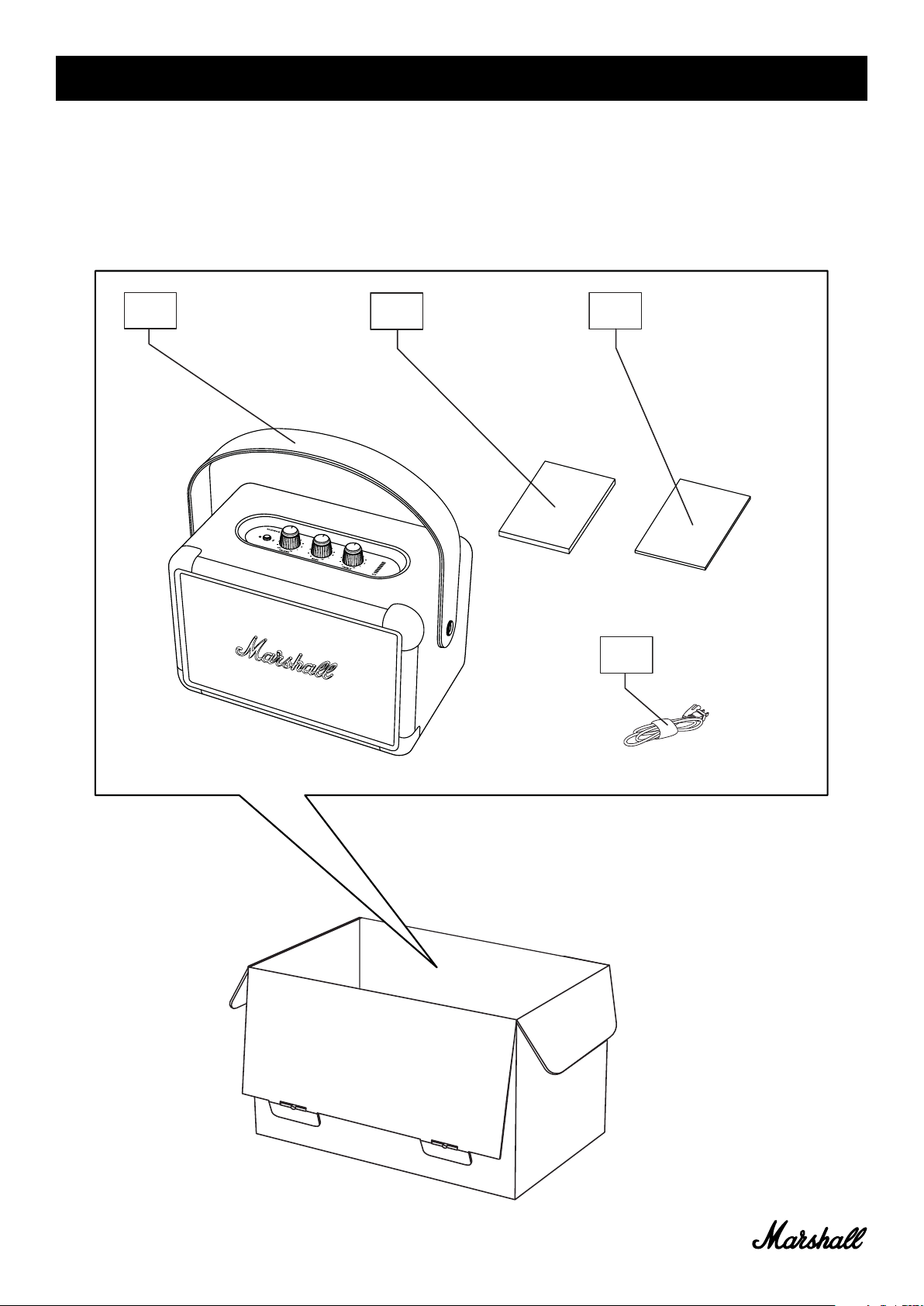
BOX CONTENTS
001. Marshall Kilburn II portable stereo loudspeaker
002. Quick start guide
003. Important safety instructions
004. Power cord
001.
002.
003.
004.
004.
Page 5
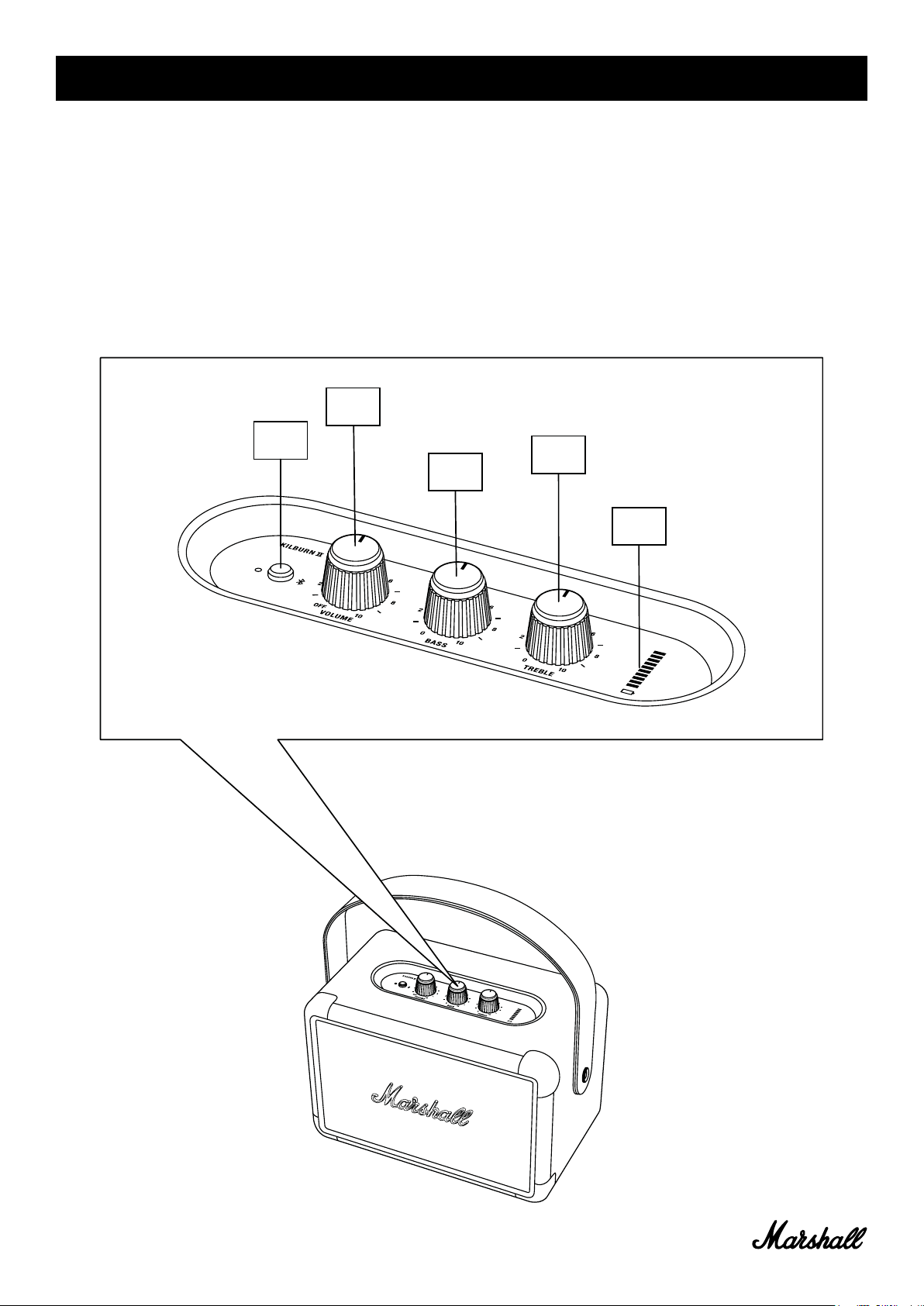
GENERAL DESCRIPTION
001. Bluetooth button
002. Power/volume knob
003. Bass knob
004. Treble knob
005. Battery level indicator
002.
001.
004.
003.
005.
005.
Page 6
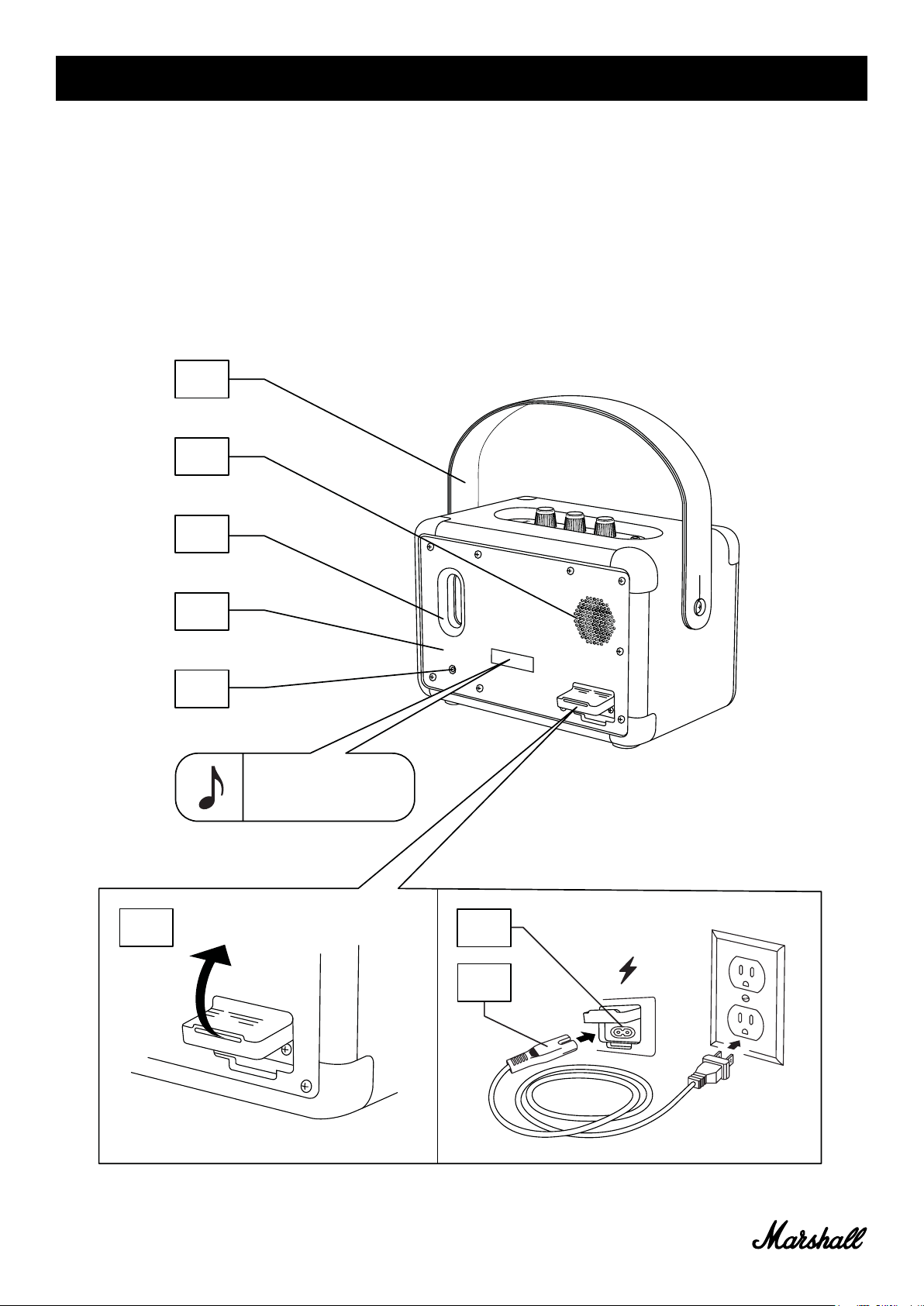
GENERAL DESCRIPTION CONTINUED
006. Detachable carry strap
007. Rear driver
008. Bass port
009. Backplate
010. Aux input for 3.5 mm plug
011. Power jack
012. Power cord
006.
007.
011.
008.
009.
010.
Note: date code and serial
number sticker located
here.
011.
012.
006.
Page 7
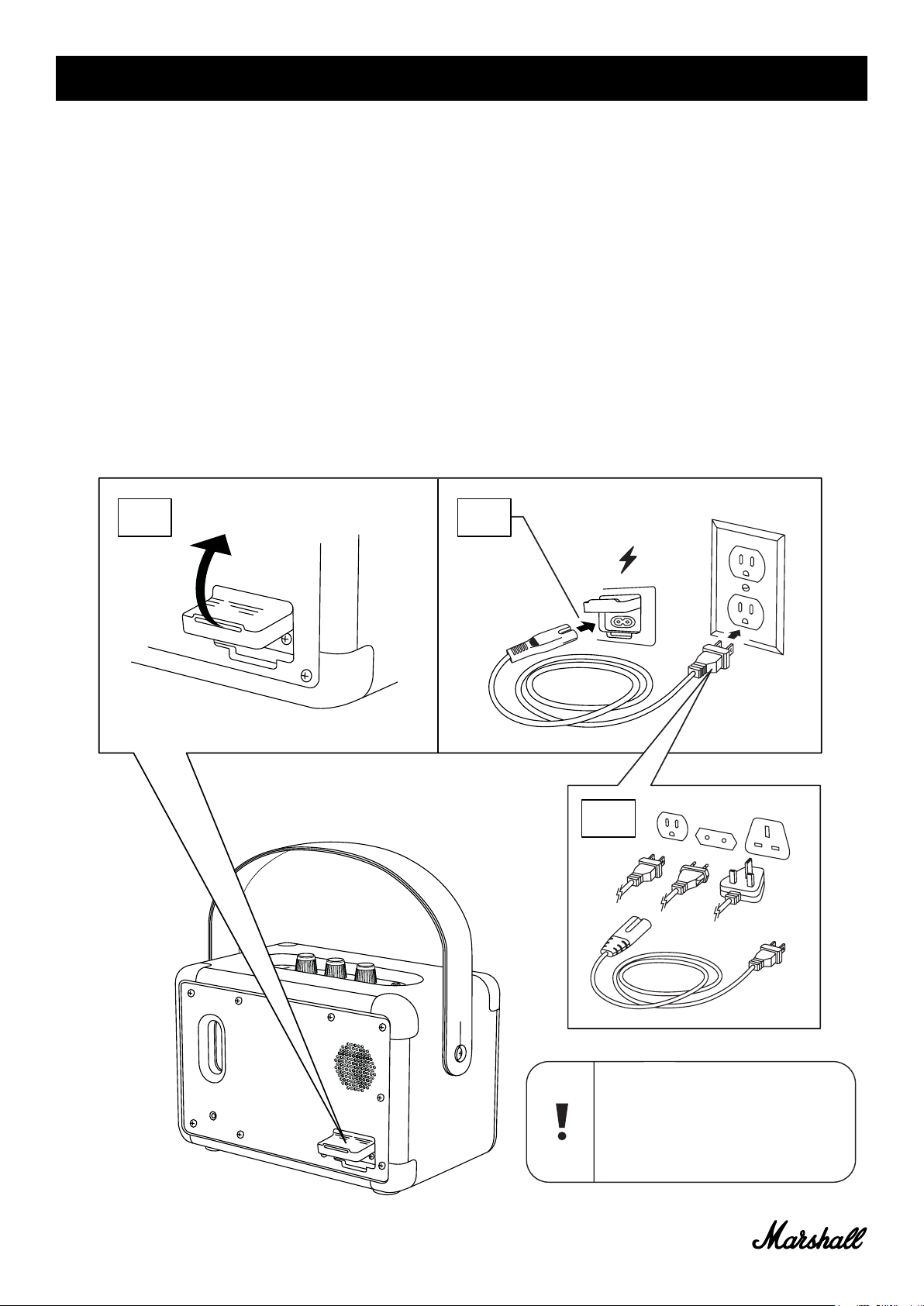
CHARGING THE INTERNAL BATTERY
Important: Always ensure that the power cable, plug and speaker are
compatible with your mains supply and wall socket.
The Kilburn II is equipped with an internal battery with a playing time for
more than 20 hours at mid volume. Charging the battery from empty to
full charge takes approximatly 2.5 hours.
001. Gently pull open the silicone weather seal on the back of the
speaker.
002. Connect the power cord into the power jack on the speaker.
003. Connect the power plug to the wall socket. The battery charge is
shown on the battery level indicator.
002.001.
007.
003.
Caution: Always unplug the power
cord from the wall socket before
disconnecting it from the speaker.
Close the silicon weather seal after
disconnecting the speaker.
Page 8
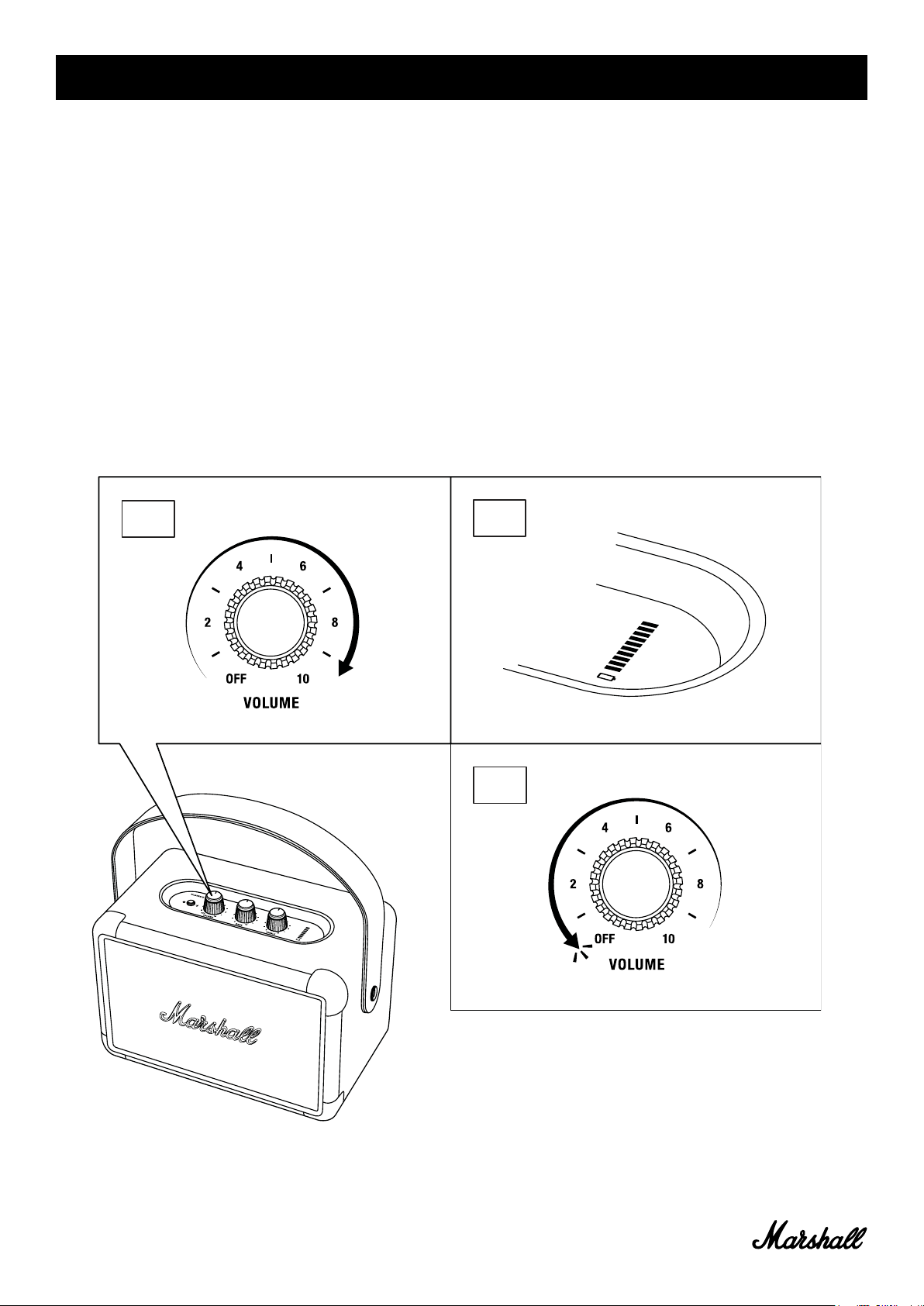
TURNING THE KILBURN II ON/OFF
The volume knob doubles as an on/off knob.
001. Turn the volume knob clockwise to the desired volume and the
speaker turns on.
002. The battery level indicator shows the battery charge.
003. Turn the volume knob fully counter-clockwise until you hear a click
to turn off the speaker.
004. All indicators turns off.
001.
002.
003.
008.
Page 9
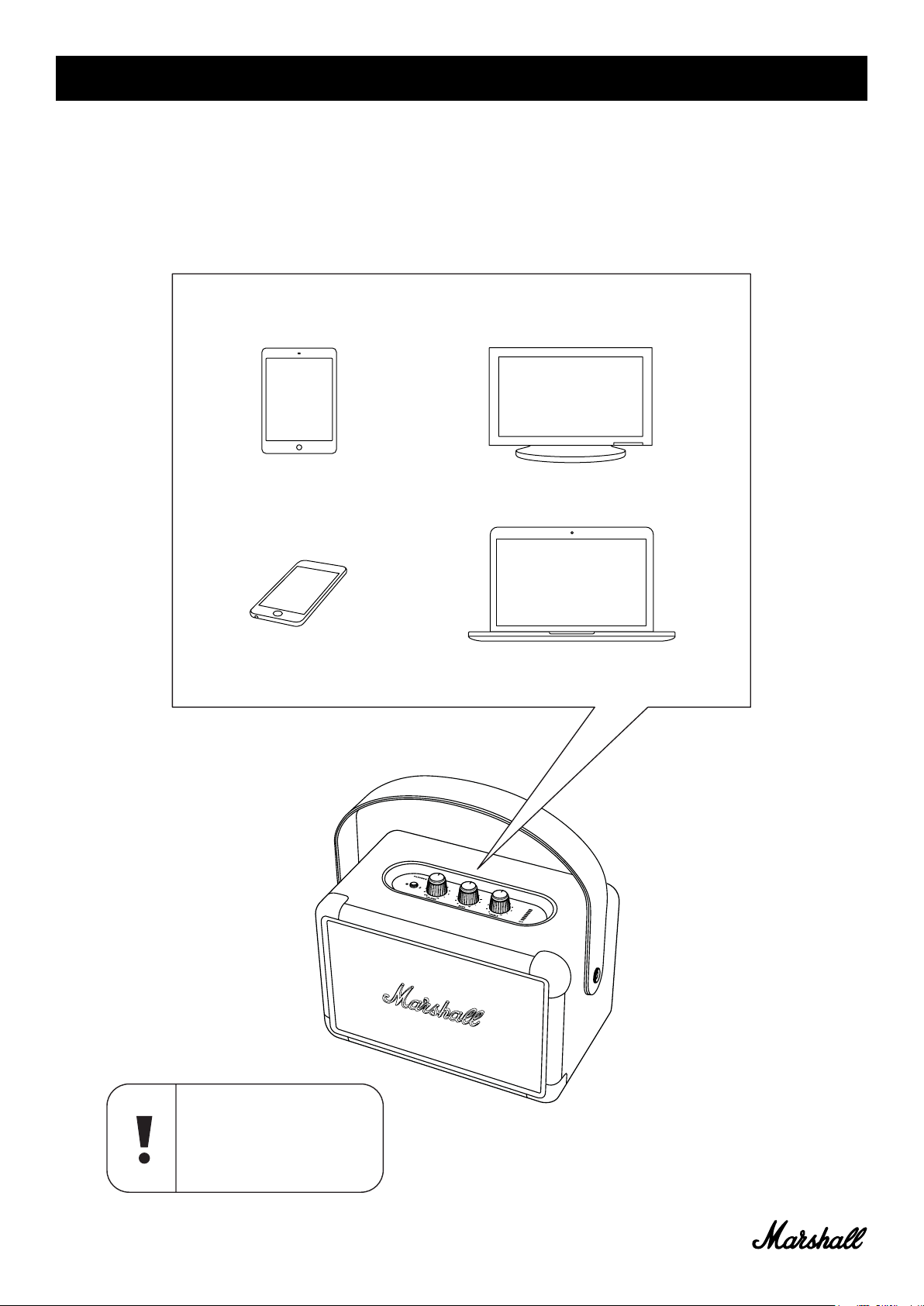
MANY WAYS TO CONNECT
There are many ways to connect to your Kilburn II. The connection can be
wireless via Bluetooth or by using a cable with a 3.5 mm stereo plug.
009.
Caution: Make sure that the
volume is set to low on both
the speaker and the music
player before using the
speaker.
Page 10
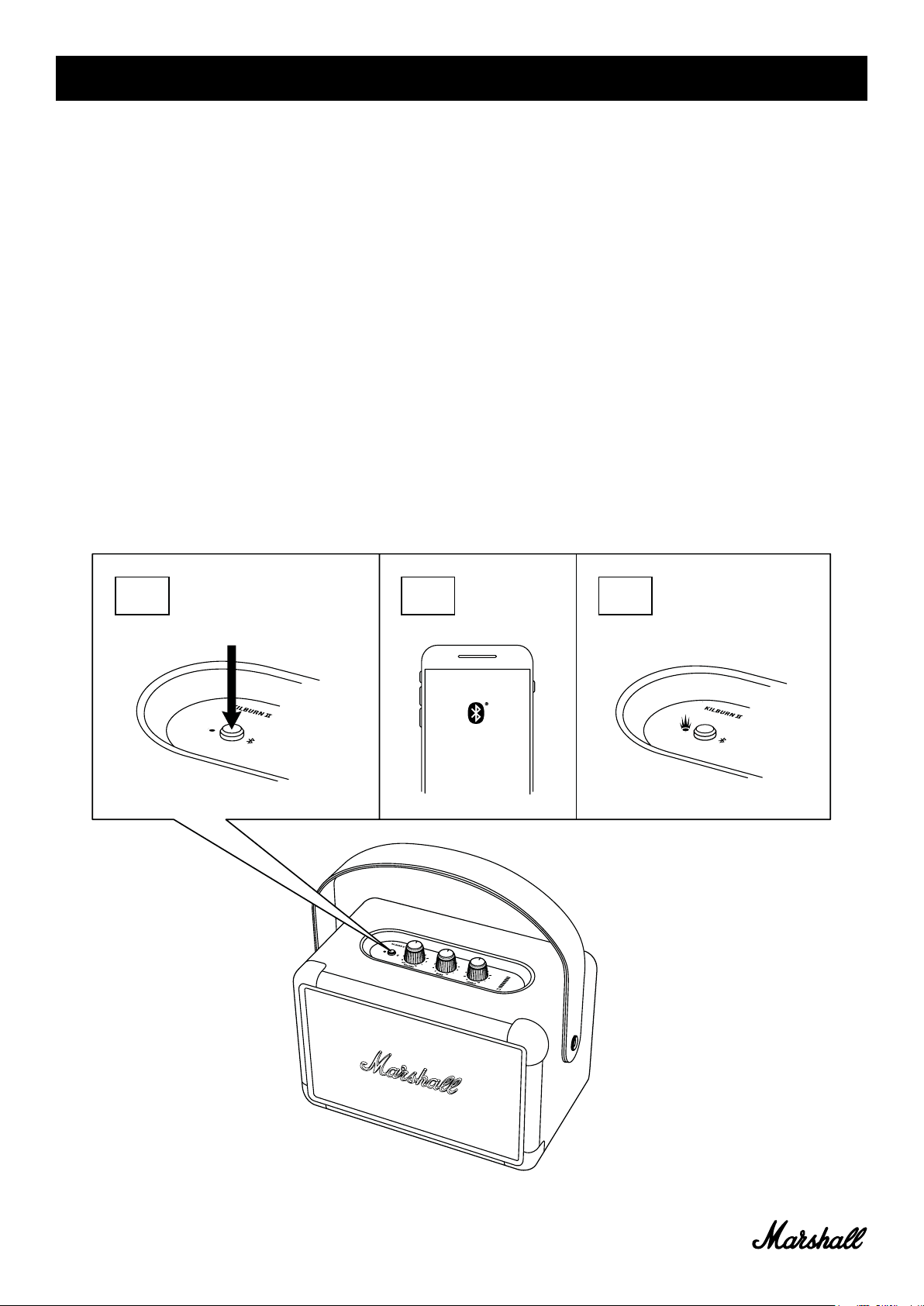
CONNECTING VIA Bluetooth (PAIRING)
001. Push and hold the Bluetooth button for 2 seconds.
The Bluetooth indicator starts to blink.
002. Enable Bluetooth on your device (smartphone, tablet, computer).
003. Select Kilburn II from the Bluetooth list and accept pairing.
The Bluetooth indicator on the the speaker stops blinking and
remains lit when the units are connected.
004. Press play on your audio device.
Kilburn II can be connected to two Bluetooth devices at the same time.
Playing a connected Bluetooth device will make it the selected audio
source. If second Bluetooth device was playing at that time, it is paused.
001.
2s
002.
003.
Killburn II
010.
Page 11
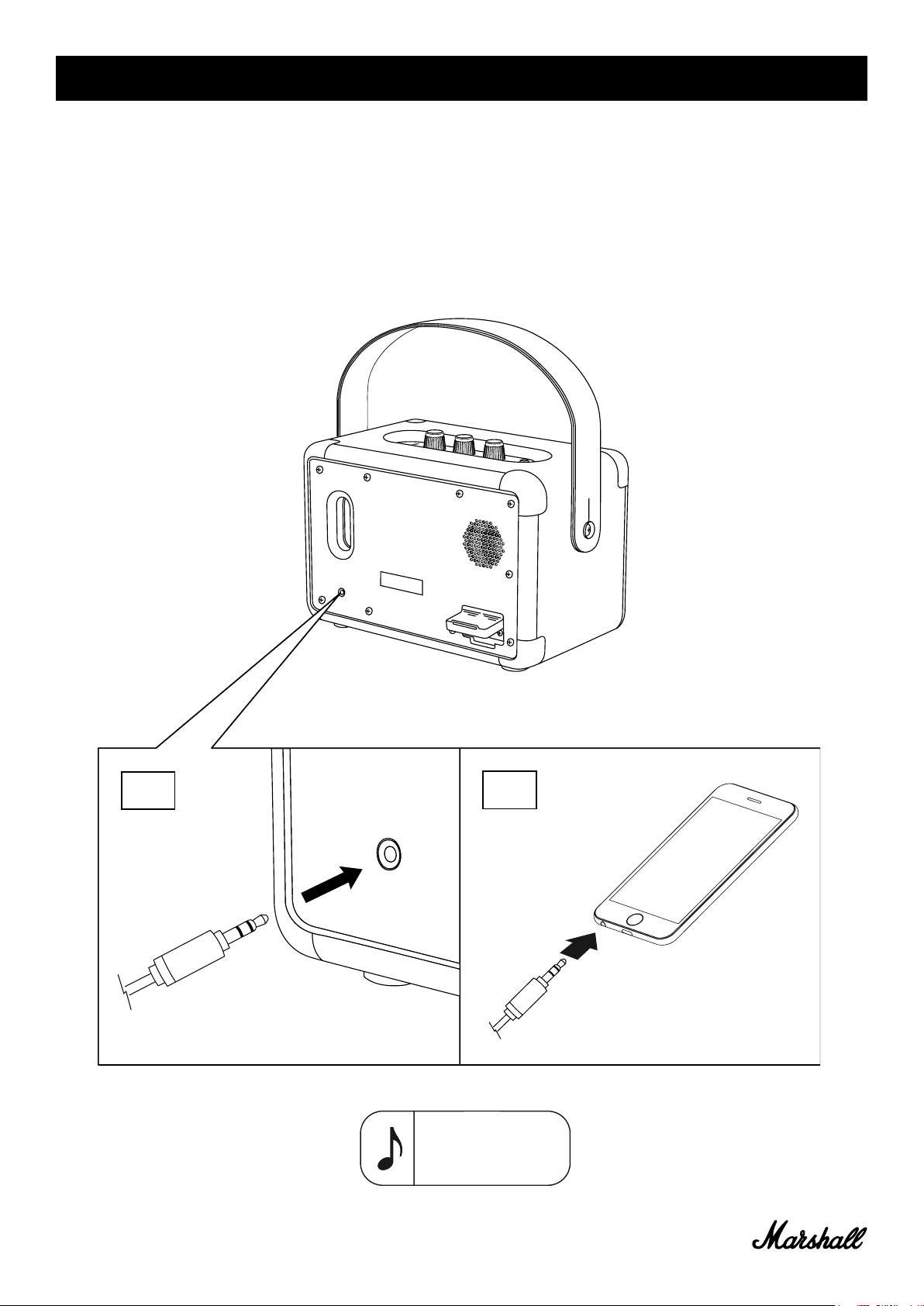
CONNECTING VIA AUX INPUT
001. Connect a 3.5 mm stereo plug to the input labelled AUX on the back
of speaker.
002. Connect the other end of the cord to the audio output on your audio
device.
003. Press play on your audio device.
001.
002.
Note: Audio cables
are not included in
the Kilburn II.
011.
Page 12
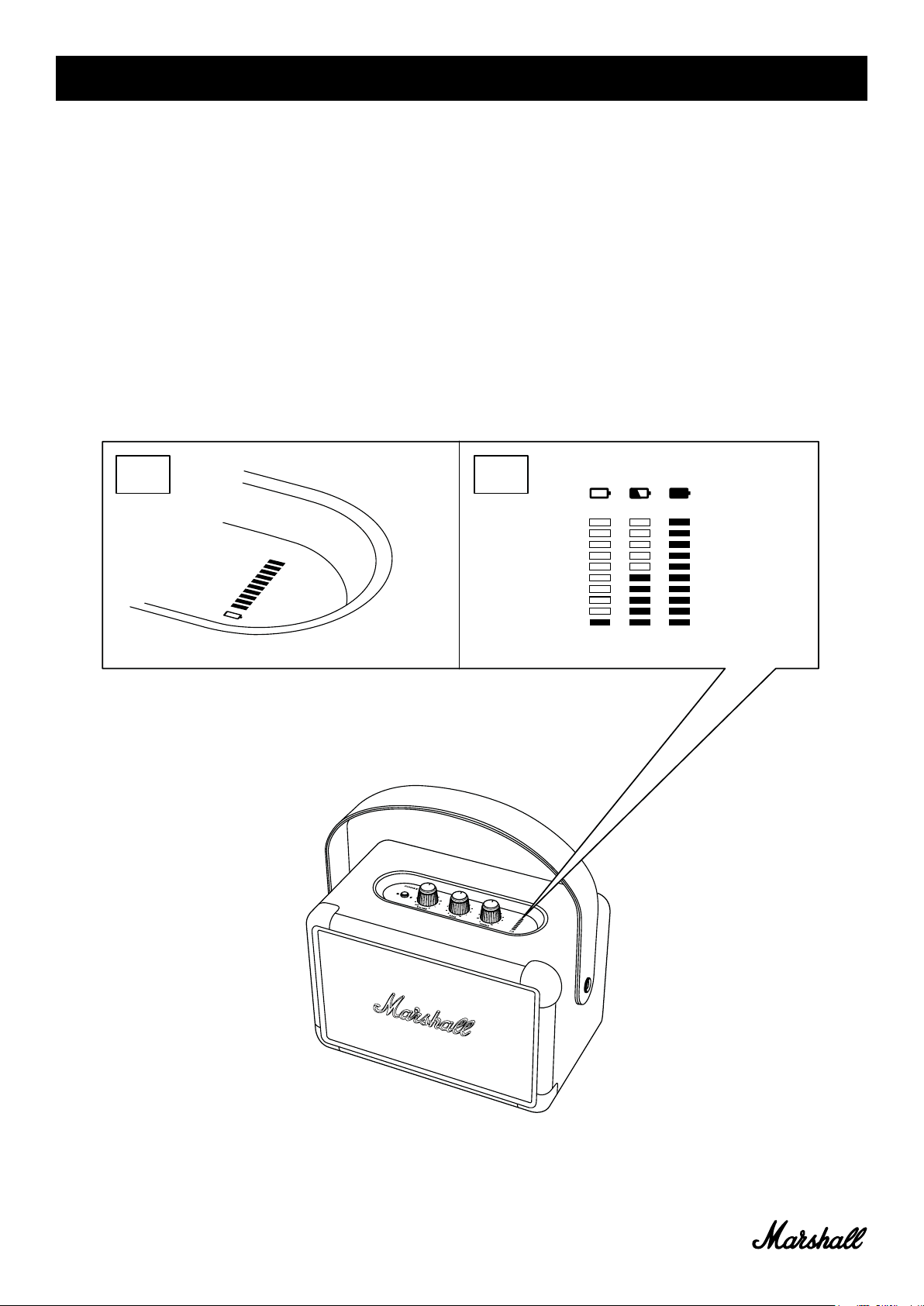
BATTERY LEVEL INDICATOR
The battery level indicator shows the battery charge of the Kilburn II.
The indicator is dimmed during normal operation to save battery power.
Turning any knob will make the indicator light up.
When charging the battery, the indicator displays the battery charge with
a rising animation.
001. 002.
012.
Page 13
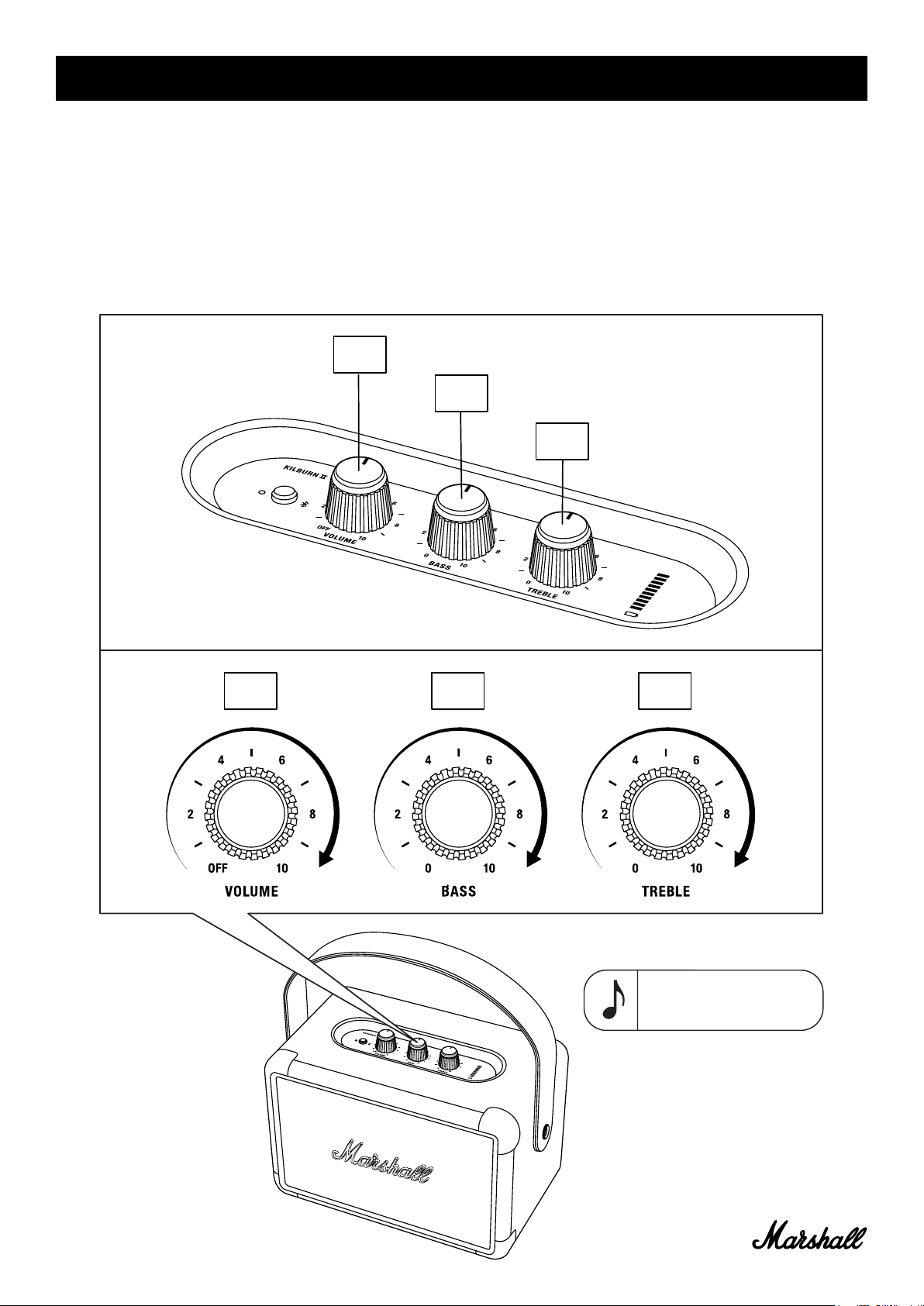
ADJUSTING THE VOLUME/BASS/TREBLE
The Kilburn II has three knobs for adjusting the audio.
001. Volume knob
002. Bass knob
003. Treble knob
001.
002.
003.
001.
002. 003.
Note: The volume knob is
also the on/off switch.
013.
Page 14
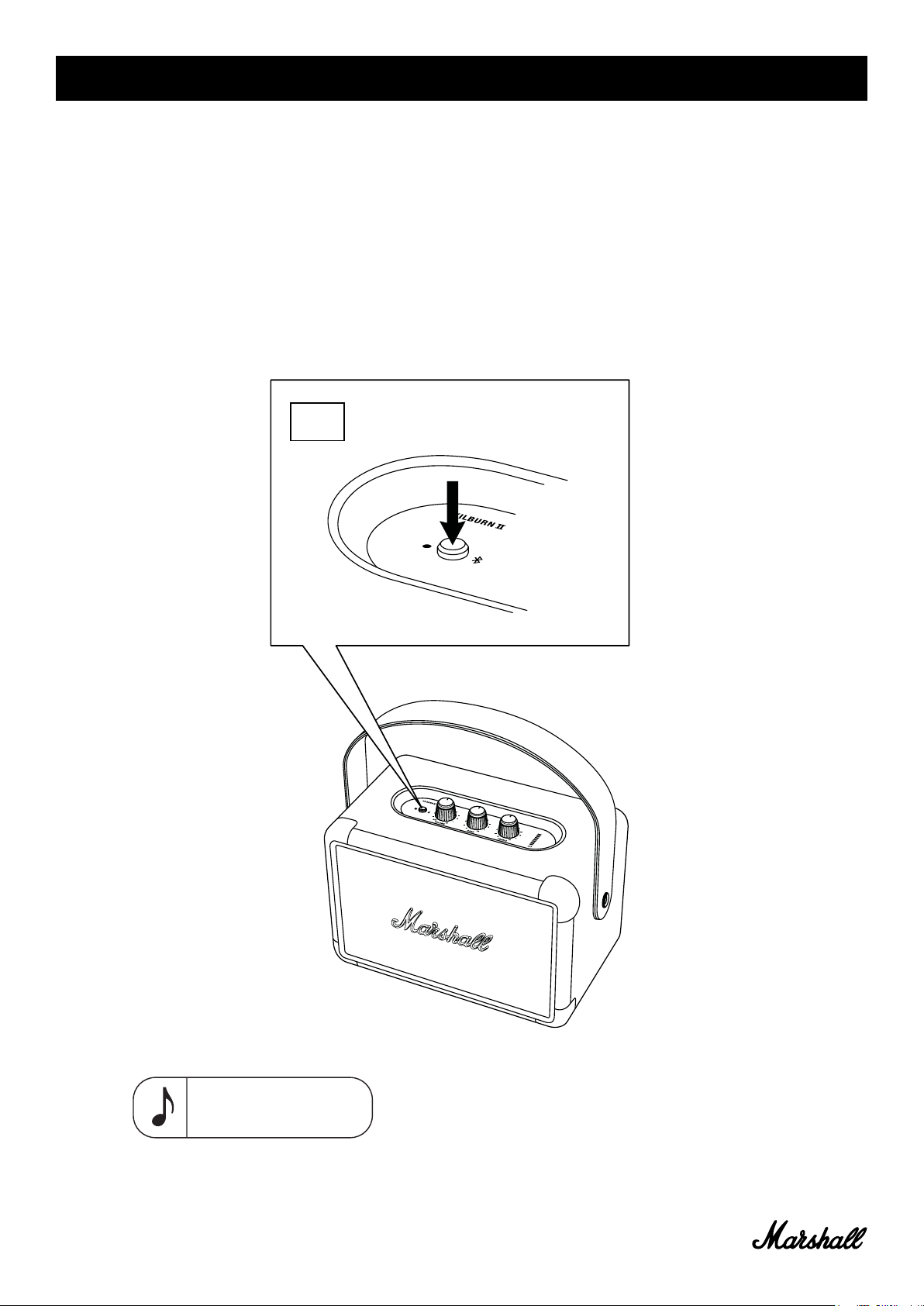
STANDBY MODE
If the Kilburn II is left unused for 10 minutes the speaker saves battery
charge by going into standby. In this mode all indicators are off and the
speaker does not respond to Bluetooth connection.
001. Push the Bluetooth button to wake the speaker from standby mode.
001.
014.
Note: The internal battery
can be charged while in
standby mode.
Page 15
TECHNICAL INFORMATION
Acoustic specification
• Portable stereo loudspeaker with bass reflex system
• Digital class D amplifiers: 2 X 8 W + 1 X 20 W
• Tweeters: 2 X 20 mm dome tweeters
• Woofer: 1 X 4" woofer
• Bass and treble tone controls
• Frequency response: 52–20,000 Hz ±6 dB
• Maximum sound pressure level: 100.4 dB SPL @ 1 m
Connectivity:
• Bluetooth®: Bluetooth 5.0 with Qualcomm aptX™
• AUX: 3.5 mm stereo jack
Technical information
• Mains input voltage: 100–240 V~
• Mains frequency: 50–60 Hz
• Size: 243 X 162 X 140 mm
• Weight: 2.5 kg
Battery
• Battery type: Built-in, rechargeable Li-ion battery
• Playtime: 20+ h
• Charging time: 2.5 h
015.
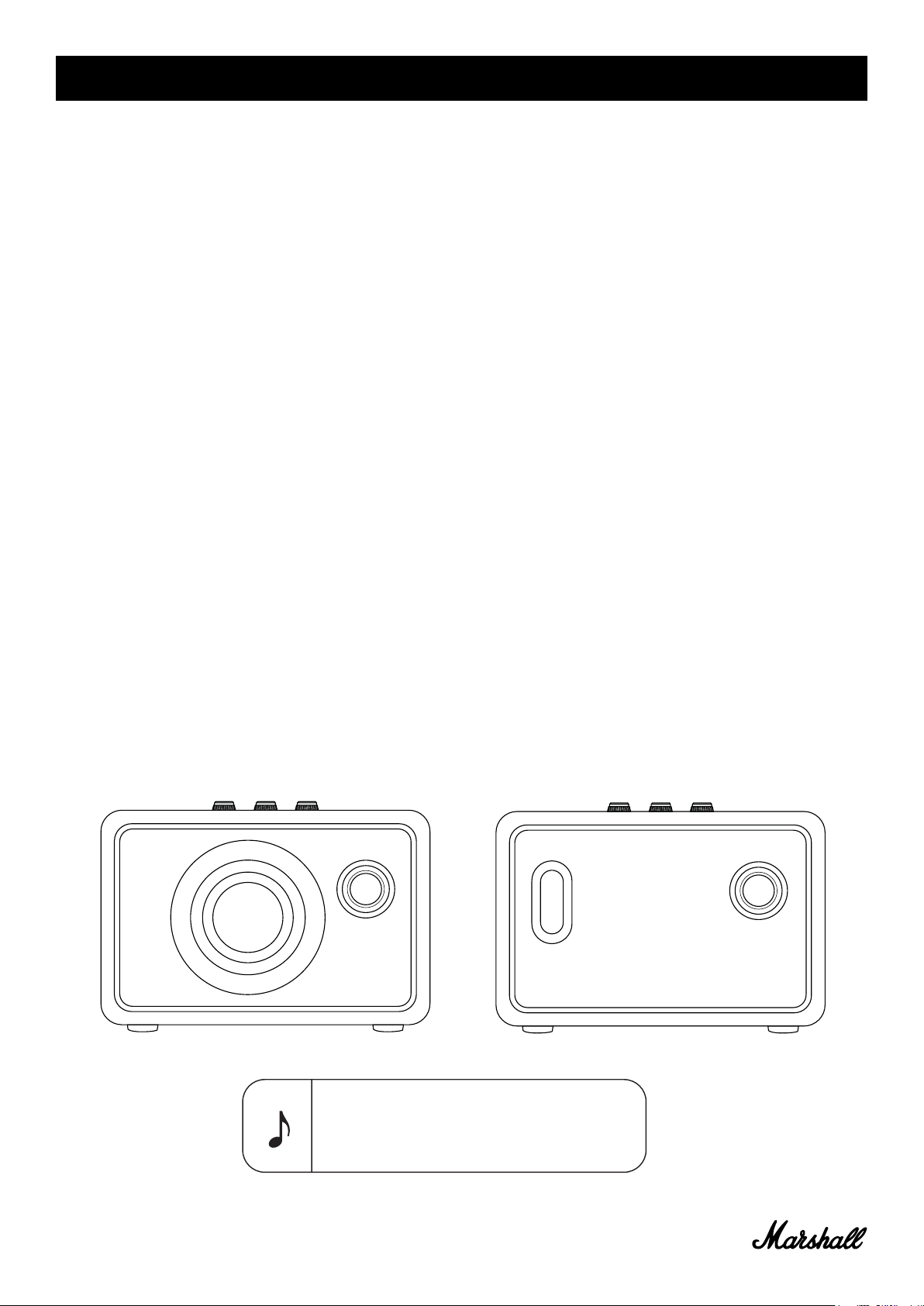
FRONT BACK
Note: The front of the speaker is not removable. This
illustration intends to show the internal speaker
layout. Do not attempt to remove the fret for risk of
damaging your speaker.
Page 16
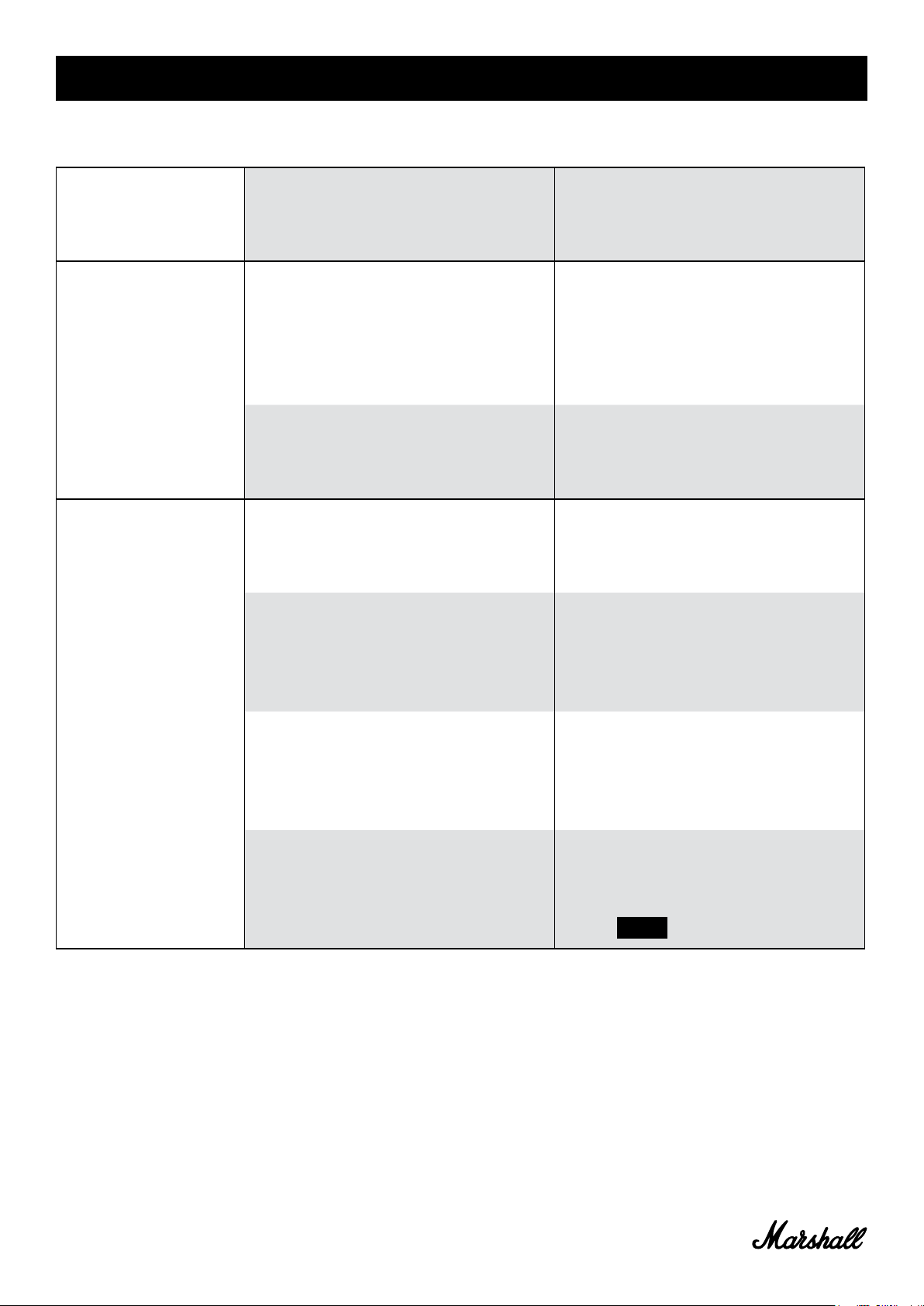
TROUBLESHOOTING
PROBLEM CAUSE ACTION
The Kilburn II does
not turn on.
There is no audio
Cannot connect
or pair with a
Bluetooth
device
The battery is discharged. Connect the power cord to the
Kilburn II and a working wall
socket.
The wrong audio source is
selected.
Volume is set too low on
either the audio source or the
speaker.
Bluetooth is not enabled on
your device (smartphone,
tablet, computer).
There are already two devices
connected to the speaker.
Ensure that the device is
connected to the Kilburn II.
Check that there is no other
device connected that is
playing.
Slightly increase the volume
on your audio source or the
speaker.
Activate Bluetooth on your
device.
Disconnect one of the
connected Bluetooth devices
before connecting to the
speaker.
The speaker is not in pairing
mode.
Your device prompts you for a
pin code.
Push and hold the Bluetooth
button for 3 seconds to make
the speaker discoverable by
the device.
In most cases, no pin code
(password) is needed. If a pin
code is requested, use the pin
code 0000 .
016.
Page 17

TROUBLESHOOTING
PROBLEM CAUSE ACTION
The speaker is not
responding
Bluetooth
connection drops
out
There is a
crackling sound
A software problem has
occurred.
The two Bluetooth devices are
too far apart or the connection
is affected due to obstacles.
There is a strong electric field
surrounding the Kilburn II.
The amplifier is clipping as it
has run out of output power.
Unplug the speaker mains plug
from the wall socket, wait for
15 seconds, then plug it in
again.
Move the devices closer so
that they are within 10 metres,
and unobstructed by obstacles
such as walls or doors.
Items such as microwave
ovens, wireless network
adapters, fluorescent lights
and gas cookers use the
same frequency range as the
Bluetooth device. This may
lead to electrical disturbances.
Decrease the volume on your
audio source.
Lower the volume or bass on
the Kilburn II.
017.
Page 18
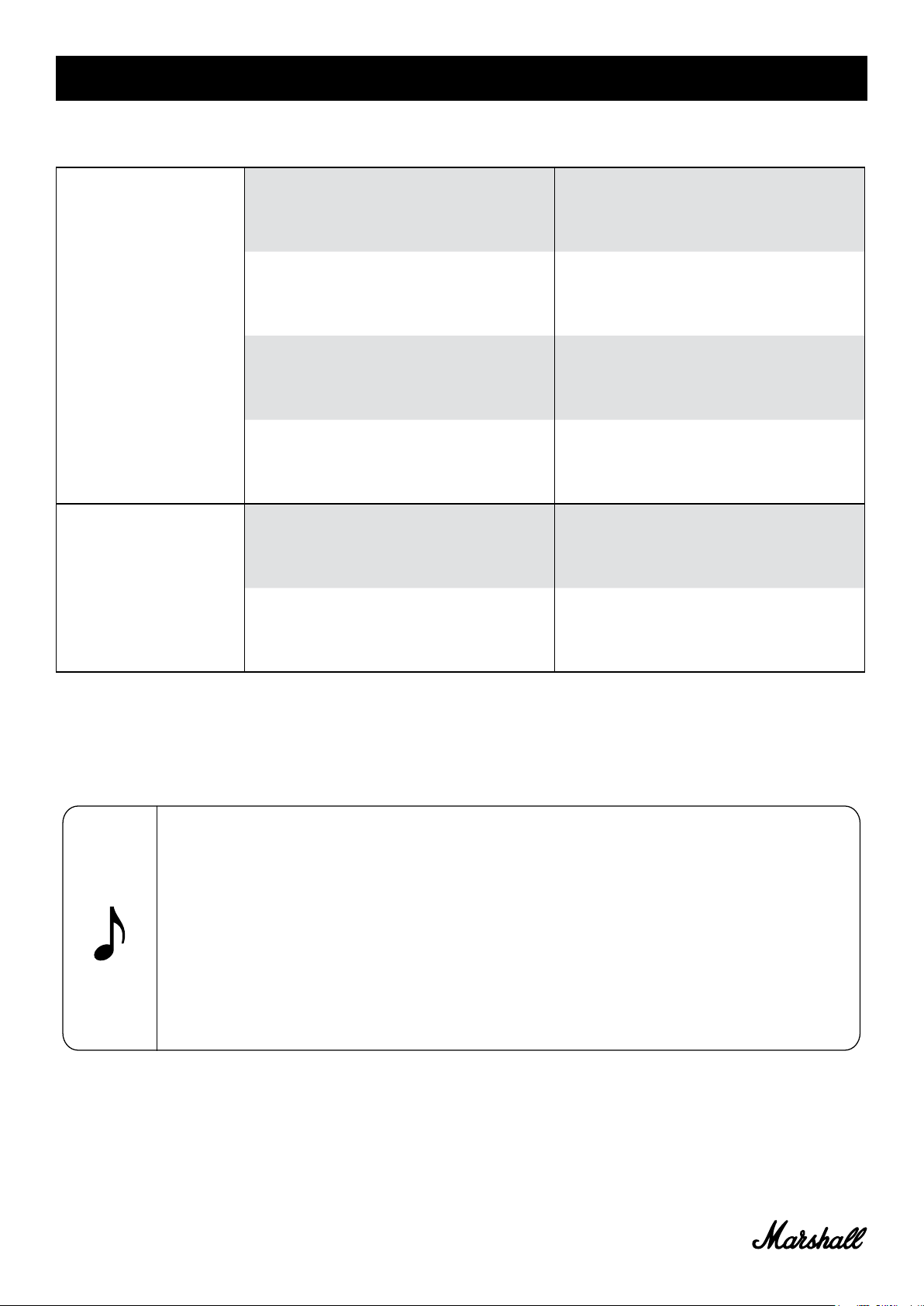
TROUBLESHOOTING
PROBLEM CAUSE ACTION
The audio is
distorted
Erratic
performance
Volume is set too high on the
audio source.
The audio stream or audio file
is of poor quality.
Volume is set too high on the
Kilburn II.
Too much bass/treble on the
speaker.
Interference from another
electronic device.
Turn down the playback
volume on the audio source.
Try another audio file or music
player.
Lower the volume on the
speaker.
Lower the bass/treble on the
speaker.
Move the Kilburn II to another
spot.
Turn off or move the interfering
electronic device.
018.
Notes:
A Bluetooth device could cause audio-related or technical faults, depending on use, in the following cases:
• When some part of the body is in contact with the receiving/transmitting system for the Bluetooth device or the
Kilburn II.
• Electrical variations due to obstacles in the form of walls, corners, etc.
• Exposure to electrical disruptions from devices within the same frequency band, for example medical
equipment, microwave ovens and wireless networks.
This wireless device may cause electrical disruptions during use.
Page 19

019.
WWW.MARSHALLHEADPHONES.COM
 Loading...