

Page 1

Persona Help
www.marinersoftware.com
Contents
What's new in
Persona?
Learn About Persona
Solving Problems
Page 2

Persona Help
Persona Help
Contents
Create Mode
Interact Mode
Introduction
Learn Mode
Misc
Shortcuts
Solving problems
Discover what you can do
Use Persona Help to discover what you can do using Persona.
To quickly find answers to specific questions, type a word or phrase in the search box above
and press Return.
To choose what you want to search, click the magnifying glass and choose an item from the
pop-up menu, then type your search phrase in the box and press Return.
To explore what you can do with Persona, click an item on the left.
Page 3

Overview
Persona Help
The brainchild of Mariner Software's resident staff, and squarely aimed at the character development space, Persona aids you
in crafting archetypal themed characters and plots by using time-honored psychological principles to describe the motivations
and interactions between different characterizations of people. Persona is based on an ideology that by categorizing
characters into archetypes we can better know their background which in turn shows us their motivations and then predict
their behavior. Instead of changing characters as you write, you purposefully develop characters using psychological
principles of Plato, Jung and others.. Whether your story's hero is a brainiac talking fish or your villainess is an outcast
orphanage owner, Persona helps you explore how each character's unique psychology and background influences their
dealings and dialogue.
The character arc within a story is generally seen as a fulfillment of what a character needs to make them whole privately,
personally, and professionally. Persona delves into your character's private and personal goals by defining what events in their
life might have made them the way they are which in turn helps predict their behavior in your story. Good for ensemble casts,
episodic material, feature length film, stage, or radio, Persona deals with the characters not the format in which the story is
conveyed.
With Mariner Persona you can:
Overview
Explore relationships and interactions between each of your characters
Categorize characters into one of 32 archetypes and 64 styles
Create Smart Groups of characters based on attributes like tags, type sex, or any word or phrase from your
notes
Construct ad hoc groups of characters without a defined relationship to explore their interactions
See the corresponding archetypes for Heroes and Heroines and what they become if they corrupt into a villain or
villainess
Shape the details of a character from the color of their eyes to their hobbies or occupation
Predict their behavior and dialogue based on their archetype, background, and motivations
Go to the web site
Page 4

Persona Help
Persona Help
Contents
Create Mode
Interact Mode
Introduction
Learn Mode
Misc
Shortcuts
Solving problems
Introduction
Heroes color wheel
Heroines color wheel
How do archetypes relate to each other
The Ideology
Villainesses color wheel
Villains color wheel
What is the archetype color wheel?
Page 5

Persona Help
Persona Help
Contents
Create Mode
Interact Mode
Introduction
Learn Mode
Misc
Shortcuts
Solving problems
Create Mode
Adding a photo to a character
Creating a SmartGroup
Creating a character
Creating a group
Duplicating a character
Printing a character
Page 6

Persona Help
Persona Help
Contents
Create Mode
Interact Mode
Introduction
Learn Mode
Misc
Shortcuts
Solving problems
Interact Mode
Interactions between characters
Page 7

Persona Help
Persona Help
Contents
Create Mode
Interact Mode
Introduction
Learn Mode
Misc
Shortcuts
Solving problems
Learn Mode
Learning about the archetypes and their styles.
Page 8

Persona Help
Persona Help
Contents
Create Mode
Interact Mode
Introduction
Learn Mode
Misc
Shortcuts
Solving problems
Misc
Managing Tags
Names Database
Page 9

Persona Help
Persona Help
Contents
Create Mode
Interact Mode
Introduction
Learn Mode
Misc
Shortcuts
Solving problems
Shortcuts
Keyboard shortcuts
Page 10

Learn about Persona
Persona Help
In this section, you'll find links to help you learn about Persona.
Learn about Persona
Overview
Learn what Persona is and what you can do with it.
Go to overview
Shortcuts
Learn how to use your keyboard to do tasks more quickly.
Go to keyboard shortcuts
Go to the Persona web site
Page 11

Creating a character
Persona Help
Creating a character
1. Press Command-N or click the plus "+" button.
2. A new Character appears in the side bar and the Name field is highlighted.
3. Type a name for the character.
4. Fill out as much info for the character as you'd like.
Note: The list of styles is specific to the archetype you choose.
Tell me more
Page 12

Printing a character
Persona Help
Printing in Persona yields a character sheet printout. The format is set from within the application in html. Here's how to
print:
A print window appears.
Printing a character
1. Press Command-P or File>Print...
1. Click the Print button.
Note: Only the currently selected character is printed. To Print all your characters use the File>Print All… command.
Note: If you have a lot of text or notes, the content for the character may spill over onto an additional page. There are no
options (currently) to scale or restrict the content to one page.
Tell me more
Page 13

Creating a group
Persona Help
Groups can contain an ad hoc assemblage of characters. Simply drag a character to a group to add it to that group.
Characters can belong to as many groups and SmartGroups as you'd like. Here is how to create a group:
An untitled group appears in the source list pane on the left.
Creating a group
1. From the File menu, select New Group (Shift-Command-N)
1. Type a name for the Group.
Tell me more
Page 14

Creating a SmartGroup
Persona Help
SmartGroups contain an assemblage of characters based on criteria. Once, the criteria is set, the smartGroup filters out
matches. Characters can belong to as many groups and SmartGroups as you'd like. Here is how to create a SmartGroup:
A SmartGroup sheet appears.
The SmartGroup appears in the source list on the left-hand pane.
Creating a SmartGroup
1. From the File menu, select New SmartGroup (Option-Command-N)
1. Type a name for the SmartGroup.
2. Choose the criteria for the smart group.
3. Click OK
Note: SmartGroup names can be edited directly in the source pane by double-clicking on them.
Tell me more
Page 15

The Ideology
Persona Help
Mariner Persona is about categorizing characters. There are eight Hero archetypes, eight Heroines, eight Villains, and eight
Villainesses. Each archetype has two styles. While categorizing anything might be a superficial activity, it has merit in that it
helps you determine the background and therefore motivations of your character. Rather than constantly changing your
character during your writing, starting with clear ideas about who your characters are and what they stand for will make the
situational writing involving them much easier. For instance, If we know that a kid named Bruce was raised in a wealthy
family and saw his parents murdered, and vows to secretly uphold justice and train mentally and physically to do so - we
could then have a good idea how he'll act.
Often the styles for an archetype are based on whether the personality and values came from Birth right (or lack thereof) or
personal effort.
The Ideology
Tell me more
Page 16

How do archetypes relate to each other
Persona Help
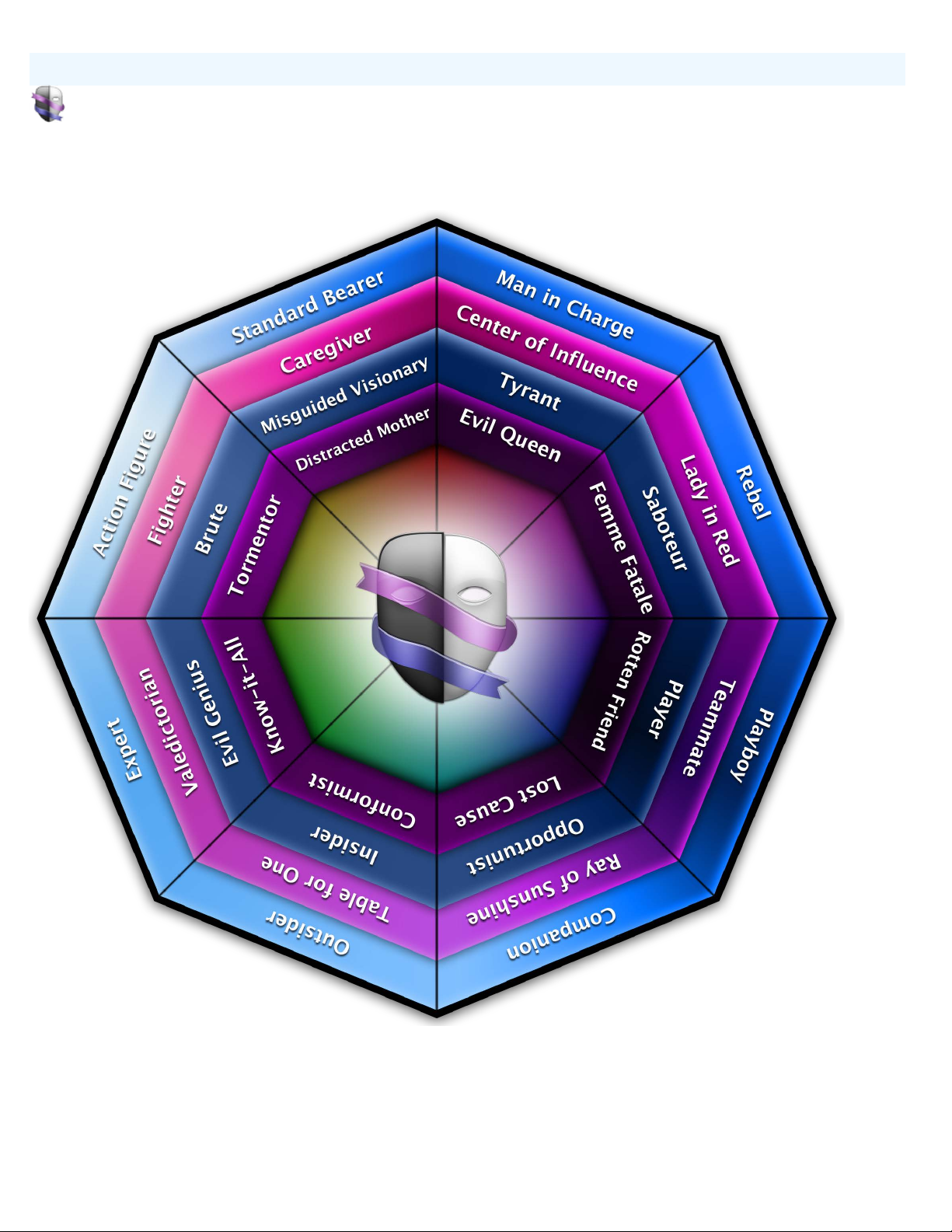
Archetypes in Persona have a relationship to each other. We tend to think of the range of attributes as a continuum or a
wheel. Much like a color wheel we see that there are similar, inverted, synonymous, and complimentary archetypes. Here is a
bit more on each of those:
Each character has a section in the create mode that shows the connections to the other archetypes as mentioned above. Here
is an Example for the Man-in-Charge:
How do archetypes relate to each other
Similar archetypes would be in adjacent positions on a wheel. They are likely, most like the archetype.
Inverted archetypes would be their form if they were corrupted or if they were made whole.
Synonymous archetypes are the opposite gender and inverted form.
Complementary archetypes would sit across from the archetype on a wheel. Much like complimentary colors on a color
wheel i.e red and green or blue and orange.
Tell me more
Page 17
What is the archetype color wheel?
Persona Help
In the learn mode, selecting any of the sidebar headings (Heroes, Heroines, Villains, Villainesses) will display it's
corresponding color wheel graphic. These graphics are to help you visualize the relationships between the archetypes.
What is the archetype color wheel?
Tell me more
Page 18
Heroes color wheel
Persona Help
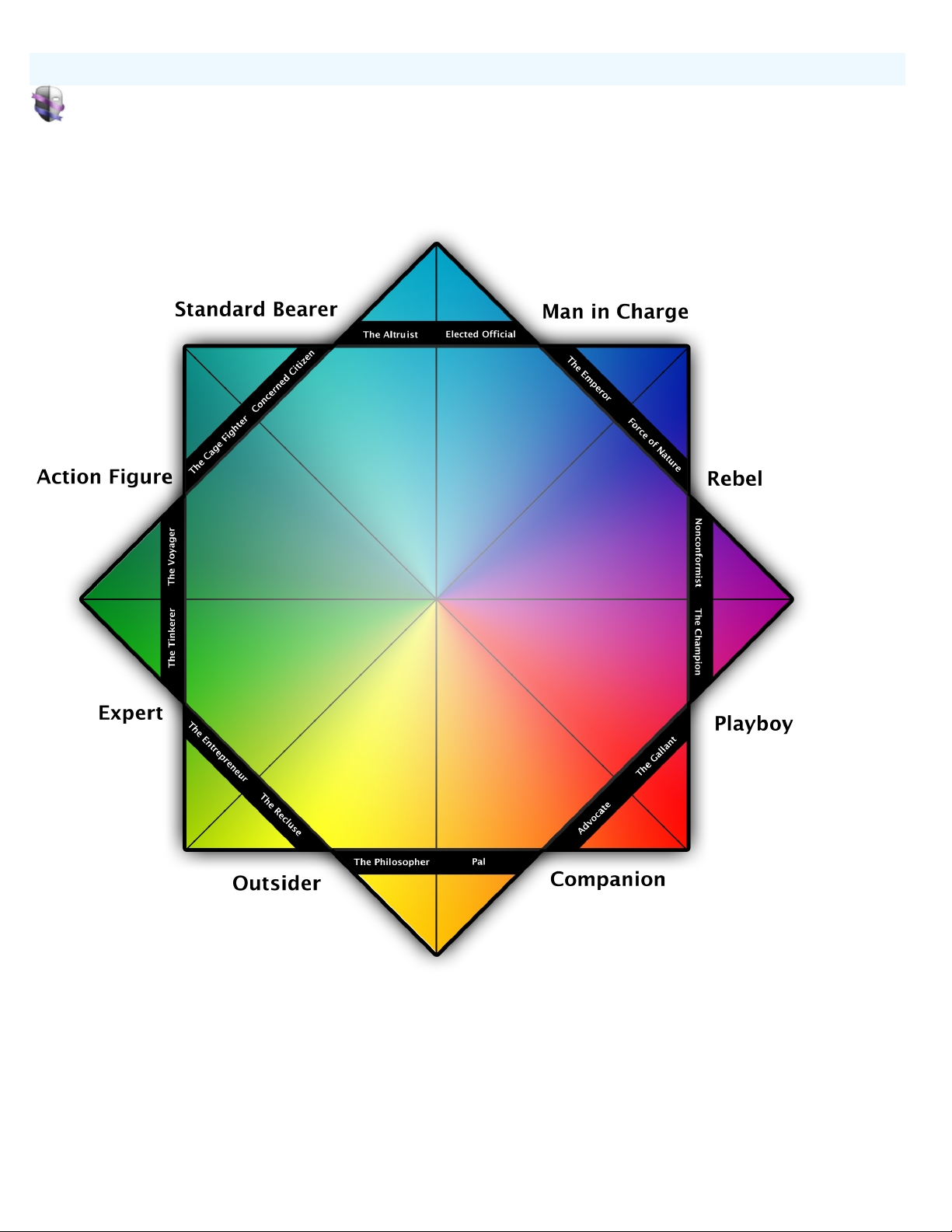
The relationships between the heroes:
Heroes color wheel
Tell me more
Page 19
Heroines color wheel
Persona Help
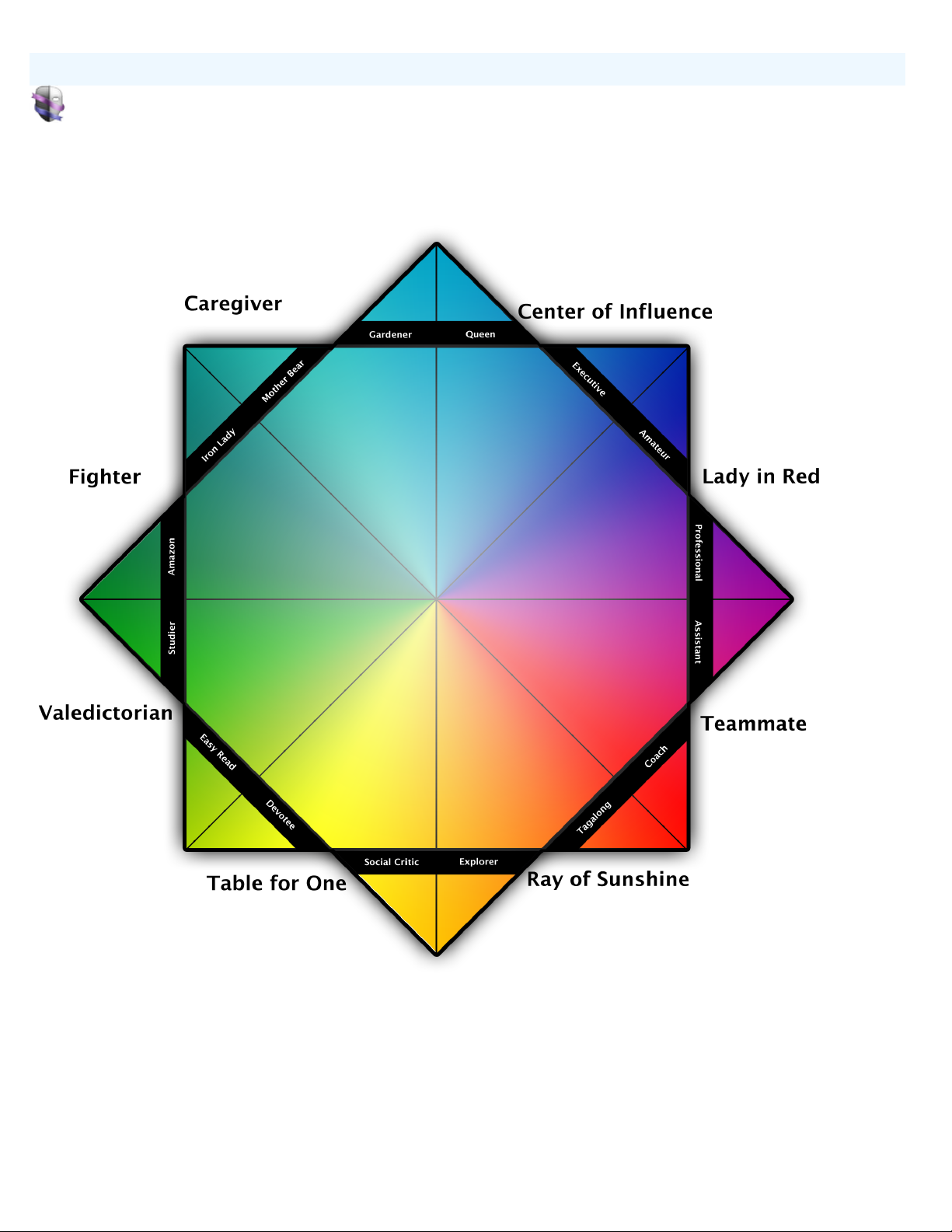
The relationships between the heroines:
Heroines color wheel
Tell me more
Page 20
Villains color wheel
Persona Help
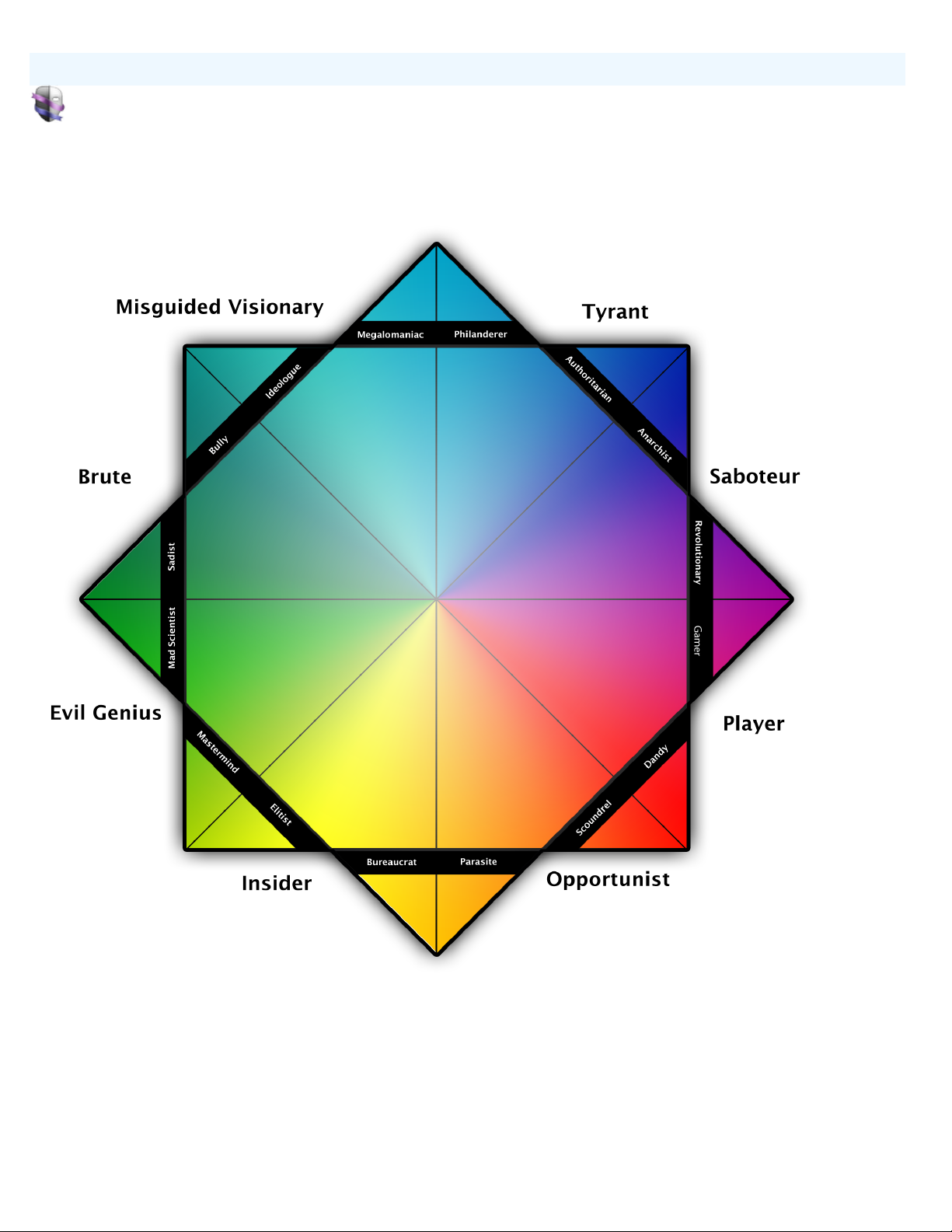
The relationships between the villains:
Villains color wheel
Tell me more
Page 21
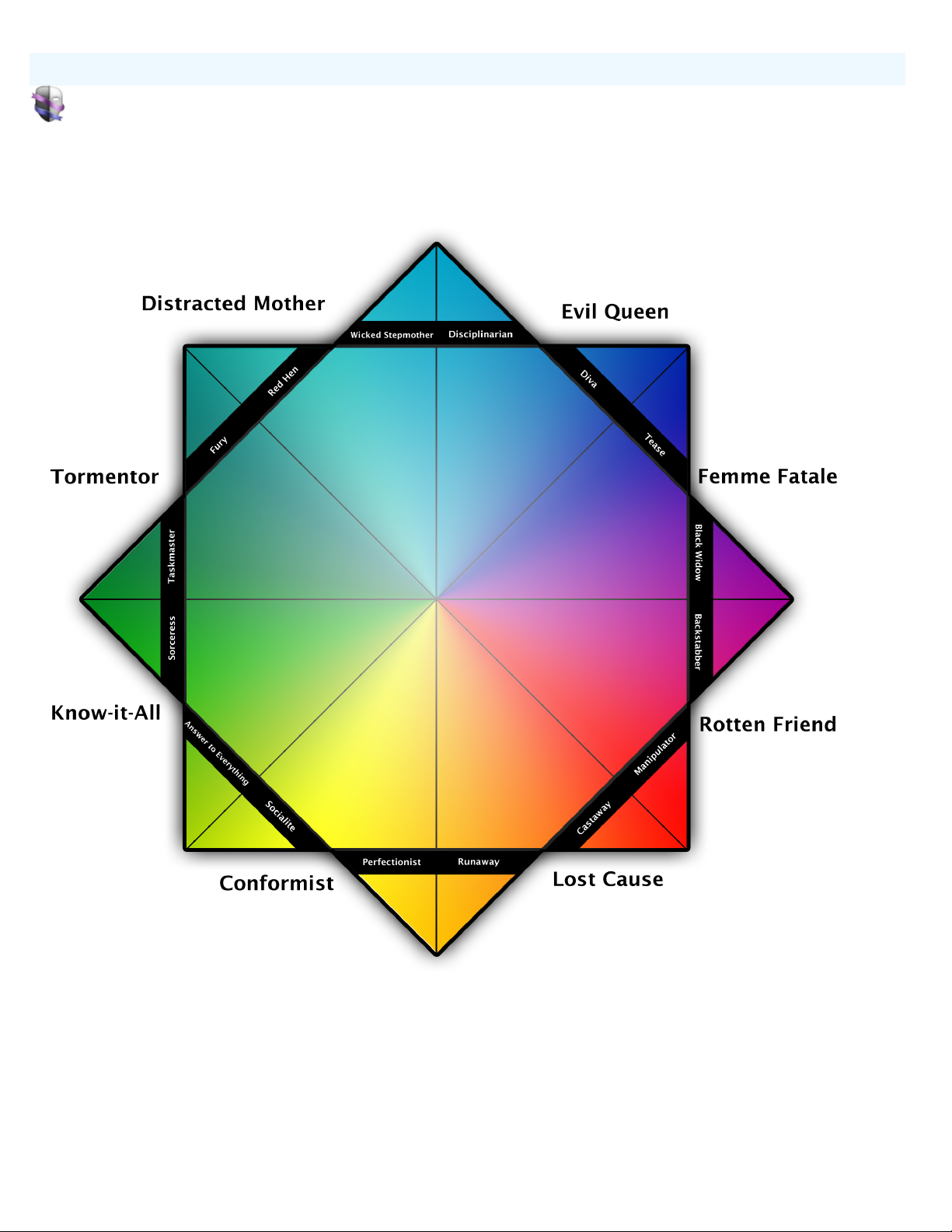
Villainesses color wheel
Persona Help
The relationships between the villainesses:
Villainesses color wheel
Tell me more
Page 22

Duplicating a character
Persona Help
To duplicate a character:
Duplicating a character
1. click the action menu at the bottom of the source list.
2. Choose Duplicate selected character.
3. A "Copy of" character_name appears in the source list.
Tell me more
Page 23
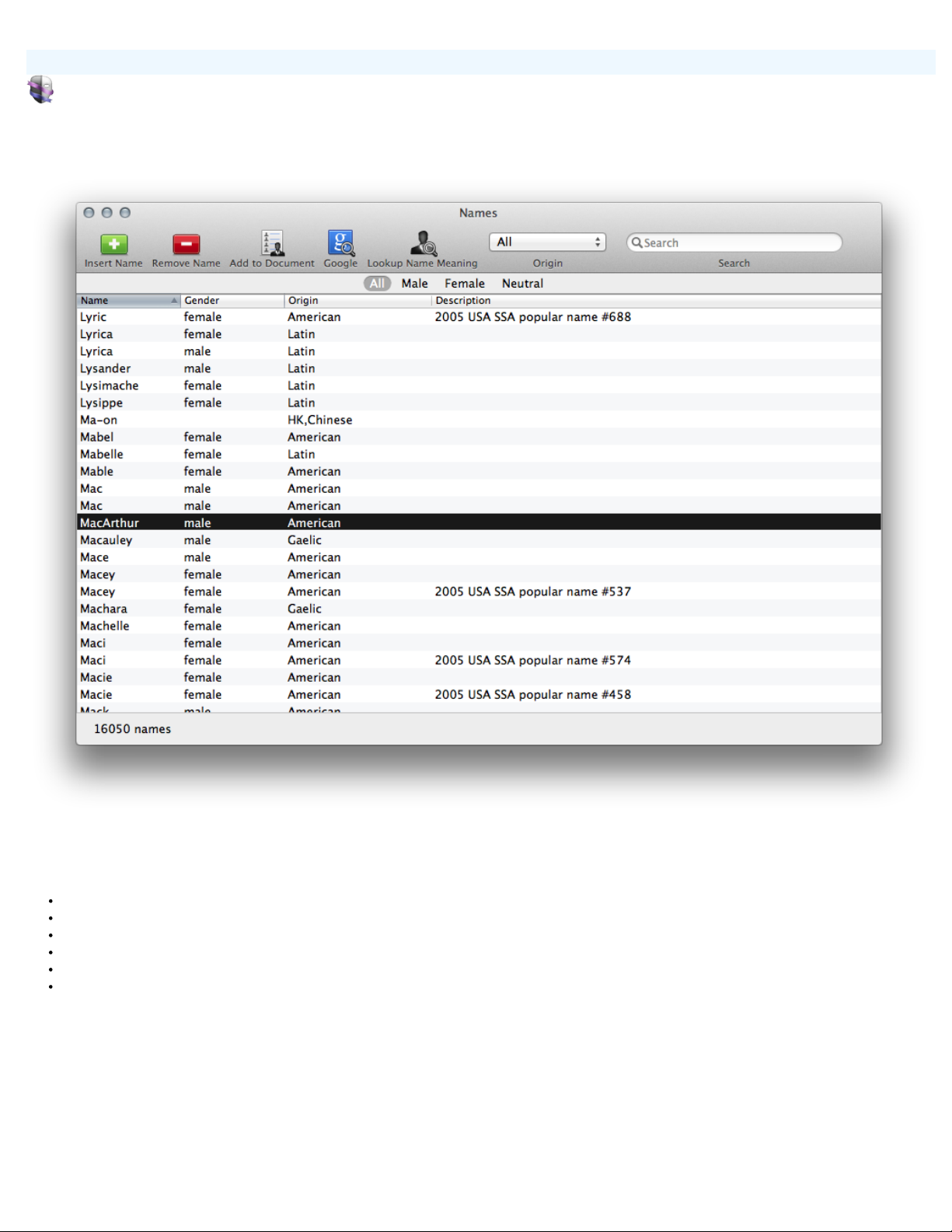
Names Database
Persona Help
Names Database
The names database is a way to find some inspired names for your characters. It helps you see the names, their meaning, gender, origin and see some description about
the name.
Features:
Filter by Origin and/or sex
Look up a name meaning
Add your own names
Add descriptions
Google for name usage
Search over 16000 names
Tell me more
Page 24
Managing Tags
Persona Help
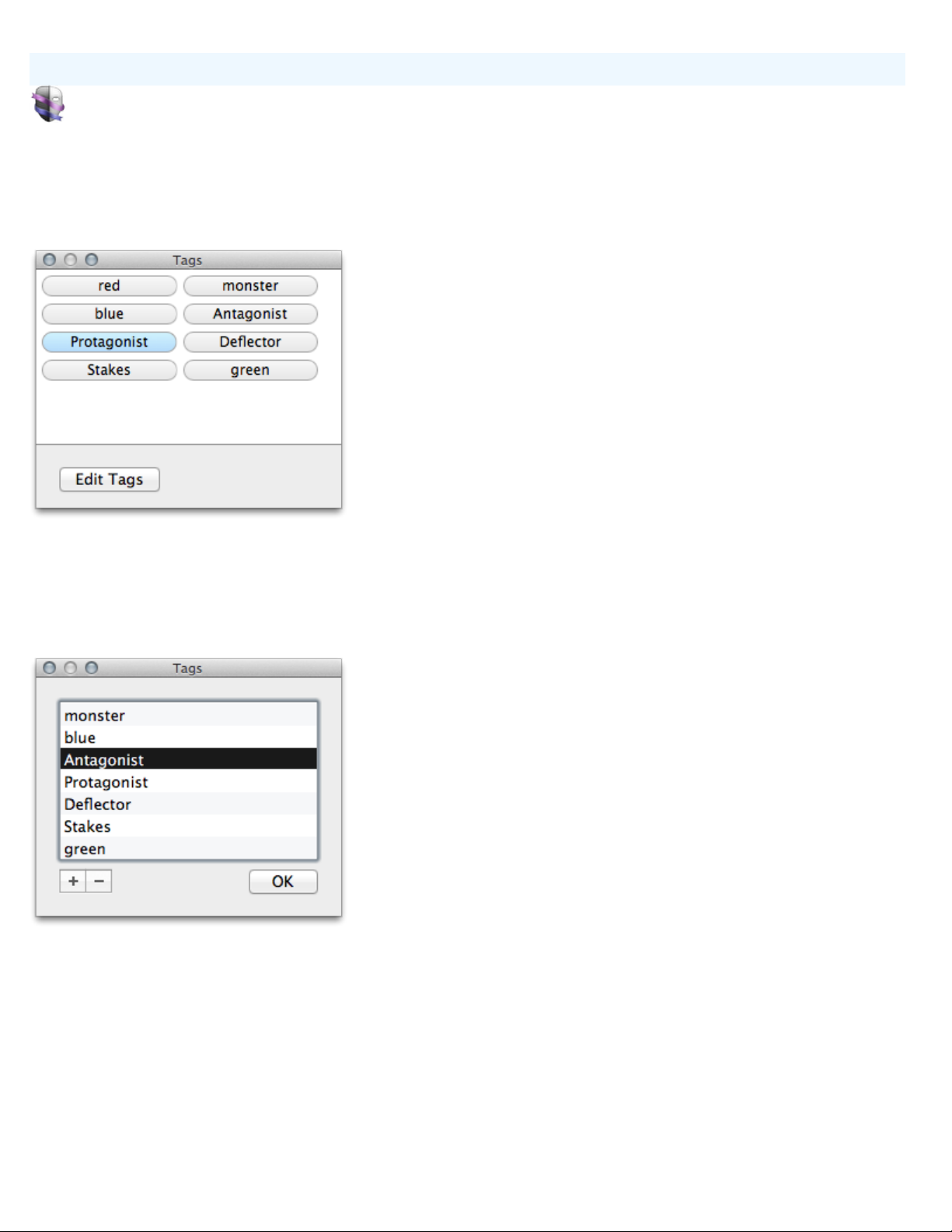
Tags are bits of metadata that you can assign to characters. They are specific to the file you are working on and not shared
across the application.
To easily add and remove tags, open the Tags window - Window>Tags CMD-K.
Managing Tags
Tags that apply to the current character will appear with a blue highlight.
To edit the tags, click the edit button.
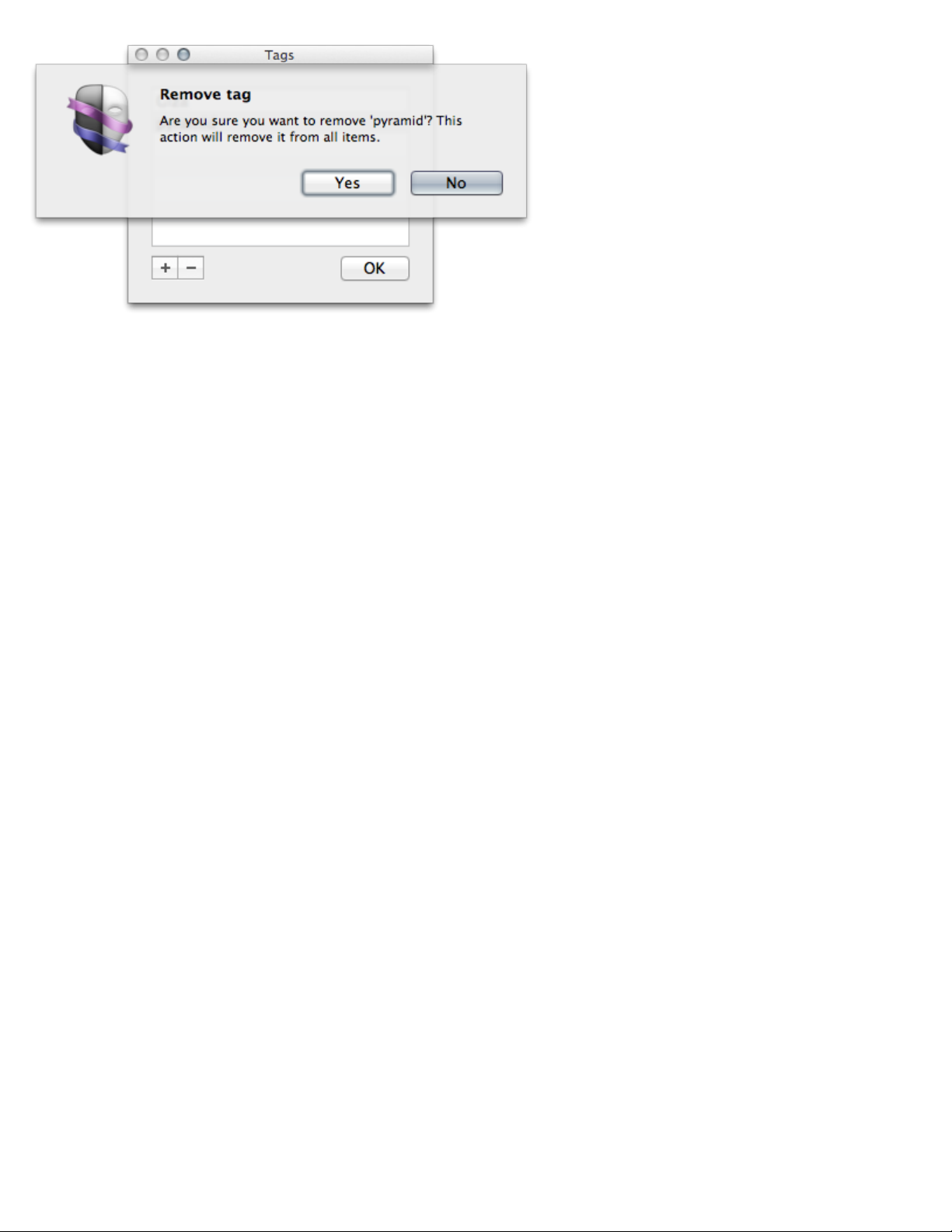
click the plus button (+) to add a tag.
Click the minus button (-) to remove a tag.
Note: removing a tag assigned to characters, removes the tag from those characters.
Page 25
Managing Tags
Tell me more
Page 26

Interactions between characters
Persona Help
Interactions between characters
Interactions mode
How they Clash
How they Mesh
How they Change
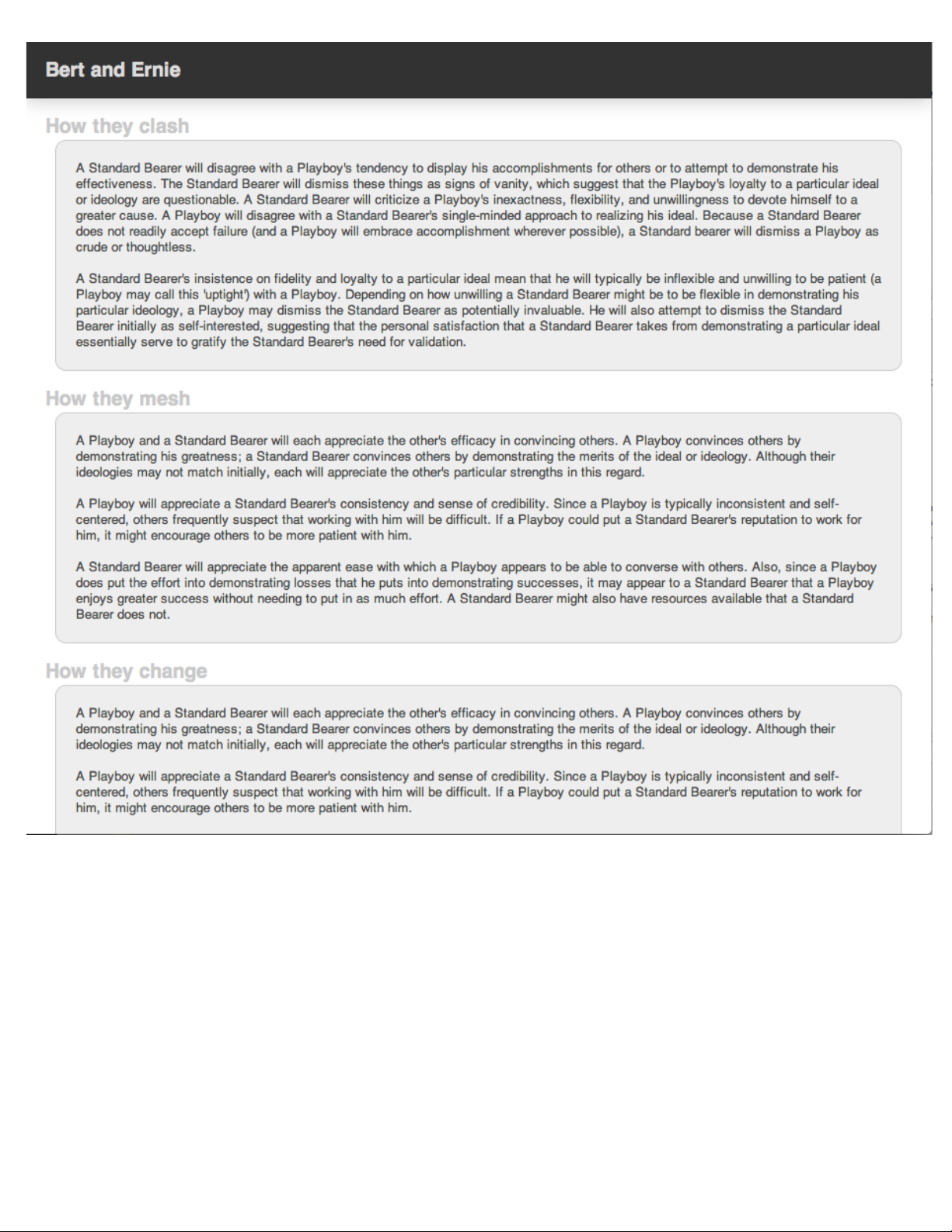
There are 32 Archetypes, Each archetype can interact with any of the other archetypes including a character of it's same archetype, thus there are 32
interactions per archetype. That is 1024 interactions! with well over 3072 paragraphs of text about their interactions. Obviously, this is a big part of
Persona. Classify a character archetype, see how your cast might interact, all before doing your writing.
When you select a character, you see the interactions between that character and the other characters.
When you select a group, you see the interactions between the members of the group.
When you select a SmartGroup, you see the interactions between the members of the SmartGroup.
Here is a sample interaction:
uses your selected character, group , or smart group to show you the relevant interactions. Interactions are composed of three things:
Page 27
Interactions between characters
Tell me more
Page 28

Learning about the archetypes and their styles.
Persona Help
Learn mode displays the name, type, sex, description, background, styles, qualities, flaws, occupations, and examples for the
archetype. The view provides an expansive view of the content.
Note: This view is not printable for digital rights reasons.
Learning about the archetypes and their styles.
Tell me more
Page 29

Adding a photo to a character
Persona Help
Each character can have one photo.
To add a photo you can:
The photo size on screen is 150px x 150px. In print, it is 200px x 230px.
Adding a photo to a character
Drag and Drop an image from the Finder or another app
Copy and paste a picture into the image well
From the menu, select Edit>Choose Character Image…
Note: The image you choose will be stored at the original size, so large megapixel pictures will bloat the file size quickly.
Tell me more
Page 30

Keyboard Shortcuts
Persona Help
Keyboard Shortcuts
You can use your keyboard to quickly accomplish many tasks in Persona. To find the shortcuts for common commands, look
in the menus (or see the list at the bottom of this page).
To do an action, press the keys indicated below.
Action Shortcut
Persona
Hide Persona Command-H
Hide Others Option-Command-H
File
New Character Command-N
New Group Shift-Command-N
New SmartGroup Option-Command-N
New Project Option-Shift-Command-N
Open Command-O
Close Command-W
Save Command-S
Page Setup Option-Command-P
Print Command-P
Edit
Undo Command-Z
Redo Shift-Command-Z
Cut Command-X
Copy Command-C
Paste Command-V
Paste and Match Style Option-Shift-Command-V
Select All Command-A
Find Command-F
Find Next Command-G
Find Previous Shift-Command-G
Use Selection for Find Command-E
Jump to Selection Command-J
Show Spelling and Grammar Command-:
Page 31

Keyboard Shortcuts
Check Document Now Command-;
Start Dictation Check system Prefs (Mountain Lion+ Only)
View
Hide Toolbar Option-Command-T
Create Command-1
Interact Command-2
Learn Command-3
Window
Tags Command-K
Minimize Command-M
Page 32

Solving problems
Persona Help
If you need help solving a problem you're having while using Persona, look below for a solution. If you can't find what you're
looking for, try searching help using the box above, or click the link at the bottom of the page to go to the Persona Support
web site (you need to be connected to the Internet).
I'm having trouble exporting.
I'm having trouble printing.
Solving Problems
Go to the Persona Support web site
Page 33

Persona Help
Persona Help
Contents
Create Mode
Interact Mode
Introduction
Learn Mode
Misc
Shortcuts
Solving problems
Solving problems
I'm having trouble exporting.
I'm having trouble printing.
Page 34

I'm having trouble printing.
Persona Help
Much of the content in Persona is protected from printing (due to copyright concerns). The interactions are printable but the
archetype general info and examples are not (at this time).
Go to the web site Tell me more
I'm having trouble printing.
Page 35

I'm having trouble exporting.
Persona Help
Persona currently does not "export" to other file types. One can print an archetype or the interactions. The file format from
Persona is an industry standard XML.
Go to the web site Tell me more
I'm having trouble exporting.
 Loading...