

Page 1
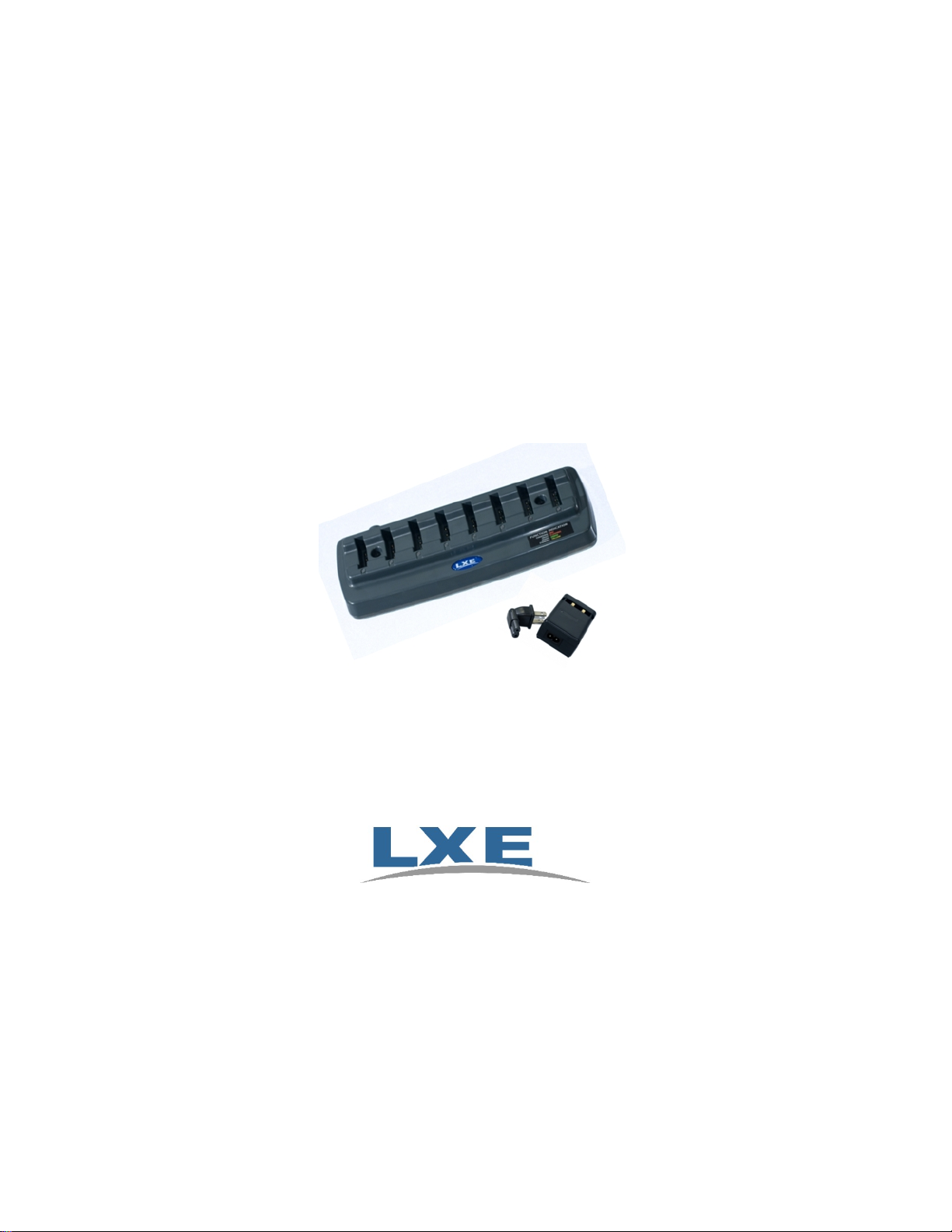
Bluetooth Ring Scanner
Battery Charger User’s Guide
Models 8650A380SINGLECHGRWWS and 8650A378BTBOHCHGRWW
For Use with LXE (8650A376BTBOHBATTERY) Lithium Ion Battery Packs
Copyright © 2008 by LXE, Inc.
All Rights Reserved
E-EQ-BRSCHGROGWW-B
Page 2
Notices
LXE Inc. reserves the right to make improvements or changes in the products described in this manual at any time without notice. While
reasonable efforts have been made in the preparation of this document to assure its accuracy, LXE assumes no liability resulting from any errors
or omissions in this document, or from the use of the information contained herein. Further, LXE Incorporated, reserves the right to revise this
publication and to make changes to it from time to time without any obligation to notify any person or organization of such re vision or changes.
Copyright Notice:
This manual is copyrighted. All rights are reserved. This document may not, in whole or in part, be copied, photocopied, re produced, translated or
reduced to any electronic medium or machine-readable form without prior consent, in writing, from LXE Inc. Further, LXE Incorporated,
reserves the right to revise this publication and to make changes to it from time to time without any obligation to notify any person or
organization of such revision or changes.
Copyright © 2008 by LXE Inc. , An EMS Technologies Company
125 Technology Parkway, Norcross, GA 30092, U.S.A. (770) 447-4224
LXE is a registered trademark of LXE Inc. All other brand or product names are tr ademarks or registered trademarks of their respective
companies or organizations. When manual is in PDF format: "Acrobat ® Reader Copyright © 1987-2008 Adobe Sy stems Incor porated. All rights
reserved. Adobe, the Adobe logo, Acrobat, and the Acrobat logo are trademarks of Adobe Systems Incorporated." applies.
FCC Information:
This device complies with FCC Rules, part 15. Operation is subject to the following conditions:
1. This device may not cause harmful interference
and
2. This device must accept any interference that may be received, including interference that may cause undesired operation.
Warning!
Changes or modifications to this device not expressly approved by LXE Inc., could void the user’s authority to operate this equipment.
EMC Directive Requirements:
This is a Class A product. In a domestic environment this product may cause radio interference in which case the user may be required to take
adequate measures.
Industry Canada:
This Class A digital apparatus meets all requirements of the Canadian Interference Causing Equipment Regulations. Operation is subject to the
following two conditions: (1) this device may not cause harmful interference, and (2) this device must accept any interference received, including
interference that may cause undesired operation.
Cet appareil numérique de la classe A respecte toutes les exigences du Règlement sur le matériel brouiller du Canada.
Le present appareil numérique n’emet pas de bruits radioélectriques dépassant les limites applicables aux appareils numeriques de le Classe A
préscrites dans le Reglement sur le brouillage radioélectrique édits par le ministere des Communications du Canada.
This equipment has been tested and found to comply with the limits for a Class A digital device, pursuant to part 15 of the
FCC rules. These limits are designed to provide reasonable protection against harmful interference when the equipment is
operated in a commercial environment. This equipment generates, uses, and can radiate radio frequency energy and, if not
installed and used in accordance with the instruction manual, may cause harmful interference to radio communications.
Operation of this equipment in a residential area is likely to cause harmful interference in which case the user will be
required to correct the interference at his own expense.
Important: This symbol is placed on the product to r emi nd users to dispose of Waste Electrical and Electronic Equipment
(WEEE) appropriately, per Directive 2002-96-EC. In most areas, this product can be recycled, reclaimed and re-used when
properly discarded. Do not discard labeled units with trash. For information about proper disposal, contact LXE through your
local sales representative, or visit www lxe com.
Initial Release May 2008
Revision Notice
Important Safety Warnings
– Save These Instructions
Installation and Operation Added Warnings for specific battery pack and AC adapter.
Added Warnings for specific battery pack and AC adapter.
Page 3

IMPORTANT SAFETY WARNINGS US
SAVE THESE INSTRUCTIONS
This document contains important safety and operating instructions for the LXE Bluetooth Ring Scanner Battery
Single-bay Charger or Multi-Charger. Please read all instructions and cautionary markings on the charger itself
before putting the unit into service.
Safety Alert Symbols
This symbol is used to call your attention to instructions concerning your personal safety. Watch for
this symbol – it will alert you to important safety precautions that must be observed to avoid death,
personal injury or property damage. Follow the instructions after the warning symbol and be alert to
the possibility of personal injury or death.
These signal words provide users with information about the seriousness of the hazard involved:
DANGER WARNING CAUTION
Indicates imminent hazards
which, if not avoided, WILL
result in severe personal injury
or death.
Safety Instructions
Setting up the Bluetooth Ring Scanner Battery Single-bay Charger or Multi-Charger
Locate or orient the AC cord so that it will not be stepped on, tripped over or subjected to damage or stress.
Charge only LXE (8650A376BTBOHBATTERY) Rechargeable Lithium Ion Battery Packs in these chargers. Other
batteries or battery packs may burst causing injury or property damage.
Indicates potential hazards
which, if not avoided, COULD
result in severe personal injury
or death.
Indicates hazards or unsafe practices which,
if not avoided, COULD result in minor or
moderate personal injury or property
damage.
Operating the Battery Chargers
Only users who have read and understand all operating instructions are qualified to operate the Bluetooth Ring
Scanner Battery Single-bay or Multi-Charger. Failure to read, understand and follow safety instructions may result
in injury or death.
Keep the chargers away from any heat source. Excessive internal heating can ruin the chargers.
Use care when inserting battery. Do not "slam" or slide the battery into the pocket, this could damage the chargers.
Keep dirt and foreign objects out of the battery pocket. Do not short circuit any of the contacts in the battery pocket,
this could result in injury or property damage.
Do not operate the charger if it has been dropped or damaged in any way. Return the charger to LXE.
Storing the Bluetooth Ring Scanner Battery Single-bay Charger or Multi-Charger
Disconnect charger by pulling the plug; not the cord.
Maintaining the Bluetooth Ring Scanner Battery Single-bay Charger or Multi-Charger
Service should be performed by trained persons only. Return the chargers to LXE.
Caring for Batteries
Do not dispose of batteries into a fire. Burning will generate hazardous vapors and may cause the battery to explode.
Failure to observe this warning may result in injury from inhalation of vapors or burns from flying debris.
Do not immerse batteries in water or any other liquid. If batteries are immersed, contact LXE.
Do not disassemble or perform modifications to the battery. There are no user serviceable components in the battery.
Do not place battery into pocket or toolbox with conductive objects (coins, keys, tools, etc.).
A battery placed on damp ground or grass could be electrically shorted. Lay the battery down flat when not in use.
Do not store batteries above 140°F (60°C) for extended periods.
Failure to observe these warnings could result in injury or damage to the battery from rapid discharge of energy or
overheating of the battery.
Page 4

Electrical Shock Hazards
The following precautions should be observed to avoid the risk of electrical shock hazards associated with charging
batteries:
The Bluetooth Ring Scanner Battery Single-bay Charger or Multi-Charger have been designed for indoor use only.
Do not operate outdoors or in extremely high humidity environments. Do not expose chargers to rain, snow or wet
conditions.
Unplug the chargers from power source before cleaning. Use only mild detergent with a slightly damp cloth to clean
the outside of the chargers. Do not use solvents or flammable cleaners. Allow the case to dry fully before using
again.
Use of attachments or accessories not recommended by LXE could result in fire, electric shock or injury.
These appliances must be properly grounded. If they should malfunction or break down, grounding provides a path
of least resistance for electric current to reduce the risk of electric shock. These appliances are equipped with a cord
having an equipment grounding conductor and ground outlet that is properly installed and grounded in accordance
with all local codes and ordinances. Do not operate the chargers with a damaged AC cord or plug. LXE does not
recommend the use of any extension cord with the Bluetooth Ring Scanner Battery Single-bay Charg e r or Mu ltiCharger.
The Bluetooth Ring Scanner Battery Single-bay Charger or Multi-Charger have been designed for use on a nominal
100 or 120 volt or nominal 220 or 240 volt circuit and have a grounding attachment plug. The plug is an IEC
configuration that is appropriate for your country and regulation s. Make sure that the appliance is connected to an
outlet having a configuration similar to the plug. No adapter should be used with these appliances. Improper
connection of the equipment-grounding conductor can result in a risk of electric shock.
Check with a qualified electrician or service person if you are in doubt as to whether the outlet is properly grounded.
Do not modify the plug provided with the appliances. If the plug will not fit in the outlet, have a proper outlet
installed by a qualified electrician.
Do not disassemble the Bluetooth Ring Scanner Battery Single-bay Charger or Multi-Charger. They contain no user
serviceable parts.
Warning: The Bluetooth Ring Scanner Multi-bay Charger is to be used to charge an I.T.E.
Recognized Battery pack manufactured by Helix Co., Ltd. (Model: HNP-40, LXE,
P/N 161987-0001, rating 3.7V, 750mAh). Charging any other type of battery pack
in the Bluetooth Ring Scanner Multi-bay charger is prohibited.
Warning: Use the provided AC power sup ply, only, with the Bluetooth Rin g Scan ner Multi-
bay Charger. Using any other type of AC power supply is prohibited.
Page 5

Table of Contents
INTRODUCTION 1
Purpose of this Manual.............................................................................................1
Quick Start.................................................................................................................1
Intended Use .............................................................................................................
1
Multi-Charger.............................................................................................................2
Multi-charger Footprint.............................................................................................3
Single-bay Charger...................................................................................................3
Battery Well...............................................................................................................4
Rechargeable Lithium Ion Battery Pack ................................................................. 5
Getting Help...............................................................................................................6
Accessories...............................................................................................................................6
INSTALLATION AND OPERATION 7
Overview.................................................................................................................... 7
Normal Operations....................................................................................................................7
Using the Battery Charging Pocket ..........................................................................................8
Inserting the Battery Pack ..................................................................................................................8
Removing the Battery Pack................................................................................................................ 8
Progress Monitoring.................................................................................................9
Charge Timers ..........................................................................................................................9
Multi-charger......................................................................................................................................9
Single-bay Charger.............................................................................................................................9
Interpreting the Single-Bay Charger LED................................................................................9
RED.................................................................................................................................................... 9
GREEN............................................................................................................................................... 9
Interpreting the Multi-charger LEDs......................................................................................10
RED - on any pocket ........................................................................................................................10
GREEN - on any pocket................................................................................................................... 10
Amber - on any pocket.....................................................................................................................10
NO LIGHT - on a pocket..................................................................................................................10
NO LIGHT - on every pocket...........................................................................................................10
Troubleshooting......................................................................................................
11
Maintenance............................................................................................................................12
Storage....................................................................................................................................
Service ....................................................................................................................................
12
12
TECHNICAL SPECIFICATIONS 13
Operating Temperature Ranges ............................................................................ 13
E-EQ-BRSCHGROGWW-B Bluetooth Ring Scanner Battery Charger User’s Guide
Page 6

ii Table of Contents
Multi-Charger.........................................................................................................................13
Single-bay Charger.................................................................................................................
Electrical..................................................................................................................
Physical Dimensions..............................................................................................
13
13
14
Illustrations
Figure 1 Bluetooth Ring Scanner Battery Multi-Charger.................................................................................2
Figure 2 AC Power Supply, Multi-charger.......................................................................................................2
Figure 3 Multi-charger Footprint and Mounting Hole Locations......................................................................3
Figure 4 Bluetooth Ring Scanner Battery Single-bay Charger.........................................................................3
Figure 5 Battery Pockets...................................................................................................................................4
Figure 6 Lithium Ion Battery Pack Charging Contacts.....................................................................................5
Figure 7 Lithium Ion Battery Pack Label..........................................................................................................5
Figure 8 Interpreting the LEDs.......................................................................................................................10
Bluetooth Ring Scanner Battery Charger User’s Guide E-EQ-BRSCHGROGWW-B
Page 7

Purpose of this Manual
This user’s guide is intended to familiarize the user with the safety and operating instructions
necessary to use the Bluetooth Ring Scanner Battery Single Charger or Multi-Charger ( Model
8650A378BTBOHCHGRWW / 8650A380SING LECHGRWW ) to charge the LXE Rechargeable
Bluetooth Ring Scanner Lithium Ion Battery (LXE Part No. 8650A376BTBOHBATTERY).
This guide should be readily available to all users and maintenance personnel using these chargers.
Quick Start
This guide provides the following instructions for operating the Bluetooth Ring Scanner Battery
Chargers.
• Setting up the Single-bay Charger
Introduction
Intended Use
• Setting up the Multi-Charger
• Inserting the Battery Pack(s)
• Interpreting the LEDs
Note: Store the chargers in a cool, dry place.
The LXE Bluetooth Ring Scanner Battery Multi-Charger is designed to simultaneously charge up
to eight Rechargeable Lithium Ion Battery Packs in less than three hou rs, depending upon battery
pack temperature and conditions
The LXE Bluetooth Ring Scanner Battery Single Charger is designed to charge one Rechargeable
Lithium Ion Battery Pack in less than three hours, depending upon battery pack temperature and
conditions
The chargers should be located in an area where they:
Ensure that the location you choose:
.
• Is well ventilated.
• Is protected from moving objects in high traffic areas.
• Has enough clearance to allow easy access to the charging bays on top and the power port
at the back of the device.
.
• Is protected from rain, dust or inclement weather.
E-EQ-BRSCHGROGWW-B Bluetooth Ring Scanner Battery Charger User’s Guide
Page 8
2 Multi-Charger
Multi-Charger
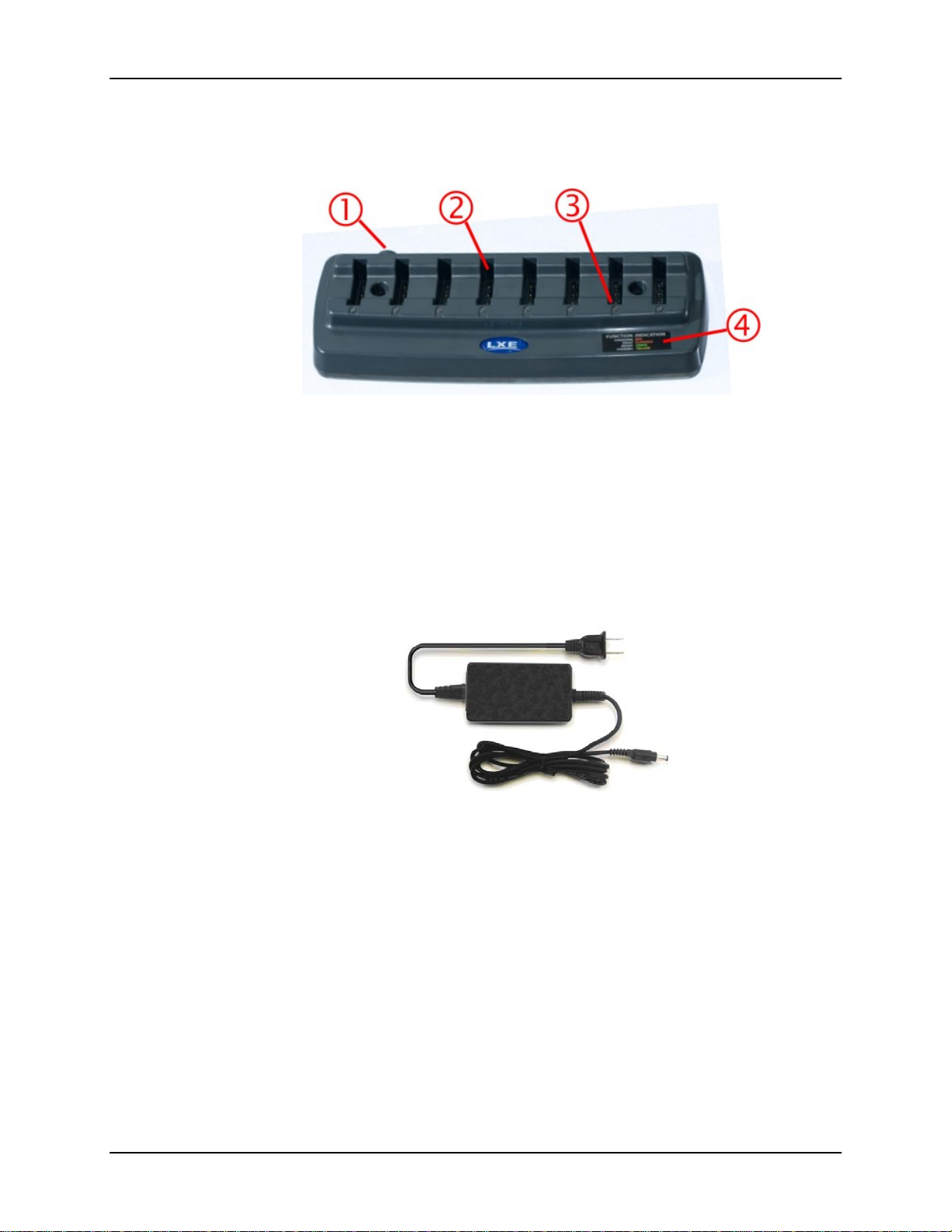
Figure 1 Bluetooth Ring Scanner Battery Multi-Charger
1 Power Cable Connection Location 3 LED Indicator
2 Battery Charging Pocket 4 LED Function
1. Place the multi-charger on a horizontal, hard surface or fasten securely to a wall using the
mounting holes (see Multicharger Footprint). Mounting hardware is not supplied by LXE.
2. Plug the 2 prong end of the power cord into a properly grounded AC outlet. Locate or orient
the AC cord so that it will not be stepped on, tripped over or subjected to damage or stress.
Figure 2 AC Power Supply, Multi-charger
3. Plug the multi-charger end of the power cord into the power port on the back of the device.
4. On initial power-up, LEDs light up for a few seconds.
The external power supply for the multi-charger is shipped with the multi-charger. If there is no
AC cable, please contact your LXE representative. The multi-charger power supply is intended for
use with the Bluetooth Ring Scanner Battery Multi-charger only.
Bluetooth Ring Scanner Battery Charger User’s Guide E-EQ-BRSCHGROGWW-B
Page 9
Multi-charger Footprint 3
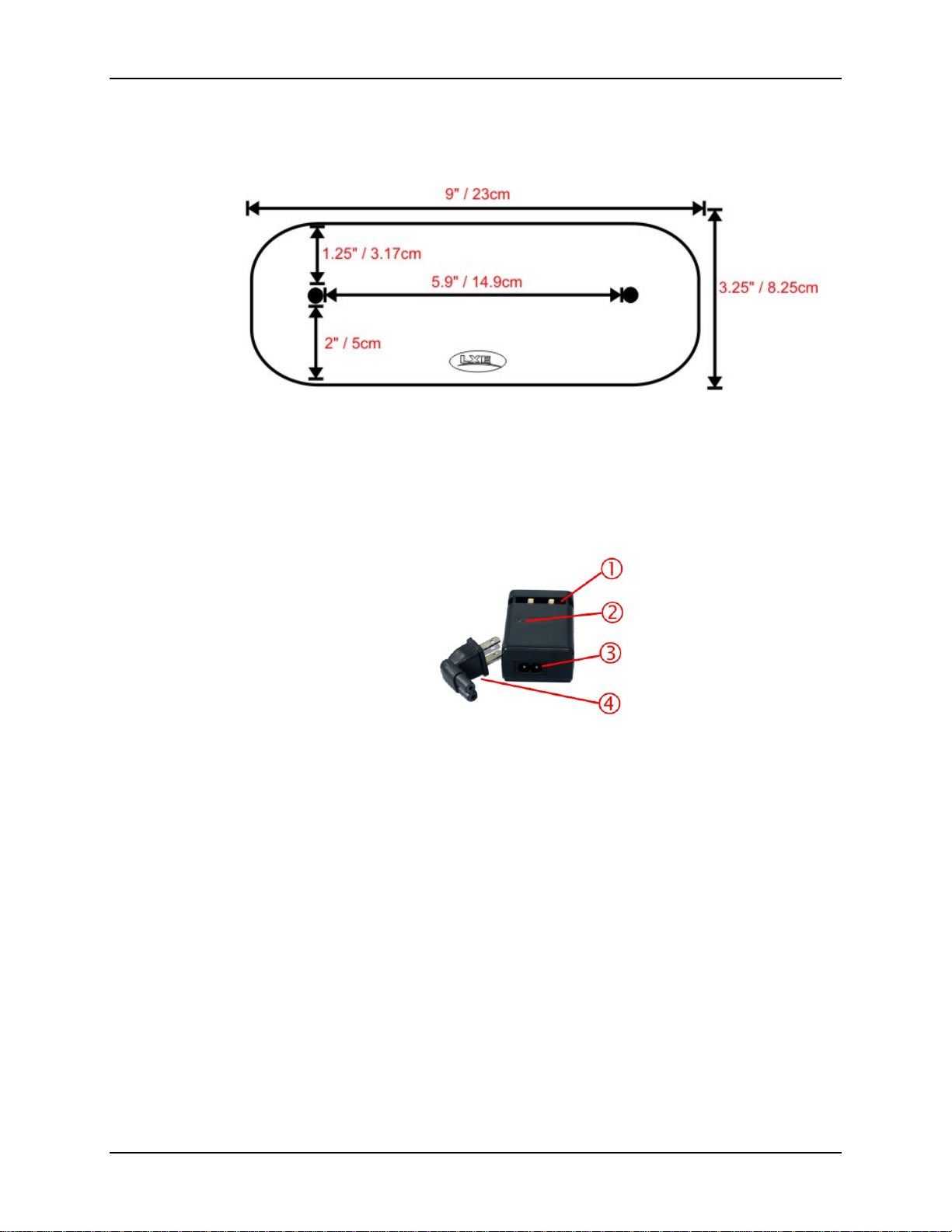
Multi-charger Footprint
Not To Scale
Figure 3 Multi-charger Footprint and Mounting Hole Locations
Single-bay Charger
Figure 4 Bluetooth Ring Scanner Battery Single-bay Charger
1 Battery Charging Pocket 3 Power Connector Location
2 Power LED Indicator 4 Single-bay Charger Power plug
The charger plug mounts the single-bay charger to an AC outlet.
1. Connect the power plug to th e single-bay charger.
2. Insert the power plug into a properly grounded outlet.
E-EQ-BRSCHGROGWW-A Bluetooth Ring Scanner Battery Charger User’s Guide
Page 10
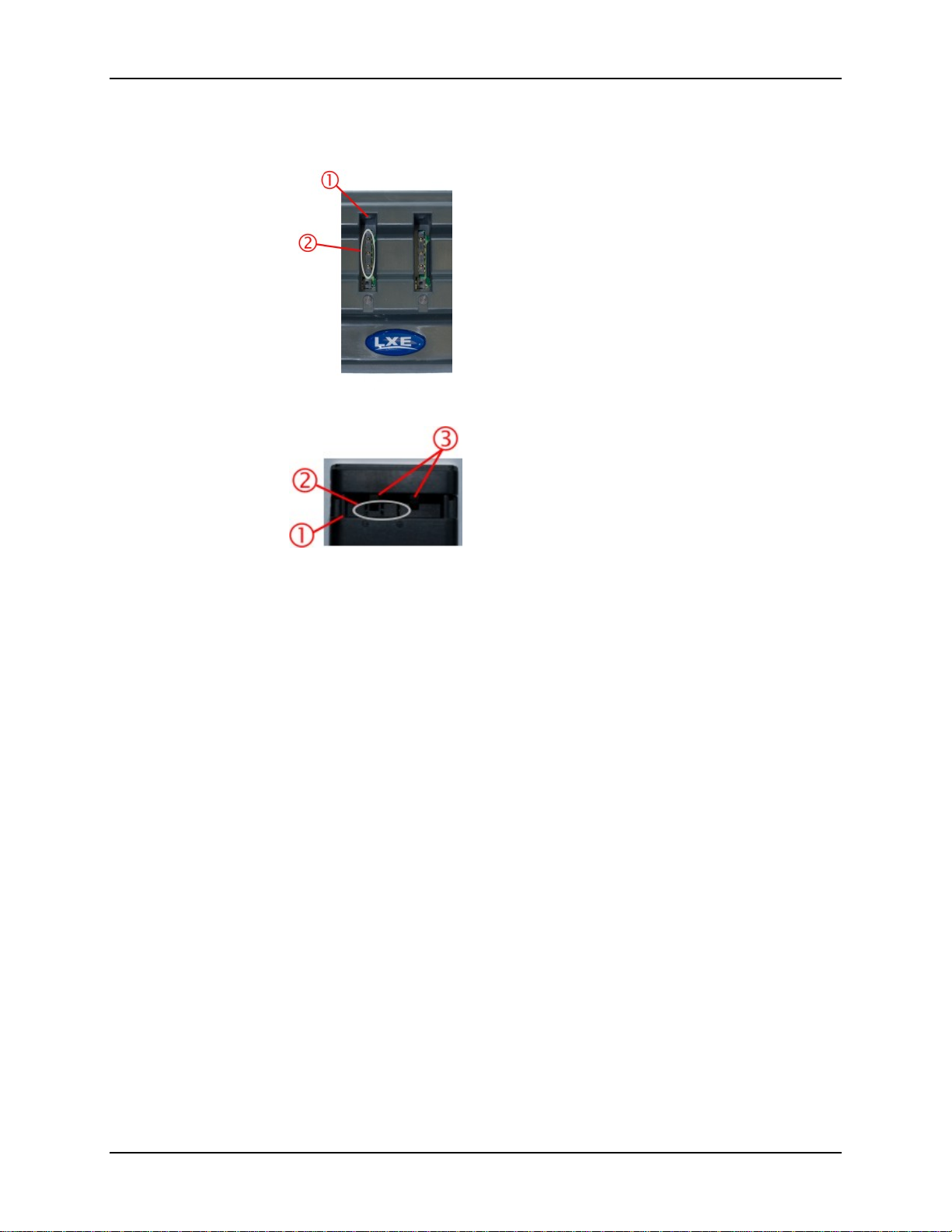
4 Battery Well
Battery Well
1. Battery Pocket
Multicharger Battery Well
Single-bay Charger Battery Well
Battery charging and recharging cannot occur until the battery pack’s termin als are in co ntact with
the charging contacts in the battery pocket of a powered multi-charger or single-bay charger.
If the multicharger LED turns orange after inserting a battery instead of red, it means the battery is
in backwards.
* There are very small battery retaining mechanisms in the multi-charger battery pockets.
Figure 5 Battery Pockets
2. Battery Charging Contacts
3. Single-bay Charger Battery
Retaining Springs*
Bluetooth Ring Scanner Battery Charger User’s Guide E-EQ-BRSCHGROGWW-B
Page 11
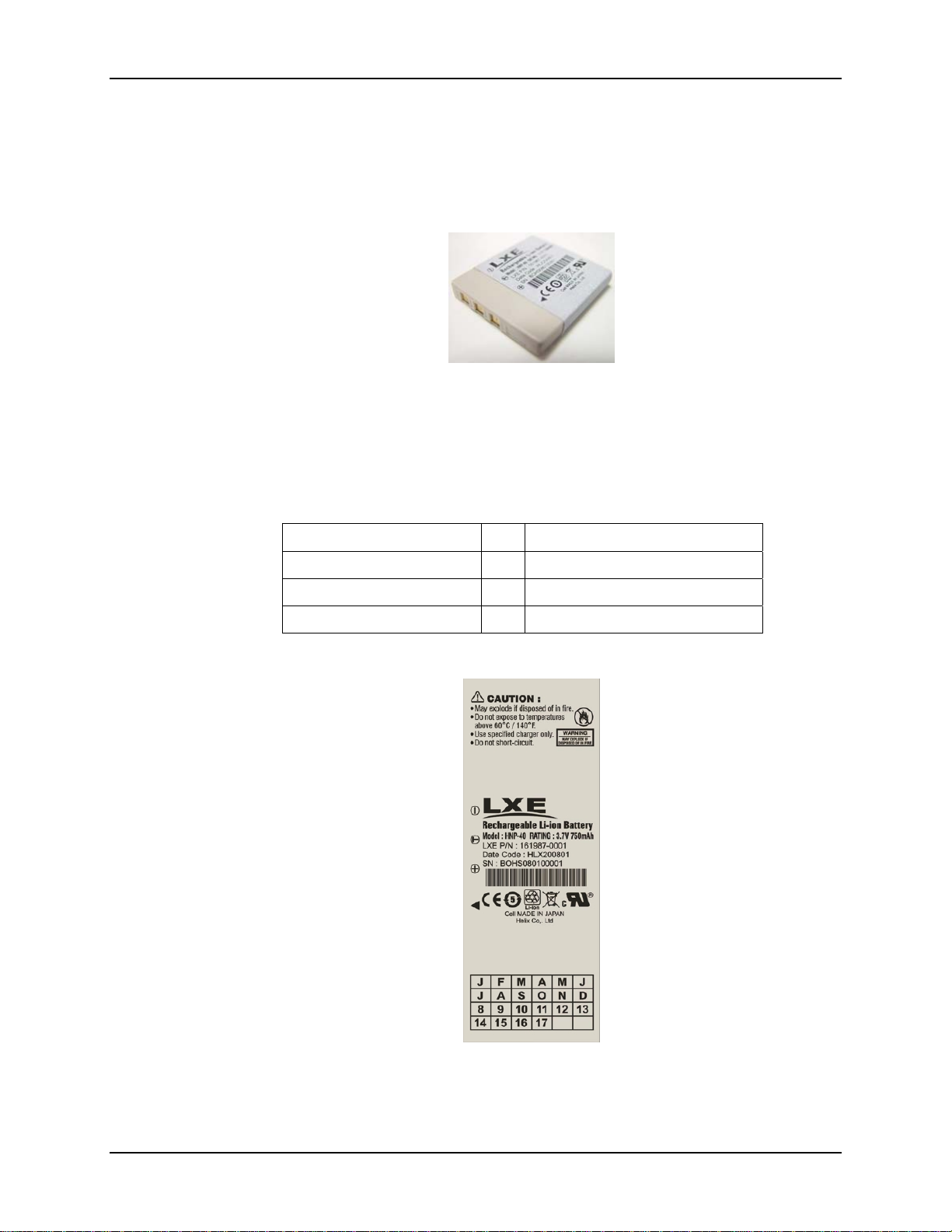
Rechargeable Lithium Ion Battery Pack 5
Rechargeable Lithium Ion Battery Pack
New batteries should be charged for 3 hours before first use or after battery storage of more than
three months. Battery Pack Model Number is 8650A376BTBOHBATTERY
Figure 6 Lithium Ion Battery Pack Charging Contacts
Note: Do not allow cleaning agents of any kind to contact the battery charging contacts; they
may be damaged. If necessary, clean them with a soft-bristle, dry brush or compressed
air.
Note: When not in use, lay the battery pack flat in a protected environment.
Battery Charge Contact Description
Power (+) Positive terminal
Thermistor (T) Temperature sensor
Ground (-) Negative terminal
Figure 7 Lithium Ion Battery Pack Label
E-EQ-BRSCHGROGWW-A Bluetooth Ring Scanner Battery Charger User’s Guide
Page 12

6 Getting Help
To determine the age of the battery, check the LXE ship date on the battery. The ship date is
marked and shows the month and the year that the battery was shipped. The first field (labeled J,
F, M, A, etc.) is the month the battery was shipped. The second field (numbers) is the last number
of the year. So if the F and the 9 are marked, the battery was shipped in February of 2009.
To determine the actual shipping date, you may have to use the serial number on the battery to
determine the ship date. Contact your LXE representative for assistance.
• Store batteries in locations that maintain an ambient temperature of approximately 25°C
(77°F).
• Immediately replace batteries in LXE devices with the appropriate, fully charged battery
when LXE equipment battery warnings are issued/heard/displayed.
• Discard defective, shorted or end-of-life batt eri e s.
• Any battery that is over a year old is considered an old battery.
• Replace all batteries more than a year old with new batteries.
Getting Help
Accessories
LXE manuals are now available on one CD and they can also be viewed/downloaded from the
LXE website. Contact your LXE representative to obtain the LXE Manuals CD. You can also
check the LXE website for the latest releases of LXE manuals.
You can get help from LXE by calling the telephone numbers listed on the LXE Manuals CD, in
the file titled Contacting LXE. This information is available on the LXE website.
Explanations of terms and acronyms used in this manual are located in the file titled LXE
Technical Glossary on the LXE Manuals CD and on the LXE website.
Battery, Bluetooth Module 8650A376BTBOHBATTERY
Multi-charger, 8 Bay Bluetooth Module US 8650A377BTBOHCHGRUS
Multi-charger, 8 Bay Bluetooth Module WW 8650A378BTBOHCHGRWW
Single-bay Charger, 1 Bay Bluetooth Module US 8650A379SINGLECHGRUS
Single-bay Charger, 1 Bay Bluetooth Module WW 8650A380SINGLECHGRWW
Bluetooth Ring Scanner Battery Charger User’s Guide E-EQ-BRSCHGROGWW-B
Page 13

Overview
The life and capacity of a Lithium Ion battery can vary significantly depending on the discharge
current and the environment in which it is used. As with all batteries, expect to see a red uction in
the total number of operations a fully charged battery pack can deliver as it ages.
Charging times may increase but will not exceed three hours. Battery packs do not need to be fully
discharged between charge cycles.
Normal Operations
The optimal operating temperature range for the chargers is between 0°C (32°F) and 40°C
(100°F). While charging, the charger and battery pack will generate enough heat to feel warm.
This is normal and does not indicate a problem.
Do not store the battery pack in direct sunlight or anywhere the battery pack cannot cool down. If
the battery pack is hot after removal from the Bluetooth Ring Scanner, allow it to cool at room
temperature before placing it in the charger.
Installation and Operation
Charge times may increase significantly if the battery is warm or hot, since it takes the battery
pack longer to cool down while in the battery well. If the battery pack is hot from severe
environmental use and immediate recharging is necessary, place the battery pack in a cool air
stream or in a cool location until it is no longer warm to the touch before charging.
Do not place or store the Single-bay Charger or the Multi-Charger in hazardous locations.
Warning: The Bluetooth Ring Scanner Multi-bay Charger is to be used to charge
an I.T.E. Recognized Battery pack manufactured by Helix Co., Ltd.
(Model: HNP-40, LXE, P/N 161987-0001, rating 3.7V, 750mAh).
Charging any other type of battery pack in the Bluetooth Ring Scanner
Multi-bay charger is prohibited.
Warning: Use the provided AC power supply, only, with the Bluetooth Ring
Scanner Multi-bay Charger. Using any other type of AC power supply is
prohibited.
E-EQ-BRSCHGROGWW-B Bluetooth Ring Scanner Battery Charger User’s Guide
Page 14
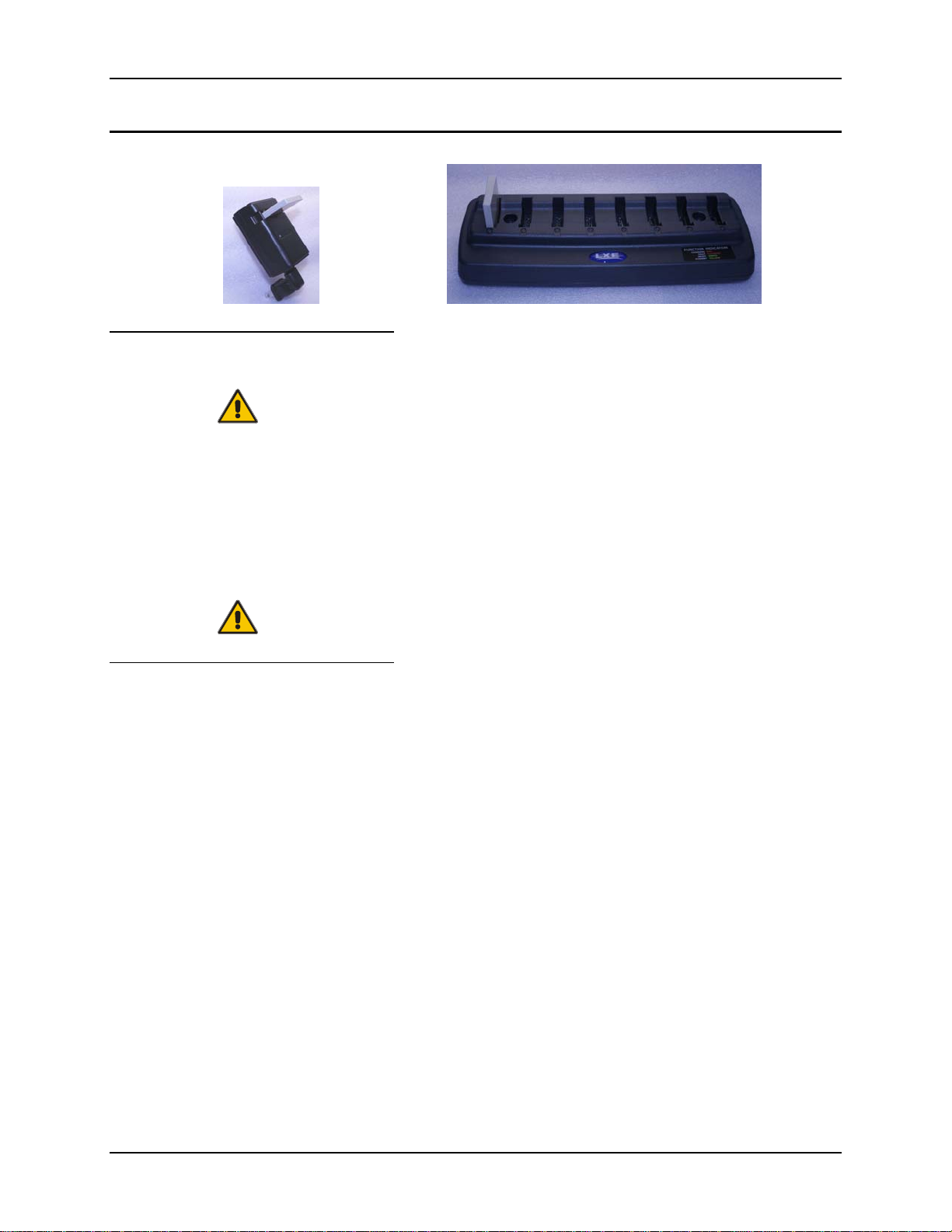
8 Overview
Using the Battery Charging Pocket
Inserting the Battery Pack
Caution!
When preparing the battery pack for insertion into the charg er well, hold the battery with its three
charging contacts in line with the three charging terminals in the battery pocket (using the
direction of the arrow on the battery label as a guide).
If necessary, stabilize the charger with your hand before inserting a battery.
Firmly press the battery straight down into the battery charging pocket.
See figure titled Battery Well.
Caution!
It is important that battery packs are inserted into the charging pocket correctly,
using the direction of the arrow on the battery label as a guide. Inserting the battery
incorrectly may result in damage to the battery pack or the charger.
Do not "slam" or slide the battery pack into the charging pocket. Damage may
result.
Removing the Battery Pack
If necessary, stabilize the charger with your hand before removing a battery from a battery well.
Grasp the battery firmly and pull it straight up and out of the battery well.
Bluetooth Ring Scanner Battery Charger User’s Guide E-EQ-BRSCHGROGWW-B
Page 15

Progress Monitoring 9
Progress Monitoring
The LED located below each charging pocket indicate the status of the battery in the pocket.
Charge Timers
Multi-charger
The battery pocket timers are dynamic and based upon the capacity of the battery pack. There is a
timeout period for the soft start and another timeout period for the overall time required to charge
the battery to full capacity. The pocket’s LED flashes red when the charging pocket timeout period
has expired.
Single-bay Charger
The Single-bay charger does not contain a timer. The charger provides a soft charge mode for
deeply discharged batteries, a fast charge mode and a constant-charge mode that maintains power
levels in charged batteries. Battery charge time to full capacity is three hours.
Interpreting the Single-Bay Charger LED
RED
Continuous Battery pack is charging.
GREEN
Continuous Charger is plugged in – Battery is not receiving power through the charging
pocket, or battery is not fully seated in charging pocket.
or
Battery pack charge complete – Battery is ready.
E-EQ-BRSCHGROGWW-A Bluetooth Ring Scanner Battery Charger User’s Guide
Page 16

10 Progress Monitoring
Interpreting the Multi-charger LEDs
Figure 8 Interpreting the LEDs
RED - on any pocket
Continuous Battery pack - Charging (any charge pocket).
Flashing Battery pack fault or failure.
Battery charger timeout period expiration.
GREEN - on any pocket
Continuous Battery pack charge complete - Ready.
Amber - on any pocket
Continuous Battery pack temperature is out of range - Standby.
or
Battery not inserted correctly.
NO LIGHT - on a pocket
No battery pack installed.
NO LIGHT - on every pocket
No AC power available to the Charger.
Bluetooth Ring Scanner Battery Charger User’s Guide E-EQ-BRSCHGROGWW-B
Page 17

Troubleshooting 11
Troubleshooting
The following is intended as an aid in determining whether the battery pack or the charger may be malfunctioning.
Problem Cause Solution
Battery pack does not fit in
battery well.
No battery pack in charger, but
any of the LEDs are on.
Charger is plugged into a live
outlet, battery pack is inserted,
but RED LED is OFF and no
other LEDs are on, or all LEDs
are off.
When you first put a fully
charged battery pack in the
battery well, the RED LED
comes on, indicating the battery
pack is charging.
Different manufacturer's battery
pack, or there is an object in the
battery well.
Dirt or foreign objects are in the
battery well.
• All battery pack contacts
are not making contact with
all charging terminals in the
battery well.
• Faulty battery pack.
• New battery pack, same
result.
During the first few minutes, the
charger checks the battery pack
for correct voltage and charge
state. During this time the LED
is RED and is continuously ON.
After charging is complete, the
LED is GREEN.
Check if the battery pack is LXE part
number 8650A376BTBOHBATTERY. If
not, do not use. Remove the object from
the battery well.
Unplug charger from outlet. Remove any
dirt or foreign objects from battery wells.
If the LEDs continue to remain ON, the
charger may be defective. Return charger
to an authorized LXE service center.
• Push battery pack in firmly. Do not
"slam" the battery pack into the
battery well. Remove the battery
from the charging well, turn it
around and reinsert.
• Replace battery pack.
• Contact LXE for replacement
options.
There is nothing wrong with the battery
pack or charger.
LED is flashing RED at any
station.
E-EQ-BRSCHGROGWW-A Bluetooth Ring Scanner Battery Charger User’s Guide
Current could not be sourced
through the battery pack due to
age, exhaustion or damage to
the battery cell(s). The battery
pack does not communicate
with the charger.
OR
The battery pack voltage has not
reached 4.2V within the timeout
period and the charger has timed
out.
OR
The charger’s timeout period
has expired.
Contact LXE for battery pack
replacement options.
Contact LXE for battery pack
replacement options.
Make sure that the battery pack
temperature is within specification and
retry charging. If problem repeats,
contact LXE for battery pack replacement
options.
Page 18

12 Troubleshooting
Problem Cause Solution
Solid AMBER LED when
battery pack is inserted in the
charger.
Maintenance
Use a clean soft cloth to wipe any dirt, moisture or grease from the battery pack, contacts or the
charger. Do not use any liquid to clean the battery pack or charger contacts.
Storage
Battery packs should be kept in a cool, dry place whenever possible. Do not store battery packs in
direct sunlight, on a metal surface, or anywhere the battery pack cannot cool down. Do not leave
the battery pack in a non-operating charger. The battery pack may discharge through the charger
rather than hold its charge.
The battery pack is too hot or
too cold to charge.
Battery pack is backwards.
Remove battery pack from the charger
and allow it to adjust to room
temperature.
Note: If the battery pack is left in the
charger, it will cool down or warm to a
temperature upon which the charger will
begin the charge cycle. However,
depending on the temperature of the
battery, it may take 2-3 hours to adjust.
The cool-down of a battery pack is much
quicker if the battery is not in the battery
well.
Service
There are no user serviceable parts in the Rechargeable Lithium Ion Battery Pack or the chargers.
Should your battery charger require service, contact LXE.
Bluetooth Ring Scanner Battery Charger User’s Guide E-EQ-BRSCHGROGWW-B
Page 19

Technical Specifications
Operating Temperature Ranges
Multi-Charger
Minimum Maximum Comment
Operating 0°C (32°F) +45°C (113°F)
Charging 0°C (32°F) +45°C (113°F)
Storage -10°C (14°F) +50°C (120°F) Unit is off.
Single-bay Charger
Minimum Maximum Comment
Operating 0°C (32°F) +40°C (100°F)
Storage -10°C (14°F) +50°C (120°F) Unit is off.
Battery packs will only be charged when their temperature
is between 0°C (32°F) and 40°C (100°F).
Battery packs will not begin charging if their temperature
is outside this range.
Battery packs will only be charged when their temperature
is between 0°C (32°F) and 40°C (100°F).
Electrical
Parameter Min Max. Comment
Power Supply Input
Voltage (V
Power Supply Input
Frequency (freq)
Note: Battery packs may leak up to 1mA current through the battery contacts when left in an unpowered
charger battery well.
AC-IN
)
100 VAC 240VAC Auto-switching
47Hz 63Hz
E-EQ-BRSCHGROGWW-B Bluetooth Ring Scanner Battery Charger User’s Guide
Page 20

14 Physical Dimensions
Physical Dimensions
Multi-Charger Single-bay Charger
Weight Battery: 0.55oz / 15.6g
Without batteries: 9.10oz / 258g
With 8 batteries: 13.85oz / 392g
AC Adapter: 6.40oz / 181g
Plug Type IEC; 2-prong IEC; 2-prong
Length 9” / 23cm 2.9” / 7.4cm
Width 3.25” / 8.25cm 1.9” / 4.8cm
Height 1.25” / 3.17cm (with batteries 2.5” / 6.3cm) 1.15” / 2.92cm
Mounting Distance between mounting holes: 5.9” / 14.9cm Mounts to AC outlet w/2 prong plug
Without battery: 2.05oz / 58g
With battery: 2.75oz / 78g
With battery and power plug: 3.25oz /
92g
Power plug: 0.70oz / 19.8g
(with 2-prong plug 4” / 10cm)
(with battery 2.25” / 5.71cm)
Bluetooth Ring Scanner Battery Charger User’s Guide E-EQ-BRSCHGROGWW-B
 Loading...