

Page 1
Lumenera Network Camera
API Reference Manual
Release 1.8.1
Page 2

Page 3

Lumenera Network Camera
API Reference Manual Release 1.8.1
License Agreement (Software):
This Agreement states the terms and conditions upon which Lumenera Corporation
("Lumenera") offers to license to you (the "Licensee") the software together with all
related documentation and accompanying items including, but not limited to, the
executable programs, drivers, libraries, and data files associated with such programs
(collectively, the "Software").
The Software is licensed, not sold, to you for use only under the terms of this
Agreement.
Lumenera grants to you the right to use all or a portion of this Software provided that the
Software is used only in conjunction with Lumenera's family of products.
In using the Software you agree not to:
a) decompile, disassemble, reverse engineer, or otherwise attempt to derive the source
code for any Product (except to the extent applicable laws specifically prohibit such
restriction);
b) remove or obscure any trademark or copyright notices.
Limited Warranty (Hardware and Software):
ANY USE OF THE SOFTWARE OR HARDWARE IS AT YOUR OWN RISK. THE
SOFTWARE IS PROVIDED FOR USE ONLY WITH LUMENERA'S HARDWARE AND
OTHER RELATED SOFTWARE. THE SOFTWARE IS PROVIDED FOR USE "AS IS"
WITHOUT WARRANTY OF ANY KIND. TO THE MAXIMUM EXTENT PERMITTED BY
LAW, LUMENERA DISCLAIMS ALL WARRANTIES OF ANY KIND, EITHER EXPRESS
OR IMPLIED, INCLUDING, WITHOUT LIMITATION, IMPLIED WARRANTIES OR
CONDITIONS OF MERCHANTABILITY, QUALITY AND FITNESS FOR A
PARTICULAR PURPOSE. LUMENERA IS NOT OBLIGATED TO PROVIDE ANY
UPDATES OR UPGRADES TO THE SOFTWARE OR ANY RELATED HARDWARE.
Limited Liability (Hardware and Software):
In no event shall Lumenera or its Licensors be liable for any damages whatsoever
(including, without limitation, incidental, direct, indirect, special or consequential
damages, damages for loss of business profits, business interruption, loss of business
information, or other pecuniary loss) arising out of the use or inability to use this
Software or related Hardware, including, but not limited to, any of Lumenera's family of
products.
Product Warranty
Lumenera Corporation warrants to the original purchaser that our cameras are
guaranteed to be free from manufacturing defects for a period of one (1) year from the
original date of purchase.
Should the unit fail during the warranty period, Lumenera will, at its option, repair or
replace the failed unit. Repaired or replaced units will be covered under warranty for the
remainder of the original one (1) year warranty period.
Copyright 2008 Page i
Page 4

Lumenera Network Camera
Release 1.8.1 API Reference Manual
This warranty does not apply to units that, after being inspected by Lumenera, have
been found to have failed due to customer abuse, accidents, mishandling,
tampering/alteration, improper installation, improper power source, negligence, opening
of the enclosure, or if the serial number has been removed or damaged. This warranty
does not cover labor or incurred charges required in removing or installing the unit, any
business interruption, loss of profits/revenues, or any consequential damages.
Units returned to Lumenera beyond the warranty period will be repaired, if possible, and
all appropriate material and labor charges will apply. The repaired part will be covered
under an additional 90-day warranty.
Any returning product, specifically those being returned under warranty, must follow the
Returned Material Authorization (RMA) process. Units must be properly packaged, in
original packing when possible. Lumenera will not cover damage sustained in shipping
due to improper packing.
All shipping charges incurred for the return of failed units are the customer’s
responsibility, including shipping, broker fees, duties and taxes. Once the unit is repaired
or replaced, Lumenera will pay the shipping charges to return the unit back to the
customer.
For RMA instructions, please refer to our website at www.lumenera.com.
RoHS/WEEE Compliance Statement
The Restriction of Hazardous Substances in Electrical and Electronic Equipment (RoHS)
Directive was passed into law by the European Union (E.U.). It affects manufacturers,
sellers, distributors and recyclers of electrical and electronic equipment containing lead,
cadmium, mercury, hexavalent chrome, polybrominated biphenyl (PBB) and
polybrominated diphenyl ether (PBDE). After July 1, 2006 the use of these materials will
be banned in new products sold in Europe. The RoHS Directive complements the WEEE
Directive. China is expected to adopt similar legislation within a similar timeline.
The Waste Electrical and Electronic Equipment Directive (WEEE) aims to reduce the
waste arising from electrical and electronic equipment and to improve the environmental
performance of all those involved in the life cycle of these products.
Lumenera is committed to protecting people and the environment and we are working on
identifying any materials used in our processes that could pose a potential hazard to our
employees, customers or the environment.
For this reason we are committed to have all our products comply with the RoHS and
WEEE directives. We are constantly improving our compliance with these directives. For
more information on our compliance or to track our progress please refer to our website.
Page ii Copyright 2008
Page 5

Lumenera Network Camera
API Reference Manual Release 1.8.1
Table of Contents
INTRODUCTION .............................................................................................................1
1.1 T
1.2 W
1.3 T
HE LUMENERA NETWORK CAMERA FAMILY
HERE TO FIND DOCUMENTATION
ECHNICAL ASSISTANCE
......................................................................................2
........................................................................2
..........................................................1
NETWORK CAMERA API ..............................................................................................3
2.1 T
2.2 C
2.3 S
2.4 P
2.4.1 XML-RPC Environment ........................................................................................................... 7
2.4.2 CGI/HTTP/Javascript Environment......................................................................................... 9
2.4.3 Telnet Environment ............................................................................................................... 15
HE LUMENERA NETWORK CAMERA
AMERA FEATURES AND SETTINGS
UPPORTED NETWORK PROTOCOLS
ROGRAMMING INTERFACES
2.4.2.1
No Process Header (NPH) commands ...................................................................................... 11
2.4.2.2
Response on Success ............................................................................................................... 12
2.4.2.3
Response on Failure .................................................................................................................. 12
2.4.2.4
Access Levels ............................................................................................................................ 14
API ...............................................................3
......................................................................4
.....................................................................6
.................................................................................7
API FUNCTION REFERENCE ......................................................................................16
3.1 S
3.2 API F
add_parameter ................................................................................................................................... 17
ftp_images.......................................................................................................................................... 19
ftp_stream_last_error ......................................................................................................................... 22
ftp_stream_status............................................................................................................................... 24
ftp_stream_stop ................................................................................................................................. 25
ftp_stream_stop_all ............................................................................................................................ 26
get ...................................................................................................................................................... 27
get_settings ........................................................................................................................................ 28
image.................................................................................................................................................. 29
load_settings ...................................................................................................................................... 31
ptz_command..................................................................................................................................... 32
ptz_preset........................................................................................................................................... 33
put_settings ........................................................................................................................................ 34
put_settings_from_property ............................................................................................................... 35
Copyright 2008 Page iii
UMMARY OF
UNCTION DESCRIPTION
API F
UNCTIONS
............................................................................16
..............................................................................17
Page 6

Lumenera Network Camera
Release 1.8.1 API Reference Manual
reset ................................................................................................................................................... 36
save_settings ..................................................................................................................................... 37
set....................................................................................................................................................... 38
start .................................................................................................................................................... 39
stop..................................................................................................................................................... 40
strobe ................................................................................................................................................. 41
test_email_alarm ................................................................................................................................ 42
udp_stream ........................................................................................................................................ 43
udp_stream_stop ............................................................................................................................... 45
udp_stream_stop_all .......................................................................................................................... 46
version................................................................................................................................................ 47
video................................................................................................................................................... 48
API PROPERTY REFERENCE.....................................................................................50
4.1 API P
admin_password ................................................................................................................................ 50
alarm_delay........................................................................................................................................ 50
alarm_enable_email ........................................................................................................................... 51
ROPERTY DESCRIPTION
.............................................................................50
alarm_enable_ftp ............................................................................................................................... 51
alarm_enable_udp ............................................................................................................................. 52
alarm_ftp_framerate ........................................................................................................................... 52
alarm_ftp_passive .............................................................................................................................. 53
alarm_ftp_password ........................................................................................................................... 53
alarm_ftp_path ................................................................................................................................... 53
alarm_ftp_post_trigger ....................................................................................................................... 53
alarm_ftp_pre_trigger ......................................................................................................................... 54
alarm_ftp_server ................................................................................................................................ 54
alarm_ftp_user ................................................................................................................................... 54
alarm_udp_client ................................................................................................................................ 55
alarm_udp_port .................................................................................................................................. 55
analytics_alarm_enable ..................................................................................................................... 55
analytics_email_script ........................................................................................................................ 56
analytics_enable ................................................................................................................................ 56
analytics_view_select_model............................................................................................................. 56
aperture .............................................................................................................................................. 57
aperture_hw_max .............................................................................................................................. 57
aperture_hw_min ............................................................................................................................... 58
aperture_max ..................................................................................................................................... 58
Page iv Copyright 2008
Page 7

Lumenera Network Camera
API Reference Manual Release 1.8.1
aperture_min ...................................................................................................................................... 58
auto_algorithm ................................................................................................................................... 59
auto_height ........................................................................................................................................ 59
auto_jpeg_quality ............................................................................................................................... 60
auto_width .......................................................................................................................................... 60
auto_window_enable ......................................................................................................................... 61
auto_x................................................................................................................................................. 61
auto_y................................................................................................................................................. 61
autoexposure ..................................................................................................................................... 62
autoexposure_knee............................................................................................................................ 62
autoexposure_target .......................................................................................................................... 63
autogain.............................................................................................................................................. 63
autogain_knee.................................................................................................................................... 64
autoiris................................................................................................................................................ 64
boot_version....................................................................................................................................... 65
brightness........................................................................................................................................... 65
color_conversion ................................................................................................................................ 65
color_preset ....................................................................................................................................... 66
contrast............................................................................................................................................... 66
crosshair_enable ................................................................................................................................ 66
current_broadcast_address ............................................................................................................... 66
current_fqdn ....................................................................................................................................... 67
current_gateway................................................................................................................................. 67
current_ip ........................................................................................................................................... 67
current_nameserver ........................................................................................................................... 67
current_netmask ................................................................................................................................ 68
date .................................................................................................................................................... 68
date_utc.............................................................................................................................................. 68
daynight_bw_mode ............................................................................................................................ 68
daynight_gain_boost .......................................................................................................................... 69
daynight_gain_in_threshold ............................................................................................................... 69
daynight_gain_limit ............................................................................................................................ 69
daynight_gain_out_threshold............................................................................................................. 70
daynight_mode................................................................................................................................... 70
default_image_params....................................................................................................................... 70
description .......................................................................................................................................... 71
dhcp_fallback ..................................................................................................................................... 71
Copyright 2008 Page v
Page 8

Lumenera Network Camera
Release 1.8.1 API Reference Manual
dhcp_timeout...................................................................................................................................... 71
dns_domain_name............................................................................................................................. 71
edge_enhancement ........................................................................................................................... 72
ethaddr ............................................................................................................................................... 72
exposure............................................................................................................................................. 72
exposure_bias .................................................................................................................................... 73
focus................................................................................................................................................... 73
focus_max .......................................................................................................................................... 73
focus_min ........................................................................................................................................... 74
frame_buffer_enable .......................................................................................................................... 74
framerate ............................................................................................................................................ 74
gain..................................................................................................................................................... 74
gain_blue............................................................................................................................................ 75
gain_blue_max ................................................................................................................................... 75
gain_blue_min .................................................................................................................................... 75
gain_green ......................................................................................................................................... 76
gain_green_max ................................................................................................................................ 76
gain_green_min ................................................................................................................................. 76
gain_red ............................................................................................................................................. 77
gain_red_max .................................................................................................................................... 77
gain_red_min ..................................................................................................................................... 77
gamma ............................................................................................................................................... 77
gateway .............................................................................................................................................. 78
h264_enable ...................................................................................................................................... 78
height.................................................................................................................................................. 78
imager_mono ..................................................................................................................................... 79
intensity .............................................................................................................................................. 79
io_in_alarm_enable ............................................................................................................................ 79
io_in_debounce_time ......................................................................................................................... 80
io_in_trigger_edge ............................................................................................................................. 80
io_in_trigger_neg ............................................................................................................................... 80
ipaddr ................................................................................................................................................. 80
iris_type .............................................................................................................................................. 81
ir_shuttle_position .............................................................................................................................. 81
is_running........................................................................................................................................... 81
jpeg_buffer_size ................................................................................................................................. 81
jpeg_quality ........................................................................................................................................ 82
Page vi Copyright 2008
Page 9

Lumenera Network Camera
API Reference Manual Release 1.8.1
led....................................................................................................................................................... 82
lighting_frequency .............................................................................................................................. 82
link_local_ip........................................................................................................................................ 83
low_light_criteria ................................................................................................................................ 83
low_light_settings ............................................................................................................................... 83
low_light_stable_duration................................................................................................................... 84
luminance ........................................................................................................................................... 84
MAC ................................................................................................................................................... 84
max_height......................................................................................................................................... 85
max_jpeg_size ................................................................................................................................... 85
max_subsample ................................................................................................................................. 85
max_width .......................................................................................................................................... 86
maximum_exposure ........................................................................................................................... 86
maximum_framerate .......................................................................................................................... 86
maximum_gain ................................................................................................................................... 86
maximum_gain_limit .......................................................................................................................... 87
median_filter....................................................................................................................................... 87
mem_free ........................................................................................................................................... 87
min_jpeg_size .................................................................................................................................... 87
minimum_exposure ............................................................................................................................ 88
motion_alarm_area ............................................................................................................................ 88
motion_alarm_enable......................................................................................................................... 88
motion_email_recipient ...................................................................................................................... 89
motion_email_script ........................................................................................................................... 89
motion_email_server .......................................................................................................................... 90
motion_email_subject ........................................................................................................................ 90
motion_gap ........................................................................................................................................ 90
motion_map ....................................................................................................................................... 91
motion_map_height............................................................................................................................ 91
motion_map_width ............................................................................................................................. 92
motion_map_windowed ..................................................................................................................... 92
motion_sensitivity ............................................................................................................................... 93
motion_skip ........................................................................................................................................ 93
motion_x............................................................................................................................................. 93
motion_y............................................................................................................................................. 94
name .................................................................................................................................................. 94
nameserver ........................................................................................................................................ 94
Copyright 2008 Page vii
Page 10

Lumenera Network Camera
Release 1.8.1 API Reference Manual
netmask.............................................................................................................................................. 95
normal_light_criteria ........................................................................................................................... 95
normal_light_settings ......................................................................................................................... 95
normal_light_stable_duration............................................................................................................. 96
ntp_servers......................................................................................................................................... 96
number_of_buffers ............................................................................................................................. 96
number_of_buffers_raw ..................................................................................................................... 97
output_select ...................................................................................................................................... 97
privacy_map ....................................................................................................................................... 98
privacy_map_enable .......................................................................................................................... 98
privacy_map_height ........................................................................................................................... 99
privacy_map_width ............................................................................................................................ 99
projected_network_bandwidth ........................................................................................................... 99
projected_network_framerate .......................................................................................................... 100
ptz_enable........................................................................................................................................ 100
ptz_protocol...................................................................................................................................... 101
ram_size........................................................................................................................................... 101
raw_mode......................................................................................................................................... 101
rtp_enable ........................................................................................................................................ 102
rtp_framerate.................................................................................................................................... 102
rtp_packet_size ................................................................................................................................ 102
rtp_port ............................................................................................................................................. 103
saturation.......................................................................................................................................... 103
saturation_bias ................................................................................................................................. 103
serial_echo ....................................................................................................................................... 104
serial_flow ........................................................................................................................................ 104
serial_speed ..................................................................................................................................... 104
serial_use ......................................................................................................................................... 104
show_motion_detected .................................................................................................................... 105
show_motion_windows .................................................................................................................... 105
strobe_length ................................................................................................................................... 106
subsampled ...................................................................................................................................... 106
target_jpeg_size ............................................................................................................................... 106
telnetd............................................................................................................................................... 107
temperature ...................................................................................................................................... 107
timezone........................................................................................................................................... 107
use_dhcp.......................................................................................................................................... 108
Page viii Copyright 2008
Page 11

Lumenera Network Camera
API Reference Manual Release 1.8.1
use_link_local................................................................................................................................... 108
user_password ................................................................................................................................. 108
video_mode...................................................................................................................................... 109
watchdog_codec .............................................................................................................................. 109
watchdog_enable ............................................................................................................................. 110
watchdog_http .................................................................................................................................. 110
watchdog_ping ................................................................................................................................. 110
whitebalance .................................................................................................................................... 111
whitebalance_preset ........................................................................................................................ 111
width ................................................................................................................................................. 111
x........................................................................................................................................................ 112
x_mirror ............................................................................................................................................ 112
y........................................................................................................................................................ 112
y_mirror ............................................................................................................................................ 113
APPENDIX: INTERPRETING EXIF HEADERS .......................................................... 114
A1.1 G
A1.2 D
ENERAL INFORMATION ON
ETAILED EXAMPLE OF
EXIF
EXIF
HEADER FORMAT
HEADER
............................................................114
.........................................114
GLOSSARY ................................................................................................................116
Copyright 2008 Page ix
Page 12

Lumenera Network Camera
Release 1.8.1 API Reference Manual
List of Tables
Table 2-1 URI Escape Code for Special Characters .....................................................10
Table 2-2 Available Access Levels in Network Cameras...............................................14
Table 3-1 Summary of Camera API Functions ..............................................................16
Table 4-1 MakerNote Field Descriptions....................................................................115
Page x Copyright 2008
Page 13

Lumenera Network Camera
API Reference Manual Release 1.8.1
1
Introduction
1.1 The Lumenera Network Camera Family
The Lumenera Network camera Application Programming Interface (API)
provides tools for users to access and customize advanced functionality
governing a full suite of camera control and image processing features. A
Function and Property (API) Reference document is stored on every camera in
HTML format for viewing using a web browser. This manual provides additional
information on these functions and properties.
Lumenera Network Cameras provide high resolution images and are designed to
satisfy both general-purpose and high-end surveillance applications while
delivering outstanding image quality. The cameras use on-board JPEG
compression to deliver high quality images over a standard 10/100baseT Fast
Ethernet connection. Most models support Power over Ethernet (PoE). In video
surveillance applications, Lumenera cameras work with an extensive list of thirdparty NVR/DVR software and hardware to provide complete video management
solutions. Support for different camera models is kept uniform using a common
Application Programming Interface to the greatest extent possible.
Lumenera’s product line is unique in its breadth, with resolutions ranging from
VGA to 11 megapixels along with a choice of several CMOS and CCD image
sensors in both color and monochrome types. Most models use C/CS- mount
lenses commonly found in CCTV and factory automation, and are available with
an integrated day/night filter option for use with active-infrared illumination. For
demanding applications such as low-light surveillance, traffic enforcement, and
industrial process monitoring, Lumenera provides high-sensitivity, low-noise
CCD’s with global shutter. Large-format models use off-the-shelf 35-mm
motorized lenses to provide exceptional image quality and sensitivity.
The Li-series intelligent cameras provide additional features including embedded
rules-based video content analysis, audio input and output, and analog video
output for use during camera installations..
The description of the Application Programming Interface (API) applies
specifically to firmware version 1.8.1. Extensions specific to the Li series
intelligent cameras refer to firmware version 2.3.1.
Copyright 2008 Page 1
Page 14

Lumenera Network Camera
Release 1.8.1 API Reference Manual
1.2 Where To Find Documentation
All camera documentation can be found in the <Install Directory>\Documentation
folder. The documentation that is provided includes this manual, the Network
Camera User’s manual, camera Application Notes and White Papers.
To obtain the latest software release, Application Notes, answers to Frequently
Asked Questions (FAQs), Knowledge Base access and other technical
information please visit our website at:
www.lumenera.com
Note: A user name and password is required to access the Knowledge Base. If
you do not yet have one, or require a new one, please send an email to
[email protected] to receive a new password.
1.3 Technical Assistance
If you need assistance with the installation or use of the software, or, if you need
help with general camera operation, please contact the Technical Assistance
Centre (TAC) via email at:
or by phone at +1-613-736-4077 (press 1 from the auto attendant).
To obtain the latest software release and other technical information you may
visit our technical support website at:
http://www.lumenera.com/support/index.php
Our support website contains technical information available to the general public
such as Frequently Asked Questions (FAQ’s). For our Lumenera customers we
provide a Knowledge Base with more product specific solutions and a Download
Centre for customers to obtain the most recent software releases.
As a customer, you will need to provide the TAC with some basic information to
gain access to the customer Knowledge Base and the Download Centre. Please
provide the following details via email to [email protected] to obtain a user
name and password:
Your name, Company Name, address and telephone number
Your camera model and serial number
Your purchase information (e.g. did you purchase from an OEM or distributor?)
Upon providing the above information, you will receive your access information
via email from a TAC representative.
Page 2 Copyright 2008
Page 15

Lumenera Network Camera
API Reference Manual Release 1.8.1
2
Network Camera API
2.1 The Lumenera Network Camera API
The API supports several functions that initiate tasks such as the transmission of
images or saving settings on the camera. In addition, the API includes properties
governing all camera settings (e.g. autoexposure, autogain) that can be altered
using the set function and queried using the get function.
Entering the IP address of any accessible camera in a web browser allows the
user to adjust most of the camera functions embodied in this API using a
graphical user interface (GUI). The complete set of API commands and settings
can be issued by entering an appropriate URL in a web browser or through
various console interfaces such as a Telnet session or a serial connection the
camera’s RS232 interface.
For custom applications, the API commands can be applied programmatically.
Access the camera by using either the Visual Basic or C++ XML-RPC libraries
provided on the Network Camera’s installation CD-ROM, by using either Java or
Python scripts or by using the HttpWebRequest class in C#.NET. Simple
examples using many of these languages are provided on the CD-ROM provided
as part of the Lumenera Network camera SDK.
The API includes an optional administrator’s (admin) password that grants full
access to all functions and settings available on the Network camera. In addition,
one may set a user password that grants access only to video, single images, the
firmware version information or simple queries using the get function.
Some of the more advanced camera features that are available using the API
include the ability to configure the JPEG quality settings and the on-board image
buffer. Using the video command, it is possible to request pre-event images
from the on-camera memory. The camera can also transfer pre- and post-event
images to an FTP server for a user-selected duration. The image file transfer
using FTP can be initiated by a client. Alternatively, the FTP session can begin
automatically upon an alarm. This alarm can be triggered by the camera’s built-in
video motion detection or by a signal received on the GPIO input port of the
camera.
Copyright 2008 Page 3
Page 16

Lumenera Network Camera
Release 1.8.1 API Reference Manual
The Network Camera API provides a full set of functions and properties that
allows one to completely control and configure the camera based on your
application needs.
2.2 Camera Features And Settings
The Lumenera Network cameras provide many features that can be applied to
any application environment to achieve the best image with the best data quality
available. A list of features supported by Lumenera Network Cameras follows.
• Auto Brightness Control (ABC)
• Autogain or fixed gain control
• Autoexposure or fixed exposure control
• 60 Hz / 50 Hz lighting synchronization
• Configurable ABC iris, gain, & exposure knee points
• Autoiris enable or disable
• 4-wire DC autoiris on CS-mount models:
Le075, Le165, Le175, Le275, & Le375
• Configurable brightness targets
• Four histogram-based ABC algorithms
o Average (default)
o Median
o Peak detect (regulate only on brightest areas)
o Dark detect (regulate only on darkest areas)
• White balance
o Continuous auto white balance
o Single shot white balance
o User-defined AutoWindow selection
• Defines region of interest for white balance and Auto Brightness Control
(ABC)
• EF-mount (Canon) SLR lens control:
o For large-format models Le259C & Le11059C
o Remote control of focus
o Autoiris or user-specified aperture
Page 4 Copyright 2008
Page 17

Lumenera Network Camera
API Reference Manual Release 1.8.1
• Image processing
o Saturation (monochrome through to bright color)
o Contrast
o Sharpening
o Brightness
• Light source color temperature corrections with color gain limits
o Default
o Daylight
o Fluorescent
o Halogen
o Wide
• Gamma (mid-tone brightness)
• JPEG quality
• Frame rate transmitted over the network
• Number of buffers (images) in on-camera memory
• Geometry (Region of Interest)
o Configurable width, height, and location
o Subsampling (decimation) and/or binning
o Horizontal (x-mirror) or vertical (y-flip) image flip
• Privacy map – blocks private areas from view
• Day/Night functions
o With ‘-DN’ option, infrared-cut filter switches to infrared-transparent
glass in low light
o Define day/night thresholds based on exposure, gain, and/or
luminance properties.
• Alarms
o Video motion detection in specific checkerboard areas, a.k.a. the
motion map, can generate an alarm
o Alarm input signal can be detected on the optically isolated dry-
contact GPIO input
o Email notification on alarm
o FTP image transfer to a specified server on alarm, including pre-
alarm images.
Copyright 2008 Page 5
Page 18

Lumenera Network Camera
Release 1.8.1 API Reference Manual
o UDP alarm notification to a specified client
o User can edit Linux script to perform other functions upon alarms
• Static or dynamic IP settings
• Date/time/time zone settings
o Can specify one or more NTP (Network Time Protocol) servers
• Passwords
o Admin (full rights)
o User (view images and simple queries)
• Enable/disable telnet daemon
• Enable/disable serial console (RS232 port)
• Watchdogs – periodic built-in self tests
• Firmware upgrade through web browser interface
• Reset default image settings
• Save user settings to camera memory
• Reboot camera
Many of these functions are accessible through the camera’s web interface. All of
them are accessible through the camera’s API interface. Subsequent sections of
this manual explain how to access and control these features through the API.
The Lumenera Network Camera User’s manual explains how these features can
be accessed through the camera’s web interface.
2.3 Supported Network Protocols
Communication to the Network camera can be done using several standard
Ethernet/Network based protocols. Some of the standard protocols supported by
the camera include:
TCP/IP: Transmission Control Protocol/Internet Protocol suite, used for
command and control of the camera programmatically
FTP (client only): File Transfer Protocol, used for transferring image data from
the camera to an FTP server using either a FTP client application or
programmatically
XML-RPC: eXtensible Markup Language – Remote Procedure Call, used for
command and control of the camera programmatically
Page 6 Copyright 2008
Page 19

Lumenera Network Camera
API Reference Manual Release 1.8.1
HTTP: HyperText Transfer Protocol, used for transferring image data from the
camera using either a web browser, media player, or a custom application
programmatically
CGI: Common Gateway Interface, used for command and control of the camera
using external application software such as web browsers or media players.
Telnet: TELecommunication NETwork protocol, used for command and control of
the camera
UDP: User Datagram Protocol, used for streaming image data with higher
throughput. The trade-off compared to TCP/IP is that receipt of all packets is not
guaranteed.
ARP: Address Resolution Protocol, used for finding and resolving network
addresses
DHCP: Dynamic Host Control Protocol, used to get camera’s IP, gateway, subnet
mask and DNS servers.
DNS: Domain Name System, used to translate domain names, email servers and
other information into addresses
SMTP (client only): Simple Mail Transfer Protocol, used to transmit emails from
the camera (used for alarm notification)
ICMP: Internet Control Message Protocol, used for ping requests and error
messages
Zeroconf: ZERO CONFiguration networking, used to setup a quick, simple
network without the need for additional network servers
2.4 Programming Interfaces
Accessing the Network camera’s API functions and properties is accomplished
through any of the following interfaces:
XML-RPC (see Section 2.4.1 for more details)
CGI/HTTP/Javascript (see Section 2.4.2 for more details)
Telnet (see Section 2.4.3 for more details)
The following sections will describe how to access the camera’s functions and
properties within their respective interface.
2.4.1 XML-RPC Environment
XML-RPC is a form of remote procedure calls that can be done over the Internet
using XML as an encoding format for the requests. An XML-RPC message
request is an HTTP-POST request where the body of the request is an XML
Copyright 2008 Page 7
Page 20

Lumenera Network Camera
Release 1.8.1 API Reference Manual
formatted message. More information about XML-RPC can be found at
www.xmlrpc.com.
All Network camera functions can be accessed through the XML-RPC library. All
camera API functions are prefixed with “le.” when accessed through this
interface. They communicate through port 80 using the camera’s RPC interface
URI (Uniform Resource Identifier).
The Network Camera SDK installation CD-ROM includes a XML-RPC library,
called XML-RPC++, that can be used in a Microsoft Windows based application.
An example of an XML-RPC request using this library is shown below. This
example queries the camera for the type of imager used.
BOOL GetImagerType(CStringA *csImager)
{
XmlRpcValue args;
XmlRpcValue result;
CStringA csCommand;
CString csDebug;
BOOL bReturn = TRUE;
CHAR *pcBuffer;
XmlRpcClient *xmlClient;
xmlClient = new XmlRpcClient(“192.168.2.24”, 80, "/cgibin/rpc");
if (xmlClient != NULL)
{
// Need to add 1 for '\0' at the end of the string
pcBuffer = new CHAR [20];
// setup function arguments
strcpy_s(pcBuffer, 20, "imager_type");
args[0] = XmlRpcValue(pcBuffer);
// setup function command
pcBuffer = new CHAR [10];
strcpy_s(pcBuffer, 10, "le.gets");
if(!xmlClient->execute(pcBuffer, args, result))
{
bReturn = FALSE;
}
// copy return information into function arguments
provided
*csImager = static_cast<std::string>(result).c_str();
Page 8 Copyright 2008
Page 21

Lumenera Network Camera
API Reference Manual Release 1.8.1
// Clean up and destroy object
xmlClient->close();
delete xmlClient;
}
return(bReturn);
}
Note: Image capturing functions should use CGI/HTTP commanding instead of
XML-RPC as the latter interface results in a perceived decrease in camera
performance. Also note, when using the provided XML-RPC++ library, it is
recommended to create one object per XML-RPC request and to delete the
object once complete to improve the stability of the library within your application.
2.4.2 CGI/HTTP/Javascript Environment
CGI, HTTP and Javascript environments all use the same protocol for accessing
the Network camera API. The protocol used is HTTP on port 80 using the GET
method, the same method that a web browser uses to access a web page. For a
description of the CGI standard see http://hoohoo.ncsa.uiuc.edu/cgi/.
Note: Instead of a GET request, an HTTP POST request may be used. If so, the
mime-type must be multipart/form-data but a GET request is the recommended
and supported request format. Examples follow.
GET /cgi-bin/nph-video HTTP/1.0
GET /cgi-bin/version HTTP/1.0
GET /cgi-bin/get?exposure HTTP/1.0
GET /cgi-bin/set?x=10&y=15&width=150&height=100
HTTP/1.0
CGI commands are executed by constructing and requesting a specific Uniform
Resource Indicator (URI) with a directory name of /cgi-bin/. The directory name is
followed by a base name that specifies the command to be executed.
Arguments are appended to the base name to complete the URI. There is no
actual message body. This means that the URI can be bookmarked in a web
browser. The camera returns a web page presenting the results of the request.
Arguments are specified as they would be in any standard HTML form
submission. A command is separated from its arguments with a question mark
(?) and arguments are separated with an ampersand (&). Each argument is of
the form argument=value.
The content of strings that include special characters must use conventional URL
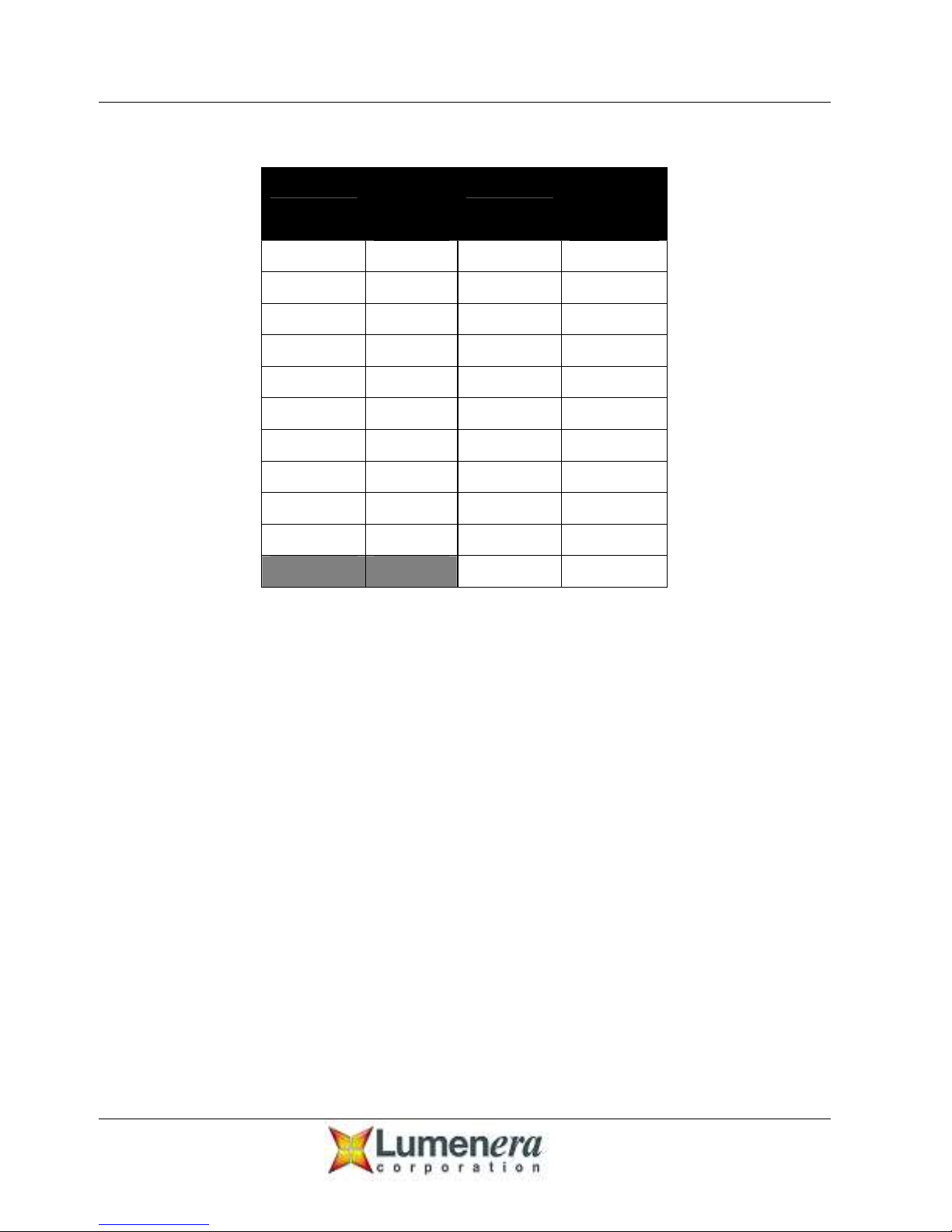
or URI escape codes. In particular, the characters in Table 2-1 may require
substitution with the URL and URI escape codes indicated.
Copyright 2008 Page 9
Page 22
Lumenera Network Camera
Release 1.8.1 API Reference Manual
Table 2-1 URI Escape Code for Special Characters
Character URI
Escape
Code
Character URI
Escape
Code
SPACE %20 ? %3F
$ %24 @ %40
% %25 [ %5B
& %26 \ %5C
/ %2F ] %5D
: %3A ^ %5E
; %3B ` %60
< %3C { %7B
= %3D | %7C
> %3E } %7D
~ %7E
Below are some examples of how to access the camera’s API interface. Where
indicated, replace “CamIP” with the camera IP address (e.g. 192.168.2.89) or
the DNS name of the camera.
Examples on how to access functions through the web interface:
Launch MJPEG video stream:
http://CamIP/cgi-bin/nph-video
or,
http://CamIP/cgi-bin/nph-video?type=multipart/x-mixedreplace
Query firmware & hardware version:
http://CamIP/cgi-bin/version
Get camera settings information:
http://CamIP/cgi-bin/get_settings
Save settings to persistent memory:
http://CamIP/cgi-bin/save_settings
Restore settings from memory:
http://CamIP/cgi-bin/load_settings
Reboot the camera:
http://CamIP/cgi-bin/reset
Page 10 Copyright 2008
Page 23

Lumenera Network Camera
API Reference Manual Release 1.8.1
All camera properties use the get and set camera API functions. Below are
some examples of how these properties can be accessed:
Set fixed gain and exposure:
http://CamIP/cgi-bin/set?gain=1&exposure=10
Enable auto-brightness:
http://CamIP/cgi-bin/set?autogain=1&autoexposure=1
Enable automatic white balance:
http://CamIP/cgi-bin/set?whitebalance=continuous
Get the camera gain:
http://CamIP/cgi-bin/get?gain
Get the camera MAC address:
http://CamIP/cgi-bin/get?MAC
Set custom day/night modes:
Parameters to set:
low_light_settings=ir_shuttle_position=1;auto_algorithm=pea
k;lighting_frequency=0;maximum_exposure=4;autoexposure_targ
et=20;autoexposure=1;autogain=1;
Command with URL encoded special characters:
http://CamIP/cgibin/set?low_light_settings=ir%5Fshuttle%5Fposition%3D1%3Bau
to%5Falgorithm%3Dpeak%3Blighting%5Ffrequency%3D0%3Bmaximum%
5Fexposure%3D4%3Bautoexposure%5Ftarget%3D20%3Bautoexposure%
3D1%3Bautogain%3D1%3B
2.4.2.1 No Process Header (NPH) commands
You may also prefix any CGI command name that is specific to the camera API
(video, image, get, set, get_settings, version, etc.) with “nph-”. A NPH CGI
program starts sending data immediately, rather than buffering it to construct the
Content-Length HTTP header. By using these commands, the requests bypass
the web server by writing directly to the HTTP socket. The NPH command thus
has a significantly lower latency. The NPH command format is recommended for
all image and video transfers. Examples follow.
Single JPEG image:
http://CamIP/cgi-bin/nph-image.jpg
MJPEG image stream:
http://CamIP/cgi-bin/nph-video
Copyright 2008 Page 11
Page 24

Lumenera Network Camera
Release 1.8.1 API Reference Manual
2.4.2.2 Response on Success
If the API function call succeeds then templates/success.tmpl is processed
and returns a Success message formatted as HTML. Functions that return
binary results, such as /cgi-bin/nph-image.jpg, do not use the response
template mechanism unless there is an error. The format of the success template
places the return value in a <!--CAMERA --> tag. This is followed by an HTML
formatted body that includes a <function> executed successfully
message, the return value (if any), and a hyperlink to the index page of the
camera.
Example: query firmware version
http://CamIP/cgi-bin/version
Return value:
Lumenera/explorer2 r5281 hw1.1 1.8.0.10 : le075c-dn -- Fri,
21 Sep 2007 13:31:21 -0400
Success template response:
<html>
<head>
<title>Success</title>
<!-- CAMERA Lumenera/explorer2 r5281 hw1.1 1.8.0.10 :
le075c-dn -- Fri, 21 Sep 2007 13:31:21 -0400
-->
</head>
<body BGCOLOR=white>
version executed successfully
<p>
<pre>
Lumenera/explorer2 r5281 hw1.1 1.8.0.10 : le075c-dn -- Fri,
21 Sep 2007 13:31:21 -0400
</pre>
<p>
<a href="/index.html">Home Page</a>
</body>
</html>
2.4.2.3 Response on Failure
If there is an error, templates/error.tmpl is processed and returns the
command name and error number.
Page 12 Copyright 2008
Page 25

Lumenera Network Camera
API Reference Manual Release 1.8.1
Example: get a non-existent API property
http://CamIP/cgi-bin/get?foo
Failure template response:
<html>
<head><title>Error</title>
<!-- CAMERA ERROR 3 Invalid Argument property=foo: .
ctl.c:265 -->
</head>
<body>
get produced error:
<pre id=error>
Invalid Argument property=foo: . ctl.c:265
</pre>
</body>
</html>
Example: set a property to invalid type (string instead of double)
http://CamIP/cgi-bin/set?gain=X
Failure template response:
<html>
<head><title>Error</title>
<!-- CAMERA ERROR 3 Invalid Argument gain=X: invalid type.
ctl.c:215 -->
</head>
<body>
set produced error:
<pre id=error>
Invalid Argument gain=X: invalid type. ctl.c:215
</pre>
</body>
</html>
Copyright 2008 Page 13
Page 26

Lumenera Network Camera
Release 1.8.1 API Reference Manual
2.4.2.4 Access Levels
Lumenera Network cameras support three levels of access, as shown below.
Table 2-2 Available Access Levels in Network Cameras
Login Password
Privileges CGI path Webserver port in API
property in API
admin admin_password Full access /cgi-bin Port 80
user user_password Limited access,
/cgi-usr Port 80 and Port 8080
read-only
public None Very limited
/cgi-pub Port 80 and Port 8080
access
The admin_password sets access to the camera’s /cgi-bin directory and
/admin.htm file.
The user_password provides only the specific commands from the path /cgi-
usr that are listed below:
/cgi-usr/get
/cgi-usr/image
/cgi-usr/nph-image
/cgi-usr/nph-image.jpg
/cgi-usr/nph-video
/cgi-usr/version
/cgi-usr/video
Where a request is made for admin access without proper authentication, the
standard 401-Not Authorized response is issued:
<HTML><HEAD><TITLE>401 Unauthorized</TITLE></HEAD>
<BODY><H1>401 Unauthorized</H1>
Your client does not have permission to get URL /cgibin/version from this server.
</BODY></HTML>
In the example above, a valid request at the user access level could specify
/cgi-usr/version instead of /cgi-bin/version.
Public access allows access to the following commands:
/cgi-pub/
/version
/index.html
/images/
/javascript/
/favicon.ico
Page 14 Copyright 2008
Page 27

Lumenera Network Camera
API Reference Manual Release 1.8.1
2.4.3 Telnet Environment
The telnet client establishes a TCP connection typically on port 23. It can be
used to establish a connection to the camera to change camera settings, run
camera functions or get the camera status.
To access any function in the Camera API through a telnet session, use either
the luether command or l for short. API functions and their individual
arguments are separated by a space. Below are some examples on how the
functions can be accessed through a telnet client.
To save the current camera settings to non-volatile memory:
luether save_settings
l save_settings
To get an image from the image buffer:
luether image number=-2
l image number=-2
To access a camera property, use the get or set API functions as shown below:
To get the current camera gamma value
luether get gamma
l get gamma
To set the camera’s exposure and gain in one command
luether set exposure=20 gain=2.0
l set exposure=20 gain=2.0
Copyright 2008 Page 15
Page 28

Lumenera Network Camera
Release 1.8.1 API Reference Manual
3
API Function Reference
3.1 Summary of API Functions
Table 3-1 provides a quick summary of the camera API functions supported for
the Network cameras. Not all functions listed below will be supported for every
camera
Table 3-1 Summary of Camera API Functions
Function Description
add_parameter Adds a user-defined property
ftp_images Transfers JPEG images to an FTP server
ftp_stream_last_error Returns last error from asynchronous FTP stream
ftp_stream_status Returns status of an asynchronous FTP stream
ftp_stream_stop Stops a particular FTP stream
ftp_stream_stop_all Stops all FTP streams
get Returns the value of the specified property
get_settings Gets a summary of property values
image Transfers a single image in JPEG format
image_raw Transfers a single image in RAW format
image_yuv Transfers a single image in Abekas YUV format
lens_reset_aperture Synchronizes the iris control of a Canon lens
load_settings Loads camera settings from non-volatile memory
put_settings Sets the values of multiple properties at once
put_settings_from_property Applies settings stored in a property
reset Reboots the camera
save_settings Saves the current settings to non-volatile memory
set Sets the specified property to a new value
Page 16 Copyright 2008
Page 29

Lumenera Network Camera
API Reference Manual Release 1.8.1
Function Description
start Starts the image processing pipeline
stop Stops the image processing pipeline
strobe Causes a single strobe pulse on the GPIO output
subimage_yuv Transfers a sub-image in Abekas YUV format
test_email_alarm Tests the motion email script
udp_stream Transfers JPEG images to an UDP client
udp_stream_stop Stops a particular UDP stream
udp_stream_stop_all Stops all UDP streams
version Returns firmware version information
video Transfers a stream of JPEG images
3.2 API Function Description
This section describes all of the camera’s API functions and how to use them.
add_parameter
This function allows the saving of user-defined properties on the camera. Once
properties have been added to the camera, the get and set command can be
used to access their values.
Arguments
name string
Must not contain spaces
value string
An arbitrary string
Return Values
Returns nothing on success. Throws a fault on error.
Notes
Setting the value of a property that does not exist results in an error. The
save_settings API function will save all user-defined properties set with this
function across camera reboots.
Copyright 2008 Page 17
Page 30

Lumenera Network Camera
Release 1.8.1 API Reference Manual
Example
CGI:
/cgi-bin/add_parameter?name=MyProperty&value=MyValue
Telnet:
l add_parameter name=MyProperty value=MyValue
Page 18 Copyright 2008
Page 31

Lumenera Network Camera
API Reference Manual Release 1.8.1
ftp_images
Transfers an image or a stream of JPEG images to an FTP server.
Arguments
server string
The server name or IP address
path string
Relative or absolute file path on the FTP server in which image(s) will be
stored.
user <optional> string
FTP user name { default: ftp }
password <optional> string
FTP password { default: ftp }
pre <optional> double
Duration in seconds of the pre-trigger images to be transferred. { default:
0 }
post <optional> double
Duration in seconds of the post-trigger images to be transferred. {
default: 0 }
passive <optional> boolean
FTP mode. If set to 1, passive FTP mode (PASV) is used. If set to 0,
PORT mode is used. { default: 0 }
async <optional> boolean
Async FTP mode. If set to 1, the command returns immediately and the
FTP streaming is executed in the background with errors sent to the
camera’s syslog. If set to 0, the command returns when the FTP
streaming is complete with errors returned normally. { default: 0 }
session <optional> string
Session name. { default: noname }
framerate <optional> double
The frame rate of the desired FTP stream measured in frames per
second (fps). If this value is larger than the camera's current frame rate,
images will be transferred at the fastest rate possible. { default: 1000 }
archive <optional> boolean
Run in archive mode. If set to 1, the camera will use its rolling buffer to
send images without dropping any frames, resulting in increased latency
when network bandwidth is limited. If set to 0, the camera may drop
frames rather than increase latency. { default: 1 }
Copyright 2008 Page 19
Page 32

Lumenera Network Camera
Release 1.8.1 API Reference Manual
ref_date <optional> string
Date and time for the requested index frame (image number 0) to a
precision of seconds. The camera will send images beginning with the
most recent image still in the buffer that was captured prior to the
requested time. A request for images that are no longer present in the
buffer will produce the most recent images possible. The ref_date
format is the same as that obtained from the /cgi-bin/get?date or l
get date commands (RFC 2822, see the documentation for the date
property in the API). The ref_date must be URL encoded. If
ref_date is used then ref_useconds is also required. The
ref_date is ignored if it is empty (null).
ref_useconds <optional> int
The portion of the time of the requested index frame (image number 0) in
microseconds. { default: -1, ref_useconds is ignored }
Return Values
Notes
Returns nothing on success. Throws a fault on error. Error can be retrieved by
calling ftp_stream_last_error API function.
If path specifies directories that do not exist, the directories will be created.
path is first run through strftime so that a date can be added to the path
name. For full documentation of the conversion specifications, please consult
strftime documentation from: http://www.opengroup.org/.
If path includes %%i (or any other legal Unix/SUSv2 printf variation such as
%%05i) the relative image number will be inserted. Increasing numbers apply to
successive images. The most recent image is assigned the number 0. Pre-trigger
images are assigned negative numbers.
If path includes %%Q, the subsecond portion of the time in units of milliseconds
[000-999] will be inserted.
An example path follows that uses the year, month [1..12], day of month [1..31],
24-hour time (hours, minutes, and seconds), and a relative image number.
Example path:
MyFile%Y%m%d%H%M%S%%05i.jpg
Example result:
MyFile2008123123595900000.jpg
If both post and pre values are zero then only one frame will be transferred.
The maximum value for pre is related to number_of_buffers and the global
framerate property. To stream indefinitely, set post to a large value such as
Page 20 Copyright 2008
Page 33

Lumenera Network Camera
API Reference Manual Release 1.8.1
1E+20. ftp_stream_stop commands will not work if async=0. To stop
streaming when async=0, close the associated pipe.
Any of the arguments that contain special characters or spaces must be URL
encoded. This usually applies only to the path. The password may also be
affected. This is the reason for the use of `echo –n TEXT|url_escape` in
the path argument in the Telnet example below.
Immediately after a change in the image geometry (x, y, width, and/or
height), wait at least 2*(1/framerate) or a subsequent ftp_images call may
fail with an error.
Examples
CGI: (use %25 URI escape code for the ‘%’ character)
ftp_images?server=10.10.111.111&path=image%25H%25M%25S
%25%25Q.jpg&user=guest&password=guest&pre=10&post=10&a
rchive=1&framerate=1
ftp_images?server=10.10.111.111&path=x%25H%25M%25S%25%
25Q.jpg&user=guest&password=guest&post=3&ref_useconds=
0&ref_date=Fri%2C+11+Jan+2008+17%3A52%3A00+%2D0500%0A
Telnet:
l ftp_images server=10.10.111.111 user=guest
password=guest pre=10 post=10 archive=1 framerate=1
path=`echo -n image%H%M%S%%Q.jpg|url_escape`
l ftp_images server=10.10.111.111 user=guest
password=guest ref_useconds=0 post=3
path= x%25H%25M%25S%25%25Q.jpg
ref_date=Fri%2C+11+Jan+2008+17%3A52%3A00+%2D0500%0A
Copyright 2008 Page 21
Page 34

Lumenera Network Camera
Release 1.8.1 API Reference Manual
ftp_stream_last_error
Returns the last error, if any, from an ftp_images stream. The stream does not
need to be running to get this error.
Arguments
session string
Session name. For an alarm FTP session, use 'alarm' for this argument.
For the default session name, use noname.
Return Values
Returns the last error as a string. Throws a fault if the command fails.
Typical error message returned are:
Unable to connect to [FTP server IP address]
Login failure
ftp open
Notes
Querying the last error does indicate if there was a subsequent successful FTP
session using the same session name. For example, if the first session produces
the error Login failure and is followed by another successful session that
uses the same session name, then ftp_stream_last_error will still report
Login failure.
The return value of ftp_stream_last_error may not reflect attempts to call
the ftp_images function where a required argument cannot be validated and
the FTP session is never attempted. For example, calling ftp_images with the
path missing or incorrectly formatted fails with an error Missing Argument
path, but this does not affect the return value of a later call of
ftp_stream_last_error.
A return value of ftp open may indicate that a recent call to ftp_images
conflicted with an earlier call with the same session name. For example, very
frequent alarm FTP events when using a small value of the alarm_delay
property may lead to conflicts. In particular, errors may result where more than
one call to ftp_images attempts to write to the same file path on the same
server.
Example
CGI:
/cgi-bin/ftp_stream_last_error?session=alarm
Page 22 Copyright 2008
Page 35

Lumenera Network Camera
API Reference Manual Release 1.8.1
Telnet:
l ftp_stream_last_error session=alarm
Copyright 2008 Page 23
Page 36

Lumenera Network Camera
Release 1.8.1 API Reference Manual
ftp_stream_status
Returns the status of the FTP stream.
Arguments
session string
Session name. For an alarm FTP session, use 'alarm' for this argument.
Return Values
Returns a boolean on success where a value of 1 states that the asynchronous
stream is running. Throws a fault on error. Also returns a value of if the stream
has produced an error, but will be retried. In this case,
ftp_stream_last_error returns the value of the last error.
Notes
None.
Example
CGI:
/cgi-bin/ftp_stream_status?session=alarm
Telnet:
l ftp_stream_status session=alarm
Page 24 Copyright 2008
Page 37

Lumenera Network Camera
API Reference Manual Release 1.8.1
ftp_stream_stop
Stops an FTP stream.
Arguments
session <optional> string
Session name. The default session name is noname. For an alarm FTP
session, use 'alarm' for this argument.
Return Values
Returns nothing on success. Throws a fault on error.
Notes
None.
Example
CGI:
/cgi-bin/ftp_stream_stop?session=alarm
or
/cgi-bin/ftp_stream_stop?session=alarm
Telnet:
l ftp_stream_stop session=alarm
Copyright 2008 Page 25
Page 38

Lumenera Network Camera
Release 1.8.1 API Reference Manual
ftp_stream_stop_all
Stops all FTP streams.
Arguments
None.
Return Values
Returns nothing on success. Throws a fault on error.
Notes
If you call ftp_stream_stop_all, calls to ftp_images started and still
running in a Telnet session will exit with the message Terminated or Killed
echoed on the console.
Example
CGI:
/cgi-bin/ftp_stream_stop_all
Telnet:
l ftp_stream_stop_all
Page 26 Copyright 2008
Page 39

Lumenera Network Camera
API Reference Manual Release 1.8.1
get
Returns the value of a specified property.
Arguments
property_name string
Valid property name
Return Values
On success, returns the value of the property. Throws a fault on error.
Notes
None.
Examples
CGI:
/cgi-bin/get?autogain
// Return value 1 (true) or 0 (false)
or
/cgi-bin/get?width
// Returns an integer, the image width in pixels.
Telnet:
l get autogain
// returns 1 (true) or 0 (false)
or
l get autoexposure
// returns 1 (true) or 0 (false)
or
l get gain; l get exposure; l get luminance;
// returns all values in sequence
Copyright 2008 Page 27
Page 40

Lumenera Network Camera
Release 1.8.1 API Reference Manual
get_settings
This command returns an array of property/value pairs representing all of the
current settings in the camera. Each property/value pair is separated from the
next pair by the user definable delimiter string.
Arguments
delimeter <optional> string
Separation character sequence that defines the individual property/value
pair. Some settings may contain a carriage return/line feed (CRLF)
sequence as part of their value. Setting the delimeter to a unique
value other than a simple CRLF will ensure that parsing the response
will be accurate. If a zero-length string is passed, the delimeter will be \0
(NULL). { default: \r\n***\r\n }
Return Values
Array of property/value pairs on success; throws a fault on error.
Notes
The entire table of delimited settings is issued twice following the standard format
of templates/success.tmpl, once in the <--LUMENERA --> tag and again
in the body of the HTML. Only property values that are saved in the configuration
database will be returned.
Example
CGI:
Telnet:
/cgi-bin/get_settings
l get_settings
Page 28 Copyright 2008
Page 41

Lumenera Network Camera
API Reference Manual Release 1.8.1
image
Transfers a single image in JPEG format.
Arguments
number <optional> int
Specifies the image in the rolling buffer to be returned where 1
corresponds to the most recent image in the buffer.
number_of_buffers-1 indicates the oldest image. A value of 0
requests the image currently being integrated. Note that it is possible to
pass a value of number that is out of range based on the current value of
number_of_buffers. If ref_date is used then ref_useconds is
also required. The ref_date is ignored if it is empty (null). { default: 1}
ref_date <optional> string
Date and time for the requested index frame (image number 0) to a
precision of seconds. The camera will send images beginning with the
most recent image still in the buffer that was captured prior to the
requested time. A request for images that are no longer present in the
buffer will produce the most recent images possible. The ref_date
format is the same as that obtained from the /cgi-bin/get?date or l
get date commands (RFC 2822, see the documentation for the date
property in the API). The ref_date must be URL encoded. If
ref_date is used then ref_useconds is also required. The
ref_date is ignored if it is empty (null).
ref_useconds <optional> int
The portion of the time of the requested index frame (image number 0) in
microseconds [0 to 999999].. { default: -1, ref_useconds is ignored}
Return Values
If the camera is stopped, a value of 0 for the number may cause this command
to hang for an undefined period of time. Returns a binary JPEG image file on
success. Throws a fault on error.
Notes
Use nph-image or nph-image.jpg to make a No Process Header request for
reduced latency.
Immediately after a change in the image geometry (x, y, width, and/or
height), wait at least 2*(1/framerate) or a subsequent image call may fail
with an error.
Copyright 2008 Page 29
Page 42

Lumenera Network Camera
Release 1.8.1 API Reference Manual
Example
CGI:
/cgi-bin/nph-image.jpg
Telnet:
l image
Page 30 Copyright 2008
Page 43

Lumenera Network Camera
API Reference Manual Release 1.8.1
load_settings
Loads camera settings from a file in non-volatile memory.
Arguments
filename <optional> string
Filename of saved settings file. { default: persistent }
Return Values
Returns nothing on success. Throws a fault on error.
Notes
The filename can be any arbitrary name that was created using
save_settings API function or one of two special filenames: persistent or
factory_defaults. The filename persistent specifies the current power-on
defaults. The filename factory_defaults specifies the default settings with
which the camera shipped.
Example
CGI:
Telnet:
/cgi-bin/load_settings
l load_settings
Copyright 2008 Page 31
Page 44

Lumenera Network Camera
Release 1.8.1 API Reference Manual
ptz_command
Performs a pan-tilt-zoom (PTZ) control action of a motorized positioning system
and motorized lens.
Arguments
command <optional> string
The action to perform, where command is one of the following values.
{default: stop}
Pan-Tilt actions: stop, up, up_left, up_right, down, down_left, down_right,
left, right.
Lens focus actions: far, near.
Lens iris actions: open, close.
Lens zoom actions: tele, wide.
Return Values
Returns nothing on success. Throws a fault on error.
Notes
Applies only to Pan Tilt Zoom (PTZ) systems that use the camera’s RS232 serial
port to interface the network camera to a pan-tilt motor and a motorized zoom
lens. Calling ptz_command sends a command to a PTZ controller board via the
camera’s RS232 serial port.
Each action is performed in one pre-defined step size. The same actions and
step sizes are used in the graphical web page user interface for PTZ control.
Set ptz_enable to be true when using ptz_command. A system error is thrown
unless serial_use=accessory and serial_speed=2400.
Example
CGI:
/cgi-bin/ptz_command?up_left
Telnet:
l ptz_command up_left
Page 32 Copyright 2008
Page 45

Lumenera Network Camera
API Reference Manual Release 1.8.1
ptz_preset
Used to instruct the camera to set, clear, or move to a particular pan-tilt-zoom
(PTZ) camera preset position.
Arguments
command <required> string
The action to take: set, goto, or clear.
set: Set the specified PTZ preset id_number at the current position.
goto: Move to the PTZ preset position associated with id_number.
clear: Clear the PTZ preset associated with id_number.
id_number <required> string
The preset number to which the action applies.
Return Values
Returns nothing on success. Throws a fault on error.
Notes
Applies only to Pan Tilt Zoom (PTZ) systems that use the camera’s RS232 serial
port to interface the network camera to a pan-tilt motor and a motorized zoom
lens. Calling ptz_preset sends a command to a PTZ controller board via the
camera’s RS232 serial port.
Set ptz_enable to be true when using ptz_command. A system error is thrown
unless serial_use=accessory and serial_speed=2400.
Example
CGI:
Telnet:
/cgi-bin/ptz_preset?set&3
/cgi-bin/ptz_preset?goto&3
/cgi-bin/ptz_preset?clear&3
l ptz_preset set 3
l ptz_preset goto 3
l ptz_preset clear 3
Copyright 2008 Page 33
Page 46

Lumenera Network Camera
Release 1.8.1 API Reference Manual
put_settings
Sets multiple properties in a single function call. This function has the same
effect as calling the set API function multiple times for each property or with
multiple property-value pairs. Each property-value pair must be separated from
the next pair by the user-defined delimiter. The first equals sign in a name-value
pair separates the name from the value. A value can contain equals signs (=).
Arguments
settings string
property/value pairs string.
delimiter <optional> string
Delimiter that separates the property/value pair. { default: “,” }
Return Values
Returns nothing on success. Throws a fault on error.
Notes
The delimiter cannot be \0 (NULL). It is recommended that the delimiter not
contain a carriage return/line feed pair (CRLF) as text translation may occur. If
using the CGI interface or the command line, standard URI escapes are used.
Example
CGI:
Telnet:
/cgibin/put_settings?gain%3D1%2Cexposure%3D3&delimeter=%2C
l put_settings gain%3D1%2Cexposure%3D2 delimeter=%2C
Page 34 Copyright 2008
Page 47

Lumenera Network Camera
API Reference Manual Release 1.8.1
put_settings_from_property
Sets multiple properties from a given property. Similar to the put_settings API
function, this function sets multiple properties in a single function call. It retrieves
the value from an existing property and applies it to multiple properties.
Arguments
property_name string
valid existing property name
delimiter <optional> string
Delimiter that separates the property/value pair. { default: “,” }
Return Values
Returns nothing on success. Throws a fault on error.
Notes
The delimiter cannot be \0 (NULL). If the current camera settings are unwanted,
the command
put_settings_from_property default_image_params
can be used to restore the Image Defaults settings. This command is similar to
load_settings factory_defaults
with the exception that none of the network settings are affected.
Example
CGI:
Telnet:
/cgi-bin/put_settings_from_property?
default_image_params
l put_settings_from_property default_image_params
Copyright 2008 Page 35
Page 48

Lumenera Network Camera
Release 1.8.1 API Reference Manual
reset
Reboots the camera.
Arguments
None.
Return Values
Returns nothing on success. Throws a fault on error.
Notes
The camera will be unresponsive for approximately 30 seconds until it has
finished booting.
Example
CGI:
/cgi-bin/reset
Telnet:
l reset
Page 36 Copyright 2008
Page 49

Lumenera Network Camera
API Reference Manual Release 1.8.1
save_settings
Saves the current camera settings to non-volatile memory. The settings may be
saved to a user-defined filename so that they may be reloaded via
load_settings, or the default filename 'persistent' may be used. The special
filename 'persistent' defines the set that will be automatically loaded by the
camera when rebooted.
Arguments
filename <optional> string
Filename for saved settings file. { default: persistent }
Return Values
Returns nothing on success. Throws a fault on error.
Notes
None.
Example
CGI:
Telnet:
/cgi-bin/save_settings
l save_settings
Copyright 2008 Page 37
Page 50

Lumenera Network Camera
Release 1.8.1 API Reference Manual
set
Set the value of a particular property.
Arguments
property string
Existing property name
value <based on property>
Value of the same data type as the property.
Return Values
Returns nothing on success. Throws a fault on error.
Notes
None.
Examples
CGI:
or
Telnet:
or
or
\cgi-bin\set?autogain=1
\cgi-bin\set?width=300&height=200&x=50&y=50
l set autogain=1
l set autoexposure=1
l set width=300 height=200 x=50 y=50
Page 38 Copyright 2008
Page 51

Lumenera Network Camera
API Reference Manual Release 1.8.1
start
Starts the image processing pipeline on the camera.
Arguments
None.
Return Values
Returns nothing on success. Throws a fault on error.
Notes
The start command is disruptive to normal camera operations. Use of the
start command is not recommended.
Example
CGI:
/cgi-bin/start
Telnet:
l start
Copyright 2008 Page 39
Page 52

Lumenera Network Camera
Release 1.8.1 API Reference Manual
stop
Stops the image processing pipeline in the camera.
Arguments
None.
Return Values
Returns nothing on success. Throws a fault on error.
Notes
The stop command is disruptive to normal camera operations. Use of the stop
command is NOT recommended.
Example
CGI:
/cgi-bin/stop
Telnet:
l stop
Page 40 Copyright 2008
Page 53

Lumenera Network Camera
API Reference Manual Release 1.8.1
strobe
Causes a single analog pulse to occur on the GPIO output.
Arguments
None.
Return Values
Returns nothing on success. Throws a fault on error.
Notes
The property output_select must be set to 'on' for this function to work
correctly. The duration of the pulse is set using the strobe_length property.
Example
CGI:
/cgi-bin/strobe
Telnet:
l strobe
Copyright 2008 Page 41
Page 54

Lumenera Network Camera
Release 1.8.1 API Reference Manual
test_email_alarm
Unconditionally execute the motion_email_script. This will force a motion
alarm type email message to be generated and sent to the assigned email
address.
Arguments
None.
Return Values
Returns an int value on success. Throws a fault on error.
Notes
See documentation for the motion_email_script property. You must specify
a valid mail server and email recipient.
Example
CGI:
Telnet:
/cgi-bin/
set?motion_email_recipient=me%40mydomain%2Ecom
/cgi-bin/set?motion_email_server=123%2E123%2E123%2E123
/cgi-bin/test_email_alarm
l set [email protected]
l set motion_email_server=123.123.123.123
l test_email_alarm
Page 42 Copyright 2008
Page 55

Lumenera Network Camera
API Reference Manual Release 1.8.1
udp_stream
Transfers an image or a stream of JPEG images to a UDP client.
Arguments
client string
Client name or IP address.
port int
Client port address.
end <optional> int
The image number for the last image to transfer from the rolling buffer. If
start is 0, this value corresponds to the number of images to transfer.
If end is less than start, then the UDP streaming will continue
indefinitely. { default: 1 }
start <optional> int
The first image to transfer from the rolling buffer. A positive number
refers to future images not yet captured, a negative number refers to
older images in the rolling buffer. { default: 0 }
frameskip <optional> double =(0-n; default: 0)
framerate <optional> double
archive <optional> boolean
Return Values
Returns nothing on success. Throws a fault on error.
Notes
The first 16 bytes for each packet in the UDP stream are four integers, each 4
bytes long, which are described below.
The number of frames to discard for every frame sent. Fractional values
are supported. This is in addition to skips required by the camera’s
maximum_framerate global value. { default: 0 }
The desired frame rate of the UDP stream. If this value is non-zero, the
camera calculates an appropriate frameskip value. If the global
framerate value changes, the frame rate of this stream will change
proportionately. { default: 0 }
Run in archive mode. If set to 1, the camera will use its rolling buffer to
send images without dropping any frames, resulting in increased latency
when network bandwidth is limited. If set to 0, the camera may drop
frames rather than increase latency. { default: 0 }
Magic number: Ensures the data received is from the camera.
Copyright 2008 Page 43
Page 56

Lumenera Network Camera
Release 1.8.1 API Reference Manual
Image sequence number: Specifies the frame number from the camera.
Packet position/image offset: Location of this packet in the image in bytes. For
example, a packet position of X means this packet should be inserted into the
image at the Xth byte of the image.
Total image length in bytes: This should be the same for each packet for a given
image.
The remaining bytes in the packet are image data. Each packet should be less
than 64KB in size.
Immediately after a change in the image geometry (x, y, width, and/or
height), wait at least 2*(1/framerate) or a subsequent udp_stream call may
fail with an error.
Example
CGI:
/cgi-bin/udp_stream?client=123.123.123.123&port=1234
Telnet:
l udp_stream client=123.123.123.123 port=1234
Page 44 Copyright 2008
Page 57

Lumenera Network Camera
API Reference Manual Release 1.8.1
udp_stream_stop
Stops a UDP stream.
Arguments
client string
The client name or address.
port int
The client port.
Return Values
Returns nothing on success. Throws a fault on error.
Notes
None.
Example
CGI:
Telnet:
/cgi-bin/udp_stream_stop?client=123.123.123.123&port=
1234
l udp_stream_stop client=123.123.123.123 port=1234
Copyright 2008 Page 45
Page 58

Lumenera Network Camera
Release 1.8.1 API Reference Manual
udp_stream_stop_all
Stops all open UDP streams.
Arguments
None.
Return Values
Returns nothing on success. Throws a fault on error.
Notes
None.
Examples
CGI:
/cgi-bin/udp_stream_stop_all
Telnet:
l udp_stream_stop_all
Page 46 Copyright 2008
Page 59

Lumenera Network Camera
API Reference Manual Release 1.8.1
version
Returns a string describing the camera hardware and software. This includes the
hardware version, camera name, firmware version, and firmware build date.
Arguments
None.
Return Values
Returns a string on success. Throws a fault on error.
Notes
None.
Examples
CGI:
/cgi-bin/version
Telnet:
l version
Sample Output
Lumenera/explorer2 r5565 hw1.2 1.8.0.16 : le165c-dn -- Mon,
24 Dec 2007 12:31:56 -0500
Lumenera/explorer2 Indicates the camera type
r5565 Firmware build number
hw1.2 Hardware version, “hw1.3” indicates extended RAM
1.8.0.16 Firmware version
1.8 is the major version of firmware.
.0 Firmware branch
(number = main branch, A=alpha firmware, B=beta firmware)
.16 Minor version, with even/odd value for release type
(even digit = production release, odd digit = release candidate)
le165c-dn Camera model
Mon, 24 Dec 2007 12:31:56 -0500 Date and time of the firmware
build
Copyright 2008 Page 47
Page 60

Lumenera Network Camera
Release 1.8.1 API Reference Manual
video
Transfers a stream of images in JPEG format.
Optional Arguments
type <optional> string
Stream type. Two options available - multipart/mixed is used for
older versions of the firmware, multipart/x-mixed-replace is used
for newer versions and is more compatible with third party software. {
default: multipart/mixed }
frameskip <optional> double =(0-n; default: 0)
The number of frames to discard for every frame sent. Fractional values
are supported. This is in addition to skips required by the camera’s
maximum_framerate global value. { default: 0 }
framerate <optional> double
The desired frame rate of the UDP stream. If this value is non-zero, the
camera calculates an appropriate frameskip value. If the global
framerate value changes, the frame rate of this stream will change
proportionately. { default: 0 }
archive <optional> boolean
Run in archive mode. If set to 1, the camera will use its rolling buffer to
send images without dropping any frames, resulting in increased latency
when network bandwidth is limited. If set to 0, the camera may drop
frames rather than increase latency. { default: 0 }
start <optional> int
The first image to transfer from the rolling buffer. A positive number
refers to future images not yet captured, a negative number refers to
older images in the rolling buffer. { default: 0 }
ref_date <optional> string
Date and time for the requested index frame (image number 0) to a
precision of seconds, formatted according to the requirements in RFC
2822. The camera will send the most recent buffered image that is prior
to the requested time. Attempting to retrieve images outside the rolling
buffer will send no images at all, even if the time specified is in the future
or some of the images specified are in the buffer.
ref_useconds <optional> int
The portion of the time of the requested index frame (image number 0) in
microseconds. { default: -1 }
Page 48 Copyright 2008
Page 61

Lumenera Network Camera
API Reference Manual Release 1.8.1
Return Values
Returns a binary JPEG image data on success. Throws a fault on error.
Notes
Local storage of Motion JPEG binary data in the camera file system is not
recommended. The Telnet example that follows is for test purposes only.
Immediately after a change in the image geometry (x, y, width, and/or
height), wait at least 2*(1/framerate) or a subsequent video call may fail
with an error.
Examples
CGI:
/cgi-bin/nph-video
or
/cgi-bin/nph-video?type=multipart/x-mixed-replace&
framerate=5
or
/cgi-bin/nph-video?archive=1&start=-100
Telnet:
Examples store binary data in camera file system and
may exceed available storage capacity. For test
purposes only. The video function is intended to be
executed by a client computer.
/cgi-bin/nph-video|cat > myfile.dat
or
l nph-video type=multipart/x-mixed-replace|cat >
myfile.dat
or
l nph-video archive=1 start=-100|cat > myfile.dat
In all Telnet examples above use CTRL-C to halt their execution.
Copyright 2008 Page 49
Page 62

Lumenera Network Camera
Release 1.8.1 API Reference Manual
4
API Property Reference
4.1 API Property Description
This section describes all of the camera’s API properties and how to use them.
admin_password
Type
string
Description
Access to the administrator password for the camera. This property can be used
to set the password.
Note
If this property is not empty, a password is needed to access any of the camera
configuration commands in the /cgi-bin/ directory or to access any of the
camera’s API functions. To remove a password, set it to the null (empty) string. If
the password starts with "$1$", the string is assumed to be the MD5 hash of
the password rather than the password itself. The expected username is admin.
The admin username and password may also be used to access the user
sections of the camera.
Getting this property will return either 1 if a password is set or null otherwise.
alarm_delay
Type
int
Page 50 Copyright 2008
Page 63

Lumenera Network Camera
API Reference Manual Release 1.8.1
Description
Defines the delay time between alarms in seconds. Alarm notifications will not
occur more frequently than once every alarm_delay seconds.
For the Le series cameras, alarm_delay is the time in seconds between
alarms due to a signal on the general-purpose dry-contact input or a motion
alarm defined using the motion_map.
For the Li series intelligent cameras, alarm_delay only affects events detected
on the general-purpose dry-contact input Alarms due to video analytics events
are not affected by alarm_delay because such events are distinct and highly
specific.
alarm_enable_email
Type
boolean
Description
Enable and disable alarms notifications via email. Alarm events can result from
general-purpose hardware input, a motion alarm defined using the motion_map
(Le series cameras), or a video analytics alarm event (Li series cameras).
Note
Motion is defined as a minimum number of pixels changing
(motion_alarm_area) by a minimum amount (motion_sensitivity) in a
specified area of interest (motion_map). The motion_map is a grid of
rectangular areas where each one can be independently enabled or disabled.
Only enabled areas will be tested for motion.
alarm_enable_ftp
Type
boolean
Description
Enable and disable alarm notifications via FTP. Alarm events can result from
general-purpose hardware input, a motion alarm defined using the motion_map
(Le series cameras), or a video analytics alarm event (Li series cameras).
Copyright 2008 Page 51
Page 64

Lumenera Network Camera
Release 1.8.1 API Reference Manual
alarm_enable_udp
Type
boolean
Description
Enable and disable alarm notifications via UDP. Alarm events can result from
general-purpose hardware input, a motion alarm defined using the motion_map
(Le series cameras), or a video analytics alarm event (Li series cameras).
Note
When enabled and an alarm occurs, a UDP packet is sent to the client defined by
alarm_udp_client on the alarm_udp_port port. The packet is in human
readable format using carriage return/line feed pair as the separator:
event number: an incrementing unsigned long 32 bit integer
IP address: the camera's IP address (xxx.xxx.xxx.xxx)
hardware address: the camera's hardware MAC address
(xx:xx:xx:xx:xx:xx)
trigger time: the time the trigger occurred (Tue Jun 10 12:09:46 2006)
trigger reason: one of
motion-centroid x:%d y:%d area:%2.4f that specifies the X, Y coordinates
where the motion was detected.
I/O input triggered.
To acknowledge the alarm packet, send a UDP packet containing the event
number in human readable format to the source address and port of the alarm
packet. If not acknowledged, the alarm packet will be resent at one second
intervals, to a maximum of three packets.
alarm_ftp_framerate
Type
double
Description
FTP stream frame rate that the camera will stream at when an alarm is triggered.
Page 52 Copyright 2008
Page 65

Lumenera Network Camera
API Reference Manual Release 1.8.1
Note
If this property is larger than the camera's current frame rate, images will be
transferred as fast as possible assuming sufficient network bandwidth is
available.
alarm_ftp_passive
Type
boolean
Description
Accesses the FTP mode used by the camera to stream images to the FTP server
on an alarm trigger. If set, the camera uses passive (PASV) mode FTP.
alarm_ftp_password
Type
string
Description
Password of the alarm_ftp_user account that will receive files via FTP on an
alarm trigger event.
alarm_ftp_path
Type
string
Description
Path to where files will be transferred via FTP upon an alarm trigger event.
alarm_ftp_post_trigger
Type
double
Copyright 2008 Page 53
Page 66

Lumenera Network Camera
Release 1.8.1 API Reference Manual
Description
Duration in seconds of images occurring after an alarm event that will be
transferred after an alarm is triggered.
alarm_ftp_pre_trigger
Type
double
Description
Duration in seconds of images occurring before an alarm event that will be
transferred when triggered.
Note
Since new images are always being added to the rolling image buffer while the
oldest images are overwritten, the maximum value for this property is related to
number_of_buffers property and the camera’s global frame rate.
alarm_ftp_server
Type
string
Description
IP address of the target FTP server that will receive files upon an alarm trigger.
alarm_ftp_user
Type
string
Description
User account name on the alarm_ftp_server FTP server that receives image
files sent upon an alarm event.
Page 54 Copyright 2008
Page 67

Lumenera Network Camera
API Reference Manual Release 1.8.1
alarm_udp_client
Type
string
Description
A comma-separated list of the target client IP addresses that receive UDP alarm
packets.
Note
If the broadcast address for the subnet is specified, alarms will be broadcast.
Each client address can include an optional appended port number, delimited by
a colon. Errors appear in the camera file system in /var/log/messages.
alarm_udp_port
Type
int
Description
UDP client port that receives the UDP packets upon an alarm event.
Note
Errors appear in /var/log/messages. The port can also be specified in
alarm_udp_client property string by separating it from the IP address using a
colon.
analytics_alarm_enable
Type
boolean
Description
Enable or disable analytics alarm delivery. This parameter only has an effect
when the camera is equipped with analytics algorithms (e.g. ObjectVideo) and
those algorithms are enabled using analytics_enable. When true, the oncamera alarm responses to analytics alerts are enabled: email, FTP image
transfer, UDP alarm packet, and general-purpose output.
Copyright 2008 Page 55
Page 68

Lumenera Network Camera
Release 1.8.1 API Reference Manual
Note
Applies only to the Intelligent (Li series) cameras.
analytics_email_script
Type
string
Description
Defines the script that is executed when an object video alarm is detected. The
default value of this script uses the additional parameters motion_email_subject,
motion_email_server, motion_email_recipient and alarm_delay to create and
send an email message when object video alarm is detected. One needs to
attach the object video alarm details received as the email body explicitly. See
also motion_email_script.
Note
Applies only to the Intelligent (Li series) cameras.
analytics_enable
Type
boolean
Description
Enable or disable analytics.
Note
Applies only to the Intelligent (Li series) cameras.
analytics_view_select_model
Type
int
Description
This parameter defines the view model to use for the analytics algorithm.
Page 56 Copyright 2008
Page 69

Lumenera Network Camera
API Reference Manual Release 1.8.1
Note
Possible values include:
0 Auto-Acquire Mode: This is the default value. When set, the analytics
algorithm will take the current scene as the view for event detection. The
algorithm will automatically adjust to a new scene as the view if/when the scene
changes. A few frames are required for the algorithm to adapt to the new scene.
1 Auto-Force Mode: When camera starts up, the algorithm will use the first
good scene as the view and will never change regardless if the scene changes in
the future.
2 User Select Mode: When camera starts up, the algorithm will use the first
good scene as the view. If the scene changes in the future, the algorithm will
report the “unknown” view. It is up to the user to force the new scene as the new
view in the analytics algorithm backend software.
Note
Applies only to the Intelligent (Li series) cameras.
aperture
Type
double
Description
Accesses the aperture of the iris and is expressed as an f-number between 2.8
(most open) and 32 (most closed).
Note
This property applies only to camera models that use a Canon 35 mm lens with
iris_type property set to calibrated.
aperture_hw_max
Type
double, read only
Description
The hardware-imposed upper limit on the aperture property, used to
accommodate different lens types and is expressed as an f-number between 2.8
(most open) and 32 (most closed).
Copyright 2008 Page 57
Page 70

Lumenera Network Camera
Release 1.8.1 API Reference Manual
Note
This property applies only to camera models that use a Canon 35 mm lens with
iris_type property set to calibrated.
aperture_hw_min
Type
double, read only
Description
The hardware-imposed lower limit on the aperture property, used to
accommodate different lens types and is expressed as an f-number between 2.8
(most open) and 32 (most closed).
Note
This property applies only to camera models that use a Canon 35 mm lens with
iris_type property set to calibrated.
aperture_max
Type
double
Description
The user-defined upper limit on the aperture property. This property can be
read or set to a maximum aperture of the iris and is expressed as an f-number
between 2.8 (most open) and 32 (most closed).
Note
This property applies only to camera models that use a Canon 35 mm lens.
aperture_min
Type
double
Page 58 Copyright 2008
Page 71

Lumenera Network Camera
API Reference Manual Release 1.8.1
Description
The user-defined lower limit on the aperture property. This property can be
read or set to a minimum aperture of the iris and is expressed as an f-number
between 2.8 (most open) and 32 (most closed).
Note
This property applies only to camera models that use a Canon 35 mm lens.
auto_algorithm
Type
string
Description
Specifies the method or algorithm used to calculate luminance for purposes of
the auto brightness control (ABC).
Note
Setting autoexposure and/or autogain to true will cause the camera to adjust
the exposure time and/or gain to achieve the target luminance specified by
autoexposure_target. See auto_window_enable, auto_width,
auto_height, auto_x, and auto_y for information on defining the auto control
window used for these calculations.
If auto_algorithm=average, the luminance value is calculated as the mean
of the entire auto control window.
If auto_algorithm=median, the luminance value is calculated as the
median of the whole auto control window. The median algorithm is less sensitive
to extreme bright and dark areas than the average algorithm.
If auto_algorithm=peak, the luminance value is calculated using only the
brightest areas of the auto control window.
If the auto_algorithm=dark, the luminance value is calculated using only
the darkest areas of the auto control window.
Applies only to the Intelligent (Li series) cameras.
auto_height
Type
int
Copyright 2008 Page 59
Page 72

Lumenera Network Camera
Release 1.8.1 API Reference Manual
Description
Height of the auto control window.
Note
The auto control window defines the area that is used by the auto_algorithm
method when applying autoexposure, autogain and whitebalance. The
auto control window is defined relative to the current viewing window. This
window is defined by height, width, x, and y. This property is enabled and
disabled with auto_window_enable property.
auto_jpeg_quality
Type
Boolean
Description
Enables or disables the auto-JPEG quality option to maintain JPEG image file
sizes. When enabled, this property automatically adjusts the JPEG quality so that
the image file size is always between max_jpeg_size and min_jpeg_size.
This property will ensure that the file size is also kept below the
projected_network_bandwidth value divided by the lesser of
projected_network_framerate value or framerate value.
auto_width
Type
int
Description
Width of the auto control window.
Note
The auto control window defines the area that is used by the auto_algorithm
method when applying autoexposure, autogain and whitebalance. The
auto control window is defined relative to the current viewing window. This
window is defined by height, width, x, and y. This property is enabled and
disabled with auto_window_enable property.
Page 60 Copyright 2008
Page 73

Lumenera Network Camera
API Reference Manual Release 1.8.1
auto_window_enable
Type
boolean
Description
Enables or disables the use of a ROI for calculating the value for the
auto_algorithm.
Note
When set, the auto_x, auto_y, auto_width and auto_height properties
are used to define the region of interest (ROI) that is used by the
auto_algorithm to calculate the luminance and whitebalance values. The
auto control window is defined relative to the current viewing window. This
window is defined by height, width, x, and y. When cleared, the entire viewing
window is used for the auto_algorithm calculations.
For cameras that have a DC-iris, this property also controls the iris of the lens
when autoiris=true.
auto_x
Type
int
Description
Horizontal offset of the auto control window from the left edge of the current
viewing window.
Note
The auto control window defines the area that is used by the auto_algorithm
method when applying autoexposure, autogain and whitebalance. The
auto control window is defined relative to the current viewing window. This
window is defined by height, width, x, and y. This property is enabled and
disabled with auto_window_enable property.
auto_y
Type
int
Copyright 2008 Page 61
Page 74

Lumenera Network Camera
Release 1.8.1 API Reference Manual
Description
Vertical offset of the auto control window from the bottom edge of the current
viewing window.
Note
The auto control window defines the area that is used by the auto_algorithm
method when applying autoexposure, autogain and whitebalance. The
auto control window is defined relative to the current viewing window. This
window is defined by height, width, x, and y. This property is enabled and
disabled with auto_window_enable property.
autoexposure
Type
boolean
Description
Enable or disable the autoexposure functionality.
Note
When disabled, the exposure time is strictly controlled by the value of the
exposure property. When enabled, the camera adjusts the exposure to match
the requested luminance set by the autoexposure_target value using the
currently specified auto_algorithm algorithm. The camera also uses the
lighting_frequency property to limit the exposure value to predefined
multiples in order to avoid banding or flickering in images when using AC
powered light sources.
The auto_algorithm's primary guidance is to minimize noise in the image so it
prefers to lower the gain rather than lower exposure, and it prefers to raise
exposure rather than raise gain.
Not supported by Le045 and Intelligent (Li series) cameras.
autoexposure_knee
Type
double
Page 62 Copyright 2008
Page 75

Lumenera Network Camera
API Reference Manual Release 1.8.1
Description
Defines an exposure value where the auto_algorithm will stop adjusting the
exposure and starts adjusting the gain value until both the
autoexposure_knee and autogain_knee points are reached.
Note
If both autoexposure and autogain are set, the camera will achieve the
autoexposure_target by adjusting either exposure or gain. The
auto_algorithm will adjust one property until it reaches the knee point value
and then adjust the other property to achieve the desire luminance value. Once
both values are reached, the exposure and gain values are adjusted to the
respective limits.
The auto_algorithm's primary guidance is to minimize noise in the image so it
prefers to lower the gain rather than lower exposure, and it prefers to raise
exposure rather than raise gain.
The setting autoexposure_knee=0 corresponds to setting this value to the
maximum exposure that does not slow down the camera’s frame rate.
autoexposure_target
Type
double
Description
The luminance target. The camera will adjust its settings in order to achieve an
image with luminance near the value provided.
Note
The luminance is calculated as specified by the auto_algorithm property.
If autoiris, autoexposure, and/or autogain are enabled, the camera will
adjust the iris diameter (aperture), exposure and/or gain, respectively. Not
supported by Le045 and Intelligent (Li series) cameras.
autogain
Type
boolean
Copyright 2008 Page 63
Page 76

Lumenera Network Camera
Release 1.8.1 API Reference Manual
Description
Enable or disable autogain functionality.
Note
When disabled, the gain value is strictly controlled by the value of the gain
property. When enabled, the camera adjusts the gain to match the requested
luminance set by the autoexposure_target value using the currently
specified auto_algorithm algorithm.
The auto_algorithm's primary guidance is to minimize noise in the image so it
prefers to lower the gain rather than lower exposure, and it prefers to raise
exposure rather than raise gain.
autogain_knee
Type
double
Description
Defines a gain value where the auto_algorithm will stop adjusting the gain
and starts adjusting the exposure value until both the autoexposure_knee and
autogain_knee points are reached.
Note
If both autoexposure and autogain are set, the camera will achieve the
autoexposure_target by adjusting either exposure or gain. The
auto_algorithm will adjust one property until it reaches the knee point value
and then adjust the other property to achieve the desire luminance value. Once
both values are reached, the exposure and gain values are adjusted to the
respective limits.
The auto_algorithm's primary guidance is to minimize noise in the image so it
prefers to lower the gain rather than lower exposure, and it prefers to raise
exposure rather than raise gain.
autoiris
Type
boolean
Page 64 Copyright 2008
Page 77

Lumenera Network Camera
API Reference Manual Release 1.8.1
Description
Enable or disable the auto iris functionality.
Note
When set and when the exposure value begins to drop below the
minimum_exposure value, the camera reduces the lens aperture to achieve the
requested luminance specified by autoexposure_target. If the target
luminance cannot be achieved due to low light conditions, the autoexposure
and/or autogain functionality is activated when enabled.
boot_version
Type
string, read-only
Description
Returns a string describing the bootloader version.
brightness
Type
double
Description
Adjusts the brightness value of the camera. This value can be between -256
(black) and +256 (white). Not supported by Le045 and Intelligent (Li series)
cameras.
color_conversion
Type
string
Description
Specifies the RGB->YCbCr color conversion matrix to be applied after color gains and
whitebalance are applied. Available values are yuv, 709 (ITU-R BT.709
specification), and 601 (ITU-R BT.601.5 specification).
Copyright 2008 Page 65
Page 78

Lumenera Network Camera
Release 1.8.1 API Reference Manual
color_preset
Type
string
Description
Specifies the color correction matrix to be applied after color gains and
whitebalance are applied. Available values are unity, default,
chip_default, fluorescent, daylight, xenon_flash and halogen.
contrast
Type
double
Description
Accesses the contrast value of the camera. It can take values between -100 and
+100.
crosshair_enable
Type
boolean
Description
Enable or disable crosshair overlay onto images captured from the camera. This
feature is used when setting up the camera.
Note
The privacy_map may need to be disabled temporarily in order for the
alignment crosshairs to be visible. Not supported by Le045 and Intelligent (Li
series) cameras.
current_broadcast_address
Type
string, read-only
Page 66 Copyright 2008
Page 79

Lumenera Network Camera
API Reference Manual Release 1.8.1
Description
Provides the camera's current broadcast address.
current_fqdn
Type
string, read-only
Description
Provides the fully qualified domain name.
Note
If both name and dns_domain_name properties are set and the camera has
been rebooted so that these properties have taken effect, then this value is
simply name.dns_domain_name. Otherwise, it is obtained by asking the
associated nameserver.
current_gateway
Type
string, read-only
Description
Provides the gateway used by the camera.
current_ip
Type
string, read-only
Description
Provides current IP address assigned to the camera.
current_nameserver
Type
string, read-only
Copyright 2008 Page 67
Page 80

Lumenera Network Camera
Release 1.8.1 API Reference Manual
Description
Provides the nameserver assigned to the camera.
current_netmask
Type
string, read-only
Description
Provides the IP subnet mask assigned to the camera.
date
Type
string
Description
Accesses the camera’s current date in RFC 2822 format.
Example: “Mon, 10 Nov 2006 15:48:06 -0500”.
date_utc
Type
string, read-only
Description
Provides the camera’s current UTC date in RFC 2822 format.
Example: “Mon, 10 Nov 2006 15:48:06 +0000”.
daynight_bw_mode
Type
boolean
Description
If true, the camera will disable color during night mode operation.
Page 68 Copyright 2008
Page 81

Lumenera Network Camera
API Reference Manual Release 1.8.1
Note
Applies only to the Le045 and Intelligent (Li series) cameras.
daynight_gain_boost
Type
boolean
Description
If true, the camera will boost gain by 6dB during night mode operation.
Note
Applies only to the Le045 and Intelligent (Li series) cameras.
daynight_gain_in_threshold
Type
double
Description
The gain level at which the camera enters into night mode when daynight_mode
is set to auto.
Note
This has to be greater than daynight_gain_out_threshold. Applies only to the
Le045 and Intelligent (Li series) cameras.
daynight_gain_limit
Type
double
Description
The Day/Night Gain Limit value determines the highest gain that will be applied in
night mode. This applies to all active daynight_mode settings (auto, external and
on).
Note
Applies only to the Le045 and Intelligent (Li series) cameras.
Copyright 2008 Page 69
Page 82

Lumenera Network Camera
Release 1.8.1 API Reference Manual
daynight_gain_out_threshold
Type
double
Description
The gain level at which the camera gets out of night mode when daynight_mode
is set to "auto". This has to be less than daynight_gain_in_threshold.
Note
A positive value will brighten the image and negative value will darken the image.
This parameter is in effect only if autogain is enabled. Applies only to the Le045
and Intelligent (Li series) cameras.
daynight_mode
Type
string
Description
Legal values are off (always in "day" mode), on (always in "night" mode), and
auto (switch in and out of "night" mode depending on the system gain and
daynight_gain_out_threshold and daynight_gain_in_threshold.
Note
See daynight_bw_mode daynight_gain_boost and daynight_gain_limit for various
Pixim sensor-specific night mode configurations and normal_light_settings and
low_light_settings for generic settings for day and night mode respectively.
Applies only to the Le045 and Intelligent (Li series) cameras.
default_image_params
Type
string
Description
Provides a list of default image parameters that can be used by
put_settings_from_property API function to set the camera image
properties back to the factory default state without affecting the non-image
properties.
Page 70 Copyright 2008
Page 83

Lumenera Network Camera
API Reference Manual Release 1.8.1
description
Type
string
Description
Provides a string describing the camera. By default, the contents describe the
camera model and MAC address. This property can be changed to provide a
more descriptive string for a specific application.
dhcp_fallback
Type
string
Description
Provides the default IP address fallback when no address information is provided
when the camera is enabled with DHCP. The factory setting for dhcp_fallback
is 192.168.1.222.
Note
If this value is empty, and DHCP times out, then no IP address will be set.
dhcp_timeout
Type
int
Description
Timeout value in seconds that the camera will wait for network settings from a
DHCP server. The factory setting for dhcp_timeout is 15 seconds.
dns_domain_name
Type
string
Copyright 2008 Page 71
Page 84

Lumenera Network Camera
Release 1.8.1 API Reference Manual
Description
DNS domain name used by the camera.
Note
If this property is a null string, then the fully qualified domain name
(current_fqdn) is determined dynamically by looking up the camera name in
the DNS server (nameserver). This property can be set by the DHCP server.
edge_enhancement
Type
string
Description
Sets the hardware built-in edge enhancement (image sharpening). The valid
values are default, alternate and off.
Note
Not supported by Le045 and Intelligent (Li series) cameras.
ethaddr
Type
String, read-only
Description
Provides the factory set MAC address.
exposure
Type
double
Description
Accesses the exposure time in milliseconds used by the image sensor.
Note
If autoexposure=0, the exposure time is fixed at the value set by this property.
If autoexposure=1, the exposure may vary in order to bring the luminance
Page 72 Copyright 2008
Page 85

Lumenera Network Camera
API Reference Manual Release 1.8.1
closer to the autoexposure_target value. Not supported by Le045 and
Intelligent (Li series) cameras.
exposure_bias
Type
int
Description
This parameter is the offset to the automatic system gain using a value between
-18 and 18.
Note
Applies only to the Le045 and Intelligent (Li series) cameras.
focus
Type
int
Description
Accesses the lens focal position.
Note
This property applies only to camera models that use a Canon 35 mm lens.
focus_max
Type
int
Description
Provides the maximum value of focus property.
Note
This property applies only to camera models that use a Canon 35 mm lens.
Copyright 2008 Page 73
Page 86

Lumenera Network Camera
Release 1.8.1 API Reference Manual
focus_min
Type
int
Description
Provides the minimum value of focus property.
Note
This property applies only to camera models that use a Canon 35 mm lens.
frame_buffer_enable
Type
boolean
Description
Enable or disable analog video output.
Note
Applies only to the Le045 and Intelligent (Li series) cameras.
framerate
Type
double, read-only
Description
Provides the frame rate of the camera. This property may be affected by the
image width, height, exposure, and maximum_exposure. Network
bandwidth may also affect perceived camera frame rate independent of this
property.
gain
Type
double
Page 74 Copyright 2008
Page 87

Lumenera Network Camera
API Reference Manual Release 1.8.1
Description
Accesses the camera’s gain property.
Note
Increasing the gain increases the luminance, which can help in low light
conditions; however, a higher gain also substantially increases the noise in the
image. Image compression is greatly and negatively affected by noisy images. It
is recommended that this property be kept as low as possible.
If autogain=0, the gain value is fixed at the value set by this property. If
autogain=1, the gain value may vary in order to bring the luminance closer to
the autoexposure_target value.
gain_blue
Type
double
Description
Provides manual control of the blue channel gain. This property is used to
color/white balance the image and is adjusted when the whitebalance property
is set. Not supported by Le045 and Intelligent (Li series) cameras.
gain_blue_max
Type
double
Description
Provides the maximum gain_blue value. This property can be set directly or by
using the whitebalance_preset property. Not supported by Le045 and
Intelligent (Li series) cameras.
gain_blue_min
Type
double
Copyright 2008 Page 75
Page 88

Lumenera Network Camera
Release 1.8.1 API Reference Manual
Description
Provides the minimum gain_blue value. This property can be set directly or by
using the whitebalance_preset property. Not supported by Le045 and
Intelligent (Li series) cameras.
gain_green
Type
double
Description
Provides manual control of the green channel gain. This property is used to
color/white balance the image and is adjusted when the whitebalance property
is set. Not supported by Le045 and Intelligent (Li series) cameras.
gain_green_max
Type
double
Description
Provides the maximum gain_green value. This property can be set directly or
by using the whitebalance_preset property. Not supported by Le045 and
Intelligent (Li series) cameras.
gain_green_min
Type
double
Description
Provides the minimum gain_green value. This property can be set directly or
by using the whitebalance_preset property. Not supported by Le045 and
Intelligent (Li series) cameras.
Page 76 Copyright 2008
Page 89

Lumenera Network Camera
API Reference Manual Release 1.8.1
gain_red
Type
double
Description
Provides manual control of the red channel gain. This property is used to
color/white balance the image and is adjusted when the whitebalance property
is set. Not supported by Le045 and Intelligent (Li series) cameras.
gain_red_max
Type
double
Description
Provides the maximum gain_red value. This property can be set directly or by
using the whitebalance_preset property. Not supported by Le045 and
Intelligent (Li series) cameras.
gain_red_min
Type
double
Description
Provides the maximum gain_red value. This property can be set directly or by
using the whitebalance_preset property. Not supported by Le045 and
Intelligent (Li series) cameras.
gamma
Type
double
Description
Accesses the gamma property which affects the mid-tone brightness in the
images.
Copyright 2008 Page 77
Page 90

Lumenera Network Camera
Release 1.8.1 API Reference Manual
Note
The value range for this property is from 0.01 to 100, where a suitable value for
this property is around 1.4
gateway
Type
string
Description
Provides the gateway the camera will use on the next reboot when DHCP is
disabled.
h264_enable
Type
boolean
Description
Enable or disable H.264 encoding for images.
Note
Requires that jpeg_enable=0, analytics_enable=0, and rtp_enable=1
to be enabled. Applies only to the Le045 and Intelligent (Li series) cameras.
height
Type
int
Description
Accesses the image height value in pixels.
Notes
This value must be a multiple of 8 with a minimum value of 16. If the specified
height is not a multiple of 8, the camera will round down to the next lowest
multiple of 8.
Page 78 Copyright 2008
Page 91

Lumenera Network Camera
API Reference Manual Release 1.8.1
Immediately after a change in the image geometry (x, y, width, and/or
height), wait at least 2*(1/framerate) or a subsequent image call may fail
with an error.
imager_mono
Type
boolean, read-only
Description
Provides the imager type used by the camera. True if the sensor in the camera is
a mono imager, false if it is color.
intensity
Type
double
Description
Accesses the camera’s intensity value . This property is similar to contrast
except that the slope is centered at black instead of gray. Where contrast
makes dark pixels darker and bright pixels brighter, this property brightens every
pixel.
io_in_alarm_enable
Type
boolean
Description
Enables or disables GPIO alarm triggering.
Note
When set, an alarm event may occur due to a signal applied to the GPIO
hardware input to the camera. Detection of an actual alarm event is affected by
io_in_debounce_time, io_in_trigger_edge, and io_in_trigger_neg.
Copyright 2008 Page 79
Page 92

Lumenera Network Camera
Release 1.8.1 API Reference Manual
io_in_debounce_time
Type
int
Description
GPIO input debounce time value in units of milliseconds.
io_in_trigger_edge
Type
boolean
Description
Reads and sets the trigger mode the GPIO input. It can be set to trigger on a
rising/falling edge or a voltage level.
io_in_trigger_neg
Type
boolean
Description
States that a GPIO alarm trigger event will happen on a negative event.
Note
When set, the GPIO input will trigger an alarm event based on a negative level or
falling edge. When cleared, the alarm will be triggered on a positive level or rising
edge.
ipaddr
Type
string
Description
Provides the IP address the camera will be used on the next reboot if DHCP is
disabled.
Page 80 Copyright 2008
Page 93

Lumenera Network Camera
API Reference Manual Release 1.8.1
iris_type
Type
string
Description
Describes the type of iris that is installed on the camera. Values for this property
are none, dc, and calibrated.
Note
When set to calibrated, the aperture property value is limited by
aperture_min and aperture_max. This property applies only to camera
models that use a Canon 35 mm lens.
ir_shuttle_position
Type
int
Description
Provides the IR filter shuttle position. A value of 1 indicates night mode, where
the IR-cut filter is removed from the light path.
is_running
Type
boolean, read-only
Description
Provides the current status of the frame grabber process. A True value states
that the frame grabber is converting images into JPEGs.
jpeg_buffer_size
Type
int, read-only
Copyright 2008 Page 81
Page 94

Lumenera Network Camera
Release 1.8.1 API Reference Manual
Description
Provides the maximum size of each image in the rolling buffer. This value is
inversely proportional to number_of_buffers value.
jpeg_quality
Type
double
Description
Specifies the JPEG quality level using a value between 0.2 and 99.
Note
The larger the number provided for this property the larger and higher quality the
resulting JPEG image files produced by the camera. This property becomes
read-only when auto_jpeg_quality=1.
led
Type
boolean
Description
Controls the state of the orange LED on the network connector.
lighting_frequency
Type
double
Description
Frequency of the light in Hz.
Note
This property limits the exposure to a multiple of a single cycle time (16.66ms for
60Hz, 20.0ms for 50Hz), in order to eliminate dark and light bands from
appearing in the image. It should be configured when the camera is placed in an
environment where artificial AC based light is used to illuminate the scene. For
countries using 60Hz electrical power such as North America, this property
Page 82 Copyright 2008
Page 95

Lumenera Network Camera
API Reference Manual Release 1.8.1
should be set to 60. For 50Hz electrical power such as Europe, set it to 50. For
all DC light sources such as sunlight, set this property to 0.
link_local_ip
Type
string
Description
Provides the link-local IP address that will be used when use_link_local=1.
low_light_criteria
Type
string
Description
Describes a list of criteria that describes the night mode threshold needed to set
the camera into its night mode.
Note
The expression is phrased using comparison operators =,<, >, <=, >=, != (does
not equal), & (AND), | (OR) and arithmetic symbols +, -, *, /, %. The expression
elements must be separated by at least 1 space.
The camera evaluates this expression once per second to determine if the night
mode threshold has been achieved. The criteria must be valid for
low_light_stable_duration time in order for the camera to switch to night
mode by applying the low_light_settings settings.
The exposure, low_light_exposure_threshold, gain, low_light_gain_threshold,
luminance, and low_light_luminance_threshold values are available for
comparison by name in the provided expression.
low
low_light_settings
Type
string
Copyright 2008 Page 83
Page 96

Lumenera Network Camera
Release 1.8.1 API Reference Manual
Description
Describes a set of properties and values that are applied when the camera
switches to night mode.
Note
The settings are provided as a semicolon separated list. The camera uses
low_light_criteria and low_light_stable_duration to determine
when to switch to night mode.
low_light_stable_duration
Type
double
Description
Defines a time in seconds for which low_light_criteria must be valid
before low_light_settings are applied.
luminance
Type
double, read-only
Description
Provides the current luminance (image intensity) value expressed as a
percentage of full bright image. This property is affected by the settings for
auto_x, auto_y, auto_width, auto_height, and auto_algorithm.
MAC
Type
string, read-only
Description
Provides the camera's Ethernet MAC address.
Page 84 Copyright 2008
Page 97

Lumenera Network Camera
API Reference Manual Release 1.8.1
max_height
Type
int, read-only
Description
Provides the maximum height supported by the imager in the camera.
max_jpeg_size
Type
int
Description
Defines the maximum JPEG image size that should be used by the camera when
compressing the video images.
Note
The maximum JPEG size that is used by the auto_jpeg_quality algorithm is the
minimum value of the following:
max_jpeg_size, or
projected_network_bandwidth divided by the minimum value of either
projected_network_framerate or framerate.
When set to 0, the auto_jpeg_quality algorithm will use the
jpeg_buffer_size value instead.
max_subsample
Type
int, read-only
Description
Provides the maximum subsampling factor supported by the imager used in the
camera.
Copyright 2008 Page 85
Page 98

Lumenera Network Camera
Release 1.8.1 API Reference Manual
max_width
Type
int, read-only
Description
Provides the maximum width supported by the imager used in the camera.
maximum_exposure
Type
double
Description
Defines the limit of the exposure range when autoexposure=1.
Note
Setting this property to 0 sets the exposure limit so that the frame rate is not
affected.
maximum_framerate
Type
double
Description
Defines a limit on the camera's maximum frame rate.
Note
To disable the limit set this property to 0 to disable.
maximum_gain
Type
double
Description
Defines a limit to the gain range when autogain=1.
Page 86 Copyright 2008
Page 99

Lumenera Network Camera
API Reference Manual Release 1.8.1
maximum_gain_limit
Type
double, read-only
Description
The absolute maximum gain supported by the camera model in use.
median_filter
Type
boolean
Description
Enables or disables the median filter correction.
Note
The median filter is used to correct for over-reactive pixels in an image typically
arise due high gain situations when working in low light levels. The filter
compares each pixel to its neighbours to determine if it is representative of its
surroundings. If not, the filter will replace the value of the pixel by the mean of the
neighbouring pixels. Not supported by Le045 and Intelligent (Li series) cameras.
mem_free
Type
int, read-only
Description
Provides the amount of free RAM memory in kilobytes available to the operating
system.
min_jpeg_size
Type
int
Copyright 2008 Page 87
Page 100

Lumenera Network Camera
Release 1.8.1 API Reference Manual
Description
Defines the minimum desired JPEG size for use with auto_jpeg_quality.
minimum_exposure
Type
double
Description
Limits the exposure value when autoiris=1.
Note
If autoexposure=0, this value is ignored. If autoiris=1 and
autoexposure=1 then this value is used as the lower limit for the exposure.
motion_alarm_area
Type
double
Description
Defines the percentage of the pixels in the motion detection area that must
change before a motion alarm is triggered.
Note
Not supported by Le045, Intelligent (Li series), or Le11059 cameras.
motion_alarm_enable
Type
boolean
Description
Enable and disable motion detection alarms.
Note
Motion is defined as a minimum number of pixels changing defined by the
motion_alarm_area property by a minimum amount defined by the
motion_sensitivity property in a specified area defined by the
Page 88 Copyright 2008
 Loading...