

Page 1
Using Metro ChatLINKSM
Taking a Picture
Using MetroNavigator®
Saving and
Searching Contacts
Bluetooth® Pairing
Quick Start Guide www.lgusa.com/helix
Page 2
1
2
3
7
6
8
9
5
10
11
12
13
4
20
19
18
17
16
15
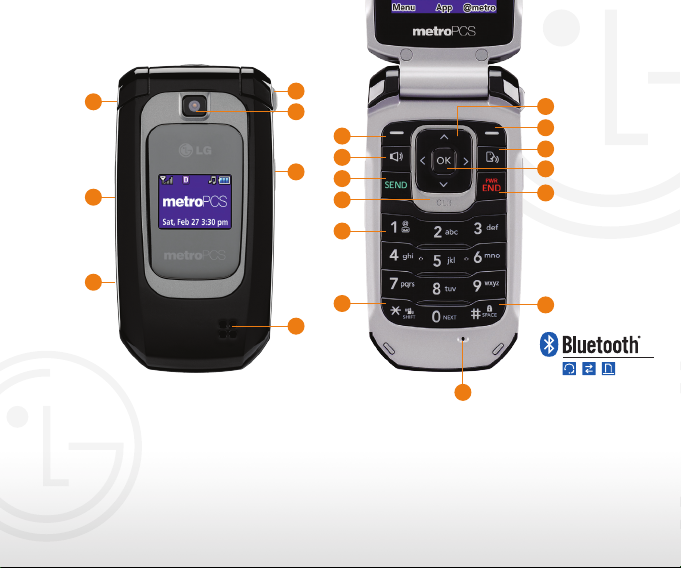
Getting to Know Your Phone
1. Headset Jack
2. Volume Keys
3. Micro USB/Charging Port
4. Speaker
5. Camera Key
6. Camera Lens
7. Strap Holder
8. Left Soft Key
(Menu)
9. Speakerphone Key
10. Send Key
11. Clear & Back Key
12. Voicemail Key
13. Vibrate Mode/Shift Key
14. Microphone
15. Space/Lock Key*
16. Power/End Key
*Press and hold this key to lock the phone.
14
17. OK Key
18. Voice Command Key
19. Right Soft Key
20. Navigation Key
Contact List
Messaging
Applications Carousel
Applications Carousel
<
<
>
<
(Applications Carousel)
(@metro)
Page 3
Your LG Helix is compatible with Metro ChatLINK, a
SM
walkie-talkie service that enables you to chat with up to
10 people at the same time—making connection with
friends and family both faster and easier!
Add a Contact
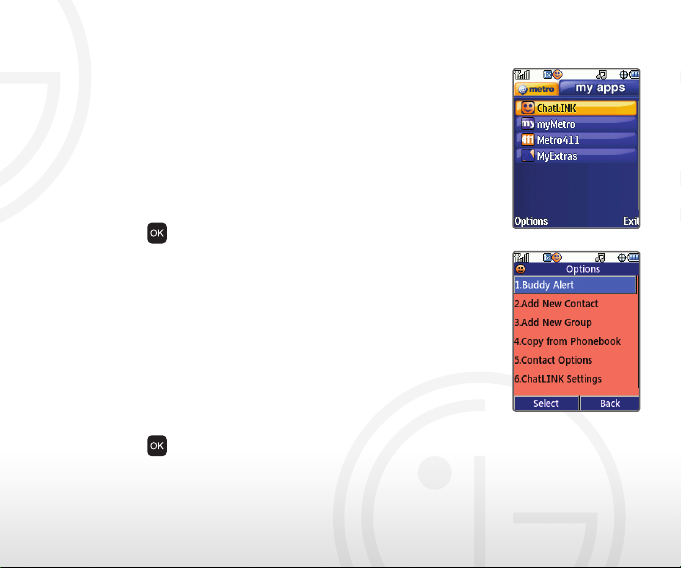
1. From standby mode and with the flip open, press the
Right Soft Key for @metro.
2. Press right on the Navigation Key to access my apps.
3. Press
4. Press the Left Soft Key for Options.
5. Select Add New Contact (2).
6. Enter the contact’s number using the keypad, and
then press down on the Navigation Key to move to the
Using Metro ChatLINK
Enter Name field.
7. Enter the contact’s name using the keypad, and then
press the Left Soft Key for Save.
Enable Buddy Alert
1. From the ChatLINK List, press the Left Soft Key
for Options.
2. Press
for ChatLINK.
for Buddy Alert (1) and again for Enable (1).
Page 4
With your 1.3 megapixel camera, you can capture all the
magic moments—and with the flip closed, you can even
take self-portraits.
Flip Open
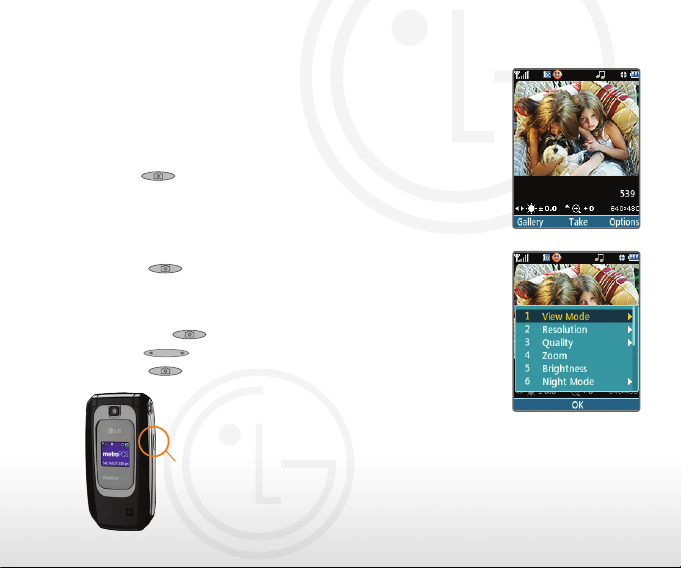
1. From standby mode and with the flip open, press and
hold
.
2. Press up or down on the Navigation Key to zoom.*
Press left or right to adjust the brightness. To adjust
Taking a Picture
other camera options, press the Right Soft Key
for Options.
3. Press
to take the picture.
Flip Closed
1. From standby mode and with the flip closed, press
and hold
, then quickly press the side Volume
Keys to unlock the phone.
2. Press
to take a picture.
Camera
Key
*Varies by image resolution. Camera setting of
960 x 1280 pixels does not support zoom function.
Page 5
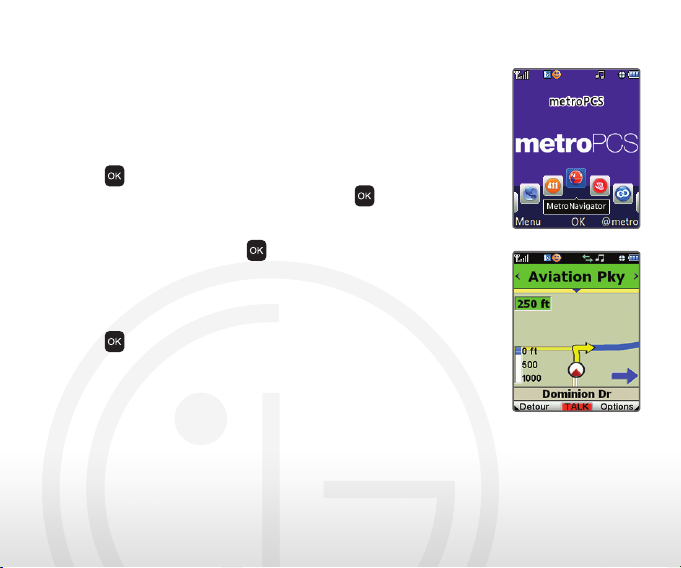
Experience the convenience of using your mobile
phone as a GPS device with MetroNavigator. With this
service, you can receive turn-by-turn directions right
on your LG Helix.
1. From standby mode and with the flip open, press
to access the Applications Carousel.
2. Scroll to MetroNavigator and press
3. MetroNavigator will authenticate your subscription
and update itself automatically. Once any updates
are complete, press
4. Select Find Destination (1), and then choose from
the available options. To enter a new address, press
Using MetroNavigator®
the 3 Key.
5. Enter the address with the keypad, and then press
to navigate to that location.
to select Navigation.
.
Page 6
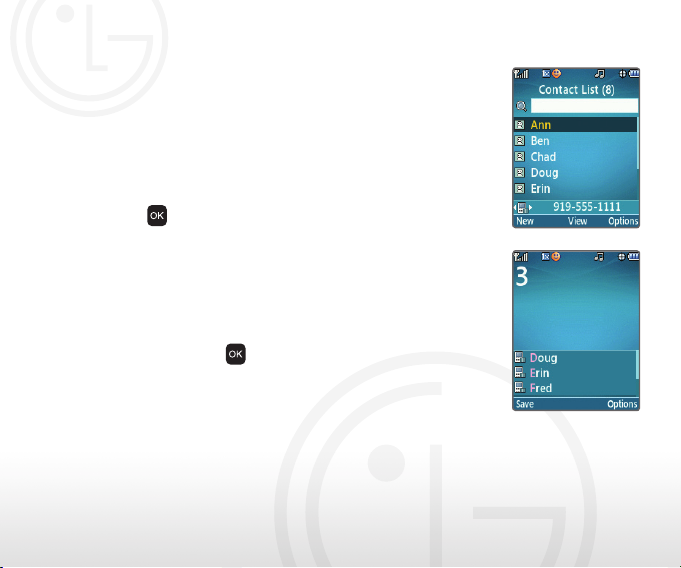
Keep your address book in the palm of your hand with
LG Helix.
Saving a Contact
1. From standby mode and with the flip open, press up
on the Navigation Key to access your Contact List.
2. Press the Left Soft Key to add a new contact.
3. Enter the contact’s information using the keypad.
4. Press
Searching for a Contact Using Phone Dial Search
1. From standby mode and with the flip open, touch the
key on the keypad that corresponds to the first letter
in the contact’s name. The phone will display the
names of all relevant contacts.
2. Use the Navigation Key to highlight the contact’s
name, and press
to save the contact.
to call.
Saving and Searching Contacts
Page 7
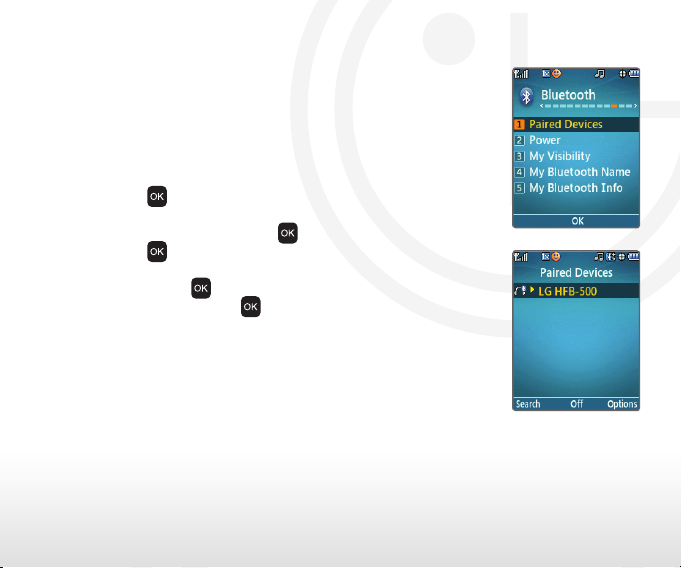
Let Bluetooth wireless technology set you free! Enjoy
the convenience of wireless accessories and information
transfer with LG Helix.
1. Place your Bluetooth device into pairing mode.*
2. From standby mode and with the flip open, press the
Left Soft Key, and then select Bluetooth (*).
3. Press
4. Press the Left Soft Key for Search. If prompted to
turn on Bluetooth, press
5. Press
Bluetooth® Pairing
6. Once the Bluetooth device has been found, highlight
it and press
7. Once paired, press
*Refer to your Bluetooth device’s user manual for information
about initiating pairing mode and the passcode, if needed
(typically “0000”).
Note: Bluetooth accessories sold separately.
for Paired Devices (1).
to begin a new search.
for Pair.
.
to connect to the device.
Page 8
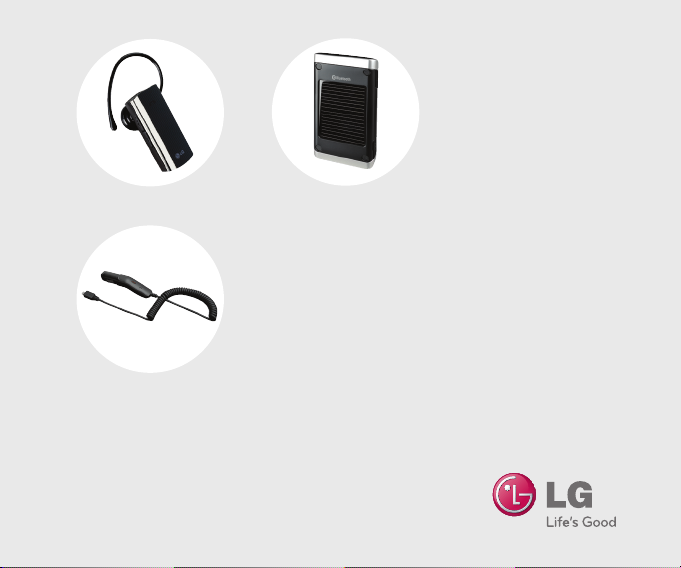
Bluetooth Headset
(HBM-210)
Bluetooth Solar Speakerphone
(HFB-500)
Optional Accessories
Vehicle Power Charger
Maximize your phone with these cutting-edge accessories at www.lgusa.com/helix.
All materials in this guide including, without limitation, the design, the text, and any marks are the
property of LG Electronics, Inc. Copyright © 2010 LG Electronics, Inc. ALL RIGHTS RESERVED.
LG is a registered trademark of LG Electronics, Inc. Features and specifications are subject to change
without prior notice. The use of non-LG approved accessories will void the warranty and may result
in damage to the phone, the phone exploding, or other dangerous conditions. The Bluetooth® word
mark and logos are registered trademarks owned by Bluetooth SIG, Inc. and any use of such marks
by LG Electronics MobileComm, U.S.A., Inc. is under license. Other trademarks and trade names are
those of their respective owners. Unless otherwise specified herein, all accessories referenced herein
are sold separately. Helix is a trademark of LG Electronics, Inc.
 Loading...