

Page 1

MFL70210862
OWNER’S MANUAL
Galvanic Ion
Booster
Please read this manual carefully before operating
your set and retain it for future reference.
MODEL
BBJ1 BBJ2
Copyright © 2018-2019 LG Electronics Inc.
www.lg.com
All Rights Reserved.
1912_Rev03
Page 2

Table of Contents
2
Table of Contents
1 Safety Information
Safety Information
2 Setting up
Unique features
Notification
Parts
Unit description
3 Operation
Cleansing Mode
Absorption promotion Mode 27
Charging the battery
Charging
Checking the charging status
Checking battery status
How to use the unit
Changing Care mode
Voice guidance function
. . . . . . . . . . . . . . . .
. . . . . . . . . . . . . . . . . . . . . . .
. . . . . . . . . . . . . . . . . .
. . . . . . . . . . . . . . . . . . . . . . . .
� � �
. . . . . . . . . . . .
� � � � � � � � � �
. . . . . . . . . . . .
. . . . . . . . . . . .
� � � � � � � � � �
. . . . . . . . . . . .
. . . . . . . .
. . .
. . . . . . . . .
. . . . . .
. . .
18
18
19
20
21
23
23
29
29
30
31
32
32
33
3
UV lamp function
3
4 Troubleshooting
Troubleshooting
5 Appendix
Specifications
Maintenance
Handling the Unit
. . . . . . . . .
� � � � �
. . . . . . . . . . . .
� � � � � � � � � � �
. . . . . . . . . . . . . .
. . . . . . . . . . . . . . .
. . . . . . . . .
34
38
38
39
39
40
40
Page 3
Safety Information 3
Safety Information
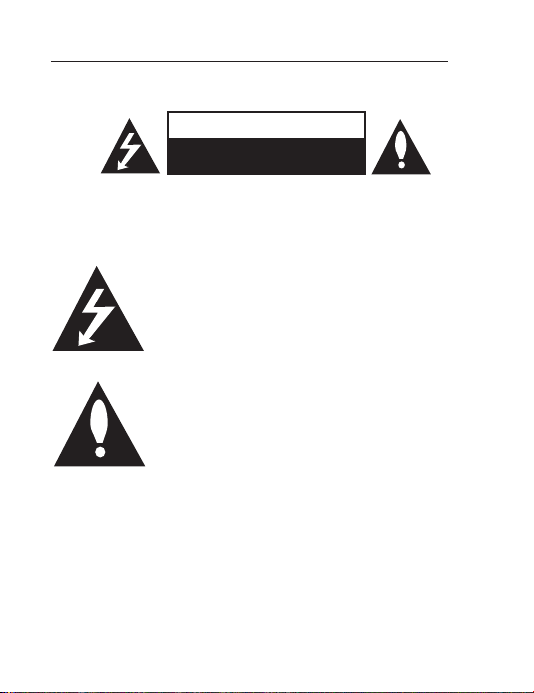
CAUTION
RISK OF ELECTRIC SHOCK
DO NOT OPEN
CAUTION: TO REDUCE THE RISK OF ELECTRIC SHOCK DO NOT
REMOVE COVER (OR BACK) NO USER-SERVICEABLE PARTS
INSIDE REFER SERVICING TO QUALIFIED SERVICE PERSONNEL.
This lightning ash with arrowhead symbol within
an equilateral triangle is intended to alert the user
to the presence of uninsulated dangerous voltage
within the product’s enclosure that may be of
sufcient magnitude to constitute a risk of electric
shock to persons.
The exclamation point within an equilateral triangle
is intended to alert the user to the presence of
important operating and maintenance (servicing)
instructions in the literature accompanying the
product.
WARNING: TO PREVENT FIRE OR ELECTRIC SHOCK HAZARD, DO
NOT EXPOSE THIS PRODUCT TO RAIN OR MOISTURE.
WARNING: Do not install this equipment in a conned space such
as a book case or similar unit.
CAUTION: Do not use high voltage products around this product.
(ex. Electrical swatter) This product may malfunction due to
electrical shock.
Page 4

Safety Information4
CAUTION: No naked ame sources, such as lighted candles, should
be placed on the apparatus.
CAUTION: The apparatus should not be exposed to water (dripping
or splashing) and no objects lled with liquids, such as vases, should
be placed on the apparatus.
CAUTION: Do not block any ventilation openings. Install in
accordance with the manufacturer’s instructions.
Slots and openings in the cabinet are provided for ventilation and to
ensure reliable operation of the product and to protect it from over
heating. The openings shall never be blocked by placing the product
on a bed, sofa, rug or other similar surface. This product shall not
be placed in a built-in installation such as a bookcase or rack unless
proper ventilation is provided or the manufacturer’s instruction has
been adhered to.
NOTICE: For safety marking information including product
identication and supply ratings, please refer to the main label on
the bottom or the other surface of the product.
1. WARNING: Do not use this appliance near bathtubs,
2. The appliance is not to be used by persons (including children)
with reduced physical, sensory or mental capabilities, or lack of
experience and knowledge, unless they have been given supervision
or instruction.
3. Children being supervised not to play with the appliance.
4. For a part of class III construction supplied from a detachable
power supply unit, the instructions state that the appliance is only
to be used with the unit provided.
5. Instructions for class III appliances state that it must only be
supplied at SELV.
showers, basins or other vessels containing water.
Page 5

Safety Information 5
CAUTION concerning the Power Cord
The Power Plug is the disconnecting device. In case of an
emergency, the Power Plug must remain readily accessible.
Check the specication page of this owner’s manual to be certain of
the current requirements.
Do not overload wall outlets. Overloaded wall outlets, loose or
damaged wall outlets, extension cords, frayed power cords, or
damaged or cracked wire insulation are dangerous. Any of these
conditions could result in electric shock or re. Periodically examine
the cord of your device, and if its appearance indicates damage or
deterioration, unplug it, discontinue use of the device, and have
the cord replaced with an exact replacement part by an authorized
service center. Protect the power cord from physical or mechanical
abuse, such as being twisted, kinked, pinched, closed in a door, or
walked upon. Pay particular attention to plugs, wall outlets, and the
point where the cord exits the device.
CAUTION: Only use the AC adapter supplied with this device.
Do not use a power supply from another device or another
manufacturer. Using any other power cable or power supply may
cause damage to the device and void your warranty.
CAUTION when using this product in environments of low humidity
y It may cause static electricity in environments of low humidity.
y It is recommended to use this product after touching any metal
object which conducts electricity.
Page 6
Safety Information6
This device is equipped with a portable battery or accumulator.
How to Safely remove the batteries or the battery pack from the
equipment: To Remove the old batteries or battery pack, follow
the assembly steps in reverse order. To prevent contamination of
the environment and bring on possible threat to human and/or
animal health, the old batteries or the battery pack must be put in
an appropriate container at designated collection points. Do not
dispose of batteries or battery pack together with other waste. It
is recommended that you use local, free reimbursement systems
batteries or battery packs, (may not be available in your area). The
batteries or the battery pack should not be exposed to excessive
heat such as sunshine, re or the like.
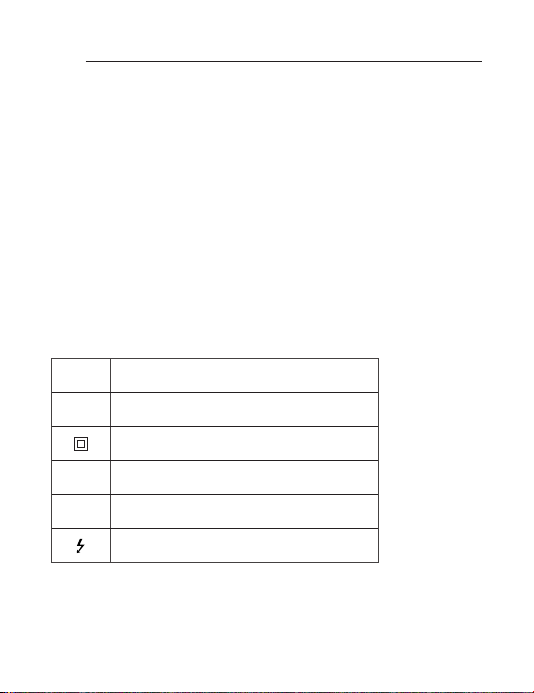
Symbols
Refers to alternating current (AC).
~
0
Refers to direct current (DC).
Refers to class II equipment.
1
Refers to stand-by.
!
Refers to “ON” (power).
Refers to dangerous voltage.
Page 7

Safety Information 7
Product storage and maintenance
y Do not drop the charging cradle or the charging adapter into a drain
or sink or place it in a place where it may fall into water or other
liquids. Do not use a charging cradle in the shower or immerse in
water.
y Do not touch the charging cradle or cable that is in the water and
disconnect the charging adapter immediately.
y Keep the cord away from heated surfaces.
y Always use the provided charging adapter.
y If not used for a long time, charge the battery at least once every 3
months to maintain battery life.
y Do not prick the unit gap with sharp metal objects such as keys,
hairpins, necklaces, or nails.
y Please keep it in the packing box. If it is necessary to carry the
product, please repack it in the packing box at the time of purchase.
y Do not place volatile liquids, such as pesticides, near them.
y Wiping the unit surface hard can damage the unit.
y Do not place plastic products or rubber on the unit for a long time.
y To clean the unit, use a soft, dry cloth. If the surface is too dirty, use a
soft cloth with some detergent or water. Do not use strong chemicals
such as alcohol, benzene or thinner as they may deteriorate the
surface of the unit.
y Do not put the unit in dishwasher, oven, washing machine.
y Do not allow cleansing liquids to come into contact with the product’s
surface as this may cause damage to the product or re.
Page 8

Safety Information8
IMPORTANT SAFETY NOTICE
The cord grip for the plug fitted to this product is
built into the existing power cord as supplied. If, for
any reason you need to shorten the cord.
DO NOT RE-USE THE PLUG.
A new plug must be used to ensure your continued
safety by securing the plug to the power cord in
accordance with Plug & Socket Regulations 1994.
Page 9
Safety Information 9
To reduce the risk of injury
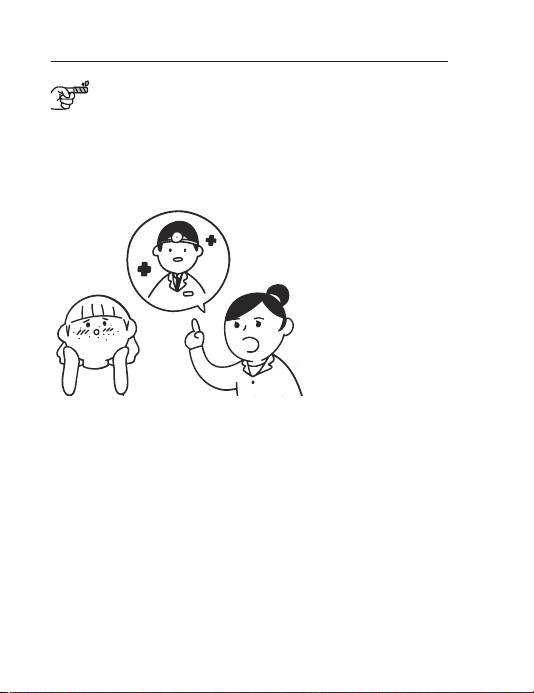
y Before using the
device, if you are
currently undergoing
dermatology related
treatment or have
skin problems,
consult your
dermatologist and
then use it.
y Please consult with
your dermatologist
for specic
symptoms such
as allergies and
sensitive skin.
y Do not use this device if it has skin or skin irritation such as
scratched skin or severe acne, burns, bacterial skin infections,
or the like.
Page 10
Safety Information10
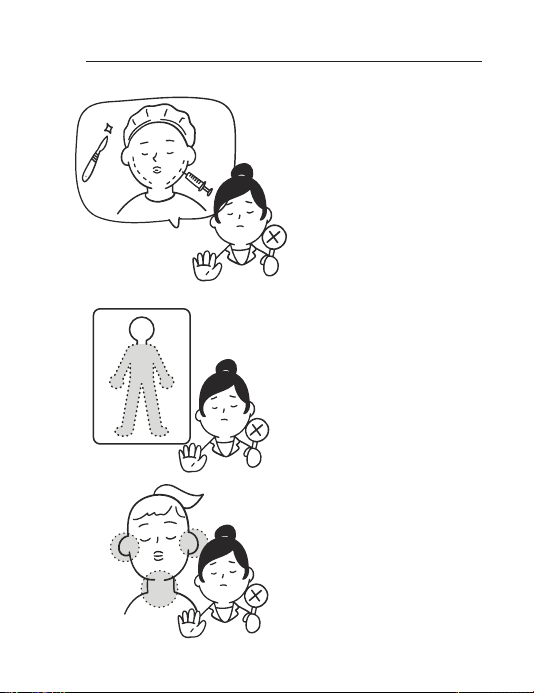
y Do not use this
device during the last
two months if your
skin is recovering
due to skin related
procedures,
cosmetic surgery, or
procedures for hair
loss. Please use it
after consultation
with a specialist.
y As a facial
treatments only, it is
not recommended to
use for a body.
y Do not use the
device on mucous
membranes including
oral cavity. Do not
place this device
directly on your ear.
y When using this unit
on the neck, avoid
the part of the neck
where the thyroid is
located.
Page 11
Safety Information 11
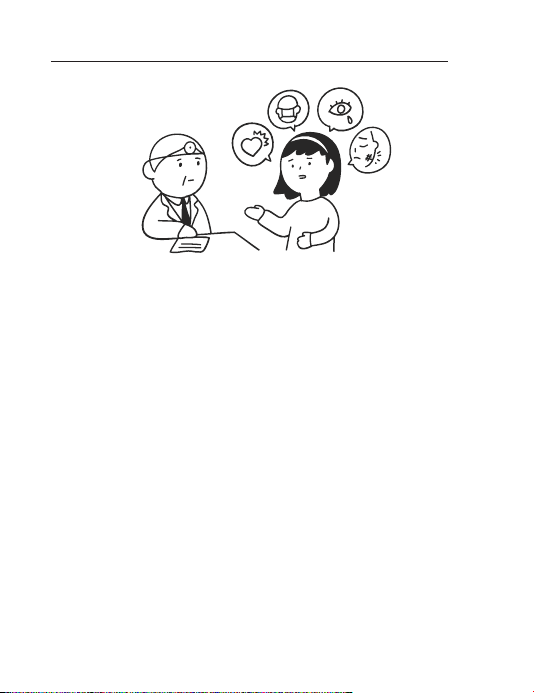
y The technology used in Pra.L is suitable for general usage and
has minimal side effects. Its safety has been verified by 3rd
party external agencies.
y However, individuals who are undergoing treatment for serious
diseases like cancer and thyroid complications should consult a
doctor before use.
y Our skin is subject to temporary changes caused by external
factors such as temperature or seasons. Internal factors such
as consumption of alcohol or stress can also cause negative
effects to the skin. We recommend using the device only when
the skin condition is at its normal state or after consulting a
doctor.
y If you are currently being treated or were treated for a
thyroid-related disease, we recommend that you use the
product only after consulting a specialist.
y Depending on individual skin condition, the device may cause a
variety of skin irritations. If such irritation occurs, please stop use.
Page 12
Safety Information12
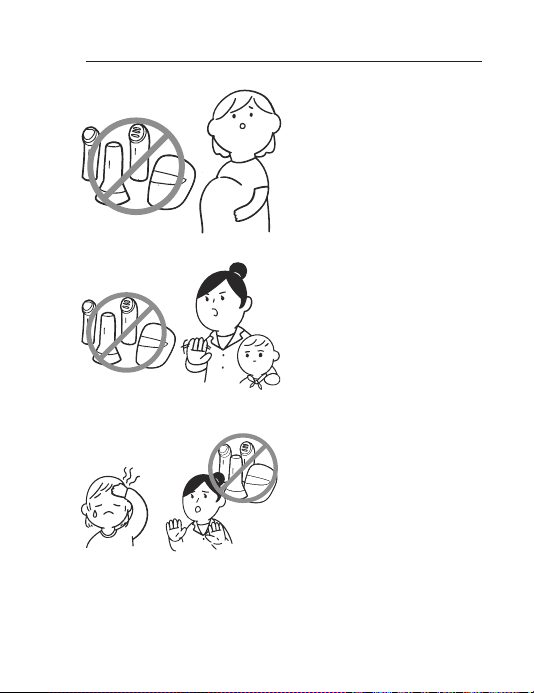
y Pregnancy,
menstruation,
lactating women are
not recommended
for use. (Unstable
hormonal balance
may cause temporary
skin trouble.)
y Do not allow people
to use who can not
clearly express their
own will, including
infants.
y Do not use the
device if you have an
abnormality in the
sensory system.
Page 13
Safety Information 13
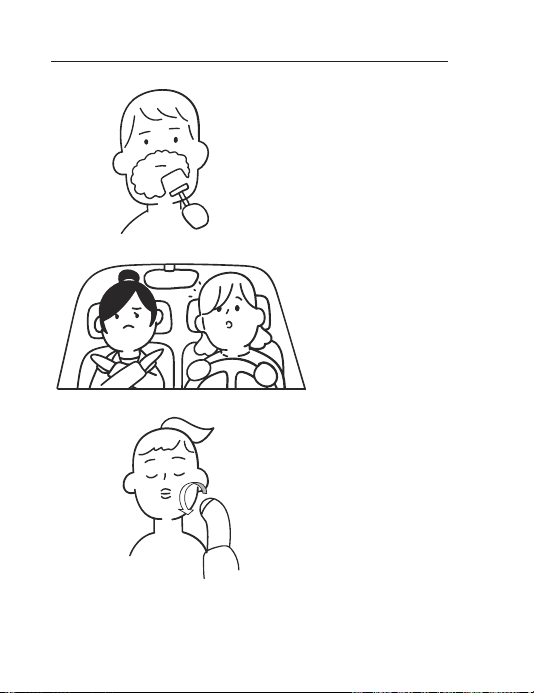
y Do not use this unit
immediately after
shaving.
y Do not use this unit
while driving or
walking.
y Do not use the
head with the head
stopped at one
place, but please use
it according to the
guide of this manual.
Page 14
Safety Information14
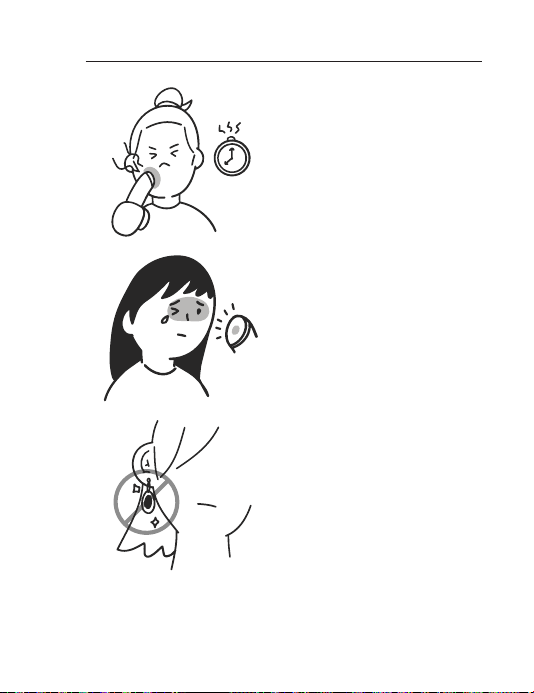
y Please follow
recommended hours
of use when long
time use because
there is a possibility
of a low-temperature
burn.
y Do not expose the
LED light of the UV
head protection cap
directly. Excessive
exposure to the light
can cause eye and
skin damage.
y Before use, please
remove the precious
metal parts that this
unit touches.
Page 15

Safety Information 15
y Do not use when
medical electronic
device such as
medical monitoring
equipment is
nearby or if you
have implanted an
electronic devices
such as cardiac
pacemakers.
y If you have a
metal prosthetic
device such as a
straightener or a
dental implant, avoid
this area. If you
feel uncomfortable
or painful, please
consult your doctor
or dermatologist and
then use it.
y Do not use the device
for purposes other
than those set out in
this guideline.
Page 16

Safety Information16
Q&A
Q1
To make your skin cleaner, it is effective to use Cleansing
(cleansing) mode before using Boost (absorption promotion) mode.
It is recommended to use this mode with a moisture gel.
Boost (absorption promotion) mode is a process that helps
the active ingredients in cosmetics penetrate the skin. It is
recommended to use the cosmetics that were used in the past
or cosmetics for your skin type. Cosmetics containing large
amounts of oil can be a disturbance to their effectiveness and are
recommended to be avoided.
Q2
Before using it on your face, it is recommended to test the
cosmetics you are wearing with the unit on inside your arm.
“ What cosmetics should I buy and use for
each mode in the product? ”
“ How can I know if this unit is t for my
skin? ”
Page 17

Safety Information 17
Q3
“ What should I do if I feel dry? ”
- Please reduce the frequency of
use in a week.
- It is recommended to use moisturizing
cream or mask pack for moisturizing
immediately after use.
- If you are taking medication, consult
your health care professional before
using this medicine to induce skin
dryness.
Page 18

Setting up
18
Unique features
Complex absorption promotion
- The combined function of iontophoresis and ultrasonic waves
helps absorption of active ingredients in cosmetics more
effective than manual care.
- The warm massage function relieves skin tension and smoothly
applies cosmetics to help naturally absorb.
Skin contact safety material and UV head protection cap
- The head (skin contact area) is used with medical material which
is safe for skin.
- The UV head protection cap protects the head part, enabling
clean storage management.
Triangle head design
You can easily manage curved areas such as the eyes / nose area.
Voice guidance
As voice guidance, guide how to care easily during use.
Page 19

Setting up
Notification
Symbols used in this manual
Note
,
Indicates special notes and operating features.
Caution
>
Indicates cautions for preventing possible damages from abuse.
19
Page 20

Setting up
20
Parts
UV head
protection cap
Unit Charging adapter Coin / Button type
USB cable Pouch Owner’s manual /
Charging cradle
battery (3)
Quick start guide
Page 21

Unit description
Unit
Front Rear
Head
1
(POWER)
MODE
LED
MODE
Button
Battery
Status
LED
Speaker
Setting up
Skin contact
electrode
21
Page 22

22
Setting up
Bottom
USB port
(For charging)
Charging cradle
USB port
(For charging)
Charging
pins
Charging
pins
Page 23

Operation
CLEANSING
BOOST
Cleansing Mode
To make your skin cleaner, it is effective to use this mode before
using absorption promotion mode.
1.
Start the cleansing mode after remove makeup and wash the
face.
2. After wash the face, please use this appliance with plenty of
water gel on the area of your face or device head to be used.
3. Gently wrap the skin contact electrode on the back of this unit
so that it touches the palm of your hand. (If you do not touch
the skin contact electrode, the device will not work.)
4. Press the 1 (Power) button to turn on the power, then check
the cleansing mode. Press the MODE (mode) button to change
to the cleansing mode in case of the absorption promotion
mode.
23
Page 24

Operation
24
5.
Follow the voice guidance function, slowly cleanse your face like
gently wiping away from around your eyes.
- Cleansing consists of 5 steps for 3 minutes.
(Forehead Nose Chin Left cheek Right cheek
Power off)
a
b
When you hear
sound effect, gently move the device
head around the forehead from bottom
to top for about 45 seconds.
When you hear
sound effect, slowly move the device
head from your forehead to your nose.
Gently cleanse the nose area from
bottom to top for about 45 seconds.
the voice guidance
the voice guidance
or a
or a
Page 25

Operation
25
When you hear
sound effect, slowly move the device
head from your nose to your chin.
Gently cleanse the chin area from
bottom to top for about 30 seconds.
c
When you hear
sound effect, use the device to gently
cleanse your both cheeks area from
bottom to top and your under both
eyes from inside to outside for about
d
e
6. Rinse your face sufficiently with tepid water after cleansing.
7. After use, wipe the unit with a dry towel, and put the UV head
protection cap on the head and store the unit.
30 seconds.
This unit automatically turns off after
cleansing.
the voice guidance
the voice guidance
or a
or a
Page 26

Operation
26
Note
,
y It is effective to use this mode before using absorption
promotion mode.
y The water gel is sold separately. We recommend using a
moisturizing gel which is suitable for your skin type.
y If you set the voice guidance function to mute, the unit
doesn’t provide voice guidance and sound effect guide.
Page 27

Operation
BOOST
CLEANSING
Absorption promotion Mode
The complex function of the mode helps the penetration of active
substances contained in cosmetics.
1. Wash your face before starting absorption promotion mode.
2. Before using this product, apply cosmetics (such as vitamin C
serum) to pat on the cleansed face to permeate.
3. Gently wrap the skin contact electrode on the back of this unit
so that it touches the palm of your hand. (If you do not touch
the skin contact electrode, the device will not work.)
4. Press the 1 (Power) button to turn on the power, then press
the MODE button to select absorption promotion mode.
27
Page 28

Operation
28
5.
Slowly care the area of your desired like gently wiping from top to
bottom depending on the skin texture.
6. This unit automatically turns off after 3 minutes of care time.
7. After use, wipe the unit with a dry towel, and put the UV head
protection cap on the head and store the unit.
Page 29

Operation
Charging the battery
Charging
Charge the battery enough before using the unit.
Caution
>
y Always use the provided charging adapter.
y Using other charging adapters may cause malfunction and
cannot be repaired.
1. Connect the charging adapter using USB cable.
2. Connect USB cable to the charging cradle.
3. Connect the charging adapter to the power outlet.
4. Place the unit on a charging cradle and charge it. When the
battery is fully charged, the battery status LED indicator of unit
turns green.
Note
,
y This unit cannot be used during charging.
y You can charge the unit to USB port (for charging) on the
bottom of unit.
y After the battery is fully charged, unplug the power to save
energy.
y The unit can be charged with a secondary battery with a
current output of 1 A and more at 5 V voltage.
y Keep the charging cradle and the charging pins of unit free of
moisture. Moisture can cause the charging pins to corrode.
29
Page 30

Operation
30
Checking the charging status
When you place the unit on the charging cradle, you can check the
charge status of the battery through the battery status LED.
LED Status
Red Battery is charging.
Green Battery is fully charged.
Page 31

Operation
Checking battery status
When you disconnect the unit from the charging cradle, you can
check the battery charge status via the battery status LED.
If the power turned on, you can check the charging status by
pressing 1 button.
The battery status LED will change depending on the battery
charging status.
LED Status
The battery is low and needs to be charged.
Red
(blinking)
Red
Green
Note
,
If you set the voice guidance function to mute, the unit doesn’t
provide voice guidance and sound effect guide.
“Battery is low.” An voice guidance or sound
effect is provided and the red LED blinks. Then
the power is automatically turned off.
Battery is low.
The red LED is turned on and maintained.
Battery is charged.
The green light turns on for three seconds and
then disappears.
31
Page 32

Operation
32
How to use the unit
Changing Care mode
Pressing the MODE button while this unit is turned on changes the care
mode. Each MODE LED lights according to the care mode.
mode Status and effect
CLEANSING
(Cleansing)
BOOST
(Absorption
promotion mode)
Note
,
y The unit operates only when it is in contact with skin.
When using this unit to care for others, the caregiver should
hold this device with one hand in contact with the skin-contact
electrode, and at the same time, the other hand must be in
contact with the care recipient’s skin, such as the face, hands, or
the like. This will cause the unit to operate normally.
y If the unit is aparted from the skin, it will be paused and the
MODE LED indicator in the current mode will blink.
y Care time will continue even if the unit is not in contact with
the skin.
y This unit automatically turns off after 3 minutes of care time.
y Vibration periodically sounds for purposes of notication during
operating.
y Recommend using the product once per day. Using more than
two times may cause burning sensation on skin.
To make your skin cleaner, it is effective
to use this mode before using absorption
promotion mode.
The complex function of the mode helps the
penetration of active substances contained
in cosmetics.
Page 33

Operation
CLEANSING
BOOST
33
Voice guidance function
Each time when you press and hold 1 button (until you can hear
the voice guidance) while this unit is turned on, the voice guidance
function changes.
Change voice guidance function order
Voice guide(basic) Sound effect guide Guide off (Mute)
Setting the language
To change the language setting of the voice guidance function,
press and hold both 1 button and MODE button (until you can
hear the voice guidance) simultaneously while the unit is turned on.
Each time when you press and hold button, language changes.
Change language order
Hong Kong Chinese (basic) English Chinese
Page 34

Operation
34
UV lamp function
How to use the UV head protection cap
Attach the UV head protection cap to the unit. UV lamp function is
started. The UV lamp function operates for up to 25 seconds. It may
vary depending on the remaining amount of coin / button battery.
Note
,
y The UV LED is operated again when the UV head protection
cap is detached and attached again during operation.
y Keep the UV LED area clean so that there is no foreign
substance.
y If the blue LED on the UV head protection cap blinks, replace
the batteries to maintain UV light performance.
Page 35

Operation
x 3
Battery replacement of UV head protection cap
Caution
>
Do not open the battery cover with your ngernail. Your nails
may break.
※ When replacing the batteries, three
CR2025 sized coin / button batteries are
required.
35
1. Open the cover of the UV
head protection cap by turning it counterclockwise.
2. Turn the groove of the inner
cap counterclockwise with
a coin and remove the inner
cap.
Open
Open
Page 36

Operation
x 3
36
3. Insert the three batteries
with the (+) electrode of the
battery facing up.
4. Place the inner cap on the UV
head protection cap and turn
it clockwise.
5. Place the cover on the UV
head protection cap and turn
it clockwise.
Close
Close
Page 37

Operation
!
Caution
DO NOT INGEST BATTERY. CHEMICAL BURN HAZARD.
Caution
>
y The battery used in this device may present a re or
chemical burn hazard if mistreated. Do not recharge,
disassemble, incinerate, or heat above 100 °C. Replace the
battery part no. CR2025 only. Use of another battery may
present a risk of re or explosion. Dispose of used battery.
Keep battery away from children. Do not disassemble or
dispose of in re.
y The UV head protection cap supplied with this product
contains a coin/button cell battery. If the coin/ button cell
battery is swallowed, it can cause severe internal burns
in just 2 hours and can lead to death. Keep new and used
batteries away from children. If the battery compartment
does not close securely, stop using the product and keep
it away from children. If you think batteries might have
been swallowed or placed inside any part of the body, seek
immediate medical attention.
37
Page 38

Troubleshooting
38
Troubleshooting
Symptoms Cause & Solution
The unit does not
operate normally.
No Power.
Temperature of unit
rises during use.
y Make sure that you have pressed the
Power button properly.
y Charge the unit according to the
instructions in this user manual.
y Check if the battery status LED on the
unit lights up to make sure the unit is
charging.
y It will not work while charging.
Please stop charging before use.
y The battery is discharged. Recharge the
battery.
y Connect the unit to the power supply
with the charging adapter.
y Check the charger to which you connect
the unit is live.
y Check whether the voltage indicated on
the unit corresponds to the local mains
voltage.
y No action is required.
y But, if you feel the unit is much hotter
than your body temperature, then stop
the skin care and contact LG Electronics
customer care center.
Page 39

Specifications
Appendix
39
Power supply (AC Adapter) :
- Input : 100 V - 240 V ~ 50 / 60 Hz
- Output : 5 V 0 1.8 A or 5 V 0 2.0 A
Dimensions (W x H x D) :
- Approx. 39 mm x 165.5 mm x 42 mm (Unit)
- Approx. 72 mm x 23 mm x 72 mm (Charging cradle)
Operating temperature : 0 °C to 35 °C
Operating humidity : 0 % to 90 %
Recommended usage times : once per day
※ It is available for about 1 hours when using the Absorption
promotion mode after charge once.
※ Usage time may vary depending on the battery, ambient
temperature and usage conditions.
Full charging time : Within 3 hours
※ Charging time may vary depending on the remaining capacity of
the battery, ambient temperature, or charging conditions.
y Design and specications are subject to change without notice.
Page 40

Appendix
40
Maintenance
Handling the Unit
When shipping the unit
Please save the original shipping carton and packing materials. If
you need to ship the unit, for maximum protection, re-pack the unit
as it was originally packed at the factory.
Keeping the exterior surfaces clean
y Do not use volatile liquids such as insecticide spray near the unit.
y Wiping with strong pressure may damage the surface.
y Do not leave rubber or plastic products in contact with the unit
for a long period of time.
Cleaning the unit
To clean the unit, use a soft, dry cloth. If the surfaces are extremely
dirty, use a soft cloth lightly moistened with a mild detergent
solution. Do not use strong solvents such as alcohol, benzine, or
thinner, as these might damage the surface of the unit.
Page 41

41
Beauty Product Warranty Policy
(1)LG Electronics Hong Kong Limited (hereafter “LGEHK”) provides
Warranty Period (hereafter “Period”) from the date of purchased
are as follows and only valid for Beauty Product purchase in Hong
Kong / Macau only (any promotion gift item is not included):
i. Product : 12 months
ii. Embedded Battery : 6 months
(2)Warranty is valid only for authorized product; parallel import and
counterfeit product are invalid.
(3)Product is under warranty against manufacturing defects in
faulty workmanship or internal electronic parts materials. This
warranty does not cover defects arising from any wear and tear of
the product (Including casing, button, and accessories, etc.)
(4)Customer is expected to deliver and collect their products to and
from the LGEHK Service Centre. This warranty is applied in Beauty
Product only.
(5)If check-up or repairing are required, customer must present
both the original invoice and warranty card. Upon any failure to
present the above documentation, customer must pay for the costs
of the services provided.
Page 42

42
(6)All parts replaced within the warranty period are the property
of LGEHK. We have rights to handle those parts as necessary. All
changed parts are non-returnable.
(7)Warranty will be voided under the following conditions, and
LGEHK reserves the right to refuse providing service and/or shall
demand charges for any costs of servicing from customer:
i. Product has been modied or repaired outside of LGEHK Service
Centre.
ii. Product has been mishandled, negligence such as leaving
batteries unattended and thereby causing battery uid leakage,
applying the wrong voltage, forces of nature or accident.
iii. Installation maintenance of the product without following proper
instruction from manufacturer.
iv. The model number of the item code attached has been erased or
modied,
v. The content of warranty policy has been modied without
authorization.
(8)LGEHK reserves the right to terminate or modify the terms of
this warranty card without notice. For exceptional cases, subject to
report of our investigation, we reserve the right to terminate this
warranty card or modify terms of warranty policy.
Page 43

43
(9)Our company will not be liable for any loss and damage directly
or indirectly caused by the breakdown of the product.
(10)This warranty card is restricted within Hong Kong SAR / Macau
SAR only.
(11)LGEHK and its Authorized Service Centers reserve the right to
use refurbished or reconditioned parts or whole products for the
same or functionally equivalent model when conducting product
repairs and replacement.
(12)The warranty does not apply to any non-LGEHK products, parts
and accessories.
(13)LGEHK reserves the right to interpret any terms and conditions
set forth above in its sole and nal discretion.
(14)In case of disputes, LGEHK have absolute and nal decision,
and which be fully agreed upon and followed by customers.
Page 44

 Loading...