

Page 1
Internal Use Only
North/Latin America http://aic.lgservice.com
Europe/Africa http://eic.lgservice.com
Asia/Oceania http://biz.lgservice.com
LED TV
SERVICE MANUAL
CHASSIS : LA51H
MODEL : 65LF6300 65LF6300-UA
MODEL : 65LF6390 65LF6390-UA
CAUTION
BEFORE SERVICING THE CHASSIS,
READ THE SAFETY PRECAUTIONS IN THIS MANUAL.
Printed in KoreaP/NO : MFL68660904 (1503-REV01)
Page 2

CONTENTS
CONTENTS .............................................................................................. 2
PRODUCT SAFETY ................................................................................. 3
SPECIFICATION ....................................................................................... 6
ADJUSTMENT INSTRUCTION .............................................................. 13
EXPLODED VIEW .................................................................................. 22
SCHEMATIC CIRCUIT DIAGRAM ............................................APPENDIX
TROUBLESHOOTING ...............................................................APPENDIX
Only for training and service purposes
- 2 -
LGE Internal Use OnlyCopyright © LG Electronics. Inc. All rights reserved.
Page 3
SAFETY PRECAUTIONS
IMPORTANT SAFETY NOTICE
Many electrical and mechanical parts in this chassis have special safety-related characteristics. These parts are identified by in the
Schematic Diagram and Exploded View.
It is essential that these special safety parts should be replaced with the same components as recommended in this manual to prevent
Shock, Fire, or other Hazards.
Do not modify the original design without permission of manufacturer.
General Guidance
An isolation Transformer should always be used during the
servicing of a receiver whose chassis is not isolated from the AC
power line. Use a transformer of adequate power rating as this
protects the technician from accidents resulting in personal injury
from electrical shocks.
It will also protect the receiver and it's components from being
damaged by accidental shorts of the circuitry that may be
inadvertently introduced during the service operation.
If any fuse (or Fusible Resistor) in this TV receiver is blown,
replace it with the specified.
When replacing a high wattage resistor (Oxide Metal Film Resistor,
over 1 W), keep the resistor 10 mm away from PCB.
Keep wires away from high voltage or high temperature parts.
Before returning the receiver to the customer,
always perform an AC leakage current check on the exposed
metallic parts of the cabinet, such as antennas, terminals, etc., to
be sure the set is safe to operate without damage of electrical
shock.
Leakage Current Cold Check(Antenna Cold Check)
With the instrument AC plug removed from AC source, connect an
electrical jumper across the two AC plug prongs. Place the AC
switch in the on position, connect one lead of ohm-meter to the AC
plug prongs tied together and touch other ohm-meter lead in turn to
each exposed metallic parts such as antenna terminals, phone
jacks, etc.
If the exposed metallic part has a return path to the chassis, the
measured resistance should be between 1 MΩ and 5.2 MΩ.
When the exposed metal has no return path to the chassis the
reading must be infinite.
An other abnormality exists that must be corrected before the
receiver is returned to the customer.
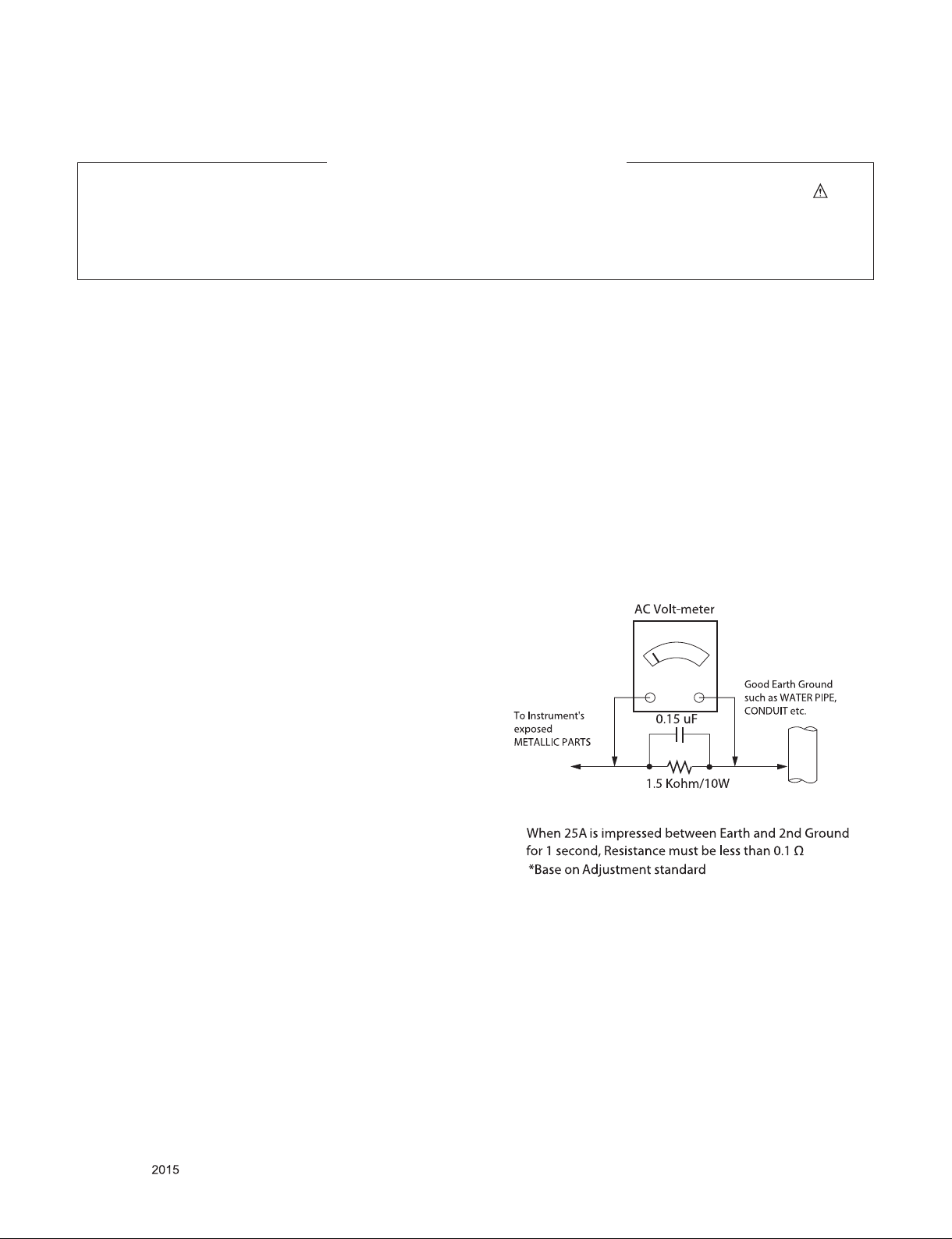
Leakage Current Hot Check (See below Figure)
Plug the AC cord directly into the AC outlet.
Do not use a line Isolation Transformer during this check.
Connect 1.5 K / 10 watt resistor in parallel with a 0.15 uF capacitor
between a known good earth ground (Water Pipe, Conduit, etc.)
and the exposed metallic parts.
Measure the AC voltage across the resistor using AC voltmeter
with 1000 ohms/volt or more sensitivity.
Reverse plug the AC cord into the AC outlet and repeat AC voltage
measurements for each exposed metallic part. Any voltage
measured must not exceed 0.75 volt RMS which is corresponds to
0.5 mA.
In case any measurement is out of the limits specified, there is
possibility of shock hazard and the set must be checked and
repaired before it is returned to the customer.
Leakage Current Hot Check circuit
Only for training and service purposes
- 3 -
LGE Internal Use OnlyCopyright © LG Electronics. Inc. All rights reserved.
Page 4

SERVICING PRECAUTIONS
CAUTION: Before servicing receivers covered by this service
manual and its supplements and addenda, read and follow the
SAFETY PRECAUTIONS on page 3 of this publication.
NOTE: If unforeseen circumstances create conict between the
following servicing precautions and any of the safety precautions
on page 3 of this publication, always follow the safety precautions.
Remember: Safety First.
General Servicing Precautions
1. Always unplug the receiver AC power cord from the AC power
source before;
a. Removing or reinstalling any component, circuit board mod-
ule or any other receiver assembly.
b. Disconnecting or reconnecting any receiver electrical plug or
other electrical connection.
c. Connecting a test substitute in parallel with an electrolytic
capacitor in the receiver.
CAUTION: A wrong part substitution or incorrect polarity
installation of electrolytic capacitors may result in an explosion hazard.
2. Test high voltage only by measuring it with an appropriate
high voltage meter or other voltage measuring device (DVM,
FETVOM, etc) equipped with a suitable high voltage probe.
Do not test high voltage by "drawing an arc".
3. Do not spray chemicals on or near this receiver or any of its
assemblies.
4. Unless specied otherwise in this service manual, clean
electrical contacts only by applying the following mixture to the
contacts with a pipe cleaner, cotton-tipped stick or comparable
non-abrasive applicator; 10 % (by volume) Acetone and 90 %
(by volume) isopropyl alcohol (90 % - 99 % strength)
CAUTION: This is a ammable mixture.
Unless specied otherwise in this service manual, lubrication of
contacts in not required.
5. Do not defeat any plug/socket B+ voltage interlocks with which
receivers covered by this service manual might be equipped.
6. Do not apply AC power to this instrument and/or any of its
electrical assemblies unless all solid-state device heat sinks are
correctly installed.
7. Always connect the test receiver ground lead to the receiver
chassis ground before connecting the test receiver positive
lead.
Always remove the test receiver ground lead last.
8. Use with this receiver only the test xtures specied in this
service manual.
CAUTION: Do not connect the test xture ground strap to any
heat sink in this receiver.
Electrostatically Sensitive (ES) Devices
Some semiconductor (solid-state) devices can be damaged easily by static electricity. Such components commonly are called
Electrostatically Sensitive (ES) Devices. Examples of typical ES
devices are integrated circuits and some eld-effect transistors
and semiconductor “chip” components. The following techniques
should be used to help reduce the incidence of component damage caused by static by static electricity.
1. Immediately before handling any semiconductor component or
semiconductor-equipped assembly, drain off any electrostatic
charge on your body by touching a known earth ground. Alternatively, obtain and wear a commercially available discharging
wrist strap device, which should be removed to prevent potential shock reasons prior to applying power to the unit under test.
2. After removing an electrical assembly equipped with ES
devices, place the assembly on a conductive surface such as
aluminum foil, to prevent electrostatic charge buildup or exposure of the assembly.
3. Use only a grounded-tip soldering iron to solder or unsolder ES
devices.
4. Use only an anti-static type solder removal device. Some solder
removal devices not classied as “anti-static” can generate
electrical charges sufcient to damage ES devices.
5. Do not use freon-propelled chemicals. These can generate
electrical charges sufcient to damage ES devices.
6. Do not remove a replacement ES device from its protective
package until immediately before you are ready to install it.
(Most replacement ES devices are packaged with leads electrically shorted together by conductive foam, aluminum foil or
comparable conductive material).
7. Immediately before removing the protective material from the
leads of a replacement ES device, touch the protective material
to the chassis or circuit assembly into which the device will be
installed.
CAUTION: Be sure no power is applied to the chassis or circuit,
and observe all other safety precautions.
8. Minimize bodily motions when handling unpackaged replacement ES devices. (Otherwise harmless motion such as the
brushing together of your clothes fabric or the lifting of your
foot from a carpeted oor can generate static electricity sufcient to damage an ES device.)
General Soldering Guidelines
1. Use a grounded-tip, low-wattage soldering iron and appropriate
tip size and shape that will maintain tip temperature within the
range or 500 °F to 600 °F.
2. Use an appropriate gauge of RMA resin-core solder composed
of 60 parts tin/40 parts lead.
3. Keep the soldering iron tip clean and well tinned.
4. Thoroughly clean the surfaces to be soldered. Use a mall wirebristle (0.5 inch, or 1.25 cm) brush with a metal handle.
Do not use freon-propelled spray-on cleaners.
5. Use the following unsoldering technique
a. Allow the soldering iron tip to reach normal temperature.
(500 °F to 600 °F)
b. Heat the component lead until the solder melts.
c. Quickly draw the melted solder with an anti-static, suction-
type solder removal device or with solder braid.
CAUTION: Work quickly to avoid overheating the circuit
board printed foil.
6. Use the following soldering technique.
a. Allow the soldering iron tip to reach a normal temperature
(500 °F to 600 °F)
b. First, hold the soldering iron tip and solder the strand against
the component lead until the solder melts.
c. Quickly move the soldering iron tip to the junction of the
component lead and the printed circuit foil, and hold it there
only until the solder ows onto and around both the component lead and the foil.
CAUTION: Work quickly to avoid overheating the circuit
board printed foil.
d. Closely inspect the solder area and remove any excess or
splashed solder with a small wire-bristle brush.
Only for training and service purposes
- 4 -
LGE Internal Use OnlyCopyright © LG Electronics. Inc. All rights reserved.
Page 5

IC Remove/Replacement
Some chassis circuit boards have slotted holes (oblong) through
which the IC leads are inserted and then bent at against the circuit foil. When holes are the slotted type, the following technique
should be used to remove and replace the IC. When working with
boards using the familiar round hole, use the standard technique
as outlined in paragraphs 5 and 6 above.
Removal
1. Desolder and straighten each IC lead in one operation by
gently prying up on the lead with the soldering iron tip as the
solder melts.
2. Draw away the melted solder with an anti-static suction-type
solder removal device (or with solder braid) before removing
the IC.
Replacement
1. Carefully insert the replacement IC in the circuit board.
2. Carefully bend each IC lead against the circuit foil pad and
solder it.
3. Clean the soldered areas with a small wire-bristle brush.
(It is not necessary to reapply acrylic coating to the areas).
"Small-Signal" Discrete Transistor
Removal/Replacement
1. Remove the defective transistor by clipping its leads as close
as possible to the component body.
2. Bend into a "U" shape the end of each of three leads remaining
on the circuit board.
3. Bend into a "U" shape the replacement transistor leads.
4. Connect the replacement transistor leads to the corresponding
leads extending from the circuit board and crimp the "U" with
long nose pliers to insure metal to metal contact then solder
each connection.
Power Output, Transistor Device
Removal/Replacement
1. Heat and remove all solder from around the transistor leads.
2. Remove the heat sink mounting screw (if so equipped).
3. Carefully remove the transistor from the heat sink of the circuit
board.
4. Insert new transistor in the circuit board.
5. Solder each transistor lead, and clip off excess lead.
6. Replace heat sink.
Diode Removal/Replacement
1. Remove defective diode by clipping its leads as close as possible to diode body.
2. Bend the two remaining leads perpendicular y to the circuit
board.
3. Observing diode polarity, wrap each lead of the new diode
around the corresponding lead on the circuit board.
4. Securely crimp each connection and solder it.
5. Inspect (on the circuit board copper side) the solder joints of
the two "original" leads. If they are not shiny, reheat them and if
necessary, apply additional solder.
3. Solder the connections.
CAUTION: Maintain original spacing between the replaced
component and adjacent components and the circuit board to
prevent excessive component temperatures.
Circuit Board Foil Repair
Excessive heat applied to the copper foil of any printed circuit
board will weaken the adhesive that bonds the foil to the circuit
board causing the foil to separate from or "lift-off" the board. The
following guidelines and procedures should be followed whenever
this condition is encountered.
At IC Connections
To repair a defective copper pattern at IC connections use the
following procedure to install a jumper wire on the copper pattern
side of the circuit board. (Use this technique only on IC connections).
1. Carefully remove the damaged copper pattern with a sharp
knife. (Remove only as much copper as absolutely necessary).
2. carefully scratch away the solder resist and acrylic coating (if
used) from the end of the remaining copper pattern.
3. Bend a small "U" in one end of a small gauge jumper wire and
carefully crimp it around the IC pin. Solder the IC connection.
4. Route the jumper wire along the path of the out-away copper
pattern and let it overlap the previously scraped end of the
good copper pattern. Solder the overlapped area and clip off
any excess jumper wire.
At Other Connections
Use the following technique to repair the defective copper pattern
at connections other than IC Pins. This technique involves the
installation of a jumper wire on the component side of the circuit
board.
1. Remove the defective copper pattern with a sharp knife.
Remove at least 1/4 inch of copper, to ensure that a hazardous
condition will not exist if the jumper wire opens.
2. Trace along the copper pattern from both sides of the pattern
break and locate the nearest component that is directly connected to the affected copper pattern.
3. Connect insulated 20-gauge jumper wire from the lead of the
nearest component on one side of the pattern break to the lead
of the nearest component on the other side.
Carefully crimp and solder the connections.
CAUTION: Be sure the insulated jumper wire is dressed so the
it does not touch components or sharp edges.
Fuse and Conventional Resistor
Removal/Replacement
1. Clip each fuse or resistor lead at top of the circuit board hollow
stake.
2. Securely crimp the leads of replacement component around
notch at stake top.
Only for training and service purposes
- 5 -
LGE Internal Use OnlyCopyright © LG Electronics. Inc. All rights reserved.
Page 6

SPECIFICATION
NOTE : Specifications and others are subject to change without notice for improvement
1. Application range
This spec sheet is applied to the LED TV used LA51H chassis
2. Test condition
Each part is tested as below without special notice.
1) Temperature : 20 ºC ± 5 ºC
2) Relative Humidity: 65 % ± 10 %
3) Power Voltage
Standard input voltage (100~240V@ 50/60Hz)
4) Specification and performance of each parts are followed
each drawing and specification by part number in
accordance with BOM.
5) The receiver must be operated for about 20 minutes prior to
the adjustment.
3. Test method
1) Performance: LGE TV test method followed
2) Demanded other specification
- Safety : CE, IEC specification
- EMC: CE, IEC
.
Only for training and service purposes
- 6 -
LGE Internal Use OnlyCopyright © LG Electronics. Inc. All rights reserved.
Page 7
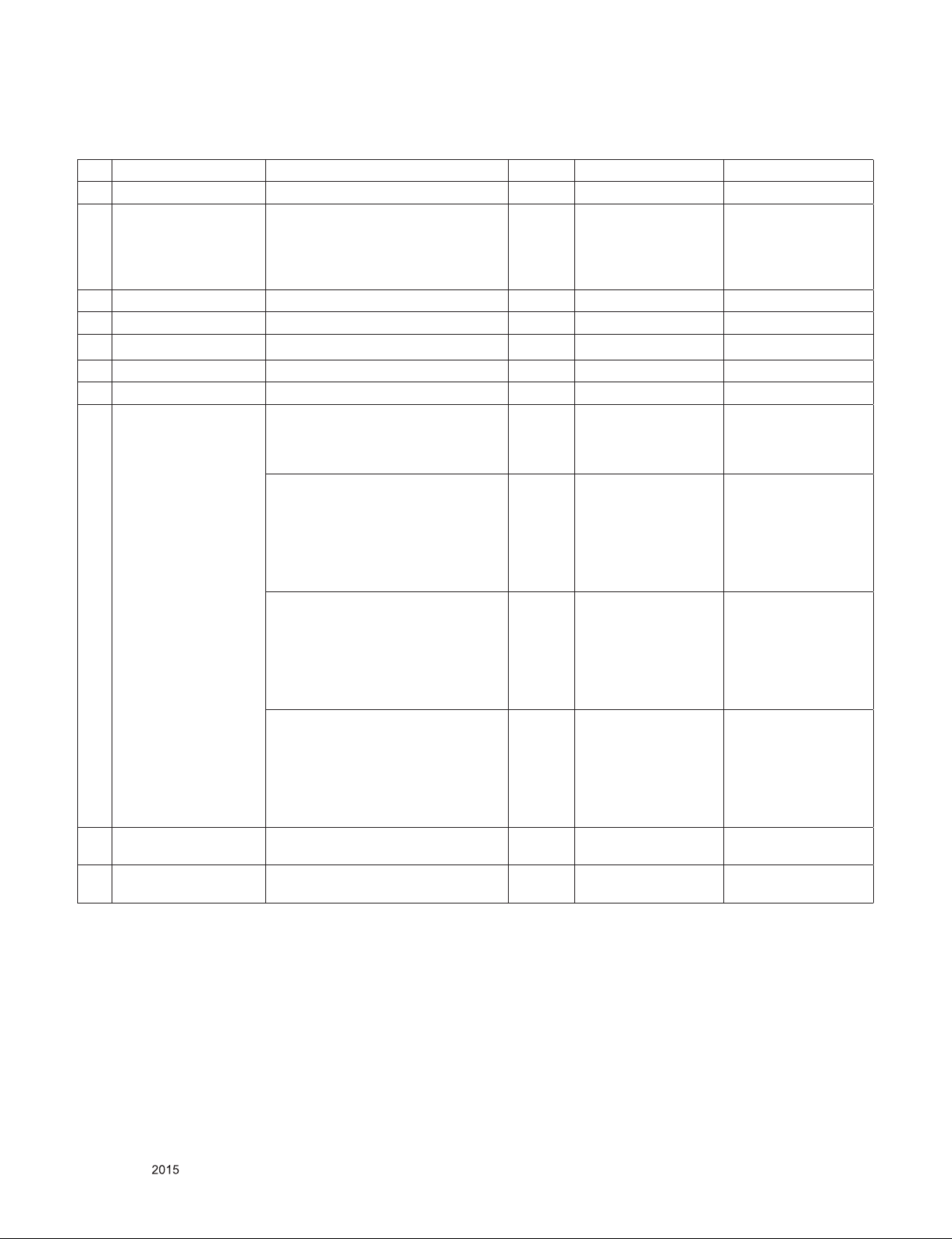
4. General Specification
No Item Specication Result Module Name Remark
1. Receiving System ATSC / NTSC-M / 64 & 256 QAM
2. Available Channel 1) VHF : 02~13
2) UHF : 14~69
3) DTV : 02-69
4) CATV : 01~135
5) CADTV : 01~135
3. Input Voltage AC 100 ~ 240V 50/60Hz Mark : 110V, 60Hz
4. Market NORTH AMERICA
5. Screen Size 43”, 49", 55”, 65"
6. Aspect Ratio 16:9
7. Tuning System FS
8. Module LC430EUE-FHM1 FHD 43INCH
1920X1080 300CD COLOR 68% 16/9
1200:1 60Hz Inverter N LED 2D TBD
LG Display Co., Ltd.
LC490EUE-FHM1 FHD 49INCH
1920X1080 300CD COLOR 68%
16/9 1200:1 60Hz Inverter N LED 2D
With T-con, 51.1W/47W/4.1W, 8Bit,
10000K, 178/178, GTGBW 9ms, LVDS
2ch, Carbon Titan LG Display Co.,
Ltd.
LC550EUE-FHM1 FHD 55.0INCH
1920X1080 330CD COLOR 68%
16/9 1200:1 60Hz Inverter N LED 2D
With T-con, 62.0W/58.4W/3.6W, 8Bit,
10000K, 178/178, GTGBW 9ms, LVDS
2ch, Carbon Titan LG Display Co.,
Ltd.
LC650EUF-FHM1 FHD 65INCH
1920X1080 350CD COLOR 68%
16/9 1400:1 120Hz Inverter N LED
2D With T-con, 83.3W/80.1W/3.2W,
10Bit(Dithering), 10000K, 178/178,
GTGBW 9ms, LVDS 4ch, Carbon Titan
LG Display Co., Ltd.
9. Operating Environment 1) Temp : 0 ~ 40 deg
2) Humidity : ~ 80 %
10. Storage Environment 1) Temp : -20 ~ 60 deg
2) Humidity : ~ 85 %
LGD LC430EUE-FHM1
P/N: EAJ63109701
LGD LC490EUE-FHM1
P/N: EAJ63110601
LGD LC550EUE-FHM1
P/N: EAJ63110501
LGD LC650EUF-FHM1
P/N: EAJ63110401
43LF6300-UA
49LF6300-UA
55LF6300-UA
65LF6300-UA
Only for training and service purposes
- 7 -
LGE Internal Use OnlyCopyright © LG Electronics. Inc. All rights reserved.
Page 8
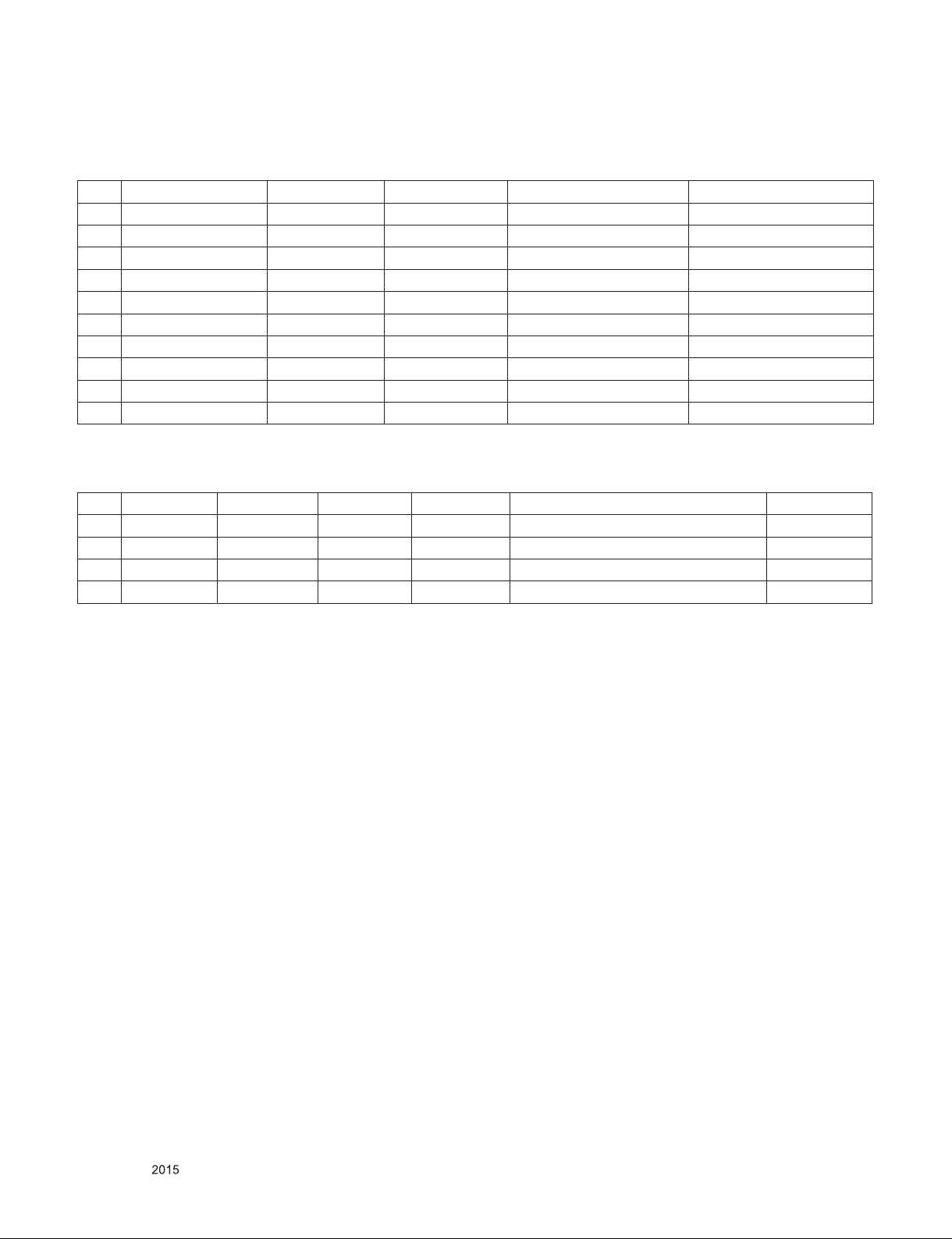
5. Supported video resolutions
5.1. Component 2D input(Y, CB/PB, CR/PR)
No Resolution H-freq(kHz) V-freq.(Hz) Pixel clock(MHz) Proposed
1. 720*480 15.73 60 13.5135 SDTV ,DVD 480I
2. 720*480 15.73 59.94 13.5 SDTV ,DVD 480I
3. 720*480 31.50 60 27.027 SDTV 480P
4. 720*480 31.47 59.94 27.0 SDTV 480P
5. 1280*720 45.00 60.00 74.25 HDTV 720P
6. 1280*720 44.96 59.94 74.176 HDTV 720P
7. 1920*1080 33.75 60.00 74.25 HDTV 1080I
8. 1920*1080 33.72 59.94 74.176 HDTV 1080I
9. 1920*1080 67.50 60 148.50 HDTV 1080P
10. 1920*1080 67.432 59.94 148.352 HDTV 1080P
5.2. Component 3D input(Y, CB/PB, CR/PR)
No. Resolution H-freq(kHz) V-freq.(kHz) Pixel clock 3D input proposed mode Proposed
1. 1280*720 45.00 60.00 74.25 2D to 3D,Side by Side, Top and Bottom HDTV 720P
2. 1280*720 44.96 59.94 74.176 2D to 3D,Side by Side, Top and Bottom HDTV 720P
3. 1920*1080 33.75 60.00 74.25 2D to 3D,Side by Side, Top and Bottom HDTV 1080I
4. 1920*1080 33.72 59.94 74.176 2D to 3D,Side by Side, Top and Bottom HDTV 1080I
Only for training and service purposes
- 8 -
LGE Internal Use OnlyCopyright © LG Electronics. Inc. All rights reserved.
Page 9
5.3. HDMI Input (PC/DTV)
No Resolution H-freq(kHz) V-freq.(Hz) Pixel clock(MHz) Proposed
PC
1 640*350 31.468 70.09 25.17 EGA X
2. 720*400 31.469 70.08 28.32 DOS O
3. 640*480 31.469 59.94 25.17 VESA(VGA) O
4 800*600 37.879 60.31 40.00 VESA(SVGA) O
5 1024*768 48.363 60.00 65.00 VESA(XGA) O
6 1152*864 54.348 60.053 80.002 VESA O
7 1360*768 47.712 60.015 85.50 VESA (WXGA) X
8 1280*1024 63.981 60.020 108.00 VESA (SXGA) O
9 1920*1080 67.5 60 148.5 HDTV 1080P O
DTV
1 640*480 31.469 59.94 25.175 SDTV 480P
2 640*480 31.5 60 25.200 SDTV 480P
3 720*480 31.50 60 27.027 SDTV 480P
4 720*480 31.469 59.94 27.00 SDTV 480P
5 1280*720 45.00 60.00 74.25 HDTV 720P
6 1280*720 44.96 59.94 74.176 HDTV 720P
7 1920*1080 33.75 60.00 74.25 HDTV 1080I
8 1920*1080 33.72 59.94 74.176 HDTV 1080I
9 1920*1080 67.500 60 148.50 HDTV 1080P
10 1920*1080 67.43 59.94 148.352 HDTV 1080P
11 1920*1080 27.000 24.000 74.25 HDTV 1080P
12 1920*1080 26.97 23.97 74.176 HDTV 1080P
13 1920*1080 33.75 30.000 74.25 HDTV 1080P
14 1920*1080 33.716 29.976 74.176 HDTV 1080P
Only for training and service purposes
- 9 -
LGE Internal Use OnlyCopyright © LG Electronics. Inc. All rights reserved.
Page 10
5.4. 3D HDMI Input(1.4b)
No Resolution H-freq(kHz) V-freq.(Hz) Pixel clock(MHz) 3D input proposed mode
1. 720*480p 63 59.94 / 60 54.00 F/P,L/A
31.5 27.00 T/B,S/S,S/S Full
2. 1280*720p 90.00 59.94 / 60 148.5 F/P, L/A
44.96 / 45 74.17/74.25 S/S, T&B, S/S Full
3. 1920*1080i 67.432 / 67.5 59.94 / 60 148.35/148.5 F/P, F/A
33.75 74.25 S/S, T&B, S/S Full
4. 1920*1080p 54 23.976 / 24 148.5 F/P, L/A
26.973 / 27 23.976 / 24 74.175/74.25 S/S, T&B, S/S Full
5. 1920*1080p 33.716 / 33.75 29.97 / 30.00 74.175/74.25 S/S, T&B, S/S Full
67.50 30.00 148.5 F/P, L/A
60.00 S/S, T&B
5.5. 3D HDMI-PC Input
No. Resolution H-freq(kHz) V-freq.(Hz) Pixel clock(MHz) 3D input proposed mode
1. 1024*768 48.363 60.004 65.000 2D to 3D, S/S, T&B
2. 1360*768 47.712 60.015 85.500
3. 1920*1080 67.50 60.00 148.50 2D to 3D, S/S, T&B, C/B, R/I, C/I
5.6. HDMI Input(1.3)
No Resolution H-freq(kHz) V-freq.(Hz) Pixel clock(MHz) 3D input proposed mode
1. 720*480p 63 59.94 / 60 54.00 2D to 3D, S/S, T&B, C/B, R/I, C/I
31.5 27.00
2. 1280*720p 90.00 59.94 / 60 148.5
44.96 / 45 74.17/74.25
3. 1920*1080i 67.432 / 67.5 59.94 / 60 148.35/148.5 2D to 3D, S/S, T&B
33.75 74.25
4. 1920*1080p 54 23.976 / 24 148.5 2D to 3D, S/S, T&B, C/B, R/I, C/I
26.973 / 27 23.976 / 24 74.175/74.25
5. 1920*1080p 33.716 / 33.75 29.97 / 30.00 74.175/74.25
Only for training and service purposes
- 10 -
LGE Internal Use OnlyCopyright © LG Electronics. Inc. All rights reserved.
Page 11
5.7. USB/DLNA Input
5.7.1. 3D Auto detection
No. Resolution H-freq(kHz) V-freq.(kHz) Pixel clock(MHz) 3D input proposed mode Proposed
1 1920*1080 33.75 30.000 74.25 Side-by-side, Top-and-Bottom
Checkerboard, Row Interleaving,
Column Interleaving, Frame Sequentia
(Photo : Side-by-side,
Top-and-Bottom)
5.7.2. 3D Manual(Movie)
No. Resolution H-freq(kHz) V-freq.(kHz) 3D input proposed mode
1 Under 704*480 - - 2D to 3D
2 Over 704*480i 2D to 3D,Side-by-side ,
Top-and-Bottom
3 Over 704*480p 50/60 2D to 3D,Side-by-side ,
Top-and-Bottom
Checkerboard,
Row Interleaving,
Column Interleaving,
Frame Sequential
4 Over 704*480p Others 2D to 3D,Side-by-side ,
Top-and-Bottom
Checkerboard,
Row Interleaving,
Column Interleaving
HDTV 1080P
5.7.3. 3D Manual(Photo)
No. Resolution H-freq(kHz) V-freq.(kHz) 3D input proposed mode
1 Under 320*240 - - 2D to 3D
2 Over 320*240 2D to 3D,Side-by-side ,
Top-and-Bottom
Only for training and service purposes
- 11 -
LGE Internal Use OnlyCopyright © LG Electronics. Inc. All rights reserved.
Page 12
5.8. Miracast/Widi Input
5.8.1. 3D Manual
No. Resolution H-freq(kHz) V-freq.(kHz) 3D input proposed mode
1 1024*768p - 30/60 2D to 3D,Side-by-side ,
2 1280*720p
3 1920*1080p
4 Others - 2D to 3D
Top-and-Bottom
5.8.2. RF 3D Input(DTV)
No. Resolution H-freq(kHz) V-freq.(Hz) Pixel clock(MHz) Proposed 3D input proposed mode
1 1280*720 45.000 60 74.25 HDTV 720P 2D to 3D, Side by Side, Top & Bottom
2 1920*1080 33.75 60 74.25 HDTV 1080I 2D to 3D, Side by Side, Top & Bottom
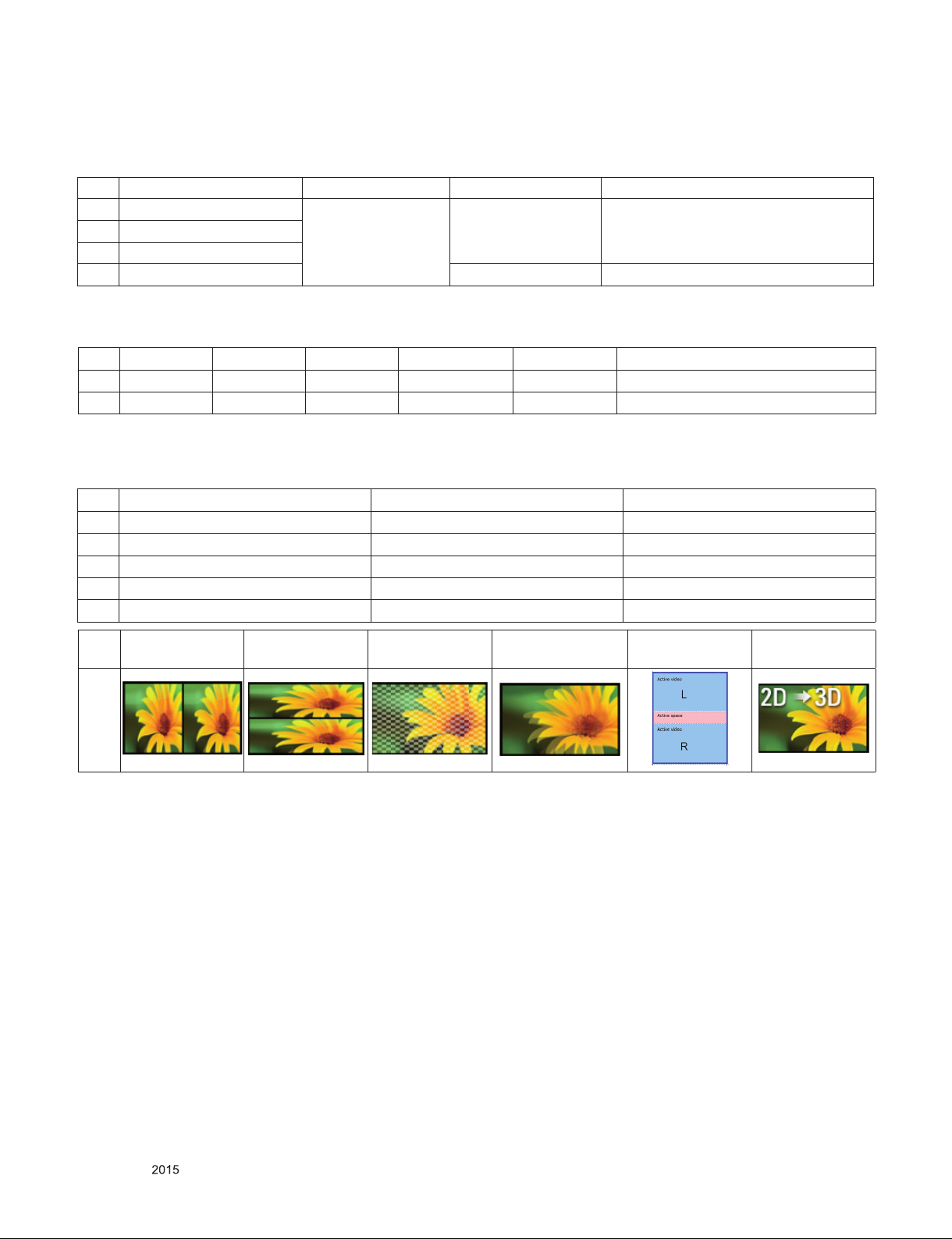
5.9. 2D to 3D Conversion(RF 3D Input(DTV))
No INPUT Freq Resolution
1 Digital TV / Analog TV 2D Support freq 2D Support resolution
2 HDMI 2D Support freq 2D Support resolution
3 Component 2D Support freq 2D Support resolution
4 Composite 2D Support freq 2D Support resolution
5 USB 2D Support freq 2D Support resolution
No Side by Side Top & Bottom Checkerboard Single Frame
Sequential
1
Frame Packing 2D to 3D
Only for training and service purposes
- 12 -
LGE Internal Use OnlyCopyright © LG Electronics. Inc. All rights reserved.
Page 13
ADJUSTMENT INSTRUCTION
1. Application
This spec. sheet applies to LA51H Chassis applied LED TV all
models manufactured in TV factory
2. Specification
(1) Because this is not a hot chassis, it is not necessary to use
an isolation transformer. However, the use of isolation
transformer will help protect test instrument.
(2) Adjustment must be done in the correct order.
(3) The adjustment must be performed in the circumstance of
25 ±5 ºC of temperature and 65±10% of relative humidity if
there is no specific designation
(4) The input voltage of the receiver must keep 100~240V,
50/60Hz
(5) The receiver must be operated for about 5 minutes prior to
the adjustment when module is in the circumstance of over
15
ºC
In case of keeping module is in the circumstance of 0°C, it
should be placed in the circumstance of above 15°C for 2
hours
In case of keeping module is in the circumstance of below
-20°C, it should be placed in the circumstance of above
15°C for 3 hours.
※ Caution
When still image is displayed for a period of 20 minutes or
longer (especially where W/B scale is strong.
Digital pattern 13ch and/or Cross hatch pattern 09ch), there
can some afterimage in the black level area
4. MAIN PCBA Adjustments
4.1. ADC Calibration
- An ADC calibration is not necessary because MAIN SoC
(LGExxxx) is already calibrated from IC Maker
- If it needs to adjust manually, refer to appendix.
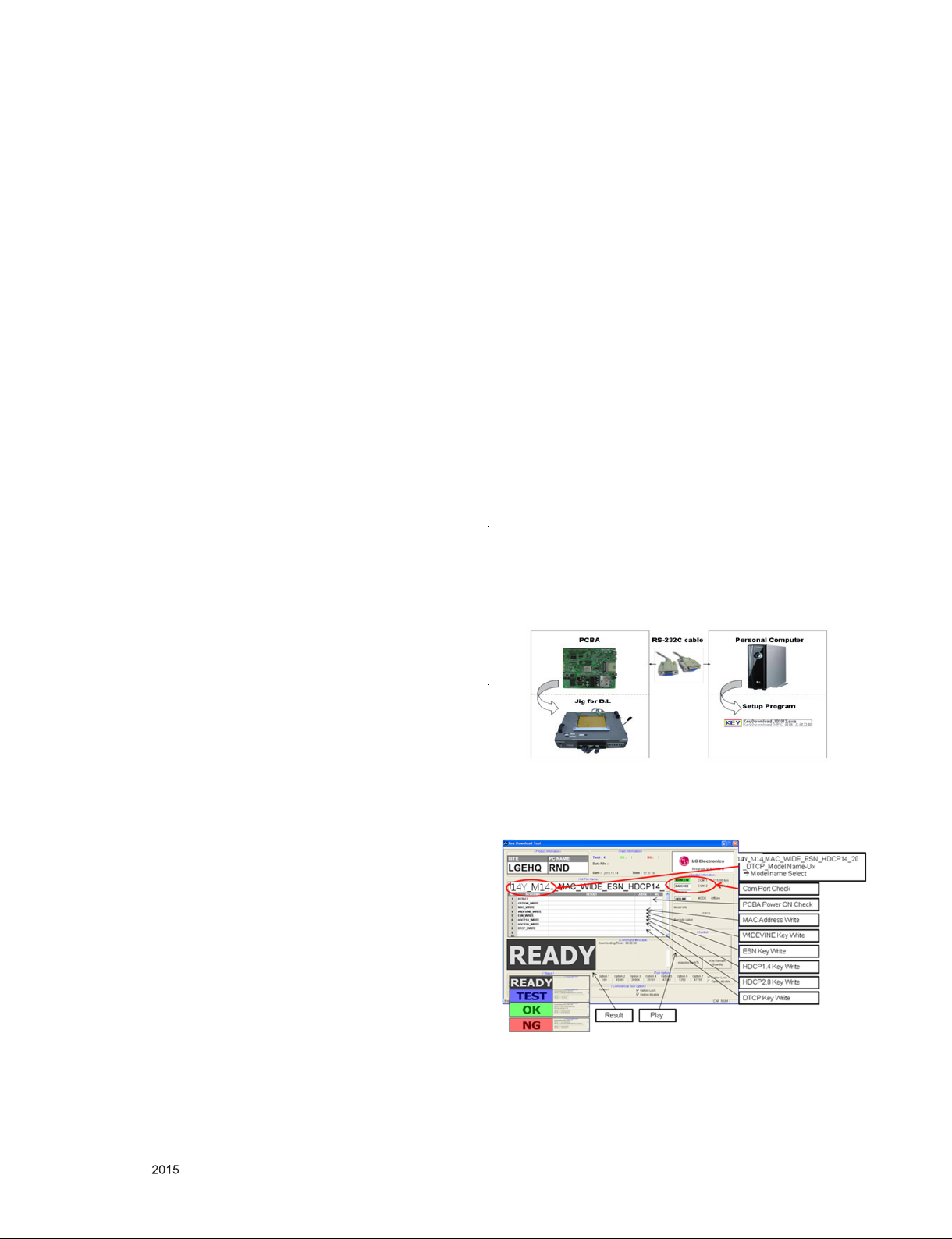
4.2. MAC Address, ESN Key and Widevine
Key download
4.2.1. Equipment & Condition
1) Play file: keydownload.exe
4.2.2. Communication Port connection
1) Key Write: Com 1,2,3,4 and 115200 (Baudrate)
2) Barcode: Com 1,2,3,4 and 9600 (Baudrate)
4.2.3. Download process
1) Select the download items.
2) Mode check: Online Only
3) Check the test process
- US, Canada models: DETECT -> MAC_WRITE ->
WIDEVINE_WRITE
- Korea, Mexico models: DETECT -> MAC_WRITE ->
WIDEVINE_WRITE
4) Play : START
5) Check of result: Ready, Test, OK or NG
4.2.4. Communication Port connection
1) Connect: PCBA Jig -> RS-232C Port == PC -> RS-232C
Port
3. Adjustment items
3.1. Main PCBA Adjustments
(1) ADC adjustment(OTP) : Component
(2) EDID downloads for HDMI
3.2. Final assembly adjustment
(1) White Balance adjustment
(2) RS-232C functionality check
(3) Factory Option setting per destination
(4) Shipment mode setting (In-Stop)
(5) GND and HI-POT test
3.3. Appendix
(1) Tool option menu, USB Download (S/W Update, Option and
Service only)
(2) Manual adjustment for ADC calibration and White balance.
(3) Shipment conditions, Channel pre-set
4.2.5. Download
1) US, Canada models (14Y LCD TV + MAC + Widevine +
ESN Key + DTCP Key + HDCP1.4 and HDCP2.0)
4.2.6. Inspection
- In INSTART menu, check these keys.
Only for training and service purposes
- 13 -
LGE Internal Use OnlyCopyright © LG Electronics. Inc. All rights reserved.
Page 14
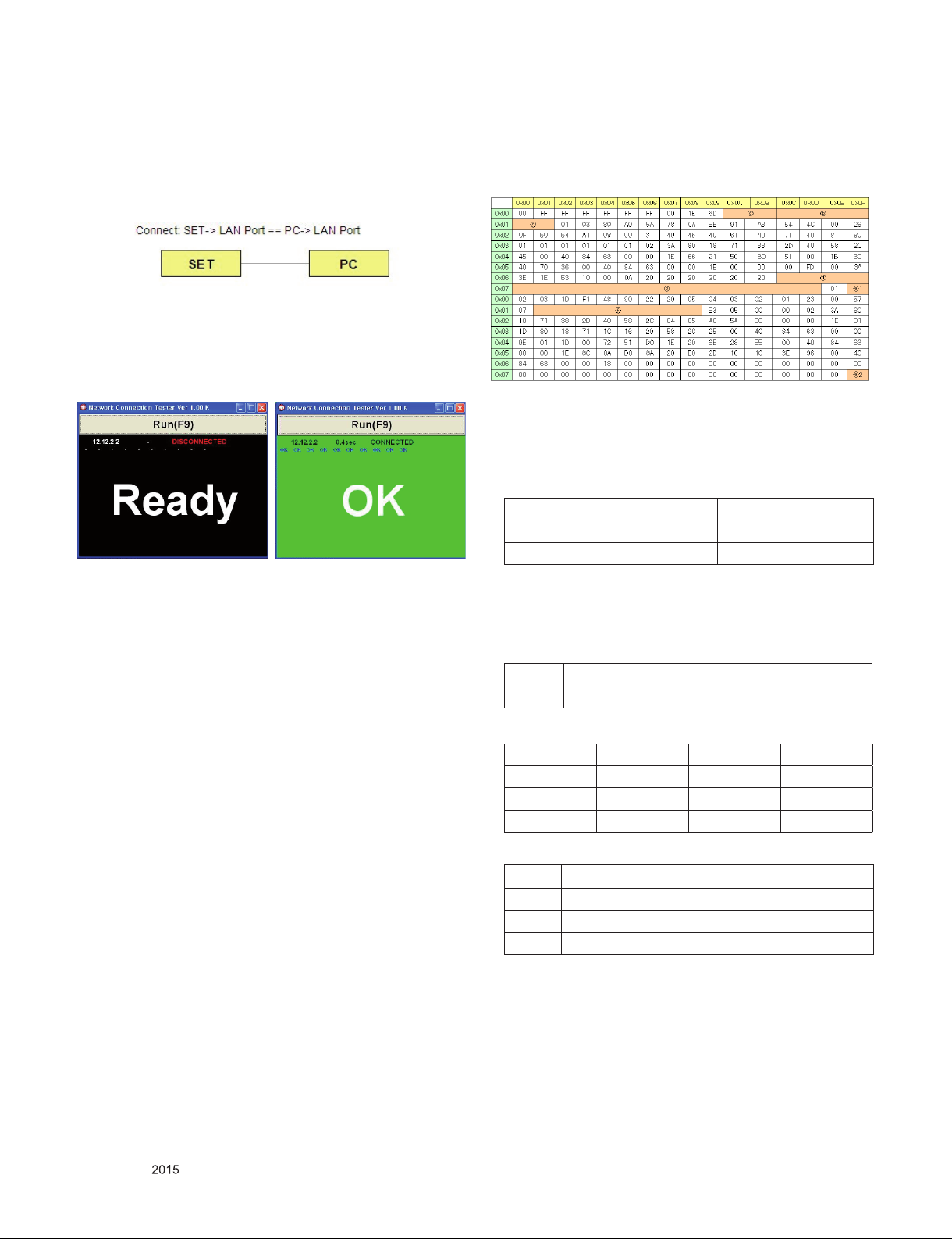
4.3. LAN port Inspection (Ping Test)
4.3.1. Equipment setting
1) Play the LAN Port Test PROGRAM.
2) Input IP set up for an inspection to Test Program.
- IP number: 12.12.2.2
4.3.2. LAN PORT inspection (PING TEST)
1) Play the LAN Port Test Program.
2) Connect each other LAN Port Jack.
3) Play Test (F9) button and confirm OK Message.
4) Remove LAN CABLE
Step 1) Step 3) Check ‘OK’ Signal
4.4. EDID Download
4.4.1 Overview
▪ It is a VESA regulation. A PC or a MNT will display an
optimal resolution through information sharing without any
necessity of user input. It is a realization of “Plug and Play”.
4.4.3. EDID DATA
4.4.3.1. 2D_8bit_PCM(US) _ xvYCC : off
HDMI EDID 2D_8bit_PCM(US)_xvYCC : off
▪Reference
- HDMI1 ~ HDMI3
- In the data of EDID, bellows may be different by S/W or Input
mode.
ⓐ Product ID
HEX EDID Table DDC Function
0001 0100 Analog
0001 0100 Digital
ⓑ Serial No: Controlled on production line.
ⓒ Month, Year: Controlled on production line:
ex) Monthly : ‘01’ -> ‘01’
Year : ‘2015’ -> ‘19’
ⓓ Model Name(Hex): LGTV
Chassis MODEL NAME(HEX)
LA51H 00 00 00 FC 00 4C 47 20 54 56 0A 20 20 20 20 20 20 20
4.4.2 Equipment
▪ Since embedded EDID data is used, EDID download JIG,
HDMI cable and D-sub cable are not need.
▪ Adjust remocon
Only for training and service purposes
- 14 -
ⓔ Checksum(LG TV): Changeable by total EDID data.
ⓔ1 ⓔ2 ⓔ3
HDMI1 E6 E0 X
HDMI2 E6 D0 X
HDMI3 E6 C0 X
ⓕ Vendor Specific(HDMI)
INPUT MODEL NAME(HEX)
HDMI1 67 03 0C 00 10 00 80 1E
HDMI2 67 03 0C 00 20 00 80 1E
HDMI3 67 03 0C 00 30 00 80 1E
LGE Internal Use OnlyCopyright © LG Electronics. Inc. All rights reserved.
Page 15
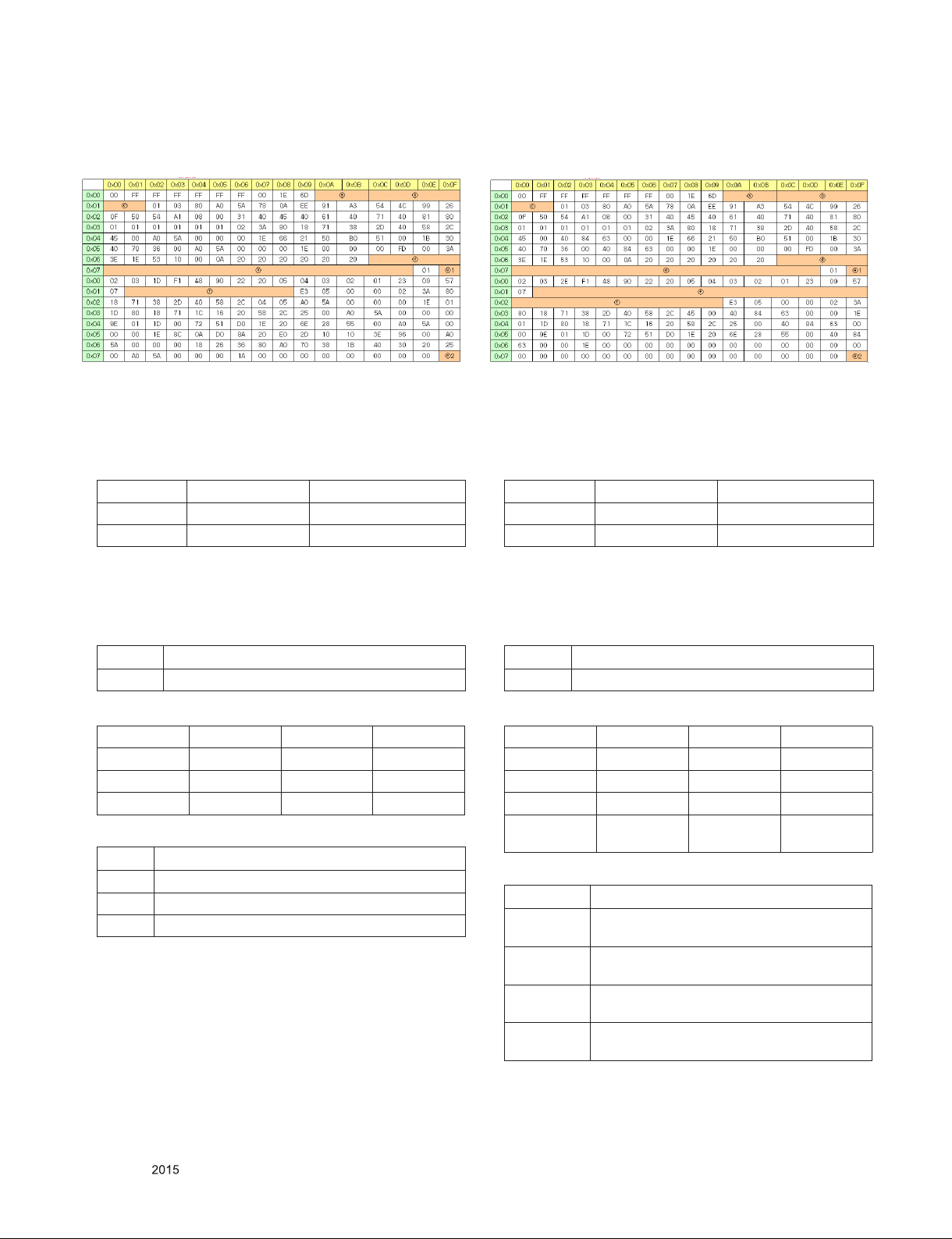
4.4.3.2. 2D_10bit_PCM(US) _ xvYCC : off
4.4.3.3. 3D_8bit_PCM(US) _ xvYCC : off
HDMI EDID 2D_10bit_PCM(US)_xvYCC : off
▪Reference
- HDMI1 ~ HDMI3
- In the data of EDID, bellows may be different by S/W or Input
mode.
ⓐ Product ID
HEX EDID Table DDC Function
0001 0100 Analog
0001 0100 Digital
ⓑ Serial No: Controlled on production line.
ⓒ Month, Year: Controlled on production line:
ex) Monthly : ‘01’ -> ‘01’
Year : ‘2015’ -> ‘19’
ⓓ Model Name(Hex): LGTV
Chassis MODEL NAME(HEX)
LA51H 00 00 00 FC 00 4C 47 20 54 56 0A 20 20 20 20 20 20 20
HDMI EDID 3D_8bit_PCM(US)_xvYCC : off
▪Reference
- HDMI1 ~ HDMI4
- In the data of EDID, bellows may be different by S/W or Input
mode.
ⓐ Product ID
HEX EDID Table DDC Function
0001 0100 Analog
0001 0100 Digital
ⓑ Serial No: Controlled on production line.
ⓒ Month, Year: Controlled on production line:
ex) Monthly : ‘01’ -> ‘01’
Year : ‘2015’ -> ‘19
ⓓ Model Name(Hex): LGTV
Chassis MODEL NAME(HEX)
LA51H 00 00 00 FC 00 4C 47 20 54 56 0A 20 20 20 20 20 20 20
ⓔ Checksum(LG TV): Changeable by total EDID data.
ⓔ1 ⓔ2 ⓔ3
HDMI1 E6 99 X
HDMI2 E6 89 X
HDMI3 E6 79 X
ⓕ Vendor Specific(HDMI)
INPUT MODEL NAME(HEX)
HDMI1 67 03 0C 00 10 00 B8 2D
HDMI2 67 03 0C 00 20 00 B8 2D
HDMI3 67 03 0C 00 30 00 B8 2D
ⓔ Checksum(LG TV): Changeable by total EDID data.
ⓔ1 ⓔ2 ⓔ3
HDMI1 E6 FC X
HDMI2 E6 EC X
HDMI3 E6 DC X
HDMI4
E6 CC X
(LB87 only)
ⓕ Vendor Specific(HDMI)
INPUT MODEL NAME(HEX)
HDMI1 78 03 0C 00 10 00 80 1E 20 CO 0E 01 4F 00
FE 08 10 06 10 18 10 28 10 38 10
HDMI2 78 03 0C 00 20 00 80 1E 20 CO 0E 01 4F 00
FE 08 10 06 10 18 10 28 10 38 10
HDMI3 78 03 0C 00 30 00 80 1E 20 CO 0E 01 4F 00
FE 08 10 06 10 18 10 28 10 38 10
HDMI4
(LB87 Only)
78 03 0C 00 30 00 80 1E 20 CO 0E 01 4F 00
FE 08 10 06 10 18 10 28 10 38 10
Only for training and service purposes
- 15 -
LGE Internal Use OnlyCopyright © LG Electronics. Inc. All rights reserved.
Page 16
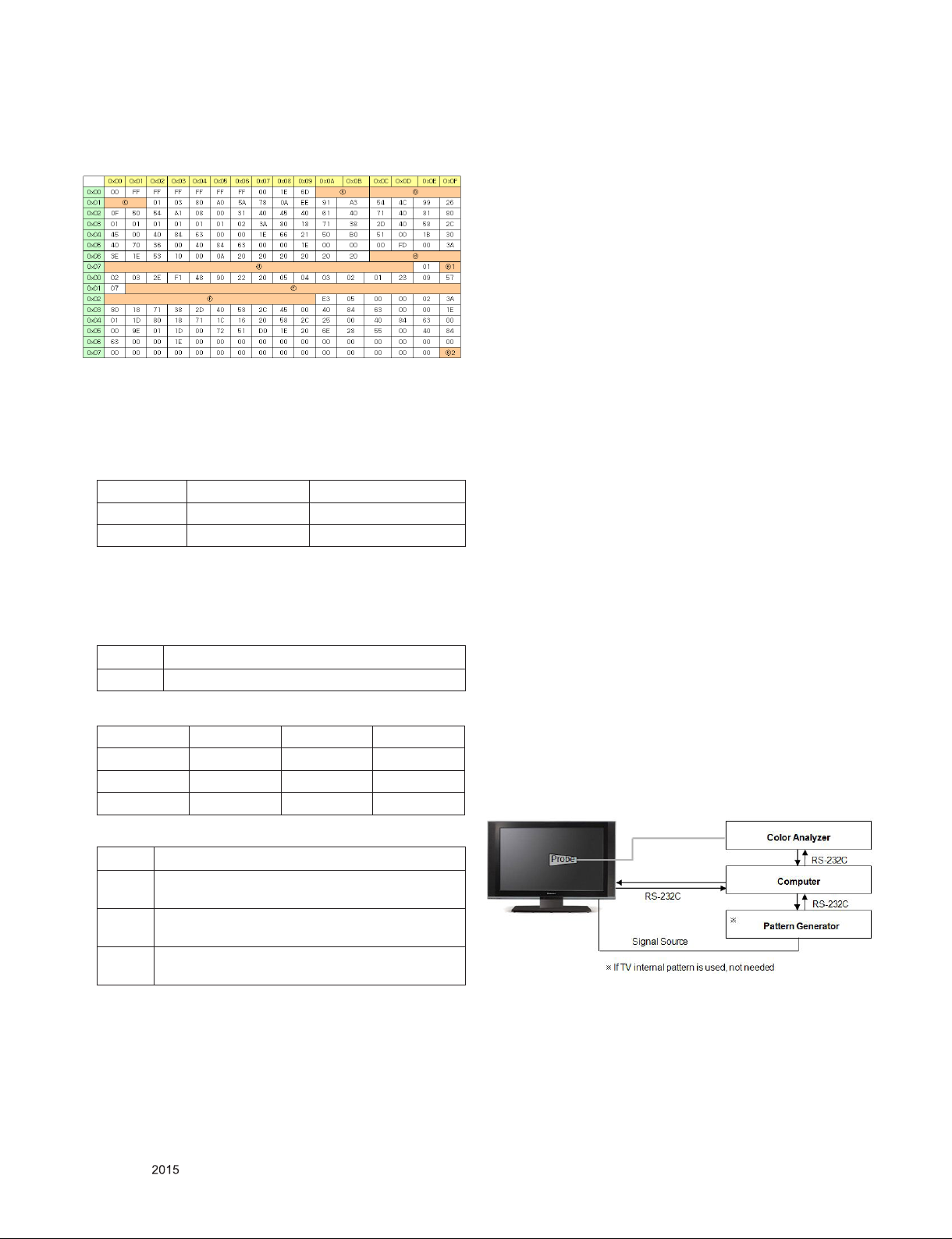
4.4.3.4. 3D_10bit_PCM(US) _ xvYCC : off
HDMI EDID 3D_10bit_PCM(US)_xvYCC : off
▪Reference
- HDMI1 ~ HDMI3
- In the data of EDID, bellows may be different by S/W or Input
mode.
ⓐ Product ID
HEX EDID Table DDC Function
0001 0100 Analog
0001 0100 Digital
ⓑ Serial No: Controlled on production line.
ⓒ Month, Year: Controlled on production line:
ex) Monthly : ‘01’ -> ‘01’
Year : ‘2015’ -> ‘19
ⓓ Model Name(Hex): LGTV
Chassis MODEL NAME(HEX)
LA51H 00 00 00 FC 00 4C 47 20 54 56 0A 20 20 20 20 20 20 20
ⓔ Checksum(LG TV): Changeable by total EDID data.
ⓔ1 ⓔ2 ⓔ3
HDMI1 E6 B5 X
HDMI2 E6 A5 X
HDMI3 E6 95 X
5. Final Assembly Adjustment
5.1. White Balance Adjustment
5.1.1. Overview
5.1.1.1. W/B adj. Objective & How-it-works
(1) Objective: To reduce each Panel’s W/B deviation
(2) How-it-works: When R/G/B gain in the OSD is at 192, it
means the panel is at its Full Dynamic Range. In order to
prevent saturation of Full Dynamic range and data, one of
R/G/B is fixed at 192, and the other two is lowered to find
the desired value.
(3) Adj. condition: normal temperature
- Surrounding Temperature: 25±5 °C
- Warm-up time: About 5 Min
- Surrounding Humidity: 20% ~ 80%
- Before White balance adjustment, Keep power on status,
don’t power off
5.1.1.2. Adj. condition and cautionary items
(1) Lighting condition in surrounding area surrounding lighting
should be lower 10 lux. Try to isolate adj. area into dark
surrounding.
(2) Probe location: Color Analyzer (CA-210) probe should be
within 10cm and perpendicular of the module surface
(80°~ 100°)
(3) Aging time
- After Aging Start, Keep the Power ON status during 5
Minutes.
- In case of LCD, Back-light on should be checked using no
signal or Full-white pattern.
5.1.2. Equipment
(1) Color Analyzer: CA-210 (NCG: CH 9 / WCG: CH12 / LED:
CH14)
(2) Adj. Computer (During auto adj., RS-232C protocol is
needed)
(3) Adjust Remocon
(4) Video Signal Generator MSPG-925F 720p/204-Gray
(Model: 217, Pattern: 49)
※ Color Analyzer Matrix should be calibrated using CS-1000
5.1.3. Equipment connection
ⓕ Vendor Specific(HDMI)
INPUT MODEL NAME(HEX)
HDMI1 78 03 0C 00 10 00 B8 2D 20 C0 0E 01 4F 00 FE
08 10 06 10 18 10 28 10 38 10
HDMI2 78 03 0C 00 20 00 B8 2D 20 C0 0E 01 4F 00 FE
08 10 06 10 18 10 28 10 38 10
HDMI3 78 03 0C 00 30 00 B8 2D 20 C0 0E 01 4F 00 FE
08 10 06 10 18 10 28 10 38 10
Only for training and service purposes
- 16 -
LGE Internal Use OnlyCopyright © LG Electronics. Inc. All rights reserved.
Page 17
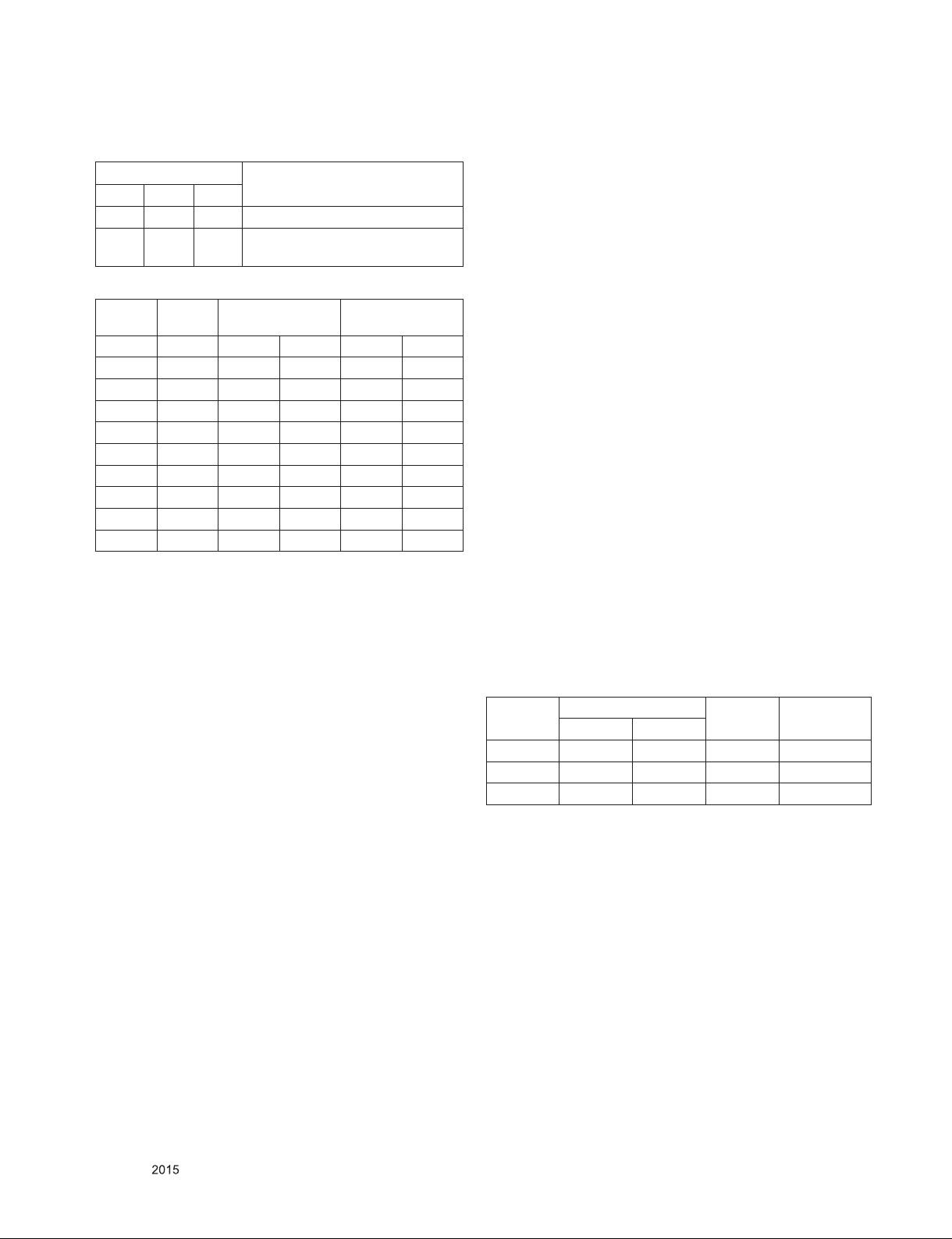
5.1.4. Adjustment Command (Protocol)
(1) RS-232C Command used during auto-adj.
RS-232C COMMAND
CMD DATA ID
Explanation
Wb 00 00 Begin White Balance adj.
Wb 00 ff End White Balance adj.
(internal pattern disappears )
(2) Adjustment Map
Adj. item Command
(lower caseASCII)
CMD1 CMD2 MIN MAX
Cool R Gain j g 00 C0
G Gain j h 00 C0
B Gain j i 00 C0
Medium R Gain j a 00 C0
G Gain j b 00 C0
B Gain j c 00 C0
Warm R Gain j d 00 C0
G Gain j e 00 C0
B Gain j f 00 C0
Data Range
(Hex.)
5.1.5. Adjustment method
5.1.5.1. Auto WB calibration
(1) Set TV in ADJ mode using P-ONLY key (or POWER ON
key)
(2) Place optical probe on the center of the display
- It need to check probe condition of zero calibration before
adjustment.
(3) Connect RS-232C Cable
(4) Select mode in ADJ Program and begin a adjustment.
(5) When WB adjustment is completed with OK message,
check adjustment status of pre-set mode (Cool, Medium,
Warm)
(6) Remove probe and RS-232C cable.
▪ W/B Adj. must begin as start command “wb 00 00” , and
finish as end command “wb 00 ff”, and Adj. offset if need
5.1.5.2. Manual adjustment
(1) Set TV in Adj. mode using POWER ON
(2) Zero Calibrate the probe of Color Analyzer, then place it on
the center of LCD module within 10cm of the surface..
(3) Press ADJ key -> EZ adjust using adj. R/C à 9. White-
Balance then press the cursor to the right (KEY►). When
KEY(►) is pressed 206 Gray internal pattern will be
displayed.
(4) Adjust Cool modes
(i) Fix the one of R/G/B gain to 192 (default data) and
decrease the others.
( If G gain is adjusted over 172 and R and B gain less than
192 , Adjust is O.K.)
(ii) If G gain is less than 172,
Increase G gain by up to 172, and then increase R gain and
G gain same amount of increasing G gain.
(iii) If R gain or B gain is over 255,
Readjust G gain less than 172, Conform to R gain is 255 or
B gain is 255
(5) Adjust two modes (Medium / Warm) Fix the one of R/G/B
gain to 192 (default data) and decrease the others.
(6) Adj. is completed, Exit adjust mode using “EXIT” key on
Remote controller.
5.1.6. Reference (White Balance Adj. coordinate and
color temperature)
(1) Luminance: 204 Gray, 80IRE
(2) Standard color coordinate and temperature using CS-1000
(over 26 inch)
5.1.7. Reference (White Balance Adj. coordinate and
color temperature)
▪ Luminance: 204 Gray
▪ Standard color coordinate and temperature using CS-1000
(over 26 inch)
Mode
Cool 0.271 0.270 13,000K 0.0000
Medium 0.286 0.289 9,300K 0.0000
Warm 0.313 0.329 6,500K 0.0000
Coordinate
X Y
Temp △uv
Only for training and service purposes
- 17 -
LGE Internal Use OnlyCopyright © LG Electronics. Inc. All rights reserved.
Page 18
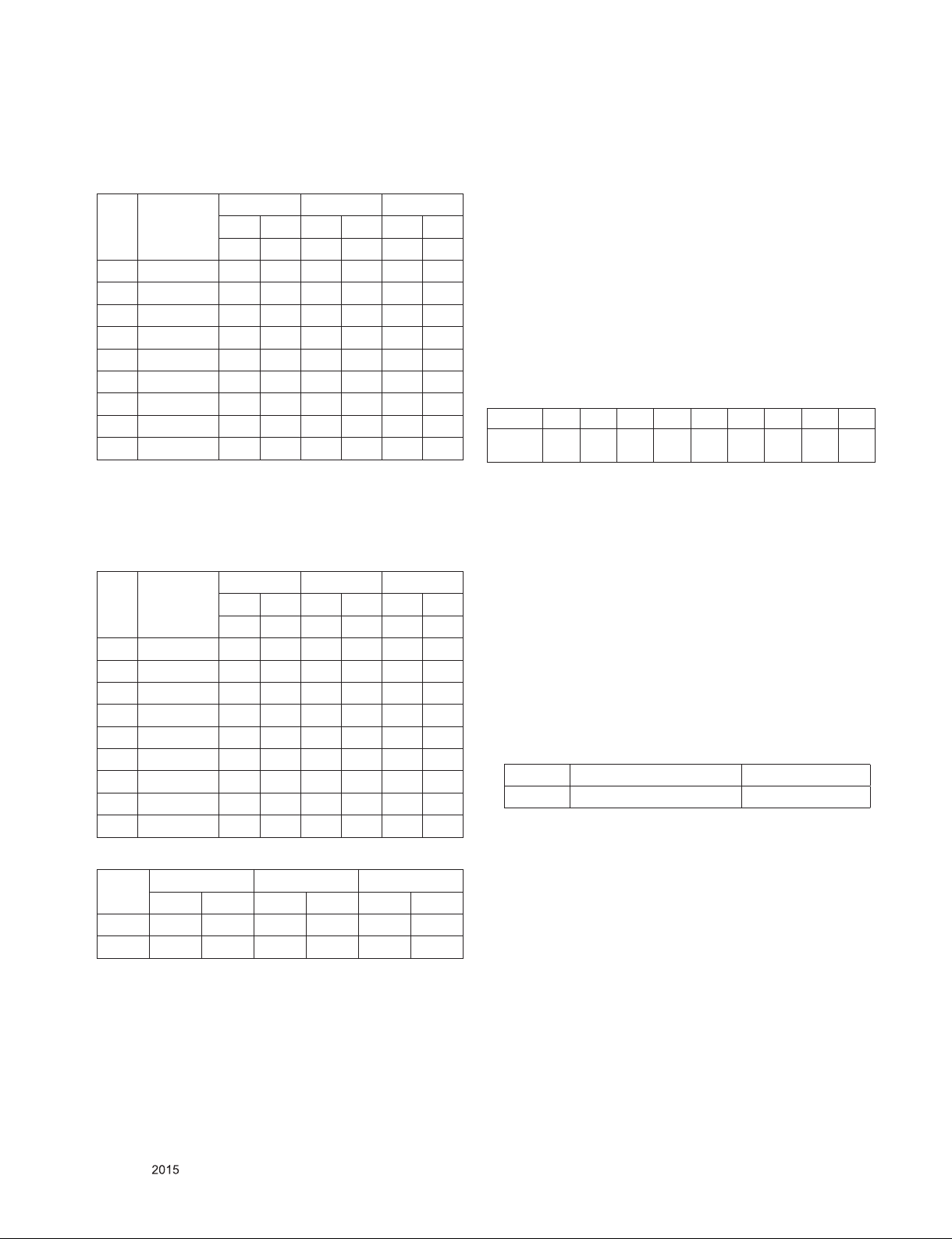
▪ Standard color coordinate and temperature using
CA-210(CH-14) – by aging time
(1) Normal line in Korea (From January to February) : LGD
(LB5xxx, LB6xxx, LB7xxx, LB8xxx Series models)
Aging time
(Min)
1 0-2 286 295 301 314 328 354
2 3-5 284 290 299 309 326 349
3 6-9 282 287 297 306 324 346
4 10-19 279 283 294 302 321 342
5 20-35 276 278 291 297 318 337
6 36-49 274 275 289 294 316 334
7 50-79 273 272 288 291 315 331
8 80-119 272 271 287 290 314 330
9 Over 120 271 270 286 289 313 329
Cool Medium Warm
X Y X Y X Y
271 270 286 289 313 329
5.2. Option selection per country
5.2.1. Overview
(1) Tool option selection is only done for models in Non-USA
North America due to rating
(2) Applied model: LA42B Chassis applied to CANADA and
MEXICO
5.2.2. Country Group selection
(1) Press ADJ key on the Adj. R/C, and then select Country
Group Menu
(2) Depending on destination, select US, then on the lower
Country option, select US, CA, MX.
Selection is done using +, - KEY
5.2.3. Tool Option inspection
▪ Press Adj. key on the Adj. R/C, then select Tool option
Model Tool 1 Tool 2 Tool 3 Tool 4 Tool 5 Tool 6 Tool 7 Tool 8 Area
43LF6300-UA2007 4626 33153 64774 8870 3708 43563 65535 22282
▪ Standard color coordinate and temperature using
CA-210(CH-14) – by aging time
(2) Normal line in Korea (From March to December) : LGD
(LB5xxx, LB6xxx, LB7xxx, LB8xxx Series models)
Normal line in Mexico : LGD (LB5xxx, LB6xxx, LB7xxx,
LB8xxx Series models)
Aging time
(Min)
1 0-2 282 289 297 308 324 348
2 3-5 281 287 296 306 323 346
3 6-9 279 284 294 303 321 343
4 10-19 277 280 292 299 319 339
5 20-35 275 277 290 296 317 336
6 36-49 274 274 289 293 316 333
7 50-79 273 272 288 291 315 331
8 80-119 272 271 287 290 314 330
9 Over 120 271 270 286 289 313 329
(3) O/S Module(AUO, INX, Sharp, CSOT, BOE)
cool med warm
x y x y x y
spec 271 270 286 289 313 329
target 278 280 293 299 320 339
Cool Medium Warm
X Y X Y X Y
271 270 286 289 313 329
* Tool option can be reconstructed by Software
5.3. Magic Motion remote controller Check
5.3.1. Test equipment
▪ RF-remote controller for check, IR-KEY-CODE remote
controller.
▪ Check AA battery before test. A recommendation is that a
tester change battery every lots.
5.3.2. Test
(1) Make pairing with TV set by pressing “Start key(Wheel
key)” on RCU.
(2) Check a cursor on screen by pressing ‘Wheel key” of RCU
(3) Stop paring with TV set by pressing “Back+ Home” key of
RCU
5.3.3. Applied models
Chassis Model Name Magic RF receiver
LA51H 43LF6300-UA Built-in
Only for training and service purposes
- 18 -
LGE Internal Use OnlyCopyright © LG Electronics. Inc. All rights reserved.
Page 19
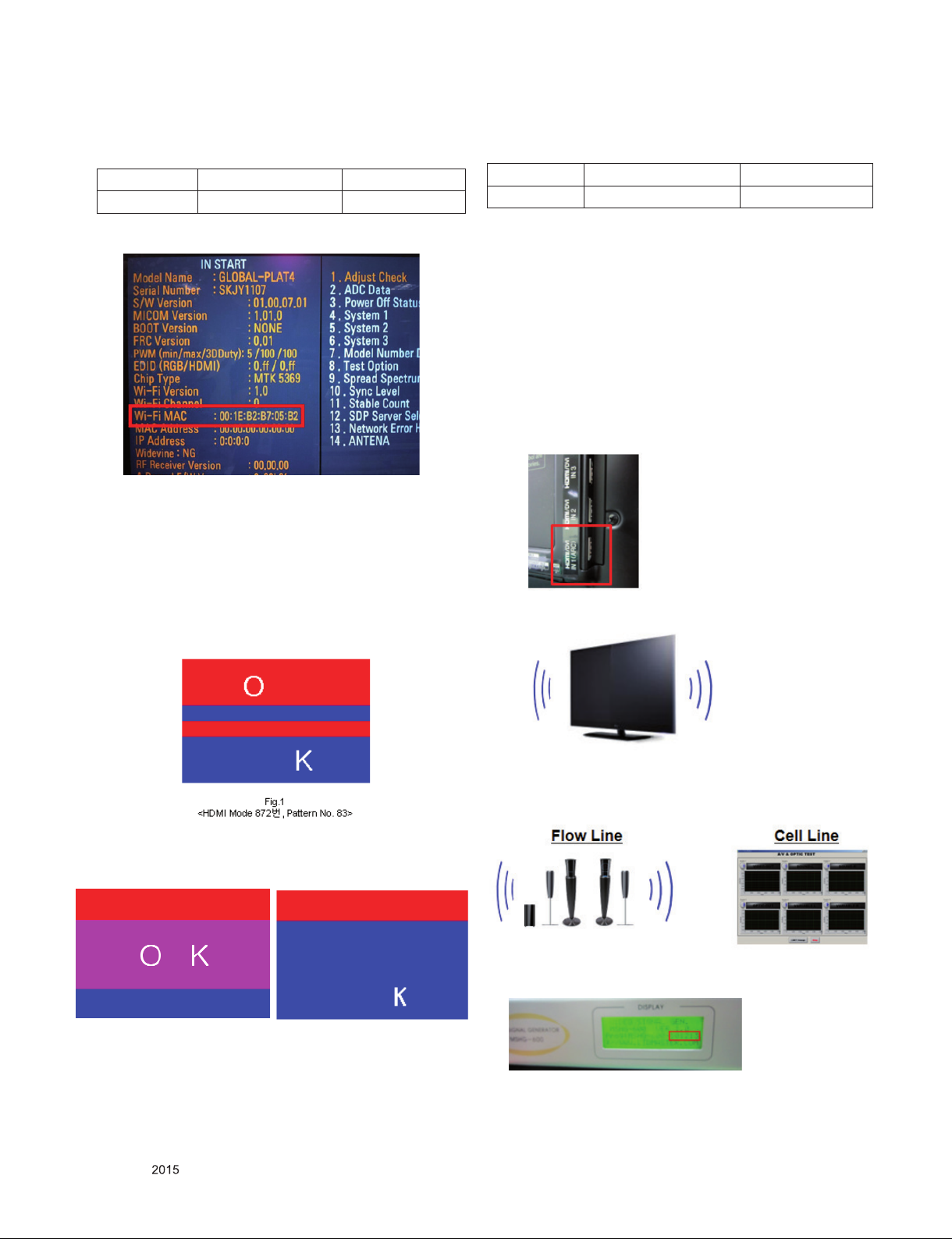
5.4. Wi-Fi MAC Address Check
5.4.1. Using RS232 Command
Command Set ACK
Transmission [A][l][][Set ID][][20][Cr] [O][K][x] or [N][G]
5.5.3. 3D Inner pattern
(1). Using RS232 Command
Command Set ACK
Transmission [A][I][ ][Set ID][ ][72][Cr] [O][K][x] or [N][G][x]
5.4.2. Check the menu on in-start
5.5. 3D pattern test (Only for 3D models)
5.5.1. Test equipment
(1) Pattern Generator MSHG-600 or MSPG-6100 (HDMI 1.4
support)
(2) Pattern: HDMI mode (model No. 872, pattern No. 83)
5.5.2. Test method
(1) Input 3D test signal as Fig.1.
(2) It support internal 3D pattern without ‘MASTER’ equipment.
Except that one, other method is same when use the
‘MASTER’ equipment
5.6. HDMI ARC Function Inspection
5.6.1. Test equipment
- Optic Receiver Speaker
- MSHG-600 (SW: 1220 ↑)
- HDMI Cable (for 1.4 version)
5.6.2. Test method
(1) Insert the HDMI Cable to the HDMI ARC port from the
master equipment (HDMI1)
(2) Check the sound from the TV Set
(2) Press ‘OK” key as a 3D input OSD is shown.
(3) Check pattern as Fig2 without 3D glasses. (3D mode
without 3D glasses)
Fig.2 Fig.3
<OK in 3D mode without 3D glasses> <NG in 3D mode without 3D glasses>
Only for training and service purposes
- 19 -
(3) Check the Sound from the Speaker or using AV & Optic
TEST program (It’s connected to MSHG-600)
* Remark: Inspect in Power Only Mode and check SW version
in a master equipment
LGE Internal Use OnlyCopyright © LG Electronics. Inc. All rights reserved.
Page 20
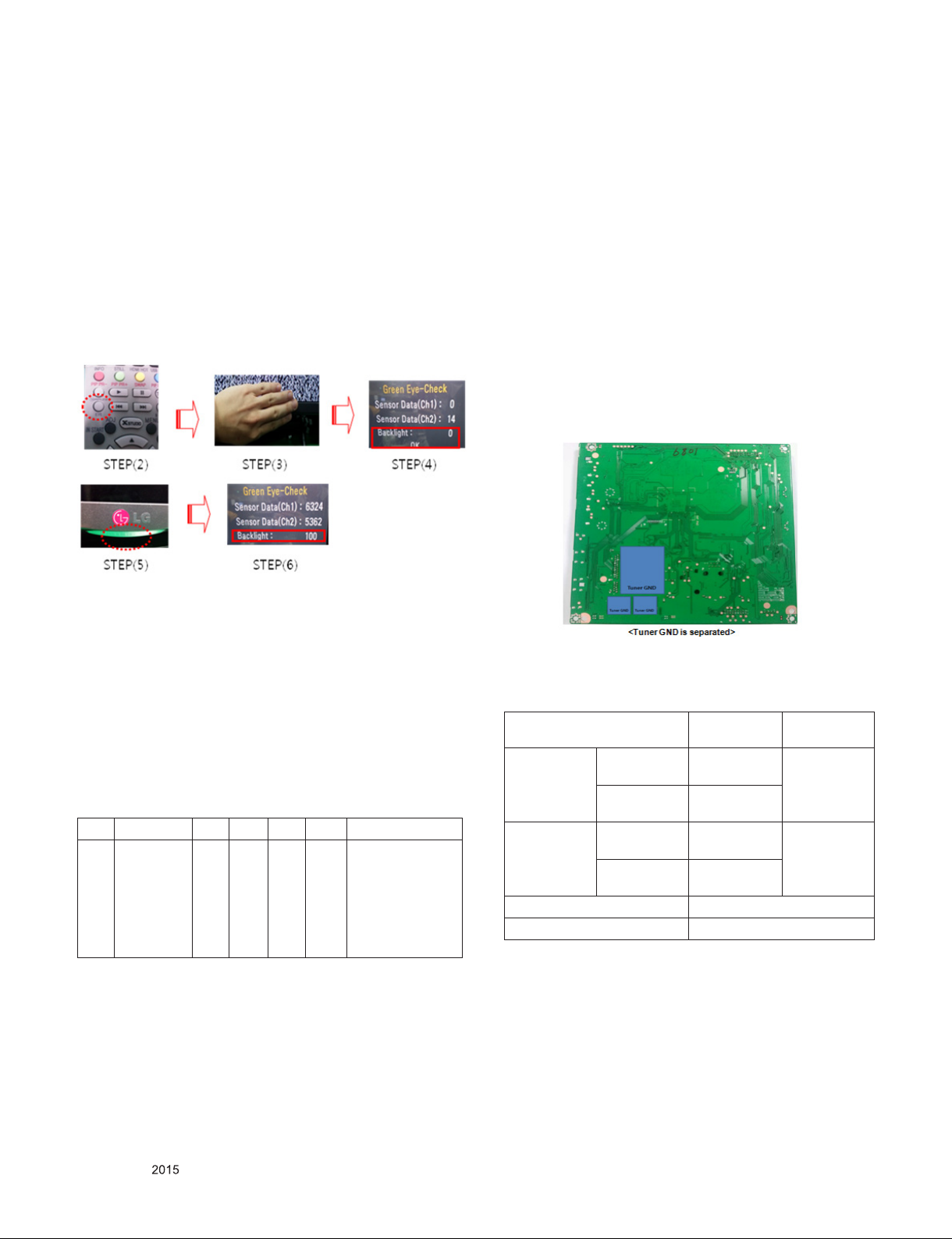
5.7. EYE-Q Green Function Inspection
Step 1) Turn on the TV..
Step 2) Press 'EYE button' on the adjustment remote-
controller.
Step 3) Cover 'Eye Q sensor' on the front of set with your
hands, hold it for 6 seconds.
Step 4) Check "the Sensor Data" on the screen, make certain
that Data is below 10. If Data isn’t below 10 in 6
seconds, Eye Q sensor would be bad. You should
change Eye Q sensor.
Step 5) Uncover your hands from Eye Q sensor, hold it for 6
seconds.
Step 6) Check "Back Light(xxx)" on the screen, check data
increase . You should change Eye Q sensor.
7. GND and HI-POT Test
7.1. GND & HI-POT auto-check preparation
(1) Check the POWER CABLE and SIGNAL CABE insertion
condition
7.2. GND & HI-POT auto-check
(1) Pallet moves in the station. (POWER CORD / AV CORD is
tightly inserted)
(2) Connect the AV JACK Tester.
(3) Controller (GWS103-4) on.
(4) GND Test (Auto)
- If Test is failed, Buzzer operates.
- If Test is passed, execute next process (Hi-pot test).
(Remove A/V CORD from A/V JACK BOX)
(5) HI-POT test (Auto)
- If Test is failed, Buzzer operates.
- If Test is passed, GOOD Lamp on and move to next process
automatically.
5.8. Ship-out mode check (In-stop)
▪ After final inspection, press In-Stop key of the Adj. R/C and
check that the unit goes to Stand-by mode.
6. AUDIO output check
6.1. Audio input condition
(1) RF input: Mono, 1KHz sine wave signal, 100% Modulation
(2) CVBS, Component: 1KHz sine wave signal (0.4Vrms)
6.2. Specification
No Item Min Ty p Max Unit Remark
1 Audio
practical
max Output,
L/R
(Distortion=10%
max Output)
9.0
8.5
10.0
8.9
12.0
9.9WVrms
(1) Measurement
condition
- EQ/AVL/Clear
Voice: Off
(2) Speaker (8Ω
Impedance)
ALL MODEL
8.3. Checkpoint
(1) Test voltage
Products/Model TV MNT, Projec-
2Poles Japan 1500V(AC)/
2121v(DC)
Other 3000V(AC)/
4242V(DC)
3Poles Japan 800V(AC)/
1131(DC)
Other 1500V(AC)/
2121V(DC)
Cut off current 100mA(AC)/100mA(DC)
Earth Continutiy test
(2) TEST time: 1 second
(3) TEST POINT
- GND Test = POWER CORD GND and SIGNAL CABLE GND.
- Hi-pot Test = POWER CORD GND and LIVE & NEUTRAL.
(4) LEAKAGE CURRENT: At 0.5mArms
tor
3000V(AC)/
4242V(DC)
1500V(AC)/
2121(DC)
Only for training and service purposes
- 20 -
LGE Internal Use OnlyCopyright © LG Electronics. Inc. All rights reserved.
Page 21
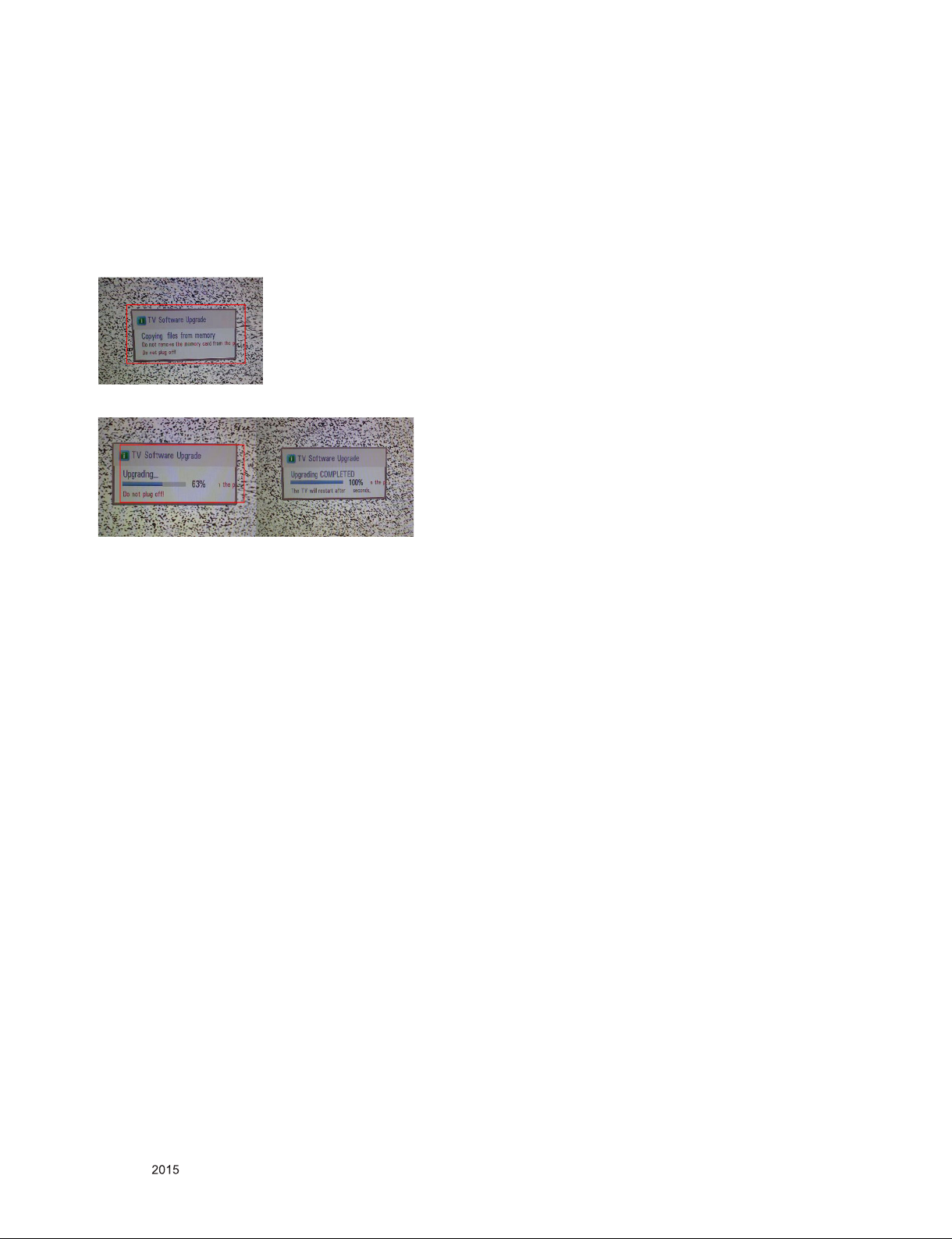
9. USB S/W Download
(optional, Service only)
(1) Put the USB Stick to the USB socket
(2) Automatically detecting update file in USB Stick
- If your downloaded program version in USB Stick is lower
than that of TV set, it didn’t work. Otherwise USB data is
automatically detected.
(3) Show the message “Copying files from memory”
10. Optional adjustments
10.1. Manual White balance Adjustment
10.1.1. Adj. condition and cautionary items
(1) Lighting condition in surrounding area surrounding lighting
should be lower 10 lux. Try to isolate adj. area into dark
surrounding.
(2) Probe location: Color Analyzer (CA-210) probe should be
within 10cm and perpendicular of the module surface
(80°~ 100°)
(3) Aging time
- After Aging Start, Keep the Power ON status during 5
Minutes.
- In case of LCD, Back-light on should be checked using no
signal or Full-white pattern
(4) Updating is staring.
(5) Updating Completed, The TV will restart automatically
(6) If your TV is turned on, check your updated version and
Tool option.
* If downloading version is more high than your TV have, TV
can lost all channel data. In this case, you have to channel
recover. If all channel data is cleared, you didn’t have a DTV/
ATV test on production line.
* After downloading, TOOL OPTION setting is needed again.
(1) Push "IN-START" key in service remote controller.
(2) Select "Tool Option 1" and Push “OK” button.
(3) Punch in the number. (Each model has their number.)
10.1.2. Equipment
(1) Color Analyzer: CA-210 (NCG: CH 9 / WCG: CH12 / LED:
CH14)
(2) Adj. Computer (During auto adj., RS-232C protocol is
needed)
(3) Adjust Remocon
(4) Video Signal Generator MSPG-925F 720p/216-Gray
(Model: 217, Pattern: 78)
10.1.3. Adjustment
(1) Set TV in Adj. mode using POWER ON
(2) Zero Calibrate the probe of Color Analyzer, then place it on
the center of LCD module within 10cm of the surface.
(3) Press ADJ key -> EZ adjust using adj. R/C -> 6. White-
Balance then press the cursor to the right (KEY►).
When KEY(►) is pressed 216 Gray internal pattern will be
displayed.
(4) One of R Gain / G Gain / B Gain should be fixed at 192,
and the rest will be lowered to meet the desired value.
(5) Adj. is performed in COOL, MEDIUM, WARM 3 modes of
color temperature.
▪ If internal pattern is not available, use RF input. In EZ Adj.
menu 6.White Balance, you can select one of 2 Test-pattern:
ON, OFF. Default is inner(ON). By selecting OFF, you can
adjust using RF signal in 216 Gray pattern.
Only for training and service purposes
- 21 -
LGE Internal Use OnlyCopyright © LG Electronics. Inc. All rights reserved.
Page 22
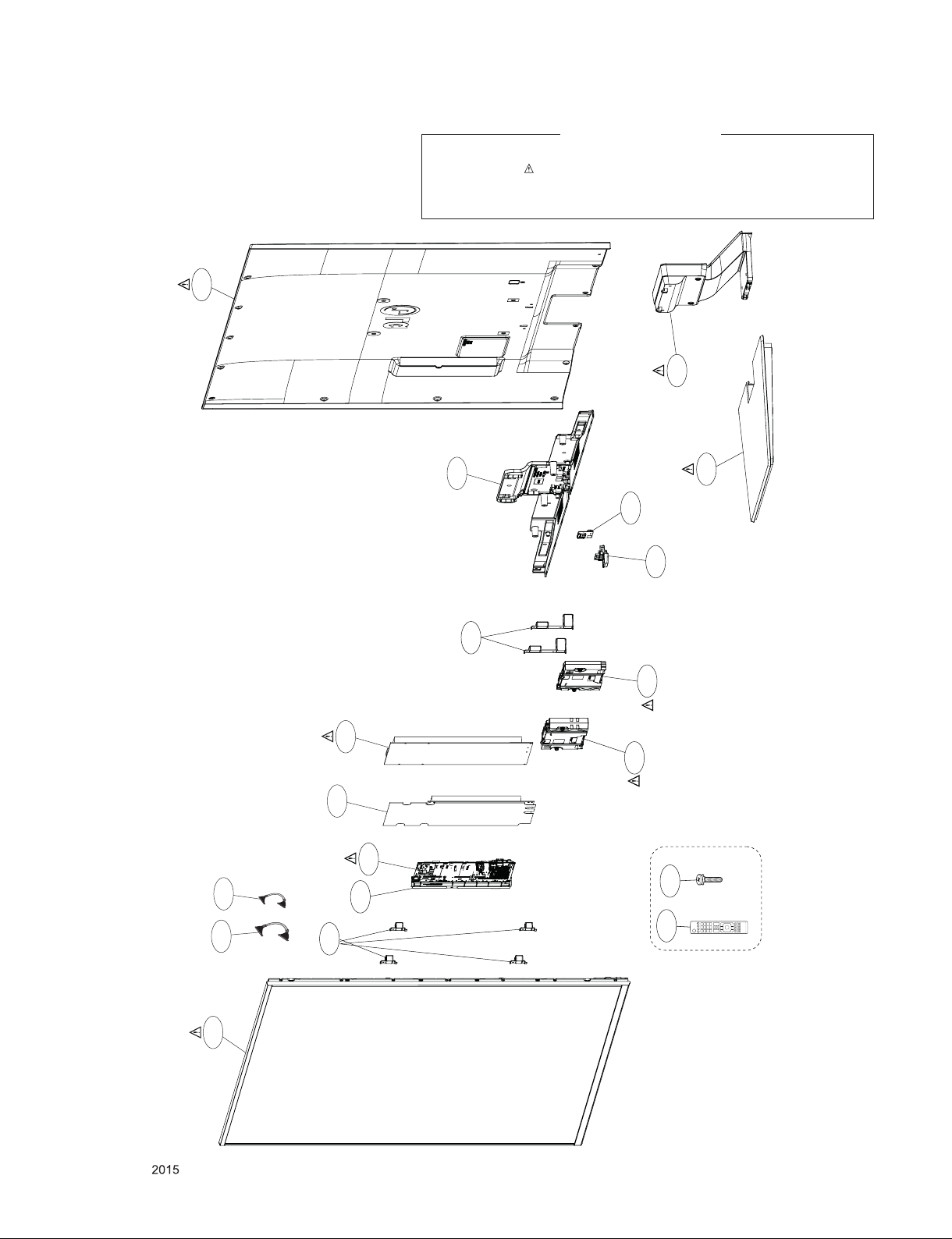
400
EXPLODED VIEW
IMPORTANT SAFETY NOTICE
Many electrical and mechanical parts in this chassis have special safety-related characteristics. These
parts are identified by in the Schematic Diagram and EXPLODED VIEW.
It is essential that these special safety parts should be replaced with the same components as
recommended in this manual to prevent, Shock, Fire, or other Hazards.
Do not modify the original design without permission of manufacturer.
910
410
900
570
500
810
121
530
120
820
540
LV2
521
A10
* Set + Stand
* Stand base
+Stand body
LV1
200
Only for training and service purposes
800
- 22 -
A2
LGE Internal Use OnlyCopyright © LG Electronics. Inc. All rights reserved.
Page 23
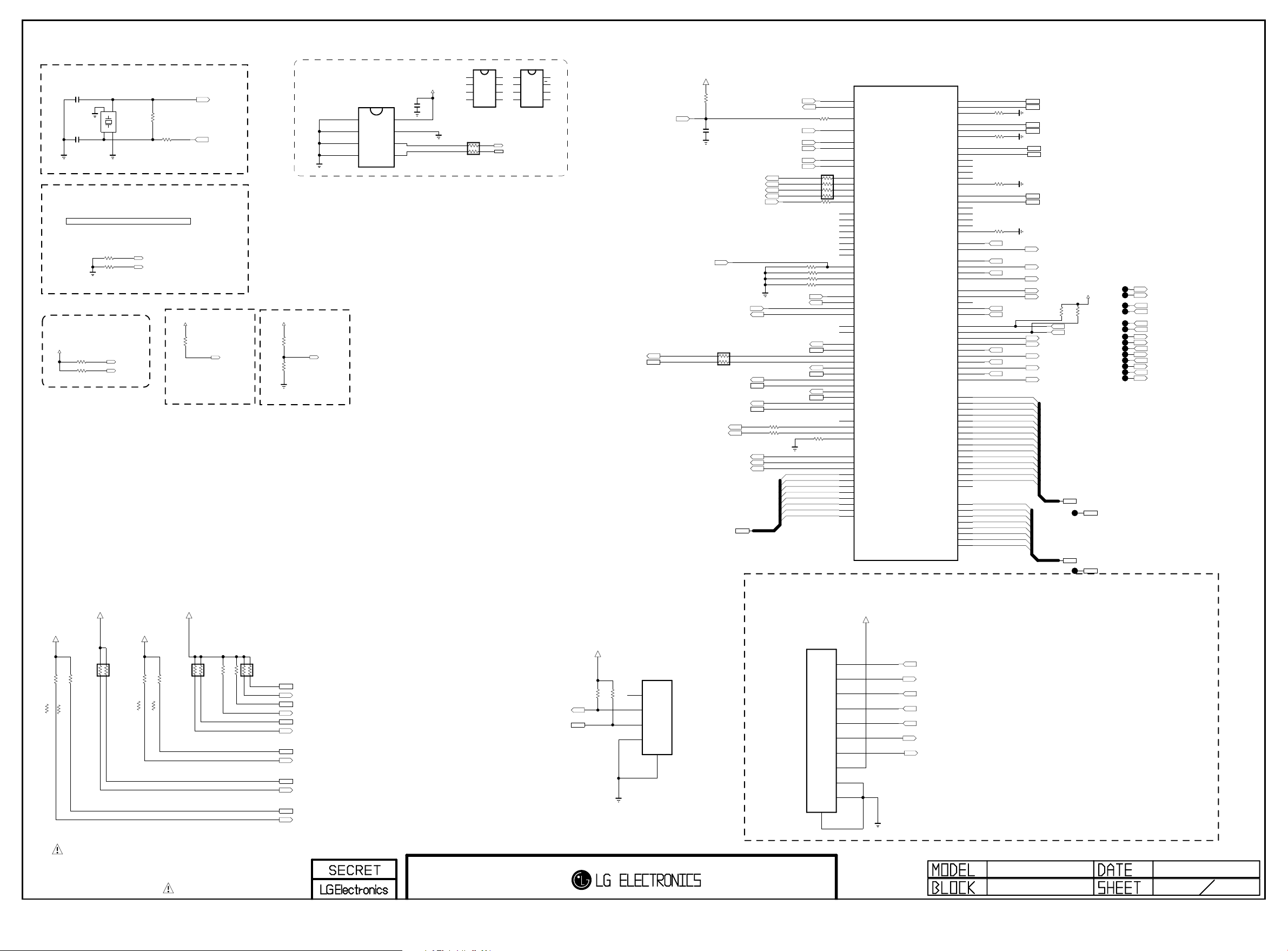
System Configuration
Copyright ⓒ 2014 LG Electronics. Inc. All right reserved.
Only for training and service purposes
LGE Internal Use Only
Clock for M14+
MAIN Clock(24Mhz)
10pF
C101
10pF
C102
System Clock for Analog block(24Mhz)
PLL SET[1:0] : internal pull up
"00" : CPU(1200Mhz),M0 / M1 DDR(792,792 Mhz)
"01" : CPU(1056Mhz),M0 / M1 DDR(672,672 Mhz)
"10" : CPU(1056Mhz),M0 / M1 DDR(792,792 Mhz)
"11" : CPU( 960Mhz),M0 / M1 DDR(792,792 Mhz)
Extenal test only
R103 3.3K
R104 3.3K
OP MODE[1:0]
"00" : Normal Mode
"01/10/11" : Internal Test mode
+3.3V_NORMAL
OPT
R101 3.3K
R102 3.3K
OPT
Extenal test only
+3.3V_NORMAL
+3.3V_NORMAL
R148
3.3K
R146
3.3K
KR/JP_PIP_NOT
KR/JP_PIP_NOT
1.5K
1.5K
R146-*1
R148-*1
KR/JP_PIP
KR/JP_PIP
X-T AL_12GND _1
1
X10 1
24M Hz
4
3
GND _2
X-T AL_2
OPT
OPT
PLLSET1
PLLSET0
OPM1
OPM0
+3.3V_NORMAL
3.3K
AR104
R155
1.2K
KR/JP_PIP_NOT
3.3K
R155-*1
KR/JP_PIP
1M
R118
R180
560
+3.3V_NORMAL
3.3K
R121
OPT
INSTANT_MODE0
+3.3V_NORMAL
R156
1.2K
KR/JP_PIP_NOT
3.3K
R156-*1
KR/JP_PIP
XTAL_IN
XTAL_OUT
INSTANT boot MODE
"1 : Instant boot
"0 : normal
(internal pull down)
INSTANT_BOOT
I2C PULL UP
3.3K
R159
3.3K
R160
3.3K
AR103
+3.3V_NORMAL
BOOT MODE
"0 : EMMC
"1 : TEST MODE
3.3K
R127
OPT
BOOT_MODE
3.3K
R128
BOOT_MODE0
I2C
I2C_1 : AMP
I2C_2 : T-CON,L/DIMING
I2C_3 : MICOM
I2C_4 : S/Demod,T2/Demod, LNB
I2C_5 : NVRAM
I2C_6 : TUNER_MOPLL(T/C,ATV)
3.3K
AR102
I2C_SDA1
I2C_SCL1
I2C_SDA_MICOM_SOC
I2C_SCL_MICOM_SOC
I2C_SDA2
I2C_SCL2
I2C_SDA4
I2C_SCL4
I2C_SDA5
I2C_SCL5
I2C_SDA6
I2C_SCL6
NVRAM
IC103
AT24C256C-SSHL-T
A0
1
A1
2
A2
3
GND
4
NVRAM_ATMEL
PAGE 1
+5V_NORMAL
R11034
10K
NON_CI
CAM_CD1_N
CAM_CD2_N
TP104
TP105
TP106
TP107
NON_CI
TP108
TP109
TP110
TP111
TP112
TP113
TP114
TP115
TP116
TP117
EB_ADDR[0-14]
EB_ADDR[0-14]
EB_WE_N
EB_OE_N
EB_BE_N1
EB_BE_N0
CAM_CD1_N
CAM_CD2_N
/PCM_CE1
/PCM_CE2
CAM_IREQ_N
PCM_RESET
CAM_INPACK_N
PCM_5V_CTL
CAM_WAIT_N
CAM_REG_N
8
7
6
5
VCC
WP
SCL
SDA
VSS
NVRAM_ST
I2C_SCL5
I2C_SDA5
IC103-*1
M24256-BRMN6TP
E0
1
E1
2
E2
3
4
VCC
8
WC
7
SCL
6
SDA
5
SOC_RESET
I2C_SCL_MICOM_SOC
I2C_SDA_MICOM_SOC
+3.3V_NORMAL
FORCED_JTAG_0
PWM_DIM2
PWM_DIM
R163
10K
OPT
C104
0.1uF
16V
L/DIM0_VS
L/DIM0_SCLK
L/DIM0_MOSI
M_REMOTE_RX
M_REMOTE_TX
1/16W
33
AR100
I2C_SCL4
I2C_SDA4
I2C_SCL6
I2C_SDA6
EMMC_CLK
EMMC_CMD
EMMC_RST
TCK0
TDI0
XTAL_IN
XTAL_OUT
BOOT_MODE
PLLSET0
PLLSET1
I2C_SCL1
I2C_SDA1
I2C_SCL2
I2C_SDA2
I2C_SCL5
I2C_SDA5
R107
R108
OPM0
OPM1
R182 10K
R183 10K
R184 10K
R185 10K
SOC_RX
SOC_TX
33
33
EMMC_DATA[7]
EMMC_DATA[6]
EMMC_DATA[5]
EMMC_DATA[4]
EMMC_DATA[3]
EMMC_DATA[2]
EMMC_DATA[1]
EMMC_DATA[0]
R169
33
AR101
33
R178 33
OPT
R179
10K
1/16W
5%
AG21
AJ18
AG30
AG28
AG29
AH29
AJ27
AH27
AG26
AH26
AJ12
AJ13
AH12
AG12
AH23
AG22
AH11
AG11
AG10
AH22
AJ22
AH10
AJ10
AG23
AH24
B23
A23
AB8
AC8
AD8
AE8
Y7
Y6
W7
W6
W5
AH7
AJ7
AG8
AH8
AH9
AG9
AJ9
AC6
AC7
AD7
AB7
G32
G33
G31
D31
F33
F32
E32
F31
D33
D32
E31
EMMC_DATA[0-7]
IC101
LG1311-C1
XIN_MAIN
XO_MAIN
PORES_N
BOOT_MODE
PLLSET0
PLLSET1
OPM0
OPM1
L_VSOUT_LD/TRST0_N
DIM0_SCLK/TMS0
DIM1_SCLK/TCK0
DIM1_MOSI/TDI0
DIM0_MOSI/TDO0
SPI_CS0
SPI_SCLK0
SPI_DO0
SPI_DI0/TRST1_N
SPI_CS1/TMS1
SPI_SCLK1/TCK1
SPI_DO1/TDO1
SPI_DI1/TDI1
EXT_INTR0
EXT_INTR1
EXT_INTR2
EXT_INTR3
UART0_RXD
UART0_TXD
UART1_RXD
UART1_TXD
UART1_RTS_N
UART1_CTS_N
SCL0
SDA0
SCL1
SDA1
SCL2
SDA2
SCL3
SDA3
SCL4
SDA4
SCL5
SDA5
PWM0
PWM1
PWM2
PWM_IN
EMMC_CLK
EMMC_CMD
EMMC_RESETN
EMMC_DATA7
EMMC_DATA6
EMMC_DATA5
EMMC_DATA4
EMMC_DATA3
EMMC_DATA2
EMMC_DATA1
EMMC_DATA0
USB2_0_DP0
USB2_0_DM0
USB2_0_TXRTUNE
USB2_1_DP0
USB2_1_DM0
USB2_1_TXRTUNE
USB3_DP0
USB3_DM0
USB3_TXP0
USB3_TXM0
USB3_RXP0
USB3_RXM0
USB3_RESREF0
USB3_DP1
USB3_DM1
USB3_TXP1
USB3_TXM1
USB3_RXP1
USB3_RXM1
USB3_RESREF1
HUB_PORT_OVER0
HUB_VBUS_CTRL0
EB_CS3
EB_CS2
EB_CS1
EB_CS0
EB_WE_N
EB_OE_N
EB_WAIT
EB_BE_N1
EB_BE_N0
CAM_CD1_N
CAM_CD2_N
CAM_CE1_N
CAM_CE2_N
CAM_IREQ_N
CAM_RESET
CAM_INPACK_N
CAM_VCCEN_N
CAM_WAIT_N
CAM_REG_N
EB_ADDR0
EB_ADDR1
EB_ADDR2
EB_ADDR3
EB_ADDR4
EB_ADDR5
EB_ADDR6
EB_ADDR7
EB_ADDR8
EB_ADDR9
EB_ADDR10
EB_ADDR11
EB_ADDR12
EB_ADDR13
EB_ADDR14
EB_ADDR15
EB_DATA0
EB_DATA1
EB_DATA2
EB_DATA3
EB_DATA4
EB_DATA5
EB_DATA6
EB_DATA7
AN9
AM9
AN8
H32
J31
H33
N31
N32
P33
P32
M32
M33
P31
K33
K32
L32
L31
K31
J32
M31
W28
W29
H28
J30
J28
J29
G30
F30
H29
G29
G28
P28
P27
U28
R29
V27
T28
T29
R28
U27
N29
K30
E30
M30
N28
M28
M29
L29
K29
K28
L28
D30
F29
C32
C33
C31
B33
B32
A32
B31
A31
A30
B30
C30
C29
R1712001%
R1722001%
R1732001%
R1742001%
/USB_OCD1
/USB_OCD2
/USB_OCD3
EB_BE_N1
EB_BE_N0
CAM_IREQ_N
CAM_INPACK_N
CAM_WAIT_N
EB_ADDR[0]
EB_ADDR[1]
EB_ADDR[2]
EB_ADDR[3]
EB_ADDR[4]
EB_ADDR[5]
EB_ADDR[6]
EB_ADDR[7]
EB_ADDR[8]
EB_ADDR[9]
EB_ADDR[10]
EB_ADDR[11]
EB_ADDR[12]
EB_ADDR[13]
EB_ADDR[14]
EB_DATA[0]
EB_DATA[1]
EB_DATA[2]
EB_DATA[3]
EB_DATA[4]
EB_DATA[5]
EB_DATA[6]
EB_DATA[7]
WIFI_DP
WIFI_DM
USB_DP3
USB_DM3
USB_DP1
USB_DM1
USB_DP2
USB_DM2
USB_CTL1
USB_CTL2
USB_CTL3
EB_WE_N
EB_OE_N
R11033
10K
/PCM_CE1
/PCM_CE2
PCM_RESET
PCM_5V_CTL
CAM_REG_N
TP102
IC103-*2
BR24G256FJ-3
A0
1
A1
+3.3V_NORMAL
C107
0.1uF
16V
VCC
8
WP
7
SCL
6
SDA
5
2
A2
3
GND
4
NVRAM_ROHM
Write Protection
- Low : Normal Operation
- High : Write Protection
AR105
33
EB_DATA[0-7]
TP103
EB_DATA[0-7]
Jtag-0 I/F
LOCAL DIMMING I2C CONTROL
+3.3V_NORMAL
P102
R106
OPT
3.3K
12507WS-04L
1
2
3
4
LED_SCL
LED_SDA
R105
OPT
3.3K
12505WS-10A00
OPT
5
P103
JTAG_CPU
1
2
3
4
5
6
7
8
9
10
11
+3.3V_NORMAL
L/DIM0_VS
(TRST0_N)
TDI0
L/DIM0_MOSI
L/DIM0_SCLK
TCK0
SOC_RESET
FORCED_JTAG_0
(TDO0)
(TMS0)
THE SYMBOL MARK OF THIS SCHEMETIC DIAGRAM INCORPORATES
SPECIAL FEATURES IMPORTANT FOR PROTECTION FROM X-RADIATION.
FIRE AND ELECTRICAL SHOCK HAZARDS, WHEN SERVICING IF IS
ESSENTIAL THAT ONLY MANUFACTURES SPECIFIED PARTS BE USED FOR
THE CRITICAL COMPONENTS IN THE SYMBOL MARK OF THE SCHEMETIC.
M14-Peripheral
MID_LG1311
M14 Symbol A
2013.04.04
1
31
Page 24
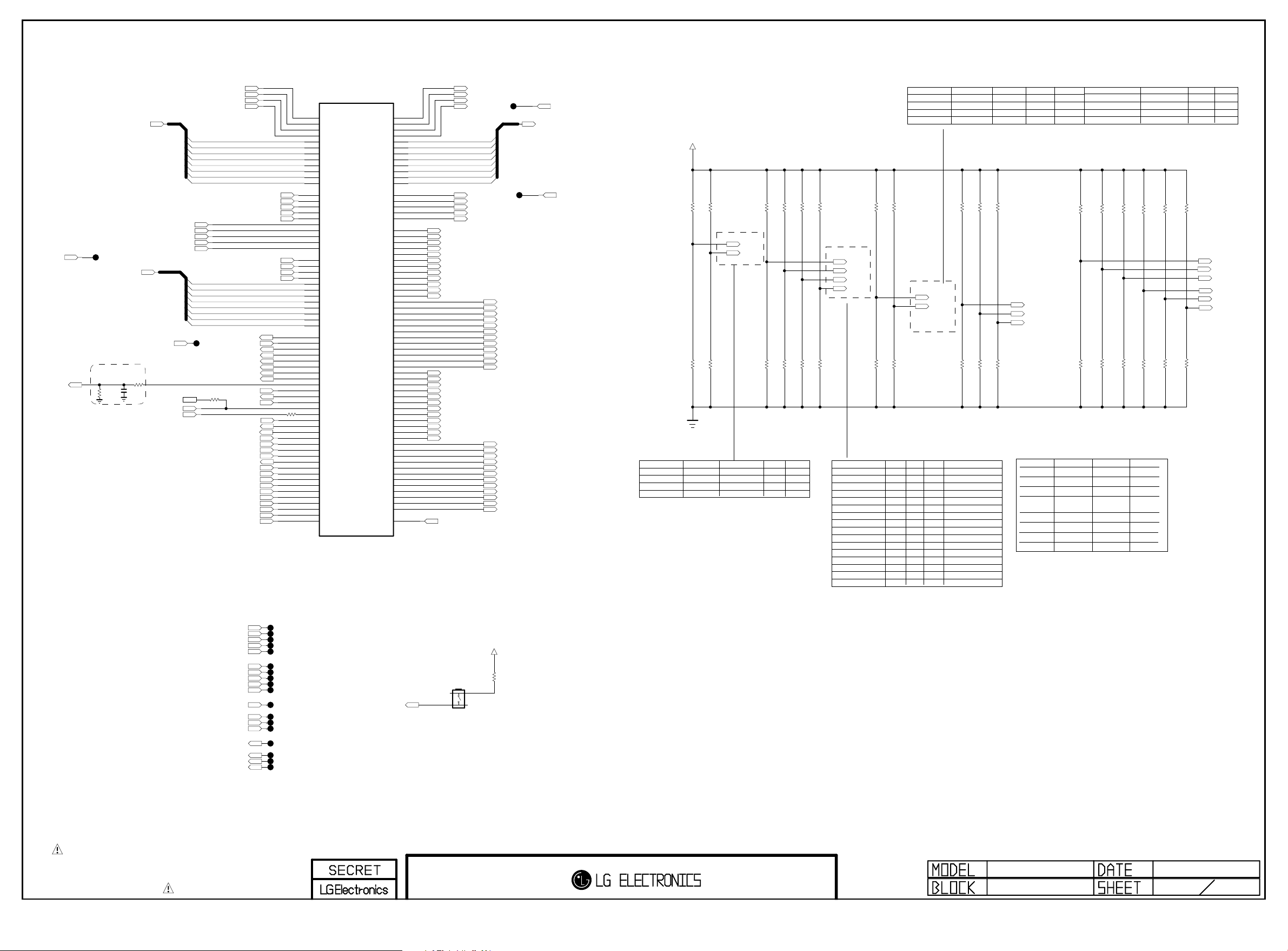
PAGE 2
Copyright ⓒ 2014 LG Electronics. Inc. All right reserved.
Only for training and service purposes
LGE Internal Use Only
FE_DEMOD1_TS_DATA[0-7]
TPI_ERR
AMP_RESET_N
FE_DEMOD3_TS_CLK
FE_DEMOD3_TS_SYNC
FE_DEMOD3_TS_VAL
FE_DEMOD3_TS_DATA
TPI_DATA[0-7]
Near AMP
C200
1000pF
50V
R231
4.7K
SC_DET
R226
100
1/16W
5%
LED_SDA
INSTANT_BOOT
LED_SCL
FE_DEMOD1_TS_CLK
FE_DEMOD1_TS_SYNC
FE_DEMOD1_TS_VAL
FE_DEMOD1_TS_ERROR
FE_DEMOD1_TS_DATA[7]
FE_DEMOD1_TS_DATA[6]
FE_DEMOD1_TS_DATA[5]
FE_DEMOD1_TS_DATA[4]
FE_DEMOD1_TS_DATA[3]
FE_DEMOD1_TS_DATA[2]
FE_DEMOD1_TS_DATA[1]
FE_DEMOD1_TS_DATA[0]
FE_DEMOD2_TS_CLK
FE_DEMOD2_TS_SYNC
FE_DEMOD2_TS_VAL
FE_DEMOD2_TS_ERROR
FE_DEMOD2_TS_DATA
TPI_DATA[0]
TPI_DATA[1]
TPI_DATA[2]
TPI_DATA[3]
TPI_DATA[4]
TPI_DATA[5]
TPI_DATA[6]
TPI_DATA[7]
MODEL_OPT_11
TP225
/RST_PHY
2D/3D_CTL
RF_SWITCH_CTL
/TU_RESET1
/TU_RESET2
BT_RESET
R224
OPT
33
MODEL_OPT_14
MODEL_OPT_15
MODEL_OPT_12
MODEL_OPT_16
COMP1_DET
AV1_CVBS_DET
MODEL_OPT_13
MODEL_OPT_8
MODEL_OPT_9
MODEL_OPT_10 EPI_LOCK8/6
SC_DET
HP_DET
OPC_EN
DEBUG
BIT0
BIT1
BIT2
BIT3
BIT4
BIT5
BIT6
BIT7
TPI_CLK
TPI_SOP
TPI_VAL
TPI_ERR
R225
OPT
MODEL_OPT_14
33
MODEL_OPT_15
MODEL_OPT_16
AH30
AH32
AH31
AH33
AM33
AL32
AL33
AK32
AK33
AK31
AJ30
AJ31
AL31
AN32
AM32
AN31
AM31
AH28
AJ28
AK30
AJ29
AG27
AG13
AJ19
AG14
AG15
AJ15
AH19
AH18
AG19
AG24
AH16
AJ21
AH21
AG16
AJ24
AH17
AG17
AH13
AH15
AG18
AH14
AJ16
AH20
A28
B28
B29
C28
A27
B27
C27
B26
C26
B25
A25
C25
AH5
AJ5
AJ6
AH6
AG6
AG5
AF7
AG7
V29
V28
IC101
LG1311-C1
TP_DVB_CLK
TP_DVB_SOP
TP_DVB_VAL
TP_DVB_ERR
TP_DVB_DATA7
TP_DVB_DATA6
TP_DVB_DATA5
TP_DVB_DATA4
TP_DVB_DATA3
TP_DVB_DATA2
TP_DVB_DATA1
TP_DVB_DATA0
STPI0_CLK
STPI0_SOP
STPI0_VAL
STPI0_ERR
STPI0_DATA
STPI1_CLK
STPI1_SOP
STPI1_VAL
STPI1_ERR
STPI1_DATA
TPI_CLK
TPI_SOP
TPI_VAL
TPI_ERR
TPI_DATA0
TPI_DATA1
TPI_DATA2
TPI_DATA3
TPI_DATA4
TPI_DATA5
TPI_DATA6
TPI_DATA7
GPIO31
GPIO30
GPIO29
GPIO28
GPIO27
GPIO26
GPIO25
GPIO24
GPIO23
GPIO22
GPIO21
GPIO20
GPIO19
GPIO18
GPIO17
GPIO16
GPIO15
GPIO14
GPIO13
GPIO12
GPIO11
GPIO10
GPIO9
GPIO8
GPIO7
GPIO6
GPIO5
GPIO4
GPIO3
GPIO2
GPIO1
GPIO0
TPIO_CLK
TPIO_SOP
TPIO_VAL
TPIO_ERR
TPIO_DATA0
TPIO_DATA1
TPIO_DATA2
TPIO_DATA3
TPIO_DATA4
TPIO_DATA5
TPIO_DATA6
TPIO_DATA7
EPI_SOE
EPI_MCLK
EPI_GCLK
EPI_EO
EPI_VST
TX_0N
TX_0P
TX_1N
TX_1P
TX_2N
TX_2P
TX_3N
TX_3P
TX_4N
TX_4P
TX_5N
TX_5P
TX_6N
TX_6P
TX_7N
TX_7P
TX_8N
TX_8P
TX_9N
TX_9P
TX_10N
TX_10P
TX_11N
TX_11P
TX_12N
TX_12P
TX_13N
TX_13P
TX_14N
TX_14P
TX_15N
TX_15P
TX_16N
TX_16P
TX_17N
TX_17P
TX_18N
TX_18P
TX_19N
TX_19P
TX_20N
TX_20P
TX_21N
TX_21P
TX_22N
TX_22P
TX_23N
TX_23P
TX_LOCKN
TPO_CLK
TPO_SOP
TPO_VAL
D28
E29
E28
F28
D27
E27
F27
E26
F26
E25
D25
F25
AA5
AB5
AA7
AA6
AB6
AK8
AL8
AK7
AL7
AM6
AN6
AK6
AL6
AK5
AL5
AN4
AN3
AM2
AM1
AM4
AM3
AL4
AL3
AK2
AK1
AK4
AK3
AJ4
AJ3
AH2
AH1
AH4
AH3
AG4
AG3
AF2
AF1
AF4
AF3
AE4
AE3
AD2
AD1
AD4
AD3
AC4
AC3
AB2
AB1
AB4
AB3
AA4
AA3
AM8
TPO_ERR
TPO_DATA[0]
TPO_DATA[1]
TPO_DATA[2]
TPO_DATA[3]
TPO_DATA[4]
TPO_DATA[5]
TPO_DATA[6]
TPO_DATA[7]
EPI_SOE
MCLK_SOC
GCLK_SOC
EO_SOC
GST_SOC
TXB4N/TX0N
TXB4P/TX0P
TXB3N/TX1NFE_DEMOD3_TS_ERROR
TXB3P/TX1P
TXBCLKN/TX2N
TXBCLKP/TX2P
TXB2N/TX3N
TXB2P/TX3P
TXB1N/TX4N
TXB1P/TX4P
TXB0N/TX5N
TXB0P/TX5P
TXD4N/TX12N
TXD4P/TX12P
TXD3N/TX13N
TXD3P/TX13P
TXDCLKN/TX14N
TXDCLKP/TX14P
TXD2N/TX15N
TXD2P/TX15P
TXD1N/TX16N
TXD1P/TX16P
TXD0N/TX17N
TXD0P/TX17P
TXA4N/TX6N
TXA4P/TX6P
TXA3N/TX7N
TXA3P/TX7P
TXACLKN/TX8N
TXACLKP/TX8P
TXA2N/TX9N
TXA2P/TX9P
TXA1N/TX10N
TXA1P/TX10P
TXA0N/TX11N
TXA0P/TX11P
TXC4N/TX18N
TXC4P/TX18P
TXC3N/TX19N
TXC3P/TX19P
TXCCLKN/TX20N
TXCCLKP/TX20P
TXC2N/TX21N
TXC2P/TX21P
TXC1N/TX22N
TXC1P/TX22P
TXC0N/TX23N
TXC0P/TX23P
TPO_ERR
TPO_DATA[0-7]
EPI_SOE
+3.3V_NORMAL
BIT0_1
R201 10K
BIT0_0
R202 10K
BIT [0/1]
0 / 0
0 / 1
1 / 0
1 / 1
TAIWAN/COLOM
CHINA/HONGKONG
ASIA/AFRICA
EU/CIS
BIT1_1
R203 10K
BIT1_0
R204 10K
BIT0
BIT1
ATSC
N/AMERICA
KOREA
, S/AMERICA/PH
Sri Lanka
Model Option
BIT4_1
BIT3_1
BIT2_1
R205 10K
BIT2_0
R206 10K
JAPAN
BIT3_0
JP
BIT5_1
R209 10K
BIT4_0
R210 10K
R211 10K
BIT5_0
R212 10K
R207 10K
R208 10K
BIT2
BIT3
BIT4
BIT5
BACK-END OPTIONAREA OPTION
BIT[2/3/4/5]DVB
0 / 0 / 0 / 0
0 / 0 / 0 / 1
0 / 0 / 1 / 0
0 / 0 / 1 / 1
0 / 1 / 0 / 0
0 / 1 / 0 / 1
0 / 1 / 1 / 0
0 / 1 / 1 / 1
1 / 0 / 0 / 0
1 / 0 / 0 / 1
1 / 0 / 1 / 0
1 / 0 / 1 / 1
1 / 1 / 0 / 0
1 / 1 / 0 / 1
1 / 1 / 1 / 0
1 / 1 / 1 / 1
BIT6_1
R213 10K
BIT6_0
R214 10K
BIT7_1
R215 10K
BIT [6/7]
0 / 0
0 / 1
1 / 0
1 / 1
EU/CIS
T/C
T2/C/S2/ATV_EXT
T2/C
T2/C/S2/ATV_SOC
DDR3_DDP
R219 10K
R217 10K
DDR3_1.5GB
BIT6
BIT7
BIT7_0
R216 10K
TYPE
EPI FHD, 120Hz, V14 (8 lane)
EPI FHD, 120Hz, v14_32inch (6 lane)
EPI FHD, 120Hz, V13 (6 lane)
EPI FHD, 120Hz, V12 (6 lane)
EPI FHD, 60Hz, V14_32 inch (6lane)
LVDS FHD, 120Hz
LVDS FHD, 60Hz
LVDS HD, 60Hz
LVDS FHD, 60Hz, CP BOX
LVDS HD, 60Hz SMALL SMART
Vby1 FHD, 120Hz
LVDS FHD, 120Hz OLED
FRC
FHD
R218 10K
DDR3_NON_DDP
PANEL TYPE
OLED
DDR3_2GB
R220 10K
AJJA
T/C
T2/C/ATV_EXT
T2/C/ATV_SOC
T2/C/S2
DDR_3G
R221 10K
R222 10K
NON_DDR_3G
TAIWAN/COL
T/C
T2/C PIP
T2/C
MODEL_OPT_8
MODEL_OPT_9
MODEL_OPT_10
MODEL_OPT_8
MODEL_OPT_9
MODEL_OPT_10
MODEL_OPT_11
MODEL_OPT_12
MODEL_OPT_13
MODEL_OPT_15
CHINA/HONG
Default Default
NON_EXTERNAL_EDID
EXTERNAL_EDID
DDR3
DDR3
Support
EXTERNAL EDID
FOR HDMI2.0
SS_DDR
ODT
ReservedMODEL_OPT_14
Reserved
KOREA
ATSC NIM+T2
Half NIM+T2(ATV_EXT)
Half NIM(ATV_INT)
ATSC PIP
SS_DDR
R229 10K
R227 10K
R230 10K
R228 10K
NON_SS_DDR
LOW
NON_DDP
2GB
EXTERNAL
NON_SS_DDR SS_DDR
ODT_46_ohm
OPT
R233 10K
ODT_55_ohm
R234 10K
ODT_46_ohm
1.5GB
DDR3 3GNON_DDR3 3GFOR UD
NON_EXTERNAL
ODT_55_ohm
NORTH AMERICA
Default(ATV_EXT)
Default(ATV_EXT)
ATV_INTERNAL
OPT
R237 10K
R238 10K
R236 10K R235 10K
HIGH
DDP
OPT
OPT
R239 10K
R240 10K
BRAZIL
ISDB PIP
JAPAN
ISDB
MODEL_OPT_11
MODEL_OPT_12
MODEL_OPT_13
MODEL_OPT_14
MODEL_OPT_15
MODEL_OPT_16
FE_DEMOD2_TS_CLK
FE_DEMOD2_TS_SYNC
FE_DEMOD2_TS_VAL
FE_DEMOD2_TS_ERROR
FE_DEMOD2_TS_DATA
FE_DEMOD3_TS_CLK
FE_DEMOD3_TS_SYNC
FE_DEMOD3_TS_VAL
FE_DEMOD3_TS_ERROR
FE_DEMOD3_TS_DATA
TPI_DATA[0-7]
TPI_CLK
TPI_SOP
TPI_VAL
TPO_DATA[0-7]
TPO_CLK
TPO_SOP
TPO_VAL
THE SYMBOL MARK OF THIS SCHEMETIC DIAGRAM INCORPORATES
SPECIAL FEATURES IMPORTANT FOR PROTECTION FROM X-RADIATION.
FIRE AND ELECTRICAL SHOCK HAZARDS, WHEN SERVICING IF IS
ESSENTIAL THAT ONLY MANUFACTURES SPECIFIED PARTS BE USED FOR
M14-Display In/Out
THE CRITICAL COMPONENTS IN THE SYMBOL MARK OF THE SCHEMETIC.
TP202
TP203
TP204
TP205
TP206
TP207
TP208
TP209
TP210
TP211
TP212
TP213
TP214
TP215
TP221
TP218
TP219
TP220
DEBUG
+3.3V_NORMAL
SW201
JTP-1127WEM
12
4 3
DEBUG
For ISP
R223
3.3K
MID_LG1311
M14+ Symbol B
2014.05.28
2
31
Page 25
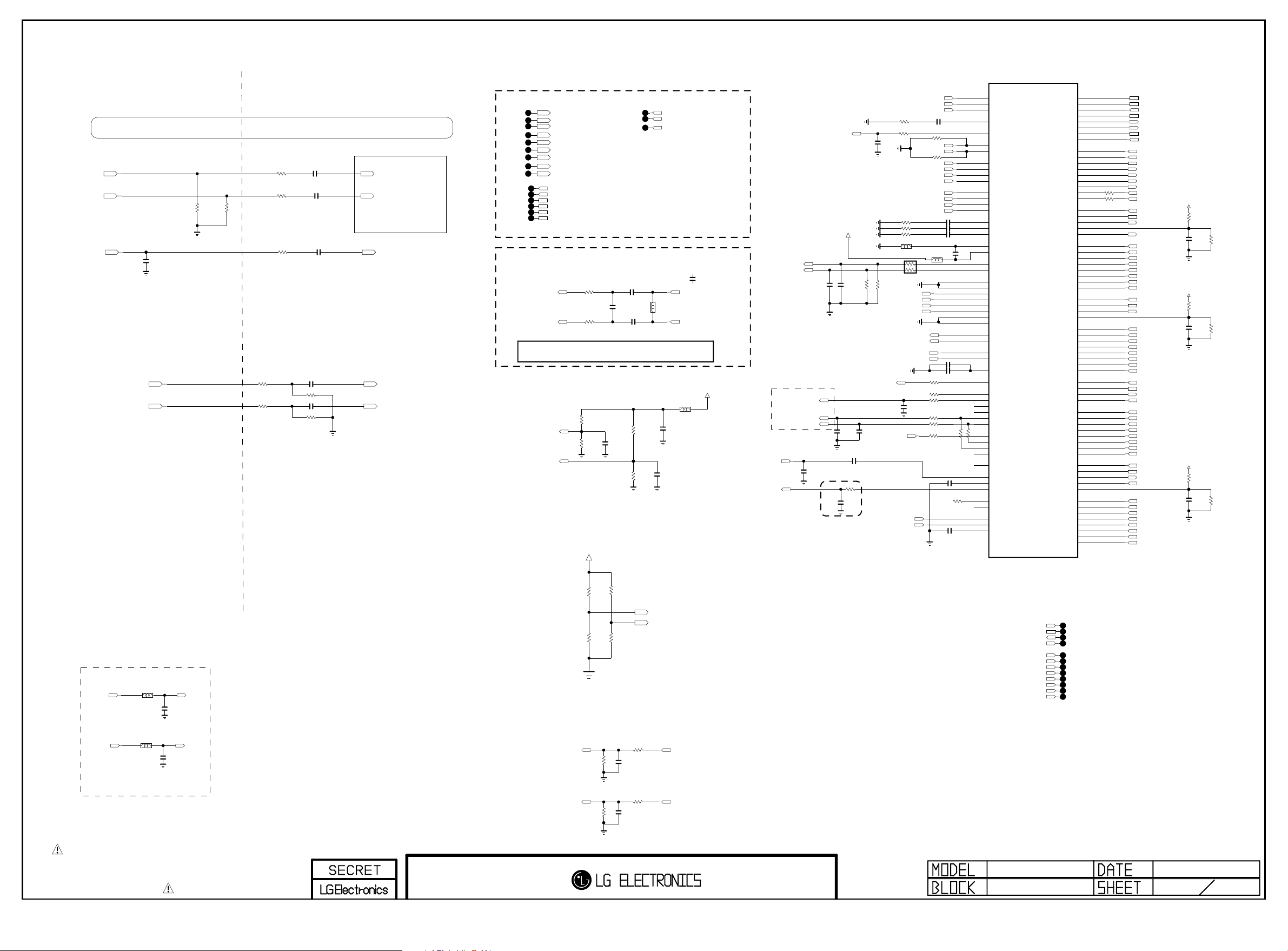
PLACE AT JACK SIDE
Copyright ⓒ 2014 LG Electronics. Inc. All right reserved.
Only for training and service purposes
LGE Internal Use Only
IC101
LG1311-C1
PAGE 3
Place JACK Side
AV1_CVBS/COMP1_Y Circuit was moved to 34Page
COMP1_Pb
COMP1_Pr
TU_CVBS
COMP1/AV1/DVI_L_IN
COMP1/AV1/DVI_R_IN
C303
150pF
50V
OPT
1005
75
1%
R318
1005
1%
75
R326
Place SOC Side
33
R333
R335 33
TU_ALL_2178B
R329 100
AUDIO IN
R309 27K
R310 27K
C316 4.7uF
1%
C317 4.7uF
1%
C322 0.047uF
C324 0.047uF
C318 0.047uF
R322 10K
1%
R323 10K
1%
TU_ALL_2178B
COMP2_PB_IN_SOC
COMP2_PR_IN_SOC
TU_CVBS_SOC
AUAD_L_CH3_IN
AUAD_R_CH3_IN
COMP
TP308
TP310
TP311
TP312
TP313
TP314
TP315
TP316
TP317
TP302
TP303
TP304
TP305
TP306
TP307
SC_CVBS_IN_SOC
SC_FB_SOC
SC_ID_SOC
COMP1_PB_IN_SOC
COMP1_Y_IN_SOC
COMP1_Y_IN_SOC_SOY
COMP1_PR_IN_SOC
AUAD_L_CH2_IN
AUAD_R_CH2_IN
SMARTCARD_DATA/SD_EMMC_CLK
SMARTCARD_VCC/SD_EMMC_CMD
SMARTCARD_DET/SD_EMMC_DATA[3]
SMARTCARD_RST/SD_EMMC_DATA[2]
SMARTCARD_PWR_SEL/SD_EMMC_DATA[1]
SMARTCARD_CLK/SD_EMMC_DATA[0]
TP318
TP319
TP320
Placed as close as possible to LG1311
Tuner IF Filter
C331
22pF
TU_ALL_IntDemod
C332
0.01uF
C333
0.01uF
TU_ALL_IntDemod
TU_ALL_IntDemod
ADC_I_INN
To ADC
ADC_I_INP
C331 option
- TU_IntDemod_IF_22p -> US/KR/BR/TW/CO 2tuner All
- TU_IntDemod_IF_15p -> EU/AJ/US/KR/BR/TW/CO 1tuner All
R344
R345
TU_ALL_IntDemod
51
TU_IntDemod_IF_22p
51
Placed as close as possible to IC101
R37 4
51K
AUAD_L_REF
1%
R37 8
47K
1%
C313
4.7uF
10V
AUAD_R_REF
DDR3 VENDOR OPTION
+3.3V_NORMAL
R38 0
51K
1%
R38 1
47K
1%
SCART_LOUT_SOC
SCART_ROUT_SOC
DTV/MNT_V_OUT_SOC
TU_IntDemod_IF_15p
C331-*1
15pF
50V
IF_N
L303
OPT
IF_P
AVDD25
L307
120-ohm
C354
10uF
10V
C353
4.7uF
10V
SCART_LOUT_SOC
SCART_ROUT_SOC
TU_SIF_TU
IF_AGC
AUD_LRCH
AUD_SCK
AUD_LRCK
MAIN I2S_I/F
OPT
DTV/MNT_V_OUT_SOC
AVDD25
EU
C334
0.01uF
50V
C335
22pF
OPT
TU_ALL_2178B
C312 0.1uF
C309
1000pF
50V
Close to IC101
OPT
EU
C336
0.01uF
EU
50V
R351 22K
SPDIF_OUT
C337
33pF
OPT
TU_ALL_IntDemod
R350
470
C338
0.47uF
6.3V
R356
R353 0
C339
100pF
50V
COMP1_Y_IN_SOC_SOY
COMP2_Y_IN_SOC_SOY
R357 68
R358 68
R359 68
BLM15BD121SN1
EU
AUAD_L_CH2_IN
AUAD_R_CH2_IN
R352 22K
AUAD_L_CH3_IN
AUAD_R_CH3_IN
I2S_AMP
ADC_I_INP
ADC_I_INN
TU_CVBS_SOC
SC_CVBS_IN_SOC
AV1_CVBS_IN_SOC
C343 0.047uF
68
EU
OPT
SC_ID_SOC
SC_FB_SOC
OPT
COMP1_Y_IN_SOC
COMP1_PB_IN_SOC
COMP1_PR_IN_SOC
COMP2_Y_IN_SOC
COMP2_PB_IN_SOC
COMP2_PR_IN_SOC
L304
BLM15BD121SN1
AR301
0
EU
AUDA_OUTL
AUDA_OUTR
AUAD_R_REF
AUAD_L_REF
R360 33
R365 100
R366 100
C342
22pF
OPT
R368 100
R369
GOOGLE
R367 0
R11031
10K
R11032
10K
0.047uF
C344
C345 0.047uF
C346 0.047uF
C349
L305
0.1uF
16V
10uF 10VC347
C348 2.2uF
10V
OPT
100
GOOGLE
R371 0
C351 0.1uF
R386
0
OPT
C352 0.1uF
GOOGLE
R370 0
AL27
AK26
AM27
AL26
AN27
AL25
AM25
AN23
AL22
AK21
AK22
AL24
AK23
AL23
AK24
AL21
AM23
AN25
AM21
AN21
AK16
AL16
AL19
AK19
AN19
AM19
AN17
AM17
AL17
AK17
AK20
AL20
AK18
AL18
AN15
AM15
AN11
AK11
AK10
AL10
AL11
AM11
AK29
AL29
AM29
AK27
AL30
AK28
AL28
AN29
AD5
AE5
AE7
AE6
AD6
CVBS_IN1
CVBS_IN2
CVBS_IN3
CVBS_VCM
BUF_OUT1
SC1_SID
SC1_FB
SOY1_IN
Y1_IN
PB1_IN
PR1_IN
SOY2_IN
Y2_IN
PB2_IN
PR2_IN
ADC1_COM
ADC2_COM
ADC3_COM
AVSS25_COMP_REF
AVDD25_COMP_REF
AUDA_SCART_OUTL
AUDA_SCART_OUTR
AUAD_L_CH1_IN
AUAD_R_CH1_IN
AUAD_L_CH2_IN
AUAD_R_CH2_IN
AUAD_L_CH3_IN
AUAD_R_CH3_IN
AUAD_L_CH4_IN
AUAD_R_CH4_IN
AUDA_OUTL
AUDA_OUTR
AUAD_L_REF
AUAD_R_REF
AUD_VBG_EXT
IEC958OUT
AUDCLK_OUT
DAC_LRCH
DAC_SLRCH
DAC_CLFCH
DAC_SCK
DAC_LRCK
PCMI3LRCH
PCMI3LRCK
PCMI3SCK
AUDCLK_IN
FRC_LRSYNC
AAD_ADC_SIF
AAD_ADC_SIFM
IFAGC
DMD_DAC_OUT
DMD_SIF_OUT
DMD_ADC_INP
DMD_ADC_INN
DMD_ADC_INCOM
SD_CLK
SD_CMD
SD_CD_N
SD_WP_N
SD_DATA3
SD_DATA2
SD_DATA1
SD_DATA0
RMII_REF_CLK
RMII_CRS_DV
RMII_MDIO
RMII_MDC
RMII_TXEN
RMII_TXD1
RMII_TXD0
RMII_RXD1
RMII_RXD0
HDMI_1_SCL
HDMI_1_SDA
HDMI_1_HPD
HDMI_1_5V_DET
HDMI_1_ARC
HDMI_1_RX_0
HDMI_1_RX_0B
HDMI_1_RX_1
HDMI_1_RX_1B
HDMI_1_RX_2
HDMI_1_RX_2B
HDMI_1_RX_C
HDMI_1_RX_CB
HDMI_2_SCL
HDMI_2_SDA
HDMI_2_HPD
HDMI_2_5V_DET
HDMI_2_RX_0
HDMI_2_RX_0B
HDMI_2_RX_1
HDMI_2_RX_1B
HDMI_2_RX_2
HDMI_2_RX_2B
HDMI_2_RX_C
HDMI_2_RX_CB
HDMI_3_SCL
HDMI_3_SDA
HDMI_3_HPD
HDMI_3_5V_DET
HDMI_3_RX_0
HDMI_3_RX_0B
HDMI_3_RX_1
HDMI_3_RX_1B
HDMI_3_RX_2
HDMI_3_RX_2B
HDMI_3_RX_C
HDMI_3_RX_CB
HDMI_4_SCL
HDMI_4_SDA
HDMI_4_CBUS_HPD
HDMI_4_CD_SENSE
HDMI_4_5V_DET
HDMI_4_RX_0
HDMI_4_RX_0B
HDMI_4_RX_1
HDMI_4_RX_1B
HDMI_4_RX_2
HDMI_4_RX_2B
HDMI_4_RX_C
HDMI_4_RX_CB
E22
D22
F22
F24
D24
E24
F23
E23
AK14
AK12
AL12
AK13
AL13
AM13
AN13
AL14
AK15
AE27
AF28
AE29
AF27
AE28
AF33
AF32
AE31
AE30
AD31
AD30
AF31
AF30
AD28
AD29
AC27
AD27
AC31
AC30
AB33
AB32
AA31
AA30
AD32
AD33
AB28
AB27
AB29
AC28
Y32
Y33
W31
W30
V33
V32
Y31
Y30
Y27
AA28
Y28
AA29
AA27
T31
T30
T32
T33
R31
R30
U31
U30
SMARTCARD_CLK/SD_EMMC_DATA[0]
SMARTCARD_RST/SD_EMMC_DATA[2]
SMARTCARD_VCC/SD_EMMC_CMD
SMARTCARD_PWR_SEL/SD_EMMC_DATA[1]
DDR3_OPT1
DDR3_OPT2
SMARTCARD_DET/SD_EMMC_DATA[3]
SMARTCARD_DATA/SD_EMMC_CLK
EPHY_REFCLK
EPHY_CRS_DV
EPHY_MDIO
EPHY_MDC
EPHY_EN
EPHY_TXD1
EPHY_TXD0
R520733
EPHY_RXD1
R520633
EPHY_RXD0
DDC_SCL_1
DDC_SDA_1
HDMI_HPD_1
SPDIF_OUT_ARC
D0+_HDMI1
D0-_HDMI1
D1+_HDMI1
D1-_HDMI1
D2+_HDMI1
D2-_HDMI1
CK+_HDMI1
CK-_HDMI1
DDC_SCL_2
DDC_SDA_2
HDMI_HPD_2
D0+_HDMI2
D0-_HDMI2
D1+_HDMI2
D1-_HDMI2
D2+_HDMI2
D2-_HDMI2
CK+_HDMI2
CK-_HDMI2
DDC_SCL_3
DDC_SDA_3
HDMI_HPD_3
5V_HDMI_3_SOC
D0+_HDMI3
D0-_HDMI3
D1+_HDMI3
D1-_HDMI3
D2+_HDMI3
D2-_HDMI3
CK+_HDMI3
CK-_HDMI3
DDC_SCL_4
DDC_SDA_4
HDMI_HPD_4
MHL_DET
D0+_HDMI4
D0-_HDMI4
D1+_HDMI4
D1-_HDMI4
D2+_HDMI4
D2-_HDMI4
CK+_HDMI4
CK-_HDMI4
5V_HDMI_1
R372
10
C356
1uF
10V
5V_HDMI_2
R373
10
C357
1uF
10V
5V_HDMI_4
R375
10
C359
1uF
10V
R376
5.1K
R377
5.1K
R379
5.1K
HP_OUT
L308
HP_LOUT_AMP
BLM18PG121SN1D
HP_ROUT_AMP
BLM18PG121SN1D
HP_OUT
L309
HP_OUT
C365
0.22uF
10V
HP_OUT
C366
0.22uF
10V
HP_LOUT
HP_ROUT
Place at JACK SIDE
THE SYMBOL MARK OF THIS SCHEMETIC DIAGRAM INCORPORATES
SPECIAL FEATURES IMPORTANT FOR PROTECTION FROM X-RADIATION.
FIRE AND ELECTRICAL SHOCK HAZARDS, WHEN SERVICING IF IS
ESSENTIAL THAT ONLY MANUFACTURES SPECIFIED PARTS BE USED FOR
THE CRITICAL COMPONENTS IN THE SYMBOL MARK OF THE SCHEMETIC.
M14-AV In/Out
HP_LOUT_MAIN
HP_ROUT_MAIN
4.7K
4.7K
R384
R382
OPT
OPT
R383 4.7K
R385 4.7K
AUDIO OUT
R303
22K
R304
22K
R311 0
C305
0.01uF
50V
R312 0
C306
0.01uF
50V
DDR3_OPT1
DDR3_OPT2
AUDA_OUTL
AUDA_OUTR
DDC_SCL_3
DDC_SDA_3
HDMI_HPD_3
5V_HDMI_3_SOC
D0+_HDMI3
D0-_HDMI3
D1+_HDMI3
D1-_HDMI3
D2+_HDMI3
D2-_HDMI3
CK+_HDMI3
CK-_HDMI3
MID_LG1311
M14+ Symbol C
TP321
TP322
TP323
TP324
TP325
TP326
TP327
TP328
TP329
TP330
TP331
TP332
2014.05.28
3
31
Page 26
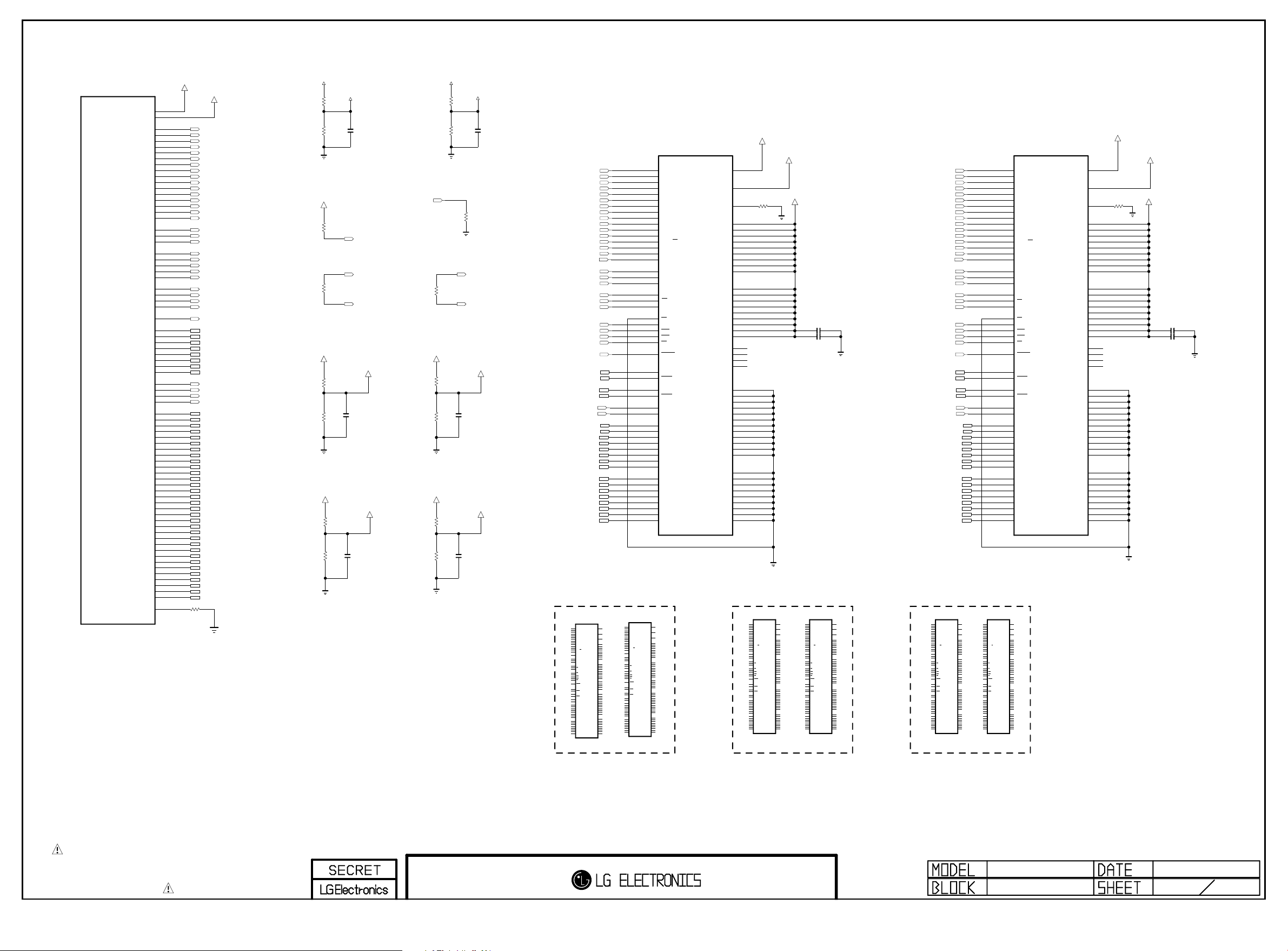
PAGE 4
Copyright ⓒ 2014 LG Electronics. Inc. All right reserved.
Only for training and service purposes
LGE Internal Use Only
IC101
LG1311-C1
M0_DDR_VREF1
M0_DDR_VREF2
M0_DDR_U_CLKP
M0_DDR_U_CLKN
M0_DDR_D_CLKP
M0_DDR_D_CLKN
M0_DDR_RASN
M0_DDR_CASN
M0_DDR_RESET_N
M0_DDR_DQS_P0
M0_DDR_DQS_N0
M0_DDR_DQS_P1
M0_DDR_DQS_N1
M0_DDR_DQS_P2
M0_DDR_DQS_N2
M0_DDR_DQS_P3
M0_DDR_DQS_N3
M0_DDR_DQ10
M0_DDR_DQ11
M0_DDR_DQ12
M0_DDR_DQ13
M0_DDR_DQ14
M0_DDR_DQ15
M0_DDR_DQ16
M0_DDR_DQ17
M0_DDR_DQ18
M0_DDR_DQ19
M0_DDR_DQ20
M0_DDR_DQ21
M0_DDR_DQ22
M0_DDR_DQ23
M0_DDR_DQ24
M0_DDR_DQ25
M0_DDR_DQ26
M0_DDR_DQ27
M0_DDR_DQ28
M0_DDR_DQ29
M0_DDR_DQ30
M0_DDR_DQ31
M0_DDR_ZQCAL
M0_DDR_A0
M0_DDR_A1
M0_DDR_A2
M0_DDR_A3
M0_DDR_A4
M0_DDR_A5
M0_DDR_A6
M0_DDR_A7
M0_DDR_A8
M0_DDR_A9
M0_DDR_A10
M0_DDR_A11
M0_DDR_A12
M0_DDR_A13
M0_DDR_A14
M0_DDR_A15
M0_DDR_BA0
M0_DDR_BA1
M0_DDR_BA2
M0_DDR_CKE
M0_DDR_ODT
M0_DDR_WEN
M0_DDR_DM0
M0_DDR_DM1
M0_DDR_DM2
M0_DDR_DM3
M0_DDR_DQ0
M0_DDR_DQ1
M0_DDR_DQ2
M0_DDR_DQ3
M0_DDR_DQ4
M0_DDR_DQ5
M0_DDR_DQ6
M0_DDR_DQ7
M0_DDR_DQ8
M0_DDR_DQ9
VREF_M0_0
A22
A3
E13
E11
E15
E17
D8
D16
D9
E16
E9
E14
D7
D10
D11
D14
E10
E12
D17
E8
D13
C8
B8
C17
B17
D12
E19
D19
D18
E18
D15
B18
C18
B16
A16
B9
C9
B7
A7
A15
A18
A6
A9
B20
B13
C21
C14
A21
A13
B21
C13
B14
B19
C15
C20
C16
A19
B15
C19
B11
C5
C12
B4
A12
A4
B12
C4
B5
B10
C6
C11
C7
A10
B6
C10
E7
VREF_M0_1
R401 240
M0_DDR_A0
M0_DDR_A1
M0_DDR_A2
M0_DDR_A3
M0_DDR_A4
M0_DDR_A5
M0_DDR_A6
M0_DDR_A7
M0_DDR_A8
M0_DDR_A9
M0_DDR_A10
M0_DDR_A11
M0_DDR_A12
M0_DDR_A13
M0_DDR_A14
M0_DDR_A15
M0_DDR_BA0
M0_DDR_BA1
M0_DDR_BA2
M0_U_CLK
M0_U_CLKN
M0_D_CLK
M0_DDR_CKE
M0_DDR_ODT
M0_DDR_RASN
M0_DDR_CASN
M0_DDR_WEN
M0_DDR_RESET_N
M0_DDR_DQS0
M0_DDR_DQS_N0
M0_DDR_DQS1
M0_DDR_DQS_N1
M0_DDR_DQS2
M0_DDR_DQS_N2
M0_DDR_DQS3
M0_DDR_DQS_N3
M0_DDR_DM0
M0_DDR_DM1
M0_DDR_DM2
M0_DDR_DM3
M0_DDR_DQ0
M0_DDR_DQ1
M0_DDR_DQ2
M0_DDR_DQ3
M0_DDR_DQ4
M0_DDR_DQ5
M0_DDR_DQ6
M0_DDR_DQ7
M0_DDR_DQ8
M0_DDR_DQ9
M0_DDR_DQ10
M0_DDR_DQ11
M0_DDR_DQ12
M0_DDR_DQ13
M0_DDR_DQ14
M0_DDR_DQ15
M0_DDR_DQ16
M0_DDR_DQ17
M0_DDR_DQ18
M0_DDR_DQ19
M0_DDR_DQ20
M0_DDR_DQ21
M0_DDR_DQ22
M0_DDR_DQ23
M0_DDR_DQ24
M0_DDR_DQ25
M0_DDR_DQ26
M0_DDR_DQ27
M0_DDR_DQ28
M0_DDR_DQ29
M0_DDR_DQ30
M0_DDR_DQ31
1%
+1.5V_DDR
R402
R403
+1.5V_DDR
OPT
+1.5V_DDR
R406
R407
+1.5V_DDR
R408
R409
VREF_M0_0
1K 1%
1K 1%
C401
R404
10K
100
R40 5
M0_DDR_VREFCA
1K 1%
1K 1%
M0_DDR_VREFDQ
1K 1%
0.1uF
1K 1%
C403
0.1uF
M0_DDR_RESET_N
M0_D_CLK
M0_D_CLKN
C402
0.1uF
M0_DDR_CKE
+1.5V_DDR
+1.5V_DDR
R411
R412
+1.5V_DDR
R413
R414
VREF_M0_1
R415
1K 1%
R416
1K 1%
R417
10K
M0_U_CLK
100
R41 0
M0_U_CLKN
M0_1_DDR_VREFCA
1K 1%
C406
0.1uF
1K 1%
M0_1_DDR_VREFDQ
1K 1%
0.1uF
1K 1%
C407
C408
0.1uF
M0_DDR_A0
M0_DDR_A1
M0_DDR_A2
M0_DDR_A3
M0_DDR_A4
M0_DDR_A5
M0_DDR_A6
M0_DDR_A7
M0_DDR_A8
M0_DDR_A9
M0_DDR_A10
M0_DDR_A11
M0_DDR_A12
M0_DDR_A13
M0_DDR_A14
M0_DDR_A15
M0_DDR_BA0
M0_DDR_BA1
M0_DDR_BA2
M0_D_CLK
M0_D_CLKN
M0_DDR_CKE
M0_DDR_ODT
M0_DDR_RASN
M0_DDR_CASN
M0_DDR_WEN
M0_DDR_RESET_N
M0_DDR_DQS0
M0_DDR_DQS_N0
M0_DDR_DQS1
M0_DDR_DQS_N1
M0_DDR_DM0
M0_DDR_DM1
M0_DDR_DQ0
M0_DDR_DQ1
M0_DDR_DQ2
M0_DDR_DQ3
M0_DDR_DQ4
M0_DDR_DQ5
M0_DDR_DQ6
M0_DDR_DQ7
M0_DDR_DQ8
M0_DDR_DQ9
M0_DDR_DQ10
M0_DDR_DQ11
M0_DDR_DQ12
M0_DDR_DQ13
M0_DDR_DQ14
M0_DDR_DQ15
IC401
H5TQ4G63AFR-PBC
DDR3
N3
P7
P3
N2
P8
P2
R8
R2
T8
R3
L7
R7
N7
T3
T7
M7
M2
N8
M3
J7
K7
K9
L2
K1
J3
K3
L3
T2
F3
G3
C7
B7
E7
D3
E3
F7
F2
F8
H3
H8
G2
H7
D7
C3
C8
C2
A7
A2
B8
A3
4Gbit
A0
(x16)
A1
DDR_512MB_HYNIX_1600_29n
A2
A3
A4
A5
A6
A7
A8
A9
A10/AP
A11
A12/BC
A13
A14
A15
BA0
BA1
BA2
CK
CK
CKE
CS
ODT
RAS
CAS
WE
RESET
DQSL
DQSL
DQSU
DQSU
DML
DMU
DQL0
DQL1
DQL2
DQL3
DQL4
DQL5
DQL6
DQL7
DQU0
DQU1
DQU2
DQU3
DQU4
DQU5
DQU6
DQU7
VREFCA
VREFDQ
VDD_1
VDD_2
VDD_3
VDD_4
VDD_5
VDD_6
VDD_7
VDD_8
VDD_9
VDDQ_1
VDDQ_2
VDDQ_3
VDDQ_4
VDDQ_5
VDDQ_6
VDDQ_7
VDDQ_8
VDDQ_9
NC_1
NC_2
NC_3
NC_4
VSS_1
VSS_2
VSS_3
VSS_4
VSS_5
VSS_6
VSS_7
VSS_8
VSS_9
VSS_10
VSS_11
VSS_12
VSSQ_1
VSSQ_2
VSSQ_3
VSSQ_4
VSSQ_5
VSSQ_6
VSSQ_7
VSSQ_8
VSSQ_9
ZQ
M0_DDR_VREFCA
M0_DDR_VREFDQ
M8
H1
R418
L8
240
1%
B2
D9
G7
K2
K8
N1
N9
R1
R9
A1
A8
C1
C9
D2
E9
F1
H2
H9
J1
J9
L1
L9
A9
B3
E1
G8
J2
J8
M1
M9
P1
P9
T1
T9
B1
B9
D1
D8
E2
E8
F9
G1
G9
+1.5V_DDR
C413 1uF
C414 1uF
DDR3_512MB_MICRON_29nm_1600_14Y DDR3_512MB_HYNIX_25nm_1866_15Y
IC401-*1
MT41K256M16HA-125:E
DDR_512MB_MICRON
N3
A0
P7
A1
P3
A2
N2
A3
P8
A4
P2
A5
R8
A6
R2
A7
T8
A8
R3
A9
L7
A10/AP
R7
A11
N7
A12/BC
T3
A13
M7
NC_5
M2
BA0
N8
BA1
M3
BA2
J7
CK
K7
CK
K9
CKE
L2
CS
K1
ODT
J3
RAS
K3
CAS
L3
WE
T2
RESET
F3
DQSL
G3
DQSL
C7
DQSU
B7
DQSU
E7
DML
D3
DMU
E3
DQ0
F7
DQ1
F2
DQ2
F8
DQ3
H3
DQ4
H8
DQ5
G2
DQ6
H7
DQ7
D7
DQ8
C3
DQ9
C8
DQ10
C2
DQ11
A7
DQ12
A2
DQ13
B8
DQ14
A3
DQ15
IC401-*2
IC402-*1
MT41K256M16HA-125:E
DDR_512MB_MICRON
N3
M8
A0
M8
VREFCA
H1
VREFDQ
L8
ZQ
B2
VDD_1
D9
VDD_2
G7
VDD_3
K2
VDD_4
K8
VDD_5
N1
VDD_6
N9
VDD_7
R1
VDD_8
R9
VDD_9
A1
VDDQ_1
A8
VDDQ_2
C1
VDDQ_3
C9
VDDQ_4
D2
VDDQ_5
E9
VDDQ_6
F1
VDDQ_7
H2
VDDQ_8
H9
VDDQ_9
J1
NC_1
J9
NC_2
L1
NC_3
L9
NC_4
T7
A14
A9
VSS_1
B3
VSS_2
E1
VSS_3
G8
VSS_4
J2
VSS_5
J8
VSS_6
M1
VSS_7
M9
VSS_8
P1
VSS_9
P9
VSS_10
T1
VSS_11
T9
VSS_12
B1
VSSQ_1
B9
VSSQ_2
D1
VSSQ_3
D8
VSSQ_4
E2
VSSQ_5
E8
VSSQ_6
F9
VSSQ_7
G1
VSSQ_8
G9
VSSQ_9
VREFCA
P7
A1
P3
A2
N2
H1
A3
VREFDQ
P8
A4
P2
A5
R8
L8
A6
ZQ
R2
A7
T8
A8
R3
B2
A9
VDD_1
L7
D9
A10/AP
VDD_2
R7
G7
A11
VDD_3
N7
K2
A12/BC
VDD_4
T3
K8
A13
VDD_5
N1
VDD_6
M7
N9
NC_5
VDD_7
R1
VDD_8
M2
R9
BA0
VDD_9
N8
BA1
M3
BA2
A1
VDDQ_1
J7
A8
CK
VDDQ_2
K7
C1
CK
VDDQ_3
K9
C9
CKE
VDDQ_4
D2
VDDQ_5
L2
E9
CS
VDDQ_6
K1
F1
ODT
VDDQ_7
J3
H2
RAS
VDDQ_8
K3
H9
CAS
VDDQ_9
L3
WE
J1
NC_1
T2
J9
RESET
NC_2
L1
NC_3
L9
NC_4
F3
T7
DQSL
A14
G3
DQSL
C7
A9
DQSU
VSS_1
B7
B3
DQSU
VSS_2
E1
VSS_3
E7
G8
DML
VSS_4
D3
J2
DMU
VSS_5
J8
VSS_6
E3
M1
DQ0
VSS_7
F7
M9
DQ1
VSS_8
F2
P1
DQ2
VSS_9
F8
P9
DQ3
VSS_10
H3
T1
DQ4
VSS_11
H8
T9
DQ5
VSS_12
G2
DQ6
H7
DQ7
B1
VSSQ_1
D7
B9
DQ8
VSSQ_2
C3
D1
DQ9
VSSQ_3
C8
D8
DQ10
VSSQ_4
C2
E2
DQ11
VSSQ_5
A7
E8
DQ12
VSSQ_6
A2
F9
DQ13
VSSQ_7
B8
G1
DQ14
VSSQ_8
A3
G9
DQ15
VSSQ_9
H5TQ4G63CFR_RDC
DDR_512MB_HYNIX_1866_25n
N3
A0
P7
A1
P3
A2
N2
A3
P8
A4
P2
A5
R8
A6
R2
A7
T8
A8
R3
A9
L7
A10/AP
R7
A11
N7
A12/BC
T3
A13
T7
A14
M7
NC_5
M2
BA0
N8
BA1
M3
BA2
J7
CK
K7
CK
K9
CKE
L2
CS
K1
ODT
J3
RAS
K3
CAS
L3
WE
T2
RESET
F3
DQSL
G3
DQSL
C7
DQSU
B7
DQSU
E7
DML
D3
DMU
E3
DQL0
F7
DQL1
F2
DQL2
F8
DQL3
H3
DQL4
H8
DQL5
G2
DQL6
H7
DQL7
D7
DQU0
C3
DQU1
C8
DQU2
C2
DQU3
A7
DQU4
A2
DQU5
B8
DQU6
A3
DQU7
M8
VREFCA
H1
VREFDQ
L8
ZQ
B2
VDD_1
D9
VDD_2
G7
VDD_3
K2
VDD_4
K8
VDD_5
N1
VDD_6
N9
VDD_7
R1
VDD_8
R9
VDD_9
A1
VDDQ_1
A8
VDDQ_2
C1
VDDQ_3
C9
VDDQ_4
D2
VDDQ_5
E9
VDDQ_6
F1
VDDQ_7
H2
VDDQ_8
H9
VDDQ_9
J1
NC_1
J9
NC_2
L1
NC_3
L9
NC_4
A9
VSS_1
B3
VSS_2
E1
VSS_3
G8
VSS_4
J2
VSS_5
J8
VSS_6
M1
VSS_7
M9
VSS_8
P1
VSS_9
P9
VSS_10
T1
VSS_11
T9
VSS_12
B1
VSSQ_1
B9
VSSQ_2
D1
VSSQ_3
D8
VSSQ_4
E2
VSSQ_5
E8
VSSQ_6
F9
VSSQ_7
G1
VSSQ_8
G9
VSSQ_9
H5TQ4G63CFR_RDC
DDR_512MB_HYNIX_1866_25n
N3
A0
P7
A1
P3
A2
N2
A3
P8
A4
P2
A5
R8
A6
R2
A7
T8
A8
R3
A9
L7
A10/AP
R7
A11
N7
A12/BC
T3
A13
T7
A14
M7
NC_5
M2
BA0
N8
BA1
M3
BA2
J7
CK
K7
CK
K9
CKE
L2
CS
K1
ODT
J3
RAS
K3
CAS
L3
WE
T2
RESET
F3
DQSL
G3
DQSL
C7
DQSU
B7
DQSU
E7
DML
D3
DMU
E3
DQL0
F7
DQL1
F2
DQL2
F8
DQL3
H3
DQL4
H8
DQL5
G2
DQL6
H7
DQL7
D7
DQU0
C3
DQU1
C8
DQU2
C2
DQU3
A7
DQU4
A2
DQU5
B8
DQU6
A3
DQU7
IC402-*2
VREFCA
VREFDQ
VDDQ_1
VDDQ_2
VDDQ_3
VDDQ_4
VDDQ_5
VDDQ_6
VDDQ_7
VDDQ_8
VDDQ_9
VSS_10
VSS_11
VSS_12
VSSQ_1
VSSQ_2
VSSQ_3
VSSQ_4
VSSQ_5
VSSQ_6
VSSQ_7
VSSQ_8
VSSQ_9
M0_1_DDR_VREFCA
M8
VREFCA
H1
VREFDQ
L8
ZQ
B2
VDD_1
D9
VDD_2
G7
VDD_3
K2
VDD_4
K8
VDD_5
N1
VDD_6
N9
VDD_7
R1
VDD_8
R9
VDD_9
A1
VDDQ_1
A8
VDDQ_2
C1
VDDQ_3
C9
VDDQ_4
D2
VDDQ_5
E9
VDDQ_6
F1
VDDQ_7
H2
VDDQ_8
H9
VDDQ_9
J1
NC_1
J9
NC_2
L1
NC_3
L9
NC_4
A9
VSS_1
B3
VSS_2
E1
VSS_3
G8
VSS_4
J2
VSS_5
J8
VSS_6
M1
VSS_7
M9
VSS_8
P1
VSS_9
P9
VSS_10
T1
VSS_11
T9
VSS_12
B1
VSSQ_1
B9
VSSQ_2
D1
VSSQ_3
D8
VSSQ_4
E2
VSSQ_5
E8
VSSQ_6
F9
VSSQ_7
G1
VSSQ_8
G9
VSSQ_9
M0_1_DDR_VREFDQ
+1.5V_DDR
R419
240
1%
C429
C430
1uF
1uF
M0_DDR_A0
M0_DDR_A1
M0_DDR_A2
M0_DDR_A3
M0_DDR_A4
M0_DDR_A5
M0_DDR_A6
M0_DDR_A7
M0_DDR_A8
M0_DDR_A9
M0_DDR_A10
M0_DDR_A11
M0_DDR_A12
M0_DDR_A13
M0_DDR_A14
M0_DDR_A15
M0_DDR_BA0M0_D_CLKN
M0_DDR_BA1
M0_DDR_BA2
M0_U_CLK
M0_U_CLKN
M0_DDR_CKE
M0_DDR_ODT
M0_DDR_RASN
M0_DDR_CASN
M0_DDR_WEN
M0_DDR_RESET_N
M0_DDR_DQS2
M0_DDR_DQS_N2
M0_DDR_DQS3
M0_DDR_DQS_N3
M0_DDR_DM2
M0_DDR_DM3
M0_DDR_DQ16
M0_DDR_DQ17
M0_DDR_DQ18
M0_DDR_DQ19
M0_DDR_DQ20
M0_DDR_DQ21
M0_DDR_DQ22
M0_DDR_DQ23
M0_DDR_DQ24
M0_DDR_DQ25
M0_DDR_DQ26
M0_DDR_DQ27
M0_DDR_DQ28
M0_DDR_DQ29
M0_DDR_DQ30
M0_DDR_DQ31
IC402
H5TQ4G63AFR-PBC
DDR3
N3
4Gbit
A0
P7
(x16)
A1
P3
DDR_512MB_HYNIX_1600_29n
A2
N2
A3
P8
A4
P2
A5
R8
A6
R2
A7
T8
A8
R3
A9
L7
A10/AP
R7
A11
N7
A12/BC
T3
A13
T7
A14
M7
A15
M2
BA0
N8
BA1
M3
BA2
J7
CK
K7
CK
K9
CKE
L2
CS
K1
ODT
J3
RAS
K3
CAS
L3
WE
T2
RESET
F3
DQSL
G3
DQSL
C7
DQSU
B7
DQSU
E7
DML
D3
DMU
E3
DQL0
F7
DQL1
F2
DQL2
F8
DQL3
H3
DQL4
H8
DQL5
G2
DQL6
H7
DQL7
D7
DQU0
C3
DQU1
C8
DQU2
C2
DQU3
A7
DQU4
A2
DQU5
B8
DQU6
A3
DQU7
DDR3_512MB_SS_25nm_1600_15Y
IC401-*3
K4B4G1646D-BCK0
DDR_512MB_SS_1600_25n
N3
M8
H1
L8
ZQ
B2
VDD_1
D9
VDD_2
G7
VDD_3
K2
VDD_4
K8
VDD_5
N1
VDD_6
N9
VDD_7
R1
VDD_8
R9
VDD_9
A1
A8
C1
C9
D2
E9
F1
H2
H9
J1
NC_1
J9
NC_2
L1
NC_3
L9
NC_4
A9
VSS_1
B3
VSS_2
E1
VSS_3
G8
VSS_4
J2
VSS_5
J8
VSS_6
M1
VSS_7
M9
VSS_8
P1
VSS_9
P9
T1
T9
B1
B9
D1
D8
E2
E8
F9
G1
G9
M8
A0
VREFCA
P7
A1
P3
A2
N2
H1
A3
VREFDQ
P8
A4
P2
A5
R8
L8
A6
ZQ
R2
A7
T8
A8
R3
B2
A9
VDD_1
L7
D9
A10/AP
VDD_2
R7
G7
A11
VDD_3
N7
K2
A12/BC
VDD_4
T3
K8
A13
VDD_5
N1
T7
VDD_6
A14
M7
N9
A15
VDD_7
R1
VDD_8
M2
R9
BA0
VDD_9
N8
BA1
M3
BA2
A1
VDDQ_1
J7
A8
CK
VDDQ_2
K7
C1
CK
VDDQ_3
K9
C9
CKE
VDDQ_4
D2
VDDQ_5
L2
E9
CS
VDDQ_6
K1
F1
ODT
VDDQ_7
J3
H2
RAS
VDDQ_8
K3
H9
CAS
VDDQ_9
L3
WE
J1
NC_1
T2
J9
RESET
NC_2
L1
NC_3
L9
NC_4
F3
DQSL
G3
DQSL
C7
A9
DQSU
VSS_1
B7
B3
DQSU
VSS_2
E1
VSS_3
E7
G8
DML
VSS_4
D3
J2
DMU
VSS_5
J8
VSS_6
E3
M1
DQL0
VSS_7
F7
M9
DQL1
VSS_8
F2
P1
DQL2
VSS_9
F8
P9
DQL3
VSS_10
H3
T1
DQL4
VSS_11
H8
T9
DQL5
VSS_12
G2
DQL6
H7
DQL7
B1
VSSQ_1
D7
B9
DQU0
VSSQ_2
C3
D1
DQU1
VSSQ_3
C8
D8
DQU2
VSSQ_4
C2
E2
DQU3
VSSQ_5
A7
E8
DQU4
VSSQ_6
A2
F9
DQU5
VSSQ_7
B8
G1
DQU6
VSSQ_8
A3
G9
DQU7
VSSQ_9
K4B4G1646D-BCK0
DDR_512MB_SS_1600_25n
N3
A0
P7
A1
P3
A2
N2
A3
P8
A4
P2
A5
R8
A6
R2
A7
T8
A8
R3
A9
L7
A10/AP
R7
A11
N7
A12/BC
T3
A13
T7
A14
M7
A15
M2
BA0
N8
BA1
M3
BA2
J7
CK
K7
CK
K9
CKE
L2
CS
K1
ODT
J3
RAS
K3
CAS
L3
WE
T2
RESET
F3
DQSL
G3
DQSL
C7
DQSU
B7
DQSU
E7
DML
D3
DMU
E3
DQL0
F7
DQL1
F2
DQL2
F8
DQL3
H3
DQL4
H8
DQL5
G2
DQL6
H7
DQL7
D7
DQU0
C3
DQU1
C8
DQU2
C2
DQU3
A7
DQU4
A2
DQU5
B8
DQU6
A3
DQU7
IC402-*3
M8
VREFCA
H1
VREFDQ
L8
ZQ
B2
VDD_1
D9
VDD_2
G7
VDD_3
K2
VDD_4
K8
VDD_5
N1
VDD_6
N9
VDD_7
R1
VDD_8
R9
VDD_9
A1
VDDQ_1
A8
VDDQ_2
C1
VDDQ_3
C9
VDDQ_4
D2
VDDQ_5
E9
VDDQ_6
F1
VDDQ_7
H2
VDDQ_8
H9
VDDQ_9
J1
NC_1
J9
NC_2
L1
NC_3
L9
NC_4
A9
VSS_1
B3
VSS_2
E1
VSS_3
G8
VSS_4
J2
VSS_5
J8
VSS_6
M1
VSS_7
M9
VSS_8
P1
VSS_9
P9
VSS_10
T1
VSS_11
T9
VSS_12
B1
VSSQ_1
B9
VSSQ_2
D1
VSSQ_3
D8
VSSQ_4
E2
VSSQ_5
E8
VSSQ_6
F9
VSSQ_7
G1
VSSQ_8
G9
VSSQ_9
THE SYMBOL MARK OF THIS SCHEMETIC DIAGRAM INCORPORATES
SPECIAL FEATURES IMPORTANT FOR PROTECTION FROM X-RADIATION.
FIRE AND ELECTRICAL SHOCK HAZARDS, WHEN SERVICING IF IS
ESSENTIAL THAT ONLY MANUFACTURES SPECIFIED PARTS BE USED FOR
THE CRITICAL COMPONENTS IN THE SYMBOL MARK OF THE SCHEMETIC.
MID_LG1311
M14+ DDR3-M0
2014.05.28
4
31
Page 27
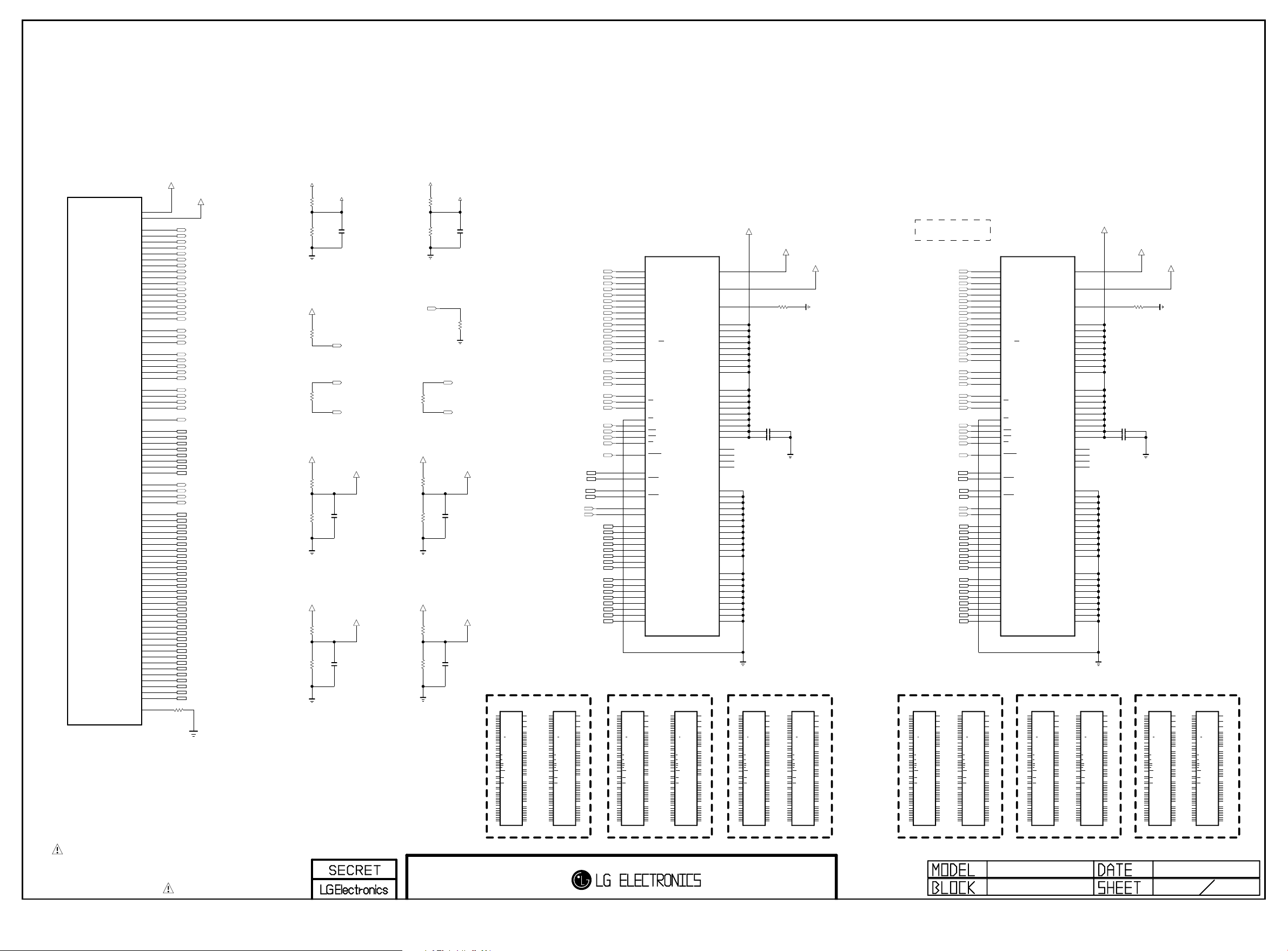
PAGE 5
Copyright ⓒ 2014 LG Electronics. Inc. All right reserved.
Only for training and service purposes
LGE Internal Use Only
IC101
LG1311-C1
M1_DDR_VREF1
M1_DDR_VREF2
M1_DDR_U_CLKP
M1_DDR_U_CLKN
M1_DDR_D_CLKP
M1_DDR_D_CLKN
M1_DDR_RASN
M1_DDR_CASN
M1_DDR_RESET_N
M1_DDR_DQS_P0
M1_DDR_DQS_N0
M1_DDR_DQS_P1
M1_DDR_DQS_N1
M1_DDR_DQS_P2
M1_DDR_DQS_N2
M1_DDR_DQS_P3
M1_DDR_DQS_N3
M1_DDR_DQ10
M1_DDR_DQ11
M1_DDR_DQ12
M1_DDR_DQ13
M1_DDR_DQ14
M1_DDR_DQ15
M1_DDR_DQ16
M1_DDR_DQ17
M1_DDR_DQ18
M1_DDR_DQ19
M1_DDR_DQ20
M1_DDR_DQ21
M1_DDR_DQ22
M1_DDR_DQ23
M1_DDR_DQ24
M1_DDR_DQ25
M1_DDR_DQ26
M1_DDR_DQ27
M1_DDR_DQ28
M1_DDR_DQ29
M1_DDR_DQ30
M1_DDR_DQ31
M1_DDR_ZQCAL
M1_DDR_A0
M1_DDR_A1
M1_DDR_A2
M1_DDR_A3
M1_DDR_A4
M1_DDR_A5
M1_DDR_A6
M1_DDR_A7
M1_DDR_A8
M1_DDR_A9
M1_DDR_A10
M1_DDR_A11
M1_DDR_A12
M1_DDR_A13
M1_DDR_A14
M1_DDR_A15
M1_DDR_BA0
M1_DDR_BA1
M1_DDR_BA2
M1_DDR_CKE
M1_DDR_ODT
M1_DDR_WEN
M1_DDR_DM0
M1_DDR_DM1
M1_DDR_DM2
M1_DDR_DM3
M1_DDR_DQ0
M1_DDR_DQ1
M1_DDR_DQ2
M1_DDR_DQ3
M1_DDR_DQ4
M1_DDR_DQ5
M1_DDR_DQ6
M1_DDR_DQ7
M1_DDR_DQ8
M1_DDR_DQ9
VREF_M1_0
A2
Y1
M5
N5
K5
H5
T4
H4
R4
J5
T5
L5
U4
P4
P5
K4
R5
N4
G4
U5
L4
R3
R2
F3
F2
M4
F5
E4
F4
G5
J4
E2
E3
G2
G1
P2
P3
T2
T1
H1
E1
U1
P1
C2
K2
B3
J3
B1
K1
B2
K3
J2
D2
H3
C3
G3
D1
H2
D3
M2
V3
L3
W2
L1
W1
L2
W3
V2
N2
U3
M3
T3
N1
U2
N3
E5
R501
VREF_M1_1
M1_DDR_A0
M1_DDR_A1
M1_DDR_A2
M1_DDR_A3
M1_DDR_A4
M1_DDR_A5
M1_DDR_A6
M1_DDR_A7
M1_DDR_A8
M1_DDR_A9
M1_DDR_A10
M1_DDR_A11
M1_DDR_A12
M1_DDR_A13
M1_DDR_A14
M1_DDR_A15
M1_DDR_BA0
M1_DDR_BA1
M1_DDR_BA2
M1_U_CLK
M1_U_CLKN
M1_D_CLK
M1_D_CLKN
M1_DDR_CKE
M1_DDR_ODT
M1_DDR_RASN
M1_DDR_CASN
M1_DDR_WEN
M1_DDR_RESET_N
M1_DDR_DQS_N0
M1_DDR_DQS1
M1_DDR_DQS_N1
M1_DDR_DQS2
M1_DDR_DQS_N2
M1_DDR_DQS3
M1_DDR_DQS_N3
M1_DDR_DM0
M1_DDR_DM2
M1_DDR_DM3
M1_DDR_DQ0
M1_DDR_DQ1
M1_DDR_DQ2
M1_DDR_DQ3
M1_DDR_DQ4
M1_DDR_DQ5
M1_DDR_DQ6
M1_DDR_DQ7
M1_DDR_DQ8
M1_DDR_DQ9
M1_DDR_DQ10
M1_DDR_DQ11
M1_DDR_DQ12
M1_DDR_DQ13
M1_DDR_DQ14
M1_DDR_DQ15
M1_DDR_DQ16
M1_DDR_DQ17
M1_DDR_DQ18
M1_DDR_DQ19
M1_DDR_DQ20
M1_DDR_DQ21
M1_DDR_DQ22
M1_DDR_DQ23
M1_DDR_DQ24
M1_DDR_DQ25
M1_DDR_DQ26
M1_DDR_DQ27
M1_DDR_DQ28
M1_DDR_DQ29
M1_DDR_DQ30
M1_DDR_DQ31
240
1%
+1.5V_DDR
R508
R509
+1.5V_DDR
OPT
+1.5V_DDR
R504
R505
+1.5V_DDR
R506
R507
VREF_M1_0
1K 1%
C501
1K 1%
R502
10K
100
R50 3
M1_DDR_VREFCA
1K 1%
C502
0.1uF
1K 1%
M1_DDR_VREFDQ
1K 1%
0.1uF
1K 1%
C503
0.1uF
M1_DDR_RESET_N
M1_D_CLK
M1_D_CLKN
+1.5V_DDR
M1_DDR_CKE
+1.5V_DDR
+1.5V_DDR
VREF_M1_1
R515
1K 1%
R516
1K 1%
100
R51 0
M1_1_DDR_VREFCA
R511
1K 1%
R512
1K 1%
M1_1_DDR_VREFDQ
R513
1K 1%
0.1uF
R514
1K 1%
C508
C506
M1_U_CLK
M1_U_CLKN
C507
0.1uF
0.1uF
R517
10K
VREFCA
VREFDQ
VDD_1
VDD_2
VDD_3
VDD_4
VDD_5
VDD_6
VDD_7
VDD_8
VDD_9
VDDQ_1
VDDQ_2
VDDQ_3
VDDQ_4
VDDQ_5
VDDQ_6
VDDQ_7
VDDQ_8
VDDQ_9
NC_1
NC_2
NC_3
NC_4
VSS_1
VSS_2
VSS_3
VSS_4
VSS_5
VSS_6
VSS_7
VSS_8
VSS_9
VSS_10
VSS_11
VSS_12
VSSQ_1
VSSQ_2
VSSQ_3
VSSQ_4
VSSQ_5
VSSQ_6
VSSQ_7
VSSQ_8
VSSQ_9
ZQ
+1.5V_DDR
M8
H1
L8
B2
D9
G7
K2
K8
N1
N9
R1
R9
A1
A8
C1
C9
D2
E9
F1
H2
H9
J1
J9
L1
L9
A9
B3
E1
G8
J2
J8
M1
M9
P1
P9
T1
T9
B1
B9
D1
D8
E2
E8
F9
G1
G9
M1_1_DDR_VREFCA
R519
+1.5V_DDR
C540
C541 1uF
M1_1_DDR_VREFDQ
240
1uF
DDR3 1.5V bypass Cap
: Place these caps near Memory
M1_DDR_RASNM1_DDR_DQS0
M1_DDR_CASN
M1_DDR_RESET_N
M1_DDR_DQS0
M1_DDR_DQS_N0
M1_DDR_DQS1M1_DDR_DM1
M1_DDR_DQS_N1
M1_DDR_DM0
M1_DDR_DM1
M1_DDR_DQ10
M1_DDR_DQ11
M1_DDR_DQ12
M1_DDR_DQ13
M1_DDR_DQ14
M1_DDR_DQ15
M1_DDR_A0
M1_DDR_A1
M1_DDR_A2
M1_DDR_A3
M1_DDR_A4
M1_DDR_A5
M1_DDR_A6
M1_DDR_A7
M1_DDR_A8
M1_DDR_A9
M1_DDR_A10
M1_DDR_A11
M1_DDR_A12
M1_DDR_A13
M1_DDR_A14
M1_DDR_A15
M1_DDR_BA0
M1_DDR_BA1
M1_DDR_BA2
M1_D_CLK
M1_D_CLKN
M1_DDR_CKE
M1_DDR_ODT
M1_DDR_WEN
M1_DDR_DQ0
M1_DDR_DQ1
M1_DDR_DQ2
M1_DDR_DQ3
M1_DDR_DQ4
M1_DDR_DQ5
M1_DDR_DQ6
M1_DDR_DQ7
M1_DDR_DQ8
M1_DDR_DQ9
IC501
H5TQ4G63AFR-PBC
N3
DDR3
A0
P7
4Gbit
A1
P3
DDR_512MB_HYNIX_1600_29n
A2
N2
A3
P8
A4
P2
A5
R8
A6
R2
A7
T8
A8
R3
A9
L7
A10/AP
R7
A11
N7
A12/BC
T3
A13
T7
A14
M7
A15
M2
BA0
N8
BA1
M3
BA2
J7
CK
K7
CK
K9
CKE
L2
CS
K1
ODT
J3
RAS
K3
CAS
L3
WE
T2
RESET
F3
DQSL
G3
DQSL
C7
DQSU
B7
DQSU
E7
DML
D3
DMU
E3
DQL0
F7
DQL1
F2
DQL2
F8
DQL3
H3
DQL4
H8
DQL5
G2
DQL6
H7
DQL7
D7
DQU0
C3
DQU1
C8
DQU2
C2
DQU3
A7
DQU4
A2
DQU5
B8
DQU6
A3
DQU7
VREFCA
VREFDQ
VDD_1
VDD_2
VDD_3
VDD_4
VDD_5
VDD_6
VDD_7
VDD_8
VDD_9
VDDQ_1
VDDQ_2
VDDQ_3
VDDQ_4
VDDQ_5
VDDQ_6
VDDQ_7
VDDQ_8
VDDQ_9
NC_1
NC_2
NC_3
NC_4
VSS_1
VSS_2
VSS_3
VSS_4
VSS_5
VSS_6
VSS_7
VSS_8
VSS_9
VSS_10
VSS_11
VSS_12
VSSQ_1
VSSQ_2
VSSQ_3
VSSQ_4
VSSQ_5
VSSQ_6
VSSQ_7
VSSQ_8
VSSQ_9
ZQ
+1.5V_DDR
M8
H1
L8
B2
D9
G7
K2
K8
N1
N9
R1
R9
A1
A8
C1
C9
D2
E9
F1
H2
H9
J1
J9
L1
L9
A9
B3
E1
G8
J2
J8
M1
M9
P1
P9
T1
T9
B1
B9
D1
D8
E2
E8
F9
G1
G9
M1_DDR_VREFCA
R518
+1.5V_DDR
C524
C525 1uF
1uF
M1_DDR_VREFDQ
240
DDR3 1.5V bypass Cap
: Place these caps near Memory
1_2Gbit : T7(NC_6)
4Gbit : T7(A14)
M1_DDR_A0
M1_DDR_A1
M1_DDR_A2
M1_DDR_A3
M1_DDR_A4
M1_DDR_A5
M1_DDR_A6
M1_DDR_A7
M1_DDR_A8
M1_DDR_A9
M1_DDR_A10
M1_DDR_A11
M1_DDR_A12
M1_DDR_A13
M1_DDR_A14
M1_DDR_A15
M1_DDR_BA0
M1_DDR_BA1
M1_DDR_BA2
M1_U_CLK
M1_U_CLKN
M1_DDR_CKE
M1_DDR_ODT
M1_DDR_RASN
M1_DDR_CASN
M1_DDR_WEN
M1_DDR_RESET_N
M1_DDR_DQS2
M1_DDR_DQS_N2
M1_DDR_DQS3
M1_DDR_DQS_N3
M1_DDR_DM2
M1_DDR_DM3
M1_DDR_DQ16
M1_DDR_DQ17
M1_DDR_DQ18
M1_DDR_DQ19
M1_DDR_DQ20
M1_DDR_DQ21
M1_DDR_DQ22
M1_DDR_DQ23
M1_DDR_DQ24
M1_DDR_DQ25
M1_DDR_DQ26
M1_DDR_DQ27
M1_DDR_DQ28
M1_DDR_DQ29
M1_DDR_DQ30
M1_DDR_DQ31
IC502
H5TQ4G63AFR-PBC
N3
DDR3
A0
P7
4Gbit
A1
P3
DDR_512MB_HYNIX_1600_29n
A2
N2
A3
P8
A4
P2
A5
R8
A6
R2
A7
T8
A8
R3
A9
L7
A10/AP
R7
A11
N7
A12/BC
T3
A13
T7
A14
M7
A15
M2
BA0
N8
BA1
M3
BA2
J7
CK
K7
CK
K9
CKE
L2
CS
K1
ODT
J3
RAS
K3
CAS
L3
WE
T2
RESET
F3
DQSL
G3
DQSL
C7
DQSU
B7
DQSU
E7
DML
D3
DMU
E3
DQL0
F7
DQL1
F2
DQL2
F8
DQL3
H3
DQL4
H8
DQL5
G2
DQL6
H7
DQL7
D7
DQU0
C3
DQU1
C8
DQU2
C2
DQU3
A7
DQU4
A2
DQU5
B8
DQU6
A3
DQU7
DDR3_512MB_SS_1600_25nm_15Y DDR3_512MB_HYNIX_1866_25nm_15Y DDR3_512MB_MICRON_1600_29nm_14Y DDR3_256MB_HYNIX_1600_29nm_14Y DDR3_256MB_MICRON_1600_29nm_14Y DDR3_256MB_SS_1600_35nm_15Y
IC501-*6
K4B4G1646D-BCK0
DDR_512MB_SAMSUNG_1600_25n
N3
A0
P7
A1
P3
A2
N2
A3
P8
A4
P2
A5
R8
A6
R2
A7
T8
A8
R3
A9
L7
A10/AP
R7
A11
N7
A12/BC
T3
A13
T7
A14
M7
A15
M2
BA0
N8
BA1
M3
BA2
J7
CK
K7
CK
K9
CKE
L2
CS
K1
ODT
J3
RAS
K3
CAS
L3
WE
T2
RESET
F3
DQSL
G3
DQSL
C7
DQSU
B7
DQSU
E7
DML
D3
DMU
E3
DQL0
F7
DQL1
F2
DQL2
F8
DQL3
H3
DQL4
H8
DQL5
G2
DQL6
H7
DQL7
D7
DQU0
C3
DQU1
C8
DQU2
C2
DQU3
A7
DQU4
A2
DQU5
B8
DQU6
A3
DQU7
M8
VREFCA
H1
VREFDQ
L8
ZQ
B2
VDD_1
D9
VDD_2
G7
VDD_3
K2
VDD_4
K8
VDD_5
N1
VDD_6
N9
VDD_7
R1
VDD_8
R9
VDD_9
A1
VDDQ_1
A8
VDDQ_2
C1
VDDQ_3
C9
VDDQ_4
D2
VDDQ_5
E9
VDDQ_6
F1
VDDQ_7
H2
VDDQ_8
H9
VDDQ_9
J1
NC_1
J9
NC_2
L1
NC_3
L9
NC_4
A9
VSS_1
B3
VSS_2
E1
VSS_3
G8
VSS_4
J2
VSS_5
J8
VSS_6
M1
VSS_7
M9
VSS_8
P1
VSS_9
P9
VSS_10
T1
VSS_11
T9
VSS_12
B1
VSSQ_1
B9
VSSQ_2
D1
VSSQ_3
D8
VSSQ_4
E2
VSSQ_5
E8
VSSQ_6
F9
VSSQ_7
G1
VSSQ_8
G9
VSSQ_9
M8
A0
VREFCA
P7
A1
P3
A2
N2
H1
A3
VREFDQ
P8
A4
P2
A5
R8
L8
A6
ZQ
R2
A7
T8
A8
R3
B2
A9
VDD_1
L7
D9
A10/AP
VDD_2
R7
G7
A11
VDD_3
N7
K2
A12/BC
VDD_4
T3
K8
A13
VDD_5
N1
T7
VDD_6
A14
M7
N9
A15
VDD_7
R1
VDD_8
M2
R9
BA0
VDD_9
N8
BA1
M3
BA2
A1
VDDQ_1
J7
A8
CK
VDDQ_2
K7
C1
CK
VDDQ_3
K9
C9
CKE
VDDQ_4
D2
VDDQ_5
L2
E9
CS
VDDQ_6
K1
F1
ODT
VDDQ_7
J3
H2
RAS
VDDQ_8
K3
H9
CAS
VDDQ_9
L3
WE
J1
NC_1
T2
J9
RESET
NC_2
L1
NC_3
L9
NC_4
F3
DQSL
G3
DQSL
C7
A9
DQSU
VSS_1
B7
B3
DQSU
VSS_2
E1
VSS_3
E7
G8
DML
VSS_4
D3
J2
DMU
VSS_5
J8
VSS_6
E3
M1
DQL0
VSS_7
F7
M9
DQL1
VSS_8
F2
P1
DQL2
VSS_9
F8
P9
DQL3
VSS_10
H3
T1
DQL4
VSS_11
H8
T9
DQL5
VSS_12
G2
DQL6
H7
DQL7
B1
VSSQ_1
D7
B9
DQU0
VSSQ_2
C3
D1
DQU1
VSSQ_3
C8
D8
DQU2
VSSQ_4
C2
E2
DQU3
VSSQ_5
A7
E8
DQU4
VSSQ_6
A2
F9
DQU5
VSSQ_7
B8
G1
DQU6
VSSQ_8
A3
G9
DQU7
VSSQ_9
IC502-*6
K4B4G1646D-BCK0
DDR_512MB_SAMSUNG_1600_25n
N3
H5TQ4G63CFR_RDC
DDR_512MB_HYNIX_1866_25n
N3
A0
P7
A1
P3
A2
N2
A3
P8
A4
P2
A5
R8
A6
R2
A7
T8
A8
R3
A9
L7
A10/AP
R7
A11
N7
A12/BC
T3
A13
T7
A14
M7
NC_5
M2
BA0
N8
BA1
M3
BA2
J7
CK
K7
CK
K9
CKE
L2
CS
K1
ODT
J3
RAS
K3
CAS
L3
WE
T2
RESET
F3
DQSL
G3
DQSL
C7
DQSU
B7
DQSU
E7
DML
D3
DMU
E3
DQL0
F7
DQL1
F2
DQL2
F8
DQL3
H3
DQL4
H8
DQL5
G2
DQL6
H7
DQL7
D7
DQU0
C3
DQU1
C8
DQU2
C2
DQU3
A7
DQU4
A2
DQU5
B8
DQU6
A3
DQU7
IC501-*4
M8
VREFCA
H1
VREFDQ
L8
ZQ
B2
VDD_1
D9
VDD_2
G7
VDD_3
K2
VDD_4
K8
VDD_5
N1
VDD_6
N9
VDD_7
R1
VDD_8
R9
VDD_9
A1
VDDQ_1
A8
VDDQ_2
C1
VDDQ_3
C9
VDDQ_4
D2
VDDQ_5
E9
VDDQ_6
F1
VDDQ_7
H2
VDDQ_8
H9
VDDQ_9
J1
NC_1
J9
NC_2
L1
NC_3
L9
NC_4
A9
VSS_1
B3
VSS_2
E1
VSS_3
G8
VSS_4
J2
VSS_5
J8
VSS_6
M1
VSS_7
M9
VSS_8
P1
VSS_9
P9
VSS_10
T1
VSS_11
T9
VSS_12
B1
VSSQ_1
B9
VSSQ_2
D1
VSSQ_3
D8
VSSQ_4
E2
VSSQ_5
E8
VSSQ_6
F9
VSSQ_7
G1
VSSQ_8
G9
VSSQ_9
M8
A0
VREFCA
P7
A1
P3
A2
N2
H1
A3
VREFDQ
P8
A4
P2
A5
R8
L8
A6
ZQ
R2
A7
T8
A8
R3
B2
A9
VDD_1
L7
D9
A10/AP
VDD_2
R7
G7
A11
VDD_3
N7
K2
A12/BC
VDD_4
T3
K8
A13
VDD_5
N1
T7
VDD_6
A14
M7
N9
NC_5
VDD_7
R1
VDD_8
M2
R9
BA0
VDD_9
N8
BA1
M3
BA2
A1
VDDQ_1
J7
A8
CK
VDDQ_2
K7
C1
CK
VDDQ_3
K9
C9
CKE
VDDQ_4
D2
VDDQ_5
L2
E9
CS
VDDQ_6
K1
F1
ODT
VDDQ_7
J3
H2
RAS
VDDQ_8
K3
H9
CAS
VDDQ_9
L3
WE
J1
NC_1
T2
J9
RESET
NC_2
L1
NC_3
L9
NC_4
F3
DQSL
G3
DQSL
C7
A9
DQSU
VSS_1
B7
B3
DQSU
VSS_2
E1
VSS_3
E7
G8
DML
VSS_4
D3
J2
DMU
VSS_5
J8
VSS_6
E3
M1
DQL0
VSS_7
F7
M9
DQL1
VSS_8
F2
P1
DQL2
VSS_9
F8
P9
DQL3
VSS_10
H3
T1
DQL4
VSS_11
H8
T9
DQL5
VSS_12
G2
DQL6
H7
DQL7
B1
VSSQ_1
D7
B9
DQU0
VSSQ_2
C3
D1
DQU1
VSSQ_3
C8
D8
DQU2
VSSQ_4
C2
E2
DQU3
VSSQ_5
A7
E8
DQU4
VSSQ_6
A2
F9
DQU5
VSSQ_7
B8
G1
DQU6
VSSQ_8
A3
G9
DQU7
VSSQ_9
IC502-*4
H5TQ4G63CFR_RDC
DDR_512MB_HYNIX_1866_25n
N3
IC501-*1
MT41K256M16HA-125:E
DDR_512MB_MICRON
N3
A0
P7
A1
P3
A2
N2
A3
P8
A4
P2
A5
R8
A6
R2
A7
T8
A8
R3
A9
L7
A10/AP
R7
A11
N7
A12/BC
T3
A13
M7
NC_5
M2
BA0
N8
BA1
M3
BA2
J7
CK
K7
CK
K9
CKE
L2
CS
K1
ODT
J3
RAS
K3
CAS
L3
WE
T2
RESET
F3
DQSL
G3
DQSL
C7
DQSU
B7
DQSU
E7
DML
D3
DMU
E3
DQ0
F7
DQ1
F2
DQ2
F8
DQ3
H3
DQ4
H8
DQ5
G2
DQ6
H7
DQ7
D7
DQ8
C3
DQ9
C8
DQ10
C2
DQ11
A7
DQ12
A2
DQ13
B8
DQ14
A3
DQ15
VREFCA
VREFDQ
ZQ
VDD_1
VDD_2
VDD_3
VDD_4
VDD_5
VDD_6
VDD_7
VDD_8
VDD_9
VDDQ_1
VDDQ_2
VDDQ_3
VDDQ_4
VDDQ_5
VDDQ_6
VDDQ_7
VDDQ_8
VDDQ_9
NC_1
NC_2
NC_3
NC_4
A14
VSS_1
VSS_2
VSS_3
VSS_4
VSS_5
VSS_6
VSS_7
VSS_8
VSS_9
VSS_10
VSS_11
VSS_12
VSSQ_1
VSSQ_2
VSSQ_3
VSSQ_4
VSSQ_5
VSSQ_6
VSSQ_7
VSSQ_8
VSSQ_9
IC502-*1
MT41K256M16HA-125:E
DDR_512MB_MICRON
N3
M8
H1
L8
B2
D9
G7
K2
K8
N1
N9
R1
R9
A1
A8
C1
C9
D2
E9
F1
H2
H9
J1
J9
L1
L9
T7
A9
B3
E1
G8
J2
J8
M1
M9
P1
P9
T1
T9
B1
B9
D1
D8
E2
E8
F9
G1
G9
M8
A0
VREFCA
P7
A1
P3
A2
N2
H1
A3
VREFDQ
P8
A4
P2
A5
R8
L8
A6
ZQ
R2
A7
T8
A8
R3
B2
A9
VDD_1
L7
D9
A10/AP
VDD_2
R7
G7
A11
VDD_3
N7
K2
A12/BC
VDD_4
T3
K8
A13
VDD_5
N1
VDD_6
M7
N9
NC_5
VDD_7
R1
VDD_8
M2
R9
BA0
VDD_9
N8
BA1
M3
BA2
A1
VDDQ_1
J7
A8
CK
VDDQ_2
K7
C1
CK
VDDQ_3
K9
C9
CKE
VDDQ_4
D2
VDDQ_5
L2
E9
CS
VDDQ_6
K1
F1
ODT
VDDQ_7
J3
H2
RAS
VDDQ_8
K3
H9
CAS
VDDQ_9
L3
WE
J1
NC_1
T2
J9
RESET
NC_2
L1
NC_3
L9
NC_4
F3
T7
DQSL
A14
G3
DQSL
C7
A9
DQSU
VSS_1
B7
B3
DQSU
VSS_2
E1
VSS_3
E7
G8
DML
VSS_4
D3
J2
DMU
VSS_5
J8
VSS_6
E3
M1
DQ0
VSS_7
F7
M9
DQ1
VSS_8
F2
P1
DQ2
VSS_9
F8
P9
DQ3
VSS_10
H3
T1
DQ4
VSS_11
H8
T9
DQ5
VSS_12
G2
DQ6
H7
DQ7
B1
VSSQ_1
D7
B9
DQ8
VSSQ_2
C3
D1
DQ9
VSSQ_3
C8
D8
DQ10
VSSQ_4
C2
E2
DQ11
VSSQ_5
A7
E8
DQ12
VSSQ_6
A2
F9
DQ13
VSSQ_7
B8
G1
DQ14
VSSQ_8
A3
G9
DQ15
VSSQ_9
IC501-*2
H5TQ2G63FFR-PBC
DDR_256MB_HYNIX_1600_29n
N3
A0
P7
A1
P3
A2
N2
A3
P8
A4
P2
A5
R8
A6
R2
A7
T8
A8
R3
A9
L7
A10/AP
R7
A11
N7
A12/BC
T3
A13
M7
NC_5
M2
BA0
N8
BA1
M3
BA2
J7
CK
K7
CK
K9
CKE
L2
CS
K1
ODT
J3
RAS
K3
CAS
L3
WE
T2
RESET
F3
DQSL
G3
DQSL
C7
DQSU
B7
DQSU
E7
DML
D3
DMU
E3
DQL0
F7
DQL1
F2
DQL2
F8
DQL3
H3
DQL4
H8
DQL5
G2
DQL6
H7
DQL7
D7
DQU0
C3
DQU1
C8
DQU2
C2
DQU3
A7
DQU4
A2
DQU5
B8
DQU6
A3
DQU7
IC502-*2
H5TQ2G63FFR-PBC
DDR_256MB_HYNIX_1600_29n
N3
M8
VREFCA
H1
VREFDQ
L8
ZQ
B2
VDD_1
D9
VDD_2
G7
VDD_3
K2
VDD_4
K8
VDD_5
N1
VDD_6
N9
VDD_7
R1
VDD_8
R9
VDD_9
A1
VDDQ_1
A8
VDDQ_2
C1
VDDQ_3
C9
VDDQ_4
D2
VDDQ_5
E9
VDDQ_6
F1
VDDQ_7
H2
VDDQ_8
H9
VDDQ_9
J1
NC_1
J9
NC_2
L1
NC_3
L9
NC_4
T7
NC_6
A9
VSS_1
B3
VSS_2
E1
VSS_3
G8
VSS_4
J2
VSS_5
J8
VSS_6
M1
VSS_7
M9
VSS_8
P1
VSS_9
P9
VSS_10
T1
VSS_11
T9
VSS_12
B1
VSSQ_1
B9
VSSQ_2
D1
VSSQ_3
D8
VSSQ_4
E2
VSSQ_5
E8
VSSQ_6
F9
VSSQ_7
G1
VSSQ_8
G9
VSSQ_9
M8
A0
VREFCA
P7
A1
P3
A2
N2
H1
A3
VREFDQ
P8
A4
P2
A5
R8
L8
A6
ZQ
R2
A7
T8
A8
R3
B2
A9
VDD_1
L7
D9
A10/AP
VDD_2
R7
G7
A11
VDD_3
N7
K2
A12/BC
VDD_4
T3
K8
A13
VDD_5
N1
VDD_6
M7
N9
NC_5
VDD_7
R1
VDD_8
M2
R9
BA0
VDD_9
N8
BA1
M3
BA2
A1
VDDQ_1
J7
A8
CK
VDDQ_2
K7
C1
CK
VDDQ_3
K9
C9
CKE
VDDQ_4
D2
VDDQ_5
L2
E9
CS
VDDQ_6
K1
F1
ODT
VDDQ_7
J3
H2
RAS
VDDQ_8
K3
H9
CAS
VDDQ_9
L3
WE
J1
NC_1
T2
J9
RESET
NC_2
L1
NC_3
L9
NC_4
F3
T7
DQSL
NC_6
G3
DQSL
C7
A9
DQSU
VSS_1
B7
B3
DQSU
VSS_2
E1
VSS_3
E7
G8
DML
VSS_4
D3
J2
DMU
VSS_5
J8
VSS_6
E3
M1
DQL0
VSS_7
F7
M9
DQL1
VSS_8
F2
P1
DQL2
VSS_9
F8
P9
DQL3
VSS_10
H3
T1
DQL4
VSS_11
H8
T9
DQL5
VSS_12
G2
DQL6
H7
DQL7
B1
VSSQ_1
D7
B9
DQU0
VSSQ_2
C3
D1
DQU1
VSSQ_3
C8
D8
DQU2
VSSQ_4
C2
E2
DQU3
VSSQ_5
A7
E8
DQU4
VSSQ_6
A2
F9
DQU5
VSSQ_7
B8
G1
DQU6
VSSQ_8
A3
G9
DQU7
VSSQ_9
IC501-*3
MT41K128M16JT-125:K
DDR_256MB_MICRON
N3
A0
P7
A1
P3
A2
N2
A3
P8
A4
P2
A5
R8
A6
R2
A7
T8
A8
R3
A9
L7
A10/AP
R7
A11
N7
A12/BC
T3
A13
M7
NC_5
M2
BA0
N8
BA1
M3
BA2
J7
CK
K7
CK
K9
CKE
L2
CS
K1
ODT
J3
RAS
K3
CAS
L3
WE
T2
RESET
F3
DQSL
G3
DQSL
C7
DQSU
B7
DQSU
E7
DML
D3
DMU
E3
DQ0
F7
DQ1
F2
DQ2
F8
DQ3
H3
DQ4
H8
DQ5
G2
DQ6
H7
DQ7
D7
DQ8
C3
DQ9
C8
DQ10
C2
DQ11
A7
DQ12
A2
DQ13
B8
DQ14
A3
DQ15
IC502-*3
MT41K128M16JT-125:K
DDR_256MB_MICRON
N3
M8
VREFCA
H1
VREFDQ
L8
ZQ
B2
VDD_1
D9
VDD_2
G7
VDD_3
K2
VDD_4
K8
VDD_5
N1
VDD_6
N9
VDD_7
R1
VDD_8
R9
VDD_9
A1
VDDQ_1
A8
VDDQ_2
C1
VDDQ_3
C9
VDDQ_4
D2
VDDQ_5
E9
VDDQ_6
F1
VDDQ_7
H2
VDDQ_8
H9
VDDQ_9
J1
NC_1
J9
NC_2
L1
NC_3
L9
NC_4
T7
NC_6
A9
VSS_1
B3
VSS_2
E1
VSS_3
G8
VSS_4
J2
VSS_5
J8
VSS_6
M1
VSS_7
M9
VSS_8
P1
VSS_9
P9
VSS_10
T1
VSS_11
T9
VSS_12
B1
VSSQ_1
B9
VSSQ_2
D1
VSSQ_3
D8
VSSQ_4
E2
VSSQ_5
E8
VSSQ_6
F9
VSSQ_7
G1
VSSQ_8
G9
VSSQ_9
M8
A0
VREFCA
P7
A1
P3
A2
N2
H1
A3
VREFDQ
P8
A4
P2
A5
R8
L8
A6
ZQ
R2
A7
T8
A8
R3
B2
A9
VDD_1
L7
D9
A10/AP
VDD_2
R7
G7
A11
VDD_3
N7
K2
A12/BC
VDD_4
T3
K8
A13
VDD_5
N1
VDD_6
M7
N9
NC_5
VDD_7
R1
VDD_8
M2
R9
BA0
VDD_9
N8
BA1
M3
BA2
A1
VDDQ_1
J7
A8
CK
VDDQ_2
K7
C1
CK
VDDQ_3
K9
C9
CKE
VDDQ_4
D2
VDDQ_5
L2
E9
CS
VDDQ_6
K1
F1
ODT
VDDQ_7
J3
H2
RAS
VDDQ_8
K3
H9
CAS
VDDQ_9
L3
WE
J1
NC_1
T2
J9
RESET
NC_2
L1
NC_3
L9
NC_4
F3
T7
DQSL
NC_6
G3
DQSL
C7
A9
DQSU
VSS_1
B7
B3
DQSU
VSS_2
E1
VSS_3
E7
G8
DML
VSS_4
D3
J2
DMU
VSS_5
J8
VSS_6
E3
M1
DQ0
VSS_7
F7
M9
DQ1
VSS_8
F2
P1
DQ2
VSS_9
F8
P9
DQ3
VSS_10
H3
T1
DQ4
VSS_11
H8
T9
DQ5
VSS_12
G2
DQ6
H7
DQ7
B1
VSSQ_1
D7
B9
DQ8
VSSQ_2
C3
D1
DQ9
VSSQ_3
C8
D8
DQ10
VSSQ_4
C2
E2
DQ11
VSSQ_5
A7
E8
DQ12
VSSQ_6
A2
F9
DQ13
VSSQ_7
B8
G1
DQ14
VSSQ_8
A3
G9
DQ15
VSSQ_9
K4B2G1646Q-BCK0
DDR_256MB_SS_1600_35n
N3
A0
P7
A1
P3
A2
N2
A3
P8
A4
P2
A5
R8
A6
R2
A7
T8
A8
R3
A9
L7
A10/AP
R7
A11
N7
A12/BC
T3
A13
M7
NC_5
M2
BA0
N8
BA1
M3
BA2
J7
CK
K7
CK
K9
CKE
L2
CS
K1
ODT
J3
RAS
K3
CAS
L3
WE
T2
RESET
F3
DQSL
G3
DQSL
C7
DQSU
B7
DQSU
E7
DML
D3
DMU
E3
DQL0
F7
DQL1
F2
DQL2
F8
DQL3
H3
DQL4
H8
DQL5
G2
DQL6
H7
DQL7
D7
DQU0
C3
DQU1
C8
DQU2
C2
DQU3
A7
DQU4
A2
DQU5
B8
DQU6
A3
DQU7
IC501-*5
IC502-*5
K4B2G1646Q-BCK0
DDR_256MB_SS_1600_35n
N3
M8
A0
VREFCA
P7
A1
P3
A2
N2
H1
A3
VREFDQ
P8
A4
P2
A5
R8
L8
A6
ZQ
R2
A7
T8
A8
R3
B2
A9
VDD_1
L7
D9
A10/AP
VDD_2
R7
G7
A11
VDD_3
N7
K2
A12/BC
VDD_4
T3
K8
A13
VDD_5
N1
VDD_6
M7
N9
NC_5
VDD_7
R1
VDD_8
M2
R9
BA0
VDD_9
N8
BA1
M3
BA2
A1
VDDQ_1
J7
A8
CK
VDDQ_2
K7
C1
CK
VDDQ_3
K9
C9
CKE
VDDQ_4
D2
VDDQ_5
L2
E9
CS
VDDQ_6
K1
F1
ODT
VDDQ_7
J3
H2
RAS
VDDQ_8
K3
H9
CAS
VDDQ_9
L3
WE
J1
NC_1
T2
J9
RESET
NC_2
L1
NC_3
L9
NC_4
F3
T7
DQSL
NC_6
G3
DQSL
C7
A9
DQSU
VSS_1
B7
B3
DQSU
VSS_2
E1
VSS_3
E7
G8
DML
VSS_4
D3
J2
DMU
VSS_5
J8
VSS_6
E3
M1
DQL0
VSS_7
F7
M9
DQL1
VSS_8
F2
P1
DQL2
VSS_9
F8
P9
DQL3
VSS_10
H3
T1
DQL4
VSS_11
H8
T9
DQL5
VSS_12
G2
DQL6
H7
DQL7
B1
VSSQ_1
D7
B9
DQU0
VSSQ_2
C3
D1
DQU1
VSSQ_3
C8
D8
DQU2
VSSQ_4
C2
E2
DQU3
VSSQ_5
A7
E8
DQU4
VSSQ_6
A2
F9
DQU5
VSSQ_7
B8
G1
DQU6
VSSQ_8
A3
G9
DQU7
VSSQ_9
M8
VREFCA
H1
VREFDQ
L8
ZQ
B2
VDD_1
D9
VDD_2
G7
VDD_3
K2
VDD_4
K8
VDD_5
N1
VDD_6
N9
VDD_7
R1
VDD_8
R9
VDD_9
A1
VDDQ_1
A8
VDDQ_2
C1
VDDQ_3
C9
VDDQ_4
D2
VDDQ_5
E9
VDDQ_6
F1
VDDQ_7
H2
VDDQ_8
H9
VDDQ_9
J1
NC_1
J9
NC_2
L1
NC_3
L9
NC_4
T7
NC_6
A9
VSS_1
B3
VSS_2
E1
VSS_3
G8
VSS_4
J2
VSS_5
J8
VSS_6
M1
VSS_7
M9
VSS_8
P1
VSS_9
P9
VSS_10
T1
VSS_11
T9
VSS_12
B1
VSSQ_1
B9
VSSQ_2
D1
VSSQ_3
D8
VSSQ_4
E2
VSSQ_5
E8
VSSQ_6
F9
VSSQ_7
G1
VSSQ_8
G9
VSSQ_9
THE SYMBOL MARK OF THIS SCHEMETIC DIAGRAM INCORPORATES
SPECIAL FEATURES IMPORTANT FOR PROTECTION FROM X-RADIATION.
FIRE AND ELECTRICAL SHOCK HAZARDS, WHEN SERVICING IF IS
ESSENTIAL THAT ONLY MANUFACTURES SPECIFIED PARTS BE USED FOR
THE CRITICAL COMPONENTS IN THE SYMBOL MARK OF THE SCHEMETIC.
MID_LG1311
M14+ DDR3-M1
2014.05.28
5
31
Page 28
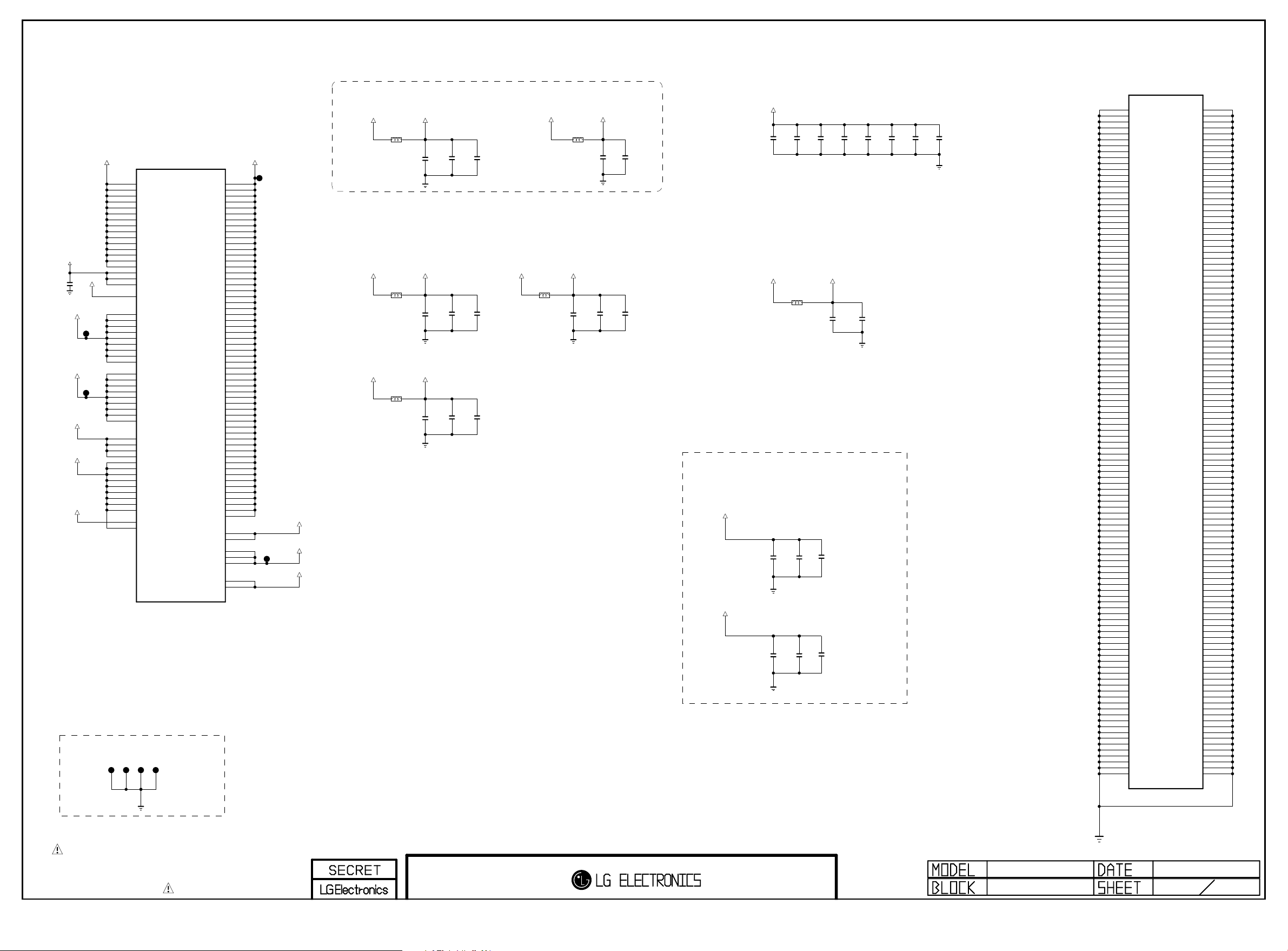
PAGE 6
Copyright ⓒ 2014 LG Electronics. Inc. All right reserved.
Only for training and service purposes
LGE Internal Use Only
VDD3V3_HDMI
AVDD33
C637
0.1uF
16V
+1.5V_DDR
TP5207
+1.5V_DDR
TP5208
AVDD25_C4TX
AVDD25
AVDD25_AUD
GND JIG POINT
DVDD33
JP601
AA23
AC12
AC13
AC14
AC15
AC11
AF22
AA11
AC18
AC19
AC20
AC21
AC22
AC23
AC17
AB23
L18
L21
L22
L23
M23
T11
Y23
P23
R23
T23
U23
V23
F10
F11
F12
F13
F14
F15
F16
F17
V11
W11
Y11
G19
H19
H20
JP602
F9
G6
H6
J6
K6
L6
M6
N6
P6
R6
IC101
LG1311-C1
DVDD33_1
DVDD33_2
DVDD33_3
DVDD33_4
DVDD33_5
DVDD33_6
DVDD33_7
DVDD33_8
DVDD33_9
DVDD33_10
DVDD33_11
DVDD33_12
AVDD33_BT_USB
AVDD33_USB_1
AVDD33_USB_2
AVDD33_HDMI_1
AVDD33_HDMI_2
AVDD33_HDMI_3
AVDD33_CVBS
DVDD15_M0_1
DVDD15_M0_2
DVDD15_M0_3
DVDD15_M0_4
DVDD15_M0_5
DVDD15_M0_6
DVDD15_M0_7
DVDD15_M0_8
DVDD15_M0_9
DVDD15_M1_1
DVDD15_M1_2
DVDD15_M1_3
DVDD15_M1_4
DVDD15_M1_5
DVDD15_M1_6
DVDD15_M1_7
DVDD15_M1_8
DVDD15_M1_9
AVDD25_C4TX_1
AVDD25_C4TX_2
AVDD25_C4TX_3
AVDD25_C4TX_4
AVDD25_COMP_1
AVDD25_COMP_2
AVDD25_CVBS_1
AVDD25_CVBS_2
AVDD25_DMD
AVDD25_AAD
DVDD25_XTAL
AVDD25_DR3PLL
SP_VQPS
AVDD25_AUD
AVDD25_APLL
JP603
AVDD11_COMP_LLPLL
JP604
DVDD11_1
DVDD11_2
DVDD11_3
DVDD11_4
DVDD11_5
DVDD11_6
DVDD11_7
DVDD11_8
DVDD11_9
DVDD11_10
DVDD11_11
DVDD11_12
DVDD11_13
DVDD11_14
DVDD11_15
DVDD11_16
DVDD11_17
DVDD11_18
DVDD11_19
DVDD11_20
DVDD11_21
DVDD11_22
DVDD11_23
DVDD11_24
DVDD11_25
DVDD11_26
DVDD11_27
DVDD11_28
DVDD11_29
DVDD11_30
DVDD11_31
DVDD11_32
DVDD11_33
DVDD11_34
DVDD11_35
DVDD11_36
DVDD11_37
DVDD11_38
DVDD11_39
DVDD11_40
DVDD11_41
DVDD11_42
DVDD11_43
DVDD11_44
DVDD11_45
DVDD11_46
DVDD11_47
DVDD11_48
DVDD11_49
DVDD11_50
DVDD11_51
AVDD11_APLL
AVDD11_C4TX_1
AVDD11_C4TX_2
AVDD11_C4TX_3
AVDD11_C4TX_4
DVDD11_XTAL
DVDD11_DR3PLL
DVDD11_CVBSPLL
AVDD11_DMD_1
AVDD11_DMD_2
DVDD18_EMMC_1
DVDD18_EMMC_2
+1.1V_VDD
M20
M21
N13
N14
N15
N16
N17
N18
P20
P21
R13
R14
R15
R16
R17
R18
R19
R20
R21
T13
T20
T21
U14
U15
U16
U17
U18
U19
U20
U21
V13
V20
V21
W13
W14
W15
W16
W17
W18
W19
Y13
Y20
Y21
AA13
AA14
AA15
AA17
AA18
AA19
AA20
AA21
AB21
AB19
V12
W12
Y12
AA12
G18
H18
AF23
AF24
AF25
L26
M26
TP5209
+1.1V_VDD
AVDD11_DMD
TP5210
DVDD18_EMMC
+3.3V_Bypass Cap
+3.3V_NORMAL
L601
BLM18PG121SN1D
C601
4.7uF
+2.5V_Bypass Cap
+2.5V_NORMAL
L602
BLM18PG121SN1D
C602
4.7uF
+2.5V_NORMAL
AVDD25_AUD
L603
BLM18PG121SN1D
C603
4.7uF
DVDD33
10V
AVDD25
10V
10V
C604
4.7uF
C605
4.7uF
C606
4.7uF
+1.1V_Bypass Cap
+3.3V_NORMAL
C607
0.1uF
16V
10V
L606
BLM18PG121SN1D
C614
4.7uF
AVDD33
10V
C615
0.1uF
16V
AFE 3CH Power
+2.5V_NORMAL
C608
0.1uF
10V
16V
C609
0.1uF
10V
16V
AVDD25_C4TX
L604
BLM18PG121SN1D
C610
0.1uF
C616
C613
4.7uF
16V
0.1uF
10V
16V
+1.1V_VDD
C618
C617
4.7uF
4.7uF
10V
+1.1V_VDD
BLM18PG121SN1D
10V
L607
C619
4.7uF
10V
AVDD11_DMD
C622
4.7uF
10V
C620
4.7uF
10V
C625
0.1uF
C623
4.7uF
16V
C626
0.1uF
10V
16V
0.1uF
0.1uF
16V
16V
C628
C627
+1.5V_Bypass Cap
+1.5V_DDR
OPT
C631
+1.5V_DDR
C629
22uF
10V
OPT
C630
22uF
10V
0.1uF
16V
C632
0.1uF
16V
C633
0.1uF
16V
C634
0.1uF
16V
IC101
LG1311-C1
B22
GND_1
B24
GND_2
C22
GND_3
C23
GND_4
C24
GND_5
D4
GND_6
D5
GND_7
D6
GND_8
D20
GND_9
D21
GND_10
E6
GND_11
E20
GND_12
E21
GND_13
F6
GND_14
F7
GND_15
F8
GND_16
F18
GND_17
F19
GND_18
F20
GND_19
F21
GND_20
G7
GND_21
G8
GND_22
G9
GND_23
G10
GND_24
G11
GND_25
G12
GND_26
G13
GND_27
G14
GND_28
G15
GND_29
G16
GND_30
G17
GND_31
G20
GND_32
G21
GND_33
G22
GND_34
G23
GND_35
G24
GND_36
G25
GND_37
G26
GND_38
G27
GND_39
H7
GND_40
H8
GND_41
H9
GND_42
H10
GND_43
H11
GND_44
H12
GND_45
H13
GND_46
H14
GND_47
H15
GND_48
H16
GND_49
H17
GND_50
H21
GND_51
H22
GND_52
H23
GND_53
H24
GND_54
H25
GND_55
H26
GND_56
H27
GND_57
H31
GND_58
J7
GND_59
J8
GND_60
J26
GND_61
J27
GND_62
K7
GND_63
K8
GND_64
K26
GND_65
K27
GND_66
L7
GND_67
L8
GND_68
L11
GND_69
L12
GND_70
L13
GND_71
L14
GND_72
L15
GND_73
L16
GND_74
L17
GND_75
L19
GND_76
L20
GND_77
L27
GND_78
M7
GND_79
M8
GND_80
M11
GND_81
M12
GND_82
M13
GND_83
M14
GND_84
M15
GND_85
M16
GND_86
M17
GND_87
M18
GND_88
M19
GND_89
M22
GND_90
M27
GND_91
N7
GND_92
N8
GND_93
N11
GND_94
N12
GND_95
N19
GND_96
N20
GND_97
N21
GND_98
N22
GND_99
N23
GND_100
N26
GND_101
N27
GND_102
N30
GND_103
P7
GND_104
P8
GND_105
P11
GND_106
P12
GND_107
P13
GND_108
P14
GND_109
P15
GND_110
P16
GND_111
P17
GND_112
P18
GND_113
GND_114
GND_115
GND_116
GND_117
GND_118
GND_119
GND_120
GND_121
GND_122
GND_123
GND_124
GND_125
GND_126
GND_127
GND_128
GND_129
GND_130
GND_131
GND_132
GND_133
GND_134
GND_135
GND_136
GND_137
GND_138
GND_139
GND_140
GND_141
GND_142
GND_143
GND_144
GND_145
GND_146
GND_147
GND_148
GND_149
GND_150
GND_151
GND_152
GND_153
GND_154
GND_155
GND_156
GND_157
GND_158
GND_159
GND_160
GND_161
GND_162
GND_163
GND_164
GND_165
GND_166
GND_167
GND_168
GND_169
GND_170
GND_171
GND_172
GND_173
GND_174
GND_175
GND_176
GND_177
GND_178
GND_179
GND_180
GND_181
GND_182
GND_183
GND_184
GND_185
GND_186
GND_187
GND_188
GND_189
GND_190
GND_191
GND_192
GND_193
GND_194
GND_195
GND_196
GND_197
GND_198
GND_199
GND_200
GND_201
GND_202
GND_203
GND_204
GND_205
GND_206
GND_207
GND_208
GND_209
GND_210
GND_211
GND_212
GND_213
GND_214
GND_215
GND_216
GND_217
GND_218
GND_219
GND_220
GND_221
GND_222
GND_223
GND_224
GND_225
GND_226
P19
P22
P26
P30
R7
R8
R11
R12
R22
R26
R27
T6
T7
T8
T12
T14
T15
T16
T17
T18
T19
T22
T26
T27
U6
U7
U8
U11
U12
U13
U22
U26
V4
V5
V6
V7
V8
V14
V15
V16
V17
V18
V19
V22
V26
V30
V31
W4
W8
W20
W21
W22
W23
W26
W27
Y2
Y3
Y4
Y8
Y14
Y15
Y16
Y17
Y18
Y19
Y22
Y26
AA8
AA16
AA22
AA26
AB11
AB12
AB13
AB14
AB15
AB16
AB17
AB18
AB20
AB22
AB26
AB30
AB31
AC16
AC26
AD26
AE26
AF6
AF8
AF9
AF10
AF11
AF12
AF13
AF14
AF15
AF16
AF17
AF18
AF19
AF20
AF21
AF26
AG20
AG25
AG31
AH25
AJ25
AK9
AK25
AL9
AL15
THE SYMBOL MARK OF THIS SCHEMETIC DIAGRAM INCORPORATES
SPECIAL FEATURES IMPORTANT FOR PROTECTION FROM X-RADIATION.
FIRE AND ELECTRICAL SHOCK HAZARDS, WHEN SERVICING IF IS
ESSENTIAL THAT ONLY MANUFACTURES SPECIFIED PARTS BE USED FOR
THE CRITICAL COMPONENTS IN THE SYMBOL MARK OF THE SCHEMETIC.
11/05/31
MID_LG1311
VCC & GND
2014.05.28
6
31
Page 29
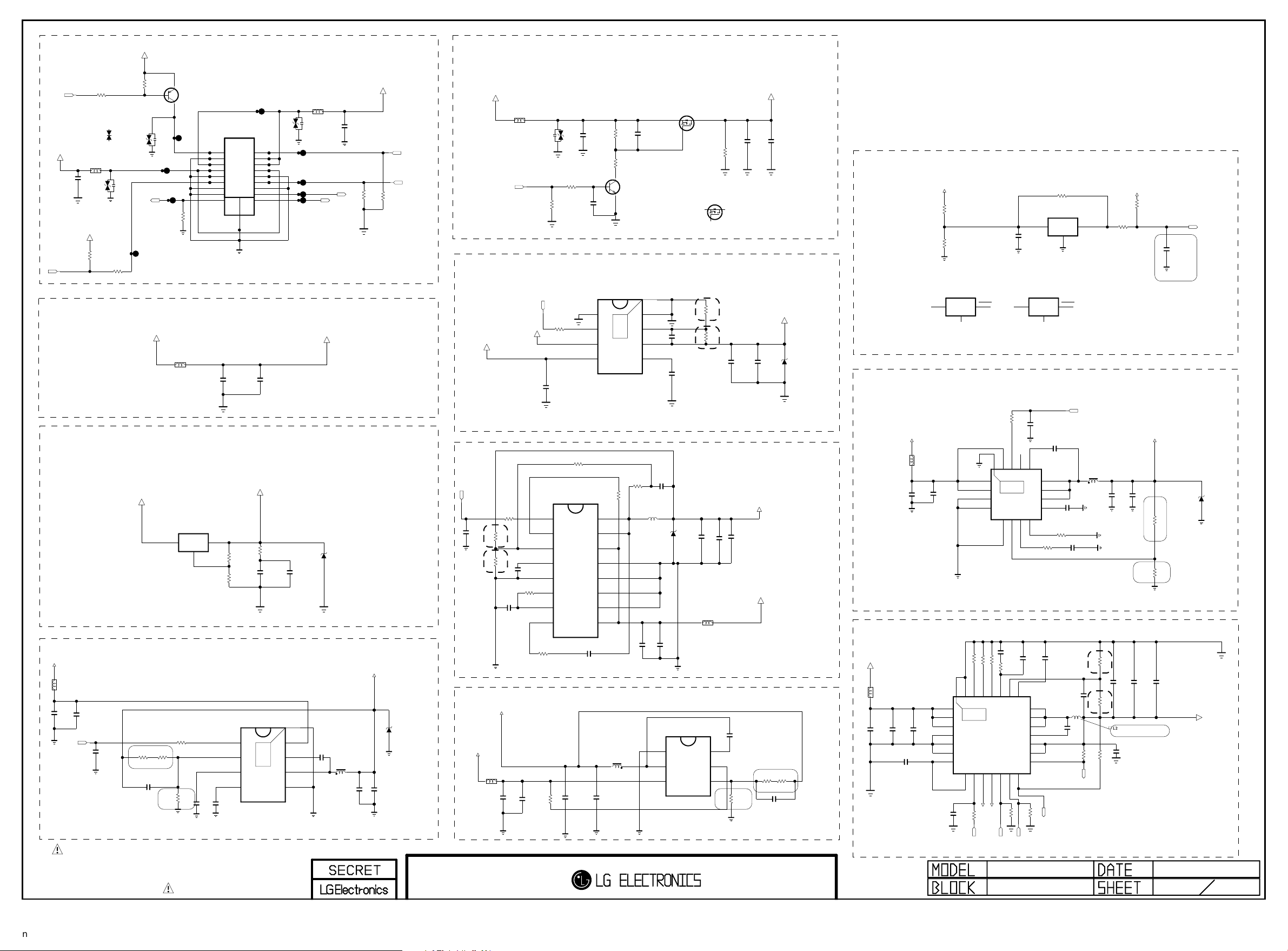
+3.5V_ST
Copyright ⓒ 2014 LG Electronics. Inc. All right reserved.
Only for training and service purposes
LGE Internal Use Only
PANEL_POWER
PAGE 8
RL_ON
+13V_A
UBW2012-121F
C2306
0.1uF
50V
+3.3V_NORMAL
INV_CTL
R2300
10K
VA23001-*1
ICVS0505201FR
Multi_Innochips
L2304
ADUC 20S 02 010L
OPT
R2306
1K
R2301
10K
MMBT3906(NXP)
Default_Amotech
VA23001
5.6V
AMOTECH CO., LTD.
20V
ZD2303
R2307
100
Q2300
L/DIM0_VS
2
R2330
1
L2303
3
POWER_WAFER_12PIN
P2300
SMAW200-H12S5K(BK)(LTR)
PWR ON
GND
D13V
A13V
GND
DRV-ON
GND
GND
VSYNC
1K
OPT
SMAW200-H18S5
POWER_WAFER_18PIN
1
1
3
3
5
5
7
7
9
9
11
11
13
15
17
P2301
PDIM2
2
2
D13V
4
4
D13V
6
6
A13V
8
8
GND
10
10
PDIM1
12
12
GND
14
SCLK
16
13
SIN
18
.
UBW2012-121F
ADUC 20S 02 010L
20V
ZD2301
OPT
L/DIM0_MOSI
C2307
0.1uF
50V
L/DIM0_SCLK
R2354
4.7K
OPT
+13V
R2355
4.7K
OPT
PWM_DIM2
PWM_DIM
+3.3V - eMMC 4.41/4.51
+3.3V_NORMAL
L2302
BLM18PG121SN1D
C2305
0.1uF
16V
C2300
22uF
10V
3.3V_EMMC
+1.8V - eMMC 4.51
+3.3V_NORMAL
IC2306
AZ1117EH-ADJTRG1
OUTIN
ADJ/GND
+13V
L2300
BLM18PG121SN1D
C2302
10uF
25V
POWER_ON/OFF1
C2303
0.1uF
25V
OPT
C2360
0.1uF
16V
R2302
5.1K
1/16W
1%
C2304
100pF
+3.3V_NORMAL
R2304
10K
R23 03
R1
68K
1/1 6W
1%
50V
R2
R23 05
22K
1/1 6W
1%
THE SYMBOL MARK OF THIS SCHEMETIC DIAGRAM INCORPORATES
SPECIAL FEATURES IMPORTANT FOR PROTECTION FROM X-RADIATION.
FIRE AND ELECTRICAL SHOCK HAZARDS, WHEN SERVICING IF IS
ESSENTIAL THAT ONLY MANUFACTURES SPECIFIED PARTS BE USED FOR
THE CRITICAL COMPONENTS IN THE SYMBOL MARK OF THE SCHEMETIC.
DVDD18_EMMC
R2347
1
75
1%
1/16W
R2357
C2301
10uF
33
C2310
1uF
10V
1%
C2312
2200pF
50V
1/16W
VREG
R2358
BD9D320EFJ
EN
1
FB
2
3
SS
4
IC2300
THERMAL
3A
10V
[EP]FIN
VIN
8
BOOT
9
7
SW
6
GND
5
Vout=0.765*(1+R1/R2)
C2308
10uF
10V
0.1uF
C2313
OPT
16V
2.5V
D2302
NR8040T2R0N
L2301
2uH
C2314
22uF
10V
+3.3V_NORMAL
C2315
22uF
10V
5V
ZD2300
+13V
PANEL_CTL
+3.3V_NORMAL
+5V_NORMAL
POWER_ON/OFF2_3
OPT
C2366
0.1uF
16V
R2308
18K
1/16W
R2309
22K
1/16W
+3.5V_ST
+13V
L2305
BLM18PG121SN1D
Q2302 Change: Diodes --> NXP, 131118
Default_NXP
Q2302
C2333
0.1uF
50V
PMV48XP
S
G
D
L2313
UBW2012-121F
OPT
ADUC 20S 02 010L
R2314
10K
10K
R2361
VA23002
C2359
4.7uF
10V
OPT
C2331
0.1uF
50V
R2317
R2318
150K
B
36K
C
Q2301
MMBT3904(NXP)
E
+2.5V
IC2302
POWER_ON/OFF2_1
C2321
10uF
10V
R2315
10K
POK
BIAS
EN
IN
TJ2132GDP
1
2
3
4
2A
9
THERMAL
8
7
6
5
[EP]GND
GND
FB
OUT
SS
C2328
0.01uF
50V
C2332
2700pF
50V
1%
1%
Vout=0.6*(1+R2/R1)
R2316
R2310
1K
1%
1%
C2316
1uF
10V
100
1/16W
1%
IC2301
MP8762HGLE-Z
EN
1
FREQ
R2311
100K
1/16W
1%
AGND
R2313
4.7
1/16W
5%
2
FB
3
SS
4
5
PG
6
VCC
7
BST
8
R1
R2
C2318
0.033uF
50V
C2319
0.1uF
16V
16
15
14
13
12
11
10
9
SW_2
SW_1
IN_2
PGND_4
PGND_3
PGND_2
PGND_1
IN_1
1%
1/16W
R2320
560K
1/10W
5%
430K
R2319
LPBN8050T-1R0N
L2307
1.0uH
C2325
10uF
25V
C2327
+1.1V_CORE
330pF
50V
C2337
22uF
OPT
2.5V
10V
ZD2304
C2326
10uF
25V
Vout=0.611*(1+R1/R2)
+3.5V_ST
IC2305
TPS563200
GND
1
SW
2
3A
VIN
3
Vout=0.765*(1+R1/R2)
C2317
10uF
25V
C2320
0.1uF
25V
R2312
VLS5045EXT-2R2N
L2306
2.2uH
C2323
C2322
22uF
10V
10K
22uF
10V
Multi_AOS
Q2302-*1
AO3435
S
8.2 K
1/1 6W
26. 1K
1/1 6W
C2346
22uF
10V
L2312
6
5
4
R2346
3.3K
LVDS_DISCHARGE
D
G
R1
R23 21
R2
R23 22
VBST
EN
VFB
1/1 6W
1%
PANEL_VCC
C2363
10uF
25V
+2.5V_NORMAL
C2354
C2357
10uF
0.1uF
16V
10V
+1.1V_VDD
C2356
22uF
10V
+13V
0.1uF
16V
C2353
1%
1/1 6W
R2
24. 9K
R23 27
R23 23
10K
50V
C2347
10uF
25V
1%
1/1 6W
11K
R23 28
10pF
OPT
C2358
OPT
5V
ZD2305
R1
Power_DET
+13V
R2325
14K
1%
R2326
5.1K
1%
RESET IC_DIODES_APX803D29
IC2307-*1
APX803D29
VCC
3
2
1
GND
RESET_IC_DIODES_NEW_APX803E29
RESET
DDR MAIN 1.5V
10K
R2324
+3.5V_ST
L2308
C2339
10uF
10V
C2340
0.1uF
16V
PVIN_1
PVIN_2
PGND_1
PGND_2
[EP]FIN
1
THERMAL
2
17
IC2303
3
BD9A300MUV
4
3A
5
6
FB
AGND8MODE
3A
Vout=0.8*(1+R1/R2)
+5.0V normal & USB
C2334
2200pF
R23 4115 0K 1%
R23 40 1 6K 1%
RSET228AGND
27
IC2304
6A
9EN10
SW_OUT211SW_OUT1
+5V_USB_2
POWER_ON/OFF2_4
50V
R2342
10K
COMP25RLIM26RSET1
12
SW_EN213SW_EN1
4.7K
R2359
+5V_USB_3
USB_CTL2
MID_LG1311
+13V
L2310
120-ohm
C2309
10uF
25V
OPT
C2311
10uF
25V
R23 35 1 6K 1 %
[EP]
VIN_1
1
THERMAL
VIN_2
2
VIN_3
C2329
0.1uF
50V
PGND_1
PGND_2
PGND_3
1uF
25V
C23 24
C2330
0.0068uF
50V
29
3
4
SN1302001(TPS65286RHDR)
5
6
V7V
7
8
MODE/SYNC
10K
R2339
RESET IC_ROHM
VDD
C2355
0.1uF
25V
IC2307-*2
APX803E29
VCC
3
1
OPT
C2361
0.1uF
16V
BOOT14PGD15EN16AVIN
13
SW_3
12
SW_2
11
SW_1
10
SS
9
7
ITH
R2329
8.2K
OPT
C2335
100pF
50V
22SS23FB24
LX_3
21
LX_2
20
LX_1
19
BST
18
SW_IN2
17
SW_IN1
16
NFAULT1
15
14
NFAULT2
4.7K
R2360
OPT
OPT
USB_CTL3
POWER
R2337
100K
IC2307
BD48K28G
3
2
GND
C2341
0.1uF
16V
R2331
330K1/16W 5%
1/16W1%
C2336
0.047uF
25V
/USB_OCD2
1
GND
RESET
C2342
0.01uF
50V
C2343
5%
C2344
82pF
50V
L2311
4.7uH
100K
VOUT
2
POWER_ON/OFF2_2
VLS5045EXT-2R2N
L2309
2.2uH
2700pF50V
R2
1%
R1
1%
C2338
0.047uF
25V
R2344
1/16W
R2353
/USB_OCD3
R2350
100
C2345
C2349
22uF
22uF
10V
10V
6.8K
R2345
1/16W
C2348
22uF
10V
51K
R2352
1/16W
L2311 Change, 131120
for Currnet UP
5%
100K
1/16W
C2350
1uF
10V
+3.5V_ST
R1
R2
Vout=0.6*(1+R1/R2)
5.1V:R1-51K, R2-6.8K
R2338
10K
OPT
C2365
0.1uF
16V
not to RESET at 8kV ESD
+1.5V_DDR
1%
16K
R23 32
1/1 6W
1%
18K
R23 33
1/1 6W
C2351
C2352
22uF
10uF
10V
10V
2014.05.28
POWER_DET
12V-->3.58V
ST_3.5V-->3.5V
2.5V
ZD2302
OPT
+5V_NORMAL
8
31
Page 30
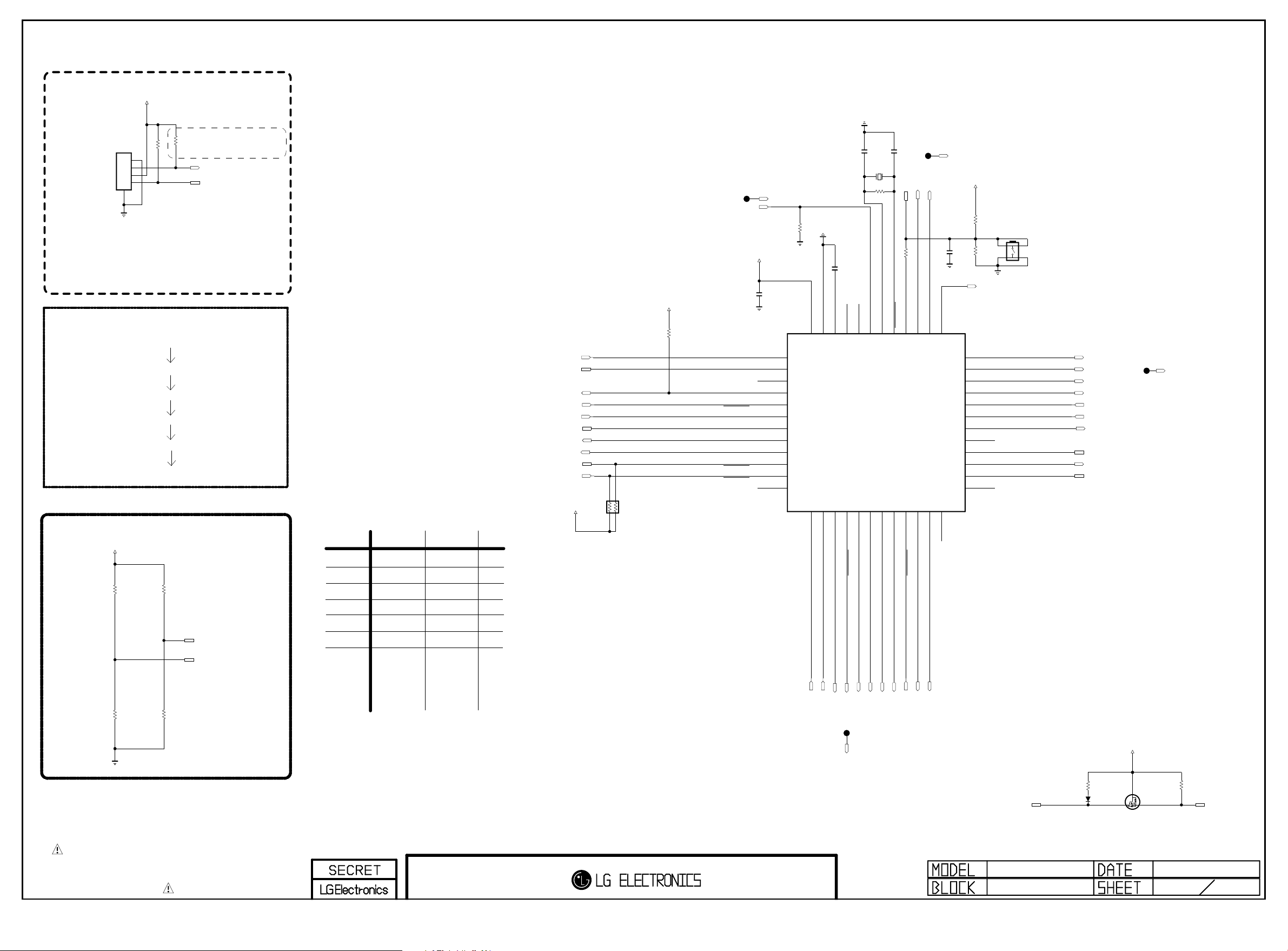
Renesas MICOM
Copyright ⓒ 2014 LG Electronics. Inc. All right reserved.
Only for training and service purposes
LGE Internal Use Only
For Debug
+3.5V_ST
PAGE 9
MICOM_DEBUG
P3000
12507WS-04L
5
1
2
3
4
Don’t remove R3016,
not making float P40
R3016 1K
R3014 10K
MICOM_DEBUG
M14 Power SEQUENCE
POWER_ON/OFF1
POWER_ON/OFF2_4
POWER_ON/OFF2_1
POWER_ON/OFF2_2
POWER_ON/OFF2_3
SOC_RESET
MICOM MODEL OPTION
+3.5V_ST
MICOM_EPI
R3006 10K
OPT
R3013 10K
MICOM_DEBUG
MICOM_RESET
MODEL1_OPT_0
MODEL1_OPT_1
MICOM MODEL OPTION
1
RESERVED
EPI
MODEL_OPT_0
MODEL_OPT_1
0
RESERVED
NON_EPI
I2C_SCL_MICOM_SOC
I2C_SDA_MICOM_SOC
PANEL_CTL
WOL/WIFI_POWER_ON
HDMI_CEC
POWER_ON/OFF2_2
POWER_ON/OFF2_3
EYE_SDA
EYE_SCL
IR
+3.5V_ST
AR3000
3.3K
+3.5V_ST
R3021
10K
P31/TI03/TO03/INTP4
P75/KR5/INTP9/SCK01/SCL01
P74/KR4/INTP8/SI01/SDA01
P71/KR1/SI21/SDA21
P70/KR0/SCK21/SCL21
P30/INTP3/RTC1HZ/SCK11/SCL11
1/16W
HDMI_WAUP:HDMI_INIT
+3.5V_ST
MHL_DET
C3000
0.1uF
MHL_DET
P60/SCLA0
P61/SDAA0
P62
P63
P73/KR3/SO01
P72/KR2/SO21
50V
10pF
C3002
32.768KHz
10K
GND
R3032
C3001 0.47uF
P137/INTP0
P122/X2/EXCLK
P121/X1
REGC
VSS
VDD
43
44
45
46
47
48
1
2
3
4
5
6
IC3000
R5F100GEAFB#30
7
8
9
10
11
12
13
14
15
16
17
18
P17/TI02/TO02
P51/INTP2/SO11
P16/TI01/TO01/INTP5
P50/INTP1/SI11/SDA11
P14/RXD2/SI20/SDA20
P15/PCLBUZ1/SCK20/SCL20
50V
12pF
C3003
X3000
R3028
4.7M
MICOM_RESET
OPT
R3029 33
P40/TOOL0
RESET
P124/XT2/EXCLKS
P123/XT1
40
41
42
19
20
21
LOGO_LIGHT
MICOM_DEBUG
LOGO_LIGHT
C3004
0.1uF
16V
P120/ANI19
P41/TI07/TO07
37
38
39
36
35
34
33
32
31
30
29
28
27
26
25
22
23
24
+3.5V_ST
10K
R3031
P140/PCLBUZ0/INTP6
P00/TI00/TXD1
P01/TO00/RXD1
P130
P20/ANI0/AVREFP
P21/ANI1/AVREFM
P22/ANI2
P23/ANI3
P24/ANI4
P25/ANI5
P26/ANI6
P27/ANI7
P146
P147/ANI18
P13/TXD2/SO20
P10/SCK00/SCL00
P12/SO00/TXD0/TOOLTXD
P11/SI00/RXD0/TOOLRXD/SDA00
R3030
MICOM_RESET_SW
OPT
270K
WIFI_EN
SW3000
JTP-1127WEM
4 3
12
RL_ON
SCART_MUTE
POWER_ON/OFF2_4
POWER_ON/OFF2_1
KEY2
KEY1
EPI_CTL
MODEL1_OPT_0
SIDE_HP_MUTE
MODEL1_OPT_1
SCART_MUTE
R3004 10K
MICOM_NON_EPI
R3012 10K
THE SYMBOL MARK OF THIS SCHEMETIC DIAGRAM INCORPORATES
SPECIAL FEATURES IMPORTANT FOR PROTECTION FROM X-RADIATION.
FIRE AND ELECTRICAL SHOCK HAZARDS, WHEN SERVICING IF IS
ESSENTIAL THAT ONLY MANUFACTURES SPECIFIED PARTS BE USED FOR
THE CRITICAL COMPONENTS IN THE SYMBOL MARK OF THE SCHEMETIC.
POWER_DET
POWER_ON/OFF1
WOL/ETH_POWER_ON
LED_R
LED_R
WOL_CTL
INV_CTL
SOC_RESET
SOC_TX
SOC_RX
EDID_WP
AMP_MUTE
CEC_REMOTE
MID_LG1311
MICOM
D3000
BAT54_SUZHO
For CEC
R3033
27K
+3.5V_ST
G
D
S
Q3001
RUE003N02
R3034
120K
HDMI_CEC
2014.05.28
9
31
Page 31

BODY_SHIELD
Copyright ⓒ 2014 LG Electronics. Inc. All right reserved.
Only for training and service purposes
LGE Internal Use Only
20
19
18
17
16
15
14
13
12
11
10
EAG63530101
JK3202
DAADR019A
HDMI_JACK_FOOSUNG
BODY_SHIELD
20
19
18
17
16
15
14
13
12
11
10
9
8
EAG63530101
7
6
5
4
3
2
1
JK3200
DAADR019A
HDMI_JACK_FOOSUNG
HP_DET
5V
GND
DDC_DATA
DDC_CLK
ARC
CE_REMOTE
CK-
CK_GND
CK+
D0-
9
D0_GND
8
D0+
7
D1-
6
D1_GND
5
D1+
4
D2-
3
D2_GND
2
D2+
1
HP_DET
5V
GND
DDC_DATA
DDC_CLK
NC
CE_REMOTE
CK-
CK_GND
CK+
D0-
D0_GND
D0+
D1-
D1_GND
D1+
D2-
D2_GND
D2+
VA3206
ESD_HDMI
5V_HDMI_2
Default_Amotech
VA3209
VA3208
100K
ESD_HDMI
Default_Amotech
CEC_REMOTE
HDMI_EXT_EDID
1K
R3268
ESD_HDMI
CEC_REMOTE
33
R3250
R3265
AR3200
33
1/16W
VA3213
VA3207
ESD_HDMI
DDC_SCL_1
DDC_SDA_1
ESD_HDMI_TMDS
ESD_HDMI_TMDS
HDMI1 With ARC
Q3206
MMBT3904(NXP)
C
B
1K
R3251
33
HDMI_INT_EDID
VA3205
R3266
100K
HDMI_HPD_1
R3248
1K
OPT
R3249
3.9K
OPT
D3210
IP4294CZ10-TBR
1
10
2
9
8
3
7
4
6
5
D3211
IP4294CZ10-TBR
1
10
2
9
8
3
7
4
6
5
HDMI_EXT_EDID
E
R3269
HDMI_EXT_EDID
HDMI_EXT_EDID
R3270
4.7K
VA3203
ESD_HDMI
D3212
IP4294CZ10-TBR
1
2
3
4
5
ESD_HDMI_TMDS
D3213
IP4294CZ10-TBR
1
2
3
4
5
ESD_HDMI_TMDS
HDMI2
5V_HDMI_1
Default_Amotech
VA3215
C3202
1uF
10V
HDMI_HPD_2
AR3201
33
1/16W
VA3204
ESD_HDMI
10
9
8
7
6
10
9
8
7
6
ARC
SPDIF_OUT_ARC
OPT
C3226
0.1uF
16V
CK-_HDMI1
CK+_HDMI1
D0-_HDMI1
D0+_HDMI1
D1-_HDMI1
D1+_HDMI1
D2-_HDMI1
D2+_HDMI1
DDC_SCL_2
DDC_SDA_2
CK-_HDMI2
CK+_HDMI2
D0-_HDMI2
D0+_HDMI2
D1-_HDMI2
D1+_HDMI2
D2-_HDMI2
D2+_HDMI2
Multi_Innochips
VA3215-*1
ICVS0505201FR
Multi_Innochips
VA3213-*1
ICVS0505201FR
Multi_Innochips
VA3209-*1
ICVS0505201FR
20
19
18
17
16
15
14
13
12
11
10
9
8
7
6
5
4
3
2
1
5501-56219
JK3202-*1
HDMI_JACK_CNPLUS
+5V_NORMAL
D3200
AR3204
47K
5V_HDMI_1
1/16W
A0
A1
A2
GND
20
19
18
17
16
15
14
13
12
11
10
9
8
7
6
5
4
3
2
1
5501-56219
JK3203-*1
HDMI_JACK_CNPLUS
20
19
18
17
16
15
14
13
12
11
10
9
8
7
6
5
4
3
2
1
5501-56219
JK3200-*1
HDMI_JACK_CNPLUS
A2CA1
DDC_SDA_1
DDC_SCL_1
HDMI_EXT_EDID
MMBT3904(NXP)
IC3203
AT24C02C-SSHM-T
1
2
3
4
HDMI_EXT_EDID_ATMEL
Q3203
8
7
6
5
VCC
WP
SCL
SDA
E
C
HDMI_EXT_EDID
HDMI_EXT_EDID
B
BODY_SHIELD
GND
20
19
18
17
16
15
14
13
12
11
10
9
8
EAG63530101
7
6
5
4
3
2
1
DAADR019A
JK3203
HDMI_JACK_FOOSUNG
5V_HDMI_2
EDID_WP
HDMI_EXT_EDID
R3271
4.7K
R3258
33
R3259
33
HP_DET
5V
GND
DDC_DATA
DDC_CLK
NC
CE_REMOTE
CK-
CK_GND
CK+
D0-
D0_GND
D0+
D1-
D1_GND
D1+
D2-
D2_GND
D2+
AR3206
47K
1/16W
+5V_NORMAL
D3203
AR3205
+5V_NORMAL
A1
C
5V_HDMI_4
47K
1/16W
A2
MMBD6100
D3216
Multi_Innochips
VA3216-*1
ICVS0505201FR
VA3216
Default_Amotech
CEC_REMOTE
5V_HDMI_4
A2CA1
D3205
DDC_SCL_2
ESD_HDMI
DDC_SDA_4
DDC_SCL_4
DDC_SDA_2
100K
VA3212
ESD_HDMI
VA3210
D3215
IP4294CZ10-TBR
1
2
3
4
5
ESD_HDMI_TMDS
D3214
IP4294CZ10-TBR
1
2
3
4
5
ESD_HDMI_TMDS
+3.5V_ST
A2CA1
NON_MHL
R3267
AR3202
33
1/16W
VA3211
ESD_HDMI
10
9
8
7
6
10
9
8
7
6
NON_MHL
IC3203-*1
BR24G02FJ-3GTE2
A0
1
A1
2
A2
3
GND
4
HDMI_EXT_EDID_ROHM
5%
MHL
CK-_HDMI4
CK+_HDMI4
D0-_HDMI4
D0+_HDMI4
D1-_HDMI4
D1+_HDMI4
D2-_HDMI4
D2+_HDMI4
0
1/16W
HDMI_HPD_4
R3261
0
DDC_SCL_4
DDC_SDA_4
R3277
VCC
8
WP
7
SCL
6
SDA
5
NON_MHL
R3261-*1
33
+3.3V_NORMAL
MHL
R32741K1/16W
ICVS0505201FR
+5V_NORMAL
R3275
10K
MHL
MHL
C
5%
B
Q3208
MMBT3904(NXP)
E
Default_Amotech
VA3217
5.6V
Multi_Innochips
VA3217-*1
PAGE 10
+5V_NORMAL
MHL_DET
+3.5V_ST
R3246
10K
C
E
OPT
C3201
0.1uF
MHL
A1
C
A2
MHL
D3201
B
MHL
E
MMBT3906(NXP)
Q3201
C
MHL
R3247
10K
HDMI3 With MHL
VDD3V3_HDMI
C3227
0.1uF
16V
MHL
R3201
10K
MHL
D
Q3207
G
SI1012CR-T1-GE3
S
MHL
1K
R3273
MHL
MHL
R3243
1K
1/16W
MHL
C3223
5%
0.047uF
25V
HDMI LEAKAGE Workaround in MTK A2(A0) (Default= with HDMI_LEAKAGE)
+3.3V_NORMAL
Q3200
MMBT3904(NXP)
R3255
0
1/16W
5%
PANEL_VCC
R3254
10K
G
S
NTR4501NT1G
Q3202
MHL
B
D
MHL
R3202
330K
MHL_DET
Multi_Suzhou
D3202-*1
MHL
IC3201
BD2242G
VIN
1
GND
2
EN
3
SS2040LL-LG
40V
Default_Onsemi
D3202
MBR230LSFT1G
VOUT
6
5
4
ILIM
OC
30V
R3276
14K
MHL
MHL
R3204
100K
MHL
C3203
10uF
10V
5V_HDMI_4
C3228
22uF
10V
OPT
THE SYMBOL MARK OF THIS SCHEMETIC DIAGRAM INCORPORATES
SPECIAL FEATURES IMPORTANT FOR PROTECTION FROM X-RADIATION.
FIRE AND ELECTRICAL SHOCK HAZARDS, WHEN SERVICING IF IS
ESSENTIAL THAT ONLY MANUFACTURES SPECIFIED PARTS BE USED FOR
THE CRITICAL COMPONENTS IN THE SYMBOL MARK OF THE SCHEMETIC.
MID_LG1311
HDMI
2013.03.22
32
Page 32

SPDIF OUT
Copyright ⓒ 2014 LG Electronics. Inc. All right reserved.
Only for training and service purposes
LGE Internal Use Only
+3.3V_NORMAL
SPDIF_OUT
C3402
47pF
50V
C3400
0.1uF
16V
Default_Solteam
JK3401
JST1223-001
GND
VCC
VINPUT
1
2
3
4
FIX_POLE
2F01TC1-CLM97-4F
GND
Fiber Optic
VCC
VIN
Multi_Foxconn
JK3401-*1
1
2
3
Fiber Op tic
4
SHIELD
DOUT1
HP_ROUT
HP_LOUT
HP_DET
TP3400
TP3401
RIN1RIN1
DOUT1
HP_OUT
HP_OUT
HP_OUT
HP OUT
R3825
150
R3826
150
R3409
100
VA3405-*1
ICVS0505201FR
+3.3V_NORMAL
Multi_Innochips
R3406
10K
HP_OUT
Default_Amotech
VA3405
5.6V
E_SPRING
R_SPRING
T_SPRING
B_TERMINAL2
T_TERMINAL2
JK3403
PEJ034-01
3
4
5
7B
6B
DDTS TEST ONLY
M_REMOTE_RX
M_REMOTE_TX
+3.5V_ST
OPT
R3827
10K
OPT
P3401
12507WS-04L
1
2
3
4
5
R3401
10K
SOC_RX
SOC_TX
UART for Debug
+3.5V_ST
P3400
12507WS-04L
1
2
3
4
5
AV/COMPONENT REAR
PPJ245N2-01
JK3802
[GN/YL]E-LUG
6A
5A
[GN/YL]O-SPRING
4A
[GN/YL]CONTACT
5B
[BL]O-SPRING
7C
[RD1]E-LUG-S
5C
[RD1]O-SPRING
4C
[RD1]CONTACT
5D
[WH]O-SPRING
4E
[RD2]CONTACT
5E
[RD2]O-SPRING
6E
[RD2]E-LUG
VA3804
5.5V
VA3805
5.5V
Default_Amotech
VA3801
5.6V
+3.3V_NORMAL
VA3806
5.5V
COMP1_Pb
COMP1_Pr
COMP1/AV1/DVI_L_IN
Multi_Innochips
VA3801-*1
ICVS0505201FR
Default_Amotech
VA3802
5.6V
Multi_Innochips
VA3802-*1
ICVS0505201FR
Place JACK Side
R3806
10K
R3801
1K
Default_Amotech
VA3803
5.6V
Multi_Innochips
VA3803-*1
ICVS0505201FR
COMP1/AV1/DVI_R_IN
AV1_CVBS_DET
+3.3V_NORMAL
Default_Amotech
VA3800
5.6V
R3810
10K
VA3800-*1
ICVS0505201FR
C310
150pF
OPT
R3802
1K
Multi_Innochips
3216
R314
75
COMP1_DET
Place SOC Side
R327 100
R334 33
C325 0.047uF
C323 0.047uF
C328 1000pF
AV1_CVBS_IN_SOC
COMP2_Y_IN_SOC
COMP2_Y_IN_SOC_SOY
THE SYMBOL MARK OF THIS SCHEMETIC DIAGRAM INCORPORATES
SPECIAL FEATURES IMPORTANT FOR PROTECTION FROM X-RADIATION.
FIRE AND ELECTRICAL SHOCK HAZARDS, WHEN SERVICING IF IS
ESSENTIAL THAT ONLY MANUFACTURES SPECIFIED PARTS BE USED FOR
THE CRITICAL COMPONENTS IN THE SYMBOL MARK OF THE SCHEMETIC.
MID_LG1311
AV JACK
2014.05.28
11
31
Page 33

BT_RESET
Copyright ⓒ 2014 LG Electronics. Inc. All right reserved.
Only for training and service purposes
LGE Internal Use Only
WOL/WIFI_POWER_ON
EYE_SDA
EYE_SCL
LED_R
PAGE 12
P4000
SMAW200-H18S5
GND
NC
WOL
SDA
SCL
GND
IR
1
3
5
7
9
11
13
15
17
19
R4001
100
2K
R4020
R4002
100 C4015
R4005
10K
5%
C4004
0.1uF
+3.5V_ST
C4007
100pF
50V
AR4001
100
IR
R4015
1.8K
OPT
C4009
0.1uF
16V
BT_RESET
LED_R
2
4
6
8
10
12
14
16
18
GND
+3.5V_WIFI
USB_DM
USB_DP
GND
GND
KEY1
KEY2
+3.5V_ST
GND
D4000
RCLAMP0502BA
L4000 Delete for voltage drop, 131120
OPT
WIFI_DMDP_5pF
C4005
0.1uF
Place Near Wafer
C4016
5pF
50V
C4008
1000pF
50V
OPT
WIFI_DMDP_5pF
+3.5V_ST
5pF
50V
C4006
22uF
R4018
10
R4019
10
OPT
10V
WIFI_DM
WIFI_DP
R4008
10K
C4001
C4002
0.1uF
0.1uF
+3.5V_ST
5%
OPT
R4009
10K
5%
+3.5V_WIFI
AR4002
100
KEY1
KEY2
WIFI POWER ENABLE CONTROL
+3.5V_ST
IN
WIFI_EN
C4017
0.1uF
R4021 33
R4022
10K
OPT
C4003
0.1uF
16V
5
EN
4
IC4001
AP2191WG-7
+3.5V_WIFI
OUT
1
GND
2
FLG
3
30K
OPT
R4023
THE SYMBOL MARK OF THIS SCHEMETIC DIAGRAM INCORPORATES
SPECIAL FEATURES IMPORTANT FOR PROTECTION FROM X-RADIATION.
FIRE AND ELECTRICAL SHOCK HAZARDS, WHEN SERVICING IF IS
ESSENTIAL THAT ONLY MANUFACTURES SPECIFIED PARTS BE USED FOR
THE CRITICAL COMPONENTS IN THE SYMBOL MARK OF THE SCHEMETIC.
MID_LG1311
IR / KEY
2014.05.28
12
31
Page 34

PAGE 13
Copyright ⓒ 2014 LG Electronics. Inc. All right reserved.
Only for training and service purposes
LGE Internal Use Only
USB_DM2
USB_DP2
+5V_USB_2
5V
D4301
USB_ESD_SD05
+5V_USB_3
C4322
10uF
10V
C4323
22uF
10V
Multi_Toshiba
D4302-*2
DF3D6.8MS
USB2
MAX 1.5A
3AU04S-3 05- ZC-(LG)
D4302
RCLAMP0582B
USB_ESD_0582B
USB_ESD_0502BA
D4302-*1
RCLAMP0502BA
USB3
JK4302
1234
USB DOWN ST REAM
5
USB_DM3
USB_DP3
5V
D4303
USB_ESD_SD05
C4310
10uF
10V
C4311
22uF
10V
Multi_Toshiba
D4300-*2
DF3D6.8MS
MAX 1.5A
D4300
RCLAMP0582B
USB_ESD_0582B
USB_ESD_0502BA
D4300-*1
RCLAMP0502BA
3AU04S-3 05- ZC-(LG)
JK4300
1234
USB DOWN STREAM
5
EAX6536390* : Use RClamp0582B, SD05
EAX6538400* : Use RClamp0502BA
THE SYMBOL MARK OF THIS SCHEMETIC DIAGRAM INCORPORATES
SPECIAL FEATURES IMPORTANT FOR PROTECTION FROM X-RADIATION.
FIRE AND ELECTRICAL SHOCK HAZARDS, WHEN SERVICING IF IS
ESSENTIAL THAT ONLY MANUFACTURES SPECIFIED PARTS BE USED FOR
THE CRITICAL COMPONENTS IN THE SYMBOL MARK OF THE SCHEMETIC.
MID_LG1311
USB 2 & 3
2014.05.28
1
Page 35

+5V_USB_1
Copyright ⓒ 2014 LG Electronics. Inc. All right reserved.
Only for training and service purposes
LGE Internal Use Only
PAGE 14
value change
10K(2.63V) --> 4.7K(2.97V)
/USB_OCD1
USB_CTL1
R4500
10K
+3.3V_NORMAL
R4501
4.7K
+5V_NORMAL
0.1uF
16V
OCP USB1
VIN
1
GND
2
EN
3
IC4500
BD2242G
USB1 (2.0)
MAX 1.5A
OPT
C4501
C4502
10uF
22uF
10V
+5V_USB_1
VOUT
6
ILIM
5
1%
OC
4
14K
R4502
USB_DM1
USB_DP1C4500
Multi_Toshiba
D4500-*2
DF3D6.8MS
10V
D4500
RCLAMP0582B
USB_ESD_0582B
USB_ESD_0502BA
D4500-*1
RCLAMP0502BA
5V
D4501
USB_ESD_SD05
3AU04S-3 05- ZC-(LG)
JK4500
1234
USB DOWN ST REAM
5
THE SYMBOL MARK OF THIS SCHEMETIC DIAGRAM INCORPORATES
SPECIAL FEATURES IMPORTANT FOR PROTECTION FROM X-RADIATION.
FIRE AND ELECTRICAL SHOCK HAZARDS, WHEN SERVICING IF IS
ESSENTIAL THAT ONLY MANUFACTURES SPECIFIED PARTS BE USED FOR
THE CRITICAL COMPONENTS IN THE SYMBOL MARK OF THE SCHEMETIC.
EAX6536390* : Use RClamp0582B, SD05
EAX6538400* : Use RClamp0502BA
MID_LG1311
USB 1(DVR)
2014.05.28
1
Page 36

Ethernet Block
Copyright ⓒ 2014 LG Electronics. Inc. All right reserved.
Only for training and service purposes
LGE Internal Use Only
PAGE 16
JK5000
RJ45VT-01SN002
1
2
3
4
5
6
7
8
9
9
0.1uF
C5001
0.01uF
50V
D5001
5.5V
LAN_ESD
D5002
5.5V
LAN_ESD
D5003
5.5V
LAN_ESD
EPHY_TDP
EPHY_TDN
EPHY_RDP
EPHY_RDN
C5000
16V
1
2
3
4
5
6
7
8
D5000
5.5V
LAN_ESD
THE SYMBOL MARK OF THIS SCHEMETIC DIAGRAM INCORPORATES
SPECIAL FEATURES IMPORTANT FOR PROTECTION FROM X-RADIATION.
FIRE AND ELECTRICAL SHOCK HAZARDS, WHEN SERVICING IF IS
ESSENTIAL THAT ONLY MANUFACTURES SPECIFIED PARTS BE USED FOR
THE CRITICAL COMPONENTS IN THE SYMBOL MARK OF THE SCHEMETIC.
Page 37

Ethernet Block
Copyright ⓒ 2014 LG Electronics. Inc. All right reserved.
Only for training and service purposes
LGE Internal Use Only
PAGE 17
+3.5V_WOL
3.3K
WOL POWER ENABLE CONTROL
+3.5V_WOL
LAN_JACK_POWER
C5203
C5201
C5200
4.7uF
10V
Place 0.1uF close to each power pins
0.1uF
0.1uF
16V
16V
EPHY_RDP
EPHY_RDN
EPHY_TDP
EPHY_TDN
ETHERNET INTERFACE
- CROSS CONNECTION
(PATTERN ISSUE)
ET_COL/SNI
Place this cap. near IC
C5205
Place this Res. near IC
0.1uF
16V
Route Single 50 Ohm, Differential 100 Ohm
+3.5V_WOL
R5203
3.3K
C5206
5pF
50V
R5204
2.49K 1%
1
IN/ OUT_ 12FLO AT_1
4
3
FLO AT_2
IN/ OUT_ 2
C5207
8pF
50V
AVDD10OUT
AVDD33_1
+3.5V_WOL
R5200
X52 00
RSET
MDI+[0]
MDI-[0]
MDI+[1]
MDI-[1]
RXDV
3.3K
R52021M
OPT
[EP]
CKXTAL2
1
THERMAL
2
3
4
5
6
7
8
RXD[0]10RXD[1]
Place this cap. near IC
C5208
0.1uF
16V
ET_RXER
+3.5V_WOL
R5218
0
DVDD10OUT
AVDD33_2
CKXTAL1
29
30
31
32
33
IC5200
RTL8201F-VB-CG
9
11
12
13
RXC
RXD[2]/INTB
RXD[3]/CLK_CTL
C5209
33pF
3.3K
R5208
EPHY_RXD0
EPHY_RXD1
EPHY_CRS_DV
ET_COL/SNI
CRS/CRS_DV
COL28RXER/FXEN
26
27
14
15
TXC
DVDD33
R5209
C5202
Place near IC
5pF
EPHY_ACTIVITY
R521033
LED1/PHYAD[1]
25
LED0/PHYAD[0]/PMEB
24
MDIO
23
MDC
22
PHYRSTB
21
TXEN
20
TXD[3]
19
TXD[2]
18
TXD[1]
17
16
TXD[0]
51
EPHY_TXD0
C5211
0.1uF
16V
+3.5V_WOL
R5215
3.3K
R5217
EPHY_EN
EPHY_TXD1
R5205
3.3K
+3.5V_WOL
R5212
1.5K
EPHY_ACTIVITY
ET_RXER
1/16W
1%
R5219
10K
1/16W
5%
WOL/ETH_POWER_ON
EPHY_MDIO
EPHY_MDC
/RST_PHY
(from SOC)
+3.5V_ST
WOL_CTL
C5204
0.1uF
R5223 33
R5222
10K
OPT
OPT
C52001
0.1uF
16V
IN
EN
AP2191WG-7
5
4
THE SYMBOL MARK OF THIS SCHEMETIC DIAGRAM INCORPORATES
SPECIAL FEATURES IMPORTANT FOR PROTECTION FROM X-RADIATION.
FIRE AND ELECTRICAL SHOCK HAZARDS, WHEN SERVICING IF IS
ESSENTIAL THAT ONLY MANUFACTURES SPECIFIED PARTS BE USED FOR
THE CRITICAL COMPONENTS IN THE SYMBOL MARK OF THE SCHEMETIC.
IC5201
+3.5V_WOL
OUT
1
GND
2
FLG
3
EPHY_REFCLK
BSD-NC4_H052-HD
2012-09-12
ETHERNET
Page 38

AUDIO AMP(NTP7515)
Copyright ⓒ 2014 LG Electronics. Inc. All right reserved.
Only for training and service purposes
LGE Internal Use Only
+13V_A
AMP_MUTE
UBW2012-121F
AUD_LRCH
AUD_LRCK
I2C_SDA1
I2C_SCL1
AMP_MUTE_MICOM
L5600
R5600
10K
+13V_AMP
POWER_DET
+3.3V_NORMAL
R5601
10K
AMP_MUTE_MICOM
C
B
Q5600
MMBT3904(NXP)
AMP_MUTE_MICOM
E
AR5601
100
1/16W
AMP_MUTE_MICOM
R5602
AMP_MUTE_PWR_DET
R5690
C5601
1uF
10V
100
100
BLM18PG121SN1D
C5602
1uF
10V
C5622
33pF
50V
1000pF
+3.3V_NORMAL
L5601
C5603
0.1uF
C5600
AMP_MUTE_MICOM
50V
16V
C5623
33pF
50V
AMP_RESET_N
AUD_SCK
NC_1
VDD_PLL
NC_2
GND
NC_3
DVDD
SDATA
WCK
NC_4
SDA
VDD_IO
[EP]GND
40
1
2
THERMAL
3
4
5
6
7
8
9
10
11
SCL
AD
CLK_I
GND_IO
37
38
39
41
IC5600
NTP7515
12
13
14
FAULT
MONITOR_0
MONITOR_1
22000pF
I2S_AMP
WOOFER_MUTE
50V
C5604
22000pF
OUT1A
PGND1A
BST1A
RESET
34
35
36
0x54
15
16
17
BST2B
MONITOR_2
C5605
50V
OUT2B
PGND2B
PVDD1A
32
33
18
19
PVDD2B
+13V_AMP
C5606
10uF
25V
PVDD1B
31
30
29
28
27
26
25
24
23
22
21
20
+13V_AMP
PVDD2A
OUT1B
PGND1B
BST1B
VDR1
NC_5
AGND
VDR2
BST2A
PGND2A
OUT2A
C5607
10uF
25V
C5608
22000pF
50V
C5609
22000pF
50V
R5603
3.3
1/10W
C5611
390pF
50V
C5612
390pF
50V
R5604
3.3
1/10W
R5605
3.3
1/10W
C5613
390pF
50V
C5614
390pF
50V
R5606
3.3
1/10W
NRS6045T100MMGK
C5610
1uF
10V
L5604
10.0uH
L5605
10.0uH
NRS6045T100MMGK
C5615
1uF
10V
L5602
10.0uH
NRS6045T100MMGK
L5603
10.0uH
NRS6045T100MMGK
C5616
0.47uF
50V
C5617
0.47uF
50V
PAGE 18
SPK_L+
C5618
0.1uF
50V
C5619
0.1uF
50V
C5620
0.1uF
50V
C5621
0.1uF
50V
R5607
4.7K
R5608
4.7K
R5609
4.7K
R5610
4.7K
WAFER-ANGLE
SPEAKER_L
SPK_L-
SPK_R+
SPEAKER_R
SPK_R-
TP5601
THE SYMBOL MARK OF THIS SCHEMETIC DIAGRAM INCORPORATES
SPECIAL FEATURES IMPORTANT FOR PROTECTION FROM X-RADIATION.
FIRE AND ELECTRICAL SHOCK HAZARDS, WHEN SERVICING IF IS
ESSENTIAL THAT ONLY MANUFACTURES SPECIFIED PARTS BE USED FOR
THE CRITICAL COMPONENTS IN THE SYMBOL MARK OF THE SCHEMETIC.
WOOFER_MUTE
LG1311
AUDIO[NTP7515]
SPK_L+
SPK_L-
SPK_R+
SPK_R-
4
3
2
1
P5600
Black : Box_Type
2014.05.28
58
Page 39

EARPHONE AMP
Copyright ⓒ 2014 LG Electronics. Inc. All right reserved.
Only for training and service purposes
LGE Internal Use Only
PAGE 20
IC6100
TPA6138A2
HP_OUT
R6100
10K
C6104
18pF
R6103
HP_OUT
+3.3V_NORMAL
43K
4.7K
R6105
HP_OUT
1%
HP_OUT
R6106
43K
1%
HP_OUT
HP_OUT
HP_OUT
C6100
1uF
10V
HP_ROUT_MAIN HP_LOUT_MAIN
HP_OUT
HP_ROUT_AMP
SIDE_HP_MUTE
C6108
10pF
50V
C6102
1uF
10V
+INR
-INR
OUTR
GND_1
MUTE
VSS
1
HP_OUT
2
3
4
5
6
CN
7
HP_OUT
C6103
1uF
10V
+INL
14
-INL
13
OUTL
12
UVP
11
GND_2
10
VDD
9
CP
8
HP_OUT
C6106
10pF
50V
HP_OUT
HP_OUT
R6104
43K
1%
HP_OUT
C6109
18pF
1%
R6102
43K
HP_OUT
+3.3V_NORMAL
HP_OUT
C6105
1uF
16V
10V
C6107
0.1uF
HP_OUT
R6101
10K
C6101
1uF
10V
HP_OUT
HP_LOUT_AMP
THE SYMBOL MARK OF THIS SCHEMETIC DIAGRAM INCORPORATES
SPECIAL FEATURES IMPORTANT FOR PROTECTION FROM X-RADIATION.
FIRE AND ELECTRICAL SHOCK HAZARDS, WHEN SERVICING IF IS
ESSENTIAL THAT ONLY MANUFACTURES SPECIFIED PARTS BE USED FOR
THE CRITICAL COMPONENTS IN THE SYMBOL MARK OF THE SCHEMETIC.
HEADPHONE AMP
2011.09.29
61
Page 40

TU_H_AJ/EU
Copyright ⓒ 2014 LG Electronics. Inc. All right reserved.
Only for training and service purposes
LGE Internal Use Only
A1A1B1
47
SHIELD
TU6401-*1
TDJH-G301D
+3.3V
1
NC_1
2
IF_AGC
3
SCL_RF
4
SDA_RF
5
IF[P]
6
IF[N]
7
SIF
8
CVBS
9
B1
TU_H_KR/US
TU6402-*1
TDJM-B301F
10
11
12
13
14
15
16
17
18
19
20
21
22
23
24
25
26
27
28
29
30
B1B1A1
SHIELD
1
2
3
4
5
6
7
8
9
+3.3V
NC_1
NC_2
SCL_RF
SDA_RF
NC_3
NC_4
SIF
CVBS
NC_5
+3.3V_RF
ERROR
GND_1
MCLK
SYNC
VAILD
D0
D1
D2
D3
D4
D5
D6
D7
RESET_DEMOD
+3.3V_DEMOD
SCL_DEMOD
+1.2V_DEMOD
NC_6
SDA_DEMOD
TU_M_CO
A1
47
TU6402-*2
TDJM-K301F
1
2
3
4
5
6
7
8
9
10
11
12
13
14
15
16
17
18
19
20
21
22
23
24
25
26
27
28
29
30
B1B1A1
SHIELD
+3.3V
NC_1
NC_2
SCL_RF
SDA_RF
NC_3
NC_4
SIF
CVBS
NC_5
+3.3V_RF
ERROR
GND_1
MCLK
SYNC
VAILD
D0
D1
D2
D3
D4
D5
D6
D7
RESET_DEMOD
+3.3V_DEMOD
SCL_DEMOD
+1.2V_DEMOD
NC_6
SDA_DEMOD
TU_M_AJ
A1
47
SHIELD
TU6402-*3
TDJM-G305D
+3.3V
1
NC_1
2
NC_2
3
SCL_RF
4
SDA_RF
5
NC_3
6
NC_4
7
SIF
8
CVBS
9
NC_5
10
+3.3V_RF
11
ERROR
12
GND_1
13
MCLK
14
SYNC
15
VAILD
16
D0
17
D1
18
D2
19
D3
20
D4
21
D5
22
D6
23
D7
24
RESET_DEMOD
25
+3.3V_DEMOD
26
SCL_DEMOD
27
+1.2V_DEMOD
28
NC_6
29
SDA_DEMOD
30
B1B1A1
A1
TU_CHINA
47
TU6402-*4
TDJM-C401D
SHIELD
10
11
12
13
14
15
16
17
18
19
20
21
22
23
24
25
26
27
28
29
30
B1B1A1
1
2
3
4
5
6
7
8
9
+3.3V
NC_1
NC_2
SCL_RF
SDA_RF
NC_3
NC_4
SIF
CVBS
NC_5
+3.3V_RF
ERROR
GND_1
MCLK
SYNC
VAILD
D0
D1
D2
D3
D4
D5
D6
D7
RESET_DEMOD
+3.3V_DEMOD
SCL_DEMOD
+1.2V_DEMOD
NC_6
SDA_DEMOD
TU6401
TDJH-H301F
+3.3V
1
NC_1
2
DIF_AGC
3
SCL_RF
4
SDA_RF
5
DIF[P]
6
DIF[N]
7
SIF
8
CVBS
9
A1
A1
B1
B1
TU_M_BR
A1
47
47
SHIELD
TU_GND_A
TU_GND_B
TU_GND_A
TU_K_TW
TU6403
TDJK-T301F
+3.3V
1
NC
2
DIF_AGC
3
SCL_RF
4
SDA_RF
5
DIF[P]
6
DIF[N]
7
SIF
8
CVBS
9
A1
A1
47
SHIELD
B1
B1
TU_GND_B
DEV_M_PIP
TU6402
TDJM-H301F
+3.3V
1
NC_1
2
DIF_AGC
3
SCL_RF
4
SDA_RF
5
DIF[P]
6
DIF[N]
7
SIF
8
CVBS
9
NC_2
10
+3.3V_RF
11
ERROR
12
GND_1
13
MCLK
14
SYNC
15
VALID
16
DATA
17
NC_3
18
NC_4
19
NC_5
20
NC_6
21
NC_7
22
NC_8
23
NC_9
24
RESET_DEMOD
25
+3.3V_DEMOD
26
SCL_DEMOD
27
+1.2V_DEMOD
28
NC_10
29
SDA_DEMOD
30
+3.3V_LNA_TU
RF_SWITCH_CTL_TU
IF_AGC_TU
I2C_SCL6_TU
I2C_SDA6_TU
IF_P_TU
IF_N_TU
TU_SIF_TU
TU_CVBS_TU
+3.3V_TU
FE_DEMOD1_TS_ERROR
FE_DEMOD1_TS_CLK
FE_DEMOD1_TS_SYNC
FE_DEMOD1_TS_VAL
FE_DEMOD1_TS_DATA[0]
FE_DEMOD1_TS_DATA[1]
FE_DEMOD1_TS_DATA[2]
FE_DEMOD1_TS_DATA[3]
FE_DEMOD1_TS_DATA[4]
FE_DEMOD1_TS_DATA[5]
FE_DEMOD1_TS_DATA[6]
FE_DEMOD1_TS_DATA[7]
/TU_RESET1_TU
+3.3V_DEMOD_TU
I2C_SCL4_TU
D_Demod_Core
LNB_TX
I2C_SDA4_TU
1
2
3
4
5
6
7
8
9
10
11
12
13
14
15
16
17
18
19
20
21
22
23
24
25
26
27
28
29
30
TU_H/M_BR/CO/TW/CN
C6401
1000pF
R6403
0
TU_H/M_KR/US/AJ
TU_GND_A
630V
R6401
22
TU_H/M_BR/CO/TW
R6401-*1
0
TU_CN
TU_GND_B
TU_H/M_KR/US/BR/TW/CO/CN
C6402
1000pF
630V
C6409
1000pF
630V
R6402
22
TU_H/M_AJ
TU_H/M_KR/US/BR/CO/TW
R6402-*1
0
TU_CN
C6410
1000pF
630V
TU_H/M_KR/US/AJ
+3.5V_ST
L6401
BLM18PG121SN1D
TU_M/W
TU_M/W
C6403
0.1uF
POWER_ON/OFF2_1
TU_M/W
10K
R6404
TU_M/W
C6404
10uF
+5V_NORMAL
10V
TU_M/W
C6405
1uF
10V
TU_M/W
IC6400
POK
BIAS
EN
IN
TJ2132GDP
1
2
3
4
2A
9
THERMAL
8
7
6
5
[EP]GND
GND
FB
OUT
SS
Vout=0.6*(1+R2/R1)
C6406
2700pF
50V
C6407
0.01uF
50V
A1
A1
B1
B1
47
SHIELD
D_Demod_Core
R6406-*1
TU_M/W
C6408
10uF
10V
10.5K
R6405-*1
9.1K
TU_M/W_1.1V
TU_M/W_1.1V
TU_M/W_1.2V
R1
10K
R64 06
R2
R64 05
10. 5K
TU_M/W_1.2V
TU_GND_A
TU_GND_B
THE SYMBOL MARK OF THIS SCHEMETIC DIAGRAM INCORPORATES
SPECIAL FEATURES IMPORTANT FOR PROTECTION FROM X-RADIATION.
FIRE AND ELECTRICAL SHOCK HAZARDS, WHEN SERVICING IF IS
ESSENTIAL THAT ONLY MANUFACTURES SPECIFIED PARTS BE USED FOR
THE CRITICAL COMPONENTS IN THE SYMBOL MARK OF THE SCHEMETIC.
TUNER
2012.03.08
65
Page 41

Global F/E Option Name
Copyright ⓒ 2014 LG Electronics. Inc. All right reserved.
Only for training and service purposes
LGE Internal Use Only
1. TU
2. Tuner Name = TDJ’H’,TDj’M’...
3. Country Name = KR,US,BR,EU ...
Example of Option name
TU_ALL_IntDemod = All Tuner type for Internal demod
TU_M/W = apply TDSM&TDSW Type Tuner
14’ Tuner Type for Global
TDJ’H’-G101D : Half NIM for EU,AJJA
TDJ’H’-H101F : Half NIM for US, KR
TDJ’K’-T101F : Half NIM for TW
TDJ’M’-C301D,F : FULL NIM for China
TDJ’M’-B101F : Brazil NIM with Isolater Type
TDJ’M’-K101F : colombia NIM
TDJ’M’-G101D,G105D,G151D : EU Combo&Full NIM
TDJ’M’-H101F,H151F : Korea PIP tuner
TDJ’W’-A151D : AJJA T2 PIP
1
2
3
4
5
6
7
8
9
10
11
12
14
15
16
17
18
19
20
21
22
23
24
25
26
27
28
29
30
31
34
36
37
38
39
40
45
close to Tuner
+3.3V_NORMAL
L6500
+3.3V_LNA_TU
RF_SWITCH_CTL_TU
IF_AGC_TU
I2C_SCL6_TU
I2C_SDA6_TU
IF_P_TU
IF_N_TU
TU_SIF_TU
TU_CVBS_TU
+3.3V_TU
FE_DEMOD1_TS_ERROR
FE_DEMOD1_TS_CLK
FE_DEMOD1_TS_SYNC
FE_DEMOD1_TS_VAL
FE_DEMOD1_TS_DATA[0]
FE_DEMOD1_TS_DATA[1]
FE_DEMOD1_TS_DATA[2]
FE_DEMOD1_TS_DATA[3]
FE_DEMOD1_TS_DATA[4]
FE_DEMOD1_TS_DATA[5]
FE_DEMOD1_TS_DATA[6]
FE_DEMOD1_TS_DATA[7]
/TU_RESET1_TU
+3.3V_DEMOD_TU
I2C_SCL4_TU
LNB_TX
I2C_SDA4_TU
LNB_OUT
FE_DEMOD2_TS_ERROR
FE_DEMOD2_TS_SYNC
FE_DEMOD2_TS_CLK
FE_DEMOD2_TS_VAL
FE_DEMOD2_TS_DATA
/TU_RESET2_TU /TU_RESET2
BLM18PG121SN1D
C6501
0.1uF
TU_ALL_IntDemod_H15
C6502
0.1uF
16V
TU_ALL_IntDemod
TU_ALL_IntDemod
TU_W
C6522
0.1uF
16V
close to Tuner
R6504
10
R6505
10
TU_W
R6518
100
1/16W
5%
close to TUNER
R6506
TU_ALL_IntDemod
AR6500
33
1/16W
TU_ALL
TU_M/W
R6501
100
OPT
R6507
1K
1K
I2C_SCL6
I2C_SDA6
IF_P
IF_N
TU_M_KR/EU // W_ALL
BLM18PG121SN1D
TU_M_KR/EU // W_ALL
/TU_RESET1
OPT
OPT
C6504
R6503
0.1uF
10K
C6505
47pF
50V
OPT
C6503
47pF
50V
OPT
C6519
33pF
should be guarded by ground,Match GND VIA
C6520
33pF
close to Tuner
FE_DEMOD1_TS_DATA[0]
FE_DEMOD1_TS_DATA[1]
FE_DEMOD1_TS_DATA[2]
FE_DEMOD1_TS_DATA[3]
FE_DEMOD1_TS_DATA[4]
FE_DEMOD1_TS_DATA[5]
FE_DEMOD1_TS_DATA[6]
FE_DEMOD1_TS_DATA[7]
TU_M/W
C6507
16V
0.1uF
LNB_TX
LNB_OUT
FE_DEMOD2_TS_ERROR
FE_DEMOD2_TS_SYNC
FE_DEMOD2_TS_CLK
FE_DEMOD2_TS_VAL
FE_DEMOD2_TS_DATA
AR6500-*1
200
1/16W
TU_W_BR/TW
L6501
C6510
0.1uF
BLM18PG121SN1D
C6511
0.1uF
+3.3V_NORMAL
FE_DEMOD1_TS_ERROR
FE_DEMOD1_TS_CLK
FE_DEMOD1_TS_SYNC
FE_DEMOD1_TS_VAL
FE_DEMOD1_TS_DATA[0-7]
+3.3V_NORMAL
TU_M/W
L6503
TU_M/W
OPT
C6513
18pF
50V
OPT
C6512
18pF
50V
1. should be guarded by ground
2. No via on both of them
3. Signal Width >= 12mils
Signal to Signal Width = 12mils
RF_SWITCH_CTL
IF_AGC
TU_M/W
AR6501
33
I2C_SCL4
I2C_SDA4
Ground Width >= 24mils
TU_ALL_2178B
C6521
TU_SIF_TU
0.1uF
16V
+3.3V_NORMAL
TU_ALL_2178B
R6516
200
B
L6506
TU_ALL_2178B
TU_ALL_2178B
E
TU_ALL_2178B
Q6502
MMBT3906(NXP)
C
1608 perallel
because of derating
R6517
200
FE_DEMOD1_TS_ERROR
TU_CVBS
THE SYMBOL MARK OF THIS SCHEMETIC DIAGRAM INCORPORATES
SPECIAL FEATURES IMPORTANT FOR PROTECTION FROM X-RADIATION.
FIRE AND ELECTRICAL SHOCK HAZARDS, WHEN SERVICING IF IS
ESSENTIAL THAT ONLY MANUFACTURES SPECIFIED PARTS BE USED FOR
THE CRITICAL COMPONENTS IN THE SYMBOL MARK OF THE SCHEMETIC.
TUNER
2012.07.10
65
Page 42

LVDS
Copyright ⓒ 2014 LG Electronics. Inc. All right reserved.
Only for training and service purposes
LGE Internal Use Only
PAGE 27
[51Pin LVDS OUTPUT Connector]
P7201
SP14-11592-01-51Pin
2D/3D_CTL
33
OPT
R7210
OPT
CP_BOX
AR7201
0
0
R7204
R7218 33
LGD_T-Con_Scanning
R7220
R7219
L7200
UBW2012-121F
AUO_SHARP
33
OPT
33
OPT
2D/3D_CTL
I2C_SDA1
I2C_SCL1
PWM_DIM
OPC_EN
TXA0N/TX11N
TXA0P/TX11P
TXA1N/TX10N
TXA1P/TX10P
TXA2N/TX9N
TXA2P/TX9P
TXACLKN/TX8N
TXACLKP/TX8P
TXA3N/TX7N
TXA3P/TX7P
TXA4N/TX6N
TXA4P/TX6P
TXB0N/TX5N
TXB0P/TX5P
TXB1N/TX4N
TXB1P/TX4P
TXB2N/TX3N
TXB2P/TX3P
TXBCLKN/TX2N
TXBCLKP/TX2P
TXB3N/TX1N
TXB3P/TX1P
TXB4N/TX0N
TXB4P/TX0P
1
2
3
4
5
6
7
8
9
10
11
12
13
14
15
16
17
18
19
20
21
22
23
24
25
26
27
28
29
30
31
32
33
34
35
LVDS_51PIN_FLIP_TYPE
36
37
38
39
40
41
42
43
44
45
46
47
48
49
50
51
52
LVDS_SEL
+3.3V_NORMAL
R7217
3.3K
LVDS_SEL_HIGH
R7215
10K
LVDS_SEL_LOW
H or FLOAT : 10-bit
L : 8-bit
BIT_SEL
R7214
10K
BIT_SEL_LOW
EPI_CH4
EPI_CH3
EPI_CH2
EPI_CH1
PANEL_VCC
[41Pin LVDS OUTPUT Connector]
P7202
SP14-11592-01-41Pin
1
2
3
4
5
6
7
8
9
10
11
12
13
14
15
16
17
18
19
20
21
22
23
24
25
26
27
28
29
30
LVDS_41PIN_FLIP_TYPE
31
32
33
34
35
36
37
38
39
40
41
42
R7221 33
OPT
2D/3D_CTL
TXC0N/TX23N
TXC0P/TX23P
TXC1N/TX22N
TXC1P/TX22P
TXC2N/TX21N
TXC2P/TX21P
TXCCLKN/TX20N
TXCCLKP/TX20P
TXC3N/TX19N
TXC3P/TX19P
TXC4N/TX18N
TXC4P/TX18P
TXD0N/TX17N
TXD0P/TX17P
TXD1N/TX16N
TXD1P/TX16P
TXD2N/TX15N
TXD2P/TX15P
TXDCLKN/TX14N
TXDCLKP/TX14P
TXD3N/TX13N
TXD3P/TX13P
TXD4N/TX12N
TXD4P/TX12P
EPI_CH8
EPI_CH7
EPI_CH6
EPI_CH5
THE SYMBOL MARK OF THIS SCHEMETIC DIAGRAM INCORPORATES
SPECIAL FEATURES IMPORTANT FOR PROTECTION FROM X-RADIATION.
FIRE AND ELECTRICAL SHOCK HAZARDS, WHEN SERVICING IF IS
ESSENTIAL THAT ONLY MANUFACTURES SPECIFIED PARTS BE USED FOR
THE CRITICAL COMPONENTS IN THE SYMBOL MARK OF THE SCHEMETIC.
MID_LG1311
LVDS INTERFACE
BSD-NC4_H072-HD
2013.04.03
Page 43

CLK6
Copyright ⓒ 2014 LG Electronics. Inc. All right reserved.
Only for training and service purposes
LGE Internal Use Only
CLK5
CLK4
CLK3
CLK2
C7707
C7704
560pF
560pF
50V
50V
Improve the Vertical dot noise
C7708
560pF
50V
C7709
560pF
50V
C7716
560pF
50V
C7721
560pF
50V
CLK1
R7700
1/16W
VCC18
2K
V14-LGD PANEL
EPI 8-Lane (LEFT)
P7702
FL11S050HA1
EPI_V12_V13
R7715
NC
1
2
3
4
5
6
7
8
9
10
11
12
13
14
15
16
17
18
19
20
21
22
23
24
25
26
27
28
29
30
31
32
33
34
35
36
37
38
39
40
41
42
43
44
45
46
47
48
49
50
51
THE SYMBOL MARK OF THIS SCHEMETIC DIAGRAM INCORPORATES
SPECIAL FEATURES IMPORTANT FOR PROTECTION FROM X-RADIATION.
FIRE AND ELECTRICAL SHOCK HAZARDS, WHEN SERVICING IF IS
ESSENTIAL THAT ONLY MANUFACTURES SPECIFIED PARTS BE USED FOR
THE CRITICAL COMPONENTS IN THE SYMBOL MARK OF THE SCHEMETIC.
0
CLK1
CLK2
CLK3
CLK4
CLK5
CLK6
VGH
VGH_ODD
VGH_EVEN
VSS
VST
NC(GIP_RST)
VCOM_L_BOT
VCOM_FB(Z_OUT)
VCOM_L_TOP
GND
VDD
VDD
H_VDD
GND
EPI4-
EPI4+
GND
EPI3-
EPI3+
GND
EPI2-
EPI2+
GND
EPI1-
EPI1+
GND
VCC18
VCC12
LOCK_I
LOCK_O
GND
GMA18
NC
GMA15
GMA14
GMA12
GMA10
GMA9
GMA7
GMA5
GMA4
NC
GMA1
Z_OUT
CLK1
CLK2
CLK3
CLK4
CLK5
CLK6
VGH
VGH_ODD
VGH_EVEN
VGL
VST
GIP_RST
VCOM_L_BOT
VCOM_L_FB
VCOM_TOP
TXB2N/TX3N
TXB2P/TX3P
6-Lane case
TXBCLKN/TX2N
TXBCLKP/TX2P
TXB3N/TX1N
TXB3P/TX1P
TXB4N/TX0N
TXB4P/TX0P
EPI_LOCK4/3
GMA18
GMA15
GMA14
GMA12
GMA10
GMA9
GMA7
GMA5
GMA4
GMA1
VDD
(+16V)
VCORE
C7700
0.01uF
50V
EPI 8-Lane (RIGHT)
P7703
FL11S050HA1
GMA1
1
NC
2
GMA4
3
GMA5
4
GMA7
5
GMA9
6
GMA10
7
GMA12
8
GMA14
9
GMA15
10
51
11
12
13
14
15
16
17
18
19
20
21
22
23
24
25
26
27
28
29
30
31
32
33
34
35
36
37
38
39
40
41
42
43
44
45
46
47
48
49
50
NC
GMA18
GND
LOCK_O
LOCK_I
VCC12
VCC18
GND
EPI8-
EPI8+
GND
EPI7-
EPI7+
GND
EPI6-
EPI6+
GND
EPI5-
EPI5+
GND
H_VDD
VDD
VDD
GND
VCOM_R_TOP
VCOM_FB(Z_OUT)
VCOM_R_BOT
NC(GIP_RST)
VST
VSS
VGH_EVEN
VGH_ODD
VGH
CLK6
CLK5
CLK4
CLK3
CLK2
CLK1
NC
H_VDD
(+8V)
VCC18
C7701
0.1uF
16V
R7723
0
EPI_V12_V13
<T-CON POWER BLOCK>
IC7703-*1
SW5084B
PMIC_SIW
19
20
22VL23
24
SCL21SDA
PGND25SW_126SW_2
PGND3
TCOMP
6-Lane case
VGH44VGH_E/O45RESET46VST47EVEN48ODD49NC50CLK651CLK552CLK453CLK354CLK255CLK156RE
27
SWI28SWO
C7712
1uF
10V
43
42
41
40
39
38
37
36
35
34
33
32
31
30
29
SWP
CTRLP
VCOMFB
VCOMDAC
VCOM
GGND
GMA_N6
GMA_N5
GMA_N4
GMA_P3
GMA_P2
GMA_P1
COMP
SS
L7702
22uH
PANEL_VCC
R7701
10K
1/16W
D7700
SX34
40V
C7713
10uF
25V
VCORE
H_VDD
(+8V)
(+16V)
EO_SOC
FROM SOC
GST_SOC
FROM SOC
MCLK_SOC
FROM SOC
GCLK_SOC
FROM SOC
VCC18
C7714
10uF
25V
R7729
2.7K
VDD
R7736
[EP]
REVERSE
1
GCLK
THERMAL
2
57
MCLK
3
GST
4
E/O
5
GND
6
VGL
7
SWN
8
CTRLN
9
RST
10
OUT1
11
SWB1
12
AGND
13
PVINB1
14
15
16
17
AVIN
SWB318OUT3
PVINB3
C7710
C7711
10uF
10uF
10V
10V
GMA1
GMA4
GMA5
GMA7
GMA9
GMA10
GMA12
GMA14
GMA15
GMA18
EPI_LOCK8/6_SOURCE
EPI_LOCK4/3
TXD2N/TX15N
TXD2P/TX15P
TXDCLKN/TX14N
TXDCLKP/TX14P
TXD3N/TX13N
TXD3P/TX13P
TXD4N/TX12N
TXD4P/TX12P
VCOM_TOP
VCOM_R_FB
VCOM_R_BOT
GIP_RST
VST
VGL
VGH_EVEN
VGH_ODD
VGH
CLK6
CLK5
CLK4
CLK3
CLK2
CLK1
Z_OUT
REVERSE
GCLK
MCLK
GST
VGL
SWN
CTRLN
For EMI
OPT
R7737
4.7
C7722
4700pF
OPT
50V
C7725
2200pF
OPT
50V
C7724
1uF
25V
H_VDD
VCC18
C7702
0.1uF
16V
R7703
R7704
R7705 47
R7706
V14_32INCH OPTION
EPI_V14(32)_V12_V13
GIP_RST
CLK5
CLK6
VGH_ODD
VGH_EVEN
VST
0
R7724
VGH
RE
CLK2
CLK4
CLK3
CLK1
CTRLN
VGH44VGH_E/O
22VL23
TCOMP
TCOMP
For EMI
AO3438
Q7702
S
G
VCOM_BOT
PVCOM
24
PGND
D
25SW26
VDD
RESET46VST47EVEN48ODD49NC_250CLK651CLK552CLK453CLK354CLK255CKL156RE
45
NC_1
R7713
2.2
1/16W
OPT
SWI28SWO
43
42
41
40
39
38
37
36
35
34
33
32
31
30
29
27
C7729
470pF
50V
OPT
D7701
SX34
40V
VCORE
C7732
1uF
10V
OPT
EPI_NON_32inch
EPI_NON_32inch
R7771
0
1/16W
SWP
CTRLP
VCOMFB
VCOM
VCOM_DAC
VGND
GMA6
GMA5
GMA4
GMA3
GMA2
GMA1
COMP
SS
C7728
0.1uF
16V
C7760
1uF
25V
R7774
C7726
470pF
50V
OPT
1K
SWP
CTRLP
VCOM_FB2
VCOM_TOP
PVCOM
GMA15_18
GMA14
GMA12_10
GMA7_9
GMA5
GMA4_1
COMP
SS
C7737
0.1uF
50V
C7734
0.1uF
50V
VCOM_L_FB
VCOM_R_FB
VCOM_FB_PANEL
VCOM_TOP
VCOM_FB_PANEL
VCOM_BOT
VCOM_BOT
R7772
EPI_NON_32inch
RT9148GJ5
VDD
C7705
68uF
35V
C7706
68uF
35V
** 42/47/55INCH OPTION **
R7708
0
R7709
0
R7710
0
R7716
0
R7766
0
R7767
0
R7719
R7721
30K
5%
IC7702
1VOUT 5 VS+
EPI_NON_32inch
2VS-
3VIN+
4 VIN-
R7718
9.1K
[EP]AGND
REVERSE
1
GCLK
THERMAL
2
3
4
5
6
7
8
9
10
11
12
13
14
AR7700
1/16W
L7703
6.8uH
C7723
10uF
25V
+3.3V_NORMAL
57
15
16
17
SWH
AVIN
PVINH
33
L7704
22uH
+1.1V_VDD
R7741
1K
TPS65175B
18
19
OUTH
PGNDH
VL
C7742
1uF
10V
C7730
1uF
10V
OPT
IC7703
20
SCL21SDA
MCLK
GST
I2C_SCL2
I2C_SDA2
E/O
GND
VGL
SWN
CTRLN
RST
OUTB
SWB
AGND
PVINB
NR6020T6R8NC
PANEL_VCC
EO
OPT
4.7
C7715
10uF
16V
C7703
0.01uF
50V
EPI_CTL
1/16W
1/16W
1/16W
1/16W
47
C7717
15pF
50V
47
C7718
15pF
50V
C7719
15pF
50V
47
C7720
15pF
50V
EO
GST
MCLK
GCLK
SWN
SWP
CTRLP
VDD
EPI_NON_32inch
EPI_NON_32inch
EPI_NON_32inch
OPT
EPI_NON_32inch
OPT
EPI_NON_32inch
0
EPI_NON_32inch
0
EPI_NON_32inch
R7759
0
1/16W
R7728 100K
1/16W 5%
1uF 10V
TH7700
47k-ohm
VCOM_FB_PANEL
VCOM_FB1
VCOM_FB2
VCOM_L_BOT
VCOM_R_BOT
R7770
1K
R7760
0
1/16W
C7745
1uF
C7746
1uF 25V
R7727 100K
1/16W 5%
VL
R7720
47K
VCOM_FB1
C7747
120K
1%
10V
C7748
1uF 25V
R7722
INSTEAD OF AMCC0208
Q7700
MMBT3904(NXP)
EBC
MMBT3906(NXP)
TCOMP
REVERSE
< VCOM OPTION TABLE >
EXT.OP AMP NOT USE
IC7702
NC
C7760
NC
L7706
NC
R7770
0 ohm
R7772
0 ohm
R7708
0 ohm
R7709
0 ohm
R7710
NC
MID_LG1311
D7703
1N4148W
100V
D7705
1N4148W
100V
INSTEAD OF AMCC0209
EBC
Q7701
EPI_LOCK8/6_SOURCE
VCC18
R7748
1K
R7749
1K
OPT
VCOMR_FB
VCOM_R_BOT
VCOM_R_BOT
V14 42~55INCH
R7716
0 ohm
R7766
0 ohm
R7767
NC
R7719
0 ohm
R7721
0 ohm
R7771
NC
EPI_V14(32)_V12_V13
GMA15_18
GMA12_10
D7704
1N4148W
100V
D7706
1N4148W
100V
COMP
R7717-*1
68K
PMIC_SIW
C7736-*1
820pF
50V
PMIC_SIW
** 32INCH OPTION **
Z_OUT
VCOM_BOT
EXT.OP AMP USE
IC7702
USE
C7760
USE
L7706
USE
R7770
1Kohm
R7771
0 ohm
R7772
30Kohm
R7708
0 ohm
R7709
0 ohm
R7725
0
R7726
0
EPI_V14
EPI_V14(32)_V12_V13
R7730
0
R7731
0
EPI_V14
PAGE 29
R7739
R7710
R7716
R7766
R7767
R7719
R7721
GMA18
GMA12
GMA10
C7754
0.1uF
50V
GMA15
C7727
0.1uF
16V
R7717
22K
C7736
1000pF
50V
R7707
R7702
0 ohm
0 ohm
0 ohm
0 ohm
R7711
R7712
R7714
NC
NC
VCC18
0
0
0
0
0
C7756
1.5K
1uF
1/16W
5%
10V
OPT
C7755
C7757
1uF
1uF
50V
50V
R7761
10K
R7755
33
SS
C7740
68pF
50V
PMIC_SIW
EPI_32inch
EPI_32inch
EXT.OP AMP NOT USE
IC7702
R7702
R7707
R7711
R7712
R7714
EPI_32inch
OPT
OPT
C7760
L7706
R7770
R7771
R7772
GMA7_9
GMA4_1
VCOM_FB2
VCOM_L_FB
VCOM_R_FB
VCOM_FB1
VCOM_L_BOT
NC
NC
NC
NC
NC
NC
0 ohm
0 ohm
0 ohm
NC
NC
EPI_V14(32)_V12_V13
EPI_V14(32)_V12_V13
2013.04.03
V14 32INCH
C7733
10uF
10V
R7744
20K
1/10W
C7731
0.1uF
16V
EXT.OP AMP USE
IC7702
C7760
L7706
R7770
R7771
R7772
R7702
R7707
R7711
R7712
R7714
R7733
0
R7732
0
EPI_V14
R7734
0
R7735
0
EPI_V14
29
VGL
VGH
R7750
20K
1/10W
EPI_LOCK8/6
R7751
30K
1/16W
VCOML_FB
USE
USE
USE
1kohm
0 ohm
30Kohm
0 ohm
0 ohm
0 ohm
0 ohm
0 ohm
GMA7
GMA9
GMA4
GMA1
RE
31
T-Con 77
Page 44

eMMC I/F
Copyright ⓒ 2014 LG Electronics. Inc. All right reserved.
Only for training and service purposes
LGE Internal Use Only
DVDD18_EMMC
EMMC_DATA[0-7]
EMMC_DATA[0]
EMMC_DATA[1]
EMMC_DATA[2]
EMMC_DATA[3]
EMMC_DATA[4]
EMMC_DATA[5]
EMMC_DATA[6]
EMMC_DATA[7]
EMMC_CLK
EMMC_CMD
EMMC_RST
Don’t Connect Power At VDDI
(Just Interal LDO Capacitor)
AR8100
22
1/16W
AR8101
22
1/16W
AR8102 22
OPT
3.3v power delete, 131120
10K
10K
1/16W
C8100
0.1uF
16V
1/16W
C8107
10pF
OPT
50V
AR8104
AR8103
DAT5
DAT6
DAT3
DAT4
10K
R8117
EMMC_CMD_BALL
EMMC_CLK_BALL
10K
R8116
EMMC_RESET_BALL
DVDD18_EMMC
EMMC_VDDI
C8105
0.1uF
16V
EMMC_VDDI
C8106
2.2uF
10V
3.3V_EMMC
PAGE 30
IC8100
THGBMBG5D1KBAIL
A3
DAT0
A4
DAT1
A5
DAT2
B2
DAT3
B3
DAT4
B4
DAT5
B5
DAT6
B6
DAT7
M6
CLK
M5
CMD
A7
RFU_2
E5
RFU_4
E8
RFU_5
G3
RFU_9
G10
RFU_10
K6
RFU_13
K7
RFU_14
DAT7
K10
RFU_15
P7
RFU_16
P10
RFU_17
H5
DS
E9
VSF_1
E10
VSF_2
F10
VSF_3
K5
RSTN
C6
VCCQ_1
M4
VCCQ_2
N4
VCCQ_3
P3
VCCQ_4
P5
VCCQ_5
E6
VCC_1
F5
VCC_2
J10
VCC_3
K9
C8104
1uF
10V
VCC_4
C2
VDDI
C4
VSSQ_1
N2
VSSQ_2
N5
VSSQ_3
P4
VSSQ_4
P6
VSSQ_5
A6
VSS_1
E7
VSS_2
G5
VSS_3
H10
VSS_4
J5
VSS_5
K8
VSS_6
A1
NC_1
A2
NC_2
A8
NC_3
A9
NC_4
A10
NC_5
A11
NC_6
A12
NC_7
A13
NC_8
A14
NC_9
B1
NC_10
B7
NC_11
B8
NC_12
B9
NC_13
B10
NC_14
B11
NC_15
B12
NC_16
B13
NC_17
B14
NC_18
C1
NC_19
C3
NC_20
C5
NC_21
pattern 0.2mm
C8102
C8103
0.1uF
2.2uF
16V
10V
DAT3
DAT4
DAT7
DAT5
C7
NC_22
C8
NC_23
C9
NC_24
C10
NC_25
C11
NC_26
C12
NC_27
C13
NC_28
C14
NC_29
D1
NC_30
D2
NC_31
D3
NC_32
D4
NC_33
D12
NC_34
D13
NC_35
D14
NC_36
E1
NC_37
E2
NC_38
E3
NC_39
E12
NC_40
E13
NC_41
E14
NC_42
F1
NC_43
F2
NC_44
F3
NC_45
F12
NC_46
F13
NC_47
F14
NC_48
G1
NC_49
G2
NC_50
G12
NC_51
G13
NC_52
G14
NC_53
H1
NC_54
H2
NC_55
H3
NC_56
H12
NC_57
H13
NC_58
H14
NC_59
J1
NC_60
J2
NC_61
J3
NC_62
J12
NC_63
J13
NC_64
J14
NC_65
K1
NC_66
K2
NC_67
K3
NC_68
K12
NC_69
K13
NC_70
K14
NC_71
L1
NC_72
L2
NC_73
L3
NC_74
L12
NC_75
L13
NC_76
L14
NC_77
M1
NC_78
M2
NC_79
M3
NC_80
M7
NC_81
M8
NC_82
M9
NC_83
M10
NC_84
M11
NC_85
M12
EMMC5.0_4G_TOSHIBA
NC_86
M13
NC_87
M14
NC_88
N1
NC_89
N3
NC_90
N6
NC_91
N7
NC_92
N8
NC_93
N9
NC_94
N10
NC_95
N11
NC_96
N12
NC_97
N13
NC_98
N14
NC_99
P1
NC_100
P2
NC_101
P8
NC_102
P9
NC_103
P11
NC_104
P12
NC_105
P13
NC_106
P14
NC_107
DAT5
DAT6
EMMC_RESET_BALL
EMMC_CLK_BALL
EMMC_CMD_BALL
EMMC5.0 for 15Y
IC8100-*1
THGBMBG6D1KBAIL
A3
C8
DAT0
NC_23
A4
C9
DAT1
NC_24
A5
C10
DAT2
NC_25
B2
C11
DAT3
NC_26
B3
C12
DAT4
NC_27
B4
C13
DAT5
NC_28
B5
C14
DAT6
NC_29
B6
D1
DAT7
NC_30
D2
NC_31
D3
NC_32
M6
D4
CLK
NC_33
M5
D12
CMD
NC_34
D13
NC_35
D14
NC_36
A6
E1
VSS_1
NC_37
A7
E2
RFU_2
NC_38
C5
E3
NC_21
NC_39
E5
E12
RFU_4
NC_40
E8
E13
RFU_5
NC_41
E9
E14
VSF_1
NC_42
E10
F1
VSF_2
NC_43
F10
F2
VSF_3
NC_44
G3
F3
RFU_9
NC_45
G10
F12
RFU_10
NC_46
H5
F13
DS
NC_47
J5
F14
VSS_5
NC_48
K6
G1
RFU_13
NC_49
K7
G2
RFU_14
NC_50
K10
G12
RFU_15
NC_51
P7
G13
RFU_16
NC_52
P10
G14
RFU_17
NC_53
H1
NC_54
H2
NC_55
K5
H3
RSTN
NC_56
H12
NC_57
H13
NC_58
C6
H14
VCCQ_1
NC_59
M4
J1
VCCQ_2
NC_60
N4
J2
VCCQ_3
NC_61
P3
J3
VCCQ_4
NC_62
P5
J12
VCCQ_5
NC_63
J13
NC_64
J14
NC_65
E6
K1
VCC_1
NC_66
F5
K2
VCC_2
NC_67
J10
K3
VCC_3
NC_68
K9
K12
VCC_4
NC_69
K13
NC_70
K14
NC_71
C2
L1
VDDI
NC_72
L2
NC_73
L3
NC_74
E7
L12
VSS_2
NC_75
G5
L13
VSS_3
NC_76
H10
L14
EMMC5.0_8G_TOSHIBA
VSS_4
NC_77
K8
M1
VSS_6
NC_78
C4
M2
VSSQ_1
NC_79
N2
M3
VSSQ_2
NC_80
N5
M7
VSSQ_3
NC_81
P4
M8
VSSQ_4
NC_82
P6
M9
VSSQ_5
NC_83
M10
NC_84
M11
NC_85
M12
NC_86
A1
M13
NC_1
NC_87
A2
M14
NC_2
NC_88
A8
N1
NC_3
NC_89
A9
N3
NC_4
NC_90
A10
N6
NC_5
NC_91
A11
N7
NC_6
NC_92
A12
N8
NC_7
NC_93
A13
N9
NC_8
NC_94
A14
N10
NC_9
NC_95
B1
N11
NC_10
NC_96
B7
N12
NC_11
NC_97
B8
N13
NC_12
NC_98
B9
N14
NC_13
NC_99
B10
P1
NC_14
NC_100
B11
P2
NC_15
NC_101
B12
P8
NC_16
NC_102
B13
P9
NC_17
NC_103
B14
P11
NC_18
NC_104
C1
P12
NC_19
NC_105
C3
P13
NC_20
NC_106
C7
P14
NC_22
NC_107
IC8100-*2
THGBMBG7D2KBAIL
A3
C7
DAT0
NC_22
A4
C8
DAT1
NC_23
A5
C9
DAT2
NC_24
B2
C10
DAT3
NC_25
B3
C11
DAT4
NC_26
B4
C12
DAT5
NC_27
B5
C13
DAT6
NC_28
B6
C14
DAT7
NC_29
D1
NC_30
D2
NC_31
M6
D3
CLK
NC_32
M5
D4
CMD
NC_33
D12
NC_34
D13
NC_35
A7
D14
RFU_2
NC_36
E5
E1
RFU_4
NC_37
E8
E2
RFU_5
NC_38
E3
NC_39
G3
E12
RFU_9
NC_40
G10
E13
RFU_10
NC_41
K6
E14
RFU_13
NC_42
K7
F1
RFU_14
NC_43
K10
F2
RFU_15
NC_44
P7
F3
RFU_16
NC_45
P10
F12
RFU_17
NC_46
F13
NC_47
H5
F14
DS
NC_48
G1
NC_49
E9
G2
VSF_1
NC_50
E10
G12
VSF_2
NC_51
F10
G13
VSF_3
NC_52
G14
NC_53
H1
NC_54
K5
H2
RSTN
NC_55
H3
NC_56
H12
NC_57
C6
H13
VCCQ_1
NC_58
M4
H14
VCCQ_2
NC_59
N4
J1
VCCQ_3
NC_60
P3
J2
VCCQ_4
NC_61
P5
J3
VCCQ_5
NC_62
J12
NC_63
J13
NC_64
E6
J14
VCC_1
NC_65
F5
K1
VCC_2
NC_66
J10
K2
VCC_3
NC_67
K9
K3
VCC_4
NC_68
K12
NC_69
K13
NC_70
C2
K14
VDDI
NC_71
L1
NC_72
L2
NC_73
C4
L3
VSSQ_1
NC_74
N2
L12
VSSQ_2
NC_75
N5
L13
VSSQ_3
NC_76
P4
L14
EMMC5.0_16G_TOSHIBA
VSSQ_4
NC_77
P6
M1
VSSQ_5
NC_78
A6
M2
VSS_1
NC_79
E7
M3
VSS_2
NC_80
G5
M7
VSS_3
NC_81
H10
M8
VSS_4
NC_82
J5
M9
VSS_5
NC_83
K8
M10
VSS_6
NC_84
M11
NC_85
M12
NC_86
A1
M13
NC_1
NC_87
A2
M14
NC_2
NC_88
A8
N1
NC_3
NC_89
A9
N3
NC_4
NC_90
A10
N6
NC_5
NC_91
A11
N7
NC_6
NC_92
A12
N8
NC_7
NC_93
A13
N9
NC_8
NC_94
A14
N10
NC_9
NC_95
B1
N11
NC_10
NC_96
B7
N12
NC_11
NC_97
B8
N13
NC_12
NC_98
B9
N14
NC_13
NC_99
B10
P1
NC_14
NC_100
B11
P2
NC_15
NC_101
B12
P8
NC_16
NC_102
B13
P9
NC_17
NC_103
B14
P11
NC_18
NC_104
C1
P12
NC_19
NC_105
C3
P13
NC_20
NC_106
C5
P14
NC_21
NC_107
A3
A4
A5
B2
B3
B4
B5
B6
M6
M5
A7
E5
E8
G3
G10
K6
K7
K10
P7
P10
H5
E9
E10
F10
K5
C6
M4
N4
P3
P5
E6
F5
J10
K9
C2
C4
N2
N5
P4
P6
A6
E7
G5
H10
J5
K8
A1
A2
A8
A9
A10
A11
A12
A13
A14
B1
B7
B8
B9
B10
B11
B12
B13
B14
C1
C3
C5
A3
A4
A5
B2
B3
B4
B5
B6
M6
M5
A7
E5
E8
G3
G10
K6
K7
K10
P7
P10
H5
E9
E10
F10
K5
C6
M4
N4
P3
P5
E6
F5
J10
K9
C2
C4
N2
N5
P4
P6
A6
E7
G5
H10
J5
K8
A1
A2
A8
A9
A10
A11
A12
A13
A14
B1
B7
B8
B9
B10
B11
B12
B13
B14
C1
C3
C5
H26M41103HPR
DAT0
DAT1
DAT2
DAT3
DAT4
DAT5
DAT6
DAT7
CLK
CMD
RFU_1
RFU_2
VSF_1
RFU_3
VSF_5
RFU_4
RFU_5
VSF_6
NC_102
VSF_7
DS
VSF_2
VSF_3
VSF_4
RSTN
VCCQ_1
VCCQ_2
VCCQ_3
VCCQ_4
VCCQ_5
VCC_1
VCC_2
VCC_3
VCC_4
VDDI
VSSQ_1
VSSQ_2
VSSQ_3
VSSQ_4
VSSQ_5
VSS_1
VSS_2
VSS_3
VSS_4
VSS_5
VSS_6
NC_1
NC_2
NC_3
NC_4
NC_5
NC_6
NC_7
NC_8
NC_9
NC_10
NC_11
NC_12
NC_13
NC_14
NC_15
NC_16
NC_17
NC_18
NC_19
NC_20
NC_21
KLM4G1YEMD-B031
DAT0
DAT1
DAT2
DAT3
DAT4
DAT5
DAT6
DAT7
CLK
CMD
RFU_2
RFU_3
RFU_4
RFU_5
RFU_6
RFU_7
RFU_8
RFU_9
RFU_10
RFU_11
DATASTROBE
RFU_12
RFU_13
RFU_14
RSTN
VDD_1
VDD_2
VDD_3
VDD_4
VDD_5
VDDF_1
VDDF_2
VDDF_3
VDDF_4
VDDI
VSS_1
VSS_2
VSS_3
VSS_4
VSS_5
VSS_6
VSS_7
VSS_8
VSS_9
VSS_10
VSS_11
NC_1
NC_2
NC_3
NC_4
NC_5
NC_6
NC_7
NC_8
NC_9
NC_10
NC_11
NC_12
NC_13
NC_14
NC_15
NC_16
NC_17
NC_18
NC_19
NC_20
NC_21
IC8100-*3
NC_22
NC_23
NC_24
NC_25
NC_26
NC_27
NC_28
NC_29
NC_30
NC_31
NC_32
NC_33
NC_34
NC_35
NC_36
NC_37
NC_38
NC_39
NC_40
NC_41
NC_42
NC_43
NC_44
NC_45
NC_46
NC_47
NC_48
NC_49
NC_50
NC_51
NC_52
NC_53
NC_54
NC_55
NC_56
NC_57
NC_58
NC_59
NC_60
NC_61
NC_62
NC_63
NC_64
NC_65
NC_66
NC_67
NC_68
NC_69
NC_70
NC_71
NC_72
NC_73
NC_74
NC_75
EMMC5.0_8G_SKHYNIX
NC_76
NC_77
NC_78
NC_79
NC_80
NC_81
NC_82
NC_83
NC_84
NC_85
NC_86
NC_87
NC_88
NC_89
NC_90
NC_91
NC_92
NC_93
NC_94
NC_95
NC_96
NC_97
NC_98
NC_99
NC_100
NC_101
NC_103
NC_104
NC_105
NC_106
NC_107
NC_108
IC8100-*4
NC_22
NC_23
NC_24
NC_25
NC_26
NC_27
NC_28
NC_29
NC_30
NC_31
NC_32
NC_33
NC_34
NC_35
NC_36
NC_37
NC_38
NC_39
NC_40
NC_41
NC_42
NC_43
NC_44
NC_45
NC_46
NC_47
NC_48
NC_49
NC_50
NC_51
NC_52
NC_53
NC_54
NC_55
NC_56
NC_57
NC_58
NC_59
NC_60
NC_61
NC_62
NC_63
NC_64
NC_65
NC_66
NC_67
NC_68
NC_69
NC_70
NC_71
NC_72
NC_73
NC_74
NC_75
EMMC5.0_4G_SAMSUNG
NC_76
NC_77
NC_78
NC_79
NC_80
NC_81
NC_82
NC_83
NC_84
NC_85
NC_86
NC_87
NC_88
NC_89
NC_90
NC_91
NC_92
NC_93
NC_94
NC_95
NC_96
NC_97
NC_98
NC_99
NC_100
NC_101
NC_102
NC_103
NC_104
NC_105
NC_106
NC_107
C7
C8
C9
C10
C11
C12
C13
C14
D1
D2
D3
D4
D12
D13
D14
E1
E2
E3
E12
E13
E14
F1
F2
F3
F12
F13
F14
G1
G2
G12
G13
G14
H1
H2
H3
H12
H13
H14
J1
J2
J3
J12
J13
J14
K1
K2
K3
K12
K13
K14
L1
L2
L3
L12
L13
L14
M1
M2
M3
M7
M8
M9
M10
M11
M12
M13
M14
N1
N3
N6
N7
N8
N9
N10
N11
N12
N13
N14
P1
P2
P8
P9
P11
P12
P13
P14
C7
C8
C9
C10
C11
C12
C13
C14
D1
D2
D3
D4
D12
D13
D14
E1
E2
E3
E12
E13
E14
F1
F2
F3
F12
F13
F14
G1
G2
G12
G13
G14
H1
H2
H3
H12
H13
H14
J1
J2
J3
J12
J13
J14
K1
K2
K3
K12
K13
K14
L1
L2
L3
L12
L13
L14
M1
M2
M3
M7
M8
M9
M10
M11
M12
M13
M14
N1
N3
N6
N7
N8
N9
N10
N11
N12
N13
N14
P1
P2
P8
P9
P11
P12
P13
P14
THE SYMBOL MARK OF THIS SCHEMETIC DIAGRAM INCORPORATES
SPECIAL FEATURES IMPORTANT FOR PROTECTION FROM X-RADIATION.
FIRE AND ELECTRICAL SHOCK HAZARDS, WHEN SERVICING IF IS
ESSENTIAL THAT ONLY MANUFACTURES SPECIFIED PARTS BE USED FOR
THE CRITICAL COMPONENTS IN THE SYMBOL MARK OF THE SCHEMETIC.
eMMC
11.09.29
81
Page 45

RS-232C Control INTERFACE
Copyright ⓒ 2014 LG Electronics. Inc. All right reserved.
Only for training and service purposes
LGE Internal Use Only
+3.5V_ST
RS232C
R6820
100
RS232C
R6821
100
PAGE 32
DOUT1
RIN1
RS232C
RS232C
RS232C
RS232C
C6808
0.1uF
C6809
0.1uF
C6810
0.1uF
C6811
0.1uF
C1+
C1-
C2+
C2-
DOUT2
RIN2
V+
V-
RS232C
IC6801
MAX3232CDR
1
2
3
4
5
6
7
8
EAN41348201
OPT
ZD6802
ADUC 20S 02 010L
RS232C
C6813
0.1uF
VCC
16
GND
15
DOUT1
14
RIN1
13
ROUT1
12
DIN1
11
DIN2
10
ROUT2
9
SOC_RX
SOC_TX
20V
OPT
ZD6803
ADUC 20S 02 010L
20V
THE SYMBOL MARK OF THIS SCHEMETIC DIAGRAM INCORPORATES
SPECIAL FEATURES IMPORTANT FOR PROTECTION FROM X-RADIATION.
FIRE AND ELECTRICAL SHOCK HAZARDS, WHEN SERVICING IF IS
ESSENTIAL THAT ONLY MANUFACTURES SPECIFIED PARTS BE USED FOR
THE CRITICAL COMPONENTS IN THE SYMBOL MARK OF THE SCHEMETIC.
Page 46

Page 47

2015
Copyright ⓒ 2015 LG Electronics. Inc. All right reserved.
Only for training and service purposes
LGE Internal Use Only
Engineering guide
< Applicable Model – Mid end >
40/43/49/55/60/65LF6300
42/47/50/55/60LF6500
Page 48

◈ CONTENT ◈
Copyright ⓒ 2015 LG Electronics. Inc. All right reserved.
Only for training and service purposes
LGE Internal Use Only
1. ‘2015 Product line-up and features
2. Model naming and tool option
3. New features
4. Main PCBs
5. Block Diagrams, IIC Map
6. Structure of TV set and connection of sub assy’s
7. New sub assy’s
- Instruction of new sub assy’s
- How to use tool
- Download
8. Repair guide
Page 49

◈ CONTENT ◈
Copyright ⓒ 2015 LG Electronics. Inc. All right reserved.
Only for training and service purposes
LGE Internal Use Only
1. ‘2015 Product line-up and features
2. Model naming and tool option
3. New features
4. Main PCBs
5. Block Diagrams, IIC Map
6. Structure of TV set and connection of sub assy’s
7. New sub assy’s
- Instruction of new sub assy’s
- How to use tool
- Download
8. Repair guide
Page 50

US
Copyright ⓒ 2015 LG Electronics. Inc. All right reserved.
Only for training and service purposes
LGE Internal Use Only
Page 51

◈ CONTENT ◈
Copyright ⓒ 2015 LG Electronics. Inc. All right reserved.
Only for training and service purposes
LGE Internal Use Only
1. ‘2014 Product line-up and features
2. Model naming and tool option
3. New features
4. Main PCBs
5. Block Diagrams, IIC Map
6. Structure of TV set and connection of sub assy’s
7. New sub assy’s
- Instruction of new sub assy’s
- How to use tool
- Download
8. Repair guide
Page 52

Model naming and Tool option
Copyright ⓒ 2015 LG Electronics. Inc. All right reserved.
Only for training and service purposes
LGE Internal Use Only
Standard of 2015 Model Name
Description of Tool Options
- 6/83 -
Page 53

◈ CONTENT ◈
Copyright ⓒ 2015 LG Electronics. Inc. All right reserved.
Only for training and service purposes
LGE Internal Use Only
1. ‘2014 Product line-up and features
2. Model naming and tool option
3. New features
4. Main PCBs
5. Block Diagrams, IIC Map
6. Structure of TV set and connection of sub assy’s
7. New sub assy’s
- Instruction of new sub assy’s
- How to use tool
- Download
8. Repair guide
Page 54

webOS Architecture
Copyright ⓒ 2015 LG Electronics. Inc. All right reserved.
Only for training and service purposes
LGE Internal Use Only
Page 55

◈ CONTENT ◈
Copyright ⓒ 2015 LG Electronics. Inc. All right reserved.
Only for training and service purposes
LGE Internal Use Only
1. ‘2014 Product line-up and features
2. Model naming and tool option
3. New features
4. Main PCBs
5. Block Diagrams, IIC Map
6. Structure of TV set and connection of sub assy’s
7. New sub assy’s
- Instruction of new sub assy’s
- How to use tool
- Download
8. Repair guide
Page 56

Main PCB for Broadband
Copyright ⓒ 2015 LG Electronics. Inc. All right reserved.
Only for training and service purposes
LGE Internal Use Only
40/43/49/55LF6300
To PSU
4
To module
5
Chassis : LA51H
PCB P/No : EAX66202603
1
Main processor, DDR Memory
1
eMMC Memory
Micom for Key/IR sensing
2
WiFi + BT(Magic Remocon receiver)
3
Front Spk
2
1. Key + IR
2. WIFI + BT
Tuner
3
Audio AMP (10W+10W)
4
LVDS or EPI Wafer
5
PSU
Page 57

Main PCB for Broadband
Copyright ⓒ 2015 LG Electronics. Inc. All right reserved.
Only for training and service purposes
LGE Internal Use Only
60/65LF6300
60LF6500
To PSU
4
To module
5
Chassis : LA51H
PCB P/No : EAX66202603
1
Tuner
Main processor, DDR Memory
1
eMMC Memory
Micom for Key/IR sensing
2
WiFi + BT(Magic Remocon receiver)
3
Front Spk
2
1. Key + IR
2. WIFI + BT
3
Audio AMP (12W+12W)
4
LVDS or EPI Wafer
5
PSU
Page 58

Main PCB for Broadband
Copyright ⓒ 2015 LG Electronics. Inc. All right reserved.
Only for training and service purposes
LGE Internal Use Only
42/47/50/55LF6500
To PSU
To module
4
5
Chassis : LA51H
PCB P/No : EAX66202603
1
Tuner
Main processor, DDR Memory
1
eMMC Memory
Micom for Key/IR sensing
2
WiFi + BT(Magic Remocon receiver)
3
Front Spk
2
1. Key + IR
2. WIFI + BT
3
Audio AMP (12W+12W)
4
LVDS or EPI Wafer
5
PSU
Page 59

◈ CONTENT ◈
Copyright ⓒ 2015 LG Electronics. Inc. All right reserved.
Only for training and service purposes
LGE Internal Use Only
1. ‘2014 Product line-up and features
2. Model naming and tool option
3. New features
4. Main PCBs
5. Block Diagrams, IIC Map
6. Structure of TV set and connection of sub assy’s
7. New sub assy’s
- Instruction of new sub assy’s
- How to use tool
- Download
8. Repair guide
Page 60

1. M14+ Block Diagram
Copyright ⓒ 2015 LG Electronics. Inc. All right reserved.
Only for training and service purposes
LGE Internal Use Only
R
E
A
R
(H)
Tuner
LNB
Tuner : I2C 6
D-Demod : I2C 4
S
USB1
I
D
USB2
E
USB3
HDMI1
S
(ARC)
I
HDMI2
D
HDMI3
E
(MHL)
H/P (Line Out)
(IR Bla Ready)
AV/COMP
R
E
A
OPTIC
R
LAN
IF (+/-)
P_TS
CVBS/SIF
OCP
1.5A
OCP
1.5A
OCP
1A
AMP
TI
LAN
PHY
X_TAL
25MHz
X_TAL
24MHz
Digital Demod
Analog Demod
USB
HDMI
MUX
CVBS/YPbPr
SPDIF OUT
ETHERNET
DDR3 1600 X 16
(512MB X 2EA)
IC101
M14+
A B
I2C 5
LVDS
EPI
I2C 2
I2S Out
I2C 1
I2C 2
USB_WIFI-BT
51P
41P
50P
50P
DDR3 1600 X 16
(256MB X 2EA)
SYSTEM EEPROM
(256Kb)
eMMC
(8GB)
PM
IC
Audio AMP
(NTP7515)
LOCAL DIMMING
BLUTOOTH
WIFI
IR / KEY/EYE
SUB
ASSY
IR
I2C
KEY
I2C 3
Sub Micom
(RENESAS
R5F1000G)
X_TAL
32.768KHz
Page 61

2. M14+ I2C Block Diagram
Copyright ⓒ 2015 LG Electronics. Inc. All right reserved.
Only for training and service purposes
LGE Internal Use Only
+3.3V_NORMAL
3.3KΩ
IC101
M14+
+3.3V_NORMAL
3.3KΩ
33Ω
IC6900
LNB
IC5600
NTP7515(AMP)
IC7700
PMIC
IC3000
Renesas MICOM
EYE_I2C_SDA
EYE_I2C_SCL
100Ω
IR / KEY/EYE
3.3KΩ
100 Ω
33Ω
33Ω
+3.5V_ST
+3.3V_NORMAL
3.3KΩ
+3.3V_NORMAL
3.3KΩ
I2C_SDA0
I2C_SCL0
I2C_SDA1
I2C_SCL1
I2C_SDA2
I2C_SCL2
I2C_SDA3
I2C_SCL3
I2C_SDA4
I2C_SCL4
I2C_SDA5
I2C_SCL5
+3.3V_NORMAL
3.3KΩ
+3.3V_NORMAL
3.3KΩ
22Ω
33Ω
33Ω
TUNER
IC103
NVRAM
TUNER (Demod)
Page 62

3. Power Block Diagram
Copyright ⓒ 2015 LG Electronics. Inc. All right reserved.
Only for training and service purposes
LGE Internal Use Only
Page 63

4. Tuner Block Diagram
Copyright ⓒ 2015 LG Electronics. Inc. All right reserved.
Only for training and service purposes
LGE Internal Use Only
Tuner
[+3.3V_S_DEMOD] 26
[+3.3V_TUNER] 1, 11
[+.1.1V_TUNER] 28
[S_SCL] 27
[S_SDA] 30
[SLC] 4
[SDA] 5
[S_Error] 12
[S_SYNC] 14
[S_VALID] 15
[S_MCLK] 16
[S_Data] 17
[S_RESET] 25
[M_DIF_P] 6
[M_DIF_N] 7
S_SIF 9
S_CVBS 8
M_DIF_IFAGC 3
+3.3V_D_Demod
+3.3V_TU
22 Ω
33Ω
+1.1_D_Demod
LNB_TX
+3.3V_TU
3.3K Ω
+3.3V_TU
I2C_SCL4
I2C_SDA4
IC2_SDA6
IC2_SCL6
FE_DEMOD1_TS_ERROR
FE_DEMOD1_TS_SYNC
FE_DEMOD1_TS_VAL
FE_DEMOD1_TS_CLK
/S2_RESET
TUNER_SIF(for T2/C/S)
TU_CVBS(for T2/C/S)
IF_AGC
1.5K Ω
6dB TR AMP
IF_P
IF_N
DMD_SIF_OUT
LPF LPF
SoC_CVBS_OUT
IC101
AP6 [SCL3]
M14+
AR6 [SDA3]
AJ5 [GPIO22]
AG23[SCL5]
AH24 [SDA5]
AH33 [TP_DVB_ERR]
AH32 [TP_DVB_SYNC]
AH31 [TP_DVB_VAL]
AH30 [TP_DVB_CLK]
AG17 [GPIO6]
AK29 [AAD_ADC_OUT]
AL30 [DMD_SIF_OUT]
AK27 [DMD_DAC_OUT]
AL27 [CVBS_IN1]
AK28 [DMD_ADC_INP]
AL28 [DMD_ADC_INN]
AK29[DMD_ADC_SIF]
AL27[CVBS_IN1]
AM29[IFAGC]
Page 64

5. Video/Audio In Block Diagram
Copyright ⓒ 2015 LG Electronics. Inc. All right reserved.
Only for training and service purposes
LGE Internal Use Only
JK3802
Jack Side
COMP1_Y/AV1_CVBS
COMP1_Pb
COMP1_Pr
COMP1/AV1/DVI_L_IN
COMP1/AV1/DVI_R_IN
SoC Side
AV1_CVBS_IN_SOC
COMP2_Y_IN_SOC
COMP2_Y_IN_S0C_S0Y
COMP2_Pb__IN_SOC
COMP2_PR_IN_SOC
AUAD_L_CH3_IN
AUAD_R_CH3_IN
[CVBS_IN3/Y2_IN/SOY2_IN]
[PB2_IN]
[PR2_IN]
[AUDA_L_CH3_IN]
[AUDA_R_CH3_IN]
IC101
M14+
[CVBS_IN2]
[SC1_SID, SC1_FB]
[PB1_IN/Y1_IN/SOY1_IN/PR1_IN]
Tuner
TU_CVBS
TUNER_SIF/IF_P/N
TU_CVBS_SOC
TUNER_SIF
ADC_I_INP
ADC_I_INN
[AUDA_L_CH2_IN/AUDA_R_CH2_IN]
[CVBS_IN1]
[AAD_ADC-SIF]
[DMD_ADC_INP/DMD_ADC_INN]
Page 65

6. Audio Out Block Diagram
Copyright ⓒ 2015 LG Electronics. Inc. All right reserved.
Only for training and service purposes
LGE Internal Use Only
AUAD_L_CH3_IN
AUAD_R_CH3_IN
JK3802
[AUDA_SCART_OUTL]
[AUDA_SCART_OUTR]
[AUDA_L_CH3_IN]
[AUDA_R_CH3_IN]
AUD_MASTER_CLK
AUD_LRCH
AUD_LRCK
AUD_SCK
I2C_SDA1
I2C_SCL1
AMP_RESET_N
IC5600
Audio AMP
AMP_MUTE
LPF
LPF
4P WAFER
SPEAKER_L
SPEAKER_R
[AUDA_L_CH2_IN]
[AUDA_R_CH2_IN]
IC101
[AUDCLK_OUT]
[DAC_LRCH]
[DAC_SCK]
[DAC_LRCK]
[SDA0]
[SCL0]
[GPIO21]
M14+
IC3000
TUNER_SIF
[AAD_ADC-SIF]
Tuner
[UART0_RXD]
[UART0_TXD]
[IEC9580UT]
SOC_RX/SOC_TX
SPDIF_OUT
IC6800
MAX3232CDR
RS232
MICOM
RIN1/DOUT1
Service_Only
JK3403
JK3401
Page 66

Copyright ⓒ 2015 LG Electronics. Inc. All right reserved.
Only for training and service purposes
LGE Internal Use Only
7. HDMI
IC101
M14+
DDC_SCL_1
DDC_SDA_1
SPDIF_OUT_A
RC
TMDS Link 8bits
HDMI_HPD
DDC_SCL_2
DDC_SDA_2
TMDS Link 8bits
HDMI_HPD
DDC_SCL_4
DDC_SDA_4
TMDS Link 8bits
HDMI_HPD
HDMI1
CEC_REMOTE
HDMI2
TMDS Link or MHL Link
HDMI3
X-tal
32.768kHz
Q3001
HDMI_CEC
RENESAS
MICOM
WOL_CT
L
Page 67

8. Panel Interface Block Diagram
Copyright ⓒ 2015 LG Electronics. Inc. All right reserved.
Only for training and service purposes
LGE Internal Use Only
PANEL_VCC (+12V)
I2C
EO/GST/GCLK/MCLK
4
IC101
M14+
8
EPI Tx
Block
VCOM 1/2 - Top/Bottom
PVCOM
EPI CH1/2/3/4+/-
PMIC+L/S
TPS65175
VDD
VCC1.8
H_VDD
4
6
6
GMA4/GMA5/GAM7/GMA12/GMA14/GMA15
6
4
VGH_ODD/EVEN,VST,GIP_RST
6
CLK1~CLK6
SWP
CTRLP
SWN
CTRLN
VGH
VGL
TR/
Diode
TR/
Diode
50Pin X 2
LEFT
6
GMA1/GMA3/GAM9/GMA10/GMA16/GMA18
2CH
OP AMP
EPI CH5/6/7/8+/-
8
VCOMLFB
VCOMRFB
CLK1~CLK6
6
VGH_ODD/EVEN,VST,GIP_RST
4
6
GMA4/GMA5/GAM7/GMA12/GMA14/GMA15
EPI_LOCK4
RIGHT
EPI_LOCK8 EPI_LOCK8
Page 68

Copyright ⓒ 2015 LG Electronics. Inc. All right reserved.
Only for training and service purposes
LGE Internal Use Only
9. USB 2.0 / WIFI-BT / IR-KEY-EYE
[USB3_DM0]
[USB3_DP0]
[HUB_PORT_OVER0]
[HUB_VBUS_CTRL0]
[USB3_DM1]
[USB3_DP1]
[EB_CS3]
[EB_CS2]
[USB2_1_DM0]
[USB2_1_DP0]
[EB_CS1]
[EB_CS0]
[USB2_0_DP0]
[USB2_0_DM0]
USB3_DM
USB3_DP
/USB_OCD1
USB_CTL1
USB_DM2
USB_DP2
/USB_OCD2
USB_CTL2
USB_DM3
USB_DP3
/USB_OCD3
USB_CTL3
WIFI-BT_DM
WIFI-BT_DP
USB1
USB2
USB3
+5V_USB_1
+5V_USB_2
+5V_USB_3
IC 4500
OCP
IC 4306
OCP
WIFI-BT
IC101
M14+
Micom
EYY_SCL
EYE_SDA
LED
IR
KEY1
KEY2
IR-KEY
-EYE
Page 69

◈ CONTENT ◈
Copyright ⓒ 2015 LG Electronics. Inc. All right reserved.
Only for training and service purposes
LGE Internal Use Only
1. ‘2014 Product line-up and features
2. Model naming and tool option
3. New features
4. Main PCBs
5. Block Diagrams, IIC Map
6. Structure of set and connection of sub assy’s
7. New sub assy’s
- Instruction of new sub assy’s
- How to use tool
- Download
8. Repair guide
Page 70

Interconnection
Copyright ⓒ 2015 LG Electronics. Inc. All right reserved.
Only for training and service purposes
LGE Internal Use Only
43LF6300
[PCBs]
1
Main PCB
2
3
4
3
2
5
1
4
1
2
3
4
Power Board
IR / Key Assy
WIFI/BT Assy
[Cables]
1
Main / LPB 12Pin cable
2
Main / Module LVDS Cable
Module B/light Cable
3
4
18Pin IR+key / WIFI/BT Cable
SPK Cable
5
Page 71

◈ CONTENT ◈
Copyright ⓒ 2015 LG Electronics. Inc. All right reserved.
Only for training and service purposes
LGE Internal Use Only
1. ‘2014 Product line-up and features
2. Model naming and tool option
3. New features
4. Main PCBs
5. Block Diagrams, IIC Map
6. Structure of TV set and connection of sub ass’ys
7. New sub assy’s
- Instruction of new sub assy’s
- How to use tool
- Download
8. Repair guide
Page 72

Introductions of 15Y WIFI / BT built in assy + Magic Remote control
Copyright ⓒ 2015 LG Electronics. Inc. All right reserved.
Only for training and service purposes
LGE Internal Use Only
Table of Contents
1. System
2. Block diagram
3. Paring method
Page 73

1. System
Copyright ⓒ 2015 LG Electronics. Inc. All right reserved.
Only for training and service purposes
LGE Internal Use Only
RF
RF Receiver
Remote
Pairing Information Transmission (Send to TV after Paired)
• Static Calibration Data (Bypass only)
• Remote FW ver. (Save also in Receiver)
• BD_ADDR (Save also in Receiver)
• Pairing Information Transmission Sequence
• When it is paired, the remote sends packets(pairing success, F/W version, BD_ADDR) to the receiver.
• The receiver sends the pairing success packet to TV directly.
• F/W version and BD_ADDR packets are just saved on the receiver.
• The receiver sends F/W version or BD_ADDR packet to TV when it is required.
Motion Data Transmission
• Period : 7.5msec
• Motion Data : gyro, accelerometer
Voice Data Transmission
• Period : 10msec
• Voice sampling : 16khz 16bit
USB
TV
Page 74

2. RF Pairing / Un-pairing Method
Copyright ⓒ 2015 LG Electronics. Inc. All right reserved.
Only for training and service purposes
LGE Internal Use Only
Method Description
• When do pairing, the remote
should make pairing request IR
signal(0x29) to TV.
RF Pairing
RF Unpairing
Method1
– If unpaired, just press Wheel key.
– If paired, press Wheel key after
unpairing.
Method 2 (Repairing)
– Press “BACK" button for 5 sec.
Press “HOME" button and “BACK" button at
the same time for 5 sec.
• When TV receive the IR signal, it
should send "pairing request
packet" to the RF receiver.
• After pairing success, the remote
should blink LED for some time and
TV send "pairing success packet"
back to TV.
• When remote try to unpairing, it
doesn’t care about state of
receiver(stand alone).
• When remote try to unpairing, it
doesn’t care about state of
receiver(stand alone).
• After unpairing, all pairing
information should be erased.
• After unpairing, LED should be
blinked for 3sec.
• The remote just becomes to IR
mode.
Page 75

3. WIFI Built in assy feature
Copyright ⓒ 2015 LG Electronics. Inc. All right reserved.
Only for training and service purposes
LGE Internal Use Only
Block diagram
34
54
GND
BT_REG_ON
3DG
Wafer
8pin 1.25mm
WL_HOST_Wake
GND
USB DP, DN
VCC
3.3V 1.2V
USB DP, DN
Crystal
37.4MHz
BCM43232
TX
RX/TX
RX/TX
RTC6608O
RFLPF1608
Switch
RTC6603
Switch
Antenna
Antenna
2.4G/5G
Antenna
2.4G/5G
BT TX
2.4G
Page 76

4. WIFI Built in ass’y Specification
Copyright ⓒ 2015 LG Electronics. Inc. All right reserved.
Only for training and service purposes
LGE Internal Use Only
Page 77

◈ CONTENT ◈
Copyright ⓒ 2015 LG Electronics. Inc. All right reserved.
Only for training and service purposes
LGE Internal Use Only
1. ‘2015 Product line-up and features
2. Model naming and tool option
3. New features
4. Main PCBs
5. Block Diagrams, IIC Map
6. Structure of TV set and connection of sub ass’ys
7. New sub ass’ys
- Instruction of new sub ass’ys
- How to use tool
- Download
8. Repair guide
Page 78

Contents of Standard Repair Process
Copyright ⓒ 2015 LG Electronics. Inc. All right reserved.
Only for training and service purposes
LGE Internal Use Only
No. Error symptom (High category) Error symptom (Mid category) Page Remarks
1
2 No video/No audio 2
3 Video error, video lag/stop, fail tunning 3, 4
4 Color error 5
5
6
7
8
9 Wrecked audio/discontinuation/noise 10
10
A. Video error
B. Power error
C. Audio error
D. Function error
No video/Normal audio 1
Vertical/Horizontal bar, residual image, light
spot, external device color error
No power 7
Off when on, off while viewing, power auto
on/off
No audio/Normal video 9
No response in remote controller, key error,
recording error, memory error
6
8
11
11 External device recognition error 12
12 E. Noise Circuit noise, mechanical noise 13
13 F. Exterior error Exterior defect 14
First of all, Check whether there is SVC Bulletin in GCSC System for these model.
Page 79

Contents of Standard Repair Process Detail Technical Manual
Copyright ⓒ 2015 LG Electronics. Inc. All right reserved.
Only for training and service purposes
LGE Internal Use Only
No. Error symptom Content Page Remarks
1
Check LCD back light with naked eye A1
2 LED driver B+ 13V measuring method
A. Video error_ No video/Normal audio
3 Check White Balance value A4
4 Power Board voltage measuring method A5
6
TUNER input signal strength checking method A6
A. Video error_ No video/Video lag/stop
7 TV Version checking method A7
9
TV connection diagram A8
10 Tuner Checking Part A9
A. Video error_Color error
11 Check Link Cable (LVDS) reconnection condition
12 Adjustment Test pattern - ADJ Key A12
13
14 Check Link Cable (LVDS) reconnection condition
A. Video error_Vertical/Horizontal bar,
residual image, light spot
TV connection diagram A8
15 Adjustment Test pattern - ADJ Key A12
16
17 Exchange T-Con Board (2) A-2/5
<Appendix>
18 Exchange LED driver Board (PSU) A-3/5
Defected Type caused by T-Con/ Inverter/
Module
19 Exchange Module itself (1) A-4/5
20 Exchange Module itself (2) A-5/5
Exchange T-Con Board (1) A-1/5
Continue to the next page
Page 80

Standard Repair Process
Copyright ⓒ 2015 LG Electronics. Inc. All right reserved.
Only for training and service purposes
LGE Internal Use Only
Error symptom
A. Video error
No video/ Normal audio
Established
date
Revised date
First of all, Check whether all of cables between board is inserted properly or not.
(Main B/D↔ Power B/D, LVDS Cable,Speaker Cable,IR B/D Cable,,,)
☞A4 ☞A1
N
Y
Check Back Light
On with naked eye
Check Power Board 13v output
On
Normal
voltage
N
Repair Power
Board or parts
Y N Check Power Board
13V etc.
Replace Inverter
Y
or module
Normal
voltage
Repair Power Board
or parts
End
Y
N
No video
Normal audio
Normal
audio
Move to No
video/No audio
1/13
Replace T-con Board
or module
And Adjust VCOM
☞A28
※Precaution
Always check & record S/W Version and White
Balance value before replacing the Main Board
☞A7
Replace Main Board
Re-enter White Balance value
Page 81

Standard Repair Process
Copyright ⓒ 2015 LG Electronics. Inc. All right reserved.
Only for training and service purposes
LGE Internal Use Only
Error symptom
No Video/
No audio
A. Video error
No video/ No audio
☞A4
Check voltages of Power
Board (13V)
Normal
voltage?
N
Replace Power
Board and repair
parts
Y
Check and
replace
MAIN B/D
Established
date
Revised date
End
2/13
Page 82

Standard Repair Process
Copyright ⓒ 2015 LG Electronics. Inc. All right reserved.
Only for training and service purposes
LGE Internal Use Only
Error symptom
☞ A6
Check RF Signal level
Normal
Signal?
N
Check RF Cable
Connection
1. Reconnection
2. Install Booster
Normal
Picture?
Y
Close
Y
N
A. Picture Problem
Picture broken/ Freezing
. By using Digital signal level meter
. By using Diagnostics menu on OSD
( Menu→ Set up→ Support → Signal Test )
- Signal strength (Normal : over 50%)
- Signal Quality (Normal: over 50%)
Check whether other equipments have problem or not.
(By connecting RF Cable at other equipment)
→ DVD Player ,Set-Top-Box, Different maker TV etc`
☞ A7
Normal
Picture?
N
Contact with signal distributor
or broadcaster (Cable or Air)
Y
Check
S/W Version
SVC
Bulletin?
Y
S/W Upgrade
Normal
Picture?
Y
Established
date
Revised date
■ Menu→Setup →Booster
N
N
Booster menu
On→Off: Check
Off→On: Check
Normal
Picture?
N
Check
Tuner soldering
Replace
Main B/D
3/13
Y
Close
Close
Page 83

Standard Repair Process
Copyright ⓒ 2015 LG Electronics. Inc. All right reserved.
Only for training and service purposes
LGE Internal Use Only
Error symptom
☞ A6
Check RF Signal level
Normal
Signal?
Contact with signal
distributor
or broadcaster
(Cable or Air)
Y
N
Check RF signal cable (DVB satellite signal or not)
Check whether other equipments have problem or not.
(By connecting RF Cable at other equipment)
→ Set-Top-Box, Different maker TV etc
Check satellite setting.
- Check LNB frequency.
- Check satellite
- Check Satellite connection
(DiSEqC, motor, etc…)
A. Picture Problem (DVB-S/S2)
Tuning fail, Picture broken/ Freezing
☞ A7
Normal
setting?
N
Change satellite setting
(match with installed ANT)
Y
Check
S/W Version
Established
date
Revised date
SVC
Bulletin?
Y
S/W Upgrade
Normal
Picture?
N
N
Tuner soldering
Check
3/13
Replace
Main B/D
Close
Normal
Picture?
Y
Close
Y
N
Close
Page 84

Standard Repair Process
Copyright ⓒ 2015 LG Electronics. Inc. All right reserved.
Only for training and service purposes
LGE Internal Use Only
Error symptom
☞A8
Check color by input
-External Input
-COMPONENT
-RGB
-HDMI/DVI
☞A12
Check Test pattern
Color
error?
Check error color
input mode
Y
N
External Input/
A. Video error
※ Check and
replace Link
Cable
(LVDS) and
contact
condition
Component
error
Color error
Color
error?
N
Check
external
device and
cable
Y
Replace Main B/D
Established
date
Revised date
External device
/Cable
normal
N
Color
error?
End
Y
4/13
Y
Replace module
N
Replace Main B/D
RGB/
HDMI/DVI
error
Check external
device and
cable
Request repair
for external
device/cable
N
External device
/Cable
normal
Y
Replace Main B/D
Page 85

Standard Repair Process
Copyright ⓒ 2015 LG Electronics. Inc. All right reserved.
Only for training and service purposes
LGE Internal Use Only
A. Video error
Error symptom
Vertical / Horizontal bar, residual image,
light spot, external device color error
Vertical/Horizontal bar, residual image, light spot
☞A8
Check color condition by input
-External Input
-Component
-RGB
-HDMI/DVI
☞A12
Check Test pattern
Screen
normal?
N
Replace
module
Check external
Y
device
connection
condition
Normal?
Request repair
for external
device
External device screen error-Color error
Check screen
condition by input
Check S/W Version
Check
version
Y
S/W Upgrade
Normal
screen?
Y
End
N
N
-External Input
-Component
-RGB
-HDMI/DVI
N
Check and
Y
replace Link
Cable
External
Input
error
Component
error
RGB
error
HDMI/
DVI
Established
date
Revised date
☞ A28
Y
N
Replace Main B/D
(adjust VCOM)
Replace Main B/D
Screen
normal?
End
Connect other external
device and cable
(Check normal operation of
External Input, Component,
RGB and HDMI/DVI by
connecting Jig, pattern
Generator ,Set-top Box etc.
Connect other external
device and cable
(Check normal operation of
External Input, Component,
RGB and HDMI/DVI by
connecting Jig, pattern
Generator ,Set-top Box etc.
For LGD panel
For other panel
Screen
normal?
Request repair for
external device
Screen
normal?
Y
Y
N
N
5/13
Replace
Module
N
Screen
normal?
Y
End
Replace
Main B/D
Replace
Main B/D
Page 86

Standard Repair Process
Copyright ⓒ 2015 LG Electronics. Inc. All right reserved.
Only for training and service purposes
LGE Internal Use Only
Error symptom
☞A17
Check
Power LED
. Stand-By: On
. Operating: Off
Power LED
On?
N
Check Power cord
was inserted properly
Normal?
Y
※
Close
N
Y
Check ST-BY 9.7V
☞A18
B. Power error
No power
DC Power on
by pressing Power Key
On Remote control
Normal
voltage?
Y
Y
N
Established
date
Revised date
Y
N
Check Power
On ‘”High”
Normal
operation?
☞A4
Measure voltage of each output of Power B/D
N
Y
Replace Main B/D
Normal
voltage?
Replace Power B/D
OK?
Replace Main B/D
Y
6/13
Replace
Power
B/D
Replace Power
B/D
Page 87

Standard Repair Process
Copyright ⓒ 2015 LG Electronics. Inc. All right reserved.
Only for training and service purposes
LGE Internal Use Only
Error symptom
Check outlet
Check A/C cord
Check for all 3- phase
power out
Off when on, off while viewing, power auto on/off
Error?
Y
Fix A/C cord & Outlet
and check each 3
phase out
N
B. Power error
☞A22
Check Power Off
Mode
(If Power Off mode is
not displayed)
Check Power B/D
voltage
※ Caution
Check and fix exterior
of Power B/D Part
Established
date
Revised date
CPU
Abnormal
Abnormal
1
Normal
voltage?
N
Replace Power B/D
Replace Main B/D
Y
Replace Main B/D
Normal?
Replace Power B/D
Y
N
7/13
End
* Please refer to the all cases which
can be displayed on power off mode.
Status Power off List Explanation
"POWEROFF_REMOTEKEY" Power off by REMOTE CONTROL
"POWEROFF_OFFTIMER" Power off by OFF TIMER
"POWEROFF_SLEEPTIMER" Power off by SLEEP TIMER
"POWEROFF_INSTOP" Power off by INSTOP KEY
"POWEROFF_AUTOOFF" Power off by AUTO OFF
Normal
Abnormal
"POWEROFF_ONTIMER" Power off by ON TIMER
"POWEROFF_RS232C" Power off by RS232C
"POWEROFF_RESREC" Power off by Reservated Record
"POWEROFF_RECEND" Power off by End of Recording
"POWEROFF_SWDOWN" Power off by S/W Download
"POWEROFF_UNKNOWN" Power off by unknown status except listed case
"POWEROFF_ABNORMAL1" Power off by abnormal status except CPU trouble
"POWEROFF_CPUABNORMAL" Power off by CPU Abnormal
Page 88

Standard Repair Process
Copyright ⓒ 2015 LG Electronics. Inc. All right reserved.
Only for training and service purposes
LGE Internal Use Only
Error symptom
No audio
Screen normal
C. Audio error
No audio/ Normal video
☞A24 ☞A25
Check user
menu >
Speaker off
Off
Y
Cancel OFF
Check audio B+ 13V
N
of Power Board
Established
date
Revised date
Normal
voltage
Replace Power Board and repair parts
Y
N
8/13
Check Speaker
disconnection
Disconnection
Y
Replace Speaker
N
Replace MAIN Board
End
Page 89

Standard Repair Process
Copyright ⓒ 2015 LG Electronics. Inc. All right reserved.
Only for training and service purposes
LGE Internal Use Only
Error symptom
Check input
signal
-RF
-External Input
signal
C. Audio error
Wrecked audio/ discontinuation/noise
Established
date
Revised date
→ abnormal audio/discontinuation/noise is same after “Check input signal” compared to No audio
☞A25
Signal
normal?
N
Y
(When RF signal is not
received)
Request repair to external
cable/ANT provider
(In case of External
Input signal error)
Check and fix
external device
Wrecked audio/
Discontinuation/
Noise for
all audio
Wrecked audio/
Discontinuation/
Noise only
for D-TV
Wrecked audio/
Discontinuation/
Noise only
for Analog
Wrecked audio/
Discontinuation/
Noise only
for External Input
Check and replace
speaker and
connector
Replace Main B/D
Connect and check
other external device
Check audio
B+ Voltage (13V)
Normal
voltage?
N
Replace Power B/D
Replace Main B/D
Normal
audio?
Y
N
9/13
Y
End
Check and fix external device
Page 90

Standard Repair Process
Copyright ⓒ 2015 LG Electronics. Inc. All right reserved.
Only for training and service purposes
LGE Internal Use Only
D. General Function Problem
Error symptom
Remote control & Local switch checking
1. Remote control(R/C) operating error
☞A27
Check R/C itself
Operation
Check R/C Operating
When turn off light
in room
If R/C operate,
Explain the customer
cause is interference
from light in room.
Normal
operating?
N
Check & Replace
Baterry of R/C
Y
Normal
operating?
Replace R/C
Check & Repair
Cable connection
Connector solder
Close
N
Normal
operating?
Y
Close
☞A27
N
Check B+ 13V
On Main B/D
Check 13v(operating) or 9.7(st-by) on Power B/D
Established
date
Revised date
Normal
Voltage?
Y
N
☞A4
Replace Power B/D or
Replace Main B/D
(Power B/D don’t have problem)
☞A27
Check IR
Output signal
10/13
Replace
Main B/D
Normal
Signal?
N
Repair/Replace
IR B/D
Y
Page 91

Standard Repair Process
Copyright ⓒ 2015 LG Electronics. Inc. All right reserved.
Only for training and service purposes
LGE Internal Use Only
Error symptom
Check
input
signal
Signal
Y
input?
N
Check and fix
external device/cable
D. Function error
External device recognition error
Check technical
information
- Fix information
- S/W Version
Technical
information?
accordance
with technical
information
Y
Fix in
External Input and
N
Component
Recognition error
RGB,HDMI/
DVI, Optical
Recognition error
Established
date
Revised date
11/13
Replace Main B/D
Replace Main B/D
Page 92

Standard Repair Process
Copyright ⓒ 2015 LG Electronics. Inc. All right reserved.
Only for training and service purposes
LGE Internal Use Only
Error symptom
Identify
nose type
E. Noise
Circuit noise, mechanical noise
Circuit
noise
Mechanical
noise
※ Mechanical noise is a natural
phenomenon, and apply the 1st level
description. When the customer does not
agree, apply the process by stage.
※ Describe the basis of the description in
“Part related to nose” in the Owner’s Manual.
Check location
of noise
Check location of
noise
OR
Replace PSU(with LED driver)
Replace LED driver
※ When the nose is severe, replace the module
(For models with fix information, upgrade the S/W or
provide the description)
OR
※ If there is a “Tak Tak” noise from the cabinet,
refer to the KMS fix information and then proceed
OR
as shown in the solution manual
(For models without any fix information, provide
the description)
Established
date
Revised date
12/13
Page 93

Standard Repair Process
Copyright ⓒ 2015 LG Electronics. Inc. All right reserved.
Only for training and service purposes
LGE Internal Use Only
Error symptom
Zoom part with
exterior damage
F. Exterior defect
Module
damage
Cabinet
damage
Remote
controller
damage
Exterior defect
Replace module
Replace cabinet
Replace remote controller
Established
date
Revised date
Adjust VCOM
☞A28
13/13
Stand
dent
Replace stand
Page 94

Contents of Standard Repair Process Detail Technical Manual
Copyright ⓒ 2015 LG Electronics. Inc. All right reserved.
Only for training and service purposes
LGE Internal Use Only
Continued from previous page
No. Error symptom Content Page Remarks
21
22 Check power input Voltage & ST-BY 9.7V A18
23 Checking method when power is ON A18
24 POWER BOARD voltage measuring method A5
25
26
27
28
29
30
31
B. Power error_No power
B. Power error_Off when on, off while
viewing
B. Power error_Off when on, off while
viewing
C. Audio error_No audio/Normal video
C. Audio error_Wrecked
audio/discontinuation
D. Function error_ No response in remote
controller, key error
Check front display LED A17
POWER OFF MODE checking method A22
POWER BOARD PIN voltage checking method A18
Checking method in menu when there is no
audio
Voltage and speaker checking method when
there is no audio
Voltage and speaker checking method in case of
audio error
Remote controller operation checking method A27
A24
A25
A25
32 D. VCOM Adjustment Sequence of the Vcom adjustment A28
Page 95

Standard Repair Process Detail Technical Manual
Copyright ⓒ 2015 LG Electronics. Inc. All right reserved.
Only for training and service purposes
LGE Internal Use Only
Error symptom
Content
<ALL MODELS>
A. Video error_No video/Normal audio
Check White Balance value
Established
date
Revised
date
A4
Entry method
1. Press the ADJ button on the remote controller for adjustment.
2. Enter into White Balance of item 9.
3. After recording the R, G, B (GAIN, Cut) value of Color Temp (Cool/Medium/Warm), reenter the value after replacing the MAIN BOARD.
Page 96

Standard Repair Process Detail Technical Manual
1
PWR ON/OFF
2
PDIM#2
3
GND
4
D13.2V
5
D13.2V
6
D13.2V
7
A13.2V
8
A13.2V
9
GND
10
GND
11
DRV ON/OFF
12
PDIM #1
1
PWR ON/OFF
2
PDIM #2
3
GND
4
D13.2V
5
D13.2V
6
D13.2V
7
A13.2V
8
A13.2V
9
GND
10
GND
11
DRV ON/OFF
12
PDIM #1
13
GND
14
GND
15
GND
16
V-SYNC
17
SPI-SIN
18
SPI-SCLK
Copyright ⓒ 2015 LG Electronics. Inc. All right reserved.
Only for training and service purposes
LGE Internal Use Only
Error symptom
Content
A. Video error_No video/ Audio
Power Board voltage measuring method
Established
date
Revised
date
2015, 12Pin map
2015, 18Pin map (local dimming Model)
A5
Page 97

Standard Repair Process Detail Technical Manual
Copyright ⓒ 2015 LG Electronics. Inc. All right reserved.
Only for training and service purposes
LGE Internal Use Only
Error symptom
Content
<ALL MODELS>
MENU Channel Manual select channel
A. Video error_Video error, video lag/stop
TUNER input signal strength checking method
Established
date
Revised
date
A6
When the signal is strong, use the
attenuator (-10dB, -15dB, -20dB etc.)
Page 98

Standard Repair Process Detail Technical Manual
Copyright ⓒ 2015 LG Electronics. Inc. All right reserved.
Only for training and service purposes
LGE Internal Use Only
Error symptom
Content
A. Video error_Video error, video lag/stop
Version checking method
Established
date
Revised
date
A7
<ALL MODELS>
Version
1. Checking method for remote controller for adjustment
Press the IN-START with the remote
controller for adjustment
Page 99

Standard Repair Process Detail Technical Manual
Copyright ⓒ 2015 LG Electronics. Inc. All right reserved.
Only for training and service purposes
LGE Internal Use Only
Error symptom
Content
<ALL MODELS>
A. Video error _Vertical/Horizontal bar, residual
image, light spot
connection diagram (1)
Established
date
Revised
date
A8
As the part connecting to the external input, check the
screen condition by signal
Page 100

Standard Repair Process Detail Technical Manual
Copyright ⓒ 2015 LG Electronics. Inc. All right reserved.
Only for training and service purposes
LGE Internal Use Only
Error symptom
Content
<ALL MODELS>
A. Video error_Video error, video lag/stop
TUNER checking part
Established
date
Revised
date
A9
Checking method:
1. Check the signal strength or check whether the screen is normal when the external device is connected.
2. After measuring each voltage from power supply, finally replace the MAIN BOARD.
 Loading...